NADAR SARASWATHI COLLEGE
OF ARTS AND SCIENCE
COLOR IMAGE PROCESSING
Submitted by:
M.Vidhya
II M.Sc CS
Color Image Processing
The use of color is important in image processing because:
• Color is a powerful descriptor that simplifies object identification
and extraction.
• Humans can discern thousands of color shades and intensities,
compared to about only two dozen shades of gray.
Color image processing is divided into two major areas:
• Full-color processing: images are acquired with a full-color sensor,
such as a color TV camera or color scanner.
• Pseudocolor processing: The problem is one of assigning a color to
a particular monochrome intensity or range of intensities.
Color Fundamentals
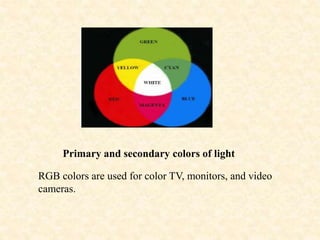
Colors are seen as variable combinations of the primary colors of light:
red (R), green (G), and blue (B). The primary colors can be mixed to
produce the secondary colors: magenta (red+blue), cyan (green+blue),
and yellow (red+green). Mixing the three primaries, or a secondary with
its opposite primary color, produces white light.
Primary and secondary colors of light
RGB colors are used for color TV, monitors, and video
cameras.
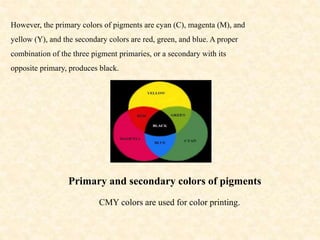
However, the primary colors of pigments are cyan (C), magenta (M), and
yellow (Y), and the secondary colors are red, green, and blue. A proper
combination of the three pigment primaries, or a secondary with its
opposite primary, produces black.
Primary and secondary colors of pigments
CMY colors are used for color printing.
Color characteristics
The characteristics used to distinguish one color from another are:
• Brightness: means the amount of intensity (i.e. color level).
• Hue: represents dominant color as perceived by an observer.
• Saturation: refers to the amount of white light mixed with a hue.
Color Models
The purpose of a color model is to facilitate the specification of colors in
some standard way. A color model is a specification of a coordinate
system and a subspace within that system where each color is represented
by a single point. Color models most commonly used in image processing
are:
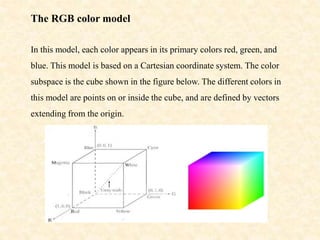
The RGB color model
In this model, each color appears in its primary colors red, green, and
blue. This model is based on a Cartesian coordinate system. The color
subspace is the cube shown in the figure below. The different colors in
this model are points on or inside the cube, and are defined by vectors
extending from the origin.
All color values R, G, and B have been normalized in the range [0, 1].
However, we can represent each of R, G, and B from 0 to 255.
Each RGB color image consists of three component images,.These three
images arecombined on the screen to produce a color image.
The CMY and CMYK color model
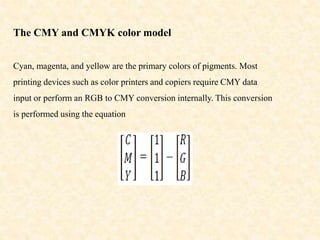
Cyan, magenta, and yellow are the primary colors of pigments. Most
printing devices such as color printers and copiers require CMY data
input or perform an RGB to CMY conversion internally. This conversion
is performed using the equation
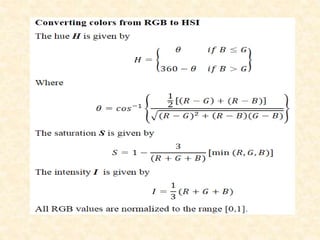
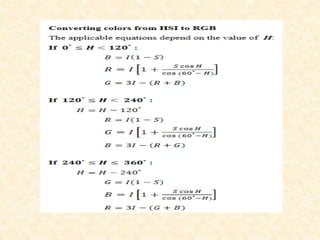
The HSI color model
The RGB and CMY color models are not suited for describing colors in
terms of human interpretation. When we view a color object, we describe
it by its hue, saturation, and brightness (intensity). Hence the HSI color
model has been presented. The HSI model decouples the intensity
component from the color-carrying information (hue and saturation) in a
color image. As a result, this model is an ideal tool for developing color
image processing algorithms.
Color image processing ppt

Color image processing ppt

  • 1.
    NADAR SARASWATHI COLLEGE OFARTS AND SCIENCE COLOR IMAGE PROCESSING Submitted by: M.Vidhya II M.Sc CS
  • 2.
    Color Image Processing Theuse of color is important in image processing because: • Color is a powerful descriptor that simplifies object identification and extraction. • Humans can discern thousands of color shades and intensities, compared to about only two dozen shades of gray.
  • 3.
    Color image processingis divided into two major areas: • Full-color processing: images are acquired with a full-color sensor, such as a color TV camera or color scanner. • Pseudocolor processing: The problem is one of assigning a color to a particular monochrome intensity or range of intensities.
  • 4.
    Color Fundamentals Colors areseen as variable combinations of the primary colors of light: red (R), green (G), and blue (B). The primary colors can be mixed to produce the secondary colors: magenta (red+blue), cyan (green+blue), and yellow (red+green). Mixing the three primaries, or a secondary with its opposite primary color, produces white light.
  • 5.
    Primary and secondarycolors of light RGB colors are used for color TV, monitors, and video cameras.
  • 6.
    However, the primarycolors of pigments are cyan (C), magenta (M), and yellow (Y), and the secondary colors are red, green, and blue. A proper combination of the three pigment primaries, or a secondary with its opposite primary, produces black. Primary and secondary colors of pigments CMY colors are used for color printing.
  • 7.
    Color characteristics The characteristicsused to distinguish one color from another are: • Brightness: means the amount of intensity (i.e. color level). • Hue: represents dominant color as perceived by an observer. • Saturation: refers to the amount of white light mixed with a hue. Color Models The purpose of a color model is to facilitate the specification of colors in some standard way. A color model is a specification of a coordinate system and a subspace within that system where each color is represented by a single point. Color models most commonly used in image processing are:
  • 8.
    The RGB colormodel In this model, each color appears in its primary colors red, green, and blue. This model is based on a Cartesian coordinate system. The color subspace is the cube shown in the figure below. The different colors in this model are points on or inside the cube, and are defined by vectors extending from the origin.
  • 9.
    All color valuesR, G, and B have been normalized in the range [0, 1]. However, we can represent each of R, G, and B from 0 to 255. Each RGB color image consists of three component images,.These three images arecombined on the screen to produce a color image.
  • 10.
    The CMY andCMYK color model Cyan, magenta, and yellow are the primary colors of pigments. Most printing devices such as color printers and copiers require CMY data input or perform an RGB to CMY conversion internally. This conversion is performed using the equation
  • 11.
    The HSI colormodel The RGB and CMY color models are not suited for describing colors in terms of human interpretation. When we view a color object, we describe it by its hue, saturation, and brightness (intensity). Hence the HSI color model has been presented. The HSI model decouples the intensity component from the color-carrying information (hue and saturation) in a color image. As a result, this model is an ideal tool for developing color image processing algorithms.