Testing Strategies for Docker Driven
Development
alexei@codefresh.io
Testing Strategies for
Docker Containers
Alexei Ledenev
alexei@codefresh.io
About me…
•@codefresh.io
•github.com/alexei-led/pumba
•#docker, #golang, #aws
•medium.com/@alexeiled
•@alexeiled
Why Docker
Portability
Speed
Configuration
Docker Hub (“App Store”)
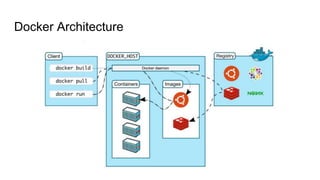
Docker Architecture
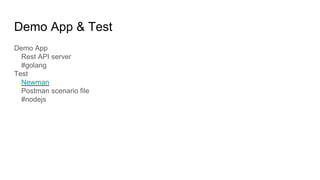
Demo App & Test
Demo App
Rest API server
#golang
Test
Newman
Postman scenario file
#nodejs
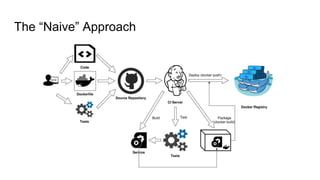
The “Naive” Approach
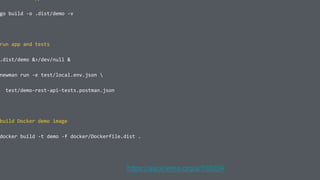
go build -o .dist/demo -v
run app and tests
.dist/demo &>/dev/null &
newman run -e test/local.env.json 
test/demo-rest-api-tests.postman.json
build Docker demo image
docker build -t demo -f docker/Dockerfile.dist .
https://asciinema.org/a/100204
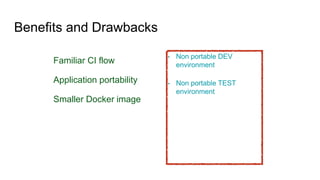
Benefits and Drawbacks
Familiar CI flow
Application portability
Smaller Docker image
• Non portable DEV
environment
• Non portable TEST
environment
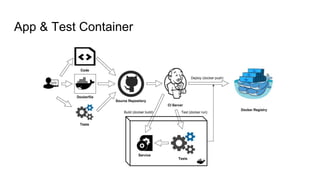
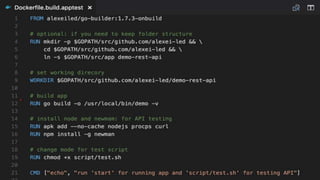
App & Test Container
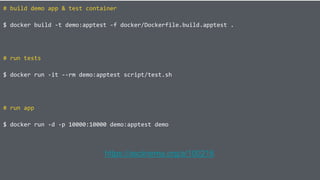
# build demo app & test container
$ docker build -t demo:apptest -f docker/Dockerfile.build.apptest .
# run tests
$ docker run -it --rm demo:apptest script/test.sh
# run app
$ docker run -d -p 10000:10000 demo:apptest demo
https://asciinema.org/a/100216
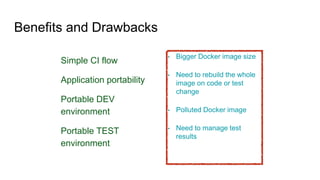
Benefits and Drawbacks
Simple CI flow
Application portability
Portable DEV
environment
Portable TEST
environment
• Bigger Docker image size
• Need to rebuild the whole
image on code or test
change
• Polluted Docker image
• Need to manage test
results
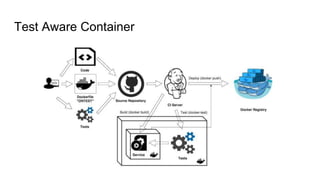
Test Aware Container
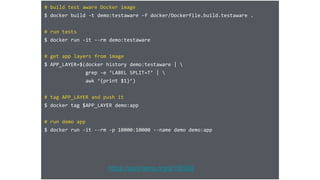
# build test aware Docker image
$ docker build -t demo:testaware -f docker/Dockerfile.build.testaware .
# run tests
$ docker run -it --rm demo:testaware
# get app layers from image
$ APP_LAYER=$(docker history demo:testaware | 
grep -e ‘LABEL SPLIT=T’ | 
awk ‘{print $1}’)
# tag APP_LAYER and push it
$ docker tag $APP_LAYER demo:app
# run demo app
$ docker run -it --rm -p 10000:10000 --name demo demo:app
https://asciinema.org/a/100260
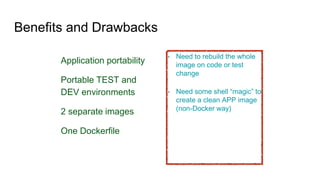
Benefits and Drawbacks
Application portability
Portable TEST and
DEV environments
2 separate images
One Dockerfile
• Need to rebuild the whole
image on code or test
change
• Need some shell “magic” to
create a clean APP image
(non-Docker way)
– Me :-)
“After trying multiple approaches, the
following is the one that I can
recommend.”
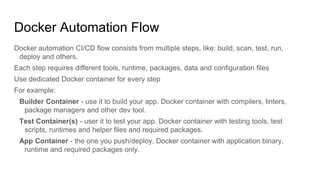
Docker Automation Flow
Docker automation CI/CD flow consists from multiple steps, like: build, scan, test, run,
deploy and others.
Each step requires different tools, runtime, packages, data and configuration files
Use dedicated Docker container for every step
For example:
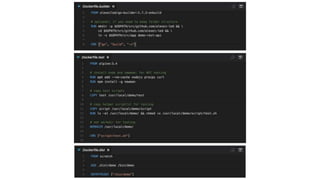
Builder Container - use it to build your app. Docker container with compilers, linters,
package managers and other dev tool.
Test Container(s) - user it to test your app. Docker container with testing tools, test
scripts, runtimes and helper files and required packages.
App Container - the one you push/deploy. Docker container with application binary,
runtime and required packages only.
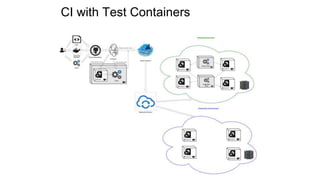
CI with Test Containers
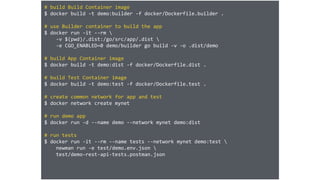
# build Build Container image
$ docker build -t demo:builder -f docker/Dockerfile.builder .
# use Builder container to build the app
$ docker run -it --rm 
-v $(pwd)/.dist:/go/src/app/.dist 
-e CGO_ENABLED=0 demo/builder go build -v -o .dist/demo
# build App Container image
$ docker build -t demo:dist -f docker/Dockerfile.dist .
# build Test Container image
$ docker build -t demo:test -f docker/Dockerfile.test .
# create common network for app and test
$ docker network create mynet
# run demo app
$ docker run -d --name demo --network mynet demo:dist
# run tests
$ docker run -it --rm --name tests --network mynet demo:test 
newman run -e test/demo.env.json 
test/demo-rest-api-tests.postman.json
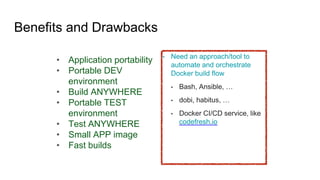
Benefits and Drawbacks
• Application portability
• Portable DEV
environment
• Build ANYWHERE
• Portable TEST
environment
• Test ANYWHERE
• Small APP image
• Fast builds
• Need an approach/tool to
automate and orchestrate
Docker build flow
• Bash, Ansible, …
• dobi, habitus, …
• Docker CI/CD service, like
codefresh.io
Q&A
@alexeiled
● Create your Codefresh account at www.codefresh.io
● Additional info on Containers & Docker Driven Development -
www.codefresh.io/blog & www.codefresh.io/container-academy/
● Twitter - @codefresh
● Questions for sales - sales@codefresh.io
● Create your Cloud 66 account at www.cloud66.com/
● Twitter - @cloud66
Next Steps
Thank You!

Codefresh + Cloud 66 webinar: Testing Strategies for Docker Driven Development

  • 1.
    Testing Strategies forDocker Driven Development alexei@codefresh.io
  • 2.
    Testing Strategies for DockerContainers Alexei Ledenev alexei@codefresh.io
  • 3.
  • 4.
  • 5.
  • 6.
    Demo App &Test Demo App Rest API server #golang Test Newman Postman scenario file #nodejs
  • 7.
  • 8.
    go build -o.dist/demo -v run app and tests .dist/demo &>/dev/null & newman run -e test/local.env.json test/demo-rest-api-tests.postman.json build Docker demo image docker build -t demo -f docker/Dockerfile.dist . https://asciinema.org/a/100204
  • 9.
    Benefits and Drawbacks FamiliarCI flow Application portability Smaller Docker image • Non portable DEV environment • Non portable TEST environment
  • 10.
    App & TestContainer
  • 12.
    # build demoapp & test container $ docker build -t demo:apptest -f docker/Dockerfile.build.apptest . # run tests $ docker run -it --rm demo:apptest script/test.sh # run app $ docker run -d -p 10000:10000 demo:apptest demo https://asciinema.org/a/100216
  • 13.
    Benefits and Drawbacks SimpleCI flow Application portability Portable DEV environment Portable TEST environment • Bigger Docker image size • Need to rebuild the whole image on code or test change • Polluted Docker image • Need to manage test results
  • 14.
  • 16.
    # build testaware Docker image $ docker build -t demo:testaware -f docker/Dockerfile.build.testaware . # run tests $ docker run -it --rm demo:testaware # get app layers from image $ APP_LAYER=$(docker history demo:testaware | grep -e ‘LABEL SPLIT=T’ | awk ‘{print $1}’) # tag APP_LAYER and push it $ docker tag $APP_LAYER demo:app # run demo app $ docker run -it --rm -p 10000:10000 --name demo demo:app https://asciinema.org/a/100260
  • 17.
    Benefits and Drawbacks Applicationportability Portable TEST and DEV environments 2 separate images One Dockerfile • Need to rebuild the whole image on code or test change • Need some shell “magic” to create a clean APP image (non-Docker way)
  • 18.
    – Me :-) “Aftertrying multiple approaches, the following is the one that I can recommend.”
  • 19.
    Docker Automation Flow Dockerautomation CI/CD flow consists from multiple steps, like: build, scan, test, run, deploy and others. Each step requires different tools, runtime, packages, data and configuration files Use dedicated Docker container for every step For example: Builder Container - use it to build your app. Docker container with compilers, linters, package managers and other dev tool. Test Container(s) - user it to test your app. Docker container with testing tools, test scripts, runtimes and helper files and required packages. App Container - the one you push/deploy. Docker container with application binary, runtime and required packages only.
  • 21.
    CI with TestContainers
  • 22.
    # build BuildContainer image $ docker build -t demo:builder -f docker/Dockerfile.builder . # use Builder container to build the app $ docker run -it --rm -v $(pwd)/.dist:/go/src/app/.dist -e CGO_ENABLED=0 demo/builder go build -v -o .dist/demo # build App Container image $ docker build -t demo:dist -f docker/Dockerfile.dist . # build Test Container image $ docker build -t demo:test -f docker/Dockerfile.test . # create common network for app and test $ docker network create mynet # run demo app $ docker run -d --name demo --network mynet demo:dist # run tests $ docker run -it --rm --name tests --network mynet demo:test newman run -e test/demo.env.json test/demo-rest-api-tests.postman.json
  • 23.
    Benefits and Drawbacks •Application portability • Portable DEV environment • Build ANYWHERE • Portable TEST environment • Test ANYWHERE • Small APP image • Fast builds • Need an approach/tool to automate and orchestrate Docker build flow • Bash, Ansible, … • dobi, habitus, … • Docker CI/CD service, like codefresh.io
  • 24.
  • 25.
    ● Create yourCodefresh account at www.codefresh.io ● Additional info on Containers & Docker Driven Development - www.codefresh.io/blog & www.codefresh.io/container-academy/ ● Twitter - @codefresh ● Questions for sales - sales@codefresh.io ● Create your Cloud 66 account at www.cloud66.com/ ● Twitter - @cloud66 Next Steps
  • 26.