

Oleksandr Pastukhov
JUG Shenzhen August
2016
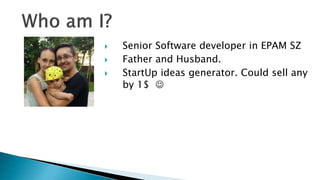
 Senior Software developer in EPAM SZ
 Father and Husband.
 StartUp ideas generator. Could sell any
by 1$ 
 Docker as a Solution
 For Developer
 For Administrator
 Container vs VM
 Docker Basics
 Kitematic
 Docker in Numbers
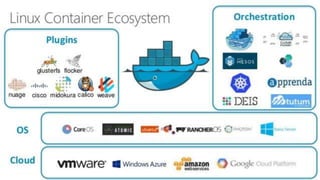
 Orchestration
 Bonus
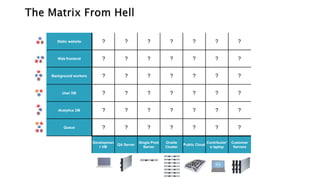
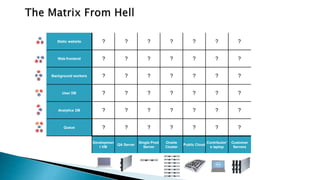
Static website
Web frontend
Background workers
User DB
Analytics DB
Queue
Developmen
t VM
QA Server
Single Prod
Server
Onsite
Cluster
Public Cloud
Contributor’
s laptop
Customer
Servers
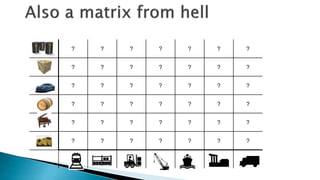
? ? ? ? ? ? ?
? ? ? ? ? ? ?
? ? ? ? ? ? ?
? ? ? ? ? ? ?
? ? ? ? ? ? ?
? ? ? ? ? ? ?
? ? ? ? ? ? ?
? ? ? ? ? ? ?
? ? ? ? ? ? ?
? ? ? ? ? ? ?
? ? ? ? ? ? ?
? ? ? ? ? ? ?
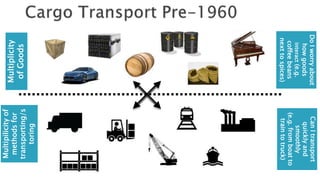
Multiplicity
ofGoods
Multipilicityof
methodsfor
transporting/s
toring
DoIworryabout
howgoods
interact(e.g.
coffeebeans
nexttospices)
CanItransport
quicklyand
smoothly
(e.g.fromboatto
traintotruck)
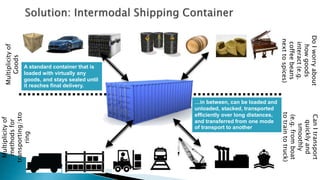
Multiplicityof
Goods
Multiplicityof
methodsfor
transporting/sto
ring
DoIworryabout
howgoods
interact(e.g.
coffeebeans
nexttospices)
CanItransport
quicklyand
smoothly
(e.g.fromboat
totraintotruck)
…in between, can be loaded and
unloaded, stacked, transported
efficiently over long distances,
and transferred from one mode
of transport to another
A standard container that is
loaded with virtually any
goods, and stays sealed until
it reaches final delivery.
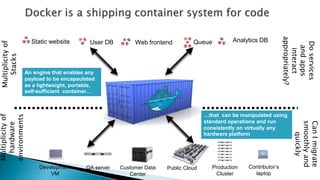
Static website Web frontendUser DB Queue Analytics DB
Development
VM
QA server Public Cloud Contributor’s
laptop
Multiplicityof
Stacks
Multiplicityof
hardware
environments
Production
Cluster
Customer Data
Center
Doservices
andapps
interact
appropriately?
CanImigrate
smoothlyand
quickly
…that can be manipulated using
standard operations and run
consistently on virtually any
hardware platform
An engine that enables any
payload to be encapsulated
as a lightweight, portable,
self-sufficient container…
Static website
Web frontend
Background workers
User DB
Analytics DB
Queue
Developmen
t VM
QA Server
Single Prod
Server
Onsite
Cluster
Public Cloud
Contributor’
s laptop
Customer
Servers
? ? ? ? ? ? ?
? ? ? ? ? ? ?
? ? ? ? ? ? ?
? ? ? ? ? ? ?
? ? ? ? ? ? ?
? ? ? ? ? ? ?
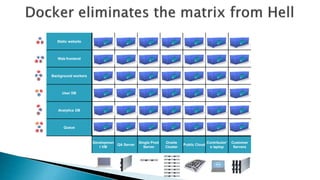
Static website
Web frontend
Background workers
User DB
Analytics DB
Queue
Developmen
t VM
QA Server
Single Prod
Server
Onsite
Cluster
Public Cloud
Contributor’
s laptop
Customer
Servers
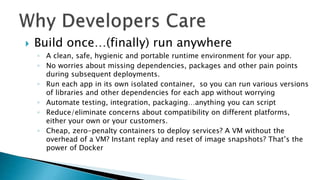
 Build once…(finally) run anywhere
◦ A clean, safe, hygienic and portable runtime environment for your app.
◦ No worries about missing dependencies, packages and other pain points
during subsequent deployments.
◦ Run each app in its own isolated container, so you can run various versions
of libraries and other dependencies for each app without worrying
◦ Automate testing, integration, packaging…anything you can script
◦ Reduce/eliminate concerns about compatibility on different platforms,
either your own or your customers.
◦ Cheap, zero-penalty containers to deploy services? A VM without the
overhead of a VM? Instant replay and reset of image snapshots? That’s the
power of Docker
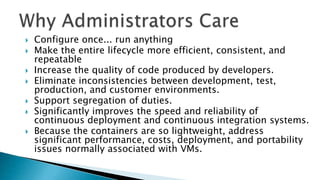
 Configure once... run anything
 Make the entire lifecycle more efficient, consistent, and
repeatable
 Increase the quality of code produced by developers.
 Eliminate inconsistencies between development, test,
production, and customer environments.
 Support segregation of duties.
 Significantly improves the speed and reliability of
continuous deployment and continuous integration systems.
 Because the containers are so lightweight, address
significant performance, costs, deployment, and portability
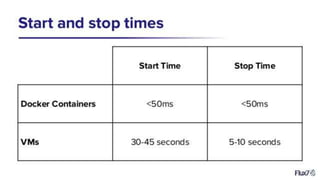
issues normally associated with VMs.
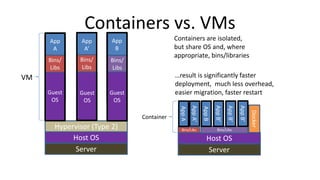
App
A
Containers vs. VMs
Hypervisor (Type 2)
Host OS
Server
Guest
OS
Bins/
Libs
App
A’
Gue
st
OS
Bins/
Libs
App
B
Gue
st
OS
Bins/
Libs
AppA’
Docker
Host OS
Server
Bins/Libs
AppA
Bins/Libs
AppB
AppB’
AppB’
AppB’
VM
Container
Containers are isolated,
but share OS and, where
appropriate, bins/libraries
Guest
OS
Guest
OS
…result is significantly faster
deployment, much less overhead,
easier migration, faster restart
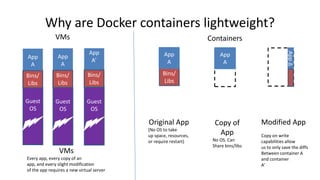
Why are Docker containers lightweight?
Bins/
Libs
App
A
Original App
(No OS to take
up space, resources,
or require restart)
AppΔ
Bins
/
App
A
Bins/
Libs
App
A’
Gue
st
OS
Bins/
Libs
Modified App
Copy on write
capabilities allow
us to only save the diffs
Between container A
and container
A’
VMs
Every app, every copy of an
app, and every slight modification
of the app requires a new virtual server
App
A
Guest
OS
Bins/
Libs
Copy of
App
No OS. Can
Share bins/libs
App
A
Guest
OS
Guest
OS
VMs Containers
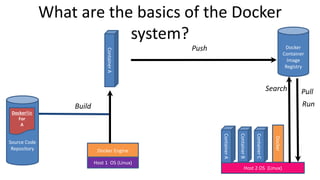
What are the basics of the Docker
system?
Source Code
Repository
Dockerfile
For
A
Docker Engine
Docker
Container
Image
Registry
Build
Docker
Host 2 OS (Linux)
ContainerA
ContainerB
ContainerC
ContainerA
Push
Search Pull
Run
Host 1 OS (Linux)
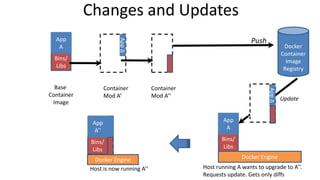
Changes and Updates
Docker Engine
Docker
Container
Image
Registry
Docker Engine
Push
Update
Bins/
Libs
App
A
AppΔ
Bin
s/
Base
Container
Image
Host is now running A’’
Container
Mod A’’
AppΔ
Bin
s/
Bins/
Libs
App
A
Bin
s/
Bins/
Libs
App
A’’
Host running A wants to upgrade to A’’.
Requests update. Gets only diffs
Container
Mod A’
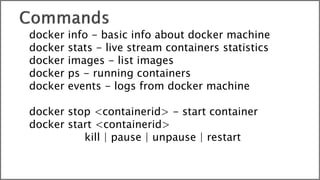
docker info - basic info about docker machine
docker stats - live stream containers statistics
docker images - list images
docker ps - running containers
docker events - logs from docker machine
docker stop <containerid> - start container
docker start <containerid>
kill | pause | unpause | restart
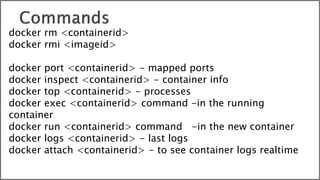
docker rm <containerid>
docker rmi <imageid>
docker port <containerid> - mapped ports
docker inspect <containerid> - container info
docker top <containerid> - processes
docker exec <containerid> command -in the running
container
docker run <containerid> command -in the new container
docker logs <containerid> - last logs
docker attach <containerid> - to see container logs realtime
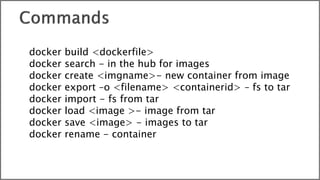
docker build <dockerfile>
docker search - in the hub for images
docker create <imgname>- new container from image
docker export –o <filename> <containerid> – fs to tar
docker import - fs from tar
docker load <image >- image from tar
docker save <image> - images to tar
docker rename - container
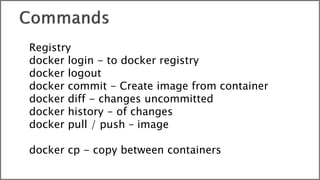
Registry
docker login - to docker registry
docker logout
docker commit - Create image from container
docker diff - changes uncommitted
docker history - of changes
docker pull / push – image
docker cp - copy between containers
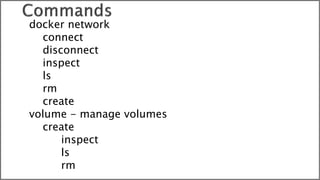
docker network
connect
disconnect
inspect
ls
rm
create
volume - manage volumes
create
inspect
ls
rm
1. Docker under Raspberry Pi
2. Set up a game server
http://altronica.com
Quality Outsource

Introduction Into Docker Ecosystem

  • 1.
  • 2.
     Senior Softwaredeveloper in EPAM SZ  Father and Husband.  StartUp ideas generator. Could sell any by 1$ 
  • 3.
     Docker asa Solution  For Developer  For Administrator  Container vs VM  Docker Basics  Kitematic  Docker in Numbers  Orchestration  Bonus
  • 5.
    Static website Web frontend Backgroundworkers User DB Analytics DB Queue Developmen t VM QA Server Single Prod Server Onsite Cluster Public Cloud Contributor’ s laptop Customer Servers ? ? ? ? ? ? ? ? ? ? ? ? ? ? ? ? ? ? ? ? ? ? ? ? ? ? ? ? ? ? ? ? ? ? ? ? ? ? ? ? ? ?
  • 6.
    ? ? ?? ? ? ? ? ? ? ? ? ? ? ? ? ? ? ? ? ? ? ? ? ? ? ? ? ? ? ? ? ? ? ? ? ? ? ? ? ? ?
  • 7.
  • 8.
    Multiplicityof Goods Multiplicityof methodsfor transporting/sto ring DoIworryabout howgoods interact(e.g. coffeebeans nexttospices) CanItransport quicklyand smoothly (e.g.fromboat totraintotruck) …in between, canbe loaded and unloaded, stacked, transported efficiently over long distances, and transferred from one mode of transport to another A standard container that is loaded with virtually any goods, and stays sealed until it reaches final delivery.
  • 9.
    Static website WebfrontendUser DB Queue Analytics DB Development VM QA server Public Cloud Contributor’s laptop Multiplicityof Stacks Multiplicityof hardware environments Production Cluster Customer Data Center Doservices andapps interact appropriately? CanImigrate smoothlyand quickly …that can be manipulated using standard operations and run consistently on virtually any hardware platform An engine that enables any payload to be encapsulated as a lightweight, portable, self-sufficient container…
  • 10.
    Static website Web frontend Backgroundworkers User DB Analytics DB Queue Developmen t VM QA Server Single Prod Server Onsite Cluster Public Cloud Contributor’ s laptop Customer Servers ? ? ? ? ? ? ? ? ? ? ? ? ? ? ? ? ? ? ? ? ? ? ? ? ? ? ? ? ? ? ? ? ? ? ? ? ? ? ? ? ? ?
  • 11.
    Static website Web frontend Backgroundworkers User DB Analytics DB Queue Developmen t VM QA Server Single Prod Server Onsite Cluster Public Cloud Contributor’ s laptop Customer Servers
  • 12.
     Build once…(finally)run anywhere ◦ A clean, safe, hygienic and portable runtime environment for your app. ◦ No worries about missing dependencies, packages and other pain points during subsequent deployments. ◦ Run each app in its own isolated container, so you can run various versions of libraries and other dependencies for each app without worrying ◦ Automate testing, integration, packaging…anything you can script ◦ Reduce/eliminate concerns about compatibility on different platforms, either your own or your customers. ◦ Cheap, zero-penalty containers to deploy services? A VM without the overhead of a VM? Instant replay and reset of image snapshots? That’s the power of Docker
  • 13.
     Configure once...run anything  Make the entire lifecycle more efficient, consistent, and repeatable  Increase the quality of code produced by developers.  Eliminate inconsistencies between development, test, production, and customer environments.  Support segregation of duties.  Significantly improves the speed and reliability of continuous deployment and continuous integration systems.  Because the containers are so lightweight, address significant performance, costs, deployment, and portability issues normally associated with VMs.
  • 15.
    App A Containers vs. VMs Hypervisor(Type 2) Host OS Server Guest OS Bins/ Libs App A’ Gue st OS Bins/ Libs App B Gue st OS Bins/ Libs AppA’ Docker Host OS Server Bins/Libs AppA Bins/Libs AppB AppB’ AppB’ AppB’ VM Container Containers are isolated, but share OS and, where appropriate, bins/libraries Guest OS Guest OS …result is significantly faster deployment, much less overhead, easier migration, faster restart
  • 16.
    Why are Dockercontainers lightweight? Bins/ Libs App A Original App (No OS to take up space, resources, or require restart) AppΔ Bins / App A Bins/ Libs App A’ Gue st OS Bins/ Libs Modified App Copy on write capabilities allow us to only save the diffs Between container A and container A’ VMs Every app, every copy of an app, and every slight modification of the app requires a new virtual server App A Guest OS Bins/ Libs Copy of App No OS. Can Share bins/libs App A Guest OS Guest OS VMs Containers
  • 17.
    What are thebasics of the Docker system? Source Code Repository Dockerfile For A Docker Engine Docker Container Image Registry Build Docker Host 2 OS (Linux) ContainerA ContainerB ContainerC ContainerA Push Search Pull Run Host 1 OS (Linux)
  • 18.
    Changes and Updates DockerEngine Docker Container Image Registry Docker Engine Push Update Bins/ Libs App A AppΔ Bin s/ Base Container Image Host is now running A’’ Container Mod A’’ AppΔ Bin s/ Bins/ Libs App A Bin s/ Bins/ Libs App A’’ Host running A wants to upgrade to A’’. Requests update. Gets only diffs Container Mod A’
  • 24.
    docker info -basic info about docker machine docker stats - live stream containers statistics docker images - list images docker ps - running containers docker events - logs from docker machine docker stop <containerid> - start container docker start <containerid> kill | pause | unpause | restart
  • 25.
    docker rm <containerid> dockerrmi <imageid> docker port <containerid> - mapped ports docker inspect <containerid> - container info docker top <containerid> - processes docker exec <containerid> command -in the running container docker run <containerid> command -in the new container docker logs <containerid> - last logs docker attach <containerid> - to see container logs realtime
  • 26.
    docker build <dockerfile> dockersearch - in the hub for images docker create <imgname>- new container from image docker export –o <filename> <containerid> – fs to tar docker import - fs from tar docker load <image >- image from tar docker save <image> - images to tar docker rename - container
  • 27.
    Registry docker login -to docker registry docker logout docker commit - Create image from container docker diff - changes uncommitted docker history - of changes docker pull / push – image docker cp - copy between containers
  • 28.
  • 41.
    1. Docker underRaspberry Pi 2. Set up a game server
  • 43.

Editor's Notes

  • #25 Go back https://hub.docker.com/
  • #26 Go back https://hub.docker.com/
  • #27 Go back https://hub.docker.com/
  • #28 Go back https://hub.docker.com/
  • #29 Go back https://hub.docker.com/
  • #35 1 Create TeamCity Image 2 Create Postgres image
  • #44 docker port $CONTAINER_ID 22