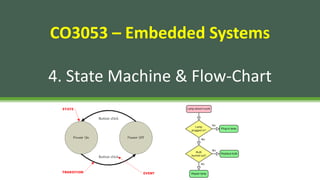
CO3053 – Embedded Systems
4. State Machine & Flow-Chart
anhpham@hcmut.edu.vn
CO3053 – Lecture Notes 2
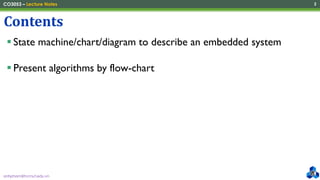
▪ State machine/chart/diagram to describe an embedded system
▪ Present algorithms by flow-chart
Contents
anhpham@hcmut.edu.vn
CO3053 – Lecture Notes 3
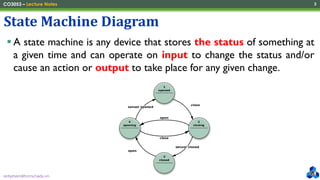
▪ A state machine is any device that stores the status of something at
a given time and can operate on input to change the status and/or
cause an action or output to take place for any given change.
State Machine Diagram
anhpham@hcmut.edu.vn
CO3053 – Lecture Notes 4
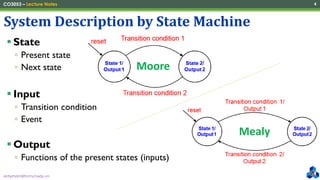
▪ State
▫ Present state
▫ Next state
▪ Input
▫ Transition condition
▫ Event
▪ Output
▫ Functions of the present states (inputs)
System Description by State Machine
Moore
Mealy
anhpham@hcmut.edu.vn
CO3053 – Lecture Notes 5
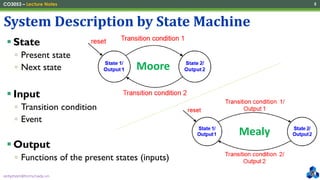
▪ State
▫ Present state
▫ Next state
▪ Input
▫ Transition condition
▫ Event
▪ Output
▫ Functions of the present states (inputs)
System Description by State Machine
Moore
Mealy
anhpham@hcmut.edu.vn
CO3053 – Lecture Notes 6
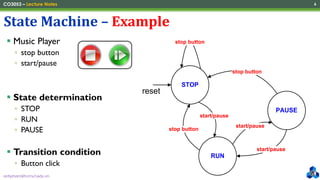
▪ Music Player
▫ stop button
▫ start/pause
▪ State determination
▫ STOP
▫ RUN
▫ PAUSE
▪ Transition condition
▫ Button click
State Machine – Example
STOP
PAUSE
stop button
reset
RUN
stop button
start/pause
start/pause
start/pause
stop button
anhpham@hcmut.edu.vn
CO3053 – Lecture Notes 7
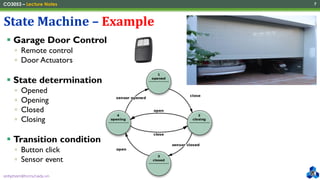
▪ Garage Door Control
▫ Remote control
▫ Door Actuators
▪ State determination
▫ Opened
▫ Opening
▫ Closed
▫ Closing
▪ Transition condition
▫ Button click
▫ Sensor event
State Machine – Example
anhpham@hcmut.edu.vn
CO3053 – Lecture Notes 8
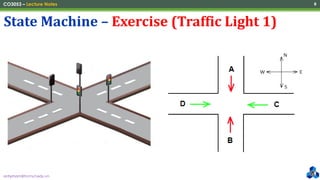
State Machine – Exercise (Traffic Light 1)
anhpham@hcmut.edu.vn
CO3053 – Lecture Notes 9
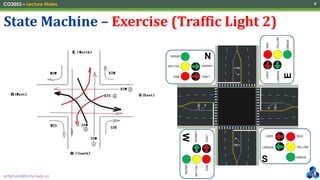
State Machine – Exercise (Traffic Light 2)
S
N
RED
YELLOW
GREEN
LRED
LGREEN
RED
YELLOW
GREEN
LRED
LGREEN
RED
YELLOW
GREEN
LRED
LGREEN
RED
YELLOW
GREEN
LRED
LGREEN
W
E
anhpham@hcmut.edu.vn
CO3053 – Lecture Notes 10
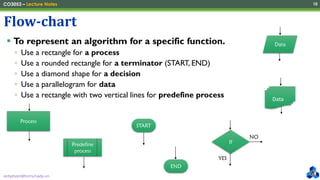
▪ To represent an algorithm for a specific function.
▫ Use a rectangle for a process
▫ Use a rounded rectangle for a terminator (START, END)
▫ Use a diamond shape for a decision
▫ Use a parallelogram for data
▫ Use a rectangle with two vertical lines for predefine process
Flow-chart
Process
START
END
If
YES
NO
Predefine
process
Data
Data
anhpham@hcmut.edu.vn
CO3053 – Lecture Notes 11
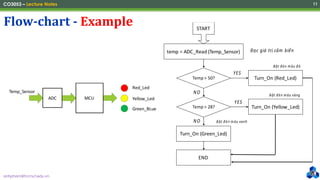
Flow-chart - Example
ADC MCU
Temp_Sensor
Red_Led
Yellow_Led
Green_BLue
START
temp = ADC_Read (Temp_Sensor) Đọc giá trị cảm biến
Temp > 50?
Temp > 28?
Turn_On (Red_Led)
Turn_On (Yellow_Led)
Turn_On (Green_Led)
END
YES
YES
NO
NO
Bật đèn màu đỏ
Bật đèn màu vàng
Bật đèn màu xanh
“Tại một thời điểm chỉ có duy nhất một đèn
sáng, nghĩa là nếu một đèn được bật thì 2 đèn
còn lại sẽ tắt.”
anhpham@hcmut.edu.vn
CO3053 – Lecture Notes 12
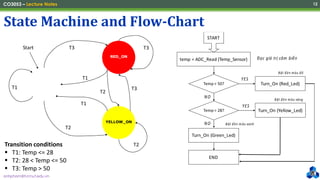
State Machine and Flow-Chart
START
temp = ADC_Read (Temp_Sensor) Đọc giá trị cảm biến
Temp > 50?
Temp > 28?
Turn_On (Red_Led)
Turn_On (Yellow_Led)
Turn_On (Green_Led)
END
YES
YES
NO
NO
Bật đèn màu đỏ
Bật đèn màu vàng
Bật đèn màu xanh
“Tại một thời điểm chỉ có duy nhất một đèn
sáng, nghĩa là nếu một đèn được bật thì 2 đèn
còn lại sẽ tắt.”
GREEN_ON
RED_ON
YELLOW_ON
T1
T1
T1
T2
T2
T2
T3 T3
T3
Start
Transition conditions
▪ T1: Temp <= 28
▪ T2: 28 < Temp <= 50
▪ T3: Temp > 50
anhpham@hcmut.edu.vn
CO3053 – Lecture Notes 13
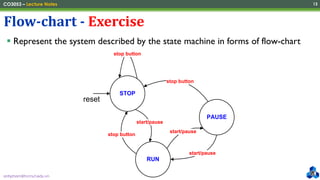
▪ Represent the system described by the state machine in forms of flow-chart
Flow-chart - Exercise
STOP
PAUSE
stop button
reset
RUN
stop button
start/pause
start/pause
start/pause
stop button
anhpham@hcmut.edu.vn
CO3053 – Lecture Notes 14
▪ Let’s design and implement the control unit of a washing machine that is
described as follows:
▫ The machine can be controlled by three buttons (STOP, RUN, PAUSE).
▫ The washing machine is only able to execute after at least 50-cents is added.
▫ The machine only accepts 10-cent, 20-cent, 50-cent coins.
▫ When there is enough money, the machine will execute if the RUN button is pressed.
Then, the money will be clear without returning the redundancies (if any).
▫ When the machine is running, it will be paused as the PAUSE button is pressed. The
machine will re-execute when the RUN button is pressed again.
▫ The executing machine will be automatically terminated after 30 minutes or when the
STOP button is pressed.
Exercise
CO3053 - Lecture 4 - State Machine and Flowchart.pdf

  • 1.
    CO3053 – EmbeddedSystems 4. State Machine & Flow-Chart
  • 2.
    anhpham@hcmut.edu.vn CO3053 – LectureNotes 2 ▪ State machine/chart/diagram to describe an embedded system ▪ Present algorithms by flow-chart Contents
  • 3.
    anhpham@hcmut.edu.vn CO3053 – LectureNotes 3 ▪ A state machine is any device that stores the status of something at a given time and can operate on input to change the status and/or cause an action or output to take place for any given change. State Machine Diagram
  • 4.
    anhpham@hcmut.edu.vn CO3053 – LectureNotes 4 ▪ State ▫ Present state ▫ Next state ▪ Input ▫ Transition condition ▫ Event ▪ Output ▫ Functions of the present states (inputs) System Description by State Machine Moore Mealy
  • 5.
    anhpham@hcmut.edu.vn CO3053 – LectureNotes 5 ▪ State ▫ Present state ▫ Next state ▪ Input ▫ Transition condition ▫ Event ▪ Output ▫ Functions of the present states (inputs) System Description by State Machine Moore Mealy
  • 6.
    anhpham@hcmut.edu.vn CO3053 – LectureNotes 6 ▪ Music Player ▫ stop button ▫ start/pause ▪ State determination ▫ STOP ▫ RUN ▫ PAUSE ▪ Transition condition ▫ Button click State Machine – Example STOP PAUSE stop button reset RUN stop button start/pause start/pause start/pause stop button
  • 7.
    anhpham@hcmut.edu.vn CO3053 – LectureNotes 7 ▪ Garage Door Control ▫ Remote control ▫ Door Actuators ▪ State determination ▫ Opened ▫ Opening ▫ Closed ▫ Closing ▪ Transition condition ▫ Button click ▫ Sensor event State Machine – Example
  • 8.
    anhpham@hcmut.edu.vn CO3053 – LectureNotes 8 State Machine – Exercise (Traffic Light 1)
  • 9.
    anhpham@hcmut.edu.vn CO3053 – LectureNotes 9 State Machine – Exercise (Traffic Light 2) S N RED YELLOW GREEN LRED LGREEN RED YELLOW GREEN LRED LGREEN RED YELLOW GREEN LRED LGREEN RED YELLOW GREEN LRED LGREEN W E
  • 10.
    anhpham@hcmut.edu.vn CO3053 – LectureNotes 10 ▪ To represent an algorithm for a specific function. ▫ Use a rectangle for a process ▫ Use a rounded rectangle for a terminator (START, END) ▫ Use a diamond shape for a decision ▫ Use a parallelogram for data ▫ Use a rectangle with two vertical lines for predefine process Flow-chart Process START END If YES NO Predefine process Data Data
  • 11.
    anhpham@hcmut.edu.vn CO3053 – LectureNotes 11 Flow-chart - Example ADC MCU Temp_Sensor Red_Led Yellow_Led Green_BLue START temp = ADC_Read (Temp_Sensor) Đọc giá trị cảm biến Temp > 50? Temp > 28? Turn_On (Red_Led) Turn_On (Yellow_Led) Turn_On (Green_Led) END YES YES NO NO Bật đèn màu đỏ Bật đèn màu vàng Bật đèn màu xanh “Tại một thời điểm chỉ có duy nhất một đèn sáng, nghĩa là nếu một đèn được bật thì 2 đèn còn lại sẽ tắt.”
  • 12.
    anhpham@hcmut.edu.vn CO3053 – LectureNotes 12 State Machine and Flow-Chart START temp = ADC_Read (Temp_Sensor) Đọc giá trị cảm biến Temp > 50? Temp > 28? Turn_On (Red_Led) Turn_On (Yellow_Led) Turn_On (Green_Led) END YES YES NO NO Bật đèn màu đỏ Bật đèn màu vàng Bật đèn màu xanh “Tại một thời điểm chỉ có duy nhất một đèn sáng, nghĩa là nếu một đèn được bật thì 2 đèn còn lại sẽ tắt.” GREEN_ON RED_ON YELLOW_ON T1 T1 T1 T2 T2 T2 T3 T3 T3 Start Transition conditions ▪ T1: Temp <= 28 ▪ T2: 28 < Temp <= 50 ▪ T3: Temp > 50
  • 13.
    anhpham@hcmut.edu.vn CO3053 – LectureNotes 13 ▪ Represent the system described by the state machine in forms of flow-chart Flow-chart - Exercise STOP PAUSE stop button reset RUN stop button start/pause start/pause start/pause stop button
  • 14.
    anhpham@hcmut.edu.vn CO3053 – LectureNotes 14 ▪ Let’s design and implement the control unit of a washing machine that is described as follows: ▫ The machine can be controlled by three buttons (STOP, RUN, PAUSE). ▫ The washing machine is only able to execute after at least 50-cents is added. ▫ The machine only accepts 10-cent, 20-cent, 50-cent coins. ▫ When there is enough money, the machine will execute if the RUN button is pressed. Then, the money will be clear without returning the redundancies (if any). ▫ When the machine is running, it will be paused as the PAUSE button is pressed. The machine will re-execute when the RUN button is pressed again. ▫ The executing machine will be automatically terminated after 30 minutes or when the STOP button is pressed. Exercise