Strings
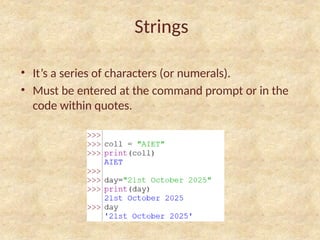
• It’s aseries of characters (or numerals).
• Must be entered at the command prompt or in the
code within quotes.
3.
Upper Command
• Uppercommand changes the case of the string
from lower to UPPER case as follows:
4.
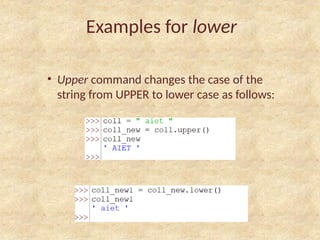
Examples for lower
•Upper command changes the case of the
string from UPPER to lower case as follows:
5.
Capitalize()
• Capitalize() commandchanges the case of
only the 1st
letter of the string to UPPER to
lower case.
• Changes the first alphabet regardless of the
string regardless of the entire string’s case.
6.
Examples for Capitalize()
•Changes the first alphabet regardless of the
string regardless of the entire string’s case.
enumerate()
• Lists theentire string’s elements one by one, along
with its index
• Does not work on its own
• Works along with the list command
9.
Index
• Index isthe numerical position of the alphabet inside
a string or the position of any element in a list.
• Helps us access a certain alphabet/character within a
string.
10.
String - Length
•The length of a string shows the number of elements
present within it (including quotes).
• len command
11.
Indexing & Stringlength
• Indexing of a string(or list) starts with 0.
• Reason.
• To access the last element of a string, we must type…
• string_name[len – 1]
‘+’ ve &‘-’ve indices
• When a ‘+’ve index (starting with 0) is entered, it counts the
position of string element from L to R and returns the
corresponding alphabet.
14.
‘+’ ve &‘-’ve indices
• When a ‘-’ve index (starting with 1) is entered, it counts the
position of string element from R to L and returns the
corresponding alphabet.
15.
Traversal
• It isthe process of going from the very first element
of the string to its last element.
• Traversal can be done using while statement as
follows:






![Indexing & String length
• Indexing of a string(or list) starts with 0.
• Reason.
• To access the last element of a string, we must type…
• string_name[len – 1]](https://image.slidesharecdn.com/python-module21-251031094630-226f82dd/85/Class-1-of-Module-2-Strings-in-Python-Syllabus-VIT-11-320.jpg)


![Attack surfaces and attack tress[inform]](https://cdn.slidesharecdn.com/ss_thumbnails/lecture03-260108015941-a4dee53b-thumbnail.jpg?width=640&height=640&fit=bounds)
