CIS247C

iLab 4 of 6: Composition and Class Interfaces/Abstract Class

                           Click this link to get the tutorial


                                    http://goo.gl/Fu6hE


                                               Connect to the iLab here.


        Submit your assignment to the Dropbox located on the silver
        tab at the top of this page.

        (See Syllabus "Due Dates for Assignments & Exams" for due
        dates.)
 iLABOVERVIEW
Scenario and Summary

The objective of the lab is to modify the Employee class to demonstrate composition and a
class interface. An employee typically has benefits, so we will make the following changes:

   1.   Create a Benefits class.
   2. Integrate the Benefit class into the Employee class.
   3. Create an iEmployee abstract class to guarantee that calculatePay is implemented in the Employee class. A
        tutorial on interfaces can be downloaded here.

Deliverables

Due this week:

        Capture the Console output window and paste it into a Word document.
        Zip the project folder files.
        Put the zip file and screen shots (Word document that contains programming code and screen shots of
        program output) in the Dropbox.
iLABSTEPS

STEP 1: Understand the UML Diagram


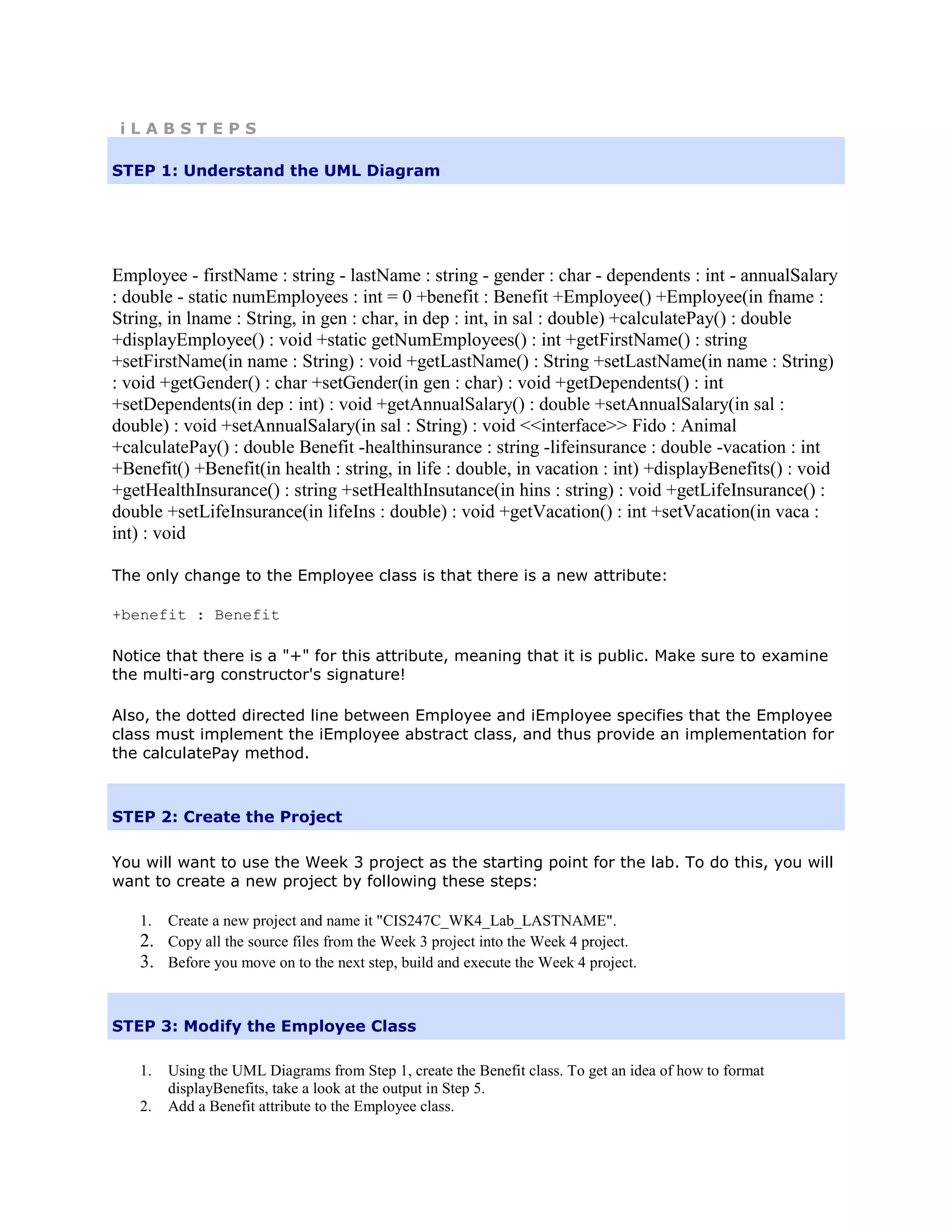
Employee - firstName : string - lastName : string - gender : char - dependents : int - annualSalary
: double - static numEmployees : int = 0 +benefit : Benefit +Employee() +Employee(in fname :
String, in lname : String, in gen : char, in dep : int, in sal : double) +calculatePay() : double
+displayEmployee() : void +static getNumEmployees() : int +getFirstName() : string
+setFirstName(in name : String) : void +getLastName() : String +setLastName(in name : String)
: void +getGender() : char +setGender(in gen : char) : void +getDependents() : int
+setDependents(in dep : int) : void +getAnnualSalary() : double +setAnnualSalary(in sal :
double) : void +setAnnualSalary(in sal : String) : void <<interface>> Fido : Animal
+calculatePay() : double Benefit -healthinsurance : string -lifeinsurance : double -vacation : int
+Benefit() +Benefit(in health : string, in life : double, in vacation : int) +displayBenefits() : void
+getHealthInsurance() : string +setHealthInsutance(in hins : string) : void +getLifeInsurance() :
double +setLifeInsurance(in lifeIns : double) : void +getVacation() : int +setVacation(in vaca :
int) : void

The only change to the Employee class is that there is a new attribute:

+benefit : Benefit

Notice that there is a "+" for this attribute, meaning that it is public. Make sure to examine
the multi-arg constructor's signature!

Also, the dotted directed line between Employee and iEmployee specifies that the Employee
class must implement the iEmployee abstract class, and thus provide an implementation for
the calculatePay method.


STEP 2: Create the Project

You will want to use the Week 3 project as the starting point for the lab. To do this, you will
want to create a new project by following these steps:

   1.   Create a new project and name it "CIS247C_WK4_Lab_LASTNAME".
   2.   Copy all the source files from the Week 3 project into the Week 4 project.
   3.   Before you move on to the next step, build and execute the Week 4 project.


STEP 3: Modify the Employee Class

   1.   Using the UML Diagrams from Step 1, create the Benefit class. To get an idea of how to format
        displayBenefits, take a look at the output in Step 5.
   2.   Add a Benefit attribute to the Employee class.
3.   Initialize the new Benefit attribute in both Employee constructors. Again, take note of the multi-
        argconstructors parameter list!
   4.   Create the iEmployee interface (abstract class in C++).
   5.   Modify the Employee class to implement the new interface so that Employee will have to implement the
        calculatePay method.


        class Employee : public iEmployee

   6. Modify the Employee class to call displayBenefit when displaying Employee information.


STEP 4: Modify the Main Method

Notice that the Employee class now has a public benefit object inside it. This means that
you can access the set methods of the Benefit object with the following code:

<Employee object>.benefit.<method>

As an example, to set the lifeInsurance attribute inside an Employee object called emp, we
could execute the following code:

emp.benefit.setLifeInsurance(lifeInsurance);

The steps required to modify the Main class are below. New steps are in bold.

   1.  Create an Employee object using the default constructor.
   2.  Prompt for and then set the first name, last name, and gender. Consider using your getInput method from
       Week 1 to obtain data from the user for this step as well as Step 3.
   3. Prompt for and then set the dependents and annual salary using the overloaded setters that accept Strings.
   4. Prompt for and set healthInsurance, lifeInsurance, and vacation.
   5. Using your code from Week 1, display a divider that contains the string "Employee Information".
   6. Display the Employee Information.
   7. Display the number of employees created using getNumEmployees(). Remember to access
       getNumEmployees using the class name, not the Employee object.
   8. Create a Benefit object called benefit1 using the multi-arg construction. Use any information you
       want for health insurance, life insurance, and vacation.
   9. Create another Employee object and use the constructor to fill it with the following:
       "Mary", "Noia", 'F', 5, 24000.0, benefit1
   10. Using your code from Week 1, display a divider that contains the string "Employee Information".
   11. Display the employee information.
   12. Display the number of employees created using getNumEmployees(). Remember to access
       getNumEmployees using the class name, not the Employee object.


STEP 5: Compile and Test

When done, compile and run your code.

Then, debug any errors until your code is error-free.
Check your output to ensure that you have the desired output, modify your code as
necessary, and rebuild.


STEP 6: Screen Prints

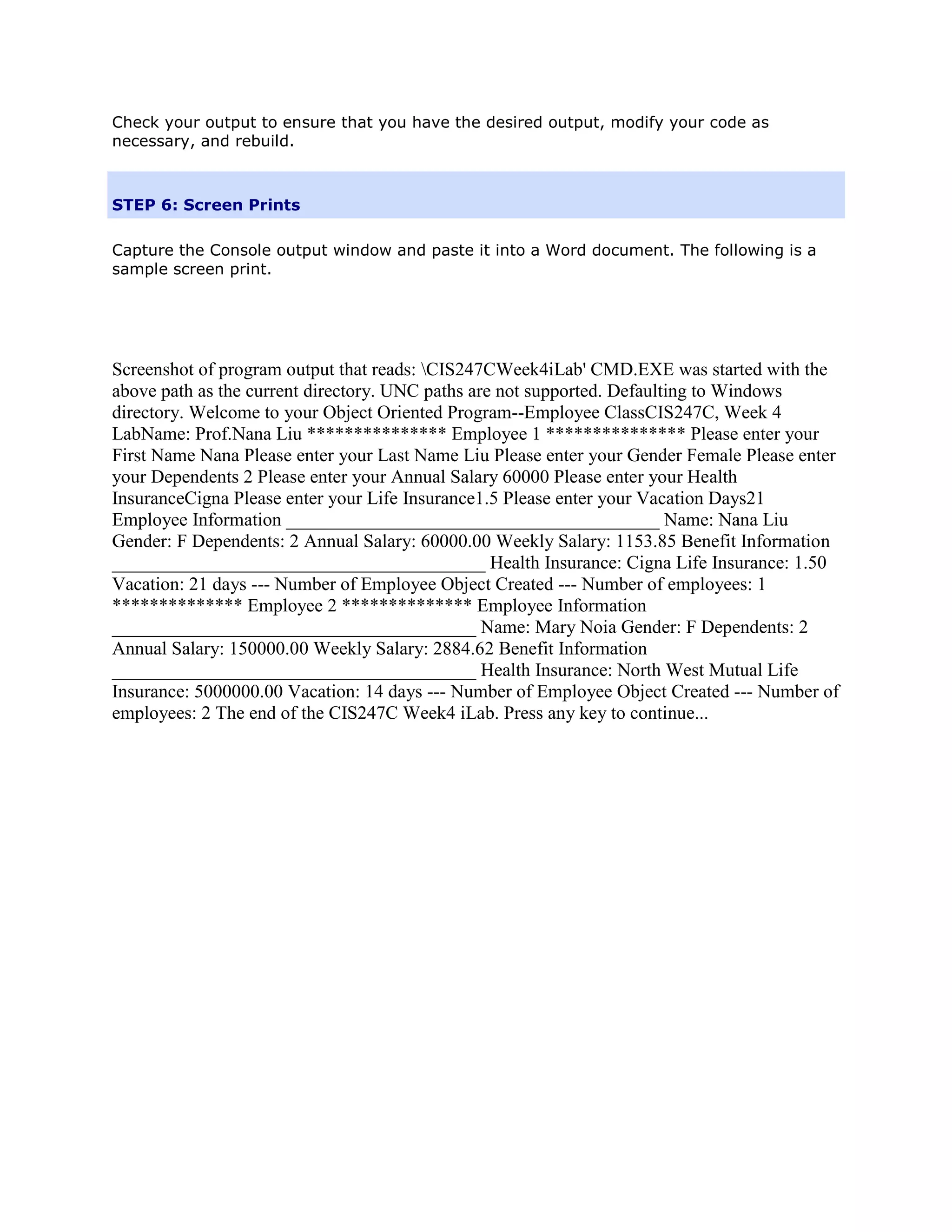
Capture the Console output window and paste it into a Word document. The following is a
sample screen print.


Screenshot of program output that reads: CIS247CWeek4iLab' CMD.EXE was started with the
above path as the current directory. UNC paths are not supported. Defaulting to Windows
directory. Welcome to your Object Oriented Program--Employee ClassCIS247C, Week 4
LabName: Prof.Nana Liu *************** Employee 1 *************** Please enter your
First Name Nana Please enter your Last Name Liu Please enter your Gender Female Please enter
your Dependents 2 Please enter your Annual Salary 60000 Please enter your Health
InsuranceCigna Please enter your Life Insurance1.5 Please enter your Vacation Days21
Employee Information ________________________________________ Name: Nana Liu
Gender: F Dependents: 2 Annual Salary: 60000.00 Weekly Salary: 1153.85 Benefit Information
________________________________________ Health Insurance: Cigna Life Insurance: 1.50
Vacation: 21 days --- Number of Employee Object Created --- Number of employees: 1
************** Employee 2 ************** Employee Information
_______________________________________ Name: Mary Noia Gender: F Dependents: 2
Annual Salary: 150000.00 Weekly Salary: 2884.62 Benefit Information
_______________________________________ Health Insurance: North West Mutual Life
Insurance: 5000000.00 Vacation: 14 days --- Number of Employee Object Created --- Number of
employees: 2 The end of the CIS247C Week4 iLab. Press any key to continue...

CIS 247C iLab 4 of 7: Composition and Class Interfaces

  • 1.
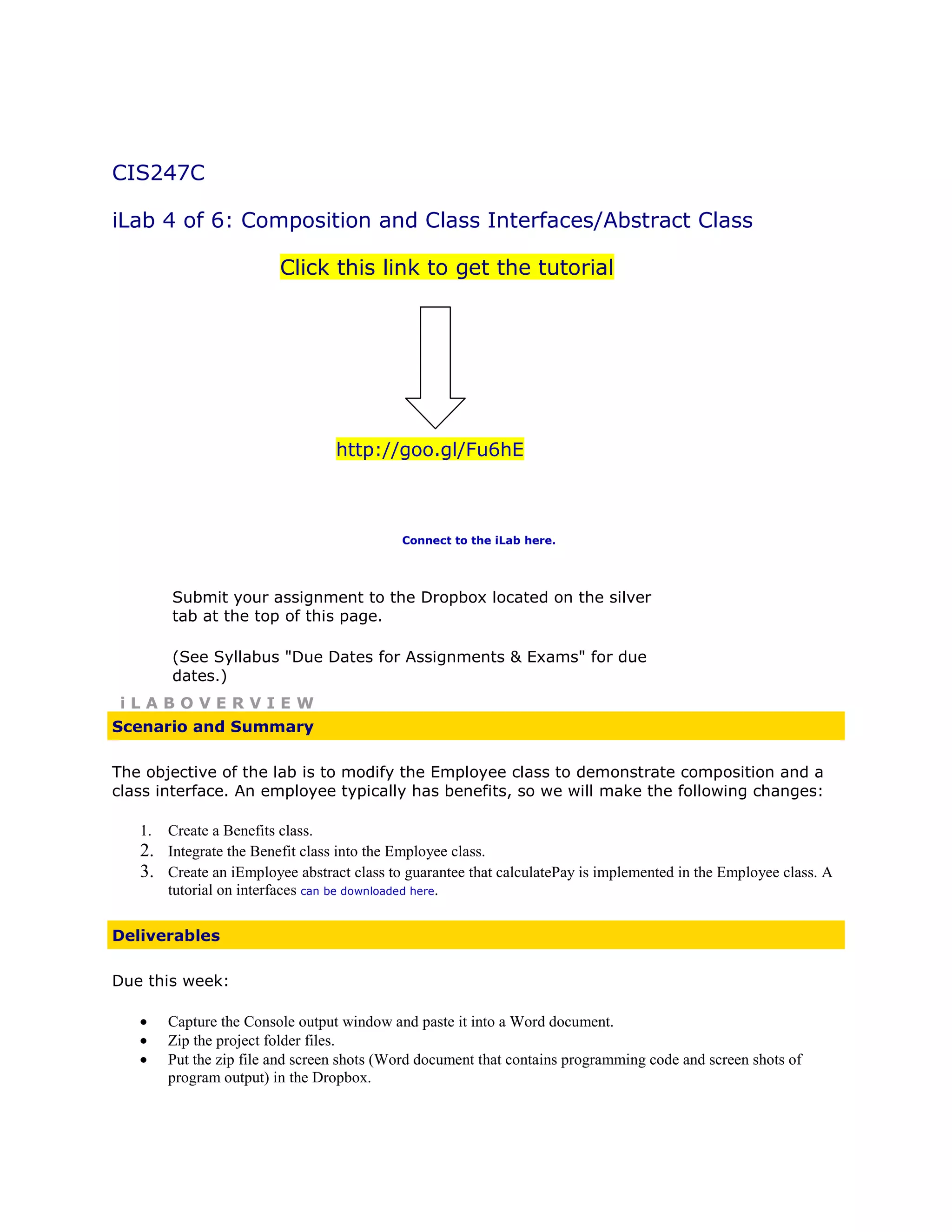
    CIS247C iLab 4 of6: Composition and Class Interfaces/Abstract Class Click this link to get the tutorial http://goo.gl/Fu6hE Connect to the iLab here. Submit your assignment to the Dropbox located on the silver tab at the top of this page. (See Syllabus "Due Dates for Assignments & Exams" for due dates.) iLABOVERVIEW Scenario and Summary The objective of the lab is to modify the Employee class to demonstrate composition and a class interface. An employee typically has benefits, so we will make the following changes: 1. Create a Benefits class. 2. Integrate the Benefit class into the Employee class. 3. Create an iEmployee abstract class to guarantee that calculatePay is implemented in the Employee class. A tutorial on interfaces can be downloaded here. Deliverables Due this week: Capture the Console output window and paste it into a Word document. Zip the project folder files. Put the zip file and screen shots (Word document that contains programming code and screen shots of program output) in the Dropbox.
  • 2.
    iLABSTEPS STEP 1: Understandthe UML Diagram Employee - firstName : string - lastName : string - gender : char - dependents : int - annualSalary : double - static numEmployees : int = 0 +benefit : Benefit +Employee() +Employee(in fname : String, in lname : String, in gen : char, in dep : int, in sal : double) +calculatePay() : double +displayEmployee() : void +static getNumEmployees() : int +getFirstName() : string +setFirstName(in name : String) : void +getLastName() : String +setLastName(in name : String) : void +getGender() : char +setGender(in gen : char) : void +getDependents() : int +setDependents(in dep : int) : void +getAnnualSalary() : double +setAnnualSalary(in sal : double) : void +setAnnualSalary(in sal : String) : void <<interface>> Fido : Animal +calculatePay() : double Benefit -healthinsurance : string -lifeinsurance : double -vacation : int +Benefit() +Benefit(in health : string, in life : double, in vacation : int) +displayBenefits() : void +getHealthInsurance() : string +setHealthInsutance(in hins : string) : void +getLifeInsurance() : double +setLifeInsurance(in lifeIns : double) : void +getVacation() : int +setVacation(in vaca : int) : void The only change to the Employee class is that there is a new attribute: +benefit : Benefit Notice that there is a "+" for this attribute, meaning that it is public. Make sure to examine the multi-arg constructor's signature! Also, the dotted directed line between Employee and iEmployee specifies that the Employee class must implement the iEmployee abstract class, and thus provide an implementation for the calculatePay method. STEP 2: Create the Project You will want to use the Week 3 project as the starting point for the lab. To do this, you will want to create a new project by following these steps: 1. Create a new project and name it "CIS247C_WK4_Lab_LASTNAME". 2. Copy all the source files from the Week 3 project into the Week 4 project. 3. Before you move on to the next step, build and execute the Week 4 project. STEP 3: Modify the Employee Class 1. Using the UML Diagrams from Step 1, create the Benefit class. To get an idea of how to format displayBenefits, take a look at the output in Step 5. 2. Add a Benefit attribute to the Employee class.
  • 3.
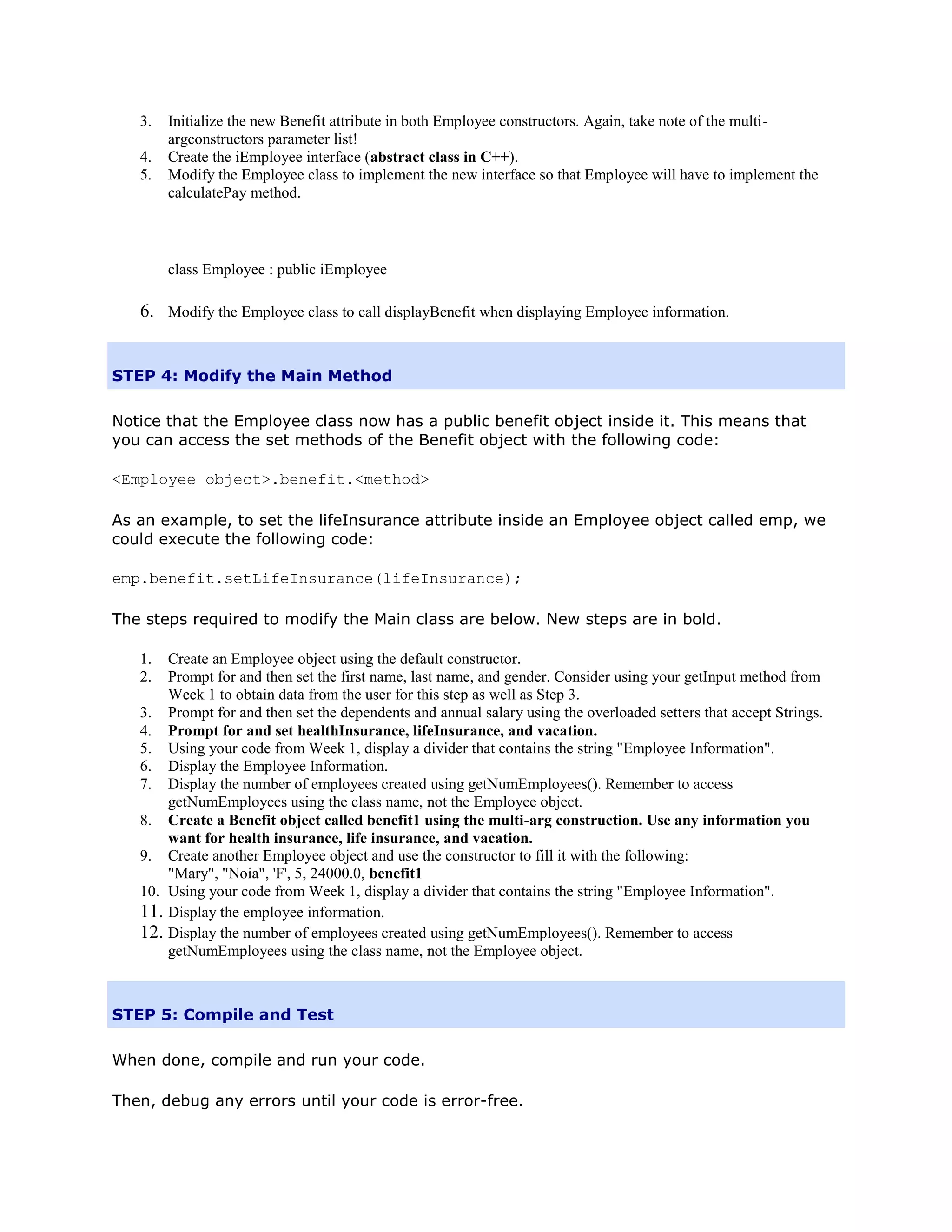
    3. Initialize the new Benefit attribute in both Employee constructors. Again, take note of the multi- argconstructors parameter list! 4. Create the iEmployee interface (abstract class in C++). 5. Modify the Employee class to implement the new interface so that Employee will have to implement the calculatePay method. class Employee : public iEmployee 6. Modify the Employee class to call displayBenefit when displaying Employee information. STEP 4: Modify the Main Method Notice that the Employee class now has a public benefit object inside it. This means that you can access the set methods of the Benefit object with the following code: <Employee object>.benefit.<method> As an example, to set the lifeInsurance attribute inside an Employee object called emp, we could execute the following code: emp.benefit.setLifeInsurance(lifeInsurance); The steps required to modify the Main class are below. New steps are in bold. 1. Create an Employee object using the default constructor. 2. Prompt for and then set the first name, last name, and gender. Consider using your getInput method from Week 1 to obtain data from the user for this step as well as Step 3. 3. Prompt for and then set the dependents and annual salary using the overloaded setters that accept Strings. 4. Prompt for and set healthInsurance, lifeInsurance, and vacation. 5. Using your code from Week 1, display a divider that contains the string "Employee Information". 6. Display the Employee Information. 7. Display the number of employees created using getNumEmployees(). Remember to access getNumEmployees using the class name, not the Employee object. 8. Create a Benefit object called benefit1 using the multi-arg construction. Use any information you want for health insurance, life insurance, and vacation. 9. Create another Employee object and use the constructor to fill it with the following: "Mary", "Noia", 'F', 5, 24000.0, benefit1 10. Using your code from Week 1, display a divider that contains the string "Employee Information". 11. Display the employee information. 12. Display the number of employees created using getNumEmployees(). Remember to access getNumEmployees using the class name, not the Employee object. STEP 5: Compile and Test When done, compile and run your code. Then, debug any errors until your code is error-free.
  • 4.
    Check your outputto ensure that you have the desired output, modify your code as necessary, and rebuild. STEP 6: Screen Prints Capture the Console output window and paste it into a Word document. The following is a sample screen print. Screenshot of program output that reads: CIS247CWeek4iLab' CMD.EXE was started with the above path as the current directory. UNC paths are not supported. Defaulting to Windows directory. Welcome to your Object Oriented Program--Employee ClassCIS247C, Week 4 LabName: Prof.Nana Liu *************** Employee 1 *************** Please enter your First Name Nana Please enter your Last Name Liu Please enter your Gender Female Please enter your Dependents 2 Please enter your Annual Salary 60000 Please enter your Health InsuranceCigna Please enter your Life Insurance1.5 Please enter your Vacation Days21 Employee Information ________________________________________ Name: Nana Liu Gender: F Dependents: 2 Annual Salary: 60000.00 Weekly Salary: 1153.85 Benefit Information ________________________________________ Health Insurance: Cigna Life Insurance: 1.50 Vacation: 21 days --- Number of Employee Object Created --- Number of employees: 1 ************** Employee 2 ************** Employee Information _______________________________________ Name: Mary Noia Gender: F Dependents: 2 Annual Salary: 150000.00 Weekly Salary: 2884.62 Benefit Information _______________________________________ Health Insurance: North West Mutual Life Insurance: 5000000.00 Vacation: 14 days --- Number of Employee Object Created --- Number of employees: 2 The end of the CIS247C Week4 iLab. Press any key to continue...