Presented by Jaime MoranCIS 4160 Spring 2010Video at http://vimeo.com/11613029Scheduler
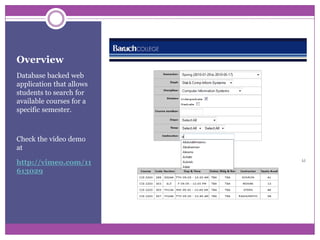
OverviewDatabase backed web application that allows students to search for available courses for a specific semester.Check the video demo athttp://vimeo.com/11613029
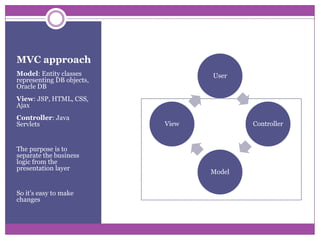
MVC approachModel: Entity classes representing DB objects, Oracle DB View: JSP, HTML, CSS, AjaxController: Java ServletsThe purpose is to separate the business logic from the presentation layerSo it’s easy to make changes
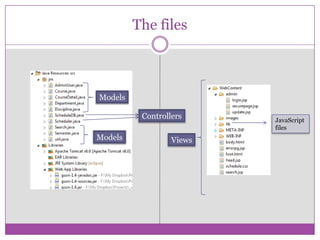
The filesModelsControllersJavaScriptfilesModelsViews
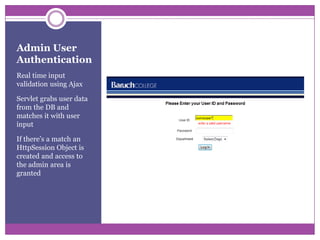
Admin User AuthenticationReal time input validation using AjaxServlet grabs user data from the DB and matches it with user inputIf there’s a match an HttpSession Object is created and access to the admin area is granted
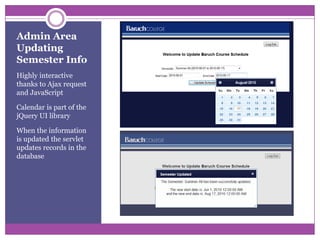
Admin AreaUpdating Semester InfoHighly interactive thanks to Ajax request and JavaScriptCalendar is part of the jQuery UI libraryWhen the information is updated the servlet updates records in the database
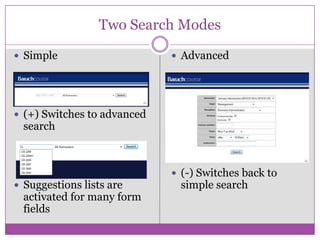
Two Search ModesSimple(+) Switches to advanced searchSuggestions lists are activated for many form fieldsAdvanced(-) Switches back to simple search
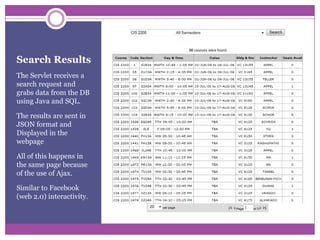
Search ResultsThe Servlet receives a search request and grabs data from the DB using Java and SQL.The results are sent in JSON format and Displayed in the webpageAll of this happens in the same page because of the use of Ajax. Similar to Facebook (web 2.0) interactivity.
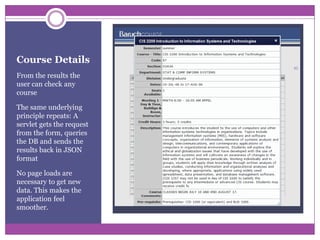
Course DetailsFrom the results the user can check any courseThe same underlying principle repeats: A servlet gets the request from the form, queries the DB and sends the results back in JSON formatNo page loads are necessary to get new data. This makes the application feel smoother.
Thank You

Course Scheduler

  • 1.
    Presented by JaimeMoranCIS 4160 Spring 2010Video at http://vimeo.com/11613029Scheduler
  • 2.
    OverviewDatabase backed webapplication that allows students to search for available courses for a specific semester.Check the video demo athttp://vimeo.com/11613029
  • 3.
    MVC approachModel: Entityclasses representing DB objects, Oracle DB View: JSP, HTML, CSS, AjaxController: Java ServletsThe purpose is to separate the business logic from the presentation layerSo it’s easy to make changes
  • 4.
  • 5.
    Admin User AuthenticationRealtime input validation using AjaxServlet grabs user data from the DB and matches it with user inputIf there’s a match an HttpSession Object is created and access to the admin area is granted
  • 6.
    Admin AreaUpdating SemesterInfoHighly interactive thanks to Ajax request and JavaScriptCalendar is part of the jQuery UI libraryWhen the information is updated the servlet updates records in the database
  • 7.
    Two Search ModesSimple(+)Switches to advanced searchSuggestions lists are activated for many form fieldsAdvanced(-) Switches back to simple search
  • 8.
    Search ResultsThe Servletreceives a search request and grabs data from the DB using Java and SQL.The results are sent in JSON format and Displayed in the webpageAll of this happens in the same page because of the use of Ajax. Similar to Facebook (web 2.0) interactivity.
  • 9.
    Course DetailsFrom theresults the user can check any courseThe same underlying principle repeats: A servlet gets the request from the form, queries the DB and sends the results back in JSON formatNo page loads are necessary to get new data. This makes the application feel smoother.
  • 10.

Editor's Notes

  • #2 This is a presentation I did for my CIS 4160 class in May 2010.