Building nlp-based ChatBot using
Our mission is to ensure that artificial general intelligence benefits all of humanity.
Deeplearning.
1
About
Chatbot
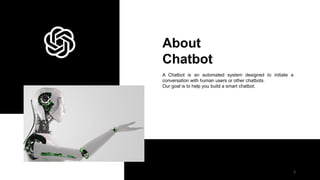
A Chatbot is an automated system designed to initiate a
conversation with human users or other chatbots.
Our goal is to help you build a smart chatbot.
2
Types of
ChatBot
Before building a chatbot we should have
knowledge about type of the chatbot that
we are building.In this project we are
using retrieval -based ChatBots.
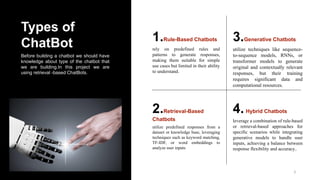
1.Rule-Based Chatbots
rely on predefined rules and
patterns to generate responses,
making them suitable for simple
use cases but limited in their ability
to understand.
3.Generative Chatbots
utilize techniques like sequence-
to-sequence models, RNNs, or
transformer models to generate
original and contextually relevant
responses, but their training
requires significant data and
computational resources.
2.Retrieval-Based
Chatbots
utilize predefined responses from a
dataset or knowledge base, leveraging
techniques such as keyword matching,
TF-IDF, or word embeddings to
analyze user inputs
4.Hybrid Chatbots
leverage a combination of rule-based
or retrieval-based approaches for
specific scenarios while integrating
generative models to handle user
inputs, achieving a balance between
response flexibility and accuracy..
3
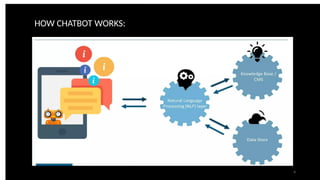
HOW CHATBOT WORKS:
4
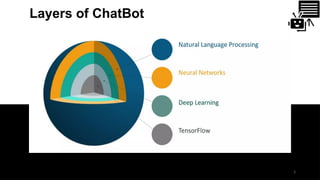
Layers of ChatBot
5
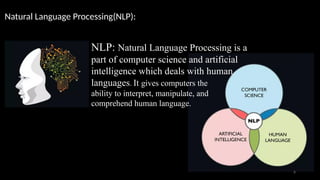
NLP: Natural Language Processing is a
part of computer science and artificial
intelligence which deals with human
languages. It gives computers the
ability to interpret, manipulate, and
comprehend human language.
Natural Language Processing(NLP):
6
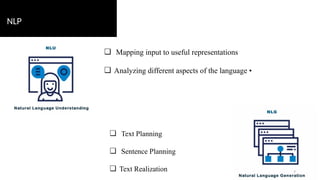
NLP
❏ Mapping input to useful representations
❏ Analyzing different aspects of the language •
❏ Text Planning
❏ Sentence Planning
❏ Text Realization 7
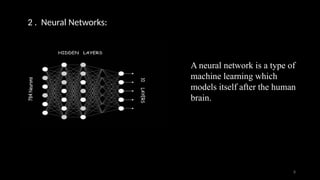
2 . Neural Networks:
A neural network is a type of
machine learning which
models itself after the human
brain.
8
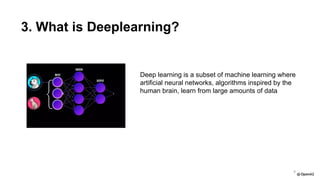
3. What is Deeplearning?
Deep learning is a subset of machine learning where
artificial neural networks, algorithms inspired by the
human brain, learn from large amounts of data
9
Built With
DeepLearning.
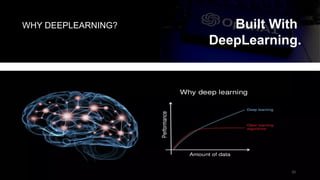
WHY DEEPLEARNING?
10
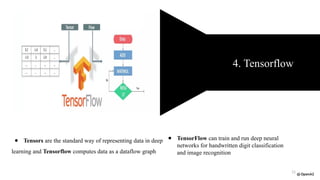
● Tensors are the standard way of representing data in deep
learning and Tensorflow computes data as a dataflow graph
4. Tensorflow
● TensorFlow can train and run deep neural
networks for handwritten digit classification
and image recognition
11
STEPS TO BE FOLLOWED:
→ Installing packages
→ Defining intents
→ Creating the training model
→Load the trained model and create flask app
→ Creating chatbot web interface —>HTML
—>CSS
12
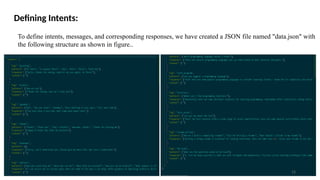
Defining Intents:
To define intents, messages, and corresponding responses, we have created a JSON file named "data.json" with
the following structure as shown in figure..
13
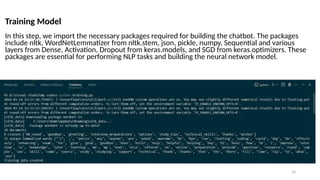
Training Model
In this step, we import the necessary packages required for building the chatbot. The packages
include nltk, WordNetLemmatizer from nltk.stem, json, pickle, numpy, Sequential and various
layers from Dense, Activation, Dropout from keras.models, and SGD from keras.optimizers. These
packages are essential for performing NLP tasks and building the neural network model.
14
Loading and preprocessing the training data
❖ We collect all the unique words and intents, and finally, we create the documents by combining
patterns and intents by tokenize the words.
❖ After preprocessing the data
❖ we created the training data by converting the documents into a bag-of-words representation. We
iterate through each document, create a bag-of-words array with 1 if a word is present in the pattern.
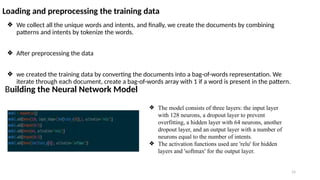
Building the Neural Network Model
❖ The model consists of three layers: the input layer
with 128 neurons, a dropout layer to prevent
overfitting, a hidden layer with 64 neurons, another
dropout layer, and an output layer with a number of
neurons equal to the number of intents.
❖ The activation functions used are 'relu' for hidden
layers and 'softmax' for the output layer.
15
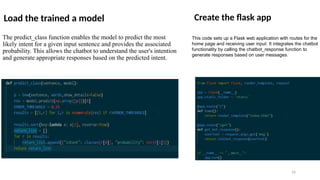
Load the trained a model
The predict_class function enables the model to predict the most
likely intent for a given input sentence and provides the associated
probability. This allows the chatbot to understand the user's intention
and generate appropriate responses based on the predicted intent.
Create the flask app
This code sets up a Flask web application with routes for the
home page and receiving user input. It integrates the chatbot
functionality by calling the chatbot_response function to
generate responses based on user messages.
16
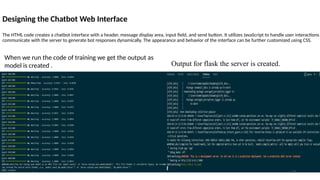
Designing the Chatbot Web Interface
The HTML code creates a chatbot interface with a header, message display area, input field, and send button. It utilizes JavaScript to handle user interactions
communicate with the server to generate bot responses dynamically. The appearance and behavior of the interface can be further customized using CSS.
When we run the code of training we get the output as
model is created . Output for flask the server is created.
17
Results :
18
https://drive.google.com/file/d/16fxjt
YDNDmPoFbS9Vz86ZX_IkIYlOpyL
/view?usp=sharing
For the output
ChatBOt
Usage
Personal Assistance
Question Answering
Appointment Scheduling
Language Translation
Summarization
19
Goals
Chatbots aim to assist users by providing information, answering
questions, and guiding them through processes or tasks.The
primary goals of a chatbot revolve around enhancing user
experiences, increasing efficiency, and driving organizational
objectives. Chatbots aim to provide timely assistance, streamline
processes, and offer personalized interactions. They support
customer service efforts, facilitate transactions, and gather valuable
insights through data collection.
20
THANK YOU
21

Chatbot using Natural Language processing.

  • 1.
    Building nlp-based ChatBotusing Our mission is to ensure that artificial general intelligence benefits all of humanity. Deeplearning. 1
  • 2.
    About Chatbot A Chatbot isan automated system designed to initiate a conversation with human users or other chatbots. Our goal is to help you build a smart chatbot. 2
  • 3.
    Types of ChatBot Before buildinga chatbot we should have knowledge about type of the chatbot that we are building.In this project we are using retrieval -based ChatBots. 1.Rule-Based Chatbots rely on predefined rules and patterns to generate responses, making them suitable for simple use cases but limited in their ability to understand. 3.Generative Chatbots utilize techniques like sequence- to-sequence models, RNNs, or transformer models to generate original and contextually relevant responses, but their training requires significant data and computational resources. 2.Retrieval-Based Chatbots utilize predefined responses from a dataset or knowledge base, leveraging techniques such as keyword matching, TF-IDF, or word embeddings to analyze user inputs 4.Hybrid Chatbots leverage a combination of rule-based or retrieval-based approaches for specific scenarios while integrating generative models to handle user inputs, achieving a balance between response flexibility and accuracy.. 3
  • 4.
  • 5.
  • 6.
    NLP: Natural LanguageProcessing is a part of computer science and artificial intelligence which deals with human languages. It gives computers the ability to interpret, manipulate, and comprehend human language. Natural Language Processing(NLP): 6
  • 7.
    NLP ❏ Mapping inputto useful representations ❏ Analyzing different aspects of the language • ❏ Text Planning ❏ Sentence Planning ❏ Text Realization 7
  • 8.
    2 . NeuralNetworks: A neural network is a type of machine learning which models itself after the human brain. 8
  • 9.
    3. What isDeeplearning? Deep learning is a subset of machine learning where artificial neural networks, algorithms inspired by the human brain, learn from large amounts of data 9
  • 10.
  • 11.
    ● Tensors arethe standard way of representing data in deep learning and Tensorflow computes data as a dataflow graph 4. Tensorflow ● TensorFlow can train and run deep neural networks for handwritten digit classification and image recognition 11
  • 12.
    STEPS TO BEFOLLOWED: → Installing packages → Defining intents → Creating the training model →Load the trained model and create flask app → Creating chatbot web interface —>HTML —>CSS 12
  • 13.
    Defining Intents: To defineintents, messages, and corresponding responses, we have created a JSON file named "data.json" with the following structure as shown in figure.. 13
  • 14.
    Training Model In thisstep, we import the necessary packages required for building the chatbot. The packages include nltk, WordNetLemmatizer from nltk.stem, json, pickle, numpy, Sequential and various layers from Dense, Activation, Dropout from keras.models, and SGD from keras.optimizers. These packages are essential for performing NLP tasks and building the neural network model. 14
  • 15.
    Loading and preprocessingthe training data ❖ We collect all the unique words and intents, and finally, we create the documents by combining patterns and intents by tokenize the words. ❖ After preprocessing the data ❖ we created the training data by converting the documents into a bag-of-words representation. We iterate through each document, create a bag-of-words array with 1 if a word is present in the pattern. Building the Neural Network Model ❖ The model consists of three layers: the input layer with 128 neurons, a dropout layer to prevent overfitting, a hidden layer with 64 neurons, another dropout layer, and an output layer with a number of neurons equal to the number of intents. ❖ The activation functions used are 'relu' for hidden layers and 'softmax' for the output layer. 15
  • 16.
    Load the traineda model The predict_class function enables the model to predict the most likely intent for a given input sentence and provides the associated probability. This allows the chatbot to understand the user's intention and generate appropriate responses based on the predicted intent. Create the flask app This code sets up a Flask web application with routes for the home page and receiving user input. It integrates the chatbot functionality by calling the chatbot_response function to generate responses based on user messages. 16
  • 17.
    Designing the ChatbotWeb Interface The HTML code creates a chatbot interface with a header, message display area, input field, and send button. It utilizes JavaScript to handle user interactions communicate with the server to generate bot responses dynamically. The appearance and behavior of the interface can be further customized using CSS. When we run the code of training we get the output as model is created . Output for flask the server is created. 17
  • 18.
  • 19.
    ChatBOt Usage Personal Assistance Question Answering AppointmentScheduling Language Translation Summarization 19
  • 20.
    Goals Chatbots aim toassist users by providing information, answering questions, and guiding them through processes or tasks.The primary goals of a chatbot revolve around enhancing user experiences, increasing efficiency, and driving organizational objectives. Chatbots aim to provide timely assistance, streamline processes, and offer personalized interactions. They support customer service efforts, facilitate transactions, and gather valuable insights through data collection. 20
  • 21.