ChatBot
LUIS
陳葵懋 Ian Chen
高雄第一科大
About Me
資深程式設計師,以Microsoft技術為主,
從事於商業應用系統軟體設計與開發,
累積超過15年的Web Application開發
經驗,近年來開始接觸App開發以及
Azure雲端服務,喜愛新事物、把玩新
技術、從Web到App,使終相信學習是
往前進的唯一道路,非常厭倦複製貼上
一成不變的機器模式。
Web: codeian.idv.tw
Email: ian.msmvp@outlook.com
Blog: dotblogs.com.tw/ian
• 高師大資訊教育研究所碩士
• Microsoft MVP Visual Studio and
Development Technologies
• Microsoft 大型研討會講師
• K.NET 社群講師兼共同創辦人
• 企業技術內訓講師
• 學校業界講師
Agenda
01 ChatBot
讓我們先來看看ChatBot的發展與問題
ChatBot不只是聊天。
03 LUIS
自然語意理解系統。
02 APP vs ChatBot
ChatBot取代APP。
04 Bot framework
建立你的ChatBot。
ChatBot
讓我們先來看看Bot的發展與問題
ChatBot不只是聊天
01
ChatBot
01
桌機的年代
PC
1980s
網路的年代
Internet
1990s
2000s
APP的年代
Mobile
人類與機器對話的年代
Conversation
Now
ChatBot
1
1966年,MIT教授Joseph Weizenbaum
史上第一支Chatbot - Eliza
經過50年ChatBot為何現在才開始夯起來
ChatBot
ChatBot
https://medium.com/@compose.ai/聊天機器人市場版圖-chatbots-landscape-f89302206875
ChatBot
https://medium.com/@compose.ai/聊天機器人市場版圖-chatbots-landscape-f89302206875
98%
• 行動通訊(mobile message)開啟率有將近
98%
• 2017年預計會有28.2兆則訊息會被發送
• 全球最常用的App中,通訊App(Messaging
App)就佔了6個
ChatBot
03
https://www.scripted.com/content-marketing-2/chatbot-marketing
Chatbot1
1
2
3
4
人類的對話語句夾帶著情緒、文字,如何理
解語句真正意圖是有難度的。
人類的對話有時一句話可能會分段組成,eg:
今天...你有空嗎 vs 今天你有空嗎。
AI人工智慧 ,ML機器學習,NLP自然語言
處理,雲端服務的崛起
LINE 、 Facebook Messenger 、 Skype 、
Slack 都有提供 SDK 和 API
ChatBot
1
ChatBot 能做什麼
理解用戶意圖,然後做出相對的回應
ChatBot
1
ChatBot不只是聊天
任務導向型( Task )
「一問,一答」,你問它什麼,它就回答
你什麼,明確地定義下一個步驟要做什麼
問:台北今天天氣如何
答:70%會下雨
純聊天型( Chat )
純聊天自然的對話,閒聊沒有特定任務
的目標
問:我今天心情不好
答:聽首歌,外出走走如何呢
ChatBot
1
銀行客服系統
電話語音
中文請按1,英文請按2
銀行業務請按1,基金業務請按2
美元匯率請按1,日元匯率請按2,歐元
匯率請按3....
ChatBot
問:請問今天美元匯率是多少?
答:1美元兌換30.3台幣
ChatBot
1
智慧數位助理
Microsoft Cortana Apple Siri Google Now
APP vs ChatBot
ChatBot取代APP。02
APP vs ChatBot
2
ChatBot可以將多個APP能做的事情結合在一起處理完成
準備旅行
景點APP找景點
高鐵APP訂車票
交通APP查公車/捷運路線
Mail通知團友
分享行程到facebook
ChatBot
可以在一個對話行為中完成這些事情
APP vs ChatBot
2
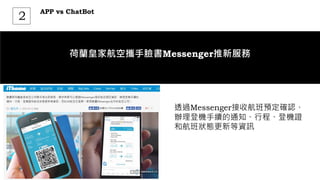
荷蘭皇家航空攜手臉書Messenger推新服務
透過Messenger接收航班預定確認、
辦理登機手續的通知、行程、登機證
和航班狀態更新等資訊
APP vs ChatBot
2
台灣房屋房仲Chatbot
利用LINE Messaging API結合微軟LUIS的
語意理解
台灣房屋將地產機器人定位成功能型
Chatbot,消費者需要資訊時,可以即時得
到資訊,平時將不會發送訊息干擾消費者
消費者只需加入地產機器人的Line帳號,就
可以透過對話的方式,即時獲得房屋資訊、
成交行情等資料
LUIS
自然語意理解系統。03
LUIS
3
Nature Language Processing 自然語言的挑戰
辨別使用者的意圖到底是什麼
自已建立條件判斷式資料庫,程式由大
量的 if-then 組成,利用關鍵字來處理
eg:
substring("hi") or substring("hello")
or substring("您好")...
自建文字庫
透過機器學習,建立語意理解系統,需
要龐大的物力及專業知識,一般個人或
團隊無法建立,通常我們會運用現有的
雲端資源來協助
Luis.ai – Microsoft / API.ai – Google
雲端服務
LUIS
3
LUIS(Language Understanding Intelligent Services)
藉由對話語句理解用戶的意圖
微軟推出針對語句理解能力的
雲端服務,藉由句子推測出用
戶的意圖(intents)以及相關的
關鍵項目(entities)
LUIS
3
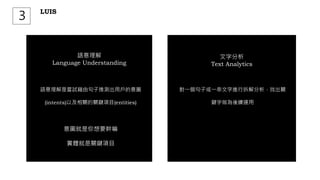
語意理解是嘗試藉由句子推測出用戶的意圖
(intents)以及相關的關鍵項目(entities)
意圖就是你想要幹嘛
實體就是關鍵項目
語意理解
Language Understanding
對一個句子或一串文字進行拆解分析,找出關
鍵字做為後續運用
文字分析
Text Analytics
LUIS
3
我要一杯咖啡
意圖 : 點餐
關鍵項目:飲料
Language Understanding
咖啡
Text Analytics
LUIS
3
意圖(Intents)與關鍵項目(Entities)設計不當
Intents:天氣如何
Entities:台北
台北天氣如何?
Intents:詢問天氣
Entities:地點
LUIS
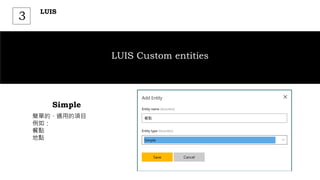
3
LUIS Custom entities
簡單的、通用的項目
例如:
餐點
地點
Simple
LUIS
3
LUIS Custom entities
具有父子層關係的項目設計
例如:
機票 頭等艙、商務艙、經濟艙
Hierarchical
LUIS
3
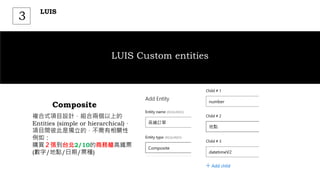
LUIS Custom entities
複合式項目設計,組合兩個以上的
Entities (simple or hierarchical),
項目間彼此是獨立的,不需有相關性
例如:
購買2張到台北2/10的商務艙高鐵票
(數字/地點/日期/票種)
Composite
LUIS
3
LUIS Custom entities
相似關鍵字項目設計,將意思相同的文
字關鍵字定義成統一的項目值
例如:
台大 台灣大學、台大
美金 美金、美元、美圓
List
Create App
使用Microsoft account登入LUIS Portal,建
立你的APP
1
LUIS
https://www.luis.ai
3
Add Intents
加入意圖項目,可以有多個意圖
2
LUIS
https://www.luis.ai
3
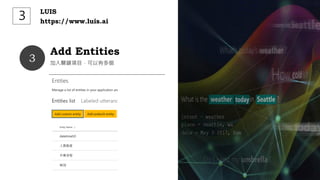
Add Entities
加入關鍵項目,可以有多個
3
LUIS
https://www.luis.ai
3
範本例句
建立範本例句及關鍵項目對應,做為後續機器
學習的參考
4
LUIS
https://www.luis.ai
3
Train & Testing
反覆訓練及測試
5
LUIS
https://www.luis.ai
3
Publish
發行並取得服務結點Url
5
LUIS
https://www.luis.ai
3
LUIS
3
LUIS(Language Understanding Intelligent Services)
藉由對話語句理解用戶的意圖
LUIS回饋的是使用者
意圖機率的推測
LUIS 具有機器學習機
制,透過範本例句的反
覆回饋訓練,提高預測
準確度
"query": "服務人員口氣
不好",
"topScoringIntent":
{ "intent": "客訴",
"score": 0.8642544
86.42
%
luis.ai
Bot framework
4
https://docs.microsoft.com/en-us/bot-framework/overview-how-bot-framework-works
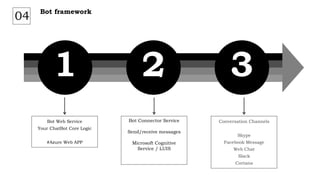
1 2 3
Conversation Channels
Skype
Facebook Message
Web Chat
Slack
Cortana
Bot Connector Service
Send/receive messages
Microsoft Cognitive
Service / LUIS
Bot Web Service
Your ChatBot Core Logic
#Azure Web APP
Bot framework
04
1 2 3
Bot framework
04
Bot Web Service
• Visual Studio 2017 (Community )
• Project Template (http://aka.ms/bf-bc-vstemplate)
• Copy Project Template *.zip file to %USERPROFILE%DocumentsVisual Studio
2017TemplatesProjectTemplatesVisual C#
%USERPROFILE%DocumentsVisual Studio 2017TemplatesProjectTemplatesVisual C#
1 2 3
Bot framework
04
Bot Web Service
%USERPROFILE%DocumentsVisual Studio 2017TemplatesProjectTemplatesVisual C#
• create a new C# project
• Bot Application template
• Update Microsoft.Bot.Builder
1 2 3
Bot framework
04
Bot Web Service
%USERPROFILE%DocumentsVisual Studio 2017TemplatesProjectTemplatesVisual C#
• install bot emulator (https://emulator.botframework.com/)
• Start your bot
• Connect bot emulator to
http://localhost:port-number/api/messages
1 2 3
Bot framework
04
%USERPROFILE%DocumentsVisual Studio 2017TemplatesProjectTemplatesVisual C#
• Crate a bot
(https://dev.botframework.com/)
Bot Connector
1 2 3
Bot framework
04
%USERPROFILE%DocumentsVisual Studio 2017TemplatesProjectTemplatesVisual C#
• Bot handle (Used in the URL for your bot)
• Messaging endpoint (your bot web service url)
• Create Microsoft App ID and password
Bot Connector
1 2 3
Bot framework
04
%USERPROFILE%DocumentsVisual Studio 2017TemplatesProjectTemplatesVisual C#
• Publish Your bot Service to Azure Web
• Configuration Messaging endpoint
https://your_bots_hostname/api/messages
• Test bot connector
Bot Connector
1 2 3
Bot framework
04
%USERPROFILE%DocumentsVisual Studio 2017TemplatesProjectTemplatesVisual C#
Channels
1 2 3
Bot framework
04
%USERPROFILE%DocumentsVisual Studio 2017TemplatesProjectTemplatesVisual C#
Channels
• Create your facebook fans page
• Create your facebook application
https://developers.facebook.com/
1 2 3
Bot framework
04
%USERPROFILE%DocumentsVisual Studio 2017TemplatesProjectTemplatesVisual C#
Channels
• Facebook Page ID
• Facebook App ID
• Facebook App Secret
• Page Access Token
1 2 3
Bot framework
04
%USERPROFILE%DocumentsVisual Studio 2017TemplatesProjectTemplatesVisual C#
Channels
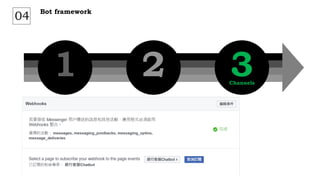
• Add Webhooks (developers.facebook.com)
• Callback URL
• Verify Token
1 2 3
Bot framework
04
%USERPROFILE%DocumentsVisual Studio 2017TemplatesProjectTemplatesVisual C#
Channels
1 2 3
Bot framework
04
%USERPROFILE%DocumentsVisual Studio 2017TemplatesProjectTemplatesVisual C#
Channels
Bot framework
4
Bot framework
4
Bot framework
4
Bot framework
4
結合LUIS的Chatbot
Bot framework
4
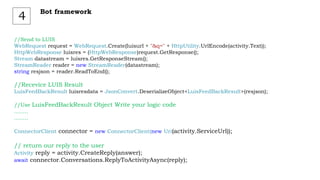
//Send to LUIS
WebRequest request = WebRequest.Create(luisurl + "&q=" + HttpUtility.UrlEncode(activity.Text));
HttpWebResponse luisres = (HttpWebResponse)request.GetResponse();
Stream datastream = luisres.GetResponseStream();
StreamReader reader = new StreamReader(datastream);
string resjson = reader.ReadToEnd();
//Recevice LUIS Result
LuisFeedBackResult luisresdata = JsonConvert.DeserializeObject<LuisFeedBackResult>(resjson);
//Use LuisFeedBackResult Object Write your logic code
……..
……..
ConnectorClient connector = new ConnectorClient(new Uri(activity.ServiceUrl));
// return our reply to the user
Activity reply = activity.CreateReply(answer);
await connector.Conversations.ReplyToActivityAsync(reply);
Bot framework
4
Resources
• https://dev.botframework.com/
• https://www.luis.ai/

第一科大Chatbot LUIS