Chapter6_PROCESSING OF REAL-TIME DATA AND STREAMING DATA.pptx
1.
Chapter 6
PROCESSING OFREAL-TIME
DATA AND STREAMING DATA
Dr. Nilesh M. Patil
Associate Professor
Computer Engineering
SVKM’s DJSCE, Mumbai
2.
Data Streaming
• Datastreaming is the process of transmitting a continuous flow of data (also known as streams)
typically fed into stream processing software to derive valuable insights.
• A data stream consists of a series of data elements ordered in time.
• The data represents an “event” or a change in state that has occurred in the business and is useful
for the business to know about and analyze, often in real-time.
• Some examples of data streams include sensor data, activity logs from web browsers, and financial
transaction logs.
• A data stream can be visualized as an endless conveyor belt, carrying data elements and
continuously feeding them into a data processor.
• Personal health monitors and home security systems are two examples of data streaming sources.
• A home security system includes multiple motion sensors to monitor different areas of the house.
These sensors generate a stream of data transmitted continuously to a processing infrastructure that
monitors any unexpected activity either in real-time, or saves the data to analyze for harder to
detect patterns later.
• Health monitors are another example of data streaming sources including heartbeat, blood pressure,
or oxygen monitors. These devices continuously generate data. Timely analysis of this data is
essential, as the safety of the person might depend on it.
3.
General Characteristics ofData Streams
• Streaming data from sensors, web browsers, and other monitoring systems have certain characteristics that set
them apart from traditional, historical data.
• The following are a few key characteristics of stream data:
1. Time Sensitive : Each element in a data stream carries a time stamp. The data streams are time sensitive and
lose significance after a certain time. For example, the data from a home security system that indicates a
suspicious movement should be analyzed and addressed within a short time period to remain relevant.
2. Continuous : There is no beginning or end to streaming data. Data streams are continuous and happen in
real-time, but they aren’t always acted upon in the moment, depending on system requirements.
3. Heterogeneous : The stream data often originates from thousands of different sources that can be
geographically distant. Due to the disparity in the sources, the stream data might be a mix of different
formats.
4. Imperfect : Due to the variety of their sources and different data transmission mechanisms, a data stream
may have missing or damaged data elements. Also, the data elements in a stream might arrive out of order.
5. Volatile and Unrepeatable : As data streaming happens in real-time, repeated transmission of a stream is
quite difficult. While there are provisions for retransmission, the new data may not be the same as the last
one. This makes the data streams highly volatile. However, many modern systems keep a record of their data
streams so even if you couldn’t access it at the moment, you can still analyze it later.
4.
Examples of DataStreaming
• Internet of Things: IoT includes a huge number of devices that collect data using sensors and
transmit them in real-time to a data processor. IoT data generates stream data. Wearable health
monitors like watches, home security systems, traffic monitoring systems, biometric scanners,
connected home appliances, cybersecurity, and privacy systems generate and stream data in real-
time.
• Real-time stock market monitors: Real-time finance data is often transmitted in a stream format.
Processing and analyzing financial data (like stock prices and market trends) helps organizations
make crucial decisions fast.
• Activity and transaction logs: The internet is also a major source of real-time stream data. When
people visit websites or click on links, web browsers generate activity logs. Online financial
transactions, like credit card purchases, also generate time-critical data that can be streamed and
processed for real-time actions.
• Process monitors: Every company generates billions of data points from their internal systems. By
streaming this data and processing in real-time, businesses are able to monitor the system health
and act before things escalate. For example, manufacturing companies often have devices to
monitor the health of the assembly line and to detect faults to assess risk in production. These
devices can also stream time-critical data to monitor outages and even prevent them.
5.
Data Ingestion
• Indata ingestion, enterprises transport data from various sources to a
target destination, often a storage medium.
• A similar concept to data integration, which combines data from
internal systems, ingestion also extends to external data sources.
6.
Types of DataIngestion
1. Batch data ingestion
• The most commonly used model, batch data ingestion, collects data in large jobs, or batches, for transfer at
periodic intervals. Data teams can set the task to run based on logical ordering or simple scheduling.
• Companies typically use batch ingestion for large datasets that don’t require near-real-time analysis. For
example, a business that wants to delve into the correlation between SaaS subscription renewals and
customer support tickets could ingest the related data on a daily basis—it doesn’t need to access and
analyze data the instant a support ticket resolves.
2. Streaming data ingestion
• Streaming data ingestion collects data in real time for immediate loading into a target location.
• This is a more costly ingestion technique, requiring systems to continually monitor sources, but one that’s
necessary when instant information and insight are at premium.
• For example, online advertising scenarios that demand a split-second decision—which ad to serve—require
streaming ingestion for data access and analysis.
3. Micro batch data ingestion
• Micro batch data ingestion takes in small batches of data at very short intervals—typically less than a
minute. The technique makes data available in near-real-time, much like a streaming approach.
• In fact, the terms micro-batching and streaming are often used interchangeably in data architecture and
software platform descriptions.
7.
The data ingestionprocess
• To ingest data, a simple pipeline extracts data from where it was created or
stored and loads it into a selected location or set of locations. When the
paradigm includes steps to transform the data—such as aggregation,
cleansing, or deduplication—it is considered an Extract, Transform, Load
(ETL) or Extract, Load, Transform (ELT) procedure.
• The two core components comprising a data ingestion pipeline are:
• Sources: The process can extend well beyond a company’s enterprise data
center. In addition to internal systems and databases, sources for ingestion
can include IoT applications, third-party platforms, and information
gathered from the internet.
• Destinations: Data lakes, data warehouses, and document stores are often
target locations for the data ingestion process. An ingestion pipeline may
also simply send data to an app or messaging system.
8.
Apache Kafka
• ApacheKafka (Kafka) is an open source, distributed streaming platform that enables the
development of real-time, event-driven applications.
• Today, billions of data sources continuously generate streams of data records, including
streams of events. An event is a digital record of an action that happened and the time that
it happened. Typically, an event is an action that drives another action as part of a process.
• A customer placing an order, choosing a seat on a flight, or submitting a registration form
are all examples of events.
• A streaming platform enables developers to build applications that continuously consume
and process these streams at extremely high speeds, with a high level of fidelity and
accuracy based on the correct order of their occurrence.
• LinkedIn developed Kafka in 2011 as a high-throughput message broker for its own use,
then open-sourced and donated Kafka to the Apache Software Foundation.
• Fortune 500 organizations such as Target, Microsoft, AirBnB, and Netflix rely on Kafka
to deliver real-time, data-driven experiences to their customers.
Components of ApacheKafka (2/4)
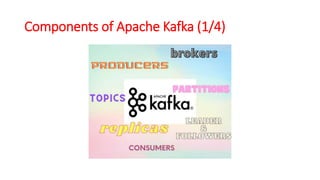
• Topics : A stream of messages that are a part of a specific category or feed name
is referred to as a Kafka topic. In Kafka, data is stored in the form of topics.
Producers write their data to topics, and consumers read the data from these
topics.
• Brokers : A Kafka cluster comprises one or more servers that are known as
brokers. In Kafka, a broker works as a container that can hold multiple topics with
different partitions. A unique integer ID is used to identify brokers in the Kafka
cluster. Connection with any one of the Kafka brokers in the cluster implies a
connection with the whole cluster. If there is more than one broker in a cluster,
the brokers need not contain the complete data associated with a particular
topic.
• Consumers and Consumer Groups : Consumers read data from the Kafka cluster.
The data to be read by the consumers has to be pulled from the broker when the
consumer is ready to receive the message. A consumer group in Kafka refers to a
number of consumers that pull data from the same topic or same set of topics.
11.
Components of ApacheKafka (3/4)
• Producers : Producers in Kafka publish messages to one or more topics. They send data to the
Kafka cluster. Whenever a Kafka producer publishes a message to Kafka, the broker receives the
message and appends it to a particular partition. Producers are given a choice to publish
messages to a partition of their choice.
• Partitions : Topics in Kafka are divided into a configurable number of parts, which are known as
partitions. Partitions allow several consumers to read data from a particular topic in parallel.
Partitions are separated in order. The number of partitions is specified when configuring a topic,
but this number can be changed later on. The partitions comprising a topic are distributed across
servers in the Kafka cluster. Each server in the cluster handles the data and requests for its share
of partitions. Messages are sent to the broker along with a key. The key can be used to determine
which partition that particular message will go to. All messages which have the same key go to
the same partition. If the key is not specified, then the partition will be decided in a round-robin
fashion.
• Partition Offset : Messages or records in Kafka are assigned to a partition. To specify the position
of the records within the partition, each record is provided with an offset. A record can be
uniquely identified within its partition using the offset value associated with it. A partition offset
carries meaning only within that particular partition. Older records will have lower offset values
since records are added to the ends of partitions.
12.
Components of ApacheKafka (4/4)
• Replicas : Replicas are like backups for partitions in Kafka. They are
used to ensure that there is no data loss in the event of a failure or a
planned shutdown. Partitions of a topic are published across multiple
servers in a Kafka cluster. Copies of the partition are known as
Replicas.
• Leader and Follower : Every partition in Kafka will have one server
that plays the role of a leader for that particular partition. The leader
is responsible for performing all the read and write tasks for the
partition. Each partition can have zero or more followers. The duty of
the follower is to replicate the data of the leader. In the event of a
failure in the leader for a particular partition, one of the follower
nodes can take on the role of the leader.
13.
Apache Kafka -Cluster Architecture
1 Broker
Kafka cluster typically consists of multiple brokers to maintain load balance. Kafka
brokers are stateless, so they use ZooKeeper for maintaining their cluster state.
One Kafka broker instance can handle hundreds of thousands of reads and writes
per second and each broker can handle TB of messages without performance
impact. Kafka broker leader election can be done by ZooKeeper.
2 ZooKeeper
ZooKeeper is used for managing and coordinating Kafka broker. ZooKeeper
service is mainly used to notify producer and consumer about the presence of
any new broker in the Kafka system or failure of the broker in the Kafka system.
As per the notification received by the Zookeeper regarding presence or failure of
the broker then producer and consumer takes decision and starts coordinating
their task with some other broker.
3 Producers
Producers push data to brokers. When the new broker is started, all the
producers search it and automatically sends a message to that new broker. Kafka
producer doesn’t wait for acknowledgements from the broker and sends
messages as fast as the broker can handle.
4 Consumers
Since Kafka brokers are stateless, which means that the consumer has to
maintain how many messages have been consumed by using partition offset. If
the consumer acknowledges a particular message offset, it implies that the
consumer has consumed all prior messages. The consumer issues an
asynchronous pull request to the broker to have a buffer of bytes ready to
consume. The consumers can rewind or skip to any point in a partition simply by
supplying an offset value. Consumer offset value is notified by ZooKeeper.
14.
Apache Kafka –WorkFlow (1/2)
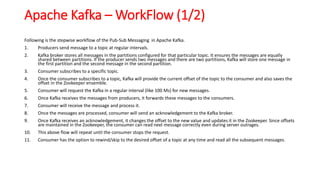
Following is the stepwise workflow of the Pub-Sub Messaging in Apache Kafka.
1. Producers send message to a topic at regular intervals.
2. Kafka broker stores all messages in the partitions configured for that particular topic. It ensures the messages are equally
shared between partitions. If the producer sends two messages and there are two partitions, Kafka will store one message in
the first partition and the second message in the second partition.
3. Consumer subscribes to a specific topic.
4. Once the consumer subscribes to a topic, Kafka will provide the current offset of the topic to the consumer and also saves the
offset in the Zookeeper ensemble.
5. Consumer will request the Kafka in a regular interval (like 100 Ms) for new messages.
6. Once Kafka receives the messages from producers, it forwards these messages to the consumers.
7. Consumer will receive the message and process it.
8. Once the messages are processed, consumer will send an acknowledgement to the Kafka broker.
9. Once Kafka receives an acknowledgement, it changes the offset to the new value and updates it in the Zookeeper. Since offsets
are maintained in the Zookeeper, the consumer can read next message correctly even during server outrages.
10. This above flow will repeat until the consumer stops the request.
11. Consumer has the option to rewind/skip to the desired offset of a topic at any time and read all the subsequent messages.
15.
Apache Kafka –WorkFlow (2/2)
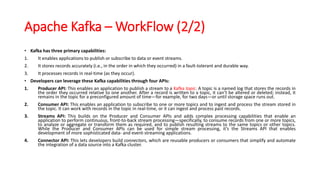
• Kafka has three primary capabilities:
1. It enables applications to publish or subscribe to data or event streams.
2. It stores records accurately (i.e., in the order in which they occurred) in a fault-tolerant and durable way.
3. It processes records in real-time (as they occur).
• Developers can leverage these Kafka capabilities through four APIs:
1. Producer API: This enables an application to publish a stream to a Kafka topic. A topic is a named log that stores the records in
the order they occurred relative to one another. After a record is written to a topic, it can’t be altered or deleted; instead, it
remains in the topic for a preconfigured amount of time—for example, for two days—or until storage space runs out.
2. Consumer API: This enables an application to subscribe to one or more topics and to ingest and process the stream stored in
the topic. It can work with records in the topic in real-time, or it can ingest and process past records.
3. Streams API: This builds on the Producer and Consumer APIs and adds complex processing capabilities that enable an
application to perform continuous, front-to-back stream processing—specifically, to consume records from one or more topics,
to analyze or aggregate or transform them as required, and to publish resulting streams to the same topics or other topics.
While the Producer and Consumer APIs can be used for simple stream processing, it’s the Streams API that enables
development of more sophisticated data- and event-streaming applications.
4. Connector API: This lets developers build connectors, which are reusable producers or consumers that simplify and automate
the integration of a data source into a Kafka cluster.
16.
Applications of ApacheKafka
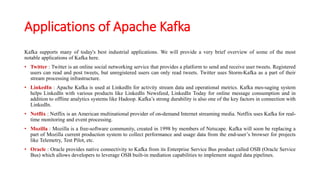
Kafka supports many of today's best industrial applications. We will provide a very brief overview of some of the most
notable applications of Kafka here.
• Twitter : Twitter is an online social networking service that provides a platform to send and receive user tweets. Registered
users can read and post tweets, but unregistered users can only read tweets. Twitter uses Storm-Kafka as a part of their
stream processing infrastructure.
• LinkedIn : Apache Kafka is used at LinkedIn for activity stream data and operational metrics. Kafka mes-saging system
helps LinkedIn with various products like LinkedIn Newsfeed, LinkedIn Today for online message consumption and in
addition to offline analytics systems like Hadoop. Kafka’s strong durability is also one of the key factors in connection with
LinkedIn.
• Netflix : Netflix is an American multinational provider of on-demand Internet streaming media. Netflix uses Kafka for real-
time monitoring and event processing.
• Mozilla : Mozilla is a free-software community, created in 1998 by members of Netscape. Kafka will soon be replacing a
part of Mozilla current production system to collect performance and usage data from the end-user’s browser for projects
like Telemetry, Test Pilot, etc.
• Oracle : Oracle provides native connectivity to Kafka from its Enterprise Service Bus product called OSB (Oracle Service
Bus) which allows developers to leverage OSB built-in mediation capabilities to implement staged data pipelines.
17.
Comparison of Hadoop,Spark and Kafka
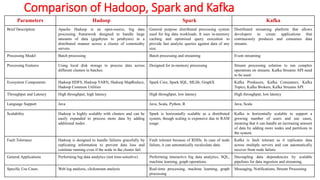
Parameters Hadoop Spark Kafka
Brief Description Apache Hadoop is an open-source, big data
processing framework designed to handle large
amounts of data (gigabytes to petabytes) in a
distributed manner across a cluster of commodity
servers.
General purpose distributed processing system
used for big data workloads. It uses in-memory
caching and optimized query execution to
provide fast analytic queries against data of any
size.
Distributed streaming platform that allows
developers to create applications that
continuously produces and consumes data
streams.
Processing Model Batch processing Batch processing and streaming Event streaming
Processing Features Using local disk storage to process data across
different clusters in batches.
Designed for in-memory processing Stream processing solution to run complex
operations on streams. Kafka Streams API need
to be used.
Ecosystem Components Hadoop HDFS, Hadoop YARN, Hadoop MapReduce,
Hadoop Common Utilities
Spark Core, Spark SQL, MLlib, GraphX Kafka Producers, Kafka Consumers, Kafka
Topics, Kafka Brokers, Kafka Streams API
Throughput and Latency High throughput, high latency High throughput, low latency High throughput, low latency
Language Support Java Java, Scala, Python, R Java, Scala
Scalability Hadoop is highly scalable with clusters and can be
easily expanded to process more data by adding
additional nodes.
Spark is horizontally scalable as a distributed
system, though scaling is expensive due to RAM
usage.
Kafka is horizontally scalable to support a
growing number of users and use cases,
meaning that it can handle an increasing amount
of data by adding more nodes and partitions to
the system.
Fault Tolerance Hadoop is designed to handle failures gracefully by
replicating information to prevent data loss and
continue running even if the node in the cluster fail.
Fault tolerant because of RDDs. In case of node
failure, it can automatically recalculate data.
Kafka is fault tolerant as it replicates data
across multiple servers and can automatically
recover from node failure.
General Applications Performing big data analytics (not time-sensitive) Performing interactive big data analytics, SQL,
machine learning, graph operations.
Decoupling data dependencies by scalable
pipelines for data ingestion and streaming.
Specific Use Cases Web log analysis, clickstream analysis Real-time processing, machine learning, graph
processing
Messaging, Notifications, Stream Processing
18.
Apache Storm
• ApacheStorm is a distributed real-time big data-processing system.
• Storm is designed to process vast amount of data in a fault-tolerant
and horizontal scalable method.
• It is a streaming data framework that has the capability of highest
ingestion rates.
• Though Storm is stateless, it manages distributed environment and
cluster state via Apache ZooKeeper.
• It is simple and you can execute all kinds of manipulations on real-
time data in parallel.
19.
Apache Storm vsHadoop
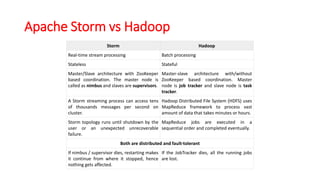
Storm Hadoop
Real-time stream processing Batch processing
Stateless Stateful
Master/Slave architecture with ZooKeeper
based coordination. The master node is
called as nimbus and slaves are supervisors.
Master-slave architecture with/without
ZooKeeper based coordination. Master
node is job tracker and slave node is task
tracker.
A Storm streaming process can access tens
of thousands messages per second on
cluster.
Hadoop Distributed File System (HDFS) uses
MapReduce framework to process vast
amount of data that takes minutes or hours.
Storm topology runs until shutdown by the
user or an unexpected unrecoverable
failure.
MapReduce jobs are executed in a
sequential order and completed eventually.
Both are distributed and fault-tolerant
If nimbus / supervisor dies, restarting makes
it continue from where it stopped, hence
nothing gets affected.
If the JobTracker dies, all the running jobs
are lost.
20.
Apache Storm Benefits
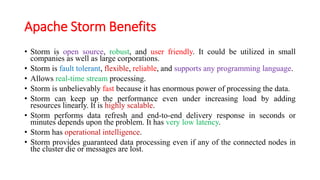
•Storm is open source, robust, and user friendly. It could be utilized in small
companies as well as large corporations.
• Storm is fault tolerant, flexible, reliable, and supports any programming language.
• Allows real-time stream processing.
• Storm is unbelievably fast because it has enormous power of processing the data.
• Storm can keep up the performance even under increasing load by adding
resources linearly. It is highly scalable.
• Storm performs data refresh and end-to-end delivery response in seconds or
minutes depends upon the problem. It has very low latency.
• Storm has operational intelligence.
• Storm provides guaranteed data processing even if any of the connected nodes in
the cluster die or messages are lost.
21.
Components of ApacheStorm
The storm comprises of 3 abstractions namely Spout, Bolt and Topologies.
Spout helps us to retrieve the data from the queueing systems. Spout
implementations exist for most of the queueing systems.
Bolt used to process the input streams of data retrieved by spout from
queueing systems. Most of the logical operations are performed in bolt such
as filters, functions, talking to databases, streaming joins, streaming
aggregations and so on.
Topology is a combination of both Spout and Bolt. Data transferred between
spout and Bolt is called as Tuple. Tuple is a collection of values like messages
and so on.
Nodes of Apache Storm
A Storm cluster has 3 sets of nodes namely Nimbus, Zookeeper and Supervisor
nodes.
Nimbus node is also called as a master node and acts as a job tracker. It is
responsible for distributing the code among supervisors, assigning input data sets to
machines for processing and monitoring for failures. Nimbus node relies on
zookeeper service to monitor the message processing tasks as all the supervisor
nodes update their tasks status in zookeeper node.
Zookeeper node acts as an intermediate between nimbus and supervisor node.
Communication and data exchange takes place with the help of zookeeper node. It
helps to coordinate the entire cluster.
Supervisor node is also called as worker node and acts as task tracker. It receives the
assigned work to a machine by nimbus service. It manages work processes to
complete tasks assigned by Nimbus. It will start and stop the workers according to
the signals from Nimbus. All supervisor nodes are interconnected with each other
with the help of Zero MQ (Messaging Queue). The tasks from one supervisor node
can be transferred to another by using Zero MQ.
22.
Storm Cluster Architecture
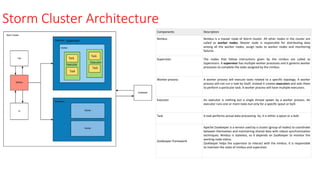
ComponentsDescription
Nimbus Nimbus is a master node of Storm cluster. All other nodes in the cluster are
called as worker nodes. Master node is responsible for distributing data
among all the worker nodes, assign tasks to worker nodes and monitoring
failures.
Supervisor The nodes that follow instructions given by the nimbus are called as
Supervisors. A supervisor has multiple worker processes and it governs worker
processes to complete the tasks assigned by the nimbus.
Worker process A worker process will execute tasks related to a specific topology. A worker
process will not run a task by itself, instead it creates executors and asks them
to perform a particular task. A worker process will have multiple executors.
Executor An executor is nothing but a single thread spawn by a worker process. An
executor runs one or more tasks but only for a specific spout or bolt.
Task A task performs actual data processing. So, it is either a spout or a bolt.
ZooKeeper framework
Apache ZooKeeper is a service used by a cluster (group of nodes) to coordinate
between themselves and maintaining shared data with robust synchronization
techniques. Nimbus is stateless, so it depends on ZooKeeper to monitor the
working node status.
ZooKeeper helps the supervisor to interact with the nimbus. It is responsible
to maintain the state of nimbus and supervisor.
23.
Apache Storm Workflow
•Firstly, the nimbus will wait for the storm topology to be submitted to it.
• When the topology is submitted, it will process the topology and gather all the tasks that
are to be carried out and the order in which the task is to execute.
• At a stipulated time interval, all supervisors will send status (alive or dead) to the nimbus
to inform that they are still alive.
• If a supervisor dies and doesn’t address the status to the nimbus, then the nimbus
assigns the tasks to another supervisor.
• When the Nimbus itself dies, the supervisor will work on an already assigned task
without any interruption or issue.
• When all tasks are completed, the supervisor will wait for a new task to process.
• In a meanwhile, the dead nimbus will be restarted automatically by service monitoring
tools.
• The restarted nimbus will continue from where it stopped working. The dead supervisor
can restart automatically. Hence itis guaranteed that the entire task will be processed at
least once.
24.
Applications of ApacheStorm
• Wego-Wego is a travel metasearch engine. Travel related data fetch from many
sources all over the world with different timing. Storm helps we go to search real-
time data, resolve concurrency issue and find the best match for the end user.
• NaviSite-NaviSite is using Apache Storm for event log monitoring /auditing
system. Each log generated in the system will go through the storm. The storm
will check the content or message against the configured set of the regular
expression, and if there is a match, then that particular message will be saved to
the database.
• Twitter- It uses Storm for its range of publisher analytics products. Publisher
analytics products process every tweet and click on the Twitter Platform. Apache
Storm integrated with Twitter infrastructure.
• Yahoo- Yahoo is working on a next-generation platform that enables the
convergence of big data and low latency processing. While Hadoop is primary
technology for batch processing, storm empowers micro-batch processing of user
event, feeds, and logs.
25.
Spark Streaming
• Sparkstreaming is nothing but an extension of core Spark API that is responsible
for fault-tolerant, high throughput, scalable processing of live streams.
• Spark streaming takes live data streams as input and provides as output batches
by dividing them.
• These streams are then processed by the Spark engine and the final stream
results in batches.
• Some real-time examples of Apache Spark Streaming are:
• Website and network monitoring
• Fraud detection
• Internet of Things sensors
• Advertising
• Web clicks
26.
Spark Streaming Architecture
•Spark streaming discretizes into micro-batches of
streaming data instead of processing the streaming
data in steps of records per unit time.
• Data is accepted in parallel by the Spark streaming’s
receivers and in the worker nodes of Spark this data is
held as buffer.
• To process batches the Spark engine which is typically
latency optimized runs short tasks and outputs the
results to other systems.
• Based on available resources and locality of data Spark
tasks are dynamically assigned to the workers.
• Improved load balancing and rapid fault recovery are its
obvious benefits.
• Resilient distributed dataset (RDD) constitutes each batch of
data and for fault-tolerant dataset in Spark this is the basic
abstraction. It is because of this feature that streaming data
can be processed using any code snippet of Spark or library.