Chapter 5
IoT Design Methodology
Bahga & Madisetti, ©
Book website:
Outline
• IoT Design Methodology that includes:
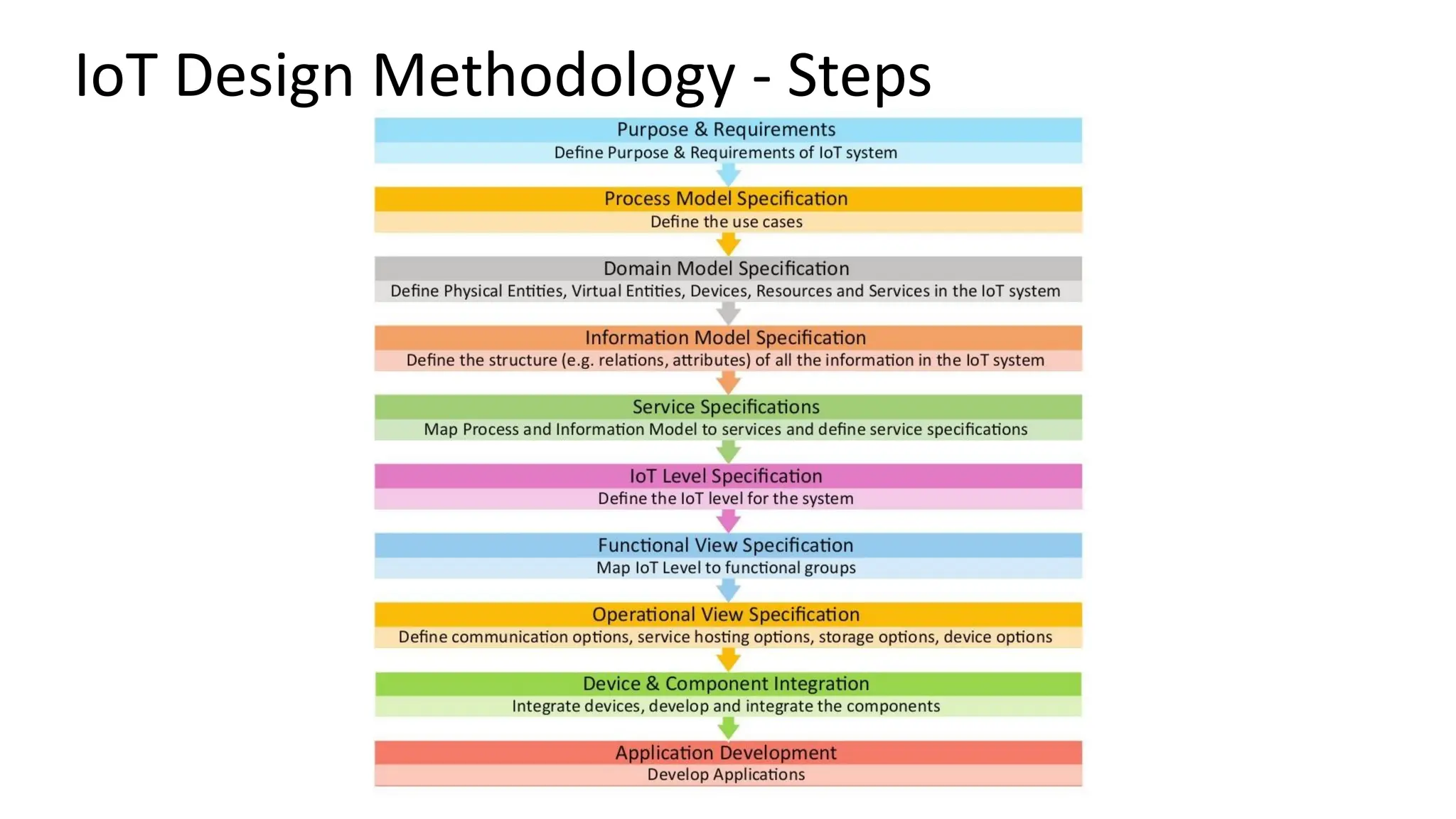
• Purpose & Requirements Specification
• Process Specification
• Domain Model Specification
• Information Model Specification
• Service Specifications
• IoT Level Specification
• Functional View Specification
• Operational View Specification
• Device & Component Integration
• Application Development
Bahga & Madisetti, ©
Book website:
1. Purpose & Requirements Specification
Bahga & Madisetti, ©
Book website:
Defines why the IoT system is being built.
• Purpose: Overall goal (e.g., monitor air quality, automate irrigation).
• Functional requirements: What the system must do (e.g., collect humidity data
every minute).
• Non-functional requirements: Performance, scalability, cost, reliability, security.
2. Process Specification
Bahga & Madisetti, ©
Book website:
Outlines the sequence of operations and data flow.
• Defines how data is collected, processed, and acted upon.
• Example: Sensor → Edge device → Cloud → Analytics → Actuator
response.
3. Domain Model Specification
Bahga & Madisetti, ©
Book website:
Creates a conceptual model of the system’s entities and their relationships.
• Entities: Devices, sensors, users, environments, actuators.
• Relationships: “A sensor measures temperature,” “An actuator controls a fan.”
• Helps understand the physical and logical ecosystem.
4. Information Model Specification
Bahga & Madisetti, ©
Book website:
Describes what data each entity generates, stores, or consumes.
• Defines data types, units, formats, metadata, and communication semantics.
• Example: temperature: float, unit: °C, frequency: 1/minute.
5. Service Specifications
Bahga & Madisetti, ©
Book website:
Defines the services offered by the IoT system and their interfaces.
• Sensor services: data acquisition, calibration.
• Network services: connectivity, routing.
• Application services: analytics, visualization, decision-making.
• Specifies APIs, protocols (MQTT, CoAP, REST), and interactions.
6. IoT Level Specification
Bahga & Madisetti, ©
Book website:
Decides the IoT architecture level based on system complexity.
• Level 1: Simple sensing (single node).
• Level 2: Sensing + Gateway.
• Level 3: Edge computing with local processing.
• Level 4+: Cloud-based analytics, multiple domains, large scale.
7. Functional View Specification
Bahga & Madisetti, ©
Book website:
Shows what each system component does and how functions interact.
• Example: Data collection, preprocessing, storage, analytics, visualization.
• Often represented in a block diagram showing functional modules.
8. Operational View Specification
Bahga & Madisetti, ©
Book website:
Describes how the system behaves during operation.
• Deployment details, workflows, scheduling, maintenance, user interactions.
• Includes aspects like failover handling, device lifecycle, firmware updates.
9. Device & Component Integration
Bahga & Madisetti, ©
Book website:
Covers hardware, network, and software integration.
• Sensor–microcontroller interfacing (I2C, SPI, UART).
• Communication protocols (Wi-Fi, Zigbee, LoRa, Bluetooth).
• Integration testing for interoperability and data consistency.
10. Application Development
Bahga & Madisetti, ©
Book website:
The final stage where the user-facing or control application is built.
• Web/mobile dashboard for visualization and control.
• Includes backend logic, APIs, and analytics integration.
• Focus on usability, security, and scalability.
IoT Design Methodology - Steps
Step 1: Purpose & Requirements Specification
• The first step in IoT system design methodology is to define the
purpose and requirements of the system. In this step, the system
purpose, behavior and requirements (such as data collection
requirements, data analysis requirements, system management
requirements, data privacy and security requirements, user
interface requirements, ...) are captured.
Step 2: Process Specification
• The second step in the IoT design methodology is to define the
process specification. In this step, the use cases of the IoT system are
formally described based on and derived from the purpose and
requirement specifications.
Step 3: Domain Model Specification
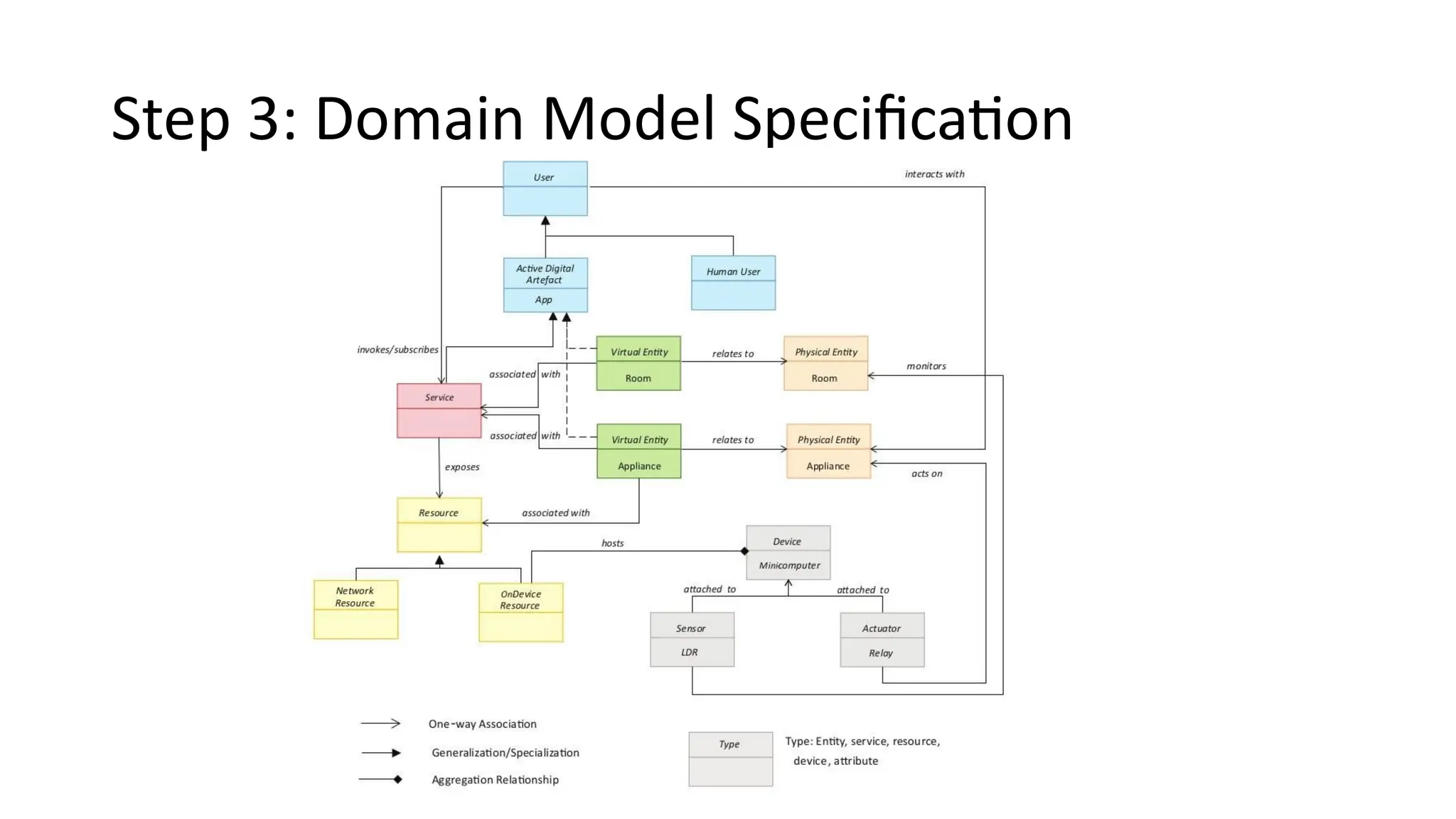
• The third step in the IoT design methodology is to define the Domain
Model. The domain model describes the main concepts, entities
and objects in the domain of IoT system to be designed. Domain
model defines the attributes of the objects and relationships
between objects. Domain model provides an abstract
representation of the concepts, objects and entities in the IoT
domain, independent of any specific technology or platform. With
the domain model, the IoT system designers can get an
understanding of the IoT domain for which the system is to be
designed.
Step 4: Information Model Specification
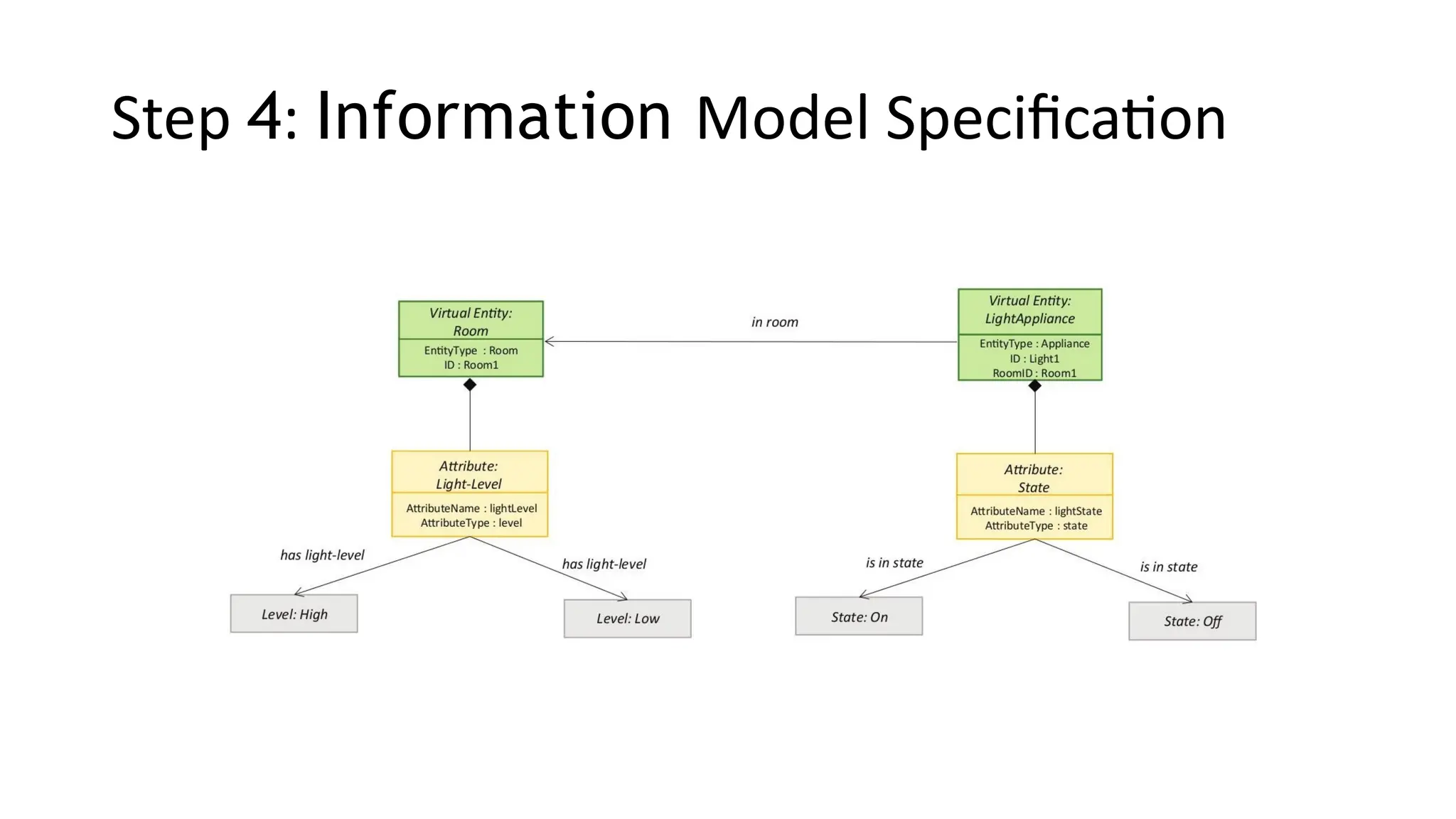
• The fourth step in the IoT design methodology is to define the
Information Model. Information Model defines the structure of all
the information in the IoT system, for example, attributes of Virtual
Entities, relations, etc. Information model does not describe the
specifics of how the information is represented or stored. To define
the information model, we first list the Virtual Entities defined in
the Domain Model. Information model adds more details to the
Virtual Entities by defining their attributes and relations.
Step 5: Service Specifications
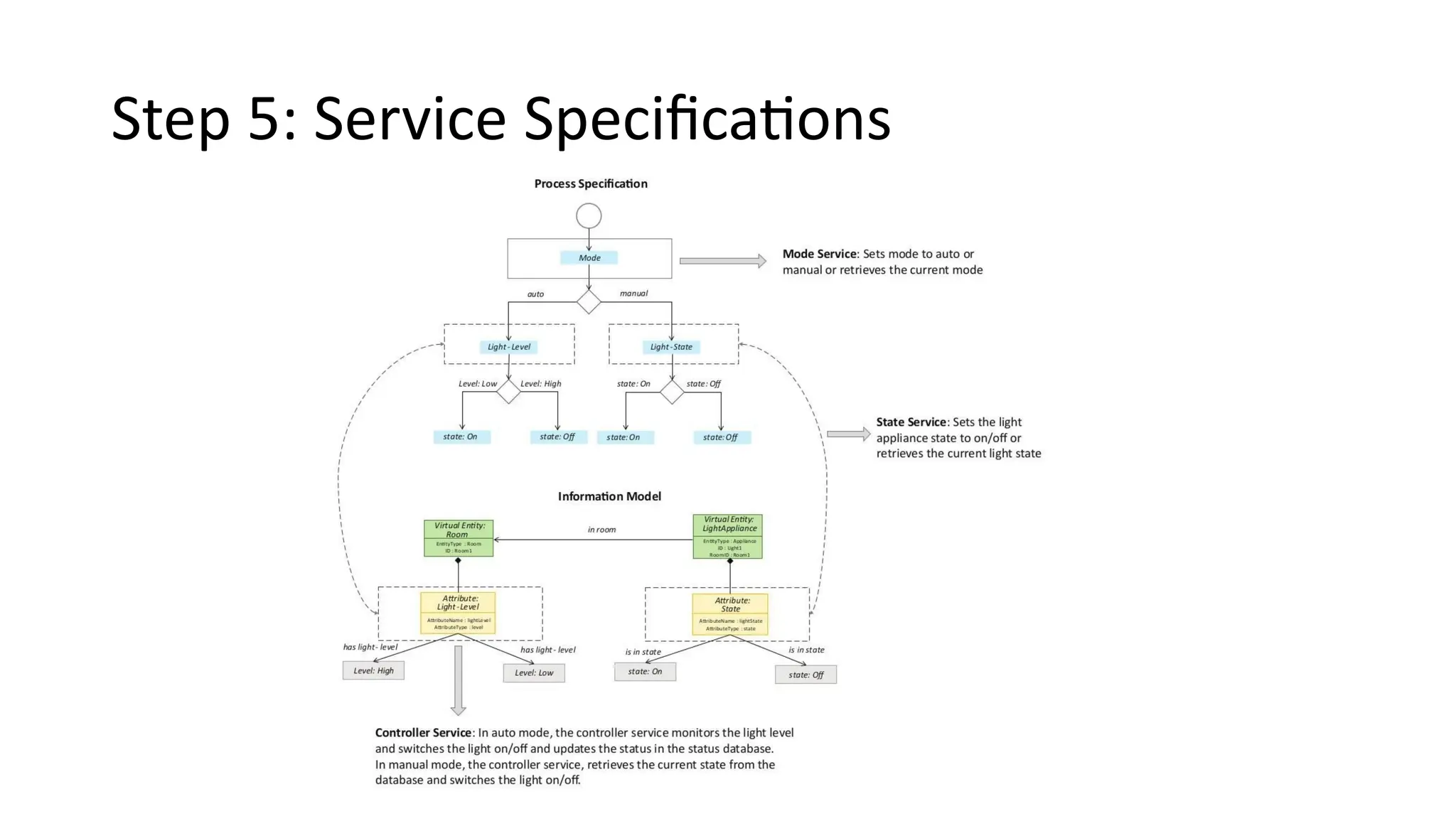
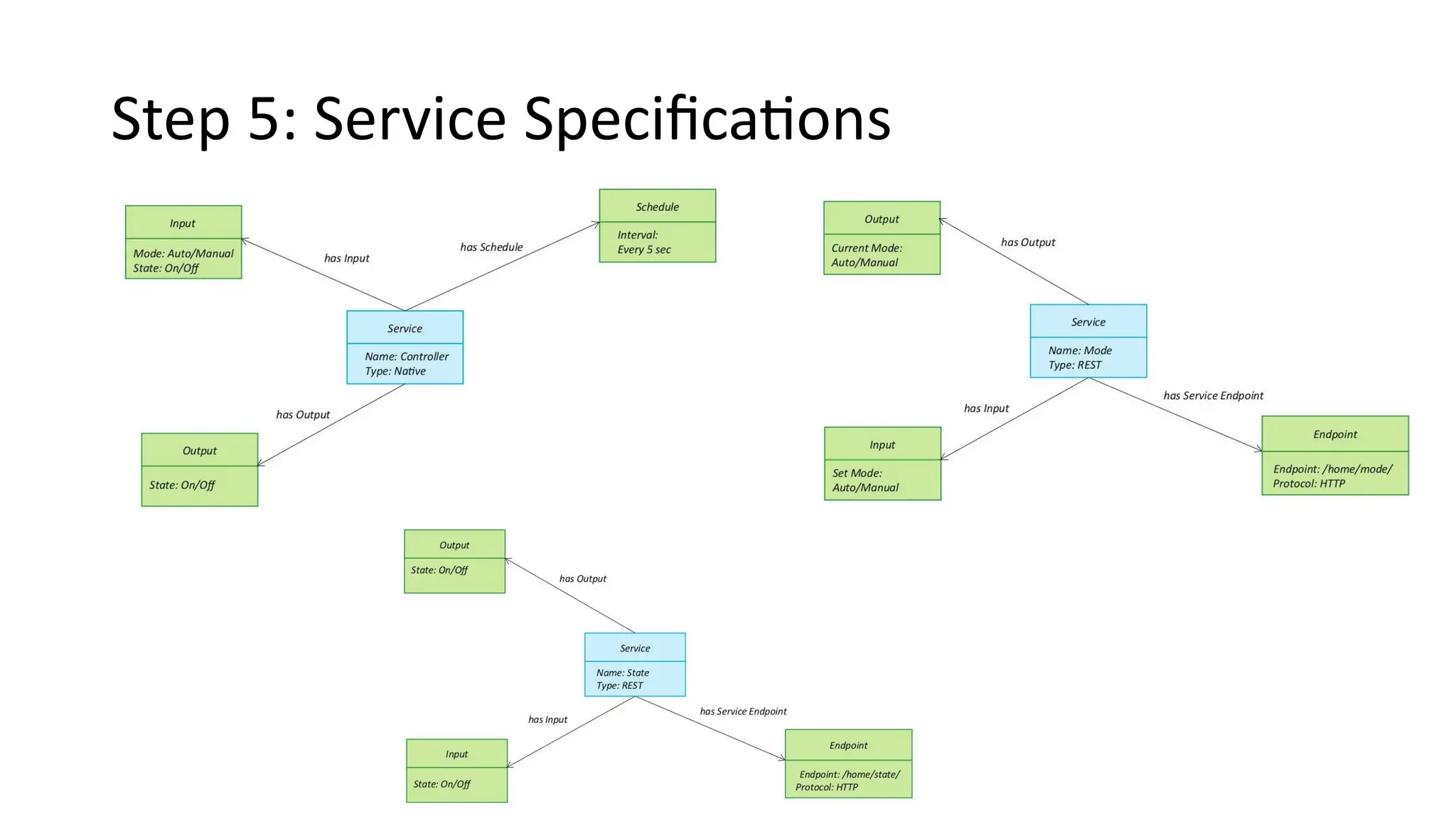
• The fifth step in the IoT design methodology is to define the service
specifications. Service specifications define the services in the IoT
system, service types, service inputs/output, service endpoints,
service schedules, service preconditions and service effects.
Step 6: IoT Level Specification
• The sixth step in the IoT design methodology is to define the IoT level
for the system. In Chapter-1, we defined five IoT deployment levels.
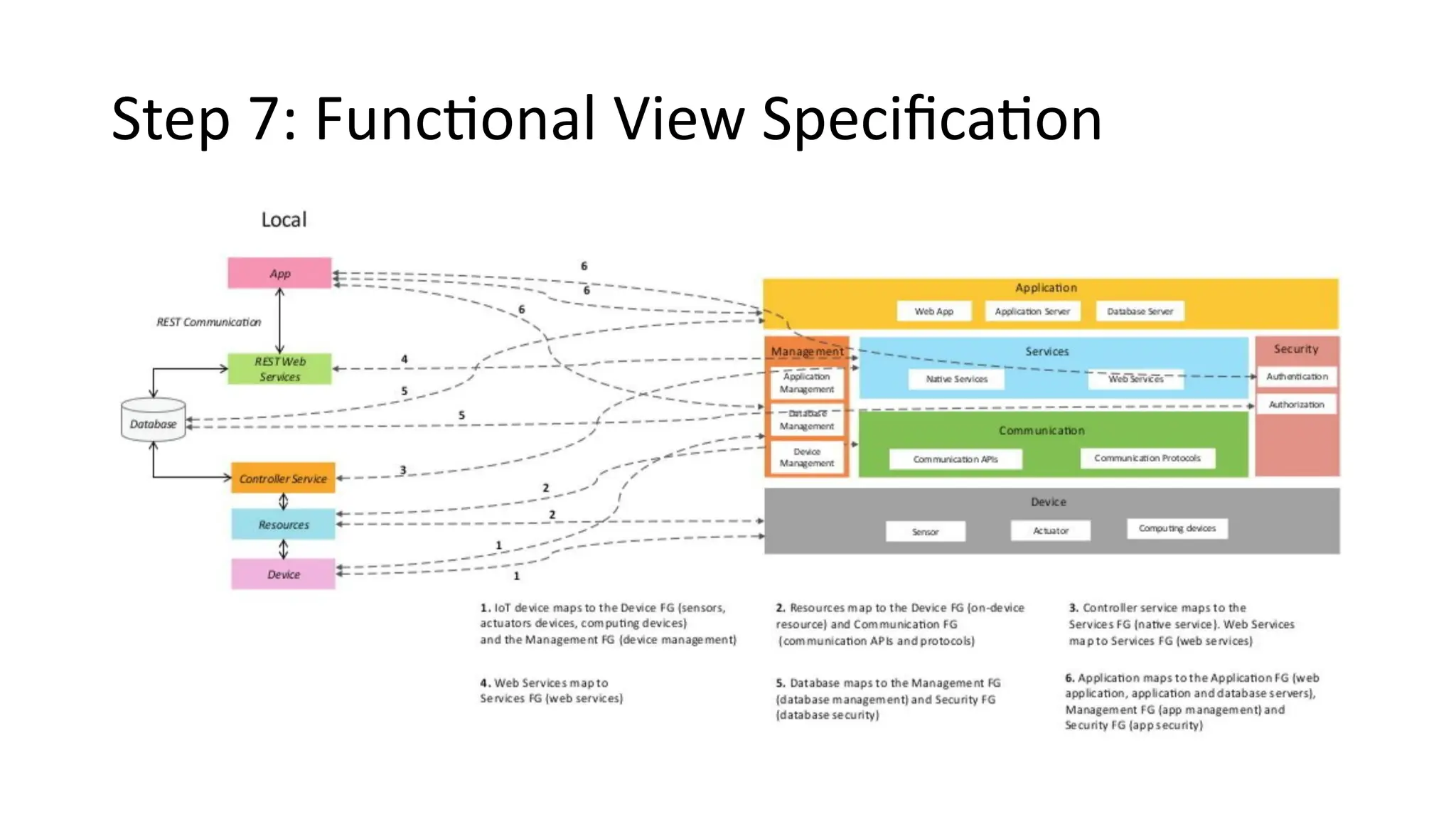
Step 7: Functional View Specification
• The seventh step in the IoT design methodology is to define the
Functional View. The Functional View (FV) defines the functions of
the IoT systems grouped into various Functional Groups (FGs).
Each Functional Group either provides functionalities for
interacting with instances of concepts defined in the Domain
Model or provides information related to these concepts.
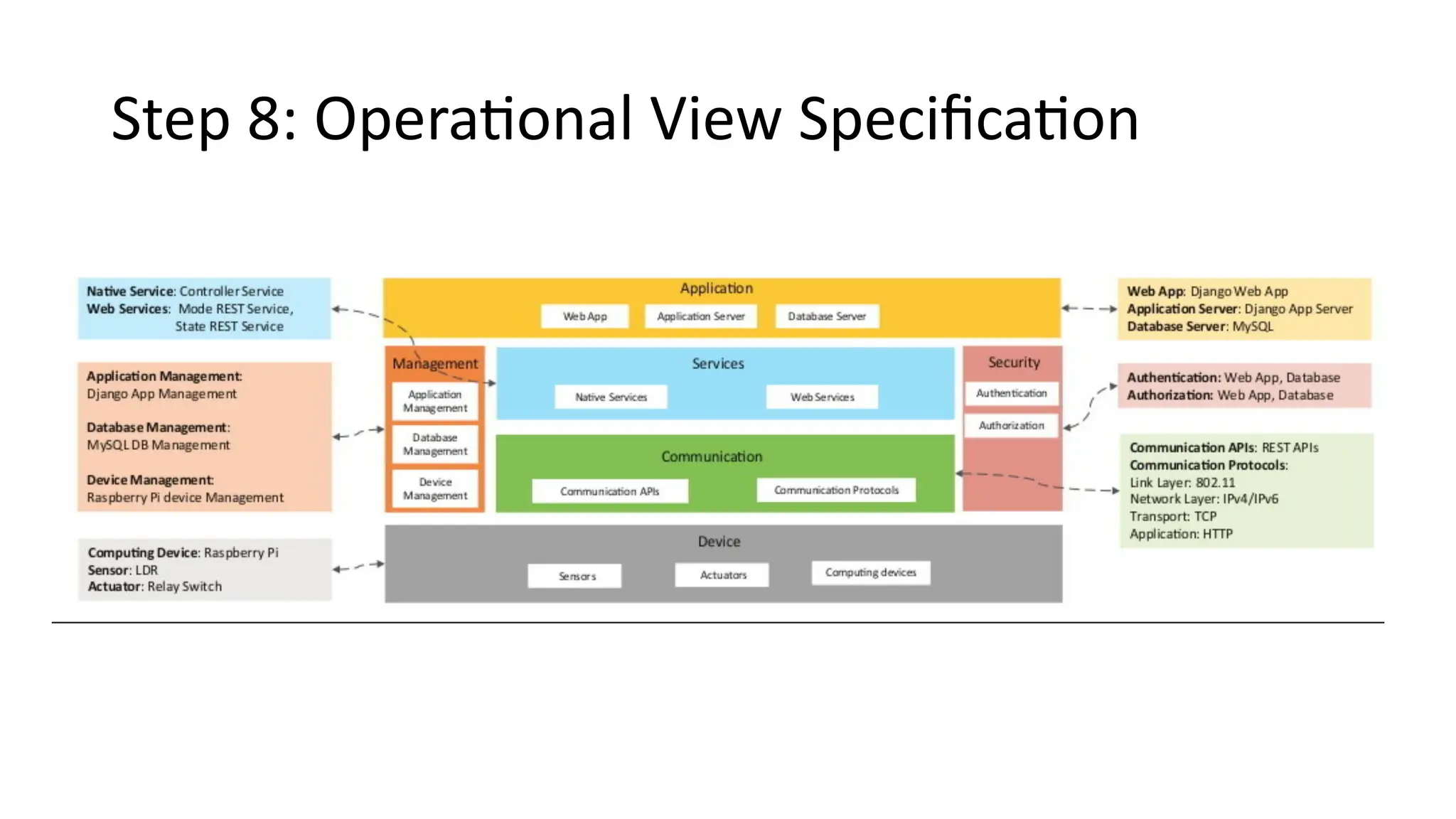
Step 8: Operational View Specification
• The eighth step in the IoT design methodology is to define the
Operational View Specifications. In this step, various options
pertaining to the IoT system deployment and operation are defined,
such as, service hosting options, storage options, device options,
application hosting options, etc
Step 9: Device & Component Integration
• The ninth step in the IoT design methodology is the integration of the
devices and components.
Step 10: Application Development
• The final step in the IoT design methodology is to develop the IoT
application.
Home Automation Case Study
Step:1 - Purpose & Requirements
• Applying this to our example of a smart home automation system, the
purpose and requirements for the system may be described as follows:
• Purpose : A home automation system that allows controlling of the lights in a home
remotely using a web application.
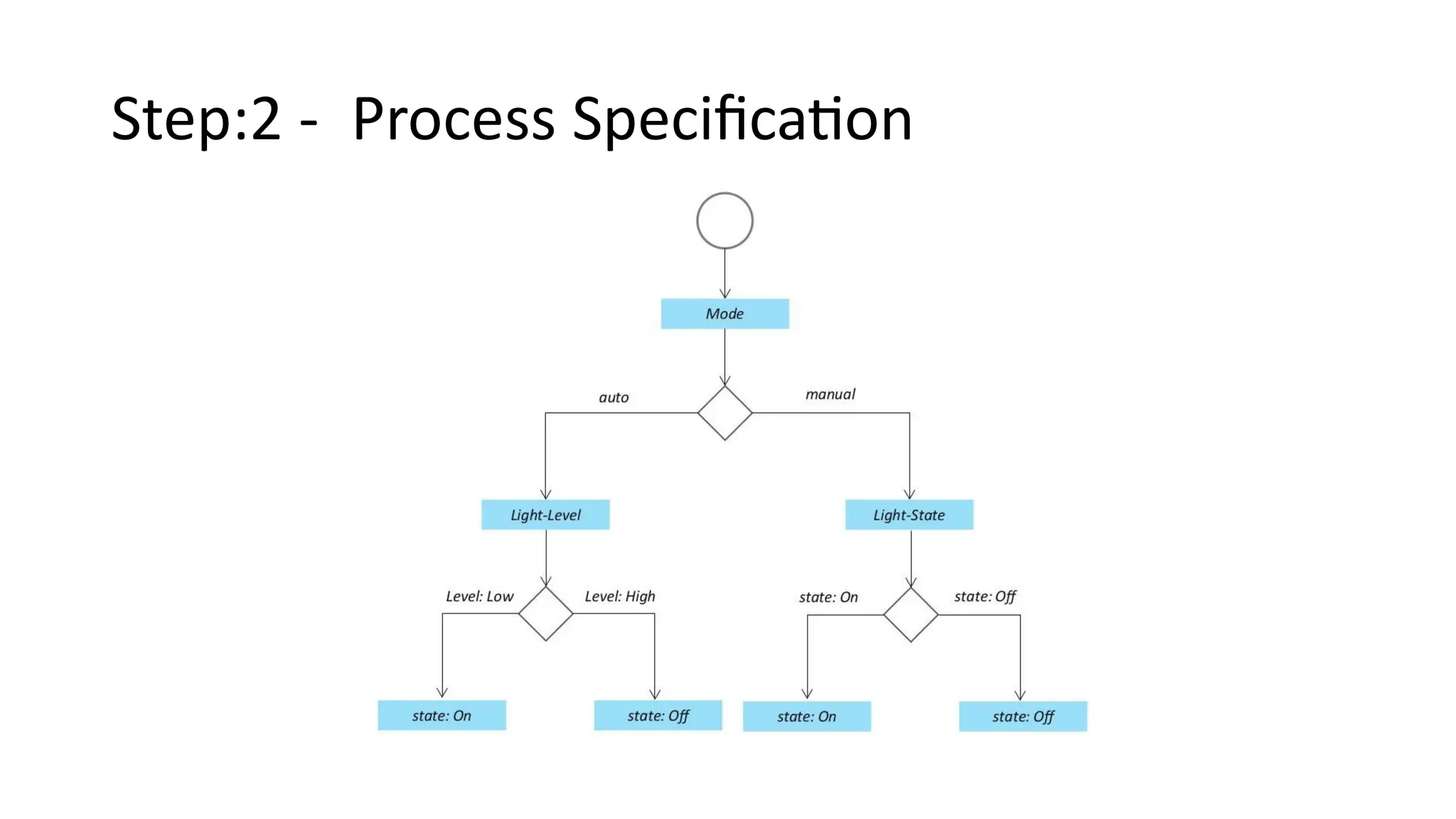
• Behavior : The home automation system should have auto and manual modes. In
auto mode, the system measures the light level in the room and switches on the
light when it gets dark. In manual mode, the system provides the option of manually
and remotely switching on/off the light.
• System Management Requirement : The system should provide remote monitoring
and control functions.
• Data Analysis Requirement : The system should perform local analysis of the data.
• Application Deployment Requirement : The application should be deployed locally
on the device, but should be accessible remotely.
• Security Requirement : The system should have basic user authentication
capability.
Step:2 - Process Specification
Step 3: Domain Model Specification
Step 4: Information Model Specification
Step 5: Service Specifications
Step 6: IoT Level Specification
Step 7: Functional View Specification
Step 8: Operational View Specification
Step 9: Device & Component Integration
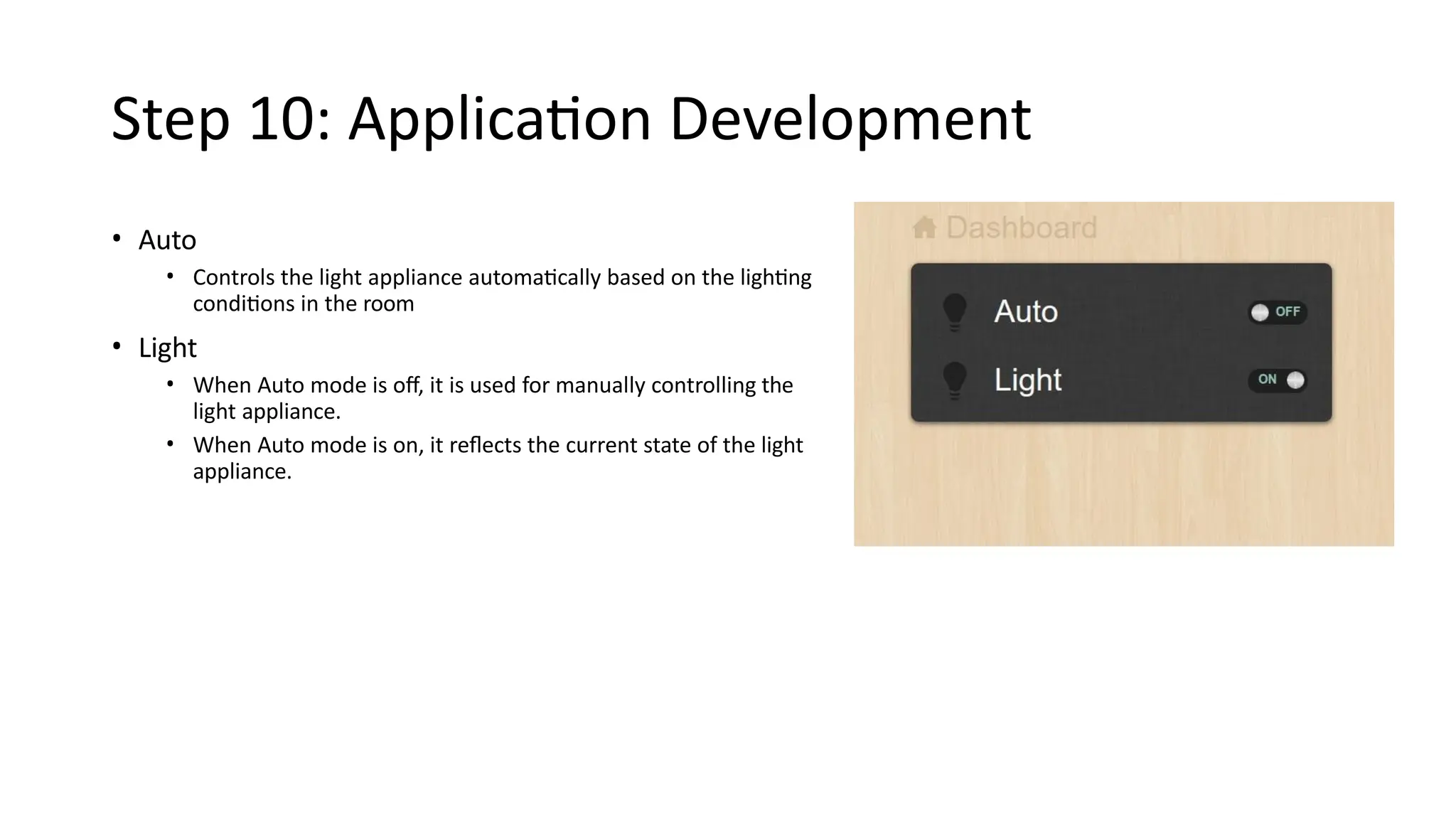
Step 10: Application Development
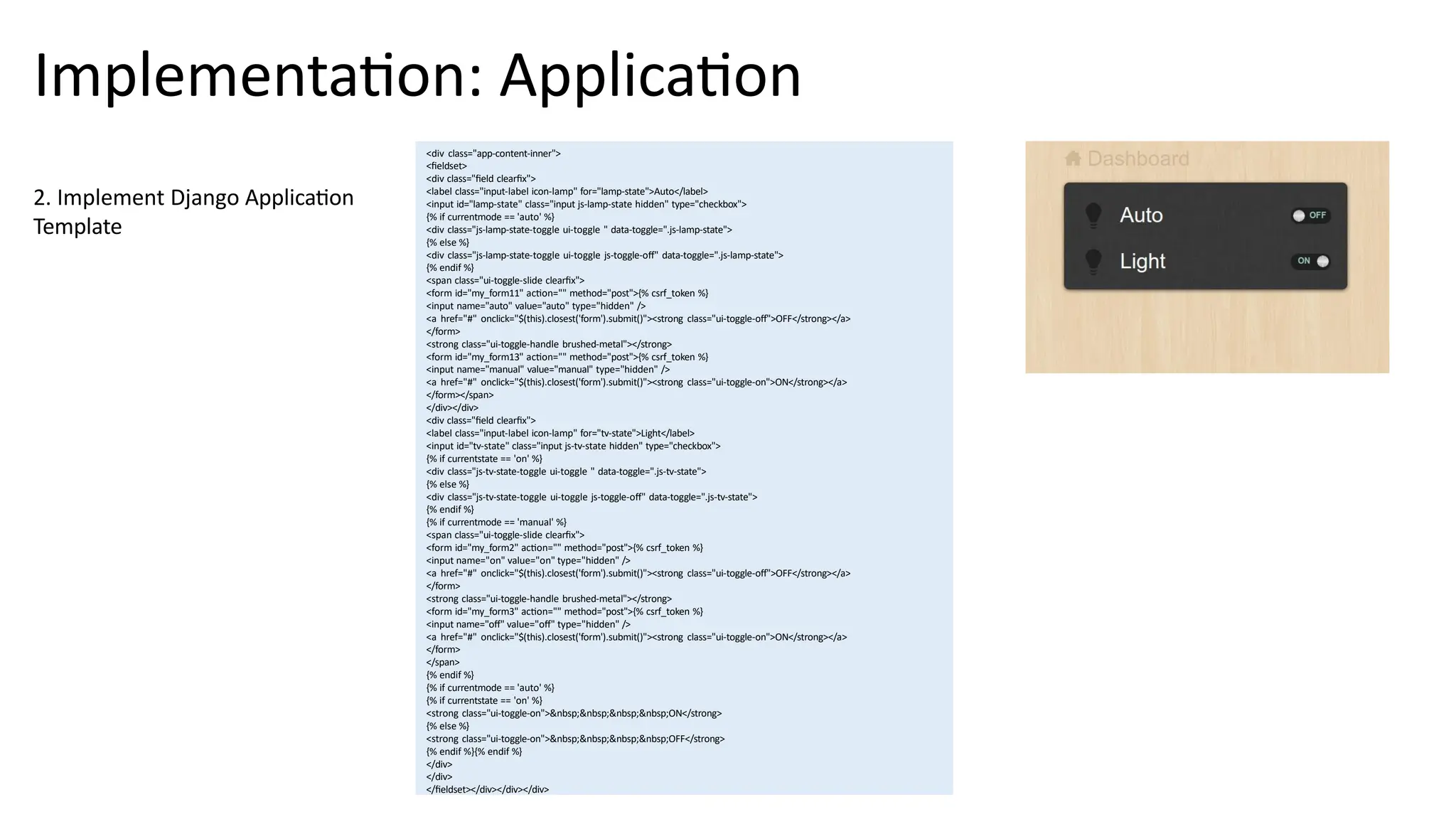
• Auto
• Controls the light appliance automatically based on the lighting
conditions in the room
• Light
• When Auto mode is off, it is used for manually controlling the
light appliance.
• When Auto mode is on, it reflects the current state of the light
appliance.
Implementation: RESTful Web Services
# Models – models.py
from django.db import models
class Mode(models.Model):
name = models.CharField(max_length=50)
class State(models.Model):
name = models.CharField(max_length=50)
REST services implemented with Django REST Framework
1. Map services to models. Model
fields store the states (on/off,
auto/manual)
2. Write Model serializers. Serializers allow
complex data (such as model instances) to be
converted to native Python datatypes that can
then be easily rendered into JSON, XML or
other content types.
# Serializers – serializers.py
from myapp.models import Mode, State
from rest_framework import serializers
class ModeSerializer(serializers.HyperlinkedModelSerializer):
class Meta:
model = Mode
fields = ('url', 'name')
class StateSerializer(serializers.HyperlinkedModelSerializer):
class Meta:
model = State
fields = ('url', 'name')
Implementation: RESTful Web Services
# Views – views.py
from myapp.models import Mode, State
from rest_framework import viewsets
from myapp.serializers import
ModeSerializer, StateSerializer
class ModeViewSet(viewsets.ModelViewSet):
queryset = Mode.objects.all()
serializer_class = ModeSerializer
class StateViewSet(viewsets.ModelViewSet):
queryset = State.objects.all()
serializer_class = StateSerializer
3. Write ViewSets for the Models which
combine the logic for a set of related views in
a single class.
# Models – models.py
from django.db import models
class Mode(models.Model):
name = models.CharField(max_length=50)
class State(models.Model):
name = models.CharField(max_length=50)
4. Write URL patterns for the services.
Since ViewSets are used instead of views, we
can automatically generate the URL conf by
simply registering the viewsets with a router
class.
Routers automatically determining how the
URLs for an application should be mapped to
the logic that deals with handling incoming
requests.
# URL Patterns – urls.py
from django.conf.urls import patterns, include, url
from django.contrib import admin
from rest_framework import routers
from myapp import views
admin.autodiscover()
router = routers.DefaultRouter()
router.register(r'mode', views.ModeViewSet)
router.register(r'state', views.StateViewSet)
urlpatterns = patterns('',
url(r'^', include(router.urls)),
url(r'^api-auth/', include('rest_framework.urls', namespace='rest_framework')),
url(r'^admin/', include(admin.site.urls)),
url(r'^home/', 'myapp.views.home'),
)
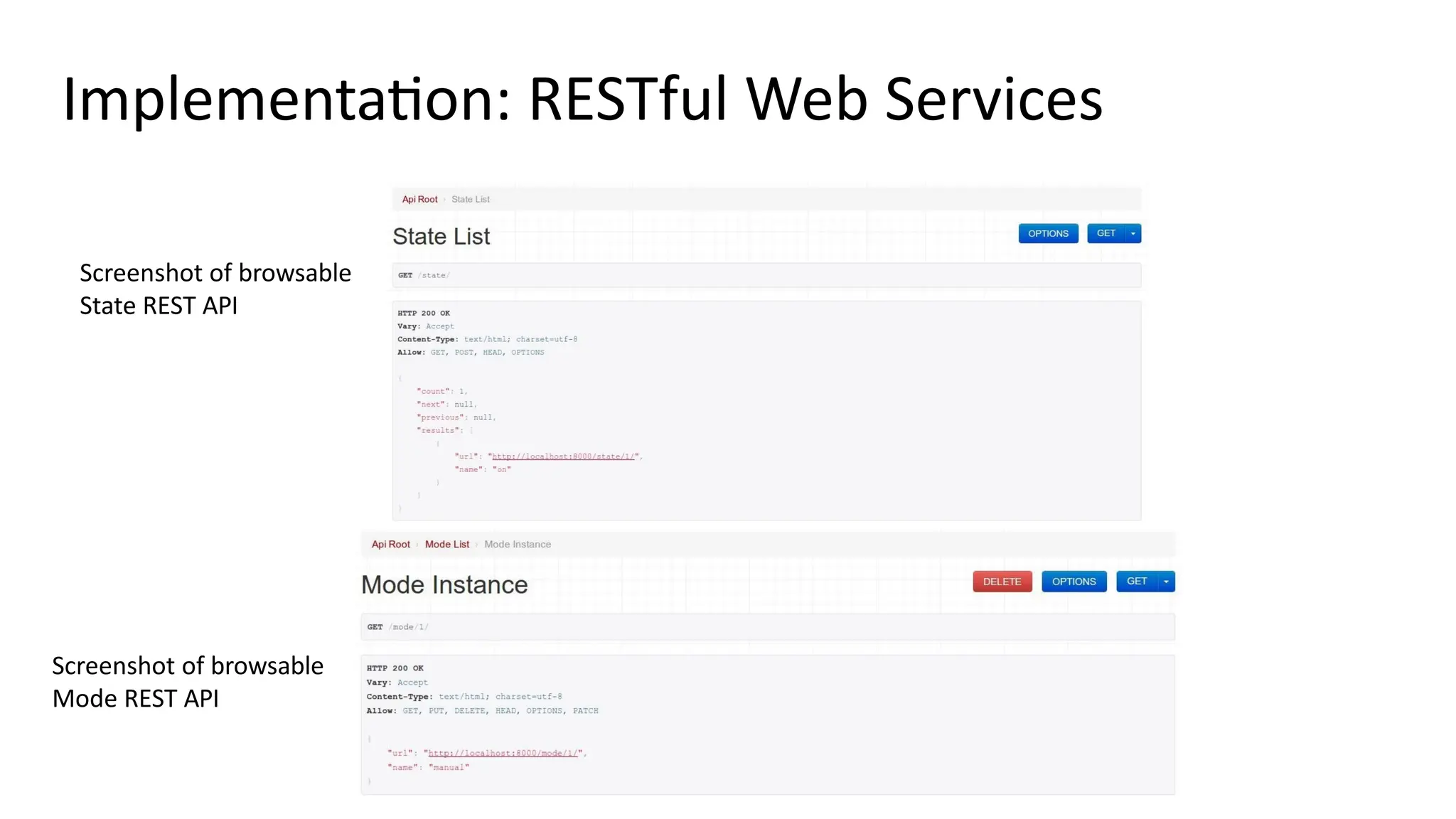
Implementation: RESTful Web Services
Screenshot of browsable
State REST API
Screenshot of browsable
Mode REST API
Implementation: Controller Native Service
#Controller service
import RPi.GPIO as GPIO
import time
import sqlite3 as lite
import sys
con = lite.connect('database.sqlite')
cur = con.cursor()
GPIO.setmode(GPIO.BCM)
threshold = 1000
LDR_PIN = 18
LIGHT_PIN = 25
def readldr(PIN):
reading=0
GPIO.setup(PIN, GPIO.OUT)
GPIO.output(PIN, GPIO.LOW)
time.sleep(0.1)
GPIO.setup(PIN, GPIO.IN)
while (GPIO.input(PIN)==GPIO.LOW):
reading=reading+1
return reading
def switchOnLight(PIN):
GPIO.setup(PIN, GPIO.OUT)
GPIO.output(PIN, GPIO.HIGH)
def switchOffLight(PIN):
GPIO.setup(PIN, GPIO.OUT)
GPIO.output(PIN, GPIO.LOW)
def runAutoMode():
ldr_reading = readldr(LDR_PIN)
if ldr_reading < threshold:
switchOnLight(LIGHT_PIN)
setCurrentState('on')
else:
switchOffLight(LIGHT_PIN)
setCurrentState('off')
def runManualMode():
state = getCurrentState()
if state=='on':
switchOnLight(LIGHT_PIN)
setCurrentState('on')
elif state=='off':
switchOffLight(LIGHT_PIN)
setCurrentState('off')
def getCurrentMode():
cur.execute('SELECT * FROM myapp_mode')
data = cur.fetchone()
#(1, u'auto') return data[1]
def getCurrentState():
cur.execute('SELECT * FROM myapp_state')
data = cur.fetchone()
#(1, u'on') return data[1]
def setCurrentState(val):
query='UPDATE myapp_state set name="'+val+'"'
cur.execute(query)
while True:
currentMode=getCurrentMode()
if currentMode=='auto':
runAutoMode()
elif currentMode=='manual':
runManualMode()
time.sleep(5)
Native service deployed locally
1. Implement the native service in
Python and run on the device
Implementation: Application
# Views – views.py
def home(request):
out=‘’
if 'on' in
request.P
OST:
valu
e
s
=
{
"
n
a
m
e
"
:
"
o
n
"
}
r=requests.put('http://127.0.0.1:8000/state/1/', data=values, auth=(‘username', ‘password'))
result=r.text
output = json.loads(result)
out=output['name']
if 'off' in request.POST:
values = {"name": "off"}
r=requests.put('http://127.0.0.1:8000/state/1/', data=values, auth=(‘username', ‘password'))
result=r.text
output = json.loads(result)
out=output['name']
if 'auto' in request.POST:
values = {"name": "auto"}
r=requests.put('http://127.0.0.1:8000/mode/1/', data=values, auth=(‘username', ‘password'))
result=r.text
1. Implement Django Application View
Implementation: Application
<div class="app-content-inner">
<fieldset>
<div class="field clearfix">
<label class="input-label icon-lamp" for="lamp-state">Auto</label>
<input id="lamp-state" class="input js-lamp-state hidden" type="checkbox">
{% if currentmode == 'auto' %}
<div class="js-lamp-state-toggle ui-toggle " data-toggle=".js-lamp-state">
{% else %}
<div class="js-lamp-state-toggle ui-toggle js-toggle-off" data-toggle=".js-lamp-state">
{% endif %}
<span class="ui-toggle-slide clearfix">
<form id="my_form11" action="" method="post">{% csrf_token %}
<input name="auto" value="auto" type="hidden" />
<a href="#" onclick="$(this).closest('form').submit()"><strong class="ui-toggle-off">OFF</strong></a>
</form>
<strong class="ui-toggle-handle brushed-metal"></strong>
<form id="my_form13" action="" method="post">{% csrf_token %}
<input name="manual" value="manual" type="hidden" />
<a href="#" onclick="$(this).closest('form').submit()"><strong class="ui-toggle-on">ON</strong></a>
</form></span>
</div></div>
<div class="field clearfix">
<label class="input-label icon-lamp" for="tv-state">Light</label>
<input id="tv-state" class="input js-tv-state hidden" type="checkbox">
{% if currentstate == 'on' %}
<div class="js-tv-state-toggle ui-toggle " data-toggle=".js-tv-state">
{% else %}
<div class="js-tv-state-toggle ui-toggle js-toggle-off" data-toggle=".js-tv-state">
{% endif %}
{% if currentmode == 'manual' %}
<span class="ui-toggle-slide clearfix">
<form id="my_form2" action="" method="post">{% csrf_token %}
<input name="on" value="on" type="hidden" />
<a href="#" onclick="$(this).closest('form').submit()"><strong class="ui-toggle-off">OFF</strong></a>
</form>
<strong class="ui-toggle-handle brushed-metal"></strong>
<form id="my_form3" action="" method="post">{% csrf_token %}
<input name="off" value="off" type="hidden" />
<a href="#" onclick="$(this).closest('form').submit()"><strong class="ui-toggle-on">ON</strong></a>
</form>
</span>
{% endif %}
{% if currentmode == 'auto' %}
{% if currentstate == 'on' %}
<strong class="ui-toggle-on">&nbsp;&nbsp;&nbsp;&nbsp;ON</strong>
{% else %}
<strong class="ui-toggle-on">&nbsp;&nbsp;&nbsp;&nbsp;OFF</strong>
{% endif %}{% endif %}
</div>
</div>
</fieldset></div></div></div>
2. Implement Django Application
Template
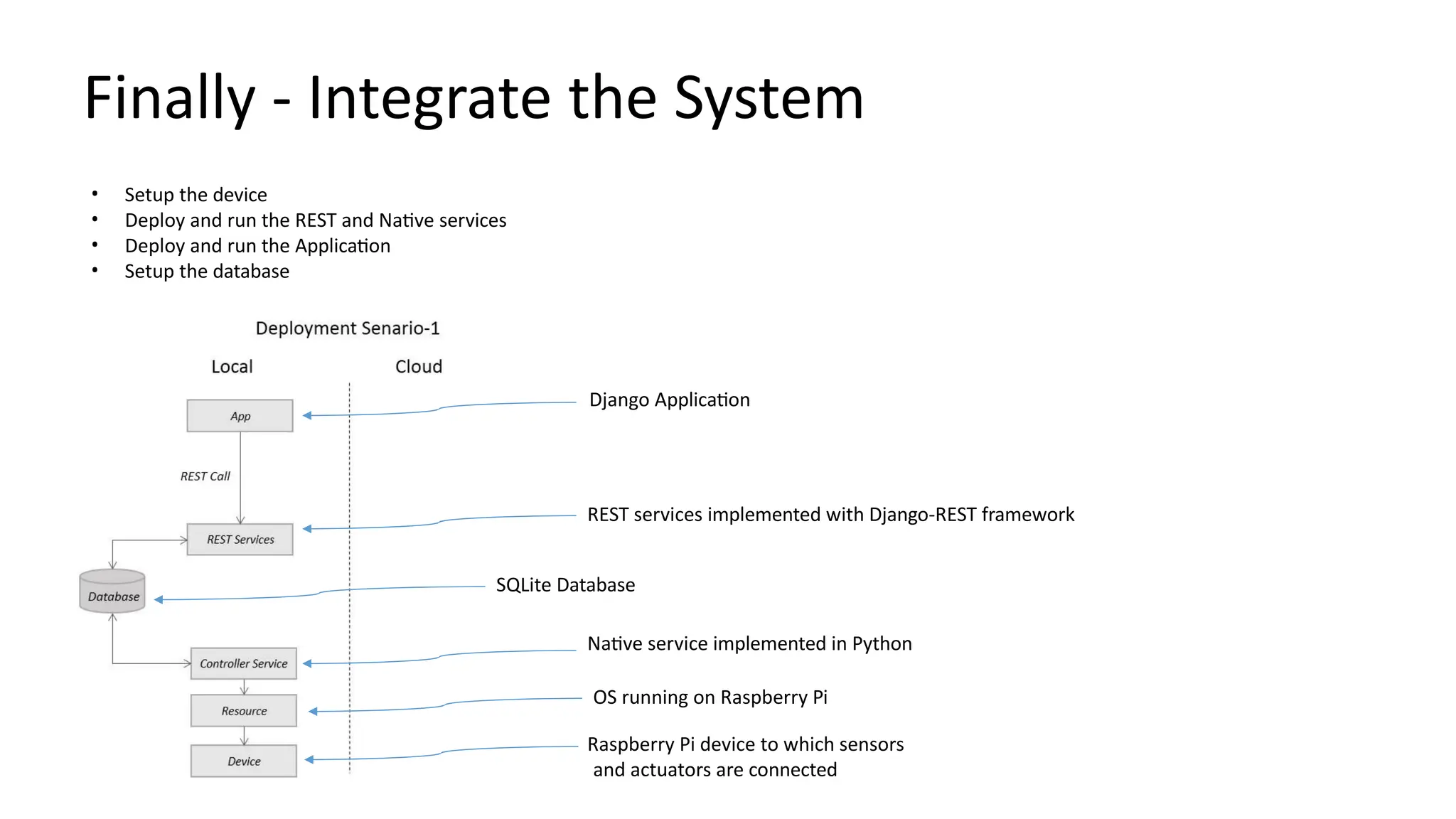
Finally - Integrate the System
Django Application
REST services implemented with Django-REST framework
SQLite Database
Native service implemented in Python
OS running on Raspberry Pi
Raspberry Pi device to which sensors
and actuators are connected
• Setup the device
• Deploy and run the REST and Native services
• Deploy and run the Application
• Setup the database
Bahga & Madisetti, ©
Book website:

Chapter-5.pptx, social science Karnataka textbook

  • 1.
    Chapter 5 IoT DesignMethodology Bahga & Madisetti, © Book website:
  • 2.
    Outline • IoT DesignMethodology that includes: • Purpose & Requirements Specification • Process Specification • Domain Model Specification • Information Model Specification • Service Specifications • IoT Level Specification • Functional View Specification • Operational View Specification • Device & Component Integration • Application Development Bahga & Madisetti, © Book website:
  • 3.
    1. Purpose &Requirements Specification Bahga & Madisetti, © Book website: Defines why the IoT system is being built. • Purpose: Overall goal (e.g., monitor air quality, automate irrigation). • Functional requirements: What the system must do (e.g., collect humidity data every minute). • Non-functional requirements: Performance, scalability, cost, reliability, security.
  • 4.
    2. Process Specification Bahga& Madisetti, © Book website: Outlines the sequence of operations and data flow. • Defines how data is collected, processed, and acted upon. • Example: Sensor → Edge device → Cloud → Analytics → Actuator response.
  • 5.
    3. Domain ModelSpecification Bahga & Madisetti, © Book website: Creates a conceptual model of the system’s entities and their relationships. • Entities: Devices, sensors, users, environments, actuators. • Relationships: “A sensor measures temperature,” “An actuator controls a fan.” • Helps understand the physical and logical ecosystem.
  • 6.
    4. Information ModelSpecification Bahga & Madisetti, © Book website: Describes what data each entity generates, stores, or consumes. • Defines data types, units, formats, metadata, and communication semantics. • Example: temperature: float, unit: °C, frequency: 1/minute.
  • 7.
    5. Service Specifications Bahga& Madisetti, © Book website: Defines the services offered by the IoT system and their interfaces. • Sensor services: data acquisition, calibration. • Network services: connectivity, routing. • Application services: analytics, visualization, decision-making. • Specifies APIs, protocols (MQTT, CoAP, REST), and interactions.
  • 8.
    6. IoT LevelSpecification Bahga & Madisetti, © Book website: Decides the IoT architecture level based on system complexity. • Level 1: Simple sensing (single node). • Level 2: Sensing + Gateway. • Level 3: Edge computing with local processing. • Level 4+: Cloud-based analytics, multiple domains, large scale.
  • 9.
    7. Functional ViewSpecification Bahga & Madisetti, © Book website: Shows what each system component does and how functions interact. • Example: Data collection, preprocessing, storage, analytics, visualization. • Often represented in a block diagram showing functional modules.
  • 10.
    8. Operational ViewSpecification Bahga & Madisetti, © Book website: Describes how the system behaves during operation. • Deployment details, workflows, scheduling, maintenance, user interactions. • Includes aspects like failover handling, device lifecycle, firmware updates.
  • 11.
    9. Device &Component Integration Bahga & Madisetti, © Book website: Covers hardware, network, and software integration. • Sensor–microcontroller interfacing (I2C, SPI, UART). • Communication protocols (Wi-Fi, Zigbee, LoRa, Bluetooth). • Integration testing for interoperability and data consistency.
  • 12.
    10. Application Development Bahga& Madisetti, © Book website: The final stage where the user-facing or control application is built. • Web/mobile dashboard for visualization and control. • Includes backend logic, APIs, and analytics integration. • Focus on usability, security, and scalability.
  • 13.
  • 14.
    Step 1: Purpose& Requirements Specification • The first step in IoT system design methodology is to define the purpose and requirements of the system. In this step, the system purpose, behavior and requirements (such as data collection requirements, data analysis requirements, system management requirements, data privacy and security requirements, user interface requirements, ...) are captured.
  • 15.
    Step 2: ProcessSpecification • The second step in the IoT design methodology is to define the process specification. In this step, the use cases of the IoT system are formally described based on and derived from the purpose and requirement specifications.
  • 16.
    Step 3: DomainModel Specification • The third step in the IoT design methodology is to define the Domain Model. The domain model describes the main concepts, entities and objects in the domain of IoT system to be designed. Domain model defines the attributes of the objects and relationships between objects. Domain model provides an abstract representation of the concepts, objects and entities in the IoT domain, independent of any specific technology or platform. With the domain model, the IoT system designers can get an understanding of the IoT domain for which the system is to be designed.
  • 17.
    Step 4: InformationModel Specification • The fourth step in the IoT design methodology is to define the Information Model. Information Model defines the structure of all the information in the IoT system, for example, attributes of Virtual Entities, relations, etc. Information model does not describe the specifics of how the information is represented or stored. To define the information model, we first list the Virtual Entities defined in the Domain Model. Information model adds more details to the Virtual Entities by defining their attributes and relations.
  • 18.
    Step 5: ServiceSpecifications • The fifth step in the IoT design methodology is to define the service specifications. Service specifications define the services in the IoT system, service types, service inputs/output, service endpoints, service schedules, service preconditions and service effects.
  • 19.
    Step 6: IoTLevel Specification • The sixth step in the IoT design methodology is to define the IoT level for the system. In Chapter-1, we defined five IoT deployment levels.
  • 20.
    Step 7: FunctionalView Specification • The seventh step in the IoT design methodology is to define the Functional View. The Functional View (FV) defines the functions of the IoT systems grouped into various Functional Groups (FGs). Each Functional Group either provides functionalities for interacting with instances of concepts defined in the Domain Model or provides information related to these concepts.
  • 21.
    Step 8: OperationalView Specification • The eighth step in the IoT design methodology is to define the Operational View Specifications. In this step, various options pertaining to the IoT system deployment and operation are defined, such as, service hosting options, storage options, device options, application hosting options, etc
  • 22.
    Step 9: Device& Component Integration • The ninth step in the IoT design methodology is the integration of the devices and components.
  • 23.
    Step 10: ApplicationDevelopment • The final step in the IoT design methodology is to develop the IoT application.
  • 24.
  • 25.
    Step:1 - Purpose& Requirements • Applying this to our example of a smart home automation system, the purpose and requirements for the system may be described as follows: • Purpose : A home automation system that allows controlling of the lights in a home remotely using a web application. • Behavior : The home automation system should have auto and manual modes. In auto mode, the system measures the light level in the room and switches on the light when it gets dark. In manual mode, the system provides the option of manually and remotely switching on/off the light. • System Management Requirement : The system should provide remote monitoring and control functions. • Data Analysis Requirement : The system should perform local analysis of the data. • Application Deployment Requirement : The application should be deployed locally on the device, but should be accessible remotely. • Security Requirement : The system should have basic user authentication capability.
  • 26.
    Step:2 - ProcessSpecification
  • 27.
    Step 3: DomainModel Specification
  • 28.
    Step 4: InformationModel Specification
  • 29.
    Step 5: ServiceSpecifications
  • 30.
    Step 5: ServiceSpecifications
  • 31.
    Step 6: IoTLevel Specification
  • 32.
    Step 7: FunctionalView Specification
  • 33.
    Step 8: OperationalView Specification
  • 34.
    Step 9: Device& Component Integration
  • 35.
    Step 10: ApplicationDevelopment • Auto • Controls the light appliance automatically based on the lighting conditions in the room • Light • When Auto mode is off, it is used for manually controlling the light appliance. • When Auto mode is on, it reflects the current state of the light appliance.
  • 36.
    Implementation: RESTful WebServices # Models – models.py from django.db import models class Mode(models.Model): name = models.CharField(max_length=50) class State(models.Model): name = models.CharField(max_length=50) REST services implemented with Django REST Framework 1. Map services to models. Model fields store the states (on/off, auto/manual) 2. Write Model serializers. Serializers allow complex data (such as model instances) to be converted to native Python datatypes that can then be easily rendered into JSON, XML or other content types. # Serializers – serializers.py from myapp.models import Mode, State from rest_framework import serializers class ModeSerializer(serializers.HyperlinkedModelSerializer): class Meta: model = Mode fields = ('url', 'name') class StateSerializer(serializers.HyperlinkedModelSerializer): class Meta: model = State fields = ('url', 'name')
  • 37.
    Implementation: RESTful WebServices # Views – views.py from myapp.models import Mode, State from rest_framework import viewsets from myapp.serializers import ModeSerializer, StateSerializer class ModeViewSet(viewsets.ModelViewSet): queryset = Mode.objects.all() serializer_class = ModeSerializer class StateViewSet(viewsets.ModelViewSet): queryset = State.objects.all() serializer_class = StateSerializer 3. Write ViewSets for the Models which combine the logic for a set of related views in a single class. # Models – models.py from django.db import models class Mode(models.Model): name = models.CharField(max_length=50) class State(models.Model): name = models.CharField(max_length=50) 4. Write URL patterns for the services. Since ViewSets are used instead of views, we can automatically generate the URL conf by simply registering the viewsets with a router class. Routers automatically determining how the URLs for an application should be mapped to the logic that deals with handling incoming requests. # URL Patterns – urls.py from django.conf.urls import patterns, include, url from django.contrib import admin from rest_framework import routers from myapp import views admin.autodiscover() router = routers.DefaultRouter() router.register(r'mode', views.ModeViewSet) router.register(r'state', views.StateViewSet) urlpatterns = patterns('', url(r'^', include(router.urls)), url(r'^api-auth/', include('rest_framework.urls', namespace='rest_framework')), url(r'^admin/', include(admin.site.urls)), url(r'^home/', 'myapp.views.home'), )
  • 38.
    Implementation: RESTful WebServices Screenshot of browsable State REST API Screenshot of browsable Mode REST API
  • 39.
    Implementation: Controller NativeService #Controller service import RPi.GPIO as GPIO import time import sqlite3 as lite import sys con = lite.connect('database.sqlite') cur = con.cursor() GPIO.setmode(GPIO.BCM) threshold = 1000 LDR_PIN = 18 LIGHT_PIN = 25 def readldr(PIN): reading=0 GPIO.setup(PIN, GPIO.OUT) GPIO.output(PIN, GPIO.LOW) time.sleep(0.1) GPIO.setup(PIN, GPIO.IN) while (GPIO.input(PIN)==GPIO.LOW): reading=reading+1 return reading def switchOnLight(PIN): GPIO.setup(PIN, GPIO.OUT) GPIO.output(PIN, GPIO.HIGH) def switchOffLight(PIN): GPIO.setup(PIN, GPIO.OUT) GPIO.output(PIN, GPIO.LOW) def runAutoMode(): ldr_reading = readldr(LDR_PIN) if ldr_reading < threshold: switchOnLight(LIGHT_PIN) setCurrentState('on') else: switchOffLight(LIGHT_PIN) setCurrentState('off') def runManualMode(): state = getCurrentState() if state=='on': switchOnLight(LIGHT_PIN) setCurrentState('on') elif state=='off': switchOffLight(LIGHT_PIN) setCurrentState('off') def getCurrentMode(): cur.execute('SELECT * FROM myapp_mode') data = cur.fetchone() #(1, u'auto') return data[1] def getCurrentState(): cur.execute('SELECT * FROM myapp_state') data = cur.fetchone() #(1, u'on') return data[1] def setCurrentState(val): query='UPDATE myapp_state set name="'+val+'"' cur.execute(query) while True: currentMode=getCurrentMode() if currentMode=='auto': runAutoMode() elif currentMode=='manual': runManualMode() time.sleep(5) Native service deployed locally 1. Implement the native service in Python and run on the device
  • 40.
    Implementation: Application # Views– views.py def home(request): out=‘’ if 'on' in request.P OST: valu e s = { " n a m e " : " o n " } r=requests.put('http://127.0.0.1:8000/state/1/', data=values, auth=(‘username', ‘password')) result=r.text output = json.loads(result) out=output['name'] if 'off' in request.POST: values = {"name": "off"} r=requests.put('http://127.0.0.1:8000/state/1/', data=values, auth=(‘username', ‘password')) result=r.text output = json.loads(result) out=output['name'] if 'auto' in request.POST: values = {"name": "auto"} r=requests.put('http://127.0.0.1:8000/mode/1/', data=values, auth=(‘username', ‘password')) result=r.text 1. Implement Django Application View
  • 41.
    Implementation: Application <div class="app-content-inner"> <fieldset> <divclass="field clearfix"> <label class="input-label icon-lamp" for="lamp-state">Auto</label> <input id="lamp-state" class="input js-lamp-state hidden" type="checkbox"> {% if currentmode == 'auto' %} <div class="js-lamp-state-toggle ui-toggle " data-toggle=".js-lamp-state"> {% else %} <div class="js-lamp-state-toggle ui-toggle js-toggle-off" data-toggle=".js-lamp-state"> {% endif %} <span class="ui-toggle-slide clearfix"> <form id="my_form11" action="" method="post">{% csrf_token %} <input name="auto" value="auto" type="hidden" /> <a href="#" onclick="$(this).closest('form').submit()"><strong class="ui-toggle-off">OFF</strong></a> </form> <strong class="ui-toggle-handle brushed-metal"></strong> <form id="my_form13" action="" method="post">{% csrf_token %} <input name="manual" value="manual" type="hidden" /> <a href="#" onclick="$(this).closest('form').submit()"><strong class="ui-toggle-on">ON</strong></a> </form></span> </div></div> <div class="field clearfix"> <label class="input-label icon-lamp" for="tv-state">Light</label> <input id="tv-state" class="input js-tv-state hidden" type="checkbox"> {% if currentstate == 'on' %} <div class="js-tv-state-toggle ui-toggle " data-toggle=".js-tv-state"> {% else %} <div class="js-tv-state-toggle ui-toggle js-toggle-off" data-toggle=".js-tv-state"> {% endif %} {% if currentmode == 'manual' %} <span class="ui-toggle-slide clearfix"> <form id="my_form2" action="" method="post">{% csrf_token %} <input name="on" value="on" type="hidden" /> <a href="#" onclick="$(this).closest('form').submit()"><strong class="ui-toggle-off">OFF</strong></a> </form> <strong class="ui-toggle-handle brushed-metal"></strong> <form id="my_form3" action="" method="post">{% csrf_token %} <input name="off" value="off" type="hidden" /> <a href="#" onclick="$(this).closest('form').submit()"><strong class="ui-toggle-on">ON</strong></a> </form> </span> {% endif %} {% if currentmode == 'auto' %} {% if currentstate == 'on' %} <strong class="ui-toggle-on">&nbsp;&nbsp;&nbsp;&nbsp;ON</strong> {% else %} <strong class="ui-toggle-on">&nbsp;&nbsp;&nbsp;&nbsp;OFF</strong> {% endif %}{% endif %} </div> </div> </fieldset></div></div></div> 2. Implement Django Application Template
  • 42.
    Finally - Integratethe System Django Application REST services implemented with Django-REST framework SQLite Database Native service implemented in Python OS running on Raspberry Pi Raspberry Pi device to which sensors and actuators are connected • Setup the device • Deploy and run the REST and Native services • Deploy and run the Application • Setup the database
  • 43.
    Bahga & Madisetti,© Book website: