Requirement Engineering process
Framework
Requirementsengineering
■ is the branch of software Engineering concerned with
the real world goals for, Functions of and constraints
on software systems.
■ concerned with the relationship of these factors to
precise specifications of software behaviour, and to
their evolution over time and across software families
■ three fundamental concerns of Requirements
Engineering
■ the concern of understanding a problem ('what the problem
is')
■ the concern of formally describing a problem
■ the concern of attaining an agreement on the nature of the
problem.
06:01 AM 2
3.
Requirement Engineering and
Requirements
■Requirements discovered at early stages of the
software development life cycle.
■ requirements describe how the system will behave,
system domain, user level facilities and the constraints
on which the system should be operated
■ Types
■ User requirements
■ describe the expected services from the system,
constraints on achieving them and the way the
system provides the requirements
■ defined using the external activities and
behaviour of the system and is never defined
based on system design or implementation
06:01 AM 3
4.
..contd
■System Requirements
■provide thein-depth knowledge of the user
requirements
■basic principles that should be followed to design the
system architecture
■software engineer should analyse these
requirements to know about what exactly has to be
implemented and provided in the proposed system
■Types
■Functional requirements
■ What the system is expected to provide
■ How the system should respond or react to particular input
or situation
■ What the system should not do
■ Constraints on implementing the above said requirements
06:01 AM 4
5.
….contd
■ These requirementsmainly depend on the users of the system
and the type of software that is developed
■ Non functional requirements
■ define the effectiveness of the functions provided by the
system
■ not provided by the system, but they affect the functions
provided by the system
■ form the basis of the quality of the system
■ requirements engineering involves acquisition',
'elicitation', 'analysis', 'specification', 'validation' etc
■ The cost of the requirements engineering depends on
the size and the type of the system that is being
developed. For large systems it wills costs 15% of the
total budget only for formal requirement specification,
for smaller systems it varies from 8 to 10%
06:01 AM 5
6.
problems of usingwrong requirements
■ Delayed and over budget projects.
■ The product does not reach the intended purpose. The
customers, who are actually paying for the system, are
not satisfied.
■ The errors encountered in the development of the
system, is the reason for the problems in using the
system.
■ The continuous use of such system makes it error
prone, and thus increases the cost of the
maintenance.
■ The cost of correcting the requirements errors is 100
times more than the cost of the simple errors
occurred in the later stages of the project (Kotonya
and Ian Somerville)
06:01 AM 6
Requirement Engineering process
Framework
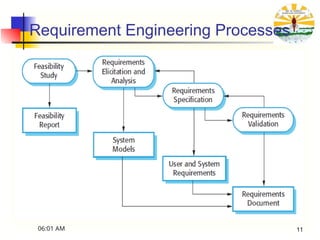
■inputs of the requirements engineering process
■ Existing system document
■ user and stake holders requirements
■ organization and business procedures
■ Domain Knowledge
■ outputs for the Requirements engineering process are
■ Final requirements
■ Specification of system
■ System models
06:01 AM 8
9.
• For Libraryinformation System(LIS) the following are
example requirements for inputs
– Existing System information
• The LIS shall poll the bar code reader system and
process all of the transaction requests every two
seconds
– Stakeholder needs
• The system should provide a help facility which will
explain the facilities of the system to new user. This
help facility should be accessible from all user
interface screens
– Organizational standards
• The system shall run on a Sun server running the Solaris
2.0 operating system
10.
….contd…
– Regulations
• Thesystem shall include a facility to a print all of the
personnel information which is maintained for a
library user
– Domain information
• Books are uniquely identified by an international
Standard Book Number which is a 10 digit identifier
06:01 AM 10
Requirement Engineering process
Framework
■Feasibility study
■ necessity of the proposed system in the organization
and the domain information of the system
■ Does the overall objectives of the organisation is
satisfied by the system?
■ Can the system be developed within the proposed
budget and timeline?
■ Can the proposed system made to co-exist with the
existing systems?
■ This feasibility study involves set of activities such as
information gathering, assessment and the report of the
information
06:01 AM 12
13.
Requirement Engineering process
Framework
■Feasibility study
■ The reaction of the organisation if the proposed
system is not implemented
■ Can the existing system integrated with the proposed
system to solve the problems.
■ The level of problems that has to be solved by the
proposed system.
■ Can the proposed system be developed and used with
the existing technology or newer technology is
needed?
■ What exactly the proposed systems should and should
not support?
■ Participants: the total management department, technical professional,
expert’s judgment and experienced users.
06:01 AM 13
14.
Feasibility study
• Whatif the system wasn’t implemented?
• What are current process problems?
• Do technical resources exist?
• What is the risk associated with the technology?
• Is new technology needed? What skills?
• How will the proposed project help?
• How does the proposed project contribute to the overall
objectives of the organization?
• Have the benefits identified with the system being identified
clearly?
15.
Feasibility study
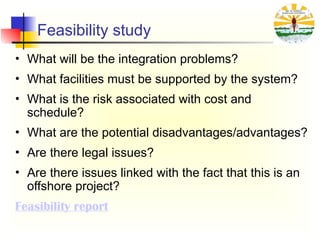
• Whatwill be the integration problems?
• What facilities must be supported by the system?
• What is the risk associated with cost and
schedule?
• What are the potential disadvantages/advantages?
• Are there legal issues?
• Are there issues linked with the fact that this is an
offshore project?
Feasibility report
16.
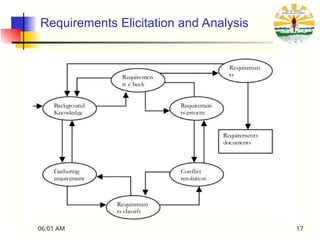
Requirements Elicitation andAnalysis
■ Requirements elicitation is the process of gathering the
requirements
■ technical professional in the organization, like software
developers and the system engineers, work together with
the users of the system and the customers
■ What the proposed system should provide?
■ What are the expected services from the system?
■ What are the required characteristics of the system?
■ What are the required hardware and software constraints
of the system?
06:01 AM 16
Requirements Elicitation andAnalysis
challenges
■ Lack of technical knowledge and unawareness of the
technical aspects of the system from the stake holder’s
side.
■ Some times they may demand unrealistic things and they
do not know what they exactly expecting form the
system.
■ Stakeholders express their requirements in the most
general terms; it is difficult to find the technical aspects of
the system form the general terms.
■ Different people expect different services from the
proposed system, requirements engineers has to
discover the good sources of requirements and
commonalities.
■ Business procedures, political influences and the budget
06:01 AM 18
19.
Requirements Elicitation Techniques
Varioustechniques have emerged for determining a
customer’s needs
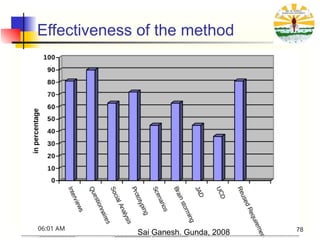
■ Traditional: Questionnaires, Interviews, Process Analysis
■ Group-Oriented: Focus Groups, Brainstorming,
Workshops
■ Early Feedback: Prototyping (High- and Low-Fidelity)
■ Model-Driven: Goal-Based, Scenario-Based
■ Cognitive: Protocol Analysis, Laddering, Card Sorting
■ Contextual: Ethnography, Conversation Analysis
■ Reading assignment- Acquire a clear understanding of
the aforementioned elicitation techniques
06:01 AM 19
Analysis of ExistingSystems
Useful when building a new improved version of an
existing system
Important to know:
• What is used, not used, or missing
• What works well, what does not work
• How the system is used (with frequency and
importance) and it was supposed to be used, and
• how we would like to use it
06:01 AM 21
22.
Analysis of ExistingSystems
Why analyze an existing system?
• Users may become disillusioned with new system or do not
like the new system if it is too different or does not do what
they want (risk of nostalgia for old system)
• To appropriately take into account real usage patterns,
human issues, common activities, relative importance of
tasks/features
• To catch obvious possible improvements (features that are
missing or do not currently work well)
• To find out which "legacy" features can/cannot be left out
06:01 AM 22
23.
Review Available Documentation
•Start with reading available documentation
User documents (manual, guides…)
Development documents
Requirements documents
Internal memos
Change histories
…
Of course, often these are out of date, poorly written, wrong,
etc., but it's a good starting point
Discourse analysis
Use of words and phrases is examined in written or spoken language
06:01 AM 23
24.
Social analysis
■ Observationis the method of collecting requirements by
observing the people doing their normal work
■ when the user is unable to explain their expected
requirements from the new product and problems with
the existing product
■ Types
■ Passive observations
■ Active observation
■ Explanatory Observations
■ Ethnography
■ attempts to discover social, human, and political
factors, which may also impact requirements
06:01 AM 24
25.
Social analysis
Can besupplemented later with questionnaires
Based on what you know now – the results of observation
To answer questions that need comparison or corroboration
(confirmation)
To obtain some statistics from a large number of users (look for
statistical significance!), e.g.:
How often do you use feature X?
What are the three features you would most like to see?
Can be supplemented later with interviews
After getting a better idea of what is to be done, probably some
questions require more detailed answers
You will not be wasting other people's time or your own
This is very labour intensive!
06:01 AM 25
Interviews
Requires preparation andgood communication management
Achieve interview objectives without preventing the
exploration of promising leads
Interview as many stakeholders as possible
Not just clients and users
Ask problem-oriented questions
Ask about specific details, but…
Detailed and solution-specific questions may miss the
stakeholder’s real requirements. Example:
Would you like Word 2007, Excel 2007 or both? vs.
Would you like to do word processing, computations, or
both?
06:01 AM 27
28.
Interviews
Three main objectives:
Recordinformation to be used as input to requirements analysis
and modeling
Discover information from interviewee accurately and
efficiently
Reassure interviewee that his/her understanding of the topic
has been explored, listened to, and valued
Process consists of four important steps:
Planning and preparation
Interview session
Consolidation of information
Follow-up
Many strategies for questioning
06:01 AM 28
29.
Interviews
Important to planand prepare interviews
Set goals and objectives for the interview
Acquire background knowledge of the subject matter to
conduct an effective interview
About the domain (vocabulary, problems...) but also
about the interviewee (work tasks, attitude...)
Prepare questions in advance, by subject
Organize the environment for conducting an effective
interview
Determine how the elicitation notes will be taken
(manually, audio, video, by whom…)
06:01 AM 29
30.
Interviews
Make the intervieweecomfortable and confident
Be polite and respectful!
Adjust to the interviewee
You have your goals – be persistent but flexible
Interview several people at once to create synergy
Try to detect political aspects as they may influence the
said and the unsaid
06:01 AM 30
31.
Interviews
Revise and completethe elicitation notes after the interview
Needs to be done soon after because one forgets the details (and
everything else)
Identify inconsistencies and address them in a follow-up
interview or by email
Keep all diagrams, charts, models created during the
discussions
You are learning, so be precise( show example from SUST)
Pay attention to terminology
Use the interviewee’s terminology
Identify synonyms
Create a glossary if necessary
06:01 AM 31
32.
Common Interviewing Mistakes
Notinterviewing all of the right people
Different points of view of stakeholders
Asking direct questions too early
e.g., design of a transportation system:
How much horsepower do you need? (direct)
How many passengers? How far? How fast? (indirect)
e.g., camera design for novice photographer:
How important is control over shutter speed and
aperture? (direct)
Will you be taking action shots, still shots, or both?
(indirect)
06:01 AM 32
33.
Interviews – StartUp Questions
Context-free questions to narrow the scope a bit
(Weinberg)
Identify customers, goals, and benefits
Who is (really) behind the request for the system?
Who will use the system? Willingly?
Are there several types of users?
What is the potential economic benefit from a successful solution?
Is a (pre-existing) solution available from another source?
06:01 AM 33
34.
Interviews – StartUp Questions
When do you need it by?
Can you prioritize your needs?
What are your constraints?
Time
Budget
Resources (human or otherwise)
Expected milestones (deliverables and dates)?
06:01 AM 34
35.
Interviews – StartUp Questions
Try to characterize the problem and its solution
What would be a "good" solution to the problem?
What problems is the system trying to address?
In what environment will the system be used?
Any special performance issues?
Other special constraints?
What is (un)likely to change?
Future evolution?
What needs to be flexible (vs. quick & dirty)?
06:01 AM 35
36.
Interviews – StartUp Questions
Calibration and tracking questions
Are you the right person to answer these questions?
Are your answers "official"? If not, whose are?
Are these questions relevant to the problem as you see it?
Are there too many questions? Is this the correct level of detail?
Is there anyone else I should talk to?
Is there anything else I should be asking you? Have you told me
everything you know about the problem?
Do you have any questions?
06:01 AM 36
37.
Interviews – StartUp Questions
Questions that cannot be asked directly (ask indirectly)
Are you opposed to the system?
Are you trying to obstruct/delay the system?
Are you trying to create a more important role for
yourself?
Do you feel threatened by the proposed system?
Are you trying to protect your job?
Is your job threatened by the new system?
Is anyone else's?
06:01 AM 37
38.
Interviews – SpecificQuestions
Functional requirements
What will the system do?
When will the system do it?
Are there several modes of operations?
What kinds of computations or data transformations must be
performed?
What are the appropriate reactions to possible stimuli?
For both input and output, what should be the format of the
data?
Must any data be retained for any period of time?
06:01 AM 38
39.
Interviews – SpecificQuestions
Design Constraints
Physical environment
Where is the equipment to be located?
Is there one location or several?
Are there any environmental restrictions, such as
temperature, humidity, or magnetic interference?
Are there any constraints on the size of the system?
Are there any constraints on power, heating, or air
conditioning?
Are there constraints on the programming language
because of existing software components?
06:01 AM 39
40.
Interviews – SpecificQuestions
Design Constraints
Interfaces
Is input coming from one or more other systems?
Is output going to one or more other systems?
Is there a prescribed way in which input/output need to be
formatted?
Is there a prescribed way for storing data?
Is there a prescribed medium that the data must use?
Standards
Are there any standards relevant to the system?
06:01 AM 40
41.
Interviews – SpecificQuestions
Performance
Are there constraints on execution speed, response time,
or throughput?
What efficiency measure will apply to resource usage and
response time?
How much data will flow through the system?
How often will data be received or sent?
06:01 AM 41
42.
Interviews – SpecificQuestions
Usability and Human Factors
What kind of training will be required for each type of
user?
How easy should it be for a user to understand and use
the system?
How difficult should it be for a user to misuse the system?
06:01 AM 42
43.
Interviews – SpecificQuestions
Security
Must access to the system or information be controlled?
Should each user's data be isolated from data of other
users?
Should user programs be isolated from other programs
and from the operating system?
Should precautions be taken against theft or vandalism?
06:01 AM 43
44.
Interviews – SpecificQuestions
Reliability and Availability
Must the system detect and isolate faults?
What is the prescribed mean time between failures?
Is there a maximum time allowed for restarting the system
after failure?
How often will the system be backed up?
Must backup copies be stored at a different location?
Should precautions be taken against fire or water
damage?
06:01 AM 44
45.
Interviews – SpecificQuestions
Maintainability
Will maintenance merely correct errors, or will it also
include improving the system?
When and in what ways might the system be changed in
the future?
How easy should it be to add features to the system?
How easy should it be to port the system from one
platform (computer, operating system) to another?
06:01 AM 45
46.
Interviews – SpecificQuestions
Precision and Accuracy
How accurate must data calculations be?
To what degree of precision must calculations be made?
Types
■ Closed Interview: In this interview the requirements
engineer prepare some predefined questions and he tries to
get the answers for these questions from the stake holders.
■ Open interview: In this interview the requirements engineer
does not prepare any predefined questions, and he tries to
get the information from the stakeholders in open
discussions.
06:01 AM 46
47.
Questionnaire
■ Questionnaires areone of the methods of gathering
requirements in less cost .
■ Questionnaires reach a large number of people, not
only in less time but also in a lesser cost.
result from the questionnaires mainly depends on the two
factors
■ Effectiveness and the design of the questionnaire
■ Honesty of the respondent.
06:01 AM 47
48.
Questionnaire
The steps involvedin designing and administering a
questionnaire are
■The purpose of the survey should be defined
■The sampling group (respondents to the survey) should
be decided
■Preparing and developing the Questionnaire
■Conducting the Questionnaire process
■Gathering and analysing the results
06:01 AM 48
49.
Questionnaire
Steps in arranginga questionnaire
■The questions should be arranged well, so that general
questions are followed by articular questions.
■Arrange the questions such that, easy questions comes
first.
■Arrange the questions in a order of known to unknown
■Try to use closed format questions in the beginning.
■The questions relevant to the main subject should be given
high priority and stated at the start of the questionnaire.
■Avoid personal and intimate questions at the beginning
06:01 AM 49
50.
Questionnaire
factors which affectthe usage of the questionnaire
■The available resources to gather the requirements
■Type of Requirements that has to be gathering
■Anonymity provided to the respondent
06:01 AM 50
51.
Prototyping
■ Prototype isthe representations or visualizations of the
actual system parts
■ designed in the early stages of the implementation of
the project.
■ provides the General idea of the actual system functions
and the work flow
■ A prototype represents the actual product in both
functional and graphical sense
06:01 AM 51
52.
Prototyping
A software requirementsprototype is a mock-up or partial
implementation of a software system
Helps developers, users, and customers better understand
system requirements
Helps clarify and complete requirements
Provides early response to “I'll know it when I’ll see (or won’t
see) it” attitude
Effective in addressing the “Yes, But” and the “Undiscovered
Ruins” syndromes
Helps find new functionalities, discuss usability, and
establish priorities
Focus prototype development on these uncertain parts
Encourages user participation and mutual understanding
06:01 AM 52
53.
Prototyping
■ When theusers are unable to express their requirements.
■ If it is a new product and the users have no experience
with this product.
■ When ever the requirements analysis and feasibility
studies is difficult.
■ Types
■ Throw-away prototypes: This type of prototype is not reusable and
hence is discarded when ever the requirements elicitation process
is complete.
■ Evolutionary prototypes: This type of prototypes is reusable. They
are evolved or improved according to the feedback and is given as
the original product.
06:01 AM 53
54.
Prototyping
Horizontal: focus onone layer – e.g., user interface
Vertical: a slice of the real system
Evolutive: turned into a product incrementally, gives users
a working system more quickly (begins with
requirements that are more understood)
Fidelity is the extent to which the prototype is real and
(especially) reactive
Fidelity may vary for throw-away prototypes
High-fidelity
Low-fidelity
06:01 AM 54
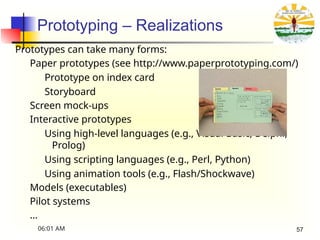
Prototyping – Realizations
Prototypescan take many forms:
Paper prototypes (see http://www.paperprototyping.com/)
Prototype on index card
Storyboard
Screen mock-ups
Interactive prototypes
Using high-level languages (e.g., Visual Basic, Delphi,
Prolog)
Using scripting languages (e.g., Perl, Python)
Using animation tools (e.g., Flash/Shockwave)
Models (executables)
Pilot systems
…
06:01 AM 57
58.
Prototyping
Advantages of Prototyping
•Reduces time of development.
• Reduces cost of development.
• The users provided with a visual representation, thus
facilitating system implementation.
• Provides high level of user satisfaction.
• The ways in which the system can be enhanced in future
is known.
06:01 AM 58
59.
Prototyping
Disadvantages of Prototyping
•The users may expect the finished product to be the
same as the prototype
• Developers may be tempted to stop with the prototype.
• Can lead to unfinished system implementation.
06:01 AM 59
60.
Prototyping – Risks
Prototypesthat focus on user-interface tends to lose the
focus of demonstrating/exploring functionality
Prototypes can bring customers’ expectations about the
degree of completion unrealistically up
Do not end-up considering a throwaway prototype as part
of the production system
Always clearly state the purpose of each prototype before building
it
06:01 AM 60
61.
Brainstorming
■ Brainstorming isa techniques used to generate new
ideas and find the solution to a specific issue
■ This is conducted as a conference with six to ten
members.
■ The members are from the different departments and
domain experts are also included.
■ This conference is headed by the organizer, who states
the issue to be discussed.
06:01 AM 61
62.
Brainstorming
Brainstorming can beused to answer the following
questions
What exactly the system should provide
What are the business and organization rules required to
follow
What type of questions should be there in the interviews
and questionnaires?
What are the risk factors effect the proposed system
development and what to do avoid that?
06:01 AM 62
63.
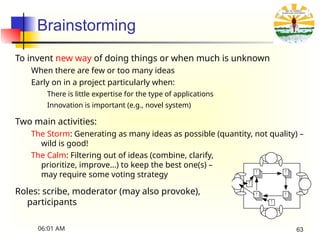
Brainstorming
To invent newway of doing things or when much is unknown
When there are few or too many ideas
Early on in a project particularly when:
There is little expertise for the type of applications
Innovation is important (e.g., novel system)
Two main activities:
The Storm: Generating as many ideas as possible (quantity, not quality) –
wild is good!
The Calm: Filtering out of ideas (combine, clarify,
prioritize, improve…) to keep the best one(s) –
may require some voting strategy
Roles: scribe, moderator (may also provoke),
participants !
!
! !
!
!
06:01 AM 63
64.
Brainstorming – Objectives
Hearideas from everyone, especially unconventional ideas
Keep the tone informal and non-judgemental
Keep the number of participants “reasonable“ – if too many,
consider a “playoff “-type filtering and invite back the most
creative to multiple sessions
Encourage creativity
Choose good, provocative project name.
Choose good, provocative problem statement
Get a room without distractions, but with good acoustics,
whiteboards, coloured pens, provide coffee/donuts/pizza/beer
Provide appropriate props/mock-ups
06:01 AM 64
65.
Brainstorming – Roles
Scribe
Writedown all ideas (may also contribute)
May ask clarifying questions during first phase but
without criticizing
Moderator/Leader
Cannot be the scribe
Two schools of thought: traffic cop or agent
provocateur
Traffic cop – enforces "rules of order", but does not
throw his/her weight around otherwise
Agent provocateur – traffic cop plus more of a
leadership role, comes prepared with wild ideas
and throws them out as discussion wanes
06:01 AM 65
66.
Brainstorming – Votingon Ideas
Voting with threshold
Each person is allowed to vote up to n times
Keep those ideas with more than m votes
Have multiple rounds with smaller n and m
Voting with campaign speeches
Each person is allowed to vote up to j < n times
Keep those ideas with at least one vote
Have someone who did not vote for an idea
defend it for the next round
Have multiple rounds with smaller j
06:01 AM 66
67.
Joint Application Design(JAD)
A more structured and intensive brainstorming approach
Developed at IBM in the 1970s
Lots of success stories
"Structured brainstorming", IBM-style
Full of structure, defined roles, forms to be filled out...
Several activities and six (human) roles to be played
JAD session may last few days
The whole is more than the sum of its parts. The part is
more than a fraction of the whole.1
[1] Aristotle (384 BC – 322 BC)
06:01 AM 67
68.
Joint Application Development
■This is conducted in the same manner as brainstorming,
except that the stakeholders and the users are also
allowed to participate and discuss on the design of the
proposed system
The success of the JAD depends on [47,58]
■ leader of the JAD session
■ Developers, end-users and the stakeholders of the
product.
■ Group involvement.
06:01 AM 68
69.
Joint Application Design– Four Main Tenets
Effective use of group dynamics
Facilitated and directed group sessions to get common
understanding and universal buy-in
Use of visual aids
To enhance understanding, e.g., props, prepared diagrams
Defined process
I.e., not a random hodgepodge
Standardized forms for documenting results
06:01 AM 69
70.
Joint Application Design– Activities
Preparation
Pre-session Planning
Pre-work
Working Session
Summary
Follow-up
Wrap-up
06:01 AM 70
71.
The 6 “P”s
1.Purpose - Why do we do things? (Goals, needs, motivation)
2. Participants - Who is involved? (People, roles, responsibilities)
3. Principles - How do we function? (Guidelines, working
agreements, ground rules)
4. Products - What do we create? (Deliverables, decisions, plans, next
steps)
5. Place - Where is it located? (Venue, logistics)
6. Process - When do we do what? (Activities, sequence)
06:01 AM 71
72.
Joint Application Design– Roles
Session leader
Organizer, facilitator, JAD expert
Good with people skills, enthusiastic, sets tone of meeting
Analyst
Scribe++
Produces official JAD documents, experienced developer who
understands the big picture, good philosopher/writer/organizer
Executive sponsor
Manager who has ultimate responsibility for product being built
Provides strategic insights into company's high-level
goals/practices, makes executive decisions later on as required
06:01 AM 72
73.
Joint Application Design– Roles
User representatives
Selection of knowledgeable end-users and managers
Come well-prepared with suggestions and ideas of needs, will
brainstorm for new or refined ideas, eventually review
completed JAD documents
Information system representatives
Technical expert on ISs
Helps users think big, know what is easy/hard/cheap/expensive,
mostly there to provide information rather than make decisions
Specialists
Technical expert on particular narrow topics, e.g., security,
application domain, law, UI issues…
06:01 AM 73
74.
User Centered Design
■the user acts as the part of the development team. The
user takes active part in the designing and development
of the system
06:01 AM 74
75.
User Centered Design
Advantagesof User Centred Design
■ The user is closely involved with the development
■ The user feedback can be obtained immediately
■ Reduces time and cost spent on gathering user feedback.
06:01 AM 75
76.
Goal-Based Modeling
By tyingeach software requirement to a specific objective
that the software needs to meet, developers avoid over-
specifying or missing actual requirements.
Shortcoming: Articulating the goals of the software might
be difficult and time-consuming.
06:01 AM 76
77.
Scenario-Based Modeling
By expandinguse cases into full narratives about how
particular users will utilize the software system, the
requirements of the system become clearer.
Shortcoming: Developing these scenarios can be an
arduous process, involving extensive creativity
Pros and cons of req. elicitation techniques
06:01 AM 77





















![Joint Application Design (JAD)
A more structured and intensive brainstorming approach
Developed at IBM in the 1970s
Lots of success stories
"Structured brainstorming", IBM-style
Full of structure, defined roles, forms to be filled out...
Several activities and six (human) roles to be played
JAD session may last few days
The whole is more than the sum of its parts. The part is
more than a fraction of the whole.1
[1] Aristotle (384 BC – 322 BC)
06:01 AM 67](https://image.slidesharecdn.com/chapter2-reprocessframework2-250424060146-cee5c3f8/85/Chapter-2-RE-Process-Framework-2and-its-application-ppt-67-320.jpg)
![Joint Application Development
■ This is conducted in the same manner as brainstorming,
except that the stakeholders and the users are also
allowed to participate and discuss on the design of the
proposed system
The success of the JAD depends on [47,58]
■ leader of the JAD session
■ Developers, end-users and the stakeholders of the
product.
■ Group involvement.
06:01 AM 68](https://image.slidesharecdn.com/chapter2-reprocessframework2-250424060146-cee5c3f8/85/Chapter-2-RE-Process-Framework-2and-its-application-ppt-68-320.jpg)









![Lect 1 Number systems and base conversions. [Autosaved].pptx](https://cdn.slidesharecdn.com/ss_thumbnails/lect1numbersystemsandbaseconversions-260111134109-67c2d865-thumbnail.jpg?width=640&height=640&fit=bounds)