INTRODUCTION TO
INTRODUCTION TO
CLOUD COMPUTING
CLOUD COMPUTING
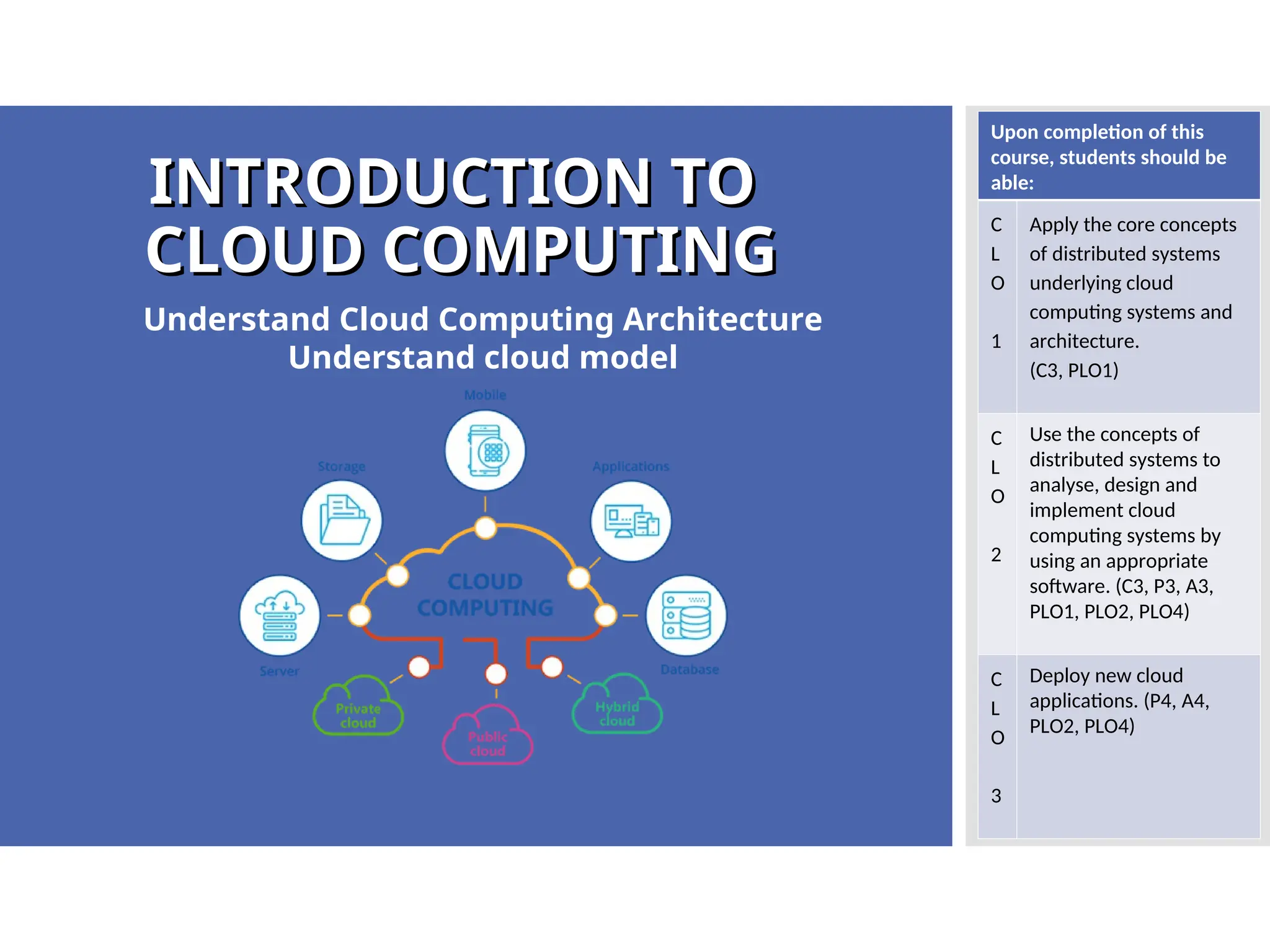
Understand Cloud Computing Architecture
Understand cloud model
Upon completion of this
course, students should be
able:
C
L
O
1
Apply the core concepts
of distributed systems
underlying cloud
computing systems and
architecture.
(C3, PLO1)
C
L
O
2
Use the concepts of
distributed systems to
analyse, design and
implement cloud
computing systems by
using an appropriate
software. (C3, P3, A3,
PLO1, PLO2, PLO4)
C
L
O
3
Deploy new cloud
applications. (P4, A4,
PLO2, PLO4)
What
What
you will
you will
learn?
learn?
2.2 Understand Cloud Models:
2.2.1 Explain Cloud Service Models:
a. Infrastructure as a Services (Iaas)
b. Platform as a Services (Paas)
c. Software as a Services (Saas)
2.2.2 Explain Deployment Models
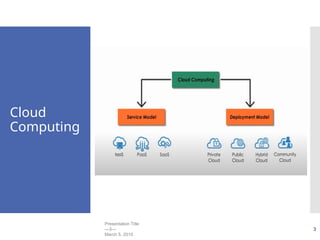
a. Public Cloud
b. Private Cloud
c. Hybrid Cloud
d. Community Cloud
Cloud
Computing
Presentation Title
—3—
March 5, 2010
3
Cloud
Cloud
Computing
Computing
Service
Service
Model
Model
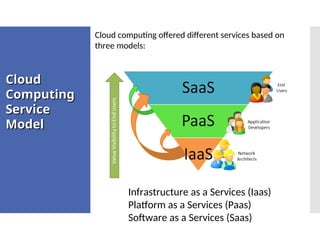
Cloud computing offered different services based on
three models:
Infrastructure as a Services (Iaas)
Platform as a Services (Paas)
Software as a Services (Saas)
About SAAS
About SAAS
• On-demand service
• Pay per use of application software to users
• Independent platform
• Don’t need to install the software on your
PC
• Runs a single instance of the software
• Available for multiple end users
• Cloud computing cheap
• Computing resources managed by vendor
• Accessible via a web browser or lightweight
client application
• User of SaaS : End customers
About SAAS
About SAAS
SaaS provides the complete infrastructure, software,
and solution stack as the service offering.
A good way to think about SaaS is that it is the cloud-
based equivalent of shrink-wrapped software.
SaaS applications come in all shapes and sizes, and
include custom software such as billing and invoicing
systems:
•Customer Relationship Management (CRM)
applications,
•Help Desk applications,
•Human Resource (HR) solutions,
•Myriad online versions of familiar applications
Characterist
Characterist
ic of SAAS
ic of SAAS
1. The software is available over the Internet globally through a browser on
demand.
2. The typical license is subscription-based or usage-based and is billed on a
recurring basis.
3. The software and the service are monitored and maintained by the vendor,
regardless of where all the different software components are running.
4. Reduced distribution and maintenance costs and minimal end-user system costs
generally make SaaS applications cheaper to use than their shrink-wrapped
versions.
5. Such applications feature automated upgrades, updates, and patch management
and much faster rollout of changes.
6. SaaS applications often have a much lower barrier to entry than their locally
installed competitors, a known recurring cost, and they scale on demand (a
property of cloud computing in general).
7. All users have the same version of the software so each user’s software is
compatible with another’s.
8. SaaS supports multiple users and provides a shared data model through a single-
instance, multi-tenancy model. The alternative of software virtualization of
individual instances also exists, but is less common.
Characterist
Characterist
ic of SAAS
ic of SAAS
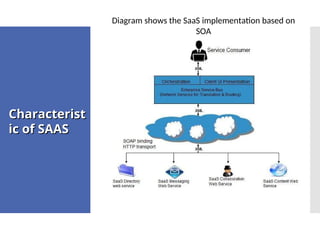
Diagram shows the SaaS implementation based on
SOA
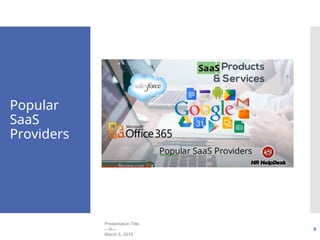
Popular
SaaS
Providers
Presentation Title
—9—
March 5, 2010
9
SAAS : PROS
SAAS : PROS
 Universally accessible from any platform
 No need to commute, you can work from
any place
 Excellent for collaborative working
 Vendor provides modest software tools
 Allows for multi-tenancy
SAAS : CONS
SAAS : CONS
 Portability & Browser Issues
 Internet performance may dictate overall
performance
 Compliance restrictions
About of
About of
PAAS
PAAS
 This service is made up of a programming language
execution environment, an operating system, a
web server & a database.
 Encapsulate the environment where users can
build, compile & run their programs without
worrying of the underlying infrastructure.
 In this model, you manage data & application
resources, all other resources are managed by the
vendor.
 User of PaaS : Developers
About of
About of
PAAS
PAAS
 The Platform as a Service model describes a
software environment in which a developer can
create customized solutions within the context of
the development tools that the platform provides.
 Platforms can be based on specific types of
development languages, application frameworks,
or other constructs.
 PaaS systems must offer a way to create user
interfaces, and thus support standards such as
HTLM, JavaScript, or other rich media
technologies.
 App Engine of Google and Force.com are
examples of PaaS offering vendors. Developer may
log on to these websites and use the built-in API to
create web-based applications
About of
About of
PAAS
PAAS
 Platform-as-a-Service offers the runtime
environment for applications.
 It also offers development and deployment
tools required to develop applications.
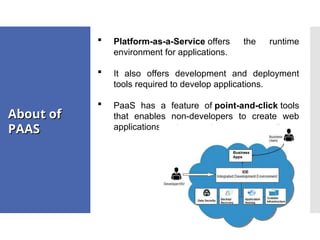
 PaaS has a feature of point-and-click tools
that enables non-developers to create web
applications.
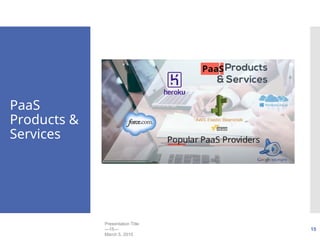
PaaS
Products &
Services
Presentation Title
—15—
March 5, 2010
15
PAAS : PROS
PAAS : PROS
 Cost effective rapid development (Its
Scalable)
 Faster market for developers
 Easy Deployment of web applications
 Private or public deployment is possible
PAAS : CONS
PAAS : CONS
 Developers are limited to the providers
languages & tools
 Migration Issues – Such as the risk of
vendor lock in
About of
About of
IAAS
IAAS
 This services offers the computing architecture
& infrastructures, all computing resources but
in a virtual environment so that multiple users
can access them.
 Resources include : data storage,
virtualization, servers & networking. Most
vendors are responsible for managing these
resources.
 User will be responsible for handling other
resources such as applications, data, runtime
& middleware.
 User of IaaS : Sys Admins
Characterist
Characterist
ic of IAAS
ic of IAAS
Here are the characteristics of IaaS service model:
Virtual machines with pre-installed software.
Virtual machines with pre-installed operating systems
such as Windows, Linux, and Solaris.
On-demand availability of resources.
Allows to store copies of particular data at different
locations.
The computing resources can be easily scaled up and
down.
Characterist
Characterist
ic of IAAS
ic of IAAS
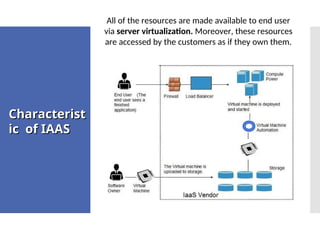
All of the resources are made available to end user
via server virtualization. Moreover, these resources
are accessed by the customers as if they own them.
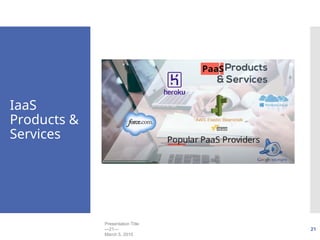
IaaS
Products &
Services
Presentation Title
—21—
March 5, 2010
21
IAAS : PROS
IAAS : PROS
 The cloud provides the infrastructure
 Enhanced scalability – Dynamic workloads
are supported
 IaaS is flexible
IAAS : CONS
IAAS : CONS
 Security issues
 Network & Service Delays
Service
Service
Delivery
Delivery
Model
Model
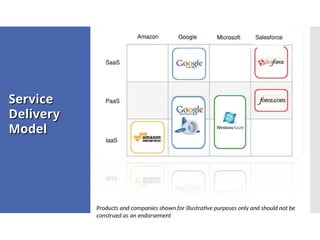
Products and companies shown for illustrative purposes only and should not be
construed as an endorsement
Cloud
Cloud
Service
Service
Model
Model
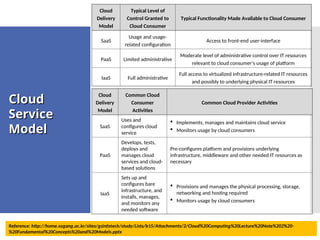
Cloud
Delivery
Model
Typical Level of
Control Granted to
Cloud Consumer
Typical Functionality Made Available to Cloud Consumer
SaaS
Usage and usage-
related configuration
Access to front-end user-interface
PaaS Limited administrative
Moderate level of administrative control over IT resources
relevant to cloud consumer’s usage of platform
IaaS Full administrative
Full access to virtualized infrastructure-related IT resources
and possibly to underlying physical IT resources
Cloud
Delivery
Model
Common Cloud
Consumer
Activities
Common Cloud Provider Activities
SaaS
Uses and
configures cloud
service
 Implements, manages and maintains cloud service
 Monitors usage by cloud consumers
PaaS
Develops, tests,
deploys and
manages cloud
services and cloud-
based solutions
Pre-configures platform and provisions underlying
infrastructure, middleware and other needed IT resources as
necessary
IaaS
Sets up and
configures bare
infrastructure, and
installs, manages,
and monitors any
needed software
 Provisions and manages the physical processing, storage,
networking and hosting required
 Monitors usage by cloud consumers
Reference: http://home.sogang.ac.kr/sites/gsinfotech/study/Lists/b15/Attachments/2/Cloud%20Computing%20Lecture%20Note%202%20-
%20Fundamental%20Concepts%20and%20Models.pptx
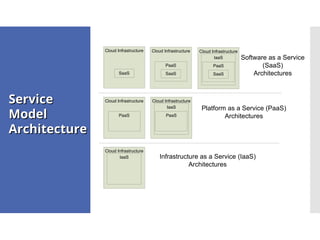
Service
Service
Model
Model
Architecture
Architecture
Cloud Infrastructure
IaaS
PaaS
SaaS
Infrastructure as a Service (IaaS)
Architectures
Platform as a Service (PaaS)
Architectures
Software as a Service
(SaaS)
Architectures
Cloud Infrastructure
SaaS
Cloud Infrastructure
PaaS
SaaS
Cloud Infrastructure
IaaS
PaaS
Cloud Infrastructure
PaaS
Cloud Infrastructure
IaaS
Q & A
Thank You
Thank You
Reference: Barrie Sosinsky (2011), “Cloud Computing Bible”, page 46 – 64.

Chapter 2 Cloud Computing Architecture_Part2.ppt

  • 1.
    INTRODUCTION TO INTRODUCTION TO CLOUDCOMPUTING CLOUD COMPUTING Understand Cloud Computing Architecture Understand cloud model Upon completion of this course, students should be able: C L O 1 Apply the core concepts of distributed systems underlying cloud computing systems and architecture. (C3, PLO1) C L O 2 Use the concepts of distributed systems to analyse, design and implement cloud computing systems by using an appropriate software. (C3, P3, A3, PLO1, PLO2, PLO4) C L O 3 Deploy new cloud applications. (P4, A4, PLO2, PLO4)
  • 2.
    What What you will you will learn? learn? 2.2Understand Cloud Models: 2.2.1 Explain Cloud Service Models: a. Infrastructure as a Services (Iaas) b. Platform as a Services (Paas) c. Software as a Services (Saas) 2.2.2 Explain Deployment Models a. Public Cloud b. Private Cloud c. Hybrid Cloud d. Community Cloud
  • 3.
  • 4.
    Cloud Cloud Computing Computing Service Service Model Model Cloud computing offereddifferent services based on three models: Infrastructure as a Services (Iaas) Platform as a Services (Paas) Software as a Services (Saas)
  • 5.
    About SAAS About SAAS •On-demand service • Pay per use of application software to users • Independent platform • Don’t need to install the software on your PC • Runs a single instance of the software • Available for multiple end users • Cloud computing cheap • Computing resources managed by vendor • Accessible via a web browser or lightweight client application • User of SaaS : End customers
  • 6.
    About SAAS About SAAS SaaSprovides the complete infrastructure, software, and solution stack as the service offering. A good way to think about SaaS is that it is the cloud- based equivalent of shrink-wrapped software. SaaS applications come in all shapes and sizes, and include custom software such as billing and invoicing systems: •Customer Relationship Management (CRM) applications, •Help Desk applications, •Human Resource (HR) solutions, •Myriad online versions of familiar applications
  • 7.
    Characterist Characterist ic of SAAS icof SAAS 1. The software is available over the Internet globally through a browser on demand. 2. The typical license is subscription-based or usage-based and is billed on a recurring basis. 3. The software and the service are monitored and maintained by the vendor, regardless of where all the different software components are running. 4. Reduced distribution and maintenance costs and minimal end-user system costs generally make SaaS applications cheaper to use than their shrink-wrapped versions. 5. Such applications feature automated upgrades, updates, and patch management and much faster rollout of changes. 6. SaaS applications often have a much lower barrier to entry than their locally installed competitors, a known recurring cost, and they scale on demand (a property of cloud computing in general). 7. All users have the same version of the software so each user’s software is compatible with another’s. 8. SaaS supports multiple users and provides a shared data model through a single- instance, multi-tenancy model. The alternative of software virtualization of individual instances also exists, but is less common.
  • 8.
    Characterist Characterist ic of SAAS icof SAAS Diagram shows the SaaS implementation based on SOA
  • 9.
  • 10.
    SAAS : PROS SAAS: PROS  Universally accessible from any platform  No need to commute, you can work from any place  Excellent for collaborative working  Vendor provides modest software tools  Allows for multi-tenancy
  • 11.
    SAAS : CONS SAAS: CONS  Portability & Browser Issues  Internet performance may dictate overall performance  Compliance restrictions
  • 12.
    About of About of PAAS PAAS This service is made up of a programming language execution environment, an operating system, a web server & a database.  Encapsulate the environment where users can build, compile & run their programs without worrying of the underlying infrastructure.  In this model, you manage data & application resources, all other resources are managed by the vendor.  User of PaaS : Developers
  • 13.
    About of About of PAAS PAAS The Platform as a Service model describes a software environment in which a developer can create customized solutions within the context of the development tools that the platform provides.  Platforms can be based on specific types of development languages, application frameworks, or other constructs.  PaaS systems must offer a way to create user interfaces, and thus support standards such as HTLM, JavaScript, or other rich media technologies.  App Engine of Google and Force.com are examples of PaaS offering vendors. Developer may log on to these websites and use the built-in API to create web-based applications
  • 14.
    About of About of PAAS PAAS Platform-as-a-Service offers the runtime environment for applications.  It also offers development and deployment tools required to develop applications.  PaaS has a feature of point-and-click tools that enables non-developers to create web applications.
  • 15.
  • 16.
    PAAS : PROS PAAS: PROS  Cost effective rapid development (Its Scalable)  Faster market for developers  Easy Deployment of web applications  Private or public deployment is possible
  • 17.
    PAAS : CONS PAAS: CONS  Developers are limited to the providers languages & tools  Migration Issues – Such as the risk of vendor lock in
  • 18.
    About of About of IAAS IAAS This services offers the computing architecture & infrastructures, all computing resources but in a virtual environment so that multiple users can access them.  Resources include : data storage, virtualization, servers & networking. Most vendors are responsible for managing these resources.  User will be responsible for handling other resources such as applications, data, runtime & middleware.  User of IaaS : Sys Admins
  • 19.
    Characterist Characterist ic of IAAS icof IAAS Here are the characteristics of IaaS service model: Virtual machines with pre-installed software. Virtual machines with pre-installed operating systems such as Windows, Linux, and Solaris. On-demand availability of resources. Allows to store copies of particular data at different locations. The computing resources can be easily scaled up and down.
  • 20.
    Characterist Characterist ic of IAAS icof IAAS All of the resources are made available to end user via server virtualization. Moreover, these resources are accessed by the customers as if they own them.
  • 21.
  • 22.
    IAAS : PROS IAAS: PROS  The cloud provides the infrastructure  Enhanced scalability – Dynamic workloads are supported  IaaS is flexible
  • 23.
    IAAS : CONS IAAS: CONS  Security issues  Network & Service Delays
  • 24.
    Service Service Delivery Delivery Model Model Products and companiesshown for illustrative purposes only and should not be construed as an endorsement
  • 25.
    Cloud Cloud Service Service Model Model Cloud Delivery Model Typical Level of ControlGranted to Cloud Consumer Typical Functionality Made Available to Cloud Consumer SaaS Usage and usage- related configuration Access to front-end user-interface PaaS Limited administrative Moderate level of administrative control over IT resources relevant to cloud consumer’s usage of platform IaaS Full administrative Full access to virtualized infrastructure-related IT resources and possibly to underlying physical IT resources Cloud Delivery Model Common Cloud Consumer Activities Common Cloud Provider Activities SaaS Uses and configures cloud service  Implements, manages and maintains cloud service  Monitors usage by cloud consumers PaaS Develops, tests, deploys and manages cloud services and cloud- based solutions Pre-configures platform and provisions underlying infrastructure, middleware and other needed IT resources as necessary IaaS Sets up and configures bare infrastructure, and installs, manages, and monitors any needed software  Provisions and manages the physical processing, storage, networking and hosting required  Monitors usage by cloud consumers Reference: http://home.sogang.ac.kr/sites/gsinfotech/study/Lists/b15/Attachments/2/Cloud%20Computing%20Lecture%20Note%202%20- %20Fundamental%20Concepts%20and%20Models.pptx
  • 26.
    Service Service Model Model Architecture Architecture Cloud Infrastructure IaaS PaaS SaaS Infrastructure asa Service (IaaS) Architectures Platform as a Service (PaaS) Architectures Software as a Service (SaaS) Architectures Cloud Infrastructure SaaS Cloud Infrastructure PaaS SaaS Cloud Infrastructure IaaS PaaS Cloud Infrastructure PaaS Cloud Infrastructure IaaS
  • 27.
    Q & A ThankYou Thank You Reference: Barrie Sosinsky (2011), “Cloud Computing Bible”, page 46 – 64.