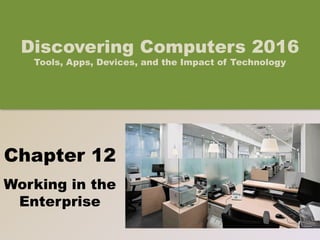
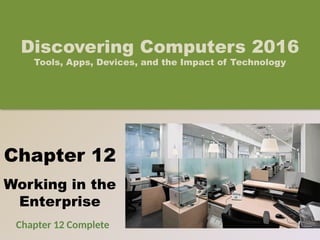
Chapter 12
Working in the
Enterprise
Discovering Computers 2016
Tools, Apps, Devices, and the Impact of Technology
© 2016 Cengage Learning®. May not be scanned, copied o
r duplicated, or posted to a publicly accessible website, in
Objectives Overview
Identify the qualities of
valuable information
Describe various
information systems
used in an enterprise
Identify the
components of and
steps in information
literacy
Describe career
opportunities available
in various segments of
the computer industry
Identify job titles and
responsibilities for
various technology jobs
2
See Page 552
for Detailed Objectives
© 2016 Cengage Learning®. May not be scanned, copied o
r duplicated, or posted to a publicly accessible website, in
Objectives Overview
Identify mobile
app development
strategies
Identify ways to
prepare for
certification
Describe the
general areas of IT
certification
Identify ways to
begin a job search
Explain how to
create a
professional online
presence
3
See Page 552
for Detailed Objectives
© 2016 Cengage Learning®. May not be scanned, copied o
r duplicated, or posted to a publicly accessible website, in
4
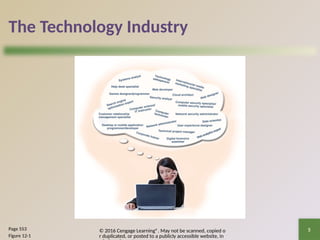
The Technology Industry
• Nearly every jo requires you to interact with
technology to:
– Complete projects
– Exchange information with coworkers
– Meet customers’ needs
• As new technologies emerge, organizations look
for potential employees who possess skills and a
desire to learn and who are comfortable using all
types of technology
Page 552
© 2016 Cengage Learning®. May not be scanned, copied o
r duplicated, or posted to a publicly accessible website, in
5
The Technology Industry
Page 553
Figure 12-1
© 2016 Cengage Learning®. May not be scanned, copied o
r duplicated, or posted to a publicly accessible website, in
6
Information Systems in the Enterprise
• An information system is a set of hardware,
software, data, people, and procedures that work
together to produce information
• To assist with sound decision making, information
must have value
Page 554
© 2016 Cengage Learning®. May not be scanned, copied o
r duplicated, or posted to a publicly accessible website, in
7
Information Systems in the Enterprise
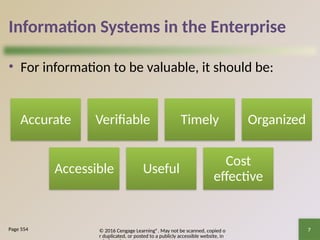
• For information to be valuable, it should be:
Page 554
Accurate Verifiable Timely Organized
Accessible Useful
Cost
effective
© 2016 Cengage Learning®. May not be scanned, copied o
r duplicated, or posted to a publicly accessible website, in
8
Information Systems in the Enterprise
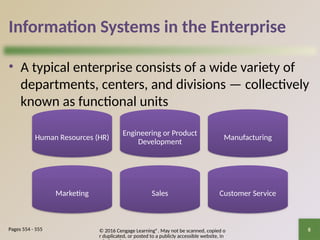
• A typical enterprise consists of a wide variety of
departments, centers, and divisions — collectively
known as functional units
Pages 554 - 555
Human Resources (HR)
Engineering or Product
Development
Manufacturing
Marketing Sales Customer Service
© 2016 Cengage Learning®. May not be scanned, copied o
r duplicated, or posted to a publicly accessible website, in
9
Information Systems in the Enterprise
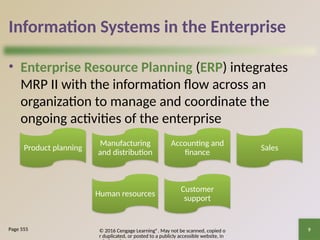
• Enterprise Resource Planning (ERP) integrates
MRP II with the information flow across an
organization to manage and coordinate the
ongoing activities of the enterprise
Page 555
Product planning
Manufacturing
and distribution
Accounting and
finance
Sales
Human resources
Customer
support
© 2016 Cengage Learning®. May not be scanned, copied o
r duplicated, or posted to a publicly accessible website, in
10
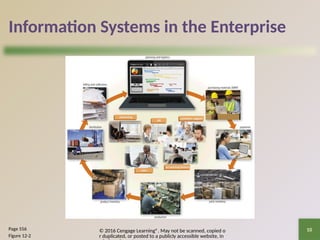
Information Systems in the Enterprise
Page 556
Figure 12-2
© 2016 Cengage Learning®. May not be scanned, copied o
r duplicated, or posted to a publicly accessible website, in
11
Information Systems in the Enterprise
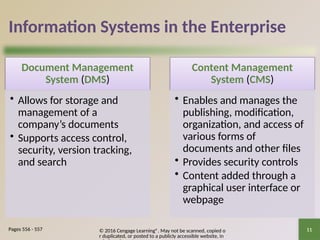
Document Management
System (DMS)
• Allows for storage and
management of a
company’s documents
• Supports access control,
security, version tracking,
and search
Content Management
System (CMS)
• Enables and manages the
publishing, modification,
organization, and access of
various forms of
documents and other files
• Provides security controls
• Content added through a
graphical user interface or
webpage
Pages 556 - 557
© 2016 Cengage Learning®. May not be scanned, copied o
r duplicated, or posted to a publicly accessible website, in
12
Information Systems in the Enterprise
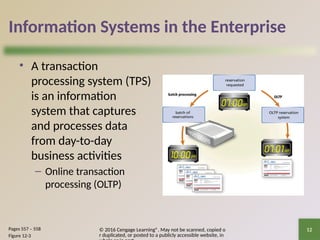
• A transaction
processing system (TPS)
is an information
system that captures
and processes data
from day-to-day
business activities
– Online transaction
processing (OLTP)
Pages 557 – 558
Figure 12-3
© 2016 Cengage Learning®. May not be scanned, copied o
r duplicated, or posted to a publicly accessible website, in
13
Information Systems in the Enterprise
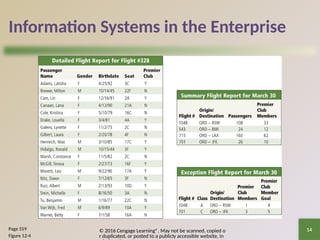
• A management information system (MIS) is an
Information system that generates accurate,
timely, and organized information, so that
managers and other users can make decisions,
solve problems, supervise activities, and track
progress
Page 558
© 2016 Cengage Learning®. May not be scanned, copied o
r duplicated, or posted to a publicly accessible website, in
14
Information Systems in the Enterprise
Page 559
Figure 12-4
© 2016 Cengage Learning®. May not be scanned, copied o
r duplicated, or posted to a publicly accessible website, in
15
Information Systems in the Enterprise
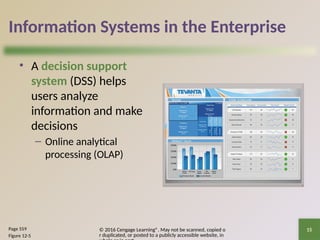
• A decision support
system (DSS) helps
users analyze
information and make
decisions
– Online analytical
processing (OLAP)
Page 559
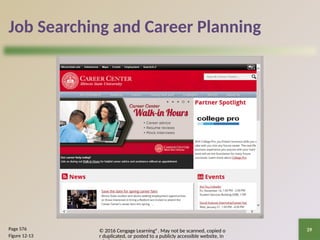
Figure 12-5
© 2016 Cengage Learning®. May not be scanned, copied o
r duplicated, or posted to a publicly accessible website, in
16
Information Systems in the Enterprise
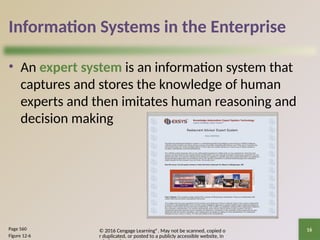
• An expert system is an information system that
captures and stores the knowledge of human
experts and then imitates human reasoning and
decision making
Page 560
Figure 12-6
© 2016 Cengage Learning®. May not be scanned, copied o
r duplicated, or posted to a publicly accessible website, in
17
Technology Careers
• Business and government organizations of all sizes
use a variety of computers, mobile devices, and
other technology
• Larger organizations use computers and other
technology to answer and route phone calls,
process orders, update inventory, and manage
accounts receivable, accounts payable, billing, and
payroll activities
Page 562
© 2016 Cengage Learning®. May not be scanned, copied o
r duplicated, or posted to a publicly accessible website, in
18
Technology Careers
• IT jobs usually are divided into the following
areas:
Page 564
Managem
ent
Research and
software
development
Technical Operation
© 2016 Cengage Learning®. May not be scanned, copied o
r duplicated, or posted to a publicly accessible website, in
19
Technology Careers
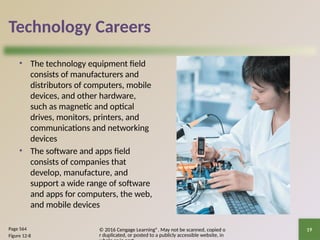
• The technology equipment field
consists of manufacturers and
distributors of computers, mobile
devices, and other hardware,
such as magnetic and optical
drives, monitors, printers, and
communications and networking
devices
• The software and apps field
consists of companies that
develop, manufacture, and
support a wide range of software
and apps for computers, the web,
and mobile devices
Page 564
Figure 12-8
© 2016 Cengage Learning®. May not be scanned, copied o
r duplicated, or posted to a publicly accessible website, in
20
Technology Careers
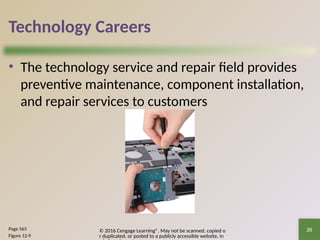
• The technology service and repair field provides
preventive maintenance, component installation,
and repair services to customers
Page 565
Figure 12-9
© 2016 Cengage Learning®. May not be scanned, copied o
r duplicated, or posted to a publicly accessible website, in
21
Technology Careers
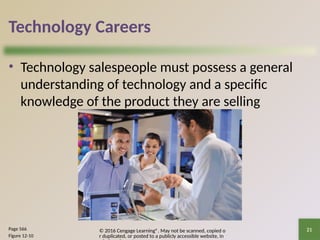
• Technology salespeople must possess a general
understanding of technology and a specific
knowledge of the product they are selling
Page 566
Figure 12-10
© 2016 Cengage Learning®. May not be scanned, copied o
r duplicated, or posted to a publicly accessible website, in
22
Technology Careers
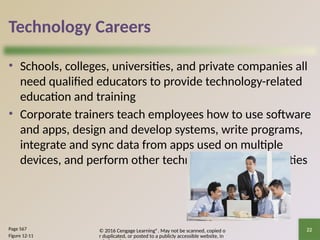
• Schools, colleges, universities, and private companies all
need qualified educators to provide technology-related
education and training
• Corporate trainers teach employees how to use software
and apps, design and develop systems, write programs,
integrate and sync data from apps used on multiple
devices, and perform other technology-related activities
Page 567
Figure 12-11
© 2016 Cengage Learning®. May not be scanned, copied o
r duplicated, or posted to a publicly accessible website, in
23
Technology Careers
• A help desk specialist answers hardware,
software, and networking questions in person,
over the phone, or electronically via email or a
chat room
• An IT consultant, typically hired based on
expertise, provides technology services to his or
her clients
Pages 567 - 568
© 2016 Cengage Learning®. May not be scanned, copied o
r duplicated, or posted to a publicly accessible website, in
24
Technology Careers
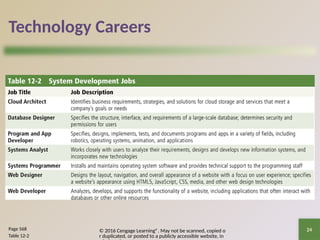
Page 568
Table 12-2
© 2016 Cengage Learning®. May not be scanned, copied o
r duplicated, or posted to a publicly accessible website, in
25
Technology Careers
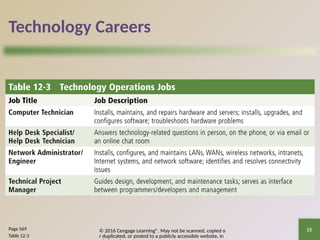
Page 569
Table 12-3
© 2016 Cengage Learning®. May not be scanned, copied o
r duplicated, or posted to a publicly accessible website, in
26
Technology Careers
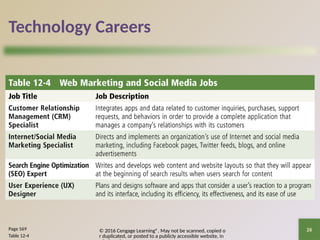
Page 569
Table 12-4
© 2016 Cengage Learning®. May not be scanned, copied o
r duplicated, or posted to a publicly accessible website, in
27
Technology Careers
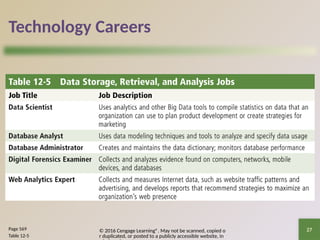
Page 569
Table 12-5
© 2016 Cengage Learning®. May not be scanned, copied o
r duplicated, or posted to a publicly accessible website, in
28
Technology Careers
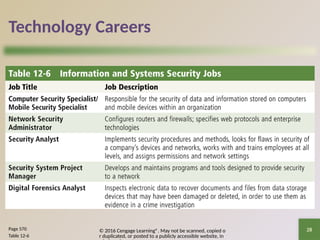
Page 570
Table 12-6
© 2016 Cengage Learning®. May not be scanned, copied o
r duplicated, or posted to a publicly accessible website, in
29
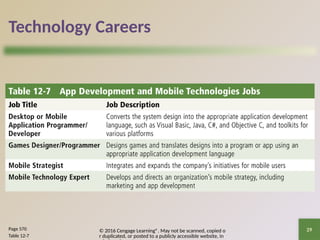
Technology Careers
Page 570
Table 12-7
© 2016 Cengage Learning®. May not be scanned, copied o
r duplicated, or posted to a publicly accessible website, in
30
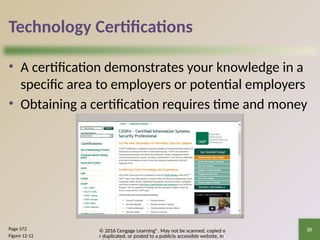
Technology Certifications
• A certification demonstrates your knowledge in a
specific area to employers or potential employers
• Obtaining a certification requires time and money
Page 572
Figure 12-12
© 2016 Cengage Learning®. May not be scanned, copied o
r duplicated, or posted to a publicly accessible website, in
31
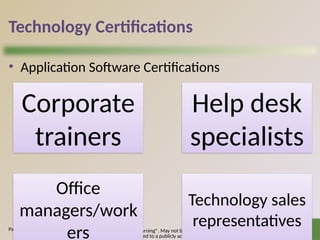
Technology Certifications
• Application Software Certifications
Page 572
Corporate
trainers
Help desk
specialists
Office
managers/work
ers
Technology sales
representatives
© 2016 Cengage Learning®. May not be scanned, copied o
r duplicated, or posted to a publicly accessible website, in
32
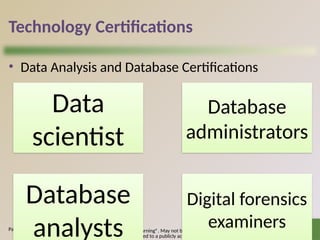
Technology Certifications
• Data Analysis and Database Certifications
Page 573
Data
scientist
Database
administrators
Database
analysts
Digital forensics
examiners
© 2016 Cengage Learning®. May not be scanned, copied o
r duplicated, or posted to a publicly accessible website, in
33
Technology Certifications
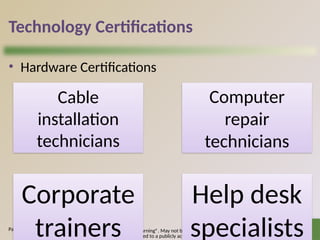
• Hardware Certifications
Page 573
Cable
installation
technicians
Computer
repair
technicians
Corporate
trainers
Help desk
specialists
© 2016 Cengage Learning®. May not be scanned, copied o
r duplicated, or posted to a publicly accessible website, in
34
Technology Certifications
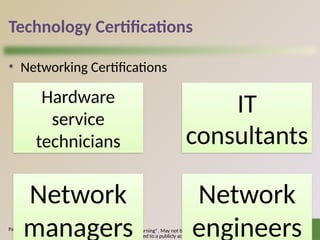
• Networking Certifications
Page 573
Hardware
service
technicians
IT
consultants
Network
managers
Network
engineers
© 2016 Cengage Learning®. May not be scanned, copied o
r duplicated, or posted to a publicly accessible website, in
35
Technology Certifications
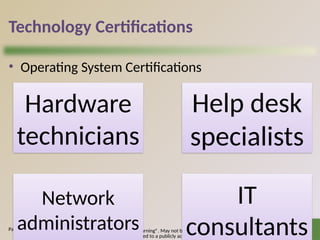
• Operating System Certifications
Page 574
Hardware
technicians
Help desk
specialists
Network
administrators
IT
consultants
© 2016 Cengage Learning®. May not be scanned, copied o
r duplicated, or posted to a publicly accessible website, in
36
Technology Certifications
• Program/Developer Certifications
Page 574
Game
developers
IT
consultants
Mobile
application
developers
Project
leaders/manage
rs
© 2016 Cengage Learning®. May not be scanned, copied o
r duplicated, or posted to a publicly accessible website, in
37
Technology Certifications
• Security Certifications
Page 575
Information
security officers
and managers
Law
enforcement
officials
Military
intelligence
officers
Network
administrators
© 2016 Cengage Learning®. May not be scanned, copied o
r duplicated, or posted to a publicly accessible website, in
38
Job Searching and Career Planning
• Many job opportunities may exist in your industry, so it
is important to narrow down the available jobs to ones
for which you are qualified and in which you are
interested
• Tools at your disposal include the career service
department at your school, career planning websites,
and online social networks
• Whether you are seeking a new job or currently are
employed, you may find a career planning website
useful
Page 576
© 2016 Cengage Learning®. May not be scanned, copied o
r duplicated, or posted to a publicly accessible website, in
39
Job Searching and Career Planning
Page 576
Figure 12-13
© 2016 Cengage Learning®. May not be scanned, copied o
r duplicated, or posted to a publicly accessible website, in
Summary
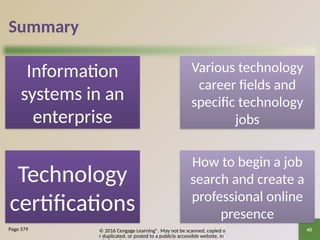
Information
systems in an
enterprise
Various technology
career fields and
specific technology
jobs
Technology
certifications
How to begin a job
search and create a
professional online
presence
40
Page 579
Chapter 12
Working in the
Enterprise
Discovering Computers 2016
Tools, Apps, Devices, and the Impact of Technology
Chapter 12 Complete

chapter-12-working in the enterprise.pptx

  • 1.
    Chapter 12 Working inthe Enterprise Discovering Computers 2016 Tools, Apps, Devices, and the Impact of Technology
  • 2.
    © 2016 CengageLearning®. May not be scanned, copied o r duplicated, or posted to a publicly accessible website, in Objectives Overview Identify the qualities of valuable information Describe various information systems used in an enterprise Identify the components of and steps in information literacy Describe career opportunities available in various segments of the computer industry Identify job titles and responsibilities for various technology jobs 2 See Page 552 for Detailed Objectives
  • 3.
    © 2016 CengageLearning®. May not be scanned, copied o r duplicated, or posted to a publicly accessible website, in Objectives Overview Identify mobile app development strategies Identify ways to prepare for certification Describe the general areas of IT certification Identify ways to begin a job search Explain how to create a professional online presence 3 See Page 552 for Detailed Objectives
  • 4.
    © 2016 CengageLearning®. May not be scanned, copied o r duplicated, or posted to a publicly accessible website, in 4 The Technology Industry • Nearly every jo requires you to interact with technology to: – Complete projects – Exchange information with coworkers – Meet customers’ needs • As new technologies emerge, organizations look for potential employees who possess skills and a desire to learn and who are comfortable using all types of technology Page 552
  • 5.
    © 2016 CengageLearning®. May not be scanned, copied o r duplicated, or posted to a publicly accessible website, in 5 The Technology Industry Page 553 Figure 12-1
  • 6.
    © 2016 CengageLearning®. May not be scanned, copied o r duplicated, or posted to a publicly accessible website, in 6 Information Systems in the Enterprise • An information system is a set of hardware, software, data, people, and procedures that work together to produce information • To assist with sound decision making, information must have value Page 554
  • 7.
    © 2016 CengageLearning®. May not be scanned, copied o r duplicated, or posted to a publicly accessible website, in 7 Information Systems in the Enterprise • For information to be valuable, it should be: Page 554 Accurate Verifiable Timely Organized Accessible Useful Cost effective
  • 8.
    © 2016 CengageLearning®. May not be scanned, copied o r duplicated, or posted to a publicly accessible website, in 8 Information Systems in the Enterprise • A typical enterprise consists of a wide variety of departments, centers, and divisions — collectively known as functional units Pages 554 - 555 Human Resources (HR) Engineering or Product Development Manufacturing Marketing Sales Customer Service
  • 9.
    © 2016 CengageLearning®. May not be scanned, copied o r duplicated, or posted to a publicly accessible website, in 9 Information Systems in the Enterprise • Enterprise Resource Planning (ERP) integrates MRP II with the information flow across an organization to manage and coordinate the ongoing activities of the enterprise Page 555 Product planning Manufacturing and distribution Accounting and finance Sales Human resources Customer support
  • 10.
    © 2016 CengageLearning®. May not be scanned, copied o r duplicated, or posted to a publicly accessible website, in 10 Information Systems in the Enterprise Page 556 Figure 12-2
  • 11.
    © 2016 CengageLearning®. May not be scanned, copied o r duplicated, or posted to a publicly accessible website, in 11 Information Systems in the Enterprise Document Management System (DMS) • Allows for storage and management of a company’s documents • Supports access control, security, version tracking, and search Content Management System (CMS) • Enables and manages the publishing, modification, organization, and access of various forms of documents and other files • Provides security controls • Content added through a graphical user interface or webpage Pages 556 - 557
  • 12.
    © 2016 CengageLearning®. May not be scanned, copied o r duplicated, or posted to a publicly accessible website, in 12 Information Systems in the Enterprise • A transaction processing system (TPS) is an information system that captures and processes data from day-to-day business activities – Online transaction processing (OLTP) Pages 557 – 558 Figure 12-3
  • 13.
    © 2016 CengageLearning®. May not be scanned, copied o r duplicated, or posted to a publicly accessible website, in 13 Information Systems in the Enterprise • A management information system (MIS) is an Information system that generates accurate, timely, and organized information, so that managers and other users can make decisions, solve problems, supervise activities, and track progress Page 558
  • 14.
    © 2016 CengageLearning®. May not be scanned, copied o r duplicated, or posted to a publicly accessible website, in 14 Information Systems in the Enterprise Page 559 Figure 12-4
  • 15.
    © 2016 CengageLearning®. May not be scanned, copied o r duplicated, or posted to a publicly accessible website, in 15 Information Systems in the Enterprise • A decision support system (DSS) helps users analyze information and make decisions – Online analytical processing (OLAP) Page 559 Figure 12-5
  • 16.
    © 2016 CengageLearning®. May not be scanned, copied o r duplicated, or posted to a publicly accessible website, in 16 Information Systems in the Enterprise • An expert system is an information system that captures and stores the knowledge of human experts and then imitates human reasoning and decision making Page 560 Figure 12-6
  • 17.
    © 2016 CengageLearning®. May not be scanned, copied o r duplicated, or posted to a publicly accessible website, in 17 Technology Careers • Business and government organizations of all sizes use a variety of computers, mobile devices, and other technology • Larger organizations use computers and other technology to answer and route phone calls, process orders, update inventory, and manage accounts receivable, accounts payable, billing, and payroll activities Page 562
  • 18.
    © 2016 CengageLearning®. May not be scanned, copied o r duplicated, or posted to a publicly accessible website, in 18 Technology Careers • IT jobs usually are divided into the following areas: Page 564 Managem ent Research and software development Technical Operation
  • 19.
    © 2016 CengageLearning®. May not be scanned, copied o r duplicated, or posted to a publicly accessible website, in 19 Technology Careers • The technology equipment field consists of manufacturers and distributors of computers, mobile devices, and other hardware, such as magnetic and optical drives, monitors, printers, and communications and networking devices • The software and apps field consists of companies that develop, manufacture, and support a wide range of software and apps for computers, the web, and mobile devices Page 564 Figure 12-8
  • 20.
    © 2016 CengageLearning®. May not be scanned, copied o r duplicated, or posted to a publicly accessible website, in 20 Technology Careers • The technology service and repair field provides preventive maintenance, component installation, and repair services to customers Page 565 Figure 12-9
  • 21.
    © 2016 CengageLearning®. May not be scanned, copied o r duplicated, or posted to a publicly accessible website, in 21 Technology Careers • Technology salespeople must possess a general understanding of technology and a specific knowledge of the product they are selling Page 566 Figure 12-10
  • 22.
    © 2016 CengageLearning®. May not be scanned, copied o r duplicated, or posted to a publicly accessible website, in 22 Technology Careers • Schools, colleges, universities, and private companies all need qualified educators to provide technology-related education and training • Corporate trainers teach employees how to use software and apps, design and develop systems, write programs, integrate and sync data from apps used on multiple devices, and perform other technology-related activities Page 567 Figure 12-11
  • 23.
    © 2016 CengageLearning®. May not be scanned, copied o r duplicated, or posted to a publicly accessible website, in 23 Technology Careers • A help desk specialist answers hardware, software, and networking questions in person, over the phone, or electronically via email or a chat room • An IT consultant, typically hired based on expertise, provides technology services to his or her clients Pages 567 - 568
  • 24.
    © 2016 CengageLearning®. May not be scanned, copied o r duplicated, or posted to a publicly accessible website, in 24 Technology Careers Page 568 Table 12-2
  • 25.
    © 2016 CengageLearning®. May not be scanned, copied o r duplicated, or posted to a publicly accessible website, in 25 Technology Careers Page 569 Table 12-3
  • 26.
    © 2016 CengageLearning®. May not be scanned, copied o r duplicated, or posted to a publicly accessible website, in 26 Technology Careers Page 569 Table 12-4
  • 27.
    © 2016 CengageLearning®. May not be scanned, copied o r duplicated, or posted to a publicly accessible website, in 27 Technology Careers Page 569 Table 12-5
  • 28.
    © 2016 CengageLearning®. May not be scanned, copied o r duplicated, or posted to a publicly accessible website, in 28 Technology Careers Page 570 Table 12-6
  • 29.
    © 2016 CengageLearning®. May not be scanned, copied o r duplicated, or posted to a publicly accessible website, in 29 Technology Careers Page 570 Table 12-7
  • 30.
    © 2016 CengageLearning®. May not be scanned, copied o r duplicated, or posted to a publicly accessible website, in 30 Technology Certifications • A certification demonstrates your knowledge in a specific area to employers or potential employers • Obtaining a certification requires time and money Page 572 Figure 12-12
  • 31.
    © 2016 CengageLearning®. May not be scanned, copied o r duplicated, or posted to a publicly accessible website, in 31 Technology Certifications • Application Software Certifications Page 572 Corporate trainers Help desk specialists Office managers/work ers Technology sales representatives
  • 32.
    © 2016 CengageLearning®. May not be scanned, copied o r duplicated, or posted to a publicly accessible website, in 32 Technology Certifications • Data Analysis and Database Certifications Page 573 Data scientist Database administrators Database analysts Digital forensics examiners
  • 33.
    © 2016 CengageLearning®. May not be scanned, copied o r duplicated, or posted to a publicly accessible website, in 33 Technology Certifications • Hardware Certifications Page 573 Cable installation technicians Computer repair technicians Corporate trainers Help desk specialists
  • 34.
    © 2016 CengageLearning®. May not be scanned, copied o r duplicated, or posted to a publicly accessible website, in 34 Technology Certifications • Networking Certifications Page 573 Hardware service technicians IT consultants Network managers Network engineers
  • 35.
    © 2016 CengageLearning®. May not be scanned, copied o r duplicated, or posted to a publicly accessible website, in 35 Technology Certifications • Operating System Certifications Page 574 Hardware technicians Help desk specialists Network administrators IT consultants
  • 36.
    © 2016 CengageLearning®. May not be scanned, copied o r duplicated, or posted to a publicly accessible website, in 36 Technology Certifications • Program/Developer Certifications Page 574 Game developers IT consultants Mobile application developers Project leaders/manage rs
  • 37.
    © 2016 CengageLearning®. May not be scanned, copied o r duplicated, or posted to a publicly accessible website, in 37 Technology Certifications • Security Certifications Page 575 Information security officers and managers Law enforcement officials Military intelligence officers Network administrators
  • 38.
    © 2016 CengageLearning®. May not be scanned, copied o r duplicated, or posted to a publicly accessible website, in 38 Job Searching and Career Planning • Many job opportunities may exist in your industry, so it is important to narrow down the available jobs to ones for which you are qualified and in which you are interested • Tools at your disposal include the career service department at your school, career planning websites, and online social networks • Whether you are seeking a new job or currently are employed, you may find a career planning website useful Page 576
  • 39.
    © 2016 CengageLearning®. May not be scanned, copied o r duplicated, or posted to a publicly accessible website, in 39 Job Searching and Career Planning Page 576 Figure 12-13
  • 40.
    © 2016 CengageLearning®. May not be scanned, copied o r duplicated, or posted to a publicly accessible website, in Summary Information systems in an enterprise Various technology career fields and specific technology jobs Technology certifications How to begin a job search and create a professional online presence 40 Page 579
  • 41.
    Chapter 12 Working inthe Enterprise Discovering Computers 2016 Tools, Apps, Devices, and the Impact of Technology Chapter 12 Complete