© 2011 The McGraw-Hill Companies, Inc. All rights reserved
Chapter 1: What Is Multimedia?
© 2011 The McGraw-Hill Companies, Inc. All rights reserved
Overview
• Introduction to multimedia
• Applications of multimedia
• Primary delivery methods of multimedia
© 2011 The McGraw-Hill Companies, Inc. All rights reserved
Introduction to Multimedia
• Multimedia is a combination of text, art,
sound, animation, and video.
• It is delivered to the user by electronic or
digitally manipulated means.
• A multimedia project development requires
creative, technical, organizational, and
business skills.
© 2011 The McGraw-Hill Companies, Inc. All rights reserved
Introduction to Multimedia
(continued)
• Multimedia becomes interactive multimedia
when a user is given the option of
controlling the elements.
• Interactive multimedia is called hypermedia
when a user is provided a structure of linked
elements for navigation.
• Multimedia developers develop multimedia
projects.
© 2011 The McGraw-Hill Companies, Inc. All rights reserved
Introduction to Multimedia
(continued)
• The software vehicle, the messages, and the
content together constitute a multimedia
project.
• A multimedia project shipped to end users
with or without instructions is called a
multimedia title.
• A project can also be launched on the Web.
© 2011 The McGraw-Hill Companies, Inc. All rights reserved
Introduction to Multimedia
(continued)
• Multimedia projects can be linear or
nonlinear.
• Projects that are not interactive are called
linear (e.g. PowerPoint slides and montage).
• Projects where users are given navigational
control are called nonlinear and user-
interactive (e.g. online quizzes, games or
kiosks).
© 2011 The McGraw-Hill Companies, Inc. All rights reserved
Introduction to Multimedia
(continued)
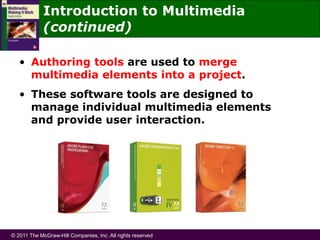
• Authoring tools are used to merge
multimedia elements into a project.
• These software tools are designed to
manage individual multimedia elements
and provide user interaction.
© 2011 The McGraw-Hill Companies, Inc. All rights reserved
Applications of Multimedia
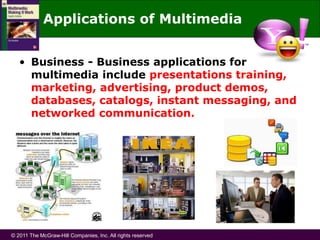
• Business - Business applications for
multimedia include presentations training,
marketing, advertising, product demos,
databases, catalogs, instant messaging, and
networked communication.
© 2011 The McGraw-Hill Companies, Inc. All rights reserved
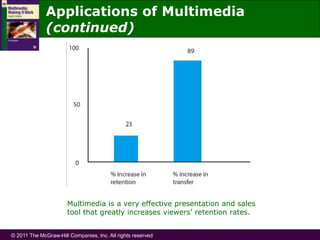
Multimedia is a very effective presentation and sales
tool that greatly increases viewers’ retention rates.
Applications of Multimedia
(continued)
© 2011 The McGraw-Hill Companies, Inc. All rights reserved
Applications of Multimedia
(continued)
• Schools - Educational
software can be developed to
enrich the learning process.
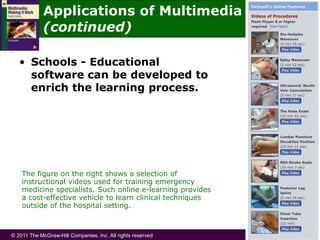
The figure on the right shows a selection of
instructional videos used for training emergency
medicine specialists. Such online e-learning provides
a cost-effective vehicle to learn clinical techniques
outside of the hospital setting.
© 2011 The McGraw-Hill Companies, Inc. All rights reserved
Applications of Multimedia
(continued)
• Home - Most
multimedia
projects reach
homes via
television sets
or monitors
with built-in
user inputs.
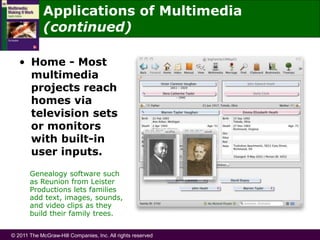
Genealogy software such
as Reunion from Leister
Productions lets families
add text, images, sounds,
and video clips as they
build their family trees.
© 2011 The McGraw-Hill Companies, Inc. All rights reserved
Applications of Multimedia
(continued)
• Public places -
Multimedia will
become available
at stand-alone
terminals or
kiosks to provide
information
and help.
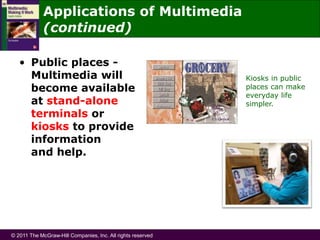
Kiosks in public
places can make
everyday life
simpler.
© 2011 The McGraw-Hill Companies, Inc. All rights reserved
Delivering Multimedia
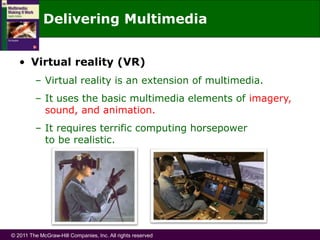
• Virtual reality (VR)
– Virtual reality is an extension of multimedia.
– It uses the basic multimedia elements of imagery,
sound, and animation.
– It requires terrific computing horsepower
to be realistic.
© 2011 The McGraw-Hill Companies, Inc. All rights reserved
Delivering Multimedia (continued)
• Virtual reality (VR) (continued)
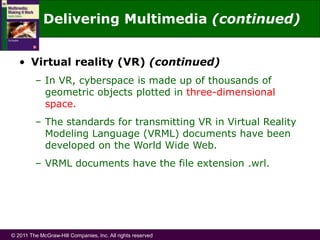
– In VR, cyberspace is made up of thousands of
geometric objects plotted in three-dimensional
space.
– The standards for transmitting VR in Virtual Reality
Modeling Language (VRML) documents have been
developed on the World Wide Web.
– VRML documents have the file extension .wrl.
© 2011 The McGraw-Hill Companies, Inc. All rights reserved
Delivering Multimedia (continued)
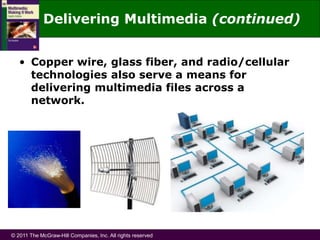
• Copper wire, glass fiber, and radio/cellular
technologies also serve a means for
delivering multimedia files across a
network.
© 2011 The McGraw-Hill Companies, Inc. All rights reserved
Delivering Multimedia (continued)
• The primary media for delivering multimedia
projects are:
– Compact disc read-only (CD-ROM)
– Digital Versatile Disc (DVD)
© 2011 The McGraw-Hill Companies, Inc. All rights reserved
Delivering Multimedia (continued)
• Compact disc read-only (CD-ROM)
– CD-ROM is the most cost-effective distribution
medium for multimedia projects.
– It can contain up to 80 minutes of full-screen
video or sound.
– CD burners are used for reading discs and
converting the discs to audio, video, and data
formats.
© 2011 The McGraw-Hill Companies, Inc. All rights reserved
Delivering Multimedia (continued)
• Digital Versatile Disc (DVD)
– Multilayered DVD technology increases the capacity
of current optical technology to 18GB.
– DVD authoring and integration software is used
to create interactive front-end menus for films
and games.
– DVD burners are used for reading discs and
converting the discs to audio, video, and data
formats.
© 2011 The McGraw-Hill Companies, Inc. All rights reserved
Summary
• Multimedia is a combination of text, graphic
art, sound, animation, and video.
• Multimedia projects can be linear or
nonlinear.
• Multimedia projects are often stored on CD-
ROM or DVDs. They can also be hosted on
the Web.
© 2011 The McGraw-Hill Companies, Inc. All rights reserved
Summary (continued)
• Multimedia is widely used in business,
schools, public places, and at home.
• Virtual reality is an extension of multimedia.

Ch1 - What is Multimedia.ppt

  • 1.
    © 2011 TheMcGraw-Hill Companies, Inc. All rights reserved Chapter 1: What Is Multimedia?
  • 2.
    © 2011 TheMcGraw-Hill Companies, Inc. All rights reserved Overview • Introduction to multimedia • Applications of multimedia • Primary delivery methods of multimedia
  • 3.
    © 2011 TheMcGraw-Hill Companies, Inc. All rights reserved Introduction to Multimedia • Multimedia is a combination of text, art, sound, animation, and video. • It is delivered to the user by electronic or digitally manipulated means. • A multimedia project development requires creative, technical, organizational, and business skills.
  • 4.
    © 2011 TheMcGraw-Hill Companies, Inc. All rights reserved Introduction to Multimedia (continued) • Multimedia becomes interactive multimedia when a user is given the option of controlling the elements. • Interactive multimedia is called hypermedia when a user is provided a structure of linked elements for navigation. • Multimedia developers develop multimedia projects.
  • 5.
    © 2011 TheMcGraw-Hill Companies, Inc. All rights reserved Introduction to Multimedia (continued) • The software vehicle, the messages, and the content together constitute a multimedia project. • A multimedia project shipped to end users with or without instructions is called a multimedia title. • A project can also be launched on the Web.
  • 6.
    © 2011 TheMcGraw-Hill Companies, Inc. All rights reserved Introduction to Multimedia (continued) • Multimedia projects can be linear or nonlinear. • Projects that are not interactive are called linear (e.g. PowerPoint slides and montage). • Projects where users are given navigational control are called nonlinear and user- interactive (e.g. online quizzes, games or kiosks).
  • 7.
    © 2011 TheMcGraw-Hill Companies, Inc. All rights reserved Introduction to Multimedia (continued) • Authoring tools are used to merge multimedia elements into a project. • These software tools are designed to manage individual multimedia elements and provide user interaction.
  • 8.
    © 2011 TheMcGraw-Hill Companies, Inc. All rights reserved Applications of Multimedia • Business - Business applications for multimedia include presentations training, marketing, advertising, product demos, databases, catalogs, instant messaging, and networked communication.
  • 9.
    © 2011 TheMcGraw-Hill Companies, Inc. All rights reserved Multimedia is a very effective presentation and sales tool that greatly increases viewers’ retention rates. Applications of Multimedia (continued)
  • 10.
    © 2011 TheMcGraw-Hill Companies, Inc. All rights reserved Applications of Multimedia (continued) • Schools - Educational software can be developed to enrich the learning process. The figure on the right shows a selection of instructional videos used for training emergency medicine specialists. Such online e-learning provides a cost-effective vehicle to learn clinical techniques outside of the hospital setting.
  • 11.
    © 2011 TheMcGraw-Hill Companies, Inc. All rights reserved Applications of Multimedia (continued) • Home - Most multimedia projects reach homes via television sets or monitors with built-in user inputs. Genealogy software such as Reunion from Leister Productions lets families add text, images, sounds, and video clips as they build their family trees.
  • 12.
    © 2011 TheMcGraw-Hill Companies, Inc. All rights reserved Applications of Multimedia (continued) • Public places - Multimedia will become available at stand-alone terminals or kiosks to provide information and help. Kiosks in public places can make everyday life simpler.
  • 13.
    © 2011 TheMcGraw-Hill Companies, Inc. All rights reserved Delivering Multimedia • Virtual reality (VR) – Virtual reality is an extension of multimedia. – It uses the basic multimedia elements of imagery, sound, and animation. – It requires terrific computing horsepower to be realistic.
  • 14.
    © 2011 TheMcGraw-Hill Companies, Inc. All rights reserved Delivering Multimedia (continued) • Virtual reality (VR) (continued) – In VR, cyberspace is made up of thousands of geometric objects plotted in three-dimensional space. – The standards for transmitting VR in Virtual Reality Modeling Language (VRML) documents have been developed on the World Wide Web. – VRML documents have the file extension .wrl.
  • 15.
    © 2011 TheMcGraw-Hill Companies, Inc. All rights reserved Delivering Multimedia (continued) • Copper wire, glass fiber, and radio/cellular technologies also serve a means for delivering multimedia files across a network.
  • 16.
    © 2011 TheMcGraw-Hill Companies, Inc. All rights reserved Delivering Multimedia (continued) • The primary media for delivering multimedia projects are: – Compact disc read-only (CD-ROM) – Digital Versatile Disc (DVD)
  • 17.
    © 2011 TheMcGraw-Hill Companies, Inc. All rights reserved Delivering Multimedia (continued) • Compact disc read-only (CD-ROM) – CD-ROM is the most cost-effective distribution medium for multimedia projects. – It can contain up to 80 minutes of full-screen video or sound. – CD burners are used for reading discs and converting the discs to audio, video, and data formats.
  • 18.
    © 2011 TheMcGraw-Hill Companies, Inc. All rights reserved Delivering Multimedia (continued) • Digital Versatile Disc (DVD) – Multilayered DVD technology increases the capacity of current optical technology to 18GB. – DVD authoring and integration software is used to create interactive front-end menus for films and games. – DVD burners are used for reading discs and converting the discs to audio, video, and data formats.
  • 19.
    © 2011 TheMcGraw-Hill Companies, Inc. All rights reserved Summary • Multimedia is a combination of text, graphic art, sound, animation, and video. • Multimedia projects can be linear or nonlinear. • Multimedia projects are often stored on CD- ROM or DVDs. They can also be hosted on the Web.
  • 20.
    © 2011 TheMcGraw-Hill Companies, Inc. All rights reserved Summary (continued) • Multimedia is widely used in business, schools, public places, and at home. • Virtual reality is an extension of multimedia.