3., Fő hibakijelzések                                                                     CH05 (BTEKTE kommunikációs hiba)

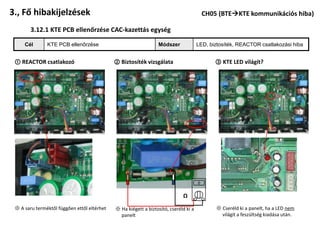
        3.12.1 KTE PCB ellenőrzése CAC-kazettás egység

     Cél       KTE PCB ellenőrzése                               Módszer              LED, biztosíték, REACTOR csatlakozási hiba


 ① REACTOR csatlakozó                        ② Biztosíték vizsgálata                          ③ KTE LED világít?


                                                                                      0


                                                                             Ω
 ※ A saru terméktől függően ettől eltérhet   ※ Ha kiégett a biztosító, cseréld ki a           ※ Cseréld ki a panelt, ha a LED nem
                                               panelt                                           világít a feszültség kiadása után.
3., Fő hibakijelzések                                                              CH05 (BTEKTE kommunikációs hiba)

     3.12.2 Installációs körülmények hatása a BTE/KTE kommunikációra

    Cél        Zajforrások feltárása                              Módszer        Hibaforrások keresése


 ① Kommunikációs vezetékek csatlakoztatása:                       ③ A sodrott, szigszalagozott kötést átszúrja a vezeték és
   Összesodrás nem elfogadható. Forrasztással                       hozzáér egy másik vezetőhöz
   kössük össze a vezetékeket.


          Sodrott kötés: NEM            Forrasztott kötés: IGEN

 ② Ér kicsúszik a saruból                                         ④ Átmeneti ellenállás oxidáció miatt megnő: Forraszott
 .                                                                  kötés szükséges


                                       Kommunikációs ér
1.3 Measures for Main Error Codes                                                                   CH05 (Indoor/Outdoor Device Communication Error)


 3.3.13 CH05(Indoor/Outdoor Device Communication Error)  Detection by indoor devices
                 Items                                                                          Contents
               Purpose                    Checking for smooth data sending/receiving between indoor/outdoor devices
    Condition for Generation              Damage and installation of outdoor device PCB

 Resetting power source: Wait for 3 minutes after turning the power of the product off.


   Items for checking                                                       Sub-items for checking

        Resetting
       power source


        Outdoor PCB                              Checking for LED Off                           No power

                                                 ※ Refer to 3.3.13.1
                                                                                                                         Communication
                                                                                                                           cable length
         Installation                           Wire connection state                     Wire tongue termination         Application of
                                                                                                                            shield lines
                                                 ※ Refer to 3.3.13.2


                                                       Grounding

     Replacing indoor
           PCB
1.3 Measures for Main Error Codes                                            CH05 (Indoor/Outdoor Device Communication Error)


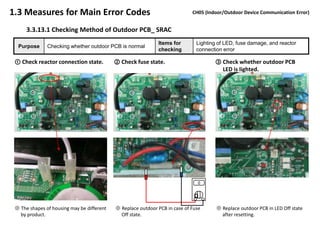
      3.3.13.1 Checking Method of Outdoor PCB_ SRAC
                                                              Items for        Lighting of LED, fuse damage, and reactor
  Purpose      Checking whether outdoor PCB is normal
                                                              checking         connection error

 ① Check reactor connection state.          ② Check fuse state.                       ③ Check whether outdoor PCB
                                                                                        LED is lighted.


                                                                               0


                                                                              Ω
 ※ The shapes of housing may be different   ※ Replace outdoor PCB in case of Fuse      ※ Replace outdoor PCB in LED Off state
   by product.                                Off state.                                 after resetting.
1.3 Measures for Main Error Codes                                   CH05 (Indoor/Outdoor Device Communication Error)


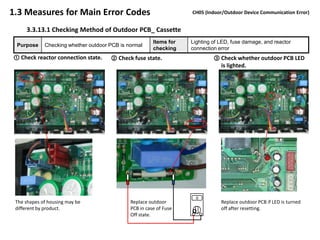
     3.3.13.1 Checking Method of Outdoor PCB_ Cassette
                                                        Items for   Lighting of LED, fuse damage, and reactor
 Purpose     Checking whether outdoor PCB is normal
                                                        checking    connection error
① Check reactor connection state.     ② Check fuse state.                    ③ Check whether outdoor PCB LED
                                                                               is lighted.


                                                                      0
 The shapes of housing may be                 Replace outdoor                   Replace outdoor PCB if LED is turned
 different by product.                        PCB in case of Fuse               off after resetting.
                                                                    Ω
                                              Off state.
1.3 Measures for Main Error Codes                                     CH05 (Indoor/Outdoor Device Communication Error)


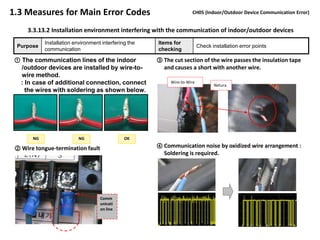
     3.3.13.2 Installation environment interfering with the communication of indoor/outdoor devices
            Installation environment interfering the   Items for
 Purpose                                                                   Check installation error points
            communication                              checking

 ① The communication lines of the indoor               ③ The cut section of the wire passes the insulation tape
   /outdoor devices are installed by wire-to-            and causes a short with another wire.
   wire method.
  : In case of additional connection, connect               Wire-to-Wire
                                                                                  Netura
    the wires with soldering as shown below.


       NG                  NG                  OK

 ② Wire tongue-termination fault                       ④ Communication noise by oxidized wire arrangement :
 .                                                       Soldering is required.


                                    Comm
                                    unicati
                                    on line

Ch05

  • 1.
    3., Fő hibakijelzések CH05 (BTEKTE kommunikációs hiba) 3.12.1 KTE PCB ellenőrzése CAC-kazettás egység Cél KTE PCB ellenőrzése Módszer LED, biztosíték, REACTOR csatlakozási hiba ① REACTOR csatlakozó ② Biztosíték vizsgálata ③ KTE LED világít? 0 Ω ※ A saru terméktől függően ettől eltérhet ※ Ha kiégett a biztosító, cseréld ki a ※ Cseréld ki a panelt, ha a LED nem panelt világít a feszültség kiadása után.
  • 2.
    3., Fő hibakijelzések CH05 (BTEKTE kommunikációs hiba) 3.12.2 Installációs körülmények hatása a BTE/KTE kommunikációra Cél Zajforrások feltárása Módszer Hibaforrások keresése ① Kommunikációs vezetékek csatlakoztatása: ③ A sodrott, szigszalagozott kötést átszúrja a vezeték és Összesodrás nem elfogadható. Forrasztással hozzáér egy másik vezetőhöz kössük össze a vezetékeket. Sodrott kötés: NEM Forrasztott kötés: IGEN ② Ér kicsúszik a saruból ④ Átmeneti ellenállás oxidáció miatt megnő: Forraszott . kötés szükséges Kommunikációs ér
  • 3.
    1.3 Measures forMain Error Codes CH05 (Indoor/Outdoor Device Communication Error) 3.3.13 CH05(Indoor/Outdoor Device Communication Error)  Detection by indoor devices Items Contents Purpose Checking for smooth data sending/receiving between indoor/outdoor devices Condition for Generation Damage and installation of outdoor device PCB Resetting power source: Wait for 3 minutes after turning the power of the product off. Items for checking Sub-items for checking Resetting power source Outdoor PCB Checking for LED Off No power ※ Refer to 3.3.13.1 Communication cable length Installation Wire connection state Wire tongue termination  Application of shield lines ※ Refer to 3.3.13.2 Grounding Replacing indoor PCB
  • 4.
    1.3 Measures forMain Error Codes CH05 (Indoor/Outdoor Device Communication Error) 3.3.13.1 Checking Method of Outdoor PCB_ SRAC Items for Lighting of LED, fuse damage, and reactor Purpose Checking whether outdoor PCB is normal checking connection error ① Check reactor connection state. ② Check fuse state. ③ Check whether outdoor PCB LED is lighted. 0 Ω ※ The shapes of housing may be different ※ Replace outdoor PCB in case of Fuse ※ Replace outdoor PCB in LED Off state by product. Off state. after resetting.
  • 5.
    1.3 Measures forMain Error Codes CH05 (Indoor/Outdoor Device Communication Error) 3.3.13.1 Checking Method of Outdoor PCB_ Cassette Items for Lighting of LED, fuse damage, and reactor Purpose Checking whether outdoor PCB is normal checking connection error ① Check reactor connection state. ② Check fuse state. ③ Check whether outdoor PCB LED is lighted. 0 The shapes of housing may be Replace outdoor Replace outdoor PCB if LED is turned different by product. PCB in case of Fuse off after resetting. Ω Off state.
  • 6.
    1.3 Measures forMain Error Codes CH05 (Indoor/Outdoor Device Communication Error) 3.3.13.2 Installation environment interfering with the communication of indoor/outdoor devices Installation environment interfering the Items for Purpose Check installation error points communication checking ① The communication lines of the indoor ③ The cut section of the wire passes the insulation tape /outdoor devices are installed by wire-to- and causes a short with another wire. wire method. : In case of additional connection, connect Wire-to-Wire Netura the wires with soldering as shown below. NG NG OK ② Wire tongue-termination fault ④ Communication noise by oxidized wire arrangement : . Soldering is required. Comm unicati on line