CCTV Maintenance:
Tips & Tricks
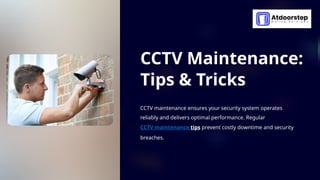
CCTV maintenance ensures your security system operates
reliably and delivers optimal performance. Regular
CCTV maintenance tips prevent costly downtime and security
breaches.
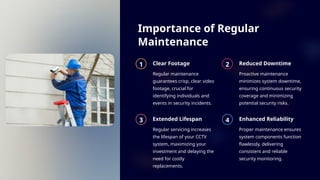
Importance of Regular
Maintenance
1 Clear Footage
Regular maintenance
guarantees crisp, clear video
footage, crucial for
identifying individuals and
events in security incidents.
2 Reduced Downtime
Proactive maintenance
minimizes system downtime,
ensuring continuous security
coverage and minimizing
potential security risks.
3 Extended Lifespan
Regular servicing increases
the lifespan of your CCTV
system, maximizing your
investment and delaying the
need for costly
replacements.
4 Enhanced Reliability
Proper maintenance ensures
system components function
flawlessly, delivering
consistent and reliable
security monitoring.
Cleaning and Inspecting CCTV Cameras
Lens Cleaning
Use a microfiber cloth to gently
clean the camera lens, removing
dust and debris. This improves
video clarity and reduces
distortion.
Housing Inspection
Inspect the camera housing for
signs of damage or corrosion,
ensuring proper
weatherproofing and protection.
Cable Connections
Examine cable connections for
loose fittings or damage,
ensuring a stable power supply
and signal transmission.
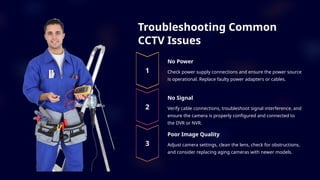
Troubleshooting Common
CCTV Issues
No Power
Check power supply connections and ensure the power source
is operational. Replace faulty power adapters or cables.
No Signal
Verify cable connections, troubleshoot signal interference, and
ensure the camera is properly configured and connected to
the DVR or NVR.
Poor Image Quality
Adjust camera settings, clean the lens, check for obstructions,
and consider replacing aging cameras with newer models.
Firmware Updates and
Security Patches
Vulnerability Reduction
Firmware updates often
address security
vulnerabilities, reducing the
risk of hacking and
unauthorized access to your
system.
Improved Performance
Updates may include bug
fixes and performance
enhancements, optimizing
your CCTV system's
functionality and reliability.
Enhanced Features
Updates can introduce new features, such as advanced analytics
or remote access capabilities, enhancing the value of your CCTV
system.
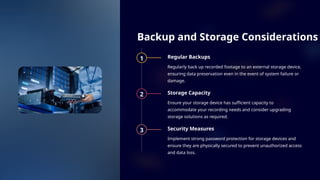
Backup and Storage Considerations
1 Regular Backups
Regularly back up recorded footage to an external storage device,
ensuring data preservation even in the event of system failure or
damage.
2 Storage Capacity
Ensure your storage device has sufficient capacity to
accommodate your recording needs and consider upgrading
storage solutions as required.
3 Security Measures
Implement strong password protection for storage devices and
ensure they are physically secured to prevent unauthorized access
and data loss.
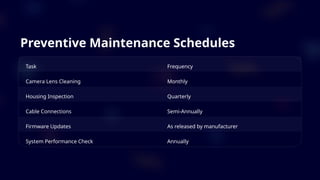
Preventive Maintenance Schedules
Task Frequency
Camera Lens Cleaning Monthly
Housing Inspection Quarterly
Cable Connections Semi-Annually
Firmware Updates As released by manufacturer
System Performance Check Annually
Tips for Extending CCTV System
Lifespan
Environmental Protection
Install cameras in well-ventilated,
sheltered areas to minimize exposure
to extreme weather conditions and
potential damage.
Proper Installation
Ensure cameras are securely mounted
and protected from vandalism or
accidental damage, guaranteeing their
longevity and functionality.
Regular Cleaning
Clean camera lenses, housings, and
cabling regularly to prevent dust, dirt,
and moisture accumulation, which can
hinder performance.
Maintenance Schedule
Establish a regular maintenance
schedule for cleaning, inspections, and
system checks, ensuring optimal
performance and longevity.

CCTV Maintenance Tips and Tricks | Call: 045864033

  • 1.
    CCTV Maintenance: Tips &Tricks CCTV maintenance ensures your security system operates reliably and delivers optimal performance. Regular CCTV maintenance tips prevent costly downtime and security breaches.
  • 2.
    Importance of Regular Maintenance 1Clear Footage Regular maintenance guarantees crisp, clear video footage, crucial for identifying individuals and events in security incidents. 2 Reduced Downtime Proactive maintenance minimizes system downtime, ensuring continuous security coverage and minimizing potential security risks. 3 Extended Lifespan Regular servicing increases the lifespan of your CCTV system, maximizing your investment and delaying the need for costly replacements. 4 Enhanced Reliability Proper maintenance ensures system components function flawlessly, delivering consistent and reliable security monitoring.
  • 3.
    Cleaning and InspectingCCTV Cameras Lens Cleaning Use a microfiber cloth to gently clean the camera lens, removing dust and debris. This improves video clarity and reduces distortion. Housing Inspection Inspect the camera housing for signs of damage or corrosion, ensuring proper weatherproofing and protection. Cable Connections Examine cable connections for loose fittings or damage, ensuring a stable power supply and signal transmission.
  • 4.
    Troubleshooting Common CCTV Issues NoPower Check power supply connections and ensure the power source is operational. Replace faulty power adapters or cables. No Signal Verify cable connections, troubleshoot signal interference, and ensure the camera is properly configured and connected to the DVR or NVR. Poor Image Quality Adjust camera settings, clean the lens, check for obstructions, and consider replacing aging cameras with newer models.
  • 5.
    Firmware Updates and SecurityPatches Vulnerability Reduction Firmware updates often address security vulnerabilities, reducing the risk of hacking and unauthorized access to your system. Improved Performance Updates may include bug fixes and performance enhancements, optimizing your CCTV system's functionality and reliability. Enhanced Features Updates can introduce new features, such as advanced analytics or remote access capabilities, enhancing the value of your CCTV system.
  • 6.
    Backup and StorageConsiderations 1 Regular Backups Regularly back up recorded footage to an external storage device, ensuring data preservation even in the event of system failure or damage. 2 Storage Capacity Ensure your storage device has sufficient capacity to accommodate your recording needs and consider upgrading storage solutions as required. 3 Security Measures Implement strong password protection for storage devices and ensure they are physically secured to prevent unauthorized access and data loss.
  • 7.
    Preventive Maintenance Schedules TaskFrequency Camera Lens Cleaning Monthly Housing Inspection Quarterly Cable Connections Semi-Annually Firmware Updates As released by manufacturer System Performance Check Annually
  • 8.
    Tips for ExtendingCCTV System Lifespan Environmental Protection Install cameras in well-ventilated, sheltered areas to minimize exposure to extreme weather conditions and potential damage. Proper Installation Ensure cameras are securely mounted and protected from vandalism or accidental damage, guaranteeing their longevity and functionality. Regular Cleaning Clean camera lenses, housings, and cabling regularly to prevent dust, dirt, and moisture accumulation, which can hinder performance. Maintenance Schedule Establish a regular maintenance schedule for cleaning, inspections, and system checks, ensuring optimal performance and longevity.