Introduction
What is computing?
•The process of utilizing computer technology to complete a task.
• Computing may involve computer hardware and/or software, but
must involve some form of a computer system.
What is paradigms?
• A style or a way of doing something.
• A set of practices to be followed to accomplish a task.
Computing Paradigms
• In the domain of computing, there are many different standard
practices being followed based on inventions and technological
advancements.
High Performance Computing
•In high-performance computing systems, a pool of processors are
connected with other resources like memory, storage, and input
and output devices, and the deployed software is enabled to run
in the entire system of connected components.
• The processor machines can be of homogeneous or
heterogeneous type.
• The legacy meaning of high-performance computing (HPC) is the
supercomputers; however, it is not true in present-day computing
scenarios.
6.
• Thus, examplesof HPC include a small cluster of desktop
computers or personal computers (PCs) to the fastest
supercomputers.
• HPC systems are normally found in those applications where it is
required to use or solve scientific problems.
• Most of the time, the challenge in working with these kinds of
problems is to perform suitable simulation study, and this can be
accomplished by HPC without any difficulty.
• Scientific examples such as protein folding in molecular biology
and studies on developing models and applications based on
nuclear fusion are worth noting as potential applications for HPC.
High Performance Computing
UCLto host National High Performance Computing Hub for Materials Science
A UCL-led consortium has been awarded to establish a new national High
Performance Computing (HPC) facility for the Materials and Molecular
Modelling community.
Parallel Computing
•Serial Computing:
•Traditionally, software has been written for serial computation:
• A problem is broken into a discrete series of instructions
• Instructions are executed sequentially one after another
• Executed on a single processor
• Only one instruction may execute at any moment in time
Parallel Computing
• ParallelComputing:
• In the simplest sense, parallel computing is the simultaneous use of
multiple compute resources to solve a computational problem:
• A problem is broken into discrete parts that can be solved concurrently
• Each part is further broken down to a series of instructions
• Instructions from each part execute simultaneously on different processors
• An overall control/coordination mechanism is employed
Parallel Computing
• Thecomputational problem should be able to:
• Be broken apart into discrete pieces of work that can be solved
simultaneously;
• Execute multiple program instructions at any moment in time;
• Be solved in less time with multiple compute resources than with a single
compute resource.
• The compute resources are typically:
• A single computer with multiple processors/cores
• An arbitrary number of such computers connected by a network
20.
This figure isshowing the majority of the world's large parallel computers
(supercomputers) are clusters of hardware produced by a handful of (mostly) well
known vendors.
Distributed Computing
• Distributedcomputing is also a computing system that consists of
multiple computers or processor machines connected through a network,
which can be homogeneous or heterogeneous, but run as a single system.
• The connectivity can be such that the CPUs in a distributed system can
be physically close together and connected by a local network, or they
can be geographically distant and connected by a wide area network.
• The heterogeneity in a distributed system supports any number of
possible configurations in the processor machines, such as mainframes,
PCs, workstations, and minicomputers.
23.
• The goalof distributed computing is to make such a network work
as a single computer.
• Distributed computing systems are advantageous over centralized
systems, because there is a support for the following characteristic
features:
1. Scalability: It is the ability of the system to be easily expanded
by adding more machines as needed, and vice versa, without
affecting the existing setup.
2. Redundancy or replication: Here, several machines can
provide the same services, so that even if one is unavailable (or
failed), work does not stop because other similar computing
supports will be available.
24.
Distributed Computing
Centralized
• Asystem with centralized multiprocessor parallel architecture. In
the late 1980 s Centralized systems have been progressively
replaced by distributed systems.
Characteristics of centralized system
• Non autonomous components
• usually homogeneous technology
• Multiple users share the same resources at all time
• single point of control
• single point of failure
25.
Distributed Computing
• Setof tightly coupled programs executing on one or more
computers which are interconnected through a network and
coordinating their actions. These programs know about one
another and carry out tasks that none could carry out in isolation
• Characteristics of distributed system
• Autonomous components
• Mostly build using heterogeneous technology
• System components may be used exclusively
• Concurrent processes can execute
• Scalability- possibility of adding new hosts
• openness- easily extended and modified
• Heterogeneity-supports various H/W S/w platforms
• Resource sharing- H/w, S/W and data
• fault tolerance- ability to function correctly even if faults occur
Distributed Computing
• thefollowing are the different application of the distributed
system.
• Global positioning System
• World Wide Web
• Air Traffic Control System
• Automated Banking System
• In the World Wide Web application the data or application were
distributed on the several number of the heterogeneous computer
system, but for the end user or the browser it seems to be a single
system from which user got the information.
• The multiple number of computer working concurrently and
perform the resource sharing in the World Wide Web.
Cluster Computing
• Acluster computing system consists of a set of the same or similar
type of processor machines connected using a dedicated network
infrastructure.
• All processor machines share resources such as a common home
directory and have a software such as a message passing interface
(MPI) implementation installed to allow programs to be run across
all nodes simultaneously.
• This is also a kind of HPC category.
• The individual computers in a cluster can be referred to as nodes.
31.
• The reasonto realize a cluster as HPC is due to the fact that the
individual nodes can work together to solve a problem larger than
any computer can easily solve.
• And, the nodes need to communicate with one another in order to
work cooperatively and meaningfully together to solve the
problem in hand.
• If we have processor machines of heterogeneous types in a cluster,
this kind of clusters become a subtype and still mostly are in the
experimental or research stage.
32.
Cluster Computing
• Acomputer cluster help to solve complex operations more
efficiently with much faster processing speed, better data integrity
than a single computer and they only used for mission-critical
applications.
• The Clustering methods have identified as- HPC IAAS, HPC
PAAS, that are more expensive and difficult to setup and maintain
than a single computer.
• A computer cluster defined as the addition of processes for
delivering large-scale processing to reduce downtime and larger
storage capacity as compared to other desktop workstation or
computer.
33.
Cluster Computing
• Someof the critical Applications of Cluster Computers are Google
Search Engine, Petroleum Reservoir Simulation, Earthquake
Simulation, Weather Forecasting.
• Cluster Can be classified into two category Open and Close
Cluster.
• Open Cluster: All nodes in Open Cluster are needed IPs, and that
are accessible through internet/web, that cause more security
concern.
Close Cluster: On the other hand Close Cluster are hide behind
the gateway node and provide better security.
34.
Cluster Computing
• Typesof Cluster computing
• 1. Load-balancing clusters: As the name implies, This system is
used to distribute workload across multiple computers. That system
• distributes the processing load as possible across a cluster of
computers.
2. High availability (HA) clusters: A high availability clusters
(HA cluster) are the bunch of computers that can reliably utilise for
• redundant operations in the event of nodes failure in Cluster
computing.
3. High performance (HP) clusters: This computer networking
methodology use supercomputers and Cluster computing to solve
advanced computation problems.
35.
Cluster Computing
Advantages ofusing Cluster computing
• 1. Cost efficiency: In a Cluster computing Cost efficiency is the
ratio of cost to output, that is the connecting group of the computer
as computer cluster much cheaper as compared to mainframe
computers.
2. Processing speed: The Processing speed of computer cluster is
the same as a mainframe computer.
3. Expandability: The best benefit of Cluster Computing is that it
can be expanded easily by adding the additional desktop
workstation to the system.
4. High availability of resources: If any node fails in a computer
cluster, another node within the cluster continue to provide
uninterrupted processing. When a mainframe system fails, the entire
system fails.
Grid Computing
• Thecomputing resources in most of the organizations are
underutilized but are necessary for certain operations.
• The idea of grid computing is to make use of such non utilized
computing power by the needy organizations, and thereby the
return on investment (ROI) on computing investments can be
increased.
• Thus, grid computing is a network of computing or processor
machines managed with a kind of software such as middleware, in
order to access and use the resources remotely.
• The managing activity of grid resources through the middleware is
called grid services.
40.
• Grid servicesprovide access control, security, access to data
including digital libraries and databases, and access to large-scale
interactive and long-term storage facilities.
• Grid computing is more popular due to the following reasons:
~Its ability to make use of unused computing power, and thus, it
is a cost-effective solution (reducing investments, only
recurring costs)
~As a way to solve problems in line with any HPC-based
application
~Enables heterogeneous resources of computers to work
cooperatively and collaboratively to solve a scientific problem
• Researchers associate the term grid to the way electricity is
distributed in municipal areas for the common man.
Cloud Computing
• Thecomputing trend moved towards cloud from the concept of
grid computing, particularly when large computing resources are
required to solve a single problem, using the ideas of computing
power as a utility and other allied concepts.
• However, the potential difference between grid and cloud is that
grid computing supports leveraging several computers in parallel
to solve a particular application, while cloud computing supports
leveraging multiple resources, including computing resources, to
deliver a unified service to the end user.
47.
• In cloudcomputing, the IT and business resources, such as servers,
storage, network, applications, and processes, can be dynamically
provisioned to the user needs and workload.
• In addition, while a cloud can provision and support a grid, a
cloud can also support non-grid environments, such as a three-tier
web architecture running on traditional or Web 2.0 applications.
Biocomputing
• Biocomputing systemsuse the concepts of biologically derived or
simulated molecules (or models) that perform computational
processes in order to solve a problem.
• The biologically derived models aid in structuring the computer
programs that become part of the application.
• Biocomputing provides the theoretical background and practical
tools for scientists to explore proteins and DNA.
• DNA and proteins are nature’s building blocks, but these building
blocks are not exactly used as bricks.
52.
• The functionof the final molecule rather strongly depends on the
order of these blocks.
• Thus, the bio computing scientist works on inventing the order
suitable for various applications mimicking biology.
• Bio computing shall, therefore, lead to a better understanding of
life and the molecular causes of certain diseases.
Mobile Computing
• Inmobile computing, the processing (or computing) elements are
small (i.e., handheld devices) and the communication between
various resources is taking place using wireless media.
• Mobile communication for voice applications (e.g., cellular phone)
is widely established throughout the world and witnesses a very
rapid growth in all its dimensions including the increase in the
number of subscribers of various cellular networks.
• An extension of this technology is the ability to send and receive
data across various cellular networks using small devices such as
smart phones.
56.
• There canbe numerous applications based on this technology;
for example, video call or conferencing is one of the important
applications that people prefer to use in place of existing voice
(only) communications on mobile phones.
• Mobile computing–based applications are becoming very
important and rapidly evolving with various technological
advancements as it allows users to transmit data from remote
locations to other remote or fixed locations.
Quantum Computing
• Quantumcomputing is the area of study focused on developing
computer technology based on the principles of quantum theory,
which explains the nature and behavior of energy and matter on
the quantum (atomic and subatomic) level.
• Quantum computing is an as-of-yet theoretical computing model
that uses a very different form of data handling to perform
calculations.
• The emergence of quantum computing is based on a new kind of
data unit that could be called non-binary, as it has more than two
possible values.
• Manufacturers of computing systems say that there is a limit for
cramming more and more transistors into smaller and smaller
spaces of integrated circuits (ICs) and thereby doubling the
processing power about every 18 months.
62.
• This problemwill have to be overcome by a new quantum
computing–based solution, wherein the dependence is on quantum
information, the rules that govern the subatomic world.
• Quantum computers are millions of times faster than even our
most powerful supercomputers today.
• Since quantum computing works differently on the most
fundamental level than the current technology, and although there
are working prototypes, these systems have not so far proved to be
alternatives to today’s silicon-based machines.
Applications
Some of theapplications of Quantum Computing:
Machine Learning, Computational Chemistry, Financial
Portfolio Optimization, Logistics and Scheduling, Drug Design,
Cyber Security, Code breaking, (Circuit, Software, and System
Fault Simulation).
Optical Computing
• Opticalcomputing system uses the photons in visible light or
infrared beams, rather than electric current, to perform digital
computations.
• An electric current flows at only about 10% of the speed of light.
• This limits the rate at which data can be exchanged over long
distances and is one of the factors that led to the evolution of
optical fiber.
• By applying some of the advantages of visible and/or IR networks
at the device and component scale, a computer can be developed
that can perform operations 10 or more times faster than a
conventional electronic computer.
Nano computing
• Nanocomputing refers to computing systems that are constructed
from nanoscale components.
• The silicon transistors in traditional computers may be replaced by
transistors based on carbon nanotubes.
• The successful realization of nanocomputers relates to the scale and
integration of these nanotubes or components.
• The issues of scale relate to the dimensions of the components; they
are, at most, a few nanometers in at least two dimensions.
• The issues of integration of the components are twofold: first, the
manufacture of complex arbitrary patterns may be economically
infeasible, and second, nanocomputers may include massive
quantities of devices.
Topics Covered
• Introductionof cloud computing
• Motivation for cloud computing
• The Need for cloud computing
• Defining cloud computing
• NIST Definition of Cloud Computing
• Cloud Computing is a service (Service Models)
• Cloud Computing is a platform
• Principles of Cloud Computing
• Characteristics of cloud
• Deployment Models of Cloud
• Benefits of Cloud Computing
• Drawbacks of Cloud Computing
84.
Introduction
• Modern computingwith our laptop or desktop or even with
tablets/smartphones using the Internet to access the data and details that
we want, which are located/stored at remote places/computers, through
the faces of applications like Facebook, e-mail, and YouTube, brings the
actual power of information that we need instantaneously within no
time.
• Even if millions of users get connected in this manner, from anywhere in
the world, these applications do serve what these users–customers want.
• This phenomenon of supply of information or any other data and details
to all the needy customers, as and when it is asked, is the conceptual
understanding and working of what is known as cloud computing.
85.
Introduction
• CLOUD: Theword ‘Cloud’ means a cluster of servers, network,
software, interface etc., which are required for the user to execute a
particular task.
• COMPUTING: It refers to the deliver of this cluster as a service to
the user so that user can use it as and when required.
• CLOUD COMPUTING: It is the practice of using a network of
remote servers hosted on the Internet to store, manage and process
data, rather than a local server or a personal computer.
86.
Motivation for CloudComputing
• Let us review the scenario of computing prior to the announcement and
availability of cloud computing:
• The users who are in need of computing are expected to invest money on
computing resources such as hardware, software, networking, and
storage;
• This investment naturally costs a bulk currency to the users as they have
to buy these computing resources, keep these in their premises, and
maintain and make it operational—all these tasks would add cost.
• And, this is a particularly true and huge expenditure to the enterprises
that require enormous computing power and resources.
87.
Motivation for CloudComputing
• On the other hand, it is easy and handy to get the required computing
power and resources from some provider (or supplier) as and when it
is needed and pay only for that usage.
• This would cost only a reasonable investment or spending, compared
to the huge investment when buying the entire computing
infrastructure.
• This phenomenon can be viewed as capital expenditure versus
operational expenditure.
• As one can easily assess the huge lump sum required for capital
expenditure (whole investment and maintenance for computing
infrastructure) and compare it with the moderate or smaller lump sum
required for the hiring or getting the computing infrastructure only to
the tune of required time, and rest of the time free from that.
88.
Motivation for CloudComputing
• Therefore, cloud computing is a mechanism of bringing–hiring or
getting the services of the computing power or infrastructure to an
organizational or individual level to the extent required and paying
only for the consumed services.
• One can compare this situation with the usage of electricity (its
services) from its producer-cum-distributor (in India, it is the
state-/government-owned electricity boards that give electricity
supply to all residences and organizations) to houses or
organizations; here, we do not generate electricity (comparable
with electricity production–related tasks); rather, we use it only to
tune up our requirements in our premises, such as for our lighting
and usage of other electrical appliances, and pay as per the
electricity meter reading value.
89.
Motivation for CloudComputing
• Therefore, cloud computing is needed in getting the services of
computing resources.
• Thus, one can say as a one-line answer to the need for cloud computing
that it eliminates a large computing investment without compromising
the use of computing at the user level at an operational cost.
• Cloud computing is very economical and saves a lot of money.
• A blind benefit of this computing is that even if we lose our laptop or
due to some crisis our personal computer—and the desktop system—
gets damaged, still our data and files will stay safe and secured as these
are not in our local machine (but remotely located at the provider’s place
—machine).
Motivation for CloudComputing
• It is a computing solution growing in popularity, especially among
individuals and small- and medium-sized companies (SMEs).
• In the cloud computing model, an organization’s core computer
power resides offsite and is essentially subscribed to rather than
owned.
• Thus, cloud computing comes into focus and much needed only when
we think about what computing resources and information technology
(IT) solutions are required.
• This need caters to a way to increase capacity or add capabilities on
the fly without investing in new infrastructure, training new
personnel, or licensing new software.
• Cloud computing encompasses the subscription based or pay-per-use
service model of offering computing to end users or customers over
the Internet.
92.
The Need forCloud Computing
• The main reasons for the need and use of cloud computing are
convenience and reliability.
• In the past, if we wanted to bring a file, we would have to save it to
a Universal Serial Bus (USB) flash drive, external hard drive, or
compact disc (CD) and bring that device to a different place.
• Instead, saving a file to the cloud (e.g., use of cloud application
Drop box) ensures that we will be able to access it with any
computer that has an Internet connection.
• The cloud also makes it much easier to share a file with friends,
making it possible to collaborate over the web.
93.
The Need forCloud Computing
• While using the cloud, losing our data/file is much less likely.
• However, just like anything online, there is always a risk that
someone may try to gain access to our personal data, and therefore,
it is important to choose an access control with a strong password
and pay attention to any privacy settings for the cloud service that
we are using.
Defining Cloud Computing
•In the simplest terms, cloud computing means storing and accessing data
and programs over the Internet from a remote location or computer
instead of our computer’s hard drive.
• This so called remote location has several properties such as scalability,
elasticity etc., which is significantly different from a simple remote
machine.
• The cloud is just a metaphor for the Internet.
• When we store data on or run a program from the local computer’s hard
drive, that is called local storage and computing.
• For it to be considered cloud computing, we need to access our data or
programs over the Internet.
• The end result is the same; however, with an online connection, cloud
computing can be done anywhere, anytime, and by any device.
96.
Defining Cloud Computing
CustomerOriented Definition:
• Any time
• Any where
• with Any device(like mobile, laptop,tablet,…)
• Accessing Any Service(Iaas, Paas, Saas)
Business Oriented Definition
• Universal Access
• Scalable Services
• New Application Service Models(Xaas, Pay-as-you-go basis)
97.
NIST Definition ofCloud Computing
The formal definition of cloud computing comes from the National
Institute of Standards and Technology (NIST):
• “Cloud computing is a model for enabling ubiquitous, convenient,
on-demand network access to a shared pool of configurable
computing resources (e.g., networks, servers, storage, applications,
and services) that can be rapidly provisioned and released with
minimal management effort or service provider interaction.”
• It means that the computing resource or infrastructure—be it server
hardware, storage, network, or application software—all available
from the cloud vendor or provider’s site/premises, can be
accessible over the Internet from any remote location and by any
local computing device.
98.
NIST Definition ofCloud Computing
• In addition, the usage or accessibility is to cost only to the level of usage to
the customers based on their needs and demands, also known as the pay-as-
you-go or pay-as-per-use model.
• If the need is more, more quantum computing resources are made available
( provisioning with elasticity) by the provider.
• Minimal management effort implies that at the customer’s side, the
maintenance of computing systems is very minimal as they will have to look
at these tasks only for their local computing devices used for accessing cloud-
based resources, not for those computing resources managed at the provider’s
side.
• This cloud model is composed of five essential characteristics, three service
models, and four deployment models.
99.
Cloud Computing isa Service
• The simplest thing that any computer does is allow us to store and
retrieve information.
• We can store our family photographs, our favorite songs, or even
save movies on it, which is also the most basic service offered by
cloud computing.
• Let us look at the example of a popular application called Flickr to
illustrate the meaning of this section.
• While Flickr started with an emphasis on sharing photos and
images, it has emerged as a great place to store those images.
100.
Cloud Computing isa Service
• In many ways, it is superior to storing the images on your computer:
1. First, Flickr allows us to easily access our images no matter where
we are or what type of device we are using. While we might upload the
photos of our vacation from our home computer, later, we can easily
access them from our laptop at the office.
2. Second, Flickr lets us share the images. There is no need to burn
them to a CD or save them on a flash drive. We can just send someone
our Flickr address to share these photos or images.
3. Third, Flickr provides data security. By uploading the images to
Flickr, we are providing ourselves with data security by creating a
backup on the web. And, while it is always best to keep a local copy—
either on a computer, a CD, or a flash drive—the truth is that we are far
more likely to lose the images that we store locally than Flickr is of
losing our images.
101.
Cloud Computing isa Service
Cloud Service Models:
• Service Models are the reference models on which the Cloud
Computing is based. These can be categorized into three basic service
models as listed below:
1. Infrastructure as a Service (IaaS)
2. Platform as a Service (PaaS)
3. Software as a Service (SaaS)
102.
Cloud Computing isa Service
• Infrastructure as a Service (IaaS)
• IaaS refers to providing the complete access to the servers
operating system. Typically, Iaas provides hardware, storage,
servers and data center space or network components, it may also
include software.
• IaaS gives users automated and scalable environments with
extreme flexibility and control.
• Eg: EC2(Elastic Compute cloud)
• Usually billed based on usage
• Usually multi tenant virtualized environment
• Can be coupled with Managed Services for OS and application
support
103.
Cloud Computing isa Service
• Platform as a Service (PaaS)
• In PaaS, one does not get access to the whole operating system. Rather
access is given at a Dashboard level, where a user uploads the data and
the rest is taken care by the cloud provider.
• Eg: Elastic Beanstalk
• PaaS provides a framework for quickly developing and deploying
applications by automating infrastructure provisioning and
management.
• PaaS provides all of the facilities required to support the complete life
cycle of building and delivering web applications and services
entirely from the Internet.
• Multi tenant environments
• Highly scalable multi tier architecture
104.
Cloud Computing isa Service
• Software as a Service (SaaS)
• SaaS refers to the practice of directly providing the software to the
customer, without making any server or dashboard available to
them.
• Eliminating the need to install and run programs on individual
devices. SaaS makes applications available through the internet.
• Eg: Facebook, GoogleDocs, Netflix
• Usually billed based on usage
• Usually multi tenant environment
• Highly scalable architecture
Cloud Computing Isa Platform
• The World Wide Web (WWW) can be considered as the operating
system for all our Internet-based applications.
• However, one has to understand that we will always need a local
operating system in our computer to access web based applications.
• The basic meaning of the term platform is that it is the support on
which applications run or give results to the users.
• For example, Microsoft Windows is a platform. But, a platform
does not have to be an operating system. Java is a platform even
though it is not an operating system.
109.
Cloud Computing Isa Platform
• Through cloud computing, the web is becoming a platform.
• With trends (applications) such as Office 2.0, more and more
applications that were originally available on desktop computers
are now being converted into web–cloud applications.
• Word processors like Buzzword and office suites like Google Docs
are now available in the cloud as their desktop counterparts.
•
• All these kinds of trends in providing applications via the cloud are
turning cloud computing into a platform or to act as a platform.
110.
5-4-3 Principles ofCloud computing
The 5-4-3 principles put forth by NIST describe
• (a) the five essential characteristic features that promote cloud computing,
• (b) the four deployment models that are used to narrate the cloud computing
opportunities for customers while looking at architectural models, and
• (c) the three important and basic service offering models of cloud
computing.
5-4-3 Principles ofCloud computing
Cloud computing has five essential characteristics which are shown in
Figure 2.2
113.
5-4-3 Principles ofCloud computing
Essential, which means that if any of these characteristics is
missing, then it is not cloud computing:
1. On-demand self-service: A consumer can unilaterally
provision computing capabilities, such as server time and
network storage, as needed automatically without requiring
human interaction with each service’s provider.
2. Broad network access: Capabilities are available over the
network and accessed through standard mechanisms that
promote use by heterogeneous thin or thick client platforms
(e.g., mobile phones, laptops, and personal digital assistants
[PDAs]).
114.
5-4-3 Principles ofCloud computing
3. Elastic resource pooling:
• The provider’s computing resources are pooled to serve multiple
consumers using a multitenant model, with different physical and
virtual resources dynamically assigned and reassigned according
to consumer demand.
• There is a sense of location independence in that the customer
generally has no control or knowledge over the exact location of
the provided resources but may be able to specify the location at
a higher level of abstraction (e.g., country, state, or data center).
• Examples of resources include storage, processing, memory, and
network bandwidth.
115.
5-4-3 Principles ofCloud computing
4. Rapid elasticity:
• Capabilities can be rapidly and elastically provisioned, in some cases
automatically, to quickly scale out and rapidly released to quickly scale
in. To the consumer, the capabilities available for provisioning often
appear to be unlimited and can be purchased in any quantity at any
time.
5. Measured service:
• Cloud systems automatically control and optimize resource use by
leveraging a metering capability at some level of abstraction
appropriate to the type of service (e.g., storage, processing, bandwidth,
and active user accounts).
• Resource usage can be monitored, controlled, and reported providing
transparency for both the provider and consumer of the utilized
service.
116.
Four Cloud DeploymentModels
• Deployment models describe the ways with which the cloud services
can be deployed or made available to its customers, depending on the
organizational structure and the provisioning location.
• One can understand it in this manner too: cloud (Internet)-based
computing resources—that is, the locations where data and services
are acquired and provisioned to its customers— can take various
forms.
• Four deployment models are usually distinguished, namely, public,
private, community, and hybrid cloud service usage:
117.
Four Cloud DeploymentModels
1. Private cloud:
• A private cloud is an on-demand cloud deployment model in which
the cloud computing services and infrastructure are hosted
privately within a company’s own intranet or data center using
proprietary resources.
• Among the three types of cloud computing, private cloud is the
most preferred option for organizations due to the additional
security it offers.
• Eg: HP Data Centers
• In a private cloud, the cloud computing services and infrastructure
are hosted privately within a company’s own data center.
• These services are accessible to the personnel of a single
organization.
• This type of cloud is managed by internal resources and is
not accessible to those outside the organization
• Private clouds are also referred to as enterprise clouds.
119.
Four Cloud DeploymentModels
Private cloud providers
• HPE. By most estimates, Hewlett Packard Enterprise (HPE) is a key
leader in the private cloud market. ...
• VMware. The Wikibon report said that VMware was tied with HP for
first place in the true private cloud market for 2015 with 7 percent of
the market. ...
• Dell. ...
• Oracle. ...
• IBM. ...
• Microsoft. ...
• Cisco. ...
• NetApp.
120.
Four Cloud DeploymentModels
2. Public cloud:
The cloud infrastructure is provisioned for open use by the general
public.
It may be owned, managed, and operated by a business, academic, or
government organization, or some combination of them. It exists on
the premises of the cloud provider.
122.
Four Cloud DeploymentModels
2. Public cloud:
• Amazon Web Services. Amazon Web Services (AWS) is the
undisputed market leader in cloud computing. ...
• Microsoft Azure. It's a little more difficult to figure out how much
revenue Microsoft generates from cloud computing. ...
• Google Cloud Platform.
• IBM Cloud. ...
123.
Four Cloud DeploymentModels
3. Community cloud:
• The cloud infrastructure is shared by several organizations and
supports a specific community that has shared concerns (e.g.,
mission, security requirements, policy, and compliance
considerations).
• It may be managed by the organizations or a third party and may
exist on premise or off premise.
Four Cloud DeploymentModels
4.Hybrid cloud:
• The cloud infrastructure is a composition of two or more distinct
cloud infrastructures (private, community, or public) that remain
unique entities but are bound together by standardized or
proprietary technology that enables data and application
portability (e.g., cloud bursting for load balancing between
clouds).
126.
Benefits of CloudComputing
1. Achieve economies of scale: We can increase the volume output or
productivity with fewer systems and thereby reduce the cost per
unit of a project or product.
2. Reduce spending on technology infrastructure: It is easy to
access data and information with minimal upfront spending in a
pay-as-you-go approach, in the sense that the usage and payment
are similar to an electricity meter reading in the house, which is
based on demand.
3. Globalize the workforce: People worldwide can access the cloud
with Internet connection.
4. Streamline business processes: It is possible to get more work
done in less time with less resource.
5. Reduce capital costs: There is no need to spend huge money on
hardware, software, or licensing fees.
127.
Benefits of CloudComputing
6. Pervasive accessibility: Data and applications can be accessed
anytime, anywhere, using any smart computing device, making
our life so much easier.
7. Monitor projects more effectively: It is possible to confine within
budgetary allocations and can be ahead of completion cycle times.
8. Less personnel training is needed: It takes fewer people to do
more work on a cloud, with a minimal learning curve on hardware
and software issues.
9. Minimize maintenance and licensing software: As there is no too
much of on-premise computing resources, maintenance becomes
simple and updates and renewals of software systems rely on the
cloud vendor or provider.
10. Improved flexibility: It is possible to make fast changes in our
work environment without serious issues at stake.
128.
Drawbacks of CloudComputing
1.The main point in this context is that if we lose our Internet
connection, we have lost the link to the cloud and thereby to the
data and applications.
2.There is also a concern about security as our entire working with
data and applications depend on other’s (cloud vendor or
providers) computing power.
3.while cloud computing supports scalability (i.e., quickly scaling up
and down computing resources depending on the need), it does
not permit the control on these resources as these are not owned
by the user or customer.
4.Depending on the cloud vendor or provider, customers may face
restrictions on the availability of applications, operating systems,
and infrastructure options.
129.
Drawbacks of CloudComputing
5.Sometimes, all development platforms may not be available in the
cloud due to the fact that the cloud vendor may not aware of such
solutions.
6.A major barrier to cloud computing is the interoperability of
applications, which is the ability of two or more applications that
are required to support a business need to work together by
sharing data and other business-related resources. Normally, this
does not happen in the cloud as these applications may not be
available with a single cloud vendor and two different vendors
having these applications do not cooperate with each other.
Contents
•Cloud architecture,
•Layers,
•Anatomy ofthe Cloud,
• Network Connectivity in Cloud Computing,
• Applications on the Cloud,
• Managing the Cloud,
• Managing the Cloud Infrastructure
•Managing the Cloud application,
• Migrating Application to Cloud,
•Phases of Cloud Migration Approaches for Cloud
Migration
132.
Introduction
• Cloud computingis similar to other technologies
in a way that it also has several basic concepts that
one should learn before knowing its core concepts.
• There are several processes and components of
cloud computing that need to be discussed.
• One of the topics of such prime importance is
architecture.
• Architecture is the hierarchical view of describing
a technology.
• This usually includes the components over which
the existing technology is built and the
components that are dependent on the technology.
133.
•Another topic thatis related to architecture is
anatomy.
•Anatomy describes the core structure of the cloud.
•Once the structure of the cloud is clear, the network
connections in the cloud and the details about the
cloud application need to be known.
•This is important as the cloud is a completely
Internet-dependent technology.
•Similarly, cloud management discusses the
important management issues and ways in which
the current cloud scenario is managed.
•It describes the way an application and
infrastructure in the cloud are managed.
134.
• Management isimportant because of the quality of
service (QoS) factors that are involved in the cloud.
• These QoS factors form the basis for cloud computing.
• All the services are given based on these QoS factors.
• Similarly, application migration to the cloud also plays
a very important role.
• Not all applications can be directly deployed to the
cloud.
• An application needs to be properly migrated to the
cloud to be considered a proper cloud application that
will have all the properties of the cloud.
135.
Cloud Architecture
•Any technologicalmodel consists of an architecture
based on which the model functions, which is a
hierarchical view of describing the technology.
•The cloud also has an architecture that describes its
working mechanism.
•It includes the dependencies on which it works and
the components that work over it.
•The cloud is a recent technology that is completely
dependent on the Internet for its functioning.
The cloud architecturecan be divided into four
layers based on the access of the cloud by the
user. They are as follows:
• Layer 1 (User/Client Layer)
• This layer is the lowest layer in the cloud
architecture. All the users or client belong to this
layer.
• This is the place where the client/user initiates the
connection to the cloud.
• The client can be any device such as a thin client,
thick client, or mobile or any handheld device that
would support basic functionalities to access a web
application.
138.
•The thin clienthere refers to a device that is
completely dependent on some other system for
its complete functionality.
•In simple terms, they have very low processing
capability.
•Similarly, thick clients are general computers
that have adequate processing capability.
•They have sufficient capability for independent
work.
•Usually, a cloud application can be accessed in
the same way as a web application.
•But internally, the properties of cloud
applications are significantly different.
•Thus, this layer consists of client devices.
139.
• Layer 2(Network Layer)
• This layer allows the users to connect to the cloud.
• The whole cloud infrastructure is dependent on this
connection where the services are offered to the
customers.
• This is primarily the Internet in the case of a public
cloud.
• The public cloud usually exists in a specific location
and the user would not know the location as it is
abstract.
• And, the public cloud can be accessed all over the
world.
• In the case of a private cloud, the connectivity may be
provided by a local area network (LAN).
• Even in this case, the cloud completely depends on the
network that is used
140.
• Usually, whenaccessing the public or private cloud,
the users require minimum bandwidth, which is
sometimes defined by the cloud providers.
• This layer does not come under the purview of service-
level agreements (SLAs), that is, SLAs do not take into
account the Internet connection between the user and
cloud for quality of service (QoS).
•Layer 3 (Cloud Management Layer)
• This layer consists of software's that are used in
managing the cloud.
• The software's can be a cloud operating system (OS), a
software that acts as an interface between the data
center (actual resources) and the user, or a
management software that allows managing resources.
141.
• These software'susually allow resource management
(scheduling, provisioning, etc.), optimization (server
consolidation, storage workload consolidation), and internal
cloud governance.
• This layer comes under the purview of SLAs, that is, the
operations taking place in this layer would affect the SLAs
that are being decided upon between the users and the
service providers.
• Any delay in processing or any discrepancy in service
provisioning may lead to an SLA violation.
• As per rules, any SLA violation would result in a penalty to
be given by the service provider.
• These SLAs are for both private and public clouds
• Popular service providers are Amazon Web Services (AWS)
and Microsoft Azure for public cloud.
• Similarly, OpenStack and Eucalyptus allow private cloud
creation, deployment, and management.
142.
•Layer 4 (HardwareResource Layer)
• Layer 4 consists of provisions for actual hardware
resources.
• Usually, in the case of a public cloud, a data center is used in
the back end.
• Similarly, in a private cloud, it can be a data center, which is
a huge collection of hardware resources interconnected to
each other that is present in a specific location or a high
configuration system.
• This layer comes under the purview of SLAs.
• This is the most important layer that governs the SLAs.
• This layer affects the SLAs most in the case of data centers.
• Whenever a user accesses the cloud, it should be available to
the users as quickly as possible and should be within the
time that is defined by the SLAs.
143.
• As mentioned,if there is any discrepancy in provisioning
the resources or application, the service provider has to
pay the penalty.
• Hence, the data center consists of a high-speed network
connection and a highly efficient algorithm to transfer the
data from the data center to the manager.
• There can be a number of data centers for a cloud, and
similarly, a number of clouds can share a data center.
•Thus, this is the architecture of a cloud.
•The layering is strict, and for any cloud application,
this is followed.
•There can be a little loose isolation between layer 3
and layer 4 depending on the way the cloud is
deployed.
144.
Anatomy of theCloud
• Cloud anatomy can be simply defined as the structure of the
cloud.
• Cloud anatomy cannot be considered the same as cloud
architecture.
• It may not include any dependency on which or over which
the technology works, whereas architecture wholly defines
and describes the technology over which it is working.
• Architecture is a hierarchical structural view that defines
the technology as well as the technology over which it is
dependent or/and the technology that are dependent on it.
• Thus, anatomy can be considered as a part of architecture.
145.
• The basicstructure of the cloud is described in Figure 3.2,
which can be elaborated, and minute structural details can be
given.
• Figure 3.2 depicts the most standard anatomy that is the base
for the cloud.
146.
• There arebasically five components of the cloud:
1. Application: The upper layer is the application layer. In
this layer, any applications are executed.
2. Platform: This component consists of platforms that are
responsible for the execution of the application. This
platform is between the infrastructure and the application.
3. Infrastructure: The infrastructure consists of resources
over which the other components work. This provides
computational capability to the user.
4. Virtualization: Virtualization is the process of making
logical components of resources over the existing physical
resources. The logical components are isolated and
independent, which form the infrastructure.
5. Physical hardware: The physical hardware is provided by
server and storage units.
147.
Network Connectivity inCloud Computing
• Cloud computing is a technique of resource sharing where
servers, storage, and other computing infrastructure in
multiple locations are connected by networks.
• In the cloud, when an application is submitted for its
execution, needy and suitable resources are allocated from
this collection of resources; as these resources are connected
via the Internet, the users get their required results.
• For many cloud computing applications, network performance
will be the key issue to cloud computing performance.
• Since cloud computing has various deployment options, we
now consider the important aspects related to the cloud
deployment models and their accessibility from the viewpoint
of network connectivity.
148.
Public Cloud AccessNetworking
• In this option, the connectivity is often through the Internet,
though some cloud providers may be able to support virtual
private networks (VPNs) for customers.
• Accessing public cloud services will always create issues
related to security, which in turn is related to performance.
• One of the possible approaches toward the support of
security is to promote connectivity through encrypted
tunnels, so that the information may be sent via secure pipes
on the Internet.
• This procedure will be an overhead in the connectivity, and
using it will certainly increase delay and may impact
performance
149.
• If wewant to reduce the delay without compromising
security, then we have to select a suitable routing method
such as the one reducing the delay by minimizing transit hops
in the end-to-end connectivity between the cloud provider
and cloud consumer.
150.
Private Cloud AccessNetworking
•In the private cloud deployment model, since the
cloud is part of an organizational network, the
technology and approaches are local to the in-house
network structure.
•This may include an Internet VPN or VPN service
from a network operator.
•If the application access was properly done with an
organizational network—connectivity in a precloud
configuration—transition to private cloud computing
will not affect the access performance.
151.
Public Intracloud Networking
•Another network connectivity consideration in cloud computing
is intracloud networking for public cloud services.
• Here, the resources of the cloud provider and thus the cloud
service to the customer are based on the resources that are
geographically apart from each other but still connected via the
Internet.
• Public cloud computing networks are internal to the service
provider and thus not visible to the user/customer;
• however, the security aspects of connectivity and the access
mechanisms of the resources are important.
• Another issue to look for is the QoS in the connected resources
worldwide.
• Most of the performance issues and violations from these are
addressed in the SLAs commercially
152.
Private Intracloud Networking
•The most complicated issue for networking and connectivity in
cloud computing is private intracloud networking.
• Private intracloud networking is usually supported over
connectivity between the major data center sites owned by the
company.
• All cloud computing implementations will rely on intracloud
networking to link users with the resource to which their
application was assigned.
153.
•Once the resourcelinkage is made, the extent to which
intracloud networking is used depends on whether the
application is componentized based on service-
oriented architecture (SOA) or not, among multiple
systems.
•If the principle of SOA is followed, then traffic may
move between components of the application, as well
as between the application and the user.
•The performance of those connections will then impact
cloud computing performance overall.
154.
Path for InternetTraffic
• The traditional Internet traffic through a limited set of
Internet gateways poses performance and availability issues
for end users who are using cloud-based applications.
• It can be improved if a more widely distributed Internet
gateway infrastructure and connectivity are being supported
for accessing applications, as they will provide lower-latency
access to their cloud applications.
• As the volume of traffic to cloud applications grows, the
percentage of the legacy network’s capacity in terms of traffic
to regional gateways increases.
• Applications such as video conferencing would hog more
bandwidth while mission-critical applications such as ERP will
consume less bandwidth, and hence, one has to plan a correct
connectivity and path between providers and consumers.
155.
Applications on theCloud
• The power of a computer is realized through the applications.
• There are several types of applications.
STAND-ALONE APPLICATION:
• The first type of applications that was developed and used was a
stand-alone application.
• A stand-alone application is developed to be run on a single
system that does not use network for its functioning.
• These stand-alone systems use only the machine in which they
are installed.
• The functioning of these kinds of systems is totally dependent
on the resources or features available within the system.
156.
•These systems donot need the data or processing
power of other systems; they are self-sustaining.
•But as the time passed, the requirements of the users
changed and certain applications were required,
which could be accessed by other users away from the
systems.
•This led to the inception of web application.
WEB APPLICATION:
•The web applications were different from the stand-
alone applications in many aspects.
•The main difference was the client server architecture
that was followed by the web application.
•Unlike stand-alone applications, these systems were
totally dependent on the network for its working.
157.
•Here, there arebasically two components, called as
the client and the server.
•The server is a high-end machine that consists of the
web application installed.
•This web application is accessed from other client
systems.
•The client can reside anywhere in the network.
•It can access the web application through the
Internet.
•This type of application was very useful, and this is
extensively used from its inception and now has
become an important part of day-to-day life.
158.
•Though this applicationis much used, there are
shortcomings as discussed in the following:
• The web application is not elastic and cannot handle very
heavy loads, that is, it cannot serve highly varying loads.
• The web application is not multitenant.
• The web application does not provide a quantitative
measurement of the services that are given to the users,
though they can monitor the user.
• The web applications are usually in one particular
platform.
• The web applications are not provided on a pay-as-you-
go basis; thus, a particular service is given to the user for
permanent or trial use and usually the timings of user
access cannot be monitored.
• Due to its non-elastic nature, peak load transactions
cannot be handled
159.
• Primarily tosolve the previously mentioned problem, the cloud
applications were developed.
• Figure 3.3 depicts the improvements in the applications.
160.
CLOUD APPLICATION:
• Thecloud as mentioned can be classified into three broad access or service
models, Software as a Service (SaaS), Platform as a Service (PaaS), and
Infrastructure as a Service (IaaS).
• Cloud application in general refers to a SaaS application.
• A cloud application is different from other applications; they have unique
features.
• A cloud application usually can be accessed as a web application but its
properties differ.
•According to NIST, the
features that make cloud
applications unique are
described in the
following
(Figure 3.4 depicts the
features of a cloud
application):
161.
1. Multitenancy:
• Multitenancyis one of the important properties of cloud that make it
different from other types of application in which the software can be
shared by different users with full independence.
• Here, independence refers to logical independence.
• Each user will have a separate application instance and the changes in one
application would not affect the other.
• There are no restrictions in the number of applications being shared.
• Web application and cloud application are similar as the users use the same
way to access both.
162.
− Figure 3.5depicts a multitenant application where several users share the same application
163.
2.Elasticity:
• Elasticity isalso a unique property that enables the cloud to serve
better.
• According to Herbst et al. , elasticity can be defined as the degree
to which a system is able to adapt to workload changes by
provisioning and deprovisioning resources in an autonomic manner
such that at each point in time, the available resources match the
current demand as closely as possible.
• Elasticity allows the cloud providers to efficiently handle the
number of users, from one to several hundreds of users at a time.
• In addition to this, it supports the rapid fluctuation of loads, that is,
the increase or decrease in the number of users and their usage
can rapidly change.
164.
3.Heterogeneous cloud platform:
•The cloud platform supports heterogeneity, wherein any type of
application can be deployed in the cloud.
• Because of this property, the cloud is flexible for the developers, which
facilitates deployment.
• The applications that are usually deployed can be accessed by the users
using a web browser.
4.Quantitative measurement:
• The services provided can be quantitatively measured. The user is usually
offered services based on certain charges.
• Here, the application or resources are given as a utility on a pay-per-use
basis.
• Thus, the use can be monitored and measured.
• Not only the services are measureable, but also the link usage and several
other parameters that support cloud applications can be measured.
• This property of measuring the usage is usually not available in a web
application and is a unique feature for cloud-based applications.
165.
5.On-demand service:
• Thecloud applications offer service to the user, on
demand, that is, whenever the user requires it.
• The cloud service would allow the users to access web
applications usually without any restrictions on time,
duration, and type of device used.
• The previously mentioned properties are some of the
features that make cloud a unique application platform.
• These properties mentioned are specific to the cloud
hence making it as one of the few technologies that allows
application developers to suffice the user’s needs
seamlessly without any disruption.
166.
Managing the Cloud
•Cloudmanagement is aimed at efficiently managing the
cloud so as to maintain the QoS.
•It is one of the prime jobs to be considered.
•The whole cloud is dependent on the way it is managed.
•Cloud management can be divided into two parts:
1. Managing the infrastructure of the cloud
2. Managing the cloud application
167.
1.Managing the CloudInfrastructure
• The infrastructure of the cloud is considered to be the
backbone of the cloud.
• This component is mainly responsible for the QoS factor.
• If the infrastructure is not properly managed, then the
whole cloud can fail and QoS would be adversely affected.
• The core of cloud management is resource management.
• Resource management involves several internal tasks such
as resource scheduling, provisioning, and load balancing.
• These tasks are mainly managed by the cloud service
provider’s core software capabilities such as the cloud OS
that is responsible for providing services to the cloud and
that internally controls the cloud.
168.
• A cloudinfrastructure is a very complex system that consists of a
lot of resources.
• These resources are usually shared by several users. Poor
resource management may lead to several inefficiencies in terms
of performance, functionality, and cost.
PERFORMANCE
• If a resource is not efficiently managed, the performance of the
whole system is affected.
• Performance is the most important aspect of the cloud, because
everything in the cloud is dependent on the SLAs and the SLAs
can be satisfied only if performance is good.
FUNCTIONALITY
• Similarly, the basic functionality of the cloud should always be
provided and considered at any cost.
• Even if there is a small discrepancy in providing the functionality,
the whole purpose of maintaining the cloud is futile.
• A partially functional cloud would not satisfy the SLAs.
169.
• COST
• Lastly,the reason for which the cloud was developed was cost.
• The cost is a very important criterion as far as the business
prospects of the cloud are concerned.
• On the part of the service providers, if they incur less cost for
managing the cloud, then they would try to reduce the cost so as to
get a strong user base.
• Hence, a lot of users would use the services, improving their profit
margin.
• Similarly, if the cost of resource management is high, then definitely
the cost of accessing the resources would be high and there is never a
lossy business from any organization and so the service provider
would not bear the cost and hence the users have to pay more.
• Similarly, this would prove costly for service providers as they have
a high chance of losing a wide user base, leading to only a marginal
growth in the industry.
170.
• And, competingwith its industry rivals would become a big
issue.
• Hence, efficient management with less cost is required.
• At a higher level, other than these three issues, there are few
more issues that depend on resource management.
• These are power consumption and optimization of multiple
objectives to further reduce the cost.
• To accomplish these tasks, there are several approaches
followed, namely, consolidation of server and storage
workloads.
• Consolidation would reduce the energy consumption and in
some cases would increase the performance of the cloud.
• According to Margaret Rouse , server consolidation by
definition is an approach to the efficient usage of computer
server resources in order to reduce the total number of servers
or server locations that an organization requires
171.
• The previouslydiscussed prospects are mostly suitable for IaaS.
• Similarly, there are different management methods that are
followed for different types of service delivery models.
• Each of the type has its own way of management. All the
management methodologies are based on load fluctuation.
• Load fluctuation is the point where the workload of the system
changes continuously.
• This is one of the important criteria and issues that should be
considered for cloud applications.
• Load fluctuation can be divided into two types: predictable and
unpredictable.
• Predictable load fluctuations are easy to handle.
• The cloud can be preconfigured for handling such kind of
fluctuations.
• Whereas unpredictable load fluctuations are difficult to handle,
ironically this is one of the reasons why cloud is preferred by
several users.
172.
• This isas far as cloud management is concerned.
• Cloud governance is another topic that is closely related to
cloud management.
• Cloud governance is different from cloud management.
• There are several aspects of cloud governance out of which
SLAs are one of the important aspects.
• SLAs are the set of rules that are defined between the user
and cloud service provider that decide upon the QoS factor.
• If SLAs are not followed, then the defaulter has to pay the
penalty.
• The whole cloud is governed by keeping these SLAs in mind.
173.
2. Managing theCloud Application
• Business companies are increasingly looking to move or build
their corporate applications on cloud platforms to improve
agility or to meet dynamic requirements that exist in the
globalization of businesses and responsiveness to market
demands.
• But, this shift or moving the applications to the cloud
environment brings new complexities.
• Applications become more composite and complex, which
requires leveraging not only capabilities like storage and
database offered by the cloud providers but also third-party
SaaS capabilities like e-mail and messaging.
• So, understanding the availability of an application requires
inspecting the infrastructure, the services it consumes, and the
upkeep of the application.
174.
• The compositenature of cloud applications requires visibility
into all the services to determine the overall availability and
uptime.
• Cloud application management is to address these issues and
propose solutions to make it possible to have insight into the
application that runs in the cloud, as well as implement or
enforce enterprise policies like governance and auditing and
environment management while the application is deployed in
the cloud.
• These cloud-based monitoring and management services can
collect a multitude of events, analyze them, and identify critical
information that requires additional remedial actions like
adjusting capacity or provisioning new services.
• Additionally, application management has to be supported with
tools and processes required for managing other environments
that might coexist, enabling efficient operations.
175.
Migrating Application to
Cloud
•Cloudmigration encompasses moving one or more
enterprise applications and their IT environments
from the traditional hosting type to the cloud
environment, either public, private, or hybrid.
•Cloud migration presents an opportunity to
significantly reduce costs incurred on applications.
•This activity comprises, of different phases like
evaluation, migration strategy, prototyping,
provisioning, and testing.
176.
Phases of CloudMigration
1.Evaluation:
• Evaluation is carried out for all the components like current
infrastructure and application architecture, environment in
terms of compute, storage, monitoring, and management,
SLAs, operational processes, financial considerations, risk,
security, compliance, and licensing needs are identified to build
a business case for moving to the cloud.
2.Migration strategy:
• Based on the evaluation, a migration strategy is drawn—a hot
plug strategy is used where the applications and their data and
interface dependencies are isolated and these applications can
be operationalized all at once.
• A fusion strategy is used where the applications can be
partially migrated; but for a portion of it, there are
dependencies based on existing licenses, specialized server
requirements like mainframes, or extensive interconnections
with other applications.
177.
3.Prototyping:
• Migration activityis preceded by a prototyping activity to
validate and ensure that a small portion of the applications are
tested on the cloud environment with test data setup.
4.Provisioning:
• Premigration optimizations identified are implemented. Cloud
servers are provisioned for all the identified environments,
necessary platform software's and applications are deployed,
configurations are tuned to match the new environment sizing,
and databases and files are replicated.
• All internal and external integration points are properly
configured. Web services, batch jobs, and operation and
management software are set up in the new environments.
5.Testing:
• Postmigration tests are conducted to ensure that migration has
been successful.
• Performance and load testing, failure and recovery testing, and
scale-out testing are conducted against the expected traffic load
and resource utilization levels.
178.
Approaches for CloudMigration
• The following are the four broad approaches for cloud migration that
have been adopted effectively by vendors:
1. Migrate existing applications:
• Rebuild or rearchitect some or all the applications, taking advantage of some
of the virtualization technologies around to accelerate the work.
• But, it requires top engineers to develop new functionality.
• This can be achieved over the course of several releases with the timing
determined by customer demand.
2. Start from scratch:
• Rather than cannibalize sales, confuse customers with choice, and tie up
engineers trying to rebuild existing application, it may be easier to start
again.
• Many of the R&D decisions will be different now, and with some of the more
sophisticated development environments, one can achieve more even with a
small focused working team.
179.
3. Separate company:
•One may want to create a whole new company with separate brand,
management, R&D, and sales.
• The investment and internet protocol (IP) may come from the existing
company, but many of the conflicts disappear once a new born in the cloud
company is established.
• The separate company may even be a subsidiary of the existing company.
What is important is that the new company can act, operate, and behave
like a cloud-based start-up.
4. Buy an existing cloud vendor:
• For a large established vendor, buying a cloud-based competitor achieves
two things.
• Firstly, it removes a competitor, and secondly, it enables the vendor to hit
the ground running in the cloud space.
• The risk of course is that the innovation, drive, and operational approach of
the cloud-based company are destroyed as it is merged into the larger
acquirer.
Introduction
• Cloud computingis a model that enables the end
users to access the shared pool of resources such as
compute, network, storage, database, and
application as an on-demand service without the
need to buy or own it.
• The services are provided and managed by the
service provider, reducing the management effort
from the end user side.
• The essential characteristics of the cloud include on-
demand self-service, broad network access, resource
pooling, rapid elasticity, and measured service.
182.
• The NationalInstitute of Standards and Technology
(NIST) defines three basic service models, namely,
IaaS, PaaS, and SaaS, as shown in Figure 5.1.
183.
• The NISTdefinition of the three basic service
models is given as follows:
1. IaaS:
– The ability given to the infrastructure architects to
deploy or run any software on the computing resources
provided by the service provider.
– Here, the underlying infrastructures such as compute,
network, and storage are managed by the service
provider.
– Thus, the infrastructure architects are exempted from
maintaining the data center or underlying
infrastructure.
– The end users are responsible for managing
applications that are running on top of the service
provider cloud infrastructure.
184.
– Generally, theIaaS services are provided from the service provider
cloud data center.
– The end users can access the services from their devices through
web command line interface (CLI) or application programming
interfaces (APIs) provided by the service providers.
– Some of the popular IaaS providers include Amazon Web Services
(AWS), Google Compute Engine, OpenStack, and Eucalyptus.
2. PaaS:
– The ability given to developers to develop and deploy an
application on the development platform provided by the service
provider.
– Thus, the developers are exempted from managing the
development platform and underlying infrastructure.
– Here, the developers are responsible for managing the deployed
application and configuring the development environment.
185.
– Generally, PaaSservices are provided by the service provider
on an on-premise or dedicated or hosted cloud infrastructure.
– The developers can access the development platform over the
Internet through web CLI, web user interface (UI), and
integrated development environments (IDEs).
– Some of the popular PaaS providers include Google App
Engine, Force.com, Red Hat OpenShift, Heroku, and Engine
Yard.
3. SaaS:
– The ability given to the end users to access an application over
the Internet that is hosted and managed by the service
provider.
– Thus, the end users are exempted from managing or
controlling an application, the development platform, and the
underlying infrastructure.
186.
– Generally, SaaSservices are hosted in service provider–
managed or service provider–hosted cloud infrastructure.
– The end users can access the services from any thin clients or
web browsers.
– Some of the popular SaaS providers include Saleforce.com,
Google Apps, and Microsoft office 365.
• The different cloud service models target different
audiences.
• For example, the IaaS model targets the information
technology (IT) architects, PaaS targets the developers,
and SaaS targets the end users.
• Based on the services subscribed, the responsibility of the
targeted audience may vary as shown in Figure 5.2.
188.
• In IaaS,the end users are responsible for maintaining the
development platform and the application running on top
of the underlying infrastructure.
• The IaaS providers are responsible for maintaining the
underlying hardware as shown in Figure 5.2a.
• In PaaS, the end users are responsible for managing the
application that they have developed. The underlying
infrastructure will be maintained by the infrastructure
provider as shown in Figure 5.2b.
• In SaaS, the end user is free from maintaining the
infrastructure, development platform, and application that
they are using.
• All the maintenance will be carried out by the SaaS
providers as shown Figure 5.2c.
189.
• The differentservice models of cloud computing can be
deployed and delivered through any one of the cloud
deployment models.
• The NIST defines four different types of cloud deployment
models, namely, public cloud, private cloud, community
cloud, and hybrid cloud.
• The public cloud is provided for the general public.
• The private cloud is used by an organization for its multiple
business units.
• The community cloud is for some group of organization
with the same goals.
• The hybrid cloud is any combination of the public, private,
and community clouds.
• The service delivery of cloud services through different
deployment models is shown in Figure 5.3.
191.
Infrastructure as aService
• IaaS changes the way that the compute, storage, and
networking resources are consumed.
• In traditional data centers, the computing power is consumed
by having physical access to the infrastructure. IaaS changes
the computing from a physical infrastructure to a virtual
infrastructure.
• IaaS provides virtual computing, storage, and network
resources by abstracting the physical resources.
• Technology virtualization is used to provide the virtual
resources.
• All the virtual resources are given to the virtual machines
(VMs) that are configured by the service provider.
192.
• The endusers or IT architects will use the infrastructure
resources in the form of VMs as shown in Figure 5.4.
193.
• The targetedaudience of IaaS is the IT architect.
• The IT architect can design virtual infrastructure,
network, load balancers, etc., based on their needs.
• The IT architects need not maintain the physical
servers as it is maintained by the service providers.
• The physical infrastructure can be maintained by the
service providers themselves.
• Thus, it eliminates or hides the complexity of
maintaining the physical infrastructure from the IT
architects.
• A typical IaaS provider may provide the flowing
services as shown in Figure 5.5:
195.
1. Compute: Computingas a Service includes virtual central
processing units (CPUs) and virtual main memory for the
VMs that are provisioned to the end users.
2. Storage: STaaS provides back-end storage for the VM
images. Some of the IaaS providers also provide the back
end for storing files.
3. Network: Network as a Service (NaaS) provides virtual
networking components such as virtual router, switch,
and bridge for the VMs.
4. Load balancers: Load Balancing as a Service may provide
load balancing capability at the infrastructure layer.
196.
Characteristics of IaaS
•IaaS providers offer virtual computing resources to the
consumers on a payas-you-go basis.
• IaaS contains the characteristics of cloud computing such as
on-demand self-service, broad network access, resource
pooling, rapid elasticity, and measured service.
• Apart from all these, IaaS has its own unique characteristics
as follows:
1. Web access to the resources:
– The IaaS model enables the IT users to access infrastructure
resources over the Internet.
– When accessing a huge computing power, the IT user need not
get physical access to the servers.
197.
− Through anyweb browsers or management console, the users can access the
required infrastructure.
2. Centralized management:
– Even though the physical resources are distributed, the management
will be from a single place.
– The resources distributed across different parts can be controlled from
any management console.
– This ensures effective resource management and effective resource
utilization.
3. Elasticity and dynamic scaling:
– IaaS provides elastic services where the usage of resources can be
increased or decreased according to the requirements.
– The infrastructure need depends on the load on the application.
According to the load, IaaS services can provide the resources.
– The load on any application is dynamic and IaaS services are capable of
proving the required services dynamically
198.
4. Shared infrastructure:
–IaaS follows a one-to-many delivery model and allows multiple IT users to
share the same physical infrastructure.
– The different IT users will be given different VMs. IaaS ensures high resource
utilization.
5. Preconfigured VMs:
– IaaS providers offer preconfigured VMs with operating systems (OSs),
network configuration, etc. The IT users can select any kind of VMs of their
choice.
– The IT users are free to configure VMs from scratch.
– The users can directly start using the VMs as soon as they subscribed to the
services.
6. Metered services:
– IaaS allows the IT users to rent the computing resources instead of buying it.
– The services consumed by the IT user will be measured, and the users will be
charged by the IaaS providers based on the amount of usage.
199.
Suitability of IaaS
1.Unpredictable spikes in usage:
– When there is a significant spike in usage of computing resources, IaaS is
the best option for IT industries.
– When demand is very volatile, we cannot predict the spikes and troughs in
terms of demand of the infrastructure.
– In this situation, we cannot add or remove infrastructure immediately
according to the demand in a traditional infrastructure.
– If there is an unpredictable demand of infrastructure, then it is
recommended to use IaaS services.
2. Limited capital investment:
– New start-up companies cannot invest more on buying infrastructure for
their business needs.
– And so by using IaaS, start-up companies can reduce the capital
investment on hardware. IaaS is the suitable option for start-up companies
with less capital investment on hardware
200.
3. Infrastructure ondemand:
– Some organizations may require large infrastructure for a short
period of time.
– For this purpose, an organization cannot afford to buy more on-
premise resources.
– Instead, they can rent the required infrastructure for a specific
period of time.
– IaaS best suits the organizations that look for infrastructure on
demand or for a short time period.
• IaaS helps start-up companies limit its capital expenditure.
• While it is widely used by start-up companies, there are
some situations where IaaS may not be the best option.
• In following situations, IT users should avoid using the IaaS:
201.
1. When regulatorycompliance does not allow off-premise hosting:
– For some companies, its regulation may not allow the application and data
to be hosted on third-party off-premise infrastructure.
2. When usage is minimal:
– When the usage is minimal and the available on-premise infrastructure
itself is capable of satisfying their needs.
3. When better performance is required:
– Since the IaaS services are accessed through the Internet, sometimes the
performance might be not as expected due to network latency.
4. When there is a need for more control on physical infrastructure:
– Some organizations might require physical control over the underlying
infrastructure.
– As the IaaS services are abstracted as virtual resources, it is not possible to
have more control on underlying physical infrastructure.
202.
Pros and Consof IaaS
• Being one of the important service models of cloud computing, IaaS
provides lot of benefits to the IT users.
• The following are the benefits provided by IaaS:
1. Pay-as-you-use model:
– The IaaS services are provided to the customers on a pay-per-use basis.
– This ensures that the customers are required to pay for what they have used.
– This model eliminates the unnecessary spending on buying hardware.
2. Reduced TCO:
– Since IaaS providers allow the IT users to rent the computing resources, they
need not buy physical hardware for running their business.
– The IT users can rent the IT infrastructure rather than buy it by spending large
amount.
– IaaS reduces the need for buying hardware resources and thus reduces the
TCO.
203.
3. Elastic resources:
–IaaS provides resources based on the current needs.
– IT users can scale up or scale down the resources whenever they want.
– This dynamic scaling is done automatically using some load balancers.
– This load balancer transfers the additional resource request to the
new server and improves application efficiency.
4. Better resource utilization:
– Resource utilization is the most important criteria to succeed in the IT
business.
– The purchased infrastructure should be utilized properly to increase
the ROI.
– IaaS ensures better resource utilization and provides high ROI for IaaS
providers.
204.
5. Supports GreenIT:
– In traditional IT infrastructure, dedicated servers are used for
different business needs.
– Since many servers are used, the power consumption will be
high.
– This does not result in Green IT.
– In IaaS, the need of buying dedicated servers is eliminated as
single infrastructure is shared between multiple customers,
thus reducing the number of servers to be purchased and
hence the power consumption that results in Green IT.
• Even though IaaS provides cost-related benefits to small-
scale industries, it lacks in providing security to the data.
205.
• The followingare the drawbacks of IaaS:
1. Security issues:
– Since IaaS uses virtualization as the enabling technology, hypervisors
play an important role.
– There are many attacks that target the hypervisors to compromise it.
– If hypervisors get compromised, then any VMs can be attacked easily.
– Most of the IaaS providers are not able to provide 100% security to
the VMs and the data stored on the VMs.
2. Interoperability issues:
– There are no common standards followed among the different IaaS
providers.
– It is very difficult to migrate any VM from one IaaS provider to the
other.
– Sometimes, the customers might face the vendor lock-in problem.
206.
• Performance issues:
–IaaS is nothing but the consolidation of available
resources from the distributed cloud servers.
– Here, all the distributed servers are connected
over the network.
– Latency of the network plays an important role in
deciding the performance.
– Because of latency issues, sometimes the VM
contains issues with its performance.
207.
Platform as aService
• PaaS changes the way that the software is developed and deployed.
• In traditional application development, the application will be
developed locally and will be hosted in the central location.
• In stand-alone application development, the applications will be
developed and delivered as executables.
• Most of the applications developed by traditional development
platforms result in a licensing-based software, whereas PaaS
changes the application development from local machine to online.
PaaS providers provide the development PaaS from the data center.
• The developers can consume the services over the Internet as
shown in Figure 5.6.
209.
• PaaS allowsthe developers to develop their application
online and also allows them to deploy immediately on the
same platform.
• PaaS consumers or developers can consume language
runtimes, application frameworks, databases, message
queues, testing tools, and deployment tools as a service
over the Internet.
• Thus, it reduces the complexity of buying and maintaining
different tools for developing an application.
• Typical PaaS providers may provide programming
languages, application frameworks, databases, and testing
tools as shown in Figure 5.7.
• Some of the PaaS providers also provide build tools,
deployment tools, and software load balancers as a service:
210.
1. Programming languages:
–PaaS providers provide a wide variety of programming
languages for the developers to develop applications.
– Some of the popular programming languages
provided by PaaS vendors are Java, Perl, PHP, Python,
Ruby, Scala, Clojure, and Go.
2. Application frameworks:
– PaaS vendors provide application frameworks that
simplify the application development.
– Some of the popular application development
frameworks provided by a PaaS provider include
Node.js, Rails, Drupal, Joomla, WordPress, Django,
EE6, Spring, Play, Sinatra, Rack, and Zend.
211.
1. Database:
– Sinceevery application needs to communicate with
the databases, it becomes a must-have tool for every
application.
– PaaS providers are providing databases also with their
PaaS platforms.
– The popular databases provided by the popular PaaS
vendors are ClearDB, PostgreSQL, Cloudant,
Membase, MongoDB, and Redis.
2. Other tools:
– PaaS providers provide all the tools that are required
to develop, test, and deploy an application
213.
Characteristics of PaaS
•PaaS development platforms are different from the traditional
application development platforms.
• The following are the essential characteristics that make PaaS unique
from traditional development platforms:
1. All in one:
– Most of the PaaS providers offer services to develop, test, deploy, host, and
maintain applications in the same IDE.
– Additionally, many service providers provide all the programming languages,
frameworks, databases, and other development-related services that make
developers choose from a wide variety of development platforms.
2. Web access to the development platform:
– A typical development platform uses any IDEs for developing applications.
– Typically, the IDE will be installed in the developer’s machines.
214.
– But, PaaSprovides web access to the development platform
– Using web UI, any developer can get access to the development platform.
– The web-based UI helps the developers create, modify, test, and deploy
different applications on the same platform.
3. Offline access:
– A developer may not be able to connect to the Internet for a whole day to
access the PaaS services.
– When there is no Internet connectivity, the developers should be allowed
to work offline.
– To enable offline development, some of the PaaS providers allow the
developer to synchronize their local IDE with the PaaS services.
– The developers can develop an application locally and deploy it online
whenever they are connected to the Internet.
4. Built-in scalability:
– Scalability is an important requirement for the newgeneration web or
SaaS applications.
215.
– It isvery difficult to enable the dynamic scalability for any application
developed using traditional development platforms.
– But, PaaS services provide built-in scalability to an application that is
developed using any particular PaaS.
– This ensures that the application is capable of handling varying loads
efficiently.
5. Collaborative platform:
– Nowadays, the development team consists of developers who are working
from different places.
– There is a need for a common platform where the developers can
collaboratively work together on the same project.
– Most of the PaaS services provide support for collaborative development.
– To enable collaboration among developers, most of the PaaS providers
provide tools for project planning and communication.
6. Diverse client tools:
– To make the development easier, PaaS providers provide a wide variety of
client tools to help the developer.
216.
Suitability of PaaS
–The client tools include CLI, web CLI, web UI, REST API, and
IDE.
– The developers can choose any tools of their choice.
– These client tools are also capable of handling billing and
subscription management.
•Most of the start-up SaaS development companies and
independent software vendors (ISVs) widely use PaaS in
developing an application.
•PaaS technology is getting attention from other traditional
software development companies also.
•PaaS is a suitable option for the following situations:
217.
1. Collaborative development:
–To increase the time to market and development efficiency, there is a need
for a common place where the development team and other stakeholders
of the application can collaborate with each other.
– Since PaaS services provide a collaborative development environment, it is
a suitable option for applications that need collaboration among
developers and other third parties to carry out the development process.
2. Automated testing and deployment:
– Automated testing and building of an application are very useful while
developing applications at a very short time frame.
– The automated testing tools reduce the time spent in manual testing tools.
– Most of the PaaS services offer automated testing and deployment
capabilities.
– The development team needs to concentrate more on development rather
than testing and deployment.
– Thus, PaaS services are the best option where there is a need for
automated testing and deployment of the applications
218.
3. Time tomarket:
– The PaaS services follow the iterative and incremental
development methodologies that ensure that the application is
in the market as per the time frame given.
– For example, the PaaS services are the best option for application
development that uses agile development methodologies.
– If the software vendor wants their application to be in the market
as soon as possible, then the PaaS services are the best option
for the development.
• PaaS is used widely to accelerate the application
development process to ensure the time to market.
• Most of the start-up companies and ISVs started migrating
to the PaaS services.
219.
• Even thoughit is used widely, there are some situations where PaaS
may not be the best option:
1. Frequent application migration:
– The major problem with PaaS services are vendor lock-in.
– Since there are no common standards followed among PaaS providers, it is
very difficult to migrate the application from one PaaS provider to the other.
2. Customization at the infrastructure level:
– PaaS is an abstracted service, and the PaaS users do not have full control
over the underlying infrastructure.
– There are some application development platforms that need some
configuration or customization of underlying infrastructure.
– In these situations, it is not possible to customize the underlying
infrastructure with PaaS.
– If the application development platform needs any configuration at the
hardware level, it is not recommended to go for PaaS.
220.
3. Flexibility atthe platform level:
– PaaS provides template-based applications where all the different
programming languages, databases, and message queues are
predefined.
– It is an advantage if the application is a generic application.
4. Integration with on-premise application:
– A company might have used PaaS services for some set of
applications.
– For some set of applications, they might have used on-premise
platforms.
– Since many PaaS services use their own proprietary technologies to
define the application stack, it may not match with the on-premise
application stack.
– This makes the integration of application hosted in on-premise
platform and PaaS platform a difficult job.
221.
Pros and Consof PaaS
• The main advantage of using PaaS is that it hides the complexity
of maintaining the platform and underlying infrastructure.
• This allows the developers to work more on implementing the
important functionalities of the application.
• Apart from this, the PaaS has the following benefits:
1. Quick development and deployment:
– PaaS provides all the required development and testing tools to
develop, test, and deploy the software in one place.
– Most of the PaaS services automate the testing and deployment
process as soon as the developer completes the development.
– This speeds up application development and deployment than
traditional development platforms.
222.
2. Reduces TCO:
–The developers need not buy licensed development and testing tools if
PaaS services are selected.
– Most of the traditional development platforms requires high-end
infrastructure for its working, which increases the TCO of the application
development company.
– But, PaaS allows the developers to rent the software, development
platforms, and testing tools to develop, build, and deploy the application.
– PaaS does not require high-end infrastructure also to develop the
application, thus reducing the TCO of the development company.
3. Supports agile software development:
– Nowadays, most of the new-generation applications are developed using
agile methodologies.
– Many ISVs and SaaS development companies started adopting agile
methodologies for application development.
– PaaS services support agile methodologies that the ISVs and other
development companies are looking for.
223.
4. Different teamscan work together:
– The traditional development platform does not have extensive support for
collaborative development.
– PaaS services support developers from different places to work together on the
same project.
– This is possible because of the online common development platform provided by
PaaS providers.
5. Ease of use:
– The traditional development platform uses any one of CLI- or IDE-based interfaces
for development.
– Some developers may not be familiar with the interfaces provided by the
application development platform.
– This makes the development job a little bit difficult.
– But, PaaS provides a wide variety of client tools such as CLI, web CLI, web UI, APIs,
and IDEs.
– The developers are free to choose any client tools of their choice.
– Especially, the web UI–based PaaS services increase the usability of the
development platform for all types of developers.
224.
6. Less maintenanceoverhead:
– In on-premise applications, the development company or software vendor is
responsible for maintaining the underlying hardware.
– They need to recruit skilled administrators to maintain the servers.
– This overhead is eliminated by the PaaS services as the underlying
infrastructure is maintained by the infrastructure providers.
– This gives freedom to developers to work on the application development.
7. Produces scalable applications:
– Most of the applications developed using PaaS services are web application or
SaaS application.
– These applications require better scalability on the extra load.
– For handling extra load, the software vendors need to maintain an additional
server.
– It is very difficult for a new start-up company to provide extra servers based
on the additional load.
– But, PaaS services are providing built-in scalability to the application that is
developed using the PaaS platform.
225.
• PaaS providesa lot of benefits to developers when compared to the
traditional development environment.
• On the other hand, it contains drawbacks, which are described in the
following:
1. Vendor lock-in:
– The major drawback with PaaS providers are vendor lock-in.
– The main reason for vendor lock-in is lack of standards. There are no
common standards followed among the different PaaS providers.
– The other reason for vendor lock-in is proprietary technologies used by PaaS
providers.
– Most of the PaaS vendors use the proprietary technologies that are not
compatible with the other PaaS providers.
– The vendor lock-in problem of PaaS services does not allow the applications
to be migrated from one PaaS provider to the other.
2. Security issues:
– Like in the other cloud services, security is one of the major issues in PaaS
services.
226.
– Since dataare stored in off-premise third-party servers, many developers
are afraid to go for PaaS services.
– Of course, many PaaS providers provide mechanisms to protect the user
data, and it is not sufficient to feel the safety of onpremise deployment.
– When selecting the PaaS provider, the developer should review the
regulatory, compliance, and security policies of the PaaS provider with their
own security requirements.
– If not properly reviewed, the developers or users are at the risk of data
security breach.
3. Less flexibility:
– PaaS providers do not give much freedom for the developers to define their
own application stack.
– Most of the PaaS providers provide many programming languages,
databases, and other development tools.
– But, it is not extensive and does not satisfy all developer needs.
– Only some of the PaaS providers allow developers to extend the PaaS tools
with the custom or new programming languages.
– Still most of the PaaS providers do not provide flexibility to the developers
227.
• Depends onInternet connection:
– Since the PaaS services are delivered over the Internet, the
developers should depend on Internet connectivity for
developing the application.
– Even though some of the providers allow offline access,
most of the PaaS providers do not allow offline access.
– With slow Internet connection, the usability and efficiency
of the PaaS platform do not satisfy the developer
requirements.
228.
Software as aService
• SaaS changes the way the software is delivered to the customers. In the
traditional software model, the software is delivered as a license-based
product that needs to be installed in the end user device.
• Since SaaS is delivered as an on-demand service over the Internet, there is
no need to install the software to the end user’s devices.
• SaaS services can be accessed or disconnected at any time based on the end
user’s needs.
• SaaS services can be accessed from any lightweight web browsers on any
devices such as laptops, tablets, and smartphones.
• Some of the SaaS services can be accessed from a thin client that does not
contain much storage space and cannot run much software like the
traditional desktop PCs.
• The important benefits of using thin clients for accessing the SaaS
application are as follows: it is less vulnerable to attack, has a longer life
cycle, consumes less power, and is less expensive
229.
• A typicalSaaS provider may provide business
services, social networks, document management,
and mail services as shown in Figure 5.8:
230.
1. Business services:
–Most of the SaaS providers started providing a variety of business services that
attract start-up companies.
– The business SaaS services include ERP, CRM, billing, sales, and human resources.
2. Social networks:
– Since social networking sites are extensively used by the general public, many
social networking service providers adopted SaaS for their sustainability.
– Since the number of users of the social networking sites is increasing
exponentially, cloud computing is the perfect match for handling the variable
load.
3. Document management:
– Since most of the enterprises extensively use electronic documents, most of the
SaaS providers started providing services that are used to create, manage, and
track electronic documents.
4. Mail services:
– E-mail services are currently used by many people.
– The future growth in e-mail usage is unpredictable.
– To handle the unpredictable number of users and the load on e-mail services,
most of the e-mail providers started offering their services as SaaS services.
231.
Characteristics of SaaS
•SaaS services are different and give more benefits
to end users than the traditional software.
• The following are the essential characteristics of
SaaS services that make it unique from traditional
software:
1. One to many:
– SaaS services are delivered as a one-to-many model
where a single instance of the application can be
shared by multiple tenants or customers
232.
2. Web access:
–SaaS services provide web access to the software.
– It allows the end user to access the application from any
location if the device is connected to the Internet.
3. Centralized management:
– Since SaaS services are hosted and managed from the central
location, management of the SaaS application becomes easier.
– Normally, the SaaS providers will perform the automatic
updates that ensure that each tenant is accessing the most
recent version of the application without any user-side
updates.
4. Multidevice support:
– SaaS services can be accessed from any end user devices such
as desktops, laptops, tablets, smartphones, and thin clients.
233.
5. Better scalability:
–Since most of the SaaS services leverage PaaS and IaaS for its
development and deployment, it ensures a better scalability than
the traditional software.
– The dynamic scaling of underlying cloud resources makes SaaS
applications work efficiently even with varying loads.
6. High availability:
– SaaS services ensure the 99.99% availability of user data as proper
backup and recovery mechanisms are implemented at the back end.
7. API integration:
– SaaS services have the capability of integrating with other software
or service through standard APIs.
234.
Suitability of SaaS
•SaaS is popular among individuals and start-up companies because of the
benefits it provides.
• Most of the traditional software users are looking for SaaS versions of the
software as SaaS has several advantages over traditional applications.
• SaaS applications are the best option for the following:
1. On-demand software:
– The licensing-based software model requires buying full packaged software and
increases the spending on buying software.
– Some of the occasionally used software does not give any ROI.
– Because of this, many end users are looking for a software that they can use as
and when they needed.
– If the end users are looking for on-demand software rather than the licensing-
based full-term software, then the SaaS model is the best option.
235.
2. Software forstart-up companies:
– When using any traditional software, the end user should buy
devices with minimum requirements specified by the software
vendor.
– This increases the investment on buying hardware for start-up
companies.
– Since SaaS services do not require high-end infrastructure for
accessing, it is a suitable option for start-up companies that
can reduce the initial expenditure on buying high-end
hardware.
3. Software compatible with multiple devices:
– Some of the applications like word processors or mail services
need better accessibility from different devices.
– The SaaS applications are adaptable with almost all the
devices.
236.
4. Software withvarying loads:
– We cannot predict the load on popular applications such as social
networking sites.
– The user may connect or disconnect from applications anytime.
– It is very difficult to handle varying loads with the traditional
infrastructure.
– With the dynamic scaling capabilities, SaaS applications can handle
varying loads efficiently without disrupting the normal behavior of the
application.
• Most of the traditional software vendors moved to SaaS business
as it is an emerging software delivery model that attracts end
users.
• But still many traditional applications do not have its SaaS
versions.
• This implies that SaaS applications may not be the best option for
all types of software.
237.
• The SaaSdelivery model is not the best option for the applications
mentioned in the following:
1. Real-time applications:
– Since SaaS applications depend on Internet connectivity, it may not work better
with low Internet speed.
– If data are stored far away from the end user, the latency issues may delay the data
retrieval timings.
– Real-time applications require fast processing of data that may not be possible with
the SaaS applications because of the dependency on high-speed Internet
connectivity and latency issues.
2. Applications with confidential data:
– Data security, data governance, and data compliance are always issues with SaaS
applications.
– Since data are stored with third-party service providers, there is no surety that our
data will be safe.
– If the stored confidential data get lost, it will make a serious loss to the organization.
– It is not recommended to go for SaaS for applications that handle confidential data.
238.
• Better on-premiseapplication:
• Some of the on-premise applications might fulfill all
the requirements of the organization.
• In such situations, migrating to the SaaS model may
not be the best option.
• SaaS applications are used by a wide range of
individuals and start-up industries for its cost-related
benefits.
Pros and Cons of SaaS
239.
1.No client-side installation:
•SaaS services do not require client-side installation of the software.
• The end users can access the services directly from the service provider data center without
any installation.
• There is no need of high-end hardware to consume SaaS services.
• It can be accessed from thin clients or any handheld devices, thus reducing the initial
expenditure on buying high-end hardware.
2.Cost savings:
• Since SaaS services follow the utility-based billing or pay-as-you-go billing, it demands the
end users to pay for what they have used.
• Most of the SaaS providers offer different subscription plans to benefit different customers.
• Sometimes, the generic SaaS services such as word processors are given for free to the end
users.
3.Less maintenance:
• SaaS services eliminate the additional overhead of maintaining the software from the client
side.
• For example, in the traditional software, the end user is responsible for performing bulk
updates.
• But in SaaS, the service provider itself maintains the automatic updates, monitoring, and
other maintenance activities of the applications.
240.
4. Ease ofaccess:
– SaaS services can be accessed from any devices if it is connected to the
Internet.
– Accessibility of SaaS services is not restricted to any particular devices.
– It is adaptable to all the devices as it uses the responsive web UI.
5. Dynamic scaling:
– SaaS services are popularly known for elastic dynamic scaling.
– It is very difficult for on-premise software to provide dynamic scaling
capability as it requires additional hardware.
– Since the SaaS services leverage elastic resources provided by cloud
computing, it can handle any type of varying loads without disrupting
the normal behavior of the application.
6. Disaster recovery:
– With proper backup and recovery mechanisms, replicas are maintained
for every SaaS services.
– The replicas are distributed across many servers.
241.
– If anyserver fails, the end user can access the SaaS from other
servers.
– It eliminates the problem of single point of failure.
– It also ensures the high availability of the application.
7.Multitenancy:
– Multitenancy is the ability given to the end users to share a single
instance of the application.
– Multitenancy increases resource utilization from the service
provider side.
– Even though SaaS services are used by many individuals and start-
up industries, the adoption from the large industries is very low.
– The major problem with SaaS services is security to the data.
• All companies are worried about the security of their data
that are hosted in the service provider data center
242.
• The followingare the major problems with SaaS services:
1. Security:
– Security is the major concern in migrating to SaaS application.
– Since the SaaS application is shared between many end users, there is a
possibility of data leakage.
– Here, the data are stored in the service provider data center.
– We cannot simply trust some third-party service provider to store our
company-sensitive and confidential data.
– The end user should be careful while selecting the SaaS provider to avoid
unnecessary data loss.
2. Connectivity requirements:
– SaaS applications require Internet connectivity for accessing it. Sometimes,
the end user’s Internet connectivity might be very slow.
– In such situations, the user cannot access the services with ease.
– The dependency on high-speed Internet connection is a major problem in
SaaS applications.
243.
3. Loss ofcontrol:
– Since the data are stored in a third-party and off
premise location, the end user does not have any
control over the data.
– The degree of control over the SaaS application
and data is lesser than the on-premise application.
244.
Other Cloud ServiceModels
• The basic cloud services such as IaaS, PaaS, and SaaS are widely used by
many individual and start-up companies.
• Now, cloud computing becomes the dominant technology that drives the IT
world.
• Because of the extensive use of basic cloud services, the end users realize
the importance and benefits of specific services such as network, storage,
and database.
• The basic cloud service models are the unified models that contain multiple
services in it.
• Now, the end users’ expectation changed, and they are expecting the
individual services to be offered by service providers.
• This makes most of the service providers to think about the separate
services that meet end user requirements
245.
• Many serviceproviders already started offering separate services such as
network, desktop, database, and storage on demand as given in the
following:
1. NaaS:
– It is an ability given to the end users to access virtual network services that are
provided by the service provider.
– Like other cloud service models, NaaS is also a business model for delivering
virtual network services over the Internet on a pay-per-use basis.
– In on-premise data center, the IT industries spent a lot of money to buy network
hardware to manage in-house networks.
– But, cloud computing changes networking services into a utility-based service.
– NaaS allows network architects to create virtual networks, virtual network
interface cards (NICs), virtual routers, virtual switches, and other networking
components.
– Additionally, it allows the network architect to deploy custom routing protocols
and enables the design of efficient in-network services, such as data
aggregation, stream processing, and caching.
– Some of the popular services provided by NaaS include virtual private network
(VPN), bandwidth on demand (BoD), and mobile network virtualization.
246.
2. Desktop asa Service (DEaaS)
– It is an ability given to the end users to use desktop virtualization without
buying and managing their own infrastructure.
– DEaaS is a pay-per-use cloud service delivery model in which the service
provider manages the back-end responsibilities of data storage, backup,
security, and upgrades.
– The end users are responsible for managing their own desktop images,
applications, and security.
– Accessing the virtual desktop provided by the DEaaS provider is device,
location, and network independent.
– DEaaS services are simple to deploy, are highly secure, and produce better
experience on almost all devices.
3. STaaS
– It is an ability given to the end users to store the data on the storage services
provided by the service provider.
– STaaS allows the end users to access the files at any time from any place.
– The STaaS provider provides the virtual storage that is abstracted from the
physical storage of any cloud data center
247.
– STaaS isalso a cloud business model that is delivered as a utility.
– Here, the customers can rent the storage from the STaaS provider.
– STaaS is commonly used as a backup storage for efficient disaster
recovery.
4. DBaaS
– It is an ability given to the end users to access the database service
without the need to install and maintain it.
– The service provider is responsible for installing and maintaining the
databases.
– The end users can directly access the services and can pay according
to their usage.
– DBaaS automates the database administration process.
– The end users can access the database services through any API or
web UIs provided by the service provider.
– The DBaaS eases the database administration process.
– Popular examples of DBaaS include SimpleDB, DynamoDB, MongoDB
as a Service, GAE datastore, and ScaleDB.
248.
5. Data asa Service (DaaS)
– It is an ability given to the end users to access the data that are provided
by the service provider over the Internet.
– DaaS provides data on demand.
– The data may include text, images, sounds, and videos. DaaS is closely
related to other cloud service models such as SaaS and STaaS.
– DaaS can be easily integrated with SaaS or STaaS for providing the
composite service.
– DaaS is highly used in geography data services and financial data services.
– The advantages of DaaS include agility, cost effectiveness, and data
quality.
6. SECaaS
– It is an ability given to the end user to access the security service provided
by the service provider on a pay-per-use basis.
– In SECaaS, the service provider integrates their security services to benefit
the end users.
249.
– Generally, theSECaaS includes authentication,
antivirus, antimalware/spyware, intrusion
detection, and security event management.
– The security services provided by the SECaaS
providers are typically used for securing the on-
premise or in-house infrastructure and
applications.
– Some of the SECaaS providers include Cisco,
McAfee, Panda Software, Symantec, Trend Micro,
and VeriSign.
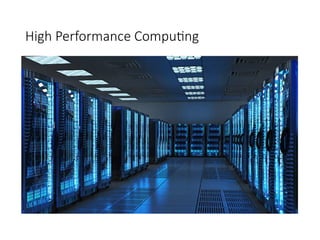
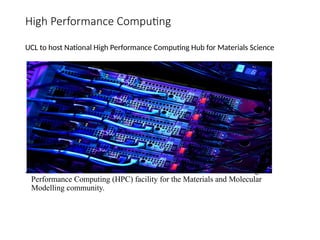
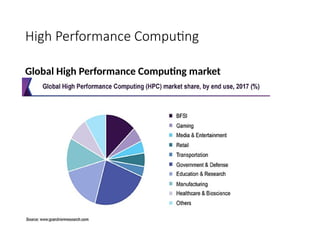
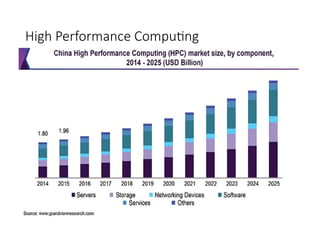
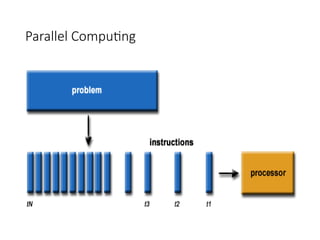
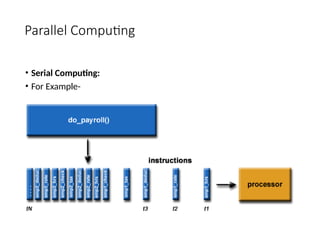
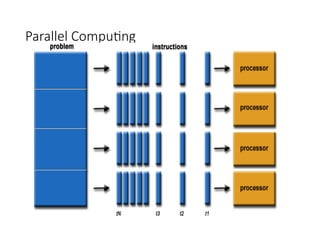
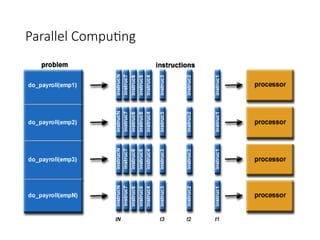
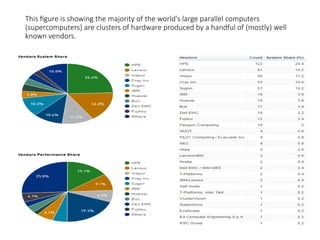
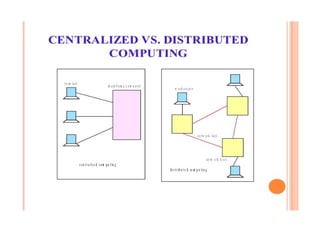
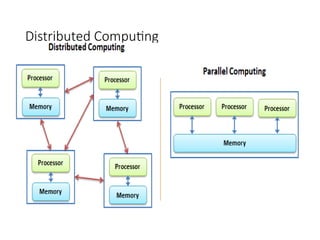
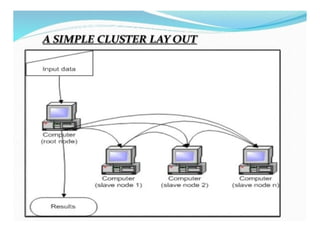
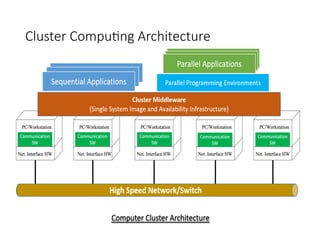
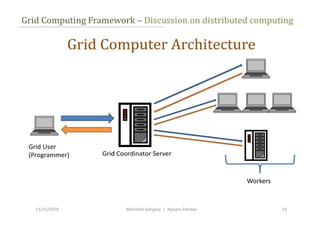
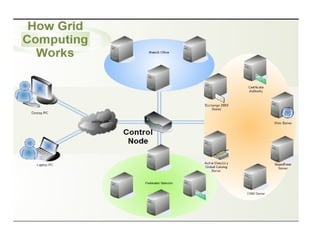
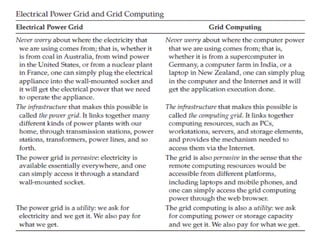
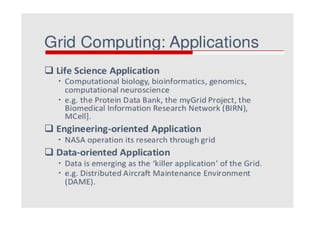
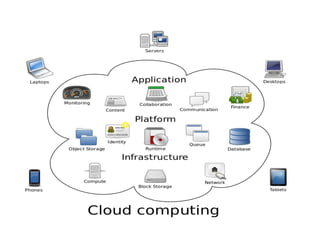
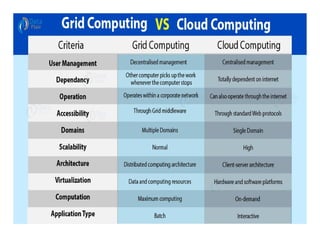
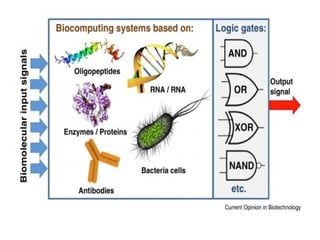
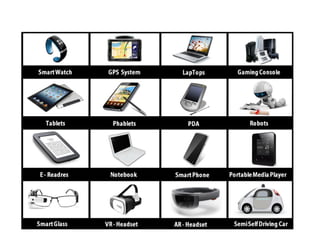
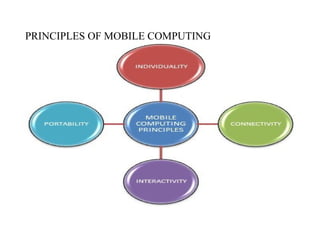
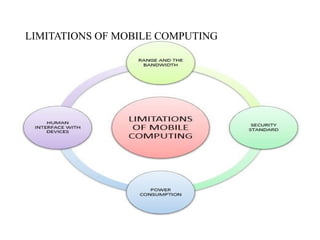
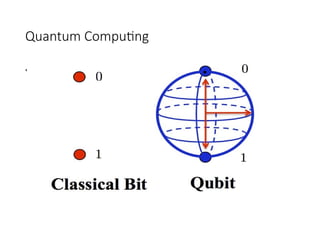
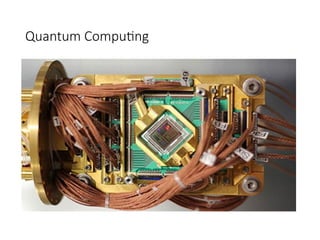
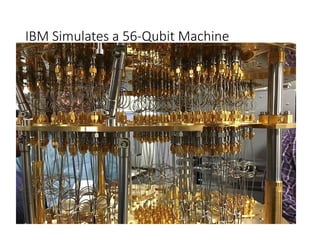
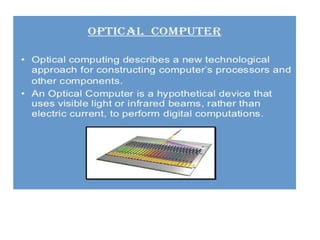
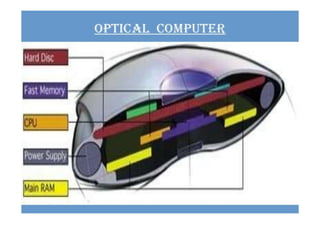
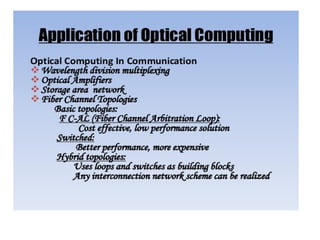
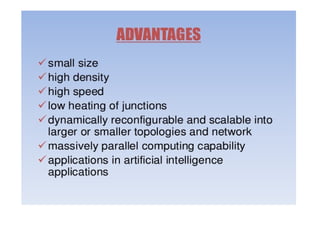
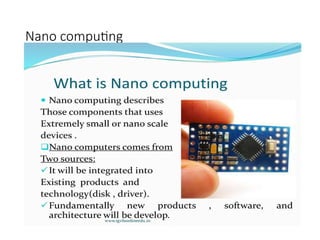
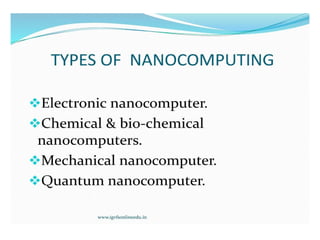
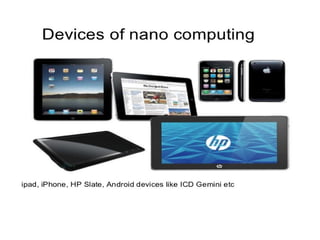
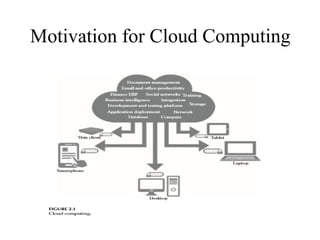
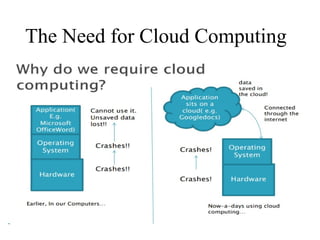
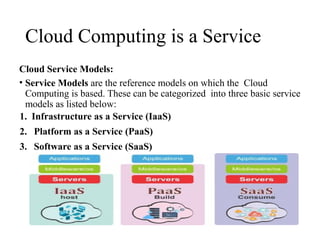
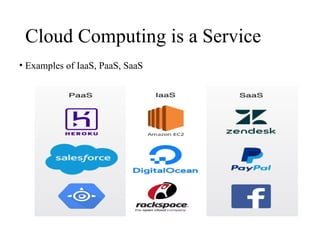
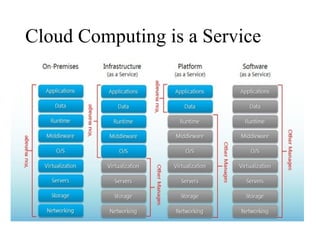
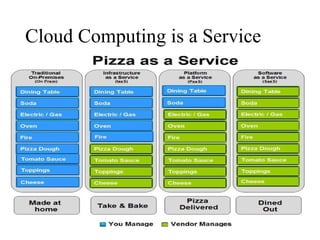
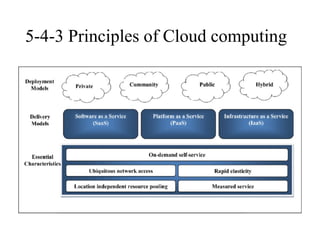
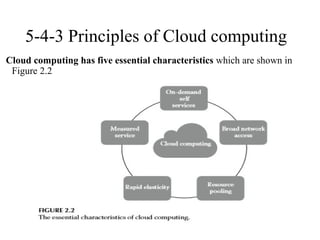
![5-4-3 Principles of Cloud computing
Essential, which means that if any of these characteristics is
missing, then it is not cloud computing:
1. On-demand self-service: A consumer can unilaterally
provision computing capabilities, such as server time and
network storage, as needed automatically without requiring
human interaction with each service’s provider.
2. Broad network access: Capabilities are available over the
network and accessed through standard mechanisms that
promote use by heterogeneous thin or thick client platforms
(e.g., mobile phones, laptops, and personal digital assistants
[PDAs]).](https://image.slidesharecdn.com/ccppts1-250904064433-ad146c18/85/CC-PPTS-unit-I-PPT-Notes-of-Cloud-Computing-113-320.jpg)
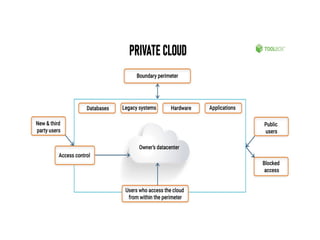
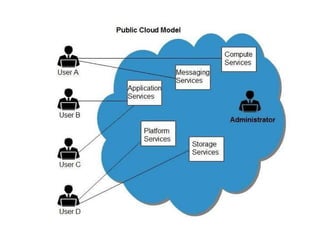
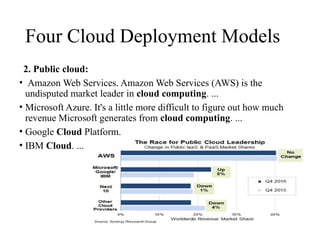
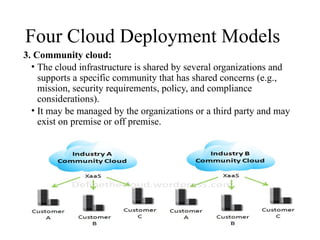
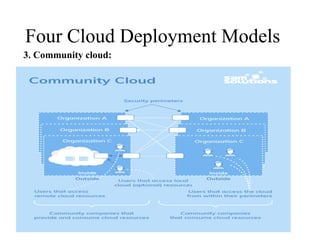
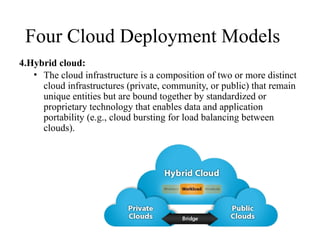
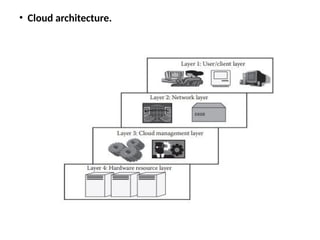
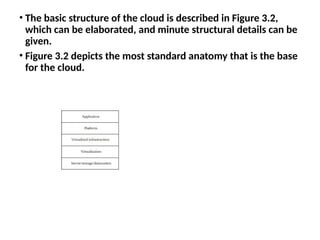
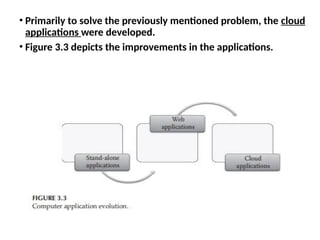
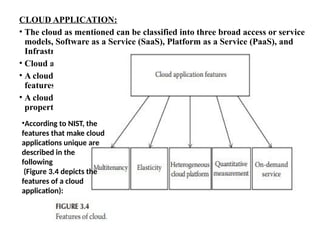
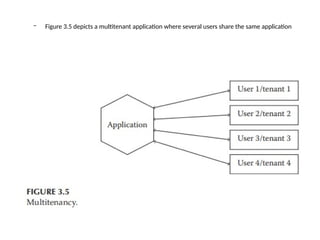
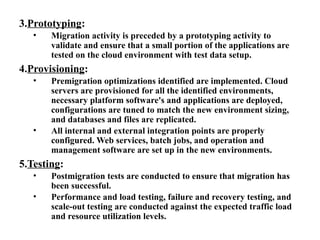
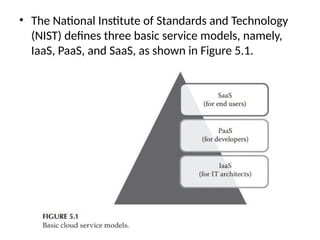
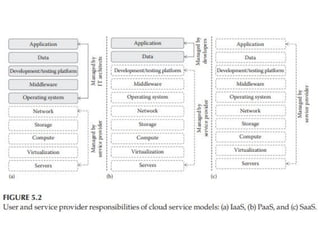
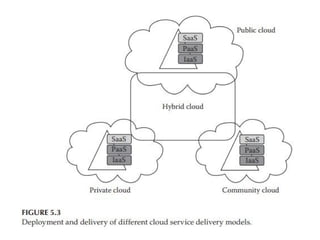
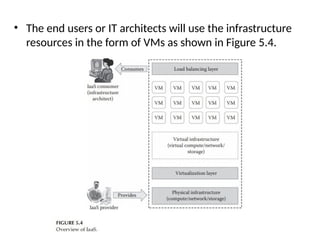
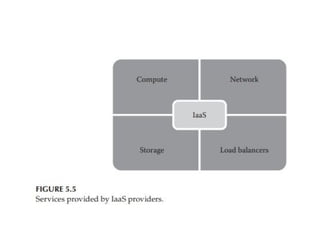
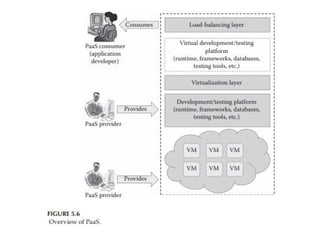
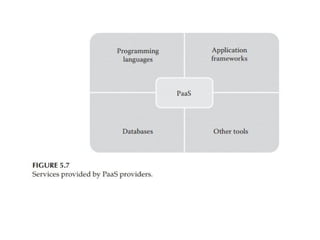
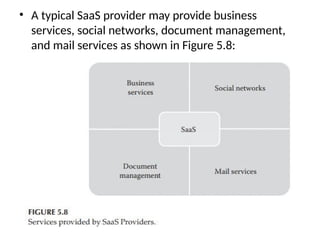

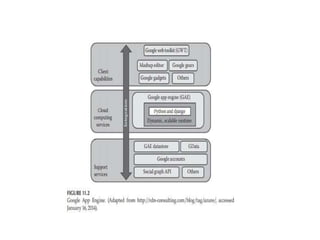
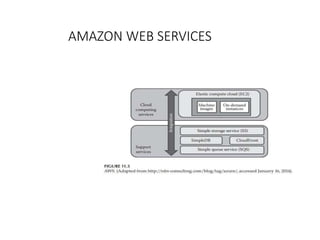
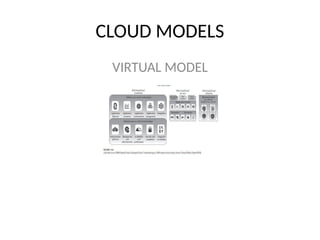


![Unit-3-Part-1 [Autosaved].ppt](https://cdn.slidesharecdn.com/ss_thumbnails/unit-3-part-1autosaved-230216062941-16596250-thumbnail.jpg?width=640&height=640&fit=bounds)


