Yimaler Car Backup Camera
Car Backup Camera
Installation Instruction
Yimaler
https://yimaler360.com
1
2
3
4
5
6
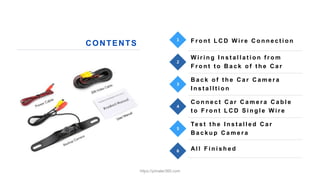
F r o n t L C D W i r e C o n n e c t i o n
W i r i n g I n s t a l l a t i o n f r o m
F r o n t t o B a c k o f t h e C a r
B a c k o f t h e C a r C a m e r a
I n s t a l l t i o n
C o n n e c t C a r C a m e r a C a b l e
t o F r o n t L C D S i n g l e W i r e
Te s t t h e I n s t a l l e d C a r
B a c k u p C a m e r a
Al l F i n i s h e d
CONTENTS
https://yimaler360.com
Front LCD Wire
Connection
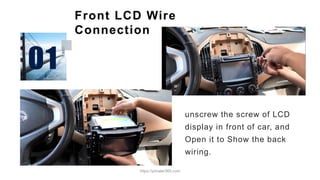
unscrew the screw of LCD
display in front of car, and
Open it to Show the back
wiring.
https://yimaler360.com
Front LCD Wire Connection
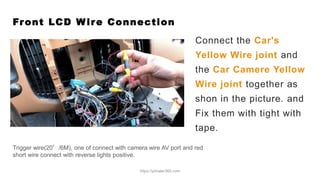
Connect the Car's
Yellow Wire joint and
the Car Camere Yellow
Wire joint together as
shon in the picture. and
Fix them with tight with
tape.
Trigger wire(20’/6M), one of connect with camera wire AV port and red
short wire connect with reverse lights positive.
https://yimaler360.com
Front LCD Wire Connection
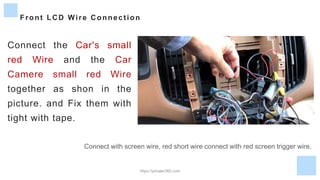
Connect the Car's small
red Wire and the Car
Camere small red Wire
together as shon in the
picture. and Fix them with
tight with tape.
Connect with screen wire, red short wire connect with red screen trigger wire.
https://yimaler360.com
Front LCD Wire Connection
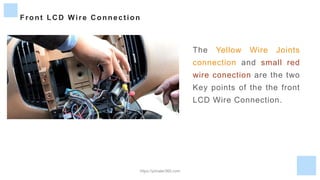
The Yellow Wire Joints
connection and small red
wire conection are the two
Key points of the the front
LCD Wire Connection.
https://yimaler360.com
Wiring Installation from
the Front to the Back of the Car
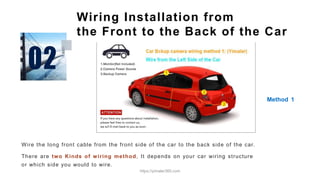
Wire the long front cable from the front side of the car to the back side of the car.
There are two Kinds of wiring method, It depends on your car wiring structure
or which side you would to wire.
Method 1
https://yimaler360.com
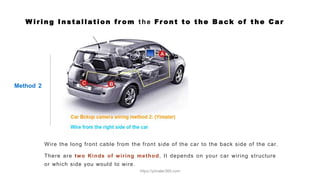
W i ri ng Instal l ati on fr om t he Fr ont to the Back of the Car
Method 2
Wire the long front cable from the front side of the car to the back side of the car.
There are two Kinds of wiring method, It depends on your car wiring structure
or which side you would to wire.
https://yimaler360.com
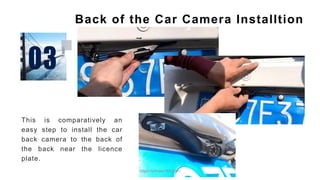
Back of the Car Camera Installtion
This is comparatively an
easy step to install the car
back camera to the back of
the back near the licence
plate.
https://yimaler360.com
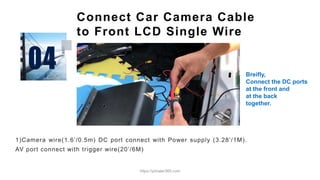
Connect Car Camera Cable
to Front LCD Single Wire
1)Camera wire(1.6’/0.5m) DC port connect with Power supply (3.28’/1M).
AV port connect with trigger wire(20’/6M)
Breifly,
Connect the DC ports
at the front and
at the back
together.
https://yimaler360.com
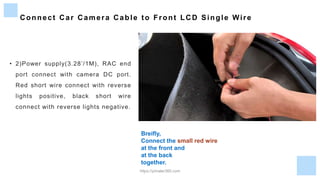
Connect Car Camera Cable to Front LCD Single Wire
• 2)Power supply(3.28’/1M), RAC end
port connect with camera DC port.
Red short wire connect with reverse
lights positive, black short wire
connect with reverse lights negative.
Breifly,
Connect the small red wire
at the front and
at the back
together.
https://yimaler360.com
Connect Car Camera Cable to Front LCD Single Wire
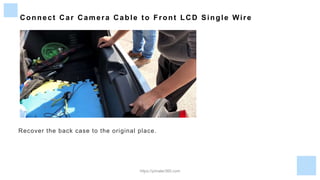
Recover the back case to the original place.
https://yimaler360.com
Connect Car Camera Cable to Front LCD Single Wire
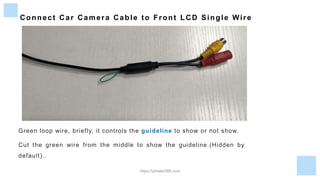
Green loop wire, briefly, it controls the guideline to show or not show.
Cut the green wire from the middle to show the guideline.(Hidden by
default)..
https://yimaler360.com
Test the Installed Car Backup
Camera
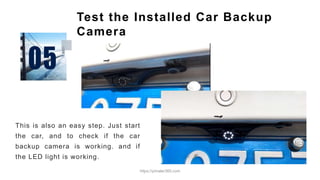
This is also an easy step. Just start
the car, and to check if the car
backup camera is working. and if
the LED light is working.
https://yimaler360.com
Connect Car Camera Cable to Front LCD Single Wire
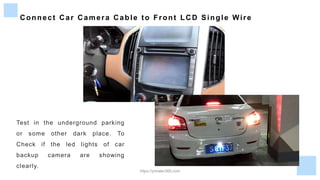
Test in the underground parking
or some other dark place. To
Check if the led lights of car
backup camera are showing
clearly.
https://yimaler360.com
All Finished, Enjoy your new
Car backup camera
https://yimaler360.com

Car backup camera installation instruction

  • 1.
    Yimaler Car BackupCamera Car Backup Camera Installation Instruction Yimaler https://yimaler360.com https://yimaler360.com
  • 2.
    1 2 3 4 5 6 F r on t L C D W i r e C o n n e c t i o n W i r i n g I n s t a l l a t i o n f r o m F r o n t t o B a c k o f t h e C a r B a c k o f t h e C a r C a m e r a I n s t a l l t i o n C o n n e c t C a r C a m e r a C a b l e t o F r o n t L C D S i n g l e W i r e Te s t t h e I n s t a l l e d C a r B a c k u p C a m e r a Al l F i n i s h e d CONTENTS https://yimaler360.com
  • 3.
    Front LCD Wire Connection unscrewthe screw of LCD display in front of car, and Open it to Show the back wiring. https://yimaler360.com
  • 4.
    Front LCD WireConnection Connect the Car's Yellow Wire joint and the Car Camere Yellow Wire joint together as shon in the picture. and Fix them with tight with tape. Trigger wire(20’/6M), one of connect with camera wire AV port and red short wire connect with reverse lights positive. https://yimaler360.com
  • 5.
    Front LCD WireConnection Connect the Car's small red Wire and the Car Camere small red Wire together as shon in the picture. and Fix them with tight with tape. Connect with screen wire, red short wire connect with red screen trigger wire. https://yimaler360.com
  • 6.
    Front LCD WireConnection The Yellow Wire Joints connection and small red wire conection are the two Key points of the the front LCD Wire Connection. https://yimaler360.com
  • 7.
    Wiring Installation from theFront to the Back of the Car Wire the long front cable from the front side of the car to the back side of the car. There are two Kinds of wiring method, It depends on your car wiring structure or which side you would to wire. Method 1 https://yimaler360.com
  • 8.
    W i ring Instal l ati on fr om t he Fr ont to the Back of the Car Method 2 Wire the long front cable from the front side of the car to the back side of the car. There are two Kinds of wiring method, It depends on your car wiring structure or which side you would to wire. https://yimaler360.com
  • 9.
    Back of theCar Camera Installtion This is comparatively an easy step to install the car back camera to the back of the back near the licence plate. https://yimaler360.com
  • 10.
    Connect Car CameraCable to Front LCD Single Wire 1)Camera wire(1.6’/0.5m) DC port connect with Power supply (3.28’/1M). AV port connect with trigger wire(20’/6M) Breifly, Connect the DC ports at the front and at the back together. https://yimaler360.com
  • 11.
    Connect Car CameraCable to Front LCD Single Wire • 2)Power supply(3.28’/1M), RAC end port connect with camera DC port. Red short wire connect with reverse lights positive, black short wire connect with reverse lights negative. Breifly, Connect the small red wire at the front and at the back together. https://yimaler360.com
  • 12.
    Connect Car CameraCable to Front LCD Single Wire Recover the back case to the original place. https://yimaler360.com
  • 13.
    Connect Car CameraCable to Front LCD Single Wire Green loop wire, briefly, it controls the guideline to show or not show. Cut the green wire from the middle to show the guideline.(Hidden by default).. https://yimaler360.com
  • 14.
    Test the InstalledCar Backup Camera This is also an easy step. Just start the car, and to check if the car backup camera is working. and if the LED light is working. https://yimaler360.com
  • 15.
    Connect Car CameraCable to Front LCD Single Wire Test in the underground parking or some other dark place. To Check if the led lights of car backup camera are showing clearly. https://yimaler360.com
  • 16.
    All Finished, Enjoyyour new Car backup camera https://yimaler360.com