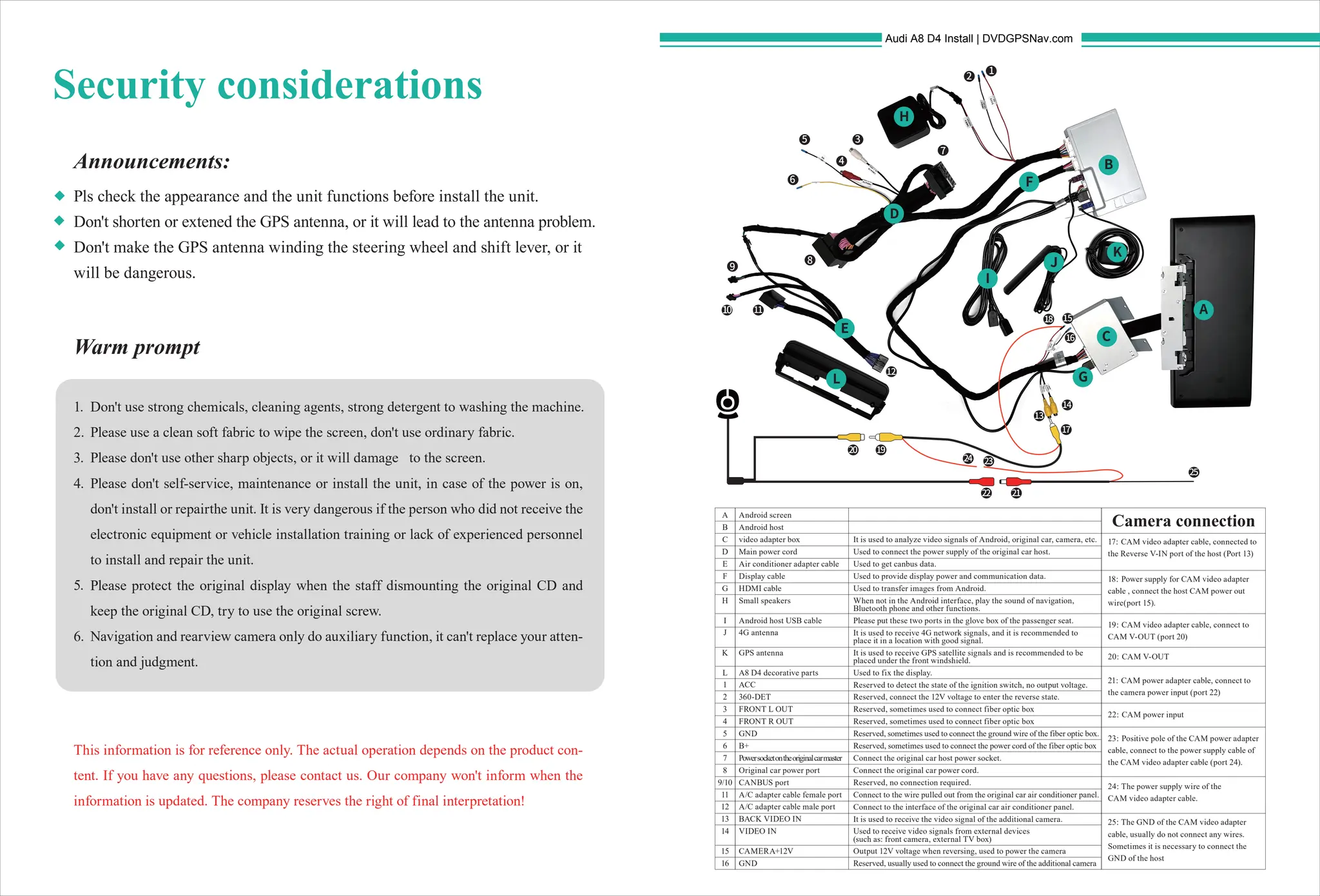
Camera connection
Security considerations
Announcements:
Warm prompt
Pls check the appearance and the unit functions before install the unit.
Don't shorten or extened the GPS antenna, or it will lead to the antenna problem.
Don't make the GPS antenna winding the steering wheel and shift lever, or it
will be dangerous.
This information is for reference only. The actual operation depends on the product con-
tent. If you have any questions, please contact us. Our company won't inform when the
information is updated. The company reserves the right of final interpretation!
Don't use strong chemicals, cleaning agents, strong detergent to washing the machine.
Please use a clean soft fabric to wipe the screen, don't use ordinary fabric.
Please don't use other sharp objects, or it will damage to the screen.
Please don't self-service, maintenance or install the unit, in case of the power is on,
don't install or repairthe unit. It is very dangerous if the person who did not receive the
electronic equipment or vehicle installation training or lack of experienced personnel
to install and repair the unit.
Please protect the original display when the staff dismounting the original CD and
keep the original CD, try to use the original screw.
Navigation and rearview camera only do auxiliary function, it can't replace your atten-
tion and judgment.
1.
2.
3.
4.
5.
6.
17:
CAM video adapter cable, connected to
the Reverse V-IN port of the host (Port 13)
18:
Power supply for CAM video adapter
cable , connect the host CAM power out
wire(port 15).
19:
CAM video adapter cable, connect to
CAM V-OUT (port 20)
20:
CAM V-OUT
21:
CAM power adapter cable, connect to
the camera power input (port 22)
22:
CAM power input
23:
Positive pole of the CAM power adapter
cable, connect to the power supply cable of
the CAM video adapter cable (port 24).
24:
The power supply wire of the
CAM video adapter cable.
25:
The GND of the CAM video adapter
cable, usually do not connect any wires.
Sometimes it is necessary to connect the
GND of the host
A
B
C
D
E
F
G
H
I
J
K
L
1
2
3
4
5
6
7
8
9/10
11
12
13
14
15
16
A
6
7
8
9
10 11
13
14
15
18
17
19
21
22
24
25
23
20
C
D
E
F
G
H
I
L
J
K
16
12
1
2
3
4
5
B
Android screen
Android host
video adapter box
Main power cord
Air conditioner adapter cable
Display cable
HDMI cable
Small speakers
Android host USB cable
4G antenna
GPS antenna
A8 D4 decorative parts
ACC
360-DET
FRONT L OUT
FRONT R OUT
GND
B+
Powersocketontheoriginalcarmaster
Original car power port
CANBUS port
A/C adapter cable female port
A/C adapter cable male port
BACK VIDEO IN
VIDEO IN
CAMERA+12V
GND
It is used to analyze video signals of Android, original car, camera, etc.
Used to connect the power supply of the original car host.
Used to get canbus data.
Used to provide display power and communication data.
Used to transfer images from Android.
When not in the Android interface, play the sound of navigation,
Bluetooth phone and other functions.
Please put these two ports in the glove box of the passenger seat.
It is used to receive 4G network signals, and it is recommended to
place it in a location with good signal.
It is used to receive GPS satellite signals and is recommended to be
placed under the front windshield.
Used to fix the display.
Reserved to detect the state of the ignition switch, no output voltage.
Reserved, connect the 12V voltage to enter the reverse state.
Reserved, sometimes used to connect fiber optic box
Reserved, sometimes used to connect the ground wire of the fiber optic box.
Reserved, sometimes used to connect the power cord of the fiber optic box
Connect the original car host power socket.
Connect the original car power cord.
Reserved, no connection required.
Connect to the wire pulled out from the original car air conditioner panel.
Connect to the interface of the original car air conditioner panel.
It is used to receive the video signal of the additional camera.
Used to receive video signals from external devices
(such as: front camera, external TV box)
Output 12V voltage when reversing, used to power the camera
Reserved, usually used to connect the ground wire of the additional camera
Audi A8 D4 Install | DVDGPSNav.com
Audi A8 D4 12.3 Android Screen Upgrade - Install Manual.pdf

Audi A8 D4 12.3 Android Screen Upgrade - Install Manual.pdf

  • 1.
    Camera connection Security considerations Announcements: Warmprompt Pls check the appearance and the unit functions before install the unit. Don't shorten or extened the GPS antenna, or it will lead to the antenna problem. Don't make the GPS antenna winding the steering wheel and shift lever, or it will be dangerous. This information is for reference only. The actual operation depends on the product con- tent. If you have any questions, please contact us. Our company won't inform when the information is updated. The company reserves the right of final interpretation! Don't use strong chemicals, cleaning agents, strong detergent to washing the machine. Please use a clean soft fabric to wipe the screen, don't use ordinary fabric. Please don't use other sharp objects, or it will damage to the screen. Please don't self-service, maintenance or install the unit, in case of the power is on, don't install or repairthe unit. It is very dangerous if the person who did not receive the electronic equipment or vehicle installation training or lack of experienced personnel to install and repair the unit. Please protect the original display when the staff dismounting the original CD and keep the original CD, try to use the original screw. Navigation and rearview camera only do auxiliary function, it can't replace your atten- tion and judgment. 1. 2. 3. 4. 5. 6. 17: CAM video adapter cable, connected to the Reverse V-IN port of the host (Port 13) 18: Power supply for CAM video adapter cable , connect the host CAM power out wire(port 15). 19: CAM video adapter cable, connect to CAM V-OUT (port 20) 20: CAM V-OUT 21: CAM power adapter cable, connect to the camera power input (port 22) 22: CAM power input 23: Positive pole of the CAM power adapter cable, connect to the power supply cable of the CAM video adapter cable (port 24). 24: The power supply wire of the CAM video adapter cable. 25: The GND of the CAM video adapter cable, usually do not connect any wires. Sometimes it is necessary to connect the GND of the host A B C D E F G H I J K L 1 2 3 4 5 6 7 8 9/10 11 12 13 14 15 16 A 6 7 8 9 10 11 13 14 15 18 17 19 21 22 24 25 23 20 C D E F G H I L J K 16 12 1 2 3 4 5 B Android screen Android host video adapter box Main power cord Air conditioner adapter cable Display cable HDMI cable Small speakers Android host USB cable 4G antenna GPS antenna A8 D4 decorative parts ACC 360-DET FRONT L OUT FRONT R OUT GND B+ Powersocketontheoriginalcarmaster Original car power port CANBUS port A/C adapter cable female port A/C adapter cable male port BACK VIDEO IN VIDEO IN CAMERA+12V GND It is used to analyze video signals of Android, original car, camera, etc. Used to connect the power supply of the original car host. Used to get canbus data. Used to provide display power and communication data. Used to transfer images from Android. When not in the Android interface, play the sound of navigation, Bluetooth phone and other functions. Please put these two ports in the glove box of the passenger seat. It is used to receive 4G network signals, and it is recommended to place it in a location with good signal. It is used to receive GPS satellite signals and is recommended to be placed under the front windshield. Used to fix the display. Reserved to detect the state of the ignition switch, no output voltage. Reserved, connect the 12V voltage to enter the reverse state. Reserved, sometimes used to connect fiber optic box Reserved, sometimes used to connect fiber optic box Reserved, sometimes used to connect the ground wire of the fiber optic box. Reserved, sometimes used to connect the power cord of the fiber optic box Connect the original car host power socket. Connect the original car power cord. Reserved, no connection required. Connect to the wire pulled out from the original car air conditioner panel. Connect to the interface of the original car air conditioner panel. It is used to receive the video signal of the additional camera. Used to receive video signals from external devices (such as: front camera, external TV box) Output 12V voltage when reversing, used to power the camera Reserved, usually used to connect the ground wire of the additional camera Audi A8 D4 Install | DVDGPSNav.com