Download free for 30 days
Sign in
Upload
Language (EN)
Support
Business
Mobile
Social Media
Marketing
Technology
Art & Photos
Career
Design
Education
Presentations & Public Speaking
Government & Nonprofit
Healthcare
Internet
Law
Leadership & Management
Automotive
Engineering
Software
Recruiting & HR
Retail
Sales
Services
Science
Small Business & Entrepreneurship
Food
Environment
Economy & Finance
Data & Analytics
Investor Relations
Sports
Spiritual
News & Politics
Travel
Self Improvement
Real Estate
Entertainment & Humor
Health & Medicine
Devices & Hardware
Lifestyle
Change Language
Language
English
Español
Português
Français
Deutsche
Cancel
Save
EN
Uploaded by
Tomo Mizoe
PPTX, PDF
1,660 views
CakePHP 2.x 複数レコード同時保存
入力フォームを追加するために、ちょっと jQuery 使います。 適切な配列を用意して、saveAll() に与えます。
Engineering
◦
Read more
0
Save
Share
Embed
Embed presentation
Download
Download to read offline
1
/ 7
2
/ 7
3
/ 7
4
/ 7
5
/ 7
6
/ 7
7
/ 7
More Related Content
PPTX
CakePHP でお小遣い帳をつくってみよう
by
Tomo Mizoe
PDF
test
by
a1yama1123
PDF
Factor型の注意点
by
Hiroki K
PDF
WordPress関数の処理コストを考えよう
by
Naoki Matsuda
PDF
Grails-1.1を斬る!~Grails-1.1からのチーム開発~ in Tokyo
by
Tsuyoshi Yamamoto
PDF
XOOPS Cube Conference 2012 Developer Workshop 3
by
Hikawa Kilica
PDF
[東京] JapanSharePointGroup 勉強会 #2
by
Atsuo Yamasaki
ODP
Ci tutorial
by
Kazuaki Ueda
CakePHP でお小遣い帳をつくってみよう
by
Tomo Mizoe
test
by
a1yama1123
Factor型の注意点
by
Hiroki K
WordPress関数の処理コストを考えよう
by
Naoki Matsuda
Grails-1.1を斬る!~Grails-1.1からのチーム開発~ in Tokyo
by
Tsuyoshi Yamamoto
XOOPS Cube Conference 2012 Developer Workshop 3
by
Hikawa Kilica
[東京] JapanSharePointGroup 勉強会 #2
by
Atsuo Yamasaki
Ci tutorial
by
Kazuaki Ueda
What's hot
PDF
CakeRequest::onlyAllow() について
by
Yuya Takahashi
PDF
Teclab3
by
Eikichi Yamaguchi
PPTX
EWD 3トレーニングコース#20 GlobalストレージのJavaScript用抽象化-(a)DocumentNodeオブジェクト
by
Kiyoshi Sawada
KEY
Development app-with-elixir
by
k1complete
PDF
WDD2012_SC-004
by
Kuninobu SaSaki
KEY
カジュアルにソースコードリーディング
by
Akihiro Okuno
PDF
「スピード」と「品質」を実現するPHP開発チームの取り組み~AngularJS+FuelPHP+AspectMock~
by
leverages_event
KEY
今さら始めるCoffeeScript
by
Ashitaba YOSHIOKA
PDF
Rails3.1rc4を試してみた
by
Takahiro Hidaka
PDF
20150530 pgunconf-pgbench-semi-structured-benchmark
by
Toshi Harada
PDF
JavaScript/CSS 2015 Autumn
by
Koji Ishimoto
PDF
もにかじ2 lt @studio3104
by
Satoshi Suzuki
PPTX
EWD 3トレーニングコース#20 GlobalストレージのJavaScript用抽象化-(a)DocumentNodeオブジェクト
by
Kiyoshi Sawada
PPTX
PHP Object Injection入門
by
Yu Iwama
PDF
Chiba.pm #1 lt @studio3104
by
Satoshi Suzuki
PDF
EucalyptusのHadoopクラスタとJaqlでBasket解析をしてHiveとの違いを味わってみました
by
Etsuji Nakai
PDF
Yapc -asia 2012 lt @studio3104
by
Satoshi Suzuki
KEY
Ll xcode
by
Net Kanayan
CakeRequest::onlyAllow() について
by
Yuya Takahashi
Teclab3
by
Eikichi Yamaguchi
EWD 3トレーニングコース#20 GlobalストレージのJavaScript用抽象化-(a)DocumentNodeオブジェクト
by
Kiyoshi Sawada
Development app-with-elixir
by
k1complete
WDD2012_SC-004
by
Kuninobu SaSaki
カジュアルにソースコードリーディング
by
Akihiro Okuno
「スピード」と「品質」を実現するPHP開発チームの取り組み~AngularJS+FuelPHP+AspectMock~
by
leverages_event
今さら始めるCoffeeScript
by
Ashitaba YOSHIOKA
Rails3.1rc4を試してみた
by
Takahiro Hidaka
20150530 pgunconf-pgbench-semi-structured-benchmark
by
Toshi Harada
JavaScript/CSS 2015 Autumn
by
Koji Ishimoto
もにかじ2 lt @studio3104
by
Satoshi Suzuki
EWD 3トレーニングコース#20 GlobalストレージのJavaScript用抽象化-(a)DocumentNodeオブジェクト
by
Kiyoshi Sawada
PHP Object Injection入門
by
Yu Iwama
Chiba.pm #1 lt @studio3104
by
Satoshi Suzuki
EucalyptusのHadoopクラスタとJaqlでBasket解析をしてHiveとの違いを味わってみました
by
Etsuji Nakai
Yapc -asia 2012 lt @studio3104
by
Satoshi Suzuki
Ll xcode
by
Net Kanayan
More from Tomo Mizoe
PPTX
PHP, JavaScriptプログラマのためのC#入門
by
Tomo Mizoe
PDF
Git入門 (Windows)
by
Tomo Mizoe
PPTX
Visual Studio2013 でGithub(1) セットアップ~同期
by
Tomo Mizoe
PPTX
はじめてのASP.NET MVC5
by
Tomo Mizoe
PPTX
Unity勉強会資料2014-05-31
by
Tomo Mizoe
PPTX
MCP and Microsoft University
by
Tomo Mizoe
PHP, JavaScriptプログラマのためのC#入門
by
Tomo Mizoe
Git入門 (Windows)
by
Tomo Mizoe
Visual Studio2013 でGithub(1) セットアップ~同期
by
Tomo Mizoe
はじめてのASP.NET MVC5
by
Tomo Mizoe
Unity勉強会資料2014-05-31
by
Tomo Mizoe
MCP and Microsoft University
by
Tomo Mizoe
CakePHP 2.x 複数レコード同時保存
1.
[CakePHP 2.x] 複数レコードの同時保存 jQueryをちょっとだけ使います Github: https://github.com/mizoe/cakephp2_save_multi_records
2.
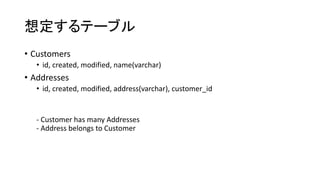
想定するテーブル • Customers • id,
created, modified, name(varchar) • Addresses • id, created, modified, address(varchar), customer_id - Customer has many Addresses - Address belongs to Customer
3.
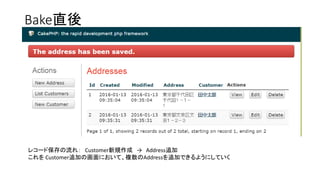
Bake直後 レコード保存の流れ: Customer新規作成 →
Address追加 これを Customer追加の画面において、複数のAddressを追加できるようにしていく
4.
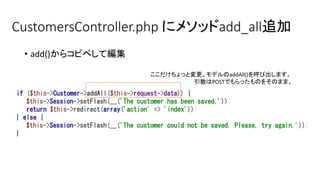
CustomersController.php にメソッドadd_all追加 • add()からコピペして編集 if
($this->Customer->addAll($this->request->data)) { $this->Session->setFlash(__('The customer has been saved.')); return $this->redirect(array('action' => 'index')); } else { $this->Session->setFlash(__('The customer could not be saved. Please, try again.')); } ここだけちょっと変更。モデルのaddAll()を呼び出します。 引数はPOSTでもらったものをそのまま。
5.
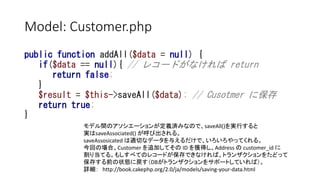
Model: Customer.php public function
addAll($data = null) { if($data == null){ // レコードがなければ return return false; } $result = $this->saveAll($data); // Cusotmer に保存 return true; } モデル間のアソシエーションが定義済みなので、saveAll()を実行すると 実はsaveAssociated() が呼び出される。 saveAssosicated は適切なデータを与えるだけで、いろいろやってくれる。 今回の場合、Customer を追加してその ID を獲得し、Address の customer_id に 割り当てる。もしすべてのレコードが保存できなければ、トランザクションをたどって 保存する前の状態に戻す(DBがトランザクションをサポートしていれば)。 詳細: http://book.cakephp.org/2.0/ja/models/saving-your-data.html
6.
View : add_all.ctp <script
src="//ajax.googleapis.com/ajax/libs/jquery/1.11.0/jquery.min.js"></script> <script type="text/javascript"> $(function(){ var $i = 1; $('#add_address').click(function(e) { var inputAddress = '<div class="input text required"><label for="Address' + $i + 'Address">Address</label>' + '<input name="data[Address][' + $i + '][address]" maxlength="255" type="text" id="Address' + $i + 'Address" required="required"/></div>' $('#add_address').before(inputAddress); $i++; }); }); </script> <div class="customers form"> <?php echo $this->Form->create('Customer'); ?> <fieldset> <legend><?php echo __('Add Customer with Address'); ?></legend> <?php echo $this->Form->input('name'); echo $this->Form->input('Address.0.address'); ?> <div class="submit" id="add_address"><input type="button" value="住所追加"/></div> </fieldset> <?php echo $this->Form->end(__('実行')); ?> </div> <div class="actions"> <h3><?php echo __('Actions'); ?></h3> <ul> <li><?php echo $this->Html->link(__('顧客一覧'), array('action' => 'index')); ?></li> <li><?php echo $this->Html->link(__('住所一覧'), array('controller' => 'addresses', 'action' => 'index')); ?> </li> <li><?php echo $this->Html->link(__('新しい住所'), array('controller' => 'addresses', 'action' => 'add')); ?> </li> </ul> </div> ボタンを押すと input フィールド追加 Bakeされたadd.ctpとほぼ同じ
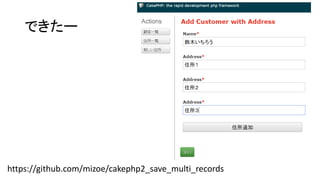
7.
できたー https://github.com/mizoe/cakephp2_save_multi_records
Download
![[CakePHP 2.x]
複数レコードの同時保存
jQueryをちょっとだけ使います
Github:
https://github.com/mizoe/cakephp2_save_multi_records](https://image.slidesharecdn.com/cakephp2-160113115716/85/CakePHP-2-x-1-320.jpg)
![[CakePHP 2.x]
複数レコードの同時保存
jQueryをちょっとだけ使います
Github:
https://github.com/mizoe/cakephp2_save_multi_records](https://image.slidesharecdn.com/cakephp2-160113115716/75/CakePHP-2-x-1-2048.jpg)
![View : add_all.ctp
<script src="//ajax.googleapis.com/ajax/libs/jquery/1.11.0/jquery.min.js"></script>
<script type="text/javascript">
$(function(){
var $i = 1;
$('#add_address').click(function(e) {
var inputAddress = '<div class="input text required"><label for="Address' + $i + 'Address">Address</label>' +
'<input name="data[Address][' + $i + '][address]" maxlength="255" type="text" id="Address' + $i + 'Address" required="required"/></div>'
$('#add_address').before(inputAddress);
$i++;
});
});
</script>
<div class="customers form">
<?php echo $this->Form->create('Customer'); ?>
<fieldset>
<legend><?php echo __('Add Customer with Address'); ?></legend>
<?php
echo $this->Form->input('name');
echo $this->Form->input('Address.0.address');
?>
<div class="submit" id="add_address"><input type="button" value="住所追加"/></div>
</fieldset>
<?php echo $this->Form->end(__('実行')); ?>
</div>
<div class="actions">
<h3><?php echo __('Actions'); ?></h3>
<ul>
<li><?php echo $this->Html->link(__('顧客一覧'), array('action' => 'index')); ?></li>
<li><?php echo $this->Html->link(__('住所一覧'), array('controller' => 'addresses', 'action' => 'index')); ?> </li>
<li><?php echo $this->Html->link(__('新しい住所'), array('controller' => 'addresses', 'action' => 'add')); ?> </li>
</ul>
</div>
ボタンを押すと input フィールド追加
Bakeされたadd.ctpとほぼ同じ](https://image.slidesharecdn.com/cakephp2-160113115716/85/CakePHP-2-x-6-320.jpg)


![[東京] JapanSharePointGroup 勉強会 #2](https://cdn.slidesharecdn.com/ss_thumbnails/jpsps2powershell-120405100646-phpapp01-thumbnail.jpg?width=640&height=640&fit=bounds)


