C# Array
• Zanyar rzgar qurbani
• Zhir faraj hama amin
• hiran maqsud rahman
• astera muhammed hamaxan
• bafrin xalid mahmud
Halabja Technical Institute
Supervised by: Mrs.Chya Fatah
An array is a collection of similar data elements stored at contiguous
memory locations. It is the simplest data structure where each data
element can be accessed directly by only using its index number.
For instance, if we want to store the marks scored by a student in 5
subjects, then there’s no need to define individual variables for each
subject. Rather, we can define an array which will store the data elements
at contiguous memory locations.
· array marks[5] defines the marks scored by a student in 5 different
subjects where each subject marks are located at a particular location in
the array i.e. marks[0] denotes the marks scored in first
subject, marks[1] denotes the marks scored in 2nd subject and so on.
What is Array ?
In programming, most of the cases need to store a large amount of data
of similar type. To store such a huge amount of data, we need to define
numerous variables. It would be very tough to memorize all variable
names while writing the programs. Instead, it is better to define an array
and store all the elements into it.
Following example illustrates, how array can be used while writing a
code-
In the following example, we have given marks of a student in 5 different
subjects. Aim is to calculate the average of all the marks of a student.
Need of Using Array?
Arrays represent multiple data elements of the same type using
a single name.
In an array, accessing or searching an element is easy by using
the index number.
An array can be traversed easily just by incrementing the index
by 1.
Arrays allocate memory in contiguous memory locations for all
its data elements.
Advantages of Array
C# ARRAY
string[] cars;
Data type 1D Name of Array
To insert values to it, we can use an array literal - place the
values in a comma-separated list, inside curly braces:
string[] cars = {"Volvo", "BMW", "Ford", "Mazda"};
To create an array of integers, you could write:
int[] myNum = {10, 20, 30, 40};
Access the Elements of an Array
You access an array element by referring to the index number.
This statement accesses the value of the first element in cars:
string[] cars = {"Volvo", "BMW", "Ford", "Mazda"};
Console.WriteLine(cars[0]);
Change an Array Element
To change the value of a specific element, refer to the index number:
cars[0] = "Opel";
Before change the value of zero index : Volvo
After output of zero-index = Opel
string[] cars = {"Volvo", "BMW", "Ford", "Mazda"};
Console.WriteLine(cars.Length);
Array Length
Return number of elements in the array
Output
3
Note : index start from zero
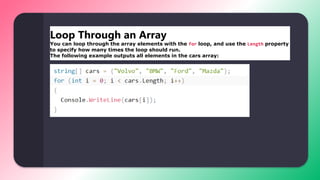
Loop Through an Array
You can loop through the array elements with the for loop, and use the Length property
to specify how many times the loop should run.
The following example outputs all elements in the cars array:
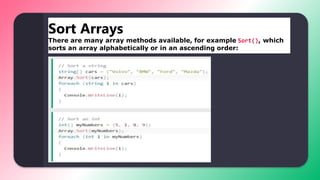
Sort Arrays
There are many array methods available, for example Sort(), which
sorts an array alphabetically or in an ascending order:
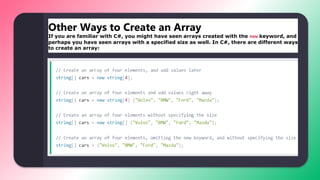
Other Ways to Create an Array
If you are familiar with C#, you might have seen arrays created with the new keyword, and
perhaps you have seen arrays with a specified size as well. In C#, there are different ways
to create an array:
Thank You

C# Array.pptx

  • 1.
    C# Array • Zanyarrzgar qurbani • Zhir faraj hama amin • hiran maqsud rahman • astera muhammed hamaxan • bafrin xalid mahmud Halabja Technical Institute Supervised by: Mrs.Chya Fatah
  • 2.
    An array isa collection of similar data elements stored at contiguous memory locations. It is the simplest data structure where each data element can be accessed directly by only using its index number. For instance, if we want to store the marks scored by a student in 5 subjects, then there’s no need to define individual variables for each subject. Rather, we can define an array which will store the data elements at contiguous memory locations. · array marks[5] defines the marks scored by a student in 5 different subjects where each subject marks are located at a particular location in the array i.e. marks[0] denotes the marks scored in first subject, marks[1] denotes the marks scored in 2nd subject and so on. What is Array ?
  • 3.
    In programming, mostof the cases need to store a large amount of data of similar type. To store such a huge amount of data, we need to define numerous variables. It would be very tough to memorize all variable names while writing the programs. Instead, it is better to define an array and store all the elements into it. Following example illustrates, how array can be used while writing a code- In the following example, we have given marks of a student in 5 different subjects. Aim is to calculate the average of all the marks of a student. Need of Using Array?
  • 4.
    Arrays represent multipledata elements of the same type using a single name. In an array, accessing or searching an element is easy by using the index number. An array can be traversed easily just by incrementing the index by 1. Arrays allocate memory in contiguous memory locations for all its data elements. Advantages of Array
  • 5.
    C# ARRAY string[] cars; Datatype 1D Name of Array
  • 6.
    To insert valuesto it, we can use an array literal - place the values in a comma-separated list, inside curly braces: string[] cars = {"Volvo", "BMW", "Ford", "Mazda"}; To create an array of integers, you could write: int[] myNum = {10, 20, 30, 40};
  • 7.
    Access the Elementsof an Array You access an array element by referring to the index number. This statement accesses the value of the first element in cars: string[] cars = {"Volvo", "BMW", "Ford", "Mazda"}; Console.WriteLine(cars[0]); Change an Array Element To change the value of a specific element, refer to the index number: cars[0] = "Opel"; Before change the value of zero index : Volvo After output of zero-index = Opel
  • 8.
    string[] cars ={"Volvo", "BMW", "Ford", "Mazda"}; Console.WriteLine(cars.Length); Array Length Return number of elements in the array Output 3 Note : index start from zero
  • 9.
    Loop Through anArray You can loop through the array elements with the for loop, and use the Length property to specify how many times the loop should run. The following example outputs all elements in the cars array:
  • 10.
    Sort Arrays There aremany array methods available, for example Sort(), which sorts an array alphabetically or in an ascending order:
  • 11.
    Other Ways toCreate an Array If you are familiar with C#, you might have seen arrays created with the new keyword, and perhaps you have seen arrays with a specified size as well. In C#, there are different ways to create an array:
  • 12.