BUSINESS INTELLIGENCE
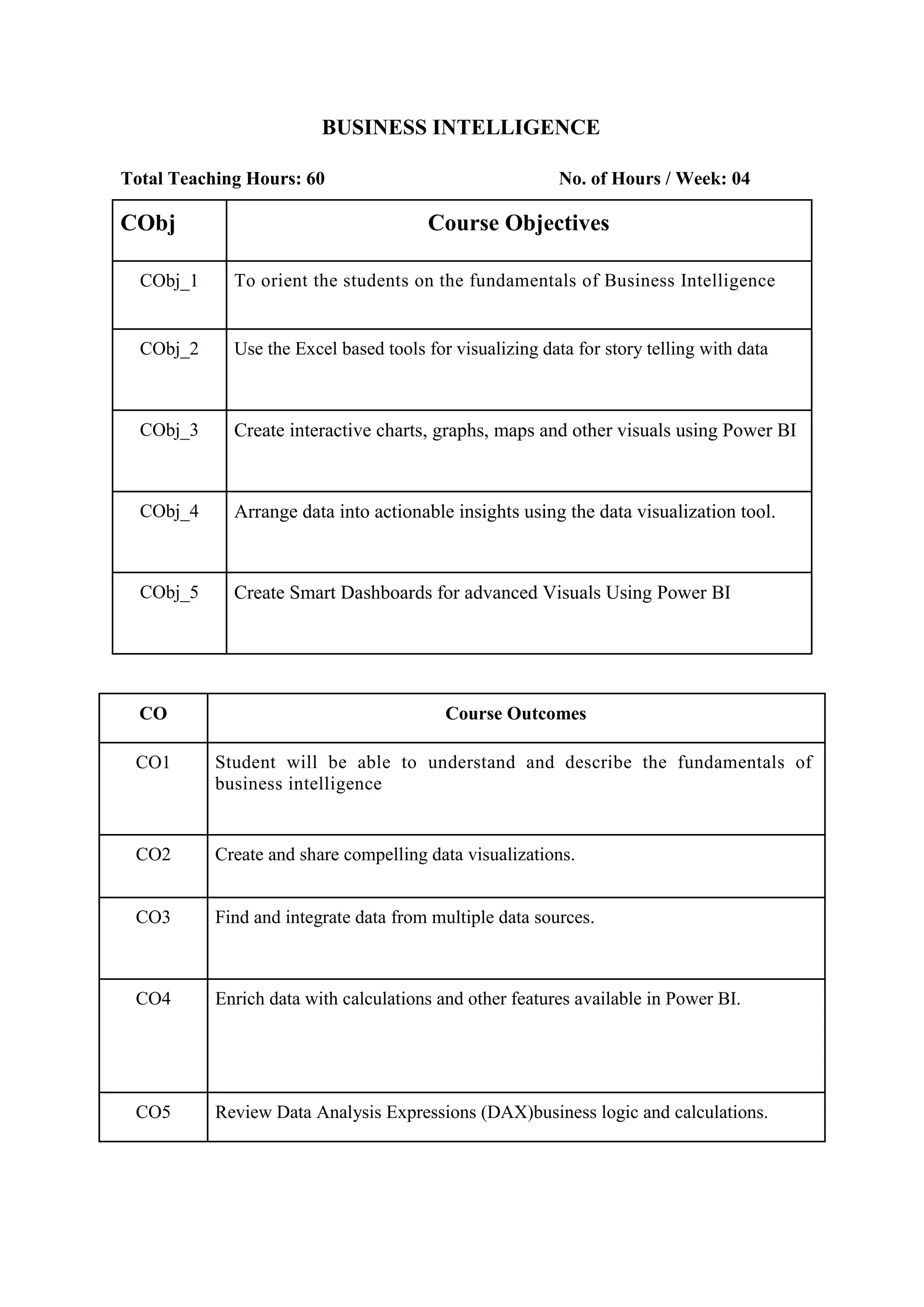
Total Teaching Hours: 60 No. of Hours / Week: 04
CObj Course Objectives
CObj_1 To orient the students on the fundamentals of Business Intelligence
CObj_2 Use the Excel based tools for visualizing data for story telling with data
CObj_3 Create interactive charts, graphs, maps and other visuals using Power BI
CObj_4 Arrange data into actionable insights using the data visualization tool.
CObj_5 Create Smart Dashboards for advanced Visuals Using Power BI
CO Course Outcomes
CO1 Student will be able to understand and describe the fundamentals of
business intelligence
CO2 Create and share compelling data visualizations.
CO3 Find and integrate data from multiple data sources.
CO4 Enrich data with calculations and other features available in Power BI.
CO5 Review Data Analysis Expressions (DAX)business logic and calculations.
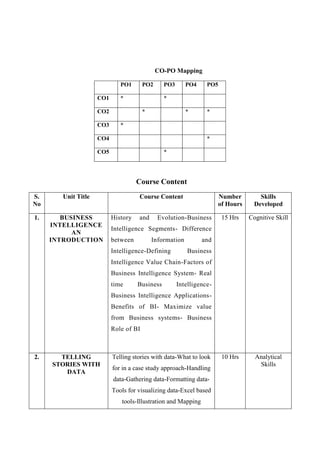
CO-PO Mapping
PO1 PO2 PO3 PO4 PO5
CO1 * *
CO2 * * *
CO3 *
CO4 *
CO5 *
Course Content
S.
No
Unit Title Course Content Number
of Hours
Skills
Developed
1. BUSINESS
INTELLIGENCE
AN
INTRODUCTION
History and Evolution-Business
Intelligence Segments- Difference
between Information and
Intelligence-Defining Business
Intelligence Value Chain-Factors of
Business Intelligence System- Real
time Business Intelligence-
Business Intelligence Applications-
Benefits of BI- Maximize value
from Business systems- Business
Role of BI
15 Hrs Cognitive Skill
2. TELLING
STORIES WITH
DATA
Telling stories with data-What to look
for in a case study approach-Handling
data-Gathering data-Formatting data-
Tools for visualizing data-Excel based
tools-Illustration and Mapping
10 Hrs Analytical
Skills
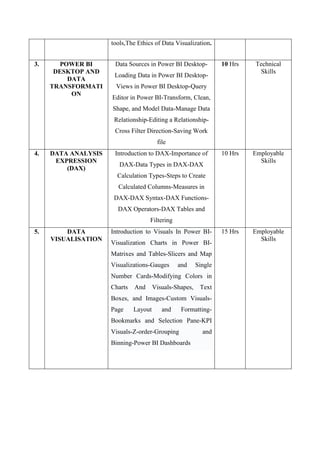
tools,The Ethics of Data Visualization.
3. POWER BI
DESKTOP AND
DATA
TRANSFORMATI
ON
Data Sources in Power BI Desktop-
Loading Data in Power BI Desktop-
Views in Power BI Desktop-Query
Editor in Power BI-Transform, Clean,
Shape, and Model Data-Manage Data
Relationship-Editing a Relationship-
Cross Filter Direction-Saving Work
file
10 Hrs Technical
Skills
4. DATA ANALYSIS
EXPRESSION
(DAX)
Introduction to DAX-Importance of
DAX-Data Types in DAX-DAX
Calculation Types-Steps to Create
Calculated Columns-Measures in
DAX-DAX Syntax-DAX Functions-
DAX Operators-DAX Tables and
Filtering
10 Hrs Employable
Skills
5. DATA
VISUALISATION
Introduction to Visuals In Power BI-
Visualization Charts in Power BI-
Matrixes and Tables-Slicers and Map
Visualizations-Gauges and Single
Number Cards-Modifying Colors in
Charts And Visuals-Shapes, Text
Boxes, and Images-Custom Visuals-
Page Layout and Formatting-
Bookmarks and Selection Pane-KPI
Visuals-Z-order-Grouping and
Binning-Power BI Dashboards
15 Hrs Employable
Skills
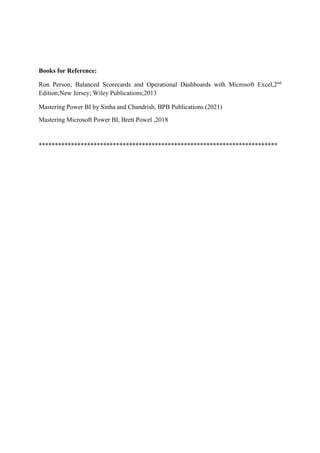
Books for Reference:
Ron Person; Balanced Scorecards and Operational Dashboards with Microsoft Excel,2nd
Edition;New Jersey; Wiley Publications;2013
Mastering Power BI by Sinha and Chandrish, BPB Publications (2021)
Mastering Microsoft Power BI, Brett Powel ,2018
**************************************************************************

Business Intelligence_IADC.docx

  • 1.
    BUSINESS INTELLIGENCE Total TeachingHours: 60 No. of Hours / Week: 04 CObj Course Objectives CObj_1 To orient the students on the fundamentals of Business Intelligence CObj_2 Use the Excel based tools for visualizing data for story telling with data CObj_3 Create interactive charts, graphs, maps and other visuals using Power BI CObj_4 Arrange data into actionable insights using the data visualization tool. CObj_5 Create Smart Dashboards for advanced Visuals Using Power BI CO Course Outcomes CO1 Student will be able to understand and describe the fundamentals of business intelligence CO2 Create and share compelling data visualizations. CO3 Find and integrate data from multiple data sources. CO4 Enrich data with calculations and other features available in Power BI. CO5 Review Data Analysis Expressions (DAX)business logic and calculations.
  • 2.
    CO-PO Mapping PO1 PO2PO3 PO4 PO5 CO1 * * CO2 * * * CO3 * CO4 * CO5 * Course Content S. No Unit Title Course Content Number of Hours Skills Developed 1. BUSINESS INTELLIGENCE AN INTRODUCTION History and Evolution-Business Intelligence Segments- Difference between Information and Intelligence-Defining Business Intelligence Value Chain-Factors of Business Intelligence System- Real time Business Intelligence- Business Intelligence Applications- Benefits of BI- Maximize value from Business systems- Business Role of BI 15 Hrs Cognitive Skill 2. TELLING STORIES WITH DATA Telling stories with data-What to look for in a case study approach-Handling data-Gathering data-Formatting data- Tools for visualizing data-Excel based tools-Illustration and Mapping 10 Hrs Analytical Skills
  • 3.
    tools,The Ethics ofData Visualization. 3. POWER BI DESKTOP AND DATA TRANSFORMATI ON Data Sources in Power BI Desktop- Loading Data in Power BI Desktop- Views in Power BI Desktop-Query Editor in Power BI-Transform, Clean, Shape, and Model Data-Manage Data Relationship-Editing a Relationship- Cross Filter Direction-Saving Work file 10 Hrs Technical Skills 4. DATA ANALYSIS EXPRESSION (DAX) Introduction to DAX-Importance of DAX-Data Types in DAX-DAX Calculation Types-Steps to Create Calculated Columns-Measures in DAX-DAX Syntax-DAX Functions- DAX Operators-DAX Tables and Filtering 10 Hrs Employable Skills 5. DATA VISUALISATION Introduction to Visuals In Power BI- Visualization Charts in Power BI- Matrixes and Tables-Slicers and Map Visualizations-Gauges and Single Number Cards-Modifying Colors in Charts And Visuals-Shapes, Text Boxes, and Images-Custom Visuals- Page Layout and Formatting- Bookmarks and Selection Pane-KPI Visuals-Z-order-Grouping and Binning-Power BI Dashboards 15 Hrs Employable Skills
  • 4.
    Books for Reference: RonPerson; Balanced Scorecards and Operational Dashboards with Microsoft Excel,2nd Edition;New Jersey; Wiley Publications;2013 Mastering Power BI by Sinha and Chandrish, BPB Publications (2021) Mastering Microsoft Power BI, Brett Powel ,2018 **************************************************************************