Data Science 360
Job Oriented Certification Program
Approved by Industry and Government
Learn to Evolve
Disclaimer: This material is protected under copyright act AnalytixLabs ©, 2011-2022. Unauthorized use and/ or duplication of this material or any part of this material
including data, in any form without explicit and written permission from AnalytixLabs is strictly prohibited. Any violation of this copyright will attract legal actions
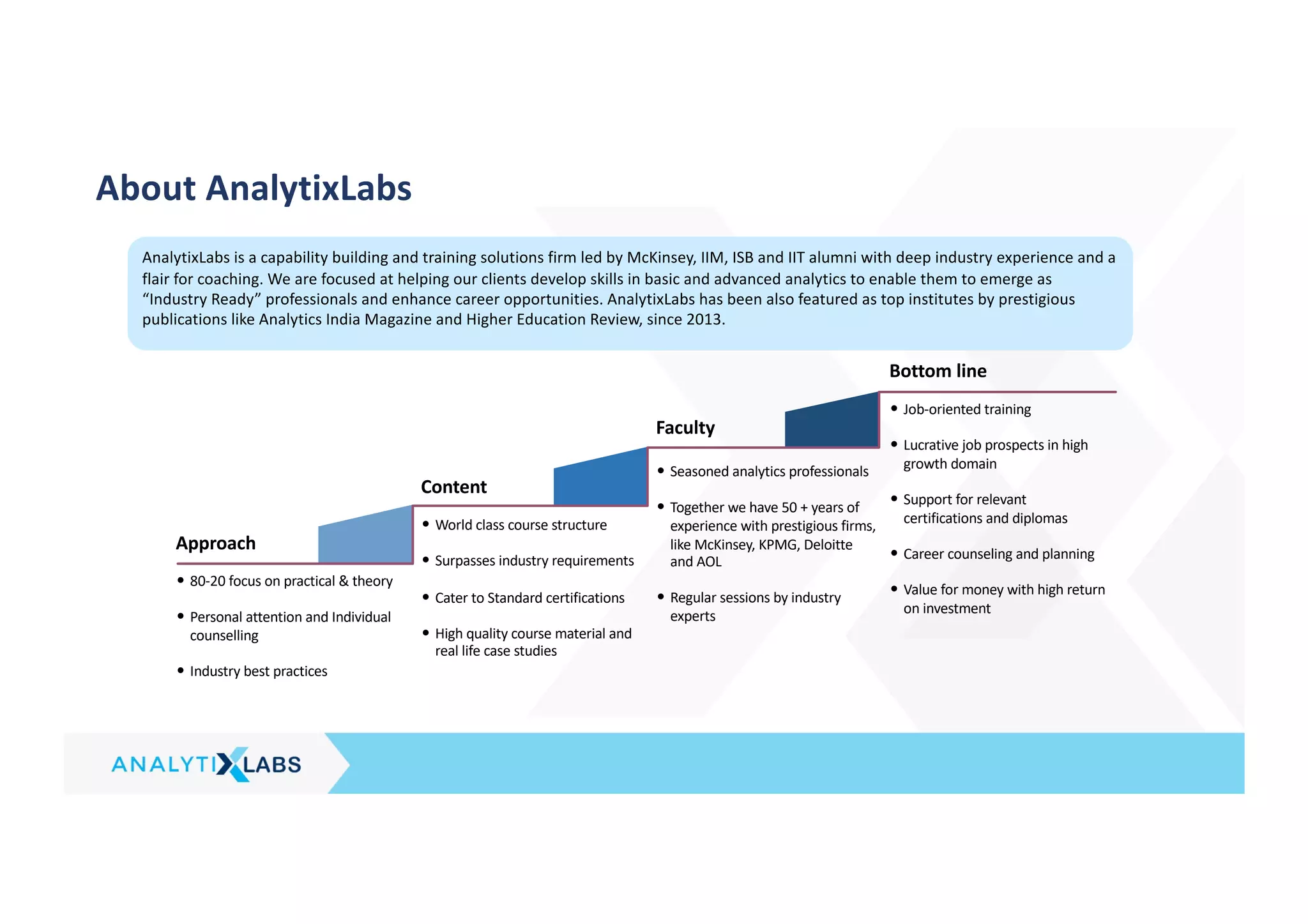
• 80-20 focus on practical & theory
• Personal attention and Individual
counselling
• Industry best practices
• World class course structure
• Surpasses industry requirements
• Cater to Standard certifications
• High quality course material and
real life case studies
• Seasoned analytics professionals
• Together we have 50 + years of
experience with prestigious firms,
like McKinsey, KPMG, Deloitte
and AOL
• Regular sessions by industry
experts
• Job-oriented training
• Lucrative job prospects in high
growth domain
• Support for relevant
certifications and diplomas
• Career counseling and planning
• Value for money with high return
on investment
Approach
Content
Faculty
Bottom line
AnalytixLabs is a capability building and training solutions firm led by McKinsey, IIM, ISB and IIT alumni with deep industry experience and a
flair for coaching. We are focused at helping our clients develop skills in basic and advanced analytics to enable them to emerge as
“Industry Ready” professionals and enhance career opportunities. AnalytixLabs has been also featured as top institutes by prestigious
publications like Analytics India Magazine and Higher Education Review, since 2013.
About AnalytixLabs
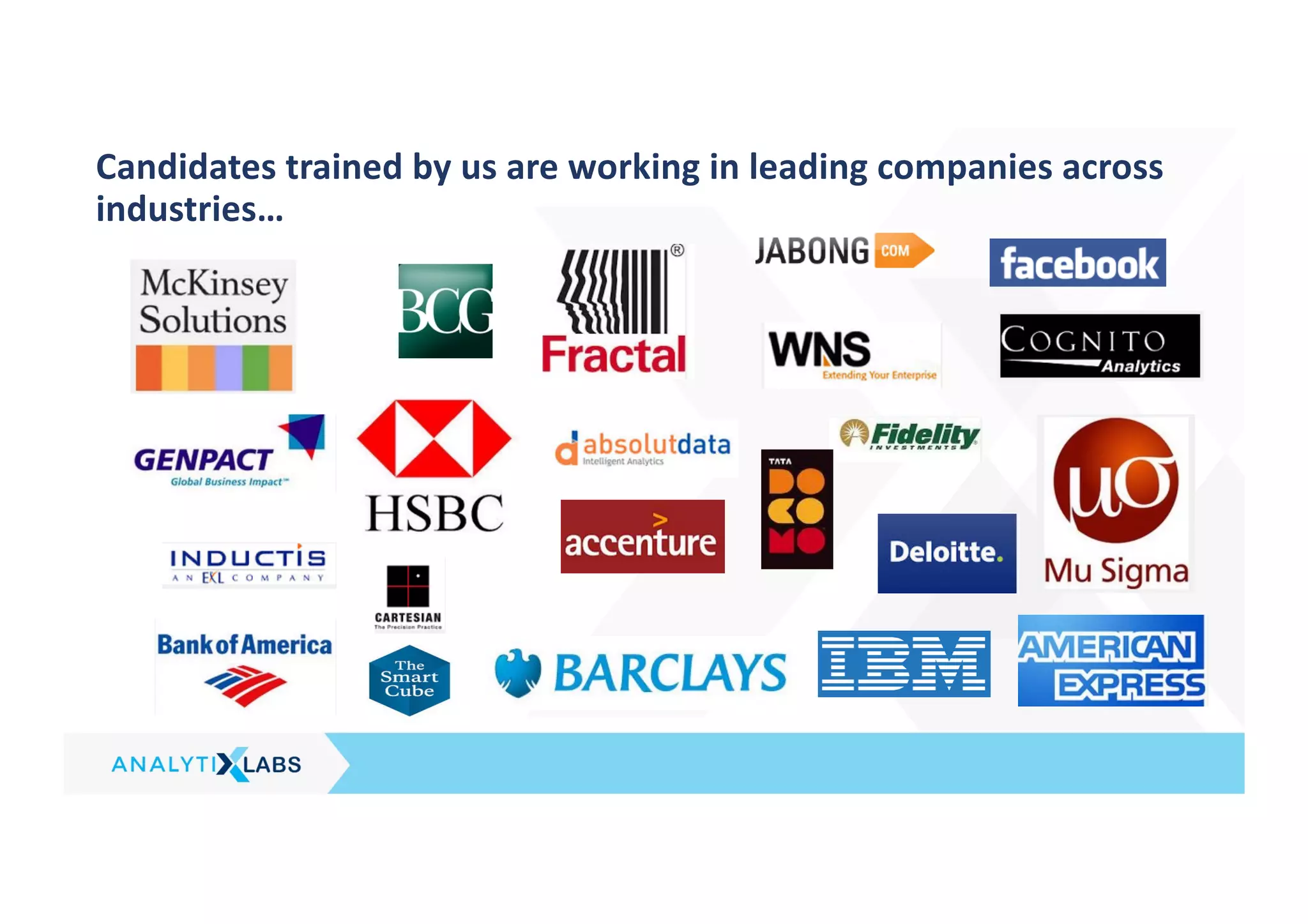
Candidates trained by us are working in leading companies across
industries…
*Contact us for additional criteria that needs to be met for availing the certificate and incentives
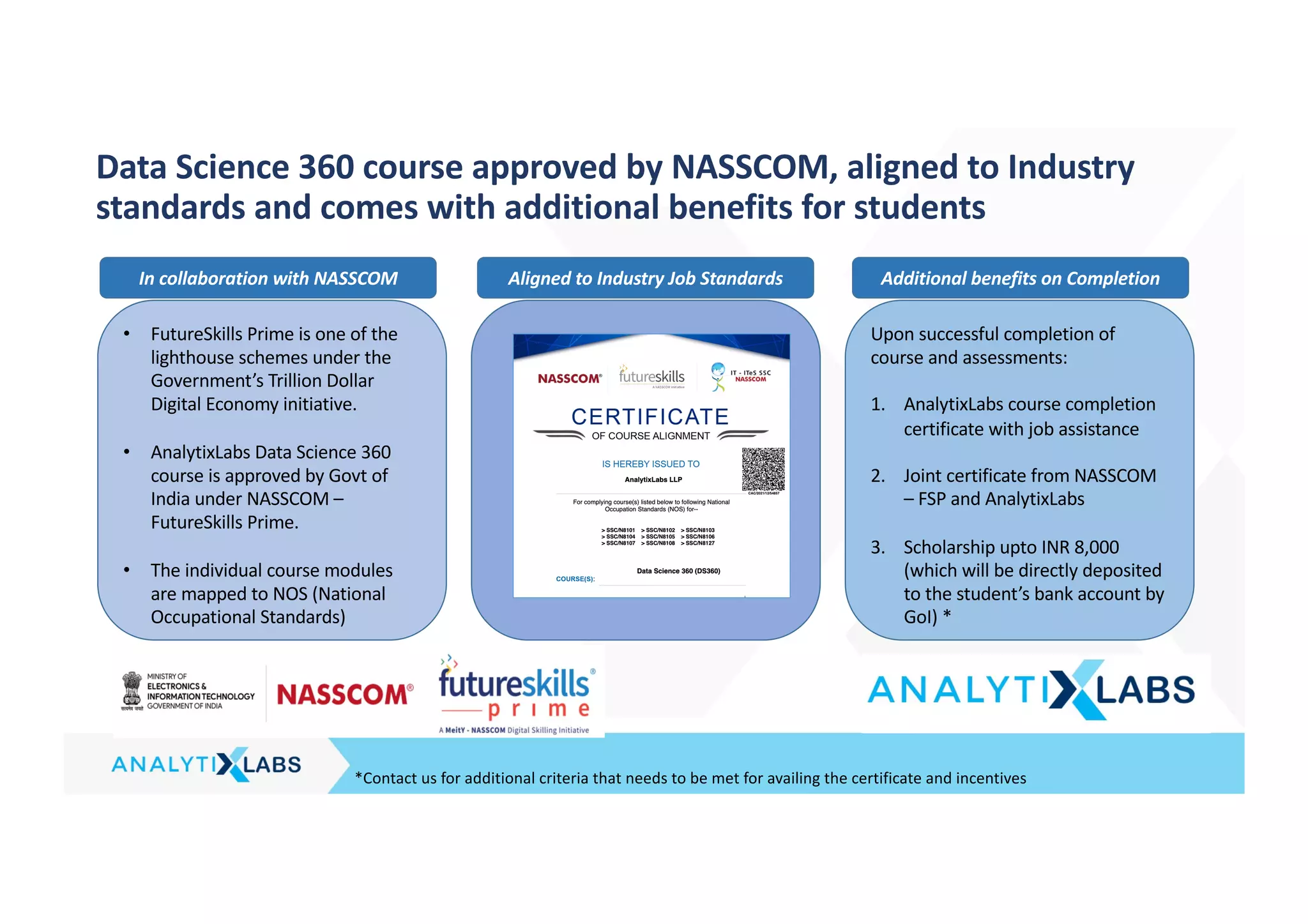
Data Science 360 course approved by NASSCOM, aligned to Industry
standards and comes with additional benefits for students
• FutureSkills Prime is one of the
lighthouse schemes under the
Government’s Trillion Dollar
Digital Economy initiative.
• AnalytixLabs Data Science 360
course is approved by Govt of
India under NASSCOM –
FutureSkills Prime.
• The individual course modules
are mapped to NOS (National
Occupational Standards)
Upon successful completion of
course and assessments:
1. AnalytixLabs course completion
certificate with job assistance
2. Joint certificate from NASSCOM
– FSP and AnalytixLabs
3. Scholarship upto INR 8,000
(which will be directly deposited
to the student’s bank account by
GoI) *
In collaboration with NASSCOM Aligned to Industry Job Standards Additional benefits on Completion
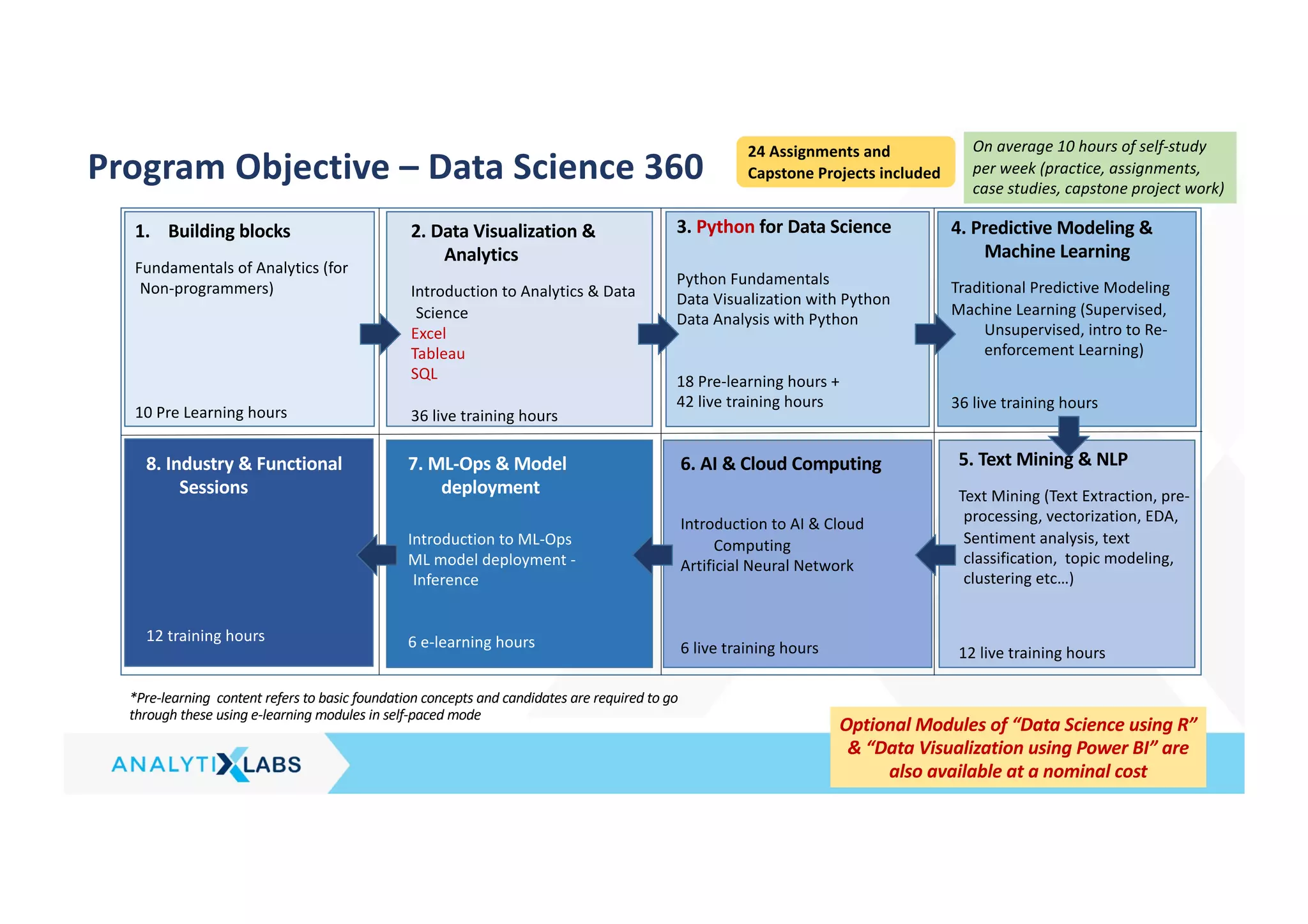
Program Objective – Data Science 360
1. Building blocks
Fundamentals of Analytics (for
Non-programmers)
10 Pre Learning hours
2. Data Visualization &
Analytics
Introduction to Analytics & Data
Science
Excel
Tableau
SQL
36 live training hours
3. Python for Data Science
Python Fundamentals
Data Visualization with Python
Data Analysis with Python
18 Pre-learning hours +
42 live training hours
5. Text Mining & NLP
Text Mining (Text Extraction, pre-
processing, vectorization, EDA,
Sentiment analysis, text
classification, topic modeling,
clustering etc…)
12 live training hours
4. Predictive Modeling &
Machine Learning
Traditional Predictive Modeling
Machine Learning (Supervised,
Unsupervised, intro to Re-
enforcement Learning)
36 live training hours
24 Assignments and
Capstone Projects included
On average 10 hours of self-study
per week (practice, assignments,
case studies, capstone project work)
*Pre-learning content refers to basic foundation concepts and candidates are required to go
through these using e-learning modules in self-paced mode
7. ML-Ops & Model
deployment
Introduction to ML-Ops
ML model deployment -
Inference
6 e-learning hours
8. Industry & Functional
Sessions
12 training hours
6. AI & Cloud Computing
Introduction to AI & Cloud
Computing
Artificial Neural Network
6 live training hours
Optional Modules of “Data Science using R”
& “Data Visualization using Power BI” are
also available at a nominal cost
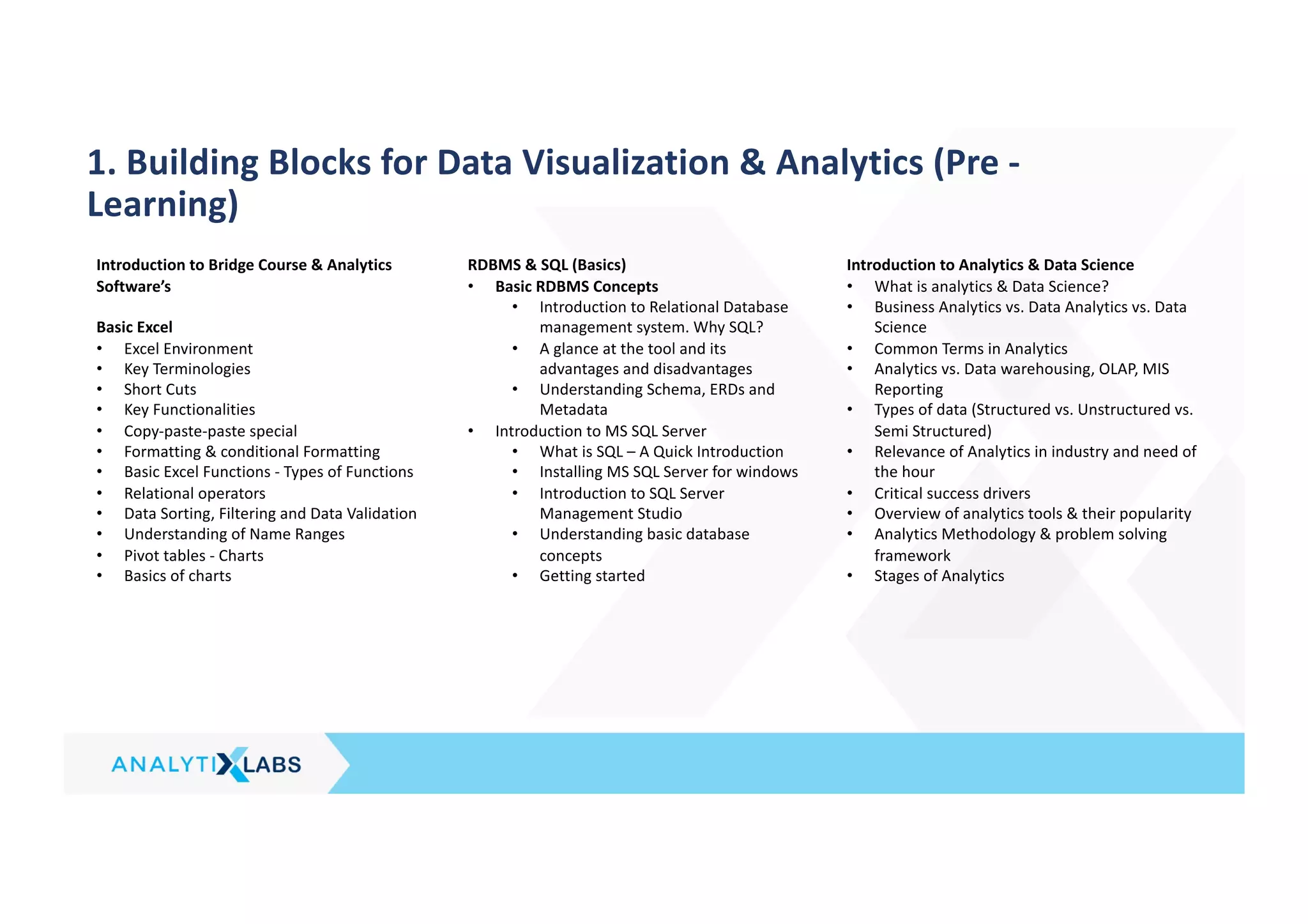
1. Building Blocks for Data Visualization & Analytics (Pre -
Learning)
Introduction to Bridge Course & Analytics
Software’s
Basic Excel
• Excel Environment
• Key Terminologies
• Short Cuts
• Key Functionalities
• Copy-paste-paste special
• Formatting & conditional Formatting
• Basic Excel Functions - Types of Functions
• Relational operators
• Data Sorting, Filtering and Data Validation
• Understanding of Name Ranges
• Pivot tables - Charts
• Basics of charts
RDBMS & SQL (Basics)
• Basic RDBMS Concepts
• Introduction to Relational Database
management system. Why SQL?
• A glance at the tool and its
advantages and disadvantages
• Understanding Schema, ERDs and
Metadata
• Introduction to MS SQL Server
• What is SQL – A Quick Introduction
• Installing MS SQL Server for windows
• Introduction to SQL Server
Management Studio
• Understanding basic database
concepts
• Getting started
Introduction to Analytics & Data Science
• What is analytics & Data Science?
• Business Analytics vs. Data Analytics vs. Data
Science
• Common Terms in Analytics
• Analytics vs. Data warehousing, OLAP, MIS
Reporting
• Types of data (Structured vs. Unstructured vs.
Semi Structured)
• Relevance of Analytics in industry and need of
the hour
• Critical success drivers
• Overview of analytics tools & their popularity
• Analytics Methodology & problem solving
framework
• Stages of Analytics
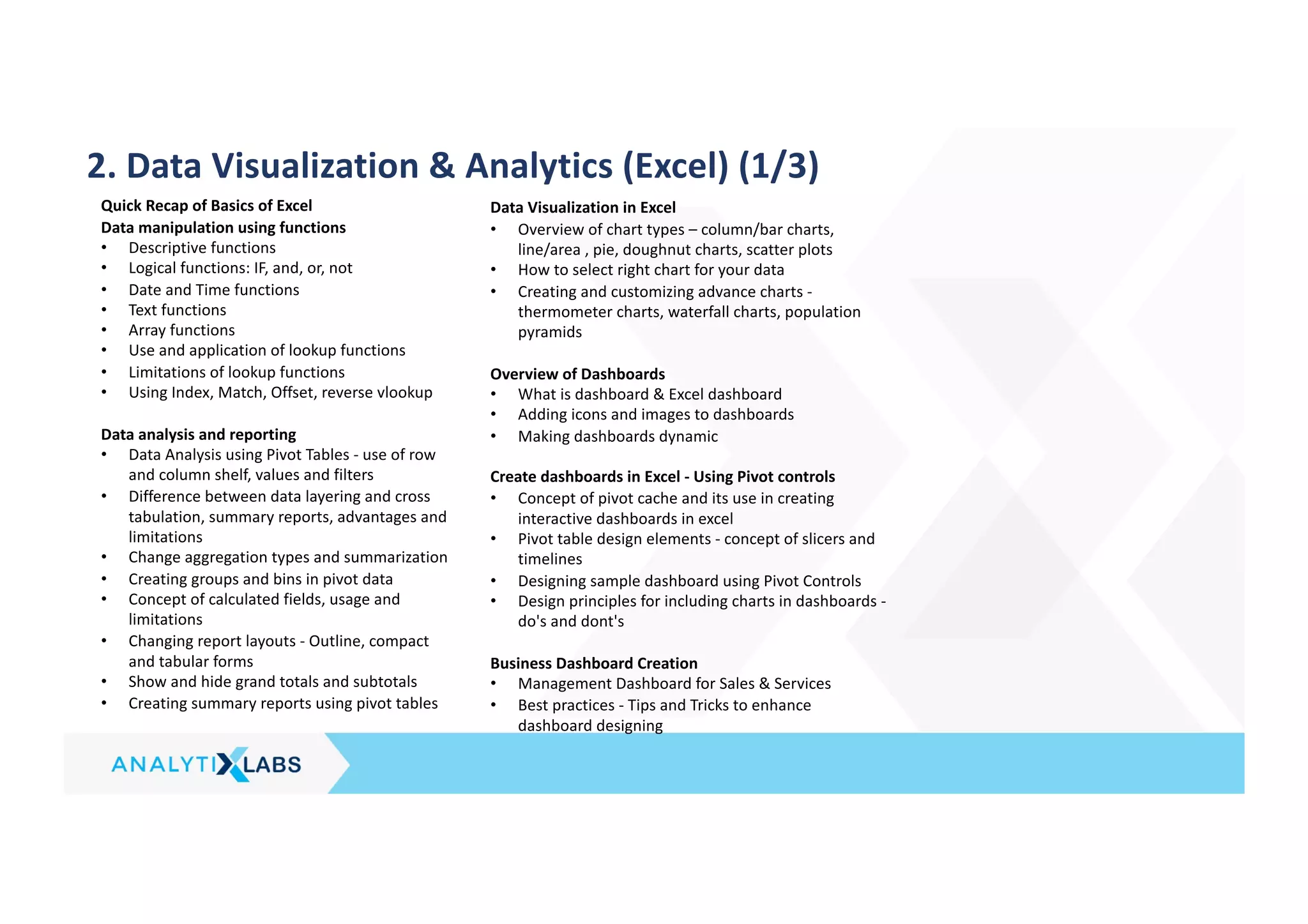
2. Data Visualization & Analytics (Excel) (1/3)
Quick Recap of Basics of Excel
Data manipulation using functions
• Descriptive functions
• Logical functions: IF, and, or, not
• Date and Time functions
• Text functions
• Array functions
• Use and application of lookup functions
• Limitations of lookup functions
• Using Index, Match, Offset, reverse vlookup
Data analysis and reporting
• Data Analysis using Pivot Tables - use of row
and column shelf, values and filters
• Difference between data layering and cross
tabulation, summary reports, advantages and
limitations
• Change aggregation types and summarization
• Creating groups and bins in pivot data
• Concept of calculated fields, usage and
limitations
• Changing report layouts - Outline, compact
and tabular forms
• Show and hide grand totals and subtotals
• Creating summary reports using pivot tables
Data Visualization in Excel
• Overview of chart types – column/bar charts,
line/area , pie, doughnut charts, scatter plots
• How to select right chart for your data
• Creating and customizing advance charts -
thermometer charts, waterfall charts, population
pyramids
Overview of Dashboards
• What is dashboard & Excel dashboard
• Adding icons and images to dashboards
• Making dashboards dynamic
Create dashboards in Excel - Using Pivot controls
• Concept of pivot cache and its use in creating
interactive dashboards in excel
• Pivot table design elements - concept of slicers and
timelines
• Designing sample dashboard using Pivot Controls
• Design principles for including charts in dashboards -
do's and dont's
Business Dashboard Creation
• Management Dashboard for Sales & Services
• Best practices - Tips and Tricks to enhance
dashboard designing
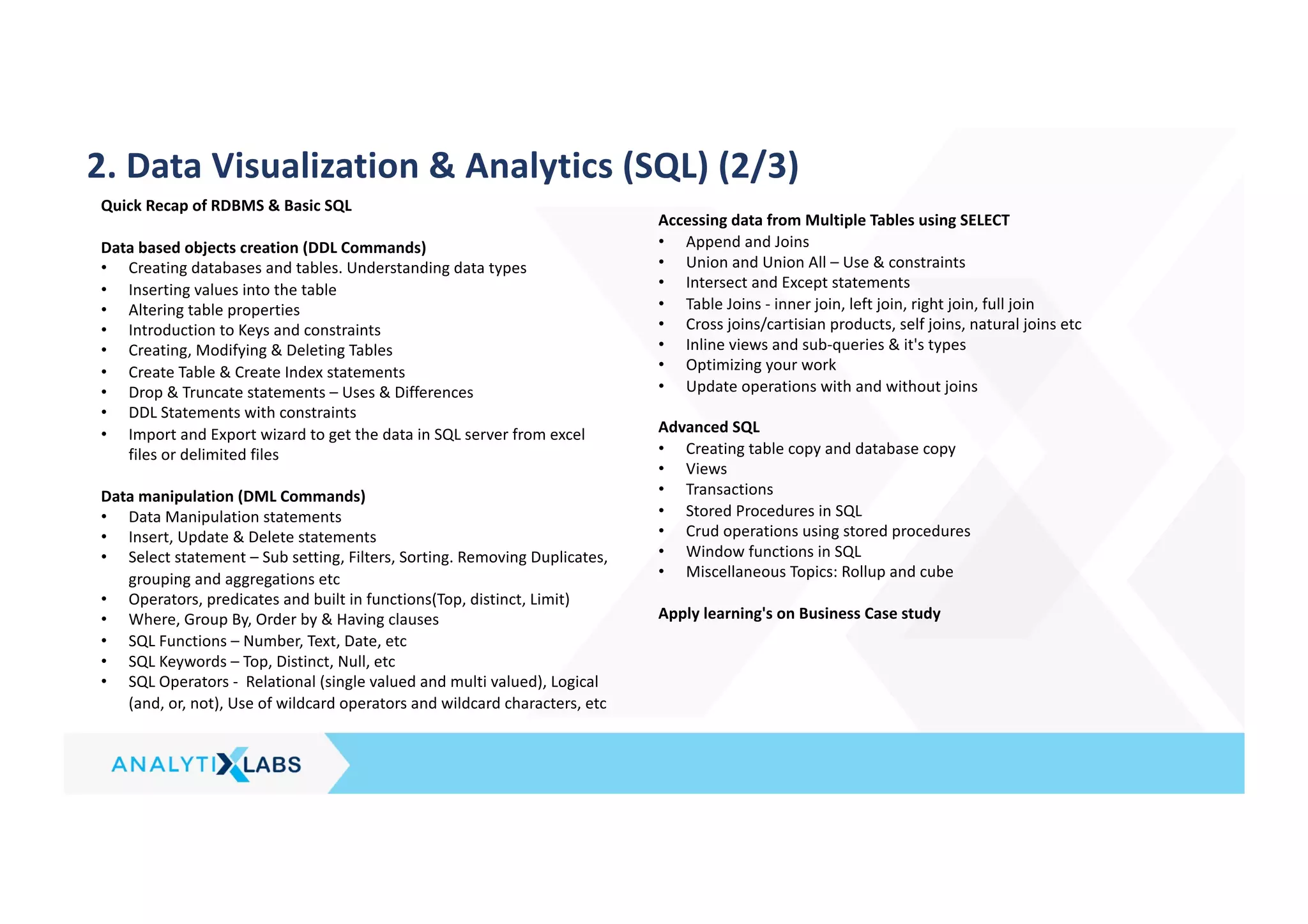
2. Data Visualization & Analytics (SQL) (2/3)
Quick Recap of RDBMS & Basic SQL
Data based objects creation (DDL Commands)
• Creating databases and tables. Understanding data types
• Inserting values into the table
• Altering table properties
• Introduction to Keys and constraints
• Creating, Modifying & Deleting Tables
• Create Table & Create Index statements
• Drop & Truncate statements – Uses & Differences
• DDL Statements with constraints
• Import and Export wizard to get the data in SQL server from excel
files or delimited files
Data manipulation (DML Commands)
• Data Manipulation statements
• Insert, Update & Delete statements
• Select statement – Sub setting, Filters, Sorting. Removing Duplicates,
grouping and aggregations etc
• Operators, predicates and built in functions(Top, distinct, Limit)
• Where, Group By, Order by & Having clauses
• SQL Functions – Number, Text, Date, etc
• SQL Keywords – Top, Distinct, Null, etc
• SQL Operators - Relational (single valued and multi valued), Logical
(and, or, not), Use of wildcard operators and wildcard characters, etc
Accessing data from Multiple Tables using SELECT
• Append and Joins
• Union and Union All – Use & constraints
• Intersect and Except statements
• Table Joins - inner join, left join, right join, full join
• Cross joins/cartisian products, self joins, natural joins etc
• Inline views and sub-queries & it's types
• Optimizing your work
• Update operations with and without joins
Advanced SQL
• Creating table copy and database copy
• Views
• Transactions
• Stored Procedures in SQL
• Crud operations using stored procedures
• Window functions in SQL
• Miscellaneous Topics: Rollup and cube
Apply learning's on Business Case study
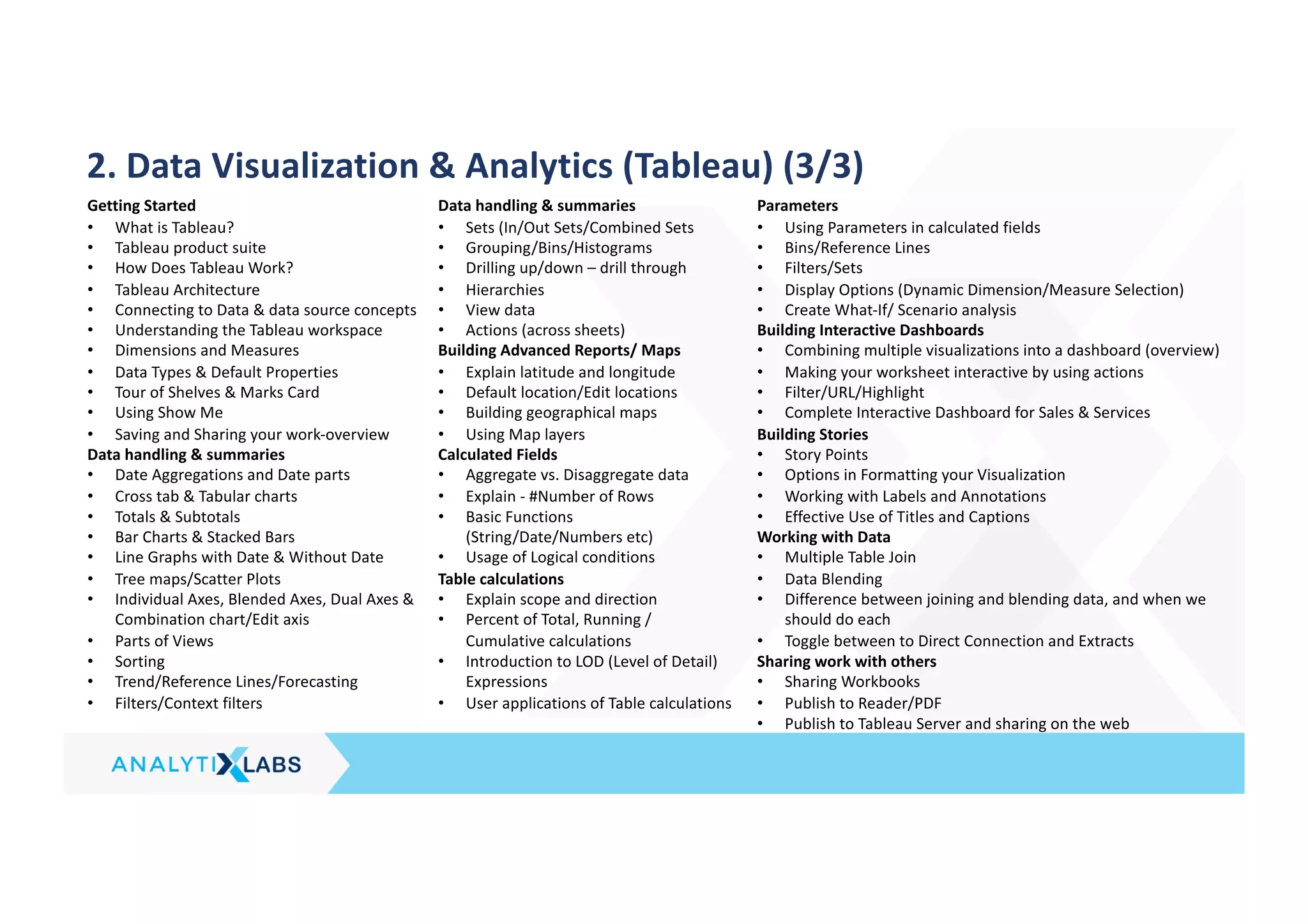
2. Data Visualization & Analytics (Tableau) (3/3)
Getting Started
• What is Tableau?
• Tableau product suite
• How Does Tableau Work?
• Tableau Architecture
• Connecting to Data & data source concepts
• Understanding the Tableau workspace
• Dimensions and Measures
• Data Types & Default Properties
• Tour of Shelves & Marks Card
• Using Show Me
• Saving and Sharing your work-overview
Data handling & summaries
• Date Aggregations and Date parts
• Cross tab & Tabular charts
• Totals & Subtotals
• Bar Charts & Stacked Bars
• Line Graphs with Date & Without Date
• Tree maps/Scatter Plots
• Individual Axes, Blended Axes, Dual Axes &
Combination chart/Edit axis
• Parts of Views
• Sorting
• Trend/Reference Lines/Forecasting
• Filters/Context filters
Data handling & summaries
• Sets (In/Out Sets/Combined Sets
• Grouping/Bins/Histograms
• Drilling up/down – drill through
• Hierarchies
• View data
• Actions (across sheets)
Building Advanced Reports/ Maps
• Explain latitude and longitude
• Default location/Edit locations
• Building geographical maps
• Using Map layers
Calculated Fields
• Aggregate vs. Disaggregate data
• Explain - #Number of Rows
• Basic Functions
(String/Date/Numbers etc)
• Usage of Logical conditions
Table calculations
• Explain scope and direction
• Percent of Total, Running /
Cumulative calculations
• Introduction to LOD (Level of Detail)
Expressions
• User applications of Table calculations
Parameters
• Using Parameters in calculated fields
• Bins/Reference Lines
• Filters/Sets
• Display Options (Dynamic Dimension/Measure Selection)
• Create What-If/ Scenario analysis
Building Interactive Dashboards
• Combining multiple visualizations into a dashboard (overview)
• Making your worksheet interactive by using actions
• Filter/URL/Highlight
• Complete Interactive Dashboard for Sales & Services
Building Stories
• Story Points
• Options in Formatting your Visualization
• Working with Labels and Annotations
• Effective Use of Titles and Captions
Working with Data
• Multiple Table Join
• Data Blending
• Difference between joining and blending data, and when we
should do each
• Toggle between to Direct Connection and Extracts
Sharing work with others
• Sharing Workbooks
• Publish to Reader/PDF
• Publish to Tableau Server and sharing on the web
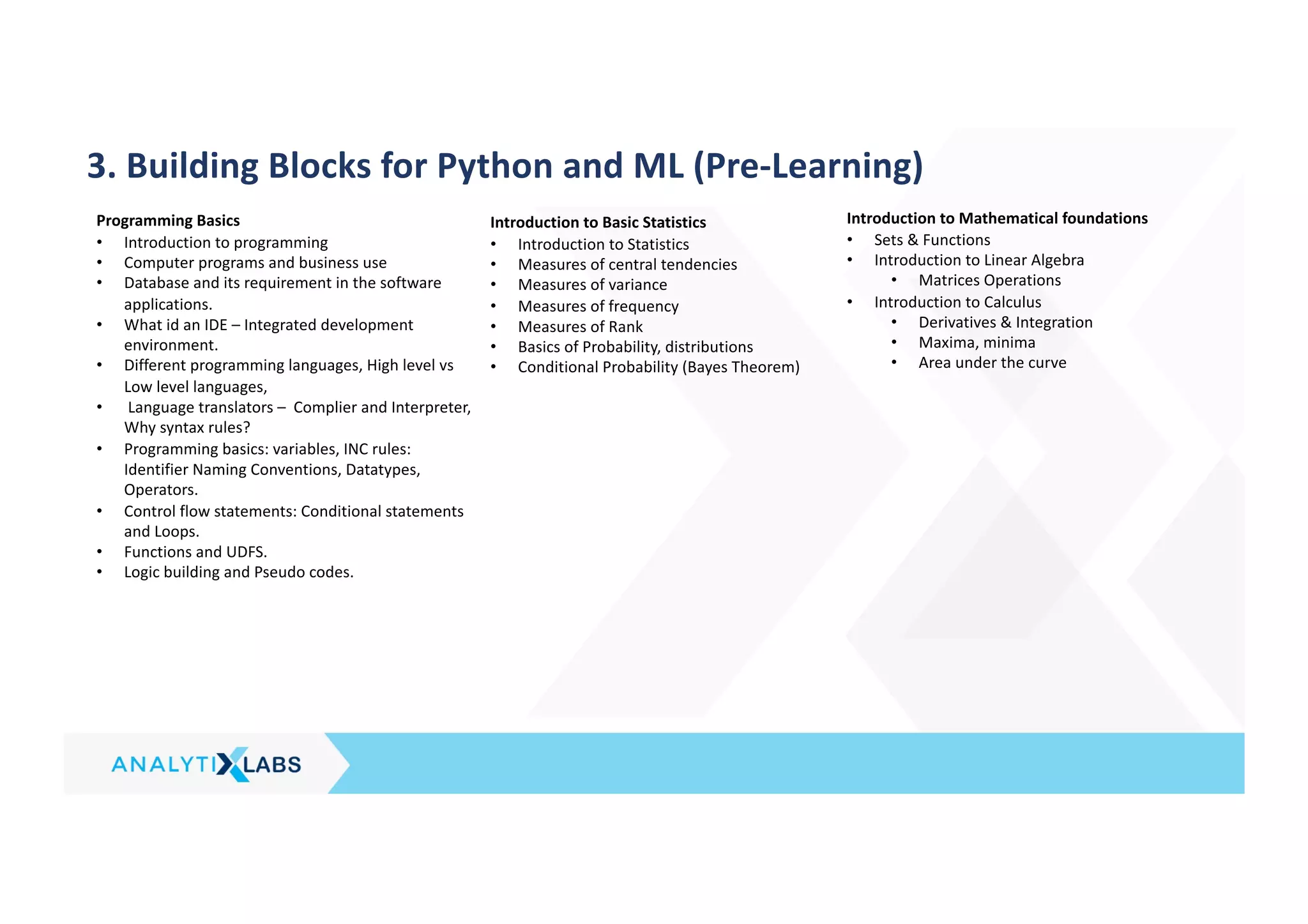
3. Building Blocks for Python and ML (Pre-Learning)
Programming Basics
• Introduction to programming
• Computer programs and business use
• Database and its requirement in the software
applications.
• What id an IDE – Integrated development
environment.
• Different programming languages, High level vs
Low level languages,
• Language translators – Complier and Interpreter,
Why syntax rules?
• Programming basics: variables, INC rules:
Identifier Naming Conventions, Datatypes,
Operators.
• Control flow statements: Conditional statements
and Loops.
• Functions and UDFS.
• Logic building and Pseudo codes.
Introduction to Basic Statistics
• Introduction to Statistics
• Measures of central tendencies
• Measures of variance
• Measures of frequency
• Measures of Rank
• Basics of Probability, distributions
• Conditional Probability (Bayes Theorem)
Introduction to Mathematical foundations
• Sets & Functions
• Introduction to Linear Algebra
• Matrices Operations
• Introduction to Calculus
• Derivatives & Integration
• Maxima, minima
• Area under the curve
3. Python For Data Science (1/2)
Python Essentials (Core)
• Overview of Python- Starting with Python
• Why Python for data science?
• Anaconda vs. python
• Introduction to installation of Python
• Introduction to Python IDE's(Jupyter,/Ipython)
• Concept of Packages - Important packages
• NumPy, SciPy, scikit-learn, Pandas,
Matplotlib, etc
• Installing & loading Packages & Name Spaces
• Data Types & Data objects/structures (strings,
Tuples, Lists, Dictionaries)
• List and Dictionary Comprehensions
• Variable & Value Labels – Date & Time Values
• Basic Operations – Mathematical/string/date
• Control flow & conditional statements
• Debugging & Code profiling
• Python Built-in Functions (Text, numeric, date,
utility functions)
• User defined functions – Lambda functions
• Concept of apply functions
• Python – Objects – OOPs concepts
• How to create & call class and modules?
Operations with NumPy (Numerical Python)
• What is NumPy?
• Overview of functions & methods in NumPy
• Data structures in NumPy
• Creating arrays and initializing
• Reading arrays from files
• Special initializing functions
• Slicing and indexing
• Reshaping arrays
• Combining arrays
• NumPy Maths
Overview of Pandas
• What is pandas, its functions & methods
• Pandas Data Structures (Series & Data Frames)
• Creating Data Structures (Data import – reading
into pandas)
Cleansing Data with Python
• Understand the data
• Sub Setting / Filtering / Slicing Data
• Using [] brackets
• Using indexing or referring with column
names/rows
• Using functions
• Dropping rows & columns
• Mutation of table (Adding/deleting columns)
• Binning data (Binning numerical variables in to
categorical variables)
• Renaming columns or rows
• Sorting (by data/values, index)
• By one column or multiple columns
• Ascending or Descending
• Type conversions
• Setting index
• Handling duplicates /missing/Outliers
• Creating dummies from categorical data (using
get_dummies())
• Applying functions to all the variables in a data
frame (broadcasting)
• Data manipulation tools(Operators, Functions,
Packages, control structures, Loops, arrays etc.)
Data Analysis using Python
• Exploratory data analysis
• Descriptive statistics, Frequency Tables and
summarization
• Uni-variate Analysis (Distribution of data &
Graphical Analysis)
• Bi-Variate Analysis(Cross Tabs, Distributions &
Relationships, Graphical Analysis)
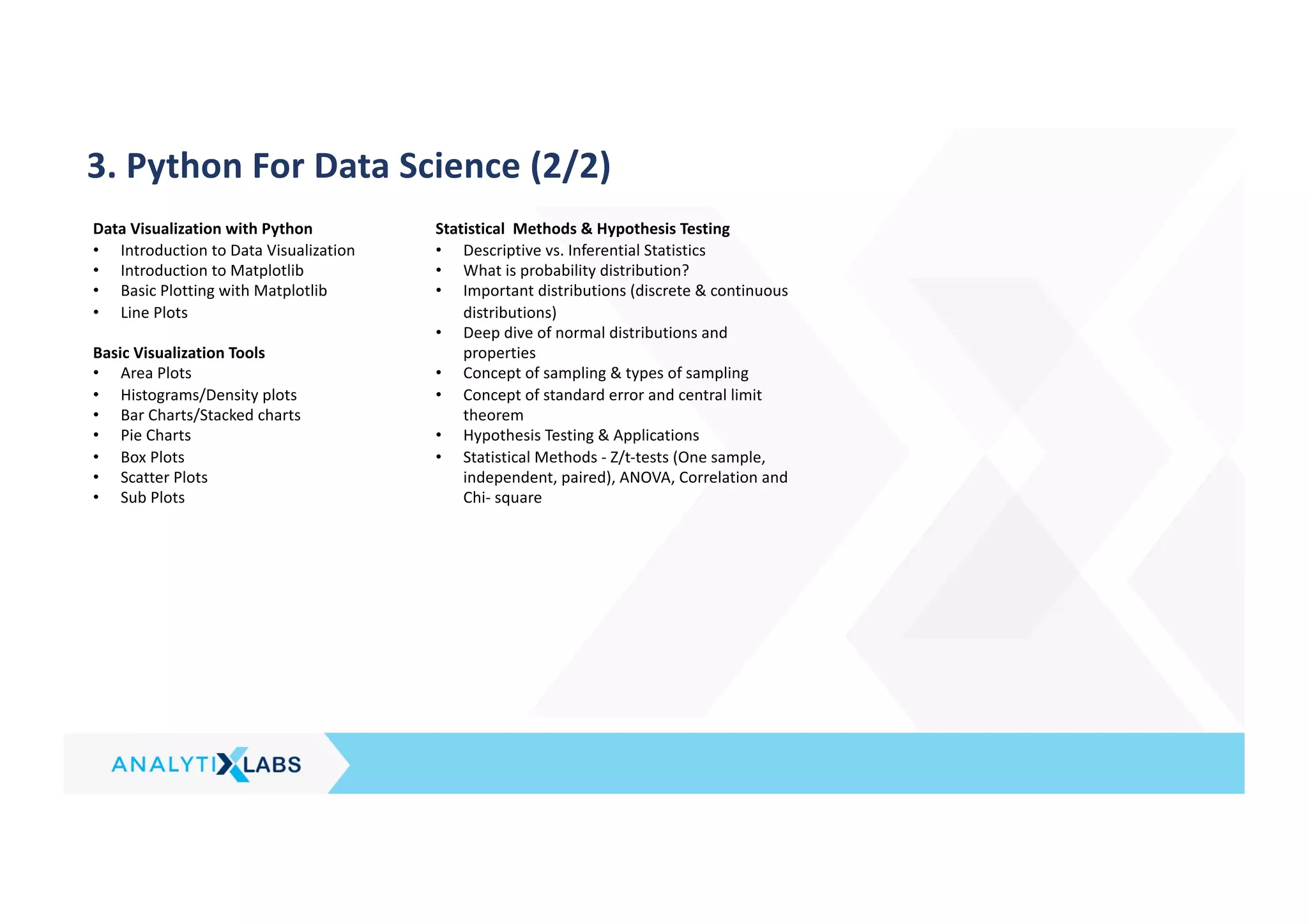
3. Python For Data Science (2/2)
Data Visualization with Python
• Introduction to Data Visualization
• Introduction to Matplotlib
• Basic Plotting with Matplotlib
• Line Plots
Basic Visualization Tools
• Area Plots
• Histograms/Density plots
• Bar Charts/Stacked charts
• Pie Charts
• Box Plots
• Scatter Plots
• Sub Plots
Statistical Methods & Hypothesis Testing
• Descriptive vs. Inferential Statistics
• What is probability distribution?
• Important distributions (discrete & continuous
distributions)
• Deep dive of normal distributions and
properties
• Concept of sampling & types of sampling
• Concept of standard error and central limit
theorem
• Hypothesis Testing & Applications
• Statistical Methods - Z/t-tests (One sample,
independent, paired), ANOVA, Correlation and
Chi- square
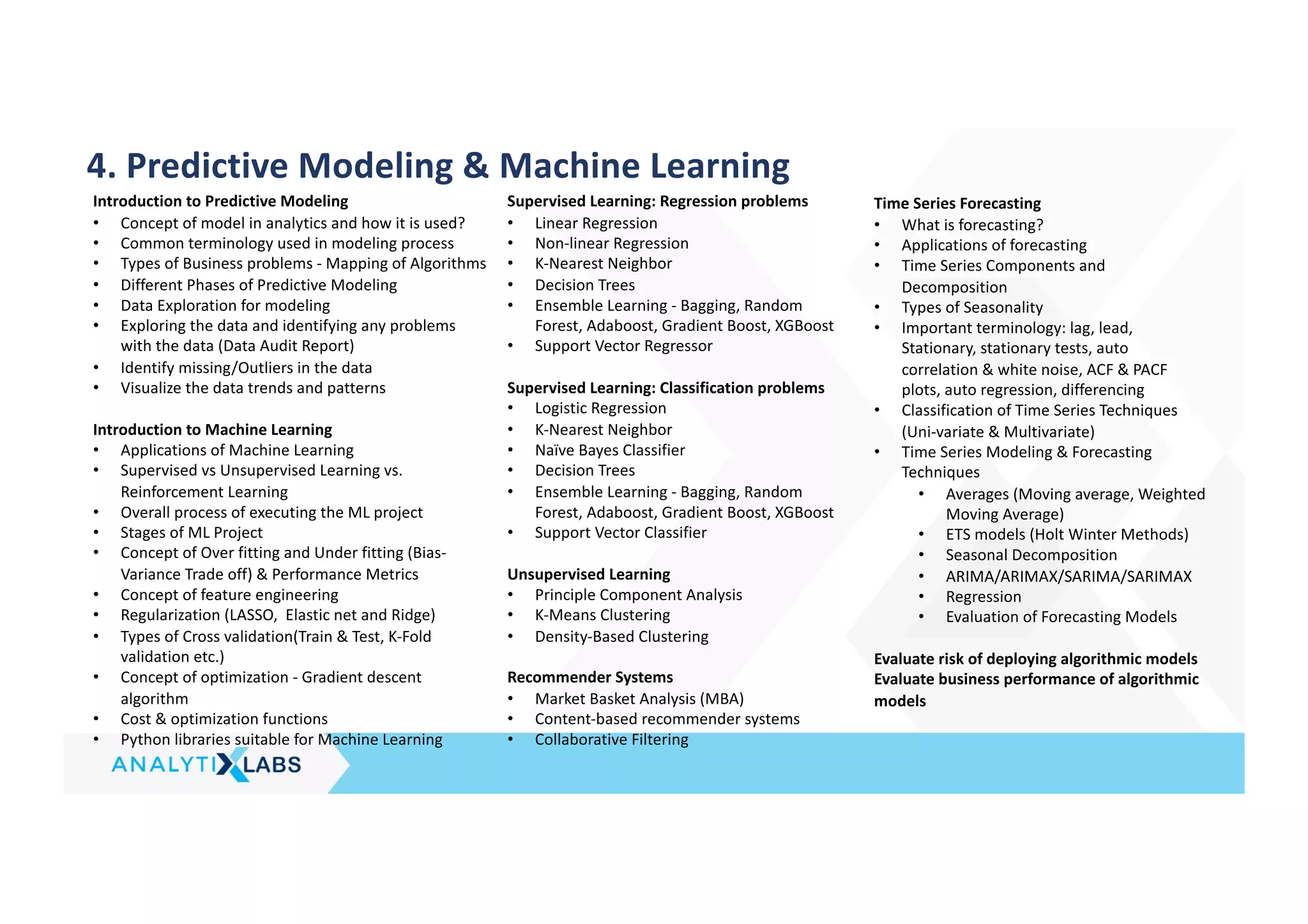
4. Predictive Modeling & Machine Learning
Introduction to Predictive Modeling
• Concept of model in analytics and how it is used?
• Common terminology used in modeling process
• Types of Business problems - Mapping of Algorithms
• Different Phases of Predictive Modeling
• Data Exploration for modeling
• Exploring the data and identifying any problems
with the data (Data Audit Report)
• Identify missing/Outliers in the data
• Visualize the data trends and patterns
Introduction to Machine Learning
• Applications of Machine Learning
• Supervised vs Unsupervised Learning vs.
Reinforcement Learning
• Overall process of executing the ML project
• Stages of ML Project
• Concept of Over fitting and Under fitting (Bias-
Variance Trade off) & Performance Metrics
• Concept of feature engineering
• Regularization (LASSO, Elastic net and Ridge)
• Types of Cross validation(Train & Test, K-Fold
validation etc.)
• Concept of optimization - Gradient descent
algorithm
• Cost & optimization functions
• Python libraries suitable for Machine Learning
Supervised Learning: Regression problems
• Linear Regression
• Non-linear Regression
• K-Nearest Neighbor
• Decision Trees
• Ensemble Learning - Bagging, Random
Forest, Adaboost, Gradient Boost, XGBoost
• Support Vector Regressor
Supervised Learning: Classification problems
• Logistic Regression
• K-Nearest Neighbor
• Naïve Bayes Classifier
• Decision Trees
• Ensemble Learning - Bagging, Random
Forest, Adaboost, Gradient Boost, XGBoost
• Support Vector Classifier
Unsupervised Learning
• Principle Component Analysis
• K-Means Clustering
• Density-Based Clustering
Recommender Systems
• Market Basket Analysis (MBA)
• Content-based recommender systems
• Collaborative Filtering
Time Series Forecasting
• What is forecasting?
• Applications of forecasting
• Time Series Components and
Decomposition
• Types of Seasonality
• Important terminology: lag, lead,
Stationary, stationary tests, auto
correlation & white noise, ACF & PACF
plots, auto regression, differencing
• Classification of Time Series Techniques
(Uni-variate & Multivariate)
• Time Series Modeling & Forecasting
Techniques
• Averages (Moving average, Weighted
Moving Average)
• ETS models (Holt Winter Methods)
• Seasonal Decomposition
• ARIMA/ARIMAX/SARIMA/SARIMAX
• Regression
• Evaluation of Forecasting Models
Evaluate risk of deploying algorithmic models
Evaluate business performance of algorithmic
models
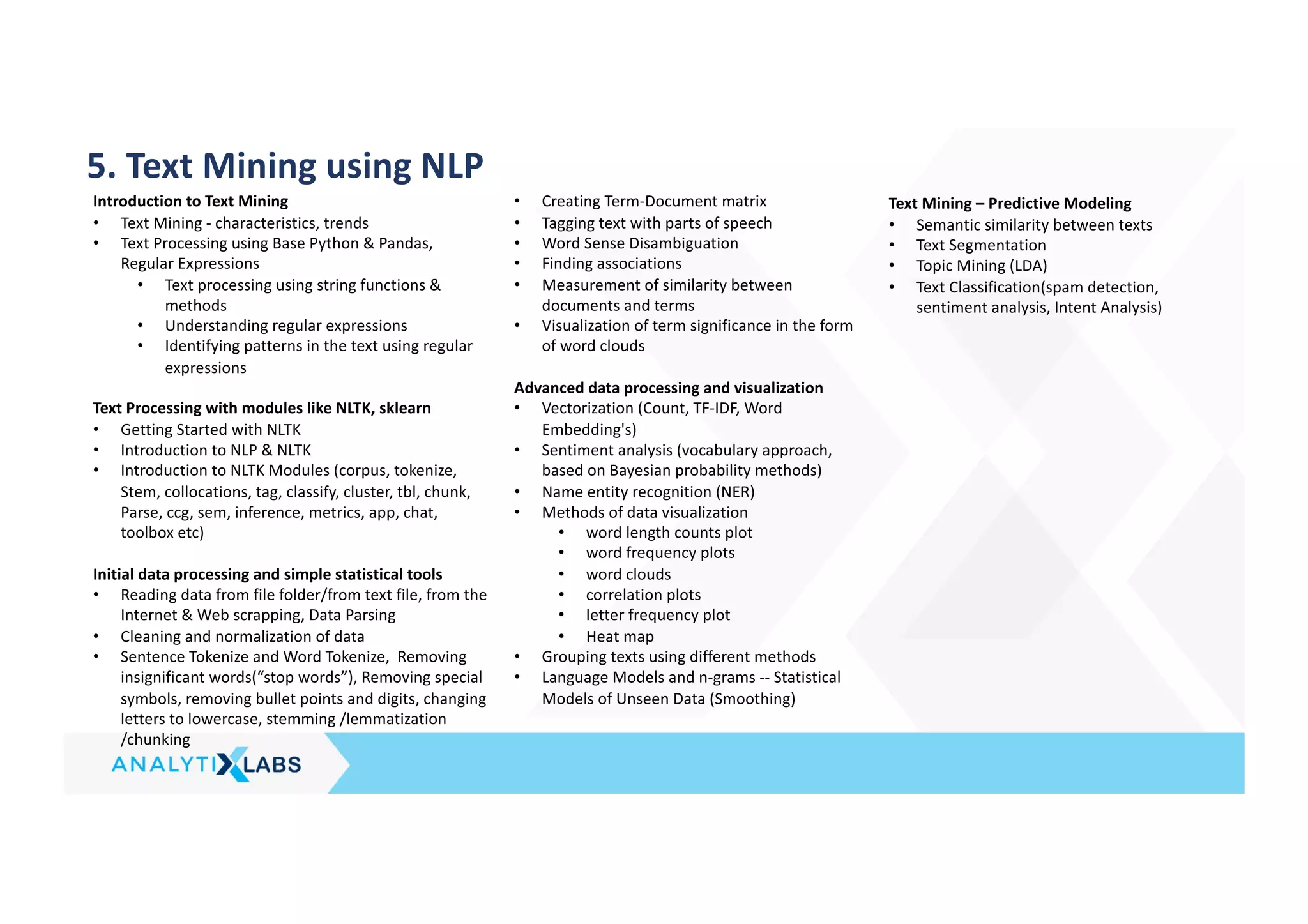
5. Text Mining using NLP
Introduction to Text Mining
• Text Mining - characteristics, trends
• Text Processing using Base Python & Pandas,
Regular Expressions
• Text processing using string functions &
methods
• Understanding regular expressions
• Identifying patterns in the text using regular
expressions
Text Processing with modules like NLTK, sklearn
• Getting Started with NLTK
• Introduction to NLP & NLTK
• Introduction to NLTK Modules (corpus, tokenize,
Stem, collocations, tag, classify, cluster, tbl, chunk,
Parse, ccg, sem, inference, metrics, app, chat,
toolbox etc)
Initial data processing and simple statistical tools
• Reading data from file folder/from text file, from the
Internet & Web scrapping, Data Parsing
• Cleaning and normalization of data
• Sentence Tokenize and Word Tokenize, Removing
insignificant words(“stop words”), Removing special
symbols, removing bullet points and digits, changing
letters to lowercase, stemming /lemmatization
/chunking
• Creating Term-Document matrix
• Tagging text with parts of speech
• Word Sense Disambiguation
• Finding associations
• Measurement of similarity between
documents and terms
• Visualization of term significance in the form
of word clouds
Advanced data processing and visualization
• Vectorization (Count, TF-IDF, Word
Embedding's)
• Sentiment analysis (vocabulary approach,
based on Bayesian probability methods)
• Name entity recognition (NER)
• Methods of data visualization
• word length counts plot
• word frequency plots
• word clouds
• correlation plots
• letter frequency plot
• Heat map
• Grouping texts using different methods
• Language Models and n-grams -- Statistical
Models of Unseen Data (Smoothing)
Text Mining – Predictive Modeling
• Semantic similarity between texts
• Text Segmentation
• Topic Mining (LDA)
• Text Classification(spam detection,
sentiment analysis, Intent Analysis)
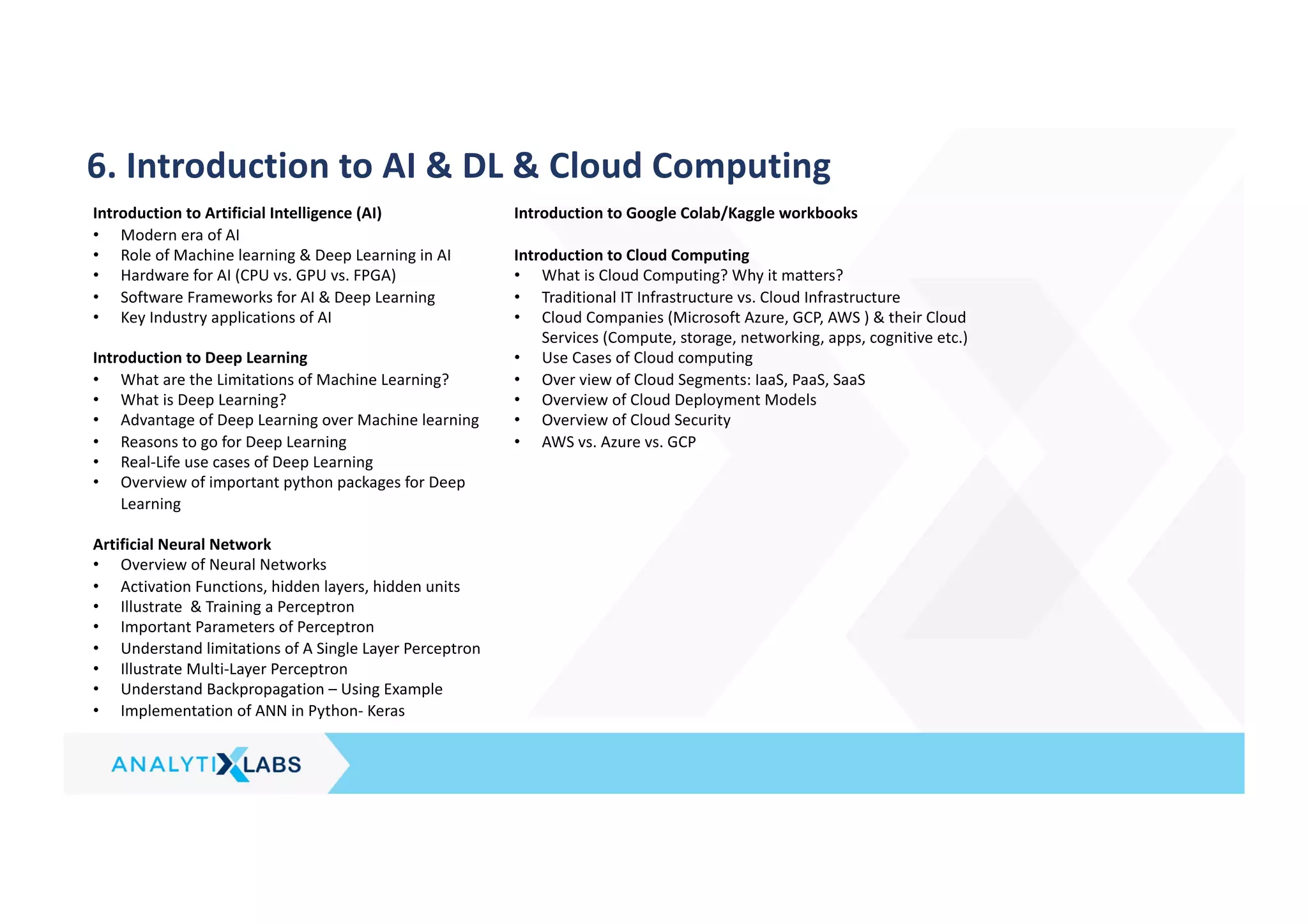
6. Introduction to AI & DL & Cloud Computing
Introduction to Artificial Intelligence (AI)
• Modern era of AI
• Role of Machine learning & Deep Learning in AI
• Hardware for AI (CPU vs. GPU vs. FPGA)
• Software Frameworks for AI & Deep Learning
• Key Industry applications of AI
Introduction to Deep Learning
• What are the Limitations of Machine Learning?
• What is Deep Learning?
• Advantage of Deep Learning over Machine learning
• Reasons to go for Deep Learning
• Real-Life use cases of Deep Learning
• Overview of important python packages for Deep
Learning
Artificial Neural Network
• Overview of Neural Networks
• Activation Functions, hidden layers, hidden units
• Illustrate & Training a Perceptron
• Important Parameters of Perceptron
• Understand limitations of A Single Layer Perceptron
• Illustrate Multi-Layer Perceptron
• Understand Backpropagation – Using Example
• Implementation of ANN in Python- Keras
Introduction to Google Colab/Kaggle workbooks
Introduction to Cloud Computing
• What is Cloud Computing? Why it matters?
• Traditional IT Infrastructure vs. Cloud Infrastructure
• Cloud Companies (Microsoft Azure, GCP, AWS ) & their Cloud
Services (Compute, storage, networking, apps, cognitive etc.)
• Use Cases of Cloud computing
• Over view of Cloud Segments: IaaS, PaaS, SaaS
• Overview of Cloud Deployment Models
• Overview of Cloud Security
• AWS vs. Azure vs. GCP
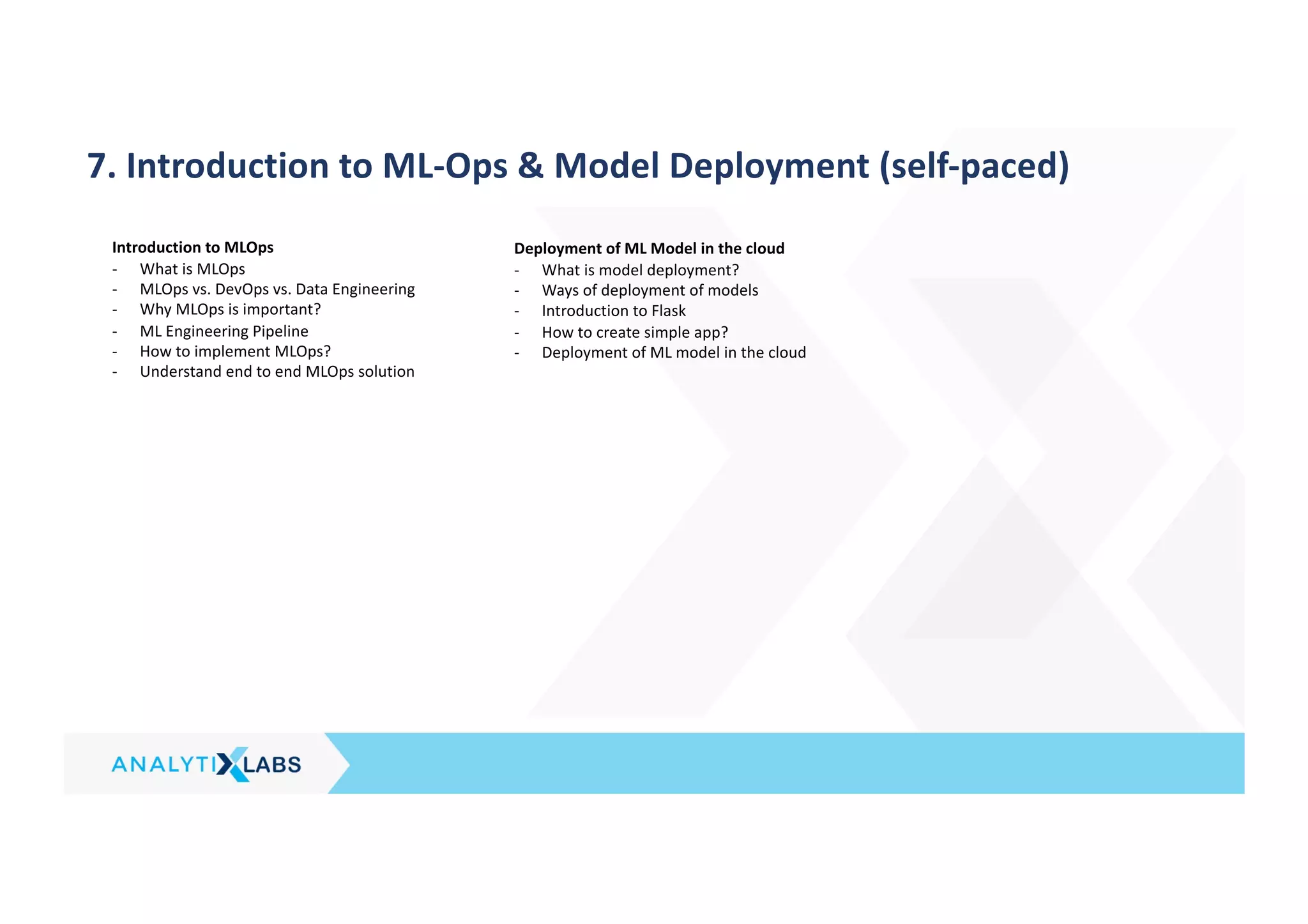
7. Introduction to ML-Ops & Model Deployment (self-paced)
Introduction to MLOps
- What is MLOps
- MLOps vs. DevOps vs. Data Engineering
- Why MLOps is important?
- ML Engineering Pipeline
- How to implement MLOps?
- Understand end to end MLOps solution
Deployment of ML Model in the cloud
- What is model deployment?
- Ways of deployment of models
- Introduction to Flask
- How to create simple app?
- Deployment of ML model in the cloud
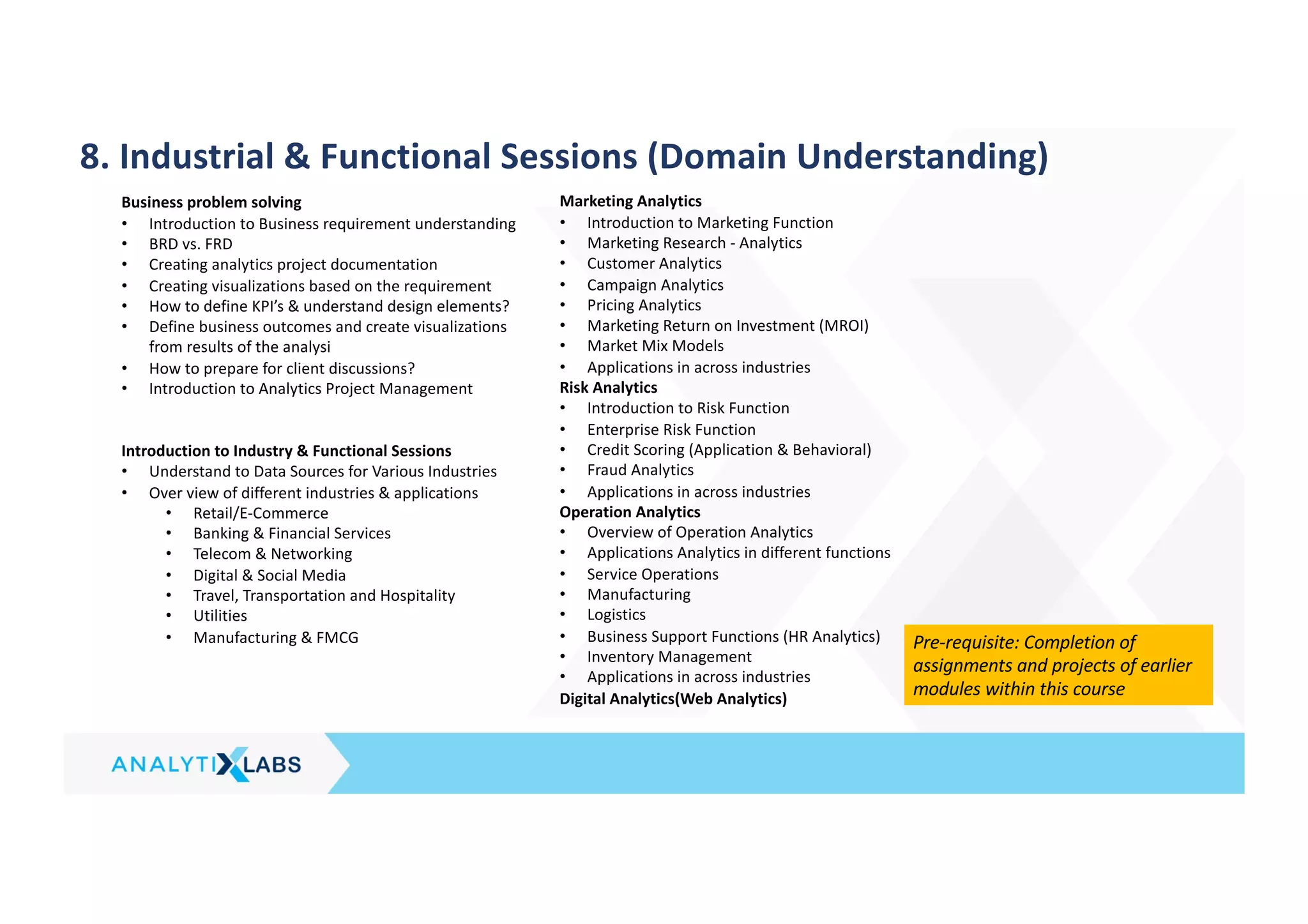
8. Industrial & Functional Sessions (Domain Understanding)
Business problem solving
• Introduction to Business requirement understanding
• BRD vs. FRD
• Creating analytics project documentation
• Creating visualizations based on the requirement
• How to define KPI’s & understand design elements?
• Define business outcomes and create visualizations
from results of the analysi
• How to prepare for client discussions?
• Introduction to Analytics Project Management
Introduction to Industry & Functional Sessions
• Understand to Data Sources for Various Industries
• Over view of different industries & applications
• Retail/E-Commerce
• Banking & Financial Services
• Telecom & Networking
• Digital & Social Media
• Travel, Transportation and Hospitality
• Utilities
• Manufacturing & FMCG
Marketing Analytics
• Introduction to Marketing Function
• Marketing Research - Analytics
• Customer Analytics
• Campaign Analytics
• Pricing Analytics
• Marketing Return on Investment (MROI)
• Market Mix Models
• Applications in across industries
Risk Analytics
• Introduction to Risk Function
• Enterprise Risk Function
• Credit Scoring (Application & Behavioral)
• Fraud Analytics
• Applications in across industries
Operation Analytics
• Overview of Operation Analytics
• Applications Analytics in different functions
• Service Operations
• Manufacturing
• Logistics
• Business Support Functions (HR Analytics)
• Inventory Management
• Applications in across industries
Digital Analytics(Web Analytics)
Pre-requisite: Completion of
assignments and projects of earlier
modules within this course
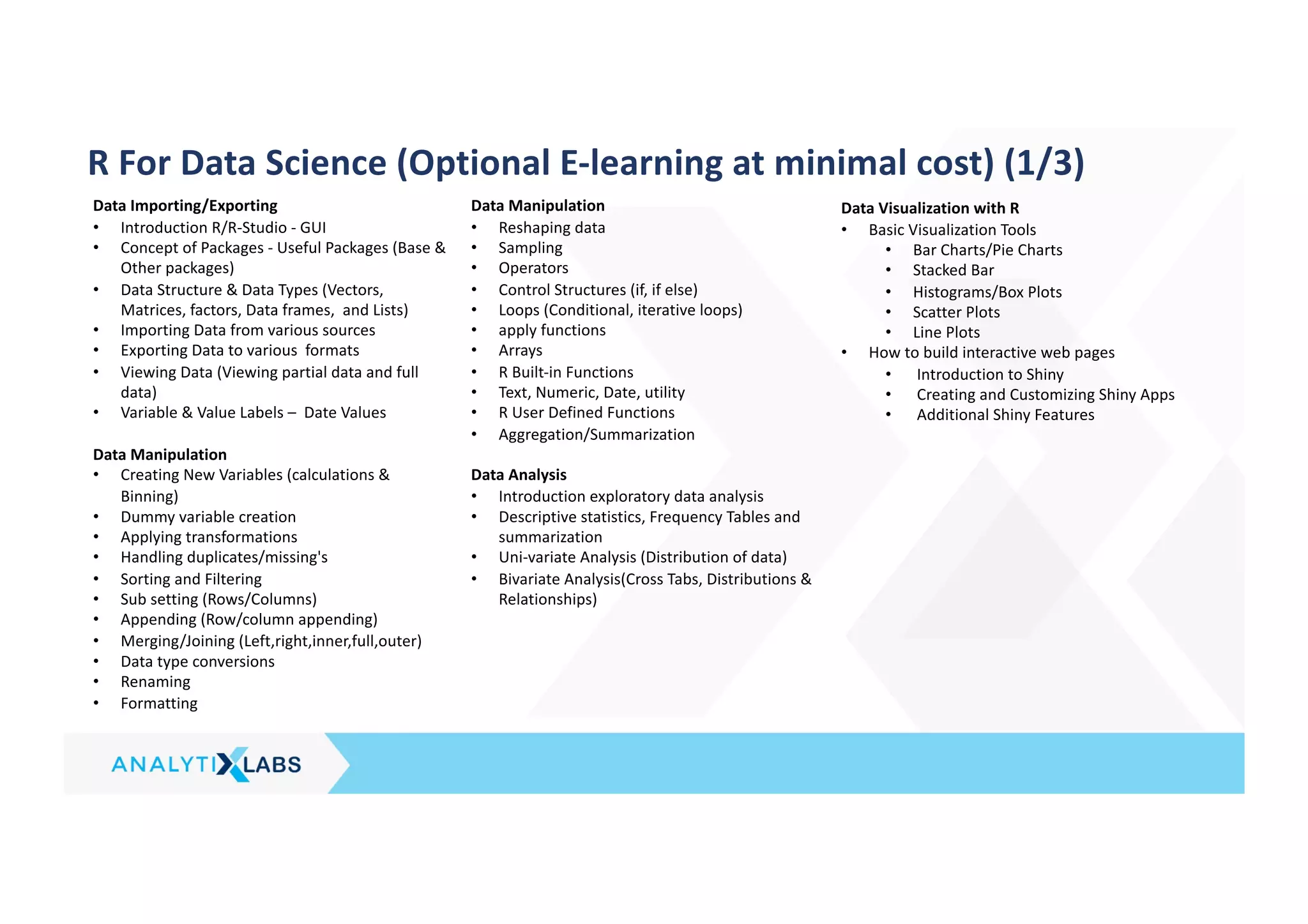
R For Data Science (Optional E-learning at minimal cost) (1/3)
Data Importing/Exporting
• Introduction R/R-Studio - GUI
• Concept of Packages - Useful Packages (Base &
Other packages)
• Data Structure & Data Types (Vectors,
Matrices, factors, Data frames, and Lists)
• Importing Data from various sources
• Exporting Data to various formats
• Viewing Data (Viewing partial data and full
data)
• Variable & Value Labels – Date Values
Data Manipulation
• Creating New Variables (calculations &
Binning)
• Dummy variable creation
• Applying transformations
• Handling duplicates/missing's
• Sorting and Filtering
• Sub setting (Rows/Columns)
• Appending (Row/column appending)
• Merging/Joining (Left,right,inner,full,outer)
• Data type conversions
• Renaming
• Formatting
Data Manipulation
• Reshaping data
• Sampling
• Operators
• Control Structures (if, if else)
• Loops (Conditional, iterative loops)
• apply functions
• Arrays
• R Built-in Functions
• Text, Numeric, Date, utility
• R User Defined Functions
• Aggregation/Summarization
Data Analysis
• Introduction exploratory data analysis
• Descriptive statistics, Frequency Tables and
summarization
• Uni-variate Analysis (Distribution of data)
• Bivariate Analysis(Cross Tabs, Distributions &
Relationships)
Data Visualization with R
• Basic Visualization Tools
• Bar Charts/Pie Charts
• Stacked Bar
• Histograms/Box Plots
• Scatter Plots
• Line Plots
• How to build interactive web pages
• Introduction to Shiny
• Creating and Customizing Shiny Apps
• Additional Shiny Features
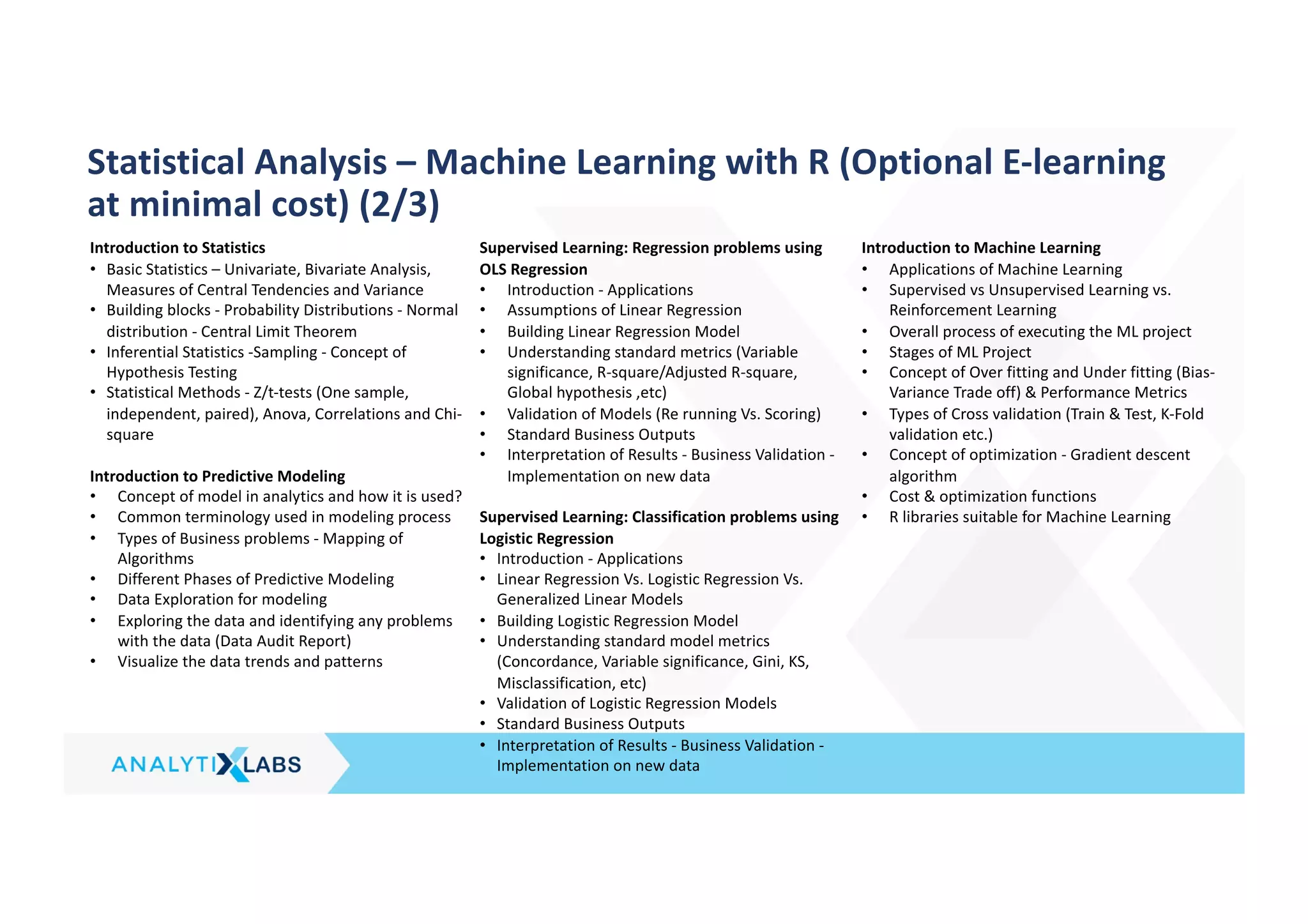
Introduction to Statistics
• Basic Statistics – Univariate, Bivariate Analysis,
Measures of Central Tendencies and Variance
• Building blocks - Probability Distributions - Normal
distribution - Central Limit Theorem
• Inferential Statistics -Sampling - Concept of
Hypothesis Testing
• Statistical Methods - Z/t-tests (One sample,
independent, paired), Anova, Correlations and Chi-
square
Introduction to Predictive Modeling
• Concept of model in analytics and how it is used?
• Common terminology used in modeling process
• Types of Business problems - Mapping of
Algorithms
• Different Phases of Predictive Modeling
• Data Exploration for modeling
• Exploring the data and identifying any problems
with the data (Data Audit Report)
• Visualize the data trends and patterns
Supervised Learning: Regression problems using
OLS Regression
• Introduction - Applications
• Assumptions of Linear Regression
• Building Linear Regression Model
• Understanding standard metrics (Variable
significance, R-square/Adjusted R-square,
Global hypothesis ,etc)
• Validation of Models (Re running Vs. Scoring)
• Standard Business Outputs
• Interpretation of Results - Business Validation -
Implementation on new data
Supervised Learning: Classification problems using
Logistic Regression
• Introduction - Applications
• Linear Regression Vs. Logistic Regression Vs.
Generalized Linear Models
• Building Logistic Regression Model
• Understanding standard model metrics
(Concordance, Variable significance, Gini, KS,
Misclassification, etc)
• Validation of Logistic Regression Models
• Standard Business Outputs
• Interpretation of Results - Business Validation -
Implementation on new data
Introduction to Machine Learning
• Applications of Machine Learning
• Supervised vs Unsupervised Learning vs.
Reinforcement Learning
• Overall process of executing the ML project
• Stages of ML Project
• Concept of Over fitting and Under fitting (Bias-
Variance Trade off) & Performance Metrics
• Types of Cross validation (Train & Test, K-Fold
validation etc.)
• Concept of optimization - Gradient descent
algorithm
• Cost & optimization functions
• R libraries suitable for Machine Learning
Statistical Analysis – Machine Learning with R (Optional E-learning
at minimal cost) (2/3)
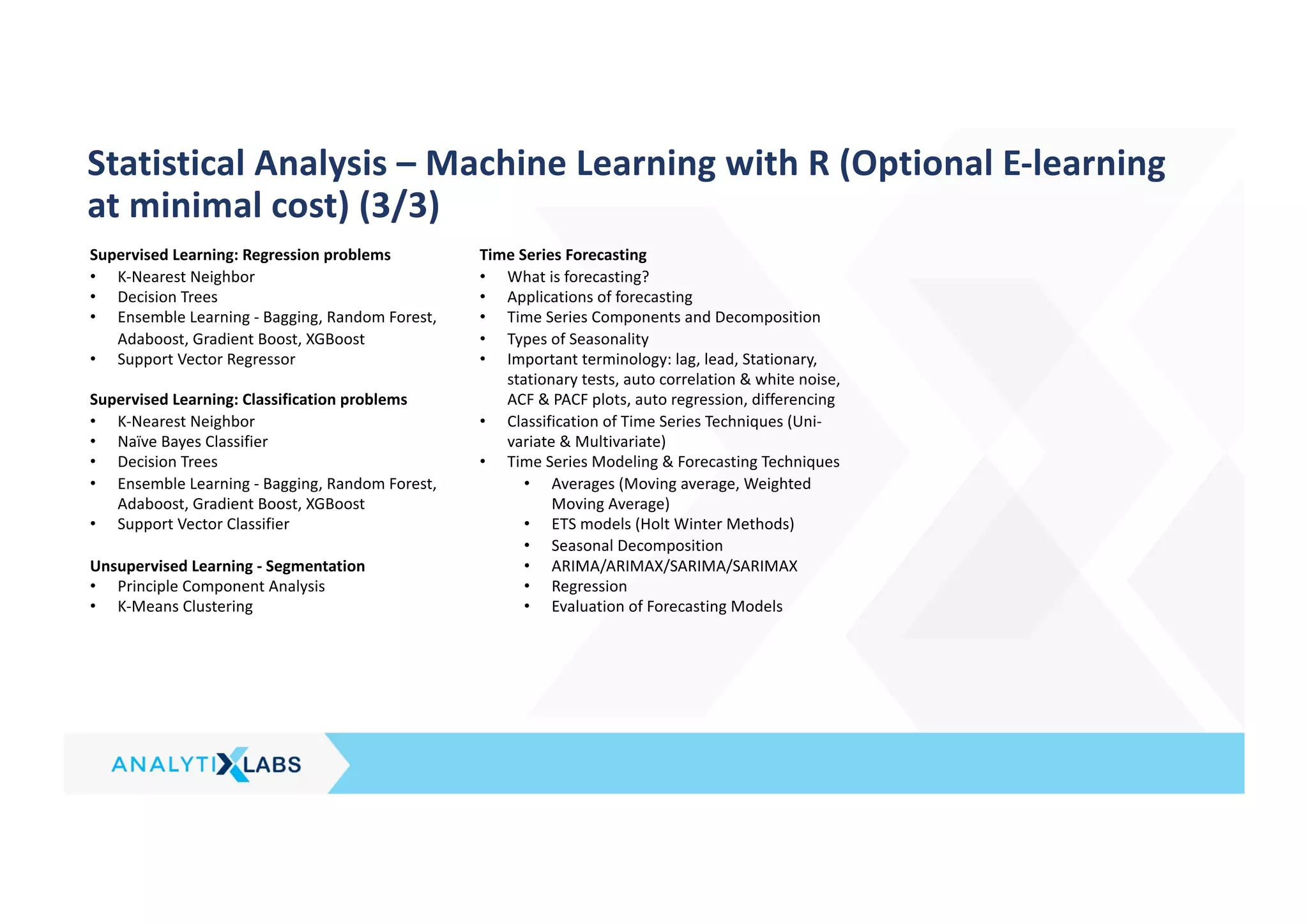
Supervised Learning: Regression problems
• K-Nearest Neighbor
• Decision Trees
• Ensemble Learning - Bagging, Random Forest,
Adaboost, Gradient Boost, XGBoost
• Support Vector Regressor
Supervised Learning: Classification problems
• K-Nearest Neighbor
• Naïve Bayes Classifier
• Decision Trees
• Ensemble Learning - Bagging, Random Forest,
Adaboost, Gradient Boost, XGBoost
• Support Vector Classifier
Unsupervised Learning - Segmentation
• Principle Component Analysis
• K-Means Clustering
Time Series Forecasting
• What is forecasting?
• Applications of forecasting
• Time Series Components and Decomposition
• Types of Seasonality
• Important terminology: lag, lead, Stationary,
stationary tests, auto correlation & white noise,
ACF & PACF plots, auto regression, differencing
• Classification of Time Series Techniques (Uni-
variate & Multivariate)
• Time Series Modeling & Forecasting Techniques
• Averages (Moving average, Weighted
Moving Average)
• ETS models (Holt Winter Methods)
• Seasonal Decomposition
• ARIMA/ARIMAX/SARIMA/SARIMAX
• Regression
• Evaluation of Forecasting Models
Statistical Analysis – Machine Learning with R (Optional E-learning
at minimal cost) (3/3)
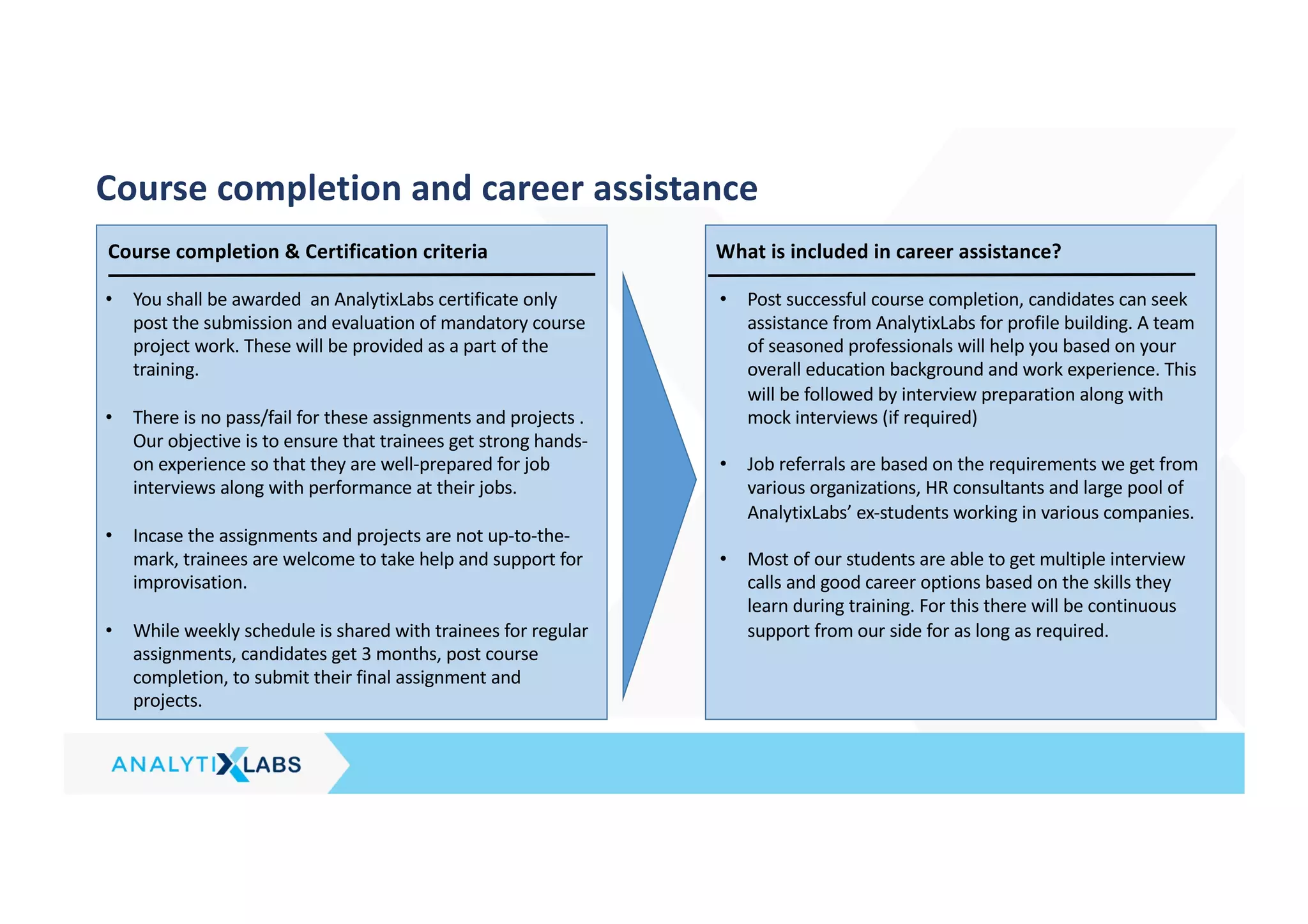
Course completion and career assistance
What is included in career assistance?
• Post successful course completion, candidates can seek
assistance from AnalytixLabs for profile building. A team
of seasoned professionals will help you based on your
overall education background and work experience. This
will be followed by interview preparation along with
mock interviews (if required)
• Job referrals are based on the requirements we get from
various organizations, HR consultants and large pool of
AnalytixLabs’ ex-students working in various companies.
• Most of our students are able to get multiple interview
calls and good career options based on the skills they
learn during training. For this there will be continuous
support from our side for as long as required.
Course completion & Certification criteria
• You shall be awarded an AnalytixLabs certificate only
post the submission and evaluation of mandatory course
project work. These will be provided as a part of the
training.
• There is no pass/fail for these assignments and projects .
Our objective is to ensure that trainees get strong hands-
on experience so that they are well-prepared for job
interviews along with performance at their jobs.
• Incase the assignments and projects are not up-to-the-
mark, trainees are welcome to take help and support for
improvisation.
• While weekly schedule is shared with trainees for regular
assignments, candidates get 3 months, post course
completion, to submit their final assignment and
projects.
Availing additional benefits from NASSCOM - FAQs
Participants will be awarded a joint industry approved certificate, from AnalytixLabs & Future Skills Prime by Nasscom,
on successful completion of the stipulated requirements and will be eligible for a GoI scholarship of INR 8000
1. About PRIME scheme : https://futureskillsprime.in/govt-of-India-incentives
First -of-it’s-kind incentive program exclusively on FutureSkills Prime - YouTube
2. Candidate assessment guide for Mock assessments & SSC assessments:
https://learn.futureskillsprime.in/insights/candidate
3. FAQ’s
FS PRIME incentives: https://learn.futureskillsprime.in/pathways/incentives-on-futureskills-prime
Assessments & Certifications : https://learn.futureskillsprime.in/pathways/general-questions-on-assessments-
certification
4. General Terms & Conditions of GOI scheme : https://futureskillsprime.in/general-terms-and-conditions/2
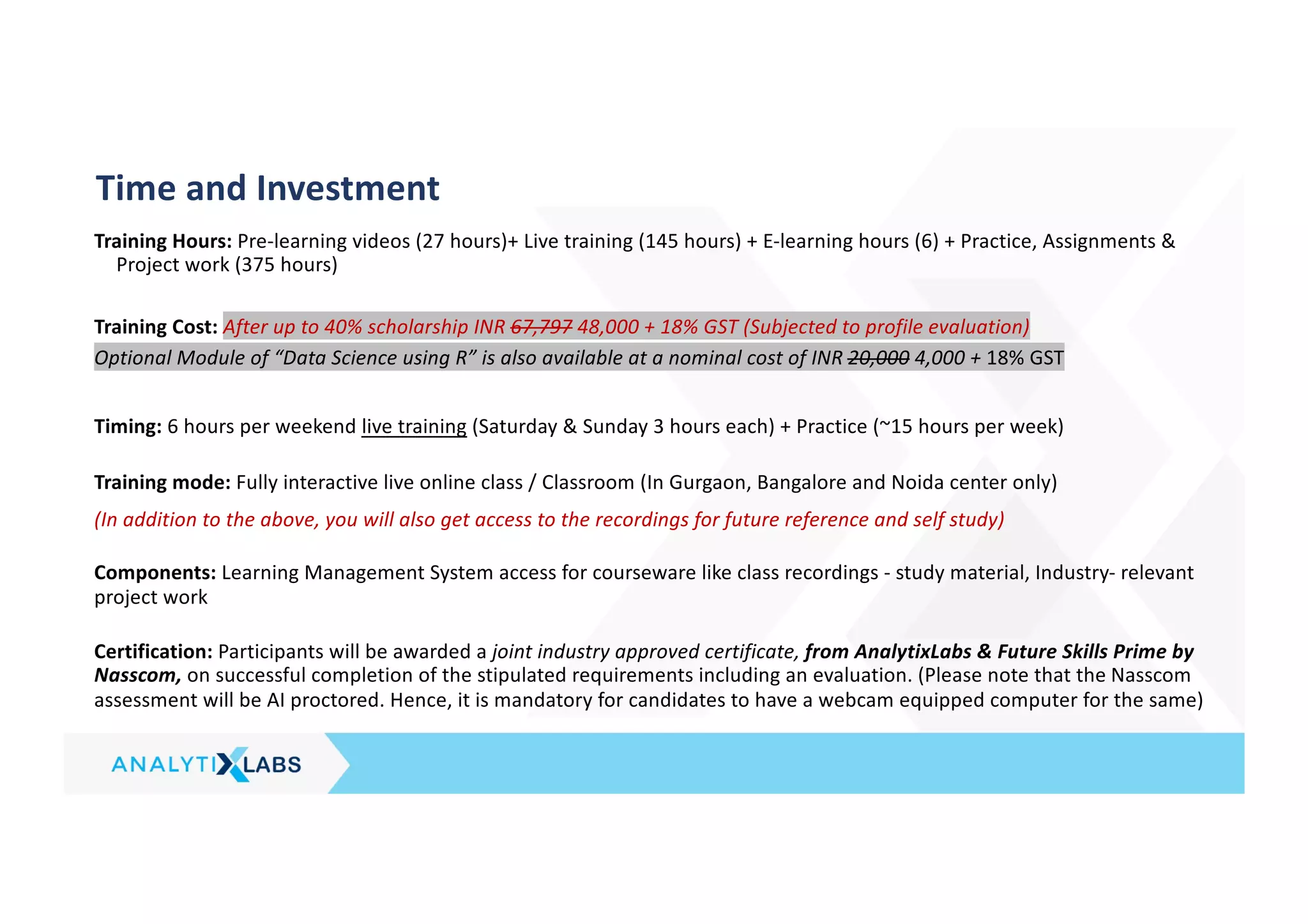
Training Hours: Pre-learning videos (27 hours)+ Live training (145 hours) + E-learning hours (6) + Practice, Assignments &
Project work (375 hours)
Training Cost: After up to 40% scholarship INR 67,797 48,000 + 18% GST (Subjected to profile evaluation)
Optional Module of “Data Science using R” is also available at a nominal cost of INR 20,000 4,000 + 18% GST
Timing: 6 hours per weekend live training (Saturday & Sunday 3 hours each) + Practice (~15 hours per week)
Training mode: Fully interactive live online class / Classroom (In Gurgaon, Bangalore and Noida center only)
(In addition to the above, you will also get access to the recordings for future reference and self study)
Components: Learning Management System access for courseware like class recordings - study material, Industry- relevant
project work
Certification: Participants will be awarded a joint industry approved certificate, from AnalytixLabs & Future Skills Prime by
Nasscom, on successful completion of the stipulated requirements including an evaluation. (Please note that the Nasscom
assessment will be AI proctored. Hence, it is mandatory for candidates to have a webcam equipped computer for the same)
Time and Investment
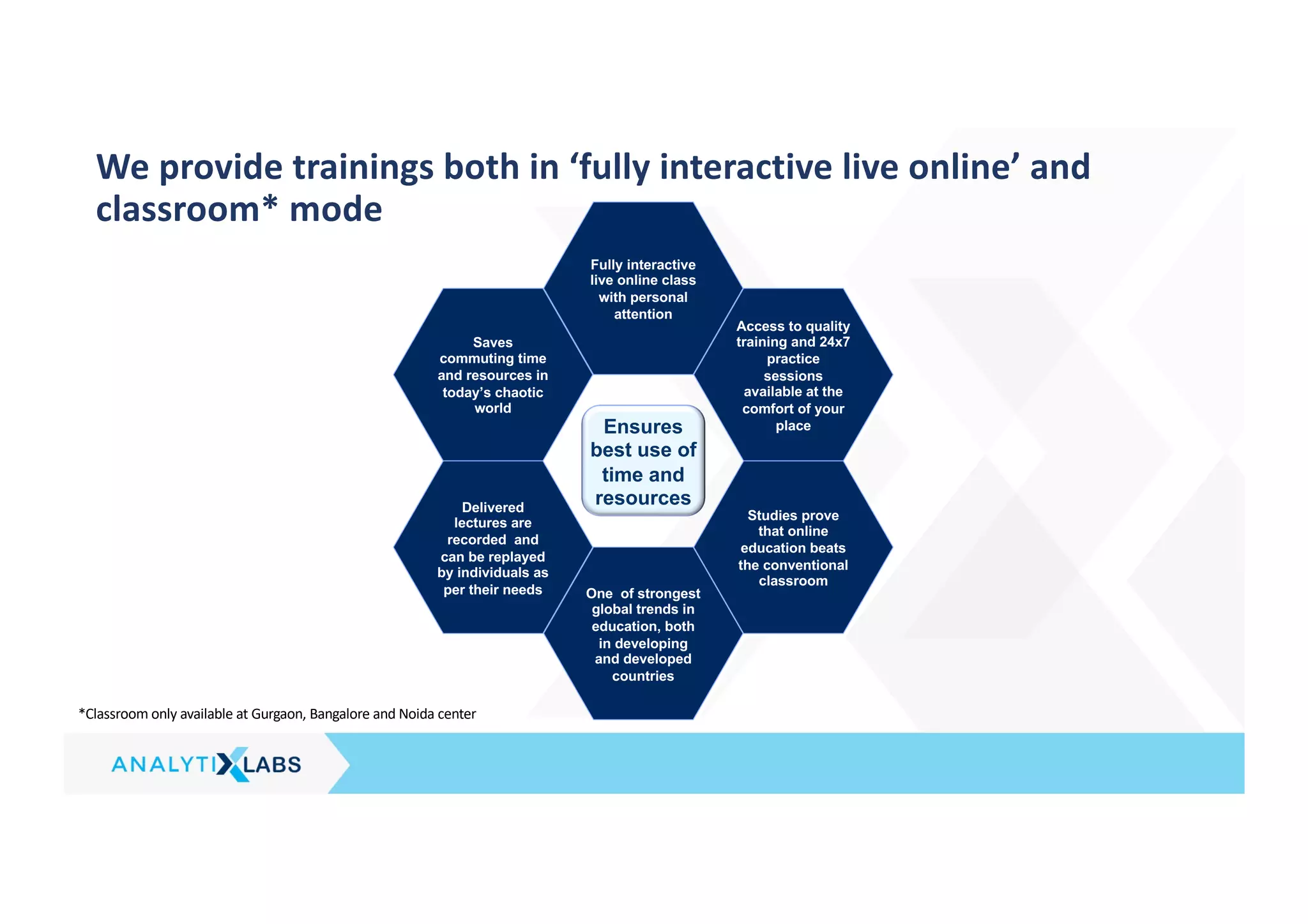
We provide trainings both in ‘fully interactive live online’ and
classroom* mode
*Classroom only available at Gurgaon, Bangalore and Noida center
Saves
commuting time
and resources in
today’s chaotic
world
Delivered
lectures are
recorded and
can be replayed
by individuals as
per their needs One of strongest
global trends in
education, both
in developing
and developed
countries
Fully interactive
live online class
with personal
attention
Access to quality
training and 24x7
practice
sessions
available at the
comfort of your
place
Studies prove
that online
education beats
the conventional
classroom
Ensures
best use of
time and
resources
Contact Us
Visit us on: http://www.analytixlabs.in/
For course registration, please visit: http://www.analytixlabs.co.in/course-registration/
For more information, please contact us: http://www.analytixlabs.co.in/contact-us/
Or email: info@analytixlabs.co.in
Call us we would love to speak with you: (+91) 9555219007
Join us on:
Twitter - http://twitter.com/#!/AnalytixLabs
Facebook - http://www.facebook.com/analytixlabs
LinkedIn - http://www.linkedin.com/in/analytixlabs
Blog - http://www.analytixlabs.co.in/category/blog/
Visit Us
Gurgaon Address:
GF 382, Sector 29,
Adjoining IFFCO Chowk Metro
Station (Gate 2),
Next to Magicpin Office,
Gurgaon,
Haryana- 122001
Bengaluru Address:
Bldg 51/2, First floor 12th Main
Road, Near BDA complex Sector
6, HSR Layout Back Gate of BDA
Complex, Opp A2B (Adayar
Ananda Bhavan), Bengaluru
Karnataka - 560102
Noida Address:
First Floor, A-78,
A Block, Sector 2,
(Adjacent to Sector 15 metro
station)
Noida,
Uttar Pradesh - 201301

AnalytixLabs - Data Science 360 (Nasscom)-1648178720283 (1).pdf

  • 1.
    Data Science 360 JobOriented Certification Program Approved by Industry and Government Learn to Evolve Disclaimer: This material is protected under copyright act AnalytixLabs ©, 2011-2022. Unauthorized use and/ or duplication of this material or any part of this material including data, in any form without explicit and written permission from AnalytixLabs is strictly prohibited. Any violation of this copyright will attract legal actions
  • 2.
    • 80-20 focuson practical & theory • Personal attention and Individual counselling • Industry best practices • World class course structure • Surpasses industry requirements • Cater to Standard certifications • High quality course material and real life case studies • Seasoned analytics professionals • Together we have 50 + years of experience with prestigious firms, like McKinsey, KPMG, Deloitte and AOL • Regular sessions by industry experts • Job-oriented training • Lucrative job prospects in high growth domain • Support for relevant certifications and diplomas • Career counseling and planning • Value for money with high return on investment Approach Content Faculty Bottom line AnalytixLabs is a capability building and training solutions firm led by McKinsey, IIM, ISB and IIT alumni with deep industry experience and a flair for coaching. We are focused at helping our clients develop skills in basic and advanced analytics to enable them to emerge as “Industry Ready” professionals and enhance career opportunities. AnalytixLabs has been also featured as top institutes by prestigious publications like Analytics India Magazine and Higher Education Review, since 2013. About AnalytixLabs
  • 3.
    Candidates trained byus are working in leading companies across industries…
  • 4.
    *Contact us foradditional criteria that needs to be met for availing the certificate and incentives Data Science 360 course approved by NASSCOM, aligned to Industry standards and comes with additional benefits for students • FutureSkills Prime is one of the lighthouse schemes under the Government’s Trillion Dollar Digital Economy initiative. • AnalytixLabs Data Science 360 course is approved by Govt of India under NASSCOM – FutureSkills Prime. • The individual course modules are mapped to NOS (National Occupational Standards) Upon successful completion of course and assessments: 1. AnalytixLabs course completion certificate with job assistance 2. Joint certificate from NASSCOM – FSP and AnalytixLabs 3. Scholarship upto INR 8,000 (which will be directly deposited to the student’s bank account by GoI) * In collaboration with NASSCOM Aligned to Industry Job Standards Additional benefits on Completion
  • 5.
    Program Objective –Data Science 360 1. Building blocks Fundamentals of Analytics (for Non-programmers) 10 Pre Learning hours 2. Data Visualization & Analytics Introduction to Analytics & Data Science Excel Tableau SQL 36 live training hours 3. Python for Data Science Python Fundamentals Data Visualization with Python Data Analysis with Python 18 Pre-learning hours + 42 live training hours 5. Text Mining & NLP Text Mining (Text Extraction, pre- processing, vectorization, EDA, Sentiment analysis, text classification, topic modeling, clustering etc…) 12 live training hours 4. Predictive Modeling & Machine Learning Traditional Predictive Modeling Machine Learning (Supervised, Unsupervised, intro to Re- enforcement Learning) 36 live training hours 24 Assignments and Capstone Projects included On average 10 hours of self-study per week (practice, assignments, case studies, capstone project work) *Pre-learning content refers to basic foundation concepts and candidates are required to go through these using e-learning modules in self-paced mode 7. ML-Ops & Model deployment Introduction to ML-Ops ML model deployment - Inference 6 e-learning hours 8. Industry & Functional Sessions 12 training hours 6. AI & Cloud Computing Introduction to AI & Cloud Computing Artificial Neural Network 6 live training hours Optional Modules of “Data Science using R” & “Data Visualization using Power BI” are also available at a nominal cost
  • 6.
    1. Building Blocksfor Data Visualization & Analytics (Pre - Learning) Introduction to Bridge Course & Analytics Software’s Basic Excel • Excel Environment • Key Terminologies • Short Cuts • Key Functionalities • Copy-paste-paste special • Formatting & conditional Formatting • Basic Excel Functions - Types of Functions • Relational operators • Data Sorting, Filtering and Data Validation • Understanding of Name Ranges • Pivot tables - Charts • Basics of charts RDBMS & SQL (Basics) • Basic RDBMS Concepts • Introduction to Relational Database management system. Why SQL? • A glance at the tool and its advantages and disadvantages • Understanding Schema, ERDs and Metadata • Introduction to MS SQL Server • What is SQL – A Quick Introduction • Installing MS SQL Server for windows • Introduction to SQL Server Management Studio • Understanding basic database concepts • Getting started Introduction to Analytics & Data Science • What is analytics & Data Science? • Business Analytics vs. Data Analytics vs. Data Science • Common Terms in Analytics • Analytics vs. Data warehousing, OLAP, MIS Reporting • Types of data (Structured vs. Unstructured vs. Semi Structured) • Relevance of Analytics in industry and need of the hour • Critical success drivers • Overview of analytics tools & their popularity • Analytics Methodology & problem solving framework • Stages of Analytics
  • 7.
    2. Data Visualization& Analytics (Excel) (1/3) Quick Recap of Basics of Excel Data manipulation using functions • Descriptive functions • Logical functions: IF, and, or, not • Date and Time functions • Text functions • Array functions • Use and application of lookup functions • Limitations of lookup functions • Using Index, Match, Offset, reverse vlookup Data analysis and reporting • Data Analysis using Pivot Tables - use of row and column shelf, values and filters • Difference between data layering and cross tabulation, summary reports, advantages and limitations • Change aggregation types and summarization • Creating groups and bins in pivot data • Concept of calculated fields, usage and limitations • Changing report layouts - Outline, compact and tabular forms • Show and hide grand totals and subtotals • Creating summary reports using pivot tables Data Visualization in Excel • Overview of chart types – column/bar charts, line/area , pie, doughnut charts, scatter plots • How to select right chart for your data • Creating and customizing advance charts - thermometer charts, waterfall charts, population pyramids Overview of Dashboards • What is dashboard & Excel dashboard • Adding icons and images to dashboards • Making dashboards dynamic Create dashboards in Excel - Using Pivot controls • Concept of pivot cache and its use in creating interactive dashboards in excel • Pivot table design elements - concept of slicers and timelines • Designing sample dashboard using Pivot Controls • Design principles for including charts in dashboards - do's and dont's Business Dashboard Creation • Management Dashboard for Sales & Services • Best practices - Tips and Tricks to enhance dashboard designing
  • 8.
    2. Data Visualization& Analytics (SQL) (2/3) Quick Recap of RDBMS & Basic SQL Data based objects creation (DDL Commands) • Creating databases and tables. Understanding data types • Inserting values into the table • Altering table properties • Introduction to Keys and constraints • Creating, Modifying & Deleting Tables • Create Table & Create Index statements • Drop & Truncate statements – Uses & Differences • DDL Statements with constraints • Import and Export wizard to get the data in SQL server from excel files or delimited files Data manipulation (DML Commands) • Data Manipulation statements • Insert, Update & Delete statements • Select statement – Sub setting, Filters, Sorting. Removing Duplicates, grouping and aggregations etc • Operators, predicates and built in functions(Top, distinct, Limit) • Where, Group By, Order by & Having clauses • SQL Functions – Number, Text, Date, etc • SQL Keywords – Top, Distinct, Null, etc • SQL Operators - Relational (single valued and multi valued), Logical (and, or, not), Use of wildcard operators and wildcard characters, etc Accessing data from Multiple Tables using SELECT • Append and Joins • Union and Union All – Use & constraints • Intersect and Except statements • Table Joins - inner join, left join, right join, full join • Cross joins/cartisian products, self joins, natural joins etc • Inline views and sub-queries & it's types • Optimizing your work • Update operations with and without joins Advanced SQL • Creating table copy and database copy • Views • Transactions • Stored Procedures in SQL • Crud operations using stored procedures • Window functions in SQL • Miscellaneous Topics: Rollup and cube Apply learning's on Business Case study
  • 9.
    2. Data Visualization& Analytics (Tableau) (3/3) Getting Started • What is Tableau? • Tableau product suite • How Does Tableau Work? • Tableau Architecture • Connecting to Data & data source concepts • Understanding the Tableau workspace • Dimensions and Measures • Data Types & Default Properties • Tour of Shelves & Marks Card • Using Show Me • Saving and Sharing your work-overview Data handling & summaries • Date Aggregations and Date parts • Cross tab & Tabular charts • Totals & Subtotals • Bar Charts & Stacked Bars • Line Graphs with Date & Without Date • Tree maps/Scatter Plots • Individual Axes, Blended Axes, Dual Axes & Combination chart/Edit axis • Parts of Views • Sorting • Trend/Reference Lines/Forecasting • Filters/Context filters Data handling & summaries • Sets (In/Out Sets/Combined Sets • Grouping/Bins/Histograms • Drilling up/down – drill through • Hierarchies • View data • Actions (across sheets) Building Advanced Reports/ Maps • Explain latitude and longitude • Default location/Edit locations • Building geographical maps • Using Map layers Calculated Fields • Aggregate vs. Disaggregate data • Explain - #Number of Rows • Basic Functions (String/Date/Numbers etc) • Usage of Logical conditions Table calculations • Explain scope and direction • Percent of Total, Running / Cumulative calculations • Introduction to LOD (Level of Detail) Expressions • User applications of Table calculations Parameters • Using Parameters in calculated fields • Bins/Reference Lines • Filters/Sets • Display Options (Dynamic Dimension/Measure Selection) • Create What-If/ Scenario analysis Building Interactive Dashboards • Combining multiple visualizations into a dashboard (overview) • Making your worksheet interactive by using actions • Filter/URL/Highlight • Complete Interactive Dashboard for Sales & Services Building Stories • Story Points • Options in Formatting your Visualization • Working with Labels and Annotations • Effective Use of Titles and Captions Working with Data • Multiple Table Join • Data Blending • Difference between joining and blending data, and when we should do each • Toggle between to Direct Connection and Extracts Sharing work with others • Sharing Workbooks • Publish to Reader/PDF • Publish to Tableau Server and sharing on the web
  • 10.
    3. Building Blocksfor Python and ML (Pre-Learning) Programming Basics • Introduction to programming • Computer programs and business use • Database and its requirement in the software applications. • What id an IDE – Integrated development environment. • Different programming languages, High level vs Low level languages, • Language translators – Complier and Interpreter, Why syntax rules? • Programming basics: variables, INC rules: Identifier Naming Conventions, Datatypes, Operators. • Control flow statements: Conditional statements and Loops. • Functions and UDFS. • Logic building and Pseudo codes. Introduction to Basic Statistics • Introduction to Statistics • Measures of central tendencies • Measures of variance • Measures of frequency • Measures of Rank • Basics of Probability, distributions • Conditional Probability (Bayes Theorem) Introduction to Mathematical foundations • Sets & Functions • Introduction to Linear Algebra • Matrices Operations • Introduction to Calculus • Derivatives & Integration • Maxima, minima • Area under the curve
  • 11.
    3. Python ForData Science (1/2) Python Essentials (Core) • Overview of Python- Starting with Python • Why Python for data science? • Anaconda vs. python • Introduction to installation of Python • Introduction to Python IDE's(Jupyter,/Ipython) • Concept of Packages - Important packages • NumPy, SciPy, scikit-learn, Pandas, Matplotlib, etc • Installing & loading Packages & Name Spaces • Data Types & Data objects/structures (strings, Tuples, Lists, Dictionaries) • List and Dictionary Comprehensions • Variable & Value Labels – Date & Time Values • Basic Operations – Mathematical/string/date • Control flow & conditional statements • Debugging & Code profiling • Python Built-in Functions (Text, numeric, date, utility functions) • User defined functions – Lambda functions • Concept of apply functions • Python – Objects – OOPs concepts • How to create & call class and modules? Operations with NumPy (Numerical Python) • What is NumPy? • Overview of functions & methods in NumPy • Data structures in NumPy • Creating arrays and initializing • Reading arrays from files • Special initializing functions • Slicing and indexing • Reshaping arrays • Combining arrays • NumPy Maths Overview of Pandas • What is pandas, its functions & methods • Pandas Data Structures (Series & Data Frames) • Creating Data Structures (Data import – reading into pandas) Cleansing Data with Python • Understand the data • Sub Setting / Filtering / Slicing Data • Using [] brackets • Using indexing or referring with column names/rows • Using functions • Dropping rows & columns • Mutation of table (Adding/deleting columns) • Binning data (Binning numerical variables in to categorical variables) • Renaming columns or rows • Sorting (by data/values, index) • By one column or multiple columns • Ascending or Descending • Type conversions • Setting index • Handling duplicates /missing/Outliers • Creating dummies from categorical data (using get_dummies()) • Applying functions to all the variables in a data frame (broadcasting) • Data manipulation tools(Operators, Functions, Packages, control structures, Loops, arrays etc.) Data Analysis using Python • Exploratory data analysis • Descriptive statistics, Frequency Tables and summarization • Uni-variate Analysis (Distribution of data & Graphical Analysis) • Bi-Variate Analysis(Cross Tabs, Distributions & Relationships, Graphical Analysis)
  • 12.
    3. Python ForData Science (2/2) Data Visualization with Python • Introduction to Data Visualization • Introduction to Matplotlib • Basic Plotting with Matplotlib • Line Plots Basic Visualization Tools • Area Plots • Histograms/Density plots • Bar Charts/Stacked charts • Pie Charts • Box Plots • Scatter Plots • Sub Plots Statistical Methods & Hypothesis Testing • Descriptive vs. Inferential Statistics • What is probability distribution? • Important distributions (discrete & continuous distributions) • Deep dive of normal distributions and properties • Concept of sampling & types of sampling • Concept of standard error and central limit theorem • Hypothesis Testing & Applications • Statistical Methods - Z/t-tests (One sample, independent, paired), ANOVA, Correlation and Chi- square
  • 13.
    4. Predictive Modeling& Machine Learning Introduction to Predictive Modeling • Concept of model in analytics and how it is used? • Common terminology used in modeling process • Types of Business problems - Mapping of Algorithms • Different Phases of Predictive Modeling • Data Exploration for modeling • Exploring the data and identifying any problems with the data (Data Audit Report) • Identify missing/Outliers in the data • Visualize the data trends and patterns Introduction to Machine Learning • Applications of Machine Learning • Supervised vs Unsupervised Learning vs. Reinforcement Learning • Overall process of executing the ML project • Stages of ML Project • Concept of Over fitting and Under fitting (Bias- Variance Trade off) & Performance Metrics • Concept of feature engineering • Regularization (LASSO, Elastic net and Ridge) • Types of Cross validation(Train & Test, K-Fold validation etc.) • Concept of optimization - Gradient descent algorithm • Cost & optimization functions • Python libraries suitable for Machine Learning Supervised Learning: Regression problems • Linear Regression • Non-linear Regression • K-Nearest Neighbor • Decision Trees • Ensemble Learning - Bagging, Random Forest, Adaboost, Gradient Boost, XGBoost • Support Vector Regressor Supervised Learning: Classification problems • Logistic Regression • K-Nearest Neighbor • Naïve Bayes Classifier • Decision Trees • Ensemble Learning - Bagging, Random Forest, Adaboost, Gradient Boost, XGBoost • Support Vector Classifier Unsupervised Learning • Principle Component Analysis • K-Means Clustering • Density-Based Clustering Recommender Systems • Market Basket Analysis (MBA) • Content-based recommender systems • Collaborative Filtering Time Series Forecasting • What is forecasting? • Applications of forecasting • Time Series Components and Decomposition • Types of Seasonality • Important terminology: lag, lead, Stationary, stationary tests, auto correlation & white noise, ACF & PACF plots, auto regression, differencing • Classification of Time Series Techniques (Uni-variate & Multivariate) • Time Series Modeling & Forecasting Techniques • Averages (Moving average, Weighted Moving Average) • ETS models (Holt Winter Methods) • Seasonal Decomposition • ARIMA/ARIMAX/SARIMA/SARIMAX • Regression • Evaluation of Forecasting Models Evaluate risk of deploying algorithmic models Evaluate business performance of algorithmic models
  • 14.
    5. Text Miningusing NLP Introduction to Text Mining • Text Mining - characteristics, trends • Text Processing using Base Python & Pandas, Regular Expressions • Text processing using string functions & methods • Understanding regular expressions • Identifying patterns in the text using regular expressions Text Processing with modules like NLTK, sklearn • Getting Started with NLTK • Introduction to NLP & NLTK • Introduction to NLTK Modules (corpus, tokenize, Stem, collocations, tag, classify, cluster, tbl, chunk, Parse, ccg, sem, inference, metrics, app, chat, toolbox etc) Initial data processing and simple statistical tools • Reading data from file folder/from text file, from the Internet & Web scrapping, Data Parsing • Cleaning and normalization of data • Sentence Tokenize and Word Tokenize, Removing insignificant words(“stop words”), Removing special symbols, removing bullet points and digits, changing letters to lowercase, stemming /lemmatization /chunking • Creating Term-Document matrix • Tagging text with parts of speech • Word Sense Disambiguation • Finding associations • Measurement of similarity between documents and terms • Visualization of term significance in the form of word clouds Advanced data processing and visualization • Vectorization (Count, TF-IDF, Word Embedding's) • Sentiment analysis (vocabulary approach, based on Bayesian probability methods) • Name entity recognition (NER) • Methods of data visualization • word length counts plot • word frequency plots • word clouds • correlation plots • letter frequency plot • Heat map • Grouping texts using different methods • Language Models and n-grams -- Statistical Models of Unseen Data (Smoothing) Text Mining – Predictive Modeling • Semantic similarity between texts • Text Segmentation • Topic Mining (LDA) • Text Classification(spam detection, sentiment analysis, Intent Analysis)
  • 15.
    6. Introduction toAI & DL & Cloud Computing Introduction to Artificial Intelligence (AI) • Modern era of AI • Role of Machine learning & Deep Learning in AI • Hardware for AI (CPU vs. GPU vs. FPGA) • Software Frameworks for AI & Deep Learning • Key Industry applications of AI Introduction to Deep Learning • What are the Limitations of Machine Learning? • What is Deep Learning? • Advantage of Deep Learning over Machine learning • Reasons to go for Deep Learning • Real-Life use cases of Deep Learning • Overview of important python packages for Deep Learning Artificial Neural Network • Overview of Neural Networks • Activation Functions, hidden layers, hidden units • Illustrate & Training a Perceptron • Important Parameters of Perceptron • Understand limitations of A Single Layer Perceptron • Illustrate Multi-Layer Perceptron • Understand Backpropagation – Using Example • Implementation of ANN in Python- Keras Introduction to Google Colab/Kaggle workbooks Introduction to Cloud Computing • What is Cloud Computing? Why it matters? • Traditional IT Infrastructure vs. Cloud Infrastructure • Cloud Companies (Microsoft Azure, GCP, AWS ) & their Cloud Services (Compute, storage, networking, apps, cognitive etc.) • Use Cases of Cloud computing • Over view of Cloud Segments: IaaS, PaaS, SaaS • Overview of Cloud Deployment Models • Overview of Cloud Security • AWS vs. Azure vs. GCP
  • 16.
    7. Introduction toML-Ops & Model Deployment (self-paced) Introduction to MLOps - What is MLOps - MLOps vs. DevOps vs. Data Engineering - Why MLOps is important? - ML Engineering Pipeline - How to implement MLOps? - Understand end to end MLOps solution Deployment of ML Model in the cloud - What is model deployment? - Ways of deployment of models - Introduction to Flask - How to create simple app? - Deployment of ML model in the cloud
  • 17.
    8. Industrial &Functional Sessions (Domain Understanding) Business problem solving • Introduction to Business requirement understanding • BRD vs. FRD • Creating analytics project documentation • Creating visualizations based on the requirement • How to define KPI’s & understand design elements? • Define business outcomes and create visualizations from results of the analysi • How to prepare for client discussions? • Introduction to Analytics Project Management Introduction to Industry & Functional Sessions • Understand to Data Sources for Various Industries • Over view of different industries & applications • Retail/E-Commerce • Banking & Financial Services • Telecom & Networking • Digital & Social Media • Travel, Transportation and Hospitality • Utilities • Manufacturing & FMCG Marketing Analytics • Introduction to Marketing Function • Marketing Research - Analytics • Customer Analytics • Campaign Analytics • Pricing Analytics • Marketing Return on Investment (MROI) • Market Mix Models • Applications in across industries Risk Analytics • Introduction to Risk Function • Enterprise Risk Function • Credit Scoring (Application & Behavioral) • Fraud Analytics • Applications in across industries Operation Analytics • Overview of Operation Analytics • Applications Analytics in different functions • Service Operations • Manufacturing • Logistics • Business Support Functions (HR Analytics) • Inventory Management • Applications in across industries Digital Analytics(Web Analytics) Pre-requisite: Completion of assignments and projects of earlier modules within this course
  • 18.
    R For DataScience (Optional E-learning at minimal cost) (1/3) Data Importing/Exporting • Introduction R/R-Studio - GUI • Concept of Packages - Useful Packages (Base & Other packages) • Data Structure & Data Types (Vectors, Matrices, factors, Data frames, and Lists) • Importing Data from various sources • Exporting Data to various formats • Viewing Data (Viewing partial data and full data) • Variable & Value Labels – Date Values Data Manipulation • Creating New Variables (calculations & Binning) • Dummy variable creation • Applying transformations • Handling duplicates/missing's • Sorting and Filtering • Sub setting (Rows/Columns) • Appending (Row/column appending) • Merging/Joining (Left,right,inner,full,outer) • Data type conversions • Renaming • Formatting Data Manipulation • Reshaping data • Sampling • Operators • Control Structures (if, if else) • Loops (Conditional, iterative loops) • apply functions • Arrays • R Built-in Functions • Text, Numeric, Date, utility • R User Defined Functions • Aggregation/Summarization Data Analysis • Introduction exploratory data analysis • Descriptive statistics, Frequency Tables and summarization • Uni-variate Analysis (Distribution of data) • Bivariate Analysis(Cross Tabs, Distributions & Relationships) Data Visualization with R • Basic Visualization Tools • Bar Charts/Pie Charts • Stacked Bar • Histograms/Box Plots • Scatter Plots • Line Plots • How to build interactive web pages • Introduction to Shiny • Creating and Customizing Shiny Apps • Additional Shiny Features
  • 19.
    Introduction to Statistics •Basic Statistics – Univariate, Bivariate Analysis, Measures of Central Tendencies and Variance • Building blocks - Probability Distributions - Normal distribution - Central Limit Theorem • Inferential Statistics -Sampling - Concept of Hypothesis Testing • Statistical Methods - Z/t-tests (One sample, independent, paired), Anova, Correlations and Chi- square Introduction to Predictive Modeling • Concept of model in analytics and how it is used? • Common terminology used in modeling process • Types of Business problems - Mapping of Algorithms • Different Phases of Predictive Modeling • Data Exploration for modeling • Exploring the data and identifying any problems with the data (Data Audit Report) • Visualize the data trends and patterns Supervised Learning: Regression problems using OLS Regression • Introduction - Applications • Assumptions of Linear Regression • Building Linear Regression Model • Understanding standard metrics (Variable significance, R-square/Adjusted R-square, Global hypothesis ,etc) • Validation of Models (Re running Vs. Scoring) • Standard Business Outputs • Interpretation of Results - Business Validation - Implementation on new data Supervised Learning: Classification problems using Logistic Regression • Introduction - Applications • Linear Regression Vs. Logistic Regression Vs. Generalized Linear Models • Building Logistic Regression Model • Understanding standard model metrics (Concordance, Variable significance, Gini, KS, Misclassification, etc) • Validation of Logistic Regression Models • Standard Business Outputs • Interpretation of Results - Business Validation - Implementation on new data Introduction to Machine Learning • Applications of Machine Learning • Supervised vs Unsupervised Learning vs. Reinforcement Learning • Overall process of executing the ML project • Stages of ML Project • Concept of Over fitting and Under fitting (Bias- Variance Trade off) & Performance Metrics • Types of Cross validation (Train & Test, K-Fold validation etc.) • Concept of optimization - Gradient descent algorithm • Cost & optimization functions • R libraries suitable for Machine Learning Statistical Analysis – Machine Learning with R (Optional E-learning at minimal cost) (2/3)
  • 20.
    Supervised Learning: Regressionproblems • K-Nearest Neighbor • Decision Trees • Ensemble Learning - Bagging, Random Forest, Adaboost, Gradient Boost, XGBoost • Support Vector Regressor Supervised Learning: Classification problems • K-Nearest Neighbor • Naïve Bayes Classifier • Decision Trees • Ensemble Learning - Bagging, Random Forest, Adaboost, Gradient Boost, XGBoost • Support Vector Classifier Unsupervised Learning - Segmentation • Principle Component Analysis • K-Means Clustering Time Series Forecasting • What is forecasting? • Applications of forecasting • Time Series Components and Decomposition • Types of Seasonality • Important terminology: lag, lead, Stationary, stationary tests, auto correlation & white noise, ACF & PACF plots, auto regression, differencing • Classification of Time Series Techniques (Uni- variate & Multivariate) • Time Series Modeling & Forecasting Techniques • Averages (Moving average, Weighted Moving Average) • ETS models (Holt Winter Methods) • Seasonal Decomposition • ARIMA/ARIMAX/SARIMA/SARIMAX • Regression • Evaluation of Forecasting Models Statistical Analysis – Machine Learning with R (Optional E-learning at minimal cost) (3/3)
  • 21.
    Course completion andcareer assistance What is included in career assistance? • Post successful course completion, candidates can seek assistance from AnalytixLabs for profile building. A team of seasoned professionals will help you based on your overall education background and work experience. This will be followed by interview preparation along with mock interviews (if required) • Job referrals are based on the requirements we get from various organizations, HR consultants and large pool of AnalytixLabs’ ex-students working in various companies. • Most of our students are able to get multiple interview calls and good career options based on the skills they learn during training. For this there will be continuous support from our side for as long as required. Course completion & Certification criteria • You shall be awarded an AnalytixLabs certificate only post the submission and evaluation of mandatory course project work. These will be provided as a part of the training. • There is no pass/fail for these assignments and projects . Our objective is to ensure that trainees get strong hands- on experience so that they are well-prepared for job interviews along with performance at their jobs. • Incase the assignments and projects are not up-to-the- mark, trainees are welcome to take help and support for improvisation. • While weekly schedule is shared with trainees for regular assignments, candidates get 3 months, post course completion, to submit their final assignment and projects.
  • 22.
    Availing additional benefitsfrom NASSCOM - FAQs Participants will be awarded a joint industry approved certificate, from AnalytixLabs & Future Skills Prime by Nasscom, on successful completion of the stipulated requirements and will be eligible for a GoI scholarship of INR 8000 1. About PRIME scheme : https://futureskillsprime.in/govt-of-India-incentives First -of-it’s-kind incentive program exclusively on FutureSkills Prime - YouTube 2. Candidate assessment guide for Mock assessments & SSC assessments: https://learn.futureskillsprime.in/insights/candidate 3. FAQ’s FS PRIME incentives: https://learn.futureskillsprime.in/pathways/incentives-on-futureskills-prime Assessments & Certifications : https://learn.futureskillsprime.in/pathways/general-questions-on-assessments- certification 4. General Terms & Conditions of GOI scheme : https://futureskillsprime.in/general-terms-and-conditions/2
  • 23.
    Training Hours: Pre-learningvideos (27 hours)+ Live training (145 hours) + E-learning hours (6) + Practice, Assignments & Project work (375 hours) Training Cost: After up to 40% scholarship INR 67,797 48,000 + 18% GST (Subjected to profile evaluation) Optional Module of “Data Science using R” is also available at a nominal cost of INR 20,000 4,000 + 18% GST Timing: 6 hours per weekend live training (Saturday & Sunday 3 hours each) + Practice (~15 hours per week) Training mode: Fully interactive live online class / Classroom (In Gurgaon, Bangalore and Noida center only) (In addition to the above, you will also get access to the recordings for future reference and self study) Components: Learning Management System access for courseware like class recordings - study material, Industry- relevant project work Certification: Participants will be awarded a joint industry approved certificate, from AnalytixLabs & Future Skills Prime by Nasscom, on successful completion of the stipulated requirements including an evaluation. (Please note that the Nasscom assessment will be AI proctored. Hence, it is mandatory for candidates to have a webcam equipped computer for the same) Time and Investment
  • 24.
    We provide trainingsboth in ‘fully interactive live online’ and classroom* mode *Classroom only available at Gurgaon, Bangalore and Noida center Saves commuting time and resources in today’s chaotic world Delivered lectures are recorded and can be replayed by individuals as per their needs One of strongest global trends in education, both in developing and developed countries Fully interactive live online class with personal attention Access to quality training and 24x7 practice sessions available at the comfort of your place Studies prove that online education beats the conventional classroom Ensures best use of time and resources
  • 25.
    Contact Us Visit uson: http://www.analytixlabs.in/ For course registration, please visit: http://www.analytixlabs.co.in/course-registration/ For more information, please contact us: http://www.analytixlabs.co.in/contact-us/ Or email: info@analytixlabs.co.in Call us we would love to speak with you: (+91) 9555219007 Join us on: Twitter - http://twitter.com/#!/AnalytixLabs Facebook - http://www.facebook.com/analytixlabs LinkedIn - http://www.linkedin.com/in/analytixlabs Blog - http://www.analytixlabs.co.in/category/blog/
  • 26.
    Visit Us Gurgaon Address: GF382, Sector 29, Adjoining IFFCO Chowk Metro Station (Gate 2), Next to Magicpin Office, Gurgaon, Haryana- 122001 Bengaluru Address: Bldg 51/2, First floor 12th Main Road, Near BDA complex Sector 6, HSR Layout Back Gate of BDA Complex, Opp A2B (Adayar Ananda Bhavan), Bengaluru Karnataka - 560102 Noida Address: First Floor, A-78, A Block, Sector 2, (Adjacent to Sector 15 metro station) Noida, Uttar Pradesh - 201301