Build tons of multi-device JavaScript applications 
... and display them on any screen! (part 2) 
(black) Magic Sizing, Positioning, Illustrating 
by Nicolas Guerrier & Ivan Berdinsky 
UA Web Challenge Kyiv 2014 – Nov 23rd 2014
JAVASCRIPT – TEMPLATING
MUSTACHE.JS 
LOGIC-LESS TEMPLATING 
Mustache is a logic-less templating 
system with many implementations 
available : C++, PHP, Ruby, Java… 
...and Javascript
MUSTACHE.JS 
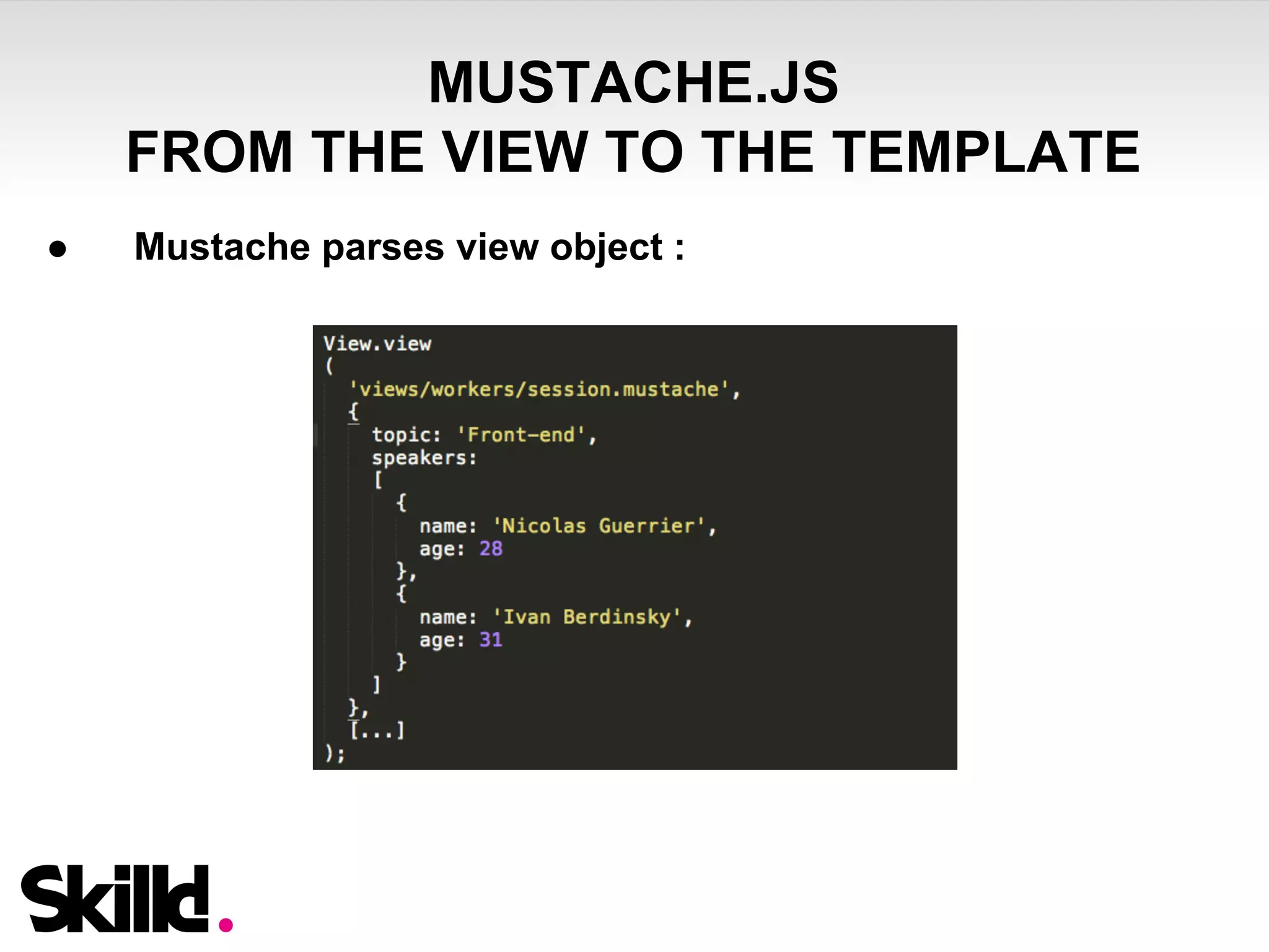
FROM THE VIEW TO THE TEMPLATE 
● Mustache parses view object :
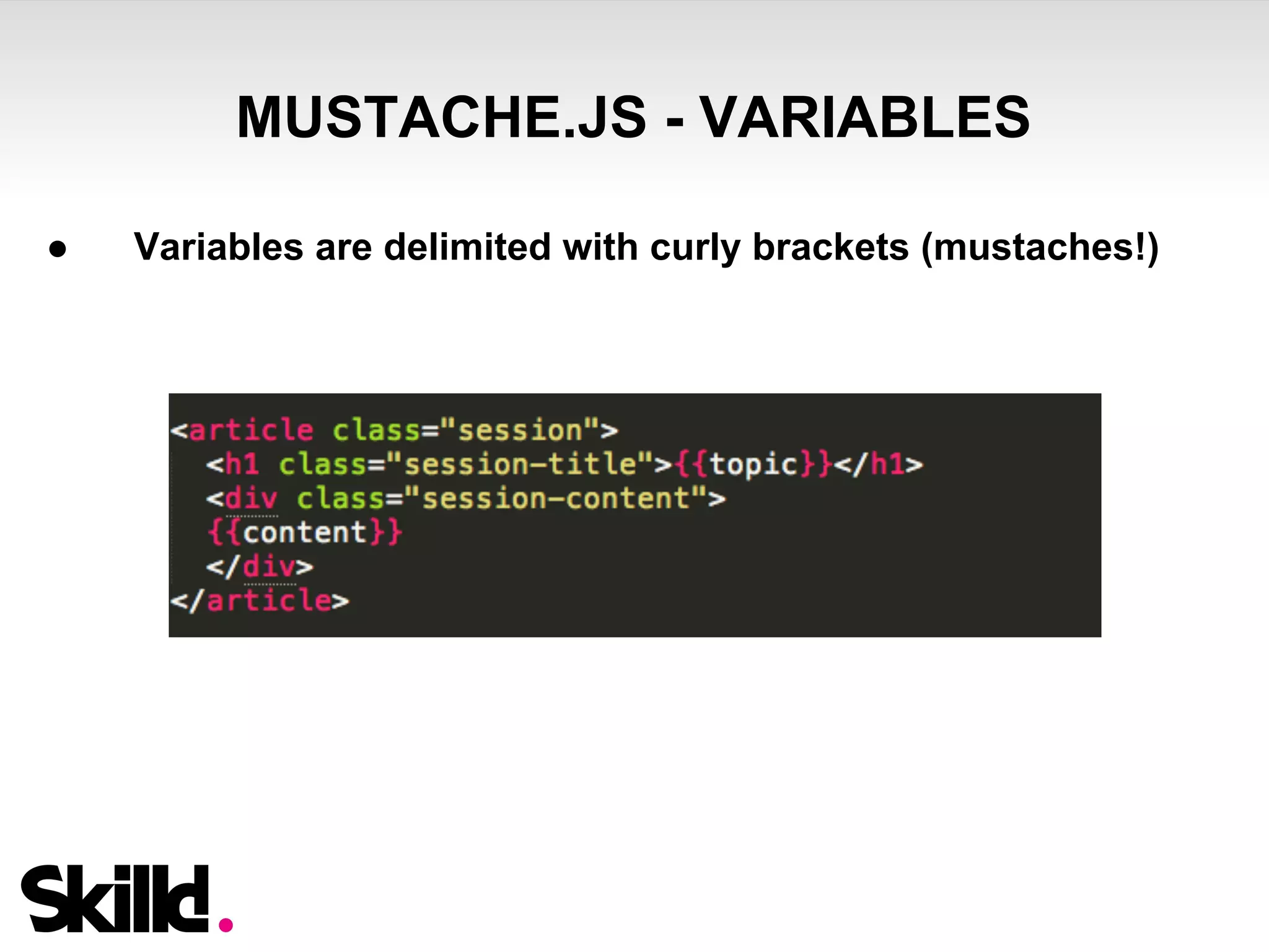
MUSTACHE.JS - VARIABLES 
● Variables are delimited with curly brackets (mustaches!)
MUSTACHE.JS - VARIABLES 
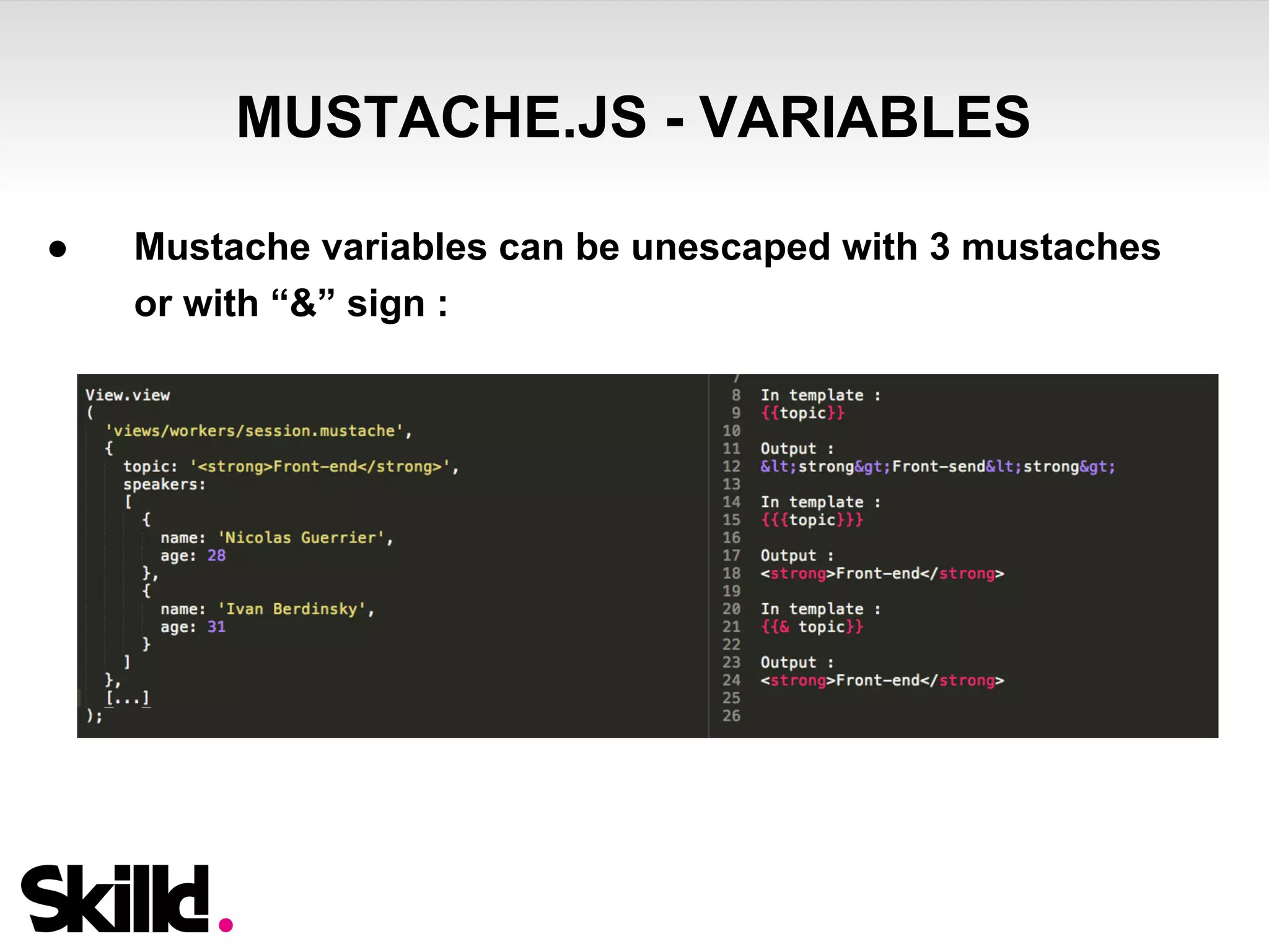
● Mustache variables can be unescaped with 3 mustaches 
or with “&” sign :
MUSTACHE.JS – SECTIONS & LISTS 
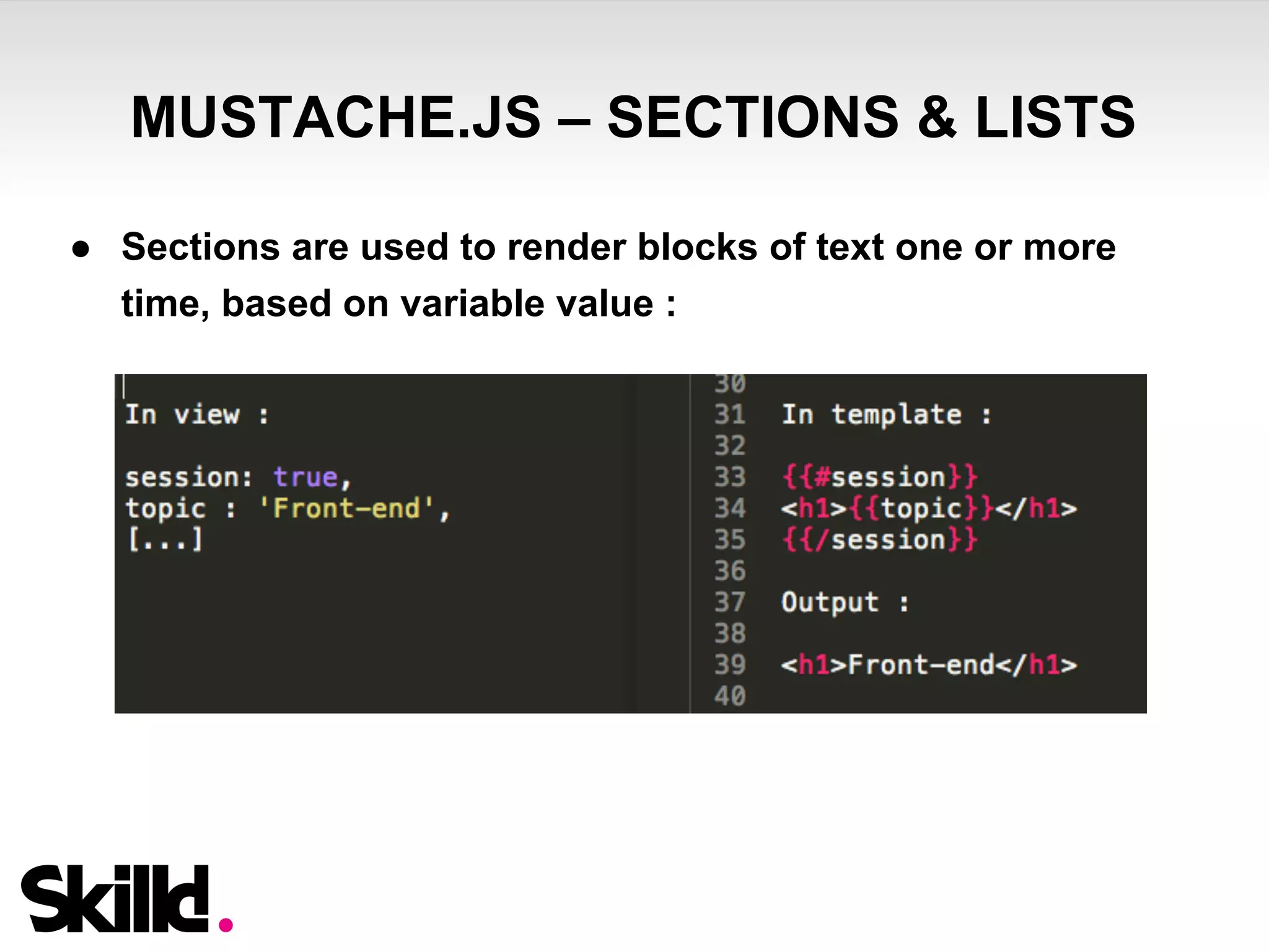
● Sections are used to render blocks of text one or more 
time, based on variable value :
MUSTACHE.JS – SECTIONS & LISTS 
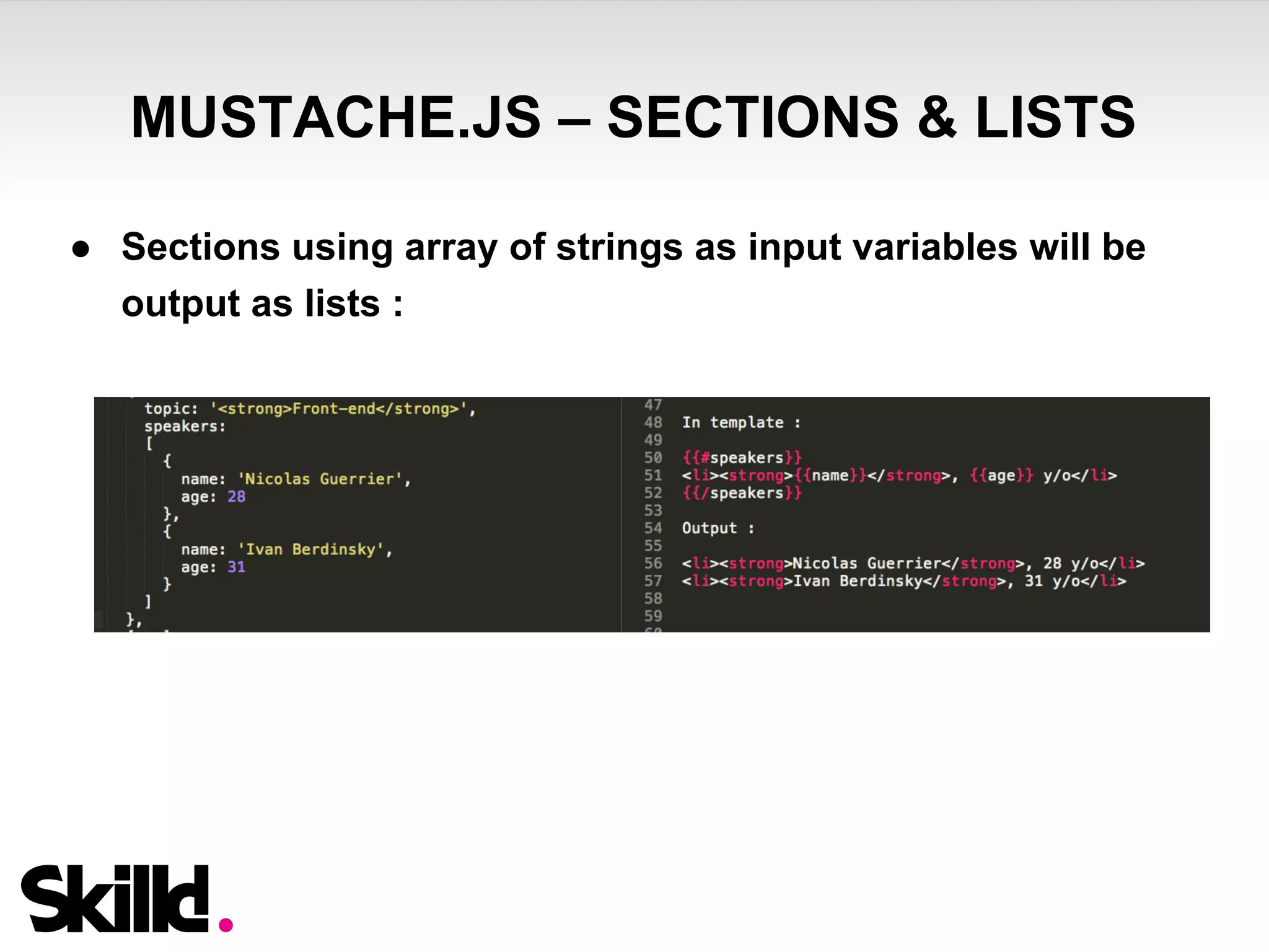
● Sections using array of strings as input variables will be 
output as lists :
MUSTACHE.JS – HELPERS (FUNCTIONS) 
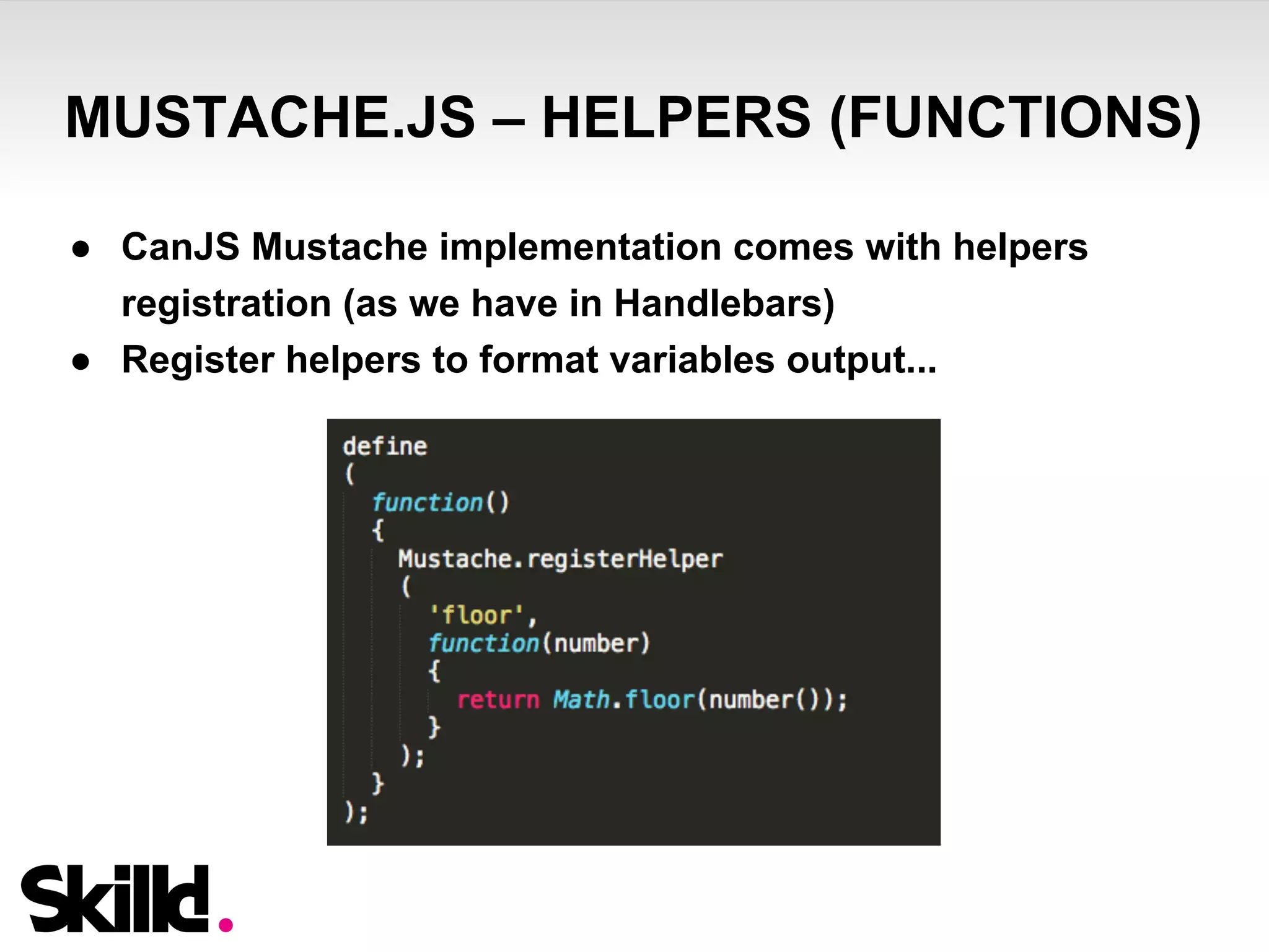
● CanJS Mustache implementation comes with helpers 
registration (as we have in Handlebars) 
● Register helpers to format variables output...
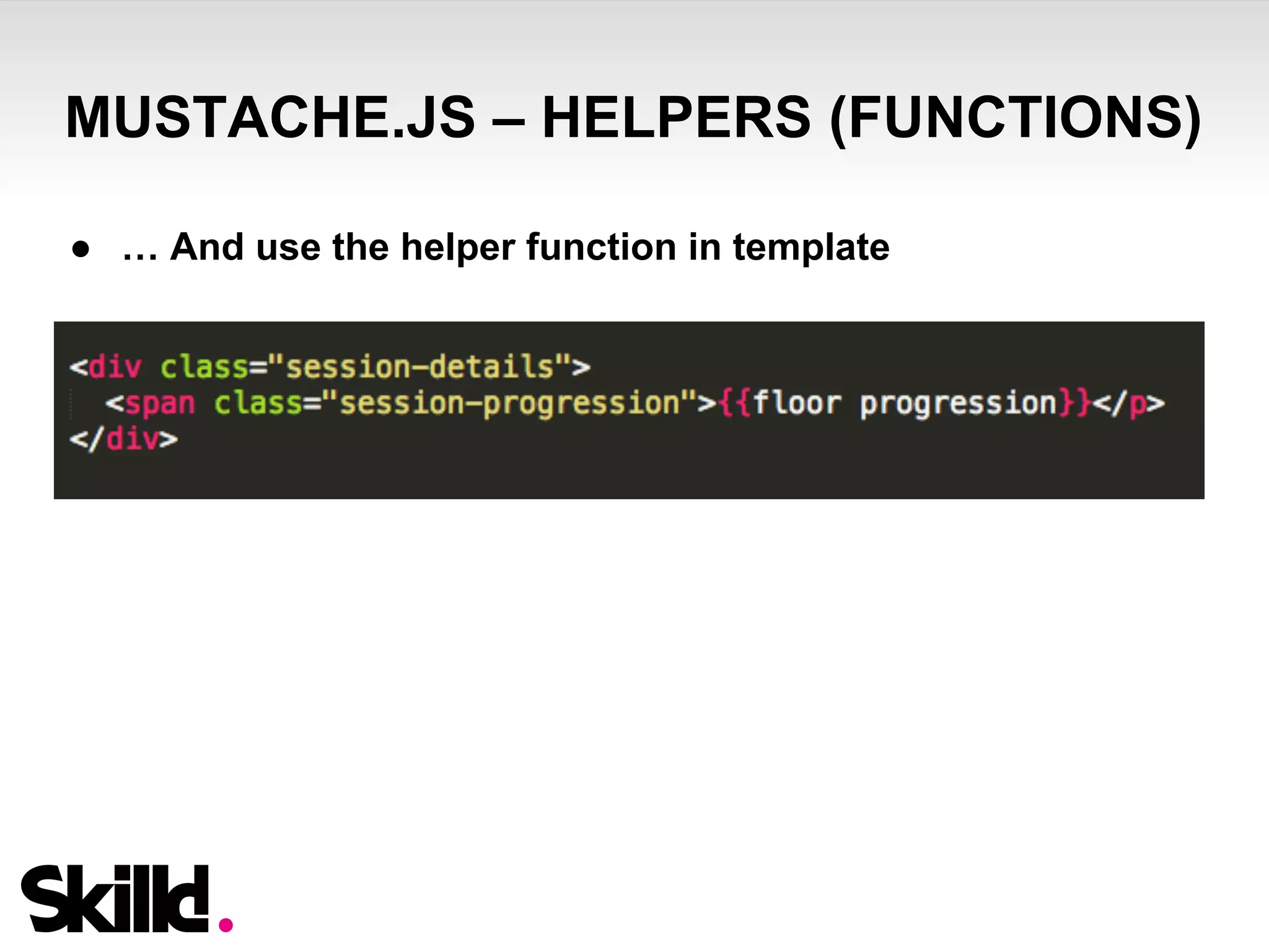
MUSTACHE.JS – HELPERS (FUNCTIONS) 
● … And use the helper function in template
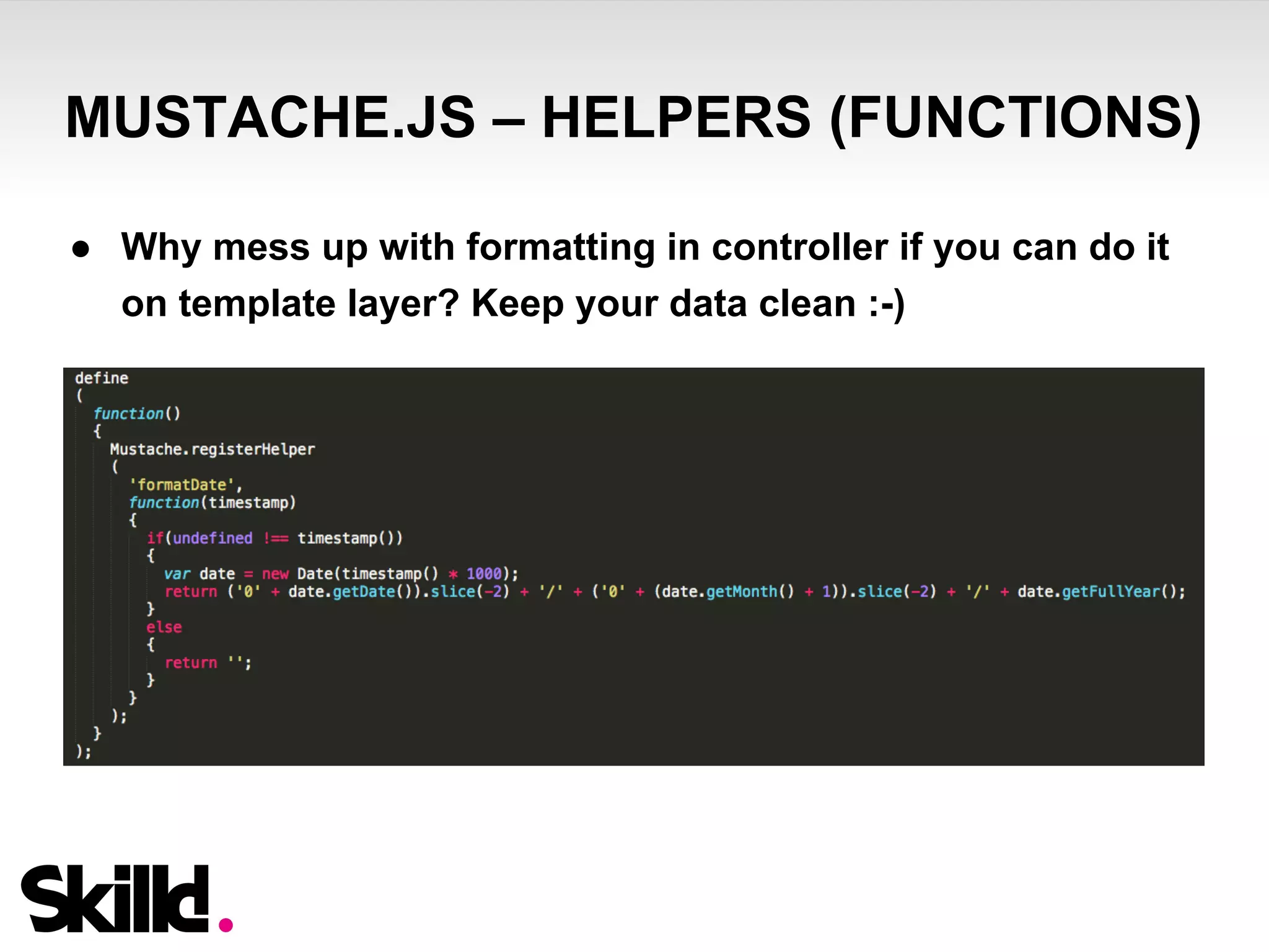
MUSTACHE.JS – HELPERS (FUNCTIONS) 
● Why mess up with formatting in controller if you can do it 
on template layer? Keep your data clean :-)
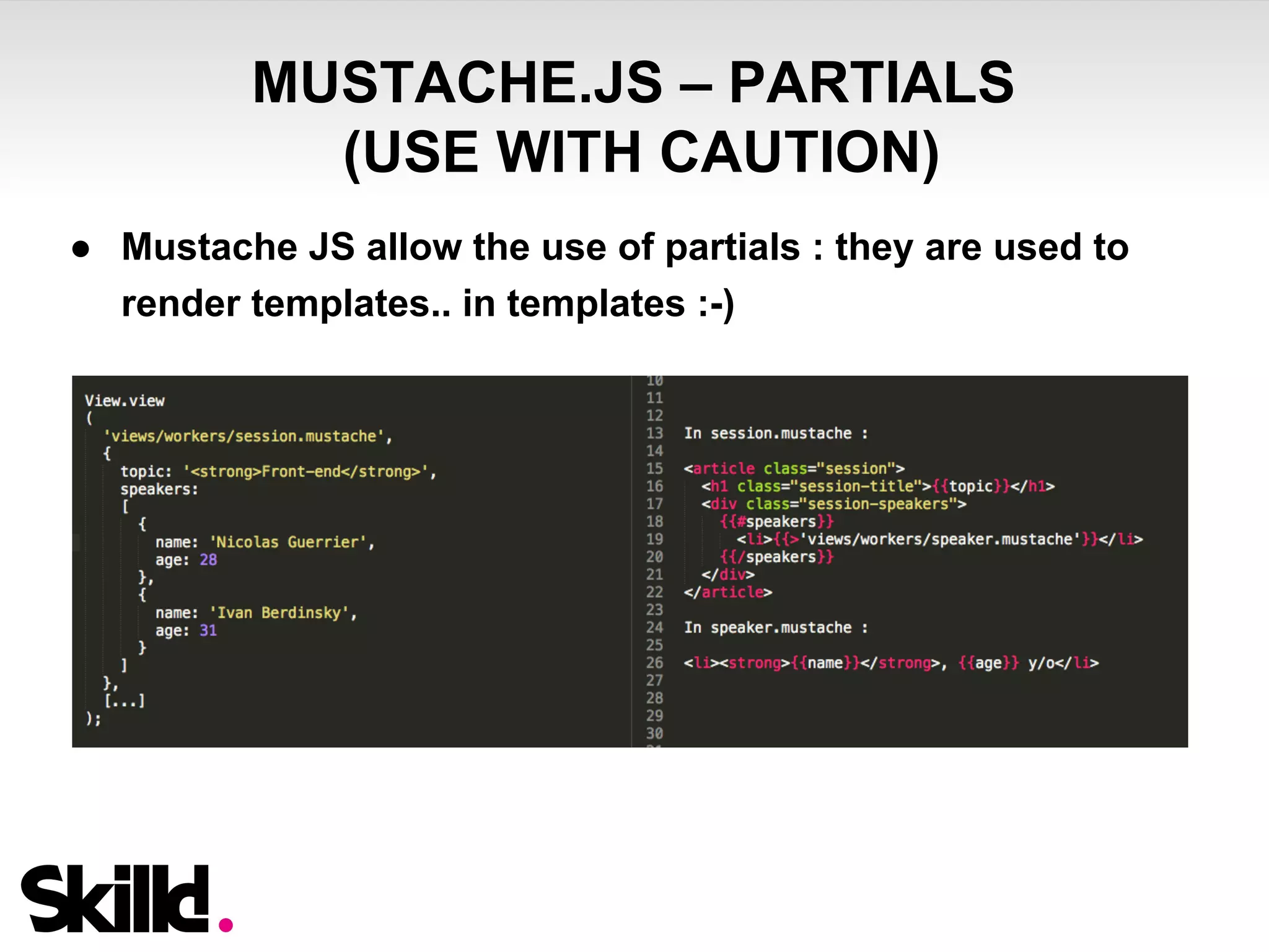
MUSTACHE.JS – PARTIALS 
(USE WITH CAUTION) 
● Mustache JS allow the use of partials : they are used to 
render templates.. in templates :-)
MUSTACHE.JS – PARTIALS 
(USE WITH CAUTION) 
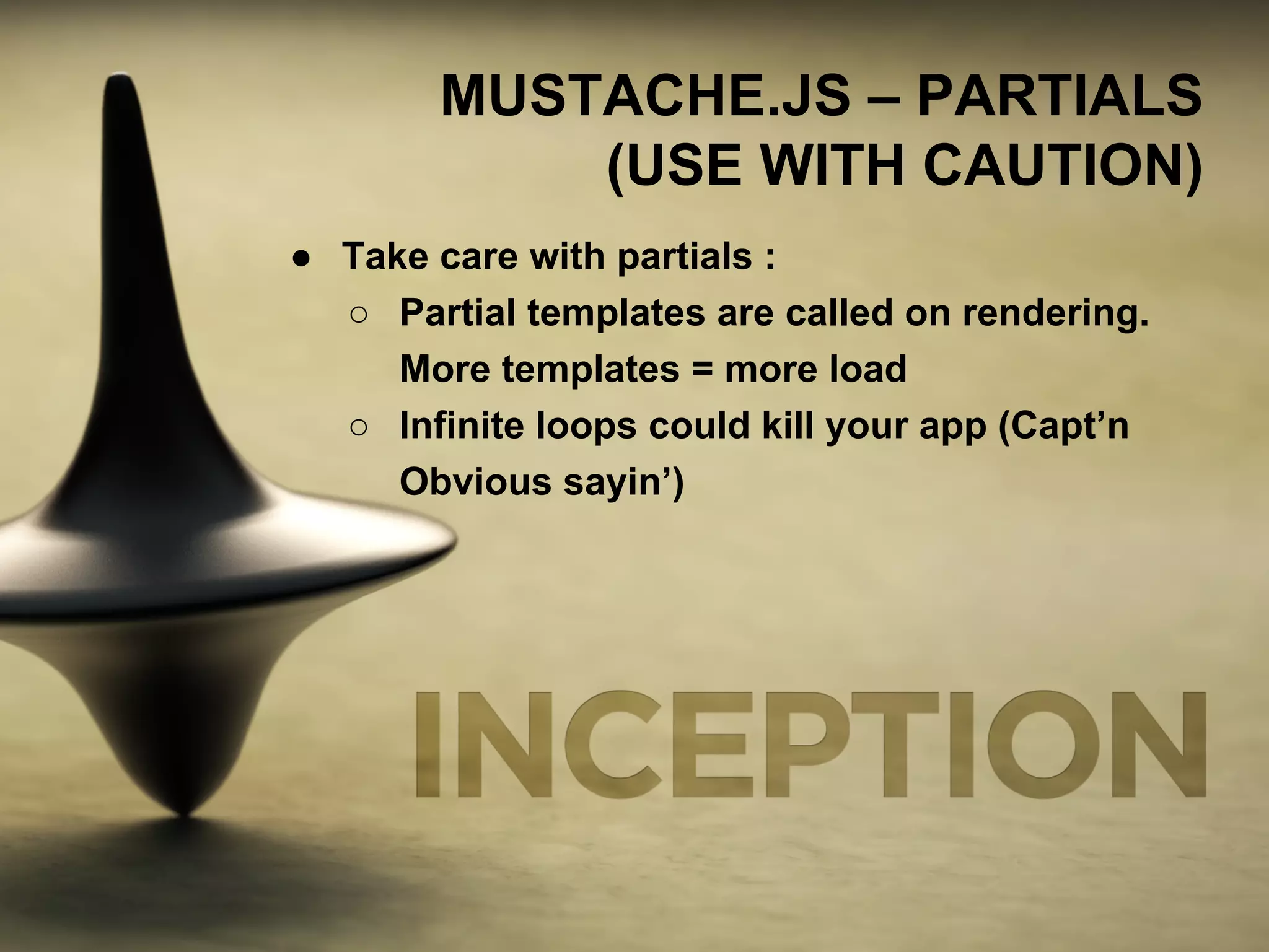
● Take care with partials : 
○ Partial templates are called on rendering. 
More templates = more load 
○ Infinite loops could kill your app (Capt’n 
Obvious sayin’)
CSS – SIZING & POSITIONING
REM UNITS
REM UNITS - WHAT IS IT? 
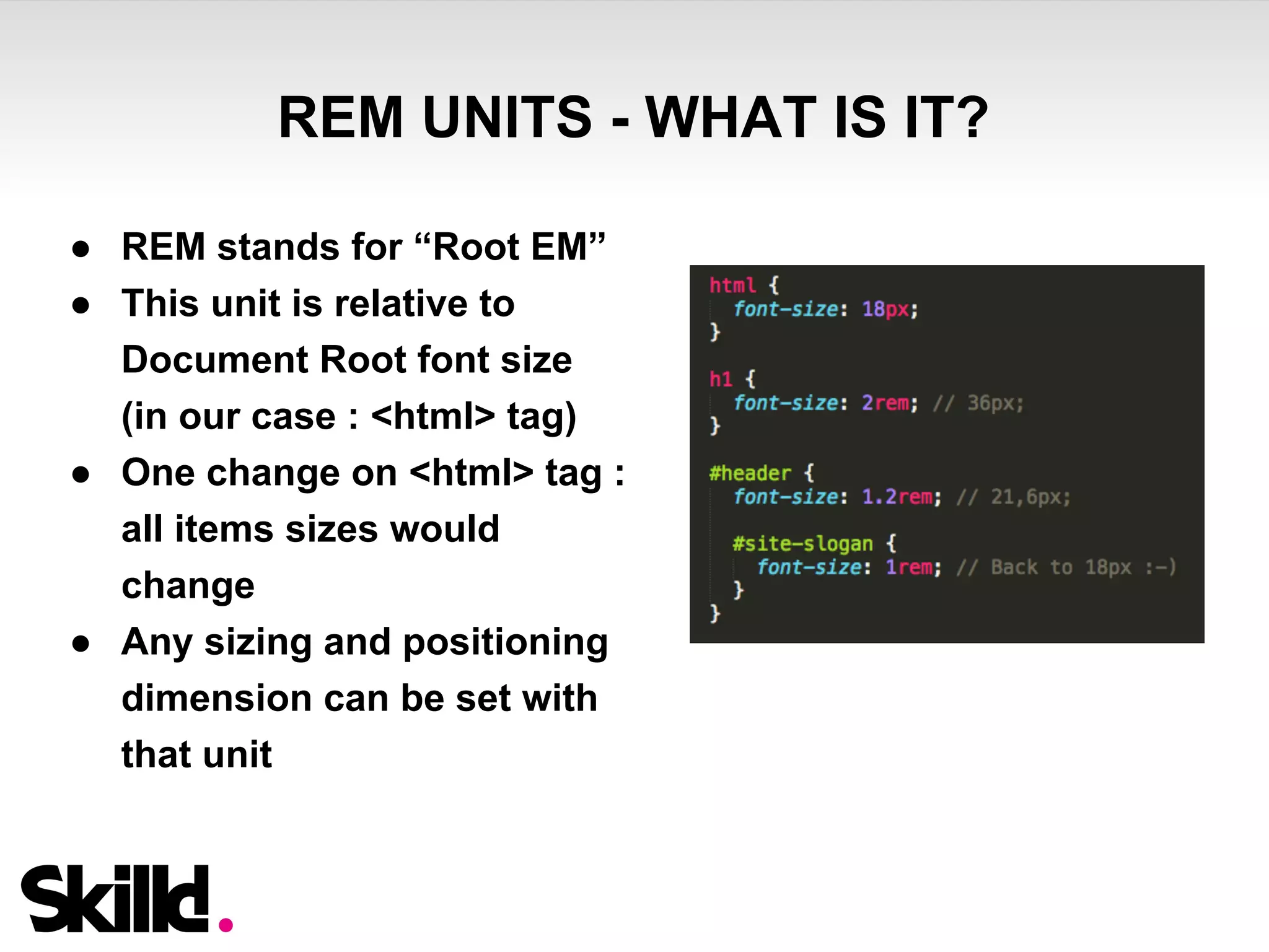
● REM stands for “Root EM” 
● This unit is relative to 
Document Root font size 
(in our case : <html> tag) 
● One change on <html> tag : 
all items sizes would 
change 
● Any sizing and positioning 
dimension can be set with 
that unit
REM UNITS - WHY SHOULD I USE THAT? 
After pixels, percents, ems, you may wonder why you should 
begin to use another unit? Few ideas are here : 
● Tired of famous EM’s “infinite cascading”? 
● Did you hear about responsive design? :-P 
● Do you like to write a media query for each screen ratio? 
● Do you feel comfortable with percentage sizing respecting 
ratio of your PSD (paddings, margins, should I say more?) 
● VW & VH units are not yet here… sadly 
… and the best is to come - keep listening :-)
REM UNITS – BROWSER SUPPORT 
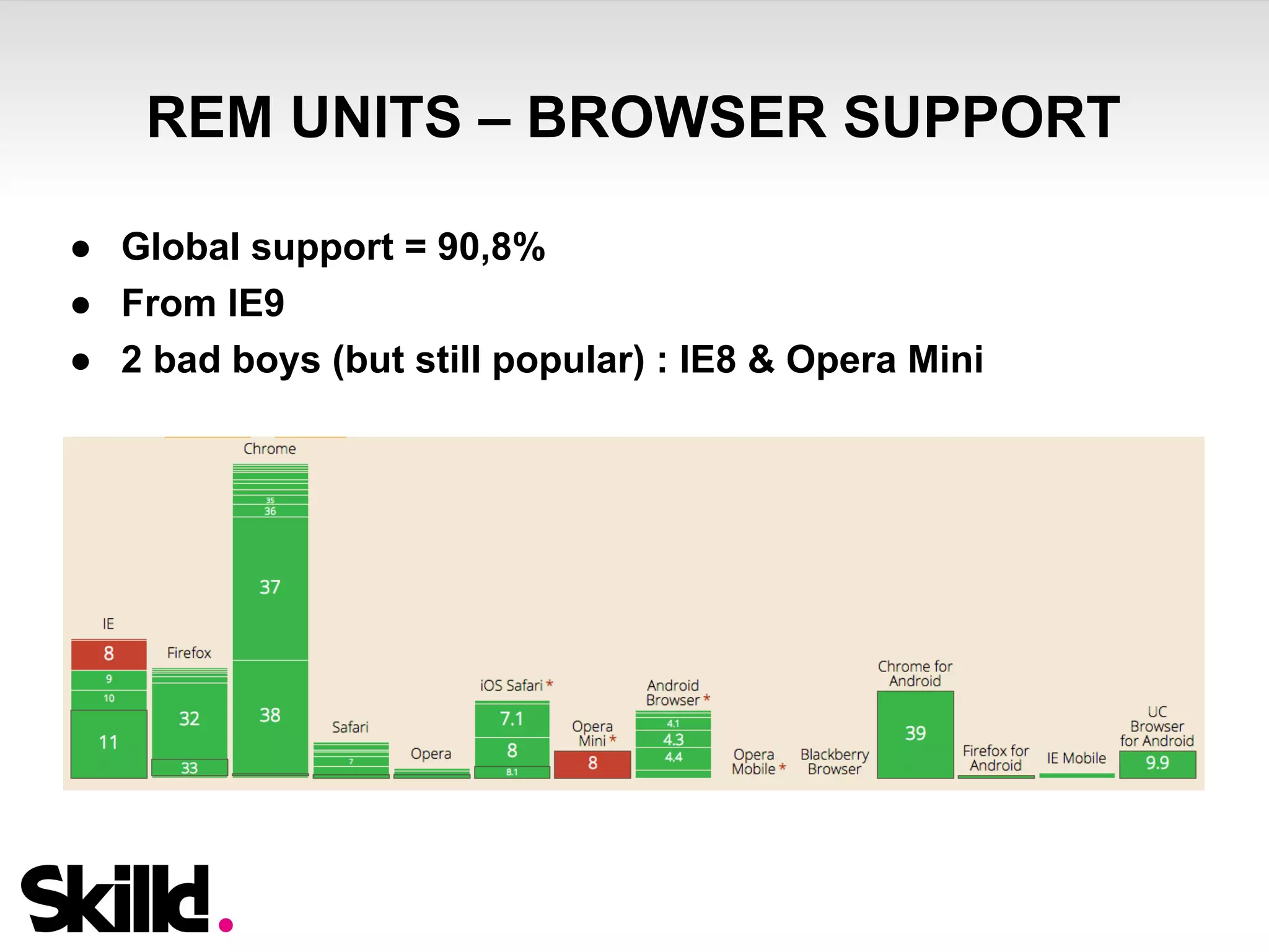
● Global support = 90,8% 
● From IE9 
● 2 bad boys (but still popular) : IE8 & Opera Mini
REM UNITS – REMIXIN’ REM MIXIN 
● To keep compatibility with old or lightweight browsers 
that don’t support rem units, you can use the next SASS 
mixin : 
http://hugogiraudel.com/2013/03/18/ultimate-rem-mixin/ 
● This mixin accepts inputs in px or rem on any 
size/position-related css property 
● @include rem(font-size, 18px); will output pixels & rem 
declarations to insure compatibility
...AND THE JS DOES THE MAGIC
REM UNITS – AND THE JS DOES THE 
MAGIC 
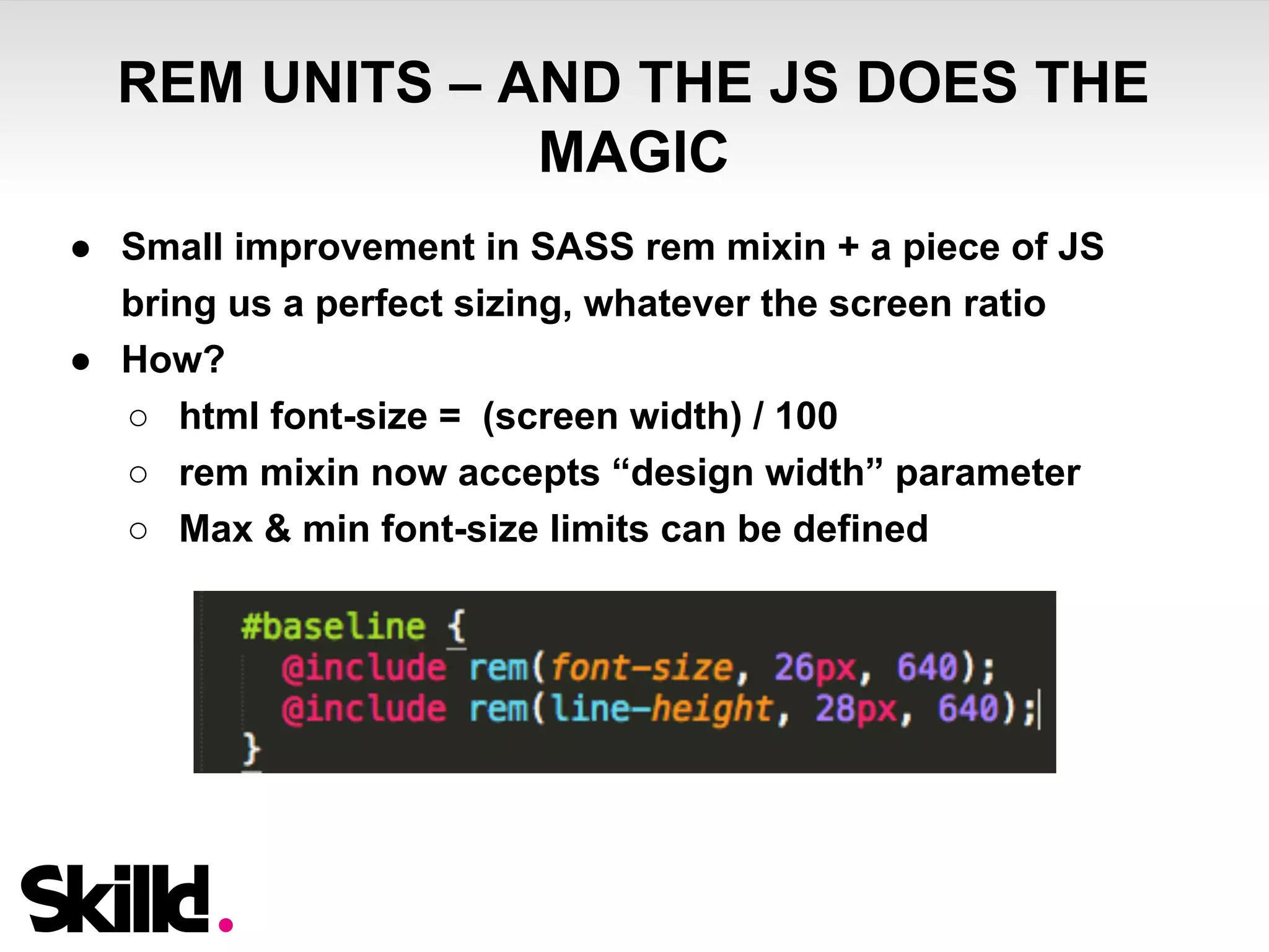
● Small improvement in SASS rem mixin + a piece of JS 
bring us a perfect sizing, whatever the screen ratio 
● How? 
○ html font-size = (screen width) / 100 
○ rem mixin now accepts “design width” parameter 
○ Max & min font-size limits can be defined
REM UNITS – AND THE JS DOES THE 
MAGIC 
Ok, but - why all this? 
○ Here are few answers : 
■ You don’t need to get lost into media queries for 
your design to fit the screen (2 are usually enough : 
portrait and landscape) 
■ Declared sizes in SCSS are exactly the same as on 
PSD - easy to slice, right? 
■ SCSS stays easily readable 
■ No human calculation = no mistakes
REM UNITS – JS FONT SIZE MAGIC 
TIPS & TRICKS 
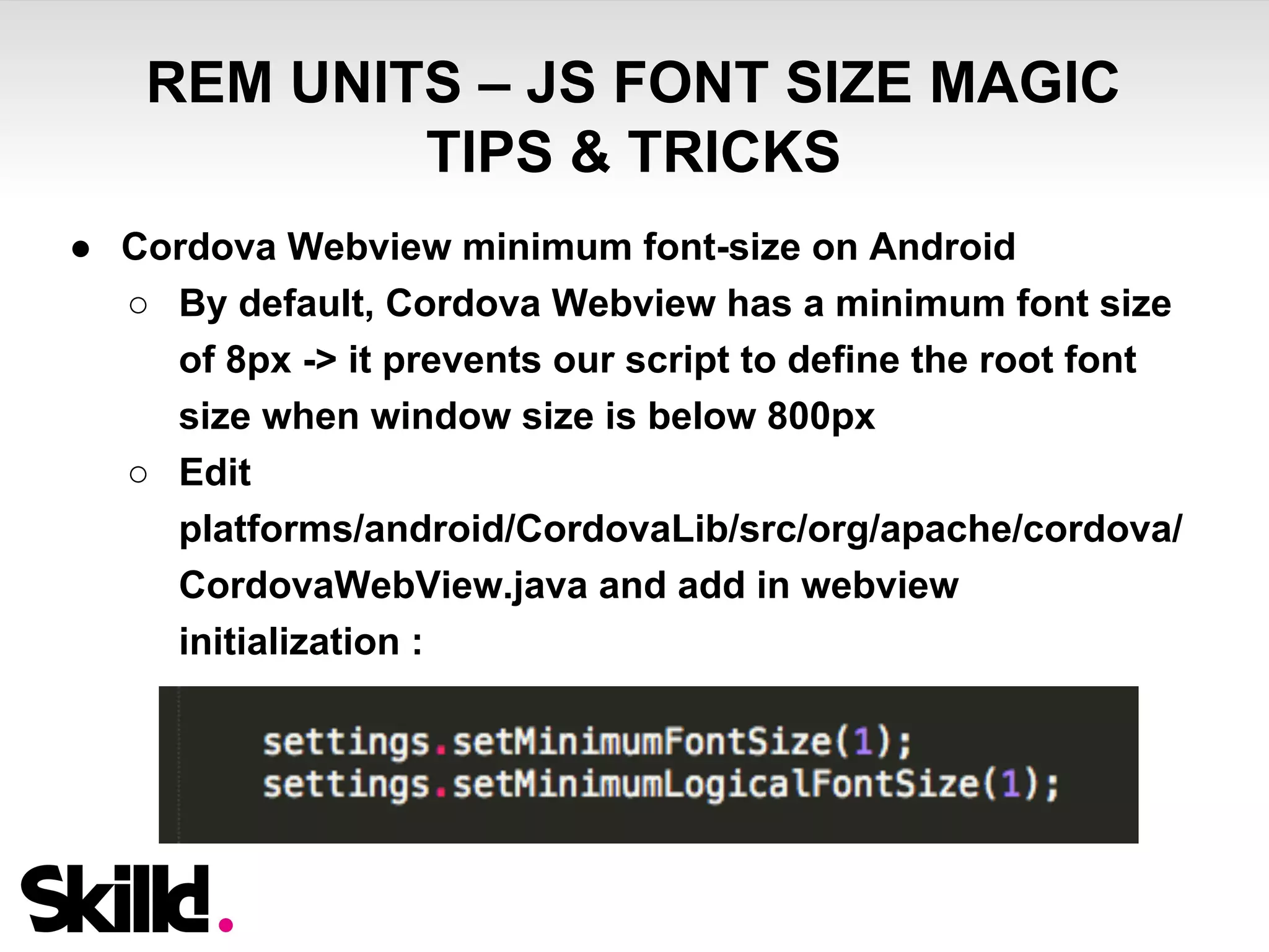
● Cordova Webview minimum font-size on Android 
○ By default, Cordova Webview has a minimum font size 
of 8px -> it prevents our script to define the root font 
size when window size is below 800px 
○ Edit 
platforms/android/CordovaLib/src/org/apache/cordova/ 
CordovaWebView.java and add in webview 
initialization :
FLUIDITY - HOW SHOULD YOUR DESIGN 
RESPOND ?
FLUIDITY - HOW SHOULD YOUR DESIGN 
RESPOND ? 
● You should think about that before writing any css line 
● You should even discuss with designer (true story ;-)) 
● Questions that may help on that : 
○ What element should strech? 
○ What element should keep the same ratio? 
○ Maybe bigger screens owners prefer to see more 
content, not bigger content :-) 
○ To which dimension, width or height, this element 
should be proportional?
FLUIDITY – REM & % 
● REM does a lot of magic but it doesn’t do everything : 
○ Percentage sizing has a real meaning for vertical 
layout sizing (regions height especially) 
○ REM sizing has a real meaning for horizontal layout 
sizing, font sizing, paddings, margins + fixed element 
sizing (when ratio can’t be changed) 
● Combine both and you’re ready to size and position 
anything (on mobile, tablet, desktop), using just 2 media 
queries! Yes Sir.
FLEXBOX MODEL 
KICK-ASS FLEXIBILITY
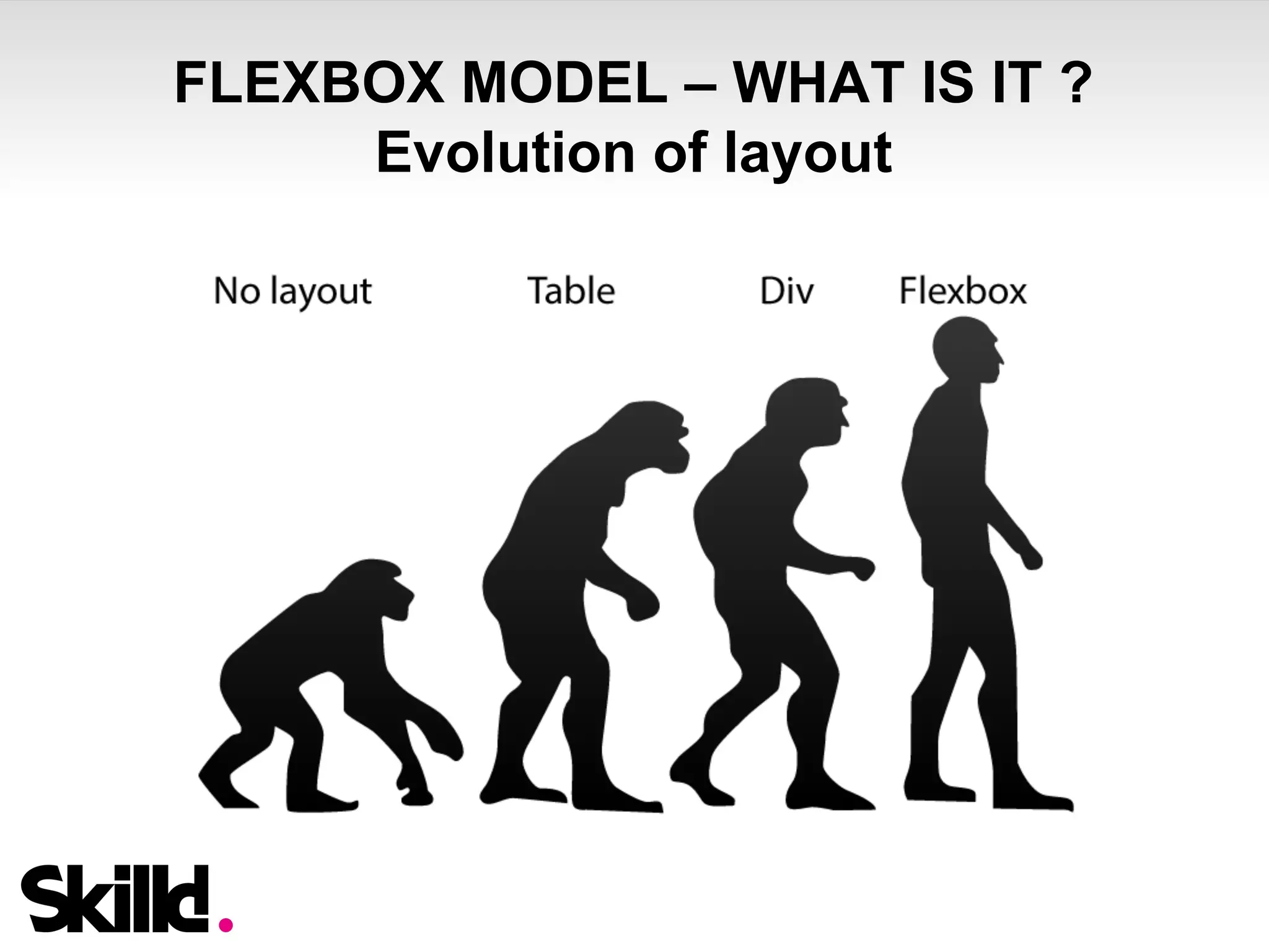
FLEXBOX MODEL – WHAT IS IT ? 
Evolution of layout
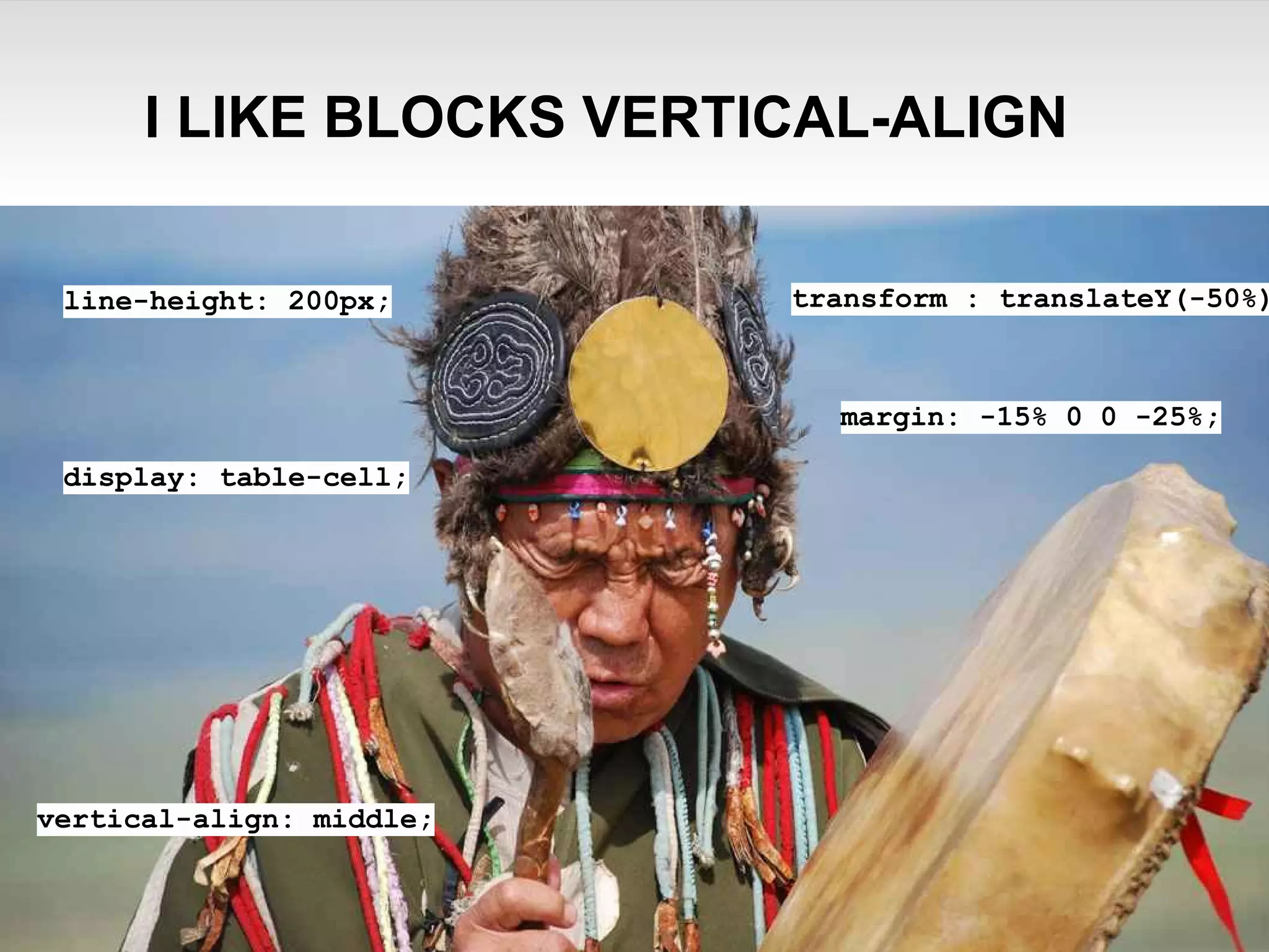
I LIKE BLOCKS VERTICAL-ALIGN 
line-height: 200px; 
display: table-cell; 
transform : translateY(-50%); 
margin: -15% 0 0 -25%; 
vertical-align: middle;
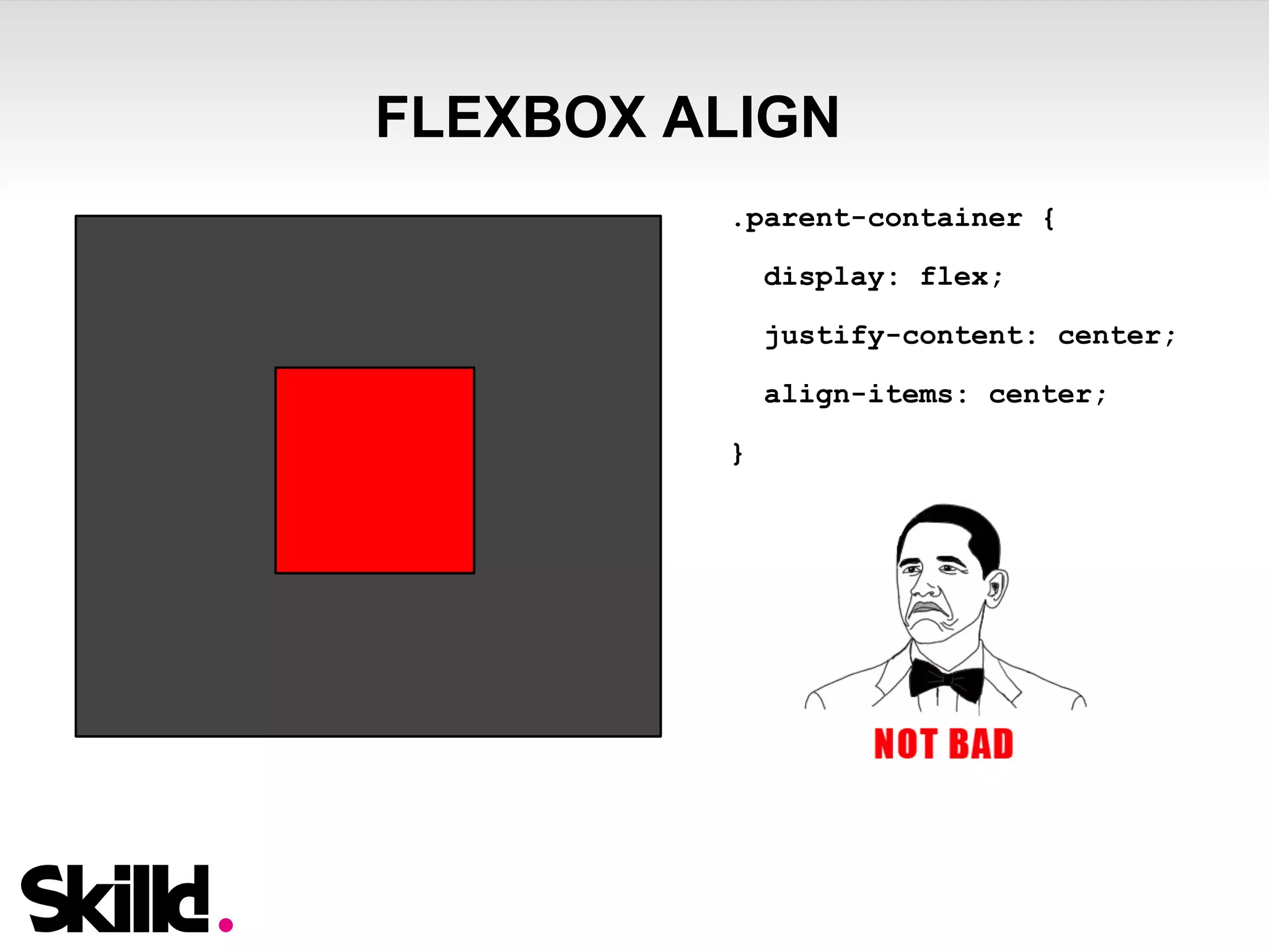
FLEXBOX ALIGN 
.parent-container { 
display: flex; 
justify-content: center; 
align-items: center; 
}
FLEXBOX MODEL - FEATURES 
OVERVIEW 
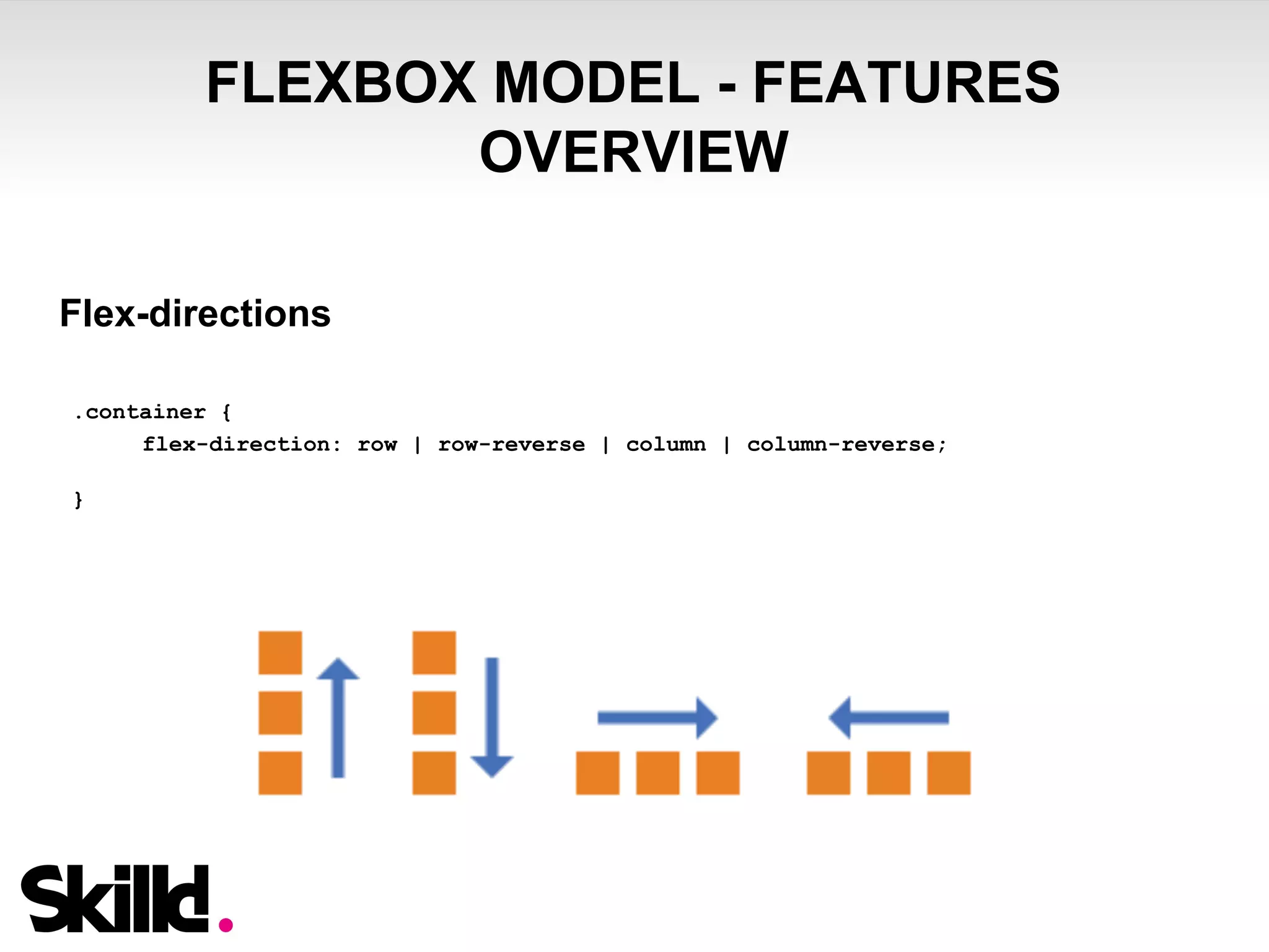
Flex-directions 
.container { 
flex-direction: row | row-reverse | column | column-reverse; 
}
FLEXBOX MODEL - FEATURES 
OVERVIEW 
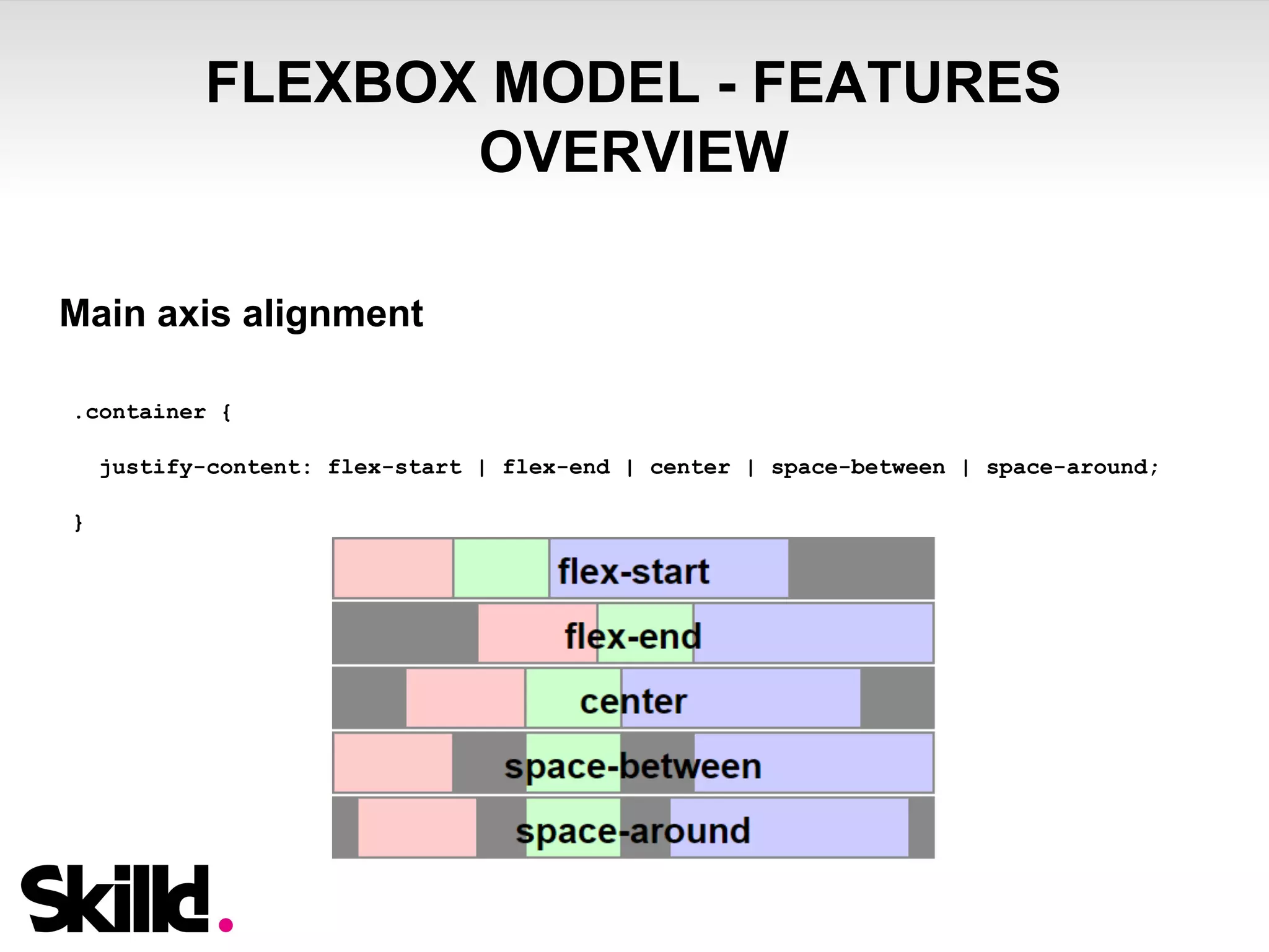
Main axis alignment 
.container { 
justify-content: flex-start | flex-end | center | space-between | space-around; 
}
FLEXBOX MODEL - FEATURES 
OVERVIEW 
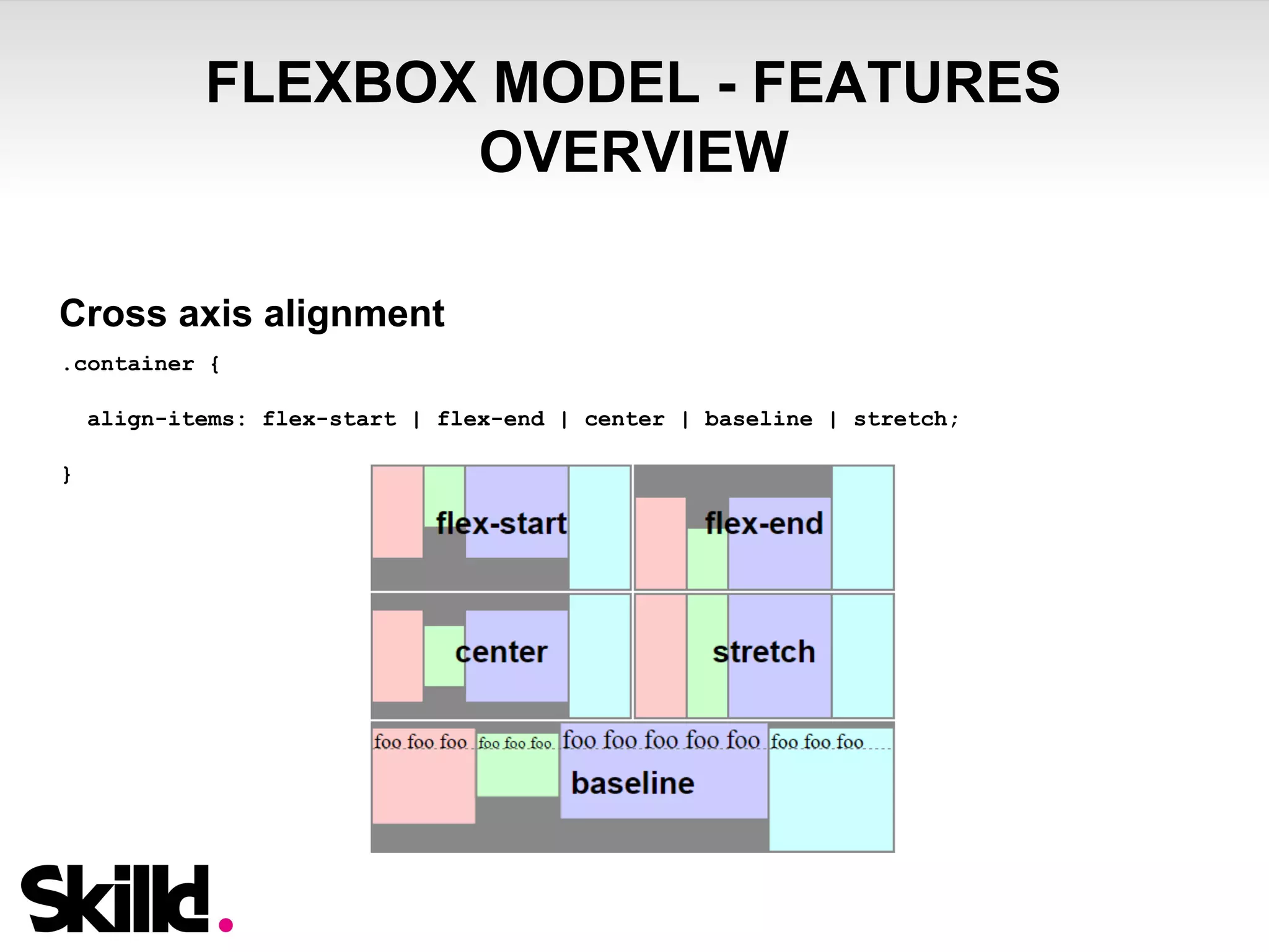
Cross axis alignment 
.container { 
align-items: flex-start | flex-end | center | baseline | stretch; 
}
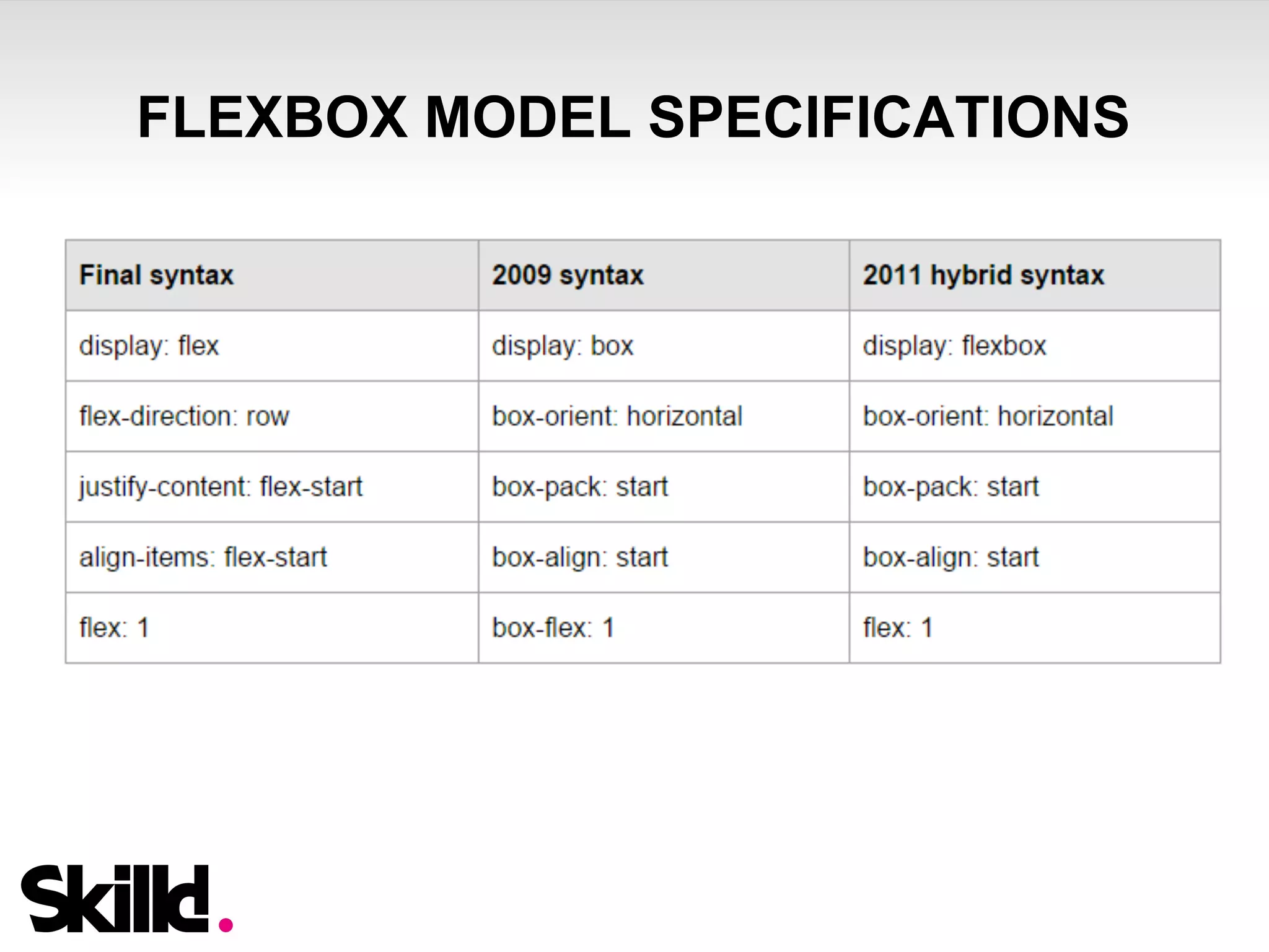
FLEXBOX MODEL SPECIFICATIONS
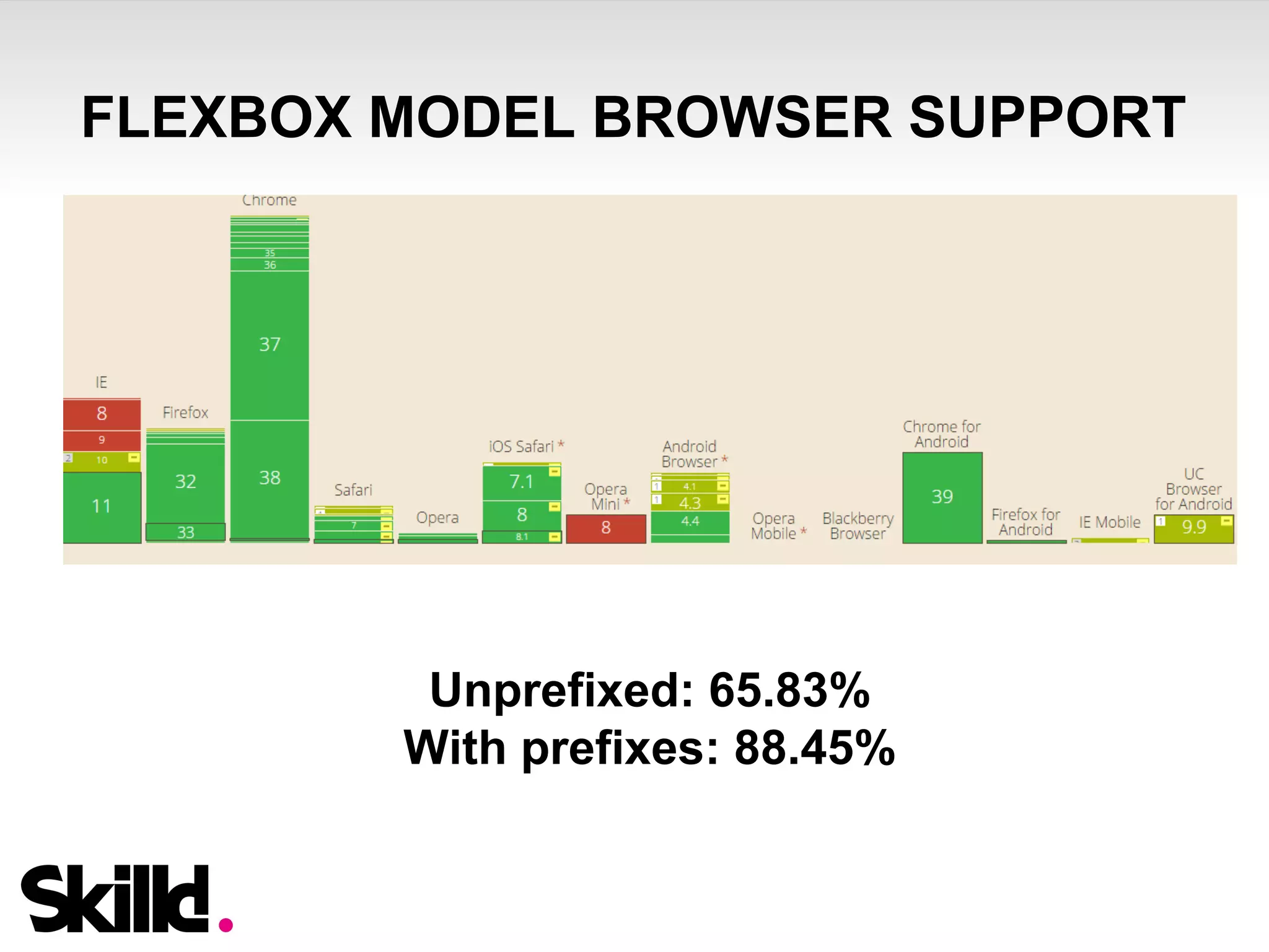
FLEXBOX MODEL BROWSER SUPPORT 
Unprefixed: 65.83% 
With prefixes: 88.45%
FLEXBOX MODEL – LAST NIGHT A MIXIN 
SAVED MY LIFE 
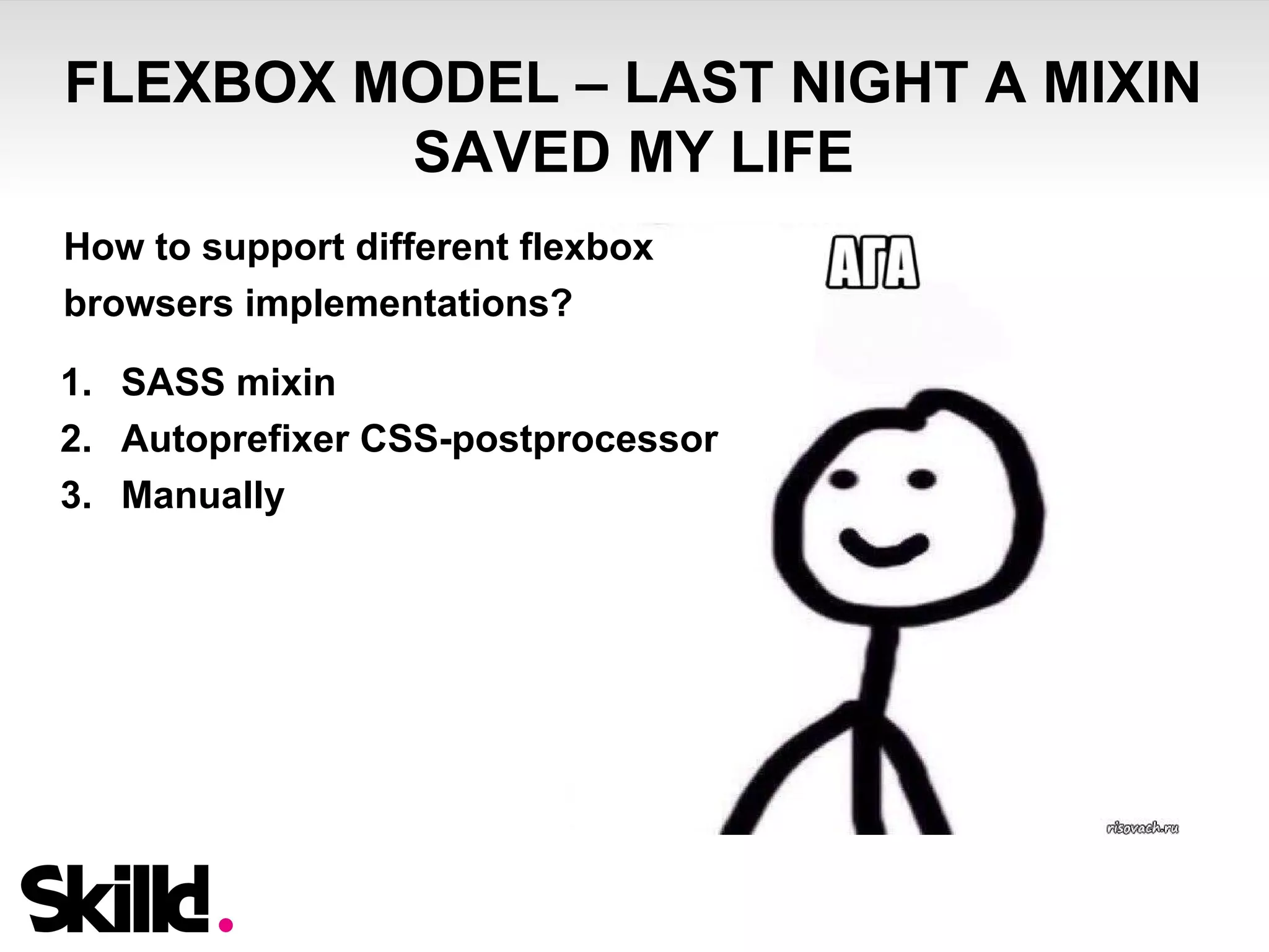
How to support different flexbox 
browsers implementations? 
1. SASS mixin 
2. Autoprefixer CSS-postprocessor 
3. Manually
FLEXBOX MODEL – LAST NIGHT A MIXIN 
SAVED MY LIFE 
Mixin Usage 
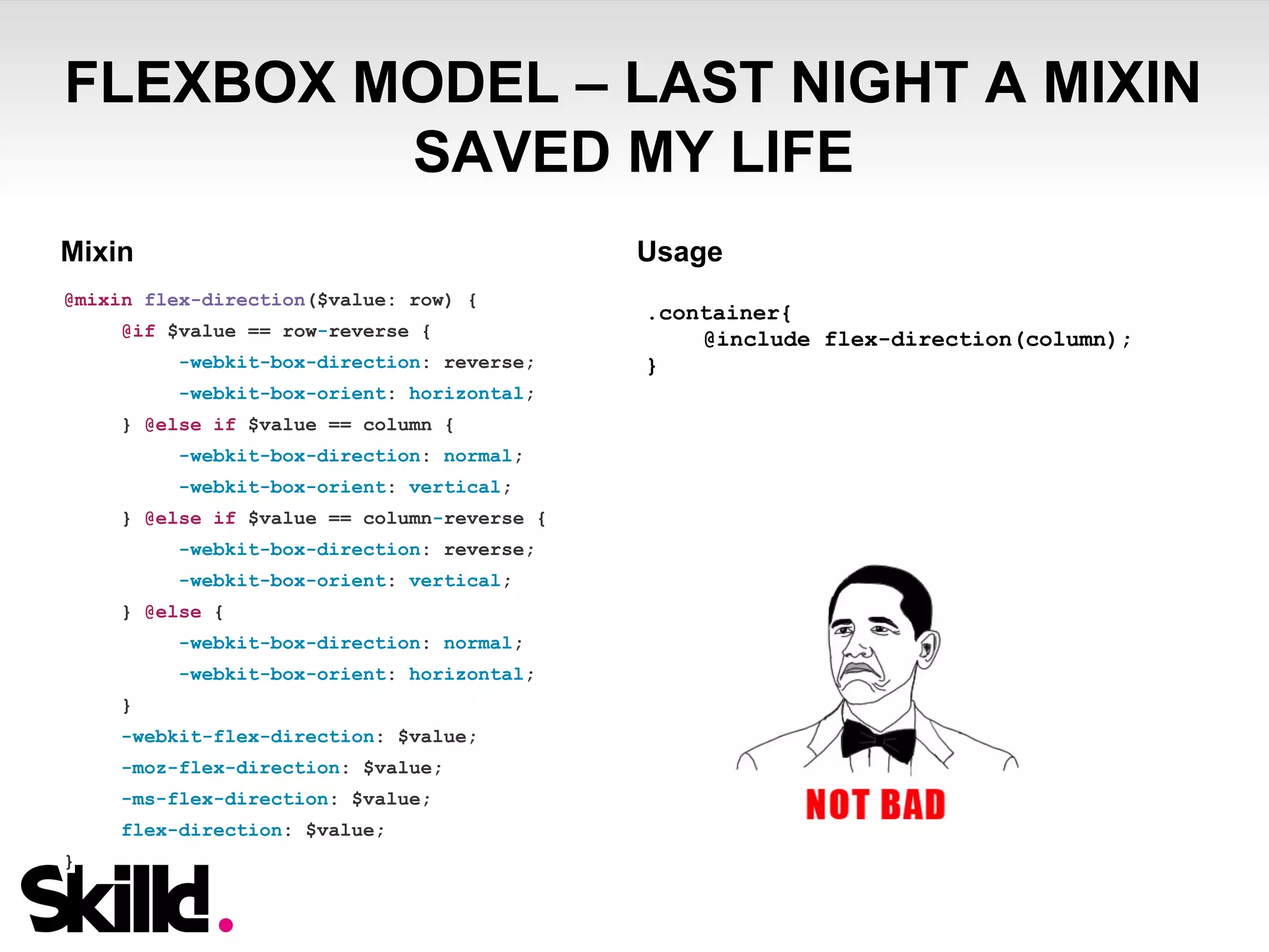
@mixin flex-direction($value: row) { 
@if $value == row-reverse { 
-webkit-box-direction: reverse; 
-webkit-box-orient: horizontal; 
} @else if $value == column { 
-webkit-box-direction: normal; 
-webkit-box-orient: vertical; 
} @else if $value == column-reverse { 
-webkit-box-direction: reverse; 
-webkit-box-orient: vertical; 
} @else { 
-webkit-box-direction: normal; 
-webkit-box-orient: horizontal; 
} 
-webkit-flex-direction: $value; 
-moz-flex-direction: $value; 
-ms-flex-direction: $value; 
flex-direction: $value; 
} 
.container{ 
@include flex-direction(column); 
}
CSS – ILLUSTRATING
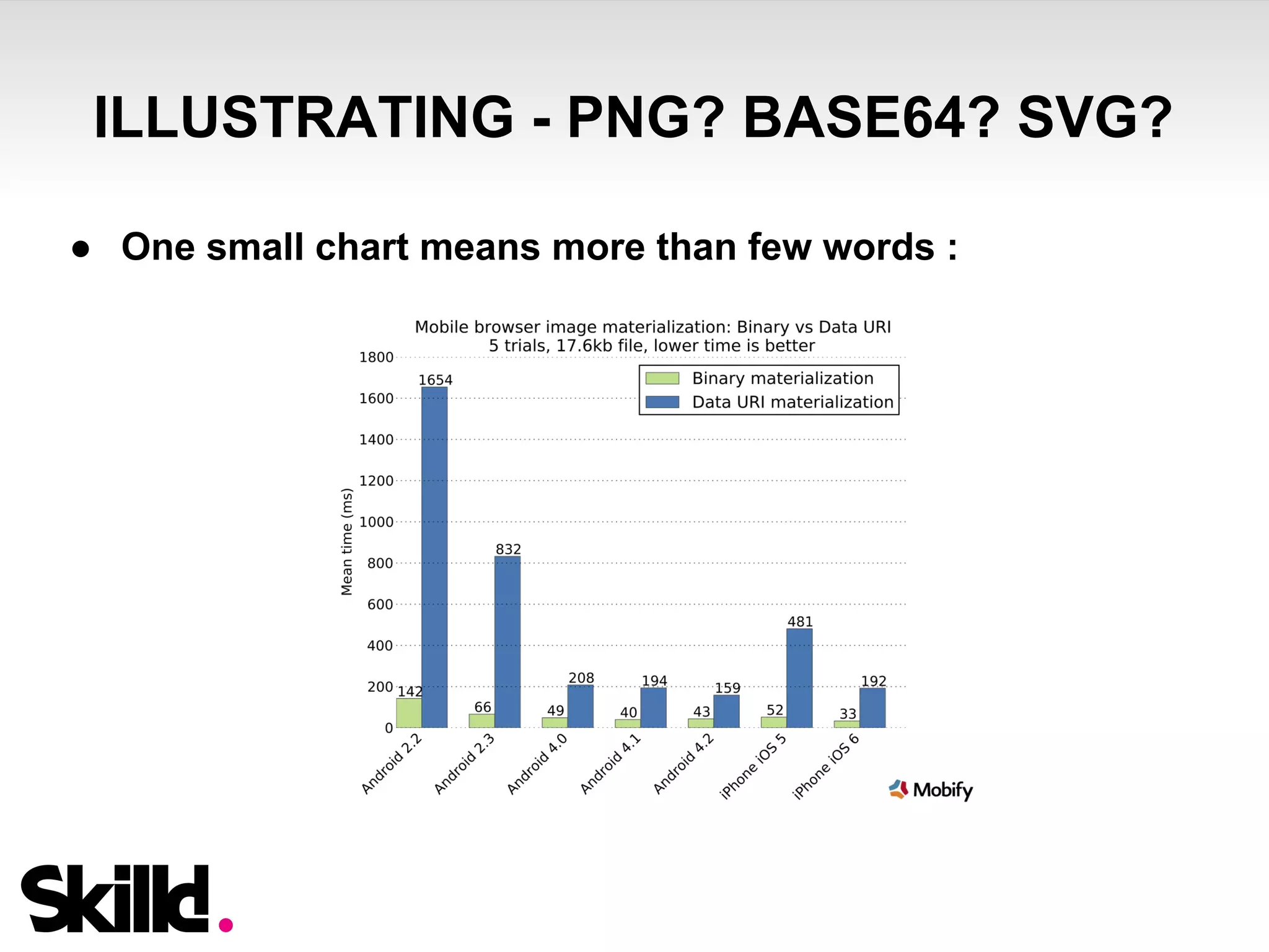
ILLUSTRATING - PNG? BASE64? SVG? 
● One small chart means more than few words :
ILLUSTRATING - PNG? BASE64? SVG? 
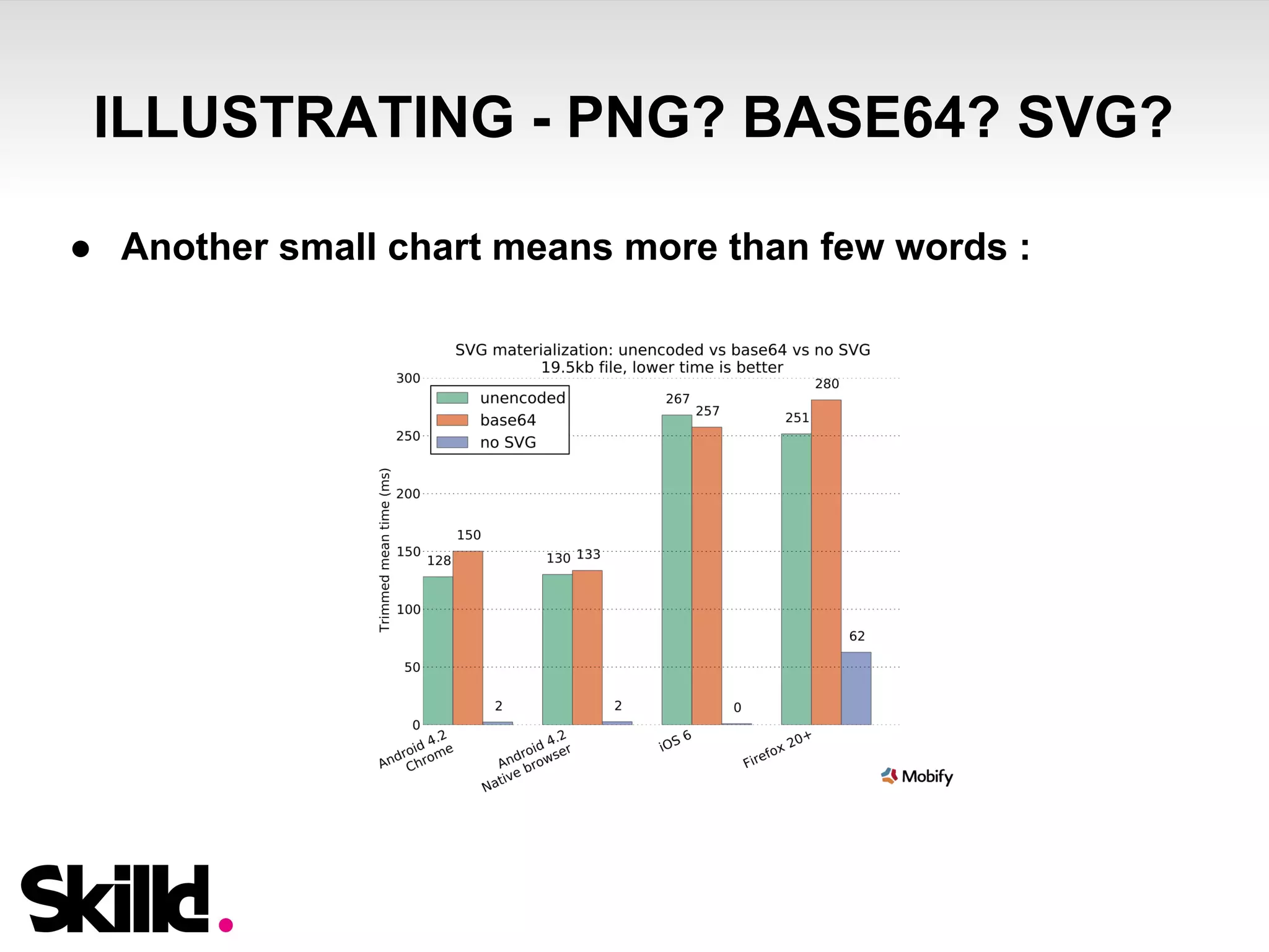
● Another small chart means more than few words :
THANK YOU! 
QUESTIONS?

Build tons of multi-device JavaScript applications - Part 2 : (black) Magic Sizing, Positioning, Illustrating

  • 1.
    Build tons ofmulti-device JavaScript applications ... and display them on any screen! (part 2) (black) Magic Sizing, Positioning, Illustrating by Nicolas Guerrier & Ivan Berdinsky UA Web Challenge Kyiv 2014 – Nov 23rd 2014
  • 2.
  • 3.
    MUSTACHE.JS LOGIC-LESS TEMPLATING Mustache is a logic-less templating system with many implementations available : C++, PHP, Ruby, Java… ...and Javascript
  • 4.
    MUSTACHE.JS FROM THEVIEW TO THE TEMPLATE ● Mustache parses view object :
  • 5.
    MUSTACHE.JS - VARIABLES ● Variables are delimited with curly brackets (mustaches!)
  • 6.
    MUSTACHE.JS - VARIABLES ● Mustache variables can be unescaped with 3 mustaches or with “&” sign :
  • 7.
    MUSTACHE.JS – SECTIONS& LISTS ● Sections are used to render blocks of text one or more time, based on variable value :
  • 8.
    MUSTACHE.JS – SECTIONS& LISTS ● Sections using array of strings as input variables will be output as lists :
  • 9.
    MUSTACHE.JS – HELPERS(FUNCTIONS) ● CanJS Mustache implementation comes with helpers registration (as we have in Handlebars) ● Register helpers to format variables output...
  • 10.
    MUSTACHE.JS – HELPERS(FUNCTIONS) ● … And use the helper function in template
  • 11.
    MUSTACHE.JS – HELPERS(FUNCTIONS) ● Why mess up with formatting in controller if you can do it on template layer? Keep your data clean :-)
  • 12.
    MUSTACHE.JS – PARTIALS (USE WITH CAUTION) ● Mustache JS allow the use of partials : they are used to render templates.. in templates :-)
  • 13.
    MUSTACHE.JS – PARTIALS (USE WITH CAUTION) ● Take care with partials : ○ Partial templates are called on rendering. More templates = more load ○ Infinite loops could kill your app (Capt’n Obvious sayin’)
  • 14.
    CSS – SIZING& POSITIONING
  • 15.
  • 16.
    REM UNITS -WHAT IS IT? ● REM stands for “Root EM” ● This unit is relative to Document Root font size (in our case : <html> tag) ● One change on <html> tag : all items sizes would change ● Any sizing and positioning dimension can be set with that unit
  • 17.
    REM UNITS -WHY SHOULD I USE THAT? After pixels, percents, ems, you may wonder why you should begin to use another unit? Few ideas are here : ● Tired of famous EM’s “infinite cascading”? ● Did you hear about responsive design? :-P ● Do you like to write a media query for each screen ratio? ● Do you feel comfortable with percentage sizing respecting ratio of your PSD (paddings, margins, should I say more?) ● VW & VH units are not yet here… sadly … and the best is to come - keep listening :-)
  • 18.
    REM UNITS –BROWSER SUPPORT ● Global support = 90,8% ● From IE9 ● 2 bad boys (but still popular) : IE8 & Opera Mini
  • 19.
    REM UNITS –REMIXIN’ REM MIXIN ● To keep compatibility with old or lightweight browsers that don’t support rem units, you can use the next SASS mixin : http://hugogiraudel.com/2013/03/18/ultimate-rem-mixin/ ● This mixin accepts inputs in px or rem on any size/position-related css property ● @include rem(font-size, 18px); will output pixels & rem declarations to insure compatibility
  • 20.
    ...AND THE JSDOES THE MAGIC
  • 21.
    REM UNITS –AND THE JS DOES THE MAGIC ● Small improvement in SASS rem mixin + a piece of JS bring us a perfect sizing, whatever the screen ratio ● How? ○ html font-size = (screen width) / 100 ○ rem mixin now accepts “design width” parameter ○ Max & min font-size limits can be defined
  • 22.
    REM UNITS –AND THE JS DOES THE MAGIC Ok, but - why all this? ○ Here are few answers : ■ You don’t need to get lost into media queries for your design to fit the screen (2 are usually enough : portrait and landscape) ■ Declared sizes in SCSS are exactly the same as on PSD - easy to slice, right? ■ SCSS stays easily readable ■ No human calculation = no mistakes
  • 23.
    REM UNITS –JS FONT SIZE MAGIC TIPS & TRICKS ● Cordova Webview minimum font-size on Android ○ By default, Cordova Webview has a minimum font size of 8px -> it prevents our script to define the root font size when window size is below 800px ○ Edit platforms/android/CordovaLib/src/org/apache/cordova/ CordovaWebView.java and add in webview initialization :
  • 24.
    FLUIDITY - HOWSHOULD YOUR DESIGN RESPOND ?
  • 25.
    FLUIDITY - HOWSHOULD YOUR DESIGN RESPOND ? ● You should think about that before writing any css line ● You should even discuss with designer (true story ;-)) ● Questions that may help on that : ○ What element should strech? ○ What element should keep the same ratio? ○ Maybe bigger screens owners prefer to see more content, not bigger content :-) ○ To which dimension, width or height, this element should be proportional?
  • 26.
    FLUIDITY – REM& % ● REM does a lot of magic but it doesn’t do everything : ○ Percentage sizing has a real meaning for vertical layout sizing (regions height especially) ○ REM sizing has a real meaning for horizontal layout sizing, font sizing, paddings, margins + fixed element sizing (when ratio can’t be changed) ● Combine both and you’re ready to size and position anything (on mobile, tablet, desktop), using just 2 media queries! Yes Sir.
  • 27.
  • 28.
    FLEXBOX MODEL –WHAT IS IT ? Evolution of layout
  • 29.
    I LIKE BLOCKSVERTICAL-ALIGN line-height: 200px; display: table-cell; transform : translateY(-50%); margin: -15% 0 0 -25%; vertical-align: middle;
  • 30.
    FLEXBOX ALIGN .parent-container{ display: flex; justify-content: center; align-items: center; }
  • 31.
    FLEXBOX MODEL -FEATURES OVERVIEW Flex-directions .container { flex-direction: row | row-reverse | column | column-reverse; }
  • 32.
    FLEXBOX MODEL -FEATURES OVERVIEW Main axis alignment .container { justify-content: flex-start | flex-end | center | space-between | space-around; }
  • 33.
    FLEXBOX MODEL -FEATURES OVERVIEW Cross axis alignment .container { align-items: flex-start | flex-end | center | baseline | stretch; }
  • 34.
  • 35.
  • 36.
    FLEXBOX MODEL BROWSERSUPPORT Unprefixed: 65.83% With prefixes: 88.45%
  • 38.
    FLEXBOX MODEL –LAST NIGHT A MIXIN SAVED MY LIFE How to support different flexbox browsers implementations? 1. SASS mixin 2. Autoprefixer CSS-postprocessor 3. Manually
  • 39.
    FLEXBOX MODEL –LAST NIGHT A MIXIN SAVED MY LIFE Mixin Usage @mixin flex-direction($value: row) { @if $value == row-reverse { -webkit-box-direction: reverse; -webkit-box-orient: horizontal; } @else if $value == column { -webkit-box-direction: normal; -webkit-box-orient: vertical; } @else if $value == column-reverse { -webkit-box-direction: reverse; -webkit-box-orient: vertical; } @else { -webkit-box-direction: normal; -webkit-box-orient: horizontal; } -webkit-flex-direction: $value; -moz-flex-direction: $value; -ms-flex-direction: $value; flex-direction: $value; } .container{ @include flex-direction(column); }
  • 40.
  • 41.
    ILLUSTRATING - PNG?BASE64? SVG? ● One small chart means more than few words :
  • 42.
    ILLUSTRATING - PNG?BASE64? SVG? ● Another small chart means more than few words :
  • 43.