For BOSCO-Uganda site users & other communities from different regions employing the Train the Trainer(TOT) Model

Battery Operated Systems for Community Outreach
Uganda
(BOSCO-Uganda)

ICT HAND BOOK (PART ONE)
SECTION I - CURRICULUM GUIDE

(2012)
P.O. Box 200, Gulu, Northern Uganda, East Africa
E-mail: info@boscouganda.com ; Website: www.boscouganda.com

1
For BOSCO-Uganda site users & other communities from different regions employing the Train the Trainer(TOT) Model

Table of contents

Page

Contents
Preamble ......................................................................................................................................... 5

SECTION I - CURRICULUM GUIDE ....................................................................................... 9
1.0

GENERAL INTRODUCTION (DURATION: 6 HOURS) ....................................... 12

1.1

Session: Official Opening (10 minutes) ................................................................ 12

1.2

Session: Self introductions (20 minutes) ............................................................. 13

1.3

Session: Expectations and fears of each participant (20 minutes) ................... 14

1.4

Session: Objectives of the training (20 minutes) ................................................ 15

1.5

Session: BOSCO-Uganda program expectations (30 minutes) ......................... 16

1.6

Session: Assessment of training needs of the users (20 minutes) .................... 17

1.7

Session: Introduction to and the benefits of the computer ............................... 18

(1 hour 30 minutes) ........................................................................................................... 18
1.8

Session: The Key Board & Word Processing (1 hour 30 minutes) .................... 19

1.9

Session: Evaluation (1 hour) .................................................................................. 20

2.0

SEARCH ENGINES & CONTENT DEVELOPMENT (4 hours) ............................ 23

2.1

Session: Search engines (30 minutes) .................................................................. 23

2.2

Session: Writing articles (2 hour 30 minutes) ..................................................... 24

2.3

Session: Evaluation (1 hour) .................................................................................. 26

3.0

ON-LINE COLLABORATION (20 hours) ................................................................ 28

3.1

Session: Electronic mails (1 hour 30 minutes) .................................................... 28

3.2

Session: BOSCO-Uganda Intranet (1 hour) ......................................................... 29

3.3

Session: Google maps & Documents (1 hour 30 minutes) ................................. 31

3.4

Session: BOSCO-Uganda wiki spaces (14 hours) ................................................ 32

3.5

Session: Evaluation (1 hour) .................................................................................. 33

3.6

Session: Social media tools (1 hour)...................................................................... 35

2
For BOSCO-Uganda site users & other communities from different regions employing the Train the Trainer(TOT) Model

4.0

GENERAL PRACTICE, RESEARCH & EVALUATIONS (7 hours) ...................... 36

4.1

Session: Ms. Excel, Power Point & Publisher ...................................................... 36

4.2

Session: Monitoring & Evaluation forms ............................................................. 37

4.2.6

Annex 6 - Copy of Monthly Book Keeping ............................................................... 43

4.2.7

Annex 7 - Material/Equipment Checklist ................................................................ 44

4.2.8

Annex 8 – Windows & Linux ..................................................................................... 45

4.2.9.

Annex 9 - Acknowledgement and Special thanks to: ............................................ 46

3
For BOSCO-Uganda site users & other communities from different regions employing the Train the Trainer(TOT) Model

List of Acronyms

BOSCO…………………………………… Battery Operated Systems for Community Outreach
BOSCO-Uganda………… Battery Operated Systems for Community Outreach-Uganda
Web 2.0……………………………………Website Applications 2.0
ICT…………………………………………Information and Communication Technology
TOTs………………………………………Trainer of Trainers and Trainer of trainees
5WsH………………………………………What, When, Where, Who, Why and How
MS…………………………………………Microsoft Office
URL………………………………………..Uniform Resource Locator
MDGs………………………………………Millennium Development Goals
EMAIL……………………………………..Electronic Mail
GMAIL…………………………………….Google Mail
CC………………………………………….Carbon Copy
BCC………………………………………..Black Carbon Copy
WWW……………………………………...World Wide Web(site)
HTTP………………………………………Hypertext Transfer Protocol
NB…………………………………………Nota Bene (Note Well)

4
For BOSCO-Uganda site users & other communities from different regions employing the Train the Trainer(TOT) Model

Preamble
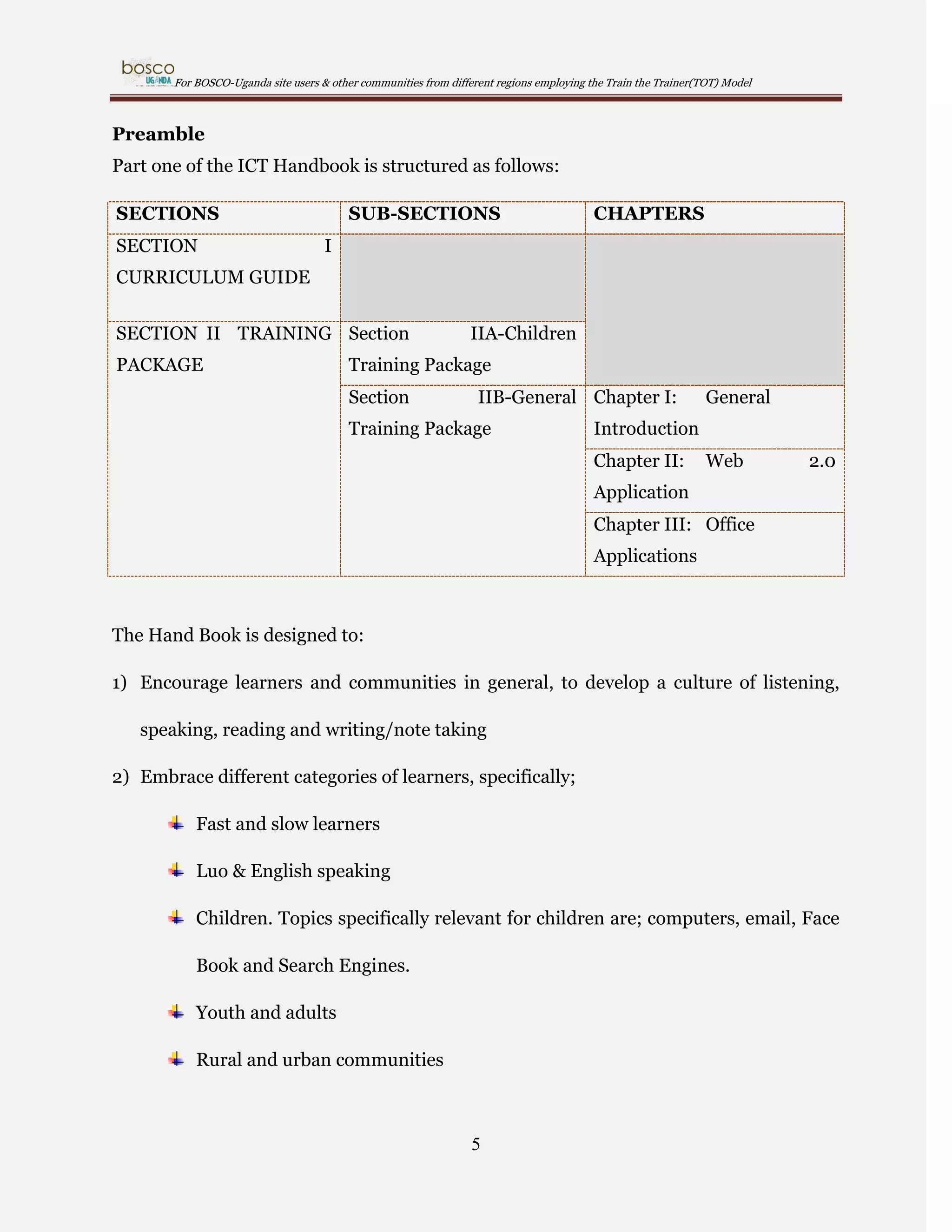
Part one of the ICT Handbook is structured as follows:
SECTIONS
SECTION

SUB-SECTIONS

CHAPTERS

I

CURRICULUM GUIDE
SECTION II TRAINING Section
PACKAGE

IIA-Children

Training Package
Section

IIB-General Chapter I:

Training Package

General

Introduction
Chapter II:

Web

2.0

Application
Chapter III: Office
Applications

The Hand Book is designed to:
1) Encourage learners and communities in general, to develop a culture of listening,
speaking, reading and writing/note taking
2) Embrace different categories of learners, specifically;
Fast and slow learners
Luo & English speaking
Children. Topics specifically relevant for children are; computers, email, Face
Book and Search Engines.
Youth and adults
Rural and urban communities

5
For BOSCO-Uganda site users & other communities from different regions employing the Train the Trainer(TOT) Model

Conflict and post-conflict affected persons
ICT literate and illiterate; those that have touched or never touched a
computer as reflected by some of the expectations and fears below expressed
by participants before training and actual preparation of this package;
Expectations

Fears

 Experience

sharing

with

all  We shall be given hard parts as an

participants

assignment

 Transport refund and allowances

 Change of environment

 Main Office tour of BOSCO-Uganda

 First

 Certificate issuing after the basic ICT

begin

training

on

 Fear of using the computer

 Handouts

 Fear of laughter when I fail to use the

 Effective training

computer

 Meeting only youth

 Computers/laptops will not be enough

 We are going to get computer support

during the training

from BOSCO-Uganda
good

 Only English language will be used

knowledge

on

the  Electricity (Power cuts)

computer especially internet

 Late lunch is not needed due to ulcer

 Good welcome
 We

to

computers

Training

 Getting

time

shall

be

problems
persons

who

have  Limited time to know all the expected

something on computers/ICT

knowledge

6
For BOSCO-Uganda site users & other communities from different regions employing the Train the Trainer(TOT) Model

 What is computer?-we are going to  Unfavorable weather conditions like
know

rain

 Apply the knowledge acquired to help  Criticism of being illiterate
my fellow staff and community

 Others may not understand well in

 Adventuring new environment

their training since there are some who

 New friends

may not be literate

 Practical operation of the computer

 How difficult it is to operate a
computer
 Operating a computer since it is my
first time

This document can be used by anyone anywhere; however the package is specially
designed for communities of Acholi sub-region with the aim of meeting BOSCO-Uganda
Programme goals towards the benefit of communities in the target area. In Acholi sub
region, the local language - Luo/Acholi shall be the medium of instruction. Where need
be, English shall be used (with the help of a local/person alongside to translate into the
local language). In addition, focusing on the topic of Content development- articles
could be written in English or the local language/luo (the Luo language can be used as
medium of communication on the intranet and wikispaces)

7
For BOSCO-Uganda site users & other communities from different regions employing the Train the Trainer(TOT) Model

Battery Operated Systems for Community Outreach-Uganda (BOSCO-Uganda) was
established in 2006 under the umbrella of Gulu Archdiocese in Northern Uganda, with
the mission to “provide innovative Information and Communication

Technology (ICT) solutions using a collaborative and Internet approach to
foster

socio-economic

development

communities in Northern Uganda”.

8

and

peace

building

in

rural
For BOSCO-Uganda site users & other communities from different regions employing the Train the Trainer(TOT) Model

SECTION I - CURRICULUM GUIDE
The Curriculum Guide is aimed at guiding the Trainers of Trainers and Trainers of
Trainees (TOTs) to ensure that there is a uniform approach to training and
knowledge/information shared. It provides the approach to the training. The TOTs need
to follow the Curriculum Guide while making reference of the corresponding lessons in
the Training package. Therefore;
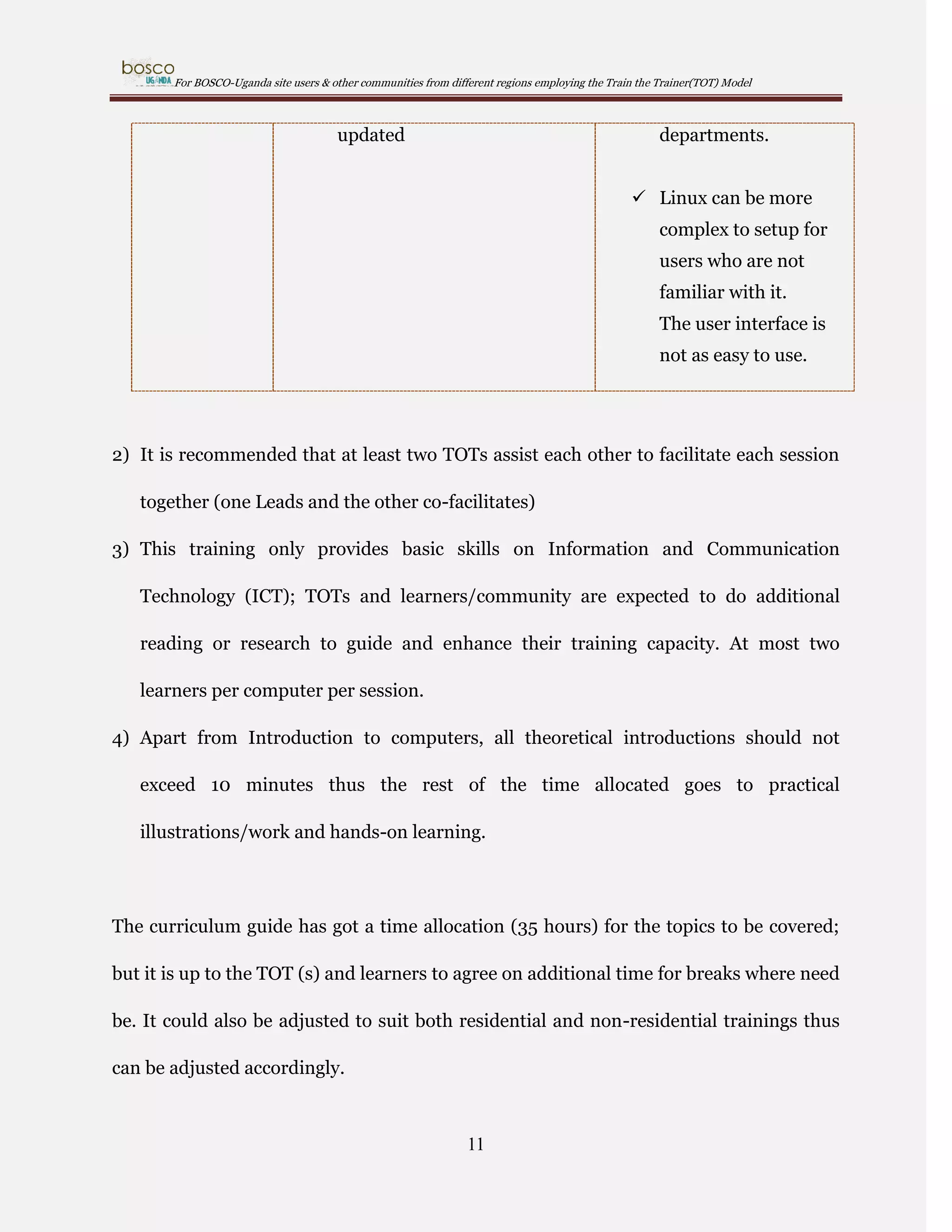
1) For Windows applications we use MS Office applications and Open Office
Applications for Linux Systems. Below are some of the major differences between
Linux and Windows operating Systems.
Windows
Up sides

 Windows is the world leader

Linux
 Linux is very powerful

in PCs loaded with their
software.

 Linux typically
requires less system

 Windows has an easy to use

resources to run the

user interface which can be

operating system

learned easily.

leaving more system
resources for the

 Windows has the largest user

applications which are

base of any operating system

running on the

worldwide.

system.

 Windows has the most

 Many linux

software available for it

distributions are open

Windows has the largest

source so you have full

number of developers of any

source code access

OS

Many Linux
9
For BOSCO-Uganda site users & other communities from different regions employing the Train the Trainer(TOT) Model

distributions are free
 Microsoft has a large

to install and use

technical support department

 Protects the computer

available to support technical

from virus attacks

issues

which security is the
reason linux is

 Systems administrators are

popular at the

many and can be easily found

BOSCO-Uganda sites;

to support your corporate

thus is the major basis

environment

for BOSCO-Uganda
training

Down Sides

 Windows is closed source,

 There are much fewer

meaning that you cannot view

Linux admins

or modify the source code of

available for hire.

the operating system.
 Top notch Linux
 Because there are so many
applications available it can

admins can be hard to
find.

take you a while to find the
application that you like the
best.

 Linux admins are
typically more
expensive to hire than

 Windows licenses are very

Windows admins.

expensive to purchase with
the Enterprise Edition of

 Finding support can

Windows Server costing

be more difficult as

several thousand dollars per

same companies who

server.

distribute the

 Computer easily attacked by
virus if antivirus is not
10

software do not have
large support
For BOSCO-Uganda site users & other communities from different regions employing the Train the Trainer(TOT) Model

updated

departments.
 Linux can be more
complex to setup for
users who are not
familiar with it.
The user interface is
not as easy to use.

2) It is recommended that at least two TOTs assist each other to facilitate each session
together (one Leads and the other co-facilitates)
3) This training only provides basic skills on Information and Communication
Technology (ICT); TOTs and learners/community are expected to do additional
reading or research to guide and enhance their training capacity. At most two
learners per computer per session.
4) Apart from Introduction to computers, all theoretical introductions should not
exceed 10 minutes thus the rest of the time allocated goes to practical
illustrations/work and hands-on learning.

The curriculum guide has got a time allocation (35 hours) for the topics to be covered;
but it is up to the TOT (s) and learners to agree on additional time for breaks where need
be. It could also be adjusted to suit both residential and non-residential trainings thus
can be adjusted accordingly.

11
For BOSCO-Uganda site users & other communities from different regions employing the Train the Trainer(TOT) Model

1.0

GENERAL INTRODUCTION (DURATION: 6 HOURS)

1.1

Session: Official Opening (10 minutes)

Session objective
To give learners a sense of belonging

1

Session outline
Opening prayer
Welcome Remarks

1

http://www.ashton.lancs.sch.uk/index.php?category_id=109

12
For BOSCO-Uganda site users & other communities from different regions employing the Train the Trainer(TOT) Model

1.2

Session: Self introductions (20 minutes)

Session Objective
To create a more free and comfortable atmosphere

2

Session outline:
Ensure the participants are in pairs. They could sit or stand in the training room
or outside at the compound.
In pairs, each one tells the other his/her name, occupation (what they do), site
represented, likes and dislikes.
In a collective session, each one introduces the partner by mentioning the name,
occupation (what they do), site represented, likes and dislikes.

2

http://51851subhashri.wikispaces.com/

13
For BOSCO-Uganda site users & other communities from different regions employing the Train the Trainer(TOT) Model

1.3

Session: Expectations and fears of each participant (20 minutes)

3

Session objectives
To give learners a greater sense of belonging
To ensure the actual objectives of the training are clearly understood

Session outline
Each participant improvises a pen and paper
Without mentioning names, each participant writes her/his expectations on a
piece of paper to submit
Without mentioning names, each participant writes her/his fears on a separate
piece of paper to submit
Each participant submits the two pieces of paper (fears and expectations) to the
TOT (s)
The TOT displays the expectations and fears in the open e.g. training room wall
The TOT reads out the fears and expectations aloud while addressing issues
3

http://emmaspgcereflections.blogspot.com/

14
For BOSCO-Uganda site users & other communities from different regions employing the Train the Trainer(TOT) Model

arising through clarifying, encouraging etc
Emphasize that there are no allowances (sitting, transport etc) to the free
education/training service issued
Together with the learners, revisit the expectations and fears at the end of the
training as a means of evaluation

1.4

Session: Objectives of the training (20 minutes)

4

Session objectives
To ensure that communities understand that BOSCO-Uganda is not an Internet
Service Provider
To ensure that communities understand that the aim of the training is to assist in
speeding up development at individual and community level
To enable learners understand that even with internet interruptions, off-line and
intranet related work can still go on.

4

http://www.thedailystar.net/newDesign/news-details.php?nid=119100

15
For BOSCO-Uganda site users & other communities from different regions employing the Train the Trainer(TOT) Model

Session outline
In a 5 minutes collective discussion, the learners are asked to share their thoughts
on what could be the aim of the training
With reference to the notes in the Training Package, the ICT basic skills training
objectives are introduced and explained to the learners
As wrap up on the session, learners are made to understand that the programme
is to empower community members who should in turn pass on the skills
acquired to fellow community members for common-social welfare.

1.5

Session: BOSCO-Uganda program expectations (30 minutes)

5

Session objectives
To ensure communities understand that BOSCO-Uganda programme is only a
contribution to already running community development initiatives at village,
parish and sub county levels and therefore, communities are expected to embrace
the ownership of the programme.

5

http://www.e4africa.co.za/?cat=29

16
For BOSCO-Uganda site users & other communities from different regions employing the Train the Trainer(TOT) Model

Session outline
In 5 minutes, ask the learners what they know about BOSCO-Uganda
Programme.
With reference to the notes in the Training Package, explain BOSCO-Uganda
Programme expectations to the learners

1.6

Session: Assessment of training needs of the users (20 minutes)

6

Session Objectives
To assess the training needs of the learners
To ensure that all the learners with different levels of knowledge feel equally
useful
Session outline

6

http://hgslearning.co.uk/course/category.php?id=40

17
For BOSCO-Uganda site users & other communities from different regions employing the Train the Trainer(TOT) Model

Explain the displayed assessment questions to the learners (please refer to the
Training Package for assessment form).
Assess the training needs of the learners.
During the assessment; the TOT (s) should look out for the learners’ ICT
knowledge (theory and practice).
Group the learners-pair the learners mindful of levels of ICT knowledge.
Encourage active interaction and knowledge sharing amongst the different ICT
knowledge levels to enhance learning
1.7

Session: Introduction to and the benefits of the computer

(1 hour 30 minutes)

7

Session objective
To introduce to the learners the basics on computer hard ware and soft ware
Session outline

7

http://www.teacherrambo.com/course/category.php?id=2

18
For BOSCO-Uganda site users & other communities from different regions employing the Train the Trainer(TOT) Model

With reference to the Training Package, in an interactive way, introduce the
basics of Computers
Remember to create an awareness on basic computer management and handling

1.8

Session: The Key Board & Word Processing (1 hour 30 minutes)

8

Session objectives
To familiarize learners to the basics of the key board
To introduce learners to the basics of Word Processing

Session outline
Theoretical introduction to the key board (10 minutes)
Practical illustrations/instructions on the Key Board (30 minutes)-For every key
introduced, learners should be given the opportunity to try it out practically (50
minutes)
On Word Processing topic, the TOT (s) instruct (s) the learners to do as below;

8

http://www.teach-ict.com/glossary/A/animation.htm
19
For BOSCO-Uganda site users & other communities from different regions employing the Train the Trainer(TOT) Model

 Open Ms. Word/Open Office writer document (new and existing)
 Naming and saving a new file
 Editing and saving an existing file
 Highlighting, Bolding, Italics and Underlining words etc
 Aligning texts
 Saving in folders
 Font sizes and types
Encourage learners to practice word processing and the key board

1.9

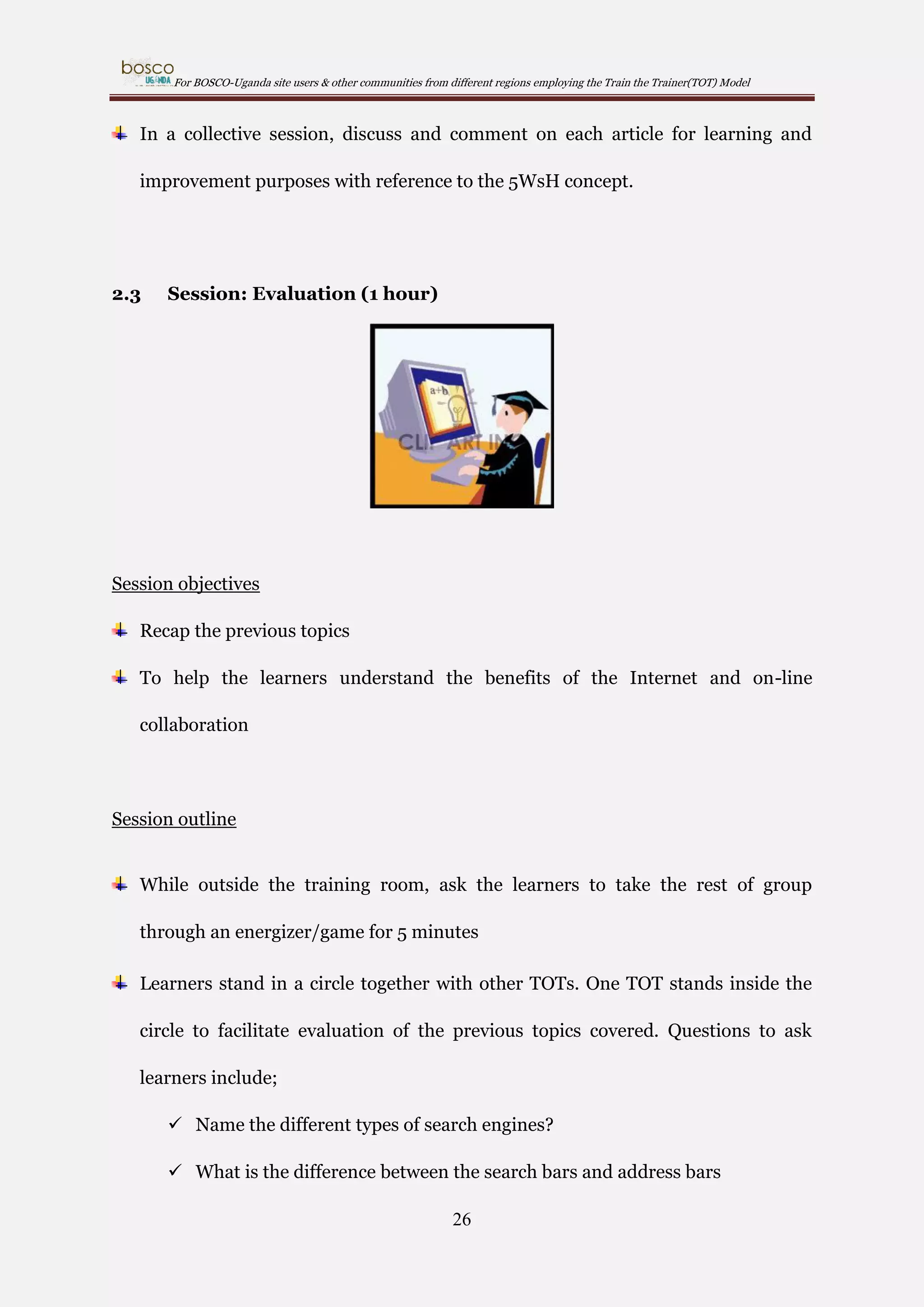
Session: Evaluation (1 hour)

9

Session Objective
To help the learners understand the different uses and advantages of the
computer

Session outline

9

http://www.graphicsfactory.com/search/graduation_P21.html

20
For BOSCO-Uganda site users & other communities from different regions employing the Train the Trainer(TOT) Model

While outside the training room, randomly ask the learner at random to take the
rest of the group through an energizer/game for 5 minutes
Learners stand in a circle together with other TOTs. One TOT stands inside the
circle to facilitate the evaluation of the previous topics covered. Questions to ask
learners include;
 What is a computer?
 What is the difference between computer hardware and computer soft
ware?
 Give examples of computer hardware
 Give examples of computer software
 How do you switch on (Power on) a computer?
 How do you switch off (Power off) the computer?
 What are the Dos and Don’ts regarding computer usage?
 How do you open a new Ms. Word/open office writer document?
 How do you open an existing Ms. Word/open office writer document?
 How do you go about naming and saving a new file?
 How do you go about editing and saving an existing file?
 How do you go about highlighting, Bolding, Italics and underlining?
 Name the different ways of aligning texts?
 What is a folder?
 What is the difference between a folder and a file?
 How do you go about saving in folders?
 What are font sizes and types; and when do you use them?
21
For BOSCO-Uganda site users & other communities from different regions employing the Train the Trainer(TOT) Model

Ensure atleast each learner participates in one or more questions asked.
After the learners have attempted the questions, the TOTs collaboratively provide
the answers to each of the questions as a form of refresher.
Ask the learners to share what they think could be the benefits/advantages of the
computer
The TOT explains the advantages of the computer with reference to the notes in
the Training Package
Before starting a new topic, the TOT should make sure that what has not been
understood by the learners is explained.
Group wraps up with a game of about 5 minutes

22
For BOSCO-Uganda site users & other communities from different regions employing the Train the Trainer(TOT) Model

2.0

SEARCH ENGINES & CONTENT DEVELOPMENT (4 hours)

2.1

Session: Search engines (30 minutes)

Session objectives
To equip the learners with the basic skills for on-line information gathering
Session outline
Give a brief explanation of what search engines are with examples (e.g. Bing,
Google, Wikipedia, yahoo, etc) and their importance in 10 minutes
Explain the difference between search bars and address bars
Ask the learners to think of what they need to discover and use the preferred
search engine to learn more about their area of interest.
Tell the learners that Google has provision for local languages like Luo; the TOT
(s) show (s) the learners
Tell the learners that they may want to use the search engines later to back their
content through facts and statistics
Tell the learners that if they are copying the exact words or photographs from the
internet etc, they should quote the source for legal (copy right) reasons

23
For BOSCO-Uganda site users & other communities from different regions employing the Train the Trainer(TOT) Model

2.2

Session: Writing articles (2 hour 30 minutes)

10

Session objective
Explain the basic research questions (5WsH) to inform the article writing
Session outline
Introduce the 5WsH (below) concept to the learners
 Who is it about?
 What happened (what's the story)?
 When did it take place?
 Where did it take place?
 Why did it happen?
 How did it happen?
Explain that the concept (research questions) is regarded as basics in information
gathering.
Explain that the research questions are only a checklist to ensure complete
information gathering.

10

http://www.123rf.com/photo_10478260_cartoon-happy-geek-and-computer.html

24
For BOSCO-Uganda site users & other communities from different regions employing the Train the Trainer(TOT) Model

Explain that the article should be flowing in the order of: Introduction-BodyConclusion
Task the learners to read more on article writing for example, developing a topic
etc.
Ask a pair (s) of learners to talk about themselves through a role play; and in a
collective session comment on individual profiles presented to establish if the
5WsH concept has been observed to give room for comments and improvement.
Task the learners to develop their individual profiles during their free time and
save it for future reference/usage.
Introduce topical issues (e.g. Millennium Development Goals, culture or other
developmental topics of interests), encourage further reading and research
towards content development.
Divide the learners into groups/teams.
Task each group to identify a topic and write an article about it using their
communities as a case study. The article doesn’t always have to be a problem but
also achievements; or both (positive and negative) because communities also
have nice things happening around.
Task the groups to back their articles with photos that speak; show the learners
how to take photos, download, save, edit (cropping & re-sizing) and uploading.
After instructions, learners go for group work for 1 (one) hour. Learners type out
and save their work in Ms. Word/open office writer. Members define their group
names.

25
For BOSCO-Uganda site users & other communities from different regions employing the Train the Trainer(TOT) Model

In a collective session, discuss and comment on each article for learning and
improvement purposes with reference to the 5WsH concept.

2.3

Session: Evaluation (1 hour)

Session objectives
Recap the previous topics
To help the learners understand the benefits of the Internet and on-line
collaboration

Session outline
While outside the training room, ask the learners to take the rest of group
through an energizer/game for 5 minutes
Learners stand in a circle together with other TOTs. One TOT stands inside the
circle to facilitate evaluation of the previous topics covered. Questions to ask
learners include;
 Name the different types of search engines?
 What is the difference between the search bars and address bars
26
For BOSCO-Uganda site users & other communities from different regions employing the Train the Trainer(TOT) Model

 What is 5WsH and what is it used for?
 How many Millennium Development Goals exist?
 Mention all the Millennium Development Goals.
Ensure each learner participates
After the learners have attempted the questions, the TOT (s) collaboratively
provide the answers to each of the questions
Ask the learners to share what they think is the definition of the internet; and are
the benefits/advantages of the internet?
The TOTs explain the benefits/advantages of the internet with reference to the
Training Package.
Before starting a new topic, the TOTs should make sure that what has not been
understood by the learners is explained.
Group wraps up with a game for 5 minutes

27
For BOSCO-Uganda site users & other communities from different regions employing the Train the Trainer(TOT) Model

3.0

ON-LINE COLLABORATION (20 hours)

3.1

Session: Electronic mails (1 hour 30 minutes)

11

Session objective
To enable learners use electronic emails to ease communication
Session outline
Theoretical introduction to electronic mails (10 minutes)
After a brainstorm by the users, explain the advantages and disadvantages of
emails
Find out how many have got email accounts
Emphasize the need to own an email
Explain the Dos and Don’ts regarding email
Explain the basic steps to follow if one needed to change passwords
Emphasize the need to remember usernames and passwords
Find out how many have got Gmail accounts
Explain that for purposes of the program activities Gmail accounts shall be used
because it is most compatible to future on-line activities we shall be involved in
Encourage the learners to maintain the same password for all accounts for easy

11

http://cyberfeeder.com/category/technology/softwares/

28
For BOSCO-Uganda site users & other communities from different regions employing the Train the Trainer(TOT) Model

remembrance
Take the learners without Gmail accounts through the account opening process;
and encourage the ones with Gmail accounts to assist fellow learners
After all have created Gmail accounts, make sure learners are able to;
 Compose messages
 Attach documents
 Read messages inbox and outbox
 Send and receive messages
 Save and edit drafts
 CC & BCC functions
 Reply and forwarding
Challenge learners to share email addresses and practically try this out between
or amongst themselves

3.2

Session: BOSCO-Uganda Intranet (1 hour)

12

12

http://blog.cedsolutions.com/Blog/?Tag=apple

29
For BOSCO-Uganda site users & other communities from different regions employing the Train the Trainer(TOT) Model

Session objective
To encourage development oriented collaboration and promote local response
mechanisms among the local communities
Session outline
Theoretical introduction to the intranet (10 minutes)
Learners are informed that in addition to posting articles and commenting on
articles, the Intranet could be used to;
 Ask questions for example commodity prices with the hope that
community members shall help answer
 Market products examples individual who is selling local chicken and
needs customers
 Do research through electronic books and tutorials presented
 Entertainment through videos presented
 To submit comments on the program through the Monitoring and
Evaluation Section for information on program performance
Learners are practically taken through the registration process on the intranet
Learners are left to navigate the intranet and discover the different resource
materials and their uses on personal and community level
Each learner is tasked to find an existing article on the intranet forum to
comment on in English or Luo
Each learner posts a new article on the forum

30
For BOSCO-Uganda site users & other communities from different regions employing the Train the Trainer(TOT) Model

3.3

Session: Google maps & Documents (1 hour 30 minutes)

Session objective
To introduce the learners to information sharing through Google maps and
documents
Session outline
Brief introduction to Google maps
Practically show the learners the link to Google maps
Learners are told that Google maps provide an estimate direction of a location or
place
Task each learner to produce a Google map of preferred location
Task the learners to produce a Google map of their ICT site
Task each learner to sign into their Gmail accounts and locate the section: Google
documents
Task each learner to share their profile with the rest through Google documents
Challenge the learners to explore more on the topic

31
For BOSCO-Uganda site users & other communities from different regions employing the Train the Trainer(TOT) Model

3.4

Session: BOSCO-Uganda wiki spaces (14 hours)

Session objective
To enable communities to social-market themselves at individual and
institutional level through projection of their respective skills, talents,
knowledge/information and objectives
Session outline
Learners are introduced to the wiki www.bosco-uganda.wikispaces.net
Learners are told that it is possible to save and edit an article on the wiki and
published when ready for example through other social media tools like Face
book, Twitter, LinkedIn, Blogs etc
Learners are also told that due to unreliable internet connectivity, it is advisable
to work off-line (Ms. Word/open office writer etc) and save the document that
can always be retrieved for posting on-line to avoid loss of data
Learners are reminded to remember the URL
Learners are instructed to practically join wikispaces
After joining wikispaces, each learner is taken through the practical process of
creating a new wiki
Learners are asked to paste their individual profiles and upload their individual
photos on their respective wikis
Learners are taken through a practical session of creating new pages; and naming
each basing on the subject of the content.
32
For BOSCO-Uganda site users & other communities from different regions employing the Train the Trainer(TOT) Model

Learners are encouraged to go keep their wikis active by publicizing their work
like poems, updates on oneself, articles on personal experiences etc

3.5

Session: Evaluation (1 hour)

Session objective
Recap on previous topics
Session outline
While outside the training room, ask the learners to take the rest of group
through an energizer/game for 5 minutes
Learners stand in a circle together with other TOTs. One TOT stands inside the
circle to facilitate evaluation of the previous topics covered. Questions to ask
learners include;
 How do you become a member of wikispaces?
 How do you create a new page on your wiki?
 What do you do to be able to edit your pages
 Each learner to state their wiki
 Each Learner to state their Gmail account
33
For BOSCO-Uganda site users & other communities from different regions employing the Train the Trainer(TOT) Model

 Each learner to share about Google maps and documents
Ensure each learner participates in answering at least one or two of the questions
asked
After the learners have attempted the questions, the TOT s collectively wrap up
with right answers to each of the questions
Ask the learners to share what they think is the meaning of electronic mails; and
are the benefits/advantages of the electronic emails?
The TOTs explains the meaning and the benefits/advantages of electronic mails
with reference to the Training Package.
Ask the learners to share what they think is the meaning of the intranet; and are
the benefits/advantages of the intranet?
The TOTs explains the meaning and the benefits/advantages of intranet with
reference to the Training Package.
Ask the learners to share what they think is the meaning of on-line collaboration;
and are the benefits/advantages of on-line collaboration?
The TOTs explains the meaning and the benefits/advantages of on-line
collaboration with reference to the Training Package.
Before starting a new topic, the TOTs should make sure that what has not been
understood by the learners is explained.
Group wraps up with a game

34
For BOSCO-Uganda site users & other communities from different regions employing the Train the Trainer(TOT) Model

3.6

Session: Social media tools (1 hour)

Session objective
To enable learners explore and navigate the internet (social media tools on their
own) using basic skills already earned.
Session outline
Explain and give the benefits of each of the social media tools below;
 Face book
 Linked-in
 Twitter
 Skype
Practical exercise: Using skills already attained through email, wiksipaces &
intranet account opening, learners are tasked to create an account with at least
two of the preferred social media tools and complete profile and upload a photo

35
For BOSCO-Uganda site users & other communities from different regions employing the Train the Trainer(TOT) Model

4.0

GENERAL PRACTICE, RESEARCH & EVALUATIONS (7 hours)

13

4.1

Session: Ms. Excel, Power Point & Publisher

Session objective
To challenge learners to creatively exploit skills and resource materials acquired
for personal empowerment
Session 0utline
Learners are encouraged to study, research and consult each other and the
Training Package. Learners also visit and make use of search engines
TOT (s) assist the learners whenever need arises

13

http://www.rsc-northwest.ac.uk/acl/eMagArchive/RSCeMag0910/January10single/index.html

36
For BOSCO-Uganda site users & other communities from different regions employing the Train the Trainer(TOT) Model

4.2

Session: Monitoring & Evaluation forms

Session objective
To challenge communities to follow up/monitor and evaluate community
activities
Session outline
Learners are introduced to the training register and tasked to keep record of the
community members trained
Learners are introduced to the users registration format and tasked to monitor
the registration of site users (both old and new users)
Learners are introduced to the monitoring format to enable reporting of all site
activities (trainings etc)
Learners are introduced to the qualitative/evaluation form and tasked to
document records of people’s testimonies (trainings and other activities) that
could also be shared on the internet/social media tools like wikispaces, twitter etc
Challenge communities to improvise materials for record keeping for example
counter books etc

NB: Participants need to also observe what is happening as they shall be
expected to replicate the same

37
For BOSCO-Uganda site users & other communities from different regions employing the Train the Trainer(TOT) Model

4.2.1 Annex 1 - Training Register
BOSCO-UGANDA OVERALL TRAINING REGISTER OF ATTENDANCE
Lesson (s) _______________(also attach time table):Venue:__________ Time__________; Date(s)____________
No

Name

Age group
(12-18, 19-29, 3049, 50 yearsabove)

Sex
(M/F)

Email/Telephone

Occupation (Student, out of
school, Farmer etc)

Site, Village & Parish

Sub county &
District

1
2
3
4
5
6
7
8

Name of Tutor: _________________________Position____________________at_______________Signature__________________

38

Signature
For BOSCO-Uganda site users & other communities from different regions employing the Train the Trainer(TOT) Model

4.2.2 Annex 2 - Training Assessment Form

Battery Operated Systems for Community Outreach Uganda
(BOSCO-Uganda)
Assessment form [04]-for day 1[one] activity 3
Name: _________________ Site_________________
Dear Participant, the answers you provide here will be handled confidentially and used to help you
and others improve literacy skills related to computers and generally Information and Communication
Technology.
Please study the table below and kindly tick what is applicable.

Activity

Yes

Can you power on a computer?

Are you able to navigate?

Are you able to use general
office & web 2.0 applications?
Are you able to choose a
programme and why?
Are you conversant with e-mail?

Do you possess an email
address? If yes, do you use it
(email address/account)?
Are you able to save documents?

Can you shut down a computer?

Thank you for your cooperation!

39

No
For BOSCO-Uganda site users & other communities from different regions employing the Train the Trainer(TOT) Model

4.2.3 Annex 3 - Site users register

Name of ICT Site:
Month:
S/N

Battery Operated Systems for Community Outreach-Uganda (BOSCO-UGANDA)
DAILY USERS ATTENDANCE DATA CAPTURE
___________________________________________________
___________________________________________________
DATE

NAME

GENDER
(Male/M or
Female/F)

1)
2)
3)
4)
5)
6)
7)
8)
9)
10)

40

AGE

USERS
FRQUENCY
(New or Old)

RESIDENCE

SIGNATURE
For BOSCO-Uganda site users & other communities from different regions employing the Train the Trainer(TOT) Model

4.2.4 Annex 4 - Monitoring Report format
SITE NAME……………………………………………………………….Date……………………………………..
Activity
(what is being done)

Activity Plan
(Flow charts/roles)

Achievements
(Goals achieved)

Challenges
(Retarded activity)

Way forward
(Next move amidst challenges)

Conclusion
(Derived measures/Agreed)

Site Manager……………………………………………………..
Signature

……………………………………………………..

41
For BOSCO-Uganda site users & other communities from different regions employing the Train the Trainer(TOT) Model

4.2.5 Annex 5 - Evaluation Report Form
EVALUATION FORM-TO BE FILLED BY SITE USERS IN RELATION TO BOSCOUGANDA PROGRAM
Name of Site User: ____________________________________________ Name of Site:____________________

A. Skills by the site user/community member (Skills are to do with hands)
Skills acquired
Skills improved

Skills already practiced

B. Information/knowledge of the site user/community member (this has to do with the head)
Information/knowledge Possessed
Information/knowledge acquired

C. Attitude (what has been stretched?) i.e. this has to do with the Heart
_____________________________________________________________________________________________
D. Plan for the skills and knowledge acquired.
How do you plan to use the skills & information/knowledge acquired?

What are you doing with the skills & information/knowledge
acquired?

Signature:

When did you join the site?

42

Date:
For BOSCO-Uganda site users & other communities from different regions employing the Train the Trainer(TOT) Model

4.2.6 Annex 6 - Copy of Monthly Book Keeping
Book keeping Form for Sites (Note: Money actually needs to exchange hands before being recorded)

Site Name:
Month and Year:
Person Filling out this form:
Amount of Cash at beginning of Month:
Name of Person

Revenue Received

Total Revenue
Name of Expense

Receipt # and Date

Description

Balance

Receipt # and Date

Description

Balance

0
Expenses Paid in Sh

Total Expenses

0

Total Profit/Loss

0

Other
Comments…

43
For BOSCO-Uganda site users & other communities from different regions employing the Train the Trainer(TOT) Model

4.2.7 Annex 7 - Material/Equipment Checklist
(Please use this to cross-check if all the materials and equipment meant to be returned
after the training are actually returned. To ease tracking, first be sure to note which
participant used which material/equipment during the course of the training)
Name of site…………………………………………………………………………………….
Date of training from………………………………….to………………………………………
Items

Numbers at START and END

Laptops and their chargers

START

END

Power extension cables
Projector

Cameras

Others

1
2
3
4
5

Names of Facilitators available at the closure of the training
1…………………………………………………………………Sign………………………….
2…………………………………………………………………Sign………………………….
3…………………………………………………………………Sign………………………….

44
For BOSCO-Uganda site users & other communities from different regions employing the Train the Trainer(TOT) Model

4.2.8 Annex 8 – Windows & Linux
For Windows applications we use MS Office applications and Open Office
Applications for Linux Systems.
Below are the major differences between Linux and Windows operating Systems.
Up sides
Windows is the world leader in PCs loaded with their software.
Windows has an easy to use user interface which can be learned easily.
Windows has the largest user base of any operating system worldwide.
Windows has the most software available for it
Windows has the largest number of developers of any OS
Microsoft has a large technical support department available to support technical
issues
Systems administrators are many and can be easily found to support your corporate
environment
Unix is very powerful
Unix typically requires less system resources to run the operating system leaving
more system resources for the applications which are running on the system.
Many linux distributions are open source so you have full source code access
Many linux distributions are free to install and use
Down Sides
Windows is closed source, meaning that you cannot view or modify the source code
of the operating system.
Because there are so many applications available it can take you a while to find the
application that you like the best.
Windows licenses are very expensive to purchase with the Enterprise Edition of
Windows Server costing several thousand dollars per server.
There are much fewer linux admins available for hire.
Top notch linux admins can be hard to find.
45
For BOSCO-Uganda site users & other communities from different regions employing the Train the Trainer(TOT) Model

linux admins are typically more expensive to hire than Windows admins.
Finding support can be more difficult as same companies who distribute the software
do not have large support departments.
linux can be more complex to setup for users who are not familiar with it.
The user interface is not as easy to use.

4.2.9.

Annex 9 - Acknowledgement and Special thanks to:

A. Donors- UNICEF, DKA-Austria, BOSCO (Uganda & Inc/USA), SIGNIS,
University of Notre Dame-USA, HORIZONT3000
B. Community members that participated in the training, testing and
translation of this Training Package
Name

Occupation

Site, village, parish

Sub-

District

county

in
Northern
Uganda

1) Joseph Mogi

Teacher

Pabo Comprehensive Secondary Pabo

Amuru

School
2) George Okiya

Typist

Pabo sub-county headquarters

Pabo

Amuru

3) Denis Okot

Student

Pabo Comprehensive Secondary Pabo

Amuru

School
4) Denish Okoya

Teacher

Pabo Comprehensive Secondary Pabo

Amuru

School
5) Sharon Lanyero

Student

Pabo Comprehensive Secondary Pabo

Amuru

School
6) Geoffrey Ayella

Student

Pabo Secondary School

Pabo

Amuru

7) Jenifer Atim

Health Worker

Pabo Youth Desk

Pabo

Amuru

Pabo sub-county headquarters

Pabo

Amuru

Pabo sub-county (Kal Oguru)

Pabo

Amuru

Pabo sub-county headquarters

Pabo

Amuru

8) Charles

Ochola Parish Chief

Oloya
9) Armstrong Bright Pastor
O.
10) Lillian Ajok

Parish Chief

46
For BOSCO-Uganda site users & other communities from different regions employing the Train the Trainer(TOT) Model

11) Robert Okwonga

Teacher

Pabo Primary School

Pabo

Amuru

12) Grace Anek

Police

Pabo Youth Desk

Pabo

Amuru

13) Patrick Ojara O.

Councilor

Pabo Sub-county headquarters

Pabo

Amuru

14) Susan Alanyo

AASP-NAADS

Pabo sub-county

Pabo

Amuru

15) Sharon Aciro

Out-of-school

Pabo Youth Desk

Pabo

Amuru

Carter Teacher

Pabo Youth Desk (Paomo & Gaya)

Pabo

Amuru

Opoka Assistant

Pabo Sub-county headquarters

Pabo

Amuru

Pabo Youth Desk

Pabo

Amuru

Pabo Primary School Desk

Pabo

Amuru

Pabo sub-county

Pabo

Amuru

Lacor Primary School

Lamogi

Amuru

Pagak Primary School

Lamogi

Amuru

16) Jimmy
Akena
17) Francis
Acellam

Community
Development
Officer

18) Santo Oyoo
19) Julius

Farmer

Olwoch Teacher

Oceng
20) Denish Oryem
21) Irene

Spiritual Leader

Simbrella Teacher

Amito
22) Sunday

R. Pupil

Kakanyero
23) Bernard Ogwal

Farmer

Lacor Primary School

Lamogi

Amuru

24) Commas Otim

Farmer

Pagak (Obbo)

Lamogi

Amuru

25) Johnson Okello

Local

Lamogi

Amuru

Council Lacor Parish

One Chairperson
26) Alice Ataro

Teacher

St. Mary’s College, Lacor

Lamogi

Amuru

27) Ivan Ochora Olur

Pupil

Pagak Primary School

Lamogi

Amuru

28) Richard Oringa

Student

Pagak

Lamogi

Amuru

29) Thomas Obol

Teacher

St. Mary’s College, Lacor

Lamogi

Amuru

30) Irene Acayo

Parish Chief

Lacor St. Mary’s College

Lamogi

Amuru

Pagak/Pahoro

Lamogi

Amuru

Guruguru

Lamogi

Amuru

31) Francis

Abola Sub-county

Olanya

Youth Chair

32) Simon Odong

Farmer

33) Robert Okello

Trainer
Trainers

34) David Okello

Trainer
Trainers

35) Sunday Deo Acire

Trainer

of Bardege ICT for Education & Bardege

Gulu

Research
of Bardege ICT for Education & Bardege

Gulu

Research
of Bardege ICT for Education & Bardege

47

Gulu
For BOSCO-Uganda site users & other communities from different regions employing the Train the Trainer(TOT) Model

Trainers
36) Ivan Komakech

Research

Trainer

of Bardege ICT for Education & Bardege

Trainers
37) Bernard Ocaya

Research

Trainer

of Bardege ICT for Education & Bardege

Trainers
38) Tony Komakech

Gulu

Research

Trainer

of Bardege ICT for Education & Bardege

Trainers

Bardege ICT for Education & Bardege

Gulu

Research

User

39) Stella J. Lalam

Gulu

Gulu

Research
40) Atube G. Omara

Trainer

of Bardege ICT for Education & Bardege

Trainers
41) Jacob Ojara

Research

Trainer

of Bardege ICT for Education & Bardege

Trainers
42) Fred Mugisha

Trainer

of Bardege ICT for Education & Bardege

44) Valeria Aromorach

Gulu

Research

R. Trainer

Lamaro

Gulu

Research

Trainers
43) Syndrella

Gulu

of St. Joseph’s Primary School

Bardege

Gulu

of St. Joseph’s Primary School

Bardege

Gulu

of St. Joseph’s Primary School

Bardege

Gulu

of St. Joseph’s Primary School

Bardege

Gulu

of Bardege ICT for Education & Bardege

Gulu

Trainers
Trainer
Trainers

45) Dominic Ezama

Trainer
Trainers

46) Michael G. Okeny

Trainer
Trainers

47) Joel D. Okello

Trainer
Trainers

Research

48) Oscar Ocan

Out of school

Tetugu Parish

Ongako

Gulu

49) Edward Okello

Peasant Farmer

Coope Information Centre

Bungatira

Gulu

50) Betty Lawil

Local

Council Coope Information Centre

Bungatira

Gulu

Tam Pi Diki Child/Youth Support Bungatira

Gulu

one Chair Person
51) Joyce Abalo

Farmer

Organisation
52) Winnifred Akello

Student

Onjona Parish, Dika village

Ongako

Gulu

53) Mary Alanyo

Peasant Farmer

Kal Parish

Ongako

Gulu

54) Robert. B Oballim

Trainer

of Coope Information Centre

Bungatira

Gulu

Coope Information Centre

Bungatira

Gulu

Trainers
55) Gloria Auma

Student

48
For BOSCO-Uganda site users & other communities from different regions employing the Train the Trainer(TOT) Model

56) Tonny Opio

Director

Support the Orphans & Vulnerable Ongako

Gulu

Children Organisation (SOVCO)
57) Salama Akello

Student

Tam Pi Diki Child/Youth Support Bungatira

Gulu

Organisation
58) Denish Oyat

Farmer

Tam Pi Diki Child/Youth Support Bungatira

Gulu

Organisation
59) Simple

Zakeo Driver

Tam Pi Diki Child/Youth Support Bungatira

Odong

Gulu

Organisation, Agonga Parish
C. Workshop Trainers

Name

Occupation

Site/institution

District
Northern
Uganda

1) Latifah Akello Monica

Trainer of Trainers

Coope Information Centre

Gulu

2) Bosco Okwir

Trainer of Trainers

Pabbo Comprehensive School

Amuru

3) Simon Okello

Trainer of Trainers

Pagak Youth Centre

Amuru

4) Daniel Komakech

Field Coordinator

BOSCO-Uganda

Gulu

5) Robert Komakech

Field Coordinator

BOSCO-Uganda

Gulu

6) Alfred Kilama

Technical Manager

BOSCO-Uganda

Gulu

7) Stella Akiteng

Project Coordinator

BOSCO-Uganda

Gulu

Resources/Links:
Please refer to the notes in SECTION II OF THE ICT HANDBOOK (Part I) for
further reading/research and practice.
For on-line research and personal on-line practice, please visit the links below:
www.tutorialsforopenoffice.org
www.learnopenoffice.org

49

in

Bosco Uganda ICT Handbook: Curriculum Guide

  • 1.
    For BOSCO-Uganda siteusers & other communities from different regions employing the Train the Trainer(TOT) Model Battery Operated Systems for Community Outreach Uganda (BOSCO-Uganda) ICT HAND BOOK (PART ONE) SECTION I - CURRICULUM GUIDE (2012) P.O. Box 200, Gulu, Northern Uganda, East Africa E-mail: info@boscouganda.com ; Website: www.boscouganda.com 1
  • 2.
    For BOSCO-Uganda siteusers & other communities from different regions employing the Train the Trainer(TOT) Model Table of contents Page Contents Preamble ......................................................................................................................................... 5 SECTION I - CURRICULUM GUIDE ....................................................................................... 9 1.0 GENERAL INTRODUCTION (DURATION: 6 HOURS) ....................................... 12 1.1 Session: Official Opening (10 minutes) ................................................................ 12 1.2 Session: Self introductions (20 minutes) ............................................................. 13 1.3 Session: Expectations and fears of each participant (20 minutes) ................... 14 1.4 Session: Objectives of the training (20 minutes) ................................................ 15 1.5 Session: BOSCO-Uganda program expectations (30 minutes) ......................... 16 1.6 Session: Assessment of training needs of the users (20 minutes) .................... 17 1.7 Session: Introduction to and the benefits of the computer ............................... 18 (1 hour 30 minutes) ........................................................................................................... 18 1.8 Session: The Key Board & Word Processing (1 hour 30 minutes) .................... 19 1.9 Session: Evaluation (1 hour) .................................................................................. 20 2.0 SEARCH ENGINES & CONTENT DEVELOPMENT (4 hours) ............................ 23 2.1 Session: Search engines (30 minutes) .................................................................. 23 2.2 Session: Writing articles (2 hour 30 minutes) ..................................................... 24 2.3 Session: Evaluation (1 hour) .................................................................................. 26 3.0 ON-LINE COLLABORATION (20 hours) ................................................................ 28 3.1 Session: Electronic mails (1 hour 30 minutes) .................................................... 28 3.2 Session: BOSCO-Uganda Intranet (1 hour) ......................................................... 29 3.3 Session: Google maps & Documents (1 hour 30 minutes) ................................. 31 3.4 Session: BOSCO-Uganda wiki spaces (14 hours) ................................................ 32 3.5 Session: Evaluation (1 hour) .................................................................................. 33 3.6 Session: Social media tools (1 hour)...................................................................... 35 2
  • 3.
    For BOSCO-Uganda siteusers & other communities from different regions employing the Train the Trainer(TOT) Model 4.0 GENERAL PRACTICE, RESEARCH & EVALUATIONS (7 hours) ...................... 36 4.1 Session: Ms. Excel, Power Point & Publisher ...................................................... 36 4.2 Session: Monitoring & Evaluation forms ............................................................. 37 4.2.6 Annex 6 - Copy of Monthly Book Keeping ............................................................... 43 4.2.7 Annex 7 - Material/Equipment Checklist ................................................................ 44 4.2.8 Annex 8 – Windows & Linux ..................................................................................... 45 4.2.9. Annex 9 - Acknowledgement and Special thanks to: ............................................ 46 3
  • 4.
    For BOSCO-Uganda siteusers & other communities from different regions employing the Train the Trainer(TOT) Model List of Acronyms BOSCO…………………………………… Battery Operated Systems for Community Outreach BOSCO-Uganda………… Battery Operated Systems for Community Outreach-Uganda Web 2.0……………………………………Website Applications 2.0 ICT…………………………………………Information and Communication Technology TOTs………………………………………Trainer of Trainers and Trainer of trainees 5WsH………………………………………What, When, Where, Who, Why and How MS…………………………………………Microsoft Office URL………………………………………..Uniform Resource Locator MDGs………………………………………Millennium Development Goals EMAIL……………………………………..Electronic Mail GMAIL…………………………………….Google Mail CC………………………………………….Carbon Copy BCC………………………………………..Black Carbon Copy WWW……………………………………...World Wide Web(site) HTTP………………………………………Hypertext Transfer Protocol NB…………………………………………Nota Bene (Note Well) 4
  • 5.
    For BOSCO-Uganda siteusers & other communities from different regions employing the Train the Trainer(TOT) Model Preamble Part one of the ICT Handbook is structured as follows: SECTIONS SECTION SUB-SECTIONS CHAPTERS I CURRICULUM GUIDE SECTION II TRAINING Section PACKAGE IIA-Children Training Package Section IIB-General Chapter I: Training Package General Introduction Chapter II: Web 2.0 Application Chapter III: Office Applications The Hand Book is designed to: 1) Encourage learners and communities in general, to develop a culture of listening, speaking, reading and writing/note taking 2) Embrace different categories of learners, specifically; Fast and slow learners Luo & English speaking Children. Topics specifically relevant for children are; computers, email, Face Book and Search Engines. Youth and adults Rural and urban communities 5
  • 6.
    For BOSCO-Uganda siteusers & other communities from different regions employing the Train the Trainer(TOT) Model Conflict and post-conflict affected persons ICT literate and illiterate; those that have touched or never touched a computer as reflected by some of the expectations and fears below expressed by participants before training and actual preparation of this package; Expectations Fears  Experience sharing with all  We shall be given hard parts as an participants assignment  Transport refund and allowances  Change of environment  Main Office tour of BOSCO-Uganda  First  Certificate issuing after the basic ICT begin training on  Fear of using the computer  Handouts  Fear of laughter when I fail to use the  Effective training computer  Meeting only youth  Computers/laptops will not be enough  We are going to get computer support during the training from BOSCO-Uganda good  Only English language will be used knowledge on the  Electricity (Power cuts) computer especially internet  Late lunch is not needed due to ulcer  Good welcome  We to computers Training  Getting time shall be problems persons who have  Limited time to know all the expected something on computers/ICT knowledge 6
  • 7.
    For BOSCO-Uganda siteusers & other communities from different regions employing the Train the Trainer(TOT) Model  What is computer?-we are going to  Unfavorable weather conditions like know rain  Apply the knowledge acquired to help  Criticism of being illiterate my fellow staff and community  Others may not understand well in  Adventuring new environment their training since there are some who  New friends may not be literate  Practical operation of the computer  How difficult it is to operate a computer  Operating a computer since it is my first time This document can be used by anyone anywhere; however the package is specially designed for communities of Acholi sub-region with the aim of meeting BOSCO-Uganda Programme goals towards the benefit of communities in the target area. In Acholi sub region, the local language - Luo/Acholi shall be the medium of instruction. Where need be, English shall be used (with the help of a local/person alongside to translate into the local language). In addition, focusing on the topic of Content development- articles could be written in English or the local language/luo (the Luo language can be used as medium of communication on the intranet and wikispaces) 7
  • 8.
    For BOSCO-Uganda siteusers & other communities from different regions employing the Train the Trainer(TOT) Model Battery Operated Systems for Community Outreach-Uganda (BOSCO-Uganda) was established in 2006 under the umbrella of Gulu Archdiocese in Northern Uganda, with the mission to “provide innovative Information and Communication Technology (ICT) solutions using a collaborative and Internet approach to foster socio-economic development communities in Northern Uganda”. 8 and peace building in rural
  • 9.
    For BOSCO-Uganda siteusers & other communities from different regions employing the Train the Trainer(TOT) Model SECTION I - CURRICULUM GUIDE The Curriculum Guide is aimed at guiding the Trainers of Trainers and Trainers of Trainees (TOTs) to ensure that there is a uniform approach to training and knowledge/information shared. It provides the approach to the training. The TOTs need to follow the Curriculum Guide while making reference of the corresponding lessons in the Training package. Therefore; 1) For Windows applications we use MS Office applications and Open Office Applications for Linux Systems. Below are some of the major differences between Linux and Windows operating Systems. Windows Up sides  Windows is the world leader Linux  Linux is very powerful in PCs loaded with their software.  Linux typically requires less system  Windows has an easy to use resources to run the user interface which can be operating system learned easily. leaving more system resources for the  Windows has the largest user applications which are base of any operating system running on the worldwide. system.  Windows has the most  Many linux software available for it distributions are open Windows has the largest source so you have full number of developers of any source code access OS Many Linux 9
  • 10.
    For BOSCO-Uganda siteusers & other communities from different regions employing the Train the Trainer(TOT) Model distributions are free  Microsoft has a large to install and use technical support department  Protects the computer available to support technical from virus attacks issues which security is the reason linux is  Systems administrators are popular at the many and can be easily found BOSCO-Uganda sites; to support your corporate thus is the major basis environment for BOSCO-Uganda training Down Sides  Windows is closed source,  There are much fewer meaning that you cannot view Linux admins or modify the source code of available for hire. the operating system.  Top notch Linux  Because there are so many applications available it can admins can be hard to find. take you a while to find the application that you like the best.  Linux admins are typically more expensive to hire than  Windows licenses are very Windows admins. expensive to purchase with the Enterprise Edition of  Finding support can Windows Server costing be more difficult as several thousand dollars per same companies who server. distribute the  Computer easily attacked by virus if antivirus is not 10 software do not have large support
  • 11.
    For BOSCO-Uganda siteusers & other communities from different regions employing the Train the Trainer(TOT) Model updated departments.  Linux can be more complex to setup for users who are not familiar with it. The user interface is not as easy to use. 2) It is recommended that at least two TOTs assist each other to facilitate each session together (one Leads and the other co-facilitates) 3) This training only provides basic skills on Information and Communication Technology (ICT); TOTs and learners/community are expected to do additional reading or research to guide and enhance their training capacity. At most two learners per computer per session. 4) Apart from Introduction to computers, all theoretical introductions should not exceed 10 minutes thus the rest of the time allocated goes to practical illustrations/work and hands-on learning. The curriculum guide has got a time allocation (35 hours) for the topics to be covered; but it is up to the TOT (s) and learners to agree on additional time for breaks where need be. It could also be adjusted to suit both residential and non-residential trainings thus can be adjusted accordingly. 11
  • 12.
    For BOSCO-Uganda siteusers & other communities from different regions employing the Train the Trainer(TOT) Model 1.0 GENERAL INTRODUCTION (DURATION: 6 HOURS) 1.1 Session: Official Opening (10 minutes) Session objective To give learners a sense of belonging 1 Session outline Opening prayer Welcome Remarks 1 http://www.ashton.lancs.sch.uk/index.php?category_id=109 12
  • 13.
    For BOSCO-Uganda siteusers & other communities from different regions employing the Train the Trainer(TOT) Model 1.2 Session: Self introductions (20 minutes) Session Objective To create a more free and comfortable atmosphere 2 Session outline: Ensure the participants are in pairs. They could sit or stand in the training room or outside at the compound. In pairs, each one tells the other his/her name, occupation (what they do), site represented, likes and dislikes. In a collective session, each one introduces the partner by mentioning the name, occupation (what they do), site represented, likes and dislikes. 2 http://51851subhashri.wikispaces.com/ 13
  • 14.
    For BOSCO-Uganda siteusers & other communities from different regions employing the Train the Trainer(TOT) Model 1.3 Session: Expectations and fears of each participant (20 minutes) 3 Session objectives To give learners a greater sense of belonging To ensure the actual objectives of the training are clearly understood Session outline Each participant improvises a pen and paper Without mentioning names, each participant writes her/his expectations on a piece of paper to submit Without mentioning names, each participant writes her/his fears on a separate piece of paper to submit Each participant submits the two pieces of paper (fears and expectations) to the TOT (s) The TOT displays the expectations and fears in the open e.g. training room wall The TOT reads out the fears and expectations aloud while addressing issues 3 http://emmaspgcereflections.blogspot.com/ 14
  • 15.
    For BOSCO-Uganda siteusers & other communities from different regions employing the Train the Trainer(TOT) Model arising through clarifying, encouraging etc Emphasize that there are no allowances (sitting, transport etc) to the free education/training service issued Together with the learners, revisit the expectations and fears at the end of the training as a means of evaluation 1.4 Session: Objectives of the training (20 minutes) 4 Session objectives To ensure that communities understand that BOSCO-Uganda is not an Internet Service Provider To ensure that communities understand that the aim of the training is to assist in speeding up development at individual and community level To enable learners understand that even with internet interruptions, off-line and intranet related work can still go on. 4 http://www.thedailystar.net/newDesign/news-details.php?nid=119100 15
  • 16.
    For BOSCO-Uganda siteusers & other communities from different regions employing the Train the Trainer(TOT) Model Session outline In a 5 minutes collective discussion, the learners are asked to share their thoughts on what could be the aim of the training With reference to the notes in the Training Package, the ICT basic skills training objectives are introduced and explained to the learners As wrap up on the session, learners are made to understand that the programme is to empower community members who should in turn pass on the skills acquired to fellow community members for common-social welfare. 1.5 Session: BOSCO-Uganda program expectations (30 minutes) 5 Session objectives To ensure communities understand that BOSCO-Uganda programme is only a contribution to already running community development initiatives at village, parish and sub county levels and therefore, communities are expected to embrace the ownership of the programme. 5 http://www.e4africa.co.za/?cat=29 16
  • 17.
    For BOSCO-Uganda siteusers & other communities from different regions employing the Train the Trainer(TOT) Model Session outline In 5 minutes, ask the learners what they know about BOSCO-Uganda Programme. With reference to the notes in the Training Package, explain BOSCO-Uganda Programme expectations to the learners 1.6 Session: Assessment of training needs of the users (20 minutes) 6 Session Objectives To assess the training needs of the learners To ensure that all the learners with different levels of knowledge feel equally useful Session outline 6 http://hgslearning.co.uk/course/category.php?id=40 17
  • 18.
    For BOSCO-Uganda siteusers & other communities from different regions employing the Train the Trainer(TOT) Model Explain the displayed assessment questions to the learners (please refer to the Training Package for assessment form). Assess the training needs of the learners. During the assessment; the TOT (s) should look out for the learners’ ICT knowledge (theory and practice). Group the learners-pair the learners mindful of levels of ICT knowledge. Encourage active interaction and knowledge sharing amongst the different ICT knowledge levels to enhance learning 1.7 Session: Introduction to and the benefits of the computer (1 hour 30 minutes) 7 Session objective To introduce to the learners the basics on computer hard ware and soft ware Session outline 7 http://www.teacherrambo.com/course/category.php?id=2 18
  • 19.
    For BOSCO-Uganda siteusers & other communities from different regions employing the Train the Trainer(TOT) Model With reference to the Training Package, in an interactive way, introduce the basics of Computers Remember to create an awareness on basic computer management and handling 1.8 Session: The Key Board & Word Processing (1 hour 30 minutes) 8 Session objectives To familiarize learners to the basics of the key board To introduce learners to the basics of Word Processing Session outline Theoretical introduction to the key board (10 minutes) Practical illustrations/instructions on the Key Board (30 minutes)-For every key introduced, learners should be given the opportunity to try it out practically (50 minutes) On Word Processing topic, the TOT (s) instruct (s) the learners to do as below; 8 http://www.teach-ict.com/glossary/A/animation.htm 19
  • 20.
    For BOSCO-Uganda siteusers & other communities from different regions employing the Train the Trainer(TOT) Model  Open Ms. Word/Open Office writer document (new and existing)  Naming and saving a new file  Editing and saving an existing file  Highlighting, Bolding, Italics and Underlining words etc  Aligning texts  Saving in folders  Font sizes and types Encourage learners to practice word processing and the key board 1.9 Session: Evaluation (1 hour) 9 Session Objective To help the learners understand the different uses and advantages of the computer Session outline 9 http://www.graphicsfactory.com/search/graduation_P21.html 20
  • 21.
    For BOSCO-Uganda siteusers & other communities from different regions employing the Train the Trainer(TOT) Model While outside the training room, randomly ask the learner at random to take the rest of the group through an energizer/game for 5 minutes Learners stand in a circle together with other TOTs. One TOT stands inside the circle to facilitate the evaluation of the previous topics covered. Questions to ask learners include;  What is a computer?  What is the difference between computer hardware and computer soft ware?  Give examples of computer hardware  Give examples of computer software  How do you switch on (Power on) a computer?  How do you switch off (Power off) the computer?  What are the Dos and Don’ts regarding computer usage?  How do you open a new Ms. Word/open office writer document?  How do you open an existing Ms. Word/open office writer document?  How do you go about naming and saving a new file?  How do you go about editing and saving an existing file?  How do you go about highlighting, Bolding, Italics and underlining?  Name the different ways of aligning texts?  What is a folder?  What is the difference between a folder and a file?  How do you go about saving in folders?  What are font sizes and types; and when do you use them? 21
  • 22.
    For BOSCO-Uganda siteusers & other communities from different regions employing the Train the Trainer(TOT) Model Ensure atleast each learner participates in one or more questions asked. After the learners have attempted the questions, the TOTs collaboratively provide the answers to each of the questions as a form of refresher. Ask the learners to share what they think could be the benefits/advantages of the computer The TOT explains the advantages of the computer with reference to the notes in the Training Package Before starting a new topic, the TOT should make sure that what has not been understood by the learners is explained. Group wraps up with a game of about 5 minutes 22
  • 23.
    For BOSCO-Uganda siteusers & other communities from different regions employing the Train the Trainer(TOT) Model 2.0 SEARCH ENGINES & CONTENT DEVELOPMENT (4 hours) 2.1 Session: Search engines (30 minutes) Session objectives To equip the learners with the basic skills for on-line information gathering Session outline Give a brief explanation of what search engines are with examples (e.g. Bing, Google, Wikipedia, yahoo, etc) and their importance in 10 minutes Explain the difference between search bars and address bars Ask the learners to think of what they need to discover and use the preferred search engine to learn more about their area of interest. Tell the learners that Google has provision for local languages like Luo; the TOT (s) show (s) the learners Tell the learners that they may want to use the search engines later to back their content through facts and statistics Tell the learners that if they are copying the exact words or photographs from the internet etc, they should quote the source for legal (copy right) reasons 23
  • 24.
    For BOSCO-Uganda siteusers & other communities from different regions employing the Train the Trainer(TOT) Model 2.2 Session: Writing articles (2 hour 30 minutes) 10 Session objective Explain the basic research questions (5WsH) to inform the article writing Session outline Introduce the 5WsH (below) concept to the learners  Who is it about?  What happened (what's the story)?  When did it take place?  Where did it take place?  Why did it happen?  How did it happen? Explain that the concept (research questions) is regarded as basics in information gathering. Explain that the research questions are only a checklist to ensure complete information gathering. 10 http://www.123rf.com/photo_10478260_cartoon-happy-geek-and-computer.html 24
  • 25.
    For BOSCO-Uganda siteusers & other communities from different regions employing the Train the Trainer(TOT) Model Explain that the article should be flowing in the order of: Introduction-BodyConclusion Task the learners to read more on article writing for example, developing a topic etc. Ask a pair (s) of learners to talk about themselves through a role play; and in a collective session comment on individual profiles presented to establish if the 5WsH concept has been observed to give room for comments and improvement. Task the learners to develop their individual profiles during their free time and save it for future reference/usage. Introduce topical issues (e.g. Millennium Development Goals, culture or other developmental topics of interests), encourage further reading and research towards content development. Divide the learners into groups/teams. Task each group to identify a topic and write an article about it using their communities as a case study. The article doesn’t always have to be a problem but also achievements; or both (positive and negative) because communities also have nice things happening around. Task the groups to back their articles with photos that speak; show the learners how to take photos, download, save, edit (cropping & re-sizing) and uploading. After instructions, learners go for group work for 1 (one) hour. Learners type out and save their work in Ms. Word/open office writer. Members define their group names. 25
  • 26.
    For BOSCO-Uganda siteusers & other communities from different regions employing the Train the Trainer(TOT) Model In a collective session, discuss and comment on each article for learning and improvement purposes with reference to the 5WsH concept. 2.3 Session: Evaluation (1 hour) Session objectives Recap the previous topics To help the learners understand the benefits of the Internet and on-line collaboration Session outline While outside the training room, ask the learners to take the rest of group through an energizer/game for 5 minutes Learners stand in a circle together with other TOTs. One TOT stands inside the circle to facilitate evaluation of the previous topics covered. Questions to ask learners include;  Name the different types of search engines?  What is the difference between the search bars and address bars 26
  • 27.
    For BOSCO-Uganda siteusers & other communities from different regions employing the Train the Trainer(TOT) Model  What is 5WsH and what is it used for?  How many Millennium Development Goals exist?  Mention all the Millennium Development Goals. Ensure each learner participates After the learners have attempted the questions, the TOT (s) collaboratively provide the answers to each of the questions Ask the learners to share what they think is the definition of the internet; and are the benefits/advantages of the internet? The TOTs explain the benefits/advantages of the internet with reference to the Training Package. Before starting a new topic, the TOTs should make sure that what has not been understood by the learners is explained. Group wraps up with a game for 5 minutes 27
  • 28.
    For BOSCO-Uganda siteusers & other communities from different regions employing the Train the Trainer(TOT) Model 3.0 ON-LINE COLLABORATION (20 hours) 3.1 Session: Electronic mails (1 hour 30 minutes) 11 Session objective To enable learners use electronic emails to ease communication Session outline Theoretical introduction to electronic mails (10 minutes) After a brainstorm by the users, explain the advantages and disadvantages of emails Find out how many have got email accounts Emphasize the need to own an email Explain the Dos and Don’ts regarding email Explain the basic steps to follow if one needed to change passwords Emphasize the need to remember usernames and passwords Find out how many have got Gmail accounts Explain that for purposes of the program activities Gmail accounts shall be used because it is most compatible to future on-line activities we shall be involved in Encourage the learners to maintain the same password for all accounts for easy 11 http://cyberfeeder.com/category/technology/softwares/ 28
  • 29.
    For BOSCO-Uganda siteusers & other communities from different regions employing the Train the Trainer(TOT) Model remembrance Take the learners without Gmail accounts through the account opening process; and encourage the ones with Gmail accounts to assist fellow learners After all have created Gmail accounts, make sure learners are able to;  Compose messages  Attach documents  Read messages inbox and outbox  Send and receive messages  Save and edit drafts  CC & BCC functions  Reply and forwarding Challenge learners to share email addresses and practically try this out between or amongst themselves 3.2 Session: BOSCO-Uganda Intranet (1 hour) 12 12 http://blog.cedsolutions.com/Blog/?Tag=apple 29
  • 30.
    For BOSCO-Uganda siteusers & other communities from different regions employing the Train the Trainer(TOT) Model Session objective To encourage development oriented collaboration and promote local response mechanisms among the local communities Session outline Theoretical introduction to the intranet (10 minutes) Learners are informed that in addition to posting articles and commenting on articles, the Intranet could be used to;  Ask questions for example commodity prices with the hope that community members shall help answer  Market products examples individual who is selling local chicken and needs customers  Do research through electronic books and tutorials presented  Entertainment through videos presented  To submit comments on the program through the Monitoring and Evaluation Section for information on program performance Learners are practically taken through the registration process on the intranet Learners are left to navigate the intranet and discover the different resource materials and their uses on personal and community level Each learner is tasked to find an existing article on the intranet forum to comment on in English or Luo Each learner posts a new article on the forum 30
  • 31.
    For BOSCO-Uganda siteusers & other communities from different regions employing the Train the Trainer(TOT) Model 3.3 Session: Google maps & Documents (1 hour 30 minutes) Session objective To introduce the learners to information sharing through Google maps and documents Session outline Brief introduction to Google maps Practically show the learners the link to Google maps Learners are told that Google maps provide an estimate direction of a location or place Task each learner to produce a Google map of preferred location Task the learners to produce a Google map of their ICT site Task each learner to sign into their Gmail accounts and locate the section: Google documents Task each learner to share their profile with the rest through Google documents Challenge the learners to explore more on the topic 31
  • 32.
    For BOSCO-Uganda siteusers & other communities from different regions employing the Train the Trainer(TOT) Model 3.4 Session: BOSCO-Uganda wiki spaces (14 hours) Session objective To enable communities to social-market themselves at individual and institutional level through projection of their respective skills, talents, knowledge/information and objectives Session outline Learners are introduced to the wiki www.bosco-uganda.wikispaces.net Learners are told that it is possible to save and edit an article on the wiki and published when ready for example through other social media tools like Face book, Twitter, LinkedIn, Blogs etc Learners are also told that due to unreliable internet connectivity, it is advisable to work off-line (Ms. Word/open office writer etc) and save the document that can always be retrieved for posting on-line to avoid loss of data Learners are reminded to remember the URL Learners are instructed to practically join wikispaces After joining wikispaces, each learner is taken through the practical process of creating a new wiki Learners are asked to paste their individual profiles and upload their individual photos on their respective wikis Learners are taken through a practical session of creating new pages; and naming each basing on the subject of the content. 32
  • 33.
    For BOSCO-Uganda siteusers & other communities from different regions employing the Train the Trainer(TOT) Model Learners are encouraged to go keep their wikis active by publicizing their work like poems, updates on oneself, articles on personal experiences etc 3.5 Session: Evaluation (1 hour) Session objective Recap on previous topics Session outline While outside the training room, ask the learners to take the rest of group through an energizer/game for 5 minutes Learners stand in a circle together with other TOTs. One TOT stands inside the circle to facilitate evaluation of the previous topics covered. Questions to ask learners include;  How do you become a member of wikispaces?  How do you create a new page on your wiki?  What do you do to be able to edit your pages  Each learner to state their wiki  Each Learner to state their Gmail account 33
  • 34.
    For BOSCO-Uganda siteusers & other communities from different regions employing the Train the Trainer(TOT) Model  Each learner to share about Google maps and documents Ensure each learner participates in answering at least one or two of the questions asked After the learners have attempted the questions, the TOT s collectively wrap up with right answers to each of the questions Ask the learners to share what they think is the meaning of electronic mails; and are the benefits/advantages of the electronic emails? The TOTs explains the meaning and the benefits/advantages of electronic mails with reference to the Training Package. Ask the learners to share what they think is the meaning of the intranet; and are the benefits/advantages of the intranet? The TOTs explains the meaning and the benefits/advantages of intranet with reference to the Training Package. Ask the learners to share what they think is the meaning of on-line collaboration; and are the benefits/advantages of on-line collaboration? The TOTs explains the meaning and the benefits/advantages of on-line collaboration with reference to the Training Package. Before starting a new topic, the TOTs should make sure that what has not been understood by the learners is explained. Group wraps up with a game 34
  • 35.
    For BOSCO-Uganda siteusers & other communities from different regions employing the Train the Trainer(TOT) Model 3.6 Session: Social media tools (1 hour) Session objective To enable learners explore and navigate the internet (social media tools on their own) using basic skills already earned. Session outline Explain and give the benefits of each of the social media tools below;  Face book  Linked-in  Twitter  Skype Practical exercise: Using skills already attained through email, wiksipaces & intranet account opening, learners are tasked to create an account with at least two of the preferred social media tools and complete profile and upload a photo 35
  • 36.
    For BOSCO-Uganda siteusers & other communities from different regions employing the Train the Trainer(TOT) Model 4.0 GENERAL PRACTICE, RESEARCH & EVALUATIONS (7 hours) 13 4.1 Session: Ms. Excel, Power Point & Publisher Session objective To challenge learners to creatively exploit skills and resource materials acquired for personal empowerment Session 0utline Learners are encouraged to study, research and consult each other and the Training Package. Learners also visit and make use of search engines TOT (s) assist the learners whenever need arises 13 http://www.rsc-northwest.ac.uk/acl/eMagArchive/RSCeMag0910/January10single/index.html 36
  • 37.
    For BOSCO-Uganda siteusers & other communities from different regions employing the Train the Trainer(TOT) Model 4.2 Session: Monitoring & Evaluation forms Session objective To challenge communities to follow up/monitor and evaluate community activities Session outline Learners are introduced to the training register and tasked to keep record of the community members trained Learners are introduced to the users registration format and tasked to monitor the registration of site users (both old and new users) Learners are introduced to the monitoring format to enable reporting of all site activities (trainings etc) Learners are introduced to the qualitative/evaluation form and tasked to document records of people’s testimonies (trainings and other activities) that could also be shared on the internet/social media tools like wikispaces, twitter etc Challenge communities to improvise materials for record keeping for example counter books etc NB: Participants need to also observe what is happening as they shall be expected to replicate the same 37
  • 38.
    For BOSCO-Uganda siteusers & other communities from different regions employing the Train the Trainer(TOT) Model 4.2.1 Annex 1 - Training Register BOSCO-UGANDA OVERALL TRAINING REGISTER OF ATTENDANCE Lesson (s) _______________(also attach time table):Venue:__________ Time__________; Date(s)____________ No Name Age group (12-18, 19-29, 3049, 50 yearsabove) Sex (M/F) Email/Telephone Occupation (Student, out of school, Farmer etc) Site, Village & Parish Sub county & District 1 2 3 4 5 6 7 8 Name of Tutor: _________________________Position____________________at_______________Signature__________________ 38 Signature
  • 39.
    For BOSCO-Uganda siteusers & other communities from different regions employing the Train the Trainer(TOT) Model 4.2.2 Annex 2 - Training Assessment Form Battery Operated Systems for Community Outreach Uganda (BOSCO-Uganda) Assessment form [04]-for day 1[one] activity 3 Name: _________________ Site_________________ Dear Participant, the answers you provide here will be handled confidentially and used to help you and others improve literacy skills related to computers and generally Information and Communication Technology. Please study the table below and kindly tick what is applicable. Activity Yes Can you power on a computer? Are you able to navigate? Are you able to use general office & web 2.0 applications? Are you able to choose a programme and why? Are you conversant with e-mail? Do you possess an email address? If yes, do you use it (email address/account)? Are you able to save documents? Can you shut down a computer? Thank you for your cooperation! 39 No
  • 40.
    For BOSCO-Uganda siteusers & other communities from different regions employing the Train the Trainer(TOT) Model 4.2.3 Annex 3 - Site users register Name of ICT Site: Month: S/N Battery Operated Systems for Community Outreach-Uganda (BOSCO-UGANDA) DAILY USERS ATTENDANCE DATA CAPTURE ___________________________________________________ ___________________________________________________ DATE NAME GENDER (Male/M or Female/F) 1) 2) 3) 4) 5) 6) 7) 8) 9) 10) 40 AGE USERS FRQUENCY (New or Old) RESIDENCE SIGNATURE
  • 41.
    For BOSCO-Uganda siteusers & other communities from different regions employing the Train the Trainer(TOT) Model 4.2.4 Annex 4 - Monitoring Report format SITE NAME……………………………………………………………….Date…………………………………….. Activity (what is being done) Activity Plan (Flow charts/roles) Achievements (Goals achieved) Challenges (Retarded activity) Way forward (Next move amidst challenges) Conclusion (Derived measures/Agreed) Site Manager…………………………………………………….. Signature …………………………………………………….. 41
  • 42.
    For BOSCO-Uganda siteusers & other communities from different regions employing the Train the Trainer(TOT) Model 4.2.5 Annex 5 - Evaluation Report Form EVALUATION FORM-TO BE FILLED BY SITE USERS IN RELATION TO BOSCOUGANDA PROGRAM Name of Site User: ____________________________________________ Name of Site:____________________ A. Skills by the site user/community member (Skills are to do with hands) Skills acquired Skills improved Skills already practiced B. Information/knowledge of the site user/community member (this has to do with the head) Information/knowledge Possessed Information/knowledge acquired C. Attitude (what has been stretched?) i.e. this has to do with the Heart _____________________________________________________________________________________________ D. Plan for the skills and knowledge acquired. How do you plan to use the skills & information/knowledge acquired? What are you doing with the skills & information/knowledge acquired? Signature: When did you join the site? 42 Date:
  • 43.
    For BOSCO-Uganda siteusers & other communities from different regions employing the Train the Trainer(TOT) Model 4.2.6 Annex 6 - Copy of Monthly Book Keeping Book keeping Form for Sites (Note: Money actually needs to exchange hands before being recorded) Site Name: Month and Year: Person Filling out this form: Amount of Cash at beginning of Month: Name of Person Revenue Received Total Revenue Name of Expense Receipt # and Date Description Balance Receipt # and Date Description Balance 0 Expenses Paid in Sh Total Expenses 0 Total Profit/Loss 0 Other Comments… 43
  • 44.
    For BOSCO-Uganda siteusers & other communities from different regions employing the Train the Trainer(TOT) Model 4.2.7 Annex 7 - Material/Equipment Checklist (Please use this to cross-check if all the materials and equipment meant to be returned after the training are actually returned. To ease tracking, first be sure to note which participant used which material/equipment during the course of the training) Name of site……………………………………………………………………………………. Date of training from………………………………….to……………………………………… Items Numbers at START and END Laptops and their chargers START END Power extension cables Projector Cameras Others 1 2 3 4 5 Names of Facilitators available at the closure of the training 1…………………………………………………………………Sign…………………………. 2…………………………………………………………………Sign…………………………. 3…………………………………………………………………Sign…………………………. 44
  • 45.
    For BOSCO-Uganda siteusers & other communities from different regions employing the Train the Trainer(TOT) Model 4.2.8 Annex 8 – Windows & Linux For Windows applications we use MS Office applications and Open Office Applications for Linux Systems. Below are the major differences between Linux and Windows operating Systems. Up sides Windows is the world leader in PCs loaded with their software. Windows has an easy to use user interface which can be learned easily. Windows has the largest user base of any operating system worldwide. Windows has the most software available for it Windows has the largest number of developers of any OS Microsoft has a large technical support department available to support technical issues Systems administrators are many and can be easily found to support your corporate environment Unix is very powerful Unix typically requires less system resources to run the operating system leaving more system resources for the applications which are running on the system. Many linux distributions are open source so you have full source code access Many linux distributions are free to install and use Down Sides Windows is closed source, meaning that you cannot view or modify the source code of the operating system. Because there are so many applications available it can take you a while to find the application that you like the best. Windows licenses are very expensive to purchase with the Enterprise Edition of Windows Server costing several thousand dollars per server. There are much fewer linux admins available for hire. Top notch linux admins can be hard to find. 45
  • 46.
    For BOSCO-Uganda siteusers & other communities from different regions employing the Train the Trainer(TOT) Model linux admins are typically more expensive to hire than Windows admins. Finding support can be more difficult as same companies who distribute the software do not have large support departments. linux can be more complex to setup for users who are not familiar with it. The user interface is not as easy to use. 4.2.9. Annex 9 - Acknowledgement and Special thanks to: A. Donors- UNICEF, DKA-Austria, BOSCO (Uganda & Inc/USA), SIGNIS, University of Notre Dame-USA, HORIZONT3000 B. Community members that participated in the training, testing and translation of this Training Package Name Occupation Site, village, parish Sub- District county in Northern Uganda 1) Joseph Mogi Teacher Pabo Comprehensive Secondary Pabo Amuru School 2) George Okiya Typist Pabo sub-county headquarters Pabo Amuru 3) Denis Okot Student Pabo Comprehensive Secondary Pabo Amuru School 4) Denish Okoya Teacher Pabo Comprehensive Secondary Pabo Amuru School 5) Sharon Lanyero Student Pabo Comprehensive Secondary Pabo Amuru School 6) Geoffrey Ayella Student Pabo Secondary School Pabo Amuru 7) Jenifer Atim Health Worker Pabo Youth Desk Pabo Amuru Pabo sub-county headquarters Pabo Amuru Pabo sub-county (Kal Oguru) Pabo Amuru Pabo sub-county headquarters Pabo Amuru 8) Charles Ochola Parish Chief Oloya 9) Armstrong Bright Pastor O. 10) Lillian Ajok Parish Chief 46
  • 47.
    For BOSCO-Uganda siteusers & other communities from different regions employing the Train the Trainer(TOT) Model 11) Robert Okwonga Teacher Pabo Primary School Pabo Amuru 12) Grace Anek Police Pabo Youth Desk Pabo Amuru 13) Patrick Ojara O. Councilor Pabo Sub-county headquarters Pabo Amuru 14) Susan Alanyo AASP-NAADS Pabo sub-county Pabo Amuru 15) Sharon Aciro Out-of-school Pabo Youth Desk Pabo Amuru Carter Teacher Pabo Youth Desk (Paomo & Gaya) Pabo Amuru Opoka Assistant Pabo Sub-county headquarters Pabo Amuru Pabo Youth Desk Pabo Amuru Pabo Primary School Desk Pabo Amuru Pabo sub-county Pabo Amuru Lacor Primary School Lamogi Amuru Pagak Primary School Lamogi Amuru 16) Jimmy Akena 17) Francis Acellam Community Development Officer 18) Santo Oyoo 19) Julius Farmer Olwoch Teacher Oceng 20) Denish Oryem 21) Irene Spiritual Leader Simbrella Teacher Amito 22) Sunday R. Pupil Kakanyero 23) Bernard Ogwal Farmer Lacor Primary School Lamogi Amuru 24) Commas Otim Farmer Pagak (Obbo) Lamogi Amuru 25) Johnson Okello Local Lamogi Amuru Council Lacor Parish One Chairperson 26) Alice Ataro Teacher St. Mary’s College, Lacor Lamogi Amuru 27) Ivan Ochora Olur Pupil Pagak Primary School Lamogi Amuru 28) Richard Oringa Student Pagak Lamogi Amuru 29) Thomas Obol Teacher St. Mary’s College, Lacor Lamogi Amuru 30) Irene Acayo Parish Chief Lacor St. Mary’s College Lamogi Amuru Pagak/Pahoro Lamogi Amuru Guruguru Lamogi Amuru 31) Francis Abola Sub-county Olanya Youth Chair 32) Simon Odong Farmer 33) Robert Okello Trainer Trainers 34) David Okello Trainer Trainers 35) Sunday Deo Acire Trainer of Bardege ICT for Education & Bardege Gulu Research of Bardege ICT for Education & Bardege Gulu Research of Bardege ICT for Education & Bardege 47 Gulu
  • 48.
    For BOSCO-Uganda siteusers & other communities from different regions employing the Train the Trainer(TOT) Model Trainers 36) Ivan Komakech Research Trainer of Bardege ICT for Education & Bardege Trainers 37) Bernard Ocaya Research Trainer of Bardege ICT for Education & Bardege Trainers 38) Tony Komakech Gulu Research Trainer of Bardege ICT for Education & Bardege Trainers Bardege ICT for Education & Bardege Gulu Research User 39) Stella J. Lalam Gulu Gulu Research 40) Atube G. Omara Trainer of Bardege ICT for Education & Bardege Trainers 41) Jacob Ojara Research Trainer of Bardege ICT for Education & Bardege Trainers 42) Fred Mugisha Trainer of Bardege ICT for Education & Bardege 44) Valeria Aromorach Gulu Research R. Trainer Lamaro Gulu Research Trainers 43) Syndrella Gulu of St. Joseph’s Primary School Bardege Gulu of St. Joseph’s Primary School Bardege Gulu of St. Joseph’s Primary School Bardege Gulu of St. Joseph’s Primary School Bardege Gulu of Bardege ICT for Education & Bardege Gulu Trainers Trainer Trainers 45) Dominic Ezama Trainer Trainers 46) Michael G. Okeny Trainer Trainers 47) Joel D. Okello Trainer Trainers Research 48) Oscar Ocan Out of school Tetugu Parish Ongako Gulu 49) Edward Okello Peasant Farmer Coope Information Centre Bungatira Gulu 50) Betty Lawil Local Council Coope Information Centre Bungatira Gulu Tam Pi Diki Child/Youth Support Bungatira Gulu one Chair Person 51) Joyce Abalo Farmer Organisation 52) Winnifred Akello Student Onjona Parish, Dika village Ongako Gulu 53) Mary Alanyo Peasant Farmer Kal Parish Ongako Gulu 54) Robert. B Oballim Trainer of Coope Information Centre Bungatira Gulu Coope Information Centre Bungatira Gulu Trainers 55) Gloria Auma Student 48
  • 49.
    For BOSCO-Uganda siteusers & other communities from different regions employing the Train the Trainer(TOT) Model 56) Tonny Opio Director Support the Orphans & Vulnerable Ongako Gulu Children Organisation (SOVCO) 57) Salama Akello Student Tam Pi Diki Child/Youth Support Bungatira Gulu Organisation 58) Denish Oyat Farmer Tam Pi Diki Child/Youth Support Bungatira Gulu Organisation 59) Simple Zakeo Driver Tam Pi Diki Child/Youth Support Bungatira Odong Gulu Organisation, Agonga Parish C. Workshop Trainers Name Occupation Site/institution District Northern Uganda 1) Latifah Akello Monica Trainer of Trainers Coope Information Centre Gulu 2) Bosco Okwir Trainer of Trainers Pabbo Comprehensive School Amuru 3) Simon Okello Trainer of Trainers Pagak Youth Centre Amuru 4) Daniel Komakech Field Coordinator BOSCO-Uganda Gulu 5) Robert Komakech Field Coordinator BOSCO-Uganda Gulu 6) Alfred Kilama Technical Manager BOSCO-Uganda Gulu 7) Stella Akiteng Project Coordinator BOSCO-Uganda Gulu Resources/Links: Please refer to the notes in SECTION II OF THE ICT HANDBOOK (Part I) for further reading/research and practice. For on-line research and personal on-line practice, please visit the links below: www.tutorialsforopenoffice.org www.learnopenoffice.org 49 in