#勝手に勉強会
Blazor Server テンプレート解説
2020/04/05 勝手に勉強会
@tsubakimoto_s
#勝手に勉強会
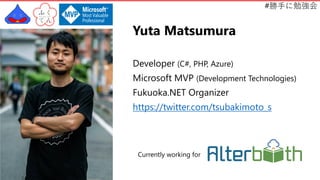
Yuta Matsumura
Developer (C#, PHP, Azure)
Microsoft MVP (Development Technologies)
Fukuoka.NET Organizer
https://twitter.com/tsubakimoto_s
Currently working for
#勝手に勉強会
株式会社オルターブース
2015 年 3 月設立 (6 期目)
Microsoft Azure を得意とするクラウドインテグレーター
2017 年 8 月 Japan Microsoft Partner of the Year (OSS on Azure) 受賞
2019 年 9 月 Japan Microsoft Partner of the Year (特別賞) 受賞
https://www.alterbooth.com/
#勝手に勉強会
今日のテーマ
• Blazor とは
• Blazor の種類
• Blazor Server テンプレート解説
※初学者向けの内容です
#勝手に勉強会
Blazor とは
#勝手に勉強会
Blazor とは
クライアントサイドの Web UI を構築するフレームワーク
• JavaScript の代わりに C# でクライアントサイドコードを実装
• C# と Razor で再利用可能な Web UI コンポーネントを作成
• サーバーサイドとクライアントサイドで .NET のコードを共有
• JavaScript のライブラリやブラウザー API を呼び出し可能
#勝手に勉強会
.NET Core
• クロスプラットフォームの実行環境
• Windows, macOS, Linux をサポート
• GitHub で管理されているオープンソースなフレームワーク
• https://try.dot.net/ ←すぐ試せます
#勝手に勉強会
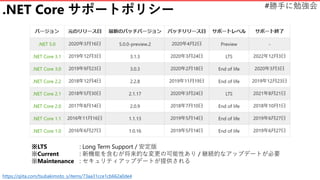
.NET Core サポートポリシー
https://qiita.com/tsubakimoto_s/items/73aa31cce1cb662a0de4
※LTS : Long Term Support / 安定版
※Current : 新機能を含むが将来的な変更の可能性あり / 継続的なアップデートが必要
※Maintenance : セキュリティアップデートが提供される
#勝手に勉強会
Blazor の種類
#勝手に勉強会
Blazor の種類
1. Blazor Server
2. Blazor WebAssembly
#勝手に勉強会
Blazor の種類
1. Blazor Server ←サーバーサイド
2. Blazor WebAssembly
#勝手に勉強会
Blazor の種類
1. Blazor Server ←サーバーサイド
2. Blazor WebAssembly ←クライアントサイド
#勝手に勉強会
Blazor Server テンプレート解説
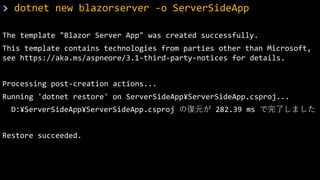
dotnet new blazorserver
#勝手に勉強会
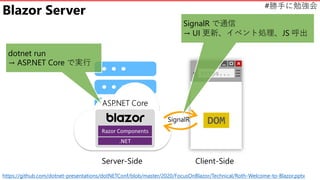
Blazor Server
dotnet run
→ ASP.NET Core で実行
https://github.com/dotnet-presentations/dotNETConf/blob/master/2020/FocusOnBlazor/Technical/Roth-Welcome-to-Blazor.pptx
SignalR
SignalR で通信
→ UI 更新、イベント処理、JS 呼出
Server-Side Client-Side
#勝手に勉強会> dotnet new blazorserver -o ServerSideApp
The template "Blazor Server App" was created successfully.
This template contains technologies from parties other than Microsoft,
see https://aka.ms/aspneore/3.1-third-party-notices for details.
Processing post-creation actions...
Running 'dotnet restore' on ServerSideApp¥ServerSideApp.csproj...
D:¥ServerSideApp¥ServerSideApp.csproj の復元が 282.39 ms で完了しました
Restore succeeded.
#勝手に勉強会
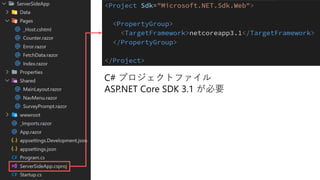
C# プロジェクトファイル
ASP.NET Core SDK 3.1 が必要
#勝手に勉強会
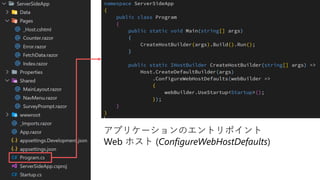
アプリケーションのエントリポイント
Web ホスト (ConfigureWebHostDefaults)
#勝手に勉強会
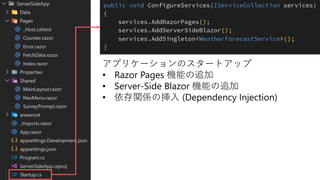
アプリケーションのスタートアップ
• Razor Pages 機能の追加
• Server-Side Blazor 機能の追加
• 依存関係の挿入 (Dependency Injection)
#勝手に勉強会
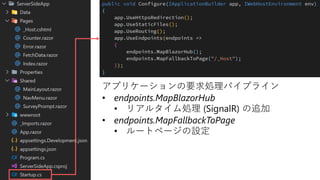
アプリケーションの要求処理パイプライン
• endpoints.MapBlazorHub
• リアルタイム処理 (SignalR) の追加
• endpoints.MapFallbackToPage
• ルートページの設定
#勝手に勉強会
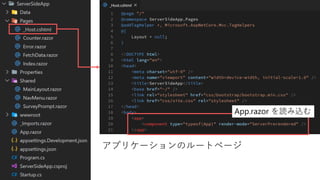
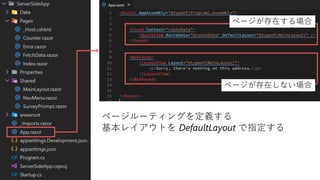
アプリケーションのルートページ
App.razor を読み込む
#勝手に勉強会
ページルーティングを定義する
基本レイアウトを DefaultLayout で指定する
ページが存在する場合
ページが存在しない場合
#勝手に勉強会
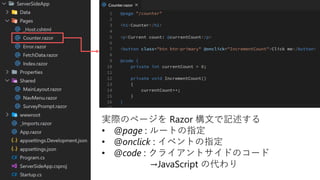
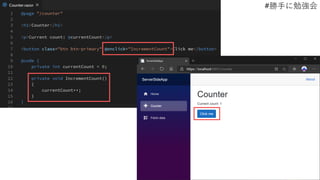
実際のページを Razor 構文で記述する
• @page : ルートの指定
• @onclick : イベントの指定
• @code : クライアントサイドのコード
→JavaScript の代わり
#勝手に勉強会
#勝手に勉強会
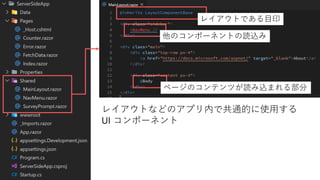
レイアウトなどのアプリ内で共通的に使用する
UI コンポーネント
レイアウトである目印
他のコンポーネントの読込み
ページのコンテンツが読み込まれる部分
#勝手に勉強会
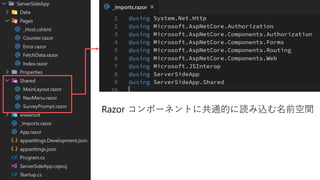
Razor コンポーネントに共通的に読み込む名前空間
#勝手に勉強会
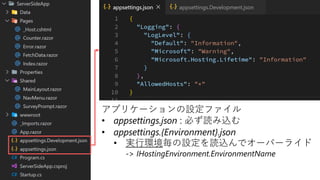
アプリケーションの設定ファイル
• appsettings.json : 必ず読み込む
• appsettings.{Environment}.json
• 実行環境毎の設定を読込んでオーバーライド
-> IHostingEnvironment.EnvironmentName
#勝手に勉強会
Appendix
• Documents
• https://blazor.net
• https://docs.microsoft.com/ja-jp/aspnet/core/blazor/
• https://devblogs.microsoft.com/aspnet/category/blazor/
• .NET Conf Focus on Blazor (2020/01/14)
• GitHub : Technical Contents
• Playlist : Channel9 or YouTube

Blazor Server テンプレート解説