14/7/2014
 Thunderbolt is a new high-speed optical cable
technology designed to connect electronic devices to
each other in a peripheral bus.
 Thunderbolt was developed as a way to reduce
the proliferation of ports on modern
computers.
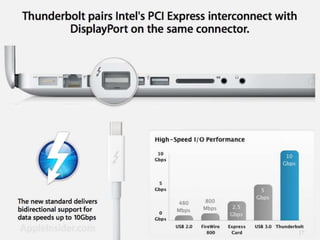
 It has the capability to deliver high bandwidth,
starting at 10 Gbit/s, with the potential ability to
scale to 100 Gbit/s.
2
 Thunderbolt provides enough bandwidth to
allow all of these systems to be driven over a
single type of interface
 Intel has stated that Thunderbolt is protocol
independent, allowing it to support existing
standards with a change of the physical
medium
 system using Thunderbolt will have fewer and
smaller connectors, longer and thinner cables,
higher bandwidth, and can run multiple
protocols on a single cable.
3
 Thunderbolt consists of a controller chip and
an optical module that would be included in
platforms supporting this technology. The
optical module performs the conversion from
electricity to light and vice versa, using
miniature lasers and photo detectors. Intel is
planning to supply the controller chip, and is
working with other component manufacturers
to deliver all the Thunderbolt components. The
main components are fiber optics, optical
module, control chip.
4
5
 Provide a standard low cost optical-based
interconnect
 Support for key existing protocols (USB,PCI,
etc)
 Support wide range of devices (handhelds,
laptops, PCs and more)
 Single, flexible cable that can carry any
platform I/O
 Higher bandwidth 10Gbs to 100Gbs
6
 Each fiber is only 125 microns wide, the width of a
human hair
 Supports multiple existing I/O protocols over a
single cable
 Smooth transition for today’s existing
electrical I/O protocols Can connect to more
devices with the same cable.
 Longer, thinner cables and smaller connectorsUp
to 100 meters on an optical-only cable
 Enables I/O performance for the next generation
7
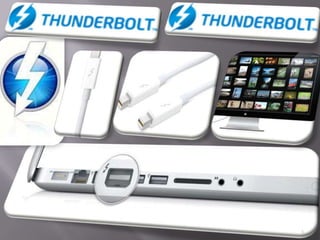
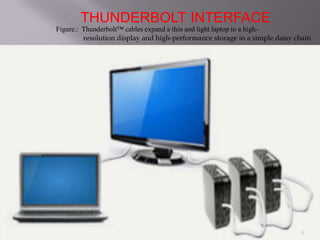
Figure.: Thunderbolt™ cables expand a thin and light laptop to a high-
resolution display and high-performance storage in a simple daisy chain
THUNDERBOLT INTERFACE
8
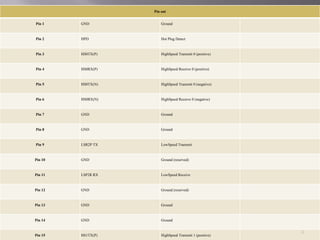
Pin out
Pin 1 GND Ground
Pin 2 HPD Hot Plug Detect
Pin 3 HS0TX(P) HighSpeed Transmit 0 (positive)
Pin 4 HS0RX(P) HighSpeed Receive 0 (positive)
Pin 5 HS0TX(N) HighSpeed Transmit 0 (negative)
Pin 6 HS0RX(N) HighSpeed Receive 0 (negative)
Pin 7 GND Ground
Pin 8 GND Ground
Pin 9 LSR2P TX LowSpeed Transmit
Pin 10 GND Ground (reserved)
Pin 11 LSP2R RX LowSpeed Receive
Pin 12 GND Ground (reserved)
Pin 13 GND Ground
Pin 14 GND Ground
Pin 15 HS1TX(P) HighSpeed Transmit 1 (positive)
9
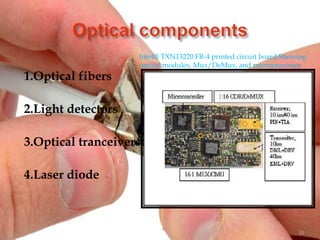
1.Optical fibers
2.Light detectors
3.Optical tranceivers
4.Laser diode
Intel® TXN13220 FR-4 printed circuit board Showing
optical modules, Mux/DeMux, and microprocessor
10
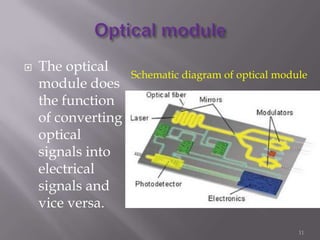
 The optical
module does
the function
of converting
optical
signals into
electrical
signals and
vice versa.
Schematic diagram of optical module
11
Wireless Network
 How does Thunderbolt compare to the latest
technologies? The slowest is wireless. For
example, Wireless N (802.11n) can reach 160
Mb/s in the real world. Thunderbolt is about
60 times faster. Faster wireless standards will
come out, but nothing even close to what a
good cable can provide.
12
Ethernet
 Moving on to other Ethernet type connections,
Apple first used Gigabit Ethernet on the
"Mystic “Power Mac G4 in 2000. It gives a full 1
Gb/s. The fastest Ethernet on the market is 10
Gigabit Ethernet (10GBase-T), and 100 Gigabit
Ethernet is under development. You won't find
10Gethernet on many computers. The standard
also makes use of fiber optic cable to achieve
these transfer rates.
13
USB 3.0
 The latest USB 3.0 connectors are starting to
make an appearance. We see that at best it will
be only half the speed of Thunderbolt. USB 3.0
is rated at 4.8 Gb/s. Of course, theoretical and
actual are two different things. In the past USB
was unable to deliver more than about two-
thirds of theoretical speed.
14
Hard Drives SATA 6 Gb/s
 Hard drives need to be speedy, and a new
SATA protocol was recently released, SATA 6
Gb/s.As the name implies, it can go 6 Gb/s.
The nice thing with this protocol is it remains
compatible with older systems and hard drives.
You do need to have the right motherboard to
take advantage of the latest speed increase.
15
HDMI and Display Port
 The newest video protocols, HDMI and
Display Port, are both ready to transfer HD
video content and huge blocks of data if all the
wires are used together. HDMI version 1.3 and
higher will transfer at 10.2 Gb/s, while Display
Port can go up to 10.8 Gb/s. These are slightly
better than Thunderbolt, but they are mostly
designed for video. No one is pushing the data
transfer rates of these protocols.
16
17
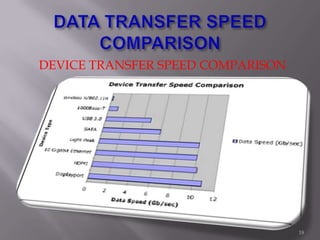
DEVICE TRANSFER SPEED COMPARISON
18
Thunderbolt Covers All the Bases
The chart shows how Thunderbolt compares to all
of these other protocols. At 10 Gb/s, it can cover a
whole range of transfer protocols. The magic of
Thunderbolts is that it can become the cable of choice
for all these protocols with no significant loss in
transfer speed. They plan to push the specification
up to 100 Gb/s, with some stops along the way.
There is plenty of room for growth - and hopefully
backward compatibility - as this latest specification
tries to find its way in the world of technology.
19
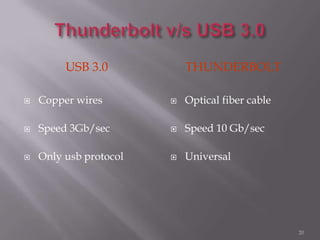
USB 3.0 THUNDERBOLT
 Copper wires
 Speed 3Gb/sec
 Only usb protocol
 Optical fiber cable
 Speed 10 Gb/sec
 Universal
20
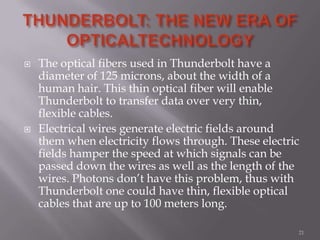
 The optical fibers used in Thunderbolt have a
diameter of 125 microns, about the width of a
human hair. This thin optical fiber will enable
Thunderbolt to transfer data over very thin,
flexible cables.
 Electrical wires generate electric fields around
them when electricity flows through. These electric
fields hamper the speed at which signals can be
passed down the wires as well as the length of the
wires. Photons don’t have this problem, thus with
Thunderbolt one could have thin, flexible optical
cables that are up to 100 meters long.
21
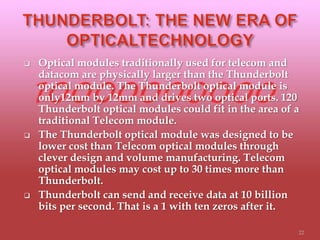
 Optical modules traditionally used for telecom and
datacom are physically larger than the Thunderbolt
optical module. The Thunderbolt optical module is
only12mm by 12mm and drives two optical ports. 120
Thunderbolt optical modules could fit in the area of a
traditional Telecom module.
 The Thunderbolt optical module was designed to be
lower cost than Telecom optical modules through
clever design and volume manufacturing. Telecom
optical modules may cost up to 30 times more than
Thunderbolt.
 Thunderbolt can send and receive data at 10 billion
bits per second. That is a 1 with ten zeros after it.
22
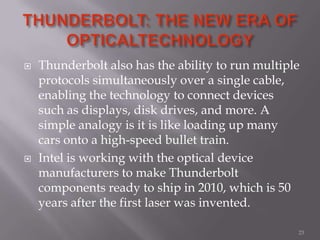
 Thunderbolt also has the ability to run multiple
protocols simultaneously over a single cable,
enabling the technology to connect devices
such as displays, disk drives, and more. A
simple analogy is it is like loading up many
cars onto a high-speed bullet train.
 Intel is working with the optical device
manufacturers to make Thunderbolt
components ready to ship in 2010, which is 50
years after the first laser was invented.
23
 Thunderbolt™ technology is a new high-speed,
dual-protocol interconnect from Intel
 Thunderbolt technology delivers performance,
simplicity, and flexibility
 Thunderbolt technology is available to the
industry
24
 Thunderbolt is complementary to existing I/O
technologies, as it enables them to run
together one single cable at higher speeds. At
the present time, Intel has conducted three
successful public demonstrations of the
Thunderbolt technology and confirmed that
the first Thunderbolt-enabled PCs should
begin shipping next year.
25
Thank you…
26

thunderbolt interface

  • 1.
  • 2.
     Thunderbolt isa new high-speed optical cable technology designed to connect electronic devices to each other in a peripheral bus.  Thunderbolt was developed as a way to reduce the proliferation of ports on modern computers.  It has the capability to deliver high bandwidth, starting at 10 Gbit/s, with the potential ability to scale to 100 Gbit/s. 2
  • 3.
     Thunderbolt providesenough bandwidth to allow all of these systems to be driven over a single type of interface  Intel has stated that Thunderbolt is protocol independent, allowing it to support existing standards with a change of the physical medium  system using Thunderbolt will have fewer and smaller connectors, longer and thinner cables, higher bandwidth, and can run multiple protocols on a single cable. 3
  • 4.
     Thunderbolt consistsof a controller chip and an optical module that would be included in platforms supporting this technology. The optical module performs the conversion from electricity to light and vice versa, using miniature lasers and photo detectors. Intel is planning to supply the controller chip, and is working with other component manufacturers to deliver all the Thunderbolt components. The main components are fiber optics, optical module, control chip. 4
  • 5.
  • 6.
     Provide astandard low cost optical-based interconnect  Support for key existing protocols (USB,PCI, etc)  Support wide range of devices (handhelds, laptops, PCs and more)  Single, flexible cable that can carry any platform I/O  Higher bandwidth 10Gbs to 100Gbs 6
  • 7.
     Each fiberis only 125 microns wide, the width of a human hair  Supports multiple existing I/O protocols over a single cable  Smooth transition for today’s existing electrical I/O protocols Can connect to more devices with the same cable.  Longer, thinner cables and smaller connectorsUp to 100 meters on an optical-only cable  Enables I/O performance for the next generation 7
  • 8.
    Figure.: Thunderbolt™ cablesexpand a thin and light laptop to a high- resolution display and high-performance storage in a simple daisy chain THUNDERBOLT INTERFACE 8
  • 9.
    Pin out Pin 1GND Ground Pin 2 HPD Hot Plug Detect Pin 3 HS0TX(P) HighSpeed Transmit 0 (positive) Pin 4 HS0RX(P) HighSpeed Receive 0 (positive) Pin 5 HS0TX(N) HighSpeed Transmit 0 (negative) Pin 6 HS0RX(N) HighSpeed Receive 0 (negative) Pin 7 GND Ground Pin 8 GND Ground Pin 9 LSR2P TX LowSpeed Transmit Pin 10 GND Ground (reserved) Pin 11 LSP2R RX LowSpeed Receive Pin 12 GND Ground (reserved) Pin 13 GND Ground Pin 14 GND Ground Pin 15 HS1TX(P) HighSpeed Transmit 1 (positive) 9
  • 10.
    1.Optical fibers 2.Light detectors 3.Opticaltranceivers 4.Laser diode Intel® TXN13220 FR-4 printed circuit board Showing optical modules, Mux/DeMux, and microprocessor 10
  • 11.
     The optical moduledoes the function of converting optical signals into electrical signals and vice versa. Schematic diagram of optical module 11
  • 12.
    Wireless Network  Howdoes Thunderbolt compare to the latest technologies? The slowest is wireless. For example, Wireless N (802.11n) can reach 160 Mb/s in the real world. Thunderbolt is about 60 times faster. Faster wireless standards will come out, but nothing even close to what a good cable can provide. 12
  • 13.
    Ethernet  Moving onto other Ethernet type connections, Apple first used Gigabit Ethernet on the "Mystic “Power Mac G4 in 2000. It gives a full 1 Gb/s. The fastest Ethernet on the market is 10 Gigabit Ethernet (10GBase-T), and 100 Gigabit Ethernet is under development. You won't find 10Gethernet on many computers. The standard also makes use of fiber optic cable to achieve these transfer rates. 13
  • 14.
    USB 3.0  Thelatest USB 3.0 connectors are starting to make an appearance. We see that at best it will be only half the speed of Thunderbolt. USB 3.0 is rated at 4.8 Gb/s. Of course, theoretical and actual are two different things. In the past USB was unable to deliver more than about two- thirds of theoretical speed. 14
  • 15.
    Hard Drives SATA6 Gb/s  Hard drives need to be speedy, and a new SATA protocol was recently released, SATA 6 Gb/s.As the name implies, it can go 6 Gb/s. The nice thing with this protocol is it remains compatible with older systems and hard drives. You do need to have the right motherboard to take advantage of the latest speed increase. 15
  • 16.
    HDMI and DisplayPort  The newest video protocols, HDMI and Display Port, are both ready to transfer HD video content and huge blocks of data if all the wires are used together. HDMI version 1.3 and higher will transfer at 10.2 Gb/s, while Display Port can go up to 10.8 Gb/s. These are slightly better than Thunderbolt, but they are mostly designed for video. No one is pushing the data transfer rates of these protocols. 16
  • 17.
  • 18.
    DEVICE TRANSFER SPEEDCOMPARISON 18
  • 19.
    Thunderbolt Covers Allthe Bases The chart shows how Thunderbolt compares to all of these other protocols. At 10 Gb/s, it can cover a whole range of transfer protocols. The magic of Thunderbolts is that it can become the cable of choice for all these protocols with no significant loss in transfer speed. They plan to push the specification up to 100 Gb/s, with some stops along the way. There is plenty of room for growth - and hopefully backward compatibility - as this latest specification tries to find its way in the world of technology. 19
  • 20.
    USB 3.0 THUNDERBOLT Copper wires  Speed 3Gb/sec  Only usb protocol  Optical fiber cable  Speed 10 Gb/sec  Universal 20
  • 21.
     The opticalfibers used in Thunderbolt have a diameter of 125 microns, about the width of a human hair. This thin optical fiber will enable Thunderbolt to transfer data over very thin, flexible cables.  Electrical wires generate electric fields around them when electricity flows through. These electric fields hamper the speed at which signals can be passed down the wires as well as the length of the wires. Photons don’t have this problem, thus with Thunderbolt one could have thin, flexible optical cables that are up to 100 meters long. 21
  • 22.
     Optical modulestraditionally used for telecom and datacom are physically larger than the Thunderbolt optical module. The Thunderbolt optical module is only12mm by 12mm and drives two optical ports. 120 Thunderbolt optical modules could fit in the area of a traditional Telecom module.  The Thunderbolt optical module was designed to be lower cost than Telecom optical modules through clever design and volume manufacturing. Telecom optical modules may cost up to 30 times more than Thunderbolt.  Thunderbolt can send and receive data at 10 billion bits per second. That is a 1 with ten zeros after it. 22
  • 23.
     Thunderbolt alsohas the ability to run multiple protocols simultaneously over a single cable, enabling the technology to connect devices such as displays, disk drives, and more. A simple analogy is it is like loading up many cars onto a high-speed bullet train.  Intel is working with the optical device manufacturers to make Thunderbolt components ready to ship in 2010, which is 50 years after the first laser was invented. 23
  • 24.
     Thunderbolt™ technologyis a new high-speed, dual-protocol interconnect from Intel  Thunderbolt technology delivers performance, simplicity, and flexibility  Thunderbolt technology is available to the industry 24
  • 25.
     Thunderbolt iscomplementary to existing I/O technologies, as it enables them to run together one single cable at higher speeds. At the present time, Intel has conducted three successful public demonstrations of the Thunderbolt technology and confirmed that the first Thunderbolt-enabled PCs should begin shipping next year. 25
  • 26.