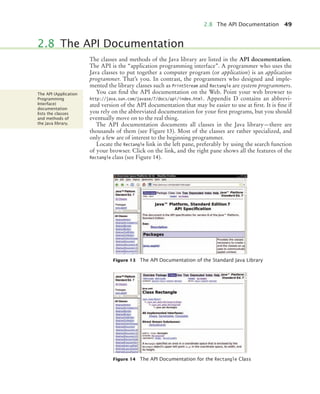
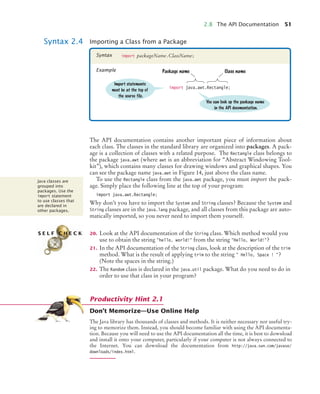
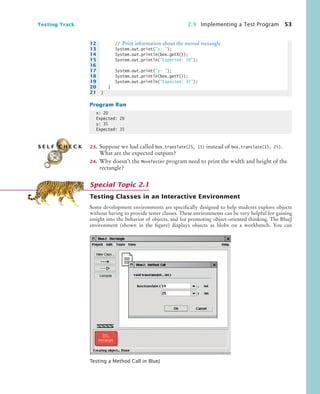
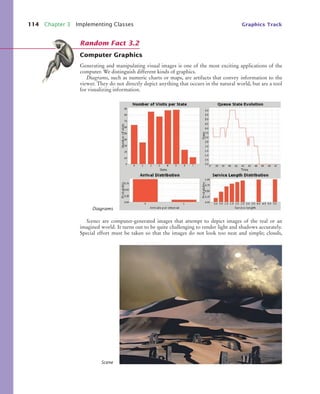
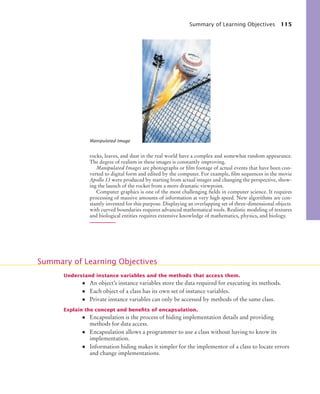
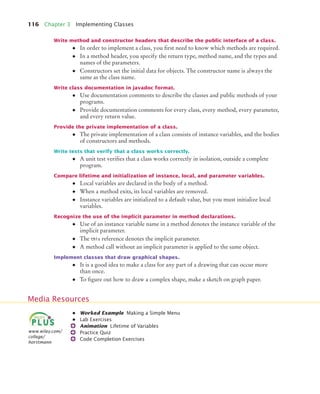
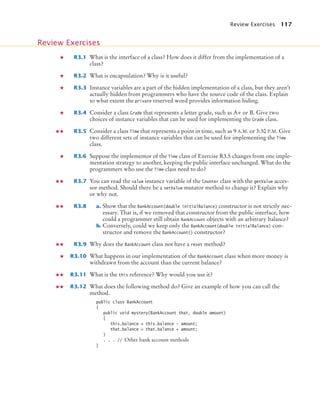
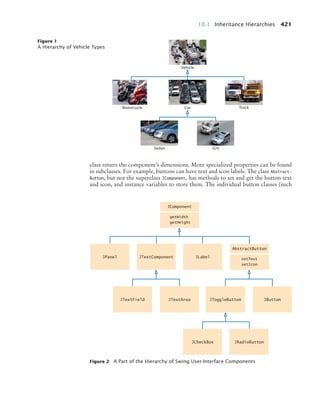
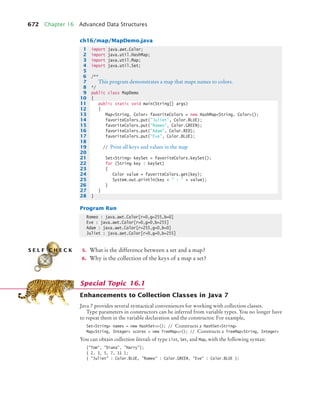
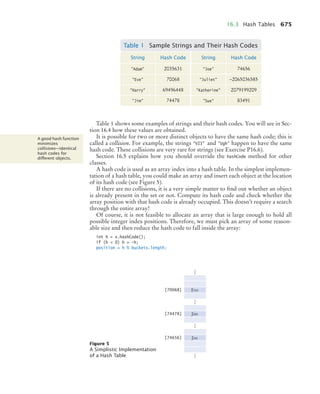
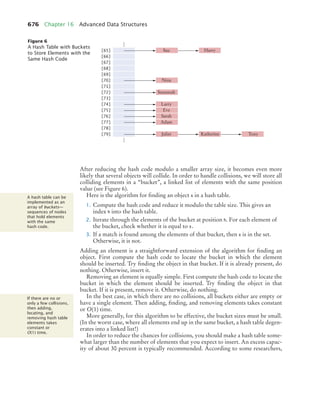
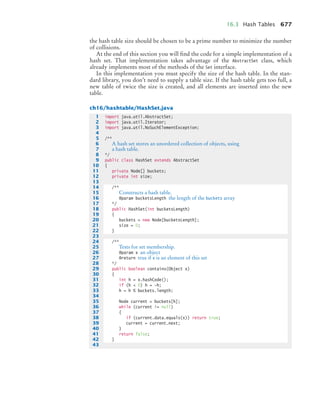
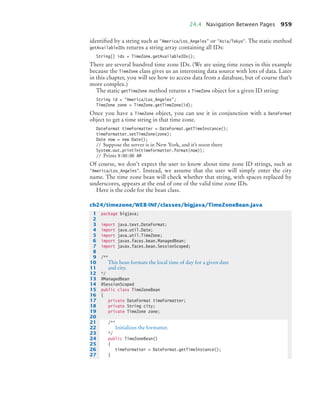
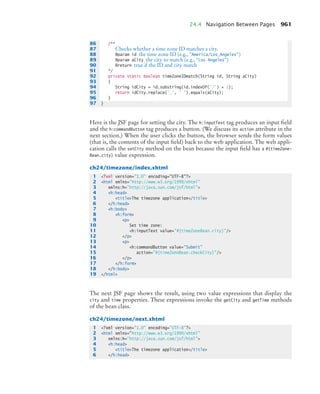
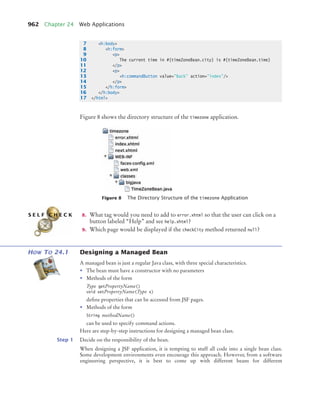
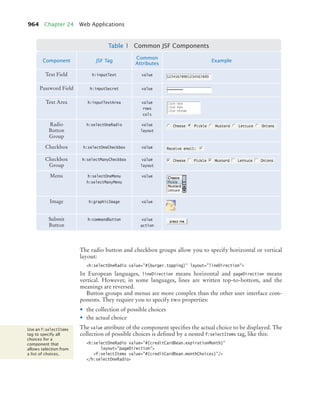
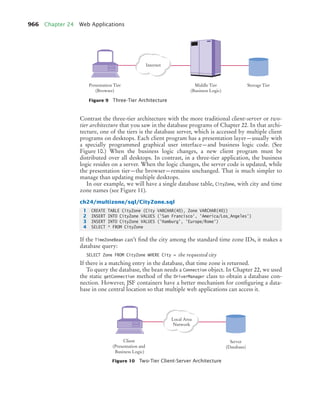
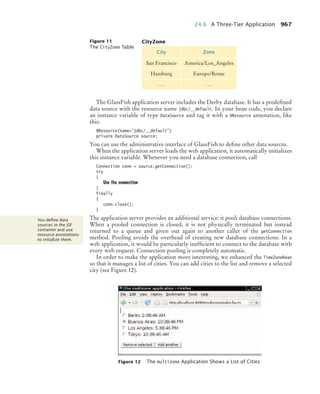
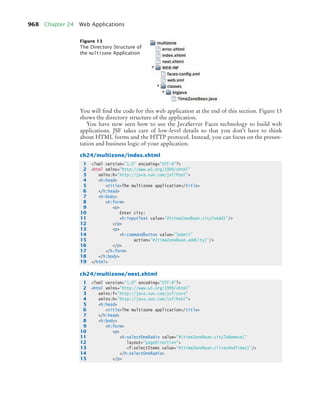
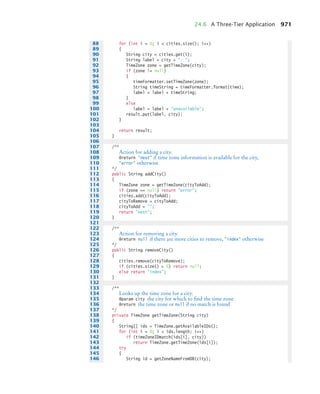
bj4_fm.fm Page iv Saturday, November 7, 2009 12:01 PM
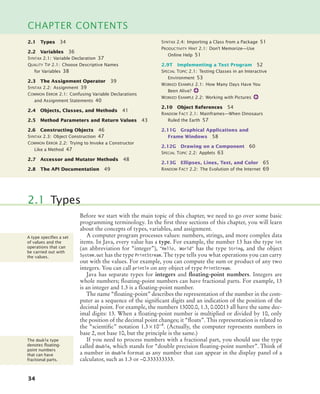
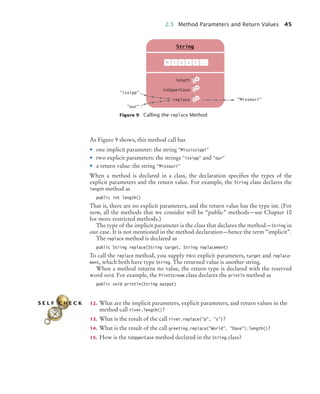
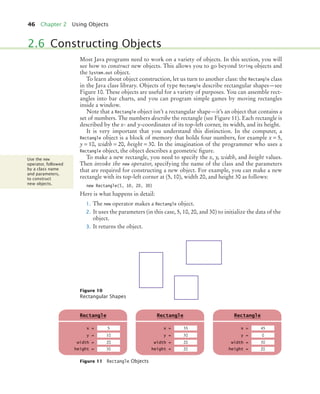
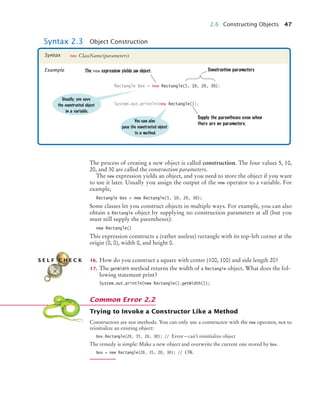
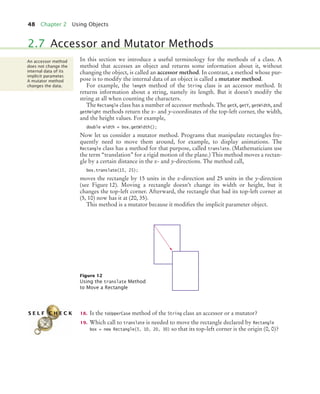
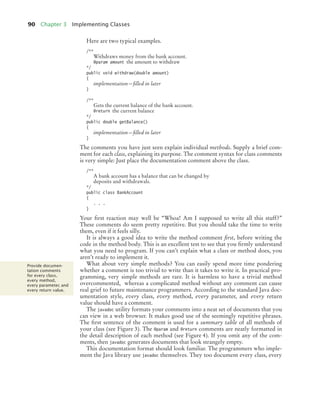
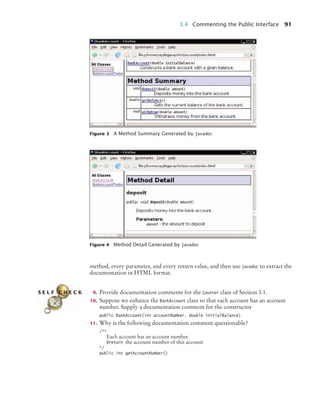
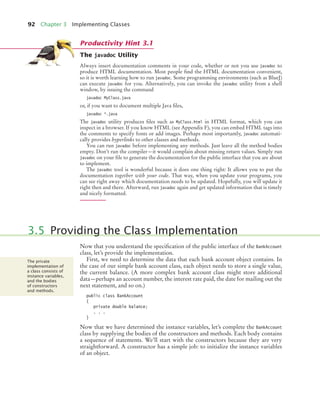
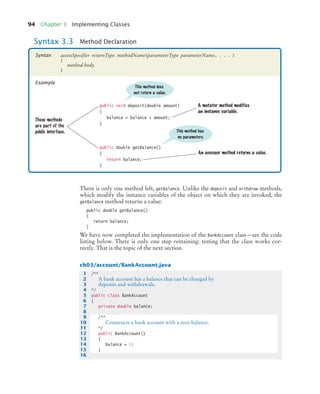
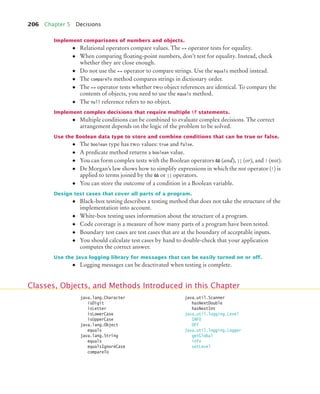
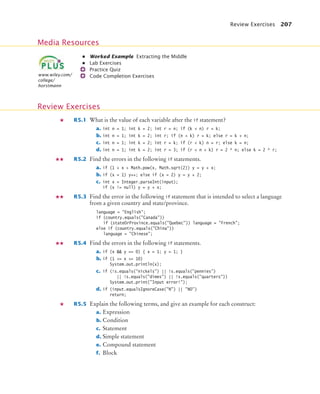
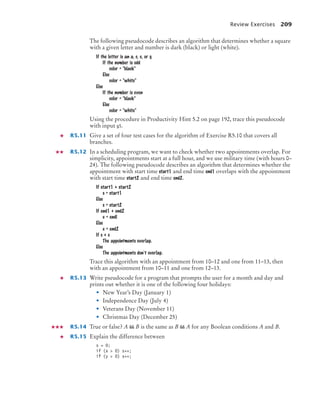
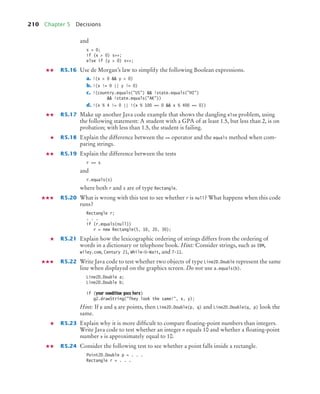
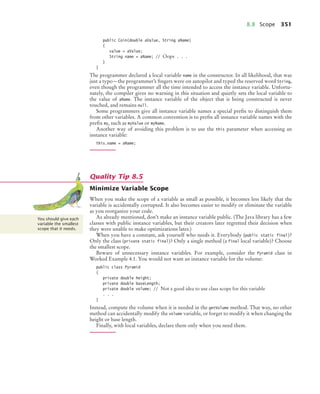
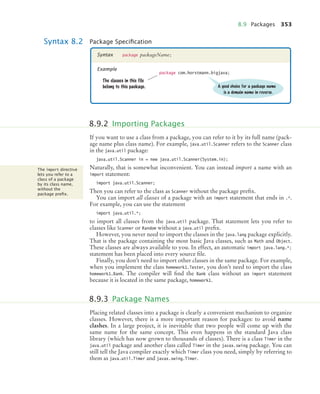
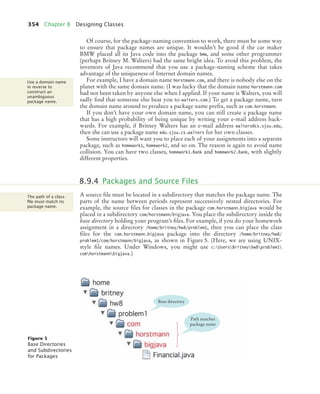
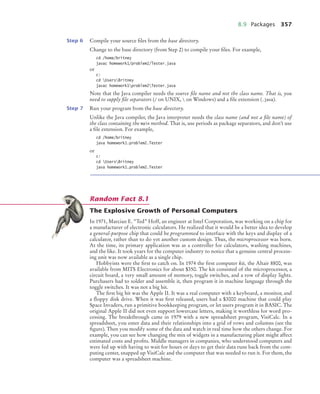
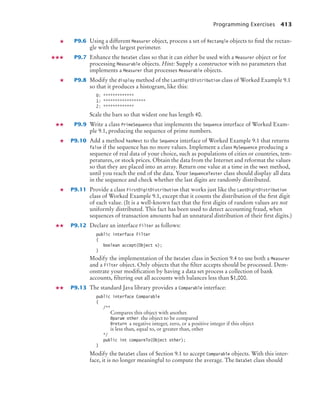
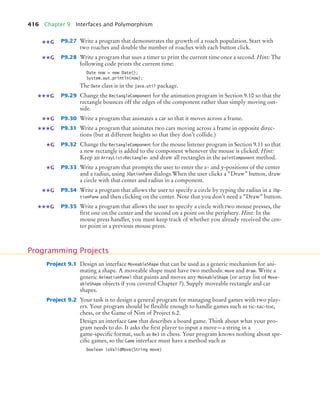
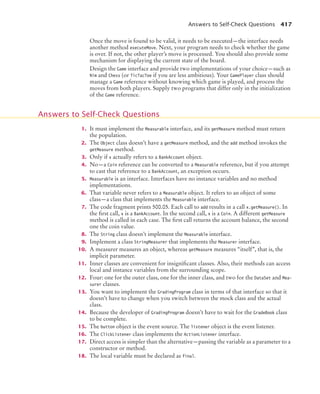
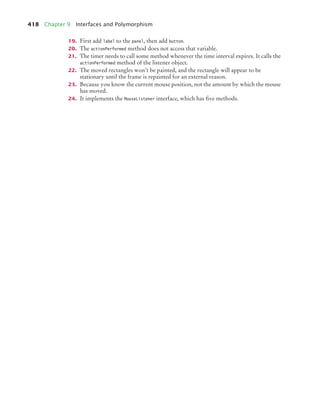
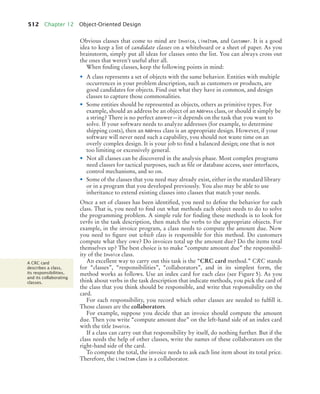
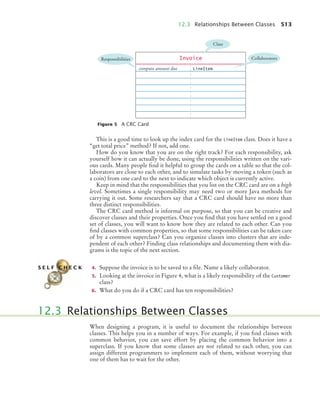
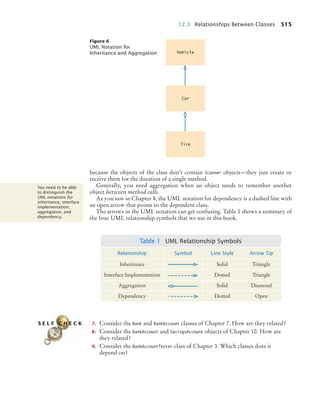
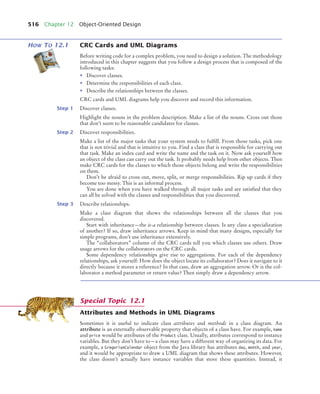
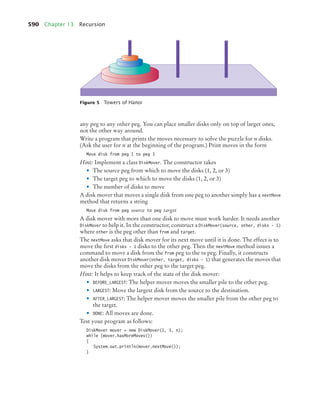
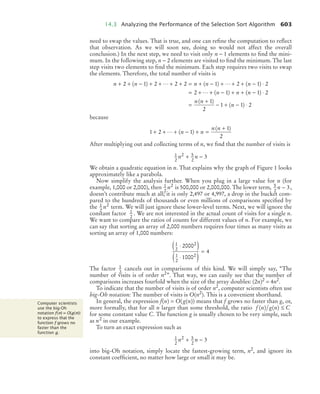
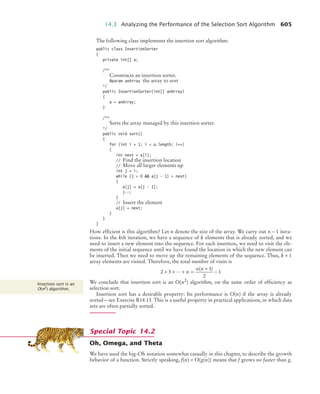
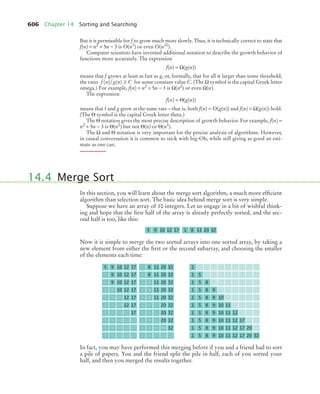
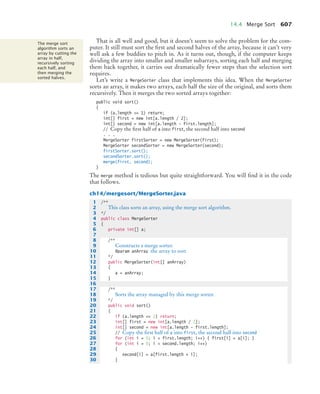
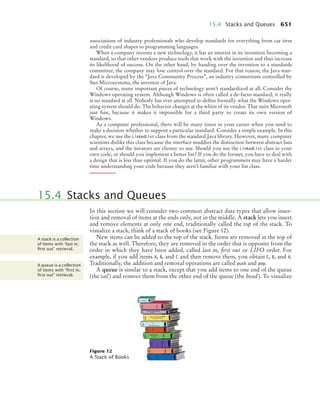
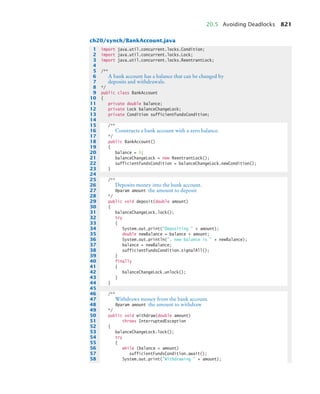
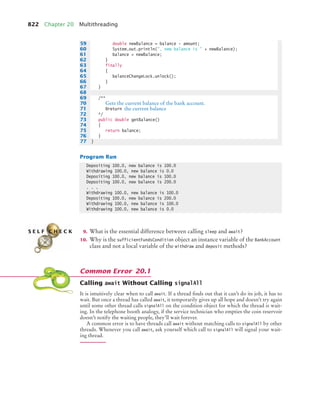
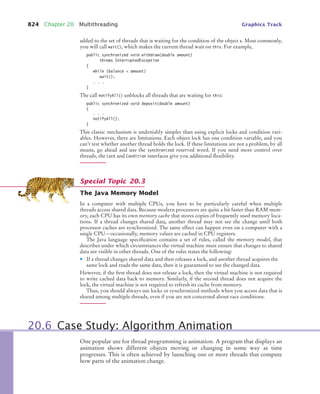
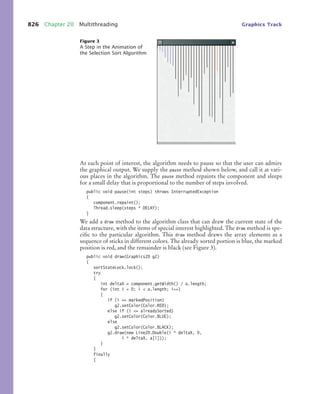
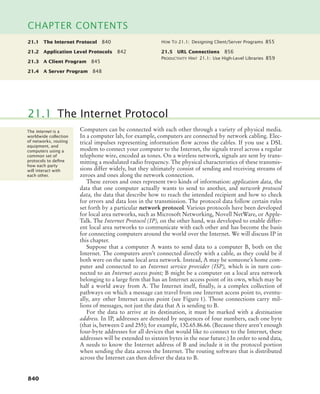
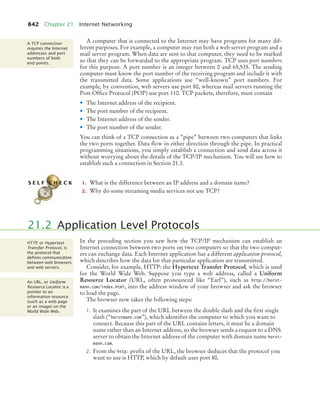
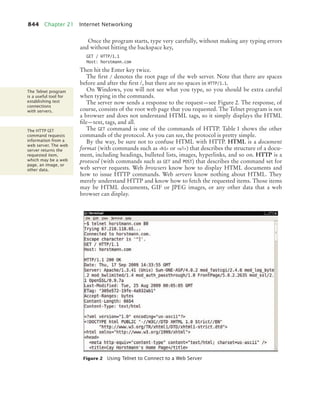
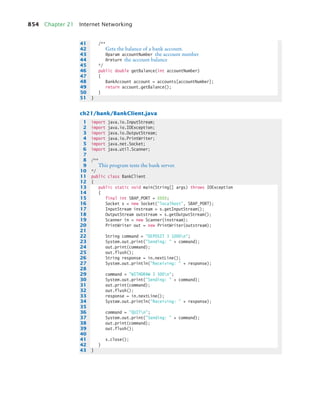
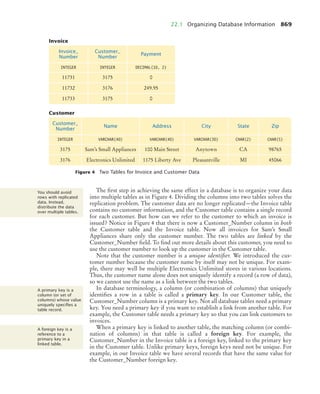
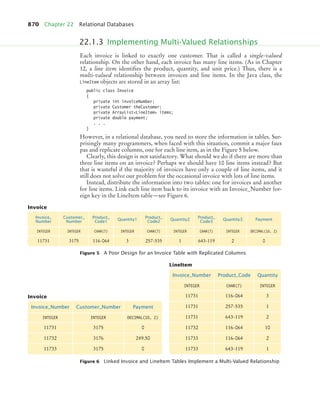
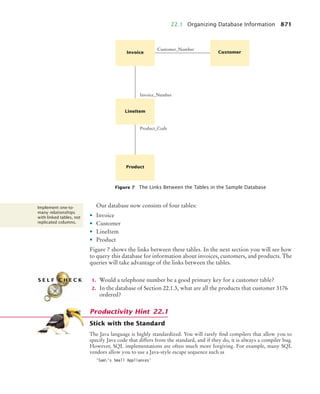
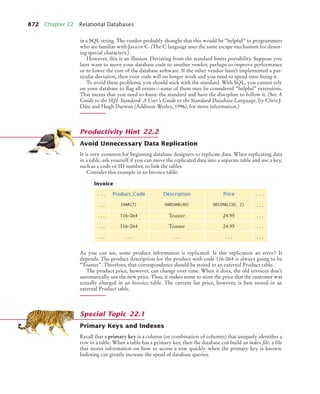
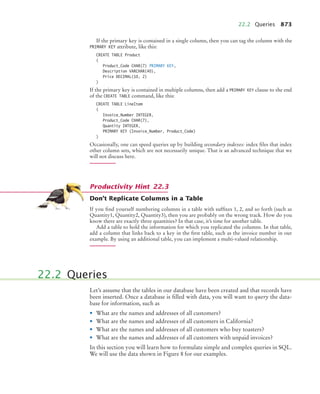
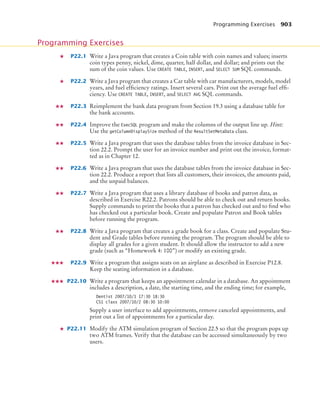
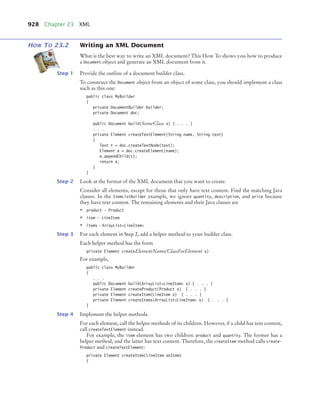
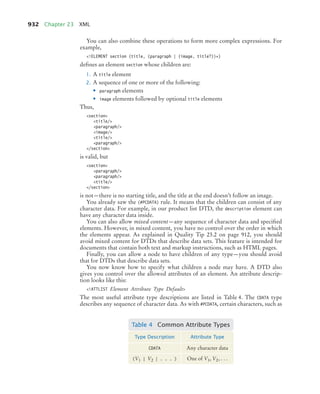
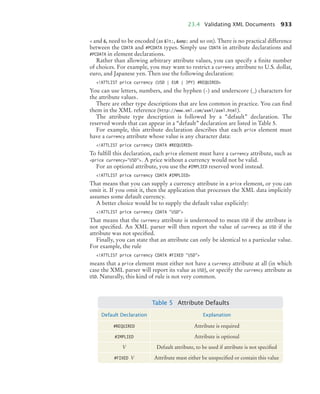
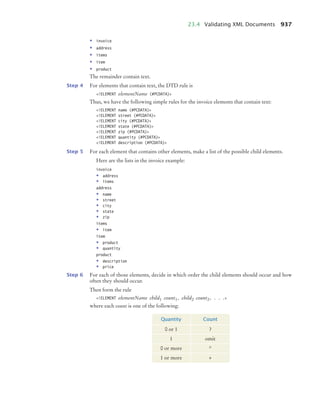
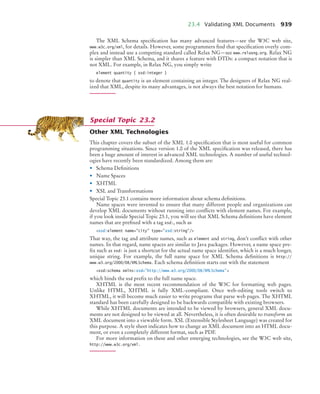
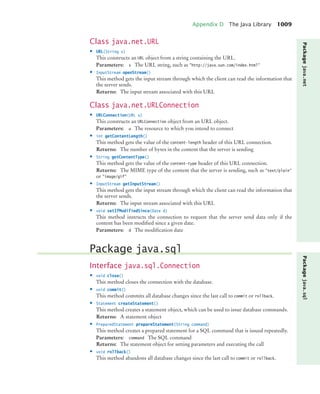
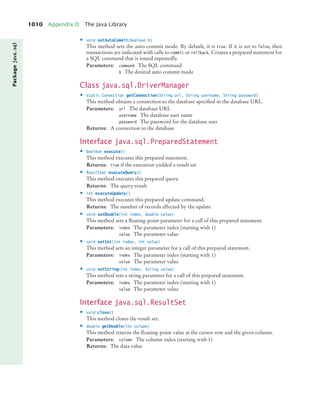
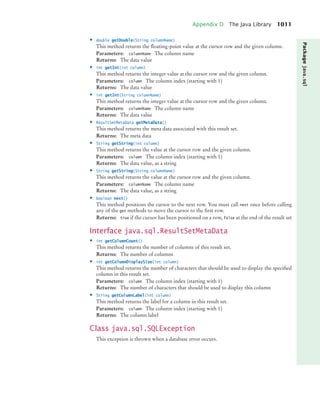
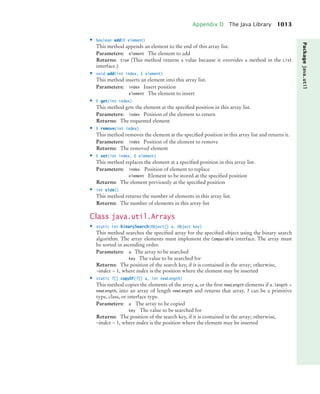
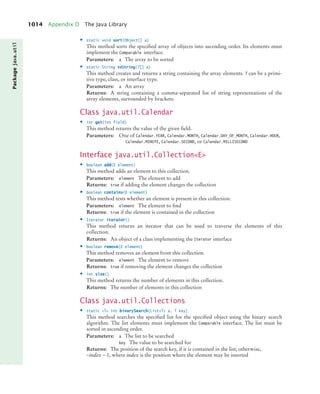
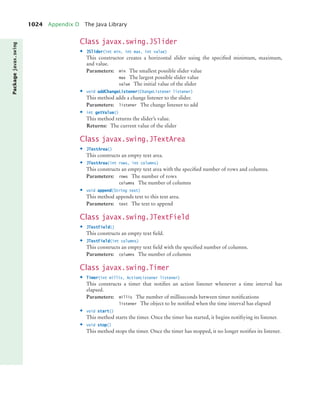
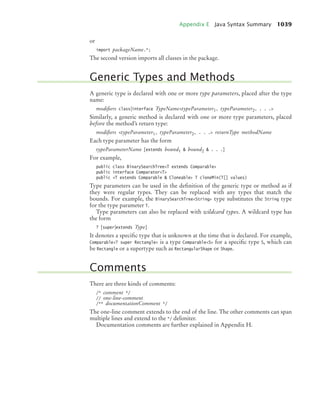
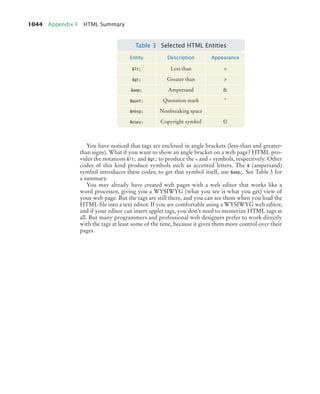
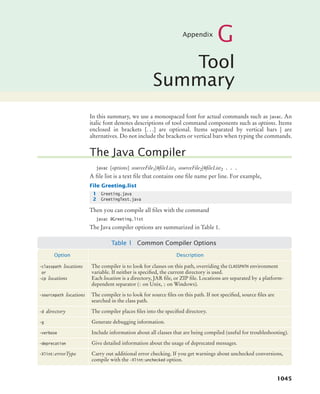
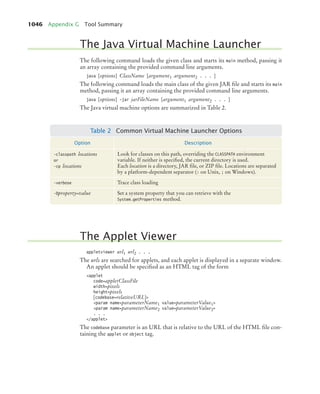
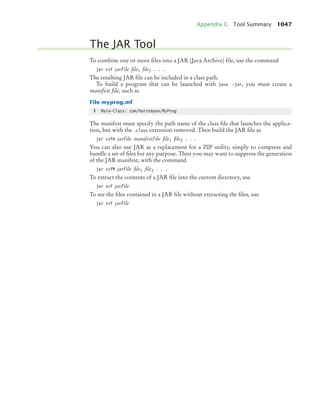
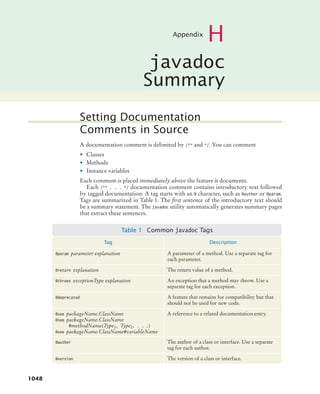
• Students achieve concept
mastery in a rich,
structured environment
that’s available 24/7
From multiple study paths, to self-assessment, to a wealth of interactive
visual and audio resources, WileyPLUS gives you everything you need to
personalize the teaching and learning experience.
With WileyPLUS:
»Find out how to Make It Yours »
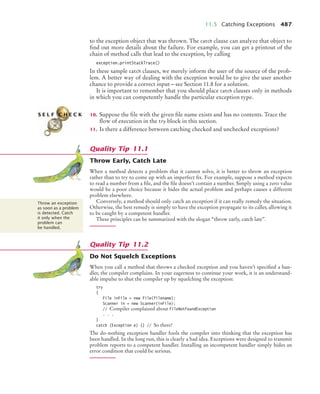
This online teaching and learning environment
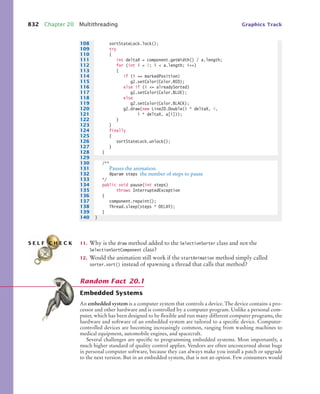
integrates the entire digital textbook with the
most effective instructor and student resources
to fit every learning style.
• Instructors personalize and manage
their course more effectively with
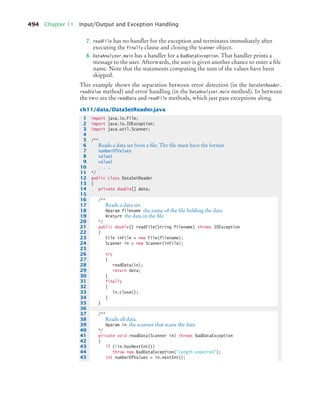
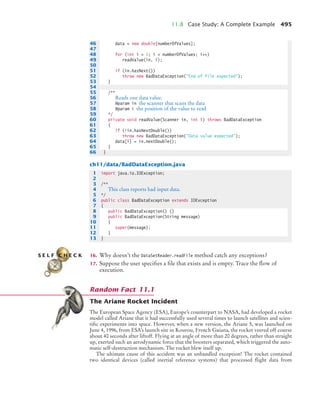
assessment, assignments, grade
tracking, and more
• manage time better
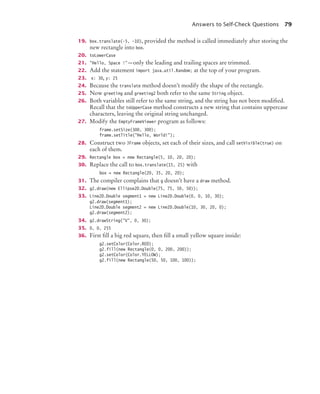
• study smarter
• save money
www.wileyplus.com
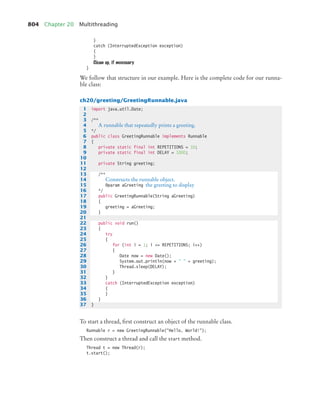
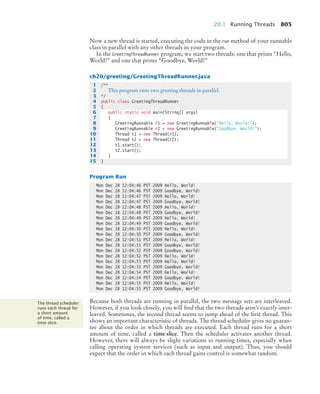
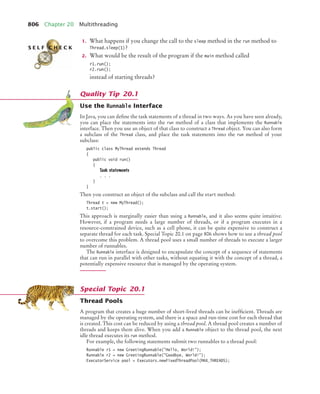
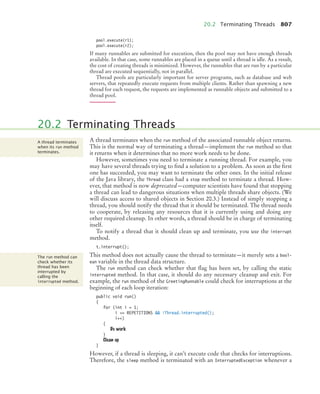
WP5_FM_8x10.indd 1 8/7/09 11:36 AM
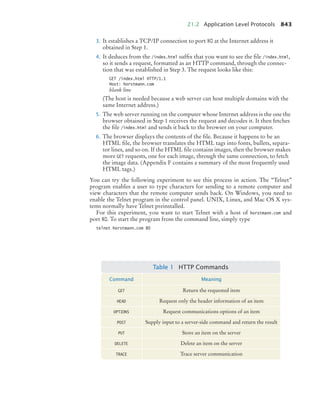
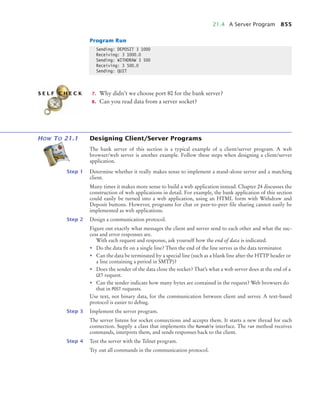
Make It Yours!
all the help, resources, and personal support
you and your students need!
Technical Support 24/7
FAQs, online chat,
and phone support
www.wileyplus.com/support
Student support from an
experienced student user
Ask your local representative
for details!
Your WileyPLUS
Account Manager
Training and implementation support
www.wileyplus.com/accountmanager
Collaborate with your colleagues,
find a mentor, attend virtual and live
events, and view resources
www.WhereFacultyConnect.com
Pre-loaded, ready-to-use
assignments and presentations
www.wiley.com/college/quickstart
2-Minute Tutorials and all
of the resources you & your
students need to get started
www.wileyplus.com/firstday
WP5_FM_8x10.indd 2 8/7/09 11:36 AM
th
edition
4
Big
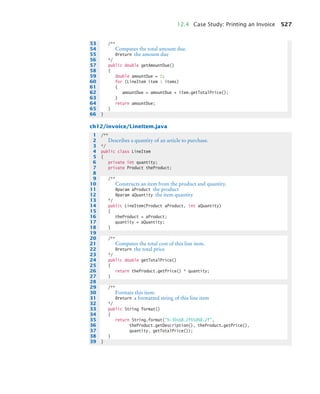
Java
bj4_fm.fm Page iii Saturday, November 7, 2009 12:01 PM
bj4_fm.fm Page iv Saturday, November 7, 2009 12:01 PM
th
edition
4
Big
Java
Cay Horstmann SAN JOSE STATE UNIVERSITY
JOHN WILEY & SONS, INC.
bj4_fm.fm Page v Saturday, November 7, 2009 12:01 PM
VICE PRESIDENT AND EXECUTIVE PUBLISHER Donald Fowley
EXECUTIVE EDITOR Beth Lang Golub
EDITORIAL ASSISTANT Michael Berlin
PRODUCTION SERVICES MANAGER Dorothy Sinclair
PRODUCTION EDITOR Janet Foxman
EXECUTIVE MARKETING MANAGER Christopher Ruel
CREATIVE DIRECTOR Harry Nolan
SENIOR DESIGNER Madelyn Lesure
PHOTO EDITOR Lisa Gee
MEDIA EDITOR Lauren Sapira
PRODUCTION SERVICES Cindy Johnson
COVER DESIGNER Howard Grossman
COVER ILLUSTRATION Susan Cyr
This book was set in Stempel Garamond by Publishing Services, and printed and bound by RRD Jefferson
City. The cover was printed by RRD Jefferson City.
This book is printed on acid-free paper. ∞
Copyright © 2010, 2008, 2006, 2002 John Wiley & Sons, Inc. All rights reserved. No part of this publication
may be reproduced, stored in a retrieval system or transmitted in any form or by any means, electronic,
mechanical, photocopying, recording, scanning or otherwise, except as permitted under Sections 107 or 108
of the 1976 United States Copyright Act, without either the prior written permission of the Publisher, or
authorization through payment of the appropriate per-copy fee to the Copyright Clearance Center, Inc.,
222 Rosewood Drive, Danvers, MA 01923, website www.copyright.com. Requests to the Publisher for per-
mission should be addressed to the Permissions Department, John Wiley & Sons, Inc., 111 River Street,
Hoboken, NJ 07030-5774, (201) 748-6011, fax (201) 748-6008, website www.wiley.com/go/permissions.
Evaluation copies are provided to qualified academics and professionals for review purposes only, for use in
their courses during the next academic year. These copies are licensed and may not be sold or transferred to
a third party. Upon completion of the review period, please return the evaluation copy to Wiley. Return
instructions and a free of charge return shipping label are available at www.wiley.com/go/returnlabel. Outside
of the United States, please contact your local representative.
Library of Congress Cataloging-in-Publication Data:
Horstmann, Cay S., 1959–
Big Java : compatible with Java 5, 6 and 7 / Cay Horstmann. -- 4th ed.
p. cm.
Includes index.
ISBN 978-0-470-50948-7 (pbk. : alk. paper)
1. Java (Computer program language) I. Title.
QA76.73.J38H674 2010
005.13'3--dc22
2009042604
ISBN 978-0-470-50948-7
Printed in the United States of America
10 9 8 7 6 5 4 3 2 1
bj4_fm.fm Page vi Saturday, November 7, 2009 12:01 PM
PREFACE
vii
This book is an introductory text in computer science, focusing on the principles of
programming and software engineering. Here are its key features:
• Teach objects gradually.
In Chapter 2, students learn how to use objects and classes from the standard
library. Chapter 3 shows the mechanics of implementing classes from a given
specification. Students then use simple objects as they master branches, loops, and
arrays. Object-oriented design starts in Chapter 8. This gradual approach allows
students to use objects throughout their study of the core algorithmic topics,
without teaching bad habits that must be un-learned later.
• Reinforce sound engineering practices.
A focus on test-driven development encourages students to test their programs
systematically. A multitude of useful tips on software quality and common errors
encourage the development of good programming habits.
• Help students with guidance and worked examples.
Beginning programmers often ask “How do I start? Now what do I do?” Of
course, an activity as complex as programming cannot be reduced to cookbook-
style instructions. However, step-by-step guidance is immensely helpful for
building confidence and providing an outline for the task at hand. The book con-
tains a large number of “How To” guides for common tasks, with pointers to
additional worked examples on the Web.
• Focus on the essentials while being technically accurate.
An encyclopedic coverage is not helpful for a beginning programmer, but neither
is the opposite—reducing the material to a list of simplistic bullet points that give
an illusion of knowledge. In this book, the essentials of each subject are presented
in digestible chunks, with separate notes that go deeper into good practices or lan-
guage features when the reader is ready for the additional information.
• Use standard Java.
The book teaches the standard Java language—not a specialized “training
wheels” environment. The Java language, library, and tools are presented at a
depth that is sufficient to solve real-world programming problems. The final
chapters of the book cover advanced techniques such as multithreading, database
storage, XML, and web programming.
• Provide an optional graphics track.
Graphical shapes are splendid examples of objects. Many students enjoy writing
programs that create drawings or use graphical user interfaces. If desired, these
topics can be integrated into the course by using the materials at the end of
Chapters 2, 3, 9, and 10.
bj4_fm.fm Page vii Saturday, November 7, 2009 12:01 PM
viii Preface
This is the fourth edition of Big Java, and the book has once again been carefully
revised and updated. The new and improved features include:
• The How To sections have been updated and expanded, and four new ones have
been added. Fifteen new Worked Examples (on the companion web site and in
WileyPLUS) walk students through the steps required for solving complex and
interesting problems.
• The treatment of algorithm design, planning, and the use of pseudocode has been
enhanced. Students learn to use pseudocode to define the solution algorithm in
Chapter 1.
• Chapters have been revised to focus each section on a specific learning objective.
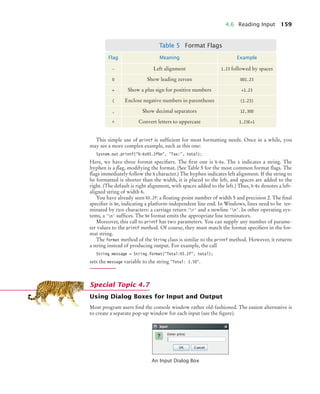
These learning objectives also organize the chapter summary to help students
assess their progress.
• Syntax diagrams now call out features of typical example code to draw student
attention to the key elements of the syntax. Additional annotations point out
special cases, common errors, and good practice associated with the syntax.
• New example tables clearly present a variety of typical and special cases in a
compact format. Each example is accompanied by a brief note explaining the
usage shown and the values that result from it.
• The gradual introduction of objects has been further improved by providing
additional examples and insights in the early chapters.
• Features introduced in Java 7 are covered as Special Topics so that students can
prepare for them. In this edition, we use Java 5 or 6 for the main discussion.
• The test bank has been greatly expanded and improved. (See page xi.)
• A new set of lab assignments enables students to practice solving complex
problems one step at a time.
• The LabRat code evaluation feature, enhanced for this edition, gives students
instant feedback on their programming assignments. (See page xvi.)
New in This Edition
More Help for Beginning Programmers
Annotated Examples
Updated for Java 7
More Opportunities for Practice
bj4_fm.fm Page viii Saturday, November 7, 2009 12:01 PM
Preface ix
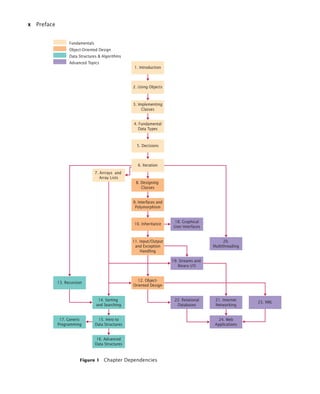
The book can be naturally grouped into four parts, as illustrated by Figure 1. The
organization of chapters offers the same flexibility as the previous edition; depen-
dencies among the chapters are also shown in the figure.
Part A: Fundamentals (Chapters 1–7)
Chapter 1 contains a brief introduction to computer science and Java programming.
Chapter 2 shows how to manipulate objects of predefined classes. In Chapter 3,
you will build your own simple classes from given specifications.
Fundamental data types, branches, loops, and arrays are covered in Chapters 4–7.
Part B: Object-Oriented Design (Chapters 8–12)
Chapter 8 takes up the subject of class design in a systematic fashion, and it intro-
duces a very simple subset of the UML notation.
The discussion of polymorphism and inheritance is split into two chapters. Chap-
ter 9 covers interfaces and polymorphism, whereas Chapter 10 covers inheritance.
Introducing interfaces before inheritance pays off in an important way: Students
immediately see polymorphism before getting bogged down with technical details
such as superclass construction.
Exception handling and basic file input/output are covered in Chapter 11. The
exception hierarchy gives a useful example for inheritance.
Chapter 12 contains an introduction to object-oriented design, including two
significant case studies.
Part C: Data Structures and Algorithms (Chapters 13–17)
Chapters 13 through 17 contain an introduction to algorithms and data structures,
covering recursion, sorting and searching, linked lists, binary trees, and hash tables.
These topics may be outside the scope of a one-semester course, but can be covered
as desired after Chapter 7 (see Figure 1).
Recursion is introduced from an object-oriented point of view: An object that
solves a problem recursively constructs another object of the same class that solves
a simpler problem. The idea of having the other object do the simpler job is more
intuitive than having a function call itself.
Each data structure is presented in the context of the standard Java collections
library. You will learn the essential abstractions of the standard library (such as
iterators, sets, and maps) as well as the performance characteristics of the various
collections. However, a detailed discussion of the implementation of advanced data
structures is beyond the scope of this book.
Chapter 17 introduces Java generics. This chapter is suitable for advanced stu-
dents who want to implement their own generic classes and methods.
Part D: Advanced Topics (Chapters 18–24)
Chapters 18 through 24 cover advanced Java programming techniques that defi-
nitely go beyond a first course in Java. Although, as already mentioned, a compre-
hensive coverage of the Java library would span many volumes, many instructors
prefer that a textbook should give students additional reference material valuable
beyond their first course. Some institutions also teach a second-semester course that
A Tour of the Book
bj4_fm.fm Page ix Saturday, November 7, 2009 12:01 PM
x Preface
Figure 1 Chapter Dependencies
4. Fundamental
Data Types
5. Decisions
9. Interfaces and
Polymorphism
10. Inheritance
11. Input/Output
and Exception
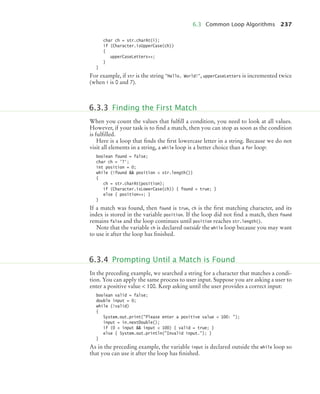
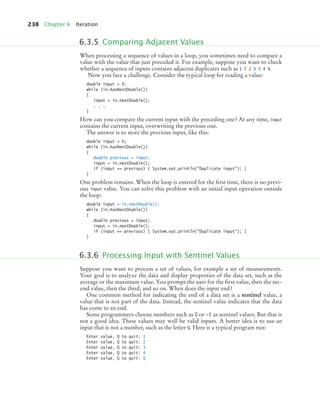
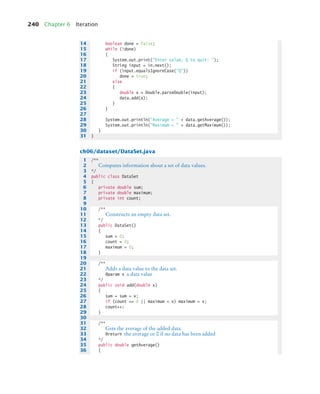
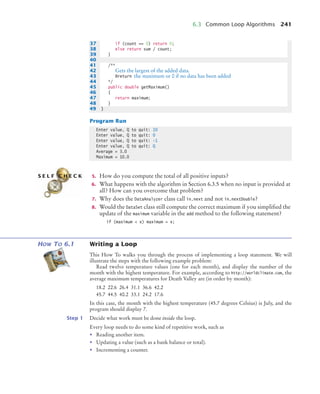
Handling
19. Streams and
Binary I/O
20.
Multithreading
12. Object-
Oriented Design
22. Relational
Databases
13. Recursion
14. Sorting
and Searching
15. Intro to
Data Structures
16. Advanced
Data Structures
21. Internet
Networking
23. XML
24. Web
Applications
7. Arrrays and
Array Lists
6. Iteration
8. Designing
Classes
17. Generic
Programming
3. Implementing
Classes
1. Introduction
2. Using Objects
Fundamentals
Object-Oriented Design
Data Structures & Algorithms
Advanced Topics
18. Graphical
User Interfaces
bj4_fm.fm Page x Saturday, November 7, 2009 12:01 PM
Preface xi
covers more practical programming aspects such as database and network program-
ming, rather than the more traditional in-depth material on data structures and algo-
rithms. This book can be used in a two-semester course to give students an
introduction to programming fundamentals and broad coverage of applications.
Alternatively, the material in the final chapters can be useful for student projects.
The advanced topics include graphical user-interface design, advanced file han-
dling, multithreading, and those technologies that are of particular interest to
server-side programming: networking, databases, XML, and web applications. The
Internet has made it possible to deploy many useful applications on servers, often
accessed by nothing more than a browser. This server-centric approach to applica-
tion development was in part made possible by the Java language and libraries, and
today, much of the industrial use of Java is in server-side programming.
Appendices
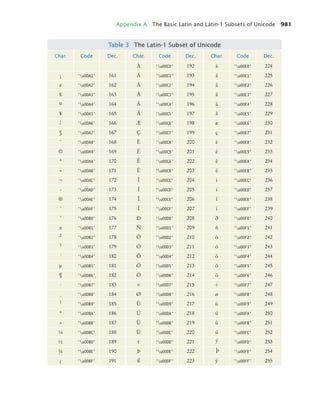
Appendix A lists character escape sequences and the Basic Latin and Latin-1 subsets
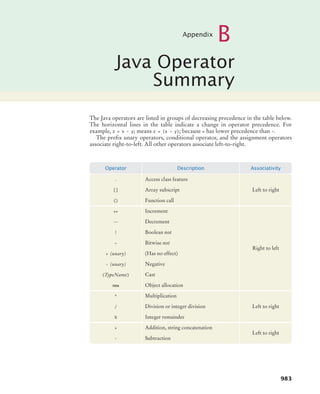
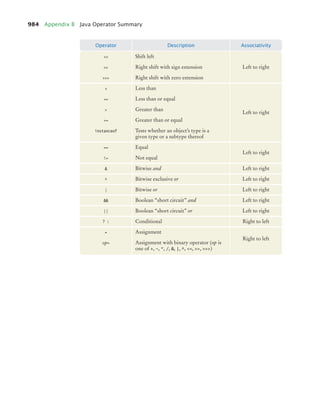
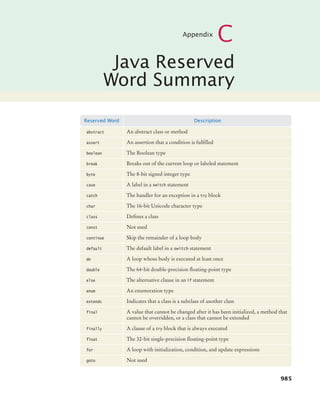
of Unicode. Appendices B and C summarize Java reserved words and operators.
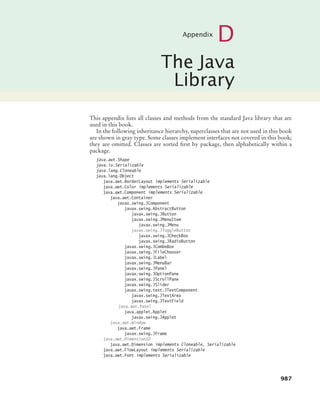
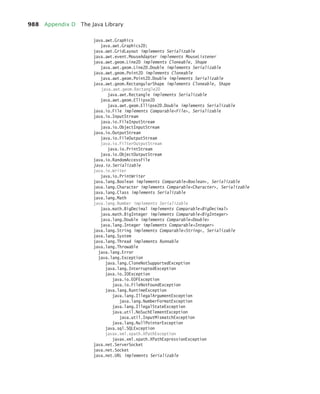
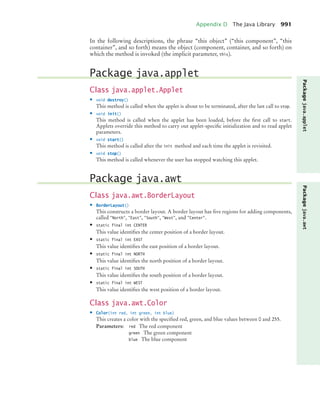
Appendix D documents all of the library methods and classes used in this book.
Additional appendices contain quick references on Java syntax, HTML, Java
tools, binary numbers, and UML.
Appendix L contains a style guide for use with this book. Many instructors find
it highly beneficial to require a consistent style for all assignments. If this style
guide conflicts with instructor sentiment or local customs, however, it is available in
electronic form so that it can be modified.
Web Resources
This book is complemented by a complete suite of online resources and a robust
WileyPLUS course.
Go to www.wiley.com/college/horstmann to visit the online companion site, which
includes
• Source code for all examples in the book.
• Worked Examples that apply the problem-solving steps in the book to other
realistic examples.
• Laboratory exercises (and solutions for instructors only).
• Lecture presentation slides (in HTML and PowerPoint formats).
• Solutions to all review and programming exercises (for instructors only).
• A test bank that focuses on skills, not just terminology (for instructors only).
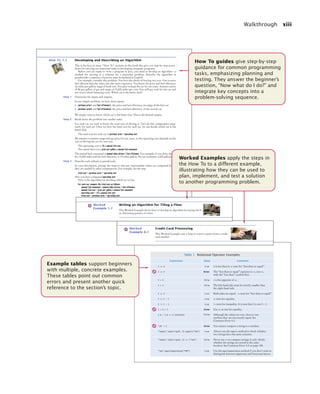
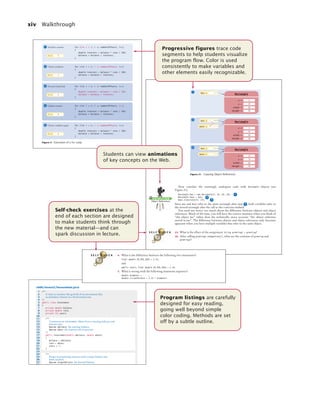
WileyPLUS is an online teaching and learning environment that integrates the
digital textbook with instructor and student resources. See page xvi for details.
• Worked Example How Many Days Have You Been Alive?
• Worked Example Working with Pictures
• Lab Exercises
Animation Variable Initialization and Assignment
Animation Parameter Passing
Animation Object References
Practice Quiz
Code Completion Exercises
Media Resources
www.wiley.com/
college/
horstmann
Web resources are summarized at
chapter end for easy reference.
bj4_fm.fm Page xi Saturday, November 7, 2009 12:01 PM
xii Walkthrough
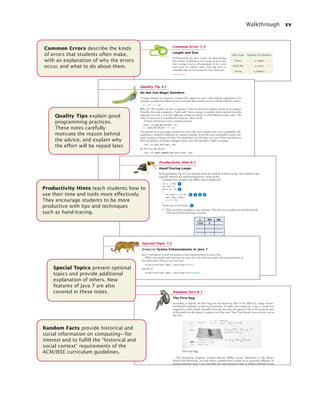
The pedagogical elements in this book work together to make the book accessible
to beginners as well as those learning Java as a second language.
A Walkthrough of the Learning Aids
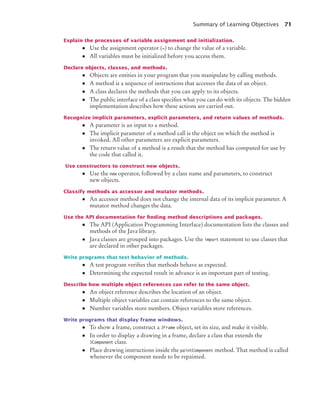
2.3 The Assignment Operator 39
You can change the value of a variable with the assignment operator (=). For exam-
ple, consider the variable declaration
int width = 10;
If you want to change the value of the variable, simply assign the new value:
width = 20;
The assignment replaces the original value of the variable (see Figure 1).
It is an error to use a variable that has never had a value assigned to it. For exam-
ple, the following assignment statement has an error:
int height;
width = height; // ERROR—uninitialized variable height
The compiler will complain about an “uninitialized variable” when you use a vari-
able that has never been assigned a value. (See Figure 2.)
2.3 The Assignment Operator
Use the assignment
operator (=) to
change the value
of a variable. 1
2
Figure 1
Assigning a New
Value to a Variable
width = 10
width = 20
1
2
Figure 2
An Uninitialized
Variable
Syntax 2.2 Assignment
height =
No value has been assigned.
variableName = value;
Syntax
Example
double width = 20;
.
.
width = 30;
.
.
.
width = width + 10;
The value of this variable is changed.
The same name
can occur on both sides.
See Figure 3.
The new value of the variable
This is a variable declaration.
This is an assignment statement.
Annotations explain
required components
and point to more information
on common errors or best practices
associated with the syntax.
Throughout each chapter,
margin notes show where
new concepts are introduced
and provide an outline of key ideas.
Annotated syntax boxes
provide a quick, visual overview
of new language constructs.
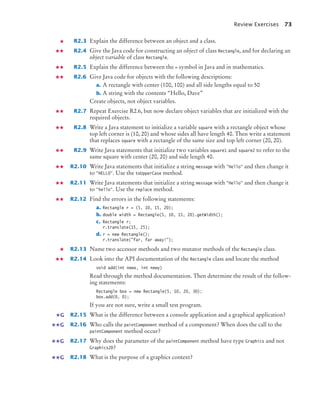
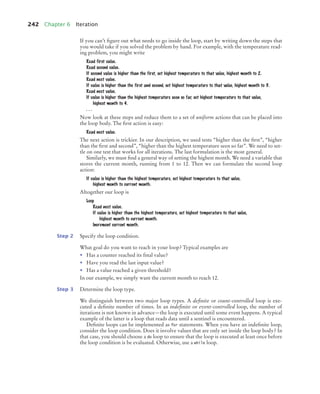
Explain the flow of execution in a loop.
• A while statement executes a block of code repeatedly. A condition controls for how
long the loop is executed.
• An off-by-one error is a common error when programming loops. Think through
simple test cases to avoid this type of error.
Use for loops to implement counting loops.
• You use a for loop when a variable runs from a starting to an ending value with a
constant increment or decrement.
• Make a choice between symmetric and asymmetric loop bounds.
• Count the number of iterations to check that your for loop is correct.
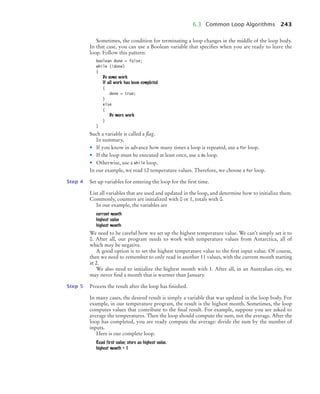
Implement loops that process a data set until a sentinel value is encountered.
• Sometimes, the termination condition of a loop can only be evaluated in the middle
of a loop. You can introduce a Boolean variable to control such a loop.
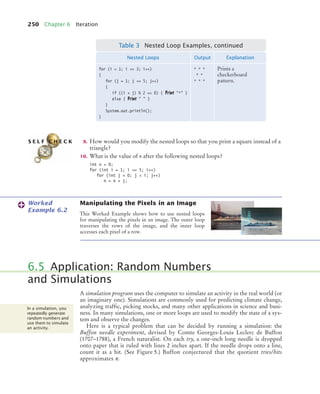
Use nested loops to implement multiple levels of iterations.
• When the body of a loop contains another loop, the loops are nested. A typical use
of nested loops is printing a table with rows and columns.
Summary of Learning Objectives
Each section corresponds to a
learning objective, summarized at
chapter end, giving students
a roadmap for assessing what they
know and what they need to review.
bj4_fm.fm Page xii Saturday, November 7, 2009 12:01 PM
Walkthrough xiii
180 Decisions
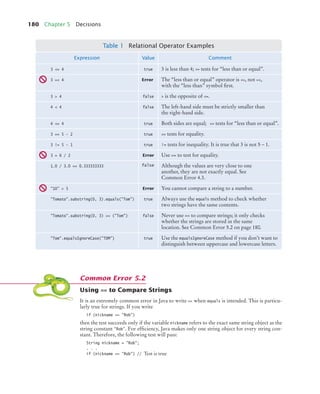
Table 1 Relational Operator Examples
t
n
e
m
m
o
C
e
u
l
a
V
n
o
i
s
s
e
r
p
x
E
e
u
r
t
4
=
<
3 3 is less than 4; <= tests for “less than or equal”.
3 =< 4 Error The “less than or equal” operator is <=, not =<,
with the “less than” symbol first.
e
s
l
a
f
4
>
3 > is the opposite of <=.
e
s
l
a
f
4
<
4 The left-hand side must be strictly smaller than
the right-hand side.
e
u
r
t
4
=
<
4 Both sides are equal; <= tests for “less than or equal”.
e
u
r
t
2
-
5
=
=
3 == tests for equality.
e
u
r
t
1
-
5
=
!
3 != tests for inequality. It is true that 3 is not 5 – 1.
3 = 6 / 2 Error Use == to test for equality.
1.0 / 3.0 == 0.333333333 false Although the values are very close to one
another, they are not exactly equal. See
Common Error 4.3.
"10" > 5 Error You cannot compare a string to a number.
"Tomato".substring(0, 3).equals("Tom") true Always use the equals method to check whether
two strings have the same contents.
"Tomato".substring(0, 3) == ("Tom") false Never use == to compare strings; it only checks
whether the strings are stored in the same
location. See Common Error 5.2 on page 180.
"Tom".equalsIgnoreCase("TOM") true Use the equalsIgnoreCase method if you don’t want to
distinguish between uppercase and lowercase letters.
We simply want to know which car is the better buy. That is the desired output.
Step 2 Break down the problem into smaller tasks.
For each car, we need to know the total cost of driving it. Let’s do this computation sepa-
rately for each car. Once we have the total cost for each car, we can decide which car is the
better deal.
The total cost for each car is purchase price + operating cost.
We assume a constant usage and gas price for ten years, so the operating cost depends on the
cost of driving the car for one year.
The operating cost is 10 x annual fuel cost.
The annual fuel cost is price per gallon x annual fuel consumed.
The annual fuel consumed is annual miles driven / fuel efficiency. For example, if you drive the car
for 15,000 miles and the fuel efficiency is 15 miles/gallon, the car consumes 1,000 gallons.
Step 3 Describe each subtask in pseudocode.
In your description, arrange the steps so that any intermediate values are computed before
they are needed in other computations. For example, list the step
total cost = purchase price + operating cost
after you have computed operating cost.
Here is the algorithm for deciding which car to buy.
For each car, compute the total cost as follows:
annual fuel consumed = annual miles driven / fuel efficiency
annual fuel cost = price per gallon x annual fuel consumed
operating cost = 10 x annual fuel cost
total cost = purchase price + operating cost
If total cost1 < total cost2
Choose car1.
Else
Choose car2.
HOW TO 1.1 Developing and Describing an Algorithm
This is the first of many “How To” sections in this book that give you step-by-step proce-
dures for carrying out important tasks in developing computer programs.
Before you are ready to write a program in Java, you need to develop an algorithm—a
method for arriving at a solution for a particular problem. Describe the algorithm in
pseudocode: a sequence of precise steps formulated in English.
For example, consider this problem: You have the choice of buying two cars. One is more
fuel efficient than the other, but also more expensive. You know the price and fuel efficiency
(in miles per gallon, mpg) of both cars. You plan to keep the car for ten years. Assume a price
of $4 per gallon of gas and usage of 15,000 miles per year. You will pay cash for the car and
not worry about financing costs. Which car is the better deal?
Step 1 Determine the inputs and outputs.
In our sample problem, we have these inputs:
• purchase price1 and fuel efficiency1, the price and fuel efficiency (in mpg) of the first car.
• purchase price2 and fuel efficiency2, the price and fuel efficiency of the second car.
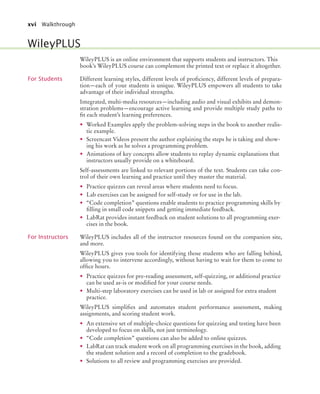
How To guides give step-by-step
guidance for common programming
tasks, emphasizing planning and
testing. They answer the beginner’s
question, “Now what do I do?” and
integrate key concepts into a
problem-solving sequence.
Example tables support beginners
with multiple, concrete examples.
These tables point out common
errors and present another quick
reference to the section’s topic.
Worked Examples apply the steps in
the How To to a different example,
illustrating how they can be used to
plan, implement, and test a solution
to another programming problem.
Credit Card Processing
This Worked Example uses a loop to remove spaces from a credit
card number.
Worked
Example 6.1
Writing an Algorithm for Tiling a Floor
This Worked Example shows how to develop an algorithm for laying tile in
an alternating pattern of colors.
Worked
Example 1.1
bj4_fm.fm Page xiii Saturday, November 7, 2009 12:01 PM
xiv Walkthrough
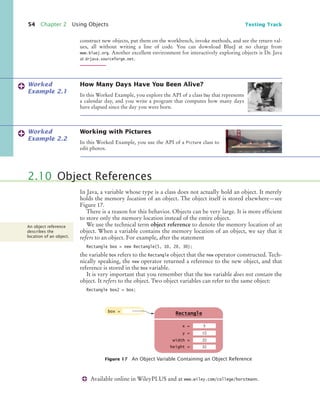
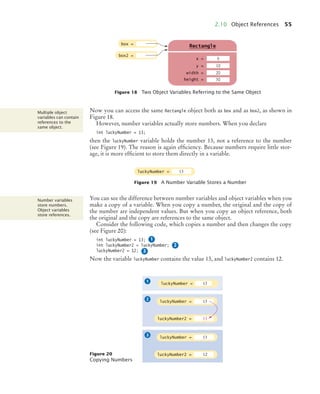
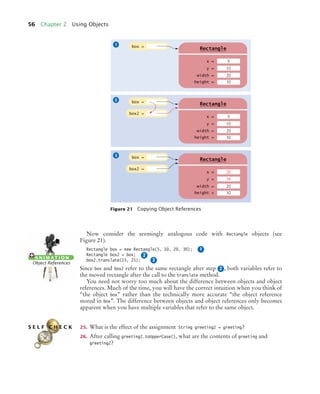
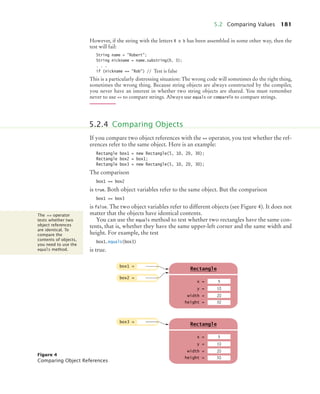
Now consider the seemingly analogous code with Rectangle objects (see
Figure 21).
Rectangle box = new Rectangle(5, 10, 20, 30);
Rectangle box2 = box;
box2.translate(15, 25);
Since box and box2 refer to the same rectangle after step , both variables refer to
the moved rectangle after the call to the translate method.
You need not worry too much about the difference between objects and object
references. Much of the time, you will have the correct intuition when you think of
“the object box” rather than the technically more accurate “the object reference
stored in box”. The difference between objects and object references only becomes
apparent when you have multiple variables that refer to the same object.
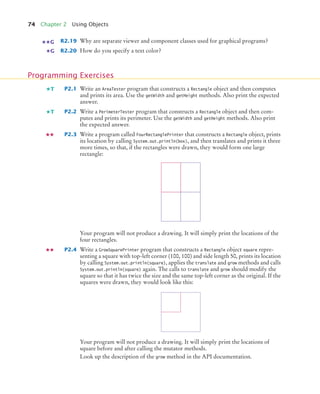
25. What is the effect of the assignment String greeting2 = greeting?
26. After calling greeting2.toUpperCase(), what are the contents of greeting and
greeting2?
Figure 21 Copying Object References
box =
box2 =
x =
Rectangle
y =
width =
height =
5
10
20
g
30
box =
box2 =
x =
Rectangle
y =
width =
height =
20
35
20
g
30
box =
x =
Rectangle
y =
width =
height =
5
10
20
g
30
1
2
3
1
2
3
A N I M AT I O N
Object References
2
S E L F C H E C K
6.2 for Loops 205
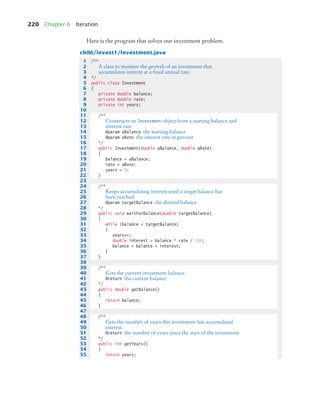
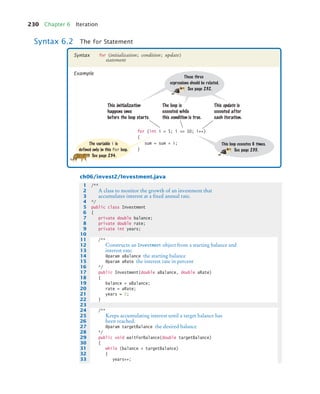
ch06/invest2/Investment.java
1 /**
2 A class to monitor the growth of an investment that
3 accumulates interest at a fixed annual rate.
4 */
5 public class Investment
6 {
7 private double balance;
8 private double rate;
9 private int years;
10
11 /**
12 Constructs an Investment object from a starting balance and
13 interest rate.
14 @param aBalance the starting balance
15 @param aRate the interest rate in percent
16 */
17 public Investment(double aBalance, double aRate)
18 {
19 balance = aBalance;
20 rate = aRate;
21 years = 0;
22 }
23
24 /**
25 Keeps accumulating interest until a target balance has
26 been reached.
27 @param targetBalance the desired balance
28 */
Program listings are carefully
designed for easy reading,
going well beyond simple
color coding. Methods are set
off by a subtle outline.
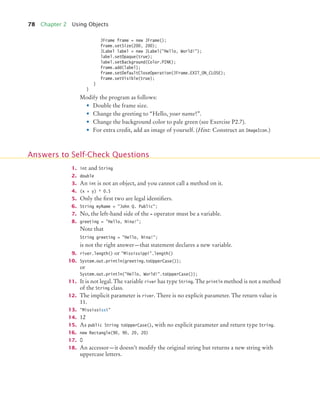
4. What is the difference between the following two statements?
final double CM_PER_INCH = 2.54;
and
public static final double CM_PER_INCH = 2.54;
5. What is wrong with the following statement sequence?
double diameter = . . .;
double circumference = 3.14 * diameter;
S E L F C H E C K
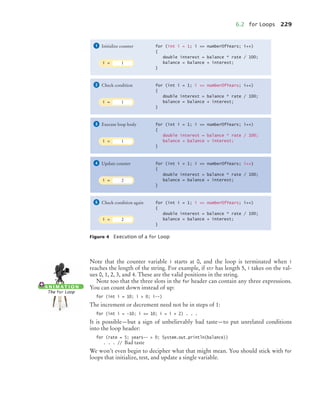
Figure 4 Execution of a for Loop
for (int i = 1; i <= numberOfYears; i++)
{
double interest = balance * rate / 100;
balance = balance + interest;
}
Initialize counter
1
for (int i = 1; i <= numberOfYears; i++)
{
double interest = balance * rate / 100;
balance = balance + interest;
}
Check condition
2
for (int i = 1; i <= numberOfYears; i++)
{
double interest = balance * rate / 100;
balance = balance + interest;
}
Execute loop body
3
for (int i = 1; i <= numberOfYears; i++)
{
double interest = balance * rate / 100;
balance = balance + interest;
}
Update counter
4
for (int i = 1; i <= numberOfYears; i++)
{
double interest = balance * rate / 100;
balance = balance + interest;
}
Check condition again
5
i = 1
i = 1
i = 1
i = 2
i = 2
Progressive figures trace code
segments to help students visualize
the program flow. Color is used
consistently to make variables and
other elements easily recognizable.
Self-check exercises at the
end of each section are designed
to make students think through
the new material—and can
spark discussion in lecture.
Students can view animations
of key concepts on the Web.
bj4_fm.fm Page xiv Saturday, November 7, 2009 12:01 PM
Walkthrough xv
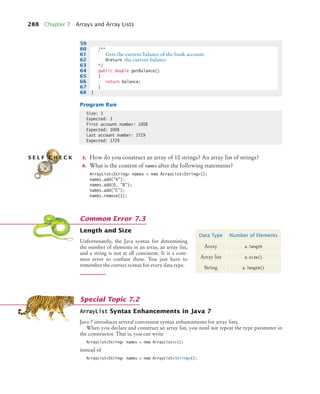
Length and Size
Unfortunately, the Java syntax for determining
the number of elements in an array, an array list,
and a string is not at all consistent. It is a com-
mon error to confuse these. You just have to
remember the correct syntax for every data type.
Common Error 7.3
Data Type Number of Elements
Array a.length
Array list a.size()
String a.length()
;
Do Not Use Magic Numbers
A magic number is a numeric constant that appears in your code without explanation. For
example, consider the following scary example that actually occurs in the Java library source:
h = 31 * h + ch;
Why 31? The number of days in January? One less than the number of bits in an integer?
Actually, this code computes a “hash code” from a string—a number that is derived from the
characters in such a way that different strings are likely to yield different hash codes. The
value 31 turns out to scramble the character values nicely.
A better solution is to use a named constant:
final int HASH_MULTIPLIER = 31;
h = HASH_MULTIPLIER * h + ch;
You should never use magic numbers in your code. Any number that is not completely self-
explanatory should be declared as a named constant. Even the most reasonable cosmic con-
stant is going to change one day. You think there are 365 days in a year? Your customers on
Mars are going to be pretty unhappy about your silly prejudice. Make a constant
final int DAYS_PER_YEAR = 365;
By the way, the device
final int THREE_HUNDRED_AND_SIXTY_FIVE = 365;
In the following sections, you will learn how to carry out arithmetic calculations in
Java.
Quality Tip 4.1
Arithmetic Operations and
Hand-Tracing Loops
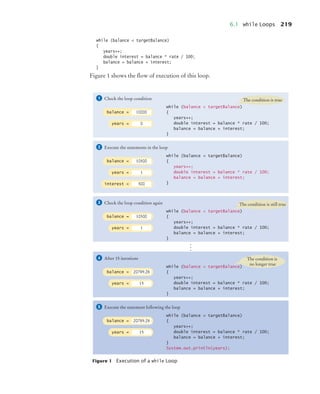
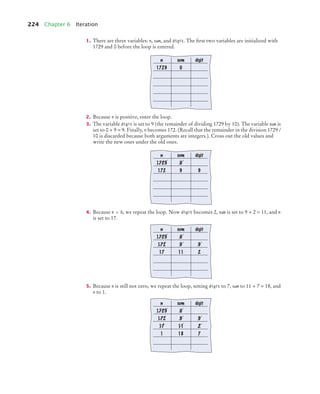
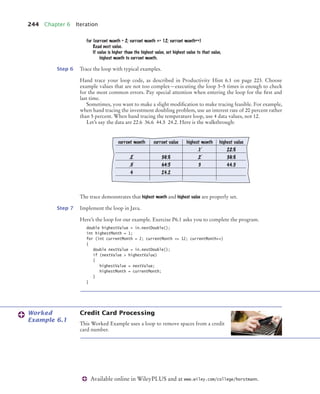
In Programming Tip 5.2, you learned about the method of hand tracing. This method is par-
ticularly effective for understanding how a loop works.
Consider this example loop. What value is displayed?
int n = 1729;
int sum = 0;
while (n > 0)
{
int digit = n % 10;
sum = sum + digit;
n = n / 10;
}
System.out.println(sum);
1. There are three variables: n, sum, and digit. The first two variables are initialized with
1729 and 0 before the loop is entered.
2. Because n is positive, enter the loop.
3. The variable digit is set to 9 (the remainder of dividing 1729 by 10). The variable sum is
set to 0 + 9 = 9. Finally, n becomes 172. (Recall that the remainder in the division 1729 /
10 is discarded because both arguments are integers.). Cross out the old values and
write the new ones under the old ones.
Productivity Hint 6.1
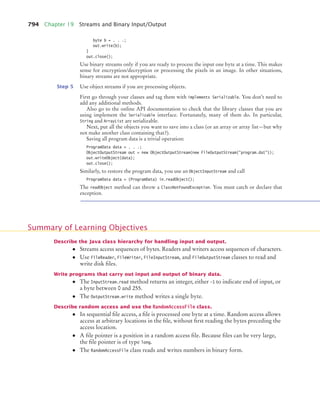
1
2
3 4 5 6
7
n sum digit
1729 0
n sum digit
1729 0
172 9 9
ArrayList Syntax Enhancements in Java 7
Java 7 introduces several convenient syntax enhancements for array lists.
When you declare and construct an array list, you need not repeat the type parameter in
the constructor. That is, you can write
ArrayList<String> names = new ArrayList<>();
instead of
ArrayList<String> names = new ArrayList<String>();
Special Topic 7.2
The First Bug
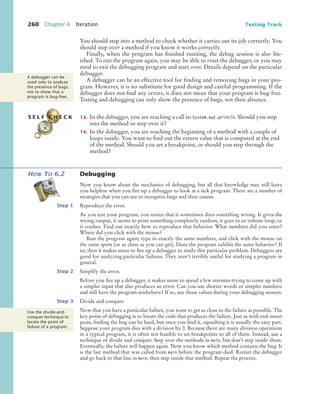
According to legend, the first bug was one found in 1947 in the Mark II, a huge electro-
mechanical computer at Harvard University. It really was caused by a bug—a moth was
trapped in a relay switch. Actually, from the note that the operator left in the log book next
to the moth (see the figure), it appears as if the term “bug” had already been in active use at
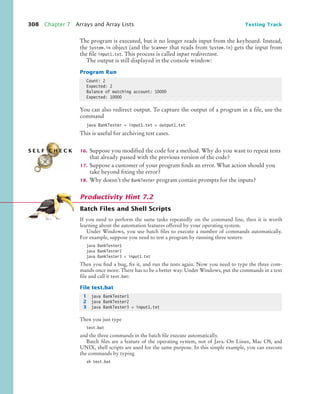
the time.
The pioneering computer scientist Maurice Wilkes wrote: “Somehow, at the Moore
School and afterwards, one had always assumed there would be no particular difficulty in
getting programs right. I can remember the exact instant in time at which it dawned on me
The First Bug
Random Fact 6.1
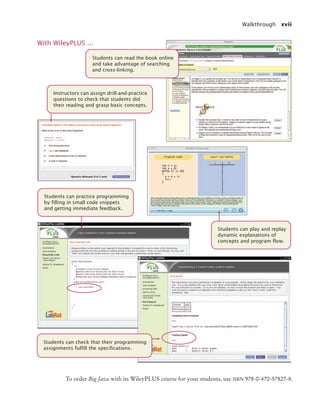
Common Errors describe the kinds
of errors that students often make,
with an explanation of why the errors
occur, and what to do about them.
Quality Tips explain good
programming practices.
These notes carefully
motivate the reason behind
the advice, and explain why
the effort will be repaid later.
Productivity Hints teach students how to
use their time and tools more effectively.
They encourage students to be more
productive with tips and techniques
such as hand-tracing.
Special Topics present optional
topics and provide additional
explanation of others. New
features of Java 7 are also
covered in these notes.
Random Facts provide historical and
social information on computing—for
interest and to fulfill the “historical and
social context” requirements of the
ACM/IEEE curriculum guidelines.
bj4_fm.fm Page xv Saturday, November 7, 2009 12:01 PM
xvi Walkthrough
WileyPLUS is an online environment that supports students and instructors. This
book’s WileyPLUS course can complement the printed text or replace it altogether.
For Students Different learning styles, different levels of proficiency, different levels of prepara-
tion—each of your students is unique. WileyPLUS empowers all students to take
advantage of their individual strengths.
Integrated, multi-media resources—including audio and visual exhibits and demon-
stration problems—encourage active learning and provide multiple study paths to
fit each student’s learning preferences.
• Worked Examples apply the problem-solving steps in the book to another realis-
tic example.
• Screencast Videos present the author explaining the steps he is taking and show-
ing his work as he solves a programming problem.
• Animations of key concepts allow students to replay dynamic explanations that
instructors usually provide on a whiteboard.
Self-assessments are linked to relevant portions of the text. Students can take con-
trol of their own learning and practice until they master the material.
• Practice quizzes can reveal areas where students need to focus.
• Lab exercises can be assigned for self-study or for use in the lab.
• “Code completion” questions enable students to practice programming skills by
filling in small code snippets and getting immediate feedback.
• LabRat provides instant feedback on student solutions to all programming exer-
cises in the book.
For Instructors WileyPLUS includes all of the instructor resources found on the companion site,
and more.
WileyPLUS gives you tools for identifying those students who are falling behind,
allowing you to intervene accordingly, without having to wait for them to come to
office hours.
• Practice quizzes for pre-reading assessment, self-quizzing, or additional practice
can be used as-is or modified for your course needs.
• Multi-step laboratory exercises can be used in lab or assigned for extra student
practice.
WileyPLUS simplifies and automates student performance assessment, making
assignments, and scoring student work.
• An extensive set of multiple-choice questions for quizzing and testing have been
developed to focus on skills, not just terminology.
• “Code completion” questions can also be added to online quizzes.
• LabRat can track student work on all programming exercises in the book, adding
the student solution and a record of completion to the gradebook.
• Solutions to all review and programming exercises are provided.
WileyPLUS
bj4_fm.fm Page xvi Saturday, November 7, 2009 12:01 PM
Walkthrough xvii
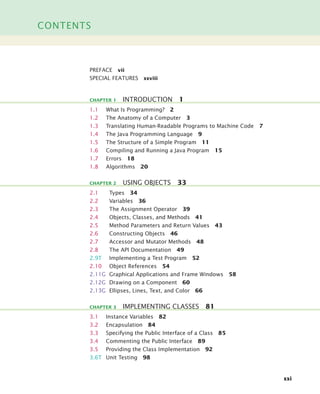
Students can read the book online
and take advantage of searching
and cross-linking.
With WileyPLUS …
Students can practice programming
by filling in small code snippets
and getting immediate feedback.
Instructors can assign drill-and-practice
questions to check that students did
their reading and grasp basic concepts.
Students can play and replay
dynamic explanations of
concepts and program flow.
Students can check that their programming
assignments fulfill the specifications.
To order Big Java with its WileyPLUS course for your students, use ISBN 978-0-470-57827-8.
bj4_fm.fm Page xvii Saturday, November 7, 2009 12:01 PM
xviii Acknowledgments
Many thanks to Beth Golub, Lauren Sapira, Andre Legaspi, Don Fowley, Mike
Berlin, Janet Foxman, Lisa Gee, and Bud Peters at John Wiley & Sons, and Vickie
Piercey at Publishing Services for their help with this project. An especially deep
acknowledgment and thanks goes to Cindy Johnson for her hard work, sound
judgment, and amazing attention to detail.
I am grateful to Suzanne Dietrich, Rick Giles, Kathy Liszka, Stephanie Smullen,
Julius Dichter, Patricia McDermott-Wells, and David Woolbright, for their work
on the supplemental material.
Many thanks to the individuals who reviewed the manuscript for this edition,
made valuable suggestions, and brought an embarrassingly large number of errors
and omissions to my attention. They include:
Ian Barland, Radford University
Rick Birney, Arizona State University
Paul Bladek, Edmonds Community College
Robert P. Burton, Brigham Young University
Teresa Cole, Boise State University
Geoffrey Decker, Northern Illinois University
Eman El-Sheikh, University of West Florida
David Freer, Miami Dade College
Ahmad Ghafarian, North Georgia College & State University
Norman Jacobson, University of California, Irvine
Mugdha Khaladkar, New Jersey Institute of Technology
Hong Lin, University of Houston, Downtown
Jeanna Matthews, Clarkson University
Sandeep R. Mitra, State University of New York, Brockport
Parviz Partow-Navid, California State University, Los Angeles
Jim Perry, Ulster County Community College
Kai Qian, Southern Polytechnic State University
Cyndi Rader, Colorado School of Mines
Chaman Lal Sabharwal, Missouri University of Science and Technology
John Santore, Bridgewater State College
Stephanie Smullen, University of Tennessee, Chattanooga
Monica Sweat, Georgia Institute of Technology
Shannon Tauro, University of California, Irvine
Russell Tessier, University of Massachusetts, Amherst
Jonathan L. Tolstedt, North Dakota State University
David Vineyard, Kettering University
Lea Wittie, Bucknell University
Acknowledgments
bj4_fm.fm Page xviii Saturday, November 7, 2009 12:01 PM
Acknowledgments xix
Every new edition builds on the suggestions and experiences of prior reviewers and
users. I am grateful for the invaluable contributions these individuals have made to
this book:
Tim Andersen, Boise State University
Ivan Bajic, San Diego State University
Ted Bangay, Sheridan Institute of Technology
George Basham, Franklin University
Sambit Bhattacharya, Fayetteville State University
Joseph Bowbeer, Vizrea Corporation
Timothy A. Budd, Oregon State University
Frank Butt, IBM
Jerry Cain, Stanford University
Adam Cannon, Columbia University
Nancy Chase, Gonzaga University
Archana Chidanandan, Rose-Hulman Institute
of Technology
Vincent Cicirello, The Richard Stockton College
of New Jersey
Deborah Coleman, Rochester Institute
of Technology
Valentino Crespi, California State University,
Los Angeles
Jim Cross, Auburn University
Russell Deaton, University of Arkansas
H. E. Dunsmore, Purdue University
Robert Duvall, Duke University
Henry A. Etlinger, Rochester Institute
of Technology
John Fendrich, Bradley University
John Fulton, Franklin University
David Geary, Sabreware, Inc.
Margaret Geroch, Wheeling Jesuit University
Rick Giles, Acadia University
Stacey Grasso, College of San Mateo
Jianchao Han, California State University,
Dominguez Hills
Lisa Hansen, Western New England College
Elliotte Harold
Eileen Head, Binghamton University
Cecily Heiner, University of Utah
Brian Howard, Depauw University
Lubomir Ivanov, Iona College
Curt Jones, Bloomsburg University
Aaron Keen, California Polytechnic State
University, San Luis Obispo
Elliot Koffman, Temple University
Kathy Liszka, University of Akron
Hunter Lloyd, Montana State University
Youmin Lu, Bloomsburg University
John S. Mallozzi, Iona College
John Martin, North Dakota State University
Scott McElfresh, Carnegie Mellon University
Joan McGrory, Christian Brothers University
Carolyn Miller, North Carolina State University
Teng Moh, San Jose State University
John Moore, The Citadel
Faye Navabi, Arizona State University
Kevin O’Gorman, California Polytechnic State
University, San Luis Obispo
Michael Olan, Richard Stockton College
Kevin Parker, Idaho State University
Cornel Pokorny, California Polytechnic State
University, San Luis Obispo
Roger Priebe, University of Texas, Austin
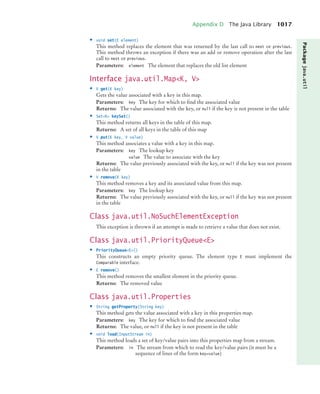
C. Robert Putnam, California State University,
Northridge
Neil Rankin, Worcester Polytechnic Institute
Brad Rippe, Fullerton College
Pedro I. Rivera Vega, University of Puerto Rico,
Mayaguez
Daniel Rogers, SUNY Brockport
Carolyn Schauble, Colorado State University
Christian Shin, SUNY Geneseo
Jeffrey Six, University of Delaware
Don Slater, Carnegie Mellon University
Ken Slonneger, University of Iowa
Peter Stanchev, Kettering University
Ron Taylor, Wright State University
Joseph Vybihal, McGill University
Xiaoming Wei, Iona College
Todd Whittaker, Franklin University
Robert Willhoft, Roberts Wesleyan College
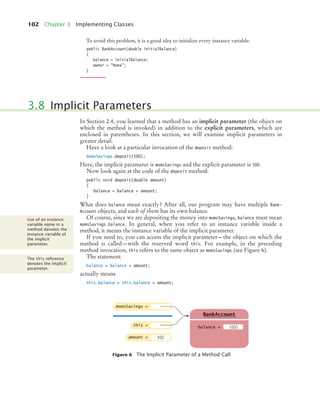
David Womack, University of Texas at
San Antonio
Catherine Wyman, DeVry University
Arthur Yanushka, Christian Brothers University
Salih Yurttas, Texas A&M University
bj4_fm.fm Page xix Saturday, November 7, 2009 12:01 PM
bj4_fm.fm Page xx Saturday, November 7, 2009 12:01 PM
CONTENTS
xxi
PREFACE vii
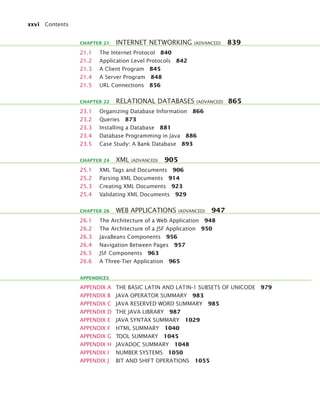
SPECIAL FEATURES xxviii
1.1 What Is Programming? 2
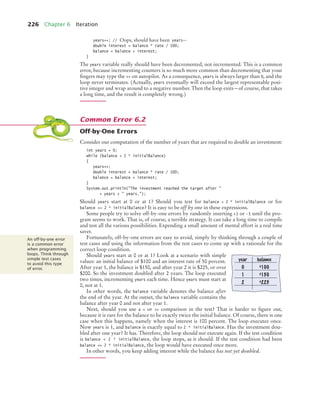
1.2 The Anatomy of a Computer 3
1.3 Translating Human-Readable Programs to Machine Code 7
1.4 The Java Programming Language 9
1.5 The Structure of a Simple Program 11
1.6 Compiling and Running a Java Program 15
1.7 Errors 18
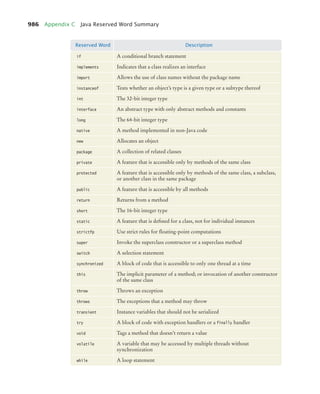
1.8 Algorithms 20
2.1 Types 34
2.2 Variables 36
2.3 The Assignment Operator 39
2.4 Objects, Classes, and Methods 41
2.5 Method Parameters and Return Values 43
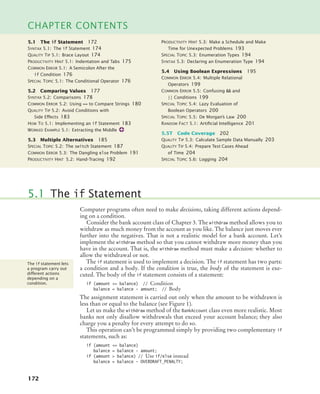
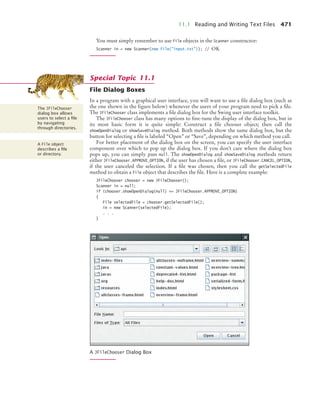
2.6 Constructing Objects 46
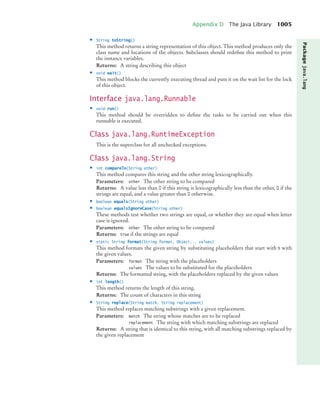
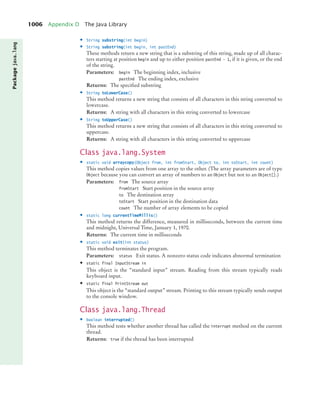
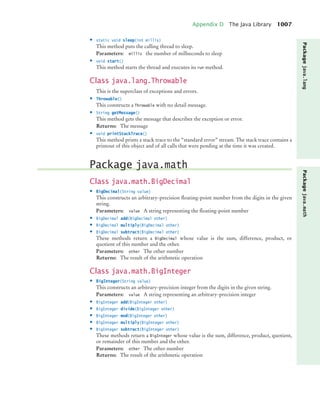
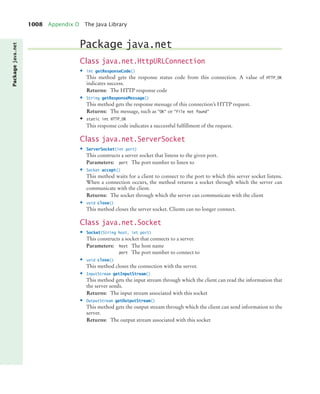
2.7 Accessor and Mutator Methods 48
2.8 The API Documentation 49
2.9T Implementing a Test Program 52
2.10 Object References 54
2.11G Graphical Applications and Frame Windows 58
2.12G Drawing on a Component 60
2.13G Ellipses, Lines, Text, and Color 66
3.1 Instance Variables 82
3.2 Encapsulation 84
3.3 Specifying the Public Interface of a Class 85
3.4 Commenting the Public Interface 89
3.5 Providing the Class Implementation 92
3.6T Unit Testing 98
CHAPTER 1 INTRODUCTION 1
CHAPTER 2 USING OBJECTS 33
CHAPTER 3 IMPLEMENTING CLASSES 81
bj4_fm.fm Page xxi Saturday, November 7, 2009 12:01 PM
xxii Contents
3.7 Local Variables 100
3.8 Implicit Parameters 102
3.9G Shape Classes 106
4.1 Number Types 128
4.2 Constants 133
4.3 Arithmetic Operations and Mathematical Functions 137
4.4 Calling Static Methods 145
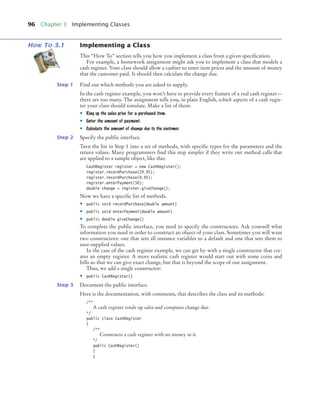
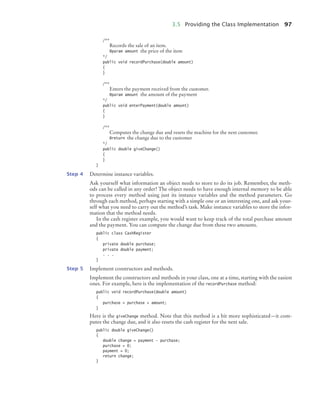
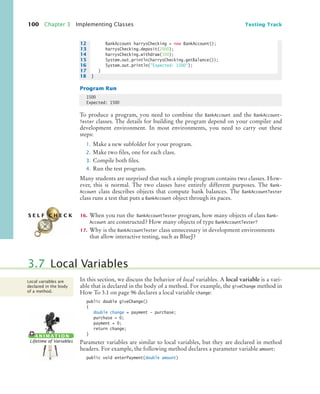
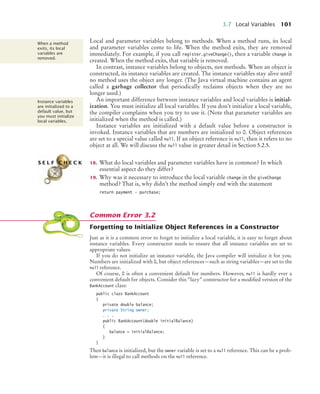
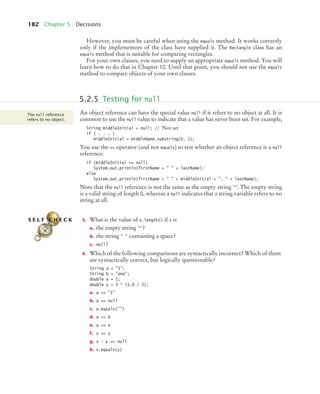
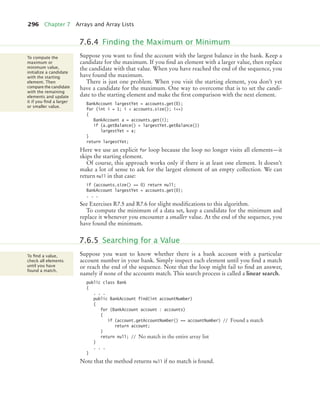
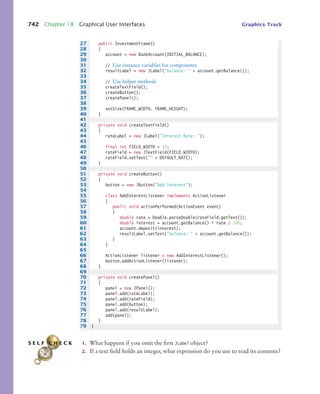
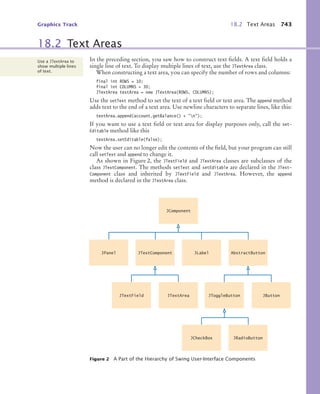
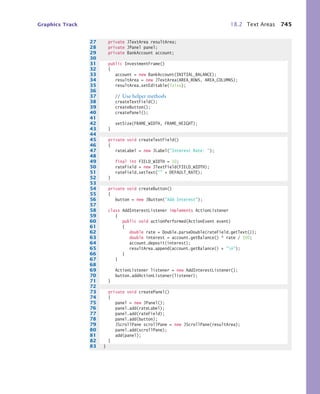
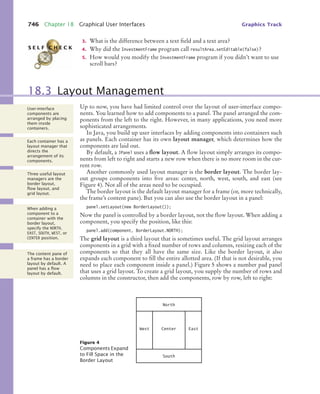
4.5 Strings 149
4.6 Reading Input 155
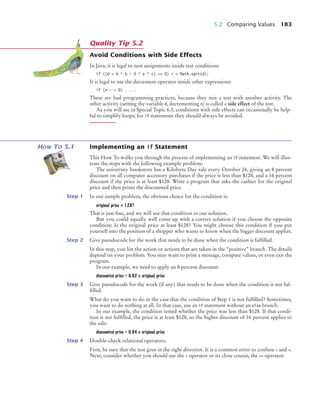
5.1 The if Statement 172
5.2 Comparing Values 177
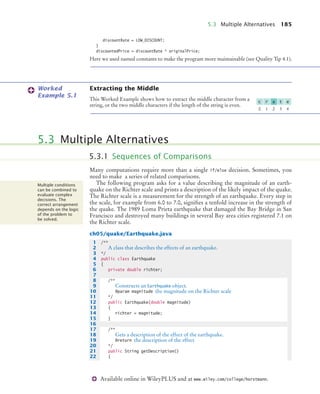
5.3 Multiple Alternatives 185
5.4 Using Boolean Expressions 195
5.5T Code Coverage 202
6.1 while Loops 218
6.2 for Loops 228
6.3 Common Loop Algorithms 236
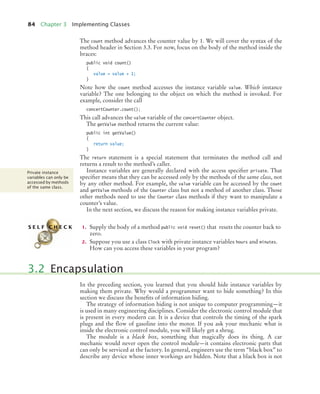
6.4 Nested Loops 247
6.5 Application: Random Numbers and Simulations 250
6.6T Using a Debugger 257
7.1 Arrays 276
7.2 Array Lists 283
7.3 Wrappers and Auto-boxing 289
7.4 The Enhanced for Loop 291
7.5 Partially Filled Arrays 292
7.6 Common Array Algorithms 294
7.7T Regression Testing 306
7.8 Two-Dimensional Arrays 310
CHAPTER 4 FUNDAMENTAL DATA TYPES 127
CHAPTER 5 DECISIONS 171
CHAPTER 6 ITERATION 217
CHAPTER 7 ARRAYS AND ARRAY LISTS 275
bj4_fm.fm Page xxii Saturday, November 7, 2009 12:01 PM
Contents xxiii
8.1 Discovering Classes 328
8.2 Cohesion and Coupling 329
8.3 Immutable Classes 332
8.4 Side Effects 333
8.5 Preconditions and Postconditions 338
8.6 Static Methods 342
8.7 Static Variables 345
8.8 Scope 348
8.9 Packages 352
8.10T Unit Test Frameworks 359
9.1 Using Interfaces for Algorithm Reuse 372
9.2 Converting Between Class and Interface Types 378
9.3 Polymorphism 380
9.4 Using Interfaces for Callbacks 381
9.5 Inner Classes 385
9.6T Mock Objects 389
9.7G Events, Event Sources, and Event Listeners 391
9.8G Using Inner Classes for Listeners 394
9.9G Building Applications with Buttons 396
9.10G Processing Timer Events 400
9.11G Mouse Events 403
10.1 Inheritance Hierarchies 420
10.2 Implementing Subclasses 423
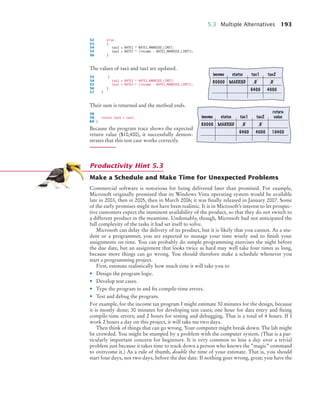
10.3 Overriding Methods 427
10.4 Subclass Construction 430
10.5 Converting Between Subclass and Superclass Types 433
10.6 Polymorphism and Inheritance 435
10.7 Object: The Cosmic Superclass 444
10.8G Using Inheritance to Customize Frames 456
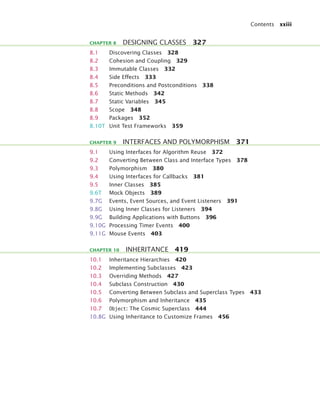
CHAPTER 8 DESIGNING CLASSES 327
CHAPTER 9 INTERFACES AND POLYMORPHISM 371
CHAPTER 10 INHERITANCE 419
bj4_fm.fm Page xxiii Saturday, November 7, 2009 12:01 PM
xxiv Contents
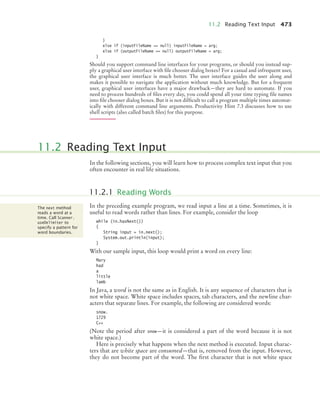
11.1 Reading and Writing Text Files 468
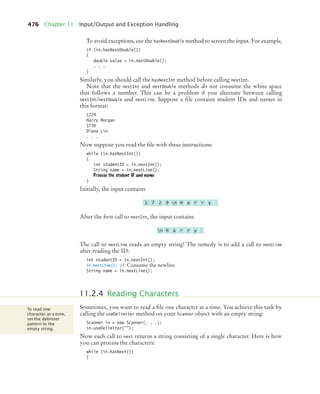
11.2 Reading Text Input 473
11.3 Throwing Exceptions 481
11.4 Checked and Unchecked Exceptions 483
11.5 Catching Exceptions 485
11.6 The finally Clause 488
11.7 Designing Your Own Exception Types 490
11.8 Case Study: A Complete Example 491
12.1 The Software Life Cycle 506
12.2 Discovering Classes 511
12.3 Relationships Between Classes 513
12.4 Case Study: Printing an Invoice 518
12.5 Case Study: An Automatic Teller Machine 529
13.1 Triangle Numbers 558
13.2 Recursive Helper Methods 566
13.3 The Efficiency of Recursion 568
13.4 Permutations 573
13.5 Mutual Recursions 579
14.1 Selection Sort 596
14.2 Profiling the Selection Sort Algorithm 599
14.3 Analyzing the Performance of the Selection Sort Algorithm 602
14.4 Merge Sort 606
14.5 Analyzing the Merge Sort Algorithm 609
14.6 Searching 614
14.7 Binary Search 616
14.8 Sorting Real Data 619
15.1 Using Linked Lists 630
15.2 Implementing Linked Lists 636
15.3 Abstract Data Types 647
15.4 Stacks and Queues 651
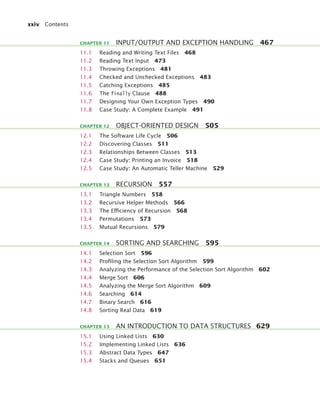
CHAPTER 11 INPUT/OUTPUT AND EXCEPTION HANDLING 467
CHAPTER 12 OBJECT-ORIENTED DESIGN 505
CHAPTER 13 RECURSION 557
CHAPTER 14 SORTING AND SEARCHING 595
CHAPTER 15 AN INTRODUCTION TO DATA STRUCTURES 629
bj4_fm.fm Page xxiv Saturday, November 7, 2009 12:01 PM
Contents xxv
16.1 Sets 666
16.2 Maps 670
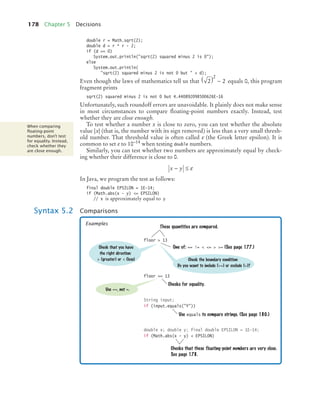
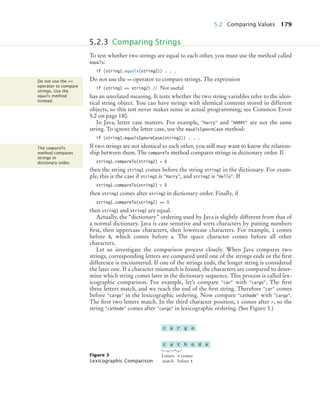
16.3 Hash Tables 674
16.4 Computing Hash Codes 681
16.5 Binary Search Trees 686
16.6 Binary Tree Traversal 696
16.7 Priority Queues 698
16.8 Heaps 699
16.9 The Heapsort Algorithm 709
17.1 Generic Classes and Type Parameters 724
17.2 Implementing Generic Types 725
17.3 Generic Methods 728
17.4 Constraining Type Parameters 730
17.5 Type Erasure 732
18.1G Processing Text Input 740
18.2G Text Areas 743
18.3G Layout Management 746
18.4G Choices 748
18.5G Menus 758
18.6G Exploring the Swing Documentation 764
19.1 Readers, Writers, and Streams 778
19.2 Binary Input and Output 779
19.3 Random Access 785
19.4 Object Streams 790
20.1 Running Threads 802
20.2 Terminating Threads 807
20.3 Race Conditions 809
20.4 Synchronizing Object Access 815
20.5 Avoiding Deadlocks 818
20.6G Case Study: Algorithm Animation 824
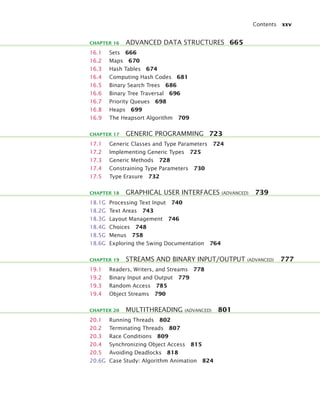
CHAPTER 16 ADVANCED DATA STRUCTURES 665
CHAPTER 17 GENERIC PROGRAMMING 723
CHAPTER 18 GRAPHICAL USER INTERFACES (ADVANCED) 739
CHAPTER 19 STREAMS AND BINARY INPUT/OUTPUT (ADVANCED) 777
CHAPTER 20 MULTITHREADING (ADVANCED) 801
bj4_fm.fm Page xxv Saturday, November 7, 2009 12:01 PM
xxvi Contents
21.1 The Internet Protocol 840
21.2 Application Level Protocols 842
21.3 A Client Program 845
21.4 A Server Program 848
21.5 URL Connections 856
23.1 Organizing Database Information 866
23.2 Queries 873
23.3 Installing a Database 881
23.4 Database Programming in Java 886
23.5 Case Study: A Bank Database 893
25.1 XML Tags and Documents 906
25.2 Parsing XML Documents 914
25.3 Creating XML Documents 923
25.4 Validating XML Documents 929
26.1 The Architecture of a Web Application 948
26.2 The Architecture of a JSF Application 950
26.3 JavaBeans Components 956
26.4 Navigation Between Pages 957
26.5 JSF Components 963
26.6 A Three-Tier Application 965
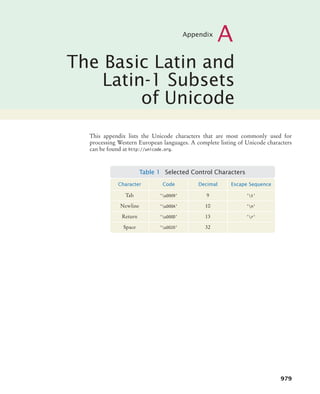
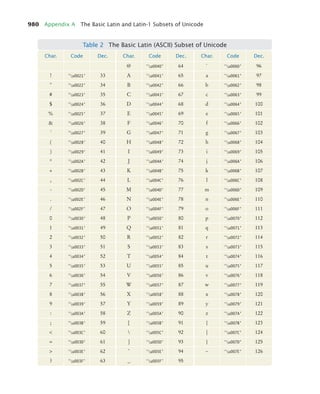
APPENDIX A THE BASIC LATIN AND LATIN-1 SUBSETS OF UNICODE 979
APPENDIX B JAVA OPERATOR SUMMARY 983
APPENDIX C JAVA RESERVED WORD SUMMARY 985
APPENDIX D THE JAVA LIBRARY 987
APPENDIX E JAVA SYNTAX SUMMARY 1029
APPENDIX F HTML SUMMARY 1040
APPENDIX G TOOL SUMMARY 1045
APPENDIX H JAVADOC SUMMARY 1048
APPENDIX I NUMBER SYSTEMS 1050
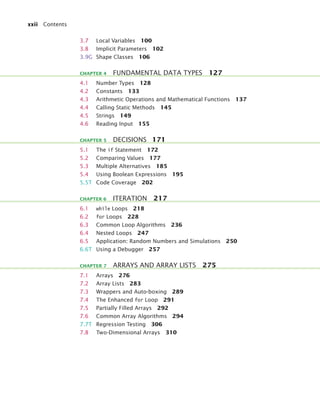
APPENDIX J BIT AND SHIFT OPERATIONS 1055
CHAPTER 21 INTERNET NETWORKING (ADVANCED) 839
CHAPTER 22 RELATIONAL DATABASES (ADVANCED) 865
CHAPTER 24 XML (ADVANCED) 905
CHAPTER 26 WEB APPLICATIONS (ADVANCED) 947
APPENDICES
bj4_fm.fm Page xxvi Saturday, November 7, 2009 12:01 PM
Contents xxvii
APPENDIX K UML SUMMARY 1058
APPENDIX L JAVA LANGUAGE CODING GUIDELINES 1061
GLOSSARY 1068
INDEX 1083
ILLUSTRATION CREDITS 1131
Arrays 279
Array Lists 284
Assertion 339
Assignment 39
Calling a Superclass Constructor 431
Calling a Superclass Method 428
Cast 140
Catching Exceptions 486
Class Declaration 88
Comparisons 178
Constant Declaration 134
Declaring a Generic Class 727
Declaring a Generic Method 729
Declaring an Enumeration Type 194
Declaring an Interface 374
Implementing an Interface 375
Importing a Class from a Package 51
Inheritance 424
Instance Variable Declaration 83
Method Call 13
Method Declaration 94
Object Construction 47
Package Specification 353
Static Method Call 146
The finally Clause 488
The “for each” Loop 291
The for Statement 230
The if Statement 174
The instanceof Operator 434
The throws Clause 485
The while Statement 218
Throwing an Exception 481
Variable Declaration 37
ALPHABETICAL LIST OF SYNTAX BOXES
bj4_fm.fm Page xxvii Saturday, November 7, 2009 12:01 PM
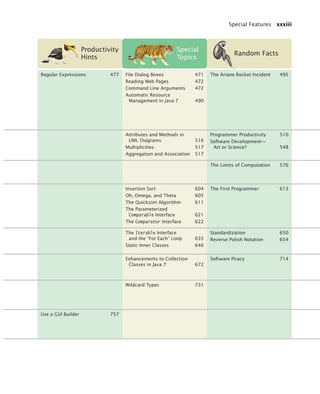
xxviii Special Features
Chapter
Common
Errors
How Tos
and Worked
Examples
Quality Tips
1 Introduction Omitting Semicolons 14
Misspelling Words 20
Developing and Describing
an Algorithm 23
Writing an Algorithm for
Tiling a Floor
2 Using Objects Confusing Variable
Declaration and Assign-
ment Statements 40
Trying to Invoke a
Constructor Like
a Method 47
How Many Days Have You
Been Alive?
Working with Pictures
Choose Descriptive
Names for Variables 38
3 Implementing
Classes
Declaring a Constructor
as void 89
Forgetting to Initialize
Object References
in a Constructor 101
Implementing a Class 96
Making a Simple Menu
Drawing Graphical
Shapes 110
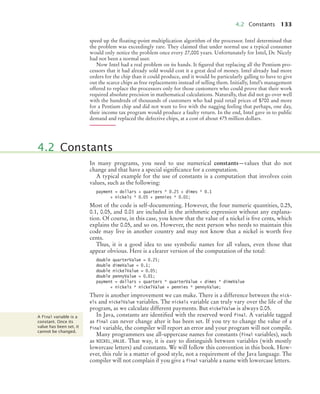
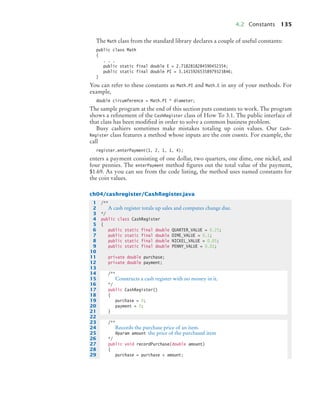
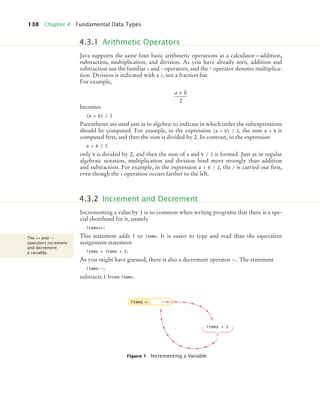
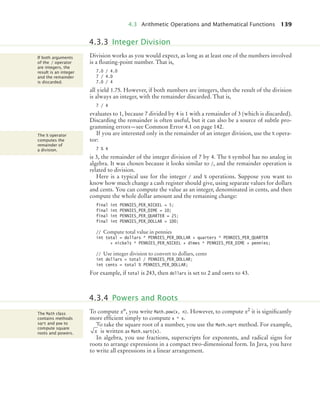
4 Fundamental
Data Types
Integer Division 142
Unbalanced
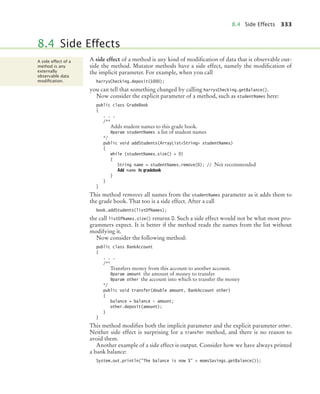
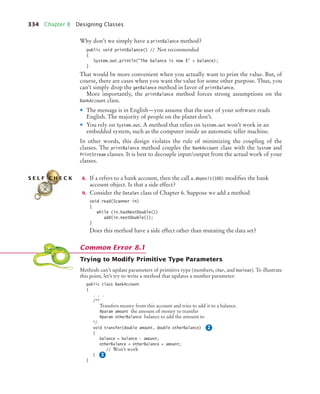
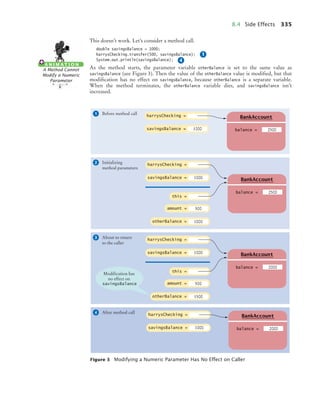
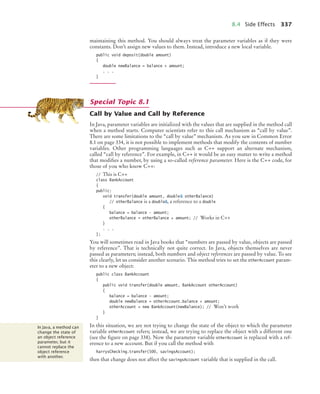
Parentheses 143
Roundoff Errors 144
Carrying Out
Computations 146
Computing the Volume
and Surface Area of
a Pyramid
Extracting Initials
Do Not Use Magic
Numbers 137
White Space 144
Factor Out
Common Code 144
5 Decisions A Semicolon After the
if Condition 176
Using == to Compare
Strings 180
The Dangling else
Problem 191
Multiple Relational
Operators 199
Confusing && and ||
Conditions 199
Implementing an if
Statement 183
Extracting the Middle
Brace Layout 174
Avoid Conditions with
Side Effects 183
Calculate Sample Data
Manually 203
Prepare Test Cases
Ahead of Time 204
6 Iteration Infinite Loops 223
Off-by-One Errors 226
Forgetting a
Semicolon 233
A Semicolon Too
Many 233
Writing a Loop 241
Credit Card Processing
Manipulating the Pixels
in an Image
Debugging 260
A Sample Debugging
Session
Use for Loops for Their
Intended Purpose 232
Don’t Use != to Test
the End of a Range 234
Symmetric and
Asymmetric Bounds 235
Count Iterations 235
bj4_fm.fm Page xxviii Saturday, November 7, 2009 12:01 PM
Special Features xxix
Productivity
Hints
Special
Topics
Random Facts
Understand the File System 17
Have a Backup Strategy 18
Alternative Comment Syntax 14 The ENIAC and the Dawn
of Computing 6
Don’t Memorize—Use
Online Help 51
Testing Classes in an Interactive
Environment 53
Applets 63
Mainframes—When Dinosaurs
Ruled the Earth 57
The Evolution of the Internet 69
The javadoc Utility 92 Calling One Constructor
from Another 104
Electronic Voting Machines 104
Computer Graphics 114
Reading Exception
Reports 152
Big Numbers 130
Binary Numbers 130
Combining Assignment
and Arithmetic 145
Escape Sequences 152
Strings and the char Type 153
Formatting Numbers 158
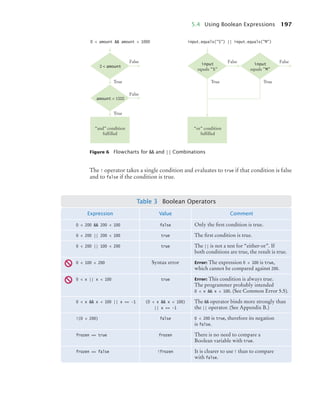
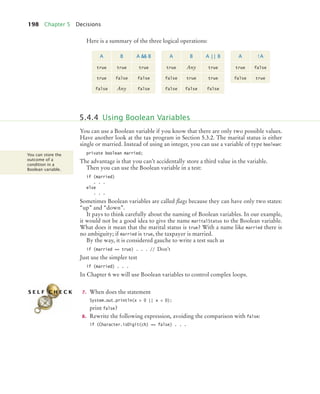
Using Dialog Boxes for
Input and Output 159
The Pentium Floating-Point
Bug 132
International Alphabets 154
Indentation and Tabs 175
Hand-Tracing 192
Make a Schedule and Make
Time for Unexpected
Problems 193
The Conditional Operator 176
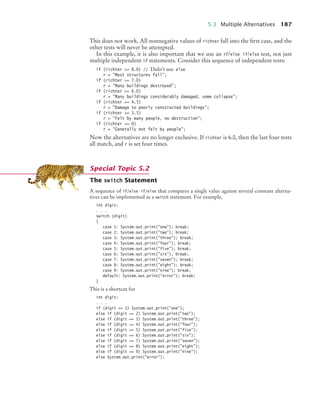
The switch Statement 187
Enumeration Types 194
Lazy Evaluation of Boolean
Operators 200
De Morgan’s Law 200
Logging 204
Artificial Intelligence 201
Hand-Tracing Loops 223 do Loops 227
Variables Declared
in a for Loop Header 234
The “Loop and a Half”
Problem 245
The break and continue
Statements 246
Loop Invariants 255
The First Bug 262
bj4_fm.fm Page xxix Saturday, November 7, 2009 12:01 PM
xxx Special Features
Chapter
Common
Errors
How Tos
and Worked
Examples
Quality Tips
7 Arrays and
Array Lists
Bounds Errors 279
Uninitialized and
Unfilled Arrays 280
Length and Size 288
Underestimating the
Size of a Data Set 294
Working with Arrays
and Array Lists 304
Rolling the Dice
A World Population
Table
Use Arrays for Sequences
of Related Values 280
Make Parallel Arrays into
Arrays of Objects 280
8 Designing
Classes
Trying to Modify Primitive
Type Parameters 334
Shadowing 350
Confusing Dots 355
Programming with
Packages 356
Consistency 331
Minimize Side Effects 336
Don’t Change Contents of
Parameter Variables 336
Minimize the Use of
Static Methods 344
Minimize Variable
Scope 351
9 Interfaces and
Polymorphism
Forgetting to Declare
Implementing Methods
as Public 377
Trying to Instantiate
an Interface 379
Modifying Parameter Types
in the Implementing
Method 393
Forgetting to Attach
a Listener 399
By Default, Components
Have Zero Width
and Height 400
Forgetting to Repaint 402
Investigating Number
Sequences
10 Inheritance Confusing Super- and
Subclasses 425
Shadowing Instance
Variables 426
Accidental
Overloading 429
Failing to Invoke the
Superclass Method 430
Overriding Methods to
Be Less Accessible 438
Declaring the equals
Method with the Wrong
Parameter Type 450
Developing an Inheritance
Hierarchy 440
Implementing an Employee
Hierarchy for Payroll
Processing
Supply toString in
All Classes 449
Clone Mutable Instance
Variables in Accessor
Methods 451
bj4_fm.fm Page xxx Saturday, November 7, 2009 12:01 PM
Special Features xxxi
Productivity
Hints
Special
Topics
Random Facts
Easy Printing of Arrays and
Array Lists 303
Batch Files and Shell Scripts 308
Methods with a Variable
Number of Parameters 281
ArrayList Syntax Enhancements
in Java 7 288
Two-Dimensional Arrays
with Variable Row Lengths 313
Multidimensional Arrays 314
An Early Internet Worm 282
The Therac-25 Incidents 309
Call by Value and Call by
Reference 337
Class Invariants 341
Static Imports 347
Alternative Forms of
Instance and Static
Variable Initialization 347
Package Access 355
The Explosive Growth of
Personal Computers 357
Don’t Use a Container
as a Listener 399
Constants in Interfaces 377
Anonymous Classes 387
Event Adapters 406
Operating Systems 388
Programming Languages 407
Abstract Classes 437
Final Methods and Classes 438
Protected Access 439
Inheritance and the
toString Method 449
Inheritance and the
equals Method 450
Implementing the
clone Method 452
Enumeration Types Revisited 454
Adding the main Method to
the Frame Class 457
Scripting Languages 455
bj4_fm.fm Page xxxi Saturday, November 7, 2009 12:01 PM
xxxii Special Features
Chapter
Common
Errors
How Tos
and Worked
Examples
Quality Tips
11 Input/Output
and Exception
Handling
Backslashes in
File Names 470
Constructing a Scanner
with a String 470
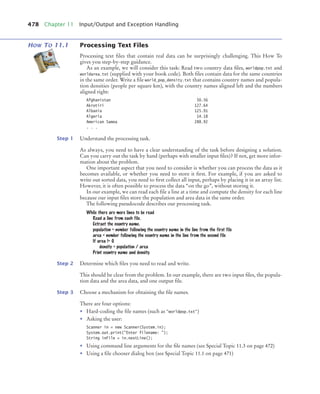
Processing Text Files 478
Analyzing Baby Names
Throw Early,
Catch Late 487
Do Not Squelch
Exceptions 487
Do Not Use catch and
finally in the Same
try Statement 489
Do Throw Specific
Exceptions 491
12 Object-
Oriented
Design
CRC Cards and UML
Diagrams 516
13 Recursion Infinite Recursion 561
Tracing Through
Recursive Methods 562
Thinking Recursively 563
Finding Files
14 Sorting and
Searching
The compareTo Method
Can Return Any
Integer, Not Just
–1, 0, and 1 621
15 An Introduc-
tion to Data
Structures
A Reverse Polish Notation
Calculator
16 Advanced
Data
Structures
Forgetting to
Provide hashCode 685
Choosing a Container 673
Word Frequency
Use Interface References
to Manipulate Data
Structures 670
17 Generic
Programming
Genericity and
Inheritance 731
Using Generic Types
in a Static Context 735
18 Graphical User
Interfaces
(Advanced)
Laying Out a User
Interface 755
Implementing a Graphical
User Interface (GUI) 763
bj4_fm.fm Page xxxii Saturday, November 7, 2009 12:01 PM
Special Features xxxiii
Productivity
Hints
Special
Topics
Random Facts
Regular Expressions 477 File Dialog Boxes 471
Reading Web Pages 472
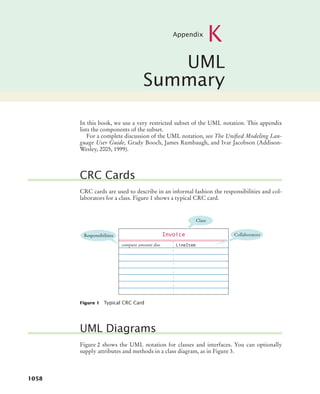
Command Line Arguments 472
Automatic Resource
Management in Java 7 490
The Ariane Rocket Incident 495
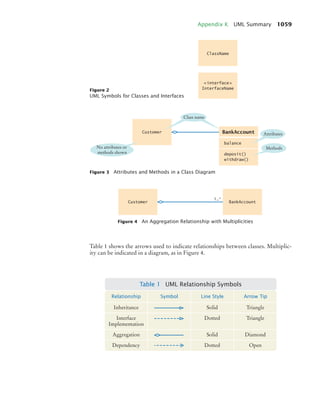
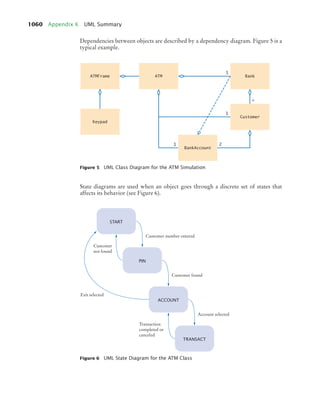
Attributes and Methods in
UML Diagrams 516
Multiplicities 517
Aggregation and Association 517
Programmer Productivity 510
Software Development—
Art or Science? 548
The Limits of Computation 576
Insertion Sort 604
Oh, Omega, and Theta 605
The Quicksort Algorithm 611
The Parameterized
Comparable Interface 621
The Comparator Interface 622
The First Programmer 613
The Iterable Interface
and the “For Each” Loop 635
Static Inner Classes 646
Standardization 650
Reverse Polish Notation 654
Enhancements to Collection
Classes in Java 7 672
Software Piracy 714
Wildcard Types 731
Use a GUI Builder 757
bj4_fm.fm Page xxxiii Saturday, November 7, 2009 12:01 PM
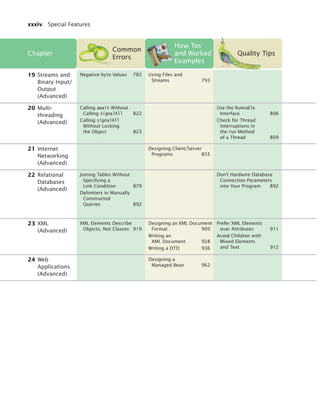
xxxiv Special Features
Chapter
Common
Errors
How Tos
and Worked
Examples
Quality Tips
19 Streams and
Binary Input/
Output
(Advanced)
Negative byte Values 782 Using Files and
Streams 793
20 Multi-
threading
(Advanced)
Calling await Without
Calling signalAll 822
Calling signalAll
Without Locking
the Object 823
Use the Runnable
Interface 806
Check for Thread
Interruptions in
the run Method
of a Thread 809
21 Internet
Networking
(Advanced)
Designing Client/Server
Programs 855
22 Relational
Databases
(Advanced)
Joining Tables Without
Specifying a
Link Condition 879
Delimiters in Manually
Constructed
Queries 892
Don’t Hardwire Database
Connection Parameters
into Your Program 892
23 XML
(Advanced)
XML Elements Describe
Objects, Not Classes 919
Designing an XML Document
Format 909
Writing an
XML Document 928
Writing a DTD 936
Prefer XML Elements
over Attributes 911
Avoid Children with
Mixed Elements
and Text 912
24 Web
Applications
(Advanced)
Designing a
Managed Bean 962
bj4_fm.fm Page xxxiv Saturday, November 7, 2009 12:01 PM
Special Features xxxv
Productivity
Hints
Special
Topics
Random Facts
Encryption Algorithms 783
Thread Pools 806
Object Locks and
Synchronized Methods 823
The Java Memory Model 824
Embedded Systems 832
Use High-Level
Libraries 859
Stick with the Standard 871
Avoid Unnecessary
Data Replication 872
Don’t Replicate Columns
in a Table 873
Let the Database
Do the Work 892
Primary Keys and Indexes 872
Transactions 898
Object-Relational Mapping 899
Databases and Privacy 880
Schema Languages 938
Other XML Technologies 939
Word Processing and
Typesetting Systems 912
Grammars, Parsers,
and Compilers 920
Session State and Cookies 955
AJAX 973
bj4_fm.fm Page xxxv Saturday, November 7, 2009 12:01 PM
bj4_fm.fm Page xxxvi Saturday, November 7, 2009 12:01 PM
1
Chapter
1
Introduction
CHAPTER GOALS
• To understand the activity of programming
• To learn about the architecture of computers
• To learn about machine code and high-level
programming languages
• To become familiar with the structure of simple
Java programs
• To compile and run your first Java program
• To recognize syntax and logic errors
• To write pseudocode for simple algorithms
The purpose of this chapter is to familiarize you with the concepts
of programming and program development. It reviews the architecture of a computer and discusses
the difference between machine code and high-level programming languages. You will see how to
compile and run your first Java program, and how to diagnose errors that may occur when a
program is compiled or executed. Finally, you will learn how to formulate simple algorithms using
pseudocode notation.
BJ4_ch01_3.fm Page 1 Monday, June 29, 2009 11:15 AM
2
CHAPTER CONTENTS
You have probably used a computer for work or fun. Many people use computers
for everyday tasks such as balancing a checkbook or writing a term paper. Comput-
ers are good for such tasks. They can handle repetitive chores, such as totaling up
numbers or placing words on a page, without getting bored or exhausted. Comput-
ers also make good game machines because they can play sequences of sounds and
pictures, involving the human user in the process.
The flexibility of a computer is quite an amazing phenomenon. The same
machine can balance your checkbook, print your term paper, and play a game. In
contrast, other machines carry out a much narrower range of tasks—a car drives
and a toaster toasts.
To achieve this flexibility, the computer must be programmed to perform each
task. A computer itself is a machine that stores data (numbers, words, pictures),
interacts with devices (the monitor screen, the sound system, the printer), and exe-
cutes programs. Programs are sequences of instructions and decisions that the com-
puter carries out to achieve a task. One program balances checkbooks; a different
program, perhaps designed and constructed by a different company, processes
words; and a third program, probably from yet another company, plays a game.
Today’s computer programs are so sophisticated that it is hard to believe that
they are all composed of extremely primitive operations. A typical operation may
be one of the following:
• Put a red dot onto this screen position.
• Get a number from this location in memory.
• Add up two numbers.
• If this value is negative, continue the program at that instruction.
A computer program tells a computer, in minute detail, the sequence of steps that
are needed to complete a task. A program contains a huge number of simple opera-
tions, and the computer executes them at great speed. The computer has no intelli-
gence—it simply executes instruction sequences that have been prepared in
advance.
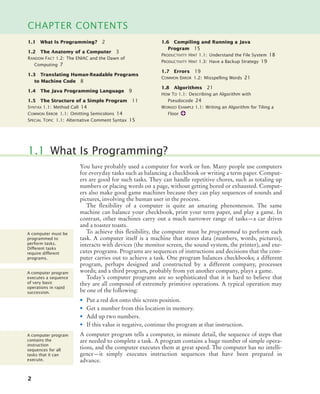
1.1 What Is Programming?
A computer must be
programmed to
perform tasks.
Different tasks
require different
programs.
A computer program
executes a sequence
of very basic
operations in rapid
succession.
A computer program
contains the
instruction
sequences for all
tasks that it can
execute.
1.1 What Is Programming? 2
1.2 The Anatomy of a Computer 3
RANDOM FACT 1.2: The ENIAC and the Dawn of
Computing 7
1.3 Translating Human-Readable Programs
to Machine Code 8
1.4 The Java Programming Language 9
1.5 The Structure of a Simple Program 11
SYNTAX 1.1: Method Call 14
COMMON ERROR 1.1: Omitting Semicolons 14
SPECIAL TOPIC 1.1: Alternative Comment Syntax 15
1.6 Compiling and Running a Java
Program 15
PRODUCTIVITY HINT 1.1: Understand the File System 18
PRODUCTIVITY HINT 1.3: Have a Backup Strategy 19
1.7 Errors 19
COMMON ERROR 1.2: Misspelling Words 21
1.8 Algorithms 21
HOW TO 1.1: Describing an Algorithm with
Pseudocode 24
WORKED EXAMPLE 1.1: Writing an Algorithm for Tiling a
Floor
BJ4_ch01_3.fm Page 2 Monday, June 29, 2009 11:15 AM
1.2 The Anatomy of a Computer 3
To use a computer, no knowledge of programming is required. When you write a
term paper with a word processor, that computer program has been developed by
the manufacturer and is ready for you to use. That is only to be expected—you can
drive a car without being a mechanic and toast bread without being an electrician.
A primary purpose of this book is to teach you how to design and implement
computer programs. You will learn how to formulate instructions for all tasks that
your programs need to execute.
Keep in mind that programming a sophisticated computer game or word proces-
sor requires a team of many highly skilled programmers, graphic artists, and other
professionals. Your first programming efforts will be more mundane. The concepts
and skills you learn in this book form an important foundation, but you should not
expect to immediately produce professional software. A typical college degree in
computer science or software engineering takes four years to complete; this book is
intended as a text for an introductory course in such a program.
Many students find that there is an immense thrill even in simple programming
tasks. It is an amazing experience to see the computer carry out a task precisely and
quickly that would take you hours of drudgery.
1. What is required to play a music CD on a computer?
2. Why is a CD player less flexible than a computer?
3. Can a computer program develop the initiative to execute tasks in a better way
than its programmers envisioned?
To understand the programming process, you need to have a rudimentary under-
standing of the building blocks that make up a computer. This section will describe
a personal computer. Larger computers have faster, larger, or more powerful com-
ponents, but they have fundamentally the same design.
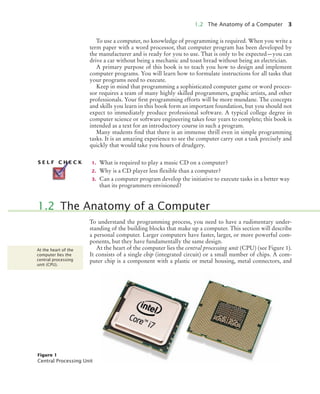
At the heart of the computer lies the central processing unit (CPU) (see Figure 1).
It consists of a single chip (integrated circuit) or a small number of chips. A com-
puter chip is a component with a plastic or metal housing, metal connectors, and
S E L F C H E C K
1.2 The Anatomy of a Computer
At the heart of the
computer lies the
central processing
unit (CPU).
Figure 1
Central Processing Unit
bj4_ch01_5.fm Page 3 Wednesday, September 9, 2009 9:44 AM
4 Chapter 1 Introduction
inside wiring made principally from silicon. For a CPU chip, the inside wiring is
enormously complicated. For example, the Intel Atom chip (a popular CPU for
inexpensive laptops at the time of this writing) contains about 50 million structural
elements called transistors—the elements that enable electrical signals to control
other electrical signals, making automatic computing possible. The CPU locates
and executes the program instructions; it carries out arithmetic operations such as
addition, subtraction, multiplication, and division; and it fetches data from storage
and input/output devices and sends data back.
The computer keeps data and programs in storage. There are two kinds of stor-
age. Primary storage, also called random-access memory (RAM) or simply memory,
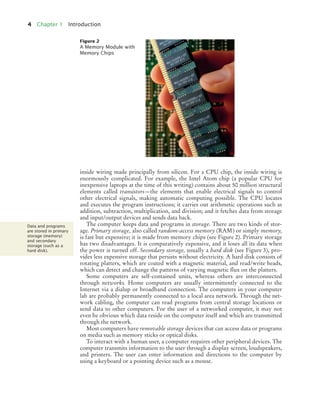
is fast but expensive; it is made from memory chips (see Figure 2). Primary storage
has two disadvantages. It is comparatively expensive, and it loses all its data when
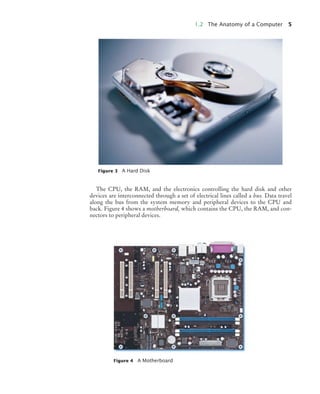
the power is turned off. Secondary storage, usually a hard disk (see Figure 3), pro-
vides less expensive storage that persists without electricity. A hard disk consists of
rotating platters, which are coated with a magnetic material, and read/write heads,
which can detect and change the patterns of varying magnetic flux on the platters.
Some computers are self-contained units, whereas others are interconnected
through networks. Home computers are usually intermittently connected to the
Internet via a dialup or broadband connection. The computers in your computer
lab are probably permanently connected to a local area network. Through the net-
work cabling, the computer can read programs from central storage locations or
send data to other computers. For the user of a networked computer, it may not
even be obvious which data reside on the computer itself and which are transmitted
through the network.
Most computers have removable storage devices that can access data or programs
on media such as memory sticks or optical disks.
To interact with a human user, a computer requires other peripheral devices. The
computer transmits information to the user through a display screen, loudspeakers,
and printers. The user can enter information and directions to the computer by
using a keyboard or a pointing device such as a mouse.
Figure 2
A Memory Module with
Memory Chips
Data and programs
are stored in primary
storage (memory)
and secondary
storage (such as a
hard disk).
BJ4_ch01_3.fm Page 4 Monday, June 29, 2009 11:15 AM
1.2 The Anatomy of a Computer 5
The CPU, the RAM, and the electronics controlling the hard disk and other
devices are interconnected through a set of electrical lines called a bus. Data travel
along the bus from the system memory and peripheral devices to the CPU and
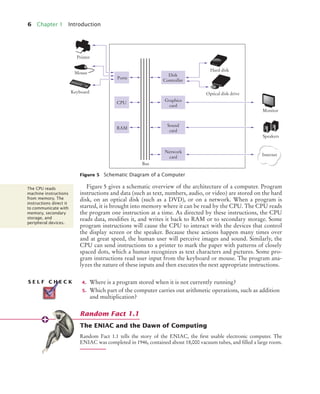
back. Figure 4 shows a motherboard, which contains the CPU, the RAM, and con-
nectors to peripheral devices.
Figure 3 A Hard Disk
Figure 4 A Motherboard
BJ4_ch01_3.fm Page 5 Monday, June 29, 2009 11:15 AM
6 Chapter 1 Introduction
Figure 5 gives a schematic overview of the architecture of a computer. Program
instructions and data (such as text, numbers, audio, or video) are stored on the hard
disk, on an optical disk (such as a DVD), or on a network. When a program is
started, it is brought into memory where it can be read by the CPU. The CPU reads
the program one instruction at a time. As directed by these instructions, the CPU
reads data, modifies it, and writes it back to RAM or to secondary storage. Some
program instructions will cause the CPU to interact with the devices that control
the display screen or the speaker. Because these actions happen many times over
and at great speed, the human user will perceive images and sound. Similarly, the
CPU can send instructions to a printer to mark the paper with patterns of closely
spaced dots, which a human recognizes as text characters and pictures. Some pro-
gram instructions read user input from the keyboard or mouse. The program ana-
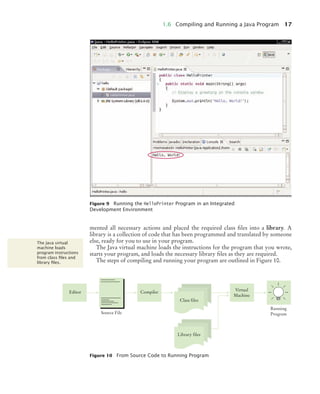
lyzes the nature of these inputs and then executes the next appropriate instructions.
4. Where is a program stored when it is not currently running?
5. Which part of the computer carries out arithmetic operations, such as addition
and multiplication?
The ENIAC and the Dawn of Computing
Random Fact 1.1 tells the story of the ENIAC, the first usable electronic computer. The
ENIAC was completed in 1946, contained about 18,000 vacuum tubes, and filled a large room.
Figure 5 Schematic Diagram of a Computer
Printer
Mouse
Keyboard
Bus
Ports
CPU
RAM
Disk
Controller
Hard disk
Optical disk drive
Monitor
Speakers
Internet
Graphics
card
Sound
card
Network
card
The CPU reads
machine instructions
from memory. The
instructions direct it
to communicate with
memory, secondary
storage, and
peripheral devices.
S E L F C H E C K
Random Fact 1.1
BJ4_ch01_3.fm Page 6 Monday, June 29, 2009 11:15 AM
1.2 The Anatomy of a Computer 7
The ENIAC and the Dawn of Computing
The ENIAC (electronic numerical integrator and computer) was the first usable electronic
computer. It was designed by J. Presper Eckert and John Mauchly at the University of Penn-
sylvania and was completed in 1946. Instead of transistors, which were not invented until
two years after it was built, the ENIAC contained about 18,000 vacuum tubes in many cabi-
nets housed in a large room. Vacuum tubes burned out at the rate of several tubes per day.
An attendant with a shopping cart full of tubes constantly made the rounds and replaced
defective ones. The computer was programmed by connecting wires on panels. Each wiring
configuration would set up the computer for a particular problem. To have the computer
work on a different problem, the wires had to be replugged.
Work on the ENIAC was supported by the U.S. Navy, which was interested in computa-
tions of ballistic tables that would give the trajectory of a projectile, depending on the wind
resistance, initial velocity, and atmospheric conditions. To compute the trajectories, one must
find the numerical solutions of certain differential equations; hence the name “numerical
integrator”. Before machines like ENIAC were developed, humans did this kind of work,
and until the 1950s the word “computer” referred to these people. The ENIAC was later
used for peaceful purposes, such as the tabulation of U.S. census data.
The ENIAC
Random Fact 1.2
BJ4_ch01_3.fm Page 7 Monday, June 29, 2009 11:15 AM
8 Chapter 1 Introduction
On the most basic level, computer instructions are extremely primitive. The proces-
sor executes machine instructions. CPUs from different vendors, such as the Intel
Pentium or the Sun SPARC, have different sets of machine instructions. To enable
Java applications to run on multiple CPUs without modification, Java programs
contain machine instructions for a so-called “Java virtual machine” (JVM), an ideal-
ized CPU that is simulated by a program run on the actual CPU.
The difference between actual and virtual machine instructions is not impor-
tant—all you need to know is that machine instructions are very simple, are
encoded as numbers and stored in memory, and can be executed very quickly.
A typical sequence of machine instructions is
1. Load the contents of memory location 40.
2. Load the value 100.
3. If the first value is greater than the second value, continue with the instruction
that is stored in memory location 240.
Actually, machine instructions are encoded as numbers so that they can be stored in
memory. On the Java virtual machine, this sequence of instructions is encoded as
the sequence of numbers
21 40
16 100
163 240
When the virtual machine fetches this sequence of numbers, it decodes them and
executes the associated sequence of commands.
How can you communicate the command sequence to the computer? The most
direct method is to place the actual numbers into the computer memory. This is, in
fact, how the very earliest computers worked. However, a long program is com-
posed of thousands of individual commands, and it is tedious and error-prone to
look up the numeric codes for all commands and manually place the codes into
memory. As we said before, computers are really good at automating tedious and
error-prone activities, and it did not take long for computer programmers to realize
that computers could be harnessed to help in the programming process.
In the mid-1950s, high-level programming languages began to appear. In these
languages, the programmer expresses the idea behind the task that needs to be per-
formed, and a special computer program, called a compiler, translates the high-level
description into machine instructions for a particular processor.
For example, in Java, the high-level programming language that you will use in
this book, you might give the following instruction:
if (intRate > 100)
System.out.println("Interest rate error");
This means, “If the interest rate is over 100, display an error message”. It is then the
job of the compiler program to look at the sequence of characters if (intRate >
100). . . and translate that into
21 40 16 100 163 240 . . .
1.3 Translating Human-Readable Programs
to Machine Code
Generally, machine
code depends on the
CPU type. However,
the instruction set of
the Java virtual
machine (JVM) can be
executed on many
CPUs.
Because machine
instructions are
encoded as numbers,
it is difficult to write
programs in machine
code.
High-level languages
allow you to describe
tasks at a higher
conceptual level than
machine code.
BJ4_ch01_3.fm Page 8 Monday, June 29, 2009 11:15 AM
1.4 The Java Programming Language 9
Compilers are quite sophisticated programs. They translate logical statements, such
as the if statement, into sequences of computations, tests, and jumps. They assign
memory locations for variables—items of information identified by symbolic
names—like intRate. In this course, we will generally take the existence of a com-
piler for granted. If you decide to become a professional computer scientist, you
may well learn more about compiler-writing techniques later in your studies.
6. What is the code for the Java virtual machine instruction “Load the contents of
memory location 100”?
7. Does a person who uses a computer for office work ever run a compiler?
In 1991, a group led by James Gosling and Patrick Naughton at Sun Microsystems
designed a programming language that they code-named “Green” for use in con-
sumer devices, such as intelligent television “set-top” boxes. The language was
designed to be simple and architecture neutral, so that it could be executed on a
variety of hardware. No customer was ever found for this technology.
Gosling recounts that in 1994 the team realized, “We could write a really cool
browser. It was one of the few things in the client/server mainstream that needed
some of the weird things we’d done: architecture neutral, real-time, reliable,
secure.” Java was introduced to an enthusiastic crowd at the SunWorld exhibition in
1995.
Since then, Java has grown at a phenomenal rate. Programmers have embraced
the language because it is simpler than its closest rival, C++. In addition, Java has a
rich library that makes it possible to write portable programs that can bypass pro-
prietary operating systems—a feature that was eagerly sought by those who wanted
to be independent of those proprietary systems and was bitterly fought by their
vendors. A “micro edition” and an “enterprise edition” of the Java library make
Java programmers at home on hardware ranging from smart cards and cell phones
to the largest Internet servers.
Because Java was designed for the Internet, it has two attributes that make it very
suitable for beginners: safety and portability. If you visit a web page that contains
Java code (so-called applets—see Figure 6 for an example), the code automatically
starts running. It is important that you can trust that applets are inherently safe. If
an applet could do something evil, such as damaging data or reading personal infor-
mation on your computer, then you would be in real danger every time you
browsed the Web—an unscrupulous designer might put up a web page containing
dangerous code that would execute on your machine as soon as you visited the
page. The Java language has an assortment of security features that guarantees that
no evil applets can run on your computer. As an added benefit, these features also
help you to learn the language faster. The Java virtual machine can catch many kinds
of beginners’ mistakes and report them accurately. (In contrast, many beginners’
mistakes in the C++ language merely produce programs that act in random and
confusing ways.) The other benefit of Java is portability. The same Java program
will run, without change, on Windows, UNIX, Linux, or the Macintosh. This too is
a requirement for applets. When you visit a web page, the web server that serves up
A compiler translates
programs written in
a high-level language
into machine code.
S E L F C H E C K
1.4 The Java Programming Language
Java was originally
designed for
programming
consumer devices,
but it was first
successfully used to
write Internet
applets.
Java was designed to
be safe and portable,
benefiting both
Internet users and
students.
BJ4_ch01_3.fm Page 9 Monday, June 29, 2009 11:15 AM
10 Chapter 1 Introduction
the page contents has no idea what computer you are using to browse the Web. It
simply returns you the portable code that was generated by the Java compiler. The
virtual machine on your computer executes that portable code. Again, there is a
benefit for the student. You do not have to learn how to write programs for differ-
ent operating systems.
At this time, Java is firmly established as one of the most important languages for
general-purpose programming as well as for computer science instruction. How-
ever, although Java is a good language for beginners, it is not perfect, for three
reasons.
Because Java was not specifically designed for students, no thought was given to
making it really simple to write basic programs. A certain amount of technical
machinery is necessary in Java to write even the simplest programs. This is not a
problem for professional programmers, but it is a drawback for beginning students.
As you learn how to program in Java, there will be times when you will be asked to
be satisfied with a preliminary explanation and wait for complete details in a later
chapter.
Java was revised and extended many times during its life—see Table 1. In this
book, we assume that you have Java version 5 or later.
Finally, you cannot hope to learn all of Java in one semester. The Java language
itself is relatively simple, but Java contains a vast set of library packages that are
required to write useful programs. There are packages for graphics, user interface
design, cryptography, networking, sound, database storage, and many other pur-
Figure 6 An Applet for Visualizing Molecules
(http://jmol.sourceforge.net/applet/)
Java has a very large
library. Focus on
learning those parts
of the library that
you need for your
programming
projects.
BJ4_ch01_3.fm Page 10 Monday, June 29, 2009 11:15 AM
1.5 The Structure of a Simple Program 11
poses. Even expert Java programmers cannot hope to know the contents of all of
the packages—they just use those that they need for particular projects.
Using this book, you should expect to learn a good deal about the Java language
and about the most important packages. Keep in mind that the central goal of this
book is not to make you memorize Java minutiae, but to teach you how to think
about programming.
8. What are the two most important benefits of the Java language?
9. How long does it take to learn the entire Java library?
When learning a new programming language, it is traditional to start with a “Hello,
World!” program—a program that displays a greeting. Here is this program in Java:
ch01/hello/HelloPrinter.java
Program Run
Table 1 Java Versions
Version Year Important New Features
1.0 1996
1.1 1997 Inner classes
1.2 1998 Swing, Collections
1.3 2000 Performance enhancements
1.4 2002 Assertions, XML
5 2004 Generic classes, enhanced for loop, auto-boxing, enumerations
6 2006 Library improvements
7 2010 Small language changes and library improvements
S E L F C H E C K
1.5 The Structure of a Simple Program
1 public class HelloPrinter
2 {
3 public static void main(String[] args)
4 {
5 // Display a greeting in the console window
6
7 System.out.println("Hello, World!");
8 }
9 }
Hello, World!
BJ4_ch01_3.fm Page 11 Monday, June 29, 2009 11:15 AM
12 Chapter 1 Introduction
In the next section, you will see how to compile and run this program. But let us
first understand how it is structured.
The line,
public class HelloPrinter
starts a new class. Classes are a fundamental concept in Java, and you will begin to
study them in Chapter 2. In Java, every program consists of one or more classes.
The reserved word public denotes that the class is usable by the “public”. You
will later encounter private features. At this point, you should simply regard the
public class ClassName
{
. . .
}
as a necessary part of the “plumbing” that is required to write any Java program. In
Java, every source file can contain at most one public class, and the name of the
public class must match the name of the file containing the class. For example, the
class HelloPrinter must be contained in a file HelloPrinter.java.
The construction
public static void main(String[] args)
{
. . .
}
defines a method called main. A method contains a collection of programming
instructions that describe how to carry out a particular task. Every Java application
must have a main method. Most Java programs contain other methods besides main,
and you will see in Chapter 3 how to write other methods.
The parameter String[] args is a required part of the main method. (It contains
command line arguments, which we will not discuss until Chapter 11.) The reserved
word static indicates that the main method does not operate on an object. (As you
will see in Chapter 2, most methods in Java do operate on objects, and static meth-
ods are not common in large Java programs. Nevertheless, main must always be
static, because it starts running before the program can create objects.)
At this time, simply consider
public class ClassName
{
public static void main(String[] args)
{
. . .
}
}
as yet another part of the “plumbing”. Our first program has all instructions inside
the main method of a class.
The first line inside the main method is a comment:
// Display a greeting in the console window
This comment is purely for the benefit of the human reader, to explain in more
detail what the next statement does. Any text enclosed between // and the end of
the line is completely ignored by the compiler. Comments are used to explain the
program to other programmers or to yourself.
Classes are the
fundamentalbuilding
blocks of Java
programs.
Every Java
application contains
a class with a main
method. When the
application starts,
the instructions in
the main method are
executed.
Each class contains
definitions of
methods. Each
method contains a
sequence of
instructions.
Use comments to
help human readers
understand your
program.
BJ4_ch01_3.fm Page 12 Monday, June 29, 2009 11:15 AM
1.5 The Structure of a Simple Program 13
The instructions or statements in the body of the main method—that is, the state-
ments inside the curly braces ({})—are executed one by one. Each statement ends in
a semicolon (;). Our method has a single statement:
System.out.println("Hello, World!");
This statement prints a line of text, namely “Hello, World!”. However, there are
many places where a program can send that text: to a window, to a file, or to a net-
worked computer on the other side of the world. You need to specify that the desti-
nation is the system output—that is, a console window. The console window is
represented in Java by an object called out. Just as you needed to place the main
method in a HelloPrinter class, the designers of the Java library needed to place the
out object into a class. They placed it in the System class, which contains useful
objects and methods to access system resources. To use the out object in the System
class, you must refer to it as System.out.
To use an object, such as System.out, you specify what you want to do to it. In this
case, you want to print a line of text. The println method carries out this task.
You do not have to implement this method—the programmers who wrote the
Java library already did that for us—but you do need to call the method.
Whenever you call a method in Java, you need to specify three items (see
Figure 7):
1. The object that you want to use (in this case, System.out).
2. The name of the method you want to use (in this case, println).
3. A pair of parentheses, containing any other information the method needs (in
this case, "Hello, World!"). The technical term for this information is a parame-
ter for the method. Note that the two periods in System.out.println have dif-
ferent meanings. The first period means “locate the out object in the System
class”. The second period means “apply the println method to that object”.
A sequence of characters enclosed in quotation marks
"Hello, World!"
is called a string. You must enclose the contents of the string inside quotation
marks so that the compiler knows you literally mean "Hello, World!". There is a rea-
son for this requirement. Suppose you need to print the word main. By enclosing it
in quotation marks, "main", the compiler knows you mean the sequence of charac-
ters m a i n, not the method named main. The rule is simply that you must enclose all
text strings in quotation marks, so that the compiler considers them plain text and
does not try to interpret them as program instructions.
You can also print numerical values. For example, the statement
System.out.println(3 + 4);
displays the number 7.
Figure 7
Calling a Method
A method is called by
specifying an object,
the method name,
and the method
parameters.
A string is a
sequence of
characters enclosed
in quotation marks.
System.out.println("Hello, World!")
Object Method Parameters
BJ4_ch01_3.fm Page 13 Monday, June 29, 2009 11:15 AM
14 Chapter 1 Introduction
The println method prints a string or a number and then starts a new line. For
example, the sequence of statements
System.out.println("Hello");
System.out.println("World!");
prints two lines of text:
Hello
World!
There is a second method, called print, that you can use to print an item without
starting a new line. For example, the output of the two statements
System.out.print("00");
System.out.println(3 + 4);
is the single line
007
10. How would you modify the HelloPrinter program to print the words “Hello,”
and “World!” on two lines?
11. Would the program continue to work if you omitted the line starting with //?
12. What does the following set of statements print?
System.out.print("My lucky number is");
System.out.println(3 + 4 + 5);
Omitting Semicolons
In Java every statement must end in a semicolon. Forgetting to type a semicolon is a com-
mon error. It confuses the compiler, because the compiler uses the semicolon to find where
one statement ends and the next one starts. The compiler does not use line breaks or closing
braces to recognize the end of statements. For example, the compiler considers
System.out.println("Hello")
System.out.println("World!");
Syntax 1.1 Method Call
object.methodName(parameters)
Syntax
Example
This is the
name of the method.
These parameters are
inputs to the method.
The method is
invoked on this object.
System.out.println("Hello, World!")
Parameters are enclosed in parentheses.
Multiple parameters are separated by commas.
S E L F C H E C K
Common Error 1.1
BJ4_ch01_3.fm Page 14 Monday, June 29, 2009 11:15 AM
1.6 Compiling and Running a Java Program 15
a single statement, as if you had written
System.out.println("Hello") System.out.println("World!");
Then it doesn’t understand that statement, because it does not expect the word System fol-
lowing the closing parenthesis after "Hello". The remedy is simple. Scan every statement for a
terminating semicolon, just as you would check that every English sentence ends in a period.
Alternative Comment Syntax
In Java there are two methods for writing comments. You already learned that the compiler
ignores anything that you type between // and the end of the current line. The compiler also
ignores any text between a /* and */.
/* A simple Java program */
The // comment is easier to type if the comment is only a single line long. If you have a com-
ment that is longer than a line, then the /* . . . */ comment is simpler:
/*
This is a simple Java program that you can use to try out
your compiler and virtual machine.
*/
It would be somewhat tedious to add the // at the beginning of each line and to move them
around whenever the text of the comment changes.
In this book, we use // for comments that will never grow beyond a line, and /* . . . */
for longer comments. If you prefer, you can always use the // style. The readers of your code
will be grateful for any comments, no matter which style you use.
Many students find that the tools that they need as programmers are very different
from the software with which they familiar. You should spend some time making
yourself familiar with your programming environment. Instructions for several
popular environments are available in WileyPLUS.
Some Java development environments are very convenient to use. Enter the code
in one window, click on a button to compile, and click on another button to execute
your program. Error messages show up in a second window, and the program runs
in a third window. With such an environment you are completely shielded from the
details of the compilation process. On other systems you must carry out every step
manually, by typing commands into a shell window.
No matter which compilation environment you use, you begin your activity by
typing in the program statements. The program that you use for entering and mod-
ifying the program text is called an editor. The first step for creating a Java program,
such as the HelloPrinter program of the preceding section, is to launch your editor.
Make a new program file and call it HelloPrinter.java. (If your environment requires
that you supply a project name in addition to the file name, use the name hello for
Special Topic 1.1
1.6 Compiling and Running a Java Program
Set aside some time
to become familiar
with the computer
system and the Java
compiler that you
will use for your
class work.
An editor is a
program for entering
and modifying text,
such as a Java
program.
BJ4_ch01_3.fm Page 15 Monday, June 29, 2009 11:15 AM
16 Chapter 1 Introduction
the project.) Enter the program instructions exactly as they are given above. Alter-
natively, locate an electronic copy and paste it into your editor.
Java is case sensitive. You must enter upper- and lowercase letters in the same
way as they appear in the program listing. You cannot type MAIN or PrintLn. If you
are not careful, you will run into problems—see Common Error 1.2 on page 21. On
the other hand, Java has free-form layout. You can use any number of spaces and
line breaks to separate words. You can cram as many words as possible into each
line,
public class HelloPrinter{public static void main(String[]
args){// Display a greeting in the console window
System.out.println("Hello, World!");}}
However, good taste dictates that you lay out your programs in a readable fashion.
We will give you recommendations for good layout throughout this book. Appen-
dix A contains a summary of our recommendations.
Now find out how to run the test program. The message
Hello, World!
will appear somewhere on the screen (see Figures 8 and 9). The exact location
depends on your programming environment.
Running your program takes two steps. (Some development environments auto-
matically carry out both steps when you ask to run a program.)
The first step is to compile your program. The compiler translates the Java source
code (that is, the statements that you wrote) into class files, which consist of virtual
machine instructions and other information that is required for execution. The class
files have the extension .class. For example, the virtual machine instructions for the
HelloPrinter program are stored in a file HelloPrinter.class. Note that the compiler
does not produce a class file if it has found erors in your program.
The class file contains the translation of only the instructions that you wrote.
That is not enough to actually run the program. To display a string in a window,
quite a bit of low-level activity is necessary. The authors of the System and
PrintStream classes (which define the out object and the println method) have imple-
Figure 8 Running the HelloPrinter Program in a Console Window
Java is case sensitive.
You must be careful
about distinguishing
between upper- and
lowercase letters.
Lay out your
programs so that
they are easy to read.
The Java compiler
translates source
code into class files
that contain
instructions for the
Java virtual machine.
BJ4_ch01_3.fm Page 16 Monday, June 29, 2009 11:15 AM
1.6 Compiling and Running a Java Program 17
mented all necessary actions and placed the required class files into a library. A
library is a collection of code that has been programmed and translated by someone
else, ready for you to use in your program.
The Java virtual machine loads the instructions for the program that you wrote,
starts your program, and loads the necessary library files as they are required.
The steps of compiling and running your program are outlined in Figure 10.
Figure 9 Running the HelloPrinter Program in an Integrated
Development Environment
The Java virtual
machine loads
program instructions
from class files and
library files.
Figure 10 From Source Code to Running Program
Compiler
Editor
Virtual
Machine
Running
Program
Source File
Library files
Class files
BJ4_ch01_3.fm Page 17 Monday, June 29, 2009 11:15 AM
18 Chapter 1 Introduction
13. Can you use a word processor for writing Java programs?
14. What do you expect to see when you load a class file into your text editor?
Understand the File System
In recent years, computers have become easier to use for home or office users. Many inessen-
tial details are now hidden from casual users. For example, many users simply place all their
work inside a default folder (such as “Home” or “My Documents”) and are blissfully igno-
rant about details of the file system.
For your programming work, you need to understand that files are stored in folders or
directories, and that these file containers can be nested. That is, a folder can contain not only
files but also other folders, which themselves can contain more files and folders (see
Figure 11).
You need to know how to impose an organization on the data that you create. You also
need to be able to locate files and inspect their contents.
If you are not comfortable with files and folders, be sure to set aside some time to learn
about these concepts.
Have a Backup Strategy
Productivity Hint 1.2 discusses strategies for backing up your programming work so that
you won’t lose data if your computer malfunctions.
S E L F C H E C K
Productivity Hint 1.1
Figure 11
A Folder Hierarchy
Productivity Hint 1.2
BJ4_ch01_3.fm Page 18 Monday, June 29, 2009 11:15 AM
1.7 Errors 19
Have a Backup Strategy
You will spend many hours typing Java program code and improving it. The resulting pro-
gram files have some value, and you should treat them as you would other important prop-
erty. A conscientious safety strategy is particularly important for computer files. They are
more fragile than paper documents or other more tangible objects. It is easy to delete a file
accidentally, and occasionally files are lost because of a computer malfunction. Unless you
keep a copy, you must then retype the contents. Because you probably won’t remember the
entire file, you will likely find yourself spending almost as much time as you did to enter and
improve it in the first place. This costs time, and it may cause you to miss deadlines. It is
therefore crucial that you learn how to safeguard files and that you get in the habit of doing
so before disaster strikes. You can make safety or backup copies of files by saving copies into
another folder, on a thumb drive, or on the Internet.
Here are a few pointers to keep in mind.
• Back up often. Backing up a file takes only a few seconds, and you will hate yourself if
you have to spend many hours recreating work that you easily could have saved.
• Rotate backups. Use more than one place for backups, and rotate between them. That is,
first back up onto the first backup destination, then to the second and third, and then go
back to the first. That way you always have three recent backups. Even if one of them has
a defect, you can use one of the others.
• Back up source files only. The compiler translates the files that you write into files consist-
ing of machine code. There is no need to back up the machine code files, because you can
recreate them easily by running the compiler again. Focus your backup activity on those
files that represent your effort. That way your backups won’t fill up with files that you
don’t need.
• Pay attention to the backup direction. Backing up involves copying files from one place to
another. It is important that you do this right—that is, copy from your work location to
the backup location. If you do it the wrong way, you will overwrite a newer file with an
older version.
• Check your backups once in a while. Double-check that your backups are where you
think they are. There is nothing more frustrating than finding out that the backups are not
there when you need them.
• Relax before restoring. When you lose a file and need to restore it from backup, you are
likely to be in an unhappy, nervous state. Take a deep breath and think through the
recovery process before you start. It is not uncommon for an agitated computer user to
wipe out the last backup when trying to restore a damaged file.
Experiment a little with the HelloPrinter program. What happens if you make a typ-
ing error such as
System.ouch.println("Hello, World!");
System.out.println("Hello, World!);
System.out.println("Hello, Word!");
In the first case, the compiler will complain. It will say that it has no clue what you
mean by ouch. The exact wording of the error message is dependent on the compiler,
Productivity Hint 1.3
Develop a strategy
for keeping backup
copies of your work
before disaster
strikes.
1.7 Errors
A syntax error is a
violation of the rules
of the programming
language. The
compiler detects
syntax errors.
BJ4_ch01_3.fm Page 19 Monday, June 29, 2009 11:15 AM
20 Chapter 1 Introduction
but it might be something like “Undefined symbol ouch”. This is a compile-time
error or syntax error. Something is wrong according to the language rules and the
compiler finds it. When the compiler finds one or more errors, it refuses to translate
the program to Java virtual machine instructions, and as a consequence you have no
program that you can run. You must fix the error and compile again. In fact, the
compiler is quite picky, and it is common to go through several rounds of fixing
compile-time errors before compilation succeeds for the first time.
If the compiler finds an error, it will not simply stop and give up. It will try to
report as many errors as it can find, so you can fix them all at once. Sometimes,
however, one error throws it off track. This is likely to happen with the error in the
second line. Because the closing quotation mark is missing, the compiler will think
that the ); characters are still part of the string. In such cases, it is common for the
compiler to emit bogus error reports for neighboring lines. You should fix only
those error messages that make sense to you and then recompile.
The error in the third line is of a different kind. The program will compile and
run, but its output will be wrong. It will print
Hello, Word!
This is a run-time error or logic error. The program is syntactically correct and
does something, but it doesn’t do what it is supposed to do. The compiler cannot
find the error. You, the programmer, must flush out this type of error. Run the pro-
gram, and carefully look at its output.
During program development, errors are unavoidable. Once a program is longer
than a few lines, it requires superhuman concentration to enter it correctly without
slipping up once. You will find yourself omitting semicolons or quotes more often
than you would like, but the compiler will track down these problems for you.
Logic errors are more troublesome. The compiler will not find them—in fact, the
compiler will cheerfully translate any program as long as its syntax is correct—but
the resulting program will do something wrong. It is the responsibility of the pro-
gram author to test the program and find any logic errors. Testing programs is an
important topic that you will encounter many times in this book. Another impor-
tant aspect of good craftsmanship is defensive programming: structuring programs
and development processes in such a way that an error in one part of a program
does not trigger a disastrous response.
The error examples that you saw so far were not difficult to diagnose or fix, but
as you learn more sophisticated programming techniques, there will also be much
more room for error. It is an uncomfortable fact that locating all errors in a program
is very difficult. Even if you can observe that a program exhibits faulty behavior, it
may not at all be obvious what part of the program caused it and how you can fix it.
Special software tools (so-called debuggers) let you trace through a program to find
bugs—that is, logic errors. In Chapter 6 you will learn how to use a debugger
effectively.
Note that these errors are different from the types of errors that you are likely to
make in calculations. If you total up a column of numbers, you may miss a minus
sign or accidentally drop a carry, perhaps because you are bored or tired. Comput-
ers do not make these kinds of errors.
This book uses a three-part error management strategy. First, you will learn
about common errors and how to avoid them. Then you will learn defensive pro-
gramming strategies to minimize the likelihood and impact of errors. Finally, you
will learn debugging strategies to flush out those errors that remain.
A logic error causes a
program to take an
action that the
programmer did not
intend. You must test
your programs to
find logic errors.
BJ4_ch01_3.fm Page 20 Monday, June 29, 2009 11:15 AM
1.8 Algorithms 21
15. Suppose you omit the // characters from the HelloPrinter.java program but not
the remainder of the comment. Will you get a compile-time error or a run-time
error?
16. How can you find logic errors in a program?
17. Why can’t you test a program for run-time errors when it has compiler errors?
Misspelling Words
If you accidentally misspell a word, then strange things may happen, and it may not always
be completely obvious from the error messages what went wrong. Here is a good example of
how simple spelling errors can cause trouble:
public class HelloPrinter
{
public static void Main(String[] args)
{
System.out.println("Hello, World!");
}
}
This class defines a method called Main. The compiler will not consider this to be the same as
the main method, because Main starts with an uppercase letter and the Java language is case
sensitive. Upper- and lowercase letters are considered to be completely different from each
other, and to the compiler Main is no better match for main than rain. The compiler will cheer-
fully compile your Main method, but when the Java virtual machine reads the compiled file, it
will complain about the missing main method and refuse to run the program. Of course, the
message “missing main method” should give you a clue where to look for the error.
If you get an error message that seems to indicate that the compiler is on the wrong track,
it is a good idea to check for spelling and capitalization. All Java reserved words use only
lowercase letters. Names of classes usually start with an uppercase letter, names of methods
and variables with a lowercase letter. If you misspell the name of a symbol (for example, ouch
instead of out), the compiler will complain about an “undefined symbol”. That error message
is usually a good clue that you made a spelling error.
You will soon learn how to program calculations and decision making in Java. But
before we look at the mechanics of implementing computations in the next chapter,
let’s consider the planning process that precedes implementation.
You may have run across advertisements that encourage you to pay for a com-
puterized service that matches you up with a love partner. Think how this might
work. You fill out a form and send it in. Others do the same. The data are processed
by a computer program. Is it reasonable to assume that the computer can perform
the task of finding the best match for you? Suppose your younger brother, not the
computer, had all the forms on his desk. What instructions could you give him? You
can’t say, “Find the best-looking person of the opposite sex who likes inline skating
and browsing the Internet”. There is no objective standard for good looks, and
your brother’s opinion (or that of a computer program analyzing the digitized
S E L F C H E C K
Common Error 1.2
1.8 Algorithms
BJ4_ch01_3.fm Page 21 Monday, June 29, 2009 11:15 AM
22 Chapter 1 Introduction
photo) will likely be different from yours. If you can’t give written instructions for
someone to solve the problem, there is no way the computer can magically solve the
problem. The computer can only do what you tell it to do. It just does it faster,
without getting bored or exhausted.
Now consider the following investment problem:
You put $10,000 into a bank account that earns 5 percent interest per year. How
many years does it take for the account balance to be double the original?
Could you solve this problem by hand? Sure, you could. You figure out the balance
as follows:
You keep going until the balance is at least $20,000. Then the last number in the
year column is the answer.
Of course, carrying out this computation is intensely boring to you or your
younger brother. But computers are very good at carrying out repetitive calcula-
tions quickly and flawlessly. What is important to the computer is a description of
the steps for finding the solution. Each step must be clear and unambiguous, requir-
ing no guesswork. Here is such a description:
Start with a year value of 0 and a balance of $10,000.
Repeat the following steps while the balance is less than $20,000.
Add 1 to the year value.
Multiply the balance value by 1.05 (a 5 percent increase).
Report the final year value as the answer.
Of course, these steps are not yet in a language that a computer can understand, but
you will soon learn how to formulate them in Java. This informal description is
called pseudocode.
year balance
0 10000
1 10000.00 x 1.05 = 10500.00
2 10500.00 x 1.05 = 11025.00
3 11025.00 x 1.05 = 11576.25
4 11576.25 x 1.05 = 12155.06
year balance
0 10000
year balance
0 10000
1 10500
14 19799.32
15 20789.28
Pseudocode is an
informal description
of a sequence of
steps for solving a
problem.
BJ4_ch01_3.fm Page 22 Monday, June 29, 2009 11:15 AM
1.8 Algorithms 23
There are no strict requirements for pseudocode because it is read by human
readers, not a computer program. Here are the kinds of pseudocode statements that
we will use in this book:
• Use statements such as the following to describe how a value is set or changed:
total cost = purchase price + operating cost
or
Multiply the balance value by 1.05.
or
Remove the first and last character from the word.
• Describe decisions and repetitions as follows:
If total cost 1 < total cost 2
While the balance is less than $20,000
For each picture in the sequence
Use indentation to indicate which statements should be selected or repeated.
For each car
operating cost = 10 x annual fuel cost
total cost = purchase price + operating cost
Here, the indentation indicates that both statements should be executed for
each car.
• Indicate results with statements such as
Choose car1.
Report the final year value as the answer.
The exact wording is not important. What is important is that the pseudocode
describes a sequence of steps that is
• Unambiguous
• Executable
• Terminating
The step sequence is unambiguous when there are precise instructions for what to
do at each step and where to go next. There is no room for guesswork or creativity.
A step is is executable when it can be carried out in practice. Had we asked to use
the actual interest rate that will be charged in years to come, and not a fixed rate of 5
percent per year, that step would not have been executable, because there is no way
for anyone to know what that interest rate will be. A sequence of steps is terminat-
ing if it will eventually come to an end. In our example, it requires a bit of thought
to see that the sequence will not go on forever: With every step, the balance goes up
by at least $500, so eventually it must reach $20,000.
A sequence of steps that is unambiguous, executable, and terminating is called an
algorithm. We have found an algorithm to solve our investment problem, and thus
we can find the solution by programming a computer. The existence of an algorithm
is an essential prerequisite for programming a task. You need to first discover and
describe an algorithm for the task that you want to solve before you start program-
ming (see Figure 12).
An algorithm for
solving a problem is
a sequence of steps
that is unambiguous,
executable, and
terminating.
BJ4_ch01_3.fm Page 23 Monday, June 29, 2009 11:15 AM
24 Chapter 1 Introduction
18. Suppose the interest rate was 20 percent. How long would it take for the invest-
ment to double?
19. Suppose your cell phone carrier charges you $29.95 for up to 300 minutes of
calls, and $0.45 for each additional minute, plus 12.5 percent taxes and fees.
Give an algorithm to compute the monthly charge for a given number
of minutes.
HOW TO 1.1 Describing an Algorithm with Pseudocode
This is the first of many “How To” sections in this book that give you step-by-step proce-
dures for carrying out important tasks in developing computer programs.
Before you are ready to write a program in Java, you need to develop an algorithm–a
method for arriving at a solution for a particular problem. Describe the algorithm in
pseudocode: a sequence of precise steps formulated in English.
For example, consider this problem: You have the choice of buying two cars. One is more
fuel efficient than the other, but also more expensive. You know the price and fuel efficiency
(in miles per gallon, mpg) of both cars. You plan to keep the car for ten years. Assume a price
of $4 per gallon of gas and usage of 15,000 miles per year. You will pay cash for the car and
not worry about financing costs. Which car is the better deal?
Step 1 Determine the inputs and outputs.
In our sample problem, we have these inputs:
• purchase price1 and fuel efficiency1, the price and fuel efficiency (in mpg) of the first car.
• purchase price2 and fuel efficiency2, the price and fuel efficiency of the second car.
Figure 12
The Software Development
Process
Understand
the problem
Develop and
describe an
algorithm
Translate
the algorithm
into Java
Test the algorithm
with simple inputs
Compile and test
your program
S E L F C H E C K
BJ4_ch01_3.fm Page 24 Monday, June 29, 2009 11:15 AM
1.8 Algorithms 25
We simply want to know which car is the better buy. That is the desired output.
Step 2 Break down the problem into smaller tasks.
For each car, we need to know the total cost of driving it. Let’s do this computation sepa-
rately for each car. Once we have the total cost for each car, we can decide which car is the
better deal.
The total cost for each car is purchase price + operating cost.
We assume a constant usage and gas price for ten years, so the operating cost depends on the
cost of driving the car for one year.
The operating cost is 10 x annual fuel cost.
The annual fuel cost is price per gallon x annual fuel consumed.
The annual fuel consumed is annual miles driven / fuel efficiency. For example, if you drive the car
for 15,000 miles and the fuel efficiency is 15 miles/gallon, the car consumes 1,000 gallons.
Step 3 Describe each subtask in pseudocode.
In your description, arrange the steps so that any intermediate values are computed before
they are needed in other computations. For example, list the step
total cost = purchase price + operating cost
after you have computed operating cost.
Here is the algorithm for deciding which car to buy.
For each car, compute the total cost as follows:
annual fuel consumed = annual miles driven / fuel efficiency
annual fuel cost = price per gallon x annual fuel consumed
operating cost = 10 x annual fuel cost
total cost = purchase price + operating cost
If total cost1 < total cost2
Choose car1.
Else
Choose car2.
Step 4 Test your pseudocode by working a problem.
We will use these sample values:
Car 1: $25,000, 50 miles/gallon
Car 2: $20,000, 30 miles/gallon
Here is the calculation for the cost of the first car.
annual fuel consumed = annual miles driven / fuel efficiency = 15000 / 50 = 300
annual fuel cost = price per gallon x annual fuel consumed = 4 x 300 = 1200
operating cost = 10 x annual fuel cost = 10 x 1200 = 12000
total cost = purchase price + operating cost = 25000 + 12000 = 37000
Similarly, the total cost for the second car is $40,000. Therefore, the output of the algorithm
is to choose car 1.
Writing an Algorithm for Tiling a Floor
This Worked Example shows how to develop an algorithm for laying tile in
an alternating pattern of colors.
Worked
Example 1.1
BJ4_ch01_3.fm Page 25 Monday, June 29, 2009 11:15 AM
26 Chapter 1 Introduction
Define “computer program” and “programming”.
• A computer must be programmed to perform tasks. Different tasks require differ-
ent programs.
• A computer program executes a sequence of very basic operations in rapid
succession.
• A computer program contains the instruction sequences for all tasks that it can exe-
cute.
Describe the components of a computer.
• At the heart of the computer lies the central processing unit (CPU).
• Data and programs are stored in primary storage (memory) and secondary storage
(such as a hard disk).
• The CPU reads machine instructions from memory. The instructions direct it to
communicate with memory, secondary storage, and peripheral devices.
Describe the process of translating high-level languages to machine code.
• Generally, machine code depends on the CPU type. However, the instruction set of
the Java virtual machine (JVM) can be executed on many CPUs.
• Because machine instructions are encoded as numbers, it is difficult to write pro-
grams in machine code.
• High-level languages allow you to describe tasks at a higher conceptual level than
machine code.
• A compiler translates programs written in a high-level language into machine code.
Describe the history and design principles of the Java programming language.
• Java was originally designed for programming consumer devices, but it was first
successfully used to write Internet applets.
• Java was designed to be safe and portable, benefiting both Internet users and stu-
dents.
• Java has a very large library. Focus on learning those parts of the library that you
need for your programming projects.
Describe the building blocks of a simple program and the structure of a method call.
• Classes are the fundamental building blocks of Java programs.
• Every Java application contains a class with a main method. When the application
starts, the instructions in the main method are executed.
• Each class contains definitions of methods. Each method contains a sequence of
instructions.
• Use comments to help human readers understand your program.
• A method is called by specifying an object, the method name, and the method
parameters.
• A string is a sequence of characters enclosed in quotation marks.
Summary of Learning Objectives
BJ4_ch01_3.fm Page 26 Monday, June 29, 2009 11:15 AM
Classes, Objects, and Methods Introduced in this Chapter 27
Use your programming environment to write and run Java programs.
• Set aside some time to become familiar with the computer system and the Java com-
piler that you will use for your class work.
• An editor is a program for entering and modifying text, such as a Java program.
• Java is case sensitive. You must be careful about distinguishing between upper- and
lowercase letters.
• Lay out your programs so that they are easy to read.
• The Java compiler translates source code into class files that contain instructions for
the Java virtual machine.
• The Java virtual machine loads program instructions from class files and library
files.
• Develop a strategy for keeping backup copies of your work before disaster strikes.
Classify program errors as syntax and logic errors.
• A syntax error is a violation of the rules of the programming language. The com-
piler detects syntax errors.
• A logic error causes a program to take an action that the programmer did not
intend. You must test your programs to find logic errors.
Write pseudocode for simple algorithms.
• Pseudocode is an informal description of a sequence of steps for solving a problem.
• An algorithm for solving a problem is a sequence of steps that is unambiguous, exe-
cutable, and terminating.
Here is a list of all classes, objects, and methods introduced in this chapter. Turn to
the documentation in Appendix C for more information.
R1.1 Explain the difference between using a computer program and programming a
computer.
Hint: 1.1
Review 1.1 Contrast program users and programmers
Diff: E
Type: Essay
R1.2 What distinguishes a computer from a typical household appliance?
Hint: 1.1
Review 1.2 Contrast computers and appliances
Diff: E
Classes, Objects, and Methods Introduced in this Chapter
java.io.PrintStream
print
println
java.lang.System
out
Review Exercises
BJ4_ch01_3.fm Page 27 Monday, June 29, 2009 11:15 AM
28 Chapter 1 Introduction
Type: Essay
R1.3 Describe exactly what steps you would take to back up your work after you have
typed in the HelloPrinter.java program.
Hint: Productivity Hint 1.2
Review 1.3 How do you back up a file?
Diff: M
Type: Essay
R1.4 On your own computer or on a lab computer, find the exact location (folder or
directory name) of
a. The sample file HelloPrinter.java, which you wrote with the editor.
b. The Java program launcher java.exe or java.
c. The library file rt.jar that contains the run-time library.
Hint: 1.6
Review 1.4 Find files on your computer
Diff: M
Type: Essay
R1.5 How do you discover syntax errors? How do you discover logic errors?
Hint: 1.7
Review 1.5 How do you discover syntax/logic errors?
Diff: E
Type: Essay
R1.6 Write three versions of the HelloPrinter.java program that have different syntax
errors. Write a version that has a logic error.
Hint: 1.7
Review 1.6 Write HelloPrinter with errors
Diff: M
Type: Essay
R1.7 What do the following statements print? Don’t guess; write programs to find out.
a. System.out.println("3 + 4");
b. System.out.println(3 + 4);
c. System.out.println(3 + "4");
Hint: 1.6
Review 1.7 What do these statements print?
Diff: H
Type: Essay
R1.8 Write an algorithm to settle the following question: A bank account starts out with
$10,000. Interest is compounded monthly at 6 percent per year (0.5 percent per
month). Every month, $500 is withdrawn to meet college expenses. After how
many years is the account depleted?
Hint: 1.8
Review 1.8 Write an algorithm to say when bank account is depleted.
Diff: M
Type: Essay
BJ4_ch01_3.fm Page 28 Monday, June 29, 2009 11:15 AM
Review Exercises 29
R1.9 Consider the question in Exercise R1.8. Suppose the numbers ($10,000, 6 percent,
$500) were user selectable. Are there values for which the algorithm you developed
would not terminate? If so, change the algorithm to make sure it always terminates.
Hint: 1.8
Review 1.9 Assess whether algorithm terminates and fix it if it doesn’t.
Diff: H
Type: Essay
R1.10 In order to estimate the cost of painting a house, a painter needs to know the surface
area of the exterior. Develop an algorithm for computing that value. Your inputs are
the width, length, and height of the house, the number of windows and doors, and
their dimensions. (Assume the windows and doors have a uniform size.)
Hint: 1.8
Review 1.10 Write an algorithm to calculate the surface area of a house.
Diff: H
Type: Essay
R1.11 You want to decide whether you should drive your car to work or take the train.
You know the one-way distance from your home to your place of work, and the
fuel efficiency of your car (in miles per gallon). You also know the one-way price of
a train ticket. You assume the cost of gas at $4 per gallon, and car maintenance at 5
cents per mile. Write an algorithm to decide which commute is cheaper.
Hint: 1.8
Review 1.11 Write an algorithm to decide which commute is cheaper.
Diff: M
Type: Essay
R1.12 You want to find out which fraction of your car use is for commuting to work, and
which is for personal use. You know the one-way distance from your home to your
place of work. For a particular period, you recorded the beginning and ending mile-
age on the odometer and the number of work days. Write an algorithm to settle this
question.
Hint: 1.8
Review 1.12 Write an algorithm to calculate work/personal use of car.
Diff: M
Type: Essay
R1.13 In the problem described in How To 1.1 on page 24, you made assumptions about
the price of gas and the annual usage. Ideally, you would like to know which car is
the better deal without making these assumptions. Why can’t a computer program
solve that problem?
Hint: 1.8
Review 1.13 Why can’t a computer solve this problem?
Diff: E
Type: Essay
Additional review exercises are available in WileyPLUS.
BJ4_ch01_3.fm Page 29 Monday, June 29, 2009 11:15 AM
30 Chapter 1 Introduction
P1.1 Write a program NamePrinter that displays your name inside a box on the console
screen, like this:
+----+
|Dave|
+----+
Do your best to approximate lines with characters, such as |, -, and +.
Hint: 1.6
Programming 1.1 Name in box
Diff: E
Type: Program
P1.2 Write a program that prints your name in large letters, such as
* * ** **** **** * *
* * * * * * * * * *
***** * * **** **** * *
* * ****** * * * * *
* * * * * * * * *
Hint: 1.5
Programming 1.2 Write name in large letters
Diff: H
Type: Essay
P1.3 Write a program FacePrinter that prints a face, using text characters, hopefully better
looking than this one:
/////
| o o |
(| ^ |)
| [_] |
-----
Use comments to indicate the statements that print the hair, ears, mouth, and so on.
Hint: 1.6
Programming 1.3 FacePrinter
Diff: E
Type: Program
P1.4 Write a program that prints an animal speaking a greeting, similar to (but different
from) the following
/_/ -----
( ‘ ’ ) / Hello 
( - ) < Junior |
| | |  Coder!/
(__|__) -----
Hint: 1.5
Programming 1.4 Print animal speaking a greeting
Diff: H
Type: Essay
P1.5 Write a program TicTacToeBoardPrinter that prints a tic-tac-toe board:
+---+---+---+
| | | |
Programming Exercises
BJ4_ch01_3.fm Page 30 Monday, June 29, 2009 11:15 AM
Review Exercises 31
+---+---+---+
| | | |
+---+---+---+
| | | |
+---+---+---+
Hint: 1.6
Programming 1.5 TicTacToe board
Diff: E
Type: Program
P1.6 Write a program StaircasePrinter that prints a staircase:
+---+
| |
+---+---+
| | |
+---+---+---+
| | | |
+---+---+---+---+
| | | | |
+---+---+---+---+
Hint: 1.6
Programming 1.6 Staircase
Diff: E
Type: Program
P1.7 Write a program that prints three items, such as the names of your three best friends
or favorite movies, on three separate lines.
Hint: 1.5
Programming 1.7
Diff: E
Type: Program
P1.8 Write a program that computes the sum of the first ten positive integers, 1 + 2 + · · ·
+ 10. Hint: Write a program of the form
public class Sum10
{
public static void main(String[] args)
{
System.out.println( );
}
}
Hint: 1.6
Programming 1.8 Sum 1 + 2 + · · · + 10
Diff: M
Type: Program
P1.9 Type in and run the following program:
import javax.swing.JOptionPane;
public class DialogViewer
{
public static void main(String[] args)
{
JOptionPane.showMessageDialog(null, "Hello, World!");
System.exit(0);
BJ4_ch01_3.fm Page 31 Monday, June 29, 2009 11:15 AM
32 Chapter 1 Introduction
}
}
Then modify the program to show the message “Hello, your name!”.
Hint: 1.6
Programming 1.9 DialogViewer
Diff: M
Type: Program
P1.10 Type in and run the following program:
import javax.swing.JOptionPane;
public class DialogViewer
{
public static void main(String[] args)
{
String name = JOptionPane.showInputDialog("What is your name?");
System.out.println(name);
System.exit(0);
}
}
Then modify the program to print “Hello, name!”, displaying the name that the
user typed in.
Hint: 1.6
Programming 1.10 DialogViewer with input
Diff: M
Type: Program
P1.11 Run the following program:
import java.net.URL;
import javax.swing.ImageIcon;
import javax.swing.JOptionPane;
public class Test
{
public static void main(String[] args) throws Exception
{
URL imageLocation = new URL(
"https://duke.dev.java.net/images/iconSized/duke.gif");
JOptionPane.showMessageDialog(null, "Hello", "Title",
JOptionPane.PLAIN_MESSAGE, new ImageIcon(imageLocation));
System.exit(0);
}
}
Then modify it to show a different greeting and image.
Hint: 1.5
Programming 1.11 Modify program to show different greeting and image
Diff: M
Type: Program
Additional programming exercises are available in WileyPLUS.
BJ4_ch01_3.fm Page 32 Monday, June 29, 2009 11:15 AM
33
Chapter
2
Using Objects
CHAPTER GOALS
• To learn about variables
• To understand the concepts of classes and objects
• To be able to call methods
• To learn about parameters and return values
• To be able to browse the API documentation
T To implement test programs
• To understand the difference between objects and
object references
G To write programs that display simple shapes
Most useful programs don’t just manipulate numbers and strings.
Instead, they deal with data items that are more complex and that more closely represent entities in
the real world. Examples of these data items include bank accounts, employee records, and graphical
shapes.
The Java language is ideally suited for designing and manipulating such data items, or objects. In
Java, you implement classes that describe the behavior of these objects. In this chapter, you will learn
how to manipulate objects that belong to classes that have already been implemented. This
knowledge will prepare you for the next chapter in which you will learn how to implement your
own classes.
bj4_ch02_8.fm Page 33 Thursday, November 5, 2009 10:47 AM
34
CHAPTER CONTENTS
2.1 Types 34
2.2 Variables 36
SYNTAX 2.1: Variable Declaration 37
QUALITY TIP 2.1: Choose Descriptive Names
for Variables 38
2.3 The Assignment Operator 39
SYNTAX 2.2: Assignment 39
COMMON ERROR 2.1: Confusing Variable Declarations
and Assignment Statements 40
2.4 Objects, Classes, and Methods 41
2.5 Method Parameters and Return Values 43
2.6 Constructing Objects 46
SYNTAX 2.3: Object Construction 47
COMMON ERROR 2.2: Trying to Invoke a Constructor
Like a Method 47
2.7 Accessor and Mutator Methods 48
2.8 The API Documentation 49
SYNTAX 2.4: Importing a Class from a Package 51
PRODUCTIVITY HINT 2.1: Don’t Memorize—Use
Online Help 51
2.9T Implementing a Test Program 52
SPECIAL TOPIC 2.1: Testing Classes in an Interactive
Environment 53
WORKED EXAMPLE 2.1: How Many Days Have You
Been Alive?
WORKED EXAMPLE 2.2: Working with Pictures
2.10 Object References 54
RANDOM FACT 2.1: Mainframes—When Dinosaurs
Ruled the Earth 57
2.11G Graphical Applications and
Frame Windows 58
2.12G Drawing on a Component 60
SPECIAL TOPIC 2.2: Applets 63
2.13G Ellipses, Lines, Text, and Color 65
RANDOM FACT 2.2: The Evolution of the Internet 69
Before we start with the main topic of this chapter, we need to go over some basic
programming terminology. In the first three sections of this chapter, you will learn
about the concepts of types, variables, and assignment.
A computer program processes values: numbers, strings, and more complex data
items. In Java, every value has a type. For example, the number 13 has the type int
(an abbreviation for “integer”), "Hello, World" has the type String, and the object
System.out has the type PrintStream. The type tells you what operations you can carry
out with the values. For example, you can compute the sum or product of any two
integers. You can call println on any object of type PrintStream.
Java has separate types for integers and floating-point numbers. Integers are
whole numbers; floating-point numbers can have fractional parts. For example, 13
is an integer and 1.3 is a floating-point number.
The name “floating-point” describes the representation of the number in the com-
puter as a sequence of the significant digits and an indication of the position of the
decimal point. For example, the numbers 13000.0, 1.3, 0.00013 all have the same dec-
imal digits: 13. When a floating-point number is multiplied or divided by 10, only
the position of the decimal point changes; it “floats”. This representation is related to
the “scientific” notation 1.3 × 10⁻⁴. (Actually, the computer represents numbers in
base 2, not base 10, but the principle is the same.)
If you need to process numbers with a fractional part, you should use the type
called double, which stands for “double precision floating-point number”. Think of
a number in double format as any number that can appear in the display panel of a
calculator, such as 1.3 or –0.333333333.
2.1 Types
A type specifies a set
of values and the
operations that can
be carried out with
the values.
The double type
denotes floating-
point numbers
that can have
fractional parts.
bj4_ch02_8.fm Page 34 Thursday, November 5, 2009 10:47 AM
2.1 Types 35
When a value such as 13 or 1.3 occurs in a Java program, it is called a number lit-
eral. Do not use commas when you write number literals in Java. For example,
13,000 must be written as 13000. To write numbers in exponential notation in Java,
use the notation En instead of “×10n”. For example, 1.3×10⁻⁴ is written as 1.3E-4.
Table 1 shows how to write integer and floating-point literals in Java.
You may wonder why Java has separate integer and floating-point number types.
Pocket calculators don’t need a separate integer type; they use floating-point num-
bers for all calculations. However, integers have several advantages over floating-
point numbers. They take less storage space, are processed faster, and don’t cause
rounding errors. You will want to use the int type for quantities that can never have
fractional parts, such as the length of a string. Use the double type for quantities that
can have fractional parts, such as a grade point average.
There are several other number types in Java that are not as commonly used. We
will discuss these types in Chapter 4. For most programs in this book, however, the
int and double types are all you need for processing numbers.
In Java, the number types (int, double, and the less commonly used types) are
primitive types. Numbers are not objects. The number types have no methods.
However, you can combine numbers with operators such as + and -, as in 10 + n
or n - 1. To multiply two numbers, use the * operator. For example, 10 × n is writ-
ten as 10 * n.
A combination of variables, literals, operators, and/or methods (which you will
see in Section 2.4) is called an expression. A typical example of an expression is
x + y * 2
As in mathematics, the * operator binds more strongly than the + operator. That is,
x + y * 2 means the sum of x and y * 2. If you want to multiply the sum of x and y
by 2, use parentheses:
(x + y) * 2
Table 1 Number Literals in Java
Number Type Comment
6 int An integer has no fractional part.
–6 int Integers can be negative.
0 int Zero is an integer.
0.5 double A number with a fractional part has type double.
1.0 double An integer with a fractional part .0 has type double.
1E6 double A number in exponential notation: 1 × 10⁶ or 1000000.
Numbers in exponential notation always have type double.
2.96E-2 double Negative exponent:
2.96 × 10–2 = 2.96 / 100 = 0.0296
100,000 Error: Do not use a comma as a decimal separator.
3 1/2 Error: Do not use fractions; use decimal notation: 3.5.
In Java, the number
types are primitive
types, and numbers
are not objects.
Numbers can be
combined by
arithmetic operators
such as +, -, and *.
bj4_ch02_8.fm Page 35 Thursday, November 5, 2009 10:47 AM
36 Chapter 2 Using Objects
1. What are the types of the values 0 and "0"?
2. Which number type would you use for storing the area of a circle?
3. Why is the expression 13.println() an error?
4. Write an expression to compute the average of the values x and y.
You often want to store values so that you can use them at a later time. To remem-
ber a value, you need to hold it in a variable. A variable is a storage location in the
computer’s memory that has a type, name, and contents. For example, here we
declare three variables:
String greeting = "Hello, World!";
PrintStream printer = System.out;
int width = 20;
The first variable is called greeting. It can be used to store String values, and it is set
to the value "Hello, World!". The second variable, printer, stores a PrintStream value,
and the third stores an integer.
Variables can be used in place of the values that they store:
printer.println(greeting); // Same as System.out.println("Hello, World!")
printer.println(width); // Same as System.out.println(20)
When you declare your own variables, you need to make two decisions.
• What type should you use for the variable?
• What name should you give the variable?
The type depends on the intended use. If you need to store a string, use the String
type for your variable. If you need a number, choose the int or double type.
It is an error to store a value whose type does not match the type of the variable.
For example, the following is an error:
String greeting = 20; // ERROR: Types don’t match
S E L F C H E C K
2.2 Variables
You use variables
to store values that
you want to use at a
later time. A variable
has a type, a name,
and a value.
Table 2 Variable Declarations in Java
Variable Name Comment
int width = 10; Declares an integer variable and initializes it with 10.
int area = width * height; The initial value can depend on other variables. (Of course, width and
height must have been previously declared.)
height = 5; Error: The type is missing. This statement is not a declaration but an
assignment of a new value to an existing variable—see Section 2.3.
int height = "5"; Error: You cannot initialize a number with a string.
int width, height; Declares two integer variables in a single statement. In this book, we
will declare each variable in a separate statement.
bj4_ch02_8.fm Page 36 Thursday, November 5, 2009 10:47 AM
2.2 Variables 37
You cannot use a String variable to store an integer. The compiler checks type mis-
matches to protect you from errors.
When deciding on a name for a variable, you should make a choice that describes
the purpose of the variable. For example, the variable name greeting is a better
choice than the name g.
An identifier is the name of a variable, method, or class. Java imposes the follow-
ing rules for identifiers:
• Identifiers can be made up of letters, digits, and the underscore (_) and dollar sign
($) characters. They cannot start with a digit, though.
• You cannot use spaces or symbols such as ? or %.
• Furthermore, you cannot use reserved words, such as public, as names; these
words are reserved exclusively for their special Java meanings. (See Appendix C
for all reserved words in Java.)
These are firm rules of the Java language. If you violate one of them, the compiler
will report an error. Moreover, there are a couple of conventions that you should
follow so that other programmers will find your programs easy to read:
• Variable and method names should start with a lowercase letter. It is OK to use
an occasional uppercase letter, such as farewellMessage. This mixture of lowercase
and uppercase letters is sometimes called “camel case” because the uppercase let-
ters stick out like the humps of a camel.
• Class names should start with an uppercase letter. For example, Greeting would
be an appropriate name for a class, but not for a variable.
• You should not use the $ symbol in names. It is intended for names that are auto-
matically generated by tools.
If you violate these conventions, the compiler won’t complain, but you will confuse
other programmers who read your code.
Identifiers for
variables, methods,
and classes are
composed of letters,
digits, and the
underscore character.
By convention,
variable names
should start with a
lowercase letter.
Syntax 2.1 Variable Declaration
typeName variableName = value;
or
typeName variableName;
Syntax
Example
String greeting = "Hello, Dave!";
A variable declaration ends
with a semicolon.
The type specifies
what can be done
with values stored
in this variable.
Supplying an initial value is optional,
but it is usually a good idea.
See pages 37-38 for rules and
examples of valid names.
Use a descriptive
variable name.
See page 38.
bj4_ch02_8.fm Page 37 Thursday, November 5, 2009 10:47 AM
38 Chapter 2 Using Objects
Table 3 shows examples of legal and illegal variable names in Java.
5. Which of the following are legal identifiers?
Greeting1
g
void
101dalmatians
Hello, World
<greeting>
6. Declare a variable to hold your name. Use camel case in the variable name.
Choose Descriptive Names for Variables
In algebra, variable names are usually just one letter long, such as p or A, maybe with a sub-
script such as p1. You might be tempted to save yourself a lot of typing by using short vari-
able names in your Java programs:
int A = w * h;
Compare this with the following statement:
int area = width * height;
The advantage is obvious. Reading width is much easier than reading w and then figuring out
that it must mean “width”.
In practical programming, descriptive variable names are particularly important when
programs are written by more than one person. It may be obvious to you that w stands for
width, but is it obvious to the person who needs to update your code years later? For that
matter, will you yourself remember what w means when you look at the code a month from
now?
Table 3 Variable Names in Java
Variable Name Comment
farewellMessage Use “camel case” for variable names consisting of
multiple words.
x In mathematics, you use short variable names such as x
or y. This is legal in Java, but not very common, because
it can make programs harder to understand.
Greeting Caution: Variable names are case-sensitive.
This variable name is different from greeting.
6pack Error: Variable names cannot start with a number.
farewell message Error: Variable names cannot contain spaces.
public Error: You cannot use a reserved word as a variable name.
!
S E L F C H E C K
Quality Tip 2.1
bj4_ch02_8.fm Page 38 Thursday, November 5, 2009 10:47 AM
2.3 The Assignment Operator 39
You can change the value of a variable with the assignment operator (=). For exam-
ple, consider the variable declaration
int width = 10;
If you want to change the value of the variable, simply assign the new value:
width = 20;
The assignment replaces the original value of the variable (see Figure 1).
It is an error to use a variable that has never had a value assigned to it. For example,
the following assignment statement has an error:
int height;
width = height; // ERROR—uninitialized variable height
The compiler will complain about an “uninitialized variable” when you use a vari-
able that has never been assigned a value. (See Figure 2.)
2.3 The Assignment Operator
Use the assignment
operator (=) to
change the value
of a variable. 1
2
Figure 1
Assigning a New
Value to a Variable
width = 10
width = 20
1
2
Figure 2
An Uninitialized
Variable
Syntax 2.2 Assignment
height =
No value has been assigned.
variableName = value;
Syntax
Example
double width = 20;
.
.
width = 30;
.
.
.
width = width + 10;
The value of this variable is changed.
The same name
can occur on both sides.
See Figure 3.
The new value of the variable
This is a variable declaration.
This is an assignment statement.
bj4_ch02_8.fm Page 39 Thursday, November 5, 2009 10:47 AM
40 Chapter 2 Using Objects
The remedy is to assign a value to the variable before you use it:
int height = 30;
width = height; // OK
Or, even better, initialize the variable when you declare it.
int height = 30;
int width = height; // OK
The right-hand side of the = symbol can be a mathematical expression. For example,
width = height + 10;
This means “compute the value of height + 10 and store that value in the variable
width”.
In the Java programming language, the = operator denotes an action, to replace the
value of a variable. This usage differs from the mathematical usage of the = symbol,
as a statement about equality. For example, in Java, the following statement is
entirely legal:
width = width + 10;
This means “compute the value of width + 10 and store that value in the variable
width ” (see Figure 3).
In Java, it is not a problem that the variable width is used on both sides of the =
symbol. Of course, in mathematics, the equation width = width + 10 has no solution.
7. Is 12 = 12 a valid expression in the Java language?
8. How do you change the value of the greeting variable to "Hello, Nina!"?
Confusing Variable Declarations and Assignment Statements
Suppose your program declares a variable as follows:
int width = 20;
If you want to change the value of the variable, you use an assignment statement:
width = 30;
It is a common error to accidentally use another variable declaration:
int width = 30; // ERROR—starts with int and is therefore a declaration
Figure 3 Executing the Statement width = width + 10
1
width =
width + 10
40
30
2
width =
40
40
Compute the value of the right-hand side Store the value in the variable
All variables must be
initialized before you
access them.
A N I M AT I O N
Variable
Initialization and
Assignment
1
2
S E L F C H E C K
Common Error 2.1
bj4_ch02_8.fm Page 40 Thursday, November 5, 2009 10:47 AM
2.4 Objects, Classes, and Methods 41
But there is already a variable named width. The compiler will complain that you are trying
to declare another variable with the same name.
We now come to the main purpose of this chapter: a closer understanding of
objects. An object is a value that you can manipulate by calling one or more of its
methods. A method consists of a sequence of instructions that can access the inter-
nal data of an object. When you call the method, you do not know exactly what
those instructions are, or even how the object is organized internally. However, the
behavior of the method is well-defined, and that is what matters to us when we use
it.
For example, you saw in Chapter 1 that System.out refers to an object. You
manipulate it by calling the println method. When the println method is called,
some activities occur inside the object, and the ultimate effect is that text appears in
the console window. You don’t know how that happens, and that’s OK. What mat-
ters is that the method carries out the work that you requested.
Figure 4 shows a representation of the System.out object. The internal data is sym-
bolized by a sequence of zeroes and ones. Think of each method (symbolized by
the gears) as a piece of machinery that carries out its assigned task.
In Chapter 1, you encountered two objects:
• System.out
• "Hello, World!"
The type of an object is a class. The System.out object belongs to the class Print-
Stream. The "Hello, World!" object belongs to the class String. A class specifies the
methods that you can apply to its objects.
You can use the println method with any object that belongs to the PrintStream
class. System.out is one such object. It is possible to obtain other objects of the Print-
Stream class. For example, you can construct a PrintStream object to send output to a
file. However, we won’t discuss files until Chapter 11.
Just as the PrintStream class provides methods such as println and print for its
objects, the String class provides methods that you can apply to String objects. One
of them is the length method. The length method counts the number of characters in
2.4 Objects, Classes, and Methods
Figure 4 Representation of the System.out Object
Objects are entities
in your program that
you manipulate by
calling methods.
A method is a
sequence of
instructions that
accesses the data
of an object.
A class declares
the methods that
you can apply to
its objects.
data =
PrintStream
println
print
10101110
11110110
01101011
00110101
bj4_ch02_8.fm Page 41 Thursday, November 5, 2009 10:47 AM
42 Chapter 2 Using Objects
a string. You can apply that method to any object of type String. For example, the
sequence of statements
String greeting = "Hello, World!";
int n = greeting.length();
sets n to the number of characters in the String object "Hello, World!". After the
instructions in the length method are executed, n is set to 13. (The quotation marks
are not part of the string, and the length method does not count them.)
The length method—unlike the println method—requires no input inside the paren-
theses. However, the length method yields an output, namely the character count.
In the next section, you will see in greater detail how to supply method inputs
and obtain method outputs.
Let us look at another method of the String class. When you apply the toUpperCase
method to a String object, the method creates another String object that contains the
characters of the original string, with lowercase letters converted to uppercase. For
example, the sequence of statements
String river = "Mississippi";
String bigRiver = river.toUpperCase();
sets bigRiver to the String object "MISSISSIPPI".
When you apply a method to an object, you must make sure that the method is
declared in the appropriate class. For example, it is an error to call
System.out.length(); // This method call is an error
The PrintStream class (to which System.out belongs) has no length method.
Let us summarize. In Java, every object belongs to a class. The class declares the
methods for the objects. For example, the String class declares the length and toUpper-
Case methods (as well as other methods—you will learn about most of them in
Chapter 4). The methods form the public interface of the class, telling you what you
can do with the objects of the class. A class also declares a private implementation,
describing the data inside its objects and the instructions for its methods. Those
details are hidden from the programmers who use objects and call methods.
Figure 5 shows two objects of the String class. Each object stores its own data
(drawn as boxes that contain characters). Both objects support the same set of
methods—the interface that is specified by the String class.
Figure 5 A Representation of Two String Objects
length
toUpperCase
H e l l o ...
String
g
data =
length
toUpperCase
String
g
M i s s i ...
data =
The public interface
of a class specifies
what you can do
with its objects.
The hidden imple-
mentation describes
how these actions
are carried out.
bj4_ch02_8.fm Page 42 Thursday, November 5, 2009 10:47 AM
2.5 Method Parameters and Return Values 43
Occasionally, a class declares two methods with the same name and different
parameter types. For example, the PrintStream class declares a second method, also
called println, as
public void println(int output)
That method is used to print an integer value. We say that the println name is over-
loaded because it refers to more than one method.
9. How can you compute the length of the string "Mississippi"?
10. How can you print out the uppercase version of "Hello, World!"?
11. Is it legal to call river.println()? Why or why not?
Methods are fundamental building blocks of Java programs. A program performs
useful work by calling methods. In this section, we will examine how to provide
inputs into a method, and how to obtain the result of the method.
Most methods require inputs that give details about the work that the method
needs to do. For example, the println method has an input: the string that should be
printed. Computer scientists use the technical term parameter for method inputs.
We say that the string greeting is a parameter of the method call
System.out.println(greeting);
Figure 6 illustrates passing of the parameter to the method.
Technically speaking, the greeting parameter is an explicit parameter of the
println method. The object on which you invoke the method is also considered a
parameter of the method call; it is called the implicit parameter. For example, Sys-
tem.out is the implicit parameter of the method call
System.out.println(greeting);
Some methods require multiple explicit parameters, others don’t require any
explicit parameters at all. An example of the latter is the length method of the String
class (see Figure 7). All the information that the length method requires to do its
job—namely, the character sequence of the string—is stored in the implicit parame-
ter object.
S E L F C H E C K
2.5 Method Parameters and Return Values
Figure 6 Passing a Parameter to the println Method
A parameter is an
input to a method.
The implicit
parameter of a
method call is the
object on which
the method is
invoked. All other
parameters are
explicit parameters.
PrintStream
println
print
10101110
11110110
01101011
00110101
"Hello, World"
bj4_ch02_8.fm Page 43 Thursday, November 5, 2009 10:47 AM
44 Chapter 2 Using Objects
The length method differs from the println method in another way: it has an out-
put. We say that the method returns a value, namely the number of characters in the
string. You can store the return value in a variable:
int n = greeting.length();
You can also use the return value as a parameter of another method:
System.out.println(greeting.length());
The method call greeting.length() returns a value—the integer 13. The return value
becomes a parameter of the println method. Figure 8 shows the process.
Not all methods return values. One example is the println method. The println
method interacts with the operating system, causing characters to appear in a win-
dow. But it does not return a value to the code that calls it.
Let us analyze a more complex method call. Here, we will call the replace method
of the String class. The replace method carries out a search-and-replace operation,
similar to that of a word processor. For example, the call
river.replace("issipp", "our")
constructs a new string that is obtained by replacing all occurrences of "issipp" in
"Mississippi" with "our". (In this situation, there was only one replacement.) The
method returns the String object "Missouri". You can save that string in a variable:
river = river.replace("issipp", "our");
Or you can pass it to another method:
System.out.println(river.replace("issipp", "our"));
Figure 7 Invoking the length Method on a String Object
13
length
toUpperCase
String
g
(no parameter)
H e l l o ...
The return value of
a method is a result
that the method has
computed for use
by the code that
called it.
A N I M AT I O N
Parameter Passing
Figure 8 Passing the Result of a Method Call to Another Method
13
length
toUpperCase
String
g
no parameter)
H e l l o ...
PrintStream
println
print
10101110
11110110
01101011
00110101
bj4_ch02_8.fm Page 44 Thursday, November 5, 2009 10:47 AM
2.5 Method Parameters and Return Values 45
As Figure 9 shows, this method call has
• one implicit parameter: the string "Mississippi"
• two explicit parameters: the strings "issipp" and "our"
• a return value: the string "Missouri"
When a method is declared in a class, the declaration specifies the types of the
explicit parameters and the return value. For example, the String class declares the
length method as
public int length()
That is, there are no explicit parameters, and the return value has the type int. (For
now, all the methods that we consider will be “public” methods—see Chapter 10
for more restricted methods.)
The type of the implicit parameter is the class that declares the method—String in
our case. It is not mentioned in the method declaration—hence the term “implicit”.
The replace method is declared as
public String replace(String target, String replacement)
To call the replace method, you supply two explicit parameters, target and replace-
ment, which both have type String. The returned value is another string.
When a method returns no value, the return type is declared with the reserved
word void. For example, the PrintStream class declares the println method as
public void println(String output)
12. What are the implicit parameters, explicit parameters, and return values in the
method call river.length()?
13. What is the result of the call river.replace("p", "s")?
14. What is the result of the call greeting.replace("World", "Dave").length()?
15. How is the toUpperCase method declared in the String class?
Figure 9 Calling the replace Method
length
toUpperCase
replace
String
g
M i s s i ...
"issipp"
"our"
"Missouri"
S E L F C H E C K
bj4_ch02_8.fm Page 45 Thursday, November 5, 2009 10:47 AM
46 Chapter 2 Using Objects
Most Java programs need to work on a variety of objects. In this section, you will
see how to construct new objects. This allows you to go beyond String objects and
the System.out object.
To learn about object construction, let us turn to another class: the Rectangle class
in the Java class library. Objects of type Rectangle describe rectangular shapes—see
Figure 10. These objects are useful for a variety of purposes. You can assemble rect-
angles into bar charts, and you can program simple games by moving rectangles
inside a window.
Note that a Rectangle object isn’t a rectangular shape—it’s an object that contains a
set of numbers. The numbers describe the rectangle (see Figure 11). Each rectangle is
described by the x- and y-coordinates of its top-left corner, its width, and its height.
It is very important that you understand this distinction. In the computer, a
Rectangle object is a block of memory that holds four numbers, for example x = 5,
y = 10, width = 20, height = 30. In the imagination of the programmer who uses a
Rectangle object, the object describes a geometric figure.
To make a new rectangle, you need to specify the x, y, width, and height values.
Then invoke the new operator, specifying the name of the class and the parameters
that are required for constructing a new object. For example, you can make a new
rectangle with its top-left corner at (5, 10), width 20, and height 30 as follows:
new Rectangle(5, 10, 20, 30)
Here is what happens in detail:
1. The new operator makes a Rectangle object.
2. It uses the parameters (in this case, 5, 10, 20, and 30) to initialize the data of the
object.
3. It returns the object.
2.6 Constructing Objects
Figure 10
Rectangular Shapes
Use the new
operator, followed
by a class name
and parameters,
to construct
new objects.
Figure 11 Rectangle Objects
x =
Rectangle
y =
width =
height =
5
10
20
g
30
x =
Rectangle
y =
width =
height =
45
0
30
g
20
x =
Rectangle
y =
width =
height =
35
30
20
g
20
bj4_ch02_8.fm Page 46 Thursday, November 5, 2009 10:47 AM
2.6 Constructing Objects 47
The process of creating a new object is called construction. The four values 5, 10,
20, and 30 are called the construction parameters.
The new expression yields an object, and you need to store the object if you want
to use it later. Usually you assign the output of the new operator to a variable. For
example,
Rectangle box = new Rectangle(5, 10, 20, 30);
Some classes let you construct objects in multiple ways. For example, you can also
obtain a Rectangle object by supplying no construction parameters at all (but you
must still supply the parentheses):
new Rectangle()
This expression constructs a (rather useless) rectangle with its top-left corner at the
origin (0, 0), width 0, and height 0.
16. How do you construct a square with center (100, 100) and side length 20?
17. The getWidth method returns the width of a Rectangle object. What does the fol-
lowing statement print?
System.out.println(new Rectangle().getWidth());
Trying to Invoke a Constructor Like a Method
Constructors are not methods. You can only use a constructor with the new operator, not to
reinitialize an existing object:
box.Rectangle(20, 35, 20, 30); // Error—can’t reinitialize object
The remedy is simple: Make a new object and overwrite the current one stored by box.
box = new Rectangle(20, 35, 20, 30); // OK
Syntax 2.3 Object Construction
new ClassName(parameters)
Syntax
Example
Rectangle box = new Rectangle(5, 10, 20, 30);
System.out.println(new Rectangle());
Construction parameters
Usually, you save
the constructed object
in a variable.
The new expression yields an object.
Supply the parentheses even when
there are no parameters.
You can also
pass the constructed object
to a method.
S E L F C H E C K
Common Error 2.2
bj4_ch02_8.fm Page 47 Thursday, November 5, 2009 10:47 AM
48 Chapter 2 Using Objects
In this section we introduce a useful terminology for the methods of a class. A
method that accesses an object and returns some information about it, without
changing the object, is called an accessor method. In contrast, a method whose pur-
pose is to modify the internal data of an object is called a mutator method.
For example, the length method of the String class is an accessor method. It
returns information about a string, namely its length. But it doesn’t modify the
string at all when counting the characters.
The Rectangle class has a number of accessor methods. The getX, getY, getWidth, and
getHeight methods return the x- and y-coordinates of the top-left corner, the width,
and the height values. For example,
double width = box.getWidth();
Now let us consider a mutator method. Programs that manipulate rectangles fre-
quently need to move them around, for example, to display animations. The
Rectangle class has a method for that purpose, called translate. (Mathematicians use
the term “translation” for a rigid motion of the plane.) This method moves a rectan-
gle by a certain distance in the x- and y-directions. The method call,
box.translate(15, 25);
moves the rectangle by 15 units in the x-direction and 25 units in the y-direction
(see Figure 12). Moving a rectangle doesn’t change its width or height, but it
changes the top-left corner. Afterward, the rectangle that had its top-left corner at
(5, 10) now has it at (20, 35).
This method is a mutator because it modifies the implicit parameter object.
18. Is the toUpperCase method of the String class an accessor or a mutator?
19. Which call to translate is needed to move the rectangle declared by Rectangle
box = new Rectangle(5, 10, 20, 30) so that its top-left corner is the origin (0, 0)?
2.7 Accessor and Mutator Methods
Figure 12
Using the translate Method
to Move a Rectangle
An accessor method
does not change the
internal data of its
implicit parameter.
A mutator method
changes the data.
S E L F C H E C K
bj4_ch02_8.fm Page 48 Thursday, November 5, 2009 10:47 AM
2.8 The API Documentation 49
The classes and methods of the Java library are listed in the API documentation.
The API is the “application programming interface”. A programmer who uses the
Java classes to put together a computer program (or application) is an application
programmer. That’s you. In contrast, the programmers who designed and imple-
mented the library classes such as PrintStream and Rectangle are system programmers.
You can find the API documentation on the Web. Point your web browser to
http://java.sun.com/javase/7/docs/api/index.html. Appendix D contains an abbrevi-
ated version of the API documentation that may be easier to use at first. It is fine if
you rely on the abbreviated documentation for your first programs, but you should
eventually move on to the real thing.
The API documentation documents all classes in the Java library—there are
thousands of them (see Figure 13). Most of the classes are rather specialized, and
only a few are of interest to the beginning programmer.
Locate the Rectangle link in the left pane, preferably by using the search function
of your browser. Click on the link, and the right pane shows all the features of the
Rectangle class (see Figure 14).
2.8 The API Documentation
Figure 13 The API Documentation of the Standard Java Library
Figure 14 The API Documentation for the Rectangle Class
The API (Application
Programming
Interface)
documentation
lists the classes
and methods of
the Java library.
bj4_ch02_8.fm Page 49 Thursday, November 5, 2009 10:47 AM
50 Chapter 2 Using Objects
The API documentation for each class starts out with a section that describes the
purpose of the class. Then come summary tables for the constructors and methods
(see Figure 15). Click on the link of a method to get a detailed description (see
Figure 16).
The detailed description of a method shows
• The action that the method carries out.
• The parameters that the method receives.
• The value that it returns (or the reserved word void if the method doesn’t return
any value).
As you can see, the Rectangle class has quite a few methods. While occasionally
intimidating for the beginning programmer, this is a strength of the standard library.
If you ever need to do a computation involving rectangles, chances are that there is
a method that does all the work for you.
For example, suppose you want to change the width or height of a rectangle. If
you browse through the API documentation, you will find a setSize method with
the description “Sets the size of this Rectangle to the specified width and height.”
The method has two parameters, described as
• width - the new width for this Rectangle
• height - the new height for this Rectangle
Now let us use this information to change the box object so that it is a square of side
length 40. The name of the method is setSize, and we supply two parameters: the
new width and height:
box.setSize(40, 40);
Figure 15 The Method Summary for the Rectangle Class
Figure 16 The API Documentation of the translate Method
bj4_ch02_8.fm Page 50 Thursday, November 5, 2009 10:47 AM
2.8 The API Documentation 51
The API documentation contains another important piece of information about
each class. The classes in the standard library are organized into packages. A pack-
age is a collection of classes with a related purpose. The Rectangle class belongs to
the package java.awt (where awt is an abbreviation for “Abstract Windowing Tool-
kit”), which contains many classes for drawing windows and graphical shapes. You
can see the package name java.awt in Figure 14, just above the class name.
To use the Rectangle class from the java.awt package, you must import the pack-
age. Simply place the following line at the top of your program:
import java.awt.Rectangle;
Why don’t you have to import the System and String classes? Because the System and
String classes are in the java.lang package, and all classes from this package are auto-
matically imported, so you never need to import them yourself.
20. Look at the API documentation of the String class. Which method would you
use to obtain the string "hello, world!" from the string "Hello, World!"?
21. In the API documentation of the String class, look at the description of the trim
method. What is the result of applying trim to the string " Hello, Space ! "?
(Note the spaces in the string.)
22. The Random class is declared in the java.util package. What do you need to do in
order to use that class in your program?
Don’t Memorize—Use Online Help
The Java library has thousands of classes and methods. It is neither necessary nor useful try-
ing to memorize them. Instead, you should become familiar with using the API documenta-
tion. Because you will need to use the API documentation all the time, it is best to download
and install it onto your computer, particularly if your computer is not always connected to
the Internet. You can download the documentation from http://java.sun.com/javase/
downloads/index.html.
Syntax 2.4 Importing a Class from a Package
import packageName.ClassName;
Syntax
Example
import java.awt.Rectangle;
Class name
You can look up the package name
in the API documentation.
Package name
Import statements
must be at the top of
the source file.
Java classes are
grouped into
packages. Use the
import statement
to use classes that
are declared in
other packages.
S E L F C H E C K
Productivity Hint 2.1
bj4_ch02_8.fm Page 51 Thursday, November 5, 2009 10:47 AM
52 Chapter 2 Using Objects Testing Track
In this section, we discuss the steps that are necessary to implement a test program.
The purpose of a test program is to verify that one or more methods have been
implemented correctly. A test program calls methods and checks that they return
the expected results. Writing test programs is a very important skill.
In this section, we will develop a simple program that tests a method in the Rect-
angle class. The program performs the following steps:
1. Provide a tester class.
2. Supply a main method.
3. Inside the main method, construct one or more objects.
4. Apply methods to the objects.
5. Display the results of the method calls.
6. Display the values that you expect to get.
Our sample test program tests the behavior of the translate method. Here are the
key steps (which have been placed inside the main method of the MoveTester class).
Rectangle box = new Rectangle(5, 10, 20, 30);
// Move the rectangle
box.translate(15, 25);
// Print information about the moved rectangle
System.out.print("x: ");
System.out.println(box.getX());
System.out.println("Expected: 20");
We print the value that is returned by the getX method, and then we print a message
that describes the value we expect to see.
This is a very important step. You want to spend some time thinking about the
expected result before you run a test program. This thought process will help you
understand how your program should behave, and it can help you track down
errors at an early stage. Finding and fixing errors early is a very effective strategy
that can save you a great deal of time.
In our case, the rectangle has been constructed with the top-left corner at (5, 10).
The x-direction is moved by 15, so we expect an x-value of 5 + 15 = 20 after the
move.
Here is a complete program that tests the moving of a rectangle.
ch02/rectangle/MoveTester.java
2.9 Implementing a Test Program
A test program
verifies that methods
behave as expected.
Determining the
expected result
in advance is an
important part
of testing.
1 import java.awt.Rectangle;
2
3 public class MoveTester
4 {
5 public static void main(String[] args)
6 {
7 Rectangle box = new Rectangle(5, 10, 20, 30);
8
9 // Move the rectangle
10 box.translate(15, 25);
11
bj4_ch02_8.fm Page 52 Thursday, November 5, 2009 10:47 AM
Testing Track 2.9 Implementing a Test Program 53
Program Run
23. Suppose we had called box.translate(25, 15) instead of box.translate(15, 25).
What are the expected outputs?
24. Why doesn’t the MoveTester program need to print the width and height of the
rectangle?
Testing Classes in an Interactive Environment
Some development environments are specifically designed to help students explore objects
without having to provide tester classes. These environments can be very helpful for gaining
insight into the behavior of objects, and for promoting object-oriented thinking. The BlueJ
environment (shown in the figure) displays objects as blobs on a workbench. You can
Testing a Method Call in BlueJ
12 // Print information about the moved rectangle
13 System.out.print("x: ");
14 System.out.println(box.getX());
15 System.out.println("Expected: 20");
16
17 System.out.print("y: ");
18 System.out.println(box.getY());
19 System.out.println("Expected: 35");
20 }
21 }
x: 20
Expected: 20
y: 35
Expected: 35
S E L F C H E C K
Special Topic 2.1
bj4_ch02_8.fm Page 53 Thursday, November 5, 2009 10:47 AM
54 Chapter 2 Using Objects Testing Track
construct new objects, put them on the workbench, invoke methods, and see the return val-
ues, all without writing a line of code. You can download BlueJ at no charge from
www.bluej.org. Another excellent environment for interactively exploring objects is Dr. Java
at drjava.sourceforge.net.
How Many Days Have You Been Alive?
In this Worked Example, you explore the API of a class Day that represents
a calendar day, and you write a program that computes how many days
have elapsed since the day you were born.
Working with Pictures
In this Worked Example, you use the API of a Picture class to
edit photos.
In Java, a variable whose type is a class does not actually hold an object. It merely
holds the memory location of an object. The object itself is stored elsewhere—see
Figure 17.
There is a reason for this behavior. Objects can be very large. It is more efficient
to store only the memory location instead of the entire object.
We use the technical term object reference to denote the memory location of an
object. When a variable contains the memory location of an object, we say that it
refers to an object. For example, after the statement
Rectangle box = new Rectangle(5, 10, 20, 30);
the variable box refers to the Rectangle object that the new operator constructed. Tech-
nically speaking, the new operator returned a reference to the new object, and that
reference is stored in the box variable.
It is very important that you remember that the box variable does not contain the
object. It refers to the object. Two object variables can refer to the same object:
Rectangle box2 = box;
Worked
Example 2.1
Worked
Example 2.2
2.10 Object References
Figure 17 An Object Variable Containing an Object Reference
An object reference
describes the
location of an object.
box =
x =
Rectangle
y =
width =
height =
5
10
20
g
30
Available online in WileyPLUS and at www.wiley.com/college/horstmann.
bj4_ch02_8.fm Page 54 Thursday, November 5, 2009 10:47 AM
2.10 Object References 55
Now you can access the same Rectangle object both as box and as box2, as shown in
Figure 18.
However, number variables actually store numbers. When you declare
int luckyNumber = 13;
then the luckyNumber variable holds the number 13, not a reference to the number
(see Figure 19). The reason is again efficiency. Because numbers require little stor-
age, it is more efficient to store them directly in a variable.
You can see the difference between number variables and object variables when you
make a copy of a variable. When you copy a number, the original and the copy of
the number are independent values. But when you copy an object reference, both
the original and the copy are references to the same object.
Consider the following code, which copies a number and then changes the copy
(see Figure 20):
int luckyNumber = 13;
int luckyNumber2 = luckyNumber;
luckyNumber2 = 12;
Now the variable luckyNumber contains the value 13, and luckyNumber2 contains 12.
Figure 18 Two Object Variables Referring to the Same Object
Figure 19 A Number Variable Stores a Number
Figure 20
Copying Numbers
box =
box2 =
x =
Rectangle
y =
width =
height =
5
10
20
g
30
Multiple object
variables can contain
references to the
same object.
luckyNumber = 13
Number variables
store numbers.
Object variables
store references.
1
2
3
luckyNumber = 13
luckyNumber2 = 13
luckyNumber = 13
1
2
luckyNumber = 13
luckyNumber2 = 12
3
bj4_ch02_8.fm Page 55 Thursday, November 5, 2009 10:47 AM
56 Chapter 2 Using Objects
Now consider the seemingly analogous code with Rectangle objects (see
Figure 21).
Rectangle box = new Rectangle(5, 10, 20, 30);
Rectangle box2 = box;
box2.translate(15, 25);
Since box and box2 refer to the same rectangle after step , both variables refer to
the moved rectangle after the call to the translate method.
You need not worry too much about the difference between objects and object
references. Much of the time, you will have the correct intuition when you think of
“the object box” rather than the technically more accurate “the object reference
stored in box”. The difference between objects and object references only becomes
apparent when you have multiple variables that refer to the same object.
25. What is the effect of the assignment String greeting2 = greeting?
26. After calling greeting2.toUpperCase(), what are the contents of greeting and
greeting2?
Figure 21 Copying Object References
box =
box2 =
x =
Rectangle
y =
width =
height =
5
10
20
g
30
box =
box2 =
x =
Rectangle
y =
width =
height =
20
35
20
g
30
box =
x =
Rectangle
y =
width =
height =
5
10
20
g
30
1
2
3
1
2
3
A N I M AT I O N
Object References
2
S E L F C H E C K
bj4_ch02_8.fm Page 56 Thursday, November 5, 2009 10:47 AM
2.10 Object References 57
Mainframes—When Dinosaurs Ruled the Earth
When International Business Machines Corporation (IBM), a successful manufacturer of
punched-card equipment for tabulating data, first turned its attention to designing comput-
ers in the early 1950s, its planners assumed that there was a market for perhaps 50 such
devices, for installation by the government, the military, and a few of the country’s largest
corporations. Instead, they sold about 1,500 machines of their System 650 model and went
on to build and sell more powerful computers.
The so-called mainframe computers of the 1950s, 1960s, and 1970s were huge. They filled
rooms, which had to be climate-controlled to protect the delicate equipment (see figure).
Today, because of miniaturization technology, even mainframes are getting smaller, but they
are still very expensive. (At the time of this writing, the cost for a typical mainframe is several
million dollars.)
These huge and expensive systems were an immediate success when they first appeared,
because they replaced many roomfuls of even more expensive employees, who had previ-
ously performed the tasks by hand. Few of these computers do any exciting computations.
They keep mundane information, such as billing records or airline reservations; they just
keep lots of them.
IBM was not the first company to build mainframe computers; that honor belongs to the
Univac Corporation. However, IBM soon became the major player, partially because of
technical excellence and attention to customer needs and partially because it exploited its
strengths and structured its products and services in a way that made it difficult for custom-
ers to mix them with those of other vendors. In the 1960s, IBM’s competitors, the so-called
“Seven Dwarfs”—GE, RCA, Univac, Honeywell, Burroughs, Control Data, and NCR—fell
on hard times. Some went out of the computer business altogether, while others tried unsuc-
cessfully to combine their strengths by merging their computer operations. It was generally
A Mainframe Computer
Random Fact 2.1
bj4_ch02_8.fm Page 57 Thursday, November 5, 2009 10:47 AM
58 Chapter 2 Using Objects Graphics Track
predicted that they would eventually all fail. It was in this atmosphere that the U.S. govern-
ment brought an antitrust suit against IBM in 1969. The suit went to trial in 1975 and
dragged on until 1982, when the Reagan Administration abandoned it, declaring it “without
merit”.
Of course, by then the computing landscape had changed completely. Just as the dino-
saurs gave way to smaller, nimbler creatures, three new waves of computers had appeared:
the minicomputers, workstations, and microcomputers, all engineered by new companies,
not the Seven Dwarfs. Today, the importance of mainframes in the marketplace has dimin-
ished, and IBM, while still a large and resourceful company, no longer dominates the com-
puter market.
Mainframes are still in use today for two reasons. They still excel at handling large data
volumes. More importantly, the programs that control the business data have been refined
over the last 30 or more years, fixing one problem at a time. Moving these programs to less
expensive computers, with different languages and operating systems, is difficult and
error-prone. In the 1990s, Sun Microsystems, a leading manufacturer of workstations and
servers—and the inventor of Java—was eager to prove that its mainframe system could be
“downsized” and replaced by its own equipment. Sun eventually succeeded, but it took over
five years—far longer than it expected.
This is the first of several optional sections that teach you how to write graphical
applications: applications that display drawings inside a window. Graphical applica-
tions look more attractive than the console applications that show plain text in a
console window.
A graphical application shows information inside a frame: a window with a title
bar, as shown in Figure 22. In this section, you will learn how to display a frame. In
Section 3.9, you will learn how to create a drawing inside the frame.
2.11 Graphical Applications and
Frame Windows
Figure 22
A Frame Window
To show a frame,
construct a JFrame
object, set its size,
and make it visible.
bj4_ch02_8.fm Page 58 Thursday, November 5, 2009 10:47 AM
Graphics Track 2.11 Graphical Applications and Frame Windows 59
To show a frame, carry out the following steps:
1. Construct an object of the JFrame class:
JFrame frame = new JFrame();
2. Set the size of the frame:
frame.setSize(300, 400);
This frame will be 300 pixels wide and 400 pixels tall. If you omit this step the
frame will be 0 by 0 pixels, and you won’t be able to see it. (Pixels are the tiny
dots from which digital images are composed.)
3. If you’d like, set the title of the frame:
frame.setTitle("An Empty Frame");
If you omit this step, the title bar is simply left blank.
4. Set the “default close operation”:
frame.setDefaultCloseOperation(JFrame.EXIT_ON_CLOSE);
When the user closes the frame, the program automatically exits. Don’t omit
this step. If you do, the program continues running even after the frame is
closed.
5. Make the frame visible:
frame.setVisible(true);
The simple program below shows all of these steps. It produces the empty frame
shown in Figure 22.
The JFrame class is a part of the javax.swing package. Swing is the nickname for the
graphical user interface library in Java. The “x” in javax denotes the fact that Swing
started out as a Java extension before it was added to the standard library.
We will go into much greater detail about Swing programming in Chapters 3, 9,
10, and 18. For now, consider this program to be the essential plumbing that is
required to show a frame.
ch02/emptyframe/EmptyFrameViewer.java
27. How do you display a square frame with a title bar that reads “Hello, World!”?
28. How can a program display two frames at once?
1 import javax.swing.JFrame;
2
3 public class EmptyFrameViewer
4 {
5 public static void main(String[] args)
6 {
7 JFrame frame = new JFrame();
8
9 frame.setSize(300, 400);
10 frame.setTitle("An Empty Frame");
11 frame.setDefaultCloseOperation(JFrame.EXIT_ON_CLOSE);
12
13 frame.setVisible(true);
14 }
15 }
S E L F C H E C K
bj4_ch02_8.fm Page 59 Thursday, November 5, 2009 10:47 AM
60 Chapter 2 Using Objects Graphics Track
This section continues the optional graphics track. You will learn how to make
shapes appear inside a frame window. The first drawing will be exceedingly modest:
just two rectangles (see Figure 23). You’ll soon see how to produce more interesting
drawings. The purpose of this example is to show you the basic outline of a pro-
gram that creates a drawing. You cannot draw directly onto a frame. Whenever you
want to show anything inside a frame, be it a button or a drawing, you have to
construct a component object and add it to the frame. In the Swing toolkit, the
JComponent class represents a blank component.
Since we don’t want to add a blank component, we have to modify the JComponent
class and specify how the component should be painted. The solution is to declare a
new class that extends the JComponent class. You will learn about the process of
extending classes in Chapter 10. For now, simply use the following code as a
template.
public class RectangleComponent extends JComponent
{
public void paintComponent(Graphics g)
{
Drawing instructions
}
}
The extends reserved word indicates that our component class, RectangleComponent,
can be used like a JComponent. However, the RectangleComponent class will be different
from the plain JComponent class in one respect: Its paintComponent method will contain
instructions to draw the rectangles.
When the component is shown for the first time, the paintComponent method is
called automatically. The method is also called when the window is resized, or when
it is shown again after it was hidden.
The paintComponent method receives an object of type Graphics. The Graphics object
stores the graphics state—the current color, font, and so on, that are used for
2.12 Drawing on a Component
Figure 23
Drawing Rectangles
In order to display a
drawing in a frame,
declare a class that
extends the
JComponent class.
Place drawing
instructions inside
the paintComponent
method. That
method is called
whenever the
component needs to
be repainted.
bj4_ch02_8.fm Page 60 Thursday, November 5, 2009 10:47 AM
Graphics Track 2.12 Drawing on a Component 61
drawing operations. However, the Graphics class is primitive. When programmers
clamored for a more object-oriented approach for drawing graphics, the designers
of Java created the Graphics2D class, which extends the Graphics class. Whenever the
Swing toolkit calls the paintComponent method, it actually passes a parameter of type
Graphics2D. Because we want to use the more sophisticated methods to draw two-
dimensional graphics objects, we need to use the Graphics2D class. This is accom-
plished by using a cast:
public class RectangleComponent extends JComponent
{
public void paintComponent(Graphics g)
{
// Recover Graphics2D
Graphics2D g2 = (Graphics2D) g;
. . .
}
}
We cover the concepts of extending classes and of casting in Chapter 10. For now,
you should simply include the cast at the top of your paintComponent methods.
Now you are ready to draw shapes. The draw method of the Graphics2D class can
draw shapes, such as rectangles, ellipses, line segments, polygons, and arcs. Here we
draw a rectangle:
public class RectangleComponent extends JComponent
{
public void paintComponent(Graphics g)
{
. . .
Rectangle box = new Rectangle(5, 10, 20, 30);
g2.draw(box);
. . .
}
}
Following is the source code for the RectangleComponent class. Note that the
paintComponent method of the RectangleComponent class draws two rectangles.
As you can see from the import statements, the Graphics and Graphics2D classes are
part of the java.awt package.
ch02/rectangles/RectangleComponent.java
Use a cast to recover
the Graphics2D object
from the Graphics
parameter of the
paintComponent
method.
1 import java.awt.Graphics;
2 import java.awt.Graphics2D;
3 import java.awt.Rectangle;
4 import javax.swing.JComponent;
5
6 /*
7 A component that draws two rectangles.
8 */
9 public class RectangleComponent extends JComponent
10 {
11 public void paintComponent(Graphics g)
12 {
13 // Recover Graphics2D
14 Graphics2D g2 = (Graphics2D) g;
15
bj4_ch02_8.fm Page 61 Thursday, November 5, 2009 10:47 AM
62 Chapter 2 Using Objects Graphics Track
In order to see the drawing, one task remains. You need to display the frame into
which you added a component object. Follow these steps:
1. Construct a frame as described in the preceding section.
2. Construct an object of your component class:
RectangleComponent component = new RectangleComponent();
3. Add the component to the frame:
frame.add(component);
4. Make the frame visible, as described in the preceding section.
The following listing shows the complete process.
ch02/rectangles/RectangleViewer.java
Note that the rectangle drawing program consists of two classes:
• The RectangleComponent class, whose paintComponent method produces the drawing.
• The RectangleViewer class, whose main method constructs a frame and a
RectangleComponent, adds the component to the frame, and makes the frame visible.
29. How do you modify the program to draw two squares?
30. How do you modify the program to draw one rectangle and one square?
31. What happens if you call g.draw(box) instead of g2.draw(box)?
16 // Construct a rectangle and draw it
17 Rectangle box = new Rectangle(5, 10, 20, 30);
18 g2.draw(box);
19
20 // Move rectangle 15 units to the right and 25 units down
21 box.translate(15, 25);
22
23 // Draw moved rectangle
24 g2.draw(box);
25 }
26 }
1 import javax.swing.JFrame;
2
3 public class RectangleViewer
4 {
5 public static void main(String[] args)
6 {
7 JFrame frame = new JFrame();
8
9 frame.setSize(300, 400);
10 frame.setTitle("Two rectangles");
11 frame.setDefaultCloseOperation(JFrame.EXIT_ON_CLOSE);
12
13 RectangleComponent component = new RectangleComponent();
14 frame.add(component);
15
16 frame.setVisible(true);
17 }
18 }
S E L F C H E C K
bj4_ch02_8.fm Page 62 Thursday, November 5, 2009 10:47 AM
Graphics Track 2.12 Drawing on a Component 63
Applets
In the preceding section, you learned how to write a program that displays graphical shapes.
Some people prefer to use applets for learning about graphics programming. Applets have
two advantages. They don’t need separate component and viewer classes; you only imple-
ment a single class. And, more importantly, applets run inside a web browser, allowing you
to place your creations on a web page for all the world to admire.
To implement an applet, use this code outline:
public class MyApplet extends JApplet
{
public void paint(Graphics g)
{
// Recover Graphics2D
Graphics2D g2 = (Graphics2D) g;
// Drawing instructions go here
. . .
}
}
This is almost the same outline as for a component, with two minor differences:
1. You extend JApplet, not JComponent.
2. You place the drawing code inside the paint method, not inside paintComponent.
The following applet draws two rectangles:
ch02/applet/RectangleApplet.java
Special Topic 2.2
Applets are
programs that
run inside a
web browser.
1 import java.awt.Graphics;
2 import java.awt.Graphics2D;
3 import java.awt.Rectangle;
4 import javax.swing.JApplet;
5
6 /*
7 An applet that draws two rectangles.
8 */
9 public class RectangleApplet extends JApplet
10 {
11 public void paint(Graphics g)
12 {
13 // Prepare for extended graphics
14 Graphics2D g2 = (Graphics2D) g;
15
16 // Construct a rectangle and draw it
17 Rectangle box = new Rectangle(5, 10, 20, 30);
18 g2.draw(box);
19
20 // Move rectangle 15 units to the right and 25 units down
21 box.translate(15, 25);
22
23 // Draw moved rectangle
24 g2.draw(box);
25 }
26 }
bj4_ch02_8.fm Page 63 Thursday, November 5, 2009 10:47 AM
64 Chapter 2 Using Objects Graphics Track
To run this applet, you need an HTML file with an applet tag. HTML, the hypertext
markup language, is the language used to describe web pages. (See Appendix F for more
information on HTML.) Here is the simplest possible file to display the rectangle applet:
ch02/applet/RectangleApplet.html
If you know HTML, you can proudly explain your creation, by adding text and more
HTML tags:
ch02/applet/RectangleAppletExplained.html
An HTML file can have multiple applets. Simply add a separate applet tag for each applet.
You can give the HTML file any name you like. It is easiest to give the HTML file the
same name as the applet. But some development environments already generate an HTML
file with the same name as your project to hold your project notes; then you must give the
HTML file containing your applet a different name.
An Applet in the Applet Viewer An Applet in a Web Browser
To run an applet, you
need an HTML file
with the applet tag.
1 <applet code="RectangleApplet.class" width="300" height="400">
2 </applet>
1 <html>
2 <head>
3 <title>Two rectangles</title>
4 </head>
5 <body>
6 <p>Here is my <i>first applet</i>:</p>
7 <applet code="RectangleApplet.class" width="300" height="400">
8 </applet>
9 </body>
10 </html>
bj4_ch02_8.fm Page 64 Thursday, November 5, 2009 10:47 AM
Graphics Track 2.13 Ellipses, Lines, Text, and Color 65
To run the applet, you have two choices. You can use the applet viewer, a program that is
included with the Java Software Development Kit from Sun Microsystems. You simply start
the applet viewer, giving it the name of the HTML file that contains your applets:
appletviewer RectangleApplet.html
The applet viewer only shows the applet, not the HTML text (see the left figure).
You can also show the applet inside any Java-enabled web browser, such as Firefox or
Safari. (If you use Internet Explorer, you probably need to configure it. By default,
Microsoft supplies either an outdated version of Java or no Java at all. Go to the java.com
web site and install the Java plugin.) The second figure shows the applet running in a
browser. As you can see, both the text and the applet are displayed.
In Section 2.12 you learned how to write a program that draws rectangles. In this
section you will learn how to draw other shapes: ellipses and lines. With these
graphical elements, you can draw quite a few interesting pictures.
To draw an ellipse, you specify its bounding box (see Figure 24) in the same way
that you would specify a rectangle, namely by the x- and y-coordinates of the top-
left corner and the width and height of the box.
However, there is no simple Ellipse class that you can use. Instead, you must use
one of the two classes Ellipse2D.Float and Ellipse2D.Double, depending on whether
you want to store the ellipse coordinates as single- or double-precision floating-
point values. Because the latter are more convenient to use in Java, we will always
use the Ellipse2D.Double class. Here is how you construct an ellipse:
Ellipse2D.Double ellipse = new Ellipse2D.Double(x, y, width, height);
The class name Ellipse2D.Double looks different from the class names that you have
encountered up to now. It consists of two class names Ellipse2D and Double separated
You view applets
with the applet
viewer or a Java-
enabled browser.
2.13 Ellipses, Lines, Text, and Color
Figure 24 An Ellipse and Its Bounding Box
2.13.1 Ellipses and Circles
The
Ellipse2D.Double
and Line2D.Double
classes describe
graphical shapes.
(x, y)
Height
Width
bj4_ch02_8.fm Page 65 Thursday, November 5, 2009 10:47 AM
66 Chapter 2 Using Objects Graphics Track
by a period (.). This indicates that Ellipse2D.Double is a so-called inner class inside
Ellipse2D. When constructing and using ellipses, you don’t actually need to worry
about the fact that Ellipse2D.Double is an inner class—just think of it as a class with a
long name. However, in the import statement at the top of your program, you must
be careful that you import only the outer class:
import java.awt.geom.Ellipse2D;
Drawing an ellipse is easy: Use exactly the same draw method of the Graphics2D class
that you used for drawing rectangles.
g2.draw(ellipse);
To draw a circle, simply set the width and height to the same values:
Ellipse2D.Double circle = new Ellipse2D.Double(x, y, diameter, diameter);
g2.draw(circle);
Notice that (x, y) is the top-left corner of the bounding box, not the center of the
circle.
To draw a line, use an object of the Line2D.Double class. A line is constructed by spec-
ifying its two end points. You can do this in two ways. Simply give the x- and y-
coordinates of both end points:
Line2D.Double segment = new Line2D.Double(x1, y1, x2, y2);
Or specify each end point as an object of the Point2D.Double class:
Point2D.Double from = new Point2D.Double(x1, y1);
Point2D.Double to = new Point2D.Double(x2, y2);
Line2D.Double segment = new Line2D.Double(from, to);
The second option is more object-oriented and is often more useful, particularly if
the point objects can be reused elsewhere in the same drawing.
You often want to put text inside a drawing, for example, to label some of the parts.
Use the drawString method of the Graphics2D class to draw a string anywhere in a
window. You must specify the string and the x- and y-coordinates of the basepoint
of the first character in the string (see Figure 25). For example,
g2.drawString("Message", 50, 100);
Figure 25 Basepoint and Baseline
2.13.2 Lines
2.13.3 Drawing Text
The drawString
method draws a
string, starting at
its basepoint.
Baseline
Basepoint
bj4_ch02_8.fm Page 66 Thursday, November 5, 2009 10:47 AM
Graphics Track 2.13 Ellipses, Lines, Text, and Color 67
When you first start drawing, all shapes and strings are drawn with a black pen. To
change the color, you need to supply an object of type Color. Java uses the RGB
color model. That is, you specify a color by the amounts of the primary colors—
red, green, and blue—that make up the color. The amounts are given as integers
between 0 (primary color not present) and 255 (maximum amount present). For
example,
Color magenta = new Color(255, 0, 255);
constructs a Color object with maximum red, no green, and maximum blue, yielding
a bright purple color called magenta.
For your convenience, a variety of colors have been declared in the Color class.
Table 4 shows those colors and their RGB values. For example, Color.PINK has been
declared to be the same color as new Color(255, 175, 175).
To draw a shape in a different color, first set the color of the Graphics2D object,
then call the draw method:
g2.setColor(Color.RED);
g2.draw(circle); // Draws the shape in red
If you want to color the inside of the shape, use the fill method instead of the draw
method. For example,
g2.fill(circle);
fills the inside of the circle with the current color.
2.13.4 Colors
When you set a new
color in the graphics
context, it is used for
subsequent drawing
operations.
Table 4 Predefined Colors
Color RGB Value
Color.BLACK 0, 0, 0
Color.BLUE 0, 0, 255
Color.CYAN 0, 255, 255
Color.GRAY 128, 128, 128
Color.DARKGRAY 64, 64, 64
Color.LIGHTGRAY 192, 192, 192
Color.GREEN 0, 255, 0
Color.MAGENTA 255, 0, 255
Color.ORANGE 255, 200, 0
Color.PINK 255, 175, 175
Color.RED 255, 0, 0
Color.WHITE 255, 255, 255
Color.YELLOW 255, 255, 0
bj4_ch02_8.fm Page 67 Thursday, November 5, 2009 10:47 AM
68 Chapter 2 Using Objects Graphics Track
The following program puts all these shapes to work, creating a simple drawing
(see Figure 26).
ch02/face/FaceComponent.java
Figure 26
An Alien Face
1 import java.awt.Color;
2 import java.awt.Graphics;
3 import java.awt.Graphics2D;
4 import java.awt.Rectangle;
5 import java.awt.geom.Ellipse2D;
6 import java.awt.geom.Line2D;
7 import javax.swing.JComponent;
8
9 /*
10 A component that draws an alien face.
11 */
12 public class FaceComponent extends JComponent
13 {
14 public void paintComponent(Graphics g)
15 {
16 // Recover Graphics2D
17 Graphics2D g2 = (Graphics2D) g;
18
19 // Draw the head
20 Ellipse2D.Double head = new Ellipse2D.Double(5, 10, 100, 150);
21 g2.draw(head);
22
23 // Draw the eyes
24 g2.setColor(Color.GREEN);
25 Rectangle eye = new Rectangle(25, 70, 15, 15);
26 g2.fill(eye);
27 eye.translate(50, 0);
28 g2.fill(eye);
29
30 // Draw the mouth
31 Line2D.Double mouth = new Line2D.Double(30, 110, 80, 110);
32 g2.setColor(Color.RED);
33 g2.draw(mouth);
34
35 // Draw the greeting
36 g2.setColor(Color.BLUE);
37 g2.drawString("Hello, World!", 5, 175);
38 }
39 }
bj4_ch02_8.fm Page 68 Thursday, November 5, 2009 10:47 AM
Graphics Track 2.13 Ellipses, Lines, Text, and Color 69
ch02/face/FaceViewer.java
32. Give instructions to draw a circle with center (100, 100) and radius 25.
33. Give instructions to draw a letter “V” by drawing two line segments.
34. Give instructions to draw a string consisting of the letter “V”.
35. What are the RGB color values of Color.BLUE?
36. How do you draw a yellow square on a red background?
The Evolution of the Internet
In 1962, J.C.R. Licklider was head of the first computer research program at DARPA, the
Defense Advanced Research Projects Agency. He wrote a series of papers describing a
“galactic network” through which computer users could access data and programs from
other sites. This was well before computer networks were invented. By 1969, four
computers—three in California and one in Utah—were connected to the ARPANET, the
precursor of the Internet. The network grew quickly, linking computers at many universities
and research organizations. It was originally thought that most network users wanted to run
programs on remote computers. Using remote execution, a researcher at one institution
would be able to access an underutilized computer at a different site. It quickly became
apparent that remote execution was not what the network was actually used for. Instead, the
“killer application” was electronic mail: the transfer of messages between computer users at
different locations.
In 1972, Bob Kahn proposed to extend ARPANET into the Internet: a collection of
interoperable networks. All networks on the Internet share common protocols for data
transmission. Kahn and Vinton Cerf developed a protocol, now called TCP/IP (Transmis-
sion Control Protocol/Internet Protocol). On January 1, 1983, all hosts on the Internet
simultaneously switched to the TCP/IP protocol (which is used to this day).
Over time, researchers, computer scientists, and hobbyists published increasing amounts
of information on the Internet. For example, the GNU (GNU’s Not UNIX) project is pro-
ducing a free set of high-quality operating system utilities and program development tools
(www.gnu.org). Project Gutenberg makes available the text of important classical books,
whose copyright has expired, in computer-readable form (www.gutenberg.org). In 1989, Tim
Berners-Lee started work on hyperlinked documents, allowing users to browse by following
1 import javax.swing.JFrame;
2
3 public class FaceViewer
4 {
5 public static void main(String[] args)
6 {
7 JFrame frame = new JFrame();
8 frame.setSize(150, 250);
9 frame.setTitle("An Alien Face");
10 frame.setDefaultCloseOperation(JFrame.EXIT_ON_CLOSE);
11
12 FaceComponent component = new FaceComponent();
13 frame.add(component);
14
15 frame.setVisible(true);
16 }
17 }
S E L F C H E C K
Random Fact 2.2
bj4_ch02_8.fm Page 69 Thursday, November 5, 2009 10:47 AM
70 Chapter 2 Using Objects Graphics Track
links to related documents. This infrastructure is now known as the World Wide Web
(WWW).
The first interfaces to retrieve this information were, by today’s standards, unbelievably
clumsy and hard to use. In March 1993, WWW traffic was 0.1% of all Internet traffic. All that
changed when Marc Andreesen, then a graduate student working for NCSA (the National
Center for Supercomputing Applications), released Mosaic. Mosaic displayed web pages in
graphical form, using images, fonts, and colors (see the figure). Andreesen went on to fame
and fortune at Netscape, and Microsoft licensed the Mosaic code to create Internet Explorer.
By 1996, WWW traffic accounted for more than half of the data transported on the Internet.
Use integers and floating-point numbers.
• A type specifies a set of values and the operations that can be carried out with
the values.
• The double type denotes floating-point numbers that can have fractional parts.
• In Java, the number types are primitive types, and numbers are not objects.
• Numbers can be combined by arithmetic operators such as +, -, and *.
Write variable declarations in Java.
• You use variables to store values that you want to use at a later time. A variable has
a type, a name, and a value.
• Identifiers for variables, methods, and classes are composed of letters, digits, and
the underscore character.
• By convention, variable names should start with a lowercase letter.
The NCSA Mosaic Browser
Summary of Learning Objectives
bj4_ch02_8.fm Page 70 Thursday, November 5, 2009 10:47 AM
Summary of Learning Objectives 71
Explain the processes of variable assignment and initialization.
• Use the assignment operator (=) to change the value of a variable.
• All variables must be initialized before you access them.
Declare objects, classes, and methods.
• Objects are entities in your program that you manipulate by calling methods.
• A method is a sequence of instructions that accesses the data of an object.
• A class declares the methods that you can apply to its objects.
• The public interface of a class specifies what you can do with its objects. The hidden
implementation describes how these actions are carried out.
Recognize implicit parameters, explicit parameters, and return values of methods.
• A parameter is an input to a method.
• The implicit parameter of a method call is the object on which the method is
invoked. All other parameters are explicit parameters.
• The return value of a method is a result that the method has computed for use by
the code that called it.
Use constructors to construct new objects.
• Use the new operator, followed by a class name and parameters, to construct
new objects.
Classify methods as accessor and mutator methods.
• An accessor method does not change the internal data of its implicit parameter. A
mutator method changes the data.
Use the API documentation for finding method descriptions and packages.
• The API (Application Programming Interface) documentation lists the classes and
methods of the Java library.
• Java classes are grouped into packages. Use the import statement to use classes that
are declared in other packages.
Write programs that test behavior of methods.
• A test program verifies that methods behave as expected.
• Determining the expected result in advance is an important part of testing.
Describe how multiple object references can refer to the same object.
• An object reference describes the location of an object.
• Multiple object variables can contain references to the same object.
• Number variables store numbers. Object variables store references.
Write programs that display frame windows.
• To show a frame, construct a JFrame object, set its size, and make it visible.
• In order to display a drawing in a frame, declare a class that extends the
JComponent class.
• Place drawing instructions inside the paintComponent method. That method is called
whenever the component needs to be repainted.
bj4_ch02_8.fm Page 71 Thursday, November 5, 2009 10:47 AM
72 Chapter 2 Using Objects
• Use a cast to recover the Graphics2D object from the Graphics parameter of the
paintComponent method.
• Applets are programs that run inside a web browser.
• To run an applet, you need an HTML file with the applet tag.
• You view applets with the applet viewer or a Java-enabled browser.
Use the Java API for drawing simple figures.
• The Ellipse2D.Double and Line2D.Double classes describe graphical shapes.
• The drawString method draws a string, starting at its basepoint.
• When you set a new color in the graphics context, it is used for subsequent drawing
operations.
• Worked Example How Many Days Have You Been Alive?
• Worked Example Working with Pictures
• Lab Exercises
Animation Variable Initialization and Assignment
Animation Parameter Passing
Animation Object References
Practice Quiz
Code Completion Exercises
R2.1 Explain the difference between an object and an object reference.
R2.2 Explain the difference between an object and an object variable.
Classes, Objects, and Methods Introduced in this Chapter
java.awt.Color
java.awt.Component
getHeight
getWidth
setSize
setVisible
java.awt.Frame
setTitle
java.awt.geom.Ellipse2D.Double
java.awt.geom.Line2D.Double
java.awt.geom.Point2D.Double
java.awt.Graphics
setColor
java.awt.Graphics2D
draw
drawString
fill
java.awt.Rectangle
getX
getY
getHeight
getWidth
setSize
translate
java.lang.String
length
replace
toLowerCase
toUpperCase
javax.swing.JComponent
paintComponent
javax.swing.JFrame
setDefaultCloseOperation
Media Resources
www.wiley.com/
college/
horstmann
Review Exercises
bj4_ch02_8.fm Page 72 Thursday, November 5, 2009 10:47 AM
Review Exercises 73
R2.3 Explain the difference between an object and a class.
R2.4 Give the Java code for constructing an object of class Rectangle, and for declaring an
object variable of class Rectangle.
R2.5 Explain the difference between the = symbol in Java and in mathematics.
R2.6 Give Java code for objects with the following descriptions:
a. A rectangle with center (100, 100) and all side lengths equal to 50
b. A string with the contents “Hello, Dave”
Create objects, not object variables.
R2.7 Repeat Exercise R2.6, but now declare object variables that are initialized with the
required objects.
R2.8 Write a Java statement to initialize a variable square with a rectangle object whose
top left corner is (10, 20) and whose sides all have length 40. Then write a statement
that replaces square with a rectangle of the same size and top left corner (20, 20).
R2.9 Write Java statements that initialize two variables square1 and square2 to refer to the
same square with center (20, 20) and side length 40.
R2.10 Write Java statements that initialize a string message with "Hello" and then change it
to "HELLO". Use the toUpperCase method.
R2.11 Write Java statements that initialize a string message with "Hello" and then change it
to "hello". Use the replace method.
R2.12 Find the errors in the following statements:
a. Rectangle r = (5, 10, 15, 20);
b. double width = Rectangle(5, 10, 15, 20).getWidth();
c. Rectangle r;
r.translate(15, 25);
d. r = new Rectangle();
r.translate("far, far away!");
R2.13 Name two accessor methods and two mutator methods of the Rectangle class.
R2.14 Look into the API documentation of the Rectangle class and locate the method
void add(int newx, int newy)
Read through the method documentation. Then determine the result of the follow-
ing statements:
Rectangle box = new Rectangle(5, 10, 20, 30);
box.add(0, 0);
If you are not sure, write a small test program.
R2.15 What is the difference between a console application and a graphical application?
R2.16 Who calls the paintComponent method of a component? When does the call to the
paintComponent method occur?
R2.17 Why does the parameter of the paintComponent method have type Graphics and not
Graphics2D?
R2.18 What is the purpose of a graphics context?
G
G
G
G
bj4_ch02_8.fm Page 73 Thursday, November 5, 2009 10:47 AM
74 Chapter 2 Using Objects
R2.19 Why are separate viewer and component classes used for graphical programs?
R2.20 How do you specify a text color?
P2.1 Write an AreaTester program that constructs a Rectangle object and then computes
and prints its area. Use the getWidth and getHeight methods. Also print the expected
answer.
P2.2 Write a PerimeterTester program that constructs a Rectangle object and then com-
putes and prints its perimeter. Use the getWidth and getHeight methods. Also print
the expected answer.
P2.3 Write a program called FourRectanglePrinter that constructs a Rectangle object, prints
its location by calling System.out.println(box), and then translates and prints it three
more times, so that, if the rectangles were drawn, they would form one large
rectangle:
Your program will not produce a drawing. It will simply print the locations of the
four rectangles.
P2.4 Write a GrowSquarePrinter program that constructs a Rectangle object square repre-
senting a square with top-left corner (100, 100) and side length 50, prints its location
by calling System.out.println(square), applies the translate and grow methods and calls
System.out.println(square) again. The calls to translate and grow should modify the
square so that it has twice the size and the same top-left corner as the original. If the
squares were drawn, they would look like this:
Your program will not produce a drawing. It will simply print the locations of
square before and after calling the mutator methods.
Look up the description of the grow method in the API documentation.
G
G
Programming Exercises
T
T
bj4_ch02_8.fm Page 74 Thursday, November 5, 2009 10:47 AM
Review Exercises 75
P2.5 The intersection method computes the intersection of two rectangles—that is, the
rectangle that would be formed by two overlapping rectangles if they were drawn:
You call this method as follows:
Rectangle r3 = r1.intersection(r2);
Write a program IntersectionPrinter that constructs two rectangle objects, prints
them as described in Exercise P2.3, and then prints the rectangle object that
describes the intersection. Then the program should print the result of the intersec-
tion method when the rectangles do not overlap. Add a comment to your program
that explains how you can tell whether the resulting rectangle is empty.
P2.6 In this exercise, you will explore a simple way of visualizing a Rectangle object. The
setBounds method of the JFrame class moves a frame window to a given rectangle.
Complete the following program to visually show the translate method of the Rect-
angle class:
import java.awt.Rectangle;
import javax.swing.JFrame;
import javax.swing.JOptionPane;
public class TranslateDemo
{
public static void main(String[] args)
{
// Construct a frame and show it
JFrame frame = new JFrame();
frame.setDefaultCloseOperation(JFrame.EXIT_ON_CLOSE);
frame.setVisible(true);
// Your work goes here:
// Construct a rectangle and set the frame bounds
JOptionPane.showMessageDialog(frame, "Click OK to continue");
// Your work goes here:
// Move the rectangle and set the frame bounds again
}
}
P2.7 In the Java library, a color is specified by its red, green, and blue components between
0 and 255 (see Table 4 on page 67). Write a program BrighterDemo that constructs a
Color object with red, green, and blue values of 50, 100, and 150. Then apply the
Intersection
bj4_ch02_8.fm Page 75 Thursday, November 5, 2009 10:47 AM
76 Chapter 2 Using Objects
brighter method and print the red, green, and blue values of the resulting color. (You
won’t actually see the color—see the next exercise on how to display the color.)
P2.8 Repeat Exercise P2.7, but place your code into the following class. Then the color
will be displayed.
import java.awt.Color;
import javax.swing.JFrame;
public class BrighterDemo
{
public static void main(String[] args)
{
JFrame frame = new JFrame();
frame.setSize(200, 200);
Color myColor = ...;
frame.getContentPane().setBackground(myColor);
frame.setDefaultCloseOperation(JFrame.EXIT_ON_CLOSE);
frame.setVisible(true);
}
}
P2.9 Repeat Exercise P2.7, but apply the darker method twice to the object Color.RED. Call
your class DarkerDemo.
P2.10 The Random class implements a random number generator, which produces sequences
of numbers that appear to be random. To generate random integers, you construct
an object of the Random class, and then apply the nextInt method. For example, the
call generator.nextInt(6) gives you a random number between 0 and 5.
Write a program DieSimulator that uses the Random class to simulate the cast of a die,
printing a random number between 1 and 6 every time that the program is run.
P2.11 Write a program LotteryPrinter that picks a combination in a lottery. In this lottery,
players can choose 6 numbers (possibly repeated) between 1 and 49. (In a real lot-
tery, repetitions aren’t allowed, but we haven’t yet discussed the programming con-
structs that would be required to deal with that problem.) Your program should
print out a sentence such as “Play this combination—it’ll make you rich!”, followed
by a lottery combination.
P2.12 Write a program ReplaceTester that encodes a string by replacing all letters "i" with
"!" and all letters "s" with "$". Use the replace method. Demonstrate that you can
correctly encode the string "Mississippi". Print both the actual and expected result.
P2.13 Write a program HollePrinter that switches the letters "e" and "o" in a string. Use the
replace method repeatedly. Demonstrate that the string "Hello, World!" turns into
"Holle, Werld!"
P2.14 Write a graphics program that draws your name in red, contained inside a blue rect-
angle. Provide a class NameViewer and a class NameComponent.
P2.15 Write a graphics program that draws 12 strings, one each for the 12 standard colors,
besides Color.WHITE, each in its own color. Provide a class ColorNameViewer and a class
ColorNameComponent.
P2.16 Write a program that draws two solid squares: one in pink and one in purple. Use a
standard color for one of them and a custom color for the other. Provide a class
TwoSquareViewer and a class TwoSquareComponent.
T
G
G
G
bj4_ch02_8.fm Page 76 Thursday, November 5, 2009 10:47 AM
Programming Projects 77
P2.17 Write a program that fills the window with a large ellipse, with a black outline and
filled with your favorite color. The ellipse should touch the window boundaries,
even if the window is resized.
P2.18 Write a program to plot the following face.
Provide a class FaceViewer and a class FaceComponent.
Project 2.1 The GregorianCalendar class describes a point in time, as measured by the Gregorian
calendar, the standard calendar that is commonly used throughout the world today.
You construct a GregorianCalendar object from a year, month, and day of the month,
like this:
GregorianCalendar cal = new GregorianCalendar(); // Today’s date
GregorianCalendar eckertsBirthday = new GregorianCalendar(1919,
Calendar.APRIL, 9);
Use the values Calendar.JANUARY . . . Calendar.DECEMBER to specify the month.
The add method can be used to add a number of days to a GregorianCalendar object:
cal.add(Calendar.DAY_OF_MONTH, 10); // Now cal is ten days from today
This is a mutator method—it changes the cal object.
The get method can be used to query a given GregorianCalendar object:
int dayOfMonth = cal.get(Calendar.DAY_OF_MONTH);
int month = cal.get(Calendar.MONTH);
int year = cal.get(Calendar.YEAR);
int weekday = cal.get(Calendar.DAY_OF_WEEK);
// 1 is Sunday, 2 is Monday, . . . , 7 is Saturday
Your task is to write a program that prints the following information:
• The date and weekday that is 100 days from today
• The weekday of your birthday
• The date that is 10,000 days from your birthday
Use the birthday of a computer scientist if you don’t want to reveal your own
birthday.
Project 2.2 Run the following program:
import java.awt.Color;
import javax.swing.JFrame;
import javax.swing.JLabel;
public class FrameViewer
{
public static void main(String[] args)
{
G
G
Programming Projects
bj4_ch02_8.fm Page 77 Thursday, November 5, 2009 10:47 AM
78 Chapter 2 Using Objects
JFrame frame = new JFrame();
frame.setSize(200, 200);
JLabel label = new JLabel("Hello, World!");
label.setOpaque(true);
label.setBackground(Color.PINK);
frame.add(label);
frame.setDefaultCloseOperation(JFrame.EXIT_ON_CLOSE);
frame.setVisible(true);
}
}
Modify the program as follows:
• Double the frame size.
• Change the greeting to “Hello, your name!”.
• Change the background color to pale green (see Exercise P2.7).
• For extra credit, add an image of yourself. (Hint: Construct an ImageIcon.)
1. int and String
2. double
3. An int is not an object, and you cannot call a method on it.
4. (x + y) * 0.5
5. Only the first two are legal identifiers.
6. String myName = "John Q. Public";
7. No, the left-hand side of the = operator must be a variable.
8. greeting = "Hello, Nina!";
Note that
String greeting = "Hello, Nina!";
is not the right answer—that statement declares a new variable.
9. river.length() or "Mississippi".length()
10. System.out.println(greeting.toUpperCase());
or
System.out.println("Hello, World!".toUpperCase());
11. It is not legal. The variable river has type String. The println method is not a method
of the String class.
12. The implicit parameter is river. There is no explicit parameter. The return value is
11.
13. "Missississi"
14. 12
15. As public String toUpperCase(), with no explicit parameter and return type String.
16. new Rectangle(90, 90, 20, 20)
17. 0
18. An accessor—it doesn’t modify the original string but returns a new string with
uppercase letters.
Answers to Self-Check Questions
bj4_ch02_8.fm Page 78 Thursday, November 5, 2009 10:47 AM
Answers to Self-Check Questions 79
19. box.translate(-5, -10), provided the method is called immediately after storing the
new rectangle into box.
20. toLowerCase
21. "Hello, Space !"—only the leading and trailing spaces are trimmed.
22. Add the statement import java.util.Random; at the top of your program.
23. x: 30, y: 25
24. Because the translate method doesn’t modify the shape of the rectangle.
25. Now greeting and greeting2 both refer to the same String object.
26. Both variables still refer to the same string, and the string has not been modified.
Recall that the toUpperCase method constructs a new string that contains uppercase
characters, leaving the original string unchanged.
27. Modify the EmptyFrameViewer program as follows:
frame.setSize(300, 300);
frame.setTitle("Hello, World!");
28. Construct two JFrame objects, set each of their sizes, and call setVisible(true) on
each of them.
29. Rectangle box = new Rectangle(5, 10, 20, 20);
30. Replace the call to box.translate(15, 25) with
box = new Rectangle(20, 35, 20, 20);
31. The compiler complains that g doesn’t have a draw method.
32. g2.draw(new Ellipse2D.Double(75, 75, 50, 50));
33. Line2D.Double segment1 = new Line2D.Double(0, 0, 10, 30);
g2.draw(segment1);
Line2D.Double segment2 = new Line2D.Double(10, 30, 20, 0);
g2.draw(segment2);
34. g2.drawString("V", 0, 30);
35. 0, 0, 255
36. First fill a big red square, then fill a small yellow square inside:
g2.setColor(Color.RED);
g2.fill(new Rectangle(0, 0, 200, 200));
g2.setColor(Color.YELLOW);
g2.fill(new Rectangle(50, 50, 100, 100));
bj4_ch02_8.fm Page 79 Thursday, November 5, 2009 10:47 AM
bj4_ch02_8.fm Page 80 Thursday, November 5, 2009 10:47 AM
81
Chapter
3
Implementing
Classes
CHAPTER GOALS
• To become familiar with the process of implementing classes
• To be able to implement simple methods
• To understand the purpose and use of constructors
• To understand how to access instance variables and
local variables
• To be able to write javadoc comments
G To implement classes for drawing graphical shapes
In this chapter, you will learn how to implement your own classes.
You will start with a given design that specifies the public interface of the class—that is, the methods
through which programmers can manipulate the objects of the class. Then you will learn the steps to
completing the class. You need to implement the methods, which requires that you find a data
representation for the objects, and supply the instructions for each method. You need to document
your efforts so that other programmers can understand and use your creation. And you need to
provide a tester to validate that your class works correctly.
bj4_ch03_8.fm Page 81 Thursday, October 22, 2009 8:32 PM
82
CHAPTER CONTENTS
In Chapter 2, you learned how to use objects from existing classes. In this chapter,
you will start implementing your own classes. We begin with a very simple example
that shows you how objects store their data, and how methods access the data of an
object. You will then learn a systematic process for implementing classes.
Our first example is a class that models a tally counter, a mechanical device that is
used to count people—for example, to find out how many people attend a concert
or board a bus (see Figure 1).
Whenever the operator pushes a button, the counter value advances by one. We
model this operation with a count method. A physical counter has a display to show
the current value. In our simulation, we use a getValue method instead. For example,
Counter tally = new Counter();
tally.count();
tally.count();
int result = tally.getValue(); // Sets result to 2
When implementing the Counter class, we need to determine the data that each
counter object contains. In this simple example, that is very straightforward. Each
counter needs to store a variable that keeps track of how many times the counter
has been advanced.
3.1 Instance Variables
Figure 1 A Tally Counter
3.1 Instance Variables 82
SYNTAX 3.1: Instance Variable Declaration 83
3.2 Encapsulation 84
3.3 Specifying the Public Interface of
a Class 85
SYNTAX 3.2: Class Declaration 88
COMMON ERROR 3.1: Declaring a Constructor
as void 89
3.4 Commenting the Public Interface 89
PRODUCTIVITY HINT 3.1: The javadoc Utility 92
3.5 Providing the Class Implementation 92
SYNTAX 3.3: Method Declaration 94
HOW TO 3.1: Implementing a Class 96
WORKED EXAMPLE 3.1: Making a Simple Menu
3.6T Unit Testing 98
3.7 Local Variables 100
COMMON ERROR 3.2: Forgetting to Initialize Object
References in a Constructor 101
3.8 Implicit Parameters 102
SPECIAL TOPIC 3.1: Calling One Constructor
from Another 104
RANDOM FACT 3.1: Electronic Voting Machines 104
3.9G Shape Classes 106
HOW TO 3.2: Drawing Graphical Shapes 110
RANDOM FACT 3.2: Computer Graphics 114
bj4_ch03_8.fm Page 82 Thursday, October 22, 2009 8:32 PM
3.1 Instance Variables 83
An object stores its data in instance variables. An instance of a class is an object
of the class. Thus, an instance variable is a storage location that is present in each
object of the class.
You specify instance variables in the class declaration:
public class Counter
{
private int value;
. . .
}
An instance variable declaration consists of the following parts:
• An access specifier (private)
• The type of the instance variable (such as int)
• The name of the instance variable (such as value)
Each object of a class has its own set of instance variables. For example, if concert-
Counter and boardingCounter are two objects of the Counter class, then each object has
its own value variable (see Figure 2). As you will see in Section 3.7, the instance vari-
able value is set to 0 when a Counter object is constructed.
In order to gain a better understanding of how methods affect instance variables,
we will have a quick look at the implementation of the methods of the Counter class.
Syntax 3.1 Instance Variable Declaration
accessSpecifier class ClassName
{
accessSpecifier typeName variableName;
. . .
}
Syntax
Example public class Counter
{
private int value;
. . .
}
Each object of this class
has a separate copy of
this instance variable.
Instance variables should
always be private.
Type of the variable
Figure 2 Instance Variables
An object’s instance
variables store
the data required
for executing
its methods.
Each object of a class
has its own set of
instance variables.
concertCounter =
value =
Counter
value =
Counter
boardingCounter =
Instance
variables
bj4_ch03_8.fm Page 83 Thursday, October 22, 2009 8:32 PM
84 Chapter 3 Implementing Classes
The count method advances the counter value by 1. We will cover the syntax of the
method header in Section 3.3. For now, focus on the body of the method inside the
braces:
public void count()
{
value = value + 1;
}
Note how the count method accesses the instance variable value. Which instance
variable? The one belonging to the object on which the method is invoked. For
example, consider the call
concertCounter.count();
This call advances the value variable of the concertCounter object.
The getValue method returns the current value:
public int getValue()
{
return value;
}
The return statement is a special statement that terminates the method call and
returns a result to the method’s caller.
Instance variables are generally declared with the access specifier private. That
specifier means that they can be accessed only by the methods of the same class, not
by any other method. For example, the value variable can be accessed by the count
and getValue methods of the Counter class but not a method of another class. Those
other methods need to use the Counter class methods if they want to manipulate a
counter’s value.
In the next section, we discuss the reason for making instance variables private.
1. Supply the body of a method public void reset() that resets the counter back to
zero.
2. Suppose you use a class Clock with private instance variables hours and minutes.
How can you access these variables in your program?
In the preceding section, you learned that you should hide instance variables by
making them private. Why would a programmer want to hide something? In this
section we discuss the benefits of information hiding.
The strategy of information hiding is not unique to computer programming—it
is used in many engineering disciplines. Consider the electronic control module that
is present in every modern car. It is a device that controls the timing of the spark
plugs and the flow of gasoline into the motor. If you ask your mechanic what is
inside the electronic control module, you will likely get a shrug.
The module is a black box, something that magically does its thing. A car
mechanic would never open the control module—it contains electronic parts that
can only be serviced at the factory. In general, engineers use the term “black box” to
describe any device whose inner workings are hidden. Note that a black box is not
Private instance
variables can only be
accessed by methods
of the same class.
S E L F C H E C K
3.2 Encapsulation
bj4_ch03_8.fm Page 84 Thursday, October 22, 2009 8:32 PM
3.3 Specifying the Public Interface of a Class 85
totally mysterious. Its interface with the outside world is well-defined. For exam-
ple, the car mechanic understands how the electronic control module must be con-
nected with sensors and engine parts.
The process of hiding implementation details while publishing an interface is
called encapsulation. In Java, the class construct provides encapsulation. The pub-
lic methods of a class are the interface through which the private implementation is
manipulated.
Why do car manufacturers put black boxes into cars? The black box greatly sim-
plifies the work of the car mechanic. Before engine control modules were invented,
gasoline flow was regulated by a mechanical device called a carburetor, and car
mechanics had to know how to adjust the springs and latches inside. Nowadays, a
mechanic no longer needs to know what is inside the module.
Similarly, a programmer using a class is not burdened by unnecessary detail, as
you know from your own experience. In Chapter 2, you used classes for strings,
streams, and windows without worrying how these classes are implemented.
Encapsulation also helps with diagnosing errors. A large program may consist of
hundreds of classes and thousands of methods, but if there is an error with the
internal data of an object, you only need to look at the methods of one class.
Finally, encapsulation makes it possible to change the implementation of a class
without having to tell the programmers who use the class.
In Chapter 2, you learned to be an object user. You saw how to obtain objects,
how to manipulate them, and how to assemble them into a program. In that chapter,
your treated objects as black boxes. Your role was roughly analogous to the car
mechanic who fixed a car by hooking up a new engine control module.
In this chapter, you will move on to implementing classes. In these sections, your
role is analogous to the car parts manufacturer who puts together an engine control
module from transistors, capacitors, and other electronic parts. You will learn the
necessary Java programming techniques that enable your objects to carry out the
desired behavior.
3. Consider the Counter class. A counter’s value starts at 0 and is advanced by the
count method, so it should never be negative. Suppose you found a negative
value variable during testing. Where would you look for the error?
4. In Chapters 1 and 2, you used System.out as a black box to cause output to
appear on the screen. Who designed and implemented System.out?
5. Suppose you are working in a company that produces personal finance soft-
ware. You are asked to design and implement a class for representing bank
accounts. Who will be the users of your class?
In this section, we will discuss the process of specifying the public interface of a
class. Imagine that you are a member of a team that works on banking software. A
fundamental concept in banking is a bank account. Your task is to understand the
design of a BankAccount class so that you can implement it, which in turn allows other
programmers on the team to use it.
Encapsulation is the
process of hiding
implementation
details and providing
methods for data
access.
Encapsulation allows
a programmer to use
a class without
having to know its
implementation.
Information hiding
makes it simpler for
the implementor of a
class to locate errors
and change
implementations.
S E L F C H E C K
3.3 Specifying the Public Interface of a Class
bj4_ch03_8.fm Page 85 Thursday, October 22, 2009 8:32 PM
86 Chapter 3 Implementing Classes
You need to know exactly what features of a bank account need to be imple-
mented. Some features are essential (such as deposits), whereas others are not
important (such as the gift that a customer may receive for opening a bank account).
Deciding which features are essential is not always an easy task. We will revisit that
issue in Chapters 8 and 12. For now, we will assume that a competent designer has
decided that the following are considered the essential operations of a bank account:
• Deposit money
• Withdraw money
• Get the current balance
In Java, operations are expressed as method calls. To figure out the exact specifica-
tion of the method calls, imagine how a programmer would carry out the bank
account operations. We’ll assume that the variable harrysChecking contains a refer-
ence to an object of type BankAccount. We want to support method calls such as the
following:
harrysChecking.deposit(2240.59);
harrysChecking.withdraw(500);
double currentBalance = harrysChecking.getBalance();
The first two methods are mutators. They modify the balance of the bank account
and don’t return a value. The third method is an accessor. It returns a value that you
store in a variable or pass to a method.
As you can see from the sample calls, the BankAccount class should declare three
methods:
• public void deposit(double amount)
• public void withdraw(double amount)
• public double getBalance()
Recall from Chapter 2 that double denotes the double-precision floating-point type,
and void indicates that a method does not return a value.
Here we only give the method headers. When you declare a method, you also
need to provide the method body, consisting of statements that are executed when
the method is called.
public void deposit(double amount)
{
implementation—filled in later
}
We will supply the method bodies in Section 3.5.
Every method header contains the following parts:
• An access specifier (usually public)
• The return type (the type of the value returned, such as void or double)
• The name of the method (such as deposit)
• A list of the parameter variables of the method (if any), enclosed in parentheses
(such as double amount)
The access specifier controls which other methods can call this method. Most meth-
ods should be declared as public. That way, all other methods in a program can call
them. (Occasionally, it can be useful to have private methods. They can only be
called from other methods of the same class.)
In order to
implement a class,
you first need to
know which methods
are required.
In a method header,
you specify the
return type, method
name, and the types
and names of the
parameters.
bj4_ch03_8.fm Page 86 Thursday, October 22, 2009 8:32 PM
3.3 Specifying the Public Interface of a Class 87
The return type is the type of the value that the method returns. The deposit
method does not return a value, whereas the getBalance method returns a value of
type double.
Each parameter of the method has both a type and a name that describes its pur-
pose. For example, the deposit method has a single parameter named amount of type
double.
Next, you need to supply constructors. A constructor initializes the instance
variables of an object. In Java, a constructor is very similar to a method, with two
important differences.
• The name of the constructor is always the same as the name of the class (e.g.,
BankAccount).
• Constructors have no return type (not even void).
We want to construct bank accounts that initially have a zero balance, as well as
accounts that have a given initial balance. For this purpose, we specify two con-
structors.
• public BankAccount()
• public BankAccount(double initialBalance)
They are used as follows:
BankAccount harrysChecking = new BankAccount();
BankAccount momsSavings = new BankAccount(5000);
Just like a method, a constructor also has a body—a sequence of statements that is
executed when a new object is constructed.
public BankAccount()
{
implementation—filled in later
}
The statements in the constructor body will set the instance variables of the object
that is being constructed—see Section 3.5.
Don’t worry about the fact that there are two constructors with the same name—
all constructors of a class have the same name, that is, the name of the class. The
compiler can tell them apart because they take different parameters.
When declaring a class, you place all constructor and method declarations inside,
like this:
public class BankAccount
{
private instance variables—filled in later
// Constructors
public BankAccount()
{
implementation—filled in later
}
public BankAccount(double initialBalance)
{
implementation—filled in later
}
Constructors set the
initial data for
objects. The
constructor name is
always the same as
the class name.
bj4_ch03_8.fm Page 87 Thursday, October 22, 2009 8:32 PM
88 Chapter 3 Implementing Classes
// Methods
public void deposit(double amount)
{
implementation—filled in later
}
public void withdraw(double amount)
{
implementation—filled in later
}
public double getBalance()
{
implementation—filled in later
}
}
The public constructors and methods of a class form the public interface of the
class. These are the operations that any programmer can use to create and manipu-
late BankAccount objects.
Our BankAccount class is simple, but it allows programmers to carry out all of the
important operations that commonly occur with bank accounts. For example, con-
sider this program segment, authored by a programmer who uses the BankAccount
class. These statements transfer an amount of money from one bank account to
another:
// Transfer from one account to another
double transferAmount = 500;
momsSavings.withdraw(transferAmount);
harrysChecking.deposit(transferAmount);
And here is a program segment that adds interest to a savings account:
double interestRate = 5; // 5% interest
double interestAmount
= momsSavings.getBalance() * interestRate / 100;
momsSavings.deposit(interestAmount);
Syntax 3.2 Class Declaration
accessSpecifier class ClassName
{
instance variables
constructors
methods
}
Syntax
Example public class Counter
{
private int value;
public Counter(int initialValue) { value = initialValue; }
public void count() { value = value + 1; }
public int getValue() { return value; }
}
Public interface
Private
implementation
bj4_ch03_8.fm Page 88 Thursday, October 22, 2009 8:32 PM
3.4 Commenting the Public Interface 89
As you can see, programmers can use objects of the BankAccount class to carry out
meaningful tasks, without knowing how the BankAccount objects store their data or
how the BankAccount methods do their work.
Of course, as implementors of the BankAccount class, we will need to supply the
private implementation. We will do so in Section 3.5. First, however, an important
step remains: documenting the public interface. That is the topic of the next section.
6. How can you use the methods of the public interface to empty the harrysChecking
bank account?
7. What is wrong with this sequence of statements?
BankAccount harrysChecking = new BankAccount(10000);
System.out.println(harrysChecking.withdraw(500));
8. Suppose you want a more powerful bank account abstraction that keeps track
of an account number in addition to the balance. How would you change the
public interface to accommodate this enhancement?
Declaring a Constructor as void
Do not use the void reserved word when you declare a constructor:
public void BankAccount() // Error—don’t use void!
This would declare a method with return type void and not a constructor. Unfortunately, the
Java compiler does not consider this a syntax error.
When you implement classes and methods, you should get into the habit of thor-
oughly commenting their behaviors. In Java there is a very useful standard form for
documentation comments. If you use this form in your classes, a program called
javadoc can automatically generate a neat set of HTML pages that describe them.
(See Productivity Hint 3.1 on page 92 for a description of this utility.)
A documentation comment is placed before the class or method declaration that
is being documented. It starts with a /**, a special comment delimiter used by the
javadoc utility. Then you describe the method’s purpose. Then, for each method
parameter, you supply a line that starts with @param, followed by the parameter name
and a short explanation. Finally, you supply a line that starts with @return, describ-
ing the return value. You omit the @param tag for methods that have no parameters,
and you omit the @return tag for methods whose return type is void.
The javadoc utility copies the first sentence of each comment to a summary table
in the HTML documentation. Therefore, it is best to write that first sentence with
some care. It should start with an uppercase letter and end with a period. It does not
have to be a grammatically complete sentence, but it should be meaningful when it
is pulled out of the comment and displayed in a summary.
S E L F C H E C K
Common Error 3.1
3.4 Commenting the Public Interface
Use documentation
comments to
describe the classes
and public methods
of your programs.
bj4_ch03_8.fm Page 89 Thursday, October 22, 2009 8:32 PM
90 Chapter 3 Implementing Classes
Here are two typical examples.
/**
Withdraws money from the bank account.
@param amount the amount to withdraw
*/
public void withdraw(double amount)
{
implementation—filled in later
}
/**
Gets the current balance of the bank account.
@return the current balance
*/
public double getBalance()
{
implementation—filled in later
}
The comments you have just seen explain individual methods. Supply a brief com-
ment for each class, explaining its purpose. The comment syntax for class comments
is very simple: Just place the documentation comment above the class.
/**
A bank account has a balance that can be changed by
deposits and withdrawals.
*/
public class BankAccount
{
. . .
}
Your first reaction may well be “Whoa! Am I supposed to write all this stuff?”
These comments do seem pretty repetitive. But you should take the time to write
them, even if it feels silly.
It is always a good idea to write the method comment first, before writing the
code in the method body. This is an excellent test to see that you firmly understand
what you need to program. If you can’t explain what a class or method does, you
aren’t ready to implement it.
What about very simple methods? You can easily spend more time pondering
whether a comment is too trivial to write than it takes to write it. In practical pro-
gramming, very simple methods are rare. It is harmless to have a trivial method
overcommented, whereas a complicated method without any comment can cause
real grief to future maintenance programmers. According to the standard Java doc-
umentation style, every class, every method, every parameter, and every return
value should have a comment.
The javadoc utility formats your comments into a neat set of documents that you
can view in a web browser. It makes good use of the seemingly repetitive phrases.
The first sentence of the comment is used for a summary table of all methods of
your class (see Figure 3). The @param and @return comments are neatly formatted in
the detail description of each method (see Figure 4). If you omit any of the com-
ments, then javadoc generates documents that look strangely empty.
This documentation format should look familiar. The programmers who imple-
ment the Java library use javadoc themselves. They too document every class, every
Provide documen-
tation comments
for every class,
every method,
every parameter, and
every return value.
bj4_ch03_8.fm Page 90 Thursday, October 22, 2009 8:32 PM
3.4 Commenting the Public Interface 91
method, every parameter, and every return value, and then use javadoc to extract the
documentation in HTML format.
9. Provide documentation comments for the Counter class of Section 3.1.
10. Suppose we enhance the BankAccount class so that each account has an account
number. Supply a documentation comment for the constructor
public BankAccount(int accountNumber, double initialBalance)
11. Why is the following documentation comment questionable?
/**
Each account has an account number.
@return the account number of this account
*/
public int getAccountNumber()
Figure 3 A Method Summary Generated by javadoc
Figure 4 Method Detail Generated by javadoc
S E L F C H E C K
bj4_ch03_8.fm Page 91 Thursday, October 22, 2009 8:32 PM
92 Chapter 3 Implementing Classes
The javadoc Utility
Always insert documentation comments in your code, whether or not you use javadoc to
produce HTML documentation. Most people find the HTML documentation convenient,
so it is worth learning how to run javadoc. Some programming environments (such as BlueJ)
can execute javadoc for you. Alternatively, you can invoke the javadoc utility from a shell
window, by issuing the command
javadoc MyClass.java
or, if you want to document multiple Java files,
javadoc *.java
The javadoc utility produces files such as MyClass.html in HTML format, which you can
inspect in a browser. If you know HTML (see Appendix F), you can embed HTML tags into
the comments to specify fonts or add images. Perhaps most importantly, javadoc automati-
cally provides hyperlinks to other classes and methods.
You can run javadoc before implementing any methods. Just leave all the method bodies
empty. Don’t run the compiler—it would complain about missing return values. Simply run
javadoc on your file to generate the documentation for the public interface that you are about
to implement.
The javadoc tool is wonderful because it does one thing right: It allows you to put the
documentation together with your code. That way, when you update your programs, you
can see right away which documentation needs to be updated. Hopefully, you will update it
right then and there. Afterward, run javadoc again and get updated information that is timely
and nicely formatted.
Now that you understand the specification of the public interface of the BankAccount
class, let’s provide the implementation.
First, we need to determine the data that each bank account object contains. In
the case of our simple bank account class, each object needs to store a single value,
the current balance. (A more complex bank account class might store additional
data—perhaps an account number, the interest rate paid, the date for mailing out the
next statement, and so on.)
public class BankAccount
{
private double balance;
. . .
}
Now that we have determined the instance variables, let’s complete the BankAccount
class by supplying the bodies of the constructors and methods. Each body contains
a sequence of statements. We’ll start with the constructors because they are very
straightforward. A constructor has a simple job: to initialize the instance variables
of an object.
Productivity Hint 3.1
3.5 Providing the Class Implementation
The private
implementation of
a class consists of
instance variables,
and the bodies
of constructors
and methods.
bj4_ch03_9.fm Page 92 Thursday, November 5, 2009 11:18 AM
3.5 Providing the Class Implementation 93
Recall that we designed the BankAccount class to have two constructors. The first
constructor simply sets the balance to zero:
public BankAccount()
{
balance = 0;
}
The second constructor sets the balance to the value supplied as the construction
parameter:
public BankAccount(double initialBalance)
{
balance = initialBalance;
}
To see how these constructors work, let us trace the statement
BankAccount harrysChecking = new BankAccount(1000);
one step at a time.
Here are the steps that are carried out when the statement executes.
• Create a new object of type BankAccount.
• Call the second constructor (because a parameter value is supplied in the
constructor call).
• Set the parameter variable initialBalance to 1000.
• Set the balance instance variable of the newly created object to initialBalance.
• Return an object reference, that is, the memory location of the object, as the
value of the new expression.
• Store that object reference in the harrysChecking variable.
Let’s move on to implementing the BankAccount methods. Here is the deposit method:
public void deposit(double amount)
{
balance = balance + amount;
}
To understand exactly what the method does, consider this statement:
harrysChecking.deposit(500);
This statement carries out the following steps:
• Set the parameter variable amount to 500.
• Fetch the balance instance variable of the object whose location is stored in
harrysChecking.
• Add the value of amount to balance
• Store the sum in the balance instance variable, overwriting the old value.
The withdraw method is very similar to the deposit method:
public void withdraw(double amount)
{
balance = balance - amount;
}
bj4_ch03_8.fm Page 93 Thursday, October 22, 2009 8:32 PM
94 Chapter 3 Implementing Classes
There is only one method left, getBalance. Unlike the deposit and withdraw methods,
which modify the instance variables of the object on which they are invoked, the
getBalance method returns a value:
public double getBalance()
{
return balance;
}
We have now completed the implementation of the BankAccount class—see the code
listing below. There is only one step remaining: testing that the class works cor-
rectly. That is the topic of the next section.
ch03/account/BankAccount.java
Syntax 3.3 Method Declaration
accessSpecifier returnType methodName(parameterType parameterName, . . . )
{
method body
}
Syntax
Example
public void deposit(double amount)
{
balance = balance + amount;
}
public double getBalance()
{
return balance;
}
These methods
are part of the
public interface.
A mutator method modifies
an instance variable.
An accessor method returns a value.
This method has
no parameters.
This method does
not return a value.
1 /**
2 A bank account has a balance that can be changed by
3 deposits and withdrawals.
4 */
5 public class BankAccount
6 {
7 private double balance;
8
9 /**
10 Constructs a bank account with a zero balance.
11 */
12 public BankAccount()
13 {
14 balance = 0;
15 }
16
bj4_ch03_8.fm Page 94 Thursday, October 22, 2009 8:32 PM
3.5 Providing the Class Implementation 95
12. Suppose we modify the BankAccount class so that each bank account has an
account number. How does this change affect the instance variables?
13. Why does the following code not succeed in robbing mom’s bank account?
public class BankRobber
{
public static void main(String[] args)
{
BankAccount momsSavings = new BankAccount(1000);
momsSavings.balance = 0;
}
}
14. The Rectangle class has four instance variables: x, y, width, and height. Give a
possible implementation of the getWidth method.
15. Give a possible implementation of the translate method of the Rectangle class.
17 /**
18 Constructs a bank account with a given balance.
19 @param initialBalance the initial balance
20 */
21 public BankAccount(double initialBalance)
22 {
23 balance = initialBalance;
24 }
25
26 /**
27 Deposits money into the bank account.
28 @param amount the amount to deposit
29 */
30 public void deposit(double amount)
31 {
32 balance = balance + amount;
33 }
34
35 /**
36 Withdraws money from the bank account.
37 @param amount the amount to withdraw
38 */
39 public void withdraw(double amount)
40 {
41 balance = balance - amount;
42 }
43
44 /**
45 Gets the current balance of the bank account.
46 @return the current balance
47 */
48 public double getBalance()
49 {
50 return balance;
51 }
52 }
S E L F C H E C K
bj4_ch03_8.fm Page 95 Thursday, October 22, 2009 8:32 PM
96 Chapter 3 Implementing Classes
HOW TO 3.1 Implementing a Class
This “How To” section tells you how you implement a class from a given specification.
For example, a homework assignment might ask you to implement a class that models a
cash register. Your class should allow a cashier to enter item prices and the amount of money
that the customer paid. It should then calculate the change due.
Step 1 Find out which methods you are asked to supply.
In the cash register example, you won’t have to provide every feature of a real cash register—
there are too many. The assignment tells you, in plain English, which aspects of a cash regis-
ter your class should simulate. Make a list of them:
• Ring up the sales price for a purchased item.
• Enter the amount of payment.
• Calculate the amount of change due to the customer.
Step 2 Specify the public interface.
Turn the list in Step 1 into a set of methods, with specific types for the parameters and the
return values. Many programmers find this step simpler if they write out method calls that
are applied to a sample object, like this:
CashRegister register = new CashRegister();
register.recordPurchase(29.95);
register.recordPurchase(9.95);
register.enterPayment(50);
double change = register.giveChange();
Now we have a specific list of methods.
• public void recordPurchase(double amount)
• public void enterPayment(double amount)
• public double giveChange()
To complete the public interface, you need to specify the constructors. Ask yourself what
information you need in order to construct an object of your class. Sometimes you will want
two constructors: one that sets all instance variables to a default and one that sets them to
user-supplied values.
In the case of the cash register example, we can get by with a single constructor that cre-
ates an empty register. A more realistic cash register would start out with some coins and
bills so that we can give exact change, but that is beyond the scope of our assignment.
Thus, we add a single constructor:
• public CashRegister()
Step 3 Document the public interface.
Here is the documentation, with comments, that describes the class and its methods:
/**
A cash register totals up sales and computes change due.
*/
public class CashRegister
{
/**
Constructs a cash register with no money in it.
*/
public CashRegister()
{
}
bj4_ch03_8.fm Page 96 Thursday, October 22, 2009 8:32 PM
3.5 Providing the Class Implementation 97
/**
Records the sale of an item.
@param amount the price of the item
*/
public void recordPurchase(double amount)
{
}
/**
Enters the payment received from the customer.
@param amount the amount of the payment
*/
public void enterPayment(double amount)
{
}
/**
Computes the change due and resets the machine for the next customer.
@return the change due to the customer
*/
public double giveChange()
{
}
}
Step 4 Determine instance variables.
Ask yourself what information an object needs to store to do its job. Remember, the meth-
ods can be called in any order! The object needs to have enough internal memory to be able
to process every method using just its instance variables and the method parameters. Go
through each method, perhaps starting with a simple one or an interesting one, and ask your-
self what you need to carry out the method’s task. Make instance variables to store the infor-
mation that the method needs.
In the cash register example, you would want to keep track of the total purchase amount
and the payment. You can compute the change due from these two amounts.
public class CashRegister
{
private double purchase;
private double payment;
. . .
}
Step 5 Implement constructors and methods.
Implement the constructors and methods in your class, one at a time, starting with the easiest
ones. For example, here is the implementation of the recordPurchase method:
public void recordPurchase(double amount)
{
purchase = purchase + amount;
}
Here is the giveChange method. Note that this method is a bit more sophisticated—it com-
putes the change due, and it also resets the cash register for the next sale.
public double giveChange()
{
double change = payment - purchase;
purchase = 0;
payment = 0;
return change;
}
bj4_ch03_8.fm Page 97 Thursday, October 22, 2009 8:32 PM
98 Chapter 3 Implementing Classes Testing Track
Available online in WileyPLUS and at www.wiley.com/college/horstmann.
If you find that you have trouble with the implementation, you may need to rethink your
choice of instance variables. It is common for a beginner to start out with a set of instance
variables that cannot accurately reflect the state of an object. Don’t hesitate to go back and
add or modify instance variables.
Once you have completed the implementation, compile your class and fix any compile-
time errors.
You can find the complete implementation in the ch03/cashregister directory of the book
code.
Step 6 Test your class.
Write a short tester program and execute it. The tester program can carry out the method
calls that you found in Step 2.
public class CashRegisterTester
{
public static void main(String[] args)
{
CashRegister register = new CashRegister();
register.recordPurchase(29.50);
register.recordPurchase(9.25);
register.enterPayment(50);
double change = register.giveChange();
System.out.println(change);
System.out.println("Expected: 11.25");
}
}
The output of this test program is:
11.25
Expected: 11.25
Alternatively, if you use a program that lets you test objects interactively, such as BlueJ, con-
struct an object and apply the method calls.
Making a Simple Menu
Worked Example 3.1 shows how to implement a class that
constructs simple menus.
In the preceding section, we completed the implementation of the BankAccount class.
What can you do with it? Of course, you can compile the file BankAccount.java.
However, you can’t execute the resulting BankAccount.class file. It doesn’t contain a
main method. That is normal—most classes don’t contain a main method.
In the long run, your class may become a part of a larger program that interacts
with users, stores data in files, and so on. However, before integrating a class into a
program, it is always a good idea to test it in isolation. Testing in isolation, outside a
complete program, is called unit testing.
Worked
Example 3.1
3.6 Unit Testing
A unit test verifies
that a class works
correctly in isolation,
outside a complete
program.
bj4_ch03_9.fm Page 98 Thursday, November 5, 2009 11:18 AM
Testing Track 3.6 Unit Testing 99
To test your class, you have two choices. Some interactive development environ-
ments have commands for constructing objects and invoking methods (see Special
Topic 2.1). Then you can test a class simply by constructing an object, calling meth-
ods, and verifying that you get the expected return values. Figure 5 shows the result
of calling the getBalance method on a BankAccount object in BlueJ.
Alternatively, you can write a tester class. A tester class is a class with a main
method that contains statements to run methods of another class. As discussed in
Section 2.9, a tester class typically carries out the following steps:
1. Construct one or more objects of the class that is being tested.
2. Invoke one or more methods.
3. Print out one or more results.
4. Print the expected results.
The MoveTester class in Section 2.9 is a good example of a tester class. That class runs
methods of the Rectangle class—a class in the Java library.
Here is a class to run methods of the BankAccount class. The main method con-
structs an object of type BankAccount, invokes the deposit and withdraw methods, and
then displays the remaining balance on the console.
We also print the value that we expect to see. In our sample program, we deposit
$2,000 and withdraw $500. We therefore expect a balance of $1,500.
ch03/account/BankAccountTester.java
Figure 5
The Return Value of the
getBalance Method in BlueJ
1 /**
2 A class to test the BankAccount class.
3 */
4 public class BankAccountTester
5 {
6 /**
7 Tests the methods of the BankAccount class.
8 @param args not used
9 */
10 public static void main(String[] args)
11 {
bj4_ch03_8.fm Page 99 Thursday, October 22, 2009 8:32 PM
100 Chapter 3 Implementing Classes Testing Track
Program Run
To produce a program, you need to combine the BankAccount and the BankAccount-
Tester classes. The details for building the program depend on your compiler and
development environment. In most environments, you need to carry out these
steps:
1. Make a new subfolder for your program.
2. Make two files, one for each class.
3. Compile both files.
4. Run the test program.
Many students are surprised that such a simple program contains two classes. How-
ever, this is normal. The two classes have entirely different purposes. The Bank-
Account class describes objects that compute bank balances. The BankAccountTester
class runs a test that puts a BankAccount object through its paces.
16. When you run the BankAccountTester program, how many objects of class Bank-
Account are constructed? How many objects of type BankAccountTester?
17. Why is the BankAccountTester class unnecessary in development environments
that allow interactive testing, such as BlueJ?
In this section, we discuss the behavior of local variables. A local variable is a vari-
able that is declared in the body of a method. For example, the giveChange method in
How To 3.1 on page 96 declares a local variable change:
public double giveChange()
{
double change = payment - purchase;
purchase = 0;
payment = 0;
return change;
}
Parameter variables are similar to local variables, but they are declared in method
headers. For example, the following method declares a parameter variable amount:
public void enterPayment(double amount)
12 BankAccount harrysChecking = new BankAccount();
13 harrysChecking.deposit(2000);
14 harrysChecking.withdraw(500);
15 System.out.println(harrysChecking.getBalance());
16 System.out.println("Expected: 1500");
17 }
18 }
1500
Expected: 1500
S E L F C H E C K
3.7 Local Variables
Local variables are
declared in the body
of a method.
A N I M AT I O N
Lifetime of Variables
bj4_ch03_8.fm Page 100 Thursday, October 22, 2009 8:32 PM
3.7 Local Variables 101
Local and parameter variables belong to methods. When a method runs, its local
and parameter variables come to life. When the method exits, they are removed
immediately. For example, if you call register.giveChange(), then a variable change is
created. When the method exits, that variable is removed.
In contrast, instance variables belong to objects, not methods. When an object is
constructed, its instance variables are created. The instance variables stay alive until
no method uses the object any longer. (The Java virtual machine contains an agent
called a garbage collector that periodically reclaims objects when they are no
longer used.)
An important difference between instance variables and local variables is initial-
ization. You must initialize all local variables. If you don’t initialize a local variable,
the compiler complains when you try to use it. (Note that parameter variables are
initialized when the method is called.)
Instance variables are initialized with a default value before a constructor is
invoked. Instance variables that are numbers are initialized to 0. Object references
are set to a special value called null. If an object reference is null, then it refers to no
object at all. We will discuss the null value in greater detail in Section 5.2.5.
18. What do local variables and parameter variables have in common? In which
essential aspect do they differ?
19. Why was it necessary to introduce the local variable change in the giveChange
method? That is, why didn’t the method simply end with the statement
return payment - purchase;
Forgetting to Initialize Object References in a Constructor
Just as it is a common error to forget to initialize a local variable, it is easy to forget about
instance variables. Every constructor needs to ensure that all instance variables are set to
appropriate values.
If you do not initialize an instance variable, the Java compiler will initialize it for you.
Numbers are initialized with 0, but object references—such as string variables—are set to the
null reference.
Of course, 0 is often a convenient default for numbers. However, null is hardly ever a
convenient default for objects. Consider this “lazy” constructor for a modified version of the
BankAccount class:
public class BankAccount
{
private double balance;
private String owner;
. . .
public BankAccount(double initialBalance)
{
balance = initialBalance;
}
}
Then balance is initialized, but the owner variable is set to a null reference. This can be a prob-
lem—it is illegal to call methods on the null reference.
When a method
exits, its local
variables are
removed.
Instance variables
are initialized to a
default value, but
you must initialize
local variables.
S E L F C H E C K
Common Error 3.2
bj4_ch03_8.fm Page 101 Thursday, October 22, 2009 8:32 PM
102 Chapter 3 Implementing Classes
To avoid this problem, it is a good idea to initialize every instance variable:
public BankAccount(double initialBalance)
{
balance = initialBalance;
owner = "None";
}
In Section 2.4, you learned that a method has an implicit parameter (the object on
which the method is invoked) in addition to the explicit parameters, which are
enclosed in parentheses. In this section, we will examine implicit parameters in
greater detail.
Have a look at a particular invocation of the deposit method:
momsSavings.deposit(500);
Here, the implicit parameter is momsSavings and the explicit parameter is 500.
Now look again at the code of the deposit method:
public void deposit(double amount)
{
balance = balance + amount;
}
What does balance mean exactly? After all, our program may have multiple Bank-
Account objects, and each of them has its own balance.
Of course, since we are depositing the money into momsSavings, balance must mean
momsSavings.balance. In general, when you refer to an instance variable inside a
method, it means the instance variable of the implicit parameter.
If you need to, you can access the implicit parameter—the object on which the
method is called—with the reserved word this. For example, in the preceding
method invocation, this refers to the same object as momsSavings (see Figure 6).
The statement
balance = balance + amount;
actually means
this.balance = this.balance + amount;
3.8 Implicit Parameters
Figure 6 The Implicit Parameter of a Method Call
Use of an instance
variable name in a
method denotes the
instance variable of
the implicit
parameter.
The this reference
denotes the implicit
parameter.
momsSavings =
balance =
BankAccount
1000
this =
amount = 500
bj4_ch03_8.fm Page 102 Thursday, October 22, 2009 8:32 PM
3.8 Implicit Parameters 103
When you refer to an instance variable in a method, the compiler automatically
applies it to the this reference. Some programmers actually prefer to manually
insert the this reference before every instance variable because they find it makes
the code clearer. Here is an example:
public BankAccount(double initialBalance)
{
this.balance = initialBalance;
}
You may want to try it out and see if you like that style.
The this reference can also be used to distinguish between instance variables and
local or parameter variables. Consider the constructor
public BankAccount(double balance)
{
this.balance = balance;
}
The expression this.balance clearly refers to the balance instance variable. However,
the expression balance by itself seems ambiguous. It could denote either the parame-
ter variable or the instance variable. In Java, local and parameter variables are con-
sidered first when looking up variable names. Therefore,
this.balance = balance;
means: “Set the instance variable balance to the parameter variable balance”.
There is another situation in which it is important to understand the implicit
parameter. Consider the following modification to the BankAccount class. We add a
method to apply the monthly account fee:
public class BankAccount
{
. . .
public void monthlyFee()
{
withdraw(10); // Withdraw $10 from this account
}
}
That means to withdraw from the same bank account object that is carrying out the
monthlyFee operation. In other words, the implicit parameter of the withdraw method
is the (invisible) implicit parameter of the monthlyFee method.
If you find it confusing to have an invisible parameter, you can use the this refer-
ence to make the method easier to read:
public class BankAccount
{
. . .
public void monthlyFee()
{
this.withdraw(10); // Withdraw $10 from this account
}
}
You have now seen how to use objects and implement classes, and you have learned
some important technical details about variables and method parameters. The
remainder of this chapter continues the optional graphics track. In the next chapter,
you will learn more about the most fundamental data types of the Java language.
A method call
without an implicit
parameter is applied
to the same object.
bj4_ch03_8.fm Page 103 Thursday, October 22, 2009 8:32 PM
104 Chapter 3 Implementing Classes
20. How many implicit and explicit parameters does the withdraw method of the
BankAccount class have, and what are their names and types?
21. In the deposit method, what is the meaning of this.amount? Or, if the expression
has no meaning, why not?
22. How many implicit and explicit parameters does the main method of the Bank-
AccountTester class have, and what are they called?
Calling One Constructor from Another
Consider the BankAccount class. It has two constructors: a constructor without parameters to
initialize the balance with zero, and another constructor to supply an initial balance. Rather
than explicitly setting the balance to zero, one constructor can call another constructor of the
same class instead. There is a shorthand notation to achieve this result:
public class BankAccount
{
public BankAccount (double initialBalance)
{
balance = initialBalance;
}
public BankAccount()
{
this(0);
}
. . .
}
The command this(0); means “Call another constructor of this class and supply the value
0”. Such a call to another constructor can occur only as the first line in a constructor.
This syntax is a minor convenience. We will not use it in this book. Actually, the use of
the reserved word this is a little confusing. Normally, this denotes a reference to the implicit
parameter, but if this is followed by parentheses, it denotes a call to another constructor of
this class.
Electronic Voting Machines
In the 2000 presidential elections in the United States, votes were tallied by a variety of
machines. Some machines processed cardboard “punch card” ballots into which voters
punched holes to indicate their choices. When voters were not careful, remains of paper—the
now infamous “chads”—were partially stuck in the punch cards, causing votes to be mis-
counted. A manual recount was necessary, but it was not carried out everywhere due to time
constraints and procedural wrangling. The election was very close, and there remain doubts
in the minds of many people whether the election outcome would have been different if the
voting machines had accurately counted the intent of the voters.
Subsequently, voting machine manufacturers have argued that electronic voting machines
would avoid the problems caused by punch cards or optically scanned forms. In an elec-
tronic voting machine, voters indicate their preferences by pressing buttons or touching
S E L F C H E C K
Special Topic 3.1
Random Fact 3.1
bj4_ch03_8.fm Page 104 Thursday, October 22, 2009 8:32 PM
3.8 Implicit Parameters 105
icons on a computer screen. Typically, each voter is presented with a summary screen for
review before casting the ballot. The process is very similar to using an automatic bank teller
machine.
It seems plausible that these machines make it more likely that a vote is counted in the
same way that the voter intends. However, there has been significant controversy
surrounding some types of electronic voting machines. If a machine simply records the votes
and prints out the totals after the election has been completed, then how do you know that
the machine worked correctly? Inside the machine is a computer that executes a program,
and, as you may know from your own experience, programs can have bugs.
In fact, some electronic voting machines do have bugs. There have been isolated cases
where machines reported tallies that were impossible. When a machine reports far more or
far fewer votes than voters, then it is clear that it malfunctioned. Unfortunately, it is then
impossible to find out the actual votes. Over time, one would expect these bugs to be fixed in
the software. More insidiously, if the results are plausible, nobody may ever investigate.
Many computer scientists have spoken out on this issue and confirmed that it is impossi-
ble, with today’s technology, to tell that software is error free and has not been tampered
with. Many of them recommend that electronic voting machines should be complemented
Punch Card Ballot
Touch Screen Voting Machine
bj4_ch03_8.fm Page 105 Thursday, October 22, 2009 8:32 PM
106 Chapter 3 Implementing Classes Graphics Track
by a voter verifiable audit trail. (A good source of information is http://verifiedvoting.org.)
Typically, a voter-verifiable machine prints out the choices that are being tallied. Each voter
has a chance to review the printout, and then deposits it in an old-fashioned ballot box. If
there is a problem with the electronic equipment, the printouts can be counted by hand.
As this book is written, this concept is strongly resisted both by manufacturers of elec-
tronic voting machines and by their customers, the cities and counties that run elections.
Manufacturers are reluctant to increase the cost of the machines because they may not be
able to pass the cost increase on to their customers, who tend to have tight budgets. Election
officials fear problems with malfunctioning printers, and some of them have publicly stated
that they actually prefer equipment that eliminates bothersome recounts.
What do you think? You probably use an automatic bank teller machine to get cash from
your bank account. Do you review the paper record that the machine issues? Do you check
your bank statement? Even if you don’t, do you put your faith in other people who double-
check their balances, so that the bank won’t get away with widespread cheating?
Is the integrity of banking equipment more important or less important than that of vot-
ing machines? Won’t every voting process have some room for error and fraud anyway? Is
the added cost for equipment, paper, and staff time reasonable to combat a potentially slight
risk of malfunction and fraud? Computer scientists cannot answer these questions—an
informed society must make these tradeoffs. But, like all professionals, they have an obliga-
tion to speak out and give accurate testimony about the capabilities and limitations of com-
puting equipment.
In this section, we continue the optional graphics track by discussing how to orga-
nize complex drawings in a more object-oriented fashion.
When you produce a drawing that is composed of complex parts, such as the one
in Figure 7, it is a good idea to make a separate class for each part. Provide a draw
method that draws the shape, and provide a constructor to set the position of the
shape. For example, here is the outline of the Car class.
public class Car
{
public Car(int x, int y)
{
// Remember position
. . .
}
public void draw(Graphics2D g2)
{
// Drawing instructions
. . .
}
}
You will find the complete class declaration at the end of this section. The draw
method contains a rather long sequence of instructions for drawing the body, roof,
and tires. The coordinates of the car parts seem a bit arbitrary. To come up with
suitable values, draw the image on graph paper and read off the coordinates
(Figure 8).
3.9 Shape Classes
It is a good idea to
make a class for any
part of a drawing
that can occur
more than once.
To figure out how to
draw a complex
shape, make a sketch
on graph paper.
bj4_ch03_9.fm Page 106 Thursday, November 5, 2009 11:19 AM
Graphics Track 3.9 Shape Classes 107
The program that produces Figure 7 is composed of three classes.
• The Car class is responsible for drawing a single car. Two objects of this class are
constructed, one for each car.
• The CarComponent class displays the drawing.
• The CarViewer class shows a frame that contains a CarComponent.
Let us look more closely at the CarComponent class. The paintComponent method draws
two cars. We place one car in the top-left corner of the window, and the other car in
the bottom right. To compute the bottom right position, we call the getWidth and
getHeight methods of the JComponent class. These methods return the dimensions of
Figure 7
The Car Component Draws Two Car Shapes
Figure 8 Using Graph Paper to Find Shape Coordinates
0
10
20
30
40
0 10 20 30 40 50 60
bj4_ch03_8.fm Page 107 Thursday, October 22, 2009 8:32 PM
108 Chapter 3 Implementing Classes Graphics Track
the component. We subtract the dimensions of the car to determine the position of
car2:
Car car1 = new Car(0, 0);
int x = getWidth() - 60;
int y = getHeight() - 30;
Car car2 = new Car(x, y);
Pay close attention to the call to getWidth inside the paintComponent method of
CarComponent. The method call has no implicit parameter, which means that the
method is applied to the same object that executes the paintComponent method. The
component simply obtains its own width.
Run the program and resize the window. Note that the second car always ends
up at the bottom-right corner of the window. Whenever the window is resized, the
paintComponent method is called and the car position is recomputed, taking the cur-
rent component dimensions into account.
ch03/car/CarComponent.java
ch03/car/Car.java
1 import java.awt.Graphics;
2 import java.awt.Graphics2D;
3 import javax.swing.JComponent;
4
5 /**
6 This component draws two car shapes.
7 */
8 public class CarComponent extends JComponent
9 {
10 public void paintComponent(Graphics g)
11 {
12 Graphics2D g2 = (Graphics2D) g;
13
14 Car car1 = new Car(0, 0);
15
16 int x = getWidth() - 60;
17 int y = getHeight() - 30;
18
19 Car car2 = new Car(x, y);
20
21 car1.draw(g2);
22 car2.draw(g2);
23 }
24 }
1 import java.awt.Graphics2D;
2 import java.awt.Rectangle;
3 import java.awt.geom.Ellipse2D;
4 import java.awt.geom.Line2D;
5 import java.awt.geom.Point2D;
6
7 /**
8 A car shape that can be positioned anywhere on the screen.
9 */
10 public class Car
11 {
bj4_ch03_8.fm Page 108 Thursday, October 22, 2009 8:32 PM
Graphics Track 3.9 Shape Classes 109
12 private int xLeft;
13 private int yTop;
14
15 /**
16 Constructs a car with a given top left corner.
17 @param x the x coordinate of the top left corner
18 @param y the y coordinate of the top left corner
19 */
20 public Car(int x, int y)
21 {
22 xLeft = x;
23 yTop = y;
24 }
25
26 /**
27 Draws the car.
28 @param g2 the graphics context
29 */
30 public void draw(Graphics2D g2)
31 {
32 Rectangle body
33 = new Rectangle(xLeft, yTop + 10, 60, 10);
34 Ellipse2D.Double frontTire
35 = new Ellipse2D.Double(xLeft + 10, yTop + 20, 10, 10);
36 Ellipse2D.Double rearTire
37 = new Ellipse2D.Double(xLeft + 40, yTop + 20, 10, 10);
38
39 // The bottom of the front windshield
40 Point2D.Double r1
41 = new Point2D.Double(xLeft + 10, yTop + 10);
42 // The front of the roof
43 Point2D.Double r2
44 = new Point2D.Double(xLeft + 20, yTop);
45 // The rear of the roof
46 Point2D.Double r3
47 = new Point2D.Double(xLeft + 40, yTop);
48 // The bottom of the rear windshield
49 Point2D.Double r4
50 = new Point2D.Double(xLeft + 50, yTop + 10);
51
52 Line2D.Double frontWindshield
53 = new Line2D.Double(r1, r2);
54 Line2D.Double roofTop
55 = new Line2D.Double(r2, r3);
56 Line2D.Double rearWindshield
57 = new Line2D.Double(r3, r4);
58
59 g2.draw(body);
60 g2.draw(frontTire);
61 g2.draw(rearTire);
62 g2.draw(frontWindshield);
63 g2.draw(roofTop);
64 g2.draw(rearWindshield);
65 }
66 }
bj4_ch03_8.fm Page 109 Thursday, October 22, 2009 8:32 PM
110 Chapter 3 Implementing Classes Graphics Track
ch03/car/CarViewer.java
23. Which class needs to be modified to have the two cars positioned next to each
other?
24. Which class needs to be modified to have the car tires painted in black, and
what modification do you need to make?
25. How do you make the cars twice as big?
HOW TO 3.2 Drawing Graphical Shapes
You can write programs that display a wide variety of graphical shapes. These instructions
give you a step-by-step procedure for decomposing a drawing into parts and implementing a
program that produces the drawing. In this How To, we will create a program to draw a
national flag.
Step 1 Determine the shapes that you need for the drawing.
You can use the following shapes:
• Squares and rectangles
• Circles and ellipses
• Lines
The outlines of these shapes can be drawn in any color, and you can fill the insides of these
shapes with any color. You can also use text to label parts of your drawing.
Some national flag designs consist of three equally wide sections of different colors, side
by side:
1 import javax.swing.JFrame;
2
3 public class CarViewer
4 {
5 public static void main(String[] args)
6 {
7 JFrame frame = new JFrame();
8
9 frame.setSize(300, 400);
10 frame.setTitle("Two cars");
11 frame.setDefaultCloseOperation(JFrame.EXIT_ON_CLOSE);
12
13 CarComponent component = new CarComponent();
14 frame.add(component);
15
16 frame.setVisible(true);
17 }
18 }
S E L F C H E C K
bj4_ch03_9.fm Page 110 Thursday, November 5, 2009 11:18 AM
Graphics Track 3.9 Shape Classes 111
You could draw such a flag using three rectangles. But if the middle rectangle is white, as it is,
for example, in the flag of Italy (green, white, red), it is easier and looks better to draw a line
on the top and bottom of the middle portion:
Step 2 Find the coordinates for the shapes.
You now need to find the exact positions for the geometric shapes.
• For rectangles, you need the x- and y-position of the top-left corner, the width, and the
height.
• For ellipses, you need the top-left corner, width, and height of the bounding rectangle.
• For lines, you need the x- and y-positions of the starting point and the end point.
• For text, you need the x- and y-position of the basepoint.
A commonly-used size for a window is 300 by 300 pixels. You may not want the flag
crammed all the way to the top, so perhaps the upper-left corner of the flag should be at
point (100, 100).
Many flags, such as the flag of Italy, have a width : height ratio of 3 : 2. (You can often find
exact proportions for a particular flag by doing a bit of Internet research on one of several
Flags of the World sites.) For example, if you make the flag 90 pixels wide, then it should be
60 pixels tall. (Why not make it 100 pixels wide? Then the height would be 100 · 2 / 3 ≈ 67,
which seems more awkward.)
Now you can compute the coordinates of all the important points of the shape:
Step 3 Write Java statements to draw the shapes.
In our example, there are two rectangles and two lines:
Rectangle leftRectangle
= new Rectangle(100, 100, 30, 60);
Rectangle rightRectangle
= new Rectangle(160, 100, 30, 60);
Two rectangles
Two lines
(100, 100) (130, 100) (160, 100) (190, 100)
(100, 160) (130, 160) (160, 160) (190, 160)
bj4_ch03_8.fm Page 111 Thursday, October 22, 2009 8:32 PM
112 Chapter 3 Implementing Classes Graphics Track
Line2D.Double topLine
= new Line2D.Double(130, 100, 160, 100);
Line2D.Double bottomLine
= new Line2D.Double(130, 160, 160, 160);
If you are more ambitious, then you can express the coordinates in terms of a few variables.
In the case of the flag, we have arbitrarily chosen the top-left corner and the width. All other
coordinates follow from those choices. If you decide to follow the ambitious approach, then
the rectangles and lines are determined as follows:
Rectangle leftRectangle = new Rectangle(
xLeft, yTop,
width / 3, width * 2 / 3);
Rectangle rightRectangle = new Rectangle(
xLeft + 2 * width / 3, yTop,
width / 3, width * 2 / 3);
Line2D.Double topLine = new Line2D.Double(
xLeft + width / 3, yTop,
xLeft + width * 2 / 3, yTop);
Line2D.Double bottomLine = new Line2D.Double(
xLeft + width / 3, yTop + width * 2 / 3,
xLeft + width * 2 / 3, yTop + width * 2 / 3);
Now you need to fill the rectangles and draw the lines. For the flag of Italy, the left rectangle
is green and the right rectangle is red. Remember to switch colors before the filling and
drawing operations:
g2.setColor(Color.GREEN);
g2.fill(leftRectangle);
g2.setColor(Color.RED);
g2.fill(rightRectangle);
g2.setColor(Color.BLACK);
g2.draw(topLine);
g2.draw(bottomLine);
Step 4 Combine the drawing statements with the component “plumbing”.
public class MyComponent extends JComponent
{
public void paintComponent(Graphics g)
{
Graphics2D g2 = (Graphics2D) g;
// Drawing instructions
. . .
}
}
In our example, you can simply add all shapes and drawing instructions inside the paint-
Component method:
public class ItalianFlagComponent extends JComponent
{
public void paintComponent(Graphics g)
{
Graphics2D g2 = (Graphics2D) g;
Rectangle leftRectangle
= new Rectangle(100, 100, 30, 60);
. . .
g2.setColor(Color.GREEN);
g2.fill(leftRectangle);
. . .
}
}
bj4_ch03_8.fm Page 112 Thursday, October 22, 2009 8:32 PM
Graphics Track 3.9 Shape Classes 113
That approach is acceptable for simple drawings, but it is not very object-oriented. After all,
a flag is an object. It is better to make a separate class for the flag. Then you can draw differ-
ent flags at different positions. Specify the sizes in a constructor and supply a draw method:
public class ItalianFlag
{
private int xLeft;
private int yTop;
private int width;
public ItalianFlag(int x, int y, int aWidth)
{
xLeft = x;
yTop = y;
width = aWidth;
}
public void draw(Graphics2D g2)
{
Rectangle leftRectangle = new Rectangle(
xLeft, yTop,
width / 3, width * 2 / 3);
. . .
g2.setColor(Color.GREEN);
g2.fill(leftRectangle);
. . .
}
}
You still need a separate class for the component, but it is very simple:
public class ItalianFlagComponent extends JComponent
{
public void paintComponent(Graphics g)
{
Graphics2D g2 = (Graphics2D) g;
ItalianFlag flag = new ItalianFlag(100, 100, 90);
flag.draw(g2);
}
}
Step 5 Write the viewer class.
Provide a viewer class, with a main method in which you construct a frame, add your compo-
nent, and make your frame visible. The viewer class is completely routine; you only need to
change a single line to show a different component.
public class ItalianFlagViewer
{
public static void main(String[] args)
{
JFrame frame = new JFrame();
frame.setSize(300, 400);
frame.setDefaultCloseOperation(JFrame.EXIT_ON_CLOSE);
ItalianFlagComponent component = new ItalianFlagComponent();
frame.add(component);
frame.setVisible(true);
}
}
bj4_ch03_8.fm Page 113 Thursday, October 22, 2009 8:32 PM
114 Chapter 3 Implementing Classes Graphics Track
Computer Graphics
Generating and manipulating visual images is one of the most exciting applications of the
computer. We distinguish different kinds of graphics.
Diagrams, such as numeric charts or maps, are artifacts that convey information to the
viewer. They do not directly depict anything that occurs in the natural world, but are a tool
for visualizing information.
Scenes are computer-generated images that attempt to depict images of the real or an
imagined world. It turns out to be quite challenging to render light and shadows accurately.
Special effort must be taken so that the images do not look too neat and simple; clouds,
Random Fact 3.2
Diagrams
Scene
bj4_ch03_8.fm Page 114 Thursday, October 22, 2009 8:32 PM
Summary of Learning Objectives 115
rocks, leaves, and dust in the real world have a complex and somewhat random appearance.
The degree of realism in these images is constantly improving.
Manipulated Images are photographs or film footage of actual events that have been con-
verted to digital form and edited by the computer. For example, film sequences in the movie
Apollo 13 were produced by starting from actual images and changing the perspective, show-
ing the launch of the rocket from a more dramatic viewpoint.
Computer graphics is one of the most challenging fields in computer science. It requires
processing of massive amounts of information at very high speed. New algorithms are con-
stantly invented for this purpose. Displaying an overlapping set of three-dimensional objects
with curved boundaries requires advanced mathematical tools. Realistic modeling of textures
and biological entities requires extensive knowledge of mathematics, physics, and biology.
Understand instance variables and the methods that access them.
• An object’s instance variables store the data required for executing its methods.
• Each object of a class has its own set of instance variables.
• Private instance variables can only be accessed by methods of the same class.
Explain the concept and benefits of encapsulation.
• Encapsulation is the process of hiding implementation details and providing
methods for data access.
• Encapsulation allows a programmer to use a class without having to know its
implementation.
• Information hiding makes it simpler for the implementor of a class to locate errors
and change implementations.
Manipulated Image
Summary of Learning Objectives
bj4_ch03_8.fm Page 115 Thursday, October 22, 2009 8:32 PM
116 Chapter 3 Implementing Classes
Write method and constructor headers that describe the public interface of a class.
• In order to implement a class, you first need to know which methods are required.
• In a method header, you specify the return type, method name, and the types and
names of the parameters.
• Constructors set the initial data for objects. The constructor name is always the
same as the class name.
Write class documentation in javadoc format.
• Use documentation comments to describe the classes and public methods of your
programs.
• Provide documentation comments for every class, every method, every parameter,
and every return value.
Provide the private implementation of a class.
• The private implementation of a class consists of instance variables, and the bodies
of constructors and methods.
Write tests that verify that a class works correctly.
• A unit test verifies that a class works correctly in isolation, outside a complete
program.
Compare lifetime and initialization of instance, local, and parameter variables.
• Local variables are declared in the body of a method.
• When a method exits, its local variables are removed.
• Instance variables are initialized to a default value, but you must initialize local
variables.
Recognize the use of the implicit parameter in method declarations.
• Use of an instance variable name in a method denotes the instance variable of the
implicit parameter.
• The this reference denotes the implicit parameter.
• A method call without an implicit parameter is applied to the same object.
Implement classes that draw graphical shapes.
• It is a good idea to make a class for any part of a drawing that can occur more
than once.
• To figure out how to draw a complex shape, make a sketch on graph paper.
• Worked Example Making a Simple Menu
• Lab Exercises
Animation Lifetime of Variables
Practice Quiz
Code Completion Exercises
Media Resources
www.wiley.com/
college/
horstmann
bj4_ch03_8.fm Page 116 Thursday, October 22, 2009 8:32 PM
Review Exercises 117
R3.1 What is the interface of a class? How does it differ from the implementation of a
class?
R3.2 What is encapsulation? Why is it useful?
R3.3 Instance variables are a part of the hidden implementation of a class, but they aren’t
actually hidden from programmers who have the source code of the class. Explain
to what extent the private reserved word provides information hiding.
R3.4 Consider a class Grade that represents a letter grade, such as A+ or B. Give two
choices of instance variables that can be used for implementing the Grade class.
R3.5 Consider a class Time that represents a point in time, such as 9 A.M. or 3:30 P.M. Give
two different sets of instance variables that can be used for implementing the Time
class.
R3.6 Suppose the implementor of the Time class of Exercise R3.5 changes from one imple-
mentation strategy to another, keeping the public interface unchanged. What do the
programmers who use the Time class need to do?
R3.7 You can read the value instance variable of the Counter class with the getValue acces-
sor method. Should there be a setValue mutator method to change it? Explain why
or why not.
R3.8 a. Show that the BankAccount(double initialBalance) constructor is not strictly nec-
essary. That is, if we removed that constructor from the public interface, how
could a programmer still obtain BankAccount objects with an arbitrary balance?
b. Conversely, could we keep only the BankAccount(double initialBalance) con-
structor and remove the BankAccount() constructor?
R3.9 Why does the BankAccount class not have a reset method?
R3.10 What happens in our implementation of the BankAccount class when more money is
withdrawn from the account than the current balance?
R3.11 What is the this reference? Why would you use it?
R3.12 What does the following method do? Give an example of how you can call the
method.
public class BankAccount
{
public void mystery(BankAccount that, double amount)
{
this.balance = this.balance - amount;
that.balance = that.balance + amount;
}
. . . // Other bank account methods
}
Review Exercises
bj4_ch03_8.fm Page 117 Thursday, October 22, 2009 8:32 PM
118 Chapter 3 Implementing Classes
R3.13 Suppose you want to implement a class TimeDepositAccount. A time deposit account
has a fixed interest rate that should be set in the constructor, together with the initial
balance. Provide a method to get the current balance. Provide a method to add the
earned interest to the account. This method should have no parameters because the
interest rate is already known. It should have no return value because you already
provided a method for obtaining the current balance. It is not possible to deposit
additional funds into this account. Provide a withdraw method that removes the
entire balance. Partial withdrawals are not allowed.
R3.14 Consider the following implementation of a class Square:
public class Square
{
private int sideLength;
private int area; // Not a good idea
public Square(int length)
{
sideLength = length;
}
public int getArea()
{
area = sideLength * sideLength;
return area;
}
}
Why is it not a good idea to introduce an instance variable for the area? Rewrite the
class so that area is a local variable.
R3.15 Consider the following implementation of a class Square:
public class Square
{
private int sideLength;
private int area;
public Square(int initialLength)
{
sideLength = initialLength;
area = sideLength * sideLength;
}
public int getArea() { return area; }
public void grow() { sideLength = 2 * sideLength(); }
}
What error does this class have? How would you fix it?
R3.16 Provide a unit test class for the Counter class in Section 3.1.
R3.17 Read Exercise P3.7, but do not implement the Car class yet. Write a tester class that
tests a scenario in which gas is added to the car, the car is driven, more gas is added,
and the car is driven again. Print the actual and expected amount of gas in the tank.
R3.18 Suppose you want to extend the car viewer program in Section 3.9 to show a subur-
ban scene, with several cars and houses. Which classes do you need?
T
T
G
bj4_ch03_8.fm Page 118 Thursday, October 22, 2009 8:32 PM
Programming Exercises 119
R3.19 Explain why the calls to the getWidth and getHeight methods in the CarComponent class
have no explicit parameter.
R3.20 How would you modify the Car class in order to show cars of varying sizes?
P3.1 Write a BankAccountTester class whose main method constructs a bank account, depos-
its $1,000, withdraws $500, withdraws another $400, and then prints the remaining
balance. Also print the expected result.
P3.2 Add a method
public void addInterest(double rate)
to the BankAccount class that adds interest at the given rate. For example, after the
statements
BankAccount momsSavings = new BankAccount(1000);
momsSavings.addInterest(10); // 10% interest
the balance in momsSavings is $1,100. Also supply a BankAccountTester class that prints
the actual and expected balance.
P3.3 Write a class SavingsAccount that is similar to the BankAccount class, except that it has
an added instance variable interest. Supply a constructor that sets both the initial
balance and the interest rate. Supply a method addInterest (with no explicit parame-
ter) that adds interest to the account. Write a SavingsAccountTester class that con-
structs a savings account with an initial balance of $1,000 and an interest rate of
10%. Then apply the addInterest method and print the resulting balance. Also com-
pute the expected result by hand and print it.
P3.4 Add a feature to the CashRegister class for computing sales tax. The tax rate should
be supplied when constructing a CashRegister object. Add recordTaxablePurchase and
getTotalTax methods. (Amounts added with recordPurchase are not taxable.) The
giveChange method should correctly reflect the sales tax that is charged on taxable
items.
P3.5 After closing time, the store manager would like to know how much business was
transacted during the day. Modify the CashRegister class to enable this functionality.
Supply methods getSalesTotal and getSalesCount to get the total amount of all sales
and the number of sales. Supply a method reset that resets any counters and totals
so that the next day’s sales start from zero.
P3.6 Implement a class Employee. An employee has a name (a string) and a salary (a dou-
ble). Provide a constructor with two parameters
public Employee(String employeeName, double currentSalary)
and methods
public String getName()
public double getSalary()
public void raiseSalary(double byPercent)
G
G
Programming Exercises
T
bj4_ch03_8.fm Page 119 Thursday, October 22, 2009 8:32 PM
120 Chapter 3 Implementing Classes
These methods return the name and salary, and raise the employee’s salary by a cer-
tain percentage. Sample usage:
Employee harry = new Employee("Hacker, Harry", 50000);
harry.raiseSalary(10); // Harry gets a 10% raise
Supply an EmployeeTester class that tests all methods.
P3.7 Implement a class Car with the following properties. A car has a certain fuel effi-
ciency (measured in miles/gallon or liters/km—pick one) and a certain amount of
fuel in the gas tank. The efficiency is specified in the constructor, and the initial fuel
level is 0. Supply a method drive that simulates driving the car for a certain distance,
reducing the amount of gasoline in the fuel tank. Also supply methods getGasInTank,
returning the current amount of gasoline in the fuel tank, and addGas, to add gasoline
to the fuel tank. Sample usage:
Car myHybrid = new Car(50); // 50 miles per gallon
myHybrid.addGas(20); // Tank 20 gallons
myHybrid.drive(100); // Drive 100 miles
double gasLeft = myHybrid.getGasInTank(); // Get gas remaining in tank
You may assume that the drive method is never called with a distance that consumes
more than the available gas. Supply a CarTester class that tests all methods.
P3.8 Implement a class Student. For the purpose of this exercise, a student has a name and
a total quiz score. Supply an appropriate constructor and methods getName(),
addQuiz(int score), getTotalScore(), and getAverageScore(). To compute the latter, you
also need to store the number of quizzes that the student took.
Supply a StudentTester class that tests all methods.
P3.9 Implement a class Product. A product has a name and a price, for example new Prod-
uct("Toaster", 29.95). Supply methods getName, getPrice, and reducePrice. Supply a
program ProductPrinter that makes two products, prints the name and price, reduces
their prices by $5.00, and then prints the prices again.
P3.10 Provide a class for authoring a simple letter. In the constructor, supply the names of
the sender and the recipient:
public Letter(String from, String to)
Supply a method
public void addLine(String line)
to add a line of text to the body of the letter.
Supply a method
public String getText()
that returns the entire text of the letter. The text has the form:
Dear recipient name:
blank line
first line of the body
second line of the body
. . .
last line of the body
blank line
Sincerely,
blank line
sender name
bj4_ch03_8.fm Page 120 Thursday, October 22, 2009 8:32 PM
Programming Exercises 121
Also supply a class LetterPrinter that prints this letter.
Dear John:
I am sorry we must part.
I wish you all the best.
Sincerely,
Mary
Construct an object of the Letter class and call addLine twice.
Hints: (1) Use the concat method to form a longer string from two shorter strings.
(2) The special string "n" represents a new line. For example, the statement
body = body.concat("Sincerely,").concat("n");
adds a line containing the string "Sincerely," to the body.
P3.11 Write a class Bug that models a bug moving along a horizontal line. The bug moves
either to the right or left. Initially, the bug moves to the right, but it can turn to
change its direction. In each move, its position changes by one unit in the current
direction. Provide a constructor
public Bug(int initialPosition)
and methods
public void turn()
public void move()
public int getPosition()
Sample usage:
Bug bugsy = new Bug(10);
bugsy.move(); // now the position is 11
bugsy.turn();
bugsy.move(); // now the position is 10
Your BugTester should construct a bug, make it move and turn a few times, and print
the actual and expected position.
P3.12 Implement a class Moth that models a moth flying across a straight line. The moth
has a position, the distance from a fixed origin. When the moth moves toward a
point of light, its new position is halfway between its old position and the position
of the light source. Supply a constructor
public Moth(double initialPosition)
and methods
public void moveToLight(double lightPosition)
public double getPosition()
Your MothTester should construct a moth, move it toward a couple of light sources,
and check that the moth’s position is as expected.
P3.13 Implement a class RoachPopulation that simulates the growth of a roach population.
The constructor takes the size of the initial roach population. The breed method
simulates a period in which the roaches breed, which doubles their population. The
spray method simulates spraying with insecticide, which reduces the population by
bj4_ch03_8.fm Page 121 Thursday, October 22, 2009 8:32 PM
122 Chapter 3 Implementing Classes
10 percent. The getRoaches method returns the current number of roaches. A pro-
gram called RoachSimulation simulates a population that starts out with 10 roaches.
Breed, spray, and print the roach count. Repeat three more times.
P3.14 Implement a VotingMachine class that can be used for a simple election. Have meth-
ods to clear the machine state, to vote for a Democrat, to vote for a Republican, and
to get the tallies for both parties. Extra credit if your program gives the nod to your
favored party if the votes are tallied after 8 P.M. on the first Tuesday in November,
but acts normally on all other dates. (Hint: Use the GregorianCalendar class—see Pro-
gramming Project 2.1.)
P3.15 Draw a “bull’s eye”—a set of concentric rings in alternating black and white colors.
Hint: Fill a black circle, then fill a smaller white circle on top, and so on.
Your program should be composed of classes BullsEye, BullsEyeComponent, and Bulls-
EyeViewer.
P3.16 Write a program that draws a picture of a house. It could be as simple as the accom-
panying figure, or if you like, make it more elaborate (3-D, skyscraper, marble col-
umns in the entryway, whatever).
Implement a class House and supply a method draw(Graphics2D g2) that draws the
house.
P3.17 Extend Exercise P3.16 by supplying a House constructor for specifying the position
and size. Then populate your screen with a few houses of different sizes.
P3.18 Change the car viewer program in Section 3.9 to make the cars appear in different
colors. Each Car object should store its own color. Supply modified Car and Car-
Component classes.
P3.19 Change the Car class so that the size of a car can be specified in the constructor.
Change the CarComponent class to make one of the cars appear twice the size of the
original example.
P3.20 Write a program to plot the string “HELLO”, using only lines and circles. Do not
call drawString, and do not use System.out. Make classes LetterH, LetterE, LetterL, and
LetterO.
G
G
G
G
G
G
bj4_ch03_8.fm Page 122 Thursday, October 22, 2009 8:32 PM
Programming Projects 123
P3.21 Write a program that displays the Olympic rings. Color the rings in the Olympic
colors.
Provide a class OlympicRingViewer and a class OlympicRingComponent.
P3.22 Make a bar chart to plot the following data set. Label each bar. Make the bars hori-
zontal for easier labeling.
Provide a class BarChartViewer and a class BarChartComponent.
Project 3.1 In this project, you will enhance the BankAccount class and see how abstraction and
encapsulation enable evolutionary changes to software.
Begin with a simple enhancement: charging a fee for every deposit and withdrawal.
Supply a mechanism for setting the fee and modify the deposit and withdraw methods
so that the fee is levied. Test your resulting class and check that the fee is computed
correctly.
Now make a more complex change. The bank will allow a fixed number of free
transactions (deposits or withdrawals) every month, and charge for transactions
exceeding the free allotment. The charge is not levied immediately but at the end of
the month.
Supply a new method deductMonthlyCharge to the BankAccount class that deducts the
monthly charge and resets the transaction count. (Hint: Use Math.max(actual transac-
tion count, free transaction count) in your computation.)
Produce a test program that verifies that the fees are calculated correctly over sev-
eral months.
Project 3.2 In this project, you will explore an object-oriented alternative to the “Hello,
World” program in Chapter 1.
Begin with a simple Greeter class that has a single method, sayHello. That method
should return a string, not print it. Use BlueJ to create two objects of this class and
invoke their sayHello methods.
G
G
Bridge Name Longest Span (ft)
Golden Gate 4,200
Brooklyn 1,595
Delaware Memorial 2,150
Mackinac 3,800
Programming Projects
bj4_ch03_8.fm Page 123 Thursday, October 22, 2009 8:32 PM
124 Chapter 3 Implementing Classes
That is boring—of course, both objects return the same answer.
Enhance the Greeter class so that each object produces a customized greeting. For
example, the object constructed as new Greeter("Dave") should say "Hello, Dave". (Use
the concat method to combine strings to form a longer string, or peek ahead at Sec-
tion 4.6 to see how you can use the + operator for the same purpose.)
Add a method sayGoodbye to the Greeter class.
Finally, add a method refuseHelp to the Greeter class. It should return a string such as
"I am sorry, Dave. I am afraid I can't do that."
Test your class in BlueJ. Make objects that greet the world and Dave, and invoke
methods on them.
1. public void reset()
{
value = 0;
}
2. You can only access them by invoking the methods of the Clock class.
3. In one of the methods of the Counter class.
4. The programmers who designed and implemented the Java library.
5. Other programmers who work on the personal finance application.
6. harrysChecking.withdraw(harrysChecking.getBalance())
7. The withdraw method has return type void. It doesn’t return a value. Use the
getBalance method to obtain the balance after the withdrawal.
8. Add an accountNumber parameter to the constructors, and add a getAccount-
Number method. There is no need for a setAccountNumber method—the account number
never changes after construction.
9. /**
This class models a tally counter.
*/
public class Counter
{
private int value;
/**
Gets the current value of this counter.
@return the current value
*/
public int getValue()
{
return value;
}
/**
Advances the value of this counter by 1.
*/
public void count()
{
value = value + 1;
Answers to Self-Check Questions
bj4_ch03_8.fm Page 124 Thursday, October 22, 2009 8:32 PM
Answers to Self-Check Questions 125
}
}
10. /**
Constructs a new bank account with a given initial balance.
@param accountNumber the account number for this account
@param initialBalance the initial balance for this account
*/
11. The first sentence of the method description should describe the method—it is dis-
played in isolation in the summary table.
12. An instance variable
private int accountNumber;
needs to be added to the class.
13. Because the balance instance variable is accessed from the main method of BankRobber.
The compiler will report an error because it is not a method of the BankAccount class.
14. public int getWidth()
{
return width;
}
15. There is more than one correct answer. One possible implementation is as follows:
public void translate(int dx, int dy)
{
int newx = x + dx;
x = newx;
int newy = y + dy;
y = newy;
}
16. One BankAccount object, no BankAccountTester object. The purpose of the BankAccount-
Tester class is merely to hold the main method.
17. In those environments, you can issue interactive commands to construct BankAccount
objects, invoke methods, and display their return values.
18. Variables of both categories belong to methods—they come alive when the method
is called, and they die when the method exits. They differ in their initialization.
Parameter variables are initialized with the call values; local variables must be
explicitly initialized.
19. After computing the change due, payment and purchase were set to zero. If the
method returned payment - purchase, it would always return zero.
20. One implicit parameter, called this, of type BankAccount, and one explicit parameter,
called amount, of type double.
21. It is not a legal expression. this is of type BankAccount and the BankAccount class has no
instance variable named amount.
22. No implicit parameter—the main method is not invoked on any object—and one
explicit parameter, called args.
23. CarComponent
24. In the draw method of the Car class, call
g2.fill(frontTire);
g2.fill(rearTire);
25. Double all measurements in the draw method of the Car class.
bj4_ch03_8.fm Page 125 Thursday, October 22, 2009 8:32 PM
bj4_ch03_8.fm Page 126 Thursday, October 22, 2009 8:32 PM
127
Chapter
4
Fundamental
Data Types
CHAPTER GOALS
• To understand integer and floating-point numbers
• To recognize the limitations of the numeric types
• To become aware of causes for overflow and roundoff errors
• To understand the proper use of constants
• To write arithmetic expressions in Java
• To use the String type to manipulate character strings
• To learn how to read program input and produce
formatted output
This chapter teaches how to manipulate numbers and character
strings in Java. The goal of this chapter is to gain a firm understanding of these fundamental data
types in Java.
You will learn about the properties and limitations of the number types in Java. You will see how
to manipulate numbers and strings in your programs. Finally, we cover the important topic of input
and output, which enables you to implement interactive programs.
bj4_ch04_9.fm Page 127 Thursday, October 22, 2009 9:19 PM
128
CHAPTER CONTENTS
In Java, every value is either a reference to an object, or it belongs to one of the eight
primitive types shown in Table 1.
Six of the primitive types are number types; four of them for integers and two for
floating-point numbers.
Each of the integer types has a different range—Special Topic 4.2 on page 130
explains why the range limits are related to powers of two. The largest number that
can be represented in an int is denoted by Integer.MAX_VALUE. Its value is about 2.14
billion. Similarly, Integer.MIN_VALUE is the smallest integer, about –2.14 billion.
Generally, you will use the int type for integer quantities. However, occasionally,
calculations involving integers can overflow. This happens if the result of a compu-
tation exceeds the range for the number type. For example:
int n = 1000000;
System.out.println(n * n); // Prints –727379968, which is clearly wrong
The product n * n is 1012
, which is larger than the largest integer (about 2 · 109
). The
result is truncated to fit into an int, yielding a value that is completely wrong.
Unfortunately, there is no warning when an integer overflow occurs.
If you run into this problem, the simplest remedy is to use the long type. Special
Topic 4.1 on page 130 shows you how to use the BigInteger type in the unlikely
event that even the long type overflows.
Overflow is not usually a problem for double-precision floating-point numbers.
The double type has a range of about ±10308
and about 15 significant digits. How-
ever, you want to avoid the float type—it has less than 7 significant digits. (Some
programmers use float to save on memory if they need to store a huge set of num-
bers that do not require much precision.)
4.1 Number Types
Java has eight
primitive types,
including four
integer types
and two floating-
point types.
A numeric
computation
overflows if the
result falls outside
the range for the
number type.
4.1 Number Types 128
SPECIAL TOPIC 4.1: Big Numbers 130
SPECIAL TOPIC 4.2: Binary Numbers 130
RANDOM FACT 4.1: The Pentium Floating-
Point Bug 132
4.2 Constants 133
SYNTAX 4.1: Constant Declaration 134
QUALITY TIP 4.1: Do Not Use Magic Numbers 137
4.3 Arithmetic Operations and
Mathematical Functions 137
SYNTAX 4.2: Cast 140
COMMON ERROR 4.1: Integer Division 142
COMMON ERROR 4.2: Unbalanced Parentheses 143
QUALITY TIP 4.2: White Space 144
QUALITY TIP 4.3: Factor Out Common Code 144
COMMON ERROR 4.3: Roundoff Errors 144
SPECIAL TOPIC 4.3: Combining Assignment
and Arithmetic 145
4.4 Calling Static Methods 145
SYNTAX 4.3: Static Method Call 146
HOW TO 4.1: Carrying Out Computations 146
WORKED EXAMPLE 4.1: Computing the Volume and
Surface Area of a Pyramid
4.5 Strings 149
PRODUCTIVITY HINT 4.1: Reading Exception Reports 152
SPECIAL TOPIC 4.4: Escape Sequences 152
SPECIAL TOPIC 4.5: Strings and the char Type 153
RANDOM FACT 4.2: International Alphabets 154
4.6 Reading Input 155
WORKED EXAMPLE 4.2: Extracting Initials
SPECIAL TOPIC 4.6: Formatting Numbers 158
SPECIAL TOPIC 4.7: Using Dialog Boxes for Input
and Output 159
bj4_ch04_9.fm Page 128 Thursday, October 22, 2009 9:19 PM
4.1 Number Types 129
Rounding errors are a more serious issue with floating-point values. Rounding
errors can occur when you convert between binary and decimal numbers, or
between integers and floating-point numbers. When a value cannot be converted
exactly, it is rounded to the nearest match. Consider this example:
double f = 4.35;
System.out.println(100 * f); // Prints 434.99999999999994
This problem is caused because computers represent numbers in the binary number
system. In the binary number system, there is no exact representation of the frac-
tion 1/10, just as there is no exact representation of the fraction 1/3 = 0.33333 in the
decimal number system. (See Special Topic 4.2 on page 130 for more information.)
For this reason, the double type is not appropriate for financial calculations. In
this book, we will continue to use double values for bank balances and other finan-
cial quantities so that we keep our programs as simple as possible. However,
professional programs need to use the BigDecimal type for this purpose—see Special
Topic 4.1 on page 130.
In Java, it is legal to assign an integer value to a floating-point variable:
int dollars = 100;
double balance = dollars; // OK
But the opposite assignment is an error: You cannot assign a floating-point expres-
sion to an integer variable.
double balance = 13.75;
int dollars = balance; // Error
You will see in Section 4.3.5 how to convert a value of type double into an integer.
Table 1 Primitive Types
Type Description Size
int The integer type, with range
–2,147,483,648 (Integer.MIN_VALUE) . . . 2,147,483,647
(Integer.MAX_VALUE, about 2.14 billion)
4 bytes
byte The type describing a single byte, with range –128 . . . 127 1 byte
short The short integer type, with range –32,768 . . . 32,767 2 bytes
long The long integer type, with range
–9,223,372,036,854,775,808 . . . 9,223,372,036,854,775,807
8 bytes
double The double-precision floating-point type, with a range of
about ±10308 and about 15 significant decimal digits
8 bytes
float The single-precision floating-point type, with a range of
about ±1038 and about 7 significant decimal digits
4 bytes
char The character type, representing code units in the
Unicode encoding scheme (see Special Topic 4.5 on page 153)
2 bytes
boolean The type with the two truth values false and true (see Chapter 5) 1 bit
Rounding errors
occur when an
exact conversion
between numbers
is not possible.
bj4_ch04_9.fm Page 129 Thursday, October 22, 2009 9:19 PM
130 Chapter 4 Fundamental Data Types
1. Which are the most commonly used number types in Java?
2. Suppose you want to write a program that works with population data from
various countries. Which Java data type should you use?
3. Which of the following initializations are incorrect, and why?
a. int dollars = 100.0;
b. double balance = 100;
Big Numbers
If you want to compute with really large numbers, you can use big number objects. Big
number objects are objects of the BigInteger and BigDecimal classes in the java.math package.
Unlike the number types such as int or double, big number objects have essentially no limits
on their size and precision. However, computations with big number objects are much
slower than those that involve number types. Perhaps more importantly, you can’t use the
familiar arithmetic operators such as (+ - *) with them. Instead, you have to use methods
called add, subtract, and multiply. Here is an example of how to create a BigInteger object and
how to call the multiply method.
BigInteger n = new BigInteger("1000000");
BigInteger r = n.multiply(n);
System.out.println(r); // Prints 1000000000000
The BigDecimal type carries out floating-point computation without roundoff errors. For
example,
BigDecimal d = new BigDecimal("4.35");
BigDecimal e = new BigDecimal("100");
BigDecimal f = d.multiply(e);
System.out.println(f); // Prints 435.00
Binary Numbers
You are familiar with decimal numbers, which use the digits 0, 1, 2, . . . , 9. Each digit has a
place value of 1, 10, 100 = 102, 1000 = 103, and so on. For example,
435 = 4 · 102 + 3 · 101 + 5 · 100
Fractional digits have place values with negative powers of ten: 0.1 = 10–1, 0.01 = 10–2, and so
on. For example,
4.35 = 4 · 100
+ 3 · 10–1
+ 5 · 10–2
Computers use binary numbers instead, which have just two digits (0 and 1) and place values
that are powers of 2. Binary numbers are easier for computers to manipulate, because it is
easier to build logic circuits that differentiate between “off” and “on” than it is to build cir-
cuits that can accurately tell ten different voltage levels apart.
It is easy to transform a binary number into a decimal number. Just compute the powers
of two that correspond to ones in the binary number. For example,
1101 binary = 1 · 23 + 1 · 22 + 0 · 21 + 1 · 20 = 8 + 4 + 1 = 13
Fractional binary numbers use negative powers of two. For example,
1.101 binary = 1 · 20
+ 1 · 2–1
+ 0 · 2–2
+ 1 · 2–3
= 1 + 0.5 + 0.125 = 1.625
S E L F C H E C K
Special Topic 4.1
Special Topic 4.2
bj4_ch04_9.fm Page 130 Thursday, October 22, 2009 9:19 PM
4.1 Number Types 131
Converting decimal numbers to binary numbers is a little trickier. Here is an algorithm that
converts a decimal integer into its binary equivalent: Keep dividing the integer by 2, keeping
track of the remainders. Stop when the number is 0. Then write the remainders as a binary
number, starting with the last one. For example,
100 ÷ 2 = 50 remainder 0
50 ÷ 2 = 25 remainder 0
25 ÷ 2 = 12 remainder 1
12 ÷ 2 = 6 remainder 0
6 ÷ 2 = 3 remainder 0
3 ÷ 2 = 1 remainder 1
1 ÷ 2 = 0 remainder 1
Therefore, 100 in decimal is 1100100 in binary.
To convert a fractional number <1 to its binary format, keep multiplying by 2. If the
result is >1, subtract 1. Stop when the number is 0. Then use the digits before the decimal
points as the binary digits of the fractional part, starting with the first one. For example,
0.35 · 2 = 0.7
0.7 · 2 = 1.4
0.4 · 2 = 0.8
0.8 · 2 = 1.6
0.6 · 2 = 1.2
0.2 · 2 = 0.4
Here the pattern repeats. That is, the binary representation of 0.35 is 0.01 0110 0110 0110 . . .
To convert any floating-point number into binary, convert the whole part and the frac-
tional part separately. For example, 4.35 is 100.01 0110 0110 0110 . . . in binary.
You don’t actually need to know about binary numbers to program in Java, but at times it
can be helpful to understand a little about them. For example, knowing that an int is repre-
sented as a 32-bit binary number explains why the largest integer that you can represent in
Java is 0111 1111 1111 1111 1111 1111 1111 1111 binary = 2,147,483,647 decimal. (The first
bit is the sign bit. It is off for positive values.)
To convert an integer into its binary representation, you can use the static toString
method of the Integer class. The call Integer.toString(n, 2) returns a string with the binary
digits of the integer n. Conversely, you can convert a string containing binary digits into an
integer with the call Integer.parseInt(digitString, 2). In both of these method calls, the sec-
ond parameter denotes the base of the number system. It can be any number between 0 and
36. You can use these two methods to convert between decimal and binary integers. How-
ever, the Java library has no convenient method to do the same for floating-point numbers.
Now you can see why we had to fight with a roundoff error when computing 100 times
4.35. If you actually carry out the long multiplication, you get:
1 1 0 0 1 0 0 * 1 0 0.0 1|0 1 1 0|0 1 1 0|0 1 1 0 . . .
1 0 0.0 1|0 1 1 0|0 1 1 0|0 1 1 0 . . .
1 0 0.0 1|0 1 1 0|0 1 1 0|0 1 1 . . .
0
0
1 0 0.0 1|0 1 1 0|0 1 1 0 . . .
0
0
_____________________________________
1 1 0 1 1 0 0 1 0.1 1 1 1 1 1 1 1 . . .
bj4_ch04_9.fm Page 131 Thursday, October 22, 2009 9:19 PM
132 Chapter 4 Fundamental Data Types
That is, the result is 434, followed by an infinite number of 1s. The fractional part of the
product is the binary equivalent of an infinite decimal fraction 0.999999 . . . , which is equal
to 1. But the CPU can store only a finite number of 1s, and it discards some of them when
converting the result to a decimal number.
The Pentium Floating-Point Bug
In 1994, Intel Corporation released what was then its most powerful processor, the first of
the Pentium series. Unlike previous generations of Intel’s processors, the Pentium had a
built-in floating-point unit. Intel’s goal was to compete aggressively with the makers of
higher-end processors for engineering workstations. The Pentium was an immediate success.
In the summer of 1994, Dr. Thomas Nicely of Lynchburg College in Virginia ran an
extensive set of computations to analyze the sums of reciprocals of certain sequences of
prime numbers. The results were not always what his theory predicted, even after he took
into account the inevitable roundoff errors. Then Dr. Nicely noted that the same program
did produce the correct results when run on the slower 486 processor, which preceded the
Pentium in Intel’s lineup. This should not have happened. The roundoff behavior of floating-
point calculations had been standardized by the Institute of Electrical and Electronics Engi-
neers (IEEE), and Intel claimed to adhere to the IEEE standard in both the 486 and the Pen-
tium processors. Upon further checking, Dr. Nicely discovered that indeed there was a very
small set of numbers for which the product of two numbers was computed differently on the
two processors. For example,
4,195,835 = ((4,195,835 / 3,145,727) × 3,145,727)
is mathematically equal to 0, and it did compute as 0 on a 486 processor. On a Pentium pro-
cessor, however, the result was 256.
As it turned out, Intel had independently discovered the bug in its testing and had started
to produce chips that fixed it. (Subsequent versions of the Pentium, such as the Pentium III
and IV, are free of the problem.) The bug was caused by an error in a table that was used to
This graph shows a set of numbers for which the original
Pentium processor obtained the wrong quotient.
Random Fact 4.1
1.40
1.20
1.00
0.80
0.60
0.40
0.20
0.00
-0.20
-0.40
-0.60
-0.80
-1.00
-1.20
-1.40
-1.60
-1.80
-2.00
1.40
1.10
0.80
0.50
0.20
-0.10
-0.40
-0.70
-1.00
-1.30
1.333680000
1.333700000
1.333720000
1.333740000
1.333760000
1.333780000
1.333800000
1.333820000
1.333840000
x/y
4195835+
3145727+
Pentium FDIV error
bj4_ch04_9.fm Page 132 Thursday, October 22, 2009 9:19 PM
4.2 Constants 133
speed up the floating-point multiplication algorithm of the processor. Intel determined that
the problem was exceedingly rare. They claimed that under normal use a typical consumer
would only notice the problem once every 27,000 years. Unfortunately for Intel, Dr. Nicely
had not been a normal user.
Now Intel had a real problem on its hands. It figured that replacing all the Pentium pro-
cessors that it had already sold would cost it a great deal of money. Intel already had more
orders for the chip than it could produce, and it would be particularly galling to have to give
out the scarce chips as free replacements instead of selling them. Initially, Intel’s management
offered to replace the processors only for those customers who could prove that their work
required absolute precision in mathematical calculations. Naturally, that did not go over well
with the hundreds of thousands of customers who had paid retail prices of $700 and more
for a Pentium chip and did not want to live with the nagging feeling that perhaps, one day,
their income tax program would produce a faulty return. In the end, Intel gave in to public
demand and replaced the defective chips, at a cost of about 475 million dollars.
In many programs, you need to use numerical constants—values that do not
change and that have a special significance for a computation.
A typical example for the use of constants is a computation that involves coin
values, such as the following:
payment = dollars + quarters * 0.25 + dimes * 0.1
+ nickels * 0.05 + pennies * 0.01;
Most of the code is self-documenting. However, the four numeric quantities, 0.25,
0.1, 0.05, and 0.01 are included in the arithmetic expression without any explana-
tion. Of course, in this case, you know that the value of a nickel is five cents, which
explains the 0.05, and so on. However, the next person who needs to maintain this
code may live in another country and may not know that a nickel is worth five
cents.
Thus, it is a good idea to use symbolic names for all values, even those that
appear obvious. Here is a clearer version of the computation of the total:
double quarterValue = 0.25;
double dimeValue = 0.1;
double nickelValue = 0.05;
double pennyValue = 0.01;
payment = dollars + quarters * quarterValue + dimes * dimeValue
+ nickels * nickelValue + pennies * pennyValue;
There is another improvement we can make. There is a difference between the nick-
els and nickelValue variables. The nickels variable can truly vary over the life of the
program, as we calculate different payments. But nickelValue is always 0.05.
In Java, constants are identified with the reserved word final. A variable tagged
as final can never change after it has been set. If you try to change the value of a
final variable, the compiler will report an error and your program will not compile.
Many programmers use all-uppercase names for constants (final variables), such
as NICKEL_VALUE. That way, it is easy to distinguish between variables (with mostly
lowercase letters) and constants. We will follow this convention in this book. How-
ever, this rule is a matter of good style, not a requirement of the Java language. The
compiler will not complain if you give a final variable a name with lowercase letters.
4.2 Constants
A final variable is a
constant. Once its
value has been set, it
cannot be changed.
bj4_ch04_9.fm Page 133 Thursday, November 5, 2009 11:35 AM
134 Chapter 4 Fundamental Data Types
Here is an improved version of the code that computes the value of a payment.
final double QUARTER_VALUE = 0.25;
final double DIME_VALUE = 0.1;
final double NICKEL_VALUE = 0.05;
final double PENNY_VALUE = 0.01;
payment = dollars + quarters * QUARTER_VALUE + dimes * DIME_VALUE
+ nickels * NICKEL_VALUE + pennies * PENNY_VALUE;
Frequently, constant values are needed in several methods. Then you should declare
them together with the instance variables of a class and tag them as static and final.
As before, final indicates that the value is a constant. The static reserved word
means that the constant belongs to the class—this is explained in greater detail in
Chapter 8.)
public class CashRegister
{
// Constants
public static final double QUARTER_VALUE = 0.25;
public static final double DIME_VALUE = 0.1;
public static final double NICKEL_VALUE = 0.05;
public static final double PENNY_VALUE = 0.01;
// Instance variables
private double purchase;
private double payment;
// Methods
. . .
}
We declared the constants as public. There is no danger in doing this because con-
stants cannot be modified. Methods of other classes can access a public constant by
first specifying the name of the class in which it is declared, then a period, then the
name of the constant, such as CashRegister.NICKEL_VALUE.
Use named constants
to make your
programs easier to
read and maintain.
Syntax 4.1 Constant Declaration
Syntax
Example
final double NICKEL_VALUE = 0.05;
public static final double LITERS_PER_GALLON = 3.785;
The final
reserved word
indicates that this
value cannot
be modified.
Declared in a class
Declared in a method: final typeName variableName = expression;
Declared in a class: accessSpecifier static final typeName variableName = expression;
Use uppercase letters for constants.
Declared in a method
bj4_ch04_9.fm Page 134 Thursday, November 5, 2009 11:35 AM
4.2 Constants 135
The Math class from the standard library declares a couple of useful constants:
public class Math
{
. . .
public static final double E = 2.7182818284590452354;
public static final double PI = 3.14159265358979323846;
}
You can refer to these constants as Math.PI and Math.E in any of your methods. For
example,
double circumference = Math.PI * diameter;
The sample program at the end of this section puts constants to work. The program
shows a refinement of the CashRegister class of How To 3.1. The public interface of
that class has been modified in order to solve a common business problem.
Busy cashiers sometimes make mistakes totaling up coin values. Our Cash-
Register class features a method whose inputs are the coin counts. For example, the
call
register.enterPayment(1, 2, 1, 1, 4);
enters a payment consisting of one dollar, two quarters, one dime, one nickel, and
four pennies. The enterPayment method figures out the total value of the payment,
$1.69. As you can see from the code listing, the method uses named constants for
the coin values.
ch04/cashregister/CashRegister.java
1 /**
2 A cash register totals up sales and computes change due.
3 */
4 public class CashRegister
5 {
6 public static final double QUARTER_VALUE = 0.25;
7 public static final double DIME_VALUE = 0.1;
8 public static final double NICKEL_VALUE = 0.05;
9 public static final double PENNY_VALUE = 0.01;
10
11 private double purchase;
12 private double payment;
13
14 /**
15 Constructs a cash register with no money in it.
16 */
17 public CashRegister()
18 {
19 purchase = 0;
20 payment = 0;
21 }
22
23 /**
24 Records the purchase price of an item.
25 @param amount the price of the purchased item
26 */
27 public void recordPurchase(double amount)
28 {
29 purchase = purchase + amount;
bj4_ch04_9.fm Page 135 Thursday, October 22, 2009 9:19 PM
136 Chapter 4 Fundamental Data Types
ch04/cashregister/CashRegisterTester.java
30 }
31
32 /**
33 Enters the payment received from the customer.
34 @param dollars the number of dollars in the payment
35 @param quarters the number of quarters in the payment
36 @param dimes the number of dimes in the payment
37 @param nickels the number of nickels in the payment
38 @param pennies the number of pennies in the payment
39 */
40 public void enterPayment(int dollars, int quarters,
41 int dimes, int nickels, int pennies)
42 {
43 payment = dollars + quarters * QUARTER_VALUE + dimes * DIME_VALUE
44 + nickels * NICKEL_VALUE + pennies * PENNY_VALUE;
45 }
46
47 /**
48 Computes the change due and resets the machine for the next customer.
49 @return the change due to the customer
50 */
51 public double giveChange()
52 {
53 double change = payment - purchase;
54 purchase = 0;
55 payment = 0;
56 return change;
57 }
58 }
1 /**
2 This class tests the CashRegister class.
3 */
4 public class CashRegisterTester
5 {
6 public static void main(String[] args)
7 {
8 CashRegister register = new CashRegister();
9
10 register.recordPurchase(0.75);
11 register.recordPurchase(1.50);
12 register.enterPayment(2, 0, 5, 0, 0);
13 System.out.print("Change: ");
14 System.out.println(register.giveChange());
15 System.out.println("Expected: 0.25");
16
17 register.recordPurchase(2.25);
18 register.recordPurchase(19.25);
19 register.enterPayment(23, 2, 0, 0, 0);
20 System.out.print("Change: ");
21 System.out.println(register.giveChange());
22 System.out.println("Expected: 2.0");
23 }
24 }
bj4_ch04_9.fm Page 136 Thursday, October 22, 2009 9:19 PM
4.3 Arithmetic Operations and Mathematical Functions 137
Program Run
4. What is the difference between the following two statements?
final double CM_PER_INCH = 2.54;
and
public static final double CM_PER_INCH = 2.54;
5. What is wrong with the following statement sequence?
double diameter = . . .;
double circumference = 3.14 * diameter;
Do Not Use Magic Numbers
A magic number is a numeric constant that appears in your code without explanation. For
example, consider the following scary example that actually occurs in the Java library source:
h = 31 * h + ch;
Why 31? The number of days in January? One less than the number of bits in an integer?
Actually, this code computes a “hash code” from a string—a number that is derived from the
characters in such a way that different strings are likely to yield different hash codes. The
value 31 turns out to scramble the character values nicely.
A better solution is to use a named constant:
final int HASH_MULTIPLIER = 31;
h = HASH_MULTIPLIER * h + ch;
You should never use magic numbers in your code. Any number that is not completely self-
explanatory should be declared as a named constant. Even the most reasonable cosmic con-
stant is going to change one day. You think there are 365 days in a year? Your customers on
Mars are going to be pretty unhappy about your silly prejudice. Make a constant
final int DAYS_PER_YEAR = 365;
By the way, the device
final int THREE_HUNDRED_AND_SIXTY_FIVE = 365;
is counterproductive and frowned upon.
In the following sections, you will learn how to carry out arithmetic calculations in
Java.
Change: 0.25
Expected: 0.25
Change: 2.0
Expected: 2.0
S E L F C H E C K
Quality Tip 4.1
4.3 Arithmetic Operations and
Mathematical Functions
bj4_ch04_9.fm Page 137 Thursday, October 22, 2009 9:19 PM
138 Chapter 4 Fundamental Data Types
Java supports the same four basic arithmetic operations as a calculator—addition,
subtraction, multiplication, and division. As you have already seen, addition and
subtraction use the familiar + and - operators, and the * operator denotes multiplica-
tion. Division is indicated with a /, not a fraction bar.
For example,
becomes
(a + b) / 2
Parentheses are used just as in algebra: to indicate in which order the subexpressions
should be computed. For example, in the expression (a + b) / 2, the sum a + b is
computed first, and then the sum is divided by 2. In contrast, in the expression
a + b / 2
only b is divided by 2, and then the sum of a and b / 2 is formed. Just as in regular
algebraic notation, multiplication and division bind more strongly than addition
and subtraction. For example, in the expression a + b / 2, the / is carried out first,
even though the + operation occurs farther to the left.
Incrementing a value by 1 is so common when writing programs that there is a spe-
cial shorthand for it, namely
items++;
This statement adds 1 to items. It is easier to type and read than the equivalent
assignment statement
items = items + 1;
As you might have guessed, there is also a decrement operator --. The statement
items--;
subtracts 1 from items.
Figure 1 Incrementing a Variable
4.3.1 Arithmetic Operators
a b
+
2
4.3.2 Increment and Decrement
The ++ and --
operators increment
and decrement
a variable.
items =
items + 1
bj4_ch04_9.fm Page 138 Thursday, October 22, 2009 9:19 PM
4.3 Arithmetic Operations and Mathematical Functions 139
Division works as you would expect, as long as at least one of the numbers involved
is a floating-point number. That is,
7.0 / 4.0
7 / 4.0
7.0 / 4
all yield 1.75. However, if both numbers are integers, then the result of the division
is always an integer, with the remainder discarded. That is,
7 / 4
evaluates to 1, because 7 divided by 4 is 1 with a remainder of 3 (which is discarded).
Discarding the remainder is often useful, but it can also be a source of subtle pro-
gramming errors—see Common Error 4.1 on page 142.
If you are interested only in the remainder of an integer division, use the % opera-
tor:
7 % 4
is 3, the remainder of the integer division of 7 by 4. The % symbol has no analog in
algebra. It was chosen because it looks similar to /, and the remainder operation is
related to division.
Here is a typical use for the integer / and % operations. Suppose you want to
know how much change a cash register should give, using separate values for dollars
and cents. You can compute the value as an integer, denominated in cents, and then
compute the whole dollar amount and the remaining change:
final int PENNIES_PER_NICKEL = 5;
final int PENNIES_PER_DIME = 10;
final int PENNIES_PER_QUARTER = 25;
final int PENNIES_PER_DOLLAR = 100;
// Compute total value in pennies
int total = dollars * PENNIES_PER_DOLLAR + quarters * PENNIES_PER_QUARTER
+ nickels * PENNIES_PER_NICKEL + dimes * PENNIES_PER_DIME + pennies;
// Use integer division to convert to dollars, cents
int dollars = total / PENNIES_PER_DOLLAR;
int cents = total % PENNIES_PER_DOLLAR;
For example, if total is 243, then dollars is set to 2 and cents to 43.
To compute xn, you write Math.pow(x, n). However, to compute x2 it is significantly
more efficient simply to compute x * x.
To take the square root of a number, you use the Math.sqrt method. For example,
is written as Math.sqrt(x).
In algebra, you use fractions, superscripts for exponents, and radical signs for
roots to arrange expressions in a compact two-dimensional form. In Java, you have
to write all expressions in a linear arrangement.
4.3.3 Integer Division
If both arguments
of the / operator
are integers, the
result is an integer
and the remainder
is discarded.
The % operator
computes the
remainder of
a division.
4.3.4 Powers and Roots
The Math class
contains methods
sqrt and pow to
compute square
roots and powers. x
bj4_ch04_9.fm Page 139 Thursday, October 22, 2009 9:19 PM
140 Chapter 4 Fundamental Data Types
For example, the subexpression
of the quadratic formula becomes
(-b + Math.sqrt(b * b - 4 * a * c)) / (2 * a)
Figure 2 shows how to analyze such an expression. With complicated expressions
like these, it is not always easy to keep the parentheses ( ) matched—see Common
Error 4.2 on page 143.
Table 2 shows additional methods of the Math class. Inputs and outputs are
floating-point numbers.
Occasionally, you have a value of type double that you need to convert to the type
int. Use the cast operator (int) for this purpose. You write the cast operator before
the expression that you want to convert:
double balance = total + tax;
int dollars = (int) balance;
Figure 2 Analyzing an Expression
(–b + Math.sqrt(b * b – 4 * a * c)) / (2 * a)
b2
b2
–4ac
b2
–4ac
4ac 2a
2a
–b + b2
–4ac
–b + b2
–4ac
− + −
b b ac
a
2 4
2
4.3.5 Casting and Rounding
Syntax 4.2 Cast
Syntax
Example
(int) (balance * 100)
This is the type of the expression after casting.
These parentheses are a
part of the cast operator.
Use parentheses here if
the cast is applied to an expression
with arithmetic operators.
(typeName) expression
bj4_ch04_9.fm Page 140 Thursday, October 22, 2009 9:19 PM
4.3 Arithmetic Operations and Mathematical Functions 141
The cast (int) converts the floating-point value balance to an integer by discarding
the fractional part. For example, if balance is 13.75, then dollars is set to 13.
The cast tells the compiler that you agree to information loss, in this case, to the
loss of the fractional part. You can also cast to other types, such as (float) or (byte).
If you want to round a floating-point number to the nearest whole number, use
the Math.round method. This method returns a long integer, because large floating-
point numbers cannot be stored in an int.
long rounded = Math.round(balance);
If balance is 13.75, then rounded is set to 14.
Table 2 Mathematical Methods
Function Returns
Math.sqrt(x) Square root of x (≥0)
Math.pow(x, y) xy (x > 0, or x = 0 and y >0, or x <0 and y is an integer)
Math.sin(x) Sine of x (x in radians)
Math.cos(x) Cosine of x
Math.tan(x) Tangent of x
Math.asin(x) Arc sine (sin–1x ∈[–π/2, π/2], x ∈[–1, 1])
Math.acos(x) Arc cosine (cos–1x ∈[0, π], x ∈[–1, 1])
Math.atan(x) Arc tangent (tan–1x ∈[–π/2, π/2])
Math.atan2(y, x) Arc tangent (tan–1y/x ∈[–π, π]), x may be 0
Math.toRadians(x) Convert x degrees to radians (i.e., returns x · π/180)
Math.toDegrees(x) Convert x radians to degrees (i.e., returns x · 180/π)
Math.exp(x) ex
Math.log(x) Natural log (ln(x), x > 0)
Math.log10(x) Decimal log (log10(x), x > 0)
Math.round(x) Closest integer to x (as a long)
Math.ceil(x) Smallest integer ≥x (as a double)
Math.floor(x) Largest integer ≤x (as a double)
Math.abs(x) Absolute value |x|
Math.max(x, y) The larger of x and y
Math.min(x, y) The smaller of x and y
You use a cast
(typeName) to
convert a value to a
different type.
Use the Math.round
method to round a
floating-point
number to the
nearest integer.
bj4_ch04_9.fm Page 141 Thursday, October 22, 2009 9:19 PM
142 Chapter 4 Fundamental Data Types
6. What is the value of n after the following sequence of statements?
n--;
n++;
n--;
7. What is the value of 1729 / 100? Of 1729 % 100?
8. Why doesn’t the following statement compute the average of s1, s2, and s3?
double average = s1 + s2 + s3 / 3; // Error
9. What is the value of Math.sqrt(Math.pow(x, 2) + Math.pow(y, 2)) in mathematical
notation?
10. When does the cast (long) x yield a different result from the call Math.round(x)?
11. How do you round the double value x to the nearest int value, assuming that you
know that it is less than 2 · 109
?
Integer Division
It is unfortunate that Java uses the same symbol, namely /, for both integer and floating-
point division. These are really quite different operations. It is a common error to use integer
division by accident. Consider this program segment that computes the average of three
integers.
int s1 = 5; // Score of test 1
int s2 = 6; // Score of test 2
int s3 = 3; // Score of test 3
double average = (s1 + s2 + s3) / 3; // Error
Table 3 Arithmetic Expressions
Mathematical
Expression
Java
Expression
Comments
(x + y) / 2 The parentheses are required;
x + y / 2 computes .
x * y / 2 Parentheses are not required; operators with
the same precedence are evaluated left to right.
Math.pow(1 + r / 100, n) Complex formulas are “flattened” in Java.
Math.sqrt(a * a + b * b) a * a is simpler than Math.pow(a, 2).
(i + j + k) / 3.0 If i, j, and k are integers, using a denominator
of 3.0 forces floating-point division.
x y
+
2 x
y
+
2
xy
2
1
100
+
⎛
⎝
⎜
⎞
⎠
⎟
r
n
a b
2 2
+
i j k
+ +
3
S E L F C H E C K
Common Error 4.1
bj4_ch04_9.fm Page 142 Thursday, October 22, 2009 9:19 PM
4.3 Arithmetic Operations and Mathematical Functions 143
System.out.print("Your average score is ");
System.out.println(average);
What could be wrong with that? Of course, the average of s1, s2, and s3 is
Here, however, the / does not mean division in the mathematical sense. It denotes integer
division, because the values s1 + s2 + s3 and 3 are both integers. For example, if the scores
add up to 14, the average is computed to be 4, the result of the integer division of 14 by 3.
That integer 4 is then moved into the floating-point variable average. The remedy is to make
either the numerator or denominator into a floating-point number:
double total = s1 + s2 + s3;
double average = total / 3;
or
double average = (s1 + s2 + s3) / 3.0;
Unbalanced Parentheses
Consider the expression
1.5 * ((-(b - Math.sqrt(b * b - 4 * a * c)) / (2 * a))
What is wrong with it? Count the parentheses. There are five opening parentheses ( and four
closing parentheses ). The parentheses are unbalanced. This kind of typing error is very com-
mon with complicated expressions. Now consider this expression.
1.5 * (Math.sqrt(b * b - 4 * a * c))) - ((b / (2 * a))
This expression has five opening parentheses ( and five closing parentheses ), but it is still
not correct. In the middle of the expression,
1.5 * (Math.sqrt(b * b - 4 * a * c))) - ((b / (2 * a))
there are only two opening parentheses ( but three closing parentheses ), which is an error.
In the middle of an expression, the count of opening parentheses must be greater than or
equal to the count of closing parentheses, and at the end of the expression the two counts
must be the same.
Here is a simple trick to make the counting easier without using pencil and paper. It is dif-
ficult for the brain to keep two counts simultaneously, so keep only one count when scan-
ning the expression. Start with 1 at the first opening parenthesis; add 1 whenever you see an
opening parenthesis; subtract 1 whenever you see a closing parenthesis. Say the numbers
aloud as you scan the expression. If the count ever drops below zero, or if it is not zero at the
end, the parentheses are unbalanced. For example, when scanning the previous expression,
you would mutter
1.5 * (Math.sqrt(b * b - 4 * a * c) ) ) - ((b / (2 * a))
1 2 1 0 –1
and you would find the error.
s s s
1 2 3
3
+ +
Common Error 4.2
bj4_ch04_9.fm Page 143 Thursday, October 22, 2009 9:19 PM
144 Chapter 4 Fundamental Data Types
White Space
The compiler does not care whether you write your entire program onto a single line or
place every symbol onto a separate line. The human reader, though, cares very much. You
should use blank lines to group your code visually into sections. For example, you can signal
to the reader that an output prompt and the corresponding input statement belong together
by inserting a blank line before and after the group. You will find many examples in the
source code listings in this book.
White space inside expressions is also important. It is easier to read
x1 = (-b + Math.sqrt(b * b - 4 * a * c)) / (2 * a);
than
x1=(-b+Math.sqrt(b*b-4*a*c))/(2*a);
Simply put spaces around all operators + - * / % =. However, don’t put a space after a unary
minus: a - used to negate a single quantity, as in -b. That way, it can be easily distinguished
from a binary minus, as in a - b. Don’t put spaces between a method name and the parenthe-
ses, but do put a space after every Java reserved word. That makes it easy to see that the sqrt
in Math.sqrt(x) is a method name, whereas the if in if (x > 0) . . . is a reserved word.
Factor Out Common Code
Suppose you want to find both solutions of the quadratic equation ax2 + bx + c = 0. The qua-
dratic formula tells us that the solutions are
In Java, there is no analog to the ± operation, which indicates how to obtain two solutions
simultaneously. Both solutions must be computed separately:
x1 = (-b + Math.sqrt(b * b - 4 * a * c)) / (2 * a);
x2 = (-b - Math.sqrt(b * b - 4 * a * c)) / (2 * a);
This approach has two problems. First, the computation of Math.sqrt(b * b - 4 * a * c) is
carried out twice, which wastes time. Second, whenever the same code is replicated, the pos-
sibility of a typing error increases. The remedy is to factor out the common code:
double root = Math.sqrt(b * b - 4 * a * c);
x1 = (-b + root) / (2 * a);
x2 = (-b - root) / (2 * a);
You could go even further and factor out the computation of 2 * a, but the gain from factor-
ing out very simple computations is too small to warrant the effort.
Roundoff Errors
Roundoff errors are a fact of life when calculating with floating-point numbers. You proba-
bly have encountered this phenomenon yourself with manual calculations. If you calculate
1/3 to two decimal places, you get 0.33. Multiplying again by 3, you obtain 0.99, not 1.00.
Quality Tip 4.2
Quality Tip 4.3
x
b b ac
a
1 2
2
4
2
, =
− ± −
Common Error 4.3
bj4_ch04_9.fm Page 144 Thursday, November 5, 2009 11:35 AM
4.4 Calling Static Methods 145
In the processor hardware, numbers are represented in the binary number system, not in
decimal. You still get roundoff errors when binary digits are lost. They just may crop up at
different places than you might expect. Here is an example:
double f = 4.35;
int n = (int) (100 * f);
System.out.println(n); // Prints 434!
Of course, one hundred times 4.35 is 435, but the program prints 434.
Computers represent numbers in the binary system (see Special Topic 4.2 on page 130). In
the binary system, there is no exact representation for 4.35, just as there is no exact represen-
tation for 1/3 in the decimal system. The representation used by the computer is just a little
less than 4.35, so 100 times that value is just a little less than 435. When a floating-point value
is converted to an integer, the entire fractional part is discarded, even if it is almost 1. As a
result, the integer 434 is stored in n. Remedy: Use Math.round to convert floating-point num-
bers to integers. The round method returns the closest integer.
int n = (int) Math.round(100 * f); // OK, n is 435
Combining Assignment and Arithmetic
In Java you can combine arithmetic and assignment. For example, the instruction
balance += amount;
is a shortcut for
balance = balance + amount;
Similarly,
items *= 2;
is another way of writing
items = items * 2;
Many programmers find this a convenient shortcut. If you like it, go ahead and use it in your
own code. For simplicity, we won’t use it in this book.
In the preceding section, you encountered the Math class, which contains a collection
of helpful methods for carrying out mathematical computations. These methods
have a special form: they are static methods that do not operate on an object.
That is, you don’t call
double root = 100.sqrt(); // Error
In Java, numbers are not objects, so you can never invoke a method on a number.
Instead, you pass a number as an explicit parameter to a method, enclosing the
number in parentheses after the method name:
double root = Math.sqrt(100);
Special Topic 4.3
4.4 Calling Static Methods
bj4_ch04_9.fm Page 145 Thursday, October 22, 2009 9:19 PM
146 Chapter 4 Fundamental Data Types
This call makes it appear as if the sqrt method is applied to an object called Math.
However, Math is a class, not an object. A method such as Math.sqrt that does not
operate on any object is called a static method. (The term “static” is a historical
holdover from the C and C++ programming languages. It has nothing to do with
the usual meaning of the word.) In contrast, a method that is invoked on an object is
class, is called an instance method:
harrysChecking.deposit(100); // deposit is an instance method
Static methods do not operate on objects, but they are still declared inside classes.
When calling the method, you specify the class to which the sqrt method belongs—
hence the call is Math.sqrt(100).
How can you tell that Math is a class and not an object? By convention, class
names start with an uppercase letter (such as Math or BankAccount). Objects and meth-
ods start with a lowercase letter (such as harrysChecking and println). Therefore,
harrysChecking.deposit(100) denotes a call of the deposit method on the harrysChecking
object inside the System class. On the other hand, Math.sqrt(100) denotes a call to the
sqrt method inside the Math class.
This use of upper- and lowercase letters is merely a convention, not a rule of the
Java language. It is, however, a convention that the authors of the Java class libraries
follow consistently. You should do the same in your programs so that you don’t
confuse your fellow programmers.
12. Why can’t you call x.pow(y) to compute xy?
13. Is the call System.out.println(4) a static method call?
HOW TO 4.1 Carrying Out Computations
Many programming problems require that you use mathematical formulas to compute val-
ues. This How To shows how to turn a problem statement into a sequence of mathematical
formulas and, ultimately, a class in the Java programming language.
Step 1 Understand the problem: What are the inputs? What are the desired outputs?
For example, suppose you are asked to simulate a postage stamp vending machine. A cus-
tomer inserts money into the vending machine. Then the customer pushes a “First class
stamps” button. The vending machine gives out as many first-class stamps as the customer
paid for. (A first-class stamp cost 44 cents at the time this book was written.) Finally, the
Syntax 4.3 Static Method Call
Syntax
Example
Math.pow(10, 3)
The class where the
pow method is declared.
ClassName.methodName(parameters)
All parameters of a static method
are explicit parameters.
A static method
does not operate
on an object.
S E L F C H E C K
bj4_ch04_9.fm Page 146 Thursday, October 22, 2009 9:19 PM
4.4 Calling Static Methods 147
customer pushes a “Penny stamps” button. The machine gives the change in penny (1-cent)
stamps.
In this problem, there is one input:
• The amount of money the customer inserts
There are two desired outputs:
• The number of first-class stamps the machine returns
• The number of penny stamps the machine returns
Step 2 Work out examples by hand.
This is a very important step. If you can’t compute a couple of solutions by hand, it’s
unlikely that you’ll be able to write a program that automates the computation.
Let’s assume that a first-class stamp costs 44 cents and the customer inserts $1.00. That’s
enough for two stamps (88 cents) but not enough for three stamps ($1.32). Therefore, the
machine returns two first-class stamps and 12 penny stamps.
Step 3 Design a class that carries out your computations.
How To 3.1 explains how to develop a class by finding methods and instance variables. In
our case, the problem statement yields three methods:
• public void insert(int dollars)
• public int giveFirstClassStamps()
• public int givePennyStamps()
A bigger challenge is to determine instance variables that describe the state of the machine. In
this example, an excellent choice is to keep a single variable, the customer balance. (See Exer-
cise P4.12 for another choice.)
That balance is incremented by the insert method and decremented by the giveFirst-
ClassStamps and givePennyStamps methods.
Step 4 Write pseudocode for implementing the methods.
Given an amount of money and the price of a first-class stamp, how can you compute how
many first-class stamps can be purchased with the money? Clearly, the answer is related to
the quotient
For example, suppose the customer paid $1.00. Use a pocket calculator to compute the quo-
tient: $1.00/$0.44 ≈ 2.27.
How do you get “2 stamps” out of 2.27? It’s the integer part. In Java, this is easy to com-
pute if both arguments are integers. Therefore, let’s switch our computation to pennies. Then
we have
number of first-class stamps = 100 / 44 (integer division, without remainder)
What if the user inputs two dollars? Then the numerator becomes 200. What if the price of a
stamp goes up? A more general equation is
input in pennies = 100 x dollars
number of first-class stamps = input in pennies / price of first-class stamps in pennies (without remainder)
How about the remaining balance after dispensing the first class stamps? Here is one way of
computing it. When the customer gets the stamps, the remaining balance is the original bal-
ance, reduced by the value of the stamps purchased. In our example, the remainder is 12
cents—the difference between 100 and 2 · 44. Here is the general formula:
remaining balance = input in pennies – number of first-class stamps x price of first-class stamp in pennies
amount of money
price of first-class stamp
bj4_ch04_9.fm Page 147 Thursday, October 22, 2009 9:19 PM
148 Chapter 4 Fundamental Data Types
Step 5 Implement the class.
In Step 3, we decided that the state of the vending machine can be represented by the cus-
tomer balance. In Step 4, it became clear that the balance is best represented in pennies.
It is a good idea to rewrite the pseudocode in terms of this newly found variable. We now
use the instance variable balance for what was previously called input in pennies. When money
is inserted, the balance increases:
balance = balance + 100 * dollars
When the first class stamps are requested, the balance decreases.
firstClassStamps = balance / FIRST_CLASS_STAMP_PRICE;
balance = balance - firstClassStamps * FIRST_CLASS_STAMP_PRICE;
What was previously called remaining balance is now simply the value of the balance instance
variable.
Here is the implementation of the StampMachine class:
public class StampMachine
{
public static final double FIRST_CLASS_STAMP_PRICE = 44;
private int balance;
public StampMachine()
{
balance = 0;
}
public void insert(int dollars)
{
balance = balance + 100 * dollars;
}
public int giveFirstClassStamps()
{
int firstClassStamps = balance / FIRST_CLASS_STAMP_PRICE;
balance = balance - firstClassStamps * FIRST_CLASS_STAMP_PRICE;
return firstClassStamps;
}
public int givePennyStamps()
{
int pennyStamps = balance;
balance = 0;
return pennyStamps;
}
}
Step 6 Test your class.
Run a test program (or use an integrated environment such as BlueJ) to verify that the values
that your class computes are the same values that you computed by hand.
Here is a test program:
public class StampMachineTester
{
public static void main(String[] args)
{
StampMachine machine = new StampMachine();
machine.insert(1);
System.out.print("First class stamps: ");
System.out.println(machine.giveFirstClassStamps());
bj4_ch04_9.fm Page 148 Thursday, October 22, 2009 9:19 PM
4.5 Strings 149
Available online in WileyPLUS and at www.wiley.com/college/horstmann.
System.out.println("Expected: 2");
System.out.print("Penny stamps: ");
System.out.println(machine.givePennyStamps());
System.out.println("Expected: 12”);
}
}
Program Run
First class stamps: 2
Expected: 2
Penny stamps: 12
Expected: 12
Computing the Volume and Surface Area
of a Pyramid
This Worked Example shows how to design a class for com-
puting the volume and surface area of a pyramid.
Many programs process text that consists of characters: letters, numbers, punctua-
tion, spaces, and so on. A string is a sequence of characters, such as "Hello, World!".
In the following sections, you will learn how to work with strings in Java.
In Java, strings are objects that belong to the class String. (You can tell that String is
a class name because it starts with an uppercase letter. The primitive types int and
double start with lowercase letters.)
You do not need to call a constructor to create a string object. You can obtain a
string literal simply by enclosing a sequence of characters in double quotation
marks. For example, the string literal "Harry" is an object of the String class.
The number of characters in a string is called the length of the string. As you
have seen in Chapter 2, you can use the length method to obtain the length of a
string. For example, "Hello".length() is 5, and the length of "Hello, World!" is 13.
(The quotation marks are not part of the string and do not contribute to the length,
but you must count spaces and punctuation marks.)
A string of length zero, containing no characters, is called the empty string and is
written as "".
You can use the + operator to put strings together to form a longer string.
String name = "Dave";
String message = "Hello, " + name;
Worked
Example 4.1
4.5 Strings
4.5.1 The String Class
A string is a
sequence of
characters. Strings
are objects of the
String class.
4.5.2 Concatenation
bj4_ch04_9.fm Page 149 Thursday, October 22, 2009 9:19 PM
150 Chapter 4 Fundamental Data Types
This process is called concatenation.
The + operator concatenates two strings, provided one of the expressions, either
to the left or the right of a + operator, is a string. The other one is automatically
forced to become a string as well, and both strings are concatenated.
For example, consider this code:
String a = "Agent";
int n = 7;
String bond = a + n;
Because a is a string, n is converted from the integer 7 to the string "7". Then the two
strings "Agent" and "7" are concatenated to form the string "Agent7".
This concatenation is very useful to reduce the number of System.out.print
instructions. For example, you can combine
System.out.print("The total is ");
System.out.println(total);
to the single call
System.out.println("The total is " + total);
The concatenation "The total is " + total computes a single string that consists of
the string "The total is ", followed by the string equivalent of the number total.
Sometimes you have a string that contains a number, usually from user input. For
example, suppose that the string variable input has the value "19". To get the integer
value 19, you use the static parseInt method of the Integer class.
int count = Integer.parseInt(input);
// count is the integer 19
To convert a string containing floating-point digits to its floating-point value, use
the static parseDouble method of the Double class. For example, suppose input is the
string "3.95".
double price = Double.parseDouble(input);
// price is the floating-point number 3.95
However, if the string contains spaces or other characters that cannot occur inside
numbers, an error occurs. For now, we will always assume that user input does not
contain invalid characters.
The substring method computes substrings of a string. The call
s.substring(start, pastEnd)
returns a string that is made up of the characters in the string s, starting at position
start, and containing all characters up to, but not including, the position pastEnd.
Here is an example:
String greeting = "Hello, World!";
String sub = greeting.substring(0, 5); // sub is "Hello"
Strings can be
concatenated, that
is, put end to end
to yield a new
longer string.
String concatenation
is denoted by the
+ operator.
Whenever one of
the arguments of
the + operator is a
string, the other
argument is
converted to a string.
4.5.3 Converting Strings to Numbers
If a string contains
the digits of a
number, you use the
Integer.parseInt or
Double.parseDouble
method to obtain the
number value.
4.5.4 Substrings
Use the substring
method to extract a
part of a string.
bj4_ch04_9.fm Page 150 Thursday, October 22, 2009 9:19 PM
4.5 Strings 151
The substring operation makes a string that consists of five characters taken from
the string greeting. A curious aspect of the substring operation is the numbering of
the starting and ending positions. The first string position is labeled 0, the second
one 1, and so on. For example, Figure 3 shows the position numbers in the greeting
string.
The position number of the last character (12 for the string "Hello, World!") is
always 1 less than the length of the string.
Let us figure out how to extract the substring "World". Count characters starting
at 0, not 1. You find that W, the eighth character, has position number 7. The first
character that you don’t want, !, is the character at position 12 (see Figure 4).
Therefore, the appropriate substring command is
String sub2 = greeting.substring(7, 12);
It is curious that you must specify the position of the first character that you do
want and then the first character that you don’t want. There is one advantage to this
setup. You can easily compute the length of the substring: It is pastEnd - start. For
example, the string "World" has length 12 – 7 = 5.
If you omit the second parameter of the substring method, then all characters
from the starting position to the end of the string are copied. For example,
String tail = greeting.substring(7); // Copies all characters from position 7 on
sets tail to the string "World!".
If you supply an illegal string position (a negative number, or a value that is
larger than the length of the string), then your program terminates with an error
message.
In this section, we have made the assumption that each character in a string occu-
pies a single position. Unfortunately, that assumption is not quite correct. If you
process strings that contain characters from international alphabets or special sym-
bols, some characters may occupy two positions—see Special Topic 4.5 on page
153.
14. Assuming the String variable s holds the value "Agent", what is the effect of the
assignment s = s + s.length()?
15. Assuming the String variable river holds the value "Mississippi", what is the
value of river.substring(1, 2)? Of river.substring(2, river.length() - 3)?
Figure 3 String Positions
Figure 4 Extracting a Substring
String positions are
counted starting
with 0.
0 1 2 3 4 5 6 7 8 9 10 11 12
H e l l o , W o r l d !
0 1 2 3 4 5 6 7 8 9 10 11 12
H e l l o , W o r l d !
5
S E L F C H E C K
bj4_ch04_9.fm Page 151 Thursday, October 22, 2009 9:19 PM
152 Chapter 4 Fundamental Data Types
Reading Exception Reports
You will often have programs that terminate and display an error message, such as
Exception in thread "main" java.lang.StringIndexOutOfBoundsException:
String index out of range: -4
at java.lang.String.substring(String.java:1444)
at Homework1.main(Homework1.java:16)
An amazing number of students simply give up at that point, saying “it didn’t work”, or
“my program died”, without ever reading the error message. Admittedly, the format of the
exception report is not very friendly. But it is actually easy to decipher it.
When you have a close look at the error message, you will notice two pieces of useful
information:
1. The name of the exception, such as StringIndexOutOfBoundsException
2. The line number of the code that contained the statement that caused the exception,
such as Homework1.java:16
The name of the exception is always in the first line of the report, and it ends in Exception. If
you get a StringIndexOutOfBoundsException, then there was a problem with accessing an invalid
position in a string. That is useful information.
The line number of the offending code is a little harder to determine. The exception
report contains the entire stack trace—that is, the names of all methods that were pending
when the exception hit. The first line of the stack trace is the method that actually generated
the exception. The last line of the stack trace is a line in main. Often, the exception was
thrown by a method that is in the standard library. Look for the first line in your code that
appears in the exception report. For example, skip the line that refers to
java.lang.String.substring(String.java:1444)
The next line in our example mentions a line number in your code, Homework1.java. Once you
have the line number in your code, open up the file, go to that line, and look at it! Also look
at the name of the exception. In most cases, these two pieces of information will make it
completely obvious what went wrong, and you can easily fix your error.
Escape Sequences
Suppose you want to display a string containing quotation marks, such as
Hello, "World"!
You can’t use
System.out.println("Hello, "World"!");
As soon as the compiler reads "Hello, ", it thinks the string is finished, and then it gets all
confused about World followed by two quotation marks. A human would probably realize
that the second and third quotation marks were supposed to be part of the string, but a com-
piler has a one-track mind. If a simple analysis of the input doesn’t make sense to it, it just
refuses to go on, and reports an error. Well, how do you then display quotation marks on the
screen? You precede the quotation marks inside the string with a backslash character. Inside a
string, the sequence " denotes a literal quote, not the end of a string. The correct display
statement is, therefore
System.out.println("Hello, "World"!");
Productivity Hint 4.1
Special Topic 4.4
bj4_ch04_9.fm Page 152 Thursday, October 22, 2009 9:19 PM
4.5 Strings 153
The backslash character is used as an escape character; the character sequence " is called an
escape sequence. The backslash does not denote itself; instead, it is used to encode other
characters that would otherwise be difficult to include in a string.
Now, what do you do if you actually want to print a backslash (for example, to specify a
Windows file name)? You must enter two  in a row, like this:
System.out.println("The secret message is in C:TempSecret.txt");
This statement prints
The secret message is in C:TempSecret.txt
Another escape sequence occasionally used is n, which denotes a newline or line feed char-
acter. Printing a newline character causes the start of a new line on the display. For example,
the statement
System.out.print("*n**n***n");
prints the characters
*
**
***
on three separate lines. Of course, you could have achieved the same effect with three sepa-
rate calls to println.
Finally, escape sequences are useful for including international characters in a string. For
example, suppose you want to print “All the way to San José!”, with an accented letter (é). If
you use a U.S. keyboard, you may not have a key to generate that letter. Java uses the Uni-
code encoding scheme to denote international characters. For example, the é character has
Unicode encoding 00E9. You can include that character inside a string by writing u, followed
by its Unicode encoding:
System.out.println("All the way to San Josu00E9!");
You can look up the codes for the U.S. English and Western European characters in Appen-
dix A, and codes for thousands of characters at www.unicode.org.
Strings and the char Type
Strings are sequences of Unicode characters (see Random Fact 4.2 on page 154). Character
literals look like string literals, except that character literals are delimited by single quotes:
'H' is a character, "H" is a string containing a single character.
Characters have numeric values. For example, if you look at Appendix A, you can see that
the character 'H' is actually encoded as the number 72.
You can use escape sequences (see Special Topic 4.4 on page 152) inside character literals.
For example, 'n' is the newline character, and 'u00E9' is the character é.
When Java was first designed, each Unicode character was encoded as a two-byte quan-
tity. The char type was intended to hold the code of a Unicode character. However, as of
2003, Unicode had grown so large that some characters needed to be encoded as pairs of char
values. Thus, you can no longer think of a char value as a character. Technically speaking, a
char value is a code unit in the UTF-16 encoding of Unicode. That encoding represents the
most common characters as a single char value, and less common or supplementary charac-
ters as a pair of char values.
Special Topic 4.5
bj4_ch04_9.fm Page 153 Thursday, October 22, 2009 9:19 PM
154 Chapter 4 Fundamental Data Types
The charAt method of the String class returns a code unit from a string. As with the sub-
string method, the positions in the string are counted starting at 0. For example, the
statement
String greeting = "Hello";
char ch = greeting.charAt(0);
sets ch to the value 'H'.
However, if you use char variables, your programs may fail with some strings that contain
international or symbolic characters. For example, the single character  (the mathematical
symbol for the set of integers) is encoded by the two code units 'uD835' and 'uDD6B'.
If you call charAt(0) on the string containing the single character  (that is, the string
uD835uDD6B), you only get the first half of a supplementary character.
Therefore, you should only use char values if you are absolutely sure that you won’t need
to encode supplementary characters.
International Alphabets
The English alphabet is pretty simple: upper- and lowercase a to z. Other European lan-
guages have accent marks and special characters. For example, German has three umlaut
characters (ä, ö, ü) and a double-s character (ß). These are not optional frills; you couldn’t
write a page of German text without using these characters. German computer keyboards
have keys for these characters.
Many countries don’t use the Roman script at all. Russian, Greek, Hebrew, Arabic, and
Thai letters, to name just a few, have completely different shapes (see The Thai Alphabet). To
complicate matters, scripts like Hebrew and Arabic are written from right to left instead of
from left to right, and many of these scripts have characters that stack above or below other
characters, as those marked with a dotted circle do in Thai. Each of these alphabets has
between 30 and 100 letters.
The situation is much more dramatic in languages that use Chinese script: the Chinese
dialects, Japanese, and Korean. The Chinese script is not alphabetic but ideographic—a char-
acter represents an idea or thing rather than a single sound. Tens of thousands of ideographs
are in active use.
The inconsistencies among character encodings have been a major nuisance for interna-
tional electronic communication and for software manufacturers vying for a global market.
Between 1988 and 1991 a consortium of hardware and software manufacturers developed a
uniform encoding scheme called Unicode that is expressly designed to encode text in all
A German Keyboard
Random Fact 4.2
Q W E R T Z U I O P
A S D F G H J K L
Y X C V B N M
;
,
:
.
_
-
Ö Ä
Ü *
+
~ ´
#
?
ß /
=
0
}
)
9
]
(
8
[
/
7
{

6
%
5
$
4
§
3
3

2
2
!
1
Strg
Strg Alt Alt Gr
 |
 |
•
^
`
´
bj4_ch04_9.fm Page 154 Thursday, October 22, 2009 9:19 PM
4.6 Reading Input 155
written languages of the world (see www.unicode.org). In the first version of Unicode, about
39,000 characters were given codes, including 21,000 Chinese ideographs. A 2-byte code
(which can encode over 65,000 characters) was chosen. It was thought to leave ample space
for expansion for esoteric scripts, such as Egyptian hieroglyphs and the ancient script used
on the island of Java.
Java was one of the first programming languages to embrace Unicode. All Unicode char-
acters can be stored in Java strings, but which ones can actually be displayed depends on
your computer system. The primitive type char denotes a 2-byte Unicode character.)
Unfortunately, in 2003, the inevitable happened. Another large batch of Chinese ideo-
graphs had to be added to Unicode, pushing it beyond the 16-bit limit. Now, some charac-
ters need to be encoded with a pair of char values (see Special Topic 4.5).
The Java programs that you have made so far have constructed objects, called meth-
ods, printed results, and exited. They were not interactive and took no user input.
In this section, you will learn one method for reading user input.
Because output is sent to System.out, you might think that you use System.in for
input. Unfortunately, it isn’t quite that simple. When Java was first designed, not
The Thai Alphabet
Chinese Ideographs
4.6 Reading Input
bj4_ch04_9.fm Page 155 Thursday, October 22, 2009 9:19 PM
156 Chapter 4 Fundamental Data Types
much attention was given to reading keyboard input. It was assumed that all pro-
grammers would produce graphical user interfaces with text fields and menus. Sys-
tem.in was given a minimal set of features—it can only read one byte at a time.
Finally, in Java version 5, a Scanner class was added that lets you read keyboard input
in a convenient manner.
To construct a Scanner object, simply pass the System.in object to the Scanner con-
structor:
Scanner in = new Scanner(System.in);
You can create a scanner out of any input stream (such as a file), but you will usu-
ally want to use a scanner to read keyboard input from System.in.
Once you have a scanner, you use the nextInt or nextDouble methods to read the
next integer or floating-point number.
System.out.print(Enter quantity: );
int quantity = in.nextInt();
System.out.print(Enter price: );
double price = in.nextDouble();
When the nextInt or nextDouble method is called, the program waits until the user
types a number and hits the Enter key. You should always provide instructions for
the user (such as Enter quantity:) before calling a Scanner method. Such an instruc-
tion is called a prompt.
If the user supplies an input that is not a number, then a run-time exception
occurs. You will see in the next chapter how you can check whether the user sup-
plied a numeric input.
The nextLine method returns the next line of input (until the user hits the Enter
key) as a String object. The next method returns the next word, terminated by any
white space, that is, a space, the end of a line, or a tab.
System.out.print(Enter city: );
String city = in.nextLine();
System.out.print(Enter state code: );
String state = in.next();
Here, we use the nextLine method to read a city name that may consist of multiple
words, such as San Francisco. We use the next method to read the state code (such as
CA), which consists of a single word.
Here is an example of a program that takes user input. This program uses the
CashRegister class and simulates a transaction in which a user purchases an item,
pays for it, and receives change.
We call this class CashRegisterSimulator, not CashRegisterTester. We reserve the
Tester suffix for classes whose sole purpose is to test other classes.
ch04/cashregister/CashRegisterSimulator.java
Use the Scanner
class to read
keyboard input in
a console window.
1 import java.util.Scanner;
2
3 /**
4 This program simulates a transaction in which a user pays for an item
5 and receives change.
6 */
7 public class CashRegisterSimulator
8 {
bj4_ch04_9.fm Page 156 Thursday, October 22, 2009 9:19 PM
4.6 Reading Input 157
Available online in WileyPLUS and at www.wiley.com/college/horstmann.
Program Run
16. Why can’t input be read directly from System.in?
17. Suppose in is a Scanner object that reads from System.in, and your program calls
String name = in.next();
What is the value of name if the user enters John Q. Public?
Extracting Initials
This Worked Example shows how to read names and print a set of
corresponding initials.
9 public static void main(String[] args)
10 {
11 Scanner in = new Scanner(System.in);
12
13 CashRegister register = new CashRegister();
14
15 System.out.print(Enter price: );
16 double price = in.nextDouble();
17 register.recordPurchase(price);
18
19 System.out.print(Enter dollars: );
20 int dollars = in.nextInt();
21 System.out.print(Enter quarters: );
22 int quarters = in.nextInt();
23 System.out.print(Enter dimes: );
24 int dimes = in.nextInt();
25 System.out.print(Enter nickels: );
26 int nickels = in.nextInt();
27 System.out.print(Enter pennies: );
28 int pennies = in.nextInt();
29 register.enterPayment(dollars, quarters, dimes, nickels, pennies);
30
31 System.out.print(Your change: );
32 System.out.println(register.giveChange());
33 }
34 }
Enter price: 7.55
Enter dollars: 10
Enter quarters: 2
Enter dimes: 1
Enter nickels: 0
Enter pennies: 0
Your change: 3.05
S E L F C H E C K
Worked
Example 4.2
bj4_ch04_9.fm Page 157 Thursday, October 22, 2009 9:19 PM
158 Chapter 4 Fundamental Data Types
Formatting Numbers
The default format for printing numbers is not always what you would like. For example,
consider the following code segment:
double total = 3.50;
final double TAX_RATE = 8.5; // Tax rate in percent
double tax = total * TAX_RATE / 100; // tax is 0.2975
System.out.println(Total:  + total);
System.out.println(Tax:  + tax);
The output is
Total: 3.5
Tax: 0.2975
You may prefer the numbers to be printed with two digits after the decimal point, like this:
Total: 3.50
Tax: 0.30
You can achieve this with the printf method of the PrintStream class. (Recall that System.out is
an instance of PrintStream.) The first parameter of the printf method is a format string that
shows how the output should be formatted. The format string contains characters that are
simply printed, and format specifiers: codes that start with a % character and end with a letter
that indicates the format type. There are quite a few formats—Table 4 shows the most
important ones. The remaining parameters of printf are the values to be formatted. For
example,
System.out.printf(Total:%5.2f, total);
prints the string Total:, followed by a floating-point number with a width of 5 and a preci-
sion of 2. The width is the total number of characters to be printed: in our case, a space, the
digit 3, a period, and two digits. If you increase the width, more spaces are added. The preci-
sion is the number of digits after the decimal point.
Special Topic 4.6
Table 4 Format Types
Code Type Example
d Decimal integer 123
x Hexadecimal integer 7B
o Octal integer 173
f Fixed floating-point 12.30
e Exponential floating-point 1.23e+1
g General floating-point
(exponential notation is used for
very large or very small values)
12.3
s String Tax:
n Platform-independent line end
bj4_ch04_9.fm Page 158 Thursday, October 22, 2009 9:19 PM
4.6 Reading Input 159
This simple use of printf is sufficient for most formatting needs. Once in a while, you
may see a more complex example, such as this one:
System.out.printf(%-6s%5.2f%n, Tax:, total);
Here, we have three format specifiers. The first one is %-6s. The s indicates a string. The
hyphen is a flag, modifying the format. (See Table 5 for the most common format flags. The
flags immediately follow the % character.) The hyphen indicates left alignment. If the string to
be formatted is shorter than the width, it is placed to the left, and spaces are added to the
right. (The default is right alignment, with spaces added to the left.) Thus, %-6s denotes a left-
aligned string of width 6.
You have already seen %5.2f: a floating-point number of width 5 and precision 2. The final
specifier is %n, indicating a platform-independent line end. In Windows, lines need to be ter-
minated by two characters: a carriage return 'r' and a newline 'n'. In other operating sys-
tems, a 'n' suffices. The %n format emits the appropriate line terminators.
Moreover, this call to printf has two parameters. You can supply any number of parame-
ter values to the printf method. Of course, they must match the format specifiers in the for-
mat string.
The format method of the String class is similar to the printf method. However, it returns
a string instead of producing output. For example, the call
String message = String.format(Total:%5.2f, total);
sets the message variable to the string Total: 3.50.
Using Dialog Boxes for Input and Output
Most program users find the console window rather old-fashioned. The easiest alternative is
to create a separate pop-up window for each input (see the figure).
Table 5 Format Flags
Flag Meaning Example
- Left alignment 1.23 followed by spaces
0 Show leading zeroes 001.23
+ Show a plus sign for positive numbers +1.23
( Enclose negative numbers in parentheses (1.23)
, Show decimal separators 12,300
^ Convert letters to uppercase 1.23E+1
An Input Dialog Box
Special Topic 4.7
bj4_ch04_9.fm Page 159 Thursday, October 22, 2009 9:19 PM
160 Chapter 4 Fundamental Data Types
Call the static showInputDialog method of the JOptionPane class, and supply the string that
prompts the input from the user. For example,
String input = JOptionPane.showInputDialog(Enter price:);
That method returns a String object. Of course, often you need the input as a number. Use
the Integer.parseInt and Double.parseDouble methods to convert the string to a number:
double price = Double.parseDouble(input);
You can also display output in a dialog box:
JOptionPane.showMessageDialog(null, Price:  + price);
Finally, whenever you call the showInputDialog or showMessageDialog method in a program that
does not show any other frame windows, you need to add a line
System.exit(0);
to the end of your main method. The showInputDialog method starts a user interface thread to
handle user input. When the main method reaches the end, that thread is still running, and
your program won’t exit automatically. To force the program to exit, you need to call the
exit method of the System class. The parameter of the exit method is the status code of the
program. A code of 0 denotes successful completion; you can use nonzero status codes to
denote various error conditions.
Choose appropriate types for representing numeric data.
• Java has eight primitive types, including four integer types and two floating-point
types.
• A numeric computation overflows if the result falls outside the range for the
number type.
• Rounding errors occur when an exact conversion between numbers is not possible.
Write code that uses constants to document the purpose of numeric values.
• A final variable is a constant. Once its value has been set, it cannot be changed.
• Use named constants to make your programs easier to read and maintain.
Write arithmetic expressions in Java.
• The ++ and -- operators increment and decrement a variable.
• If both arguments of the / operator are integers, the result is an integer and the
remainder is discarded.
• The % operator computes the remainder of a division.
• The Math class contains methods sqrt and pow to compute square roots and powers.
• You use a cast (typeName) to convert a value to a different type.
• Use the Math.round method to round a floating-point number to the nearest integer.
Distinguish between static methods and instance methods.
• A static method does not operate on an object.
Summary of Learning Objectives
bj4_ch04_9.fm Page 160 Thursday, October 22, 2009 9:19 PM
Media Resources 161
Process strings in Java programs.
• A string is a sequence of characters. Strings are objects of the String class.
• Strings can be concatenated, that is, put end to end to yield a new longer string.
String concatenation is denoted by the + operator.
• Whenever one of the arguments of the + operator is a string, the other argument is
converted to a string.
• If a string contains the digits of a number, you use the Integer.parseInt or
Double.parseDouble method to obtain the number value.
• Use the substring method to extract a part of a string.
• String positions are counted starting with 0.
Write programs that read user input.
• Use the Scanner class to read keyboard input in a console window.
• Worked Example Computing the Volume and Surface Area of a Pyramid
• Worked Example Extracting Initials
• Lab Exercises
Practice Quiz
Code Completion Exercises
Classes, Objects, and Methods Introduced in this Chapter
java.io.PrintStream
printf
java.lang.Double
parseDouble
java.lang.Integer
MAX_VALUE
MIN_VALUE
parseInt
toString
java.lang.Math
E
PI
abs
acos
asin
atan
atan2
ceil
cos
exp
floor
log
log10
max
min
pow
round
sin
sqrt
tan
toDegrees
toRadians
java.lang.String
format
substring
java.lang.System
in
java.math.BigDecimal
add
multiply
subtract
java.math.BigInteger
add
multiply
subtract
java.util.Scanner
next
nextDouble
nextInt
nextLine
javax.swing.JOptionPane
showInputDialog
showMessageDialog
Media Resources
www.wiley.com/
college/
horstmann
bj4_ch04.fm Page 161 Sunday, November 15, 2009 4:32 PM
162 Chapter 4 Fundamental Data Types
R4.1 Write the following mathematical expressions in Java.
R4.2 Write the following Java expressions in mathematical notation.
a. dm = m * (Math.sqrt(1 + v / c) / (Math.sqrt(1 - v / c) - 1));
b. volume = Math.PI * r * r * h;
c. volume = 4 * Math.PI * Math.pow(r, 3) / 3;
d. p = Math.atan2(z, Math.sqrt(x * x + y * y));
R4.3 What is wrong with this version of the quadratic formula?
x1 = (-b - Math.sqrt(b * b - 4 * a * c)) / 2 * a;
x2 = (-b + Math.sqrt(b * b - 4 * a * c)) / 2 * a;
R4.4 Give an example of integer overflow. Would the same example work correctly if
you used floating-point?
R4.5 Give an example of a floating-point roundoff error. Would the same example work
correctly if you used integers and switched to a sufficiently small unit, such as cents
instead of dollars, so that the values don’t have a fractional part?
R4.6 Consider the following code:
CashRegister register = new CashRegister();
register.recordPurchase(19.93);
register.enterPayment(20, 0, 0, 0, 0);
System.out.print(Change: );
System.out.println(register.giveChange());
The code segment prints the total as 0.07000000000000028. Explain why. Give a rec-
ommendation to improve the code so that users will not be confused.
R4.7 Let n be an integer and x a floating-point number. Explain the difference between
n = (int) x;
and
n = (int) Math.round(x);
R4.8 Let n be an integer and x a floating-point number. Explain the difference between
n = (int) (x + 0.5);
and
n = (int) Math.round(x);
Review Exercises
s s v t gt
G
a
P m m
= + +
=
+
( )
= ⋅ +
0 0
1
2
2
2
3
2
1 2
10
4
1
π
FV PV INT
0
0
2 2 2
( )
= + −
YRS
c a b abcosγ
bj4_ch04_9.fm Page 162 Thursday, October 22, 2009 9:19 PM
Review Exercises 163
For what values of x do they give the same result? For what values of x do they give
different results?
R4.9 Consider the vending machine implementation in How To 4.1 on page 146. What
happens if the givePennyStamps method is invoked before the giveFirstClassStamps
method?
R4.10 Explain the differences between 2, 2.0, '2', 2, and 2.0.
R4.11 Explain what each of the following two program segments computes:
int x = 2;
int y = x + x;
and
String s = 2;
String t = s + s;
R4.12 True or false? (x is an int and s is a String)
a. Integer.parseInt( + x) is the same as x
b.  + Integer.parseInt(s) is the same as s
c. s.substring(0, s.length()) is the same as s
R4.13 How do you get the first character of a string? The last character? How do you
remove the first character? The last character?
R4.14 How do you get the last digit of an integer? The first digit? That is, if n is 23456, how
do you find out that the first digit is 2 and the last digit is 6? Do not convert the
number to a string. Hint: %, Math.log.
R4.15 This chapter contains several recommendations regarding variables and constants
that make programs easier to read and maintain. Summarize these recommenda-
tions.
R4.16 What is a final variable? Can you declare a final variable without supplying its
value? (Try it out.)
R4.17 What are the values of the following expressions? In each line, assume that
double x = 2.5;
double y = -1.5;
int m = 18;
int n = 4;
a. x + n * y - (x + n) * y
b. m / n + m % n
c. 5 * x - n / 5
d. Math.sqrt(Math.sqrt(n))
e. (int) Math.round(x)
f. (int) Math.round(x) + (int) Math.round(y)
g. 1 - (1 - (1 - (1 - (1 - n))))
bj4_ch04_9.fm Page 163 Thursday, October 22, 2009 9:19 PM
164 Chapter 4 Fundamental Data Types
R4.18 What are the values of the following expressions? In each line, assume that
int n = 4;
String s = Hello;
String t = World;
a. s + t
b. s + n
c. n + t
d. s.substring(1, n)
e. s.length() + t.length()
P4.1 Enhance the CashRegister class by adding separate methods enterDollars, enterQuar-
ters, enterDimes, enterNickels, and enterPennies.
Use this tester class:
public class CashRegisterTester
{
public static void main (String[] args)
{
CashRegister register = new CashRegister();
register.recordPurchase(20.37);
register.enterDollars(20);
register.enterQuarters(2);
System.out.println(Change:  + register.giveChange());
System.out.println(Expected: 0.13);
}
}
P4.2 Enhance the CashRegister class so that it keeps track of the total number of items in a
sale. Count all recorded purchases and supply a method
int getItemCount()
that returns the number of items of the current purchase. Remember to reset the
count at the end of the purchase.
P4.3 Implement a class IceCreamCone with methods getSurfaceArea() and getVolume(). In the
constructor, supply the height and radius of the cone. Be careful when looking up
the formula for the surface area—you should only include the outside area along
the side of the cone since the cone has an opening on the top to hold the ice cream.
P4.4 Write a program that prompts the user for two numbers, then prints
• The sum
• The difference
• The product
• The average
• The distance (absolute value of the difference)
• The maximum (the larger of the two)
• The minimum (the smaller of the two)
Programming Exercises
bj4_ch04_9.fm Page 164 Thursday, October 22, 2009 9:19 PM
Programming Exercises 165
To do so, implement a class
public class Pair
{
/**
Constructs a pair.
@param aFirst the first value of the pair
@param aSecond the second value of the pair
*/
public Pair(double aFirst, double aSecond) { . . . }
/**
Computes the sum of the values of this pair.
@return the sum of the first and second values
*/
public double getSum() { . . . }
. . .
}
Then implement a class PairTester that constructs a Pair object, invokes its methods,
and prints the results.
P4.5 Declare a class DataSet that computes the sum and average of a sequence of integers.
Supply methods
• void addValue(int x)
• int getSum()
• double getAverage()
Hint: Keep track of the sum and the count of the values.
Then write a test program DataSetTester that calls addValue four times and prints the
expected and actual results.
P4.6 Write a class DataSet that computes the largest and smallest values in a sequence of
numbers. Supply methods
• void addValue(int x)
• int getLargest()
• int getSmallest()
Keep track of the smallest and largest values that you’ve seen so far. Then use the
Math.min and Math.max methods to update them in the addValue method. What should
you use as initial values? Hint: Integer.MIN_VALUE, Integer.MAX_VALUE.
Write a test program DataSetTester that calls addValue four times and prints the
expected and actual results.
P4.7 Write a program that prompts the user for a measurement in meters and then con-
verts it into miles, feet, and inches. Use a class
public class Converter
{
/**
Constructs a converter that can convert between two units.
@param aConversionFactor the factor by which to multiply
to convert to the target unit
*/
public Converter(double aConversionFactor) { . . . }
bj4_ch04_9.fm Page 165 Thursday, October 22, 2009 9:19 PM
166 Chapter 4 Fundamental Data Types
/**
Converts from a source measurement to a target measurement.
@param fromMeasurement the measurement
@return the input value converted to the target unit
*/
public double convertTo(double fromMeasurement) { . . . }
/**
Converts from a target measurement to a source measurement.
@param toMeasurement the target measurement
@return the value whose conversion is the target measurement
*/
public double convertFrom(double toMeasurement) { . . . }
}
In your ConverterTester class, construct and test the following Converter object:
final double MILE_TO_KM = 1.609;
Converter milesToMeters = new Converter(1000 * MILE_TO_KM);
P4.8 Write a class Square whose constructor receives the length of the sides. Then supply
methods to compute
• The area and perimeter of the square
• The length of the diagonal (use the Pythagorean theorem)
P4.9 Implement a class SodaCan whose constructor receives the height and diameter of the
soda can. Supply methods getVolume and getSurfaceArea. Supply a SodaCanTester class
that tests your class.
P4.10 Implement a class Balloon that models a spherical balloon that is being filled with air.
The constructor constructs an empty balloon. Supply these methods:
• void addAir(double amount) adds the given amount of air
• double getVolume() gets the current volume
• double getSurfaceArea() gets the current surface area
• double getRadius() gets the current radius
Supply a BalloonTester class that constructs a balloon, adds 100 cm3 of air, tests the
three accessor methods, adds another 100 cm3 of air, and tests the accessor methods
again.
P4.11 Giving change. Enhance the CashRegister class so that it directs a cashier how to give
change. The cash register computes the amount to be returned to the customer, in
pennies.
Add the following methods to the CashRegister class:
• int giveDollars()
• int giveQuarters()
• int giveDimes()
• int giveNickels()
• int givePennies()
Each method computes the number of dollar bills or coins to return to the cus-
tomer, and reduces the change due by the returned amount. You may assume that
the methods are called in this order. Here is a test class:
bj4_ch04_9.fm Page 166 Thursday, October 22, 2009 9:19 PM
Programming Exercises 167
public class CashRegisterTester
{
public static void main(String[] args)
{
CashRegister register = new CashRegister();
register.recordPurchase(8.37);
register.enterPayment(10, 0, 0, 0, 0);
System.out.println(Dollars:  + register.giveDollars());
System.out.println(Expected: 1);
System.out.println(Quarters:  + register.giveQuarters());
System.out.println(Expected: 2);
System.out.println(Dimes:  + register.giveDimes());
System.out.println(Expected: 1);
System.out.println(Nickels:  + register.giveNickels());
System.out.println(Expected: 0);
System.out.println(Pennies:  + register.givePennies());
System.out.println(Expected: 3);
}
}
P4.12 In How To 4.1 on page 146, we represented the state of the vending machine by
storing the balance in pennies. This is ingenious, but it is perhaps not the most obvi-
ous solution. Another possibility is to store the number of dollars that the customer
inserted and the change that remains after giving out the first class stamps. Reimple-
ment the vending machine in this way. Of course, the public interface should
remain unchanged.
P4.13 Write a program that reads in an integer and breaks it into a sequence of individual
digits in reverse order. For example, the input 16384 is displayed as
4
8
3
6
1
You may assume that the input has no more than five digits and is not negative.
Declare a class DigitExtractor:
public class DigitExtractor
{
/**
Constructs a digit extractor that gets the digits
of an integer in reverse order.
@param anInteger the integer to break up into digits
*/
public DigitExtractor(int anInteger) { . . . }
/**
Returns the next digit to be extracted.
@return the next digit
*/
public int nextDigit() { . . . }
}
In your main class DigitPrinter, call System.out.println(myExtractor.nextDigit()) five
times.
bj4_ch04_9.fm Page 167 Thursday, October 22, 2009 9:19 PM
168 Chapter 4 Fundamental Data Types
P4.14 Implement a class QuadraticEquation whose constructor receives the coefficients a, b,
c of the quadratic equation ax2
+ bx + c = 0. Supply methods getSolution1 and
getSolution2 that get the solutions, using the quadratic formula. Write a test class
QuadraticEquationTester that constructs a QuadraticEquation object, and prints the two
solutions.
P4.15 Write a program that reads two times in military format (0900, 1730) and prints the
number of hours and minutes between the two times. Here is a sample run. User
input is in color.
Please enter the first time: 0900
Please enter the second time: 1730
8 hours 30 minutes
Extra credit if you can deal with the case where the first time is later than the second:
Please enter the first time: 1730
Please enter the second time: 0900
15 hours 30 minutes
Implement a class TimeInterval whose constructor takes two military times. The
class should have two methods getHours and getMinutes.
P4.16 Writing large letters. A large letter H can be produced like this:
* *
* *
*****
* *
* *
Use the class
public class LetterH
{
public String toString()
{
return * *n* *n*****n* *n* *n;
}
}
Declare similar classes for the letters E, L, and O. Then write the message
H
E
L
L
O
in large letters.
P4.17 Write a class ChristmasTree whose toString method yields a string depicting a
Christmas tree:
/
/ 
/ 
/ 
--------


Remember to use escape sequences.
bj4_ch04_9.fm Page 168 Thursday, October 22, 2009 9:19 PM
Programming Projects 169
P4.18 Your job is to transform numbers 1, 2, 3, . . ., 12 into the corresponding month
names January, February, March, . . ., December. Implement a class Month whose con-
structor parameter is the month number and whose getName method returns the
month name. Hint: Make a very long string January February March . . . , in which
you add spaces such that each month name has the same length. Then use substring
to extract the month you want.
P4.19 Write a class to compute the date of Easter Sunday. Easter Sunday is the first Sun-
day after the first full moon of spring. Use this algorithm, invented by the mathe-
matician Carl Friedrich Gauss in 1800:
1. Let y be the year (such as 1800 or 2001).
2. Divide y by 19 and call the remainder a. Ignore the quotient.
3. Divide y by 100 to get a quotient b and a remainder c.
4. Divide b by 4 to get a quotient d and a remainder e.
5. Divide 8 * b + 13 by 25 to get a quotient g. Ignore the remainder.
6. Divide 19 * a + b - d - g + 15 by 30 to get a remainder h. Ignore the quotient.
7. Divide c by 4 to get a quotient j and a remainder k.
8. Divide a + 11 * h by 319 to get a quotient m. Ignore the remainder.
9. Divide 2 * e + 2 * j - k - h + m + 32 by 7 to get a remainder r. Ignore the
quotient.
10. Divide h - m + r + 90 by 25 to get a quotient n. Ignore the remainder.
11. Divide h - m + r + n + 19 by 32 to get a remainder p. Ignore the quotient.
Then Easter falls on day p of month n. For example, if y is 2001:
Therefore, in 2001, Easter Sunday fell on April 15. Write a class Easter with methods
getEasterSundayMonth and getEasterSundayDay.
Project 4.1 In this project, you will perform calculations with triangles. A triangle is defined by
the x- and y-coordinates of its three corner points.
Your job is to compute the following properties of a given triangle:
Of course, you should implement a Triangle class with appropriate methods. Supply
a program that prompts a user for the corner point coordinates and produces a
nicely formatted table of the triangle properties.
This is a good team project for two students. Both students should agree on the
Triangle interface. One student implements the Triangle class, the other simulta-
neously implements the user interaction and formatting.
a = 6
b = 20
c = 1
d = 5, e = 0
g = 6
h = 18
j = 0, k = 1
m = 0
r = 6
n = 4
p = 15
Programming Projects
• the lengths of all sides
• the angles at all corners
• the perimeter
• the area
bj4_ch04_9.fm Page 169 Thursday, October 22, 2009 9:19 PM
170 Chapter 4 Fundamental Data Types
Project 4.2 The CashRegister class has an unfortunate limitation: It is closely tied to the coin sys-
tem in the United States and Canada. Research the system used in most of Europe.
Your goal is to produce a cash register that works with euros and cents. Rather than
designing another limited CashRegister implementation for the European market,
you should design a separate Coin class and a cash register that can work with coins
of all types.
1. int and double.
2. The world’s most populous country, China, has about 1.2 x 10⁹
inhabitants. There-
fore, individual population counts could be held in an int. However, the world pop-
ulation is over 6 × 10⁹
. If you compute totals or averages of multiple countries, you
can exceed the largest int value. Therefore, double is a better choice. You could also
use long, but there is no benefit because the exact population of a country is not
known at any point in time.
3. The first initialization is incorrect. The right hand side is a value of type double, and
it is not legal to initialize an int variable with a double value. The second initializa-
tion is correct—an int value can always be converted to a double.
4. The first declaration is used inside a method, the second inside a class.
5. (1) You should use a named constant, not the “magic number” 3.14.
(2) 3.14 is not an accurate representation of π.
6. One less than it was before.
7. 17 and 29.
8. Only s3 is divided by 3. To get the correct result, use parentheses. Moreover, if s1,
s2, and s3 are integers, you must divide by 3.0 to avoid integer division:
(s1 + s2 + s3) / 3.0
9.
10. When the fractional part of x is ≥0.5.
11. By using a cast: (int) Math.round(x).
12. x is a number, not an object, and you cannot invoke methods on numbers.
13. No—the println method is called on the object System.out.
14. s is set to the string “Agent5”.
15. The strings i and ssissi.
16. The class only has a method to read a single byte. It would be very tedious to form
characters, strings, and numbers from those bytes.
17. The value is John. The next method reads the next word.
Answers to Self-Check Questions
x y
2 2
+
bj4_ch04_9.fm Page 170 Thursday, October 22, 2009 9:19 PM
171
Chapter
5
Decisions
CHAPTER GOALS
• To be able to implement decisions using if statements
• To effectively group statements into blocks
• To learn how to compare integers, floating-point numbers, strings,
and objects
• To correctly order decisions in multiple branches and
nested branches
• To program conditions using Boolean operators and variables
T To be able to design tests that cover all parts of a program
The programs we have seen so far were able to do fast computations
and render graphs, but they were very inflexible. Except for variations in the input, they worked the
same way with every program run. One of the essential features of nontrivial computer programs is
their ability to make decisions and to carry out different actions, depending on the nature of the
inputs. The goal of this chapter is to learn how to program simple and complex decisions.
bj4_ch05_9.fm Page 171 Friday, October 23, 2009 11:32 AM
172
CHAPTER CONTENTS
Computer programs often need to make decisions, taking different actions depend-
ing on a condition.
Consider the bank account class of Chapter 3. The withdraw method allows you to
withdraw as much money from the account as you like. The balance just moves ever
further into the negatives. That is not a realistic model for a bank account. Let’s
implement the withdraw method so that you cannot withdraw more money than you
have in the account. That is, the withdraw method must make a decision: whether to
allow the withdrawal or not.
The if statement is used to implement a decision. The if statement has two parts:
a condition and a body. If the condition is true, the body of the statement is exe-
cuted. The body of the if statement consists of a statement:
if (amount = balance) // Condition
balance = balance - amount; // Body
The assignment statement is carried out only when the amount to be withdrawn is
less than or equal to the balance (see Figure 1).
Let us make the withdraw method of the BankAccount class even more realistic. Most
banks not only disallow withdrawals that exceed your account balance; they also
charge you a penalty for every attempt to do so.
This operation can’t be programmed simply by providing two complementary if
statements, such as:
if (amount = balance)
balance = balance - amount;
if (amount  balance) // Use if/else instead
balance = balance - OVERDRAFT_PENALTY;
5.1 The if Statement
The if statement lets
a program carry out
different actions
depending on a
condition.
5.1 The if Statement 172
SYNTAX 5.1: The if Statement 174
QUALITY TIP 5.1: Brace Layout 174
PRODUCTIVITY HINT 5.1: Indentation and Tabs 175
COMMON ERROR 5.1: A Semicolon After the
if Condition 176
SPECIAL TOPIC 5.1: The Conditional Operator 176
5.2 Comparing Values 177
SYNTAX 5.2: Comparisons 178
COMMON ERROR 5.2: Using == to Compare Strings 180
QUALITY TIP 5.2: Avoid Conditions with
Side Effects 183
HOW TO 5.1: Implementing an if Statement 183
WORKED EXAMPLE 5.1: Extracting the Middle
5.3 Multiple Alternatives 185
SPECIAL TOPIC 5.2: The switch Statement 187
COMMON ERROR 5.3: The Dangling else Problem 191
PRODUCTIVITY HINT 5.2: Hand-Tracing 192
PRODUCTIVITY HINT 5.3: Make a Schedule and Make
Time for Unexpected Problems 193
SPECIAL TOPIC 5.3: Enumeration Types 194
SYNTAX 5.3: Declaring an Enumeration Type 194
5.4 Using Boolean Expressions 195
COMMON ERROR 5.4: Multiple Relational
Operators 199
COMMON ERROR 5.5: Confusing  and
|| Conditions 199
SPECIAL TOPIC 5.4: Lazy Evaluation of
Boolean Operators 200
SPECIAL TOPIC 5.5: De Morgan’s Law 200
RANDOM FACT 5.1: Artificial Intelligence 201
5.5T Code Coverage 202
QUALITY TIP 5.3: Calculate Sample Data Manually 203
QUALITY TIP 5.4: Prepare Test Cases Ahead
of Time 204
SPECIAL TOPIC 5.6: Logging 204
bj4_ch05_9.fm Page 172 Friday, October 23, 2009 11:32 AM
5.1 The if Statement 173
There are two problems with this approach. First, if you need to modify the condi-
tion amount = balance for some reason, you must remember to update the condition
amount  balance as well. If you do not, the logic of the program will no longer be
correct. More importantly, if you modify the value of balance in the body of the first
if statement (as in this example), then the second condition uses the new value.
To implement a choice between alternatives, use the if/else statement:
if (amount = balance)
balance = balance - amount;
else
balance = balance - OVERDRAFT_PENALTY;
Now there is only one condition. If it is satisfied, the first statement is executed.
Otherwise, the second is executed. The flowchart in Figure 2 gives a graphical rep-
resentation of the branching behavior.
Quite often, however, the body of the if statement consists of multiple state-
ments that must be executed in sequence whenever the condition is true. These
statements must be grouped together to form a block statement by enclosing them
in braces { }. Here is an example.
if (amount = balance)
{
double newBalance = balance - amount;
balance = newBalance;
}
In general, the body of an if statement must be a block statement, a simple state-
ment, such as
balance = balance - amount;
or a compound statement (another if statement or a loop—see Chapter 6). The else
alternative also must be a statement—that is, a simple statement, a compound state-
ment, or a block statement.
Figure 1
Flowchart for an if Statement
Figure 2
Flowchart for an if/else Statement
amount ≤
balance?
True
False
balance =
balance - amount
Condition
Body
amount ≤
balance?
True False
balance =
balance - amount
balance = balance –
OVERDRAFT_PENALTY
Condition
A block statement
groups several
statements together.
bj4_ch05_9.fm Page 173 Friday, October 23, 2009 11:32 AM
174 Chapter 5 Decisions
1. Why did we use the condition amount = balance and not amount  balance in the
example for the if/else statement?
2. What is logically wrong with the statement
if (amount = balance)
newBalance = balance - amount; balance = newBalance;
and how do you fix it?
Brace Layout
The compiler doesn’t care where you place braces, but we strongly recommend that you fol-
low a simple rule: Line up { and }.
if (amount = balance)
{
double newBalance = balance - amount;
balance = newBalance;
}
This scheme makes it easy to spot matching braces.
Syntax 5.1 The if Statement
if (amount = balance)
{
balance = balance - amount;
}
else
{
System.out.println(Insufficient funds);
balance = balance - OVERDRAFT_PENALTY;
}
A condition that is true or false.
Often uses relational operators: == !=  =  = (See page 177.)
If the condition is true, the statement(s)
in this branch are executed in sequence;
if the condition is false, they are skipped.
Braces are not required
if the body contains a
single statement.
If condition is false, the statement(s)
in this branch are executed in sequence;
if the condition is true, they are skipped.
Don’t put a semicolon here!
See page 176.
Lining up braces
is a good idea.
See page 174.
Omit the else branch
if there is nothing to do.
if (condition)
statement
if (condition)
statement1
else
statement2
Syntax
Example
S E L F C H E C K
Quality Tip 5.1
bj4_ch05_9.fm Page 174 Friday, October 23, 2009 11:32 AM
5.1 The if Statement 175
Some programmers put the opening brace on the same line as the if:
if (amount = balance) {
double newBalance = balance - amount;
balance = newBalance;
}
This saves a line of code, but it makes it harder to match the braces.
It is important that you pick a layout scheme and stick with it. Which scheme you choose
may depend on your personal preference or a coding style guide that you must follow.
Indentation and Tabs
When writing Java programs, use indentation to indicate nesting levels:
public class BankAccount
{
| . . .
| public void withdraw(double amount)
| {
| | if (amount = balance)
| | {
| | | double newBalance = balance - amount;
| | | balance = newBalance;
| | }
| }
| . . .
}
0 1 2 3
Indentation level
How many spaces should you use per indentation level? Some programmers use eight spaces
per level, but that isn’t a good choice:
public class BankAccount
{
. . .
public void withdraw(double amount)
{
if (amount = balance)
{
double newBalance =
balance - amount;
balance = newBalance;
}
}
. . .
}
It crowds the code too much to the right side of the screen. As a consequence, long expres-
sions frequently must be broken into separate lines. More common values are two, three, or
four spaces per indentation level.
How do you move the cursor from the leftmost column to the appropriate indentation
level? A perfectly reasonable strategy is to hit the space bar a sufficient number of times.
However, many programmers use the Tab key instead. A tab moves the cursor to the next
tab stop. By default, there are tab stops every eight columns, but most editors let you change
Productivity Hint 5.1
bj4_ch05_9.fm Page 175 Friday, October 23, 2009 11:32 AM
176 Chapter 5 Decisions
that value; you should find out how to set your editor’s tab stops to, say, every three
columns.
Some editors help you out with an autoindent feature. They automatically insert as many
tabs or spaces as the preceding line because the new line is quite likely to belong to the same
logical indentation level. If it isn’t, you must add or remove a tab, but that is still faster than
tabbing all the way from the left margin.
While the Tab key is nice, some editors use tab characters for alignment, which is not so
nice. Tab characters can lead to problems when you send your file to another person or a
printer. There is no universal agreement on the width of a tab character, and some software
will ignore tab characters altogether. It is therefore best to save your files with spaces instead
of tabs. Most editors have settings to automatically convert all tabs to spaces. Look at your
development environment’s documentation to find out how to activate this useful setting.
A Semicolon After the if Condition
The following code fragment has an unfortunate error:
if (input  0) ; // ERROR
System.out.println(Bad input);
There should be no semicolon after the if condition. The compiler interprets this statement
as follows: If input is less than 0, execute the statement that is denoted by a single semicolon,
that is, the do-nothing statement. The statement that follows the semicolon is no longer a
part of the if statement. It is always executed—the error message appears for all inputs.
The Conditional Operator
Java has a conditional operator of the form
condition ? value1 : value2
The value of that expression is either value1 if the condition is true or value2 if it is false. For
example, we can compute the absolute value as
y = x = 0 ? x : -x;
which is a convenient shorthand for
if (x = 0) y = x; else y = -x;
The conditional operator is similar to the if/else statement, but it works on a different syn-
tactical level. The conditional operator combines values and yields another value. The if/
else statement combines statements and yields another statement.
For example, it would be an error to write
y = if (x  0) x; else -x; // Error
The if/else construct is a statement, not a value, and you cannot assign it to a variable.
We don’t use the conditional operator in this book, but it is a convenient and legitimate
construct that you will find in many Java programs.
Common Error 5.1
Special Topic 5.1
bj4_ch05_9.fm Page 176 Friday, October 23, 2009 11:32 AM
5.2 Comparing Values 177
A relational operator tests the relationship between two values. An example is the
= operator that we used in the test
if (amount = balance)
Java has six relational operators:
As you can see, only two relational operators ( and ) look as you would expect
from the mathematical notation. Computer keyboards do not have keys for ≥, ≤, or
≠, but the =, =, and != operators are easy to remember because they look similar.
The == operator is initially confusing to most newcomers to Java. In Java, the =
symbol already has a meaning, namely assignment. The == operator denotes equal-
ity testing:
a = 5; // Assign 5 to a
if (a == 5) . . . // Test whether a equals 5
You will have to remember to use == for equality testing, and to use = for
assignment.
The relational operators have a lower precedence than the arithmetic operators.
That means, you can write arithmetic expressions on either side of the relational
operator without using parentheses. For example, in the expression
amount + fee = balance
both sides (amount + fee and balance) of the  operator are evaluated, and the results
are compared. Appendix B shows a table of the Java operators and their precedence.
You have to be careful when comparing floating-point numbers, in order to cope
with roundoff errors. For example, the following code multiplies the square root of
2 by itself and then subtracts 2.
5.2 Comparing Values
5.2.1 Relational Operators
Relational operators
compare values. The
== operator tests for
equality.
Java Math Notation Description
  Greater than
= ≥ Greater than or equal
  Less than
= ≤ Less than or equal
== = Equal
!= ≠ Not equal
5.2.2 Comparing Floating-Point Numbers
bj4_ch05_9.fm Page 177 Friday, October 23, 2009 11:32 AM
178 Chapter 5 Decisions
double r = Math.sqrt(2);
double d = r * r - 2;
if (d == 0)
System.out.println(sqrt(2) squared minus 2 is 0);
else
System.out.println(
sqrt(2) squared minus 2 is not 0 but  + d);
Even though the laws of mathematics tell us that equals 0, this program
fragment prints
sqrt(2) squared minus 2 is not 0 but 4.440892098500626E-16
Unfortunately, such roundoff errors are unavoidable. It plainly does not make sense
in most circumstances to compare floating-point numbers exactly. Instead, test
whether they are close enough.
To test whether a number x is close to zero, you can test whether the absolute
value |x| (that is, the number with its sign removed) is less than a very small thresh-
old number. That threshold value is often called ε (the Greek letter epsilon). It is
common to set ε to 10–14 when testing double numbers.
Similarly, you can test whether two numbers are approximately equal by check-
ing whether their difference is close to 0.
In Java, we program the test as follows:
final double EPSILON = 1E-14;
if (Math.abs(x - y) = EPSILON)
// x is approximately equal to y
2 2
2
( ) −
When comparing
floating-point
numbers, don’t test
for equality. Instead,
check whether they
are close enough.
x y
− ≤ ε
Syntax 5.2 Comparisons
floor  13
floor == 13
String input;
if (input.equals(Y))
double x; double y; final double EPSILON = 1E-14;
if (Math.abs(x - y)  EPSILON)
These quantities are compared.
Checks for equality.
Check that you have
the right direction:
 (greater) or  (less)
Use ==, not =.
One of: == !=  =  = (See page 177.)
Use equals to compare strings. (See page 180.)
Checks that these floating-point numbers are very close.
See page 178.
Check the boundary condition:
Do you want to include (=) or exclude ()?
Examples
bj4_ch05_9.fm Page 178 Friday, October 23, 2009 11:32 AM
5.2 Comparing Values 179
To test whether two strings are equal to each other, you must use the method called
equals:
if (string1.equals(string2)) . . .
Do not use the == operator to compare strings. The expression
if (string1 == string2) // Not useful
has an unrelated meaning. It tests whether the two string variables refer to the iden-
tical string object. You can have strings with identical contents stored in different
objects, so this test never makes sense in actual programming; see Common Error
5.2 on page 180.
In Java, letter case matters. For example, Harry and HARRY are not the same
string. To ignore the letter case, use the equalsIgnoreCase method:
if (string1.equalsIgnoreCase(string2)) . . .
If two strings are not identical to each other, you still may want to know the relation-
ship between them. The compareTo method compares strings in dictionary order. If
string1.compareTo(string2)  0
then the string string1 comes before the string string2 in the dictionary. For exam-
ple, this is the case if string1 is Harry, and string2 is Hello. If
string1.compareTo(string2)  0
then string1 comes after string2 in dictionary order. Finally, if
string1.compareTo(string2) == 0
then string1 and string2 are equal.
Actually, the “dictionary” ordering used by Java is slightly different from that of
a normal dictionary. Java is case sensitive and sorts characters by putting numbers
first, then uppercase characters, then lowercase characters. For example, 1 comes
before B, which comes before a. The space character comes before all other
characters.
Let us investigate the comparison process closely. When Java compares two
strings, corresponding letters are compared until one of the strings ends or the first
difference is encountered. If one of the strings ends, the longer string is considered
the later one. If a character mismatch is found, the characters are compared to deter-
mine which string comes later in the dictionary sequence. This process is called lex-
icographic comparison. For example, let’s compare car with cargo. The first
three letters match, and we reach the end of the first string. Therefore car comes
before cargo in the lexicographic ordering. Now compare cathode with cargo.
The first two letters match. In the third character position, t comes after r, so the
string cathode comes after cargo in lexicographic ordering. (See Figure 3.)
Figure 3
Lexicographic Comparison
5.2.3 Comparing Strings
Do not use the ==
operator to compare
strings. Use the
equals method
instead.
The compareTo
method compares
strings in
dictionary order.
c a r g o
c a t h o d
Letters
match
e
r comes
before t
bj4_ch05_9.fm Page 179 Friday, October 23, 2009 11:32 AM
180 Chapter 5 Decisions
Using == to Compare Strings
It is an extremely common error in Java to write == when equals is intended. This is particu-
larly true for strings. If you write
if (nickname == Rob)
then the test succeeds only if the variable nickname refers to the exact same string object as the
string constant Rob. For efficiency, Java makes only one string object for every string con-
stant. Therefore, the following test will pass:
String nickname = Rob;
. . .
if (nickname == Rob) // Test is true
Table 1 Relational Operator Examples
Expression Value Comment
3 = 4 true 3 is less than 4; = tests for “less than or equal”.
3 = 4 Error The “less than or equal” operator is =, not =,
with the “less than” symbol first.
3  4 false  is the opposite of =.
4  4 false The left-hand side must be strictly smaller than
the right-hand side.
4 = 4 true Both sides are equal; = tests for “less than or equal”.
3 == 5 - 2 true == tests for equality.
3 != 5 - 1 true != tests for inequality. It is true that 3 is not 5 – 1.
3 = 6 / 2 Error Use == to test for equality.
1.0 / 3.0 == 0.333333333 false Although the values are very close to one
another, they are not exactly equal. See
Common Error 4.3.
10  5 Error You cannot compare a string to a number.
Tomato.substring(0, 3).equals(Tom) true Always use the equals method to check whether
two strings have the same contents.
Tomato.substring(0, 3) == (Tom) false Never use == to compare strings; it only checks
whether the strings are stored in the same
location. See Common Error 5.2 on page 180.
Tom.equalsIgnoreCase(TOM) true Use the equalsIgnoreCase method if you don’t want to
distinguish between uppercase and lowercase letters.
Common Error 5.2
bj4_ch05_9.fm Page 180 Friday, October 23, 2009 11:32 AM
5.2 Comparing Values 181
However, if the string with the letters R o b has been assembled in some other way, then the
test will fail:
String name = Robert;
String nickname = name.substring(0, 3);
. . .
if (nickname == Rob) // Test is false
This is a particularly distressing situation: The wrong code will sometimes do the right thing,
sometimes the wrong thing. Because string objects are always constructed by the compiler,
you never have an interest in whether two string objects are shared. You must remember
never to use == to compare strings. Always use equals or compareTo to compare strings.
If you compare two object references with the == operator, you test whether the ref-
erences refer to the same object. Here is an example:
Rectangle box1 = new Rectangle(5, 10, 20, 30);
Rectangle box2 = box1;
Rectangle box3 = new Rectangle(5, 10, 20, 30);
The comparison
box1 == box2
is true. Both object variables refer to the same object. But the comparison
box1 == box3
is false. The two object variables refer to different objects (see Figure 4). It does not
matter that the objects have identical contents.
You can use the equals method to test whether two rectangles have the same con-
tents, that is, whether they have the same upper-left corner and the same width and
height. For example, the test
box1.equals(box3)
is true.
5.2.4 Comparing Objects
The == operator
tests whether two
object references
are identical. To
compare the
contents of objects,
you need to use the
equals method.
Figure 4
Comparing Object References
box1 =
box2 =
x =
Rectangle
y =
width =
height =
5
10
20
g
30
box3 =
x =
Rectangle
y =
width =
height =
5
10
20
g
30
bj4_ch05_9.fm Page 181 Friday, October 23, 2009 11:32 AM
182 Chapter 5 Decisions
However, you must be careful when using the equals method. It works correctly
only if the implementors of the class have supplied it. The Rectangle class has an
equals method that is suitable for comparing rectangles.
For your own classes, you need to supply an appropriate equals method. You will
learn how to do that in Chapter 10. Until that point, you should not use the equals
method to compare objects of your own classes.
An object reference can have the special value null if it refers to no object at all. It is
common to use the null value to indicate that a value has never been set. For example,
String middleInitial = null; // Not set
if ( . . . )
middleInitial = middleName.substring(0, 1);
You use the == operator (and not equals) to test whether an object reference is a null
reference:
if (middleInitial == null)
System.out.println(firstName +   + lastName);
else
System.out.println(firstName +   + middleInitial + .  + lastName);
Note that the null reference is not the same as the empty string . The empty string
is a valid string of length 0, whereas a null indicates that a string variable refers to no
string at all.
3. What is the value of s.length() if s is
a. the empty string ?
b. the string   containing a space?
c. null?
4. Which of the following comparisons are syntactically incorrect? Which of them
are syntactically correct, but logically questionable?
String a = 1;
String b = one;
double x = 1;
double y = 3 * (1.0 / 3);
a. a == 1
b. a == null
c. a.equals()
d. a == b
e. a == x
f. x == y
g. x - y == null
h. x.equals(y)
5.2.5 Testing for null
The null reference
refers to no object.
S E L F C H E C K
bj4_ch05_9.fm Page 182 Friday, October 23, 2009 11:32 AM
5.2 Comparing Values 183
Avoid Conditions with Side Effects
In Java, it is legal to nest assignments inside test conditions:
if ((d = b * b - 4 * a * c) = 0) r = Math.sqrt(d);
It is legal to use the decrement operator inside other expressions:
if (n––  0) . . .
These are bad programming practices, because they mix a test with another activity. The
other activity (setting the variable d, decrementing n) is called a side effect of the test.
As you will see in Special Topic 6.3, conditions with side effects can occasionally be help-
ful to simplify loops; for if statements they should always be avoided.
HOW TO 5.1 Implementing an if Statement
This How To walks you through the process of implementing an if statement. We will illus-
trate the steps with the following example problem:
The university bookstore has a Kilobyte Day sale every October 24, giving an 8 percent
discount on all computer accessory purchases if the price is less than $128, and a 16 percent
discount if the price is at least $128. Write a program that asks the cashier for the original
price and then prints the discounted price.
Step 1 In our sample problem, the obvious choice for the condition is:
original price  128?
That is just fine, and we will use that condition in our solution.
But you could equally well come up with a correct solution if you choose the opposite
condition: Is the original price at least $128? You might choose this condition if you put
yourself into the position of a shopper who wants to know when the bigger discount applies.
Step 2 Give pseudocode for the work that needs to be done when the condition is fulfilled.
In this step, you list the action or actions that are taken in the “positive” branch. The details
depend on your problem. You may want to print a message, compute values, or even exit the
program.
In our example, we need to apply an 8 percent discount:
discounted price = 0.92 x original price
Step 3 Give pseudocode for the work (if any) that needs to be done when the condition is not ful-
filled.
What do you want to do in the case that the condition of Step 1 is not fulfilled? Sometimes,
you want to do nothing at all. In that case, use an if statement without an else branch.
In our example, the condition tested whether the price was less than $128. If that condi-
tion is not fulfilled, the price is at least $128, so the higher discount of 16 percent applies to
the sale:
discounted price = 0.84 x original price
Step 4 Double-check relational operators.
First, be sure that the test goes in the right direction. It is a common error to confuse  and .
Next, consider whether you should use the  operator or its close cousin, the = operator.
Quality Tip 5.2
bj4_ch05_9.fm Page 183 Friday, October 23, 2009 11:32 AM
184 Chapter 5 Decisions
What should happen if the original price is exactly $128? Reading the problem carefully,
we find that the lower discount applies if the original price is less than $128, and the higher
discount applies when it is at least $128. A price of $128 should therefore not fulfill our con-
dition, and we must use , not =.
Step 5 Remove duplication.
Check which actions are common to both branches, and move them outside. (See Quality
Tip 4.3.)
In our example, we have two statements of the form
discounted price = ___ x original price
They only differ in the discount rate. It is best to just set the rate in the branches, and to do
the computation afterwards:
If original price  128
discount rate = 0.92
Else
discount rate = 0.84
discounted price = discount rate x original price
Step 6 Test both branches.
Formulate two test cases, one that fulfills the condition of the if statement, and one that does
not. Ask yourself what should happen in each case. Then follow the pseudocode and act each
of them out.
In our example, let us consider two scenarios for the original price: $100 and $200. We
expect that the first price is discounted by $8, the second by $32.
When the original price is 100, then the condition 100  128 is true, and we get
discount rate = 0.92
discounted price = 0.92 x 100 = 92
When the original price is 200, then the condition 200  128 is false, and
discount rate = 0.84
discounted price = 0.84 x 200 = 168
In both cases, we get the expected answer.
Step 7 Assemble the if statement in Java.
Type the skeleton
if ()
{
}
else
{
}
and fill it in, as shown in Syntax 5.1 on page 174. Omit the else branch if it is not needed.
In our example, the completed statement is
double HIGH_DISCOUNT_THRESHOLD = 128;
double HIGH_DISCOUNT = 0.92;
double LOW_DISCOUNT = 0.84;
if (originalPrice  HIGH_DISCOUNT_THRESHOLD)
{
discountRate = HIGH_DISCOUNT;
}
else
{
bj4_ch05_9.fm Page 184 Friday, October 23, 2009 11:32 AM
5.3 Multiple Alternatives 185
Available online in WileyPLUS and at www.wiley.com/college/horstmann.
discountRate = LOW_DISCOUNT;
}
discountedPrice = discountRate * originalPrice;
Here we used named constants to make the program more maintainable (see Quality Tip 4.1).
Extracting the Middle
This Worked Example shows how to extract the middle character from a
string, or the two middle characters if the length of the string is even.
Many computations require more than a single if/else decision. Sometimes, you
need to make a series of related comparisons.
The following program asks for a value describing the magnitude of an earth-
quake on the Richter scale and prints a description of the likely impact of the quake.
The Richter scale is a measurement for the strength of an earthquake. Every step in
the scale, for example from 6.0 to 7.0, signifies a tenfold increase in the strength of
the quake. The 1989 Loma Prieta earthquake that damaged the Bay Bridge in San
Francisco and destroyed many buildings in several Bay area cities registered 7.1 on
the Richter scale.
ch05/quake/Earthquake.java
Worked
Example 5.1
0 1 2 3 4
c r a t e
5.3 Multiple Alternatives
5.3.1 Sequences of Comparisons
Multiple conditions
can be combined to
evaluate complex
decisions. The
correct arrangement
depends on the logic
of the problem to
be solved.
1 /**
2 A class that describes the effects of an earthquake.
3 */
4 public class Earthquake
5 {
6 private double richter;
7
8 /**
9 Constructs an Earthquake object.
10 @param magnitude the magnitude on the Richter scale
11 */
12 public Earthquake(double magnitude)
13 {
14 richter = magnitude;
15 }
16
17 /**
18 Gets a description of the effect of the earthquake.
19 @return the description of the effect
20 */
21 public String getDescription()
22 {
bj4_ch05_9.fm Page 185 Thursday, November 5, 2009 11:38 AM
186 Chapter 5 Decisions
ch05/quake/EarthquakeRunner.java
Program Run
Here we must sort the conditions and test against the largest cutoff first. Suppose
we reverse the order of tests:
if (richter = 0) // Tests in wrong order
r = Generally not felt by people;
else if (richter = 3.5)
r = Felt by many people, no destruction;
else if (richter = 4.5)
r = Damage to poorly constructed buildings;
else if (richter = 6.0)
r = Many buildings considerably damaged, some collapse;
else if (richter = 7.0)
r = Many buildings destroyed;
else if (richter = 8.0)
r = Most structures fall;
23 String r;
24 if (richter = 8.0)
25 r = Most structures fall;
26 else if (richter = 7.0)
27 r = Many buildings destroyed;
28 else if (richter = 6.0)
29 r = Many buildings considerably damaged, some collapse;
30 else if (richter = 4.5)
31 r = Damage to poorly constructed buildings;
32 else if (richter = 3.5)
33 r = Felt by many people, no destruction;
34 else if (richter = 0)
35 r = Generally not felt by people;
36 else
37 r = Negative numbers are not valid;
38 return r;
39 }
40 }
1 import java.util.Scanner;
2
3 /**
4 This program prints a description of an earthquake of a given magnitude.
5 */
6 public class EarthquakeRunner
7 {
8 public static void main(String[] args)
9 {
10 Scanner in = new Scanner(System.in);
11
12 System.out.print(Enter a magnitude on the Richter scale: );
13 double magnitude = in.nextDouble();
14 Earthquake quake = new Earthquake(magnitude);
15 System.out.println(quake.getDescription());
16 }
17 }
Enter a magnitude on the Richter scale: 7.1
Many buildings destroyed
bj4_ch05_9.fm Page 186 Friday, October 23, 2009 11:32 AM
5.3 Multiple Alternatives 187
This does not work. All nonnegative values of richter fall into the first case, and the
other tests will never be attempted.
In this example, it is also important that we use an if/else if/else test, not just
multiple independent if statements. Consider this sequence of independent tests:
if (richter = 8.0) // Didn’t use else
r = Most structures fall;
if (richter = 7.0)
r = Many buildings destroyed;
if (richter = 6.0)
r = Many buildings considerably damaged, some collapse;
if (richter = 4.5)
r = Damage to poorly constructed buildings;
if (richter = 3.5)
r = Felt by many people, no destruction;
if (richter = 0)
r = Generally not felt by people;
Now the alternatives are no longer exclusive. If richter is 6.0, then the last four tests
all match, and r is set four times.
The switch Statement
A sequence of if/else if/else that compares a single value against several constant alterna-
tives can be implemented as a switch statement. For example,
int digit;
. . .
switch (digit)
{
case 1: System.out.print(one); break;
case 2: System.out.print(two); break;
case 3: System.out.print(three); break;
case 4: System.out.print(four); break;
case 5: System.out.print(five); break;
case 6: System.out.print(six); break;
case 7: System.out.print(seven); break;
case 8: System.out.print(eight); break;
case 9: System.out.print(nine); break;
default: System.out.print(error); break;
}
This is a shortcut for
int digit;
. . .
if (digit == 1) System.out.print(one);
else if (digit == 2) System.out.print(two);
else if (digit == 3) System.out.print(three);
else if (digit == 4) System.out.print(four);
else if (digit == 5) System.out.print(five);
else if (digit == 6) System.out.print(six);
else if (digit == 7) System.out.print(seven);
else if (digit == 8) System.out.print(eight);
else if (digit == 9) System.out.print(nine);
else System.out.print(error);
Special Topic 5.2
bj4_ch05_9.fm Page 187 Friday, October 23, 2009 11:32 AM
188 Chapter 5 Decisions
Using the switch statement has one advantage. It is obvious that all branches test the same
value, namely digit.
The switch statement can be applied only in narrow circumstances. The values in the case
clauses must be constants. They must be integers, characters, or enumeration constants—or,
as of Java 7, strings. You cannot use a switch to branch on floating-point values.
Note how every branch of the switch was terminated by a break instruction. If the break is
missing, execution falls through to the next branch, and so on, until finally a break or the end
of the switch is reached. For example, consider the following switch statement:
switch (digit)
{
case 1: System.out.print(one); // Oops—no break
case 2: System.out.print(two); break;
. . .
}
If digit has the value 1, then the statement after the case 1: label is executed. Because there is
no break, the statement after the case 2: label is executed as well. The program prints
onetwo.
There are a few cases in which this fall-through behavior is actually useful, but they are
very rare. Peter van der Linden (Expert C Programming, Prentice-Hall 1994, p. 38) describes
an analysis of the switch statements in the Sun C compiler front end. Of the 244 switch state-
ments, each of which had an average of 7 cases, only 3 percent used the fall-through behav-
ior. That is, the default—falling through to the next case unless stopped by a break—was
wrong 97 percent of the time. Forgetting to type the break is an exceedingly common error,
yielding incorrect code.
We leave it to you to decide whether or not to use the switch statement. At any rate, you
need to have a reading knowledge of switch in case you find it in the code of other
programmers.
Some computations have multiple levels of decision making. You first make one
decision, and each of the outcomes leads to another decision. Here is a typical
example.
In the United States, taxpayers pay federal income tax at different rates depend-
ing on their incomes and marital status. There are two main tax schedules: one for
single taxpayers and one for married taxpayers “filing jointly”, meaning that the
married taxpayers add their incomes together and pay taxes on the total. Table 2
gives the tax rate computations for each of the filing categories, using a simplified
version of the values for the 2008 federal tax return.
5.3.2 Nested Branches
Table 2 Federal Tax Rate Schedule (2008, simplified)
If your filing status is Single: If your filing status is Married:
Tax Bracket Percentage Tax Bracket Percentage
$0 . . . $32,000 10% $0 . . . $64,000 10%
Amount over $32,000 25% Amount over $64,000 25%
bj4_ch05_9.fm Page 188 Friday, October 23, 2009 11:32 AM
5.3 Multiple Alternatives 189
Now let us compute the taxes due, given a filing status and an income figure. First,
we must branch on the filing status. Then, for each filing status, we must have
another branch on income level.
The two-level decision process is reflected in two levels of if statements. We say
that the income test is nested inside the test for filing status. (See Figure 5 for a
flowchart.)
ch05/tax/TaxReturn.java
Figure 5 Income Tax Computation Using Simplified 2008 Schedule
10%
bracket
25%
bracket
Single
income
≤32,000
10%
bracket
25%
bracket
income
≤64,000
False
True
True
False
True
False
1 /**
2 A tax return of a taxpayer in 2008.
3 */
4 public class TaxReturn
5 {
6 public static final int SINGLE = 1;
7 public static final int MARRIED = 2;
8
9 private static final double RATE1 = 0.10;
10 private static final double RATE2 = 0.25;
11 private static final double RATE1_SINGLE_LIMIT = 32000;
12 private static final double RATE1_MARRIED_LIMIT = 64000;
13
14 private double income;
15 private int status;
16
17 /**
18 Constructs a TaxReturn object for a given income and
19 marital status.
20 @param anIncome the taxpayer income
21 @param aStatus either SINGLE or MARRIED
22 */
23 public TaxReturn(double anIncome, int aStatus)
24 {
25 income = anIncome;
26 status = aStatus;
27 }
28
bj4_ch05_9.fm Page 189 Friday, October 23, 2009 11:32 AM
190 Chapter 5 Decisions
ch05/tax/TaxCalculator.java
29 public double getTax()
30 {
31 double tax1 = 0;
32 double tax2 = 0;
33
34 if (status == SINGLE)
35 {
36 if (income = RATE1_SINGLE_LIMIT)
37 {
38 tax1 = RATE1 * income;
39 }
40 else
41 {
42 tax1 = RATE1 * RATE1_SINGLE_LIMIT;
43 tax2 = RATE2 * (income - RATE1_SINGLE_LIMIT);
44 }
45 }
46 else
47 {
48 if (income = RATE1_MARRIED_LIMIT)
49 {
50 tax1 = RATE1 * income;
51 }
52 else
53 {
54 tax1 = RATE1 * RATE1_MARRIED_LIMIT;
55 tax2 = RATE2 * (income - RATE1_MARRIED_LIMIT);
56 }
57 }
58
59 return tax1 + tax2;
60 }
61 }
1 import java.util.Scanner;
2
3 /**
4 This program calculates a simple tax return.
5 */
6 public class TaxCalculator
7 {
8 public static void main(String[] args)
9 {
10 Scanner in = new Scanner(System.in);
11
12 System.out.print(Please enter your income: );
13 double income = in.nextDouble();
14
15 System.out.print(Are you married? (Y/N) );
16 String input = in.next();
17 int status;
18 if (input.equalsIgnoreCase(Y))
19 status = TaxReturn.MARRIED;
20 else
21 status = TaxReturn.SINGLE;
22 TaxReturn aTaxReturn = new TaxReturn(income, status);
23
bj4_ch05_9.fm Page 190 Friday, October 23, 2009 11:32 AM
5.3 Multiple Alternatives 191
Program Run
5. The if/else/else statement for the earthquake strength first tested for higher
values, then descended to lower values. Can you reverse that order?
6. Some people object to higher tax rates for higher incomes, claiming that you
might end up with less money after taxes when you get a raise for working hard.
What is the flaw in this argument?
The Dangling else Problem
When an if statement is nested inside another if statement, the following error may occur.
if (richter = 0)
if (richter = 4)
System.out.println(The earthquake is harmless);
else // Pitfall!
System.out.println(Negative value not allowed);
The indentation level seems to suggest that the else is grouped with the test richter = 0.
Unfortunately, that is not the case. The compiler ignores all indentation and follows the rule
that an else always belongs to the closest if, like this:
if (richter = 0)
if (richter = 4)
System.out.println(The earthquake is harmless);
else // Pitfall!
System.out.println(Negative value not allowed);
That isn’t what we want. We want to group the else with the first if. For that, we must use
braces.
if (richter = 0)
{
if (richter = 4)
System.out.println(The earthquake is harmless);
}
else
System.out.println(Negative value not allowed);
To avoid having to think about the pairing of the else, we recommend that you always use a
set of braces when the body of an if contains another if. In the following example, the
braces are not strictly necessary, but they help clarify the code:
if (richter = 0)
{
if (richter = 4)
System.out.println(The earthquake is harmless);
24 System.out.println(Tax: 
25 + aTaxReturn.getTax());
26 }
27 }
Please enter your income: 80000
Are you married? (Y/N) Y
Tax: 10400.0
S E L F C H E C K
Common Error 5.3
bj4_ch05_9.fm Page 191 Friday, October 23, 2009 11:32 AM
192 Chapter 5 Decisions
else
System.out.println(Damage may occur);
}
The ambiguous else is called a dangling else, and it is enough of a syntactical blemish that
some programming language designers developed an improved syntax that avoids it alto-
gether. For example, Algol 68 uses the construction
if condition then statement else statement fi;
The else part is optional, but since the end of the if statement is clearly marked, the group-
ing is unambiguous if there are two ifs and only one else. Here are the two possible cases:
if c1 then if c2 then s1 else s2 fi fi;
if c1 then if c2 then s1 fi else s2 fi;
By the way, fi is just if backwards. Other languages use endif, which has the same purpose
but is less fun.
Hand-Tracing
A very useful technique for understanding whether a program works correctly is called
hand-tracing. You simulate the program’s activity on a sheet of paper. You can use this
method with pseudocode or Java code.
Get an index card, a cocktail napkin, or whatever sheet of paper is within reach. Make a
column for each variable. Have the program code ready. Use a marker, such as a paper clip,
to mark the current statement. In your mind, execute statements one at a time. Every time
the value of a variable changes, cross out the old value and write the new value below the old
one.
For example, let’s trace the getTax method with the data from the program run on page
191.
When the TaxReturn object is constructed, the income instance variable is set to 80,000 and
status is set to MARRIED. Then the getTax method is called. In lines 31 and 32 of TaxReturn.java,
tax1 and tax2 are initialized to 0.
29 public double getTax()
30 {
31 double tax1 = 0;
32 double tax2 = 0;
33
Because status is not SINGLE, we move to the
else branch of the outer if statement (line 46).
34 if (status == SINGLE)
35 {
36 if (income = RATE1_SINGLE_LIMIT)
37 {
38 tax1 = RATE1 * income;
39 }
40 else
41 {
42 tax1 = RATE1 * RATE1_SINGLE_LIMIT;
43 tax2 = RATE2 * (income - RATE1_SINGLE_LIMIT);
44 }
45 }
46 else
47 {
Since income is not = 64000, we move to the else branch of the inner if statement (line 52).
48 if (income = RATE1_MARRIED_LIMIT)
49 {
50 tax1 = RATE1 * income;
51 }
Productivity Hint 5.2
income status tax1 tax2
80000 MARRIED 0 0
bj4_ch05_9.fm Page 192 Friday, October 23, 2009 11:32 AM
5.3 Multiple Alternatives 193
52 else
53 {
54 tax1 = RATE1 * RATE1_MARRIED_LIMIT;
55 tax2 = RATE2 * (income - RATE1_MARRIED_LIMIT);
56 }
The values of tax1 and tax2 are updated.
53 {
54 tax1 = RATE1 * RATE1_MARRIED_LIMIT;
55 tax2 = RATE2 * (income - RATE1_MARRIED_LIMIT);
56 }
57 }
Their sum is returned and the method ends.
58
59 return tax1 + tax2;
60 }
Because the program trace shows the expected
return value ($10,400), it successfully demon-
strates that this test case works correctly.
Make a Schedule and Make Time for Unexpected Problems
Commercial software is notorious for being delivered later than promised. For example,
Microsoft originally promised that its Windows Vista operating system would be available
late in 2003, then in 2005, then in March 2006; it was finally released in January 2007. Some
of the early promises might not have been realistic. It is in Microsoft’s interest to let prospec-
tive customers expect the imminent availability of the product, so that they do not switch to
a different product in the meantime. Undeniably, though, Microsoft had not anticipated the
full complexity of the tasks it had set itself to solve.
Microsoft can delay the delivery of its product, but it is likely that you cannot. As a stu-
dent or a programmer, you are expected to manage your time wisely and to finish your
assignments on time. You can probably do simple programming exercises the night before
the due date, but an assignment that looks twice as hard may well take four times as long,
because more things can go wrong. You should therefore make a schedule whenever you
start a programming project.
First, estimate realistically how much time it will take you to
• Design the program logic.
• Develop test cases.
• Type the program in and fix compile-time errors.
• Test and debug the program.
For example, for the income tax program I might estimate 30 minutes for the design, because
it is mostly done; 30 minutes for developing test cases; one hour for data entry and fixing
compile-time errors; and 2 hours for testing and debugging. That is a total of 4 hours. If I
work 2 hours a day on this project, it will take me two days.
Then think of things that can go wrong. Your computer might break down. The lab might
be crowded. You might be stumped by a problem with the computer system. (That is a par-
ticularly important concern for beginners. It is very common to lose a day over a trivial
problem just because it takes time to track down a person who knows the “magic” command
to overcome it.) As a rule of thumb, double the time of your estimate. That is, you should
start four days, not two days, before the due date. If nothing goes wrong, great; you have the
income status tax1 tax2
80000 MARRIED 0 0
6400 4000
return
income status tax1 tax2 value
80000 MARRIED 0 0
6400 4000 10400
Productivity Hint 5.3
bj4_ch05_9.fm Page 193 Friday, October 23, 2009 11:32 AM
194 Chapter 5 Decisions
program done two days early. When the inevitable problem occurs, you have a cushion of
time that protects you from embarrassment and failure.
Enumeration Types
In many programs, you use variables that can hold one of a finite number of values. For
example, in the tax return class, the status instance variable holds one of the values SINGLE or
MARRIED. We arbitrarily declared SINGLE as the number 1 and MARRIED as 2. If, due to some pro-
gramming error, the status variable is set to another integer value (such as –1, 0, or 3), then
the programming logic may produce invalid results.
In a simple program, this is not really a problem. But as programs grow over time, and
more cases are added (such as the “married filing separately” and “head of household”
categories), errors can slip in. Java version 5.0 introduces a remedy: enumeration types. An
enumeration type has a finite set of values, for example
public enum FilingStatus { SINGLE, MARRIED }
You can have any number of values, but you must include them all in the enum declaration.
You can declare variables of the enumeration type:
FilingStatus status = FilingStatus.SINGLE;
If you try to assign a value that isn’t a FilingStatus, such as 2 or S, then the compiler
reports an error.
Use the == operator to compare enumeration values, for example:
if (status == FilingStatus.SINGLE) . . .
It is common to nest an enum declaration inside a class, such as
public class TaxReturn
{
public TaxReturn(double anIncome, FilingStatus aStatus) { . . . }
. . .
public enum FilingStatus { SINGLE, MARRIED }
private FilingStatus status;
}
To access the enumeration outside the class in which it is declared, use the class name as a
prefix:
TaxReturn return = new TaxReturn(income, TaxReturn.FilingStatus.SINGLE);
Special Topic 5.3
Syntax 5.3 Declaring an Enumeration Type
public enum FilingStatus { SINGLE, MARRIED }
FilingStatus status;
Syntax
Example
accessSpecifier enum TypeName { value1
, value2
, . . . }
Variable declaration
Type declaration
This variable can have values
FilingStatus.SINGLE,
FilingStatus.MARRIED,
or null.
bj4_ch05_9.fm Page 194 Friday, October 23, 2009 11:32 AM
5.4 Using Boolean Expressions 195
An enumeration type variable can be null. For example, the status variable in the previous
example can actually have three values: SINGLE, MARRIED, and null. This can be useful, for
example to identify an uninitialized variable, or a potential pitfall.
In Java, an expression such as amount  1000 has a value, just as the expression
amount + 1000 has a value. The value of a relational expression is either true or false.
For example, if amount is 500, then the value of amount  1000 is true. Try it out: The
program fragment
double amount = 0;
System.out.println(amount  1000);
prints true. The values true and false are not numbers, nor are they objects of a
class. They belong to a separate type, called boolean. The Boolean type is named
after the mathematician George Boole (1815–1864), a pioneer in the study of logic.
A predicate method is a method that returns a boolean value. Here is an example of
a predicate method:
public class BankAccount
{
public boolean isOverdrawn()
{
return balance  0; // Returns true or false
}
}
5.4 Using Boolean Expressions
5.4.1 The boolean Type
The boolean type
has two values:
true and false.
5.4.2 Predicate Methods
A predicate method
returns a
boolean value.
bj4_ch05_9.fm Page 195 Friday, October 23, 2009 11:32 AM
196 Chapter 5 Decisions
You can use the return value of the method as the condition of an if statement:
if (harrysChecking.isOverdrawn()) . . .
There are several useful static predicate methods in the Character class:
isDigit
isLetter
isUpperCase
isLowerCase
that let you test whether a character is a digit, a letter, an uppercase letter, or a
lowercase letter:
if (Character.isUpperCase(ch)) . . .
It is a common convention to give the prefix “is” or “has” to the name of a predicate
method.
The Scanner class has useful predicate methods for testing whether the next input
will succeed. The hasNextInt method returns true if the next character sequence
denotes an integer. It is a good idea to call that method before calling nextInt:
if (in.hasNextInt()) input = in.nextInt();
Similarly, the hasNextDouble method tests whether a call to nextDouble will succeed.
Suppose you want to find whether amount is between 0 and 1000. Then two condi-
tions have to be true: amount must be greater than 0, and it must be less than 1000. In
Java you use the  operator to represent the and when combining test conditions.
That is, you can write the test as follows:
if (0  amount  amount  1000) . . .
The  (and) operator combines several tests into a new test that passes only when
all conditions are true. An operator that combines Boolean values is called a Bool-
ean operator.
The  operator has a lower precedence than the relational operators. For that
reason, you can write relational expressions on either side of the  operator with-
out using parentheses. For example, in the expression
0  amount  amount  1000
the expressions 0  amount and amount  1000 are evaluated first. Then the  operator
combines the results. Appendix B shows a table of the Java operators and their
precedence.
The || (or) logical operator also combines two or more conditions. The resulting
test succeeds if at least one of the conditions is true. For example, here is a test to
check whether the string input is an S or M:
if (input.equals(S) || input.equals(M)) . . .
Figure 6 shows flowcharts for these examples.
Sometimes you need to invert a condition with the ! (not) logical operator. For
example, we may want to carry out a certain action only if two strings are not equal:
if (!input.equals(S)) . . .
5.4.3 The Boolean Operators
You can form
complex tests with
the Boolean
operators  (and),
|| (or), and ! (not).
bj4_ch05_9.fm Page 196 Friday, October 23, 2009 11:32 AM
5.4 Using Boolean Expressions 197
The ! operator takes a single condition and evaluates to true if that condition is false
and to false if the condition is true.
Figure 6 Flowcharts for  and || Combinations
True True True
True
False
False
False False
0  amount
amount  1000
“and” condition
fulfilled
“or” condition
fulfilled
input
equals S
input
equals M
0  amount  amount  1000 input.equals(S) || input.equals(M)
Table 3 Boolean Operators
Expression Value Comment
0  200  200  100 false Only the first condition is true.
0  200 || 200  100 true The first condition is true.
0  200 || 100  200 true The || is not a test for “either-or”. If
both conditions are true, the result is true.
0  100  200 Syntax error Error: The expression 0  100 is true,
which cannot be compared against 200.
0  x || x  100 true Error: This condition is always true.
The programmer probably intended
0  x  x  100. (See Common Error 5.5).
0  x  x  100 || x == -1 (0  x  x  100)
|| x == -1
The  operator binds more strongly than
the || operator. (See Appendix B.)
!(0  200) false 0  200 is true, therefore its negation
is false.
frozen == true frozen There is no need to compare a
Boolean variable with true.
frozen == false !frozen It is clearer to use ! than to compare
with false.
bj4_ch05_9.fm Page 197 Friday, October 23, 2009 11:32 AM
198 Chapter 5 Decisions
Here is a summary of the three logical operations:
You can use a Boolean variable if you know that there are only two possible values.
Have another look at the tax program in Section 5.3.2. The marital status is either
single or married. Instead of using an integer, you can use a variable of type boolean:
private boolean married;
The advantage is that you can’t accidentally store a third value in the variable.
Then you can use the Boolean variable in a test:
if (married)
. . .
else
. . .
Sometimes Boolean variables are called flags because they can have only two states:
“up” and “down”.
It pays to think carefully about the naming of Boolean variables. In our example,
it would not be a good idea to give the name maritalStatus to the Boolean variable.
What does it mean that the marital status is true? With a name like married there is
no ambiguity; if married is true, the taxpayer is married.
By the way, it is considered gauche to write a test such as
if (married == true) . . . // Don’t
Just use the simpler test
if (married) . . .
In Chapter 6 we will use Boolean variables to control complex loops.
7. When does the statement
System.out.println(x  0 || x  0);
print false?
8. Rewrite the following expression, avoiding the comparison with false:
if (Character.isDigit(ch) == false) . . .
A B A  B
true true true
true false false
false Any false
A B A || B
true Any true
false true true
false false false
A !A
true false
false true
5.4.4 Using Boolean Variables
You can store the
outcome of a
condition in a
Boolean variable.
S E L F C H E C K
bj4_ch05_9.fm Page 198 Friday, October 23, 2009 11:32 AM
5.4 Using Boolean Expressions 199
Multiple Relational Operators
Consider the expression
if (0  amount  1000) . . . // Error
This looks just like the mathematical notation for “amount is between 0 and 1000”. But in
Java, it is a syntax error.
Let us dissect the condition. The first half, 0  amount, is a test with outcome true or false.
The outcome of that test (true or false) is then compared against 1000. This seems to make
no sense. Is true larger than 1000 or not? Can one compare truth values and numbers? In
Java, you cannot. The Java compiler rejects this statement.
Instead, use  to combine two separate tests:
if (0  amount  amount  1000) . . .
Another common error, along the same lines, is to write
if (ch == 'S' || 'M') . . . // Error
to test whether ch is 'S' or 'M'. Again, the Java compiler flags this construct as an error. You
cannot apply the || operator to characters. You need to write two Boolean expressions and
join them with the || operator:
if (ch == 'S' || ch == 'M') . . .
Confusing  and || Conditions
It is a surprisingly common error to confuse and and or conditions. A value lies between 0
and 100 if it is at least 0 and at most 100. It lies outside that range if it is less than 0 or greater
than 100. There is no golden rule; you just have to think carefully.
Often the and or or is clearly stated, and then it isn’t too hard to implement it. Sometimes,
though, the wording isn’t as explicit. It is quite common that the individual conditions are
nicely set apart in a bulleted list, but with little indication of how they should be combined.
The instructions for the 1992 tax return say that you can claim single filing status if any one
of the following is true:
• You were never married.
• You were legally separated or divorced on December 31, 1992.
• You were widowed before January 1, 1992, and did not remarry in 1992.
Because the test passes if any one of the conditions is true, you must combine the conditions
with or. Elsewhere, the same instructions state that you may use the more advantageous sta-
tus of married filing jointly if all five of the following conditions are true:
• Your spouse died in 1990 or 1991 and you did not remarry in 1992.
• You have a child whom you can claim as dependent.
• That child lived in your home for all of 1992.
• You paid over half the cost of keeping up your home for this child.
• You filed (or could have filed) a joint return with your spouse the year he or she died.
Because all of the conditions must be true for the test to pass, you must combine them with
an and.
Common Error 5.4
Common Error 5.5
bj4_ch05_9.fm Page 199 Friday, October 23, 2009 11:32 AM
200 Chapter 5 Decisions
Lazy Evaluation of Boolean Operators
The  and || operators in Java are computed using lazy (or short circuit) evaluation. In other
words, logical expressions are evaluated from left to right, and evaluation stops as soon as the
truth value is determined. When an and is evaluated and the first condition is false, then the
second condition is skipped—no matter what it is, the combined condition must be false.
When an or is evaluated and the first condition is true, the second condition is not evaluated,
because it does not matter what the outcome of the second test is. Here is an example:
if (input != null  Integer.parseInt(input)  0) . . .
If input is null, then the first condition is false, and thus the combined statement is false, no
matter what the outcome of the second test. The second test is never evaluated if input is null,
and there is no danger of parsing a null string (which would cause an exception).
If you do need to evaluate both conditions, then use the  and | operators (see Appendix
B). When used with Boolean arguments, these operators always evaluate both arguments.
De Morgan’s Law
In the preceding section, we programmed a test to see whether amount was between 0 and
1000. Let’s find out whether the opposite is true:
if (!(0  amount  amount  1000)) . . .
This test is a little bit complicated, and you have to think carefully through the logic. “When
it is not true that 0  amount and amount  1000 . . . ” Huh? It is not true that some people
won’t be confused by this code.
The computer doesn’t care, but humans generally have a hard time comprehending logical
conditions with not operators applied to and/or expressions. De Morgan’s law, named after
the mathematician Augustus de Morgan (1806–1871), can be used to simplify these Boolean
expressions. De Morgan’s law has two forms: one for the negation of an and expression and
one for the negation of an or expression:
!(A  B) is the same as !A || !B
!(A || B) is the same as !A  !B
Pay particular attention to the fact that the and and or operators are reversed by moving the
not inwards. For example, the negation of “the input is S or the input is M”,
!(input.equals(S) || input.equals(M))
is “the input is not S and the input is not M”
!input.equals(S)  !input.equals(M)
Let us apply the law to the negation of “the amount is between 0 and 1000”:
!(0  amount  amount  1000)
is equivalent to
!(0  amount) || !(amount  1000)
which can be further simplified to
0 = amount || amount = 1000
Note that the opposite of  is =, not !
Special Topic 5.4
Special Topic 5.5
De Morgan’s law
shows how to
simplify expressions
in which the not
operator (!) is
applied to terms
joined by the  or
|| operators.
bj4_ch05_9.fm Page 200 Friday, October 23, 2009 11:32 AM
5.4 Using Boolean Expressions 201
Artificial Intelligence
When one uses a sophisticated computer program such as a tax preparation package, one is
bound to attribute some intelligence to the computer. The computer asks sensible questions
and makes computations that we find a mental challenge. After all, if doing one’s taxes were
easy, we wouldn’t need a computer to do it for us.
As programmers, however, we know that all this apparent intelligence is an illusion.
Human programmers have carefully “coached” the software in all possible scenarios, and it
simply replays the actions and decisions that were programmed into it.
Would it be possible to write computer programs that are genuinely intelligent in some
sense? From the earliest days of computing, there was a sense that the human brain might be
nothing but an immense computer, and that it might well be feasible to program computers
to imitate some processes of human thought. Serious research into artificial intelligence
began in the mid-1950s, and the first twenty years brought some impressive successes. Pro-
grams that play chess—surely an activity that appears to require remarkable intellectual
powers—have become so good that they now routinely beat all but the best human players.
As far back as 1975, an expert-system program called Mycin gained fame for being better in
diagnosing meningitis in patients than the average physician.
However, there were serious setbacks as well. From 1982 to 1992, the Japanese govern-
ment embarked on a massive research project, funded at over 40 billion Japanese yen. It was
known as the Fifth-Generation Project. Its goal was to develop new hardware and software
to greatly improve the performance of expert system software. At its outset, the project cre-
ated fear in other countries that the Japanese computer industry was about to become the
undisputed leader in the field. However, the end results were disappointing and did little to
bring artificial intelligence applications to market.
From the very outset, one of the stated goals of the AI community was to produce soft-
ware that could translate text from one language to another, for example from English to
Russian. That undertaking proved to be enormously complicated. Human language appears
to be much more subtle and interwoven with the human experience than had originally been
thought. Even the grammar-checking tools that come with word-processing programs today
are more of a gimmick than a useful tool, and analyzing grammar is just the first step in
translating sentences.
The CYC (from encyclopedia) project, started by Douglas Lenat in 1984, tries to codify
the implicit assumptions that underlie human speech and writing. The team members started
The Winner of the 2007 DARPA Urban Challenge
Random Fact 5.1
bj4_ch05_9.fm Page 201 Friday, October 23, 2009 11:32 AM
202 Chapter 5 Decisions Testing Track
out analyzing news articles and asked themselves what unmentioned facts are necessary to
actually understand the sentences. For example, consider the sentence “Last fall she enrolled
in Michigan State”. The reader automatically realizes that “fall” is not related to falling down
in this context, but refers to the season. While there is a state of Michigan, here Michigan
State denotes the university. A priori, a computer program has none of this knowledge. The
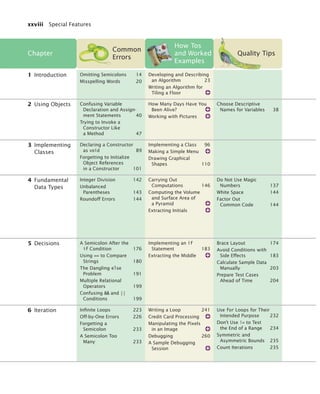
goal of the CYC project is to extract and store the requisite facts—that is, (1) people enroll in
universities; (2) Michigan is a state; (3) many states have universities named X State Univer-
sity, often abbreviated as X State; (4) most people enroll in a university in the fall. By 1995,
the project had codified about 100,000 common-sense concepts and about a million facts of
knowledge relating them. Even this massive amount of data has not proven sufficient for
useful applications.
In recent years, artificial intelligence technology has seen substantial advances. One of the
most astounding examples is the outcome of a series of “grand challenges” for autonomous
vehicles posed by the Defense Advanced Research Projects Agency (DARPA). Competitors
were invited to submit a computer-controlled vehicle that had to complete an obstacle
course without a human driver or remote control. The first event, in 2004, was a disappoint-
ment, with none of the entrants finishing the route. In 2005, five vehicles completed a gruel-
ing 212 km course in the Mojave desert. Stanford’s Stanley came in first, with an average
speed of 30 km/h. In 2007, DARPA moved the competition to an “urban” environment, an
abandoned air force base. Vehicles had to be able to interact with each other, following Cali-
fornia traffic laws. As Stanford’s Sebastian Thrun explained: “In the last Grand Challenge, it
didn’t really matter whether an obstacle was a rock or a bush, because either way you’d just
drive around it. The current challenge is to move from just sensing the environment to
understanding the environment.”
Testing the functionality of a program without consideration of its internal struc-
ture is called black-box testing. This is an important part of testing, because, after
all, the users of a program do not know its internal structure. If a program works
perfectly on all inputs, then it surely does its job.
However, it is impossible to ensure absolutely that a program will work correctly
on all inputs just by supplying a finite number of test cases. As the famous com-
puter scientist Edsger Dijkstra pointed out, testing can show only the presence of
bugs—not their absence. To gain more confidence in the correctness of a program,
it is useful to consider its internal structure. Testing strategies that look inside a pro-
gram are called white-box testing. Performing unit tests of each method is a part of
white-box testing.
You want to make sure that each part of your program is exercised at least once
by one of your test cases. This is called code coverage. If some code is never exe-
cuted by any of your test cases, you have no way of knowing whether that code
would perform correctly if it ever were executed by user input. That means that you
need to look at every if/else branch to see that each of them is reached by some test
case. Many conditional branches are in the code only to take care of strange and
abnormal inputs, but they still do something. It is a common phenomenon that they
end up doing something incorrectly, but those faults are never discovered during
testing, because nobody supplied the strange and abnormal inputs. Of course, these
flaws become immediately apparent when the program is released and the first user
5.5 Code Coverage
Black-box testing
describes a testing
method that does
not take the
structure of the
implementation
into account.
White-box testing
uses information
about the structure
of a program.
Code coverage is a
measure of how many
parts of a program
have been tested.
bj4_ch05_9.fm Page 202 Friday, October 23, 2009 11:32 AM
Testing Track 5.5 Code Coverage 203
types in an unusual input and is incensed when the program misbehaves. The rem-
edy is to ensure that each part of the code is covered by some test case.
For example, in testing the getTax method of the TaxReturn class, you want to
make sure that every if statement is entered for at least one test case. You should
test both single and married taxpayers, with incomes in each of the three tax brackets.
When you select test cases, you should make it a habit to include boundary test
cases: legal values that lie at the boundary of the set of acceptable inputs.
For example, what happens when you compute the taxes for an income of 0 or if
a bank account has an interest rate of 0 percent? Boundary cases are still legitimate
inputs, and you expect that the program will handle them correctly—often in some
trivial way or through special cases. Testing boundary cases is important, because
programmers often make mistakes dealing with boundary conditions. Division by
zero, extracting characters from empty strings, and accessing null references are
common symptoms of boundary errors.
9. How many test cases do you need to cover all branches of the getDescription
method of the Earthquake class?
10. Give a boundary test case for the EarthquakeRunner program. What output do
you expect?
Calculate Sample Data Manually
It is usually difficult or impossible to prove that a given program functions correctly in all
cases. For gaining confidence in the correctness of a program, or for understanding why it
does not function as it should, manually calculated sample data are invaluable. If the pro-
gram arrives at the same results as the manual calculation, our confidence in it is strength-
ened. If the manual results differ from the program results, we have a starting point for the
debugging process.
Surprisingly, many programmers are reluctant to perform any manual calculations as
soon as a program carries out the slightest bit of algebra. Their math phobia kicks in, and
they irrationally hope that they can avoid the algebra and beat the program into submission
by random tinkering, such as rearranging the + and - signs. Random tinkering is always a
great time sink, but it rarely leads to useful results.
Let’s have another look at the TaxReturn class. Suppose a single taxpayer earns $50,000.
The rules in Table 2 on page 188 state that the first $32,000 are taxed at 10 percent. Compute
32,000 × 0.10 = 3,200. The amount above $32,000, is taxed at 25 percent. It is time to take out
your calculator—real world numbers are usually nasty. That is (50,000 – 32,000) × 0.25 =
4,500. The total tax is the sum, 3,200 + 4,500 = 7,700. Now, that wasn’t so hard.
Run the program and compare the results. Because the results match, we have an
increased confidence in the correctness of the program.
It is even better to make manual calculations before writing the program. Doing so helps
you understand the task at hand, and you will be able to implement your solution more
quickly.
Boundary test cases
are test cases that
are at the boundary
of acceptable inputs.
S E L F C H E C K
Quality Tip 5.3
You should calculate
test cases by hand
to double-check
that your application
computes the
correct answer.
bj4_ch05_9.fm Page 203 Friday, October 23, 2009 11:32 AM
204 Chapter 5 Decisions Testing Track
Prepare Test Cases Ahead of Time
Let us consider how we can test the tax computation program. Of course, we cannot try out
all possible inputs of filing status and income level. Even if we could, there would be no
point in trying them all. If the program correctly computes one or two tax amounts in a
given bracket, then we have a good reason to believe that all amounts within that bracket will
be correct. We want to aim for complete coverage of all cases.
There are two possibilities for the filing status and three tax brackets for each status. That
makes six test cases. Then we want to test boundary conditions, such as zero income or
incomes that are at the boundary between two brackets. That makes six test cases. Compute
manually the answers you expect (See Quality Tip 5.3). Write down the test cases before you
start coding.
Should you really test six inputs for this simple program? You certainly should. Further-
more, if you find an error in the program that wasn’t covered by one of the test cases, make
another test case and add it to your collection. After you fix the known mistakes, run all test
cases again. Experience has shown that the cases that you just tried to fix are probably work-
ing now, but that errors that you fixed two or three iterations ago have a good chance of
coming back! If you find that an error keeps coming back, that is usually a reliable sign that
you did not fully understand some subtle interaction between features of your program.
It is always a good idea to design test cases before starting to code. There are two reasons
for this. Working through the test cases gives you a better understanding of the algorithm
that you are about to program. Furthermore, it has been noted that programmers instinc-
tively shy away from testing fragile parts of their code. That seems hard to believe, but you
will often make that observation about your own work. Watch someone else test your pro-
gram. There will be times when that person enters input that makes you very nervous
because you are not sure that your program can handle it, and you never dared to test it
yourself. This is a well-known phenomenon, and making the test plan before writing the
code offers some protection.
Logging
Sometimes you run a program and you are not sure where it spends its time. To get a print-
out of the program flow, you can insert trace messages into the program, such as this one:
public double getTax()
{
Test Case Married Expected Output Comment
30,000 N 3,000 10% bracket
72,000 N 13,200 3,200 + 25% of 40,000
50,000 Y 5,000 10% bracket
104,000 Y 16,400 6,400 + 25% of 40,000
32,000 N 3,200 boundary case
0 0 boundary case
Quality Tip 5.4
Special Topic 5.6
bj4_ch05_9.fm Page 204 Friday, October 23, 2009 11:32 AM
Summary of Learning Objectives 205
. . .
if (status == SINGLE)
{
System.out.println(status is SINGLE);
. . .
}
. . .
}
However, there is a problem with using System.out.println for trace messages. When you are
done testing the program, you need to remove all print statements that produce trace mes-
sages. If you find another error, however, you need to stick the print statements back in.
To overcome this problem, you should use the Logger class, which allows you to turn off
the trace messages without removing them from the program.
Instead of printing directly to System.out, use the global logger object that is returned by
the call Logger.getGlobal(). (Prior to Java 7, you obtained the global logger as Logger.getLog-
ger(global).) Then call the info method:
Logger.getGlobal().info(status is SINGLE);
By default, the message is printed. But if you call
Logger.getGlobal().setLevel(Level.OFF);
at the beginning of the main method of your program, all log message printing is suppressed.
Set the level to Level.INFO to turn logging of info messages on again. Thus, you can turn off
the log messages when your program works fine, and you can turn them back on if you find
another error. In other words, using Logger.getGlobal().info is just like System.out.println,
except that you can easily activate and deactivate the logging.
A common trick for tracing execution flow is to produce log messages when a method is
called, and when it returns. At the beginning of a method, print out the parameters:
public TaxReturn(double anIncome, int aStatus)
{
Logger.getGlobal().info(Parameters: anIncome =  + anIncome
+  aStatus =  + aStatus);
. . .
}
At the end of a method, print out the return value:
public double getTax()
{
. . .
Logger.getGlobal().info(Return value =  + tax);
return tax;
}
The Logger class has many other options for industrial-strength logging. Check out the API
documentation if you want to have more control over logging.
Use the if statement to implement a decision.
• The if statement lets a program carry out different actions depending on a
condition.
• A block statement groups several statements together.
Logging messages
can be deactivated
when testing
is complete.
Summary of Learning Objectives
bj4_ch05_9.fm Page 205 Friday, October 23, 2009 11:32 AM
206 Chapter 5 Decisions
Implement comparisons of numbers and objects.
• Relational operators compare values. The == operator tests for equality.
• When comparing floating-point numbers, don’t test for equality. Instead, check
whether they are close enough.
• Do not use the == operator to compare strings. Use the equals method instead.
• The compareTo method compares strings in dictionary order.
• The == operator tests whether two object references are identical. To compare the
contents of objects, you need to use the equals method.
• The null reference refers to no object.
Implement complex decisions that require multiple if statements.
• Multiple conditions can be combined to evaluate complex decisions. The correct
arrangement depends on the logic of the problem to be solved.
Use the Boolean data type to store and combine conditions that can be true or false.
• The boolean type has two values: true and false.
• A predicate method returns a boolean value.
• You can form complex tests with the Boolean operators  (and), || (or), and ! (not).
• De Morgan’s law shows how to simplify expressions in which the not operator (!) is
applied to terms joined by the  or || operators.
• You can store the outcome of a condition in a Boolean variable.
Design test cases that cover all parts of a program.
• Black-box testing describes a testing method that does not take the structure of the
implementation into account.
• White-box testing uses information about the structure of a program.
• Code coverage is a measure of how many parts of a program have been tested.
• Boundary test cases are test cases that are at the boundary of acceptable inputs.
• You should calculate test cases by hand to double-check that your application
computes the correct answer.
Use the Java logging library for messages that can be easily turned on or off.
• Logging messages can be deactivated when testing is complete.
Classes, Objects, and Methods Introduced in this Chapter
java.lang.Character
isDigit
isLetter
isLowerCase
isUpperCase
java.lang.Object
equals
java.lang.String
equals
equalsIgnoreCase
compareTo
java.util.Scanner
hasNextDouble
hasNextInt
java.util.logging.Level
INFO
OFF
java.util.logging.Logger
getGlobal
info
setLevel
bj4_ch05_9.fm Page 206 Friday, October 23, 2009 11:32 AM
Review Exercises 207
• Worked Example Extracting the Middle
• Lab Exercises
Practice Quiz
Code Completion Exercises
R5.1 What is the value of each variable after the if statement?
a. int n = 1; int k = 2; int r = n; if (k  n) r = k;
b. int n = 1; int k = 2; int r; if (n  k) r = k; else r = k + n;
c. int n = 1; int k = 2; int r = k; if (r  k) n = r; else k = n;
d. int n = 1; int k = 2; int r = 3; if (r  n + k) r = 2 * n; else k = 2 * r;
R5.2 Find the errors in the following if statements.
a. if (1 + x  Math.pow(x, Math.sqrt(2)) y = y + x;
b. if (x = 1) y++; else if (x = 2) y = y + 2;
c. int x = Integer.parseInt(input);
if (x != null) y = y + x;
R5.3 Find the error in the following if statement that is intended to select a language
from a given country and state/province.
language = English;
if (country.equals(Canada))
if (stateOrProvince.equals(Quebec)) language = French;
else if (country.equals(China))
language = Chinese;
R5.4 Find the errors in the following if statements.
a. if (x  y == 0) { x = 1; y = 1; }
b. if (1 = x = 10)
System.out.println(x);
c. if (!s.equals(nickels) || !s.equals(pennies)
|| !s.equals(dimes) || !s.equals(quarters))
System.out.print(Input error!);
d. if (input.equalsIgnoreCase(N) || NO)
return;
R5.5 Explain the following terms, and give an example for each construct:
a. Expression
b. Condition
c. Statement
d. Simple statement
e. Compound statement
f. Block
Media Resources
www.wiley.com/
college/
horstmann
Review Exercises
bj4_ch05_9.fm Page 207 Friday, October 23, 2009 11:32 AM
208 Chapter 5 Decisions
R5.6 Explain the difference between an if statement with multiple else branches and
nested if statements. Give an example for each.
R5.7 Give an example for an if/else if/else statement where the order of the tests does
not matter. Give an example where the order of the tests matters.
R5.8 Of the following pairs of strings, which comes first in lexicographic order?
a. Tom, Jerry
b. Tom, Tomato
c. church, Churchill
d. car manufacturer, carburetor
e. Harry, hairy
f. C++,  Car
g. Tom, Tom
h. Car, Carl
i. car, bar
j. 101, 11
k. 1.01, 10.1
R5.9 Complete the following truth table by finding the truth values of the Boolean
expressions for all combinations of the Boolean inputs p, q, and r.
R5.10 Each square on a chess board can be described by a letter and number, such as g5 in
this example:
p q r (p  q) || !r !(p  (q || !r))
false false false
false false false
false false false
. . . . . . . . .
5 more combinations
. . .
1
2
4
6
8
3
5
7
1
2
4
6
8
3
5
7
a
a
b
b
d
d
f
f
h
h
c
c
e
e
g5
g
g
bj4_ch05_9.fm Page 208 Friday, October 23, 2009 11:32 AM
Review Exercises 209
The following pseudocode describes an algorithm that determines whether a square
with a given letter and number is dark (black) or light (white).
If the letter is an a, c, e, or g
If the number is odd
color = black
Else
color = white
Else
If the number is even
color = black
Else
color = white
Using the procedure in Productivity Hint 5.2 on page 192, trace this pseudocode
with input g5.
R5.11 Give a set of four test cases for the algorithm of Exercise R5.10 that covers all
branches.
R5.12 In a scheduling program, we want to check whether two appointments overlap. For
simplicity, appointments start at a full hour, and we use military time (with hours 0–
24). The following pseudocode describes an algorithm that determines whether the
appointment with start time start1 and end time end1 overlaps with the appointment
with start time start2 and end time end2.
If start1  start2
s = start1
Else
s = start2
If end1  end2
e = endl
Else
e = end2
If s  e
The appointments overlap.
Else
The appointments don’t overlap.
Trace this algorithm with an appointment from 10–12 and one from 11–13, then
with an appointment from 10–11 and one from 12–13.
R5.13 Write pseudocode for a program that prompts the user for a month and day and
prints out whether it is one of the following four holidays:
• New Year’s Day (January 1)
• Independence Day (July 4)
• Veterans Day (November 11)
• Christmas Day (December 25)
R5.14 True or false? A  B is the same as B  A for any Boolean conditions A and B.
R5.15 Explain the difference between
s = 0;
if (x  0) s++;
if (y  0) s++;
bj4_ch05_9.fm Page 209 Friday, October 23, 2009 11:32 AM
210 Chapter 5 Decisions
and
s = 0;
if (x  0) s++;
else if (y  0) s++;
R5.16 Use de Morgan’s law to simplify the following Boolean expressions.
a. !(x  0  y  0)
b. !(x != 0 || y != 0)
c. !(country.equals(US)  !state.equals(HI)
 !state.equals(AK))
d. !(x % 4 != 0 || !(x % 100 == 0  x % 400 == 0))
R5.17 Make up another Java code example that shows the dangling else problem, using
the following statement: A student with a GPA of at least 1.5, but less than 2, is on
probation; with less than 1.5, the student is failing.
R5.18 Explain the difference between the == operator and the equals method when com-
paring strings.
R5.19 Explain the difference between the tests
r == s
and
r.equals(s)
where both r and s are of type Rectangle.
R5.20 What is wrong with this test to see whether r is null? What happens when this code
runs?
Rectangle r;
. . .
if (r.equals(null))
r = new Rectangle(5, 10, 20, 30);
R5.21 Explain how the lexicographic ordering of strings differs from the ordering of
words in a dictionary or telephone book. Hint: Consider strings, such as IBM,
wiley.com, Century 21, While-U-Wait, and 7-11.
R5.22 Write Java code to test whether two objects of type Line2D.Double represent the same
line when displayed on the graphics screen. Do not use a.equals(b).
Line2D.Double a;
Line2D.Double b;
if (your condition goes here)
g2.drawString(They look the same!, x, y);
Hint: If p and q are points, then Line2D.Double(p, q) and Line2D.Double(q, p) look the
same.
R5.23 Explain why it is more difficult to compare floating-point numbers than integers.
Write Java code to test whether an integer n equals 10 and whether a floating-point
number x is approximately equal to 10.
R5.24 Consider the following test to see whether a point falls inside a rectangle.
Point2D.Double p = . . .
Rectangle r = . . .
bj4_ch05_9.fm Page 210 Friday, October 23, 2009 11:32 AM
Programming Exercises 211
boolean xInside = false;
if (r.getX() = p.getX()  p.getX() = r.getX() + r.getWidth())
xInside = true;
boolean yInside = false;
if (r.getY() = p.getY()  p.getY() = r.getY() + r.getHeight())
yInside = true;
if (xInside  yInside)
g2.drawString(p is inside the rectangle.,
p.getX(), p.getY());
Rewrite this code to eliminate the explicit true and false values, by setting xInside
and yInside to the values of Boolean expressions.
R5.25 Give a set of test cases for the earthquake program in Section 5.3.1. Ensure coverage
of all branches.
R5.26 Give an example of a boundary test case for the earthquake program in Section
5.3.1. What result do you expect?
P5.1 Write a program that prints all real solutions to the quadratic equation
ax2 + bx + c = 0. Read in a, b, c and use the quadratic formula. If the discriminant
b2 – 4ac is negative, display a message stating that there are no real solutions.
Implement a class QuadraticEquation whose constructor receives the coefficients a, b,
c of the quadratic equation. Supply methods getSolution1 and getSolution2 that get
the solutions, using the quadratic formula, or 0 if no solution exists. The
getSolution1 method should return the smaller of the two solutions.
Supply a method
boolean hasSolutions()
that returns false if the discriminant is negative.
P5.2 Write a program that takes user input describing a playing card in the following
shorthand notation:
T
T
Programming Exercises
Notation Meaning
A Ace
2 ... 10 Card values
J Jack
Q Queen
K King
D Diamonds
H Hearts
S Spades
C Clubs
bj4_ch05_9.fm Page 211 Friday, October 23, 2009 11:32 AM
212 Chapter 5 Decisions
Your program should print the full description of the card. For example,
Enter the card notation:
4S
Four of spades
Implement a class Card whose constructor takes the card notation string and whose
getDescription method returns a description of the card. If the notation string is not
in the correct format, the getDescription method should return the string Unknown.
P5.3 Write a program that reads in three floating-point numbers and prints the three
inputs in sorted order. For example:
Please enter three numbers:
4
9
2.5
The inputs in sorted order are:
2.5
4
9
P5.4 Write a program that translates a letter grade into a number grade. Letter grades are
A B C D F, possibly followed by + or -. Their numeric values are 4, 3, 2, 1, and 0.
There is no F+ or F-. A + increases the numeric value by 0.3, a - decreases it by 0.3.
However, an A+ has the value 4.0. All other inputs have value –1.
Enter a letter grade:
B-
Numeric value: 2.7.
Use a class Grade with a method getNumericGrade.
P5.5 Write a program that translates a number into the closest letter grade. For example,
the number 2.8 (which might have been the average of several grades) would be
converted to B-. Break ties in favor of the better grade; for example, 2.85 should be
a B. Any value ≥ 4.15 should be an A+.
Use a class Grade with a method getLetterGrade.
P5.6 Write a program that reads in three strings and prints them in lexicographically
sorted order:
Please enter three strings:
Tom
Dick
Harry
The inputs in sorted order are:
Dick
Harry
Tom
P5.7 Change the implementation of the getTax method in the TaxReturn class, by setting a
variable rate1Limit, depending on the marital status. Then have a single formula that
computes the tax, depending on the income and the limit. Verify that your results
are identical to that of the TaxReturn class in this chapter.
bj4_ch05_9.fm Page 212 Friday, October 23, 2009 11:32 AM
Programming Exercises 213
P5.8 The original U.S. income tax of 1913 was quite simple. The tax was
• 1 percent on the first $50,000.
• 2 percent on the amount over $50,000 up to $75,000.
• 3 percent on the amount over $75,000 up to $100,000.
• 4 percent on the amount over $100,000 up to $250,000.
• 5 percent on the amount over $250,000 up to $500,000.
• 6 percent on the amount over $500,000.
There was no separate schedule for single or married taxpayers. Write a program
that computes the income tax according to this schedule.
P5.9 Write a program that prompts for the day and month of the user’s birthday and
then prints a horoscope. Make up fortunes for programmers, like this:
Please enter your birthday (month and day): 6 16
Gemini are experts at figuring out the behavior of complicated programs.
You feel where bugs are coming from and then stay one step ahead. Tonight,
your style wins approval from a tough critic.
Each fortune should contain the name of the astrological sign. (You will find the
names and date ranges of the signs at a distressingly large number of sites on the
Internet.)
P5.10 When two points in time are compared, each given as hours (in military time, rang-
ing from 0 and 23) and minutes, the following pseudocode determines which comes
first.
If hour1  hour2
time1 comes first.
Else if hour1 and hour2 are the same
If minute1  minute2
time1 comes first.
Else if minute1 and minute2 are the same
time1 and time2 are the same.
Else
time2 comes first.
Else
time2 comes first.
Write a program that prompts the user for two points in time and prints the time
that comes first, then the other time.
P5.11 The following algorithm yields the season (Spring, Summer, Fall, or Winter) for a
given month and day.
If month is 1, 2, or 3, season = Winter
Else if month is 4, 5, or 6, season = Spring
Else if month is 7, 8, or 9, season = Summer
Else if month is 10, 11, or 12, season = Fall
If month is divisible by 3 and day = 21
If season is Winter, season = Spring
Else if season is Spring, season = Summer
Else if season is Summer, season = Fall
Else season = Winter
bj4_ch05_9.fm Page 213 Friday, October 23, 2009 11:32 AM
214 Chapter 5 Decisions
Write a program that prompts the user for a month and day and then prints the sea-
son, as determined by this algorithm.
P5.12 A year with 366 days is called a leap year. A year is a leap year if it is divisible by 4
(for example, 1980). However, since the introduction of the Gregorian calendar on
October 15, 1582, a year is not a leap year if it is divisible by 100 (for example,
1900); however, it is a leap year if it is divisible by 400 (for example, 2000). Write a
program that asks the user for a year and computes whether that year is a leap year.
Implement a class Year with a predicate method boolean isLeapYear().
P5.13 Write a program that asks the user to enter a month (1 = January, 2 = February, and
so on) and then prints the number of days of the month. For February, print
“28 days”.
Enter a month (1-12):
5
31 days
Implement a class Month with a method int getDays(). Do not use a separate if or else
statement for each month. Use Boolean operators.
P5.14 Write a program that reads in two floating-point numbers and tests (a) whether
they are the same when rounded to two decimal places and (b) whether they differ
by less than 0.01. Here are two sample runs.
Enter two floating-point numbers:
2.0
1.99998
They are the same when rounded to two decimal places.
They differ by less than 0.01.
Enter two floating-point numbers:
0.999
0.991
They are different when rounded to two decimal places.
They differ by less than 0.01.
P5.15 Enhance the BankAccount class of Chapter 3 by
• Rejecting negative amounts in the deposit and withdraw methods
• Rejecting withdrawals that would result in a negative balance
P5.16 Write a program that reads in the hourly wage of an employee. Then ask how many
hours the employee worked in the past week. Be sure to accept fractional hours.
Compute the pay. Any overtime work (over 40 hours per week) is paid at 150 per-
cent of the regular wage. Solve this problem by implementing a class Paycheck.
P5.17 Write a unit conversion program that asks users to identify the
unit from which they want to convert and the unit to which they want to convert.
Legal units are in, ft, mi, mm, cm, m, and km. Declare two objects of a class
UnitConverter that convert between meters and a given unit.
Convert from:
in
Convert to:
mm
Value:
10
10 in = 254 mm
bj4_ch05_9.fm Page 214 Friday, October 23, 2009 11:32 AM
Programming Projects 215
P5.18 A line in the plane can be specified in various ways:
• by giving a point (x, y) and a slope m
• by giving two points (x1, y1), (x2, y2)
• as an equation in slope-intercept form y = mx + b
• as an equation x = a if the line is vertical
Implement a class Line with four constructors, corresponding to the four cases
above. Implement methods
boolean intersects(Line other)
boolean equals(Line other)
boolean isParallel(Line other)
P5.19 Write a program that draws a circle with radius 100 and center (200, 200). Ask the
user to specify the x- and y-coordinates of a point. Draw the point as a small circle. If
the point lies inside the circle, color the small circle green. Otherwise, color it red. In
your exercise, declare a class Circle and a method boolean isInside(Point2D.Double p).
P5.20 Write a graphics program that asks the user to specify the radii of two circles. The
first circle has center (100, 200), and the second circle has center (200, 100). Draw
the circles. If they intersect, then color both circles green. Otherwise, color them
red. Hint: Compute the distance between the centers and compare it to the radii.
Your program should draw nothing if the user enters a negative radius. In your
exercise, declare a class Circle and a method boolean intersects(Circle other).
Project 5.1 Implement a combination lock class. A combination lock has a dial with 26 posi-
tions labeled A . . . Z. The dial needs to be set three times. If it is set to the correct
combination, the lock can be opened. When the lock is closed again, the combina-
tion can be entered again. If a user sets the dial more than three times, the last three
settings determine whether the lock can be opened. An important part of this exer-
cise is to implement a suitable interface for the CombinationLock class.
Project 5.2 Get the instructions for last year’s form 1040 from http://www.irs.ustreas.gov. Find
the tax brackets that were used last year for all categories of taxpayers (single, mar-
ried filing jointly, married filing separately, and head of household). Write a pro-
gram that computes taxes following that schedule. Ignore deductions, exemptions,
and credits. Simply apply the tax rate to the income.
G
G
Programming Projects
bj4_ch05_9.fm Page 215 Friday, October 23, 2009 11:32 AM
216 Chapter 5 Decisions
1. If the withdrawal amount equals the balance, the result should be a zero balance and
no penalty.
2. Only the first assignment statement is part of the if statement. Use braces to group
both assignment statements into a block statement.
3. (a) 0; (b) 1; (c) An exception occurs.
4. Syntactically incorrect: e, g, h. Logically questionable: a, d, f
5. Yes, if you also reverse the comparisons:
if (richter  3.5)
r = Generally not felt by people;
else if (richter  4.5)
r = Felt by many people, no destruction;
else if (richter  6.0)
r = Damage to poorly constructed buildings;
. . .
6. The higher tax rate is only applied on the income in the higher bracket. Suppose
you are single and make $31,900. Should you try to get a $200 raise? Absolutely:
you get to keep 90 percent of the first $100 and 75 percent of the next $100.
7. When x is zero.
8. if (!Character.isDigit(ch)) . . .
9. Seven
10. An input of 0 should yield an output of Generally not felt by people. (If the output
is Negative numbers are not allowed, there is an error in the program.)
Answers to Self-Check Questions
bj4_ch05_9.fm Page 216 Friday, October 23, 2009 11:32 AM
217
Chapter
6
Iteration
CHAPTER GOALS
• To be able to program loops with the while and for statements
• To avoid infinite loops and off-by-one errors
• To be able to use common loop algorithms
• To understand nested loops
• To implement simulations
T To learn about the debugger
This chapter presents the various iteration constructs of the Java
language. These constructs execute one or more statements repeatedly until a goal is reached. You
will see how the techniques that you learn in this chapter can be applied to the processing of input
data and the programming of simulations.
bj4_ch06_9.fm Page 217 Friday, October 23, 2009 1:29 PM
218
CHAPTER CONTENTS
In this chapter you will learn how to write programs that repeatedly execute one or
more statements. We will illustrate these concepts by looking at typical investment
situations. Consider a bank account with an initial balance of $10,000 that earns 5
percent interest. The interest is computed at the end of every year on the current
balance and then deposited into the bank account. For example, after the first year,
the account has earned $500 (5 percent of $10,000) of interest. The interest gets
added to the bank account. Next year, the interest is $525 (5 percent of $10,500),
and the balance is $11,025.
How many years does it take for the balance to reach $20,000? Of course, it
won’t take longer than 20 years, because at least $500 is added to the bank account
each year. But it will take less than 20 years, because interest is computed on
increasingly larger balances. To know the exact answer, we will write a program that
repeatedly adds interest until the balance is reached.
In Java, the while statement implements such a repetition. The construct
while (condition)
statement
keeps executing the statement while the condition is true.
Most commonly, the statement is a block statement, that is, a set of statements
delimited by { }.
In our case, we want to know when the bank account has reached a particular
balance. While the balance is less, we keep adding interest and incrementing the
years counter:
6.1 while Loops
This is a sample MN
for the left page. This
is a sample four-line
MN for the left page.
A while statement
executes a block of
code repeatedly. A
condition controls
how long the loop
is executed.
6.1 while Loops 218
SYNTAX 6.1: The while Statement 223
PRODUCTIVITY HINT 6.1: Hand-Tracing Loops 223
COMMON ERROR 6.1: Infinite Loops 225
COMMON ERROR 6.2: Off-by-One Errors 226
SPECIAL TOPIC 6.1: do Loops 227
6.2 for Loops 228
SYNTAX 6.2: The for Statement 230
QUALITY TIP 6.1: Use for Loops for Their
Intended Purpose 232
COMMON ERROR 6.3: Forgetting a Semicolon 233
COMMON ERROR 6.4: A Semicolon Too Many 233
QUALITY TIP 6.2: Don’t Use != to Test the End
of a Range 234
SPECIAL TOPIC 6.2: Variables Declared in a for
Loop Header 234
QUALITY TIP 6.3: Symmetric and
Asymmetric Bounds 235
QUALITY TIP 6.4: Count Iterations 235
6.3 Common Loop Algorithms 236
HOW TO 6.1: Writing a Loop 241
WORKED EXAMPLE 6.1: Credit Card Processing
SPECIAL TOPIC 6.3: The “Loop and a Half” Problem 245
SPECIAL TOPIC 6.4: The break and
continue Statements 246
6.4 Nested Loops 247
WORKED EXAMPLE 6.2: Manipulating the Pixels in
an Image
6.5 Application: Random Numbers
and Simulations 250
SPECIAL TOPIC 6.5: Loop Invariants 255
6.6T Using a Debugger 257
HOW TO 6.2: Debugging 260
WORKED EXAMPLE 6.3: A Sample Debugging Session
RANDOM FACT 6.1: The First Bug 262
bj4_ch06_9.fm Page 218 Friday, October 23, 2009 1:29 PM
6.1 while Loops 219
while (balance  targetBalance)
{
years++;
double interest = balance * rate / 100;
balance = balance + interest;
}
Figure 1 shows the flow of execution of this loop.
Figure 1 Execution of a while Loop
while (balance  targetBalance)
{
years++;
double interest = balance * rate / 100;
balance = balance + interest;
}
Check the loop condition
1 The condition is true
while (balance  targetBalance)
{
years++;
double interest = balance * rate / 100;
balance = balance + interest;
}
Execute the statements in the loop
2
while (balance  targetBalance)
{
years++;
double interest = balance * rate / 100;
balance = balance + interest;
}
Check the loop condition again
3 The condition is still true
while (balance  targetBalance)
{
years++;
double interest = balance * rate / 100;
balance = balance + interest;
}
After 15 iterations
4 The condition is
no longer true
while (balance  targetBalance)
{
years++;
double interest = balance * rate / 100;
balance = balance + interest;
}
System.out.println(years);
Execute the statement following the loop
5
.
.
.
years = 0
balance = 10000
years = 1
interest = 500
balance = 10500
years = 1
balance = 10500
years = 15
balance = 20789.28
years = 15
balance = 20789.28
bj4_ch06_9.fm Page 219 Friday, October 23, 2009 1:29 PM
220 Chapter 6 Iteration
Here is the program that solves our investment problem.
ch06/invest1/Investment.java
1 /**
2 A class to monitor the growth of an investment that
3 accumulates interest at a fixed annual rate.
4 */
5 public class Investment
6 {
7 private double balance;
8 private double rate;
9 private int years;
10
11 /**
12 Constructs an Investment object from a starting balance and
13 interest rate.
14 @param aBalance the starting balance
15 @param aRate the interest rate in percent
16 */
17 public Investment(double aBalance, double aRate)
18 {
19 balance = aBalance;
20 rate = aRate;
21 years = 0;
22 }
23
24 /**
25 Keeps accumulating interest until a target balance has
26 been reached.
27 @param targetBalance the desired balance
28 */
29 public void waitForBalance(double targetBalance)
30 {
31 while (balance  targetBalance)
32 {
33 years++;
34 double interest = balance * rate / 100;
35 balance = balance + interest;
36 }
37 }
38
39 /**
40 Gets the current investment balance.
41 @return the current balance
42 */
43 public double getBalance()
44 {
45 return balance;
46 }
47
48 /**
49 Gets the number of years this investment has accumulated
50 interest.
51 @return the number of years since the start of the investment
52 */
53 public int getYears()
54 {
55 return years;
bj4_ch06_9.fm Page 220 Friday, October 23, 2009 1:29 PM
6.1 while Loops 221
ch06/invest1/InvestmentRunner.java
Program Run
A while statement is often called a loop. If you draw a flowchart, you will see that
the control loops backwards to the test after every iteration (see Figure 2).
When you declare a variable inside the loop
body, the variable is created for each iteration of
the loop and removed after the end of each itera-
tion. For example, consider the interest variable in
this loop:
while (balance  targetBalance)
{
years++;
double interest = balance * rate / 100;
// A new interest variable is created
// in each iteration
balance = balance + interest;
} // interest no longer declared here
If a variable needs to be updated in multiple loop
iterations, do not declare it inside the loop. For
example, it would not make sense to declare the
balance variable inside this loop.
Figure 2 Flowchart of a while Loop
56 }
57 }
1 /**
2 This program computes how long it takes for an investment
3 to double.
4 */
5 public class InvestmentRunner
6 {
7 public static void main(String[] args)
8 {
9 final double INITIAL_BALANCE = 10000;
10 final double RATE = 5;
11 Investment invest = new Investment(INITIAL_BALANCE, RATE);
12 invest.waitForBalance(2 * INITIAL_BALANCE);
13 int years = invest.getYears();
14 System.out.println(The investment doubled after 
15 + years +  years);
16 }
17 }
The investment doubled after 15 years
A N I M AT I O N
Tracing a Loop
False
True
Add interest
to balance
Increment
years
balance 
targetBalance
?
bj4_ch06_9.fm Page 221 Friday, October 23, 2009 1:29 PM
222 Chapter 6 Iteration
The following loop,
while (true)
statement
executes the statement over and over, without terminating. Whoa! Why would you
want that? The program would never stop. There are two reasons. Some programs
indeed never stop; the software controlling an automated teller machine, a tele-
phone switch, or a microwave oven doesn’t ever stop (at least not until the device is
turned off). Our programs aren’t usually of that kind, but even if you can’t termi-
nate the loop, you can exit from the method that contains it. This can be helpful
when the termination test naturally falls in the middle of the loop (see Special Topic
6.3 on page 245).
Table 1 while Loop Examples
Loop Output Explanation
i = 0; sum = 0;
while (sum  10)
{
i++; sum = sum + i;
Print i and sum;
}
1 1
2 3
3 6
4 10
When sum is 10, the loop condition is
false, and the loop ends.
i = 0; sum = 0;
while (sum  10)
{
i++; sum = sum - i;
Print i and sum;
}
1 -1
2 -3
3 -6
4 -10
. . .
Because sum never reaches 10, this is an
“infinite loop” (see Common Error 6.1
on page 225).
i = 0; sum = 0;
while (sum  0)
{
i++; sum = sum - i;
Print i and sum;
}
(No output) The statement sum  0 is false when the
condition is first checked, and the loop
is never executed.
i = 0; sum = 0;
while (sum = 10)
{
i++; sum = sum + i;
Print i and sum;
}
(No output) The programmer probably thought,
“Stop when the sum is at least 10.”
However, the loop condition controls
when the loop is executed, not when
it ends.
i = 0; sum = 0;
while (sum  10) ;
{
i++; sum = sum + i;
Print i and sum;
}
(No output, program
does not terminate)
Note the semicolon before the {.
This loop has an empty body. It runs
forever, checking whether sum  10 and
doing nothing in the body (see
Common Error 6.4 on page 233).
bj4_ch06_9.fm Page 222 Friday, October 23, 2009 1:29 PM
6.1 while Loops 223
1. How many times is the following statement in the loop executed?
while (false) statement;
2. What would happen if RATE was set to 0 in the main method of the
InvestmentRunner program?
Hand-Tracing Loops
In Programming Tip 5.2, you learned about the method of hand-tracing. This method is par-
ticularly effective for understanding how a loop works.
Consider this example loop. What value is displayed?
int n = 1729;
int sum = 0;
while (n  0)
{
int digit = n % 10;
sum = sum + digit;
n = n / 10;
}
System.out.println(sum);
Syntax 6.1 The while Statement
while (condition)
statement
Syntax
Example
Lining up braces
is a good idea.
See page 174.
double balance = 0;
.
.
.
while (balance  TARGET)
{
double interest = balance * RATE / 100;
balance = balance + interest;
}
If the condition
never becomes false,
an infinite loop occurs.
See page 225.
These statements
are executed while
the condition is true.
Don’t put a semicolon here!
See page 233.
Beware of “off-by-one”
errors in the loop condition.
See page 226.
Braces are not required if the body
contains a single statement.
This variable is declared outside the loop
and updated in the loop.
This variable is created
in each loop iteration.
S E L F C H E C K
Productivity Hint 6.1
1
2
3 4 5 6
7
bj4_ch06_9.fm Page 223 Friday, October 23, 2009 1:29 PM
224 Chapter 6 Iteration
1. There are three variables: n, sum, and digit. The first two variables are initialized with
1729 and 0 before the loop is entered.
2. Because n is positive, enter the loop.
3. The variable digit is set to 9 (the remainder of dividing 1729 by 10). The variable sum is
set to 0 + 9 = 9. Finally, n becomes 172. (Recall that the remainder in the division 1729 /
10 is discarded because both arguments are integers.). Cross out the old values and
write the new ones under the old ones.
4. Because n  0, we repeat the loop. Now digit becomes 2, sum is set to 9 + 2 = 11, and n
is set to 17.
5. Because n is still not zero, we repeat the loop, setting digit to 7, sum to 11 + 7 = 18, and
n to 1.
n sum digit
1729 0
n sum digit
1729 0
172 9 9
n sum digit
1729 0
172 9 9
17 11 2
n sum digit
1729 0
172 9 9
17 11 2
1 18 7
bj4_ch06_9.fm Page 224 Friday, October 23, 2009 1:29 PM
6.1 while Loops 225
6. We enter the loop one last time. Now digit is set to 1, sum to 19, and n becomes zero.
7. The condition n  0 is now false, and we continue with the output statement after the
loop. The value that is output is 19.
Of course, you can get the same answer simply by running the code. The hope is that by
hand-tracing, you gain an insight. Consider again what happens in each iteration:
• We extract the last digit of n.
• We add that digit to sum.
• We strip the digit off n.
In other words, the loop forms the sum of the digits in n. You now know what the loop does
for any value of n, not just the one in the example.
Why would anyone want to form the sum of the digits? Operations of this kind are useful
for checking the validity of credit card numbers and other forms of ID number—see Exer-
cise P6.2.
Infinite Loops
One of the most annoying loop errors is an infinite loop: a loop that runs forever and can be
stopped only by killing the program or restarting the computer. If there are output state-
ments in the loop, then reams and reams of output flash by on the screen. Otherwise, the
program just sits there and hangs, seeming to do nothing. On some systems you can kill a
hanging program by hitting Ctrl+Break or Ctrl+C. On others, you can close the window in
which the program runs.
A common reason for infinite loops is forgetting to advance the variable that controls the
loop:
int years = 0;
while (years  20)
{
double interest = balance * rate / 100;
balance = balance + interest;
}
Here the programmer forgot to add a statement for incrementing years in the loop. As a
result, the value of years always stays 0, and the loop never comes to an end.
Another common reason for an infinite loop is accidentally incrementing a counter that
should be decremented (or vice versa). Consider this example:
int years = 20;
while (years  0)
{
n sum digit
1729 0
172 9 9
17 11 2
1 18 7
0 19 1
Common Error 6.1
bj4_ch06_9.fm Page 225 Friday, October 23, 2009 1:29 PM
226 Chapter 6 Iteration
years++; // Oops, should have been years--
double interest = balance * rate / 100;
balance = balance + interest;
}
The years variable really should have been decremented, not incremented. This is a common
error, because incrementing counters is so much more common than decrementing that your
fingers may type the ++ on autopilot. As a consequence, years is always larger than 0, and the
loop never terminates. (Actually, years eventually will exceed the largest representable posi-
tive integer and wrap around to a negative number. Then the loop exits—of course, that takes
a long time, and the result is completely wrong.)
Off-by-One Errors
Consider our computation of the number of years that are required to double an investment:
int years = 0;
while (balance  2 * initialBalance)
{
years++;
double interest = balance * rate / 100;
balance = balance + interest;
}
System.out.println(The investment reached the target after 
+ years +  years.);
Should years start at 0 or at 1? Should you test for balance  2 * initialBalance or for
balance = 2 * initialBalance? It is easy to be off by one in these expressions.
Some people try to solve off-by-one errors by randomly inserting +1 or -1 until the pro-
gram seems to work. That is, of course, a terrible strategy. It can take a long time to compile
and test all the various possibilities. Expending a small amount of mental effort is a real time
saver.
Fortunately, off-by-one errors are easy to avoid, simply by thinking through a couple of
test cases and using the information from the test cases to come up with a rationale for the
correct loop condition.
Should years start at 0 or at 1? Look at a scenario with simple
values: an initial balance of $100 and an interest rate of 50 percent.
After year 1, the balance is $150, and after year 2 it is $225, or over
$200. So the investment doubled after 2 years. The loop executed
two times, incrementing years each time. Hence years must start at
0, not at 1.
In other words, the balance variable denotes the balance after
the end of the year. At the outset, the balance variable contains the
balance after year 0 and not after year 1.
Next, should you use a  or = comparison in the test? That is harder to figure out,
because it is rare for the balance to be exactly twice the initial balance. Of course, there is one
case when this happens, namely when the interest is 100 percent. The loop executes once.
Now years is 1, and balance is exactly equal to 2 * initialBalance. Has the investment dou-
bled after one year? It has. Therefore, the loop should not execute again. If the test condition
is balance  2 * initialBalance, the loop stops, as it should. If the test condition had been
balance = 2 * initialBalance, the loop would have executed once more.
In other words, you keep adding interest while the balance has not yet doubled.
Common Error 6.2
An off-by-one error
is a common error
when programming
loops. Think through
simple test cases
to avoid this type
of error.
year balance
0 $100
1 $150
2 $225
bj4_ch06_9.fm Page 226 Friday, October 23, 2009 1:29 PM
6.1 while Loops 227
do Loops
Sometimes you want to execute the body of a loop at least once and perform the loop test
after the body was executed. The do loop serves that purpose:
do
statement
while (condition);
The statement is executed while the condition is true. The condition is tested after the state-
ment is executed, so the statement is executed at least once.
For example, suppose you want to make sure that a user enters a positive number. As long
as the user enters a negative number or zero, just keep prompting for a correct input. In this
situation, a do loop makes sense, because you need to get a user input before you can test it.
double value;
do
{
System.out.print(Please enter a positive number: );
value = in.nextDouble();
}
while (value = 0);
The figure shows a flowchart of this loop.
In practice, do loops are not very common. (The library code in Java 6 contains about
10,000 loop statements, but only about 2 percent are do loops.) Consider again the example
of prompting for a positive value. In practice, you also need to guard against users who pro-
vide an input that isn’t a number. Now the loop becomes so complex that you are better off
controlling it with a Boolean variable:
boolean valid = false;
while (!valid)
{
System.out.print(Please enter a positive number: );
if (in.hasNextDouble())
{
value = in.nextDouble();
if (value  0) valid = true;
}
else
in.nextLine(); // Consume input
}
Flowchart of a do Loop
Special Topic 6.1
value ≤ 0
False
True
Read value
bj4_ch06_9.fm Page 227 Friday, October 23, 2009 1:29 PM
228 Chapter 6 Iteration
One of the most common loop types has the form
i = start;
while (i = end)
{
. . .
i++;
}
Because this loop is so common, there is a special form for it that emphasizes the
pattern:
for (i = start; i = end; i++)
{
. . .
}
You can also declare the loop counter variable inside the for loop header. That con-
venient shorthand restricts the use of the variable to the body of the loop (as will be
discussed further in Special Topic 6.2 on page 234).
for (int i = start; i = end; i++)
{
. . .
}
A for loop can be used to find out the size of our
$10,000 investment if 5 percent interest is com-
pounded for 20 years. Of course, the balance will
be larger than $20,000, because at least $500 is
added every year. You may be surprised to find
out just how much larger the balance is.
In our loop, we let i go from 1 to numberOfYears,
the number of years for which we want to com-
pound interest.
for (int i = 1; i = numberOfYears; i++)
{
double interest = balance * rate / 100;
balance = balance + interest;
}
Figure 3 shows the corresponding flowchart.
Figure 4 shows the flow of execution. The com-
plete program is on page 230.
Another common use of the for loop is to
traverse all characters of a string:
for (int i = 0; i  str.length(); i++)
{
char ch = str.charAt(i);
Process ch
}
Figure 3 Flowchart of a for Loop
6.2 for Loops
True
False
Add interest
to balance
i++
i ≤ numberOfYears?
i = 1
You use a for loop
when a variable runs
from a starting to an
ending value with a
constant increment
or decrement.
bj4_ch06_9.fm Page 228 Friday, October 23, 2009 1:29 PM
6.2 for Loops 229
Note that the counter variable i starts at 0, and the loop is terminated when i
reaches the length of the string. For example, if str has length 5, i takes on the val-
ues 0, 1, 2, 3, and 4. These are the valid positions in the string.
Note too that the three slots in the for header can contain any three expressions.
You can count down instead of up:
for (int i = 10; i  0; i–-)
The increment or decrement need not be in steps of 1:
for (int i = -10; i = 10; i = i + 2) . . .
It is possible—but a sign of unbelievably bad taste—to put unrelated conditions
into the loop header:
for (rate = 5; years–-  0; System.out.println(balance))
. . . // Bad taste
We won’t even begin to decipher what that might mean. You should stick with for
loops that initialize, test, and update a single variable.
Figure 4 Execution of a for Loop
for (int i = 1; i = numberOfYears; i++)
{
double interest = balance * rate / 100;
balance = balance + interest;
}
Initialize counter
1
for (int i = 1; i = numberOfYears; i++)
{
double interest = balance * rate / 100;
balance = balance + interest;
}
Check condition
2
for (int i = 1; i = numberOfYears; i++)
{
double interest = balance * rate / 100;
balance = balance + interest;
}
Execute loop body
3
for (int i = 1; i = numberOfYears; i++)
{
double interest = balance * rate / 100;
balance = balance + interest;
}
Update counter
4
for (int i = 1; i = numberOfYears; i++)
{
double interest = balance * rate / 100;
balance = balance + interest;
}
Check condition again
5
i = 1
i = 1
i = 1
i = 2
i = 2
A N I M AT I O N
The for Loop
bj4_ch06_9.fm Page 229 Friday, October 23, 2009 1:29 PM
230 Chapter 6 Iteration
ch06/invest2/Investment.java
Syntax 6.2 The for Statement
for (initialization; condition; update)
statement
Syntax
Example
for (int i = 5; i = 10; i++)
{
sum = sum + i;
}
This loop executes 6 times.
See page 235.
These three
expressions should be related.
See page 232.
This initialization
happens once
before the loop starts.
The loop is
executed while
this condition is true.
This update is
executed after
each iteration.
The variable i is
defined only in this for loop.
See page 234.
1 /**
2 A class to monitor the growth of an investment that
3 accumulates interest at a fixed annual rate.
4 */
5 public class Investment
6 {
7 private double balance;
8 private double rate;
9 private int years;
10
11 /**
12 Constructs an Investment object from a starting balance and
13 interest rate.
14 @param aBalance the starting balance
15 @param aRate the interest rate in percent
16 */
17 public Investment(double aBalance, double aRate)
18 {
19 balance = aBalance;
20 rate = aRate;
21 years = 0;
22 }
23
24 /**
25 Keeps accumulating interest until a target balance has
26 been reached.
27 @param targetBalance the desired balance
28 */
29 public void waitForBalance(double targetBalance)
30 {
31 while (balance  targetBalance)
32 {
33 years++;
bj4_ch06_9.fm Page 230 Friday, October 23, 2009 1:29 PM
6.2 for Loops 231
ch06/invest2/InvestmentRunner.java
34 double interest = balance * rate / 100;
35 balance = balance + interest;
36 }
37 }
38
39 /**
40 Keeps accumulating interest for a given number of years.
41 @param numberOfYears the number of years to wait
42 */
43 public void waitYears(int numberOfYears)
44 {
45 for (int i = 1; i = numberOfYears; i++)
46 {
47 double interest = balance * rate / 100;
48 balance = balance + interest;
49 }
50 years = years + n;
51 }
52
53 /**
54 Gets the current investment balance.
55 @return the current balance
56 */
57 public double getBalance()
58 {
59 return balance;
60 }
61
62 /**
63 Gets the number of years this investment has accumulated
64 interest.
65 @return the number of years since the start of the investment
66 */
67 public int getYears()
68 {
69 return years;
70 }
71 }
1 /**
2 This program computes how much an investment grows in
3 a given number of years.
4 */
5 public class InvestmentRunner
6 {
7 public static void main(String[] args)
8 {
9 final double INITIAL_BALANCE = 10000;
10 final double RATE = 5;
11 final int YEARS = 20;
12 Investment invest = new Investment(INITIAL_BALANCE, RATE);
13 invest.waitYears(YEARS);
14 double balance = invest.getBalance();
15 System.out.printf(The balance after %d years is %.2fn,
16 YEARS, balance);
17 }
18 }
bj4_ch06_9.fm Page 231 Friday, October 23, 2009 1:29 PM
232 Chapter 6 Iteration
Program Run
3. Rewrite the for loop in the waitYears method as a while loop.
4. How many times does the following for loop execute?
for (i = 0; i = 10; i++)
System.out.println(i * i);
Use for Loops for Their Intended Purpose
A for loop is an idiom for a while loop of a particular form. A counter runs from the start to
the end, with a constant increment:
for (Set counter to start; Test whether counter at end; Update counter by increment)
{ . . .
// counter, start, end, increment not changed here
}
If your loop doesn’t match this pattern, don’t use the for construction. The compiler won’t
prevent you from writing idiotic for loops:
// Bad style—unrelated header expressions
for (System.out.println(Inputs:);
(x = in.nextDouble())  0;
sum = sum + x)
count++;
for (int i = 1; i = years; i++)
{
The balance after 20 years is 26532.98
S E L F C H E C K
Table 2 for Loop Examples
Loop Values of i Comment
for (i = 0; i = 5; i++) 0 1 2 3 4 5 Note that the loop is executed 6 times.
(See Quality Tip 6.4 on page 235.)
for (i = 5; i = 0; i--) 5 4 3 2 1 0 Use i-- for decreasing values.
for (i = 0; i  9; i = i + 2) 0 2 4 6 8 Use i = i + 2 for a step size of 2.
for (i = 0; i != 9; i = i + 2) 0 2 4 6 8 10 12 14 ...
(infinite loop)
You can use  or = instead of != to
avoid this problem.
for (i = 1; i = 20; i = i * 2) 1 2 4 8 16 You can specify any rule for modifying
i, such as doubling it in every step.
for (i = 0; i  str.length(); i++) 0 1 2 ... until the
last valid index of
the string str
In the loop body, use the expression
str.charAt(i) to get the ith character.
Quality Tip 6.1
bj4_ch06_9.fm Page 232 Friday, October 23, 2009 1:29 PM
6.2 for Loops 233
if (balance = targetBalance)
i = years; // Bad style—modifies counter
else
{
double interest = balance * rate / 100;
balance = balance + interest;
}
}
These loops will work, but they are plainly bad style. Use a while loop for iterations that do
not fit the for pattern.
Forgetting a Semicolon
Occasionally all the work of a loop is already done in the loop header. Suppose you ignored
Quality Tip 6.1 on page 232; then you could write an investment doubling loop as follows:
for (years = 1;
(balance = balance + balance * rate / 100)  targetBalance;
years++)
;
System.out.println(years);
The body of the for loop is completely empty, containing just one empty statement termi-
nated by a semicolon.
If you do run into a loop without a body, it is important that you make sure the semico-
lon is not forgotten. If the semicolon is accidentally omitted, then the next line becomes part
of the loop statement!
for (years = 1;
(balance = balance + balance * rate / 100)  targetBalance;
years++)
System.out.println(years);
You can avoid this error by using an empty block { } instead of an empty statement.
A Semicolon Too Many
What does the following loop print?
sum = 0;
for (i = 1; i = 10; i++);
sum = sum + i;
System.out.println(sum);
Of course, this loop is supposed to compute 1 + 2 + ··· + 10 = 55. But actually, the print state-
ment prints 11!
Why 11? Have another look. Did you spot the semicolon at the end of the for loop
header? This loop is actually a loop with an empty body.
for (i = 1; i = 10; i++)
;
Common Error 6.3
Common Error 6.4
bj4_ch06_9.fm Page 233 Friday, October 23, 2009 1:29 PM
234 Chapter 6 Iteration
The loop does nothing 10 times, and when it is finished, sum is still 0 and i is 11. Then the
statement
sum = sum + i;
is executed, and sum is 11. The statement was indented, which fools the human reader. But the
compiler pays no attention to indentation.
Of course, the semicolon at the end of the statement was a typing error. Someone’s fingers
were so used to typing a semicolon at the end of every line that a semicolon was added to the
for loop by accident. The result was a loop with an empty body.
Don’t Use != to Test the End of a Range
Here is a loop with a hidden danger:
for (i = 1; i != n; i++)
The test i != n is a poor idea. How does the loop behave if n happens to be zero or negative?
The test i != n is never false, because i starts at 1 and increases with every step.
The remedy is simple. Use = rather than != in the condition:
for (i = 1; i = n; i++)
Variables Declared in a for Loop Header
As mentioned, it is legal in Java to declare a variable in the header of a for loop. Here is the
most common form of this syntax:
for (int i = 1; i = n; i++)
{
. . .
}
// i no longer defined here
The scope of the variable extends to the end of the for loop. Therefore, i is no longer defined
after the loop ends. If you need to use the value of the variable beyond the end of the loop,
then you need to declare it outside the loop. In this loop, you don’t need the value of i—you
know it is n + 1 when the loop is finished. (Actually, that is not quite true—it is possible to
break out of a loop before its end; see Special Topic 6.4 on page 246). When you have two or
more exit conditions, though, you may still need the variable. For example, consider the loop
for (i = 1; balance  targetBalance  i = n; i++)
{
. . .
}
You want the balance to reach the target, but you are willing to wait only a certain number of
years. If the balance doubles sooner, you may want to know the value of i. Therefore, in this
case, it is not appropriate to declare the variable in the loop header.
Note that the variables named i in the following pair of for loops are independent:
for (int i = 1; i = 10; i++)
System.out.println(i * i);
Quality Tip 6.2
Special Topic 6.2
bj4_ch06_9.fm Page 234 Friday, October 23, 2009 1:29 PM
6.2 for Loops 235
for (int i = 1; i = 10; i++) // Declares a new variable i
System.out.println(i * i * i);
In the loop header, you can declare multiple variables, as long as they are of the same type,
and you can include multiple update expressions, separated by commas:
for (int i = 0, j = 10; i = 10; i++, j–-)
{
. . .
}
However, many people find it confusing if a for loop controls more than one variable. I rec-
ommend that you not use this form of the for statement (see Quality Tip 6.1 on page 232).
Instead, make the for loop control a single counter, and update the other variable explicitly:
int j = 10;
for (int i = 0; i = 10; i++)
{
. . .
j––;
}
Symmetric and Asymmetric Bounds
It is easy to write a loop with i going from 1 to n:
for (i = 1; i = n; i++) . . .
The values for i are bounded by the relation 1 ≤ i ≤ n. Because there are ≤ comparisons on
both bounds, the bounds are called symmetric.
When traversing the characters in a string, the bounds are asymmetric.
for (i = 0; i  str.length(); i++) . . .
The values for i are bounded by 0 ≤ i  str.length(), with a ≤ comparison to the left and a 
comparison to the right. That is appropriate, because str.length() is not a valid position.
It is not a good idea to force symmetry artificially:
for (i = 0; i = str.length() - 1; i++) . . .
That is more difficult to read and understand.
For every loop, consider which form is most natural for the problem, and use that.
Count Iterations
Finding the correct lower and upper bounds for an iteration can be confusing. Should I start
at 0? Should I use = b or  b as a termination condition?
Counting the number of iterations is a very useful device for better understanding a loop.
Counting is easier for loops with asymmetric bounds. The loop
for (i = a; i  b; i++) . . .
is executed b - a times. For example, the loop traversing the characters in a string,
for (i = 0; i  str.length(); i++) . . .
Quality Tip 6.3
Make a choice
between symmetric
and asymmetric
loop bounds.
Quality Tip 6.4
bj4_ch06_9.fm Page 235 Friday, October 23, 2009 1:29 PM
236 Chapter 6 Iteration
runs str.length() times. That makes perfect sense, because there are str.length() characters
in a string.
The loop with symmetric bounds,
for (i = a; i = b; i++)
is executed b - a + 1 times. That “+ 1” is the source of many programming errors. For example,
for (n = 0; n = 10; n++)
runs 11 times. Maybe that is what you want; if not, start at 1 or use  10.
One way to visualize this “+ 1” error is to think of the posts and sections of a fence. Sup-
pose the fence has ten sections (=). How many posts (|) does it have?
|=|=|=|=|=|=|=|=|=|=|
A fence with ten sections has eleven posts. Each section has one post to the left, and there is
one more post after the last section. Forgetting to count the last iteration of a “=” loop is
often called a “fence post error”.
If the increment is a value c other than 1, and c divides b - a, then the counts are
(b - a) / c for the asymmetric loop
(b - a) / c + 1 for the symmetric loop
For example, the loop for (i = 10; i = 40; i += 5) executes times.
In the following sections, we discuss some of the most common algorithms that are
implemented as loops. You can use them as starting points for your loop designs.
Computing the sum of a number of inputs is a very common task. Keep a running
total: a variable to which you add each input value. Of course, the total should be
initialized with 0.
double total = 0;
while (in.hasNextDouble())
{
double input = in.nextDouble();
total = total + input;
}
You often want to know how many values fulfill a particular condition. For exam-
ple, you may want to count how many uppercase letters are in a string. Keep a
counter, a variable that is initialized with 0 and incremented whenever there is a
match.
int upperCaseLetters = 0;
for (int i = 0; i  str.length(); i++)
{
Count the number
of iterations to
check that your for
loop is correct.
40 10 5 1 7
−
( ) + =
6.3 Common Loop Algorithms
6.3.1 Computing a Total
6.3.2 Counting Matches
bj4_ch06_9.fm Page 236 Friday, October 23, 2009 1:29 PM
6.3 Common Loop Algorithms 237
char ch = str.charAt(i);
if (Character.isUpperCase(ch))
{
upperCaseLetters++;
}
}
For example, if str is the string Hello, World!, upperCaseLetters is incremented twice
(when i is 0 and 7).
When you count the values that fulfill a condition, you need to look at all values.
However, if your task is to find a match, then you can stop as soon as the condition
is fulfilled.
Here is a loop that finds the first lowercase letter in a string. Because we do not
visit all elements in a string, a while loop is a better choice than a for loop:
boolean found = false;
char ch = '?';
int position = 0;
while (!found  position  str.length())
{
ch = str.charAt(position);
if (Character.isLowerCase(ch)) { found = true; }
else { position++; }
}
If a match was found, then found is true, ch is the first matching character, and its
index is stored in the variable position. If the loop did not find a match, then found
remains false and the loop continues until position reaches str.length().
Note that the variable ch is declared outside the while loop because you may want
to use it after the loop has finished.
In the preceding example, we searched a string for a character that matches a condi-
tion. You can apply the same process to user input. Suppose you are asking a user to
enter a positive value  100. Keep asking until the user provides a correct input:
boolean valid = false;
double input = 0;
while (!valid)
{
System.out.print(Please enter a positive value  100: );
input = in.nextDouble();
if (0  input  input  100) { valid = true; }
else { System.out.println(Invalid input.); }
}
As in the preceding example, the variable input is declared outside the while loop so
that you can use it after the loop has finished.
6.3.3 Finding the First Match
6.3.4 Prompting Until a Match is Found
bj4_ch06_9.fm Page 237 Friday, October 23, 2009 1:29 PM
238 Chapter 6 Iteration
When processing a sequence of values in a loop, you sometimes need to compare a
value with the value that just preceded it. For example, suppose you want to check
whether a sequence of inputs contains adjacent duplicates such as 1 7 2 9 9 4 9.
Now you face a challenge. Consider the typical loop for reading a value:
double input = 0;
while (in.hasNextDouble())
{
input = in.nextDouble();
. . .
}
How can you compare the current input with the preceding one? At any time, input
contains the current input, overwriting the previous one.
The answer is to store the previous input, like this:
double input = 0;
while (in.hasNextDouble())
{
double previous = input;
input = in.nextDouble();
if (input == previous) { System.out.println(Duplicate input); }
}
One problem remains. When the loop is entered for the first time, there is no previ-
ous input value. You can solve this problem with an initial input operation outside
the loop:
double input = in.nextDouble();
while (in.hasNextDouble())
{
double previous = input;
input = in.nextDouble();
if (input == previous) { System.out.println(Duplicate input); }
}
Suppose you want to process a set of values, for example a set of measurements.
Your goal is to analyze the data and display properties of the data set, such as the
average or the maximum value. You prompt the user for the first value, then the sec-
ond value, then the third, and so on. When does the input end?
One common method for indicating the end of a data set is a sentinel value, a
value that is not part of the data. Instead, the sentinel value indicates that the data
has come to an end.
Some programmers choose numbers such as 0 or –1 as sentinel values. But that is
not a good idea. These values may well be valid inputs. A better idea is to use an
input that is not a number, such as the letter Q. Here is a typical program run:
Enter value, Q to quit: 1
Enter value, Q to quit: 2
Enter value, Q to quit: 3
Enter value, Q to quit: 4
Enter value, Q to quit: Q
6.3.5 Comparing Adjacent Values
6.3.6 Processing Input with Sentinel Values
bj4_ch06_9.fm Page 238 Friday, October 23, 2009 1:29 PM
6.3 Common Loop Algorithms 239
Average = 2.5
Maximum = 4.0
Of course, we need to read each input as a string, not a number. Once we have
tested that the input is not the letter Q, we convert the string into a number.
System.out.print(Enter value, Q to quit: );
String input = in.next();
if (input.equalsIgnoreCase(Q))
We are done
else
{
double x = Double.parseDouble(input);
. . .
}
Now we have another problem. The test for loop termination occurs in the middle
of the loop, not at the top or the bottom. You must first try to read input before
you can test whether you have reached the end of input. In Java, there isn’t a ready-
made control structure for the pattern “do work, then test, then do more work”.
Therefore, we use a combination of a while loop and a boolean variable.
boolean done = false;
while (!done)
{
Print prompt
String input = read input;
if (end of input indicated)
done = true;
else
{
Process input
}
}
This pattern is sometimes called “loop and a half”. Some programmers find it
clumsy to introduce a control variable for such a loop. Special Topic 6.3 on page 245
shows several alternatives.
Here is a complete program that reads input and analyzes the data. We separate
the input handling from the computation of the data set properties by using two
classes, DataAnalyzer and DataSet. The DataAnalyzer class handles the input and adds
values to a DataSet object with the add method. It then calls the getAverage method
and the getMaximum method to obtain the average and maximum of all added data.
ch06/dataset/DataAnalyzer.java
Sometimes, the
termination
condition of a loop
can only be
evaluated in the
middle of a loop. You
can introduce a
Boolean variable to
control such a loop.
1 import java.util.Scanner;
2
3 /**
4 This program computes the average and maximum of a set
5 of input values.
6 */
7 public class DataAnalyzer
8 {
9 public static void main(String[] args)
10 {
11 Scanner in = new Scanner(System.in);
12 DataSet data = new DataSet();
13
bj4_ch06_9.fm Page 239 Friday, October 23, 2009 1:29 PM
240 Chapter 6 Iteration
ch06/dataset/DataSet.java
14 boolean done = false;
15 while (!done)
16 {
17 System.out.print(Enter value, Q to quit: );
18 String input = in.next();
19 if (input.equalsIgnoreCase(Q))
20 done = true;
21 else
22 {
23 double x = Double.parseDouble(input);
24 data.add(x);
25 }
26 }
27
28 System.out.println(Average =  + data.getAverage());
29 System.out.println(Maximum =  + data.getMaximum());
30 }
31 }
1 /**
2 Computes information about a set of data values.
3 */
4 public class DataSet
5 {
6 private double sum;
7 private double maximum;
8 private int count;
9
10 /**
11 Constructs an empty data set.
12 */
13 public DataSet()
14 {
15 sum = 0;
16 count = 0;
17 maximum = 0;
18 }
19
20 /**
21 Adds a data value to the data set.
22 @param x a data value
23 */
24 public void add(double x)
25 {
26 sum = sum + x;
27 if (count == 0 || maximum  x) maximum = x;
28 count++;
29 }
30
31 /**
32 Gets the average of the added data.
33 @return the average or 0 if no data has been added
34 */
35 public double getAverage()
36 {
bj4_ch06_9.fm Page 240 Thursday, November 5, 2009 11:53 AM
6.3 Common Loop Algorithms 241
Program Run
5. How do you compute the total of all positive inputs?
6. What happens with the algorithm in Section 6.3.5 when no input is provided at
all? How can you overcome that problem?
7. Why does the DataAnalyzer class call in.next and not in.nextDouble?
8. Would the DataSet class still compute the correct maximum if you simplified the
update of the maximum variable in the add method to the following statement?
if (maximum  x) maximum = x;
HOW TO 6.1 Writing a Loop
This How To walks you through the process of implementing a loop statement. We will
illustrate the steps with the following example problem:
Read twelve temperature values (one for each month), and display the number of the
month with the highest temperature. For example, according to http://worldclimate.com, the
average maximum temperatures for Death Valley are (in order by month):
18.2 22.6 26.4 31.1 36.6 42.2
45.7 44.5 40.2 33.1 24.2 17.6
In this case, the month with the highest temperature (45.7 degrees Celsius) is July, and the
program should display 7.
Step 1 Decide what work must be done inside the loop.
Every loop needs to do some kind of repetitive work, such as
• Reading another item.
• Updating a value (such as a bank balance or total).
• Incrementing a counter.
37 if (count == 0) return 0;
38 else return sum / count;
39 }
40
41 /**
42 Gets the largest of the added data.
43 @return the maximum or 0 if no data has been added
44 */
45 public double getMaximum()
46 {
47 return maximum;
48 }
49 }
Enter value, Q to quit: 10
Enter value, Q to quit: 0
Enter value, Q to quit: -1
Enter value, Q to quit: Q
Average = 3.0
Maximum = 10.0
S E L F C H E C K
bj4_ch06_9.fm Page 241 Friday, October 23, 2009 1:29 PM
242 Chapter 6 Iteration
If you can’t figure out what needs to go inside the loop, start by writing down the steps that
you would take if you solved the problem by hand. For example, with the temperature read-
ing problem, you might write
Read first value.
Read second value.
If second value is higher than the first, set highest temperature to that value, highest month to 2.
Read next value.
If value is higher than the first and second, set highest temperature to that value, highest month to 3.
Read next value.
If value is higher than the highest temperature seen so far, set highest temperature to that value,
highest month to 4.
. . .
Now look at these steps and reduce them to a set of uniform actions that can be placed into
the loop body. The first action is easy:
Read next value.
The next action is trickier. In our description, we used tests “higher than the first”, “higher
than the first and second”, “higher than the highest temperature seen so far”. We need to set-
tle on one test that works for all iterations. The last formulation is the most general.
Similarly, we must find a general way of setting the highest month. We need a variable that
stores the current month, running from 1 to 12. Then we can formulate the second loop
action:
If value is higher than the highest temperature, set highest temperature to that value,
highest month to current month.
Altogether our loop is
Loop
Read next value.
If value is higher than the highest temperature, set highest temperature to that value,
highest month to current month.
Increment current month.
Step 2 Specify the loop condition.
What goal do you want to reach in your loop? Typical examples are
• Has a counter reached its final value?
• Have you read the last input value?
• Has a value reached a given threshold?
In our example, we simply want the current month to reach 12.
Step 3 Determine the loop type.
We distinguish between two major loop types. A definite or count-controlled loop is exe-
cuted a definite number of times. In an indefinite or event-controlled loop, the number of
iterations is not known in advance—the loop is executed until some event happens. A typical
example of the latter is a loop that reads data until a sentinel is encountered.
Definite loops can be implemented as for statements. When you have an indefinite loop,
consider the loop condition. Does it involve values that are only set inside the loop body? In
that case, you should choose a do loop to ensure that the loop is executed at least once before
the loop condition is be evaluated. Otherwise, use a while loop.
bj4_ch06_9.fm Page 242 Friday, October 23, 2009 1:29 PM
6.3 Common Loop Algorithms 243
Sometimes, the condition for terminating a loop changes in the middle of the loop body.
In that case, you can use a Boolean variable that specifies when you are ready to leave the
loop. Follow this pattern:
boolean done = false;
while (!done)
{
Do some work
If all work has been completed
{
done = true;
}
else
{
Do more work
}
}
Such a variable is called a flag.
In summary,
• If you know in advance how many times a loop is repeated, use a for loop.
• If the loop must be executed at least once, use a do loop.
• Otherwise, use a while loop.
In our example, we read 12 temperature values. Therefore, we choose a for loop.
Step 4 Set up variables for entering the loop for the first time.
List all variables that are used and updated in the loop, and determine how to initialize them.
Commonly, counters are initialized with 0 or 1, totals with 0.
In our example, the variables are
current month
highest value
highest month
We need to be careful how we set up the highest temperature value. We can’t simply set it to
0. After all, our program needs to work with temperature values from Antarctica, all of
which may be negative.
A good option is to set the highest temperature value to the first input value. Of course,
then we need to remember to only read in another 11 values, with the current month starting
at 2.
We also need to initialize the highest month with 1. After all, in an Australian city, we
may never find a month that is warmer than January.
Step 5 Process the result after the loop has finished.
In many cases, the desired result is simply a variable that was updated in the loop body. For
example, in our temperature program, the result is the highest month. Sometimes, the loop
computes values that contribute to the final result. For example, suppose you are asked to
average the temperatures. Then the loop should compute the sum, not the average. After the
loop has completed, you are ready compute the average: divide the sum by the number of
inputs.
Here is our complete loop.
Read first value; store as highest value.
highest month = 1
bj4_ch06_9.fm Page 243 Friday, October 23, 2009 1:29 PM
244 Chapter 6 Iteration
Available online in WileyPLUS and at www.wiley.com/college/horstmann.
for (current month = 2; current month = 12; current month++)
Read next value.
If value is higher than the highest value, set highest value to that value,
highest month to current month.
Step 6 Trace the loop with typical examples.
Hand trace your loop code, as described in Productivity Hint 6.1 on page 223. Choose
example values that are not too complex—executing the loop 3–5 times is enough to check
for the most common errors. Pay special attention when entering the loop for the first and
last time.
Sometimes, you want to make a slight modification to make tracing feasible. For example,
when hand tracing the investment doubling problem, use an interest rate of 20 percent rather
than 5 percent. When hand tracing the temperature loop, use 4 data values, not 12.
Let’s say the data are 22.6 36.6 44.5 24.2. Here is the walkthrough:
The trace demonstrates that highest month and highest value are properly set.
Step 7 Implement the loop in Java.
Here’s the loop for our example. Exercise P6.1 asks you to complete the program.
double highestValue = in.nextDouble();
int highestMonth = 1;
for (int currentMonth = 2; currentMonth = 12; currentMonth++)
{
double nextValue = in.nextDouble();
if (nextValue  highestValue)
{
highestValue = nextValue;
highestMonth = currentMonth;
}
}
Credit Card Processing
This Worked Example uses a loop to remove spaces from a credit
card number.
current month current value highest month highest value
1 22.6
2 36.6 2 36.6
3 44.5 3 44.5
4 24.2
Worked
Example 6.1
bj4_ch06_9.fm Page 244 Friday, October 23, 2009 1:29 PM
6.3 Common Loop Algorithms 245
The “Loop and a Half” Problem
Reading input data sometimes requires a loop such as the following, which is somewhat
unsightly:
boolean done = false;
while (!done)
{
String input = in.next();
if (input.equalsIgnoreCase(Q))
done = true;
else
{
Process data
}
}
The true test for loop termination is in the middle of the loop, not at the top. This is called a
“loop and a half”, because one must go halfway into the loop before knowing whether one
needs to terminate.
Some programmers dislike the introduction of an additional Boolean variable for loop
control. Two Java language features can be used to alleviate the “loop and a half” problem. I
don’t think either is a superior solution, but both approaches are fairly common, so it is
worth knowing about them when reading other people’s code.
You can combine an assignment and a test in the loop condition:
while (!(input = in.next()).equalsIgnoreCase(Q))
{
Process data
}
The expression
(input = in.next()).equalsIgnoreCase(Q)
means, “First call in.next(), then assign the result to input, then test whether it equals Q”.
This is an expression with a side effect. The primary purpose of the expression is to serve as a
test for the while loop, but it also does some work—namely, reading the input and storing it
in the variable input. In general, it is a bad idea to use side effects, because they make a pro-
gram hard to read and maintain. In this case, however, that practice is somewhat seductive,
because it eliminates the control variable done, which also makes the code hard to read and
maintain.
The other solution is to exit the loop from the middle, either by a return statement or by a
break statement (see Special Topic 6.4 on page 246).
public void processInput(Scanner in)
{
while (true)
{
String input = in.next();
if (input.equalsIgnoreCase(Q))
return;
Process data
}
}
Special Topic 6.3
bj4_ch06_9.fm Page 245 Friday, October 23, 2009 1:29 PM
246 Chapter 6 Iteration
The break and continue Statements
You already encountered the break statement in Special Topic 5.2, where it was used to exit a
switch statement. In addition to breaking out of a switch statement, a break statement can also
be used to exit a while, for, or do loop. For example, the break statement in the following loop
terminates the loop when the end of input is reached.
while (true)
{
String input = in.next();
if (input.equalsIgnoreCase(Q))
break;
double x = Double.parseDouble(input);
data.add(x);
}
In general, a break is a very poor way of exiting a loop. In 1990, a misused break caused an
ATT 4ESS telephone switch to fail, and the failure propagated through the entire U.S. net-
work, rendering it nearly unusable for about nine hours. A programmer had used a break to
terminate an if statement. Unfortunately, break cannot be used with if, so the program exe-
cution broke out of the enclosing switch statement, skipping some variable initializations and
running into chaos (Expert C Programming, Peter van der Linden, Prentice-Hall 1994, p.38).
Using break statements also makes it difficult to use correctness proof techniques (see Special
Topic 6.5 on page 255).
However, when faced with the bother of introducing a separate loop control variable,
some programmers find that break statements are beneficial in the “loop and a half” case.
This issue is often the topic of heated (and quite unproductive) debate. In this book, we
won’t use the break statement, and we leave it to you to decide whether you like to use it in
your own programs.
In Java, there is a second form of the break statement that is used to break out of a nested
statement. The statement break label; immediately jumps to the end of the statement that is
tagged with a label. Any statement (including if and block statements) can be tagged with a
label—the syntax is
label: statement
The labeled break statement was invented to break out of a set of nested loops.
outerloop:
while (outer loop condition)
{ . . .
while (inner loop condition)
{ . . .
if (something really bad happened)
break outerloop;
}
}
Jumps here if something really bad happened
Naturally, this situation is quite rare. We recommend that you try to introduce additional
methods instead of using complicated nested loops.
Finally, there is the continue statement, which jumps to the end of the current iteration of
the loop. Here is a possible use for this statement:
while (!done)
{
String input = in.next();
if (input.equalsIgnoreCase(Q))
{
Special Topic 6.4
bj4_ch06_9.fm Page 246 Thursday, November 5, 2009 11:53 AM
6.4 Nested Loops 247
done = true;
continue; // Jump to the end of the loop body
}
double x = Double.parseDouble(input);
data.add(x);
// continue statement jumps here
}
By using the continue statement, you don’t need to place the remainder of the loop code
inside an else clause. This is a minor benefit. Few programmers use this statement.
Sometimes, the body of a loop is again a loop. We say that the inner loop is nested
inside an outer loop. This happens often when you process two-dimensional struc-
tures, such as tables.
Let’s look at an example that looks a bit more interesting than a table of numbers.
We want to generate the following triangular shape:
[]
[][]
[][][]
[][][][]
[][][][][]
[][][][][][]
[][][][][][][]
The basic idea is simple. We generate a sequence of rows:
for (int i = 1; i = width; i++)
{
// Make triangle row
. . .
}
How do you make a triangle row? Use another loop to concatenate the squares []
for that row. Then add a newline character at the end of the row. The ith row has i
symbols, so the loop counter goes from 1 to i.
for (int j = 1; j = i; j++)
r = r + [];
r = r + n;
Putting both loops together yields two nested loops:
String r = ;
for (int i = 1; i = width; i++)
{
// Make triangle row
for (int j = 1; j = i; j++)
r = r + [];
r = r + n;
}
return r;
6.4 Nested Loops
When the body of a
loop contains
another loop, the
loops are nested.
A typical use of
nested loops is
printing a table with
rows and columns.
bj4_ch06_9.fm Page 247 Friday, October 23, 2009 1:29 PM
248 Chapter 6 Iteration
Here is the complete program:
ch06/triangle1/Triangle.java
ch06/triangle1/TriangleRunner.java
1 /**
2 This class describes triangle objects that can be displayed
3 as shapes like this:
4 []
5 [][]
6 [][][].
7 */
8 public class Triangle
9 {
10 private int width;
11
12 /**
13 Constructs a triangle.
14 @param aWidth the number of [] in the last row of the triangle
15 */
16 public Triangle(int aWidth)
17 {
18 width = aWidth;
19 }
20
21 /**
22 Computes a string representing the triangle.
23 @return a string consisting of [] and newline characters
24 */
25 public String toString()
26 {
27 String r = ;
28 for (int i = 1; i = width; i++)
29 {
30 // Make triangle row
31 for (int j = 1; j = i; j++)
32 r = r + [];
33 r = r + n;
34 }
35 return r;
36 }
37 }
1 /**
2 This program prints two triangles.
3 */
4 public class TriangleRunner
5 {
6 public static void main(String[] args)
7 {
8 Triangle small = new Triangle(3);
9 System.out.println(small.toString());
10
11 Triangle large = new Triangle(15);
12 System.out.println(large.toString());
13 }
14 }
bj4_ch06_9.fm Page 248 Friday, October 23, 2009 1:29 PM
6.4 Nested Loops 249
Program Run
[]
[][]
[][][]
[]
[][]
[][][]
[][][][]
[][][][][]
[][][][][][]
[][][][][][][]
[][][][][][][][]
[][][][][][][][][]
[][][][][][][][][][]
[][][][][][][][][][][]
[][][][][][][][][][][][]
[][][][][][][][][][][][][]
[][][][][][][][][][][][][][]
[][][][][][][][][][][][][][][]
Table 3 Nested Loop Examples
Nested Loops Output Explanation
for (i = 1; i = 3; i++)
{
for (j = 1; j = 4; j++) { Print * }
System.out.println();
}
****
****
****
Prints 3 rows of 4
asterisks each.
for (i = 1; i = 4; i++)
{
for (j = 1; j = 3; j++) { Print * }
System.out.println();
}
***
***
***
***
Prints 4 rows of 3
asterisks each.
for (i = 1; i = 4; i++)
{
for (j = 1; j = i; j++) { Print * }
System.out.println();
}
*
**
***
****
Prints 4 rows of
lengths 1, 2, 3, and 4.
for (i = 1; i = 3; i++)
{
for (j = 1; j = 5; j++)
{
if (j % 2 == 0) { Print * }
else { Print - }
}
System.out.println();
}
-*-*-
-*-*-
-*-*-
Prints asterisks in
even columns,
dashes in odd
columns.
bj4_ch06_9.fm Page 249 Friday, October 23, 2009 1:29 PM
250 Chapter 6 Iteration
9. How would you modify the nested loops so that you print a square instead of a
triangle?
10. What is the value of n after the following nested loops?
int n = 0;
for (int i = 1; i = 5; i++)
for (int j = 0; j  i; j++)
n = n + j;
Manipulating the Pixels in an Image
This Worked Example shows how to use nested loops
for manipulating the pixels in an image. The outer loop
traverses the rows of the image, and the inner loop
accesses each pixel of a row.
A simulation program uses the computer to simulate an activity in the real world (or
an imaginary one). Simulations are commonly used for predicting climate change,
analyzing traffic, picking stocks, and many other applications in science and busi-
ness. In many simulations, one or more loops are used to modify the state of a sys-
tem and observe the changes.
Here is a typical problem that can be decided by running a simulation: the
Buffon needle experiment, devised by Comte Georges-Louis Leclerc de Buffon
(1707–1788), a French naturalist. On each try, a one-inch long needle is dropped
onto paper that is ruled with lines 2 inches apart. If the needle drops onto a line,
count it as a hit. (See Figure 5.) Buffon conjectured that the quotient tries/hits
approximates π.
Table 3 Nested Loop Examples, continued
Nested Loops Output Explanation
for (i = 1; i = 3; i++)
{
for (j = 1; j = 5; j++)
{
if ((i + j) % 2 == 0) { Print * }
else { Print   }
}
System.out.println();
}
* * *
* *
* * *
Prints a
checkerboard
pattern.
S E L F C H E C K
Worked
Example 6.2
6.5 Application: Random Numbers
and Simulations
In a simulation, you
repeatedly generate
random numbers and
use them to simulate
an activity.
bj4_ch06_9.fm Page 250 Friday, October 23, 2009 1:29 PM
6.5 Application: Random Numbers and Simulations 251
Now, how can you run this experiment in the computer? You don’t actually
want to build a robot that drops needles on paper. The Random class of the Java
library implements a random number generator, which produces numbers that
appear to be completely random. To generate random numbers, you construct an
object of the Random class, and then apply one of the following methods:
For example, you can simulate the cast of a die as follows:
Random generator = new Random();
int d = 1 + generator.nextInt(6);
The call generator.nextInt(6) gives you a random number between 0 and 5 (inclu-
sive). Add 1 to obtain a number between 1 and 6.
To give you a feeling for the random numbers, run the following program a few
times.
ch06/random1/Die.java
Figure 5 The Buffon Needle Experiment
Method Returns
nextInt(n) A random integer between the integers 0 (inclusive) and n (exclusive)
nextDouble() A random floating-point number between 0 (inclusive) and 1 (exclusive)
1 import java.util.Random;
2
3 /**
4 This class models a die that, when cast, lands on a random
5 face.
6 */
7 public class Die
8 {
9 private Random generator;
10 private int sides;
11
12 /**
13 Constructs a die with a given number of sides.
14 @param s the number of sides, e.g., 6 for a normal die
15 */
16 public Die(int s)
17 {
bj4_ch06_9.fm Page 251 Friday, October 23, 2009 1:29 PM
252 Chapter 6 Iteration
ch06/random1/DieSimulator.java
Typical Program Run
Typical Program Run (Second Run)
As you can see, this program produces a different stream of simulated die casts
every time it is run.
Actually, the numbers are not completely random. They are drawn from very
long sequences of numbers that don’t repeat for a long time. These sequences are
computed from fairly simple formulas; they just behave like random numbers. For
that reason, they are often called pseudorandom numbers. Generating good
sequences of numbers that behave like truly random sequences is an important and
well-studied problem in computer science. We won’t investigate this issue further,
though; we’ll just use the random numbers produced by the Random class.
To run the Buffon needle experiment, we have to work a little harder. When you
throw a die, it has to come up with one of six faces. When throwing a needle, how-
ever, there are many possible outcomes. You must generate two random numbers:
one to describe the starting position and one to describe the angle of the needle with
18 sides = s;
19 generator = new Random();
20 }
21
22 /**
23 Simulates a throw of the die.
24 @return the face of the die
25 */
26 public int cast()
27 {
28 return 1 + generator.nextInt(sides);
29 }
30 }
1 /**
2 This program simulates casting a die ten times.
3 */
4 public class DieSimulator
5 {
6 public static void main(String[] args)
7 {
8 Die d = new Die(6);
9 final int TRIES = 10;
10 for (int i = 1; i = TRIES; i++)
11 {
12 int n = d.cast();
13 System.out.print(n +  );
14 }
15 System.out.println();
16 }
17 }
6 5 6 3 2 6 3 4 4 1
3 2 2 1 6 5 3 4 1 2
bj4_ch06_9.fm Page 252 Friday, October 23, 2009 1:29 PM
6.5 Application: Random Numbers and Simulations 253
the x-axis. Then you need to test whether the needle touches a grid line. Stop after
10,000 tries.
Let us agree to generate the lower point of the needle. Its x-coordinate is irrele-
vant, and you may assume its y-coordinate ylow to be any random number between
0 and 2. However, because it can be a random floating-point number, we use the
nextDouble method of the Random class. It returns a random floating-point number
between 0 and 1. Multiply by 2 to get a random number between 0 and 2.
The angle α between the needle and the x-axis can be any value between 0
degrees and 180 degrees. The upper end of the needle has y-coordinate
The needle is a hit if yhigh is at least 2. See Figure 6.
Here is the program to carry out the simulation of the needle experiment.
ch06/random2/Needle.java
Figure 6 When Does the Needle Fall on a Line?
2
0
yhigh
y
y
ylow
y
y α
y y
high low
= + sin( )
α
1 import java.util.Random;
2
3 /**
4 This class simulates a needle in the Buffon needle experiment.
5 */
6 public class Needle
7 {
8 private Random generator;
9 private int hits;
10 private int tries;
11
12 /**
13 Constructs a needle.
14 */
15 public Needle()
16 {
17 hits = 0;
18 tries = 0;
19 generator = new Random();
20 }
21
bj4_ch06_9.fm Page 253 Friday, October 23, 2009 1:29 PM
254 Chapter 6 Iteration
ch06/random2/NeedleSimulator.java
22 /**
23 Drops the needle on the grid of lines and
24 remembers whether the needle hit a line.
25 */
26 public void drop()
27 {
28 double ylow = 2 * generator.nextDouble();
29 double angle = 180 * generator.nextDouble();
30
31 // Computes high point of needle
32
33 double yhigh = ylow + Math.sin(Math.toRadians(angle));
34 if (yhigh = 2) hits++;
35 tries++;
36 }
37
38 /**
39 Gets the number of times the needle hit a line.
40 @return the hit count
41 */
42 public int getHits()
43 {
44 return hits;
45 }
46
47 /**
48 Gets the total number of times the needle was dropped.
49 @return the try count
50 */
51 public int getTries()
52 {
53 return tries;
54 }
55 }
1 /**
2 This program simulates the Buffon needle experiment
3 and prints the resulting approximations of pi.
4 */
5 public class NeedleSimulator
6 {
7 public static void main(String[] args)
8 {
9 Needle n = new Needle();
10 final int TRIES1 = 10000;
11 final int TRIES2 = 1000000;
12
13 for (int i = 1; i = TRIES1; i++)
14 n.drop();
15 System.out.printf(Tries = %d, Tries / Hits = %8.5fn,
16 TRIES1, (double) n.getTries() / n.getHits());
17
18 for (int i = TRIES1 + 1; i = TRIES2; i++)
19 n.drop();
20 System.out.printf(Tries = %d, Tries / Hits = %8.5fn,
21 TRIES2, (double) n.getTries() / n.getHits());
22 }
23 }
bj4_ch06_9.fm Page 254 Friday, October 23, 2009 1:29 PM
6.5 Application: Random Numbers and Simulations 255
Program Run
The point of this program is not to compute π—there are far more efficient ways to
do that. Rather, the point is to show how a physical experiment can be simulated on
the computer. Buffon had to physically drop the needle thousands of times and
record the results, which must have been a rather dull activity. The computer can
execute the experiment quickly and accurately.
Simulations are very common computer applications. Many simulations use
essentially the same pattern as the code of this example: In a loop, a large number of
sample values are generated, and the values of certain observations are recorded for
each sample. When the simulation is completed, the averages, or other statistics of
interest from the observed values are printed out.
A typical example of a simulation is the modeling of customer queues at a bank
or a supermarket. Rather than observing real customers, one simulates their arrival
and their transactions at the teller window or checkout stand in the computer. One
can try different staffing or building layout patterns in the computer simply by
making changes in the program. In the real world, making many such changes and
measuring their effects would be impossible, or at least, very expensive.
11. How do you use a random number generator to simulate the toss of a coin?
12. Why is the NeedleSimulator program not an efficient method for computing π?
Loop Invariants
Consider the task of computing an
, where a is a floating-point number and n is a positive
integer. Of course, you can multiply a · a · . . . · a, n times, but if n is large, you’ll end up
doing a lot of multiplication. The following loop computes an
in far fewer steps:
double a = . . .;
int n = . . .;
double r = 1;
double b = a;
int i = n;
while (i  0)
{
if (i % 2 == 0) // n is even
{
b = b * b;
i = i / 2;
}
else
{
r = r * b;
i––;
}
}
// Now r equals a to the nth power
Tries = 10000, Tries / Hits = 3.08928
Tries = 1000000, Tries / Hits = 3.14204
S E L F C H E C K
Special Topic 6.5
bj4_ch06_9.fm Page 255 Friday, October 23, 2009 1:29 PM
256 Chapter 6 Iteration
Consider the case n = 100. The method performs the steps shown in the table below.
Amazingly enough, the algorithm yields exactly a100
. Do you understand why? Are you
convinced it will work for all values of n? Here is a clever argument to show that the method
always computes the correct result. It demonstrates that whenever the program reaches the
top of the while loop, it is true that
(I)
Certainly, it is true the first time around, because b = a and i = n. Suppose that (I) holds at
the beginning of the loop. Label the values of r, b, and i as “old” when entering the loop, and
as “new” when exiting the loop. Assume that upon entry
In the loop you must distinguish two cases: iold even and iold odd. If iold is even, the loop
performs the following transformations:
Therefore,
On the other hand, if iold is odd, then
Computing a100
b i r
a 100 1
a2 50
a4 25
24 a4
a8 12
a16 6
a32 3
2 a36
a64 1
0 a100
r b a
i n
⋅ =
r b
i
a
n
old old
old
⋅ =
r r
b b
i i
new old
new old
new old
=
=
=
2
2
r b r b
r b
i i
i
new new old old
old old
new old
⋅ = ⋅ ( )
= ⋅
⋅
2 2
o
old
= a
n
r r b
b b
i i
new old old
new old
new old
= ⋅
=
= − 1
bj4_ch06_9.fm Page 256 Friday, October 23, 2009 1:29 PM
Testing Track 6.6 Using a Debugger 257
Therefore,
In either case, the new values for r, b, and i fulfill the loop invariant (I). So what? When the
loop finally exits, (I) holds again:
Furthermore, we know that i = 0, because the loop is terminating. But because i = 0,
r · bi
= r · b
0 = r. Hence r = an
, and the method really does compute the nth power of a.
This technique is quite useful, because it can explain an algorithm that is not at all obvi-
ous. The condition (I) is called a loop invariant because it is true when the loop is entered, at
the top of each pass, and when the loop is exited. If a loop invariant is chosen skillfully, you
may be able to deduce correctness of a computation. See Programming Pearls (Jon Bentley,
Addison-Wesley 1986, Chapter 4) for another nice example.
As you have undoubtedly realized by now, computer programs rarely run perfectly
the first time. At times, it can be quite frustrating to find the bugs. Of course, you
can insert print commands, run the program, and try to analyze the printout. If the
printout does not clearly point to the problem, you may need to add and remove
print commands and run the program again. That can be a time-consuming process.
Modern development environments contain special programs, called debuggers,
that help you locate bugs by letting you follow the execution of a program. You can
stop and restart your program and see the contents of variables whenever your pro-
gram is temporarily stopped. At each stop, you have the choice of what variables to
inspect and how many program steps to run until the next stop.
Some people feel that debuggers are just a tool to make programmers lazy.
Admittedly some people write sloppy programs and then fix them up with a
debugger, but the majority of programmers make an honest effort to write the best
program they can before trying to run it through a debugger. These programmers
realize that a debugger, while more convenient than print commands, is not cost-
free. It does take time to set up and carry out an effective debugging session.
In actual practice, you cannot avoid using a debugger. The larger your programs
get, the harder it is to debug them simply by inserting print commands. You will
find that the time investment to learn about a debugger is amply repaid in your pro-
gramming career.
Like compilers, debuggers vary widely from one system to another. On some
systems they are quite primitive and require you to memorize a small set of arcane
commands; on others they have an intuitive window interface. The screen shots in
this chapter show the debugger in the Eclipse development environment, down-
loadable for free from the Eclipse Foundation web site (eclipse.org). Other inte-
grated environments, such as BlueJ, also include debuggers. A free standalone
debugger called JSwat is available from www.bluemarsh.com/java/jswat.
r b r b b
r b
i i
new new old old old
old ol
new old
⋅ = ⋅ ⋅
= ⋅
−1
d
d
old
i
n
a
=
r b a
i n
⋅ =
6.6 Using a Debugger
A debugger is a
program that you
can use to execute
another program
and analyze its
run-time behavior.
bj4_ch06_9.fm Page 257 Friday, October 23, 2009 1:29 PM
258 Chapter 6 Iteration Testing Track
You will have to find out how to prepare a program for debugging and how to
start a debugger on your system. If you use an integrated development environ-
ment, which contains an editor, compiler, and debugger, this step is usually very
easy. You just build the program in the usual way and pick a menu command to
start debugging. On some systems, you must manually build a debug version of
your program and invoke the debugger.
Once you have started the debugger, you can go a long way with just three
debugging commands: “set breakpoint”, “single step”, and “inspect variable”. The
names and keystrokes or mouse clicks for these commands differ widely between
debuggers, but all debuggers support these basic commands. You can find out how,
either from the documentation or a lab manual, or by asking someone who has used
the debugger before.
When you start the debugger, it runs at full speed until it reaches a breakpoint.
Then execution stops, and the breakpoint that causes the stop is displayed (see
Figure 7). You can now inspect variables and step through the program a line at a
time, or continue running the program at full speed until it reaches the next break-
point. When the program terminates, the debugger stops as well.
Breakpoints stay active until you remove them, so you should periodically clear
the breakpoints that you no longer need.
Figure 7 Stopping at a Breakpoint
You can make
effective use of a
debugger by
mastering just three
concepts:
breakpoints, single-
stepping, and
inspecting variables.
When a debugger
executes a program,
the execution is
suspended when-
ever a breakpoint
is reached.
bj4_ch06_9.fm Page 258 Friday, October 23, 2009 1:29 PM
Testing Track 6.6 Using a Debugger 259
Once the program has stopped, you can look at the current values of variables.
Again, the method for selecting the variables differs among debuggers. Some
debuggers always show you a window with the current local variables. On other
debuggers you issue a command such as “inspect variable” and type in or click on
the variable. The debugger then displays the contents of the variable. If all variables
contain what you expected, you can run the program until the next point where you
want to stop.
When inspecting objects, you often need to give a command to “open up” the
object, for example by clicking on a tree node. Once the object is opened up, you
see its instance variables (see Figure 8).
Running to a breakpoint gets you there speedily, but you don’t know how the
program got there. You can also step through the program a line at a time. Then you
know how the program flows, but it can take a long time to step through it. The
single-step command executes the current line and stops at the next program line.
Most debuggers have two single-step commands, one called step into, which steps
inside method calls, and one called step over, which skips over method calls.
For example, suppose the current line is
String input = in.next();
Word w = new Word(input);
int syllables = w.countSyllables();
System.out.println(Syllables in  + input + :  + syllables);
When you step over method calls, you get to the next line:
String input = in.next();
Word w = new Word(input);
int syllables = w.countSyllables();
System.out.println(Syllables in  + input + :  + syllables);
However, if you step into method calls, you enter the first line of the countSyllables
method.
public int countSyllables()
{
int count = 0;
int end = text.length() - 1;
. . .
}
Figure 8
Inspecting Variables
The single-step
command executes
the program one line
at a time.
bj4_ch06_9.fm Page 259 Friday, October 23, 2009 1:29 PM
260 Chapter 6 Iteration Testing Track
You should step into a method to check whether it carries out its job correctly. You
should step over a method if you know it works correctly.
Finally, when the program has finished running, the debug session is also fin-
ished. To run the program again, you may be able to reset the debugger, or you may
need to exit the debugging program and start over. Details depend on the particular
debugger.
A debugger can be an effective tool for finding and removing bugs in your pro-
gram. However, it is no substitute for good design and careful programming. If the
debugger does not find any errors, it does not mean that your program is bug-free.
Testing and debugging can only show the presence of bugs, not their absence.
13. In the debugger, you are reaching a call to System.out.println. Should you step
into the method or step over it?
14. In the debugger, you are reaching the beginning of a method with a couple of
loops inside. You want to find out the return value that is computed at the end
of the method. Should you set a breakpoint, or should you step through the
method?
HOW TO 6.2 Debugging
Now you know about the mechanics of debugging, but all that knowledge may still leave
you helpless when you fire up a debugger to look at a sick program. There are a number of
strategies that you can use to recognize bugs and their causes.
Step 1 Reproduce the error.
As you test your program, you notice that it sometimes does something wrong. It gives the
wrong output, it seems to print something completely random, it goes in an infinite loop, or
it crashes. Find out exactly how to reproduce that behavior. What numbers did you enter?
Where did you click with the mouse?
Run the program again; type in exactly the same numbers, and click with the mouse on
the same spots (or as close as you can get). Does the program exhibit the same behavior? If
so, then it makes sense to fire up a debugger to study this particular problem. Debuggers are
good for analyzing particular failures. They aren’t terribly useful for studying a program in
general.
Step 2 Simplify the error.
Before you fire up a debugger, it makes sense to spend a few minutes trying to come up with
a simpler input that also produces an error. Can you use shorter words or simpler numbers
and still have the program misbehave? If so, use those values during your debugging session.
Step 3 Divide and conquer.
Now that you have a particular failure, you want to get as close to the failure as possible. The
key point of debugging is to locate the code that produces the failure. Just as with real insect
pests, finding the bug can be hard, but once you find it, squashing it is usually the easy part.
Suppose your program dies with a division by 0. Because there are many division operations
in a typical program, it is often not feasible to set breakpoints to all of them. Instead, use a
technique of divide and conquer. Step over the methods in main, but don’t step inside them.
Eventually, the failure will happen again. Now you know which method contains the bug: It
is the last method that was called from main before the program died. Restart the debugger
and go back to that line in main, then step inside that method. Repeat the process.
A debugger can be
used only to analyze
the presence of bugs,
not to show that a
program is bug-free.
S E L F C H E C K
Use the divide-and-
conquer technique to
locate the point of
failure of a program.
bj4_ch06_9.fm Page 260 Friday, October 23, 2009 1:29 PM
Testing Track 6.6 Using a Debugger 261
Eventually, you will have pinpointed the line that contains the bad division. Maybe it is
completely obvious from the code why the denominator is not correct. If not, you need to
find the location where it is computed. Unfortunately, you can’t go back in the debugger.
You need to restart the program and move to the point where the denominator computation
happens.
Step 4 Know what your program should do.
A debugger shows you what the program does. You must know what the program should
do, or you will not be able to find bugs. Before you trace through a loop, ask yourself how
many iterations you expect the program to make. Before you inspect a variable, ask yourself
what you expect to see. If you have no clue, set aside some time and think first. Have a
calculator handy to make independent computations. When you know what the value
should be, inspect the variable. This is the moment of truth. If the program is still on the
right track, then that value is what you expected, and you must look further for the bug. If
the value is different, you may be on to something. Double-check your computation. If you
are sure your value is correct, find out why your program comes up with a different value.
In many cases, program bugs are the result of simple errors such as loop termination con-
ditions that are off by one. Quite often, however, programs make computational errors.
Maybe they are supposed to add two numbers, but by accident the code was written to sub-
tract them. Unlike your calculus instructor, programs don’t make a special effort to ensure
that everything is a simple integer (and neither do real-world problems). You will need to
make some calculations with large integers or nasty floating-point numbers. Sometimes
these calculations can be avoided if you just ask yourself, “Should this quantity be positive?
Should it be larger than that value?” Then inspect variables to verify those theories.
Step 5 Look at all details.
When you debug a program, you often have a theory about what the problem is. Neverthe-
less, keep an open mind and look around at all details. What strange messages are displayed?
Why does the program take another unexpected action? These details count. When you run
a debugging session, you really are a detective who needs to look at every clue available.
If you notice another failure on the way to the problem that you are about to pin down,
don’t just say, “I’ll come back to it later”. That very failure may be the original cause for
your current problem. It is better to make a note of the current problem, fix what you just
found, and then return to the original mission.
Step 6 Make sure you understand each bug before you fix it.
Once you find that a loop makes too many iterations, it is very tempting to apply a “Band-
Aid” solution and subtract 1 from a variable so that the particular problem doesn’t appear
again. Such a quick fix has an overwhelming probability of creating trouble elsewhere. You
really need to have a thorough understanding of how the program should be written before
you apply a fix.
It does occasionally happen that you find bug after bug and apply fix after fix, and the
problem just moves around. That usually is a symptom of a larger problem with the program
logic. There is little you can do with the debugger. You must rethink the program design and
reorganize it.
A Sample Debugging Session
This Worked Example shows how to find bugs in an
algorithm for counting the syllables of a word.
During debugging,
compare the actual
contents of variables
against the values
you know they
should have.
Worked
Example 6.3
Available online in WileyPLUS and at www.wiley.com/college/horstmann.
bj4_ch06_9.fm Page 261 Friday, October 23, 2009 1:29 PM
262 Chapter 6 Iteration Testing Track
The First Bug
According to legend, the first bug was one found in 1947 in the Mark II, a huge electro-
mechanical computer at Harvard University. It really was caused by a bug—a moth was
trapped in a relay switch. Actually, from the note that the operator left in the log book next
to the moth (see the figure), it appears as if the term “bug” had already been in active use at
the time.
The pioneering computer scientist Maurice Wilkes wrote: “Somehow, at the Moore
School and afterwards, one had always assumed there would be no particular difficulty in
getting programs right. I can remember the exact instant in time at which it dawned on me
that a great part of my future life would be spent finding mistakes in my own programs.”
Explain the flow of execution in a loop.
• A while statement executes a block of code repeatedly. A condition controls for how
long the loop is executed.
• An off-by-one error is a common error when programming loops. Think through
simple test cases to avoid this type of error.
Use for loops to implement counting loops.
• You use a for loop when a variable runs from a starting to an ending value with a
constant increment or decrement.
• Make a choice between symmetric and asymmetric loop bounds.
• Count the number of iterations to check that your for loop is correct.
Implement loops that process a data set until a sentinel value is encountered.
• Sometimes, the termination condition of a loop can only be evaluated in the middle
of a loop. You can introduce a Boolean variable to control such a loop.
Use nested loops to implement multiple levels of iterations.
• When the body of a loop contains another loop, the loops are nested. A typical use
of nested loops is printing a table with rows and columns.
The First Bug
Random Fact 6.1
Summary of Learning Objectives
bj4_ch06_9.fm Page 262 Friday, October 23, 2009 1:29 PM
Review Exercises 263
Apply loops to the implementation of simulations that involve random values.
• In a simulation, you repeatedly generate random numbers and use them to simulate
an activity.
Use a debugger to locate errors in a running program.
• A debugger is a program that you can use to execute another program and analyze
its run-time behavior.
• You can make effective use of a debugger by mastering just three concepts:
breakpoints, single-stepping, and inspecting variables.
• When a debugger executes a program, the execution is suspended when-ever a
breakpoint is reached.
• The single-step command executes the program one line at a time.
• A debugger can be used only to analyze the presence of bugs, not to show that a
program is bug-free.
• Use the divide-and-conquer technique to locate the point of failure of a program.
• During debugging, compare the actual contents of variables against the values you
know they should have.
• Worked Example Credit Card Processing
• Worked Example Manipulating the Pixels in an Image
• Worked Example A Sample Debugging Session
• Lab Exercises
Animation Tracing a Loop
Animation The for Loop
Practice Quiz
Code Completion Exercises
R6.1 Which loop statements does Java support? Give simple rules when to use each loop
type.
R6.2 What does the following code print?
for (int i = 0; i  10; i++)
{
Classes, Objects, and Methods Introduced in this Chapter
java.util.Random
nextDouble
nextInt
Media Resources
www.wiley.com/
college/
horstmann
Review Exercises
bj4_ch06_9.fm Page 263 Friday, October 23, 2009 1:29 PM
264 Chapter 6 Iteration
for (int j = 0; j  10; j++)
System.out.print(i * j % 10);
System.out.println();
}
R6.3 How many iterations do the following loops carry out? Assume that i is an integer
variable that is not changed in the loop body.
a. for (i = 1; i = 10; i++) . . .
b. for (i = 0; i  10; i++) . . .
c. for (i = 10; i  0; i––) . . .
d. for (i = -10; i = 10; i++) . . .
e. for (i = 10; i = 0; i++) . . .
f. for (i = -10; i = 10; i = i + 2) . . .
g. for (i = -10; i = 10; i = i + 3) . . .
R6.4 Rewrite the following for loop into a while loop.
int s = 0;
for (int i = 1; i = 10; i++) s = s + i;
R6.5 Rewrite the following do loop into a while loop.
int n = 1;
double x = 0;
double s;
do
{
s = 1.0 / (n * n);
x = x + s;
n++;
}
while (s  0.01);
R6.6 What is an infinite loop? On your computer, how can you terminate a program that
executes an infinite loop?
R6.7 Give three strategies for implementing the following “loop and a half”:
Loop
Read name of bridge.
If not OK, exit loop.
Read length of bridge in feet.
If not OK, exit loop.
Convert length to meters.
Print bridge data.
Use a Boolean variable, a break statement, and a method with multiple return state-
ments. Which of these three approaches do you find clearest?
R6.8 Implement a loop that prompts a user to enter a number between 1 and 10, giving
three tries to get it right.
R6.9 Sometimes students write programs with instructions such as “Enter data, 0 to
quit” and that exit the data entry loop when the user enters the number 0. Explain
why that is usually a poor idea.
R6.10 How would you use a random number generator to simulate the drawing of a play-
ing card?
bj4_ch06_9.fm Page 264 Friday, October 23, 2009 1:29 PM
Programming Exercises 265
R6.11 What is an “off-by-one error”? Give an example from your own programming
experience.
R6.12 Give an example of a for loop in which symmetric bounds are more natural. Give an
example of a for loop in which asymmetric bounds are more natural.
R6.13 What are nested loops? Give an example where a nested loop is typically used.
R6.14 Explain the differences between these debugger operations:
• Stepping into a method
• Stepping over a method
R6.15 Explain in detail how to inspect the string stored in a String object in your
debugger.
R6.16 Explain in detail how to inspect the information stored in a Rectangle object in your
debugger.
R6.17 Explain in detail how to use your debugger to inspect the balance stored in a Bank–
Account object.
R6.18 Explain the divide-and-conquer strategy to get close to a bug in a debugger.
P6.1 Complete the program in How To 6.1 on page 241. Your program should read
twelve temperature values and print the month with the highest temperature.
P6.2 Credit Card Number Check. The last digit of a credit card number is the check
digit, which protects against transcription errors such as an error in a single digit or
switching two digits. The following method is used to verify actual credit card
numbers but, for simplicity, we will describe it for numbers with 8 digits instead of
16:
• Starting from the rightmost digit, form the sum of every other digit. For
example, if the credit card number is 4358 9795, then you form the sum 5 + 7 +
8 + 3 = 23.
• Double each of the digits that were not included in the preceding step. Add all
digits of the resulting numbers. For example, with the number given above,
doubling the digits, starting with the next-to-last one, yields 18 18 10 8. Add-
ing all digits in these values yields 1 + 8 + 1 + 8 + 1 + 0 + 8 = 27.
• Add the sums of the two preceding steps. If the last digit of the result is 0, the
number is valid. In our case, 23 + 27 = 50, so the number is valid.
Write a program that implements this algorithm. The user should supply an 8-digit
number, and you should print out whether the number is valid or not. If it is not
valid, you should print out the value of the check digit that would make the number
valid.
P6.3 Currency conversion. Write a program CurrencyConverter that asks the user to enter
today’s price of one dollar in euro. Then the program reads U.S. dollar values and
converts each to euro values. Stop when the user enters Q.
T
T
T
T
T
Programming Exercises
bj4_ch06_9.fm Page 265 Friday, October 23, 2009 1:29 PM
266 Chapter 6 Iteration
P6.4 Projectile flight. Suppose a cannonball is propelled vertically into the air with a
starting velocity v0. Any calculus book will tell us that the position of the ball after
t seconds is , where g = 9.81 m/sec2
is the gravitational
force of the earth. No calculus book ever mentions why someone would want to
carry out such an obviously dangerous experiment, so we will do it in the safety of
the computer.
In fact, we will confirm the theorem from calculus by a simulation. In our simula-
tion, we will consider how the ball moves in very short time intervals Δt. In a short
time interval the velocity v is nearly constant, and we can compute the distance the
ball moves as . In our program, we will simply set
double deltaT = 0.01;
and update the position by
s = s + v * deltaT;
The velocity changes constantly—in fact, it is reduced by the gravitational force of
the earth. In a short time interval, v decreases by , and we must keep the
velocity updated as
v = v - g * deltaT;
In the next iteration the new velocity is used to update the distance.
Now run the simulation until the cannonball falls back to the earth. Get the initial
velocity as an input (100 m/sec is a good value). Update the position and velocity
100 times per second, but only print out the position every full second. Also print
out the values from the exact formula for comparison. Use
a class Cannonball.
What is the benefit of this kind of simulation when an exact formula is available?
Well, the formula from the calculus book is not exact. Actually, the gravitational
force diminishes the farther the cannonball is away from the surface of the earth.
This complicates the algebra sufficiently that it is not possible to give an exact for-
mula for the actual motion, but the computer simulation can simply be extended to
apply a variable gravitational force. For cannonballs, the calculus-book formula is
actually good enough, but computers are necessary to compute accurate trajectories
for higher-flying objects such as ballistic missiles.
P6.5 Write a program that prints the powers of ten
1.0
10.0
100.0
1000.0
10000.0
100000.0
1000000.0
1.0E7
1.0E8
1.0E9
1.0E10
1.0E11
Implement a class
public class PowerGenerator
{
s t g t v t
( ) .
= − ⋅ ⋅ + ⋅
0 5 2
0
Δ Δ
s v t
= ⋅
g t
⋅ Δ
s t g t v t
( ) .
= − ⋅ ⋅ + ⋅
0 5 2
0
bj4_ch06_9.fm Page 266 Friday, October 23, 2009 1:29 PM
Programming Exercises 267
/**
Constructs a power generator.
@param aFactor the number that will be multiplied by itself
*/
public PowerGenerator(double aFactor) { . . . }
/**
Computes the next power.
*/
public double nextPower() { . . . }
. . .
}
Then supply a test class PowerGeneratorRunner that calls System.out.println(
myGenerator.nextPower()) twelve times.
P6.6 The Fibonacci sequence is defined by the following rule. The first two values in the
sequence are 1 and 1. Every subsequent value is the sum of the two values preceding
it. For example, the third value is 1 + 1 = 2, the fourth value is 1 + 2 = 3, and the fifth
is 2 + 3 = 5. If fn denotes the nth value in the Fibonacci sequence, then
Write a program that prompts the user for n and prints the first n values in the
Fibonacci sequence. Use a class FibonacciGenerator with a method nextNumber.
Hint: There is no need to store all values for fn. You only need the last two values to
compute the next one in the series:
fold1 = 1;
fold2 = 1;
fnew = fold1 + fold2;
After that, discard fold2, which is no longer needed, and set fold2 to fold1 and fold1
to fnew.
Your generator class will be tested with this runner program:
public class FibonacciRunner
{
public static void main(String[] args)
{
Scanner in = new Scanner(System.in);
System.out.println(Enter n:);
int n = in.nextInt();
FibonacciGenerator fg = new FibonacciGenerator();
for (int i = 1; i = n; i++)
System.out.println(fg.nextNumber());
}
}
f
f
f f f n
n n n
1
2
1 2
1
1
2
=
=
= + 
− − if
bj4_ch06_9.fm Page 267 Friday, October 23, 2009 1:29 PM
268 Chapter 6 Iteration
P6.7 Mean and standard deviation. Write a program that reads a set of floating-point
data values from the input. When the user indicates the end of input, print out the
count of the values, the average, and the standard deviation. The average of a data
set x1, . . . , xn is
where is the sum of the input values. The standard deviation is
However, that formula is not suitable for our task. By the time you have computed
the mean, the individual xi are long gone. Until you know how to save these values,
use the numerically less stable formula
You can compute this quantity by keeping track of the count, the sum, and the sum
of squares in the DataSet class as you process the input values.
P6.8 Factoring of integers. Write a program that asks the user for an integer and then
prints out all its factors in increasing order. For example, when the user enters 150,
the program should print
2
3
5
5
Use a class FactorGenerator with a constructor FactorGenerator(int numberToFactor) and
methods nextFactor and hasMoreFactors. Supply a class FactorPrinter whose main
method reads a user input, constructs a FactorGenerator object, and prints the factors.
P6.9 Prime numbers. Write a program that prompts the user for an integer and then
prints out all prime numbers up to that integer. For example, when the user enters
20, the program should print
2
3
5
7
11
13
17
19
Recall that a number is a prime number if it is not divisible by any number except 1
and itself.
Supply a class PrimeGenerator with a method nextPrime.
P6.10 The Heron method is a method for computing square roots that was known to the
ancient Greeks. If x is a guess for the value , then the average of x and is a
better guess.
x
x
n
i
=
∑
x x x
i n
∑ = + +
1 
s
x x
n
i
=
∑ −
( )
−
2
1
s
x x
n
i n i
=
∑ − ∑
( )
−
2 1 2
1
a a x
bj4_ch06_9.fm Page 268 Friday, October 23, 2009 1:29 PM
Programming Exercises 269
Implement a class RootApproximator that starts with an initial guess of 1 and whose
nextGuess method produces a sequence of increasingly better guesses. Supply a
method hasMoreGuesses that returns false if two successive guesses are sufficiently
close to each other (that is, they differ by no more than a small value ε). Then test
your class like this:
RootApproximator approx = new RootApproximator(a, EPSILON);
while (approx.hasMoreGuesses())
System.out.println(approx.nextGuess());
P6.11 The best known iterative method for computing the roots of a function f (that is,
the x-values for which f(x) is 0) is Newton-Raphson approximation. To find the
zero of a function whose derivative is also known, compute
.
For this exercise, write a program to compute nth roots of floating-point
numbers. Prompt the user for a and n, then obtain by computing a zero of
the function f(x) = xn − a. Follow the approach of Exercise P6.10.
P6.12 The value of ex can be computed as the power series
where n! = 1 ⋅ 2 ⋅ 3 ⋅ . . . ⋅ n.
Write a program that computes ex using this formula. Of course, you can’t compute
an infinite sum. Just keep adding values until an individual summand (term) is less
than a certain threshold. At each step, you need to compute the new term and add it
to the total. Update these terms as follows:
term = term * x / n;
Follow the approach of the preceding two exercises, by implementing a class
ExpApproximator. Its first guess should be 1.
P6.13 Write a program RandomDataAnalyzer that generates 100 random numbers between 0
and 1000 and adds them to a DataSet. Print out the average and the maximum.
P6.14 Program the following simulation: Darts are thrown at random points onto the
square with corners (1,1) and (−1,−1). If the dart lands inside the unit circle (that is,
the circle with center (0,0) and radius 1), it is a hit. Otherwise it is a miss. Run this
simulation and use it to determine an approximate value for π. Extra credit if you
explain why this is a better method for estimating π than the Buffon needle
program.
P6.15 Random walk. Simulate the wandering of an intoxicated person in a square street
grid. Draw a grid of 20 streets horizontally and 20 streets vertically. Represent the
simulated drunkard by a dot, placed in the middle of the grid to start. For 100 times,
have the simulated drunkard randomly pick a direction (east, west, north, south),
x
Midpoint
a x
/ a
x x f x f x
new old old old
= − ( ) ′( )
a
n
e
x
n
x
n
n
=
=
∞
∑ !
0
G
bj4_ch06_9.fm Page 269 Friday, October 23, 2009 1:29 PM
270 Chapter 6 Iteration
move one block in the chosen direction, and draw the dot. (One might expect that
on average the person might not get anywhere because the moves to different direc-
tions cancel one another out in the long run, but in fact it can be shown with proba-
bility 1 that the person eventually moves outside any finite region. Use classes for
the grid and the drunkard.
P6.16 This exercise is a continuation of Exercise P6.4. Most cannonballs are not shot
upright but at an angle. If the starting velocity has magnitude v and the starting
angle is α, then the velocity is a vector with components ,
. In the x-direction the velocity does not change. In the y-direction
the gravitational force takes its toll. Repeat the simulation from the previous exer-
cise, but update the x and y components of the location and the velocity separately.
In every iteration, plot the location of the cannonball on the graphics display as a
tiny circle. Repeat until the cannonball has reached the earth again.
This kind of problem is of historical interest. The first computers were designed to
carry out just such ballistic calculations, taking into account the diminishing gravity
for high-flying projectiles and wind speeds.
P6.17 Write a graphical application that displays a checkerboard with 64 squares, alternat-
ing white and black.
P6.18 Write a graphical application that prompts a user to enter a number n and that draws
n circles with random diameter and random location. The circles should be com-
pletely contained inside the window.
P6.19 Write a graphical application that draws a spiral, such as the following:
P6.20 It is easy and fun to draw graphs of curves with the Java graphics library. Simply
draw 100 line segments joining the points (x, f(x)) and (x + d, f(x + d)), where x
ranges from xmin to xmax and .
Draw the curve , where x ranges from 0 to
400 in this fashion.
P6.21 Draw a picture of the “four-leaved rose” whose equation in polar coordinates is
. Let θ go from 0 to 2π in 100 steps. Each time, compute r and then com-
pute the (x,y) coordinates from the polar coordinates by using the formula
G
v v
x = ⋅ cos( )
α
v v
y = ⋅ sin( )
α
G
G
G
G
d x x
= −
( )
max min 100
f x x x x
( ) . .
= − + +
0 00005 0 03 4 200
3 2
G
r = cos( )
2θ
x r y r
= ⋅ = ⋅
cos( ) sin( )
θ θ
,
bj4_ch06_9.fm Page 270 Friday, October 23, 2009 1:29 PM
Programming Projects 271
Project 6.1 Flesch Readability Index. The following index was invented by Rudolf Flesch as a
tool to gauge the legibility of a document without linguistic analysis.
• Count all words in the file. A word is any sequence of characters delimited by
white space, whether or not it is an actual English word.
• Count all syllables in each word. To make this simple, use the following rules:
Each group of adjacent vowels (a, e, i, o, u, y) counts as one syllable (for exam-
ple, the “ea” in “real” contributes one syllable, but the “e . . . a” in “regal”
count as two syllables). However, an “e” at the end of a word doesn’t count as
a syllable. Also, each word has at least one syllable, even if the previous rules
give a count of 0.
• Count all sentences. A sentence is ended by a period, colon, semicolon, ques-
tion mark, or exclamation mark.
• The index is computed by
rounded to the nearest integer.
The purpose of the index is to force authors to rewrite their text until the index is
high enough. This is achieved by reducing the length of sentences and by removing
long words. For example, the sentence
The following index was invented by Flesch as a simple tool to estimate the legibility
of a document without linguistic analysis.
can be rewritten as
Flesch invented an index to check whether a text is easy to read. To compute the
index, you need not look at the meaning of the words.
This index is a number, usually between 0 and 100, indicating how difficult the text
is to read. Some example indices for random material from various publications are:
Programming Projects
Index
Number of syllables Numbe
=
− ×
206 835
84 6
.
. r
r of words
Number of words Number o
( )
− ×
1 015
. f
f sentences
( )
Comics 95
Consumer ads 82
Sports Illustrated 65
Time 57
New York Times 39
Auto insurance policy 10
Internal Revenue Code −6
bj4_ch06_9.fm Page 271 Friday, October 23, 2009 1:29 PM
272 Chapter 6 Iteration
Translated into educational levels, the indices are:
Your program should read a text file in, compute the legibility index, and print out
the equivalent educational level. Use classes Word and Document.
Project 6.2 The game of Nim. This is a well-known game with a number of variants. We will
consider the following variant, which has an interesting winning strategy. Two play-
ers alternately take marbles from a pile. In each move, a player chooses how many
marbles to take. The player must take at least one but at most half of the marbles.
Then the other player takes a turn. The player who takes the last marble loses.
Write a program in which the computer plays against a human opponent. Generate
a random integer between 10 and 100 to denote the initial size of the pile. Generate
a random integer between 0 and 1 to decide whether the computer or the human
takes the first turn. Generate a random integer between 0 and 1 to decide whether
the computer plays smart or stupid. In stupid mode, the computer simply takes a
random legal value (between 1 and n/2) from the pile whenever it has a turn. In
smart mode the computer takes off enough marbles to make the size of the pile a
power of 2 minus 1—that is, 3, 7, 15, 31, or 63. That is always a legal move, except if
the size of the pile is currently one less than a power of 2. In that case, the computer
makes a random legal move.
Note that the computer cannot be beaten in smart mode when it has the first move,
unless the pile size happens to be 15, 31, or 63. Of course, a human player who has
the first turn and knows the winning strategy can win against the computer.
When you implement this program, be sure to use classes Pile, Player, and Game. A
player can be either stupid, smart, or human. (Human Player objects prompt for
input.)
91−100 5th grader
81−90 6th grader
71−80 7th grader
66−70 8th grader
61−65 9th grader
51−60 High school student
31−50 College student
0−30 College graduate
Less than 0 Law school graduate
bj4_ch06_9.fm Page 272 Friday, October 23, 2009 1:29 PM
Answers to Self-Check Questions 273
1. Never.
2. The waitForBalance method would never return due to an infinite loop.
3. int i = 1;
while (i = numberOfYears)
{
double interest = balance * rate / 100;
balance = balance + interest;
i++;
}
4. 11 times.
5. double total = 0;
while (in.hasNextDouble())
{
double input = in.nextDouble();
if (value  0) total = total + input;
}
6. The initial call to in.nextDouble() fails, terminating the program. One solution is to
do all input in the loop and introduce a Boolean variable that checks whether the
loop is entered for the first time.
double input = 0;
boolean first = true;
while (in.hasNextDouble())
{
double previous = input;
input = in.nextDouble();
if (first) { first = false; }
else if (input == previous) { System.out.println(Duplicate input); }
}
7. Because we don’t know whether the next input is a number or the letter Q.
8. No. If all input values are negative, the maximum is also negative. However, the
maximum variable is initialized with 0. With this simplification, the maximum would
be falsely computed as 0.
9. Change the inner loop to for (int j = 1; j = width; j++).
10. 20.
11. int n = generator.nextInt(2); // 0 = heads, 1 = tails
12. The program repeatedly calls Math.toRadians(angle). You could simply call Math.toRa-
dians(180) to compute π.
13. You should step over it because you are not interested in debugging the internals of
the println method.
14. You should set a breakpoint. Stepping through loops can be tedious.
Answers to Self-Check Questions
bj4_ch06_9.fm Page 273 Friday, October 23, 2009 1:29 PM
bj4_ch06_9.fm Page 274 Friday, October 23, 2009 1:29 PM
275
Chapter
7
Arrays and
Array Lists
CHAPTER GOALS
• To become familiar with using arrays and array lists
• To learn about wrapper classes, auto-boxing, and the
enhanced for loop
• To study common array algorithms
• To learn how to use two-dimensional arrays
• To understand when to choose array lists and arrays in
your programs
• To implement partially filled arrays
T To understand the concept of regression testing
In order to process large quantities of data, you need to have a
mechanism for collecting values. In Java, arrays and array lists serve this purpose. In this chapter,
you will learn how to construct arrays and array lists, fill them with values, and access the stored
values. We introduce the enhanced for loop, a convenient statement for processing all elements of a
collection. You will see how to use the enhanced for loop, as well as ordinary loops, to implement
common array algorithms. The chapter concludes with a discussion of two-dimensional arrays,
which are useful for handling rows and columns of data.
bj4_ch07_8.fm Page 275 Monday, October 26, 2009 11:53 AM
276
CHAPTER CONTENTS
In many programs, you need to manipulate collections of related values. It would
be impractical to use a sequence of variables such as value1, value2, value3, . . . , and
so on. The array construct provides a better way of storing a collection of values.
An array is a sequence of values of the same type. The values that are stored in an
array are called its “elements”. For example, here is how you construct an array of
10 floating-point numbers:
new double[10]
The number of elements (here, 10) is called the length of the array.
The new operator merely constructs the array. You will want to store a reference
to the array in a variable so that you can access it later.
The type of an array variable is the element type, followed by []. In this example,
the type is double[], because the element type is double. Here is the declaration of an
array variable:
double[] values = new double[10];
That is, values is a reference to an array of floating-point numbers. It is initialized
with an array of 10 numbers (see Figure 1).
You can also form arrays of objects, for example
BankAccount[] accounts = new BankAccount[10];
When an array is first created, all elements are initialized with 0 (for an array of
numbers such as int[] or double[]), false (for a boolean[] array), or null (for an array
of object references).
7.1 Arrays
An array is a
sequence of values
of the same type.
7.1 Arrays 276
SYNTAX 7.1: Arrays 279
COMMON ERROR 7.1: Bounds Errors 279
COMMON ERROR 7.2: Uninitialized and
Unfilled Arrays 280
QUALITY TIP 7.1: Use Arrays for Sequences of
Related Values 280
QUALITY TIP 7.2: Make Parallel Arrays into Arrays
of Objects 280
SPECIAL TOPIC 7.1: Methods with a Variable
Number of Parameters 281
RANDOM FACT 7.1: An Early Internet Worm 282
7.2 Array Lists 283
SYNTAX 7.2: Array Lists 284
COMMON ERROR 7.3: Length and Size 288
SPECIAL TOPIC 7.2: ArrayList Syntax Enhancements
in Java 7 288
7.3 Wrappers and Auto-boxing 289
7.4 The Enhanced for Loop 291
SYNTAX 7.3: The “for each” Loop 291
7.5 Partially Filled Arrays 292
COMMON ERROR 7.4: Underestimating the Size of a
Data Set 294
7.6 Common Array Algorithms 294
PRODUCTIVITY HINT 7.1: Easy Printing of Arrays and
Array Lists 303
HOW TO 7.1: Working with Arrays and Array Lists 304
WORKED EXAMPLE 7.1: Rolling the Dice
7.7T Regression Testing 306
PRODUCTIVITY HINT 7.2: Batch Files and
Shell Scripts 308
RANDOM FACT 7.2: The Therac-25 Incidents 309
7.8 Two-Dimensional Arrays 310
WORKED EXAMPLE 7.2: A World Population Table
SPECIAL TOPIC 7.3: Two-Dimensional Arrays with
Variable Row Lengths 313
SPECIAL TOPIC 7.4: Multidimensional Arrays 314
bj4_ch07_8.fm Page 276 Monday, October 26, 2009 11:53 AM
7.1 Arrays 277
Alternatively, you can initialize an array with other values. List all elements that
you want to include in the array, enclosed in braces and separated by commas:
int[] primes = { 2, 3, 5, 7, 11 };
The Java compiler counts how many elements you want to place in the array, allo-
cates an array of the correct size, and fills it with the elements that you specify.
Each element in the array is specified by an integer index that is placed inside
square brackets ([]). For example, the expression
values[4]
denotes the element of the values array with index 4.
You can store a value at a location with an assignment statement, such as the
following.
values[2] = 29.95;
Now the position with index 2 of values is filled with 29.95 (see Figure 2).
To read the element at index 2, simply use the expression values[2] as you would
any variable of type double:
System.out.println(The element at index 2 is  + values[2]);
If you look closely at Figure 2, you will notice that the index values start at 0. That is,
values[0] is the first element
values[1] is the second element
values[2] is the third element
Figure 1
An Array Reference
and an Array
Figure 2
Modifying an
Array Element
double[]
values =
0
0
0
0
0
0
0
0
0
0
You access an array
element with an
integer index, using
the [] operator.
double[]
values =
[0]
[1]
[2]
[3]
[4]
[5]
[6]
[7]
[8]
[9]
29.95
0
0
0
0
0
0
0
0
0
bj4_ch07_8.fm Page 277 Monday, October 26, 2009 11:53 AM
278 Chapter 7 Arrays and Array Lists
and so on. This convention can be a source of grief for the newcomer, so you should
pay close attention to the index values. In particular, the last element in the array has
an index one less than the array length. For example, values refers to an array with
length 10. The last element is values[9].
If you try to access an element that does not exist, then an “array index out of
bounds” exception occurs. For example, the statement
values[10] = 29.95; // ERROR
is a bounds error.
To avoid bounds errors, you will want to know how many elements are in an
array. The expression
values.length
is the length of the values array. Note that there are no parentheses following
length—it is an instance variable of the array object, not a method. However, you
cannot modify this instance variable. In other words, length is a final public
instance variable. This is quite an anomaly. Normally, Java programmers use a
method to inquire about the properties of an object. You just have to remember to
omit the parentheses in this case.
The following code ensures that you only access the array when the index vari-
able i is within the legal bounds:
if (0 = i  i  values.length) values[i] = value;
Arrays suffer from a significant limitation: their length is fixed. If you start out with
an array of 10 elements and later decide that you need to add additional elements,
then you need to make a new array and copy all elements of the existing array into
the new array. We will discuss this process in detail in Section 7.6.
Index values of an
array range from 0 to
length - 1.
Accessing a
nonexistent element
results in a
bounds error.
The expression
array.length yields
the number of
elements in an array.
Table 1 Declaring Arrays
int[] numbers = new int[10]; An array of ten integers. All elements
are initialized with zero.
final int NUMBERS_LENGTH = 10;
int[] numbers = new int[NUMBERS_LENGTH];
It is a good idea to use a named constant
instead of a “magic number”.
int valuesLength = in.nextInt();
double[] values = new double[valuesLength];
The length need not be a constant.
int[] squares = { 0, 1, 4, 9, 16 }; An array of five integers, with initial
values.
String[] names = new String[3]; An array of three string references, all
initially null.
String[] friends = { Emily, Bob, Cindy }; Another array of three strings.
double[] values = new int[10] Error: You cannot initialize a double[]
variable with an array of type int[].
bj4_ch07_8.fm Page 278 Monday, October 26, 2009 11:53 AM
7.1 Arrays 279
1. What elements does the values array contain after the following statements?
double[] values = new double[10];
for (int i = 0; i  values.length; i++) values[i] = i * i;
2. What do the following program segments print? Or, if there is an error, describe
the error and specify whether it is detected at compile-time or at run-time.
a. double[] a = new double[10];
System.out.println(a[0]);
b. double[] b = new double[10];
System.out.println(b[10]);
c. double[] c;
System.out.println(c[0]);
Bounds Errors
A very common array error is attempting to access a nonexistent position.
double[] data = new double[10];
data[10] = 29.95; // Error—only have elements with index values 0 . . . 9
When the program runs, an out-of-bounds index generates an exception and terminates the
program.
This is a great improvement over languages such as C and C++. With those languages
there is no error message; instead, the program will quietly (or not so quietly) corrupt the
memory location that is 10 elements away from the start of the array. Sometimes that corrup-
tion goes unnoticed, but at other times, the program will act flaky or die a horrible death
many instructions later. These are serious problems that make C and C++ programs difficult
to debug. Bounds errors in C and C++ programs are a major cause of security vulnerabili-
ties—see Random Fact 7.1 on page 282.
Syntax 7.1 Arrays
To construct an array: new typeName[length]
To access an element: arrayReference[index]
Syntax
Example
double[] values = new double[10];
double[] moreValues = { 32, 54, 67.5, 29, 35 };
Type of array variable
Initialized with these elements
Name of array variable
Use brackets to access an element.
values[i] = 29.95;
The index must be ≥ 0 and  the length of the array.
See page 279.
Length
Element
type
Initialized with zero
S E L F C H E C K
Common Error 7.1
bj4_ch07_8.fm Page 279 Monday, October 26, 2009 11:53 AM
280 Chapter 7 Arrays and Array Lists
Uninitialized and Unfilled Arrays
A common error is to allocate an array reference, but not an actual array.
double[] values;
values[0] = 29.95; // Error—values not initialized
Array variables work exactly like object variables—they are only references to the actual
array. To construct the actual array, you must use the new operator:
double[] values = new double[10];
Another common error is to allocate an array of objects and expect it to be filled with objects.
BankAccount[] accounts = new BankAccount[10]; // Contains ten null references
This array contains null references, not default bank accounts. You need to remember to fill
the array, for example:
for (int i = 0; i  10; i++)
{
accounts[i] = new BankAccount();
}
Use Arrays for Sequences of Related Values
Arrays are intended for storing sequences of values with the same meaning. For example, an
array of test scores makes perfect sense:
int[] scores = new int[NUMBER_OF_SCORES];
But it is a bad design to use an array
double[] personalData = new double[3];
that holds a person’s age, bank balance, and shoe size as personalData[0], personalData[1], and
personalData[2]. It would be tedious for the programmer to remember which of these data
items is stored in which array location. In this situation, it is far better to use three variables
int age;
double bankBalance;
double shoeSize;
Make Parallel Arrays into Arrays of Objects
Programmers who are familiar with arrays, but unfamiliar with object-oriented program-
ming, sometimes distribute information across separate arrays. Here is a typical example. A
program needs to manage bank data, consisting of account numbers and balances. Don’t
store the account numbers and balances in separate arrays.
// Don’t do this
int[] accountNumbers;
double[] balances;
Arrays such as these are called parallel arrays (see Figure 3). The ith slice (accountNumbers[i]
and balances[i]) contains data that need to be processed together.
Common Error 7.2
Quality Tip 7.1
Quality Tip 7.2
bj4_ch07_8.fm Page 280 Monday, October 26, 2009 11:53 AM
7.1 Arrays 281
If you find yourself using two arrays that have the same length, ask yourself whether you
couldn’t replace them with a single array of a class type. Look at a slice and find the concept
that it represents. Then make the concept into a class. In our example each slice contains an
account number and a balance, describing a bank account. Therefore, it is an easy matter to
use a single array of objects
BankAccount[] accounts;
(See Figure 4.)
Why is this beneficial? Think ahead. Maybe your program will change and you will need
to store the owner of the bank account as well. It is a simple matter to update the BankAccount
class. It may well be quite complicated to add a new array and make sure that all methods
that accessed the original two arrays now also correctly access the third one.
Methods with a Variable Number of Parameters
Starting with Java version 5.0, it is possible to declare methods that receive a variable number
of parameters. For example, we can modify the add method of the DataSet class of Chapter 6
so that one can add any number of values:
data.add(1, 3, 7);
data.add(4);
data.add(); // OK but not useful
Figure 3 Avoid Parallel Arrays
Figure 4 Reorganizing Parallel Arrays into an Array of Objects
int[]
accountNumbers = double[]
balances =
Avoid parallel
arrays by changing
them into arrays
of objects.
BankAccount[]
accounts =
accountNumber =
balance =
BankAccount
Special Topic 7.1
bj4_ch07_8.fm Page 281 Monday, October 26, 2009 11:53 AM
282 Chapter 7 Arrays and Array Lists
The modified add method must be declared as
public void add(double... values)
The ... symbol indicates that the method can receive any number of double values. The xs
parameter is actually a double[] array that contains all values that were passed to the method.
The method implementation traverses the parameter array and processes the values:
public class DataSet
{
. . .
public void add(double... values)
{
for (int i = 0; i  values.length; i++) // values is a double[]
{
double x = values[i];
sum = sum + x;
if (count == 0 || maximum  x) maximum = x;
count++;
}
}
}
An Early Internet Worm
In November 1988, a graduate student at Cornell University launched a virus program that
infected about 6,000 computers connected to the Internet across the United States. Tens of
thousands of computer users were unable to read their e-mail or otherwise use their comput-
ers. All major universities and many high-tech companies were affected. (The Internet was
much smaller then than it is now.)
The particular kind of virus used in this attack is called a worm. The virus program
crawled from one computer on the Internet to the next. The entire program is quite complex;
however, one of the methods used in the attack is of interest here. The worm would attempt
to connect to finger, a program in the UNIX operating system for finding information on a
user who has an account on a particular computer on the network. Like many programs in
UNIX, finger was written in the C language. C does not have array lists, only arrays, and
when you construct an array in C, as in Java, you have to make up your mind how many ele-
ments you need. To store the user name to be looked up (say, walters@cs.sjsu.edu), the finger
program allocated an array of 512 characters, under the assumption that nobody would ever
provide such a long input. Unfortunately, C, unlike Java, does not check that an array index
is less than the length of the array. If you write into an array, using an index that is too large,
you simply overwrite memory locations that belong to some other objects.
In some versions of the finger program, the programmer had been lazy and had not
checked whether the array holding the input characters was large enough to hold the input.
So the worm program purposefully filled the 512-character array with 536 bytes. The excess
24 bytes would overwrite a return address, which the attacker knew was stored just after the
line buffer. When that function was finished, it didn’t return to its caller but to code supplied
by the worm (see the figure). That code ran under the same super-user privileges as finger,
allowing the worm to gain entry into the remote system.
Had the programmer who wrote finger been more conscientious, this particular attack
would not have been possible. In C++ and C, all programmers must be especially careful to
protect array boundaries. In Java, the virtual machine takes care of this protection
automatically.
Random Fact 7.1
bj4_ch07_8.fm Page 282 Monday, October 26, 2009 11:53 AM
7.2 Array Lists 283
One may well speculate what would possess the virus author to spend many weeks to
plan the antisocial act of breaking into thousands of computers and disabling them. It
appears that the break-in was fully intended by the author, but the disabling of the comput-
ers was a bug, caused by continuous reinfection. The author was sentenced to 3 years proba-
tion, 400 hours of community service, and a $10,000 fine.
In recent years, computer attacks have intensified and the motives have become more sin-
ister. Instead of disabling computers, viruses often steal financial data or use the attacked
computers for sending spam e-mail. Sadly, many of these attacks continue to be possible
because of poorly written programs that are susceptible to buffer overrun errors.
The array construct is rather primitive. In this section, we introduce the ArrayList
class. It lets you collect objects, just like an array does, but array lists offer two sig-
nificant benefits:
• Array lists can grow and shrink as needed.
• The ArrayList class supplies methods for many common tasks, such as inserting
and removing elements.
You declare an array list of strings as follows:
ArrayListString names = new ArrayListString();
The type ArrayListString denotes an array list of strings. The angle brackets
around the String type tell you that String is a type parameter. You can replace
String with any other class and get a different array list type. For that reason,
ArrayList is called a generic class. You will learn more about generic classes in
Chapter 17. For now, simply use an ArrayListT whenever you want to collect
objects of type T. However, keep in mind that you cannot use primitive types as
type parameters—there is no ArrayListint or ArrayListdouble. You will see in Sec-
tion 7.4 how to overcome that limitation.
When you construct an ArrayList object, it has size 0. You use the add method to
add an object to the end of the array list. The size increases after each call to add (see
Figure 5). The size method yields the current size of the array list.
A “Buffer Overrun” Attack
Return address
Line buffer
(512 bytes)
1 Before the attack 2 After the attack
Return address
Overrun buffer
(536 bytes)
Malicious
code
7.2 Array Lists
The ArrayList class
manages a sequence
of objects whose
size can change.
The ArrayList class
is a generic class:
ArrayListTypeName
collects objects of
the given type.
bj4_ch07_8.fm Page 283 Monday, October 26, 2009 11:53 AM
284 Chapter 7 Arrays and Array Lists
names.add(Emily); // Now names has size 1 and element Emily
names.add(Bob); // Now names has size 2 and elements Emily, Bob
names.add(Cindy); // names has size 3 and elements Emily, Bob, and Cindy
To obtain the value of an array list element, use the get method, not the [ ] operator.
As with arrays, index values start at 0. For example, names.get(2) retrieves the ele-
ment with index 2, the third element in the array list:
String name = names.get(2);
As with arrays, it is an error to access a nonexistent element. A very common
bounds error is to use the following:
int i = names.size();
name = names.get(i); // Error
The last valid index is names.size() - 1.
To set an array list element to a new value, use the set method.
names.set(2, “Carolyn”);
This call sets position 2 of the names array list to “Carolyn”, overwriting whatever
value was there before.
Figure 5 Adding an Element with add
1 Before add 2 After add
2
ArrayListString
names =
Bob
Emily
3
Size increased
New element
added at end
ArrayListString
names =
Cindy
Bob
Emily
Syntax 7.2 Array Lists
To construct an array list: new ArrayListtypeName()
To access an element: arraylistReference.get(index)
arraylistReference.set(index, value)
Syntax
Example
ArrayListString friends = new ArrayListString();
The index must be
≥ 0 and  friends.size().
See page 279.
An array list object of size 0
Use the
get and set methods
to access an element.
friends.add(Cindy);
String name = friends.get(i);
friends.set(i, Harry);
Variable type Variable name
The add method
appends an element to the array list,
increasing its size.
bj4_ch07_8.fm Page 284 Thursday, November 5, 2009 12:31 PM
7.2 Array Lists 285
The set method can only overwrite existing values. It is different from the add
method, which adds a new object to the end of the array list.
You can also insert an object in the middle of an array list. The call names.add(1,
“Ann”) moves all elements with index 1 or larger by one position and adds the string
“Ann” at index 1 (see Figure 6). After each call to the add method, the size of the array
list increases by 1.
Conversely, the remove method removes the element at a given index, moves all
elements after the removed element to the next lower index, and reduces the size of
the array list by 1. Part 3 of Figure 6 illustrates the call names.remove(1).
The following program demonstrates how to use ArrayList class for collecting
BankAccount objects. The BankAccount class has been enhanced from the version in
Chapter 3. Each bank account has an account number. Note that you import the
generic class java.util.ArrayList, without the type parameter.
Figure 6 Adding and Removing Elements in the Middle of an Array List
1 Before add
ArrayListString
names =
Carolyn
Bob
Emily
2 After names.add(1, Ann)
ArrayListString
names =
Carolyn
Bob
Emily
Ann
Moved from index 1 to 2
New element
added at index 1
Moved from index 2 to 3
3 After names.remove(1)
ArrayListString
names =
Carolyn
Bob
Emily Moved from index 2 to 1
Moved from index 3 to 2
Table 2 Working with Array Lists
ArrayListString names = new ArrayListString(); Constructs an empty array list that can hold strings.
names.add(Ann);
names.add(Cindy);
Adds elements to the end.
bj4_ch07_8.fm Page 285 Thursday, November 5, 2009 12:31 PM
286 Chapter 7 Arrays and Array Lists
ch07/arraylist/ArrayListTester.java
Table 2 Working with Array Lists, continued
System.out.println(names); Prints [Ann, Cindy].
names.add(1, Bob); Inserts an element at index 1.
names is now [Ann, Bob, Cindy].
names.remove(0); Removes the element at index 0.
names is now [Bob, Cindy].
names.set(0, Bill); Replaces an element with a different value.
names is now [Bill, Cindy].
String name = names.get(i); Gets an element.
String last = names.get(names.size() - 1); Gets the last element.
ArrayListInteger squares = new ArrayListInteger();
for (int i = 0; i  10; i++)
{
squares.add(i * i);
}
Constructs an array list holding the first
ten squares.
1 import java.util.ArrayList;
2
3 /**
4 This program tests the ArrayList class.
5 */
6 public class ArrayListTester
7 {
8 public static void main(String[] args)
9 {
10 ArrayListBankAccount accounts = new ArrayListBankAccount();
11 accounts.add(new BankAccount(1001));
12 accounts.add(new BankAccount(1015));
13 accounts.add(new BankAccount(1729));
14 accounts.add(1, new BankAccount(1008));
15 accounts.remove(0);
16
17 System.out.println(Size:  + accounts.size());
18 System.out.println(Expected: 3);
19 BankAccount first = accounts.get(0);
20 System.out.println(First account number: 
21 + first.getAccountNumber());
22 System.out.println(Expected: 1008);
23 BankAccount last = accounts.get(accounts.size() - 1);
24 System.out.println(Last account number: 
25 + last.getAccountNumber());
26 System.out.println(Expected: 1729);
27 }
28 }
bj4_ch07_8.fm Page 286 Monday, October 26, 2009 11:53 AM
7.2 Array Lists 287
ch07/arraylist/BankAccount.java
1 /**
2 A bank account has a balance that can be changed by
3 deposits and withdrawals.
4 */
5 public class BankAccount
6 {
7 private int accountNumber;
8 private double balance;
9
10 /**
11 Constructs a bank account with a zero balance.
12 @param anAccountNumber the account number for this account
13 */
14 public BankAccount(int anAccountNumber)
15 {
16 accountNumber = anAccountNumber;
17 balance = 0;
18 }
19
20 /**
21 Constructs a bank account with a given balance.
22 @param anAccountNumber the account number for this account
23 @param initialBalance the initial balance
24 */
25 public BankAccount(int anAccountNumber, double initialBalance)
26 {
27 accountNumber = anAccountNumber;
28 balance = initialBalance;
29 }
30
31 /**
32 Gets the account number of this bank account.
33 @return the account number
34 */
35 public int getAccountNumber()
36 {
37 return accountNumber;
38 }
39
40 /**
41 Deposits money into the bank account.
42 @param amount the amount to deposit
43 */
44 public void deposit(double amount)
45 {
46 double newBalance = balance + amount;
47 balance = newBalance;
48 }
49
50 /**
51 Withdraws money from the bank account.
52 @param amount the amount to withdraw
53 */
54 public void withdraw(double amount)
55 {
56 double newBalance = balance - amount;
57 balance = newBalance;
58 }
bj4_ch07_8.fm Page 287 Monday, October 26, 2009 11:53 AM
288 Chapter 7 Arrays and Array Lists
Program Run
3. How do you construct an array of 10 strings? An array list of strings?
4. What is the content of names after the following statements?
ArrayListString names = new ArrayListString();
names.add(A);
names.add(0, B);
names.add(C);
names.remove(1);
Length and Size
Unfortunately, the Java syntax for determining
the number of elements in an array, an array list,
and a string is not at all consistent. It is a com-
mon error to confuse these. You just have to
remember the correct syntax for every data type.
ArrayList Syntax Enhancements in Java 7
Java 7 introduces several convenient syntax enhancements for array lists.
When you declare and construct an array list, you need not repeat the type parameter in
the constructor. That is, you can write
ArrayListString names = new ArrayList();
instead of
ArrayListString names = new ArrayListString();
59
60 /**
61 Gets the current balance of the bank account.
62 @return the current balance
63 */
64 public double getBalance()
65 {
66 return balance;
67 }
68 }
Size: 3
Expected: 3
First account number: 1008
Expected: 1008
Last account number: 1729
Expected: 1729
S E L F C H E C K
Common Error 7.3
Data Type Number of Elements
Array a.length
Array list a.size()
String a.length()
Special Topic 7.2
bj4_ch07_8.fm Page 288 Monday, October 26, 2009 11:53 AM
7.3 Wrappers and Auto-boxing 289
This shortcut is called the “diamond syntax” because the empty brackets  look like a dia-
mond shape.
You can supply initial values as follows:
ArrayListString names = new ArrayList([Ann, Cindy, Bob]);
In Java 7, you can access array list elements with the [] operator instead of the get and put
methods. That is, the compiler translates
String name = names[i];
into
String name = names.get(i);
and
names[i] = Fred;
into
names.set(i, Fred);
Because numbers are not objects in Java, you cannot directly insert them into array
lists. For example, you cannot form an ArrayListdouble. To store sequences of
numbers in an array list, you must turn them into objects by using wrapper classes.
There are wrapper classes for all eight primitive types:
Note that the wrapper class names start with uppercase letters, and that two of them
differ from the names of the corresponding primitive type: Integer and Character.
Each wrapper class object contains a value of the corresponding primitive type.
For example, an object of the class Double contains a value of type double (see
Figure 7).
7.3 Wrappers and Auto-boxing
To treat primitive
type values as
objects, you must
use wrapper classes.
Primitive Type Wrapper Class
byte Byte
boolean Boolean
char Character
double Double
float Float
int Integer
long Long
short Short
bj4_ch07_8.fm Page 289 Monday, October 26, 2009 11:53 AM
290 Chapter 7 Arrays and Array Lists
Wrapper objects can be used anywhere that objects are required instead of prim-
itive type values. For example, you can collect a sequence of floating-point numbers
in an ArrayListDouble.
Conversion between primitive types and the corresponding wrapper classes is
automatic. This process is called auto-boxing (even though auto-wrapping would
have been more consistent).
For example, if you assign a number to a Double object, the number is automati-
cally “put into a box”, namely a wrapper object.
Double d = 29.95; // Auto-boxing; same as Double d = new Double(29.95);
Conversely, wrapper objects are automatically “unboxed” to primitive types.
double x = d; // Auto-unboxing; same as double x = d.doubleValue();
Auto-boxing even works inside arithmetic expressions. For example, the statement
d = d + 1;
is perfectly legal. It means:
• Auto-unbox d into a double
• Add 1
• Auto-box the result into a new Double
• Store a reference to the newly created wrapper object in d
In order to collect numbers in an array list, simply remember to use the wrapper
type as the type parameter, and then rely on auto-boxing.
ArrayListDouble values = new ArrayListDouble();
values.add(29.95);
double x = values.get(0);
Keep in mind that storing wrapped numbers is quite inefficient. The use of wrap-
pers is acceptable if you only collect a few numbers, but you should use arrays for
long sequences of numbers or characters.
5. What is the difference between the types double and Double?
6. Suppose values is an ArrayListDouble of size  0. How do you increment the
element with index 0?
Figure 7 An Object of a Wrapper Class
d =
value =
Double
29.95
S E L F C H E C K
bj4_ch07_8.fm Page 290 Thursday, November 5, 2009 12:33 PM
7.4 The Enhanced for Loop 291
Java version 5.0 introduces a very convenient shortcut for a common loop type.
Often, you need to iterate through a sequence of elements—such as the elements of
an array or array list. The enhanced for loop makes this process particularly easy to
program.
Suppose you want to total up all elements in an array values. Here is how you use
the enhanced for loop to carry out that task.
double[] values = . . .;
double sum = 0;
for (double element : values)
{
sum = sum + element;
}
The loop body is executed for each element in the array values. At the beginning of
each loop iteration, the next element is assigned to the variable element. Then the
loop body is executed. You should read this loop as “for each element in values”.
You may wonder why Java doesn’t let you write “for each (element in values)”.
Unquestionably, this would have been neater, and the Java language designers seri-
ously considered this. However, the “for each” construct was added to Java several
years after its initial release. Had new reserved words each and in been added to the
language, then older programs that happened to use those identifiers as variable or
method names (such as System.in) would no longer have compiled correctly.
You don’t have to use the “for each” construct to loop through all elements in an
array. You can implement the same loop with a straightforward for loop and an
explicit index variable:
double[] values = . . .;
double sum = 0;
for (int i = 0; i  values.length; i++)
{
double element = values[i];
sum = sum + element;
}
7.4 The Enhanced for Loop
The enhanced for
loop traverses all
elements of
a collection.
Syntax 7.3 The “for each” Loop
for (typeName variable : collection)
statement
Syntax
Example
for (double element : values)
{
sum = sum + element;
}
An array or array list
These statements
are executed for each
element.
This variable is set in each loop iteration.
It is only defined inside the loop.
The variable
contains an element,
not an index.
bj4_ch07_8.fm Page 291 Thursday, November 5, 2009 12:33 PM
292 Chapter 7 Arrays and Array Lists
Note an important difference between the “for each” loop and the ordinary for
loop. In the “for each” loop, the loop variable e is assigned elements: values[0],
values[1], and so on. In the ordinary for loop, the loop variable i is assigned index
values: 0, 1, and so on.
You can also use the enhanced for loop to visit all elements of an array list. For
example, the following loop computes the total of the balances of all accounts:
ArrayListBankAccount accounts = . . . ;
double sum = 0;
for (BankAccount account : accounts)
{
sum = sum + account.getBalance();
}
This loop is equivalent to the following ordinary for loop:
double sum = 0;
for (int i = 0; i  accounts.size(); i++)
{
BankAccount account = accounts.get(i);
sum = sum + account.getBalance();
}
Keep in mind that the “for each” loop has a very specific purpose: getting the ele-
ments of a collection, from the beginning to the end. It is not suitable for all array
algorithms. In particular, the “for each” loop does not allow you to modify the con-
tents of an array. The following loop does not fill an array with zeroes:
for (double element : values)
{
element = 0; // ERROR—this assignment does not modify array elements
}
When the loop is executed, the variable element is first set to values[0]. Then element
is set to 0, then to values[1], then to 0, and so on. The values array is not modified.
The remedy is simple: Use an ordinary for loop
for (int i = 0; i  values.length; i++)
{
values[i] = 0; // OK
}
7. Write a “for each” loop that prints all elements in the array values.
8. What does this “for each” loop do?
int counter = 0;
for (BankAccount a : accounts)
{
if (a.getBalance() == 0) { counter++; }
}
Suppose you write a program that reads a sequence of numbers into an array. How
many numbers will the user enter? You can’t very well ask the user to count the
items before entering them—that is just the kind of work that the user expects the
In an enhanced for
loop, the loop
variable contains
an element, not
an index.
S E L F C H E C K
7.5 Partially Filled Arrays
bj4_ch07_8.fm Page 292 Monday, October 26, 2009 11:53 AM
7.5 Partially Filled Arrays 293
computer to do. Unfortunately, you now run into a problem. You need to set the
size of the array before you know how many elements you need. Once the array
size is set, it cannot be changed.
To solve this problem, make an array that is guaranteed to be larger than the larg-
est possible number of entries, and partially fill it. For example, you can decide that
the user will never provide more than 100 input values. Then allocate an array of
size 100:
final int VALUES_LENGTH = 100;
double[] values = new double[VALUES_LENGTH];
Then keep a companion variable that tells how many elements in the array are actu-
ally used. It is an excellent idea always to name this companion variable by adding
the suffix Size to the name of the array.
int valuesSize = 0;
Now values.length is the capacity of the array values, and valuesSize is the current
size of the array (see Figure 8). Keep adding elements into the array, incrementing
the valuesSize variable each time.
values[valuesSize] = x;
valuesSize++;
This way, valuesSize always contains the correct element count.
The following code segment shows how to read numbers into a partially filled
array.
int valuesSize = 0;
Scanner in = new Scanner(System.in);
while (in.hasNextDouble())
{
if (valuesSize  values.length)
{
values[valuesSize] = in.nextDouble();
valuesSize++;
}
}
At the end of this loop, valuesSize contains the actual number of elements in the
array. Note that you have to stop accepting inputs if the valuesSize companion vari-
able reaches the array length. Section 7.6 shows how you can overcome that limita-
tion by growing the array.
Figure 8 A Partially Filled Array
With a partially filled
array, keep a
companion variable
to track how many
elements are used.
double[]
values =
valuesSize =
values.length
6
valuesSize
bj4_ch07_8.fm Page 293 Monday, October 26, 2009 11:53 AM
294 Chapter 7 Arrays and Array Lists
To process the gathered array elements, you again use the companion variable,
not the array length. This loop prints the partially filled array:
for (int i = 0; i  valuesSize; i++)
{
System.out.println(values[i]);
}
Array lists use this technique behind the scenes. An array list contains an array of
objects. When the array runs out of space, the array list allocates a larger array and
copies the elements. However, all of this happens inside the array list methods, so
you never need to think about it.
9. Write a loop to print the elements of the partially filled array values in reverse
order, starting with the last element.
10. How do you remove the last element of the partially filled array values?
11. Why would a programmer use a partially filled array of numbers instead of an
array list?
Underestimating the Size of a Data Set
Programmers frequently underestimate the amount of input data that a user will pour into
an unsuspecting program. A common problem results from the use of fixed-sized arrays.
Suppose you write a program to search for text in a file. You store each line in a string, and
keep an array of strings. How big do you make the array? Surely nobody is going to chal-
lenge your program with an input that is more than 100 lines. Really? It is easy to feed in the
entire text of Alice in Wonderland or War and Peace (which are available on the Internet). All
of a sudden, your program has to deal with tens or hundreds of thousands of lines. What will
it do? Will it handle the input? Will it politely reject the excess input? Will it crash and burn?
A famous article (Barton P. Miller, Louis Fericksen, and Bryan So, “An Empirical Study
of the Reliability of Unix Utilities”, Communications of the ACM, vol. 33, no. 12, pp. 32–44)
analyzed how several UNIX programs reacted when they were fed large or random data
sets. Sadly, about a quarter didn’t do well at all, crashing or hanging without a reasonable
error message. For example, in some older versions of UNIX the tape backup program tar
was not able to handle file names longer than 100 characters, which is a pretty unreasonable
limitation. Many of these shortcomings are caused by features of the C language that, unlike
Java, make it difficult to store strings and collections of arbitrary size.
In the following sections, we discuss some of the most common algorithms for
working with arrays and array lists.
In the examples, we show a mixture of arrays and array lists so that you become
familiar with the syntax for both constructs.
S E L F C H E C K
Common Error 7.4
7.6 Common Array Algorithms
bj4_ch07_8.fm Page 294 Monday, October 26, 2009 11:53 AM
7.6 Common Array Algorithms 295
This loop fills an array with zeroes:
for (int i = 0; i  values.length; i++)
{
values[i] = 0;
}
Here, we fill an array list with squares (0, 1, 4, 9, 16, …). Note that the element with
index 0 contains 02
, the element with index 1 contains 12
, and so on.
for (int i = 0; i  values.size(); i++)
{
values.set(i, i * i);
}
To compute the sum of all elements, simply keep a running total.
double total = 0;
for (double element : values)
{
total = total + element;
}
To obtain the average, divide by the number of elements:
double average = total / values.size(); // For an array list
Be sure to check that the size is not zero.
Suppose you want to find how many accounts of a certain type you have. Then you
must go through the entire collection and increment a counter each time you find a
match. Here we count the number of accounts whose balance is at least as much as a
given threshold:
public class Bank
{
private ArrayListBankAccount accounts;
public int count(double atLeast)
{
int matches = 0;
for (BankAccount account : accounts)
{
if (account.getBalance() = atLeast) matches++; // Found a match
}
return matches;
}
. . .
}
7.6.1 Filling
7.6.2 Computing Sum and Average Values
7.6.3 Counting Matches
To count values,
check all elements
and count the
matches until you
reach the end.
bj4_ch07_8.fm Page 295 Monday, October 26, 2009 11:53 AM
296 Chapter 7 Arrays and Array Lists
Suppose you want to find the account with the largest balance in the bank. Keep a
candidate for the maximum. If you find an element with a larger value, then replace
the candidate with that value. When you have reached the end of the sequence, you
have found the maximum.
There is just one problem. When you visit the starting element, you don’t yet
have a candidate for the maximum. One way to overcome that is to set the candi-
date to the starting element and make the first comparison with the next element.
BankAccount largestYet = accounts.get(0);
for (int i = 1; i  accounts.size(); i++)
{
BankAccount a = accounts.get(i);
if (a.getBalance()  largestYet.getBalance())
largestYet = a;
}
return largestYet;
Here we use an explicit for loop because the loop no longer visits all elements—it
skips the starting element.
Of course, this approach works only if there is at least one element. It doesn’t
make a lot of sense to ask for the largest element of an empty collection. We can
return null in that case:
if (accounts.size() == 0) return null;
BankAccount largestYet = accounts.get(0);
. . .
See Exercises R7.5 and R7.6 for slight modifications to this algorithm.
To compute the minimum of a data set, keep a candidate for the minimum and
replace it whenever you encounter a smaller value. At the end of the sequence, you
have found the minimum.
Suppose you want to know whether there is a bank account with a particular
account number in your bank. Simply inspect each element until you find a match
or reach the end of the sequence. Note that the loop might fail to find an answer,
namely if none of the accounts match. This search process is called a linear search.
public class Bank
{
. . .
public BankAccount find(int accountNumber)
{
for (BankAccount account : accounts)
{
if (account.getAccountNumber() == accountNumber) // Found a match
return account;
}
return null; // No match in the entire array list
}
. . .
}
Note that the method returns null if no match is found.
7.6.4 Finding the Maximum or Minimum
To compute the
maximum or
minimum value,
initialize a candidate
with the starting
element. Then
compare the candidate
with the remaining
elements and update
it if you find a larger
or smaller value.
7.6.5 Searching for a Value
To find a value,
check all elements
until you have
found a match.
bj4_ch07_8.fm Page 296 Monday, October 26, 2009 11:53 AM
7.6 Common Array Algorithms 297
You often need to locate the position of an element so that you can replace or
remove it. Use a variation of the linear search algorithm, but remember the position
instead of the matching element. Here we locate the position of the first element
that is larger than 100.
int pos = 0;
boolean found = false;
while (pos  values.size()  !found)
{
if (values.get(pos)  100)
{
found = true;
}
else
{
pos++;
}
}
if (found) { System.out.println(Position:  + pos); }
else { System.out.println(Not found); }
Removing an element from an array list is very easy—simply use the remove method.
With an array, you have to work harder.
Suppose you want to remove the element with index pos from the array values.
First off, you need to keep a companion variable for tracking the number of ele-
ments in the array, as explained in Section 7.5.
If the elements in the array are not in any particular order, simply overwrite the
element to be removed with the last element of the array, then decrement the vari-
able tracking the size of the array. (See Figure 9.)
values[pos] = values[valuesSize - 1];
valuesSize--;
The situation is more complex if the order of the elements matters. Then you must
move all elements following the element to be removed to a lower index, and then
decrement the variable holding the size of the array. (See Figure 10.)
7.6.6 Locating the Position of an Element
7.6.7 Removing an Element
A N I M AT I O N
Removing from
an Array
Figure 9
Removing an Element in an Unordered Array
Figure 10
Removing an Element in an Ordered Array
[0]
[1]
[2]
.
.
.
[pos]
[valuesSize - 1]
Decrement after
moving element
[0]
[1]
[2]
.
.
.
[pos]
[valuesSize - 1]
1
2
3
4
5
Decrement after
moving elements
bj4_ch07_8.fm Page 297 Thursday, November 5, 2009 12:34 PM
298 Chapter 7 Arrays and Array Lists
for (int i = pos; i  valuesSize - 1; i++)
{
values[i] = values[i + 1];
}
valuesSize--;
To insert an element into an array list, simply use the add method.
In this section, you will see how to insert an element into an array. Note that you
need a companion variable for tracking the array size, as explained in Section 7.5.
If the order of the elements does not matter, you can simply insert new elements at
the end, incrementing the variable tracking the size.
if (valuesSize  values.length)
{
values[valuesSize] = newElement;
valuesSize++;
}
It is more work to insert an element at a particular position in the middle of an
array. First, move all elements above the insertion location to a higher index. Then
insert the new element.
Note the order of the movement: When you remove an element, you first move
the next element down to a lower index, then the one after that, until you finally get
to the end of the array. When you insert an element, you start at the end of the
array, move that element to a higher index, then move the one before that, and so on
until you finally get to the insertion location (see Figure 12).
if (valuesSize  values.length)
{
for (int i = valuesSize; i  pos; i--)
{
values[i] = values[i - 1];
}
values[pos] = newElement;
valuesSize++;
}
7.6.8 Inserting an Element
A N I M AT I O N
Inserting into
an Array
Figure 11
Inserting an Element in an Unordered Array
Figure 12
Inserting an Element in an Ordered Array
[0]
[1]
[2]
.
.
.
[valuesSize]
Increment after
inserting element
Insert new element here
[0]
[1]
[2]
.
.
.
[pos]
[valuesSize]
5
4
3
2
1
Increment after
moving elements
Insert new element here
bj4_ch07_8.fm Page 298 Monday, October 26, 2009 11:53 AM
7.6 Common Array Algorithms 299
Array variables work just like object variables—they hold a reference to the actual
array. If you copy the reference, you get another reference to the same array (see
Figure 13):
double[] values = new double[6];
. . . // Fill array
double[] prices = values;
If you want to make a true copy of an array, call the Arrays.copyOf method.
double[] prices = Arrays.copyOf(values, values.length);
Another use for Arrays.copyOf is to grow an array that has run out of space. The fol-
lowing statement has the effect of doubling the length of an array:
values = Arrays.copyOf(values, 2 * values.length);
See Figure 14.
For example, here is how you can read an arbitrarily long sequence numbers into
an array, without running out of space:
int valuesSize = 0;
while (in.hasNextDouble())
{
if (valuesSize == values.length)
values = Arrays.copyOf(values, 2 * values.length);
values[valuesSize] = in.nextDouble();
valuesSize++;
}
7.6.9 Copying and Growing Arrays
An array variable
stores a reference to
the array. Copying
the variable yields a
second reference to
the same array.
1
Use the
Arrays.copyOf
method to copy the
elements of an array.
2
Figure 13 Copying an Array Reference vs. Copying an Array
1 2
double[]
values =
prices =
32
54
67.5
29
35
47.5
double[]
values =
double[]
prices =
32
54
67.5
29
35
47.5
32
54
67.5
29
35
47.5
After the assignment prices = values After calling Arrays.copyOf
bj4_ch07_8.fm Page 299 Monday, October 26, 2009 11:53 AM
300 Chapter 7 Arrays and Array Lists
When you display the elements of an array or array list, you usually want to sepa-
rate them, often with commas or vertical lines, like this:
Ann | Bob | Cindy
Note that there is one fewer separator than there are elements. Print the separator
before each element except the initial one (with index 0):
for (int i = 0; i  names.size(); i++)
{
if (i  0)
{
System.out.print( | );
}
System.out.print(names.get(i));
}
The following sample program implements a Bank class that stores an array list of
bank accounts. The methods of the Bank class use some of the algorithms that we
have discussed in this section.
Figure 14 Growing an Array
double[] double[]
values =
double[]
values =
double[]
1 2
Move elements to a larger array Store the reference to the larger array in values
7.6.10 Printing Element Separators
bj4_ch07_8.fm Page 300 Monday, October 26, 2009 11:53 AM
7.6 Common Array Algorithms 301
ch07/bank/Bank.java
1 import java.util.ArrayList;
2
3 /**
4 This bank contains a collection of bank accounts.
5 */
6 public class Bank
7 {
8 private ArrayListBankAccount accounts;
9
10 /**
11 Constructs a bank with no bank accounts.
12 */
13 public Bank()
14 {
15 accounts = new ArrayListBankAccount();
16 }
17
18 /**
19 Adds an account to this bank.
20 @param a the account to add
21 */
22 public void addAccount(BankAccount a)
23 {
24 accounts.add(a);
25 }
26
27 /**
28 Gets the sum of the balances of all accounts in this bank.
29 @return the sum of the balances
30 */
31 public double getTotalBalance()
32 {
33 double total = 0;
34 for (BankAccount a : accounts)
35 {
36 total = total + a.getBalance();
37 }
38 return total;
39 }
40
41 /**
42 Counts the number of bank accounts whose balance is at
43 least a given value.
44 @param atLeast the balance required to count an account
45 @return the number of accounts having at least the given balance
46 */
47 public int countBalancesAtLeast(double atLeast)
48 {
49 int matches = 0;
50 for (BankAccount a : accounts)
51 {
52 if (a.getBalance() = atLeast) matches++; // Found a match
53 }
54 return matches;
55 }
56
bj4_ch07_8.fm Page 301 Monday, October 26, 2009 11:53 AM
302 Chapter 7 Arrays and Array Lists
ch07/bank/BankTester.java
57 /**
58 Finds a bank account with a given number.
59 @param accountNumber the number to find
60 @return the account with the given number, or null if there
61 is no such account
62 */
63 public BankAccount find(int accountNumber)
64 {
65 for (BankAccount a : accounts)
66 {
67 if (a.getAccountNumber() == accountNumber) // Found a match
68 return a;
69 }
70 return null; // No match in the entire array list
71 }
72
73 /**
74 Gets the bank account with the largest balance.
75 @return the account with the largest balance, or null if the
76 bank has no accounts
77 */
78 public BankAccount getMaximum()
79 {
80 if (accounts.size() == 0) return null;
81 BankAccount largestYet = accounts.get(0);
82 for (int i = 1; i  accounts.size(); i++)
83 {
84 BankAccount a = accounts.get(i);
85 if (a.getBalance()  largestYet.getBalance())
86 largestYet = a;
87 }
88 return largestYet;
89 }
90 }
1 /**
2 This program tests the Bank class.
3 */
4 public class BankTester
5 {
6 public static void main(String[] args)
7 {
8 Bank firstBankOfJava = new Bank();
9 firstBankOfJava.addAccount(new BankAccount(1001, 20000));
10 firstBankOfJava.addAccount(new BankAccount(1015, 10000));
11 firstBankOfJava.addAccount(new BankAccount(1729, 15000));
12
13 double threshold = 15000;
14 int count = firstBankOfJava.countBalancesAtLeast(threshold);
15 System.out.println(Count:  + count);
16 System.out.println(Expected: 2);
17
18 int accountNumber = 1015;
19 BankAccount account = firstBankOfJava.find(accountNumber);
20 if (account == null)
21 System.out.println(No matching account);
bj4_ch07_8.fm Page 302 Monday, October 26, 2009 11:53 AM
7.6 Common Array Algorithms 303
Program Run
12. What does the find method do if there are two bank accounts with a matching
account number?
13. Would it be possible to use a “for each” loop in the getMaximum method?
14. When printing separators, we skipped the separator before the initial element.
Rewrite the loop so that the separator is printed after each element, except for
the last element.
15. The following replacement has been suggested for the algorithm in Section
7.6.10.
System.out.print(names.get(0));
for (int i = 1; i  names.size(); i++) System.out.print( |  + names.get(i));
What is problematic about this suggestion?
Easy Printing of Arrays and Array Lists
If values is an array, the expression
Arrays.toString(values)
returns a string describing the elements, using a format that looks like this:
[32, 54, 67.5, 29, 35, 47.5]
The elements are surrounded by a pair of brackets and separated by commas. This can be
convenient for debugging:
System.out.println(values= + Arrays.toString(values));
With an array list, it is even easier to get a quick printout. Simply pass the array list to the
println method:
System.out.println(names); // Prints [Ann, Bob, Cindy]
22 else
23 System.out.println(Balance of matching account: 
24 + account.getBalance());
25 System.out.println(Expected: 10000);
26
27 BankAccount max = firstBankOfJava.getMaximum();
28 System.out.println(Account with largest balance: 
29 + max.getAccountNumber());
30 System.out.println(Expected: 1001);
31 }
32 }
Count: 2
Expected: 2
Balance of matching account: 10000.0
Expected: 10000
Account with largest balance: 1001
Expected: 1001
S E L F C H E C K
Productivity Hint 7.1
bj4_ch07_8.fm Page 303 Monday, October 26, 2009 11:53 AM
304 Chapter 7 Arrays and Array Lists
HOW TO 7.1 Working with Arrays and Array Lists
When you process a sequence of values, you usually need to use array lists or arrays. (In
some very simple situations, you can process data as you read them in, without storing
them.) This How To walks you through the necessary steps.
Consider this example problem: You are given the quiz scores of a student. You are to
compute the final quiz score, which is the sum of all scores after dropping the lowest one.
For example, if the scores are
8 7 8.5 9.5 7 5 10
then the final score is 50.
However, if there is only one score, it would seem cruel to remove it. In that case, that
score will be the final score. If there is no score, the final score should be 0.
Step 1 Decompose your task into steps.
You will usually want to break down your task into multiple steps, such as
• Reading the data into an array list or array.
• Processing the data in one or more steps.
• Displaying the results.
When deciding how to process the data, you should be familiar with the array algorithms in
Section 7.6. Most processing tasks can be solved by using one or more of these algorithms.
In our sample problem, we will want to read the data. Then we will remove the minimum
and compute the total. For example, if the input is 8 7 8.5 9.5 7 5 10, we will remove the
minimum of 5, yielding 8 7 8.5 9.5 7 10. The sum of those values is the final score of 50.
Thus, we have identified three steps:
Read inputs.
Remove the minimum.
Calculate the sum.
Step 2 Choose between array lists and arrays.
Generally, array lists are more convenient than arrays. You would choose arrays if one of the
following applies:
• You know in advance how many elements you will collect, and the size will not change.
• You collect a large sequence of numbers.
None of these cases applies here, so we will store the scores in an array list. An alternate
solution using arrays is included with the companion code for the book (ch07/scores2 direc-
tory).
Step 3 Determine which algorithm(s) you need.
Sometimes, a step corresponds to exactly one of the basic array algorithms. That is the case
with calculating the sum. At other times, you need to combine several algorithms. To remove
the minimum value, you can find the minimum value (Section 7.6.4), find its position
(Section 7.6.6), and remove the element at that position (Section 7.6.7).
We have now refined our plan as follows:
Read inputs.
Find the minimum.
Find its position.
Remove the minimum.
Calculate the sum.
bj4_ch07_8.fm Page 304 Monday, October 26, 2009 11:53 AM
7.6 Common Array Algorithms 305
This plan will work, but it is possible to do a bit better. It is easier to compute the sum and
subtract the minimum. Then we don’t have to find its position. The revised plan is
Read inputs.
Find the minimum.
Calculate the sum.
Subtract the minimum.
Step 4 Use classes and methods to structure the program.
Even though it may be possible to put all steps into the main method, this is rarely a good
idea. It is better to carry out each processing step in a separate method. It is also a good idea
to come up with a class that is responsible for collecting and processing the data, such as the
DataSet class in Chapter 6 or the Bank class in the preceding section.
In our example, let’s collect the scores in a GradeBook class.
public class GradeBook
{
private ArrayListDouble scores;
. . .
public void addScore(double score) { . . . }
public double finalScore() { . . . }
}
A second class, ScoreAnalyzer, is responsible for reading the user input and displaying the
result. Its main method simply calls the GradeBook methods:
GradeBook book = new GradeBook();
System.out.println(Please enter values, Q to quit:);
while (in.hasNextDouble())
{
book.addScore(in.nextDouble());
}
System.out.println(Final score:  + book.finalScore());
Now the finalScore method must do the heavy lifting. It too should not have to do all the
work. Instead, we will supply helper methods
public double sum()
public double minimum()
These methods simply implement the algorithms in Section 7.6.2 and Section 7.6.4.
Then the finalScore method becomes
public double finalScore()
{
if (scores.size() == 0)
return 0;
else if (scores.size() == 1)
return scores.get(0);
else
return sum() - minimum();
}
Step 5 Assemble and test the program.
Implement your classes and test them, as described in How To 3.1. Review your code and
check that you handle both normal and exceptional situations. What happens with an empty
array or array list? One that contains a single element? When no match is found? When there
are multiple matches? Consider these boundary conditions and make sure that your pro-
gram works correctly.
In our example, it is impossible to compute the minimum if the array list is empty. In that
case, we should determine the special score of 0 before attempting to call the minimum method.
bj4_ch07_8.fm Page 305 Monday, October 26, 2009 11:53 AM
306 Chapter 7 Arrays and Array Lists Testing Track
Available online in WileyPLUS and at www.wiley.com/college/horstmann.
What if the minimum value occurs more than once? That means that a student had more
than one test with the same low score. We subtract only one of the occurrences of that low
score, and that is the desired behavior.
The following table shows test cases and their expected output:
The complete program is in the ch07/scores directory of the book’s companion code.
Rolling the Dice
This Worked Example shows how to analyze a set of die tosses to
see whether the die is “fair”.
It is a common and useful practice to make a new test whenever you find a program
bug. You can use that test to verify that your bug fix really works. Don’t throw the
test away; feed it to the next version after that and all subsequent versions. Such a
collection of test cases is called a test suite.
You will be surprised how often a bug that you fixed will reappear in a future
version. This is a phenomenon known as cycling. Sometimes you don’t quite under-
stand the reason for a bug and apply a quick fix that appears to work. Later, you
apply a different quick fix that solves a second problem but makes the first problem
appear again. Of course, it is always best to think through what really causes a bug
and fix the root cause instead of doing a sequence of “Band-Aid” solutions. If you
don’t succeed in doing that, however, you at least want to have an honest appraisal
of how well the program works. By keeping all old test cases around and testing
them against every new version, you get that feedback. The process of checking
each version of a program against a test suite is called regression testing.
How do you organize a suite of tests? An easy technique is to produce multiple
tester classes, such as BankTester1, BankTester2, and so on.
Another useful approach is to provide a generic tester, and feed it inputs from
multiple files. Consider this tester for the Bank class of Section 7.6:
Test Case Expected Output Comment
8 7 8.5 9.5 7 5 10 50 See Step 1.
8 7 7 9 24 Only one instance of the low
score should be removed.
8 8 Don’t remove the lowest
score if there is only one.
(no inputs) 0 An empty grade book has
score 0.
Worked
Example 7.1
7.7 Regression Testing
A test suite is a
set of tests for
repeated testing.
Regression testing
involves repeating
previously run
tests to ensure that
known failures of
prior versions do
not appear in
new versions of
the software.
bj4_ch07_8.fm Page 306 Thursday, November 5, 2009 12:35 PM
Testing Track 7.7 Regression Testing 307
ch07/regression/BankTester.java
Rather than using fixed values for the threshold and the account number to be
found, the program reads these values, and the expected responses. By running the
program with different inputs, we can test different scenarios, such as the ones for
diagnosing off-by-one errors discussed in Common Error 6.2.
Of course, it would be tedious to type in the input values by hand every time the
test is executed. It is much better to save the inputs in a file, such as the following:
ch07/regression/input1.txt
The command line interfaces of most operating systems provide a way to link a file
to the input of a program, as if all the characters in the file had actually been typed
by a user. Type the following command into a shell window:
java BankTester  input1.txt
1 import java.util.Scanner;
2
3 /**
4 This program tests the Bank class.
5 */
6 public class BankTester
7 {
8 public static void main(String[] args)
9 {
10 Bank firstBankOfJava = new Bank();
11 firstBankOfJava.addAccount(new BankAccount(1001, 20000));
12 firstBankOfJava.addAccount(new BankAccount(1015, 10000));
13 firstBankOfJava.addAccount(new BankAccount(1729, 15000));
14
15 Scanner in = new Scanner(System.in);
16
17 double threshold = in.nextDouble();
18 int c = firstBankOfJava.count(threshold);
19 System.out.println(Count:  + c);
20 int expectedCount = in.nextInt();
21 System.out.println(Expected:  + expectedCount);
22
23 int accountNumber = in.nextInt();
24 BankAccount a = firstBankOfJava.find(accountNumber);
25 if (a == null)
26 System.out.println(No matching account);
27 else
28 {
29 System.out.println(Balance of matching account:  + a.getBalance());
30 int matchingBalance = in.nextInt();
31 System.out.println(Expected:  + matchingBalance);
32 }
33 }
34 }
15000
2
1015
10000
bj4_ch07_8.fm Page 307 Monday, October 26, 2009 11:53 AM
308 Chapter 7 Arrays and Array Lists Testing Track
The program is executed, but it no longer reads input from the keyboard. Instead,
the System.in object (and the Scanner that reads from System.in) gets the input from
the file input1.txt. This process is called input redirection.
The output is still displayed in the console window:
Program Run
You can also redirect output. To capture the output of a program in a file, use the
command
java BankTester  input1.txt  output1.txt
This is useful for archiving test cases.
16. Suppose you modified the code for a method. Why do you want to repeat tests
that already passed with the previous version of the code?
17. Suppose a customer of your program finds an error. What action should you
take beyond fixing the error?
18. Why doesn’t the BankTester program contain prompts for the inputs?
Batch Files and Shell Scripts
If you need to perform the same tasks repeatedly on the command line, then it is worth
learning about the automation features offered by your operating system.
Under Windows, you use batch files to execute a number of commands automatically.
For example, suppose you need to test a program by running three testers:
java BankTester1
java BankTester2
java BankTester3  input1.txt
Then you find a bug, fix it, and run the tests again. Now you need to type the three com-
mands once more. There has to be a better way. Under Windows, put the commands in a text
file and call it test.bat:
File test.bat
Then you just type
test.bat
and the three commands in the batch file execute automatically.
Batch files are a feature of the operating system, not of Java. On Linux, Mac OS, and
UNIX, shell scripts are used for the same purpose. In this simple example, you can execute
the commands by typing
sh test.bat
Count: 2
Expected: 2
Balance of matching account: 10000
Expected: 10000
S E L F C H E C K
Productivity Hint 7.2
1 java BankTester1
2 java BankTester2
3 java BankTester3  input1.txt
bj4_ch07_8.fm Page 308 Monday, October 26, 2009 11:53 AM
Testing Track 7.7 Regression Testing 309
There are many uses for batch files and shell scripts, and it is well worth it to learn more
about their advanced features, such as parameters and loops.
The Therac-25 Incidents
The Therac-25 is a computerized device to deliver radiation treatment to cancer patients (see
the figure). Between June 1985 and January 1987, several of these machines delivered serious
overdoses to at least six patients, killing some of them and seriously maiming the others.
The machines were controlled by a computer program. Bugs in the program were directly
responsible for the overdoses. According to Leveson and Turner (“An Investigation of the
Therac-25 Accidents,” IEEE Computer, July 1993, pp. 18–41), the program was written by a
single programmer, who had since left the manufacturing company producing the device and
could not be located. None of the company employees interviewed could say anything about
the educational level or qualifications of the programmer.
The investigation by the federal Food and Drug Administration (FDA) found that the
program was poorly documented and that there was neither a specification document nor a
formal test plan. (This should make you think. Do you have a formal test plan for your
programs?)
The overdoses were caused by an amateurish design of the software that had to control
different devices concurrently, namely the keyboard, the display, the printer, and of course
the radiation device itself. Synchronization and data sharing between the tasks were done in
an ad hoc way, even though safe multitasking techniques were known at the time. Had the
programmer enjoyed a formal education that involved these techniques, or taken the effort
to study the literature, a safer machine could have been built. Such a machine would have
probably involved a commercial multitasking system, which might have required a more
expensive computer.
Typical Therac-25 Facility
Random Fact 7.2
Therac-25 unit
Treatment table
Motion
power switch
Therapy room
intercom
Room
emergency
switch
Door
interlock
switch
Beam
on/off light
Motion enable
switch (footswitch)
Display
terminal
TV monitor Printer
Control
console
Turntable
position
monitor
Room
emergency
switches
TV
camera
bj4_ch07_8.fm Page 309 Monday, October 26, 2009 11:53 AM
310 Chapter 7 Arrays and Array Lists Testing Track
The same flaws were present in the software controlling the predecessor model, the
Therac-20, but that machine had hardware interlocks that mechanically prevented overdoses.
The hardware safety devices were removed in the Therac-25 and replaced by checks in the
software, presumably to save cost.
Frank Houston of the FDA wrote in 1985: “A significant amount of software for life-
critical systems comes from small firms, especially in the medical device industry; firms that
fit the profile of those resistant to or uninformed of the principles of either system safety or
software engineering”.
Who is to blame? The programmer? The manager who not only failed to ensure that the
programmer was up to the task but also didn’t insist on comprehensive testing? The hospi-
tals that installed the device, or the FDA, for not reviewing the design process? Unfortu-
nately, even today there are no firm standards of what constitutes a safe software design
process.
Arrays and array lists can store linear sequences. Occasionally you want to store
collections that have a two-dimensional layout. The traditional example is the tic-
tac-toe board (see Figure 15).
Such an arrangement, consisting of rows and columns of values, is called a two-
dimensional array or matrix. When constructing a two-dimensional array, you
specify how many rows and columns you need. In this case, ask for 3 rows and 3
columns:
final int ROWS = 3;
final int COLUMNS = 3;
String[][] board = new String[ROWS][COLUMNS];
This yields a two-dimensional array with 9 elements
board[0][0] board[0][1] board[0][2]
board[1][0] board[1][1] board[1][2]
board[2][0] board[2][1] board[2][2]
To access a particular element, specify two index values in separate brackets. For
example:
board[1][1] = x;
board[2][1] = o;
When filling or searching a two-dimensional array, it is common to use two nested
loops. For example, this pair of loops sets all elements in the array to spaces.
for (int i = 0; i  ROWS; i++)
for (int j = 0; j  COLUMNS; j++)
board[i][j] =  ;
7.8 Two-Dimensional Arrays
Figure 15 A Tic-Tac-Toe Board
Two-dimensional
arrays form a tabular,
two-dimensional
arrangement. You
access elements with
an index pair
a[i][j].
bj4_ch07_8.fm Page 310 Monday, October 26, 2009 11:53 AM
7.8 Two-Dimensional Arrays 311
In this loop, we used constants for the number of rows and columns. You can also
recover the array dimensions from the array variable:
• board.length is the number of rows.
• board[0].length is the number of columns. (See Special Topic 7.3 on page 313 for
an explanation of this expression.)
You can rewrite the loop for filling the tic-tac-toe board as
for (int i = 0; i  board.length; i++)
for (int j = 0; j  board[0].length; j++)
board[i][j] =  ;
Here is a class and a test program for playing tic-tac-toe. This class does not check
whether a player has won the game. That is left as an exercise—see Exercise P7.13.
ch07/twodim/TicTacToe.java
1 /**
2 A 3 x 3 tic-tac-toe board.
3 */
4 public class TicTacToe
5 {
6 private String[][] board;
7 private static final int ROWS = 3;
8 private static final int COLUMNS = 3;
9
10 /**
11 Constructs an empty board.
12 */
13 public TicTacToe()
14 {
15 board = new String[ROWS][COLUMNS];
16 // Fill with spaces
17 for (int i = 0; i  ROWS; i++)
18 for (int j = 0; j  COLUMNS; j++)
19 board[i][j] =  ;
20 }
21
22 /**
23 Sets a field in the board. The field must be unoccupied.
24 @param i the row index
25 @param j the column index
26 @param player the player (x or o)
27 */
28 public void set(int i, int j, String player)
29 {
30 if (board[i][j].equals( ))
31 board[i][j] = player;
32 }
33
34 /**
35 Creates a string representation of the board, such as
36 |x o|
37 | x |
38 | o|.
39 @return the string representation
40 */
41 public String toString()
42 {
bj4_ch07_8.fm Page 311 Monday, October 26, 2009 11:53 AM
312 Chapter 7 Arrays and Array Lists
ch07/twodim/TicTacToeRunner.java
Program Run
43 String r = ;
44 for (int i = 0; i  ROWS; i++)
45 {
46 r = r + |;
47 for (int j = 0; j  COLUMNS; j++)
48 r = r + board[i][j];
49 r = r + |n;
50 }
51 return r;
52 }
53 }
1 import java.util.Scanner;
2
3 /**
4 This program runs a TicTacToe game. It prompts the
5 user to set positions on the board and prints out the
6 result.
7 */
8 public class TicTacToeRunner
9 {
10 public static void main(String[] args)
11 {
12 Scanner in = new Scanner(System.in);
13 String player = x;
14 TicTacToe game = new TicTacToe();
15 boolean done = false;
16 while (!done)
17 {
18 System.out.print(game.toString());
19 System.out.print(
20 Row for  + player +  (-1 to exit): );
21 int row = in.nextInt();
22 if (row  0) done = true;
23 else
24 {
25 System.out.print(Column for  + player + : );
26 int column = in.nextInt();
27 game.set(row, column, player);
28 if (player.equals(x))
29 player = o;
30 else
31 player = x;
32 }
33 }
34 }
35 }
| |
| |
| |
Row for x (-1 to exit): 1
Column for x: 2
| |
| x|
| |
bj4_ch07_8.fm Page 312 Monday, October 26, 2009 11:53 AM
7.8 Two-Dimensional Arrays 313
Available online in WileyPLUS and at www.wiley.com/college/horstmann.
19. How do you declare and initialize a 4-by-4 array of integers?
20. How do you count the number of spaces in the tic-tac-toe board?
A World Population Table
This Worked Example shows how to print world population data in a table with row and
column headers, and totals for each of the data columns.
Two-Dimensional Arrays with Variable Row Lengths
When you declare a two-dimensional array with the command
int[][] a = new int[3][3];
then you get a 3-by-3 matrix that can store 9 elements:
a[0][0] a[0][1] a[0][2]
a[1][0] a[1][1] a[1][2]
a[2][0] a[2][1] a[2][2]
In this matrix, all rows have the same length.
In Java it is possible to declare arrays in which the row length varies. For example, you
can store an array that has a triangular shape, such as:
b[0][0]
b[1][0] b[1][1]
b[2][0] b[2][1] b[2][2]
Row for o (-1 to exit): 0
Column for o: 0
|o |
| x|
| |
Row for x (-1 to exit): -1
S E L F C H E C K
Worked
Example 7.2
Special Topic 7.3
A Triangular Array
double[]
b =
[0]
[1]
[2]
[3]
double[] [0]
double[] [0] [1]
double[] [0] [1] [2]
double[] [0] [1] [2] [3]
bj4_ch07_8.fm Page 313 Thursday, November 5, 2009 12:36 PM
314 Chapter 7 Arrays and Array Lists
To allocate such an array, you must work harder. First, you allocate space to hold three rows.
Indicate that you will manually set each row by leaving the second array index empty:
int[][] b = new int[3][];
Then allocate each row separately.
for (int i = 0; i  b.length; i++)
b[i] = new int[i + 1];
See the figure.
You can access each array element as b[i][j]. The expression b[i] selects the ith row, and
the [j] operator selects the jth element in that row.
Note that the number of rows is b.length, and the length of the ith row is b[i].length. For
example, the following pair of loops prints a ragged array:
for (int i = 0; i  b.length; i++)
{
for (int j = 0; j  b[i].length; j++)
System.out.print(b[i][j]);
System.out.println();
}
Alternatively, you can use two “for each” loops:
for (double[] row : b)
{
for (double element : row)
System.out.print(element);
System.out.println();
}
Naturally, such “ragged” arrays are not very common.
Java implements plain two-dimensional arrays in exactly the same way as ragged arrays:
as arrays of one-dimensional arrays. The expression new int[3][3] automatically allocates an
array of three rows, and three arrays for the rows’ contents.
Multidimensional Arrays
You can declare arrays with more than two dimensions. For example, here is a three-
dimensional array:
int[][][] rubiksCube = new int[3][3][3];
Each array element is specified by three index values,
rubiksCube[i][j][k]
However, these arrays are quite rare, particularly in object-oriented programs, and we will
not consider them further.
Special Topic 7.4
bj4_ch07_8.fm Page 314 Monday, October 26, 2009 11:53 AM
Summary of Learning Objectives 315
Use arrays for collecting values.
• An array is a sequence of values of the same type.
• You access an array element with an integer index, using the [] operator.
• Index values of an array range from 0 to length - 1.
• Accessing a nonexistent element results in a bounds error.
• The expression array.length yields the number of elements in an array.
• Avoid parallel arrays by changing them into arrays of objects.
Use array lists for managing collections whose size can change.
• The ArrayList class manages a sequence of objects whose size can change.
• The ArrayList class is a generic class: ArrayListTypeName collects objects of the
given type.
Use wrapper classes when working with array lists of numbers.
• To treat primitive type values as objects, you must use wrapper classes.
Use the enhanced for loop to visit all elements of a collection.
• The enhanced for loop traverses all elements of a collection.
• In an enhanced for loop, the loop variable contains an element, not an index.
Work with arrays that are partially filled.
• With a partially filled array, keep a companion variable to track how many elements
are used.
Be able to use common array algorithms.
• To count values, check all elements and count the matches until you reach the end.
• To compute the maximum or minimum value, initialize a candidate with the
starting element. Then compare the candidate with the remaining elements and
update it if you find a larger or smaller value.
• To find a value, check all elements until you have found a match.
• An array variable stores a reference to the array. Copying the variable yields a
second reference to the same array.
• Use the Arrays.copyOf method to copy the elements of an array.
Describe the process of regression testing.
• A test suite is a set of tests for repeated testing.
• Regression testing involves repeating previously run tests to ensure that known
failures of prior versions do not appear in new versions of the software.
Use two-dimensional arrays for data that is arranged in rows and columns.
• Two-dimensional arrays form a tabular, two-dimensional arrangement. You access
elements with an index pair a[i][j].
Summary of Learning Objectives
bj4_ch07_8.fm Page 315 Monday, October 26, 2009 11:53 AM
316 Chapter 7 Arrays and Array Lists
• Worked Example Rolling the Dice
• Worked Example A World Population Table
• Lab Exercises
Animation Removing from an Array
Animation Inserting into an Array
Practice Quiz
Code Completion Exercises
R7.1 What is an index? What are the bounds of an array or array list? What is a bounds
error?
R7.2 Write a program that contains a bounds error. Run the program. What happens on
your computer? How does the error message help you locate the error?
R7.3 Write Java code for a loop that simultaneously computes the maximum and mini-
mum values of an array list. Use an array list of accounts as an example.
R7.4 Write a loop that reads 10 strings and inserts them into an array list. Write a second
loop that prints out the strings in the opposite order from which they were entered.
R7.5 Consider the algorithm that we used for determining the maximum value in an
array list. We set largestYet to the starting element, which meant that we were no
longer able to use the “for each” loop. An alternate approach is to initialize larg-
estYet with null, then loop through all elements. Of course, inside the loop you
need to test whether largestYet is still null. Modify the loop that finds the bank
account with the largest balance, using this technique. Is this approach more or less
efficient than the one used in the text?
R7.6 Consider another variation of the algorithm for determining the maximum value.
Here, we compute the maximum value of an array of numbers.
Classes, Objects, and Methods Introduced in this Chapter
java.lang.Boolean
booleanValue
java.lang.Double
doubleValue
java.lang.Integer
intValue
java.util.Arrays
copyOf
toString
java.util.ArrayListE
add
get
remove
set
size
Media Resources
www.wiley.com/
college/
horstmann
Review Exercises
bj4_ch07_8.fm Page 316 Monday, October 26, 2009 11:53 AM
Review Exercises 317
double max = 0; // Contains an error!
for (double element : values)
{
if (element  max) max = element;
}
However, this approach contains a subtle error. What is the error, and how can you
fix it?
R7.7 For each of the following sets of values, write code that fills an array a with the values.
a. 1 2 3 4 5 6 7 8 9 10
b. 0 2 4 6 8 10 12 14 16 18 20
c. 1 4 9 16 25 36 49 64 81 100
d. 0 0 0 0 0 0 0 0 0 0
e. 1 4 9 16 9 7 4 9 11
Use a loop when appropriate.
R7.8 Write a loop that fills an array a with 10 random numbers between 1 and 100. Write
code (using one or more loops) to fill a with 10 different random numbers between
1 and 100.
R7.9 What is wrong with the following loop?
double[] values = new double[10];
for (int i = 1; i = 10; i++) values[i] = i * i;
Explain two ways of fixing the error.
R7.10 Write a program that constructs an array of 20 integers and fills the first ten ele-
ments with the numbers 1, 4, 9, . . . , 100. Compile it and launch the debugger. After
the array has been filled with three numbers, inspect it. What are the contents of the
elements in the array beyond those that you filled?
R7.11 Rewrite the following loops without using the “for each” construct. Here, values
has type double.
a. for (double element : values) sum = sum + element;
b. for (double element : values) if (element == target) return true;
c. int i = 0;
for (double element : values) { values[i] = 2 * element; i++; }
R7.12 Rewrite the following loops, using the “for each” construct. Here, values has type
double.
a. for (int i = 0; i  values.length; i++) sum = sum + values[i];
b. for (int i = 1; i  values.length; i++) sum = sum + values[i];
c. for (int i = 0; i  values.length; i++)
if (values[i] == target) return i;
R7.13 What is wrong with these statements for printing an array list with separators?
System.out.print(values.get(0));
for (int i = 1; i  values.size(); i++)
{
System.out.print(,  + values.get(i));
}
T
bj4_ch07_8.fm Page 317 Monday, October 26, 2009 11:53 AM
318 Chapter 7 Arrays and Array Lists
R7.14 When finding the position of a match in Section 7.6.6, we used a while loop, not a
for loop. What is wrong with using this loop instead?
for (pos = 0; pos  values.size()  !found; pos++)
{
if (values.get(pos)  100)
{
found = true;
}
}
R7.15 When inserting an element into an array in Section 7.6.8, we moved the elements
with larger index values, starting at the end of the array. Why is it wrong to start at
the insertion location, like this?
for (int i = pos; i  size - 1; i++)
{
values[i + 1] = values[i];
}
R7.16 In Section 7.6.9, we doubled the length of the array when growing it. Why didn’t
we just increase the size by one element?
R7.17 What are parallel arrays? Why are parallel arrays indications of poor programming?
How can they be avoided?
R7.18 True or false?
a. All elements of an array are of the same type.
b. An array index must be an integer.
c. Arrays cannot contain string references as elements.
d. Arrays cannot contain null references as elements.
e. Parallel arrays must have equal length.
f. Two-dimensional arrays always have the same numbers of rows and columns.
g. Two parallel arrays can be replaced by a two-dimensional array.
h. Elements of different columns in a two-dimensional array can have different
types.
R7.19 Define the terms regression testing and test suite.
R7.20 What is the debugging phenomenon known as cycling? What can you do to
avoid it?
P7.1 Implement a class Purse. A purse contains a collection of coins. For simplicity, we
will only store the coin names in an ArrayListString. (We will discuss a better rep-
resentation in Chapter 8.) Supply a method
void addCoin(String coinName)
Add a method toString to the Purse class that prints the coins in the purse in the
format
Purse[Quarter,Dime,Nickel,Dime]
T
T
Programming Exercises
bj4_ch07_8.fm Page 318 Monday, October 26, 2009 11:53 AM
Programming Exercises 319
P7.2 Write a method reverse that reverses the sequence of coins in a purse. Use the
toString method of the preceding assignment to test your code. For example, if
reverse is called with a purse
Purse[Quarter,Dime,Nickel,Dime]
then the purse is changed to
Purse[Dime,Nickel,Dime,Quarter]
P7.3 Add a method to the Purse class
public void transfer(Purse other)
that transfers the contents of one purse to another. For example, if a is
Purse[Quarter,Dime,Nickel,Dime]
and b is
Purse[Dime,Nickel]
then after the call a.transfer(b), a is
Purse[Quarter,Dime,Nickel,Dime,Dime,Nickel]
and b is empty.
P7.4 Write a method for the Purse class
public boolean sameContents(Purse other)
that checks whether the other purse has the same coins in the same order.
P7.5 Write a method for the Purse class
public boolean sameCoins(Purse other)
that checks whether the other purse has the same coins, perhaps in a different order.
For example, the purses
Purse[Quarter,Dime,Nickel,Dime]
and
Purse[Nickel,Dime,Dime,Quarter]
should be considered equal.
You will probably need one or more helper methods.
P7.6 A Polygon is a closed curve made up from line segments that join the polygon’s cor-
ner points. Implement a class Polygon with methods
public double perimeter()
and
public double area()
that compute the circumference and area of a polygon. To compute the perimeter,
compute the distance between adjacent points, and total up the distances. The area
of a polygon with corners (x0, y0), . . . , (xn−1, yn−1) is
As test cases, compute the perimeter and area of a rectangle and of a regular
hexagon. Note: You need not draw the polygon –– that is done in Exercise P7.18.
1
2
0 1 1 2 1 0 0 1 1 2 1 0
x y x y x y y x y x y x
n n
+ + + − − − −
( )
− −
 
bj4_ch07_8.fm Page 319 Monday, October 26, 2009 11:53 AM
320 Chapter 7 Arrays and Array Lists
P7.7 Write a program that reads a sequence of integers into an array and that computes
the alternating sum of all elements in the array. For example, if the program is exe-
cuted with the input data
1 4 9 16 9 7 4 9 11
then it computes
1 − 4 + 9 − 16 + 9 − 7 + 4 − 9 + 11 = −2
P7.8 Write a program that produces random permutations of the numbers 1 to 10. To
generate a random permutation, you need to fill an array with the numbers 1 to 10
so that no two entries of the array have the same contents. You could do it by brute
force, by calling Random.nextInt until it produces a value that is not yet in the array.
Instead, you should implement a smart method. Make a second array and fill it with
the numbers 1 to 10. Then pick one of those at random, remove it, and append it to
the permutation array. Repeat 10 times. Implement a class PermutationGenerator with
a method
int[] nextPermutation
P7.9 A run is a sequence of adjacent repeated values. Write a program that generates a
sequence of 20 random die tosses and that prints the die values, marking the runs by
including them in parentheses, like this:
1 2 (5 5) 3 1 2 4 3 (2 2 2 2) 3 6 (5 5) 6 3 1
Use the following pseudocode:
Set a boolean variable inRun to false.
For each valid index i in the array list
If inRun
If values[i] is different from the preceding value
Print )
inRun = false
Else
If values[i] is the same as the following value
Print (
inRun = true
Print values[i]
If inRun, print )
P7.10 Write a program that generates a sequence of 20 random die tosses and that prints
the die values, marking only the longest run, like this:
1 2 5 5 3 1 2 4 3 (2 2 2 2) 3 6 5 5 6 3 1
If there is more than one run of maximum length, mark the first one.
P7.11 It is a well-researched fact that men in a restroom generally prefer to maximize their
distance from already occupied stalls, by occupying the middle of the longest
sequence of unoccupied places.
For example, consider the situation where ten stalls are empty.
_ _ _ _ _ _ _ _ _ _
The first visitor will occupy a middle position:
_ _ _ _ _ X _ _ _ _
bj4_ch07_8.fm Page 320 Monday, October 26, 2009 11:53 AM
Programming Exercises 321
The next visitor will be in the middle of the empty area at the left.
_ _ X _ _ X _ _ _ _
Write a program that reads the number of stalls and then prints out diagrams in the
format given above when the stalls become filled, one at a time. Hint: Use an array
of boolean values to indicate whether a stall is occupied.
P7.12 In this assignment, you will model the game of Bulgarian Solitaire. The game starts
with 45 cards. (They need not be playing cards. Unmarked index cards work just as
well.) Randomly divide them into some number of piles of random size. For exam-
ple, you might start with piles of size 20, 5, 1, 9, and 10. In each round, you take one
card from each pile, forming a new pile with these cards. For example, the sample
starting configuration would be transformed into piles of size 19, 4, 8, 10, and 5.
The solitaire is over when the piles have size 1, 2, 3, 4, 5, 6, 7, 8, and 9, in some order.
(It can be shown that you always end up with such a configuration.)
In your program, produce a random starting configuration and print it. Then keep
applying the solitaire step and print the result. Stop when the solitaire final configu-
ration is reached.
P7.13 Add a method getWinner to the TicTacToe class of Section 7.8. It should return x or
o to indicate a winner, or   if there is no winner yet. Recall that a winning posi-
tion has three matching marks in a row, column, or diagonal.
P7.14 Write an application that plays tic-tac-toe. Your program should draw the game
board, change players after every successful move, and pronounce the winner.
P7.15 Magic squares. An n × n matrix that is filled with the numbers 1, 2, 3, . . . , n2 is a
magic square if the sum of the elements in each row, in each column, and in the two
diagonals is the same value. For example,
Write a program that reads in n2 values from the keyboard and tests whether they
form a magic square when arranged as a square matrix. You need to test three
features:
• Did the user enter n2
numbers for some n?
• Do each of the numbers 1, 2, . . . , n2
occur exactly once in the user input?
• When the numbers are put into a square, are the sums of the rows, columns,
and diagonals equal to each other?
If the size of the input is a square, test whether all numbers between 1 and n2
are
present. Then compute the row, column, and diagonal sums. Implement a class
Square with methods
public void add(int i)
public boolean isMagic()
P7.16 Implement the following algorithm to construct magic n-by-n2
squares; it works
only if n is odd. Place a 1 in the middle of the bottom row. After k has been placed
in the (i, j) square, place k + 1 into the square to the right and down, wrapping
4 15 14 1
9 6 7 12
5 10 11 8
16 3 2 13
bj4_ch07_8.fm Page 321 Monday, October 26, 2009 11:53 AM
322 Chapter 7 Arrays and Array Lists
around the borders. However, if the square to the right and down has already been
filled, or if you are in the lower-right corner, then you must move to the square
straight up instead. Here is the 5 × 5 square that you get if you follow this method:
Write a program whose input is the number n and whose output is the magic square
of order n if n is odd. Implement a class MagicSquare with a constructor that con-
structs the square and a toString method that returns a representation of the square.
P7.17 Implement a class Cloud that contains an array list of Point2D.Double objects. Support
methods
public void add(Point2D.Double aPoint)
public void draw(Graphics2D g2)
Draw each point as a tiny circle.
Write a graphical application that draws a cloud of 100 random points.
P7.18 Implement a class Polygon that contains an array list of Point2D.Double objects. Sup-
port methods
public void add(Point2D.Double aPoint)
public void draw(Graphics2D g2)
Draw the polygon by joining adjacent points with a line, and then closing it up by
joining the end and start points.
Write a graphical application that draws a square and a pentagon using two Polygon
objects.
P7.19 Write a class Chart with methods
public void add(int value)
public void draw(Graphics2D g2)
that displays a stick chart of the added values, like this:
You may assume that the values are pixel positions.
P7.20 Write a class BarChart with methods
public void add(double value)
public void draw(Graphics2D g2)
that displays a chart of the added values. You may assume that all added values are
positive. Stretch the bars so that they fill the entire area of the screen. You must fig-
ure out the maximum of the values, and then scale each bar.
17 24 1 8
23 5 7 14
4 6 13 20
10 12 19 21
15
16
22
3
11 18 25 2 9
G
G
G
G
bj4_ch07_8.fm Page 322 Monday, October 26, 2009 11:53 AM
Programming Projects 323
P7.21 Improve the BarChart class of Exercise P7.20 to work correctly when the data con-
tains negative values.
P7.22 Write a class PieChart with methods
public void add(double value)
public void draw(Graphics2D g2)
that displays a pie chart of the added values. You may assume that all data values are
positive.
Project 7.1 Poker Simulator. In this assignment, you will implement a simulation of a popular
casino game usually called video poker. The card deck contains 52 cards, 13 of each
suit. At the beginning of the game, the deck is shuffled. You need to devise a fair
method for shuffling. (It does not have to be efficient.) Then the top five cards of
the deck are presented to the player. The player can reject none, some, or all of the
cards. The rejected cards are replaced from the top of the deck. Now the hand is
scored. Your program should pronounce it to be one of the following:
• No pair—The lowest hand, containing five separate cards that do not match
up to create any of the hands below.
• One pair—Two cards of the same value, for example two queens.
• Two pairs—Two pairs, for example two queens and two 5’s.
• Three of a kind—Three cards of the same value, for example three queens.
• Straight—Five cards with consecutive values, not necessarily of the same suit,
such as 4, 5, 6, 7, and 8. The ace can either precede a 2 or follow a king.
• Flush—Five cards, not necessarily in order, of the same suit.
• Full House—Three of a kind and a pair, for example three queens and two 5’s
• Four of a Kind—Four cards of the same value, such as four queens.
• Straight Flush—A straight and a flush: Five cards with consecutive values of
the same suit.
• Royal Flush—The best possible hand in poker. A 10, jack, queen, king, and
ace, all of the same suit.
If you are so inclined, you can implement a wager. The player pays a JavaDollar for
each game, and wins according to the following payout chart:
G
G
Programming Projects
Hand Payout Hand Payout
Royal Flush 250 Straight 4
Straight Flush 50 Three of a Kind 3
Four of a Kind 25 Two Pair 2
Full House 6 Pair of Jacks or Better 1
Flush 5
bj4_ch07_8.fm Page 323 Monday, October 26, 2009 11:53 AM
324 Chapter 7 Arrays and Array Lists
Project 7.2 The Game of Life is a well-known mathematical game that gives rise to amazingly
complex behavior, although it can be specified by a few simple rules. (It is not actu-
ally a game in the traditional sense, with players competing for a win.) Here are the
rules. The game is played on a rectangular board. Each square can be either empty
or occupied. At the beginning, you can specify empty and occupied cells in some
way; then the game runs automatically. In each generation, the next generation is
computed. A new cell is born on an empty square if it is surrounded by exactly
three occupied neighbor cells. A cell dies of overcrowding if it is surrounded by
four or more neighbors, and it dies of loneliness if it is surrounded by zero or one
neighbor. A neighbor is an occupant of an adjacent square to the left, right, top, or
bottom or in a diagonal direction. Figure 16 shows a cell and its neighbor cells.
Many configurations show interesting behavior when subjected to these rules.
Figure 17 shows a glider, observed over five generations. Note how it moves. After
four generations, it is transformed into the identical shape, but located one square
to the right and below.
One of the more amazing configurations is the glider gun: a complex collection of
cells that, after 30 moves, turns back into itself and a glider (see Figure 18).
Program the game to eliminate the drudgery of computing successive generations
by hand. Use a two-dimensional array to store the rectangular configuration. Write
a program that shows successive generations of the game. You may get extra credit
if you implement a graphical application that allows the user to add or remove cells
by clicking with the mouse.
Figure 16
Neighborhood of a Cell
Figure 17
Glider
Cell
Neighbors
Generation 0 Generation 1 Generation 2 Generation 3 Generation 4
bj4_ch07_8.fm Page 324 Monday, October 26, 2009 11:53 AM
Programming Projects 325
Figure 18 Glider Gun
bj4_ch07_8.fm Page 325 Monday, October 26, 2009 11:53 AM
326 Chapter 7 Arrays and Array Lists
1. 0, 1, 4, 9, 16, 25, 36, 49, 64, 81, but not 100.
2. (a) 0; (b) a run-time error: array index out of bounds; (c) a compile-time error: c is
not initialized.
3. new String[10];
new ArrayListString();
4. names contains the strings B and C at positions 0 and 1.
5. double is one of the eight primitive types. Double is a class type.
6. values.set(0, values.get(0) + 1);
7. for (double element : values) System.out.println(element);
8. It counts how many accounts have a zero balance.
9. for (int i = valuesSize - 1; i = 0; i--) System.out.println(values[i]);
10. valuesSize--;
11. You need to use wrapper objects in an ArrayListDouble, which is less efficient.
12. It returns the first match that it finds.
13. Yes, but the first comparison would always fail.
14. for (int i = 0; i  values.size(); i++)
{
System.out.print(values.get(i));
if (i  values.size() - 1)
{
System.out.print( | );
}
}
Now you know why we set up the loop the other way.
15. If names happens to be empty, the first line causes a bounds error.
16. It is possible to introduce errors when modifying code.
17. Add a test case to the test suite that verifies that the error is fixed.
18. There is no human user who would see the prompts because input is provided from
a file.
19. int[][] array = new int[4][4];
20. int count = 0;
for (int i = 0; i  ROWS; i++)
for (int j = 0; j  COLUMNS; j++)
if (board[i][j].equals( )) count++;
Answers to Self-Check Questions
bj4_ch07_8.fm Page 326 Monday, October 26, 2009 11:53 AM
327
Chapter
8
Designing
Classes
CHAPTER GOALS
• To learn how to choose appropriate classes for a given problem
• To understand the concepts of cohesion and coupling
• To minimize the use of side effects
• To document the responsibilities of methods and their callers with
preconditions and postconditions
• To understand static methods and variables
• To understand the scope rules for local variables and
instance variables
• To learn about packages
T To learn about unit testing frameworks
In this chapter you will learn more about designing classes. First,
we will discuss the process of discovering classes and declaring methods. Next, we will discuss how
the concepts of pre- and postconditions enable you to specify, implement, and invoke methods
correctly. You will also learn about several more technical issues, such as static methods and
variables. Finally, you will see how to use packages to organize your classes.
bj4_ch08_7.fm Page 327 Monday, October 26, 2009 10:06 PM
328
CHAPTER CONTENTS
8.1 Discovering Classes 328
8.2 Cohesion and Coupling 329
QUALITY TIP 8.1: Consistency 331
8.3 Immutable Classes 332
8.4 Side Effects 333
COMMON ERROR 8.1: Trying to Modify Primitive
Type Parameters 334
QUALITY TIP 8.2: Minimize Side Effects 336
QUALITY TIP 8.3: Don’t Change the Contents of
Parameter Variables 336
SPECIAL TOPIC 8.1: Call by Value and Call
by Reference 337
8.5 Preconditions and Postconditions 338
SYNTAX 8.1: Assertion 339
SPECIAL TOPIC 8.2: Class Invariants 341
8.6 Static Methods 342
QUALITY TIP 8.4: Minimize the Use of
Static Methods 344
8.7 Static Variables 345
SPECIAL TOPIC 8.3: Static Imports 347
SPECIAL TOPIC 8.4: Alternative Forms of Instance and
Static Variable Initialization 347
8.8 Scope 348
COMMON ERROR 8.2: Shadowing 350
QUALITY TIP 8.5: Minimize Variable Scope 351
8.9 Packages 352
SYNTAX 8.2: Package Specification 353
COMMON ERROR 8.3: Confusing Dots 355
SPECIAL TOPIC 8.5: Package Access 355
HOW TO 8.1: Programming with Packages 356
RANDOM FACT 8.1: The Explosive Growth of
Personal Computers 357
8.10T Unit Test Frameworks 359
You have used a good number of classes in the preceding chapters and probably
designed a few classes yourself as part of your programming assignments. Design-
ing a class can be a challenge—it is not always easy to tell how to start or whether
the result is of good quality.
What makes a good class? Most importantly, a class should represent a single con-
cept from a problem domain. Some of the classes that you have seen represent con-
cepts from mathematics:
• Point
• Rectangle
• Ellipse
Other classes are abstractions of real-life entities:
• BankAccount
• CashRegister
For these classes, the properties of a typical object are easy to understand. A
Rectangle object has a width and height. Given a BankAccount object, you can deposit
and withdraw money. Generally, concepts from the part of the universe that a pro-
gram concerns, such as science, business, or a game, make good classes. The name
for such a class should be a noun that describes the concept. In fact, a simple rule of
thumb for getting started with class design is to look for nouns in the problem
description.
One useful category of classes can be described as actors. Objects of an actor
class carry out certain tasks for you. Examples of actors are the Scanner class of
8.1 Discovering Classes
A class should
represent a single
concept from a
problem domain,
such as business,
science, or
mathematics.
bj4_ch08_7.fm Page 328 Monday, October 26, 2009 10:06 PM
8.2 Cohesion and Coupling 329
Chapter 4 and the Random class in Chapter 6. A Scanner object scans a stream for num-
bers and strings. A Random object generates random numbers. It is a good idea to
choose class names for actors that end in “-er” or “-or”. (A better name for the Ran-
dom class might be RandomNumberGenerator.)
Very occasionally, a class has no objects, but it contains a collection of related
static methods and constants. The Math class is a typical example. Such a class is
called a utility class.
Finally, you have seen classes with only a main method. Their sole purpose is to
start a program. From a design perspective, these are somewhat degenerate exam-
ples of classes.
What might not be a good class? If you can’t tell from the class name what an
object of the class is supposed to do, then you are probably not on the right track.
For example, your homework assignment might ask you to write a program that
prints paychecks. Suppose you start by trying to design a class PaycheckProgram.
What would an object of this class do? An object of this class would have to do
everything that the homework needs to do. That doesn’t simplify anything. A bet-
ter class would be Paycheck. Then your program can manipulate one or more
Paycheck objects.
Another common mistake is to turn a single operation into a class. For example,
if your homework assignment is to compute a paycheck, you may consider writing
a class ComputePaycheck. But can you visualize a “ComputePaycheck” object? The
fact that “ComputePaycheck” isn’t a noun tips you off that you are on the wrong
track. On the other hand, a Paycheck class makes intuitive sense. The word “pay-
check” is a noun. You can visualize a paycheck object. You can then think about
useful methods of the Paycheck class, such as computeTaxes, that help you solve the
assignment.
1. What is a simple rule of thumb for finding classes?
2. Your job is to write a program that plays chess. Might ChessBoard be an
appropriate class? How about MovePiece?
In this section you will learn two useful criteria for analyzing the quality of a
class—qualities of its public interface.
A class should represent a single concept. The public methods and constants that
the public interface exposes should be cohesive. That is, all interface features should
be closely related to the single concept that the class represents.
If you find that the public interface of a class refers to multiple concepts, then
that is a good sign that it may be time to use separate classes instead. Consider, for
example, the public interface of the CashRegister class in Chapter 4:
public class CashRegister
{
public static final double NICKEL_VALUE = 0.05;
public static final double DIME_VALUE = 0.1;
public static final double QUARTER_VALUE = 0.25;
. . .
S E L F C H E C K
8.2 Cohesion and Coupling
The public interface
of a class is cohesive
if all of its features
are related to the
concept that the
class represents.
bj4_ch08_7.fm Page 329 Monday, October 26, 2009 10:06 PM
330 Chapter 8 Designing Classes
public void enterPayment(int dollars, int quarters,
int dimes, int nickels, int pennies)
. . .
}
There are really two concepts here: a cash register that holds coins and computes
their total, and the values of individual coins. (For simplicity, we assume that the
cash register only holds coins, not bills. Exercise P8.1 discusses a more general
solution.)
It makes sense to have a separate Coin class and have coins responsible for know-
ing their values.
public class Coin
{
. . .
public Coin(double aValue, String aName) { . . . }
public double getValue() { . . . }
. . .
}
Then the CashRegister class can be simplified:
public class CashRegister
{
. . .
public void enterPayment(int coinCount, Coin coinType) { . . . }
. . .
}
Now the CashRegister class no longer needs to know anything about coin values.
The same class can equally well handle euros or zorkmids!
This is clearly a better solution, because it separates the responsibilities of the
cash register and the coins. The only reason we didn’t follow this approach in
Chapter 4 was to keep the CashRegister example simple.
Many classes need other classes in order to do their jobs. For example, the
restructured CashRegister class now depends on the Coin class to determine the value
of the payment.
To visualize relationships, such as dependence between classes, programmers
draw class diagrams. In this book, we use the UML (“Unified Modeling Lan-
guage”) notation for objects and classes. UML is a notation for object-oriented
analysis and design invented by Grady Booch, Ivar Jacobson, and James Rum-
baugh, three leading researchers in object-oriented software development. The
Figure 1
Dependency Relationship
Between the CashRegister
and Coin Classes
A class depends on
another class if it
uses objects of
that class.
CashRegister
Coin
bj4_ch08_7.fm Page 330 Monday, October 26, 2009 10:06 PM
8.2 Cohesion and Coupling 331
UML notation distinguishes between object diagrams and class diagrams. In an
object diagram the class names are underlined; in a class diagram the class names are
not underlined. In a class diagram, you denote dependency by a dashed line with a
-shaped open arrow tip that points to the dependent class. Figure 1 shows a class
diagram indicating that the CashRegister class depends on the Coin class.
Note that the Coin class does not depend on the CashRegister class. Coins have no
idea that they are being collected in cash registers, and they can carry out their work
without ever calling any method in the CashRegister class.
If many classes of a program depend on each other, then we say that the coupling
between classes is high. Conversely, if there are few dependencies between classes,
then we say that the coupling is low (see Figure 2).
Why does coupling matter? If the Coin class changes in the next release of the
program, all the classes that depend on it may be affected. If the change is drastic,
the coupled classes must all be updated. Furthermore, if we would like to use a class
in another program, we have to take with it all the classes on which it depends.
Thus, we want to remove unnecessary coupling between classes.
3. Why is the CashRegister class from Chapter 4 not cohesive?
4. Why does the Coin class not depend on the CashRegister class?
5. Why should coupling be minimized between classes?
Consistency
In this section you learned of two criteria for analyzing the quality of the public interface of
a class. You should maximize cohesion and remove unnecessary coupling. There is another
criterion that we would like you to pay attention to—consistency. When you have a set of
methods, follow a consistent scheme for their names and parameters. This is simply a sign of
good craftsmanship.
Sadly, you can find any number of inconsistencies in the standard library. Here is an
example. To show an input dialog box, you call
JOptionPane.showInputDialog(promptString)
Figure 2 High and Low Coupling Between Classes
Low coupling
High coupling
It is a good practice
to minimize the
coupling (i.e.,
dependency)
between classes.
S E L F C H E C K
Quality Tip 8.1
bj4_ch08_7.fm Page 331 Monday, October 26, 2009 10:06 PM
332 Chapter 8 Designing Classes
To show a message dialog box, you call
JOptionPane.showMessageDialog(null, messageString)
What’s the null parameter? It turns out that the showMessageDialog method needs a parameter
to specify the parent window, or null if no parent window is required. But the
showInputDialog method requires no parent window. Why the inconsistency? There is no rea-
son. It would have been an easy matter to supply a showMessageDialog method that exactly
mirrors the showInputDialog method.
Inconsistencies such as these are not fatal flaws, but they are an annoyance, particularly
because they can be so easily avoided.
When analyzing a program that consists of many classes, it is not only important to
understand which parts of the program use a given class. We also want to under-
stand who modifies objects of a class. The following sections are concerned with
this aspect of class design.
Recall that a mutator method modifies the object on which it is invoked,
whereas an accessor method merely accesses information without making any
modifications. For example, in the BankAccount class, the deposit and withdraw meth-
ods are mutator methods. Calling
account.deposit(1000);
modifies the state of the account object, but calling
double balance = account.getBalance();
does not modify the state of account.
You can call an accessor method as many times as you like—you always get the
same answer, and the method does not change the state of your object. That is
clearly a desirable property, because it makes the behavior of such a method very
predictable.
Some classes have been designed to have only accessor methods and no mutator
methods at all. Such classes are called immutable. An example is the String class.
Once a string has been constructed, its content never changes. No method in the
String class can modify the contents of a string. For example, the toUpperCase method
does not change characters from the original string. Instead, it constructs a new
string that contains the uppercase characters:
String name = John Q. Public;
String uppercased = name.toUpperCase(); // name is not changed
An immutable class has a major advantage: It is safe to give out references to its
objects freely. If no method can change the object’s value, then no code can modify
the object at an unexpected time. In contrast, if you give out a BankAccount reference
to any other method, you have to be aware that the state of your object may
change—the other method can call the deposit and withdraw methods on the refer-
ence that you gave it.
6. Is the substring method of the String class an accessor or a mutator?
7. Is the Rectangle class immutable?
8.3 Immutable Classes
An immutable
class has no
mutator methods.
References to
objects of an
immutable class can
be safely shared.
S E L F C H E C K
bj4_ch08_7.fm Page 332 Monday, October 26, 2009 10:06 PM
8.4 Side Effects 333
A side effect of a method is any kind of modification of data that is observable out-
side the method. Mutator methods have a side effect, namely the modification of
the implicit parameter. For example, when you call
harrysChecking.deposit(1000);
you can tell that something changed by calling harrysChecking.getBalance().
Now consider the explicit parameter of a method, such as studentNames here:
public class GradeBook
{
. . .
/**
Adds student names to this grade book.
@param studentNames a list of student names
*/
public void addStudents(ArrayListString studentNames)
{
while (studentNames.size()  0)
{
String name = studentNames.remove(0); // Not recommended
Add name to gradebook
}
}
}
This method removes all names from the studentNames parameter as it adds them to
the grade book. That too is a side effect. After a call
book.addStudents(listOfNames);
the call listOfNames.size() returns 0. Such a side effect would not be what most pro-
grammers expect. It is better if the method reads the names from the list without
modifying it.
Now consider the following method:
public class BankAccount
{
. . .
/**
Transfers money from this account to another account.
@param amount the amount of money to transfer
@param other the account into which to transfer the money
*/
public void transfer(double amount, BankAccount other)
{
balance = balance - amount;
other.deposit(amount);
}
}
This method modifies both the implicit parameter and the explicit parameter other.
Neither side effect is surprising for a transfer method, and there is no reason to
avoid them.
Another example of a side effect is output. Consider how we have always printed
a bank balance:
System.out.println(The balance is now $ + momsSavings.getBalance());
8.4 Side Effects
A side effect of a
method is any
externally
observable data
modification.
bj4_ch08_7.fm Page 333 Monday, October 26, 2009 10:06 PM
334 Chapter 8 Designing Classes
Why don’t we simply have a printBalance method?
public void printBalance() // Not recommended
{
System.out.println(The balance is now $ + balance);
}
That would be more convenient when you actually want to print the value. But, of
course, there are cases when you want the value for some other purpose. Thus, you
can’t simply drop the getBalance method in favor of printBalance.
More importantly, the printBalance method forces strong assumptions on the
BankAccount class.
• The message is in English—you assume that the user of your software reads
English. The majority of people on the planet don’t.
• You rely on System.out. A method that relies on System.out won’t work in an
embedded system, such as the computer inside an automatic teller machine.
In other words, this design violates the rule of minimizing the coupling of the
classes. The printBalance method couples the BankAccount class with the System and
PrintStream classes. It is best to decouple input/output from the actual work of your
classes.
8. If a refers to a bank account, then the call a.deposit(100) modifies the bank
account object. Is that a side effect?
9. Consider the DataSet class of Chapter 6. Suppose we add a method
void read(Scanner in)
{
while (in.hasNextDouble())
add(in.nextDouble());
}
Does this method have a side effect other than mutating the data set?
Trying to Modify Primitive Type Parameters
Methods can’t update parameters of primitive type (numbers, char, and boolean). To illustrate
this point, let’s try to write a method that updates a number parameter:
public class BankAccount
{
. . .
/**
Transfers money from this account and tries to add it to a balance.
@param amount the amount of money to transfer
@param otherBalance balance to add the amount to
*/
void transfer(double amount, double otherBalance)
{
balance = balance - amount;
otherBalance = otherBalance + amount;
// Won’t work
}
}
S E L F C H E C K
Common Error 8.1
2
3
bj4_ch08_7.fm Page 334 Monday, October 26, 2009 10:06 PM
8.4 Side Effects 335
This doesn’t work. Let’s consider a method call.
double savingsBalance = 1000;
harrysChecking.transfer(500, savingsBalance);
System.out.println(savingsBalance);
As the method starts, the parameter variable otherBalance is set to the same value as
savingsBalance (see Figure 3). Then the value of the otherBalance value is modified, but that
modification has no effect on savingsBalance, because otherBalance is a separate variable.
When the method terminates, the otherBalance variable dies, and savingsBalance isn’t
increased.
Figure 3 Modifying a Numeric Parameter Has No Effect on Caller
A N I M AT I O N
A Method Cannot
Modify a Numeric
Parameter
1
4
2
3
4
Before method call
Initializing
method parameters
After method call
About to return
to the caller
savingsBalance =
harrysChecking =
balance =
BankAccount
2500
1000
savingsBalance =
harrysChecking =
balance =
BankAccount
2500
this =
amount = 500
1000
otherBalance = 1000
savingsBalance =
harrysChecking =
balance =
BankAccount
2000
1000
savingsBalance =
harrysChecking =
balance =
BankAccount
2000
this =
amount = 500
1000
otherBalance = 1500
1
Modification has
no effect on
savingsBalance
bj4_ch08_7.fm Page 335 Monday, October 26, 2009 10:06 PM
336 Chapter 8 Designing Classes
Why did the example at the beginning of Section 8.4 work, where the second explicit
parameter was a BankAccount reference? Then the parameter variable contained a copy of the
object reference. Through that reference, the method is able to modify the object.
You already saw this difference between objects and primitive types in Chapter 2. As a
consequence, a Java method can never modify numbers that are passed to it.
Minimize Side Effects
In an ideal world, all methods would be accessors that simply return an answer without
changing any value at all. (In fact, programs that are written in so-called functional program-
ming languages, such as Scheme and ML, come close to this ideal.) Of course, in an object-
oriented programming language, we use objects to remember state changes. Therefore, a
method that just changes the state of its implicit parameter is certainly acceptable. Although
side effects cannot be completely eliminated, they can be the cause of surprises and problems
and should be minimized.
When analyzing side effects, we can categorize methods as follows:
• Accessor methods with no changes to any explicit parameters—no side effects. Example:
getBalance.
• Mutator methods with no changes to any explicit parameters—an acceptable side effect.
Example: BankAccount.withdraw is acceptable.
• Methods that change an explicit parameter—a side effect that should be avoided when
possible. Example: BankAccount.transfer on page 333 is acceptable, but GradeBook.add-
Students on page 333 should be changed.
• Methods that change another object (such as System.out)—a side effect that should be
avoided. Example: BankAccount.printBalance on page 334 should not be implemented.
Don’t Change the Contents of Parameter Variables
As explained in Common Error 8.1 on page 334 and Special Topic 8.1 on page 337, a method
can treat its parameter variables like local variables and change their contents. However, that
change affects only the parameter variable within the method itself—not any values supplied
in the method call. Some programmers take “advantage” of the temporary nature of the
parameter variables and use them as “convenient” holders for intermediate results, as in this
example:
public void deposit(double amount)
{
// Using the parameter variable to hold an intermediate value
amount = balance + amount; // Poor style
. . .
}
That code would produce errors if another statement in the method referred to amount
expecting it to be the value of the parameter, and it will confuse later programmers
In Java, a method can
never change
parameters of
primitive type.
Quality Tip 8.2
When designing
methods, minimize
side effects.
Quality Tip 8.3
bj4_ch08_7.fm Page 336 Monday, October 26, 2009 10:06 PM
8.4 Side Effects 337
maintaining this method. You should always treat the parameter variables as if they were
constants. Don’t assign new values to them. Instead, introduce a new local variable.
public void deposit(double amount)
{
double newBalance = balance + amount;
. . .
}
Call by Value and Call by Reference
In Java, parameter variables are initialized with the values that are supplied in the method call
when a method starts. Computer scientists refer to this call mechanism as “call by value”.
There are some limitations to the “call by value” mechanism. As you saw in Common Error
8.1 on page 334, it is not possible to implement methods that modify the contents of number
variables. Other programming languages such as C++ support an alternate mechanism,
called “call by reference”. For example, in C++ it would be an easy matter to write a method
that modifies a number, by using a so-called reference parameter. Here is the C++ code, for
those of you who know C++:
// This is C++
class BankAccount
{
public:
void transfer(double amount, double otherBalance)
// otherBalance is a double, a reference to a double
{
balance = balance - amount;
otherBalance = otherBalance + amount; // Works in C++
}
. . .
};
You will sometimes read in Java books that “numbers are passed by value, objects are passed
by reference”. That is technically not quite correct. In Java, objects themselves are never
passed as parameters; instead, both numbers and object references are passed by value. To see
this clearly, let us consider another scenario. This method tries to set the otherAccount param-
eter to a new object:
public class BankAccount
{
public void transfer(double amount, BankAccount otherAccount)
{
balance = balance - amount;
double newBalance = otherAccount.balance + amount;
otherAccount = new BankAccount(newBalance); // Won’t work
}
}
In this situation, we are not trying to change the state of the object to which the parameter
variable otherAccount refers; instead, we are trying to replace the object with a different one
(see the figure on page 338). Now the parameter variable otherAccount is replaced with a ref-
erence to a new account. But if you call the method with
harrysChecking.transfer(500, savingsAccount);
then that change does not affect the savingsAccount variable that is supplied in the call.
Special Topic 8.1
In Java, a method can
change the state of
an object reference
parameter, but it
cannot replace the
object reference
with another.
bj4_ch08_7.fm Page 337 Monday, October 26, 2009 10:06 PM
338 Chapter 8 Designing Classes
As you can see, a Java method can update an object’s state, but it cannot replace the con-
tents of an object reference. This shows that object references are passed by value in Java.
A precondition is a requirement that the caller of a method must obey. For exam-
ple, the deposit method of the BankAccount class has a precondition that the amount to
be deposited should not be negative. It is the responsibility of the caller never to call
a method if one of its preconditions is violated. If the method is called anyway, it is
not responsible for producing a correct result.
Therefore, a precondition is an important part of the method, and you must doc-
ument it. Here we document the precondition that the amount parameter must not be
negative.
/**
Deposits money into this account.
@param amount the amount of money to deposit
(Precondition: amount = 0)
*/
Some javadoc extensions support a @precondition or @requires tag, but it is not a part
of the standard javadoc program. Because the standard javadoc tool skips all
unknown tags, we simply add the precondition to the method explanation or the
appropriate @param tag.
Modifying an Object Reference Parameter Has No Effect on the Caller
savingsAccount =
harrysChecking =
balance =
BankAccount
2500
balance =
BankAccount
1000
balance =
BankAccount
1500
this =
amount = 500
otherAccount =
Modification has
no effect on
savingsAccount
8.5 Preconditions and Postconditions
A precondition is a
requirement that the
caller of a method
must meet.
bj4_ch08_7.fm Page 338 Monday, October 26, 2009 10:06 PM
8.5 Preconditions and Postconditions 339
Preconditions are typically provided for one of two reasons:
1. To restrict the parameters of a method
2. To require that a method is only called when it is in the appropriate state
For example, once a Scanner has run out of input, it is no longer legal to call the next
method. Thus, a precondition for the next method is that the hasNext method returns
true.
A method is responsible for operating correctly only when its caller has fulfilled
all preconditions. The method is free to do anything if a precondition is not ful-
filled. What should a method actually do when it is called with inappropriate
inputs? For example, what should account.deposit(-1000) do? There are two choices.
1. A method can check for the violation and throw an exception. Then the
method does not return to its caller; instead, control is transferred to an excep-
tion handler. If no handler is present, then the program terminates. We will
discuss exceptions in Chapter 11.
2. A method can skip the check and work under the assumption that the precon-
ditions are fulfilled. If they aren’t, then any data corruption (such as a negative
balance) or other failures are the caller’s fault.
The first approach can be inefficient, particularly if the same check is carried out
many times by several methods. The second approach can be dangerous. The asser-
tion mechanism was invented to give you the best of both approaches.
An assertion is a condition that you believe to be true at all times in a particular
program location. An assertion check tests whether an assertion is true. Here is a
typical assertion check that tests a precondition:
public double deposit (double amount)
{
assert amount = 0;
balance = balance + amount;
}
In this method, the programmer expects that the quantity amount can never be nega-
tive. When the assertion is correct, no harm is done, and the program works in the
normal way. If, for some reason, the assertion fails, and assertion checking is
enabled, then the program terminates with an AssertionError.
However, if assertion checking is disabled, then the assertion is never checked,
and the program runs at full speed. By default, assertion checking is disabled when
If a method is called
in violation of a
precondition, the
method is not
responsible for
computing the
correct result.
An assertion is a
logical condition in a
program that you
believe to be true.
Syntax 8.1 Assertion
assert condition;
Syntax
Example
assert amount = 0;
Condition that is claimed to be true.
If the condition is false
and assertion checking is enabled,
an exception occurs.
bj4_ch08_7.fm Page 339 Monday, October 26, 2009 10:06 PM
340 Chapter 8 Designing Classes
you execute a program. To execute a program with assertion checking turned on,
use this command:
java -enableassertions MainClass
You can also use the shortcut -ea instead of -enableassertions. You definitely want to
turn assertion checking on during program development and testing.
You don’t have to use assertions for checking preconditions—throwing an
exception is another reasonable option. But assertions have one advantage: You can
turn them off after you have tested your program, so that it runs at maximum
speed. That way, you never have to feel bad about putting lots of assertions into
your code. You can also use assertions for checking conditions other than
preconditions.
Many beginning programmers think that it isn’t “nice” to abort the program
when a precondition is violated. Why not simply return to the caller instead?
public void deposit(double amount)
{
if (amount  0)
return; // Not recommended
balance = balance + amount;
}
That is legal—after all, a method can do anything if its preconditions are violated.
But it is not as good as an assertion check. If the program calling the deposit method
has a few bugs that cause it to pass a negative amount as an input value, then the ver-
sion that generates an assertion failure will make the bugs very obvious during test-
ing—it is hard to ignore when the program aborts. The quiet version, on the other
hand, will not alert you, and you may not notice that it performs some wrong cal-
culations as a consequence. Think of assertions as the “tough love” approach to pre-
condition checking.
When a method is called in accordance with its preconditions, then the method
promises to do its job correctly. A different kind of promise that the method makes
is called a postcondition. There are two kinds of postconditions:
1. The return value is computed correctly.
2. The object is in a certain state after the method call is completed.
Here is a postcondition that makes a statement about the object state after the
deposit method is called.
/**
Deposits money into this account.
(Postcondition: getBalance() = 0)
@param amount the amount of money to deposit
(Precondition: amount = 0)
*/
As long as the precondition is fulfilled, this method guarantees that the balance after
the deposit is not negative.
Some javadoc extensions support a @postcondition or @ensures tag. However, just as
with preconditions, we simply add postconditions to the method explanation or the
@return tag, because the standard javadoc program skips all tags that it doesn’t know.
Some programmers feel that they must specify a postcondition for every method.
When you use javadoc, however, you already specify a part of the postcondition in
the @return tag, and you shouldn’t repeat it in a postcondition.
If a method has
been called in
accordance with its
preconditions, then
it must ensure that
its postconditions
are valid.
bj4_ch08_7.fm Page 340 Monday, October 26, 2009 10:06 PM
8.5 Preconditions and Postconditions 341
// This postcondition statement is overly repetitive.
/**
Returns the current balance of this account.
@return the account balance
(Postcondition: The return value equals the account balance.)
*/
Note that we formulate pre- and postconditions only in terms of the interface of the
class. Thus, we state the precondition of the withdraw method as amount =
getBalance(), not amount = balance. After all, the caller, which needs to check the pre-
condition, has access only to the public interface, not the private implementation.
Preconditions and postconditions are often compared to contracts. In real life,
contracts spell out the obligations of the contracting parties. For example, a car
dealer may promise you a car in good working order, and you promise in turn to
pay a certain amount of money. If either party breaks the promise, then the other is
not bound by the terms of the contract. In the same fashion, pre- and postcondi-
tions are contractual terms between a method and its caller. The method promises
to fulfill the postcondition for all inputs that fulfill the precondition. The caller
promises never to call the method with illegal inputs. If the caller fulfills its promise
and gets a wrong answer, it can take the method to “programmer’s court”. If the
caller doesn’t fulfill its promise and something terrible happens as a consequence, it
has no recourse.
10. Why might you want to add a precondition to a method that you provide for
other programmers?
11. When you implement a method with a precondition and you notice that the
caller did not fulfill the precondition, do you have to notify the caller?
Class Invariants
Special Topic 6.5 introduced the concept of loop invariants. A loop invariant is established
when the loop is first entered, and it is preserved by all loop iterations. We then know that
the loop invariant must be true when the loop exits, and we can use that information to rea-
son about the correctness of a loop.
Class invariants fulfill a similar purpose. A class invariant is a statement about an object
that is true after every constructor and that is preserved by every mutator (provided that the
caller respects all preconditions). We then know that the class invariant must always be true,
and we can use that information to reason about the correctness of our program.
Here is a simple example. Consider a BankAccount class with the following preconditions
for the constructor and the mutators:
public class BankAccount
{
. . .
/**
Constructs a bank account with a given balance.
@param initialBalance the initial balance
(Precondition: initialBalance = 0)
*/
public BankAccount(double initialBalance) { . . . }
{
balance = initialBalance;
S E L F C H E C K
Special Topic 8.2
bj4_ch08_7.fm Page 341 Monday, October 26, 2009 10:06 PM
342 Chapter 8 Designing Classes
}
/**
Deposits money into the bank account.
@param amount the amount to deposit
(Precondition: amount = 0)
*/
public void deposit(double amount) { . . . }
/**
Withdraws money from the bank account.
@param amount the amount to withdraw
(Precondition: amount = getBalance())
*/
public void withdraw(double amount) { . . . }
}
Now we can formulate the following class invariant:
getBalance() = 0
To see why this invariant is true, first check the constructor; because the precondition of the
constructor is
initialBalance = 0
we can prove that the invariant is true after the constructor has set balance to initialBalance.
Next, check the mutators. The precondition of the deposit method is
amount = 0
We can assume that the invariant condition holds before calling the method. Thus, we know
that balance = 0 before the method executes. The laws of mathematics tell us that the sum of
two nonnegative numbers is again nonnegative, so we can conclude that balance = 0 after
the completion of the deposit. Thus, the deposit method preserves the invariant.
A similar argument shows that the withdraw method preserves the invariant.
Because the invariant is a property of the class, you document it with the class
description:
/**
A bank account has a balance that can be changed by
deposits and withdrawals.
(Invariant: getBalance() = 0)
*/
public class BankAccount
{
. . .
}
Sometimes you need a method that is not invoked on an object. Such a method is
called a static method or a class method. In contrast, the methods that you have
written up to now are often called instance methods because they operate on a par-
ticular instance of an object.
A typical example of a static method is the sqrt method in the Math class. When
you call Math.sqrt(x), you don’t supply any implicit parameter. (Recall that Math is
the name of a class, not an object.)
8.6 Static Methods
A static method is
not invoked on
an object.
bj4_ch08_7.fm Page 342 Monday, October 26, 2009 10:06 PM
8.6 Static Methods 343
Why would you want to write a method that does not operate on an object? The
most common reason is that you want to encapsulate some computation that
involves only numbers. Because numbers aren’t objects, you can’t invoke methods
on them. For example, the call x.sqrt() can never be legal in Java.
Here is a typical example of a static method that carries out some simple algebra:
to compute p percent of the amount a. Because the parameters are numbers, the
method doesn’t operate on any objects at all, so we make it into a static method:
/**
Computes a percentage of an amount.
@param p the percentage to apply
@param a the amount to which the percentage is applied
@return p percent of a
*/
public static double percentOf(double p, double a)
{
return (p / 100) * a;
}
You need to find a home for this method. Let us come up with a new class (similar
to the Math class of the standard Java library). Because the percentOf method has to
do with financial calculations, we’ll design a class Financial to hold it. Here is the
class:
public class Financial
{
public static double percentOf(double p, double a)
{
return (p / 100) * a;
}
// More financial methods can be added here.
}
When calling a static method, you supply the name of the class containing the
method so that the compiler can find it. For example,
double tax = Financial.percentOf(taxRate, total);
Note that you do not supply an object of type Financial when you call the method.
There is another reason why static methods are sometimes necessary. If a method
manipulates a class that you do not own, you cannot add it to that class. Consider a
method that computes the area of a rectangle. The Rectangle class in the standard
library has no such feature, and we cannot modify that class. A static method solves
this problem:
public class Geometry
{
public static double area(Rectangle rect)
{
return rect.getWidth() * rect.getHeight();
}
// More geometry methods can be added here.
}
Now we can tell you why the main method is static. When the program starts, there
aren’t any objects. Therefore, the first method in the program must be a static
method.
You may well wonder why these methods are called static. The normal meaning
of the word static (“staying fixed at one place”) does not seem to have anything to
When you design a
static method, you
must find a class
into which it should
be placed.
bj4_ch08_7.fm Page 343 Monday, October 26, 2009 10:06 PM
344 Chapter 8 Designing Classes
do with what static methods do. Indeed, it’s used by accident. Java uses the static
reserved word because C++ uses it in the same context. C++ uses static to denote
class methods because the inventors of C++ did not want to invent another reserved
word. Someone noted that there was a relatively rarely used reserved word, static,
that denotes certain variables that stay in a fixed location for multiple method calls.
(Java does not have this feature, nor does it need it.) It turned out that the reserved
word could be reused to denote class methods without confusing the compiler. The
fact that it can confuse humans was apparently not a big concern. You’ll just have to
live with the fact that “static method” means “class method”: a method that has
only explicit parameters.
12. Suppose that Java had no static methods. How would you use the Math.sqrt
method for computing the square root of a number x?
13. The following method computes the average of an array list of numbers:
public static double average(ArrayListDouble values)
Why must it be a static method?
Minimize the Use of Static Methods
It is possible to solve programming problems by using classes with only static methods. In
fact, before object-oriented programming was invented, that approach was quite common.
However, it usually leads to a design that is not object-oriented and makes it hard to evolve a
program.
Consider the task of How To 7.1. A program reads scores for a student and prints the
final score, which is obtained by dropping the lowest one. We solved the problem by imple-
menting a GradeBook class that stores student scores. Of course, we could have simply written
a program with a few static methods:
public class ScoreAnalyzer
{
public static double[] readInputs() { . . . }
public static double sum(double[] values) { . . . }
public static double minimum(double[] values) { . . . }
public static double finalScore(double[] values)
{
if (values.length == 0) return 0;
else if (values.length == 1) return 1;
else return sum(values) - minimum(values);
}
public static void main(String[] args)
{
System.out.println(finalScore(readInputs()));
}
}
That solution is fine if one’s sole objective is to solve a simple homework problem. But
suppose you need to modify the program so that it deals with multiple students. An object-
oriented program can evolve the GradeBook class to store grades for many students. In con-
trast, adding more functionality to static methods gets messy quickly (see Exercise P8.7).
S E L F C H E C K
Quality Tip 8.4
bj4_ch08_7.fm Page 344 Monday, October 26, 2009 10:06 PM
8.7 Static Variables 345
Sometimes, a value properly belongs to a class, not to any object of the class. You
use a static variable for this purpose. Here is a typical example. We want to assign
bank account numbers sequentially. That is, we want the bank account constructor
to construct the first account with number 1001, the next with number 1002, and so
on. Therefore, we must store the last assigned account number somewhere.
Of course, it makes no sense to make this value into an instance variable:
public class BankAccount
{
private double balance;
private int accountNumber;
private int lastAssignedNumber = 1000; // NO—won’t work
. . .
}
In that case each instance of the BankAccount class would have its own value of last-
AssignedNumber.
Instead, we need to have a single value of lastAssignedNumber that is the same for
the entire class. Such a variable is called a static variable, because you declare it using
the static reserved word.
public class BankAccount
{
private double balance;
private int accountNumber;
private static int lastAssignedNumber = 1000;
. . .
}
Every BankAccount object has its own balance and accountNumber instance variables, but
there is only a single copy of the lastAssignedNumber variable (see Figure 4). That
variable is stored in a separate location, outside any BankAccount objects.
8.7 Static Variables
A static variable
belongs to the class,
not to any object
of the class.
Figure 4
A Static Variable
and Instance
Variables
collegeFund =
balance =
accountNumber =
BankAccount
10000
1001
momsSavings =
balance =
accountNumber =
BankAccount
8000
1002
harrysChecking =
balance =
accountNumber =
BankAccount
0
1003
Each
BankAccount
object has its own
accountNumber
instance variable.
BankAccount.lastAssignedNumber = 1003
There is a single
lastAssignedNumber
static variable for the
BankAccount
class.
bj4_ch08_7.fm Page 345 Monday, October 26, 2009 10:06 PM
346 Chapter 8 Designing Classes
A static variable is sometimes called a class variable because there is a single vari-
able for the entire class.
Every method of a class can access its static variables. Here is the constructor of
the BankAccount class, which increments the last assigned number and then uses it to
initialize the account number of the object to be constructed:
public class BankAccount
{
. . .
public BankAccount()
{
lastAssignedNumber++; // Updates the static variable
accountNumber = lastAssignedNumber; // Sets the instance variable
}
}
There are three ways to initialize a static variable:
1. Do nothing. The static variable is then initialized with 0 (for numbers), false
(for boolean values), or null (for objects).
2. Use an explicit initializer, such as
public class BankAccount
{
private static int lastAssignedNumber = 1000;
. . .
}
3. Use a static initialization block (see Special Topic 8.4 on page 347).
Like instance variables, static variables should always be declared as private to
ensure that methods of other classes do not change their values. The exception to
this rule are static constants, which may be either private or public. For example, the
BankAccount class may want to declare a public constant value, such as
public class BankAccount
{
public static final double OVERDRAFT_FEE = 29.95;
. . .
}
Methods from any class can refer to such a constant as BankAccount.OVERDRAFT_FEE.
It makes sense to declare constants as static—you wouldn’t want every object of
the BankAccount class to have its own set of variables with these constant values. It is
sufficient to have one set of them for the class.
Why are class variables called static? As with static methods, the static reserved
word itself is just a meaningless holdover from C++. But static variables and static
methods have much in common: They apply to the entire class, not to specific
instances of the class.
In general, you want to minimize the use of static methods and variables. If you
find yourself using lots of static methods that access static variables, then that’s an
indication that you have not found the right classes to solve your problem in an
object-oriented way.
bj4_ch08_7.fm Page 346 Monday, October 26, 2009 10:06 PM
8.7 Static Variables 347
14. Name two static variables of the System class.
15. Harry tells you that he has found a great way to avoid those pesky objects: Put
all code into a single class and declare all methods and variables static. Then
main can call the other static methods, and all of them can access the static vari-
ables. Will Harry’s plan work? Is it a good idea?
Static Imports
Starting with Java version 5.0, there is a variant of the import directive that lets you use static
methods and variables without class prefixes. For example,
import static java.lang.System.*;
import static java.lang.Math.*;
public class RootTester
{
public static void main(String[] args)
{
double r = sqrt(PI); // Instead of Math.sqrt(Math.PI)
out.println(r); // Instead of System.out
}
}
Static imports can make programs easier to read, particularly if they use many mathematical
functions.
Alternative Forms of Instance and Static Variable Initialization
As you have seen, instance variables are initialized with a default value (0, false, or null,
depending on their type). You can then set them to any desired value in a constructor, and
that is the style that we prefer in this book.
However, there are two other mechanisms to specify an initial value. Just as with local
variables, you can specify initialization values for instance variables. For example,
public class Coin
{
private double value = 1;
private String name = Dollar;
. . .
}
These default values are used for every object that is being constructed.
There is also another, much less common, syntax. You can place one or more initialization
blocks inside the class declaration. All statements in that block are executed whenever an
object is being constructed. Here is an example:
public class Coin
{
private double value;
S E L F C H E C K
Special Topic 8.3
Special Topic 8.4
bj4_ch08_7.fm Page 347 Monday, October 26, 2009 10:06 PM
348 Chapter 8 Designing Classes
private String name;
{
value = 1;
name = Dollar;
}
. . .
}
For static variables, you use a static initialization block:
public class BankAccount
{
private static int lastAssignedNumber;
static
{
lastAssignedNumber = 1000;
}
. . .
}
All statements in the static initialization block are executed once when the class is loaded.
Initialization blocks are rarely used in practice.
When an object is constructed, the initializers and initialization blocks are executed in the
order in which they appear. Then the code in the constructor is executed. Because the rules
for the alternative initialization mechanisms are somewhat complex, we recommend that you
simply use constructors to do the job of construction.
The scope of a variable is the part of the program in which the variable can be
accessed. It is considered good design to minimize the scope of a variable. This
reduces the possibility of accidental modification and name conflicts.
In the following sections, you will learn how to determine the scopes of local and
instance variables, and how to resolve name conflicts if the scopes overlap.
The scope of a local variable extends from the point of its declaration to the end of
the block or for loop that encloses it. The scope of a parameter variable is the entire
method.
public static void process(double[] values) // values is a parameter variable
{
for (int i = 0; i  10; i++) // i is a local variable declared in a for loop
{
if (values[i] == 0)
{
double r = Math.random(); // r is a local variable declared in a block
values[i] = r;
} // Scope of r ends here
} // Scope of i ends here
} // Scope of values ends here
8.8 Scope
The scope of a
variable is the region
of a program in
which the variable
can be accessed.
8.8.1 Scope of Variables
bj4_ch08_7.fm Page 348 Thursday, November 5, 2009 12:51 PM
8.8 Scope 349
In Java, the scope of a local variable can never contain the declaration of another
local variable with the same name. For example, the following is an error:
public static void main(String[] args)
{
double r = Math.random();
if (r  0.5)
{
Rectangle r = new Rectangle(5, 10, 20, 30);
// Error—can’t declare another variable called r here
. . .
}
}
However, you can have local variables with identical names if their scopes do not
overlap, such as
if (Math.random()  0.5)
{
Rectangle r = new Rectangle(5, 10, 20, 30);
. . .
} // Scope of r ends here
else
{
int r = 5;
// OK—it is legal to declare another r here
. . .
}
These variables are independent from each other, or, in other words, their scopes are
disjoint. You can have local variables with the same name r in different methods,
just as you can have different motels with the same name “Bates Motel” in different
cities.
In contrast, the scope of instance variables and static variables consists of the
entire class in which they are declared.
Problems arise if you have two identical variable names with overlapping scope.
This can never occur with local variables, but the scopes of identically named local
variables and instance variables can overlap. Here is a purposefully bad example.
public class Coin
{
private String name;
private double value; // Instance variable
. . .
public double getExchangeValue(double exchangeRate)
{
double value; // Local variable with the same name
. . .
return value;
}
}
Inside the getExchangeValue method, the variable name value could potentially have
two meanings: the local variable or the instance variable. The Java language speci-
fies that in this situation the local variable wins out. It shadows the instance variable.
The scope of a local
variable cannot
contain the
declaration of
another local
variable with the
same name.
8.8.2 Overlapping Scope
bj4_ch08_7.fm Page 349 Monday, October 26, 2009 10:06 PM
350 Chapter 8 Designing Classes
This sounds pretty arbitrary, but there is actually a good reason: You can still refer
to the instance variable as this.value.
value = this.value * exchangeRate;
Of course, it is not a good idea to write code like this. You can easily change the
name of the local variable to something else, such as result.
However, there is one situation where overlapping scope is acceptable. When
implementing constructors or setter methods, it can be awkward to come up with
different names for instance variables and parameters. Here is how you can use the
same name for both:
public Coin(double value, String name)
{
this.value = value;
this.name = name;
}
The expression this.value refers to the instance variable, and value is the parameter.
16. Consider the following program that uses two variables named r. Is this legal?
public class RectangleTester
{
public static double area(Rectangle rect)
{
double r = rect.getWidth() * rect.getHeight();
return r;
}
public static void main(String[] args)
{
Rectangle r = new Rectangle(5, 10, 20, 30);
double a = area(r);
System.out.println(r);
}
}
17. What is the scope of the balance variable of the BankAccount class?
Shadowing
Accidentally using the same name for a local variable and an instance variable is a surpris-
ingly common error. As you saw in the preceding section, the local variable then shadows the
instance variable. Even though you may have meant to access the instance variable, the local
variable is quietly accessed. Look at this example of an incorrect constructor:
public class Coin
{
private double value;
private String name;
. . .
A local variable can
shadow an instance
variable with the
same name. You can
access the shadowed
variable name
through the this
reference.
S E L F C H E C K
Common Error 8.2
bj4_ch08_7.fm Page 350 Monday, October 26, 2009 10:06 PM
8.8 Scope 351
public Coin(double aValue, String aName)
{
value = aValue;
String name = aName; // Oops . . .
}
}
The programmer declared a local variable name in the constructor. In all likelihood, that was
just a typo—the programmer’s fingers were on autopilot and typed the reserved word String,
even though the programmer all the time intended to access the instance variable. Unfortu-
nately, the compiler gives no warning in this situation and quietly sets the local variable to
the value of aName. The instance variable of the object that is being constructed is never
touched, and remains null.
Some programmers give all instance variable names a special prefix to distinguish them
from other variables. A common convention is to prefix all instance variable names with the
prefix my, such as myValue or myName.
Another way of avoiding this problem is to use the this parameter when accessing an
instance variable:
this.name = aName;
Minimize Variable Scope
When you make the scope of a variable as small as possible, it becomes less likely that the
variable is accidentally corrupted. It also becomes easier to modify or eliminate the variable
as you reorganize your code.
As already mentioned, don’t make an instance variable public. (The Java library has a few
classes with public instance variables, but their creators later regretted their decision when
they were unable to make optimizations later.)
When you have a constant, ask yourself who needs it. Everybody (public static final)?
Only the class (private static final)? Only a single method (a final local variable)? Choose
the smallest scope.
Beware of unnecessary instance variables. For example, consider the Pyramid class in
Worked Example 4.1. You would not want an instance variable for the volume:
public class Pyramid
{
private double height;
private double baseLength;
private double volume; // Not a good idea to use class scope for this variable
. . .
}
Instead, compute the volume when it is needed in the getVolume method. That way, no other
method can accidentally modify the volume variable, or forget to modify it when changing the
height or base length.
Finally, with local variables, declare them only when you need them.
Quality Tip 8.5
You should give each
variable the smallest
scope that it needs.
bj4_ch08_7.fm Page 351 Monday, October 26, 2009 10:06 PM
352 Chapter 8 Designing Classes
A Java program consists of a collection of classes. So far, most of your programs
have consisted of a small number of classes. As programs get larger, however, sim-
ply distributing the classes over multiple files isn’t enough. An additional structur-
ing mechanism is needed.
In Java, packages provide this structuring mechanism. A Java package is a set of
related classes. For example, the Java library consists of several hundred packages,
some of which are listed in Table 1.
To put one of your classes in a package, you must place a line
package packageName;
as the first instruction in the source file containing the class. A package name con-
sists of one or more identifiers separated by periods. (See Section 8.9.3 for tips on
constructing package names.)
For example, let’s put the Financial class introduced in this chapter into a package
named com.horstmann.bigjava. The Financial.java file must start as follows:
package com.horstmann.bigjava;
public class Financial
{
. . .
}
In addition to the named packages (such as java.util or com.horstmann.bigjava), there
is a special package, called the default package, which has no name. If you did not
include any package statement at the top of your source file, its classes are placed in
the default package.
8.9 Packages
A package is a set of
related classes.
Table 1 Important Packages in the Java Library
Package Purpose Sample Class
java.lang Language support Math
java.util Utilities Random
java.io Input and output PrintStream
java.awt Abstract Windowing Toolkit Color
java.applet Applets Applet
java.net Networking Socket
java.sql Database access through Structured Query Language ResultSet
javax.swing Swing user interface JButton
omg.w3c.dom Document Object Model for XML documents Document
8.9.1 Organizing Related Classes into Packages
bj4_ch08_7.fm Page 352 Monday, October 26, 2009 10:06 PM
8.9 Packages 353
If you want to use a class from a package, you can refer to it by its full name (pack-
age name plus class name). For example, java.util.Scanner refers to the Scanner class
in the java.util package:
java.util.Scanner in = new java.util.Scanner(System.in);
Naturally, that is somewhat inconvenient. You can instead import a name with an
import statement:
import java.util.Scanner;
Then you can refer to the class as Scanner without the package prefix.
You can import all classes of a package with an import statement that ends in .*.
For example, you can use the statement
import java.util.*;
to import all classes from the java.util package. That statement lets you refer to
classes like Scanner or Random without a java.util prefix.
However, you never need to import the classes in the java.lang package explicitly.
That is the package containing the most basic Java classes, such as Math and Object.
These classes are always available to you. In effect, an automatic import java.lang.*;
statement has been placed into every source file.
Finally, you don’t need to import other classes in the same package. For example,
when you implement the class homework1.Tester, you don’t need to import the class
homework1.Bank. The compiler will find the Bank class without an import statement
because it is located in the same package, homework1.
Placing related classes into a package is clearly a convenient mechanism to organize
classes. However, there is a more important reason for packages: to avoid name
clashes. In a large project, it is inevitable that two people will come up with the
same name for the same concept. This even happens in the standard Java class
library (which has now grown to thousands of classes). There is a class Timer in the
java.util package and another class called Timer in the javax.swing package. You can
still tell the Java compiler exactly which Timer class you need, simply by referring to
them as java.util.Timer and javax.swing.Timer.
Syntax 8.2 Package Specification
package packageName;
Syntax
Example
package com.horstmann.bigjava;
The classes in this file
belong to this package. A good choice for a package name
is a domain name in reverse.
8.9.2 Importing Packages
The import directive
lets you refer to a
class of a package
by its class name,
without the
package prefix.
8.9.3 Package Names
bj4_ch08_7.fm Page 353 Monday, October 26, 2009 10:06 PM
354 Chapter 8 Designing Classes
Of course, for the package-naming convention to work, there must be some way
to ensure that package names are unique. It wouldn’t be good if the car maker
BMW placed all its Java code into the package bmw, and some other programmer
(perhaps Britney M. Walters) had the same bright idea. To avoid this problem, the
inventors of Java recommend that you use a package-naming scheme that takes
advantage of the uniqueness of Internet domain names.
For example, I have a domain name horstmann.com, and there is nobody else on the
planet with the same domain name. (I was lucky that the domain name horstmann.com
had not been taken by anyone else when I applied. If your name is Walters, you will
sadly find that someone else beat you to walters.com.) To get a package name, turn
the domain name around to produce a package name prefix, such as com.horstmann.
If you don’t have your own domain name, you can still create a package name
that has a high probability of being unique by writing your e-mail address back-
wards. For example, if Britney Walters has an e-mail address walters@cs.sjsu.edu,
then she can use a package name edu.sjsu.cs.walters for her own classes.
Some instructors will want you to place each of your assignments into a separate
package, such as homework1, homework2, and so on. The reason is again to avoid name
collision. You can have two classes, homework1.Bank and homework2.Bank, with slightly
different properties.
A source file must be located in a subdirectory that matches the package name. The
parts of the name between periods represent successively nested directories. For
example, the source files for classes in the package com.horstmann.bigjava would be
placed in a subdirectory com/horstmann/bigjava. You place the subdirectory inside the
base directory holding your program’s files. For example, if you do your homework
assignment in a directory /home/britney/hw8/problem1, then you can place the class
files for the com.horstmann.bigjava package into the directory /home/britney/hw8/
problem1/com/horstmann/bigjava, as shown in Figure 5. (Here, we are using UNIX-
style file names. Under Windows, you might use c:UsersBritneyhw8problem1
comhorstmannbigjava.)
Use a domain name
in reverse to
construct an
unambiguous
package name.
8.9.4 Packages and Source Files
The path of a class
file must match its
package name.
Figure 5
Base Directories
and Subdirectories
for Packages
Path matches
package name
Base directory
bj4_ch08_7.fm Page 354 Thursday, November 5, 2009 12:52 PM
8.9 Packages 355
18. Which of the following are packages?
a. java
b. java.lang
c. java.util
d. java.lang.Math
19. Is a Java program without import statements limited to using the default and
java.lang packages?
20. Suppose your homework assignments are located in the directory /home/me/cs101
(c:UsersMecs101 on Windows). Your instructor tells you to place your
homework into packages. In which directory do you place the class
hw1.problem1.TicTacToeTester?
Confusing Dots
In Java, the dot symbol ( . ) is used as a separator in the following situations:
• Between package names (java.util)
• Between package and class names (homework1.Bank)
• Between class and inner class names (Ellipse2D.Double)
• Between class and instance variable names (Math.PI)
• Between objects and methods (account.getBalance())
When you see a long chain of dot-separated names, it can be a challenge to find out which
part is the package name, which part is the class name, which part is an instance variable
name, and which part is a method name. Consider
java.lang.System.out.println(x);
Because println is followed by an opening parenthesis, it must be a method name. Therefore,
out must be either an object or a class with a static println method. (Of course, we know that
out is an object reference of type PrintStream.) Again, it is not at all clear, without context,
whether System is another object, with a public variable out, or a class with a static variable.
Judging from the number of pages that the Java language specification devotes to this issue,
even the compiler has trouble interpreting these dot-separated sequences of strings.
To avoid problems, it is helpful to adopt a strict coding style. If class names always start
with an uppercase letter, and variable, method, and package names always start with a lower-
case letter, then confusion can be avoided.
Package Access
If a class, field, or method has no public or private modifier, then all methods of classes in the
same package can access the feature. For example, if a class is declared as public, then all
other classes in all packages can use it. But if a class is declared without an access modifier,
then only the other classes in the same package can use it. Package access is a reasonable
default for classes, but it is extremely unfortunate for instance variables.
S E L F C H E C K
Common Error 8.3
Special Topic 8.5
bj4_ch08_7.fm Page 355 Monday, October 26, 2009 10:06 PM
356 Chapter 8 Designing Classes
It is a common error to forget the reserved word private, thereby opening up a potential
security hole. For example, at the time of this writing, the Window class in the java.awt package
contained the following declaration:
public class Window extends Container
{
String warningString;
. . .
}
There actually was no good reason to grant package access to the warningString instance vari-
able—no other class accesses it.
Package access for instance variables is rarely useful and always a potential security risk.
Most instance variables are given package access by accident because the programmer simply
forgot the private reserved word. It is a good idea to get into the habit of scanning your
instance variable declarations for missing private modifiers.
HOW TO 8.1 Programming with Packages
This How To explains in detail how to place your programs into packages. For example,
your instructor may ask you to place each homework assignment into a separate package.
That way, you can have classes with the same name but different implementations in separate
packages (such as homework1.problem1.Bank and homework1.problem2.Bank).
Step 1 Come up with a package name.
Your instructor may give you a package name to use, such as homework1.problem2. Or, perhaps
you want to use a package name that is unique to you. Start with your e-mail address, writ-
ten backwards. For example, walters@cs.sjsu.edu becomes edu.sjsu.cs.walters. Then add a
subpackage that describes your project, such as edu.sjsu.cs.walters.cs1project.
Step 2 Pick a base directory.
The base directory is the directory that contains the directories for your various packages,
for example, /home/britney or c:UsersBritney.
Step 3 Make a subdirectory from the base directory that matches your package name.
The subdirectory must be contained in your base directory. Each segment must match a seg-
ment of the package name. For example,
mkdir -p /home/britney/homework1/problem2 (in UNIX)
or
mkdir /s c:UsersBritneyhomework1problem2 (in Windows)
Step 4 Place your source files into the package subdirectory.
For example, if your homework consists of the files Tester.java and Bank.java, then you place
them into
/home/britney/homework1/problem2/Tester.java
/home/britney/homework1/problem2/Bank.java
or
c:UsersBritneyhomework1problem2Tester.java
c:UsersBritneyhomework1problem2Bank.java
Step 5 Use the package statement in each source file.
The first noncomment line of each file must be a package statement that lists the name of the
package, such as
package homework1.problem2;
A field or method
that is not declared
as public or private
can be accessed by
all classes in the
same package,
which is usually
not desirable.
bj4_ch08_7.fm Page 356 Monday, October 26, 2009 10:06 PM
8.9 Packages 357
Step 6 Compile your source files from the base directory.
Change to the base directory (from Step 2) to compile your files. For example,
cd /home/britney
javac homework1/problem2/Tester.java
or
c:
cd UsersBritney
javac homework1problem2Tester.java
Note that the Java compiler needs the source file name and not the class name. That is, you
need to supply file separators (/ on UNIX,  on Windows) and a file extension (.java).
Step 7 Run your program from the base directory.
Unlike the Java compiler, the Java interpreter needs the class name (and not a file name) of
the class containing the main method. That is, use periods as package separators, and don’t use
a file extension. For example,
cd /home/britney
java homework1.problem2.Tester
or
c:
cd UsersBritney
java homework1.problem2.Tester
The Explosive Growth of Personal Computers
In 1971, Marcian E. “Ted” Hoff, an engineer at Intel Corporation, was working on a chip for
a manufacturer of electronic calculators. He realized that it would be a better idea to develop
a general-purpose chip that could be programmed to interface with the keys and display of a
calculator, rather than to do yet another custom design. Thus, the microprocessor was born.
At the time, its primary application was as a controller for calculators, washing machines,
and the like. It took years for the computer industry to notice that a genuine central process-
ing unit was now available as a single chip.
Hobbyists were the first to catch on. In 1974 the first computer kit, the Altair 8800, was
available from MITS Electronics for about $350. The kit consisted of the microprocessor, a
circuit board, a very small amount of memory, toggle switches, and a row of display lights.
Purchasers had to solder and assemble it, then program it in machine language through the
toggle switches. It was not a big hit.
The first big hit was the Apple II. It was a real computer with a keyboard, a monitor, and
a floppy disk drive. When it was first released, users had a $3000 machine that could play
Space Invaders, run a primitive bookkeeping program, or let users program it in BASIC. The
original Apple II did not even support lowercase letters, making it worthless for word pro-
cessing. The breakthrough came in 1979 with a new spreadsheet program, VisiCalc. In a
spreadsheet, you enter data and their relationships into a grid of rows and columns (see the
figure). Then you modify some of the data and watch in real time how the others change. For
example, you can see how changing the mix of widgets in a manufacturing plant might affect
estimated costs and profits. Middle managers in companies, who understood computers and
were fed up with having to wait for hours or days to get their data runs back from the com-
puting center, snapped up VisiCalc and the computer that was needed to run it. For them, the
computer was a spreadsheet machine.
Random Fact 8.1
bj4_ch08_7.fm Page 357 Monday, October 26, 2009 10:06 PM
358 Chapter 8 Designing Classes
The next big hit was the IBM Personal Computer, ever after known as the PC. It was the
first widely available personal computer that used Intel’s 16-bit processor, the 8086, whose
successors are still being used in personal computers today. The success of the PC was based
not on any engineering breakthroughs but on the fact that it was easy to clone. IBM pub-
lished specifications for plug-in cards, and it went one step further. It published the exact
source code of the so-called BIOS (Basic Input/Output System), which controls the key-
board, monitor, ports, and disk drives and must be installed in ROM form in every PC. This
allowed third-party vendors of plug-in cards to ensure that the BIOS code, and third-party
extensions of it, interacted correctly with the equipment. Of course, the code itself was the
property of IBM and could not be copied legally. Perhaps IBM did not foresee that
functionally equivalent versions of the BIOS nevertheless could be recreated by others.
Compaq, one of the first clone vendors, had fifteen engineers, who certified that they had
never seen the original IBM code, write a new version that conformed precisely to the IBM
The VisiCalc Spreadsheet Running on an Apple II
bj4_ch08_7.fm Page 358 Monday, October 26, 2009 10:06 PM
Testing Track 8.10 Unit Test Frameworks 359
specifications. Other companies did the same, and soon a variety of vendors were selling
computers that ran the same software as IBM’s PC but distinguished themselves by a lower
price, increased portability, or better performance. In time, IBM lost its dominant position in
the PC market, and it sold its personal computer division to the Chinese manufacturer Len-
ovo in 2005.
IBM never produced an operating system for its PCs—that is, the software that organizes
the interaction between the user and the computer, starts application programs, and manages
disk storage and other resources. Instead, IBM offered customers the option of three sepa-
rate operating systems for its original PC. Most customers couldn’t care less about the oper-
ating system. They chose the system that was able to launch most of the few applications that
existed at the time. It happened to be DOS (Disk Operating System) by Microsoft.
Microsoft cheerfully licensed the same operating system to other hardware vendors and
encouraged software companies to write DOS applications. A huge number of useful appli-
cation programs for PC-compatible machines was the result.
PC applications were certainly useful, but they were not easy to learn. Every vendor
developed a different user interface: the collection of keystrokes, menu options, and settings
that a user needed to master to use a software package effectively. Data exchange between
applications was difficult, because each program used a different data format. The Apple
Macintosh changed all that in 1984. The designers of the Macintosh had the vision to supply
an intuitive user interface with the computer and to force software developers to adhere to it.
It took Microsoft and PC-compatible manufacturers years to catch up.
Today, most personal computers are used for accessing information from online sources,
entertainment, word processing, and home finance (banking, budgeting, taxes). Some ana-
lysts predict that the personal computer will merge with the television set and cable network
into an entertainment and information appliance.
Up to now, we have used a very simple approach to testing. We provided tester
classes whose main method computes values and prints actual and expected values.
However, that approach has limitations. The main method gets messy if it contains
many tests. And if an exception occurs during one of the tests, the remaining tests
are not executed.
Unit testing frameworks were designed to quickly execute and evaluate test
suites, and to make it easy to incrementally add test cases. One of the most popular
testing frameworks is JUnit. It is freely available at http://junit.org, and it is also
built into a number of development environments, including BlueJ and Eclipse.
Here we describe JUnit 4, the most current version of the library as this book is
written.
When you use JUnit, you design a companion test class for each class that you
develop. You provide a method for each test case that you want to have executed.
You use “annotations” to mark the test methods. An annotation is an advanced Java
feature that places a marker into the code that is interpreted by another tool. In the
case of JUnit, the @Test annotation is used to mark test methods.
In each test case, you make some computations and then compute some condi-
tion that you believe to be true. You then pass the result to a method that communi-
cates a test result to the framework, most commonly the assertEquals method. The
assertEquals method takes as parameters the expected and actual values and, for
floating-point numbers, a tolerance value.
8.10 Unit Test Frameworks
Unit test frameworks
simplify the task of
writing classes that
contain many
test cases.
bj4_ch08_7.fm Page 359 Monday, October 26, 2009 10:06 PM
360 Chapter 8 Designing Classes Testing Track
It is also customary (but not required) that the name of the test class ends in Test,
such as CashRegisterTest. Here is a typical example:
import org.junit.Test;
import org.junit.Assert;
public class CashRegisterTest
{
@Test public void twoPurchases()
{
CashRegister register = new CashRegister();
register.recordPurchase(0.75);
register.recordPurchase(1.50);
register.enterPayment(2, 0, 5, 0, 0);
double expected = 0.25;
Assert.assertEquals(expected, register.giveChange(), EPSILON);
}
// More test cases
. . .
}
If all test cases pass, the JUnit tool shows a green bar (see Figure 6). If any of the test
cases fail, the JUnit tool shows a red bar and an error message.
Your test class can also have other methods (whose names should not be anno-
tated with @Test). These methods typically carry out steps that you want to share
among test methods.
The JUnit philosophy is simple. Whenever you implement a class, also make a
companion test class. You design the tests as you design the program, one test
method at a time. The test cases just keep accumulating in the test class. Whenever
you have detected an actual failure, add a test case that flushes it out, so that you can
be sure that you won’t introduce that particular bug again. Whenever you modify
your class, simply run the tests again.
If all tests pass, the user interface shows a green bar and you can relax. Other-
wise, there is a red bar, but that’s also good. It is much easier to fix a bug in isolation
than inside a complex program.
21. Provide a JUnit test class with one test case for the Earthquake class in Chapter 5.
22. What is the significance of the EPSILON parameter in the assertEquals method?
Figure 6
Unit Testing with JUnit
The JUnit philosophy
is to run all tests
whenever you
change your code.
S E L F C H E C K
bj4_ch08_7.fm Page 360 Monday, October 26, 2009 10:06 PM
Summary of Learning Objectives 361
Find classes that are appropriate for solving a programming problem.
• A class should represent a single concept from a problem domain, such as business,
science, or mathematics.
Analyze cohesiveness and coupling of classes.
• The public interface of a class is cohesive if all of its features are related to the
concept that the class represents.
• A class depends on another class if it uses objects of that class.
• It is a good practice to minimize the coupling (i.e., dependency) between classes.
Recognize immutable classes and their benefits.
• An immutable class has no mutator methods.
• References to objects of an immutable class can be safely shared.
Recognize side effects and the need to minimize them.
• A side effect of a method is any externally observable data modification.
• In Java, a method can never change parameters of primitive type.
• When designing methods, minimize side effects.
• In Java, a method can change the state of an object reference parameter, but it
cannot replace the object reference with another.
Document preconditions and postconditions of methods.
• A precondition is a requirement that the caller of a method must meet.
• If a method is called in violation of a precondition, the method is not responsible
for computing the correct result.
• An assertion is a logical condition in a program that you believe to be true.
• If a method has been called in accordance with its preconditions, then it must
ensure that its postconditions are valid.
Implement static methods that do not operate on objects.
• A static method is not invoked on an object.
• When you design a static method, you must find a class into which it should be
placed.
Use static variables to describe properties of a class.
• A static variable belongs to the class, not to any object of the class.
Determine the scopes of local variables and instance variables.
• The scope of a variable is the region of a program in which the variable can be
accessed.
• The scope of a local variable cannot contain the declaration of another local variable
with the same name.
• A local variable can shadow an instance variable with the same name. You can
access the shadowed variable name through the this reference.
• You should give each variable the smallest scope that it needs.
Summary of Learning Objectives
bj4_ch08_7.fm Page 361 Monday, October 26, 2009 10:06 PM
362 Chapter 8 Designing Classes
Use packages to organize sets of related classes.
• A package is a set of related classes.
• The import directive lets you refer to a class of a package by its class name, without
the package prefix.
• Use a domain name in reverse to construct an unambiguous package name.
• The path of a class file must match its package name.
• A field or method that is not declared as public or private can be accessed by all
classes in the same package, which is usually not desirable.
Use JUnit for writing unit tests.
• Unit test frameworks simplify the task of writing classes that contain many test
cases.
• The JUnit philosophy is to run all tests whenever you change your code.
• Lab Exercises
Animation A Method Cannot Modify a Numeric Parameter
Practice Quiz
Code Completion Exercises
R8.1 Consider the following problem description:
Users place coins in a vending machine and select a product by pushing a button.
If the inserted coins are sufficient to cover the purchase price of the product, the
product is dispensed and change is given. Otherwise, the inserted coins are returned
to the user.
What classes should you use to implement it?
R8.2 Consider the following problem description:
Employees receive their biweekly paychecks. They are paid their hourly rates for
each hour worked; however, if they worked more than 40 hours per week, they are
paid at 150 percent of their regular wage for those overtime hours.
What classes should you use to implement it?
R8.3 Consider the following problem description:
Customers order products from a store. Invoices are generated to list the items and
quantities ordered, payments received, and amounts still due. Products are shipped to
the shipping address of the customer, and invoices are sent to the billing address.
What classes should you use to implement it?
R8.4 Look at the public interface of the java.lang.System class and discuss whether or not
it is cohesive.
Media Resources
www.wiley.com/
college/
horstmann
Review Exercises
bj4_ch08_7.fm Page 362 Monday, October 26, 2009 10:06 PM
Review Exercises 363
R8.5 Suppose an Invoice object contains descriptions of the products ordered, and the
billing and shipping addresses of the customer. Draw a UML diagram showing the
dependencies between the classes Invoice, Address, Customer, and Product.
R8.6 Suppose a vending machine contains products, and users insert coins into the vend-
ing machine to purchase products. Draw a UML diagram showing the dependen-
cies between the classes VendingMachine, Coin, and Product.
R8.7 On which classes does the class Integer in the standard library depend?
R8.8 On which classes does the class Rectangle in the standard library depend?
R8.9 Classify the methods of the class Scanner that are used in this book as accessors and
mutators.
R8.10 Classify the methods of the class Rectangle as accessors and mutators.
R8.11 Which of the following classes are immutable?
a. Rectangle
b. String
c. Random
R8.12 Which of the following classes are immutable?
a. PrintStream
b. Date
c. Integer
R8.13 What side effect, if any, do the following three methods have:
public class Coin
{
. . .
public void print()
{
System.out.println(name +   + value);
}
public void print(PrintStream stream)
{
stream.println(name +   + value);
}
public String toString()
{
return name +   + value;
}
}
R8.14 Ideally, a method should have no side effects. Can you write a program in which no
method has a side effect? Would such a program be useful?
R8.15 Write preconditions for the following methods. Do not implement the methods.
a. public static double sqrt(double x)
b. public static String romanNumeral(int n)
c. public static double slope(Line2D.Double a)
d. public static String weekday(int day)
bj4_ch08_7.fm Page 363 Monday, October 26, 2009 10:06 PM
364 Chapter 8 Designing Classes
R8.16 What preconditions do the following methods from the standard Java library have?
a. Math.sqrt
b. Math.tan
c. Math.log
d. Math.pow
e. Math.abs
R8.17 What preconditions do the following methods from the standard Java library have?
a. Integer.parseInt(String s)
b. StringTokenizer.nextToken()
c. Random.nextInt(int n)
d. String.substring(int m, int n)
R8.18 When a method is called with parameters that violate its precondition(s), it can ter-
minate (by throwing an exception or an assertion error), or it can return to its caller.
Give two examples of library methods (standard or the library methods used in this
book) that return some result to their callers when called with invalid parameters,
and give two examples of library methods that terminate.
R8.19 Consider a CashRegister class with methods
• public void enterPayment(int coinCount, Coin coinType)
• public double getTotalPayment()
Give a reasonable postcondition of the enterPayment method. What preconditions
would you need so that the CashRegister class can ensure that postcondition?
R8.20 Consider the following method that is intended to swap the values of two floating-
point numbers:
public static void falseSwap(double a, double b)
{
double temp = a;
a = b;
b = temp;
}
public static void main(String[] args)
{
double x = 3;
double y = 4;
falseSwap(x, y);
System.out.println(x +   + y);
}
Why doesn’t the method swap the contents of x and y?
R8.21 How can you write a method that swaps two floating-point numbers?
Hint: Point2D.Double.
R8.22 Draw a memory diagram that shows why the following method can’t swap two
BankAccount objects:
public static void falseSwap(BankAccount a, BankAccount b)
{
BankAccount temp = a;
a = b;
b = temp;
}
bj4_ch08_7.fm Page 364 Monday, October 26, 2009 10:06 PM
Review Exercises 365
R8.23 Consider an enhancement of the Die class of Chapter 6 with a static variable
public class Die
{
private int sides;
private static Random generator = new Random();
public Die(int s) { . . . }
public int cast() { . . . }
}
Draw a memory diagram that shows three dice:
Die d4 = new Die(4);
Die d6 = new Die(6);
Die d8 = new Die(8);
Be sure to indicate the values of the sides and generator variables.
R8.24 Try compiling the following program. Explain the error message that you get.
public class Print13
{
public void print(int x)
{
System.out.println(x);
}
public static void main(String[] args)
{
int n = 13;
print(n);
}
}
R8.25 Look at the methods in the Integer class. Which are static? Why?
R8.26 Look at the methods in the String class (but ignore the ones that take a parameter of
type char[]). Which are static? Why?
R8.27 The in and out variables of the System class are public static variables of the System
class. Is that good design? If not, how could you improve on it?
R8.28 In the following class, the variable n occurs in multiple scopes. Which declarations
of n are legal and which are illegal?
public class X
{
private int n;
public int f()
{
int n = 1;
return n;
}
public int g(int k)
{
int a;
for (int n = 1; n = k; n++)
a = a + n;
return a;
}
bj4_ch08_7.fm Page 365 Monday, October 26, 2009 10:06 PM
366 Chapter 8 Designing Classes
public int h(int n)
{
int b;
for (int n = 1; n = 10; n++)
b = b + n;
return b + n;
}
public int k(int n)
{
if (n  0)
{
int k = -n;
int n = (int) (Math.sqrt(k));
return n;
}
else return n;
}
public int m(int k)
{
int a;
for (int n = 1; n = k; n++)
a = a + n;
for (int n = k; n = 1; n++)
a = a + n;
return a;
}
}
R8.29 Every Java program can be rewritten to avoid import statements. Explain how, and
rewrite RectangleComponent.java from Chapter 2 to avoid import statements.
R8.30 What is the default package? Have you used it before this chapter in your
programming?
R8.31 What does JUnit do when a test method throws an exception? Try it out and report
your findings.
P8.1 Implement the Coin class described in Section 8.2. Modify the CashRegister class so
that coins can be added to the cash register, by supplying a method
void enterPayment(int coinCount, Coin coinType)
The caller needs to invoke this method multiple times, once for each type of coin
that is present in the payment.
P8.2 Modify the giveChange method of the CashRegister class so that it returns the number
of coins of a particular type to return:
int giveChange(Coin coinType)
The caller needs to invoke this method for each coin type, in decreasing value.
P8.3 Real cash registers can handle both bills and coins. Design a single class that
expresses the commonality of these concepts. Redesign the CashRegister class and
T
Programming Exercises
bj4_ch08_7.fm Page 366 Monday, October 26, 2009 10:06 PM
Programming Exercises 367
provide a method for entering payments that are described by your class. Your pri-
mary challenge is to come up with a good name for this class.
P8.4 Enhance the BankAccount class by adding preconditions for the constructor and the
deposit method that require the amount parameter to be at least zero, and a precondi-
tion for the withdraw method that requires amount to be a value between 0 and the cur-
rent balance. Use assertions to test the preconditions.
P8.5 Write static methods
• public static double sphereVolume(double r)
• public static double sphereSurface(double r)
• public static double cylinderVolume(double r, double h)
• public static double cylinderSurface(double r, double h)
• public static double coneVolume(double r, double h)
• public static double coneSurface(double r, double h)
that compute the volume and surface area of a sphere with radius r, a cylinder with
circular base with radius r and height h, and a cone with circular base with radius r
and height h. Place them into a class Geometry. Then write a program that prompts the
user for the values of r and h, calls the six methods, and prints the results.
P8.6 Solve Exercise P8.5 by implementing classes Sphere, Cylinder, and Cone. Which
approach is more object-oriented?
P8.7 Modify the grade book application of How To 7.1 so that it can deal with multiple
students. First, ask the user for all student names. Then read in the scores for all
quizzes, prompting for the score of each student. Finally, print the names of all stu-
dents and their final scores. Use a single class and only static methods.
P8.8 Repeat Exercise P8.7, using multiple classes. Modify the GradeBook class so that it
collects objects of type Student. Each such object should have a list of scores.
P8.9 Write methods
public static double perimeter(Ellipse2D.Double e);
public static double area(Ellipse2D.Double e);
that compute the area and the perimeter of the ellipse e. Add these methods to a
class Geometry. The challenging part of this assignment is to find and implement an
accurate formula for the perimeter. Why does it make sense to use a static method in
this case?
P8.10 Write methods
public static double angle(Point2D.Double p, Point2D.Double q)
public static double slope(Point2D.Double p, Point2D.Double q)
that compute the angle between the x-axis and the line joining two points, measured
in degrees, and the slope of that line. Add the methods to the class Geometry. Supply
suitable preconditions. Why does it make sense to use a static method in this case?
P8.11 Write methods
public static boolean isInside(Point2D.Double p, Ellipse2D.Double e)
public static boolean isOnBoundary(Point2D.Double p, Ellipse2D.Double e)
that test whether a point is inside or on the boundary of an ellipse. Add the methods
to the class Geometry.
bj4_ch08_7.fm Page 367 Monday, October 26, 2009 10:06 PM
368 Chapter 8 Designing Classes
P8.12 Write a method
public static int readInt(
Scanner in, String prompt, String error, int min, int max)
that displays the prompt string, reads an integer, and tests whether it is between the
minimum and maximum. If not, print an error message and repeat reading the
input. Add the method to a class Input.
P8.13 Consider the following algorithm for computing xn
for an integer n. If n  0, xn
is
1/x–n
. If n is positive and even, then xn
= (xn/2
)2
. If n is positive and odd, then
xn
= xn–1
⋅ x. Implement a static method double intPower(double x, int n) that uses
this algorithm. Add it to a class called Numeric.
P8.14 Improve the Needle class of Chapter 6. Turn the generator variable into a static
variable so that all needles share a single random number generator.
P8.15 Implement a Coin and CashRegister class as described in Exercise P8.1. Place the
classes into a package called money. Keep the CashRegisterTester class in the default
package.
P8.16 Place a BankAccount class in a package whose name is derived from your e-mail
address, as described in Section 8.9. Keep the BankAccountTester class in the default
package.
P8.17 Provide a JUnit test class BankTest with three test methods, each of which tests a dif-
ferent method of the Bank class in Chapter 7.
P8.18 Provide JUnit test class TaxReturnTest with three test methods that test different tax
situations for the TaxReturn class in Chapter 5.
P8.19 Write methods
• public static void drawH(Graphics2D g2, Point2D.Double p);
• public static void drawE(Graphics2D g2, Point2D.Double p);
• public static void drawL(Graphics2D g2, Point2D.Double p);
• public static void drawO(Graphics2D g2, Point2D.Double p);
that show the letters H, E, L, O on the graphics window, where the point p is the
top-left corner of the letter. Then call the methods to draw the words “HELLO”
and “HOLE” on the graphics display. Draw lines and ellipses. Do not use the
drawString method. Do not use System.out.
P8.20 Repeat Exercise P8.17 by designing classes LetterH, LetterE, LetterL, and LetterO, each
with a constructor that takes a Point2D.Double parameter (the top-left corner) and a
method draw(Graphics2D g2).Which solution is more object-oriented?
Project 8.1 Implement a program that prints paychecks for a group of student assistants.
Deduct federal and Social Security taxes. (You may want to use the tax computation
used in Chapter 5. Find out about Social Security taxes on the Internet.) Your
program should prompt for the names, hourly wages, and hours worked of
each student.
T
T
G
G
Programming Projects
bj4_ch08_7.fm Page 368 Monday, October 26, 2009 10:06 PM
Programming Projects 369
Project 8.2 For faster sorting of letters, the United States Postal Service encourages companies
that send large volumes of mail to use a bar code denoting the ZIP code (see
Figure 7).
The encoding scheme for a five-digit ZIP code is shown in Figure 8. There are
full-height frame bars on each side. The five encoded digits are followed by a check
digit, which is computed as follows: Add up all digits, and choose the check digit to
make the sum a multiple of 10. For example, the sum of the digits in the ZIP code
95014 is 19, so the check digit is 1 to make the sum equal to 20.
Each digit of the ZIP code, and the check
digit, is encoded according to the table at
right, where 0 denotes a half bar and 1 a full
bar. Note that they represent all combina-
tions of two full and three half bars. The
digit can be computed easily from the bar
code using the column weights 7, 4, 2, 1, 0.
For example, 01100 is
0 ⋅ 7 + 1 ⋅ 4 + 1 ⋅ 2 + 0 ⋅ 1 + 0 ⋅ 0 = 6
The only exception is 0, which would yield
11 according to the weight formula.
Write a program that asks the user for a ZIP
code and prints the bar code. Use : for half
bars, | for full bars. For example, 95014
becomes
||:|:::|:|:||::::::||:|::|:::|||
(Alternatively, write a graphical application
that draws real bars.)
Your program should also be able to carry out the opposite conversion: Translate
bars into their ZIP code, reporting any errors in the input format or a mismatch of
the digits.
7 4 2 1 0
1 0 0 0 1 1
2 0 0 1 0 1
3 0 0 1 1 1
4 0 1 0 0 0
5 0 1 0 1 1
6 0 1 1 0 0
7 1 0 0 0 0
8 1 0 0 1 1
9 1 0 1 0 0
0 1 1 0 0 0
Figure 7 A Postal Bar Code Figure 8 Encoding for Five-Digit Bar Codes
*************** ECRLOT
** CO57
CODE C671RTS2
JOHN DOE CO57
1009 FRANKLIN BLVD
SUNNYVALE CA 95014 – 5143
Frame bars
Digit 1 Digit 2 Digit 3 Digit 4 Digit 5 Check
Digit
bj4_ch08_7.fm Page 369 Monday, October 26, 2009 10:06 PM
370 Chapter 8 Designing Classes
1. Look for nouns in the problem description.
2. Yes (ChessBoard) and no (MovePiece).
3. Some of its features deal with payments, others with coin values.
4. None of the coin operations require the CashRegister class.
5. If a class doesn’t depend on another, it is not affected by interface changes in the
other class.
6. It is an accessor—calling substring doesn’t modify the string on which the method is
invoked. In fact, all methods of the String class are accessors.
7. No—translate is a mutator.
8. It is a side effect; this kind of side effect is common in object-oriented
programming.
9. Yes—the method affects the state of the Scanner parameter.
10. Then you don’t have to worry about checking for invalid values—it becomes the
caller’s responsibility.
11. No—you can take any action that is convenient for you.
12. Math m = new Math(); y = m.sqrt(x);
13. You cannot add a method to the ArrayList class—it is a class in the standard Java
library that you cannot modify.
14. System.in and System.out.
15. Yes, it works. Static methods can access static variables of the same class. But it is a
terrible idea. As your programming tasks get more complex, you will want to use
objects and classes to organize your programs.
16. Yes. The scopes are disjoint.
17. It starts at the beginning of the class and ends at the end of the class.
18. (a) No; (b) Yes; (c) Yes; (d) No
19. No—you simply use fully qualified names for all other classes, such as
java.util.Random and java.awt.Rectangle.
20. /home/me/cs101/hw1/problem1 or, on Windows, c:UsersMecs101hw1problem1.
21. Here is one possible answer.
public class EarthquakeTest
{
@Test public void testLevel4()
{
Earthquake quake = new Earthquake(4);
Assert.assertEquals(Felt by many people, no destruction,
quake.getDescription());
}
}
22. It is a tolerance threshold for comparing floating-point numbers. We want the
equality test to pass if there is a small roundoff error.
Answers to Self-Check Questions
bj4_ch08_7.fm Page 370 Monday, October 26, 2009 10:06 PM
371
Chapter
9
Interfaces and
Polymorphism
CHAPTER GOALS
• To be able to declare and use interface types
• To understand the concept of polymorphism
• To appreciate how interfaces can be used to decouple classes
• To learn how to implement helper classes as inner classes
G To implement event listeners in graphical applications
In order to increase programming productivity, we want to be able
to reuse software components in multiple projects. However, some adaptations are often required to
make reuse possible. In this chapter, you will learn an important strategy for separating the reusable
part of a computation from the parts that vary in each reuse scenario. The reusable part invokes
methods of an interface. It is combined with a class that implements the interface methods. To
produce a different application, you simply plug in another class that implements the same interface.
The program’s behavior varies according to the implementation that is plugged in—this
phenomenon is called polymorphism.
bj4_ch09_7.fm Page 371 Monday, October 26, 2009 9:31 PM
372
CHAPTER CONTENTS
It is often possible to make a service available to a wider set of inputs by focusing on
the essential operations that the service requires. Interface types are used to express
these common operations.
Consider the DataSet class of Chapter 6. That class provides a service, namely
computing the average and maximum of a set of input values. Unfortunately, the
class is suitable only for computing the average of a set of numbers. If we wanted to
process bank accounts to find the bank account with the highest balance, we could
not use the class in its current form. We could modify the class, like this:
public class DataSet // Modified for BankAccount objects
{
private double sum;
private BankAccount maximum;
private int count;
. . .
public void add(BankAccount x)
{
sum = sum + x.getBalance();
if (count == 0 || maximum.getBalance()  x.getBalance())
maximum = x;
count++;
}
9.1 Using Interfaces for Algorithm Reuse
9.1 Using Interfaces for
Algorithm Reuse 372
SYNTAX 9.1: Declaring an Interface 374
SYNTAX 9.2: Implementing an Interface 375
COMMON ERROR 9.1: Forgetting to Declare
Implementing Methods as Public 377
SPECIAL TOPIC 9.1: Constants in Interfaces 377
9.2 Converting Between Class and
Interface Types 378
COMMON ERROR 9.2: Trying to Instantiate
an Interface 379
9.3 Polymorphism 380
WORKED EXAMPLE 9.1: Investigating Number
Sequences
9.4 Using Interfaces for Callbacks 381
9.5 Inner Classes 385
SPECIAL TOPIC 9.2: Anonymous Classes 387
RANDOM FACT 9.1: Operating Systems 388
9.6T Mock Objects 389
9.7G Events, Event Sources, and Event
Listeners 391
COMMON ERROR 9.3: Modifying Parameter Types in the
Implementing Method 393
9.8G Using Inner Classes for Listeners 394
9.9G Building Applications
with Buttons 396
COMMON ERROR 9.4: Forgetting to Attach
a Listener 399
PRODUCTIVITY HINT 9.1: Don’t Use a Container as
a Listener 399
COMMON ERROR 9.5: By Default, Components Have
Zero Width and Height 400
9.10G Processing Timer Events 400
COMMON ERROR 9.6: Forgetting to Repaint 402
9.11G Mouse Events 403
SPECIAL TOPIC 9.3: Event Adapters 406
RANDOM FACT 9.2: Programming Languages 407
bj4_ch09_7.fm Page 372 Monday, October 26, 2009 9:31 PM
9.1 Using Interfaces for Algorithm Reuse 373
public BankAccount getMaximum()
{
return maximum;
}
}
Or suppose we wanted to find the coin with the highest value among a set of coins.
We would need to modify the DataSet class again.
public class DataSet // Modified for Coin objects
{
private double sum;
private Coin maximum;
private int count;
. . .
public void add(Coin x)
{
sum = sum + x.getValue();
if (count == 0 || maximum.getValue()  x.getValue())
maximum = x;
count++;
}
public Coin getMaximum()
{
return maximum;
}
}
Clearly, the algorithm for the data analysis service is the same in all cases, but the
details of measurement differ. We would like to provide a single class that provides
this service to any objects that can be measured.
Suppose that the various classes agree on a method getMeasure that obtains the
measure to be used in the data analysis. For bank accounts, getMeasure returns the
balance. For coins, getMeasure returns the coin value, and so on. Then we can imple-
ment a DataSet class whose add method looks like this:
sum = sum + x.getMeasure();
if (count == 0 || maximum.getMeasure()  x.getMeasure())
maximum = x;
count++;
What is the type of the variable x? Ideally, x should refer to any class that has a
getMeasure method.
In Java, an interface type is used to specify required operations. We will declare
an interface type that we call Measurable:
public interface Measurable
{
double getMeasure();
}
The interface declaration lists all methods that the interface type requires. The
Measurable interface type requires a single method, but in general, an interface type
can require multiple methods.
Note that the Measurable type is not a type in the standard library—it is a type
that was created specifically for this book, in order to make the DataSet class more
reusable.
A Java interface type
declares methods but
does not provide their
implementations.
bj4_ch09_7.fm Page 373 Monday, October 26, 2009 9:31 PM
374 Chapter 9 Interfaces and Polymorphism
An interface type is similar to a class, but there are several important differences:
• All methods in an interface type are abstract; that is, they have a name, parame-
ters, and a return type, but they don’t have an implementation.
• All methods in an interface type are automatically public.
• An interface type does not have instance variables.
Now we can use the interface type Measurable to declare the variables x and maximum.
public class DataSet
{
private double sum;
private Measurable maximum;
private int count;
. . .
public void add(Measurable x)
{
sum = sum + x.getMeasure();
if (count == 0 || maximum.getMeasure()  x.getMeasure())
maximum = x;
count++;
}
public Measurable getMaximum()
{
return maximum;
}
}
This DataSet class is usable for analyzing objects of any class that implements the
Measurable interface. A class implements an interface type if it declares the interface
in an implements clause. It should then implement the method or methods that the
interface requires.
public class BankAccount implements Measurable
{
. . .
public double getMeasure()
{
return balance;
}
}
Syntax 9.1 Declaring an Interface
public interface InterfaceName
{
method signatures
}
Syntax
Example public interface Measurable
{
double getMeasure();
}
The methods of an interface
are automatically public.
No implementation is provided.
Unlike a class, an
interface type
provides no
implementation.
Use the implements
reserved word to
indicate that a class
implements an
interface type.
bj4_ch09_7.fm Page 374 Thursday, November 5, 2009 12:59 PM
9.1 Using Interfaces for Algorithm Reuse 375
Note that the class must declare the method as public, whereas the interface need
not—all methods in an interface are public.
Similarly, it is an easy matter to modify the Coin class to implement the Measurable
interface.
public class Coin implements Measurable
{
public double getMeasure()
{
return value;
}
. . .
}
In summary, the Measurable interface expresses what all measurable objects have in
common. This commonality makes the flexibility of the improved DataSet class pos-
sible. A data set can analyze objects of any class that implements the Measurable
interface.
This is a typical usage for interface types. A service provider—in this case, the
DataSet—specifies an interface for participating in the service. Any class that con-
forms to that interface can then be used with the service. This is similar to the way a
mixer will provide rotation to any attachment that fits its interface (see Figure 1).
Figure 1
Attachments Conform to the
Mixer’s Interface
Use interface types
to make code
more reusable.
Syntax 9.2 Implementing an Interface
public class ClassName implements InterfaceName, InterfaceName, . . .
{
instance variables
methods
}
Syntax
Example
public class BankAccount implements Measurable
{
. . .
public double getMeasure()
{
return balance;
}
. . .
}
List all interface types
that this class implements.
This method provides the implementation
for the method declared in the interface.
BankAccount
instance variables
Other
BankAccount methods
bj4_ch09_7.fm Page 375 Monday, October 26, 2009 9:31 PM
376 Chapter 9 Interfaces and Polymorphism
Figure 2 shows the relationships between the DataSet class, the Measurable inter-
face, and the classes that implement the interface. Note that the DataSet class
depends only on the Measurable interface. It is decoupled from the BankAccount and
Coin classes.
In the UML notation, interfaces are tagged with an indicator «interface». A dot-
ted arrow with a triangular tip denotes the “is-a” relationship between a class and
an interface. You have to look carefully at the arrow tips—a dotted line with an
open arrow tip ( ) denotes the “uses” relationship or dependency.
ch09/measure1/DataSetTester.java
Figure 2 UML Diagram of the DataSet Class and the
Classes that Implement the Measurable Interface
BankAccount Coin
‹
‹interface›
›
Measurable
DataSet
1 /**
2 This program tests the DataSet class.
3 */
4 public class DataSetTester
5 {
6 public static void main(String[] args)
7 {
8 DataSet bankData = new DataSet();
9
10 bankData.add(new BankAccount(0));
11 bankData.add(new BankAccount(10000));
12 bankData.add(new BankAccount(2000));
13
14 System.out.println(Average balance:  + bankData.getAverage());
15 System.out.println(Expected: 4000);
16 Measurable max = bankData.getMaximum();
17 System.out.println(Highest balance:  + max.getMeasure());
18 System.out.println(Expected: 10000);
19
20 DataSet coinData = new DataSet();
21
22 coinData.add(new Coin(0.25, quarter));
23 coinData.add(new Coin(0.1, dime));
24 coinData.add(new Coin(0.05, nickel));
25
bj4_ch09_7.fm Page 376 Monday, October 26, 2009 9:31 PM
9.1 Using Interfaces for Algorithm Reuse 377
Program Run
1. Suppose you want to use the DataSet class to find the Country object with the
largest population. What condition must the Country class fulfill?
2. Why can’t the add method of the DataSet class have a parameter of type Object?
Forgetting to Declare Implementing Methods as Public
The methods in an interface are not declared as public, because they are public by default.
However, the methods in a class are not public by default—their default access level is
“package” access, which we discuss in Chapter 8. It is a common error to forget the public
reserved word when declaring a method from an interface:
public class BankAccount implements Measurable
{
. . .
double getMeasure() // Oops—should be public
{
return balance;
}
}
Then the compiler complains that the method has a weaker access level, namely package
access instead of public access. The remedy is to declare the method as public.
Constants in Interfaces
Interfaces cannot have instance variables, but it is legal to specify constants. For example, the
SwingConstants interface declares various constants, such as SwingConstants.NORTH,
SwingConstants.EAST, and so on.
When declaring a constant in an interface, you can (and should) omit the reserved words
public static final, because all variables in an interface are automatically public static final.
26 System.out.println(Average coin value:  + coinData.getAverage());
27 System.out.println(Expected: 0.133);
28 max = coinData.getMaximum();
29 System.out.println(Highest coin value:  + max.getMeasure());
30 System.out.println(Expected: 0.25);
31 }
32 }
Average balance: 4000.0
Expected: 4000
Highest balance: 10000.0
Expected: 10000
Average coin value: 0.13333333333333333
Expected: 0.133
Highest coin value: 0.25
Expected: 0.25
S E L F C H E C K
Common Error 9.1
Special Topic 9.1
bj4_ch09_7.fm Page 377 Monday, October 26, 2009 9:31 PM
378 Chapter 9 Interfaces and Polymorphism
For example,
public interface SwingConstants
{
int NORTH = 1;
int NORTHEAST = 2;
int EAST = 3;
. . .
}
Interfaces are used to express the commonality between classes. In this section, we
discuss when it is legal to convert between class and interface types.
Have a close look at the call
bankData.add(new BankAccount(1000));
from the test program of the preceding section. Here we pass an object of type
BankAccount to the add method of the DataSet class. However, that method has a
parameter of type Measurable:
public void add(Measurable x)
It it legal to convert from the BankAccount type to the Measurable type. In general, you
can convert from a class type to the type of any interface that the class implements.
For example,
BankAccount account = new BankAccount(1000);
Measurable meas = account; // OK
Alternatively, a Measurable variable can refer to an object of the Coin class of the pre-
ceding section because that class also implements the Measurable interface.
Coin dime = new Coin(0.1, dime);
Measurable meas = dime; // Also OK
However, the Rectangle class from the standard library doesn’t implement the
Measurable interface. Therefore, the following assignment is an error:
Measurable meas = new Rectangle(5, 10, 20, 30); // Error
9.2 Converting Between Class and
Interface Types
Figure 3 Variables of Class and Interface Types
You can convert from
a class type to an
interface type,
provided the class
implements the
interface.
account =
balance =
BankAccount
1000
meas =
Variable has
type BankAccount.
Variable has type Measurable;
can only invoke getMeasure method.
bj4_ch09_7.fm Page 378 Monday, October 26, 2009 9:31 PM
9.2 Converting Between Class and Interface Types 379
Occasionally, it happens that you store an object in an interface reference and you
need to convert its type back. This happens in the getMaximum method of the DataSet
class. The DataSet stores the object with the largest measure, as a Measurable
reference.
DataSet coinData = new DataSet();
coinData.add(new Coin(0.25, quarter));
coinData.add(new Coin(0.1, dime));
coinData.add(new Coin(0.05, nickel));
Measurable max = coinData.getMaximum();
Now what can you do with the max reference? You know it refers to a Coin object,
but the compiler doesn’t. For example, you cannot call the getName method:
String coinName = max.getName(); // Error
That call is an error, because the Measurable type has no getName method.
However, as long as you are absolutely sure that max refers to a Coin object, you
can use the cast notation to convert its type back:
Coin maxCoin = (Coin) max;
String name = maxCoin.getName();
If you are wrong, and the object doesn’t actually refer to a coin, a run-time excep-
tion will occur.
This cast notation is the same notation that you saw in Chapter 4 to convert
between number types. For example, if x is a floating-point number, then (int) x is
the integer part of the number. The intent is similar—to convert from one type to
another. However, there is one big difference between casting of number types and
casting of class types. When casting number types, you may lose information, and
you use the cast to tell the compiler that you agree to the potential information loss.
When casting object types, on the other hand, you take a risk of causing an excep-
tion, and you tell the compiler that you agree to that risk.
3. Can you use a cast (BankAccount) meas to convert a Measurable variable meas to a
BankAccount reference?
4. If both BankAccount and Coin implement the Measurable interface, can a Coin
reference be converted to a BankAccount reference?
Trying to Instantiate an Interface
You can declare variables whose type is an interface, for example:
Measurable meas;
However, you can never construct an object of an interface type:
Measurable meas = new Measurable(); // Error
Interfaces aren’t classes. There are no objects whose types are interfaces. If an interface vari-
able refers to an object, then the object must belong to some class—a class that implements
the interface:
Measurable meas = new BankAccount(); // OK
You need a cast to
convert from an
interface type to a
class type.
S E L F C H E C K
Common Error 9.2
bj4_ch09_7.fm Page 379 Monday, October 26, 2009 9:31 PM
380 Chapter 9 Interfaces and Polymorphism
When multiple classes implement the same interface, each class can implement the
methods of the interface in different ways. How is the correct method executed
when the interface method is invoked? We will answer that question in this section.
It is worth emphasizing once again that it is perfectly legal—and in fact very
common—to have variables whose type is an interface, such as
Measurable meas;
Just remember that the object to which meas refers doesn’t have type Measurable. In
fact, no object has type Measurable. Instead, the type of the object is some class that
implements the Measurable interface. This might be an object of the BankAccount or
Coin class, or some other class with a getMeasure method.
meas = new BankAccount(1000); // OK
meas = new Coin(0.1, dime); // OK
What can you do with an interface variable, given that you don’t know the class of
the object that it references? You can invoke the methods of the interface:
double m = meas.getMeasure();
The DataSet class took advantage of this capability by computing the measure of the
added object, without knowing exactly what kind of object was added.
Now let’s think through the call to the getMeasure method more carefully. Which
getMeasure method? The BankAccount and Coin classes provide two different imple-
mentations of that method. How did the correct method get called if the caller
didn’t even know the exact class to which meas belongs?
The Java virtual machine locates the correct method by first looking at the class
of the actual object, and then calling the method with the given name in that class.
That is, if meas refers to a BankAccount object, then the BankAccount.getMeasure method
is called. If meas refers to a Coin object, then the Coin.getMeasure method is called. This
means that one method call
double m = meas.getMeasure();
can invoke different methods depending on the momentary contents of meas. This
mechanism for locating the appropriate method is called dynamic method lookup.
Dynamic method lookup enables a programming technique called polymor-
phism. The term “polymorphism” comes from the Greek words for “many
shapes”. The same computation works for objects of many shapes, and adapts itself
to the nature of the objects.
9.3 Polymorphism
Figure 4 An Interface Reference Can Refer to an Object of Any Class that
Implements the Interface
A N I M AT I O N
Polymorphism
When the virtual
machine calls an
instance method, it
locates the method
of the implicit
parameter’s class.
This is called dynamic
method lookup.
Polymorphism
denotes the ability to
treat objects with
differences in
behavior in a
uniform way.
?
meas =
Has a
getMeasure method
bj4_ch09_7.fm Page 380 Monday, October 26, 2009 9:31 PM
9.4 Using Interfaces for Callbacks 381
Available online in WileyPLUS and at www.wiley.com/college/horstmann.
5. Why is it impossible to construct a Measurable object?
6. Why can you nevertheless declare a variable whose type is Measurable?
7. What does this code fragment print? Why is this an example of polymorphism?
DataSet data = new DataSet();
data.add(new BankAccount(1000));
data.add(new Coin(0.1, dime));
System.out.println(data.getAverage());
Investigating Number Sequences
Worked Example 9.1 uses a Sequence interface to investigate
properties of arbitrary number sequences.
In this section, we introduce the notion of a callback, show how it leads to a more
flexible DataSet class, and study how a callback can be implemented in Java by using
interface types.
To understand why a further improvement to the DataSet class is desirable, con-
sider these limitations of the Measurable interface:
• You can add the Measurable interface only to classes under your control. If you
want to process a set of Rectangle objects, you cannot make the Rectangle class
implement another interface—it is a system class, which you cannot change.
• You can measure an object in only one way. If you want to analyze a set of sav-
ings accounts both by bank balance and by interest rate, you are stuck.
Therefore, let’s rethink the DataSet class. The data set needs to measure the objects
that are added. When the objects are required to be of type Measurable, the responsi-
bility of measuring lies with the added objects themselves, which is the cause of the
limitations that we noted.
It would be better if we could give a method for measuring objects to a data set.
When collecting rectangles, we might give it a method for computing the area of a
rectangle. When collecting savings accounts, we might give it a method for getting
the account’s interest rate.
Such a method is called a callback. A callback is a mechanism for bundling up a
block of code so that it can be invoked at a later time.
In some programming languages, it is possible to specify callbacks directly, as
blocks of code or names of methods. But Java is an object-oriented programming
language. Therefore, you turn callbacks into objects. This process starts by declar-
ing an interface for the callback:
public interface Measurer
{
double measure(Object anObject);
}
S E L F C H E C K
Worked
Example 9.1
9.4 Using Interfaces for Callbacks
A callback is a
mechanism for
specifying code that
is executed at a
later time.
bj4_ch09_7.fm Page 381 Monday, October 26, 2009 9:31 PM
382 Chapter 9 Interfaces and Polymorphism
The measure method measures an object and returns its measurement. Here we use
the fact that all objects can be converted to the type Object, the “lowest common
denominator” of all classes in Java. We will discuss the Object type in greater detail
in Chapter 10.
The code that makes the call to the callback receives an object of a class that
implements this interface. In our case, the improved DataSet class is constructed
with a Measurer object (that is, an object of some class that implements the Measurer
interface). That object is saved in a measurer instance variable.
public DataSet(Measurer aMeasurer)
{
sum = 0;
count = 0;
maximum = null;
measurer = aMeasurer;
}
The measurer variable is used to carry out the measurements, like this:
public void add(Object x)
{
sum = sum + measurer.measure(x);
if (count == 0 || measurer.measure(maximum)  measurer.measure(x))
maximum = x;
count++;
}
The DataSet class simply makes a callback to the measure method whenever it needs
to measure any object.
Finally, a specific callback is obtained by implementing the Measurer interface. For
example, here is how you can measure rectangles by area. Provide a class
public class RectangleMeasurer implements Measurer
{
public double measure(Object anObject)
{
Rectangle aRectangle = (Rectangle) anObject;
double area = aRectangle.getWidth() * aRectangle.getHeight();
return area;
}
}
Note that the measure method must accept a parameter of type Object, even though
this particular measurer just wants to measure rectangles. The method parameter
types must match those of the measure method in the Measurer interface. Therefore,
the Object parameter is cast to the Rectangle type:
Rectangle aRectangle = (Rectangle) anObject;
What can you do with a RectangleMeasurer? You need it for a DataSet that compares
rectangles by area. Construct an object of the RectangleMeasurer class and pass it to
the DataSet constructor.
Measurer m = new RectangleMeasurer();
DataSet data = new DataSet(m);
Next, add rectangles to the data set.
data.add(new Rectangle(5, 10, 20, 30));
data.add(new Rectangle(10, 20, 30, 40));
. . .
bj4_ch09_7.fm Page 382 Monday, October 26, 2009 9:31 PM
9.4 Using Interfaces for Callbacks 383
The data set will ask the RectangleMeasurer object to measure the rectangles. In other
words, the data set uses the RectangleMeasurer object to carry out callbacks.
Figure 5 shows the UML diagram of the classes and interfaces of this solution.
As in Figure 2, the DataSet class is decoupled from the Rectangle class whose objects
it processes. However, unlike in Figure 2, the Rectangle class is no longer coupled
with another class. Instead, to process rectangles, you provide a small “helper” class
RectangleMeasurer. This helper class has only one purpose: to tell the DataSet how to
measure its objects.
ch09/measure2/Measurer.java
ch09/measure2/RectangleMeasurer.java
Figure 5 UML Diagram of the DataSet Class and the Measurer Interface
Rectangle
Measurer
Rectangle
‹
‹interface›
›
Measurer
DataSet
1 /**
2 Describes any class whose objects can measure other objects.
3 */
4 public interface Measurer
5 {
6 /**
7 Computes the measure of an object.
8 @param anObject the object to be measured
9 @return the measure
10 */
11 double measure(Object anObject);
12 }
1 import java.awt.Rectangle;
2
3 /**
4 Objects of this class measure rectangles by area.
5 */
6 public class RectangleMeasurer implements Measurer
7 {
8 public double measure(Object anObject)
9 {
10 Rectangle aRectangle = (Rectangle) anObject;
11 double area = aRectangle.getWidth() * aRectangle.getHeight();
12 return area;
13 }
14 }
bj4_ch09_7.fm Page 383 Monday, October 26, 2009 9:31 PM
384 Chapter 9 Interfaces and Polymorphism
ch09/measure2/DataSet.java
ch09/measure2/DataSetTester2.java
1 /**
2 Computes the average of a set of data values.
3 */
4 public class DataSet
5 {
6 private double sum;
7 private Object maximum;
8 private int count;
9 private Measurer measurer;
10
11 /**
12 Constructs an empty data set with a given measurer.
13 @param aMeasurer the measurer that is used to measure data values
14 */
15 public DataSet(Measurer aMeasurer)
16 {
17 sum = 0;
18 count = 0;
19 maximum = null;
20 measurer = aMeasurer;
21 }
22
23 /**
24 Adds a data value to the data set.
25 @param x a data value
26 */
27 public void add(Object x)
28 {
29 sum = sum + measurer.measure(x);
30 if (count == 0 || measurer.measure(maximum)  measurer.measure(x))
31 maximum = x;
32 count++;
33 }
34
35 /**
36 Gets the average of the added data.
37 @return the average or 0 if no data has been added
38 */
39 public double getAverage()
40 {
41 if (count == 0) return 0;
42 else return sum / count;
43 }
44
45 /**
46 Gets the largest of the added data.
47 @return the maximum or 0 if no data has been added
48 */
49 public Object getMaximum()
50 {
51 return maximum;
52 }
53 }
1 import java.awt.Rectangle;
2
bj4_ch09_7.fm Page 384 Monday, October 26, 2009 9:31 PM
9.5 Inner Classes 385
Program Run
8. Suppose you want to use the DataSet class of Section 9.1 to find the longest
String from a set of inputs. Why can’t this work?
9. How can you use the DataSet class of this section to find the longest String from
a set of inputs?
10. Why does the measure method of the Measurer interface have one more parameter
than the getMeasure method of the Measurable interface?
The RectangleMeasurer class is a very trivial class. We need this class only because the
DataSet class needs an object of some class that implements the Measurer interface.
When you have a class that serves a very limited purpose, such as this one, you can
declare the class inside the method that needs it:
public class DataSetTester3
{
public static void main(String[] args)
{
class RectangleMeasurer implements Measurer
{
. . .
3 /**
4 This program demonstrates the use of a Measurer.
5 */
6 public class DataSetTester2
7 {
8 public static void main(String[] args)
9 {
10 Measurer m = new RectangleMeasurer();
11
12 DataSet data = new DataSet(m);
13
14 data.add(new Rectangle(5, 10, 20, 30));
15 data.add(new Rectangle(10, 20, 30, 40));
16 data.add(new Rectangle(20, 30, 5, 15));
17
18 System.out.println(Average area:  + data.getAverage());
19 System.out.println(Expected: 625);
20
21 Rectangle max = (Rectangle) data.getMaximum();
22 System.out.println(Maximum area rectangle:  + max);
23 System.out.println(Expected: 
24 + java.awt.Rectangle[x=10,y=20,width=30,height=40]);
25 }
26 }
Average area: 625
Expected: 625
Maximum area rectangle: java.awt.Rectangle[x=10,y=20,width=30,height=40]
Expected: java.awt.Rectangle[x=10,y=20,width=30,height=40]
S E L F C H E C K
9.5 Inner Classes
bj4_ch09_7.fm Page 385 Monday, October 26, 2009 9:31 PM
386 Chapter 9 Interfaces and Polymorphism
}
Measurer m = new RectangleMeasurer();
DataSet data = new DataSet(m);
. . .
}
}
A class that is declared inside another class, such as the RectangleMeasurer class in this
example, is called an inner class. This arrangement signals to the reader of your
program that the RectangleMeasurer class is not interesting beyond the scope of this
method. Since an inner class inside a method is not a publicly accessible feature, you
don’t need to document it as thoroughly.
You can also declare an inner class inside an enclosing class, but outside of its
methods. Then the inner class is available to all methods of the enclosing class.
public class DataSetTester3
{
class RectangleMeasurer implements Measurer
{
. . .
}
public static void main(String[] args)
{
Measurer m = new RectangleMeasurer();
DataSet data = new DataSet(m);
. . .
}
}
When you compile the source files for a program that uses inner classes, have a look
at the class files in your program directory—you will find that the inner classes are
stored in files with curious names, such as DataSetTester3$1RectangleMeasurer.class.
The exact names aren’t important. The point is that the compiler turns an inner class
into a regular class file.
ch09/measure3/DataSetTester3.java
An inner class is
declared inside
another class.
Inner classes are
commonly used for
utility classes that
should not be
visible elsewhere
in a program.
1 import java.awt.Rectangle;
2
3 /**
4 This program demonstrates the use of an inner class.
5 */
6 public class DataSetTester3
7 {
8 public static void main(String[] args)
9 {
10 class RectangleMeasurer implements Measurer
11 {
12 public double measure(Object anObject)
13 {
14 Rectangle aRectangle = (Rectangle) anObject;
15 double area
16 = aRectangle.getWidth() * aRectangle.getHeight();
17 return area;
18 }
19 }
20
bj4_ch09_7.fm Page 386 Monday, October 26, 2009 9:31 PM
9.5 Inner Classes 387
11. Why would you use an inner class instead of a regular class?
12. How many class files are produced when you compile the DataSetTester3
program?
Anonymous Classes
An entity is anonymous if it does not have a name. In a program, something that is only used
once doesn’t usually need a name. For example, you can replace
Coin aCoin = new Coin(0.1, dime);
data.add(aCoin);
with
data.add(new Coin(0.1, dime));
if the coin is not used elsewhere in the same method. The object new Coin(0.1, dime) is an
anonymous object. Programmers like anonymous objects, because they don’t have to go
through the trouble of coming up with a name. If you have struggled with the decision
whether to call a coin c, dime, or aCoin, you’ll understand this sentiment.
Inner classes often give rise to a similar situation. After a single object of the Rectangle-
Measurer has been constructed, the class is never used again. In Java, it is possible to declare
anonymous classes if all you ever need is a single object of the class.
public static void main(String[] args)
{
// Construct an object of an anonymous class
Measurer m = new Measurer()
// Class declaration starts here
{
public double measure(Object anObject)
{
Rectangle aRectangle = (Rectangle) anObject;
return aRectangle.getWidth() * aRectangle.getHeight();
}
};
DataSet data = new DataSet(m);
21 Measurer m = new RectangleMeasurer();
22
23 DataSet data = new DataSet(m);
24
25 data.add(new Rectangle(5, 10, 20, 30));
26 data.add(new Rectangle(10, 20, 30, 40));
27 data.add(new Rectangle(20, 30, 5, 15));
28
29 System.out.println(Average area:  + data.getAverage());
30 System.out.println(Expected: 625);
31
32 Rectangle max = (Rectangle) data.getMaximum();
33 System.out.println(Maximum area rectangle:  + max);
34 System.out.println(Expected: 
35 + java.awt.Rectangle[x=10,y=20,width=30,height=40]);
36 }
37 }
S E L F C H E C K
Special Topic 9.2
bj4_ch09_7.fm Page 387 Monday, October 26, 2009 9:31 PM
388 Chapter 9 Interfaces and Polymorphism
. . .
}
This means: Construct an object of a class that implements the Measurer interface by declar-
ing the measure method as specified. Many programmers like this style, but we will not use it
in this book.
Operating Systems
Without an operating system, a computer would not be useful. Minimally, you need an oper-
ating system to locate files and to start programs. The programs that you run need services
from the operating system to access devices and to interact with other programs. Operating
systems on large computers need to provide more services than those on personal computers
do.
Here are some typical services:
• Program loading. Every operating system provides some way of launching application
programs. The user indicates what program should be run, usually by typing the name of
the program or by clicking on an icon. The operating system locates the program code,
loads it into memory, and starts it.
• Managing files. A storage device, such as a hard disk is, electronically, simply a device
capable of storing a huge sequence of zeroes and ones. It is up to the operating system to
bring some structure to the storage layout and organize it into files, folders, and so on.
The operating system also needs to impose some amount of security and redundancy into
the file system so that a power outage does not jeopardize the contents of an entire hard
disk. Some operating systems do a better job in this regard than others.
A Graphical Software Environment for the Linux Operating System
Random Fact 9.1
bj4_ch09_7.fm Page 388 Monday, October 26, 2009 9:31 PM
Testing Track 9.6 Mock Objects 389
• Virtual memory. RAM is expensive, and few computers have enough RAM to hold all
programs and their data that a user would like to run simultaneously. Most operating sys-
tems extend the available memory by storing some data on the hard disk. The application
programs do not realize whether a particular data item is in memory or in the virtual
memory disk storage. When a program accesses a data item that is currently not in RAM,
the processor senses this and notifies the operating system. The operating system swaps
the needed data from the hard disk into RAM, simultaneously swapping out a memory
block of equal size that had not been accessed for some time.
• Handling multiple users. The operating systems of large and powerful computers allow
simultaneous access by multiple users. Each user is connected through a separate terminal.
The operating system authenticates users by checking that each one has a valid account and
password. It gives each user a small slice of processor time, then serves the next user.
• Multitasking. Even if you are the sole user of a computer, you may want to run multiple
applications—for example, to read your e-mail in one window and run the Java compiler
in another. The operating system is responsible for dividing processor time between the
applications you are running, so that each can make progress.
• Printing. The operating system queues up the print requests that are sent by multiple
applications. This is necessary to make sure that the printed pages do not contain a mix-
ture of words sent simultaneously from separate programs.
• Windows. Many operating systems present their users with a desktop made up of multiple
windows. The operating system manages the location and appearance of the window
frames; the applications are responsible for the interiors.
• Fonts. To render text on the screen and the printer, the shapes of characters must be
defined. This is especially important for programs that can display multiple type styles
and sizes. Modern operating systems contain a central font repository.
• Communicating between programs. The operating system can facilitate the transfer of
information between programs. That transfer can happen through cut and paste or inter-
process communication. Cut and paste is a user-initiated data transfer in which the user
copies data from one application into a transfer buffer (often called a “clipboard”) man-
aged by the operating system and inserts the buffer’s contents into another application.
Interprocess communication is initiated by applications that transfer data without direct
user involvement.
• Networking. The operating system provides protocols and services for enabling applica-
tions to reach information on other computers attached to the network.
Today, the most popular operating systems for personal computers are Linux (see the figure),
the Macintosh OS, and Microsoft Windows.
When you work on a program that consists of multiple classes, you often want to
test some of the classes before the entire program has been completed. A very effec-
tive technique for this purpose is the use of mock objects. A mock object provides
the same services as another object, but in a simplified manner.
Consider a grade book application that manages quiz scores for students. This
calls for a class GradeBook with methods such as
public void addScore(int studentId, double score)
public double getAverageScore(int studentId)
public void save(String filename)
9.6 Mock Objects
A mock object
provides the same
services as another
object, but in a
simplified manner.
bj4_ch09_7.fm Page 389 Monday, October 26, 2009 9:31 PM
390 Chapter 9 Interfaces and Polymorphism Testing Track
Now consider the class GradingProgram that manipulates a GradeBook object. That class
calls the methods of the GradeBook class. We would like to test the GradingProgram class
without having a fully functional GradeBook class.
To make this work, declare an interface type with the same methods that the
GradeBook class provides. A common convention is to use the letter I as the prefix for
such an interface:
public interface IGradeBook
{
void addScore(int studentId, double score);
double getAverageScore(int studentId);
void save(String filename);
. . .
}
The GradingProgram class should only use this interface, never the GradeBook class. Of
course, the GradeBook class implements this interface, but as already mentioned, it
may not be ready for some time.
In the meantime, provide a mock implementation that makes some simplifying
assumptions. Saving is not actually necessary for testing the user interface. We can
temporarily restrict to the case of a single student.
public class MockGradeBook implements IGradeBook
{
private ArrayListDouble scores;
public void addScore(int studentId, double score)
{
// Ignore studentId
scores.add(score);
}
double getAverageScore(int studentId)
{
double total = 0;
for (double x : scores) { total = total + x; }
return total / scores.size();
}
void save(String filename)
{
// Do nothing
}
. . .
}
Now construct an instance of MockGradeBook and use it in the GradingProgram class. You
can immediately test the GradingProgram class. When you are ready to test the actual
class, simply use a GradeBook instance instead. Don’t erase the mock class—it will still
come in handy for regression testing.
13. Why is it necessary that the real class and the mock class implement the same
interface type?
14. Why is the technique of mock objects particularly effective when the GradeBook
and GradingProgram class are developed by two programmers?
Both the mock class
and the actual class
implement the
same interface.
S E L F C H E C K
bj4_ch09_7.fm Page 390 Monday, October 26, 2009 9:31 PM
Graphics Track 9.7 Events, Event Sources, and Event Listeners 391
This and the following sections continue the book’s graphics track. You will learn
how interfaces are used when programming graphical user interfaces.
In the applications that you have written so far, user input was under control of
the program. The program asked the user for input in a specific order. For example,
a program might ask the user to supply first a name, then a dollar amount. But the
programs that you use every day on your computer don’t work like that. In a pro-
gram with a graphical user interface, the user is in control. The user can use both the
mouse and the keyboard and can manipulate many parts of the user interface in any
desired order. For example, the user can enter information into text fields, pull
down menus, click buttons, and drag scroll bars in any order. The program must
react to the user commands, in whatever order they arrive. Having to deal with
many possible inputs in random order is quite a bit harder than simply forcing the
user to supply input in a fixed order.
In the following sections, you will learn how to write Java programs that can
react to user-interface events, such as menu selections and mouse clicks. The Java
windowing toolkit has a very sophisticated mechanism that allows a program to
specify the events in which it is interested and which objects to notify when one of
these events occurs.
Whenever the user of a graphical program types characters or uses the mouse
anywhere inside one of the windows of the program, the Java windowing toolkit
sends a notification to the program that an event has occurred. The windowing
toolkit generates huge numbers of events. For example, whenever the mouse moves
a tiny interval over a window, a “mouse move” event is generated. Whenever the
mouse button is clicked, a “mouse pressed” and a “mouse released” event are gener-
ated. In addition, higher level events are generated when a user selects a menu item
or button.
Most programs don’t want to be flooded by boring events. For example, con-
sider what happens when selecting a menu item with the mouse. The mouse moves
over the menu item, then the mouse button is pressed, and finally the mouse button
is released. Rather than receiving lots of irrelevant mouse events, a program can
indicate that it only cares about menu selections, not about the underlying mouse
events. However, if the mouse input is used for drawing shapes on a virtual canvas,
it is necessary to closely track mouse events.
Every program must indicate which events it needs to receive. It does that by
installing event listener objects. An event listener object belongs to a class that you
provide. The methods of your event listener classes contain the instructions that
you want to have executed when the events occur.
To install a listener, you need to know the event source. The event source is the
user-interface component that generates a particular event. You add an event lis-
tener object to the appropriate event sources. Whenever the event occurs, the event
source calls the appropriate methods of all attached event listeners.
This sounds somewhat abstract, so let’s run through an extremely simple pro-
gram that prints a message whenever a button is clicked (see Figure 6).
9.7 Events, Event Sources, and Event Listeners
User-interface events
include key presses,
mouse moves,
button clicks, menu
selections, and so on.
An event listener
belongs to a class
that is provided by
the application
programmer. Its
methods describe
the actions to be
taken when an
event occurs.
Event sources report
on events. When an
event occurs, the
event source notifies
all event listeners.
bj4_ch09_7.fm Page 391 Monday, October 26, 2009 9:31 PM
392 Chapter 9 Interfaces and Polymorphism Graphics Track
Button listeners must belong to a class that implements the ActionListener
interface:
public interface ActionListener
{
void actionPerformed(ActionEvent event);
}
This particular interface has a single method, actionPerformed. It is your job to sup-
ply a class whose actionPerformed method contains the instructions that you want
executed whenever the button is clicked. Here is a very simple example of such a lis-
tener class:
ch09/button1/ClickListener.java
We ignore the event parameter of the actionPerformed method—it contains addi-
tional details about the event, such as the time at which it occurred.
Once the listener class has been declared, we need to construct an object of the
class and add it to the button:
ActionListener listener = new ClickListener();
button.addActionListener(listener);
Whenever the button is clicked, it calls
listener.actionPerformed(event);
As a result, the message is printed.
You can think of the actionPerformed method as another example of a callback,
similar to the measure method of the Measurer class. The windowing toolkit calls the
Figure 6 Implementing an Action Listener
Use JButton
components for
buttons. Attach an
ActionListener to
each button.
1 import java.awt.event.ActionEvent;
2 import java.awt.event.ActionListener;
3
4 /**
5 An action listener that prints a message.
6 */
7 public class ClickListener implements ActionListener
8 {
9 public void actionPerformed(ActionEvent event)
10 {
11 System.out.println(I was clicked.);
12 }
13 }
bj4_ch09_7.fm Page 392 Monday, October 26, 2009 9:31 PM
Graphics Track 9.7 Events, Event Sources, and Event Listeners 393
actionPerformed method whenever the button is pressed, whereas the DataSet calls the
measure method whenever it needs to measure an object.
The ButtonViewer class, whose source code is provided at the end of this section,
constructs a frame with a button and adds a ClickListener to the button. You can test
this program out by opening a console window, starting the ButtonViewer program
from that console window, clicking the button, and watching the messages in the
console window.
ch09/button1/ButtonViewer.java
15. Which objects are the event source and the event listener in the ButtonViewer
program?
16. Why is it legal to assign a ClickListener object to a variable of type
ActionListener?
Modifying Parameter Types in the Implementing Method
When you implement an interface, you must declare each method exactly as it is specified in
the interface. Accidentally making small changes to the parameter types is a common error.
Here is the classic example,
class MyListener implements ActionListener
{
public void actionPerformed()
// Oops . . . forgot ActionEvent parameter
{
. . .
1 import java.awt.event.ActionListener;
2 import javax.swing.JButton;
3 import javax.swing.JFrame;
4
5 /**
6 This program demonstrates how to install an action listener.
7 */
8 public class ButtonViewer
9 {
10 private static final int FRAME_WIDTH = 100;
11 private static final int FRAME_HEIGHT = 60;
12
13 public static void main(String[] args)
14 {
15 JFrame frame = new JFrame();
16 JButton button = new JButton(Click me!);
17 frame.add(button);
18
19 ActionListener listener = new ClickListener();
20 button.addActionListener(listener);
21
22 frame.setSize(FRAME_WIDTH, FRAME_HEIGHT);
23 frame.setDefaultCloseOperation(JFrame.EXIT_ON_CLOSE);
24 frame.setVisible(true);
25 }
26 }
S E L F C H E C K
Common Error 9.3
bj4_ch09_7.fm Page 393 Monday, October 26, 2009 9:31 PM
394 Chapter 9 Interfaces and Polymorphism Graphics Track
}
}
As far as the compiler is concerned, this class fails to provide the method
public void actionPerformed(ActionEvent event)
You have to read the error message carefully and pay attention to the parameter and return
types to find your error.
In the preceding section, you saw how the code that is executed when a button is
clicked is placed into a listener class. It is common to implement listener classes as
inner classes like this:
JButton button = new JButton(. . .);
// This inner class is declared in the same method as the button variable
class MyListener implements ActionListener
{
. . .
};
ActionListener listener = new MyListener();
button.addActionListener(listener);
There are two reasons for this arrangement. The trivial listener class is located
exactly where it is needed, without cluttering up the remainder of the project.
Moreover, inner classes have a very attractive feature: Their methods can access
variables that are declared in surrounding blocks. In this regard, method declara-
tions of inner classes behave similarly to nested blocks.
Recall that a block is a statement group enclosed by braces. If a block is nested
inside another, the inner block has access to all variables from the surrounding
block:
{ // Surrounding block
BankAccount account = new BankAccount();
if (. . .)
{ // Inner block
. . .
// OK to access variable from surrounding block
account.deposit(interest);
. . .
} // End of inner block
. . .
} // End of surrounding block
The same nesting works for inner classes. Except for some technical restrictions,
which we will examine later in this section, the methods of an inner class can access
the variables from the enclosing scope. This feature is very useful when implement-
ing event handlers. It allows the inner class to access variables without having to
pass them as constructor or method parameters.
Let’s look at an example. Suppose we want to add interest to a bank account
whenever a button is clicked.
9.8 Using Inner Classes for Listeners
Methods of an inner
class can access local
and instance
variables from the
surrounding scope.
bj4_ch09_7.fm Page 394 Monday, October 26, 2009 9:31 PM
Graphics Track 9.8 Using Inner Classes for Listeners 395
JButton button = new JButton(Add Interest);
final BankAccount account = new BankAccount(INITIAL_BALANCE);
// This inner class is declared in the same method as the account and button variables.
class AddInterestListener implements ActionListener
{
public void actionPerformed(ActionEvent event)
{
// The listener method accesses the account variable
// from the surrounding block
double interest = account.getBalance() * INTEREST_RATE / 100;
account.deposit(interest);
}
};
ActionListener listener = new AddInterestListener();
button.addActionListener(listener);
There is a technical wrinkle. An inner class can access surrounding local variables
only if they are declared as final. That sounds like a restriction, but it is usually not
an issue in practice. Keep in mind that an object variable is final when the variable
always refers to the same object. The state of the object can change, but the variable
can’t refer to a different object. For example, in our program, we never intended to
have the account variable refer to multiple bank accounts, so there was no harm in
declaring it as final.
An inner class can also access instance variables of the surrounding class, again
with a restriction. The instance variable must belong to the object that constructed
the inner class object. If the inner class object was created inside a static method, it
can only access static variables.
Here is the source code for the program.
ch09/button2/InvestmentViewer1.java
Local variables that
are accessed by an
inner class method
must be declared
as final.
1 import java.awt.event.ActionEvent;
2 import java.awt.event.ActionListener;
3 import javax.swing.JButton;
4 import javax.swing.JFrame;
5
6 /**
7 This program demonstrates how an action listener can access
8 a variable from a surrounding block.
9 */
10 public class InvestmentViewer1
11 {
12 private static final int FRAME_WIDTH = 120;
13 private static final int FRAME_HEIGHT = 60;
14
15 private static final double INTEREST_RATE = 10;
16 private static final double INITIAL_BALANCE = 1000;
17
18 public static void main(String[] args)
19 {
20 JFrame frame = new JFrame();
21
22 // The button to trigger the calculation
23 JButton button = new JButton(Add Interest);
24 frame.add(button);
25
bj4_ch09_7.fm Page 395 Monday, October 26, 2009 9:31 PM
396 Chapter 9 Interfaces and Polymorphism Graphics Track
Program Run
17. Why would an inner class method want to access a variable from a surrounding
scope?
18. If an inner class accesses a local variable from a surrounding scope, what special
rule applies?
In this section, you will learn how to structure a graphical application that contains
buttons. We will put a button to work in our simple investment viewer program.
Whenever the button is clicked, interest is added to a bank account, and the new
balance is displayed (see Figure 7).
First, we construct an object of the JButton class. Pass the button label to the con-
structor:
JButton button = new JButton(Add Interest);
We also need a user-interface component that displays a message, namely the cur-
rent bank balance. Such a component is called a label. You pass the initial message
string to the JLabel constructor, like this:
JLabel label = new JLabel(balance:  + account.getBalance());
The frame of our application contains both the button and the label. However, we
cannot simply add both components directly to the frame—they would be placed
26 // The application adds interest to this bank account
27 final BankAccount account = new BankAccount(INITIAL_BALANCE);
28
29 class AddInterestListener implements ActionListener
30 {
31 public void actionPerformed(ActionEvent event)
32 {
33 // The listener method accesses the account variable
34 // from the surrounding block
35 double interest = account.getBalance() * INTEREST_RATE / 100;
36 account.deposit(interest);
37 System.out.println(balance:  + account.getBalance());
38 }
39 }
40
41 ActionListener listener = new AddInterestListener();
42 button.addActionListener(listener);
43
44 frame.setSize(FRAME_WIDTH, FRAME_HEIGHT);
45 frame.setDefaultCloseOperation(JFrame.EXIT_ON_CLOSE);
46 frame.setVisible(true);
47 }
48 }
balance: 1100.0
balance: 1210.0
balance: 1331.0
balance: 1464.1
S E L F C H E C K
9.9 Building Applications with Buttons
Use a JPanel
container to group
multiple user-
interface components
together.
bj4_ch09_7.fm Page 396 Monday, October 26, 2009 9:31 PM
Graphics Track 9.9 Building Applications with Buttons 397
on top of each other. The solution is to put them into a panel, a container for other
user-interface components, and then add the panel to the frame:
JPanel panel = new JPanel();
panel.add(button);
panel.add(label);
frame.add(panel);
Now we are ready for the hard part—the event listener that handles button clicks.
As in the preceding section, it is necessary to provide a class that implements the
ActionListener interface, and to place the button action into the actionPerformed
method. Our listener class adds interest and displays the new balance:
class AddInterestListener implements ActionListener
{
public void actionPerformed(ActionEvent event)
{
double interest = account.getBalance() * INTEREST_RATE / 100;
account.deposit(interest);
label.setText(balance:  + account.getBalance());
}
}
There is just a minor technicality. The actionPerformed method manipulates the
account and label variables. These are local variables of the main method of the invest-
ment viewer program, not instance variables of the AddInterestListener class. We
therefore need to declare the account and label variables as final so that the action-
Performed method can access them.
Let’s put the pieces together.
public static void main(String[] args)
{
. . .
JButton button = new JButton(Add Interest);
final BankAccount account = new BankAccount(INITIAL_BALANCE);
final JLabel label = new JLabel(balance:  + account.getBalance());
class AddInterestListener implements ActionListener
{
public void actionPerformed(ActionEvent event)
{
double interest = account.getBalance() * INTEREST_RATE / 100;
account.deposit(interest);
label.setText(balance:  + account.getBalance());
}
}
ActionListener listener = new AddInterestListener();
button.addActionListener(listener);
. . .
}
Figure 7 An Application with a Button
You specify button
click actions through
classes that
implement the
ActionListener
interface.
bj4_ch09_7.fm Page 397 Monday, October 26, 2009 9:31 PM
398 Chapter 9 Interfaces and Polymorphism Graphics Track
With a bit of practice, you will learn to glance at this code and translate it into plain
English: “When the button is clicked, add interest and set the label text.”
Here is the complete program. It demonstrates how to add multiple components
to a frame, by using a panel, and how to implement listeners as inner classes.
ch09/button3/InvestmentViewer2.java
1 import java.awt.event.ActionEvent;
2 import java.awt.event.ActionListener;
3 import javax.swing.JButton;
4 import javax.swing.JFrame;
5 import javax.swing.JLabel;
6 import javax.swing.JPanel;
7 import javax.swing.JTextField;
8
9 /**
10 This program displays the growth of an investment.
11 */
12 public class InvestmentViewer2
13 {
14 private static final int FRAME_WIDTH = 400;
15 private static final int FRAME_HEIGHT = 100;
16
17 private static final double INTEREST_RATE = 10;
18 private static final double INITIAL_BALANCE = 1000;
19
20 public static void main(String[] args)
21 {
22 JFrame frame = new JFrame();
23
24 // The button to trigger the calculation
25 JButton button = new JButton(Add Interest);
26
27 // The application adds interest to this bank account
28 final BankAccount account = new BankAccount(INITIAL_BALANCE);
29
30 // The label for displaying the results
31 final JLabel label = new JLabel(balance:  + account.getBalance());
32
33 // The panel that holds the user-interface components
34 JPanel panel = new JPanel();
35 panel.add(button);
36 panel.add(label);
37 frame.add(panel);
38
39 class AddInterestListener implements ActionListener
40 {
41 public void actionPerformed(ActionEvent event)
42 {
43 double interest = account.getBalance() * INTEREST_RATE / 100;
44 account.deposit(interest);
45 label.setText(balance:  + account.getBalance());
46 }
47 }
48
49 ActionListener listener = new AddInterestListener();
50 button.addActionListener(listener);
51
bj4_ch09_7.fm Page 398 Monday, October 26, 2009 9:31 PM
Graphics Track 9.9 Building Applications with Buttons 399
19. How do you place the balance: . . . message to the left of the Add
Interest button?
20. Why was it not necessary to declare the button variable as final?
Forgetting to Attach a Listener
If you run your program and find that your buttons seem to be dead, double-check that you
attached the button listener. The same holds for other user-interface components. It is a sur-
prisingly common error to program the listener class and the event handler action without
actually attaching the listener to the event source.
Don’t Use a Container as a Listener
In this book, we use inner classes for event listeners. That approach works for many differ-
ent event types. Once you master the technique, you don’t have to think about it anymore.
Many development environments automatically generate code with inner classes, so it is a
good idea to be familiar with them.
However, some programmers bypass the event listener classes and instead turn a con-
tainer (such as a panel or frame) into a listener. Here is a typical example. The actionPerformed
method is added to the viewer class. That is, the viewer implements the ActionListener inter-
face.
public class InvestmentViewer
implements ActionListener // This approach is not recommended
{
public InvestmentViewer()
{
JButton button = new JButton(Add Interest);
button.addActionListener(this);
. . .
}
public void actionPerformed(ActionEvent event)
{
. . .
}
. . .
}
Now the actionPerformed method is a part of the InvestmentViewer class rather than part of a
separate listener class. The listener is installed as this.
52 frame.setSize(FRAME_WIDTH, FRAME_HEIGHT);
53 frame.setDefaultCloseOperation(JFrame.EXIT_ON_CLOSE);
54 frame.setVisible(true);
55 }
56 }
S E L F C H E C K
Common Error 9.4
Productivity Hint 9.1
bj4_ch09_7.fm Page 399 Monday, October 26, 2009 9:31 PM
400 Chapter 9 Interfaces and Polymorphism Graphics Track
This technique has two major flaws. First, it separates the button declaration from the
button action. Also, it doesn’t scale well. If the viewer class contains two buttons that each
generate action events, then the actionPerformed method must investigate the event source,
which leads to code that is tedious and error-prone.
By Default, Components Have Zero Width and Height
You must be careful when you add a painted component to a panel, such as a component dis-
playing a car. You add the component in the same way as a button or label:
panel.add(button);
panel.add(label);
panel.add(carComponent);
However, the default size for a component is 0 by 0 pixels, and the car component will not
be visible. The remedy is to call the setPreferredSize method, like this:
carComponent.setPreferredSize(new Dimension(CAR_COMPONENT_WIDTH, CAR_COMPONENT_HEIGHT));
In this section we will study timer events and show how they allow you to imple-
ment simple animations.
The Timer class in the javax.swing package generates a sequence of action events,
spaced apart at even time intervals. (You can think of a timer as an invisible button
that is automatically clicked.) This is useful whenever you want to have an object
updated in regular intervals. For example, in an animation, you may want to update
a scene ten times per second and redisplay the image, to give the illusion of
movement.
When you use a timer, you specify the frequency of the events and an object of a
class that implements the ActionListener interface. Place whatever action you want
to occur inside the actionPerformed method. Finally, start the timer.
class MyListener implements ActionListener
{
public void actionPerformed(ActionEvent event)
{
Action that is executed at each timer event
}
}
MyListener listener = new MyListener();
Timer t = new Timer(interval, listener);
t.start();
Then the timer calls the actionPerformed method of the listener object every interval
milliseconds.
Our sample program will display a moving rectangle. We first supply a Rectangle-
Component class with a moveBy method that moves the rectangle by a given amount.
Common Error 9.5
9.10 Processing Timer Events
A timer generates
timer events at
fixed intervals.
bj4_ch09_7.fm Page 400 Thursday, November 5, 2009 1:00 PM
Graphics Track 9.10 Processing Timer Events 401
ch09/timer/RectangleComponent.java
Note the call to repaint in the moveBy method. This call is necessary to ensure that the
component is repainted after the state of the rectangle object has been changed.
Keep in mind that the component object does not contain the pixels that show the
drawing. The component merely contains a Rectangle object, which itself contains
four coordinate values. Calling translate updates the rectangle coordinate values.
The call to repaint forces a call to the paintComponent method. The paintComponent
method redraws the component, causing the rectangle to appear at the updated
location.
The actionPerformed method of the timer listener simply calls component.moveBy(1,
1). This moves the rectangle one pixel down and to the right. Since the actionPer-
formed method is called many times per second, the rectangle appears to move
smoothly across the frame.
1 import java.awt.Graphics;
2 import java.awt.Graphics2D;
3 import java.awt.Rectangle;
4 import javax.swing.JComponent;
5
6 /**
7 This component displays a rectangle that can be moved.
8 */
9 public class RectangleComponent extends JComponent
10 {
11 private static final int BOX_X = 100;
12 private static final int BOX_Y = 100;
13 private static final int BOX_WIDTH = 20;
14 private static final int BOX_HEIGHT = 30;
15
16 private Rectangle box;
17
18 public RectangleComponent()
19 {
20 // The rectangle that the paint method draws
21 box = new Rectangle(BOX_X, BOX_Y, BOX_WIDTH, BOX_HEIGHT);
22 }
23
24 public void paintComponent(Graphics g)
25 {
26 Graphics2D g2 = (Graphics2D) g;
27
28 g2.draw(box);
29 }
30
31 /**
32 Moves the rectangle by a given amount.
33 @param x the amount to move in the x-direction
34 @param y the amount to move in the y-direction
35 */
36 public void moveBy(int dx, int dy)
37 {
38 box.translate(dx, dy);
39 repaint();
40 }
41 }
The repaint method
causes a component
to repaint itself. Call
repaint whenever
you modify the
shapes that the
paintComponent
method draws.
bj4_ch09_7.fm Page 401 Monday, October 26, 2009 9:31 PM
402 Chapter 9 Interfaces and Polymorphism Graphics Track
ch09/timer/RectangleMover.java
21. Why does a timer require a listener object?
22. What would happen if you omitted the call to repaint in the moveBy method?
Forgetting to Repaint
You have to be careful when your event handlers change the data in a painted component.
When you make a change to the data, the component is not automatically painted with the
new data. You must call the repaint method of the component, either in the event handler or
in the component’s mutator methods. Your component’s paintComponent method will then be
invoked with an appropriate Graphics object. Note that you should not call the paintCompo-
nent method directly.
1 import java.awt.event.ActionEvent;
2 import java.awt.event.ActionListener;
3 import javax.swing.JFrame;
4 import javax.swing.Timer;
5
6 /**
7 This program moves the rectangle.
8 */
9 public class RectangleMover
10 {
11 private static final int FRAME_WIDTH = 300;
12 private static final int FRAME_HEIGHT = 400;
13
14 public static void main(String[] args)
15 {
16 JFrame frame = new JFrame();
17
18 frame.setSize(FRAME_WIDTH, FRAME_HEIGHT);
19 frame.setTitle(An animated rectangle);
20 frame.setDefaultCloseOperation(JFrame.EXIT_ON_CLOSE);
21
22 final RectangleComponent component = new RectangleComponent();
23 frame.add(component);
24
25 frame.setVisible(true);
26
27 class TimerListener implements ActionListener
28 {
29 public void actionPerformed(ActionEvent event)
30 {
31 component.moveBy(1, 1);
32 }
33 }
34
35 ActionListener listener = new TimerListener();
36
37 final int DELAY = 100; // Milliseconds between timer ticks
38 Timer t = new Timer(DELAY, listener);
39 t.start();
40 }
41 }
S E L F C H E C K
Common Error 9.6
bj4_ch09_7.fm Page 402 Monday, October 26, 2009 9:31 PM
Graphics Track 9.11 Mouse Events 403
This is a concern only for your own painted components. When you make a change to a
standard Swing component such as a JLabel, the component is automatically repainted.
If you write programs that show drawings, and you want users to manipulate the
drawings with a mouse, then you need to process mouse events. Mouse events are
more complex than button clicks or timer ticks.
A mouse listener must implement the MouseListener interface, which contains the
following five methods:
public interface MouseListener
{
void mousePressed(MouseEvent event);
// Called when a mouse button has been pressed on a component
void mouseReleased(MouseEvent event);
// Called when a mouse button has been released on a component
void mouseClicked(MouseEvent event);
// Called when the mouse has been clicked on a component
void mouseEntered(MouseEvent event);
// Called when the mouse enters a component
void mouseExited(MouseEvent event);
// Called when the mouse exits a component
}
The mousePressed and mouseReleased methods are called whenever a mouse button is
pressed or released. If a button is pressed and released in quick succession, and the
mouse has not moved, then the mouseClicked method is called as well. The
mouseEntered and mouseExited methods can be used to paint a user-interface compo-
nent in a special way whenever the mouse is pointing inside it.
The most commonly used method is mousePressed. Users generally expect that
their actions are processed as soon as the mouse button is pressed.
You add a mouse listener to a component by calling the addMouseListener method:
public class MyMouseListener implements MouseListener
{
// Implements five methods
}
MouseListener listener = new MyMouseListener();
component.addMouseListener(listener);
In our sample program, a user clicks on a component containing a rectangle. When-
ever the mouse button is pressed, the rectangle is moved to the mouse location. We
first enhance the RectangleComponent class and add a moveTo method to move the rect-
angle to a new position.
ch09/mouse/RectangleComponent.java
9.11 Mouse Events
You use a mouse
listener to capture
mouse events.
1 import java.awt.Graphics;
2 import java.awt.Graphics2D;
3 import java.awt.Rectangle;
4 import javax.swing.JComponent;
5
bj4_ch09_7.fm Page 403 Monday, October 26, 2009 9:31 PM
404 Chapter 9 Interfaces and Polymorphism Graphics Track
Note the call to repaint in the moveTo method. As explained in the preceding section,
this call causes the component to repaint itself and show the rectangle in the new
position.
Now, add a mouse listener to the component. Whenever the mouse is pressed,
the listener moves the rectangle to the mouse location.
class MousePressListener implements MouseListener
{
public void mousePressed(MouseEvent event)
{
int x = event.getX();
int y = event.getY();
component.moveTo(x, y);
}
// Do-nothing methods
public void mouseReleased(MouseEvent event) {}
public void mouseClicked(MouseEvent event) {}
public void mouseEntered(MouseEvent event) {}
public void mouseExited(MouseEvent event) {}
}
6 /**
7 This component displays a rectangle that can be moved.
8 */
9 public class RectangleComponent extends JComponent
10 {
11 private static final int BOX_X = 100;
12 private static final int BOX_Y = 100;
13 private static final int BOX_WIDTH = 20;
14 private static final int BOX_HEIGHT = 30;
15
16 private Rectangle box;
17
18 public RectangleComponent()
19 {
20 // The rectangle that the paint method draws
21 box = new Rectangle(BOX_X, BOX_Y, BOX_WIDTH, BOX_HEIGHT);
22 }
23
24 public void paintComponent(Graphics g)
25 {
26 Graphics2D g2 = (Graphics2D) g;
27
28 g2.draw(box);
29 }
30
31 /**
32 Moves the rectangle to the given location.
33 @param x the x-position of the new location
34 @param y the y-position of the new location
35 */
36 public void moveTo(int x, int y)
37 {
38 box.setLocation(x, y);
39 repaint();
40 }
41 }
bj4_ch09_7.fm Page 404 Monday, October 26, 2009 9:31 PM
Graphics Track 9.11 Mouse Events 405
It often happens that a particular listener specifies actions only for one or two of the
listener methods. Nevertheless, all five methods of the interface must be imple-
mented. The unused methods are simply implemented as do-nothing methods.
Go ahead and run the RectangleComponentViewer program. Whenever you click the
mouse inside the frame, the top-left corner of the rectangle moves to the mouse
pointer (see Figure 8).
ch09/mouse/RectangleComponentViewer.java
Figure 8
Clicking the Mouse
Moves the Rectangle
1 import java.awt.event.MouseListener;
2 import java.awt.event.MouseEvent;
3 import javax.swing.JFrame;
4
5 /**
6 This program displays a RectangleComponent.
7 */
8 public class RectangleComponentViewer
9 {
10 private static final int FRAME_WIDTH = 300;
11 private static final int FRAME_HEIGHT = 400;
12
13 public static void main(String[] args)
14 {
15 final RectangleComponent component = new RectangleComponent();
16
17 // Add mouse press listener
18
19 class MousePressListener implements MouseListener
20 {
21 public void mousePressed(MouseEvent event)
22 {
23 int x = event.getX();
24 int y = event.getY();
25 component.moveTo(x, y);
26 }
27
bj4_ch09_7.fm Page 405 Monday, October 26, 2009 9:31 PM
406 Chapter 9 Interfaces and Polymorphism Graphics Track
23. Why was the moveBy method in the RectangleComponent replaced with a moveTo
method?
24. Why must the MousePressListener class supply five methods?
Event Adapters
In the preceding section you saw how to install a mouse listener into a mouse event source
and how the listener methods are called when an event occurs. Usually, a program is not
interested in all listener notifications. For example, a program may only be interested in
mouse clicks and may not care that these mouse clicks are composed of “mouse pressed” and
“mouse released” events. Of course, the program could supply a listener that implements all
those methods in which it has no interest as “do-nothing” methods, for example:
class MouseClickListener implements MouseListener
{
public void mouseClicked(MouseEvent event)
{
Mouse click action
}
// Four do-nothing methods
public void mouseEntered(MouseEvent event) {}
public void mouseExited(MouseEvent event) {}
public void mousePressed(MouseEvent event) {}
public void mouseReleased(MouseEvent event) {}
}
This is boring. For that reason, some friendly soul has created a MouseAdapter class that imple-
ments the MouseListener interface such that all methods do nothing. You can extend that class,
inheriting the do-nothing methods and overriding the methods that you care about, like this:
class MouseClickListener extends MouseAdapter
{
public void mouseClicked(MouseEvent event)
{
28 // Do-nothing methods
29 public void mouseReleased(MouseEvent event) {}
30 public void mouseClicked(MouseEvent event) {}
31 public void mouseEntered(MouseEvent event) {}
32 public void mouseExited(MouseEvent event) {}
33 }
34
35 MouseListener listener = new MousePressListener();
36 component.addMouseListener(listener);
37
38 JFrame frame = new JFrame();
39 frame.add(component);
40
41 frame.setSize(FRAME_WIDTH, FRAME_HEIGHT);
42 frame.setDefaultCloseOperation(JFrame.EXIT_ON_CLOSE);
43 frame.setVisible(true);
44 }
45 }
S E L F C H E C K
Special Topic 9.3
bj4_ch09_7.fm Page 406 Monday, October 26, 2009 9:31 PM
Graphics Track 9.11 Mouse Events 407
Mouse click action
}
}
See Chapter 10 for more information on the process of extending classes.
Programming Languages
Many hundreds of programming languages exist today, which is actually quite surprising.
The idea behind a high-level programming language is to provide a medium for program-
ming that is independent from the instruction set of a particular processor, so that one can
move programs from one computer to another without rewriting them. Moving a program
from one programming language to another is a difficult process, however, and it is rarely
done. Thus, it seems that there would be little use for so many programming languages.
Unlike human languages, programming languages are created with specific purposes.
Some programming languages make it particularly easy to express tasks from a particular
problem domain. Some languages specialize in database processing; others in “artificial intel-
ligence” programs that try to infer new facts from a given base of knowledge; others in
multimedia programming. The Pascal language was purposefully kept simple because it was
designed as a teaching language. The C language was developed to be translated efficiently
into fast machine code, with a minimum of housekeeping overhead. The C++ language
builds on C by adding features for object-oriented programming. The Java language was
designed for securely deploying programs across the Internet.
The initial version of the C language was designed around 1972. As different compiler
writers added incompatible features, the language sprouted various dialects. Some program-
ming instructions were understood by one compiler but rejected by another. Such diver-
gence is an immense pain to a programmer who wants to move code from one computer to
another, and an effort got underway to iron out the differences and come up with a standard
version of C. The design process ended in 1989 with the completion of the ANSI (American
National Standards Institute) Standard. In the meantime, Bjarne Stroustrup of ATT added
features of the language Simula (an object-oriented language designed for carrying out simu-
lations) to C. The resulting language was called C++. From 1985 on, C++ grew by the addi-
tion of many features, and a standardization process was completed in 1998. C++ has been
enormously popular because programmers can take their existing C code and move it to
C++ with only minimal changes. In order to keep compatibility with existing code, every
innovation in C++ had to work around the existing language constructs, yielding a language
that is powerful but somewhat cumbersome to use.
In 1995, Java was designed by James Gosling to be conceptually simpler and more inter-
nally consistent than C++, while retaining the syntax that is familiar to millions of C and C++
James Gosling,
Designer of the Java
Programming Language
Random Fact 9.2
bj4_ch09_7.fm Page 407 Thursday, November 5, 2009 1:01 PM
408 Chapter 9 Interfaces and Polymorphism Graphics Track
programmers. The Java language was an immediate success, not only because it eliminated
many of the cumbersome aspects of C++, but also because it included a powerful library.
However, programming language evolution has not come to an end. There are aspects of
programming that Java does not handle well. Computers with multiple processors are
becoming increasingly common, and it is difficult to write concurrent Java programs that use
multiple processors correctly and efficiently. Also, as you have seen in this chapter, it can be
rather cumbersome in Java to deal with small blocks of code such as the code for measuring
an object. In Java, you have to make an interface with a method for that code, and then pro-
vide a class that implements the interface. In functional programming languages, you can
manipulate functions in the same way as objects, and such tasks becomes much easier. For
example, in Scala, a hybrid functional/object-oriented language, you can simply construct a
DataSet with a function, without having to use an interface:
data = new DataSet((x : Rectangle) = x.getWidth() * x.getHeight())
Could the Java language be enhanced for concurrent and functional programming? Some
attempts have been made, but they were not encouraging because they interacted with exist-
ing language features in complex ways. Some new languages (such as Scala) run on the same
virtual machine as Java and can easily call existing Java code. Nobody can tell which lan-
guages will be most successful in the years to come, but most software developers should
expect to work with multiple programming languages during their career.
Use interfaces for making a service available to multiple classes.
• A Java interface type declares methods but does not provide their implementations.
• Unlike a class, an interface type provides no implementation.
• Use the implements reserved word to indicate that a class implements an
interface type.
• Use interface types to make code more reusable.
Describe how to convert between class and interface types.
• You can convert from a class type to an interface type, provided the class
implements the interface.
• You need a cast to convert from an interface type to a class type.
Describe dynamic method lookup and polymorphism.
• When the virtual machine calls an instance method, it locates the method of the
implicit parameter’s class. This is called dynamic method lookup.
• Polymorphism denotes the ability to treat objects with differences in behavior in a
uniform way.
Describe how to use interface types for providing callbacks.
• A callback is a mechanism for specifying code that is executed at a later time.
Use inner classes to limit the scope of a utility class.
• An inner class is declared inside another class.
• Inner classes are commonly used for utility classes that should not be visible
elsewhere in a program.
Summary of Learning Objectives
bj4_ch09_7.fm Page 408 Monday, October 26, 2009 9:31 PM
Classes, Objects, and Methods Introduced in this Chapter 409
Use mock objects for supplying test versions of classes.
• A mock object provides the same services as another object, but in a simplified
manner.
• Both the mock class and the actual class implement the same interface.
Recognize the use of events and event listeners in user-interface programming.
• User-interface events include key presses, mouse moves, button clicks, menu
selections, and so on.
• An event listener belongs to a class that is provided by the application programmer.
Its methods describe the actions to be taken when an event occurs.
• Event sources report on events. When an event occurs, the event source notifies all
event listeners.
• Use JButton components for buttons. Attach an ActionListener to each button.
Implement event listeners as inner classes.
• Methods of an inner class can access local and instance variables from the
surrounding scope.
• Local variables that are accessed by an inner class method must be declared as final.
Build graphical applications that use buttons.
• Use a JPanel container to group multiple user-interface components together.
• You specify button click actions through classes that implement the ActionListener
interface.
Use a timer for drawing animations.
• A timer generates timer events at fixed intervals.
• The repaint method causes a component to repaint itself. Call repaint whenever you
modify the shapes that the paintComponent method draws.
Write programs that process mouse events.
• You use a mouse listener to capture mouse events.
Classes, Objects, and Methods Introduced in this Chapter
java.awt.Component
addMouseListener
repaint
setPreferredSize
java.awt.Container
add
java.awt.Dimension
java.awt.Rectangle
setLocation
java.awt.event.ActionListener
actionPerformed
java.awt.event.MouseEvent
getX
getY
java.awt.event.MouseListener
mouseClicked
mouseEntered
mouseExited
mousePressed
mouseReleased
javax.swing.AbstractButton
addActionListener
javax.swing.JButton
javax.swing.JLabel
javax.swing.JPanel
javax.swing.Timer
start
stop
bj4_ch09_7.fm Page 409 Monday, October 26, 2009 9:31 PM
410 Chapter 9 Interfaces and Polymorphism
• Worked Example Investigating Number Sequences
• Lab Exercises
Animation Polymorphism
Practice Quiz
Code Completion Exercises
R9.1 Suppose C is a class that implements the interfaces I and J. Which of the following
assignments require a cast?
C c = . . .;
I i = . . .;
J j = . . .;
a. c = i;
b. j = c;
c. i = j;
R9.2 Suppose C is a class that implements the interfaces I and J, and suppose i is declared as
I i = new C();
Which of the following statements will throw an exception?
a. C c = (C) i;
b. J j = (J) i;
c. i = (I) null;
R9.3 Suppose the class Sandwich implements the Edible interface, and you are given the
variable declarations
Sandwich sub = new Sandwich();
Rectangle cerealBox = new Rectangle(5, 10, 20, 30);
Edible e = null;
Which of the following assignment statements are legal?
a. e = sub;
b. sub = e;
c. sub = (Sandwich) e;
d. sub = (Sandwich) cerealBox;
e. e = cerealBox;
f. e = (Edible) cerealBox;
g. e = (Rectangle) cerealBox;
h. e = (Rectangle) null;
R9.4 How does a cast such as (BankAccount) x differ from a cast of number values such as
(int) x?
R9.5 The classes Rectangle2D.Double, Ellipse2D.Double, and Line2D.Double implement the
Shape interface. The Graphics2D class depends on the Shape interface but not on the
rectangle, ellipse, and line classes. Draw a UML diagram denoting these facts.
Media Resources
www.wiley.com/
college/
horstmann
Review Exercises
bj4_ch09_7.fm Page 410 Monday, October 26, 2009 9:31 PM
Review Exercises 411
R9.6 Suppose r contains a reference to a new Rectangle(5, 10, 20, 30). Which of the fol-
lowing assignments is legal? (Look inside the API documentation to check which
interfaces the Rectangle class implements.)
a. Rectangle a = r;
b. Shape b = r;
c. String c = r;
d. ActionListener d = r;
e. Measurable e = r;
f. Serializable f = r;
g. Object g = r;
R9.7 Classes such as Rectangle2D.Double, Ellipse2D.Double and Line2D.Double implement the
Shape interface. The Shape interface has a method
Rectangle getBounds()
that returns a rectangle completely enclosing the shape. Consider the method call:
Shape s = . . .;
Rectangle r = s.getBounds();
Explain why this is an example of polymorphism.
R9.8 In Java, a method call such as x.f() uses dynamic method lookup—the exact
method to be called depends on the type of the object to which x refers. Give two
kinds of method calls that do not look dynamic method lookup in Java.
R9.9 Suppose you need to process an array of employees to find the average and the
highest salaries. Discuss what you need to do to use the implementation of the
DataSet class in Section 9.1 (which processes Measurable objects). What do you need
to do to use the second implementation (in Section 9.4)? Which is easier?
R9.10 What happens if you add a String object to the implementation of the DataSet class
in Section 9.1? What happens if you add a String object to a DataSet object of the
implementation in Section 9.4 that uses a RectangleMeasurer class?
R9.11 How would you reorganize the DataSetTester3 program if you needed to make
RectangleMeasurer into a top-level class (that is, not an inner class)?
R9.12 What is a callback? Can you think of another use for a callback for the DataSet class?
(Hint: Exercise P9.12.)
R9.13 Consider this top-level and inner class. Which variables can the f method access?
public class T
{
private int t;
public void m(final int x, int y)
{
int a;
final int b;
class C implements I
{
public void f()
{
. . .
bj4_ch09_7.fm Page 411 Monday, October 26, 2009 9:31 PM
412 Chapter 9 Interfaces and Polymorphism
}
}
final int c;
. . .
}
}
R9.14 What happens when an inner class tries to access a non-final local variable? Try it
out and explain your findings.
R9.15 How would you reorganize the InvestmentViewer1 program if you needed to make
AddInterestListener into a top-level class (that is, not an inner class)?
R9.16 What is an event object? An event source? An event listener?
R9.17 From a programmer’s perspective, what is the most important difference between
the user interfaces of a console application and a graphical application?
R9.18 What is the difference between an ActionEvent and a MouseEvent?
R9.19 Why does the ActionListener interface have only one method, whereas the MouseLis-
tener has five methods?
R9.20 Can a class be an event source for multiple event types? If so, give an example.
R9.21 What information does an action event object carry? What additional information
does a mouse event object carry?
R9.22 Why are we using inner classes for event listeners? If Java did not have inner classes,
could we still implement event listeners? How?
R9.23 What is the difference between the paintComponent and repaint methods?
R9.24 What is the difference between a frame and a panel?
P9.1 Have the Die class of Chapter 6 implement the Measurable interface. Generate dice,
cast them, and add them to the implementation of the DataSet class in Section 9.1.
Display the average.
P9.2 Implement a class Quiz that implements the Measurable interface. A quiz has a score
and a letter grade (such as B+). Use the implementation of the DataSet class in Section
9.1 to process a collection of quizzes. Display the average score and the quiz with
the highest score (both letter grade and score).
P9.3 A person has a name and a height in centimeters. Use the implementation of the
DataSet class in Section 9.4 to process a collection of Person objects. Display the aver-
age height and the name of the tallest person.
P9.4 Modify the implementation of the DataSet class in Section 9.1 (the one processing
Measurable objects) to also compute the minimum data element.
P9.5 Modify the implementation of the DataSet class in Section 9.4 (the one using a
Measurer object) to also compute the minimum data element.
G
G
G
G
G
G
G
G
G
G
Programming Exercises
bj4_ch09_7.fm Page 412 Monday, October 26, 2009 9:31 PM
Programming Exercises 413
P9.6 Using a different Measurer object, process a set of Rectangle objects to find the rectan-
gle with the largest perimeter.
P9.7 Enhance the DataSet class so that it can either be used with a Measurer object or for
processing Measurable objects. Hint: Supply a constructor with no parameters that
implements a Measurer that processes Measurable objects.
P9.8 Modify the display method of the LastDigitDistribution class of Worked Example 9.1
so that it produces a histogram, like this:
0: *************
1: ******************
2: *************
Scale the bars so that widest one has length 40.
P9.9 Write a class PrimeSequence that implements the Sequence interface of Worked Exam-
ple 9.1, producing the sequence of prime numbers.
P9.10 Add a method hasNext to the Sequence interface of Worked Example 9.1 that returns
false if the sequence has no more values. Implement a class MySequence producing a
sequence of real data of your choice, such as populations of cities or countries, tem-
peratures, or stock prices. Obtain the data from the Internet and reformat the values
so that they are placed into an array. Return one value at a time in the next method,
until you reach the end of the data. Your SequenceTester class should display all data
in the sequence and check whether the last digits are randomly distributed.
P9.11 Provide a class FirstDigitDistribution that works just like the LastDigitDistribution
class of Worked Example 9.1, except that it counts the distribution of the first digit
of each value. (It is a well-known fact that the first digits of random values are not
uniformly distributed. This fact has been used to detect accounting fraud, when
sequences of transaction amounts had an unnatural distribution of their first digits.)
P9.12 Declare an interface Filter as follows:
public interface Filter
{
boolean accept(Object x);
}
Modify the implementation of the DataSet class in Section 9.4 to use both a Measurer
and a Filter object. Only objects that the filter accepts should be processed. Dem-
onstrate your modification by having a data set process a collection of bank
accounts, filtering out all accounts with balances less than $1,000.
P9.13 The standard Java library provides a Comparable interface:
public interface Comparable
{
/**
Compares this object with another.
@param other the object to be compared
@return a negative integer, zero, or a positive integer if this object
is less than, equal to, or greater than, other
*/
public int compareTo(Object other);
}
Modify the DataSet class of Section 9.1 to accept Comparable objects. With this inter-
face, it is no longer meaningful to compute the average. The DataSet class should
bj4_ch09_7.fm Page 413 Monday, October 26, 2009 9:31 PM
414 Chapter 9 Interfaces and Polymorphism
record the minimum and maximum data values. Test your modified DataSet class by
adding a number of String objects. (The String class implements the Comparable inter-
face.)
P9.14 Modify the Coin class to have it implement the Comparable interface described in
Exercise P9.13.
P9.15 The System.out.printf method has predefined formats for printing integers, float-
ing-point numbers, and other data types. But it is also extensible. If you use the S
format, you can print any class that implements the Formattable interface. That inter-
face has a single method:
void formatTo(Formatter formatter, int flags, int width, int precision)
In this exercise, you should make the BankAccount class implement the Formattable
interface. Ignore the flags and precision and simply format the bank balance, using
the given width. In order to achieve this task, you need to get an Appendable reference
like this:
Appendable a = formatter.out();
Appendable is another interface with a method
void append(CharSequence sequence)
CharSequence is yet another interface that is implemented by (among others) the
String class. Construct a string by first converting the bank balance into a string and
then padding it with spaces so that it has the desired width. Pass that string to the
append method.
P9.16 Enhance the formatTo method of Exercise P9.15 by taking into account the precision.
P9.17 Consider the task of writing a program that plays TicTacToe against a human oppo-
nent. A user interface TicTacToeUI reads the user’s moves and displays the computer’s
moves and the board. A class TicTacToeStrategy determines the next move that the
computer makes. A class TicTacToeBoard represents the current state of the board.
Complete all classes except for the strategy class. Instead, use a mock class that sim-
ply picks the first available empty square.
P9.18 Consider the task of translating a plain text book from Project Gutenberg (http://
gutenberg.org) to HTML. For example, here is the start of the first chapter of Tol-
stoy’s Anna Karenina:
Chapter 1
Happy families are all alike; every unhappy family is unhappy in
its own way.
Everything was in confusion in the Oblonskys' house. The wife
had discovered that the husband was carrying on an intrigue with
a French girl, who had been a governess in their family, and she
had announced to her husband that she could not go on living in
the same house with him ...
The equivalent HTML is:
h1Chapter 1/h1
pHappy families are all alike; every unhappy family is unhappy in
its own way./p
pEverything was in confusion in the Oblonskysrsquo; house. The wife
had discovered that the husband was carrying on an intrigue with
T
T
bj4_ch09_7.fm Page 414 Monday, October 26, 2009 9:31 PM
Programming Exercises 415
a French girl, who had been a governess in their family, and she
had announced to her husband that she could not go on living in
the same house with him .../p
The HTML conversion can be carried out in two steps. First, the plain text is
assembled into segments, blocks of text of the same kind (heading, paragraph, and
so on). Then each segment is converted, by surrounding it with the HTML tags and
converting special characters.
Fetching the text from the Internet and breaking it into segments is a challenging
task. Provide an interface and a mock implementation. Combine it with a class that
uses the mock implementation to finish the formatting task.
P9.19 Write a method randomShape that randomly generates objects implementing the Shape
interface: some mixture of rectangles, ellipses, and lines, with random positions.
Call it 10 times and draw all of them.
P9.20 Enhance the ButtonViewer program so that it prints a message “I was clicked n
times!” whenever the button is clicked. The value n should be incremented with
each click.
P9.21 Enhance the ButtonViewer program so that it has two buttons, each of which prints a
message “I was clicked n times!” whenever the button is clicked. Each button
should have a separate click count.
P9.22 Enhance the ButtonViewer program so that it has two buttons labeled A and B, each
of which prints a message “Button x was clicked!”, where x is A or B.
P9.23 Implement a ButtonViewer program as in Exercise P9.22, using only a single listener
class.
P9.24 Enhance the ButtonViewer program so that it prints the time at which the button was
clicked.
P9.25 Implement the AddInterestListener in the InvestmentViewer1 program as a regular class
(that is, not an inner class). Hint: Store a reference to the bank account. Add a con-
structor to the listener class that sets the reference.
P9.26 Implement the AddInterestListener in the InvestmentViewer2 program as a regular class
(that is, not an inner class). Hint: Store references to the bank account and the label
in the listener. Add a constructor to the listener class that sets the references.
Plain Text HTML
“ ” ldquo; (left) or rdquo; (right)
‘ ’ lsquo; (left) or rsquo; (right)
— emdash;
 lt;
 gt;
 amp;
G
G
G
G
G
G
G
G
bj4_ch09_7.fm Page 415 Monday, October 26, 2009 9:31 PM
416 Chapter 9 Interfaces and Polymorphism
P9.27 Write a program that demonstrates the growth of a roach population. Start with
two roaches and double the number of roaches with each button click.
P9.28 Write a program that uses a timer to print the current time once a second. Hint: The
following code prints the current time:
Date now = new Date();
System.out.println(now);
The Date class is in the java.util package.
P9.29 Change the RectangleComponent for the animation program in Section 9.10 so that the
rectangle bounces off the edges of the component rather than simply moving out-
side.
P9.30 Write a program that animates a car so that it moves across a frame.
P9.31 Write a program that animates two cars moving across a frame in opposite direc-
tions (but at different heights so that they don’t collide.)
P9.32 Change the RectangleComponent for the mouse listener program in Section 9.11 so that
a new rectangle is added to the component whenever the mouse is clicked. Hint:
Keep an ArrayListRectangle and draw all rectangles in the paintComponent method.
P9.33 Write a program that prompts the user to enter the x- and y-positions of the center
and a radius, using JOptionPane dialogs.When the user clicks a “Draw” button, draw
a circle with that center and radius in a component.
P9.34 Write a program that allows the user to specify a circle by typing the radius in a JOp-
tionPane and then clicking on the center. Note that you don’t need a “Draw” button.
P9.35 Write a program that allows the user to specify a circle with two mouse presses, the
first one on the center and the second on a point on the periphery. Hint: In the
mouse press handler, you must keep track of whether you already received the cen-
ter point in a previous mouse press.
Project 9.1 Design an interface MoveableShape that can be used as a generic mechanism for ani-
mating a shape. A moveable shape must have two methods: move and draw. Write a
generic AnimationPanel that paints and moves any MoveableShape (or array list of Move-
ableShape objects if you covered Chapter 7). Supply moveable rectangle and car
shapes.
Project 9.2 Your task is to design a general program for managing board games with two play-
ers. Your program should be flexible enough to handle games such as tic-tac-toe,
chess, or the Game of Nim of Project 6.2.
Design an interface Game that describes a board game. Think about what your pro-
gram needs to do. It asks the first player to input a move—a string in a
game-specific format, such as Be3 in chess. Your program knows nothing about spe-
cific games, so the Game interface must have a method such as
boolean isValidMove(String move)
G
G
G
G
G
G
G
G
G
Programming Projects
bj4_ch09_7.fm Page 416 Monday, October 26, 2009 9:31 PM
Answers to Self-Check Questions 417
Once the move is found to be valid, it needs to be executed—the interface needs
another method executeMove. Next, your program needs to check whether the game
is over. If not, the other player’s move is processed. You should also provide some
mechanism for displaying the current state of the board.
Design the Game interface and provide two implementations of your choice—such as
Nim and Chess (or TicTacToe if you are less ambitious). Your GamePlayer class should
manage a Game reference without knowing which game is played, and process the
moves from both players. Supply two programs that differ only in the initialization
of the Game reference.
1. It must implement the Measurable interface, and its getMeasure method must return
the population.
2. The Object class doesn’t have a getMeasure method, and the add method invokes the
getMeasure method.
3. Only if x actually refers to a BankAccount object.
4. No—a Coin reference can be converted to a Measurable reference, but if you attempt
to cast that reference to a BankAccount, an exception occurs.
5. Measurable is an interface. Interfaces have no instance variables and no method
implementations.
6. That variable never refers to a Measurable object. It refers to an object of some
class—a class that implements the Measurable interface.
7. The code fragment prints 500.05. Each call to add results in a call x.getMeasure(). In
the first call, x is a BankAccount. In the second call, x is a Coin. A different getMeasure
method is called in each case. The first call returns the account balance, the second
one the coin value.
8. The String class doesn’t implement the Measurable interface.
9. Implement a class StringMeasurer that implements the Measurer interface.
10. A measurer measures an object, whereas getMeasure measures “itself”, that is, the
implicit parameter.
11. Inner classes are convenient for insignificant classes. Also, their methods can access
local and instance variables from the surrounding scope.
12. Four: one for the outer class, one for the inner class, and two for the DataSet and Mea-
surer classes.
13. You want to implement the GradingProgram class in terms of that interface so that it
doesn’t have to change when you switch between the mock class and the actual
class.
14. Because the developer of GradingProgram doesn’t have to wait for the GradeBook class
to be complete.
15. The button object is the event source. The listener object is the event listener.
16. The ClickListener class implements the ActionListener interface.
17. Direct access is simpler than the alternative—passing the variable as a parameter to a
constructor or method.
18. The local variable must be declared as final.
Answers to Self-Check Questions
bj4_ch09_7.fm Page 417 Monday, October 26, 2009 9:31 PM
418 Chapter 9 Interfaces and Polymorphism
19. First add label to the panel, then add button.
20. The actionPerformed method does not access that variable.
21. The timer needs to call some method whenever the time interval expires. It calls the
actionPerformed method of the listener object.
22. The moved rectangles won’t be painted, and the rectangle will appear to be
stationary until the frame is repainted for an external reason.
23. Because you know the current mouse position, not the amount by which the mouse
has moved.
24. It implements the MouseListener interface, which has five methods.
bj4_ch09_7.fm Page 418 Monday, October 26, 2009 9:31 PM
419
Chapter
10
Inheritance
CHAPTER GOALS
• To learn about inheritance
• To understand how to inherit and override superclass methods
• To be able to invoke superclass constructors
• To learn about protected and package access control
• To understand the common superclass Object and how to
override its toString and equals methods
G To use inheritance for customizing user interfaces
In this chapter, we discuss the important concept of inheritance.
Specialized classes can be created that inherit behavior from more general classes. You will learn how
to implement inheritance in Java, and how to make use of the Object class—the most general class in
the inheritance hierarchy.
bj4_ch10_7.fm Page 419 Wednesday, October 28, 2009 8:16 AM
420
CHAPTER CONTENTS
In the real world, you often categorize concepts into hierarchies. Hierarchies are
frequently represented as trees, with the most general concepts at the root of the
hierarchy and more specialized ones towards the branches. Figure 1 shows a typical
example.
In Java it is equally common to group classes in inheritance hierarchies. The
classes representing the most general concepts are near the root, more specialized
classes towards the branches. For example, Figure 2 shows part of the hierarchy of
Swing user-interface components in Java.
We must introduce some more terminology for expressing the relationship
between the classes in an inheritance hierarchy. The more general class is called the
superclass. The more specialized class that inherits from the superclass is called the
subclass. In our example, JPanel is a subclass of JComponent.
Figure 2 uses the UML notation for inheritance. In a class diagram, you denote
inheritance by a solid arrow with a “hollow triangle” tip that points to the super-
class.
When designing a hierarchy of classes, you ask yourself which features and
behaviors are common to all the classes that you are designing. Those common
properties are placed in a superclass. For example, all user-interface components
have a width and height, and the getWidth and getHeight methods of the JComponent
10.1 Inheritance Hierarchies
Sets of classes can
form complex
inheritance
hierarchies.
10.1 Inheritance Hierarchies 420
10.2 Implementing Subclasses 423
SYNTAX 10.1: Inheritance 424
COMMON ERROR 10.1: Confusing Super-
and Subclasses 425
COMMON ERROR 10.2: Shadowing Instance
Variables 426
10.3 Overriding Methods 427
SYNTAX 10.2: Calling a Superclass Method 428
COMMON ERROR 10.3: Accidental Overloading 429
COMMON ERROR 10.4: Failing to Invoke the
Superclass Method 430
10.4 Subclass Construction 430
SYNTAX 10.3: Calling a Superclass Constructor 431
10.5 Converting Between Subclass and
Superclass Types 433
SYNTAX 10.4: The instanceof Operator 434
10.6 Polymorphism and Inheritance 435
SPECIAL TOPIC 10.1: Abstract Classes 437
SPECIAL TOPIC 10.2: Final Methods and Classes 438
COMMON ERROR 10.5: Overriding Methods to Be
Less Accessible 438
SPECIAL TOPIC 10.3: Protected Access 439
HOW TO 10.1: Developing an Inheritance
Hierarchy 440
WORKED EXAMPLE 10.1: Implementing an Employee
Hierarchy for Payroll Processing
10.7 Object: The Cosmic Superclass 444
QUALITY TIP 10.1: Supply toString in All Classes 449
SPECIAL TOPIC 10.4: Inheritance and
the toString Method 449
COMMON ERROR 10.6: Declaring the equals Method
with the Wrong Parameter Type 450
SPECIAL TOPIC 10.5: Inheritance and the
equals Method 450
QUALITY TIP 10.2: Clone Mutable Instance Variables in
Accessor Methods 451
SPECIAL TOPIC 10.6: Implementing the
clone Method 452
SPECIAL TOPIC 10.7: Enumeration Types Revisited 454
RANDOM FACT 10.1: Scripting Languages 455
10.8G Using Inheritance to
Customize Frames 456
SPECIAL TOPIC 10.8: Adding the main Method to the
Frame Class 457
bj4_ch10_7.fm Page 420 Wednesday, October 28, 2009 8:16 AM
10.1 Inheritance Hierarchies 421
class return the component’s dimensions. More specialized properties can be found
in subclasses. For example, buttons can have text and icon labels. The class Abstract-
Button, but not the superclass JComponent, has methods to set and get the button text
and icon, and instance variables to store them. The individual button classes (such
Figure 1
A Hierarchy of Vehicle Types
Vehicle
Motorcycle Car Truck
Sedan SUV
Figure 2 A Part of the Hierarchy of Swing User-Interface Components
JComponent
JPanel
JTextField JTextArea
JCheckBox JRadioButton
JToggleButton JButton
JTextComponent JLabel
getWidth
getHeight
AbstractButton
setText
setIcon
bj4_ch10.fm Page 421 Sunday, November 15, 2009 4:25 PM
422 Chapter 10 Inheritance
as JButton, JRadioButton, and JCheckBox) inherit these properties. In fact, the Abstract-
Button class was created to express the commonality among these buttons.
We will use a simpler example of a hierarchy in our study of inheritance con-
cepts. Consider a bank that offers its customers the following account types:
1. The checking account has no interest, gives you a small number of free
transactions per month, and charges a transaction fee for each additional
transaction.
2. The savings account earns interest that compounds monthly. (In our imple-
mentation, the interest is compounded using the balance of the last day of the
month, which is somewhat unrealistic. Typically, banks use either the average
or the minimum daily balance. Exercise P10.1 asks you to implement this
enhancement.)
Figure 3 shows the inheritance hierarchy. Exercise P10.2 asks you to add another
class to this hierarchy.
Next, let us determine the behavior of these classes. All bank accounts support
the getBalance method, which simply reports the current balance. They also support
the deposit and withdraw methods, although the details of the implementation differ.
For example, a checking account must keep track of the number of transactions to
account for the transaction fees.
The checking account needs a method deductFees to deduct the monthly fees and
to reset the transaction counter. The deposit and withdraw methods must be overrid-
den to count the transactions.
The savings account needs a method addInterest to add interest.
To summarize: The subclasses support all methods from the superclass, but their
implementations may be modified to match the specialized purposes of the sub-
classes. In addition, subclasses are free to introduce additional methods.
1. What is the purpose of the JTextComponent class in Figure 2?
2. Why don’t we place the addInterest method in the BankAccount class?
Figure 3 Inheritance Hierarchy for Bank Account Classes
BankAccount
deposit
withdraw
getBalance
CheckingAccount
deductFees
deposit
withdraw
SavingsAccount
addInterest
S E L F C H E C K
bj4_ch10_7.fm Page 422 Wednesday, October 28, 2009 8:16 AM
10.2 Implementing Subclasses 423
In this section, we begin building the inheritance hierarchy of bank account classes.
You will learn how to form a subclass from a given superclass. Let’s start with the
SavingsAccount class. Here is the syntax for the class declaration:
public class SavingsAccount extends BankAccount
{
added instance variables
new methods
}
In the SavingsAccount class declaration you specify only new methods and instance
variables. The SavingsAccount class automatically inherits the methods of the BankAc-
count class. For example, the deposit method automatically applies to savings
accounts:
SavingsAccount collegeFund = new SavingsAccount(10);
// Savings account with 10% interest
collegeFund.deposit(500);
// OK to use BankAccount method with SavingsAccount object
Let’s see how savings account objects are different from BankAccount objects. We will
set an interest rate in the constructor, and we need a method to apply that interest
periodically. That is, in addition to the three methods that can be applied to every
account, there is an additional method addInterest. The new method and instance
variable must be declared in the subclass.
public class SavingsAccount extends BankAccount
{
private double interestRate;
public SavingsAccount(double rate)
{
Constructor implementation
}
public void addInterest()
{
Method implementation
}
}
A subclass object automatically has the instance variables declared in the superclass.
For example, a SavingsAccount object has an instance variable balance that was
declared in the BankAccount class.
Any new instance variables that you declare in the subclass are present only in
subclass objects. For example, every SavingsAccount object has an instance variable
interestRate. Figure 4 shows the layout of a SavingsAccount object.
10.2 Implementing Subclasses
Figure 4
Layout of a
Subclass Object
Inheritance is a
mechanism for
extending existing
classes by adding
instance variables
and methods.
A subclass inherits
the methods of its
superclass.
The instance
variables declared
in the superclass
are present in
subclass objects.
balance =
SavingsAccount
interestRate =
g
10000
10
BankAccount portion
bj4_ch10_7.fm Page 423 Wednesday, October 28, 2009 8:16 AM
424 Chapter 10 Inheritance
Next, you need to implement the new addInterest method. The method computes
the interest due on the current balance and deposits that interest to the account.
public class SavingsAccount extends BankAccount
{
private double interestRate;
public SavingsAccount(double rate)
{
interestRate = rate;
}
public void addInterest()
{
double interest = getBalance() * interestRate / 100;
deposit(interest);
}
}
The addInterest method calls the getBalance and deposit methods rather than directly
updating the balance variable of the superclass. This is a consequence of encapsula-
tion. The balance variable was declared as private in the BankAccount class. The addIn-
terest method is declared in the SavingsAccount class. It does not have the right to
access a private instance variable of another class.
Note how the addInterest method calls the inherited getBalance and deposit meth-
ods without specifying an implicit parameter. This means that the calls apply to the
implicit parameter of the addInterest method.
In other words, the statements in the addInterest method are a shorthand for the
following statements:
double interest = this.getBalance() * this.interestRate / 100;
this.deposit(interest);
Syntax 10.1 Inheritance
class SubclassName extends SuperclassName
{
instance variables
methods
}
Syntax
Example
public class SavingsAccount extends BankAccount
{
private double interestRate;
. . .
public void addInterest()
{
double interest = getBalance() * interestRate / 100;
deposit(interest);
}
}
Subclass Superclass
Declare methods that are
specific to the subclass.
Declare instance variables
that are added to
the subclass.
The reserved word extends
denotes inheritance.
A subclass has no
access to private
instance variables of
its superclass.
bj4_ch10_7.fm Page 424 Wednesday, October 28, 2009 8:16 AM
10.2 Implementing Subclasses 425
This completes the implementation of the SavingsAccount class. You will find the
complete source code below.
You may wonder at this point in what way inheritance differs from implement-
ing an interface. An interface is not a class. It has no behavior. It merely tells you
which methods you should implement. A superclass has behavior that the sub-
classes inherit.
ch10/accounts/SavingsAccount.java
3. Which instance variables does an object of class SavingsAccount have?
4. Name four methods that you can apply to SavingsAccount objects.
5. If the class Manager extends the class Employee, which class is the superclass and
which is the subclass?
Confusing Super- and Subclasses
If you compare an object of type SavingsAccount with an object of type BankAccount, then you
find that
• The reserved word extends suggests that the SavingsAccount object is an extended version
of a BankAccount.
• The SavingsAccount object is larger; it has an added instance variable interestRate.
• The SavingsAccount object is more capable; it has an addInterest method.
It seems a superior object in every way. So why is SavingsAccount called the subclass and
BankAccount the superclass?
The more general
class is called a
superclass. The more
specialized class that
inherits from the
superclass is called
the subclass.
Inheriting from a
class differs from
implementing an
interface: The
subclass inherits
behavior from
the superclass.
1 /**
2 An account that earns interest at a fixed rate.
3 */
4 public class SavingsAccount extends BankAccount
5 {
6 private double interestRate;
7
8 /**
9 Constructs a bank account with a given interest rate.
10 @param rate the interest rate
11 */
12 public SavingsAccount(double rate)
13 {
14 interestRate = rate;
15 }
16
17 /**
18 Adds the earned interest to the account balance.
19 */
20 public void addInterest()
21 {
22 double interest = getBalance() * interestRate / 100;
23 deposit(interest);
24 }
25 }
S E L F C H E C K
Common Error 10.1
bj4_ch10_7.fm Page 425 Wednesday, October 28, 2009 8:16 AM
426 Chapter 10 Inheritance
The super/sub terminology comes from set theory. Look at the set of all bank accounts.
Not all of them are SavingsAccount objects; some of them are other kinds of bank accounts.
Therefore, the set of SavingsAccount objects is a subset of the set of all BankAccount objects, and
the set of BankAccount objects is a superset of the set of SavingsAccount objects. The more spe-
cialized objects in the subset have a richer state and more capabilities.
Shadowing Instance Variables
A subclass has no access to the private instance variables of the superclass. For example, the
methods of the SavingsAccount class cannot access the balance instance variable:
public class SavingsAccount extends BankAccount
{
public void addInterest()
{
double interest = getBalance() * interestRate / 100;
balance = balance + interest; // Error
}
. . .
}
It is a common beginner’s error to “solve” this problem by adding another instance variable
with the same name.
public class SavingsAccount extends BankAccount
{
private double balance; // Don’t
. . .
public void addInterest()
{
double interest = getBalance() * interestRate / 100;
balance = balance + interest; // Compiles but doesn’t update the correct balance
}
}
Sure, now the addInterest method compiles, but it doesn’t update the correct balance! Such a
SavingsAccount object has two instance variables, both named balance (see Figure 5). The
getBalance method of the superclass retrieves one of them, and the addInterest method of the
subclass updates the other.
Figure 5 Shadowing Instance Variables
Common Error 10.2
balance =
SavingsAccount
interestRate =
10000
5
balance = 500
BankAccount portion
bj4_ch10_7.fm Page 426 Wednesday, October 28, 2009 8:16 AM
10.3 Overriding Methods 427
A subclass method overrides a superclass method if it has the same name and
parameter types as a superclass method. When such a method is applied to a sub-
class object, the overriding method, and not the original method, is executed.
We turn to the CheckingAccount class for an example of overriding methods. Recall
that the BankAccount class has three methods:
public class BankAccount
{
. . .
public void deposit(double amount) { . . . }
public void withdraw(double amount) { . . . }
public double getBalance() { . . . }
}
The CheckingAccount class declares these methods:
public class CheckingAccount extends BankAccount
{
. . .
public void deposit(double amount) { . . . }
public void withdraw(double amount) { . . . }
public void deductFees() { . . . }
}
The deposit and withdraw methods of the CheckingAccount class override the deposit
and withdraw methods of the BankAccount class to handle transaction fees. However,
the deductFees method does not override another method, and the getBalance method
is not overridden.
Let’s implement the deposit method of the CheckingAccount class. It increments the
transaction count and deposits the money:
public class CheckingAccount extends BankAccount
{
. . .
public void deposit(double amount)
{
transactionCount++;
// Now add amount to balance
. . .
}
}
Now we have a problem. We can’t simply add amount to balance:
public class CheckingAccount extends BankAccount
{
. . .
public void deposit(double amount)
{
transactionCount++;
// Now add amount to balance
balance = balance + amount; // Error
}
}
Although every CheckingAccount object has a balance instance variable, that instance
variable is private to the superclass BankAccount. Subclass methods have no more
10.3 Overriding Methods
A subclass can
inherit a superclass
method or override it
by providing another
implementation.
These methods override
BankAccount methods.
bj4_ch10_7.fm Page 427 Thursday, November 5, 2009 1:51 PM
428 Chapter 10 Inheritance
access rights to the private data of the superclass than any other methods. If you
want to modify a private superclass instance variable, you must use a public method
of the superclass.
How can we add the deposit amount to the balance, using the public interface of
the BankAccount class? There is a perfectly good method for that purpose—namely,
the deposit method of the BankAccount class. So we must invoke the deposit method
on some object. On which object? The checking account into which the money is
deposited—that is, the implicit parameter of the deposit method of the Checking-
Account class. To invoke another method on the implicit parameter, you don’t spec-
ify the parameter but simply write the method name, like this:
public class CheckingAccount extends BankAccount
{
public void deposit(double amount)
{
transactionCount++;
// Now add amount to balance
deposit(amount); // Not complete
}
. . .
}
But this won’t quite work. The compiler interprets
deposit(amount);
as
this.deposit(amount);
The this parameter is of type CheckingAccount. There is a method called deposit in the
CheckingAccount class. Therefore, that method will be called—but that is just the
method we are currently writing! The method will call itself over and over, and the
program will die in an infinite recursion (discussed in Chapter 13).
Instead, we must be specific that we want to invoke only the superclass’s deposit
method. There is a special reserved word super for this purpose:
public class CheckingAccount extends BankAccount
{
public void deposit(double amount)
{
Syntax 10.2 Calling a Superclass Method
super.methodName(parameters);
Syntax
Example public void deposit(double amount)
{
transactionCount++;
super.deposit(amount);
}
Calls the method
of the superclass
instead of the method
of the current class. If you omit super, this method calls itself.
See page 430.
Use the super
reserved word to call
a method of the
superclass.
bj4_ch10_7.fm Page 428 Wednesday, October 28, 2009 8:16 AM
10.3 Overriding Methods 429
transactionCount++;
// Now add amount to balance
super.deposit(amount);
}
. . .
}
This version of the deposit method is correct. To deposit money into a checking
account, update the transaction count and call the deposit method of the superclass.
The remaining methods of the CheckingAccount class also invoke a superclass method.
public class CheckingAccount extends BankAccount
{
private static final int FREE_TRANSACTIONS = 3;
private static final double TRANSACTION_FEE = 2.0;
private int transactionCount;
. . .
public void withdraw(double amount)
{
transactionCount++;
// Now subtract amount from balance
super.withdraw(amount);
}
public void deductFees()
{
if (transactionCount  FREE_TRANSACTIONS)
{
double fees = TRANSACTION_FEE * (transactionCount - FREE_TRANSACTIONS);
super.withdraw(fees);
}
transactionCount = 0;
}
. . .
}
6. Categorize the methods of the SavingsAccount class as inherited, new, and over-
ridden.
7. Why does the withdraw method of the CheckingAccount class call super.withdraw?
8. Why does the deductFees method set the transaction count to zero?
Accidental Overloading
Recall from Section 2.4 that two methods can have the same name, provided they have dif-
ferent method parameters. For example, the PrintStream class has methods called println with
headers
void println(int x)
and
void println(String x)
A N I M AT I O N
Inheritance
S E L F C H E C K
Common Error 10.3
bj4_ch10_7.fm Page 429 Wednesday, October 28, 2009 8:16 AM
430 Chapter 10 Inheritance
These are different methods, each with its own implementation. The Java compiler considers
them to be completely unrelated. We say that the println name is overloaded. This is differ-
ent from overriding, where a subclass method provides an implementation of a method with
the same method parameters.
If you mean to override a method but supply a different parameter type, then you acci-
dentally introduce an overloaded method. For example,
public class CheckingAccount extends BankAccount
{
. . .
public void deposit(int amount) // Error: should be double
{
. . .
}
}
The compiler will not complain. It thinks that you want to provide a deposit method just for
int parameters, while inheriting another deposit method for double parameters.
When overriding a method, be sure to check that the parameter types match exactly.
Failing to Invoke the Superclass Method
A common error in extending the functionality of a superclass method is to forget the super
qualifier. For example, to withdraw money from a checking account, update the transaction
count and then withdraw the amount:
public void withdraw(double amount)
{
transactionCount++;
withdraw(amount);
// Error—should be super.withdraw(amount)
}
Here withdraw(amount) refers to the withdraw method applied to the implicit parameter of the
method. The implicit parameter is of type CheckingAccount, and the CheckingAccount class has a
withdraw method, so that method is called. Of course, that calls the current method all over
again, which will call itself yet again, over and over, until the program runs out of memory.
Instead, you must precisely identify which withdraw method you want to call.
Another common error is to forget to call the superclass method altogether. Then the
functionality of the superclass mysteriously vanishes.
In this section, we discuss the implementation of constructors in subclasses. As an
example, let’s declare a constructor to set the initial balance of a checking account.
We want to invoke the BankAccount constructor to set the balance to the initial bal-
ance. There is a special instruction to call the superclass constructor from a subclass
Common Error 10.4
10.4 Subclass Construction
bj4_ch10_7.fm Page 430 Wednesday, October 28, 2009 8:16 AM
10.4 Subclass Construction 431
constructor. You use the reserved word super, followed by the construction parame-
ters in parentheses:
public class CheckingAccount extends BankAccount
{
public CheckingAccount(double initialBalance)
{
// Construct superclass
super(initialBalance);
// Initialize transaction count
transactionCount = 0;
}
. . .
}
When the reserved word super is immediately followed by a parenthesis, it indicates
a call to the superclass constructor. When used in this way, the constructor call must
be the first statement of the subclass constructor. If super is followed by a period and
a method name, on the other hand, it indicates a call to a superclass method, as you
saw in the preceding section. Such a call can be made anywhere in any subclass
method.
The dual use of the super reserved word is analogous to the dual use of the this
reserved word (see Special Topic 3.1).
If a subclass constructor does not call the superclass constructor, the superclass
must have a constructor without parameters. That constructor is used to initialize
the superclass data. However, if all constructors of the superclass require parame-
ters, then the compiler reports an error.
For example, you can implement the CheckingAccount constructor without calling
the superclass constructor. Then the BankAccount class is constructed with its BankAc-
count() constructor, which sets the balance to zero. Of course, then the CheckingAc-
count constructor must explicitly deposit the initial balance.
Most commonly, however, subclass constructors have some parameters that they
pass on to the superclass and others that they use to initialize subclass instance
variables.
To call the superclass
constructor, you use
the super reserved
word in the first
statement of the
subclass constructor.
Syntax 10.3 Calling a Superclass Constructor
accessSpecifier ClassName(parameterType parameterName, . . .)
{
super(parameters);
. . .
}
Syntax
Example
public CheckingAccount(double initialBalance)
{
super(initialBalance);
transactionCount = 0;
}
Must be the first statement
of the subclass constructor.
Subclass constructor
Invokes the constructor
of the superclass.
If not present,
the superclass constructor with
no parameters is called.
bj4_ch10_7.fm Page 431 Wednesday, October 28, 2009 8:16 AM
432 Chapter 10 Inheritance
ch10/accounts/CheckingAccount.java
9. Why didn’t the SavingsAccount constructor in Section 10.2 call its superclass
constructor?
10. When you invoke a superclass method with the super reserved word, does the
call have to be the first statement of the subclass method?
1 /**
2 A checking account that charges transaction fees.
3 */
4 public class CheckingAccount extends BankAccount
5 {
6 private static final int FREE_TRANSACTIONS = 3;
7 private static final double TRANSACTION_FEE = 2.0;
8
9 private int transactionCount;
10
11 /**
12 Constructs a checking account with a given balance.
13 @param initialBalance the initial balance
14 */
15 public CheckingAccount(double initialBalance)
16 {
17 // Construct superclass
18 super(initialBalance);
19
20 // Initialize transaction count
21 transactionCount = 0;
22 }
23
24 public void deposit(double amount)
25 {
26 transactionCount++;
27 // Now add amount to balance
28 super.deposit(amount);
29 }
30
31 public void withdraw(double amount)
32 {
33 transactionCount++;
34 // Now subtract amount from balance
35 super.withdraw(amount);
36 }
37
38 /**
39 Deducts the accumulated fees and resets the
40 transaction count.
41 */
42 public void deductFees()
43 {
44 if (transactionCount  FREE_TRANSACTIONS)
45 {
46 double fees = TRANSACTION_FEE *
47 (transactionCount - FREE_TRANSACTIONS);
48 super.withdraw(fees);
49 }
50 transactionCount = 0;
51 }
52 }
S E L F C H E C K
bj4_ch10_7.fm Page 432 Wednesday, October 28, 2009 8:16 AM
10.5 Converting Between Subclass and Superclass Types 433
It is often necessary to convert a subclass type to a superclass type. Occasionally,
you need to carry out the conversion in the opposite direction. This section dis-
cusses the conversion rules.
The class SavingsAccount extends the class BankAccount. In other words, a Savings-
Account object is a special case of a BankAccount object. Therefore, a reference to a
SavingsAccount object can be converted to a BankAccount reference.
SavingsAccount collegeFund = new SavingsAccount(10);
BankAccount anAccount = collegeFund; // OK
Furthermore, all references can be converted to the type Object.
Object anObject = collegeFund; // OK
Now the three object references stored in collegeFund, anAccount, and anObject all
refer to the same object of type SavingsAccount (see Figure 6).
However, the variables anAccount and anObject know less than the full story about
the object references that they store. Because anAccount is a variable of type BankAc-
count, you can invoke the deposit and withdraw methods. You cannot use the addInter-
est method, though—it is not a method of the BankAccount class:
anAccount.deposit(1000); // OK
anAccount.addInterest(); // No—not a method of the type of the anAccount variable
And, of course, the variable anObject knows even less. You can’t even invoke the
deposit method on it—deposit is not a method of the Object class.
Why would anyone want to know less about an object reference and use a vari-
able whose type is a superclass? This can happen if you want to reuse code that
knows about the superclass but not the subclass. Here is a typical example. Con-
sider a transfer method that transfers money from one account to another:
public void transfer(double amount, BankAccount other)
{
withdraw(amount);
other.deposit(amount);
}
You can use this method to transfer money from one bank account to another:
BankAccount momsAccount = . . . ;
BankAccount harrysAccount = . . . ;
momsAccount.transfer(1000, harrysAccount);
10.5 Converting Between Subclass
and Superclass Types
Figure 6
Variables of
Different Types
Can Refer to the
Same Object
Subclass references
can be converted
to superclass
references.
collegeFund =
anAccount =
anObject = balance =
SavingsAccount
interestRate =
g
10000
10
bj4_ch10_7.fm Page 433 Wednesday, October 28, 2009 8:16 AM
434 Chapter 10 Inheritance
You can also use the method to transfer money into a CheckingAccount:
CheckingAccount harrysChecking = . . . ;
momsAccount.transfer(1000, harrysChecking);
// OK to pass a CheckingAccount reference to a method expecting a BankAccount
The transfer method expects a reference to a BankAccount, and it gets a reference to a
CheckingAccount object. That is perfectly legal. The transfer method doesn’t actually
know that, in this case, the parameter variable other contains a reference to a Check-
ingAccount object. All it cares about is that the object can carry out the deposit
method. This is assured because the other variable has the type BankAccount.
Very occasionally, you need to carry out the opposite conversion, from a super-
class type to a subclass type. For example, you may have a variable of type Object,
and you know that it actually holds a BankAccount reference. In that case, you can use
a cast to convert the type:
BankAccount anAccount = (BankAccount) anObject;
However, this cast is somewhat dangerous. If you are wrong, and anObject actually
refers to an object of an unrelated type, then an exception is thrown.
To protect against bad casts, you can use the instanceof operator. It tests whether
an object belongs to a particular type. For example,
anObject instanceof BankAccount
returns true if the type of anObject is convertible to BankAccount. This happens if
anObject refers to an actual BankAccount or a subclass such as SavingsAccount. Using the
instanceof operator, a safe cast can be programmed as follows:
if (anObject instanceof BankAccount)
{
BankAccount anAccount = (BankAccount) anObject;
. . .
}
The instanceof
operator tests
whether an object
belongs to a
particular type.
Syntax 10.4 The instanceof Operator
object instanceof TypeName
Syntax
Example
if (anObject instanceof BankAccount)
{
BankAccount anAccount = (BankAccount) anObject;
. . .
}
If anObject is null,
instanceof returns false.
Returns true if anObject
can be cast to a BankAccount.
Two references
to the same object.
You can invoke BankAccount
methods on this variable.
The object may belong to a
subclass of BankAccount.
bj4_ch10_7.fm Page 434 Wednesday, October 28, 2009 8:16 AM
10.6 Polymorphism and Inheritance 435
11. Why did the second parameter of the transfer method have to be of type Bank-
Account and not, for example, SavingsAccount?
12. Why can’t we change the second parameter of the transfer method to the type
Object?
In Java, the type of a variable does not determine the type of the object to which it
refers. For example, a variable of type BankAccount can hold a reference to an actual
BankAccount object or a subclass object such as SavingsAccount. You already encoun-
tered this phenomenon in Chapter 9 with variables whose type was an interface. A
variable whose type is Measurable holds a reference to an object of a class that imple-
ments the Measurable interface, perhaps a Coin object or an object of an entirely dif-
ferent class.
What happens when you invoke a method on a variable of type BankAccount? For
example,
BankAccount anAccount = new CheckingAccount();
anAccount.deposit(1000);
Which deposit method is called? The anAccount variable has type BankAccount, so it
would appear as if BankAccount.deposit is called. On the other hand, the
CheckingAccount class provides its own deposit method that updates the transaction
count. The reference stored in the anAccount variable actually refers to an object of
the subclass CheckingAccount, so it would be appropriate if the CheckingAccount.deposit
method were called instead.
Java uses dynamic method lookup to determine which method to invoke. The
method to be called is always determined by the type of the actual object, not the
type of the variable. That is, if the actual object has the type CheckingAccount, then the
CheckingAccount.deposit method is called. It does not matter that the object reference
is stored in a variable of type BankAccount.
Have another look at the transfer method:
public void transfer(double amount, BankAccount other)
{
withdraw(amount);
other.deposit(amount);
}
Suppose you call
anAccount.transfer(1000, anotherAccount);
Two method calls are the result:
anAccount.withdraw(1000);
anotherAccount.deposit(1000);
Depending on the actual types of the objects whose references are stored in anAc-
count and anotherAccount, different versions of the withdraw and deposit methods are
called. This is an example of polymorphism. As we discussed in Chapter 9, polymor-
phism is the ability to treat objects with differences in behavior in a uniform way.
S E L F C H E C K
10.6 Polymorphism and Inheritance
When the virtual
machine calls an
instance method, it
locates the method
of the implicit
parameter’s class.
This is called dynamic
method lookup.
bj4_ch10_7.fm Page 435 Wednesday, October 28, 2009 8:16 AM
436 Chapter 10 Inheritance
If you look into the implementation of the transfer method, it may not be imme-
diately obvious that the first method call
withdraw(amount);
depends on the type of an object. However, that call is a shortcut for
this.withdraw(amount);
The this parameter holds a reference to the implicit parameter, which can refer to a
BankAccount or a subclass object.
The following program calls the polymorphic withdraw and deposit methods. You
should manually calculate what the program should print for each account balance,
and confirm that the correct methods have in fact been called.
ch10/accounts/AccountTester.java
Program Run
1 /**
2 This program tests the BankAccount class and
3 its subclasses.
4 */
5 public class AccountTester
6 {
7 public static void main(String[] args)
8 {
9 SavingsAccount momsSavings = new SavingsAccount(0.5);
10
11 CheckingAccount harrysChecking = new CheckingAccount(100);
12
13 momsSavings.deposit(10000);
14
15 momsSavings.transfer(2000, harrysChecking);
16 harrysChecking.withdraw(1500);
17 harrysChecking.withdraw(80);
18
19 momsSavings.transfer(1000, harrysChecking);
20 harrysChecking.withdraw(400);
21
22 // Simulate end of month
23 momsSavings.addInterest();
24 harrysChecking.deductFees();
25
26 System.out.println(Mom's savings balance: 
27 + momsSavings.getBalance());
28 System.out.println(Expected: 7035);
29
30 System.out.println(Harry's checking balance: 
31 + harrysChecking.getBalance());
32 System.out.println(Expected: 1116);
33 }
34 }
Mom's savings balance: 7035.0
Expected: 7035
Harry's checking balance: 1116.0
Expected: 1116
bj4_ch10_7.fm Page 436 Wednesday, October 28, 2009 8:16 AM
10.6 Polymorphism and Inheritance 437
13. If a is a variable of type BankAccount that holds a non-null reference, what do you
know about the object to which a refers?
14. If a refers to a checking account, what is the effect of calling a.transfer(1000, a)?
Abstract Classes
When you extend an existing class, you have the choice whether or not to override the meth-
ods of the superclass. Sometimes, it is desirable to force programmers to override a method.
That happens when there is no good default for the superclass, and only the subclass pro-
grammer can know how to implement the method properly.
Here is an example. Suppose the First National Bank of Java decides that every account
type must have some monthly fees. Therefore, a deductFees method should be added to the
BankAccount class:
public class BankAccount
{
public void deductFees() { . . . }
. . .
}
But what should this method do? Of course, we could have the method do nothing. But then
a programmer implementing a new subclass might simply forget to implement the deductFees
method, and the new account would inherit the do-nothing method of the superclass. There
is a better way—declare the deductFees method as an abstract method:
public abstract void deductFees();
An abstract method has no implementation. This forces the implementors of subclasses to
specify concrete implementations of this method. (Of course, some subclasses might decide
to implement a do-nothing method, but then that is their choice—not a silently inherited
default.)
You cannot construct objects of classes with abstract methods. For example, once the
BankAccount class has an abstract method, the compiler will flag an attempt to create a new
BankAccount() as an error. Of course, if the CheckingAccount subclass overrides the deductFees
method and supplies an implementation, then you can create CheckingAccount objects.
A class for which you cannot create objects is called an abstract class. A class for which
you can create objects is sometimes called a concrete class. In Java, you must declare all
abstract classes with the reserved word abstract:
public abstract class BankAccount
{
public abstract void deductFees();
. . .
}
A class that declares an abstract method, or that inherits an abstract method without overrid-
ing it, must be declared as abstract. You can also declare classes with no abstract methods as
abstract. Doing so prevents programmers from creating instances of that class but allows
them to create their own subclasses.
Note that you cannot construct an object of an abstract class, but you can still have a vari-
able whose type is an abstract class. Of course, the actual object to which it refers must be an
instance of a concrete subclass:
BankAccount anAccount; // OK
anAccount = new BankAccount(); // Error—BankAccount is abstract
S E L F C H E C K
Special Topic 10.1
An abstract method
is a method whose
implementation is
not specified.
An abstract class is a
class that cannot be
instantiated.
bj4_ch10_7.fm Page 437 Wednesday, October 28, 2009 8:16 AM
438 Chapter 10 Inheritance
anAccount = new SavingsAccount(); // OK
anAccount = null; // OK
The reason for using abstract classes is to force programmers to create subclasses. By speci-
fying certain methods as abstract, you avoid the trouble of coming up with useless default
methods that others might inherit by accident.
Abstract classes differ from interfaces in an important way—they can have instance vari-
ables, and they can have concrete methods and constructors.
Final Methods and Classes
In Special Topic 10.1 on page 437 you saw how you can force other programmers to create
subclasses of abstract classes and override abstract methods. Occasionally, you may want to
do the opposite and prevent other programmers from creating subclasses or from overriding
certain methods. In these situations, you use the final reserved word. For example, the
String class in the standard Java library has been declared as
public final class String { . . . }
That means that nobody can extend the String class.
The String class is meant to be immutable—string objects can’t be modified by any of
their methods. Since the Java language does not enforce this, the class designers did. Nobody
can create subclasses of String; therefore, you know that all String references can be copied
without the risk of mutation.
You can also declare individual methods as final:
public class SecureAccount extends BankAccount
{
. . .
public final boolean checkPassword(String password)
{
. . .
}
}
This way, nobody can override the checkPassword method with another method that simply
returns true.
Overriding Methods to Be Less Accessible
If a superclass declares a method to be publicly accessible, you cannot override it to be more
private. For example,
public class BankAccount
{
public void withdraw(double amount) { . . . }
. . .
}
Special Topic 10.2
Common Error 10.5
bj4_ch10_7.fm Page 438 Wednesday, October 28, 2009 8:16 AM
10.6 Polymorphism and Inheritance 439
public class CheckingAccount extends BankAccount
{
private void withdraw(double amount) { . . . }
// Error—subclass method cannot be more private
. . .
}
The compiler does not allow this, because the increased privacy would conflict with poly-
morphism. Suppose the AccountTester class has this method call:
BankAccount account = new CheckingAccount();
account.withdraw(100000); // Should CheckingAccount.withdraw be called?
Polymorphism dictates that CheckingAccount.withdraw should be called, but that is a private
method that should not be accessible in AccountTester.
Therefore, the compiler reports an error if you override a public method and make it pri-
vate or give it package access. The latter is a common oversight. If you forget the public mod-
ifier, your subclass method has package access, which is more restrictive. Simply restore the
public modifier, and the error will go away.
Protected Access
We ran into a hurdle when trying to implement the deposit method of the CheckingAccount
class. That method needed access to the balance instance variable of the superclass. Our rem-
edy was to use the appropriate method of the superclass to set the balance.
Java offers another solution to this problem. The superclass can declare an instance vari-
able as protected:
public class BankAccount
{
. . .
protected double balance;
}
Protected data in an object can be accessed by the methods of the object’s class and all its
subclasses. For example, CheckingAccount inherits from BankAccount, so its methods can access
the protected instance variables of the BankAccount class. Furthermore, protected data can be
accessed by all methods of classes in the same package.
Some programmers like the protected access feature because it seems to strike a balance
between absolute protection (making all instance variables private) and no protection at all
(making all instance variables public). However, experience has shown that protected
instance variables are subject to the same kinds of problems as public instance variables. The
designer of the superclass has no control over the authors of subclasses. Any of the subclass
methods can corrupt the superclass data. Furthermore, classes with protected instance vari-
ables are hard to modify. Even if the author of the superclass would like to change the data
implementation, the protected variables cannot be changed, because someone somewhere
out there might have written a subclass whose code depends on them.
In Java, protected instance variables have another drawback—they are accessible not just
by subclasses, but also by other classes in the same package (see Special Topic 8.9).
It is best to leave all data private. If you want to grant access to the data to subclass
methods only, consider making the accessor method protected.
Special Topic 10.3
Protected features
can be accessed by
all subclasses and by
all classes in the
same package.
bj4_ch10_7.fm Page 439 Wednesday, October 28, 2009 8:16 AM
440 Chapter 10 Inheritance
HOW TO 10.1 Developing an Inheritance Hierarchy
When you work with a set of classes, some of which are more general and others more spe-
cialized, you want to organize them into an inheritance hierarchy. This enables you to pro-
cess objects of different classes in a uniform way.
To illustrate the design process, consider an application that presents a quiz and grades the
user’s responses. A quiz consists of questions, and there are different kinds of questions:
• Fill-in-the-blank
• Choice (single or multiple)
• Numeric (where an approximate answer is ok; e.g., 1.33 when the actual answer is 4/3)
• Free response
Step 1 List the classes that are part of the hierarchy.
From the problem description, we can find these classes:
FillInQuestion (fill in the blank)
ChoiceQuestion (offers answer choices to the user)
MultiChoiceQuestion (offers answer choices to the user; user can pick more than one)
NumericQuestion
FreeResponseQuestion
In addition, we introduce a common superclass Question to model the commonality among
these classes.
Step 2 Organize the classes into an inheritance hierarchy.
Draw a UML diagram that shows super- and subclasses. Here is the diagram for our example.
Step 3 Determine the common responsibilities.
In Step 2, you will have identified a class at the root of the hierarchy. That class needs to have
sufficient responsibilities to carry out the tasks at hand.
Choice
Question
FillIn
Question
Numeric
Question
FreeResponse
Question
MultiChoice
Question
Question
bj4_ch10_7.fm Page 440 Wednesday, October 28, 2009 8:16 AM
10.6 Polymorphism and Inheritance 441
To find out what those tasks are, write pseudocode for processing the objects.
For each question
Display the question to the user.
Get the user response.
Check whether the response is correct.
From the pseudocode, we obtain the following list of common responsibilities that every
question must carry out:
Display the question.
Check the response.
Step 4 Decide which methods are overridden in subclasses.
For each subclass and each of the common responsibilities, decide whether the inherited
behavior is appropriate or whether it needs to be overridden. Be sure to declare any methods
that are inherited or overridden in the root of the hierarchy.
We place the responsibilities common to all questions into the Question superclass.
public class Question
{
. . .
/**
Displays this question.
*/
public void display() { . . . }
/**
Checks a given response for correctness.
@param response the response to check
@return true if the response was correct, false otherwise
*/
public boolean checkAnswer(String response) { . . . }
}
The ChoiceQuestion class will need to override the display method to display all the choices.
The NumericQuestion class will need to override the checkAnswer method, converting the
response to a number and checking that it is approximately the same as the expected answer.
From now on, we will only consider the ChoiceQuestion in detail. For the other question
types, see the programming exercises at the end of this chapter.
Step 5 Define the public interface of each subclass.
Typically, subclasses have responsibilities other than those of the superclass. List those, as
well as the methods that need to be overridden. You also need to specify how the objects of
the subclasses should be constructed.
With the ChoiceQuestion, we need a way of adding choices, like this:
ChoiceQuestion question = new ChoiceQuestion(
In which country was the inventor of Java born?);
question.addChoice(Australia, false);
question.addChoice(Canada, true);
question.addChoice(Denmark, false);
question.addChoice(United States, false);
We then override the display method to display those choices in the form
1: Australia
2: Canada
3: Denmark
4: United States
bj4_ch10_7.fm Page 441 Wednesday, October 28, 2009 8:16 AM
442 Chapter 10 Inheritance
Here are the methods that we just discovered for the ChoiceQuestion class:
public class ChoiceQuestion extends Question
{
. . .
/**
Adds an answer choice to this question.
@param choice the choice to add
@param correct true if this is the correct choice, false otherwise
*/
public void addChoice(String choice, boolean correct)
public void display() { . . . } // Overrides superclass method
}
Step 6 Identify instance variables.
List the instance variables for each class. If you find a instance variable that is common to all
classes, be sure to place it in the base of the hierarchy.
All questions have a question text and an answer. We store those values in the Question
superclass.
public class Question
{
private String text;
private String answer;
. . .
}
The ChoiceQuestion class needs to store the list of choices.
public class ChoiceQuestion extends Question
{
private ArrayListString choices;
. . .
}
We need to spend some thought on how question objects are constructed. We can supply the
question text in the constructor. However, the answer for a choice question is only known
when the correct choice is added, so we need a setter method for it:
public class Question
{
. . .
/**
Constructs a question with a given text and an empty answer.
@param questionText the text of this question
*/
public Question(String questionText) { . . . }
/**
Sets the answer for this question.
@param correctResponse the answer
*/
public void setAnswer(String correctResponse) { . . . }
}
Step 7 Implement constructors and methods.
The methods of the Question class are very straightforward:
public class Question
{
. . .
bj4_ch10_7.fm Page 442 Wednesday, October 28, 2009 8:16 AM
10.6 Polymorphism and Inheritance 443
public Question(String questionText)
{
text = questionText;
answer = ;
}
public void setAnswer(String correctResponse)
{
answer = correctResponse;
}
public boolean checkAnswer(String response)
{
return response.equals(answer);
}
public void display()
{
System.out.println(text);
}
}
The ChoiceQuestion constructor must call the superclass constructor to set the question text:
public ChoiceQuestion(String questionText)
{
super(questionText);
choices = new ArrayListString();
}
The addChoice method sets the answer when the correct choice is added.
public void addChoice(String choice, boolean correct)
{
choices.add(choice);
if (correct)
{
// Convert choices.size() to string
String choiceString =  + choices.size();
setAnswer(choiceString);
}
}
Finally, the display method of the ChoiceQuestion class displays the question text, then the
choices. Note the call to the superclass method.
public void display()
{
super.display();
for (int i = 0; i  choices.size(); i++)
{
int choiceNumber = i + 1;
System.out.println(choiceNumber + :  + choices.get(i));
}
}
Step 8 Construct objects of different subclasses and process them.
In our sample program, we construct two questions and present them to the user.
public class QuestionDemo
{
public static void main(String[] args)
{
bj4_ch10_7.fm Page 443 Wednesday, October 28, 2009 8:16 AM
444 Chapter 10 Inheritance
Available online in WileyPLUS and at www.wiley.com/college/horstmann.
Question[] quiz = new Question[2];
quiz[0] = new Question(Who was the inventor of Java?);
quiz[0].setAnswer(James Gosling);
ChoiceQuestion question = new ChoiceQuestion(
In which country was the inventor of Java born?);
question.addChoice(Australia, false);
question.addChoice(Canada, true);
question.addChoice(Denmark, false);
question.addChoice(United States, false);
quiz[1] = question;
Scanner in = new Scanner(System.in);
for (Question q : quiz)
{
q.display();
System.out.print(Your answer: );
String response = in.nextLine();
System.out.println(q.checkAnswer(response));
}
}
}
Program Run
Who was the inventor of Java?
Your answer: James Gosling
true
In which country was the inventor of Java born?
1: Australia
2: Canada
3: Denmark
4: United States
Your answer: 4
false
The complete program is contained in the ch10/questions directory of your source code.
Implementing an Employee Hierarchy for
Payroll Processing
This Worked Example shows how to implement payroll processing
that works for different kinds of employees.
In Java, every class that is declared without an explicit extends clause automatically
extends the class Object. That is, the class Object is the direct or indirect superclass of
every class in Java (see Figure 7).
Worked
Example 10.1
10.7 Object: The Cosmic Superclass
Every class extends
the Object class
either directly
or indirectly.
bj4_ch10_7.fm Page 444 Wednesday, October 28, 2009 8:16 AM
10.7 Object: The Cosmic Superclass 445
Of course, the methods of the Object class are very general. Here are the most
useful ones:
It is a good idea for you to override these methods in your classes.
The toString method returns a string representation for each object. It is useful for
debugging. For example,
Rectangle box = new Rectangle(5, 10, 20, 30);
String s = box.toString();
// Sets s to java.awt.Rectangle[x=5,y=10,width=20,height=30]
In fact, this toString method is called whenever you concatenate a string with an
object. Consider the concatenation
box= + box;
On one side of the + concatenation operator is a string, but on the other side is an
object reference. The Java compiler automatically invokes the toString method to
turn the object into a string. Then both strings are concatenated. In this case, the
result is the string
box=java.awt.Rectangle[x=5,y=10,width=20,height=30]
Figure 7 The Object Class Is the Superclass of Every Java Class
Object
BankAccount
CheckingAccount SavingsAccount
Random
String InputStream
Method Purpose
String toString() Returns a string representation of the object
boolean equals(Object otherObject) Tests whether the object equals another object
Object clone() Makes a full copy of an object
10.7.1 Overriding the toString Method
In your classes,
provide toString
methods that
describe each
object’s state.
bj4_ch10_7.fm Page 445 Wednesday, October 28, 2009 8:16 AM
446 Chapter 10 Inheritance
The compiler can invoke the toString method, because it knows that every object
has a toString method: Every class extends the Object class, and that class provides a
toString method.
As you know, numbers are also converted to strings when they are concatenated
with other strings. For example,
int age = 18;
String s = Harry's age is  + age;
// Sets s to Harry's age is 18
In this case, the toString method is not involved. Numbers are not objects, and there
is no toString method for them. There is only a small set of primitive types, how-
ever, and the compiler knows how to convert them to strings.
Let’s try the toString method for the BankAccount class:
BankAccount momsSavings = new BankAccount(5000);
String s = momsSavings.toString();
// Sets s to something like BankAccount@d24606bf
That’s disappointing—all that’s printed is the name of the class, followed by the
hash code, a seemingly random code. The hash code can be used to tell objects
apart—different objects are likely to have different hash codes. (See Chapter 16 for
the details.)
We don’t care about the hash code. We want to know what is inside the object.
But, of course, the toString method of the Object class does not know what is inside
the BankAccount class. Therefore, we have to override the method and supply our
own version in the BankAccount class. We’ll follow the same format that the toString
method of the Rectangle class uses: first print the name of the class, and then the val-
ues of the instance variables inside brackets.
public class BankAccount
{
. . .
public String toString()
{
return BankAccount[balance= + balance + ];
}
}
This works better:
BankAccount momsSavings = new BankAccount(5000);
String s = momsSavings.toString();
// Sets s to BankAccount[balance=5000]
The equals method is called whenever you want to compare whether two objects
have the same contents:
if (coin1.equals(coin2)) . . .
// Contents are the same—see Figure 8
This is different from the test with the == operator, which tests whether the two ref-
erences are to the same object:
if (coin1 == coin2) . . .
// Objects are the same—see Figure 9
10.7.2 Overriding the equals Method
When implementing
the equals method,
test whether
two objects have
equal state.
bj4_ch10_7.fm Page 446 Wednesday, October 28, 2009 8:16 AM
10.7 Object: The Cosmic Superclass 447
Let us implement the equals method for the Coin class. You need to override the
equals method of the Object class:
public class Coin
{
. . .
public boolean equals(Object otherObject)
{
. . .
}
. . .
}
Now you have a slight problem. The Object class knows nothing about coins, so it
declares the otherObject parameter of the equals method to have the type Object.
When overriding the method, you are not allowed to change the parameter type. To
overcome this problem, cast the parameter to the class Coin:
Coin other = (Coin) otherObject;
Then you can compare the two coins.
public boolean equals(Object otherObject)
{
Coin other = (Coin) otherObject;
return name.equals(other.name)  value == other.value;
}
Figure 8 Two References to Equal Objects
Figure 9 Two References to the Same Object
coin1 =
value =
Coin
name = quarter
0.25
coin2 =
value =
Coin
name = quarter
0.25
coin1 =
value =
Coin
name = quarter
0.25
coin2 =
bj4_ch10_7.fm Page 447 Wednesday, October 28, 2009 8:16 AM
448 Chapter 10 Inheritance
Note that you must use equals to compare object references, but use == to compare
numbers.
When you override the equals method, you should also override the hashCode
method so that equal objects have the same hash code—see Chapter 16 for details.
You know that copying an object reference simply gives you two references to the
same object:
BankAccount account = new BankAccount(1000);
BankAccount account2 = account;
account2.deposit(500);
// Now both account and account2 refer to a bank account with a balance of 1500
What can you do if you actually want to make a copy of an object? That is the pur-
pose of the clone method. The clone method must return a new object that has an
identical state to the existing object (see Figure 10).
Implementing the clone method is quite a bit more difficult than implementing
the toString or equals methods—see Special Topic 10.6 on page 452 for details.
Let us suppose that someone has implemented the clone method for the Bank-
Account class. Here is how to call it:
BankAccount clonedAccount = (BankAccount) account.clone();
The return type of the clone method is the class Object. When you call the
method, you must use a cast to convince the compiler that account.clone() really has
the same type as clonedAccount.
15. Should the call x.equals(x) always return true?
16. Can you implement equals in terms of toString? Should you?
Figure 10
Cloning Objects
10.7.3 The clone Method
The clone method
makes a new object
with the same state
as an existing object.
account =
balance =
BankAccount
10000
clonedAccount =
balance =
BankAccount
10000
S E L F C H E C K
bj4_ch10_7.fm Page 448 Wednesday, October 28, 2009 8:16 AM
10.7 Object: The Cosmic Superclass 449
Supply toString in All Classes
If you have a class whose toString() method returns a string that describes the object state,
then you can simply call System.out.println(x) whenever you need to inspect the current
state of an object x. This works because the println method of the PrintStream class invokes
x.toString() when it needs to print an object, which is extremely helpful if there is an error in
your program and the objects don’t behave the way you think they should. You can simply
insert a few print statements and peek inside the object state during the program run. Some
debuggers can even invoke the toString method on objects that you inspect.
Sure, it is a bit more trouble to write a toString method when you aren’t sure your pro-
gram ever needs one—after all, it might work correctly on the first try. Then again, many
programs don’t work on the first try. As soon as you find out that yours doesn’t, consider
adding those toString methods to help you debug the program.
Inheritance and the toString Method
You just saw how to write a toString method: Form a string consisting of the class name and
the names and values of the instance variables. However, if you want your toString method
to be usable by subclasses of your class, you need to work a bit harder. Instead of hardcoding
the class name, you should call the getClass method to obtain a class object, an object of the
Class class that describes classes and their properties. Then invoke the getName method to get
the name of the class:
public String toString()
{
return getClass().getName() + [balance= + balance + ];
}
Then the toString method prints the correct class name when you apply it to a subclass, say a
SavingsAccount.
SavingsAccount momsSavings = . . . ;
System.out.println(momsSavings);
// Prints SavingsAccount[balance=10000]
Of course, in the subclass, you should override toString and add the values of the subclass
instance variables. Note that you must call super.toString to get the superclass instance vari-
ables—the subclass can’t access them directly.
public class SavingsAccount extends BankAccount
{
public String toString()
{
return super.toString() + [interestRate= + interestRate + ];
}
}
Now a savings account is converted to a string such as SavingsAccount[balance= 10000][inter-
estRate=5]. The brackets show which instance variables belong to the superclass.
Quality Tip 10.1
Special Topic 10.4
bj4_ch10_7.fm Page 449 Wednesday, October 28, 2009 8:16 AM
450 Chapter 10 Inheritance
Declaring the equals Method with the Wrong Parameter Type
Consider the following, seemingly simpler, version of the equals method for the Coin class:
public boolean equals(Coin other) // Don’t do this!
{
return name.equals(other.name)  value == other.value;
}
Here, the parameter of the equals method has the type Coin, not Object.
Unfortunately, this method does not override the equals method in the Object class.
Instead, the Coin class now has two different equals methods:
boolean equals(Coin other) // Declared in the Coin class
boolean equals(Object otherObject) // Inherited from the Object class
This is error-prone because the wrong equals method can be called. For example, consider
these variable declarations:
Coin aCoin = new Coin(0.25, quarter);
Object anObject = new Coin(0.25, quarter);
The call aCoin.equals(anObject) calls the second equals method, which returns false.
The remedy is to ensure that you use the Object type for the explicit parameter of the
equals method.
Inheritance and the equals Method
You just saw how to write an equals method: Cast the otherObject parameter to the type of
your class, and then compare the instance variables of the implicit parameter and the other
parameter.
But what if someone called coin1.equals(x) where x wasn’t a Coin object? Then the bad
cast would generate an exception, and the program would die. Therefore, you first want to
test whether otherObject really is an instance of the Coin class. The easiest test would be with
the instanceof operator. However, that test is not specific enough. It would be possible for
otherObject to belong to some subclass of Coin. To rule out that possibility, you should test
whether the two objects belong to the same class. If not, return false.
if (getClass() != otherObject.getClass()) return false;
Moreover, the Java language specification demands that the equals method return false when
otherObject is null.
Here is an improved version of the equals method that takes these two points into
account:
public boolean equals(Object otherObject)
{
if (otherObject == null) return false;
if (getClass() != otherObject.getClass())
return false;
Coin other = (Coin) otherObject;
return name.equals(other.name)  value == other.value;
}
Common Error 10.6
Special Topic 10.5
bj4_ch10_7.fm Page 450 Wednesday, October 28, 2009 8:16 AM
10.7 Object: The Cosmic Superclass 451
When you implement equals in a subclass, you should first call equals in the superclass, like
this:
public CollectibleCoin extends Coin
{
private int year;
. . .
public boolean equals(Object otherObject)
{
if (!super.equals(otherObject)) return false;
CollectibleCoin other = (CollectibleCoin) otherObject;
return year == other.year;
}
}
Clone Mutable Instance Variables in Accessor Methods
Consider the following class:
public class Customer
{
private String name;
private BankAccount account;
public Customer(String aName)
{
name = aName;
account = new BankAccount();
}
public String getName()
{
return name;
}
public BankAccount getAccount()
{
return account;
}
}
This class looks very boring and normal, but the getAccount method has a curious property. It
breaks encapsulation, because anyone can modify the object state without going through the
public interface:
Customer harry = new Customer(Harry Handsome);
BankAccount account = harry.getAccount();
// Anyone can withdraw money!
account.withdraw(100000);
Maybe that wasn’t what the designers of the class had in mind? Maybe they wanted class
users only to inspect the account? In such a situation, you should clone the object reference:
public BankAccount getAccount();
{
Quality Tip 10.2
bj4_ch10_7.fm Page 451 Wednesday, October 28, 2009 8:16 AM
452 Chapter 10 Inheritance
return (BankAccount) account.clone();
}
Do you also need to clone the getName method? No—that method returns a string, and
strings are immutable. It is safe to give out a reference to an immutable object.
Implementing the clone Method
The Object.clone method is the starting point for the clone methods in your own classes. It
creates a new object of the same type as the original object. It also automatically copies the
instance variables from the original object to the cloned object. Here is a first attempt to
implement the clone method for the BankAccount class:
public class BankAccount
{
. . .
public Object clone()
{
// Not complete
Object clonedAccount = super.clone();
return clonedAccount;
}
}
However, this Object.clone method must be used with care. It only shifts the problem of
cloning by one level; it does not completely solve it. Specifically, if an object contains a refer-
ence to another object, then the Object.clone method makes a copy of that object reference,
not a clone of that object. The figure below shows how the Object.clone method works with
a Customer object that has references to a String object and a BankAccount object. As you can
see, the Object.clone method copies the references to the cloned Customer object and does not
clone the objects to which they refer. Such a copy is called a shallow copy.
The Object.clone Method Makes a Shallow Copy
Special Topic 10.6
String
g
balance =
BankAccount
10000
name =
Customer
account =
name =
Customer
account =
bj4_ch10_7.fm Page 452 Wednesday, October 28, 2009 8:16 AM
10.7 Object: The Cosmic Superclass 453
There is a reason why the Object.clone method does not systematically clone all sub-
objects. In some situations, it is unnecessary. For example, if an object contains a reference to
a string, there is no harm in copying the string reference, because Java string objects can
never change their contents. The Object.clone method does the right thing if an object
contains only numbers, Boolean values, and strings. But it must be used with caution when
an object contains references to other objects.
For that reason, there are two safeguards built into the Object.clone method to ensure that
it is not used accidentally. First, the method is declared protected (see Special Topic 10.3 on
page 439). This prevents you from accidentally calling x.clone() if the class to which x
belongs hasn’t declared clone to be public.
As a second precaution, Object.clone checks that the object being cloned implements the
Cloneable interface. If not, it throws an exception. The Object.clone method looks like this:
public class Object
{
protected Object clone()
throws CloneNotSupportedException
{
if (this instanceof Cloneable)
{
// Copy the instance variables
. . .
}
else
throw new CloneNotSupportedException();
}
}
Unfortunately, all that safeguarding means that the legitimate callers of Object.clone() pay a
price—they must catch that exception (see Chapter 11) even if their class implements Cloneable.
public class BankAccount implements Cloneable
{
. . .
public Object clone()
{
try
{
return super.clone();
}
catch (CloneNotSupportedException e)
{
// Can’t happen because we implement Cloneable but we still must catch it.
return null;
}
}
}
If an object contains a reference to another mutable object, then you must call clone for that
reference. For example, suppose the Customer class has an instance variable of class Bank-
Account. You can implement Customer.clone as follows:
public class Customer implements Cloneable
{
private String name;
private BankAccount account;
. . .
public Object clone()
{
try
{
bj4_ch10_7.fm Page 453 Wednesday, October 28, 2009 8:16 AM
454 Chapter 10 Inheritance
Customer cloned = (Customer) super.clone();
cloned.account = (BankAccount) account.clone();
return cloned;
}
catch(CloneNotSupportedException e)
{
// Can’t happen because we implement Cloneable
return null;
}
}
}
Enumeration Types Revisited
In Special Topic 5.3, we introduced the concept of an enumeration type: a type with a finite
number of values. An example is
public enum FilingStatus { SINGLE, MARRIED }
In Java, enumeration types are classes with special properties. They have a finite number of
instances, namely the objects declared inside the braces. For example, there are exactly two
objects of the FilingStatus class: FilingStatus.SINGLE and FilingStatus.MARRIED. Since Filing-
Status has no public constructor, it is impossible to construct additional objects.
Enumeration classes extend the Enum class, from which they inherit toString and clone
methods. The toString method returns a string that equals the object’s name. For example,
FilingStatus.SINGLE.toString() returns SINGLE. The clone method returns the given object
without making a copy. After all, it should not be possible to generate new objects of an enu-
meration class.
The Enum class inherits the equals method from its superclass, Object. Thus, two enumera-
tion constants are only considered equal when they are identical.
You can add your own methods and constructors to an enumeration class, for example
public enum CoinType
{
private double value;
PENNY(0.01), NICKEL(0.05), DIME(0.1), QUARTER(0.25);
CoinType(double aValue) { value = aValue; }
public double getValue() { return value; }
}
This CoinType class has exactly four instances: CoinType.PENNY, CoinType.NICKEL, CoinType.DIME,
and CoinType.QUARTER. If you have one of these four CoinType objects, you can apply the
getValue method to obtain the coin’s value.
Note that there is a major philosophical difference between this CoinType class and the Coin
class that we have discussed elsewhere in this chapter. A Coin object represents a particular
coin. You can construct as many Coin objects as you like. Different Coin objects can be equal
to another. We consider two Coin objects equal when their names and values match. How-
ever, CoinType describes a type of coins, not an individual coin. The four CoinType objects are
distinct from each other.
Special Topic 10.7
bj4_ch10_7.fm Page 454 Wednesday, October 28, 2009 8:16 AM
10.7 Object: The Cosmic Superclass 455
Scripting Languages
Suppose you work for an office where you must help with the bookkeeping. Suppose that
every sales person sends in a weekly spreadsheet with sales figures. One of your jobs is to
copy and paste the individual figures into a master spreadsheet and then copy and paste the
totals into a word processor document that gets e-mailed to several managers. This kind of
repetitive work can be intensely boring. Can you automate it?
It would be a real challenge to write a Java program that can help you—you’d have to
know how to read a spreadsheet file, how to format a word processor document, and how to
send e-mail.
Fortunately, many office software packages include scripting languages. These are pro-
gramming languages that are integrated with the software for the purpose of automating
repetitive tasks. The best-known of these scripting languages is Visual Basic Script, which is a
part of the Microsoft Office suite. The Macintosh operating system has a language called
AppleScript for the same purpose.
In addition, scripting languages are available for many other purposes. JavaScript is used
for web pages. (There is no relationship between Java and JavaScript—the name JavaScript
was chosen for marketing reasons.) Tcl (short for “tool control language” and pronounced
“tickle”) is an open source scripting language that has been ported to many platforms and is
often used for scripting software test procedures. Shell scripts are used for automating soft-
ware configuration, backup procedures, and other system administration tasks.
Scripting languages have two features that makes them easier to use than full-fledged pro-
gramming languages such as Java. First, they are interpreted. The interpreter program reads
each line of program code and executes it immediately without compiling it first. That makes
experimenting much more fun—you get immediate feedback. Also, scripting languages are
usually loosely typed, meaning you don’t have to declare the types of variables. Every vari-
able can hold values of any type. For example, the figure below shows a scripting session
with the JavaScript implementation that is included in the Java Development Kit.
Scripting Java Classes with JavaScript
Random Fact 10.1
bj4_ch10_7.fm Page 455 Wednesday, October 28, 2009 8:16 AM
456 Chapter 10 Inheritance Graphics Track
This version of JavaScript allows you to manipulate Java objects. The script stores frame
and label objects in variables that are declared without types. It then calls methods that are
executed immediately, without compilation. The frame pops up as soon as the line with the
setVisible command is entered. In recent years, authors of computer viruses have discovered
how scripting languages simplify their lives. The famous “love bug” is a Visual Basic Script
program that is sent as an attachment to an e-mail. The e-mail has an enticing subject line “I
love you” and asks the recipient to click on an attachment masquerading as a love letter. In
fact, the attachment is a script file that is executed when the user clicks on it. The script cre-
ates some damage on the recipient’s computer and then, through the power of the scripting
language, uses the Outlook e-mail client to mail itself to all addresses found in the address
book. Try programming that in Java! By the way, the person suspected of authoring that
virus was a student who had submitted a proposal to write a thesis researching how to write
such programs. Perhaps not surprisingly, the proposal was rejected by the faculty.
Why do we still need Java if scripting is easy and fun? Scripts often have poor error
checking and are difficult to adapt to new circumstances. Scripting languages lack many of
the structuring and safety mechanisms (such as classes and type checking by the compiler)
that are important for building robust and scalable programs.
As you add more user-interface components to a frame, the frame can get quite
complex. Your programs will become easier to understand when you use inherit-
ance for complex frames.
To do so, design a subclass of JFrame. Store the components as instance variables.
Initialize them in the constructor of your subclass. If the initialization code gets
complex, simply add some helper methods.
Here, we carry out this process for the investment viewer program in Chapter 9.
public class InvestmentFrame extends JFrame
{
private JButton button;
private JLabel label;
private JPanel panel;
private BankAccount account;
public InvestmentFrame()
{
account = new BankAccount(INITIAL_BALANCE);
// Use instance variables for components
label = new JLabel(balance:  + account.getBalance());
// Use helper methods
createButton();
createPanel();
setSize(FRAME_WIDTH, FRAME_HEIGHT);
}
private void createButton()
{
10.8 Using Inheritance to Customize Frames
Provide a JFrame
subclass for a
complex frame.
bj4_ch10_7.fm Page 456 Wednesday, October 28, 2009 8:16 AM
Graphics Track 10.8 Using Inheritance to Customize Frames 457
button = new JButton(Add Interest);
ActionListener listener = new AddInterestListener();
button.addActionListener(listener);
}
private void createPanel()
{
panel = new JPanel();
panel.add(button);
panel.add(label);
add(panel);
}
. . .
}
This approach differs from the programs in Chapter 9. In those programs, we sim-
ply configured the frame in the main method of a viewer class.
It is a bit more work to provide a separate class for the frame. However, the
frame class makes it easier to organize the code that constructs the user-interface
elements.
Of course, we still need a class with a main method:
public class InvestmentViewer2
{
public static void main(String[] args)
{
JFrame frame = new InvestmentFrame();
frame.setDefaultCloseOperation(JFrame.EXIT_ON_CLOSE);
frame.setVisible(true);
}
}
17. How many Java source files are required by the investment viewer application
when we use inheritance to declare the frame class?
18. Why does the InvestmentFrame constructor call setSize(FRAME_WIDTH, FRAME_HEIGHT),
whereas the main method of the investment viewer class in Chapter 9 called
frame.setSize(FRAME_WIDTH, FRAME_HEIGHT)?
Adding the main Method to the Frame Class
Have another look at the InvestmentFrame and InvestmentViewer2 classes. Some programmers
prefer to combine these two classes, by adding the main method to the frame class:
public class InvestmentFrame extends JFrame
{
public static void main(String[] args)
{
JFrame frame = new InvestmentFrame();
frame.setDefaultCloseOperation(JFrame.EXIT_ON_CLOSE);
frame.setVisible(true);
}
public InvestmentFrame()
{
account = new BankAccount(INITIAL_BALANCE);
S E L F C H E C K
Special Topic 10.8
bj4_ch10_7.fm Page 457 Thursday, November 5, 2009 1:53 PM
458 Chapter 10 Inheritance Graphics Track
// Use instance variables for components
label = new JLabel(balance:  + account.getBalance());
// Use helper methods
createButton();
createPanel();
setSize(FRAME_WIDTH, FRAME_HEIGHT);
}
. . .
}
This is a convenient shortcut that you will find in many programs, but it does muddle the
responsibilities between the frame class and the program. Therefore, we do not use this
approach in this book.
Explain the notions of inheritance, superclasses, and subclasses.
• Sets of classes can form complex inheritance hierarchies.
Implement subclasses in Java.
• Inheritance is a mechanism for extending existing classes by adding instance
variables and methods.
• A subclass inherits the methods of its superclass.
• The instance variables declared in the superclass are present in subclass objects.
• A subclass has no access to private instance variables of its superclass.
• The more general class is called a superclass. The more specialized class that inherits
from the superclass is called the subclass.
• Inheriting from a class differs from implementing an interface: The subclass inherits
behavior from the superclass.
Describe how a subclass can override methods from its superclass.
• A subclass can inherit a superclass method or override it by providing another
implementation.
• Use the super reserved word to call a method of the superclass.
Describe how a subclass can construct its superclass.
• To call the superclass constructor, you use the super reserved word in the first
statement of the subclass constructor.
Describe how to convert between class and superclass types.
• Subclass references can be converted to superclass references.
• The instanceof operator tests whether an object belongs to a particular type.
Describe dynamic method lookup and polymorphism.
• When the virtual machine calls an instance method, it locates the method of the
implicit parameter’s class. This is called dynamic method lookup.
• An abstract method is a method whose implementation is not specified.
Summary of Learning Objectives
bj4_ch10_7.fm Page 458 Wednesday, October 28, 2009 8:16 AM
Review Exercises 459
• An abstract class is a class that cannot be instantiated.
• Protected features can be accessed by all subclasses and by all classes in the same
package.
Provide appropriate overrides of the methods of the Object superclass.
• Every class extends the Object class either directly or indirectly.
• In your classes, provide toString methods that describe each object’s state.
• When implementing the equals method, test whether two objects have equal state.
• The clone method makes a new object with the same state as an existing object.
Use inheritance to customize frames.
• Provide a JFrame subclass for a complex frame.
• Worked Example Implementing an Employee Hierarchy for Payroll Processing
• Lab Exercises
Animation Inheritance
Practice Quiz
Code Completion Exercises
R10.1 What is the balance of b after the following operations?
SavingsAccount b = new SavingsAccount(10);
b.deposit(5000);
b.withdraw(b.getBalance() / 2);
b.addInterest();
R10.2 Describe all constructors of the SavingsAccount class. List all methods that are inher-
ited from the BankAccount class. List all methods that are added to the SavingsAccount
class.
R10.3 Can you convert a superclass reference into a subclass reference? A subclass refer-
ence into a superclass reference? If so, give examples. If not, explain why not.
Classes, Objects, and Methods Introduced in this Chapter
java.lang.Cloneable
java.lang.CloneNotSupportedException
java.lang.Object
clone
toString
Media Resources
www.wiley.com/
college/
horstmann
Review Exercises
bj4_ch10_7.fm Page 459 Wednesday, October 28, 2009 8:16 AM
460 Chapter 10 Inheritance
R10.4 Identify the superclass and the subclass in each of the following pairs of classes.
a. Employee, Manager
b. Polygon, Triangle
c. GraduateStudent, Student
d. Person, Student
e. Employee, GraduateStudent
f. BankAccount, CheckingAccount
g. Vehicle, Car
h. Vehicle, Minivan
i. Car, Minivan
j. Truck, Vehicle
R10.5 Suppose the class Sub extends the class Sandwich. Which of the following assignments
are legal?
Sandwich x = new Sandwich();
Sub y = new Sub();
a. x = y;
b. y = x;
c. y = new Sandwich();
d. x = new Sub();
R10.6 Draw an inheritance diagram that shows the inheritance relationships between the
classes:
R10.7 In an object-oriented traffic simulation system, we have the following classes:
Draw an inheritance diagram that shows the relationships between these classes.
R10.8 What inheritance relationships would you establish among the following classes?
• Person
• Employee
• Student
• Instructor
• Classroom
• Object
• Vehicle
• Car
• Truck
• Sedan
• Coupe
• PickupTruck
• SportUtilityVehicle
• Minivan
• Bicycle
• Motorcycle
• Student
• Professor
• TeachingAssistant
• Employee
• Secretary
• DepartmentChair
• Janitor
• SeminarSpeaker
• Person
• Course
• Seminar
• Lecture
• ComputerLab
bj4_ch10_7.fm Page 460 Wednesday, October 28, 2009 8:16 AM
Review Exercises 461
R10.9 Which of these conditions returns true? Check the Java documentation for the
inheritance patterns.
a. Rectangle r = new Rectangle(5, 10, 20, 30);
b. if (r instanceof Rectangle) . . .
c. if (r instanceof Point) . . .
d. if (r instanceof Rectangle2D.Double) . . .
e. if (r instanceof RectangularShape) . . .
f. if (r instanceof Object) . . .
g. if (r instanceof Shape) . . .
R10.10 Explain the two meanings of the super reserved word. Explain the two meanings of
the this reserved word. How are they related?
R10.11 (Tricky.) Consider the two calls
public class D extends B
{
public void f()
{
this.g(); // 1
}
public void g()
{
super.g(); // 2
}
. . .
}
Which of them is an example of polymorphism?
R10.12 Consider this program:
public class AccountPrinter
{
public static void main(String[] args)
{
SavingsAccount momsSavings
= new SavingsAccount(0.5);
CheckingAccount harrysChecking
= new CheckingAccount(0);
. . .
endOfMonth(momsSavings);
endOfMonth(harrysChecking);
printBalance(momsSavings);
printBalance(harrysChecking);
}
public static void endOfMonth(SavingsAccount savings)
{
savings.addInterest();
}
public static void endOfMonth(CheckingAccount checking)
{
checking.deductFees();
}
bj4_ch10_7.fm Page 461 Wednesday, October 28, 2009 8:16 AM
462 Chapter 10 Inheritance
public static void printBalance(BankAccount account)
{
System.out.println(The balance is $
+ account.getBalance());
}
}
Do the calls to the endOfMonth methods use dynamic method invocation? Inside the
printBalance method, does the call to getBalance use dynamic method invocation?
R10.13 Explain the terms shallow copy and deep copy.
R10.14 What access attribute should instance variables have? What access attribute should
static variables have? How about static final variables?
R10.15 What access attribute should instance methods have? Does the same hold for static
methods?
R10.16 The static variables System.in and System.out are public. Is it possible to overwrite
them? If so, how?
R10.17 Why are public instance variables dangerous? Are public static variables more dan-
gerous than public instance variables?
P10.1 Enhance the addInterest method of the SavingsAccount class to compute the interest
on the minimum balance since the last call to addInterest. Hint: You need to modify
the withdraw method as well, and you need to add an instance variable to remember
the minimum balance.
P10.2 Add a TimeDepositAccount class to the bank account hierarchy. The time deposit
account is just like a savings account, but you promise to leave the money in the
account for a particular number of months, and there is a $20 penalty for early
withdrawal. Construct the account with the interest rate and the number of months
to maturity. In the addInterest method, decrement the count of months. If the count
is positive during a withdrawal, charge the withdrawal penalty.
P10.3 Add a class NumericQuestion to the question hierarchy of How To 10.1. If the
response and the expected answer differ by no more than 0.01, then accept it as
correct.
P10.4 Add a class FillInQuestion to the question hierarchy of How To 10.1. An object of
this class is constructed with a string that contains the answer, surrounded by _ _,
for example, The inventor of Java was _James Gosling_. The question should be dis-
played as
The inventor of Java was _____
P10.5 Modify the checkAnswer method of the Question class of How To 10.1 so that it does
not take into account different spaces or upper/lowercase characters. For example,
the response  JAMES gosling should match an answer of James Gosling.
Programming Exercises
bj4_ch10_7.fm Page 462 Wednesday, October 28, 2009 8:16 AM
Programming Exercises 463
P10.6 Add a class MultiChoiceQuestion to the question hierarchy of How To 10.1 that allows
multiple correct choices. The respondent should provide all correct choices, sepa-
rated by spaces. Provide instructions in the question text.
P10.7 Add a class AnyCorrectChoiceQuestion to the question hierarchy of How To 10.1 that
allows multiple correct choices. The respondent should provide any one of the cor-
rect choices. The answer string should contain all of the correct choices, separated
by spaces.
P10.8 Add a method addText to the Question class of How To 10.1 and provide a different
implementation of ChoiceQuestion that calls addText rather than storing an array list of
choices.
P10.9 Provide toString and equals methods for the Question and ChoiceQuestion classes of
How To 10.1.
P10.10 Implement a subclass Square that extends the Rectangle class. In the constructor,
accept the x- and y-positions of the center and the side length of the square. Call the
setLocation and setSize methods of the Rectangle class. Look up these methods in the
documentation for the Rectangle class. Also supply a method getArea that computes
and returns the area of the square. Write a sample program that asks for the center
and side length, then prints out the square (using the toString method that you
inherit from Rectangle) and the area of the square.
P10.11 Implement a superclass Person. Make two classes, Student and Instructor, that inherit
from Person. A person has a name and a year of birth. A student has a major, and an
instructor has a salary. Write the class declarations, the constructors, and the meth-
ods toString for all classes. Supply a test program that tests these classes and meth-
ods.
P10.12 Make a class Employee with a name and salary. Make a class Manager inherit from
Employee. Add an instance variable, named department, of type String. Supply a
method toString that prints the manager’s name, department, and salary. Make a
class Executive inherit from Manager. Supply appropriate toString methods for all
classes. Supply a test program that tests these classes and methods.
P10.13 Reorganize the bank account classes as follows. In the BankAccount class, introduce
an abstract method endOfMonth with no implementation. Rename the addInterest and
deductFees methods into endOfMonth in the subclasses. Which classes are now abstract
and which are concrete? Write a static method void test(BankAccount account) that
makes five transactions and then calls endOfMonth. Test it with instances of all con-
crete account classes.
P10.14 Implement an abstract class Vehicle and concrete subclasses Car and Truck. A vehicle
has a position on the screen. Write methods draw that draw cars and trucks as
follows:
G
Car Truck
bj4_ch10_7.fm Page 463 Wednesday, October 28, 2009 8:16 AM
464 Chapter 10 Inheritance
Then write a method randomVehicle that randomly generates Vehicle references, with
an equal probability for constructing cars and trucks, with random positions. Call it
10 times and draw all of them.
P10.15 Write a program that prompts the user for an integer, using a JOptionPane, and then
draws as many rectangles at random positions in a component as the user requested.
Use inheritance for your frame class.
P10.16 Write a program that asks the user to enter an integer n into a JOptionPane, and then
draws an n-by-n grid. Use inheritance for the frame class.
Project 10.1 Your task is to program robots with varying behaviors. The robots try to escape a
maze, such as the following:
* *******
* * *
* ***** *
* * * *
* * *** *
* * *
*** * * *
* * *
******* *
A robot has a position and a method void move(Maze m) that modifies the position.
Provide a common superclass Robot whose move method does nothing. Provide
subclasses RandomRobot, RightHandRuleRobot, and MemoryRobot. Each of these robots has a
different strategy for escaping. The RandomRobot simply makes random moves. The
RightHandRuleRobot moves around the maze so that it’s right hand always touches a
wall. The MemoryRobot remembers all positions that it has previously occupied and
never goes back to a position that it knows to be a dead end.
Project 10.2 Implement the toString, equals, and clone methods for all subclasses of the BankAc-
count class, as well as the Bank class of Chapter 7. Write unit tests that verify that
your methods work correctly. Be sure to test a Bank that holds objects from a mix-
ture of account classes.
G
G
Programming Projects
bj4_ch10_7.fm Page 464 Wednesday, October 28, 2009 8:16 AM
Answers to Self-Check Questions 465
1. To express the common behavior of text fields and text components.
2. Not all bank accounts earn interest.
3. Two instance variables: balance and interestRate.
4. deposit, withdraw, getBalance, and addInterest.
5. Manager is the subclass; Employee is the superclass.
6. The SavingsAccount class inherits the deposit, withdraw, and getBalance methods. The
addInterest method is new. No methods override superclass methods.
7. It needs to reduce the balance, and it cannot access the balance instance variable
directly.
8. So that the count can reflect the number of transactions for the following month.
9. It was content to use the superclass constructor without parameters, which sets the
balance to zero.
10. No—this is a requirement only for constructors. For example, the Checking-
Account.deposit method first increments the transaction count, then calls the super-
class method.
11. We want to use the method for all kinds of bank accounts. Had we used a parameter
of type SavingsAccount, we couldn’t have called the method with a CheckingAccount
object.
12. We cannot invoke the deposit method on a variable of type Object.
13. The object is an instance of BankAccount or one of its subclasses.
14. The balance of a is unchanged (you withdraw from and deposit to the same
account), and the transaction count is incremented twice.
15. It certainly should—unless, of course, x is null.
16. If toString returns a string that describes all instance variables, you can simply call
toString on the implicit and explicit parameters, and compare the results. However,
comparing the instance variables is more efficient than converting them into strings.
17. Three: InvestmentFrameViewer, InvestmentFrame, and BankAccount.
18. The InvestmentFrame constructor adds the panel to itself.
Answers to Self-Check Questions
bj4_ch10_7.fm Page 465 Wednesday, October 28, 2009 8:16 AM
bj4_ch10_7.fm Page 466 Wednesday, October 28, 2009 8:16 AM
467
Chapter
11
Input/Output and
Exception Handling
CHAPTER GOALS
• To be able to read and write text files
• To learn how to throw and catch exceptions
• To be able to design your own exception classes
• To understand the difference between checked and
unchecked exceptions
• To know when and where to catch an exception
This chapter starts with a discussion of file input and output.
Whenever you read or write data, potential errors are to be expected. A file may have been corrupted
or deleted, or it may be stored on another computer that was just disconnected from the network. In
order to deal with these issues, you need to know about exception handling. This chapter tells you
how your programs can report exceptional conditions, and how they can recover when an
exceptional condition has occurred.
bj4_ch11_7.fm Page 467 Thursday, October 29, 2009 1:50 PM
468
CHAPTER CONTENTS
We begin this chapter by discussing the common task of reading and writing files
that contain text. Examples are files that are created with a simple text editor, such
as Windows Notepad, as well as Java source code and HTML files.
The simplest mechanism for reading text is to use the Scanner class. You already
know how to use a Scanner for reading console input. To read input from a disk file,
the Scanner class relies on another class, File, which describes disk files and directo-
ries. (The File class has many methods that we do not discuss in this book; for
example, methods that delete or rename a file.) First construct a File object with the
name of the input file, then use the File to construct a Scanner object:
File inFile = new File(input.txt);
Scanner in = new Scanner(inFile);
This Scanner object reads text from the file input.txt. You can use the Scanner meth-
ods (such as next, nextLine, nextInt, and nextDouble) to read data from the input file.
To write output to a file, you construct a PrintWriter object with the given file
name, for example
PrintWriter out = new PrintWriter(output.txt);
If the output file already exists, it is emptied before the new data are written into it.
If the file doesn’t exist, an empty file is created. You can also construct a PrintWriter
object from a File object. This is useful if you use a file chooser (see Special Topic
11.1).
The PrintWriter class is an enhancement of the PrintStream class that you already
know—System.out is a PrintStream object. You can use the familiar print, println, and
printf methods with any PrintWriter object:
out.print(29.95);
out.println(new Rectangle(5, 10, 15, 25));
out.printf(%10.2f, price);
11.1 Reading and Writing Text Files
When reading text
files, use the
Scanner class.
When writing text
files, use the
PrintWriter class.
11.1 Reading and Writing Text Files 468
COMMON ERROR 11.1: Backslashes in File Names 470
COMMON ERROR 11.2: Constructing a Scanner with
a String 470
SPECIAL TOPIC 11.1: File Dialog Boxes 471
SPECIAL TOPIC 11.2: Reading Web Pages 472
SPECIAL TOPIC 11.3: Command Line Arguments 472
11.2 Reading Text Input 473
PRODUCTIVITY HINT 11.1: Regular Expressions 477
HOW TO 11.1: Processing Text Files 478
WORKED EXAMPLE 11.1: Analyzing Baby Names
11.3 Throwing Exceptions 481
SYNTAX 11.1: Throwing an Exception 483
11.4 Checked and Unchecked
Exceptions 483
SYNTAX 11.2: The throws Clause 485
11.5 Catching Exceptions 485
SYNTAX 11.3: Catching Exceptions 486
QUALITY TIP 11.1: Throw Early, Catch Late 487
QUALITY TIP 11.2: Do Not Squelch Exceptions 487
11.6 The finally Clause 488
SYNTAX 11.4: The finally Clause 488
QUALITY TIP 11.3: Do Not Use catch and finally in
the Same try Statement 489
SPECIAL TOPIC 11.4: Automatic Resource Management
in Java 7 490
11.7 Designing Your Own
Exception Types 490
QUALITY TIP 11.4: Do Throw Specific Exceptions 491
11.8 Case Study: A Complete Example 491
RANDOM FACT 11.1: The Ariane Rocket Incident 495
bj4_ch11_7.fm Page 468 Thursday, October 29, 2009 1:50 PM
11.1 Reading and Writing Text Files 469
When you are done writing to a file, be sure to close the PrintWriter:
out.close();
If your program exits without closing the PrintWriter, the disk file may not contain
all of the output.
The following program puts these concepts to work. It reads all lines of an input
file and sends them to the output file, preceded by line numbers. If the input file is
Mary had a little lamb
Whose fleece was white as snow.
And everywhere that Mary went,
The lamb was sure to go!
then the program produces the output file
/* 1 */ Mary had a little lamb
/* 2 */ Whose fleece was white as snow.
/* 3 */ And everywhere that Mary went,
/* 4 */ The lamb was sure to go!
The line numbers are enclosed in /* */ delimiters so that the program can be used
for numbering Java source files.
There is one additional issue that we need to tackle. When the input or output
file doesn’t exist, a FileNotFoundException can occur. The compiler insists that we tell
it what the program should do when that happens. (In this regard, the FileNotFoun-
dException is different from the exceptions that you have already encountered. We
will discuss this difference in detail in Section 11.4.) In our sample program, we take
the easy way out and acknowledge that the main method should simply be termi-
nated if the exception occurs. We label the main method like this:
public static void main(String[] args) throws FileNotFoundException
You will see in the following sections how to deal with exceptions in a more profes-
sional way.
ch11/lines/LineNumberer.java
You must close a
print stream when
you are done
writing output.
1 import java.io.File;
2 import java.io.FileNotFoundException;
3 import java.io.PrintWriter;
4 import java.util.Scanner;
5
6 /**
7 This program applies line numbers to a file.
8 */
9 public class LineNumberer
10 {
11 public static void main(String[] args) throws FileNotFoundException
12 {
13 // Prompt for the input and output file names
14
15 Scanner console = new Scanner(System.in);
16 System.out.print(Input file: );
17 String inputFileName = console.next();
18 System.out.print(Output file: );
19 String outputFileName = console.next();
20
bj4_ch11_7.fm Page 469 Thursday, October 29, 2009 1:50 PM
470 Chapter 11 Input/Output and Exception Handling
1. What happens when you supply the same name for the input and output files to
the LineNumberer program?
2. What happens when you supply the name of a nonexistent input file to the Line-
Numberer program?
Backslashes in File Names
When you specify a file name as a string literal, and the name contains backslash characters
(as in a Windows file name), you must supply each backslash twice:
inFile = new File(c:homeworkinput.dat);
Recall that a single backslash inside quoted strings is an escape character that is combined
with another character to form a special meaning, such as n for a newline character. The 
combination denotes a single backslash.
When a user supplies a file name to a program, however, the user should not type the
backslash twice.
Constructing a Scanner with a String
When you construct a PrintWriter with a string, it writes to a file:
PrintWriter out = new PrintWriter(output.txt);
However, this does not work for a Scanner. The statement
Scanner in = new Scanner(input.txt); // ERROR?
does not open a file. Instead, it simply reads through the string: in.nextLine() returns the
string input.txt. This feature can be useful—see Section 11.2.3 for an example.
21 // Construct the Scanner and PrintWriter objects for reading and writing
22
23 File inputFile = new File(inputFileName);
24 Scanner in = new Scanner(inputFile);
25 PrintWriter out = new PrintWriter(outputFileName);
26 int lineNumber = 1;
27
28 // Read the input and write the output
29
30 while (in.hasNextLine())
31 {
32 String line = in.nextLine();
33 out.println(/*  + lineNumber +  */  + line);
34 lineNumber++;
35 }
36
37 in.close();
38 out.close();
39 }
40 }
S E L F C H E C K
Common Error 11.1
Common Error 11.2
bj4_ch11_7.fm Page 470 Thursday, October 29, 2009 1:50 PM
11.1 Reading and Writing Text Files 471
You must simply remember to use File objects in the Scanner constructor:
Scanner in = new Scanner(new File(input.txt)); // OK
File Dialog Boxes
In a program with a graphical user interface, you will want to use a file dialog box (such as
the one shown in the figure below) whenever the users of your program need to pick a file.
The JFileChooser class implements a file dialog box for the Swing user interface toolkit.
The JFileChooser class has many options to fine-tune the display of the dialog box, but in
its most basic form it is quite simple: Construct a file chooser object; then call the
showOpenDialog or showSaveDialog method. Both methods show the same dialog box, but the
button for selecting a file is labeled “Open” or “Save”, depending on which method you call.
For better placement of the dialog box on the screen, you can specify the user interface
component over which to pop up the dialog box. If you don’t care where the dialog box
pops up, you can simply pass null. The showOpenDialog and showSaveDialog methods return
either JFileChooser.APPROVE_OPTION, if the user has chosen a file, or JFileChooser.CANCEL_OPTION,
if the user canceled the selection. If a file was chosen, then you call the getSelectedFile
method to obtain a File object that describes the file. Here is a complete example:
JFileChooser chooser = new JFileChooser();
Scanner in = null;
if (chooser.showOpenDialog(null) == JFileChooser.APPROVE_OPTION)
{
File selectedFile = chooser.getSelectedFile();
in = new Scanner(selectedFile);
. . .
}
A JFileChooser Dialog Box
Special Topic 11.1
The JFileChooser
dialog box allows
users to select a file
by navigating
through directories.
A File object
describes a file
or directory.
bj4_ch11_7.fm Page 471 Thursday, October 29, 2009 1:50 PM
472 Chapter 11 Input/Output and Exception Handling
Reading Web Pages
You can read the contents of a web page with this sequence of commands:
String address = http://java.sun.com/index.html;
URL locator = new URL(address);
Scanner in = new Scanner(locator.openStream());
Now simply read the contents of the web page with the Scanner in the usual way. The URL con-
structor and the openStream method can throw an IOException. You need to tag the main method
with throws IOException. (See Section 11.3 for more information on the throws clause.)
Command Line Arguments
Depending on the operating system and Java development system used, there are different
methods of starting a program—for example, by selecting “Run” in the compilation environ-
ment, by clicking on an icon, or by typing the name of the program at a prompt in a terminal
or shell window. The latter method is called “invoking the program from the command
line”. When you use this method, you must type the name of the program, but you can also
type in additional information that the program can use. These additional strings are called
command line arguments.
For example, it is convenient to specify the input and output file names for the Line-
Numberer program on the command line:
java LineNumberer input.txt numbered.txt
The strings that are typed after the Java program name are placed into the args parameter of
the main method. (Now you finally know the use of the args parameter that you have seen in
so many programs!)
For example, with the given program invocation, the args parameter of the LineNum-
berer.main method has the following contents:
• args[0] is input.txt
• args[1] is numbered.txt
The main method can then process these parameters, for example:
if (args.length = 1)
inputFileName = args[0];
It is entirely up to the program what to do with the command line argument strings. It is cus-
tomary to interpret strings starting with a hyphen (–) as program options. For example, we
may want to enhance the LineNumberer program so that a -c option places line numbers inside
comment delimiters; for example
java LineNumberer -c HelloWorld.java HelloWorld.txt
If the -c option is missing, the delimiters should not be included. Here is how the main
method can analyze the command line arguments:
for (String arg : args)
{
if (arg.startsWith(-)) // It’s an option
{
if (arg.equals(-c)) useCommentDelimiters = true;
Special Topic 11.2
Special Topic 11.3
When you launch a
program from the
command line, you
can specify
arguments after the
program name. The
program can access
these strings by
processing the args
parameter of the
main method.
bj4_ch11_7.fm Page 472 Thursday, October 29, 2009 1:50 PM
11.2 Reading Text Input 473
}
else if (inputFileName == null) inputFileName = arg;
else if (outputFileName == null) outputFileName = arg;
}
Should you support command line interfaces for your programs, or should you instead sup-
ply a graphical user interface with file chooser dialog boxes? For a casual and infrequent user,
the graphical user interface is much better. The user interface guides the user along and
makes it possible to navigate the application without much knowledge. But for a frequent
user, graphical user interfaces have a major drawback—they are hard to automate. If you
need to process hundreds of files every day, you could spend all your time typing file names
into file chooser dialog boxes. But it is not difficult to call a program multiple times automat-
ically with different command line arguments. Productivity Hint 7.3 discusses how to use
shell scripts (also called batch files) for this purpose.
In the following sections, you will learn how to process complex text input that you
often encounter in real life situations.
In the preceding example program, we read input a line at a time. Sometimes, it is
useful to read words rather than lines. For example, consider the loop
while (in.hasNext())
{
String input = in.next();
System.out.println(input);
}
With our sample input, this loop would print a word on every line:
Mary
had
a
little
lamb
In Java, a word is not the same as in English. It is any sequence of characters that is
not white space. White space includes spaces, tab characters, and the newline char-
acters that separate lines. For example, the following are considered words:
snow.
1729
C++
(Note the period after snow—it is considered a part of the word because it is not
white space.)
Here is precisely what happens when the next method is executed. Input charac-
ters that are white space are consumed—that is, removed from the input. However,
they do not become part of the word. The first character that is not white space
11.2 Reading Text Input
11.2.1 Reading Words
The next method
reads a word at a
time. Call Scanner.
useDelimiter to
specify a pattern for
word boundaries.
bj4_ch11_7.fm Page 473 Thursday, October 29, 2009 1:50 PM
474 Chapter 11 Input/Output and Exception Handling
becomes the first character of the word. More characters are added until either
another white space character occurs, or the end of the input has been reached.
Sometimes, you want to read just the words and discard anything that isn’t a let-
ter. You achieve this task by calling the useDelimiter method on your Scanner object
as follows:
Scanner in = new Scanner(. . .);
in.useDelimiter([^A-Za-z]+);
Here, we set the character pattern that separates words to “any sequence of charac-
ters other than letters”. (The notation used for describing the character pattern is
called a regular expression. See Productivity Hint 11.1 on page 477 if you are inter-
ested in more details.) With this setting, punctuation and numbers are stripped off
from the words returned by the next method.
When each line of a file is a data record, it is often best to read entire lines with the
nextLine method:
String line = in.nextLine();
The nextLine method consumes the next input line (including the newline character)
and returns the line without the newline character. You can then take the line apart
for further processing.
Here is a typical example of processing lines in a file. A file with population data
from the CIA Fact Book site (http://www.cia.gov/library/publications/the-world-
factbook/) contains lines such as the following:
China 1330044605
India 1147995898
United States 303824646
. . .
Because some country names have more than one word, it would be tedious to read
this file using the next method. For example, after reading United, how would your
program know that it still needs to read another word before reading the popula-
tion count?
Instead, read each input line into a string. Then use the isDigit and isWhitespace
methods to find out where the name ends and the number starts.
Locate the first digit:
int i = 0;
while (!Character.isDigit(line.charAt(i))) { i++; }
Then extract the country name and population:
String countryName = line.substring(0, i);
String population = line.substring(i);
However, the country name contains one or more spaces at the end. Use the trim
method to remove them:
countryName = countryName.trim();
The trim method returns the string with all white space at the beginning and end
removed.
11.2.2 Processing Lines
The nextLine method
reads a line of input
and consumes the
newline character at
the end of the line.
bj4_ch11_7.fm Page 474 Thursday, October 29, 2009 1:50 PM
11.2 Reading Text Input 475
There is another problem. The population is stored in a string, not a number. Use
the Integer.parseInt method to convert it:
int populationValue = Integer.parseInt(population);
You need to be careful when calling the Integer.parseInt method. Its parameter
value must be a string containing the digits of an integer or a NumberFormatException
occurs. The parameter value may not contain any additional characters. Not even
spaces are allowed! In our situation, we happen to know that there won’t be any
spaces at the beginning of the string, but there might be some at the end. Therefore,
we use the trim method:
int populationValue = Integer.parseInt(population.trim());
Here you saw how to break a string into parts by looking at individual characters.
Another approach is occasionally easier. Construct a new Scanner object to read the
characters from a string:
Scanner lineScanner = new Scanner(line);
Then you can use lineScanner like any other Scanner object, reading words and
numbers:
String countryName = lineScanner.next();
while (!lineScanner.hasNextInt())
{
countryName = countryName +   + lineScanner.next();
}
int populationValue = lineScanner.nextInt();
You have used the nextInt and nextDouble methods of the Scanner class many times,
but here we will have a look at their behavior in detail. Suppose you call
double value = in.nextDouble();
The nextDouble method recognizes floating-point numbers such as 3.14159, -21, or
1E12 (a billion in scientific notation). However, if there is no number in the input,
then a NoSuchElementException occurs.
Consider an input containing the characters
White space is consumed and the word 21st is read. However, this word is not a
properly formatted number. In this situation, an “input mismatch exception”
occurs.
s
e
t
a
t
S
d
e
t
i
n
U 3 0 3 8 2 4 6 4 6
i starts here i ends here
Use trim to
remove this space.
countryName
0 1 2 3 4 5 6 7 8 9 10 11 12 13 14 15 16 17 18 19 20 21 22
population
11.2.3 Reading Numbers
The nextInt and
nextDouble methods
consume white space
and the next number.
2 1 s t c e n t u r y
bj4_ch11_7.fm Page 475 Thursday, October 29, 2009 1:50 PM
476 Chapter 11 Input/Output and Exception Handling
To avoid exceptions, use the hasNextDouble method to screen the input. For example,
if (in.hasNextDouble())
{
double value = in.nextDouble();
. . .
}
Similarly, you should call the hasNextInt method before calling nextInt.
Note that the nextInt and nextDouble methods do not consume the white space
that follows a number. This can be a problem if you alternate between calling
nextInt/nextDouble and nextLine. Suppose a file contains student IDs and names in
this format:
1729
Harry Morgan
1730
Diana Lin
. . .
Now suppose you read the file with these instructions:
while (in.hasNextInt())
{
int studentID = in.nextInt();
String name = in.nextLine();
Process the student ID and name
}
Initially, the input contains
After the first call to nextInt, the input contains
The call to nextLine reads an empty string! The remedy is to add a call to nextLine
after reading the ID:
int studentID = in.nextInt();
in.nextLine(); // Consume the newline
String name = in.nextLine();
Sometimes, you want to read a file one character at a time. You achieve this task by
calling the useDelimiter method on your Scanner object with an empty string:
Scanner in = new Scanner(. . .);
in.useDelimiter();
Now each call to next returns a string consisting of a single character. Here is how
you can process the characters:
while (in.hasNext())
{
1 7 2 9 n H a r r y
n H a r r y
11.2.4 Reading Characters
To read one
character at a time,
set the delimiter
pattern to the
empty string.
bj4_ch11_7.fm Page 476 Thursday, October 29, 2009 1:50 PM
11.2 Reading Text Input 477
char ch = in.next().charAt(0);
Process ch
}
3. Suppose the input contains the characters 6,995.0. What is the value of number
and input after these statements?
int number = in.nextInt();
String input = in.next();
4. Suppose the input contains the characters 6,995.00 12. What is the value of price
and quantity after these statements?
double price = in.nextDouble();
int quantity = in.nextInt();
5. Your input file contains a sequence of numbers, but sometimes a value is not
available and marked as N/A. How can you read the numbers and skip over the
markers?
Regular Expressions
Regular expressions describe character patterns. For example, numbers have a simple form.
They contain one or more digits. The regular expression describing numbers is [0-9]+. The
set [0-9] denotes any digit between 0 and 9, and the + means “one or more”.
The search commands of professional programming editors understand regular expres-
sions. Moreover, several utility programs use regular expressions to locate matching text. A
commonly used program that uses regular expressions is grep (which stands for “global reg-
ular expression print”). You can run grep from a command line or from inside some compi-
lation environments. Grep is part of the UNIX operating system, and versions are available
for Windows. It needs a regular expression and one or more files to search. When grep runs,
it displays a set of lines that match the regular expression.
Suppose you want to look for all magic numbers (see Quality Tip 4.1) in a file. The
command
grep [0-9]+ Homework.java
lists all lines in the file Homework.java that contain sequences of digits. That isn’t terribly use-
ful; lines with variable names x1 will be listed. OK, you want sequences of digits that do not
immediately follow letters:
grep [^A-Za-z][0-9]+ Homework.java
The set [^A-Za-z] denotes any characters that are not in the ranges A to Z and a to z. This
works much better, and it shows only lines that contain actual numbers.
The useDelimiter method of the Scanner class accepts a regular expression to describe
delimiters—the blocks of text that separate words. As already mentioned, if you set the
delimiter pattern to [^A-Za-z]+, a delimiter is a sequence of one or more characters that are
not letters.
For more information on regular expressions, consult one of the many tutorials on the
Internet by pointing your search engine to “regular expression tutorial”.
S E L F C H E C K
Productivity Hint 11.1
bj4_ch11_7.fm Page 477 Thursday, October 29, 2009 1:50 PM
478 Chapter 11 Input/Output and Exception Handling
HOW TO 11.1 Processing Text Files
Processing text files that contain real data can be surprisingly challenging. This How To
gives you step-by-step guidance.
As an example, we will consider this task: Read two country data files, worldpop.txt and
worldarea.txt (supplied with your book code). Both files contain data for the same countries
in the same order. Write a file world_pop_density.txt that contains country names and popula-
tion densities (people per square km), with the country names aligned left and the numbers
aligned right:
Afghanistan 50.56
Akrotiri 127.64
Albania 125.91
Algeria 14.18
American Samoa 288.92
. . .
Step 1 Understand the processing task.
As always, you need to have a clear understanding of the task before designing a solution.
Can you carry out the task by hand (perhaps with smaller input files)? If not, get more infor-
mation about the problem.
One important aspect that you need to consider is whether you can process the data as it
becomes available, or whether you need to store it first. For example, if you are asked to
write out sorted data, you need to first collect all input, perhaps by placing it in an array list.
However, it is often possible to process the data “on the go”, without storing it.
In our example, we can read each file a line at a time and compute the density for each line
because our input files store the population and area data in the same order.
The following pseudocode describes our processing task.
While there are more lines to be read
Read a line from each file.
Extract the country name.
population = number following the country name in the line from the first file
area = number following the country name in the line from the second file
If area != 0
density = population / area
Print country name and density.
Step 2 Determine which files you need to read and write.
This should be clear from the problem. In our example, there are two input files, the popula-
tion data and the area data, and one output file.
Step 3 Choose a mechanism for obtaining the file names.
There are four options:
• Hard-coding the file names (such as worldpop.txt)
• Asking the user:
Scanner in = new Scanner(System.in);
System.out.print(Enter filename: );
String inFile = in.nextLine();
• Using command line arguments for the file names (see Special Topic 11.3 on page 472)
• Using a file chooser dialog box (see Special Topic 11.1 on page 471)
bj4_ch11_7.fm Page 478 Thursday, October 29, 2009 1:50 PM
11.2 Reading Text Input 479
In our example, we use hard-coded file names for simplicity.
Step 4 Choose between line, word, and character-based input.
As a rule of thumb, read lines if the input data is grouped by lines. That is the case with tab-
ular data, such as in our example, or when you need to report line numbers.
When gathering data that can be distributed over several lines, then it makes more sense
to read words. Keep in mind that you lose all white space when you read words.
Reading characters is mostly useful for tasks that require access to individual characters.
Examples include analyzing character frequencies, changing tabs to spaces, or encryption.
Step 5 With line-oriented input, extract the required data.
It is simple to read a line of input with the nextLine method. Then you need to get the data
out of that line. You can extract substrings, as described in Section 11.2.2.
Typically, you will use methods such as Character.isWhitespace and Character.isDigit to
find the boundaries of substrings.
If you need any of the substrings as numbers, you must convert them, using
Integer.parseInt or Double.parseDouble.
Step 6 Use classes and methods to factor out common tasks.
Processing input files usually has repetitive tasks, such as skipping over white space or
extracting numbers from strings. It really pays off to isolate these tedious operations from
the remainder of the code.
In our example, we have a task that occurs twice: splitting an input line into the country
name and the value that follows. We implement a simple CountryValue class for this purpose,
using the technique described in Section 11.2.2.
Here is the complete source code.
ch11/population/CountryValue.java
1 /**
2 Describes a value that is associated with a country.
3 */
4 public class CountryValue
5 {
6 private String country;
7 private double value;
8
9 /**
10 Constructs a CountryValue from an input line.
11 @param line a line containing a country name, followed by a value
12 */
13 public CountryValue(String line)
14 {
15 int i = 0; // Locate the start of the first digit
16 while (!Character.isDigit(line.charAt(i))) { i++; }
17 int j = i - 1; // Locate the end of the preceding word
18 while (Character.isWhitespace(line.charAt(j))) { j--; }
19 country = line.substring(0, j + 1); // Extract the country name
20 value = Double.parseDouble(line.substring(i).trim()); // Extract the value
21 }
22
23 /**
24 Gets the country name.
25 @return the country name
26 */
27 public String getCountry() { return country; }
28
bj4_ch11_7.fm Page 479 Thursday, October 29, 2009 1:50 PM
480 Chapter 11 Input/Output and Exception Handling
Available online in WileyPLUS and at www.wiley.com/college/horstmann.
ch11/population/PopulationDensity.java
Analyzing Baby Names
In this Worked Example, you will use data from the
Social Security Administration to analyze the most
popular baby names.
29 /**
30 Gets the associated value.
31 @return the value associated with the country
32 */
33 public double getValue() { return value; }
34 }
1 import java.io.File;
2 import java.io.FileNotFoundException;
3 import java.io.PrintWriter;
4 import java.util.Scanner;
5
6 public class PopulationDensity
7 {
8 public static void main(String[] args) throws FileNotFoundException
9 {
10 // Open input files
11 Scanner in1 = new Scanner(new File(worldpop.txt));
12 Scanner in2 = new Scanner(new File(worldarea.txt));
13
14 // Open output file
15 PrintWriter out = new PrintWriter(world_pop_density.txt);
16
17 // Read lines from each file
18 while (in1.hasNextLine()  in2.hasNextLine())
19 {
20 CountryValue population = new CountryValue(in1.nextLine());
21 CountryValue area = new CountryValue(in2.nextLine());
22
23 // Compute and print the population density
24 double density = 0;
25 if (area.getValue() != 0) // Protect against division by zero
26 {
27 density = population.getValue() / area.getValue();
28 }
29 out.printf(%-40s%15.2fn, population.getCountry(), density);
30 }
31
32 in1.close();
33 in2.close();
34 out.close();
35 }
36 }
Worked
Example 11.1
bj4_ch11_7.fm Page 480 Thursday, October 29, 2009 1:50 PM
11.3 Throwing Exceptions 481
There are two main aspects to exception handling: reporting and recovery. A major
challenge of error handling is that the point of reporting is usually far apart from
the point of recovery. For example, the get method of the ArrayList class may detect
that a nonexistent element is being accessed, but it does not have enough informa-
tion to decide what to do about this failure. Should the user be asked to try a differ-
ent operation? Should the program be aborted after saving the user’s work? These
decisions must be made in a different part of the program.
In Java, exception handling provides a flexible mechanism for passing control
from the point of error reporting to a competent recovery handler. In the remainder
of this chapter, we will look into the details of this mechanism.
When you detect an error condition, your job is really easy. You just throw an
appropriate exception object, and you are done. For example, suppose someone
tries to withdraw too much money from a bank account.
public class BankAccount
{
. . .
public void withdraw(double amount)
{
if (amount  balance)
// Now what?
. . .
}
}
First look for an appropriate exception class. The Java library provides many classes
to signal all sorts of exceptional conditions. Figure 1 on the next page shows the
most useful ones.
Look around for an exception type that might describe your situation. How
about the IllegalStateException? Is the bank account in an illegal state for the with-
draw operation? Not really—some withdraw operations could succeed. Is the parame-
ter value illegal? Indeed it is. It is just too large. Therefore, let’s throw an
IllegalArgumentException. (The term argument is an alternative term for a parameter
value.)
public class BankAccount
{
public void withdraw(double amount)
{
if (amount  balance)
{
throw new IllegalArgumentException(Amount exceeds balance);
}
balance = balance - amount;
}
. . .
}
The statement
throw new IllegalArgumentException(Amount exceeds balance);
constructs an object of type IllegalArgumentException and throws that object.
11.3 Throwing Exceptions
To signal an
exceptional
condition, use the
throw statement
to throw an
exception object.
When you throw an
exception, the
current method
terminates
immediately.
bj4_ch11_7.fm Page 481 Thursday, October 29, 2009 1:50 PM
482 Chapter 11 Input/Output and Exception Handling
When you throw an exception, execution does not continue with the next state-
ment but with an exception handler. For now, we won’t worry about the handling
of the exception. That is the topic of Section 11.5.
Figure 1 The Hierarchy of Exception Classes
ClassNot
Found
Exception
CloneNot
Supported
Exception
ArrayIndexOut
OfBounds
Exception
IndexOut
OfBounds
Exception
IllegalState
Exception
Illegal
Argument
Exception
ClassCast
Exception
Arithmetic
Exception
Runtime
Exception
Exception
IOException
EOFException
FileNotFound
Exception
MalformedURL
Exception
UnknownHost
Exception
NumberFormat
Exception
NullPointer
Exception
NoSuch
Element
Exception
InputMismatch
Exception
Throwable
Error
bj4_ch11_7.fm Page 482 Thursday, October 29, 2009 1:50 PM
11.4 Checked and Unchecked Exceptions 483
6. How should you modify the deposit method to ensure that the balance is never
negative?
7. Suppose you construct a new bank account object with a zero balance and then
call withdraw(10). What is the value of balance afterwards?
Java exceptions fall into two categories, called checked and unchecked exceptions.
When you call a method that throws a checked exception, the compiler checks that
you don’t ignore it. You must tell the compiler what you are going to do about the
exception if it is ever thrown. For example, all subclasses of IOException are checked
exceptions. On the other hand, the compiler does not require you to keep track of
unchecked exceptions. Exceptions such as NumberFormatException, IllegalArgument-
Exception, and NullPointerException are unchecked exceptions. More generally, all
exceptions that belong to subclasses of RuntimeException are unchecked, and all other
subclasses of the class Exception are checked. (In Figure 1, the checked exceptions
are shaded in a darker color.) There is a second category of internal errors that are
reported by throwing objects of type Error. One example is the OutOfMemoryError,
which is thrown when all available memory has been used up. These are fatal errors
that happen rarely and are beyond your control. They too are unchecked.
Why have two kinds of exceptions? A checked exception describes a problem
that is likely to occur at times, no matter how careful you are. The unchecked
exceptions, on the other hand, are your fault. For example, an unexpected end of
file can be caused by forces beyond your control, such as a disk error or a broken
network connection. But you are to blame for a NullPointerException, because your
code was wrong when it tried to use a null reference.
The compiler doesn’t check whether you handle a NullPointerException, because
you should test your references for null before using them rather than install a han-
dler for that exception. The compiler does insist that your program be able to
handle error conditions that you cannot prevent.
Syntax 11.1 Throwing an Exception
throw exceptionObject;
Syntax
Example
A new
exception object
is constructed,
then thrown.
if (amount  balance)
{
throw new IllegalArgumentException(Amount exceeds balance);
}
balance = balance - amount;
Most exception objects can be constructed
with an error message.
This line is not executed when
the exception is thrown.
S E L F C H E C K
11.4 Checked and Unchecked Exceptions
There are two kinds of
exceptions: checked
and unchecked.
Unchecked exceptions
extend the class
RuntimeException
or Error.
Checked exceptions
are due to external
circumstances that
the programmer
cannot prevent.
The compiler
checks that your
program handles
these exceptions.
bj4_ch11_7.fm Page 483 Thursday, October 29, 2009 1:50 PM
484 Chapter 11 Input/Output and Exception Handling
Actually, those categories aren’t perfect. For example, the Scanner.nextInt method
throws an unchecked InputMismatchException if the input does not contain a valid
integer. A checked exception would have been more appropriate because the pro-
grammer cannot prevent users from entering incorrect input. (The designers of the
Scanner class made this choice to make it easy to use for beginning programmers.)
As you can see from Figure 1, the majority of checked exceptions occur when
you deal with input and output. That is a fertile ground for external failures beyond
your control—a file might have been corrupted or removed, a network connection
might be overloaded, a server might have crashed, and so on. Therefore, you will
need to deal with checked exceptions principally when programming with files and
streams.
You have seen how to use the Scanner class to read data from a file, by passing a
File object to the Scanner constructor:
String filename = . . .;
File inFile = new File(filename);
Scanner in = new Scanner(inFile);
However, the Scanner constructor can throw a FileNotFoundException. The
FileNotFoundException is a checked exception, so you need to tell the compiler what
you are going to do about it. You have two choices. You can handle the exception,
using the techniques that you will see in Section 11.5. Or you can simply tell the
compiler that you are aware of this exception and that you want your method to be
terminated when it occurs. The method that reads input does not usually know
what to do about an unexpected error, so that is usually the better option.
To declare that a method should be terminated when a checked exception occurs
within it, tag the method with a throws clause.
public void read(String filename) throws FileNotFoundException
{
File inFile = new File(filename);
Scanner in = new Scanner(inFile);
. . .
}
The throws clause in turn signals the caller of your method that it may encounter a
FileNotFoundException. Then the caller needs to make the same decision—handle the
exception, or tell its caller that the exception may be thrown.
If your method can throw exceptions of different types, you separate the excep-
tion class names by commas:
public void read(String filename)
throws FileNotFoundException, NoSuchElementException
Always keep in mind that exception classes form an inheritance hierarchy. For
example, FileNotFoundException is a subclass of IOException. Thus, if a method can
throw both an IOException and a FileNotFoundException, you only tag it as throws
IOException.
It sounds somehow irresponsible not to handle an exception when you know
that it happened. Actually, though, it is usually best not to catch an exception if you
don’t know how to remedy the situation. After all, what can you do in a low-level
read method? Can you tell the user? How? By sending a message to System.out? You
don’t know whether this method is called in a graphical program or an embedded
system (such as a vending machine), where the user may never see System.out. And
even if your users can see your error message, how do you know that they can
Add a throws clause
to a method that
can throw a
checked exception.
bj4_ch11_7.fm Page 484 Thursday, October 29, 2009 1:50 PM
11.5 Catching Exceptions 485
understand English? Your class may be used to build an application for users in
another country. If you can’t tell the user, can you patch up the data and keep
going? How? If you set a variable to zero, null, or an empty string, that may just
cause the program to break later, with much greater mystery.
Of course, some methods in the program know how to communicate with the
user or take other remedial action. By allowing the exception to reach those meth-
ods, you make it possible for the exception to be processed by a competent handler.
8. Suppose a method calls the Scanner constructor, which can throw a FileNot-
FoundException, and the nextInt method of the Scanner class, which can cause a
NoSuchElementException or InputMismatchException. Which exceptions should be
included in the throws clause?
9. Why is a NullPointerException not a checked exception?
Every exception should be handled somewhere in your program. If an exception
has no handler, an error message is printed, and your program terminates. That may
be fine for a student program. But you would not want a professionally written
program to die just because some method detected an unexpected error. Therefore,
you should install exception handlers for all exceptions that your program might
throw.
You install an exception handler with the try/catch statement. Each try block
contains one or more statements that may cause an exception. Each catch clause con-
tains the handler for an exception type. Here is an example:
try
{
String filename = . . .;
File inFile = new File(filename);
Scanner in = new Scanner(inFile);
String input = in.next();
int value = Integer.parseInt(input);
. . .
Syntax 11.2 The throws Clause
accessSpecifier returnType methodName(parameterType parameterName, . . .)
throws ExceptionClass, ExceptionClass, . . .
Syntax
Example
You may also list unchecked exceptions.
You must specify all checked exceptions
that this method may throw.
public void read(String filename)
throws FileNotFoundException, NoSuchElementException
S E L F C H E C K
11.5 Catching Exceptions
In a method that is
ready to handle a
particular exception
type, place the
statements that can
cause the exception
inside a try block,
and the handler
inside a catch clause.
bj4_ch11_7.fm Page 485 Thursday, October 29, 2009 1:50 PM
486 Chapter 11 Input/Output and Exception Handling
}
catch (IOException exception)
{
exception.printStackTrace();
}
catch (NumberFormatException exception)
{
System.out.println(Input was not a number);
}
Three exceptions may be thrown in this try block: The Scanner constructor can
throw a FileNotFoundException, Scanner.next can throw a NoSuchElementException, and
Integer.parseInt can throw a NumberFormatException.
If any of these exceptions is actually thrown, then the rest of the instructions in
the try block are skipped. Here is what happens for the various exception types:
• If a FileNotFoundException is thrown, then the catch clause for the IOException is
executed. (Recall that FileNotFoundException is a subclass of IOException.)
• If a NumberFormatException occurs, then the second catch clause is executed.
• A NoSuchElementException is not caught by any of the catch clauses. The
exception remains thrown until it is caught by another try block or the main
method terminates.
When the catch (IOException exception) block is executed, then some method in the
try block has failed with an IOException. The variable exception contains a reference
Syntax 11.3 Catching Exceptions
try
{
statement
statement
. . .
}
catch (ExceptionClass exceptionObject)
{
statement
statement
. . .
}
Syntax
Example
This constructor can throw a
FileNotFoundException.
try
{
Scanner in = new Scanner(new File(input.txt));
String input = in.next();
process(input);
}
catch (IOException exception)
{
System.out.println(Could not open input file);
}
This is the exception that was thrown.
A FileNotFoundException
is a special case of an IOException.
When an IOException is thrown,
execution resumes here.
Additional catch clauses
can appear here.
bj4_ch11_7.fm Page 486 Thursday, October 29, 2009 1:50 PM
11.5 Catching Exceptions 487
to the exception object that was thrown. The catch clause can analyze that object to
find out more details about the failure. For example, you can get a printout of the
chain of method calls that lead to the exception, by calling
exception.printStackTrace()
In these sample catch clauses, we merely inform the user of the source of the prob-
lem. A better way of dealing with the exception would be to give the user another
chance to provide a correct input—see Section 11.8 for a solution.
It is important to remember that you should place catch clauses only in methods
in which you can competently handle the particular exception type.
10. Suppose the file with the given file name exists and has no contents. Trace the
flow of execution in the try block in this section.
11. Is there a difference between catching checked and unchecked exceptions?
Throw Early, Catch Late
When a method detects a problem that it cannot solve, it is better to throw an exception
rather than to try to come up with an imperfect fix. For example, suppose a method expects
to read a number from a file, and the file doesn’t contain a number. Simply using a zero value
would be a poor choice because it hides the actual problem and perhaps causes a different
problem elsewhere.
Conversely, a method should only catch an exception if it can really remedy the situation.
Otherwise, the best remedy is simply to have the exception propagate to its caller, allowing it
to be caught by a competent handler.
These principles can be summarized with the slogan “throw early, catch late”.
Do Not Squelch Exceptions
When you call a method that throws a checked exception and you haven’t specified a han-
dler, the compiler complains. In your eagerness to continue your work, it is an understand-
able impulse to shut the compiler up by squelching the exception:
try
{
File inFile = new File(filename);
Scanner in = new Scanner(inFile);
// Compiler complained about FileNotFoundException
. . .
}
catch (Exception e) {} // So there!
The do-nothing exception handler fools the compiler into thinking that the exception has
been handled. In the long run, this is clearly a bad idea. Exceptions were designed to transmit
problem reports to a competent handler. Installing an incompetent handler simply hides an
error condition that could be serious.
S E L F C H E C K
Quality Tip 11.1
Throw an exception
as soon as a problem
is detected. Catch
it only when the
problem can
be handled.
Quality Tip 11.2
bj4_ch11_7.fm Page 487 Thursday, October 29, 2009 1:50 PM
488 Chapter 11 Input/Output and Exception Handling
Occasionally, you need to take some action whether or not an exception is thrown.
The finally construct is used to handle this situation. Here is a typical situation.
It is important to close a PrintWriter to ensure that all output is written to the file.
In the following code segment, we open a stream, call one or more methods, and
then close the stream:
PrintWriter out = new PrintWriter(filename);
writeData(out);
out.close(); // May never get here
Now suppose that one of the methods before the last line throws an exception.
Then the call to close is never executed! Solve this problem by placing the call to
close inside a finally clause:
PrintWriter out = new PrintWriter(filename);
try
{
writeData(out);
}
finally
{
out.close();
}
11.6 The finally Clause
Syntax 11.4 The finally Clause
try
{
statement
statement
. . .
}
finally
{
statement
statement
. . .
}
Syntax
Example
PrintWriter out = new PrintWriter(filename);
try
{
writeData(out);
}
finally
{
out.close();
}
This variable must be declared outside the try block
so that the finally clause can access it.
This code is
always executed,
even if an exception occurs.
This code may
throw exceptions.
bj4_ch11_7.fm Page 488 Thursday, October 29, 2009 1:50 PM
11.6 The finally Clause 489
In a normal case, there will be no problem. When the try block is completed, the
finally clause is executed, and the writer is closed. However, if an exception occurs,
the finally clause is also executed before the exception is passed to its handler.
Use the finally clause whenever you need to do some clean up, such as closing a
file, to ensure that the clean up happens no matter how the method exits.
It is also possible to have a finally clause following one or more catch clauses.
Then the code in the finally clause is executed whenever the try block is exited in
any of three ways:
1. After completing the last statement of the try block
2. After completing the last statement of a catch clause, if this try block caught an
exception
3. When an exception was thrown in the try block and not caught
However, we recommend that you don’t mix catch and finally clauses in the same
try block—see Quality Tip 11.3.
12. Why was the out variable declared outside the try block?
13. Suppose the file with the given name does not exist. Trace the flow of execution
of the code segment in this section.
Do Not Use catch and finally in the Same try Statement
It is tempting to combine catch and finally clauses, but the resulting code can be hard to
understand. Instead, you should use a try/finally statement to close resources and a separate
try/catch statement to handle errors. For example,
try
{
PrintWriter out = new PrintWriter(filename);
try
{
Write output to out
}
finally
{
out.close();
}
}
catch (IOException exception)
{
Handle exception
}
Note that the nested statements work correctly if the PrintWriter constructor throws an
exception—see Exercise R11.18.
Once a try block is
entered, the
statements in a
finally clause are
guaranteed to be
executed, whether
or not an exception
is thrown.
S E L F C H E C K
Quality Tip 11.3
bj4_ch11_7.fm Page 489 Thursday, October 29, 2009 1:50 PM
490 Chapter 11 Input/Output and Exception Handling
Automatic Resource Management in Java 7
In Java 7, you can use a new form of the try block that automatically closes an object that
implements the Closeable interface, such as a PrintWriter or Scanner. Here is the syntax:
try (PrintWriter out = new PrintWriter(filename))
{
Write output to out
}
The close method is automatically invoked on the out object when the try block ends,
whether or not an exception has occurred. A finally statement is not required.
Sometimes none of the standard exception types describe your particular error con-
dition well enough. In that case, you can design your own exception class. Consider
a bank account. Let’s report an InsufficientFundsException when an attempt is made
to withdraw an amount from a bank account that exceeds the current balance.
if (amount  balance)
{
throw new InsufficientFundsException(
withdrawal of  + amount +  exceeds balance of  + balance);
}
Now you need to provide the InsufficientFundsException class. Should it be a
checked or an unchecked exception? Is it the fault of some external event, or is it the
fault of the programmer? We take the position that the programmer could have pre-
vented the exceptional condition—after all, it would have been an easy matter to
check whether amount = account.getBalance() before calling the withdraw method.
Therefore, the exception should be an unchecked exception and extend the Runtime-
Exception class or one of its subclasses.
It is a good idea to extend an appropriate class in the exception hierarchy. For
example, we can consider an InsufficientFundsException a special case of an Illegal-
ArgumentException. This enables other programmers to catch the exception as an
IllegalArgumentException if they are not interested in the exact nature of the problem.
It is customary to provide two constructors for an exception class: a constructor
with no parameters and a constructor that accepts a message string describing the
reason for the exception. Here is the declaration of the exception class.
public class InsufficientFundsException extends IllegalArgumentException
{
public InsufficientFundsException() {}
public InsufficientFundsException(String message)
{
super(message);
}
}
Special Topic 11.4
11.7 Designing Your Own Exception Types
To describe an
error condition,
provide a subclass
of an existing
exception class.
bj4_ch11_7.fm Page 490 Thursday, October 29, 2009 1:50 PM
11.8 Case Study: A Complete Example 491
When the exception is caught, its message string can be retrieved using the get-
Message method of the Throwable class.
14. What is the purpose of the call super(message) in the second InsufficientFunds-
Exception constructor?
15. Suppose you read bank account data from a file. Contrary to your expectation,
the next input value is not of type double. You decide to implement a BadData-
Exception. Which exception class should you extend?
Do Throw Specific Exceptions
When throwing an exception, you should choose an exception class that describes the situa-
tion as closely as possible. For example, it would be a bad idea to simply throw a Runtime-
Exception object when a bank account has insufficient funds. This would make it far too
difficult to catch the exception. After all, if you caught all exceptions of type Runtime-
Exception, your catch clause would also be activated by exceptions of the type NullPointer-
Exception, ArrayIndexOutOfBoundsException, and so on. You would then need to carefully
examine the exception object and attempt to deduce whether the exception was caused by
insufficient funds.
If the standard library does not have an exception class that describes your particular
error situation, simply provide a new exception class.
This section walks through a complete example of a program with exception han-
dling. The program asks a user for the name of a file. The file is expected to contain
data values. The first line of the file contains the total number of values, and the
remaining lines contain the data. A typical input file looks like this:
3
1.45
-2.1
0.05
What can go wrong? There are two principal risks.
• The file might not exist.
• The file might have data in the wrong format.
Who can detect these faults? The Scanner constructor will throw an exception when
the file does not exist. The methods that process the
Big-Java-programação-em-java-PDF-Room.pdf

Big-Java-programação-em-java-PDF-Room.pdf

  • 2.
    bj4_fm.fm Page ivSaturday, November 7, 2009 12:01 PM
  • 3.
    • Students achieveconcept mastery in a rich, structured environment that’s available 24/7 From multiple study paths, to self-assessment, to a wealth of interactive visual and audio resources, WileyPLUS gives you everything you need to personalize the teaching and learning experience. With WileyPLUS: »Find out how to Make It Yours » This online teaching and learning environment integrates the entire digital textbook with the most effective instructor and student resources to fit every learning style. • Instructors personalize and manage their course more effectively with assessment, assignments, grade tracking, and more • manage time better • study smarter • save money www.wileyplus.com WP5_FM_8x10.indd 1 8/7/09 11:36 AM
  • 4.
    Make It Yours! allthe help, resources, and personal support you and your students need! Technical Support 24/7 FAQs, online chat, and phone support www.wileyplus.com/support Student support from an experienced student user Ask your local representative for details! Your WileyPLUS Account Manager Training and implementation support www.wileyplus.com/accountmanager Collaborate with your colleagues, find a mentor, attend virtual and live events, and view resources www.WhereFacultyConnect.com Pre-loaded, ready-to-use assignments and presentations www.wiley.com/college/quickstart 2-Minute Tutorials and all of the resources you & your students need to get started www.wileyplus.com/firstday WP5_FM_8x10.indd 2 8/7/09 11:36 AM
  • 5.
    th edition 4 Big Java bj4_fm.fm Page iiiSaturday, November 7, 2009 12:01 PM
  • 6.
    bj4_fm.fm Page ivSaturday, November 7, 2009 12:01 PM
  • 7.
    th edition 4 Big Java Cay Horstmann SANJOSE STATE UNIVERSITY JOHN WILEY & SONS, INC. bj4_fm.fm Page v Saturday, November 7, 2009 12:01 PM
  • 8.
    VICE PRESIDENT ANDEXECUTIVE PUBLISHER Donald Fowley EXECUTIVE EDITOR Beth Lang Golub EDITORIAL ASSISTANT Michael Berlin PRODUCTION SERVICES MANAGER Dorothy Sinclair PRODUCTION EDITOR Janet Foxman EXECUTIVE MARKETING MANAGER Christopher Ruel CREATIVE DIRECTOR Harry Nolan SENIOR DESIGNER Madelyn Lesure PHOTO EDITOR Lisa Gee MEDIA EDITOR Lauren Sapira PRODUCTION SERVICES Cindy Johnson COVER DESIGNER Howard Grossman COVER ILLUSTRATION Susan Cyr This book was set in Stempel Garamond by Publishing Services, and printed and bound by RRD Jefferson City. The cover was printed by RRD Jefferson City. This book is printed on acid-free paper. ∞ Copyright © 2010, 2008, 2006, 2002 John Wiley & Sons, Inc. All rights reserved. No part of this publication may be reproduced, stored in a retrieval system or transmitted in any form or by any means, electronic, mechanical, photocopying, recording, scanning or otherwise, except as permitted under Sections 107 or 108 of the 1976 United States Copyright Act, without either the prior written permission of the Publisher, or authorization through payment of the appropriate per-copy fee to the Copyright Clearance Center, Inc., 222 Rosewood Drive, Danvers, MA 01923, website www.copyright.com. Requests to the Publisher for per- mission should be addressed to the Permissions Department, John Wiley & Sons, Inc., 111 River Street, Hoboken, NJ 07030-5774, (201) 748-6011, fax (201) 748-6008, website www.wiley.com/go/permissions. Evaluation copies are provided to qualified academics and professionals for review purposes only, for use in their courses during the next academic year. These copies are licensed and may not be sold or transferred to a third party. Upon completion of the review period, please return the evaluation copy to Wiley. Return instructions and a free of charge return shipping label are available at www.wiley.com/go/returnlabel. Outside of the United States, please contact your local representative. Library of Congress Cataloging-in-Publication Data: Horstmann, Cay S., 1959– Big Java : compatible with Java 5, 6 and 7 / Cay Horstmann. -- 4th ed. p. cm. Includes index. ISBN 978-0-470-50948-7 (pbk. : alk. paper) 1. Java (Computer program language) I. Title. QA76.73.J38H674 2010 005.13'3--dc22 2009042604 ISBN 978-0-470-50948-7 Printed in the United States of America 10 9 8 7 6 5 4 3 2 1 bj4_fm.fm Page vi Saturday, November 7, 2009 12:01 PM
  • 9.
    PREFACE vii This book isan introductory text in computer science, focusing on the principles of programming and software engineering. Here are its key features: • Teach objects gradually. In Chapter 2, students learn how to use objects and classes from the standard library. Chapter 3 shows the mechanics of implementing classes from a given specification. Students then use simple objects as they master branches, loops, and arrays. Object-oriented design starts in Chapter 8. This gradual approach allows students to use objects throughout their study of the core algorithmic topics, without teaching bad habits that must be un-learned later. • Reinforce sound engineering practices. A focus on test-driven development encourages students to test their programs systematically. A multitude of useful tips on software quality and common errors encourage the development of good programming habits. • Help students with guidance and worked examples. Beginning programmers often ask “How do I start? Now what do I do?” Of course, an activity as complex as programming cannot be reduced to cookbook- style instructions. However, step-by-step guidance is immensely helpful for building confidence and providing an outline for the task at hand. The book con- tains a large number of “How To” guides for common tasks, with pointers to additional worked examples on the Web. • Focus on the essentials while being technically accurate. An encyclopedic coverage is not helpful for a beginning programmer, but neither is the opposite—reducing the material to a list of simplistic bullet points that give an illusion of knowledge. In this book, the essentials of each subject are presented in digestible chunks, with separate notes that go deeper into good practices or lan- guage features when the reader is ready for the additional information. • Use standard Java. The book teaches the standard Java language—not a specialized “training wheels” environment. The Java language, library, and tools are presented at a depth that is sufficient to solve real-world programming problems. The final chapters of the book cover advanced techniques such as multithreading, database storage, XML, and web programming. • Provide an optional graphics track. Graphical shapes are splendid examples of objects. Many students enjoy writing programs that create drawings or use graphical user interfaces. If desired, these topics can be integrated into the course by using the materials at the end of Chapters 2, 3, 9, and 10. bj4_fm.fm Page vii Saturday, November 7, 2009 12:01 PM
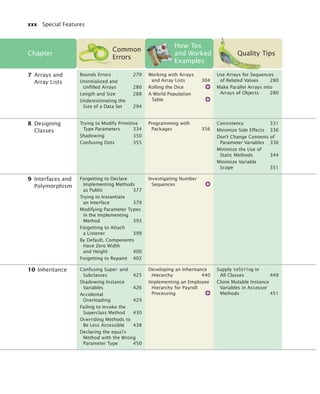
  • 10.
    viii Preface This isthe fourth edition of Big Java, and the book has once again been carefully revised and updated. The new and improved features include: • The How To sections have been updated and expanded, and four new ones have been added. Fifteen new Worked Examples (on the companion web site and in WileyPLUS) walk students through the steps required for solving complex and interesting problems. • The treatment of algorithm design, planning, and the use of pseudocode has been enhanced. Students learn to use pseudocode to define the solution algorithm in Chapter 1. • Chapters have been revised to focus each section on a specific learning objective. These learning objectives also organize the chapter summary to help students assess their progress. • Syntax diagrams now call out features of typical example code to draw student attention to the key elements of the syntax. Additional annotations point out special cases, common errors, and good practice associated with the syntax. • New example tables clearly present a variety of typical and special cases in a compact format. Each example is accompanied by a brief note explaining the usage shown and the values that result from it. • The gradual introduction of objects has been further improved by providing additional examples and insights in the early chapters. • Features introduced in Java 7 are covered as Special Topics so that students can prepare for them. In this edition, we use Java 5 or 6 for the main discussion. • The test bank has been greatly expanded and improved. (See page xi.) • A new set of lab assignments enables students to practice solving complex problems one step at a time. • The LabRat code evaluation feature, enhanced for this edition, gives students instant feedback on their programming assignments. (See page xvi.) New in This Edition More Help for Beginning Programmers Annotated Examples Updated for Java 7 More Opportunities for Practice bj4_fm.fm Page viii Saturday, November 7, 2009 12:01 PM
  • 11.
    Preface ix The bookcan be naturally grouped into four parts, as illustrated by Figure 1. The organization of chapters offers the same flexibility as the previous edition; depen- dencies among the chapters are also shown in the figure. Part A: Fundamentals (Chapters 1–7) Chapter 1 contains a brief introduction to computer science and Java programming. Chapter 2 shows how to manipulate objects of predefined classes. In Chapter 3, you will build your own simple classes from given specifications. Fundamental data types, branches, loops, and arrays are covered in Chapters 4–7. Part B: Object-Oriented Design (Chapters 8–12) Chapter 8 takes up the subject of class design in a systematic fashion, and it intro- duces a very simple subset of the UML notation. The discussion of polymorphism and inheritance is split into two chapters. Chap- ter 9 covers interfaces and polymorphism, whereas Chapter 10 covers inheritance. Introducing interfaces before inheritance pays off in an important way: Students immediately see polymorphism before getting bogged down with technical details such as superclass construction. Exception handling and basic file input/output are covered in Chapter 11. The exception hierarchy gives a useful example for inheritance. Chapter 12 contains an introduction to object-oriented design, including two significant case studies. Part C: Data Structures and Algorithms (Chapters 13–17) Chapters 13 through 17 contain an introduction to algorithms and data structures, covering recursion, sorting and searching, linked lists, binary trees, and hash tables. These topics may be outside the scope of a one-semester course, but can be covered as desired after Chapter 7 (see Figure 1). Recursion is introduced from an object-oriented point of view: An object that solves a problem recursively constructs another object of the same class that solves a simpler problem. The idea of having the other object do the simpler job is more intuitive than having a function call itself. Each data structure is presented in the context of the standard Java collections library. You will learn the essential abstractions of the standard library (such as iterators, sets, and maps) as well as the performance characteristics of the various collections. However, a detailed discussion of the implementation of advanced data structures is beyond the scope of this book. Chapter 17 introduces Java generics. This chapter is suitable for advanced stu- dents who want to implement their own generic classes and methods. Part D: Advanced Topics (Chapters 18–24) Chapters 18 through 24 cover advanced Java programming techniques that defi- nitely go beyond a first course in Java. Although, as already mentioned, a compre- hensive coverage of the Java library would span many volumes, many instructors prefer that a textbook should give students additional reference material valuable beyond their first course. Some institutions also teach a second-semester course that A Tour of the Book bj4_fm.fm Page ix Saturday, November 7, 2009 12:01 PM
  • 12.
    x Preface Figure 1Chapter Dependencies 4. Fundamental Data Types 5. Decisions 9. Interfaces and Polymorphism 10. Inheritance 11. Input/Output and Exception Handling 19. Streams and Binary I/O 20. Multithreading 12. Object- Oriented Design 22. Relational Databases 13. Recursion 14. Sorting and Searching 15. Intro to Data Structures 16. Advanced Data Structures 21. Internet Networking 23. XML 24. Web Applications 7. Arrrays and Array Lists 6. Iteration 8. Designing Classes 17. Generic Programming 3. Implementing Classes 1. Introduction 2. Using Objects Fundamentals Object-Oriented Design Data Structures & Algorithms Advanced Topics 18. Graphical User Interfaces bj4_fm.fm Page x Saturday, November 7, 2009 12:01 PM
  • 13.
    Preface xi covers morepractical programming aspects such as database and network program- ming, rather than the more traditional in-depth material on data structures and algo- rithms. This book can be used in a two-semester course to give students an introduction to programming fundamentals and broad coverage of applications. Alternatively, the material in the final chapters can be useful for student projects. The advanced topics include graphical user-interface design, advanced file han- dling, multithreading, and those technologies that are of particular interest to server-side programming: networking, databases, XML, and web applications. The Internet has made it possible to deploy many useful applications on servers, often accessed by nothing more than a browser. This server-centric approach to applica- tion development was in part made possible by the Java language and libraries, and today, much of the industrial use of Java is in server-side programming. Appendices Appendix A lists character escape sequences and the Basic Latin and Latin-1 subsets of Unicode. Appendices B and C summarize Java reserved words and operators. Appendix D documents all of the library methods and classes used in this book. Additional appendices contain quick references on Java syntax, HTML, Java tools, binary numbers, and UML. Appendix L contains a style guide for use with this book. Many instructors find it highly beneficial to require a consistent style for all assignments. If this style guide conflicts with instructor sentiment or local customs, however, it is available in electronic form so that it can be modified. Web Resources This book is complemented by a complete suite of online resources and a robust WileyPLUS course. Go to www.wiley.com/college/horstmann to visit the online companion site, which includes • Source code for all examples in the book. • Worked Examples that apply the problem-solving steps in the book to other realistic examples. • Laboratory exercises (and solutions for instructors only). • Lecture presentation slides (in HTML and PowerPoint formats). • Solutions to all review and programming exercises (for instructors only). • A test bank that focuses on skills, not just terminology (for instructors only). WileyPLUS is an online teaching and learning environment that integrates the digital textbook with instructor and student resources. See page xvi for details. • Worked Example How Many Days Have You Been Alive? • Worked Example Working with Pictures • Lab Exercises Animation Variable Initialization and Assignment Animation Parameter Passing Animation Object References Practice Quiz Code Completion Exercises Media Resources www.wiley.com/ college/ horstmann Web resources are summarized at chapter end for easy reference. bj4_fm.fm Page xi Saturday, November 7, 2009 12:01 PM
  • 14.
    xii Walkthrough The pedagogicalelements in this book work together to make the book accessible to beginners as well as those learning Java as a second language. A Walkthrough of the Learning Aids 2.3 The Assignment Operator 39 You can change the value of a variable with the assignment operator (=). For exam- ple, consider the variable declaration int width = 10; If you want to change the value of the variable, simply assign the new value: width = 20; The assignment replaces the original value of the variable (see Figure 1). It is an error to use a variable that has never had a value assigned to it. For exam- ple, the following assignment statement has an error: int height; width = height; // ERROR—uninitialized variable height The compiler will complain about an “uninitialized variable” when you use a vari- able that has never been assigned a value. (See Figure 2.) 2.3 The Assignment Operator Use the assignment operator (=) to change the value of a variable. 1 2 Figure 1 Assigning a New Value to a Variable width = 10 width = 20 1 2 Figure 2 An Uninitialized Variable Syntax 2.2 Assignment height = No value has been assigned. variableName = value; Syntax Example double width = 20; . . width = 30; . . . width = width + 10; The value of this variable is changed. The same name can occur on both sides. See Figure 3. The new value of the variable This is a variable declaration. This is an assignment statement. Annotations explain required components and point to more information on common errors or best practices associated with the syntax. Throughout each chapter, margin notes show where new concepts are introduced and provide an outline of key ideas. Annotated syntax boxes provide a quick, visual overview of new language constructs. Explain the flow of execution in a loop. • A while statement executes a block of code repeatedly. A condition controls for how long the loop is executed. • An off-by-one error is a common error when programming loops. Think through simple test cases to avoid this type of error. Use for loops to implement counting loops. • You use a for loop when a variable runs from a starting to an ending value with a constant increment or decrement. • Make a choice between symmetric and asymmetric loop bounds. • Count the number of iterations to check that your for loop is correct. Implement loops that process a data set until a sentinel value is encountered. • Sometimes, the termination condition of a loop can only be evaluated in the middle of a loop. You can introduce a Boolean variable to control such a loop. Use nested loops to implement multiple levels of iterations. • When the body of a loop contains another loop, the loops are nested. A typical use of nested loops is printing a table with rows and columns. Summary of Learning Objectives Each section corresponds to a learning objective, summarized at chapter end, giving students a roadmap for assessing what they know and what they need to review. bj4_fm.fm Page xii Saturday, November 7, 2009 12:01 PM
  • 15.
    Walkthrough xiii 180 Decisions Table1 Relational Operator Examples t n e m m o C e u l a V n o i s s e r p x E e u r t 4 = < 3 3 is less than 4; <= tests for “less than or equal”. 3 =< 4 Error The “less than or equal” operator is <=, not =<, with the “less than” symbol first. e s l a f 4 > 3 > is the opposite of <=. e s l a f 4 < 4 The left-hand side must be strictly smaller than the right-hand side. e u r t 4 = < 4 Both sides are equal; <= tests for “less than or equal”. e u r t 2 - 5 = = 3 == tests for equality. e u r t 1 - 5 = ! 3 != tests for inequality. It is true that 3 is not 5 – 1. 3 = 6 / 2 Error Use == to test for equality. 1.0 / 3.0 == 0.333333333 false Although the values are very close to one another, they are not exactly equal. See Common Error 4.3. "10" > 5 Error You cannot compare a string to a number. "Tomato".substring(0, 3).equals("Tom") true Always use the equals method to check whether two strings have the same contents. "Tomato".substring(0, 3) == ("Tom") false Never use == to compare strings; it only checks whether the strings are stored in the same location. See Common Error 5.2 on page 180. "Tom".equalsIgnoreCase("TOM") true Use the equalsIgnoreCase method if you don’t want to distinguish between uppercase and lowercase letters. We simply want to know which car is the better buy. That is the desired output. Step 2 Break down the problem into smaller tasks. For each car, we need to know the total cost of driving it. Let’s do this computation sepa- rately for each car. Once we have the total cost for each car, we can decide which car is the better deal. The total cost for each car is purchase price + operating cost. We assume a constant usage and gas price for ten years, so the operating cost depends on the cost of driving the car for one year. The operating cost is 10 x annual fuel cost. The annual fuel cost is price per gallon x annual fuel consumed. The annual fuel consumed is annual miles driven / fuel efficiency. For example, if you drive the car for 15,000 miles and the fuel efficiency is 15 miles/gallon, the car consumes 1,000 gallons. Step 3 Describe each subtask in pseudocode. In your description, arrange the steps so that any intermediate values are computed before they are needed in other computations. For example, list the step total cost = purchase price + operating cost after you have computed operating cost. Here is the algorithm for deciding which car to buy. For each car, compute the total cost as follows: annual fuel consumed = annual miles driven / fuel efficiency annual fuel cost = price per gallon x annual fuel consumed operating cost = 10 x annual fuel cost total cost = purchase price + operating cost If total cost1 < total cost2 Choose car1. Else Choose car2. HOW TO 1.1 Developing and Describing an Algorithm This is the first of many “How To” sections in this book that give you step-by-step proce- dures for carrying out important tasks in developing computer programs. Before you are ready to write a program in Java, you need to develop an algorithm—a method for arriving at a solution for a particular problem. Describe the algorithm in pseudocode: a sequence of precise steps formulated in English. For example, consider this problem: You have the choice of buying two cars. One is more fuel efficient than the other, but also more expensive. You know the price and fuel efficiency (in miles per gallon, mpg) of both cars. You plan to keep the car for ten years. Assume a price of $4 per gallon of gas and usage of 15,000 miles per year. You will pay cash for the car and not worry about financing costs. Which car is the better deal? Step 1 Determine the inputs and outputs. In our sample problem, we have these inputs: • purchase price1 and fuel efficiency1, the price and fuel efficiency (in mpg) of the first car. • purchase price2 and fuel efficiency2, the price and fuel efficiency of the second car. How To guides give step-by-step guidance for common programming tasks, emphasizing planning and testing. They answer the beginner’s question, “Now what do I do?” and integrate key concepts into a problem-solving sequence. Example tables support beginners with multiple, concrete examples. These tables point out common errors and present another quick reference to the section’s topic. Worked Examples apply the steps in the How To to a different example, illustrating how they can be used to plan, implement, and test a solution to another programming problem. Credit Card Processing This Worked Example uses a loop to remove spaces from a credit card number. Worked Example 6.1 Writing an Algorithm for Tiling a Floor This Worked Example shows how to develop an algorithm for laying tile in an alternating pattern of colors. Worked Example 1.1 bj4_fm.fm Page xiii Saturday, November 7, 2009 12:01 PM
  • 16.
    xiv Walkthrough Now considerthe seemingly analogous code with Rectangle objects (see Figure 21). Rectangle box = new Rectangle(5, 10, 20, 30); Rectangle box2 = box; box2.translate(15, 25); Since box and box2 refer to the same rectangle after step , both variables refer to the moved rectangle after the call to the translate method. You need not worry too much about the difference between objects and object references. Much of the time, you will have the correct intuition when you think of “the object box” rather than the technically more accurate “the object reference stored in box”. The difference between objects and object references only becomes apparent when you have multiple variables that refer to the same object. 25. What is the effect of the assignment String greeting2 = greeting? 26. After calling greeting2.toUpperCase(), what are the contents of greeting and greeting2? Figure 21 Copying Object References box = box2 = x = Rectangle y = width = height = 5 10 20 g 30 box = box2 = x = Rectangle y = width = height = 20 35 20 g 30 box = x = Rectangle y = width = height = 5 10 20 g 30 1 2 3 1 2 3 A N I M AT I O N Object References 2 S E L F C H E C K 6.2 for Loops 205 ch06/invest2/Investment.java 1 /** 2 A class to monitor the growth of an investment that 3 accumulates interest at a fixed annual rate. 4 */ 5 public class Investment 6 { 7 private double balance; 8 private double rate; 9 private int years; 10 11 /** 12 Constructs an Investment object from a starting balance and 13 interest rate. 14 @param aBalance the starting balance 15 @param aRate the interest rate in percent 16 */ 17 public Investment(double aBalance, double aRate) 18 { 19 balance = aBalance; 20 rate = aRate; 21 years = 0; 22 } 23 24 /** 25 Keeps accumulating interest until a target balance has 26 been reached. 27 @param targetBalance the desired balance 28 */ Program listings are carefully designed for easy reading, going well beyond simple color coding. Methods are set off by a subtle outline. 4. What is the difference between the following two statements? final double CM_PER_INCH = 2.54; and public static final double CM_PER_INCH = 2.54; 5. What is wrong with the following statement sequence? double diameter = . . .; double circumference = 3.14 * diameter; S E L F C H E C K Figure 4 Execution of a for Loop for (int i = 1; i <= numberOfYears; i++) { double interest = balance * rate / 100; balance = balance + interest; } Initialize counter 1 for (int i = 1; i <= numberOfYears; i++) { double interest = balance * rate / 100; balance = balance + interest; } Check condition 2 for (int i = 1; i <= numberOfYears; i++) { double interest = balance * rate / 100; balance = balance + interest; } Execute loop body 3 for (int i = 1; i <= numberOfYears; i++) { double interest = balance * rate / 100; balance = balance + interest; } Update counter 4 for (int i = 1; i <= numberOfYears; i++) { double interest = balance * rate / 100; balance = balance + interest; } Check condition again 5 i = 1 i = 1 i = 1 i = 2 i = 2 Progressive figures trace code segments to help students visualize the program flow. Color is used consistently to make variables and other elements easily recognizable. Self-check exercises at the end of each section are designed to make students think through the new material—and can spark discussion in lecture. Students can view animations of key concepts on the Web. bj4_fm.fm Page xiv Saturday, November 7, 2009 12:01 PM
  • 17.
    Walkthrough xv Length andSize Unfortunately, the Java syntax for determining the number of elements in an array, an array list, and a string is not at all consistent. It is a com- mon error to confuse these. You just have to remember the correct syntax for every data type. Common Error 7.3 Data Type Number of Elements Array a.length Array list a.size() String a.length() ; Do Not Use Magic Numbers A magic number is a numeric constant that appears in your code without explanation. For example, consider the following scary example that actually occurs in the Java library source: h = 31 * h + ch; Why 31? The number of days in January? One less than the number of bits in an integer? Actually, this code computes a “hash code” from a string—a number that is derived from the characters in such a way that different strings are likely to yield different hash codes. The value 31 turns out to scramble the character values nicely. A better solution is to use a named constant: final int HASH_MULTIPLIER = 31; h = HASH_MULTIPLIER * h + ch; You should never use magic numbers in your code. Any number that is not completely self- explanatory should be declared as a named constant. Even the most reasonable cosmic con- stant is going to change one day. You think there are 365 days in a year? Your customers on Mars are going to be pretty unhappy about your silly prejudice. Make a constant final int DAYS_PER_YEAR = 365; By the way, the device final int THREE_HUNDRED_AND_SIXTY_FIVE = 365; In the following sections, you will learn how to carry out arithmetic calculations in Java. Quality Tip 4.1 Arithmetic Operations and Hand-Tracing Loops In Programming Tip 5.2, you learned about the method of hand tracing. This method is par- ticularly effective for understanding how a loop works. Consider this example loop. What value is displayed? int n = 1729; int sum = 0; while (n > 0) { int digit = n % 10; sum = sum + digit; n = n / 10; } System.out.println(sum); 1. There are three variables: n, sum, and digit. The first two variables are initialized with 1729 and 0 before the loop is entered. 2. Because n is positive, enter the loop. 3. The variable digit is set to 9 (the remainder of dividing 1729 by 10). The variable sum is set to 0 + 9 = 9. Finally, n becomes 172. (Recall that the remainder in the division 1729 / 10 is discarded because both arguments are integers.). Cross out the old values and write the new ones under the old ones. Productivity Hint 6.1 1 2 3 4 5 6 7 n sum digit 1729 0 n sum digit 1729 0 172 9 9 ArrayList Syntax Enhancements in Java 7 Java 7 introduces several convenient syntax enhancements for array lists. When you declare and construct an array list, you need not repeat the type parameter in the constructor. That is, you can write ArrayList<String> names = new ArrayList<>(); instead of ArrayList<String> names = new ArrayList<String>(); Special Topic 7.2 The First Bug According to legend, the first bug was one found in 1947 in the Mark II, a huge electro- mechanical computer at Harvard University. It really was caused by a bug—a moth was trapped in a relay switch. Actually, from the note that the operator left in the log book next to the moth (see the figure), it appears as if the term “bug” had already been in active use at the time. The pioneering computer scientist Maurice Wilkes wrote: “Somehow, at the Moore School and afterwards, one had always assumed there would be no particular difficulty in getting programs right. I can remember the exact instant in time at which it dawned on me The First Bug Random Fact 6.1 Common Errors describe the kinds of errors that students often make, with an explanation of why the errors occur, and what to do about them. Quality Tips explain good programming practices. These notes carefully motivate the reason behind the advice, and explain why the effort will be repaid later. Productivity Hints teach students how to use their time and tools more effectively. They encourage students to be more productive with tips and techniques such as hand-tracing. Special Topics present optional topics and provide additional explanation of others. New features of Java 7 are also covered in these notes. Random Facts provide historical and social information on computing—for interest and to fulfill the “historical and social context” requirements of the ACM/IEEE curriculum guidelines. bj4_fm.fm Page xv Saturday, November 7, 2009 12:01 PM
  • 18.
    xvi Walkthrough WileyPLUS isan online environment that supports students and instructors. This book’s WileyPLUS course can complement the printed text or replace it altogether. For Students Different learning styles, different levels of proficiency, different levels of prepara- tion—each of your students is unique. WileyPLUS empowers all students to take advantage of their individual strengths. Integrated, multi-media resources—including audio and visual exhibits and demon- stration problems—encourage active learning and provide multiple study paths to fit each student’s learning preferences. • Worked Examples apply the problem-solving steps in the book to another realis- tic example. • Screencast Videos present the author explaining the steps he is taking and show- ing his work as he solves a programming problem. • Animations of key concepts allow students to replay dynamic explanations that instructors usually provide on a whiteboard. Self-assessments are linked to relevant portions of the text. Students can take con- trol of their own learning and practice until they master the material. • Practice quizzes can reveal areas where students need to focus. • Lab exercises can be assigned for self-study or for use in the lab. • “Code completion” questions enable students to practice programming skills by filling in small code snippets and getting immediate feedback. • LabRat provides instant feedback on student solutions to all programming exer- cises in the book. For Instructors WileyPLUS includes all of the instructor resources found on the companion site, and more. WileyPLUS gives you tools for identifying those students who are falling behind, allowing you to intervene accordingly, without having to wait for them to come to office hours. • Practice quizzes for pre-reading assessment, self-quizzing, or additional practice can be used as-is or modified for your course needs. • Multi-step laboratory exercises can be used in lab or assigned for extra student practice. WileyPLUS simplifies and automates student performance assessment, making assignments, and scoring student work. • An extensive set of multiple-choice questions for quizzing and testing have been developed to focus on skills, not just terminology. • “Code completion” questions can also be added to online quizzes. • LabRat can track student work on all programming exercises in the book, adding the student solution and a record of completion to the gradebook. • Solutions to all review and programming exercises are provided. WileyPLUS bj4_fm.fm Page xvi Saturday, November 7, 2009 12:01 PM
  • 19.
    Walkthrough xvii Students canread the book online and take advantage of searching and cross-linking. With WileyPLUS … Students can practice programming by filling in small code snippets and getting immediate feedback. Instructors can assign drill-and-practice questions to check that students did their reading and grasp basic concepts. Students can play and replay dynamic explanations of concepts and program flow. Students can check that their programming assignments fulfill the specifications. To order Big Java with its WileyPLUS course for your students, use ISBN 978-0-470-57827-8. bj4_fm.fm Page xvii Saturday, November 7, 2009 12:01 PM
  • 20.
    xviii Acknowledgments Many thanksto Beth Golub, Lauren Sapira, Andre Legaspi, Don Fowley, Mike Berlin, Janet Foxman, Lisa Gee, and Bud Peters at John Wiley & Sons, and Vickie Piercey at Publishing Services for their help with this project. An especially deep acknowledgment and thanks goes to Cindy Johnson for her hard work, sound judgment, and amazing attention to detail. I am grateful to Suzanne Dietrich, Rick Giles, Kathy Liszka, Stephanie Smullen, Julius Dichter, Patricia McDermott-Wells, and David Woolbright, for their work on the supplemental material. Many thanks to the individuals who reviewed the manuscript for this edition, made valuable suggestions, and brought an embarrassingly large number of errors and omissions to my attention. They include: Ian Barland, Radford University Rick Birney, Arizona State University Paul Bladek, Edmonds Community College Robert P. Burton, Brigham Young University Teresa Cole, Boise State University Geoffrey Decker, Northern Illinois University Eman El-Sheikh, University of West Florida David Freer, Miami Dade College Ahmad Ghafarian, North Georgia College & State University Norman Jacobson, University of California, Irvine Mugdha Khaladkar, New Jersey Institute of Technology Hong Lin, University of Houston, Downtown Jeanna Matthews, Clarkson University Sandeep R. Mitra, State University of New York, Brockport Parviz Partow-Navid, California State University, Los Angeles Jim Perry, Ulster County Community College Kai Qian, Southern Polytechnic State University Cyndi Rader, Colorado School of Mines Chaman Lal Sabharwal, Missouri University of Science and Technology John Santore, Bridgewater State College Stephanie Smullen, University of Tennessee, Chattanooga Monica Sweat, Georgia Institute of Technology Shannon Tauro, University of California, Irvine Russell Tessier, University of Massachusetts, Amherst Jonathan L. Tolstedt, North Dakota State University David Vineyard, Kettering University Lea Wittie, Bucknell University Acknowledgments bj4_fm.fm Page xviii Saturday, November 7, 2009 12:01 PM
  • 21.
    Acknowledgments xix Every newedition builds on the suggestions and experiences of prior reviewers and users. I am grateful for the invaluable contributions these individuals have made to this book: Tim Andersen, Boise State University Ivan Bajic, San Diego State University Ted Bangay, Sheridan Institute of Technology George Basham, Franklin University Sambit Bhattacharya, Fayetteville State University Joseph Bowbeer, Vizrea Corporation Timothy A. Budd, Oregon State University Frank Butt, IBM Jerry Cain, Stanford University Adam Cannon, Columbia University Nancy Chase, Gonzaga University Archana Chidanandan, Rose-Hulman Institute of Technology Vincent Cicirello, The Richard Stockton College of New Jersey Deborah Coleman, Rochester Institute of Technology Valentino Crespi, California State University, Los Angeles Jim Cross, Auburn University Russell Deaton, University of Arkansas H. E. Dunsmore, Purdue University Robert Duvall, Duke University Henry A. Etlinger, Rochester Institute of Technology John Fendrich, Bradley University John Fulton, Franklin University David Geary, Sabreware, Inc. Margaret Geroch, Wheeling Jesuit University Rick Giles, Acadia University Stacey Grasso, College of San Mateo Jianchao Han, California State University, Dominguez Hills Lisa Hansen, Western New England College Elliotte Harold Eileen Head, Binghamton University Cecily Heiner, University of Utah Brian Howard, Depauw University Lubomir Ivanov, Iona College Curt Jones, Bloomsburg University Aaron Keen, California Polytechnic State University, San Luis Obispo Elliot Koffman, Temple University Kathy Liszka, University of Akron Hunter Lloyd, Montana State University Youmin Lu, Bloomsburg University John S. Mallozzi, Iona College John Martin, North Dakota State University Scott McElfresh, Carnegie Mellon University Joan McGrory, Christian Brothers University Carolyn Miller, North Carolina State University Teng Moh, San Jose State University John Moore, The Citadel Faye Navabi, Arizona State University Kevin O’Gorman, California Polytechnic State University, San Luis Obispo Michael Olan, Richard Stockton College Kevin Parker, Idaho State University Cornel Pokorny, California Polytechnic State University, San Luis Obispo Roger Priebe, University of Texas, Austin C. Robert Putnam, California State University, Northridge Neil Rankin, Worcester Polytechnic Institute Brad Rippe, Fullerton College Pedro I. Rivera Vega, University of Puerto Rico, Mayaguez Daniel Rogers, SUNY Brockport Carolyn Schauble, Colorado State University Christian Shin, SUNY Geneseo Jeffrey Six, University of Delaware Don Slater, Carnegie Mellon University Ken Slonneger, University of Iowa Peter Stanchev, Kettering University Ron Taylor, Wright State University Joseph Vybihal, McGill University Xiaoming Wei, Iona College Todd Whittaker, Franklin University Robert Willhoft, Roberts Wesleyan College David Womack, University of Texas at San Antonio Catherine Wyman, DeVry University Arthur Yanushka, Christian Brothers University Salih Yurttas, Texas A&M University bj4_fm.fm Page xix Saturday, November 7, 2009 12:01 PM
  • 22.
    bj4_fm.fm Page xxSaturday, November 7, 2009 12:01 PM
  • 23.
    CONTENTS xxi PREFACE vii SPECIAL FEATURESxxviii 1.1 What Is Programming? 2 1.2 The Anatomy of a Computer 3 1.3 Translating Human-Readable Programs to Machine Code 7 1.4 The Java Programming Language 9 1.5 The Structure of a Simple Program 11 1.6 Compiling and Running a Java Program 15 1.7 Errors 18 1.8 Algorithms 20 2.1 Types 34 2.2 Variables 36 2.3 The Assignment Operator 39 2.4 Objects, Classes, and Methods 41 2.5 Method Parameters and Return Values 43 2.6 Constructing Objects 46 2.7 Accessor and Mutator Methods 48 2.8 The API Documentation 49 2.9T Implementing a Test Program 52 2.10 Object References 54 2.11G Graphical Applications and Frame Windows 58 2.12G Drawing on a Component 60 2.13G Ellipses, Lines, Text, and Color 66 3.1 Instance Variables 82 3.2 Encapsulation 84 3.3 Specifying the Public Interface of a Class 85 3.4 Commenting the Public Interface 89 3.5 Providing the Class Implementation 92 3.6T Unit Testing 98 CHAPTER 1 INTRODUCTION 1 CHAPTER 2 USING OBJECTS 33 CHAPTER 3 IMPLEMENTING CLASSES 81 bj4_fm.fm Page xxi Saturday, November 7, 2009 12:01 PM
  • 24.
    xxii Contents 3.7 LocalVariables 100 3.8 Implicit Parameters 102 3.9G Shape Classes 106 4.1 Number Types 128 4.2 Constants 133 4.3 Arithmetic Operations and Mathematical Functions 137 4.4 Calling Static Methods 145 4.5 Strings 149 4.6 Reading Input 155 5.1 The if Statement 172 5.2 Comparing Values 177 5.3 Multiple Alternatives 185 5.4 Using Boolean Expressions 195 5.5T Code Coverage 202 6.1 while Loops 218 6.2 for Loops 228 6.3 Common Loop Algorithms 236 6.4 Nested Loops 247 6.5 Application: Random Numbers and Simulations 250 6.6T Using a Debugger 257 7.1 Arrays 276 7.2 Array Lists 283 7.3 Wrappers and Auto-boxing 289 7.4 The Enhanced for Loop 291 7.5 Partially Filled Arrays 292 7.6 Common Array Algorithms 294 7.7T Regression Testing 306 7.8 Two-Dimensional Arrays 310 CHAPTER 4 FUNDAMENTAL DATA TYPES 127 CHAPTER 5 DECISIONS 171 CHAPTER 6 ITERATION 217 CHAPTER 7 ARRAYS AND ARRAY LISTS 275 bj4_fm.fm Page xxii Saturday, November 7, 2009 12:01 PM
  • 25.
    Contents xxiii 8.1 DiscoveringClasses 328 8.2 Cohesion and Coupling 329 8.3 Immutable Classes 332 8.4 Side Effects 333 8.5 Preconditions and Postconditions 338 8.6 Static Methods 342 8.7 Static Variables 345 8.8 Scope 348 8.9 Packages 352 8.10T Unit Test Frameworks 359 9.1 Using Interfaces for Algorithm Reuse 372 9.2 Converting Between Class and Interface Types 378 9.3 Polymorphism 380 9.4 Using Interfaces for Callbacks 381 9.5 Inner Classes 385 9.6T Mock Objects 389 9.7G Events, Event Sources, and Event Listeners 391 9.8G Using Inner Classes for Listeners 394 9.9G Building Applications with Buttons 396 9.10G Processing Timer Events 400 9.11G Mouse Events 403 10.1 Inheritance Hierarchies 420 10.2 Implementing Subclasses 423 10.3 Overriding Methods 427 10.4 Subclass Construction 430 10.5 Converting Between Subclass and Superclass Types 433 10.6 Polymorphism and Inheritance 435 10.7 Object: The Cosmic Superclass 444 10.8G Using Inheritance to Customize Frames 456 CHAPTER 8 DESIGNING CLASSES 327 CHAPTER 9 INTERFACES AND POLYMORPHISM 371 CHAPTER 10 INHERITANCE 419 bj4_fm.fm Page xxiii Saturday, November 7, 2009 12:01 PM
  • 26.
    xxiv Contents 11.1 Readingand Writing Text Files 468 11.2 Reading Text Input 473 11.3 Throwing Exceptions 481 11.4 Checked and Unchecked Exceptions 483 11.5 Catching Exceptions 485 11.6 The finally Clause 488 11.7 Designing Your Own Exception Types 490 11.8 Case Study: A Complete Example 491 12.1 The Software Life Cycle 506 12.2 Discovering Classes 511 12.3 Relationships Between Classes 513 12.4 Case Study: Printing an Invoice 518 12.5 Case Study: An Automatic Teller Machine 529 13.1 Triangle Numbers 558 13.2 Recursive Helper Methods 566 13.3 The Efficiency of Recursion 568 13.4 Permutations 573 13.5 Mutual Recursions 579 14.1 Selection Sort 596 14.2 Profiling the Selection Sort Algorithm 599 14.3 Analyzing the Performance of the Selection Sort Algorithm 602 14.4 Merge Sort 606 14.5 Analyzing the Merge Sort Algorithm 609 14.6 Searching 614 14.7 Binary Search 616 14.8 Sorting Real Data 619 15.1 Using Linked Lists 630 15.2 Implementing Linked Lists 636 15.3 Abstract Data Types 647 15.4 Stacks and Queues 651 CHAPTER 11 INPUT/OUTPUT AND EXCEPTION HANDLING 467 CHAPTER 12 OBJECT-ORIENTED DESIGN 505 CHAPTER 13 RECURSION 557 CHAPTER 14 SORTING AND SEARCHING 595 CHAPTER 15 AN INTRODUCTION TO DATA STRUCTURES 629 bj4_fm.fm Page xxiv Saturday, November 7, 2009 12:01 PM
  • 27.
    Contents xxv 16.1 Sets666 16.2 Maps 670 16.3 Hash Tables 674 16.4 Computing Hash Codes 681 16.5 Binary Search Trees 686 16.6 Binary Tree Traversal 696 16.7 Priority Queues 698 16.8 Heaps 699 16.9 The Heapsort Algorithm 709 17.1 Generic Classes and Type Parameters 724 17.2 Implementing Generic Types 725 17.3 Generic Methods 728 17.4 Constraining Type Parameters 730 17.5 Type Erasure 732 18.1G Processing Text Input 740 18.2G Text Areas 743 18.3G Layout Management 746 18.4G Choices 748 18.5G Menus 758 18.6G Exploring the Swing Documentation 764 19.1 Readers, Writers, and Streams 778 19.2 Binary Input and Output 779 19.3 Random Access 785 19.4 Object Streams 790 20.1 Running Threads 802 20.2 Terminating Threads 807 20.3 Race Conditions 809 20.4 Synchronizing Object Access 815 20.5 Avoiding Deadlocks 818 20.6G Case Study: Algorithm Animation 824 CHAPTER 16 ADVANCED DATA STRUCTURES 665 CHAPTER 17 GENERIC PROGRAMMING 723 CHAPTER 18 GRAPHICAL USER INTERFACES (ADVANCED) 739 CHAPTER 19 STREAMS AND BINARY INPUT/OUTPUT (ADVANCED) 777 CHAPTER 20 MULTITHREADING (ADVANCED) 801 bj4_fm.fm Page xxv Saturday, November 7, 2009 12:01 PM
  • 28.
    xxvi Contents 21.1 TheInternet Protocol 840 21.2 Application Level Protocols 842 21.3 A Client Program 845 21.4 A Server Program 848 21.5 URL Connections 856 23.1 Organizing Database Information 866 23.2 Queries 873 23.3 Installing a Database 881 23.4 Database Programming in Java 886 23.5 Case Study: A Bank Database 893 25.1 XML Tags and Documents 906 25.2 Parsing XML Documents 914 25.3 Creating XML Documents 923 25.4 Validating XML Documents 929 26.1 The Architecture of a Web Application 948 26.2 The Architecture of a JSF Application 950 26.3 JavaBeans Components 956 26.4 Navigation Between Pages 957 26.5 JSF Components 963 26.6 A Three-Tier Application 965 APPENDIX A THE BASIC LATIN AND LATIN-1 SUBSETS OF UNICODE 979 APPENDIX B JAVA OPERATOR SUMMARY 983 APPENDIX C JAVA RESERVED WORD SUMMARY 985 APPENDIX D THE JAVA LIBRARY 987 APPENDIX E JAVA SYNTAX SUMMARY 1029 APPENDIX F HTML SUMMARY 1040 APPENDIX G TOOL SUMMARY 1045 APPENDIX H JAVADOC SUMMARY 1048 APPENDIX I NUMBER SYSTEMS 1050 APPENDIX J BIT AND SHIFT OPERATIONS 1055 CHAPTER 21 INTERNET NETWORKING (ADVANCED) 839 CHAPTER 22 RELATIONAL DATABASES (ADVANCED) 865 CHAPTER 24 XML (ADVANCED) 905 CHAPTER 26 WEB APPLICATIONS (ADVANCED) 947 APPENDICES bj4_fm.fm Page xxvi Saturday, November 7, 2009 12:01 PM
  • 29.
    Contents xxvii APPENDIX KUML SUMMARY 1058 APPENDIX L JAVA LANGUAGE CODING GUIDELINES 1061 GLOSSARY 1068 INDEX 1083 ILLUSTRATION CREDITS 1131 Arrays 279 Array Lists 284 Assertion 339 Assignment 39 Calling a Superclass Constructor 431 Calling a Superclass Method 428 Cast 140 Catching Exceptions 486 Class Declaration 88 Comparisons 178 Constant Declaration 134 Declaring a Generic Class 727 Declaring a Generic Method 729 Declaring an Enumeration Type 194 Declaring an Interface 374 Implementing an Interface 375 Importing a Class from a Package 51 Inheritance 424 Instance Variable Declaration 83 Method Call 13 Method Declaration 94 Object Construction 47 Package Specification 353 Static Method Call 146 The finally Clause 488 The “for each” Loop 291 The for Statement 230 The if Statement 174 The instanceof Operator 434 The throws Clause 485 The while Statement 218 Throwing an Exception 481 Variable Declaration 37 ALPHABETICAL LIST OF SYNTAX BOXES bj4_fm.fm Page xxvii Saturday, November 7, 2009 12:01 PM
  • 30.
    xxviii Special Features Chapter Common Errors HowTos and Worked Examples Quality Tips 1 Introduction Omitting Semicolons 14 Misspelling Words 20 Developing and Describing an Algorithm 23 Writing an Algorithm for Tiling a Floor 2 Using Objects Confusing Variable Declaration and Assign- ment Statements 40 Trying to Invoke a Constructor Like a Method 47 How Many Days Have You Been Alive? Working with Pictures Choose Descriptive Names for Variables 38 3 Implementing Classes Declaring a Constructor as void 89 Forgetting to Initialize Object References in a Constructor 101 Implementing a Class 96 Making a Simple Menu Drawing Graphical Shapes 110 4 Fundamental Data Types Integer Division 142 Unbalanced Parentheses 143 Roundoff Errors 144 Carrying Out Computations 146 Computing the Volume and Surface Area of a Pyramid Extracting Initials Do Not Use Magic Numbers 137 White Space 144 Factor Out Common Code 144 5 Decisions A Semicolon After the if Condition 176 Using == to Compare Strings 180 The Dangling else Problem 191 Multiple Relational Operators 199 Confusing && and || Conditions 199 Implementing an if Statement 183 Extracting the Middle Brace Layout 174 Avoid Conditions with Side Effects 183 Calculate Sample Data Manually 203 Prepare Test Cases Ahead of Time 204 6 Iteration Infinite Loops 223 Off-by-One Errors 226 Forgetting a Semicolon 233 A Semicolon Too Many 233 Writing a Loop 241 Credit Card Processing Manipulating the Pixels in an Image Debugging 260 A Sample Debugging Session Use for Loops for Their Intended Purpose 232 Don’t Use != to Test the End of a Range 234 Symmetric and Asymmetric Bounds 235 Count Iterations 235 bj4_fm.fm Page xxviii Saturday, November 7, 2009 12:01 PM
  • 31.
    Special Features xxix Productivity Hints Special Topics RandomFacts Understand the File System 17 Have a Backup Strategy 18 Alternative Comment Syntax 14 The ENIAC and the Dawn of Computing 6 Don’t Memorize—Use Online Help 51 Testing Classes in an Interactive Environment 53 Applets 63 Mainframes—When Dinosaurs Ruled the Earth 57 The Evolution of the Internet 69 The javadoc Utility 92 Calling One Constructor from Another 104 Electronic Voting Machines 104 Computer Graphics 114 Reading Exception Reports 152 Big Numbers 130 Binary Numbers 130 Combining Assignment and Arithmetic 145 Escape Sequences 152 Strings and the char Type 153 Formatting Numbers 158 Using Dialog Boxes for Input and Output 159 The Pentium Floating-Point Bug 132 International Alphabets 154 Indentation and Tabs 175 Hand-Tracing 192 Make a Schedule and Make Time for Unexpected Problems 193 The Conditional Operator 176 The switch Statement 187 Enumeration Types 194 Lazy Evaluation of Boolean Operators 200 De Morgan’s Law 200 Logging 204 Artificial Intelligence 201 Hand-Tracing Loops 223 do Loops 227 Variables Declared in a for Loop Header 234 The “Loop and a Half” Problem 245 The break and continue Statements 246 Loop Invariants 255 The First Bug 262 bj4_fm.fm Page xxix Saturday, November 7, 2009 12:01 PM
  • 32.
    xxx Special Features Chapter Common Errors HowTos and Worked Examples Quality Tips 7 Arrays and Array Lists Bounds Errors 279 Uninitialized and Unfilled Arrays 280 Length and Size 288 Underestimating the Size of a Data Set 294 Working with Arrays and Array Lists 304 Rolling the Dice A World Population Table Use Arrays for Sequences of Related Values 280 Make Parallel Arrays into Arrays of Objects 280 8 Designing Classes Trying to Modify Primitive Type Parameters 334 Shadowing 350 Confusing Dots 355 Programming with Packages 356 Consistency 331 Minimize Side Effects 336 Don’t Change Contents of Parameter Variables 336 Minimize the Use of Static Methods 344 Minimize Variable Scope 351 9 Interfaces and Polymorphism Forgetting to Declare Implementing Methods as Public 377 Trying to Instantiate an Interface 379 Modifying Parameter Types in the Implementing Method 393 Forgetting to Attach a Listener 399 By Default, Components Have Zero Width and Height 400 Forgetting to Repaint 402 Investigating Number Sequences 10 Inheritance Confusing Super- and Subclasses 425 Shadowing Instance Variables 426 Accidental Overloading 429 Failing to Invoke the Superclass Method 430 Overriding Methods to Be Less Accessible 438 Declaring the equals Method with the Wrong Parameter Type 450 Developing an Inheritance Hierarchy 440 Implementing an Employee Hierarchy for Payroll Processing Supply toString in All Classes 449 Clone Mutable Instance Variables in Accessor Methods 451 bj4_fm.fm Page xxx Saturday, November 7, 2009 12:01 PM
  • 33.
    Special Features xxxi Productivity Hints Special Topics RandomFacts Easy Printing of Arrays and Array Lists 303 Batch Files and Shell Scripts 308 Methods with a Variable Number of Parameters 281 ArrayList Syntax Enhancements in Java 7 288 Two-Dimensional Arrays with Variable Row Lengths 313 Multidimensional Arrays 314 An Early Internet Worm 282 The Therac-25 Incidents 309 Call by Value and Call by Reference 337 Class Invariants 341 Static Imports 347 Alternative Forms of Instance and Static Variable Initialization 347 Package Access 355 The Explosive Growth of Personal Computers 357 Don’t Use a Container as a Listener 399 Constants in Interfaces 377 Anonymous Classes 387 Event Adapters 406 Operating Systems 388 Programming Languages 407 Abstract Classes 437 Final Methods and Classes 438 Protected Access 439 Inheritance and the toString Method 449 Inheritance and the equals Method 450 Implementing the clone Method 452 Enumeration Types Revisited 454 Adding the main Method to the Frame Class 457 Scripting Languages 455 bj4_fm.fm Page xxxi Saturday, November 7, 2009 12:01 PM
  • 34.
    xxxii Special Features Chapter Common Errors HowTos and Worked Examples Quality Tips 11 Input/Output and Exception Handling Backslashes in File Names 470 Constructing a Scanner with a String 470 Processing Text Files 478 Analyzing Baby Names Throw Early, Catch Late 487 Do Not Squelch Exceptions 487 Do Not Use catch and finally in the Same try Statement 489 Do Throw Specific Exceptions 491 12 Object- Oriented Design CRC Cards and UML Diagrams 516 13 Recursion Infinite Recursion 561 Tracing Through Recursive Methods 562 Thinking Recursively 563 Finding Files 14 Sorting and Searching The compareTo Method Can Return Any Integer, Not Just –1, 0, and 1 621 15 An Introduc- tion to Data Structures A Reverse Polish Notation Calculator 16 Advanced Data Structures Forgetting to Provide hashCode 685 Choosing a Container 673 Word Frequency Use Interface References to Manipulate Data Structures 670 17 Generic Programming Genericity and Inheritance 731 Using Generic Types in a Static Context 735 18 Graphical User Interfaces (Advanced) Laying Out a User Interface 755 Implementing a Graphical User Interface (GUI) 763 bj4_fm.fm Page xxxii Saturday, November 7, 2009 12:01 PM
  • 35.
    Special Features xxxiii Productivity Hints Special Topics RandomFacts Regular Expressions 477 File Dialog Boxes 471 Reading Web Pages 472 Command Line Arguments 472 Automatic Resource Management in Java 7 490 The Ariane Rocket Incident 495 Attributes and Methods in UML Diagrams 516 Multiplicities 517 Aggregation and Association 517 Programmer Productivity 510 Software Development— Art or Science? 548 The Limits of Computation 576 Insertion Sort 604 Oh, Omega, and Theta 605 The Quicksort Algorithm 611 The Parameterized Comparable Interface 621 The Comparator Interface 622 The First Programmer 613 The Iterable Interface and the “For Each” Loop 635 Static Inner Classes 646 Standardization 650 Reverse Polish Notation 654 Enhancements to Collection Classes in Java 7 672 Software Piracy 714 Wildcard Types 731 Use a GUI Builder 757 bj4_fm.fm Page xxxiii Saturday, November 7, 2009 12:01 PM
  • 36.
    xxxiv Special Features Chapter Common Errors HowTos and Worked Examples Quality Tips 19 Streams and Binary Input/ Output (Advanced) Negative byte Values 782 Using Files and Streams 793 20 Multi- threading (Advanced) Calling await Without Calling signalAll 822 Calling signalAll Without Locking the Object 823 Use the Runnable Interface 806 Check for Thread Interruptions in the run Method of a Thread 809 21 Internet Networking (Advanced) Designing Client/Server Programs 855 22 Relational Databases (Advanced) Joining Tables Without Specifying a Link Condition 879 Delimiters in Manually Constructed Queries 892 Don’t Hardwire Database Connection Parameters into Your Program 892 23 XML (Advanced) XML Elements Describe Objects, Not Classes 919 Designing an XML Document Format 909 Writing an XML Document 928 Writing a DTD 936 Prefer XML Elements over Attributes 911 Avoid Children with Mixed Elements and Text 912 24 Web Applications (Advanced) Designing a Managed Bean 962 bj4_fm.fm Page xxxiv Saturday, November 7, 2009 12:01 PM
  • 37.
    Special Features xxxv Productivity Hints Special Topics RandomFacts Encryption Algorithms 783 Thread Pools 806 Object Locks and Synchronized Methods 823 The Java Memory Model 824 Embedded Systems 832 Use High-Level Libraries 859 Stick with the Standard 871 Avoid Unnecessary Data Replication 872 Don’t Replicate Columns in a Table 873 Let the Database Do the Work 892 Primary Keys and Indexes 872 Transactions 898 Object-Relational Mapping 899 Databases and Privacy 880 Schema Languages 938 Other XML Technologies 939 Word Processing and Typesetting Systems 912 Grammars, Parsers, and Compilers 920 Session State and Cookies 955 AJAX 973 bj4_fm.fm Page xxxv Saturday, November 7, 2009 12:01 PM
  • 38.
    bj4_fm.fm Page xxxviSaturday, November 7, 2009 12:01 PM
  • 39.
    1 Chapter 1 Introduction CHAPTER GOALS • Tounderstand the activity of programming • To learn about the architecture of computers • To learn about machine code and high-level programming languages • To become familiar with the structure of simple Java programs • To compile and run your first Java program • To recognize syntax and logic errors • To write pseudocode for simple algorithms The purpose of this chapter is to familiarize you with the concepts of programming and program development. It reviews the architecture of a computer and discusses the difference between machine code and high-level programming languages. You will see how to compile and run your first Java program, and how to diagnose errors that may occur when a program is compiled or executed. Finally, you will learn how to formulate simple algorithms using pseudocode notation. BJ4_ch01_3.fm Page 1 Monday, June 29, 2009 11:15 AM
  • 40.
    2 CHAPTER CONTENTS You haveprobably used a computer for work or fun. Many people use computers for everyday tasks such as balancing a checkbook or writing a term paper. Comput- ers are good for such tasks. They can handle repetitive chores, such as totaling up numbers or placing words on a page, without getting bored or exhausted. Comput- ers also make good game machines because they can play sequences of sounds and pictures, involving the human user in the process. The flexibility of a computer is quite an amazing phenomenon. The same machine can balance your checkbook, print your term paper, and play a game. In contrast, other machines carry out a much narrower range of tasks—a car drives and a toaster toasts. To achieve this flexibility, the computer must be programmed to perform each task. A computer itself is a machine that stores data (numbers, words, pictures), interacts with devices (the monitor screen, the sound system, the printer), and exe- cutes programs. Programs are sequences of instructions and decisions that the com- puter carries out to achieve a task. One program balances checkbooks; a different program, perhaps designed and constructed by a different company, processes words; and a third program, probably from yet another company, plays a game. Today’s computer programs are so sophisticated that it is hard to believe that they are all composed of extremely primitive operations. A typical operation may be one of the following: • Put a red dot onto this screen position. • Get a number from this location in memory. • Add up two numbers. • If this value is negative, continue the program at that instruction. A computer program tells a computer, in minute detail, the sequence of steps that are needed to complete a task. A program contains a huge number of simple opera- tions, and the computer executes them at great speed. The computer has no intelli- gence—it simply executes instruction sequences that have been prepared in advance. 1.1 What Is Programming? A computer must be programmed to perform tasks. Different tasks require different programs. A computer program executes a sequence of very basic operations in rapid succession. A computer program contains the instruction sequences for all tasks that it can execute. 1.1 What Is Programming? 2 1.2 The Anatomy of a Computer 3 RANDOM FACT 1.2: The ENIAC and the Dawn of Computing 7 1.3 Translating Human-Readable Programs to Machine Code 8 1.4 The Java Programming Language 9 1.5 The Structure of a Simple Program 11 SYNTAX 1.1: Method Call 14 COMMON ERROR 1.1: Omitting Semicolons 14 SPECIAL TOPIC 1.1: Alternative Comment Syntax 15 1.6 Compiling and Running a Java Program 15 PRODUCTIVITY HINT 1.1: Understand the File System 18 PRODUCTIVITY HINT 1.3: Have a Backup Strategy 19 1.7 Errors 19 COMMON ERROR 1.2: Misspelling Words 21 1.8 Algorithms 21 HOW TO 1.1: Describing an Algorithm with Pseudocode 24 WORKED EXAMPLE 1.1: Writing an Algorithm for Tiling a Floor BJ4_ch01_3.fm Page 2 Monday, June 29, 2009 11:15 AM
  • 41.
    1.2 The Anatomyof a Computer 3 To use a computer, no knowledge of programming is required. When you write a term paper with a word processor, that computer program has been developed by the manufacturer and is ready for you to use. That is only to be expected—you can drive a car without being a mechanic and toast bread without being an electrician. A primary purpose of this book is to teach you how to design and implement computer programs. You will learn how to formulate instructions for all tasks that your programs need to execute. Keep in mind that programming a sophisticated computer game or word proces- sor requires a team of many highly skilled programmers, graphic artists, and other professionals. Your first programming efforts will be more mundane. The concepts and skills you learn in this book form an important foundation, but you should not expect to immediately produce professional software. A typical college degree in computer science or software engineering takes four years to complete; this book is intended as a text for an introductory course in such a program. Many students find that there is an immense thrill even in simple programming tasks. It is an amazing experience to see the computer carry out a task precisely and quickly that would take you hours of drudgery. 1. What is required to play a music CD on a computer? 2. Why is a CD player less flexible than a computer? 3. Can a computer program develop the initiative to execute tasks in a better way than its programmers envisioned? To understand the programming process, you need to have a rudimentary under- standing of the building blocks that make up a computer. This section will describe a personal computer. Larger computers have faster, larger, or more powerful com- ponents, but they have fundamentally the same design. At the heart of the computer lies the central processing unit (CPU) (see Figure 1). It consists of a single chip (integrated circuit) or a small number of chips. A com- puter chip is a component with a plastic or metal housing, metal connectors, and S E L F C H E C K 1.2 The Anatomy of a Computer At the heart of the computer lies the central processing unit (CPU). Figure 1 Central Processing Unit bj4_ch01_5.fm Page 3 Wednesday, September 9, 2009 9:44 AM
  • 42.
    4 Chapter 1Introduction inside wiring made principally from silicon. For a CPU chip, the inside wiring is enormously complicated. For example, the Intel Atom chip (a popular CPU for inexpensive laptops at the time of this writing) contains about 50 million structural elements called transistors—the elements that enable electrical signals to control other electrical signals, making automatic computing possible. The CPU locates and executes the program instructions; it carries out arithmetic operations such as addition, subtraction, multiplication, and division; and it fetches data from storage and input/output devices and sends data back. The computer keeps data and programs in storage. There are two kinds of stor- age. Primary storage, also called random-access memory (RAM) or simply memory, is fast but expensive; it is made from memory chips (see Figure 2). Primary storage has two disadvantages. It is comparatively expensive, and it loses all its data when the power is turned off. Secondary storage, usually a hard disk (see Figure 3), pro- vides less expensive storage that persists without electricity. A hard disk consists of rotating platters, which are coated with a magnetic material, and read/write heads, which can detect and change the patterns of varying magnetic flux on the platters. Some computers are self-contained units, whereas others are interconnected through networks. Home computers are usually intermittently connected to the Internet via a dialup or broadband connection. The computers in your computer lab are probably permanently connected to a local area network. Through the net- work cabling, the computer can read programs from central storage locations or send data to other computers. For the user of a networked computer, it may not even be obvious which data reside on the computer itself and which are transmitted through the network. Most computers have removable storage devices that can access data or programs on media such as memory sticks or optical disks. To interact with a human user, a computer requires other peripheral devices. The computer transmits information to the user through a display screen, loudspeakers, and printers. The user can enter information and directions to the computer by using a keyboard or a pointing device such as a mouse. Figure 2 A Memory Module with Memory Chips Data and programs are stored in primary storage (memory) and secondary storage (such as a hard disk). BJ4_ch01_3.fm Page 4 Monday, June 29, 2009 11:15 AM
  • 43.
    1.2 The Anatomyof a Computer 5 The CPU, the RAM, and the electronics controlling the hard disk and other devices are interconnected through a set of electrical lines called a bus. Data travel along the bus from the system memory and peripheral devices to the CPU and back. Figure 4 shows a motherboard, which contains the CPU, the RAM, and con- nectors to peripheral devices. Figure 3 A Hard Disk Figure 4 A Motherboard BJ4_ch01_3.fm Page 5 Monday, June 29, 2009 11:15 AM
  • 44.
    6 Chapter 1Introduction Figure 5 gives a schematic overview of the architecture of a computer. Program instructions and data (such as text, numbers, audio, or video) are stored on the hard disk, on an optical disk (such as a DVD), or on a network. When a program is started, it is brought into memory where it can be read by the CPU. The CPU reads the program one instruction at a time. As directed by these instructions, the CPU reads data, modifies it, and writes it back to RAM or to secondary storage. Some program instructions will cause the CPU to interact with the devices that control the display screen or the speaker. Because these actions happen many times over and at great speed, the human user will perceive images and sound. Similarly, the CPU can send instructions to a printer to mark the paper with patterns of closely spaced dots, which a human recognizes as text characters and pictures. Some pro- gram instructions read user input from the keyboard or mouse. The program ana- lyzes the nature of these inputs and then executes the next appropriate instructions. 4. Where is a program stored when it is not currently running? 5. Which part of the computer carries out arithmetic operations, such as addition and multiplication? The ENIAC and the Dawn of Computing Random Fact 1.1 tells the story of the ENIAC, the first usable electronic computer. The ENIAC was completed in 1946, contained about 18,000 vacuum tubes, and filled a large room. Figure 5 Schematic Diagram of a Computer Printer Mouse Keyboard Bus Ports CPU RAM Disk Controller Hard disk Optical disk drive Monitor Speakers Internet Graphics card Sound card Network card The CPU reads machine instructions from memory. The instructions direct it to communicate with memory, secondary storage, and peripheral devices. S E L F C H E C K Random Fact 1.1 BJ4_ch01_3.fm Page 6 Monday, June 29, 2009 11:15 AM
  • 45.
    1.2 The Anatomyof a Computer 7 The ENIAC and the Dawn of Computing The ENIAC (electronic numerical integrator and computer) was the first usable electronic computer. It was designed by J. Presper Eckert and John Mauchly at the University of Penn- sylvania and was completed in 1946. Instead of transistors, which were not invented until two years after it was built, the ENIAC contained about 18,000 vacuum tubes in many cabi- nets housed in a large room. Vacuum tubes burned out at the rate of several tubes per day. An attendant with a shopping cart full of tubes constantly made the rounds and replaced defective ones. The computer was programmed by connecting wires on panels. Each wiring configuration would set up the computer for a particular problem. To have the computer work on a different problem, the wires had to be replugged. Work on the ENIAC was supported by the U.S. Navy, which was interested in computa- tions of ballistic tables that would give the trajectory of a projectile, depending on the wind resistance, initial velocity, and atmospheric conditions. To compute the trajectories, one must find the numerical solutions of certain differential equations; hence the name “numerical integrator”. Before machines like ENIAC were developed, humans did this kind of work, and until the 1950s the word “computer” referred to these people. The ENIAC was later used for peaceful purposes, such as the tabulation of U.S. census data. The ENIAC Random Fact 1.2 BJ4_ch01_3.fm Page 7 Monday, June 29, 2009 11:15 AM
  • 46.
    8 Chapter 1Introduction On the most basic level, computer instructions are extremely primitive. The proces- sor executes machine instructions. CPUs from different vendors, such as the Intel Pentium or the Sun SPARC, have different sets of machine instructions. To enable Java applications to run on multiple CPUs without modification, Java programs contain machine instructions for a so-called “Java virtual machine” (JVM), an ideal- ized CPU that is simulated by a program run on the actual CPU. The difference between actual and virtual machine instructions is not impor- tant—all you need to know is that machine instructions are very simple, are encoded as numbers and stored in memory, and can be executed very quickly. A typical sequence of machine instructions is 1. Load the contents of memory location 40. 2. Load the value 100. 3. If the first value is greater than the second value, continue with the instruction that is stored in memory location 240. Actually, machine instructions are encoded as numbers so that they can be stored in memory. On the Java virtual machine, this sequence of instructions is encoded as the sequence of numbers 21 40 16 100 163 240 When the virtual machine fetches this sequence of numbers, it decodes them and executes the associated sequence of commands. How can you communicate the command sequence to the computer? The most direct method is to place the actual numbers into the computer memory. This is, in fact, how the very earliest computers worked. However, a long program is com- posed of thousands of individual commands, and it is tedious and error-prone to look up the numeric codes for all commands and manually place the codes into memory. As we said before, computers are really good at automating tedious and error-prone activities, and it did not take long for computer programmers to realize that computers could be harnessed to help in the programming process. In the mid-1950s, high-level programming languages began to appear. In these languages, the programmer expresses the idea behind the task that needs to be per- formed, and a special computer program, called a compiler, translates the high-level description into machine instructions for a particular processor. For example, in Java, the high-level programming language that you will use in this book, you might give the following instruction: if (intRate > 100) System.out.println("Interest rate error"); This means, “If the interest rate is over 100, display an error message”. It is then the job of the compiler program to look at the sequence of characters if (intRate > 100). . . and translate that into 21 40 16 100 163 240 . . . 1.3 Translating Human-Readable Programs to Machine Code Generally, machine code depends on the CPU type. However, the instruction set of the Java virtual machine (JVM) can be executed on many CPUs. Because machine instructions are encoded as numbers, it is difficult to write programs in machine code. High-level languages allow you to describe tasks at a higher conceptual level than machine code. BJ4_ch01_3.fm Page 8 Monday, June 29, 2009 11:15 AM
  • 47.
    1.4 The JavaProgramming Language 9 Compilers are quite sophisticated programs. They translate logical statements, such as the if statement, into sequences of computations, tests, and jumps. They assign memory locations for variables—items of information identified by symbolic names—like intRate. In this course, we will generally take the existence of a com- piler for granted. If you decide to become a professional computer scientist, you may well learn more about compiler-writing techniques later in your studies. 6. What is the code for the Java virtual machine instruction “Load the contents of memory location 100”? 7. Does a person who uses a computer for office work ever run a compiler? In 1991, a group led by James Gosling and Patrick Naughton at Sun Microsystems designed a programming language that they code-named “Green” for use in con- sumer devices, such as intelligent television “set-top” boxes. The language was designed to be simple and architecture neutral, so that it could be executed on a variety of hardware. No customer was ever found for this technology. Gosling recounts that in 1994 the team realized, “We could write a really cool browser. It was one of the few things in the client/server mainstream that needed some of the weird things we’d done: architecture neutral, real-time, reliable, secure.” Java was introduced to an enthusiastic crowd at the SunWorld exhibition in 1995. Since then, Java has grown at a phenomenal rate. Programmers have embraced the language because it is simpler than its closest rival, C++. In addition, Java has a rich library that makes it possible to write portable programs that can bypass pro- prietary operating systems—a feature that was eagerly sought by those who wanted to be independent of those proprietary systems and was bitterly fought by their vendors. A “micro edition” and an “enterprise edition” of the Java library make Java programmers at home on hardware ranging from smart cards and cell phones to the largest Internet servers. Because Java was designed for the Internet, it has two attributes that make it very suitable for beginners: safety and portability. If you visit a web page that contains Java code (so-called applets—see Figure 6 for an example), the code automatically starts running. It is important that you can trust that applets are inherently safe. If an applet could do something evil, such as damaging data or reading personal infor- mation on your computer, then you would be in real danger every time you browsed the Web—an unscrupulous designer might put up a web page containing dangerous code that would execute on your machine as soon as you visited the page. The Java language has an assortment of security features that guarantees that no evil applets can run on your computer. As an added benefit, these features also help you to learn the language faster. The Java virtual machine can catch many kinds of beginners’ mistakes and report them accurately. (In contrast, many beginners’ mistakes in the C++ language merely produce programs that act in random and confusing ways.) The other benefit of Java is portability. The same Java program will run, without change, on Windows, UNIX, Linux, or the Macintosh. This too is a requirement for applets. When you visit a web page, the web server that serves up A compiler translates programs written in a high-level language into machine code. S E L F C H E C K 1.4 The Java Programming Language Java was originally designed for programming consumer devices, but it was first successfully used to write Internet applets. Java was designed to be safe and portable, benefiting both Internet users and students. BJ4_ch01_3.fm Page 9 Monday, June 29, 2009 11:15 AM
  • 48.
    10 Chapter 1Introduction the page contents has no idea what computer you are using to browse the Web. It simply returns you the portable code that was generated by the Java compiler. The virtual machine on your computer executes that portable code. Again, there is a benefit for the student. You do not have to learn how to write programs for differ- ent operating systems. At this time, Java is firmly established as one of the most important languages for general-purpose programming as well as for computer science instruction. How- ever, although Java is a good language for beginners, it is not perfect, for three reasons. Because Java was not specifically designed for students, no thought was given to making it really simple to write basic programs. A certain amount of technical machinery is necessary in Java to write even the simplest programs. This is not a problem for professional programmers, but it is a drawback for beginning students. As you learn how to program in Java, there will be times when you will be asked to be satisfied with a preliminary explanation and wait for complete details in a later chapter. Java was revised and extended many times during its life—see Table 1. In this book, we assume that you have Java version 5 or later. Finally, you cannot hope to learn all of Java in one semester. The Java language itself is relatively simple, but Java contains a vast set of library packages that are required to write useful programs. There are packages for graphics, user interface design, cryptography, networking, sound, database storage, and many other pur- Figure 6 An Applet for Visualizing Molecules (http://jmol.sourceforge.net/applet/) Java has a very large library. Focus on learning those parts of the library that you need for your programming projects. BJ4_ch01_3.fm Page 10 Monday, June 29, 2009 11:15 AM
  • 49.
    1.5 The Structureof a Simple Program 11 poses. Even expert Java programmers cannot hope to know the contents of all of the packages—they just use those that they need for particular projects. Using this book, you should expect to learn a good deal about the Java language and about the most important packages. Keep in mind that the central goal of this book is not to make you memorize Java minutiae, but to teach you how to think about programming. 8. What are the two most important benefits of the Java language? 9. How long does it take to learn the entire Java library? When learning a new programming language, it is traditional to start with a “Hello, World!” program—a program that displays a greeting. Here is this program in Java: ch01/hello/HelloPrinter.java Program Run Table 1 Java Versions Version Year Important New Features 1.0 1996 1.1 1997 Inner classes 1.2 1998 Swing, Collections 1.3 2000 Performance enhancements 1.4 2002 Assertions, XML 5 2004 Generic classes, enhanced for loop, auto-boxing, enumerations 6 2006 Library improvements 7 2010 Small language changes and library improvements S E L F C H E C K 1.5 The Structure of a Simple Program 1 public class HelloPrinter 2 { 3 public static void main(String[] args) 4 { 5 // Display a greeting in the console window 6 7 System.out.println("Hello, World!"); 8 } 9 } Hello, World! BJ4_ch01_3.fm Page 11 Monday, June 29, 2009 11:15 AM
  • 50.
    12 Chapter 1Introduction In the next section, you will see how to compile and run this program. But let us first understand how it is structured. The line, public class HelloPrinter starts a new class. Classes are a fundamental concept in Java, and you will begin to study them in Chapter 2. In Java, every program consists of one or more classes. The reserved word public denotes that the class is usable by the “public”. You will later encounter private features. At this point, you should simply regard the public class ClassName { . . . } as a necessary part of the “plumbing” that is required to write any Java program. In Java, every source file can contain at most one public class, and the name of the public class must match the name of the file containing the class. For example, the class HelloPrinter must be contained in a file HelloPrinter.java. The construction public static void main(String[] args) { . . . } defines a method called main. A method contains a collection of programming instructions that describe how to carry out a particular task. Every Java application must have a main method. Most Java programs contain other methods besides main, and you will see in Chapter 3 how to write other methods. The parameter String[] args is a required part of the main method. (It contains command line arguments, which we will not discuss until Chapter 11.) The reserved word static indicates that the main method does not operate on an object. (As you will see in Chapter 2, most methods in Java do operate on objects, and static meth- ods are not common in large Java programs. Nevertheless, main must always be static, because it starts running before the program can create objects.) At this time, simply consider public class ClassName { public static void main(String[] args) { . . . } } as yet another part of the “plumbing”. Our first program has all instructions inside the main method of a class. The first line inside the main method is a comment: // Display a greeting in the console window This comment is purely for the benefit of the human reader, to explain in more detail what the next statement does. Any text enclosed between // and the end of the line is completely ignored by the compiler. Comments are used to explain the program to other programmers or to yourself. Classes are the fundamentalbuilding blocks of Java programs. Every Java application contains a class with a main method. When the application starts, the instructions in the main method are executed. Each class contains definitions of methods. Each method contains a sequence of instructions. Use comments to help human readers understand your program. BJ4_ch01_3.fm Page 12 Monday, June 29, 2009 11:15 AM
  • 51.
    1.5 The Structureof a Simple Program 13 The instructions or statements in the body of the main method—that is, the state- ments inside the curly braces ({})—are executed one by one. Each statement ends in a semicolon (;). Our method has a single statement: System.out.println("Hello, World!"); This statement prints a line of text, namely “Hello, World!”. However, there are many places where a program can send that text: to a window, to a file, or to a net- worked computer on the other side of the world. You need to specify that the desti- nation is the system output—that is, a console window. The console window is represented in Java by an object called out. Just as you needed to place the main method in a HelloPrinter class, the designers of the Java library needed to place the out object into a class. They placed it in the System class, which contains useful objects and methods to access system resources. To use the out object in the System class, you must refer to it as System.out. To use an object, such as System.out, you specify what you want to do to it. In this case, you want to print a line of text. The println method carries out this task. You do not have to implement this method—the programmers who wrote the Java library already did that for us—but you do need to call the method. Whenever you call a method in Java, you need to specify three items (see Figure 7): 1. The object that you want to use (in this case, System.out). 2. The name of the method you want to use (in this case, println). 3. A pair of parentheses, containing any other information the method needs (in this case, "Hello, World!"). The technical term for this information is a parame- ter for the method. Note that the two periods in System.out.println have dif- ferent meanings. The first period means “locate the out object in the System class”. The second period means “apply the println method to that object”. A sequence of characters enclosed in quotation marks "Hello, World!" is called a string. You must enclose the contents of the string inside quotation marks so that the compiler knows you literally mean "Hello, World!". There is a rea- son for this requirement. Suppose you need to print the word main. By enclosing it in quotation marks, "main", the compiler knows you mean the sequence of charac- ters m a i n, not the method named main. The rule is simply that you must enclose all text strings in quotation marks, so that the compiler considers them plain text and does not try to interpret them as program instructions. You can also print numerical values. For example, the statement System.out.println(3 + 4); displays the number 7. Figure 7 Calling a Method A method is called by specifying an object, the method name, and the method parameters. A string is a sequence of characters enclosed in quotation marks. System.out.println("Hello, World!") Object Method Parameters BJ4_ch01_3.fm Page 13 Monday, June 29, 2009 11:15 AM
  • 52.
    14 Chapter 1Introduction The println method prints a string or a number and then starts a new line. For example, the sequence of statements System.out.println("Hello"); System.out.println("World!"); prints two lines of text: Hello World! There is a second method, called print, that you can use to print an item without starting a new line. For example, the output of the two statements System.out.print("00"); System.out.println(3 + 4); is the single line 007 10. How would you modify the HelloPrinter program to print the words “Hello,” and “World!” on two lines? 11. Would the program continue to work if you omitted the line starting with //? 12. What does the following set of statements print? System.out.print("My lucky number is"); System.out.println(3 + 4 + 5); Omitting Semicolons In Java every statement must end in a semicolon. Forgetting to type a semicolon is a com- mon error. It confuses the compiler, because the compiler uses the semicolon to find where one statement ends and the next one starts. The compiler does not use line breaks or closing braces to recognize the end of statements. For example, the compiler considers System.out.println("Hello") System.out.println("World!"); Syntax 1.1 Method Call object.methodName(parameters) Syntax Example This is the name of the method. These parameters are inputs to the method. The method is invoked on this object. System.out.println("Hello, World!") Parameters are enclosed in parentheses. Multiple parameters are separated by commas. S E L F C H E C K Common Error 1.1 BJ4_ch01_3.fm Page 14 Monday, June 29, 2009 11:15 AM
  • 53.
    1.6 Compiling andRunning a Java Program 15 a single statement, as if you had written System.out.println("Hello") System.out.println("World!"); Then it doesn’t understand that statement, because it does not expect the word System fol- lowing the closing parenthesis after "Hello". The remedy is simple. Scan every statement for a terminating semicolon, just as you would check that every English sentence ends in a period. Alternative Comment Syntax In Java there are two methods for writing comments. You already learned that the compiler ignores anything that you type between // and the end of the current line. The compiler also ignores any text between a /* and */. /* A simple Java program */ The // comment is easier to type if the comment is only a single line long. If you have a com- ment that is longer than a line, then the /* . . . */ comment is simpler: /* This is a simple Java program that you can use to try out your compiler and virtual machine. */ It would be somewhat tedious to add the // at the beginning of each line and to move them around whenever the text of the comment changes. In this book, we use // for comments that will never grow beyond a line, and /* . . . */ for longer comments. If you prefer, you can always use the // style. The readers of your code will be grateful for any comments, no matter which style you use. Many students find that the tools that they need as programmers are very different from the software with which they familiar. You should spend some time making yourself familiar with your programming environment. Instructions for several popular environments are available in WileyPLUS. Some Java development environments are very convenient to use. Enter the code in one window, click on a button to compile, and click on another button to execute your program. Error messages show up in a second window, and the program runs in a third window. With such an environment you are completely shielded from the details of the compilation process. On other systems you must carry out every step manually, by typing commands into a shell window. No matter which compilation environment you use, you begin your activity by typing in the program statements. The program that you use for entering and mod- ifying the program text is called an editor. The first step for creating a Java program, such as the HelloPrinter program of the preceding section, is to launch your editor. Make a new program file and call it HelloPrinter.java. (If your environment requires that you supply a project name in addition to the file name, use the name hello for Special Topic 1.1 1.6 Compiling and Running a Java Program Set aside some time to become familiar with the computer system and the Java compiler that you will use for your class work. An editor is a program for entering and modifying text, such as a Java program. BJ4_ch01_3.fm Page 15 Monday, June 29, 2009 11:15 AM
  • 54.
    16 Chapter 1Introduction the project.) Enter the program instructions exactly as they are given above. Alter- natively, locate an electronic copy and paste it into your editor. Java is case sensitive. You must enter upper- and lowercase letters in the same way as they appear in the program listing. You cannot type MAIN or PrintLn. If you are not careful, you will run into problems—see Common Error 1.2 on page 21. On the other hand, Java has free-form layout. You can use any number of spaces and line breaks to separate words. You can cram as many words as possible into each line, public class HelloPrinter{public static void main(String[] args){// Display a greeting in the console window System.out.println("Hello, World!");}} However, good taste dictates that you lay out your programs in a readable fashion. We will give you recommendations for good layout throughout this book. Appen- dix A contains a summary of our recommendations. Now find out how to run the test program. The message Hello, World! will appear somewhere on the screen (see Figures 8 and 9). The exact location depends on your programming environment. Running your program takes two steps. (Some development environments auto- matically carry out both steps when you ask to run a program.) The first step is to compile your program. The compiler translates the Java source code (that is, the statements that you wrote) into class files, which consist of virtual machine instructions and other information that is required for execution. The class files have the extension .class. For example, the virtual machine instructions for the HelloPrinter program are stored in a file HelloPrinter.class. Note that the compiler does not produce a class file if it has found erors in your program. The class file contains the translation of only the instructions that you wrote. That is not enough to actually run the program. To display a string in a window, quite a bit of low-level activity is necessary. The authors of the System and PrintStream classes (which define the out object and the println method) have imple- Figure 8 Running the HelloPrinter Program in a Console Window Java is case sensitive. You must be careful about distinguishing between upper- and lowercase letters. Lay out your programs so that they are easy to read. The Java compiler translates source code into class files that contain instructions for the Java virtual machine. BJ4_ch01_3.fm Page 16 Monday, June 29, 2009 11:15 AM
  • 55.
    1.6 Compiling andRunning a Java Program 17 mented all necessary actions and placed the required class files into a library. A library is a collection of code that has been programmed and translated by someone else, ready for you to use in your program. The Java virtual machine loads the instructions for the program that you wrote, starts your program, and loads the necessary library files as they are required. The steps of compiling and running your program are outlined in Figure 10. Figure 9 Running the HelloPrinter Program in an Integrated Development Environment The Java virtual machine loads program instructions from class files and library files. Figure 10 From Source Code to Running Program Compiler Editor Virtual Machine Running Program Source File Library files Class files BJ4_ch01_3.fm Page 17 Monday, June 29, 2009 11:15 AM
  • 56.
    18 Chapter 1Introduction 13. Can you use a word processor for writing Java programs? 14. What do you expect to see when you load a class file into your text editor? Understand the File System In recent years, computers have become easier to use for home or office users. Many inessen- tial details are now hidden from casual users. For example, many users simply place all their work inside a default folder (such as “Home” or “My Documents”) and are blissfully igno- rant about details of the file system. For your programming work, you need to understand that files are stored in folders or directories, and that these file containers can be nested. That is, a folder can contain not only files but also other folders, which themselves can contain more files and folders (see Figure 11). You need to know how to impose an organization on the data that you create. You also need to be able to locate files and inspect their contents. If you are not comfortable with files and folders, be sure to set aside some time to learn about these concepts. Have a Backup Strategy Productivity Hint 1.2 discusses strategies for backing up your programming work so that you won’t lose data if your computer malfunctions. S E L F C H E C K Productivity Hint 1.1 Figure 11 A Folder Hierarchy Productivity Hint 1.2 BJ4_ch01_3.fm Page 18 Monday, June 29, 2009 11:15 AM
  • 57.
    1.7 Errors 19 Havea Backup Strategy You will spend many hours typing Java program code and improving it. The resulting pro- gram files have some value, and you should treat them as you would other important prop- erty. A conscientious safety strategy is particularly important for computer files. They are more fragile than paper documents or other more tangible objects. It is easy to delete a file accidentally, and occasionally files are lost because of a computer malfunction. Unless you keep a copy, you must then retype the contents. Because you probably won’t remember the entire file, you will likely find yourself spending almost as much time as you did to enter and improve it in the first place. This costs time, and it may cause you to miss deadlines. It is therefore crucial that you learn how to safeguard files and that you get in the habit of doing so before disaster strikes. You can make safety or backup copies of files by saving copies into another folder, on a thumb drive, or on the Internet. Here are a few pointers to keep in mind. • Back up often. Backing up a file takes only a few seconds, and you will hate yourself if you have to spend many hours recreating work that you easily could have saved. • Rotate backups. Use more than one place for backups, and rotate between them. That is, first back up onto the first backup destination, then to the second and third, and then go back to the first. That way you always have three recent backups. Even if one of them has a defect, you can use one of the others. • Back up source files only. The compiler translates the files that you write into files consist- ing of machine code. There is no need to back up the machine code files, because you can recreate them easily by running the compiler again. Focus your backup activity on those files that represent your effort. That way your backups won’t fill up with files that you don’t need. • Pay attention to the backup direction. Backing up involves copying files from one place to another. It is important that you do this right—that is, copy from your work location to the backup location. If you do it the wrong way, you will overwrite a newer file with an older version. • Check your backups once in a while. Double-check that your backups are where you think they are. There is nothing more frustrating than finding out that the backups are not there when you need them. • Relax before restoring. When you lose a file and need to restore it from backup, you are likely to be in an unhappy, nervous state. Take a deep breath and think through the recovery process before you start. It is not uncommon for an agitated computer user to wipe out the last backup when trying to restore a damaged file. Experiment a little with the HelloPrinter program. What happens if you make a typ- ing error such as System.ouch.println("Hello, World!"); System.out.println("Hello, World!); System.out.println("Hello, Word!"); In the first case, the compiler will complain. It will say that it has no clue what you mean by ouch. The exact wording of the error message is dependent on the compiler, Productivity Hint 1.3 Develop a strategy for keeping backup copies of your work before disaster strikes. 1.7 Errors A syntax error is a violation of the rules of the programming language. The compiler detects syntax errors. BJ4_ch01_3.fm Page 19 Monday, June 29, 2009 11:15 AM
  • 58.
    20 Chapter 1Introduction but it might be something like “Undefined symbol ouch”. This is a compile-time error or syntax error. Something is wrong according to the language rules and the compiler finds it. When the compiler finds one or more errors, it refuses to translate the program to Java virtual machine instructions, and as a consequence you have no program that you can run. You must fix the error and compile again. In fact, the compiler is quite picky, and it is common to go through several rounds of fixing compile-time errors before compilation succeeds for the first time. If the compiler finds an error, it will not simply stop and give up. It will try to report as many errors as it can find, so you can fix them all at once. Sometimes, however, one error throws it off track. This is likely to happen with the error in the second line. Because the closing quotation mark is missing, the compiler will think that the ); characters are still part of the string. In such cases, it is common for the compiler to emit bogus error reports for neighboring lines. You should fix only those error messages that make sense to you and then recompile. The error in the third line is of a different kind. The program will compile and run, but its output will be wrong. It will print Hello, Word! This is a run-time error or logic error. The program is syntactically correct and does something, but it doesn’t do what it is supposed to do. The compiler cannot find the error. You, the programmer, must flush out this type of error. Run the pro- gram, and carefully look at its output. During program development, errors are unavoidable. Once a program is longer than a few lines, it requires superhuman concentration to enter it correctly without slipping up once. You will find yourself omitting semicolons or quotes more often than you would like, but the compiler will track down these problems for you. Logic errors are more troublesome. The compiler will not find them—in fact, the compiler will cheerfully translate any program as long as its syntax is correct—but the resulting program will do something wrong. It is the responsibility of the pro- gram author to test the program and find any logic errors. Testing programs is an important topic that you will encounter many times in this book. Another impor- tant aspect of good craftsmanship is defensive programming: structuring programs and development processes in such a way that an error in one part of a program does not trigger a disastrous response. The error examples that you saw so far were not difficult to diagnose or fix, but as you learn more sophisticated programming techniques, there will also be much more room for error. It is an uncomfortable fact that locating all errors in a program is very difficult. Even if you can observe that a program exhibits faulty behavior, it may not at all be obvious what part of the program caused it and how you can fix it. Special software tools (so-called debuggers) let you trace through a program to find bugs—that is, logic errors. In Chapter 6 you will learn how to use a debugger effectively. Note that these errors are different from the types of errors that you are likely to make in calculations. If you total up a column of numbers, you may miss a minus sign or accidentally drop a carry, perhaps because you are bored or tired. Comput- ers do not make these kinds of errors. This book uses a three-part error management strategy. First, you will learn about common errors and how to avoid them. Then you will learn defensive pro- gramming strategies to minimize the likelihood and impact of errors. Finally, you will learn debugging strategies to flush out those errors that remain. A logic error causes a program to take an action that the programmer did not intend. You must test your programs to find logic errors. BJ4_ch01_3.fm Page 20 Monday, June 29, 2009 11:15 AM
  • 59.
    1.8 Algorithms 21 15.Suppose you omit the // characters from the HelloPrinter.java program but not the remainder of the comment. Will you get a compile-time error or a run-time error? 16. How can you find logic errors in a program? 17. Why can’t you test a program for run-time errors when it has compiler errors? Misspelling Words If you accidentally misspell a word, then strange things may happen, and it may not always be completely obvious from the error messages what went wrong. Here is a good example of how simple spelling errors can cause trouble: public class HelloPrinter { public static void Main(String[] args) { System.out.println("Hello, World!"); } } This class defines a method called Main. The compiler will not consider this to be the same as the main method, because Main starts with an uppercase letter and the Java language is case sensitive. Upper- and lowercase letters are considered to be completely different from each other, and to the compiler Main is no better match for main than rain. The compiler will cheer- fully compile your Main method, but when the Java virtual machine reads the compiled file, it will complain about the missing main method and refuse to run the program. Of course, the message “missing main method” should give you a clue where to look for the error. If you get an error message that seems to indicate that the compiler is on the wrong track, it is a good idea to check for spelling and capitalization. All Java reserved words use only lowercase letters. Names of classes usually start with an uppercase letter, names of methods and variables with a lowercase letter. If you misspell the name of a symbol (for example, ouch instead of out), the compiler will complain about an “undefined symbol”. That error message is usually a good clue that you made a spelling error. You will soon learn how to program calculations and decision making in Java. But before we look at the mechanics of implementing computations in the next chapter, let’s consider the planning process that precedes implementation. You may have run across advertisements that encourage you to pay for a com- puterized service that matches you up with a love partner. Think how this might work. You fill out a form and send it in. Others do the same. The data are processed by a computer program. Is it reasonable to assume that the computer can perform the task of finding the best match for you? Suppose your younger brother, not the computer, had all the forms on his desk. What instructions could you give him? You can’t say, “Find the best-looking person of the opposite sex who likes inline skating and browsing the Internet”. There is no objective standard for good looks, and your brother’s opinion (or that of a computer program analyzing the digitized S E L F C H E C K Common Error 1.2 1.8 Algorithms BJ4_ch01_3.fm Page 21 Monday, June 29, 2009 11:15 AM
  • 60.
    22 Chapter 1Introduction photo) will likely be different from yours. If you can’t give written instructions for someone to solve the problem, there is no way the computer can magically solve the problem. The computer can only do what you tell it to do. It just does it faster, without getting bored or exhausted. Now consider the following investment problem: You put $10,000 into a bank account that earns 5 percent interest per year. How many years does it take for the account balance to be double the original? Could you solve this problem by hand? Sure, you could. You figure out the balance as follows: You keep going until the balance is at least $20,000. Then the last number in the year column is the answer. Of course, carrying out this computation is intensely boring to you or your younger brother. But computers are very good at carrying out repetitive calcula- tions quickly and flawlessly. What is important to the computer is a description of the steps for finding the solution. Each step must be clear and unambiguous, requir- ing no guesswork. Here is such a description: Start with a year value of 0 and a balance of $10,000. Repeat the following steps while the balance is less than $20,000. Add 1 to the year value. Multiply the balance value by 1.05 (a 5 percent increase). Report the final year value as the answer. Of course, these steps are not yet in a language that a computer can understand, but you will soon learn how to formulate them in Java. This informal description is called pseudocode. year balance 0 10000 1 10000.00 x 1.05 = 10500.00 2 10500.00 x 1.05 = 11025.00 3 11025.00 x 1.05 = 11576.25 4 11576.25 x 1.05 = 12155.06 year balance 0 10000 year balance 0 10000 1 10500 14 19799.32 15 20789.28 Pseudocode is an informal description of a sequence of steps for solving a problem. BJ4_ch01_3.fm Page 22 Monday, June 29, 2009 11:15 AM
  • 61.
    1.8 Algorithms 23 Thereare no strict requirements for pseudocode because it is read by human readers, not a computer program. Here are the kinds of pseudocode statements that we will use in this book: • Use statements such as the following to describe how a value is set or changed: total cost = purchase price + operating cost or Multiply the balance value by 1.05. or Remove the first and last character from the word. • Describe decisions and repetitions as follows: If total cost 1 < total cost 2 While the balance is less than $20,000 For each picture in the sequence Use indentation to indicate which statements should be selected or repeated. For each car operating cost = 10 x annual fuel cost total cost = purchase price + operating cost Here, the indentation indicates that both statements should be executed for each car. • Indicate results with statements such as Choose car1. Report the final year value as the answer. The exact wording is not important. What is important is that the pseudocode describes a sequence of steps that is • Unambiguous • Executable • Terminating The step sequence is unambiguous when there are precise instructions for what to do at each step and where to go next. There is no room for guesswork or creativity. A step is is executable when it can be carried out in practice. Had we asked to use the actual interest rate that will be charged in years to come, and not a fixed rate of 5 percent per year, that step would not have been executable, because there is no way for anyone to know what that interest rate will be. A sequence of steps is terminat- ing if it will eventually come to an end. In our example, it requires a bit of thought to see that the sequence will not go on forever: With every step, the balance goes up by at least $500, so eventually it must reach $20,000. A sequence of steps that is unambiguous, executable, and terminating is called an algorithm. We have found an algorithm to solve our investment problem, and thus we can find the solution by programming a computer. The existence of an algorithm is an essential prerequisite for programming a task. You need to first discover and describe an algorithm for the task that you want to solve before you start program- ming (see Figure 12). An algorithm for solving a problem is a sequence of steps that is unambiguous, executable, and terminating. BJ4_ch01_3.fm Page 23 Monday, June 29, 2009 11:15 AM
  • 62.
    24 Chapter 1Introduction 18. Suppose the interest rate was 20 percent. How long would it take for the invest- ment to double? 19. Suppose your cell phone carrier charges you $29.95 for up to 300 minutes of calls, and $0.45 for each additional minute, plus 12.5 percent taxes and fees. Give an algorithm to compute the monthly charge for a given number of minutes. HOW TO 1.1 Describing an Algorithm with Pseudocode This is the first of many “How To” sections in this book that give you step-by-step proce- dures for carrying out important tasks in developing computer programs. Before you are ready to write a program in Java, you need to develop an algorithm–a method for arriving at a solution for a particular problem. Describe the algorithm in pseudocode: a sequence of precise steps formulated in English. For example, consider this problem: You have the choice of buying two cars. One is more fuel efficient than the other, but also more expensive. You know the price and fuel efficiency (in miles per gallon, mpg) of both cars. You plan to keep the car for ten years. Assume a price of $4 per gallon of gas and usage of 15,000 miles per year. You will pay cash for the car and not worry about financing costs. Which car is the better deal? Step 1 Determine the inputs and outputs. In our sample problem, we have these inputs: • purchase price1 and fuel efficiency1, the price and fuel efficiency (in mpg) of the first car. • purchase price2 and fuel efficiency2, the price and fuel efficiency of the second car. Figure 12 The Software Development Process Understand the problem Develop and describe an algorithm Translate the algorithm into Java Test the algorithm with simple inputs Compile and test your program S E L F C H E C K BJ4_ch01_3.fm Page 24 Monday, June 29, 2009 11:15 AM
  • 63.
    1.8 Algorithms 25 Wesimply want to know which car is the better buy. That is the desired output. Step 2 Break down the problem into smaller tasks. For each car, we need to know the total cost of driving it. Let’s do this computation sepa- rately for each car. Once we have the total cost for each car, we can decide which car is the better deal. The total cost for each car is purchase price + operating cost. We assume a constant usage and gas price for ten years, so the operating cost depends on the cost of driving the car for one year. The operating cost is 10 x annual fuel cost. The annual fuel cost is price per gallon x annual fuel consumed. The annual fuel consumed is annual miles driven / fuel efficiency. For example, if you drive the car for 15,000 miles and the fuel efficiency is 15 miles/gallon, the car consumes 1,000 gallons. Step 3 Describe each subtask in pseudocode. In your description, arrange the steps so that any intermediate values are computed before they are needed in other computations. For example, list the step total cost = purchase price + operating cost after you have computed operating cost. Here is the algorithm for deciding which car to buy. For each car, compute the total cost as follows: annual fuel consumed = annual miles driven / fuel efficiency annual fuel cost = price per gallon x annual fuel consumed operating cost = 10 x annual fuel cost total cost = purchase price + operating cost If total cost1 < total cost2 Choose car1. Else Choose car2. Step 4 Test your pseudocode by working a problem. We will use these sample values: Car 1: $25,000, 50 miles/gallon Car 2: $20,000, 30 miles/gallon Here is the calculation for the cost of the first car. annual fuel consumed = annual miles driven / fuel efficiency = 15000 / 50 = 300 annual fuel cost = price per gallon x annual fuel consumed = 4 x 300 = 1200 operating cost = 10 x annual fuel cost = 10 x 1200 = 12000 total cost = purchase price + operating cost = 25000 + 12000 = 37000 Similarly, the total cost for the second car is $40,000. Therefore, the output of the algorithm is to choose car 1. Writing an Algorithm for Tiling a Floor This Worked Example shows how to develop an algorithm for laying tile in an alternating pattern of colors. Worked Example 1.1 BJ4_ch01_3.fm Page 25 Monday, June 29, 2009 11:15 AM
  • 64.
    26 Chapter 1Introduction Define “computer program” and “programming”. • A computer must be programmed to perform tasks. Different tasks require differ- ent programs. • A computer program executes a sequence of very basic operations in rapid succession. • A computer program contains the instruction sequences for all tasks that it can exe- cute. Describe the components of a computer. • At the heart of the computer lies the central processing unit (CPU). • Data and programs are stored in primary storage (memory) and secondary storage (such as a hard disk). • The CPU reads machine instructions from memory. The instructions direct it to communicate with memory, secondary storage, and peripheral devices. Describe the process of translating high-level languages to machine code. • Generally, machine code depends on the CPU type. However, the instruction set of the Java virtual machine (JVM) can be executed on many CPUs. • Because machine instructions are encoded as numbers, it is difficult to write pro- grams in machine code. • High-level languages allow you to describe tasks at a higher conceptual level than machine code. • A compiler translates programs written in a high-level language into machine code. Describe the history and design principles of the Java programming language. • Java was originally designed for programming consumer devices, but it was first successfully used to write Internet applets. • Java was designed to be safe and portable, benefiting both Internet users and stu- dents. • Java has a very large library. Focus on learning those parts of the library that you need for your programming projects. Describe the building blocks of a simple program and the structure of a method call. • Classes are the fundamental building blocks of Java programs. • Every Java application contains a class with a main method. When the application starts, the instructions in the main method are executed. • Each class contains definitions of methods. Each method contains a sequence of instructions. • Use comments to help human readers understand your program. • A method is called by specifying an object, the method name, and the method parameters. • A string is a sequence of characters enclosed in quotation marks. Summary of Learning Objectives BJ4_ch01_3.fm Page 26 Monday, June 29, 2009 11:15 AM
  • 65.
    Classes, Objects, andMethods Introduced in this Chapter 27 Use your programming environment to write and run Java programs. • Set aside some time to become familiar with the computer system and the Java com- piler that you will use for your class work. • An editor is a program for entering and modifying text, such as a Java program. • Java is case sensitive. You must be careful about distinguishing between upper- and lowercase letters. • Lay out your programs so that they are easy to read. • The Java compiler translates source code into class files that contain instructions for the Java virtual machine. • The Java virtual machine loads program instructions from class files and library files. • Develop a strategy for keeping backup copies of your work before disaster strikes. Classify program errors as syntax and logic errors. • A syntax error is a violation of the rules of the programming language. The com- piler detects syntax errors. • A logic error causes a program to take an action that the programmer did not intend. You must test your programs to find logic errors. Write pseudocode for simple algorithms. • Pseudocode is an informal description of a sequence of steps for solving a problem. • An algorithm for solving a problem is a sequence of steps that is unambiguous, exe- cutable, and terminating. Here is a list of all classes, objects, and methods introduced in this chapter. Turn to the documentation in Appendix C for more information. R1.1 Explain the difference between using a computer program and programming a computer. Hint: 1.1 Review 1.1 Contrast program users and programmers Diff: E Type: Essay R1.2 What distinguishes a computer from a typical household appliance? Hint: 1.1 Review 1.2 Contrast computers and appliances Diff: E Classes, Objects, and Methods Introduced in this Chapter java.io.PrintStream print println java.lang.System out Review Exercises BJ4_ch01_3.fm Page 27 Monday, June 29, 2009 11:15 AM
  • 66.
    28 Chapter 1Introduction Type: Essay R1.3 Describe exactly what steps you would take to back up your work after you have typed in the HelloPrinter.java program. Hint: Productivity Hint 1.2 Review 1.3 How do you back up a file? Diff: M Type: Essay R1.4 On your own computer or on a lab computer, find the exact location (folder or directory name) of a. The sample file HelloPrinter.java, which you wrote with the editor. b. The Java program launcher java.exe or java. c. The library file rt.jar that contains the run-time library. Hint: 1.6 Review 1.4 Find files on your computer Diff: M Type: Essay R1.5 How do you discover syntax errors? How do you discover logic errors? Hint: 1.7 Review 1.5 How do you discover syntax/logic errors? Diff: E Type: Essay R1.6 Write three versions of the HelloPrinter.java program that have different syntax errors. Write a version that has a logic error. Hint: 1.7 Review 1.6 Write HelloPrinter with errors Diff: M Type: Essay R1.7 What do the following statements print? Don’t guess; write programs to find out. a. System.out.println("3 + 4"); b. System.out.println(3 + 4); c. System.out.println(3 + "4"); Hint: 1.6 Review 1.7 What do these statements print? Diff: H Type: Essay R1.8 Write an algorithm to settle the following question: A bank account starts out with $10,000. Interest is compounded monthly at 6 percent per year (0.5 percent per month). Every month, $500 is withdrawn to meet college expenses. After how many years is the account depleted? Hint: 1.8 Review 1.8 Write an algorithm to say when bank account is depleted. Diff: M Type: Essay BJ4_ch01_3.fm Page 28 Monday, June 29, 2009 11:15 AM
  • 67.
    Review Exercises 29 R1.9Consider the question in Exercise R1.8. Suppose the numbers ($10,000, 6 percent, $500) were user selectable. Are there values for which the algorithm you developed would not terminate? If so, change the algorithm to make sure it always terminates. Hint: 1.8 Review 1.9 Assess whether algorithm terminates and fix it if it doesn’t. Diff: H Type: Essay R1.10 In order to estimate the cost of painting a house, a painter needs to know the surface area of the exterior. Develop an algorithm for computing that value. Your inputs are the width, length, and height of the house, the number of windows and doors, and their dimensions. (Assume the windows and doors have a uniform size.) Hint: 1.8 Review 1.10 Write an algorithm to calculate the surface area of a house. Diff: H Type: Essay R1.11 You want to decide whether you should drive your car to work or take the train. You know the one-way distance from your home to your place of work, and the fuel efficiency of your car (in miles per gallon). You also know the one-way price of a train ticket. You assume the cost of gas at $4 per gallon, and car maintenance at 5 cents per mile. Write an algorithm to decide which commute is cheaper. Hint: 1.8 Review 1.11 Write an algorithm to decide which commute is cheaper. Diff: M Type: Essay R1.12 You want to find out which fraction of your car use is for commuting to work, and which is for personal use. You know the one-way distance from your home to your place of work. For a particular period, you recorded the beginning and ending mile- age on the odometer and the number of work days. Write an algorithm to settle this question. Hint: 1.8 Review 1.12 Write an algorithm to calculate work/personal use of car. Diff: M Type: Essay R1.13 In the problem described in How To 1.1 on page 24, you made assumptions about the price of gas and the annual usage. Ideally, you would like to know which car is the better deal without making these assumptions. Why can’t a computer program solve that problem? Hint: 1.8 Review 1.13 Why can’t a computer solve this problem? Diff: E Type: Essay Additional review exercises are available in WileyPLUS. BJ4_ch01_3.fm Page 29 Monday, June 29, 2009 11:15 AM
  • 68.
    30 Chapter 1Introduction P1.1 Write a program NamePrinter that displays your name inside a box on the console screen, like this: +----+ |Dave| +----+ Do your best to approximate lines with characters, such as |, -, and +. Hint: 1.6 Programming 1.1 Name in box Diff: E Type: Program P1.2 Write a program that prints your name in large letters, such as * * ** **** **** * * * * * * * * * * * * ***** * * **** **** * * * * ****** * * * * * * * * * * * * * * Hint: 1.5 Programming 1.2 Write name in large letters Diff: H Type: Essay P1.3 Write a program FacePrinter that prints a face, using text characters, hopefully better looking than this one: ///// | o o | (| ^ |) | [_] | ----- Use comments to indicate the statements that print the hair, ears, mouth, and so on. Hint: 1.6 Programming 1.3 FacePrinter Diff: E Type: Program P1.4 Write a program that prints an animal speaking a greeting, similar to (but different from) the following /_/ ----- ( ‘ ’ ) / Hello ( - ) < Junior | | | | Coder!/ (__|__) ----- Hint: 1.5 Programming 1.4 Print animal speaking a greeting Diff: H Type: Essay P1.5 Write a program TicTacToeBoardPrinter that prints a tic-tac-toe board: +---+---+---+ | | | | Programming Exercises BJ4_ch01_3.fm Page 30 Monday, June 29, 2009 11:15 AM
  • 69.
    Review Exercises 31 +---+---+---+ || | | +---+---+---+ | | | | +---+---+---+ Hint: 1.6 Programming 1.5 TicTacToe board Diff: E Type: Program P1.6 Write a program StaircasePrinter that prints a staircase: +---+ | | +---+---+ | | | +---+---+---+ | | | | +---+---+---+---+ | | | | | +---+---+---+---+ Hint: 1.6 Programming 1.6 Staircase Diff: E Type: Program P1.7 Write a program that prints three items, such as the names of your three best friends or favorite movies, on three separate lines. Hint: 1.5 Programming 1.7 Diff: E Type: Program P1.8 Write a program that computes the sum of the first ten positive integers, 1 + 2 + · · · + 10. Hint: Write a program of the form public class Sum10 { public static void main(String[] args) { System.out.println( ); } } Hint: 1.6 Programming 1.8 Sum 1 + 2 + · · · + 10 Diff: M Type: Program P1.9 Type in and run the following program: import javax.swing.JOptionPane; public class DialogViewer { public static void main(String[] args) { JOptionPane.showMessageDialog(null, "Hello, World!"); System.exit(0); BJ4_ch01_3.fm Page 31 Monday, June 29, 2009 11:15 AM
  • 70.
    32 Chapter 1Introduction } } Then modify the program to show the message “Hello, your name!”. Hint: 1.6 Programming 1.9 DialogViewer Diff: M Type: Program P1.10 Type in and run the following program: import javax.swing.JOptionPane; public class DialogViewer { public static void main(String[] args) { String name = JOptionPane.showInputDialog("What is your name?"); System.out.println(name); System.exit(0); } } Then modify the program to print “Hello, name!”, displaying the name that the user typed in. Hint: 1.6 Programming 1.10 DialogViewer with input Diff: M Type: Program P1.11 Run the following program: import java.net.URL; import javax.swing.ImageIcon; import javax.swing.JOptionPane; public class Test { public static void main(String[] args) throws Exception { URL imageLocation = new URL( "https://duke.dev.java.net/images/iconSized/duke.gif"); JOptionPane.showMessageDialog(null, "Hello", "Title", JOptionPane.PLAIN_MESSAGE, new ImageIcon(imageLocation)); System.exit(0); } } Then modify it to show a different greeting and image. Hint: 1.5 Programming 1.11 Modify program to show different greeting and image Diff: M Type: Program Additional programming exercises are available in WileyPLUS. BJ4_ch01_3.fm Page 32 Monday, June 29, 2009 11:15 AM
  • 71.
    33 Chapter 2 Using Objects CHAPTER GOALS •To learn about variables • To understand the concepts of classes and objects • To be able to call methods • To learn about parameters and return values • To be able to browse the API documentation T To implement test programs • To understand the difference between objects and object references G To write programs that display simple shapes Most useful programs don’t just manipulate numbers and strings. Instead, they deal with data items that are more complex and that more closely represent entities in the real world. Examples of these data items include bank accounts, employee records, and graphical shapes. The Java language is ideally suited for designing and manipulating such data items, or objects. In Java, you implement classes that describe the behavior of these objects. In this chapter, you will learn how to manipulate objects that belong to classes that have already been implemented. This knowledge will prepare you for the next chapter in which you will learn how to implement your own classes. bj4_ch02_8.fm Page 33 Thursday, November 5, 2009 10:47 AM
  • 72.
    34 CHAPTER CONTENTS 2.1 Types34 2.2 Variables 36 SYNTAX 2.1: Variable Declaration 37 QUALITY TIP 2.1: Choose Descriptive Names for Variables 38 2.3 The Assignment Operator 39 SYNTAX 2.2: Assignment 39 COMMON ERROR 2.1: Confusing Variable Declarations and Assignment Statements 40 2.4 Objects, Classes, and Methods 41 2.5 Method Parameters and Return Values 43 2.6 Constructing Objects 46 SYNTAX 2.3: Object Construction 47 COMMON ERROR 2.2: Trying to Invoke a Constructor Like a Method 47 2.7 Accessor and Mutator Methods 48 2.8 The API Documentation 49 SYNTAX 2.4: Importing a Class from a Package 51 PRODUCTIVITY HINT 2.1: Don’t Memorize—Use Online Help 51 2.9T Implementing a Test Program 52 SPECIAL TOPIC 2.1: Testing Classes in an Interactive Environment 53 WORKED EXAMPLE 2.1: How Many Days Have You Been Alive? WORKED EXAMPLE 2.2: Working with Pictures 2.10 Object References 54 RANDOM FACT 2.1: Mainframes—When Dinosaurs Ruled the Earth 57 2.11G Graphical Applications and Frame Windows 58 2.12G Drawing on a Component 60 SPECIAL TOPIC 2.2: Applets 63 2.13G Ellipses, Lines, Text, and Color 65 RANDOM FACT 2.2: The Evolution of the Internet 69 Before we start with the main topic of this chapter, we need to go over some basic programming terminology. In the first three sections of this chapter, you will learn about the concepts of types, variables, and assignment. A computer program processes values: numbers, strings, and more complex data items. In Java, every value has a type. For example, the number 13 has the type int (an abbreviation for “integer”), "Hello, World" has the type String, and the object System.out has the type PrintStream. The type tells you what operations you can carry out with the values. For example, you can compute the sum or product of any two integers. You can call println on any object of type PrintStream. Java has separate types for integers and floating-point numbers. Integers are whole numbers; floating-point numbers can have fractional parts. For example, 13 is an integer and 1.3 is a floating-point number. The name “floating-point” describes the representation of the number in the com- puter as a sequence of the significant digits and an indication of the position of the decimal point. For example, the numbers 13000.0, 1.3, 0.00013 all have the same dec- imal digits: 13. When a floating-point number is multiplied or divided by 10, only the position of the decimal point changes; it “floats”. This representation is related to the “scientific” notation 1.3 × 10⁻⁴. (Actually, the computer represents numbers in base 2, not base 10, but the principle is the same.) If you need to process numbers with a fractional part, you should use the type called double, which stands for “double precision floating-point number”. Think of a number in double format as any number that can appear in the display panel of a calculator, such as 1.3 or –0.333333333. 2.1 Types A type specifies a set of values and the operations that can be carried out with the values. The double type denotes floating- point numbers that can have fractional parts. bj4_ch02_8.fm Page 34 Thursday, November 5, 2009 10:47 AM
  • 73.
    2.1 Types 35 Whena value such as 13 or 1.3 occurs in a Java program, it is called a number lit- eral. Do not use commas when you write number literals in Java. For example, 13,000 must be written as 13000. To write numbers in exponential notation in Java, use the notation En instead of “×10n”. For example, 1.3×10⁻⁴ is written as 1.3E-4. Table 1 shows how to write integer and floating-point literals in Java. You may wonder why Java has separate integer and floating-point number types. Pocket calculators don’t need a separate integer type; they use floating-point num- bers for all calculations. However, integers have several advantages over floating- point numbers. They take less storage space, are processed faster, and don’t cause rounding errors. You will want to use the int type for quantities that can never have fractional parts, such as the length of a string. Use the double type for quantities that can have fractional parts, such as a grade point average. There are several other number types in Java that are not as commonly used. We will discuss these types in Chapter 4. For most programs in this book, however, the int and double types are all you need for processing numbers. In Java, the number types (int, double, and the less commonly used types) are primitive types. Numbers are not objects. The number types have no methods. However, you can combine numbers with operators such as + and -, as in 10 + n or n - 1. To multiply two numbers, use the * operator. For example, 10 × n is writ- ten as 10 * n. A combination of variables, literals, operators, and/or methods (which you will see in Section 2.4) is called an expression. A typical example of an expression is x + y * 2 As in mathematics, the * operator binds more strongly than the + operator. That is, x + y * 2 means the sum of x and y * 2. If you want to multiply the sum of x and y by 2, use parentheses: (x + y) * 2 Table 1 Number Literals in Java Number Type Comment 6 int An integer has no fractional part. –6 int Integers can be negative. 0 int Zero is an integer. 0.5 double A number with a fractional part has type double. 1.0 double An integer with a fractional part .0 has type double. 1E6 double A number in exponential notation: 1 × 10⁶ or 1000000. Numbers in exponential notation always have type double. 2.96E-2 double Negative exponent: 2.96 × 10–2 = 2.96 / 100 = 0.0296 100,000 Error: Do not use a comma as a decimal separator. 3 1/2 Error: Do not use fractions; use decimal notation: 3.5. In Java, the number types are primitive types, and numbers are not objects. Numbers can be combined by arithmetic operators such as +, -, and *. bj4_ch02_8.fm Page 35 Thursday, November 5, 2009 10:47 AM
  • 74.
    36 Chapter 2Using Objects 1. What are the types of the values 0 and "0"? 2. Which number type would you use for storing the area of a circle? 3. Why is the expression 13.println() an error? 4. Write an expression to compute the average of the values x and y. You often want to store values so that you can use them at a later time. To remem- ber a value, you need to hold it in a variable. A variable is a storage location in the computer’s memory that has a type, name, and contents. For example, here we declare three variables: String greeting = "Hello, World!"; PrintStream printer = System.out; int width = 20; The first variable is called greeting. It can be used to store String values, and it is set to the value "Hello, World!". The second variable, printer, stores a PrintStream value, and the third stores an integer. Variables can be used in place of the values that they store: printer.println(greeting); // Same as System.out.println("Hello, World!") printer.println(width); // Same as System.out.println(20) When you declare your own variables, you need to make two decisions. • What type should you use for the variable? • What name should you give the variable? The type depends on the intended use. If you need to store a string, use the String type for your variable. If you need a number, choose the int or double type. It is an error to store a value whose type does not match the type of the variable. For example, the following is an error: String greeting = 20; // ERROR: Types don’t match S E L F C H E C K 2.2 Variables You use variables to store values that you want to use at a later time. A variable has a type, a name, and a value. Table 2 Variable Declarations in Java Variable Name Comment int width = 10; Declares an integer variable and initializes it with 10. int area = width * height; The initial value can depend on other variables. (Of course, width and height must have been previously declared.) height = 5; Error: The type is missing. This statement is not a declaration but an assignment of a new value to an existing variable—see Section 2.3. int height = "5"; Error: You cannot initialize a number with a string. int width, height; Declares two integer variables in a single statement. In this book, we will declare each variable in a separate statement. bj4_ch02_8.fm Page 36 Thursday, November 5, 2009 10:47 AM
  • 75.
    2.2 Variables 37 Youcannot use a String variable to store an integer. The compiler checks type mis- matches to protect you from errors. When deciding on a name for a variable, you should make a choice that describes the purpose of the variable. For example, the variable name greeting is a better choice than the name g. An identifier is the name of a variable, method, or class. Java imposes the follow- ing rules for identifiers: • Identifiers can be made up of letters, digits, and the underscore (_) and dollar sign ($) characters. They cannot start with a digit, though. • You cannot use spaces or symbols such as ? or %. • Furthermore, you cannot use reserved words, such as public, as names; these words are reserved exclusively for their special Java meanings. (See Appendix C for all reserved words in Java.) These are firm rules of the Java language. If you violate one of them, the compiler will report an error. Moreover, there are a couple of conventions that you should follow so that other programmers will find your programs easy to read: • Variable and method names should start with a lowercase letter. It is OK to use an occasional uppercase letter, such as farewellMessage. This mixture of lowercase and uppercase letters is sometimes called “camel case” because the uppercase let- ters stick out like the humps of a camel. • Class names should start with an uppercase letter. For example, Greeting would be an appropriate name for a class, but not for a variable. • You should not use the $ symbol in names. It is intended for names that are auto- matically generated by tools. If you violate these conventions, the compiler won’t complain, but you will confuse other programmers who read your code. Identifiers for variables, methods, and classes are composed of letters, digits, and the underscore character. By convention, variable names should start with a lowercase letter. Syntax 2.1 Variable Declaration typeName variableName = value; or typeName variableName; Syntax Example String greeting = "Hello, Dave!"; A variable declaration ends with a semicolon. The type specifies what can be done with values stored in this variable. Supplying an initial value is optional, but it is usually a good idea. See pages 37-38 for rules and examples of valid names. Use a descriptive variable name. See page 38. bj4_ch02_8.fm Page 37 Thursday, November 5, 2009 10:47 AM
  • 76.
    38 Chapter 2Using Objects Table 3 shows examples of legal and illegal variable names in Java. 5. Which of the following are legal identifiers? Greeting1 g void 101dalmatians Hello, World <greeting> 6. Declare a variable to hold your name. Use camel case in the variable name. Choose Descriptive Names for Variables In algebra, variable names are usually just one letter long, such as p or A, maybe with a sub- script such as p1. You might be tempted to save yourself a lot of typing by using short vari- able names in your Java programs: int A = w * h; Compare this with the following statement: int area = width * height; The advantage is obvious. Reading width is much easier than reading w and then figuring out that it must mean “width”. In practical programming, descriptive variable names are particularly important when programs are written by more than one person. It may be obvious to you that w stands for width, but is it obvious to the person who needs to update your code years later? For that matter, will you yourself remember what w means when you look at the code a month from now? Table 3 Variable Names in Java Variable Name Comment farewellMessage Use “camel case” for variable names consisting of multiple words. x In mathematics, you use short variable names such as x or y. This is legal in Java, but not very common, because it can make programs harder to understand. Greeting Caution: Variable names are case-sensitive. This variable name is different from greeting. 6pack Error: Variable names cannot start with a number. farewell message Error: Variable names cannot contain spaces. public Error: You cannot use a reserved word as a variable name. ! S E L F C H E C K Quality Tip 2.1 bj4_ch02_8.fm Page 38 Thursday, November 5, 2009 10:47 AM
  • 77.
    2.3 The AssignmentOperator 39 You can change the value of a variable with the assignment operator (=). For exam- ple, consider the variable declaration int width = 10; If you want to change the value of the variable, simply assign the new value: width = 20; The assignment replaces the original value of the variable (see Figure 1). It is an error to use a variable that has never had a value assigned to it. For example, the following assignment statement has an error: int height; width = height; // ERROR—uninitialized variable height The compiler will complain about an “uninitialized variable” when you use a vari- able that has never been assigned a value. (See Figure 2.) 2.3 The Assignment Operator Use the assignment operator (=) to change the value of a variable. 1 2 Figure 1 Assigning a New Value to a Variable width = 10 width = 20 1 2 Figure 2 An Uninitialized Variable Syntax 2.2 Assignment height = No value has been assigned. variableName = value; Syntax Example double width = 20; . . width = 30; . . . width = width + 10; The value of this variable is changed. The same name can occur on both sides. See Figure 3. The new value of the variable This is a variable declaration. This is an assignment statement. bj4_ch02_8.fm Page 39 Thursday, November 5, 2009 10:47 AM
  • 78.
    40 Chapter 2Using Objects The remedy is to assign a value to the variable before you use it: int height = 30; width = height; // OK Or, even better, initialize the variable when you declare it. int height = 30; int width = height; // OK The right-hand side of the = symbol can be a mathematical expression. For example, width = height + 10; This means “compute the value of height + 10 and store that value in the variable width”. In the Java programming language, the = operator denotes an action, to replace the value of a variable. This usage differs from the mathematical usage of the = symbol, as a statement about equality. For example, in Java, the following statement is entirely legal: width = width + 10; This means “compute the value of width + 10 and store that value in the variable width ” (see Figure 3). In Java, it is not a problem that the variable width is used on both sides of the = symbol. Of course, in mathematics, the equation width = width + 10 has no solution. 7. Is 12 = 12 a valid expression in the Java language? 8. How do you change the value of the greeting variable to "Hello, Nina!"? Confusing Variable Declarations and Assignment Statements Suppose your program declares a variable as follows: int width = 20; If you want to change the value of the variable, you use an assignment statement: width = 30; It is a common error to accidentally use another variable declaration: int width = 30; // ERROR—starts with int and is therefore a declaration Figure 3 Executing the Statement width = width + 10 1 width = width + 10 40 30 2 width = 40 40 Compute the value of the right-hand side Store the value in the variable All variables must be initialized before you access them. A N I M AT I O N Variable Initialization and Assignment 1 2 S E L F C H E C K Common Error 2.1 bj4_ch02_8.fm Page 40 Thursday, November 5, 2009 10:47 AM
  • 79.
    2.4 Objects, Classes,and Methods 41 But there is already a variable named width. The compiler will complain that you are trying to declare another variable with the same name. We now come to the main purpose of this chapter: a closer understanding of objects. An object is a value that you can manipulate by calling one or more of its methods. A method consists of a sequence of instructions that can access the inter- nal data of an object. When you call the method, you do not know exactly what those instructions are, or even how the object is organized internally. However, the behavior of the method is well-defined, and that is what matters to us when we use it. For example, you saw in Chapter 1 that System.out refers to an object. You manipulate it by calling the println method. When the println method is called, some activities occur inside the object, and the ultimate effect is that text appears in the console window. You don’t know how that happens, and that’s OK. What mat- ters is that the method carries out the work that you requested. Figure 4 shows a representation of the System.out object. The internal data is sym- bolized by a sequence of zeroes and ones. Think of each method (symbolized by the gears) as a piece of machinery that carries out its assigned task. In Chapter 1, you encountered two objects: • System.out • "Hello, World!" The type of an object is a class. The System.out object belongs to the class Print- Stream. The "Hello, World!" object belongs to the class String. A class specifies the methods that you can apply to its objects. You can use the println method with any object that belongs to the PrintStream class. System.out is one such object. It is possible to obtain other objects of the Print- Stream class. For example, you can construct a PrintStream object to send output to a file. However, we won’t discuss files until Chapter 11. Just as the PrintStream class provides methods such as println and print for its objects, the String class provides methods that you can apply to String objects. One of them is the length method. The length method counts the number of characters in 2.4 Objects, Classes, and Methods Figure 4 Representation of the System.out Object Objects are entities in your program that you manipulate by calling methods. A method is a sequence of instructions that accesses the data of an object. A class declares the methods that you can apply to its objects. data = PrintStream println print 10101110 11110110 01101011 00110101 bj4_ch02_8.fm Page 41 Thursday, November 5, 2009 10:47 AM
  • 80.
    42 Chapter 2Using Objects a string. You can apply that method to any object of type String. For example, the sequence of statements String greeting = "Hello, World!"; int n = greeting.length(); sets n to the number of characters in the String object "Hello, World!". After the instructions in the length method are executed, n is set to 13. (The quotation marks are not part of the string, and the length method does not count them.) The length method—unlike the println method—requires no input inside the paren- theses. However, the length method yields an output, namely the character count. In the next section, you will see in greater detail how to supply method inputs and obtain method outputs. Let us look at another method of the String class. When you apply the toUpperCase method to a String object, the method creates another String object that contains the characters of the original string, with lowercase letters converted to uppercase. For example, the sequence of statements String river = "Mississippi"; String bigRiver = river.toUpperCase(); sets bigRiver to the String object "MISSISSIPPI". When you apply a method to an object, you must make sure that the method is declared in the appropriate class. For example, it is an error to call System.out.length(); // This method call is an error The PrintStream class (to which System.out belongs) has no length method. Let us summarize. In Java, every object belongs to a class. The class declares the methods for the objects. For example, the String class declares the length and toUpper- Case methods (as well as other methods—you will learn about most of them in Chapter 4). The methods form the public interface of the class, telling you what you can do with the objects of the class. A class also declares a private implementation, describing the data inside its objects and the instructions for its methods. Those details are hidden from the programmers who use objects and call methods. Figure 5 shows two objects of the String class. Each object stores its own data (drawn as boxes that contain characters). Both objects support the same set of methods—the interface that is specified by the String class. Figure 5 A Representation of Two String Objects length toUpperCase H e l l o ... String g data = length toUpperCase String g M i s s i ... data = The public interface of a class specifies what you can do with its objects. The hidden imple- mentation describes how these actions are carried out. bj4_ch02_8.fm Page 42 Thursday, November 5, 2009 10:47 AM
  • 81.
    2.5 Method Parametersand Return Values 43 Occasionally, a class declares two methods with the same name and different parameter types. For example, the PrintStream class declares a second method, also called println, as public void println(int output) That method is used to print an integer value. We say that the println name is over- loaded because it refers to more than one method. 9. How can you compute the length of the string "Mississippi"? 10. How can you print out the uppercase version of "Hello, World!"? 11. Is it legal to call river.println()? Why or why not? Methods are fundamental building blocks of Java programs. A program performs useful work by calling methods. In this section, we will examine how to provide inputs into a method, and how to obtain the result of the method. Most methods require inputs that give details about the work that the method needs to do. For example, the println method has an input: the string that should be printed. Computer scientists use the technical term parameter for method inputs. We say that the string greeting is a parameter of the method call System.out.println(greeting); Figure 6 illustrates passing of the parameter to the method. Technically speaking, the greeting parameter is an explicit parameter of the println method. The object on which you invoke the method is also considered a parameter of the method call; it is called the implicit parameter. For example, Sys- tem.out is the implicit parameter of the method call System.out.println(greeting); Some methods require multiple explicit parameters, others don’t require any explicit parameters at all. An example of the latter is the length method of the String class (see Figure 7). All the information that the length method requires to do its job—namely, the character sequence of the string—is stored in the implicit parame- ter object. S E L F C H E C K 2.5 Method Parameters and Return Values Figure 6 Passing a Parameter to the println Method A parameter is an input to a method. The implicit parameter of a method call is the object on which the method is invoked. All other parameters are explicit parameters. PrintStream println print 10101110 11110110 01101011 00110101 "Hello, World" bj4_ch02_8.fm Page 43 Thursday, November 5, 2009 10:47 AM
  • 82.
    44 Chapter 2Using Objects The length method differs from the println method in another way: it has an out- put. We say that the method returns a value, namely the number of characters in the string. You can store the return value in a variable: int n = greeting.length(); You can also use the return value as a parameter of another method: System.out.println(greeting.length()); The method call greeting.length() returns a value—the integer 13. The return value becomes a parameter of the println method. Figure 8 shows the process. Not all methods return values. One example is the println method. The println method interacts with the operating system, causing characters to appear in a win- dow. But it does not return a value to the code that calls it. Let us analyze a more complex method call. Here, we will call the replace method of the String class. The replace method carries out a search-and-replace operation, similar to that of a word processor. For example, the call river.replace("issipp", "our") constructs a new string that is obtained by replacing all occurrences of "issipp" in "Mississippi" with "our". (In this situation, there was only one replacement.) The method returns the String object "Missouri". You can save that string in a variable: river = river.replace("issipp", "our"); Or you can pass it to another method: System.out.println(river.replace("issipp", "our")); Figure 7 Invoking the length Method on a String Object 13 length toUpperCase String g (no parameter) H e l l o ... The return value of a method is a result that the method has computed for use by the code that called it. A N I M AT I O N Parameter Passing Figure 8 Passing the Result of a Method Call to Another Method 13 length toUpperCase String g no parameter) H e l l o ... PrintStream println print 10101110 11110110 01101011 00110101 bj4_ch02_8.fm Page 44 Thursday, November 5, 2009 10:47 AM
  • 83.
    2.5 Method Parametersand Return Values 45 As Figure 9 shows, this method call has • one implicit parameter: the string "Mississippi" • two explicit parameters: the strings "issipp" and "our" • a return value: the string "Missouri" When a method is declared in a class, the declaration specifies the types of the explicit parameters and the return value. For example, the String class declares the length method as public int length() That is, there are no explicit parameters, and the return value has the type int. (For now, all the methods that we consider will be “public” methods—see Chapter 10 for more restricted methods.) The type of the implicit parameter is the class that declares the method—String in our case. It is not mentioned in the method declaration—hence the term “implicit”. The replace method is declared as public String replace(String target, String replacement) To call the replace method, you supply two explicit parameters, target and replace- ment, which both have type String. The returned value is another string. When a method returns no value, the return type is declared with the reserved word void. For example, the PrintStream class declares the println method as public void println(String output) 12. What are the implicit parameters, explicit parameters, and return values in the method call river.length()? 13. What is the result of the call river.replace("p", "s")? 14. What is the result of the call greeting.replace("World", "Dave").length()? 15. How is the toUpperCase method declared in the String class? Figure 9 Calling the replace Method length toUpperCase replace String g M i s s i ... "issipp" "our" "Missouri" S E L F C H E C K bj4_ch02_8.fm Page 45 Thursday, November 5, 2009 10:47 AM
  • 84.
    46 Chapter 2Using Objects Most Java programs need to work on a variety of objects. In this section, you will see how to construct new objects. This allows you to go beyond String objects and the System.out object. To learn about object construction, let us turn to another class: the Rectangle class in the Java class library. Objects of type Rectangle describe rectangular shapes—see Figure 10. These objects are useful for a variety of purposes. You can assemble rect- angles into bar charts, and you can program simple games by moving rectangles inside a window. Note that a Rectangle object isn’t a rectangular shape—it’s an object that contains a set of numbers. The numbers describe the rectangle (see Figure 11). Each rectangle is described by the x- and y-coordinates of its top-left corner, its width, and its height. It is very important that you understand this distinction. In the computer, a Rectangle object is a block of memory that holds four numbers, for example x = 5, y = 10, width = 20, height = 30. In the imagination of the programmer who uses a Rectangle object, the object describes a geometric figure. To make a new rectangle, you need to specify the x, y, width, and height values. Then invoke the new operator, specifying the name of the class and the parameters that are required for constructing a new object. For example, you can make a new rectangle with its top-left corner at (5, 10), width 20, and height 30 as follows: new Rectangle(5, 10, 20, 30) Here is what happens in detail: 1. The new operator makes a Rectangle object. 2. It uses the parameters (in this case, 5, 10, 20, and 30) to initialize the data of the object. 3. It returns the object. 2.6 Constructing Objects Figure 10 Rectangular Shapes Use the new operator, followed by a class name and parameters, to construct new objects. Figure 11 Rectangle Objects x = Rectangle y = width = height = 5 10 20 g 30 x = Rectangle y = width = height = 45 0 30 g 20 x = Rectangle y = width = height = 35 30 20 g 20 bj4_ch02_8.fm Page 46 Thursday, November 5, 2009 10:47 AM
  • 85.
    2.6 Constructing Objects47 The process of creating a new object is called construction. The four values 5, 10, 20, and 30 are called the construction parameters. The new expression yields an object, and you need to store the object if you want to use it later. Usually you assign the output of the new operator to a variable. For example, Rectangle box = new Rectangle(5, 10, 20, 30); Some classes let you construct objects in multiple ways. For example, you can also obtain a Rectangle object by supplying no construction parameters at all (but you must still supply the parentheses): new Rectangle() This expression constructs a (rather useless) rectangle with its top-left corner at the origin (0, 0), width 0, and height 0. 16. How do you construct a square with center (100, 100) and side length 20? 17. The getWidth method returns the width of a Rectangle object. What does the fol- lowing statement print? System.out.println(new Rectangle().getWidth()); Trying to Invoke a Constructor Like a Method Constructors are not methods. You can only use a constructor with the new operator, not to reinitialize an existing object: box.Rectangle(20, 35, 20, 30); // Error—can’t reinitialize object The remedy is simple: Make a new object and overwrite the current one stored by box. box = new Rectangle(20, 35, 20, 30); // OK Syntax 2.3 Object Construction new ClassName(parameters) Syntax Example Rectangle box = new Rectangle(5, 10, 20, 30); System.out.println(new Rectangle()); Construction parameters Usually, you save the constructed object in a variable. The new expression yields an object. Supply the parentheses even when there are no parameters. You can also pass the constructed object to a method. S E L F C H E C K Common Error 2.2 bj4_ch02_8.fm Page 47 Thursday, November 5, 2009 10:47 AM
  • 86.
    48 Chapter 2Using Objects In this section we introduce a useful terminology for the methods of a class. A method that accesses an object and returns some information about it, without changing the object, is called an accessor method. In contrast, a method whose pur- pose is to modify the internal data of an object is called a mutator method. For example, the length method of the String class is an accessor method. It returns information about a string, namely its length. But it doesn’t modify the string at all when counting the characters. The Rectangle class has a number of accessor methods. The getX, getY, getWidth, and getHeight methods return the x- and y-coordinates of the top-left corner, the width, and the height values. For example, double width = box.getWidth(); Now let us consider a mutator method. Programs that manipulate rectangles fre- quently need to move them around, for example, to display animations. The Rectangle class has a method for that purpose, called translate. (Mathematicians use the term “translation” for a rigid motion of the plane.) This method moves a rectan- gle by a certain distance in the x- and y-directions. The method call, box.translate(15, 25); moves the rectangle by 15 units in the x-direction and 25 units in the y-direction (see Figure 12). Moving a rectangle doesn’t change its width or height, but it changes the top-left corner. Afterward, the rectangle that had its top-left corner at (5, 10) now has it at (20, 35). This method is a mutator because it modifies the implicit parameter object. 18. Is the toUpperCase method of the String class an accessor or a mutator? 19. Which call to translate is needed to move the rectangle declared by Rectangle box = new Rectangle(5, 10, 20, 30) so that its top-left corner is the origin (0, 0)? 2.7 Accessor and Mutator Methods Figure 12 Using the translate Method to Move a Rectangle An accessor method does not change the internal data of its implicit parameter. A mutator method changes the data. S E L F C H E C K bj4_ch02_8.fm Page 48 Thursday, November 5, 2009 10:47 AM
  • 87.
    2.8 The APIDocumentation 49 The classes and methods of the Java library are listed in the API documentation. The API is the “application programming interface”. A programmer who uses the Java classes to put together a computer program (or application) is an application programmer. That’s you. In contrast, the programmers who designed and imple- mented the library classes such as PrintStream and Rectangle are system programmers. You can find the API documentation on the Web. Point your web browser to http://java.sun.com/javase/7/docs/api/index.html. Appendix D contains an abbrevi- ated version of the API documentation that may be easier to use at first. It is fine if you rely on the abbreviated documentation for your first programs, but you should eventually move on to the real thing. The API documentation documents all classes in the Java library—there are thousands of them (see Figure 13). Most of the classes are rather specialized, and only a few are of interest to the beginning programmer. Locate the Rectangle link in the left pane, preferably by using the search function of your browser. Click on the link, and the right pane shows all the features of the Rectangle class (see Figure 14). 2.8 The API Documentation Figure 13 The API Documentation of the Standard Java Library Figure 14 The API Documentation for the Rectangle Class The API (Application Programming Interface) documentation lists the classes and methods of the Java library. bj4_ch02_8.fm Page 49 Thursday, November 5, 2009 10:47 AM
  • 88.
    50 Chapter 2Using Objects The API documentation for each class starts out with a section that describes the purpose of the class. Then come summary tables for the constructors and methods (see Figure 15). Click on the link of a method to get a detailed description (see Figure 16). The detailed description of a method shows • The action that the method carries out. • The parameters that the method receives. • The value that it returns (or the reserved word void if the method doesn’t return any value). As you can see, the Rectangle class has quite a few methods. While occasionally intimidating for the beginning programmer, this is a strength of the standard library. If you ever need to do a computation involving rectangles, chances are that there is a method that does all the work for you. For example, suppose you want to change the width or height of a rectangle. If you browse through the API documentation, you will find a setSize method with the description “Sets the size of this Rectangle to the specified width and height.” The method has two parameters, described as • width - the new width for this Rectangle • height - the new height for this Rectangle Now let us use this information to change the box object so that it is a square of side length 40. The name of the method is setSize, and we supply two parameters: the new width and height: box.setSize(40, 40); Figure 15 The Method Summary for the Rectangle Class Figure 16 The API Documentation of the translate Method bj4_ch02_8.fm Page 50 Thursday, November 5, 2009 10:47 AM
  • 89.
    2.8 The APIDocumentation 51 The API documentation contains another important piece of information about each class. The classes in the standard library are organized into packages. A pack- age is a collection of classes with a related purpose. The Rectangle class belongs to the package java.awt (where awt is an abbreviation for “Abstract Windowing Tool- kit”), which contains many classes for drawing windows and graphical shapes. You can see the package name java.awt in Figure 14, just above the class name. To use the Rectangle class from the java.awt package, you must import the pack- age. Simply place the following line at the top of your program: import java.awt.Rectangle; Why don’t you have to import the System and String classes? Because the System and String classes are in the java.lang package, and all classes from this package are auto- matically imported, so you never need to import them yourself. 20. Look at the API documentation of the String class. Which method would you use to obtain the string "hello, world!" from the string "Hello, World!"? 21. In the API documentation of the String class, look at the description of the trim method. What is the result of applying trim to the string " Hello, Space ! "? (Note the spaces in the string.) 22. The Random class is declared in the java.util package. What do you need to do in order to use that class in your program? Don’t Memorize—Use Online Help The Java library has thousands of classes and methods. It is neither necessary nor useful try- ing to memorize them. Instead, you should become familiar with using the API documenta- tion. Because you will need to use the API documentation all the time, it is best to download and install it onto your computer, particularly if your computer is not always connected to the Internet. You can download the documentation from http://java.sun.com/javase/ downloads/index.html. Syntax 2.4 Importing a Class from a Package import packageName.ClassName; Syntax Example import java.awt.Rectangle; Class name You can look up the package name in the API documentation. Package name Import statements must be at the top of the source file. Java classes are grouped into packages. Use the import statement to use classes that are declared in other packages. S E L F C H E C K Productivity Hint 2.1 bj4_ch02_8.fm Page 51 Thursday, November 5, 2009 10:47 AM
  • 90.
    52 Chapter 2Using Objects Testing Track In this section, we discuss the steps that are necessary to implement a test program. The purpose of a test program is to verify that one or more methods have been implemented correctly. A test program calls methods and checks that they return the expected results. Writing test programs is a very important skill. In this section, we will develop a simple program that tests a method in the Rect- angle class. The program performs the following steps: 1. Provide a tester class. 2. Supply a main method. 3. Inside the main method, construct one or more objects. 4. Apply methods to the objects. 5. Display the results of the method calls. 6. Display the values that you expect to get. Our sample test program tests the behavior of the translate method. Here are the key steps (which have been placed inside the main method of the MoveTester class). Rectangle box = new Rectangle(5, 10, 20, 30); // Move the rectangle box.translate(15, 25); // Print information about the moved rectangle System.out.print("x: "); System.out.println(box.getX()); System.out.println("Expected: 20"); We print the value that is returned by the getX method, and then we print a message that describes the value we expect to see. This is a very important step. You want to spend some time thinking about the expected result before you run a test program. This thought process will help you understand how your program should behave, and it can help you track down errors at an early stage. Finding and fixing errors early is a very effective strategy that can save you a great deal of time. In our case, the rectangle has been constructed with the top-left corner at (5, 10). The x-direction is moved by 15, so we expect an x-value of 5 + 15 = 20 after the move. Here is a complete program that tests the moving of a rectangle. ch02/rectangle/MoveTester.java 2.9 Implementing a Test Program A test program verifies that methods behave as expected. Determining the expected result in advance is an important part of testing. 1 import java.awt.Rectangle; 2 3 public class MoveTester 4 { 5 public static void main(String[] args) 6 { 7 Rectangle box = new Rectangle(5, 10, 20, 30); 8 9 // Move the rectangle 10 box.translate(15, 25); 11 bj4_ch02_8.fm Page 52 Thursday, November 5, 2009 10:47 AM
  • 91.
    Testing Track 2.9Implementing a Test Program 53 Program Run 23. Suppose we had called box.translate(25, 15) instead of box.translate(15, 25). What are the expected outputs? 24. Why doesn’t the MoveTester program need to print the width and height of the rectangle? Testing Classes in an Interactive Environment Some development environments are specifically designed to help students explore objects without having to provide tester classes. These environments can be very helpful for gaining insight into the behavior of objects, and for promoting object-oriented thinking. The BlueJ environment (shown in the figure) displays objects as blobs on a workbench. You can Testing a Method Call in BlueJ 12 // Print information about the moved rectangle 13 System.out.print("x: "); 14 System.out.println(box.getX()); 15 System.out.println("Expected: 20"); 16 17 System.out.print("y: "); 18 System.out.println(box.getY()); 19 System.out.println("Expected: 35"); 20 } 21 } x: 20 Expected: 20 y: 35 Expected: 35 S E L F C H E C K Special Topic 2.1 bj4_ch02_8.fm Page 53 Thursday, November 5, 2009 10:47 AM
  • 92.
    54 Chapter 2Using Objects Testing Track construct new objects, put them on the workbench, invoke methods, and see the return val- ues, all without writing a line of code. You can download BlueJ at no charge from www.bluej.org. Another excellent environment for interactively exploring objects is Dr. Java at drjava.sourceforge.net. How Many Days Have You Been Alive? In this Worked Example, you explore the API of a class Day that represents a calendar day, and you write a program that computes how many days have elapsed since the day you were born. Working with Pictures In this Worked Example, you use the API of a Picture class to edit photos. In Java, a variable whose type is a class does not actually hold an object. It merely holds the memory location of an object. The object itself is stored elsewhere—see Figure 17. There is a reason for this behavior. Objects can be very large. It is more efficient to store only the memory location instead of the entire object. We use the technical term object reference to denote the memory location of an object. When a variable contains the memory location of an object, we say that it refers to an object. For example, after the statement Rectangle box = new Rectangle(5, 10, 20, 30); the variable box refers to the Rectangle object that the new operator constructed. Tech- nically speaking, the new operator returned a reference to the new object, and that reference is stored in the box variable. It is very important that you remember that the box variable does not contain the object. It refers to the object. Two object variables can refer to the same object: Rectangle box2 = box; Worked Example 2.1 Worked Example 2.2 2.10 Object References Figure 17 An Object Variable Containing an Object Reference An object reference describes the location of an object. box = x = Rectangle y = width = height = 5 10 20 g 30 Available online in WileyPLUS and at www.wiley.com/college/horstmann. bj4_ch02_8.fm Page 54 Thursday, November 5, 2009 10:47 AM
  • 93.
    2.10 Object References55 Now you can access the same Rectangle object both as box and as box2, as shown in Figure 18. However, number variables actually store numbers. When you declare int luckyNumber = 13; then the luckyNumber variable holds the number 13, not a reference to the number (see Figure 19). The reason is again efficiency. Because numbers require little stor- age, it is more efficient to store them directly in a variable. You can see the difference between number variables and object variables when you make a copy of a variable. When you copy a number, the original and the copy of the number are independent values. But when you copy an object reference, both the original and the copy are references to the same object. Consider the following code, which copies a number and then changes the copy (see Figure 20): int luckyNumber = 13; int luckyNumber2 = luckyNumber; luckyNumber2 = 12; Now the variable luckyNumber contains the value 13, and luckyNumber2 contains 12. Figure 18 Two Object Variables Referring to the Same Object Figure 19 A Number Variable Stores a Number Figure 20 Copying Numbers box = box2 = x = Rectangle y = width = height = 5 10 20 g 30 Multiple object variables can contain references to the same object. luckyNumber = 13 Number variables store numbers. Object variables store references. 1 2 3 luckyNumber = 13 luckyNumber2 = 13 luckyNumber = 13 1 2 luckyNumber = 13 luckyNumber2 = 12 3 bj4_ch02_8.fm Page 55 Thursday, November 5, 2009 10:47 AM
  • 94.
    56 Chapter 2Using Objects Now consider the seemingly analogous code with Rectangle objects (see Figure 21). Rectangle box = new Rectangle(5, 10, 20, 30); Rectangle box2 = box; box2.translate(15, 25); Since box and box2 refer to the same rectangle after step , both variables refer to the moved rectangle after the call to the translate method. You need not worry too much about the difference between objects and object references. Much of the time, you will have the correct intuition when you think of “the object box” rather than the technically more accurate “the object reference stored in box”. The difference between objects and object references only becomes apparent when you have multiple variables that refer to the same object. 25. What is the effect of the assignment String greeting2 = greeting? 26. After calling greeting2.toUpperCase(), what are the contents of greeting and greeting2? Figure 21 Copying Object References box = box2 = x = Rectangle y = width = height = 5 10 20 g 30 box = box2 = x = Rectangle y = width = height = 20 35 20 g 30 box = x = Rectangle y = width = height = 5 10 20 g 30 1 2 3 1 2 3 A N I M AT I O N Object References 2 S E L F C H E C K bj4_ch02_8.fm Page 56 Thursday, November 5, 2009 10:47 AM
  • 95.
    2.10 Object References57 Mainframes—When Dinosaurs Ruled the Earth When International Business Machines Corporation (IBM), a successful manufacturer of punched-card equipment for tabulating data, first turned its attention to designing comput- ers in the early 1950s, its planners assumed that there was a market for perhaps 50 such devices, for installation by the government, the military, and a few of the country’s largest corporations. Instead, they sold about 1,500 machines of their System 650 model and went on to build and sell more powerful computers. The so-called mainframe computers of the 1950s, 1960s, and 1970s were huge. They filled rooms, which had to be climate-controlled to protect the delicate equipment (see figure). Today, because of miniaturization technology, even mainframes are getting smaller, but they are still very expensive. (At the time of this writing, the cost for a typical mainframe is several million dollars.) These huge and expensive systems were an immediate success when they first appeared, because they replaced many roomfuls of even more expensive employees, who had previ- ously performed the tasks by hand. Few of these computers do any exciting computations. They keep mundane information, such as billing records or airline reservations; they just keep lots of them. IBM was not the first company to build mainframe computers; that honor belongs to the Univac Corporation. However, IBM soon became the major player, partially because of technical excellence and attention to customer needs and partially because it exploited its strengths and structured its products and services in a way that made it difficult for custom- ers to mix them with those of other vendors. In the 1960s, IBM’s competitors, the so-called “Seven Dwarfs”—GE, RCA, Univac, Honeywell, Burroughs, Control Data, and NCR—fell on hard times. Some went out of the computer business altogether, while others tried unsuc- cessfully to combine their strengths by merging their computer operations. It was generally A Mainframe Computer Random Fact 2.1 bj4_ch02_8.fm Page 57 Thursday, November 5, 2009 10:47 AM
  • 96.
    58 Chapter 2Using Objects Graphics Track predicted that they would eventually all fail. It was in this atmosphere that the U.S. govern- ment brought an antitrust suit against IBM in 1969. The suit went to trial in 1975 and dragged on until 1982, when the Reagan Administration abandoned it, declaring it “without merit”. Of course, by then the computing landscape had changed completely. Just as the dino- saurs gave way to smaller, nimbler creatures, three new waves of computers had appeared: the minicomputers, workstations, and microcomputers, all engineered by new companies, not the Seven Dwarfs. Today, the importance of mainframes in the marketplace has dimin- ished, and IBM, while still a large and resourceful company, no longer dominates the com- puter market. Mainframes are still in use today for two reasons. They still excel at handling large data volumes. More importantly, the programs that control the business data have been refined over the last 30 or more years, fixing one problem at a time. Moving these programs to less expensive computers, with different languages and operating systems, is difficult and error-prone. In the 1990s, Sun Microsystems, a leading manufacturer of workstations and servers—and the inventor of Java—was eager to prove that its mainframe system could be “downsized” and replaced by its own equipment. Sun eventually succeeded, but it took over five years—far longer than it expected. This is the first of several optional sections that teach you how to write graphical applications: applications that display drawings inside a window. Graphical applica- tions look more attractive than the console applications that show plain text in a console window. A graphical application shows information inside a frame: a window with a title bar, as shown in Figure 22. In this section, you will learn how to display a frame. In Section 3.9, you will learn how to create a drawing inside the frame. 2.11 Graphical Applications and Frame Windows Figure 22 A Frame Window To show a frame, construct a JFrame object, set its size, and make it visible. bj4_ch02_8.fm Page 58 Thursday, November 5, 2009 10:47 AM
  • 97.
    Graphics Track 2.11Graphical Applications and Frame Windows 59 To show a frame, carry out the following steps: 1. Construct an object of the JFrame class: JFrame frame = new JFrame(); 2. Set the size of the frame: frame.setSize(300, 400); This frame will be 300 pixels wide and 400 pixels tall. If you omit this step the frame will be 0 by 0 pixels, and you won’t be able to see it. (Pixels are the tiny dots from which digital images are composed.) 3. If you’d like, set the title of the frame: frame.setTitle("An Empty Frame"); If you omit this step, the title bar is simply left blank. 4. Set the “default close operation”: frame.setDefaultCloseOperation(JFrame.EXIT_ON_CLOSE); When the user closes the frame, the program automatically exits. Don’t omit this step. If you do, the program continues running even after the frame is closed. 5. Make the frame visible: frame.setVisible(true); The simple program below shows all of these steps. It produces the empty frame shown in Figure 22. The JFrame class is a part of the javax.swing package. Swing is the nickname for the graphical user interface library in Java. The “x” in javax denotes the fact that Swing started out as a Java extension before it was added to the standard library. We will go into much greater detail about Swing programming in Chapters 3, 9, 10, and 18. For now, consider this program to be the essential plumbing that is required to show a frame. ch02/emptyframe/EmptyFrameViewer.java 27. How do you display a square frame with a title bar that reads “Hello, World!”? 28. How can a program display two frames at once? 1 import javax.swing.JFrame; 2 3 public class EmptyFrameViewer 4 { 5 public static void main(String[] args) 6 { 7 JFrame frame = new JFrame(); 8 9 frame.setSize(300, 400); 10 frame.setTitle("An Empty Frame"); 11 frame.setDefaultCloseOperation(JFrame.EXIT_ON_CLOSE); 12 13 frame.setVisible(true); 14 } 15 } S E L F C H E C K bj4_ch02_8.fm Page 59 Thursday, November 5, 2009 10:47 AM
  • 98.
    60 Chapter 2Using Objects Graphics Track This section continues the optional graphics track. You will learn how to make shapes appear inside a frame window. The first drawing will be exceedingly modest: just two rectangles (see Figure 23). You’ll soon see how to produce more interesting drawings. The purpose of this example is to show you the basic outline of a pro- gram that creates a drawing. You cannot draw directly onto a frame. Whenever you want to show anything inside a frame, be it a button or a drawing, you have to construct a component object and add it to the frame. In the Swing toolkit, the JComponent class represents a blank component. Since we don’t want to add a blank component, we have to modify the JComponent class and specify how the component should be painted. The solution is to declare a new class that extends the JComponent class. You will learn about the process of extending classes in Chapter 10. For now, simply use the following code as a template. public class RectangleComponent extends JComponent { public void paintComponent(Graphics g) { Drawing instructions } } The extends reserved word indicates that our component class, RectangleComponent, can be used like a JComponent. However, the RectangleComponent class will be different from the plain JComponent class in one respect: Its paintComponent method will contain instructions to draw the rectangles. When the component is shown for the first time, the paintComponent method is called automatically. The method is also called when the window is resized, or when it is shown again after it was hidden. The paintComponent method receives an object of type Graphics. The Graphics object stores the graphics state—the current color, font, and so on, that are used for 2.12 Drawing on a Component Figure 23 Drawing Rectangles In order to display a drawing in a frame, declare a class that extends the JComponent class. Place drawing instructions inside the paintComponent method. That method is called whenever the component needs to be repainted. bj4_ch02_8.fm Page 60 Thursday, November 5, 2009 10:47 AM
  • 99.
    Graphics Track 2.12Drawing on a Component 61 drawing operations. However, the Graphics class is primitive. When programmers clamored for a more object-oriented approach for drawing graphics, the designers of Java created the Graphics2D class, which extends the Graphics class. Whenever the Swing toolkit calls the paintComponent method, it actually passes a parameter of type Graphics2D. Because we want to use the more sophisticated methods to draw two- dimensional graphics objects, we need to use the Graphics2D class. This is accom- plished by using a cast: public class RectangleComponent extends JComponent { public void paintComponent(Graphics g) { // Recover Graphics2D Graphics2D g2 = (Graphics2D) g; . . . } } We cover the concepts of extending classes and of casting in Chapter 10. For now, you should simply include the cast at the top of your paintComponent methods. Now you are ready to draw shapes. The draw method of the Graphics2D class can draw shapes, such as rectangles, ellipses, line segments, polygons, and arcs. Here we draw a rectangle: public class RectangleComponent extends JComponent { public void paintComponent(Graphics g) { . . . Rectangle box = new Rectangle(5, 10, 20, 30); g2.draw(box); . . . } } Following is the source code for the RectangleComponent class. Note that the paintComponent method of the RectangleComponent class draws two rectangles. As you can see from the import statements, the Graphics and Graphics2D classes are part of the java.awt package. ch02/rectangles/RectangleComponent.java Use a cast to recover the Graphics2D object from the Graphics parameter of the paintComponent method. 1 import java.awt.Graphics; 2 import java.awt.Graphics2D; 3 import java.awt.Rectangle; 4 import javax.swing.JComponent; 5 6 /* 7 A component that draws two rectangles. 8 */ 9 public class RectangleComponent extends JComponent 10 { 11 public void paintComponent(Graphics g) 12 { 13 // Recover Graphics2D 14 Graphics2D g2 = (Graphics2D) g; 15 bj4_ch02_8.fm Page 61 Thursday, November 5, 2009 10:47 AM
  • 100.
    62 Chapter 2Using Objects Graphics Track In order to see the drawing, one task remains. You need to display the frame into which you added a component object. Follow these steps: 1. Construct a frame as described in the preceding section. 2. Construct an object of your component class: RectangleComponent component = new RectangleComponent(); 3. Add the component to the frame: frame.add(component); 4. Make the frame visible, as described in the preceding section. The following listing shows the complete process. ch02/rectangles/RectangleViewer.java Note that the rectangle drawing program consists of two classes: • The RectangleComponent class, whose paintComponent method produces the drawing. • The RectangleViewer class, whose main method constructs a frame and a RectangleComponent, adds the component to the frame, and makes the frame visible. 29. How do you modify the program to draw two squares? 30. How do you modify the program to draw one rectangle and one square? 31. What happens if you call g.draw(box) instead of g2.draw(box)? 16 // Construct a rectangle and draw it 17 Rectangle box = new Rectangle(5, 10, 20, 30); 18 g2.draw(box); 19 20 // Move rectangle 15 units to the right and 25 units down 21 box.translate(15, 25); 22 23 // Draw moved rectangle 24 g2.draw(box); 25 } 26 } 1 import javax.swing.JFrame; 2 3 public class RectangleViewer 4 { 5 public static void main(String[] args) 6 { 7 JFrame frame = new JFrame(); 8 9 frame.setSize(300, 400); 10 frame.setTitle("Two rectangles"); 11 frame.setDefaultCloseOperation(JFrame.EXIT_ON_CLOSE); 12 13 RectangleComponent component = new RectangleComponent(); 14 frame.add(component); 15 16 frame.setVisible(true); 17 } 18 } S E L F C H E C K bj4_ch02_8.fm Page 62 Thursday, November 5, 2009 10:47 AM
  • 101.
    Graphics Track 2.12Drawing on a Component 63 Applets In the preceding section, you learned how to write a program that displays graphical shapes. Some people prefer to use applets for learning about graphics programming. Applets have two advantages. They don’t need separate component and viewer classes; you only imple- ment a single class. And, more importantly, applets run inside a web browser, allowing you to place your creations on a web page for all the world to admire. To implement an applet, use this code outline: public class MyApplet extends JApplet { public void paint(Graphics g) { // Recover Graphics2D Graphics2D g2 = (Graphics2D) g; // Drawing instructions go here . . . } } This is almost the same outline as for a component, with two minor differences: 1. You extend JApplet, not JComponent. 2. You place the drawing code inside the paint method, not inside paintComponent. The following applet draws two rectangles: ch02/applet/RectangleApplet.java Special Topic 2.2 Applets are programs that run inside a web browser. 1 import java.awt.Graphics; 2 import java.awt.Graphics2D; 3 import java.awt.Rectangle; 4 import javax.swing.JApplet; 5 6 /* 7 An applet that draws two rectangles. 8 */ 9 public class RectangleApplet extends JApplet 10 { 11 public void paint(Graphics g) 12 { 13 // Prepare for extended graphics 14 Graphics2D g2 = (Graphics2D) g; 15 16 // Construct a rectangle and draw it 17 Rectangle box = new Rectangle(5, 10, 20, 30); 18 g2.draw(box); 19 20 // Move rectangle 15 units to the right and 25 units down 21 box.translate(15, 25); 22 23 // Draw moved rectangle 24 g2.draw(box); 25 } 26 } bj4_ch02_8.fm Page 63 Thursday, November 5, 2009 10:47 AM
  • 102.
    64 Chapter 2Using Objects Graphics Track To run this applet, you need an HTML file with an applet tag. HTML, the hypertext markup language, is the language used to describe web pages. (See Appendix F for more information on HTML.) Here is the simplest possible file to display the rectangle applet: ch02/applet/RectangleApplet.html If you know HTML, you can proudly explain your creation, by adding text and more HTML tags: ch02/applet/RectangleAppletExplained.html An HTML file can have multiple applets. Simply add a separate applet tag for each applet. You can give the HTML file any name you like. It is easiest to give the HTML file the same name as the applet. But some development environments already generate an HTML file with the same name as your project to hold your project notes; then you must give the HTML file containing your applet a different name. An Applet in the Applet Viewer An Applet in a Web Browser To run an applet, you need an HTML file with the applet tag. 1 <applet code="RectangleApplet.class" width="300" height="400"> 2 </applet> 1 <html> 2 <head> 3 <title>Two rectangles</title> 4 </head> 5 <body> 6 <p>Here is my <i>first applet</i>:</p> 7 <applet code="RectangleApplet.class" width="300" height="400"> 8 </applet> 9 </body> 10 </html> bj4_ch02_8.fm Page 64 Thursday, November 5, 2009 10:47 AM
  • 103.
    Graphics Track 2.13Ellipses, Lines, Text, and Color 65 To run the applet, you have two choices. You can use the applet viewer, a program that is included with the Java Software Development Kit from Sun Microsystems. You simply start the applet viewer, giving it the name of the HTML file that contains your applets: appletviewer RectangleApplet.html The applet viewer only shows the applet, not the HTML text (see the left figure). You can also show the applet inside any Java-enabled web browser, such as Firefox or Safari. (If you use Internet Explorer, you probably need to configure it. By default, Microsoft supplies either an outdated version of Java or no Java at all. Go to the java.com web site and install the Java plugin.) The second figure shows the applet running in a browser. As you can see, both the text and the applet are displayed. In Section 2.12 you learned how to write a program that draws rectangles. In this section you will learn how to draw other shapes: ellipses and lines. With these graphical elements, you can draw quite a few interesting pictures. To draw an ellipse, you specify its bounding box (see Figure 24) in the same way that you would specify a rectangle, namely by the x- and y-coordinates of the top- left corner and the width and height of the box. However, there is no simple Ellipse class that you can use. Instead, you must use one of the two classes Ellipse2D.Float and Ellipse2D.Double, depending on whether you want to store the ellipse coordinates as single- or double-precision floating- point values. Because the latter are more convenient to use in Java, we will always use the Ellipse2D.Double class. Here is how you construct an ellipse: Ellipse2D.Double ellipse = new Ellipse2D.Double(x, y, width, height); The class name Ellipse2D.Double looks different from the class names that you have encountered up to now. It consists of two class names Ellipse2D and Double separated You view applets with the applet viewer or a Java- enabled browser. 2.13 Ellipses, Lines, Text, and Color Figure 24 An Ellipse and Its Bounding Box 2.13.1 Ellipses and Circles The Ellipse2D.Double and Line2D.Double classes describe graphical shapes. (x, y) Height Width bj4_ch02_8.fm Page 65 Thursday, November 5, 2009 10:47 AM
  • 104.
    66 Chapter 2Using Objects Graphics Track by a period (.). This indicates that Ellipse2D.Double is a so-called inner class inside Ellipse2D. When constructing and using ellipses, you don’t actually need to worry about the fact that Ellipse2D.Double is an inner class—just think of it as a class with a long name. However, in the import statement at the top of your program, you must be careful that you import only the outer class: import java.awt.geom.Ellipse2D; Drawing an ellipse is easy: Use exactly the same draw method of the Graphics2D class that you used for drawing rectangles. g2.draw(ellipse); To draw a circle, simply set the width and height to the same values: Ellipse2D.Double circle = new Ellipse2D.Double(x, y, diameter, diameter); g2.draw(circle); Notice that (x, y) is the top-left corner of the bounding box, not the center of the circle. To draw a line, use an object of the Line2D.Double class. A line is constructed by spec- ifying its two end points. You can do this in two ways. Simply give the x- and y- coordinates of both end points: Line2D.Double segment = new Line2D.Double(x1, y1, x2, y2); Or specify each end point as an object of the Point2D.Double class: Point2D.Double from = new Point2D.Double(x1, y1); Point2D.Double to = new Point2D.Double(x2, y2); Line2D.Double segment = new Line2D.Double(from, to); The second option is more object-oriented and is often more useful, particularly if the point objects can be reused elsewhere in the same drawing. You often want to put text inside a drawing, for example, to label some of the parts. Use the drawString method of the Graphics2D class to draw a string anywhere in a window. You must specify the string and the x- and y-coordinates of the basepoint of the first character in the string (see Figure 25). For example, g2.drawString("Message", 50, 100); Figure 25 Basepoint and Baseline 2.13.2 Lines 2.13.3 Drawing Text The drawString method draws a string, starting at its basepoint. Baseline Basepoint bj4_ch02_8.fm Page 66 Thursday, November 5, 2009 10:47 AM
  • 105.
    Graphics Track 2.13Ellipses, Lines, Text, and Color 67 When you first start drawing, all shapes and strings are drawn with a black pen. To change the color, you need to supply an object of type Color. Java uses the RGB color model. That is, you specify a color by the amounts of the primary colors— red, green, and blue—that make up the color. The amounts are given as integers between 0 (primary color not present) and 255 (maximum amount present). For example, Color magenta = new Color(255, 0, 255); constructs a Color object with maximum red, no green, and maximum blue, yielding a bright purple color called magenta. For your convenience, a variety of colors have been declared in the Color class. Table 4 shows those colors and their RGB values. For example, Color.PINK has been declared to be the same color as new Color(255, 175, 175). To draw a shape in a different color, first set the color of the Graphics2D object, then call the draw method: g2.setColor(Color.RED); g2.draw(circle); // Draws the shape in red If you want to color the inside of the shape, use the fill method instead of the draw method. For example, g2.fill(circle); fills the inside of the circle with the current color. 2.13.4 Colors When you set a new color in the graphics context, it is used for subsequent drawing operations. Table 4 Predefined Colors Color RGB Value Color.BLACK 0, 0, 0 Color.BLUE 0, 0, 255 Color.CYAN 0, 255, 255 Color.GRAY 128, 128, 128 Color.DARKGRAY 64, 64, 64 Color.LIGHTGRAY 192, 192, 192 Color.GREEN 0, 255, 0 Color.MAGENTA 255, 0, 255 Color.ORANGE 255, 200, 0 Color.PINK 255, 175, 175 Color.RED 255, 0, 0 Color.WHITE 255, 255, 255 Color.YELLOW 255, 255, 0 bj4_ch02_8.fm Page 67 Thursday, November 5, 2009 10:47 AM
  • 106.
    68 Chapter 2Using Objects Graphics Track The following program puts all these shapes to work, creating a simple drawing (see Figure 26). ch02/face/FaceComponent.java Figure 26 An Alien Face 1 import java.awt.Color; 2 import java.awt.Graphics; 3 import java.awt.Graphics2D; 4 import java.awt.Rectangle; 5 import java.awt.geom.Ellipse2D; 6 import java.awt.geom.Line2D; 7 import javax.swing.JComponent; 8 9 /* 10 A component that draws an alien face. 11 */ 12 public class FaceComponent extends JComponent 13 { 14 public void paintComponent(Graphics g) 15 { 16 // Recover Graphics2D 17 Graphics2D g2 = (Graphics2D) g; 18 19 // Draw the head 20 Ellipse2D.Double head = new Ellipse2D.Double(5, 10, 100, 150); 21 g2.draw(head); 22 23 // Draw the eyes 24 g2.setColor(Color.GREEN); 25 Rectangle eye = new Rectangle(25, 70, 15, 15); 26 g2.fill(eye); 27 eye.translate(50, 0); 28 g2.fill(eye); 29 30 // Draw the mouth 31 Line2D.Double mouth = new Line2D.Double(30, 110, 80, 110); 32 g2.setColor(Color.RED); 33 g2.draw(mouth); 34 35 // Draw the greeting 36 g2.setColor(Color.BLUE); 37 g2.drawString("Hello, World!", 5, 175); 38 } 39 } bj4_ch02_8.fm Page 68 Thursday, November 5, 2009 10:47 AM
  • 107.
    Graphics Track 2.13Ellipses, Lines, Text, and Color 69 ch02/face/FaceViewer.java 32. Give instructions to draw a circle with center (100, 100) and radius 25. 33. Give instructions to draw a letter “V” by drawing two line segments. 34. Give instructions to draw a string consisting of the letter “V”. 35. What are the RGB color values of Color.BLUE? 36. How do you draw a yellow square on a red background? The Evolution of the Internet In 1962, J.C.R. Licklider was head of the first computer research program at DARPA, the Defense Advanced Research Projects Agency. He wrote a series of papers describing a “galactic network” through which computer users could access data and programs from other sites. This was well before computer networks were invented. By 1969, four computers—three in California and one in Utah—were connected to the ARPANET, the precursor of the Internet. The network grew quickly, linking computers at many universities and research organizations. It was originally thought that most network users wanted to run programs on remote computers. Using remote execution, a researcher at one institution would be able to access an underutilized computer at a different site. It quickly became apparent that remote execution was not what the network was actually used for. Instead, the “killer application” was electronic mail: the transfer of messages between computer users at different locations. In 1972, Bob Kahn proposed to extend ARPANET into the Internet: a collection of interoperable networks. All networks on the Internet share common protocols for data transmission. Kahn and Vinton Cerf developed a protocol, now called TCP/IP (Transmis- sion Control Protocol/Internet Protocol). On January 1, 1983, all hosts on the Internet simultaneously switched to the TCP/IP protocol (which is used to this day). Over time, researchers, computer scientists, and hobbyists published increasing amounts of information on the Internet. For example, the GNU (GNU’s Not UNIX) project is pro- ducing a free set of high-quality operating system utilities and program development tools (www.gnu.org). Project Gutenberg makes available the text of important classical books, whose copyright has expired, in computer-readable form (www.gutenberg.org). In 1989, Tim Berners-Lee started work on hyperlinked documents, allowing users to browse by following 1 import javax.swing.JFrame; 2 3 public class FaceViewer 4 { 5 public static void main(String[] args) 6 { 7 JFrame frame = new JFrame(); 8 frame.setSize(150, 250); 9 frame.setTitle("An Alien Face"); 10 frame.setDefaultCloseOperation(JFrame.EXIT_ON_CLOSE); 11 12 FaceComponent component = new FaceComponent(); 13 frame.add(component); 14 15 frame.setVisible(true); 16 } 17 } S E L F C H E C K Random Fact 2.2 bj4_ch02_8.fm Page 69 Thursday, November 5, 2009 10:47 AM
  • 108.
    70 Chapter 2Using Objects Graphics Track links to related documents. This infrastructure is now known as the World Wide Web (WWW). The first interfaces to retrieve this information were, by today’s standards, unbelievably clumsy and hard to use. In March 1993, WWW traffic was 0.1% of all Internet traffic. All that changed when Marc Andreesen, then a graduate student working for NCSA (the National Center for Supercomputing Applications), released Mosaic. Mosaic displayed web pages in graphical form, using images, fonts, and colors (see the figure). Andreesen went on to fame and fortune at Netscape, and Microsoft licensed the Mosaic code to create Internet Explorer. By 1996, WWW traffic accounted for more than half of the data transported on the Internet. Use integers and floating-point numbers. • A type specifies a set of values and the operations that can be carried out with the values. • The double type denotes floating-point numbers that can have fractional parts. • In Java, the number types are primitive types, and numbers are not objects. • Numbers can be combined by arithmetic operators such as +, -, and *. Write variable declarations in Java. • You use variables to store values that you want to use at a later time. A variable has a type, a name, and a value. • Identifiers for variables, methods, and classes are composed of letters, digits, and the underscore character. • By convention, variable names should start with a lowercase letter. The NCSA Mosaic Browser Summary of Learning Objectives bj4_ch02_8.fm Page 70 Thursday, November 5, 2009 10:47 AM
  • 109.
    Summary of LearningObjectives 71 Explain the processes of variable assignment and initialization. • Use the assignment operator (=) to change the value of a variable. • All variables must be initialized before you access them. Declare objects, classes, and methods. • Objects are entities in your program that you manipulate by calling methods. • A method is a sequence of instructions that accesses the data of an object. • A class declares the methods that you can apply to its objects. • The public interface of a class specifies what you can do with its objects. The hidden implementation describes how these actions are carried out. Recognize implicit parameters, explicit parameters, and return values of methods. • A parameter is an input to a method. • The implicit parameter of a method call is the object on which the method is invoked. All other parameters are explicit parameters. • The return value of a method is a result that the method has computed for use by the code that called it. Use constructors to construct new objects. • Use the new operator, followed by a class name and parameters, to construct new objects. Classify methods as accessor and mutator methods. • An accessor method does not change the internal data of its implicit parameter. A mutator method changes the data. Use the API documentation for finding method descriptions and packages. • The API (Application Programming Interface) documentation lists the classes and methods of the Java library. • Java classes are grouped into packages. Use the import statement to use classes that are declared in other packages. Write programs that test behavior of methods. • A test program verifies that methods behave as expected. • Determining the expected result in advance is an important part of testing. Describe how multiple object references can refer to the same object. • An object reference describes the location of an object. • Multiple object variables can contain references to the same object. • Number variables store numbers. Object variables store references. Write programs that display frame windows. • To show a frame, construct a JFrame object, set its size, and make it visible. • In order to display a drawing in a frame, declare a class that extends the JComponent class. • Place drawing instructions inside the paintComponent method. That method is called whenever the component needs to be repainted. bj4_ch02_8.fm Page 71 Thursday, November 5, 2009 10:47 AM
  • 110.
    72 Chapter 2Using Objects • Use a cast to recover the Graphics2D object from the Graphics parameter of the paintComponent method. • Applets are programs that run inside a web browser. • To run an applet, you need an HTML file with the applet tag. • You view applets with the applet viewer or a Java-enabled browser. Use the Java API for drawing simple figures. • The Ellipse2D.Double and Line2D.Double classes describe graphical shapes. • The drawString method draws a string, starting at its basepoint. • When you set a new color in the graphics context, it is used for subsequent drawing operations. • Worked Example How Many Days Have You Been Alive? • Worked Example Working with Pictures • Lab Exercises Animation Variable Initialization and Assignment Animation Parameter Passing Animation Object References Practice Quiz Code Completion Exercises R2.1 Explain the difference between an object and an object reference. R2.2 Explain the difference between an object and an object variable. Classes, Objects, and Methods Introduced in this Chapter java.awt.Color java.awt.Component getHeight getWidth setSize setVisible java.awt.Frame setTitle java.awt.geom.Ellipse2D.Double java.awt.geom.Line2D.Double java.awt.geom.Point2D.Double java.awt.Graphics setColor java.awt.Graphics2D draw drawString fill java.awt.Rectangle getX getY getHeight getWidth setSize translate java.lang.String length replace toLowerCase toUpperCase javax.swing.JComponent paintComponent javax.swing.JFrame setDefaultCloseOperation Media Resources www.wiley.com/ college/ horstmann Review Exercises bj4_ch02_8.fm Page 72 Thursday, November 5, 2009 10:47 AM
  • 111.
    Review Exercises 73 R2.3Explain the difference between an object and a class. R2.4 Give the Java code for constructing an object of class Rectangle, and for declaring an object variable of class Rectangle. R2.5 Explain the difference between the = symbol in Java and in mathematics. R2.6 Give Java code for objects with the following descriptions: a. A rectangle with center (100, 100) and all side lengths equal to 50 b. A string with the contents “Hello, Dave” Create objects, not object variables. R2.7 Repeat Exercise R2.6, but now declare object variables that are initialized with the required objects. R2.8 Write a Java statement to initialize a variable square with a rectangle object whose top left corner is (10, 20) and whose sides all have length 40. Then write a statement that replaces square with a rectangle of the same size and top left corner (20, 20). R2.9 Write Java statements that initialize two variables square1 and square2 to refer to the same square with center (20, 20) and side length 40. R2.10 Write Java statements that initialize a string message with "Hello" and then change it to "HELLO". Use the toUpperCase method. R2.11 Write Java statements that initialize a string message with "Hello" and then change it to "hello". Use the replace method. R2.12 Find the errors in the following statements: a. Rectangle r = (5, 10, 15, 20); b. double width = Rectangle(5, 10, 15, 20).getWidth(); c. Rectangle r; r.translate(15, 25); d. r = new Rectangle(); r.translate("far, far away!"); R2.13 Name two accessor methods and two mutator methods of the Rectangle class. R2.14 Look into the API documentation of the Rectangle class and locate the method void add(int newx, int newy) Read through the method documentation. Then determine the result of the follow- ing statements: Rectangle box = new Rectangle(5, 10, 20, 30); box.add(0, 0); If you are not sure, write a small test program. R2.15 What is the difference between a console application and a graphical application? R2.16 Who calls the paintComponent method of a component? When does the call to the paintComponent method occur? R2.17 Why does the parameter of the paintComponent method have type Graphics and not Graphics2D? R2.18 What is the purpose of a graphics context? G G G G bj4_ch02_8.fm Page 73 Thursday, November 5, 2009 10:47 AM
  • 112.
    74 Chapter 2Using Objects R2.19 Why are separate viewer and component classes used for graphical programs? R2.20 How do you specify a text color? P2.1 Write an AreaTester program that constructs a Rectangle object and then computes and prints its area. Use the getWidth and getHeight methods. Also print the expected answer. P2.2 Write a PerimeterTester program that constructs a Rectangle object and then com- putes and prints its perimeter. Use the getWidth and getHeight methods. Also print the expected answer. P2.3 Write a program called FourRectanglePrinter that constructs a Rectangle object, prints its location by calling System.out.println(box), and then translates and prints it three more times, so that, if the rectangles were drawn, they would form one large rectangle: Your program will not produce a drawing. It will simply print the locations of the four rectangles. P2.4 Write a GrowSquarePrinter program that constructs a Rectangle object square repre- senting a square with top-left corner (100, 100) and side length 50, prints its location by calling System.out.println(square), applies the translate and grow methods and calls System.out.println(square) again. The calls to translate and grow should modify the square so that it has twice the size and the same top-left corner as the original. If the squares were drawn, they would look like this: Your program will not produce a drawing. It will simply print the locations of square before and after calling the mutator methods. Look up the description of the grow method in the API documentation. G G Programming Exercises T T bj4_ch02_8.fm Page 74 Thursday, November 5, 2009 10:47 AM
  • 113.
    Review Exercises 75 P2.5The intersection method computes the intersection of two rectangles—that is, the rectangle that would be formed by two overlapping rectangles if they were drawn: You call this method as follows: Rectangle r3 = r1.intersection(r2); Write a program IntersectionPrinter that constructs two rectangle objects, prints them as described in Exercise P2.3, and then prints the rectangle object that describes the intersection. Then the program should print the result of the intersec- tion method when the rectangles do not overlap. Add a comment to your program that explains how you can tell whether the resulting rectangle is empty. P2.6 In this exercise, you will explore a simple way of visualizing a Rectangle object. The setBounds method of the JFrame class moves a frame window to a given rectangle. Complete the following program to visually show the translate method of the Rect- angle class: import java.awt.Rectangle; import javax.swing.JFrame; import javax.swing.JOptionPane; public class TranslateDemo { public static void main(String[] args) { // Construct a frame and show it JFrame frame = new JFrame(); frame.setDefaultCloseOperation(JFrame.EXIT_ON_CLOSE); frame.setVisible(true); // Your work goes here: // Construct a rectangle and set the frame bounds JOptionPane.showMessageDialog(frame, "Click OK to continue"); // Your work goes here: // Move the rectangle and set the frame bounds again } } P2.7 In the Java library, a color is specified by its red, green, and blue components between 0 and 255 (see Table 4 on page 67). Write a program BrighterDemo that constructs a Color object with red, green, and blue values of 50, 100, and 150. Then apply the Intersection bj4_ch02_8.fm Page 75 Thursday, November 5, 2009 10:47 AM
  • 114.
    76 Chapter 2Using Objects brighter method and print the red, green, and blue values of the resulting color. (You won’t actually see the color—see the next exercise on how to display the color.) P2.8 Repeat Exercise P2.7, but place your code into the following class. Then the color will be displayed. import java.awt.Color; import javax.swing.JFrame; public class BrighterDemo { public static void main(String[] args) { JFrame frame = new JFrame(); frame.setSize(200, 200); Color myColor = ...; frame.getContentPane().setBackground(myColor); frame.setDefaultCloseOperation(JFrame.EXIT_ON_CLOSE); frame.setVisible(true); } } P2.9 Repeat Exercise P2.7, but apply the darker method twice to the object Color.RED. Call your class DarkerDemo. P2.10 The Random class implements a random number generator, which produces sequences of numbers that appear to be random. To generate random integers, you construct an object of the Random class, and then apply the nextInt method. For example, the call generator.nextInt(6) gives you a random number between 0 and 5. Write a program DieSimulator that uses the Random class to simulate the cast of a die, printing a random number between 1 and 6 every time that the program is run. P2.11 Write a program LotteryPrinter that picks a combination in a lottery. In this lottery, players can choose 6 numbers (possibly repeated) between 1 and 49. (In a real lot- tery, repetitions aren’t allowed, but we haven’t yet discussed the programming con- structs that would be required to deal with that problem.) Your program should print out a sentence such as “Play this combination—it’ll make you rich!”, followed by a lottery combination. P2.12 Write a program ReplaceTester that encodes a string by replacing all letters "i" with "!" and all letters "s" with "$". Use the replace method. Demonstrate that you can correctly encode the string "Mississippi". Print both the actual and expected result. P2.13 Write a program HollePrinter that switches the letters "e" and "o" in a string. Use the replace method repeatedly. Demonstrate that the string "Hello, World!" turns into "Holle, Werld!" P2.14 Write a graphics program that draws your name in red, contained inside a blue rect- angle. Provide a class NameViewer and a class NameComponent. P2.15 Write a graphics program that draws 12 strings, one each for the 12 standard colors, besides Color.WHITE, each in its own color. Provide a class ColorNameViewer and a class ColorNameComponent. P2.16 Write a program that draws two solid squares: one in pink and one in purple. Use a standard color for one of them and a custom color for the other. Provide a class TwoSquareViewer and a class TwoSquareComponent. T G G G bj4_ch02_8.fm Page 76 Thursday, November 5, 2009 10:47 AM
  • 115.
    Programming Projects 77 P2.17Write a program that fills the window with a large ellipse, with a black outline and filled with your favorite color. The ellipse should touch the window boundaries, even if the window is resized. P2.18 Write a program to plot the following face. Provide a class FaceViewer and a class FaceComponent. Project 2.1 The GregorianCalendar class describes a point in time, as measured by the Gregorian calendar, the standard calendar that is commonly used throughout the world today. You construct a GregorianCalendar object from a year, month, and day of the month, like this: GregorianCalendar cal = new GregorianCalendar(); // Today’s date GregorianCalendar eckertsBirthday = new GregorianCalendar(1919, Calendar.APRIL, 9); Use the values Calendar.JANUARY . . . Calendar.DECEMBER to specify the month. The add method can be used to add a number of days to a GregorianCalendar object: cal.add(Calendar.DAY_OF_MONTH, 10); // Now cal is ten days from today This is a mutator method—it changes the cal object. The get method can be used to query a given GregorianCalendar object: int dayOfMonth = cal.get(Calendar.DAY_OF_MONTH); int month = cal.get(Calendar.MONTH); int year = cal.get(Calendar.YEAR); int weekday = cal.get(Calendar.DAY_OF_WEEK); // 1 is Sunday, 2 is Monday, . . . , 7 is Saturday Your task is to write a program that prints the following information: • The date and weekday that is 100 days from today • The weekday of your birthday • The date that is 10,000 days from your birthday Use the birthday of a computer scientist if you don’t want to reveal your own birthday. Project 2.2 Run the following program: import java.awt.Color; import javax.swing.JFrame; import javax.swing.JLabel; public class FrameViewer { public static void main(String[] args) { G G Programming Projects bj4_ch02_8.fm Page 77 Thursday, November 5, 2009 10:47 AM
  • 116.
    78 Chapter 2Using Objects JFrame frame = new JFrame(); frame.setSize(200, 200); JLabel label = new JLabel("Hello, World!"); label.setOpaque(true); label.setBackground(Color.PINK); frame.add(label); frame.setDefaultCloseOperation(JFrame.EXIT_ON_CLOSE); frame.setVisible(true); } } Modify the program as follows: • Double the frame size. • Change the greeting to “Hello, your name!”. • Change the background color to pale green (see Exercise P2.7). • For extra credit, add an image of yourself. (Hint: Construct an ImageIcon.) 1. int and String 2. double 3. An int is not an object, and you cannot call a method on it. 4. (x + y) * 0.5 5. Only the first two are legal identifiers. 6. String myName = "John Q. Public"; 7. No, the left-hand side of the = operator must be a variable. 8. greeting = "Hello, Nina!"; Note that String greeting = "Hello, Nina!"; is not the right answer—that statement declares a new variable. 9. river.length() or "Mississippi".length() 10. System.out.println(greeting.toUpperCase()); or System.out.println("Hello, World!".toUpperCase()); 11. It is not legal. The variable river has type String. The println method is not a method of the String class. 12. The implicit parameter is river. There is no explicit parameter. The return value is 11. 13. "Missississi" 14. 12 15. As public String toUpperCase(), with no explicit parameter and return type String. 16. new Rectangle(90, 90, 20, 20) 17. 0 18. An accessor—it doesn’t modify the original string but returns a new string with uppercase letters. Answers to Self-Check Questions bj4_ch02_8.fm Page 78 Thursday, November 5, 2009 10:47 AM
  • 117.
    Answers to Self-CheckQuestions 79 19. box.translate(-5, -10), provided the method is called immediately after storing the new rectangle into box. 20. toLowerCase 21. "Hello, Space !"—only the leading and trailing spaces are trimmed. 22. Add the statement import java.util.Random; at the top of your program. 23. x: 30, y: 25 24. Because the translate method doesn’t modify the shape of the rectangle. 25. Now greeting and greeting2 both refer to the same String object. 26. Both variables still refer to the same string, and the string has not been modified. Recall that the toUpperCase method constructs a new string that contains uppercase characters, leaving the original string unchanged. 27. Modify the EmptyFrameViewer program as follows: frame.setSize(300, 300); frame.setTitle("Hello, World!"); 28. Construct two JFrame objects, set each of their sizes, and call setVisible(true) on each of them. 29. Rectangle box = new Rectangle(5, 10, 20, 20); 30. Replace the call to box.translate(15, 25) with box = new Rectangle(20, 35, 20, 20); 31. The compiler complains that g doesn’t have a draw method. 32. g2.draw(new Ellipse2D.Double(75, 75, 50, 50)); 33. Line2D.Double segment1 = new Line2D.Double(0, 0, 10, 30); g2.draw(segment1); Line2D.Double segment2 = new Line2D.Double(10, 30, 20, 0); g2.draw(segment2); 34. g2.drawString("V", 0, 30); 35. 0, 0, 255 36. First fill a big red square, then fill a small yellow square inside: g2.setColor(Color.RED); g2.fill(new Rectangle(0, 0, 200, 200)); g2.setColor(Color.YELLOW); g2.fill(new Rectangle(50, 50, 100, 100)); bj4_ch02_8.fm Page 79 Thursday, November 5, 2009 10:47 AM
  • 118.
    bj4_ch02_8.fm Page 80Thursday, November 5, 2009 10:47 AM
  • 119.
    81 Chapter 3 Implementing Classes CHAPTER GOALS • Tobecome familiar with the process of implementing classes • To be able to implement simple methods • To understand the purpose and use of constructors • To understand how to access instance variables and local variables • To be able to write javadoc comments G To implement classes for drawing graphical shapes In this chapter, you will learn how to implement your own classes. You will start with a given design that specifies the public interface of the class—that is, the methods through which programmers can manipulate the objects of the class. Then you will learn the steps to completing the class. You need to implement the methods, which requires that you find a data representation for the objects, and supply the instructions for each method. You need to document your efforts so that other programmers can understand and use your creation. And you need to provide a tester to validate that your class works correctly. bj4_ch03_8.fm Page 81 Thursday, October 22, 2009 8:32 PM
  • 120.
    82 CHAPTER CONTENTS In Chapter2, you learned how to use objects from existing classes. In this chapter, you will start implementing your own classes. We begin with a very simple example that shows you how objects store their data, and how methods access the data of an object. You will then learn a systematic process for implementing classes. Our first example is a class that models a tally counter, a mechanical device that is used to count people—for example, to find out how many people attend a concert or board a bus (see Figure 1). Whenever the operator pushes a button, the counter value advances by one. We model this operation with a count method. A physical counter has a display to show the current value. In our simulation, we use a getValue method instead. For example, Counter tally = new Counter(); tally.count(); tally.count(); int result = tally.getValue(); // Sets result to 2 When implementing the Counter class, we need to determine the data that each counter object contains. In this simple example, that is very straightforward. Each counter needs to store a variable that keeps track of how many times the counter has been advanced. 3.1 Instance Variables Figure 1 A Tally Counter 3.1 Instance Variables 82 SYNTAX 3.1: Instance Variable Declaration 83 3.2 Encapsulation 84 3.3 Specifying the Public Interface of a Class 85 SYNTAX 3.2: Class Declaration 88 COMMON ERROR 3.1: Declaring a Constructor as void 89 3.4 Commenting the Public Interface 89 PRODUCTIVITY HINT 3.1: The javadoc Utility 92 3.5 Providing the Class Implementation 92 SYNTAX 3.3: Method Declaration 94 HOW TO 3.1: Implementing a Class 96 WORKED EXAMPLE 3.1: Making a Simple Menu 3.6T Unit Testing 98 3.7 Local Variables 100 COMMON ERROR 3.2: Forgetting to Initialize Object References in a Constructor 101 3.8 Implicit Parameters 102 SPECIAL TOPIC 3.1: Calling One Constructor from Another 104 RANDOM FACT 3.1: Electronic Voting Machines 104 3.9G Shape Classes 106 HOW TO 3.2: Drawing Graphical Shapes 110 RANDOM FACT 3.2: Computer Graphics 114 bj4_ch03_8.fm Page 82 Thursday, October 22, 2009 8:32 PM
  • 121.
    3.1 Instance Variables83 An object stores its data in instance variables. An instance of a class is an object of the class. Thus, an instance variable is a storage location that is present in each object of the class. You specify instance variables in the class declaration: public class Counter { private int value; . . . } An instance variable declaration consists of the following parts: • An access specifier (private) • The type of the instance variable (such as int) • The name of the instance variable (such as value) Each object of a class has its own set of instance variables. For example, if concert- Counter and boardingCounter are two objects of the Counter class, then each object has its own value variable (see Figure 2). As you will see in Section 3.7, the instance vari- able value is set to 0 when a Counter object is constructed. In order to gain a better understanding of how methods affect instance variables, we will have a quick look at the implementation of the methods of the Counter class. Syntax 3.1 Instance Variable Declaration accessSpecifier class ClassName { accessSpecifier typeName variableName; . . . } Syntax Example public class Counter { private int value; . . . } Each object of this class has a separate copy of this instance variable. Instance variables should always be private. Type of the variable Figure 2 Instance Variables An object’s instance variables store the data required for executing its methods. Each object of a class has its own set of instance variables. concertCounter = value = Counter value = Counter boardingCounter = Instance variables bj4_ch03_8.fm Page 83 Thursday, October 22, 2009 8:32 PM
  • 122.
    84 Chapter 3Implementing Classes The count method advances the counter value by 1. We will cover the syntax of the method header in Section 3.3. For now, focus on the body of the method inside the braces: public void count() { value = value + 1; } Note how the count method accesses the instance variable value. Which instance variable? The one belonging to the object on which the method is invoked. For example, consider the call concertCounter.count(); This call advances the value variable of the concertCounter object. The getValue method returns the current value: public int getValue() { return value; } The return statement is a special statement that terminates the method call and returns a result to the method’s caller. Instance variables are generally declared with the access specifier private. That specifier means that they can be accessed only by the methods of the same class, not by any other method. For example, the value variable can be accessed by the count and getValue methods of the Counter class but not a method of another class. Those other methods need to use the Counter class methods if they want to manipulate a counter’s value. In the next section, we discuss the reason for making instance variables private. 1. Supply the body of a method public void reset() that resets the counter back to zero. 2. Suppose you use a class Clock with private instance variables hours and minutes. How can you access these variables in your program? In the preceding section, you learned that you should hide instance variables by making them private. Why would a programmer want to hide something? In this section we discuss the benefits of information hiding. The strategy of information hiding is not unique to computer programming—it is used in many engineering disciplines. Consider the electronic control module that is present in every modern car. It is a device that controls the timing of the spark plugs and the flow of gasoline into the motor. If you ask your mechanic what is inside the electronic control module, you will likely get a shrug. The module is a black box, something that magically does its thing. A car mechanic would never open the control module—it contains electronic parts that can only be serviced at the factory. In general, engineers use the term “black box” to describe any device whose inner workings are hidden. Note that a black box is not Private instance variables can only be accessed by methods of the same class. S E L F C H E C K 3.2 Encapsulation bj4_ch03_8.fm Page 84 Thursday, October 22, 2009 8:32 PM
  • 123.
    3.3 Specifying thePublic Interface of a Class 85 totally mysterious. Its interface with the outside world is well-defined. For exam- ple, the car mechanic understands how the electronic control module must be con- nected with sensors and engine parts. The process of hiding implementation details while publishing an interface is called encapsulation. In Java, the class construct provides encapsulation. The pub- lic methods of a class are the interface through which the private implementation is manipulated. Why do car manufacturers put black boxes into cars? The black box greatly sim- plifies the work of the car mechanic. Before engine control modules were invented, gasoline flow was regulated by a mechanical device called a carburetor, and car mechanics had to know how to adjust the springs and latches inside. Nowadays, a mechanic no longer needs to know what is inside the module. Similarly, a programmer using a class is not burdened by unnecessary detail, as you know from your own experience. In Chapter 2, you used classes for strings, streams, and windows without worrying how these classes are implemented. Encapsulation also helps with diagnosing errors. A large program may consist of hundreds of classes and thousands of methods, but if there is an error with the internal data of an object, you only need to look at the methods of one class. Finally, encapsulation makes it possible to change the implementation of a class without having to tell the programmers who use the class. In Chapter 2, you learned to be an object user. You saw how to obtain objects, how to manipulate them, and how to assemble them into a program. In that chapter, your treated objects as black boxes. Your role was roughly analogous to the car mechanic who fixed a car by hooking up a new engine control module. In this chapter, you will move on to implementing classes. In these sections, your role is analogous to the car parts manufacturer who puts together an engine control module from transistors, capacitors, and other electronic parts. You will learn the necessary Java programming techniques that enable your objects to carry out the desired behavior. 3. Consider the Counter class. A counter’s value starts at 0 and is advanced by the count method, so it should never be negative. Suppose you found a negative value variable during testing. Where would you look for the error? 4. In Chapters 1 and 2, you used System.out as a black box to cause output to appear on the screen. Who designed and implemented System.out? 5. Suppose you are working in a company that produces personal finance soft- ware. You are asked to design and implement a class for representing bank accounts. Who will be the users of your class? In this section, we will discuss the process of specifying the public interface of a class. Imagine that you are a member of a team that works on banking software. A fundamental concept in banking is a bank account. Your task is to understand the design of a BankAccount class so that you can implement it, which in turn allows other programmers on the team to use it. Encapsulation is the process of hiding implementation details and providing methods for data access. Encapsulation allows a programmer to use a class without having to know its implementation. Information hiding makes it simpler for the implementor of a class to locate errors and change implementations. S E L F C H E C K 3.3 Specifying the Public Interface of a Class bj4_ch03_8.fm Page 85 Thursday, October 22, 2009 8:32 PM
  • 124.
    86 Chapter 3Implementing Classes You need to know exactly what features of a bank account need to be imple- mented. Some features are essential (such as deposits), whereas others are not important (such as the gift that a customer may receive for opening a bank account). Deciding which features are essential is not always an easy task. We will revisit that issue in Chapters 8 and 12. For now, we will assume that a competent designer has decided that the following are considered the essential operations of a bank account: • Deposit money • Withdraw money • Get the current balance In Java, operations are expressed as method calls. To figure out the exact specifica- tion of the method calls, imagine how a programmer would carry out the bank account operations. We’ll assume that the variable harrysChecking contains a refer- ence to an object of type BankAccount. We want to support method calls such as the following: harrysChecking.deposit(2240.59); harrysChecking.withdraw(500); double currentBalance = harrysChecking.getBalance(); The first two methods are mutators. They modify the balance of the bank account and don’t return a value. The third method is an accessor. It returns a value that you store in a variable or pass to a method. As you can see from the sample calls, the BankAccount class should declare three methods: • public void deposit(double amount) • public void withdraw(double amount) • public double getBalance() Recall from Chapter 2 that double denotes the double-precision floating-point type, and void indicates that a method does not return a value. Here we only give the method headers. When you declare a method, you also need to provide the method body, consisting of statements that are executed when the method is called. public void deposit(double amount) { implementation—filled in later } We will supply the method bodies in Section 3.5. Every method header contains the following parts: • An access specifier (usually public) • The return type (the type of the value returned, such as void or double) • The name of the method (such as deposit) • A list of the parameter variables of the method (if any), enclosed in parentheses (such as double amount) The access specifier controls which other methods can call this method. Most meth- ods should be declared as public. That way, all other methods in a program can call them. (Occasionally, it can be useful to have private methods. They can only be called from other methods of the same class.) In order to implement a class, you first need to know which methods are required. In a method header, you specify the return type, method name, and the types and names of the parameters. bj4_ch03_8.fm Page 86 Thursday, October 22, 2009 8:32 PM
  • 125.
    3.3 Specifying thePublic Interface of a Class 87 The return type is the type of the value that the method returns. The deposit method does not return a value, whereas the getBalance method returns a value of type double. Each parameter of the method has both a type and a name that describes its pur- pose. For example, the deposit method has a single parameter named amount of type double. Next, you need to supply constructors. A constructor initializes the instance variables of an object. In Java, a constructor is very similar to a method, with two important differences. • The name of the constructor is always the same as the name of the class (e.g., BankAccount). • Constructors have no return type (not even void). We want to construct bank accounts that initially have a zero balance, as well as accounts that have a given initial balance. For this purpose, we specify two con- structors. • public BankAccount() • public BankAccount(double initialBalance) They are used as follows: BankAccount harrysChecking = new BankAccount(); BankAccount momsSavings = new BankAccount(5000); Just like a method, a constructor also has a body—a sequence of statements that is executed when a new object is constructed. public BankAccount() { implementation—filled in later } The statements in the constructor body will set the instance variables of the object that is being constructed—see Section 3.5. Don’t worry about the fact that there are two constructors with the same name— all constructors of a class have the same name, that is, the name of the class. The compiler can tell them apart because they take different parameters. When declaring a class, you place all constructor and method declarations inside, like this: public class BankAccount { private instance variables—filled in later // Constructors public BankAccount() { implementation—filled in later } public BankAccount(double initialBalance) { implementation—filled in later } Constructors set the initial data for objects. The constructor name is always the same as the class name. bj4_ch03_8.fm Page 87 Thursday, October 22, 2009 8:32 PM
  • 126.
    88 Chapter 3Implementing Classes // Methods public void deposit(double amount) { implementation—filled in later } public void withdraw(double amount) { implementation—filled in later } public double getBalance() { implementation—filled in later } } The public constructors and methods of a class form the public interface of the class. These are the operations that any programmer can use to create and manipu- late BankAccount objects. Our BankAccount class is simple, but it allows programmers to carry out all of the important operations that commonly occur with bank accounts. For example, con- sider this program segment, authored by a programmer who uses the BankAccount class. These statements transfer an amount of money from one bank account to another: // Transfer from one account to another double transferAmount = 500; momsSavings.withdraw(transferAmount); harrysChecking.deposit(transferAmount); And here is a program segment that adds interest to a savings account: double interestRate = 5; // 5% interest double interestAmount = momsSavings.getBalance() * interestRate / 100; momsSavings.deposit(interestAmount); Syntax 3.2 Class Declaration accessSpecifier class ClassName { instance variables constructors methods } Syntax Example public class Counter { private int value; public Counter(int initialValue) { value = initialValue; } public void count() { value = value + 1; } public int getValue() { return value; } } Public interface Private implementation bj4_ch03_8.fm Page 88 Thursday, October 22, 2009 8:32 PM
  • 127.
    3.4 Commenting thePublic Interface 89 As you can see, programmers can use objects of the BankAccount class to carry out meaningful tasks, without knowing how the BankAccount objects store their data or how the BankAccount methods do their work. Of course, as implementors of the BankAccount class, we will need to supply the private implementation. We will do so in Section 3.5. First, however, an important step remains: documenting the public interface. That is the topic of the next section. 6. How can you use the methods of the public interface to empty the harrysChecking bank account? 7. What is wrong with this sequence of statements? BankAccount harrysChecking = new BankAccount(10000); System.out.println(harrysChecking.withdraw(500)); 8. Suppose you want a more powerful bank account abstraction that keeps track of an account number in addition to the balance. How would you change the public interface to accommodate this enhancement? Declaring a Constructor as void Do not use the void reserved word when you declare a constructor: public void BankAccount() // Error—don’t use void! This would declare a method with return type void and not a constructor. Unfortunately, the Java compiler does not consider this a syntax error. When you implement classes and methods, you should get into the habit of thor- oughly commenting their behaviors. In Java there is a very useful standard form for documentation comments. If you use this form in your classes, a program called javadoc can automatically generate a neat set of HTML pages that describe them. (See Productivity Hint 3.1 on page 92 for a description of this utility.) A documentation comment is placed before the class or method declaration that is being documented. It starts with a /**, a special comment delimiter used by the javadoc utility. Then you describe the method’s purpose. Then, for each method parameter, you supply a line that starts with @param, followed by the parameter name and a short explanation. Finally, you supply a line that starts with @return, describ- ing the return value. You omit the @param tag for methods that have no parameters, and you omit the @return tag for methods whose return type is void. The javadoc utility copies the first sentence of each comment to a summary table in the HTML documentation. Therefore, it is best to write that first sentence with some care. It should start with an uppercase letter and end with a period. It does not have to be a grammatically complete sentence, but it should be meaningful when it is pulled out of the comment and displayed in a summary. S E L F C H E C K Common Error 3.1 3.4 Commenting the Public Interface Use documentation comments to describe the classes and public methods of your programs. bj4_ch03_8.fm Page 89 Thursday, October 22, 2009 8:32 PM
  • 128.
    90 Chapter 3Implementing Classes Here are two typical examples. /** Withdraws money from the bank account. @param amount the amount to withdraw */ public void withdraw(double amount) { implementation—filled in later } /** Gets the current balance of the bank account. @return the current balance */ public double getBalance() { implementation—filled in later } The comments you have just seen explain individual methods. Supply a brief com- ment for each class, explaining its purpose. The comment syntax for class comments is very simple: Just place the documentation comment above the class. /** A bank account has a balance that can be changed by deposits and withdrawals. */ public class BankAccount { . . . } Your first reaction may well be “Whoa! Am I supposed to write all this stuff?” These comments do seem pretty repetitive. But you should take the time to write them, even if it feels silly. It is always a good idea to write the method comment first, before writing the code in the method body. This is an excellent test to see that you firmly understand what you need to program. If you can’t explain what a class or method does, you aren’t ready to implement it. What about very simple methods? You can easily spend more time pondering whether a comment is too trivial to write than it takes to write it. In practical pro- gramming, very simple methods are rare. It is harmless to have a trivial method overcommented, whereas a complicated method without any comment can cause real grief to future maintenance programmers. According to the standard Java doc- umentation style, every class, every method, every parameter, and every return value should have a comment. The javadoc utility formats your comments into a neat set of documents that you can view in a web browser. It makes good use of the seemingly repetitive phrases. The first sentence of the comment is used for a summary table of all methods of your class (see Figure 3). The @param and @return comments are neatly formatted in the detail description of each method (see Figure 4). If you omit any of the com- ments, then javadoc generates documents that look strangely empty. This documentation format should look familiar. The programmers who imple- ment the Java library use javadoc themselves. They too document every class, every Provide documen- tation comments for every class, every method, every parameter, and every return value. bj4_ch03_8.fm Page 90 Thursday, October 22, 2009 8:32 PM
  • 129.
    3.4 Commenting thePublic Interface 91 method, every parameter, and every return value, and then use javadoc to extract the documentation in HTML format. 9. Provide documentation comments for the Counter class of Section 3.1. 10. Suppose we enhance the BankAccount class so that each account has an account number. Supply a documentation comment for the constructor public BankAccount(int accountNumber, double initialBalance) 11. Why is the following documentation comment questionable? /** Each account has an account number. @return the account number of this account */ public int getAccountNumber() Figure 3 A Method Summary Generated by javadoc Figure 4 Method Detail Generated by javadoc S E L F C H E C K bj4_ch03_8.fm Page 91 Thursday, October 22, 2009 8:32 PM
  • 130.
    92 Chapter 3Implementing Classes The javadoc Utility Always insert documentation comments in your code, whether or not you use javadoc to produce HTML documentation. Most people find the HTML documentation convenient, so it is worth learning how to run javadoc. Some programming environments (such as BlueJ) can execute javadoc for you. Alternatively, you can invoke the javadoc utility from a shell window, by issuing the command javadoc MyClass.java or, if you want to document multiple Java files, javadoc *.java The javadoc utility produces files such as MyClass.html in HTML format, which you can inspect in a browser. If you know HTML (see Appendix F), you can embed HTML tags into the comments to specify fonts or add images. Perhaps most importantly, javadoc automati- cally provides hyperlinks to other classes and methods. You can run javadoc before implementing any methods. Just leave all the method bodies empty. Don’t run the compiler—it would complain about missing return values. Simply run javadoc on your file to generate the documentation for the public interface that you are about to implement. The javadoc tool is wonderful because it does one thing right: It allows you to put the documentation together with your code. That way, when you update your programs, you can see right away which documentation needs to be updated. Hopefully, you will update it right then and there. Afterward, run javadoc again and get updated information that is timely and nicely formatted. Now that you understand the specification of the public interface of the BankAccount class, let’s provide the implementation. First, we need to determine the data that each bank account object contains. In the case of our simple bank account class, each object needs to store a single value, the current balance. (A more complex bank account class might store additional data—perhaps an account number, the interest rate paid, the date for mailing out the next statement, and so on.) public class BankAccount { private double balance; . . . } Now that we have determined the instance variables, let’s complete the BankAccount class by supplying the bodies of the constructors and methods. Each body contains a sequence of statements. We’ll start with the constructors because they are very straightforward. A constructor has a simple job: to initialize the instance variables of an object. Productivity Hint 3.1 3.5 Providing the Class Implementation The private implementation of a class consists of instance variables, and the bodies of constructors and methods. bj4_ch03_9.fm Page 92 Thursday, November 5, 2009 11:18 AM
  • 131.
    3.5 Providing theClass Implementation 93 Recall that we designed the BankAccount class to have two constructors. The first constructor simply sets the balance to zero: public BankAccount() { balance = 0; } The second constructor sets the balance to the value supplied as the construction parameter: public BankAccount(double initialBalance) { balance = initialBalance; } To see how these constructors work, let us trace the statement BankAccount harrysChecking = new BankAccount(1000); one step at a time. Here are the steps that are carried out when the statement executes. • Create a new object of type BankAccount. • Call the second constructor (because a parameter value is supplied in the constructor call). • Set the parameter variable initialBalance to 1000. • Set the balance instance variable of the newly created object to initialBalance. • Return an object reference, that is, the memory location of the object, as the value of the new expression. • Store that object reference in the harrysChecking variable. Let’s move on to implementing the BankAccount methods. Here is the deposit method: public void deposit(double amount) { balance = balance + amount; } To understand exactly what the method does, consider this statement: harrysChecking.deposit(500); This statement carries out the following steps: • Set the parameter variable amount to 500. • Fetch the balance instance variable of the object whose location is stored in harrysChecking. • Add the value of amount to balance • Store the sum in the balance instance variable, overwriting the old value. The withdraw method is very similar to the deposit method: public void withdraw(double amount) { balance = balance - amount; } bj4_ch03_8.fm Page 93 Thursday, October 22, 2009 8:32 PM
  • 132.
    94 Chapter 3Implementing Classes There is only one method left, getBalance. Unlike the deposit and withdraw methods, which modify the instance variables of the object on which they are invoked, the getBalance method returns a value: public double getBalance() { return balance; } We have now completed the implementation of the BankAccount class—see the code listing below. There is only one step remaining: testing that the class works cor- rectly. That is the topic of the next section. ch03/account/BankAccount.java Syntax 3.3 Method Declaration accessSpecifier returnType methodName(parameterType parameterName, . . . ) { method body } Syntax Example public void deposit(double amount) { balance = balance + amount; } public double getBalance() { return balance; } These methods are part of the public interface. A mutator method modifies an instance variable. An accessor method returns a value. This method has no parameters. This method does not return a value. 1 /** 2 A bank account has a balance that can be changed by 3 deposits and withdrawals. 4 */ 5 public class BankAccount 6 { 7 private double balance; 8 9 /** 10 Constructs a bank account with a zero balance. 11 */ 12 public BankAccount() 13 { 14 balance = 0; 15 } 16 bj4_ch03_8.fm Page 94 Thursday, October 22, 2009 8:32 PM
  • 133.
    3.5 Providing theClass Implementation 95 12. Suppose we modify the BankAccount class so that each bank account has an account number. How does this change affect the instance variables? 13. Why does the following code not succeed in robbing mom’s bank account? public class BankRobber { public static void main(String[] args) { BankAccount momsSavings = new BankAccount(1000); momsSavings.balance = 0; } } 14. The Rectangle class has four instance variables: x, y, width, and height. Give a possible implementation of the getWidth method. 15. Give a possible implementation of the translate method of the Rectangle class. 17 /** 18 Constructs a bank account with a given balance. 19 @param initialBalance the initial balance 20 */ 21 public BankAccount(double initialBalance) 22 { 23 balance = initialBalance; 24 } 25 26 /** 27 Deposits money into the bank account. 28 @param amount the amount to deposit 29 */ 30 public void deposit(double amount) 31 { 32 balance = balance + amount; 33 } 34 35 /** 36 Withdraws money from the bank account. 37 @param amount the amount to withdraw 38 */ 39 public void withdraw(double amount) 40 { 41 balance = balance - amount; 42 } 43 44 /** 45 Gets the current balance of the bank account. 46 @return the current balance 47 */ 48 public double getBalance() 49 { 50 return balance; 51 } 52 } S E L F C H E C K bj4_ch03_8.fm Page 95 Thursday, October 22, 2009 8:32 PM
  • 134.
    96 Chapter 3Implementing Classes HOW TO 3.1 Implementing a Class This “How To” section tells you how you implement a class from a given specification. For example, a homework assignment might ask you to implement a class that models a cash register. Your class should allow a cashier to enter item prices and the amount of money that the customer paid. It should then calculate the change due. Step 1 Find out which methods you are asked to supply. In the cash register example, you won’t have to provide every feature of a real cash register— there are too many. The assignment tells you, in plain English, which aspects of a cash regis- ter your class should simulate. Make a list of them: • Ring up the sales price for a purchased item. • Enter the amount of payment. • Calculate the amount of change due to the customer. Step 2 Specify the public interface. Turn the list in Step 1 into a set of methods, with specific types for the parameters and the return values. Many programmers find this step simpler if they write out method calls that are applied to a sample object, like this: CashRegister register = new CashRegister(); register.recordPurchase(29.95); register.recordPurchase(9.95); register.enterPayment(50); double change = register.giveChange(); Now we have a specific list of methods. • public void recordPurchase(double amount) • public void enterPayment(double amount) • public double giveChange() To complete the public interface, you need to specify the constructors. Ask yourself what information you need in order to construct an object of your class. Sometimes you will want two constructors: one that sets all instance variables to a default and one that sets them to user-supplied values. In the case of the cash register example, we can get by with a single constructor that cre- ates an empty register. A more realistic cash register would start out with some coins and bills so that we can give exact change, but that is beyond the scope of our assignment. Thus, we add a single constructor: • public CashRegister() Step 3 Document the public interface. Here is the documentation, with comments, that describes the class and its methods: /** A cash register totals up sales and computes change due. */ public class CashRegister { /** Constructs a cash register with no money in it. */ public CashRegister() { } bj4_ch03_8.fm Page 96 Thursday, October 22, 2009 8:32 PM
  • 135.
    3.5 Providing theClass Implementation 97 /** Records the sale of an item. @param amount the price of the item */ public void recordPurchase(double amount) { } /** Enters the payment received from the customer. @param amount the amount of the payment */ public void enterPayment(double amount) { } /** Computes the change due and resets the machine for the next customer. @return the change due to the customer */ public double giveChange() { } } Step 4 Determine instance variables. Ask yourself what information an object needs to store to do its job. Remember, the meth- ods can be called in any order! The object needs to have enough internal memory to be able to process every method using just its instance variables and the method parameters. Go through each method, perhaps starting with a simple one or an interesting one, and ask your- self what you need to carry out the method’s task. Make instance variables to store the infor- mation that the method needs. In the cash register example, you would want to keep track of the total purchase amount and the payment. You can compute the change due from these two amounts. public class CashRegister { private double purchase; private double payment; . . . } Step 5 Implement constructors and methods. Implement the constructors and methods in your class, one at a time, starting with the easiest ones. For example, here is the implementation of the recordPurchase method: public void recordPurchase(double amount) { purchase = purchase + amount; } Here is the giveChange method. Note that this method is a bit more sophisticated—it com- putes the change due, and it also resets the cash register for the next sale. public double giveChange() { double change = payment - purchase; purchase = 0; payment = 0; return change; } bj4_ch03_8.fm Page 97 Thursday, October 22, 2009 8:32 PM
  • 136.
    98 Chapter 3Implementing Classes Testing Track Available online in WileyPLUS and at www.wiley.com/college/horstmann. If you find that you have trouble with the implementation, you may need to rethink your choice of instance variables. It is common for a beginner to start out with a set of instance variables that cannot accurately reflect the state of an object. Don’t hesitate to go back and add or modify instance variables. Once you have completed the implementation, compile your class and fix any compile- time errors. You can find the complete implementation in the ch03/cashregister directory of the book code. Step 6 Test your class. Write a short tester program and execute it. The tester program can carry out the method calls that you found in Step 2. public class CashRegisterTester { public static void main(String[] args) { CashRegister register = new CashRegister(); register.recordPurchase(29.50); register.recordPurchase(9.25); register.enterPayment(50); double change = register.giveChange(); System.out.println(change); System.out.println("Expected: 11.25"); } } The output of this test program is: 11.25 Expected: 11.25 Alternatively, if you use a program that lets you test objects interactively, such as BlueJ, con- struct an object and apply the method calls. Making a Simple Menu Worked Example 3.1 shows how to implement a class that constructs simple menus. In the preceding section, we completed the implementation of the BankAccount class. What can you do with it? Of course, you can compile the file BankAccount.java. However, you can’t execute the resulting BankAccount.class file. It doesn’t contain a main method. That is normal—most classes don’t contain a main method. In the long run, your class may become a part of a larger program that interacts with users, stores data in files, and so on. However, before integrating a class into a program, it is always a good idea to test it in isolation. Testing in isolation, outside a complete program, is called unit testing. Worked Example 3.1 3.6 Unit Testing A unit test verifies that a class works correctly in isolation, outside a complete program. bj4_ch03_9.fm Page 98 Thursday, November 5, 2009 11:18 AM
  • 137.
    Testing Track 3.6Unit Testing 99 To test your class, you have two choices. Some interactive development environ- ments have commands for constructing objects and invoking methods (see Special Topic 2.1). Then you can test a class simply by constructing an object, calling meth- ods, and verifying that you get the expected return values. Figure 5 shows the result of calling the getBalance method on a BankAccount object in BlueJ. Alternatively, you can write a tester class. A tester class is a class with a main method that contains statements to run methods of another class. As discussed in Section 2.9, a tester class typically carries out the following steps: 1. Construct one or more objects of the class that is being tested. 2. Invoke one or more methods. 3. Print out one or more results. 4. Print the expected results. The MoveTester class in Section 2.9 is a good example of a tester class. That class runs methods of the Rectangle class—a class in the Java library. Here is a class to run methods of the BankAccount class. The main method con- structs an object of type BankAccount, invokes the deposit and withdraw methods, and then displays the remaining balance on the console. We also print the value that we expect to see. In our sample program, we deposit $2,000 and withdraw $500. We therefore expect a balance of $1,500. ch03/account/BankAccountTester.java Figure 5 The Return Value of the getBalance Method in BlueJ 1 /** 2 A class to test the BankAccount class. 3 */ 4 public class BankAccountTester 5 { 6 /** 7 Tests the methods of the BankAccount class. 8 @param args not used 9 */ 10 public static void main(String[] args) 11 { bj4_ch03_8.fm Page 99 Thursday, October 22, 2009 8:32 PM
  • 138.
    100 Chapter 3Implementing Classes Testing Track Program Run To produce a program, you need to combine the BankAccount and the BankAccount- Tester classes. The details for building the program depend on your compiler and development environment. In most environments, you need to carry out these steps: 1. Make a new subfolder for your program. 2. Make two files, one for each class. 3. Compile both files. 4. Run the test program. Many students are surprised that such a simple program contains two classes. How- ever, this is normal. The two classes have entirely different purposes. The Bank- Account class describes objects that compute bank balances. The BankAccountTester class runs a test that puts a BankAccount object through its paces. 16. When you run the BankAccountTester program, how many objects of class Bank- Account are constructed? How many objects of type BankAccountTester? 17. Why is the BankAccountTester class unnecessary in development environments that allow interactive testing, such as BlueJ? In this section, we discuss the behavior of local variables. A local variable is a vari- able that is declared in the body of a method. For example, the giveChange method in How To 3.1 on page 96 declares a local variable change: public double giveChange() { double change = payment - purchase; purchase = 0; payment = 0; return change; } Parameter variables are similar to local variables, but they are declared in method headers. For example, the following method declares a parameter variable amount: public void enterPayment(double amount) 12 BankAccount harrysChecking = new BankAccount(); 13 harrysChecking.deposit(2000); 14 harrysChecking.withdraw(500); 15 System.out.println(harrysChecking.getBalance()); 16 System.out.println("Expected: 1500"); 17 } 18 } 1500 Expected: 1500 S E L F C H E C K 3.7 Local Variables Local variables are declared in the body of a method. A N I M AT I O N Lifetime of Variables bj4_ch03_8.fm Page 100 Thursday, October 22, 2009 8:32 PM
  • 139.
    3.7 Local Variables101 Local and parameter variables belong to methods. When a method runs, its local and parameter variables come to life. When the method exits, they are removed immediately. For example, if you call register.giveChange(), then a variable change is created. When the method exits, that variable is removed. In contrast, instance variables belong to objects, not methods. When an object is constructed, its instance variables are created. The instance variables stay alive until no method uses the object any longer. (The Java virtual machine contains an agent called a garbage collector that periodically reclaims objects when they are no longer used.) An important difference between instance variables and local variables is initial- ization. You must initialize all local variables. If you don’t initialize a local variable, the compiler complains when you try to use it. (Note that parameter variables are initialized when the method is called.) Instance variables are initialized with a default value before a constructor is invoked. Instance variables that are numbers are initialized to 0. Object references are set to a special value called null. If an object reference is null, then it refers to no object at all. We will discuss the null value in greater detail in Section 5.2.5. 18. What do local variables and parameter variables have in common? In which essential aspect do they differ? 19. Why was it necessary to introduce the local variable change in the giveChange method? That is, why didn’t the method simply end with the statement return payment - purchase; Forgetting to Initialize Object References in a Constructor Just as it is a common error to forget to initialize a local variable, it is easy to forget about instance variables. Every constructor needs to ensure that all instance variables are set to appropriate values. If you do not initialize an instance variable, the Java compiler will initialize it for you. Numbers are initialized with 0, but object references—such as string variables—are set to the null reference. Of course, 0 is often a convenient default for numbers. However, null is hardly ever a convenient default for objects. Consider this “lazy” constructor for a modified version of the BankAccount class: public class BankAccount { private double balance; private String owner; . . . public BankAccount(double initialBalance) { balance = initialBalance; } } Then balance is initialized, but the owner variable is set to a null reference. This can be a prob- lem—it is illegal to call methods on the null reference. When a method exits, its local variables are removed. Instance variables are initialized to a default value, but you must initialize local variables. S E L F C H E C K Common Error 3.2 bj4_ch03_8.fm Page 101 Thursday, October 22, 2009 8:32 PM
  • 140.
    102 Chapter 3Implementing Classes To avoid this problem, it is a good idea to initialize every instance variable: public BankAccount(double initialBalance) { balance = initialBalance; owner = "None"; } In Section 2.4, you learned that a method has an implicit parameter (the object on which the method is invoked) in addition to the explicit parameters, which are enclosed in parentheses. In this section, we will examine implicit parameters in greater detail. Have a look at a particular invocation of the deposit method: momsSavings.deposit(500); Here, the implicit parameter is momsSavings and the explicit parameter is 500. Now look again at the code of the deposit method: public void deposit(double amount) { balance = balance + amount; } What does balance mean exactly? After all, our program may have multiple Bank- Account objects, and each of them has its own balance. Of course, since we are depositing the money into momsSavings, balance must mean momsSavings.balance. In general, when you refer to an instance variable inside a method, it means the instance variable of the implicit parameter. If you need to, you can access the implicit parameter—the object on which the method is called—with the reserved word this. For example, in the preceding method invocation, this refers to the same object as momsSavings (see Figure 6). The statement balance = balance + amount; actually means this.balance = this.balance + amount; 3.8 Implicit Parameters Figure 6 The Implicit Parameter of a Method Call Use of an instance variable name in a method denotes the instance variable of the implicit parameter. The this reference denotes the implicit parameter. momsSavings = balance = BankAccount 1000 this = amount = 500 bj4_ch03_8.fm Page 102 Thursday, October 22, 2009 8:32 PM
  • 141.
    3.8 Implicit Parameters103 When you refer to an instance variable in a method, the compiler automatically applies it to the this reference. Some programmers actually prefer to manually insert the this reference before every instance variable because they find it makes the code clearer. Here is an example: public BankAccount(double initialBalance) { this.balance = initialBalance; } You may want to try it out and see if you like that style. The this reference can also be used to distinguish between instance variables and local or parameter variables. Consider the constructor public BankAccount(double balance) { this.balance = balance; } The expression this.balance clearly refers to the balance instance variable. However, the expression balance by itself seems ambiguous. It could denote either the parame- ter variable or the instance variable. In Java, local and parameter variables are con- sidered first when looking up variable names. Therefore, this.balance = balance; means: “Set the instance variable balance to the parameter variable balance”. There is another situation in which it is important to understand the implicit parameter. Consider the following modification to the BankAccount class. We add a method to apply the monthly account fee: public class BankAccount { . . . public void monthlyFee() { withdraw(10); // Withdraw $10 from this account } } That means to withdraw from the same bank account object that is carrying out the monthlyFee operation. In other words, the implicit parameter of the withdraw method is the (invisible) implicit parameter of the monthlyFee method. If you find it confusing to have an invisible parameter, you can use the this refer- ence to make the method easier to read: public class BankAccount { . . . public void monthlyFee() { this.withdraw(10); // Withdraw $10 from this account } } You have now seen how to use objects and implement classes, and you have learned some important technical details about variables and method parameters. The remainder of this chapter continues the optional graphics track. In the next chapter, you will learn more about the most fundamental data types of the Java language. A method call without an implicit parameter is applied to the same object. bj4_ch03_8.fm Page 103 Thursday, October 22, 2009 8:32 PM
  • 142.
    104 Chapter 3Implementing Classes 20. How many implicit and explicit parameters does the withdraw method of the BankAccount class have, and what are their names and types? 21. In the deposit method, what is the meaning of this.amount? Or, if the expression has no meaning, why not? 22. How many implicit and explicit parameters does the main method of the Bank- AccountTester class have, and what are they called? Calling One Constructor from Another Consider the BankAccount class. It has two constructors: a constructor without parameters to initialize the balance with zero, and another constructor to supply an initial balance. Rather than explicitly setting the balance to zero, one constructor can call another constructor of the same class instead. There is a shorthand notation to achieve this result: public class BankAccount { public BankAccount (double initialBalance) { balance = initialBalance; } public BankAccount() { this(0); } . . . } The command this(0); means “Call another constructor of this class and supply the value 0”. Such a call to another constructor can occur only as the first line in a constructor. This syntax is a minor convenience. We will not use it in this book. Actually, the use of the reserved word this is a little confusing. Normally, this denotes a reference to the implicit parameter, but if this is followed by parentheses, it denotes a call to another constructor of this class. Electronic Voting Machines In the 2000 presidential elections in the United States, votes were tallied by a variety of machines. Some machines processed cardboard “punch card” ballots into which voters punched holes to indicate their choices. When voters were not careful, remains of paper—the now infamous “chads”—were partially stuck in the punch cards, causing votes to be mis- counted. A manual recount was necessary, but it was not carried out everywhere due to time constraints and procedural wrangling. The election was very close, and there remain doubts in the minds of many people whether the election outcome would have been different if the voting machines had accurately counted the intent of the voters. Subsequently, voting machine manufacturers have argued that electronic voting machines would avoid the problems caused by punch cards or optically scanned forms. In an elec- tronic voting machine, voters indicate their preferences by pressing buttons or touching S E L F C H E C K Special Topic 3.1 Random Fact 3.1 bj4_ch03_8.fm Page 104 Thursday, October 22, 2009 8:32 PM
  • 143.
    3.8 Implicit Parameters105 icons on a computer screen. Typically, each voter is presented with a summary screen for review before casting the ballot. The process is very similar to using an automatic bank teller machine. It seems plausible that these machines make it more likely that a vote is counted in the same way that the voter intends. However, there has been significant controversy surrounding some types of electronic voting machines. If a machine simply records the votes and prints out the totals after the election has been completed, then how do you know that the machine worked correctly? Inside the machine is a computer that executes a program, and, as you may know from your own experience, programs can have bugs. In fact, some electronic voting machines do have bugs. There have been isolated cases where machines reported tallies that were impossible. When a machine reports far more or far fewer votes than voters, then it is clear that it malfunctioned. Unfortunately, it is then impossible to find out the actual votes. Over time, one would expect these bugs to be fixed in the software. More insidiously, if the results are plausible, nobody may ever investigate. Many computer scientists have spoken out on this issue and confirmed that it is impossi- ble, with today’s technology, to tell that software is error free and has not been tampered with. Many of them recommend that electronic voting machines should be complemented Punch Card Ballot Touch Screen Voting Machine bj4_ch03_8.fm Page 105 Thursday, October 22, 2009 8:32 PM
  • 144.
    106 Chapter 3Implementing Classes Graphics Track by a voter verifiable audit trail. (A good source of information is http://verifiedvoting.org.) Typically, a voter-verifiable machine prints out the choices that are being tallied. Each voter has a chance to review the printout, and then deposits it in an old-fashioned ballot box. If there is a problem with the electronic equipment, the printouts can be counted by hand. As this book is written, this concept is strongly resisted both by manufacturers of elec- tronic voting machines and by their customers, the cities and counties that run elections. Manufacturers are reluctant to increase the cost of the machines because they may not be able to pass the cost increase on to their customers, who tend to have tight budgets. Election officials fear problems with malfunctioning printers, and some of them have publicly stated that they actually prefer equipment that eliminates bothersome recounts. What do you think? You probably use an automatic bank teller machine to get cash from your bank account. Do you review the paper record that the machine issues? Do you check your bank statement? Even if you don’t, do you put your faith in other people who double- check their balances, so that the bank won’t get away with widespread cheating? Is the integrity of banking equipment more important or less important than that of vot- ing machines? Won’t every voting process have some room for error and fraud anyway? Is the added cost for equipment, paper, and staff time reasonable to combat a potentially slight risk of malfunction and fraud? Computer scientists cannot answer these questions—an informed society must make these tradeoffs. But, like all professionals, they have an obliga- tion to speak out and give accurate testimony about the capabilities and limitations of com- puting equipment. In this section, we continue the optional graphics track by discussing how to orga- nize complex drawings in a more object-oriented fashion. When you produce a drawing that is composed of complex parts, such as the one in Figure 7, it is a good idea to make a separate class for each part. Provide a draw method that draws the shape, and provide a constructor to set the position of the shape. For example, here is the outline of the Car class. public class Car { public Car(int x, int y) { // Remember position . . . } public void draw(Graphics2D g2) { // Drawing instructions . . . } } You will find the complete class declaration at the end of this section. The draw method contains a rather long sequence of instructions for drawing the body, roof, and tires. The coordinates of the car parts seem a bit arbitrary. To come up with suitable values, draw the image on graph paper and read off the coordinates (Figure 8). 3.9 Shape Classes It is a good idea to make a class for any part of a drawing that can occur more than once. To figure out how to draw a complex shape, make a sketch on graph paper. bj4_ch03_9.fm Page 106 Thursday, November 5, 2009 11:19 AM
  • 145.
    Graphics Track 3.9Shape Classes 107 The program that produces Figure 7 is composed of three classes. • The Car class is responsible for drawing a single car. Two objects of this class are constructed, one for each car. • The CarComponent class displays the drawing. • The CarViewer class shows a frame that contains a CarComponent. Let us look more closely at the CarComponent class. The paintComponent method draws two cars. We place one car in the top-left corner of the window, and the other car in the bottom right. To compute the bottom right position, we call the getWidth and getHeight methods of the JComponent class. These methods return the dimensions of Figure 7 The Car Component Draws Two Car Shapes Figure 8 Using Graph Paper to Find Shape Coordinates 0 10 20 30 40 0 10 20 30 40 50 60 bj4_ch03_8.fm Page 107 Thursday, October 22, 2009 8:32 PM
  • 146.
    108 Chapter 3Implementing Classes Graphics Track the component. We subtract the dimensions of the car to determine the position of car2: Car car1 = new Car(0, 0); int x = getWidth() - 60; int y = getHeight() - 30; Car car2 = new Car(x, y); Pay close attention to the call to getWidth inside the paintComponent method of CarComponent. The method call has no implicit parameter, which means that the method is applied to the same object that executes the paintComponent method. The component simply obtains its own width. Run the program and resize the window. Note that the second car always ends up at the bottom-right corner of the window. Whenever the window is resized, the paintComponent method is called and the car position is recomputed, taking the cur- rent component dimensions into account. ch03/car/CarComponent.java ch03/car/Car.java 1 import java.awt.Graphics; 2 import java.awt.Graphics2D; 3 import javax.swing.JComponent; 4 5 /** 6 This component draws two car shapes. 7 */ 8 public class CarComponent extends JComponent 9 { 10 public void paintComponent(Graphics g) 11 { 12 Graphics2D g2 = (Graphics2D) g; 13 14 Car car1 = new Car(0, 0); 15 16 int x = getWidth() - 60; 17 int y = getHeight() - 30; 18 19 Car car2 = new Car(x, y); 20 21 car1.draw(g2); 22 car2.draw(g2); 23 } 24 } 1 import java.awt.Graphics2D; 2 import java.awt.Rectangle; 3 import java.awt.geom.Ellipse2D; 4 import java.awt.geom.Line2D; 5 import java.awt.geom.Point2D; 6 7 /** 8 A car shape that can be positioned anywhere on the screen. 9 */ 10 public class Car 11 { bj4_ch03_8.fm Page 108 Thursday, October 22, 2009 8:32 PM
  • 147.
    Graphics Track 3.9Shape Classes 109 12 private int xLeft; 13 private int yTop; 14 15 /** 16 Constructs a car with a given top left corner. 17 @param x the x coordinate of the top left corner 18 @param y the y coordinate of the top left corner 19 */ 20 public Car(int x, int y) 21 { 22 xLeft = x; 23 yTop = y; 24 } 25 26 /** 27 Draws the car. 28 @param g2 the graphics context 29 */ 30 public void draw(Graphics2D g2) 31 { 32 Rectangle body 33 = new Rectangle(xLeft, yTop + 10, 60, 10); 34 Ellipse2D.Double frontTire 35 = new Ellipse2D.Double(xLeft + 10, yTop + 20, 10, 10); 36 Ellipse2D.Double rearTire 37 = new Ellipse2D.Double(xLeft + 40, yTop + 20, 10, 10); 38 39 // The bottom of the front windshield 40 Point2D.Double r1 41 = new Point2D.Double(xLeft + 10, yTop + 10); 42 // The front of the roof 43 Point2D.Double r2 44 = new Point2D.Double(xLeft + 20, yTop); 45 // The rear of the roof 46 Point2D.Double r3 47 = new Point2D.Double(xLeft + 40, yTop); 48 // The bottom of the rear windshield 49 Point2D.Double r4 50 = new Point2D.Double(xLeft + 50, yTop + 10); 51 52 Line2D.Double frontWindshield 53 = new Line2D.Double(r1, r2); 54 Line2D.Double roofTop 55 = new Line2D.Double(r2, r3); 56 Line2D.Double rearWindshield 57 = new Line2D.Double(r3, r4); 58 59 g2.draw(body); 60 g2.draw(frontTire); 61 g2.draw(rearTire); 62 g2.draw(frontWindshield); 63 g2.draw(roofTop); 64 g2.draw(rearWindshield); 65 } 66 } bj4_ch03_8.fm Page 109 Thursday, October 22, 2009 8:32 PM
  • 148.
    110 Chapter 3Implementing Classes Graphics Track ch03/car/CarViewer.java 23. Which class needs to be modified to have the two cars positioned next to each other? 24. Which class needs to be modified to have the car tires painted in black, and what modification do you need to make? 25. How do you make the cars twice as big? HOW TO 3.2 Drawing Graphical Shapes You can write programs that display a wide variety of graphical shapes. These instructions give you a step-by-step procedure for decomposing a drawing into parts and implementing a program that produces the drawing. In this How To, we will create a program to draw a national flag. Step 1 Determine the shapes that you need for the drawing. You can use the following shapes: • Squares and rectangles • Circles and ellipses • Lines The outlines of these shapes can be drawn in any color, and you can fill the insides of these shapes with any color. You can also use text to label parts of your drawing. Some national flag designs consist of three equally wide sections of different colors, side by side: 1 import javax.swing.JFrame; 2 3 public class CarViewer 4 { 5 public static void main(String[] args) 6 { 7 JFrame frame = new JFrame(); 8 9 frame.setSize(300, 400); 10 frame.setTitle("Two cars"); 11 frame.setDefaultCloseOperation(JFrame.EXIT_ON_CLOSE); 12 13 CarComponent component = new CarComponent(); 14 frame.add(component); 15 16 frame.setVisible(true); 17 } 18 } S E L F C H E C K bj4_ch03_9.fm Page 110 Thursday, November 5, 2009 11:18 AM
  • 149.
    Graphics Track 3.9Shape Classes 111 You could draw such a flag using three rectangles. But if the middle rectangle is white, as it is, for example, in the flag of Italy (green, white, red), it is easier and looks better to draw a line on the top and bottom of the middle portion: Step 2 Find the coordinates for the shapes. You now need to find the exact positions for the geometric shapes. • For rectangles, you need the x- and y-position of the top-left corner, the width, and the height. • For ellipses, you need the top-left corner, width, and height of the bounding rectangle. • For lines, you need the x- and y-positions of the starting point and the end point. • For text, you need the x- and y-position of the basepoint. A commonly-used size for a window is 300 by 300 pixels. You may not want the flag crammed all the way to the top, so perhaps the upper-left corner of the flag should be at point (100, 100). Many flags, such as the flag of Italy, have a width : height ratio of 3 : 2. (You can often find exact proportions for a particular flag by doing a bit of Internet research on one of several Flags of the World sites.) For example, if you make the flag 90 pixels wide, then it should be 60 pixels tall. (Why not make it 100 pixels wide? Then the height would be 100 · 2 / 3 ≈ 67, which seems more awkward.) Now you can compute the coordinates of all the important points of the shape: Step 3 Write Java statements to draw the shapes. In our example, there are two rectangles and two lines: Rectangle leftRectangle = new Rectangle(100, 100, 30, 60); Rectangle rightRectangle = new Rectangle(160, 100, 30, 60); Two rectangles Two lines (100, 100) (130, 100) (160, 100) (190, 100) (100, 160) (130, 160) (160, 160) (190, 160) bj4_ch03_8.fm Page 111 Thursday, October 22, 2009 8:32 PM
  • 150.
    112 Chapter 3Implementing Classes Graphics Track Line2D.Double topLine = new Line2D.Double(130, 100, 160, 100); Line2D.Double bottomLine = new Line2D.Double(130, 160, 160, 160); If you are more ambitious, then you can express the coordinates in terms of a few variables. In the case of the flag, we have arbitrarily chosen the top-left corner and the width. All other coordinates follow from those choices. If you decide to follow the ambitious approach, then the rectangles and lines are determined as follows: Rectangle leftRectangle = new Rectangle( xLeft, yTop, width / 3, width * 2 / 3); Rectangle rightRectangle = new Rectangle( xLeft + 2 * width / 3, yTop, width / 3, width * 2 / 3); Line2D.Double topLine = new Line2D.Double( xLeft + width / 3, yTop, xLeft + width * 2 / 3, yTop); Line2D.Double bottomLine = new Line2D.Double( xLeft + width / 3, yTop + width * 2 / 3, xLeft + width * 2 / 3, yTop + width * 2 / 3); Now you need to fill the rectangles and draw the lines. For the flag of Italy, the left rectangle is green and the right rectangle is red. Remember to switch colors before the filling and drawing operations: g2.setColor(Color.GREEN); g2.fill(leftRectangle); g2.setColor(Color.RED); g2.fill(rightRectangle); g2.setColor(Color.BLACK); g2.draw(topLine); g2.draw(bottomLine); Step 4 Combine the drawing statements with the component “plumbing”. public class MyComponent extends JComponent { public void paintComponent(Graphics g) { Graphics2D g2 = (Graphics2D) g; // Drawing instructions . . . } } In our example, you can simply add all shapes and drawing instructions inside the paint- Component method: public class ItalianFlagComponent extends JComponent { public void paintComponent(Graphics g) { Graphics2D g2 = (Graphics2D) g; Rectangle leftRectangle = new Rectangle(100, 100, 30, 60); . . . g2.setColor(Color.GREEN); g2.fill(leftRectangle); . . . } } bj4_ch03_8.fm Page 112 Thursday, October 22, 2009 8:32 PM
  • 151.
    Graphics Track 3.9Shape Classes 113 That approach is acceptable for simple drawings, but it is not very object-oriented. After all, a flag is an object. It is better to make a separate class for the flag. Then you can draw differ- ent flags at different positions. Specify the sizes in a constructor and supply a draw method: public class ItalianFlag { private int xLeft; private int yTop; private int width; public ItalianFlag(int x, int y, int aWidth) { xLeft = x; yTop = y; width = aWidth; } public void draw(Graphics2D g2) { Rectangle leftRectangle = new Rectangle( xLeft, yTop, width / 3, width * 2 / 3); . . . g2.setColor(Color.GREEN); g2.fill(leftRectangle); . . . } } You still need a separate class for the component, but it is very simple: public class ItalianFlagComponent extends JComponent { public void paintComponent(Graphics g) { Graphics2D g2 = (Graphics2D) g; ItalianFlag flag = new ItalianFlag(100, 100, 90); flag.draw(g2); } } Step 5 Write the viewer class. Provide a viewer class, with a main method in which you construct a frame, add your compo- nent, and make your frame visible. The viewer class is completely routine; you only need to change a single line to show a different component. public class ItalianFlagViewer { public static void main(String[] args) { JFrame frame = new JFrame(); frame.setSize(300, 400); frame.setDefaultCloseOperation(JFrame.EXIT_ON_CLOSE); ItalianFlagComponent component = new ItalianFlagComponent(); frame.add(component); frame.setVisible(true); } } bj4_ch03_8.fm Page 113 Thursday, October 22, 2009 8:32 PM
  • 152.
    114 Chapter 3Implementing Classes Graphics Track Computer Graphics Generating and manipulating visual images is one of the most exciting applications of the computer. We distinguish different kinds of graphics. Diagrams, such as numeric charts or maps, are artifacts that convey information to the viewer. They do not directly depict anything that occurs in the natural world, but are a tool for visualizing information. Scenes are computer-generated images that attempt to depict images of the real or an imagined world. It turns out to be quite challenging to render light and shadows accurately. Special effort must be taken so that the images do not look too neat and simple; clouds, Random Fact 3.2 Diagrams Scene bj4_ch03_8.fm Page 114 Thursday, October 22, 2009 8:32 PM
  • 153.
    Summary of LearningObjectives 115 rocks, leaves, and dust in the real world have a complex and somewhat random appearance. The degree of realism in these images is constantly improving. Manipulated Images are photographs or film footage of actual events that have been con- verted to digital form and edited by the computer. For example, film sequences in the movie Apollo 13 were produced by starting from actual images and changing the perspective, show- ing the launch of the rocket from a more dramatic viewpoint. Computer graphics is one of the most challenging fields in computer science. It requires processing of massive amounts of information at very high speed. New algorithms are con- stantly invented for this purpose. Displaying an overlapping set of three-dimensional objects with curved boundaries requires advanced mathematical tools. Realistic modeling of textures and biological entities requires extensive knowledge of mathematics, physics, and biology. Understand instance variables and the methods that access them. • An object’s instance variables store the data required for executing its methods. • Each object of a class has its own set of instance variables. • Private instance variables can only be accessed by methods of the same class. Explain the concept and benefits of encapsulation. • Encapsulation is the process of hiding implementation details and providing methods for data access. • Encapsulation allows a programmer to use a class without having to know its implementation. • Information hiding makes it simpler for the implementor of a class to locate errors and change implementations. Manipulated Image Summary of Learning Objectives bj4_ch03_8.fm Page 115 Thursday, October 22, 2009 8:32 PM
  • 154.
    116 Chapter 3Implementing Classes Write method and constructor headers that describe the public interface of a class. • In order to implement a class, you first need to know which methods are required. • In a method header, you specify the return type, method name, and the types and names of the parameters. • Constructors set the initial data for objects. The constructor name is always the same as the class name. Write class documentation in javadoc format. • Use documentation comments to describe the classes and public methods of your programs. • Provide documentation comments for every class, every method, every parameter, and every return value. Provide the private implementation of a class. • The private implementation of a class consists of instance variables, and the bodies of constructors and methods. Write tests that verify that a class works correctly. • A unit test verifies that a class works correctly in isolation, outside a complete program. Compare lifetime and initialization of instance, local, and parameter variables. • Local variables are declared in the body of a method. • When a method exits, its local variables are removed. • Instance variables are initialized to a default value, but you must initialize local variables. Recognize the use of the implicit parameter in method declarations. • Use of an instance variable name in a method denotes the instance variable of the implicit parameter. • The this reference denotes the implicit parameter. • A method call without an implicit parameter is applied to the same object. Implement classes that draw graphical shapes. • It is a good idea to make a class for any part of a drawing that can occur more than once. • To figure out how to draw a complex shape, make a sketch on graph paper. • Worked Example Making a Simple Menu • Lab Exercises Animation Lifetime of Variables Practice Quiz Code Completion Exercises Media Resources www.wiley.com/ college/ horstmann bj4_ch03_8.fm Page 116 Thursday, October 22, 2009 8:32 PM
  • 155.
    Review Exercises 117 R3.1What is the interface of a class? How does it differ from the implementation of a class? R3.2 What is encapsulation? Why is it useful? R3.3 Instance variables are a part of the hidden implementation of a class, but they aren’t actually hidden from programmers who have the source code of the class. Explain to what extent the private reserved word provides information hiding. R3.4 Consider a class Grade that represents a letter grade, such as A+ or B. Give two choices of instance variables that can be used for implementing the Grade class. R3.5 Consider a class Time that represents a point in time, such as 9 A.M. or 3:30 P.M. Give two different sets of instance variables that can be used for implementing the Time class. R3.6 Suppose the implementor of the Time class of Exercise R3.5 changes from one imple- mentation strategy to another, keeping the public interface unchanged. What do the programmers who use the Time class need to do? R3.7 You can read the value instance variable of the Counter class with the getValue acces- sor method. Should there be a setValue mutator method to change it? Explain why or why not. R3.8 a. Show that the BankAccount(double initialBalance) constructor is not strictly nec- essary. That is, if we removed that constructor from the public interface, how could a programmer still obtain BankAccount objects with an arbitrary balance? b. Conversely, could we keep only the BankAccount(double initialBalance) con- structor and remove the BankAccount() constructor? R3.9 Why does the BankAccount class not have a reset method? R3.10 What happens in our implementation of the BankAccount class when more money is withdrawn from the account than the current balance? R3.11 What is the this reference? Why would you use it? R3.12 What does the following method do? Give an example of how you can call the method. public class BankAccount { public void mystery(BankAccount that, double amount) { this.balance = this.balance - amount; that.balance = that.balance + amount; } . . . // Other bank account methods } Review Exercises bj4_ch03_8.fm Page 117 Thursday, October 22, 2009 8:32 PM
  • 156.
    118 Chapter 3Implementing Classes R3.13 Suppose you want to implement a class TimeDepositAccount. A time deposit account has a fixed interest rate that should be set in the constructor, together with the initial balance. Provide a method to get the current balance. Provide a method to add the earned interest to the account. This method should have no parameters because the interest rate is already known. It should have no return value because you already provided a method for obtaining the current balance. It is not possible to deposit additional funds into this account. Provide a withdraw method that removes the entire balance. Partial withdrawals are not allowed. R3.14 Consider the following implementation of a class Square: public class Square { private int sideLength; private int area; // Not a good idea public Square(int length) { sideLength = length; } public int getArea() { area = sideLength * sideLength; return area; } } Why is it not a good idea to introduce an instance variable for the area? Rewrite the class so that area is a local variable. R3.15 Consider the following implementation of a class Square: public class Square { private int sideLength; private int area; public Square(int initialLength) { sideLength = initialLength; area = sideLength * sideLength; } public int getArea() { return area; } public void grow() { sideLength = 2 * sideLength(); } } What error does this class have? How would you fix it? R3.16 Provide a unit test class for the Counter class in Section 3.1. R3.17 Read Exercise P3.7, but do not implement the Car class yet. Write a tester class that tests a scenario in which gas is added to the car, the car is driven, more gas is added, and the car is driven again. Print the actual and expected amount of gas in the tank. R3.18 Suppose you want to extend the car viewer program in Section 3.9 to show a subur- ban scene, with several cars and houses. Which classes do you need? T T G bj4_ch03_8.fm Page 118 Thursday, October 22, 2009 8:32 PM
  • 157.
    Programming Exercises 119 R3.19Explain why the calls to the getWidth and getHeight methods in the CarComponent class have no explicit parameter. R3.20 How would you modify the Car class in order to show cars of varying sizes? P3.1 Write a BankAccountTester class whose main method constructs a bank account, depos- its $1,000, withdraws $500, withdraws another $400, and then prints the remaining balance. Also print the expected result. P3.2 Add a method public void addInterest(double rate) to the BankAccount class that adds interest at the given rate. For example, after the statements BankAccount momsSavings = new BankAccount(1000); momsSavings.addInterest(10); // 10% interest the balance in momsSavings is $1,100. Also supply a BankAccountTester class that prints the actual and expected balance. P3.3 Write a class SavingsAccount that is similar to the BankAccount class, except that it has an added instance variable interest. Supply a constructor that sets both the initial balance and the interest rate. Supply a method addInterest (with no explicit parame- ter) that adds interest to the account. Write a SavingsAccountTester class that con- structs a savings account with an initial balance of $1,000 and an interest rate of 10%. Then apply the addInterest method and print the resulting balance. Also com- pute the expected result by hand and print it. P3.4 Add a feature to the CashRegister class for computing sales tax. The tax rate should be supplied when constructing a CashRegister object. Add recordTaxablePurchase and getTotalTax methods. (Amounts added with recordPurchase are not taxable.) The giveChange method should correctly reflect the sales tax that is charged on taxable items. P3.5 After closing time, the store manager would like to know how much business was transacted during the day. Modify the CashRegister class to enable this functionality. Supply methods getSalesTotal and getSalesCount to get the total amount of all sales and the number of sales. Supply a method reset that resets any counters and totals so that the next day’s sales start from zero. P3.6 Implement a class Employee. An employee has a name (a string) and a salary (a dou- ble). Provide a constructor with two parameters public Employee(String employeeName, double currentSalary) and methods public String getName() public double getSalary() public void raiseSalary(double byPercent) G G Programming Exercises T bj4_ch03_8.fm Page 119 Thursday, October 22, 2009 8:32 PM
  • 158.
    120 Chapter 3Implementing Classes These methods return the name and salary, and raise the employee’s salary by a cer- tain percentage. Sample usage: Employee harry = new Employee("Hacker, Harry", 50000); harry.raiseSalary(10); // Harry gets a 10% raise Supply an EmployeeTester class that tests all methods. P3.7 Implement a class Car with the following properties. A car has a certain fuel effi- ciency (measured in miles/gallon or liters/km—pick one) and a certain amount of fuel in the gas tank. The efficiency is specified in the constructor, and the initial fuel level is 0. Supply a method drive that simulates driving the car for a certain distance, reducing the amount of gasoline in the fuel tank. Also supply methods getGasInTank, returning the current amount of gasoline in the fuel tank, and addGas, to add gasoline to the fuel tank. Sample usage: Car myHybrid = new Car(50); // 50 miles per gallon myHybrid.addGas(20); // Tank 20 gallons myHybrid.drive(100); // Drive 100 miles double gasLeft = myHybrid.getGasInTank(); // Get gas remaining in tank You may assume that the drive method is never called with a distance that consumes more than the available gas. Supply a CarTester class that tests all methods. P3.8 Implement a class Student. For the purpose of this exercise, a student has a name and a total quiz score. Supply an appropriate constructor and methods getName(), addQuiz(int score), getTotalScore(), and getAverageScore(). To compute the latter, you also need to store the number of quizzes that the student took. Supply a StudentTester class that tests all methods. P3.9 Implement a class Product. A product has a name and a price, for example new Prod- uct("Toaster", 29.95). Supply methods getName, getPrice, and reducePrice. Supply a program ProductPrinter that makes two products, prints the name and price, reduces their prices by $5.00, and then prints the prices again. P3.10 Provide a class for authoring a simple letter. In the constructor, supply the names of the sender and the recipient: public Letter(String from, String to) Supply a method public void addLine(String line) to add a line of text to the body of the letter. Supply a method public String getText() that returns the entire text of the letter. The text has the form: Dear recipient name: blank line first line of the body second line of the body . . . last line of the body blank line Sincerely, blank line sender name bj4_ch03_8.fm Page 120 Thursday, October 22, 2009 8:32 PM
  • 159.
    Programming Exercises 121 Alsosupply a class LetterPrinter that prints this letter. Dear John: I am sorry we must part. I wish you all the best. Sincerely, Mary Construct an object of the Letter class and call addLine twice. Hints: (1) Use the concat method to form a longer string from two shorter strings. (2) The special string "n" represents a new line. For example, the statement body = body.concat("Sincerely,").concat("n"); adds a line containing the string "Sincerely," to the body. P3.11 Write a class Bug that models a bug moving along a horizontal line. The bug moves either to the right or left. Initially, the bug moves to the right, but it can turn to change its direction. In each move, its position changes by one unit in the current direction. Provide a constructor public Bug(int initialPosition) and methods public void turn() public void move() public int getPosition() Sample usage: Bug bugsy = new Bug(10); bugsy.move(); // now the position is 11 bugsy.turn(); bugsy.move(); // now the position is 10 Your BugTester should construct a bug, make it move and turn a few times, and print the actual and expected position. P3.12 Implement a class Moth that models a moth flying across a straight line. The moth has a position, the distance from a fixed origin. When the moth moves toward a point of light, its new position is halfway between its old position and the position of the light source. Supply a constructor public Moth(double initialPosition) and methods public void moveToLight(double lightPosition) public double getPosition() Your MothTester should construct a moth, move it toward a couple of light sources, and check that the moth’s position is as expected. P3.13 Implement a class RoachPopulation that simulates the growth of a roach population. The constructor takes the size of the initial roach population. The breed method simulates a period in which the roaches breed, which doubles their population. The spray method simulates spraying with insecticide, which reduces the population by bj4_ch03_8.fm Page 121 Thursday, October 22, 2009 8:32 PM
  • 160.
    122 Chapter 3Implementing Classes 10 percent. The getRoaches method returns the current number of roaches. A pro- gram called RoachSimulation simulates a population that starts out with 10 roaches. Breed, spray, and print the roach count. Repeat three more times. P3.14 Implement a VotingMachine class that can be used for a simple election. Have meth- ods to clear the machine state, to vote for a Democrat, to vote for a Republican, and to get the tallies for both parties. Extra credit if your program gives the nod to your favored party if the votes are tallied after 8 P.M. on the first Tuesday in November, but acts normally on all other dates. (Hint: Use the GregorianCalendar class—see Pro- gramming Project 2.1.) P3.15 Draw a “bull’s eye”—a set of concentric rings in alternating black and white colors. Hint: Fill a black circle, then fill a smaller white circle on top, and so on. Your program should be composed of classes BullsEye, BullsEyeComponent, and Bulls- EyeViewer. P3.16 Write a program that draws a picture of a house. It could be as simple as the accom- panying figure, or if you like, make it more elaborate (3-D, skyscraper, marble col- umns in the entryway, whatever). Implement a class House and supply a method draw(Graphics2D g2) that draws the house. P3.17 Extend Exercise P3.16 by supplying a House constructor for specifying the position and size. Then populate your screen with a few houses of different sizes. P3.18 Change the car viewer program in Section 3.9 to make the cars appear in different colors. Each Car object should store its own color. Supply modified Car and Car- Component classes. P3.19 Change the Car class so that the size of a car can be specified in the constructor. Change the CarComponent class to make one of the cars appear twice the size of the original example. P3.20 Write a program to plot the string “HELLO”, using only lines and circles. Do not call drawString, and do not use System.out. Make classes LetterH, LetterE, LetterL, and LetterO. G G G G G G bj4_ch03_8.fm Page 122 Thursday, October 22, 2009 8:32 PM
  • 161.
    Programming Projects 123 P3.21Write a program that displays the Olympic rings. Color the rings in the Olympic colors. Provide a class OlympicRingViewer and a class OlympicRingComponent. P3.22 Make a bar chart to plot the following data set. Label each bar. Make the bars hori- zontal for easier labeling. Provide a class BarChartViewer and a class BarChartComponent. Project 3.1 In this project, you will enhance the BankAccount class and see how abstraction and encapsulation enable evolutionary changes to software. Begin with a simple enhancement: charging a fee for every deposit and withdrawal. Supply a mechanism for setting the fee and modify the deposit and withdraw methods so that the fee is levied. Test your resulting class and check that the fee is computed correctly. Now make a more complex change. The bank will allow a fixed number of free transactions (deposits or withdrawals) every month, and charge for transactions exceeding the free allotment. The charge is not levied immediately but at the end of the month. Supply a new method deductMonthlyCharge to the BankAccount class that deducts the monthly charge and resets the transaction count. (Hint: Use Math.max(actual transac- tion count, free transaction count) in your computation.) Produce a test program that verifies that the fees are calculated correctly over sev- eral months. Project 3.2 In this project, you will explore an object-oriented alternative to the “Hello, World” program in Chapter 1. Begin with a simple Greeter class that has a single method, sayHello. That method should return a string, not print it. Use BlueJ to create two objects of this class and invoke their sayHello methods. G G Bridge Name Longest Span (ft) Golden Gate 4,200 Brooklyn 1,595 Delaware Memorial 2,150 Mackinac 3,800 Programming Projects bj4_ch03_8.fm Page 123 Thursday, October 22, 2009 8:32 PM
  • 162.
    124 Chapter 3Implementing Classes That is boring—of course, both objects return the same answer. Enhance the Greeter class so that each object produces a customized greeting. For example, the object constructed as new Greeter("Dave") should say "Hello, Dave". (Use the concat method to combine strings to form a longer string, or peek ahead at Sec- tion 4.6 to see how you can use the + operator for the same purpose.) Add a method sayGoodbye to the Greeter class. Finally, add a method refuseHelp to the Greeter class. It should return a string such as "I am sorry, Dave. I am afraid I can't do that." Test your class in BlueJ. Make objects that greet the world and Dave, and invoke methods on them. 1. public void reset() { value = 0; } 2. You can only access them by invoking the methods of the Clock class. 3. In one of the methods of the Counter class. 4. The programmers who designed and implemented the Java library. 5. Other programmers who work on the personal finance application. 6. harrysChecking.withdraw(harrysChecking.getBalance()) 7. The withdraw method has return type void. It doesn’t return a value. Use the getBalance method to obtain the balance after the withdrawal. 8. Add an accountNumber parameter to the constructors, and add a getAccount- Number method. There is no need for a setAccountNumber method—the account number never changes after construction. 9. /** This class models a tally counter. */ public class Counter { private int value; /** Gets the current value of this counter. @return the current value */ public int getValue() { return value; } /** Advances the value of this counter by 1. */ public void count() { value = value + 1; Answers to Self-Check Questions bj4_ch03_8.fm Page 124 Thursday, October 22, 2009 8:32 PM
  • 163.
    Answers to Self-CheckQuestions 125 } } 10. /** Constructs a new bank account with a given initial balance. @param accountNumber the account number for this account @param initialBalance the initial balance for this account */ 11. The first sentence of the method description should describe the method—it is dis- played in isolation in the summary table. 12. An instance variable private int accountNumber; needs to be added to the class. 13. Because the balance instance variable is accessed from the main method of BankRobber. The compiler will report an error because it is not a method of the BankAccount class. 14. public int getWidth() { return width; } 15. There is more than one correct answer. One possible implementation is as follows: public void translate(int dx, int dy) { int newx = x + dx; x = newx; int newy = y + dy; y = newy; } 16. One BankAccount object, no BankAccountTester object. The purpose of the BankAccount- Tester class is merely to hold the main method. 17. In those environments, you can issue interactive commands to construct BankAccount objects, invoke methods, and display their return values. 18. Variables of both categories belong to methods—they come alive when the method is called, and they die when the method exits. They differ in their initialization. Parameter variables are initialized with the call values; local variables must be explicitly initialized. 19. After computing the change due, payment and purchase were set to zero. If the method returned payment - purchase, it would always return zero. 20. One implicit parameter, called this, of type BankAccount, and one explicit parameter, called amount, of type double. 21. It is not a legal expression. this is of type BankAccount and the BankAccount class has no instance variable named amount. 22. No implicit parameter—the main method is not invoked on any object—and one explicit parameter, called args. 23. CarComponent 24. In the draw method of the Car class, call g2.fill(frontTire); g2.fill(rearTire); 25. Double all measurements in the draw method of the Car class. bj4_ch03_8.fm Page 125 Thursday, October 22, 2009 8:32 PM
  • 164.
    bj4_ch03_8.fm Page 126Thursday, October 22, 2009 8:32 PM
  • 165.
    127 Chapter 4 Fundamental Data Types CHAPTER GOALS •To understand integer and floating-point numbers • To recognize the limitations of the numeric types • To become aware of causes for overflow and roundoff errors • To understand the proper use of constants • To write arithmetic expressions in Java • To use the String type to manipulate character strings • To learn how to read program input and produce formatted output This chapter teaches how to manipulate numbers and character strings in Java. The goal of this chapter is to gain a firm understanding of these fundamental data types in Java. You will learn about the properties and limitations of the number types in Java. You will see how to manipulate numbers and strings in your programs. Finally, we cover the important topic of input and output, which enables you to implement interactive programs. bj4_ch04_9.fm Page 127 Thursday, October 22, 2009 9:19 PM
  • 166.
    128 CHAPTER CONTENTS In Java,every value is either a reference to an object, or it belongs to one of the eight primitive types shown in Table 1. Six of the primitive types are number types; four of them for integers and two for floating-point numbers. Each of the integer types has a different range—Special Topic 4.2 on page 130 explains why the range limits are related to powers of two. The largest number that can be represented in an int is denoted by Integer.MAX_VALUE. Its value is about 2.14 billion. Similarly, Integer.MIN_VALUE is the smallest integer, about –2.14 billion. Generally, you will use the int type for integer quantities. However, occasionally, calculations involving integers can overflow. This happens if the result of a compu- tation exceeds the range for the number type. For example: int n = 1000000; System.out.println(n * n); // Prints –727379968, which is clearly wrong The product n * n is 1012 , which is larger than the largest integer (about 2 · 109 ). The result is truncated to fit into an int, yielding a value that is completely wrong. Unfortunately, there is no warning when an integer overflow occurs. If you run into this problem, the simplest remedy is to use the long type. Special Topic 4.1 on page 130 shows you how to use the BigInteger type in the unlikely event that even the long type overflows. Overflow is not usually a problem for double-precision floating-point numbers. The double type has a range of about ±10308 and about 15 significant digits. How- ever, you want to avoid the float type—it has less than 7 significant digits. (Some programmers use float to save on memory if they need to store a huge set of num- bers that do not require much precision.) 4.1 Number Types Java has eight primitive types, including four integer types and two floating- point types. A numeric computation overflows if the result falls outside the range for the number type. 4.1 Number Types 128 SPECIAL TOPIC 4.1: Big Numbers 130 SPECIAL TOPIC 4.2: Binary Numbers 130 RANDOM FACT 4.1: The Pentium Floating- Point Bug 132 4.2 Constants 133 SYNTAX 4.1: Constant Declaration 134 QUALITY TIP 4.1: Do Not Use Magic Numbers 137 4.3 Arithmetic Operations and Mathematical Functions 137 SYNTAX 4.2: Cast 140 COMMON ERROR 4.1: Integer Division 142 COMMON ERROR 4.2: Unbalanced Parentheses 143 QUALITY TIP 4.2: White Space 144 QUALITY TIP 4.3: Factor Out Common Code 144 COMMON ERROR 4.3: Roundoff Errors 144 SPECIAL TOPIC 4.3: Combining Assignment and Arithmetic 145 4.4 Calling Static Methods 145 SYNTAX 4.3: Static Method Call 146 HOW TO 4.1: Carrying Out Computations 146 WORKED EXAMPLE 4.1: Computing the Volume and Surface Area of a Pyramid 4.5 Strings 149 PRODUCTIVITY HINT 4.1: Reading Exception Reports 152 SPECIAL TOPIC 4.4: Escape Sequences 152 SPECIAL TOPIC 4.5: Strings and the char Type 153 RANDOM FACT 4.2: International Alphabets 154 4.6 Reading Input 155 WORKED EXAMPLE 4.2: Extracting Initials SPECIAL TOPIC 4.6: Formatting Numbers 158 SPECIAL TOPIC 4.7: Using Dialog Boxes for Input and Output 159 bj4_ch04_9.fm Page 128 Thursday, October 22, 2009 9:19 PM
  • 167.
    4.1 Number Types129 Rounding errors are a more serious issue with floating-point values. Rounding errors can occur when you convert between binary and decimal numbers, or between integers and floating-point numbers. When a value cannot be converted exactly, it is rounded to the nearest match. Consider this example: double f = 4.35; System.out.println(100 * f); // Prints 434.99999999999994 This problem is caused because computers represent numbers in the binary number system. In the binary number system, there is no exact representation of the frac- tion 1/10, just as there is no exact representation of the fraction 1/3 = 0.33333 in the decimal number system. (See Special Topic 4.2 on page 130 for more information.) For this reason, the double type is not appropriate for financial calculations. In this book, we will continue to use double values for bank balances and other finan- cial quantities so that we keep our programs as simple as possible. However, professional programs need to use the BigDecimal type for this purpose—see Special Topic 4.1 on page 130. In Java, it is legal to assign an integer value to a floating-point variable: int dollars = 100; double balance = dollars; // OK But the opposite assignment is an error: You cannot assign a floating-point expres- sion to an integer variable. double balance = 13.75; int dollars = balance; // Error You will see in Section 4.3.5 how to convert a value of type double into an integer. Table 1 Primitive Types Type Description Size int The integer type, with range –2,147,483,648 (Integer.MIN_VALUE) . . . 2,147,483,647 (Integer.MAX_VALUE, about 2.14 billion) 4 bytes byte The type describing a single byte, with range –128 . . . 127 1 byte short The short integer type, with range –32,768 . . . 32,767 2 bytes long The long integer type, with range –9,223,372,036,854,775,808 . . . 9,223,372,036,854,775,807 8 bytes double The double-precision floating-point type, with a range of about ±10308 and about 15 significant decimal digits 8 bytes float The single-precision floating-point type, with a range of about ±1038 and about 7 significant decimal digits 4 bytes char The character type, representing code units in the Unicode encoding scheme (see Special Topic 4.5 on page 153) 2 bytes boolean The type with the two truth values false and true (see Chapter 5) 1 bit Rounding errors occur when an exact conversion between numbers is not possible. bj4_ch04_9.fm Page 129 Thursday, October 22, 2009 9:19 PM
  • 168.
    130 Chapter 4Fundamental Data Types 1. Which are the most commonly used number types in Java? 2. Suppose you want to write a program that works with population data from various countries. Which Java data type should you use? 3. Which of the following initializations are incorrect, and why? a. int dollars = 100.0; b. double balance = 100; Big Numbers If you want to compute with really large numbers, you can use big number objects. Big number objects are objects of the BigInteger and BigDecimal classes in the java.math package. Unlike the number types such as int or double, big number objects have essentially no limits on their size and precision. However, computations with big number objects are much slower than those that involve number types. Perhaps more importantly, you can’t use the familiar arithmetic operators such as (+ - *) with them. Instead, you have to use methods called add, subtract, and multiply. Here is an example of how to create a BigInteger object and how to call the multiply method. BigInteger n = new BigInteger("1000000"); BigInteger r = n.multiply(n); System.out.println(r); // Prints 1000000000000 The BigDecimal type carries out floating-point computation without roundoff errors. For example, BigDecimal d = new BigDecimal("4.35"); BigDecimal e = new BigDecimal("100"); BigDecimal f = d.multiply(e); System.out.println(f); // Prints 435.00 Binary Numbers You are familiar with decimal numbers, which use the digits 0, 1, 2, . . . , 9. Each digit has a place value of 1, 10, 100 = 102, 1000 = 103, and so on. For example, 435 = 4 · 102 + 3 · 101 + 5 · 100 Fractional digits have place values with negative powers of ten: 0.1 = 10–1, 0.01 = 10–2, and so on. For example, 4.35 = 4 · 100 + 3 · 10–1 + 5 · 10–2 Computers use binary numbers instead, which have just two digits (0 and 1) and place values that are powers of 2. Binary numbers are easier for computers to manipulate, because it is easier to build logic circuits that differentiate between “off” and “on” than it is to build cir- cuits that can accurately tell ten different voltage levels apart. It is easy to transform a binary number into a decimal number. Just compute the powers of two that correspond to ones in the binary number. For example, 1101 binary = 1 · 23 + 1 · 22 + 0 · 21 + 1 · 20 = 8 + 4 + 1 = 13 Fractional binary numbers use negative powers of two. For example, 1.101 binary = 1 · 20 + 1 · 2–1 + 0 · 2–2 + 1 · 2–3 = 1 + 0.5 + 0.125 = 1.625 S E L F C H E C K Special Topic 4.1 Special Topic 4.2 bj4_ch04_9.fm Page 130 Thursday, October 22, 2009 9:19 PM
  • 169.
    4.1 Number Types131 Converting decimal numbers to binary numbers is a little trickier. Here is an algorithm that converts a decimal integer into its binary equivalent: Keep dividing the integer by 2, keeping track of the remainders. Stop when the number is 0. Then write the remainders as a binary number, starting with the last one. For example, 100 ÷ 2 = 50 remainder 0 50 ÷ 2 = 25 remainder 0 25 ÷ 2 = 12 remainder 1 12 ÷ 2 = 6 remainder 0 6 ÷ 2 = 3 remainder 0 3 ÷ 2 = 1 remainder 1 1 ÷ 2 = 0 remainder 1 Therefore, 100 in decimal is 1100100 in binary. To convert a fractional number <1 to its binary format, keep multiplying by 2. If the result is >1, subtract 1. Stop when the number is 0. Then use the digits before the decimal points as the binary digits of the fractional part, starting with the first one. For example, 0.35 · 2 = 0.7 0.7 · 2 = 1.4 0.4 · 2 = 0.8 0.8 · 2 = 1.6 0.6 · 2 = 1.2 0.2 · 2 = 0.4 Here the pattern repeats. That is, the binary representation of 0.35 is 0.01 0110 0110 0110 . . . To convert any floating-point number into binary, convert the whole part and the frac- tional part separately. For example, 4.35 is 100.01 0110 0110 0110 . . . in binary. You don’t actually need to know about binary numbers to program in Java, but at times it can be helpful to understand a little about them. For example, knowing that an int is repre- sented as a 32-bit binary number explains why the largest integer that you can represent in Java is 0111 1111 1111 1111 1111 1111 1111 1111 binary = 2,147,483,647 decimal. (The first bit is the sign bit. It is off for positive values.) To convert an integer into its binary representation, you can use the static toString method of the Integer class. The call Integer.toString(n, 2) returns a string with the binary digits of the integer n. Conversely, you can convert a string containing binary digits into an integer with the call Integer.parseInt(digitString, 2). In both of these method calls, the sec- ond parameter denotes the base of the number system. It can be any number between 0 and 36. You can use these two methods to convert between decimal and binary integers. How- ever, the Java library has no convenient method to do the same for floating-point numbers. Now you can see why we had to fight with a roundoff error when computing 100 times 4.35. If you actually carry out the long multiplication, you get: 1 1 0 0 1 0 0 * 1 0 0.0 1|0 1 1 0|0 1 1 0|0 1 1 0 . . . 1 0 0.0 1|0 1 1 0|0 1 1 0|0 1 1 0 . . . 1 0 0.0 1|0 1 1 0|0 1 1 0|0 1 1 . . . 0 0 1 0 0.0 1|0 1 1 0|0 1 1 0 . . . 0 0 _____________________________________ 1 1 0 1 1 0 0 1 0.1 1 1 1 1 1 1 1 . . . bj4_ch04_9.fm Page 131 Thursday, October 22, 2009 9:19 PM
  • 170.
    132 Chapter 4Fundamental Data Types That is, the result is 434, followed by an infinite number of 1s. The fractional part of the product is the binary equivalent of an infinite decimal fraction 0.999999 . . . , which is equal to 1. But the CPU can store only a finite number of 1s, and it discards some of them when converting the result to a decimal number. The Pentium Floating-Point Bug In 1994, Intel Corporation released what was then its most powerful processor, the first of the Pentium series. Unlike previous generations of Intel’s processors, the Pentium had a built-in floating-point unit. Intel’s goal was to compete aggressively with the makers of higher-end processors for engineering workstations. The Pentium was an immediate success. In the summer of 1994, Dr. Thomas Nicely of Lynchburg College in Virginia ran an extensive set of computations to analyze the sums of reciprocals of certain sequences of prime numbers. The results were not always what his theory predicted, even after he took into account the inevitable roundoff errors. Then Dr. Nicely noted that the same program did produce the correct results when run on the slower 486 processor, which preceded the Pentium in Intel’s lineup. This should not have happened. The roundoff behavior of floating- point calculations had been standardized by the Institute of Electrical and Electronics Engi- neers (IEEE), and Intel claimed to adhere to the IEEE standard in both the 486 and the Pen- tium processors. Upon further checking, Dr. Nicely discovered that indeed there was a very small set of numbers for which the product of two numbers was computed differently on the two processors. For example, 4,195,835 = ((4,195,835 / 3,145,727) × 3,145,727) is mathematically equal to 0, and it did compute as 0 on a 486 processor. On a Pentium pro- cessor, however, the result was 256. As it turned out, Intel had independently discovered the bug in its testing and had started to produce chips that fixed it. (Subsequent versions of the Pentium, such as the Pentium III and IV, are free of the problem.) The bug was caused by an error in a table that was used to This graph shows a set of numbers for which the original Pentium processor obtained the wrong quotient. Random Fact 4.1 1.40 1.20 1.00 0.80 0.60 0.40 0.20 0.00 -0.20 -0.40 -0.60 -0.80 -1.00 -1.20 -1.40 -1.60 -1.80 -2.00 1.40 1.10 0.80 0.50 0.20 -0.10 -0.40 -0.70 -1.00 -1.30 1.333680000 1.333700000 1.333720000 1.333740000 1.333760000 1.333780000 1.333800000 1.333820000 1.333840000 x/y 4195835+ 3145727+ Pentium FDIV error bj4_ch04_9.fm Page 132 Thursday, October 22, 2009 9:19 PM
  • 171.
    4.2 Constants 133 speedup the floating-point multiplication algorithm of the processor. Intel determined that the problem was exceedingly rare. They claimed that under normal use a typical consumer would only notice the problem once every 27,000 years. Unfortunately for Intel, Dr. Nicely had not been a normal user. Now Intel had a real problem on its hands. It figured that replacing all the Pentium pro- cessors that it had already sold would cost it a great deal of money. Intel already had more orders for the chip than it could produce, and it would be particularly galling to have to give out the scarce chips as free replacements instead of selling them. Initially, Intel’s management offered to replace the processors only for those customers who could prove that their work required absolute precision in mathematical calculations. Naturally, that did not go over well with the hundreds of thousands of customers who had paid retail prices of $700 and more for a Pentium chip and did not want to live with the nagging feeling that perhaps, one day, their income tax program would produce a faulty return. In the end, Intel gave in to public demand and replaced the defective chips, at a cost of about 475 million dollars. In many programs, you need to use numerical constants—values that do not change and that have a special significance for a computation. A typical example for the use of constants is a computation that involves coin values, such as the following: payment = dollars + quarters * 0.25 + dimes * 0.1 + nickels * 0.05 + pennies * 0.01; Most of the code is self-documenting. However, the four numeric quantities, 0.25, 0.1, 0.05, and 0.01 are included in the arithmetic expression without any explana- tion. Of course, in this case, you know that the value of a nickel is five cents, which explains the 0.05, and so on. However, the next person who needs to maintain this code may live in another country and may not know that a nickel is worth five cents. Thus, it is a good idea to use symbolic names for all values, even those that appear obvious. Here is a clearer version of the computation of the total: double quarterValue = 0.25; double dimeValue = 0.1; double nickelValue = 0.05; double pennyValue = 0.01; payment = dollars + quarters * quarterValue + dimes * dimeValue + nickels * nickelValue + pennies * pennyValue; There is another improvement we can make. There is a difference between the nick- els and nickelValue variables. The nickels variable can truly vary over the life of the program, as we calculate different payments. But nickelValue is always 0.05. In Java, constants are identified with the reserved word final. A variable tagged as final can never change after it has been set. If you try to change the value of a final variable, the compiler will report an error and your program will not compile. Many programmers use all-uppercase names for constants (final variables), such as NICKEL_VALUE. That way, it is easy to distinguish between variables (with mostly lowercase letters) and constants. We will follow this convention in this book. How- ever, this rule is a matter of good style, not a requirement of the Java language. The compiler will not complain if you give a final variable a name with lowercase letters. 4.2 Constants A final variable is a constant. Once its value has been set, it cannot be changed. bj4_ch04_9.fm Page 133 Thursday, November 5, 2009 11:35 AM
  • 172.
    134 Chapter 4Fundamental Data Types Here is an improved version of the code that computes the value of a payment. final double QUARTER_VALUE = 0.25; final double DIME_VALUE = 0.1; final double NICKEL_VALUE = 0.05; final double PENNY_VALUE = 0.01; payment = dollars + quarters * QUARTER_VALUE + dimes * DIME_VALUE + nickels * NICKEL_VALUE + pennies * PENNY_VALUE; Frequently, constant values are needed in several methods. Then you should declare them together with the instance variables of a class and tag them as static and final. As before, final indicates that the value is a constant. The static reserved word means that the constant belongs to the class—this is explained in greater detail in Chapter 8.) public class CashRegister { // Constants public static final double QUARTER_VALUE = 0.25; public static final double DIME_VALUE = 0.1; public static final double NICKEL_VALUE = 0.05; public static final double PENNY_VALUE = 0.01; // Instance variables private double purchase; private double payment; // Methods . . . } We declared the constants as public. There is no danger in doing this because con- stants cannot be modified. Methods of other classes can access a public constant by first specifying the name of the class in which it is declared, then a period, then the name of the constant, such as CashRegister.NICKEL_VALUE. Use named constants to make your programs easier to read and maintain. Syntax 4.1 Constant Declaration Syntax Example final double NICKEL_VALUE = 0.05; public static final double LITERS_PER_GALLON = 3.785; The final reserved word indicates that this value cannot be modified. Declared in a class Declared in a method: final typeName variableName = expression; Declared in a class: accessSpecifier static final typeName variableName = expression; Use uppercase letters for constants. Declared in a method bj4_ch04_9.fm Page 134 Thursday, November 5, 2009 11:35 AM
  • 173.
    4.2 Constants 135 TheMath class from the standard library declares a couple of useful constants: public class Math { . . . public static final double E = 2.7182818284590452354; public static final double PI = 3.14159265358979323846; } You can refer to these constants as Math.PI and Math.E in any of your methods. For example, double circumference = Math.PI * diameter; The sample program at the end of this section puts constants to work. The program shows a refinement of the CashRegister class of How To 3.1. The public interface of that class has been modified in order to solve a common business problem. Busy cashiers sometimes make mistakes totaling up coin values. Our Cash- Register class features a method whose inputs are the coin counts. For example, the call register.enterPayment(1, 2, 1, 1, 4); enters a payment consisting of one dollar, two quarters, one dime, one nickel, and four pennies. The enterPayment method figures out the total value of the payment, $1.69. As you can see from the code listing, the method uses named constants for the coin values. ch04/cashregister/CashRegister.java 1 /** 2 A cash register totals up sales and computes change due. 3 */ 4 public class CashRegister 5 { 6 public static final double QUARTER_VALUE = 0.25; 7 public static final double DIME_VALUE = 0.1; 8 public static final double NICKEL_VALUE = 0.05; 9 public static final double PENNY_VALUE = 0.01; 10 11 private double purchase; 12 private double payment; 13 14 /** 15 Constructs a cash register with no money in it. 16 */ 17 public CashRegister() 18 { 19 purchase = 0; 20 payment = 0; 21 } 22 23 /** 24 Records the purchase price of an item. 25 @param amount the price of the purchased item 26 */ 27 public void recordPurchase(double amount) 28 { 29 purchase = purchase + amount; bj4_ch04_9.fm Page 135 Thursday, October 22, 2009 9:19 PM
  • 174.
    136 Chapter 4Fundamental Data Types ch04/cashregister/CashRegisterTester.java 30 } 31 32 /** 33 Enters the payment received from the customer. 34 @param dollars the number of dollars in the payment 35 @param quarters the number of quarters in the payment 36 @param dimes the number of dimes in the payment 37 @param nickels the number of nickels in the payment 38 @param pennies the number of pennies in the payment 39 */ 40 public void enterPayment(int dollars, int quarters, 41 int dimes, int nickels, int pennies) 42 { 43 payment = dollars + quarters * QUARTER_VALUE + dimes * DIME_VALUE 44 + nickels * NICKEL_VALUE + pennies * PENNY_VALUE; 45 } 46 47 /** 48 Computes the change due and resets the machine for the next customer. 49 @return the change due to the customer 50 */ 51 public double giveChange() 52 { 53 double change = payment - purchase; 54 purchase = 0; 55 payment = 0; 56 return change; 57 } 58 } 1 /** 2 This class tests the CashRegister class. 3 */ 4 public class CashRegisterTester 5 { 6 public static void main(String[] args) 7 { 8 CashRegister register = new CashRegister(); 9 10 register.recordPurchase(0.75); 11 register.recordPurchase(1.50); 12 register.enterPayment(2, 0, 5, 0, 0); 13 System.out.print("Change: "); 14 System.out.println(register.giveChange()); 15 System.out.println("Expected: 0.25"); 16 17 register.recordPurchase(2.25); 18 register.recordPurchase(19.25); 19 register.enterPayment(23, 2, 0, 0, 0); 20 System.out.print("Change: "); 21 System.out.println(register.giveChange()); 22 System.out.println("Expected: 2.0"); 23 } 24 } bj4_ch04_9.fm Page 136 Thursday, October 22, 2009 9:19 PM
  • 175.
    4.3 Arithmetic Operationsand Mathematical Functions 137 Program Run 4. What is the difference between the following two statements? final double CM_PER_INCH = 2.54; and public static final double CM_PER_INCH = 2.54; 5. What is wrong with the following statement sequence? double diameter = . . .; double circumference = 3.14 * diameter; Do Not Use Magic Numbers A magic number is a numeric constant that appears in your code without explanation. For example, consider the following scary example that actually occurs in the Java library source: h = 31 * h + ch; Why 31? The number of days in January? One less than the number of bits in an integer? Actually, this code computes a “hash code” from a string—a number that is derived from the characters in such a way that different strings are likely to yield different hash codes. The value 31 turns out to scramble the character values nicely. A better solution is to use a named constant: final int HASH_MULTIPLIER = 31; h = HASH_MULTIPLIER * h + ch; You should never use magic numbers in your code. Any number that is not completely self- explanatory should be declared as a named constant. Even the most reasonable cosmic con- stant is going to change one day. You think there are 365 days in a year? Your customers on Mars are going to be pretty unhappy about your silly prejudice. Make a constant final int DAYS_PER_YEAR = 365; By the way, the device final int THREE_HUNDRED_AND_SIXTY_FIVE = 365; is counterproductive and frowned upon. In the following sections, you will learn how to carry out arithmetic calculations in Java. Change: 0.25 Expected: 0.25 Change: 2.0 Expected: 2.0 S E L F C H E C K Quality Tip 4.1 4.3 Arithmetic Operations and Mathematical Functions bj4_ch04_9.fm Page 137 Thursday, October 22, 2009 9:19 PM
  • 176.
    138 Chapter 4Fundamental Data Types Java supports the same four basic arithmetic operations as a calculator—addition, subtraction, multiplication, and division. As you have already seen, addition and subtraction use the familiar + and - operators, and the * operator denotes multiplica- tion. Division is indicated with a /, not a fraction bar. For example, becomes (a + b) / 2 Parentheses are used just as in algebra: to indicate in which order the subexpressions should be computed. For example, in the expression (a + b) / 2, the sum a + b is computed first, and then the sum is divided by 2. In contrast, in the expression a + b / 2 only b is divided by 2, and then the sum of a and b / 2 is formed. Just as in regular algebraic notation, multiplication and division bind more strongly than addition and subtraction. For example, in the expression a + b / 2, the / is carried out first, even though the + operation occurs farther to the left. Incrementing a value by 1 is so common when writing programs that there is a spe- cial shorthand for it, namely items++; This statement adds 1 to items. It is easier to type and read than the equivalent assignment statement items = items + 1; As you might have guessed, there is also a decrement operator --. The statement items--; subtracts 1 from items. Figure 1 Incrementing a Variable 4.3.1 Arithmetic Operators a b + 2 4.3.2 Increment and Decrement The ++ and -- operators increment and decrement a variable. items = items + 1 bj4_ch04_9.fm Page 138 Thursday, October 22, 2009 9:19 PM
  • 177.
    4.3 Arithmetic Operationsand Mathematical Functions 139 Division works as you would expect, as long as at least one of the numbers involved is a floating-point number. That is, 7.0 / 4.0 7 / 4.0 7.0 / 4 all yield 1.75. However, if both numbers are integers, then the result of the division is always an integer, with the remainder discarded. That is, 7 / 4 evaluates to 1, because 7 divided by 4 is 1 with a remainder of 3 (which is discarded). Discarding the remainder is often useful, but it can also be a source of subtle pro- gramming errors—see Common Error 4.1 on page 142. If you are interested only in the remainder of an integer division, use the % opera- tor: 7 % 4 is 3, the remainder of the integer division of 7 by 4. The % symbol has no analog in algebra. It was chosen because it looks similar to /, and the remainder operation is related to division. Here is a typical use for the integer / and % operations. Suppose you want to know how much change a cash register should give, using separate values for dollars and cents. You can compute the value as an integer, denominated in cents, and then compute the whole dollar amount and the remaining change: final int PENNIES_PER_NICKEL = 5; final int PENNIES_PER_DIME = 10; final int PENNIES_PER_QUARTER = 25; final int PENNIES_PER_DOLLAR = 100; // Compute total value in pennies int total = dollars * PENNIES_PER_DOLLAR + quarters * PENNIES_PER_QUARTER + nickels * PENNIES_PER_NICKEL + dimes * PENNIES_PER_DIME + pennies; // Use integer division to convert to dollars, cents int dollars = total / PENNIES_PER_DOLLAR; int cents = total % PENNIES_PER_DOLLAR; For example, if total is 243, then dollars is set to 2 and cents to 43. To compute xn, you write Math.pow(x, n). However, to compute x2 it is significantly more efficient simply to compute x * x. To take the square root of a number, you use the Math.sqrt method. For example, is written as Math.sqrt(x). In algebra, you use fractions, superscripts for exponents, and radical signs for roots to arrange expressions in a compact two-dimensional form. In Java, you have to write all expressions in a linear arrangement. 4.3.3 Integer Division If both arguments of the / operator are integers, the result is an integer and the remainder is discarded. The % operator computes the remainder of a division. 4.3.4 Powers and Roots The Math class contains methods sqrt and pow to compute square roots and powers. x bj4_ch04_9.fm Page 139 Thursday, October 22, 2009 9:19 PM
  • 178.
    140 Chapter 4Fundamental Data Types For example, the subexpression of the quadratic formula becomes (-b + Math.sqrt(b * b - 4 * a * c)) / (2 * a) Figure 2 shows how to analyze such an expression. With complicated expressions like these, it is not always easy to keep the parentheses ( ) matched—see Common Error 4.2 on page 143. Table 2 shows additional methods of the Math class. Inputs and outputs are floating-point numbers. Occasionally, you have a value of type double that you need to convert to the type int. Use the cast operator (int) for this purpose. You write the cast operator before the expression that you want to convert: double balance = total + tax; int dollars = (int) balance; Figure 2 Analyzing an Expression (–b + Math.sqrt(b * b – 4 * a * c)) / (2 * a) b2 b2 –4ac b2 –4ac 4ac 2a 2a –b + b2 –4ac –b + b2 –4ac − + − b b ac a 2 4 2 4.3.5 Casting and Rounding Syntax 4.2 Cast Syntax Example (int) (balance * 100) This is the type of the expression after casting. These parentheses are a part of the cast operator. Use parentheses here if the cast is applied to an expression with arithmetic operators. (typeName) expression bj4_ch04_9.fm Page 140 Thursday, October 22, 2009 9:19 PM
  • 179.
    4.3 Arithmetic Operationsand Mathematical Functions 141 The cast (int) converts the floating-point value balance to an integer by discarding the fractional part. For example, if balance is 13.75, then dollars is set to 13. The cast tells the compiler that you agree to information loss, in this case, to the loss of the fractional part. You can also cast to other types, such as (float) or (byte). If you want to round a floating-point number to the nearest whole number, use the Math.round method. This method returns a long integer, because large floating- point numbers cannot be stored in an int. long rounded = Math.round(balance); If balance is 13.75, then rounded is set to 14. Table 2 Mathematical Methods Function Returns Math.sqrt(x) Square root of x (≥0) Math.pow(x, y) xy (x > 0, or x = 0 and y >0, or x <0 and y is an integer) Math.sin(x) Sine of x (x in radians) Math.cos(x) Cosine of x Math.tan(x) Tangent of x Math.asin(x) Arc sine (sin–1x ∈[–π/2, π/2], x ∈[–1, 1]) Math.acos(x) Arc cosine (cos–1x ∈[0, π], x ∈[–1, 1]) Math.atan(x) Arc tangent (tan–1x ∈[–π/2, π/2]) Math.atan2(y, x) Arc tangent (tan–1y/x ∈[–π, π]), x may be 0 Math.toRadians(x) Convert x degrees to radians (i.e., returns x · π/180) Math.toDegrees(x) Convert x radians to degrees (i.e., returns x · 180/π) Math.exp(x) ex Math.log(x) Natural log (ln(x), x > 0) Math.log10(x) Decimal log (log10(x), x > 0) Math.round(x) Closest integer to x (as a long) Math.ceil(x) Smallest integer ≥x (as a double) Math.floor(x) Largest integer ≤x (as a double) Math.abs(x) Absolute value |x| Math.max(x, y) The larger of x and y Math.min(x, y) The smaller of x and y You use a cast (typeName) to convert a value to a different type. Use the Math.round method to round a floating-point number to the nearest integer. bj4_ch04_9.fm Page 141 Thursday, October 22, 2009 9:19 PM
  • 180.
    142 Chapter 4Fundamental Data Types 6. What is the value of n after the following sequence of statements? n--; n++; n--; 7. What is the value of 1729 / 100? Of 1729 % 100? 8. Why doesn’t the following statement compute the average of s1, s2, and s3? double average = s1 + s2 + s3 / 3; // Error 9. What is the value of Math.sqrt(Math.pow(x, 2) + Math.pow(y, 2)) in mathematical notation? 10. When does the cast (long) x yield a different result from the call Math.round(x)? 11. How do you round the double value x to the nearest int value, assuming that you know that it is less than 2 · 109 ? Integer Division It is unfortunate that Java uses the same symbol, namely /, for both integer and floating- point division. These are really quite different operations. It is a common error to use integer division by accident. Consider this program segment that computes the average of three integers. int s1 = 5; // Score of test 1 int s2 = 6; // Score of test 2 int s3 = 3; // Score of test 3 double average = (s1 + s2 + s3) / 3; // Error Table 3 Arithmetic Expressions Mathematical Expression Java Expression Comments (x + y) / 2 The parentheses are required; x + y / 2 computes . x * y / 2 Parentheses are not required; operators with the same precedence are evaluated left to right. Math.pow(1 + r / 100, n) Complex formulas are “flattened” in Java. Math.sqrt(a * a + b * b) a * a is simpler than Math.pow(a, 2). (i + j + k) / 3.0 If i, j, and k are integers, using a denominator of 3.0 forces floating-point division. x y + 2 x y + 2 xy 2 1 100 + ⎛ ⎝ ⎜ ⎞ ⎠ ⎟ r n a b 2 2 + i j k + + 3 S E L F C H E C K Common Error 4.1 bj4_ch04_9.fm Page 142 Thursday, October 22, 2009 9:19 PM
  • 181.
    4.3 Arithmetic Operationsand Mathematical Functions 143 System.out.print("Your average score is "); System.out.println(average); What could be wrong with that? Of course, the average of s1, s2, and s3 is Here, however, the / does not mean division in the mathematical sense. It denotes integer division, because the values s1 + s2 + s3 and 3 are both integers. For example, if the scores add up to 14, the average is computed to be 4, the result of the integer division of 14 by 3. That integer 4 is then moved into the floating-point variable average. The remedy is to make either the numerator or denominator into a floating-point number: double total = s1 + s2 + s3; double average = total / 3; or double average = (s1 + s2 + s3) / 3.0; Unbalanced Parentheses Consider the expression 1.5 * ((-(b - Math.sqrt(b * b - 4 * a * c)) / (2 * a)) What is wrong with it? Count the parentheses. There are five opening parentheses ( and four closing parentheses ). The parentheses are unbalanced. This kind of typing error is very com- mon with complicated expressions. Now consider this expression. 1.5 * (Math.sqrt(b * b - 4 * a * c))) - ((b / (2 * a)) This expression has five opening parentheses ( and five closing parentheses ), but it is still not correct. In the middle of the expression, 1.5 * (Math.sqrt(b * b - 4 * a * c))) - ((b / (2 * a)) there are only two opening parentheses ( but three closing parentheses ), which is an error. In the middle of an expression, the count of opening parentheses must be greater than or equal to the count of closing parentheses, and at the end of the expression the two counts must be the same. Here is a simple trick to make the counting easier without using pencil and paper. It is dif- ficult for the brain to keep two counts simultaneously, so keep only one count when scan- ning the expression. Start with 1 at the first opening parenthesis; add 1 whenever you see an opening parenthesis; subtract 1 whenever you see a closing parenthesis. Say the numbers aloud as you scan the expression. If the count ever drops below zero, or if it is not zero at the end, the parentheses are unbalanced. For example, when scanning the previous expression, you would mutter 1.5 * (Math.sqrt(b * b - 4 * a * c) ) ) - ((b / (2 * a)) 1 2 1 0 –1 and you would find the error. s s s 1 2 3 3 + + Common Error 4.2 bj4_ch04_9.fm Page 143 Thursday, October 22, 2009 9:19 PM
  • 182.
    144 Chapter 4Fundamental Data Types White Space The compiler does not care whether you write your entire program onto a single line or place every symbol onto a separate line. The human reader, though, cares very much. You should use blank lines to group your code visually into sections. For example, you can signal to the reader that an output prompt and the corresponding input statement belong together by inserting a blank line before and after the group. You will find many examples in the source code listings in this book. White space inside expressions is also important. It is easier to read x1 = (-b + Math.sqrt(b * b - 4 * a * c)) / (2 * a); than x1=(-b+Math.sqrt(b*b-4*a*c))/(2*a); Simply put spaces around all operators + - * / % =. However, don’t put a space after a unary minus: a - used to negate a single quantity, as in -b. That way, it can be easily distinguished from a binary minus, as in a - b. Don’t put spaces between a method name and the parenthe- ses, but do put a space after every Java reserved word. That makes it easy to see that the sqrt in Math.sqrt(x) is a method name, whereas the if in if (x > 0) . . . is a reserved word. Factor Out Common Code Suppose you want to find both solutions of the quadratic equation ax2 + bx + c = 0. The qua- dratic formula tells us that the solutions are In Java, there is no analog to the ± operation, which indicates how to obtain two solutions simultaneously. Both solutions must be computed separately: x1 = (-b + Math.sqrt(b * b - 4 * a * c)) / (2 * a); x2 = (-b - Math.sqrt(b * b - 4 * a * c)) / (2 * a); This approach has two problems. First, the computation of Math.sqrt(b * b - 4 * a * c) is carried out twice, which wastes time. Second, whenever the same code is replicated, the pos- sibility of a typing error increases. The remedy is to factor out the common code: double root = Math.sqrt(b * b - 4 * a * c); x1 = (-b + root) / (2 * a); x2 = (-b - root) / (2 * a); You could go even further and factor out the computation of 2 * a, but the gain from factor- ing out very simple computations is too small to warrant the effort. Roundoff Errors Roundoff errors are a fact of life when calculating with floating-point numbers. You proba- bly have encountered this phenomenon yourself with manual calculations. If you calculate 1/3 to two decimal places, you get 0.33. Multiplying again by 3, you obtain 0.99, not 1.00. Quality Tip 4.2 Quality Tip 4.3 x b b ac a 1 2 2 4 2 , = − ± − Common Error 4.3 bj4_ch04_9.fm Page 144 Thursday, November 5, 2009 11:35 AM
  • 183.
    4.4 Calling StaticMethods 145 In the processor hardware, numbers are represented in the binary number system, not in decimal. You still get roundoff errors when binary digits are lost. They just may crop up at different places than you might expect. Here is an example: double f = 4.35; int n = (int) (100 * f); System.out.println(n); // Prints 434! Of course, one hundred times 4.35 is 435, but the program prints 434. Computers represent numbers in the binary system (see Special Topic 4.2 on page 130). In the binary system, there is no exact representation for 4.35, just as there is no exact represen- tation for 1/3 in the decimal system. The representation used by the computer is just a little less than 4.35, so 100 times that value is just a little less than 435. When a floating-point value is converted to an integer, the entire fractional part is discarded, even if it is almost 1. As a result, the integer 434 is stored in n. Remedy: Use Math.round to convert floating-point num- bers to integers. The round method returns the closest integer. int n = (int) Math.round(100 * f); // OK, n is 435 Combining Assignment and Arithmetic In Java you can combine arithmetic and assignment. For example, the instruction balance += amount; is a shortcut for balance = balance + amount; Similarly, items *= 2; is another way of writing items = items * 2; Many programmers find this a convenient shortcut. If you like it, go ahead and use it in your own code. For simplicity, we won’t use it in this book. In the preceding section, you encountered the Math class, which contains a collection of helpful methods for carrying out mathematical computations. These methods have a special form: they are static methods that do not operate on an object. That is, you don’t call double root = 100.sqrt(); // Error In Java, numbers are not objects, so you can never invoke a method on a number. Instead, you pass a number as an explicit parameter to a method, enclosing the number in parentheses after the method name: double root = Math.sqrt(100); Special Topic 4.3 4.4 Calling Static Methods bj4_ch04_9.fm Page 145 Thursday, October 22, 2009 9:19 PM
  • 184.
    146 Chapter 4Fundamental Data Types This call makes it appear as if the sqrt method is applied to an object called Math. However, Math is a class, not an object. A method such as Math.sqrt that does not operate on any object is called a static method. (The term “static” is a historical holdover from the C and C++ programming languages. It has nothing to do with the usual meaning of the word.) In contrast, a method that is invoked on an object is class, is called an instance method: harrysChecking.deposit(100); // deposit is an instance method Static methods do not operate on objects, but they are still declared inside classes. When calling the method, you specify the class to which the sqrt method belongs— hence the call is Math.sqrt(100). How can you tell that Math is a class and not an object? By convention, class names start with an uppercase letter (such as Math or BankAccount). Objects and meth- ods start with a lowercase letter (such as harrysChecking and println). Therefore, harrysChecking.deposit(100) denotes a call of the deposit method on the harrysChecking object inside the System class. On the other hand, Math.sqrt(100) denotes a call to the sqrt method inside the Math class. This use of upper- and lowercase letters is merely a convention, not a rule of the Java language. It is, however, a convention that the authors of the Java class libraries follow consistently. You should do the same in your programs so that you don’t confuse your fellow programmers. 12. Why can’t you call x.pow(y) to compute xy? 13. Is the call System.out.println(4) a static method call? HOW TO 4.1 Carrying Out Computations Many programming problems require that you use mathematical formulas to compute val- ues. This How To shows how to turn a problem statement into a sequence of mathematical formulas and, ultimately, a class in the Java programming language. Step 1 Understand the problem: What are the inputs? What are the desired outputs? For example, suppose you are asked to simulate a postage stamp vending machine. A cus- tomer inserts money into the vending machine. Then the customer pushes a “First class stamps” button. The vending machine gives out as many first-class stamps as the customer paid for. (A first-class stamp cost 44 cents at the time this book was written.) Finally, the Syntax 4.3 Static Method Call Syntax Example Math.pow(10, 3) The class where the pow method is declared. ClassName.methodName(parameters) All parameters of a static method are explicit parameters. A static method does not operate on an object. S E L F C H E C K bj4_ch04_9.fm Page 146 Thursday, October 22, 2009 9:19 PM
  • 185.
    4.4 Calling StaticMethods 147 customer pushes a “Penny stamps” button. The machine gives the change in penny (1-cent) stamps. In this problem, there is one input: • The amount of money the customer inserts There are two desired outputs: • The number of first-class stamps the machine returns • The number of penny stamps the machine returns Step 2 Work out examples by hand. This is a very important step. If you can’t compute a couple of solutions by hand, it’s unlikely that you’ll be able to write a program that automates the computation. Let’s assume that a first-class stamp costs 44 cents and the customer inserts $1.00. That’s enough for two stamps (88 cents) but not enough for three stamps ($1.32). Therefore, the machine returns two first-class stamps and 12 penny stamps. Step 3 Design a class that carries out your computations. How To 3.1 explains how to develop a class by finding methods and instance variables. In our case, the problem statement yields three methods: • public void insert(int dollars) • public int giveFirstClassStamps() • public int givePennyStamps() A bigger challenge is to determine instance variables that describe the state of the machine. In this example, an excellent choice is to keep a single variable, the customer balance. (See Exer- cise P4.12 for another choice.) That balance is incremented by the insert method and decremented by the giveFirst- ClassStamps and givePennyStamps methods. Step 4 Write pseudocode for implementing the methods. Given an amount of money and the price of a first-class stamp, how can you compute how many first-class stamps can be purchased with the money? Clearly, the answer is related to the quotient For example, suppose the customer paid $1.00. Use a pocket calculator to compute the quo- tient: $1.00/$0.44 ≈ 2.27. How do you get “2 stamps” out of 2.27? It’s the integer part. In Java, this is easy to com- pute if both arguments are integers. Therefore, let’s switch our computation to pennies. Then we have number of first-class stamps = 100 / 44 (integer division, without remainder) What if the user inputs two dollars? Then the numerator becomes 200. What if the price of a stamp goes up? A more general equation is input in pennies = 100 x dollars number of first-class stamps = input in pennies / price of first-class stamps in pennies (without remainder) How about the remaining balance after dispensing the first class stamps? Here is one way of computing it. When the customer gets the stamps, the remaining balance is the original bal- ance, reduced by the value of the stamps purchased. In our example, the remainder is 12 cents—the difference between 100 and 2 · 44. Here is the general formula: remaining balance = input in pennies – number of first-class stamps x price of first-class stamp in pennies amount of money price of first-class stamp bj4_ch04_9.fm Page 147 Thursday, October 22, 2009 9:19 PM
  • 186.
    148 Chapter 4Fundamental Data Types Step 5 Implement the class. In Step 3, we decided that the state of the vending machine can be represented by the cus- tomer balance. In Step 4, it became clear that the balance is best represented in pennies. It is a good idea to rewrite the pseudocode in terms of this newly found variable. We now use the instance variable balance for what was previously called input in pennies. When money is inserted, the balance increases: balance = balance + 100 * dollars When the first class stamps are requested, the balance decreases. firstClassStamps = balance / FIRST_CLASS_STAMP_PRICE; balance = balance - firstClassStamps * FIRST_CLASS_STAMP_PRICE; What was previously called remaining balance is now simply the value of the balance instance variable. Here is the implementation of the StampMachine class: public class StampMachine { public static final double FIRST_CLASS_STAMP_PRICE = 44; private int balance; public StampMachine() { balance = 0; } public void insert(int dollars) { balance = balance + 100 * dollars; } public int giveFirstClassStamps() { int firstClassStamps = balance / FIRST_CLASS_STAMP_PRICE; balance = balance - firstClassStamps * FIRST_CLASS_STAMP_PRICE; return firstClassStamps; } public int givePennyStamps() { int pennyStamps = balance; balance = 0; return pennyStamps; } } Step 6 Test your class. Run a test program (or use an integrated environment such as BlueJ) to verify that the values that your class computes are the same values that you computed by hand. Here is a test program: public class StampMachineTester { public static void main(String[] args) { StampMachine machine = new StampMachine(); machine.insert(1); System.out.print("First class stamps: "); System.out.println(machine.giveFirstClassStamps()); bj4_ch04_9.fm Page 148 Thursday, October 22, 2009 9:19 PM
  • 187.
    4.5 Strings 149 Availableonline in WileyPLUS and at www.wiley.com/college/horstmann. System.out.println("Expected: 2"); System.out.print("Penny stamps: "); System.out.println(machine.givePennyStamps()); System.out.println("Expected: 12”); } } Program Run First class stamps: 2 Expected: 2 Penny stamps: 12 Expected: 12 Computing the Volume and Surface Area of a Pyramid This Worked Example shows how to design a class for com- puting the volume and surface area of a pyramid. Many programs process text that consists of characters: letters, numbers, punctua- tion, spaces, and so on. A string is a sequence of characters, such as "Hello, World!". In the following sections, you will learn how to work with strings in Java. In Java, strings are objects that belong to the class String. (You can tell that String is a class name because it starts with an uppercase letter. The primitive types int and double start with lowercase letters.) You do not need to call a constructor to create a string object. You can obtain a string literal simply by enclosing a sequence of characters in double quotation marks. For example, the string literal "Harry" is an object of the String class. The number of characters in a string is called the length of the string. As you have seen in Chapter 2, you can use the length method to obtain the length of a string. For example, "Hello".length() is 5, and the length of "Hello, World!" is 13. (The quotation marks are not part of the string and do not contribute to the length, but you must count spaces and punctuation marks.) A string of length zero, containing no characters, is called the empty string and is written as "". You can use the + operator to put strings together to form a longer string. String name = "Dave"; String message = "Hello, " + name; Worked Example 4.1 4.5 Strings 4.5.1 The String Class A string is a sequence of characters. Strings are objects of the String class. 4.5.2 Concatenation bj4_ch04_9.fm Page 149 Thursday, October 22, 2009 9:19 PM
  • 188.
    150 Chapter 4Fundamental Data Types This process is called concatenation. The + operator concatenates two strings, provided one of the expressions, either to the left or the right of a + operator, is a string. The other one is automatically forced to become a string as well, and both strings are concatenated. For example, consider this code: String a = "Agent"; int n = 7; String bond = a + n; Because a is a string, n is converted from the integer 7 to the string "7". Then the two strings "Agent" and "7" are concatenated to form the string "Agent7". This concatenation is very useful to reduce the number of System.out.print instructions. For example, you can combine System.out.print("The total is "); System.out.println(total); to the single call System.out.println("The total is " + total); The concatenation "The total is " + total computes a single string that consists of the string "The total is ", followed by the string equivalent of the number total. Sometimes you have a string that contains a number, usually from user input. For example, suppose that the string variable input has the value "19". To get the integer value 19, you use the static parseInt method of the Integer class. int count = Integer.parseInt(input); // count is the integer 19 To convert a string containing floating-point digits to its floating-point value, use the static parseDouble method of the Double class. For example, suppose input is the string "3.95". double price = Double.parseDouble(input); // price is the floating-point number 3.95 However, if the string contains spaces or other characters that cannot occur inside numbers, an error occurs. For now, we will always assume that user input does not contain invalid characters. The substring method computes substrings of a string. The call s.substring(start, pastEnd) returns a string that is made up of the characters in the string s, starting at position start, and containing all characters up to, but not including, the position pastEnd. Here is an example: String greeting = "Hello, World!"; String sub = greeting.substring(0, 5); // sub is "Hello" Strings can be concatenated, that is, put end to end to yield a new longer string. String concatenation is denoted by the + operator. Whenever one of the arguments of the + operator is a string, the other argument is converted to a string. 4.5.3 Converting Strings to Numbers If a string contains the digits of a number, you use the Integer.parseInt or Double.parseDouble method to obtain the number value. 4.5.4 Substrings Use the substring method to extract a part of a string. bj4_ch04_9.fm Page 150 Thursday, October 22, 2009 9:19 PM
  • 189.
    4.5 Strings 151 Thesubstring operation makes a string that consists of five characters taken from the string greeting. A curious aspect of the substring operation is the numbering of the starting and ending positions. The first string position is labeled 0, the second one 1, and so on. For example, Figure 3 shows the position numbers in the greeting string. The position number of the last character (12 for the string "Hello, World!") is always 1 less than the length of the string. Let us figure out how to extract the substring "World". Count characters starting at 0, not 1. You find that W, the eighth character, has position number 7. The first character that you don’t want, !, is the character at position 12 (see Figure 4). Therefore, the appropriate substring command is String sub2 = greeting.substring(7, 12); It is curious that you must specify the position of the first character that you do want and then the first character that you don’t want. There is one advantage to this setup. You can easily compute the length of the substring: It is pastEnd - start. For example, the string "World" has length 12 – 7 = 5. If you omit the second parameter of the substring method, then all characters from the starting position to the end of the string are copied. For example, String tail = greeting.substring(7); // Copies all characters from position 7 on sets tail to the string "World!". If you supply an illegal string position (a negative number, or a value that is larger than the length of the string), then your program terminates with an error message. In this section, we have made the assumption that each character in a string occu- pies a single position. Unfortunately, that assumption is not quite correct. If you process strings that contain characters from international alphabets or special sym- bols, some characters may occupy two positions—see Special Topic 4.5 on page 153. 14. Assuming the String variable s holds the value "Agent", what is the effect of the assignment s = s + s.length()? 15. Assuming the String variable river holds the value "Mississippi", what is the value of river.substring(1, 2)? Of river.substring(2, river.length() - 3)? Figure 3 String Positions Figure 4 Extracting a Substring String positions are counted starting with 0. 0 1 2 3 4 5 6 7 8 9 10 11 12 H e l l o , W o r l d ! 0 1 2 3 4 5 6 7 8 9 10 11 12 H e l l o , W o r l d ! 5 S E L F C H E C K bj4_ch04_9.fm Page 151 Thursday, October 22, 2009 9:19 PM
  • 190.
    152 Chapter 4Fundamental Data Types Reading Exception Reports You will often have programs that terminate and display an error message, such as Exception in thread "main" java.lang.StringIndexOutOfBoundsException: String index out of range: -4 at java.lang.String.substring(String.java:1444) at Homework1.main(Homework1.java:16) An amazing number of students simply give up at that point, saying “it didn’t work”, or “my program died”, without ever reading the error message. Admittedly, the format of the exception report is not very friendly. But it is actually easy to decipher it. When you have a close look at the error message, you will notice two pieces of useful information: 1. The name of the exception, such as StringIndexOutOfBoundsException 2. The line number of the code that contained the statement that caused the exception, such as Homework1.java:16 The name of the exception is always in the first line of the report, and it ends in Exception. If you get a StringIndexOutOfBoundsException, then there was a problem with accessing an invalid position in a string. That is useful information. The line number of the offending code is a little harder to determine. The exception report contains the entire stack trace—that is, the names of all methods that were pending when the exception hit. The first line of the stack trace is the method that actually generated the exception. The last line of the stack trace is a line in main. Often, the exception was thrown by a method that is in the standard library. Look for the first line in your code that appears in the exception report. For example, skip the line that refers to java.lang.String.substring(String.java:1444) The next line in our example mentions a line number in your code, Homework1.java. Once you have the line number in your code, open up the file, go to that line, and look at it! Also look at the name of the exception. In most cases, these two pieces of information will make it completely obvious what went wrong, and you can easily fix your error. Escape Sequences Suppose you want to display a string containing quotation marks, such as Hello, "World"! You can’t use System.out.println("Hello, "World"!"); As soon as the compiler reads "Hello, ", it thinks the string is finished, and then it gets all confused about World followed by two quotation marks. A human would probably realize that the second and third quotation marks were supposed to be part of the string, but a com- piler has a one-track mind. If a simple analysis of the input doesn’t make sense to it, it just refuses to go on, and reports an error. Well, how do you then display quotation marks on the screen? You precede the quotation marks inside the string with a backslash character. Inside a string, the sequence " denotes a literal quote, not the end of a string. The correct display statement is, therefore System.out.println("Hello, "World"!"); Productivity Hint 4.1 Special Topic 4.4 bj4_ch04_9.fm Page 152 Thursday, October 22, 2009 9:19 PM
  • 191.
    4.5 Strings 153 Thebackslash character is used as an escape character; the character sequence " is called an escape sequence. The backslash does not denote itself; instead, it is used to encode other characters that would otherwise be difficult to include in a string. Now, what do you do if you actually want to print a backslash (for example, to specify a Windows file name)? You must enter two in a row, like this: System.out.println("The secret message is in C:TempSecret.txt"); This statement prints The secret message is in C:TempSecret.txt Another escape sequence occasionally used is n, which denotes a newline or line feed char- acter. Printing a newline character causes the start of a new line on the display. For example, the statement System.out.print("*n**n***n"); prints the characters * ** *** on three separate lines. Of course, you could have achieved the same effect with three sepa- rate calls to println. Finally, escape sequences are useful for including international characters in a string. For example, suppose you want to print “All the way to San José!”, with an accented letter (é). If you use a U.S. keyboard, you may not have a key to generate that letter. Java uses the Uni- code encoding scheme to denote international characters. For example, the é character has Unicode encoding 00E9. You can include that character inside a string by writing u, followed by its Unicode encoding: System.out.println("All the way to San Josu00E9!"); You can look up the codes for the U.S. English and Western European characters in Appen- dix A, and codes for thousands of characters at www.unicode.org. Strings and the char Type Strings are sequences of Unicode characters (see Random Fact 4.2 on page 154). Character literals look like string literals, except that character literals are delimited by single quotes: 'H' is a character, "H" is a string containing a single character. Characters have numeric values. For example, if you look at Appendix A, you can see that the character 'H' is actually encoded as the number 72. You can use escape sequences (see Special Topic 4.4 on page 152) inside character literals. For example, 'n' is the newline character, and 'u00E9' is the character é. When Java was first designed, each Unicode character was encoded as a two-byte quan- tity. The char type was intended to hold the code of a Unicode character. However, as of 2003, Unicode had grown so large that some characters needed to be encoded as pairs of char values. Thus, you can no longer think of a char value as a character. Technically speaking, a char value is a code unit in the UTF-16 encoding of Unicode. That encoding represents the most common characters as a single char value, and less common or supplementary charac- ters as a pair of char values. Special Topic 4.5 bj4_ch04_9.fm Page 153 Thursday, October 22, 2009 9:19 PM
  • 192.
    154 Chapter 4Fundamental Data Types The charAt method of the String class returns a code unit from a string. As with the sub- string method, the positions in the string are counted starting at 0. For example, the statement String greeting = "Hello"; char ch = greeting.charAt(0); sets ch to the value 'H'. However, if you use char variables, your programs may fail with some strings that contain international or symbolic characters. For example, the single character (the mathematical symbol for the set of integers) is encoded by the two code units 'uD835' and 'uDD6B'. If you call charAt(0) on the string containing the single character (that is, the string uD835uDD6B), you only get the first half of a supplementary character. Therefore, you should only use char values if you are absolutely sure that you won’t need to encode supplementary characters. International Alphabets The English alphabet is pretty simple: upper- and lowercase a to z. Other European lan- guages have accent marks and special characters. For example, German has three umlaut characters (ä, ö, ü) and a double-s character (ß). These are not optional frills; you couldn’t write a page of German text without using these characters. German computer keyboards have keys for these characters. Many countries don’t use the Roman script at all. Russian, Greek, Hebrew, Arabic, and Thai letters, to name just a few, have completely different shapes (see The Thai Alphabet). To complicate matters, scripts like Hebrew and Arabic are written from right to left instead of from left to right, and many of these scripts have characters that stack above or below other characters, as those marked with a dotted circle do in Thai. Each of these alphabets has between 30 and 100 letters. The situation is much more dramatic in languages that use Chinese script: the Chinese dialects, Japanese, and Korean. The Chinese script is not alphabetic but ideographic—a char- acter represents an idea or thing rather than a single sound. Tens of thousands of ideographs are in active use. The inconsistencies among character encodings have been a major nuisance for interna- tional electronic communication and for software manufacturers vying for a global market. Between 1988 and 1991 a consortium of hardware and software manufacturers developed a uniform encoding scheme called Unicode that is expressly designed to encode text in all A German Keyboard Random Fact 4.2 Q W E R T Z U I O P A S D F G H J K L Y X C V B N M ; , : . _ - Ö Ä Ü * + ~ ´ # ? ß / = 0 } ) 9 ] ( 8 [ / 7 { 6 % 5 $ 4 § 3 3 2 2 ! 1 Strg Strg Alt Alt Gr | | • ^ ` ´ bj4_ch04_9.fm Page 154 Thursday, October 22, 2009 9:19 PM
  • 193.
    4.6 Reading Input155 written languages of the world (see www.unicode.org). In the first version of Unicode, about 39,000 characters were given codes, including 21,000 Chinese ideographs. A 2-byte code (which can encode over 65,000 characters) was chosen. It was thought to leave ample space for expansion for esoteric scripts, such as Egyptian hieroglyphs and the ancient script used on the island of Java. Java was one of the first programming languages to embrace Unicode. All Unicode char- acters can be stored in Java strings, but which ones can actually be displayed depends on your computer system. The primitive type char denotes a 2-byte Unicode character.) Unfortunately, in 2003, the inevitable happened. Another large batch of Chinese ideo- graphs had to be added to Unicode, pushing it beyond the 16-bit limit. Now, some charac- ters need to be encoded with a pair of char values (see Special Topic 4.5). The Java programs that you have made so far have constructed objects, called meth- ods, printed results, and exited. They were not interactive and took no user input. In this section, you will learn one method for reading user input. Because output is sent to System.out, you might think that you use System.in for input. Unfortunately, it isn’t quite that simple. When Java was first designed, not The Thai Alphabet Chinese Ideographs 4.6 Reading Input bj4_ch04_9.fm Page 155 Thursday, October 22, 2009 9:19 PM
  • 194.
    156 Chapter 4Fundamental Data Types much attention was given to reading keyboard input. It was assumed that all pro- grammers would produce graphical user interfaces with text fields and menus. Sys- tem.in was given a minimal set of features—it can only read one byte at a time. Finally, in Java version 5, a Scanner class was added that lets you read keyboard input in a convenient manner. To construct a Scanner object, simply pass the System.in object to the Scanner con- structor: Scanner in = new Scanner(System.in); You can create a scanner out of any input stream (such as a file), but you will usu- ally want to use a scanner to read keyboard input from System.in. Once you have a scanner, you use the nextInt or nextDouble methods to read the next integer or floating-point number. System.out.print(Enter quantity: ); int quantity = in.nextInt(); System.out.print(Enter price: ); double price = in.nextDouble(); When the nextInt or nextDouble method is called, the program waits until the user types a number and hits the Enter key. You should always provide instructions for the user (such as Enter quantity:) before calling a Scanner method. Such an instruc- tion is called a prompt. If the user supplies an input that is not a number, then a run-time exception occurs. You will see in the next chapter how you can check whether the user sup- plied a numeric input. The nextLine method returns the next line of input (until the user hits the Enter key) as a String object. The next method returns the next word, terminated by any white space, that is, a space, the end of a line, or a tab. System.out.print(Enter city: ); String city = in.nextLine(); System.out.print(Enter state code: ); String state = in.next(); Here, we use the nextLine method to read a city name that may consist of multiple words, such as San Francisco. We use the next method to read the state code (such as CA), which consists of a single word. Here is an example of a program that takes user input. This program uses the CashRegister class and simulates a transaction in which a user purchases an item, pays for it, and receives change. We call this class CashRegisterSimulator, not CashRegisterTester. We reserve the Tester suffix for classes whose sole purpose is to test other classes. ch04/cashregister/CashRegisterSimulator.java Use the Scanner class to read keyboard input in a console window. 1 import java.util.Scanner; 2 3 /** 4 This program simulates a transaction in which a user pays for an item 5 and receives change. 6 */ 7 public class CashRegisterSimulator 8 { bj4_ch04_9.fm Page 156 Thursday, October 22, 2009 9:19 PM
  • 195.
    4.6 Reading Input157 Available online in WileyPLUS and at www.wiley.com/college/horstmann. Program Run 16. Why can’t input be read directly from System.in? 17. Suppose in is a Scanner object that reads from System.in, and your program calls String name = in.next(); What is the value of name if the user enters John Q. Public? Extracting Initials This Worked Example shows how to read names and print a set of corresponding initials. 9 public static void main(String[] args) 10 { 11 Scanner in = new Scanner(System.in); 12 13 CashRegister register = new CashRegister(); 14 15 System.out.print(Enter price: ); 16 double price = in.nextDouble(); 17 register.recordPurchase(price); 18 19 System.out.print(Enter dollars: ); 20 int dollars = in.nextInt(); 21 System.out.print(Enter quarters: ); 22 int quarters = in.nextInt(); 23 System.out.print(Enter dimes: ); 24 int dimes = in.nextInt(); 25 System.out.print(Enter nickels: ); 26 int nickels = in.nextInt(); 27 System.out.print(Enter pennies: ); 28 int pennies = in.nextInt(); 29 register.enterPayment(dollars, quarters, dimes, nickels, pennies); 30 31 System.out.print(Your change: ); 32 System.out.println(register.giveChange()); 33 } 34 } Enter price: 7.55 Enter dollars: 10 Enter quarters: 2 Enter dimes: 1 Enter nickels: 0 Enter pennies: 0 Your change: 3.05 S E L F C H E C K Worked Example 4.2 bj4_ch04_9.fm Page 157 Thursday, October 22, 2009 9:19 PM
  • 196.
    158 Chapter 4Fundamental Data Types Formatting Numbers The default format for printing numbers is not always what you would like. For example, consider the following code segment: double total = 3.50; final double TAX_RATE = 8.5; // Tax rate in percent double tax = total * TAX_RATE / 100; // tax is 0.2975 System.out.println(Total: + total); System.out.println(Tax: + tax); The output is Total: 3.5 Tax: 0.2975 You may prefer the numbers to be printed with two digits after the decimal point, like this: Total: 3.50 Tax: 0.30 You can achieve this with the printf method of the PrintStream class. (Recall that System.out is an instance of PrintStream.) The first parameter of the printf method is a format string that shows how the output should be formatted. The format string contains characters that are simply printed, and format specifiers: codes that start with a % character and end with a letter that indicates the format type. There are quite a few formats—Table 4 shows the most important ones. The remaining parameters of printf are the values to be formatted. For example, System.out.printf(Total:%5.2f, total); prints the string Total:, followed by a floating-point number with a width of 5 and a preci- sion of 2. The width is the total number of characters to be printed: in our case, a space, the digit 3, a period, and two digits. If you increase the width, more spaces are added. The preci- sion is the number of digits after the decimal point. Special Topic 4.6 Table 4 Format Types Code Type Example d Decimal integer 123 x Hexadecimal integer 7B o Octal integer 173 f Fixed floating-point 12.30 e Exponential floating-point 1.23e+1 g General floating-point (exponential notation is used for very large or very small values) 12.3 s String Tax: n Platform-independent line end bj4_ch04_9.fm Page 158 Thursday, October 22, 2009 9:19 PM
  • 197.
    4.6 Reading Input159 This simple use of printf is sufficient for most formatting needs. Once in a while, you may see a more complex example, such as this one: System.out.printf(%-6s%5.2f%n, Tax:, total); Here, we have three format specifiers. The first one is %-6s. The s indicates a string. The hyphen is a flag, modifying the format. (See Table 5 for the most common format flags. The flags immediately follow the % character.) The hyphen indicates left alignment. If the string to be formatted is shorter than the width, it is placed to the left, and spaces are added to the right. (The default is right alignment, with spaces added to the left.) Thus, %-6s denotes a left- aligned string of width 6. You have already seen %5.2f: a floating-point number of width 5 and precision 2. The final specifier is %n, indicating a platform-independent line end. In Windows, lines need to be ter- minated by two characters: a carriage return 'r' and a newline 'n'. In other operating sys- tems, a 'n' suffices. The %n format emits the appropriate line terminators. Moreover, this call to printf has two parameters. You can supply any number of parame- ter values to the printf method. Of course, they must match the format specifiers in the for- mat string. The format method of the String class is similar to the printf method. However, it returns a string instead of producing output. For example, the call String message = String.format(Total:%5.2f, total); sets the message variable to the string Total: 3.50. Using Dialog Boxes for Input and Output Most program users find the console window rather old-fashioned. The easiest alternative is to create a separate pop-up window for each input (see the figure). Table 5 Format Flags Flag Meaning Example - Left alignment 1.23 followed by spaces 0 Show leading zeroes 001.23 + Show a plus sign for positive numbers +1.23 ( Enclose negative numbers in parentheses (1.23) , Show decimal separators 12,300 ^ Convert letters to uppercase 1.23E+1 An Input Dialog Box Special Topic 4.7 bj4_ch04_9.fm Page 159 Thursday, October 22, 2009 9:19 PM
  • 198.
    160 Chapter 4Fundamental Data Types Call the static showInputDialog method of the JOptionPane class, and supply the string that prompts the input from the user. For example, String input = JOptionPane.showInputDialog(Enter price:); That method returns a String object. Of course, often you need the input as a number. Use the Integer.parseInt and Double.parseDouble methods to convert the string to a number: double price = Double.parseDouble(input); You can also display output in a dialog box: JOptionPane.showMessageDialog(null, Price: + price); Finally, whenever you call the showInputDialog or showMessageDialog method in a program that does not show any other frame windows, you need to add a line System.exit(0); to the end of your main method. The showInputDialog method starts a user interface thread to handle user input. When the main method reaches the end, that thread is still running, and your program won’t exit automatically. To force the program to exit, you need to call the exit method of the System class. The parameter of the exit method is the status code of the program. A code of 0 denotes successful completion; you can use nonzero status codes to denote various error conditions. Choose appropriate types for representing numeric data. • Java has eight primitive types, including four integer types and two floating-point types. • A numeric computation overflows if the result falls outside the range for the number type. • Rounding errors occur when an exact conversion between numbers is not possible. Write code that uses constants to document the purpose of numeric values. • A final variable is a constant. Once its value has been set, it cannot be changed. • Use named constants to make your programs easier to read and maintain. Write arithmetic expressions in Java. • The ++ and -- operators increment and decrement a variable. • If both arguments of the / operator are integers, the result is an integer and the remainder is discarded. • The % operator computes the remainder of a division. • The Math class contains methods sqrt and pow to compute square roots and powers. • You use a cast (typeName) to convert a value to a different type. • Use the Math.round method to round a floating-point number to the nearest integer. Distinguish between static methods and instance methods. • A static method does not operate on an object. Summary of Learning Objectives bj4_ch04_9.fm Page 160 Thursday, October 22, 2009 9:19 PM
  • 199.
    Media Resources 161 Processstrings in Java programs. • A string is a sequence of characters. Strings are objects of the String class. • Strings can be concatenated, that is, put end to end to yield a new longer string. String concatenation is denoted by the + operator. • Whenever one of the arguments of the + operator is a string, the other argument is converted to a string. • If a string contains the digits of a number, you use the Integer.parseInt or Double.parseDouble method to obtain the number value. • Use the substring method to extract a part of a string. • String positions are counted starting with 0. Write programs that read user input. • Use the Scanner class to read keyboard input in a console window. • Worked Example Computing the Volume and Surface Area of a Pyramid • Worked Example Extracting Initials • Lab Exercises Practice Quiz Code Completion Exercises Classes, Objects, and Methods Introduced in this Chapter java.io.PrintStream printf java.lang.Double parseDouble java.lang.Integer MAX_VALUE MIN_VALUE parseInt toString java.lang.Math E PI abs acos asin atan atan2 ceil cos exp floor log log10 max min pow round sin sqrt tan toDegrees toRadians java.lang.String format substring java.lang.System in java.math.BigDecimal add multiply subtract java.math.BigInteger add multiply subtract java.util.Scanner next nextDouble nextInt nextLine javax.swing.JOptionPane showInputDialog showMessageDialog Media Resources www.wiley.com/ college/ horstmann bj4_ch04.fm Page 161 Sunday, November 15, 2009 4:32 PM
  • 200.
    162 Chapter 4Fundamental Data Types R4.1 Write the following mathematical expressions in Java. R4.2 Write the following Java expressions in mathematical notation. a. dm = m * (Math.sqrt(1 + v / c) / (Math.sqrt(1 - v / c) - 1)); b. volume = Math.PI * r * r * h; c. volume = 4 * Math.PI * Math.pow(r, 3) / 3; d. p = Math.atan2(z, Math.sqrt(x * x + y * y)); R4.3 What is wrong with this version of the quadratic formula? x1 = (-b - Math.sqrt(b * b - 4 * a * c)) / 2 * a; x2 = (-b + Math.sqrt(b * b - 4 * a * c)) / 2 * a; R4.4 Give an example of integer overflow. Would the same example work correctly if you used floating-point? R4.5 Give an example of a floating-point roundoff error. Would the same example work correctly if you used integers and switched to a sufficiently small unit, such as cents instead of dollars, so that the values don’t have a fractional part? R4.6 Consider the following code: CashRegister register = new CashRegister(); register.recordPurchase(19.93); register.enterPayment(20, 0, 0, 0, 0); System.out.print(Change: ); System.out.println(register.giveChange()); The code segment prints the total as 0.07000000000000028. Explain why. Give a rec- ommendation to improve the code so that users will not be confused. R4.7 Let n be an integer and x a floating-point number. Explain the difference between n = (int) x; and n = (int) Math.round(x); R4.8 Let n be an integer and x a floating-point number. Explain the difference between n = (int) (x + 0.5); and n = (int) Math.round(x); Review Exercises s s v t gt G a P m m = + + = + ( ) = ⋅ + 0 0 1 2 2 2 3 2 1 2 10 4 1 π FV PV INT 0 0 2 2 2 ( ) = + − YRS c a b abcosγ bj4_ch04_9.fm Page 162 Thursday, October 22, 2009 9:19 PM
  • 201.
    Review Exercises 163 Forwhat values of x do they give the same result? For what values of x do they give different results? R4.9 Consider the vending machine implementation in How To 4.1 on page 146. What happens if the givePennyStamps method is invoked before the giveFirstClassStamps method? R4.10 Explain the differences between 2, 2.0, '2', 2, and 2.0. R4.11 Explain what each of the following two program segments computes: int x = 2; int y = x + x; and String s = 2; String t = s + s; R4.12 True or false? (x is an int and s is a String) a. Integer.parseInt( + x) is the same as x b. + Integer.parseInt(s) is the same as s c. s.substring(0, s.length()) is the same as s R4.13 How do you get the first character of a string? The last character? How do you remove the first character? The last character? R4.14 How do you get the last digit of an integer? The first digit? That is, if n is 23456, how do you find out that the first digit is 2 and the last digit is 6? Do not convert the number to a string. Hint: %, Math.log. R4.15 This chapter contains several recommendations regarding variables and constants that make programs easier to read and maintain. Summarize these recommenda- tions. R4.16 What is a final variable? Can you declare a final variable without supplying its value? (Try it out.) R4.17 What are the values of the following expressions? In each line, assume that double x = 2.5; double y = -1.5; int m = 18; int n = 4; a. x + n * y - (x + n) * y b. m / n + m % n c. 5 * x - n / 5 d. Math.sqrt(Math.sqrt(n)) e. (int) Math.round(x) f. (int) Math.round(x) + (int) Math.round(y) g. 1 - (1 - (1 - (1 - (1 - n)))) bj4_ch04_9.fm Page 163 Thursday, October 22, 2009 9:19 PM
  • 202.
    164 Chapter 4Fundamental Data Types R4.18 What are the values of the following expressions? In each line, assume that int n = 4; String s = Hello; String t = World; a. s + t b. s + n c. n + t d. s.substring(1, n) e. s.length() + t.length() P4.1 Enhance the CashRegister class by adding separate methods enterDollars, enterQuar- ters, enterDimes, enterNickels, and enterPennies. Use this tester class: public class CashRegisterTester { public static void main (String[] args) { CashRegister register = new CashRegister(); register.recordPurchase(20.37); register.enterDollars(20); register.enterQuarters(2); System.out.println(Change: + register.giveChange()); System.out.println(Expected: 0.13); } } P4.2 Enhance the CashRegister class so that it keeps track of the total number of items in a sale. Count all recorded purchases and supply a method int getItemCount() that returns the number of items of the current purchase. Remember to reset the count at the end of the purchase. P4.3 Implement a class IceCreamCone with methods getSurfaceArea() and getVolume(). In the constructor, supply the height and radius of the cone. Be careful when looking up the formula for the surface area—you should only include the outside area along the side of the cone since the cone has an opening on the top to hold the ice cream. P4.4 Write a program that prompts the user for two numbers, then prints • The sum • The difference • The product • The average • The distance (absolute value of the difference) • The maximum (the larger of the two) • The minimum (the smaller of the two) Programming Exercises bj4_ch04_9.fm Page 164 Thursday, October 22, 2009 9:19 PM
  • 203.
    Programming Exercises 165 Todo so, implement a class public class Pair { /** Constructs a pair. @param aFirst the first value of the pair @param aSecond the second value of the pair */ public Pair(double aFirst, double aSecond) { . . . } /** Computes the sum of the values of this pair. @return the sum of the first and second values */ public double getSum() { . . . } . . . } Then implement a class PairTester that constructs a Pair object, invokes its methods, and prints the results. P4.5 Declare a class DataSet that computes the sum and average of a sequence of integers. Supply methods • void addValue(int x) • int getSum() • double getAverage() Hint: Keep track of the sum and the count of the values. Then write a test program DataSetTester that calls addValue four times and prints the expected and actual results. P4.6 Write a class DataSet that computes the largest and smallest values in a sequence of numbers. Supply methods • void addValue(int x) • int getLargest() • int getSmallest() Keep track of the smallest and largest values that you’ve seen so far. Then use the Math.min and Math.max methods to update them in the addValue method. What should you use as initial values? Hint: Integer.MIN_VALUE, Integer.MAX_VALUE. Write a test program DataSetTester that calls addValue four times and prints the expected and actual results. P4.7 Write a program that prompts the user for a measurement in meters and then con- verts it into miles, feet, and inches. Use a class public class Converter { /** Constructs a converter that can convert between two units. @param aConversionFactor the factor by which to multiply to convert to the target unit */ public Converter(double aConversionFactor) { . . . } bj4_ch04_9.fm Page 165 Thursday, October 22, 2009 9:19 PM
  • 204.
    166 Chapter 4Fundamental Data Types /** Converts from a source measurement to a target measurement. @param fromMeasurement the measurement @return the input value converted to the target unit */ public double convertTo(double fromMeasurement) { . . . } /** Converts from a target measurement to a source measurement. @param toMeasurement the target measurement @return the value whose conversion is the target measurement */ public double convertFrom(double toMeasurement) { . . . } } In your ConverterTester class, construct and test the following Converter object: final double MILE_TO_KM = 1.609; Converter milesToMeters = new Converter(1000 * MILE_TO_KM); P4.8 Write a class Square whose constructor receives the length of the sides. Then supply methods to compute • The area and perimeter of the square • The length of the diagonal (use the Pythagorean theorem) P4.9 Implement a class SodaCan whose constructor receives the height and diameter of the soda can. Supply methods getVolume and getSurfaceArea. Supply a SodaCanTester class that tests your class. P4.10 Implement a class Balloon that models a spherical balloon that is being filled with air. The constructor constructs an empty balloon. Supply these methods: • void addAir(double amount) adds the given amount of air • double getVolume() gets the current volume • double getSurfaceArea() gets the current surface area • double getRadius() gets the current radius Supply a BalloonTester class that constructs a balloon, adds 100 cm3 of air, tests the three accessor methods, adds another 100 cm3 of air, and tests the accessor methods again. P4.11 Giving change. Enhance the CashRegister class so that it directs a cashier how to give change. The cash register computes the amount to be returned to the customer, in pennies. Add the following methods to the CashRegister class: • int giveDollars() • int giveQuarters() • int giveDimes() • int giveNickels() • int givePennies() Each method computes the number of dollar bills or coins to return to the cus- tomer, and reduces the change due by the returned amount. You may assume that the methods are called in this order. Here is a test class: bj4_ch04_9.fm Page 166 Thursday, October 22, 2009 9:19 PM
  • 205.
    Programming Exercises 167 publicclass CashRegisterTester { public static void main(String[] args) { CashRegister register = new CashRegister(); register.recordPurchase(8.37); register.enterPayment(10, 0, 0, 0, 0); System.out.println(Dollars: + register.giveDollars()); System.out.println(Expected: 1); System.out.println(Quarters: + register.giveQuarters()); System.out.println(Expected: 2); System.out.println(Dimes: + register.giveDimes()); System.out.println(Expected: 1); System.out.println(Nickels: + register.giveNickels()); System.out.println(Expected: 0); System.out.println(Pennies: + register.givePennies()); System.out.println(Expected: 3); } } P4.12 In How To 4.1 on page 146, we represented the state of the vending machine by storing the balance in pennies. This is ingenious, but it is perhaps not the most obvi- ous solution. Another possibility is to store the number of dollars that the customer inserted and the change that remains after giving out the first class stamps. Reimple- ment the vending machine in this way. Of course, the public interface should remain unchanged. P4.13 Write a program that reads in an integer and breaks it into a sequence of individual digits in reverse order. For example, the input 16384 is displayed as 4 8 3 6 1 You may assume that the input has no more than five digits and is not negative. Declare a class DigitExtractor: public class DigitExtractor { /** Constructs a digit extractor that gets the digits of an integer in reverse order. @param anInteger the integer to break up into digits */ public DigitExtractor(int anInteger) { . . . } /** Returns the next digit to be extracted. @return the next digit */ public int nextDigit() { . . . } } In your main class DigitPrinter, call System.out.println(myExtractor.nextDigit()) five times. bj4_ch04_9.fm Page 167 Thursday, October 22, 2009 9:19 PM
  • 206.
    168 Chapter 4Fundamental Data Types P4.14 Implement a class QuadraticEquation whose constructor receives the coefficients a, b, c of the quadratic equation ax2 + bx + c = 0. Supply methods getSolution1 and getSolution2 that get the solutions, using the quadratic formula. Write a test class QuadraticEquationTester that constructs a QuadraticEquation object, and prints the two solutions. P4.15 Write a program that reads two times in military format (0900, 1730) and prints the number of hours and minutes between the two times. Here is a sample run. User input is in color. Please enter the first time: 0900 Please enter the second time: 1730 8 hours 30 minutes Extra credit if you can deal with the case where the first time is later than the second: Please enter the first time: 1730 Please enter the second time: 0900 15 hours 30 minutes Implement a class TimeInterval whose constructor takes two military times. The class should have two methods getHours and getMinutes. P4.16 Writing large letters. A large letter H can be produced like this: * * * * ***** * * * * Use the class public class LetterH { public String toString() { return * *n* *n*****n* *n* *n; } } Declare similar classes for the letters E, L, and O. Then write the message H E L L O in large letters. P4.17 Write a class ChristmasTree whose toString method yields a string depicting a Christmas tree: / / / / -------- Remember to use escape sequences. bj4_ch04_9.fm Page 168 Thursday, October 22, 2009 9:19 PM
  • 207.
    Programming Projects 169 P4.18Your job is to transform numbers 1, 2, 3, . . ., 12 into the corresponding month names January, February, March, . . ., December. Implement a class Month whose con- structor parameter is the month number and whose getName method returns the month name. Hint: Make a very long string January February March . . . , in which you add spaces such that each month name has the same length. Then use substring to extract the month you want. P4.19 Write a class to compute the date of Easter Sunday. Easter Sunday is the first Sun- day after the first full moon of spring. Use this algorithm, invented by the mathe- matician Carl Friedrich Gauss in 1800: 1. Let y be the year (such as 1800 or 2001). 2. Divide y by 19 and call the remainder a. Ignore the quotient. 3. Divide y by 100 to get a quotient b and a remainder c. 4. Divide b by 4 to get a quotient d and a remainder e. 5. Divide 8 * b + 13 by 25 to get a quotient g. Ignore the remainder. 6. Divide 19 * a + b - d - g + 15 by 30 to get a remainder h. Ignore the quotient. 7. Divide c by 4 to get a quotient j and a remainder k. 8. Divide a + 11 * h by 319 to get a quotient m. Ignore the remainder. 9. Divide 2 * e + 2 * j - k - h + m + 32 by 7 to get a remainder r. Ignore the quotient. 10. Divide h - m + r + 90 by 25 to get a quotient n. Ignore the remainder. 11. Divide h - m + r + n + 19 by 32 to get a remainder p. Ignore the quotient. Then Easter falls on day p of month n. For example, if y is 2001: Therefore, in 2001, Easter Sunday fell on April 15. Write a class Easter with methods getEasterSundayMonth and getEasterSundayDay. Project 4.1 In this project, you will perform calculations with triangles. A triangle is defined by the x- and y-coordinates of its three corner points. Your job is to compute the following properties of a given triangle: Of course, you should implement a Triangle class with appropriate methods. Supply a program that prompts a user for the corner point coordinates and produces a nicely formatted table of the triangle properties. This is a good team project for two students. Both students should agree on the Triangle interface. One student implements the Triangle class, the other simulta- neously implements the user interaction and formatting. a = 6 b = 20 c = 1 d = 5, e = 0 g = 6 h = 18 j = 0, k = 1 m = 0 r = 6 n = 4 p = 15 Programming Projects • the lengths of all sides • the angles at all corners • the perimeter • the area bj4_ch04_9.fm Page 169 Thursday, October 22, 2009 9:19 PM
  • 208.
    170 Chapter 4Fundamental Data Types Project 4.2 The CashRegister class has an unfortunate limitation: It is closely tied to the coin sys- tem in the United States and Canada. Research the system used in most of Europe. Your goal is to produce a cash register that works with euros and cents. Rather than designing another limited CashRegister implementation for the European market, you should design a separate Coin class and a cash register that can work with coins of all types. 1. int and double. 2. The world’s most populous country, China, has about 1.2 x 10⁹ inhabitants. There- fore, individual population counts could be held in an int. However, the world pop- ulation is over 6 × 10⁹ . If you compute totals or averages of multiple countries, you can exceed the largest int value. Therefore, double is a better choice. You could also use long, but there is no benefit because the exact population of a country is not known at any point in time. 3. The first initialization is incorrect. The right hand side is a value of type double, and it is not legal to initialize an int variable with a double value. The second initializa- tion is correct—an int value can always be converted to a double. 4. The first declaration is used inside a method, the second inside a class. 5. (1) You should use a named constant, not the “magic number” 3.14. (2) 3.14 is not an accurate representation of π. 6. One less than it was before. 7. 17 and 29. 8. Only s3 is divided by 3. To get the correct result, use parentheses. Moreover, if s1, s2, and s3 are integers, you must divide by 3.0 to avoid integer division: (s1 + s2 + s3) / 3.0 9. 10. When the fractional part of x is ≥0.5. 11. By using a cast: (int) Math.round(x). 12. x is a number, not an object, and you cannot invoke methods on numbers. 13. No—the println method is called on the object System.out. 14. s is set to the string “Agent5”. 15. The strings i and ssissi. 16. The class only has a method to read a single byte. It would be very tedious to form characters, strings, and numbers from those bytes. 17. The value is John. The next method reads the next word. Answers to Self-Check Questions x y 2 2 + bj4_ch04_9.fm Page 170 Thursday, October 22, 2009 9:19 PM
  • 209.
    171 Chapter 5 Decisions CHAPTER GOALS • Tobe able to implement decisions using if statements • To effectively group statements into blocks • To learn how to compare integers, floating-point numbers, strings, and objects • To correctly order decisions in multiple branches and nested branches • To program conditions using Boolean operators and variables T To be able to design tests that cover all parts of a program The programs we have seen so far were able to do fast computations and render graphs, but they were very inflexible. Except for variations in the input, they worked the same way with every program run. One of the essential features of nontrivial computer programs is their ability to make decisions and to carry out different actions, depending on the nature of the inputs. The goal of this chapter is to learn how to program simple and complex decisions. bj4_ch05_9.fm Page 171 Friday, October 23, 2009 11:32 AM
  • 210.
    172 CHAPTER CONTENTS Computer programsoften need to make decisions, taking different actions depend- ing on a condition. Consider the bank account class of Chapter 3. The withdraw method allows you to withdraw as much money from the account as you like. The balance just moves ever further into the negatives. That is not a realistic model for a bank account. Let’s implement the withdraw method so that you cannot withdraw more money than you have in the account. That is, the withdraw method must make a decision: whether to allow the withdrawal or not. The if statement is used to implement a decision. The if statement has two parts: a condition and a body. If the condition is true, the body of the statement is exe- cuted. The body of the if statement consists of a statement: if (amount = balance) // Condition balance = balance - amount; // Body The assignment statement is carried out only when the amount to be withdrawn is less than or equal to the balance (see Figure 1). Let us make the withdraw method of the BankAccount class even more realistic. Most banks not only disallow withdrawals that exceed your account balance; they also charge you a penalty for every attempt to do so. This operation can’t be programmed simply by providing two complementary if statements, such as: if (amount = balance) balance = balance - amount; if (amount balance) // Use if/else instead balance = balance - OVERDRAFT_PENALTY; 5.1 The if Statement The if statement lets a program carry out different actions depending on a condition. 5.1 The if Statement 172 SYNTAX 5.1: The if Statement 174 QUALITY TIP 5.1: Brace Layout 174 PRODUCTIVITY HINT 5.1: Indentation and Tabs 175 COMMON ERROR 5.1: A Semicolon After the if Condition 176 SPECIAL TOPIC 5.1: The Conditional Operator 176 5.2 Comparing Values 177 SYNTAX 5.2: Comparisons 178 COMMON ERROR 5.2: Using == to Compare Strings 180 QUALITY TIP 5.2: Avoid Conditions with Side Effects 183 HOW TO 5.1: Implementing an if Statement 183 WORKED EXAMPLE 5.1: Extracting the Middle 5.3 Multiple Alternatives 185 SPECIAL TOPIC 5.2: The switch Statement 187 COMMON ERROR 5.3: The Dangling else Problem 191 PRODUCTIVITY HINT 5.2: Hand-Tracing 192 PRODUCTIVITY HINT 5.3: Make a Schedule and Make Time for Unexpected Problems 193 SPECIAL TOPIC 5.3: Enumeration Types 194 SYNTAX 5.3: Declaring an Enumeration Type 194 5.4 Using Boolean Expressions 195 COMMON ERROR 5.4: Multiple Relational Operators 199 COMMON ERROR 5.5: Confusing and || Conditions 199 SPECIAL TOPIC 5.4: Lazy Evaluation of Boolean Operators 200 SPECIAL TOPIC 5.5: De Morgan’s Law 200 RANDOM FACT 5.1: Artificial Intelligence 201 5.5T Code Coverage 202 QUALITY TIP 5.3: Calculate Sample Data Manually 203 QUALITY TIP 5.4: Prepare Test Cases Ahead of Time 204 SPECIAL TOPIC 5.6: Logging 204 bj4_ch05_9.fm Page 172 Friday, October 23, 2009 11:32 AM
  • 211.
    5.1 The ifStatement 173 There are two problems with this approach. First, if you need to modify the condi- tion amount = balance for some reason, you must remember to update the condition amount balance as well. If you do not, the logic of the program will no longer be correct. More importantly, if you modify the value of balance in the body of the first if statement (as in this example), then the second condition uses the new value. To implement a choice between alternatives, use the if/else statement: if (amount = balance) balance = balance - amount; else balance = balance - OVERDRAFT_PENALTY; Now there is only one condition. If it is satisfied, the first statement is executed. Otherwise, the second is executed. The flowchart in Figure 2 gives a graphical rep- resentation of the branching behavior. Quite often, however, the body of the if statement consists of multiple state- ments that must be executed in sequence whenever the condition is true. These statements must be grouped together to form a block statement by enclosing them in braces { }. Here is an example. if (amount = balance) { double newBalance = balance - amount; balance = newBalance; } In general, the body of an if statement must be a block statement, a simple state- ment, such as balance = balance - amount; or a compound statement (another if statement or a loop—see Chapter 6). The else alternative also must be a statement—that is, a simple statement, a compound state- ment, or a block statement. Figure 1 Flowchart for an if Statement Figure 2 Flowchart for an if/else Statement amount ≤ balance? True False balance = balance - amount Condition Body amount ≤ balance? True False balance = balance - amount balance = balance – OVERDRAFT_PENALTY Condition A block statement groups several statements together. bj4_ch05_9.fm Page 173 Friday, October 23, 2009 11:32 AM
  • 212.
    174 Chapter 5Decisions 1. Why did we use the condition amount = balance and not amount balance in the example for the if/else statement? 2. What is logically wrong with the statement if (amount = balance) newBalance = balance - amount; balance = newBalance; and how do you fix it? Brace Layout The compiler doesn’t care where you place braces, but we strongly recommend that you fol- low a simple rule: Line up { and }. if (amount = balance) { double newBalance = balance - amount; balance = newBalance; } This scheme makes it easy to spot matching braces. Syntax 5.1 The if Statement if (amount = balance) { balance = balance - amount; } else { System.out.println(Insufficient funds); balance = balance - OVERDRAFT_PENALTY; } A condition that is true or false. Often uses relational operators: == != = = (See page 177.) If the condition is true, the statement(s) in this branch are executed in sequence; if the condition is false, they are skipped. Braces are not required if the body contains a single statement. If condition is false, the statement(s) in this branch are executed in sequence; if the condition is true, they are skipped. Don’t put a semicolon here! See page 176. Lining up braces is a good idea. See page 174. Omit the else branch if there is nothing to do. if (condition) statement if (condition) statement1 else statement2 Syntax Example S E L F C H E C K Quality Tip 5.1 bj4_ch05_9.fm Page 174 Friday, October 23, 2009 11:32 AM
  • 213.
    5.1 The ifStatement 175 Some programmers put the opening brace on the same line as the if: if (amount = balance) { double newBalance = balance - amount; balance = newBalance; } This saves a line of code, but it makes it harder to match the braces. It is important that you pick a layout scheme and stick with it. Which scheme you choose may depend on your personal preference or a coding style guide that you must follow. Indentation and Tabs When writing Java programs, use indentation to indicate nesting levels: public class BankAccount { | . . . | public void withdraw(double amount) | { | | if (amount = balance) | | { | | | double newBalance = balance - amount; | | | balance = newBalance; | | } | } | . . . } 0 1 2 3 Indentation level How many spaces should you use per indentation level? Some programmers use eight spaces per level, but that isn’t a good choice: public class BankAccount { . . . public void withdraw(double amount) { if (amount = balance) { double newBalance = balance - amount; balance = newBalance; } } . . . } It crowds the code too much to the right side of the screen. As a consequence, long expres- sions frequently must be broken into separate lines. More common values are two, three, or four spaces per indentation level. How do you move the cursor from the leftmost column to the appropriate indentation level? A perfectly reasonable strategy is to hit the space bar a sufficient number of times. However, many programmers use the Tab key instead. A tab moves the cursor to the next tab stop. By default, there are tab stops every eight columns, but most editors let you change Productivity Hint 5.1 bj4_ch05_9.fm Page 175 Friday, October 23, 2009 11:32 AM
  • 214.
    176 Chapter 5Decisions that value; you should find out how to set your editor’s tab stops to, say, every three columns. Some editors help you out with an autoindent feature. They automatically insert as many tabs or spaces as the preceding line because the new line is quite likely to belong to the same logical indentation level. If it isn’t, you must add or remove a tab, but that is still faster than tabbing all the way from the left margin. While the Tab key is nice, some editors use tab characters for alignment, which is not so nice. Tab characters can lead to problems when you send your file to another person or a printer. There is no universal agreement on the width of a tab character, and some software will ignore tab characters altogether. It is therefore best to save your files with spaces instead of tabs. Most editors have settings to automatically convert all tabs to spaces. Look at your development environment’s documentation to find out how to activate this useful setting. A Semicolon After the if Condition The following code fragment has an unfortunate error: if (input 0) ; // ERROR System.out.println(Bad input); There should be no semicolon after the if condition. The compiler interprets this statement as follows: If input is less than 0, execute the statement that is denoted by a single semicolon, that is, the do-nothing statement. The statement that follows the semicolon is no longer a part of the if statement. It is always executed—the error message appears for all inputs. The Conditional Operator Java has a conditional operator of the form condition ? value1 : value2 The value of that expression is either value1 if the condition is true or value2 if it is false. For example, we can compute the absolute value as y = x = 0 ? x : -x; which is a convenient shorthand for if (x = 0) y = x; else y = -x; The conditional operator is similar to the if/else statement, but it works on a different syn- tactical level. The conditional operator combines values and yields another value. The if/ else statement combines statements and yields another statement. For example, it would be an error to write y = if (x 0) x; else -x; // Error The if/else construct is a statement, not a value, and you cannot assign it to a variable. We don’t use the conditional operator in this book, but it is a convenient and legitimate construct that you will find in many Java programs. Common Error 5.1 Special Topic 5.1 bj4_ch05_9.fm Page 176 Friday, October 23, 2009 11:32 AM
  • 215.
    5.2 Comparing Values177 A relational operator tests the relationship between two values. An example is the = operator that we used in the test if (amount = balance) Java has six relational operators: As you can see, only two relational operators ( and ) look as you would expect from the mathematical notation. Computer keyboards do not have keys for ≥, ≤, or ≠, but the =, =, and != operators are easy to remember because they look similar. The == operator is initially confusing to most newcomers to Java. In Java, the = symbol already has a meaning, namely assignment. The == operator denotes equal- ity testing: a = 5; // Assign 5 to a if (a == 5) . . . // Test whether a equals 5 You will have to remember to use == for equality testing, and to use = for assignment. The relational operators have a lower precedence than the arithmetic operators. That means, you can write arithmetic expressions on either side of the relational operator without using parentheses. For example, in the expression amount + fee = balance both sides (amount + fee and balance) of the operator are evaluated, and the results are compared. Appendix B shows a table of the Java operators and their precedence. You have to be careful when comparing floating-point numbers, in order to cope with roundoff errors. For example, the following code multiplies the square root of 2 by itself and then subtracts 2. 5.2 Comparing Values 5.2.1 Relational Operators Relational operators compare values. The == operator tests for equality. Java Math Notation Description Greater than = ≥ Greater than or equal Less than = ≤ Less than or equal == = Equal != ≠ Not equal 5.2.2 Comparing Floating-Point Numbers bj4_ch05_9.fm Page 177 Friday, October 23, 2009 11:32 AM
  • 216.
    178 Chapter 5Decisions double r = Math.sqrt(2); double d = r * r - 2; if (d == 0) System.out.println(sqrt(2) squared minus 2 is 0); else System.out.println( sqrt(2) squared minus 2 is not 0 but + d); Even though the laws of mathematics tell us that equals 0, this program fragment prints sqrt(2) squared minus 2 is not 0 but 4.440892098500626E-16 Unfortunately, such roundoff errors are unavoidable. It plainly does not make sense in most circumstances to compare floating-point numbers exactly. Instead, test whether they are close enough. To test whether a number x is close to zero, you can test whether the absolute value |x| (that is, the number with its sign removed) is less than a very small thresh- old number. That threshold value is often called ε (the Greek letter epsilon). It is common to set ε to 10–14 when testing double numbers. Similarly, you can test whether two numbers are approximately equal by check- ing whether their difference is close to 0. In Java, we program the test as follows: final double EPSILON = 1E-14; if (Math.abs(x - y) = EPSILON) // x is approximately equal to y 2 2 2 ( ) − When comparing floating-point numbers, don’t test for equality. Instead, check whether they are close enough. x y − ≤ ε Syntax 5.2 Comparisons floor 13 floor == 13 String input; if (input.equals(Y)) double x; double y; final double EPSILON = 1E-14; if (Math.abs(x - y) EPSILON) These quantities are compared. Checks for equality. Check that you have the right direction: (greater) or (less) Use ==, not =. One of: == != = = (See page 177.) Use equals to compare strings. (See page 180.) Checks that these floating-point numbers are very close. See page 178. Check the boundary condition: Do you want to include (=) or exclude ()? Examples bj4_ch05_9.fm Page 178 Friday, October 23, 2009 11:32 AM
  • 217.
    5.2 Comparing Values179 To test whether two strings are equal to each other, you must use the method called equals: if (string1.equals(string2)) . . . Do not use the == operator to compare strings. The expression if (string1 == string2) // Not useful has an unrelated meaning. It tests whether the two string variables refer to the iden- tical string object. You can have strings with identical contents stored in different objects, so this test never makes sense in actual programming; see Common Error 5.2 on page 180. In Java, letter case matters. For example, Harry and HARRY are not the same string. To ignore the letter case, use the equalsIgnoreCase method: if (string1.equalsIgnoreCase(string2)) . . . If two strings are not identical to each other, you still may want to know the relation- ship between them. The compareTo method compares strings in dictionary order. If string1.compareTo(string2) 0 then the string string1 comes before the string string2 in the dictionary. For exam- ple, this is the case if string1 is Harry, and string2 is Hello. If string1.compareTo(string2) 0 then string1 comes after string2 in dictionary order. Finally, if string1.compareTo(string2) == 0 then string1 and string2 are equal. Actually, the “dictionary” ordering used by Java is slightly different from that of a normal dictionary. Java is case sensitive and sorts characters by putting numbers first, then uppercase characters, then lowercase characters. For example, 1 comes before B, which comes before a. The space character comes before all other characters. Let us investigate the comparison process closely. When Java compares two strings, corresponding letters are compared until one of the strings ends or the first difference is encountered. If one of the strings ends, the longer string is considered the later one. If a character mismatch is found, the characters are compared to deter- mine which string comes later in the dictionary sequence. This process is called lex- icographic comparison. For example, let’s compare car with cargo. The first three letters match, and we reach the end of the first string. Therefore car comes before cargo in the lexicographic ordering. Now compare cathode with cargo. The first two letters match. In the third character position, t comes after r, so the string cathode comes after cargo in lexicographic ordering. (See Figure 3.) Figure 3 Lexicographic Comparison 5.2.3 Comparing Strings Do not use the == operator to compare strings. Use the equals method instead. The compareTo method compares strings in dictionary order. c a r g o c a t h o d Letters match e r comes before t bj4_ch05_9.fm Page 179 Friday, October 23, 2009 11:32 AM
  • 218.
    180 Chapter 5Decisions Using == to Compare Strings It is an extremely common error in Java to write == when equals is intended. This is particu- larly true for strings. If you write if (nickname == Rob) then the test succeeds only if the variable nickname refers to the exact same string object as the string constant Rob. For efficiency, Java makes only one string object for every string con- stant. Therefore, the following test will pass: String nickname = Rob; . . . if (nickname == Rob) // Test is true Table 1 Relational Operator Examples Expression Value Comment 3 = 4 true 3 is less than 4; = tests for “less than or equal”. 3 = 4 Error The “less than or equal” operator is =, not =, with the “less than” symbol first. 3 4 false is the opposite of =. 4 4 false The left-hand side must be strictly smaller than the right-hand side. 4 = 4 true Both sides are equal; = tests for “less than or equal”. 3 == 5 - 2 true == tests for equality. 3 != 5 - 1 true != tests for inequality. It is true that 3 is not 5 – 1. 3 = 6 / 2 Error Use == to test for equality. 1.0 / 3.0 == 0.333333333 false Although the values are very close to one another, they are not exactly equal. See Common Error 4.3. 10 5 Error You cannot compare a string to a number. Tomato.substring(0, 3).equals(Tom) true Always use the equals method to check whether two strings have the same contents. Tomato.substring(0, 3) == (Tom) false Never use == to compare strings; it only checks whether the strings are stored in the same location. See Common Error 5.2 on page 180. Tom.equalsIgnoreCase(TOM) true Use the equalsIgnoreCase method if you don’t want to distinguish between uppercase and lowercase letters. Common Error 5.2 bj4_ch05_9.fm Page 180 Friday, October 23, 2009 11:32 AM
  • 219.
    5.2 Comparing Values181 However, if the string with the letters R o b has been assembled in some other way, then the test will fail: String name = Robert; String nickname = name.substring(0, 3); . . . if (nickname == Rob) // Test is false This is a particularly distressing situation: The wrong code will sometimes do the right thing, sometimes the wrong thing. Because string objects are always constructed by the compiler, you never have an interest in whether two string objects are shared. You must remember never to use == to compare strings. Always use equals or compareTo to compare strings. If you compare two object references with the == operator, you test whether the ref- erences refer to the same object. Here is an example: Rectangle box1 = new Rectangle(5, 10, 20, 30); Rectangle box2 = box1; Rectangle box3 = new Rectangle(5, 10, 20, 30); The comparison box1 == box2 is true. Both object variables refer to the same object. But the comparison box1 == box3 is false. The two object variables refer to different objects (see Figure 4). It does not matter that the objects have identical contents. You can use the equals method to test whether two rectangles have the same con- tents, that is, whether they have the same upper-left corner and the same width and height. For example, the test box1.equals(box3) is true. 5.2.4 Comparing Objects The == operator tests whether two object references are identical. To compare the contents of objects, you need to use the equals method. Figure 4 Comparing Object References box1 = box2 = x = Rectangle y = width = height = 5 10 20 g 30 box3 = x = Rectangle y = width = height = 5 10 20 g 30 bj4_ch05_9.fm Page 181 Friday, October 23, 2009 11:32 AM
  • 220.
    182 Chapter 5Decisions However, you must be careful when using the equals method. It works correctly only if the implementors of the class have supplied it. The Rectangle class has an equals method that is suitable for comparing rectangles. For your own classes, you need to supply an appropriate equals method. You will learn how to do that in Chapter 10. Until that point, you should not use the equals method to compare objects of your own classes. An object reference can have the special value null if it refers to no object at all. It is common to use the null value to indicate that a value has never been set. For example, String middleInitial = null; // Not set if ( . . . ) middleInitial = middleName.substring(0, 1); You use the == operator (and not equals) to test whether an object reference is a null reference: if (middleInitial == null) System.out.println(firstName + + lastName); else System.out.println(firstName + + middleInitial + . + lastName); Note that the null reference is not the same as the empty string . The empty string is a valid string of length 0, whereas a null indicates that a string variable refers to no string at all. 3. What is the value of s.length() if s is a. the empty string ? b. the string containing a space? c. null? 4. Which of the following comparisons are syntactically incorrect? Which of them are syntactically correct, but logically questionable? String a = 1; String b = one; double x = 1; double y = 3 * (1.0 / 3); a. a == 1 b. a == null c. a.equals() d. a == b e. a == x f. x == y g. x - y == null h. x.equals(y) 5.2.5 Testing for null The null reference refers to no object. S E L F C H E C K bj4_ch05_9.fm Page 182 Friday, October 23, 2009 11:32 AM
  • 221.
    5.2 Comparing Values183 Avoid Conditions with Side Effects In Java, it is legal to nest assignments inside test conditions: if ((d = b * b - 4 * a * c) = 0) r = Math.sqrt(d); It is legal to use the decrement operator inside other expressions: if (n–– 0) . . . These are bad programming practices, because they mix a test with another activity. The other activity (setting the variable d, decrementing n) is called a side effect of the test. As you will see in Special Topic 6.3, conditions with side effects can occasionally be help- ful to simplify loops; for if statements they should always be avoided. HOW TO 5.1 Implementing an if Statement This How To walks you through the process of implementing an if statement. We will illus- trate the steps with the following example problem: The university bookstore has a Kilobyte Day sale every October 24, giving an 8 percent discount on all computer accessory purchases if the price is less than $128, and a 16 percent discount if the price is at least $128. Write a program that asks the cashier for the original price and then prints the discounted price. Step 1 In our sample problem, the obvious choice for the condition is: original price 128? That is just fine, and we will use that condition in our solution. But you could equally well come up with a correct solution if you choose the opposite condition: Is the original price at least $128? You might choose this condition if you put yourself into the position of a shopper who wants to know when the bigger discount applies. Step 2 Give pseudocode for the work that needs to be done when the condition is fulfilled. In this step, you list the action or actions that are taken in the “positive” branch. The details depend on your problem. You may want to print a message, compute values, or even exit the program. In our example, we need to apply an 8 percent discount: discounted price = 0.92 x original price Step 3 Give pseudocode for the work (if any) that needs to be done when the condition is not ful- filled. What do you want to do in the case that the condition of Step 1 is not fulfilled? Sometimes, you want to do nothing at all. In that case, use an if statement without an else branch. In our example, the condition tested whether the price was less than $128. If that condi- tion is not fulfilled, the price is at least $128, so the higher discount of 16 percent applies to the sale: discounted price = 0.84 x original price Step 4 Double-check relational operators. First, be sure that the test goes in the right direction. It is a common error to confuse and . Next, consider whether you should use the operator or its close cousin, the = operator. Quality Tip 5.2 bj4_ch05_9.fm Page 183 Friday, October 23, 2009 11:32 AM
  • 222.
    184 Chapter 5Decisions What should happen if the original price is exactly $128? Reading the problem carefully, we find that the lower discount applies if the original price is less than $128, and the higher discount applies when it is at least $128. A price of $128 should therefore not fulfill our con- dition, and we must use , not =. Step 5 Remove duplication. Check which actions are common to both branches, and move them outside. (See Quality Tip 4.3.) In our example, we have two statements of the form discounted price = ___ x original price They only differ in the discount rate. It is best to just set the rate in the branches, and to do the computation afterwards: If original price 128 discount rate = 0.92 Else discount rate = 0.84 discounted price = discount rate x original price Step 6 Test both branches. Formulate two test cases, one that fulfills the condition of the if statement, and one that does not. Ask yourself what should happen in each case. Then follow the pseudocode and act each of them out. In our example, let us consider two scenarios for the original price: $100 and $200. We expect that the first price is discounted by $8, the second by $32. When the original price is 100, then the condition 100 128 is true, and we get discount rate = 0.92 discounted price = 0.92 x 100 = 92 When the original price is 200, then the condition 200 128 is false, and discount rate = 0.84 discounted price = 0.84 x 200 = 168 In both cases, we get the expected answer. Step 7 Assemble the if statement in Java. Type the skeleton if () { } else { } and fill it in, as shown in Syntax 5.1 on page 174. Omit the else branch if it is not needed. In our example, the completed statement is double HIGH_DISCOUNT_THRESHOLD = 128; double HIGH_DISCOUNT = 0.92; double LOW_DISCOUNT = 0.84; if (originalPrice HIGH_DISCOUNT_THRESHOLD) { discountRate = HIGH_DISCOUNT; } else { bj4_ch05_9.fm Page 184 Friday, October 23, 2009 11:32 AM
  • 223.
    5.3 Multiple Alternatives185 Available online in WileyPLUS and at www.wiley.com/college/horstmann. discountRate = LOW_DISCOUNT; } discountedPrice = discountRate * originalPrice; Here we used named constants to make the program more maintainable (see Quality Tip 4.1). Extracting the Middle This Worked Example shows how to extract the middle character from a string, or the two middle characters if the length of the string is even. Many computations require more than a single if/else decision. Sometimes, you need to make a series of related comparisons. The following program asks for a value describing the magnitude of an earth- quake on the Richter scale and prints a description of the likely impact of the quake. The Richter scale is a measurement for the strength of an earthquake. Every step in the scale, for example from 6.0 to 7.0, signifies a tenfold increase in the strength of the quake. The 1989 Loma Prieta earthquake that damaged the Bay Bridge in San Francisco and destroyed many buildings in several Bay area cities registered 7.1 on the Richter scale. ch05/quake/Earthquake.java Worked Example 5.1 0 1 2 3 4 c r a t e 5.3 Multiple Alternatives 5.3.1 Sequences of Comparisons Multiple conditions can be combined to evaluate complex decisions. The correct arrangement depends on the logic of the problem to be solved. 1 /** 2 A class that describes the effects of an earthquake. 3 */ 4 public class Earthquake 5 { 6 private double richter; 7 8 /** 9 Constructs an Earthquake object. 10 @param magnitude the magnitude on the Richter scale 11 */ 12 public Earthquake(double magnitude) 13 { 14 richter = magnitude; 15 } 16 17 /** 18 Gets a description of the effect of the earthquake. 19 @return the description of the effect 20 */ 21 public String getDescription() 22 { bj4_ch05_9.fm Page 185 Thursday, November 5, 2009 11:38 AM
  • 224.
    186 Chapter 5Decisions ch05/quake/EarthquakeRunner.java Program Run Here we must sort the conditions and test against the largest cutoff first. Suppose we reverse the order of tests: if (richter = 0) // Tests in wrong order r = Generally not felt by people; else if (richter = 3.5) r = Felt by many people, no destruction; else if (richter = 4.5) r = Damage to poorly constructed buildings; else if (richter = 6.0) r = Many buildings considerably damaged, some collapse; else if (richter = 7.0) r = Many buildings destroyed; else if (richter = 8.0) r = Most structures fall; 23 String r; 24 if (richter = 8.0) 25 r = Most structures fall; 26 else if (richter = 7.0) 27 r = Many buildings destroyed; 28 else if (richter = 6.0) 29 r = Many buildings considerably damaged, some collapse; 30 else if (richter = 4.5) 31 r = Damage to poorly constructed buildings; 32 else if (richter = 3.5) 33 r = Felt by many people, no destruction; 34 else if (richter = 0) 35 r = Generally not felt by people; 36 else 37 r = Negative numbers are not valid; 38 return r; 39 } 40 } 1 import java.util.Scanner; 2 3 /** 4 This program prints a description of an earthquake of a given magnitude. 5 */ 6 public class EarthquakeRunner 7 { 8 public static void main(String[] args) 9 { 10 Scanner in = new Scanner(System.in); 11 12 System.out.print(Enter a magnitude on the Richter scale: ); 13 double magnitude = in.nextDouble(); 14 Earthquake quake = new Earthquake(magnitude); 15 System.out.println(quake.getDescription()); 16 } 17 } Enter a magnitude on the Richter scale: 7.1 Many buildings destroyed bj4_ch05_9.fm Page 186 Friday, October 23, 2009 11:32 AM
  • 225.
    5.3 Multiple Alternatives187 This does not work. All nonnegative values of richter fall into the first case, and the other tests will never be attempted. In this example, it is also important that we use an if/else if/else test, not just multiple independent if statements. Consider this sequence of independent tests: if (richter = 8.0) // Didn’t use else r = Most structures fall; if (richter = 7.0) r = Many buildings destroyed; if (richter = 6.0) r = Many buildings considerably damaged, some collapse; if (richter = 4.5) r = Damage to poorly constructed buildings; if (richter = 3.5) r = Felt by many people, no destruction; if (richter = 0) r = Generally not felt by people; Now the alternatives are no longer exclusive. If richter is 6.0, then the last four tests all match, and r is set four times. The switch Statement A sequence of if/else if/else that compares a single value against several constant alterna- tives can be implemented as a switch statement. For example, int digit; . . . switch (digit) { case 1: System.out.print(one); break; case 2: System.out.print(two); break; case 3: System.out.print(three); break; case 4: System.out.print(four); break; case 5: System.out.print(five); break; case 6: System.out.print(six); break; case 7: System.out.print(seven); break; case 8: System.out.print(eight); break; case 9: System.out.print(nine); break; default: System.out.print(error); break; } This is a shortcut for int digit; . . . if (digit == 1) System.out.print(one); else if (digit == 2) System.out.print(two); else if (digit == 3) System.out.print(three); else if (digit == 4) System.out.print(four); else if (digit == 5) System.out.print(five); else if (digit == 6) System.out.print(six); else if (digit == 7) System.out.print(seven); else if (digit == 8) System.out.print(eight); else if (digit == 9) System.out.print(nine); else System.out.print(error); Special Topic 5.2 bj4_ch05_9.fm Page 187 Friday, October 23, 2009 11:32 AM
  • 226.
    188 Chapter 5Decisions Using the switch statement has one advantage. It is obvious that all branches test the same value, namely digit. The switch statement can be applied only in narrow circumstances. The values in the case clauses must be constants. They must be integers, characters, or enumeration constants—or, as of Java 7, strings. You cannot use a switch to branch on floating-point values. Note how every branch of the switch was terminated by a break instruction. If the break is missing, execution falls through to the next branch, and so on, until finally a break or the end of the switch is reached. For example, consider the following switch statement: switch (digit) { case 1: System.out.print(one); // Oops—no break case 2: System.out.print(two); break; . . . } If digit has the value 1, then the statement after the case 1: label is executed. Because there is no break, the statement after the case 2: label is executed as well. The program prints onetwo. There are a few cases in which this fall-through behavior is actually useful, but they are very rare. Peter van der Linden (Expert C Programming, Prentice-Hall 1994, p. 38) describes an analysis of the switch statements in the Sun C compiler front end. Of the 244 switch state- ments, each of which had an average of 7 cases, only 3 percent used the fall-through behav- ior. That is, the default—falling through to the next case unless stopped by a break—was wrong 97 percent of the time. Forgetting to type the break is an exceedingly common error, yielding incorrect code. We leave it to you to decide whether or not to use the switch statement. At any rate, you need to have a reading knowledge of switch in case you find it in the code of other programmers. Some computations have multiple levels of decision making. You first make one decision, and each of the outcomes leads to another decision. Here is a typical example. In the United States, taxpayers pay federal income tax at different rates depend- ing on their incomes and marital status. There are two main tax schedules: one for single taxpayers and one for married taxpayers “filing jointly”, meaning that the married taxpayers add their incomes together and pay taxes on the total. Table 2 gives the tax rate computations for each of the filing categories, using a simplified version of the values for the 2008 federal tax return. 5.3.2 Nested Branches Table 2 Federal Tax Rate Schedule (2008, simplified) If your filing status is Single: If your filing status is Married: Tax Bracket Percentage Tax Bracket Percentage $0 . . . $32,000 10% $0 . . . $64,000 10% Amount over $32,000 25% Amount over $64,000 25% bj4_ch05_9.fm Page 188 Friday, October 23, 2009 11:32 AM
  • 227.
    5.3 Multiple Alternatives189 Now let us compute the taxes due, given a filing status and an income figure. First, we must branch on the filing status. Then, for each filing status, we must have another branch on income level. The two-level decision process is reflected in two levels of if statements. We say that the income test is nested inside the test for filing status. (See Figure 5 for a flowchart.) ch05/tax/TaxReturn.java Figure 5 Income Tax Computation Using Simplified 2008 Schedule 10% bracket 25% bracket Single income ≤32,000 10% bracket 25% bracket income ≤64,000 False True True False True False 1 /** 2 A tax return of a taxpayer in 2008. 3 */ 4 public class TaxReturn 5 { 6 public static final int SINGLE = 1; 7 public static final int MARRIED = 2; 8 9 private static final double RATE1 = 0.10; 10 private static final double RATE2 = 0.25; 11 private static final double RATE1_SINGLE_LIMIT = 32000; 12 private static final double RATE1_MARRIED_LIMIT = 64000; 13 14 private double income; 15 private int status; 16 17 /** 18 Constructs a TaxReturn object for a given income and 19 marital status. 20 @param anIncome the taxpayer income 21 @param aStatus either SINGLE or MARRIED 22 */ 23 public TaxReturn(double anIncome, int aStatus) 24 { 25 income = anIncome; 26 status = aStatus; 27 } 28 bj4_ch05_9.fm Page 189 Friday, October 23, 2009 11:32 AM
  • 228.
    190 Chapter 5Decisions ch05/tax/TaxCalculator.java 29 public double getTax() 30 { 31 double tax1 = 0; 32 double tax2 = 0; 33 34 if (status == SINGLE) 35 { 36 if (income = RATE1_SINGLE_LIMIT) 37 { 38 tax1 = RATE1 * income; 39 } 40 else 41 { 42 tax1 = RATE1 * RATE1_SINGLE_LIMIT; 43 tax2 = RATE2 * (income - RATE1_SINGLE_LIMIT); 44 } 45 } 46 else 47 { 48 if (income = RATE1_MARRIED_LIMIT) 49 { 50 tax1 = RATE1 * income; 51 } 52 else 53 { 54 tax1 = RATE1 * RATE1_MARRIED_LIMIT; 55 tax2 = RATE2 * (income - RATE1_MARRIED_LIMIT); 56 } 57 } 58 59 return tax1 + tax2; 60 } 61 } 1 import java.util.Scanner; 2 3 /** 4 This program calculates a simple tax return. 5 */ 6 public class TaxCalculator 7 { 8 public static void main(String[] args) 9 { 10 Scanner in = new Scanner(System.in); 11 12 System.out.print(Please enter your income: ); 13 double income = in.nextDouble(); 14 15 System.out.print(Are you married? (Y/N) ); 16 String input = in.next(); 17 int status; 18 if (input.equalsIgnoreCase(Y)) 19 status = TaxReturn.MARRIED; 20 else 21 status = TaxReturn.SINGLE; 22 TaxReturn aTaxReturn = new TaxReturn(income, status); 23 bj4_ch05_9.fm Page 190 Friday, October 23, 2009 11:32 AM
  • 229.
    5.3 Multiple Alternatives191 Program Run 5. The if/else/else statement for the earthquake strength first tested for higher values, then descended to lower values. Can you reverse that order? 6. Some people object to higher tax rates for higher incomes, claiming that you might end up with less money after taxes when you get a raise for working hard. What is the flaw in this argument? The Dangling else Problem When an if statement is nested inside another if statement, the following error may occur. if (richter = 0) if (richter = 4) System.out.println(The earthquake is harmless); else // Pitfall! System.out.println(Negative value not allowed); The indentation level seems to suggest that the else is grouped with the test richter = 0. Unfortunately, that is not the case. The compiler ignores all indentation and follows the rule that an else always belongs to the closest if, like this: if (richter = 0) if (richter = 4) System.out.println(The earthquake is harmless); else // Pitfall! System.out.println(Negative value not allowed); That isn’t what we want. We want to group the else with the first if. For that, we must use braces. if (richter = 0) { if (richter = 4) System.out.println(The earthquake is harmless); } else System.out.println(Negative value not allowed); To avoid having to think about the pairing of the else, we recommend that you always use a set of braces when the body of an if contains another if. In the following example, the braces are not strictly necessary, but they help clarify the code: if (richter = 0) { if (richter = 4) System.out.println(The earthquake is harmless); 24 System.out.println(Tax: 25 + aTaxReturn.getTax()); 26 } 27 } Please enter your income: 80000 Are you married? (Y/N) Y Tax: 10400.0 S E L F C H E C K Common Error 5.3 bj4_ch05_9.fm Page 191 Friday, October 23, 2009 11:32 AM
  • 230.
    192 Chapter 5Decisions else System.out.println(Damage may occur); } The ambiguous else is called a dangling else, and it is enough of a syntactical blemish that some programming language designers developed an improved syntax that avoids it alto- gether. For example, Algol 68 uses the construction if condition then statement else statement fi; The else part is optional, but since the end of the if statement is clearly marked, the group- ing is unambiguous if there are two ifs and only one else. Here are the two possible cases: if c1 then if c2 then s1 else s2 fi fi; if c1 then if c2 then s1 fi else s2 fi; By the way, fi is just if backwards. Other languages use endif, which has the same purpose but is less fun. Hand-Tracing A very useful technique for understanding whether a program works correctly is called hand-tracing. You simulate the program’s activity on a sheet of paper. You can use this method with pseudocode or Java code. Get an index card, a cocktail napkin, or whatever sheet of paper is within reach. Make a column for each variable. Have the program code ready. Use a marker, such as a paper clip, to mark the current statement. In your mind, execute statements one at a time. Every time the value of a variable changes, cross out the old value and write the new value below the old one. For example, let’s trace the getTax method with the data from the program run on page 191. When the TaxReturn object is constructed, the income instance variable is set to 80,000 and status is set to MARRIED. Then the getTax method is called. In lines 31 and 32 of TaxReturn.java, tax1 and tax2 are initialized to 0. 29 public double getTax() 30 { 31 double tax1 = 0; 32 double tax2 = 0; 33 Because status is not SINGLE, we move to the else branch of the outer if statement (line 46). 34 if (status == SINGLE) 35 { 36 if (income = RATE1_SINGLE_LIMIT) 37 { 38 tax1 = RATE1 * income; 39 } 40 else 41 { 42 tax1 = RATE1 * RATE1_SINGLE_LIMIT; 43 tax2 = RATE2 * (income - RATE1_SINGLE_LIMIT); 44 } 45 } 46 else 47 { Since income is not = 64000, we move to the else branch of the inner if statement (line 52). 48 if (income = RATE1_MARRIED_LIMIT) 49 { 50 tax1 = RATE1 * income; 51 } Productivity Hint 5.2 income status tax1 tax2 80000 MARRIED 0 0 bj4_ch05_9.fm Page 192 Friday, October 23, 2009 11:32 AM
  • 231.
    5.3 Multiple Alternatives193 52 else 53 { 54 tax1 = RATE1 * RATE1_MARRIED_LIMIT; 55 tax2 = RATE2 * (income - RATE1_MARRIED_LIMIT); 56 } The values of tax1 and tax2 are updated. 53 { 54 tax1 = RATE1 * RATE1_MARRIED_LIMIT; 55 tax2 = RATE2 * (income - RATE1_MARRIED_LIMIT); 56 } 57 } Their sum is returned and the method ends. 58 59 return tax1 + tax2; 60 } Because the program trace shows the expected return value ($10,400), it successfully demon- strates that this test case works correctly. Make a Schedule and Make Time for Unexpected Problems Commercial software is notorious for being delivered later than promised. For example, Microsoft originally promised that its Windows Vista operating system would be available late in 2003, then in 2005, then in March 2006; it was finally released in January 2007. Some of the early promises might not have been realistic. It is in Microsoft’s interest to let prospec- tive customers expect the imminent availability of the product, so that they do not switch to a different product in the meantime. Undeniably, though, Microsoft had not anticipated the full complexity of the tasks it had set itself to solve. Microsoft can delay the delivery of its product, but it is likely that you cannot. As a stu- dent or a programmer, you are expected to manage your time wisely and to finish your assignments on time. You can probably do simple programming exercises the night before the due date, but an assignment that looks twice as hard may well take four times as long, because more things can go wrong. You should therefore make a schedule whenever you start a programming project. First, estimate realistically how much time it will take you to • Design the program logic. • Develop test cases. • Type the program in and fix compile-time errors. • Test and debug the program. For example, for the income tax program I might estimate 30 minutes for the design, because it is mostly done; 30 minutes for developing test cases; one hour for data entry and fixing compile-time errors; and 2 hours for testing and debugging. That is a total of 4 hours. If I work 2 hours a day on this project, it will take me two days. Then think of things that can go wrong. Your computer might break down. The lab might be crowded. You might be stumped by a problem with the computer system. (That is a par- ticularly important concern for beginners. It is very common to lose a day over a trivial problem just because it takes time to track down a person who knows the “magic” command to overcome it.) As a rule of thumb, double the time of your estimate. That is, you should start four days, not two days, before the due date. If nothing goes wrong, great; you have the income status tax1 tax2 80000 MARRIED 0 0 6400 4000 return income status tax1 tax2 value 80000 MARRIED 0 0 6400 4000 10400 Productivity Hint 5.3 bj4_ch05_9.fm Page 193 Friday, October 23, 2009 11:32 AM
  • 232.
    194 Chapter 5Decisions program done two days early. When the inevitable problem occurs, you have a cushion of time that protects you from embarrassment and failure. Enumeration Types In many programs, you use variables that can hold one of a finite number of values. For example, in the tax return class, the status instance variable holds one of the values SINGLE or MARRIED. We arbitrarily declared SINGLE as the number 1 and MARRIED as 2. If, due to some pro- gramming error, the status variable is set to another integer value (such as –1, 0, or 3), then the programming logic may produce invalid results. In a simple program, this is not really a problem. But as programs grow over time, and more cases are added (such as the “married filing separately” and “head of household” categories), errors can slip in. Java version 5.0 introduces a remedy: enumeration types. An enumeration type has a finite set of values, for example public enum FilingStatus { SINGLE, MARRIED } You can have any number of values, but you must include them all in the enum declaration. You can declare variables of the enumeration type: FilingStatus status = FilingStatus.SINGLE; If you try to assign a value that isn’t a FilingStatus, such as 2 or S, then the compiler reports an error. Use the == operator to compare enumeration values, for example: if (status == FilingStatus.SINGLE) . . . It is common to nest an enum declaration inside a class, such as public class TaxReturn { public TaxReturn(double anIncome, FilingStatus aStatus) { . . . } . . . public enum FilingStatus { SINGLE, MARRIED } private FilingStatus status; } To access the enumeration outside the class in which it is declared, use the class name as a prefix: TaxReturn return = new TaxReturn(income, TaxReturn.FilingStatus.SINGLE); Special Topic 5.3 Syntax 5.3 Declaring an Enumeration Type public enum FilingStatus { SINGLE, MARRIED } FilingStatus status; Syntax Example accessSpecifier enum TypeName { value1 , value2 , . . . } Variable declaration Type declaration This variable can have values FilingStatus.SINGLE, FilingStatus.MARRIED, or null. bj4_ch05_9.fm Page 194 Friday, October 23, 2009 11:32 AM
  • 233.
    5.4 Using BooleanExpressions 195 An enumeration type variable can be null. For example, the status variable in the previous example can actually have three values: SINGLE, MARRIED, and null. This can be useful, for example to identify an uninitialized variable, or a potential pitfall. In Java, an expression such as amount 1000 has a value, just as the expression amount + 1000 has a value. The value of a relational expression is either true or false. For example, if amount is 500, then the value of amount 1000 is true. Try it out: The program fragment double amount = 0; System.out.println(amount 1000); prints true. The values true and false are not numbers, nor are they objects of a class. They belong to a separate type, called boolean. The Boolean type is named after the mathematician George Boole (1815–1864), a pioneer in the study of logic. A predicate method is a method that returns a boolean value. Here is an example of a predicate method: public class BankAccount { public boolean isOverdrawn() { return balance 0; // Returns true or false } } 5.4 Using Boolean Expressions 5.4.1 The boolean Type The boolean type has two values: true and false. 5.4.2 Predicate Methods A predicate method returns a boolean value. bj4_ch05_9.fm Page 195 Friday, October 23, 2009 11:32 AM
  • 234.
    196 Chapter 5Decisions You can use the return value of the method as the condition of an if statement: if (harrysChecking.isOverdrawn()) . . . There are several useful static predicate methods in the Character class: isDigit isLetter isUpperCase isLowerCase that let you test whether a character is a digit, a letter, an uppercase letter, or a lowercase letter: if (Character.isUpperCase(ch)) . . . It is a common convention to give the prefix “is” or “has” to the name of a predicate method. The Scanner class has useful predicate methods for testing whether the next input will succeed. The hasNextInt method returns true if the next character sequence denotes an integer. It is a good idea to call that method before calling nextInt: if (in.hasNextInt()) input = in.nextInt(); Similarly, the hasNextDouble method tests whether a call to nextDouble will succeed. Suppose you want to find whether amount is between 0 and 1000. Then two condi- tions have to be true: amount must be greater than 0, and it must be less than 1000. In Java you use the operator to represent the and when combining test conditions. That is, you can write the test as follows: if (0 amount amount 1000) . . . The (and) operator combines several tests into a new test that passes only when all conditions are true. An operator that combines Boolean values is called a Bool- ean operator. The operator has a lower precedence than the relational operators. For that reason, you can write relational expressions on either side of the operator with- out using parentheses. For example, in the expression 0 amount amount 1000 the expressions 0 amount and amount 1000 are evaluated first. Then the operator combines the results. Appendix B shows a table of the Java operators and their precedence. The || (or) logical operator also combines two or more conditions. The resulting test succeeds if at least one of the conditions is true. For example, here is a test to check whether the string input is an S or M: if (input.equals(S) || input.equals(M)) . . . Figure 6 shows flowcharts for these examples. Sometimes you need to invert a condition with the ! (not) logical operator. For example, we may want to carry out a certain action only if two strings are not equal: if (!input.equals(S)) . . . 5.4.3 The Boolean Operators You can form complex tests with the Boolean operators (and), || (or), and ! (not). bj4_ch05_9.fm Page 196 Friday, October 23, 2009 11:32 AM
  • 235.
    5.4 Using BooleanExpressions 197 The ! operator takes a single condition and evaluates to true if that condition is false and to false if the condition is true. Figure 6 Flowcharts for and || Combinations True True True True False False False False 0 amount amount 1000 “and” condition fulfilled “or” condition fulfilled input equals S input equals M 0 amount amount 1000 input.equals(S) || input.equals(M) Table 3 Boolean Operators Expression Value Comment 0 200 200 100 false Only the first condition is true. 0 200 || 200 100 true The first condition is true. 0 200 || 100 200 true The || is not a test for “either-or”. If both conditions are true, the result is true. 0 100 200 Syntax error Error: The expression 0 100 is true, which cannot be compared against 200. 0 x || x 100 true Error: This condition is always true. The programmer probably intended 0 x x 100. (See Common Error 5.5). 0 x x 100 || x == -1 (0 x x 100) || x == -1 The operator binds more strongly than the || operator. (See Appendix B.) !(0 200) false 0 200 is true, therefore its negation is false. frozen == true frozen There is no need to compare a Boolean variable with true. frozen == false !frozen It is clearer to use ! than to compare with false. bj4_ch05_9.fm Page 197 Friday, October 23, 2009 11:32 AM
  • 236.
    198 Chapter 5Decisions Here is a summary of the three logical operations: You can use a Boolean variable if you know that there are only two possible values. Have another look at the tax program in Section 5.3.2. The marital status is either single or married. Instead of using an integer, you can use a variable of type boolean: private boolean married; The advantage is that you can’t accidentally store a third value in the variable. Then you can use the Boolean variable in a test: if (married) . . . else . . . Sometimes Boolean variables are called flags because they can have only two states: “up” and “down”. It pays to think carefully about the naming of Boolean variables. In our example, it would not be a good idea to give the name maritalStatus to the Boolean variable. What does it mean that the marital status is true? With a name like married there is no ambiguity; if married is true, the taxpayer is married. By the way, it is considered gauche to write a test such as if (married == true) . . . // Don’t Just use the simpler test if (married) . . . In Chapter 6 we will use Boolean variables to control complex loops. 7. When does the statement System.out.println(x 0 || x 0); print false? 8. Rewrite the following expression, avoiding the comparison with false: if (Character.isDigit(ch) == false) . . . A B A B true true true true false false false Any false A B A || B true Any true false true true false false false A !A true false false true 5.4.4 Using Boolean Variables You can store the outcome of a condition in a Boolean variable. S E L F C H E C K bj4_ch05_9.fm Page 198 Friday, October 23, 2009 11:32 AM
  • 237.
    5.4 Using BooleanExpressions 199 Multiple Relational Operators Consider the expression if (0 amount 1000) . . . // Error This looks just like the mathematical notation for “amount is between 0 and 1000”. But in Java, it is a syntax error. Let us dissect the condition. The first half, 0 amount, is a test with outcome true or false. The outcome of that test (true or false) is then compared against 1000. This seems to make no sense. Is true larger than 1000 or not? Can one compare truth values and numbers? In Java, you cannot. The Java compiler rejects this statement. Instead, use to combine two separate tests: if (0 amount amount 1000) . . . Another common error, along the same lines, is to write if (ch == 'S' || 'M') . . . // Error to test whether ch is 'S' or 'M'. Again, the Java compiler flags this construct as an error. You cannot apply the || operator to characters. You need to write two Boolean expressions and join them with the || operator: if (ch == 'S' || ch == 'M') . . . Confusing and || Conditions It is a surprisingly common error to confuse and and or conditions. A value lies between 0 and 100 if it is at least 0 and at most 100. It lies outside that range if it is less than 0 or greater than 100. There is no golden rule; you just have to think carefully. Often the and or or is clearly stated, and then it isn’t too hard to implement it. Sometimes, though, the wording isn’t as explicit. It is quite common that the individual conditions are nicely set apart in a bulleted list, but with little indication of how they should be combined. The instructions for the 1992 tax return say that you can claim single filing status if any one of the following is true: • You were never married. • You were legally separated or divorced on December 31, 1992. • You were widowed before January 1, 1992, and did not remarry in 1992. Because the test passes if any one of the conditions is true, you must combine the conditions with or. Elsewhere, the same instructions state that you may use the more advantageous sta- tus of married filing jointly if all five of the following conditions are true: • Your spouse died in 1990 or 1991 and you did not remarry in 1992. • You have a child whom you can claim as dependent. • That child lived in your home for all of 1992. • You paid over half the cost of keeping up your home for this child. • You filed (or could have filed) a joint return with your spouse the year he or she died. Because all of the conditions must be true for the test to pass, you must combine them with an and. Common Error 5.4 Common Error 5.5 bj4_ch05_9.fm Page 199 Friday, October 23, 2009 11:32 AM
  • 238.
    200 Chapter 5Decisions Lazy Evaluation of Boolean Operators The and || operators in Java are computed using lazy (or short circuit) evaluation. In other words, logical expressions are evaluated from left to right, and evaluation stops as soon as the truth value is determined. When an and is evaluated and the first condition is false, then the second condition is skipped—no matter what it is, the combined condition must be false. When an or is evaluated and the first condition is true, the second condition is not evaluated, because it does not matter what the outcome of the second test is. Here is an example: if (input != null Integer.parseInt(input) 0) . . . If input is null, then the first condition is false, and thus the combined statement is false, no matter what the outcome of the second test. The second test is never evaluated if input is null, and there is no danger of parsing a null string (which would cause an exception). If you do need to evaluate both conditions, then use the and | operators (see Appendix B). When used with Boolean arguments, these operators always evaluate both arguments. De Morgan’s Law In the preceding section, we programmed a test to see whether amount was between 0 and 1000. Let’s find out whether the opposite is true: if (!(0 amount amount 1000)) . . . This test is a little bit complicated, and you have to think carefully through the logic. “When it is not true that 0 amount and amount 1000 . . . ” Huh? It is not true that some people won’t be confused by this code. The computer doesn’t care, but humans generally have a hard time comprehending logical conditions with not operators applied to and/or expressions. De Morgan’s law, named after the mathematician Augustus de Morgan (1806–1871), can be used to simplify these Boolean expressions. De Morgan’s law has two forms: one for the negation of an and expression and one for the negation of an or expression: !(A B) is the same as !A || !B !(A || B) is the same as !A !B Pay particular attention to the fact that the and and or operators are reversed by moving the not inwards. For example, the negation of “the input is S or the input is M”, !(input.equals(S) || input.equals(M)) is “the input is not S and the input is not M” !input.equals(S) !input.equals(M) Let us apply the law to the negation of “the amount is between 0 and 1000”: !(0 amount amount 1000) is equivalent to !(0 amount) || !(amount 1000) which can be further simplified to 0 = amount || amount = 1000 Note that the opposite of is =, not ! Special Topic 5.4 Special Topic 5.5 De Morgan’s law shows how to simplify expressions in which the not operator (!) is applied to terms joined by the or || operators. bj4_ch05_9.fm Page 200 Friday, October 23, 2009 11:32 AM
  • 239.
    5.4 Using BooleanExpressions 201 Artificial Intelligence When one uses a sophisticated computer program such as a tax preparation package, one is bound to attribute some intelligence to the computer. The computer asks sensible questions and makes computations that we find a mental challenge. After all, if doing one’s taxes were easy, we wouldn’t need a computer to do it for us. As programmers, however, we know that all this apparent intelligence is an illusion. Human programmers have carefully “coached” the software in all possible scenarios, and it simply replays the actions and decisions that were programmed into it. Would it be possible to write computer programs that are genuinely intelligent in some sense? From the earliest days of computing, there was a sense that the human brain might be nothing but an immense computer, and that it might well be feasible to program computers to imitate some processes of human thought. Serious research into artificial intelligence began in the mid-1950s, and the first twenty years brought some impressive successes. Pro- grams that play chess—surely an activity that appears to require remarkable intellectual powers—have become so good that they now routinely beat all but the best human players. As far back as 1975, an expert-system program called Mycin gained fame for being better in diagnosing meningitis in patients than the average physician. However, there were serious setbacks as well. From 1982 to 1992, the Japanese govern- ment embarked on a massive research project, funded at over 40 billion Japanese yen. It was known as the Fifth-Generation Project. Its goal was to develop new hardware and software to greatly improve the performance of expert system software. At its outset, the project cre- ated fear in other countries that the Japanese computer industry was about to become the undisputed leader in the field. However, the end results were disappointing and did little to bring artificial intelligence applications to market. From the very outset, one of the stated goals of the AI community was to produce soft- ware that could translate text from one language to another, for example from English to Russian. That undertaking proved to be enormously complicated. Human language appears to be much more subtle and interwoven with the human experience than had originally been thought. Even the grammar-checking tools that come with word-processing programs today are more of a gimmick than a useful tool, and analyzing grammar is just the first step in translating sentences. The CYC (from encyclopedia) project, started by Douglas Lenat in 1984, tries to codify the implicit assumptions that underlie human speech and writing. The team members started The Winner of the 2007 DARPA Urban Challenge Random Fact 5.1 bj4_ch05_9.fm Page 201 Friday, October 23, 2009 11:32 AM
  • 240.
    202 Chapter 5Decisions Testing Track out analyzing news articles and asked themselves what unmentioned facts are necessary to actually understand the sentences. For example, consider the sentence “Last fall she enrolled in Michigan State”. The reader automatically realizes that “fall” is not related to falling down in this context, but refers to the season. While there is a state of Michigan, here Michigan State denotes the university. A priori, a computer program has none of this knowledge. The goal of the CYC project is to extract and store the requisite facts—that is, (1) people enroll in universities; (2) Michigan is a state; (3) many states have universities named X State Univer- sity, often abbreviated as X State; (4) most people enroll in a university in the fall. By 1995, the project had codified about 100,000 common-sense concepts and about a million facts of knowledge relating them. Even this massive amount of data has not proven sufficient for useful applications. In recent years, artificial intelligence technology has seen substantial advances. One of the most astounding examples is the outcome of a series of “grand challenges” for autonomous vehicles posed by the Defense Advanced Research Projects Agency (DARPA). Competitors were invited to submit a computer-controlled vehicle that had to complete an obstacle course without a human driver or remote control. The first event, in 2004, was a disappoint- ment, with none of the entrants finishing the route. In 2005, five vehicles completed a gruel- ing 212 km course in the Mojave desert. Stanford’s Stanley came in first, with an average speed of 30 km/h. In 2007, DARPA moved the competition to an “urban” environment, an abandoned air force base. Vehicles had to be able to interact with each other, following Cali- fornia traffic laws. As Stanford’s Sebastian Thrun explained: “In the last Grand Challenge, it didn’t really matter whether an obstacle was a rock or a bush, because either way you’d just drive around it. The current challenge is to move from just sensing the environment to understanding the environment.” Testing the functionality of a program without consideration of its internal struc- ture is called black-box testing. This is an important part of testing, because, after all, the users of a program do not know its internal structure. If a program works perfectly on all inputs, then it surely does its job. However, it is impossible to ensure absolutely that a program will work correctly on all inputs just by supplying a finite number of test cases. As the famous com- puter scientist Edsger Dijkstra pointed out, testing can show only the presence of bugs—not their absence. To gain more confidence in the correctness of a program, it is useful to consider its internal structure. Testing strategies that look inside a pro- gram are called white-box testing. Performing unit tests of each method is a part of white-box testing. You want to make sure that each part of your program is exercised at least once by one of your test cases. This is called code coverage. If some code is never exe- cuted by any of your test cases, you have no way of knowing whether that code would perform correctly if it ever were executed by user input. That means that you need to look at every if/else branch to see that each of them is reached by some test case. Many conditional branches are in the code only to take care of strange and abnormal inputs, but they still do something. It is a common phenomenon that they end up doing something incorrectly, but those faults are never discovered during testing, because nobody supplied the strange and abnormal inputs. Of course, these flaws become immediately apparent when the program is released and the first user 5.5 Code Coverage Black-box testing describes a testing method that does not take the structure of the implementation into account. White-box testing uses information about the structure of a program. Code coverage is a measure of how many parts of a program have been tested. bj4_ch05_9.fm Page 202 Friday, October 23, 2009 11:32 AM
  • 241.
    Testing Track 5.5Code Coverage 203 types in an unusual input and is incensed when the program misbehaves. The rem- edy is to ensure that each part of the code is covered by some test case. For example, in testing the getTax method of the TaxReturn class, you want to make sure that every if statement is entered for at least one test case. You should test both single and married taxpayers, with incomes in each of the three tax brackets. When you select test cases, you should make it a habit to include boundary test cases: legal values that lie at the boundary of the set of acceptable inputs. For example, what happens when you compute the taxes for an income of 0 or if a bank account has an interest rate of 0 percent? Boundary cases are still legitimate inputs, and you expect that the program will handle them correctly—often in some trivial way or through special cases. Testing boundary cases is important, because programmers often make mistakes dealing with boundary conditions. Division by zero, extracting characters from empty strings, and accessing null references are common symptoms of boundary errors. 9. How many test cases do you need to cover all branches of the getDescription method of the Earthquake class? 10. Give a boundary test case for the EarthquakeRunner program. What output do you expect? Calculate Sample Data Manually It is usually difficult or impossible to prove that a given program functions correctly in all cases. For gaining confidence in the correctness of a program, or for understanding why it does not function as it should, manually calculated sample data are invaluable. If the pro- gram arrives at the same results as the manual calculation, our confidence in it is strength- ened. If the manual results differ from the program results, we have a starting point for the debugging process. Surprisingly, many programmers are reluctant to perform any manual calculations as soon as a program carries out the slightest bit of algebra. Their math phobia kicks in, and they irrationally hope that they can avoid the algebra and beat the program into submission by random tinkering, such as rearranging the + and - signs. Random tinkering is always a great time sink, but it rarely leads to useful results. Let’s have another look at the TaxReturn class. Suppose a single taxpayer earns $50,000. The rules in Table 2 on page 188 state that the first $32,000 are taxed at 10 percent. Compute 32,000 × 0.10 = 3,200. The amount above $32,000, is taxed at 25 percent. It is time to take out your calculator—real world numbers are usually nasty. That is (50,000 – 32,000) × 0.25 = 4,500. The total tax is the sum, 3,200 + 4,500 = 7,700. Now, that wasn’t so hard. Run the program and compare the results. Because the results match, we have an increased confidence in the correctness of the program. It is even better to make manual calculations before writing the program. Doing so helps you understand the task at hand, and you will be able to implement your solution more quickly. Boundary test cases are test cases that are at the boundary of acceptable inputs. S E L F C H E C K Quality Tip 5.3 You should calculate test cases by hand to double-check that your application computes the correct answer. bj4_ch05_9.fm Page 203 Friday, October 23, 2009 11:32 AM
  • 242.
    204 Chapter 5Decisions Testing Track Prepare Test Cases Ahead of Time Let us consider how we can test the tax computation program. Of course, we cannot try out all possible inputs of filing status and income level. Even if we could, there would be no point in trying them all. If the program correctly computes one or two tax amounts in a given bracket, then we have a good reason to believe that all amounts within that bracket will be correct. We want to aim for complete coverage of all cases. There are two possibilities for the filing status and three tax brackets for each status. That makes six test cases. Then we want to test boundary conditions, such as zero income or incomes that are at the boundary between two brackets. That makes six test cases. Compute manually the answers you expect (See Quality Tip 5.3). Write down the test cases before you start coding. Should you really test six inputs for this simple program? You certainly should. Further- more, if you find an error in the program that wasn’t covered by one of the test cases, make another test case and add it to your collection. After you fix the known mistakes, run all test cases again. Experience has shown that the cases that you just tried to fix are probably work- ing now, but that errors that you fixed two or three iterations ago have a good chance of coming back! If you find that an error keeps coming back, that is usually a reliable sign that you did not fully understand some subtle interaction between features of your program. It is always a good idea to design test cases before starting to code. There are two reasons for this. Working through the test cases gives you a better understanding of the algorithm that you are about to program. Furthermore, it has been noted that programmers instinc- tively shy away from testing fragile parts of their code. That seems hard to believe, but you will often make that observation about your own work. Watch someone else test your pro- gram. There will be times when that person enters input that makes you very nervous because you are not sure that your program can handle it, and you never dared to test it yourself. This is a well-known phenomenon, and making the test plan before writing the code offers some protection. Logging Sometimes you run a program and you are not sure where it spends its time. To get a print- out of the program flow, you can insert trace messages into the program, such as this one: public double getTax() { Test Case Married Expected Output Comment 30,000 N 3,000 10% bracket 72,000 N 13,200 3,200 + 25% of 40,000 50,000 Y 5,000 10% bracket 104,000 Y 16,400 6,400 + 25% of 40,000 32,000 N 3,200 boundary case 0 0 boundary case Quality Tip 5.4 Special Topic 5.6 bj4_ch05_9.fm Page 204 Friday, October 23, 2009 11:32 AM
  • 243.
    Summary of LearningObjectives 205 . . . if (status == SINGLE) { System.out.println(status is SINGLE); . . . } . . . } However, there is a problem with using System.out.println for trace messages. When you are done testing the program, you need to remove all print statements that produce trace mes- sages. If you find another error, however, you need to stick the print statements back in. To overcome this problem, you should use the Logger class, which allows you to turn off the trace messages without removing them from the program. Instead of printing directly to System.out, use the global logger object that is returned by the call Logger.getGlobal(). (Prior to Java 7, you obtained the global logger as Logger.getLog- ger(global).) Then call the info method: Logger.getGlobal().info(status is SINGLE); By default, the message is printed. But if you call Logger.getGlobal().setLevel(Level.OFF); at the beginning of the main method of your program, all log message printing is suppressed. Set the level to Level.INFO to turn logging of info messages on again. Thus, you can turn off the log messages when your program works fine, and you can turn them back on if you find another error. In other words, using Logger.getGlobal().info is just like System.out.println, except that you can easily activate and deactivate the logging. A common trick for tracing execution flow is to produce log messages when a method is called, and when it returns. At the beginning of a method, print out the parameters: public TaxReturn(double anIncome, int aStatus) { Logger.getGlobal().info(Parameters: anIncome = + anIncome + aStatus = + aStatus); . . . } At the end of a method, print out the return value: public double getTax() { . . . Logger.getGlobal().info(Return value = + tax); return tax; } The Logger class has many other options for industrial-strength logging. Check out the API documentation if you want to have more control over logging. Use the if statement to implement a decision. • The if statement lets a program carry out different actions depending on a condition. • A block statement groups several statements together. Logging messages can be deactivated when testing is complete. Summary of Learning Objectives bj4_ch05_9.fm Page 205 Friday, October 23, 2009 11:32 AM
  • 244.
    206 Chapter 5Decisions Implement comparisons of numbers and objects. • Relational operators compare values. The == operator tests for equality. • When comparing floating-point numbers, don’t test for equality. Instead, check whether they are close enough. • Do not use the == operator to compare strings. Use the equals method instead. • The compareTo method compares strings in dictionary order. • The == operator tests whether two object references are identical. To compare the contents of objects, you need to use the equals method. • The null reference refers to no object. Implement complex decisions that require multiple if statements. • Multiple conditions can be combined to evaluate complex decisions. The correct arrangement depends on the logic of the problem to be solved. Use the Boolean data type to store and combine conditions that can be true or false. • The boolean type has two values: true and false. • A predicate method returns a boolean value. • You can form complex tests with the Boolean operators (and), || (or), and ! (not). • De Morgan’s law shows how to simplify expressions in which the not operator (!) is applied to terms joined by the or || operators. • You can store the outcome of a condition in a Boolean variable. Design test cases that cover all parts of a program. • Black-box testing describes a testing method that does not take the structure of the implementation into account. • White-box testing uses information about the structure of a program. • Code coverage is a measure of how many parts of a program have been tested. • Boundary test cases are test cases that are at the boundary of acceptable inputs. • You should calculate test cases by hand to double-check that your application computes the correct answer. Use the Java logging library for messages that can be easily turned on or off. • Logging messages can be deactivated when testing is complete. Classes, Objects, and Methods Introduced in this Chapter java.lang.Character isDigit isLetter isLowerCase isUpperCase java.lang.Object equals java.lang.String equals equalsIgnoreCase compareTo java.util.Scanner hasNextDouble hasNextInt java.util.logging.Level INFO OFF java.util.logging.Logger getGlobal info setLevel bj4_ch05_9.fm Page 206 Friday, October 23, 2009 11:32 AM
  • 245.
    Review Exercises 207 •Worked Example Extracting the Middle • Lab Exercises Practice Quiz Code Completion Exercises R5.1 What is the value of each variable after the if statement? a. int n = 1; int k = 2; int r = n; if (k n) r = k; b. int n = 1; int k = 2; int r; if (n k) r = k; else r = k + n; c. int n = 1; int k = 2; int r = k; if (r k) n = r; else k = n; d. int n = 1; int k = 2; int r = 3; if (r n + k) r = 2 * n; else k = 2 * r; R5.2 Find the errors in the following if statements. a. if (1 + x Math.pow(x, Math.sqrt(2)) y = y + x; b. if (x = 1) y++; else if (x = 2) y = y + 2; c. int x = Integer.parseInt(input); if (x != null) y = y + x; R5.3 Find the error in the following if statement that is intended to select a language from a given country and state/province. language = English; if (country.equals(Canada)) if (stateOrProvince.equals(Quebec)) language = French; else if (country.equals(China)) language = Chinese; R5.4 Find the errors in the following if statements. a. if (x y == 0) { x = 1; y = 1; } b. if (1 = x = 10) System.out.println(x); c. if (!s.equals(nickels) || !s.equals(pennies) || !s.equals(dimes) || !s.equals(quarters)) System.out.print(Input error!); d. if (input.equalsIgnoreCase(N) || NO) return; R5.5 Explain the following terms, and give an example for each construct: a. Expression b. Condition c. Statement d. Simple statement e. Compound statement f. Block Media Resources www.wiley.com/ college/ horstmann Review Exercises bj4_ch05_9.fm Page 207 Friday, October 23, 2009 11:32 AM
  • 246.
    208 Chapter 5Decisions R5.6 Explain the difference between an if statement with multiple else branches and nested if statements. Give an example for each. R5.7 Give an example for an if/else if/else statement where the order of the tests does not matter. Give an example where the order of the tests matters. R5.8 Of the following pairs of strings, which comes first in lexicographic order? a. Tom, Jerry b. Tom, Tomato c. church, Churchill d. car manufacturer, carburetor e. Harry, hairy f. C++, Car g. Tom, Tom h. Car, Carl i. car, bar j. 101, 11 k. 1.01, 10.1 R5.9 Complete the following truth table by finding the truth values of the Boolean expressions for all combinations of the Boolean inputs p, q, and r. R5.10 Each square on a chess board can be described by a letter and number, such as g5 in this example: p q r (p q) || !r !(p (q || !r)) false false false false false false false false false . . . . . . . . . 5 more combinations . . . 1 2 4 6 8 3 5 7 1 2 4 6 8 3 5 7 a a b b d d f f h h c c e e g5 g g bj4_ch05_9.fm Page 208 Friday, October 23, 2009 11:32 AM
  • 247.
    Review Exercises 209 Thefollowing pseudocode describes an algorithm that determines whether a square with a given letter and number is dark (black) or light (white). If the letter is an a, c, e, or g If the number is odd color = black Else color = white Else If the number is even color = black Else color = white Using the procedure in Productivity Hint 5.2 on page 192, trace this pseudocode with input g5. R5.11 Give a set of four test cases for the algorithm of Exercise R5.10 that covers all branches. R5.12 In a scheduling program, we want to check whether two appointments overlap. For simplicity, appointments start at a full hour, and we use military time (with hours 0– 24). The following pseudocode describes an algorithm that determines whether the appointment with start time start1 and end time end1 overlaps with the appointment with start time start2 and end time end2. If start1 start2 s = start1 Else s = start2 If end1 end2 e = endl Else e = end2 If s e The appointments overlap. Else The appointments don’t overlap. Trace this algorithm with an appointment from 10–12 and one from 11–13, then with an appointment from 10–11 and one from 12–13. R5.13 Write pseudocode for a program that prompts the user for a month and day and prints out whether it is one of the following four holidays: • New Year’s Day (January 1) • Independence Day (July 4) • Veterans Day (November 11) • Christmas Day (December 25) R5.14 True or false? A B is the same as B A for any Boolean conditions A and B. R5.15 Explain the difference between s = 0; if (x 0) s++; if (y 0) s++; bj4_ch05_9.fm Page 209 Friday, October 23, 2009 11:32 AM
  • 248.
    210 Chapter 5Decisions and s = 0; if (x 0) s++; else if (y 0) s++; R5.16 Use de Morgan’s law to simplify the following Boolean expressions. a. !(x 0 y 0) b. !(x != 0 || y != 0) c. !(country.equals(US) !state.equals(HI) !state.equals(AK)) d. !(x % 4 != 0 || !(x % 100 == 0 x % 400 == 0)) R5.17 Make up another Java code example that shows the dangling else problem, using the following statement: A student with a GPA of at least 1.5, but less than 2, is on probation; with less than 1.5, the student is failing. R5.18 Explain the difference between the == operator and the equals method when com- paring strings. R5.19 Explain the difference between the tests r == s and r.equals(s) where both r and s are of type Rectangle. R5.20 What is wrong with this test to see whether r is null? What happens when this code runs? Rectangle r; . . . if (r.equals(null)) r = new Rectangle(5, 10, 20, 30); R5.21 Explain how the lexicographic ordering of strings differs from the ordering of words in a dictionary or telephone book. Hint: Consider strings, such as IBM, wiley.com, Century 21, While-U-Wait, and 7-11. R5.22 Write Java code to test whether two objects of type Line2D.Double represent the same line when displayed on the graphics screen. Do not use a.equals(b). Line2D.Double a; Line2D.Double b; if (your condition goes here) g2.drawString(They look the same!, x, y); Hint: If p and q are points, then Line2D.Double(p, q) and Line2D.Double(q, p) look the same. R5.23 Explain why it is more difficult to compare floating-point numbers than integers. Write Java code to test whether an integer n equals 10 and whether a floating-point number x is approximately equal to 10. R5.24 Consider the following test to see whether a point falls inside a rectangle. Point2D.Double p = . . . Rectangle r = . . . bj4_ch05_9.fm Page 210 Friday, October 23, 2009 11:32 AM
  • 249.
    Programming Exercises 211 booleanxInside = false; if (r.getX() = p.getX() p.getX() = r.getX() + r.getWidth()) xInside = true; boolean yInside = false; if (r.getY() = p.getY() p.getY() = r.getY() + r.getHeight()) yInside = true; if (xInside yInside) g2.drawString(p is inside the rectangle., p.getX(), p.getY()); Rewrite this code to eliminate the explicit true and false values, by setting xInside and yInside to the values of Boolean expressions. R5.25 Give a set of test cases for the earthquake program in Section 5.3.1. Ensure coverage of all branches. R5.26 Give an example of a boundary test case for the earthquake program in Section 5.3.1. What result do you expect? P5.1 Write a program that prints all real solutions to the quadratic equation ax2 + bx + c = 0. Read in a, b, c and use the quadratic formula. If the discriminant b2 – 4ac is negative, display a message stating that there are no real solutions. Implement a class QuadraticEquation whose constructor receives the coefficients a, b, c of the quadratic equation. Supply methods getSolution1 and getSolution2 that get the solutions, using the quadratic formula, or 0 if no solution exists. The getSolution1 method should return the smaller of the two solutions. Supply a method boolean hasSolutions() that returns false if the discriminant is negative. P5.2 Write a program that takes user input describing a playing card in the following shorthand notation: T T Programming Exercises Notation Meaning A Ace 2 ... 10 Card values J Jack Q Queen K King D Diamonds H Hearts S Spades C Clubs bj4_ch05_9.fm Page 211 Friday, October 23, 2009 11:32 AM
  • 250.
    212 Chapter 5Decisions Your program should print the full description of the card. For example, Enter the card notation: 4S Four of spades Implement a class Card whose constructor takes the card notation string and whose getDescription method returns a description of the card. If the notation string is not in the correct format, the getDescription method should return the string Unknown. P5.3 Write a program that reads in three floating-point numbers and prints the three inputs in sorted order. For example: Please enter three numbers: 4 9 2.5 The inputs in sorted order are: 2.5 4 9 P5.4 Write a program that translates a letter grade into a number grade. Letter grades are A B C D F, possibly followed by + or -. Their numeric values are 4, 3, 2, 1, and 0. There is no F+ or F-. A + increases the numeric value by 0.3, a - decreases it by 0.3. However, an A+ has the value 4.0. All other inputs have value –1. Enter a letter grade: B- Numeric value: 2.7. Use a class Grade with a method getNumericGrade. P5.5 Write a program that translates a number into the closest letter grade. For example, the number 2.8 (which might have been the average of several grades) would be converted to B-. Break ties in favor of the better grade; for example, 2.85 should be a B. Any value ≥ 4.15 should be an A+. Use a class Grade with a method getLetterGrade. P5.6 Write a program that reads in three strings and prints them in lexicographically sorted order: Please enter three strings: Tom Dick Harry The inputs in sorted order are: Dick Harry Tom P5.7 Change the implementation of the getTax method in the TaxReturn class, by setting a variable rate1Limit, depending on the marital status. Then have a single formula that computes the tax, depending on the income and the limit. Verify that your results are identical to that of the TaxReturn class in this chapter. bj4_ch05_9.fm Page 212 Friday, October 23, 2009 11:32 AM
  • 251.
    Programming Exercises 213 P5.8The original U.S. income tax of 1913 was quite simple. The tax was • 1 percent on the first $50,000. • 2 percent on the amount over $50,000 up to $75,000. • 3 percent on the amount over $75,000 up to $100,000. • 4 percent on the amount over $100,000 up to $250,000. • 5 percent on the amount over $250,000 up to $500,000. • 6 percent on the amount over $500,000. There was no separate schedule for single or married taxpayers. Write a program that computes the income tax according to this schedule. P5.9 Write a program that prompts for the day and month of the user’s birthday and then prints a horoscope. Make up fortunes for programmers, like this: Please enter your birthday (month and day): 6 16 Gemini are experts at figuring out the behavior of complicated programs. You feel where bugs are coming from and then stay one step ahead. Tonight, your style wins approval from a tough critic. Each fortune should contain the name of the astrological sign. (You will find the names and date ranges of the signs at a distressingly large number of sites on the Internet.) P5.10 When two points in time are compared, each given as hours (in military time, rang- ing from 0 and 23) and minutes, the following pseudocode determines which comes first. If hour1 hour2 time1 comes first. Else if hour1 and hour2 are the same If minute1 minute2 time1 comes first. Else if minute1 and minute2 are the same time1 and time2 are the same. Else time2 comes first. Else time2 comes first. Write a program that prompts the user for two points in time and prints the time that comes first, then the other time. P5.11 The following algorithm yields the season (Spring, Summer, Fall, or Winter) for a given month and day. If month is 1, 2, or 3, season = Winter Else if month is 4, 5, or 6, season = Spring Else if month is 7, 8, or 9, season = Summer Else if month is 10, 11, or 12, season = Fall If month is divisible by 3 and day = 21 If season is Winter, season = Spring Else if season is Spring, season = Summer Else if season is Summer, season = Fall Else season = Winter bj4_ch05_9.fm Page 213 Friday, October 23, 2009 11:32 AM
  • 252.
    214 Chapter 5Decisions Write a program that prompts the user for a month and day and then prints the sea- son, as determined by this algorithm. P5.12 A year with 366 days is called a leap year. A year is a leap year if it is divisible by 4 (for example, 1980). However, since the introduction of the Gregorian calendar on October 15, 1582, a year is not a leap year if it is divisible by 100 (for example, 1900); however, it is a leap year if it is divisible by 400 (for example, 2000). Write a program that asks the user for a year and computes whether that year is a leap year. Implement a class Year with a predicate method boolean isLeapYear(). P5.13 Write a program that asks the user to enter a month (1 = January, 2 = February, and so on) and then prints the number of days of the month. For February, print “28 days”. Enter a month (1-12): 5 31 days Implement a class Month with a method int getDays(). Do not use a separate if or else statement for each month. Use Boolean operators. P5.14 Write a program that reads in two floating-point numbers and tests (a) whether they are the same when rounded to two decimal places and (b) whether they differ by less than 0.01. Here are two sample runs. Enter two floating-point numbers: 2.0 1.99998 They are the same when rounded to two decimal places. They differ by less than 0.01. Enter two floating-point numbers: 0.999 0.991 They are different when rounded to two decimal places. They differ by less than 0.01. P5.15 Enhance the BankAccount class of Chapter 3 by • Rejecting negative amounts in the deposit and withdraw methods • Rejecting withdrawals that would result in a negative balance P5.16 Write a program that reads in the hourly wage of an employee. Then ask how many hours the employee worked in the past week. Be sure to accept fractional hours. Compute the pay. Any overtime work (over 40 hours per week) is paid at 150 per- cent of the regular wage. Solve this problem by implementing a class Paycheck. P5.17 Write a unit conversion program that asks users to identify the unit from which they want to convert and the unit to which they want to convert. Legal units are in, ft, mi, mm, cm, m, and km. Declare two objects of a class UnitConverter that convert between meters and a given unit. Convert from: in Convert to: mm Value: 10 10 in = 254 mm bj4_ch05_9.fm Page 214 Friday, October 23, 2009 11:32 AM
  • 253.
    Programming Projects 215 P5.18A line in the plane can be specified in various ways: • by giving a point (x, y) and a slope m • by giving two points (x1, y1), (x2, y2) • as an equation in slope-intercept form y = mx + b • as an equation x = a if the line is vertical Implement a class Line with four constructors, corresponding to the four cases above. Implement methods boolean intersects(Line other) boolean equals(Line other) boolean isParallel(Line other) P5.19 Write a program that draws a circle with radius 100 and center (200, 200). Ask the user to specify the x- and y-coordinates of a point. Draw the point as a small circle. If the point lies inside the circle, color the small circle green. Otherwise, color it red. In your exercise, declare a class Circle and a method boolean isInside(Point2D.Double p). P5.20 Write a graphics program that asks the user to specify the radii of two circles. The first circle has center (100, 200), and the second circle has center (200, 100). Draw the circles. If they intersect, then color both circles green. Otherwise, color them red. Hint: Compute the distance between the centers and compare it to the radii. Your program should draw nothing if the user enters a negative radius. In your exercise, declare a class Circle and a method boolean intersects(Circle other). Project 5.1 Implement a combination lock class. A combination lock has a dial with 26 posi- tions labeled A . . . Z. The dial needs to be set three times. If it is set to the correct combination, the lock can be opened. When the lock is closed again, the combina- tion can be entered again. If a user sets the dial more than three times, the last three settings determine whether the lock can be opened. An important part of this exer- cise is to implement a suitable interface for the CombinationLock class. Project 5.2 Get the instructions for last year’s form 1040 from http://www.irs.ustreas.gov. Find the tax brackets that were used last year for all categories of taxpayers (single, mar- ried filing jointly, married filing separately, and head of household). Write a pro- gram that computes taxes following that schedule. Ignore deductions, exemptions, and credits. Simply apply the tax rate to the income. G G Programming Projects bj4_ch05_9.fm Page 215 Friday, October 23, 2009 11:32 AM
  • 254.
    216 Chapter 5Decisions 1. If the withdrawal amount equals the balance, the result should be a zero balance and no penalty. 2. Only the first assignment statement is part of the if statement. Use braces to group both assignment statements into a block statement. 3. (a) 0; (b) 1; (c) An exception occurs. 4. Syntactically incorrect: e, g, h. Logically questionable: a, d, f 5. Yes, if you also reverse the comparisons: if (richter 3.5) r = Generally not felt by people; else if (richter 4.5) r = Felt by many people, no destruction; else if (richter 6.0) r = Damage to poorly constructed buildings; . . . 6. The higher tax rate is only applied on the income in the higher bracket. Suppose you are single and make $31,900. Should you try to get a $200 raise? Absolutely: you get to keep 90 percent of the first $100 and 75 percent of the next $100. 7. When x is zero. 8. if (!Character.isDigit(ch)) . . . 9. Seven 10. An input of 0 should yield an output of Generally not felt by people. (If the output is Negative numbers are not allowed, there is an error in the program.) Answers to Self-Check Questions bj4_ch05_9.fm Page 216 Friday, October 23, 2009 11:32 AM
  • 255.
    217 Chapter 6 Iteration CHAPTER GOALS • Tobe able to program loops with the while and for statements • To avoid infinite loops and off-by-one errors • To be able to use common loop algorithms • To understand nested loops • To implement simulations T To learn about the debugger This chapter presents the various iteration constructs of the Java language. These constructs execute one or more statements repeatedly until a goal is reached. You will see how the techniques that you learn in this chapter can be applied to the processing of input data and the programming of simulations. bj4_ch06_9.fm Page 217 Friday, October 23, 2009 1:29 PM
  • 256.
    218 CHAPTER CONTENTS In thischapter you will learn how to write programs that repeatedly execute one or more statements. We will illustrate these concepts by looking at typical investment situations. Consider a bank account with an initial balance of $10,000 that earns 5 percent interest. The interest is computed at the end of every year on the current balance and then deposited into the bank account. For example, after the first year, the account has earned $500 (5 percent of $10,000) of interest. The interest gets added to the bank account. Next year, the interest is $525 (5 percent of $10,500), and the balance is $11,025. How many years does it take for the balance to reach $20,000? Of course, it won’t take longer than 20 years, because at least $500 is added to the bank account each year. But it will take less than 20 years, because interest is computed on increasingly larger balances. To know the exact answer, we will write a program that repeatedly adds interest until the balance is reached. In Java, the while statement implements such a repetition. The construct while (condition) statement keeps executing the statement while the condition is true. Most commonly, the statement is a block statement, that is, a set of statements delimited by { }. In our case, we want to know when the bank account has reached a particular balance. While the balance is less, we keep adding interest and incrementing the years counter: 6.1 while Loops This is a sample MN for the left page. This is a sample four-line MN for the left page. A while statement executes a block of code repeatedly. A condition controls how long the loop is executed. 6.1 while Loops 218 SYNTAX 6.1: The while Statement 223 PRODUCTIVITY HINT 6.1: Hand-Tracing Loops 223 COMMON ERROR 6.1: Infinite Loops 225 COMMON ERROR 6.2: Off-by-One Errors 226 SPECIAL TOPIC 6.1: do Loops 227 6.2 for Loops 228 SYNTAX 6.2: The for Statement 230 QUALITY TIP 6.1: Use for Loops for Their Intended Purpose 232 COMMON ERROR 6.3: Forgetting a Semicolon 233 COMMON ERROR 6.4: A Semicolon Too Many 233 QUALITY TIP 6.2: Don’t Use != to Test the End of a Range 234 SPECIAL TOPIC 6.2: Variables Declared in a for Loop Header 234 QUALITY TIP 6.3: Symmetric and Asymmetric Bounds 235 QUALITY TIP 6.4: Count Iterations 235 6.3 Common Loop Algorithms 236 HOW TO 6.1: Writing a Loop 241 WORKED EXAMPLE 6.1: Credit Card Processing SPECIAL TOPIC 6.3: The “Loop and a Half” Problem 245 SPECIAL TOPIC 6.4: The break and continue Statements 246 6.4 Nested Loops 247 WORKED EXAMPLE 6.2: Manipulating the Pixels in an Image 6.5 Application: Random Numbers and Simulations 250 SPECIAL TOPIC 6.5: Loop Invariants 255 6.6T Using a Debugger 257 HOW TO 6.2: Debugging 260 WORKED EXAMPLE 6.3: A Sample Debugging Session RANDOM FACT 6.1: The First Bug 262 bj4_ch06_9.fm Page 218 Friday, October 23, 2009 1:29 PM
  • 257.
    6.1 while Loops219 while (balance targetBalance) { years++; double interest = balance * rate / 100; balance = balance + interest; } Figure 1 shows the flow of execution of this loop. Figure 1 Execution of a while Loop while (balance targetBalance) { years++; double interest = balance * rate / 100; balance = balance + interest; } Check the loop condition 1 The condition is true while (balance targetBalance) { years++; double interest = balance * rate / 100; balance = balance + interest; } Execute the statements in the loop 2 while (balance targetBalance) { years++; double interest = balance * rate / 100; balance = balance + interest; } Check the loop condition again 3 The condition is still true while (balance targetBalance) { years++; double interest = balance * rate / 100; balance = balance + interest; } After 15 iterations 4 The condition is no longer true while (balance targetBalance) { years++; double interest = balance * rate / 100; balance = balance + interest; } System.out.println(years); Execute the statement following the loop 5 . . . years = 0 balance = 10000 years = 1 interest = 500 balance = 10500 years = 1 balance = 10500 years = 15 balance = 20789.28 years = 15 balance = 20789.28 bj4_ch06_9.fm Page 219 Friday, October 23, 2009 1:29 PM
  • 258.
    220 Chapter 6Iteration Here is the program that solves our investment problem. ch06/invest1/Investment.java 1 /** 2 A class to monitor the growth of an investment that 3 accumulates interest at a fixed annual rate. 4 */ 5 public class Investment 6 { 7 private double balance; 8 private double rate; 9 private int years; 10 11 /** 12 Constructs an Investment object from a starting balance and 13 interest rate. 14 @param aBalance the starting balance 15 @param aRate the interest rate in percent 16 */ 17 public Investment(double aBalance, double aRate) 18 { 19 balance = aBalance; 20 rate = aRate; 21 years = 0; 22 } 23 24 /** 25 Keeps accumulating interest until a target balance has 26 been reached. 27 @param targetBalance the desired balance 28 */ 29 public void waitForBalance(double targetBalance) 30 { 31 while (balance targetBalance) 32 { 33 years++; 34 double interest = balance * rate / 100; 35 balance = balance + interest; 36 } 37 } 38 39 /** 40 Gets the current investment balance. 41 @return the current balance 42 */ 43 public double getBalance() 44 { 45 return balance; 46 } 47 48 /** 49 Gets the number of years this investment has accumulated 50 interest. 51 @return the number of years since the start of the investment 52 */ 53 public int getYears() 54 { 55 return years; bj4_ch06_9.fm Page 220 Friday, October 23, 2009 1:29 PM
  • 259.
    6.1 while Loops221 ch06/invest1/InvestmentRunner.java Program Run A while statement is often called a loop. If you draw a flowchart, you will see that the control loops backwards to the test after every iteration (see Figure 2). When you declare a variable inside the loop body, the variable is created for each iteration of the loop and removed after the end of each itera- tion. For example, consider the interest variable in this loop: while (balance targetBalance) { years++; double interest = balance * rate / 100; // A new interest variable is created // in each iteration balance = balance + interest; } // interest no longer declared here If a variable needs to be updated in multiple loop iterations, do not declare it inside the loop. For example, it would not make sense to declare the balance variable inside this loop. Figure 2 Flowchart of a while Loop 56 } 57 } 1 /** 2 This program computes how long it takes for an investment 3 to double. 4 */ 5 public class InvestmentRunner 6 { 7 public static void main(String[] args) 8 { 9 final double INITIAL_BALANCE = 10000; 10 final double RATE = 5; 11 Investment invest = new Investment(INITIAL_BALANCE, RATE); 12 invest.waitForBalance(2 * INITIAL_BALANCE); 13 int years = invest.getYears(); 14 System.out.println(The investment doubled after 15 + years + years); 16 } 17 } The investment doubled after 15 years A N I M AT I O N Tracing a Loop False True Add interest to balance Increment years balance targetBalance ? bj4_ch06_9.fm Page 221 Friday, October 23, 2009 1:29 PM
  • 260.
    222 Chapter 6Iteration The following loop, while (true) statement executes the statement over and over, without terminating. Whoa! Why would you want that? The program would never stop. There are two reasons. Some programs indeed never stop; the software controlling an automated teller machine, a tele- phone switch, or a microwave oven doesn’t ever stop (at least not until the device is turned off). Our programs aren’t usually of that kind, but even if you can’t termi- nate the loop, you can exit from the method that contains it. This can be helpful when the termination test naturally falls in the middle of the loop (see Special Topic 6.3 on page 245). Table 1 while Loop Examples Loop Output Explanation i = 0; sum = 0; while (sum 10) { i++; sum = sum + i; Print i and sum; } 1 1 2 3 3 6 4 10 When sum is 10, the loop condition is false, and the loop ends. i = 0; sum = 0; while (sum 10) { i++; sum = sum - i; Print i and sum; } 1 -1 2 -3 3 -6 4 -10 . . . Because sum never reaches 10, this is an “infinite loop” (see Common Error 6.1 on page 225). i = 0; sum = 0; while (sum 0) { i++; sum = sum - i; Print i and sum; } (No output) The statement sum 0 is false when the condition is first checked, and the loop is never executed. i = 0; sum = 0; while (sum = 10) { i++; sum = sum + i; Print i and sum; } (No output) The programmer probably thought, “Stop when the sum is at least 10.” However, the loop condition controls when the loop is executed, not when it ends. i = 0; sum = 0; while (sum 10) ; { i++; sum = sum + i; Print i and sum; } (No output, program does not terminate) Note the semicolon before the {. This loop has an empty body. It runs forever, checking whether sum 10 and doing nothing in the body (see Common Error 6.4 on page 233). bj4_ch06_9.fm Page 222 Friday, October 23, 2009 1:29 PM
  • 261.
    6.1 while Loops223 1. How many times is the following statement in the loop executed? while (false) statement; 2. What would happen if RATE was set to 0 in the main method of the InvestmentRunner program? Hand-Tracing Loops In Programming Tip 5.2, you learned about the method of hand-tracing. This method is par- ticularly effective for understanding how a loop works. Consider this example loop. What value is displayed? int n = 1729; int sum = 0; while (n 0) { int digit = n % 10; sum = sum + digit; n = n / 10; } System.out.println(sum); Syntax 6.1 The while Statement while (condition) statement Syntax Example Lining up braces is a good idea. See page 174. double balance = 0; . . . while (balance TARGET) { double interest = balance * RATE / 100; balance = balance + interest; } If the condition never becomes false, an infinite loop occurs. See page 225. These statements are executed while the condition is true. Don’t put a semicolon here! See page 233. Beware of “off-by-one” errors in the loop condition. See page 226. Braces are not required if the body contains a single statement. This variable is declared outside the loop and updated in the loop. This variable is created in each loop iteration. S E L F C H E C K Productivity Hint 6.1 1 2 3 4 5 6 7 bj4_ch06_9.fm Page 223 Friday, October 23, 2009 1:29 PM
  • 262.
    224 Chapter 6Iteration 1. There are three variables: n, sum, and digit. The first two variables are initialized with 1729 and 0 before the loop is entered. 2. Because n is positive, enter the loop. 3. The variable digit is set to 9 (the remainder of dividing 1729 by 10). The variable sum is set to 0 + 9 = 9. Finally, n becomes 172. (Recall that the remainder in the division 1729 / 10 is discarded because both arguments are integers.). Cross out the old values and write the new ones under the old ones. 4. Because n 0, we repeat the loop. Now digit becomes 2, sum is set to 9 + 2 = 11, and n is set to 17. 5. Because n is still not zero, we repeat the loop, setting digit to 7, sum to 11 + 7 = 18, and n to 1. n sum digit 1729 0 n sum digit 1729 0 172 9 9 n sum digit 1729 0 172 9 9 17 11 2 n sum digit 1729 0 172 9 9 17 11 2 1 18 7 bj4_ch06_9.fm Page 224 Friday, October 23, 2009 1:29 PM
  • 263.
    6.1 while Loops225 6. We enter the loop one last time. Now digit is set to 1, sum to 19, and n becomes zero. 7. The condition n 0 is now false, and we continue with the output statement after the loop. The value that is output is 19. Of course, you can get the same answer simply by running the code. The hope is that by hand-tracing, you gain an insight. Consider again what happens in each iteration: • We extract the last digit of n. • We add that digit to sum. • We strip the digit off n. In other words, the loop forms the sum of the digits in n. You now know what the loop does for any value of n, not just the one in the example. Why would anyone want to form the sum of the digits? Operations of this kind are useful for checking the validity of credit card numbers and other forms of ID number—see Exer- cise P6.2. Infinite Loops One of the most annoying loop errors is an infinite loop: a loop that runs forever and can be stopped only by killing the program or restarting the computer. If there are output state- ments in the loop, then reams and reams of output flash by on the screen. Otherwise, the program just sits there and hangs, seeming to do nothing. On some systems you can kill a hanging program by hitting Ctrl+Break or Ctrl+C. On others, you can close the window in which the program runs. A common reason for infinite loops is forgetting to advance the variable that controls the loop: int years = 0; while (years 20) { double interest = balance * rate / 100; balance = balance + interest; } Here the programmer forgot to add a statement for incrementing years in the loop. As a result, the value of years always stays 0, and the loop never comes to an end. Another common reason for an infinite loop is accidentally incrementing a counter that should be decremented (or vice versa). Consider this example: int years = 20; while (years 0) { n sum digit 1729 0 172 9 9 17 11 2 1 18 7 0 19 1 Common Error 6.1 bj4_ch06_9.fm Page 225 Friday, October 23, 2009 1:29 PM
  • 264.
    226 Chapter 6Iteration years++; // Oops, should have been years-- double interest = balance * rate / 100; balance = balance + interest; } The years variable really should have been decremented, not incremented. This is a common error, because incrementing counters is so much more common than decrementing that your fingers may type the ++ on autopilot. As a consequence, years is always larger than 0, and the loop never terminates. (Actually, years eventually will exceed the largest representable posi- tive integer and wrap around to a negative number. Then the loop exits—of course, that takes a long time, and the result is completely wrong.) Off-by-One Errors Consider our computation of the number of years that are required to double an investment: int years = 0; while (balance 2 * initialBalance) { years++; double interest = balance * rate / 100; balance = balance + interest; } System.out.println(The investment reached the target after + years + years.); Should years start at 0 or at 1? Should you test for balance 2 * initialBalance or for balance = 2 * initialBalance? It is easy to be off by one in these expressions. Some people try to solve off-by-one errors by randomly inserting +1 or -1 until the pro- gram seems to work. That is, of course, a terrible strategy. It can take a long time to compile and test all the various possibilities. Expending a small amount of mental effort is a real time saver. Fortunately, off-by-one errors are easy to avoid, simply by thinking through a couple of test cases and using the information from the test cases to come up with a rationale for the correct loop condition. Should years start at 0 or at 1? Look at a scenario with simple values: an initial balance of $100 and an interest rate of 50 percent. After year 1, the balance is $150, and after year 2 it is $225, or over $200. So the investment doubled after 2 years. The loop executed two times, incrementing years each time. Hence years must start at 0, not at 1. In other words, the balance variable denotes the balance after the end of the year. At the outset, the balance variable contains the balance after year 0 and not after year 1. Next, should you use a or = comparison in the test? That is harder to figure out, because it is rare for the balance to be exactly twice the initial balance. Of course, there is one case when this happens, namely when the interest is 100 percent. The loop executes once. Now years is 1, and balance is exactly equal to 2 * initialBalance. Has the investment dou- bled after one year? It has. Therefore, the loop should not execute again. If the test condition is balance 2 * initialBalance, the loop stops, as it should. If the test condition had been balance = 2 * initialBalance, the loop would have executed once more. In other words, you keep adding interest while the balance has not yet doubled. Common Error 6.2 An off-by-one error is a common error when programming loops. Think through simple test cases to avoid this type of error. year balance 0 $100 1 $150 2 $225 bj4_ch06_9.fm Page 226 Friday, October 23, 2009 1:29 PM
  • 265.
    6.1 while Loops227 do Loops Sometimes you want to execute the body of a loop at least once and perform the loop test after the body was executed. The do loop serves that purpose: do statement while (condition); The statement is executed while the condition is true. The condition is tested after the state- ment is executed, so the statement is executed at least once. For example, suppose you want to make sure that a user enters a positive number. As long as the user enters a negative number or zero, just keep prompting for a correct input. In this situation, a do loop makes sense, because you need to get a user input before you can test it. double value; do { System.out.print(Please enter a positive number: ); value = in.nextDouble(); } while (value = 0); The figure shows a flowchart of this loop. In practice, do loops are not very common. (The library code in Java 6 contains about 10,000 loop statements, but only about 2 percent are do loops.) Consider again the example of prompting for a positive value. In practice, you also need to guard against users who pro- vide an input that isn’t a number. Now the loop becomes so complex that you are better off controlling it with a Boolean variable: boolean valid = false; while (!valid) { System.out.print(Please enter a positive number: ); if (in.hasNextDouble()) { value = in.nextDouble(); if (value 0) valid = true; } else in.nextLine(); // Consume input } Flowchart of a do Loop Special Topic 6.1 value ≤ 0 False True Read value bj4_ch06_9.fm Page 227 Friday, October 23, 2009 1:29 PM
  • 266.
    228 Chapter 6Iteration One of the most common loop types has the form i = start; while (i = end) { . . . i++; } Because this loop is so common, there is a special form for it that emphasizes the pattern: for (i = start; i = end; i++) { . . . } You can also declare the loop counter variable inside the for loop header. That con- venient shorthand restricts the use of the variable to the body of the loop (as will be discussed further in Special Topic 6.2 on page 234). for (int i = start; i = end; i++) { . . . } A for loop can be used to find out the size of our $10,000 investment if 5 percent interest is com- pounded for 20 years. Of course, the balance will be larger than $20,000, because at least $500 is added every year. You may be surprised to find out just how much larger the balance is. In our loop, we let i go from 1 to numberOfYears, the number of years for which we want to com- pound interest. for (int i = 1; i = numberOfYears; i++) { double interest = balance * rate / 100; balance = balance + interest; } Figure 3 shows the corresponding flowchart. Figure 4 shows the flow of execution. The com- plete program is on page 230. Another common use of the for loop is to traverse all characters of a string: for (int i = 0; i str.length(); i++) { char ch = str.charAt(i); Process ch } Figure 3 Flowchart of a for Loop 6.2 for Loops True False Add interest to balance i++ i ≤ numberOfYears? i = 1 You use a for loop when a variable runs from a starting to an ending value with a constant increment or decrement. bj4_ch06_9.fm Page 228 Friday, October 23, 2009 1:29 PM
  • 267.
    6.2 for Loops229 Note that the counter variable i starts at 0, and the loop is terminated when i reaches the length of the string. For example, if str has length 5, i takes on the val- ues 0, 1, 2, 3, and 4. These are the valid positions in the string. Note too that the three slots in the for header can contain any three expressions. You can count down instead of up: for (int i = 10; i 0; i–-) The increment or decrement need not be in steps of 1: for (int i = -10; i = 10; i = i + 2) . . . It is possible—but a sign of unbelievably bad taste—to put unrelated conditions into the loop header: for (rate = 5; years–- 0; System.out.println(balance)) . . . // Bad taste We won’t even begin to decipher what that might mean. You should stick with for loops that initialize, test, and update a single variable. Figure 4 Execution of a for Loop for (int i = 1; i = numberOfYears; i++) { double interest = balance * rate / 100; balance = balance + interest; } Initialize counter 1 for (int i = 1; i = numberOfYears; i++) { double interest = balance * rate / 100; balance = balance + interest; } Check condition 2 for (int i = 1; i = numberOfYears; i++) { double interest = balance * rate / 100; balance = balance + interest; } Execute loop body 3 for (int i = 1; i = numberOfYears; i++) { double interest = balance * rate / 100; balance = balance + interest; } Update counter 4 for (int i = 1; i = numberOfYears; i++) { double interest = balance * rate / 100; balance = balance + interest; } Check condition again 5 i = 1 i = 1 i = 1 i = 2 i = 2 A N I M AT I O N The for Loop bj4_ch06_9.fm Page 229 Friday, October 23, 2009 1:29 PM
  • 268.
    230 Chapter 6Iteration ch06/invest2/Investment.java Syntax 6.2 The for Statement for (initialization; condition; update) statement Syntax Example for (int i = 5; i = 10; i++) { sum = sum + i; } This loop executes 6 times. See page 235. These three expressions should be related. See page 232. This initialization happens once before the loop starts. The loop is executed while this condition is true. This update is executed after each iteration. The variable i is defined only in this for loop. See page 234. 1 /** 2 A class to monitor the growth of an investment that 3 accumulates interest at a fixed annual rate. 4 */ 5 public class Investment 6 { 7 private double balance; 8 private double rate; 9 private int years; 10 11 /** 12 Constructs an Investment object from a starting balance and 13 interest rate. 14 @param aBalance the starting balance 15 @param aRate the interest rate in percent 16 */ 17 public Investment(double aBalance, double aRate) 18 { 19 balance = aBalance; 20 rate = aRate; 21 years = 0; 22 } 23 24 /** 25 Keeps accumulating interest until a target balance has 26 been reached. 27 @param targetBalance the desired balance 28 */ 29 public void waitForBalance(double targetBalance) 30 { 31 while (balance targetBalance) 32 { 33 years++; bj4_ch06_9.fm Page 230 Friday, October 23, 2009 1:29 PM
  • 269.
    6.2 for Loops231 ch06/invest2/InvestmentRunner.java 34 double interest = balance * rate / 100; 35 balance = balance + interest; 36 } 37 } 38 39 /** 40 Keeps accumulating interest for a given number of years. 41 @param numberOfYears the number of years to wait 42 */ 43 public void waitYears(int numberOfYears) 44 { 45 for (int i = 1; i = numberOfYears; i++) 46 { 47 double interest = balance * rate / 100; 48 balance = balance + interest; 49 } 50 years = years + n; 51 } 52 53 /** 54 Gets the current investment balance. 55 @return the current balance 56 */ 57 public double getBalance() 58 { 59 return balance; 60 } 61 62 /** 63 Gets the number of years this investment has accumulated 64 interest. 65 @return the number of years since the start of the investment 66 */ 67 public int getYears() 68 { 69 return years; 70 } 71 } 1 /** 2 This program computes how much an investment grows in 3 a given number of years. 4 */ 5 public class InvestmentRunner 6 { 7 public static void main(String[] args) 8 { 9 final double INITIAL_BALANCE = 10000; 10 final double RATE = 5; 11 final int YEARS = 20; 12 Investment invest = new Investment(INITIAL_BALANCE, RATE); 13 invest.waitYears(YEARS); 14 double balance = invest.getBalance(); 15 System.out.printf(The balance after %d years is %.2fn, 16 YEARS, balance); 17 } 18 } bj4_ch06_9.fm Page 231 Friday, October 23, 2009 1:29 PM
  • 270.
    232 Chapter 6Iteration Program Run 3. Rewrite the for loop in the waitYears method as a while loop. 4. How many times does the following for loop execute? for (i = 0; i = 10; i++) System.out.println(i * i); Use for Loops for Their Intended Purpose A for loop is an idiom for a while loop of a particular form. A counter runs from the start to the end, with a constant increment: for (Set counter to start; Test whether counter at end; Update counter by increment) { . . . // counter, start, end, increment not changed here } If your loop doesn’t match this pattern, don’t use the for construction. The compiler won’t prevent you from writing idiotic for loops: // Bad style—unrelated header expressions for (System.out.println(Inputs:); (x = in.nextDouble()) 0; sum = sum + x) count++; for (int i = 1; i = years; i++) { The balance after 20 years is 26532.98 S E L F C H E C K Table 2 for Loop Examples Loop Values of i Comment for (i = 0; i = 5; i++) 0 1 2 3 4 5 Note that the loop is executed 6 times. (See Quality Tip 6.4 on page 235.) for (i = 5; i = 0; i--) 5 4 3 2 1 0 Use i-- for decreasing values. for (i = 0; i 9; i = i + 2) 0 2 4 6 8 Use i = i + 2 for a step size of 2. for (i = 0; i != 9; i = i + 2) 0 2 4 6 8 10 12 14 ... (infinite loop) You can use or = instead of != to avoid this problem. for (i = 1; i = 20; i = i * 2) 1 2 4 8 16 You can specify any rule for modifying i, such as doubling it in every step. for (i = 0; i str.length(); i++) 0 1 2 ... until the last valid index of the string str In the loop body, use the expression str.charAt(i) to get the ith character. Quality Tip 6.1 bj4_ch06_9.fm Page 232 Friday, October 23, 2009 1:29 PM
  • 271.
    6.2 for Loops233 if (balance = targetBalance) i = years; // Bad style—modifies counter else { double interest = balance * rate / 100; balance = balance + interest; } } These loops will work, but they are plainly bad style. Use a while loop for iterations that do not fit the for pattern. Forgetting a Semicolon Occasionally all the work of a loop is already done in the loop header. Suppose you ignored Quality Tip 6.1 on page 232; then you could write an investment doubling loop as follows: for (years = 1; (balance = balance + balance * rate / 100) targetBalance; years++) ; System.out.println(years); The body of the for loop is completely empty, containing just one empty statement termi- nated by a semicolon. If you do run into a loop without a body, it is important that you make sure the semico- lon is not forgotten. If the semicolon is accidentally omitted, then the next line becomes part of the loop statement! for (years = 1; (balance = balance + balance * rate / 100) targetBalance; years++) System.out.println(years); You can avoid this error by using an empty block { } instead of an empty statement. A Semicolon Too Many What does the following loop print? sum = 0; for (i = 1; i = 10; i++); sum = sum + i; System.out.println(sum); Of course, this loop is supposed to compute 1 + 2 + ··· + 10 = 55. But actually, the print state- ment prints 11! Why 11? Have another look. Did you spot the semicolon at the end of the for loop header? This loop is actually a loop with an empty body. for (i = 1; i = 10; i++) ; Common Error 6.3 Common Error 6.4 bj4_ch06_9.fm Page 233 Friday, October 23, 2009 1:29 PM
  • 272.
    234 Chapter 6Iteration The loop does nothing 10 times, and when it is finished, sum is still 0 and i is 11. Then the statement sum = sum + i; is executed, and sum is 11. The statement was indented, which fools the human reader. But the compiler pays no attention to indentation. Of course, the semicolon at the end of the statement was a typing error. Someone’s fingers were so used to typing a semicolon at the end of every line that a semicolon was added to the for loop by accident. The result was a loop with an empty body. Don’t Use != to Test the End of a Range Here is a loop with a hidden danger: for (i = 1; i != n; i++) The test i != n is a poor idea. How does the loop behave if n happens to be zero or negative? The test i != n is never false, because i starts at 1 and increases with every step. The remedy is simple. Use = rather than != in the condition: for (i = 1; i = n; i++) Variables Declared in a for Loop Header As mentioned, it is legal in Java to declare a variable in the header of a for loop. Here is the most common form of this syntax: for (int i = 1; i = n; i++) { . . . } // i no longer defined here The scope of the variable extends to the end of the for loop. Therefore, i is no longer defined after the loop ends. If you need to use the value of the variable beyond the end of the loop, then you need to declare it outside the loop. In this loop, you don’t need the value of i—you know it is n + 1 when the loop is finished. (Actually, that is not quite true—it is possible to break out of a loop before its end; see Special Topic 6.4 on page 246). When you have two or more exit conditions, though, you may still need the variable. For example, consider the loop for (i = 1; balance targetBalance i = n; i++) { . . . } You want the balance to reach the target, but you are willing to wait only a certain number of years. If the balance doubles sooner, you may want to know the value of i. Therefore, in this case, it is not appropriate to declare the variable in the loop header. Note that the variables named i in the following pair of for loops are independent: for (int i = 1; i = 10; i++) System.out.println(i * i); Quality Tip 6.2 Special Topic 6.2 bj4_ch06_9.fm Page 234 Friday, October 23, 2009 1:29 PM
  • 273.
    6.2 for Loops235 for (int i = 1; i = 10; i++) // Declares a new variable i System.out.println(i * i * i); In the loop header, you can declare multiple variables, as long as they are of the same type, and you can include multiple update expressions, separated by commas: for (int i = 0, j = 10; i = 10; i++, j–-) { . . . } However, many people find it confusing if a for loop controls more than one variable. I rec- ommend that you not use this form of the for statement (see Quality Tip 6.1 on page 232). Instead, make the for loop control a single counter, and update the other variable explicitly: int j = 10; for (int i = 0; i = 10; i++) { . . . j––; } Symmetric and Asymmetric Bounds It is easy to write a loop with i going from 1 to n: for (i = 1; i = n; i++) . . . The values for i are bounded by the relation 1 ≤ i ≤ n. Because there are ≤ comparisons on both bounds, the bounds are called symmetric. When traversing the characters in a string, the bounds are asymmetric. for (i = 0; i str.length(); i++) . . . The values for i are bounded by 0 ≤ i str.length(), with a ≤ comparison to the left and a comparison to the right. That is appropriate, because str.length() is not a valid position. It is not a good idea to force symmetry artificially: for (i = 0; i = str.length() - 1; i++) . . . That is more difficult to read and understand. For every loop, consider which form is most natural for the problem, and use that. Count Iterations Finding the correct lower and upper bounds for an iteration can be confusing. Should I start at 0? Should I use = b or b as a termination condition? Counting the number of iterations is a very useful device for better understanding a loop. Counting is easier for loops with asymmetric bounds. The loop for (i = a; i b; i++) . . . is executed b - a times. For example, the loop traversing the characters in a string, for (i = 0; i str.length(); i++) . . . Quality Tip 6.3 Make a choice between symmetric and asymmetric loop bounds. Quality Tip 6.4 bj4_ch06_9.fm Page 235 Friday, October 23, 2009 1:29 PM
  • 274.
    236 Chapter 6Iteration runs str.length() times. That makes perfect sense, because there are str.length() characters in a string. The loop with symmetric bounds, for (i = a; i = b; i++) is executed b - a + 1 times. That “+ 1” is the source of many programming errors. For example, for (n = 0; n = 10; n++) runs 11 times. Maybe that is what you want; if not, start at 1 or use 10. One way to visualize this “+ 1” error is to think of the posts and sections of a fence. Sup- pose the fence has ten sections (=). How many posts (|) does it have? |=|=|=|=|=|=|=|=|=|=| A fence with ten sections has eleven posts. Each section has one post to the left, and there is one more post after the last section. Forgetting to count the last iteration of a “=” loop is often called a “fence post error”. If the increment is a value c other than 1, and c divides b - a, then the counts are (b - a) / c for the asymmetric loop (b - a) / c + 1 for the symmetric loop For example, the loop for (i = 10; i = 40; i += 5) executes times. In the following sections, we discuss some of the most common algorithms that are implemented as loops. You can use them as starting points for your loop designs. Computing the sum of a number of inputs is a very common task. Keep a running total: a variable to which you add each input value. Of course, the total should be initialized with 0. double total = 0; while (in.hasNextDouble()) { double input = in.nextDouble(); total = total + input; } You often want to know how many values fulfill a particular condition. For exam- ple, you may want to count how many uppercase letters are in a string. Keep a counter, a variable that is initialized with 0 and incremented whenever there is a match. int upperCaseLetters = 0; for (int i = 0; i str.length(); i++) { Count the number of iterations to check that your for loop is correct. 40 10 5 1 7 − ( ) + = 6.3 Common Loop Algorithms 6.3.1 Computing a Total 6.3.2 Counting Matches bj4_ch06_9.fm Page 236 Friday, October 23, 2009 1:29 PM
  • 275.
    6.3 Common LoopAlgorithms 237 char ch = str.charAt(i); if (Character.isUpperCase(ch)) { upperCaseLetters++; } } For example, if str is the string Hello, World!, upperCaseLetters is incremented twice (when i is 0 and 7). When you count the values that fulfill a condition, you need to look at all values. However, if your task is to find a match, then you can stop as soon as the condition is fulfilled. Here is a loop that finds the first lowercase letter in a string. Because we do not visit all elements in a string, a while loop is a better choice than a for loop: boolean found = false; char ch = '?'; int position = 0; while (!found position str.length()) { ch = str.charAt(position); if (Character.isLowerCase(ch)) { found = true; } else { position++; } } If a match was found, then found is true, ch is the first matching character, and its index is stored in the variable position. If the loop did not find a match, then found remains false and the loop continues until position reaches str.length(). Note that the variable ch is declared outside the while loop because you may want to use it after the loop has finished. In the preceding example, we searched a string for a character that matches a condi- tion. You can apply the same process to user input. Suppose you are asking a user to enter a positive value 100. Keep asking until the user provides a correct input: boolean valid = false; double input = 0; while (!valid) { System.out.print(Please enter a positive value 100: ); input = in.nextDouble(); if (0 input input 100) { valid = true; } else { System.out.println(Invalid input.); } } As in the preceding example, the variable input is declared outside the while loop so that you can use it after the loop has finished. 6.3.3 Finding the First Match 6.3.4 Prompting Until a Match is Found bj4_ch06_9.fm Page 237 Friday, October 23, 2009 1:29 PM
  • 276.
    238 Chapter 6Iteration When processing a sequence of values in a loop, you sometimes need to compare a value with the value that just preceded it. For example, suppose you want to check whether a sequence of inputs contains adjacent duplicates such as 1 7 2 9 9 4 9. Now you face a challenge. Consider the typical loop for reading a value: double input = 0; while (in.hasNextDouble()) { input = in.nextDouble(); . . . } How can you compare the current input with the preceding one? At any time, input contains the current input, overwriting the previous one. The answer is to store the previous input, like this: double input = 0; while (in.hasNextDouble()) { double previous = input; input = in.nextDouble(); if (input == previous) { System.out.println(Duplicate input); } } One problem remains. When the loop is entered for the first time, there is no previ- ous input value. You can solve this problem with an initial input operation outside the loop: double input = in.nextDouble(); while (in.hasNextDouble()) { double previous = input; input = in.nextDouble(); if (input == previous) { System.out.println(Duplicate input); } } Suppose you want to process a set of values, for example a set of measurements. Your goal is to analyze the data and display properties of the data set, such as the average or the maximum value. You prompt the user for the first value, then the sec- ond value, then the third, and so on. When does the input end? One common method for indicating the end of a data set is a sentinel value, a value that is not part of the data. Instead, the sentinel value indicates that the data has come to an end. Some programmers choose numbers such as 0 or –1 as sentinel values. But that is not a good idea. These values may well be valid inputs. A better idea is to use an input that is not a number, such as the letter Q. Here is a typical program run: Enter value, Q to quit: 1 Enter value, Q to quit: 2 Enter value, Q to quit: 3 Enter value, Q to quit: 4 Enter value, Q to quit: Q 6.3.5 Comparing Adjacent Values 6.3.6 Processing Input with Sentinel Values bj4_ch06_9.fm Page 238 Friday, October 23, 2009 1:29 PM
  • 277.
    6.3 Common LoopAlgorithms 239 Average = 2.5 Maximum = 4.0 Of course, we need to read each input as a string, not a number. Once we have tested that the input is not the letter Q, we convert the string into a number. System.out.print(Enter value, Q to quit: ); String input = in.next(); if (input.equalsIgnoreCase(Q)) We are done else { double x = Double.parseDouble(input); . . . } Now we have another problem. The test for loop termination occurs in the middle of the loop, not at the top or the bottom. You must first try to read input before you can test whether you have reached the end of input. In Java, there isn’t a ready- made control structure for the pattern “do work, then test, then do more work”. Therefore, we use a combination of a while loop and a boolean variable. boolean done = false; while (!done) { Print prompt String input = read input; if (end of input indicated) done = true; else { Process input } } This pattern is sometimes called “loop and a half”. Some programmers find it clumsy to introduce a control variable for such a loop. Special Topic 6.3 on page 245 shows several alternatives. Here is a complete program that reads input and analyzes the data. We separate the input handling from the computation of the data set properties by using two classes, DataAnalyzer and DataSet. The DataAnalyzer class handles the input and adds values to a DataSet object with the add method. It then calls the getAverage method and the getMaximum method to obtain the average and maximum of all added data. ch06/dataset/DataAnalyzer.java Sometimes, the termination condition of a loop can only be evaluated in the middle of a loop. You can introduce a Boolean variable to control such a loop. 1 import java.util.Scanner; 2 3 /** 4 This program computes the average and maximum of a set 5 of input values. 6 */ 7 public class DataAnalyzer 8 { 9 public static void main(String[] args) 10 { 11 Scanner in = new Scanner(System.in); 12 DataSet data = new DataSet(); 13 bj4_ch06_9.fm Page 239 Friday, October 23, 2009 1:29 PM
  • 278.
    240 Chapter 6Iteration ch06/dataset/DataSet.java 14 boolean done = false; 15 while (!done) 16 { 17 System.out.print(Enter value, Q to quit: ); 18 String input = in.next(); 19 if (input.equalsIgnoreCase(Q)) 20 done = true; 21 else 22 { 23 double x = Double.parseDouble(input); 24 data.add(x); 25 } 26 } 27 28 System.out.println(Average = + data.getAverage()); 29 System.out.println(Maximum = + data.getMaximum()); 30 } 31 } 1 /** 2 Computes information about a set of data values. 3 */ 4 public class DataSet 5 { 6 private double sum; 7 private double maximum; 8 private int count; 9 10 /** 11 Constructs an empty data set. 12 */ 13 public DataSet() 14 { 15 sum = 0; 16 count = 0; 17 maximum = 0; 18 } 19 20 /** 21 Adds a data value to the data set. 22 @param x a data value 23 */ 24 public void add(double x) 25 { 26 sum = sum + x; 27 if (count == 0 || maximum x) maximum = x; 28 count++; 29 } 30 31 /** 32 Gets the average of the added data. 33 @return the average or 0 if no data has been added 34 */ 35 public double getAverage() 36 { bj4_ch06_9.fm Page 240 Thursday, November 5, 2009 11:53 AM
  • 279.
    6.3 Common LoopAlgorithms 241 Program Run 5. How do you compute the total of all positive inputs? 6. What happens with the algorithm in Section 6.3.5 when no input is provided at all? How can you overcome that problem? 7. Why does the DataAnalyzer class call in.next and not in.nextDouble? 8. Would the DataSet class still compute the correct maximum if you simplified the update of the maximum variable in the add method to the following statement? if (maximum x) maximum = x; HOW TO 6.1 Writing a Loop This How To walks you through the process of implementing a loop statement. We will illustrate the steps with the following example problem: Read twelve temperature values (one for each month), and display the number of the month with the highest temperature. For example, according to http://worldclimate.com, the average maximum temperatures for Death Valley are (in order by month): 18.2 22.6 26.4 31.1 36.6 42.2 45.7 44.5 40.2 33.1 24.2 17.6 In this case, the month with the highest temperature (45.7 degrees Celsius) is July, and the program should display 7. Step 1 Decide what work must be done inside the loop. Every loop needs to do some kind of repetitive work, such as • Reading another item. • Updating a value (such as a bank balance or total). • Incrementing a counter. 37 if (count == 0) return 0; 38 else return sum / count; 39 } 40 41 /** 42 Gets the largest of the added data. 43 @return the maximum or 0 if no data has been added 44 */ 45 public double getMaximum() 46 { 47 return maximum; 48 } 49 } Enter value, Q to quit: 10 Enter value, Q to quit: 0 Enter value, Q to quit: -1 Enter value, Q to quit: Q Average = 3.0 Maximum = 10.0 S E L F C H E C K bj4_ch06_9.fm Page 241 Friday, October 23, 2009 1:29 PM
  • 280.
    242 Chapter 6Iteration If you can’t figure out what needs to go inside the loop, start by writing down the steps that you would take if you solved the problem by hand. For example, with the temperature read- ing problem, you might write Read first value. Read second value. If second value is higher than the first, set highest temperature to that value, highest month to 2. Read next value. If value is higher than the first and second, set highest temperature to that value, highest month to 3. Read next value. If value is higher than the highest temperature seen so far, set highest temperature to that value, highest month to 4. . . . Now look at these steps and reduce them to a set of uniform actions that can be placed into the loop body. The first action is easy: Read next value. The next action is trickier. In our description, we used tests “higher than the first”, “higher than the first and second”, “higher than the highest temperature seen so far”. We need to set- tle on one test that works for all iterations. The last formulation is the most general. Similarly, we must find a general way of setting the highest month. We need a variable that stores the current month, running from 1 to 12. Then we can formulate the second loop action: If value is higher than the highest temperature, set highest temperature to that value, highest month to current month. Altogether our loop is Loop Read next value. If value is higher than the highest temperature, set highest temperature to that value, highest month to current month. Increment current month. Step 2 Specify the loop condition. What goal do you want to reach in your loop? Typical examples are • Has a counter reached its final value? • Have you read the last input value? • Has a value reached a given threshold? In our example, we simply want the current month to reach 12. Step 3 Determine the loop type. We distinguish between two major loop types. A definite or count-controlled loop is exe- cuted a definite number of times. In an indefinite or event-controlled loop, the number of iterations is not known in advance—the loop is executed until some event happens. A typical example of the latter is a loop that reads data until a sentinel is encountered. Definite loops can be implemented as for statements. When you have an indefinite loop, consider the loop condition. Does it involve values that are only set inside the loop body? In that case, you should choose a do loop to ensure that the loop is executed at least once before the loop condition is be evaluated. Otherwise, use a while loop. bj4_ch06_9.fm Page 242 Friday, October 23, 2009 1:29 PM
  • 281.
    6.3 Common LoopAlgorithms 243 Sometimes, the condition for terminating a loop changes in the middle of the loop body. In that case, you can use a Boolean variable that specifies when you are ready to leave the loop. Follow this pattern: boolean done = false; while (!done) { Do some work If all work has been completed { done = true; } else { Do more work } } Such a variable is called a flag. In summary, • If you know in advance how many times a loop is repeated, use a for loop. • If the loop must be executed at least once, use a do loop. • Otherwise, use a while loop. In our example, we read 12 temperature values. Therefore, we choose a for loop. Step 4 Set up variables for entering the loop for the first time. List all variables that are used and updated in the loop, and determine how to initialize them. Commonly, counters are initialized with 0 or 1, totals with 0. In our example, the variables are current month highest value highest month We need to be careful how we set up the highest temperature value. We can’t simply set it to 0. After all, our program needs to work with temperature values from Antarctica, all of which may be negative. A good option is to set the highest temperature value to the first input value. Of course, then we need to remember to only read in another 11 values, with the current month starting at 2. We also need to initialize the highest month with 1. After all, in an Australian city, we may never find a month that is warmer than January. Step 5 Process the result after the loop has finished. In many cases, the desired result is simply a variable that was updated in the loop body. For example, in our temperature program, the result is the highest month. Sometimes, the loop computes values that contribute to the final result. For example, suppose you are asked to average the temperatures. Then the loop should compute the sum, not the average. After the loop has completed, you are ready compute the average: divide the sum by the number of inputs. Here is our complete loop. Read first value; store as highest value. highest month = 1 bj4_ch06_9.fm Page 243 Friday, October 23, 2009 1:29 PM
  • 282.
    244 Chapter 6Iteration Available online in WileyPLUS and at www.wiley.com/college/horstmann. for (current month = 2; current month = 12; current month++) Read next value. If value is higher than the highest value, set highest value to that value, highest month to current month. Step 6 Trace the loop with typical examples. Hand trace your loop code, as described in Productivity Hint 6.1 on page 223. Choose example values that are not too complex—executing the loop 3–5 times is enough to check for the most common errors. Pay special attention when entering the loop for the first and last time. Sometimes, you want to make a slight modification to make tracing feasible. For example, when hand tracing the investment doubling problem, use an interest rate of 20 percent rather than 5 percent. When hand tracing the temperature loop, use 4 data values, not 12. Let’s say the data are 22.6 36.6 44.5 24.2. Here is the walkthrough: The trace demonstrates that highest month and highest value are properly set. Step 7 Implement the loop in Java. Here’s the loop for our example. Exercise P6.1 asks you to complete the program. double highestValue = in.nextDouble(); int highestMonth = 1; for (int currentMonth = 2; currentMonth = 12; currentMonth++) { double nextValue = in.nextDouble(); if (nextValue highestValue) { highestValue = nextValue; highestMonth = currentMonth; } } Credit Card Processing This Worked Example uses a loop to remove spaces from a credit card number. current month current value highest month highest value 1 22.6 2 36.6 2 36.6 3 44.5 3 44.5 4 24.2 Worked Example 6.1 bj4_ch06_9.fm Page 244 Friday, October 23, 2009 1:29 PM
  • 283.
    6.3 Common LoopAlgorithms 245 The “Loop and a Half” Problem Reading input data sometimes requires a loop such as the following, which is somewhat unsightly: boolean done = false; while (!done) { String input = in.next(); if (input.equalsIgnoreCase(Q)) done = true; else { Process data } } The true test for loop termination is in the middle of the loop, not at the top. This is called a “loop and a half”, because one must go halfway into the loop before knowing whether one needs to terminate. Some programmers dislike the introduction of an additional Boolean variable for loop control. Two Java language features can be used to alleviate the “loop and a half” problem. I don’t think either is a superior solution, but both approaches are fairly common, so it is worth knowing about them when reading other people’s code. You can combine an assignment and a test in the loop condition: while (!(input = in.next()).equalsIgnoreCase(Q)) { Process data } The expression (input = in.next()).equalsIgnoreCase(Q) means, “First call in.next(), then assign the result to input, then test whether it equals Q”. This is an expression with a side effect. The primary purpose of the expression is to serve as a test for the while loop, but it also does some work—namely, reading the input and storing it in the variable input. In general, it is a bad idea to use side effects, because they make a pro- gram hard to read and maintain. In this case, however, that practice is somewhat seductive, because it eliminates the control variable done, which also makes the code hard to read and maintain. The other solution is to exit the loop from the middle, either by a return statement or by a break statement (see Special Topic 6.4 on page 246). public void processInput(Scanner in) { while (true) { String input = in.next(); if (input.equalsIgnoreCase(Q)) return; Process data } } Special Topic 6.3 bj4_ch06_9.fm Page 245 Friday, October 23, 2009 1:29 PM
  • 284.
    246 Chapter 6Iteration The break and continue Statements You already encountered the break statement in Special Topic 5.2, where it was used to exit a switch statement. In addition to breaking out of a switch statement, a break statement can also be used to exit a while, for, or do loop. For example, the break statement in the following loop terminates the loop when the end of input is reached. while (true) { String input = in.next(); if (input.equalsIgnoreCase(Q)) break; double x = Double.parseDouble(input); data.add(x); } In general, a break is a very poor way of exiting a loop. In 1990, a misused break caused an ATT 4ESS telephone switch to fail, and the failure propagated through the entire U.S. net- work, rendering it nearly unusable for about nine hours. A programmer had used a break to terminate an if statement. Unfortunately, break cannot be used with if, so the program exe- cution broke out of the enclosing switch statement, skipping some variable initializations and running into chaos (Expert C Programming, Peter van der Linden, Prentice-Hall 1994, p.38). Using break statements also makes it difficult to use correctness proof techniques (see Special Topic 6.5 on page 255). However, when faced with the bother of introducing a separate loop control variable, some programmers find that break statements are beneficial in the “loop and a half” case. This issue is often the topic of heated (and quite unproductive) debate. In this book, we won’t use the break statement, and we leave it to you to decide whether you like to use it in your own programs. In Java, there is a second form of the break statement that is used to break out of a nested statement. The statement break label; immediately jumps to the end of the statement that is tagged with a label. Any statement (including if and block statements) can be tagged with a label—the syntax is label: statement The labeled break statement was invented to break out of a set of nested loops. outerloop: while (outer loop condition) { . . . while (inner loop condition) { . . . if (something really bad happened) break outerloop; } } Jumps here if something really bad happened Naturally, this situation is quite rare. We recommend that you try to introduce additional methods instead of using complicated nested loops. Finally, there is the continue statement, which jumps to the end of the current iteration of the loop. Here is a possible use for this statement: while (!done) { String input = in.next(); if (input.equalsIgnoreCase(Q)) { Special Topic 6.4 bj4_ch06_9.fm Page 246 Thursday, November 5, 2009 11:53 AM
  • 285.
    6.4 Nested Loops247 done = true; continue; // Jump to the end of the loop body } double x = Double.parseDouble(input); data.add(x); // continue statement jumps here } By using the continue statement, you don’t need to place the remainder of the loop code inside an else clause. This is a minor benefit. Few programmers use this statement. Sometimes, the body of a loop is again a loop. We say that the inner loop is nested inside an outer loop. This happens often when you process two-dimensional struc- tures, such as tables. Let’s look at an example that looks a bit more interesting than a table of numbers. We want to generate the following triangular shape: [] [][] [][][] [][][][] [][][][][] [][][][][][] [][][][][][][] The basic idea is simple. We generate a sequence of rows: for (int i = 1; i = width; i++) { // Make triangle row . . . } How do you make a triangle row? Use another loop to concatenate the squares [] for that row. Then add a newline character at the end of the row. The ith row has i symbols, so the loop counter goes from 1 to i. for (int j = 1; j = i; j++) r = r + []; r = r + n; Putting both loops together yields two nested loops: String r = ; for (int i = 1; i = width; i++) { // Make triangle row for (int j = 1; j = i; j++) r = r + []; r = r + n; } return r; 6.4 Nested Loops When the body of a loop contains another loop, the loops are nested. A typical use of nested loops is printing a table with rows and columns. bj4_ch06_9.fm Page 247 Friday, October 23, 2009 1:29 PM
  • 286.
    248 Chapter 6Iteration Here is the complete program: ch06/triangle1/Triangle.java ch06/triangle1/TriangleRunner.java 1 /** 2 This class describes triangle objects that can be displayed 3 as shapes like this: 4 [] 5 [][] 6 [][][]. 7 */ 8 public class Triangle 9 { 10 private int width; 11 12 /** 13 Constructs a triangle. 14 @param aWidth the number of [] in the last row of the triangle 15 */ 16 public Triangle(int aWidth) 17 { 18 width = aWidth; 19 } 20 21 /** 22 Computes a string representing the triangle. 23 @return a string consisting of [] and newline characters 24 */ 25 public String toString() 26 { 27 String r = ; 28 for (int i = 1; i = width; i++) 29 { 30 // Make triangle row 31 for (int j = 1; j = i; j++) 32 r = r + []; 33 r = r + n; 34 } 35 return r; 36 } 37 } 1 /** 2 This program prints two triangles. 3 */ 4 public class TriangleRunner 5 { 6 public static void main(String[] args) 7 { 8 Triangle small = new Triangle(3); 9 System.out.println(small.toString()); 10 11 Triangle large = new Triangle(15); 12 System.out.println(large.toString()); 13 } 14 } bj4_ch06_9.fm Page 248 Friday, October 23, 2009 1:29 PM
  • 287.
    6.4 Nested Loops249 Program Run [] [][] [][][] [] [][] [][][] [][][][] [][][][][] [][][][][][] [][][][][][][] [][][][][][][][] [][][][][][][][][] [][][][][][][][][][] [][][][][][][][][][][] [][][][][][][][][][][][] [][][][][][][][][][][][][] [][][][][][][][][][][][][][] [][][][][][][][][][][][][][][] Table 3 Nested Loop Examples Nested Loops Output Explanation for (i = 1; i = 3; i++) { for (j = 1; j = 4; j++) { Print * } System.out.println(); } **** **** **** Prints 3 rows of 4 asterisks each. for (i = 1; i = 4; i++) { for (j = 1; j = 3; j++) { Print * } System.out.println(); } *** *** *** *** Prints 4 rows of 3 asterisks each. for (i = 1; i = 4; i++) { for (j = 1; j = i; j++) { Print * } System.out.println(); } * ** *** **** Prints 4 rows of lengths 1, 2, 3, and 4. for (i = 1; i = 3; i++) { for (j = 1; j = 5; j++) { if (j % 2 == 0) { Print * } else { Print - } } System.out.println(); } -*-*- -*-*- -*-*- Prints asterisks in even columns, dashes in odd columns. bj4_ch06_9.fm Page 249 Friday, October 23, 2009 1:29 PM
  • 288.
    250 Chapter 6Iteration 9. How would you modify the nested loops so that you print a square instead of a triangle? 10. What is the value of n after the following nested loops? int n = 0; for (int i = 1; i = 5; i++) for (int j = 0; j i; j++) n = n + j; Manipulating the Pixels in an Image This Worked Example shows how to use nested loops for manipulating the pixels in an image. The outer loop traverses the rows of the image, and the inner loop accesses each pixel of a row. A simulation program uses the computer to simulate an activity in the real world (or an imaginary one). Simulations are commonly used for predicting climate change, analyzing traffic, picking stocks, and many other applications in science and busi- ness. In many simulations, one or more loops are used to modify the state of a sys- tem and observe the changes. Here is a typical problem that can be decided by running a simulation: the Buffon needle experiment, devised by Comte Georges-Louis Leclerc de Buffon (1707–1788), a French naturalist. On each try, a one-inch long needle is dropped onto paper that is ruled with lines 2 inches apart. If the needle drops onto a line, count it as a hit. (See Figure 5.) Buffon conjectured that the quotient tries/hits approximates π. Table 3 Nested Loop Examples, continued Nested Loops Output Explanation for (i = 1; i = 3; i++) { for (j = 1; j = 5; j++) { if ((i + j) % 2 == 0) { Print * } else { Print } } System.out.println(); } * * * * * * * * Prints a checkerboard pattern. S E L F C H E C K Worked Example 6.2 6.5 Application: Random Numbers and Simulations In a simulation, you repeatedly generate random numbers and use them to simulate an activity. bj4_ch06_9.fm Page 250 Friday, October 23, 2009 1:29 PM
  • 289.
    6.5 Application: RandomNumbers and Simulations 251 Now, how can you run this experiment in the computer? You don’t actually want to build a robot that drops needles on paper. The Random class of the Java library implements a random number generator, which produces numbers that appear to be completely random. To generate random numbers, you construct an object of the Random class, and then apply one of the following methods: For example, you can simulate the cast of a die as follows: Random generator = new Random(); int d = 1 + generator.nextInt(6); The call generator.nextInt(6) gives you a random number between 0 and 5 (inclu- sive). Add 1 to obtain a number between 1 and 6. To give you a feeling for the random numbers, run the following program a few times. ch06/random1/Die.java Figure 5 The Buffon Needle Experiment Method Returns nextInt(n) A random integer between the integers 0 (inclusive) and n (exclusive) nextDouble() A random floating-point number between 0 (inclusive) and 1 (exclusive) 1 import java.util.Random; 2 3 /** 4 This class models a die that, when cast, lands on a random 5 face. 6 */ 7 public class Die 8 { 9 private Random generator; 10 private int sides; 11 12 /** 13 Constructs a die with a given number of sides. 14 @param s the number of sides, e.g., 6 for a normal die 15 */ 16 public Die(int s) 17 { bj4_ch06_9.fm Page 251 Friday, October 23, 2009 1:29 PM
  • 290.
    252 Chapter 6Iteration ch06/random1/DieSimulator.java Typical Program Run Typical Program Run (Second Run) As you can see, this program produces a different stream of simulated die casts every time it is run. Actually, the numbers are not completely random. They are drawn from very long sequences of numbers that don’t repeat for a long time. These sequences are computed from fairly simple formulas; they just behave like random numbers. For that reason, they are often called pseudorandom numbers. Generating good sequences of numbers that behave like truly random sequences is an important and well-studied problem in computer science. We won’t investigate this issue further, though; we’ll just use the random numbers produced by the Random class. To run the Buffon needle experiment, we have to work a little harder. When you throw a die, it has to come up with one of six faces. When throwing a needle, how- ever, there are many possible outcomes. You must generate two random numbers: one to describe the starting position and one to describe the angle of the needle with 18 sides = s; 19 generator = new Random(); 20 } 21 22 /** 23 Simulates a throw of the die. 24 @return the face of the die 25 */ 26 public int cast() 27 { 28 return 1 + generator.nextInt(sides); 29 } 30 } 1 /** 2 This program simulates casting a die ten times. 3 */ 4 public class DieSimulator 5 { 6 public static void main(String[] args) 7 { 8 Die d = new Die(6); 9 final int TRIES = 10; 10 for (int i = 1; i = TRIES; i++) 11 { 12 int n = d.cast(); 13 System.out.print(n + ); 14 } 15 System.out.println(); 16 } 17 } 6 5 6 3 2 6 3 4 4 1 3 2 2 1 6 5 3 4 1 2 bj4_ch06_9.fm Page 252 Friday, October 23, 2009 1:29 PM
  • 291.
    6.5 Application: RandomNumbers and Simulations 253 the x-axis. Then you need to test whether the needle touches a grid line. Stop after 10,000 tries. Let us agree to generate the lower point of the needle. Its x-coordinate is irrele- vant, and you may assume its y-coordinate ylow to be any random number between 0 and 2. However, because it can be a random floating-point number, we use the nextDouble method of the Random class. It returns a random floating-point number between 0 and 1. Multiply by 2 to get a random number between 0 and 2. The angle α between the needle and the x-axis can be any value between 0 degrees and 180 degrees. The upper end of the needle has y-coordinate The needle is a hit if yhigh is at least 2. See Figure 6. Here is the program to carry out the simulation of the needle experiment. ch06/random2/Needle.java Figure 6 When Does the Needle Fall on a Line? 2 0 yhigh y y ylow y y α y y high low = + sin( ) α 1 import java.util.Random; 2 3 /** 4 This class simulates a needle in the Buffon needle experiment. 5 */ 6 public class Needle 7 { 8 private Random generator; 9 private int hits; 10 private int tries; 11 12 /** 13 Constructs a needle. 14 */ 15 public Needle() 16 { 17 hits = 0; 18 tries = 0; 19 generator = new Random(); 20 } 21 bj4_ch06_9.fm Page 253 Friday, October 23, 2009 1:29 PM
  • 292.
    254 Chapter 6Iteration ch06/random2/NeedleSimulator.java 22 /** 23 Drops the needle on the grid of lines and 24 remembers whether the needle hit a line. 25 */ 26 public void drop() 27 { 28 double ylow = 2 * generator.nextDouble(); 29 double angle = 180 * generator.nextDouble(); 30 31 // Computes high point of needle 32 33 double yhigh = ylow + Math.sin(Math.toRadians(angle)); 34 if (yhigh = 2) hits++; 35 tries++; 36 } 37 38 /** 39 Gets the number of times the needle hit a line. 40 @return the hit count 41 */ 42 public int getHits() 43 { 44 return hits; 45 } 46 47 /** 48 Gets the total number of times the needle was dropped. 49 @return the try count 50 */ 51 public int getTries() 52 { 53 return tries; 54 } 55 } 1 /** 2 This program simulates the Buffon needle experiment 3 and prints the resulting approximations of pi. 4 */ 5 public class NeedleSimulator 6 { 7 public static void main(String[] args) 8 { 9 Needle n = new Needle(); 10 final int TRIES1 = 10000; 11 final int TRIES2 = 1000000; 12 13 for (int i = 1; i = TRIES1; i++) 14 n.drop(); 15 System.out.printf(Tries = %d, Tries / Hits = %8.5fn, 16 TRIES1, (double) n.getTries() / n.getHits()); 17 18 for (int i = TRIES1 + 1; i = TRIES2; i++) 19 n.drop(); 20 System.out.printf(Tries = %d, Tries / Hits = %8.5fn, 21 TRIES2, (double) n.getTries() / n.getHits()); 22 } 23 } bj4_ch06_9.fm Page 254 Friday, October 23, 2009 1:29 PM
  • 293.
    6.5 Application: RandomNumbers and Simulations 255 Program Run The point of this program is not to compute π—there are far more efficient ways to do that. Rather, the point is to show how a physical experiment can be simulated on the computer. Buffon had to physically drop the needle thousands of times and record the results, which must have been a rather dull activity. The computer can execute the experiment quickly and accurately. Simulations are very common computer applications. Many simulations use essentially the same pattern as the code of this example: In a loop, a large number of sample values are generated, and the values of certain observations are recorded for each sample. When the simulation is completed, the averages, or other statistics of interest from the observed values are printed out. A typical example of a simulation is the modeling of customer queues at a bank or a supermarket. Rather than observing real customers, one simulates their arrival and their transactions at the teller window or checkout stand in the computer. One can try different staffing or building layout patterns in the computer simply by making changes in the program. In the real world, making many such changes and measuring their effects would be impossible, or at least, very expensive. 11. How do you use a random number generator to simulate the toss of a coin? 12. Why is the NeedleSimulator program not an efficient method for computing π? Loop Invariants Consider the task of computing an , where a is a floating-point number and n is a positive integer. Of course, you can multiply a · a · . . . · a, n times, but if n is large, you’ll end up doing a lot of multiplication. The following loop computes an in far fewer steps: double a = . . .; int n = . . .; double r = 1; double b = a; int i = n; while (i 0) { if (i % 2 == 0) // n is even { b = b * b; i = i / 2; } else { r = r * b; i––; } } // Now r equals a to the nth power Tries = 10000, Tries / Hits = 3.08928 Tries = 1000000, Tries / Hits = 3.14204 S E L F C H E C K Special Topic 6.5 bj4_ch06_9.fm Page 255 Friday, October 23, 2009 1:29 PM
  • 294.
    256 Chapter 6Iteration Consider the case n = 100. The method performs the steps shown in the table below. Amazingly enough, the algorithm yields exactly a100 . Do you understand why? Are you convinced it will work for all values of n? Here is a clever argument to show that the method always computes the correct result. It demonstrates that whenever the program reaches the top of the while loop, it is true that (I) Certainly, it is true the first time around, because b = a and i = n. Suppose that (I) holds at the beginning of the loop. Label the values of r, b, and i as “old” when entering the loop, and as “new” when exiting the loop. Assume that upon entry In the loop you must distinguish two cases: iold even and iold odd. If iold is even, the loop performs the following transformations: Therefore, On the other hand, if iold is odd, then Computing a100 b i r a 100 1 a2 50 a4 25 24 a4 a8 12 a16 6 a32 3 2 a36 a64 1 0 a100 r b a i n ⋅ = r b i a n old old old ⋅ = r r b b i i new old new old new old = = = 2 2 r b r b r b i i i new new old old old old new old ⋅ = ⋅ ( ) = ⋅ ⋅ 2 2 o old = a n r r b b b i i new old old new old new old = ⋅ = = − 1 bj4_ch06_9.fm Page 256 Friday, October 23, 2009 1:29 PM
  • 295.
    Testing Track 6.6Using a Debugger 257 Therefore, In either case, the new values for r, b, and i fulfill the loop invariant (I). So what? When the loop finally exits, (I) holds again: Furthermore, we know that i = 0, because the loop is terminating. But because i = 0, r · bi = r · b 0 = r. Hence r = an , and the method really does compute the nth power of a. This technique is quite useful, because it can explain an algorithm that is not at all obvi- ous. The condition (I) is called a loop invariant because it is true when the loop is entered, at the top of each pass, and when the loop is exited. If a loop invariant is chosen skillfully, you may be able to deduce correctness of a computation. See Programming Pearls (Jon Bentley, Addison-Wesley 1986, Chapter 4) for another nice example. As you have undoubtedly realized by now, computer programs rarely run perfectly the first time. At times, it can be quite frustrating to find the bugs. Of course, you can insert print commands, run the program, and try to analyze the printout. If the printout does not clearly point to the problem, you may need to add and remove print commands and run the program again. That can be a time-consuming process. Modern development environments contain special programs, called debuggers, that help you locate bugs by letting you follow the execution of a program. You can stop and restart your program and see the contents of variables whenever your pro- gram is temporarily stopped. At each stop, you have the choice of what variables to inspect and how many program steps to run until the next stop. Some people feel that debuggers are just a tool to make programmers lazy. Admittedly some people write sloppy programs and then fix them up with a debugger, but the majority of programmers make an honest effort to write the best program they can before trying to run it through a debugger. These programmers realize that a debugger, while more convenient than print commands, is not cost- free. It does take time to set up and carry out an effective debugging session. In actual practice, you cannot avoid using a debugger. The larger your programs get, the harder it is to debug them simply by inserting print commands. You will find that the time investment to learn about a debugger is amply repaid in your pro- gramming career. Like compilers, debuggers vary widely from one system to another. On some systems they are quite primitive and require you to memorize a small set of arcane commands; on others they have an intuitive window interface. The screen shots in this chapter show the debugger in the Eclipse development environment, down- loadable for free from the Eclipse Foundation web site (eclipse.org). Other inte- grated environments, such as BlueJ, also include debuggers. A free standalone debugger called JSwat is available from www.bluemarsh.com/java/jswat. r b r b b r b i i new new old old old old ol new old ⋅ = ⋅ ⋅ = ⋅ −1 d d old i n a = r b a i n ⋅ = 6.6 Using a Debugger A debugger is a program that you can use to execute another program and analyze its run-time behavior. bj4_ch06_9.fm Page 257 Friday, October 23, 2009 1:29 PM
  • 296.
    258 Chapter 6Iteration Testing Track You will have to find out how to prepare a program for debugging and how to start a debugger on your system. If you use an integrated development environ- ment, which contains an editor, compiler, and debugger, this step is usually very easy. You just build the program in the usual way and pick a menu command to start debugging. On some systems, you must manually build a debug version of your program and invoke the debugger. Once you have started the debugger, you can go a long way with just three debugging commands: “set breakpoint”, “single step”, and “inspect variable”. The names and keystrokes or mouse clicks for these commands differ widely between debuggers, but all debuggers support these basic commands. You can find out how, either from the documentation or a lab manual, or by asking someone who has used the debugger before. When you start the debugger, it runs at full speed until it reaches a breakpoint. Then execution stops, and the breakpoint that causes the stop is displayed (see Figure 7). You can now inspect variables and step through the program a line at a time, or continue running the program at full speed until it reaches the next break- point. When the program terminates, the debugger stops as well. Breakpoints stay active until you remove them, so you should periodically clear the breakpoints that you no longer need. Figure 7 Stopping at a Breakpoint You can make effective use of a debugger by mastering just three concepts: breakpoints, single- stepping, and inspecting variables. When a debugger executes a program, the execution is suspended when- ever a breakpoint is reached. bj4_ch06_9.fm Page 258 Friday, October 23, 2009 1:29 PM
  • 297.
    Testing Track 6.6Using a Debugger 259 Once the program has stopped, you can look at the current values of variables. Again, the method for selecting the variables differs among debuggers. Some debuggers always show you a window with the current local variables. On other debuggers you issue a command such as “inspect variable” and type in or click on the variable. The debugger then displays the contents of the variable. If all variables contain what you expected, you can run the program until the next point where you want to stop. When inspecting objects, you often need to give a command to “open up” the object, for example by clicking on a tree node. Once the object is opened up, you see its instance variables (see Figure 8). Running to a breakpoint gets you there speedily, but you don’t know how the program got there. You can also step through the program a line at a time. Then you know how the program flows, but it can take a long time to step through it. The single-step command executes the current line and stops at the next program line. Most debuggers have two single-step commands, one called step into, which steps inside method calls, and one called step over, which skips over method calls. For example, suppose the current line is String input = in.next(); Word w = new Word(input); int syllables = w.countSyllables(); System.out.println(Syllables in + input + : + syllables); When you step over method calls, you get to the next line: String input = in.next(); Word w = new Word(input); int syllables = w.countSyllables(); System.out.println(Syllables in + input + : + syllables); However, if you step into method calls, you enter the first line of the countSyllables method. public int countSyllables() { int count = 0; int end = text.length() - 1; . . . } Figure 8 Inspecting Variables The single-step command executes the program one line at a time. bj4_ch06_9.fm Page 259 Friday, October 23, 2009 1:29 PM
  • 298.
    260 Chapter 6Iteration Testing Track You should step into a method to check whether it carries out its job correctly. You should step over a method if you know it works correctly. Finally, when the program has finished running, the debug session is also fin- ished. To run the program again, you may be able to reset the debugger, or you may need to exit the debugging program and start over. Details depend on the particular debugger. A debugger can be an effective tool for finding and removing bugs in your pro- gram. However, it is no substitute for good design and careful programming. If the debugger does not find any errors, it does not mean that your program is bug-free. Testing and debugging can only show the presence of bugs, not their absence. 13. In the debugger, you are reaching a call to System.out.println. Should you step into the method or step over it? 14. In the debugger, you are reaching the beginning of a method with a couple of loops inside. You want to find out the return value that is computed at the end of the method. Should you set a breakpoint, or should you step through the method? HOW TO 6.2 Debugging Now you know about the mechanics of debugging, but all that knowledge may still leave you helpless when you fire up a debugger to look at a sick program. There are a number of strategies that you can use to recognize bugs and their causes. Step 1 Reproduce the error. As you test your program, you notice that it sometimes does something wrong. It gives the wrong output, it seems to print something completely random, it goes in an infinite loop, or it crashes. Find out exactly how to reproduce that behavior. What numbers did you enter? Where did you click with the mouse? Run the program again; type in exactly the same numbers, and click with the mouse on the same spots (or as close as you can get). Does the program exhibit the same behavior? If so, then it makes sense to fire up a debugger to study this particular problem. Debuggers are good for analyzing particular failures. They aren’t terribly useful for studying a program in general. Step 2 Simplify the error. Before you fire up a debugger, it makes sense to spend a few minutes trying to come up with a simpler input that also produces an error. Can you use shorter words or simpler numbers and still have the program misbehave? If so, use those values during your debugging session. Step 3 Divide and conquer. Now that you have a particular failure, you want to get as close to the failure as possible. The key point of debugging is to locate the code that produces the failure. Just as with real insect pests, finding the bug can be hard, but once you find it, squashing it is usually the easy part. Suppose your program dies with a division by 0. Because there are many division operations in a typical program, it is often not feasible to set breakpoints to all of them. Instead, use a technique of divide and conquer. Step over the methods in main, but don’t step inside them. Eventually, the failure will happen again. Now you know which method contains the bug: It is the last method that was called from main before the program died. Restart the debugger and go back to that line in main, then step inside that method. Repeat the process. A debugger can be used only to analyze the presence of bugs, not to show that a program is bug-free. S E L F C H E C K Use the divide-and- conquer technique to locate the point of failure of a program. bj4_ch06_9.fm Page 260 Friday, October 23, 2009 1:29 PM
  • 299.
    Testing Track 6.6Using a Debugger 261 Eventually, you will have pinpointed the line that contains the bad division. Maybe it is completely obvious from the code why the denominator is not correct. If not, you need to find the location where it is computed. Unfortunately, you can’t go back in the debugger. You need to restart the program and move to the point where the denominator computation happens. Step 4 Know what your program should do. A debugger shows you what the program does. You must know what the program should do, or you will not be able to find bugs. Before you trace through a loop, ask yourself how many iterations you expect the program to make. Before you inspect a variable, ask yourself what you expect to see. If you have no clue, set aside some time and think first. Have a calculator handy to make independent computations. When you know what the value should be, inspect the variable. This is the moment of truth. If the program is still on the right track, then that value is what you expected, and you must look further for the bug. If the value is different, you may be on to something. Double-check your computation. If you are sure your value is correct, find out why your program comes up with a different value. In many cases, program bugs are the result of simple errors such as loop termination con- ditions that are off by one. Quite often, however, programs make computational errors. Maybe they are supposed to add two numbers, but by accident the code was written to sub- tract them. Unlike your calculus instructor, programs don’t make a special effort to ensure that everything is a simple integer (and neither do real-world problems). You will need to make some calculations with large integers or nasty floating-point numbers. Sometimes these calculations can be avoided if you just ask yourself, “Should this quantity be positive? Should it be larger than that value?” Then inspect variables to verify those theories. Step 5 Look at all details. When you debug a program, you often have a theory about what the problem is. Neverthe- less, keep an open mind and look around at all details. What strange messages are displayed? Why does the program take another unexpected action? These details count. When you run a debugging session, you really are a detective who needs to look at every clue available. If you notice another failure on the way to the problem that you are about to pin down, don’t just say, “I’ll come back to it later”. That very failure may be the original cause for your current problem. It is better to make a note of the current problem, fix what you just found, and then return to the original mission. Step 6 Make sure you understand each bug before you fix it. Once you find that a loop makes too many iterations, it is very tempting to apply a “Band- Aid” solution and subtract 1 from a variable so that the particular problem doesn’t appear again. Such a quick fix has an overwhelming probability of creating trouble elsewhere. You really need to have a thorough understanding of how the program should be written before you apply a fix. It does occasionally happen that you find bug after bug and apply fix after fix, and the problem just moves around. That usually is a symptom of a larger problem with the program logic. There is little you can do with the debugger. You must rethink the program design and reorganize it. A Sample Debugging Session This Worked Example shows how to find bugs in an algorithm for counting the syllables of a word. During debugging, compare the actual contents of variables against the values you know they should have. Worked Example 6.3 Available online in WileyPLUS and at www.wiley.com/college/horstmann. bj4_ch06_9.fm Page 261 Friday, October 23, 2009 1:29 PM
  • 300.
    262 Chapter 6Iteration Testing Track The First Bug According to legend, the first bug was one found in 1947 in the Mark II, a huge electro- mechanical computer at Harvard University. It really was caused by a bug—a moth was trapped in a relay switch. Actually, from the note that the operator left in the log book next to the moth (see the figure), it appears as if the term “bug” had already been in active use at the time. The pioneering computer scientist Maurice Wilkes wrote: “Somehow, at the Moore School and afterwards, one had always assumed there would be no particular difficulty in getting programs right. I can remember the exact instant in time at which it dawned on me that a great part of my future life would be spent finding mistakes in my own programs.” Explain the flow of execution in a loop. • A while statement executes a block of code repeatedly. A condition controls for how long the loop is executed. • An off-by-one error is a common error when programming loops. Think through simple test cases to avoid this type of error. Use for loops to implement counting loops. • You use a for loop when a variable runs from a starting to an ending value with a constant increment or decrement. • Make a choice between symmetric and asymmetric loop bounds. • Count the number of iterations to check that your for loop is correct. Implement loops that process a data set until a sentinel value is encountered. • Sometimes, the termination condition of a loop can only be evaluated in the middle of a loop. You can introduce a Boolean variable to control such a loop. Use nested loops to implement multiple levels of iterations. • When the body of a loop contains another loop, the loops are nested. A typical use of nested loops is printing a table with rows and columns. The First Bug Random Fact 6.1 Summary of Learning Objectives bj4_ch06_9.fm Page 262 Friday, October 23, 2009 1:29 PM
  • 301.
    Review Exercises 263 Applyloops to the implementation of simulations that involve random values. • In a simulation, you repeatedly generate random numbers and use them to simulate an activity. Use a debugger to locate errors in a running program. • A debugger is a program that you can use to execute another program and analyze its run-time behavior. • You can make effective use of a debugger by mastering just three concepts: breakpoints, single-stepping, and inspecting variables. • When a debugger executes a program, the execution is suspended when-ever a breakpoint is reached. • The single-step command executes the program one line at a time. • A debugger can be used only to analyze the presence of bugs, not to show that a program is bug-free. • Use the divide-and-conquer technique to locate the point of failure of a program. • During debugging, compare the actual contents of variables against the values you know they should have. • Worked Example Credit Card Processing • Worked Example Manipulating the Pixels in an Image • Worked Example A Sample Debugging Session • Lab Exercises Animation Tracing a Loop Animation The for Loop Practice Quiz Code Completion Exercises R6.1 Which loop statements does Java support? Give simple rules when to use each loop type. R6.2 What does the following code print? for (int i = 0; i 10; i++) { Classes, Objects, and Methods Introduced in this Chapter java.util.Random nextDouble nextInt Media Resources www.wiley.com/ college/ horstmann Review Exercises bj4_ch06_9.fm Page 263 Friday, October 23, 2009 1:29 PM
  • 302.
    264 Chapter 6Iteration for (int j = 0; j 10; j++) System.out.print(i * j % 10); System.out.println(); } R6.3 How many iterations do the following loops carry out? Assume that i is an integer variable that is not changed in the loop body. a. for (i = 1; i = 10; i++) . . . b. for (i = 0; i 10; i++) . . . c. for (i = 10; i 0; i––) . . . d. for (i = -10; i = 10; i++) . . . e. for (i = 10; i = 0; i++) . . . f. for (i = -10; i = 10; i = i + 2) . . . g. for (i = -10; i = 10; i = i + 3) . . . R6.4 Rewrite the following for loop into a while loop. int s = 0; for (int i = 1; i = 10; i++) s = s + i; R6.5 Rewrite the following do loop into a while loop. int n = 1; double x = 0; double s; do { s = 1.0 / (n * n); x = x + s; n++; } while (s 0.01); R6.6 What is an infinite loop? On your computer, how can you terminate a program that executes an infinite loop? R6.7 Give three strategies for implementing the following “loop and a half”: Loop Read name of bridge. If not OK, exit loop. Read length of bridge in feet. If not OK, exit loop. Convert length to meters. Print bridge data. Use a Boolean variable, a break statement, and a method with multiple return state- ments. Which of these three approaches do you find clearest? R6.8 Implement a loop that prompts a user to enter a number between 1 and 10, giving three tries to get it right. R6.9 Sometimes students write programs with instructions such as “Enter data, 0 to quit” and that exit the data entry loop when the user enters the number 0. Explain why that is usually a poor idea. R6.10 How would you use a random number generator to simulate the drawing of a play- ing card? bj4_ch06_9.fm Page 264 Friday, October 23, 2009 1:29 PM
  • 303.
    Programming Exercises 265 R6.11What is an “off-by-one error”? Give an example from your own programming experience. R6.12 Give an example of a for loop in which symmetric bounds are more natural. Give an example of a for loop in which asymmetric bounds are more natural. R6.13 What are nested loops? Give an example where a nested loop is typically used. R6.14 Explain the differences between these debugger operations: • Stepping into a method • Stepping over a method R6.15 Explain in detail how to inspect the string stored in a String object in your debugger. R6.16 Explain in detail how to inspect the information stored in a Rectangle object in your debugger. R6.17 Explain in detail how to use your debugger to inspect the balance stored in a Bank– Account object. R6.18 Explain the divide-and-conquer strategy to get close to a bug in a debugger. P6.1 Complete the program in How To 6.1 on page 241. Your program should read twelve temperature values and print the month with the highest temperature. P6.2 Credit Card Number Check. The last digit of a credit card number is the check digit, which protects against transcription errors such as an error in a single digit or switching two digits. The following method is used to verify actual credit card numbers but, for simplicity, we will describe it for numbers with 8 digits instead of 16: • Starting from the rightmost digit, form the sum of every other digit. For example, if the credit card number is 4358 9795, then you form the sum 5 + 7 + 8 + 3 = 23. • Double each of the digits that were not included in the preceding step. Add all digits of the resulting numbers. For example, with the number given above, doubling the digits, starting with the next-to-last one, yields 18 18 10 8. Add- ing all digits in these values yields 1 + 8 + 1 + 8 + 1 + 0 + 8 = 27. • Add the sums of the two preceding steps. If the last digit of the result is 0, the number is valid. In our case, 23 + 27 = 50, so the number is valid. Write a program that implements this algorithm. The user should supply an 8-digit number, and you should print out whether the number is valid or not. If it is not valid, you should print out the value of the check digit that would make the number valid. P6.3 Currency conversion. Write a program CurrencyConverter that asks the user to enter today’s price of one dollar in euro. Then the program reads U.S. dollar values and converts each to euro values. Stop when the user enters Q. T T T T T Programming Exercises bj4_ch06_9.fm Page 265 Friday, October 23, 2009 1:29 PM
  • 304.
    266 Chapter 6Iteration P6.4 Projectile flight. Suppose a cannonball is propelled vertically into the air with a starting velocity v0. Any calculus book will tell us that the position of the ball after t seconds is , where g = 9.81 m/sec2 is the gravitational force of the earth. No calculus book ever mentions why someone would want to carry out such an obviously dangerous experiment, so we will do it in the safety of the computer. In fact, we will confirm the theorem from calculus by a simulation. In our simula- tion, we will consider how the ball moves in very short time intervals Δt. In a short time interval the velocity v is nearly constant, and we can compute the distance the ball moves as . In our program, we will simply set double deltaT = 0.01; and update the position by s = s + v * deltaT; The velocity changes constantly—in fact, it is reduced by the gravitational force of the earth. In a short time interval, v decreases by , and we must keep the velocity updated as v = v - g * deltaT; In the next iteration the new velocity is used to update the distance. Now run the simulation until the cannonball falls back to the earth. Get the initial velocity as an input (100 m/sec is a good value). Update the position and velocity 100 times per second, but only print out the position every full second. Also print out the values from the exact formula for comparison. Use a class Cannonball. What is the benefit of this kind of simulation when an exact formula is available? Well, the formula from the calculus book is not exact. Actually, the gravitational force diminishes the farther the cannonball is away from the surface of the earth. This complicates the algebra sufficiently that it is not possible to give an exact for- mula for the actual motion, but the computer simulation can simply be extended to apply a variable gravitational force. For cannonballs, the calculus-book formula is actually good enough, but computers are necessary to compute accurate trajectories for higher-flying objects such as ballistic missiles. P6.5 Write a program that prints the powers of ten 1.0 10.0 100.0 1000.0 10000.0 100000.0 1000000.0 1.0E7 1.0E8 1.0E9 1.0E10 1.0E11 Implement a class public class PowerGenerator { s t g t v t ( ) . = − ⋅ ⋅ + ⋅ 0 5 2 0 Δ Δ s v t = ⋅ g t ⋅ Δ s t g t v t ( ) . = − ⋅ ⋅ + ⋅ 0 5 2 0 bj4_ch06_9.fm Page 266 Friday, October 23, 2009 1:29 PM
  • 305.
    Programming Exercises 267 /** Constructsa power generator. @param aFactor the number that will be multiplied by itself */ public PowerGenerator(double aFactor) { . . . } /** Computes the next power. */ public double nextPower() { . . . } . . . } Then supply a test class PowerGeneratorRunner that calls System.out.println( myGenerator.nextPower()) twelve times. P6.6 The Fibonacci sequence is defined by the following rule. The first two values in the sequence are 1 and 1. Every subsequent value is the sum of the two values preceding it. For example, the third value is 1 + 1 = 2, the fourth value is 1 + 2 = 3, and the fifth is 2 + 3 = 5. If fn denotes the nth value in the Fibonacci sequence, then Write a program that prompts the user for n and prints the first n values in the Fibonacci sequence. Use a class FibonacciGenerator with a method nextNumber. Hint: There is no need to store all values for fn. You only need the last two values to compute the next one in the series: fold1 = 1; fold2 = 1; fnew = fold1 + fold2; After that, discard fold2, which is no longer needed, and set fold2 to fold1 and fold1 to fnew. Your generator class will be tested with this runner program: public class FibonacciRunner { public static void main(String[] args) { Scanner in = new Scanner(System.in); System.out.println(Enter n:); int n = in.nextInt(); FibonacciGenerator fg = new FibonacciGenerator(); for (int i = 1; i = n; i++) System.out.println(fg.nextNumber()); } } f f f f f n n n n 1 2 1 2 1 1 2 = = = + − − if bj4_ch06_9.fm Page 267 Friday, October 23, 2009 1:29 PM
  • 306.
    268 Chapter 6Iteration P6.7 Mean and standard deviation. Write a program that reads a set of floating-point data values from the input. When the user indicates the end of input, print out the count of the values, the average, and the standard deviation. The average of a data set x1, . . . , xn is where is the sum of the input values. The standard deviation is However, that formula is not suitable for our task. By the time you have computed the mean, the individual xi are long gone. Until you know how to save these values, use the numerically less stable formula You can compute this quantity by keeping track of the count, the sum, and the sum of squares in the DataSet class as you process the input values. P6.8 Factoring of integers. Write a program that asks the user for an integer and then prints out all its factors in increasing order. For example, when the user enters 150, the program should print 2 3 5 5 Use a class FactorGenerator with a constructor FactorGenerator(int numberToFactor) and methods nextFactor and hasMoreFactors. Supply a class FactorPrinter whose main method reads a user input, constructs a FactorGenerator object, and prints the factors. P6.9 Prime numbers. Write a program that prompts the user for an integer and then prints out all prime numbers up to that integer. For example, when the user enters 20, the program should print 2 3 5 7 11 13 17 19 Recall that a number is a prime number if it is not divisible by any number except 1 and itself. Supply a class PrimeGenerator with a method nextPrime. P6.10 The Heron method is a method for computing square roots that was known to the ancient Greeks. If x is a guess for the value , then the average of x and is a better guess. x x n i = ∑ x x x i n ∑ = + + 1 s x x n i = ∑ − ( ) − 2 1 s x x n i n i = ∑ − ∑ ( ) − 2 1 2 1 a a x bj4_ch06_9.fm Page 268 Friday, October 23, 2009 1:29 PM
  • 307.
    Programming Exercises 269 Implementa class RootApproximator that starts with an initial guess of 1 and whose nextGuess method produces a sequence of increasingly better guesses. Supply a method hasMoreGuesses that returns false if two successive guesses are sufficiently close to each other (that is, they differ by no more than a small value ε). Then test your class like this: RootApproximator approx = new RootApproximator(a, EPSILON); while (approx.hasMoreGuesses()) System.out.println(approx.nextGuess()); P6.11 The best known iterative method for computing the roots of a function f (that is, the x-values for which f(x) is 0) is Newton-Raphson approximation. To find the zero of a function whose derivative is also known, compute . For this exercise, write a program to compute nth roots of floating-point numbers. Prompt the user for a and n, then obtain by computing a zero of the function f(x) = xn − a. Follow the approach of Exercise P6.10. P6.12 The value of ex can be computed as the power series where n! = 1 ⋅ 2 ⋅ 3 ⋅ . . . ⋅ n. Write a program that computes ex using this formula. Of course, you can’t compute an infinite sum. Just keep adding values until an individual summand (term) is less than a certain threshold. At each step, you need to compute the new term and add it to the total. Update these terms as follows: term = term * x / n; Follow the approach of the preceding two exercises, by implementing a class ExpApproximator. Its first guess should be 1. P6.13 Write a program RandomDataAnalyzer that generates 100 random numbers between 0 and 1000 and adds them to a DataSet. Print out the average and the maximum. P6.14 Program the following simulation: Darts are thrown at random points onto the square with corners (1,1) and (−1,−1). If the dart lands inside the unit circle (that is, the circle with center (0,0) and radius 1), it is a hit. Otherwise it is a miss. Run this simulation and use it to determine an approximate value for π. Extra credit if you explain why this is a better method for estimating π than the Buffon needle program. P6.15 Random walk. Simulate the wandering of an intoxicated person in a square street grid. Draw a grid of 20 streets horizontally and 20 streets vertically. Represent the simulated drunkard by a dot, placed in the middle of the grid to start. For 100 times, have the simulated drunkard randomly pick a direction (east, west, north, south), x Midpoint a x / a x x f x f x new old old old = − ( ) ′( ) a n e x n x n n = = ∞ ∑ ! 0 G bj4_ch06_9.fm Page 269 Friday, October 23, 2009 1:29 PM
  • 308.
    270 Chapter 6Iteration move one block in the chosen direction, and draw the dot. (One might expect that on average the person might not get anywhere because the moves to different direc- tions cancel one another out in the long run, but in fact it can be shown with proba- bility 1 that the person eventually moves outside any finite region. Use classes for the grid and the drunkard. P6.16 This exercise is a continuation of Exercise P6.4. Most cannonballs are not shot upright but at an angle. If the starting velocity has magnitude v and the starting angle is α, then the velocity is a vector with components , . In the x-direction the velocity does not change. In the y-direction the gravitational force takes its toll. Repeat the simulation from the previous exer- cise, but update the x and y components of the location and the velocity separately. In every iteration, plot the location of the cannonball on the graphics display as a tiny circle. Repeat until the cannonball has reached the earth again. This kind of problem is of historical interest. The first computers were designed to carry out just such ballistic calculations, taking into account the diminishing gravity for high-flying projectiles and wind speeds. P6.17 Write a graphical application that displays a checkerboard with 64 squares, alternat- ing white and black. P6.18 Write a graphical application that prompts a user to enter a number n and that draws n circles with random diameter and random location. The circles should be com- pletely contained inside the window. P6.19 Write a graphical application that draws a spiral, such as the following: P6.20 It is easy and fun to draw graphs of curves with the Java graphics library. Simply draw 100 line segments joining the points (x, f(x)) and (x + d, f(x + d)), where x ranges from xmin to xmax and . Draw the curve , where x ranges from 0 to 400 in this fashion. P6.21 Draw a picture of the “four-leaved rose” whose equation in polar coordinates is . Let θ go from 0 to 2π in 100 steps. Each time, compute r and then com- pute the (x,y) coordinates from the polar coordinates by using the formula G v v x = ⋅ cos( ) α v v y = ⋅ sin( ) α G G G G d x x = − ( ) max min 100 f x x x x ( ) . . = − + + 0 00005 0 03 4 200 3 2 G r = cos( ) 2θ x r y r = ⋅ = ⋅ cos( ) sin( ) θ θ , bj4_ch06_9.fm Page 270 Friday, October 23, 2009 1:29 PM
  • 309.
    Programming Projects 271 Project6.1 Flesch Readability Index. The following index was invented by Rudolf Flesch as a tool to gauge the legibility of a document without linguistic analysis. • Count all words in the file. A word is any sequence of characters delimited by white space, whether or not it is an actual English word. • Count all syllables in each word. To make this simple, use the following rules: Each group of adjacent vowels (a, e, i, o, u, y) counts as one syllable (for exam- ple, the “ea” in “real” contributes one syllable, but the “e . . . a” in “regal” count as two syllables). However, an “e” at the end of a word doesn’t count as a syllable. Also, each word has at least one syllable, even if the previous rules give a count of 0. • Count all sentences. A sentence is ended by a period, colon, semicolon, ques- tion mark, or exclamation mark. • The index is computed by rounded to the nearest integer. The purpose of the index is to force authors to rewrite their text until the index is high enough. This is achieved by reducing the length of sentences and by removing long words. For example, the sentence The following index was invented by Flesch as a simple tool to estimate the legibility of a document without linguistic analysis. can be rewritten as Flesch invented an index to check whether a text is easy to read. To compute the index, you need not look at the meaning of the words. This index is a number, usually between 0 and 100, indicating how difficult the text is to read. Some example indices for random material from various publications are: Programming Projects Index Number of syllables Numbe = − × 206 835 84 6 . . r r of words Number of words Number o ( ) − × 1 015 . f f sentences ( ) Comics 95 Consumer ads 82 Sports Illustrated 65 Time 57 New York Times 39 Auto insurance policy 10 Internal Revenue Code −6 bj4_ch06_9.fm Page 271 Friday, October 23, 2009 1:29 PM
  • 310.
    272 Chapter 6Iteration Translated into educational levels, the indices are: Your program should read a text file in, compute the legibility index, and print out the equivalent educational level. Use classes Word and Document. Project 6.2 The game of Nim. This is a well-known game with a number of variants. We will consider the following variant, which has an interesting winning strategy. Two play- ers alternately take marbles from a pile. In each move, a player chooses how many marbles to take. The player must take at least one but at most half of the marbles. Then the other player takes a turn. The player who takes the last marble loses. Write a program in which the computer plays against a human opponent. Generate a random integer between 10 and 100 to denote the initial size of the pile. Generate a random integer between 0 and 1 to decide whether the computer or the human takes the first turn. Generate a random integer between 0 and 1 to decide whether the computer plays smart or stupid. In stupid mode, the computer simply takes a random legal value (between 1 and n/2) from the pile whenever it has a turn. In smart mode the computer takes off enough marbles to make the size of the pile a power of 2 minus 1—that is, 3, 7, 15, 31, or 63. That is always a legal move, except if the size of the pile is currently one less than a power of 2. In that case, the computer makes a random legal move. Note that the computer cannot be beaten in smart mode when it has the first move, unless the pile size happens to be 15, 31, or 63. Of course, a human player who has the first turn and knows the winning strategy can win against the computer. When you implement this program, be sure to use classes Pile, Player, and Game. A player can be either stupid, smart, or human. (Human Player objects prompt for input.) 91−100 5th grader 81−90 6th grader 71−80 7th grader 66−70 8th grader 61−65 9th grader 51−60 High school student 31−50 College student 0−30 College graduate Less than 0 Law school graduate bj4_ch06_9.fm Page 272 Friday, October 23, 2009 1:29 PM
  • 311.
    Answers to Self-CheckQuestions 273 1. Never. 2. The waitForBalance method would never return due to an infinite loop. 3. int i = 1; while (i = numberOfYears) { double interest = balance * rate / 100; balance = balance + interest; i++; } 4. 11 times. 5. double total = 0; while (in.hasNextDouble()) { double input = in.nextDouble(); if (value 0) total = total + input; } 6. The initial call to in.nextDouble() fails, terminating the program. One solution is to do all input in the loop and introduce a Boolean variable that checks whether the loop is entered for the first time. double input = 0; boolean first = true; while (in.hasNextDouble()) { double previous = input; input = in.nextDouble(); if (first) { first = false; } else if (input == previous) { System.out.println(Duplicate input); } } 7. Because we don’t know whether the next input is a number or the letter Q. 8. No. If all input values are negative, the maximum is also negative. However, the maximum variable is initialized with 0. With this simplification, the maximum would be falsely computed as 0. 9. Change the inner loop to for (int j = 1; j = width; j++). 10. 20. 11. int n = generator.nextInt(2); // 0 = heads, 1 = tails 12. The program repeatedly calls Math.toRadians(angle). You could simply call Math.toRa- dians(180) to compute π. 13. You should step over it because you are not interested in debugging the internals of the println method. 14. You should set a breakpoint. Stepping through loops can be tedious. Answers to Self-Check Questions bj4_ch06_9.fm Page 273 Friday, October 23, 2009 1:29 PM
  • 312.
    bj4_ch06_9.fm Page 274Friday, October 23, 2009 1:29 PM
  • 313.
    275 Chapter 7 Arrays and Array Lists CHAPTERGOALS • To become familiar with using arrays and array lists • To learn about wrapper classes, auto-boxing, and the enhanced for loop • To study common array algorithms • To learn how to use two-dimensional arrays • To understand when to choose array lists and arrays in your programs • To implement partially filled arrays T To understand the concept of regression testing In order to process large quantities of data, you need to have a mechanism for collecting values. In Java, arrays and array lists serve this purpose. In this chapter, you will learn how to construct arrays and array lists, fill them with values, and access the stored values. We introduce the enhanced for loop, a convenient statement for processing all elements of a collection. You will see how to use the enhanced for loop, as well as ordinary loops, to implement common array algorithms. The chapter concludes with a discussion of two-dimensional arrays, which are useful for handling rows and columns of data. bj4_ch07_8.fm Page 275 Monday, October 26, 2009 11:53 AM
  • 314.
    276 CHAPTER CONTENTS In manyprograms, you need to manipulate collections of related values. It would be impractical to use a sequence of variables such as value1, value2, value3, . . . , and so on. The array construct provides a better way of storing a collection of values. An array is a sequence of values of the same type. The values that are stored in an array are called its “elements”. For example, here is how you construct an array of 10 floating-point numbers: new double[10] The number of elements (here, 10) is called the length of the array. The new operator merely constructs the array. You will want to store a reference to the array in a variable so that you can access it later. The type of an array variable is the element type, followed by []. In this example, the type is double[], because the element type is double. Here is the declaration of an array variable: double[] values = new double[10]; That is, values is a reference to an array of floating-point numbers. It is initialized with an array of 10 numbers (see Figure 1). You can also form arrays of objects, for example BankAccount[] accounts = new BankAccount[10]; When an array is first created, all elements are initialized with 0 (for an array of numbers such as int[] or double[]), false (for a boolean[] array), or null (for an array of object references). 7.1 Arrays An array is a sequence of values of the same type. 7.1 Arrays 276 SYNTAX 7.1: Arrays 279 COMMON ERROR 7.1: Bounds Errors 279 COMMON ERROR 7.2: Uninitialized and Unfilled Arrays 280 QUALITY TIP 7.1: Use Arrays for Sequences of Related Values 280 QUALITY TIP 7.2: Make Parallel Arrays into Arrays of Objects 280 SPECIAL TOPIC 7.1: Methods with a Variable Number of Parameters 281 RANDOM FACT 7.1: An Early Internet Worm 282 7.2 Array Lists 283 SYNTAX 7.2: Array Lists 284 COMMON ERROR 7.3: Length and Size 288 SPECIAL TOPIC 7.2: ArrayList Syntax Enhancements in Java 7 288 7.3 Wrappers and Auto-boxing 289 7.4 The Enhanced for Loop 291 SYNTAX 7.3: The “for each” Loop 291 7.5 Partially Filled Arrays 292 COMMON ERROR 7.4: Underestimating the Size of a Data Set 294 7.6 Common Array Algorithms 294 PRODUCTIVITY HINT 7.1: Easy Printing of Arrays and Array Lists 303 HOW TO 7.1: Working with Arrays and Array Lists 304 WORKED EXAMPLE 7.1: Rolling the Dice 7.7T Regression Testing 306 PRODUCTIVITY HINT 7.2: Batch Files and Shell Scripts 308 RANDOM FACT 7.2: The Therac-25 Incidents 309 7.8 Two-Dimensional Arrays 310 WORKED EXAMPLE 7.2: A World Population Table SPECIAL TOPIC 7.3: Two-Dimensional Arrays with Variable Row Lengths 313 SPECIAL TOPIC 7.4: Multidimensional Arrays 314 bj4_ch07_8.fm Page 276 Monday, October 26, 2009 11:53 AM
  • 315.
    7.1 Arrays 277 Alternatively,you can initialize an array with other values. List all elements that you want to include in the array, enclosed in braces and separated by commas: int[] primes = { 2, 3, 5, 7, 11 }; The Java compiler counts how many elements you want to place in the array, allo- cates an array of the correct size, and fills it with the elements that you specify. Each element in the array is specified by an integer index that is placed inside square brackets ([]). For example, the expression values[4] denotes the element of the values array with index 4. You can store a value at a location with an assignment statement, such as the following. values[2] = 29.95; Now the position with index 2 of values is filled with 29.95 (see Figure 2). To read the element at index 2, simply use the expression values[2] as you would any variable of type double: System.out.println(The element at index 2 is + values[2]); If you look closely at Figure 2, you will notice that the index values start at 0. That is, values[0] is the first element values[1] is the second element values[2] is the third element Figure 1 An Array Reference and an Array Figure 2 Modifying an Array Element double[] values = 0 0 0 0 0 0 0 0 0 0 You access an array element with an integer index, using the [] operator. double[] values = [0] [1] [2] [3] [4] [5] [6] [7] [8] [9] 29.95 0 0 0 0 0 0 0 0 0 bj4_ch07_8.fm Page 277 Monday, October 26, 2009 11:53 AM
  • 316.
    278 Chapter 7Arrays and Array Lists and so on. This convention can be a source of grief for the newcomer, so you should pay close attention to the index values. In particular, the last element in the array has an index one less than the array length. For example, values refers to an array with length 10. The last element is values[9]. If you try to access an element that does not exist, then an “array index out of bounds” exception occurs. For example, the statement values[10] = 29.95; // ERROR is a bounds error. To avoid bounds errors, you will want to know how many elements are in an array. The expression values.length is the length of the values array. Note that there are no parentheses following length—it is an instance variable of the array object, not a method. However, you cannot modify this instance variable. In other words, length is a final public instance variable. This is quite an anomaly. Normally, Java programmers use a method to inquire about the properties of an object. You just have to remember to omit the parentheses in this case. The following code ensures that you only access the array when the index vari- able i is within the legal bounds: if (0 = i i values.length) values[i] = value; Arrays suffer from a significant limitation: their length is fixed. If you start out with an array of 10 elements and later decide that you need to add additional elements, then you need to make a new array and copy all elements of the existing array into the new array. We will discuss this process in detail in Section 7.6. Index values of an array range from 0 to length - 1. Accessing a nonexistent element results in a bounds error. The expression array.length yields the number of elements in an array. Table 1 Declaring Arrays int[] numbers = new int[10]; An array of ten integers. All elements are initialized with zero. final int NUMBERS_LENGTH = 10; int[] numbers = new int[NUMBERS_LENGTH]; It is a good idea to use a named constant instead of a “magic number”. int valuesLength = in.nextInt(); double[] values = new double[valuesLength]; The length need not be a constant. int[] squares = { 0, 1, 4, 9, 16 }; An array of five integers, with initial values. String[] names = new String[3]; An array of three string references, all initially null. String[] friends = { Emily, Bob, Cindy }; Another array of three strings. double[] values = new int[10] Error: You cannot initialize a double[] variable with an array of type int[]. bj4_ch07_8.fm Page 278 Monday, October 26, 2009 11:53 AM
  • 317.
    7.1 Arrays 279 1.What elements does the values array contain after the following statements? double[] values = new double[10]; for (int i = 0; i values.length; i++) values[i] = i * i; 2. What do the following program segments print? Or, if there is an error, describe the error and specify whether it is detected at compile-time or at run-time. a. double[] a = new double[10]; System.out.println(a[0]); b. double[] b = new double[10]; System.out.println(b[10]); c. double[] c; System.out.println(c[0]); Bounds Errors A very common array error is attempting to access a nonexistent position. double[] data = new double[10]; data[10] = 29.95; // Error—only have elements with index values 0 . . . 9 When the program runs, an out-of-bounds index generates an exception and terminates the program. This is a great improvement over languages such as C and C++. With those languages there is no error message; instead, the program will quietly (or not so quietly) corrupt the memory location that is 10 elements away from the start of the array. Sometimes that corrup- tion goes unnoticed, but at other times, the program will act flaky or die a horrible death many instructions later. These are serious problems that make C and C++ programs difficult to debug. Bounds errors in C and C++ programs are a major cause of security vulnerabili- ties—see Random Fact 7.1 on page 282. Syntax 7.1 Arrays To construct an array: new typeName[length] To access an element: arrayReference[index] Syntax Example double[] values = new double[10]; double[] moreValues = { 32, 54, 67.5, 29, 35 }; Type of array variable Initialized with these elements Name of array variable Use brackets to access an element. values[i] = 29.95; The index must be ≥ 0 and the length of the array. See page 279. Length Element type Initialized with zero S E L F C H E C K Common Error 7.1 bj4_ch07_8.fm Page 279 Monday, October 26, 2009 11:53 AM
  • 318.
    280 Chapter 7Arrays and Array Lists Uninitialized and Unfilled Arrays A common error is to allocate an array reference, but not an actual array. double[] values; values[0] = 29.95; // Error—values not initialized Array variables work exactly like object variables—they are only references to the actual array. To construct the actual array, you must use the new operator: double[] values = new double[10]; Another common error is to allocate an array of objects and expect it to be filled with objects. BankAccount[] accounts = new BankAccount[10]; // Contains ten null references This array contains null references, not default bank accounts. You need to remember to fill the array, for example: for (int i = 0; i 10; i++) { accounts[i] = new BankAccount(); } Use Arrays for Sequences of Related Values Arrays are intended for storing sequences of values with the same meaning. For example, an array of test scores makes perfect sense: int[] scores = new int[NUMBER_OF_SCORES]; But it is a bad design to use an array double[] personalData = new double[3]; that holds a person’s age, bank balance, and shoe size as personalData[0], personalData[1], and personalData[2]. It would be tedious for the programmer to remember which of these data items is stored in which array location. In this situation, it is far better to use three variables int age; double bankBalance; double shoeSize; Make Parallel Arrays into Arrays of Objects Programmers who are familiar with arrays, but unfamiliar with object-oriented program- ming, sometimes distribute information across separate arrays. Here is a typical example. A program needs to manage bank data, consisting of account numbers and balances. Don’t store the account numbers and balances in separate arrays. // Don’t do this int[] accountNumbers; double[] balances; Arrays such as these are called parallel arrays (see Figure 3). The ith slice (accountNumbers[i] and balances[i]) contains data that need to be processed together. Common Error 7.2 Quality Tip 7.1 Quality Tip 7.2 bj4_ch07_8.fm Page 280 Monday, October 26, 2009 11:53 AM
  • 319.
    7.1 Arrays 281 Ifyou find yourself using two arrays that have the same length, ask yourself whether you couldn’t replace them with a single array of a class type. Look at a slice and find the concept that it represents. Then make the concept into a class. In our example each slice contains an account number and a balance, describing a bank account. Therefore, it is an easy matter to use a single array of objects BankAccount[] accounts; (See Figure 4.) Why is this beneficial? Think ahead. Maybe your program will change and you will need to store the owner of the bank account as well. It is a simple matter to update the BankAccount class. It may well be quite complicated to add a new array and make sure that all methods that accessed the original two arrays now also correctly access the third one. Methods with a Variable Number of Parameters Starting with Java version 5.0, it is possible to declare methods that receive a variable number of parameters. For example, we can modify the add method of the DataSet class of Chapter 6 so that one can add any number of values: data.add(1, 3, 7); data.add(4); data.add(); // OK but not useful Figure 3 Avoid Parallel Arrays Figure 4 Reorganizing Parallel Arrays into an Array of Objects int[] accountNumbers = double[] balances = Avoid parallel arrays by changing them into arrays of objects. BankAccount[] accounts = accountNumber = balance = BankAccount Special Topic 7.1 bj4_ch07_8.fm Page 281 Monday, October 26, 2009 11:53 AM
  • 320.
    282 Chapter 7Arrays and Array Lists The modified add method must be declared as public void add(double... values) The ... symbol indicates that the method can receive any number of double values. The xs parameter is actually a double[] array that contains all values that were passed to the method. The method implementation traverses the parameter array and processes the values: public class DataSet { . . . public void add(double... values) { for (int i = 0; i values.length; i++) // values is a double[] { double x = values[i]; sum = sum + x; if (count == 0 || maximum x) maximum = x; count++; } } } An Early Internet Worm In November 1988, a graduate student at Cornell University launched a virus program that infected about 6,000 computers connected to the Internet across the United States. Tens of thousands of computer users were unable to read their e-mail or otherwise use their comput- ers. All major universities and many high-tech companies were affected. (The Internet was much smaller then than it is now.) The particular kind of virus used in this attack is called a worm. The virus program crawled from one computer on the Internet to the next. The entire program is quite complex; however, one of the methods used in the attack is of interest here. The worm would attempt to connect to finger, a program in the UNIX operating system for finding information on a user who has an account on a particular computer on the network. Like many programs in UNIX, finger was written in the C language. C does not have array lists, only arrays, and when you construct an array in C, as in Java, you have to make up your mind how many ele- ments you need. To store the user name to be looked up (say, walters@cs.sjsu.edu), the finger program allocated an array of 512 characters, under the assumption that nobody would ever provide such a long input. Unfortunately, C, unlike Java, does not check that an array index is less than the length of the array. If you write into an array, using an index that is too large, you simply overwrite memory locations that belong to some other objects. In some versions of the finger program, the programmer had been lazy and had not checked whether the array holding the input characters was large enough to hold the input. So the worm program purposefully filled the 512-character array with 536 bytes. The excess 24 bytes would overwrite a return address, which the attacker knew was stored just after the line buffer. When that function was finished, it didn’t return to its caller but to code supplied by the worm (see the figure). That code ran under the same super-user privileges as finger, allowing the worm to gain entry into the remote system. Had the programmer who wrote finger been more conscientious, this particular attack would not have been possible. In C++ and C, all programmers must be especially careful to protect array boundaries. In Java, the virtual machine takes care of this protection automatically. Random Fact 7.1 bj4_ch07_8.fm Page 282 Monday, October 26, 2009 11:53 AM
  • 321.
    7.2 Array Lists283 One may well speculate what would possess the virus author to spend many weeks to plan the antisocial act of breaking into thousands of computers and disabling them. It appears that the break-in was fully intended by the author, but the disabling of the comput- ers was a bug, caused by continuous reinfection. The author was sentenced to 3 years proba- tion, 400 hours of community service, and a $10,000 fine. In recent years, computer attacks have intensified and the motives have become more sin- ister. Instead of disabling computers, viruses often steal financial data or use the attacked computers for sending spam e-mail. Sadly, many of these attacks continue to be possible because of poorly written programs that are susceptible to buffer overrun errors. The array construct is rather primitive. In this section, we introduce the ArrayList class. It lets you collect objects, just like an array does, but array lists offer two sig- nificant benefits: • Array lists can grow and shrink as needed. • The ArrayList class supplies methods for many common tasks, such as inserting and removing elements. You declare an array list of strings as follows: ArrayListString names = new ArrayListString(); The type ArrayListString denotes an array list of strings. The angle brackets around the String type tell you that String is a type parameter. You can replace String with any other class and get a different array list type. For that reason, ArrayList is called a generic class. You will learn more about generic classes in Chapter 17. For now, simply use an ArrayListT whenever you want to collect objects of type T. However, keep in mind that you cannot use primitive types as type parameters—there is no ArrayListint or ArrayListdouble. You will see in Sec- tion 7.4 how to overcome that limitation. When you construct an ArrayList object, it has size 0. You use the add method to add an object to the end of the array list. The size increases after each call to add (see Figure 5). The size method yields the current size of the array list. A “Buffer Overrun” Attack Return address Line buffer (512 bytes) 1 Before the attack 2 After the attack Return address Overrun buffer (536 bytes) Malicious code 7.2 Array Lists The ArrayList class manages a sequence of objects whose size can change. The ArrayList class is a generic class: ArrayListTypeName collects objects of the given type. bj4_ch07_8.fm Page 283 Monday, October 26, 2009 11:53 AM
  • 322.
    284 Chapter 7Arrays and Array Lists names.add(Emily); // Now names has size 1 and element Emily names.add(Bob); // Now names has size 2 and elements Emily, Bob names.add(Cindy); // names has size 3 and elements Emily, Bob, and Cindy To obtain the value of an array list element, use the get method, not the [ ] operator. As with arrays, index values start at 0. For example, names.get(2) retrieves the ele- ment with index 2, the third element in the array list: String name = names.get(2); As with arrays, it is an error to access a nonexistent element. A very common bounds error is to use the following: int i = names.size(); name = names.get(i); // Error The last valid index is names.size() - 1. To set an array list element to a new value, use the set method. names.set(2, “Carolyn”); This call sets position 2 of the names array list to “Carolyn”, overwriting whatever value was there before. Figure 5 Adding an Element with add 1 Before add 2 After add 2 ArrayListString names = Bob Emily 3 Size increased New element added at end ArrayListString names = Cindy Bob Emily Syntax 7.2 Array Lists To construct an array list: new ArrayListtypeName() To access an element: arraylistReference.get(index) arraylistReference.set(index, value) Syntax Example ArrayListString friends = new ArrayListString(); The index must be ≥ 0 and friends.size(). See page 279. An array list object of size 0 Use the get and set methods to access an element. friends.add(Cindy); String name = friends.get(i); friends.set(i, Harry); Variable type Variable name The add method appends an element to the array list, increasing its size. bj4_ch07_8.fm Page 284 Thursday, November 5, 2009 12:31 PM
  • 323.
    7.2 Array Lists285 The set method can only overwrite existing values. It is different from the add method, which adds a new object to the end of the array list. You can also insert an object in the middle of an array list. The call names.add(1, “Ann”) moves all elements with index 1 or larger by one position and adds the string “Ann” at index 1 (see Figure 6). After each call to the add method, the size of the array list increases by 1. Conversely, the remove method removes the element at a given index, moves all elements after the removed element to the next lower index, and reduces the size of the array list by 1. Part 3 of Figure 6 illustrates the call names.remove(1). The following program demonstrates how to use ArrayList class for collecting BankAccount objects. The BankAccount class has been enhanced from the version in Chapter 3. Each bank account has an account number. Note that you import the generic class java.util.ArrayList, without the type parameter. Figure 6 Adding and Removing Elements in the Middle of an Array List 1 Before add ArrayListString names = Carolyn Bob Emily 2 After names.add(1, Ann) ArrayListString names = Carolyn Bob Emily Ann Moved from index 1 to 2 New element added at index 1 Moved from index 2 to 3 3 After names.remove(1) ArrayListString names = Carolyn Bob Emily Moved from index 2 to 1 Moved from index 3 to 2 Table 2 Working with Array Lists ArrayListString names = new ArrayListString(); Constructs an empty array list that can hold strings. names.add(Ann); names.add(Cindy); Adds elements to the end. bj4_ch07_8.fm Page 285 Thursday, November 5, 2009 12:31 PM
  • 324.
    286 Chapter 7Arrays and Array Lists ch07/arraylist/ArrayListTester.java Table 2 Working with Array Lists, continued System.out.println(names); Prints [Ann, Cindy]. names.add(1, Bob); Inserts an element at index 1. names is now [Ann, Bob, Cindy]. names.remove(0); Removes the element at index 0. names is now [Bob, Cindy]. names.set(0, Bill); Replaces an element with a different value. names is now [Bill, Cindy]. String name = names.get(i); Gets an element. String last = names.get(names.size() - 1); Gets the last element. ArrayListInteger squares = new ArrayListInteger(); for (int i = 0; i 10; i++) { squares.add(i * i); } Constructs an array list holding the first ten squares. 1 import java.util.ArrayList; 2 3 /** 4 This program tests the ArrayList class. 5 */ 6 public class ArrayListTester 7 { 8 public static void main(String[] args) 9 { 10 ArrayListBankAccount accounts = new ArrayListBankAccount(); 11 accounts.add(new BankAccount(1001)); 12 accounts.add(new BankAccount(1015)); 13 accounts.add(new BankAccount(1729)); 14 accounts.add(1, new BankAccount(1008)); 15 accounts.remove(0); 16 17 System.out.println(Size: + accounts.size()); 18 System.out.println(Expected: 3); 19 BankAccount first = accounts.get(0); 20 System.out.println(First account number: 21 + first.getAccountNumber()); 22 System.out.println(Expected: 1008); 23 BankAccount last = accounts.get(accounts.size() - 1); 24 System.out.println(Last account number: 25 + last.getAccountNumber()); 26 System.out.println(Expected: 1729); 27 } 28 } bj4_ch07_8.fm Page 286 Monday, October 26, 2009 11:53 AM
  • 325.
    7.2 Array Lists287 ch07/arraylist/BankAccount.java 1 /** 2 A bank account has a balance that can be changed by 3 deposits and withdrawals. 4 */ 5 public class BankAccount 6 { 7 private int accountNumber; 8 private double balance; 9 10 /** 11 Constructs a bank account with a zero balance. 12 @param anAccountNumber the account number for this account 13 */ 14 public BankAccount(int anAccountNumber) 15 { 16 accountNumber = anAccountNumber; 17 balance = 0; 18 } 19 20 /** 21 Constructs a bank account with a given balance. 22 @param anAccountNumber the account number for this account 23 @param initialBalance the initial balance 24 */ 25 public BankAccount(int anAccountNumber, double initialBalance) 26 { 27 accountNumber = anAccountNumber; 28 balance = initialBalance; 29 } 30 31 /** 32 Gets the account number of this bank account. 33 @return the account number 34 */ 35 public int getAccountNumber() 36 { 37 return accountNumber; 38 } 39 40 /** 41 Deposits money into the bank account. 42 @param amount the amount to deposit 43 */ 44 public void deposit(double amount) 45 { 46 double newBalance = balance + amount; 47 balance = newBalance; 48 } 49 50 /** 51 Withdraws money from the bank account. 52 @param amount the amount to withdraw 53 */ 54 public void withdraw(double amount) 55 { 56 double newBalance = balance - amount; 57 balance = newBalance; 58 } bj4_ch07_8.fm Page 287 Monday, October 26, 2009 11:53 AM
  • 326.
    288 Chapter 7Arrays and Array Lists Program Run 3. How do you construct an array of 10 strings? An array list of strings? 4. What is the content of names after the following statements? ArrayListString names = new ArrayListString(); names.add(A); names.add(0, B); names.add(C); names.remove(1); Length and Size Unfortunately, the Java syntax for determining the number of elements in an array, an array list, and a string is not at all consistent. It is a com- mon error to confuse these. You just have to remember the correct syntax for every data type. ArrayList Syntax Enhancements in Java 7 Java 7 introduces several convenient syntax enhancements for array lists. When you declare and construct an array list, you need not repeat the type parameter in the constructor. That is, you can write ArrayListString names = new ArrayList(); instead of ArrayListString names = new ArrayListString(); 59 60 /** 61 Gets the current balance of the bank account. 62 @return the current balance 63 */ 64 public double getBalance() 65 { 66 return balance; 67 } 68 } Size: 3 Expected: 3 First account number: 1008 Expected: 1008 Last account number: 1729 Expected: 1729 S E L F C H E C K Common Error 7.3 Data Type Number of Elements Array a.length Array list a.size() String a.length() Special Topic 7.2 bj4_ch07_8.fm Page 288 Monday, October 26, 2009 11:53 AM
  • 327.
    7.3 Wrappers andAuto-boxing 289 This shortcut is called the “diamond syntax” because the empty brackets look like a dia- mond shape. You can supply initial values as follows: ArrayListString names = new ArrayList([Ann, Cindy, Bob]); In Java 7, you can access array list elements with the [] operator instead of the get and put methods. That is, the compiler translates String name = names[i]; into String name = names.get(i); and names[i] = Fred; into names.set(i, Fred); Because numbers are not objects in Java, you cannot directly insert them into array lists. For example, you cannot form an ArrayListdouble. To store sequences of numbers in an array list, you must turn them into objects by using wrapper classes. There are wrapper classes for all eight primitive types: Note that the wrapper class names start with uppercase letters, and that two of them differ from the names of the corresponding primitive type: Integer and Character. Each wrapper class object contains a value of the corresponding primitive type. For example, an object of the class Double contains a value of type double (see Figure 7). 7.3 Wrappers and Auto-boxing To treat primitive type values as objects, you must use wrapper classes. Primitive Type Wrapper Class byte Byte boolean Boolean char Character double Double float Float int Integer long Long short Short bj4_ch07_8.fm Page 289 Monday, October 26, 2009 11:53 AM
  • 328.
    290 Chapter 7Arrays and Array Lists Wrapper objects can be used anywhere that objects are required instead of prim- itive type values. For example, you can collect a sequence of floating-point numbers in an ArrayListDouble. Conversion between primitive types and the corresponding wrapper classes is automatic. This process is called auto-boxing (even though auto-wrapping would have been more consistent). For example, if you assign a number to a Double object, the number is automati- cally “put into a box”, namely a wrapper object. Double d = 29.95; // Auto-boxing; same as Double d = new Double(29.95); Conversely, wrapper objects are automatically “unboxed” to primitive types. double x = d; // Auto-unboxing; same as double x = d.doubleValue(); Auto-boxing even works inside arithmetic expressions. For example, the statement d = d + 1; is perfectly legal. It means: • Auto-unbox d into a double • Add 1 • Auto-box the result into a new Double • Store a reference to the newly created wrapper object in d In order to collect numbers in an array list, simply remember to use the wrapper type as the type parameter, and then rely on auto-boxing. ArrayListDouble values = new ArrayListDouble(); values.add(29.95); double x = values.get(0); Keep in mind that storing wrapped numbers is quite inefficient. The use of wrap- pers is acceptable if you only collect a few numbers, but you should use arrays for long sequences of numbers or characters. 5. What is the difference between the types double and Double? 6. Suppose values is an ArrayListDouble of size 0. How do you increment the element with index 0? Figure 7 An Object of a Wrapper Class d = value = Double 29.95 S E L F C H E C K bj4_ch07_8.fm Page 290 Thursday, November 5, 2009 12:33 PM
  • 329.
    7.4 The Enhancedfor Loop 291 Java version 5.0 introduces a very convenient shortcut for a common loop type. Often, you need to iterate through a sequence of elements—such as the elements of an array or array list. The enhanced for loop makes this process particularly easy to program. Suppose you want to total up all elements in an array values. Here is how you use the enhanced for loop to carry out that task. double[] values = . . .; double sum = 0; for (double element : values) { sum = sum + element; } The loop body is executed for each element in the array values. At the beginning of each loop iteration, the next element is assigned to the variable element. Then the loop body is executed. You should read this loop as “for each element in values”. You may wonder why Java doesn’t let you write “for each (element in values)”. Unquestionably, this would have been neater, and the Java language designers seri- ously considered this. However, the “for each” construct was added to Java several years after its initial release. Had new reserved words each and in been added to the language, then older programs that happened to use those identifiers as variable or method names (such as System.in) would no longer have compiled correctly. You don’t have to use the “for each” construct to loop through all elements in an array. You can implement the same loop with a straightforward for loop and an explicit index variable: double[] values = . . .; double sum = 0; for (int i = 0; i values.length; i++) { double element = values[i]; sum = sum + element; } 7.4 The Enhanced for Loop The enhanced for loop traverses all elements of a collection. Syntax 7.3 The “for each” Loop for (typeName variable : collection) statement Syntax Example for (double element : values) { sum = sum + element; } An array or array list These statements are executed for each element. This variable is set in each loop iteration. It is only defined inside the loop. The variable contains an element, not an index. bj4_ch07_8.fm Page 291 Thursday, November 5, 2009 12:33 PM
  • 330.
    292 Chapter 7Arrays and Array Lists Note an important difference between the “for each” loop and the ordinary for loop. In the “for each” loop, the loop variable e is assigned elements: values[0], values[1], and so on. In the ordinary for loop, the loop variable i is assigned index values: 0, 1, and so on. You can also use the enhanced for loop to visit all elements of an array list. For example, the following loop computes the total of the balances of all accounts: ArrayListBankAccount accounts = . . . ; double sum = 0; for (BankAccount account : accounts) { sum = sum + account.getBalance(); } This loop is equivalent to the following ordinary for loop: double sum = 0; for (int i = 0; i accounts.size(); i++) { BankAccount account = accounts.get(i); sum = sum + account.getBalance(); } Keep in mind that the “for each” loop has a very specific purpose: getting the ele- ments of a collection, from the beginning to the end. It is not suitable for all array algorithms. In particular, the “for each” loop does not allow you to modify the con- tents of an array. The following loop does not fill an array with zeroes: for (double element : values) { element = 0; // ERROR—this assignment does not modify array elements } When the loop is executed, the variable element is first set to values[0]. Then element is set to 0, then to values[1], then to 0, and so on. The values array is not modified. The remedy is simple: Use an ordinary for loop for (int i = 0; i values.length; i++) { values[i] = 0; // OK } 7. Write a “for each” loop that prints all elements in the array values. 8. What does this “for each” loop do? int counter = 0; for (BankAccount a : accounts) { if (a.getBalance() == 0) { counter++; } } Suppose you write a program that reads a sequence of numbers into an array. How many numbers will the user enter? You can’t very well ask the user to count the items before entering them—that is just the kind of work that the user expects the In an enhanced for loop, the loop variable contains an element, not an index. S E L F C H E C K 7.5 Partially Filled Arrays bj4_ch07_8.fm Page 292 Monday, October 26, 2009 11:53 AM
  • 331.
    7.5 Partially FilledArrays 293 computer to do. Unfortunately, you now run into a problem. You need to set the size of the array before you know how many elements you need. Once the array size is set, it cannot be changed. To solve this problem, make an array that is guaranteed to be larger than the larg- est possible number of entries, and partially fill it. For example, you can decide that the user will never provide more than 100 input values. Then allocate an array of size 100: final int VALUES_LENGTH = 100; double[] values = new double[VALUES_LENGTH]; Then keep a companion variable that tells how many elements in the array are actu- ally used. It is an excellent idea always to name this companion variable by adding the suffix Size to the name of the array. int valuesSize = 0; Now values.length is the capacity of the array values, and valuesSize is the current size of the array (see Figure 8). Keep adding elements into the array, incrementing the valuesSize variable each time. values[valuesSize] = x; valuesSize++; This way, valuesSize always contains the correct element count. The following code segment shows how to read numbers into a partially filled array. int valuesSize = 0; Scanner in = new Scanner(System.in); while (in.hasNextDouble()) { if (valuesSize values.length) { values[valuesSize] = in.nextDouble(); valuesSize++; } } At the end of this loop, valuesSize contains the actual number of elements in the array. Note that you have to stop accepting inputs if the valuesSize companion vari- able reaches the array length. Section 7.6 shows how you can overcome that limita- tion by growing the array. Figure 8 A Partially Filled Array With a partially filled array, keep a companion variable to track how many elements are used. double[] values = valuesSize = values.length 6 valuesSize bj4_ch07_8.fm Page 293 Monday, October 26, 2009 11:53 AM
  • 332.
    294 Chapter 7Arrays and Array Lists To process the gathered array elements, you again use the companion variable, not the array length. This loop prints the partially filled array: for (int i = 0; i valuesSize; i++) { System.out.println(values[i]); } Array lists use this technique behind the scenes. An array list contains an array of objects. When the array runs out of space, the array list allocates a larger array and copies the elements. However, all of this happens inside the array list methods, so you never need to think about it. 9. Write a loop to print the elements of the partially filled array values in reverse order, starting with the last element. 10. How do you remove the last element of the partially filled array values? 11. Why would a programmer use a partially filled array of numbers instead of an array list? Underestimating the Size of a Data Set Programmers frequently underestimate the amount of input data that a user will pour into an unsuspecting program. A common problem results from the use of fixed-sized arrays. Suppose you write a program to search for text in a file. You store each line in a string, and keep an array of strings. How big do you make the array? Surely nobody is going to chal- lenge your program with an input that is more than 100 lines. Really? It is easy to feed in the entire text of Alice in Wonderland or War and Peace (which are available on the Internet). All of a sudden, your program has to deal with tens or hundreds of thousands of lines. What will it do? Will it handle the input? Will it politely reject the excess input? Will it crash and burn? A famous article (Barton P. Miller, Louis Fericksen, and Bryan So, “An Empirical Study of the Reliability of Unix Utilities”, Communications of the ACM, vol. 33, no. 12, pp. 32–44) analyzed how several UNIX programs reacted when they were fed large or random data sets. Sadly, about a quarter didn’t do well at all, crashing or hanging without a reasonable error message. For example, in some older versions of UNIX the tape backup program tar was not able to handle file names longer than 100 characters, which is a pretty unreasonable limitation. Many of these shortcomings are caused by features of the C language that, unlike Java, make it difficult to store strings and collections of arbitrary size. In the following sections, we discuss some of the most common algorithms for working with arrays and array lists. In the examples, we show a mixture of arrays and array lists so that you become familiar with the syntax for both constructs. S E L F C H E C K Common Error 7.4 7.6 Common Array Algorithms bj4_ch07_8.fm Page 294 Monday, October 26, 2009 11:53 AM
  • 333.
    7.6 Common ArrayAlgorithms 295 This loop fills an array with zeroes: for (int i = 0; i values.length; i++) { values[i] = 0; } Here, we fill an array list with squares (0, 1, 4, 9, 16, …). Note that the element with index 0 contains 02 , the element with index 1 contains 12 , and so on. for (int i = 0; i values.size(); i++) { values.set(i, i * i); } To compute the sum of all elements, simply keep a running total. double total = 0; for (double element : values) { total = total + element; } To obtain the average, divide by the number of elements: double average = total / values.size(); // For an array list Be sure to check that the size is not zero. Suppose you want to find how many accounts of a certain type you have. Then you must go through the entire collection and increment a counter each time you find a match. Here we count the number of accounts whose balance is at least as much as a given threshold: public class Bank { private ArrayListBankAccount accounts; public int count(double atLeast) { int matches = 0; for (BankAccount account : accounts) { if (account.getBalance() = atLeast) matches++; // Found a match } return matches; } . . . } 7.6.1 Filling 7.6.2 Computing Sum and Average Values 7.6.3 Counting Matches To count values, check all elements and count the matches until you reach the end. bj4_ch07_8.fm Page 295 Monday, October 26, 2009 11:53 AM
  • 334.
    296 Chapter 7Arrays and Array Lists Suppose you want to find the account with the largest balance in the bank. Keep a candidate for the maximum. If you find an element with a larger value, then replace the candidate with that value. When you have reached the end of the sequence, you have found the maximum. There is just one problem. When you visit the starting element, you don’t yet have a candidate for the maximum. One way to overcome that is to set the candi- date to the starting element and make the first comparison with the next element. BankAccount largestYet = accounts.get(0); for (int i = 1; i accounts.size(); i++) { BankAccount a = accounts.get(i); if (a.getBalance() largestYet.getBalance()) largestYet = a; } return largestYet; Here we use an explicit for loop because the loop no longer visits all elements—it skips the starting element. Of course, this approach works only if there is at least one element. It doesn’t make a lot of sense to ask for the largest element of an empty collection. We can return null in that case: if (accounts.size() == 0) return null; BankAccount largestYet = accounts.get(0); . . . See Exercises R7.5 and R7.6 for slight modifications to this algorithm. To compute the minimum of a data set, keep a candidate for the minimum and replace it whenever you encounter a smaller value. At the end of the sequence, you have found the minimum. Suppose you want to know whether there is a bank account with a particular account number in your bank. Simply inspect each element until you find a match or reach the end of the sequence. Note that the loop might fail to find an answer, namely if none of the accounts match. This search process is called a linear search. public class Bank { . . . public BankAccount find(int accountNumber) { for (BankAccount account : accounts) { if (account.getAccountNumber() == accountNumber) // Found a match return account; } return null; // No match in the entire array list } . . . } Note that the method returns null if no match is found. 7.6.4 Finding the Maximum or Minimum To compute the maximum or minimum value, initialize a candidate with the starting element. Then compare the candidate with the remaining elements and update it if you find a larger or smaller value. 7.6.5 Searching for a Value To find a value, check all elements until you have found a match. bj4_ch07_8.fm Page 296 Monday, October 26, 2009 11:53 AM
  • 335.
    7.6 Common ArrayAlgorithms 297 You often need to locate the position of an element so that you can replace or remove it. Use a variation of the linear search algorithm, but remember the position instead of the matching element. Here we locate the position of the first element that is larger than 100. int pos = 0; boolean found = false; while (pos values.size() !found) { if (values.get(pos) 100) { found = true; } else { pos++; } } if (found) { System.out.println(Position: + pos); } else { System.out.println(Not found); } Removing an element from an array list is very easy—simply use the remove method. With an array, you have to work harder. Suppose you want to remove the element with index pos from the array values. First off, you need to keep a companion variable for tracking the number of ele- ments in the array, as explained in Section 7.5. If the elements in the array are not in any particular order, simply overwrite the element to be removed with the last element of the array, then decrement the vari- able tracking the size of the array. (See Figure 9.) values[pos] = values[valuesSize - 1]; valuesSize--; The situation is more complex if the order of the elements matters. Then you must move all elements following the element to be removed to a lower index, and then decrement the variable holding the size of the array. (See Figure 10.) 7.6.6 Locating the Position of an Element 7.6.7 Removing an Element A N I M AT I O N Removing from an Array Figure 9 Removing an Element in an Unordered Array Figure 10 Removing an Element in an Ordered Array [0] [1] [2] . . . [pos] [valuesSize - 1] Decrement after moving element [0] [1] [2] . . . [pos] [valuesSize - 1] 1 2 3 4 5 Decrement after moving elements bj4_ch07_8.fm Page 297 Thursday, November 5, 2009 12:34 PM
  • 336.
    298 Chapter 7Arrays and Array Lists for (int i = pos; i valuesSize - 1; i++) { values[i] = values[i + 1]; } valuesSize--; To insert an element into an array list, simply use the add method. In this section, you will see how to insert an element into an array. Note that you need a companion variable for tracking the array size, as explained in Section 7.5. If the order of the elements does not matter, you can simply insert new elements at the end, incrementing the variable tracking the size. if (valuesSize values.length) { values[valuesSize] = newElement; valuesSize++; } It is more work to insert an element at a particular position in the middle of an array. First, move all elements above the insertion location to a higher index. Then insert the new element. Note the order of the movement: When you remove an element, you first move the next element down to a lower index, then the one after that, until you finally get to the end of the array. When you insert an element, you start at the end of the array, move that element to a higher index, then move the one before that, and so on until you finally get to the insertion location (see Figure 12). if (valuesSize values.length) { for (int i = valuesSize; i pos; i--) { values[i] = values[i - 1]; } values[pos] = newElement; valuesSize++; } 7.6.8 Inserting an Element A N I M AT I O N Inserting into an Array Figure 11 Inserting an Element in an Unordered Array Figure 12 Inserting an Element in an Ordered Array [0] [1] [2] . . . [valuesSize] Increment after inserting element Insert new element here [0] [1] [2] . . . [pos] [valuesSize] 5 4 3 2 1 Increment after moving elements Insert new element here bj4_ch07_8.fm Page 298 Monday, October 26, 2009 11:53 AM
  • 337.
    7.6 Common ArrayAlgorithms 299 Array variables work just like object variables—they hold a reference to the actual array. If you copy the reference, you get another reference to the same array (see Figure 13): double[] values = new double[6]; . . . // Fill array double[] prices = values; If you want to make a true copy of an array, call the Arrays.copyOf method. double[] prices = Arrays.copyOf(values, values.length); Another use for Arrays.copyOf is to grow an array that has run out of space. The fol- lowing statement has the effect of doubling the length of an array: values = Arrays.copyOf(values, 2 * values.length); See Figure 14. For example, here is how you can read an arbitrarily long sequence numbers into an array, without running out of space: int valuesSize = 0; while (in.hasNextDouble()) { if (valuesSize == values.length) values = Arrays.copyOf(values, 2 * values.length); values[valuesSize] = in.nextDouble(); valuesSize++; } 7.6.9 Copying and Growing Arrays An array variable stores a reference to the array. Copying the variable yields a second reference to the same array. 1 Use the Arrays.copyOf method to copy the elements of an array. 2 Figure 13 Copying an Array Reference vs. Copying an Array 1 2 double[] values = prices = 32 54 67.5 29 35 47.5 double[] values = double[] prices = 32 54 67.5 29 35 47.5 32 54 67.5 29 35 47.5 After the assignment prices = values After calling Arrays.copyOf bj4_ch07_8.fm Page 299 Monday, October 26, 2009 11:53 AM
  • 338.
    300 Chapter 7Arrays and Array Lists When you display the elements of an array or array list, you usually want to sepa- rate them, often with commas or vertical lines, like this: Ann | Bob | Cindy Note that there is one fewer separator than there are elements. Print the separator before each element except the initial one (with index 0): for (int i = 0; i names.size(); i++) { if (i 0) { System.out.print( | ); } System.out.print(names.get(i)); } The following sample program implements a Bank class that stores an array list of bank accounts. The methods of the Bank class use some of the algorithms that we have discussed in this section. Figure 14 Growing an Array double[] double[] values = double[] values = double[] 1 2 Move elements to a larger array Store the reference to the larger array in values 7.6.10 Printing Element Separators bj4_ch07_8.fm Page 300 Monday, October 26, 2009 11:53 AM
  • 339.
    7.6 Common ArrayAlgorithms 301 ch07/bank/Bank.java 1 import java.util.ArrayList; 2 3 /** 4 This bank contains a collection of bank accounts. 5 */ 6 public class Bank 7 { 8 private ArrayListBankAccount accounts; 9 10 /** 11 Constructs a bank with no bank accounts. 12 */ 13 public Bank() 14 { 15 accounts = new ArrayListBankAccount(); 16 } 17 18 /** 19 Adds an account to this bank. 20 @param a the account to add 21 */ 22 public void addAccount(BankAccount a) 23 { 24 accounts.add(a); 25 } 26 27 /** 28 Gets the sum of the balances of all accounts in this bank. 29 @return the sum of the balances 30 */ 31 public double getTotalBalance() 32 { 33 double total = 0; 34 for (BankAccount a : accounts) 35 { 36 total = total + a.getBalance(); 37 } 38 return total; 39 } 40 41 /** 42 Counts the number of bank accounts whose balance is at 43 least a given value. 44 @param atLeast the balance required to count an account 45 @return the number of accounts having at least the given balance 46 */ 47 public int countBalancesAtLeast(double atLeast) 48 { 49 int matches = 0; 50 for (BankAccount a : accounts) 51 { 52 if (a.getBalance() = atLeast) matches++; // Found a match 53 } 54 return matches; 55 } 56 bj4_ch07_8.fm Page 301 Monday, October 26, 2009 11:53 AM
  • 340.
    302 Chapter 7Arrays and Array Lists ch07/bank/BankTester.java 57 /** 58 Finds a bank account with a given number. 59 @param accountNumber the number to find 60 @return the account with the given number, or null if there 61 is no such account 62 */ 63 public BankAccount find(int accountNumber) 64 { 65 for (BankAccount a : accounts) 66 { 67 if (a.getAccountNumber() == accountNumber) // Found a match 68 return a; 69 } 70 return null; // No match in the entire array list 71 } 72 73 /** 74 Gets the bank account with the largest balance. 75 @return the account with the largest balance, or null if the 76 bank has no accounts 77 */ 78 public BankAccount getMaximum() 79 { 80 if (accounts.size() == 0) return null; 81 BankAccount largestYet = accounts.get(0); 82 for (int i = 1; i accounts.size(); i++) 83 { 84 BankAccount a = accounts.get(i); 85 if (a.getBalance() largestYet.getBalance()) 86 largestYet = a; 87 } 88 return largestYet; 89 } 90 } 1 /** 2 This program tests the Bank class. 3 */ 4 public class BankTester 5 { 6 public static void main(String[] args) 7 { 8 Bank firstBankOfJava = new Bank(); 9 firstBankOfJava.addAccount(new BankAccount(1001, 20000)); 10 firstBankOfJava.addAccount(new BankAccount(1015, 10000)); 11 firstBankOfJava.addAccount(new BankAccount(1729, 15000)); 12 13 double threshold = 15000; 14 int count = firstBankOfJava.countBalancesAtLeast(threshold); 15 System.out.println(Count: + count); 16 System.out.println(Expected: 2); 17 18 int accountNumber = 1015; 19 BankAccount account = firstBankOfJava.find(accountNumber); 20 if (account == null) 21 System.out.println(No matching account); bj4_ch07_8.fm Page 302 Monday, October 26, 2009 11:53 AM
  • 341.
    7.6 Common ArrayAlgorithms 303 Program Run 12. What does the find method do if there are two bank accounts with a matching account number? 13. Would it be possible to use a “for each” loop in the getMaximum method? 14. When printing separators, we skipped the separator before the initial element. Rewrite the loop so that the separator is printed after each element, except for the last element. 15. The following replacement has been suggested for the algorithm in Section 7.6.10. System.out.print(names.get(0)); for (int i = 1; i names.size(); i++) System.out.print( | + names.get(i)); What is problematic about this suggestion? Easy Printing of Arrays and Array Lists If values is an array, the expression Arrays.toString(values) returns a string describing the elements, using a format that looks like this: [32, 54, 67.5, 29, 35, 47.5] The elements are surrounded by a pair of brackets and separated by commas. This can be convenient for debugging: System.out.println(values= + Arrays.toString(values)); With an array list, it is even easier to get a quick printout. Simply pass the array list to the println method: System.out.println(names); // Prints [Ann, Bob, Cindy] 22 else 23 System.out.println(Balance of matching account: 24 + account.getBalance()); 25 System.out.println(Expected: 10000); 26 27 BankAccount max = firstBankOfJava.getMaximum(); 28 System.out.println(Account with largest balance: 29 + max.getAccountNumber()); 30 System.out.println(Expected: 1001); 31 } 32 } Count: 2 Expected: 2 Balance of matching account: 10000.0 Expected: 10000 Account with largest balance: 1001 Expected: 1001 S E L F C H E C K Productivity Hint 7.1 bj4_ch07_8.fm Page 303 Monday, October 26, 2009 11:53 AM
  • 342.
    304 Chapter 7Arrays and Array Lists HOW TO 7.1 Working with Arrays and Array Lists When you process a sequence of values, you usually need to use array lists or arrays. (In some very simple situations, you can process data as you read them in, without storing them.) This How To walks you through the necessary steps. Consider this example problem: You are given the quiz scores of a student. You are to compute the final quiz score, which is the sum of all scores after dropping the lowest one. For example, if the scores are 8 7 8.5 9.5 7 5 10 then the final score is 50. However, if there is only one score, it would seem cruel to remove it. In that case, that score will be the final score. If there is no score, the final score should be 0. Step 1 Decompose your task into steps. You will usually want to break down your task into multiple steps, such as • Reading the data into an array list or array. • Processing the data in one or more steps. • Displaying the results. When deciding how to process the data, you should be familiar with the array algorithms in Section 7.6. Most processing tasks can be solved by using one or more of these algorithms. In our sample problem, we will want to read the data. Then we will remove the minimum and compute the total. For example, if the input is 8 7 8.5 9.5 7 5 10, we will remove the minimum of 5, yielding 8 7 8.5 9.5 7 10. The sum of those values is the final score of 50. Thus, we have identified three steps: Read inputs. Remove the minimum. Calculate the sum. Step 2 Choose between array lists and arrays. Generally, array lists are more convenient than arrays. You would choose arrays if one of the following applies: • You know in advance how many elements you will collect, and the size will not change. • You collect a large sequence of numbers. None of these cases applies here, so we will store the scores in an array list. An alternate solution using arrays is included with the companion code for the book (ch07/scores2 direc- tory). Step 3 Determine which algorithm(s) you need. Sometimes, a step corresponds to exactly one of the basic array algorithms. That is the case with calculating the sum. At other times, you need to combine several algorithms. To remove the minimum value, you can find the minimum value (Section 7.6.4), find its position (Section 7.6.6), and remove the element at that position (Section 7.6.7). We have now refined our plan as follows: Read inputs. Find the minimum. Find its position. Remove the minimum. Calculate the sum. bj4_ch07_8.fm Page 304 Monday, October 26, 2009 11:53 AM
  • 343.
    7.6 Common ArrayAlgorithms 305 This plan will work, but it is possible to do a bit better. It is easier to compute the sum and subtract the minimum. Then we don’t have to find its position. The revised plan is Read inputs. Find the minimum. Calculate the sum. Subtract the minimum. Step 4 Use classes and methods to structure the program. Even though it may be possible to put all steps into the main method, this is rarely a good idea. It is better to carry out each processing step in a separate method. It is also a good idea to come up with a class that is responsible for collecting and processing the data, such as the DataSet class in Chapter 6 or the Bank class in the preceding section. In our example, let’s collect the scores in a GradeBook class. public class GradeBook { private ArrayListDouble scores; . . . public void addScore(double score) { . . . } public double finalScore() { . . . } } A second class, ScoreAnalyzer, is responsible for reading the user input and displaying the result. Its main method simply calls the GradeBook methods: GradeBook book = new GradeBook(); System.out.println(Please enter values, Q to quit:); while (in.hasNextDouble()) { book.addScore(in.nextDouble()); } System.out.println(Final score: + book.finalScore()); Now the finalScore method must do the heavy lifting. It too should not have to do all the work. Instead, we will supply helper methods public double sum() public double minimum() These methods simply implement the algorithms in Section 7.6.2 and Section 7.6.4. Then the finalScore method becomes public double finalScore() { if (scores.size() == 0) return 0; else if (scores.size() == 1) return scores.get(0); else return sum() - minimum(); } Step 5 Assemble and test the program. Implement your classes and test them, as described in How To 3.1. Review your code and check that you handle both normal and exceptional situations. What happens with an empty array or array list? One that contains a single element? When no match is found? When there are multiple matches? Consider these boundary conditions and make sure that your pro- gram works correctly. In our example, it is impossible to compute the minimum if the array list is empty. In that case, we should determine the special score of 0 before attempting to call the minimum method. bj4_ch07_8.fm Page 305 Monday, October 26, 2009 11:53 AM
  • 344.
    306 Chapter 7Arrays and Array Lists Testing Track Available online in WileyPLUS and at www.wiley.com/college/horstmann. What if the minimum value occurs more than once? That means that a student had more than one test with the same low score. We subtract only one of the occurrences of that low score, and that is the desired behavior. The following table shows test cases and their expected output: The complete program is in the ch07/scores directory of the book’s companion code. Rolling the Dice This Worked Example shows how to analyze a set of die tosses to see whether the die is “fair”. It is a common and useful practice to make a new test whenever you find a program bug. You can use that test to verify that your bug fix really works. Don’t throw the test away; feed it to the next version after that and all subsequent versions. Such a collection of test cases is called a test suite. You will be surprised how often a bug that you fixed will reappear in a future version. This is a phenomenon known as cycling. Sometimes you don’t quite under- stand the reason for a bug and apply a quick fix that appears to work. Later, you apply a different quick fix that solves a second problem but makes the first problem appear again. Of course, it is always best to think through what really causes a bug and fix the root cause instead of doing a sequence of “Band-Aid” solutions. If you don’t succeed in doing that, however, you at least want to have an honest appraisal of how well the program works. By keeping all old test cases around and testing them against every new version, you get that feedback. The process of checking each version of a program against a test suite is called regression testing. How do you organize a suite of tests? An easy technique is to produce multiple tester classes, such as BankTester1, BankTester2, and so on. Another useful approach is to provide a generic tester, and feed it inputs from multiple files. Consider this tester for the Bank class of Section 7.6: Test Case Expected Output Comment 8 7 8.5 9.5 7 5 10 50 See Step 1. 8 7 7 9 24 Only one instance of the low score should be removed. 8 8 Don’t remove the lowest score if there is only one. (no inputs) 0 An empty grade book has score 0. Worked Example 7.1 7.7 Regression Testing A test suite is a set of tests for repeated testing. Regression testing involves repeating previously run tests to ensure that known failures of prior versions do not appear in new versions of the software. bj4_ch07_8.fm Page 306 Thursday, November 5, 2009 12:35 PM
  • 345.
    Testing Track 7.7Regression Testing 307 ch07/regression/BankTester.java Rather than using fixed values for the threshold and the account number to be found, the program reads these values, and the expected responses. By running the program with different inputs, we can test different scenarios, such as the ones for diagnosing off-by-one errors discussed in Common Error 6.2. Of course, it would be tedious to type in the input values by hand every time the test is executed. It is much better to save the inputs in a file, such as the following: ch07/regression/input1.txt The command line interfaces of most operating systems provide a way to link a file to the input of a program, as if all the characters in the file had actually been typed by a user. Type the following command into a shell window: java BankTester input1.txt 1 import java.util.Scanner; 2 3 /** 4 This program tests the Bank class. 5 */ 6 public class BankTester 7 { 8 public static void main(String[] args) 9 { 10 Bank firstBankOfJava = new Bank(); 11 firstBankOfJava.addAccount(new BankAccount(1001, 20000)); 12 firstBankOfJava.addAccount(new BankAccount(1015, 10000)); 13 firstBankOfJava.addAccount(new BankAccount(1729, 15000)); 14 15 Scanner in = new Scanner(System.in); 16 17 double threshold = in.nextDouble(); 18 int c = firstBankOfJava.count(threshold); 19 System.out.println(Count: + c); 20 int expectedCount = in.nextInt(); 21 System.out.println(Expected: + expectedCount); 22 23 int accountNumber = in.nextInt(); 24 BankAccount a = firstBankOfJava.find(accountNumber); 25 if (a == null) 26 System.out.println(No matching account); 27 else 28 { 29 System.out.println(Balance of matching account: + a.getBalance()); 30 int matchingBalance = in.nextInt(); 31 System.out.println(Expected: + matchingBalance); 32 } 33 } 34 } 15000 2 1015 10000 bj4_ch07_8.fm Page 307 Monday, October 26, 2009 11:53 AM
  • 346.
    308 Chapter 7Arrays and Array Lists Testing Track The program is executed, but it no longer reads input from the keyboard. Instead, the System.in object (and the Scanner that reads from System.in) gets the input from the file input1.txt. This process is called input redirection. The output is still displayed in the console window: Program Run You can also redirect output. To capture the output of a program in a file, use the command java BankTester input1.txt output1.txt This is useful for archiving test cases. 16. Suppose you modified the code for a method. Why do you want to repeat tests that already passed with the previous version of the code? 17. Suppose a customer of your program finds an error. What action should you take beyond fixing the error? 18. Why doesn’t the BankTester program contain prompts for the inputs? Batch Files and Shell Scripts If you need to perform the same tasks repeatedly on the command line, then it is worth learning about the automation features offered by your operating system. Under Windows, you use batch files to execute a number of commands automatically. For example, suppose you need to test a program by running three testers: java BankTester1 java BankTester2 java BankTester3 input1.txt Then you find a bug, fix it, and run the tests again. Now you need to type the three com- mands once more. There has to be a better way. Under Windows, put the commands in a text file and call it test.bat: File test.bat Then you just type test.bat and the three commands in the batch file execute automatically. Batch files are a feature of the operating system, not of Java. On Linux, Mac OS, and UNIX, shell scripts are used for the same purpose. In this simple example, you can execute the commands by typing sh test.bat Count: 2 Expected: 2 Balance of matching account: 10000 Expected: 10000 S E L F C H E C K Productivity Hint 7.2 1 java BankTester1 2 java BankTester2 3 java BankTester3 input1.txt bj4_ch07_8.fm Page 308 Monday, October 26, 2009 11:53 AM
  • 347.
    Testing Track 7.7Regression Testing 309 There are many uses for batch files and shell scripts, and it is well worth it to learn more about their advanced features, such as parameters and loops. The Therac-25 Incidents The Therac-25 is a computerized device to deliver radiation treatment to cancer patients (see the figure). Between June 1985 and January 1987, several of these machines delivered serious overdoses to at least six patients, killing some of them and seriously maiming the others. The machines were controlled by a computer program. Bugs in the program were directly responsible for the overdoses. According to Leveson and Turner (“An Investigation of the Therac-25 Accidents,” IEEE Computer, July 1993, pp. 18–41), the program was written by a single programmer, who had since left the manufacturing company producing the device and could not be located. None of the company employees interviewed could say anything about the educational level or qualifications of the programmer. The investigation by the federal Food and Drug Administration (FDA) found that the program was poorly documented and that there was neither a specification document nor a formal test plan. (This should make you think. Do you have a formal test plan for your programs?) The overdoses were caused by an amateurish design of the software that had to control different devices concurrently, namely the keyboard, the display, the printer, and of course the radiation device itself. Synchronization and data sharing between the tasks were done in an ad hoc way, even though safe multitasking techniques were known at the time. Had the programmer enjoyed a formal education that involved these techniques, or taken the effort to study the literature, a safer machine could have been built. Such a machine would have probably involved a commercial multitasking system, which might have required a more expensive computer. Typical Therac-25 Facility Random Fact 7.2 Therac-25 unit Treatment table Motion power switch Therapy room intercom Room emergency switch Door interlock switch Beam on/off light Motion enable switch (footswitch) Display terminal TV monitor Printer Control console Turntable position monitor Room emergency switches TV camera bj4_ch07_8.fm Page 309 Monday, October 26, 2009 11:53 AM
  • 348.
    310 Chapter 7Arrays and Array Lists Testing Track The same flaws were present in the software controlling the predecessor model, the Therac-20, but that machine had hardware interlocks that mechanically prevented overdoses. The hardware safety devices were removed in the Therac-25 and replaced by checks in the software, presumably to save cost. Frank Houston of the FDA wrote in 1985: “A significant amount of software for life- critical systems comes from small firms, especially in the medical device industry; firms that fit the profile of those resistant to or uninformed of the principles of either system safety or software engineering”. Who is to blame? The programmer? The manager who not only failed to ensure that the programmer was up to the task but also didn’t insist on comprehensive testing? The hospi- tals that installed the device, or the FDA, for not reviewing the design process? Unfortu- nately, even today there are no firm standards of what constitutes a safe software design process. Arrays and array lists can store linear sequences. Occasionally you want to store collections that have a two-dimensional layout. The traditional example is the tic- tac-toe board (see Figure 15). Such an arrangement, consisting of rows and columns of values, is called a two- dimensional array or matrix. When constructing a two-dimensional array, you specify how many rows and columns you need. In this case, ask for 3 rows and 3 columns: final int ROWS = 3; final int COLUMNS = 3; String[][] board = new String[ROWS][COLUMNS]; This yields a two-dimensional array with 9 elements board[0][0] board[0][1] board[0][2] board[1][0] board[1][1] board[1][2] board[2][0] board[2][1] board[2][2] To access a particular element, specify two index values in separate brackets. For example: board[1][1] = x; board[2][1] = o; When filling or searching a two-dimensional array, it is common to use two nested loops. For example, this pair of loops sets all elements in the array to spaces. for (int i = 0; i ROWS; i++) for (int j = 0; j COLUMNS; j++) board[i][j] = ; 7.8 Two-Dimensional Arrays Figure 15 A Tic-Tac-Toe Board Two-dimensional arrays form a tabular, two-dimensional arrangement. You access elements with an index pair a[i][j]. bj4_ch07_8.fm Page 310 Monday, October 26, 2009 11:53 AM
  • 349.
    7.8 Two-Dimensional Arrays311 In this loop, we used constants for the number of rows and columns. You can also recover the array dimensions from the array variable: • board.length is the number of rows. • board[0].length is the number of columns. (See Special Topic 7.3 on page 313 for an explanation of this expression.) You can rewrite the loop for filling the tic-tac-toe board as for (int i = 0; i board.length; i++) for (int j = 0; j board[0].length; j++) board[i][j] = ; Here is a class and a test program for playing tic-tac-toe. This class does not check whether a player has won the game. That is left as an exercise—see Exercise P7.13. ch07/twodim/TicTacToe.java 1 /** 2 A 3 x 3 tic-tac-toe board. 3 */ 4 public class TicTacToe 5 { 6 private String[][] board; 7 private static final int ROWS = 3; 8 private static final int COLUMNS = 3; 9 10 /** 11 Constructs an empty board. 12 */ 13 public TicTacToe() 14 { 15 board = new String[ROWS][COLUMNS]; 16 // Fill with spaces 17 for (int i = 0; i ROWS; i++) 18 for (int j = 0; j COLUMNS; j++) 19 board[i][j] = ; 20 } 21 22 /** 23 Sets a field in the board. The field must be unoccupied. 24 @param i the row index 25 @param j the column index 26 @param player the player (x or o) 27 */ 28 public void set(int i, int j, String player) 29 { 30 if (board[i][j].equals( )) 31 board[i][j] = player; 32 } 33 34 /** 35 Creates a string representation of the board, such as 36 |x o| 37 | x | 38 | o|. 39 @return the string representation 40 */ 41 public String toString() 42 { bj4_ch07_8.fm Page 311 Monday, October 26, 2009 11:53 AM
  • 350.
    312 Chapter 7Arrays and Array Lists ch07/twodim/TicTacToeRunner.java Program Run 43 String r = ; 44 for (int i = 0; i ROWS; i++) 45 { 46 r = r + |; 47 for (int j = 0; j COLUMNS; j++) 48 r = r + board[i][j]; 49 r = r + |n; 50 } 51 return r; 52 } 53 } 1 import java.util.Scanner; 2 3 /** 4 This program runs a TicTacToe game. It prompts the 5 user to set positions on the board and prints out the 6 result. 7 */ 8 public class TicTacToeRunner 9 { 10 public static void main(String[] args) 11 { 12 Scanner in = new Scanner(System.in); 13 String player = x; 14 TicTacToe game = new TicTacToe(); 15 boolean done = false; 16 while (!done) 17 { 18 System.out.print(game.toString()); 19 System.out.print( 20 Row for + player + (-1 to exit): ); 21 int row = in.nextInt(); 22 if (row 0) done = true; 23 else 24 { 25 System.out.print(Column for + player + : ); 26 int column = in.nextInt(); 27 game.set(row, column, player); 28 if (player.equals(x)) 29 player = o; 30 else 31 player = x; 32 } 33 } 34 } 35 } | | | | | | Row for x (-1 to exit): 1 Column for x: 2 | | | x| | | bj4_ch07_8.fm Page 312 Monday, October 26, 2009 11:53 AM
  • 351.
    7.8 Two-Dimensional Arrays313 Available online in WileyPLUS and at www.wiley.com/college/horstmann. 19. How do you declare and initialize a 4-by-4 array of integers? 20. How do you count the number of spaces in the tic-tac-toe board? A World Population Table This Worked Example shows how to print world population data in a table with row and column headers, and totals for each of the data columns. Two-Dimensional Arrays with Variable Row Lengths When you declare a two-dimensional array with the command int[][] a = new int[3][3]; then you get a 3-by-3 matrix that can store 9 elements: a[0][0] a[0][1] a[0][2] a[1][0] a[1][1] a[1][2] a[2][0] a[2][1] a[2][2] In this matrix, all rows have the same length. In Java it is possible to declare arrays in which the row length varies. For example, you can store an array that has a triangular shape, such as: b[0][0] b[1][0] b[1][1] b[2][0] b[2][1] b[2][2] Row for o (-1 to exit): 0 Column for o: 0 |o | | x| | | Row for x (-1 to exit): -1 S E L F C H E C K Worked Example 7.2 Special Topic 7.3 A Triangular Array double[] b = [0] [1] [2] [3] double[] [0] double[] [0] [1] double[] [0] [1] [2] double[] [0] [1] [2] [3] bj4_ch07_8.fm Page 313 Thursday, November 5, 2009 12:36 PM
  • 352.
    314 Chapter 7Arrays and Array Lists To allocate such an array, you must work harder. First, you allocate space to hold three rows. Indicate that you will manually set each row by leaving the second array index empty: int[][] b = new int[3][]; Then allocate each row separately. for (int i = 0; i b.length; i++) b[i] = new int[i + 1]; See the figure. You can access each array element as b[i][j]. The expression b[i] selects the ith row, and the [j] operator selects the jth element in that row. Note that the number of rows is b.length, and the length of the ith row is b[i].length. For example, the following pair of loops prints a ragged array: for (int i = 0; i b.length; i++) { for (int j = 0; j b[i].length; j++) System.out.print(b[i][j]); System.out.println(); } Alternatively, you can use two “for each” loops: for (double[] row : b) { for (double element : row) System.out.print(element); System.out.println(); } Naturally, such “ragged” arrays are not very common. Java implements plain two-dimensional arrays in exactly the same way as ragged arrays: as arrays of one-dimensional arrays. The expression new int[3][3] automatically allocates an array of three rows, and three arrays for the rows’ contents. Multidimensional Arrays You can declare arrays with more than two dimensions. For example, here is a three- dimensional array: int[][][] rubiksCube = new int[3][3][3]; Each array element is specified by three index values, rubiksCube[i][j][k] However, these arrays are quite rare, particularly in object-oriented programs, and we will not consider them further. Special Topic 7.4 bj4_ch07_8.fm Page 314 Monday, October 26, 2009 11:53 AM
  • 353.
    Summary of LearningObjectives 315 Use arrays for collecting values. • An array is a sequence of values of the same type. • You access an array element with an integer index, using the [] operator. • Index values of an array range from 0 to length - 1. • Accessing a nonexistent element results in a bounds error. • The expression array.length yields the number of elements in an array. • Avoid parallel arrays by changing them into arrays of objects. Use array lists for managing collections whose size can change. • The ArrayList class manages a sequence of objects whose size can change. • The ArrayList class is a generic class: ArrayListTypeName collects objects of the given type. Use wrapper classes when working with array lists of numbers. • To treat primitive type values as objects, you must use wrapper classes. Use the enhanced for loop to visit all elements of a collection. • The enhanced for loop traverses all elements of a collection. • In an enhanced for loop, the loop variable contains an element, not an index. Work with arrays that are partially filled. • With a partially filled array, keep a companion variable to track how many elements are used. Be able to use common array algorithms. • To count values, check all elements and count the matches until you reach the end. • To compute the maximum or minimum value, initialize a candidate with the starting element. Then compare the candidate with the remaining elements and update it if you find a larger or smaller value. • To find a value, check all elements until you have found a match. • An array variable stores a reference to the array. Copying the variable yields a second reference to the same array. • Use the Arrays.copyOf method to copy the elements of an array. Describe the process of regression testing. • A test suite is a set of tests for repeated testing. • Regression testing involves repeating previously run tests to ensure that known failures of prior versions do not appear in new versions of the software. Use two-dimensional arrays for data that is arranged in rows and columns. • Two-dimensional arrays form a tabular, two-dimensional arrangement. You access elements with an index pair a[i][j]. Summary of Learning Objectives bj4_ch07_8.fm Page 315 Monday, October 26, 2009 11:53 AM
  • 354.
    316 Chapter 7Arrays and Array Lists • Worked Example Rolling the Dice • Worked Example A World Population Table • Lab Exercises Animation Removing from an Array Animation Inserting into an Array Practice Quiz Code Completion Exercises R7.1 What is an index? What are the bounds of an array or array list? What is a bounds error? R7.2 Write a program that contains a bounds error. Run the program. What happens on your computer? How does the error message help you locate the error? R7.3 Write Java code for a loop that simultaneously computes the maximum and mini- mum values of an array list. Use an array list of accounts as an example. R7.4 Write a loop that reads 10 strings and inserts them into an array list. Write a second loop that prints out the strings in the opposite order from which they were entered. R7.5 Consider the algorithm that we used for determining the maximum value in an array list. We set largestYet to the starting element, which meant that we were no longer able to use the “for each” loop. An alternate approach is to initialize larg- estYet with null, then loop through all elements. Of course, inside the loop you need to test whether largestYet is still null. Modify the loop that finds the bank account with the largest balance, using this technique. Is this approach more or less efficient than the one used in the text? R7.6 Consider another variation of the algorithm for determining the maximum value. Here, we compute the maximum value of an array of numbers. Classes, Objects, and Methods Introduced in this Chapter java.lang.Boolean booleanValue java.lang.Double doubleValue java.lang.Integer intValue java.util.Arrays copyOf toString java.util.ArrayListE add get remove set size Media Resources www.wiley.com/ college/ horstmann Review Exercises bj4_ch07_8.fm Page 316 Monday, October 26, 2009 11:53 AM
  • 355.
    Review Exercises 317 doublemax = 0; // Contains an error! for (double element : values) { if (element max) max = element; } However, this approach contains a subtle error. What is the error, and how can you fix it? R7.7 For each of the following sets of values, write code that fills an array a with the values. a. 1 2 3 4 5 6 7 8 9 10 b. 0 2 4 6 8 10 12 14 16 18 20 c. 1 4 9 16 25 36 49 64 81 100 d. 0 0 0 0 0 0 0 0 0 0 e. 1 4 9 16 9 7 4 9 11 Use a loop when appropriate. R7.8 Write a loop that fills an array a with 10 random numbers between 1 and 100. Write code (using one or more loops) to fill a with 10 different random numbers between 1 and 100. R7.9 What is wrong with the following loop? double[] values = new double[10]; for (int i = 1; i = 10; i++) values[i] = i * i; Explain two ways of fixing the error. R7.10 Write a program that constructs an array of 20 integers and fills the first ten ele- ments with the numbers 1, 4, 9, . . . , 100. Compile it and launch the debugger. After the array has been filled with three numbers, inspect it. What are the contents of the elements in the array beyond those that you filled? R7.11 Rewrite the following loops without using the “for each” construct. Here, values has type double. a. for (double element : values) sum = sum + element; b. for (double element : values) if (element == target) return true; c. int i = 0; for (double element : values) { values[i] = 2 * element; i++; } R7.12 Rewrite the following loops, using the “for each” construct. Here, values has type double. a. for (int i = 0; i values.length; i++) sum = sum + values[i]; b. for (int i = 1; i values.length; i++) sum = sum + values[i]; c. for (int i = 0; i values.length; i++) if (values[i] == target) return i; R7.13 What is wrong with these statements for printing an array list with separators? System.out.print(values.get(0)); for (int i = 1; i values.size(); i++) { System.out.print(, + values.get(i)); } T bj4_ch07_8.fm Page 317 Monday, October 26, 2009 11:53 AM
  • 356.
    318 Chapter 7Arrays and Array Lists R7.14 When finding the position of a match in Section 7.6.6, we used a while loop, not a for loop. What is wrong with using this loop instead? for (pos = 0; pos values.size() !found; pos++) { if (values.get(pos) 100) { found = true; } } R7.15 When inserting an element into an array in Section 7.6.8, we moved the elements with larger index values, starting at the end of the array. Why is it wrong to start at the insertion location, like this? for (int i = pos; i size - 1; i++) { values[i + 1] = values[i]; } R7.16 In Section 7.6.9, we doubled the length of the array when growing it. Why didn’t we just increase the size by one element? R7.17 What are parallel arrays? Why are parallel arrays indications of poor programming? How can they be avoided? R7.18 True or false? a. All elements of an array are of the same type. b. An array index must be an integer. c. Arrays cannot contain string references as elements. d. Arrays cannot contain null references as elements. e. Parallel arrays must have equal length. f. Two-dimensional arrays always have the same numbers of rows and columns. g. Two parallel arrays can be replaced by a two-dimensional array. h. Elements of different columns in a two-dimensional array can have different types. R7.19 Define the terms regression testing and test suite. R7.20 What is the debugging phenomenon known as cycling? What can you do to avoid it? P7.1 Implement a class Purse. A purse contains a collection of coins. For simplicity, we will only store the coin names in an ArrayListString. (We will discuss a better rep- resentation in Chapter 8.) Supply a method void addCoin(String coinName) Add a method toString to the Purse class that prints the coins in the purse in the format Purse[Quarter,Dime,Nickel,Dime] T T Programming Exercises bj4_ch07_8.fm Page 318 Monday, October 26, 2009 11:53 AM
  • 357.
    Programming Exercises 319 P7.2Write a method reverse that reverses the sequence of coins in a purse. Use the toString method of the preceding assignment to test your code. For example, if reverse is called with a purse Purse[Quarter,Dime,Nickel,Dime] then the purse is changed to Purse[Dime,Nickel,Dime,Quarter] P7.3 Add a method to the Purse class public void transfer(Purse other) that transfers the contents of one purse to another. For example, if a is Purse[Quarter,Dime,Nickel,Dime] and b is Purse[Dime,Nickel] then after the call a.transfer(b), a is Purse[Quarter,Dime,Nickel,Dime,Dime,Nickel] and b is empty. P7.4 Write a method for the Purse class public boolean sameContents(Purse other) that checks whether the other purse has the same coins in the same order. P7.5 Write a method for the Purse class public boolean sameCoins(Purse other) that checks whether the other purse has the same coins, perhaps in a different order. For example, the purses Purse[Quarter,Dime,Nickel,Dime] and Purse[Nickel,Dime,Dime,Quarter] should be considered equal. You will probably need one or more helper methods. P7.6 A Polygon is a closed curve made up from line segments that join the polygon’s cor- ner points. Implement a class Polygon with methods public double perimeter() and public double area() that compute the circumference and area of a polygon. To compute the perimeter, compute the distance between adjacent points, and total up the distances. The area of a polygon with corners (x0, y0), . . . , (xn−1, yn−1) is As test cases, compute the perimeter and area of a rectangle and of a regular hexagon. Note: You need not draw the polygon –– that is done in Exercise P7.18. 1 2 0 1 1 2 1 0 0 1 1 2 1 0 x y x y x y y x y x y x n n + + + − − − − ( ) − − bj4_ch07_8.fm Page 319 Monday, October 26, 2009 11:53 AM
  • 358.
    320 Chapter 7Arrays and Array Lists P7.7 Write a program that reads a sequence of integers into an array and that computes the alternating sum of all elements in the array. For example, if the program is exe- cuted with the input data 1 4 9 16 9 7 4 9 11 then it computes 1 − 4 + 9 − 16 + 9 − 7 + 4 − 9 + 11 = −2 P7.8 Write a program that produces random permutations of the numbers 1 to 10. To generate a random permutation, you need to fill an array with the numbers 1 to 10 so that no two entries of the array have the same contents. You could do it by brute force, by calling Random.nextInt until it produces a value that is not yet in the array. Instead, you should implement a smart method. Make a second array and fill it with the numbers 1 to 10. Then pick one of those at random, remove it, and append it to the permutation array. Repeat 10 times. Implement a class PermutationGenerator with a method int[] nextPermutation P7.9 A run is a sequence of adjacent repeated values. Write a program that generates a sequence of 20 random die tosses and that prints the die values, marking the runs by including them in parentheses, like this: 1 2 (5 5) 3 1 2 4 3 (2 2 2 2) 3 6 (5 5) 6 3 1 Use the following pseudocode: Set a boolean variable inRun to false. For each valid index i in the array list If inRun If values[i] is different from the preceding value Print ) inRun = false Else If values[i] is the same as the following value Print ( inRun = true Print values[i] If inRun, print ) P7.10 Write a program that generates a sequence of 20 random die tosses and that prints the die values, marking only the longest run, like this: 1 2 5 5 3 1 2 4 3 (2 2 2 2) 3 6 5 5 6 3 1 If there is more than one run of maximum length, mark the first one. P7.11 It is a well-researched fact that men in a restroom generally prefer to maximize their distance from already occupied stalls, by occupying the middle of the longest sequence of unoccupied places. For example, consider the situation where ten stalls are empty. _ _ _ _ _ _ _ _ _ _ The first visitor will occupy a middle position: _ _ _ _ _ X _ _ _ _ bj4_ch07_8.fm Page 320 Monday, October 26, 2009 11:53 AM
  • 359.
    Programming Exercises 321 Thenext visitor will be in the middle of the empty area at the left. _ _ X _ _ X _ _ _ _ Write a program that reads the number of stalls and then prints out diagrams in the format given above when the stalls become filled, one at a time. Hint: Use an array of boolean values to indicate whether a stall is occupied. P7.12 In this assignment, you will model the game of Bulgarian Solitaire. The game starts with 45 cards. (They need not be playing cards. Unmarked index cards work just as well.) Randomly divide them into some number of piles of random size. For exam- ple, you might start with piles of size 20, 5, 1, 9, and 10. In each round, you take one card from each pile, forming a new pile with these cards. For example, the sample starting configuration would be transformed into piles of size 19, 4, 8, 10, and 5. The solitaire is over when the piles have size 1, 2, 3, 4, 5, 6, 7, 8, and 9, in some order. (It can be shown that you always end up with such a configuration.) In your program, produce a random starting configuration and print it. Then keep applying the solitaire step and print the result. Stop when the solitaire final configu- ration is reached. P7.13 Add a method getWinner to the TicTacToe class of Section 7.8. It should return x or o to indicate a winner, or if there is no winner yet. Recall that a winning posi- tion has three matching marks in a row, column, or diagonal. P7.14 Write an application that plays tic-tac-toe. Your program should draw the game board, change players after every successful move, and pronounce the winner. P7.15 Magic squares. An n × n matrix that is filled with the numbers 1, 2, 3, . . . , n2 is a magic square if the sum of the elements in each row, in each column, and in the two diagonals is the same value. For example, Write a program that reads in n2 values from the keyboard and tests whether they form a magic square when arranged as a square matrix. You need to test three features: • Did the user enter n2 numbers for some n? • Do each of the numbers 1, 2, . . . , n2 occur exactly once in the user input? • When the numbers are put into a square, are the sums of the rows, columns, and diagonals equal to each other? If the size of the input is a square, test whether all numbers between 1 and n2 are present. Then compute the row, column, and diagonal sums. Implement a class Square with methods public void add(int i) public boolean isMagic() P7.16 Implement the following algorithm to construct magic n-by-n2 squares; it works only if n is odd. Place a 1 in the middle of the bottom row. After k has been placed in the (i, j) square, place k + 1 into the square to the right and down, wrapping 4 15 14 1 9 6 7 12 5 10 11 8 16 3 2 13 bj4_ch07_8.fm Page 321 Monday, October 26, 2009 11:53 AM
  • 360.
    322 Chapter 7Arrays and Array Lists around the borders. However, if the square to the right and down has already been filled, or if you are in the lower-right corner, then you must move to the square straight up instead. Here is the 5 × 5 square that you get if you follow this method: Write a program whose input is the number n and whose output is the magic square of order n if n is odd. Implement a class MagicSquare with a constructor that con- structs the square and a toString method that returns a representation of the square. P7.17 Implement a class Cloud that contains an array list of Point2D.Double objects. Support methods public void add(Point2D.Double aPoint) public void draw(Graphics2D g2) Draw each point as a tiny circle. Write a graphical application that draws a cloud of 100 random points. P7.18 Implement a class Polygon that contains an array list of Point2D.Double objects. Sup- port methods public void add(Point2D.Double aPoint) public void draw(Graphics2D g2) Draw the polygon by joining adjacent points with a line, and then closing it up by joining the end and start points. Write a graphical application that draws a square and a pentagon using two Polygon objects. P7.19 Write a class Chart with methods public void add(int value) public void draw(Graphics2D g2) that displays a stick chart of the added values, like this: You may assume that the values are pixel positions. P7.20 Write a class BarChart with methods public void add(double value) public void draw(Graphics2D g2) that displays a chart of the added values. You may assume that all added values are positive. Stretch the bars so that they fill the entire area of the screen. You must fig- ure out the maximum of the values, and then scale each bar. 17 24 1 8 23 5 7 14 4 6 13 20 10 12 19 21 15 16 22 3 11 18 25 2 9 G G G G bj4_ch07_8.fm Page 322 Monday, October 26, 2009 11:53 AM
  • 361.
    Programming Projects 323 P7.21Improve the BarChart class of Exercise P7.20 to work correctly when the data con- tains negative values. P7.22 Write a class PieChart with methods public void add(double value) public void draw(Graphics2D g2) that displays a pie chart of the added values. You may assume that all data values are positive. Project 7.1 Poker Simulator. In this assignment, you will implement a simulation of a popular casino game usually called video poker. The card deck contains 52 cards, 13 of each suit. At the beginning of the game, the deck is shuffled. You need to devise a fair method for shuffling. (It does not have to be efficient.) Then the top five cards of the deck are presented to the player. The player can reject none, some, or all of the cards. The rejected cards are replaced from the top of the deck. Now the hand is scored. Your program should pronounce it to be one of the following: • No pair—The lowest hand, containing five separate cards that do not match up to create any of the hands below. • One pair—Two cards of the same value, for example two queens. • Two pairs—Two pairs, for example two queens and two 5’s. • Three of a kind—Three cards of the same value, for example three queens. • Straight—Five cards with consecutive values, not necessarily of the same suit, such as 4, 5, 6, 7, and 8. The ace can either precede a 2 or follow a king. • Flush—Five cards, not necessarily in order, of the same suit. • Full House—Three of a kind and a pair, for example three queens and two 5’s • Four of a Kind—Four cards of the same value, such as four queens. • Straight Flush—A straight and a flush: Five cards with consecutive values of the same suit. • Royal Flush—The best possible hand in poker. A 10, jack, queen, king, and ace, all of the same suit. If you are so inclined, you can implement a wager. The player pays a JavaDollar for each game, and wins according to the following payout chart: G G Programming Projects Hand Payout Hand Payout Royal Flush 250 Straight 4 Straight Flush 50 Three of a Kind 3 Four of a Kind 25 Two Pair 2 Full House 6 Pair of Jacks or Better 1 Flush 5 bj4_ch07_8.fm Page 323 Monday, October 26, 2009 11:53 AM
  • 362.
    324 Chapter 7Arrays and Array Lists Project 7.2 The Game of Life is a well-known mathematical game that gives rise to amazingly complex behavior, although it can be specified by a few simple rules. (It is not actu- ally a game in the traditional sense, with players competing for a win.) Here are the rules. The game is played on a rectangular board. Each square can be either empty or occupied. At the beginning, you can specify empty and occupied cells in some way; then the game runs automatically. In each generation, the next generation is computed. A new cell is born on an empty square if it is surrounded by exactly three occupied neighbor cells. A cell dies of overcrowding if it is surrounded by four or more neighbors, and it dies of loneliness if it is surrounded by zero or one neighbor. A neighbor is an occupant of an adjacent square to the left, right, top, or bottom or in a diagonal direction. Figure 16 shows a cell and its neighbor cells. Many configurations show interesting behavior when subjected to these rules. Figure 17 shows a glider, observed over five generations. Note how it moves. After four generations, it is transformed into the identical shape, but located one square to the right and below. One of the more amazing configurations is the glider gun: a complex collection of cells that, after 30 moves, turns back into itself and a glider (see Figure 18). Program the game to eliminate the drudgery of computing successive generations by hand. Use a two-dimensional array to store the rectangular configuration. Write a program that shows successive generations of the game. You may get extra credit if you implement a graphical application that allows the user to add or remove cells by clicking with the mouse. Figure 16 Neighborhood of a Cell Figure 17 Glider Cell Neighbors Generation 0 Generation 1 Generation 2 Generation 3 Generation 4 bj4_ch07_8.fm Page 324 Monday, October 26, 2009 11:53 AM
  • 363.
    Programming Projects 325 Figure18 Glider Gun bj4_ch07_8.fm Page 325 Monday, October 26, 2009 11:53 AM
  • 364.
    326 Chapter 7Arrays and Array Lists 1. 0, 1, 4, 9, 16, 25, 36, 49, 64, 81, but not 100. 2. (a) 0; (b) a run-time error: array index out of bounds; (c) a compile-time error: c is not initialized. 3. new String[10]; new ArrayListString(); 4. names contains the strings B and C at positions 0 and 1. 5. double is one of the eight primitive types. Double is a class type. 6. values.set(0, values.get(0) + 1); 7. for (double element : values) System.out.println(element); 8. It counts how many accounts have a zero balance. 9. for (int i = valuesSize - 1; i = 0; i--) System.out.println(values[i]); 10. valuesSize--; 11. You need to use wrapper objects in an ArrayListDouble, which is less efficient. 12. It returns the first match that it finds. 13. Yes, but the first comparison would always fail. 14. for (int i = 0; i values.size(); i++) { System.out.print(values.get(i)); if (i values.size() - 1) { System.out.print( | ); } } Now you know why we set up the loop the other way. 15. If names happens to be empty, the first line causes a bounds error. 16. It is possible to introduce errors when modifying code. 17. Add a test case to the test suite that verifies that the error is fixed. 18. There is no human user who would see the prompts because input is provided from a file. 19. int[][] array = new int[4][4]; 20. int count = 0; for (int i = 0; i ROWS; i++) for (int j = 0; j COLUMNS; j++) if (board[i][j].equals( )) count++; Answers to Self-Check Questions bj4_ch07_8.fm Page 326 Monday, October 26, 2009 11:53 AM
  • 365.
    327 Chapter 8 Designing Classes CHAPTER GOALS • Tolearn how to choose appropriate classes for a given problem • To understand the concepts of cohesion and coupling • To minimize the use of side effects • To document the responsibilities of methods and their callers with preconditions and postconditions • To understand static methods and variables • To understand the scope rules for local variables and instance variables • To learn about packages T To learn about unit testing frameworks In this chapter you will learn more about designing classes. First, we will discuss the process of discovering classes and declaring methods. Next, we will discuss how the concepts of pre- and postconditions enable you to specify, implement, and invoke methods correctly. You will also learn about several more technical issues, such as static methods and variables. Finally, you will see how to use packages to organize your classes. bj4_ch08_7.fm Page 327 Monday, October 26, 2009 10:06 PM
  • 366.
    328 CHAPTER CONTENTS 8.1 DiscoveringClasses 328 8.2 Cohesion and Coupling 329 QUALITY TIP 8.1: Consistency 331 8.3 Immutable Classes 332 8.4 Side Effects 333 COMMON ERROR 8.1: Trying to Modify Primitive Type Parameters 334 QUALITY TIP 8.2: Minimize Side Effects 336 QUALITY TIP 8.3: Don’t Change the Contents of Parameter Variables 336 SPECIAL TOPIC 8.1: Call by Value and Call by Reference 337 8.5 Preconditions and Postconditions 338 SYNTAX 8.1: Assertion 339 SPECIAL TOPIC 8.2: Class Invariants 341 8.6 Static Methods 342 QUALITY TIP 8.4: Minimize the Use of Static Methods 344 8.7 Static Variables 345 SPECIAL TOPIC 8.3: Static Imports 347 SPECIAL TOPIC 8.4: Alternative Forms of Instance and Static Variable Initialization 347 8.8 Scope 348 COMMON ERROR 8.2: Shadowing 350 QUALITY TIP 8.5: Minimize Variable Scope 351 8.9 Packages 352 SYNTAX 8.2: Package Specification 353 COMMON ERROR 8.3: Confusing Dots 355 SPECIAL TOPIC 8.5: Package Access 355 HOW TO 8.1: Programming with Packages 356 RANDOM FACT 8.1: The Explosive Growth of Personal Computers 357 8.10T Unit Test Frameworks 359 You have used a good number of classes in the preceding chapters and probably designed a few classes yourself as part of your programming assignments. Design- ing a class can be a challenge—it is not always easy to tell how to start or whether the result is of good quality. What makes a good class? Most importantly, a class should represent a single con- cept from a problem domain. Some of the classes that you have seen represent con- cepts from mathematics: • Point • Rectangle • Ellipse Other classes are abstractions of real-life entities: • BankAccount • CashRegister For these classes, the properties of a typical object are easy to understand. A Rectangle object has a width and height. Given a BankAccount object, you can deposit and withdraw money. Generally, concepts from the part of the universe that a pro- gram concerns, such as science, business, or a game, make good classes. The name for such a class should be a noun that describes the concept. In fact, a simple rule of thumb for getting started with class design is to look for nouns in the problem description. One useful category of classes can be described as actors. Objects of an actor class carry out certain tasks for you. Examples of actors are the Scanner class of 8.1 Discovering Classes A class should represent a single concept from a problem domain, such as business, science, or mathematics. bj4_ch08_7.fm Page 328 Monday, October 26, 2009 10:06 PM
  • 367.
    8.2 Cohesion andCoupling 329 Chapter 4 and the Random class in Chapter 6. A Scanner object scans a stream for num- bers and strings. A Random object generates random numbers. It is a good idea to choose class names for actors that end in “-er” or “-or”. (A better name for the Ran- dom class might be RandomNumberGenerator.) Very occasionally, a class has no objects, but it contains a collection of related static methods and constants. The Math class is a typical example. Such a class is called a utility class. Finally, you have seen classes with only a main method. Their sole purpose is to start a program. From a design perspective, these are somewhat degenerate exam- ples of classes. What might not be a good class? If you can’t tell from the class name what an object of the class is supposed to do, then you are probably not on the right track. For example, your homework assignment might ask you to write a program that prints paychecks. Suppose you start by trying to design a class PaycheckProgram. What would an object of this class do? An object of this class would have to do everything that the homework needs to do. That doesn’t simplify anything. A bet- ter class would be Paycheck. Then your program can manipulate one or more Paycheck objects. Another common mistake is to turn a single operation into a class. For example, if your homework assignment is to compute a paycheck, you may consider writing a class ComputePaycheck. But can you visualize a “ComputePaycheck” object? The fact that “ComputePaycheck” isn’t a noun tips you off that you are on the wrong track. On the other hand, a Paycheck class makes intuitive sense. The word “pay- check” is a noun. You can visualize a paycheck object. You can then think about useful methods of the Paycheck class, such as computeTaxes, that help you solve the assignment. 1. What is a simple rule of thumb for finding classes? 2. Your job is to write a program that plays chess. Might ChessBoard be an appropriate class? How about MovePiece? In this section you will learn two useful criteria for analyzing the quality of a class—qualities of its public interface. A class should represent a single concept. The public methods and constants that the public interface exposes should be cohesive. That is, all interface features should be closely related to the single concept that the class represents. If you find that the public interface of a class refers to multiple concepts, then that is a good sign that it may be time to use separate classes instead. Consider, for example, the public interface of the CashRegister class in Chapter 4: public class CashRegister { public static final double NICKEL_VALUE = 0.05; public static final double DIME_VALUE = 0.1; public static final double QUARTER_VALUE = 0.25; . . . S E L F C H E C K 8.2 Cohesion and Coupling The public interface of a class is cohesive if all of its features are related to the concept that the class represents. bj4_ch08_7.fm Page 329 Monday, October 26, 2009 10:06 PM
  • 368.
    330 Chapter 8Designing Classes public void enterPayment(int dollars, int quarters, int dimes, int nickels, int pennies) . . . } There are really two concepts here: a cash register that holds coins and computes their total, and the values of individual coins. (For simplicity, we assume that the cash register only holds coins, not bills. Exercise P8.1 discusses a more general solution.) It makes sense to have a separate Coin class and have coins responsible for know- ing their values. public class Coin { . . . public Coin(double aValue, String aName) { . . . } public double getValue() { . . . } . . . } Then the CashRegister class can be simplified: public class CashRegister { . . . public void enterPayment(int coinCount, Coin coinType) { . . . } . . . } Now the CashRegister class no longer needs to know anything about coin values. The same class can equally well handle euros or zorkmids! This is clearly a better solution, because it separates the responsibilities of the cash register and the coins. The only reason we didn’t follow this approach in Chapter 4 was to keep the CashRegister example simple. Many classes need other classes in order to do their jobs. For example, the restructured CashRegister class now depends on the Coin class to determine the value of the payment. To visualize relationships, such as dependence between classes, programmers draw class diagrams. In this book, we use the UML (“Unified Modeling Lan- guage”) notation for objects and classes. UML is a notation for object-oriented analysis and design invented by Grady Booch, Ivar Jacobson, and James Rum- baugh, three leading researchers in object-oriented software development. The Figure 1 Dependency Relationship Between the CashRegister and Coin Classes A class depends on another class if it uses objects of that class. CashRegister Coin bj4_ch08_7.fm Page 330 Monday, October 26, 2009 10:06 PM
  • 369.
    8.2 Cohesion andCoupling 331 UML notation distinguishes between object diagrams and class diagrams. In an object diagram the class names are underlined; in a class diagram the class names are not underlined. In a class diagram, you denote dependency by a dashed line with a -shaped open arrow tip that points to the dependent class. Figure 1 shows a class diagram indicating that the CashRegister class depends on the Coin class. Note that the Coin class does not depend on the CashRegister class. Coins have no idea that they are being collected in cash registers, and they can carry out their work without ever calling any method in the CashRegister class. If many classes of a program depend on each other, then we say that the coupling between classes is high. Conversely, if there are few dependencies between classes, then we say that the coupling is low (see Figure 2). Why does coupling matter? If the Coin class changes in the next release of the program, all the classes that depend on it may be affected. If the change is drastic, the coupled classes must all be updated. Furthermore, if we would like to use a class in another program, we have to take with it all the classes on which it depends. Thus, we want to remove unnecessary coupling between classes. 3. Why is the CashRegister class from Chapter 4 not cohesive? 4. Why does the Coin class not depend on the CashRegister class? 5. Why should coupling be minimized between classes? Consistency In this section you learned of two criteria for analyzing the quality of the public interface of a class. You should maximize cohesion and remove unnecessary coupling. There is another criterion that we would like you to pay attention to—consistency. When you have a set of methods, follow a consistent scheme for their names and parameters. This is simply a sign of good craftsmanship. Sadly, you can find any number of inconsistencies in the standard library. Here is an example. To show an input dialog box, you call JOptionPane.showInputDialog(promptString) Figure 2 High and Low Coupling Between Classes Low coupling High coupling It is a good practice to minimize the coupling (i.e., dependency) between classes. S E L F C H E C K Quality Tip 8.1 bj4_ch08_7.fm Page 331 Monday, October 26, 2009 10:06 PM
  • 370.
    332 Chapter 8Designing Classes To show a message dialog box, you call JOptionPane.showMessageDialog(null, messageString) What’s the null parameter? It turns out that the showMessageDialog method needs a parameter to specify the parent window, or null if no parent window is required. But the showInputDialog method requires no parent window. Why the inconsistency? There is no rea- son. It would have been an easy matter to supply a showMessageDialog method that exactly mirrors the showInputDialog method. Inconsistencies such as these are not fatal flaws, but they are an annoyance, particularly because they can be so easily avoided. When analyzing a program that consists of many classes, it is not only important to understand which parts of the program use a given class. We also want to under- stand who modifies objects of a class. The following sections are concerned with this aspect of class design. Recall that a mutator method modifies the object on which it is invoked, whereas an accessor method merely accesses information without making any modifications. For example, in the BankAccount class, the deposit and withdraw meth- ods are mutator methods. Calling account.deposit(1000); modifies the state of the account object, but calling double balance = account.getBalance(); does not modify the state of account. You can call an accessor method as many times as you like—you always get the same answer, and the method does not change the state of your object. That is clearly a desirable property, because it makes the behavior of such a method very predictable. Some classes have been designed to have only accessor methods and no mutator methods at all. Such classes are called immutable. An example is the String class. Once a string has been constructed, its content never changes. No method in the String class can modify the contents of a string. For example, the toUpperCase method does not change characters from the original string. Instead, it constructs a new string that contains the uppercase characters: String name = John Q. Public; String uppercased = name.toUpperCase(); // name is not changed An immutable class has a major advantage: It is safe to give out references to its objects freely. If no method can change the object’s value, then no code can modify the object at an unexpected time. In contrast, if you give out a BankAccount reference to any other method, you have to be aware that the state of your object may change—the other method can call the deposit and withdraw methods on the refer- ence that you gave it. 6. Is the substring method of the String class an accessor or a mutator? 7. Is the Rectangle class immutable? 8.3 Immutable Classes An immutable class has no mutator methods. References to objects of an immutable class can be safely shared. S E L F C H E C K bj4_ch08_7.fm Page 332 Monday, October 26, 2009 10:06 PM
  • 371.
    8.4 Side Effects333 A side effect of a method is any kind of modification of data that is observable out- side the method. Mutator methods have a side effect, namely the modification of the implicit parameter. For example, when you call harrysChecking.deposit(1000); you can tell that something changed by calling harrysChecking.getBalance(). Now consider the explicit parameter of a method, such as studentNames here: public class GradeBook { . . . /** Adds student names to this grade book. @param studentNames a list of student names */ public void addStudents(ArrayListString studentNames) { while (studentNames.size() 0) { String name = studentNames.remove(0); // Not recommended Add name to gradebook } } } This method removes all names from the studentNames parameter as it adds them to the grade book. That too is a side effect. After a call book.addStudents(listOfNames); the call listOfNames.size() returns 0. Such a side effect would not be what most pro- grammers expect. It is better if the method reads the names from the list without modifying it. Now consider the following method: public class BankAccount { . . . /** Transfers money from this account to another account. @param amount the amount of money to transfer @param other the account into which to transfer the money */ public void transfer(double amount, BankAccount other) { balance = balance - amount; other.deposit(amount); } } This method modifies both the implicit parameter and the explicit parameter other. Neither side effect is surprising for a transfer method, and there is no reason to avoid them. Another example of a side effect is output. Consider how we have always printed a bank balance: System.out.println(The balance is now $ + momsSavings.getBalance()); 8.4 Side Effects A side effect of a method is any externally observable data modification. bj4_ch08_7.fm Page 333 Monday, October 26, 2009 10:06 PM
  • 372.
    334 Chapter 8Designing Classes Why don’t we simply have a printBalance method? public void printBalance() // Not recommended { System.out.println(The balance is now $ + balance); } That would be more convenient when you actually want to print the value. But, of course, there are cases when you want the value for some other purpose. Thus, you can’t simply drop the getBalance method in favor of printBalance. More importantly, the printBalance method forces strong assumptions on the BankAccount class. • The message is in English—you assume that the user of your software reads English. The majority of people on the planet don’t. • You rely on System.out. A method that relies on System.out won’t work in an embedded system, such as the computer inside an automatic teller machine. In other words, this design violates the rule of minimizing the coupling of the classes. The printBalance method couples the BankAccount class with the System and PrintStream classes. It is best to decouple input/output from the actual work of your classes. 8. If a refers to a bank account, then the call a.deposit(100) modifies the bank account object. Is that a side effect? 9. Consider the DataSet class of Chapter 6. Suppose we add a method void read(Scanner in) { while (in.hasNextDouble()) add(in.nextDouble()); } Does this method have a side effect other than mutating the data set? Trying to Modify Primitive Type Parameters Methods can’t update parameters of primitive type (numbers, char, and boolean). To illustrate this point, let’s try to write a method that updates a number parameter: public class BankAccount { . . . /** Transfers money from this account and tries to add it to a balance. @param amount the amount of money to transfer @param otherBalance balance to add the amount to */ void transfer(double amount, double otherBalance) { balance = balance - amount; otherBalance = otherBalance + amount; // Won’t work } } S E L F C H E C K Common Error 8.1 2 3 bj4_ch08_7.fm Page 334 Monday, October 26, 2009 10:06 PM
  • 373.
    8.4 Side Effects335 This doesn’t work. Let’s consider a method call. double savingsBalance = 1000; harrysChecking.transfer(500, savingsBalance); System.out.println(savingsBalance); As the method starts, the parameter variable otherBalance is set to the same value as savingsBalance (see Figure 3). Then the value of the otherBalance value is modified, but that modification has no effect on savingsBalance, because otherBalance is a separate variable. When the method terminates, the otherBalance variable dies, and savingsBalance isn’t increased. Figure 3 Modifying a Numeric Parameter Has No Effect on Caller A N I M AT I O N A Method Cannot Modify a Numeric Parameter 1 4 2 3 4 Before method call Initializing method parameters After method call About to return to the caller savingsBalance = harrysChecking = balance = BankAccount 2500 1000 savingsBalance = harrysChecking = balance = BankAccount 2500 this = amount = 500 1000 otherBalance = 1000 savingsBalance = harrysChecking = balance = BankAccount 2000 1000 savingsBalance = harrysChecking = balance = BankAccount 2000 this = amount = 500 1000 otherBalance = 1500 1 Modification has no effect on savingsBalance bj4_ch08_7.fm Page 335 Monday, October 26, 2009 10:06 PM
  • 374.
    336 Chapter 8Designing Classes Why did the example at the beginning of Section 8.4 work, where the second explicit parameter was a BankAccount reference? Then the parameter variable contained a copy of the object reference. Through that reference, the method is able to modify the object. You already saw this difference between objects and primitive types in Chapter 2. As a consequence, a Java method can never modify numbers that are passed to it. Minimize Side Effects In an ideal world, all methods would be accessors that simply return an answer without changing any value at all. (In fact, programs that are written in so-called functional program- ming languages, such as Scheme and ML, come close to this ideal.) Of course, in an object- oriented programming language, we use objects to remember state changes. Therefore, a method that just changes the state of its implicit parameter is certainly acceptable. Although side effects cannot be completely eliminated, they can be the cause of surprises and problems and should be minimized. When analyzing side effects, we can categorize methods as follows: • Accessor methods with no changes to any explicit parameters—no side effects. Example: getBalance. • Mutator methods with no changes to any explicit parameters—an acceptable side effect. Example: BankAccount.withdraw is acceptable. • Methods that change an explicit parameter—a side effect that should be avoided when possible. Example: BankAccount.transfer on page 333 is acceptable, but GradeBook.add- Students on page 333 should be changed. • Methods that change another object (such as System.out)—a side effect that should be avoided. Example: BankAccount.printBalance on page 334 should not be implemented. Don’t Change the Contents of Parameter Variables As explained in Common Error 8.1 on page 334 and Special Topic 8.1 on page 337, a method can treat its parameter variables like local variables and change their contents. However, that change affects only the parameter variable within the method itself—not any values supplied in the method call. Some programmers take “advantage” of the temporary nature of the parameter variables and use them as “convenient” holders for intermediate results, as in this example: public void deposit(double amount) { // Using the parameter variable to hold an intermediate value amount = balance + amount; // Poor style . . . } That code would produce errors if another statement in the method referred to amount expecting it to be the value of the parameter, and it will confuse later programmers In Java, a method can never change parameters of primitive type. Quality Tip 8.2 When designing methods, minimize side effects. Quality Tip 8.3 bj4_ch08_7.fm Page 336 Monday, October 26, 2009 10:06 PM
  • 375.
    8.4 Side Effects337 maintaining this method. You should always treat the parameter variables as if they were constants. Don’t assign new values to them. Instead, introduce a new local variable. public void deposit(double amount) { double newBalance = balance + amount; . . . } Call by Value and Call by Reference In Java, parameter variables are initialized with the values that are supplied in the method call when a method starts. Computer scientists refer to this call mechanism as “call by value”. There are some limitations to the “call by value” mechanism. As you saw in Common Error 8.1 on page 334, it is not possible to implement methods that modify the contents of number variables. Other programming languages such as C++ support an alternate mechanism, called “call by reference”. For example, in C++ it would be an easy matter to write a method that modifies a number, by using a so-called reference parameter. Here is the C++ code, for those of you who know C++: // This is C++ class BankAccount { public: void transfer(double amount, double otherBalance) // otherBalance is a double, a reference to a double { balance = balance - amount; otherBalance = otherBalance + amount; // Works in C++ } . . . }; You will sometimes read in Java books that “numbers are passed by value, objects are passed by reference”. That is technically not quite correct. In Java, objects themselves are never passed as parameters; instead, both numbers and object references are passed by value. To see this clearly, let us consider another scenario. This method tries to set the otherAccount param- eter to a new object: public class BankAccount { public void transfer(double amount, BankAccount otherAccount) { balance = balance - amount; double newBalance = otherAccount.balance + amount; otherAccount = new BankAccount(newBalance); // Won’t work } } In this situation, we are not trying to change the state of the object to which the parameter variable otherAccount refers; instead, we are trying to replace the object with a different one (see the figure on page 338). Now the parameter variable otherAccount is replaced with a ref- erence to a new account. But if you call the method with harrysChecking.transfer(500, savingsAccount); then that change does not affect the savingsAccount variable that is supplied in the call. Special Topic 8.1 In Java, a method can change the state of an object reference parameter, but it cannot replace the object reference with another. bj4_ch08_7.fm Page 337 Monday, October 26, 2009 10:06 PM
  • 376.
    338 Chapter 8Designing Classes As you can see, a Java method can update an object’s state, but it cannot replace the con- tents of an object reference. This shows that object references are passed by value in Java. A precondition is a requirement that the caller of a method must obey. For exam- ple, the deposit method of the BankAccount class has a precondition that the amount to be deposited should not be negative. It is the responsibility of the caller never to call a method if one of its preconditions is violated. If the method is called anyway, it is not responsible for producing a correct result. Therefore, a precondition is an important part of the method, and you must doc- ument it. Here we document the precondition that the amount parameter must not be negative. /** Deposits money into this account. @param amount the amount of money to deposit (Precondition: amount = 0) */ Some javadoc extensions support a @precondition or @requires tag, but it is not a part of the standard javadoc program. Because the standard javadoc tool skips all unknown tags, we simply add the precondition to the method explanation or the appropriate @param tag. Modifying an Object Reference Parameter Has No Effect on the Caller savingsAccount = harrysChecking = balance = BankAccount 2500 balance = BankAccount 1000 balance = BankAccount 1500 this = amount = 500 otherAccount = Modification has no effect on savingsAccount 8.5 Preconditions and Postconditions A precondition is a requirement that the caller of a method must meet. bj4_ch08_7.fm Page 338 Monday, October 26, 2009 10:06 PM
  • 377.
    8.5 Preconditions andPostconditions 339 Preconditions are typically provided for one of two reasons: 1. To restrict the parameters of a method 2. To require that a method is only called when it is in the appropriate state For example, once a Scanner has run out of input, it is no longer legal to call the next method. Thus, a precondition for the next method is that the hasNext method returns true. A method is responsible for operating correctly only when its caller has fulfilled all preconditions. The method is free to do anything if a precondition is not ful- filled. What should a method actually do when it is called with inappropriate inputs? For example, what should account.deposit(-1000) do? There are two choices. 1. A method can check for the violation and throw an exception. Then the method does not return to its caller; instead, control is transferred to an excep- tion handler. If no handler is present, then the program terminates. We will discuss exceptions in Chapter 11. 2. A method can skip the check and work under the assumption that the precon- ditions are fulfilled. If they aren’t, then any data corruption (such as a negative balance) or other failures are the caller’s fault. The first approach can be inefficient, particularly if the same check is carried out many times by several methods. The second approach can be dangerous. The asser- tion mechanism was invented to give you the best of both approaches. An assertion is a condition that you believe to be true at all times in a particular program location. An assertion check tests whether an assertion is true. Here is a typical assertion check that tests a precondition: public double deposit (double amount) { assert amount = 0; balance = balance + amount; } In this method, the programmer expects that the quantity amount can never be nega- tive. When the assertion is correct, no harm is done, and the program works in the normal way. If, for some reason, the assertion fails, and assertion checking is enabled, then the program terminates with an AssertionError. However, if assertion checking is disabled, then the assertion is never checked, and the program runs at full speed. By default, assertion checking is disabled when If a method is called in violation of a precondition, the method is not responsible for computing the correct result. An assertion is a logical condition in a program that you believe to be true. Syntax 8.1 Assertion assert condition; Syntax Example assert amount = 0; Condition that is claimed to be true. If the condition is false and assertion checking is enabled, an exception occurs. bj4_ch08_7.fm Page 339 Monday, October 26, 2009 10:06 PM
  • 378.
    340 Chapter 8Designing Classes you execute a program. To execute a program with assertion checking turned on, use this command: java -enableassertions MainClass You can also use the shortcut -ea instead of -enableassertions. You definitely want to turn assertion checking on during program development and testing. You don’t have to use assertions for checking preconditions—throwing an exception is another reasonable option. But assertions have one advantage: You can turn them off after you have tested your program, so that it runs at maximum speed. That way, you never have to feel bad about putting lots of assertions into your code. You can also use assertions for checking conditions other than preconditions. Many beginning programmers think that it isn’t “nice” to abort the program when a precondition is violated. Why not simply return to the caller instead? public void deposit(double amount) { if (amount 0) return; // Not recommended balance = balance + amount; } That is legal—after all, a method can do anything if its preconditions are violated. But it is not as good as an assertion check. If the program calling the deposit method has a few bugs that cause it to pass a negative amount as an input value, then the ver- sion that generates an assertion failure will make the bugs very obvious during test- ing—it is hard to ignore when the program aborts. The quiet version, on the other hand, will not alert you, and you may not notice that it performs some wrong cal- culations as a consequence. Think of assertions as the “tough love” approach to pre- condition checking. When a method is called in accordance with its preconditions, then the method promises to do its job correctly. A different kind of promise that the method makes is called a postcondition. There are two kinds of postconditions: 1. The return value is computed correctly. 2. The object is in a certain state after the method call is completed. Here is a postcondition that makes a statement about the object state after the deposit method is called. /** Deposits money into this account. (Postcondition: getBalance() = 0) @param amount the amount of money to deposit (Precondition: amount = 0) */ As long as the precondition is fulfilled, this method guarantees that the balance after the deposit is not negative. Some javadoc extensions support a @postcondition or @ensures tag. However, just as with preconditions, we simply add postconditions to the method explanation or the @return tag, because the standard javadoc program skips all tags that it doesn’t know. Some programmers feel that they must specify a postcondition for every method. When you use javadoc, however, you already specify a part of the postcondition in the @return tag, and you shouldn’t repeat it in a postcondition. If a method has been called in accordance with its preconditions, then it must ensure that its postconditions are valid. bj4_ch08_7.fm Page 340 Monday, October 26, 2009 10:06 PM
  • 379.
    8.5 Preconditions andPostconditions 341 // This postcondition statement is overly repetitive. /** Returns the current balance of this account. @return the account balance (Postcondition: The return value equals the account balance.) */ Note that we formulate pre- and postconditions only in terms of the interface of the class. Thus, we state the precondition of the withdraw method as amount = getBalance(), not amount = balance. After all, the caller, which needs to check the pre- condition, has access only to the public interface, not the private implementation. Preconditions and postconditions are often compared to contracts. In real life, contracts spell out the obligations of the contracting parties. For example, a car dealer may promise you a car in good working order, and you promise in turn to pay a certain amount of money. If either party breaks the promise, then the other is not bound by the terms of the contract. In the same fashion, pre- and postcondi- tions are contractual terms between a method and its caller. The method promises to fulfill the postcondition for all inputs that fulfill the precondition. The caller promises never to call the method with illegal inputs. If the caller fulfills its promise and gets a wrong answer, it can take the method to “programmer’s court”. If the caller doesn’t fulfill its promise and something terrible happens as a consequence, it has no recourse. 10. Why might you want to add a precondition to a method that you provide for other programmers? 11. When you implement a method with a precondition and you notice that the caller did not fulfill the precondition, do you have to notify the caller? Class Invariants Special Topic 6.5 introduced the concept of loop invariants. A loop invariant is established when the loop is first entered, and it is preserved by all loop iterations. We then know that the loop invariant must be true when the loop exits, and we can use that information to rea- son about the correctness of a loop. Class invariants fulfill a similar purpose. A class invariant is a statement about an object that is true after every constructor and that is preserved by every mutator (provided that the caller respects all preconditions). We then know that the class invariant must always be true, and we can use that information to reason about the correctness of our program. Here is a simple example. Consider a BankAccount class with the following preconditions for the constructor and the mutators: public class BankAccount { . . . /** Constructs a bank account with a given balance. @param initialBalance the initial balance (Precondition: initialBalance = 0) */ public BankAccount(double initialBalance) { . . . } { balance = initialBalance; S E L F C H E C K Special Topic 8.2 bj4_ch08_7.fm Page 341 Monday, October 26, 2009 10:06 PM
  • 380.
    342 Chapter 8Designing Classes } /** Deposits money into the bank account. @param amount the amount to deposit (Precondition: amount = 0) */ public void deposit(double amount) { . . . } /** Withdraws money from the bank account. @param amount the amount to withdraw (Precondition: amount = getBalance()) */ public void withdraw(double amount) { . . . } } Now we can formulate the following class invariant: getBalance() = 0 To see why this invariant is true, first check the constructor; because the precondition of the constructor is initialBalance = 0 we can prove that the invariant is true after the constructor has set balance to initialBalance. Next, check the mutators. The precondition of the deposit method is amount = 0 We can assume that the invariant condition holds before calling the method. Thus, we know that balance = 0 before the method executes. The laws of mathematics tell us that the sum of two nonnegative numbers is again nonnegative, so we can conclude that balance = 0 after the completion of the deposit. Thus, the deposit method preserves the invariant. A similar argument shows that the withdraw method preserves the invariant. Because the invariant is a property of the class, you document it with the class description: /** A bank account has a balance that can be changed by deposits and withdrawals. (Invariant: getBalance() = 0) */ public class BankAccount { . . . } Sometimes you need a method that is not invoked on an object. Such a method is called a static method or a class method. In contrast, the methods that you have written up to now are often called instance methods because they operate on a par- ticular instance of an object. A typical example of a static method is the sqrt method in the Math class. When you call Math.sqrt(x), you don’t supply any implicit parameter. (Recall that Math is the name of a class, not an object.) 8.6 Static Methods A static method is not invoked on an object. bj4_ch08_7.fm Page 342 Monday, October 26, 2009 10:06 PM
  • 381.
    8.6 Static Methods343 Why would you want to write a method that does not operate on an object? The most common reason is that you want to encapsulate some computation that involves only numbers. Because numbers aren’t objects, you can’t invoke methods on them. For example, the call x.sqrt() can never be legal in Java. Here is a typical example of a static method that carries out some simple algebra: to compute p percent of the amount a. Because the parameters are numbers, the method doesn’t operate on any objects at all, so we make it into a static method: /** Computes a percentage of an amount. @param p the percentage to apply @param a the amount to which the percentage is applied @return p percent of a */ public static double percentOf(double p, double a) { return (p / 100) * a; } You need to find a home for this method. Let us come up with a new class (similar to the Math class of the standard Java library). Because the percentOf method has to do with financial calculations, we’ll design a class Financial to hold it. Here is the class: public class Financial { public static double percentOf(double p, double a) { return (p / 100) * a; } // More financial methods can be added here. } When calling a static method, you supply the name of the class containing the method so that the compiler can find it. For example, double tax = Financial.percentOf(taxRate, total); Note that you do not supply an object of type Financial when you call the method. There is another reason why static methods are sometimes necessary. If a method manipulates a class that you do not own, you cannot add it to that class. Consider a method that computes the area of a rectangle. The Rectangle class in the standard library has no such feature, and we cannot modify that class. A static method solves this problem: public class Geometry { public static double area(Rectangle rect) { return rect.getWidth() * rect.getHeight(); } // More geometry methods can be added here. } Now we can tell you why the main method is static. When the program starts, there aren’t any objects. Therefore, the first method in the program must be a static method. You may well wonder why these methods are called static. The normal meaning of the word static (“staying fixed at one place”) does not seem to have anything to When you design a static method, you must find a class into which it should be placed. bj4_ch08_7.fm Page 343 Monday, October 26, 2009 10:06 PM
  • 382.
    344 Chapter 8Designing Classes do with what static methods do. Indeed, it’s used by accident. Java uses the static reserved word because C++ uses it in the same context. C++ uses static to denote class methods because the inventors of C++ did not want to invent another reserved word. Someone noted that there was a relatively rarely used reserved word, static, that denotes certain variables that stay in a fixed location for multiple method calls. (Java does not have this feature, nor does it need it.) It turned out that the reserved word could be reused to denote class methods without confusing the compiler. The fact that it can confuse humans was apparently not a big concern. You’ll just have to live with the fact that “static method” means “class method”: a method that has only explicit parameters. 12. Suppose that Java had no static methods. How would you use the Math.sqrt method for computing the square root of a number x? 13. The following method computes the average of an array list of numbers: public static double average(ArrayListDouble values) Why must it be a static method? Minimize the Use of Static Methods It is possible to solve programming problems by using classes with only static methods. In fact, before object-oriented programming was invented, that approach was quite common. However, it usually leads to a design that is not object-oriented and makes it hard to evolve a program. Consider the task of How To 7.1. A program reads scores for a student and prints the final score, which is obtained by dropping the lowest one. We solved the problem by imple- menting a GradeBook class that stores student scores. Of course, we could have simply written a program with a few static methods: public class ScoreAnalyzer { public static double[] readInputs() { . . . } public static double sum(double[] values) { . . . } public static double minimum(double[] values) { . . . } public static double finalScore(double[] values) { if (values.length == 0) return 0; else if (values.length == 1) return 1; else return sum(values) - minimum(values); } public static void main(String[] args) { System.out.println(finalScore(readInputs())); } } That solution is fine if one’s sole objective is to solve a simple homework problem. But suppose you need to modify the program so that it deals with multiple students. An object- oriented program can evolve the GradeBook class to store grades for many students. In con- trast, adding more functionality to static methods gets messy quickly (see Exercise P8.7). S E L F C H E C K Quality Tip 8.4 bj4_ch08_7.fm Page 344 Monday, October 26, 2009 10:06 PM
  • 383.
    8.7 Static Variables345 Sometimes, a value properly belongs to a class, not to any object of the class. You use a static variable for this purpose. Here is a typical example. We want to assign bank account numbers sequentially. That is, we want the bank account constructor to construct the first account with number 1001, the next with number 1002, and so on. Therefore, we must store the last assigned account number somewhere. Of course, it makes no sense to make this value into an instance variable: public class BankAccount { private double balance; private int accountNumber; private int lastAssignedNumber = 1000; // NO—won’t work . . . } In that case each instance of the BankAccount class would have its own value of last- AssignedNumber. Instead, we need to have a single value of lastAssignedNumber that is the same for the entire class. Such a variable is called a static variable, because you declare it using the static reserved word. public class BankAccount { private double balance; private int accountNumber; private static int lastAssignedNumber = 1000; . . . } Every BankAccount object has its own balance and accountNumber instance variables, but there is only a single copy of the lastAssignedNumber variable (see Figure 4). That variable is stored in a separate location, outside any BankAccount objects. 8.7 Static Variables A static variable belongs to the class, not to any object of the class. Figure 4 A Static Variable and Instance Variables collegeFund = balance = accountNumber = BankAccount 10000 1001 momsSavings = balance = accountNumber = BankAccount 8000 1002 harrysChecking = balance = accountNumber = BankAccount 0 1003 Each BankAccount object has its own accountNumber instance variable. BankAccount.lastAssignedNumber = 1003 There is a single lastAssignedNumber static variable for the BankAccount class. bj4_ch08_7.fm Page 345 Monday, October 26, 2009 10:06 PM
  • 384.
    346 Chapter 8Designing Classes A static variable is sometimes called a class variable because there is a single vari- able for the entire class. Every method of a class can access its static variables. Here is the constructor of the BankAccount class, which increments the last assigned number and then uses it to initialize the account number of the object to be constructed: public class BankAccount { . . . public BankAccount() { lastAssignedNumber++; // Updates the static variable accountNumber = lastAssignedNumber; // Sets the instance variable } } There are three ways to initialize a static variable: 1. Do nothing. The static variable is then initialized with 0 (for numbers), false (for boolean values), or null (for objects). 2. Use an explicit initializer, such as public class BankAccount { private static int lastAssignedNumber = 1000; . . . } 3. Use a static initialization block (see Special Topic 8.4 on page 347). Like instance variables, static variables should always be declared as private to ensure that methods of other classes do not change their values. The exception to this rule are static constants, which may be either private or public. For example, the BankAccount class may want to declare a public constant value, such as public class BankAccount { public static final double OVERDRAFT_FEE = 29.95; . . . } Methods from any class can refer to such a constant as BankAccount.OVERDRAFT_FEE. It makes sense to declare constants as static—you wouldn’t want every object of the BankAccount class to have its own set of variables with these constant values. It is sufficient to have one set of them for the class. Why are class variables called static? As with static methods, the static reserved word itself is just a meaningless holdover from C++. But static variables and static methods have much in common: They apply to the entire class, not to specific instances of the class. In general, you want to minimize the use of static methods and variables. If you find yourself using lots of static methods that access static variables, then that’s an indication that you have not found the right classes to solve your problem in an object-oriented way. bj4_ch08_7.fm Page 346 Monday, October 26, 2009 10:06 PM
  • 385.
    8.7 Static Variables347 14. Name two static variables of the System class. 15. Harry tells you that he has found a great way to avoid those pesky objects: Put all code into a single class and declare all methods and variables static. Then main can call the other static methods, and all of them can access the static vari- ables. Will Harry’s plan work? Is it a good idea? Static Imports Starting with Java version 5.0, there is a variant of the import directive that lets you use static methods and variables without class prefixes. For example, import static java.lang.System.*; import static java.lang.Math.*; public class RootTester { public static void main(String[] args) { double r = sqrt(PI); // Instead of Math.sqrt(Math.PI) out.println(r); // Instead of System.out } } Static imports can make programs easier to read, particularly if they use many mathematical functions. Alternative Forms of Instance and Static Variable Initialization As you have seen, instance variables are initialized with a default value (0, false, or null, depending on their type). You can then set them to any desired value in a constructor, and that is the style that we prefer in this book. However, there are two other mechanisms to specify an initial value. Just as with local variables, you can specify initialization values for instance variables. For example, public class Coin { private double value = 1; private String name = Dollar; . . . } These default values are used for every object that is being constructed. There is also another, much less common, syntax. You can place one or more initialization blocks inside the class declaration. All statements in that block are executed whenever an object is being constructed. Here is an example: public class Coin { private double value; S E L F C H E C K Special Topic 8.3 Special Topic 8.4 bj4_ch08_7.fm Page 347 Monday, October 26, 2009 10:06 PM
  • 386.
    348 Chapter 8Designing Classes private String name; { value = 1; name = Dollar; } . . . } For static variables, you use a static initialization block: public class BankAccount { private static int lastAssignedNumber; static { lastAssignedNumber = 1000; } . . . } All statements in the static initialization block are executed once when the class is loaded. Initialization blocks are rarely used in practice. When an object is constructed, the initializers and initialization blocks are executed in the order in which they appear. Then the code in the constructor is executed. Because the rules for the alternative initialization mechanisms are somewhat complex, we recommend that you simply use constructors to do the job of construction. The scope of a variable is the part of the program in which the variable can be accessed. It is considered good design to minimize the scope of a variable. This reduces the possibility of accidental modification and name conflicts. In the following sections, you will learn how to determine the scopes of local and instance variables, and how to resolve name conflicts if the scopes overlap. The scope of a local variable extends from the point of its declaration to the end of the block or for loop that encloses it. The scope of a parameter variable is the entire method. public static void process(double[] values) // values is a parameter variable { for (int i = 0; i 10; i++) // i is a local variable declared in a for loop { if (values[i] == 0) { double r = Math.random(); // r is a local variable declared in a block values[i] = r; } // Scope of r ends here } // Scope of i ends here } // Scope of values ends here 8.8 Scope The scope of a variable is the region of a program in which the variable can be accessed. 8.8.1 Scope of Variables bj4_ch08_7.fm Page 348 Thursday, November 5, 2009 12:51 PM
  • 387.
    8.8 Scope 349 InJava, the scope of a local variable can never contain the declaration of another local variable with the same name. For example, the following is an error: public static void main(String[] args) { double r = Math.random(); if (r 0.5) { Rectangle r = new Rectangle(5, 10, 20, 30); // Error—can’t declare another variable called r here . . . } } However, you can have local variables with identical names if their scopes do not overlap, such as if (Math.random() 0.5) { Rectangle r = new Rectangle(5, 10, 20, 30); . . . } // Scope of r ends here else { int r = 5; // OK—it is legal to declare another r here . . . } These variables are independent from each other, or, in other words, their scopes are disjoint. You can have local variables with the same name r in different methods, just as you can have different motels with the same name “Bates Motel” in different cities. In contrast, the scope of instance variables and static variables consists of the entire class in which they are declared. Problems arise if you have two identical variable names with overlapping scope. This can never occur with local variables, but the scopes of identically named local variables and instance variables can overlap. Here is a purposefully bad example. public class Coin { private String name; private double value; // Instance variable . . . public double getExchangeValue(double exchangeRate) { double value; // Local variable with the same name . . . return value; } } Inside the getExchangeValue method, the variable name value could potentially have two meanings: the local variable or the instance variable. The Java language speci- fies that in this situation the local variable wins out. It shadows the instance variable. The scope of a local variable cannot contain the declaration of another local variable with the same name. 8.8.2 Overlapping Scope bj4_ch08_7.fm Page 349 Monday, October 26, 2009 10:06 PM
  • 388.
    350 Chapter 8Designing Classes This sounds pretty arbitrary, but there is actually a good reason: You can still refer to the instance variable as this.value. value = this.value * exchangeRate; Of course, it is not a good idea to write code like this. You can easily change the name of the local variable to something else, such as result. However, there is one situation where overlapping scope is acceptable. When implementing constructors or setter methods, it can be awkward to come up with different names for instance variables and parameters. Here is how you can use the same name for both: public Coin(double value, String name) { this.value = value; this.name = name; } The expression this.value refers to the instance variable, and value is the parameter. 16. Consider the following program that uses two variables named r. Is this legal? public class RectangleTester { public static double area(Rectangle rect) { double r = rect.getWidth() * rect.getHeight(); return r; } public static void main(String[] args) { Rectangle r = new Rectangle(5, 10, 20, 30); double a = area(r); System.out.println(r); } } 17. What is the scope of the balance variable of the BankAccount class? Shadowing Accidentally using the same name for a local variable and an instance variable is a surpris- ingly common error. As you saw in the preceding section, the local variable then shadows the instance variable. Even though you may have meant to access the instance variable, the local variable is quietly accessed. Look at this example of an incorrect constructor: public class Coin { private double value; private String name; . . . A local variable can shadow an instance variable with the same name. You can access the shadowed variable name through the this reference. S E L F C H E C K Common Error 8.2 bj4_ch08_7.fm Page 350 Monday, October 26, 2009 10:06 PM
  • 389.
    8.8 Scope 351 publicCoin(double aValue, String aName) { value = aValue; String name = aName; // Oops . . . } } The programmer declared a local variable name in the constructor. In all likelihood, that was just a typo—the programmer’s fingers were on autopilot and typed the reserved word String, even though the programmer all the time intended to access the instance variable. Unfortu- nately, the compiler gives no warning in this situation and quietly sets the local variable to the value of aName. The instance variable of the object that is being constructed is never touched, and remains null. Some programmers give all instance variable names a special prefix to distinguish them from other variables. A common convention is to prefix all instance variable names with the prefix my, such as myValue or myName. Another way of avoiding this problem is to use the this parameter when accessing an instance variable: this.name = aName; Minimize Variable Scope When you make the scope of a variable as small as possible, it becomes less likely that the variable is accidentally corrupted. It also becomes easier to modify or eliminate the variable as you reorganize your code. As already mentioned, don’t make an instance variable public. (The Java library has a few classes with public instance variables, but their creators later regretted their decision when they were unable to make optimizations later.) When you have a constant, ask yourself who needs it. Everybody (public static final)? Only the class (private static final)? Only a single method (a final local variable)? Choose the smallest scope. Beware of unnecessary instance variables. For example, consider the Pyramid class in Worked Example 4.1. You would not want an instance variable for the volume: public class Pyramid { private double height; private double baseLength; private double volume; // Not a good idea to use class scope for this variable . . . } Instead, compute the volume when it is needed in the getVolume method. That way, no other method can accidentally modify the volume variable, or forget to modify it when changing the height or base length. Finally, with local variables, declare them only when you need them. Quality Tip 8.5 You should give each variable the smallest scope that it needs. bj4_ch08_7.fm Page 351 Monday, October 26, 2009 10:06 PM
  • 390.
    352 Chapter 8Designing Classes A Java program consists of a collection of classes. So far, most of your programs have consisted of a small number of classes. As programs get larger, however, sim- ply distributing the classes over multiple files isn’t enough. An additional structur- ing mechanism is needed. In Java, packages provide this structuring mechanism. A Java package is a set of related classes. For example, the Java library consists of several hundred packages, some of which are listed in Table 1. To put one of your classes in a package, you must place a line package packageName; as the first instruction in the source file containing the class. A package name con- sists of one or more identifiers separated by periods. (See Section 8.9.3 for tips on constructing package names.) For example, let’s put the Financial class introduced in this chapter into a package named com.horstmann.bigjava. The Financial.java file must start as follows: package com.horstmann.bigjava; public class Financial { . . . } In addition to the named packages (such as java.util or com.horstmann.bigjava), there is a special package, called the default package, which has no name. If you did not include any package statement at the top of your source file, its classes are placed in the default package. 8.9 Packages A package is a set of related classes. Table 1 Important Packages in the Java Library Package Purpose Sample Class java.lang Language support Math java.util Utilities Random java.io Input and output PrintStream java.awt Abstract Windowing Toolkit Color java.applet Applets Applet java.net Networking Socket java.sql Database access through Structured Query Language ResultSet javax.swing Swing user interface JButton omg.w3c.dom Document Object Model for XML documents Document 8.9.1 Organizing Related Classes into Packages bj4_ch08_7.fm Page 352 Monday, October 26, 2009 10:06 PM
  • 391.
    8.9 Packages 353 Ifyou want to use a class from a package, you can refer to it by its full name (pack- age name plus class name). For example, java.util.Scanner refers to the Scanner class in the java.util package: java.util.Scanner in = new java.util.Scanner(System.in); Naturally, that is somewhat inconvenient. You can instead import a name with an import statement: import java.util.Scanner; Then you can refer to the class as Scanner without the package prefix. You can import all classes of a package with an import statement that ends in .*. For example, you can use the statement import java.util.*; to import all classes from the java.util package. That statement lets you refer to classes like Scanner or Random without a java.util prefix. However, you never need to import the classes in the java.lang package explicitly. That is the package containing the most basic Java classes, such as Math and Object. These classes are always available to you. In effect, an automatic import java.lang.*; statement has been placed into every source file. Finally, you don’t need to import other classes in the same package. For example, when you implement the class homework1.Tester, you don’t need to import the class homework1.Bank. The compiler will find the Bank class without an import statement because it is located in the same package, homework1. Placing related classes into a package is clearly a convenient mechanism to organize classes. However, there is a more important reason for packages: to avoid name clashes. In a large project, it is inevitable that two people will come up with the same name for the same concept. This even happens in the standard Java class library (which has now grown to thousands of classes). There is a class Timer in the java.util package and another class called Timer in the javax.swing package. You can still tell the Java compiler exactly which Timer class you need, simply by referring to them as java.util.Timer and javax.swing.Timer. Syntax 8.2 Package Specification package packageName; Syntax Example package com.horstmann.bigjava; The classes in this file belong to this package. A good choice for a package name is a domain name in reverse. 8.9.2 Importing Packages The import directive lets you refer to a class of a package by its class name, without the package prefix. 8.9.3 Package Names bj4_ch08_7.fm Page 353 Monday, October 26, 2009 10:06 PM
  • 392.
    354 Chapter 8Designing Classes Of course, for the package-naming convention to work, there must be some way to ensure that package names are unique. It wouldn’t be good if the car maker BMW placed all its Java code into the package bmw, and some other programmer (perhaps Britney M. Walters) had the same bright idea. To avoid this problem, the inventors of Java recommend that you use a package-naming scheme that takes advantage of the uniqueness of Internet domain names. For example, I have a domain name horstmann.com, and there is nobody else on the planet with the same domain name. (I was lucky that the domain name horstmann.com had not been taken by anyone else when I applied. If your name is Walters, you will sadly find that someone else beat you to walters.com.) To get a package name, turn the domain name around to produce a package name prefix, such as com.horstmann. If you don’t have your own domain name, you can still create a package name that has a high probability of being unique by writing your e-mail address back- wards. For example, if Britney Walters has an e-mail address walters@cs.sjsu.edu, then she can use a package name edu.sjsu.cs.walters for her own classes. Some instructors will want you to place each of your assignments into a separate package, such as homework1, homework2, and so on. The reason is again to avoid name collision. You can have two classes, homework1.Bank and homework2.Bank, with slightly different properties. A source file must be located in a subdirectory that matches the package name. The parts of the name between periods represent successively nested directories. For example, the source files for classes in the package com.horstmann.bigjava would be placed in a subdirectory com/horstmann/bigjava. You place the subdirectory inside the base directory holding your program’s files. For example, if you do your homework assignment in a directory /home/britney/hw8/problem1, then you can place the class files for the com.horstmann.bigjava package into the directory /home/britney/hw8/ problem1/com/horstmann/bigjava, as shown in Figure 5. (Here, we are using UNIX- style file names. Under Windows, you might use c:UsersBritneyhw8problem1 comhorstmannbigjava.) Use a domain name in reverse to construct an unambiguous package name. 8.9.4 Packages and Source Files The path of a class file must match its package name. Figure 5 Base Directories and Subdirectories for Packages Path matches package name Base directory bj4_ch08_7.fm Page 354 Thursday, November 5, 2009 12:52 PM
  • 393.
    8.9 Packages 355 18.Which of the following are packages? a. java b. java.lang c. java.util d. java.lang.Math 19. Is a Java program without import statements limited to using the default and java.lang packages? 20. Suppose your homework assignments are located in the directory /home/me/cs101 (c:UsersMecs101 on Windows). Your instructor tells you to place your homework into packages. In which directory do you place the class hw1.problem1.TicTacToeTester? Confusing Dots In Java, the dot symbol ( . ) is used as a separator in the following situations: • Between package names (java.util) • Between package and class names (homework1.Bank) • Between class and inner class names (Ellipse2D.Double) • Between class and instance variable names (Math.PI) • Between objects and methods (account.getBalance()) When you see a long chain of dot-separated names, it can be a challenge to find out which part is the package name, which part is the class name, which part is an instance variable name, and which part is a method name. Consider java.lang.System.out.println(x); Because println is followed by an opening parenthesis, it must be a method name. Therefore, out must be either an object or a class with a static println method. (Of course, we know that out is an object reference of type PrintStream.) Again, it is not at all clear, without context, whether System is another object, with a public variable out, or a class with a static variable. Judging from the number of pages that the Java language specification devotes to this issue, even the compiler has trouble interpreting these dot-separated sequences of strings. To avoid problems, it is helpful to adopt a strict coding style. If class names always start with an uppercase letter, and variable, method, and package names always start with a lower- case letter, then confusion can be avoided. Package Access If a class, field, or method has no public or private modifier, then all methods of classes in the same package can access the feature. For example, if a class is declared as public, then all other classes in all packages can use it. But if a class is declared without an access modifier, then only the other classes in the same package can use it. Package access is a reasonable default for classes, but it is extremely unfortunate for instance variables. S E L F C H E C K Common Error 8.3 Special Topic 8.5 bj4_ch08_7.fm Page 355 Monday, October 26, 2009 10:06 PM
  • 394.
    356 Chapter 8Designing Classes It is a common error to forget the reserved word private, thereby opening up a potential security hole. For example, at the time of this writing, the Window class in the java.awt package contained the following declaration: public class Window extends Container { String warningString; . . . } There actually was no good reason to grant package access to the warningString instance vari- able—no other class accesses it. Package access for instance variables is rarely useful and always a potential security risk. Most instance variables are given package access by accident because the programmer simply forgot the private reserved word. It is a good idea to get into the habit of scanning your instance variable declarations for missing private modifiers. HOW TO 8.1 Programming with Packages This How To explains in detail how to place your programs into packages. For example, your instructor may ask you to place each homework assignment into a separate package. That way, you can have classes with the same name but different implementations in separate packages (such as homework1.problem1.Bank and homework1.problem2.Bank). Step 1 Come up with a package name. Your instructor may give you a package name to use, such as homework1.problem2. Or, perhaps you want to use a package name that is unique to you. Start with your e-mail address, writ- ten backwards. For example, walters@cs.sjsu.edu becomes edu.sjsu.cs.walters. Then add a subpackage that describes your project, such as edu.sjsu.cs.walters.cs1project. Step 2 Pick a base directory. The base directory is the directory that contains the directories for your various packages, for example, /home/britney or c:UsersBritney. Step 3 Make a subdirectory from the base directory that matches your package name. The subdirectory must be contained in your base directory. Each segment must match a seg- ment of the package name. For example, mkdir -p /home/britney/homework1/problem2 (in UNIX) or mkdir /s c:UsersBritneyhomework1problem2 (in Windows) Step 4 Place your source files into the package subdirectory. For example, if your homework consists of the files Tester.java and Bank.java, then you place them into /home/britney/homework1/problem2/Tester.java /home/britney/homework1/problem2/Bank.java or c:UsersBritneyhomework1problem2Tester.java c:UsersBritneyhomework1problem2Bank.java Step 5 Use the package statement in each source file. The first noncomment line of each file must be a package statement that lists the name of the package, such as package homework1.problem2; A field or method that is not declared as public or private can be accessed by all classes in the same package, which is usually not desirable. bj4_ch08_7.fm Page 356 Monday, October 26, 2009 10:06 PM
  • 395.
    8.9 Packages 357 Step6 Compile your source files from the base directory. Change to the base directory (from Step 2) to compile your files. For example, cd /home/britney javac homework1/problem2/Tester.java or c: cd UsersBritney javac homework1problem2Tester.java Note that the Java compiler needs the source file name and not the class name. That is, you need to supply file separators (/ on UNIX, on Windows) and a file extension (.java). Step 7 Run your program from the base directory. Unlike the Java compiler, the Java interpreter needs the class name (and not a file name) of the class containing the main method. That is, use periods as package separators, and don’t use a file extension. For example, cd /home/britney java homework1.problem2.Tester or c: cd UsersBritney java homework1.problem2.Tester The Explosive Growth of Personal Computers In 1971, Marcian E. “Ted” Hoff, an engineer at Intel Corporation, was working on a chip for a manufacturer of electronic calculators. He realized that it would be a better idea to develop a general-purpose chip that could be programmed to interface with the keys and display of a calculator, rather than to do yet another custom design. Thus, the microprocessor was born. At the time, its primary application was as a controller for calculators, washing machines, and the like. It took years for the computer industry to notice that a genuine central process- ing unit was now available as a single chip. Hobbyists were the first to catch on. In 1974 the first computer kit, the Altair 8800, was available from MITS Electronics for about $350. The kit consisted of the microprocessor, a circuit board, a very small amount of memory, toggle switches, and a row of display lights. Purchasers had to solder and assemble it, then program it in machine language through the toggle switches. It was not a big hit. The first big hit was the Apple II. It was a real computer with a keyboard, a monitor, and a floppy disk drive. When it was first released, users had a $3000 machine that could play Space Invaders, run a primitive bookkeeping program, or let users program it in BASIC. The original Apple II did not even support lowercase letters, making it worthless for word pro- cessing. The breakthrough came in 1979 with a new spreadsheet program, VisiCalc. In a spreadsheet, you enter data and their relationships into a grid of rows and columns (see the figure). Then you modify some of the data and watch in real time how the others change. For example, you can see how changing the mix of widgets in a manufacturing plant might affect estimated costs and profits. Middle managers in companies, who understood computers and were fed up with having to wait for hours or days to get their data runs back from the com- puting center, snapped up VisiCalc and the computer that was needed to run it. For them, the computer was a spreadsheet machine. Random Fact 8.1 bj4_ch08_7.fm Page 357 Monday, October 26, 2009 10:06 PM
  • 396.
    358 Chapter 8Designing Classes The next big hit was the IBM Personal Computer, ever after known as the PC. It was the first widely available personal computer that used Intel’s 16-bit processor, the 8086, whose successors are still being used in personal computers today. The success of the PC was based not on any engineering breakthroughs but on the fact that it was easy to clone. IBM pub- lished specifications for plug-in cards, and it went one step further. It published the exact source code of the so-called BIOS (Basic Input/Output System), which controls the key- board, monitor, ports, and disk drives and must be installed in ROM form in every PC. This allowed third-party vendors of plug-in cards to ensure that the BIOS code, and third-party extensions of it, interacted correctly with the equipment. Of course, the code itself was the property of IBM and could not be copied legally. Perhaps IBM did not foresee that functionally equivalent versions of the BIOS nevertheless could be recreated by others. Compaq, one of the first clone vendors, had fifteen engineers, who certified that they had never seen the original IBM code, write a new version that conformed precisely to the IBM The VisiCalc Spreadsheet Running on an Apple II bj4_ch08_7.fm Page 358 Monday, October 26, 2009 10:06 PM
  • 397.
    Testing Track 8.10Unit Test Frameworks 359 specifications. Other companies did the same, and soon a variety of vendors were selling computers that ran the same software as IBM’s PC but distinguished themselves by a lower price, increased portability, or better performance. In time, IBM lost its dominant position in the PC market, and it sold its personal computer division to the Chinese manufacturer Len- ovo in 2005. IBM never produced an operating system for its PCs—that is, the software that organizes the interaction between the user and the computer, starts application programs, and manages disk storage and other resources. Instead, IBM offered customers the option of three sepa- rate operating systems for its original PC. Most customers couldn’t care less about the oper- ating system. They chose the system that was able to launch most of the few applications that existed at the time. It happened to be DOS (Disk Operating System) by Microsoft. Microsoft cheerfully licensed the same operating system to other hardware vendors and encouraged software companies to write DOS applications. A huge number of useful appli- cation programs for PC-compatible machines was the result. PC applications were certainly useful, but they were not easy to learn. Every vendor developed a different user interface: the collection of keystrokes, menu options, and settings that a user needed to master to use a software package effectively. Data exchange between applications was difficult, because each program used a different data format. The Apple Macintosh changed all that in 1984. The designers of the Macintosh had the vision to supply an intuitive user interface with the computer and to force software developers to adhere to it. It took Microsoft and PC-compatible manufacturers years to catch up. Today, most personal computers are used for accessing information from online sources, entertainment, word processing, and home finance (banking, budgeting, taxes). Some ana- lysts predict that the personal computer will merge with the television set and cable network into an entertainment and information appliance. Up to now, we have used a very simple approach to testing. We provided tester classes whose main method computes values and prints actual and expected values. However, that approach has limitations. The main method gets messy if it contains many tests. And if an exception occurs during one of the tests, the remaining tests are not executed. Unit testing frameworks were designed to quickly execute and evaluate test suites, and to make it easy to incrementally add test cases. One of the most popular testing frameworks is JUnit. It is freely available at http://junit.org, and it is also built into a number of development environments, including BlueJ and Eclipse. Here we describe JUnit 4, the most current version of the library as this book is written. When you use JUnit, you design a companion test class for each class that you develop. You provide a method for each test case that you want to have executed. You use “annotations” to mark the test methods. An annotation is an advanced Java feature that places a marker into the code that is interpreted by another tool. In the case of JUnit, the @Test annotation is used to mark test methods. In each test case, you make some computations and then compute some condi- tion that you believe to be true. You then pass the result to a method that communi- cates a test result to the framework, most commonly the assertEquals method. The assertEquals method takes as parameters the expected and actual values and, for floating-point numbers, a tolerance value. 8.10 Unit Test Frameworks Unit test frameworks simplify the task of writing classes that contain many test cases. bj4_ch08_7.fm Page 359 Monday, October 26, 2009 10:06 PM
  • 398.
    360 Chapter 8Designing Classes Testing Track It is also customary (but not required) that the name of the test class ends in Test, such as CashRegisterTest. Here is a typical example: import org.junit.Test; import org.junit.Assert; public class CashRegisterTest { @Test public void twoPurchases() { CashRegister register = new CashRegister(); register.recordPurchase(0.75); register.recordPurchase(1.50); register.enterPayment(2, 0, 5, 0, 0); double expected = 0.25; Assert.assertEquals(expected, register.giveChange(), EPSILON); } // More test cases . . . } If all test cases pass, the JUnit tool shows a green bar (see Figure 6). If any of the test cases fail, the JUnit tool shows a red bar and an error message. Your test class can also have other methods (whose names should not be anno- tated with @Test). These methods typically carry out steps that you want to share among test methods. The JUnit philosophy is simple. Whenever you implement a class, also make a companion test class. You design the tests as you design the program, one test method at a time. The test cases just keep accumulating in the test class. Whenever you have detected an actual failure, add a test case that flushes it out, so that you can be sure that you won’t introduce that particular bug again. Whenever you modify your class, simply run the tests again. If all tests pass, the user interface shows a green bar and you can relax. Other- wise, there is a red bar, but that’s also good. It is much easier to fix a bug in isolation than inside a complex program. 21. Provide a JUnit test class with one test case for the Earthquake class in Chapter 5. 22. What is the significance of the EPSILON parameter in the assertEquals method? Figure 6 Unit Testing with JUnit The JUnit philosophy is to run all tests whenever you change your code. S E L F C H E C K bj4_ch08_7.fm Page 360 Monday, October 26, 2009 10:06 PM
  • 399.
    Summary of LearningObjectives 361 Find classes that are appropriate for solving a programming problem. • A class should represent a single concept from a problem domain, such as business, science, or mathematics. Analyze cohesiveness and coupling of classes. • The public interface of a class is cohesive if all of its features are related to the concept that the class represents. • A class depends on another class if it uses objects of that class. • It is a good practice to minimize the coupling (i.e., dependency) between classes. Recognize immutable classes and their benefits. • An immutable class has no mutator methods. • References to objects of an immutable class can be safely shared. Recognize side effects and the need to minimize them. • A side effect of a method is any externally observable data modification. • In Java, a method can never change parameters of primitive type. • When designing methods, minimize side effects. • In Java, a method can change the state of an object reference parameter, but it cannot replace the object reference with another. Document preconditions and postconditions of methods. • A precondition is a requirement that the caller of a method must meet. • If a method is called in violation of a precondition, the method is not responsible for computing the correct result. • An assertion is a logical condition in a program that you believe to be true. • If a method has been called in accordance with its preconditions, then it must ensure that its postconditions are valid. Implement static methods that do not operate on objects. • A static method is not invoked on an object. • When you design a static method, you must find a class into which it should be placed. Use static variables to describe properties of a class. • A static variable belongs to the class, not to any object of the class. Determine the scopes of local variables and instance variables. • The scope of a variable is the region of a program in which the variable can be accessed. • The scope of a local variable cannot contain the declaration of another local variable with the same name. • A local variable can shadow an instance variable with the same name. You can access the shadowed variable name through the this reference. • You should give each variable the smallest scope that it needs. Summary of Learning Objectives bj4_ch08_7.fm Page 361 Monday, October 26, 2009 10:06 PM
  • 400.
    362 Chapter 8Designing Classes Use packages to organize sets of related classes. • A package is a set of related classes. • The import directive lets you refer to a class of a package by its class name, without the package prefix. • Use a domain name in reverse to construct an unambiguous package name. • The path of a class file must match its package name. • A field or method that is not declared as public or private can be accessed by all classes in the same package, which is usually not desirable. Use JUnit for writing unit tests. • Unit test frameworks simplify the task of writing classes that contain many test cases. • The JUnit philosophy is to run all tests whenever you change your code. • Lab Exercises Animation A Method Cannot Modify a Numeric Parameter Practice Quiz Code Completion Exercises R8.1 Consider the following problem description: Users place coins in a vending machine and select a product by pushing a button. If the inserted coins are sufficient to cover the purchase price of the product, the product is dispensed and change is given. Otherwise, the inserted coins are returned to the user. What classes should you use to implement it? R8.2 Consider the following problem description: Employees receive their biweekly paychecks. They are paid their hourly rates for each hour worked; however, if they worked more than 40 hours per week, they are paid at 150 percent of their regular wage for those overtime hours. What classes should you use to implement it? R8.3 Consider the following problem description: Customers order products from a store. Invoices are generated to list the items and quantities ordered, payments received, and amounts still due. Products are shipped to the shipping address of the customer, and invoices are sent to the billing address. What classes should you use to implement it? R8.4 Look at the public interface of the java.lang.System class and discuss whether or not it is cohesive. Media Resources www.wiley.com/ college/ horstmann Review Exercises bj4_ch08_7.fm Page 362 Monday, October 26, 2009 10:06 PM
  • 401.
    Review Exercises 363 R8.5Suppose an Invoice object contains descriptions of the products ordered, and the billing and shipping addresses of the customer. Draw a UML diagram showing the dependencies between the classes Invoice, Address, Customer, and Product. R8.6 Suppose a vending machine contains products, and users insert coins into the vend- ing machine to purchase products. Draw a UML diagram showing the dependen- cies between the classes VendingMachine, Coin, and Product. R8.7 On which classes does the class Integer in the standard library depend? R8.8 On which classes does the class Rectangle in the standard library depend? R8.9 Classify the methods of the class Scanner that are used in this book as accessors and mutators. R8.10 Classify the methods of the class Rectangle as accessors and mutators. R8.11 Which of the following classes are immutable? a. Rectangle b. String c. Random R8.12 Which of the following classes are immutable? a. PrintStream b. Date c. Integer R8.13 What side effect, if any, do the following three methods have: public class Coin { . . . public void print() { System.out.println(name + + value); } public void print(PrintStream stream) { stream.println(name + + value); } public String toString() { return name + + value; } } R8.14 Ideally, a method should have no side effects. Can you write a program in which no method has a side effect? Would such a program be useful? R8.15 Write preconditions for the following methods. Do not implement the methods. a. public static double sqrt(double x) b. public static String romanNumeral(int n) c. public static double slope(Line2D.Double a) d. public static String weekday(int day) bj4_ch08_7.fm Page 363 Monday, October 26, 2009 10:06 PM
  • 402.
    364 Chapter 8Designing Classes R8.16 What preconditions do the following methods from the standard Java library have? a. Math.sqrt b. Math.tan c. Math.log d. Math.pow e. Math.abs R8.17 What preconditions do the following methods from the standard Java library have? a. Integer.parseInt(String s) b. StringTokenizer.nextToken() c. Random.nextInt(int n) d. String.substring(int m, int n) R8.18 When a method is called with parameters that violate its precondition(s), it can ter- minate (by throwing an exception or an assertion error), or it can return to its caller. Give two examples of library methods (standard or the library methods used in this book) that return some result to their callers when called with invalid parameters, and give two examples of library methods that terminate. R8.19 Consider a CashRegister class with methods • public void enterPayment(int coinCount, Coin coinType) • public double getTotalPayment() Give a reasonable postcondition of the enterPayment method. What preconditions would you need so that the CashRegister class can ensure that postcondition? R8.20 Consider the following method that is intended to swap the values of two floating- point numbers: public static void falseSwap(double a, double b) { double temp = a; a = b; b = temp; } public static void main(String[] args) { double x = 3; double y = 4; falseSwap(x, y); System.out.println(x + + y); } Why doesn’t the method swap the contents of x and y? R8.21 How can you write a method that swaps two floating-point numbers? Hint: Point2D.Double. R8.22 Draw a memory diagram that shows why the following method can’t swap two BankAccount objects: public static void falseSwap(BankAccount a, BankAccount b) { BankAccount temp = a; a = b; b = temp; } bj4_ch08_7.fm Page 364 Monday, October 26, 2009 10:06 PM
  • 403.
    Review Exercises 365 R8.23Consider an enhancement of the Die class of Chapter 6 with a static variable public class Die { private int sides; private static Random generator = new Random(); public Die(int s) { . . . } public int cast() { . . . } } Draw a memory diagram that shows three dice: Die d4 = new Die(4); Die d6 = new Die(6); Die d8 = new Die(8); Be sure to indicate the values of the sides and generator variables. R8.24 Try compiling the following program. Explain the error message that you get. public class Print13 { public void print(int x) { System.out.println(x); } public static void main(String[] args) { int n = 13; print(n); } } R8.25 Look at the methods in the Integer class. Which are static? Why? R8.26 Look at the methods in the String class (but ignore the ones that take a parameter of type char[]). Which are static? Why? R8.27 The in and out variables of the System class are public static variables of the System class. Is that good design? If not, how could you improve on it? R8.28 In the following class, the variable n occurs in multiple scopes. Which declarations of n are legal and which are illegal? public class X { private int n; public int f() { int n = 1; return n; } public int g(int k) { int a; for (int n = 1; n = k; n++) a = a + n; return a; } bj4_ch08_7.fm Page 365 Monday, October 26, 2009 10:06 PM
  • 404.
    366 Chapter 8Designing Classes public int h(int n) { int b; for (int n = 1; n = 10; n++) b = b + n; return b + n; } public int k(int n) { if (n 0) { int k = -n; int n = (int) (Math.sqrt(k)); return n; } else return n; } public int m(int k) { int a; for (int n = 1; n = k; n++) a = a + n; for (int n = k; n = 1; n++) a = a + n; return a; } } R8.29 Every Java program can be rewritten to avoid import statements. Explain how, and rewrite RectangleComponent.java from Chapter 2 to avoid import statements. R8.30 What is the default package? Have you used it before this chapter in your programming? R8.31 What does JUnit do when a test method throws an exception? Try it out and report your findings. P8.1 Implement the Coin class described in Section 8.2. Modify the CashRegister class so that coins can be added to the cash register, by supplying a method void enterPayment(int coinCount, Coin coinType) The caller needs to invoke this method multiple times, once for each type of coin that is present in the payment. P8.2 Modify the giveChange method of the CashRegister class so that it returns the number of coins of a particular type to return: int giveChange(Coin coinType) The caller needs to invoke this method for each coin type, in decreasing value. P8.3 Real cash registers can handle both bills and coins. Design a single class that expresses the commonality of these concepts. Redesign the CashRegister class and T Programming Exercises bj4_ch08_7.fm Page 366 Monday, October 26, 2009 10:06 PM
  • 405.
    Programming Exercises 367 providea method for entering payments that are described by your class. Your pri- mary challenge is to come up with a good name for this class. P8.4 Enhance the BankAccount class by adding preconditions for the constructor and the deposit method that require the amount parameter to be at least zero, and a precondi- tion for the withdraw method that requires amount to be a value between 0 and the cur- rent balance. Use assertions to test the preconditions. P8.5 Write static methods • public static double sphereVolume(double r) • public static double sphereSurface(double r) • public static double cylinderVolume(double r, double h) • public static double cylinderSurface(double r, double h) • public static double coneVolume(double r, double h) • public static double coneSurface(double r, double h) that compute the volume and surface area of a sphere with radius r, a cylinder with circular base with radius r and height h, and a cone with circular base with radius r and height h. Place them into a class Geometry. Then write a program that prompts the user for the values of r and h, calls the six methods, and prints the results. P8.6 Solve Exercise P8.5 by implementing classes Sphere, Cylinder, and Cone. Which approach is more object-oriented? P8.7 Modify the grade book application of How To 7.1 so that it can deal with multiple students. First, ask the user for all student names. Then read in the scores for all quizzes, prompting for the score of each student. Finally, print the names of all stu- dents and their final scores. Use a single class and only static methods. P8.8 Repeat Exercise P8.7, using multiple classes. Modify the GradeBook class so that it collects objects of type Student. Each such object should have a list of scores. P8.9 Write methods public static double perimeter(Ellipse2D.Double e); public static double area(Ellipse2D.Double e); that compute the area and the perimeter of the ellipse e. Add these methods to a class Geometry. The challenging part of this assignment is to find and implement an accurate formula for the perimeter. Why does it make sense to use a static method in this case? P8.10 Write methods public static double angle(Point2D.Double p, Point2D.Double q) public static double slope(Point2D.Double p, Point2D.Double q) that compute the angle between the x-axis and the line joining two points, measured in degrees, and the slope of that line. Add the methods to the class Geometry. Supply suitable preconditions. Why does it make sense to use a static method in this case? P8.11 Write methods public static boolean isInside(Point2D.Double p, Ellipse2D.Double e) public static boolean isOnBoundary(Point2D.Double p, Ellipse2D.Double e) that test whether a point is inside or on the boundary of an ellipse. Add the methods to the class Geometry. bj4_ch08_7.fm Page 367 Monday, October 26, 2009 10:06 PM
  • 406.
    368 Chapter 8Designing Classes P8.12 Write a method public static int readInt( Scanner in, String prompt, String error, int min, int max) that displays the prompt string, reads an integer, and tests whether it is between the minimum and maximum. If not, print an error message and repeat reading the input. Add the method to a class Input. P8.13 Consider the following algorithm for computing xn for an integer n. If n 0, xn is 1/x–n . If n is positive and even, then xn = (xn/2 )2 . If n is positive and odd, then xn = xn–1 ⋅ x. Implement a static method double intPower(double x, int n) that uses this algorithm. Add it to a class called Numeric. P8.14 Improve the Needle class of Chapter 6. Turn the generator variable into a static variable so that all needles share a single random number generator. P8.15 Implement a Coin and CashRegister class as described in Exercise P8.1. Place the classes into a package called money. Keep the CashRegisterTester class in the default package. P8.16 Place a BankAccount class in a package whose name is derived from your e-mail address, as described in Section 8.9. Keep the BankAccountTester class in the default package. P8.17 Provide a JUnit test class BankTest with three test methods, each of which tests a dif- ferent method of the Bank class in Chapter 7. P8.18 Provide JUnit test class TaxReturnTest with three test methods that test different tax situations for the TaxReturn class in Chapter 5. P8.19 Write methods • public static void drawH(Graphics2D g2, Point2D.Double p); • public static void drawE(Graphics2D g2, Point2D.Double p); • public static void drawL(Graphics2D g2, Point2D.Double p); • public static void drawO(Graphics2D g2, Point2D.Double p); that show the letters H, E, L, O on the graphics window, where the point p is the top-left corner of the letter. Then call the methods to draw the words “HELLO” and “HOLE” on the graphics display. Draw lines and ellipses. Do not use the drawString method. Do not use System.out. P8.20 Repeat Exercise P8.17 by designing classes LetterH, LetterE, LetterL, and LetterO, each with a constructor that takes a Point2D.Double parameter (the top-left corner) and a method draw(Graphics2D g2).Which solution is more object-oriented? Project 8.1 Implement a program that prints paychecks for a group of student assistants. Deduct federal and Social Security taxes. (You may want to use the tax computation used in Chapter 5. Find out about Social Security taxes on the Internet.) Your program should prompt for the names, hourly wages, and hours worked of each student. T T G G Programming Projects bj4_ch08_7.fm Page 368 Monday, October 26, 2009 10:06 PM
  • 407.
    Programming Projects 369 Project8.2 For faster sorting of letters, the United States Postal Service encourages companies that send large volumes of mail to use a bar code denoting the ZIP code (see Figure 7). The encoding scheme for a five-digit ZIP code is shown in Figure 8. There are full-height frame bars on each side. The five encoded digits are followed by a check digit, which is computed as follows: Add up all digits, and choose the check digit to make the sum a multiple of 10. For example, the sum of the digits in the ZIP code 95014 is 19, so the check digit is 1 to make the sum equal to 20. Each digit of the ZIP code, and the check digit, is encoded according to the table at right, where 0 denotes a half bar and 1 a full bar. Note that they represent all combina- tions of two full and three half bars. The digit can be computed easily from the bar code using the column weights 7, 4, 2, 1, 0. For example, 01100 is 0 ⋅ 7 + 1 ⋅ 4 + 1 ⋅ 2 + 0 ⋅ 1 + 0 ⋅ 0 = 6 The only exception is 0, which would yield 11 according to the weight formula. Write a program that asks the user for a ZIP code and prints the bar code. Use : for half bars, | for full bars. For example, 95014 becomes ||:|:::|:|:||::::::||:|::|:::||| (Alternatively, write a graphical application that draws real bars.) Your program should also be able to carry out the opposite conversion: Translate bars into their ZIP code, reporting any errors in the input format or a mismatch of the digits. 7 4 2 1 0 1 0 0 0 1 1 2 0 0 1 0 1 3 0 0 1 1 1 4 0 1 0 0 0 5 0 1 0 1 1 6 0 1 1 0 0 7 1 0 0 0 0 8 1 0 0 1 1 9 1 0 1 0 0 0 1 1 0 0 0 Figure 7 A Postal Bar Code Figure 8 Encoding for Five-Digit Bar Codes *************** ECRLOT ** CO57 CODE C671RTS2 JOHN DOE CO57 1009 FRANKLIN BLVD SUNNYVALE CA 95014 – 5143 Frame bars Digit 1 Digit 2 Digit 3 Digit 4 Digit 5 Check Digit bj4_ch08_7.fm Page 369 Monday, October 26, 2009 10:06 PM
  • 408.
    370 Chapter 8Designing Classes 1. Look for nouns in the problem description. 2. Yes (ChessBoard) and no (MovePiece). 3. Some of its features deal with payments, others with coin values. 4. None of the coin operations require the CashRegister class. 5. If a class doesn’t depend on another, it is not affected by interface changes in the other class. 6. It is an accessor—calling substring doesn’t modify the string on which the method is invoked. In fact, all methods of the String class are accessors. 7. No—translate is a mutator. 8. It is a side effect; this kind of side effect is common in object-oriented programming. 9. Yes—the method affects the state of the Scanner parameter. 10. Then you don’t have to worry about checking for invalid values—it becomes the caller’s responsibility. 11. No—you can take any action that is convenient for you. 12. Math m = new Math(); y = m.sqrt(x); 13. You cannot add a method to the ArrayList class—it is a class in the standard Java library that you cannot modify. 14. System.in and System.out. 15. Yes, it works. Static methods can access static variables of the same class. But it is a terrible idea. As your programming tasks get more complex, you will want to use objects and classes to organize your programs. 16. Yes. The scopes are disjoint. 17. It starts at the beginning of the class and ends at the end of the class. 18. (a) No; (b) Yes; (c) Yes; (d) No 19. No—you simply use fully qualified names for all other classes, such as java.util.Random and java.awt.Rectangle. 20. /home/me/cs101/hw1/problem1 or, on Windows, c:UsersMecs101hw1problem1. 21. Here is one possible answer. public class EarthquakeTest { @Test public void testLevel4() { Earthquake quake = new Earthquake(4); Assert.assertEquals(Felt by many people, no destruction, quake.getDescription()); } } 22. It is a tolerance threshold for comparing floating-point numbers. We want the equality test to pass if there is a small roundoff error. Answers to Self-Check Questions bj4_ch08_7.fm Page 370 Monday, October 26, 2009 10:06 PM
  • 409.
    371 Chapter 9 Interfaces and Polymorphism CHAPTER GOALS •To be able to declare and use interface types • To understand the concept of polymorphism • To appreciate how interfaces can be used to decouple classes • To learn how to implement helper classes as inner classes G To implement event listeners in graphical applications In order to increase programming productivity, we want to be able to reuse software components in multiple projects. However, some adaptations are often required to make reuse possible. In this chapter, you will learn an important strategy for separating the reusable part of a computation from the parts that vary in each reuse scenario. The reusable part invokes methods of an interface. It is combined with a class that implements the interface methods. To produce a different application, you simply plug in another class that implements the same interface. The program’s behavior varies according to the implementation that is plugged in—this phenomenon is called polymorphism. bj4_ch09_7.fm Page 371 Monday, October 26, 2009 9:31 PM
  • 410.
    372 CHAPTER CONTENTS It isoften possible to make a service available to a wider set of inputs by focusing on the essential operations that the service requires. Interface types are used to express these common operations. Consider the DataSet class of Chapter 6. That class provides a service, namely computing the average and maximum of a set of input values. Unfortunately, the class is suitable only for computing the average of a set of numbers. If we wanted to process bank accounts to find the bank account with the highest balance, we could not use the class in its current form. We could modify the class, like this: public class DataSet // Modified for BankAccount objects { private double sum; private BankAccount maximum; private int count; . . . public void add(BankAccount x) { sum = sum + x.getBalance(); if (count == 0 || maximum.getBalance() x.getBalance()) maximum = x; count++; } 9.1 Using Interfaces for Algorithm Reuse 9.1 Using Interfaces for Algorithm Reuse 372 SYNTAX 9.1: Declaring an Interface 374 SYNTAX 9.2: Implementing an Interface 375 COMMON ERROR 9.1: Forgetting to Declare Implementing Methods as Public 377 SPECIAL TOPIC 9.1: Constants in Interfaces 377 9.2 Converting Between Class and Interface Types 378 COMMON ERROR 9.2: Trying to Instantiate an Interface 379 9.3 Polymorphism 380 WORKED EXAMPLE 9.1: Investigating Number Sequences 9.4 Using Interfaces for Callbacks 381 9.5 Inner Classes 385 SPECIAL TOPIC 9.2: Anonymous Classes 387 RANDOM FACT 9.1: Operating Systems 388 9.6T Mock Objects 389 9.7G Events, Event Sources, and Event Listeners 391 COMMON ERROR 9.3: Modifying Parameter Types in the Implementing Method 393 9.8G Using Inner Classes for Listeners 394 9.9G Building Applications with Buttons 396 COMMON ERROR 9.4: Forgetting to Attach a Listener 399 PRODUCTIVITY HINT 9.1: Don’t Use a Container as a Listener 399 COMMON ERROR 9.5: By Default, Components Have Zero Width and Height 400 9.10G Processing Timer Events 400 COMMON ERROR 9.6: Forgetting to Repaint 402 9.11G Mouse Events 403 SPECIAL TOPIC 9.3: Event Adapters 406 RANDOM FACT 9.2: Programming Languages 407 bj4_ch09_7.fm Page 372 Monday, October 26, 2009 9:31 PM
  • 411.
    9.1 Using Interfacesfor Algorithm Reuse 373 public BankAccount getMaximum() { return maximum; } } Or suppose we wanted to find the coin with the highest value among a set of coins. We would need to modify the DataSet class again. public class DataSet // Modified for Coin objects { private double sum; private Coin maximum; private int count; . . . public void add(Coin x) { sum = sum + x.getValue(); if (count == 0 || maximum.getValue() x.getValue()) maximum = x; count++; } public Coin getMaximum() { return maximum; } } Clearly, the algorithm for the data analysis service is the same in all cases, but the details of measurement differ. We would like to provide a single class that provides this service to any objects that can be measured. Suppose that the various classes agree on a method getMeasure that obtains the measure to be used in the data analysis. For bank accounts, getMeasure returns the balance. For coins, getMeasure returns the coin value, and so on. Then we can imple- ment a DataSet class whose add method looks like this: sum = sum + x.getMeasure(); if (count == 0 || maximum.getMeasure() x.getMeasure()) maximum = x; count++; What is the type of the variable x? Ideally, x should refer to any class that has a getMeasure method. In Java, an interface type is used to specify required operations. We will declare an interface type that we call Measurable: public interface Measurable { double getMeasure(); } The interface declaration lists all methods that the interface type requires. The Measurable interface type requires a single method, but in general, an interface type can require multiple methods. Note that the Measurable type is not a type in the standard library—it is a type that was created specifically for this book, in order to make the DataSet class more reusable. A Java interface type declares methods but does not provide their implementations. bj4_ch09_7.fm Page 373 Monday, October 26, 2009 9:31 PM
  • 412.
    374 Chapter 9Interfaces and Polymorphism An interface type is similar to a class, but there are several important differences: • All methods in an interface type are abstract; that is, they have a name, parame- ters, and a return type, but they don’t have an implementation. • All methods in an interface type are automatically public. • An interface type does not have instance variables. Now we can use the interface type Measurable to declare the variables x and maximum. public class DataSet { private double sum; private Measurable maximum; private int count; . . . public void add(Measurable x) { sum = sum + x.getMeasure(); if (count == 0 || maximum.getMeasure() x.getMeasure()) maximum = x; count++; } public Measurable getMaximum() { return maximum; } } This DataSet class is usable for analyzing objects of any class that implements the Measurable interface. A class implements an interface type if it declares the interface in an implements clause. It should then implement the method or methods that the interface requires. public class BankAccount implements Measurable { . . . public double getMeasure() { return balance; } } Syntax 9.1 Declaring an Interface public interface InterfaceName { method signatures } Syntax Example public interface Measurable { double getMeasure(); } The methods of an interface are automatically public. No implementation is provided. Unlike a class, an interface type provides no implementation. Use the implements reserved word to indicate that a class implements an interface type. bj4_ch09_7.fm Page 374 Thursday, November 5, 2009 12:59 PM
  • 413.
    9.1 Using Interfacesfor Algorithm Reuse 375 Note that the class must declare the method as public, whereas the interface need not—all methods in an interface are public. Similarly, it is an easy matter to modify the Coin class to implement the Measurable interface. public class Coin implements Measurable { public double getMeasure() { return value; } . . . } In summary, the Measurable interface expresses what all measurable objects have in common. This commonality makes the flexibility of the improved DataSet class pos- sible. A data set can analyze objects of any class that implements the Measurable interface. This is a typical usage for interface types. A service provider—in this case, the DataSet—specifies an interface for participating in the service. Any class that con- forms to that interface can then be used with the service. This is similar to the way a mixer will provide rotation to any attachment that fits its interface (see Figure 1). Figure 1 Attachments Conform to the Mixer’s Interface Use interface types to make code more reusable. Syntax 9.2 Implementing an Interface public class ClassName implements InterfaceName, InterfaceName, . . . { instance variables methods } Syntax Example public class BankAccount implements Measurable { . . . public double getMeasure() { return balance; } . . . } List all interface types that this class implements. This method provides the implementation for the method declared in the interface. BankAccount instance variables Other BankAccount methods bj4_ch09_7.fm Page 375 Monday, October 26, 2009 9:31 PM
  • 414.
    376 Chapter 9Interfaces and Polymorphism Figure 2 shows the relationships between the DataSet class, the Measurable inter- face, and the classes that implement the interface. Note that the DataSet class depends only on the Measurable interface. It is decoupled from the BankAccount and Coin classes. In the UML notation, interfaces are tagged with an indicator «interface». A dot- ted arrow with a triangular tip denotes the “is-a” relationship between a class and an interface. You have to look carefully at the arrow tips—a dotted line with an open arrow tip ( ) denotes the “uses” relationship or dependency. ch09/measure1/DataSetTester.java Figure 2 UML Diagram of the DataSet Class and the Classes that Implement the Measurable Interface BankAccount Coin ‹ ‹interface› › Measurable DataSet 1 /** 2 This program tests the DataSet class. 3 */ 4 public class DataSetTester 5 { 6 public static void main(String[] args) 7 { 8 DataSet bankData = new DataSet(); 9 10 bankData.add(new BankAccount(0)); 11 bankData.add(new BankAccount(10000)); 12 bankData.add(new BankAccount(2000)); 13 14 System.out.println(Average balance: + bankData.getAverage()); 15 System.out.println(Expected: 4000); 16 Measurable max = bankData.getMaximum(); 17 System.out.println(Highest balance: + max.getMeasure()); 18 System.out.println(Expected: 10000); 19 20 DataSet coinData = new DataSet(); 21 22 coinData.add(new Coin(0.25, quarter)); 23 coinData.add(new Coin(0.1, dime)); 24 coinData.add(new Coin(0.05, nickel)); 25 bj4_ch09_7.fm Page 376 Monday, October 26, 2009 9:31 PM
  • 415.
    9.1 Using Interfacesfor Algorithm Reuse 377 Program Run 1. Suppose you want to use the DataSet class to find the Country object with the largest population. What condition must the Country class fulfill? 2. Why can’t the add method of the DataSet class have a parameter of type Object? Forgetting to Declare Implementing Methods as Public The methods in an interface are not declared as public, because they are public by default. However, the methods in a class are not public by default—their default access level is “package” access, which we discuss in Chapter 8. It is a common error to forget the public reserved word when declaring a method from an interface: public class BankAccount implements Measurable { . . . double getMeasure() // Oops—should be public { return balance; } } Then the compiler complains that the method has a weaker access level, namely package access instead of public access. The remedy is to declare the method as public. Constants in Interfaces Interfaces cannot have instance variables, but it is legal to specify constants. For example, the SwingConstants interface declares various constants, such as SwingConstants.NORTH, SwingConstants.EAST, and so on. When declaring a constant in an interface, you can (and should) omit the reserved words public static final, because all variables in an interface are automatically public static final. 26 System.out.println(Average coin value: + coinData.getAverage()); 27 System.out.println(Expected: 0.133); 28 max = coinData.getMaximum(); 29 System.out.println(Highest coin value: + max.getMeasure()); 30 System.out.println(Expected: 0.25); 31 } 32 } Average balance: 4000.0 Expected: 4000 Highest balance: 10000.0 Expected: 10000 Average coin value: 0.13333333333333333 Expected: 0.133 Highest coin value: 0.25 Expected: 0.25 S E L F C H E C K Common Error 9.1 Special Topic 9.1 bj4_ch09_7.fm Page 377 Monday, October 26, 2009 9:31 PM
  • 416.
    378 Chapter 9Interfaces and Polymorphism For example, public interface SwingConstants { int NORTH = 1; int NORTHEAST = 2; int EAST = 3; . . . } Interfaces are used to express the commonality between classes. In this section, we discuss when it is legal to convert between class and interface types. Have a close look at the call bankData.add(new BankAccount(1000)); from the test program of the preceding section. Here we pass an object of type BankAccount to the add method of the DataSet class. However, that method has a parameter of type Measurable: public void add(Measurable x) It it legal to convert from the BankAccount type to the Measurable type. In general, you can convert from a class type to the type of any interface that the class implements. For example, BankAccount account = new BankAccount(1000); Measurable meas = account; // OK Alternatively, a Measurable variable can refer to an object of the Coin class of the pre- ceding section because that class also implements the Measurable interface. Coin dime = new Coin(0.1, dime); Measurable meas = dime; // Also OK However, the Rectangle class from the standard library doesn’t implement the Measurable interface. Therefore, the following assignment is an error: Measurable meas = new Rectangle(5, 10, 20, 30); // Error 9.2 Converting Between Class and Interface Types Figure 3 Variables of Class and Interface Types You can convert from a class type to an interface type, provided the class implements the interface. account = balance = BankAccount 1000 meas = Variable has type BankAccount. Variable has type Measurable; can only invoke getMeasure method. bj4_ch09_7.fm Page 378 Monday, October 26, 2009 9:31 PM
  • 417.
    9.2 Converting BetweenClass and Interface Types 379 Occasionally, it happens that you store an object in an interface reference and you need to convert its type back. This happens in the getMaximum method of the DataSet class. The DataSet stores the object with the largest measure, as a Measurable reference. DataSet coinData = new DataSet(); coinData.add(new Coin(0.25, quarter)); coinData.add(new Coin(0.1, dime)); coinData.add(new Coin(0.05, nickel)); Measurable max = coinData.getMaximum(); Now what can you do with the max reference? You know it refers to a Coin object, but the compiler doesn’t. For example, you cannot call the getName method: String coinName = max.getName(); // Error That call is an error, because the Measurable type has no getName method. However, as long as you are absolutely sure that max refers to a Coin object, you can use the cast notation to convert its type back: Coin maxCoin = (Coin) max; String name = maxCoin.getName(); If you are wrong, and the object doesn’t actually refer to a coin, a run-time excep- tion will occur. This cast notation is the same notation that you saw in Chapter 4 to convert between number types. For example, if x is a floating-point number, then (int) x is the integer part of the number. The intent is similar—to convert from one type to another. However, there is one big difference between casting of number types and casting of class types. When casting number types, you may lose information, and you use the cast to tell the compiler that you agree to the potential information loss. When casting object types, on the other hand, you take a risk of causing an excep- tion, and you tell the compiler that you agree to that risk. 3. Can you use a cast (BankAccount) meas to convert a Measurable variable meas to a BankAccount reference? 4. If both BankAccount and Coin implement the Measurable interface, can a Coin reference be converted to a BankAccount reference? Trying to Instantiate an Interface You can declare variables whose type is an interface, for example: Measurable meas; However, you can never construct an object of an interface type: Measurable meas = new Measurable(); // Error Interfaces aren’t classes. There are no objects whose types are interfaces. If an interface vari- able refers to an object, then the object must belong to some class—a class that implements the interface: Measurable meas = new BankAccount(); // OK You need a cast to convert from an interface type to a class type. S E L F C H E C K Common Error 9.2 bj4_ch09_7.fm Page 379 Monday, October 26, 2009 9:31 PM
  • 418.
    380 Chapter 9Interfaces and Polymorphism When multiple classes implement the same interface, each class can implement the methods of the interface in different ways. How is the correct method executed when the interface method is invoked? We will answer that question in this section. It is worth emphasizing once again that it is perfectly legal—and in fact very common—to have variables whose type is an interface, such as Measurable meas; Just remember that the object to which meas refers doesn’t have type Measurable. In fact, no object has type Measurable. Instead, the type of the object is some class that implements the Measurable interface. This might be an object of the BankAccount or Coin class, or some other class with a getMeasure method. meas = new BankAccount(1000); // OK meas = new Coin(0.1, dime); // OK What can you do with an interface variable, given that you don’t know the class of the object that it references? You can invoke the methods of the interface: double m = meas.getMeasure(); The DataSet class took advantage of this capability by computing the measure of the added object, without knowing exactly what kind of object was added. Now let’s think through the call to the getMeasure method more carefully. Which getMeasure method? The BankAccount and Coin classes provide two different imple- mentations of that method. How did the correct method get called if the caller didn’t even know the exact class to which meas belongs? The Java virtual machine locates the correct method by first looking at the class of the actual object, and then calling the method with the given name in that class. That is, if meas refers to a BankAccount object, then the BankAccount.getMeasure method is called. If meas refers to a Coin object, then the Coin.getMeasure method is called. This means that one method call double m = meas.getMeasure(); can invoke different methods depending on the momentary contents of meas. This mechanism for locating the appropriate method is called dynamic method lookup. Dynamic method lookup enables a programming technique called polymor- phism. The term “polymorphism” comes from the Greek words for “many shapes”. The same computation works for objects of many shapes, and adapts itself to the nature of the objects. 9.3 Polymorphism Figure 4 An Interface Reference Can Refer to an Object of Any Class that Implements the Interface A N I M AT I O N Polymorphism When the virtual machine calls an instance method, it locates the method of the implicit parameter’s class. This is called dynamic method lookup. Polymorphism denotes the ability to treat objects with differences in behavior in a uniform way. ? meas = Has a getMeasure method bj4_ch09_7.fm Page 380 Monday, October 26, 2009 9:31 PM
  • 419.
    9.4 Using Interfacesfor Callbacks 381 Available online in WileyPLUS and at www.wiley.com/college/horstmann. 5. Why is it impossible to construct a Measurable object? 6. Why can you nevertheless declare a variable whose type is Measurable? 7. What does this code fragment print? Why is this an example of polymorphism? DataSet data = new DataSet(); data.add(new BankAccount(1000)); data.add(new Coin(0.1, dime)); System.out.println(data.getAverage()); Investigating Number Sequences Worked Example 9.1 uses a Sequence interface to investigate properties of arbitrary number sequences. In this section, we introduce the notion of a callback, show how it leads to a more flexible DataSet class, and study how a callback can be implemented in Java by using interface types. To understand why a further improvement to the DataSet class is desirable, con- sider these limitations of the Measurable interface: • You can add the Measurable interface only to classes under your control. If you want to process a set of Rectangle objects, you cannot make the Rectangle class implement another interface—it is a system class, which you cannot change. • You can measure an object in only one way. If you want to analyze a set of sav- ings accounts both by bank balance and by interest rate, you are stuck. Therefore, let’s rethink the DataSet class. The data set needs to measure the objects that are added. When the objects are required to be of type Measurable, the responsi- bility of measuring lies with the added objects themselves, which is the cause of the limitations that we noted. It would be better if we could give a method for measuring objects to a data set. When collecting rectangles, we might give it a method for computing the area of a rectangle. When collecting savings accounts, we might give it a method for getting the account’s interest rate. Such a method is called a callback. A callback is a mechanism for bundling up a block of code so that it can be invoked at a later time. In some programming languages, it is possible to specify callbacks directly, as blocks of code or names of methods. But Java is an object-oriented programming language. Therefore, you turn callbacks into objects. This process starts by declar- ing an interface for the callback: public interface Measurer { double measure(Object anObject); } S E L F C H E C K Worked Example 9.1 9.4 Using Interfaces for Callbacks A callback is a mechanism for specifying code that is executed at a later time. bj4_ch09_7.fm Page 381 Monday, October 26, 2009 9:31 PM
  • 420.
    382 Chapter 9Interfaces and Polymorphism The measure method measures an object and returns its measurement. Here we use the fact that all objects can be converted to the type Object, the “lowest common denominator” of all classes in Java. We will discuss the Object type in greater detail in Chapter 10. The code that makes the call to the callback receives an object of a class that implements this interface. In our case, the improved DataSet class is constructed with a Measurer object (that is, an object of some class that implements the Measurer interface). That object is saved in a measurer instance variable. public DataSet(Measurer aMeasurer) { sum = 0; count = 0; maximum = null; measurer = aMeasurer; } The measurer variable is used to carry out the measurements, like this: public void add(Object x) { sum = sum + measurer.measure(x); if (count == 0 || measurer.measure(maximum) measurer.measure(x)) maximum = x; count++; } The DataSet class simply makes a callback to the measure method whenever it needs to measure any object. Finally, a specific callback is obtained by implementing the Measurer interface. For example, here is how you can measure rectangles by area. Provide a class public class RectangleMeasurer implements Measurer { public double measure(Object anObject) { Rectangle aRectangle = (Rectangle) anObject; double area = aRectangle.getWidth() * aRectangle.getHeight(); return area; } } Note that the measure method must accept a parameter of type Object, even though this particular measurer just wants to measure rectangles. The method parameter types must match those of the measure method in the Measurer interface. Therefore, the Object parameter is cast to the Rectangle type: Rectangle aRectangle = (Rectangle) anObject; What can you do with a RectangleMeasurer? You need it for a DataSet that compares rectangles by area. Construct an object of the RectangleMeasurer class and pass it to the DataSet constructor. Measurer m = new RectangleMeasurer(); DataSet data = new DataSet(m); Next, add rectangles to the data set. data.add(new Rectangle(5, 10, 20, 30)); data.add(new Rectangle(10, 20, 30, 40)); . . . bj4_ch09_7.fm Page 382 Monday, October 26, 2009 9:31 PM
  • 421.
    9.4 Using Interfacesfor Callbacks 383 The data set will ask the RectangleMeasurer object to measure the rectangles. In other words, the data set uses the RectangleMeasurer object to carry out callbacks. Figure 5 shows the UML diagram of the classes and interfaces of this solution. As in Figure 2, the DataSet class is decoupled from the Rectangle class whose objects it processes. However, unlike in Figure 2, the Rectangle class is no longer coupled with another class. Instead, to process rectangles, you provide a small “helper” class RectangleMeasurer. This helper class has only one purpose: to tell the DataSet how to measure its objects. ch09/measure2/Measurer.java ch09/measure2/RectangleMeasurer.java Figure 5 UML Diagram of the DataSet Class and the Measurer Interface Rectangle Measurer Rectangle ‹ ‹interface› › Measurer DataSet 1 /** 2 Describes any class whose objects can measure other objects. 3 */ 4 public interface Measurer 5 { 6 /** 7 Computes the measure of an object. 8 @param anObject the object to be measured 9 @return the measure 10 */ 11 double measure(Object anObject); 12 } 1 import java.awt.Rectangle; 2 3 /** 4 Objects of this class measure rectangles by area. 5 */ 6 public class RectangleMeasurer implements Measurer 7 { 8 public double measure(Object anObject) 9 { 10 Rectangle aRectangle = (Rectangle) anObject; 11 double area = aRectangle.getWidth() * aRectangle.getHeight(); 12 return area; 13 } 14 } bj4_ch09_7.fm Page 383 Monday, October 26, 2009 9:31 PM
  • 422.
    384 Chapter 9Interfaces and Polymorphism ch09/measure2/DataSet.java ch09/measure2/DataSetTester2.java 1 /** 2 Computes the average of a set of data values. 3 */ 4 public class DataSet 5 { 6 private double sum; 7 private Object maximum; 8 private int count; 9 private Measurer measurer; 10 11 /** 12 Constructs an empty data set with a given measurer. 13 @param aMeasurer the measurer that is used to measure data values 14 */ 15 public DataSet(Measurer aMeasurer) 16 { 17 sum = 0; 18 count = 0; 19 maximum = null; 20 measurer = aMeasurer; 21 } 22 23 /** 24 Adds a data value to the data set. 25 @param x a data value 26 */ 27 public void add(Object x) 28 { 29 sum = sum + measurer.measure(x); 30 if (count == 0 || measurer.measure(maximum) measurer.measure(x)) 31 maximum = x; 32 count++; 33 } 34 35 /** 36 Gets the average of the added data. 37 @return the average or 0 if no data has been added 38 */ 39 public double getAverage() 40 { 41 if (count == 0) return 0; 42 else return sum / count; 43 } 44 45 /** 46 Gets the largest of the added data. 47 @return the maximum or 0 if no data has been added 48 */ 49 public Object getMaximum() 50 { 51 return maximum; 52 } 53 } 1 import java.awt.Rectangle; 2 bj4_ch09_7.fm Page 384 Monday, October 26, 2009 9:31 PM
  • 423.
    9.5 Inner Classes385 Program Run 8. Suppose you want to use the DataSet class of Section 9.1 to find the longest String from a set of inputs. Why can’t this work? 9. How can you use the DataSet class of this section to find the longest String from a set of inputs? 10. Why does the measure method of the Measurer interface have one more parameter than the getMeasure method of the Measurable interface? The RectangleMeasurer class is a very trivial class. We need this class only because the DataSet class needs an object of some class that implements the Measurer interface. When you have a class that serves a very limited purpose, such as this one, you can declare the class inside the method that needs it: public class DataSetTester3 { public static void main(String[] args) { class RectangleMeasurer implements Measurer { . . . 3 /** 4 This program demonstrates the use of a Measurer. 5 */ 6 public class DataSetTester2 7 { 8 public static void main(String[] args) 9 { 10 Measurer m = new RectangleMeasurer(); 11 12 DataSet data = new DataSet(m); 13 14 data.add(new Rectangle(5, 10, 20, 30)); 15 data.add(new Rectangle(10, 20, 30, 40)); 16 data.add(new Rectangle(20, 30, 5, 15)); 17 18 System.out.println(Average area: + data.getAverage()); 19 System.out.println(Expected: 625); 20 21 Rectangle max = (Rectangle) data.getMaximum(); 22 System.out.println(Maximum area rectangle: + max); 23 System.out.println(Expected: 24 + java.awt.Rectangle[x=10,y=20,width=30,height=40]); 25 } 26 } Average area: 625 Expected: 625 Maximum area rectangle: java.awt.Rectangle[x=10,y=20,width=30,height=40] Expected: java.awt.Rectangle[x=10,y=20,width=30,height=40] S E L F C H E C K 9.5 Inner Classes bj4_ch09_7.fm Page 385 Monday, October 26, 2009 9:31 PM
  • 424.
    386 Chapter 9Interfaces and Polymorphism } Measurer m = new RectangleMeasurer(); DataSet data = new DataSet(m); . . . } } A class that is declared inside another class, such as the RectangleMeasurer class in this example, is called an inner class. This arrangement signals to the reader of your program that the RectangleMeasurer class is not interesting beyond the scope of this method. Since an inner class inside a method is not a publicly accessible feature, you don’t need to document it as thoroughly. You can also declare an inner class inside an enclosing class, but outside of its methods. Then the inner class is available to all methods of the enclosing class. public class DataSetTester3 { class RectangleMeasurer implements Measurer { . . . } public static void main(String[] args) { Measurer m = new RectangleMeasurer(); DataSet data = new DataSet(m); . . . } } When you compile the source files for a program that uses inner classes, have a look at the class files in your program directory—you will find that the inner classes are stored in files with curious names, such as DataSetTester3$1RectangleMeasurer.class. The exact names aren’t important. The point is that the compiler turns an inner class into a regular class file. ch09/measure3/DataSetTester3.java An inner class is declared inside another class. Inner classes are commonly used for utility classes that should not be visible elsewhere in a program. 1 import java.awt.Rectangle; 2 3 /** 4 This program demonstrates the use of an inner class. 5 */ 6 public class DataSetTester3 7 { 8 public static void main(String[] args) 9 { 10 class RectangleMeasurer implements Measurer 11 { 12 public double measure(Object anObject) 13 { 14 Rectangle aRectangle = (Rectangle) anObject; 15 double area 16 = aRectangle.getWidth() * aRectangle.getHeight(); 17 return area; 18 } 19 } 20 bj4_ch09_7.fm Page 386 Monday, October 26, 2009 9:31 PM
  • 425.
    9.5 Inner Classes387 11. Why would you use an inner class instead of a regular class? 12. How many class files are produced when you compile the DataSetTester3 program? Anonymous Classes An entity is anonymous if it does not have a name. In a program, something that is only used once doesn’t usually need a name. For example, you can replace Coin aCoin = new Coin(0.1, dime); data.add(aCoin); with data.add(new Coin(0.1, dime)); if the coin is not used elsewhere in the same method. The object new Coin(0.1, dime) is an anonymous object. Programmers like anonymous objects, because they don’t have to go through the trouble of coming up with a name. If you have struggled with the decision whether to call a coin c, dime, or aCoin, you’ll understand this sentiment. Inner classes often give rise to a similar situation. After a single object of the Rectangle- Measurer has been constructed, the class is never used again. In Java, it is possible to declare anonymous classes if all you ever need is a single object of the class. public static void main(String[] args) { // Construct an object of an anonymous class Measurer m = new Measurer() // Class declaration starts here { public double measure(Object anObject) { Rectangle aRectangle = (Rectangle) anObject; return aRectangle.getWidth() * aRectangle.getHeight(); } }; DataSet data = new DataSet(m); 21 Measurer m = new RectangleMeasurer(); 22 23 DataSet data = new DataSet(m); 24 25 data.add(new Rectangle(5, 10, 20, 30)); 26 data.add(new Rectangle(10, 20, 30, 40)); 27 data.add(new Rectangle(20, 30, 5, 15)); 28 29 System.out.println(Average area: + data.getAverage()); 30 System.out.println(Expected: 625); 31 32 Rectangle max = (Rectangle) data.getMaximum(); 33 System.out.println(Maximum area rectangle: + max); 34 System.out.println(Expected: 35 + java.awt.Rectangle[x=10,y=20,width=30,height=40]); 36 } 37 } S E L F C H E C K Special Topic 9.2 bj4_ch09_7.fm Page 387 Monday, October 26, 2009 9:31 PM
  • 426.
    388 Chapter 9Interfaces and Polymorphism . . . } This means: Construct an object of a class that implements the Measurer interface by declar- ing the measure method as specified. Many programmers like this style, but we will not use it in this book. Operating Systems Without an operating system, a computer would not be useful. Minimally, you need an oper- ating system to locate files and to start programs. The programs that you run need services from the operating system to access devices and to interact with other programs. Operating systems on large computers need to provide more services than those on personal computers do. Here are some typical services: • Program loading. Every operating system provides some way of launching application programs. The user indicates what program should be run, usually by typing the name of the program or by clicking on an icon. The operating system locates the program code, loads it into memory, and starts it. • Managing files. A storage device, such as a hard disk is, electronically, simply a device capable of storing a huge sequence of zeroes and ones. It is up to the operating system to bring some structure to the storage layout and organize it into files, folders, and so on. The operating system also needs to impose some amount of security and redundancy into the file system so that a power outage does not jeopardize the contents of an entire hard disk. Some operating systems do a better job in this regard than others. A Graphical Software Environment for the Linux Operating System Random Fact 9.1 bj4_ch09_7.fm Page 388 Monday, October 26, 2009 9:31 PM
  • 427.
    Testing Track 9.6Mock Objects 389 • Virtual memory. RAM is expensive, and few computers have enough RAM to hold all programs and their data that a user would like to run simultaneously. Most operating sys- tems extend the available memory by storing some data on the hard disk. The application programs do not realize whether a particular data item is in memory or in the virtual memory disk storage. When a program accesses a data item that is currently not in RAM, the processor senses this and notifies the operating system. The operating system swaps the needed data from the hard disk into RAM, simultaneously swapping out a memory block of equal size that had not been accessed for some time. • Handling multiple users. The operating systems of large and powerful computers allow simultaneous access by multiple users. Each user is connected through a separate terminal. The operating system authenticates users by checking that each one has a valid account and password. It gives each user a small slice of processor time, then serves the next user. • Multitasking. Even if you are the sole user of a computer, you may want to run multiple applications—for example, to read your e-mail in one window and run the Java compiler in another. The operating system is responsible for dividing processor time between the applications you are running, so that each can make progress. • Printing. The operating system queues up the print requests that are sent by multiple applications. This is necessary to make sure that the printed pages do not contain a mix- ture of words sent simultaneously from separate programs. • Windows. Many operating systems present their users with a desktop made up of multiple windows. The operating system manages the location and appearance of the window frames; the applications are responsible for the interiors. • Fonts. To render text on the screen and the printer, the shapes of characters must be defined. This is especially important for programs that can display multiple type styles and sizes. Modern operating systems contain a central font repository. • Communicating between programs. The operating system can facilitate the transfer of information between programs. That transfer can happen through cut and paste or inter- process communication. Cut and paste is a user-initiated data transfer in which the user copies data from one application into a transfer buffer (often called a “clipboard”) man- aged by the operating system and inserts the buffer’s contents into another application. Interprocess communication is initiated by applications that transfer data without direct user involvement. • Networking. The operating system provides protocols and services for enabling applica- tions to reach information on other computers attached to the network. Today, the most popular operating systems for personal computers are Linux (see the figure), the Macintosh OS, and Microsoft Windows. When you work on a program that consists of multiple classes, you often want to test some of the classes before the entire program has been completed. A very effec- tive technique for this purpose is the use of mock objects. A mock object provides the same services as another object, but in a simplified manner. Consider a grade book application that manages quiz scores for students. This calls for a class GradeBook with methods such as public void addScore(int studentId, double score) public double getAverageScore(int studentId) public void save(String filename) 9.6 Mock Objects A mock object provides the same services as another object, but in a simplified manner. bj4_ch09_7.fm Page 389 Monday, October 26, 2009 9:31 PM
  • 428.
    390 Chapter 9Interfaces and Polymorphism Testing Track Now consider the class GradingProgram that manipulates a GradeBook object. That class calls the methods of the GradeBook class. We would like to test the GradingProgram class without having a fully functional GradeBook class. To make this work, declare an interface type with the same methods that the GradeBook class provides. A common convention is to use the letter I as the prefix for such an interface: public interface IGradeBook { void addScore(int studentId, double score); double getAverageScore(int studentId); void save(String filename); . . . } The GradingProgram class should only use this interface, never the GradeBook class. Of course, the GradeBook class implements this interface, but as already mentioned, it may not be ready for some time. In the meantime, provide a mock implementation that makes some simplifying assumptions. Saving is not actually necessary for testing the user interface. We can temporarily restrict to the case of a single student. public class MockGradeBook implements IGradeBook { private ArrayListDouble scores; public void addScore(int studentId, double score) { // Ignore studentId scores.add(score); } double getAverageScore(int studentId) { double total = 0; for (double x : scores) { total = total + x; } return total / scores.size(); } void save(String filename) { // Do nothing } . . . } Now construct an instance of MockGradeBook and use it in the GradingProgram class. You can immediately test the GradingProgram class. When you are ready to test the actual class, simply use a GradeBook instance instead. Don’t erase the mock class—it will still come in handy for regression testing. 13. Why is it necessary that the real class and the mock class implement the same interface type? 14. Why is the technique of mock objects particularly effective when the GradeBook and GradingProgram class are developed by two programmers? Both the mock class and the actual class implement the same interface. S E L F C H E C K bj4_ch09_7.fm Page 390 Monday, October 26, 2009 9:31 PM
  • 429.
    Graphics Track 9.7Events, Event Sources, and Event Listeners 391 This and the following sections continue the book’s graphics track. You will learn how interfaces are used when programming graphical user interfaces. In the applications that you have written so far, user input was under control of the program. The program asked the user for input in a specific order. For example, a program might ask the user to supply first a name, then a dollar amount. But the programs that you use every day on your computer don’t work like that. In a pro- gram with a graphical user interface, the user is in control. The user can use both the mouse and the keyboard and can manipulate many parts of the user interface in any desired order. For example, the user can enter information into text fields, pull down menus, click buttons, and drag scroll bars in any order. The program must react to the user commands, in whatever order they arrive. Having to deal with many possible inputs in random order is quite a bit harder than simply forcing the user to supply input in a fixed order. In the following sections, you will learn how to write Java programs that can react to user-interface events, such as menu selections and mouse clicks. The Java windowing toolkit has a very sophisticated mechanism that allows a program to specify the events in which it is interested and which objects to notify when one of these events occurs. Whenever the user of a graphical program types characters or uses the mouse anywhere inside one of the windows of the program, the Java windowing toolkit sends a notification to the program that an event has occurred. The windowing toolkit generates huge numbers of events. For example, whenever the mouse moves a tiny interval over a window, a “mouse move” event is generated. Whenever the mouse button is clicked, a “mouse pressed” and a “mouse released” event are gener- ated. In addition, higher level events are generated when a user selects a menu item or button. Most programs don’t want to be flooded by boring events. For example, con- sider what happens when selecting a menu item with the mouse. The mouse moves over the menu item, then the mouse button is pressed, and finally the mouse button is released. Rather than receiving lots of irrelevant mouse events, a program can indicate that it only cares about menu selections, not about the underlying mouse events. However, if the mouse input is used for drawing shapes on a virtual canvas, it is necessary to closely track mouse events. Every program must indicate which events it needs to receive. It does that by installing event listener objects. An event listener object belongs to a class that you provide. The methods of your event listener classes contain the instructions that you want to have executed when the events occur. To install a listener, you need to know the event source. The event source is the user-interface component that generates a particular event. You add an event lis- tener object to the appropriate event sources. Whenever the event occurs, the event source calls the appropriate methods of all attached event listeners. This sounds somewhat abstract, so let’s run through an extremely simple pro- gram that prints a message whenever a button is clicked (see Figure 6). 9.7 Events, Event Sources, and Event Listeners User-interface events include key presses, mouse moves, button clicks, menu selections, and so on. An event listener belongs to a class that is provided by the application programmer. Its methods describe the actions to be taken when an event occurs. Event sources report on events. When an event occurs, the event source notifies all event listeners. bj4_ch09_7.fm Page 391 Monday, October 26, 2009 9:31 PM
  • 430.
    392 Chapter 9Interfaces and Polymorphism Graphics Track Button listeners must belong to a class that implements the ActionListener interface: public interface ActionListener { void actionPerformed(ActionEvent event); } This particular interface has a single method, actionPerformed. It is your job to sup- ply a class whose actionPerformed method contains the instructions that you want executed whenever the button is clicked. Here is a very simple example of such a lis- tener class: ch09/button1/ClickListener.java We ignore the event parameter of the actionPerformed method—it contains addi- tional details about the event, such as the time at which it occurred. Once the listener class has been declared, we need to construct an object of the class and add it to the button: ActionListener listener = new ClickListener(); button.addActionListener(listener); Whenever the button is clicked, it calls listener.actionPerformed(event); As a result, the message is printed. You can think of the actionPerformed method as another example of a callback, similar to the measure method of the Measurer class. The windowing toolkit calls the Figure 6 Implementing an Action Listener Use JButton components for buttons. Attach an ActionListener to each button. 1 import java.awt.event.ActionEvent; 2 import java.awt.event.ActionListener; 3 4 /** 5 An action listener that prints a message. 6 */ 7 public class ClickListener implements ActionListener 8 { 9 public void actionPerformed(ActionEvent event) 10 { 11 System.out.println(I was clicked.); 12 } 13 } bj4_ch09_7.fm Page 392 Monday, October 26, 2009 9:31 PM
  • 431.
    Graphics Track 9.7Events, Event Sources, and Event Listeners 393 actionPerformed method whenever the button is pressed, whereas the DataSet calls the measure method whenever it needs to measure an object. The ButtonViewer class, whose source code is provided at the end of this section, constructs a frame with a button and adds a ClickListener to the button. You can test this program out by opening a console window, starting the ButtonViewer program from that console window, clicking the button, and watching the messages in the console window. ch09/button1/ButtonViewer.java 15. Which objects are the event source and the event listener in the ButtonViewer program? 16. Why is it legal to assign a ClickListener object to a variable of type ActionListener? Modifying Parameter Types in the Implementing Method When you implement an interface, you must declare each method exactly as it is specified in the interface. Accidentally making small changes to the parameter types is a common error. Here is the classic example, class MyListener implements ActionListener { public void actionPerformed() // Oops . . . forgot ActionEvent parameter { . . . 1 import java.awt.event.ActionListener; 2 import javax.swing.JButton; 3 import javax.swing.JFrame; 4 5 /** 6 This program demonstrates how to install an action listener. 7 */ 8 public class ButtonViewer 9 { 10 private static final int FRAME_WIDTH = 100; 11 private static final int FRAME_HEIGHT = 60; 12 13 public static void main(String[] args) 14 { 15 JFrame frame = new JFrame(); 16 JButton button = new JButton(Click me!); 17 frame.add(button); 18 19 ActionListener listener = new ClickListener(); 20 button.addActionListener(listener); 21 22 frame.setSize(FRAME_WIDTH, FRAME_HEIGHT); 23 frame.setDefaultCloseOperation(JFrame.EXIT_ON_CLOSE); 24 frame.setVisible(true); 25 } 26 } S E L F C H E C K Common Error 9.3 bj4_ch09_7.fm Page 393 Monday, October 26, 2009 9:31 PM
  • 432.
    394 Chapter 9Interfaces and Polymorphism Graphics Track } } As far as the compiler is concerned, this class fails to provide the method public void actionPerformed(ActionEvent event) You have to read the error message carefully and pay attention to the parameter and return types to find your error. In the preceding section, you saw how the code that is executed when a button is clicked is placed into a listener class. It is common to implement listener classes as inner classes like this: JButton button = new JButton(. . .); // This inner class is declared in the same method as the button variable class MyListener implements ActionListener { . . . }; ActionListener listener = new MyListener(); button.addActionListener(listener); There are two reasons for this arrangement. The trivial listener class is located exactly where it is needed, without cluttering up the remainder of the project. Moreover, inner classes have a very attractive feature: Their methods can access variables that are declared in surrounding blocks. In this regard, method declara- tions of inner classes behave similarly to nested blocks. Recall that a block is a statement group enclosed by braces. If a block is nested inside another, the inner block has access to all variables from the surrounding block: { // Surrounding block BankAccount account = new BankAccount(); if (. . .) { // Inner block . . . // OK to access variable from surrounding block account.deposit(interest); . . . } // End of inner block . . . } // End of surrounding block The same nesting works for inner classes. Except for some technical restrictions, which we will examine later in this section, the methods of an inner class can access the variables from the enclosing scope. This feature is very useful when implement- ing event handlers. It allows the inner class to access variables without having to pass them as constructor or method parameters. Let’s look at an example. Suppose we want to add interest to a bank account whenever a button is clicked. 9.8 Using Inner Classes for Listeners Methods of an inner class can access local and instance variables from the surrounding scope. bj4_ch09_7.fm Page 394 Monday, October 26, 2009 9:31 PM
  • 433.
    Graphics Track 9.8Using Inner Classes for Listeners 395 JButton button = new JButton(Add Interest); final BankAccount account = new BankAccount(INITIAL_BALANCE); // This inner class is declared in the same method as the account and button variables. class AddInterestListener implements ActionListener { public void actionPerformed(ActionEvent event) { // The listener method accesses the account variable // from the surrounding block double interest = account.getBalance() * INTEREST_RATE / 100; account.deposit(interest); } }; ActionListener listener = new AddInterestListener(); button.addActionListener(listener); There is a technical wrinkle. An inner class can access surrounding local variables only if they are declared as final. That sounds like a restriction, but it is usually not an issue in practice. Keep in mind that an object variable is final when the variable always refers to the same object. The state of the object can change, but the variable can’t refer to a different object. For example, in our program, we never intended to have the account variable refer to multiple bank accounts, so there was no harm in declaring it as final. An inner class can also access instance variables of the surrounding class, again with a restriction. The instance variable must belong to the object that constructed the inner class object. If the inner class object was created inside a static method, it can only access static variables. Here is the source code for the program. ch09/button2/InvestmentViewer1.java Local variables that are accessed by an inner class method must be declared as final. 1 import java.awt.event.ActionEvent; 2 import java.awt.event.ActionListener; 3 import javax.swing.JButton; 4 import javax.swing.JFrame; 5 6 /** 7 This program demonstrates how an action listener can access 8 a variable from a surrounding block. 9 */ 10 public class InvestmentViewer1 11 { 12 private static final int FRAME_WIDTH = 120; 13 private static final int FRAME_HEIGHT = 60; 14 15 private static final double INTEREST_RATE = 10; 16 private static final double INITIAL_BALANCE = 1000; 17 18 public static void main(String[] args) 19 { 20 JFrame frame = new JFrame(); 21 22 // The button to trigger the calculation 23 JButton button = new JButton(Add Interest); 24 frame.add(button); 25 bj4_ch09_7.fm Page 395 Monday, October 26, 2009 9:31 PM
  • 434.
    396 Chapter 9Interfaces and Polymorphism Graphics Track Program Run 17. Why would an inner class method want to access a variable from a surrounding scope? 18. If an inner class accesses a local variable from a surrounding scope, what special rule applies? In this section, you will learn how to structure a graphical application that contains buttons. We will put a button to work in our simple investment viewer program. Whenever the button is clicked, interest is added to a bank account, and the new balance is displayed (see Figure 7). First, we construct an object of the JButton class. Pass the button label to the con- structor: JButton button = new JButton(Add Interest); We also need a user-interface component that displays a message, namely the cur- rent bank balance. Such a component is called a label. You pass the initial message string to the JLabel constructor, like this: JLabel label = new JLabel(balance: + account.getBalance()); The frame of our application contains both the button and the label. However, we cannot simply add both components directly to the frame—they would be placed 26 // The application adds interest to this bank account 27 final BankAccount account = new BankAccount(INITIAL_BALANCE); 28 29 class AddInterestListener implements ActionListener 30 { 31 public void actionPerformed(ActionEvent event) 32 { 33 // The listener method accesses the account variable 34 // from the surrounding block 35 double interest = account.getBalance() * INTEREST_RATE / 100; 36 account.deposit(interest); 37 System.out.println(balance: + account.getBalance()); 38 } 39 } 40 41 ActionListener listener = new AddInterestListener(); 42 button.addActionListener(listener); 43 44 frame.setSize(FRAME_WIDTH, FRAME_HEIGHT); 45 frame.setDefaultCloseOperation(JFrame.EXIT_ON_CLOSE); 46 frame.setVisible(true); 47 } 48 } balance: 1100.0 balance: 1210.0 balance: 1331.0 balance: 1464.1 S E L F C H E C K 9.9 Building Applications with Buttons Use a JPanel container to group multiple user- interface components together. bj4_ch09_7.fm Page 396 Monday, October 26, 2009 9:31 PM
  • 435.
    Graphics Track 9.9Building Applications with Buttons 397 on top of each other. The solution is to put them into a panel, a container for other user-interface components, and then add the panel to the frame: JPanel panel = new JPanel(); panel.add(button); panel.add(label); frame.add(panel); Now we are ready for the hard part—the event listener that handles button clicks. As in the preceding section, it is necessary to provide a class that implements the ActionListener interface, and to place the button action into the actionPerformed method. Our listener class adds interest and displays the new balance: class AddInterestListener implements ActionListener { public void actionPerformed(ActionEvent event) { double interest = account.getBalance() * INTEREST_RATE / 100; account.deposit(interest); label.setText(balance: + account.getBalance()); } } There is just a minor technicality. The actionPerformed method manipulates the account and label variables. These are local variables of the main method of the invest- ment viewer program, not instance variables of the AddInterestListener class. We therefore need to declare the account and label variables as final so that the action- Performed method can access them. Let’s put the pieces together. public static void main(String[] args) { . . . JButton button = new JButton(Add Interest); final BankAccount account = new BankAccount(INITIAL_BALANCE); final JLabel label = new JLabel(balance: + account.getBalance()); class AddInterestListener implements ActionListener { public void actionPerformed(ActionEvent event) { double interest = account.getBalance() * INTEREST_RATE / 100; account.deposit(interest); label.setText(balance: + account.getBalance()); } } ActionListener listener = new AddInterestListener(); button.addActionListener(listener); . . . } Figure 7 An Application with a Button You specify button click actions through classes that implement the ActionListener interface. bj4_ch09_7.fm Page 397 Monday, October 26, 2009 9:31 PM
  • 436.
    398 Chapter 9Interfaces and Polymorphism Graphics Track With a bit of practice, you will learn to glance at this code and translate it into plain English: “When the button is clicked, add interest and set the label text.” Here is the complete program. It demonstrates how to add multiple components to a frame, by using a panel, and how to implement listeners as inner classes. ch09/button3/InvestmentViewer2.java 1 import java.awt.event.ActionEvent; 2 import java.awt.event.ActionListener; 3 import javax.swing.JButton; 4 import javax.swing.JFrame; 5 import javax.swing.JLabel; 6 import javax.swing.JPanel; 7 import javax.swing.JTextField; 8 9 /** 10 This program displays the growth of an investment. 11 */ 12 public class InvestmentViewer2 13 { 14 private static final int FRAME_WIDTH = 400; 15 private static final int FRAME_HEIGHT = 100; 16 17 private static final double INTEREST_RATE = 10; 18 private static final double INITIAL_BALANCE = 1000; 19 20 public static void main(String[] args) 21 { 22 JFrame frame = new JFrame(); 23 24 // The button to trigger the calculation 25 JButton button = new JButton(Add Interest); 26 27 // The application adds interest to this bank account 28 final BankAccount account = new BankAccount(INITIAL_BALANCE); 29 30 // The label for displaying the results 31 final JLabel label = new JLabel(balance: + account.getBalance()); 32 33 // The panel that holds the user-interface components 34 JPanel panel = new JPanel(); 35 panel.add(button); 36 panel.add(label); 37 frame.add(panel); 38 39 class AddInterestListener implements ActionListener 40 { 41 public void actionPerformed(ActionEvent event) 42 { 43 double interest = account.getBalance() * INTEREST_RATE / 100; 44 account.deposit(interest); 45 label.setText(balance: + account.getBalance()); 46 } 47 } 48 49 ActionListener listener = new AddInterestListener(); 50 button.addActionListener(listener); 51 bj4_ch09_7.fm Page 398 Monday, October 26, 2009 9:31 PM
  • 437.
    Graphics Track 9.9Building Applications with Buttons 399 19. How do you place the balance: . . . message to the left of the Add Interest button? 20. Why was it not necessary to declare the button variable as final? Forgetting to Attach a Listener If you run your program and find that your buttons seem to be dead, double-check that you attached the button listener. The same holds for other user-interface components. It is a sur- prisingly common error to program the listener class and the event handler action without actually attaching the listener to the event source. Don’t Use a Container as a Listener In this book, we use inner classes for event listeners. That approach works for many differ- ent event types. Once you master the technique, you don’t have to think about it anymore. Many development environments automatically generate code with inner classes, so it is a good idea to be familiar with them. However, some programmers bypass the event listener classes and instead turn a con- tainer (such as a panel or frame) into a listener. Here is a typical example. The actionPerformed method is added to the viewer class. That is, the viewer implements the ActionListener inter- face. public class InvestmentViewer implements ActionListener // This approach is not recommended { public InvestmentViewer() { JButton button = new JButton(Add Interest); button.addActionListener(this); . . . } public void actionPerformed(ActionEvent event) { . . . } . . . } Now the actionPerformed method is a part of the InvestmentViewer class rather than part of a separate listener class. The listener is installed as this. 52 frame.setSize(FRAME_WIDTH, FRAME_HEIGHT); 53 frame.setDefaultCloseOperation(JFrame.EXIT_ON_CLOSE); 54 frame.setVisible(true); 55 } 56 } S E L F C H E C K Common Error 9.4 Productivity Hint 9.1 bj4_ch09_7.fm Page 399 Monday, October 26, 2009 9:31 PM
  • 438.
    400 Chapter 9Interfaces and Polymorphism Graphics Track This technique has two major flaws. First, it separates the button declaration from the button action. Also, it doesn’t scale well. If the viewer class contains two buttons that each generate action events, then the actionPerformed method must investigate the event source, which leads to code that is tedious and error-prone. By Default, Components Have Zero Width and Height You must be careful when you add a painted component to a panel, such as a component dis- playing a car. You add the component in the same way as a button or label: panel.add(button); panel.add(label); panel.add(carComponent); However, the default size for a component is 0 by 0 pixels, and the car component will not be visible. The remedy is to call the setPreferredSize method, like this: carComponent.setPreferredSize(new Dimension(CAR_COMPONENT_WIDTH, CAR_COMPONENT_HEIGHT)); In this section we will study timer events and show how they allow you to imple- ment simple animations. The Timer class in the javax.swing package generates a sequence of action events, spaced apart at even time intervals. (You can think of a timer as an invisible button that is automatically clicked.) This is useful whenever you want to have an object updated in regular intervals. For example, in an animation, you may want to update a scene ten times per second and redisplay the image, to give the illusion of movement. When you use a timer, you specify the frequency of the events and an object of a class that implements the ActionListener interface. Place whatever action you want to occur inside the actionPerformed method. Finally, start the timer. class MyListener implements ActionListener { public void actionPerformed(ActionEvent event) { Action that is executed at each timer event } } MyListener listener = new MyListener(); Timer t = new Timer(interval, listener); t.start(); Then the timer calls the actionPerformed method of the listener object every interval milliseconds. Our sample program will display a moving rectangle. We first supply a Rectangle- Component class with a moveBy method that moves the rectangle by a given amount. Common Error 9.5 9.10 Processing Timer Events A timer generates timer events at fixed intervals. bj4_ch09_7.fm Page 400 Thursday, November 5, 2009 1:00 PM
  • 439.
    Graphics Track 9.10Processing Timer Events 401 ch09/timer/RectangleComponent.java Note the call to repaint in the moveBy method. This call is necessary to ensure that the component is repainted after the state of the rectangle object has been changed. Keep in mind that the component object does not contain the pixels that show the drawing. The component merely contains a Rectangle object, which itself contains four coordinate values. Calling translate updates the rectangle coordinate values. The call to repaint forces a call to the paintComponent method. The paintComponent method redraws the component, causing the rectangle to appear at the updated location. The actionPerformed method of the timer listener simply calls component.moveBy(1, 1). This moves the rectangle one pixel down and to the right. Since the actionPer- formed method is called many times per second, the rectangle appears to move smoothly across the frame. 1 import java.awt.Graphics; 2 import java.awt.Graphics2D; 3 import java.awt.Rectangle; 4 import javax.swing.JComponent; 5 6 /** 7 This component displays a rectangle that can be moved. 8 */ 9 public class RectangleComponent extends JComponent 10 { 11 private static final int BOX_X = 100; 12 private static final int BOX_Y = 100; 13 private static final int BOX_WIDTH = 20; 14 private static final int BOX_HEIGHT = 30; 15 16 private Rectangle box; 17 18 public RectangleComponent() 19 { 20 // The rectangle that the paint method draws 21 box = new Rectangle(BOX_X, BOX_Y, BOX_WIDTH, BOX_HEIGHT); 22 } 23 24 public void paintComponent(Graphics g) 25 { 26 Graphics2D g2 = (Graphics2D) g; 27 28 g2.draw(box); 29 } 30 31 /** 32 Moves the rectangle by a given amount. 33 @param x the amount to move in the x-direction 34 @param y the amount to move in the y-direction 35 */ 36 public void moveBy(int dx, int dy) 37 { 38 box.translate(dx, dy); 39 repaint(); 40 } 41 } The repaint method causes a component to repaint itself. Call repaint whenever you modify the shapes that the paintComponent method draws. bj4_ch09_7.fm Page 401 Monday, October 26, 2009 9:31 PM
  • 440.
    402 Chapter 9Interfaces and Polymorphism Graphics Track ch09/timer/RectangleMover.java 21. Why does a timer require a listener object? 22. What would happen if you omitted the call to repaint in the moveBy method? Forgetting to Repaint You have to be careful when your event handlers change the data in a painted component. When you make a change to the data, the component is not automatically painted with the new data. You must call the repaint method of the component, either in the event handler or in the component’s mutator methods. Your component’s paintComponent method will then be invoked with an appropriate Graphics object. Note that you should not call the paintCompo- nent method directly. 1 import java.awt.event.ActionEvent; 2 import java.awt.event.ActionListener; 3 import javax.swing.JFrame; 4 import javax.swing.Timer; 5 6 /** 7 This program moves the rectangle. 8 */ 9 public class RectangleMover 10 { 11 private static final int FRAME_WIDTH = 300; 12 private static final int FRAME_HEIGHT = 400; 13 14 public static void main(String[] args) 15 { 16 JFrame frame = new JFrame(); 17 18 frame.setSize(FRAME_WIDTH, FRAME_HEIGHT); 19 frame.setTitle(An animated rectangle); 20 frame.setDefaultCloseOperation(JFrame.EXIT_ON_CLOSE); 21 22 final RectangleComponent component = new RectangleComponent(); 23 frame.add(component); 24 25 frame.setVisible(true); 26 27 class TimerListener implements ActionListener 28 { 29 public void actionPerformed(ActionEvent event) 30 { 31 component.moveBy(1, 1); 32 } 33 } 34 35 ActionListener listener = new TimerListener(); 36 37 final int DELAY = 100; // Milliseconds between timer ticks 38 Timer t = new Timer(DELAY, listener); 39 t.start(); 40 } 41 } S E L F C H E C K Common Error 9.6 bj4_ch09_7.fm Page 402 Monday, October 26, 2009 9:31 PM
  • 441.
    Graphics Track 9.11Mouse Events 403 This is a concern only for your own painted components. When you make a change to a standard Swing component such as a JLabel, the component is automatically repainted. If you write programs that show drawings, and you want users to manipulate the drawings with a mouse, then you need to process mouse events. Mouse events are more complex than button clicks or timer ticks. A mouse listener must implement the MouseListener interface, which contains the following five methods: public interface MouseListener { void mousePressed(MouseEvent event); // Called when a mouse button has been pressed on a component void mouseReleased(MouseEvent event); // Called when a mouse button has been released on a component void mouseClicked(MouseEvent event); // Called when the mouse has been clicked on a component void mouseEntered(MouseEvent event); // Called when the mouse enters a component void mouseExited(MouseEvent event); // Called when the mouse exits a component } The mousePressed and mouseReleased methods are called whenever a mouse button is pressed or released. If a button is pressed and released in quick succession, and the mouse has not moved, then the mouseClicked method is called as well. The mouseEntered and mouseExited methods can be used to paint a user-interface compo- nent in a special way whenever the mouse is pointing inside it. The most commonly used method is mousePressed. Users generally expect that their actions are processed as soon as the mouse button is pressed. You add a mouse listener to a component by calling the addMouseListener method: public class MyMouseListener implements MouseListener { // Implements five methods } MouseListener listener = new MyMouseListener(); component.addMouseListener(listener); In our sample program, a user clicks on a component containing a rectangle. When- ever the mouse button is pressed, the rectangle is moved to the mouse location. We first enhance the RectangleComponent class and add a moveTo method to move the rect- angle to a new position. ch09/mouse/RectangleComponent.java 9.11 Mouse Events You use a mouse listener to capture mouse events. 1 import java.awt.Graphics; 2 import java.awt.Graphics2D; 3 import java.awt.Rectangle; 4 import javax.swing.JComponent; 5 bj4_ch09_7.fm Page 403 Monday, October 26, 2009 9:31 PM
  • 442.
    404 Chapter 9Interfaces and Polymorphism Graphics Track Note the call to repaint in the moveTo method. As explained in the preceding section, this call causes the component to repaint itself and show the rectangle in the new position. Now, add a mouse listener to the component. Whenever the mouse is pressed, the listener moves the rectangle to the mouse location. class MousePressListener implements MouseListener { public void mousePressed(MouseEvent event) { int x = event.getX(); int y = event.getY(); component.moveTo(x, y); } // Do-nothing methods public void mouseReleased(MouseEvent event) {} public void mouseClicked(MouseEvent event) {} public void mouseEntered(MouseEvent event) {} public void mouseExited(MouseEvent event) {} } 6 /** 7 This component displays a rectangle that can be moved. 8 */ 9 public class RectangleComponent extends JComponent 10 { 11 private static final int BOX_X = 100; 12 private static final int BOX_Y = 100; 13 private static final int BOX_WIDTH = 20; 14 private static final int BOX_HEIGHT = 30; 15 16 private Rectangle box; 17 18 public RectangleComponent() 19 { 20 // The rectangle that the paint method draws 21 box = new Rectangle(BOX_X, BOX_Y, BOX_WIDTH, BOX_HEIGHT); 22 } 23 24 public void paintComponent(Graphics g) 25 { 26 Graphics2D g2 = (Graphics2D) g; 27 28 g2.draw(box); 29 } 30 31 /** 32 Moves the rectangle to the given location. 33 @param x the x-position of the new location 34 @param y the y-position of the new location 35 */ 36 public void moveTo(int x, int y) 37 { 38 box.setLocation(x, y); 39 repaint(); 40 } 41 } bj4_ch09_7.fm Page 404 Monday, October 26, 2009 9:31 PM
  • 443.
    Graphics Track 9.11Mouse Events 405 It often happens that a particular listener specifies actions only for one or two of the listener methods. Nevertheless, all five methods of the interface must be imple- mented. The unused methods are simply implemented as do-nothing methods. Go ahead and run the RectangleComponentViewer program. Whenever you click the mouse inside the frame, the top-left corner of the rectangle moves to the mouse pointer (see Figure 8). ch09/mouse/RectangleComponentViewer.java Figure 8 Clicking the Mouse Moves the Rectangle 1 import java.awt.event.MouseListener; 2 import java.awt.event.MouseEvent; 3 import javax.swing.JFrame; 4 5 /** 6 This program displays a RectangleComponent. 7 */ 8 public class RectangleComponentViewer 9 { 10 private static final int FRAME_WIDTH = 300; 11 private static final int FRAME_HEIGHT = 400; 12 13 public static void main(String[] args) 14 { 15 final RectangleComponent component = new RectangleComponent(); 16 17 // Add mouse press listener 18 19 class MousePressListener implements MouseListener 20 { 21 public void mousePressed(MouseEvent event) 22 { 23 int x = event.getX(); 24 int y = event.getY(); 25 component.moveTo(x, y); 26 } 27 bj4_ch09_7.fm Page 405 Monday, October 26, 2009 9:31 PM
  • 444.
    406 Chapter 9Interfaces and Polymorphism Graphics Track 23. Why was the moveBy method in the RectangleComponent replaced with a moveTo method? 24. Why must the MousePressListener class supply five methods? Event Adapters In the preceding section you saw how to install a mouse listener into a mouse event source and how the listener methods are called when an event occurs. Usually, a program is not interested in all listener notifications. For example, a program may only be interested in mouse clicks and may not care that these mouse clicks are composed of “mouse pressed” and “mouse released” events. Of course, the program could supply a listener that implements all those methods in which it has no interest as “do-nothing” methods, for example: class MouseClickListener implements MouseListener { public void mouseClicked(MouseEvent event) { Mouse click action } // Four do-nothing methods public void mouseEntered(MouseEvent event) {} public void mouseExited(MouseEvent event) {} public void mousePressed(MouseEvent event) {} public void mouseReleased(MouseEvent event) {} } This is boring. For that reason, some friendly soul has created a MouseAdapter class that imple- ments the MouseListener interface such that all methods do nothing. You can extend that class, inheriting the do-nothing methods and overriding the methods that you care about, like this: class MouseClickListener extends MouseAdapter { public void mouseClicked(MouseEvent event) { 28 // Do-nothing methods 29 public void mouseReleased(MouseEvent event) {} 30 public void mouseClicked(MouseEvent event) {} 31 public void mouseEntered(MouseEvent event) {} 32 public void mouseExited(MouseEvent event) {} 33 } 34 35 MouseListener listener = new MousePressListener(); 36 component.addMouseListener(listener); 37 38 JFrame frame = new JFrame(); 39 frame.add(component); 40 41 frame.setSize(FRAME_WIDTH, FRAME_HEIGHT); 42 frame.setDefaultCloseOperation(JFrame.EXIT_ON_CLOSE); 43 frame.setVisible(true); 44 } 45 } S E L F C H E C K Special Topic 9.3 bj4_ch09_7.fm Page 406 Monday, October 26, 2009 9:31 PM
  • 445.
    Graphics Track 9.11Mouse Events 407 Mouse click action } } See Chapter 10 for more information on the process of extending classes. Programming Languages Many hundreds of programming languages exist today, which is actually quite surprising. The idea behind a high-level programming language is to provide a medium for program- ming that is independent from the instruction set of a particular processor, so that one can move programs from one computer to another without rewriting them. Moving a program from one programming language to another is a difficult process, however, and it is rarely done. Thus, it seems that there would be little use for so many programming languages. Unlike human languages, programming languages are created with specific purposes. Some programming languages make it particularly easy to express tasks from a particular problem domain. Some languages specialize in database processing; others in “artificial intel- ligence” programs that try to infer new facts from a given base of knowledge; others in multimedia programming. The Pascal language was purposefully kept simple because it was designed as a teaching language. The C language was developed to be translated efficiently into fast machine code, with a minimum of housekeeping overhead. The C++ language builds on C by adding features for object-oriented programming. The Java language was designed for securely deploying programs across the Internet. The initial version of the C language was designed around 1972. As different compiler writers added incompatible features, the language sprouted various dialects. Some program- ming instructions were understood by one compiler but rejected by another. Such diver- gence is an immense pain to a programmer who wants to move code from one computer to another, and an effort got underway to iron out the differences and come up with a standard version of C. The design process ended in 1989 with the completion of the ANSI (American National Standards Institute) Standard. In the meantime, Bjarne Stroustrup of ATT added features of the language Simula (an object-oriented language designed for carrying out simu- lations) to C. The resulting language was called C++. From 1985 on, C++ grew by the addi- tion of many features, and a standardization process was completed in 1998. C++ has been enormously popular because programmers can take their existing C code and move it to C++ with only minimal changes. In order to keep compatibility with existing code, every innovation in C++ had to work around the existing language constructs, yielding a language that is powerful but somewhat cumbersome to use. In 1995, Java was designed by James Gosling to be conceptually simpler and more inter- nally consistent than C++, while retaining the syntax that is familiar to millions of C and C++ James Gosling, Designer of the Java Programming Language Random Fact 9.2 bj4_ch09_7.fm Page 407 Thursday, November 5, 2009 1:01 PM
  • 446.
    408 Chapter 9Interfaces and Polymorphism Graphics Track programmers. The Java language was an immediate success, not only because it eliminated many of the cumbersome aspects of C++, but also because it included a powerful library. However, programming language evolution has not come to an end. There are aspects of programming that Java does not handle well. Computers with multiple processors are becoming increasingly common, and it is difficult to write concurrent Java programs that use multiple processors correctly and efficiently. Also, as you have seen in this chapter, it can be rather cumbersome in Java to deal with small blocks of code such as the code for measuring an object. In Java, you have to make an interface with a method for that code, and then pro- vide a class that implements the interface. In functional programming languages, you can manipulate functions in the same way as objects, and such tasks becomes much easier. For example, in Scala, a hybrid functional/object-oriented language, you can simply construct a DataSet with a function, without having to use an interface: data = new DataSet((x : Rectangle) = x.getWidth() * x.getHeight()) Could the Java language be enhanced for concurrent and functional programming? Some attempts have been made, but they were not encouraging because they interacted with exist- ing language features in complex ways. Some new languages (such as Scala) run on the same virtual machine as Java and can easily call existing Java code. Nobody can tell which lan- guages will be most successful in the years to come, but most software developers should expect to work with multiple programming languages during their career. Use interfaces for making a service available to multiple classes. • A Java interface type declares methods but does not provide their implementations. • Unlike a class, an interface type provides no implementation. • Use the implements reserved word to indicate that a class implements an interface type. • Use interface types to make code more reusable. Describe how to convert between class and interface types. • You can convert from a class type to an interface type, provided the class implements the interface. • You need a cast to convert from an interface type to a class type. Describe dynamic method lookup and polymorphism. • When the virtual machine calls an instance method, it locates the method of the implicit parameter’s class. This is called dynamic method lookup. • Polymorphism denotes the ability to treat objects with differences in behavior in a uniform way. Describe how to use interface types for providing callbacks. • A callback is a mechanism for specifying code that is executed at a later time. Use inner classes to limit the scope of a utility class. • An inner class is declared inside another class. • Inner classes are commonly used for utility classes that should not be visible elsewhere in a program. Summary of Learning Objectives bj4_ch09_7.fm Page 408 Monday, October 26, 2009 9:31 PM
  • 447.
    Classes, Objects, andMethods Introduced in this Chapter 409 Use mock objects for supplying test versions of classes. • A mock object provides the same services as another object, but in a simplified manner. • Both the mock class and the actual class implement the same interface. Recognize the use of events and event listeners in user-interface programming. • User-interface events include key presses, mouse moves, button clicks, menu selections, and so on. • An event listener belongs to a class that is provided by the application programmer. Its methods describe the actions to be taken when an event occurs. • Event sources report on events. When an event occurs, the event source notifies all event listeners. • Use JButton components for buttons. Attach an ActionListener to each button. Implement event listeners as inner classes. • Methods of an inner class can access local and instance variables from the surrounding scope. • Local variables that are accessed by an inner class method must be declared as final. Build graphical applications that use buttons. • Use a JPanel container to group multiple user-interface components together. • You specify button click actions through classes that implement the ActionListener interface. Use a timer for drawing animations. • A timer generates timer events at fixed intervals. • The repaint method causes a component to repaint itself. Call repaint whenever you modify the shapes that the paintComponent method draws. Write programs that process mouse events. • You use a mouse listener to capture mouse events. Classes, Objects, and Methods Introduced in this Chapter java.awt.Component addMouseListener repaint setPreferredSize java.awt.Container add java.awt.Dimension java.awt.Rectangle setLocation java.awt.event.ActionListener actionPerformed java.awt.event.MouseEvent getX getY java.awt.event.MouseListener mouseClicked mouseEntered mouseExited mousePressed mouseReleased javax.swing.AbstractButton addActionListener javax.swing.JButton javax.swing.JLabel javax.swing.JPanel javax.swing.Timer start stop bj4_ch09_7.fm Page 409 Monday, October 26, 2009 9:31 PM
  • 448.
    410 Chapter 9Interfaces and Polymorphism • Worked Example Investigating Number Sequences • Lab Exercises Animation Polymorphism Practice Quiz Code Completion Exercises R9.1 Suppose C is a class that implements the interfaces I and J. Which of the following assignments require a cast? C c = . . .; I i = . . .; J j = . . .; a. c = i; b. j = c; c. i = j; R9.2 Suppose C is a class that implements the interfaces I and J, and suppose i is declared as I i = new C(); Which of the following statements will throw an exception? a. C c = (C) i; b. J j = (J) i; c. i = (I) null; R9.3 Suppose the class Sandwich implements the Edible interface, and you are given the variable declarations Sandwich sub = new Sandwich(); Rectangle cerealBox = new Rectangle(5, 10, 20, 30); Edible e = null; Which of the following assignment statements are legal? a. e = sub; b. sub = e; c. sub = (Sandwich) e; d. sub = (Sandwich) cerealBox; e. e = cerealBox; f. e = (Edible) cerealBox; g. e = (Rectangle) cerealBox; h. e = (Rectangle) null; R9.4 How does a cast such as (BankAccount) x differ from a cast of number values such as (int) x? R9.5 The classes Rectangle2D.Double, Ellipse2D.Double, and Line2D.Double implement the Shape interface. The Graphics2D class depends on the Shape interface but not on the rectangle, ellipse, and line classes. Draw a UML diagram denoting these facts. Media Resources www.wiley.com/ college/ horstmann Review Exercises bj4_ch09_7.fm Page 410 Monday, October 26, 2009 9:31 PM
  • 449.
    Review Exercises 411 R9.6Suppose r contains a reference to a new Rectangle(5, 10, 20, 30). Which of the fol- lowing assignments is legal? (Look inside the API documentation to check which interfaces the Rectangle class implements.) a. Rectangle a = r; b. Shape b = r; c. String c = r; d. ActionListener d = r; e. Measurable e = r; f. Serializable f = r; g. Object g = r; R9.7 Classes such as Rectangle2D.Double, Ellipse2D.Double and Line2D.Double implement the Shape interface. The Shape interface has a method Rectangle getBounds() that returns a rectangle completely enclosing the shape. Consider the method call: Shape s = . . .; Rectangle r = s.getBounds(); Explain why this is an example of polymorphism. R9.8 In Java, a method call such as x.f() uses dynamic method lookup—the exact method to be called depends on the type of the object to which x refers. Give two kinds of method calls that do not look dynamic method lookup in Java. R9.9 Suppose you need to process an array of employees to find the average and the highest salaries. Discuss what you need to do to use the implementation of the DataSet class in Section 9.1 (which processes Measurable objects). What do you need to do to use the second implementation (in Section 9.4)? Which is easier? R9.10 What happens if you add a String object to the implementation of the DataSet class in Section 9.1? What happens if you add a String object to a DataSet object of the implementation in Section 9.4 that uses a RectangleMeasurer class? R9.11 How would you reorganize the DataSetTester3 program if you needed to make RectangleMeasurer into a top-level class (that is, not an inner class)? R9.12 What is a callback? Can you think of another use for a callback for the DataSet class? (Hint: Exercise P9.12.) R9.13 Consider this top-level and inner class. Which variables can the f method access? public class T { private int t; public void m(final int x, int y) { int a; final int b; class C implements I { public void f() { . . . bj4_ch09_7.fm Page 411 Monday, October 26, 2009 9:31 PM
  • 450.
    412 Chapter 9Interfaces and Polymorphism } } final int c; . . . } } R9.14 What happens when an inner class tries to access a non-final local variable? Try it out and explain your findings. R9.15 How would you reorganize the InvestmentViewer1 program if you needed to make AddInterestListener into a top-level class (that is, not an inner class)? R9.16 What is an event object? An event source? An event listener? R9.17 From a programmer’s perspective, what is the most important difference between the user interfaces of a console application and a graphical application? R9.18 What is the difference between an ActionEvent and a MouseEvent? R9.19 Why does the ActionListener interface have only one method, whereas the MouseLis- tener has five methods? R9.20 Can a class be an event source for multiple event types? If so, give an example. R9.21 What information does an action event object carry? What additional information does a mouse event object carry? R9.22 Why are we using inner classes for event listeners? If Java did not have inner classes, could we still implement event listeners? How? R9.23 What is the difference between the paintComponent and repaint methods? R9.24 What is the difference between a frame and a panel? P9.1 Have the Die class of Chapter 6 implement the Measurable interface. Generate dice, cast them, and add them to the implementation of the DataSet class in Section 9.1. Display the average. P9.2 Implement a class Quiz that implements the Measurable interface. A quiz has a score and a letter grade (such as B+). Use the implementation of the DataSet class in Section 9.1 to process a collection of quizzes. Display the average score and the quiz with the highest score (both letter grade and score). P9.3 A person has a name and a height in centimeters. Use the implementation of the DataSet class in Section 9.4 to process a collection of Person objects. Display the aver- age height and the name of the tallest person. P9.4 Modify the implementation of the DataSet class in Section 9.1 (the one processing Measurable objects) to also compute the minimum data element. P9.5 Modify the implementation of the DataSet class in Section 9.4 (the one using a Measurer object) to also compute the minimum data element. G G G G G G G G G G Programming Exercises bj4_ch09_7.fm Page 412 Monday, October 26, 2009 9:31 PM
  • 451.
    Programming Exercises 413 P9.6Using a different Measurer object, process a set of Rectangle objects to find the rectan- gle with the largest perimeter. P9.7 Enhance the DataSet class so that it can either be used with a Measurer object or for processing Measurable objects. Hint: Supply a constructor with no parameters that implements a Measurer that processes Measurable objects. P9.8 Modify the display method of the LastDigitDistribution class of Worked Example 9.1 so that it produces a histogram, like this: 0: ************* 1: ****************** 2: ************* Scale the bars so that widest one has length 40. P9.9 Write a class PrimeSequence that implements the Sequence interface of Worked Exam- ple 9.1, producing the sequence of prime numbers. P9.10 Add a method hasNext to the Sequence interface of Worked Example 9.1 that returns false if the sequence has no more values. Implement a class MySequence producing a sequence of real data of your choice, such as populations of cities or countries, tem- peratures, or stock prices. Obtain the data from the Internet and reformat the values so that they are placed into an array. Return one value at a time in the next method, until you reach the end of the data. Your SequenceTester class should display all data in the sequence and check whether the last digits are randomly distributed. P9.11 Provide a class FirstDigitDistribution that works just like the LastDigitDistribution class of Worked Example 9.1, except that it counts the distribution of the first digit of each value. (It is a well-known fact that the first digits of random values are not uniformly distributed. This fact has been used to detect accounting fraud, when sequences of transaction amounts had an unnatural distribution of their first digits.) P9.12 Declare an interface Filter as follows: public interface Filter { boolean accept(Object x); } Modify the implementation of the DataSet class in Section 9.4 to use both a Measurer and a Filter object. Only objects that the filter accepts should be processed. Dem- onstrate your modification by having a data set process a collection of bank accounts, filtering out all accounts with balances less than $1,000. P9.13 The standard Java library provides a Comparable interface: public interface Comparable { /** Compares this object with another. @param other the object to be compared @return a negative integer, zero, or a positive integer if this object is less than, equal to, or greater than, other */ public int compareTo(Object other); } Modify the DataSet class of Section 9.1 to accept Comparable objects. With this inter- face, it is no longer meaningful to compute the average. The DataSet class should bj4_ch09_7.fm Page 413 Monday, October 26, 2009 9:31 PM
  • 452.
    414 Chapter 9Interfaces and Polymorphism record the minimum and maximum data values. Test your modified DataSet class by adding a number of String objects. (The String class implements the Comparable inter- face.) P9.14 Modify the Coin class to have it implement the Comparable interface described in Exercise P9.13. P9.15 The System.out.printf method has predefined formats for printing integers, float- ing-point numbers, and other data types. But it is also extensible. If you use the S format, you can print any class that implements the Formattable interface. That inter- face has a single method: void formatTo(Formatter formatter, int flags, int width, int precision) In this exercise, you should make the BankAccount class implement the Formattable interface. Ignore the flags and precision and simply format the bank balance, using the given width. In order to achieve this task, you need to get an Appendable reference like this: Appendable a = formatter.out(); Appendable is another interface with a method void append(CharSequence sequence) CharSequence is yet another interface that is implemented by (among others) the String class. Construct a string by first converting the bank balance into a string and then padding it with spaces so that it has the desired width. Pass that string to the append method. P9.16 Enhance the formatTo method of Exercise P9.15 by taking into account the precision. P9.17 Consider the task of writing a program that plays TicTacToe against a human oppo- nent. A user interface TicTacToeUI reads the user’s moves and displays the computer’s moves and the board. A class TicTacToeStrategy determines the next move that the computer makes. A class TicTacToeBoard represents the current state of the board. Complete all classes except for the strategy class. Instead, use a mock class that sim- ply picks the first available empty square. P9.18 Consider the task of translating a plain text book from Project Gutenberg (http:// gutenberg.org) to HTML. For example, here is the start of the first chapter of Tol- stoy’s Anna Karenina: Chapter 1 Happy families are all alike; every unhappy family is unhappy in its own way. Everything was in confusion in the Oblonskys' house. The wife had discovered that the husband was carrying on an intrigue with a French girl, who had been a governess in their family, and she had announced to her husband that she could not go on living in the same house with him ... The equivalent HTML is: h1Chapter 1/h1 pHappy families are all alike; every unhappy family is unhappy in its own way./p pEverything was in confusion in the Oblonskysrsquo; house. The wife had discovered that the husband was carrying on an intrigue with T T bj4_ch09_7.fm Page 414 Monday, October 26, 2009 9:31 PM
  • 453.
    Programming Exercises 415 aFrench girl, who had been a governess in their family, and she had announced to her husband that she could not go on living in the same house with him .../p The HTML conversion can be carried out in two steps. First, the plain text is assembled into segments, blocks of text of the same kind (heading, paragraph, and so on). Then each segment is converted, by surrounding it with the HTML tags and converting special characters. Fetching the text from the Internet and breaking it into segments is a challenging task. Provide an interface and a mock implementation. Combine it with a class that uses the mock implementation to finish the formatting task. P9.19 Write a method randomShape that randomly generates objects implementing the Shape interface: some mixture of rectangles, ellipses, and lines, with random positions. Call it 10 times and draw all of them. P9.20 Enhance the ButtonViewer program so that it prints a message “I was clicked n times!” whenever the button is clicked. The value n should be incremented with each click. P9.21 Enhance the ButtonViewer program so that it has two buttons, each of which prints a message “I was clicked n times!” whenever the button is clicked. Each button should have a separate click count. P9.22 Enhance the ButtonViewer program so that it has two buttons labeled A and B, each of which prints a message “Button x was clicked!”, where x is A or B. P9.23 Implement a ButtonViewer program as in Exercise P9.22, using only a single listener class. P9.24 Enhance the ButtonViewer program so that it prints the time at which the button was clicked. P9.25 Implement the AddInterestListener in the InvestmentViewer1 program as a regular class (that is, not an inner class). Hint: Store a reference to the bank account. Add a con- structor to the listener class that sets the reference. P9.26 Implement the AddInterestListener in the InvestmentViewer2 program as a regular class (that is, not an inner class). Hint: Store references to the bank account and the label in the listener. Add a constructor to the listener class that sets the references. Plain Text HTML “ ” ldquo; (left) or rdquo; (right) ‘ ’ lsquo; (left) or rsquo; (right) — emdash; lt; gt; amp; G G G G G G G G bj4_ch09_7.fm Page 415 Monday, October 26, 2009 9:31 PM
  • 454.
    416 Chapter 9Interfaces and Polymorphism P9.27 Write a program that demonstrates the growth of a roach population. Start with two roaches and double the number of roaches with each button click. P9.28 Write a program that uses a timer to print the current time once a second. Hint: The following code prints the current time: Date now = new Date(); System.out.println(now); The Date class is in the java.util package. P9.29 Change the RectangleComponent for the animation program in Section 9.10 so that the rectangle bounces off the edges of the component rather than simply moving out- side. P9.30 Write a program that animates a car so that it moves across a frame. P9.31 Write a program that animates two cars moving across a frame in opposite direc- tions (but at different heights so that they don’t collide.) P9.32 Change the RectangleComponent for the mouse listener program in Section 9.11 so that a new rectangle is added to the component whenever the mouse is clicked. Hint: Keep an ArrayListRectangle and draw all rectangles in the paintComponent method. P9.33 Write a program that prompts the user to enter the x- and y-positions of the center and a radius, using JOptionPane dialogs.When the user clicks a “Draw” button, draw a circle with that center and radius in a component. P9.34 Write a program that allows the user to specify a circle by typing the radius in a JOp- tionPane and then clicking on the center. Note that you don’t need a “Draw” button. P9.35 Write a program that allows the user to specify a circle with two mouse presses, the first one on the center and the second on a point on the periphery. Hint: In the mouse press handler, you must keep track of whether you already received the cen- ter point in a previous mouse press. Project 9.1 Design an interface MoveableShape that can be used as a generic mechanism for ani- mating a shape. A moveable shape must have two methods: move and draw. Write a generic AnimationPanel that paints and moves any MoveableShape (or array list of Move- ableShape objects if you covered Chapter 7). Supply moveable rectangle and car shapes. Project 9.2 Your task is to design a general program for managing board games with two play- ers. Your program should be flexible enough to handle games such as tic-tac-toe, chess, or the Game of Nim of Project 6.2. Design an interface Game that describes a board game. Think about what your pro- gram needs to do. It asks the first player to input a move—a string in a game-specific format, such as Be3 in chess. Your program knows nothing about spe- cific games, so the Game interface must have a method such as boolean isValidMove(String move) G G G G G G G G G Programming Projects bj4_ch09_7.fm Page 416 Monday, October 26, 2009 9:31 PM
  • 455.
    Answers to Self-CheckQuestions 417 Once the move is found to be valid, it needs to be executed—the interface needs another method executeMove. Next, your program needs to check whether the game is over. If not, the other player’s move is processed. You should also provide some mechanism for displaying the current state of the board. Design the Game interface and provide two implementations of your choice—such as Nim and Chess (or TicTacToe if you are less ambitious). Your GamePlayer class should manage a Game reference without knowing which game is played, and process the moves from both players. Supply two programs that differ only in the initialization of the Game reference. 1. It must implement the Measurable interface, and its getMeasure method must return the population. 2. The Object class doesn’t have a getMeasure method, and the add method invokes the getMeasure method. 3. Only if x actually refers to a BankAccount object. 4. No—a Coin reference can be converted to a Measurable reference, but if you attempt to cast that reference to a BankAccount, an exception occurs. 5. Measurable is an interface. Interfaces have no instance variables and no method implementations. 6. That variable never refers to a Measurable object. It refers to an object of some class—a class that implements the Measurable interface. 7. The code fragment prints 500.05. Each call to add results in a call x.getMeasure(). In the first call, x is a BankAccount. In the second call, x is a Coin. A different getMeasure method is called in each case. The first call returns the account balance, the second one the coin value. 8. The String class doesn’t implement the Measurable interface. 9. Implement a class StringMeasurer that implements the Measurer interface. 10. A measurer measures an object, whereas getMeasure measures “itself”, that is, the implicit parameter. 11. Inner classes are convenient for insignificant classes. Also, their methods can access local and instance variables from the surrounding scope. 12. Four: one for the outer class, one for the inner class, and two for the DataSet and Mea- surer classes. 13. You want to implement the GradingProgram class in terms of that interface so that it doesn’t have to change when you switch between the mock class and the actual class. 14. Because the developer of GradingProgram doesn’t have to wait for the GradeBook class to be complete. 15. The button object is the event source. The listener object is the event listener. 16. The ClickListener class implements the ActionListener interface. 17. Direct access is simpler than the alternative—passing the variable as a parameter to a constructor or method. 18. The local variable must be declared as final. Answers to Self-Check Questions bj4_ch09_7.fm Page 417 Monday, October 26, 2009 9:31 PM
  • 456.
    418 Chapter 9Interfaces and Polymorphism 19. First add label to the panel, then add button. 20. The actionPerformed method does not access that variable. 21. The timer needs to call some method whenever the time interval expires. It calls the actionPerformed method of the listener object. 22. The moved rectangles won’t be painted, and the rectangle will appear to be stationary until the frame is repainted for an external reason. 23. Because you know the current mouse position, not the amount by which the mouse has moved. 24. It implements the MouseListener interface, which has five methods. bj4_ch09_7.fm Page 418 Monday, October 26, 2009 9:31 PM
  • 457.
    419 Chapter 10 Inheritance CHAPTER GOALS • Tolearn about inheritance • To understand how to inherit and override superclass methods • To be able to invoke superclass constructors • To learn about protected and package access control • To understand the common superclass Object and how to override its toString and equals methods G To use inheritance for customizing user interfaces In this chapter, we discuss the important concept of inheritance. Specialized classes can be created that inherit behavior from more general classes. You will learn how to implement inheritance in Java, and how to make use of the Object class—the most general class in the inheritance hierarchy. bj4_ch10_7.fm Page 419 Wednesday, October 28, 2009 8:16 AM
  • 458.
    420 CHAPTER CONTENTS In thereal world, you often categorize concepts into hierarchies. Hierarchies are frequently represented as trees, with the most general concepts at the root of the hierarchy and more specialized ones towards the branches. Figure 1 shows a typical example. In Java it is equally common to group classes in inheritance hierarchies. The classes representing the most general concepts are near the root, more specialized classes towards the branches. For example, Figure 2 shows part of the hierarchy of Swing user-interface components in Java. We must introduce some more terminology for expressing the relationship between the classes in an inheritance hierarchy. The more general class is called the superclass. The more specialized class that inherits from the superclass is called the subclass. In our example, JPanel is a subclass of JComponent. Figure 2 uses the UML notation for inheritance. In a class diagram, you denote inheritance by a solid arrow with a “hollow triangle” tip that points to the super- class. When designing a hierarchy of classes, you ask yourself which features and behaviors are common to all the classes that you are designing. Those common properties are placed in a superclass. For example, all user-interface components have a width and height, and the getWidth and getHeight methods of the JComponent 10.1 Inheritance Hierarchies Sets of classes can form complex inheritance hierarchies. 10.1 Inheritance Hierarchies 420 10.2 Implementing Subclasses 423 SYNTAX 10.1: Inheritance 424 COMMON ERROR 10.1: Confusing Super- and Subclasses 425 COMMON ERROR 10.2: Shadowing Instance Variables 426 10.3 Overriding Methods 427 SYNTAX 10.2: Calling a Superclass Method 428 COMMON ERROR 10.3: Accidental Overloading 429 COMMON ERROR 10.4: Failing to Invoke the Superclass Method 430 10.4 Subclass Construction 430 SYNTAX 10.3: Calling a Superclass Constructor 431 10.5 Converting Between Subclass and Superclass Types 433 SYNTAX 10.4: The instanceof Operator 434 10.6 Polymorphism and Inheritance 435 SPECIAL TOPIC 10.1: Abstract Classes 437 SPECIAL TOPIC 10.2: Final Methods and Classes 438 COMMON ERROR 10.5: Overriding Methods to Be Less Accessible 438 SPECIAL TOPIC 10.3: Protected Access 439 HOW TO 10.1: Developing an Inheritance Hierarchy 440 WORKED EXAMPLE 10.1: Implementing an Employee Hierarchy for Payroll Processing 10.7 Object: The Cosmic Superclass 444 QUALITY TIP 10.1: Supply toString in All Classes 449 SPECIAL TOPIC 10.4: Inheritance and the toString Method 449 COMMON ERROR 10.6: Declaring the equals Method with the Wrong Parameter Type 450 SPECIAL TOPIC 10.5: Inheritance and the equals Method 450 QUALITY TIP 10.2: Clone Mutable Instance Variables in Accessor Methods 451 SPECIAL TOPIC 10.6: Implementing the clone Method 452 SPECIAL TOPIC 10.7: Enumeration Types Revisited 454 RANDOM FACT 10.1: Scripting Languages 455 10.8G Using Inheritance to Customize Frames 456 SPECIAL TOPIC 10.8: Adding the main Method to the Frame Class 457 bj4_ch10_7.fm Page 420 Wednesday, October 28, 2009 8:16 AM
  • 459.
    10.1 Inheritance Hierarchies421 class return the component’s dimensions. More specialized properties can be found in subclasses. For example, buttons can have text and icon labels. The class Abstract- Button, but not the superclass JComponent, has methods to set and get the button text and icon, and instance variables to store them. The individual button classes (such Figure 1 A Hierarchy of Vehicle Types Vehicle Motorcycle Car Truck Sedan SUV Figure 2 A Part of the Hierarchy of Swing User-Interface Components JComponent JPanel JTextField JTextArea JCheckBox JRadioButton JToggleButton JButton JTextComponent JLabel getWidth getHeight AbstractButton setText setIcon bj4_ch10.fm Page 421 Sunday, November 15, 2009 4:25 PM
  • 460.
    422 Chapter 10Inheritance as JButton, JRadioButton, and JCheckBox) inherit these properties. In fact, the Abstract- Button class was created to express the commonality among these buttons. We will use a simpler example of a hierarchy in our study of inheritance con- cepts. Consider a bank that offers its customers the following account types: 1. The checking account has no interest, gives you a small number of free transactions per month, and charges a transaction fee for each additional transaction. 2. The savings account earns interest that compounds monthly. (In our imple- mentation, the interest is compounded using the balance of the last day of the month, which is somewhat unrealistic. Typically, banks use either the average or the minimum daily balance. Exercise P10.1 asks you to implement this enhancement.) Figure 3 shows the inheritance hierarchy. Exercise P10.2 asks you to add another class to this hierarchy. Next, let us determine the behavior of these classes. All bank accounts support the getBalance method, which simply reports the current balance. They also support the deposit and withdraw methods, although the details of the implementation differ. For example, a checking account must keep track of the number of transactions to account for the transaction fees. The checking account needs a method deductFees to deduct the monthly fees and to reset the transaction counter. The deposit and withdraw methods must be overrid- den to count the transactions. The savings account needs a method addInterest to add interest. To summarize: The subclasses support all methods from the superclass, but their implementations may be modified to match the specialized purposes of the sub- classes. In addition, subclasses are free to introduce additional methods. 1. What is the purpose of the JTextComponent class in Figure 2? 2. Why don’t we place the addInterest method in the BankAccount class? Figure 3 Inheritance Hierarchy for Bank Account Classes BankAccount deposit withdraw getBalance CheckingAccount deductFees deposit withdraw SavingsAccount addInterest S E L F C H E C K bj4_ch10_7.fm Page 422 Wednesday, October 28, 2009 8:16 AM
  • 461.
    10.2 Implementing Subclasses423 In this section, we begin building the inheritance hierarchy of bank account classes. You will learn how to form a subclass from a given superclass. Let’s start with the SavingsAccount class. Here is the syntax for the class declaration: public class SavingsAccount extends BankAccount { added instance variables new methods } In the SavingsAccount class declaration you specify only new methods and instance variables. The SavingsAccount class automatically inherits the methods of the BankAc- count class. For example, the deposit method automatically applies to savings accounts: SavingsAccount collegeFund = new SavingsAccount(10); // Savings account with 10% interest collegeFund.deposit(500); // OK to use BankAccount method with SavingsAccount object Let’s see how savings account objects are different from BankAccount objects. We will set an interest rate in the constructor, and we need a method to apply that interest periodically. That is, in addition to the three methods that can be applied to every account, there is an additional method addInterest. The new method and instance variable must be declared in the subclass. public class SavingsAccount extends BankAccount { private double interestRate; public SavingsAccount(double rate) { Constructor implementation } public void addInterest() { Method implementation } } A subclass object automatically has the instance variables declared in the superclass. For example, a SavingsAccount object has an instance variable balance that was declared in the BankAccount class. Any new instance variables that you declare in the subclass are present only in subclass objects. For example, every SavingsAccount object has an instance variable interestRate. Figure 4 shows the layout of a SavingsAccount object. 10.2 Implementing Subclasses Figure 4 Layout of a Subclass Object Inheritance is a mechanism for extending existing classes by adding instance variables and methods. A subclass inherits the methods of its superclass. The instance variables declared in the superclass are present in subclass objects. balance = SavingsAccount interestRate = g 10000 10 BankAccount portion bj4_ch10_7.fm Page 423 Wednesday, October 28, 2009 8:16 AM
  • 462.
    424 Chapter 10Inheritance Next, you need to implement the new addInterest method. The method computes the interest due on the current balance and deposits that interest to the account. public class SavingsAccount extends BankAccount { private double interestRate; public SavingsAccount(double rate) { interestRate = rate; } public void addInterest() { double interest = getBalance() * interestRate / 100; deposit(interest); } } The addInterest method calls the getBalance and deposit methods rather than directly updating the balance variable of the superclass. This is a consequence of encapsula- tion. The balance variable was declared as private in the BankAccount class. The addIn- terest method is declared in the SavingsAccount class. It does not have the right to access a private instance variable of another class. Note how the addInterest method calls the inherited getBalance and deposit meth- ods without specifying an implicit parameter. This means that the calls apply to the implicit parameter of the addInterest method. In other words, the statements in the addInterest method are a shorthand for the following statements: double interest = this.getBalance() * this.interestRate / 100; this.deposit(interest); Syntax 10.1 Inheritance class SubclassName extends SuperclassName { instance variables methods } Syntax Example public class SavingsAccount extends BankAccount { private double interestRate; . . . public void addInterest() { double interest = getBalance() * interestRate / 100; deposit(interest); } } Subclass Superclass Declare methods that are specific to the subclass. Declare instance variables that are added to the subclass. The reserved word extends denotes inheritance. A subclass has no access to private instance variables of its superclass. bj4_ch10_7.fm Page 424 Wednesday, October 28, 2009 8:16 AM
  • 463.
    10.2 Implementing Subclasses425 This completes the implementation of the SavingsAccount class. You will find the complete source code below. You may wonder at this point in what way inheritance differs from implement- ing an interface. An interface is not a class. It has no behavior. It merely tells you which methods you should implement. A superclass has behavior that the sub- classes inherit. ch10/accounts/SavingsAccount.java 3. Which instance variables does an object of class SavingsAccount have? 4. Name four methods that you can apply to SavingsAccount objects. 5. If the class Manager extends the class Employee, which class is the superclass and which is the subclass? Confusing Super- and Subclasses If you compare an object of type SavingsAccount with an object of type BankAccount, then you find that • The reserved word extends suggests that the SavingsAccount object is an extended version of a BankAccount. • The SavingsAccount object is larger; it has an added instance variable interestRate. • The SavingsAccount object is more capable; it has an addInterest method. It seems a superior object in every way. So why is SavingsAccount called the subclass and BankAccount the superclass? The more general class is called a superclass. The more specialized class that inherits from the superclass is called the subclass. Inheriting from a class differs from implementing an interface: The subclass inherits behavior from the superclass. 1 /** 2 An account that earns interest at a fixed rate. 3 */ 4 public class SavingsAccount extends BankAccount 5 { 6 private double interestRate; 7 8 /** 9 Constructs a bank account with a given interest rate. 10 @param rate the interest rate 11 */ 12 public SavingsAccount(double rate) 13 { 14 interestRate = rate; 15 } 16 17 /** 18 Adds the earned interest to the account balance. 19 */ 20 public void addInterest() 21 { 22 double interest = getBalance() * interestRate / 100; 23 deposit(interest); 24 } 25 } S E L F C H E C K Common Error 10.1 bj4_ch10_7.fm Page 425 Wednesday, October 28, 2009 8:16 AM
  • 464.
    426 Chapter 10Inheritance The super/sub terminology comes from set theory. Look at the set of all bank accounts. Not all of them are SavingsAccount objects; some of them are other kinds of bank accounts. Therefore, the set of SavingsAccount objects is a subset of the set of all BankAccount objects, and the set of BankAccount objects is a superset of the set of SavingsAccount objects. The more spe- cialized objects in the subset have a richer state and more capabilities. Shadowing Instance Variables A subclass has no access to the private instance variables of the superclass. For example, the methods of the SavingsAccount class cannot access the balance instance variable: public class SavingsAccount extends BankAccount { public void addInterest() { double interest = getBalance() * interestRate / 100; balance = balance + interest; // Error } . . . } It is a common beginner’s error to “solve” this problem by adding another instance variable with the same name. public class SavingsAccount extends BankAccount { private double balance; // Don’t . . . public void addInterest() { double interest = getBalance() * interestRate / 100; balance = balance + interest; // Compiles but doesn’t update the correct balance } } Sure, now the addInterest method compiles, but it doesn’t update the correct balance! Such a SavingsAccount object has two instance variables, both named balance (see Figure 5). The getBalance method of the superclass retrieves one of them, and the addInterest method of the subclass updates the other. Figure 5 Shadowing Instance Variables Common Error 10.2 balance = SavingsAccount interestRate = 10000 5 balance = 500 BankAccount portion bj4_ch10_7.fm Page 426 Wednesday, October 28, 2009 8:16 AM
  • 465.
    10.3 Overriding Methods427 A subclass method overrides a superclass method if it has the same name and parameter types as a superclass method. When such a method is applied to a sub- class object, the overriding method, and not the original method, is executed. We turn to the CheckingAccount class for an example of overriding methods. Recall that the BankAccount class has three methods: public class BankAccount { . . . public void deposit(double amount) { . . . } public void withdraw(double amount) { . . . } public double getBalance() { . . . } } The CheckingAccount class declares these methods: public class CheckingAccount extends BankAccount { . . . public void deposit(double amount) { . . . } public void withdraw(double amount) { . . . } public void deductFees() { . . . } } The deposit and withdraw methods of the CheckingAccount class override the deposit and withdraw methods of the BankAccount class to handle transaction fees. However, the deductFees method does not override another method, and the getBalance method is not overridden. Let’s implement the deposit method of the CheckingAccount class. It increments the transaction count and deposits the money: public class CheckingAccount extends BankAccount { . . . public void deposit(double amount) { transactionCount++; // Now add amount to balance . . . } } Now we have a problem. We can’t simply add amount to balance: public class CheckingAccount extends BankAccount { . . . public void deposit(double amount) { transactionCount++; // Now add amount to balance balance = balance + amount; // Error } } Although every CheckingAccount object has a balance instance variable, that instance variable is private to the superclass BankAccount. Subclass methods have no more 10.3 Overriding Methods A subclass can inherit a superclass method or override it by providing another implementation. These methods override BankAccount methods. bj4_ch10_7.fm Page 427 Thursday, November 5, 2009 1:51 PM
  • 466.
    428 Chapter 10Inheritance access rights to the private data of the superclass than any other methods. If you want to modify a private superclass instance variable, you must use a public method of the superclass. How can we add the deposit amount to the balance, using the public interface of the BankAccount class? There is a perfectly good method for that purpose—namely, the deposit method of the BankAccount class. So we must invoke the deposit method on some object. On which object? The checking account into which the money is deposited—that is, the implicit parameter of the deposit method of the Checking- Account class. To invoke another method on the implicit parameter, you don’t spec- ify the parameter but simply write the method name, like this: public class CheckingAccount extends BankAccount { public void deposit(double amount) { transactionCount++; // Now add amount to balance deposit(amount); // Not complete } . . . } But this won’t quite work. The compiler interprets deposit(amount); as this.deposit(amount); The this parameter is of type CheckingAccount. There is a method called deposit in the CheckingAccount class. Therefore, that method will be called—but that is just the method we are currently writing! The method will call itself over and over, and the program will die in an infinite recursion (discussed in Chapter 13). Instead, we must be specific that we want to invoke only the superclass’s deposit method. There is a special reserved word super for this purpose: public class CheckingAccount extends BankAccount { public void deposit(double amount) { Syntax 10.2 Calling a Superclass Method super.methodName(parameters); Syntax Example public void deposit(double amount) { transactionCount++; super.deposit(amount); } Calls the method of the superclass instead of the method of the current class. If you omit super, this method calls itself. See page 430. Use the super reserved word to call a method of the superclass. bj4_ch10_7.fm Page 428 Wednesday, October 28, 2009 8:16 AM
  • 467.
    10.3 Overriding Methods429 transactionCount++; // Now add amount to balance super.deposit(amount); } . . . } This version of the deposit method is correct. To deposit money into a checking account, update the transaction count and call the deposit method of the superclass. The remaining methods of the CheckingAccount class also invoke a superclass method. public class CheckingAccount extends BankAccount { private static final int FREE_TRANSACTIONS = 3; private static final double TRANSACTION_FEE = 2.0; private int transactionCount; . . . public void withdraw(double amount) { transactionCount++; // Now subtract amount from balance super.withdraw(amount); } public void deductFees() { if (transactionCount FREE_TRANSACTIONS) { double fees = TRANSACTION_FEE * (transactionCount - FREE_TRANSACTIONS); super.withdraw(fees); } transactionCount = 0; } . . . } 6. Categorize the methods of the SavingsAccount class as inherited, new, and over- ridden. 7. Why does the withdraw method of the CheckingAccount class call super.withdraw? 8. Why does the deductFees method set the transaction count to zero? Accidental Overloading Recall from Section 2.4 that two methods can have the same name, provided they have dif- ferent method parameters. For example, the PrintStream class has methods called println with headers void println(int x) and void println(String x) A N I M AT I O N Inheritance S E L F C H E C K Common Error 10.3 bj4_ch10_7.fm Page 429 Wednesday, October 28, 2009 8:16 AM
  • 468.
    430 Chapter 10Inheritance These are different methods, each with its own implementation. The Java compiler considers them to be completely unrelated. We say that the println name is overloaded. This is differ- ent from overriding, where a subclass method provides an implementation of a method with the same method parameters. If you mean to override a method but supply a different parameter type, then you acci- dentally introduce an overloaded method. For example, public class CheckingAccount extends BankAccount { . . . public void deposit(int amount) // Error: should be double { . . . } } The compiler will not complain. It thinks that you want to provide a deposit method just for int parameters, while inheriting another deposit method for double parameters. When overriding a method, be sure to check that the parameter types match exactly. Failing to Invoke the Superclass Method A common error in extending the functionality of a superclass method is to forget the super qualifier. For example, to withdraw money from a checking account, update the transaction count and then withdraw the amount: public void withdraw(double amount) { transactionCount++; withdraw(amount); // Error—should be super.withdraw(amount) } Here withdraw(amount) refers to the withdraw method applied to the implicit parameter of the method. The implicit parameter is of type CheckingAccount, and the CheckingAccount class has a withdraw method, so that method is called. Of course, that calls the current method all over again, which will call itself yet again, over and over, until the program runs out of memory. Instead, you must precisely identify which withdraw method you want to call. Another common error is to forget to call the superclass method altogether. Then the functionality of the superclass mysteriously vanishes. In this section, we discuss the implementation of constructors in subclasses. As an example, let’s declare a constructor to set the initial balance of a checking account. We want to invoke the BankAccount constructor to set the balance to the initial bal- ance. There is a special instruction to call the superclass constructor from a subclass Common Error 10.4 10.4 Subclass Construction bj4_ch10_7.fm Page 430 Wednesday, October 28, 2009 8:16 AM
  • 469.
    10.4 Subclass Construction431 constructor. You use the reserved word super, followed by the construction parame- ters in parentheses: public class CheckingAccount extends BankAccount { public CheckingAccount(double initialBalance) { // Construct superclass super(initialBalance); // Initialize transaction count transactionCount = 0; } . . . } When the reserved word super is immediately followed by a parenthesis, it indicates a call to the superclass constructor. When used in this way, the constructor call must be the first statement of the subclass constructor. If super is followed by a period and a method name, on the other hand, it indicates a call to a superclass method, as you saw in the preceding section. Such a call can be made anywhere in any subclass method. The dual use of the super reserved word is analogous to the dual use of the this reserved word (see Special Topic 3.1). If a subclass constructor does not call the superclass constructor, the superclass must have a constructor without parameters. That constructor is used to initialize the superclass data. However, if all constructors of the superclass require parame- ters, then the compiler reports an error. For example, you can implement the CheckingAccount constructor without calling the superclass constructor. Then the BankAccount class is constructed with its BankAc- count() constructor, which sets the balance to zero. Of course, then the CheckingAc- count constructor must explicitly deposit the initial balance. Most commonly, however, subclass constructors have some parameters that they pass on to the superclass and others that they use to initialize subclass instance variables. To call the superclass constructor, you use the super reserved word in the first statement of the subclass constructor. Syntax 10.3 Calling a Superclass Constructor accessSpecifier ClassName(parameterType parameterName, . . .) { super(parameters); . . . } Syntax Example public CheckingAccount(double initialBalance) { super(initialBalance); transactionCount = 0; } Must be the first statement of the subclass constructor. Subclass constructor Invokes the constructor of the superclass. If not present, the superclass constructor with no parameters is called. bj4_ch10_7.fm Page 431 Wednesday, October 28, 2009 8:16 AM
  • 470.
    432 Chapter 10Inheritance ch10/accounts/CheckingAccount.java 9. Why didn’t the SavingsAccount constructor in Section 10.2 call its superclass constructor? 10. When you invoke a superclass method with the super reserved word, does the call have to be the first statement of the subclass method? 1 /** 2 A checking account that charges transaction fees. 3 */ 4 public class CheckingAccount extends BankAccount 5 { 6 private static final int FREE_TRANSACTIONS = 3; 7 private static final double TRANSACTION_FEE = 2.0; 8 9 private int transactionCount; 10 11 /** 12 Constructs a checking account with a given balance. 13 @param initialBalance the initial balance 14 */ 15 public CheckingAccount(double initialBalance) 16 { 17 // Construct superclass 18 super(initialBalance); 19 20 // Initialize transaction count 21 transactionCount = 0; 22 } 23 24 public void deposit(double amount) 25 { 26 transactionCount++; 27 // Now add amount to balance 28 super.deposit(amount); 29 } 30 31 public void withdraw(double amount) 32 { 33 transactionCount++; 34 // Now subtract amount from balance 35 super.withdraw(amount); 36 } 37 38 /** 39 Deducts the accumulated fees and resets the 40 transaction count. 41 */ 42 public void deductFees() 43 { 44 if (transactionCount FREE_TRANSACTIONS) 45 { 46 double fees = TRANSACTION_FEE * 47 (transactionCount - FREE_TRANSACTIONS); 48 super.withdraw(fees); 49 } 50 transactionCount = 0; 51 } 52 } S E L F C H E C K bj4_ch10_7.fm Page 432 Wednesday, October 28, 2009 8:16 AM
  • 471.
    10.5 Converting BetweenSubclass and Superclass Types 433 It is often necessary to convert a subclass type to a superclass type. Occasionally, you need to carry out the conversion in the opposite direction. This section dis- cusses the conversion rules. The class SavingsAccount extends the class BankAccount. In other words, a Savings- Account object is a special case of a BankAccount object. Therefore, a reference to a SavingsAccount object can be converted to a BankAccount reference. SavingsAccount collegeFund = new SavingsAccount(10); BankAccount anAccount = collegeFund; // OK Furthermore, all references can be converted to the type Object. Object anObject = collegeFund; // OK Now the three object references stored in collegeFund, anAccount, and anObject all refer to the same object of type SavingsAccount (see Figure 6). However, the variables anAccount and anObject know less than the full story about the object references that they store. Because anAccount is a variable of type BankAc- count, you can invoke the deposit and withdraw methods. You cannot use the addInter- est method, though—it is not a method of the BankAccount class: anAccount.deposit(1000); // OK anAccount.addInterest(); // No—not a method of the type of the anAccount variable And, of course, the variable anObject knows even less. You can’t even invoke the deposit method on it—deposit is not a method of the Object class. Why would anyone want to know less about an object reference and use a vari- able whose type is a superclass? This can happen if you want to reuse code that knows about the superclass but not the subclass. Here is a typical example. Con- sider a transfer method that transfers money from one account to another: public void transfer(double amount, BankAccount other) { withdraw(amount); other.deposit(amount); } You can use this method to transfer money from one bank account to another: BankAccount momsAccount = . . . ; BankAccount harrysAccount = . . . ; momsAccount.transfer(1000, harrysAccount); 10.5 Converting Between Subclass and Superclass Types Figure 6 Variables of Different Types Can Refer to the Same Object Subclass references can be converted to superclass references. collegeFund = anAccount = anObject = balance = SavingsAccount interestRate = g 10000 10 bj4_ch10_7.fm Page 433 Wednesday, October 28, 2009 8:16 AM
  • 472.
    434 Chapter 10Inheritance You can also use the method to transfer money into a CheckingAccount: CheckingAccount harrysChecking = . . . ; momsAccount.transfer(1000, harrysChecking); // OK to pass a CheckingAccount reference to a method expecting a BankAccount The transfer method expects a reference to a BankAccount, and it gets a reference to a CheckingAccount object. That is perfectly legal. The transfer method doesn’t actually know that, in this case, the parameter variable other contains a reference to a Check- ingAccount object. All it cares about is that the object can carry out the deposit method. This is assured because the other variable has the type BankAccount. Very occasionally, you need to carry out the opposite conversion, from a super- class type to a subclass type. For example, you may have a variable of type Object, and you know that it actually holds a BankAccount reference. In that case, you can use a cast to convert the type: BankAccount anAccount = (BankAccount) anObject; However, this cast is somewhat dangerous. If you are wrong, and anObject actually refers to an object of an unrelated type, then an exception is thrown. To protect against bad casts, you can use the instanceof operator. It tests whether an object belongs to a particular type. For example, anObject instanceof BankAccount returns true if the type of anObject is convertible to BankAccount. This happens if anObject refers to an actual BankAccount or a subclass such as SavingsAccount. Using the instanceof operator, a safe cast can be programmed as follows: if (anObject instanceof BankAccount) { BankAccount anAccount = (BankAccount) anObject; . . . } The instanceof operator tests whether an object belongs to a particular type. Syntax 10.4 The instanceof Operator object instanceof TypeName Syntax Example if (anObject instanceof BankAccount) { BankAccount anAccount = (BankAccount) anObject; . . . } If anObject is null, instanceof returns false. Returns true if anObject can be cast to a BankAccount. Two references to the same object. You can invoke BankAccount methods on this variable. The object may belong to a subclass of BankAccount. bj4_ch10_7.fm Page 434 Wednesday, October 28, 2009 8:16 AM
  • 473.
    10.6 Polymorphism andInheritance 435 11. Why did the second parameter of the transfer method have to be of type Bank- Account and not, for example, SavingsAccount? 12. Why can’t we change the second parameter of the transfer method to the type Object? In Java, the type of a variable does not determine the type of the object to which it refers. For example, a variable of type BankAccount can hold a reference to an actual BankAccount object or a subclass object such as SavingsAccount. You already encoun- tered this phenomenon in Chapter 9 with variables whose type was an interface. A variable whose type is Measurable holds a reference to an object of a class that imple- ments the Measurable interface, perhaps a Coin object or an object of an entirely dif- ferent class. What happens when you invoke a method on a variable of type BankAccount? For example, BankAccount anAccount = new CheckingAccount(); anAccount.deposit(1000); Which deposit method is called? The anAccount variable has type BankAccount, so it would appear as if BankAccount.deposit is called. On the other hand, the CheckingAccount class provides its own deposit method that updates the transaction count. The reference stored in the anAccount variable actually refers to an object of the subclass CheckingAccount, so it would be appropriate if the CheckingAccount.deposit method were called instead. Java uses dynamic method lookup to determine which method to invoke. The method to be called is always determined by the type of the actual object, not the type of the variable. That is, if the actual object has the type CheckingAccount, then the CheckingAccount.deposit method is called. It does not matter that the object reference is stored in a variable of type BankAccount. Have another look at the transfer method: public void transfer(double amount, BankAccount other) { withdraw(amount); other.deposit(amount); } Suppose you call anAccount.transfer(1000, anotherAccount); Two method calls are the result: anAccount.withdraw(1000); anotherAccount.deposit(1000); Depending on the actual types of the objects whose references are stored in anAc- count and anotherAccount, different versions of the withdraw and deposit methods are called. This is an example of polymorphism. As we discussed in Chapter 9, polymor- phism is the ability to treat objects with differences in behavior in a uniform way. S E L F C H E C K 10.6 Polymorphism and Inheritance When the virtual machine calls an instance method, it locates the method of the implicit parameter’s class. This is called dynamic method lookup. bj4_ch10_7.fm Page 435 Wednesday, October 28, 2009 8:16 AM
  • 474.
    436 Chapter 10Inheritance If you look into the implementation of the transfer method, it may not be imme- diately obvious that the first method call withdraw(amount); depends on the type of an object. However, that call is a shortcut for this.withdraw(amount); The this parameter holds a reference to the implicit parameter, which can refer to a BankAccount or a subclass object. The following program calls the polymorphic withdraw and deposit methods. You should manually calculate what the program should print for each account balance, and confirm that the correct methods have in fact been called. ch10/accounts/AccountTester.java Program Run 1 /** 2 This program tests the BankAccount class and 3 its subclasses. 4 */ 5 public class AccountTester 6 { 7 public static void main(String[] args) 8 { 9 SavingsAccount momsSavings = new SavingsAccount(0.5); 10 11 CheckingAccount harrysChecking = new CheckingAccount(100); 12 13 momsSavings.deposit(10000); 14 15 momsSavings.transfer(2000, harrysChecking); 16 harrysChecking.withdraw(1500); 17 harrysChecking.withdraw(80); 18 19 momsSavings.transfer(1000, harrysChecking); 20 harrysChecking.withdraw(400); 21 22 // Simulate end of month 23 momsSavings.addInterest(); 24 harrysChecking.deductFees(); 25 26 System.out.println(Mom's savings balance: 27 + momsSavings.getBalance()); 28 System.out.println(Expected: 7035); 29 30 System.out.println(Harry's checking balance: 31 + harrysChecking.getBalance()); 32 System.out.println(Expected: 1116); 33 } 34 } Mom's savings balance: 7035.0 Expected: 7035 Harry's checking balance: 1116.0 Expected: 1116 bj4_ch10_7.fm Page 436 Wednesday, October 28, 2009 8:16 AM
  • 475.
    10.6 Polymorphism andInheritance 437 13. If a is a variable of type BankAccount that holds a non-null reference, what do you know about the object to which a refers? 14. If a refers to a checking account, what is the effect of calling a.transfer(1000, a)? Abstract Classes When you extend an existing class, you have the choice whether or not to override the meth- ods of the superclass. Sometimes, it is desirable to force programmers to override a method. That happens when there is no good default for the superclass, and only the subclass pro- grammer can know how to implement the method properly. Here is an example. Suppose the First National Bank of Java decides that every account type must have some monthly fees. Therefore, a deductFees method should be added to the BankAccount class: public class BankAccount { public void deductFees() { . . . } . . . } But what should this method do? Of course, we could have the method do nothing. But then a programmer implementing a new subclass might simply forget to implement the deductFees method, and the new account would inherit the do-nothing method of the superclass. There is a better way—declare the deductFees method as an abstract method: public abstract void deductFees(); An abstract method has no implementation. This forces the implementors of subclasses to specify concrete implementations of this method. (Of course, some subclasses might decide to implement a do-nothing method, but then that is their choice—not a silently inherited default.) You cannot construct objects of classes with abstract methods. For example, once the BankAccount class has an abstract method, the compiler will flag an attempt to create a new BankAccount() as an error. Of course, if the CheckingAccount subclass overrides the deductFees method and supplies an implementation, then you can create CheckingAccount objects. A class for which you cannot create objects is called an abstract class. A class for which you can create objects is sometimes called a concrete class. In Java, you must declare all abstract classes with the reserved word abstract: public abstract class BankAccount { public abstract void deductFees(); . . . } A class that declares an abstract method, or that inherits an abstract method without overrid- ing it, must be declared as abstract. You can also declare classes with no abstract methods as abstract. Doing so prevents programmers from creating instances of that class but allows them to create their own subclasses. Note that you cannot construct an object of an abstract class, but you can still have a vari- able whose type is an abstract class. Of course, the actual object to which it refers must be an instance of a concrete subclass: BankAccount anAccount; // OK anAccount = new BankAccount(); // Error—BankAccount is abstract S E L F C H E C K Special Topic 10.1 An abstract method is a method whose implementation is not specified. An abstract class is a class that cannot be instantiated. bj4_ch10_7.fm Page 437 Wednesday, October 28, 2009 8:16 AM
  • 476.
    438 Chapter 10Inheritance anAccount = new SavingsAccount(); // OK anAccount = null; // OK The reason for using abstract classes is to force programmers to create subclasses. By speci- fying certain methods as abstract, you avoid the trouble of coming up with useless default methods that others might inherit by accident. Abstract classes differ from interfaces in an important way—they can have instance vari- ables, and they can have concrete methods and constructors. Final Methods and Classes In Special Topic 10.1 on page 437 you saw how you can force other programmers to create subclasses of abstract classes and override abstract methods. Occasionally, you may want to do the opposite and prevent other programmers from creating subclasses or from overriding certain methods. In these situations, you use the final reserved word. For example, the String class in the standard Java library has been declared as public final class String { . . . } That means that nobody can extend the String class. The String class is meant to be immutable—string objects can’t be modified by any of their methods. Since the Java language does not enforce this, the class designers did. Nobody can create subclasses of String; therefore, you know that all String references can be copied without the risk of mutation. You can also declare individual methods as final: public class SecureAccount extends BankAccount { . . . public final boolean checkPassword(String password) { . . . } } This way, nobody can override the checkPassword method with another method that simply returns true. Overriding Methods to Be Less Accessible If a superclass declares a method to be publicly accessible, you cannot override it to be more private. For example, public class BankAccount { public void withdraw(double amount) { . . . } . . . } Special Topic 10.2 Common Error 10.5 bj4_ch10_7.fm Page 438 Wednesday, October 28, 2009 8:16 AM
  • 477.
    10.6 Polymorphism andInheritance 439 public class CheckingAccount extends BankAccount { private void withdraw(double amount) { . . . } // Error—subclass method cannot be more private . . . } The compiler does not allow this, because the increased privacy would conflict with poly- morphism. Suppose the AccountTester class has this method call: BankAccount account = new CheckingAccount(); account.withdraw(100000); // Should CheckingAccount.withdraw be called? Polymorphism dictates that CheckingAccount.withdraw should be called, but that is a private method that should not be accessible in AccountTester. Therefore, the compiler reports an error if you override a public method and make it pri- vate or give it package access. The latter is a common oversight. If you forget the public mod- ifier, your subclass method has package access, which is more restrictive. Simply restore the public modifier, and the error will go away. Protected Access We ran into a hurdle when trying to implement the deposit method of the CheckingAccount class. That method needed access to the balance instance variable of the superclass. Our rem- edy was to use the appropriate method of the superclass to set the balance. Java offers another solution to this problem. The superclass can declare an instance vari- able as protected: public class BankAccount { . . . protected double balance; } Protected data in an object can be accessed by the methods of the object’s class and all its subclasses. For example, CheckingAccount inherits from BankAccount, so its methods can access the protected instance variables of the BankAccount class. Furthermore, protected data can be accessed by all methods of classes in the same package. Some programmers like the protected access feature because it seems to strike a balance between absolute protection (making all instance variables private) and no protection at all (making all instance variables public). However, experience has shown that protected instance variables are subject to the same kinds of problems as public instance variables. The designer of the superclass has no control over the authors of subclasses. Any of the subclass methods can corrupt the superclass data. Furthermore, classes with protected instance vari- ables are hard to modify. Even if the author of the superclass would like to change the data implementation, the protected variables cannot be changed, because someone somewhere out there might have written a subclass whose code depends on them. In Java, protected instance variables have another drawback—they are accessible not just by subclasses, but also by other classes in the same package (see Special Topic 8.9). It is best to leave all data private. If you want to grant access to the data to subclass methods only, consider making the accessor method protected. Special Topic 10.3 Protected features can be accessed by all subclasses and by all classes in the same package. bj4_ch10_7.fm Page 439 Wednesday, October 28, 2009 8:16 AM
  • 478.
    440 Chapter 10Inheritance HOW TO 10.1 Developing an Inheritance Hierarchy When you work with a set of classes, some of which are more general and others more spe- cialized, you want to organize them into an inheritance hierarchy. This enables you to pro- cess objects of different classes in a uniform way. To illustrate the design process, consider an application that presents a quiz and grades the user’s responses. A quiz consists of questions, and there are different kinds of questions: • Fill-in-the-blank • Choice (single or multiple) • Numeric (where an approximate answer is ok; e.g., 1.33 when the actual answer is 4/3) • Free response Step 1 List the classes that are part of the hierarchy. From the problem description, we can find these classes: FillInQuestion (fill in the blank) ChoiceQuestion (offers answer choices to the user) MultiChoiceQuestion (offers answer choices to the user; user can pick more than one) NumericQuestion FreeResponseQuestion In addition, we introduce a common superclass Question to model the commonality among these classes. Step 2 Organize the classes into an inheritance hierarchy. Draw a UML diagram that shows super- and subclasses. Here is the diagram for our example. Step 3 Determine the common responsibilities. In Step 2, you will have identified a class at the root of the hierarchy. That class needs to have sufficient responsibilities to carry out the tasks at hand. Choice Question FillIn Question Numeric Question FreeResponse Question MultiChoice Question Question bj4_ch10_7.fm Page 440 Wednesday, October 28, 2009 8:16 AM
  • 479.
    10.6 Polymorphism andInheritance 441 To find out what those tasks are, write pseudocode for processing the objects. For each question Display the question to the user. Get the user response. Check whether the response is correct. From the pseudocode, we obtain the following list of common responsibilities that every question must carry out: Display the question. Check the response. Step 4 Decide which methods are overridden in subclasses. For each subclass and each of the common responsibilities, decide whether the inherited behavior is appropriate or whether it needs to be overridden. Be sure to declare any methods that are inherited or overridden in the root of the hierarchy. We place the responsibilities common to all questions into the Question superclass. public class Question { . . . /** Displays this question. */ public void display() { . . . } /** Checks a given response for correctness. @param response the response to check @return true if the response was correct, false otherwise */ public boolean checkAnswer(String response) { . . . } } The ChoiceQuestion class will need to override the display method to display all the choices. The NumericQuestion class will need to override the checkAnswer method, converting the response to a number and checking that it is approximately the same as the expected answer. From now on, we will only consider the ChoiceQuestion in detail. For the other question types, see the programming exercises at the end of this chapter. Step 5 Define the public interface of each subclass. Typically, subclasses have responsibilities other than those of the superclass. List those, as well as the methods that need to be overridden. You also need to specify how the objects of the subclasses should be constructed. With the ChoiceQuestion, we need a way of adding choices, like this: ChoiceQuestion question = new ChoiceQuestion( In which country was the inventor of Java born?); question.addChoice(Australia, false); question.addChoice(Canada, true); question.addChoice(Denmark, false); question.addChoice(United States, false); We then override the display method to display those choices in the form 1: Australia 2: Canada 3: Denmark 4: United States bj4_ch10_7.fm Page 441 Wednesday, October 28, 2009 8:16 AM
  • 480.
    442 Chapter 10Inheritance Here are the methods that we just discovered for the ChoiceQuestion class: public class ChoiceQuestion extends Question { . . . /** Adds an answer choice to this question. @param choice the choice to add @param correct true if this is the correct choice, false otherwise */ public void addChoice(String choice, boolean correct) public void display() { . . . } // Overrides superclass method } Step 6 Identify instance variables. List the instance variables for each class. If you find a instance variable that is common to all classes, be sure to place it in the base of the hierarchy. All questions have a question text and an answer. We store those values in the Question superclass. public class Question { private String text; private String answer; . . . } The ChoiceQuestion class needs to store the list of choices. public class ChoiceQuestion extends Question { private ArrayListString choices; . . . } We need to spend some thought on how question objects are constructed. We can supply the question text in the constructor. However, the answer for a choice question is only known when the correct choice is added, so we need a setter method for it: public class Question { . . . /** Constructs a question with a given text and an empty answer. @param questionText the text of this question */ public Question(String questionText) { . . . } /** Sets the answer for this question. @param correctResponse the answer */ public void setAnswer(String correctResponse) { . . . } } Step 7 Implement constructors and methods. The methods of the Question class are very straightforward: public class Question { . . . bj4_ch10_7.fm Page 442 Wednesday, October 28, 2009 8:16 AM
  • 481.
    10.6 Polymorphism andInheritance 443 public Question(String questionText) { text = questionText; answer = ; } public void setAnswer(String correctResponse) { answer = correctResponse; } public boolean checkAnswer(String response) { return response.equals(answer); } public void display() { System.out.println(text); } } The ChoiceQuestion constructor must call the superclass constructor to set the question text: public ChoiceQuestion(String questionText) { super(questionText); choices = new ArrayListString(); } The addChoice method sets the answer when the correct choice is added. public void addChoice(String choice, boolean correct) { choices.add(choice); if (correct) { // Convert choices.size() to string String choiceString = + choices.size(); setAnswer(choiceString); } } Finally, the display method of the ChoiceQuestion class displays the question text, then the choices. Note the call to the superclass method. public void display() { super.display(); for (int i = 0; i choices.size(); i++) { int choiceNumber = i + 1; System.out.println(choiceNumber + : + choices.get(i)); } } Step 8 Construct objects of different subclasses and process them. In our sample program, we construct two questions and present them to the user. public class QuestionDemo { public static void main(String[] args) { bj4_ch10_7.fm Page 443 Wednesday, October 28, 2009 8:16 AM
  • 482.
    444 Chapter 10Inheritance Available online in WileyPLUS and at www.wiley.com/college/horstmann. Question[] quiz = new Question[2]; quiz[0] = new Question(Who was the inventor of Java?); quiz[0].setAnswer(James Gosling); ChoiceQuestion question = new ChoiceQuestion( In which country was the inventor of Java born?); question.addChoice(Australia, false); question.addChoice(Canada, true); question.addChoice(Denmark, false); question.addChoice(United States, false); quiz[1] = question; Scanner in = new Scanner(System.in); for (Question q : quiz) { q.display(); System.out.print(Your answer: ); String response = in.nextLine(); System.out.println(q.checkAnswer(response)); } } } Program Run Who was the inventor of Java? Your answer: James Gosling true In which country was the inventor of Java born? 1: Australia 2: Canada 3: Denmark 4: United States Your answer: 4 false The complete program is contained in the ch10/questions directory of your source code. Implementing an Employee Hierarchy for Payroll Processing This Worked Example shows how to implement payroll processing that works for different kinds of employees. In Java, every class that is declared without an explicit extends clause automatically extends the class Object. That is, the class Object is the direct or indirect superclass of every class in Java (see Figure 7). Worked Example 10.1 10.7 Object: The Cosmic Superclass Every class extends the Object class either directly or indirectly. bj4_ch10_7.fm Page 444 Wednesday, October 28, 2009 8:16 AM
  • 483.
    10.7 Object: TheCosmic Superclass 445 Of course, the methods of the Object class are very general. Here are the most useful ones: It is a good idea for you to override these methods in your classes. The toString method returns a string representation for each object. It is useful for debugging. For example, Rectangle box = new Rectangle(5, 10, 20, 30); String s = box.toString(); // Sets s to java.awt.Rectangle[x=5,y=10,width=20,height=30] In fact, this toString method is called whenever you concatenate a string with an object. Consider the concatenation box= + box; On one side of the + concatenation operator is a string, but on the other side is an object reference. The Java compiler automatically invokes the toString method to turn the object into a string. Then both strings are concatenated. In this case, the result is the string box=java.awt.Rectangle[x=5,y=10,width=20,height=30] Figure 7 The Object Class Is the Superclass of Every Java Class Object BankAccount CheckingAccount SavingsAccount Random String InputStream Method Purpose String toString() Returns a string representation of the object boolean equals(Object otherObject) Tests whether the object equals another object Object clone() Makes a full copy of an object 10.7.1 Overriding the toString Method In your classes, provide toString methods that describe each object’s state. bj4_ch10_7.fm Page 445 Wednesday, October 28, 2009 8:16 AM
  • 484.
    446 Chapter 10Inheritance The compiler can invoke the toString method, because it knows that every object has a toString method: Every class extends the Object class, and that class provides a toString method. As you know, numbers are also converted to strings when they are concatenated with other strings. For example, int age = 18; String s = Harry's age is + age; // Sets s to Harry's age is 18 In this case, the toString method is not involved. Numbers are not objects, and there is no toString method for them. There is only a small set of primitive types, how- ever, and the compiler knows how to convert them to strings. Let’s try the toString method for the BankAccount class: BankAccount momsSavings = new BankAccount(5000); String s = momsSavings.toString(); // Sets s to something like BankAccount@d24606bf That’s disappointing—all that’s printed is the name of the class, followed by the hash code, a seemingly random code. The hash code can be used to tell objects apart—different objects are likely to have different hash codes. (See Chapter 16 for the details.) We don’t care about the hash code. We want to know what is inside the object. But, of course, the toString method of the Object class does not know what is inside the BankAccount class. Therefore, we have to override the method and supply our own version in the BankAccount class. We’ll follow the same format that the toString method of the Rectangle class uses: first print the name of the class, and then the val- ues of the instance variables inside brackets. public class BankAccount { . . . public String toString() { return BankAccount[balance= + balance + ]; } } This works better: BankAccount momsSavings = new BankAccount(5000); String s = momsSavings.toString(); // Sets s to BankAccount[balance=5000] The equals method is called whenever you want to compare whether two objects have the same contents: if (coin1.equals(coin2)) . . . // Contents are the same—see Figure 8 This is different from the test with the == operator, which tests whether the two ref- erences are to the same object: if (coin1 == coin2) . . . // Objects are the same—see Figure 9 10.7.2 Overriding the equals Method When implementing the equals method, test whether two objects have equal state. bj4_ch10_7.fm Page 446 Wednesday, October 28, 2009 8:16 AM
  • 485.
    10.7 Object: TheCosmic Superclass 447 Let us implement the equals method for the Coin class. You need to override the equals method of the Object class: public class Coin { . . . public boolean equals(Object otherObject) { . . . } . . . } Now you have a slight problem. The Object class knows nothing about coins, so it declares the otherObject parameter of the equals method to have the type Object. When overriding the method, you are not allowed to change the parameter type. To overcome this problem, cast the parameter to the class Coin: Coin other = (Coin) otherObject; Then you can compare the two coins. public boolean equals(Object otherObject) { Coin other = (Coin) otherObject; return name.equals(other.name) value == other.value; } Figure 8 Two References to Equal Objects Figure 9 Two References to the Same Object coin1 = value = Coin name = quarter 0.25 coin2 = value = Coin name = quarter 0.25 coin1 = value = Coin name = quarter 0.25 coin2 = bj4_ch10_7.fm Page 447 Wednesday, October 28, 2009 8:16 AM
  • 486.
    448 Chapter 10Inheritance Note that you must use equals to compare object references, but use == to compare numbers. When you override the equals method, you should also override the hashCode method so that equal objects have the same hash code—see Chapter 16 for details. You know that copying an object reference simply gives you two references to the same object: BankAccount account = new BankAccount(1000); BankAccount account2 = account; account2.deposit(500); // Now both account and account2 refer to a bank account with a balance of 1500 What can you do if you actually want to make a copy of an object? That is the pur- pose of the clone method. The clone method must return a new object that has an identical state to the existing object (see Figure 10). Implementing the clone method is quite a bit more difficult than implementing the toString or equals methods—see Special Topic 10.6 on page 452 for details. Let us suppose that someone has implemented the clone method for the Bank- Account class. Here is how to call it: BankAccount clonedAccount = (BankAccount) account.clone(); The return type of the clone method is the class Object. When you call the method, you must use a cast to convince the compiler that account.clone() really has the same type as clonedAccount. 15. Should the call x.equals(x) always return true? 16. Can you implement equals in terms of toString? Should you? Figure 10 Cloning Objects 10.7.3 The clone Method The clone method makes a new object with the same state as an existing object. account = balance = BankAccount 10000 clonedAccount = balance = BankAccount 10000 S E L F C H E C K bj4_ch10_7.fm Page 448 Wednesday, October 28, 2009 8:16 AM
  • 487.
    10.7 Object: TheCosmic Superclass 449 Supply toString in All Classes If you have a class whose toString() method returns a string that describes the object state, then you can simply call System.out.println(x) whenever you need to inspect the current state of an object x. This works because the println method of the PrintStream class invokes x.toString() when it needs to print an object, which is extremely helpful if there is an error in your program and the objects don’t behave the way you think they should. You can simply insert a few print statements and peek inside the object state during the program run. Some debuggers can even invoke the toString method on objects that you inspect. Sure, it is a bit more trouble to write a toString method when you aren’t sure your pro- gram ever needs one—after all, it might work correctly on the first try. Then again, many programs don’t work on the first try. As soon as you find out that yours doesn’t, consider adding those toString methods to help you debug the program. Inheritance and the toString Method You just saw how to write a toString method: Form a string consisting of the class name and the names and values of the instance variables. However, if you want your toString method to be usable by subclasses of your class, you need to work a bit harder. Instead of hardcoding the class name, you should call the getClass method to obtain a class object, an object of the Class class that describes classes and their properties. Then invoke the getName method to get the name of the class: public String toString() { return getClass().getName() + [balance= + balance + ]; } Then the toString method prints the correct class name when you apply it to a subclass, say a SavingsAccount. SavingsAccount momsSavings = . . . ; System.out.println(momsSavings); // Prints SavingsAccount[balance=10000] Of course, in the subclass, you should override toString and add the values of the subclass instance variables. Note that you must call super.toString to get the superclass instance vari- ables—the subclass can’t access them directly. public class SavingsAccount extends BankAccount { public String toString() { return super.toString() + [interestRate= + interestRate + ]; } } Now a savings account is converted to a string such as SavingsAccount[balance= 10000][inter- estRate=5]. The brackets show which instance variables belong to the superclass. Quality Tip 10.1 Special Topic 10.4 bj4_ch10_7.fm Page 449 Wednesday, October 28, 2009 8:16 AM
  • 488.
    450 Chapter 10Inheritance Declaring the equals Method with the Wrong Parameter Type Consider the following, seemingly simpler, version of the equals method for the Coin class: public boolean equals(Coin other) // Don’t do this! { return name.equals(other.name) value == other.value; } Here, the parameter of the equals method has the type Coin, not Object. Unfortunately, this method does not override the equals method in the Object class. Instead, the Coin class now has two different equals methods: boolean equals(Coin other) // Declared in the Coin class boolean equals(Object otherObject) // Inherited from the Object class This is error-prone because the wrong equals method can be called. For example, consider these variable declarations: Coin aCoin = new Coin(0.25, quarter); Object anObject = new Coin(0.25, quarter); The call aCoin.equals(anObject) calls the second equals method, which returns false. The remedy is to ensure that you use the Object type for the explicit parameter of the equals method. Inheritance and the equals Method You just saw how to write an equals method: Cast the otherObject parameter to the type of your class, and then compare the instance variables of the implicit parameter and the other parameter. But what if someone called coin1.equals(x) where x wasn’t a Coin object? Then the bad cast would generate an exception, and the program would die. Therefore, you first want to test whether otherObject really is an instance of the Coin class. The easiest test would be with the instanceof operator. However, that test is not specific enough. It would be possible for otherObject to belong to some subclass of Coin. To rule out that possibility, you should test whether the two objects belong to the same class. If not, return false. if (getClass() != otherObject.getClass()) return false; Moreover, the Java language specification demands that the equals method return false when otherObject is null. Here is an improved version of the equals method that takes these two points into account: public boolean equals(Object otherObject) { if (otherObject == null) return false; if (getClass() != otherObject.getClass()) return false; Coin other = (Coin) otherObject; return name.equals(other.name) value == other.value; } Common Error 10.6 Special Topic 10.5 bj4_ch10_7.fm Page 450 Wednesday, October 28, 2009 8:16 AM
  • 489.
    10.7 Object: TheCosmic Superclass 451 When you implement equals in a subclass, you should first call equals in the superclass, like this: public CollectibleCoin extends Coin { private int year; . . . public boolean equals(Object otherObject) { if (!super.equals(otherObject)) return false; CollectibleCoin other = (CollectibleCoin) otherObject; return year == other.year; } } Clone Mutable Instance Variables in Accessor Methods Consider the following class: public class Customer { private String name; private BankAccount account; public Customer(String aName) { name = aName; account = new BankAccount(); } public String getName() { return name; } public BankAccount getAccount() { return account; } } This class looks very boring and normal, but the getAccount method has a curious property. It breaks encapsulation, because anyone can modify the object state without going through the public interface: Customer harry = new Customer(Harry Handsome); BankAccount account = harry.getAccount(); // Anyone can withdraw money! account.withdraw(100000); Maybe that wasn’t what the designers of the class had in mind? Maybe they wanted class users only to inspect the account? In such a situation, you should clone the object reference: public BankAccount getAccount(); { Quality Tip 10.2 bj4_ch10_7.fm Page 451 Wednesday, October 28, 2009 8:16 AM
  • 490.
    452 Chapter 10Inheritance return (BankAccount) account.clone(); } Do you also need to clone the getName method? No—that method returns a string, and strings are immutable. It is safe to give out a reference to an immutable object. Implementing the clone Method The Object.clone method is the starting point for the clone methods in your own classes. It creates a new object of the same type as the original object. It also automatically copies the instance variables from the original object to the cloned object. Here is a first attempt to implement the clone method for the BankAccount class: public class BankAccount { . . . public Object clone() { // Not complete Object clonedAccount = super.clone(); return clonedAccount; } } However, this Object.clone method must be used with care. It only shifts the problem of cloning by one level; it does not completely solve it. Specifically, if an object contains a refer- ence to another object, then the Object.clone method makes a copy of that object reference, not a clone of that object. The figure below shows how the Object.clone method works with a Customer object that has references to a String object and a BankAccount object. As you can see, the Object.clone method copies the references to the cloned Customer object and does not clone the objects to which they refer. Such a copy is called a shallow copy. The Object.clone Method Makes a Shallow Copy Special Topic 10.6 String g balance = BankAccount 10000 name = Customer account = name = Customer account = bj4_ch10_7.fm Page 452 Wednesday, October 28, 2009 8:16 AM
  • 491.
    10.7 Object: TheCosmic Superclass 453 There is a reason why the Object.clone method does not systematically clone all sub- objects. In some situations, it is unnecessary. For example, if an object contains a reference to a string, there is no harm in copying the string reference, because Java string objects can never change their contents. The Object.clone method does the right thing if an object contains only numbers, Boolean values, and strings. But it must be used with caution when an object contains references to other objects. For that reason, there are two safeguards built into the Object.clone method to ensure that it is not used accidentally. First, the method is declared protected (see Special Topic 10.3 on page 439). This prevents you from accidentally calling x.clone() if the class to which x belongs hasn’t declared clone to be public. As a second precaution, Object.clone checks that the object being cloned implements the Cloneable interface. If not, it throws an exception. The Object.clone method looks like this: public class Object { protected Object clone() throws CloneNotSupportedException { if (this instanceof Cloneable) { // Copy the instance variables . . . } else throw new CloneNotSupportedException(); } } Unfortunately, all that safeguarding means that the legitimate callers of Object.clone() pay a price—they must catch that exception (see Chapter 11) even if their class implements Cloneable. public class BankAccount implements Cloneable { . . . public Object clone() { try { return super.clone(); } catch (CloneNotSupportedException e) { // Can’t happen because we implement Cloneable but we still must catch it. return null; } } } If an object contains a reference to another mutable object, then you must call clone for that reference. For example, suppose the Customer class has an instance variable of class Bank- Account. You can implement Customer.clone as follows: public class Customer implements Cloneable { private String name; private BankAccount account; . . . public Object clone() { try { bj4_ch10_7.fm Page 453 Wednesday, October 28, 2009 8:16 AM
  • 492.
    454 Chapter 10Inheritance Customer cloned = (Customer) super.clone(); cloned.account = (BankAccount) account.clone(); return cloned; } catch(CloneNotSupportedException e) { // Can’t happen because we implement Cloneable return null; } } } Enumeration Types Revisited In Special Topic 5.3, we introduced the concept of an enumeration type: a type with a finite number of values. An example is public enum FilingStatus { SINGLE, MARRIED } In Java, enumeration types are classes with special properties. They have a finite number of instances, namely the objects declared inside the braces. For example, there are exactly two objects of the FilingStatus class: FilingStatus.SINGLE and FilingStatus.MARRIED. Since Filing- Status has no public constructor, it is impossible to construct additional objects. Enumeration classes extend the Enum class, from which they inherit toString and clone methods. The toString method returns a string that equals the object’s name. For example, FilingStatus.SINGLE.toString() returns SINGLE. The clone method returns the given object without making a copy. After all, it should not be possible to generate new objects of an enu- meration class. The Enum class inherits the equals method from its superclass, Object. Thus, two enumera- tion constants are only considered equal when they are identical. You can add your own methods and constructors to an enumeration class, for example public enum CoinType { private double value; PENNY(0.01), NICKEL(0.05), DIME(0.1), QUARTER(0.25); CoinType(double aValue) { value = aValue; } public double getValue() { return value; } } This CoinType class has exactly four instances: CoinType.PENNY, CoinType.NICKEL, CoinType.DIME, and CoinType.QUARTER. If you have one of these four CoinType objects, you can apply the getValue method to obtain the coin’s value. Note that there is a major philosophical difference between this CoinType class and the Coin class that we have discussed elsewhere in this chapter. A Coin object represents a particular coin. You can construct as many Coin objects as you like. Different Coin objects can be equal to another. We consider two Coin objects equal when their names and values match. How- ever, CoinType describes a type of coins, not an individual coin. The four CoinType objects are distinct from each other. Special Topic 10.7 bj4_ch10_7.fm Page 454 Wednesday, October 28, 2009 8:16 AM
  • 493.
    10.7 Object: TheCosmic Superclass 455 Scripting Languages Suppose you work for an office where you must help with the bookkeeping. Suppose that every sales person sends in a weekly spreadsheet with sales figures. One of your jobs is to copy and paste the individual figures into a master spreadsheet and then copy and paste the totals into a word processor document that gets e-mailed to several managers. This kind of repetitive work can be intensely boring. Can you automate it? It would be a real challenge to write a Java program that can help you—you’d have to know how to read a spreadsheet file, how to format a word processor document, and how to send e-mail. Fortunately, many office software packages include scripting languages. These are pro- gramming languages that are integrated with the software for the purpose of automating repetitive tasks. The best-known of these scripting languages is Visual Basic Script, which is a part of the Microsoft Office suite. The Macintosh operating system has a language called AppleScript for the same purpose. In addition, scripting languages are available for many other purposes. JavaScript is used for web pages. (There is no relationship between Java and JavaScript—the name JavaScript was chosen for marketing reasons.) Tcl (short for “tool control language” and pronounced “tickle”) is an open source scripting language that has been ported to many platforms and is often used for scripting software test procedures. Shell scripts are used for automating soft- ware configuration, backup procedures, and other system administration tasks. Scripting languages have two features that makes them easier to use than full-fledged pro- gramming languages such as Java. First, they are interpreted. The interpreter program reads each line of program code and executes it immediately without compiling it first. That makes experimenting much more fun—you get immediate feedback. Also, scripting languages are usually loosely typed, meaning you don’t have to declare the types of variables. Every vari- able can hold values of any type. For example, the figure below shows a scripting session with the JavaScript implementation that is included in the Java Development Kit. Scripting Java Classes with JavaScript Random Fact 10.1 bj4_ch10_7.fm Page 455 Wednesday, October 28, 2009 8:16 AM
  • 494.
    456 Chapter 10Inheritance Graphics Track This version of JavaScript allows you to manipulate Java objects. The script stores frame and label objects in variables that are declared without types. It then calls methods that are executed immediately, without compilation. The frame pops up as soon as the line with the setVisible command is entered. In recent years, authors of computer viruses have discovered how scripting languages simplify their lives. The famous “love bug” is a Visual Basic Script program that is sent as an attachment to an e-mail. The e-mail has an enticing subject line “I love you” and asks the recipient to click on an attachment masquerading as a love letter. In fact, the attachment is a script file that is executed when the user clicks on it. The script cre- ates some damage on the recipient’s computer and then, through the power of the scripting language, uses the Outlook e-mail client to mail itself to all addresses found in the address book. Try programming that in Java! By the way, the person suspected of authoring that virus was a student who had submitted a proposal to write a thesis researching how to write such programs. Perhaps not surprisingly, the proposal was rejected by the faculty. Why do we still need Java if scripting is easy and fun? Scripts often have poor error checking and are difficult to adapt to new circumstances. Scripting languages lack many of the structuring and safety mechanisms (such as classes and type checking by the compiler) that are important for building robust and scalable programs. As you add more user-interface components to a frame, the frame can get quite complex. Your programs will become easier to understand when you use inherit- ance for complex frames. To do so, design a subclass of JFrame. Store the components as instance variables. Initialize them in the constructor of your subclass. If the initialization code gets complex, simply add some helper methods. Here, we carry out this process for the investment viewer program in Chapter 9. public class InvestmentFrame extends JFrame { private JButton button; private JLabel label; private JPanel panel; private BankAccount account; public InvestmentFrame() { account = new BankAccount(INITIAL_BALANCE); // Use instance variables for components label = new JLabel(balance: + account.getBalance()); // Use helper methods createButton(); createPanel(); setSize(FRAME_WIDTH, FRAME_HEIGHT); } private void createButton() { 10.8 Using Inheritance to Customize Frames Provide a JFrame subclass for a complex frame. bj4_ch10_7.fm Page 456 Wednesday, October 28, 2009 8:16 AM
  • 495.
    Graphics Track 10.8Using Inheritance to Customize Frames 457 button = new JButton(Add Interest); ActionListener listener = new AddInterestListener(); button.addActionListener(listener); } private void createPanel() { panel = new JPanel(); panel.add(button); panel.add(label); add(panel); } . . . } This approach differs from the programs in Chapter 9. In those programs, we sim- ply configured the frame in the main method of a viewer class. It is a bit more work to provide a separate class for the frame. However, the frame class makes it easier to organize the code that constructs the user-interface elements. Of course, we still need a class with a main method: public class InvestmentViewer2 { public static void main(String[] args) { JFrame frame = new InvestmentFrame(); frame.setDefaultCloseOperation(JFrame.EXIT_ON_CLOSE); frame.setVisible(true); } } 17. How many Java source files are required by the investment viewer application when we use inheritance to declare the frame class? 18. Why does the InvestmentFrame constructor call setSize(FRAME_WIDTH, FRAME_HEIGHT), whereas the main method of the investment viewer class in Chapter 9 called frame.setSize(FRAME_WIDTH, FRAME_HEIGHT)? Adding the main Method to the Frame Class Have another look at the InvestmentFrame and InvestmentViewer2 classes. Some programmers prefer to combine these two classes, by adding the main method to the frame class: public class InvestmentFrame extends JFrame { public static void main(String[] args) { JFrame frame = new InvestmentFrame(); frame.setDefaultCloseOperation(JFrame.EXIT_ON_CLOSE); frame.setVisible(true); } public InvestmentFrame() { account = new BankAccount(INITIAL_BALANCE); S E L F C H E C K Special Topic 10.8 bj4_ch10_7.fm Page 457 Thursday, November 5, 2009 1:53 PM
  • 496.
    458 Chapter 10Inheritance Graphics Track // Use instance variables for components label = new JLabel(balance: + account.getBalance()); // Use helper methods createButton(); createPanel(); setSize(FRAME_WIDTH, FRAME_HEIGHT); } . . . } This is a convenient shortcut that you will find in many programs, but it does muddle the responsibilities between the frame class and the program. Therefore, we do not use this approach in this book. Explain the notions of inheritance, superclasses, and subclasses. • Sets of classes can form complex inheritance hierarchies. Implement subclasses in Java. • Inheritance is a mechanism for extending existing classes by adding instance variables and methods. • A subclass inherits the methods of its superclass. • The instance variables declared in the superclass are present in subclass objects. • A subclass has no access to private instance variables of its superclass. • The more general class is called a superclass. The more specialized class that inherits from the superclass is called the subclass. • Inheriting from a class differs from implementing an interface: The subclass inherits behavior from the superclass. Describe how a subclass can override methods from its superclass. • A subclass can inherit a superclass method or override it by providing another implementation. • Use the super reserved word to call a method of the superclass. Describe how a subclass can construct its superclass. • To call the superclass constructor, you use the super reserved word in the first statement of the subclass constructor. Describe how to convert between class and superclass types. • Subclass references can be converted to superclass references. • The instanceof operator tests whether an object belongs to a particular type. Describe dynamic method lookup and polymorphism. • When the virtual machine calls an instance method, it locates the method of the implicit parameter’s class. This is called dynamic method lookup. • An abstract method is a method whose implementation is not specified. Summary of Learning Objectives bj4_ch10_7.fm Page 458 Wednesday, October 28, 2009 8:16 AM
  • 497.
    Review Exercises 459 •An abstract class is a class that cannot be instantiated. • Protected features can be accessed by all subclasses and by all classes in the same package. Provide appropriate overrides of the methods of the Object superclass. • Every class extends the Object class either directly or indirectly. • In your classes, provide toString methods that describe each object’s state. • When implementing the equals method, test whether two objects have equal state. • The clone method makes a new object with the same state as an existing object. Use inheritance to customize frames. • Provide a JFrame subclass for a complex frame. • Worked Example Implementing an Employee Hierarchy for Payroll Processing • Lab Exercises Animation Inheritance Practice Quiz Code Completion Exercises R10.1 What is the balance of b after the following operations? SavingsAccount b = new SavingsAccount(10); b.deposit(5000); b.withdraw(b.getBalance() / 2); b.addInterest(); R10.2 Describe all constructors of the SavingsAccount class. List all methods that are inher- ited from the BankAccount class. List all methods that are added to the SavingsAccount class. R10.3 Can you convert a superclass reference into a subclass reference? A subclass refer- ence into a superclass reference? If so, give examples. If not, explain why not. Classes, Objects, and Methods Introduced in this Chapter java.lang.Cloneable java.lang.CloneNotSupportedException java.lang.Object clone toString Media Resources www.wiley.com/ college/ horstmann Review Exercises bj4_ch10_7.fm Page 459 Wednesday, October 28, 2009 8:16 AM
  • 498.
    460 Chapter 10Inheritance R10.4 Identify the superclass and the subclass in each of the following pairs of classes. a. Employee, Manager b. Polygon, Triangle c. GraduateStudent, Student d. Person, Student e. Employee, GraduateStudent f. BankAccount, CheckingAccount g. Vehicle, Car h. Vehicle, Minivan i. Car, Minivan j. Truck, Vehicle R10.5 Suppose the class Sub extends the class Sandwich. Which of the following assignments are legal? Sandwich x = new Sandwich(); Sub y = new Sub(); a. x = y; b. y = x; c. y = new Sandwich(); d. x = new Sub(); R10.6 Draw an inheritance diagram that shows the inheritance relationships between the classes: R10.7 In an object-oriented traffic simulation system, we have the following classes: Draw an inheritance diagram that shows the relationships between these classes. R10.8 What inheritance relationships would you establish among the following classes? • Person • Employee • Student • Instructor • Classroom • Object • Vehicle • Car • Truck • Sedan • Coupe • PickupTruck • SportUtilityVehicle • Minivan • Bicycle • Motorcycle • Student • Professor • TeachingAssistant • Employee • Secretary • DepartmentChair • Janitor • SeminarSpeaker • Person • Course • Seminar • Lecture • ComputerLab bj4_ch10_7.fm Page 460 Wednesday, October 28, 2009 8:16 AM
  • 499.
    Review Exercises 461 R10.9Which of these conditions returns true? Check the Java documentation for the inheritance patterns. a. Rectangle r = new Rectangle(5, 10, 20, 30); b. if (r instanceof Rectangle) . . . c. if (r instanceof Point) . . . d. if (r instanceof Rectangle2D.Double) . . . e. if (r instanceof RectangularShape) . . . f. if (r instanceof Object) . . . g. if (r instanceof Shape) . . . R10.10 Explain the two meanings of the super reserved word. Explain the two meanings of the this reserved word. How are they related? R10.11 (Tricky.) Consider the two calls public class D extends B { public void f() { this.g(); // 1 } public void g() { super.g(); // 2 } . . . } Which of them is an example of polymorphism? R10.12 Consider this program: public class AccountPrinter { public static void main(String[] args) { SavingsAccount momsSavings = new SavingsAccount(0.5); CheckingAccount harrysChecking = new CheckingAccount(0); . . . endOfMonth(momsSavings); endOfMonth(harrysChecking); printBalance(momsSavings); printBalance(harrysChecking); } public static void endOfMonth(SavingsAccount savings) { savings.addInterest(); } public static void endOfMonth(CheckingAccount checking) { checking.deductFees(); } bj4_ch10_7.fm Page 461 Wednesday, October 28, 2009 8:16 AM
  • 500.
    462 Chapter 10Inheritance public static void printBalance(BankAccount account) { System.out.println(The balance is $ + account.getBalance()); } } Do the calls to the endOfMonth methods use dynamic method invocation? Inside the printBalance method, does the call to getBalance use dynamic method invocation? R10.13 Explain the terms shallow copy and deep copy. R10.14 What access attribute should instance variables have? What access attribute should static variables have? How about static final variables? R10.15 What access attribute should instance methods have? Does the same hold for static methods? R10.16 The static variables System.in and System.out are public. Is it possible to overwrite them? If so, how? R10.17 Why are public instance variables dangerous? Are public static variables more dan- gerous than public instance variables? P10.1 Enhance the addInterest method of the SavingsAccount class to compute the interest on the minimum balance since the last call to addInterest. Hint: You need to modify the withdraw method as well, and you need to add an instance variable to remember the minimum balance. P10.2 Add a TimeDepositAccount class to the bank account hierarchy. The time deposit account is just like a savings account, but you promise to leave the money in the account for a particular number of months, and there is a $20 penalty for early withdrawal. Construct the account with the interest rate and the number of months to maturity. In the addInterest method, decrement the count of months. If the count is positive during a withdrawal, charge the withdrawal penalty. P10.3 Add a class NumericQuestion to the question hierarchy of How To 10.1. If the response and the expected answer differ by no more than 0.01, then accept it as correct. P10.4 Add a class FillInQuestion to the question hierarchy of How To 10.1. An object of this class is constructed with a string that contains the answer, surrounded by _ _, for example, The inventor of Java was _James Gosling_. The question should be dis- played as The inventor of Java was _____ P10.5 Modify the checkAnswer method of the Question class of How To 10.1 so that it does not take into account different spaces or upper/lowercase characters. For example, the response JAMES gosling should match an answer of James Gosling. Programming Exercises bj4_ch10_7.fm Page 462 Wednesday, October 28, 2009 8:16 AM
  • 501.
    Programming Exercises 463 P10.6Add a class MultiChoiceQuestion to the question hierarchy of How To 10.1 that allows multiple correct choices. The respondent should provide all correct choices, sepa- rated by spaces. Provide instructions in the question text. P10.7 Add a class AnyCorrectChoiceQuestion to the question hierarchy of How To 10.1 that allows multiple correct choices. The respondent should provide any one of the cor- rect choices. The answer string should contain all of the correct choices, separated by spaces. P10.8 Add a method addText to the Question class of How To 10.1 and provide a different implementation of ChoiceQuestion that calls addText rather than storing an array list of choices. P10.9 Provide toString and equals methods for the Question and ChoiceQuestion classes of How To 10.1. P10.10 Implement a subclass Square that extends the Rectangle class. In the constructor, accept the x- and y-positions of the center and the side length of the square. Call the setLocation and setSize methods of the Rectangle class. Look up these methods in the documentation for the Rectangle class. Also supply a method getArea that computes and returns the area of the square. Write a sample program that asks for the center and side length, then prints out the square (using the toString method that you inherit from Rectangle) and the area of the square. P10.11 Implement a superclass Person. Make two classes, Student and Instructor, that inherit from Person. A person has a name and a year of birth. A student has a major, and an instructor has a salary. Write the class declarations, the constructors, and the meth- ods toString for all classes. Supply a test program that tests these classes and meth- ods. P10.12 Make a class Employee with a name and salary. Make a class Manager inherit from Employee. Add an instance variable, named department, of type String. Supply a method toString that prints the manager’s name, department, and salary. Make a class Executive inherit from Manager. Supply appropriate toString methods for all classes. Supply a test program that tests these classes and methods. P10.13 Reorganize the bank account classes as follows. In the BankAccount class, introduce an abstract method endOfMonth with no implementation. Rename the addInterest and deductFees methods into endOfMonth in the subclasses. Which classes are now abstract and which are concrete? Write a static method void test(BankAccount account) that makes five transactions and then calls endOfMonth. Test it with instances of all con- crete account classes. P10.14 Implement an abstract class Vehicle and concrete subclasses Car and Truck. A vehicle has a position on the screen. Write methods draw that draw cars and trucks as follows: G Car Truck bj4_ch10_7.fm Page 463 Wednesday, October 28, 2009 8:16 AM
  • 502.
    464 Chapter 10Inheritance Then write a method randomVehicle that randomly generates Vehicle references, with an equal probability for constructing cars and trucks, with random positions. Call it 10 times and draw all of them. P10.15 Write a program that prompts the user for an integer, using a JOptionPane, and then draws as many rectangles at random positions in a component as the user requested. Use inheritance for your frame class. P10.16 Write a program that asks the user to enter an integer n into a JOptionPane, and then draws an n-by-n grid. Use inheritance for the frame class. Project 10.1 Your task is to program robots with varying behaviors. The robots try to escape a maze, such as the following: * ******* * * * * ***** * * * * * * * *** * * * * *** * * * * * * ******* * A robot has a position and a method void move(Maze m) that modifies the position. Provide a common superclass Robot whose move method does nothing. Provide subclasses RandomRobot, RightHandRuleRobot, and MemoryRobot. Each of these robots has a different strategy for escaping. The RandomRobot simply makes random moves. The RightHandRuleRobot moves around the maze so that it’s right hand always touches a wall. The MemoryRobot remembers all positions that it has previously occupied and never goes back to a position that it knows to be a dead end. Project 10.2 Implement the toString, equals, and clone methods for all subclasses of the BankAc- count class, as well as the Bank class of Chapter 7. Write unit tests that verify that your methods work correctly. Be sure to test a Bank that holds objects from a mix- ture of account classes. G G Programming Projects bj4_ch10_7.fm Page 464 Wednesday, October 28, 2009 8:16 AM
  • 503.
    Answers to Self-CheckQuestions 465 1. To express the common behavior of text fields and text components. 2. Not all bank accounts earn interest. 3. Two instance variables: balance and interestRate. 4. deposit, withdraw, getBalance, and addInterest. 5. Manager is the subclass; Employee is the superclass. 6. The SavingsAccount class inherits the deposit, withdraw, and getBalance methods. The addInterest method is new. No methods override superclass methods. 7. It needs to reduce the balance, and it cannot access the balance instance variable directly. 8. So that the count can reflect the number of transactions for the following month. 9. It was content to use the superclass constructor without parameters, which sets the balance to zero. 10. No—this is a requirement only for constructors. For example, the Checking- Account.deposit method first increments the transaction count, then calls the super- class method. 11. We want to use the method for all kinds of bank accounts. Had we used a parameter of type SavingsAccount, we couldn’t have called the method with a CheckingAccount object. 12. We cannot invoke the deposit method on a variable of type Object. 13. The object is an instance of BankAccount or one of its subclasses. 14. The balance of a is unchanged (you withdraw from and deposit to the same account), and the transaction count is incremented twice. 15. It certainly should—unless, of course, x is null. 16. If toString returns a string that describes all instance variables, you can simply call toString on the implicit and explicit parameters, and compare the results. However, comparing the instance variables is more efficient than converting them into strings. 17. Three: InvestmentFrameViewer, InvestmentFrame, and BankAccount. 18. The InvestmentFrame constructor adds the panel to itself. Answers to Self-Check Questions bj4_ch10_7.fm Page 465 Wednesday, October 28, 2009 8:16 AM
  • 504.
    bj4_ch10_7.fm Page 466Wednesday, October 28, 2009 8:16 AM
  • 505.
    467 Chapter 11 Input/Output and Exception Handling CHAPTERGOALS • To be able to read and write text files • To learn how to throw and catch exceptions • To be able to design your own exception classes • To understand the difference between checked and unchecked exceptions • To know when and where to catch an exception This chapter starts with a discussion of file input and output. Whenever you read or write data, potential errors are to be expected. A file may have been corrupted or deleted, or it may be stored on another computer that was just disconnected from the network. In order to deal with these issues, you need to know about exception handling. This chapter tells you how your programs can report exceptional conditions, and how they can recover when an exceptional condition has occurred. bj4_ch11_7.fm Page 467 Thursday, October 29, 2009 1:50 PM
  • 506.
    468 CHAPTER CONTENTS We beginthis chapter by discussing the common task of reading and writing files that contain text. Examples are files that are created with a simple text editor, such as Windows Notepad, as well as Java source code and HTML files. The simplest mechanism for reading text is to use the Scanner class. You already know how to use a Scanner for reading console input. To read input from a disk file, the Scanner class relies on another class, File, which describes disk files and directo- ries. (The File class has many methods that we do not discuss in this book; for example, methods that delete or rename a file.) First construct a File object with the name of the input file, then use the File to construct a Scanner object: File inFile = new File(input.txt); Scanner in = new Scanner(inFile); This Scanner object reads text from the file input.txt. You can use the Scanner meth- ods (such as next, nextLine, nextInt, and nextDouble) to read data from the input file. To write output to a file, you construct a PrintWriter object with the given file name, for example PrintWriter out = new PrintWriter(output.txt); If the output file already exists, it is emptied before the new data are written into it. If the file doesn’t exist, an empty file is created. You can also construct a PrintWriter object from a File object. This is useful if you use a file chooser (see Special Topic 11.1). The PrintWriter class is an enhancement of the PrintStream class that you already know—System.out is a PrintStream object. You can use the familiar print, println, and printf methods with any PrintWriter object: out.print(29.95); out.println(new Rectangle(5, 10, 15, 25)); out.printf(%10.2f, price); 11.1 Reading and Writing Text Files When reading text files, use the Scanner class. When writing text files, use the PrintWriter class. 11.1 Reading and Writing Text Files 468 COMMON ERROR 11.1: Backslashes in File Names 470 COMMON ERROR 11.2: Constructing a Scanner with a String 470 SPECIAL TOPIC 11.1: File Dialog Boxes 471 SPECIAL TOPIC 11.2: Reading Web Pages 472 SPECIAL TOPIC 11.3: Command Line Arguments 472 11.2 Reading Text Input 473 PRODUCTIVITY HINT 11.1: Regular Expressions 477 HOW TO 11.1: Processing Text Files 478 WORKED EXAMPLE 11.1: Analyzing Baby Names 11.3 Throwing Exceptions 481 SYNTAX 11.1: Throwing an Exception 483 11.4 Checked and Unchecked Exceptions 483 SYNTAX 11.2: The throws Clause 485 11.5 Catching Exceptions 485 SYNTAX 11.3: Catching Exceptions 486 QUALITY TIP 11.1: Throw Early, Catch Late 487 QUALITY TIP 11.2: Do Not Squelch Exceptions 487 11.6 The finally Clause 488 SYNTAX 11.4: The finally Clause 488 QUALITY TIP 11.3: Do Not Use catch and finally in the Same try Statement 489 SPECIAL TOPIC 11.4: Automatic Resource Management in Java 7 490 11.7 Designing Your Own Exception Types 490 QUALITY TIP 11.4: Do Throw Specific Exceptions 491 11.8 Case Study: A Complete Example 491 RANDOM FACT 11.1: The Ariane Rocket Incident 495 bj4_ch11_7.fm Page 468 Thursday, October 29, 2009 1:50 PM
  • 507.
    11.1 Reading andWriting Text Files 469 When you are done writing to a file, be sure to close the PrintWriter: out.close(); If your program exits without closing the PrintWriter, the disk file may not contain all of the output. The following program puts these concepts to work. It reads all lines of an input file and sends them to the output file, preceded by line numbers. If the input file is Mary had a little lamb Whose fleece was white as snow. And everywhere that Mary went, The lamb was sure to go! then the program produces the output file /* 1 */ Mary had a little lamb /* 2 */ Whose fleece was white as snow. /* 3 */ And everywhere that Mary went, /* 4 */ The lamb was sure to go! The line numbers are enclosed in /* */ delimiters so that the program can be used for numbering Java source files. There is one additional issue that we need to tackle. When the input or output file doesn’t exist, a FileNotFoundException can occur. The compiler insists that we tell it what the program should do when that happens. (In this regard, the FileNotFoun- dException is different from the exceptions that you have already encountered. We will discuss this difference in detail in Section 11.4.) In our sample program, we take the easy way out and acknowledge that the main method should simply be termi- nated if the exception occurs. We label the main method like this: public static void main(String[] args) throws FileNotFoundException You will see in the following sections how to deal with exceptions in a more profes- sional way. ch11/lines/LineNumberer.java You must close a print stream when you are done writing output. 1 import java.io.File; 2 import java.io.FileNotFoundException; 3 import java.io.PrintWriter; 4 import java.util.Scanner; 5 6 /** 7 This program applies line numbers to a file. 8 */ 9 public class LineNumberer 10 { 11 public static void main(String[] args) throws FileNotFoundException 12 { 13 // Prompt for the input and output file names 14 15 Scanner console = new Scanner(System.in); 16 System.out.print(Input file: ); 17 String inputFileName = console.next(); 18 System.out.print(Output file: ); 19 String outputFileName = console.next(); 20 bj4_ch11_7.fm Page 469 Thursday, October 29, 2009 1:50 PM
  • 508.
    470 Chapter 11Input/Output and Exception Handling 1. What happens when you supply the same name for the input and output files to the LineNumberer program? 2. What happens when you supply the name of a nonexistent input file to the Line- Numberer program? Backslashes in File Names When you specify a file name as a string literal, and the name contains backslash characters (as in a Windows file name), you must supply each backslash twice: inFile = new File(c:homeworkinput.dat); Recall that a single backslash inside quoted strings is an escape character that is combined with another character to form a special meaning, such as n for a newline character. The combination denotes a single backslash. When a user supplies a file name to a program, however, the user should not type the backslash twice. Constructing a Scanner with a String When you construct a PrintWriter with a string, it writes to a file: PrintWriter out = new PrintWriter(output.txt); However, this does not work for a Scanner. The statement Scanner in = new Scanner(input.txt); // ERROR? does not open a file. Instead, it simply reads through the string: in.nextLine() returns the string input.txt. This feature can be useful—see Section 11.2.3 for an example. 21 // Construct the Scanner and PrintWriter objects for reading and writing 22 23 File inputFile = new File(inputFileName); 24 Scanner in = new Scanner(inputFile); 25 PrintWriter out = new PrintWriter(outputFileName); 26 int lineNumber = 1; 27 28 // Read the input and write the output 29 30 while (in.hasNextLine()) 31 { 32 String line = in.nextLine(); 33 out.println(/* + lineNumber + */ + line); 34 lineNumber++; 35 } 36 37 in.close(); 38 out.close(); 39 } 40 } S E L F C H E C K Common Error 11.1 Common Error 11.2 bj4_ch11_7.fm Page 470 Thursday, October 29, 2009 1:50 PM
  • 509.
    11.1 Reading andWriting Text Files 471 You must simply remember to use File objects in the Scanner constructor: Scanner in = new Scanner(new File(input.txt)); // OK File Dialog Boxes In a program with a graphical user interface, you will want to use a file dialog box (such as the one shown in the figure below) whenever the users of your program need to pick a file. The JFileChooser class implements a file dialog box for the Swing user interface toolkit. The JFileChooser class has many options to fine-tune the display of the dialog box, but in its most basic form it is quite simple: Construct a file chooser object; then call the showOpenDialog or showSaveDialog method. Both methods show the same dialog box, but the button for selecting a file is labeled “Open” or “Save”, depending on which method you call. For better placement of the dialog box on the screen, you can specify the user interface component over which to pop up the dialog box. If you don’t care where the dialog box pops up, you can simply pass null. The showOpenDialog and showSaveDialog methods return either JFileChooser.APPROVE_OPTION, if the user has chosen a file, or JFileChooser.CANCEL_OPTION, if the user canceled the selection. If a file was chosen, then you call the getSelectedFile method to obtain a File object that describes the file. Here is a complete example: JFileChooser chooser = new JFileChooser(); Scanner in = null; if (chooser.showOpenDialog(null) == JFileChooser.APPROVE_OPTION) { File selectedFile = chooser.getSelectedFile(); in = new Scanner(selectedFile); . . . } A JFileChooser Dialog Box Special Topic 11.1 The JFileChooser dialog box allows users to select a file by navigating through directories. A File object describes a file or directory. bj4_ch11_7.fm Page 471 Thursday, October 29, 2009 1:50 PM
  • 510.
    472 Chapter 11Input/Output and Exception Handling Reading Web Pages You can read the contents of a web page with this sequence of commands: String address = http://java.sun.com/index.html; URL locator = new URL(address); Scanner in = new Scanner(locator.openStream()); Now simply read the contents of the web page with the Scanner in the usual way. The URL con- structor and the openStream method can throw an IOException. You need to tag the main method with throws IOException. (See Section 11.3 for more information on the throws clause.) Command Line Arguments Depending on the operating system and Java development system used, there are different methods of starting a program—for example, by selecting “Run” in the compilation environ- ment, by clicking on an icon, or by typing the name of the program at a prompt in a terminal or shell window. The latter method is called “invoking the program from the command line”. When you use this method, you must type the name of the program, but you can also type in additional information that the program can use. These additional strings are called command line arguments. For example, it is convenient to specify the input and output file names for the Line- Numberer program on the command line: java LineNumberer input.txt numbered.txt The strings that are typed after the Java program name are placed into the args parameter of the main method. (Now you finally know the use of the args parameter that you have seen in so many programs!) For example, with the given program invocation, the args parameter of the LineNum- berer.main method has the following contents: • args[0] is input.txt • args[1] is numbered.txt The main method can then process these parameters, for example: if (args.length = 1) inputFileName = args[0]; It is entirely up to the program what to do with the command line argument strings. It is cus- tomary to interpret strings starting with a hyphen (–) as program options. For example, we may want to enhance the LineNumberer program so that a -c option places line numbers inside comment delimiters; for example java LineNumberer -c HelloWorld.java HelloWorld.txt If the -c option is missing, the delimiters should not be included. Here is how the main method can analyze the command line arguments: for (String arg : args) { if (arg.startsWith(-)) // It’s an option { if (arg.equals(-c)) useCommentDelimiters = true; Special Topic 11.2 Special Topic 11.3 When you launch a program from the command line, you can specify arguments after the program name. The program can access these strings by processing the args parameter of the main method. bj4_ch11_7.fm Page 472 Thursday, October 29, 2009 1:50 PM
  • 511.
    11.2 Reading TextInput 473 } else if (inputFileName == null) inputFileName = arg; else if (outputFileName == null) outputFileName = arg; } Should you support command line interfaces for your programs, or should you instead sup- ply a graphical user interface with file chooser dialog boxes? For a casual and infrequent user, the graphical user interface is much better. The user interface guides the user along and makes it possible to navigate the application without much knowledge. But for a frequent user, graphical user interfaces have a major drawback—they are hard to automate. If you need to process hundreds of files every day, you could spend all your time typing file names into file chooser dialog boxes. But it is not difficult to call a program multiple times automat- ically with different command line arguments. Productivity Hint 7.3 discusses how to use shell scripts (also called batch files) for this purpose. In the following sections, you will learn how to process complex text input that you often encounter in real life situations. In the preceding example program, we read input a line at a time. Sometimes, it is useful to read words rather than lines. For example, consider the loop while (in.hasNext()) { String input = in.next(); System.out.println(input); } With our sample input, this loop would print a word on every line: Mary had a little lamb In Java, a word is not the same as in English. It is any sequence of characters that is not white space. White space includes spaces, tab characters, and the newline char- acters that separate lines. For example, the following are considered words: snow. 1729 C++ (Note the period after snow—it is considered a part of the word because it is not white space.) Here is precisely what happens when the next method is executed. Input charac- ters that are white space are consumed—that is, removed from the input. However, they do not become part of the word. The first character that is not white space 11.2 Reading Text Input 11.2.1 Reading Words The next method reads a word at a time. Call Scanner. useDelimiter to specify a pattern for word boundaries. bj4_ch11_7.fm Page 473 Thursday, October 29, 2009 1:50 PM

  • 512.
    474 Chapter 11Input/Output and Exception Handling becomes the first character of the word. More characters are added until either another white space character occurs, or the end of the input has been reached. Sometimes, you want to read just the words and discard anything that isn’t a let- ter. You achieve this task by calling the useDelimiter method on your Scanner object as follows: Scanner in = new Scanner(. . .); in.useDelimiter([^A-Za-z]+); Here, we set the character pattern that separates words to “any sequence of charac- ters other than letters”. (The notation used for describing the character pattern is called a regular expression. See Productivity Hint 11.1 on page 477 if you are inter- ested in more details.) With this setting, punctuation and numbers are stripped off from the words returned by the next method. When each line of a file is a data record, it is often best to read entire lines with the nextLine method: String line = in.nextLine(); The nextLine method consumes the next input line (including the newline character) and returns the line without the newline character. You can then take the line apart for further processing. Here is a typical example of processing lines in a file. A file with population data from the CIA Fact Book site (http://www.cia.gov/library/publications/the-world- factbook/) contains lines such as the following: China 1330044605 India 1147995898 United States 303824646 . . . Because some country names have more than one word, it would be tedious to read this file using the next method. For example, after reading United, how would your program know that it still needs to read another word before reading the popula- tion count? Instead, read each input line into a string. Then use the isDigit and isWhitespace methods to find out where the name ends and the number starts. Locate the first digit: int i = 0; while (!Character.isDigit(line.charAt(i))) { i++; } Then extract the country name and population: String countryName = line.substring(0, i); String population = line.substring(i); However, the country name contains one or more spaces at the end. Use the trim method to remove them: countryName = countryName.trim(); The trim method returns the string with all white space at the beginning and end removed. 11.2.2 Processing Lines The nextLine method reads a line of input and consumes the newline character at the end of the line. bj4_ch11_7.fm Page 474 Thursday, October 29, 2009 1:50 PM
  • 513.
    11.2 Reading TextInput 475 There is another problem. The population is stored in a string, not a number. Use the Integer.parseInt method to convert it: int populationValue = Integer.parseInt(population); You need to be careful when calling the Integer.parseInt method. Its parameter value must be a string containing the digits of an integer or a NumberFormatException occurs. The parameter value may not contain any additional characters. Not even spaces are allowed! In our situation, we happen to know that there won’t be any spaces at the beginning of the string, but there might be some at the end. Therefore, we use the trim method: int populationValue = Integer.parseInt(population.trim()); Here you saw how to break a string into parts by looking at individual characters. Another approach is occasionally easier. Construct a new Scanner object to read the characters from a string: Scanner lineScanner = new Scanner(line); Then you can use lineScanner like any other Scanner object, reading words and numbers: String countryName = lineScanner.next(); while (!lineScanner.hasNextInt()) { countryName = countryName + + lineScanner.next(); } int populationValue = lineScanner.nextInt(); You have used the nextInt and nextDouble methods of the Scanner class many times, but here we will have a look at their behavior in detail. Suppose you call double value = in.nextDouble(); The nextDouble method recognizes floating-point numbers such as 3.14159, -21, or 1E12 (a billion in scientific notation). However, if there is no number in the input, then a NoSuchElementException occurs. Consider an input containing the characters White space is consumed and the word 21st is read. However, this word is not a properly formatted number. In this situation, an “input mismatch exception” occurs. s e t a t S d e t i n U 3 0 3 8 2 4 6 4 6 i starts here i ends here Use trim to remove this space. countryName 0 1 2 3 4 5 6 7 8 9 10 11 12 13 14 15 16 17 18 19 20 21 22 population 11.2.3 Reading Numbers The nextInt and nextDouble methods consume white space and the next number. 2 1 s t c e n t u r y bj4_ch11_7.fm Page 475 Thursday, October 29, 2009 1:50 PM
  • 514.
    476 Chapter 11Input/Output and Exception Handling To avoid exceptions, use the hasNextDouble method to screen the input. For example, if (in.hasNextDouble()) { double value = in.nextDouble(); . . . } Similarly, you should call the hasNextInt method before calling nextInt. Note that the nextInt and nextDouble methods do not consume the white space that follows a number. This can be a problem if you alternate between calling nextInt/nextDouble and nextLine. Suppose a file contains student IDs and names in this format: 1729 Harry Morgan 1730 Diana Lin . . . Now suppose you read the file with these instructions: while (in.hasNextInt()) { int studentID = in.nextInt(); String name = in.nextLine(); Process the student ID and name } Initially, the input contains After the first call to nextInt, the input contains The call to nextLine reads an empty string! The remedy is to add a call to nextLine after reading the ID: int studentID = in.nextInt(); in.nextLine(); // Consume the newline String name = in.nextLine(); Sometimes, you want to read a file one character at a time. You achieve this task by calling the useDelimiter method on your Scanner object with an empty string: Scanner in = new Scanner(. . .); in.useDelimiter(); Now each call to next returns a string consisting of a single character. Here is how you can process the characters: while (in.hasNext()) { 1 7 2 9 n H a r r y n H a r r y 11.2.4 Reading Characters To read one character at a time, set the delimiter pattern to the empty string. bj4_ch11_7.fm Page 476 Thursday, October 29, 2009 1:50 PM
  • 515.
    11.2 Reading TextInput 477 char ch = in.next().charAt(0); Process ch } 3. Suppose the input contains the characters 6,995.0. What is the value of number and input after these statements? int number = in.nextInt(); String input = in.next(); 4. Suppose the input contains the characters 6,995.00 12. What is the value of price and quantity after these statements? double price = in.nextDouble(); int quantity = in.nextInt(); 5. Your input file contains a sequence of numbers, but sometimes a value is not available and marked as N/A. How can you read the numbers and skip over the markers? Regular Expressions Regular expressions describe character patterns. For example, numbers have a simple form. They contain one or more digits. The regular expression describing numbers is [0-9]+. The set [0-9] denotes any digit between 0 and 9, and the + means “one or more”. The search commands of professional programming editors understand regular expres- sions. Moreover, several utility programs use regular expressions to locate matching text. A commonly used program that uses regular expressions is grep (which stands for “global reg- ular expression print”). You can run grep from a command line or from inside some compi- lation environments. Grep is part of the UNIX operating system, and versions are available for Windows. It needs a regular expression and one or more files to search. When grep runs, it displays a set of lines that match the regular expression. Suppose you want to look for all magic numbers (see Quality Tip 4.1) in a file. The command grep [0-9]+ Homework.java lists all lines in the file Homework.java that contain sequences of digits. That isn’t terribly use- ful; lines with variable names x1 will be listed. OK, you want sequences of digits that do not immediately follow letters: grep [^A-Za-z][0-9]+ Homework.java The set [^A-Za-z] denotes any characters that are not in the ranges A to Z and a to z. This works much better, and it shows only lines that contain actual numbers. The useDelimiter method of the Scanner class accepts a regular expression to describe delimiters—the blocks of text that separate words. As already mentioned, if you set the delimiter pattern to [^A-Za-z]+, a delimiter is a sequence of one or more characters that are not letters. For more information on regular expressions, consult one of the many tutorials on the Internet by pointing your search engine to “regular expression tutorial”. S E L F C H E C K Productivity Hint 11.1 bj4_ch11_7.fm Page 477 Thursday, October 29, 2009 1:50 PM
  • 516.
    478 Chapter 11Input/Output and Exception Handling HOW TO 11.1 Processing Text Files Processing text files that contain real data can be surprisingly challenging. This How To gives you step-by-step guidance. As an example, we will consider this task: Read two country data files, worldpop.txt and worldarea.txt (supplied with your book code). Both files contain data for the same countries in the same order. Write a file world_pop_density.txt that contains country names and popula- tion densities (people per square km), with the country names aligned left and the numbers aligned right: Afghanistan 50.56 Akrotiri 127.64 Albania 125.91 Algeria 14.18 American Samoa 288.92 . . . Step 1 Understand the processing task. As always, you need to have a clear understanding of the task before designing a solution. Can you carry out the task by hand (perhaps with smaller input files)? If not, get more infor- mation about the problem. One important aspect that you need to consider is whether you can process the data as it becomes available, or whether you need to store it first. For example, if you are asked to write out sorted data, you need to first collect all input, perhaps by placing it in an array list. However, it is often possible to process the data “on the go”, without storing it. In our example, we can read each file a line at a time and compute the density for each line because our input files store the population and area data in the same order. The following pseudocode describes our processing task. While there are more lines to be read Read a line from each file. Extract the country name. population = number following the country name in the line from the first file area = number following the country name in the line from the second file If area != 0 density = population / area Print country name and density. Step 2 Determine which files you need to read and write. This should be clear from the problem. In our example, there are two input files, the popula- tion data and the area data, and one output file. Step 3 Choose a mechanism for obtaining the file names. There are four options: • Hard-coding the file names (such as worldpop.txt) • Asking the user: Scanner in = new Scanner(System.in); System.out.print(Enter filename: ); String inFile = in.nextLine(); • Using command line arguments for the file names (see Special Topic 11.3 on page 472) • Using a file chooser dialog box (see Special Topic 11.1 on page 471) bj4_ch11_7.fm Page 478 Thursday, October 29, 2009 1:50 PM
  • 517.
    11.2 Reading TextInput 479 In our example, we use hard-coded file names for simplicity. Step 4 Choose between line, word, and character-based input. As a rule of thumb, read lines if the input data is grouped by lines. That is the case with tab- ular data, such as in our example, or when you need to report line numbers. When gathering data that can be distributed over several lines, then it makes more sense to read words. Keep in mind that you lose all white space when you read words. Reading characters is mostly useful for tasks that require access to individual characters. Examples include analyzing character frequencies, changing tabs to spaces, or encryption. Step 5 With line-oriented input, extract the required data. It is simple to read a line of input with the nextLine method. Then you need to get the data out of that line. You can extract substrings, as described in Section 11.2.2. Typically, you will use methods such as Character.isWhitespace and Character.isDigit to find the boundaries of substrings. If you need any of the substrings as numbers, you must convert them, using Integer.parseInt or Double.parseDouble. Step 6 Use classes and methods to factor out common tasks. Processing input files usually has repetitive tasks, such as skipping over white space or extracting numbers from strings. It really pays off to isolate these tedious operations from the remainder of the code. In our example, we have a task that occurs twice: splitting an input line into the country name and the value that follows. We implement a simple CountryValue class for this purpose, using the technique described in Section 11.2.2. Here is the complete source code. ch11/population/CountryValue.java 1 /** 2 Describes a value that is associated with a country. 3 */ 4 public class CountryValue 5 { 6 private String country; 7 private double value; 8 9 /** 10 Constructs a CountryValue from an input line. 11 @param line a line containing a country name, followed by a value 12 */ 13 public CountryValue(String line) 14 { 15 int i = 0; // Locate the start of the first digit 16 while (!Character.isDigit(line.charAt(i))) { i++; } 17 int j = i - 1; // Locate the end of the preceding word 18 while (Character.isWhitespace(line.charAt(j))) { j--; } 19 country = line.substring(0, j + 1); // Extract the country name 20 value = Double.parseDouble(line.substring(i).trim()); // Extract the value 21 } 22 23 /** 24 Gets the country name. 25 @return the country name 26 */ 27 public String getCountry() { return country; } 28 bj4_ch11_7.fm Page 479 Thursday, October 29, 2009 1:50 PM
  • 518.
    480 Chapter 11Input/Output and Exception Handling Available online in WileyPLUS and at www.wiley.com/college/horstmann. ch11/population/PopulationDensity.java Analyzing Baby Names In this Worked Example, you will use data from the Social Security Administration to analyze the most popular baby names. 29 /** 30 Gets the associated value. 31 @return the value associated with the country 32 */ 33 public double getValue() { return value; } 34 } 1 import java.io.File; 2 import java.io.FileNotFoundException; 3 import java.io.PrintWriter; 4 import java.util.Scanner; 5 6 public class PopulationDensity 7 { 8 public static void main(String[] args) throws FileNotFoundException 9 { 10 // Open input files 11 Scanner in1 = new Scanner(new File(worldpop.txt)); 12 Scanner in2 = new Scanner(new File(worldarea.txt)); 13 14 // Open output file 15 PrintWriter out = new PrintWriter(world_pop_density.txt); 16 17 // Read lines from each file 18 while (in1.hasNextLine() in2.hasNextLine()) 19 { 20 CountryValue population = new CountryValue(in1.nextLine()); 21 CountryValue area = new CountryValue(in2.nextLine()); 22 23 // Compute and print the population density 24 double density = 0; 25 if (area.getValue() != 0) // Protect against division by zero 26 { 27 density = population.getValue() / area.getValue(); 28 } 29 out.printf(%-40s%15.2fn, population.getCountry(), density); 30 } 31 32 in1.close(); 33 in2.close(); 34 out.close(); 35 } 36 } Worked Example 11.1 bj4_ch11_7.fm Page 480 Thursday, October 29, 2009 1:50 PM
  • 519.
    11.3 Throwing Exceptions481 There are two main aspects to exception handling: reporting and recovery. A major challenge of error handling is that the point of reporting is usually far apart from the point of recovery. For example, the get method of the ArrayList class may detect that a nonexistent element is being accessed, but it does not have enough informa- tion to decide what to do about this failure. Should the user be asked to try a differ- ent operation? Should the program be aborted after saving the user’s work? These decisions must be made in a different part of the program. In Java, exception handling provides a flexible mechanism for passing control from the point of error reporting to a competent recovery handler. In the remainder of this chapter, we will look into the details of this mechanism. When you detect an error condition, your job is really easy. You just throw an appropriate exception object, and you are done. For example, suppose someone tries to withdraw too much money from a bank account. public class BankAccount { . . . public void withdraw(double amount) { if (amount balance) // Now what? . . . } } First look for an appropriate exception class. The Java library provides many classes to signal all sorts of exceptional conditions. Figure 1 on the next page shows the most useful ones. Look around for an exception type that might describe your situation. How about the IllegalStateException? Is the bank account in an illegal state for the with- draw operation? Not really—some withdraw operations could succeed. Is the parame- ter value illegal? Indeed it is. It is just too large. Therefore, let’s throw an IllegalArgumentException. (The term argument is an alternative term for a parameter value.) public class BankAccount { public void withdraw(double amount) { if (amount balance) { throw new IllegalArgumentException(Amount exceeds balance); } balance = balance - amount; } . . . } The statement throw new IllegalArgumentException(Amount exceeds balance); constructs an object of type IllegalArgumentException and throws that object. 11.3 Throwing Exceptions To signal an exceptional condition, use the throw statement to throw an exception object. When you throw an exception, the current method terminates immediately. bj4_ch11_7.fm Page 481 Thursday, October 29, 2009 1:50 PM
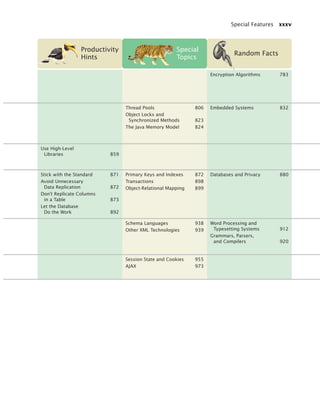
  • 520.
    482 Chapter 11Input/Output and Exception Handling When you throw an exception, execution does not continue with the next state- ment but with an exception handler. For now, we won’t worry about the handling of the exception. That is the topic of Section 11.5. Figure 1 The Hierarchy of Exception Classes ClassNot Found Exception CloneNot Supported Exception ArrayIndexOut OfBounds Exception IndexOut OfBounds Exception IllegalState Exception Illegal Argument Exception ClassCast Exception Arithmetic Exception Runtime Exception Exception IOException EOFException FileNotFound Exception MalformedURL Exception UnknownHost Exception NumberFormat Exception NullPointer Exception NoSuch Element Exception InputMismatch Exception Throwable Error bj4_ch11_7.fm Page 482 Thursday, October 29, 2009 1:50 PM
  • 521.
    11.4 Checked andUnchecked Exceptions 483 6. How should you modify the deposit method to ensure that the balance is never negative? 7. Suppose you construct a new bank account object with a zero balance and then call withdraw(10). What is the value of balance afterwards? Java exceptions fall into two categories, called checked and unchecked exceptions. When you call a method that throws a checked exception, the compiler checks that you don’t ignore it. You must tell the compiler what you are going to do about the exception if it is ever thrown. For example, all subclasses of IOException are checked exceptions. On the other hand, the compiler does not require you to keep track of unchecked exceptions. Exceptions such as NumberFormatException, IllegalArgument- Exception, and NullPointerException are unchecked exceptions. More generally, all exceptions that belong to subclasses of RuntimeException are unchecked, and all other subclasses of the class Exception are checked. (In Figure 1, the checked exceptions are shaded in a darker color.) There is a second category of internal errors that are reported by throwing objects of type Error. One example is the OutOfMemoryError, which is thrown when all available memory has been used up. These are fatal errors that happen rarely and are beyond your control. They too are unchecked. Why have two kinds of exceptions? A checked exception describes a problem that is likely to occur at times, no matter how careful you are. The unchecked exceptions, on the other hand, are your fault. For example, an unexpected end of file can be caused by forces beyond your control, such as a disk error or a broken network connection. But you are to blame for a NullPointerException, because your code was wrong when it tried to use a null reference. The compiler doesn’t check whether you handle a NullPointerException, because you should test your references for null before using them rather than install a han- dler for that exception. The compiler does insist that your program be able to handle error conditions that you cannot prevent. Syntax 11.1 Throwing an Exception throw exceptionObject; Syntax Example A new exception object is constructed, then thrown. if (amount balance) { throw new IllegalArgumentException(Amount exceeds balance); } balance = balance - amount; Most exception objects can be constructed with an error message. This line is not executed when the exception is thrown. S E L F C H E C K 11.4 Checked and Unchecked Exceptions There are two kinds of exceptions: checked and unchecked. Unchecked exceptions extend the class RuntimeException or Error. Checked exceptions are due to external circumstances that the programmer cannot prevent. The compiler checks that your program handles these exceptions. bj4_ch11_7.fm Page 483 Thursday, October 29, 2009 1:50 PM


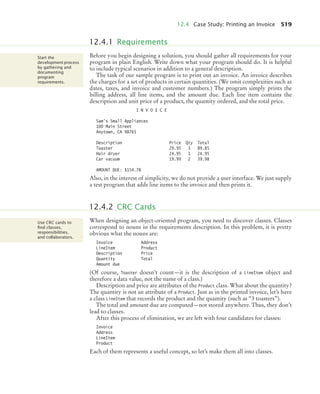
  • 522.
    484 Chapter 11Input/Output and Exception Handling Actually, those categories aren’t perfect. For example, the Scanner.nextInt method throws an unchecked InputMismatchException if the input does not contain a valid integer. A checked exception would have been more appropriate because the pro- grammer cannot prevent users from entering incorrect input. (The designers of the Scanner class made this choice to make it easy to use for beginning programmers.) As you can see from Figure 1, the majority of checked exceptions occur when you deal with input and output. That is a fertile ground for external failures beyond your control—a file might have been corrupted or removed, a network connection might be overloaded, a server might have crashed, and so on. Therefore, you will need to deal with checked exceptions principally when programming with files and streams. You have seen how to use the Scanner class to read data from a file, by passing a File object to the Scanner constructor: String filename = . . .; File inFile = new File(filename); Scanner in = new Scanner(inFile); However, the Scanner constructor can throw a FileNotFoundException. The FileNotFoundException is a checked exception, so you need to tell the compiler what you are going to do about it. You have two choices. You can handle the exception, using the techniques that you will see in Section 11.5. Or you can simply tell the compiler that you are aware of this exception and that you want your method to be terminated when it occurs. The method that reads input does not usually know what to do about an unexpected error, so that is usually the better option. To declare that a method should be terminated when a checked exception occurs within it, tag the method with a throws clause. public void read(String filename) throws FileNotFoundException { File inFile = new File(filename); Scanner in = new Scanner(inFile); . . . } The throws clause in turn signals the caller of your method that it may encounter a FileNotFoundException. Then the caller needs to make the same decision—handle the exception, or tell its caller that the exception may be thrown. If your method can throw exceptions of different types, you separate the excep- tion class names by commas: public void read(String filename) throws FileNotFoundException, NoSuchElementException Always keep in mind that exception classes form an inheritance hierarchy. For example, FileNotFoundException is a subclass of IOException. Thus, if a method can throw both an IOException and a FileNotFoundException, you only tag it as throws IOException. It sounds somehow irresponsible not to handle an exception when you know that it happened. Actually, though, it is usually best not to catch an exception if you don’t know how to remedy the situation. After all, what can you do in a low-level read method? Can you tell the user? How? By sending a message to System.out? You don’t know whether this method is called in a graphical program or an embedded system (such as a vending machine), where the user may never see System.out. And even if your users can see your error message, how do you know that they can Add a throws clause to a method that can throw a checked exception. bj4_ch11_7.fm Page 484 Thursday, October 29, 2009 1:50 PM
  • 523.
    11.5 Catching Exceptions485 understand English? Your class may be used to build an application for users in another country. If you can’t tell the user, can you patch up the data and keep going? How? If you set a variable to zero, null, or an empty string, that may just cause the program to break later, with much greater mystery. Of course, some methods in the program know how to communicate with the user or take other remedial action. By allowing the exception to reach those meth- ods, you make it possible for the exception to be processed by a competent handler. 8. Suppose a method calls the Scanner constructor, which can throw a FileNot- FoundException, and the nextInt method of the Scanner class, which can cause a NoSuchElementException or InputMismatchException. Which exceptions should be included in the throws clause? 9. Why is a NullPointerException not a checked exception? Every exception should be handled somewhere in your program. If an exception has no handler, an error message is printed, and your program terminates. That may be fine for a student program. But you would not want a professionally written program to die just because some method detected an unexpected error. Therefore, you should install exception handlers for all exceptions that your program might throw. You install an exception handler with the try/catch statement. Each try block contains one or more statements that may cause an exception. Each catch clause con- tains the handler for an exception type. Here is an example: try { String filename = . . .; File inFile = new File(filename); Scanner in = new Scanner(inFile); String input = in.next(); int value = Integer.parseInt(input); . . . Syntax 11.2 The throws Clause accessSpecifier returnType methodName(parameterType parameterName, . . .) throws ExceptionClass, ExceptionClass, . . . Syntax Example You may also list unchecked exceptions. You must specify all checked exceptions that this method may throw. public void read(String filename) throws FileNotFoundException, NoSuchElementException S E L F C H E C K 11.5 Catching Exceptions In a method that is ready to handle a particular exception type, place the statements that can cause the exception inside a try block, and the handler inside a catch clause. bj4_ch11_7.fm Page 485 Thursday, October 29, 2009 1:50 PM
  • 524.
    486 Chapter 11Input/Output and Exception Handling } catch (IOException exception) { exception.printStackTrace(); } catch (NumberFormatException exception) { System.out.println(Input was not a number); } Three exceptions may be thrown in this try block: The Scanner constructor can throw a FileNotFoundException, Scanner.next can throw a NoSuchElementException, and Integer.parseInt can throw a NumberFormatException. If any of these exceptions is actually thrown, then the rest of the instructions in the try block are skipped. Here is what happens for the various exception types: • If a FileNotFoundException is thrown, then the catch clause for the IOException is executed. (Recall that FileNotFoundException is a subclass of IOException.) • If a NumberFormatException occurs, then the second catch clause is executed. • A NoSuchElementException is not caught by any of the catch clauses. The exception remains thrown until it is caught by another try block or the main method terminates. When the catch (IOException exception) block is executed, then some method in the try block has failed with an IOException. The variable exception contains a reference Syntax 11.3 Catching Exceptions try { statement statement . . . } catch (ExceptionClass exceptionObject) { statement statement . . . } Syntax Example This constructor can throw a FileNotFoundException. try { Scanner in = new Scanner(new File(input.txt)); String input = in.next(); process(input); } catch (IOException exception) { System.out.println(Could not open input file); } This is the exception that was thrown. A FileNotFoundException is a special case of an IOException. When an IOException is thrown, execution resumes here. Additional catch clauses can appear here. bj4_ch11_7.fm Page 486 Thursday, October 29, 2009 1:50 PM
  • 525.
    11.5 Catching Exceptions487 to the exception object that was thrown. The catch clause can analyze that object to find out more details about the failure. For example, you can get a printout of the chain of method calls that lead to the exception, by calling exception.printStackTrace() In these sample catch clauses, we merely inform the user of the source of the prob- lem. A better way of dealing with the exception would be to give the user another chance to provide a correct input—see Section 11.8 for a solution. It is important to remember that you should place catch clauses only in methods in which you can competently handle the particular exception type. 10. Suppose the file with the given file name exists and has no contents. Trace the flow of execution in the try block in this section. 11. Is there a difference between catching checked and unchecked exceptions? Throw Early, Catch Late When a method detects a problem that it cannot solve, it is better to throw an exception rather than to try to come up with an imperfect fix. For example, suppose a method expects to read a number from a file, and the file doesn’t contain a number. Simply using a zero value would be a poor choice because it hides the actual problem and perhaps causes a different problem elsewhere. Conversely, a method should only catch an exception if it can really remedy the situation. Otherwise, the best remedy is simply to have the exception propagate to its caller, allowing it to be caught by a competent handler. These principles can be summarized with the slogan “throw early, catch late”. Do Not Squelch Exceptions When you call a method that throws a checked exception and you haven’t specified a han- dler, the compiler complains. In your eagerness to continue your work, it is an understand- able impulse to shut the compiler up by squelching the exception: try { File inFile = new File(filename); Scanner in = new Scanner(inFile); // Compiler complained about FileNotFoundException . . . } catch (Exception e) {} // So there! The do-nothing exception handler fools the compiler into thinking that the exception has been handled. In the long run, this is clearly a bad idea. Exceptions were designed to transmit problem reports to a competent handler. Installing an incompetent handler simply hides an error condition that could be serious. S E L F C H E C K Quality Tip 11.1 Throw an exception as soon as a problem is detected. Catch it only when the problem can be handled. Quality Tip 11.2 bj4_ch11_7.fm Page 487 Thursday, October 29, 2009 1:50 PM
  • 526.
    488 Chapter 11Input/Output and Exception Handling Occasionally, you need to take some action whether or not an exception is thrown. The finally construct is used to handle this situation. Here is a typical situation. It is important to close a PrintWriter to ensure that all output is written to the file. In the following code segment, we open a stream, call one or more methods, and then close the stream: PrintWriter out = new PrintWriter(filename); writeData(out); out.close(); // May never get here Now suppose that one of the methods before the last line throws an exception. Then the call to close is never executed! Solve this problem by placing the call to close inside a finally clause: PrintWriter out = new PrintWriter(filename); try { writeData(out); } finally { out.close(); } 11.6 The finally Clause Syntax 11.4 The finally Clause try { statement statement . . . } finally { statement statement . . . } Syntax Example PrintWriter out = new PrintWriter(filename); try { writeData(out); } finally { out.close(); } This variable must be declared outside the try block so that the finally clause can access it. This code is always executed, even if an exception occurs. This code may throw exceptions. bj4_ch11_7.fm Page 488 Thursday, October 29, 2009 1:50 PM
  • 527.
    11.6 The finallyClause 489 In a normal case, there will be no problem. When the try block is completed, the finally clause is executed, and the writer is closed. However, if an exception occurs, the finally clause is also executed before the exception is passed to its handler. Use the finally clause whenever you need to do some clean up, such as closing a file, to ensure that the clean up happens no matter how the method exits. It is also possible to have a finally clause following one or more catch clauses. Then the code in the finally clause is executed whenever the try block is exited in any of three ways: 1. After completing the last statement of the try block 2. After completing the last statement of a catch clause, if this try block caught an exception 3. When an exception was thrown in the try block and not caught However, we recommend that you don’t mix catch and finally clauses in the same try block—see Quality Tip 11.3. 12. Why was the out variable declared outside the try block? 13. Suppose the file with the given name does not exist. Trace the flow of execution of the code segment in this section. Do Not Use catch and finally in the Same try Statement It is tempting to combine catch and finally clauses, but the resulting code can be hard to understand. Instead, you should use a try/finally statement to close resources and a separate try/catch statement to handle errors. For example, try { PrintWriter out = new PrintWriter(filename); try { Write output to out } finally { out.close(); } } catch (IOException exception) { Handle exception } Note that the nested statements work correctly if the PrintWriter constructor throws an exception—see Exercise R11.18. Once a try block is entered, the statements in a finally clause are guaranteed to be executed, whether or not an exception is thrown. S E L F C H E C K Quality Tip 11.3 bj4_ch11_7.fm Page 489 Thursday, October 29, 2009 1:50 PM
  • 528.
    490 Chapter 11Input/Output and Exception Handling Automatic Resource Management in Java 7 In Java 7, you can use a new form of the try block that automatically closes an object that implements the Closeable interface, such as a PrintWriter or Scanner. Here is the syntax: try (PrintWriter out = new PrintWriter(filename)) { Write output to out } The close method is automatically invoked on the out object when the try block ends, whether or not an exception has occurred. A finally statement is not required. Sometimes none of the standard exception types describe your particular error con- dition well enough. In that case, you can design your own exception class. Consider a bank account. Let’s report an InsufficientFundsException when an attempt is made to withdraw an amount from a bank account that exceeds the current balance. if (amount balance) { throw new InsufficientFundsException( withdrawal of + amount + exceeds balance of + balance); } Now you need to provide the InsufficientFundsException class. Should it be a checked or an unchecked exception? Is it the fault of some external event, or is it the fault of the programmer? We take the position that the programmer could have pre- vented the exceptional condition—after all, it would have been an easy matter to check whether amount = account.getBalance() before calling the withdraw method. Therefore, the exception should be an unchecked exception and extend the Runtime- Exception class or one of its subclasses. It is a good idea to extend an appropriate class in the exception hierarchy. For example, we can consider an InsufficientFundsException a special case of an Illegal- ArgumentException. This enables other programmers to catch the exception as an IllegalArgumentException if they are not interested in the exact nature of the problem. It is customary to provide two constructors for an exception class: a constructor with no parameters and a constructor that accepts a message string describing the reason for the exception. Here is the declaration of the exception class. public class InsufficientFundsException extends IllegalArgumentException { public InsufficientFundsException() {} public InsufficientFundsException(String message) { super(message); } } Special Topic 11.4 11.7 Designing Your Own Exception Types To describe an error condition, provide a subclass of an existing exception class. bj4_ch11_7.fm Page 490 Thursday, October 29, 2009 1:50 PM
  • 529.
    11.8 Case Study:A Complete Example 491 When the exception is caught, its message string can be retrieved using the get- Message method of the Throwable class. 14. What is the purpose of the call super(message) in the second InsufficientFunds- Exception constructor? 15. Suppose you read bank account data from a file. Contrary to your expectation, the next input value is not of type double. You decide to implement a BadData- Exception. Which exception class should you extend? Do Throw Specific Exceptions When throwing an exception, you should choose an exception class that describes the situa- tion as closely as possible. For example, it would be a bad idea to simply throw a Runtime- Exception object when a bank account has insufficient funds. This would make it far too difficult to catch the exception. After all, if you caught all exceptions of type Runtime- Exception, your catch clause would also be activated by exceptions of the type NullPointer- Exception, ArrayIndexOutOfBoundsException, and so on. You would then need to carefully examine the exception object and attempt to deduce whether the exception was caused by insufficient funds. If the standard library does not have an exception class that describes your particular error situation, simply provide a new exception class. This section walks through a complete example of a program with exception han- dling. The program asks a user for the name of a file. The file is expected to contain data values. The first line of the file contains the total number of values, and the remaining lines contain the data. A typical input file looks like this: 3 1.45 -2.1 0.05 What can go wrong? There are two principal risks. • The file might not exist. • The file might have data in the wrong format. Who can detect these faults? The Scanner constructor will throw an exception when the file does not exist. The methods that process the