




BI Knowledge Sharing
Session 2
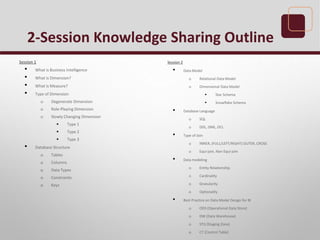
2-Session Knowledge Sharing Outline
Session 1
• What is Business Intelligence
• What is Dimension?
• What is Measure?
• Type of Dimension
o Degenerate Dimension
o Role-Playing Dimension
o Slowly Changing Dimension
 Type 1
 Type 2
 Type 3
• Database Structure
o Tables
o Columns
o Data Types
o Constraints
o Keys
Session 2
• Data Model
o Relational Data Model
o Dimensional Data Model
 Star Schema
 Snowflake Schema
• Database Language
o SQL
o DDL, DML, DCL
• Type of Join
o INNER, (FULL/LEFT/RIGHT) OUTER, CROSS
o Equi-join, Non Equi-join
• Data modeling
o Entity Relationship
o Cardinality
o Granularity
o Optionality
• Best Practice on Data Model Design for BI
o ODS (Operational Data Store)
o DW (Data Warehouse)
o STG (Staging Zone)
o CT (Control Table)
Previous Session Recap
How to get started deploying BI?
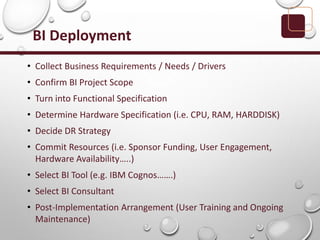
BI Deployment
• Collect Business Requirements / Needs / Drivers
• Confirm BI Project Scope
• Turn into Functional Specification
• Determine Hardware Specification (i.e. CPU, RAM, HARDDISK)
• Decide DR Strategy
• Commit Resources (i.e. Sponsor Funding, User Engagement,
Hardware Availability…..)
• Select BI Tool (e.g. IBM Cognos…….)
• Select BI Consultant
• Post-Implementation Arrangement (User Training and Ongoing
Maintenance)
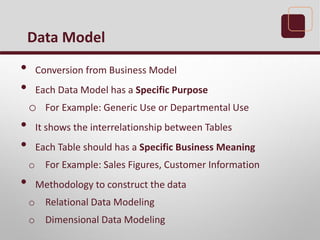
• Conversion from Business Model
• Each Data Model has a Specific Purpose
o For Example: Generic Use or Departmental Use
• It shows the interrelationship between Tables
• Each Table should has a Specific Business Meaning
o For Example: Sales Figures, Customer Information
• Methodology to construct the data
o Relational Data Modeling
o Dimensional Data Modeling
Data Model
Business Model
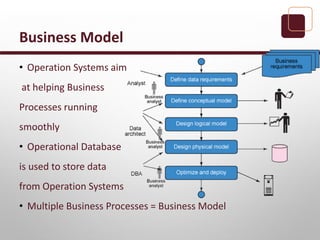
• Operation Systems aim
at helping Business
Processes running
smoothly
• Operational Database
is used to store data
from Operation Systems
• Multiple Business Processes = Business Model
• MUST be occur at Relational Database
• A Relational Data Model comprises of tables, columns and
relationships
• Transactional-based
• Detailed Level of Transactional Data
• SQL is used for Query
Relational Data Model
• Can be occur at Relational Database
• A Dimensional Data Model comprises of Cubes, Fact Tables
and Dimension Tables
• Analytical-based
• Summary Level of bulky Transactional Data
• MDX is used for Dimensional Data Source while SQL can be
used for OLAP Over Relational Data Source
• Two major kinds of schemas are used
o Star Schema
o Snowflake Schema
Dimensional Data Model
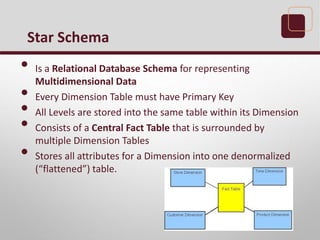
• Is a Relational Database Schema for representing
Multidimensional Data
• Every Dimension Table must have Primary Key
• All Levels are stored into the same table within its Dimension
• Consists of a Central Fact Table that is surrounded by
multiple Dimension Tables
• Stores all attributes for a Dimension into one denormalized
(“flattened”) table.
Star Schema
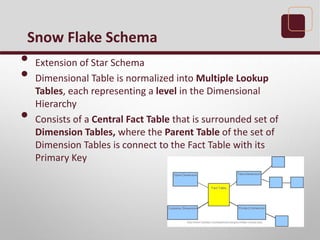
• Extension of Star Schema
• Dimensional Table is normalized into Multiple Lookup
Tables, each representing a level in the Dimensional
Hierarchy
• Consists of a Central Fact Table that is surrounded set of
Dimension Tables, where the Parent Table of the set of
Dimension Tables is connect to the Fact Table with its
Primary Key
Snow Flake Schema
• Star Schema
o Less joins required
o --> Higher Performance
• Snowflake Schema -
o Redundancy is reduced
o --> Data Optimization
Star VS Snowflake
• Bill Inmon is known as the Father of Data Warehousing
• He defined a model to support Single Version of Truth and
championed the concept for more than a decade
Father of Data Warehousing
• In most cases, Ralph Kimball recommends Star Schemas are
a better solution. Although redundancy is reduced in a
normalized snowflake, more joins are required.
• Kimball usually advises that Data Warehouses MUST be
designed to be Understandable and Fast
Father of Dimensional Modeling /
Father of Business Intelligence
• Inmon’s philosophy recommends to start with building a
large Centralized Enterprise-Wide Data Darehouse, followed
by several satellite databases to serve the analytical needs of
departments (later known as Data Marts). Hence, his
approach has received the “Top Down” title
• Kimball’s philosophy recommends to start with building
several Data Marts that serve the analytical needs of
departments, followed by “virtually” integrating these data
marts for consistency through an Information Bus. Hence,
his approach received the “Bottom Up” title
Philosophy between THEM
Exercise
Question 1
What is the difference between Data Warehouse
and Data Mart in your mind right now?
Answer to Question 1
Data Warehouse
• By Enterprise-wise
• Can always be easily to
incorporate with Corporate
Strategy
__ _
• Only one
Data Mart
• By Departmental/Subject
• Can be easily to assist the
Business Strategy
Formulation and Monitor
its results
• Can be more than ONE
• Communication Language Between YOU and Database
• Abbreviation of Structured Query Language
• SQL is a standardized query language for requesting
information from a relational database
What is SQL
• DDL - Data Definition Language
• Define the Database Structure or Schema
o For Example
 CREATE
 ALTER
 DROP
 TRUNCATE
DDL
• DML - Data Manipulation Language
• Retrieve and Manipulate data
o For Example:
 SELECT
 INSERT
 UPDATE
 DELETE
 MERGE
DML
• DCL - Data Control Language
• Control the Security and Permissions of the objects or parts
of the database(s)
o For Example:
 GRANT
 DENY
 REVOKE
DCL
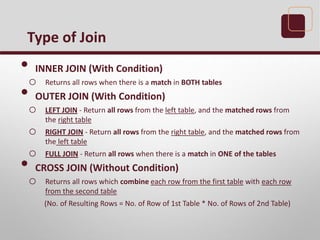
• INNER JOIN (With Condition)
o Returns all rows when there is a match in BOTH tables
• OUTER JOIN (With Condition)
o LEFT JOIN - Return all rows from the left table, and the matched rows from
the right table
o RIGHT JOIN - Return all rows from the right table, and the matched rows from
the left table
o FULL JOIN - Return all rows when there is a match in ONE of the tables
• CROSS JOIN (Without Condition)
o Returns all rows which combine each row from the first table with each row
from the second table
(No. of Resulting Rows = No. of Row of 1st Table * No. of Rows of 2nd Table)
Type of Join
• Equi-join
o Join condition containing an equality operator
 =
• Non Equi-join
o Join condition not containing an equality
operator
 e.g. >, <, >=, <=, between
Join Condition
Exercise
Background Information
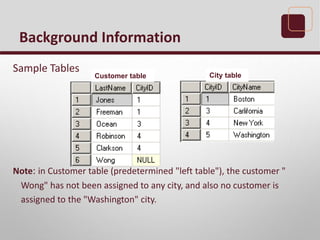
Sample Tables
Note: in Customer table (predetermined "left table"), the customer "
Wong" has not been assigned to any city, and also no customer is
assigned to the "Washington" city.
Customer table City table
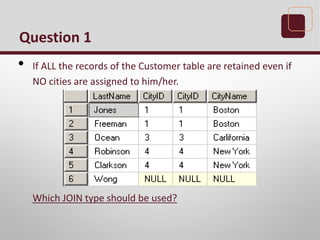
Question 1
• If ALL the records of the Customer table are retained even if
NO cities are assigned to him/her.
Which JOIN type should be used?
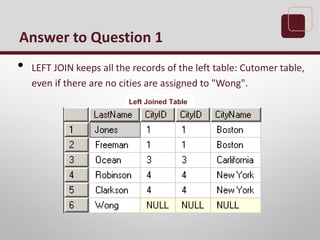
Answer to Question 1
• LEFT JOIN keeps all the records of the left table: Cutomer table,
even if there are no cities are assigned to "Wong".
Left Joined Table
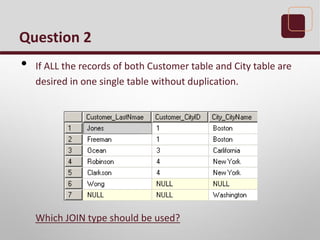
Question 2
• If ALL the records of both Customer table and City table are
desired in one single table without duplication.
Which JOIN type should be used?
Answer to Question 2
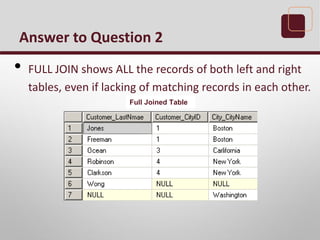
• FULL JOIN shows ALL the records of both left and right
tables, even if lacking of matching records in each other.
Full Joined Table
Question 3
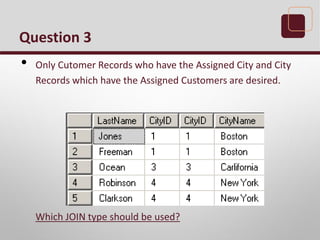
• Only Cutomer Records who have the Assigned City and City
Records which have the Assigned Customers are desired.
Which JOIN type should be used?
Answer to Question 3
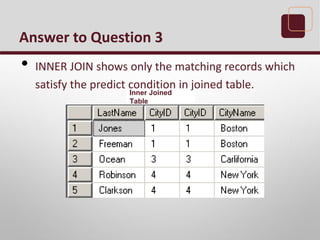
• INNER JOIN shows only the matching records which
satisfy the predict condition in joined table.
Inner Joined
Table
Question 4
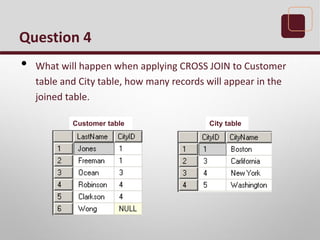
• What will happen when applying CROSS JOIN to Customer
table and City table, how many records will appear in the
joined table.
Customer table City table
Answer to Question 4
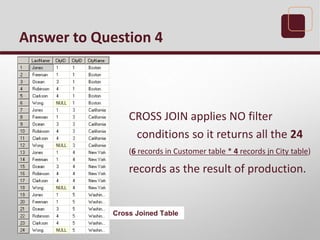
CROSS JOIN applies NO filter
conditions so it returns all the 24
(6 records in Customer table * 4 records jn City table)
records as the result of production.
Cross Joined Table
Question 5
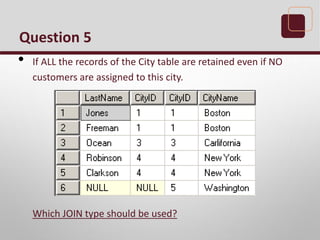
• If ALL the records of the City table are retained even if NO
customers are assigned to this city.
Which JOIN type should be used?
Answer to Question 5
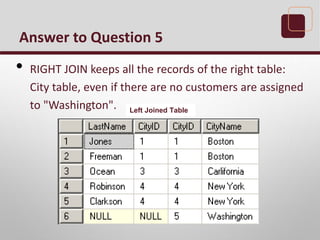
• RIGHT JOIN keeps all the records of the right table:
City table, even if there are no customers are assigned
to "Washington". Left Joined Table
• Essential Elements of Data Modeling
o Entity-relationship - association between the tables
o Cardinality - data occurrences of the relation
 one to one
 one to many
 many to many
o Granularity - refers to the level of detail stored in a table
o Optionality - properties of data fields (mandatory or
optional)
Data Modeling
Data Modeling Step-by-Step
• Step 1: Collect Business Requirements and Implement
Business Process Mapping
• Step 2: Identify the Grain
• Step 3: Identify the Dimensions
• Step 4: Identify the Measures
• Step 5: Implement the Model Design
• Step 6: Verify the Model
• Step 7: Deploy the Model
Data Modeling Tools
• A tool which is easily for Data Architect or Data Modeler to
build the Data Model in their Computers
• Can apply directly the Physical Data Model into the Destination
Database via ODBC, JDBC or by DDL Statement Generation
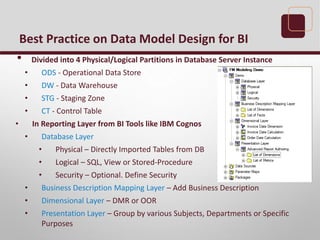
• Divided into 4 Physical/Logical Partitions in Database Server Instance
• ODS - Operational Data Store
• DW - Data Warehouse
• STG - Staging Zone
• CT - Control Table
• In Reporting Layer from BI Tools like IBM Cognos
• Database Layer
• Physical – Directly Imported Tables from DB
• Logical – SQL, View or Stored-Procedure
• Security – Optional. Define Security
• Business Description Mapping Layer – Add Business Description
• Dimensional Layer – DMR or OOR
• Presentation Layer – Group by various Subjects, Departments or Specific
Purposes
Best Practice on Data Model Design for BI
• Contains the Snapshot of the operational system
• Integration of data from different data sources
• Data inputs from operational sources periodically
• Historical Data of operation system can be kept in ODS
• It is an interim place of DW
ODS
• Designed in Star Schema or Snowflake Schema
• All the data are extracted from ODS
• Data are transformed according to business requirements
• Consists of Dimension Tables and Fact Tables
DW
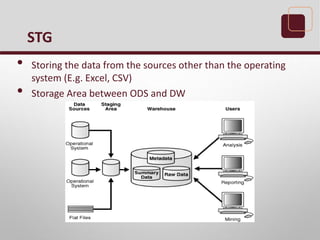
• Storing the data from the sources other than the operating
system (E.g. Excel, CSV)
• Storage Area between ODS and DW
STG
• Storing Variables or Parameters that can be used in whole
Data Warehouse
• For Example
o Selected Date
o Is Full Load
CT
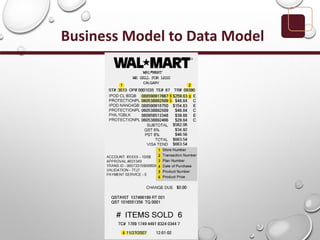
Business Model to Data Model
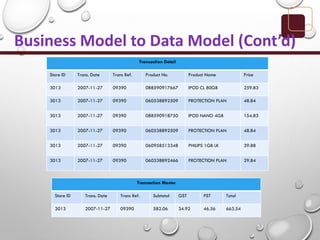
Business Model to Data Model (Cont’d)
Transaction Detail
Store ID Trans. Date Trans Ref. Product No. Product Name Price
3013 2007-11-27 09390 088590917667 IPOD CL 80GB 259.83
3013 2007-11-27 09390 060538892509 PROTECTION PLAN 48.84
3013 2007-11-27 09390 088590918750 IPOD NANO 4GB 154.83
3013 2007-11-27 09390 060538892509 PROTECTION PLAN 48.84
3013 2007-11-27 09390 060958513348 PHILIPS 1GB LK 39.88
3013 2007-11-27 09390 060538892466 PROTECTION PLAN 29.84
Transaction Master
Store ID Trans. Date Trans Ref. Subtotal GST PST Total
3013 2007-11-27 09390 582.06 34.92 46.56 663.54
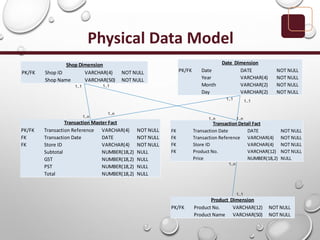
Physical Data Model
PK/FK Shop ID VARCHAR(4) NOT NULL
Shop Name VARCHAR(50) NOT NULL
Shop Dimension
PK/FK Date DATE NOT NULL
Year VARCHAR(4) NOT NULL
Month VARCHAR(2) NOT NULL
Day VARCHAR(2) NOT NULL
Date Dimension
PK/FK Product No. VARCHAR(12) NOT NULL
Product Name VARCHAR(50) NOT NULL
Product Dimension
PK/FK Transaction Reference VARCHAR(4) NOT NULL
FK Transaction Date DATE NOT NULL
FK Store ID VARCHAR(4) NOT NULL
Subtotal NUMBER(18,2) NULL
GST NUMBER(18,2) NULL
PST NUMBER(18,2) NULL
Total NUMBER(18,2) NULL
Transaction Master Fact
FK Transaction Date DATE NOT NULL
FK Transaction Reference VARCHAR(4) NOT NULL
FK Store ID VARCHAR(4) NOT NULL
FK Product No. VARCHAR(12) NOT NULL
Price NUMBER(18,2) NULL
Transaction Detail Fact
1..1 1..1
1..1 1..1
1..1
1..n1..n1..n
1..n
1..n
Exercise
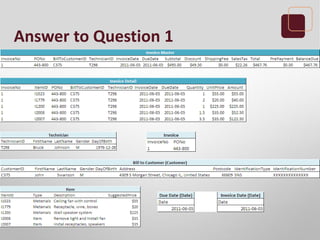
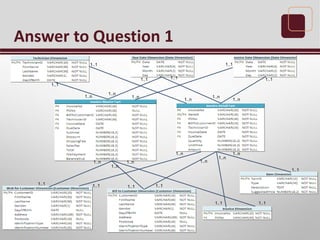
Exercise - Physical Data Modeling
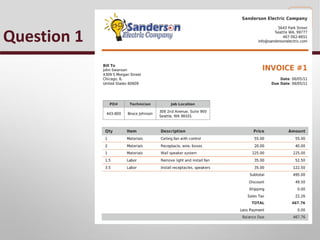
• Please prepare a physical data model from the given receipt
or invoice.
Question 1
Answer to Question 1
1..n
1..1
1..1
1..1 1..1
1..1
1..1
1..1
1..11..1
1..1
1..1 1..11..1
1..n
1..n
1..n 1..n
1..n
1..n
1..n
1..n
1..n
1..n
1..n
1..n
MDX
• Multi-Dimensional Expression
• Get the Intersection Point between Column and Row
• Achieve Time Period Analysis easily (e.g. YTD, Period to Period Analysis)
SQL
• SELECT SUM([Sales Revenue]) SALES_REVENUE
FROM SALES_TABLE
WHERE Year=‘2013’ and Country=‘Hong Kong’
MDX
• SELECT tuple([Sales Revenue],[2013],[Hong Kong]) ON ROWS
FROM SALES_CUBE
MDX Functions (Extracts)
Previous Month / Last Year Same Period
• parallelPeriod ( level [ , integer_expression [ , member ] ] )
Previous Year / Previous Month
• lastPeriods ( integer_expression , member )
YTD / MTD
• periodsToDate ( level , member )
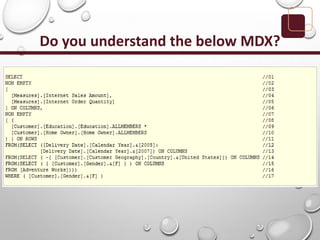
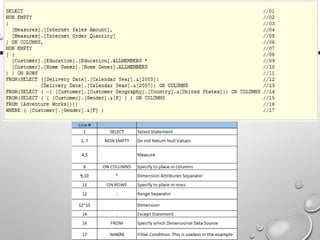
Do you understand the below MDX?
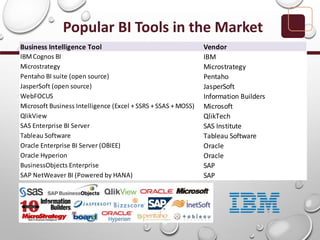
Popular BI Tools in the Market
Business Intelligence Tool Vendor
IBMCognos BI IBM
Microstrategy Microstrategy
Pentaho BI suite (open source) Pentaho
JasperSoft (open source) JasperSoft
WebFOCUS Information Builders
Microsoft Business Intelligence (Excel + SSRS + SSAS + MOSS) Microsoft
QlikView QlikTech
SAS Enterprise BI Server SAS Institute
Tableau Software Tableau Software
Oracle Enterprise BI Server (OBIEE) Oracle
Oracle Hyperion Oracle
BusinessObjects Enterprise SAP
SAP NetWeaver BI (Powered by HANA) SAP
Remember to choose the Best Business Partner
instead of
Software Vendors

BI Knowledge Sharing Session 2

  • 1.
  • 2.
    2-Session Knowledge SharingOutline Session 1 • What is Business Intelligence • What is Dimension? • What is Measure? • Type of Dimension o Degenerate Dimension o Role-Playing Dimension o Slowly Changing Dimension  Type 1  Type 2  Type 3 • Database Structure o Tables o Columns o Data Types o Constraints o Keys Session 2 • Data Model o Relational Data Model o Dimensional Data Model  Star Schema  Snowflake Schema • Database Language o SQL o DDL, DML, DCL • Type of Join o INNER, (FULL/LEFT/RIGHT) OUTER, CROSS o Equi-join, Non Equi-join • Data modeling o Entity Relationship o Cardinality o Granularity o Optionality • Best Practice on Data Model Design for BI o ODS (Operational Data Store) o DW (Data Warehouse) o STG (Staging Zone) o CT (Control Table)
  • 3.
  • 4.
    How to getstarted deploying BI?
  • 5.
    BI Deployment • CollectBusiness Requirements / Needs / Drivers • Confirm BI Project Scope • Turn into Functional Specification • Determine Hardware Specification (i.e. CPU, RAM, HARDDISK) • Decide DR Strategy • Commit Resources (i.e. Sponsor Funding, User Engagement, Hardware Availability…..) • Select BI Tool (e.g. IBM Cognos…….) • Select BI Consultant • Post-Implementation Arrangement (User Training and Ongoing Maintenance)
  • 6.
    • Conversion fromBusiness Model • Each Data Model has a Specific Purpose o For Example: Generic Use or Departmental Use • It shows the interrelationship between Tables • Each Table should has a Specific Business Meaning o For Example: Sales Figures, Customer Information • Methodology to construct the data o Relational Data Modeling o Dimensional Data Modeling Data Model
  • 7.
    Business Model • OperationSystems aim at helping Business Processes running smoothly • Operational Database is used to store data from Operation Systems • Multiple Business Processes = Business Model
  • 8.
    • MUST beoccur at Relational Database • A Relational Data Model comprises of tables, columns and relationships • Transactional-based • Detailed Level of Transactional Data • SQL is used for Query Relational Data Model
  • 9.
    • Can beoccur at Relational Database • A Dimensional Data Model comprises of Cubes, Fact Tables and Dimension Tables • Analytical-based • Summary Level of bulky Transactional Data • MDX is used for Dimensional Data Source while SQL can be used for OLAP Over Relational Data Source • Two major kinds of schemas are used o Star Schema o Snowflake Schema Dimensional Data Model
  • 10.
    • Is aRelational Database Schema for representing Multidimensional Data • Every Dimension Table must have Primary Key • All Levels are stored into the same table within its Dimension • Consists of a Central Fact Table that is surrounded by multiple Dimension Tables • Stores all attributes for a Dimension into one denormalized (“flattened”) table. Star Schema
  • 11.
    • Extension ofStar Schema • Dimensional Table is normalized into Multiple Lookup Tables, each representing a level in the Dimensional Hierarchy • Consists of a Central Fact Table that is surrounded set of Dimension Tables, where the Parent Table of the set of Dimension Tables is connect to the Fact Table with its Primary Key Snow Flake Schema
  • 12.
    • Star Schema oLess joins required o --> Higher Performance • Snowflake Schema - o Redundancy is reduced o --> Data Optimization Star VS Snowflake
  • 13.
    • Bill Inmonis known as the Father of Data Warehousing • He defined a model to support Single Version of Truth and championed the concept for more than a decade Father of Data Warehousing
  • 14.
    • In mostcases, Ralph Kimball recommends Star Schemas are a better solution. Although redundancy is reduced in a normalized snowflake, more joins are required. • Kimball usually advises that Data Warehouses MUST be designed to be Understandable and Fast Father of Dimensional Modeling / Father of Business Intelligence
  • 15.
    • Inmon’s philosophyrecommends to start with building a large Centralized Enterprise-Wide Data Darehouse, followed by several satellite databases to serve the analytical needs of departments (later known as Data Marts). Hence, his approach has received the “Top Down” title • Kimball’s philosophy recommends to start with building several Data Marts that serve the analytical needs of departments, followed by “virtually” integrating these data marts for consistency through an Information Bus. Hence, his approach received the “Bottom Up” title Philosophy between THEM
  • 16.
  • 17.
    Question 1 What isthe difference between Data Warehouse and Data Mart in your mind right now?
  • 18.
    Answer to Question1 Data Warehouse • By Enterprise-wise • Can always be easily to incorporate with Corporate Strategy __ _ • Only one Data Mart • By Departmental/Subject • Can be easily to assist the Business Strategy Formulation and Monitor its results • Can be more than ONE
  • 19.
    • Communication LanguageBetween YOU and Database • Abbreviation of Structured Query Language • SQL is a standardized query language for requesting information from a relational database What is SQL
  • 20.
    • DDL -Data Definition Language • Define the Database Structure or Schema o For Example  CREATE  ALTER  DROP  TRUNCATE DDL
  • 21.
    • DML -Data Manipulation Language • Retrieve and Manipulate data o For Example:  SELECT  INSERT  UPDATE  DELETE  MERGE DML
  • 22.
    • DCL -Data Control Language • Control the Security and Permissions of the objects or parts of the database(s) o For Example:  GRANT  DENY  REVOKE DCL
  • 23.
    • INNER JOIN(With Condition) o Returns all rows when there is a match in BOTH tables • OUTER JOIN (With Condition) o LEFT JOIN - Return all rows from the left table, and the matched rows from the right table o RIGHT JOIN - Return all rows from the right table, and the matched rows from the left table o FULL JOIN - Return all rows when there is a match in ONE of the tables • CROSS JOIN (Without Condition) o Returns all rows which combine each row from the first table with each row from the second table (No. of Resulting Rows = No. of Row of 1st Table * No. of Rows of 2nd Table) Type of Join
  • 24.
    • Equi-join o Joincondition containing an equality operator  = • Non Equi-join o Join condition not containing an equality operator  e.g. >, <, >=, <=, between Join Condition
  • 25.
  • 26.
    Background Information Sample Tables Note:in Customer table (predetermined "left table"), the customer " Wong" has not been assigned to any city, and also no customer is assigned to the "Washington" city. Customer table City table
  • 27.
    Question 1 • IfALL the records of the Customer table are retained even if NO cities are assigned to him/her. Which JOIN type should be used?
  • 28.
    Answer to Question1 • LEFT JOIN keeps all the records of the left table: Cutomer table, even if there are no cities are assigned to "Wong". Left Joined Table
  • 29.
    Question 2 • IfALL the records of both Customer table and City table are desired in one single table without duplication. Which JOIN type should be used?
  • 30.
    Answer to Question2 • FULL JOIN shows ALL the records of both left and right tables, even if lacking of matching records in each other. Full Joined Table
  • 31.
    Question 3 • OnlyCutomer Records who have the Assigned City and City Records which have the Assigned Customers are desired. Which JOIN type should be used?
  • 32.
    Answer to Question3 • INNER JOIN shows only the matching records which satisfy the predict condition in joined table. Inner Joined Table
  • 33.
    Question 4 • Whatwill happen when applying CROSS JOIN to Customer table and City table, how many records will appear in the joined table. Customer table City table
  • 34.
    Answer to Question4 CROSS JOIN applies NO filter conditions so it returns all the 24 (6 records in Customer table * 4 records jn City table) records as the result of production. Cross Joined Table
  • 35.
    Question 5 • IfALL the records of the City table are retained even if NO customers are assigned to this city. Which JOIN type should be used?
  • 36.
    Answer to Question5 • RIGHT JOIN keeps all the records of the right table: City table, even if there are no customers are assigned to "Washington". Left Joined Table
  • 37.
    • Essential Elementsof Data Modeling o Entity-relationship - association between the tables o Cardinality - data occurrences of the relation  one to one  one to many  many to many o Granularity - refers to the level of detail stored in a table o Optionality - properties of data fields (mandatory or optional) Data Modeling
  • 38.
    Data Modeling Step-by-Step •Step 1: Collect Business Requirements and Implement Business Process Mapping • Step 2: Identify the Grain • Step 3: Identify the Dimensions • Step 4: Identify the Measures • Step 5: Implement the Model Design • Step 6: Verify the Model • Step 7: Deploy the Model
  • 39.
    Data Modeling Tools •A tool which is easily for Data Architect or Data Modeler to build the Data Model in their Computers • Can apply directly the Physical Data Model into the Destination Database via ODBC, JDBC or by DDL Statement Generation
  • 40.
    • Divided into4 Physical/Logical Partitions in Database Server Instance • ODS - Operational Data Store • DW - Data Warehouse • STG - Staging Zone • CT - Control Table • In Reporting Layer from BI Tools like IBM Cognos • Database Layer • Physical – Directly Imported Tables from DB • Logical – SQL, View or Stored-Procedure • Security – Optional. Define Security • Business Description Mapping Layer – Add Business Description • Dimensional Layer – DMR or OOR • Presentation Layer – Group by various Subjects, Departments or Specific Purposes Best Practice on Data Model Design for BI
  • 41.
    • Contains theSnapshot of the operational system • Integration of data from different data sources • Data inputs from operational sources periodically • Historical Data of operation system can be kept in ODS • It is an interim place of DW ODS
  • 42.
    • Designed inStar Schema or Snowflake Schema • All the data are extracted from ODS • Data are transformed according to business requirements • Consists of Dimension Tables and Fact Tables DW
  • 43.
    • Storing thedata from the sources other than the operating system (E.g. Excel, CSV) • Storage Area between ODS and DW STG
  • 44.
    • Storing Variablesor Parameters that can be used in whole Data Warehouse • For Example o Selected Date o Is Full Load CT
  • 45.
  • 46.
    Business Model toData Model (Cont’d) Transaction Detail Store ID Trans. Date Trans Ref. Product No. Product Name Price 3013 2007-11-27 09390 088590917667 IPOD CL 80GB 259.83 3013 2007-11-27 09390 060538892509 PROTECTION PLAN 48.84 3013 2007-11-27 09390 088590918750 IPOD NANO 4GB 154.83 3013 2007-11-27 09390 060538892509 PROTECTION PLAN 48.84 3013 2007-11-27 09390 060958513348 PHILIPS 1GB LK 39.88 3013 2007-11-27 09390 060538892466 PROTECTION PLAN 29.84 Transaction Master Store ID Trans. Date Trans Ref. Subtotal GST PST Total 3013 2007-11-27 09390 582.06 34.92 46.56 663.54
  • 47.
    Physical Data Model PK/FKShop ID VARCHAR(4) NOT NULL Shop Name VARCHAR(50) NOT NULL Shop Dimension PK/FK Date DATE NOT NULL Year VARCHAR(4) NOT NULL Month VARCHAR(2) NOT NULL Day VARCHAR(2) NOT NULL Date Dimension PK/FK Product No. VARCHAR(12) NOT NULL Product Name VARCHAR(50) NOT NULL Product Dimension PK/FK Transaction Reference VARCHAR(4) NOT NULL FK Transaction Date DATE NOT NULL FK Store ID VARCHAR(4) NOT NULL Subtotal NUMBER(18,2) NULL GST NUMBER(18,2) NULL PST NUMBER(18,2) NULL Total NUMBER(18,2) NULL Transaction Master Fact FK Transaction Date DATE NOT NULL FK Transaction Reference VARCHAR(4) NOT NULL FK Store ID VARCHAR(4) NOT NULL FK Product No. VARCHAR(12) NOT NULL Price NUMBER(18,2) NULL Transaction Detail Fact 1..1 1..1 1..1 1..1 1..1 1..n1..n1..n 1..n 1..n
  • 48.
  • 49.
    Exercise - PhysicalData Modeling • Please prepare a physical data model from the given receipt or invoice.
  • 50.
  • 51.
  • 52.
    Answer to Question1 1..n 1..1 1..1 1..1 1..1 1..1 1..1 1..1 1..11..1 1..1 1..1 1..11..1 1..n 1..n 1..n 1..n 1..n 1..n 1..n 1..n 1..n 1..n 1..n 1..n
  • 53.
    MDX • Multi-Dimensional Expression •Get the Intersection Point between Column and Row • Achieve Time Period Analysis easily (e.g. YTD, Period to Period Analysis) SQL • SELECT SUM([Sales Revenue]) SALES_REVENUE FROM SALES_TABLE WHERE Year=‘2013’ and Country=‘Hong Kong’ MDX • SELECT tuple([Sales Revenue],[2013],[Hong Kong]) ON ROWS FROM SALES_CUBE
  • 54.
    MDX Functions (Extracts) PreviousMonth / Last Year Same Period • parallelPeriod ( level [ , integer_expression [ , member ] ] ) Previous Year / Previous Month • lastPeriods ( integer_expression , member ) YTD / MTD • periodsToDate ( level , member )
  • 55.
    Do you understandthe below MDX?
  • 57.
    Popular BI Toolsin the Market Business Intelligence Tool Vendor IBMCognos BI IBM Microstrategy Microstrategy Pentaho BI suite (open source) Pentaho JasperSoft (open source) JasperSoft WebFOCUS Information Builders Microsoft Business Intelligence (Excel + SSRS + SSAS + MOSS) Microsoft QlikView QlikTech SAS Enterprise BI Server SAS Institute Tableau Software Tableau Software Oracle Enterprise BI Server (OBIEE) Oracle Oracle Hyperion Oracle BusinessObjects Enterprise SAP SAP NetWeaver BI (Powered by HANA) SAP
  • 58.
    Remember to choosethe Best Business Partner instead of Software Vendors