Learn the Basics of
Open Source Contribution
Presented by: Vui Nguyen
@sunfishgurl
sunfishempire.com
Hello!
● I’m Vui Nguyen
● Long time software engineer
● Currently doing iOS Swift
Development
● WWC Boulder/Denver Lead
Overview of Workshop
● Finding an open source project
● What to work on: selecting an issue / area to help in
● How to submit your contribution
● Work time
○ Move to Women Who Code Mobile Slack
○ Sign up for an issue
○ Drop link to your issue in channel
#open_source_workshop
Finding a Project
Finding a Project: Through Causes / Interests
● Your local women in tech orgs
○ ie for me, Denver RailsBridge repos
● https://github.com/WomenWhoCode/WWCodeMobile
● https://helpwithcovid.com/
● Local civic hackathons / meetups
● Helping out with an OS project could be an extension of the
volunteer work you’re already doing
● Is there a company you’re interested in learning more
about? Helping with their OS project(s) can give you an
idea of what it’s like working with that team
Finding a Project: Through OS Events / Sites
● https://24pullrequests.com/
● https://www.codetriage.com/
● https://fixme.ossn.club/
● https://hacktoberfest.digitalocean.com/
● https://www.writespeakcode.com/
● https://up-for-grabs.net/#/
● https://www.linuxfoundation.org/projects/
● This workshop! 😁
Finding a Project: Introducing our Maintainer
● Let’s meet Eric Internicola! Maintainer of several iOS
open source repos for our workshop today
● And for non-iOS Swift devs out there, don’t leave!
● What you learn from this talk can be used to find OS
projects & contribute to those projects regardless of
programming language
● We’d like all of you to join us during the work portion
of this workshop later 🙏🏼
Finding a Project: Other Considerations
● Look for recent activity!
● If it’s been a year for example, since the last
contribution, maybe time to find another project
● Look at the community
○ Do they have a Slack group, etc.
○ Look at past & current issues, & PR’s, read the
comments
○ Does the community seem friendly? Helpful?
Selecting an Issue
Selecting An Area / Issue to Help
● Look for labels like “good first issue”, etc
● Start small & as you get more familiar working with
that project, select bigger issues
● Find an area that has the greatest need:
○ Documentation
○ Test Coverage
● Find an area that you want more experience working
in, especially if it intersects with the greatest need(s)
Increase Chances for Success
● Follow project README, Contribution, and Style
Guidelines
● Post comments / questions in the issue
● Just like with a “real job”, quality is important!
○ Test your own code and/or write unit tests (if
applicable)
○ Apply good architecture & best practices for your
tech stack
Increase Chances for Success
● Moderate expectations:
○ The more popular a repo, the harder it is get
attention from maintainer
○ Be patient! Many maintainers do this as a
volunteer activity outside of their “real jobs”
● Be kind
○ Give positive feedback (and thanks!) to maintainers
○ Help other contributors with their issues too via
comments, constructive feedback
Submitting Your Contribution
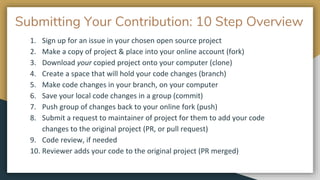
Submitting Your Contribution: 10 Step Overview
1. Sign up for an issue in your chosen open source project
2. Make a copy of project & place into your online account (fork)
3. Download your copied project onto your computer (clone)
4. Create a space that will hold your code changes (branch)
5. Make code changes in your branch, on your computer
6. Save your local code changes in a group (commit)
7. Push group of changes back to your online fork (push)
8. Submit a request to maintainer of project for them to add your code
changes to the original project (PR, or pull request)
9. Code review, if needed
10. Reviewer adds your code to the original project (PR merged)
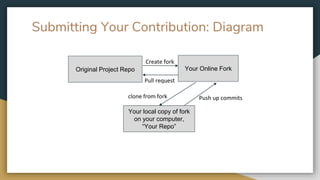
Submitting Your Contribution: Diagram
Original Project Repo Your Online Fork
Your local copy of fork
on your computer,
“Your Repo”
Pull request
clone from fork Push up commits
Create fork
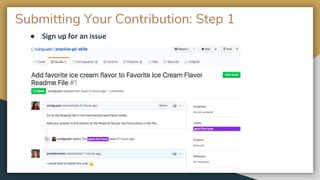
Submitting Your Contribution: Step 1
● Sign up for an issue
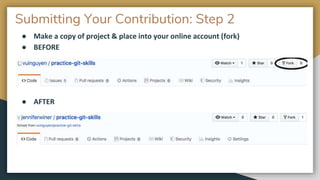
Submitting Your Contribution: Step 2
● Make a copy of project & place into your online account (fork)
● BEFORE
● AFTER
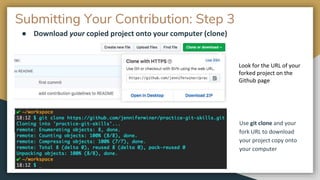
Submitting Your Contribution: Step 3
● Download your copied project onto your computer (clone)
Use git clone and your
fork URL to download
your project copy onto
your computer
Look for the URL of your
forked project on the
Github page
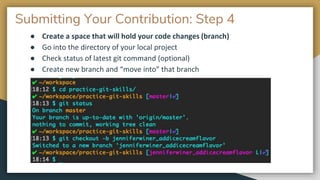
Submitting Your Contribution: Step 4
● Create a space that will hold your code changes (branch)
● Go into the directory of your local project
● Check status of latest git command (optional)
● Create new branch and “move into” that branch
Submitting Your Contribution: Step 5
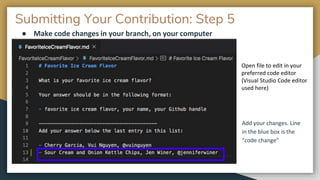
● Make code changes in your branch, on your computer
Add your changes. Line
in the blue box is the
“code change”
Open file to edit in your
preferred code editor
(Visual Studio Code editor
used here)
Submitting Your Contribution: Step 6
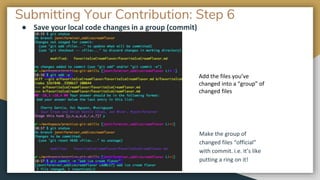
● Save your local code changes in a group (commit)
Make the group of
changed files “official”
with commit. i.e. it’s like
putting a ring on it!
Add the files you’ve
changed into a “group” of
changed files
Submitting Your Contribution: Step 7
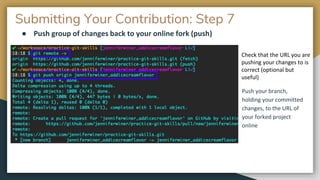
● Push group of changes back to your online fork (push)
Push your branch,
holding your committed
changes, to the URL of
your forked project
online
Check that the URL you are
pushing your changes to is
correct (optional but
useful)
Submitting Your Contribution: Step 8
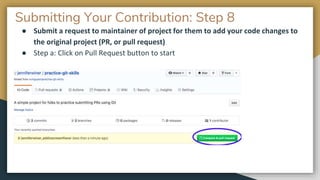
● Submit a request to maintainer of project for them to add your code changes to
the original project (PR, or pull request)
● Step a: Click on Pull Request button to start
Submitting Your Contribution: Step 8
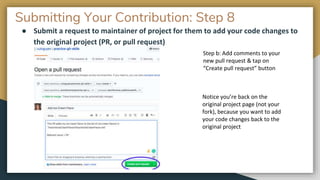
● Submit a request to maintainer of project for them to add your code changes to
the original project (PR, or pull request)
Step b: Add comments to your
new pull request & tap on
“Create pull request” button
Notice you’re back on the
original project page (not your
fork), because you want to add
your code changes back to the
original project
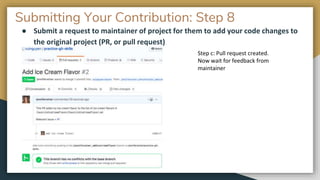
Submitting Your Contribution: Step 8
● Submit a request to maintainer of project for them to add your code changes to
the original project (PR, or pull request)
Step c: Pull request created.
Now wait for feedback from
maintainer
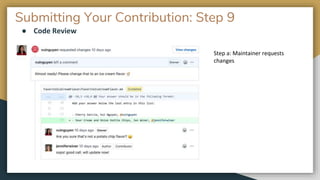
Submitting Your Contribution: Step 9
● Code Review
Step a: Maintainer requests
changes
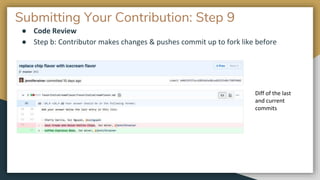
Submitting Your Contribution: Step 9
● Code Review
● Step b: Contributor makes changes & pushes commit up to fork like before
Diff of the last
and current
commits
Submitting Your Contribution: Step 9
● Code Review
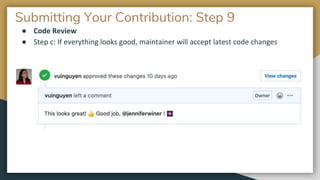
● Step c: If everything looks good, maintainer will accept latest code changes
Submitting Your Contribution: Step 10
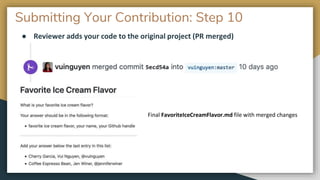
● Reviewer adds your code to the original project (PR merged)
Final FavoriteIceCreamFlavor.md file with merged changes
Git Tutorials and Resources
● https://help.github.com/en/github/using-git
● https://guides.github.com/activities/hello-world/
● https://www.atlassian.com/git/tutorials/making-a-pull-request
● Presentation by our very own Women Who Code Mobile Slack member Madona Syombua:
○ https://slides.com/madona/deck-2#/0/15
● https://github.com/PointCloudLibrary/pcl/wiki/A-step-by-step-guide-on-preparing-and-
submitting-a-pull-request
● https://help.github.com/en/github/collaborating-with-issues-and-pull-requests/creating-a-
pull-request-from-a-fork
● Command Line Tutorial:
○ https://www.codecademy.com/articles/command-line-commands
Thanks! Questions?
● Follow me!
● Twitter: @sunfishgurl
● Website: sunfishempire.com
Work Time
Work Time (Last Slide, Promise!)
● Move onto Women Who Code Mobile Slack Group
○ Sign up: https://www.womenwhocode.com/mobile
○ channel #open_source_workshop
● I’ll be available for next half hour or so in this channel to:
○ Help people select a project & an issue
○ Assist those who want to contribute to my project
■ https://github.com/vuinguyen/practice-git-skills
● Eric Internicola will also be in this channel for the next half hour to:
○ Assist iOS devs wanting to work on an issue in one of the repo(s) he
maintains
● When you find an issue, add a message to the channel
● Good luck ☘️ and see you there! 👋🏼

Basics of Open Source Contribution - WWCodeMobile

  • 1.
    Learn the Basicsof Open Source Contribution Presented by: Vui Nguyen @sunfishgurl sunfishempire.com
  • 2.
    Hello! ● I’m VuiNguyen ● Long time software engineer ● Currently doing iOS Swift Development ● WWC Boulder/Denver Lead
  • 3.
    Overview of Workshop ●Finding an open source project ● What to work on: selecting an issue / area to help in ● How to submit your contribution ● Work time ○ Move to Women Who Code Mobile Slack ○ Sign up for an issue ○ Drop link to your issue in channel #open_source_workshop
  • 4.
  • 5.
    Finding a Project:Through Causes / Interests ● Your local women in tech orgs ○ ie for me, Denver RailsBridge repos ● https://github.com/WomenWhoCode/WWCodeMobile ● https://helpwithcovid.com/ ● Local civic hackathons / meetups ● Helping out with an OS project could be an extension of the volunteer work you’re already doing ● Is there a company you’re interested in learning more about? Helping with their OS project(s) can give you an idea of what it’s like working with that team
  • 6.
    Finding a Project:Through OS Events / Sites ● https://24pullrequests.com/ ● https://www.codetriage.com/ ● https://fixme.ossn.club/ ● https://hacktoberfest.digitalocean.com/ ● https://www.writespeakcode.com/ ● https://up-for-grabs.net/#/ ● https://www.linuxfoundation.org/projects/ ● This workshop! 😁
  • 7.
    Finding a Project:Introducing our Maintainer ● Let’s meet Eric Internicola! Maintainer of several iOS open source repos for our workshop today ● And for non-iOS Swift devs out there, don’t leave! ● What you learn from this talk can be used to find OS projects & contribute to those projects regardless of programming language ● We’d like all of you to join us during the work portion of this workshop later 🙏🏼
  • 8.
    Finding a Project:Other Considerations ● Look for recent activity! ● If it’s been a year for example, since the last contribution, maybe time to find another project ● Look at the community ○ Do they have a Slack group, etc. ○ Look at past & current issues, & PR’s, read the comments ○ Does the community seem friendly? Helpful?
  • 9.
  • 10.
    Selecting An Area/ Issue to Help ● Look for labels like “good first issue”, etc ● Start small & as you get more familiar working with that project, select bigger issues ● Find an area that has the greatest need: ○ Documentation ○ Test Coverage ● Find an area that you want more experience working in, especially if it intersects with the greatest need(s)
  • 11.
    Increase Chances forSuccess ● Follow project README, Contribution, and Style Guidelines ● Post comments / questions in the issue ● Just like with a “real job”, quality is important! ○ Test your own code and/or write unit tests (if applicable) ○ Apply good architecture & best practices for your tech stack
  • 12.
    Increase Chances forSuccess ● Moderate expectations: ○ The more popular a repo, the harder it is get attention from maintainer ○ Be patient! Many maintainers do this as a volunteer activity outside of their “real jobs” ● Be kind ○ Give positive feedback (and thanks!) to maintainers ○ Help other contributors with their issues too via comments, constructive feedback
  • 13.
  • 14.
    Submitting Your Contribution:10 Step Overview 1. Sign up for an issue in your chosen open source project 2. Make a copy of project & place into your online account (fork) 3. Download your copied project onto your computer (clone) 4. Create a space that will hold your code changes (branch) 5. Make code changes in your branch, on your computer 6. Save your local code changes in a group (commit) 7. Push group of changes back to your online fork (push) 8. Submit a request to maintainer of project for them to add your code changes to the original project (PR, or pull request) 9. Code review, if needed 10. Reviewer adds your code to the original project (PR merged)
  • 15.
    Submitting Your Contribution:Diagram Original Project Repo Your Online Fork Your local copy of fork on your computer, “Your Repo” Pull request clone from fork Push up commits Create fork
  • 16.
    Submitting Your Contribution:Step 1 ● Sign up for an issue
  • 17.
    Submitting Your Contribution:Step 2 ● Make a copy of project & place into your online account (fork) ● BEFORE ● AFTER
  • 18.
    Submitting Your Contribution:Step 3 ● Download your copied project onto your computer (clone) Use git clone and your fork URL to download your project copy onto your computer Look for the URL of your forked project on the Github page
  • 19.
    Submitting Your Contribution:Step 4 ● Create a space that will hold your code changes (branch) ● Go into the directory of your local project ● Check status of latest git command (optional) ● Create new branch and “move into” that branch
  • 20.
    Submitting Your Contribution:Step 5 ● Make code changes in your branch, on your computer Add your changes. Line in the blue box is the “code change” Open file to edit in your preferred code editor (Visual Studio Code editor used here)
  • 21.
    Submitting Your Contribution:Step 6 ● Save your local code changes in a group (commit) Make the group of changed files “official” with commit. i.e. it’s like putting a ring on it! Add the files you’ve changed into a “group” of changed files
  • 22.
    Submitting Your Contribution:Step 7 ● Push group of changes back to your online fork (push) Push your branch, holding your committed changes, to the URL of your forked project online Check that the URL you are pushing your changes to is correct (optional but useful)
  • 23.
    Submitting Your Contribution:Step 8 ● Submit a request to maintainer of project for them to add your code changes to the original project (PR, or pull request) ● Step a: Click on Pull Request button to start
  • 24.
    Submitting Your Contribution:Step 8 ● Submit a request to maintainer of project for them to add your code changes to the original project (PR, or pull request) Step b: Add comments to your new pull request & tap on “Create pull request” button Notice you’re back on the original project page (not your fork), because you want to add your code changes back to the original project
  • 25.
    Submitting Your Contribution:Step 8 ● Submit a request to maintainer of project for them to add your code changes to the original project (PR, or pull request) Step c: Pull request created. Now wait for feedback from maintainer
  • 26.
    Submitting Your Contribution:Step 9 ● Code Review Step a: Maintainer requests changes
  • 27.
    Submitting Your Contribution:Step 9 ● Code Review ● Step b: Contributor makes changes & pushes commit up to fork like before Diff of the last and current commits
  • 28.
    Submitting Your Contribution:Step 9 ● Code Review ● Step c: If everything looks good, maintainer will accept latest code changes
  • 29.
    Submitting Your Contribution:Step 10 ● Reviewer adds your code to the original project (PR merged) Final FavoriteIceCreamFlavor.md file with merged changes
  • 30.
    Git Tutorials andResources ● https://help.github.com/en/github/using-git ● https://guides.github.com/activities/hello-world/ ● https://www.atlassian.com/git/tutorials/making-a-pull-request ● Presentation by our very own Women Who Code Mobile Slack member Madona Syombua: ○ https://slides.com/madona/deck-2#/0/15 ● https://github.com/PointCloudLibrary/pcl/wiki/A-step-by-step-guide-on-preparing-and- submitting-a-pull-request ● https://help.github.com/en/github/collaborating-with-issues-and-pull-requests/creating-a- pull-request-from-a-fork ● Command Line Tutorial: ○ https://www.codecademy.com/articles/command-line-commands
  • 31.
    Thanks! Questions? ● Followme! ● Twitter: @sunfishgurl ● Website: sunfishempire.com
  • 32.
  • 33.
    Work Time (LastSlide, Promise!) ● Move onto Women Who Code Mobile Slack Group ○ Sign up: https://www.womenwhocode.com/mobile ○ channel #open_source_workshop ● I’ll be available for next half hour or so in this channel to: ○ Help people select a project & an issue ○ Assist those who want to contribute to my project ■ https://github.com/vuinguyen/practice-git-skills ● Eric Internicola will also be in this channel for the next half hour to: ○ Assist iOS devs wanting to work on an issue in one of the repo(s) he maintains ● When you find an issue, add a message to the channel ● Good luck ☘️ and see you there! 👋🏼

Editor's Notes

  • #2 Hi! Thanks Mackenzie for the intro. Today, I’ll be talking with you about the basics of open source contribution. First of all, I want to say thanks for being here. I know it’s tough right now with the pandemic and we’re all social distancing at the moment. I’m so glad you’re all here attending my webinar right now. And please stay safe!
  • #3 Before I begin, let me give you a quick intro on myself ……
  • #4 Finally, I’m not a Git expert! I know just enough to be dangerous. But I hope my presentation will help you get started today, if you are completely new to Git and open source contributing.
  • #6 I was involved with my local Denver RailsBridge org. I was teaching a beginner JavaScript and beginner iOS workshop (different days, of course), and I had to update the curriculum before I could teach those workshops. So that gave me an opportunity to contribute to a few OS repos while also giving back to a cause that I cared about. WWCCode Mobile has a Github account that is underutilized and maybe we can talk about how we as a community can contribute to it more, for example. I cannot vouch for the quality of the helpwithcovid.com projects, but you can check it out, esp. now Also, I will make these slides available on the WWCode Mobile Slack during the workshop so you don’t have to write these links down
  • #8 This is a great opportunity to give Eric Internicola a minute to intro himself and briefly talk about the OS repos he maintains, and that he will be available to assign issues to folks during the work portion of the workshop. For those of you who are not iOS Swift devs, please don’t check out of the webinar yet. We would still like you to participate in the work portion of the webinar later. The tips I’m giving you in my talk can be used to find OS projects of other programming languages and to make contributions to those OS projects, regardless of programming language.
  • #9 Not having a slack group isn’t a deal breaker. But it can give you a clue on who’s active, and how friendly the community is Also, can everyone still see my slides, still hear me okay? Any quick questions?
  • #13 Once, it took me several months to get my PR merged for a repo. I didn’t even need a code review, it just took a while for the maintainer to get through all the issues in the queue. Checking in - everyone still good? Can still see my slides? Hear me?
  • #15 I will share these slides later, so please don’t worry about taking notes! I’m going through a high level overview so you can understand the process. It’s important to understand the process. If at any point, you are confused about what to do next, go back to this overview. Don’t get too caught up with specific Github syntax, there are plenty of Git tutorials out there, I will share links to a couple of those too. And remember, you don’t have to know all the ins & outs of Git right away to be able to use it. Just learn a little more, something new each time you use it.
  • #17 Let me introduce to you Jen Winer, Director of Women Who Code, Boulder/Denver chapter. She helped me create these screenshots as a contributor to my project, so I’d like to give a shout out to her. I created an “open source repo” so that I can show you how to submit a contribution to Github. In this case, the contribution is to add a change to a README file, does not involve modifying “real code”, so you can use this example for any project with any programming language if you just want to know how to use Git. Notice how this issue is labeled “good first issue”. This is what you want to look for, or something similar, for your first issue.
  • #21 Everyone still good? Still see my slides, hear my okay?
  • #22 Doing the “add” is like you and your significant other talk about getting married. And then when you get that engagement ring, you’re making it official that you’re off the market!
  • #31 Keep in mind that there’s lots of different Git commands and flags & many different ways to do the same things. Don’t worry about learning it all at once, and don’t get too caught up in the syntax. There is no one right way to do Git. If you get lost / confused, go back to the overview slide I showed you. If you have a specific thing you want to do that’s not covered in the overview, or if you have questions about the syntax, you can always look it up. The important thing is that you understand what you’re doing and why.
  • #34 I will make these slides available in the #open_source_workshop channel