TEC-IT Barcode Software
        Barcode Overview

                   V ers io n 1 0


             Reference


                 26 Ap ri l 2 0 12


     T EC- IT Da te n v er arb e it un g G m bH
           Ha ns -W agners tr as s e 6
            A- 44 0 0 S te yr , A us t ri a

            t + + 43 ( 0)7 2 52 72 7 20
          f + + 43 ( 0)7 2 52 72 7 20 77
               of f ic e @ tec - i t.c om
                 ww w. tec - i t.c om
T EC- IT Ba r cod e So ft w are R ef e ren c e


1     Disclaimer

The actual version of this product (document) is available as is. TEC-IT declines all warranties
which go beyond applicable rights. The licensee (or reader) bears all risks that might take place
during the use of the system (the documentation). TEC-IT and its contractual partner cannot be
penalized for direct and indirect damages or losses (this includes non-restrictive, damages through
loss of revenues, constriction in the exercise of business, loss of business information or any kind of
commercial loss), which is caused by use or inability to use the product (documentation), although
the possibility of such damage was pointed out by TEC-IT.


       We reserve all rights to this document and the information contained therein. Reproduction,
       use or disclosure to third parties without express authority is strictly forbidden.

       Für dieses Dokument und den darin dargestellten Gegenstand behalten wir uns alle Rechte
       vor. Vervielfältigung, Bekanntgabe an Dritte oder Verwendung außerhalb des vereinbarten
       Zweckes sind nicht gestattet.


© 1998-2012
TEC-IT Datenverarbeitung GmbH
Hans-Wagnerstr. 6

A-4400 Austria
t.: +43 (0)7252 72720
f.: +43 (0)7252 72720 77
http://www.tec-it.com


                                                                                            Page 2 of 98
T EC- IT Ba r cod e So ft w are R ef e ren c e


2         Index

1               Disclaimer                                                                              2
2               Index                                                                                   3
3            Introduction                                                                               7
    3.1         Scope of this Document                                                                  7
    3.2         Barcode Types                                                                           7
        3.2.1.1     Linear 1D Barcodes                                                                  7
        3.2.1.2     2D Barcodes (Stacked)                                                               7
        3.2.1.3     2D Barcodes (Matrix Codes)                                                          8
        3.2.1.4     Composite Codes                                                                     8
    3.3         Barcode Glossary                                                                        9
4               Important Barcode Parameters                                                          10
    4.1           Barcode Symbology                                                                   10
    4.2           Module Width                                                                        10
       4.2.1         Introduction                                                                     10
       4.2.2         Optimize the Module Width                                                        10
       4.2.3         Module Width and Reading Distance                                                11
    4.3           Bar Width Reduction (Pixel Shaving)                                                 11
    4.4           Quiet Zone                                                                          12
    4.5           Print Ratio and Ratio Format                                                        12
    4.6           Format                                                                              13
       4.6.1         Format Examples                                                                  14
    4.7           Escape Sequences (Encoding Binary Data)                                             14
    4.8           Check Digits                                                                        16
5              Application Identifiers (AI)                                                           17
    5.1           Introduction                                                                        17
    5.2           Examples                                                                            17
       5.2.1         Batch Number                                                                     17
       5.2.2         Multiple AIs within one Barcode                                                  17
       5.2.3         EAN-128 with embedded Check Digit                                                18
    5.3           GS1 DataBar Expanded / GS1 DataBar Expanded Stacked                                 18
       5.3.1         AIs with a Fixed Length                                                          18
          5.3.1.1       AI(01) and Weight                                                             18
          5.3.1.2       AI(01), Weight and Date                                                       19
       5.3.2         AIs with Variable Lengths                                                        19
          5.3.2.1       AI (01) and Price                                                             19
          5.3.2.2       AI (01)                                                                       19
    5.4           GS1 Composite Symbology                                                             19
       5.4.1         Compressed Sequences of AIs                                                      19
       5.4.2         AI (90)                                                                          19
6               Barcode Symbologies                                                                   20
    6.1           1D (Linear) Symbologies                                                             20
       6.1.1        Australian Post Customer                                                          20
       6.1.2        Australian Post Customer 2                                                        21
       6.1.3        Australian Post Customer 3                                                        21
       6.1.4        Australian Post Redirection                                                       21
       6.1.5        Australian Post Reply Paid                                                        21
       6.1.6        Australian Post Routing                                                           22
       6.1.7        Bookland                                                                          22
       6.1.8        Brazilian CEPNet / Brazilian Postal Code                                          22
       6.1.9        Codabar (Rationalized Version)                                                    22
       6.1.10       Code 2 of 5 Standard (Code 2 of 5 Matrix)                                         23
       6.1.11       Code 2 of 5 Data Logic                                                            23
       6.1.12       Code 2 of 5 IATA                                                                  23
       6.1.13       Code 2 of 5 Industrial                                                            24
       6.1.14       Code 2 of 5 Interleaved                                                           24
       6.1.15       Code 2 of 7                                                                       24
       6.1.16       Code 11                                                                           24
       6.1.17       Code 39                                                                           25
       6.1.18       Code 39 Extended                                                                  25
       6.1.19       Code 93                                                                           26
       6.1.20       Code 93 Extended                                                                  26
       6.1.21       Code 128                                                                          26
       6.1.22       Code 128 Subset A                                                                 27
       6.1.23       Code 128 Subset B                                                                 27
       6.1.24       Code 128 Subset C                                                                 27


                                                                                             Page 3 of 98
T EC- IT Ba r cod e So ft w are R ef e ren c e


6.1.25        Code 25                                                                             27
6.1.26        Code 32                                                                             28
6.1.27        DAFT Code                                                                           28
6.1.28        Deutsche Post Identcode                                                             28
6.1.29        Deutsche Post Leitcode                                                              29
6.1.30        DOD Logmars                                                                         29
6.1.31        DPD Code                                                                            29
6.1.32        DUN-14                                                                              30
6.1.33        DUNS                                                                                30
6.1.34        EAN-8                                                                               30
6.1.35        EAN-8 with 2 Digits Add-On                                                          30
6.1.36        EAN-8 with 5 Digits Add-On                                                          31
6.1.37        EAN-13                                                                              31
6.1.38        EAN-13 with 2 Digits Add-On                                                         31
6.1.39        EAN-13 with 5 Digits Add-On                                                         32
6.1.40        EAN-14                                                                              32
6.1.41        EAN-18                                                                              32
6.1.42        EAN-128                                                                             32
6.1.43        FIN Code (Fahrzeug-Identifizierungsnummer)                                          33
6.1.44        Flattermarken                                                                       33
6.1.45        GS1-128                                                                             34
6.1.46        GTIN                                                                                34
6.1.47        HIBC                                                                                34
6.1.48        I-2/5                                                                               34
6.1.49        ISBN Code                                                                           35
   6.1.49.1      Example                                                                          35
   6.1.49.2      ISBN Additional Data                                                             35
6.1.50        ISBT-128                                                                            36
6.1.51        ISMN                                                                                36
6.1.52        ISSN                                                                                37
6.1.53        Italian Postal Code 2 of 5                                                          37
6.1.54        ITF-14                                                                              37
6.1.55        Japanese Postal Code                                                                38
   6.1.55.1      Direct Encoding Mode                                                             38
   6.1.55.2      Japanese Extraction Mode                                                         38
   6.1.55.3      Standard Dimensions                                                              39
6.1.56        JAN                                                                                 39
6.1.57        KIX – Dutch Postal Code                                                             39
6.1.58        Korean Postal Authority                                                             39
   6.1.58.1      Example                                                                          39
6.1.59        LOGMARS                                                                             40
6.1.60        MSI                                                                                 40
6.1.61        NVE-18 (Nummer der Versandeinheit)                                                  40
6.1.62        NW-7                                                                                40
6.1.63        Pharmacode One-Track                                                                41
6.1.64        Pharmacode Two-Track                                                                41
6.1.65        Pharma Zentralnummer (PZN)                                                          42
   6.1.65.1      PZN7: 6 Digits + 1 Check Digit (valid until 2012/12/31)                          42
   6.1.65.2      PZN8: 7 Digits + 1 Check Digit (valid from 2013/01/01)                           42
6.1.66        Planet 12                                                                           42
6.1.67        Planet 14                                                                           43
6.1.68        Plessey Code                                                                        43
6.1.69        Rational Codabar                                                                    43
6.1.70        Royal Mail 4 State (RM4SCC)                                                         43
6.1.71        SCC-14                                                                              43
6.1.72        Singapure Post 4-State Customer Code (SinPost)                                      44
6.1.73        SSCC-18                                                                             44
6.1.74        Singapore Post                                                                      44
6.1.75        Telepen Alpha                                                                       44
6.1.76        Telepen                                                                             45
6.1.77        UCC-128                                                                             45
6.1.78        UPC 12 Digits                                                                       45
6.1.79        UPC Version A                                                                       45
6.1.80        UPC Version A, 2 Digits Add-On                                                      46
6.1.81        UPC Version A, 5 Digits Add-On                                                      46
6.1.82        UPC Version E                                                                       46
6.1.83        UPC Version E, 2 Digits Add-On                                                      47
6.1.84        UPC Version E, 5 Digits Add-On                                                      47
6.1.85        UPC SCS (Shipping Container Symbols)                                                47
6.1.86        USD-4                                                                               48
6.1.87        USPS Intelligent Mail® Barcode or IM® Barcode (4-State Customer Barcode)            48
6.1.88        USPS Postnet 5                                                                      49
6.1.89        USPS Postnet 6                                                                      49
6.1.90        USPS Postnet 9                                                                      49


                                                                                         Page 4 of 98
T EC- IT Ba r cod e So ft w are R ef e ren c e


   6.1.91         USPS Postnet 10                                                                   50
   6.1.92         USPS Postnet 11                                                                   50
   6.1.93         USPS Postnet 12                                                                   50
   6.1.94         USS ITF 2-5                                                                       51
   6.1.95         USS Code 128                                                                      51
   6.1.96         USS Code 39                                                                       51
   6.1.97         VIN Code (Vehicle Identification Number)                                          51
6.2             2D Symbologies                                                                      51
   6.2.1          Aztec Code                                                                        51
      6.2.1.1       Character Set                                                                   51
      6.2.1.2       The Maximum Data Capacity of Aztec Code                                         52
   6.2.2          Codablock F                                                                       52
   6.2.3          Data Matrix                                                                       52
      6.2.3.1       Encoding Modes                                                                  53
      6.2.3.2       Data Capacity                                                                   53
      6.2.3.3       Code Format                                                                     53
      6.2.3.4       Compatibility Options                                                           54
      6.2.3.5       Deutsche Post Premiumadress Data Matrix                                         54
      6.2.3.6       Deutsche Post Werbeantwort Postmatrix                                           55
   6.2.4          MaxiCode                                                                          56
      6.2.4.1       Data Capacity                                                                   56
      6.2.4.2       Modes                                                                           56
      6.2.4.3       MaxiCode & UPS®                                                                 56
   6.2.5          MicroPDF417                                                                       59
   6.2.6          Micro QR-Code                                                                     59
   6.2.7          PDF417                                                                            59
      6.2.7.1       Data Capacity                                                                   60
      6.2.7.2       How to optimize PDF417 for FAX?                                                 60
   6.2.8          PDF417 Truncated                                                                  60
   6.2.9          QR-Code (Model 2)                                                                 61
      6.2.9.1       Kanji and Chinese Compaction                                                    61
      6.2.9.2       QR–Code Capacity                                                                61
      6.2.9.3       QR–Code Creation Speed                                                          61
      6.2.9.4       Codepages (Character Set)                                                       62
      6.2.9.5       Encoding Special Latin-1 Characters                                             62
   6.2.10         QR-Code 2005                                                                      63
6.3             HIBC – Health Industry Bar Code                                                     63
   6.3.1          Supplier Labeling Standard Formats                                                63
   6.3.2          Provider Application Standard Formats                                             64
   6.3.3          HIBC LIC 128                                                                      66
   6.3.4          HIBC LIC 39                                                                       66
   6.3.5          HIBC LIC Data Matrix                                                              66
   6.3.6          HIBC LIC QR-Code                                                                  67
   6.3.7          HIBC LIC PDF417                                                                   67
   6.3.8          HIBC LIC MicroPDF417                                                              67
   6.3.9          HIBC LIC Codablock F                                                              68
   6.3.10         HIBC PAS 128                                                                      68
   6.3.11         HIBC PAS 39                                                                       68
   6.3.12         HIBC PAS Data Matrix                                                              69
   6.3.13         HIBC PAS QR-Code                                                                  69
   6.3.14         HIBC PAS PDF417                                                                   69
   6.3.15         HIBC PAS MicroPDF417                                                              70
   6.3.16         HIBC PAS Codablock F                                                              70
6.4             GS1 DataBar (RSS) Symbologies                                                       71
   6.4.1          GS1 DataBar (RSS-14)                                                              71
   6.4.2          GS1 DataBar Truncated (RSS-14 Truncated)                                          71
   6.4.3          GS1 DataBar Limited (RSS Limited)                                                 72
   6.4.4          GS1 DataBar Stacked (RSS-14 Stacked)                                              72
   6.4.5          GS1 DataBar Stacked Omni directional (RSS-14 Stacked Omni directional)            72
   6.4.6          GS1 DataBar Expanded (RSS Expanded)                                               73
   6.4.7          GS1 DataBar Expanded Stacked (RSS Expanded Stacked)                               73
6.5             GS1 Composite Symbologies                                                           73
   6.5.1          Data Input                                                                        73
   6.5.2          Data Capacity of GS1 Composite Symbols                                            73
      6.5.2.1       Linear Component                                                                73
      6.5.2.2       2D Component                                                                    73
   6.5.3          GS1 DataBar Composite Symbology                                                   74
   6.5.4          GS1 DataBar Truncated Composite Symbology                                         74
   6.5.5          GS1 DataBar Limited Composite Symbology                                           74
   6.5.6          GS1 DataBar Stacked Composite Symbology                                           75
   6.5.7          GS1 DataBar Stacked Omni directional Composite Symbology                          75
   6.5.8          GS1 DataBar Expanded Composite Symbology                                          75
   6.5.9          GS1 DataBar Expanded Stacked Composite Symbology                                  76
   6.5.10         GS1-128 Composite Symbology                                                       76


                                                                                           Page 5 of 98
T EC- IT Ba r cod e So ft w are R ef e ren c e


       6.5.11       EAN-8 Composite Symbology                                                         76
       6.5.12       EAN-13 Composite Symbology                                                        77
       6.5.13       UPC-A Composite Symbology                                                         77
       6.5.14       UPC-E Composite Symbology                                                         77
7               Image Parameters                                                                      78
     7.1          Image Types                                                                         78
        7.1.1       Image Formats                                                                     78
        7.1.2       Compression Modes                                                                 78
8               Character Encoding                                                                    80
     8.1          UNICODE  Code Pages                                                               80
     8.2          Default Code Pages                                                                  80
     8.3          Code Page Switching                                                                 80
9               Frequently Asked Questions                                                            81
     9.1          How to add the Leading and Trailing ‘*’ for Code 39?                                81
     9.2          How to add the Check Digit to Code 39?                                              81
     9.3          How to add the Leading and Trailing ‘A’ (or B, C, D) for CODABAR?                   81
     9.4          How to use a Specific Subset in Code 128?                                           81
     9.5          How to use the Compressed Mode of Code 128?                                         81
     9.6          How to generate a PDF417 symbol with an Aspect Ratio of 3:2?                        81
        9.6.1       Set a Row:Col Ratio of 11:1                                                       81
        9.6.2       Maintain a constant Ratio of Row Height / Module Width                            81
     9.7          How to set a Specific Module Width?                                                 81
10              Contact and Support Information                                                       83
Appendix A : Creating Optimal Barcodes                                                                84
  A.1        General                                                                                  84
  A.2        Barcode Size                                                                             84
  A.3        Quiet Zone                                                                               84
  A.4        Optimize Barcode for the Output Device Resolution                                        85
  A.5        Enable Optimization in TEC-IT Software                                                   86
    A.5.1       Barcode Studio                                                                        86
    A.5.2       TFORMer                                                                               86
    A.5.3       TBarCode                                                                              86
    A.5.4       Application Notes for “Optimal Resolution”                                            87
  A.6        Printing Barcodes Directly                                                               88
  A.7        Barcode Images                                                                           88
    A.7.1       Embedding Barcode Images                                                              89
    A.7.2       Barcode Images in HTML                                                                89
    A.7.3       Optimizing Barcode Images with Respect to the Printer Resolution                      90
  A.8        Barcode Vector Graphics                                                                  91
  A.9        Code Examples for Barcode Optimization                                                   91
    A.9.1       Linear Barcodes                                                                       91
    A.9.2       2D Barcodes                                                                           92
    A.9.3       Prepare a Barcode with a specific Module Width for a Web Page                         93
    A.9.4       Create a 2D Barcode Image with the Module Width specified in Pixels                   94
    A.9.5       Optimize an Image using BCGetOptimalBitmapSize                                        94
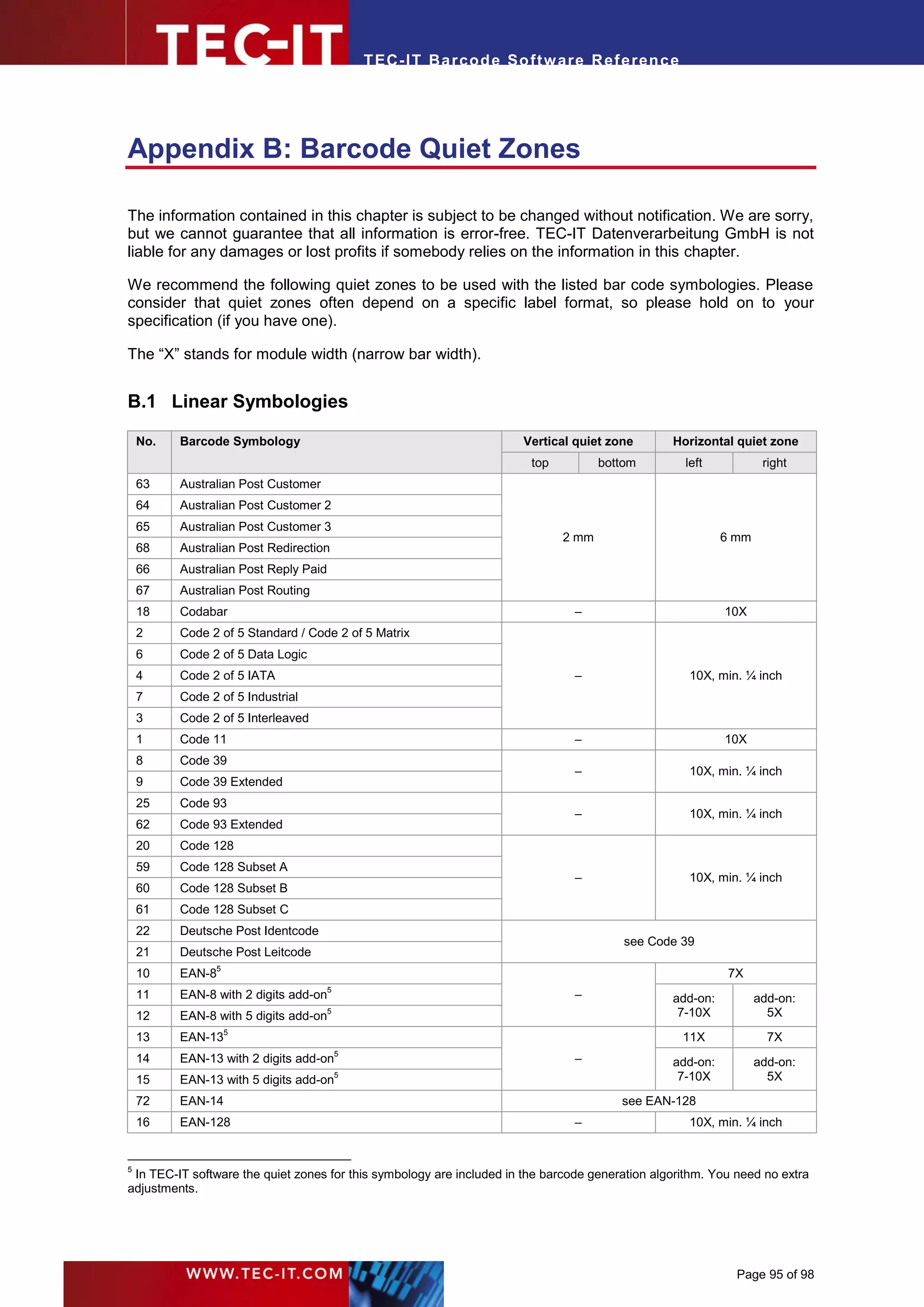
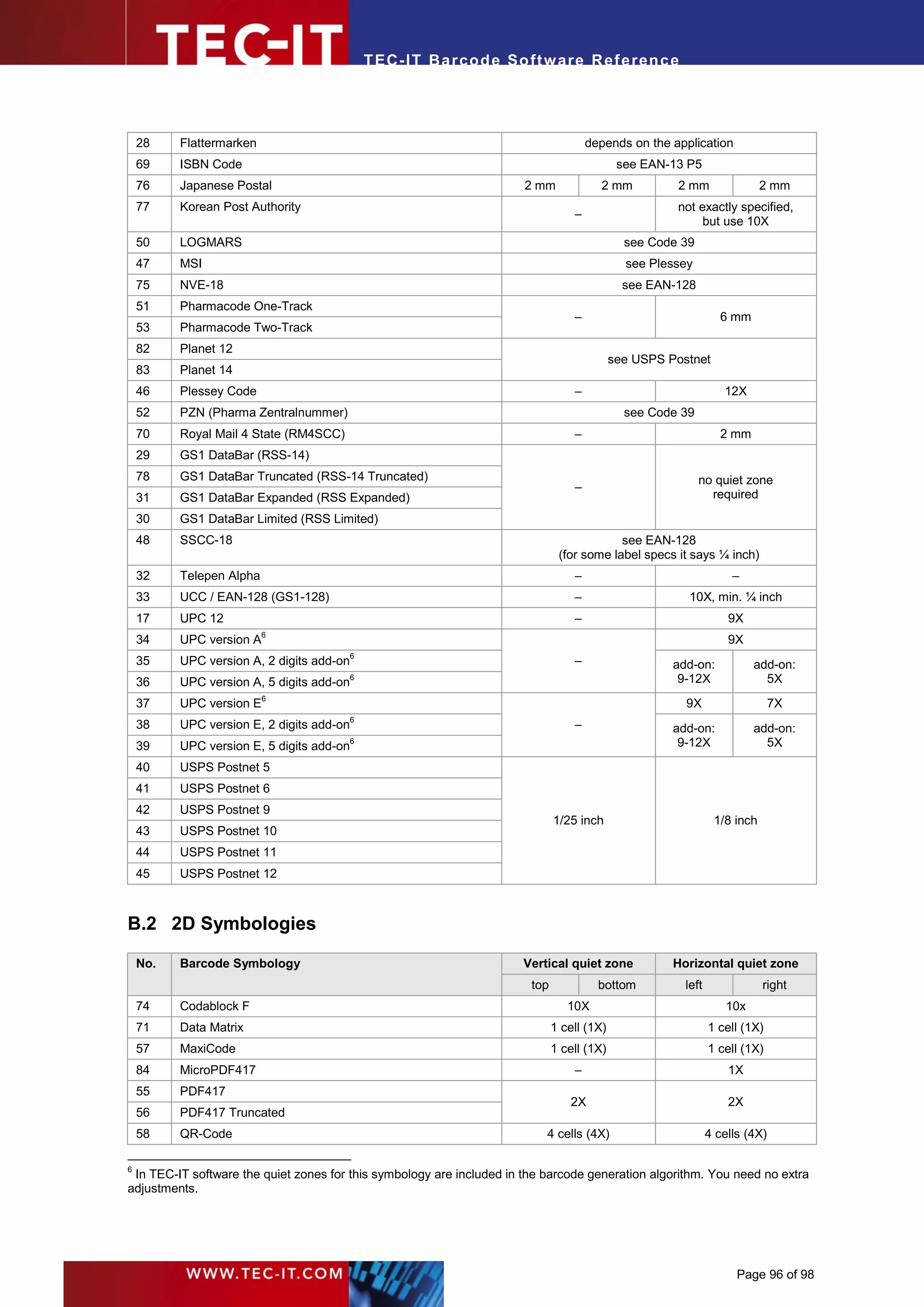
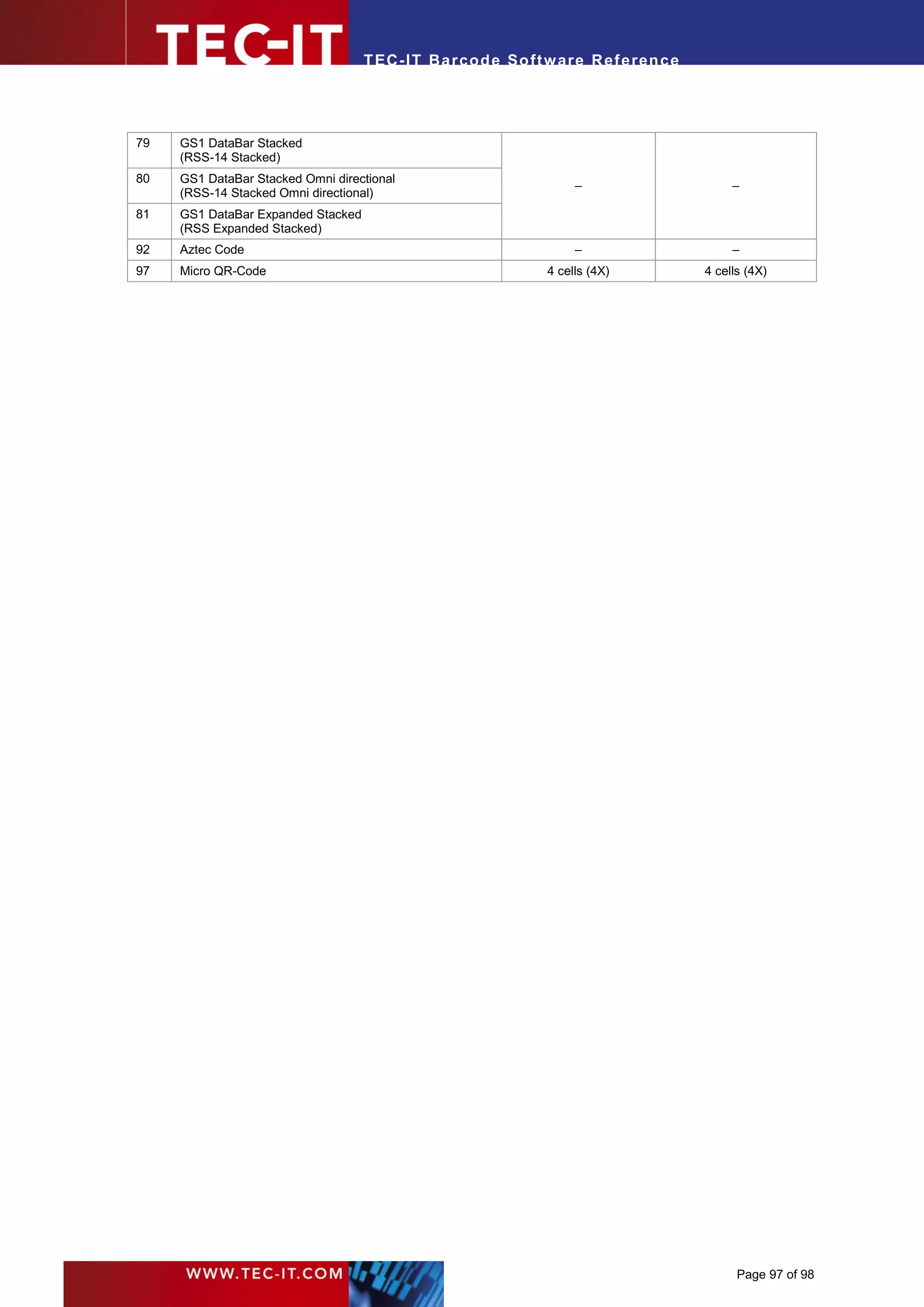
Appendix B : Barcode Quiet Zones                                                                      95
  B.1        Linear Symbologies                                                                       95
  B.2        2D Symbologies                                                                           96
Appendix C : Extended Channel Interpretation (ECI)                                                    98
  C.1         ECI Overview                                                                            98


                                                                                             Page 6 of 98
T EC- IT Ba r cod e So ft w are R ef e ren c e


3      Introduction

3.1 Scope of this Document

This document describes barcode symbologies supported by TEC-IT software in a non-product-
specific way. Please use this document as add-on or in-depth reference when dealing with barcode
related questions in the following TEC-IT products:

 ► TBarCode OCX                       A Microsoft ActiveX compliant barcode control
 ► TBarCode .NET                      A .NET barcode library
                                      Barcode DLL for Microsoft Windows (and UNIX )
                                                                                        ®
 ► TBarCode Library
 ► Barcode Studio                     A stand-alone barcode designer for Microsoft Windows
 ►    TBarCode/X                      Barcode generators (SDK) for Linux and UNIX
 ►    TFORMer Designer                Full-featured label and report design
 ►    TFORMer Runtime                 Label and reporting engine for various operating systems
 ►    TFORMer Server                  Industrial output management
 ►    TBarCode/Embedded               Barcode-enabled print and spool appliance
 ► TBarCode/SAPwin                    Barcode DLL for SAP R/3
 ► TBarCode/Direct                    Smart PostScript compatible bar-coding for SAP R/3


3.2 Barcode Types

The reason for the many different types of barcodes is that barcodes are used in many different
operational areas. Thus it is possible to select the most suitable barcode type to meet the
requirements of a particular industry.

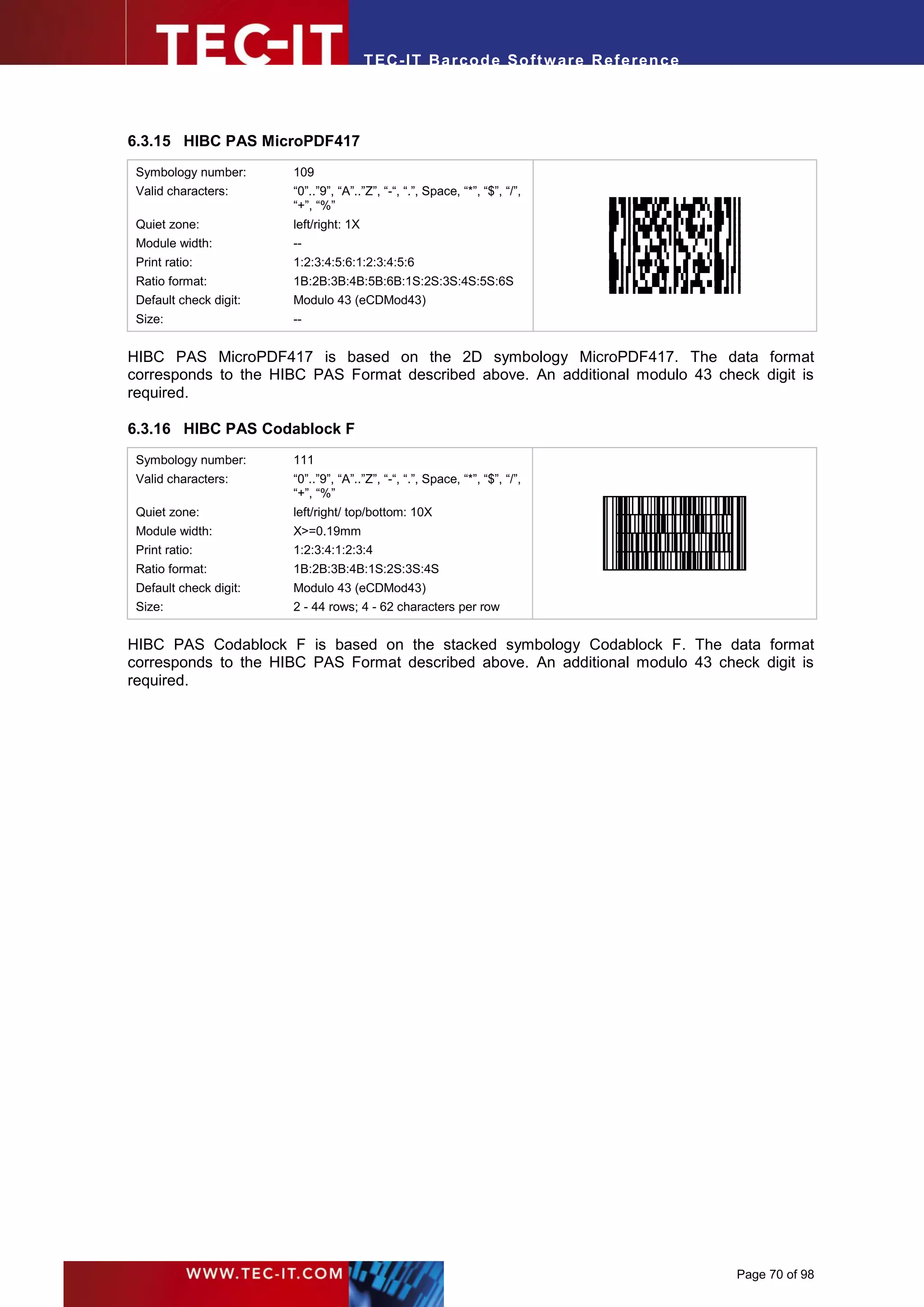
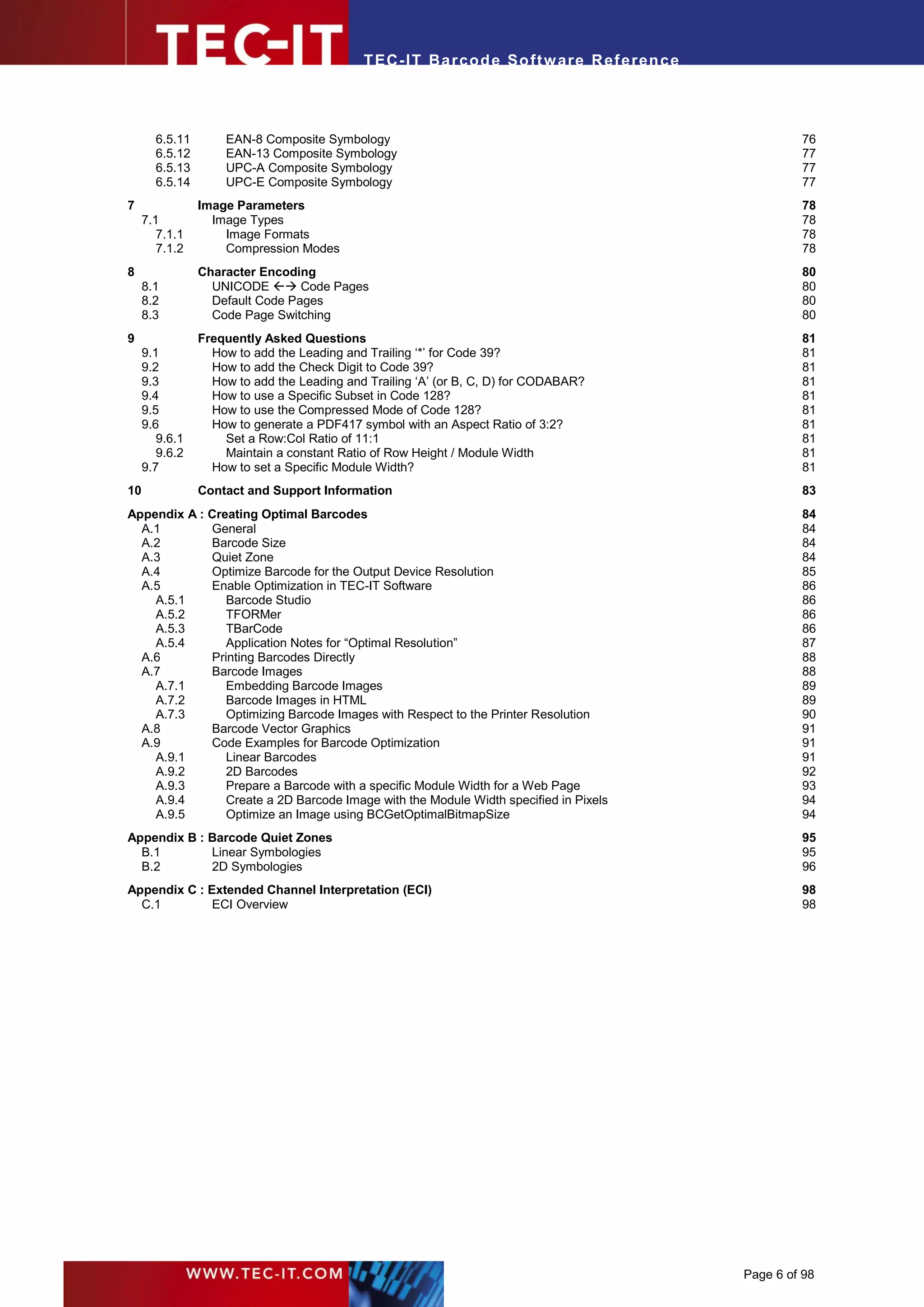
3.2.1.1    Linear 1D Barcodes


Figure 1: Linear Barcode Sample

Linear barcodes are known under names like Code 39, Code 128, UPC, EAN, 2of5...

Linear barcodes encode the information in one way (=one dimension), so they are also called one-
dimensional barcodes (1D). The information is stored in the relationship of the widths of the bars
(spaces) to each other.

In most of these symbologies the height of the bars is not relevant, except for some height-
modulated Postal Codes (e.g. Australian Post 4-State or USPS Intelligent Mail® Barcode / IM®
Barcode).

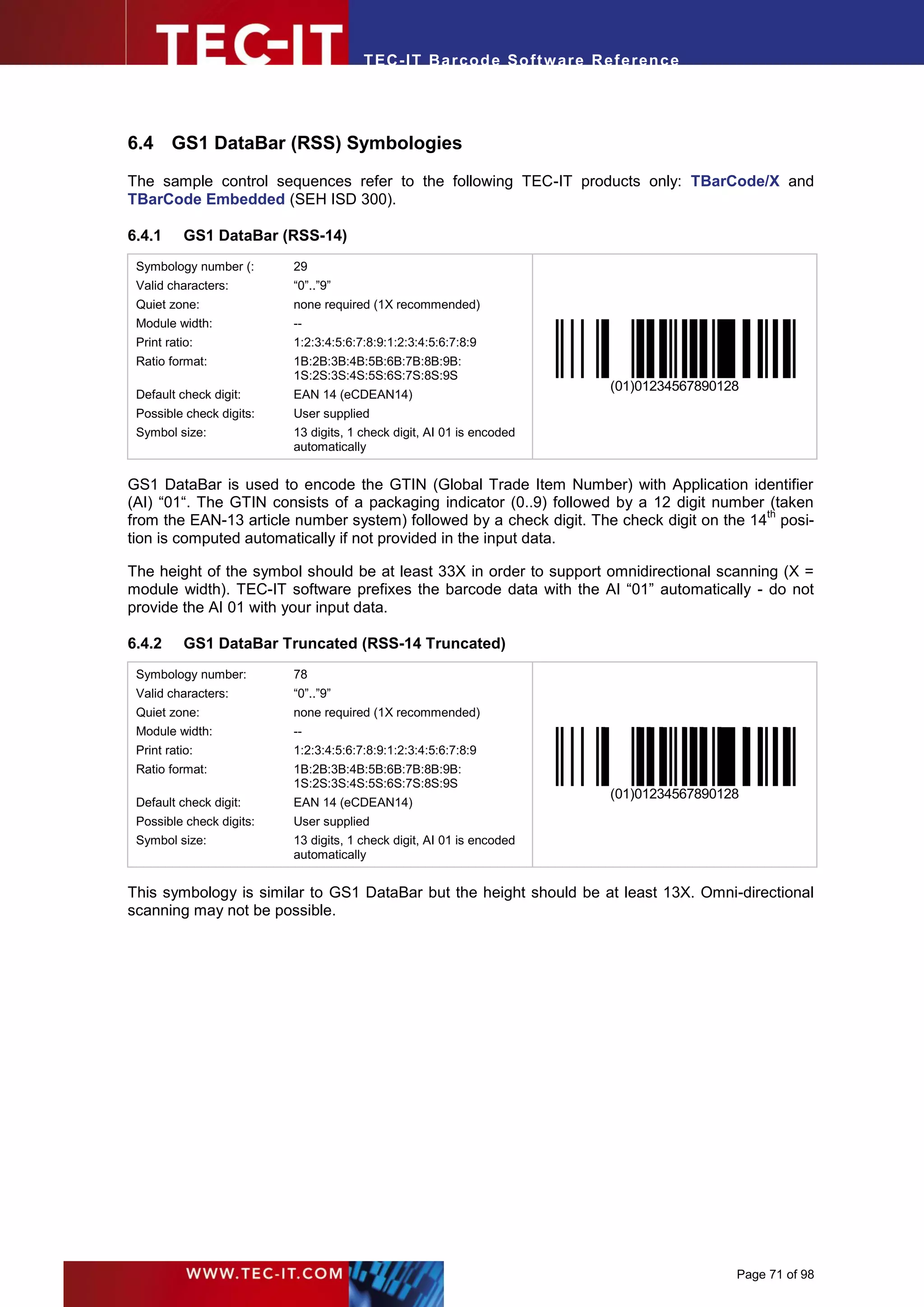
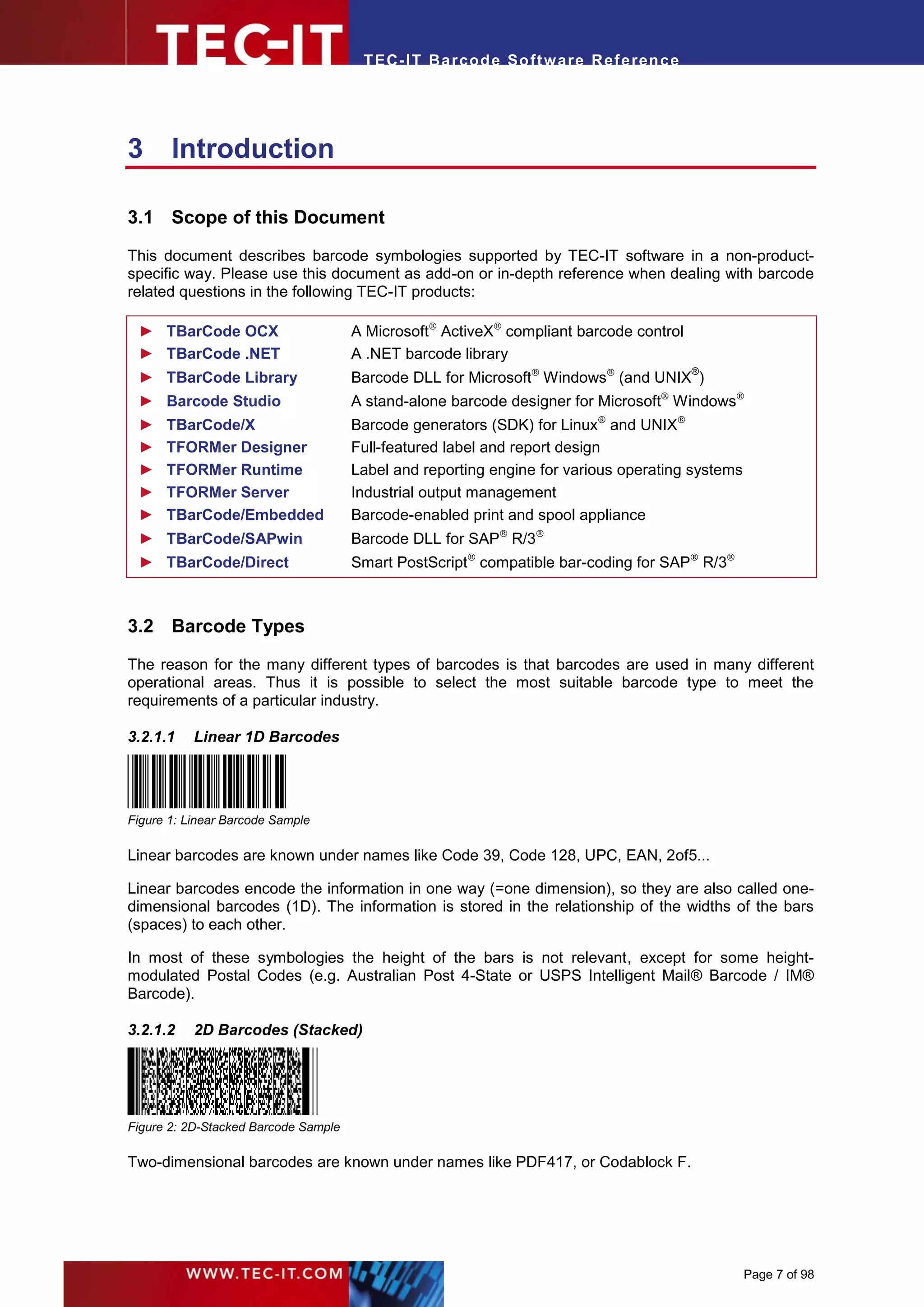
3.2.1.2    2D Barcodes (Stacked)


Figure 2: 2D-Stacked Barcode Sample

Two-dimensional barcodes are known under names like PDF417, or Codablock F.


                                                                                                 Page 7 of 98
T EC- IT Ba r cod e So ft w are R ef e ren c e


Such stacked or multi-row barcodes store information in two dimensions. Several stacked linear
barcodes are used to encode the information.

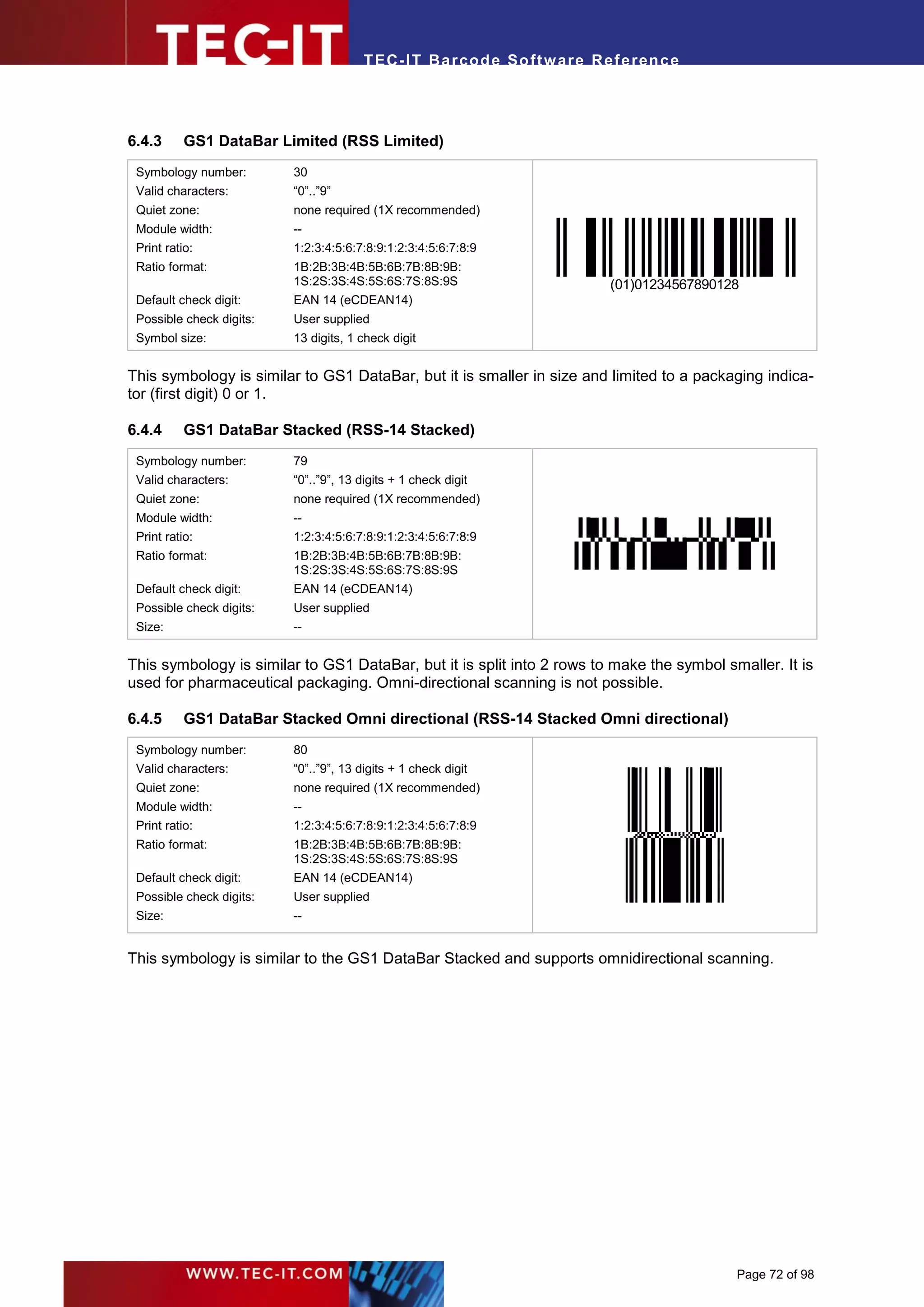
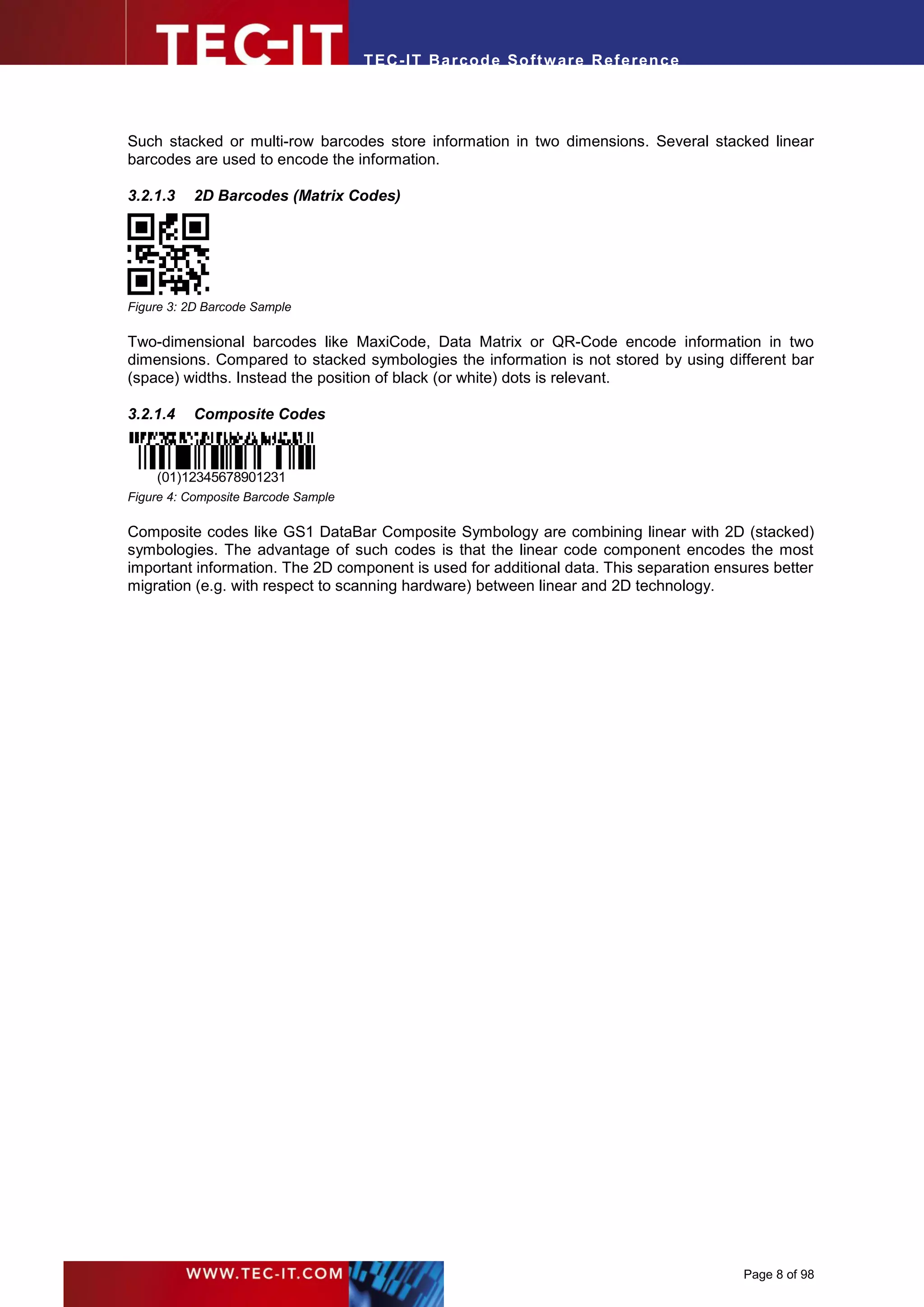
3.2.1.3   2D Barcodes (Matrix Codes)


Figure 3: 2D Barcode Sample

Two-dimensional barcodes like MaxiCode, Data Matrix or QR-Code encode information in two
dimensions. Compared to stacked symbologies the information is not stored by using different bar
(space) widths. Instead the position of black (or white) dots is relevant.

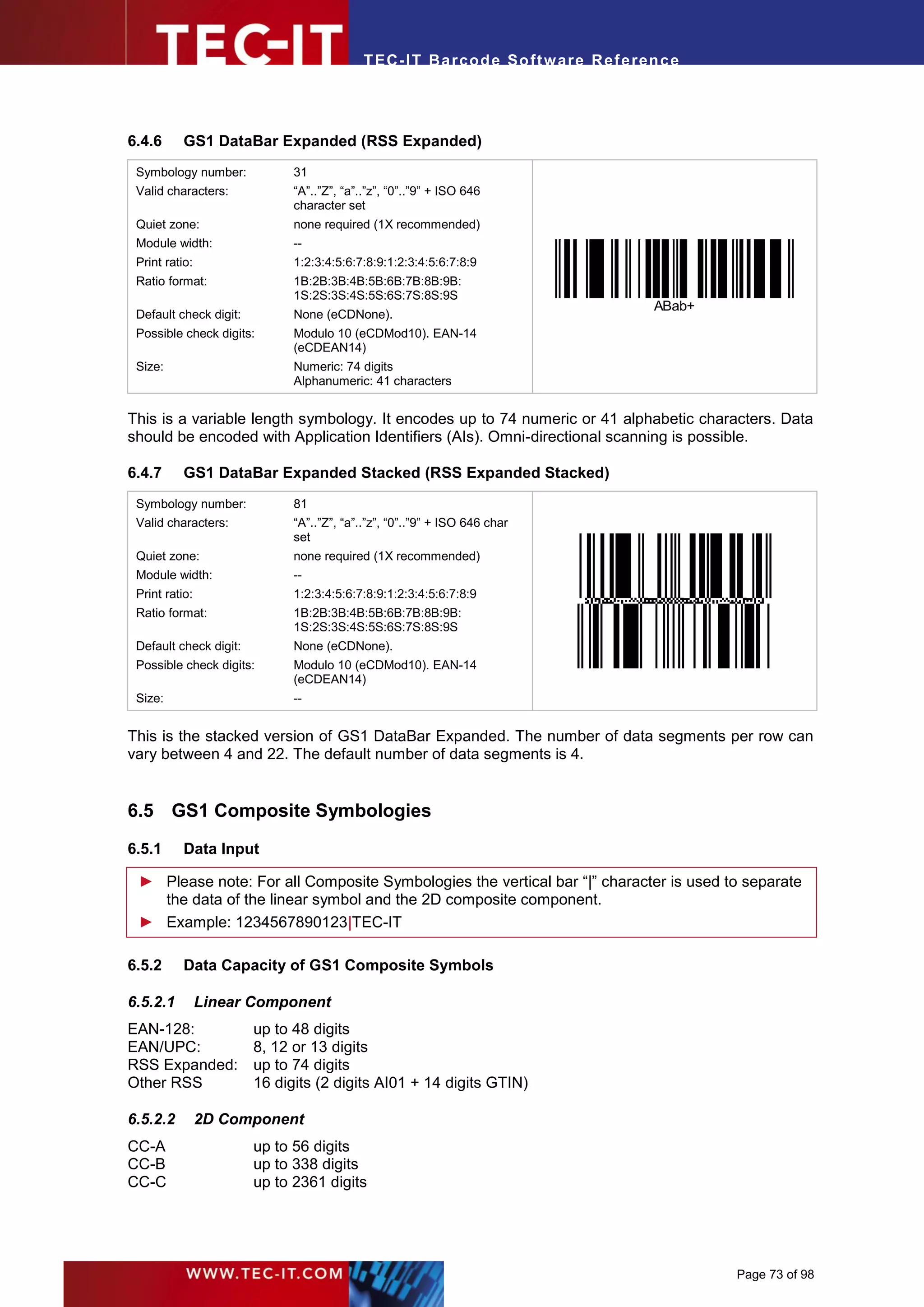
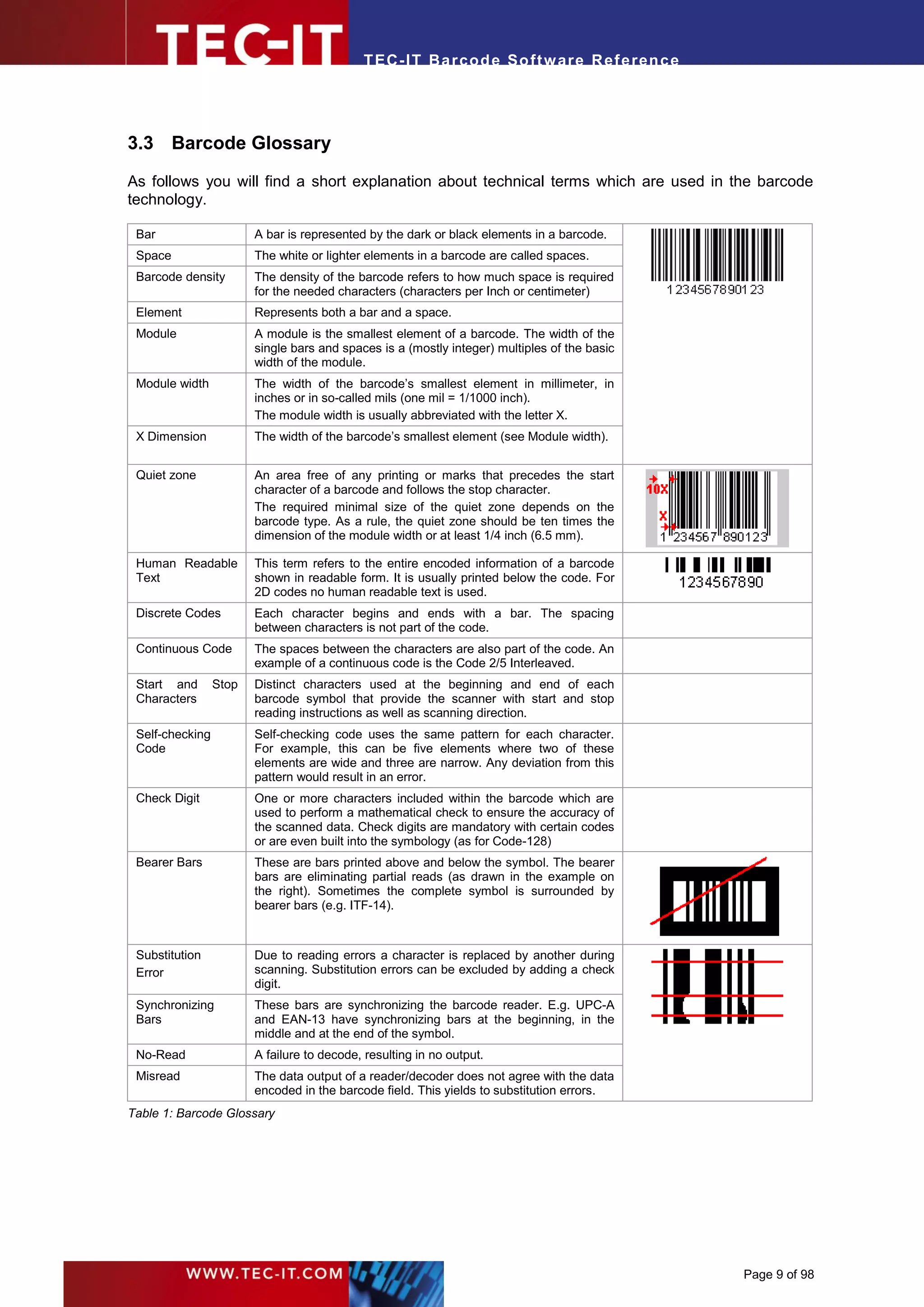
3.2.1.4   Composite Codes


    (01)12345678901231
Figure 4: Composite Barcode Sample

Composite codes like GS1 DataBar Composite Symbology are combining linear with 2D (stacked)
symbologies. The advantage of such codes is that the linear code component encodes the most
important information. The 2D component is used for additional data. This separation ensures better
migration (e.g. with respect to scanning hardware) between linear and 2D technology.


                                                                                        Page 8 of 98
T EC- IT Ba r cod e So ft w are R ef e ren c e


3.3 Barcode Glossary

As follows you will find a short explanation about technical terms which are used in the barcode
technology.

 Bar                    A bar is represented by the dark or black elements in a barcode.
 Space                  The white or lighter elements in a barcode are called spaces.
 Barcode density        The density of the barcode refers to how much space is required
                        for the needed characters (characters per Inch or centimeter)
 Element                Represents both a bar and a space.
 Module                 A module is the smallest element of a barcode. The width of the
                        single bars and spaces is a (mostly integer) multiples of the basic
                        width of the module.
 Module width           The width of the barcode’s smallest element in millimeter, in
                        inches or in so-called mils (one mil = 1/1000 inch).
                        The module width is usually abbreviated with the letter X.
 X Dimension            The width of the barcode’s smallest element (see Module width).


 Quiet zone             An area free of any printing or marks that precedes the start
                        character of a barcode and follows the stop character.
                        The required minimal size of the quiet zone depends on the
                        barcode type. As a rule, the quiet zone should be ten times the
                        dimension of the module width or at least 1/4 inch (6.5 mm).

 Human Readable         This term refers to the entire encoded information of a barcode
 Text                   shown in readable form. It is usually printed below the code. For
                        2D codes no human readable text is used.
 Discrete Codes         Each character begins and ends with a bar. The spacing
                        between characters is not part of the code.
 Continuous Code        The spaces between the characters are also part of the code. An
                        example of a continuous code is the Code 2/5 Interleaved.
 Start and       Stop   Distinct characters used at the beginning and end of each
 Characters             barcode symbol that provide the scanner with start and stop
                        reading instructions as well as scanning direction.
 Self-checking          Self-checking code uses the same pattern for each character.
 Code                   For example, this can be five elements where two of these
                        elements are wide and three are narrow. Any deviation from this
                        pattern would result in an error.
 Check Digit            One or more characters included within the barcode which are
                        used to perform a mathematical check to ensure the accuracy of
                        the scanned data. Check digits are mandatory with certain codes
                        or are even built into the symbology (as for Code-128)
 Bearer Bars            These are bars printed above and below the symbol. The bearer
                        bars are eliminating partial reads (as drawn in the example on
                        the right). Sometimes the complete symbol is surrounded by
                        bearer bars (e.g. ITF-14).


 Substitution           Due to reading errors a character is replaced by another during
 Error                  scanning. Substitution errors can be excluded by adding a check
                        digit.
 Synchronizing          These bars are synchronizing the barcode reader. E.g. UPC-A
 Bars                   and EAN-13 have synchronizing bars at the beginning, in the
                        middle and at the end of the symbol.
 No-Read                A failure to decode, resulting in no output.
 Misread                The data output of a reader/decoder does not agree with the data
                        encoded in the barcode field. This yields to substitution errors.
Table 1: Barcode Glossary


                                                                                              Page 9 of 98
T EC- IT Ba r cod e So ft w are R ef e ren c e


4       Important Barcode Parameters

In this chapter you will find an explanation about the most important barcode parameters.


4.1 Barcode Symbology

The symbology determines the format and the capabilities of the barcode. Check out chapter 6 for a
list of supported barcode symbologies. It depends on your application which symbology you should
use. For help, deciding the right symbology, you can contact TEC-IT Support.


4.2 Module Width
4.2.1     Introduction


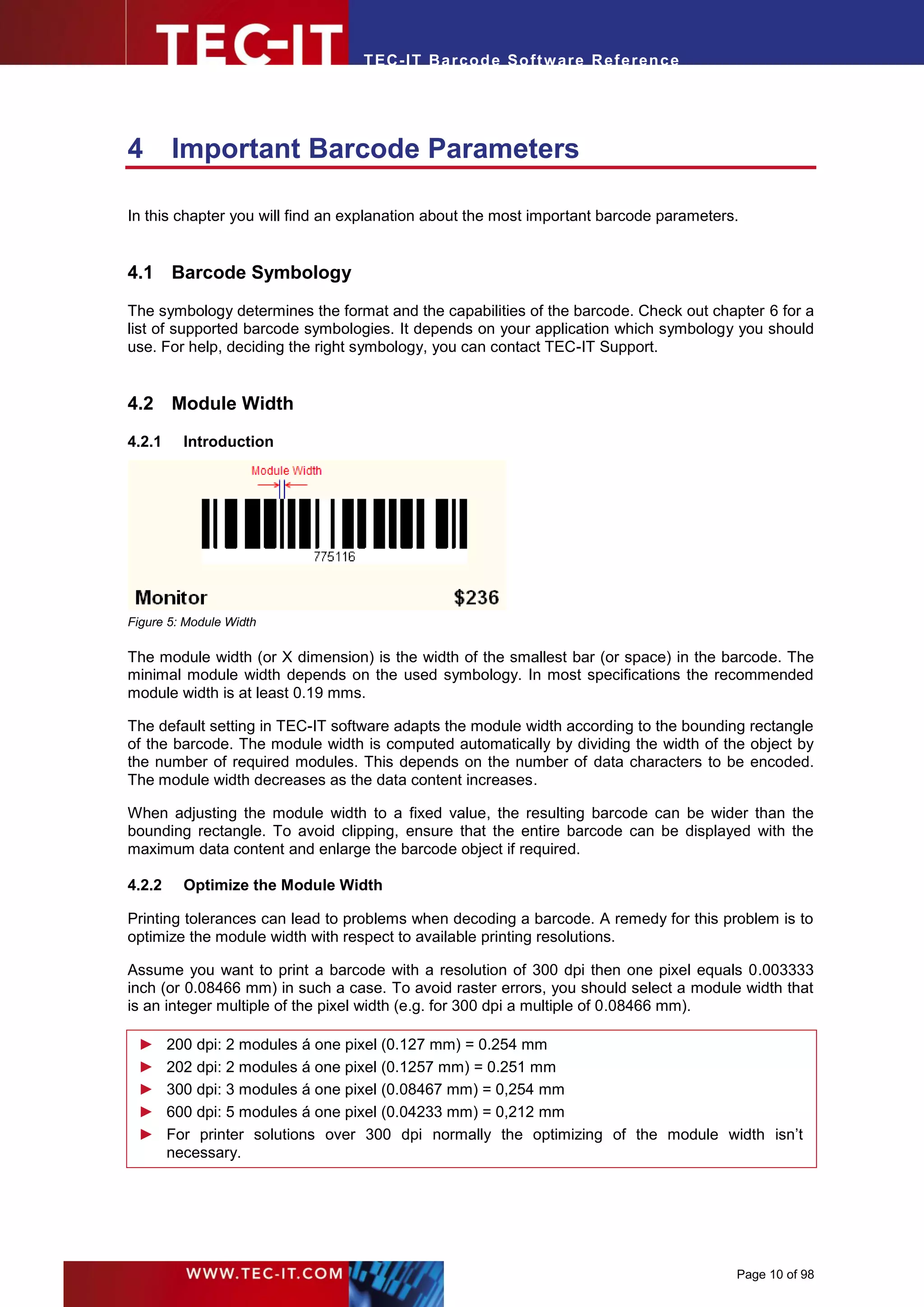
Figure 5: Module Width

The module width (or X dimension) is the width of the smallest bar (or space) in the barcode. The
minimal module width depends on the used symbology. In most specifications the recommended
module width is at least 0.19 mms.

The default setting in TEC-IT software adapts the module width according to the bounding rectangle
of the barcode. The module width is computed automatically by dividing the width of the object by
the number of required modules. This depends on the number of data characters to be encoded.
The module width decreases as the data content increases.

When adjusting the module width to a fixed value, the resulting barcode can be wider than the
bounding rectangle. To avoid clipping, ensure that the entire barcode can be displayed with the
maximum data content and enlarge the barcode object if required.

4.2.2     Optimize the Module Width

Printing tolerances can lead to problems when decoding a barcode. A remedy for this problem is to
optimize the module width with respect to available printing resolutions.

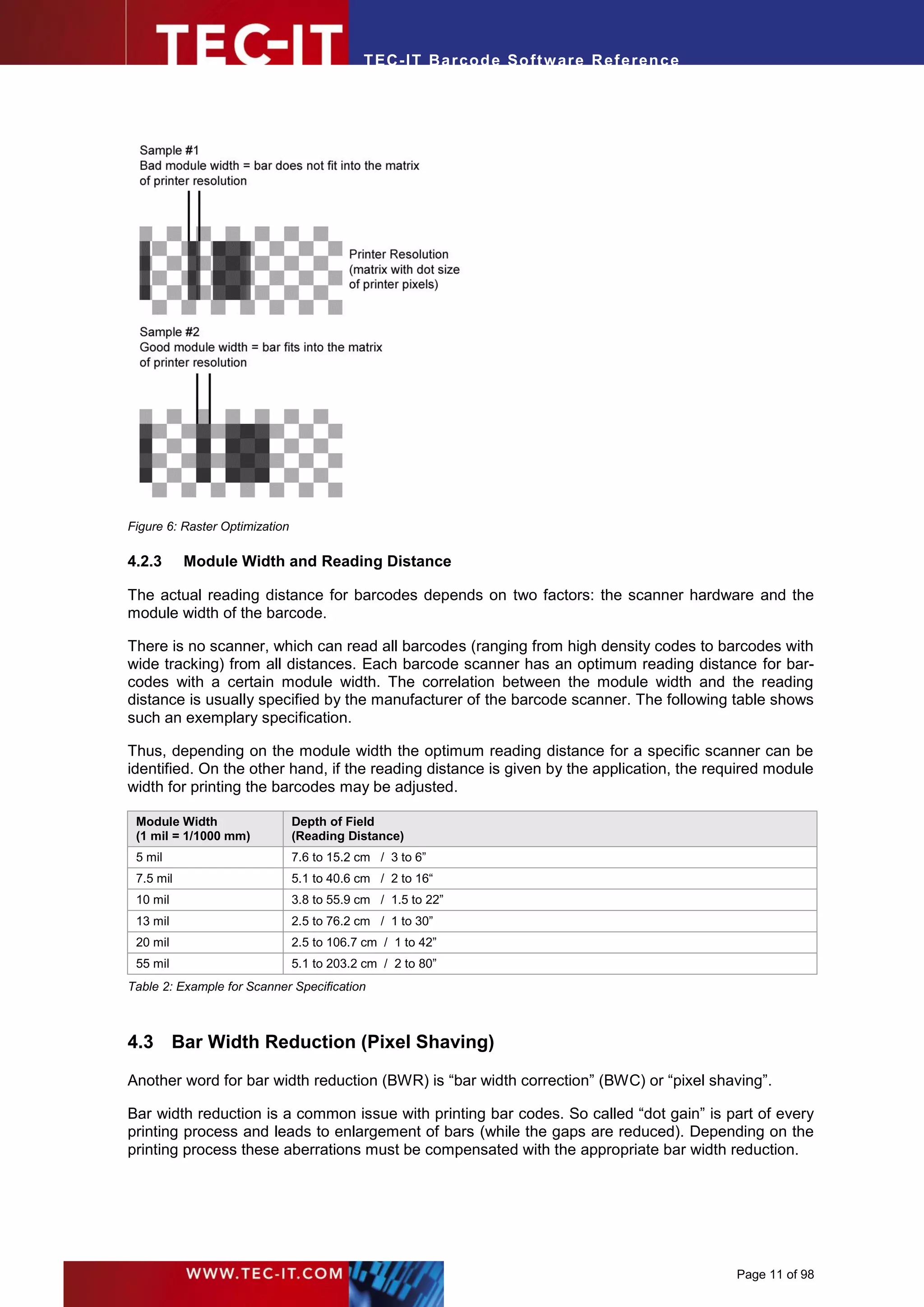
Assume you want to print a barcode with a resolution of 300 dpi then one pixel equals 0.003333
inch (or 0.08466 mm) in such a case. To avoid raster errors, you should select a module width that
is an integer multiple of the pixel width (e.g. for 300 dpi a multiple of 0.08466 mm).

 ►      200 dpi: 2 modules á one pixel (0.127 mm) = 0.254 mm
 ►      202 dpi: 2 modules á one pixel (0.1257 mm) = 0.251 mm
 ►      300 dpi: 3 modules á one pixel (0.08467 mm) = 0,254 mm
 ►      600 dpi: 5 modules á one pixel (0.04233 mm) = 0,212 mm
 ►      For printer solutions over 300 dpi normally the optimizing of the module width isn’t
        necessary.


                                                                                        Page 10 of 98
T EC- IT Ba r cod e So ft w are R ef e ren c e


Figure 6: Raster Optimization

4.2.3      Module Width and Reading Distance

The actual reading distance for barcodes depends on two factors: the scanner hardware and the
module width of the barcode.

There is no scanner, which can read all barcodes (ranging from high density codes to barcodes with
wide tracking) from all distances. Each barcode scanner has an optimum reading distance for bar-
codes with a certain module width. The correlation between the module width and the reading
distance is usually specified by the manufacturer of the barcode scanner. The following table shows
such an exemplary specification.

Thus, depending on the module width the optimum reading distance for a specific scanner can be
identified. On the other hand, if the reading distance is given by the application, the required module
width for printing the barcodes may be adjusted.

 Module Width                   Depth of Field
 (1 mil = 1/1000 mm)            (Reading Distance)
 5 mil                          7.6 to 15.2 cm / 3 to 6”
 7.5 mil                        5.1 to 40.6 cm / 2 to 16“
 10 mil                         3.8 to 55.9 cm / 1.5 to 22”
 13 mil                         2.5 to 76.2 cm / 1 to 30”
 20 mil                         2.5 to 106.7 cm / 1 to 42”
 55 mil                         5.1 to 203.2 cm / 2 to 80”
Table 2: Example for Scanner Specification


4.3 Bar Width Reduction (Pixel Shaving)

Another word for bar width reduction (BWR) is “bar width correction” (BWC) or “pixel shaving”.

Bar width reduction is a common issue with printing bar codes. So called “dot gain” is part of every
printing process and leads to enlargement of bars (while the gaps are reduced). Depending on the
printing process these aberrations must be compensated with the appropriate bar width reduction.


                                                                                             Page 11 of 98
T EC- IT Ba r cod e So ft w are R ef e ren c e


Sample values for dot gain (to be compensated) are approximately 100µm with flexographic
printing, 50µm with intaglio printing and 30µm with offset printing. The smaller the bar codes, the
more precise must be worked. Depending on the bar code orientation to the printing direction, the
printing accuracy and printing process may change.

Bar width reduction may be applied also for laser printers (e.g. with too high toner saturation) or
inkjet printers.

TEC-IT Software allows fine-tuning of the bar width reduction in percent, mm (µm), mils and inch.


4.4 Quiet Zone
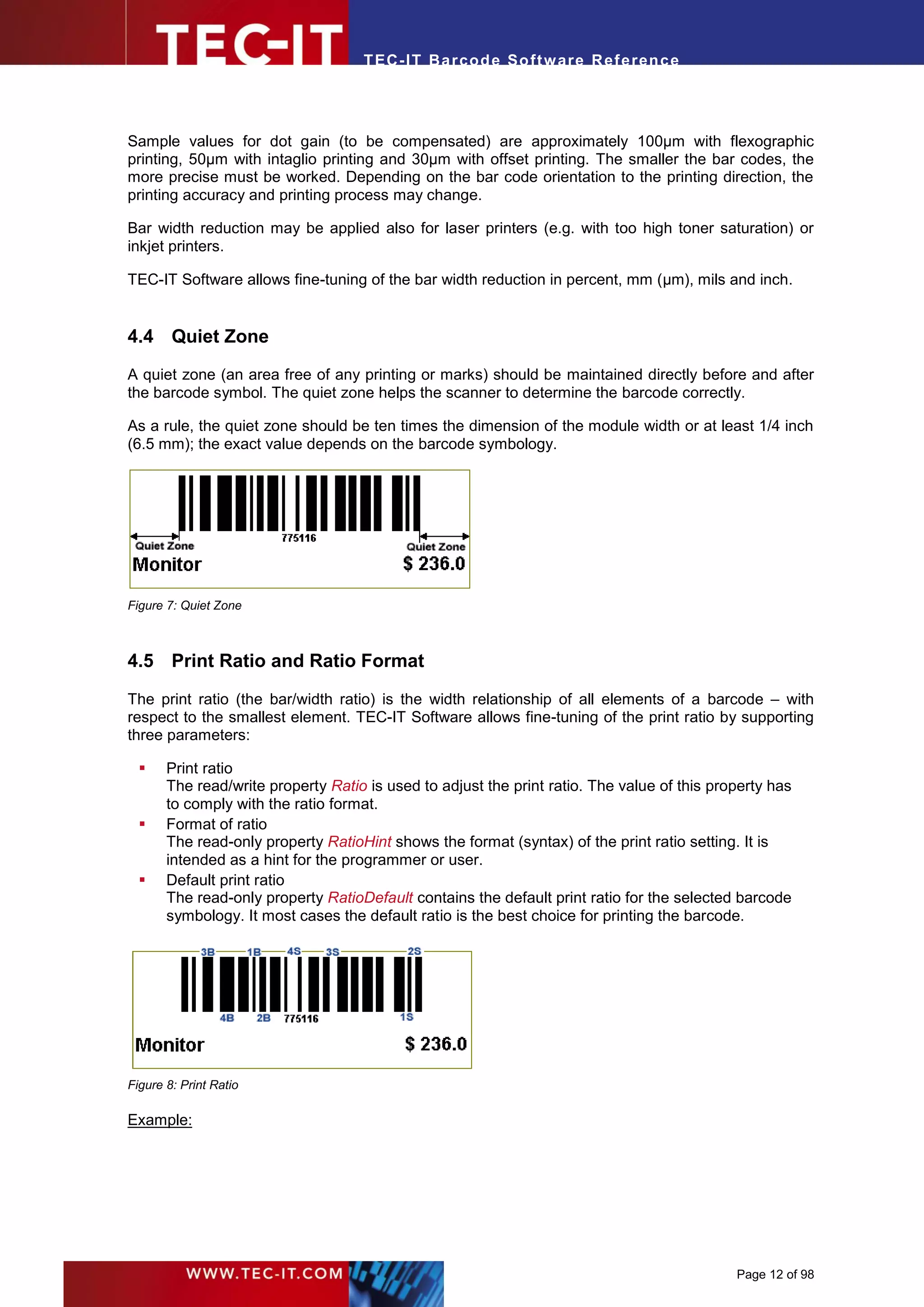
A quiet zone (an area free of any printing or marks) should be maintained directly before and after
the barcode symbol. The quiet zone helps the scanner to determine the barcode correctly.

As a rule, the quiet zone should be ten times the dimension of the module width or at least 1/4 inch
(6.5 mm); the exact value depends on the barcode symbology.


Figure 7: Quiet Zone


4.5 Print Ratio and Ratio Format

The print ratio (the bar/width ratio) is the width relationship of all elements of a barcode – with
respect to the smallest element. TEC-IT Software allows fine-tuning of the print ratio by supporting
three parameters:

      Print ratio
       The read/write property Ratio is used to adjust the print ratio. The value of this property has
       to comply with the ratio format.
      Format of ratio
       The read-only property RatioHint shows the format (syntax) of the print ratio setting. It is
       intended as a hint for the programmer or user.
      Default print ratio
       The read-only property RatioDefault contains the default print ratio for the selected barcode
       symbology. It most cases the default ratio is the best choice for printing the barcode.


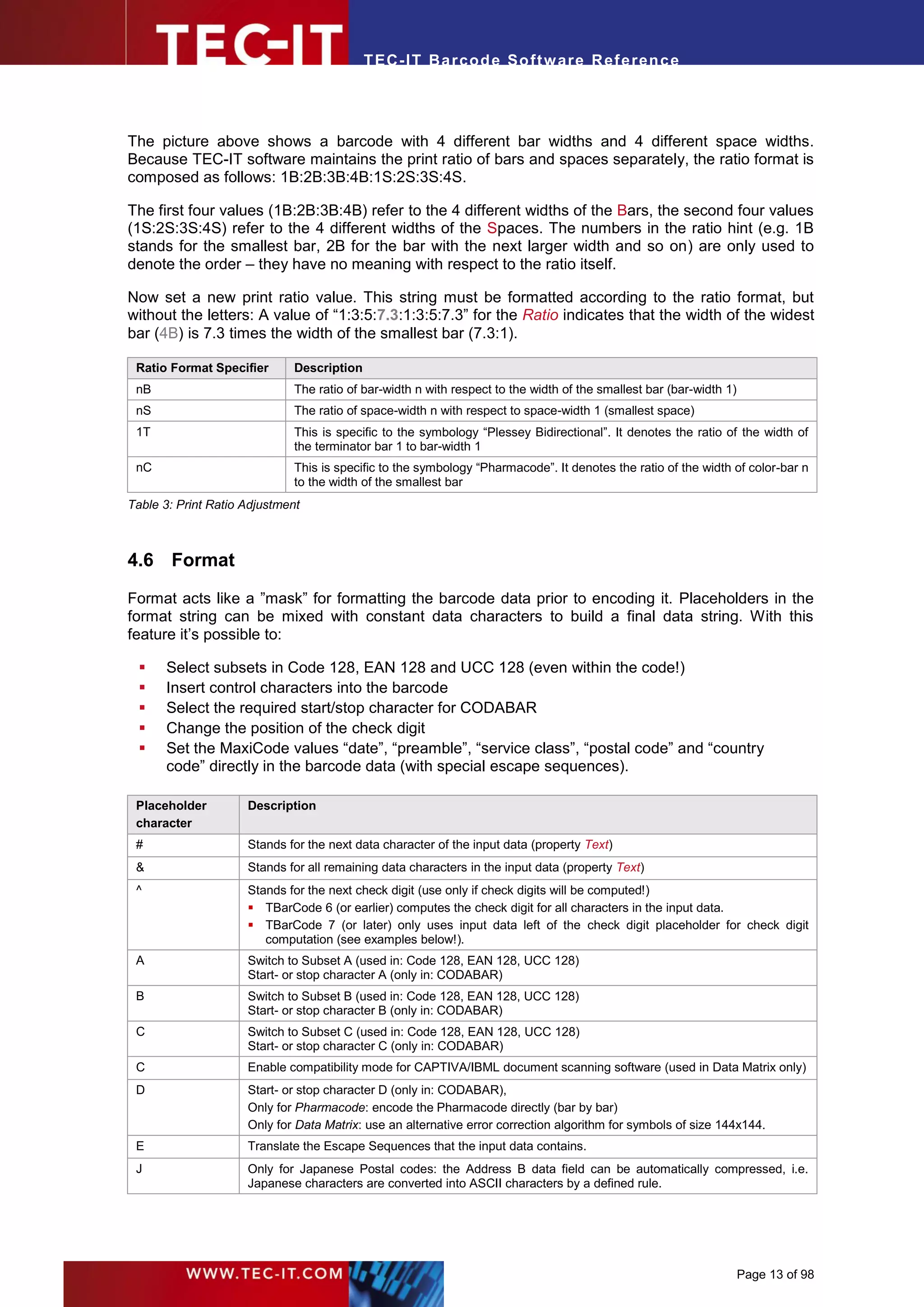
Figure 8: Print Ratio

Example:


                                                                                             Page 12 of 98
T EC- IT Ba r cod e So ft w are R ef e ren c e


The picture above shows a barcode with 4 different bar widths and 4 different space widths.
Because TEC-IT software maintains the print ratio of bars and spaces separately, the ratio format is
composed as follows: 1B:2B:3B:4B:1S:2S:3S:4S.

The first four values (1B:2B:3B:4B) refer to the 4 different widths of the Bars, the second four values
(1S:2S:3S:4S) refer to the 4 different widths of the Spaces. The numbers in the ratio hint (e.g. 1B
stands for the smallest bar, 2B for the bar with the next larger width and so on) are only used to
denote the order – they have no meaning with respect to the ratio itself.

Now set a new print ratio value. This string must be formatted according to the ratio format, but
without the letters: A value of “1:3:5:7.3:1:3:5:7.3” for the Ratio indicates that the width of the widest
bar (4B) is 7.3 times the width of the smallest bar (7.3:1).

 Ratio Format Specifier       Description
 nB                           The ratio of bar-width n with respect to the width of the smallest bar (bar-width 1)
 nS                           The ratio of space-width n with respect to space-width 1 (smallest space)
 1T                           This is specific to the symbology “Plessey Bidirectional”. It denotes the ratio of the width of
                              the terminator bar 1 to bar-width 1
 nC                           This is specific to the symbology “Pharmacode”. It denotes the ratio of the width of color-bar n
                              to the width of the smallest bar
Table 3: Print Ratio Adjustment


4.6 Format

Format acts like a ”mask” for formatting the barcode data prior to encoding it. Placeholders in the
format string can be mixed with constant data characters to build a final data string. With this
feature it’s possible to:

     Select subsets in Code 128, EAN 128 and UCC 128 (even within the code!)
     Insert control characters into the barcode
     Select the required start/stop character for CODABAR
     Change the position of the check digit
     Set the MaxiCode values “date”, “preamble”, “service class”, “postal code” and “country
      code” directly in the barcode data (with special escape sequences).

 Placeholder         Description
 character
 #                   Stands for the next data character of the input data (property Text)
 &                   Stands for all remaining data characters in the input data (property Text)
 ^                   Stands for the next check digit (use only if check digits will be computed!)
                      TBarCode 6 (or earlier) computes the check digit for all characters in the input data.
                      TBarCode 7 (or later) only uses input data left of the check digit placeholder for check digit
                        computation (see examples below!).
 A                   Switch to Subset A (used in: Code 128, EAN 128, UCC 128)
                     Start- or stop character A (only in: CODABAR)
 B                   Switch to Subset B (used in: Code 128, EAN 128, UCC 128)
                     Start- or stop character B (only in: CODABAR)
 C                   Switch to Subset C (used in: Code 128, EAN 128, UCC 128)
                     Start- or stop character C (only in: CODABAR)
 C                   Enable compatibility mode for CAPTIVA/IBML document scanning software (used in Data Matrix only)
 D                   Start- or stop character D (only in: CODABAR),
                     Only for Pharmacode: encode the Pharmacode directly (bar by bar)
                     Only for Data Matrix: use an alternative error correction algorithm for symbols of size 144x144.
 E                   Translate the Escape Sequences that the input data contains.
 J                   Only for Japanese Postal codes: the Address B data field can be automatically compressed, i.e.
                     Japanese characters are converted into ASCII characters by a defined rule.


                                                                                                                     Page 13 of 98
T EC- IT Ba r cod e So ft w are R ef e ren c e


 Placeholder        Description
 character
 S                  Only for MaxiCode: enables setting the values of Date, Preamble, Service Class, Postal- and Country-
                    Code directly in the barcode data (only in conjunction with escape sequences).
 <                  Adds quiet zone markers at the left (“<”) and/or at the right (“>”) side of the barcode. These markers
                    are supported by the following barcode types:
 >
                     EAN8 and add-on variants (both sides)
                     EAN13 and add-on variants (only right side)
                     UPC-A with 2 and 5 digit add-on (only right side)
                     UPC-E with 2 and 5 digit add-on (only right side)
                     ISBN (only right side)
Table 4: Format Placeholders

4.6.1    Format Examples
 Input data         Barcode type      Format string    Data used for       Notes
                                                       encoding
 123                Irrelevant                         123
 123                Irrelevant        5&               5123
 123                Irrelevant        &6               1236
 123                Irrelevant        q#w#e#           q1w2e3
 123                Irrelevant        #q&              1q23
 123                Irrelevant        &^               123c
 123                Irrelevant        ^&               c123                This format string may be used for TBarCode
                                                                           6 (or earlier). – Newer versions always return
                                                                           0 in this case.
 12345              Irrelevant        ####^#           1234c5              When using Modulo 10 for check digit calcu-
                                                                           lation, c will be
                                                                            Mod-10 (12345) = 5 for TBarCode 6 (or
                                                                               earlier).
                                                                            Mod-10 (1234) = 0 for TBarCode 7 (or
                                                                               later).
 Hello              Code 128          A&               Hello
 Hello              Code 128          A##B&            Hello
 Hello4711          Code 128          A##B&            Hello4711
 Hello4711          Code 128          A##B###C&        Hello4711
 1234567890         EAN-128           #####^#####      12345767890         7 is the check digit computed when using
                                                                           Modulo 10. The check digit computation uses
                                                                           only the digits 12345 (67890 are ignored
                                                                           because this data comes after the ^)
Table 5: Format Examples

red      characters            represented in subset A
gray     characters            represented in subset B
green    characters            represented in subset C
c                              represents the place of the check digit


4.7 Escape Sequences (Encoding Binary Data)

If you want to use non-printable or special characters in a barcode, you have to use escape
sequences. An escape sequence always start with a backslash (‘’) followed by the sequence itself.

 ► You have to activate the decoding of escape sequences in the barcode properties – per
   default the translation of escape sequences is turned off.
 ► With activated escape sequences you must use “” in the input data to encode a single
   backslash „“ in the barcode.


                                                                                                            Page 14 of 98
T EC- IT Ba r cod e So ft w are R ef e ren c e


Escape     Description                                                       Valid for Barcode Symbology
sequence
a         Bell (alert)                                                      All
b         Backspace
f         Form feed
n         New Line
r         Carriage Return
t         Horizontal Tab
v         Vertical Tab
         The backslash  itself
0         Zero Byte (if subsequent char is non-numeric)
           Available in TBarCode V10+
0ooo      ASCII-character in octal notation:
           ooo … up to 3 octal digits (0..7)
           First digit is always zero.
ddd       ASCII-character in decimal notation:
           ddd … up to decimal digits (0..9)
           First digit must not be zero.
xhh       For encoding bytes or ASCII-characters in hexadecimal
           notation
           hh … hexadecimal digits (0..F)
Crrggbb   Color selection                                                   See Pharmacode
Ce        Reset the color to default
F         FNC1 (Function Number Character 1) used as field                  EAN-128, UCC-128, Codablock-F
           separator                                                         MicroPDF417: a special FNC1 codeword is
                                                                             inserted when using emulation mode for
                                                                             EAN-128 or Code-128
                                                                             Data Matrix: a special FNC1 codeword is
                                                                             inserted
F         Inserts a Gs (Group Separator)              or   ASCII   1DHex.   PDF417, MaxiCode and in QR-Code
           Don’t encode the x1d directly!                                   QR-Code: When using format
                                                                             UCC/EAN/GS1 Gs is inserted in Byte Mode,
                                                                             a % is inserted in alphanumeric mode.
Ennnnnn   Extended Channel Interpretation (ECI).                            MaxiCode, Data Matrix, QR-Code, PDF417,
           nnnnnn … 6 digit ECI number with leading zeros                    MicroPDF417, Aztec Code
           Used for defining the character set (code page) for the
           subsequent encoded data – see C.1 ECI
EB, EE   Special ECI identifiers for nesting ECIs.                         QR-Code
           EB (ECI Begin) opens a nesting level,
           EE (ECI End) closes it.
G         Global Language Identifier (GLI), similar to ECI (see E).        PDF417
210       FNC1                                                              Code128, EAN-128, UCC128, Codablock-F
211       FNC2                                                              Code128, EAN-128, UCC128, Codablock-F
212       FNC3                                                              Code128, EAN-128, UCC128, Codablock-F
213       FNC4                                                              Code128, EAN-128, UCC128, Codablock-F
x11       DC1                                                               Code93, Code93Ext
x12       DC2                                                               Code93, Code93Ext
x13       DC3                                                               Code93, Code93Ext
x14       DC4                                                               Code93, Code93Ext
x1e       Rs (Record Separator), ASCII 1EHex                                PDF417, QR-Code, Data Matrix, MaxiCode
                                                                             (Mode 3,4 SCM)
x1d       Gs (Group Separator), ASCII 1DHex                                 PDF417, QR-Code, Data Matrix, MaxiCode
                                                                             (Mode 3,4 SCM)


                                                                                                          Page 15 of 98
T EC- IT Ba r cod e So ft w are R ef e ren c e


 x04          Eot (End of Transmission), ASCII 04Hex                        PDF417, QR-Code, Data Matrix, MaxiCode
                                                                             (Mode 3,4 SCM)
Table 6: Implemented Escape Sequences


4.8 Check Digits

The method for the check digit(s) calculation depends on the respective barcode type. In order to
make TEC-IT products as user-friendly as possible, a standard method for each barcode type is
supplied (where applicable).

 ► Per default the input can take place with and without a check digit. In the latter case the
   check digit is calculated automatically and added to the barcode data.

        Example (EAN13): If you enter 12 digits (= utilizable data), the 13th digit (= the check digit) is
        computed and added automatically. If you enter 13 digits, the check digit is replaced by your
        data and isn’t calculated.


 Check digit enumeration     Enumeration         Check digit calculation methods
                             value
 eCDNone                     0                   No check digit will be computed
 eCDStandard                 1                   Standard check digit of the selected barcode type is used
 eCDMod10                    2                   Modulo 10 (usually used with Interleaved 2of5)
 eCDMod43                    3                   Modulo 43 (suggested for Code39 and Logmars, consist of 1 digit)
 eCD2Mod47                   4                   Modulo 47 (2 digits)
 eCDDPLeit                   5                   Method for DP Leitcode
 eCDDPIdent                  6                   Method for DP Identcode
 eCD1Code11                  7                   Method for Code11 (1 digit)
 eCD2Code11                  8                   Method for Code11 (2 digits)
 eCDPostnet                  9                   Method for USPS Postnet
 eCDMSI1                     10                  Method for MSI (1 digit)
 eCDMSI2                     11                  Method for MSI (2 digits)
 eCDPlessey                  12                  Method for Plessey
 eCDEAN8                     13                  Method for EAN 8
 eCDEAN13                    14                  Method for EAN 13
 eCDUPCA                     15                  Method for UPC A
 eCDUPCE                     16                  Method for UPC E
 eCDEAN128                   17                  EAN 128 internal method (Modulo 103)
 eCDCode128                  18                  Code 128 internal method (Modulo 103)
 eCDRM4SCC                   19                  Method for Royal Mail 4 State
 eCDPZN                      20                  Mod-11 Method for PZN
 eCDMod11W7                  21                  Mod-11 (Weighting = 7)
 eCDEAN14                    22                  Method for EAN 14
 eCDMod10Kor                 23                  Method for Korean Postal Authority - Modulo 10
 eCDMod10Pla                 24                  Method for Planet - Modulo 10
 eCDMod10ItlPst25            25                  Method for Italian Postal 2/5 (Modulo 10 based)
 eCDMod36                    26                  Modulo 36 (ISO/IES 7064) for DPD Barcode
 eCDMod16                    27                  Modulo 16 for Codabar Barcode
Table 7: Check Digit Methods and Enumerators


                                                                                                             Page 16 of 98
T EC- IT Ba r cod e So ft w are R ef e ren c e


5       Application Identifiers (AI)

5.1 Introduction

Some barcode symbologies (e.g. EAN-128) use Application Identifiers (AIs) in order to provide
information about the structure of the encoded data. Application Identifiers are mostly used in
industry-specific barcode symbologies.

An Application Identifier (AI) is a prefix (built from 2 to 4 characters) used to identify the meaning
and the format of the data that follows. AIs have been defined by UCC/EAN/GS1 for identification,
traceability data, dates, quantity, measurements, locations, and many other types of information.

The data presented can be alphanumeric or numeric and with fixed or variable data lengths. The
symbology character FNC1 is used as field separator in connection with variable length data fields.

 ► Use FNC1 only with variable length data fields
 ► Don’t use FNC1 after the last data field.

Depending on the barcode symbology (e.g. with EAN-128) you are able to concatenate multiple AIs
and encode more data fields into one symbol. If an AI is of variable length type, you have to
separate the next data field with FNC1. FNC1 is specified in the barcode data with the escape
sequence “F” (see section 4.7).

 ► For encoding the FNC1 you have to activate Translate Escape Sequences.
 ► Do not encode the brackets which are usually used to denote an Application Identifier. TEC-
   IT software generates the brackets automatically for the human readable text.

For more information (e.g. a list of all available AIs) please follow the links below:

http://www.gs1uk.org/what-we-do/GS1-standards/Pages/default.aspx
http://www.gs1.org/productssolutions/barcodes/technical/genspecs/index.html
http://en.wikipedia.org/wiki/GS1-128

Additional links can be found in our support area as well:

http://www.tec-it.com/support/links/barcode.aspx


5.2 Examples
5.2.1    Batch Number

A batch number is encoded with AI 10. The format of AI 10 is “n2 + an..20”. This means the AI has
two digits (10) followed by variable length data with maximum 20 characters.

 Description                  Value
 Data (Text property)         10 + Production Number = 1012345678
 Human readable text          (10)12345678
 Encoded data                 1012345678


5.2.2    Multiple AIs within one Barcode

Two data fields should be encoded in one barcode. Following fields are used:


                                                                                          Page 17 of 98
T EC- IT Ba r cod e So ft w are R ef e ren c e


 Description                     Value
 Batch number AI (10) – format   n2 + an..20
 Item number AI (01) – format    n14
 Data (Text property)            10+Batch Number+F+01+Item Number = 1012345678F0112345678901234
 Human readable text             (10)12345678(01)12345678901234
 Encoded data                    1012345678FNC10112345678901234


 ► The field separator FNC1 (encoded by the sequence „F“) has to be used because the batch
   number is a variable length data field.

5.2.3      EAN-128 with embedded Check Digit

Sometimes it is required to calculate a check digit only for a partial content of a barcode. A good
example is the AI 01 (GTIN) in combination with other data fields within an EAN-128 symbol.

 Description                     Value
 AI for GTIN                     01
 AI for Date                     11
 GTIN without check digit        1234567890123
 Production Date                 060606

In our example, the GTIN contains no check digit (e.g. when created based on the EAN-13
number). The check digit has to be generated only for the first 13 digits of the supplied data and not
for the full data content.

Since TBarCode Version 7+ you can use the format property to solve this problem:

 Description                     Value
 Format property:                01#############^11######
 Input Data (Text property):     1234567890123060606
 Check Digit Method:             EAN-14 (Mod-10)
 Calculated Check Digit:         CD = Mod-10 of (1234567890123) = 1
 Result:                         01 + 1234567890123 + CD + 11 + 060606
 Data used for encoding:         011234567890123111060606


5.3 GS1 DataBar Expanded / GS1 DataBar Expanded Stacked

The mentioned symbologies use an internal data compression algorithm for specific Application
Identifiers. Compression means that the barcode can encode more data or can be made smaller.
This optimization takes effect automatically if the AIs are applied in the following predefined order.

5.3.1      AIs with a Fixed Length

5.3.1.1     AI(01) and Weight

AI (01) must begin with an indicator digit of 9 for variable units

 Combinations                          Description                                         Max. Weight
 AI (01) + AI (3103)                   Weight in kg with 3 decimal places (n.nnn kg)       32.767
 AI (01) + AI (3202)                   Weight in pound with 2 decimal places (n.nn lbs)    999.99
 AI (01) + AI (3203)                   Weight in pound with 3 decimal places (n.nnn lbs)   22.767
Table 8: Fixed length AIs in RSS Expanded / Expanded Stacked Codes


                                                                                                     Page 18 of 98
T EC- IT Ba r cod e So ft w are R ef e ren c e


5.3.1.2     AI(01), Weight and Date

Two or three data elements will be used for the barcode:

 Combinations                           Description                                    Addition
 AI (01)                                Must start with 9 for variable units
 + AI (310n) or AI (320n)               For declaration of the Weight                  n = 0..9
 + AI (11), AI (13), AI (15), AI (17)   For the Date
Table 9: AIs in GS1 DataBar Expanded / Expanded Stacked Codes

If the date is not required this order of AIs still leads to a better barcode representation.

5.3.2      AIs with Variable Lengths

5.3.2.1     AI (01) and Price

 Combinations                           Description                                    Addition
 AI (01)                                Must start with 9 for variable units
 + AI (392x)                            For the price                                  x = 0..3
 or + AI (393x)                         For the price in the ISO currency format       x = 0..3
Table 10: Variable length AIs in RSS Expanded / Expanded Stacked Codes

5.3.2.2     AI (01)


 ► If AI(01) is needed in the barcode, please ensure it is the first AI encoded (for optimal data
   representation).


5.4 GS1 Composite Symbology

The GS1 (EAN.UCC) Composite Symbology was designed to hold primary data (like the GTIN or
Shipping Container Code) in the linear symbol and additional data in the 2D Composite Component.
For specific AI combinations in the 2D add-on symbol it is possible to perform a data compression
(as shown below). This leads to a higher data density (= smaller barcode or more encode able
characters).

5.4.1      Compressed Sequences of AIs

The following AI-sequences can be compressed for higher data efficiency:

 Combinations                     Description
 AI (11) + AI (10)                Date and Lot-Number
 AI (17) + AI (10)                Expiration Date und Lot-Number
Table 11: AIs in Composite Codes

5.4.2      AI (90)

AI (90) and the following data (which starts with an upper-case letter or a digit) may be used for
encoding of FACT IDs. Compression takes place only if AI(90) is the first data element of the
sequence.


                                                                                                  Page 19 of 98
T EC- IT Ba r cod e So ft w are R ef e ren c e


6        Barcode Symbologies

This chapter describes all supported barcode types. For each barcode the following values are
specified:

        Symbology Number
         This number is used in some TEC-IT products to specify the barcode symbology.
         Developers are usually specifying the barcode type via an enumeration which is
         documented in the respective developer documentation.
        Valid characters
         Lists the available characters or character sets which can be encoded with the symbology.
        Quiet zone
         This is the recommended quiet zone for the barcode symbology in question. Please note
         that the quiet zone often depends on your individual application.
        Module width
         The recommended minimal module width of the barcode. This value may be adapted to your
         special requirements.
        Standard print ratio
         This setting describes the print ratio used by TEC-IT software if no custom ratios are
         adjusted. For most applications you can use this default value.
        Ratio format
         This value serves as a hint for specifying user defined print ratios.
        Default check digit
         Describes which check digit method is used by default for the barcode symbology in
         question. For 2D codes check digits are not applicable, these codes are using an error
         correction scheme.
        Possible check digits
         Provides information whether additional or user defined check digits methods may be
         adjusted
        Size
         Describes the requirements with respect to the symbol size (if available)


6.1 1D (Linear) Symbologies
6.1.1      Australian Post Customer
 Symbology number:        63
 Valid characters:        “0”..”9”, 8 digits
 Quiet-zone:              left/right: 6 mm, top/bottom: 2 mm
 Module width:            --
 Standard print ratio:    1:1                                                     12345678
 Ratio format:            1B:1S
 Default check digit:     Automatic (symbology specific).
 Size:                    see Notes


This barcode is used by the Australian Post for marking shipments. Special code variants are
available for redirections, replies and so on. The barcode height is between 4.2mm and 5.8mm. The
module width should be adjusted to 0.47 mms. Usual no readable text is displayed. The length will
depend on the use of additional bars (code variants Customer 2 and Customer 3).

Due to its number of bars (37) Australian Post Customer is also called Australia Post 37-CUST.


                                                                                             Page 20 of 98
T EC- IT Ba r cod e So ft w are R ef e ren c e


6.1.2     Australian Post Customer 2
 Symbology number:       64
 Valid characters:       “0”..”9”, “A”..”Z”, “a”..”z”, Space, “#”
 Quiet zone:             left/right: 6 mm, top/bottom: 2 mm
 Module width:           --
 Standard print ratio:   1:1                                                  12345678ABab
 Ratio format:           1B:1S
 Default check digit:    Automatic (symbology specific).
 Symbol size:            see Australian Post Customer


This is the same barcode as the Australian Post Standard Customer, but with additional 5
characters for customer specific data. The first 8 characters must be digits. This symbology is also
called Australia Post 52-CUST (Due to its 52 bars).

6.1.3     Australian Post Customer 3
 Symbology number:       65
 Valid characters:       “0”..”9”, “A”..”Z”, “a”..”z”, Space, “#”
 Quiet zone:             left/right: 6 mm, top/bottom: 2 mm
 Module width:           --
 Standard print ratio:   1:1                                                 12345678ABCabc
 Ratio format:           1B:1S
 Default check digit:    Automatic (symbology specific).
 Symbol size:            see Australian Post Customer


This is the same barcode as the Australian Post Standard Customer, but with additional 10
characters for customer specific data. The first 8 characters must be digits. This symbology is also
called Australia Post 67-CUST (Due to its 67 bars).

6.1.4     Australian Post Redirection
 Symbology number:       68
 Valid characters:       “0”..”9”, 8 digits
 Quiet zone:             left/right: 6 mm, top/bottom: 2 mm
 Module width:           --
 Standard print ratio:   1:1                                                     12345678
 Ratio format:           1B:1S
 Default check digit:    Automatic (symbology specific).
 Symbol size:            see Australian Post Customer


6.1.5     Australian Post Reply Paid
 Symbology number:       66
 Valid characters:       “0”..”9”, 8 digits
 Quiet zone:             left/right: 6 mm, top/bottom: 2 mm
 Module width:           --
 Standard print ratio:   1:1                                                     12345678
 Ratio format:           1B:1S
 Default check digit:    Automatic (symbology specific).
 Symbol size:            see Australian Post Customer


                                                                                              Page 21 of 98
T EC- IT Ba r cod e So ft w are R ef e ren c e


6.1.6     Australian Post Routing
 Symbology number:        67
 Valid characters:        “0”..”9”, 8 digits
 Quiet zone:              left/right: 6 mm, top/bottom: 2 mm
 Module width:            --
 Standard print ratio:    1:1                                                      12345678
 Ratio format:            1B:1S
 Default check digit:     Automatic (symbology specific).
 Symbol size:             see Australian Post Customer


6.1.7     Bookland

The Bookland barcode encodes the ISBN number in EAN-13 format followed by a 5 digit
supplemental code. The barcode data always consists of the digits ‘978’ (the EAN article identifier),
followed by a 9 digit number and one check digit. You can use the EAN-13 with 5 digits add-on for
encoding. The 5 digit add-on barcode is used to encode the book price. For more information refer
to section 6.1.49

6.1.8     Brazilian CEPNet / Brazilian Postal Code
 Symbology number:        54
 Valid characters:        “0”..”9”, 8 digits + 1 check digit
 Quiet zone:              vertical: 1/25 inch
                          horizontal: 1/8 inch
 Module width:            --
 Standard print ratio:    1:1                                                     123456784
 Ratio format:            1B:1S
 Default check digit:     POSTNET (eCDPostNet)
 Symbol size:             8 digits, 1 check digit


This code is used by the Brazilian Postal Services. An 8 digit ZIP-code is encoded. The check digit
is calculated automatically. It cannot be specified in the input data.

The barcode height should be adjusted to 3.2 mms; the module width to 0.423 mms; usually no
plain text is displayed. The encoding is based on US Postal codes.

6.1.9     Codabar (Rationalized Version)
 Symbology number:        18
 Valid characters:        “0”..”9”, “-“, “$”, “:”, “/”, ”.”, ”+”, “A”, “B”,
                          “C”, “D”
 Quiet zone:              left/right: 10X
 Module width:            X = 0.19 mm
 Standard print ratio:    1:3:1:3
 Ratio format:            1B:2B:1S:2S
 Default check digit:     None (eCDNone)
 Possible check digits:   User supplied (e.g. Modulo 16)
 Symbol size:             +/- 0.066mm Module width Deviation


This code was invented 1972 by Monarch Marking Systems for retail purposes. 1977 the American
Blood Commission defined Codabar 2 as standard symbology for blood banks (=ABC Codabar).

The characters “A”, “B”, “C”, and “D” are useable as start or stop characters only. The barcode uses
2 element-widths and 4 different start/stop-characters (A, B, C, and D). These start/stop characters
can be utilized for additional information – e.g. "B1234B". The print ratio should be in the following
range: 1:2 -1:3 (Pr >= 2.25:1). Since the symbology is “self-checking” there is no established check
sum method.


                                                                                              Page 22 of 98
T EC- IT Ba r cod e So ft w are R ef e ren c e


The symbology is also known as Code 2 of 7, NW-7, ABC Codabar, USD-4, Monarch, Code-27,
Ames code, or Rationalized Codabar.

The “rationalized version” uses 2 different element widths in spite of the original symbology, which
used 18 different element widths (Standard Codabar).

 ► Use the format property to determine the Start and Stop characters (see section 9.3).
 ► FedEx is using a special variant of the Codabar barcode. The format of the encoded number
   is as follows: XXXX-XXXX-XXXY with a 4-digit ID at the end. The first 12 digits contain the
   tracking number. The barcode starts with „C“ (start-character) and ends with „D“ (stop-
   character).

6.1.10 Code 2 of 5 Standard (Code 2 of 5 Matrix)
 Symbology number:        2
 Valid characters:        “0”..”9”
 Quiet zone:              left/right: 10X, min. ¼ inch
 Module width:            X>= 0.19 mm
 Standard print ratio:    1:3:4.5:1:3
 Ratio format:            1B:2B:3B:1S:2S
 Default check digit:     None (eCDNone)
 Possible check digits:   Modulo 10 (eCDMod10)
 Symbol size:             --


This is a self-checking code. It is used for industrial applications, article numbering, photo
development, ticketing.

6.1.11 Code 2 of 5 Data Logic
 Symbology number:        6
 Valid characters:        “0”..”9”
 Quiet zone:              left/right: 10X, min. ¼ inch
 Module width:            --
 Standard print ratio:    1:3:1:3
 Ratio format:            1B:2B:1S:2S
                                                                               0123456789
 Default check digit:     None (eCDNone)
 Possible check digits:   Modulo 10 (eCDMod10)
 Symbol size:             --


This symbology is proprietary variant of Code 2 of 5 Standard.

6.1.12 Code 2 of 5 IATA
 Symbology number:        4
 Valid characters:        “0”..”9”
 Quiet zone:              left/right: 10X, min. ¼ inch
 Module width:            X>= 0.19 mm
 Standard print ratio:    1:3:1
 Ratio format:            1B:2B:1S
 Default check digit:     None (eCDNone)
 Possible check digits:   Modulo 10 (eCDMod10)
 Symbol size:             --


This is a self-checking code. Start/stop-characters are identical to Code 2 of 5 Industry. It supports
distance reading (> 1m) and can be printed with very simple printing techniques.


                                                                                            Page 23 of 98
T EC- IT Ba r cod e So ft w are R ef e ren c e


It is used for baggage handling in air-transport applications (International Air Transport Agency =
IATA).

6.1.13 Code 2 of 5 Industrial
 Symbology number:        7
 Valid characters:        “0”..”9”
 Quiet zone:              left/right: 10X, min. ¼ inch
 Module width:            X>= 0.19 mm
 Standard print ratio:    1:3:1
 Ratio format:            1B:2B:1S
                                                                                   0123456
 Default check digit:     None (eCDNone)
 Possible check digits:   Modulo 10 (eCDMod10)
 Symbol size:             --


6.1.14 Code 2 of 5 Interleaved
 Symbology number:        3
 Valid characters:        “0”..”9”
 Quiet zone:              left/right: 10X, min. ¼ inch
 Module width:            X>= 0.19 mm
 Standard print ratio:    1:3:1:3
 Ratio format:            1B:2B:1S:2S
 Default check digit:     None (eCDNone)
 Possible check digits:   Modulo 10 (eCDMod10)
 Symbol size:             --


Code 2 of 5 Interleaved is in wide-spread use (article-numbering, industrial applications).

This self-checking code offers high data capacity due to encoding pairs of numbers (the first digit is
encoded in the bars, the second in the spaces). Thus, this symbology can encode only an even
number of digits. If the number of digits is odd a leading zero will be inserted automatically.

6.1.15 Code 2 of 7

This symbology is identical with Codabar 2 Widths and is also known as NW-7 or USD-4. See sec-
tion 6.1.8

6.1.16 Code 11
 Symbology number:        1
 Valid characters:        “0”..”9”, “-“
 Quiet zone:              left/right: 10X
 Module width:            X= 0.191 mm
 Standard print ratio:    1:2.24:3.48:1:2.24
 Ratio format:            1B:2B:3B:1S:2S
 Default check digit:     None (eCDNone)
 Possible check digits:   1 check digit (eCD1Code11) – or
                          2 check digits (eCD2Code11)
 Symbol size:             --


This symbology is mainly used in telecommunications for marking equipment and components. It
was invented in 1977 by INTERMEC. It is similar to Code 2 of 5 Matrix. The symbology is not self-
checking therefore 2 check digits are recommended. Code 11 is a high-density code, but requires
also a high-density output device (mainly because of the print ratio utilized).


                                                                                              Page 24 of 98
T EC- IT Ba r cod e So ft w are R ef e ren c e


6.1.17 Code 39
 Symbology number:        8
 Valid characters:        “0”..”9”, “A”..”Z”, “-“, “.”, Space, “*”, “$”, “/”,
                          “+”, “%”
 Quiet zone:              left/right: 10X, min. ¼ inch
 Module width:            X >= 0.19 mm
 Standard print ratio:    1:3:1:3
 Ratio format:            1B:2B:1S:2S
 Default check digit:     None (eCDNone)
 Possible check digits:   Modulo 43 (eCDMod43), Modulo 11
                          Weight 7 (eCDMod11W7)
 Symbol size:             H>=15% of L (H>=6.3 mm!)
                          H: Height of the barcode without human
                          readable text
                          L: width of the barcode


Code 39 is in heavy use in industry, organizations and commerce. It was developed 1974 by
INTERMEC and got standardized by ANSI MH 10.8 M-1983 and MIL-STD-1189.

 ► The start- and stop characters “*” (asterisk) are created automatically and must not be
   included in the input data. They are not displayed in the human readable text.

Code 39 is a self-checking code. Code concatenation is possible (if the first encoded character is a
space subsequent barcodes are concatenated by the scanner). Distance-reading is possible (>
1m).

6.1.18 Code 39 Extended
 Symbology number:        9
 Valid characters:        ASCII-characters between 0..127
 Quiet zone:              left/right: 10X, min. ¼ inch
 Module width:            X >= 0.19 mm
 Standard print ratio:    1:3:1:3
 Ratio format:            1B:2B:1S:2S
 Default check digit:     None (eCDNone)
 Possible check digits:   Modulo 43 (eCDMod43), Modulo 11
                          Weight 7 (eCDMod11W7)
 Symbol size:             H>=15% of L (H>=6.3 mm!)
                          H: Height of the barcode without human
                          readable text
                          L: width of the barcode


Code 39 Extended is rarely used because Code 128 offers much better compression. Code 39
Extended uses the same symbology as Code 39 but encodes also lower-case letters and special
characters („+A“ results in a lower case „a“ when scanned). Scanner must be configured correctly
for decoding Code39 Extended.

 ► The start- and stop characters “*” (asterisk) are created automatically and must not be
   included in the input data. They are not displayed in the human readable text.


                                                                                          Page 25 of 98
T EC- IT Ba r cod e So ft w are R ef e ren c e


6.1.19 Code 93
 Symbology number:        25
 Valid characters:        “0”..”9”, “A”..”Z”, “-“, “.”, Space, “$”, “/”, “+”,
                          “%”
 Quiet zone:              left/right: 10X, min. ¼ inch
 Module width:            X >= 0.19 mm
 Standard print ratio:    1:2:3:4:1:2:3:4
 Ratio format:            1B:2B:3B:4B:1S:2S:3S:4S                                ABC123-/+
 Default check digit:     Automatic (symbology specific).
                          Modulo 47 (eCD2Mod47)
 Symbol size:             --


Code 93 was invented 1982 by INTERMEC to achieve better information densities (compared to
Code 39). Code concatenation is possible (if the first encoded character is a space subsequent
barcodes are concatenated by the scanner).

6.1.20 Code 93 Extended
 Symbology number:        62
 Valid characters:        ASCII-characters between 0..127
 Quiet zone:              left/right: 10X, min. ¼ inch
 Module width:            X >= 0.19 mm
 Standard print ratio:    1:2:3:4:1:2:3:4
 Ratio format:            1B:2B:3B:4B:1S:2S:3S:4S
                                                                                 ABab12-/+
 Default check digit:     Automatic (symbology specific).
                          Modulo 47 (eCD2Mod47)
 Symbol size:             --


Based upon Code 93 but encodes the complete ASCII character set. One of the four available
control characters is used to shift into the ASCII-character table.

6.1.21 Code 128
 Symbology number:        20
 Valid characters:        ASCII-characters between 0..127
 Quiet zone:              left/right: 10X, min. ¼ inch
 Module width:            X >= 0.19 mm
 Standard print ratio:    1:2:3:4:1:2:3:4
 Ratio format:            1B:2B:3B:4B:1S:2S:3S:4S
 Default check digit:     Automatic (symbology specific).
                          Modulo 103 (eCDCode128)
 Possible check digits:   Modulo 10, EAN-14
 Symbol size:             --


Code 128 is heavily used in all areas. It is a modern high-density symbology and was invented 1981
by Computer Identics.

TEC-IT software analyzes input data and chooses the best suitable barcode representation with the
highest data density. This is done by so-called “subset switching”. 3 different internal characters
(=subsets) sets are used:

     Code128A = Upper Case + Non-Printable Characters (ASCII 0-31)
     Code128B = Upper / Lower Case + All Printable Characters
     Code128C = Numeric with doubled density

Code128 uses a built-in check digit (Modulo 103). This check digit is part of the code and cannot be
omitted. It is never printed in the human readable text. Scanners are checking it when reading a
code but do not deliver the check digit to connected systems.


                                                                                             Page 26 of 98
T EC- IT Ba r cod e So ft w are R ef e ren c e


In conjunction with the symbology character "FNC1" this code is also known as UCC-128 / EAN-
128 barcode – see section 6.1.42.

6.1.22 Code 128 Subset A
 Symbology number:        59
 Valid characters:        ASCII-characters between 0..127
 Quiet zone:              left/right: 10X, min. ¼ inch
 Module width:            X >= 0.19 mm
 Standard print ratio:    1:2:3:4:1:2:3:4
 Ratio format:            1B:2B:3B:4B:1S:2S:3S:4S
 Default check digit:     Automatic (symbology specific).                      ABab123+/-
                          Modulo 103 (eCDCode128)
 Possible check digits:   Modulo 10, EAN-14
 Symbol size:             --


This is a variant of Code128 which uses character set (subset) A. It is suitable for encoding upper
case characters + ASCII control sequences. It switches to other Code128 subsets when required.

6.1.23 Code 128 Subset B
 Symbology number:        60
 Valid characters:        ASCII-characters between 0..127
 Quiet zone:              left/right: 10X, min. ¼ inch
 Module width:            X >= 0.19 mm
 Standard print ratio:    1:2:3:4:1:2:3:4
 Ratio format:            1B:2B:3B:4B:1S:2S:3S:4S
 Default check digit:     Automatic (symbology specific).                      ABab123+/-
                          Modulo 103 (eCDCode128)
 Possible check digits:   Modulo 10, EAN-14
 Symbol size:             --


This is a variant of Code128 which uses character set (subset) B. It is suitable for encoding lower &
upper case letters. It switches to other Code128 subsets when required.

6.1.24 Code 128 Subset C
 Symbology number:        61
 Valid characters:        ASCII-characters between 0..127
 Quiet zone:              left/right: 10X, min. ¼ inch
 Module width:            X >= 0.19 mm
 Standard print ratio:    1:2:3:4:1:2:3:4
 Ratio format:            1B:2B:3B:4B:1S:2S:3S:4S
 Default check digit:     Automatic (symbology specific).                      ABab123+/-
                          Modulo 103 (eCDCode128)
 Possible check digits:   Modulo 10, EAN-14
 Symbol size:             --


This is a variant of Code128 which uses character set (subset) C. It is suitable for encoding digits. It
switches to other Code128 subsets when required.

6.1.25 Code 25

Uniform Symbology Specification ITF 2-5. Identical to Code 2 of 5 Interleaved. Another alias is USS
ITF 2-5.


                                                                                            Page 27 of 98
T EC- IT Ba r cod e So ft w are R ef e ren c e


6.1.26 Code 32
 Symbology number:          93
 Valid characters:          “0” - “9”
 Quiet zone:                left/right: 10X, min. ¼ inch
 Module width:              0,25 <= X <= 0.254 mm
 Standard print ratio:      1:2.5:1:2.5
 Ratio format:              1B:2B:1S:2S
 Default check digit:       Module 10 Luhn Reversed
                            (eCDMod10LuhnRev)                                     A012345676
 Possible check digits:     Module 10 Luhn Reversed
                            (eCDMod10LuhnRev)
 Symbol size:               --


It is used by the Italian Pharma Industry. The code is also called Italian Pharmacode.

The Code 32 number, consisting of 9 digits, is converted to an equivalent Code 39 Barcode of 6
characters. The letter the human readable text is prepended by “A” which is not encoded.

6.1.27 DAFT Code
 Symbology number:          93
 Valid characters:          “D”, “A”, “F”, “T” or “d”, “a”, “f”, “t”
 Quiet zone:                left/right: 2 mm
 Module width:              --
 Standard print ratio:      1:1
 Ratio format:              1B:1S
 Default check digit:       None
 Symbol size:               --


DAFT Code is no symbology. It is a technique to generate arbitrary postal codes (like for instance
the Australian Postal Codes or the Royal Mail 4 State code).

Each input character stands for a specific bar type and there are 4 different bar types:

     “D” or “d”:    Descender
     “A” or “a”:    Acsender
     “F” or “f’:    Full
     “T” or “t”:    Transmitter


6.1.28 Deutsche Post Identcode
 Symbology number:          22
 Valid characters:          “0”..”9”, 11 digits + 1 check digit
 Quiet zone:                left/right: 10X, min. ¼ inch
 Module width:              --
 Standard print ratio:      1:3:1:3
                                                                                 01.234 567.86
 Ratio format:              1B:2B:1S:2S
 Default check digit:       Automatic (symbology specific).
                            DP Identcode (eCDDPIdent)
 Symbol size:               --


This symbology is used by Deutsche Post. The code is basically a Code 2 of 5 interleaved
enhanced with a special check digit calculation.


                                                                                                 Page 28 of 98
T EC- IT Ba r cod e So ft w are R ef e ren c e


6.1.29 Deutsche Post Leitcode
 Symbology number:             21
 Valid characters:             “0”..”9”, 13 digits + 1 check digit
 Quiet zone:                   left/right: 10X, min. ¼ inch
 Module width:                 --
 Standard print ratio:         1:3:1:3
                                                                                    01234.567.86
 Ratio format:                 1B:2B:1S:2S
 Default check digit:          Automatic (symbology specific).
                               DP Leitcode (eCDDPLeit)
 Symbol size:                  --


This symbology is used by Deutsche Post. The code is basically a Code 2 of 5 Interleaved
enhanced with a special check digit calculation. It is used for encoding the ZIP-Code, Street and
number of the shipment.

6.1.30 DOD Logmars

DOD Logmars stands for Department of Defense Logmars. Same as Logmars (see section 6.1.59).

6.1.31 DPD Code
 Symbology number:             96
 Valid characters:             ASCII-characters between 32..127
 Quiet zone:                   left/right: 10X, min. ¼ inch
 Module width:                 X >= 0.19 mm
 Standard print ratio:         1:2:3:4:1:2:3:4
 Ratio format:                 1B:2B:3B:4B:1S:2S:3S:4S
 Default check digit:          Automatic (symbology specific).
                               Modulo 103 (eCDCode128)
 Symbol size:                  --


DPD Code is used by DPD (Deutscher Paket Dienst). It is based on Code 128 and is limited to 28
encoded characters. The encoded data and the human readable text differ slightly.

The barcode data is specified as follows
 IPPPPPPPTTTTTTTTTTTTTTSSSCCC

Whereas the human readable text is defined as:
 PPPPPPPTTTTTTTTTTTTTTSSSCCCD

With:

 Character       Description                                                     Data Type             Length
 I               Identifier (in barcode data only)                               Alphanumeric          1
 P               Destination postal code                                         Alphanumeric          7
 X               Depot number (first part of the tracking number)                Alphanumeric          4
 L               Serial number (second part of the tracking number)              Numeric               10
 S               Service Code                                                    Numeric               3
 C               Destination Country Code                                        Numeric               3
 D               Check digit modulo 36 (in human readable text only)             Alphanumeric          1
Table 12: DPD Format


                                                                                                   Page 29 of 98
T EC- IT Ba r cod e So ft w are R ef e ren c e


6.1.32 DUN-14

The DUN-14 (Distribution Unit Number) is not a barcode type. It's a numbering system for shipping
containers. The DUN-14 uses the ITF-14 or the EAN-14 barcode symbols. Modern installations
always use the EAN-14 (EAN-128) to encode the DUN-14.

The DUN-14 encodes the following data:

     The first digit represents the number of units in the container: 1=6 units, 2=10 units, 3=12
      units, 4=20 units, 5=24 units. (The digits 6,7 and 8 are standing for other numbers of units.)
     The next 12 digits are representing the product number. In general this is the EAN-13
      number without check digit.
     The last digit is the check digit.

6.1.33 DUNS

This is not a barcode standard. DUNS is a nine-digit number assigned and maintained by Dun and
Bradstreet to identify unique business establishments. DUNS numbers are assigned worldwide and
include US, Canadian, and international organizations.

6.1.34 EAN-8
 Symbology number:        10
 Valid characters:        “0”..”9”, 7 digits + 1 check digit
 Quiet zone:              left/right: 7X
 Module width:            X=0.33mm
 Standard print ratio:    1:2:3:4:1:2:3:4
 Ratio format:            1B:2B:3B:4B:1S:2S:3S:4S
 Default check digit:     EAN-8 (eCDEAN8)
 Possible check digits:   User supplied
 Symbol size:             Standardized symbol sizes. See EAN.


This symbology is reserved for the European Article Numbering (EAN). EAN 8 is used for marking
small articles with restricted space. It encodes a unique article number. This number is maintained
by EAN and encodes manufacturer and product.

The check digit is calculated automatically if not specified in the input data (that is when only 7 digits
are used for creating the code).

6.1.35 EAN-8 with 2 Digits Add-On
 Symbology number:        11
 Valid characters:        “0”..”9”, 9 digits + 1 check digit
 Quiet zone:              left: 7-10X, right: 5X
 Module width:            X=0.33mm
 Standard print ratio:    1:2:3:4:1:2:3:4
 Ratio format:            1B:2B:3B:4B:1S:2S:3S:4S
 Default check digit:     EAN-8 (eCDEAN8)
 Possible check digits:   User supplied
 Symbol size:             Standardized symbol sizes. See EAN.


This symbology extends EAN-8 with 2 add-on digits which are mainly used for encoding the price or
the weight. The check digit will be calculated automatically if it not specified in the input data (e.g.
9031101712).

This symbology is also used for bar-coding paperbacks or newspapers. In this case a 2(3) digits
country code and a 4(5) article code are encoded.


                                                                                              Page 30 of 98
T EC- IT Ba r cod e So ft w are R ef e ren c e


6.1.36 EAN-8 with 5 Digits Add-On
 Symbology number:        12
 Valid characters:        “0”..”9”, 12 digits + 1 check digit
 Quiet zone:              left: 7-10X, right: 5X
 Module width:            X=0.33mm
 Standard print ratio:    1:2:3:4:1:2:3:4
 Ratio format:            1B:2B:3B:4B:1S:2S:3S:4S
 Default check digit:     EAN-8 (eCDEAN8)
 Possible check digits:   User supplied
 Symbol size:             Standardized symbol sizes. See EAN.


This symbology extends EAN-8 with 5 add-on digits which are mainly used for encoding the price or
the weight. The check digit will be calculated automatically if it not specified in the input data (e.g.
072527272077).

6.1.37 EAN-13
 Symbology number:        13
 Valid characters:        “0”..”9”, 12 digits + 1 check digit
 Quiet zone:              left: 11X, right: 7X
 Module width:            X=0.33mm
 Standard print ratio:    1:2:3:4:1:2:3:4
 Ratio format:            1B:2B:3B:4B:1S:2S:3S:4S
 Default check digit:     EAN-13 (eCDEAN13)
 Possible check digits:   User supplied
 Symbol size:             Standardized symbol sizes. See EAN.


This code is reserved for the European Article Numbering (EAN) system. EAN 13 is used for
identifying articles or products uniquely. Encoded are a 2-digit country code, 5-digits manufacturer
code and a 5 digits products code. JAN and IAN are identical to EAN-13.

The check digit is calculated automatically if it not specified in the input data (that is when only 12
digits are used for creating the code).

6.1.38 EAN-13 with 2 Digits Add-On
 Symbology number:        14
 Valid characters:        “0”..”9”, 14 digits + 1 check digit
 Quiet zone:              left: 7-10X, right: 5X
 Module width:            X=0.33mm
 Standard print ratio:    1:2:3:4:1:2:3:4
 Ratio format:            1B:2B:3B:4B:1S:2S:3S:4S
 Default check digit:     EAN-13 (eCDEAN13)
 Possible check digits:   User supplied
 Symbol size:             Standardized symbol sizes. See EAN.


This symbology extends EAN-13 with 2 add-on digits (see also EAN-8 with 2 Digits Add-On). The
check digit will be calculated automatically if it not specified in the input data (e.g.
978020137968612).


                                                                                            Page 31 of 98
T EC- IT Ba r cod e So ft w are R ef e ren c e


6.1.39 EAN-13 with 5 Digits Add-On
 Symbology number:        15
 Valid characters:        “0”..”9”, 17 digits + 1 check digit
 Quiet zone:              left: 7-10X, right: 5X
 Module width:            X=0.33mm
 Standard print ratio:    1:2:3:4:1:2:3:4
 Ratio format:            1B:2B:3B:4B:1S:2S:3S:4S
 Default check digit:     EAN-13 (eCDEAN13)
 Possible check digits:   User supplied
 Symbol size:             Standardized symbol sizes. See EAN.


This symbology extends EAN-13 with 5 add-on digits (see also EAN-8 with 5 Digits Add-On). The
check digit will be calculated automatically if it not specified in the input data (e.g.
978020137968612345).

6.1.40 EAN-14
 Symbology number:        72
 Valid characters:        ASCII-characters between 0..127,
                          13 digits + 1 check digit
 Quiet zone:              see UCC/EAN-128, ITF-14
 Module width:            see UCC/EAN-128, ITF-14
 Standard print ratio:    see UCC/EAN-128, ITF-14
 Ratio format:            see UCC/EAN-128, ITF-14
 Default check digit:     EAN-14 (eCDEAN14)
 Possible check digits:   User supplied
 Symbol size:             see UCC/EAN-128, ITF-14


EAN-14 is used to encode the GTIN (Global Trade Item Number) for numbering trade items. Within
the UCC/EAN system (or GS1) you can use 2 symbologies for encoding the GTIN:

     UCC/EAN-128 (or GS1-128)
     ITF-14.

EAN-14 uses EAN-128 with Application identifier (AI) 01. The AI is prefixed automatically; it must
not be part of the input data. The check digit is calculated automatically if not specified in the input
data (that is when only 13 digits are used).

6.1.41 EAN-18

Same as SSCC-18 (see section 6.1.72).

6.1.42 EAN-128

The EAN-128 code is the same as the UCC-128 and the GS1-128. In this document it is sometimes
referenced as UCC/EAN-128.


                                                                                            Page 32 of 98
T EC- IT Ba r cod e So ft w are R ef e ren c e


 Symbology number:        16
 Valid characters:        ASCII-characters between 0..127
                          (maximum: 48 characters)
 Quiet zone:              left/right: 10X, min. ¼ in
 Module width:            see Code128
 Standard print ratio:    see Code128
 Ratio format:            see Code128
 Default check digit:     Automatic (symbology specific).
                          Modulo 103 (eCDEAN128)
 Possible check digits:   Modulo 10, EAN-14
 Symbol size:             the maximum physical width is 165 mm


The EAN-128 code is based upon Code-128. It has an FNC1 character at the 1st position (after the
start code). This allows scanners and data processing software to differentiate EAN-128 from other
symbologies.

The EAN-128 code is in wide spread use (retail, logistics, food and beverage, etc.). It is used for
marking transport-units in supply chains. Besides the article-number it encodes quantities, weights,
prices, dates, and other information in a structured way. This is supported by the use of so-called
Application Identifiers (AIs) – see chapter 5. Within the UCC/EAN/GS1 system these Application
Identifiers (AIs) prefix the encoded data.

 ► Please note: The TEC-IT barcode software automatically inserts the FNC1 character and
   computes the internal check digit (Modulo 103). There is no need to do any manual enco-
   ding.

6.1.43 FIN Code (Fahrzeug-Identifizierungsnummer)

This code is identical to the VIN Code (Vehicle Identification Number).

6.1.44 Flattermarken
 Symbology number:        28
 Valid characters:        “0”..”9”
 Quiet zone:              Application dependent
 Module width:            2-3 mm
 Standard print ratio:    1:1
 Ratio format:            1B:1S
 Default check digit:     None (eCDNone)
 Symbol size:             Symbol height between 5 and 10mm


This is a special “barcode” used for recognizing the correct sequence of pages in print-shops.


                                                                                         Page 33 of 98
T EC- IT Ba r cod e So ft w are R ef e ren c e


6.1.45 GS1-128

The GS1-128 is simply another name for the existing EAN-128 (or UCC-128) barcode. The EAN
and UCC standardization organizations founded GS1 in order to globalize (and harmonize) their
different standards. See section 6.1.42.

6.1.46 GTIN

GTIN stands for Global Trade Item Number and is not a barcode symbology.

A GTIN is used for the unique identification of trade items worldwide within the GS1 (EAN.UCC)
system. The GTIN may be encoded in UCC-12, EAN-8, EAN-13, EAN-14 (ITF-14 and UCC/EAN-
128) symbologies.

6.1.47 HIBC

HIBC is an abbreviation for Health Industry Bar Code. The HIBC is a numbering system – and not a
specific barcode symbology. It is used for product identification codes as well as for worldwide
identification of shipping units.

The primary code contains the manufacturer id, the article number, the package number and a
check digit. The secondary code contains the serial number, the expiration date and the units per
package.

The following symbologies are commonly used for encoding: Code 39, Code 128, Codablock F. For
more information, please refer to section 6.3 and to http://www.hibcc.org.

6.1.48 I-2/5

Short for Code 2 of 5 Interleaved (see section 6.1.14). It is also known as Code 25.


                                                                                       Page 34 of 98
T EC- IT Ba r cod e So ft w are R ef e ren c e


6.1.49 ISBN Code
 Symbology number:          69 (without add-on) or 23 (with add-on)
 Valid characters:          “0”..”9”, 12 digits + 1 check digit +
                            optionally 5 add-on digits
 Quiet zone:                See EAN13 / EAN13 + 5 Digits
 Module width:              See EAN13 / EAN13 + 5 Digits
 Standard print ratio:      See EAN13 / EAN13 + 5 Digits
 Ratio format:              See EAN13 / EAN13 + 5 Digits
                                                                      9      780201          379686
 Default check digit:       EAN-13 (eCDEAN13)
 Possible check digits:     User supplied
 Symbol size:               See EAN13 / EAN13 + 5 Digits


ISBN is the abbreviation of International Standard Book Number. It uses the symbology EAN-13
and can be optionally extended with 5 Add-On Digits. The add-on is used for additional pricing
information. For more information, please refer to http://www.isbn.org.

The EAN-13 barcode for a book is generated from the ISBN number assigned to it. When encoding
ISBN in an EAN-13 barcode, the ISBN number is preceded by the number 978 and the ISBN check
digit is not used (the rightmost digit of the ISBN). When the ISBN number is encoded in the EAN-13
barcode in this way it is often called Bookland. A 5 digit add-on barcode is optional and can contain
the price of the book.

 ► ISBN codes with 10 digits are automatically converted to the newer ISBN with 13 digits!

6.1.49.1 Example

You got the ISBN Number 1-56592-843-1 and a value for the second small barcode (as for the
price) of 90000.

Therefore choose the symbology EAN 13 + 5 Digits encode                               the   following   data:
97815659284390000. The check digit is calculated automatically (5).

6.1.49.2 ISBN Additional Data

The smaller barcode which is on the right side of the ISBN code is a 5-digit additional code and can
be used for additional information (e.g. like pricing).

Example:

 Price                    Encoded
 $10.95                   51095
 $3.00                    50300
 $99.99 +                 59999
Table 13: ISBN Sample

The preceding digit ”5” (therefore also called EAN-5) marks the price encoded in US Dollar.
Bookstores recommend EAN-5. If there is no price, the value 90000 will be encoded instead (EAN-
9). This value is used when no additional information is available.

 ► For scanner in US bookstores ISBN, EAN codes are not readable without the 5 digit add-on
   (which is called EAN-5 or EAN-9, depending on the first number encoded in the add-on).


                                                                                                 Page 35 of 98
T EC- IT Ba r cod e So ft w are R ef e ren c e


 First Digit              Description
 5                        $ US
 6                        $ Canada
 4                        $ New Zealand
 3                        $ Australia
 0&1                      British pounds
Table 14: ISBN Encoding – Country and Currency

 Values                   Description
 59999                    Price for $100 and more
 90000-98999              For internal purposes (BISG recommend 90000 if no price is given)
 99000-99999              Reserved for the industry market
 99990-99999              Reserved for Nat’l Ass’n College Stores (NACS)
 99990                    NACS used books
 99991                    NACS copies
Table 15: ISBN Encoding – Price Samples

6.1.50 ISBT-128

This is the International Standard for the transfer of information associated with tissue transplan-
tation and Blood Transfusion. It provides a globally unique donation numbering system, inter-
nationally standardized product definitions, and standard data structures for bar-coding and
electronic data interchange.

It uses (but is not limited to) Code128B. For more information, please refer to http://iccbba.org.

6.1.51 ISMN
 Symbology number:           24
 Valid characters:           “0”..”9”, 12 digits + 1 check digit
 Quiet zone:                 See EAN13
 Module width:               See EAN13
 Standard print ratio:       See EAN13
 Ratio format:               See EAN13
 Default check digit:        EAN-13 (eCDEAN13)                             9        790123    456785
 Possible check digits:      User supplied
 Symbol size:                See EAN13


ISMN stands for International Standard Music Number. The ISMN is a standardized international
code, which identifies printed music.

The ISMN is preceded by the digits 9790. The ISMN (=EAN-13) check digit is calculated and
appended automatically!

For more information, please refer http://www.ismn-international.org/.


                                                                                                 Page 36 of 98
T EC- IT Ba r cod e So ft w are R ef e ren c e


6.1.52 ISSN
 Symbology number:        26 (without add-on) or 27 (with add-on)
 Valid characters:        “0”..”9”, 12 digits + 1 check digit +
                          optionally 2 add-on digits
 Quiet zone:              See EAN13 / EAN13 + 2 Digits
 Module width:            See EAN13 / EAN13 + 2 Digits
 Standard print ratio:    See EAN13 / EAN13 + 2 Digits
 Ratio format:            See EAN13 / EAN13 + 2 Digits
                                                                    9      771234        567898
 Default check digit:     EAN-13 (eCDEAN13)
 Possible check digits:   User supplied
 Symbol size:             See EAN13 / EAN13 + 2 Digits


ISSN stands for International Standard Serial Number. The ISSN is a standardized international
code, which identifies any serial publication independently of its country of origin, its language or
alphabet, or its frequency, medium, etc.

The ISSN is preceded by the digits 977. The check digit of an 8-digit ISSN code (the last of the 8
digits) must be omitted! A two digit price code, almost always "00", is added to the end. Finally the
EAN-13 check digit (calculated automatically by TEC-IT software) is added.

Optionally the issue number can be appended as 2-digit add-on.

For more information, please refer to http://www.issn.org.

6.1.53 Italian Postal Code 2 of 5
 Symbology number:        94
 Valid characters:        “0”..”9”
 Quiet zone:              left/right: 10X, min. ¼ inch
 Module width:            X>= 0.19 mm
 Standard print ratio:    1:3:1:3
 Ratio format:            1B:2B:1S:2S
 Default check digit:     None (eCDMod10ItlPst25)
 Symbol size:             --


Italian Postal Code 2 of 5 is based upon Code 2 of 5 Interleaved, but it is limited to 12 digits (11
usable digits + 1 modulo 10 check digit)..

6.1.54 ITF-14
 Symbology number:        89
 Valid characters:        13 digits + 1 check digit
 Quiet zone:              left/right: 10X
 Module width:            0.051 – 1.02 mm (nominal size)
 Standard print ratio:    1:2.5:1:2.5
 Ratio format:            1B:2B:1S:2S
 Default check digit:     Mod-10 (eCDMod10)
 Symbol size:             152.43 x 41.60 mm at nominal size
                          (including Quiet Zone and Bearer Bars)


ITF-14 encodes the GTIN-14, this is a 14-digit number used to identify trade items at various
packaging levels (also referred as GTIN).

ITF-14 is based on the Code 2 of 5 Interleaved symbology. It encodes 14 digits (13 usable digits + 1
modulo 10 check digit). The check digit method complies with the EAN-14 method.

ITF-14 uses “Bearer Bars”, these are horizontal or surrounding bars, to prevent misreads.


                                                                                            Page 37 of 98
T EC- IT Ba r cod e So ft w are R ef e ren c e


    ► Symbol size and Bearer Bars are depending on printing method and scanning environment
      – for details please follow the GS1 specification.
    ► When using vertical Bearer Bars, they must have at least a distance of 10 modules to the
      bar code. This is why you have to adjust a minimum of 12 modules for the quiet zone to see
      a vertical Bearer Bar in TEC-IT Software.

6.1.55 Japanese Postal Code
    Symbology number:            76
    Valid characters:            “0”..”9”, “A”..”Z”, “-“,
                                 7 digits (ZIP code) + additional data
    Quiet zone:                  left/right/top/bottom: 2 mm
    Module width:                --
    Standard print ratio:        1:1                                                            1234567
    Ratio format:                1B:1S
    Default check digit:         Automatic (symbology specific).
    Symbol size:                 --


This code is used by the Japanese Postal system. You can encode 7 digits followed by block and
street number (uppercase alphanumeric). The special compaction mode of Japanese characters
can be enabled on demand (Format parameter “J”) – see below.

This barcode symbology supports two methods to provide the barcode data (with and without data–
extraction from the Japanese Address B Field).

6.1.55.1 Direct Encoding Mode
    Description                                      Value
    Format Property                                  “” (default=empty)
    Postal code                                      2730102 (no hyphen ‘-‘)
    Address B                                        3-20-5B604
    Barcode text                                     Postal code + Address B (no space between)
    Barcode text                                     27301023-20-5B604
    Encoded data in the symbol                       27301023-20-5B604


6.1.55.2 Japanese Extraction Mode
    Description                                      Value
    Format Property                                  ”J” (= Enable Japanese Compaction)
    Postal code                                      273-0102 (can contain ‘-‘)
    Address B
    Barcode text                                     Postal code + Address B
    Barcode text                                     273-0102
    Encoded data in the symbol                       27301023-20-5B604 (after compaction)
    Encoding                                         SHIFT JIS (CP932)


    ► In TBarCode DLL you have two possibilities:
                                                                                           1
      - Provide the data in UNICODE with BCSetTextW(..) and use BCSetCodepage (Shift JIS) .
      - Provide the data in Shift JIS with BCSetTextA(..) and use BCSetEncodingMode (LowByte).
    ► In TBarCode OCX and TBarCode .NET you set CodePage = Japanese Shift JIS.


1
    Shift JIS will be the default code page for Japanese Postal in TBarCode SDK 10.2.6 and later.


                                                                                                          Page 38 of 98
T EC- IT Ba r cod e So ft w are R ef e ren c e


6.1.55.3 Standard Dimensions

To draw the barcode according to the specification please follow these steps:

 ► Set the module width to 0.577mm (DLL-function: BCSetModWidth (pBC, "577"))
 ► Set the height of the „Bounding Rectangle“ in the draw function to 3.5 mm
 ► Switch off the display of the human readable text

6.1.56 JAN

JAN is the abbreviation for Japanese Article Number. This code uses EAN-13 symbology. The first
two digits have to be either 45 or 49 for identifying Japan.

6.1.57 KIX – Dutch Postal Code
 Symbology number:            90
 Valid characters:            “0”..”9”, “A”..”Z”, “a”..”z”
 Quiet zone:                  left/right/top/bottom: 2 mm
 Module width:                0.38-0.63 mm
 Standard print ratio:        1:1
 Ratio format:                1B:1S                                                              2500GG30250
 Default check digit:         None (eCDNone)
 Symbol size:                 --


This code is used by the Dutch Postal system.

6.1.58 Korean Postal Authority
 Symbology number:            77
 Valid characters:            “0”..”9”, 6 digits + 1 check digit
 Check digit method:          Check digit included in the code
 Quiet zone:                  10X (not exactly specified)
 Module width:                --
 Standard print ratio:        1:3:4                                                                 1234569
 Ratio format:                1B:1S:2S
 Default check digit:         Automatic (symbology specific).
                              Modulo10 (eCDMod10Kor)
 Symbol size:                 --


This code is used by the Korean Postal system. Encoded are a 6-digit ZIP and 1 check digit.

6.1.58.1 Example
 Description                                          Value
 Post number                                          305-600
 Barcode Text property                                305600 (no hyphen, 6 digits)
 Encoded data in the symbol                           0065036
                                                      The check digit (7th digit marked red) will be calculated automatically.
                                                      .


Parameters: width = 70, height = 4 mm, module width = 0.417 mm

 ► Hint: Will be scanned from right to left, so the data is encoded in the reverse order. The
   check digit will be added at the right side, so it is the first digit read by a scanner.


                                                                                                                     Page 39 of 98
T EC- IT Ba r cod e So ft w are R ef e ren c e


6.1.59 LOGMARS
 Symbology number:        50
 Valid characters:        “0”..”9”, “A”..”Z”, “+“, “-”, “*”, “/”, ”.”, ”$”,
                          Space
 Quiet zone:              left/right: 10X, min. ¼ inch
 Module width:            X>=0.19 mm
 Standard print ratio:    1:3:1:3
 Ratio format:            1B:2B:1S:2S
 Default check digit:     None (eCDNone)
 Possible check digits:   Modulo 43 (eCDMod43), Modulo 11                            AB12$+
                          Weight 7 (eCDMod11W7)
 Symbol size:             H>=15% of L (H>=6.3 mm!)
                          H: Height of barcode symbol without
                          human readable text
                          L: Width of barcode


This is a special variant of Code 39 used by the U.S. Department of Defense. This standard defines
acceptable ranges for a number of variables, include density, ratio, bar height, and size of the
human-readable interpretation line. The modulo-43 check digit, which is optional for Code 39, is de-
fined and recommended in the specification.

6.1.60 MSI
 Symbology number:        47
 Valid characters:        “0”..”9”
 Quiet zone:              left/right: 12X
 Module width:            --
 Standard print ratio:    1:2:1:2
 Ratio format:            1B:2B:1S:2S
                                                                                    012345674
 Default check Digit:     MSI 1 digit (eCDMSI1)
 Possible check digits:   User supplied and MSI 2 digit (eCDMSI2)
 Symbol size:             14 digits incl. check digits


The MSI-Code is a variant of the Plessey-Code. MSI uses various check digit calculation methods -
TEC-IT implemented the 2 most common used. Please contact TEC-IT if you need a different one.

6.1.61 NVE-18 (Nummer der Versandeinheit)
 Symbology number:        75
 Valid characters:        “0”..”9”
 Check digit method:      Modulo10
 Default check digit:     Modulo10
 Quiet zone:              left/right: 10X, min. ¼ inch
 Module width:            X >= 0.19 mm
 Standard print ratio:    1:2:3:4:1:2:3:4
 Ratio format:            1B:2B:3B:4B:1S:2S:3S:4S                             (00)123456789012345675
 Default check digit:     Automatic (symbology specific).
                          Modulo 10 (eCDMod10) and Modulo 103
                          (eCDEAN128)
 Symbol size:             --


NVE stands for “Nummer der Versandeinheit” (a German term for tracking number). This code uses
an EAN-128 symbology with a prefixed Application Identifier (AI) 00. The AI “00” is inserted automa-
tically and must not be included in the input data. It is similar to SSCC-18.

6.1.62 NW-7

This symbology is identical with Codabar 2 Widths and is also known as Code 2 of 7.


                                                                                                 Page 40 of 98
T EC- IT Ba r cod e So ft w are R ef e ren c e


The Japanese version of the Codabar 2 Widths barcode is called NW7. Another name for this
symbology is Code 2 of 7 – see section 6.1.8

The following symbols can be encoded in NW7: 0, 1, 2, 3, 4, 5, 6, 7, 8, 9, -, $, /, ., +

6.1.63 Pharmacode One-Track
 Symbology number:       51
 Valid characters:       “0”..”9” or binary
 Quiet zone:             left/right: 6 mm
 Module width:           2-3 mm
 Standard print ratio:   1:3:2:4:2:3
 Ratio format:           1B:2B:1C:2C:1S:2S                                       111111
 Default check digit:    None (eCDNone)
 Symbol size:            5-10 mm height

                                            ®
This code was invented by Laetus . It is used in pharmaceutical areas. Pharmacode supports
colored bars. The data for the bars/spaces is encoded directly in the property Text:

     “0” is used for a narrow bar (the width of these bars are enlarged after a color change,
      according to ratio 1C)
     “1” is used for a wide bar (the width of these bars are enlarged after a color change,
      according to ratio 2C)
     “b” is used for a narrow bar
     “c” is used for a wide bar

When using colored bars, the color is specified by the escape sequence Crrggbb (where rrggbb is
an RGB value; each letter stands for a hexadecimal digit (0-f); rr stands for the red, gg for the
green, and bb for the blue value part). The sequence Ce resets the color to default. The barcode
Format must be set to D and EscapeSequences must be activated.

The data for the barcode in the example above is as follows (the color escape sequence is not
displayed in the human readable text): 111C2a3282111.

6.1.64 Pharmacode Two-Track
 Symbology number:       53
 Valid characters:       numeric [0..9] and generic;
 Quiet zone:             left/right: 6 mm
 Module width:           --
 Standard print ratio:   1:1
 Ratio format:           1B:1S
 Default check digit:    None (eCDNone)
 Symbol size:            see Notes

                                                       ®
This code was invented and specified by Laetus . Pharmacode assigns numeric values to the bars.
It is used for medicine packing in pharmaceutically area; for small labels. Usually Pharmacode is
printed without a human readable text.

The dimensions are:

     2-track bar width: 1 mm
     space bars: 1 mm
     bar height above/below: 4-6 mm
     height of the long bar: 8-12 mm

It offers a high printing tolerance and is readable very fast (200 readings per second).


                                                                                           Page 41 of 98
T EC- IT Ba r cod e So ft w are R ef e ren c e


6.1.65 Pharma Zentralnummer (PZN)

6.1.65.1 PZN7: 6 Digits + 1 Check Digit (valid until 2012/12/31)
 Symbology number:        52
 Valid characters:        “0”..”9”, 6 digits + 1 check digit
 Quiet zone:              see Code 39
 Module width:            see Code 39
 Standard print ratio:    see Code 39
 Ratio format:            see Code 39
                                                                               PZN -1234562
 Default check digit:     PZN check digit (eCDPZN)
 Possible check digits:   User supplied
 Symbol size:             see Code 39


6.1.65.2 PZN8: 7 Digits + 1 Check Digit (valid from 2013/01/01)
 Symbology number:        113
 Valid characters:        “0”..”9”, 7 digits + 1 check digit
 Quiet zone:              see Code 39
 Module width:            see Code 39
 Standard print ratio:    see Code 39
 Ratio format:            see Code 39
 Default check digit:     PZN check digit (eCDPZN)                            PZN -12345678
 Possible check digits:   User supplied
 Symbol size:             see Code 39


PZN uses Code 39 as the base symbology. It uses a special check digit and the human readable
text always contains the prefix “PZN-“ (which is not encoded in the barcode data).

PZN7 is valid until the end of 2012 and will be replaced by PZN8 with the beginning of year 2013.
PZN7 numbers will stay valid but are going to be extended to 8 digits by a leading “0”.

6.1.66 Planet 12
 Symbology number:        82
 Valid characters:        “0”..”9”, 11 digits + 1 check digit
 Quiet zone:              left/right: 1/25 inch
                          top/bottom: 1/8 inch
 Module width:            --
 Standard print ratio:    1:1
                                                                              123456789014
 Ratio format:            1B:1S
 Default check digit:     Modulo 10 Planet (eCDMod10Pla)
 Possible check digits:   User supplied
 Symbol size:             11 digits + 1 check digit


This code was developed for the United States Postal Services. It is a 3-of-5 variant of the Postnet
barcode.


                                                                                              Page 42 of 98
T EC- IT Ba r cod e So ft w are R ef e ren c e


6.1.67 Planet 14
 Symbology number:        83
 Valid characters:        “0”..”9”, 13 digits + 1 check digit
 Quiet zone:              left/right: 1/25 inch
                          top/bottom: 1/8 inch
 Module width:            --
 Standard print ratio:    1:1
                                                                              12345678901239
 Ratio format:            1B:1S
 Default check digit:     Modulo 10 Planet (eCDMod10Pla)
 Possible check digits:   User supplied
 Symbol size:             13 digits + 1 check digit


This code was developed for the United States Postal Services. It is a 3-of-5 variant of the Postnet
barcode.

6.1.68 Plessey Code
 Symbology number:        46
 Valid characters:        numeric [0..9] A, B, C, D, E, F
 Quiet zone:              left/right: 12X
 Module width:            --
 Standard print ratio:    1:2:1:2
 Ratio format:            1B:2B:1S:2S
                                                                                 ABC123B3
 Default check digit:     Plessey (eCDPlessey)
 Possible check digits:   User supplied
 Symbol size:             --


Plessey code is in use primarily in libraries. It is a pulse-width modulated code and was developed
by Plessey Company Limited in UK. The basic encoding principle in Plessey Code was used by
MSE Data Corporation to construct its MSI barcode.

The check digit is calculated with a polynomial CRC algorithm and is always part of the symbology.

6.1.69 Rational Codabar

Is the same as Codabar – see section 6.1.8.

6.1.70 Royal Mail 4 State (RM4SCC)
 Symbology number:        70
 Valid characters:        “0”..”9”, “A”..”Z”
 Quiet zone:              left/right: 2 mm
 Module width:            --
 Standard print ratio:    1:1
 Ratio format:            1B:1S
 Default check digit:     Automatic (symbology specific).
 Possible check digits:   User supplied
 Symbol size:             max. 9 digits without check digits


This code is a height modulated code using 4 different vertical bars. It is used in mass-mailing
applications (Cleanmail, Mailsort) of the Royal Mail, United Kingdom and Singapore (also called
SinPost barcode). Encoded are ZIPs.

6.1.71 SCC-14

Shipping Container Code – see DUN-14.


                                                                                               Page 43 of 98
T EC- IT Ba r cod e So ft w are R ef e ren c e


6.1.72 Singapure Post 4-State Customer Code (SinPost)

Singaporean Postcode – identical with Royal Mail 4 State (RM4SCC).

6.1.73 SSCC-18
 Symbology number:       48
 Valid characters:       “0”..”9”, 17 digits + 1 check digit
 Quiet zone:             see EAN 128, sometimes ¼ inch
 Module width:           see EAN 128
 Standard print ratio:   1:2:3:4:1:2:3:4
 Ratio format:           1B:2B:3B:4B:1S:2S:3S:4S
 Default check digit:    Automatic (symbology specific).                 (00)012345678901234560
                         Modulo 10 (eCDMod10) and Modulo 103
                         (eCDEAN128)
 Symbol size:            see EAN 128


SSCC-18 is used for encoding the Serial Shipping Container Code. It is used for the unique
identification of trade items world-wide. SSCC-18 is based on the EAN-128 symbology with
Application Identifier (AI) 00. The check digit is encoded automatically if 17 digits are used for the
input data.

The structure of the SSCC-18 is as follows:

     The first two digits represent the Application Identifier (AI). The AI is always ‘00’.
     The next digit is the Packaging Identifier.
     The Packaging Identifier is followed by the ILN (the International Location Number) of the
      manufacturer (7 digits).
     The next 9 digits represent the Carton Serial Number.
     The last digit is the check digit.

6.1.74 Singapore Post

The Singapore Post 4 State Customer Code is the same as the RM4SCC.

6.1.75 Telepen Alpha
 Symbology number:       32
 Valid characters:       ASCII characters between 0..127
 Quiet zone:             n/a
 Standard print ratio:   1:3:1:3
 Ratio format:           1B:2B:1S:2S
                                                                                  12Az
 Default check digit:    None (eCDNone)
 Symbol size:            --


Telepen Alpha is the alphanumeric variant of Telepen.


                                                                                             Page 44 of 98
T EC- IT Ba r cod e So ft w are R ef e ren c e


6.1.76 Telepen
 Symbology number:        87
 Valid characters:        pairs of digits, pairs of one digit with an
                          ‘X’
 Quiet zone:              n/a
 Standard print ratio:    1:3:1:3
 Ratio format:            1B:2B:1S:2S                                            0123456X
 Default check digit:     None (eCDNone)
 Symbol size:             --


Telepen can encode pairs of characters only. A pair must consist of 2 digits or of one digit and the
letter ‘X’.

6.1.77 UCC-128

Same as the EAN-128 (see section 6.1.42).

6.1.78 UPC 12 Digits
 Symbology number:        17
 Valid characters:        “0”..”9”, 11 digits + 1 check digit
 Quiet zone:              see UPC-A
 Module width:            see UPC-A
 Standard print ratio:    see UPC-A
 Ratio format:            see UPC-A
                                                                        1   23456        78901       2
 Default check digit:     UPC-A (eCDUPCA)
 Possible check digits:   User supplied
 Symbol size:             see UPC-A


The symbologies UPC-A and UPC-12 are identical. The check digit is calculated automatically if not
specified in the input data (that is when only 11 digits are used for creating the code).

6.1.79 UPC Version A
 Symbology number:        34
 Valid characters:        “0”..”9”, 11 digits + 1 check digit
 Quiet zone:              9X
 Module width:            0,33 mm
 Standard print ratio:    1:2:3:4:1:2:3:4
 Ratio format:            1B:2B:3B:4B:1S:2S:3S:4S
 Default check digit:     UPC-A (eCDUPCA)
 Possible check digits:   User supplied
 Symbol size:             H=26.26mm; B=37.29mm; variable size


UPC A is used for article bar-coding. It is used in the United States for marking of products in retail
applications (similar to EAN). The article number is maintained by UCC and identifies manufacturer
and product uniquely. The code (11 digits + 1 check digit) is built from one system-digit, 5 digits
manufacturer code and 5 digits product code. The check digit is calculated automatically if not
specified in the input data (that is when only 11 digits are used for creating the code).


                                                                                             Page 45 of 98
T EC- IT Ba r cod e So ft w are R ef e ren c e


6.1.80 UPC Version A, 2 Digits Add-On
 Symbology number:        35
 Valid characters:        “0”..”9”, 13 digits + 1 check digit
 Quiet zone:              left: 9-12X, right: 5X
                                                                                                    12
 Module width:            see UPC-A
 Standard print ratio:    see UPC-A
 Ratio format:            see UPC-A
                                                                    7        25272     72070
 Default check digit:     UPC-A (eCDUPCA)
 Possible check digits:   User supplied
 Symbol size:             see UPC-A


It is identical to UPC-A, but with 2 add-on digits. The check digit will be calculated automatically if it
is not specified in the input data (e.g. 72527272070712). The check digit is not displayed in the
human readable text.

6.1.81 UPC Version A, 5 Digits Add-On
 Symbology number:        36
 Valid characters:        “0”..”9”, 16 digits + 1 check digit
 Quiet zone:              left: 9-12X, right: 5X
                                                                                               12345
 Module width:            see UPC-A
 Standard print ratio:    see UPC-A
 Ratio format:            see UPC-A
                                                                    7       25272    72070
 Default check digit:     UPC-A (eCDUPCA)
 Possible check digits:   User supplied
 Symbol size:             see UPC-A


It is identical to UPC-A, but with 2 add-on digits. The check digit will be calculated automatically if it
is not specified in the input data (e.g. 72527272070712345). The check digit is not displayed in the
human readable text.

6.1.82 UPC Version E
 Symbology number:        37
 Valid characters:        “0”..”9”, 7 digits + 1 check digit
 Quiet zone:              left: 9X, right: 7X
 Module width:            --
 Standard print ratio:    1:2:3:4:1:2:3:4
 Ratio format:            1B:2B:3B:4B:1S:2S:3S:4S
                                                                        0            123456              5
 Default check digit:     UPC-E (eCDUPCE)
 Possible check digits:   User supplied
 Symbol size:             --


UPC-E is used for product marking and article bar-coding. The code must begin with “0” or “1”. The
check digit is computed automatically if it is not specified in the input data (that is when only 7 digits
are used for creating the code).


                                                                                               Page 46 of 98
T EC- IT Ba r cod e So ft w are R ef e ren c e


6.1.83 UPC Version E, 2 Digits Add-On
 Symbology number:         38
 Valid Digits:             “0”..”9”, 9 digits + 1 check digit
 Quiet zone:               left: 9-12X, right: 5X
                                                                                               12
 Module width:             see UPC-E
 Default check digit:      see UPC-E
 Ratio format:             see UPC-E
                                                                      0       123456
 Check digit method:       UPC-E (eCDUPCE)
 Possible check digits:    User supplied
 Symbol size:              --


This code is identical to UPC Version E, but with 2 add-on digits. The check digit will be calculated
automatically if not specified in the input data (e.g. 0123456512). The check digit is not displayed in
the human readable text.

6.1.84 UPC Version E, 5 Digits Add-On
 Symbology number:         39
 Valid Digits:             “0”..”9”, 12 digits + 1 check digit
 Quiet zone:               left: 9-12X, right: 5X
                                                                                          12345
 Module width:             see UPC-E
 Standard print ratio:     see UPC-E
 Ratio format:             see UPC-E
                                                                     0     123456
 Default check digit:      UPC-E (eCDUPCE)
 Possible check digits:    User supplied
 Symbol size:              --


This code is identical to UPC Version E, but with 2 add-on digits. The check digit will be calculated
automatically if not specified in the input data (e.g. 0123456512345). The check digit is not
displayed in the human readable text.

6.1.85 UPC SCS (Shipping Container Symbols)

UPC SCS stands for Shipping Container Symbol. ITF-14 is based on Code 2of 5 interleaved as
barcode symbology, but is rendered with bearer bars.


Figure 9: UPC Shipping Container Symbol (SCS)

The UPC Shipping Container Symbol (SCS) is very similar in structure to the Universal Product
Code (UPC). Both employ a unique UCC company prefix (assigned by the Uniform Code Council)
and a 1 to 5-digit item number (assigned by the manufacturer, depending on the number of digits in
the UCC company-prefix). Each employs a check digit at the end of the code.


                                                                                           Page 47 of 98
T EC- IT Ba r cod e So ft w are R ef e ren c e


The SCS also has a packaging indicator field preceding the UCC company prefix. Its symbology is
called Interleaved 2 of 5 (I-2/5) and uses a series of wide and narrow bands and spaces to
represent digits and is surrounded on two or four sides by a frame called a bearer.

The packaging indicator (historically called an assortment indicator) can be any single digit (except
8 which is reserved for future use):

 Packaging               Description
 Indicator
 0                       Is always used when the UPC code on the case and on the individual items inside the case are
                         different or when both a UPC Version A symbol and a UPC Shipping Container Symbol (I-2/5) must
                         appear on the same carton (for products where the shipping container also acts as the package for
                         the consumer product).
 1                       Is used traditionally when the UPC code on the case and on the individual items inside the case
                         are the same.
 1-7                     Can be used to signify a range of packaging levels
 8                       Reserved for future use
 9                       Is used only to signify a variable content shipment. The 9 indicates to the scanner that a mandatory
                         variable content add-on symbol follows the primary symbol.
Table 16: Shipping Container Symbol Packaging Indicator

6.1.86 USD-4

This symbology is identical with Codabar 2 Widths and is also known as Code 2 of 7 and as NW-7.

6.1.87 USPS Intelligent Mail® Barcode or IM® Barcode (4-State Customer Barcode)
 Symbology number:            85
 Valid characters:            “0”..”9”, 20 digits + 0, 5, 9, or 11-digit ZIP
                              Code.
 Quiet zone:                  vertical: 1/25 inch
                              horizontal: 1/8 inch
 Module width:                --
 Standard print ratio:        1:1
 Ratio format:                1B:1S
 Default check digit:         Automatic (symbology specific).
 Symbol size:                 Up to 31 digits


This symbology is also known as

      OneCode 4CB
      USPS 4CB
      4-CB
      4-State Customer Barcode
      USPS OneCode Solution Barcode.

The following data is encoded:

      Barcode ID (1st digit: 0-9; 2nd digit: 0-4)
      Special services (range: 000-999)
      Customer ID (range: 000000-999999)
      Sequence number (range: 000000000-999999999)
      Delivery point ZIP code (0, 5, 9, or 11-digit ZIP code)


                                                                                                               Page 48 of 98
T EC- IT Ba r cod e So ft w are R ef e ren c e


6.1.88 USPS Postnet 5
 Symbology number:        40
 Valid characters:        “0”..”9”, 5 digits + 1 check digit
 Quiet zone:              vertical: 1/25 inch
                          horizontal: 1/8 inch
 Module width:            --
 Standard print ratio:    1:1                                                     123455
 Ratio format:            1B:1S
 Default check digit:     POSTNET (eCDPostNet)
 Symbol size:             5 digits, 1 check digit


This code is used by the United States Postal Services for mass-mailing applications. Encoded are
a 5 digit ZIP-code. The check digit is calculated automatically. It cannot be specified in the input
data.

The barcode height should be adjusted to 3.2 mms; the module width to 0.423 mms; usually no
plain text is displayed.

The newer USPS Intelligent Mail® Barcode or IM® Barcode (4-State Customer Barcode)
additionally includes a 20 digits tracking code.

6.1.89 USPS Postnet 6
 Symbology number:        41
 Valid characters:        “0”..”9”, 5 digits + 1 check digit
 Quiet zone:              vertical: 1/25 inch
                          horizontal: 1/8 inch
 Module width:            --
 Standard print ratio:    1:1
                                                                                  123455
 Ratio format:            1B:1S
 Default check digit:     POSTNET (eCDPostNet)
 Possible check digits:   User supplied
 Symbol size:             5 digits, 1 check digit

                                                                           th
Same as Postnet 5, but the check digit can be specified freely (the 6 digit). To be used only if the
(correctly calculated) check digit is already part of the input data.


6.1.90 USPS Postnet 9
 Symbology number:        42
 Valid characters:        “0”..”9”, 9 + 1 check digit
 Quiet zone:              vertical: 1/25 inch
                          horizontal: 1/8 inch
 Module width:            --
 Standard print ratio:    1:1                                                   1234567895
 Ratio format:            1B:1S
 Default check digit:     POSTNET (eCDPostNet)
 Symbol size:             9 digits, 1 check digit


This code is used by the United States Postal Services for mass-mailing applications. Encoded are
a 5 digit ZIP-code and 4 additional digits. The check digit is computed automatically, it cannot be
specified in the input data.

The barcode height should be adjusted to 3.2 mms; the module width to 0.423 mms; usually no
plain text is displayed.


                                                                                             Page 49 of 98
T EC- IT Ba r cod e So ft w are R ef e ren c e


The newer USPS Intelligent Mail® Barcode or IM® Barcode (4-State Customer Barcode)
additionally includes a 20 digits tracking code.

6.1.91 USPS Postnet 10
 Symbology number:        43
 Valid characters:        “0”..”9”, 9 digits + 1 check digit
 Quiet zone:              vertical: 1/25 inch
                          horizontal: 1/8 inch
 Module width:            --
 Standard print ratio:    1:1
                                                                                     1234567895
 Ratio format:            1B:1S
 Default check digit:     POSTNET (eCDPostNet)
 Possible check digits:   User supplied
 Symbol size:             9 digits, 1 check digit

                                                                           th
Same as Postnet 9, but the check digit can be specified freely (the 10 digit). To be used only if the
(correctly calculated) check digit is already part of the input data.

6.1.92 USPS Postnet 11
 Symbology number:        44
 Valid characters:        “0”..”9”, 11 digits + 1 check digit
 Quiet zone:              vertical: 1/25 inch
                          horizontal: 1/8 inch
 Module width:            --
                                                                                123456789014
 Standard print ratio:    1:1
 Ratio format:            1B:1S
 Default check digit:     POSTNET (eCDPostNet)
 Symbol size:             11 digits, 1 check digit


This code is used by the United States Postal Services for mass-mailing applications. Encoded are
a 5 digit ZIP-code and 4 to 9 additional digits. The check digit is calculated automatically. It cannot
be specified in the input data.

The barcode height should be adjusted to 3.2 mms; the module width to 0.423 mms; usually no
plain text is displayed.

The newer USPS Intelligent Mail® Barcode or IM® Barcode (4-State Customer Barcode)
additionally includes a 20 digits tracking code.

6.1.93 USPS Postnet 12
 Symbology number:        45
 Valid characters:        “0”..”9”, 11 digits + 1 check digit
 Quiet zone:              vertical: 1/25 inch
                          horizontal: 1/8 inch
 Module width:            --
 Standard print ratio:    1:1
                                                                                123456789014
 Ratio format:            1B:1S
 Default check digit:     POSTNET (eCDPostNet)
 Possible check digits:   User supplied
 Symbol size:             1 digits, 1 check digit

                                                                                th
Same as Postnet 11, but the check digit can be specified freely (the 12 digit). To be used only if
the (correctly calculated) check digit is already part of the input data.


                                                                                                  Page 50 of 98
T EC- IT Ba r cod e So ft w are R ef e ren c e


6.1.94 USS ITF 2-5

Uniform Symbology Specification ITF 2-5. Identical to Code 2 of 5 Interleaved. Another alias is
Code 25.

6.1.95 USS Code 128

USS Code 128 stands for Uniform Symbology Specification Code 128. It is identical to Code 128.

6.1.96 USS Code 39

USS Code 39 stands for Uniform Symbology Specification Code 39. It is identical to Code 39.

6.1.97 VIN Code (Vehicle Identification Number)
 Symbology number:          73
 Valid characters:          “0”..”9”, “A”..”Z” (without “I”, “O”, and “Q”)
 Quiet zone:                left/right: 10X, min. ¼ inch
 Module width:              X >= 0.19 mm
 Standard print ratio:      1:3:1:3
 Ratio format:              1B:2B:1S:2S
 Default check digit:       None (eCDNone)                                     VB1YYY1JX3M386752
 Possible check digits:     VIN (eCDVin)
 Symbol size:               H>=15% of L (H>=6.3 mm!)
                            H: Height of the barcode without human
                            readable text
                            L: width of the barcode


VIN Code is used for vehicle identification. It is based on Code 39, but does not contain start and
stop characters. The set of valid characters consists of digits and upper case letters. The letters “I”,
“O”, and “Q” are not allowed because they could be easily mixed up with the digits “0”, and “1”.

VIN Code is implemented differently in Europe and North America. Both kinds are compatible but
the North American version is defined more strictly. So the check digit calculation method is only
valid for the North American implementation of the code.


6.2 2D Symbologies
6.2.1      Aztec Code
 Symbology number:          92
 Valid characters:          ASCII 0-127 + ISO 8859-1
 Quiet zone:                left/right/ top/bottom: 0X
 Module width:              --
 Print ratio:               1:1
 Ratio format:              1B:1S
 Default check digit:       Automatic (symbology specific).
 Size:                      --


Aztec Code can encode from small to large amounts of data with user-selected percentages of error
correction. The symbol size adjusts automatically depending on the amount of input data.

The input data is always analyzed and the appropriate encoding mode is chosen automatically.
Mode switching is done as required to produce the most efficient encoding.

6.2.1.1         Character Set

The default interpretation is ISO-8859-1 (Latin-1), which corresponds to ECI 000003.


                                                                                                   Page 51 of 98
T EC- IT Ba r cod e So ft w are R ef e ren c e


The special FNC1 character is supported.

6.2.1.2         The Maximum Data Capacity of Aztec Code

The Aztec Code specification defines the following:

 Numerical data only: 3832
 Bytes:               1914
 Text characters:     3067 (only uppercase letters used [A..Z])

If you mix the character types the maximum data capacity cannot be predicted exactly (due to
internal compression and character set switching - this is by design).

If you use a combination of digits and text (lower & uppercase letters) the maximum data capacity
would be about 2500 characters - but this can vary due to your input data. If you want to encode
large data amounts we recommend using only capital letters or multiple symbols (structured
append).

6.2.2      Codablock F
 Symbology number:          74
 Valid characters:          ASCII 0-127 + ISO 8859-1
 Quiet zone:                left/right/ top/bottom: 10X
 Module width:              X>=0.19mm
 Print ratio:               1:2:3:4:1:2:3:4
 Ratio format:              1B:2B:3B:4B:1S:2S:3S:4S
 Default check digit:       Automatic (symbology specific).
 Size:                      2 - 44 rows; 4 - 62 characters per row


Codablock F is de facto a “stacked” Code128 symbology. It is based upon Code 128 - each row is
a single Code 128 symbol extended with row indicator information and additional check digits. The
UCC/EAN/GS1 format indicator is supported.

6.2.3      Data Matrix
 Symbology number:          71
 Valid characters:          Alphanumeric (ASCII 0.. 255) and/or
                            bytes
 Quiet zone:                left/right/ top/bottom: 1X
 Module width:              --
 Print ratio:               1:1
 Ratio format:              1B:1S
 Default check digit:       Automatic (symbology specific).
 Size:                      .001 till 14.0 square inch


Data Matrix is used for encoding large amounts of data and is also ideal for marking small objects.
The symbol size adjusts automatically depending on the amount of input data.

It was developed by RVSI Acuity CiMatrix for the Space Shuttle Program and then enhanced by the
NASA and the Symbology Research Center.

It is the de-facto standard symbology in the following areas:

        Automotive
        Aviation (SPEC2000)
        Pharmaceutical areas

TEC-IT’s Data Matrix implementation complies to


                                                                                          Page 52 of 98
T EC- IT Ba r cod e So ft w are R ef e ren c e


     ECC200
     ANSI/AIM BC11
     ISO/IEC 16022
     Department of Defense UID, MIL-STD-130L
     all other specifications that require ECC200.


6.2.3.1    Encoding Modes

The input data is always analyzed and the appropriate encoding mode is chosen automatically.
Mode switching is done as required to produce the most efficient encoding. Supported encoding
modes are

     BASE256
     C40
     TEXT
     ASCII.

6.2.3.2    Data Capacity

The data capacity depends on the format of the encoded data:

 Format              Data
                     Capacity
 Numeric             3116
 Alphanumeric        2355
 Binary              1556
Table 17: Data Matrix Data Capacity

The maximum data capacity for binary data is equal to 1556 bytes using a Matrix of 144x144 dots.
With a dot size of 0.35 mm minimum, you get a symbol size of 50.4 * 50.4 mm.

     The maximum data capacity for a matrix of 120x120 dots = 1048 Bytes.
     The maximum data capacity for a matrix of 96x96 dots = 694 Bytes.

In practice, with a hand-held scanner, you can scan sizes up to 96x96 dots without problems.
Symbol sizes of 120x120 dots are ok if you are using (very) good scanners. However – TEC-IT
recommends splitting up the 1 KB input data into 2 or more symbols.

6.2.3.3    Code Format
The following code format is supported by TEC-IT software:
  Default/Standard
  UCC/EAN/GS1 (the internal data is prefixed with an FNC1, this format is used for the “EAN
     Data Matrix”)
  Industry (a peculiar industry format, which adds FNC1 at 2nd position)
  Macro 05 (the data is prefixed with “[)>” + RS + “05” + GS and suffixed with RS + EOT)
  Macro 06 (the data is prefixed with “[)>” + RS + “06” + GS and suffixed with RS + EOT)

The following unprintable characters are used with the Macro 05/06 modes:
  RS (Record Separator): 0x1e
  GS (Group Separator): 0x1d
  EOT (End of Transmission): 0x04.


                                                                                       Page 53 of 98
T EC- IT Ba r cod e So ft w are R ef e ren c e


6.2.3.4    Compatibility Options

The internal encoding mode switching is highly optimized and should be supported by all bar code
readers on the market. If you have problems with your image decoding solution, try the following:

To provide compatibility with CAPTIVA, IBML (and maybe other) document scanning solutions we
introduced a compatible mode for these scanners (available from TBarCode V10.0.2).

 ► To turn on this compatibility mode, enter "C" into the format property (Data Matrix only).

6.2.3.5    Deutsche Post Premiumadress Data Matrix

In order to generate a Data Matrix for Deutsche Post Premiumadress use the property settings
below and follow the example.

     Enforce binary encoding (BASE256 mode)
     Data Matrix Size 22x22 (standard)
     Data Matrix Size 26x26 (enlarged)
     Module width 0.423 mm

 ► Make sure that the property "Translate Escape Sequences" is activated!
 ► The hexadecimal data must be converted in a TBarCode escape format. Before each
   hexadecimal digit pair you have to set a “x”!
 ► By using TBarCode select the Encoding mode “No conversion (Lower bytes only)” - see
   “Advanced settings”.

The following example refers to the product TBarCode. If you want to generate a Data Matrix with
TFORMer or Barcode Studio the workflow is just the same.

Example:

Original data:
 444541080D02540BE3FF0052232D242D000065000000010100015A31

Encoded data:
x44x45x41x08x0Dx02x54x0BxE3xFFx00x52x23x2Dx24x2Dx00x00x65x00x00x00x01
x01x00x01x5Ax31

Tab Barcode

 Description                        Value
 Barcode type:                      DataMatrix. The standard symbol size is 22x22 (see Figure 10). To adjust the
                                    symbol size, please click on the Adjust button.
 Barcode data (112 characters):     x44x45x41x08x0Dx02x54x0BxE3xFFx00x52x23x2Dx24x2Dx00x00x65
                                    x00x00x00x01x01x00x01x5Ax31
 Translate escape sequences         Make sure that this checkbox is activated.


Figure 10: Data Matrix Properties


                                                                                                     Page 54 of 98
T EC- IT Ba r cod e So ft w are R ef e ren c e


Tab Appearance

 Description                            Value
 Barcode size and module width.         Use the entry Custom – Specify module with from the drop down menu.
 Module width [1/1000 mm]               Use the value 423.
 Display error if barcode is clipped.   Make sure that you have activated this checkbox.


6.2.3.6     Deutsche Post Werbeantwort Postmatrix

In order to generate a Postmatrix code for Deutsche Post Werbeantwort use the property settings
below and follow the example.

     Code format DP Postmatrix
     Postmatrix Size 22x22 (standard)
     Postmatrix Size 26x26 (enlarged)
     No Binary encoding mode (!)
     Module width 0.423 mm

The following example refers to the product TBarCode. If you want to generate a Data Matrix with
TFORMer or Barcode Studio the workflow is just the same.

Example:

Original data:
 DEAW00A01Z690WA52345678000010205001099~JOB4711~850

Barcode Properties

 Common                                 Value
 Barcode type:                          Data Matrix


 Data Matrix                            Value
 Code format:                           DP Postmatrix
 Symbol size:                           26x26
 Enforce binary encoding:               Disabled (!)


Figure 11: Data Matrix Properties


                                                                                                          Page 55 of 98
T EC- IT Ba r cod e So ft w are R ef e ren c e


6.2.4      MaxiCode
 Symbology number:             57
 Valid characters:             Alphanumeric (ASCII 0.. 255) and/or
                               bytes
 Default Mode:                 Mode-4 (standard symbol)
 Quiet zone:                   left/right/ top/bottom: 1X
 Module width:                 --
 Print ratio:                  n/a
 Ratio format:                 n/a
 Default check digit:          Automatic (symbology specific).
 Size:                         Fix: 1.11 x 1.054 inch

                                                            ®
MaxiCode is in use (and was invented) by UPS .

MaxiCode represents data by drawing hexagonal items, which are arranged around a circular
center (a so called "Bull's Eye"). Different encoding modes for including postal information (SCM)
can be adjusted: UPS Modes are Mode 2 (US Carrier) and Mode 3 (International Carrier).

The printing size is usually set to a fixed value. If you want to change the size of the symbol, adjust
a custom module width (default is 0.870 mm).

6.2.4.1         Data Capacity

The data capacity depends on the format of the encoded data:

 Format                 Data
                        Capacity
 Numeric                138
 Alphanumeric           93
 (capital letters)
Table 18: Maxi Code Data Capacity

                                                                                                        ®
The maximum data capacity of one symbol is 93 alphanumeric characters. By using the UPS
MaxiCode compression software you can extend this value to about 100 characters. The actual
quantity of the utilizable data depends on the selected mode, how often special characters are
used, whether numeric sequences are used (which can be compressed) and the level of error
correction.

With Structured Append you can divide larger quantities of data into several MaxiCode symbols –
they are joined by the scanner when being read.

6.2.4.2         Modes

The internal data structure is regulated by different "modes". For standard purposes, data can be
encoded with two different error correction levels:

        Mode 4 - SEC / Standard Error Correction
        Mode 5 - EEC = Enhanced E.C.).

The modes for "Structured Carrier Message" (SCM) were defined by the parcel transport service
    ®
UPS . If you want to use MaxiCode for UPS, please use these SCM modes.

        Mode 2 - SCM numeric
        Mode 3 - SCM alphanumeric
                                     ®
6.2.4.3         MaxiCode & UPS
                                                                 ®
In order to generate a MaxiCode symbol for UPS , follow the steps below. The following sample
uses the properties of the barcode software component TBarCode OCX.


                                                                                             Page 56 of 98
T EC- IT Ba r cod e So ft w are R ef e ren c e


Select MaxiCode Mode

 ► Please use mode 2 or 3 (SCM) depending on your postal code. UPS MaxiCode
   compression works only for these SCM modes.

If you want to encode a numeric Postcode (USA) set the mode to "SCM numeric" (Property
MaxiCode.Mode = 2). If you want to use letters in the Postcode (e.g. “D12345” for German PLZ)
choose mode SCM alphanumeric (Property MaxiCode.Mode = 3).

Adjust SCM Fields

    Check "Use preamble" (property MaxiCode.Preamble)
    Enter the date into the field preamble date (property MaxiCode.Date, refer to “Message
     Header / Transportation Data” in the UPS manual)
  Enter Service Class (property MaxiCode.ServiceClass), Country Code (property
     MaxiCode.CountryCode) and Postal Code (property MaxiCode.PostalCode) into the
     according text boxes. (refer to Postal Code, Country Code, Class of Service in the UPS
     manual)
 Alternatively you can pass the values for the SCM fields as shown in following section "Setting
 SCM Parameters in the Barcode Data itself"

Adjust Data String

    All other UPS fields must be entered in 'Encoded data' (property Text) separated by Gs. At
     the end of the text Rs and Eot must be added.

Example: the text could look like this:
 1Z12345677GsUSPNGs123556Gs089GsGs1/1Gs0GsYGsGsSALT LAKE CITYGsUTRsEot

    Then replace all control characters (Gs, Rs, Eot) with their hexadecimal encoding (xnn):
     Gs  x1d
     Rs  x1e
     Eot  x04.
    Please refer to Escape Sequences for an overview of available escape sequences.

The text should now look like:
 1Z12345677x1dUSPNx1d123556x1d089x1dx1d1/1x1d10x1dYx1dx1dSALT LAKE
 CITYx1dUTx1ex04

    This corresponds to the UPS Data fields:  Tracking Number, SCAC, UPS Account
     Number, Julian Day of Collection, place holder for Shipment ID Number, Package n/x,
     Package Weight, Address Validation, Place Holder for Ship To Street Address, Ship To City,
     Ship To State, End Of Transmission.
    At last check Translate escape sequences (property EscapeSequences). This is necessary
     to translate the hexadecimal codes (e.g. x1d) into the special characters “Rs”, “Gs” and
     “Eot”.

Setting SCM Parameters in the Barcode Data itself

The parameters for SCM (Structured Carrier Message - used for UPS) can be set directly in the
barcode data string. This allows complete control of all necessary parameters in one step.

Enable extracting of SCM data:

    Set the Format property of TBarCode to "S"
    Set the EscapeSequences property to True.


                                                                                         Page 57 of 98
T EC- IT Ba r cod e So ft w are R ef e ren c e


The values for the properties postal code, country code, service class, preamble and date are then
extracted from the barcode data (Text property). Values from the text string overdrive the belonging
properties in the barcode component.

The Text property should contain the whole data string according to UPS standard (see following
picture) including preamble, date, postal code, country code, and service class.

Special characters and separators must be replaced by escape sequences (also refer to Escape
Sequences).

      Gs  x1d
      Rs  x1e
      Eot  x04.


Figure 1: MaxiCode UPS Encoding


                                                                                        Page 58 of 98
T EC- IT Ba r cod e So ft w are R ef e ren c e


6.2.5      MicroPDF417
 Symbology number:        84
 Valid characters:        Alphanumeric and/or bytes
 Quiet zone:              left/right: 1X
 Module width:            --
 Print ratio:             1:2:3:4:5:6:1:2:3:4:5:6
 Ratio format:            1B:2B:3B:4B:5B:6B:1S:2S:3S:4S:5S:6S
 Default check digit:     Automatic (symbology specific).
 Size:                    --
 TBarCode/X control sequence
 For V1.x:                $_tbcs b84 dThis is a MicroPDF417$_tbce
 For V2.x:                $_tbcs -b84 –d"This is a MicroPDF417"$_tbce


This stacked 2D symbology is used to encode large quantities of data.

The input data is always analyzed and the appropriate encoding mode is chosen automatically.
Mode switching is done as required to produce the most efficient encoding.

6.2.6      Micro QR-Code
 Symbology number:        97
 Valid characters:        Alphanumeric and/or bytes, Kanji
                          character set
 Quiet zone:              left/right/ top/bottom: 2X or 4X
 Module width:            --
 Print ratio:             1:1
 Ratio format:            1B:1S
 Default check digit:     Automatic (symbology specific).
 Size:                    -- --


This 2D symbology is a small variant of QR-Code with a reduced number of overhead modules and
a restricted range of sizes and was developed for fast readability (QR = Quick Response) by Denso.
The symbol size adjusts automatically depending on input data.

Micro QR-Code has 4 different symbol sizes (M1-M4). The smallest version (=size) M1 is restricted
to numeric data and error detection, M2 may contain also alphanumeric values, and M3 and M4
may use the whole range of the QR-Code character sets (bytes, Kanji).

The maximum amount of data is 35 numeric, 21 alphanumeric, 15 byte, or 9 Kanji characters, in
conjunction with the lowest error correction level.

6.2.7      PDF417
 Symbology number:        55
 Valid characters:        Alphanumeric (ASCII 0.. 255)                   .


 Quiet zone:              left/right: 2X
 Module width:            --
 Print ratio:             1:2:3:4:5:6:7:8:1:2:3:4:5:6
 Ratio format:            1B:2B:3B:4B:5B:6B:7B:8B:
                          1S:2S:3S:4S:5S:6S
 Default check digit:     Automatic (symbology specific).
 Size:                    X >= 0.19 mm


This (stacked) 2D symbology was invented by Symbol Technologies. It is used to encode large
quantities of data. It is the de-facto 2D standard symbology in the automotive industry.


                                                                                            Page 59 of 98
T EC- IT Ba r cod e So ft w are R ef e ren c e


The symbol is divided into rows and columns. TEC-IT software adjusts the size automatically
depending on the amount of input data. A data density of up to 900 characters per square inch is
possible.

The input data is always analyzed and the appropriate encoding mode is chosen automatically.
Mode switching is done as required to produce the most efficient encoding.

6.2.7.1         Data Capacity

The data capacity depends on the format of the encoded data. The following limits can only be
reached with error correction level 0.

 Format                 Data        Annotations
                        Capacity
 Numeric                2710
 Alphanumeric           1850        When using numbers and uppercase letters only [A..Z].
 Binary                 1108
Table 19: PDF417 Data Capacity

If you mix the character types the maximum data capacity cannot be predicted exactly (due to
internal compression and character set switching - this is by design).

If you use a combination of digits and text (lower & uppercase letters) the maximum data capacity
would be about 1100 to 1200 characters - but this can vary due to your input data. If you want to
encode large data amounts we recommend using only capital letters or multiple symbols (structured
append).

6.2.7.2         How to optimize PDF417 for FAX?

Adjust the resolution of the generated barcode to 200 dpi (FAX devices are usually using 200 dpi).
Follow the instructions in chapter A.4 Optimize Barcode for the Output Device Resolution. Make
sure the row-height of the PDF417 is at least 3 times the module width.

6.2.8      PDF417 Truncated
 Symbology number:             56
 Valid characters:             Alphanumeric (ASCII 0.. 255) and/or
                               bytes
 Quiet zone:                   left/right: 2X
 Module width:                 --
 Print ratio:                  1:2:3:4:5:6:7:8:1:2:3:4:5:6
 Ratio format:                 1B:2B:3B:4B:5B:6B:7B:8B:
                               1S:2S:3S:4S:5S:6S
 Default check digit:          Automatic (symbology specific).
 Size:                         --


This (stacked) 2D symbology is used to encode large quantities of data.

The symbol is divided into rows and columns. TEC-IT software adjusts the size automatically
depending on the amount of input data. A data-density of up to 900 characters per square inch is
possible.


                                                                                                 Page 60 of 98
T EC- IT Ba r cod e So ft w are R ef e ren c e


6.2.9      QR-Code (Model 2)
 Symbology number:             58


                                                                              .
 Valid characters:             Alphanumeric and/or bytes, Kanji
                               character set
 Quiet zone:                   left/right/ top/bottom: 4X
 Module width:                 --
 Print ratio:                  1:1
 Ratio format:                 1B:1S
 Default check digit:          Automatic (symbology specific).
 Size:                         --


Based upon standard: AIM International ITS/97-001 and ISO/IEC 18004:2000

This 2D symbology is used to encode large quantities of data and was developed for fast readability
(QR = Quick Response Code) by Denso. The symbol size adjusts automatically depending on input
data. Special industry formats are supported.

The default interpretation for QR-Code is ECI 000020 representing the JIS8 and Shift JIS character
sets. For Latin-1 based character sets refer to QR-Code 2005 (see section 6.2.9.4).

6.2.9.1         Kanji and Chinese Compaction

This symbology supports the compaction of Kanji characters and (in newer specifications) also the
compaction of Chinese characters. The compaction of Kanji or Chinese characters can be activated
in TEC-IT software – when used, it must be ensured that the input data complies with the Shift JIS
X 02 (Japanese) or the GB 2312 (Simplified Chinese) character set.

6.2.9.2         QR–Code Capacity

The data capacity depends on the format of the encoded data:

 Format                 Data
                        Capacity
 Numeric                7089
 Alphanumeric           4296
 Binary                 2953
 Kanji                  1817
Table 20: QR Code Data Capacity

Maximum data capacity for binary data is 2953 bytes using a matrix of 177x177 dots. As an
example the symbol version 22 (104x104 dots) can encode approximately 1 KB of data using a low
error correction level. The resulting symbol size is about = 37x37 mm when a dot-size of 0.35 mm is
used.

The input data is always analyzed and the appropriate encoding mode is chosen automatically.
Mode switching is done as required to produce the most efficient encoding.

6.2.9.3         QR–Code Creation Speed

QR-Code is a quite complex symbology and may take a lot of CPU-time when encoding a very
large amount of data. You could speed up the encoding process by

 ► Set the QR-Code mask pattern to a constant value. Changing this setting could affect
   readability.
 ► Set the symbol size to a constant value (property “QRCode.Version”) if the symbol should
   have always the same size.


                                                                                             Page 61 of 98
T EC- IT Ba r cod e So ft w are R ef e ren c e


 ► Set the error correction level to "low" (“QRCode.ECLevel”). Changing this setting could
   affect readability.
 ► Minimize computing steps: set the configuration properties of TBarCode only one time at
   startup of your program, and do only change the text property for each barcode.

6.2.9.4   Codepages (Character Set)

QR Code was originally developed for Japanese bar code applications. The supported character set
of QR Code Model 2 consists of:

    JIS X 0208 - http://en.wikipedia.org/wiki/JIS_X_0208
    JIS X 0201 - http://en.wikipedia.org/wiki/JIS_X_0201

SHIFT JIS / CP932 contains both of these character sets and is the Multi Byte character set used
by TBarCode for QR-Code.

CP932 table: http://msdn.microsoft.com/de-at/goglobal/cc305152(en-us).aspx

The new ISO/IEC 18004:2006 standard for “QR-Code 2005” defines ISO-8859-1 (Latin-1) as default
character set in Byte mode!

    Latin-1 - http://en.wikipedia.org/wiki/ISO/IEC_8859-1

So the “old” QR-Code uses Shift-JIS and the new QR-Code 2005 uses Latin-1 as default character
set. QR-Code 2005 is available in TBarCode V10 and later.

6.2.9.5   Encoding Special Latin-1 Characters

If you want to encode special Latin-1 characters such as the “ß” (sharp s) you come to the problem
that the SHIFT JIS table does not contain the “ß” (sharp s) character. So with QR Code 1997/2000
version you cannot encode these special Latin-1 characters in the default encoding.

 ► Encoding the full Latin-1 character set by default is possible with QR-Code 2005.


Using UTF-8 or ISO-8859-1

The only possibility to encode “sharp s” would be to switch to ISO-8859-1 (Latin-1) or UTF-8
character set.

Disadvantage

Using other code pages or other character sets as the default character set of a 2D bar code can
lead to problems on the decoding stage. Barcode readers try to decode the QR Code data by using
the default character set (which is SHIFT JIS for QR-Code 97/2000).

Workarounds

You can use UTF-8 or ISO-8859-1 in closed applications. If the data is transmitted in binary form
(e.g. a serial bar code reader or an image scanner will transmit the data as sequence of Bytes) you
can decode the bar code data as UTF-8 or Latin-1 format by the software, which receives the data.
You may also have luck with intelligent image decoding software (e.g. ZXing) which tries to find out
if Latin-1, UTF-8 or Shift JIS is used by auto detection. If you don’t have a closed application or
don’t have control about the bar code decoder, this workaround cannot be used.

Note about ECI sequences

Theoretically QR Code can encode data in an user selectable character set. By design of QR Code
so called “Extended Channel Interpretation” code words can be used to indicate the character set
used for the subsequent data. ECI is part of QR-Code specification and is supported by TBarCode


                                                                                        Page 62 of 98
T EC- IT Ba r cod e So ft w are R ef e ren c e


Escape Sequences. The problem is that bar code decoders often ignore ECI and so they are
useless.

If you want to use UTF-8 without ECI’s you could try to indicate UTF-8 format by prefixing the data
with an UTF-8 byte order mark at the start (EF BB BF). But there is no standard for this and you
have to verify if your bar code reader / decoding software recognizes this marker.

More information in our FAQ

http://www.tec-it.com/en/support/faq/tbarcode/barcode-dll.aspx

6.2.10 QR-Code 2005
 Symbology number:         58


                                                                          .
 Valid characters:         Alphanumeric and/or bytes, Kanji
                           character set
 Quiet zone:               left/right/ top/bottom: 4X
 Module width:             --
 Print ratio:              1:1
 Ratio format:             1B:1S
 Default check digit:      Automatic (symbology specific).
 Size:                     --


Based upon standard: ISO/IEC 18004:2006

QR-Code 2005 is closely similar to QR Code Model 2 and, in its QR Code format, differs only in the
addition of the facility for symbols to appear in a mirror image orientation, for reflectance reversal
(light symbols on dark backgrounds) and the option for specifying alternative character sets to the
default.

 The default interpretation for QR-Code 2005 is ECI 000003 representing the ISO/IEC 8859-1
 character set.

QR-Code 2005 is the form of the symbology recommended for new and open systems applications.


6.3 HIBC – Health Industry Bar Code
HIBC bar codes are commonly used by the health industry. HIBC standards do not really describe
unique symbologies, but a family of data structures. These data structures may be represented by
several symbologies.

There are two categories of HIBC:

        Label Identification Code (LIC) – specified by the Supplier Labeling Standard
        Provider Applications Standard (PAS)


6.3.1      Supplier Labeling Standard Formats
The Supplier Labeling Standard is used for all HIBC LIC bar codes. For a full specification please
refer to the document Health Industry Bar Code: Supplier Labeling Standard (HIBC SLS)
ANSI/HIBC 2.2 – 2006. It consists of a Primary and a Secondary data structure which may be
encoded together in bar code or split into 2 single symbols.

The Primary Data Structure is specified as follows
 +IIIIP*UL


                                                                                          Page 63 of 98
T EC- IT Ba r cod e So ft w are R ef e ren c e


With:

 Character     Description                                                        Data Type                    Length
 +             HIBC Supplier Labeling Flag '+'                                    “+”                          1
 I             Label Identification Code (LIC)                                    Alphanumeric, first          4
                                                                                  character is a letter
 P*            PCN (Labelers Product or Catalog)                                  Alphanumeric                 1 - 13
 U             Unit of Measure ID                                                 Numeric                      1
 C             Check Digit (mod 43) – also used as Link Character in the                                       1
               Secondary Data Structure.
Table 21: HIBC LIC - Primary Format

The Secondary Data Structure is defined as
 +R*Q*D*B*LC

With:

 Character     Description                                                        Data Type                    Length
 +             HIBC Supplier Labeling Flag '+'                                    “+”                          1
 R*            Quantity/Date Reference Identifier                                 “$”, ”$$”, or 5 digits       1, 2, or
                                                                                                               5
 Q*            Quantity Field                                                     Numeric                      0, 3, or
                                                                                                               6
 D*            Date Field                                                         Numeric                      0, or 5-9
 B*            Lot/Batch/Serial Number                                            Alphanumeric                 0-13
 L             Link Character – conforms to the check digit in the Primary Data                                1
               Structure
 C             Check Digit (mod 43)                                                                            1
Table 22: HIBC LIC - Secondary Format

The Combined Data Structure (Primary and Secondary data structure in one piece) is defined as
 +IIIIP*U/R*Q*D*B*C

When the fields are as described above and a separator character (“/”) is inserted between the
Primary and the Secondary data structure.

6.3.2    Provider Application Standard Formats
The Provider Applications Standard is used for all HIBC PAS bar codes. For a full specification
please refer to the document Health Industry Bar Code: Provider Applications Standard ANSI/HIBC
1.2 – 2006. It may consist of a Single or Split Data Field Format. The split format may be encoded
together in one bar code or split into 2 single symbols.

The Single Data Structure is specified as follows
 +/F*G*DDDDDC1


                                                                                                           Page 64 of 98
T EC- IT Ba r cod e So ft w are R ef e ren c e


With:

 Character      Description                                                            Data Type          Length
 +/             HIBC Provider Applications Standard Flag                               “+/”               2
 F*             „Where“ Flag                                                           Alpha              1 or 3
 G*             „What“ Flag                                                            Alpha              1 or 3
 D              Application Data                                                       Alphanumeric       1-15
 C1             Check Digit (mod 43) - equal to the "Link Character" of the Second                        1
                Data Structure.
Table 23: HIBC PAS – Single/First Data Structure

The First Data Structure is specified as follows
 +/1F*G*DDDDC1

It is much the same as the Single Data Structure but has “1” as prefix.

The Second Data Structure is defined as
 +/2DDDDC1C2

With:

 Character      Description                                                            Data Type          Length
 +/             HIBC Provider Applications Standard Flag                               “+/”               2
 2              "2" indicates that this is the second data structure                   “2”                1
 D              Application Data                                                       Alphanumeric       1-15
 C1             Check Digit (mod 43) - conforms to the check digit in the First Data                      1
                Structure.
 C2             Check Digit (mod 43) - equal to the "Link Character" of the Second                        1
                Data Structure.
Table 24: HIBC PAS – Second Data Structure

The Combined Data Structure (First and second data structure in one piece) is defined as
 +/F*G1*D1D1D1/G2*D2D2D2C

With:

 Character      Description                                                            Data Type          Length
 +/             HIBC Provider Applications Standard Flag                               “+/”               2
 F*             „Where“ Flag                                                           Alpha              1 or 3
 G1*            „What“ Flag for D1                                                     Alpha              1 or 3
 D1             First Application Data                                                 Alphanumeric       1-15
 /              Separator Character between First and Second Data Structure            “/”                1
 G2*            „What“ Flag for D2                                                     Alpha              1 or 3
 D2             Second Application Data                                                Alphanumeric       1-15
 C              Check Digit (mod 43                                                                       1
Table 25: HIBC PAS – Combined Data Structure


                                                                                                      Page 65 of 98
T EC- IT Ba r cod e So ft w are R ef e ren c e


In following you find a list of the bar code symbologies that are able to encode HIBC.

6.3.3      HIBC LIC 128
 Symbology number:        98
 Valid characters:        “0”..”9”, “A”..”Z”, “-“, “.”, Space, “*”, “$”, “/”,
                          “+”, “%”
 Quiet zone:              left/right: 10X, min. ¼ inch
 Module width:            X >= 0.19 mm
 Standard print ratio:    1:2:3:4:1:2:3:4                                       *+A99912345/99Ø151ØX3M*
 Ratio format:            1B:2B:3B:4B:1S:2S:3S:4S
 Default check digit:     Modulo 43 (eCDMod43)
 Symbol size:             --


HIBC LIC 128 is based on the symbology Code 128. The data format corresponds to the HIBC LIC
Format described above. An additional modulo 43 check digit is required.

6.3.4      HIBC LIC 39
 Symbology number:        99
 Valid characters:        “0”..”9”, “A”..”Z”, “-“, “.”, Space, “*”, “$”, “/”,
                          “+”, “%”
 Quiet zone:              left/right: 10X, min. ¼ inch
 Module width:            X >= 0.19 mm
 Standard print ratio:    1:3:1:3                                                   *+A123BJC5D6E71G*
 Ratio format:            1B:2B:1S:2S
 Default check digit:     Modulo 43 (eCDMod43)
                                                                                   *+83278F8G9HØJ2G%*
 Symbol size:             H>=15% of L (H>=6.3 mm!)
                          H: Height of the barcode without human
                          readable text
                          L: width of the barcode


HIBC LIC 39 is based on the symbology Code 39. The data format corresponds to the HIBC LIC
Format described above. An additional modulo 43 check digit is required.

6.3.5      HIBC LIC Data Matrix
 Symbology number:        102
 Valid characters:        “0”..”9”, “A”..”Z”, “-“, “.”, Space, “*”, “$”, “/”,
                                                                                    .


                          “+”, “%”
 Quiet zone:              left/right/ top/bottom: 1X
 Module width:            --
 Print ratio:             1:1
 Ratio format:            1B:1S
 Default check digit:     Modulo 43 (eCDMod43)
 Size:                    .001 till 14.0 square inch


HIBC LIC Data Matrix is based on the 2D symbology Data Matrix. The data format corresponds to
the HIBC LIC Format described above. An additional modulo 43 check digit is required.


                                                                                                        Page 66 of 98
T EC- IT Ba r cod e So ft w are R ef e ren c e


6.3.6      HIBC LIC QR-Code
 Symbology number:      104
 Valid characters:      “0”..”9”, “A”..”Z”, “-“, “.”, Space, “*”, “$”, “/”,
                                                                                      .


                        “+”, “%”
 Quiet zone:            left/right/ top/bottom: 4X
 Module width:          --
 Print ratio:           1:1
 Ratio format:          1B:1S
 Default check digit:   Modulo 43 (eCDMod43)
 Size:                  --


HIBC LIC QR-Code is based on the 2D symbology QR-Code. The data format corresponds to the
HIBC LIC Format described above. An additional modulo 43 check digit is required.


6.3.7      HIBC LIC PDF417
 Symbology number:      106
 Valid characters:      “0”..”9”, “A”..”Z”, “-“, “.”, Space, “*”, “$”, “/”,
                        “+”, “%”                                              .


 Quiet zone:            left/right: 2X
 Module width:          --
 Print ratio:           1:2:3:4:5:6:7:8:1:2:3:4:5:6
 Ratio format:          1B:2B:3B:4B:5B:6B:7B:8B:
                        1S:2S:3S:4S:5S:6S
 Default check digit:   Modulo 43 (eCDMod43)
 Size:                  X >= 0.19 mm


HIBC LIC PDF417 is based on the 2D symbology PDF417. The data format corresponds to the
HIBC LIC Format described above. An additional modulo 43 check digit is required.

6.3.8      HIBC LIC MicroPDF417
 Symbology number:      108
 Valid characters:      “0”..”9”, “A”..”Z”, “-“, “.”, Space, “*”, “$”, “/”,
                        “+”, “%”                                                  .


 Quiet zone:            left/right: 1X
 Module width:          --
 Print ratio:           1:2:3:4:5:6:1:2:3:4:5:6
 Ratio format:          1B:2B:3B:4B:5B:6B:1S:2S:3S:4S:5S:6S
 Default check digit:   Modulo 43 (eCDMod43)
 Size:                  --


HIBC LIC MicroPDF417 is based on the 2D symbology MicroPDF417. The data format corresponds
to the HIBC LIC Format described above. An additional modulo 43 check digit is required.


                                                                                          Page 67 of 98
T EC- IT Ba r cod e So ft w are R ef e ren c e


6.3.9      HIBC LIC Codablock F
 Symbology number:       110
 Valid characters:       “0”..”9”, “A”..”Z”, “-“, “.”, Space, “*”, “$”, “/”,
                         “+”, “%”
                                                                                 .


 Quiet zone:             left/right/ top/bottom: 10X
 Module width:           X>=0.19mm
 Print ratio:            1:2:3:4:1:2:3:4
 Ratio format:           1B:2B:3B:4B:1S:2S:3S:4S
 Default check digit:    Modulo 43 (eCDMod43)
 Size:                   2 - 44 rows; 4 - 62 characters per row


HIBC LIC Codablock F is based on the stacked symbology Codablock F. The data format
corresponds to the HIBC LIC Format described above. An additional modulo 43 check digit is
required.

6.3.10 HIBC PAS 128
 Symbology number:       100
 Valid characters:       “0”..”9”, “A”..”Z”, “-“, “.”, Space, “*”, “$”, “/”,
                         “+”, “%”
 Quiet zone:             left/right: 10X, min. ¼ inch
 Module width:           X >= 0.19 mm
 Standard print ratio:   1:2:3:4:1:2:3:4                                       *+/EU9C83416F/Z34H159$*
 Ratio format:           1B:2B:3B:4B:1S:2S:3S:4S
 Default check digit:    Modulo 43 (eCDMod43)
 Symbol size:            --


HIBC PAS 128 is based on the symbology Code 128. The data format corresponds to the HIBC
PAS Format described above. An additional modulo 43 check digit is required.

6.3.11 HIBC PAS 39
 Symbology number:       101
 Valid characters:       “0”..”9”, “A”..”Z”, “-“, “.”, Space, “*”, “$”, “/”,
                         “+”, “%”
 Quiet zone:             left/right: 10X, min. ¼ inch
 Module width:           X >= 0.19 mm
 Standard print ratio:   1:3:1:3                                                     *+/1DI9876E*
 Ratio format:           1B:2B:1S:2S
 Default check digit:    Modulo 43 (eCDMod43)
                                                                                     *+/2931A1EZ*
 Symbol size:            H>=15% of L (H>=6.3 mm!)
                         H: Height of the barcode without human
                         readable text
                         L: width of the barcode


HIBC PAS 39 is based on the symbology Code 39. The data format corresponds to the HIBC PAS
Format described above. An additional modulo 43 check digit is required.


                                                                                                    Page 68 of 98
T EC- IT Ba r cod e So ft w are R ef e ren c e


6.3.12 HIBC PAS Data Matrix
 Symbology number:      103
 Valid characters:      “0”..”9”, “A”..”Z”, “-“, “.”, Space, “*”, “$”, “/”,           .


                        “+”, “%”
 Quiet zone:            left/right/ top/bottom: 1X
 Module width:          --
 Print ratio:           1:1
 Ratio format:          1B:1S
 Default check digit:   Modulo 43 (eCDMod43)
 Size:                  .001 till 14.0 square inch


HIBC PAS Data Matrix is based on the 2D symbology Data Matrix. The data format corresponds to
the HIBC PAS Format described above. An additional modulo 43 check digit is required.

6.3.13 HIBC PAS QR-Code
 Symbology number:      105
 Valid characters:      “0”..”9”, “A”..”Z”, “-“, “.”, Space, “*”, “$”, “/”,
                                                                                  .


                        “+”, “%”
 Quiet zone:            left/right/ top/bottom: 4X
 Module width:          --
 Print ratio:           1:1
 Ratio format:          1B:1S
 Default check digit:   Modulo 43 (eCDMod43)
 Size:                  --


HIBC PAS QR-Code is based on the 2D symbology QR-Code. The data format corresponds to the
HIBC PAS Format described above. An additional modulo 43 check digit is required.

6.3.14 HIBC PAS PDF417
 Symbology number:      107
 Valid characters:      “0”..”9”, “A”..”Z”, “-“, “.”, Space, “*”, “$”, “/”,
                        “+”, “%”
                                                                              .


 Quiet zone:            left/right: 2X
 Module width:          --
 Print ratio:           1:2:3:4:5:6:7:8:1:2:3:4:5:6
 Ratio format:          1B:2B:3B:4B:5B:6B:7B:8B:
                        1S:2S:3S:4S:5S:6S
 Default check digit:   Modulo 43 (eCDMod43)
 Size:                  X >= 0.19 mm


HIBC PAS PDF417 is based on the 2D symbology PDF417. The data format corresponds to the
HIBC PAS Format described above. An additional modulo 43 check digit is required.


                                                                                          Page 69 of 98
T EC- IT Ba r cod e So ft w are R ef e ren c e


6.3.15 HIBC PAS MicroPDF417
 Symbology number:      109
 Valid characters:      “0”..”9”, “A”..”Z”, “-“, “.”, Space, “*”, “$”, “/”,       .


                        “+”, “%”
 Quiet zone:            left/right: 1X
 Module width:          --
 Print ratio:           1:2:3:4:5:6:1:2:3:4:5:6
 Ratio format:          1B:2B:3B:4B:5B:6B:1S:2S:3S:4S:5S:6S
 Default check digit:   Modulo 43 (eCDMod43)
 Size:                  --


HIBC PAS MicroPDF417 is based on the 2D symbology MicroPDF417. The data format
corresponds to the HIBC PAS Format described above. An additional modulo 43 check digit is
required.

6.3.16 HIBC PAS Codablock F
 Symbology number:      111
 Valid characters:      “0”..”9”, “A”..”Z”, “-“, “.”, Space, “*”, “$”, “/”,
                        “+”, “%”                                              .


 Quiet zone:            left/right/ top/bottom: 10X
 Module width:          X>=0.19mm
 Print ratio:           1:2:3:4:1:2:3:4
 Ratio format:          1B:2B:3B:4B:1S:2S:3S:4S
 Default check digit:   Modulo 43 (eCDMod43)
 Size:                  2 - 44 rows; 4 - 62 characters per row


HIBC PAS Codablock F is based on the stacked symbology Codablock F. The data format
corresponds to the HIBC PAS Format described above. An additional modulo 43 check digit is
required.


                                                                                          Page 70 of 98
T EC- IT Ba r cod e So ft w are R ef e ren c e


6.4 GS1 DataBar (RSS) Symbologies
The sample control sequences refer to the following TEC-IT products only: TBarCode/X and
TBarCode Embedded (SEH ISD 300).

6.4.1      GS1 DataBar (RSS-14)
 Symbology number (:      29
 Valid characters:        “0”..”9”
 Quiet zone:              none required (1X recommended)
 Module width:            --
 Print ratio:             1:2:3:4:5:6:7:8:9:1:2:3:4:5:6:7:8:9
 Ratio format:            1B:2B:3B:4B:5B:6B:7B:8B:9B:
                          1S:2S:3S:4S:5S:6S:7S:8S:9S
                                                                          (01)01234567890128
 Default check digit:     EAN 14 (eCDEAN14)
 Possible check digits:   User supplied
 Symbol size:             13 digits, 1 check digit, AI 01 is encoded
                          automatically


GS1 DataBar is used to encode the GTIN (Global Trade Item Number) with Application identifier
(AI) “01“. The GTIN consists of a packaging indicator (0..9) followed by a 12 digit number (taken
                                                                                           th
from the EAN-13 article number system) followed by a check digit. The check digit on the 14 posi-
tion is computed automatically if not provided in the input data.

The height of the symbol should be at least 33X in order to support omnidirectional scanning (X =
module width). TEC-IT software prefixes the barcode data with the AI “01” automatically - do not
provide the AI 01 with your input data.

6.4.2      GS1 DataBar Truncated (RSS-14 Truncated)
 Symbology number:        78
 Valid characters:        “0”..”9”
 Quiet zone:              none required (1X recommended)
 Module width:            --
 Print ratio:             1:2:3:4:5:6:7:8:9:1:2:3:4:5:6:7:8:9
 Ratio format:            1B:2B:3B:4B:5B:6B:7B:8B:9B:
                          1S:2S:3S:4S:5S:6S:7S:8S:9S
                                                                          (01)01234567890128
 Default check digit:     EAN 14 (eCDEAN14)
 Possible check digits:   User supplied
 Symbol size:             13 digits, 1 check digit, AI 01 is encoded
                          automatically


This symbology is similar to GS1 DataBar but the height should be at least 13X. Omni-directional
scanning may not be possible.


                                                                                           Page 71 of 98
T EC- IT Ba r cod e So ft w are R ef e ren c e


6.4.3      GS1 DataBar Limited (RSS Limited)
 Symbology number:        30
 Valid characters:        “0”..”9”
 Quiet zone:              none required (1X recommended)
 Module width:            --
 Print ratio:             1:2:3:4:5:6:7:8:9:1:2:3:4:5:6:7:8:9
 Ratio format:            1B:2B:3B:4B:5B:6B:7B:8B:9B:
                          1S:2S:3S:4S:5S:6S:7S:8S:9S                       (01)01234567890128
 Default check digit:     EAN 14 (eCDEAN14)
 Possible check digits:   User supplied
 Symbol size:             13 digits, 1 check digit


This symbology is similar to GS1 DataBar, but it is smaller in size and limited to a packaging indica-
tor (first digit) 0 or 1.

6.4.4      GS1 DataBar Stacked (RSS-14 Stacked)
 Symbology number:        79
 Valid characters:        “0”..”9”, 13 digits + 1 check digit
 Quiet zone:              none required (1X recommended)
 Module width:            --
 Print ratio:             1:2:3:4:5:6:7:8:9:1:2:3:4:5:6:7:8:9
 Ratio format:            1B:2B:3B:4B:5B:6B:7B:8B:9B:
                          1S:2S:3S:4S:5S:6S:7S:8S:9S
 Default check digit:     EAN 14 (eCDEAN14)
 Possible check digits:   User supplied
 Size:                    --


This symbology is similar to GS1 DataBar, but it is split into 2 rows to make the symbol smaller. It is
used for pharmaceutical packaging. Omni-directional scanning is not possible.

6.4.5      GS1 DataBar Stacked Omni directional (RSS-14 Stacked Omni directional)
 Symbology number:        80
 Valid characters:        “0”..”9”, 13 digits + 1 check digit
 Quiet zone:              none required (1X recommended)
 Module width:            --
 Print ratio:             1:2:3:4:5:6:7:8:9:1:2:3:4:5:6:7:8:9
 Ratio format:            1B:2B:3B:4B:5B:6B:7B:8B:9B:
                          1S:2S:3S:4S:5S:6S:7S:8S:9S
 Default check digit:     EAN 14 (eCDEAN14)
 Possible check digits:   User supplied
 Size:                    --


This symbology is similar to the GS1 DataBar Stacked and supports omnidirectional scanning.


                                                                                            Page 72 of 98
T EC- IT Ba r cod e So ft w are R ef e ren c e


6.4.6      GS1 DataBar Expanded (RSS Expanded)
 Symbology number:            31
 Valid characters:            “A”..”Z”, “a”..”z”, “0”..”9” + ISO 646
                              character set
 Quiet zone:                  none required (1X recommended)
 Module width:                --
 Print ratio:                 1:2:3:4:5:6:7:8:9:1:2:3:4:5:6:7:8:9
 Ratio format:                1B:2B:3B:4B:5B:6B:7B:8B:9B:
                              1S:2S:3S:4S:5S:6S:7S:8S:9S
                                                                                      ABab+
 Default check digit:         None (eCDNone).
 Possible check digits:       Modulo 10 (eCDMod10). EAN-14
                              (eCDEAN14)
 Size:                        Numeric: 74 digits
                              Alphanumeric: 41 characters


This is a variable length symbology. It encodes up to 74 numeric or 41 alphabetic characters. Data
should be encoded with Application Identifiers (AIs). Omni-directional scanning is possible.

6.4.7      GS1 DataBar Expanded Stacked (RSS Expanded Stacked)
 Symbology number:            81
 Valid characters:            “A”..”Z”, “a”..”z”, “0”..”9” + ISO 646 char
                              set
 Quiet zone:                  none required (1X recommended)
 Module width:                --
 Print ratio:                 1:2:3:4:5:6:7:8:9:1:2:3:4:5:6:7:8:9
 Ratio format:                1B:2B:3B:4B:5B:6B:7B:8B:9B:
                              1S:2S:3S:4S:5S:6S:7S:8S:9S
 Default check digit:         None (eCDNone).
 Possible check digits:       Modulo 10 (eCDMod10). EAN-14
                              (eCDEAN14)
 Size:                        --


This is the stacked version of GS1 DataBar Expanded. The number of data segments per row can
vary between 4 and 22. The default number of data segments is 4.


6.5 GS1 Composite Symbologies
6.5.1      Data Input

 ► Please note: For all Composite Symbologies the vertical bar “|” character is used to separate
   the data of the linear symbol and the 2D composite component.
 ► Example: 1234567890123|TEC-IT

6.5.2      Data Capacity of GS1 Composite Symbols

6.5.2.1         Linear Component
EAN-128:                up to 48 digits
EAN/UPC:                8, 12 or 13 digits
RSS Expanded:           up to 74 digits
Other RSS               16 digits (2 digits AI01 + 14 digits GTIN)

6.5.2.2         2D Component
CC-A                    up to 56 digits
CC-B                    up to 338 digits
CC-C                    up to 2361 digits


                                                                                              Page 73 of 98
T EC- IT Ba r cod e So ft w are R ef e ren c e


The maximum data capacity of the 2D component depends on the number of data columns, which
also depends on the type of the linear component.

For instance, GS1 DataBar Stacked allows a 2D component with 2-data columns (CC-A or CC-B).
In this case the maximum capacity of a CC-A would be 52 digits with special AI combination at the
beginning of the data (AI 11/17 + 10), otherwise the capacity would be 48 digits.

With the other variants having 4 data columns (GS1 DataBar, GS1 DataBar Expanded,...) the maxi-
mum data capacity is a little bit higher = 56 digits.

6.5.3     GS1 DataBar Composite Symbology
 Symbology number:            29
 Valid characters RSS-14:      “0”..”9”, 13 digits + 1 check digit
 Valid characters CC-A/B:     ISO 646 character set, up to 338
                              characters
 Standard print ratio:        1:2:3:4:5:6:7:8:9:1:2:3:4:5:6:7:8:9
 Ratio format:                1B:2B:3B:4B:5B:6B:7B:8B:9B:
                              1S:2S:3S:4S:5S:6S:7S:8S:9S                        (01)12345678901231
 Default check digit:         EAN 14 (eCDEAN14)
 Possible check digits:       User supplied
 Encoded data:                1234567890123|TEC-IT


This is a GS1 DataBar barcode with an attached 2D component (CC-A or CC-B). The leading
Application Identifier (AI) 01 (for the GTIN) is prefixed automatically by TEC-IT software and must
not occur in the input data. The 2D component can encode additional information like lot number,
quantity, expiration date …

6.5.4     GS1 DataBar Truncated Composite Symbology
 Symbology number:            78
 Valid characters RSS-14:      “0”..”9”, 13 digits + 1 check digit
 Valid characters CC-A/B:     ISO 646 character set, up to 338
                              characters
 Standard print ratio:        1:2:3:4:5:6:7:8:9:1:2:3:4:5:6:7:8:9
 Ratio format:                1B:2B:3B:4B:5B:6B:7B:8B:9B:                      (01)12345678901231
                              1S:2S:3S:4S:5S:6S:7S:8S:9S
 Default check digit:         EAN 14 (eCDEAN14)
 Possible check digits:       User supplied
 Encoded data:                1234567890123|TEC-IT


This is a GS1 DataBar Truncated barcode with an attached 2D component (CC-A or CC-B).

6.5.5     GS1 DataBar Limited Composite Symbology
 Symbology number:            30
 Valid characters RSS Lim.: “0”..”9”, 13 digits + 1 check digit
 Valid characters CC-A/B:     ISO 646 character set, up to 338
                              characters
 Standard print ratio:        1:2:3:4:5:6:7:8:9:1:2:3:4:5:6:7:8:9
 Ratio format:                1B:2B:3B:4B:5B:6B:7B:8B:9B:                      (01)12345678901231
                              1S:2S:3S:4S:5S:6S:7S:8S:9S
 Default check digit:         EAN 14 (eCDEAN14)
 Possible check digits:       User supplied
 Encoded data:                1234567890123|TEC-IT


This is a GS1 DataBar Limited barcode with an attached 2D component (CC-A or CC-B).


                                                                                                 Page 74 of 98
T EC- IT Ba r cod e So ft w are R ef e ren c e


6.5.6     GS1 DataBar Stacked Composite Symbology
 Symbology number:          79
 Valid characters RSS-14:   “0”..”9”, 13 digits + 1 check digit
 Valid characters CC-A/B:   ISO 646 character set, up to 338
                            characters
 Standard print ratio:      1:2:3:4:5:6:7:8:9:1:2:3:4:5:6:7:8:9
 Ratio format:              1B:2B:3B:4B:5B:6B:7B:8B:9B:
                            1S:2S:3S:4S:5S:6S:7S:8S:9S
 Default check digit:       EAN 14 (eCDEAN14)
 Possible check digits:     User supplied
 Encoded data:              1234567890123|TEC-IT


This is a GS1 DataBar Stacked barcode with an attached 2D component (CC-A or CC-B).

6.5.7     GS1 DataBar Stacked Omni directional Composite Symbology
 Symbology number:          80
 Valid characters RSS-14:   “0”..”9”, 13 digits + 1 check digit
 Valid characters CC-A/B:   ISO 646 character set, up to 338
                            characters
 Standard print ratio:      1:2:3:4:5:6:7:8:9:1:2:3:4:5:6:7:8:9
 Ratio format:              1B:2B:3B:4B:5B:6B:7B:8B:9B:
                            1S:2S:3S:4S:5S:6S:7S:8S:9S
 Default check digit:       EAN 14 (eCDEAN14)
 Possible check digits:     User supplied
 Encoded data:              1234567890123|TEC-IT


This is a GS1 DataBar Stacked Omni directional barcode with an attached 2D component (CC-A or
CC-B).

6.5.8     GS1 DataBar Expanded Composite Symbology
 Symbology number:          31
 Valid characters RSS Exp.: ASCII characters between 0..127
 Valid characters CC-A/B:   ISO 646 character set, up to 338
                            characters
 Standard print ratio:      1:2:3:4:5:6:7:8:9:1:2:3:4:5:6:7:8:9
 Ratio format:              1B:2B:3B:4B:5B:6B:7B:8B:9B:
                            1S:2S:3S:4S:5S:6S:7S:8S:9S                          1234567890123
 Default check digit:       None (eCDNone).
 Possible check digits:     Modulo 10 (eCDMod10). EAN-14
                            (eCDEAN14)
 Encoded data:              1234567890123|TEC-IT


This is a GS1 DataBar Expanded barcode with an attached 2D component (CC-A or CC-B).


                                                                                                Page 75 of 98
T EC- IT Ba r cod e So ft w are R ef e ren c e


6.5.9     GS1 DataBar Expanded Stacked Composite Symbology
 Symbology number:          81
 Valid characters RSS ES:   ASCII characters between 0..127
 Valid characters CC-A/B:   ISO 646 character set, up to 338
                            characters
 Standard print ratio:      1:2:3:4:5:6:7:8:9:1:2:3:4:5:6:7:8:9
 Ratio format:              1B:2B:3B:4B:5B:6B:7B:8B:9B:
                            1S:2S:3S:4S:5S:6S:7S:8S:9S
 Default check digit:       None (eCDNone).
 Possible check digits:     Modulo 10 (eCDMod10). EAN-14
                            (eCDEAN14)
 Encoded data:              ABCabc123+|TEC-IT


This is a GS1 DataBar Expanded Stacked barcode with an attached 2D component (CC-A or CC-
B).

6.5.10 GS1-128 Composite Symbology
 Symbology number:          16
 Valid characters EAN 128: ASCII-characters between 0..127
 Valid characters CC-A/B/C: ISO 646 character set, up to 2361
                            characters
 Standard print ratio:      1:2:3:4:1:2:3:4
 Ratio format:              1B:2B:3B:4B1S:2S:3S:4S                               1234567890
 Default check digit:       None (eCDNone).
 Possible check digits:     Modulo 10 (eCDMod10). EAN-14
                            (eCDEAN14)
 Encoded data:              1234567890|TEC-IT


This is a GS1-128 (UCC/EAN-128) barcode with an attached 2D component (CC-A, CC-B or CC-
C).

6.5.11 EAN-8 Composite Symbology
 Symbology number:          10
 Valid characters EAN 8:    “0”..”9”, 7 digits + 1 check digit
 Valid characters CC-A/B:   ISO 646 character set, up to 338
                            characters
 Standard print ratio:      1:2:3:4:1:2:3:4
 Ratio format:              1B:2B:3B:4B:1S:2S:3S:4S
 Default check digit:       EAN-8 (eCDEAN8)
 Possible check digits:     User supplied                                       1234       5670
 Encoded data:              1234567|TEC-IT


This is an EAN-8 barcode with an attached 2D component (CC-A or CC-B).


                                                                                                  Page 76 of 98
T EC- IT Ba r cod e So ft w are R ef e ren c e


6.5.12 EAN-13 Composite Symbology
 Symbology number:          13
 Valid characters EAN 13:   “0”..”9”, 12 digits + 1 check digit
 Valid characters CC-A/B:   ISO 646 character set, up to 338
                            characters
 Standard print ratio:      1:2:3:4:1:2:3:4
 Ratio format:              1B:2B:3B:4B:1S:2S:3S:4S
 Default check digit:       EAN-13 (eCDEAN13)
 Possible check digits:     User supplied
                                                                          1   234567       890128
 Encoded data:              123456789012|TEC-IT


This is an EAN-13 barcode with an attached 2D component (CC-A or CC-B).

6.5.13 UPC-A Composite Symbology
 Symbology number:          34
 Valid characters UPC-A:    “0”..”9”, 11 digits + 1 check digit
 Valid characters CC-A/B:   ISO 646 character set, up to 338
                            characters
 Standard print ratio:      1:2:3:4:1:2:3:4
 Ratio format:              1B:2B:3B:4B:1S:2S:3S:4S
 Default check digit:       UPC-A (eCDUPCA)
 Possible check digits:     User supplied
                                                                          1    23456   78901        2
 Encoded data:              12345678901|TEC-IT


This is an UPC-A barcode with an attached 2D component (CC-A or CC-B).

6.5.14 UPC-E Composite Symbology
 Symbology number:          37
 Valid characters UPC-A:    “0”..”9”, 7 digits + 1 check digit
 Valid characters CC-A/B:   ISO 646 character set, up to 338
                            characters
 Standard print ratio:      1:2:3:4:1:2:3:4
 Ratio format:              1B:2B:3B:4B:1S:2S:3S:4S
 Default check digit:       UPC-E (eCDUPCE)
 Possible check digits:     User supplied                                     1   234567        0
 Encoded data:              1234567|TEC-IT


This is an UPC-E barcode with an attached 2D component (CC-A or CC-B).


                                                                                                    Page 77 of 98
T EC- IT Ba r cod e So ft w are R ef e ren c e


7       Image Parameters

7.1 Image Types
Applying the methods SaveImage and ConvertToStream to the object, the barcode can be
converted to a bitmap or vector format. The following image types with the corresponding
compression options (parameter nQuality) are available. Please keep in mind that unreadable
barcodes may be produced when creating a bitmap with low resolution (see section A.4 Optimize
Barcode for the Output Device Resolution).

7.1.1    Image Formats
 Image Format      Enumeration (def. value)          Note
 BMP               eIMBmp (0)
 EMF               eIMEmf     (1)                    not supported by ConvertToStream methods
 EPS (Bitmap)      eIMEpsDeprecated (2)              not supported by ConvertToStream methods
 GIF               eIMGif     (3)                    supported since TBarCode 7
 JPG               eIMJpg     (4)
 PCX               eIMPcx     (5)                    not supported by ConvertToStream methods
 PNG               eIMPng     (6)
 TIF               eIMTif     (7)
 EPS (Vector)      eIMEps (8)                        not supported by ConvertToStream methods
                   eIMPEpsVector (8)
Table 26: Supported Image Types

7.1.2    Compression Modes
 Image format      Compression / nQuality                                           Remark
 BMP               0..1, 0 = uncompressed, 1 = compressed
 EMF               No compression is used
 EPS               Bitmap EPS: unused                                               With vector EPS files you can choose
                   Vector EPS: adjust font substitution.                            between using Windows fonts (0) and
                                                                                    using PostScript compatible fonts (1).
 JPG               0..100, 0=highest compression, worst quality, 100 =lowest        Value of 100 suggested, especially
                   compression, best quality                                        for high data density
 PCX               Not used                                                         In ConvertToStream and ConvertTo-
                                                                                    StreamEx not supported
 PNG               PNGALLFILTERS (0)                 Use best filter for each row   To save an image in compressed
                                                     (highest compression)          mode and additional as interlaced
                                                                                    file, you have to make a bit wise or
                   PNGINTERLACE (1)                  Interlace filter
                                                                                    operation with the defined constants
                   PNGNOFILTER (2)                   No filter will be       used   (or simple adding the numbers).
                                                     (fastest runtime)              Example: to save a file with maximum
                   PNGSUBFILTER (4)                  Difference     filter   with   compression and interlaced, the
                                                     adjacent pixel                 quality parameter is calculated as
                                                                                    follows:
                   PNGUPFILTER (6)                   Difference filter with pixel
                                                     from the previous row            PNGALLFILTERS |
                   PNGAVGFILTER (8)                  Average filter                   PNGINTERLACE
                   PNGPAETHFILTER (10)               Path filter
 TIF               0.. No compression                                               * is supported with TBarCode 7 and
                   1.. LZW *                                                        higher
                   2.. Pack Bits compression
                   3.. Group 3 1D compression (CCITT Modified Huffman RLE)
                   4.. Group 4 2D compression (CCITT Group 4 FAX) *
                   5.. CCITT Group 3 compression (= CCITT Group 4 FAX) *
                   7.. JPEG *


                                                                                                            Page 78 of 98
T EC- IT Ba r cod e So ft w are R ef e ren c e


Table 27: Supported Image Compression Modes


                                                                                      Page 79 of 98
T EC- IT Ba r cod e So ft w are R ef e ren c e


8      Character Encoding

8.1 UNICODE  Code Pages

Due to internationalization and localization, strings are often encoded in the UNICODE character
set, because it makes it possible to represent characters from many different languages and scripts.
However, barcode symbologies are usually able to process only a relatively small set of characters.
Whereas most of them are only capable of encoding a fix character set with a fix character
encoding – these symbologies are not affected by the encoding topic, some others (particularly 2D
symbologies) are able to switch between several code pages.

Because even these barcodes types cannot display all character sets at the same time (unlike
UNICODE), TBarCode offers the possibility to let the user decide how the input data should be
interpreted (see the properties EncodingMode and CodePage).


8.2 Default Code Pages

Different barcode symbologies use different default character encodings (=code pages).

 Symbology          Default Encoding / Default Code Page
 PDF417             ASCII Extended (Code Page 437)
 MicroPDF417
 QR-Code            Shift-JIS (Code Page 932)
 Aztec Code         ANSI / Windows-1251 (Code Page 1252)
 CODABLOCK-F        TBarCode V9 and later: Latin-1 (ISO 8859-1)
 Data Matrix
 MaxiCode
 QR-Code 2005
Table 28: Default Code Pages

TBarCode Inform always uses UTF-8 as default code page.


8.3 Code Page Switching
If a code page unlike the default code page shall be used, there must also be a way to tell the
barcode reader how the data should be interpreted. That means that you have to tell the reader,
which encoding, which code page has been used for encoding. This is usually done with ECI codes
(Extended Character Interpretation) which have to be added to the barcode data (see also section
4.7 Escape Sequences (Encoding Binary Data)).

 ► Be aware that not all readers are able to handle ECI codes and decode the barcode data in
   a correct manner. Many of the scanners just ignore the ECIs; others pass them un-
   translated to the addressee and let it do the work.


                                                                                         Page 80 of 98
T EC- IT Ba r cod e So ft w are R ef e ren c e


9       Frequently Asked Questions

9.1 How to add the Leading and Trailing ‘*’ for Code 39?

No action is required. The asterisks ‘*’ are added automatically to the barcode.


9.2 How to add the Check Digit to Code 39?

Simply select Modulo 43 (or another method) as check digit Method. The automatically computed
check digit is appended at the end of the barcode.


9.3 How to add the Leading and Trailing ‘A’ (or B, C, D) for CODABAR?

Enter A&A in the format string (property “Format” – see section 4.6).


9.4 How to use a Specific Subset in Code 128?

Use the corresponding barcode types Code128A, 128B or 128C. The whole code will then be
generated in the corresponding subset. If this is not possible with the current data, the software will
change subsets as required. If you want to change the subset within the barcode enter A or B or C
in the “Format” (see section 4.6).


9.5 How to use the Compressed Mode of Code 128?

Use the barcode type Code128 and make sure “Format” is empty.


9.6 How to generate a PDF417 symbol with an Aspect Ratio of 3:2?

In order to generate a PDF417 which utilizes the standard aspect ratio of 3:2 there are two possible
methods:

9.6.1   Set a Row:Col Ratio of 11:1
 Set Cols = 2
 Set Rows = Cols * 11

9.6.2   Maintain a constant Ratio of Row Height / Module Width

Set a row height: module width ratio of 3:1 (default) by setting the module width   to 500 (0.5 mm
constant value) and PDF417 row height to 1500 (1.5 mm).


9.7 How to set a Specific Module Width?
You can adjust the module width (or X Dimension) by setting the property ModuleWidth to the
desired value.

Per default the barcode adapts automatically to the object width (= to the dimension of the bounding
rectangle). After adjusting module width the resulting barcode width depends on the amount of the
encoded data characters and no longer on the width of the bounding rectangle.


                                                                                           Page 81 of 98
T EC- IT Ba r cod e So ft w are R ef e ren c e


► Keep in mind to choose a suitable size of the bounding rectangle to ensure that the barcode
  is not clipped.
► The dimension of the bounding rectangle must be wide enough to hold the largest data
  content possible. Use the property MustFit to check whether a barcode does not fit into the
  bounding rectangle.
► The SizeMode property (available since TBarCode V7) must be set to Custom Module Width
  if you want your settings to take effect.


                                                                                   Page 82 of 98
T EC- IT Ba r cod e So ft w are R ef e ren c e


10 Contact and Support Information

TEC-IT Datenverarbeitung GmbH


Address:        Hans-Wagnerstr. 6
                AT-4400 Steyr
                Austria/Europe
Phone:          +43 / (0)7252 / 72 72 0
Fax:            +43 / (0)7252 / 72 72 0 – 77
Email:          mailto:support@tec-it.com
Web:            http://www.tec-it.com/support


AIX is a registered trademark of IBM Corporation.
HTML, DHTML, XML, XHTML are trademarks or registered trademarks of W3C, World Wide Web Consortium, Laboratory for Computer
Science NE43-358, Massachusetts Institute of Technology, 545 Technology Square, Cambridge, MA 02139.
JAVA® is a registered trademark of Sun Microsystems, Inc., 901 San Antonio Road, Palo Alto, CA 94303 USA.
JAVASCRIPT® is a registered trademark of Sun Microsystems, Inc., used under license for technology invented and implemented by
Netscape.
Microsoft®, Windows®, Microsoft Word®, Microsoft Excel® are registered trademarks of Microsoft Corporation.
Navision is a registered trademark of Microsoft Business Solutions ApS in the United States and/or other countries.
Oracle® is a registered trademark of Oracle Corporation.
PCL® is a registered trademark of the Hewlett-Packard Company.
PostScript is a registered trademark of Adobe Systems Inc.
SAP, SAP Logo, R/2, R/3, ABAP, and SAPscript are trademarks or registered trademarks of SAP AG in Germany (and in several other
countries).

All other products mentioned are trademarks or registered trademarks of their respective companies. If any trademark on our web site or in this
document is not marked as trademark (or registered trademark), we ask you to send us a short message (mailto:office@tec-it.com).


                                                                                                                               Page 83 of 98
T EC- IT Ba r cod e So ft w are R ef e ren c e


Appendix A: Creating Optimal Barcodes

A.1 General

Generating optimal barcodes means to

 1. Determine the optimal barcode size required by the application (see section A.2)
 2. Maintain a minimal quiet zone to guarantee the readability of the barcode (see section A.3)
 3. Produce the best possible output on the target device (see sections A.4)

The last and most important step, the optimization for the output device, is described in detail in
sections A.5 and following. It is described how the optimization is supported by TEC-IT barcode
software. Furthermore it is described what you should consider when printing barcodes directly or
when using barcode images. In the last section the approach for optimizing barcodes is illustrated
with some code examples.


A.2 Barcode Size
Primarily the barcode size is determined by the application where the barcode is used. The scanner
hardware and the projected reading distance define an upper and lower limit for the barcode size
(see also Barcode Reference, section 4.2.3).

In addition, some barcode specifications provide guidelines for the barcode size. This is either:

    An obligatory size with only little tolerance
     (most postal barcodes like USPS Postnet, Australian Post Codes, …)
    A list of recommended sizes or module widths,
     e.g. a standard size and a number of magnification factors to choose from
     (UCC/EAN-128, UPC, ITF-14, …)
    A recommended minimum module width
     (Code 128, …)

When using the barcode in an industry or transportation label the required barcode size is usually
exactly specified. The label specification provides the required information.


A.3 Quiet Zone

To guarantee the readability of the barcode a certain quiet zone around the barcode should be
maintained. The quiet zone depends on the type of the barcode:

    Linear Barcodes
     As a rule of thumb for linear barcodes the quiet zone should be ten times the module width.
     For some barcode types a recommended minimum is explicitly given by the specification.
    2D Barcodes
     The quiet zone depends on the actual barcode type. A rule of thumb cannot be given but
     using 10 times the module width could fix possible problems.
    GS1 DataBar Codes
     Due to the technical nature of these barcodes no quiet zones are required. Only for symbo-
     logies with an added composite component you have to maintain a certain quiet zone.


                                                                                           Page 84 of 98
T EC- IT Ba r cod e So ft w are R ef e ren c e


Figure 12: Quiet Zone for Linear Barcode

For more information about quiet zones, please refer to the Barcode Reference, section 4.4.


A.4 Optimize Barcode for the Output Device Resolution
When printing the barcode (or when creating a barcode image) the most important step is to opti-
mize the module width with respect to the output device resolution. A printer can only print whole
dots. Therefore the bar and the space widths have to be adjusted, so that they exactly fit the
printing raster. If this adjustment is skipped, the resulting output may be inaccurate and the
readability of the barcode may suffer. Especially for low output resolutions (e.g. screen output or
thermo transfer printing) the optimization is essential. For printers with high resolution the optimi-
zation may be negligible. However it is recommended to optimize the barcode in any case.

As a result of the optimization the size of the barcode symbol will be modified very slightly.


                                                   Optimization


Figure 13: Optimize Barcode for Output Device Resolution

After the optimization the module width is exactly N times the width of a device pixel (for N is an
integer greater than 0).

In practice the optimization can be done using different methods. Section A.5 describes all neces-
sary adjustments which are required to enable the automatic optimization in TEC-IT software
products. Alternative you can also choose an appropriate module width which fits the printing raster
by yourself.

Whenever printing a barcode directly or when using barcode images, you should additionally con-
sider a few rules (see sections A.6 to A.7). Finally, for developers, in section A.9 all programming
steps which are required to optimize a barcode are explained with a few code examples.


                                                                                            Page 85 of 98
T EC- IT Ba r cod e So ft w are R ef e ren c e


A.5 Enable Optimization in TEC-IT Software

In TEC-IT software per default the barcode optimization for a given resolution is turned off. Instead
all barcodes are created in the exact size as specified. If you want to turn the optimization on,
please do the following:

A.5.1    Barcode Studio

With the barcode image designer Barcode Studio you have two possibilities to optimize a barcode:


                                


                                
                                
                
Figure 14: Barcode Optimization in Barcode Studio

The easiest method is to set the check mark in . This will automatically optimize the barcode for
the given output resolution (see ).
As an alternative you can also set the scaling unit to “Pixel” (see ) and then adjust the module
width in . Since you can only adjust integer values for the unit “pixel” the barcode must neces-
sarily fit the raster and you will get an optimal barcode for the specified resolution.

A.5.2    TFORMer

In the barcode label software TFORMer Designer you can set Optimal Resolution to “True” (see
). This will optimize the barcode for the printer on which the document is actually printed.


                         

Figure 15: Barcode Optimization in TFORMer Designer

A.5.3    TBarCode

In the barcode generator SDK TBarCode you have two different adjustments for optimization:
Either you can generate the smallest possible barcode optimized for the selected decoder type and
for the specified resolution (see Figure 16).

Or, for any custom sized barcodes, you can turn on the optimization by setting the OptResolution
property to “true” (see Figure 17).


                                                                                          Page 86 of 98
T EC- IT Ba r cod e So ft w are R ef e ren c e


                                       


Figure 16: Barcode Optimization in TBarCode OCX (Version 1)

The settings shown in the figure above are available in the properties dialog of the barcode control.
The “Minimal” mode  creates all barcodes with the recommended minimum module widths. For
the decoder type “Hardware decoder” (e.g. suitable for barcode scanners) this would produce linear
and stacked barcodes with a module width of approximately 0.254 mm (= 10 mils) and 2D barcodes
like QR-Code or Data Matrix with a module width of about 0.5 mm ( 20 mils).


                         


Figure 17: Barcode Optimization in TBarCode OCX (Version 2)

In the application specific property window (and not in the properties page as shown in Figure 16)
you will find the property OptResolution . When set to “true” the barcode will be optimized for its
predefined size.

A.5.4     Application Notes for “Optimal Resolution”

 Please note: When enabling the switch “optimal resolution” (see ,  and ) the barcode will
 always be reduced to the next smaller size, in which it can be printed in optimal quality.
 Under unfortunate circumstances this size reduction might cause the module width to drop be-
 low a given minimal module width. Therefore it is recommended to enlarge the bounding rect-
 angle of the barcode to the maximum available area whenever possible. This way you will get
 the largest possible optimized barcodes on the printout.

However, instead of using OptResolution the following approach may sometimes be even more
suitable:

       Experienced users can adjust the module width of the barcode manually. E.g. in TFORMer
        you can specify the module width in mm. When doing this you have to take care that the ad-
        justed module width is suitable for the printer resolution.
        Example: printer resolution = 600 dpi
         One dot has 1/600 inch  0.0016 inches  0.0024 mm
         For this printer you could use N * 0.0024 mm (for N is an integer greater than 0) as
        module width
        (Hint: You can also use Barcode Studio to do the necessary module width calculations!)


                                                                                         Page 87 of 98
T EC- IT Ba r cod e So ft w are R ef e ren c e


    For creating images software developers should use BCGetOptimalBitmapSize() instead of
     OptResolution. Using this function you have more control over the output.


A.6 Printing Barcodes Directly
By default TEC-IT software uses the whole available space (the bounding rectangle) to render a
barcode. This means that the software computes the module width based on the available space
and on the data to be encoded.

For printing with high resolutions such as 600 dpi this approach is OK. Even if the resulting quality
of the barcode is not optimal with respect to the printer resolution, the inaccuracies are usually so
small, that they do not lead to a noticeable loss in the barcode quality. To get a sense for the
occurring deviations you could check the output quality for your settings with Barcode Studio.

On the other hand, if the printer resolution is low (equal or smaller to 300 dpi) or the data density is
very high – or to be more precisely if the module width in device pixels is very small, the loss of
quality may be noticeable. Therefore you should always optimize the barcode quality in such
circumstances. In order to do so, you can either adjust the module width so that it exactly fits the
printing raster, or you can set the OptResolution flag to “true”.


A.7 Barcode Images

When using barcode images you should always generate them in optimal quality, meaning that all
spaces and all bars should be represented with a whole number of image pixels. Images are (in
principle) device independent. So this should always be possible.

Therefore consider the following:

 ► Whenever possible use the property OptResolution to adapt the module width to the
   resolution (pixel raster) of the image. Developers also have the possibility to use the function
   BCGetOptimalBitmapSize(). Given the requested size of the barcode (in device pixels) it will
   optimize the width and the height of the barcode.
 ► Use lossless image formats (like PNG instead of JPG). Don’t use any compression reducing
   the picture quality.
 ► Avoid any post processing like scaling/resizing with image editing software! Each post
   processing step means a potential loss of the barcode quality.

However, when using the images (e.g. when embedding them in a layout) and, in a further conse-
quence, when printing them you have to be aware that

    depending on the size of your source image and
    depending on the required size on your printout and
    depending on the resolution of the printer

the original barcode image will be scaled with a particular scaling factor.

This scaling occurs when the image is rastered for the printer resolution. It may negatively influence
the barcode quality of the printout. Therefore, you should ideally always create the barcode image
in the same resolution in which it will be printed. As a consequence any scaling between the image
and the printout is avoided. If scaling is inevitable for any reason, you should take care that after the
scaling the barcode can be rendered with whole device pixels on the target printer.

In section A.7.3 a general approach how to optimize a barcode image for a specific printer
resolution is described. But before going into detail we want to explain a few general principles for
using barcode images.


                                                                                             Page 88 of 98
T EC- IT Ba r cod e So ft w are R ef e ren c e


A.7.1   Embedding Barcode Images

In general, barcode images are used in order to embed a barcode into arbitrary layouts (e.g. on a
HTML page, in a desktop publishing program, in a report generator, etc.).

Therefore you usually specify a rectangular region on the layout in which the image will be inserted.
This rectangular region defines the size (in device independent units like mm) in which the barcode
will be printed. (Only exception: In HTML you specify the actual printout size indirectly via screen
pixels. Nonetheless this pixel size can be translated to a specific target size on your printout – for
details see section A.7.2.)

Now, the basic principle is that the printout will always have exactly the same size as specified in
the layout. The size of the embedded source image actually does not have any influence on the
printout size. However, the quality of the printout will vary depending on different source image
dimensions!

Therefore you should ideally always

 ► Create the image exactly in the same resolution as used for printing (printer resolution).
 ► If you do not know in which resolution the barcode image will be printed, use a sufficiently
   high resolution, so that the image is likely to printed in an aspect ratio of 1:1 or that it is being
   down-scaled for printing (down-scaling a large image usually produces better results on the
   printout than up-scaling a smaller image).

A.7.2   Barcode Images in HTML

As already stated above, the basic idea for generating high quality barcode printouts is to generate
detailed barcode images which are optimized for a specific printer resolution. This approach can
also be used for HTML. The high resolution images are only scaled down for display in the browser
window. Internally the images keep their high resolution. Thus the browser can generate more
accurate printouts compared to using source images in a low screen resolution.

To specify the dimension in which the barcode will be displayed on the HTML page you can use the
image attributes “width” and “height”. These attributes specify the display size of images on the
screen. Within the HTML code this would look like:
 <img src="/images/barcode.png" width="250" height="60">


 The screen size of the barcode image does not only specify the size in which the barcode is dis-
 played in the browser window, it also specifies the size in which the barcode will be drawn on the
 printout. For translation you need to know:
 ► All images which are displayed in the web browser are assumed to have a resolution of 96
      dpi. Based on that resolution the size on the printout is calculated. This calculation is inde-
      pendent of the printer resolution.

Example:

If a barcode image is displayed with 200 pixels it will appear on your printout with a size of about 53
mm (200 pixels / 96 dpi  2.083 inches  52.91 mm).

This means: In order to make sure that the barcode has the correct size on the printout you have to
calculate the pixel size that is required for 96 dpi. Therefore divide the size (of the high resolution
image) by the printer resolution and then multiply it by 96 dpi. This value must be used as “width”
(or as “height”) attribute for the image.

Example:

Image width = 900 pixel
Printer resolution = 600 dpi


                                                                                             Page 89 of 98
T EC- IT Ba r cod e So ft w are R ef e ren c e


900 / 600 * 96 = 144 pixel
    <img src="/images/barcode.png" width="144" height="60">


    Please note:
    ► When using such high resolution images you have to increase the font size for the barcode
        to make the text look normal.
    ► Linear barcodes:
        To avoid large file sizes you can use a higher resolution in the horizontal dimension of the
        barcode image only. Please note: This approach will produce distorted fonts. So switch off
        the font in the barcode and print the text separately using HTML.
    ► Instead of generating the barcode image for a dedicated printer resolution you can also
        produce the barcode with twice or triple the resolution as displayed in the browser window.
        This will produce a good approximation. With more detailed source images the rasterizing
        errors are reduced and the printing quality is increased.

A.7.3     Optimizing Barcode Images with Respect to the Printer Resolution

Below we will describe a general approach for optimizing barcode images with respect to the printer
resolution. It can be used for all images which are going to be printed. This optimization is only
possible if you know the resolution of the target printer.

For optimization the following steps are required:

    1. Specify the intended size of the barcode on the printout.
       Please keep in mind that due to the optimization the final barcode size will vary!
       e.g.: barcode width = 5 cm
    2. Based on that size calculate the image size (in pixels) for the required printer resolution.
       e.g.: printer resolution = 600 dpi
        5 cm / 2.54  1.97 inches
        Calculated image width = 1.97 * 600  1181 pixels
    3. Now check if the barcode fits the pixel raster of the image, or if it has to be optimized.
                                                                      2
       We assume our (linear) barcode uses a total of 101 modules .
        Module width (in pixel) = 1181 / 101  11.7
        This module width cannot be represented with whole device pixels! The image has to be
       optimized!
    4. Optimize the image.
       In order that all bars and spaces can be represented with whole device pixels, we have to
       use an integer value for the module width. Therefore the calculated pixel size has to be
       rounded up or down.
        In our case we will round the module width down to 11 pixels (instead of 11.7). Therefore
       the barcode will become a little smaller.
        The actual image width is now 11 * 101 = 1111 pixels.
    5. Based on that pixel size the actual barcode size on the printout can be calculated.
        1111 / 600  1.85 inches  4.7 cm
    6. For HTML only:
       To print the barcode in the correct size, we have to calculate the width of the displayed
       barcode in screen pixels:
        Therefore divide the image size by the printer resolution and multiply it by 96 dpi.
        1111 / 600 * 96 = 177.76 pixel
        In the HTML image tag you would specify a width of 178 pixels!

For code examples see sections A.9.1 and A.9.2!


2
 The module count is the number of modules which is required for drawing the barcode. Example: If the barcode consists of
a bar, followed by a space and then followed by two bars (making one big bar) we would count 4 modules.
The module count can be retrieved using CountModules for linear barcodes and 2DXCols for 2D barcodes.


                                                                                                            Page 90 of 98
T EC- IT Ba r cod e So ft w are R ef e ren c e


Additional considerations:

 ► If you do not know the resolution of the target printer it is a good approximation to use a
   sufficiently high image resolution (e.g. 600 dpi). In any case the barcode image should be
   optimized with respect to the image pixels (see step 4!).
 ► If you want to save space and therefore intend to create smaller images (e.g. for web
   applications) you can do that. In this case you should take care, that after up-scaling to the
   printer resolution, the barcode can be printed with whole printer dots (see also the example
   in section A.9.3).

Remark:

Another method to get optimal printouts would be to generate all barcode images with exactly 1
pixel module width. Such images have an optimal barcode quality and can be up-scaled to any re-
quired size. Since you do not know if the printer driver uses anti-aliasing (and produces half-tones)
when up-scaling an image, or if you want to get a readable barcode text, the optimization as des-
cribed above is recommended.


A.8 Barcode Vector Graphics

In TEC-IT software you do not only have the possibility to use bitmap images, but also vector
graphics images. Vector graphics have the advantage, that they do not contain any rastered data,
but only structural information about the barcode (positions and sizes of all bars). Therefore:

 ► All vector graphics can be arbitrarily scaled without gaining any loss of quality.
 ► The file size is usually rather small (it is independent of the barcode dimensions).
 ► However, during printing also vector graphics will eventually be rastered. Therefore the
   module width of the barcode should ideally always be a whole multiple of the dot size of your
   printer. If the module width does not fit the printing raster, there will be inaccuracies on the
   printout.

As a vector based file format TEC-IT supports the Encapsulated PostScript format (or short EPS
format). Considering the advantages as stated above it is usually a good idea to use the EPS
format instead of bitmap files wherever possible. However, please note that this format is only
supported by a few applications!


A.9 Code Examples for Barcode Optimization
For your understanding the following examples show the barcode optimization by code. The first
four examples do the optimization by programmatic adaption of the module width. The last sample
shows the usage of the function BCGetOptimalBitmapSize.

A.9.1   Linear Barcodes

In this example a linear barcode will be optimized for output. We assume the following specification:

Barcode width = 60 mm
Barcode height = 30 mm
Resolution of the output device = 200 dpi (dots per inch)

Based on this specification we first calculate the projected barcode size in target device pixels. This
size (actually only the width) is then adjusted so that each bar and each space of the barcode
exactly matches the output raster. This is achieved by making sure that the width of one module is a
multiple of one device pixel. A similar height adjustment is not necessary because the scanning
process is usually not affected by the height of the barcode.


                                                                                           Page 91 of 98
T EC- IT Ba r cod e So ft w are R ef e ren c e


First we calculate the barcode width in device pixels:
Therefore we convert the width (which is given in mm) to inches. Then we multiply the result by the
resolution (dots per inch) of the output device.

60 / 25.4 * 200  472.44 dots (or pixels)

Then we calculate the module width and adopt it, so that all bars and spaces can be displayed with
whole pixels:
 // 1) Specify the barcode type, the barcode data, etc.
 //
 //    Do your barcode adjustments here!

 // 2)   Specify the favored barcode size.
 //      To optimize the output quality we will do all calculations in device pixels.
 //      Therefore the given size (in this case in mm) must be converted to device pixels
 //      with respect to the resolution of the output device.
 LONG     ldpi           = 200;
 LONG     lBarcodeWidth = (LONG)ConvertMMToPixel (60.0f, ldpi); // 60 mm --> 472.44 pix
 LONG     lBarcodeHeight = (LONG)ConvertMMToPixel (30.0f, ldpi); // 30 mm --> 236.22 pix

 // 3) Get the horizontal module count.
 //    This function returns the number of modules that was calculated for the given
 //    barcode. This is usually an integer! For non-integer values the optimization
 //    will not work!
 DOUBLE dCountModules = ::BCGetCountModules ( pBC );
 DOUBLE dModuleWidth;

 // avoid division by zero
 if( dCountModules > 0.0)
 {
   // 4) Calculate the current module width:
   //    --> Divide the barcode width by the horizontal module count.
   dModuleWidth = (DOUBLE)lBarcodeWidth/dCountModules;

     // 5) Optimize the module width:
     //    For an optimal barcode the module width must be a multiple of one device pixel!
     //    Thus all decimal places have to be eliminated.
     //    In this case the value is rounded up with the ceil-function.
     dModuleWidth = ceil ( dModuleWidth );

     // 6) Now that you have found the optimal module width
     //    calculate the width of the complete barcode in target device pixels.
     lBarcodeWidth = (LONG)(dCountModules * dModuleWidth);
 }

 // 7) The optimized barcode width can now be used to draw the barcode or to save
 //    the barcode as an image. In this sample the barcode will be saved as an image.
 ::BCSaveImage ( pBC, "C: MyBarcode.BMP", eIMBmp,
                 lBarcodeWidth, lBarcodeHeight, ldpi, ldpi );


A.9.2    2D Barcodes

For 2D barcodes we have to do both a vertical and a horizontal size adjustment.

Barcode width = 60 mm
Barcode height = 30 mm (assuming a rectangular 2D barcode like PDF417)
Resolution of the output device = 200 dpi

The following code example shows the complete calculation which is necessary for optimizing a 2D
barcode for the given output device resolution:
 // 1) Specify the barcode type, the barcode data, etc.
 //
 //    Do your barcode adjustments here!

 // 2) Specify the favored barcode size.
 //    For optimizing the output quality we will do all calculations in device pixels.
 //    Therefore the given size (in this case in mm) must be converted to device pixels


                                                                                       Page 92 of 98
T EC- IT Ba r cod e So ft w are R ef e ren c e


    //      with respect to    the resolution of the output device.
    LONG     ldpi              = 200;
    LONG     lBarcodeWidth     = (LONG)ConvertMMToPixel (60.0f, ldpi); // 60 mm --> 472.44 pix
    LONG     lBarcodeHeight    = (LONG)ConvertMMToPixel (30.0f, ldpi); // 30 mm --> 236.22 pix

    // 3)   Get the horizontal and vertical module count3.
    //      This function returns the number of modules that was calculated for the given
    //      barcode. This is usually an integer! For non-integer values the optimization
    //      will not work!
    LONG     lCols = ::BCGet2D_XCols ( pBC );
    LONG     lRows = ::BCGet2D_XRows ( pBC );

    // avoid division by zero
    if( lCols > 0 && lRows > 0 )
    {
      // 4) Optimize the barcode width and height:
      //    For an optimal barcode the module width must be a multiple of one device pixel!
      //    Thus all decimal places have to be eliminated.
      //    In this case the value is rounded up with the ceil-function.
      //    Then the module width/height is again multiplied by the module count.
      lBarcodeWidth = (LONG)ceil((DOUBLE)lBarcodeWidth /(DOUBLE)lCols) * lCols;
      lBarcodeHeight = (LONG)ceil((DOUBLE)lBarcodeHeight/(DOUBLE)lRows) * lRows;
    }

    // 5) The optimized barcode width and height can now be used to draw the barcode or to
    //    save the barcode as an image. In this sample the barcode will be saved as an image.
    ::BCSaveImage ( pBC, "C:MyBarcode.BMP", eIMBmp,
                    lBarcodeWidth, lBarcodeHeight, ldpi, ldpi );


A.9.3       Prepare a Barcode with a specific Module Width for a Web Page

In the following example we want to create a barcode image with a module width of 15 mils. The
printer resolution is assumed to be 600 dpi.

So the module width is 0.015 * 600 = 9 device pixels.

Furthermore we want to generate a rather small image. Therefore we will use just 3 (instead of 9)
pixels as module width. This means the barcode image is actually optimized for a resolution of 200
dpi. For printing with 600 dpi the image will be scaled by 3 (3 * 3 = 9 device pixels). That’s perfect.

In order to prepare the image, we have to do the following steps:

Step 1: Create the Image

First we calculate the horizontal size of the barcode image in pixels. Therefore we multiply the
number of barcode modules width the intended module width (in pixel):
    ' the number of modules in the barcode
    CntModules = tbc.CountModules4

    ' one module will be 3 pixels in the generated image
    BitmapWidth = 3 * CntModules

    ' the height of the barcode image is half an inch
    BitmapHeight = 100

    ' convert to bitmap stream
    ImgByteArray = ConvertToStream (eIMPng, BitmapWidth, BitmapHeight, ...)

Step 2: Scale the Image

Now we calculate the desired display size in the browser, so that the barcode will finally be printed
in the correct size on the printout. HTML assumes a screen resolution of 96 dpi. The image was
optimized for 200 dpi. Thus we have to scale the image for display in the browser by 96 / 200.


3
    In TBarCode SDK V10 you can use DLL function BCGetOptimalBitmapSize()
4
    In TBarCode SDK V10 you can use COM method GetOptimalBitmapSize()


                                                                                           Page 93 of 98
T EC- IT Ba r cod e So ft w are R ef e ren c e


 DispWidth = BitmapWidth * 96 / 200
 DispHeight = BitmapHeight * 96 / 200

 <img src="<%="Barcode.asp?" & URLPARAM%>" width="<%=DispWidth%>" height="<%=DispHeight%>”

This procedure works for web applications (ConvertToStream method) as well as for storing image
files (SaveImage method).

A.9.4   Create a 2D Barcode Image with the Module Width specified in Pixels

To get a precise image you can adjust the size of the image in pixels according to the required
horizontal and vertical size of the barcode. By using the properties 2DXCols (number of columns in
modules) and 2DXRows (number of rows in modules) the size of the image can be optimized:
 Dim nScale As Long
 Dim nXSize As Long
 Dim nYSize As Long

 ' 1) Initialize the barcode
 TBarCode101.Text = "Somedata"
 TBarCode101.BarCode = TBarCode10Lib.eBC_MicroPDF417

 ' 2) Use   5 pixels per module
 nScale =   5
 nXSize =   TBarCode101.Get2DXCols * nScale
 nYSize =   TBarCode101.Get2DXRows * nScale

 ' 3) Save the barcode using the optimized size
 '    (Please note: The resolution specified by the last two parameters is only stored as
 '    information in the image attributes (if supported by the image type).
 '    It has no influence on the pixel size of the generated image.)
 TBarCode101.SaveImage "C:/MyBarcode.bmp", TBarCode10Lib.eIMBmp, nXSize, nYSize, 72, 72

A.9.5   Optimize an Image using BCGetOptimalBitmapSize

The following code snippet shows you how to use the function GetOptimalBitmapSize().
 Dim lWidth As Long
 Dim lHeight As Long

 ' 1) Initialize the barcode
 TBarCode101.Text = "Somedata"
 TBarCode101.BarCode = TBarCode10Lib.eBC_Code128
 TBarCode101.Width = 200
 TBarCode101.Height = 70

 ' 2) Optimize the pixel size of the barcode image
 TBarCode101.GetOptimalBitmapSize 1, 1, lWidth, lHeight

 ' 3) Save the barcode using the optimized image width and height
 '    (Please note: The resolution specified by the last two parameters is only stored as
 '    information in the image attributes (if supported by the image type).
 '    It has no influence on the pixel size of the generated image.)
 TBarCode101.SaveImage "C:tempDoc1.bmp", TBarCode10Lib.eIMBmp, lWidth, lHeight, 72, 72


                                                                                       Page 94 of 98
T EC- IT Ba r cod e So ft w are R ef e ren c e


Appendix B: Barcode Quiet Zones

The information contained in this chapter is subject to be changed without notification. We are sorry,
but we cannot guarantee that all information is error-free. TEC-IT Datenverarbeitung GmbH is not
liable for any damages or lost profits if somebody relies on the information in this chapter.

We recommend the following quiet zones to be used with the listed bar code symbologies. Please
consider that quiet zones often depend on a specific label format, so please hold on to your
specification (if you have one).

The “X” stands for module width (narrow bar width).


B.1 Linear Symbologies

    No.   Barcode Symbology                                           Vertical quiet zone        Horizontal quiet zone
                                                                        top          bottom        left            right
    63    Australian Post Customer
    64    Australian Post Customer 2
    65    Australian Post Customer 3
                                                                              2 mm                         6 mm
    68    Australian Post Redirection
    66    Australian Post Reply Paid
    67    Australian Post Routing
    18    Codabar                                                               –                          10X
    2     Code 2 of 5 Standard / Code 2 of 5 Matrix
    6     Code 2 of 5 Data Logic
    4     Code 2 of 5 IATA                                                      –                   10X, min. ¼ inch
    7     Code 2 of 5 Industrial
    3     Code 2 of 5 Interleaved
    1     Code 11                                                               –                          10X
    8     Code 39
                                                                                –                   10X, min. ¼ inch
    9     Code 39 Extended
    25    Code 93
                                                                                –                   10X, min. ¼ inch
    62    Code 93 Extended
    20    Code 128
    59    Code 128 Subset A
                                                                                –                   10X, min. ¼ inch
    60    Code 128 Subset B
    61    Code 128 Subset C
    22    Deutsche Post Identcode
                                                                                         see Code 39
    21    Deutsche Post Leitcode
    10    EAN-85                                                                                            7X
    11    EAN-8 with 2 digits add-on5                                           –                add-on:          add-on:
    12    EAN-8 with 5 digits add-on5                                                             7-10X             5X
    13    EAN-135                                                                                  11X              7X
                                        5
    14    EAN-13 with 2 digits add-on                                           –                add-on:          add-on:
    15    EAN-13 with 5 digits add-on5                                                            7-10X             5X
    72    EAN-14                                                                        see EAN-128
    16    EAN-128                                                               –                   10X, min. ¼ inch


5
 In TEC-IT software the quiet zones for this symbology are included in the barcode generation algorithm. You need no extra
adjustments.


                                                                                                             Page 95 of 98
T EC- IT Ba r cod e So ft w are R ef e ren c e


    28    Flattermarken                                                               depends on the application
    69    ISBN Code                                                                          see EAN-13 P5
    76    Japanese Postal                                              2 mm             2 mm          2 mm                 2 mm
    77    Korean Post Authority                                                                       not exactly specified,
                                                                                  –
                                                                                                           but use 10X
    50    LOGMARS                                                                             see Code 39
    47    MSI                                                                                 see Plessey
    75    NVE-18                                                                              see EAN-128
    51    Pharmacode One-Track
                                                                                  –                              6 mm
    53    Pharmacode Two-Track
    82    Planet 12
                                                                                            see USPS Postnet
    83    Planet 14
    46    Plessey Code                                                            –                               12X
    52    PZN (Pharma Zentralnummer)                                                          see Code 39
    70    Royal Mail 4 State (RM4SCC)                                             –                              2 mm
    29    GS1 DataBar (RSS-14)
    78    GS1 DataBar Truncated (RSS-14 Truncated)                                                          no quiet zone
                                                                                  –
    31    GS1 DataBar Expanded (RSS Expanded)                                                                 required
    30    GS1 DataBar Limited (RSS Limited)
    48    SSCC-18                                                                          see EAN-128
                                                                               (for some label specs it says ¼ inch)
    32    Telepen Alpha                                                           –                                 –
    33    UCC / EAN-128 (GS1-128)                                                 –                     10X, min. ¼ inch
    17    UPC 12                                                                  –                                9X
    34    UPC version A6                                                                                           9X
                                        6
    35    UPC version A, 2 digits add-on                                          –                   add-on:            add-on:
    36    UPC version A, 5 digits add-on6                                                              9-12X               5X
    37    UPC version E6                                                                                9X                    7X
                                        6
    38    UPC version E, 2 digits add-on                                          –                   add-on:            add-on:
    39    UPC version E, 5 digits add-on6                                                              9-12X               5X
    40    USPS Postnet 5
    41    USPS Postnet 6
    42    USPS Postnet 9
                                                                              1/25 inch                         1/8 inch
    43    USPS Postnet 10
    44    USPS Postnet 11
    45    USPS Postnet 12


B.2 2D Symbologies

    No.   Barcode Symbology                                           Vertical quiet zone             Horizontal quiet zone
                                                                        top             bottom          left               right
    74    Codablock F                                                            10X                               10x
    71    Data Matrix                                                         1 cell (1X)                      1 cell (1X)
    57    MaxiCode                                                            1 cell (1X)                      1 cell (1X)
    84    MicroPDF417                                                             –                                1X
    55    PDF417
                                                                                  2X                               2X
    56    PDF417 Truncated
    58    QR-Code                                                          4 cells (4X)                        4 cells (4X)

6
 In TEC-IT software the quiet zones for this symbology are included in the barcode generation algorithm. You need no extra
adjustments.


                                                                                                                     Page 96 of 98
T EC- IT Ba r cod e So ft w are R ef e ren c e


79   GS1 DataBar Stacked
     (RSS-14 Stacked)
80   GS1 DataBar Stacked Omni directional
                                                                   –                      –
     (RSS-14 Stacked Omni directional)
81   GS1 DataBar Expanded Stacked
     (RSS Expanded Stacked)
92   Aztec Code                                                    –                      –
97   Micro QR-Code                                            4 cells (4X)           4 cells (4X)


                                                                                           Page 97 of 98
T EC- IT Ba r cod e So ft w are R ef e ren c e


Appendix C: Extended Channel Interpretation (ECI)

C.1 ECI Overview

Here a short overview about the available ECI specifiers for defining the encoding of subsequent
bar code data (see also section 4.7.)

 ECI Number                                  Description
 ECI 000000 (equates to original GLI 0):     The lower half of the character set (decimal value 0 to 127) equates to ISO/IEC
                                             646: 1991 IRV (equivalent to ANSI X3.4), the upper half (decimal value 128 to
                                             255) equates to Code Page PC437.
                                             ISO/IEC 15438 Bar code symbology specification-PDF417: Default character
                                             set to 1994 specification with GLI rules.
 ECI 000001(equates to original GLI 1):      The lower half of the character set (decimal value 0 to 127) equates to ISO/IEC
                                             646: 1991 IRV (equivalent to ANSI X3.4) and characters 128 to 255 being
                                             identical to those values of ISO 8859-1.
                                             ISO/IEC 15438 Bar code symbology specification-PDF417: Latin 1 character
                                             set to 1994 specification with GLI rules.
 ECI 000002                                  PC437 (code table equivalent to ECI 000000, without the reset-to-GLI 0 logic).
 ECI 000003                                  ISO 8859-1 (code table equivalent to ECI 000001, without the reset-to-GLI 0
                                             logic).
 ECI 000004                                  ISO 8859-2 Latin-2 Central European
 ECI 000005                                  ISO 8859-3 Latin-3 South European
 ECI 000006                                  ISO 8859-4 Latin-4 North European
 ECI 000007                                  ISO 8859-5 Latin/Cyrillic
 ECI 000008                                  ISO 8859-6 Latin/Arabic
 ECI 000009                                  ISO 8859-7 Latin/Greek
 ECI 000010                                  ISO 8859-8 Latin/Hebrew
 ECI 000011                                  ISO 8859-9 Latin-5 Turkish
 ECI 000012                                  ISO 8859-10 Latin-6 Nordic
 ECI 000013                                  ISO 8859-11 Latin/Thai
 ECI 000015                                  ISO 8859-13 Latin-7 Baltic Rim
 ECI 000016                                  ISO 8859-14 Latin-8 Celtic
 ECI 000017                                  ISO 8859-15 Latin-9
 ECI 000018                                  ISO 8859-16 Latin-10 South-Eastern European
 ECI 000020                                  Shift JIS (JIS X 0208 Annex 1 + JIS X 0201)
 ECI 000021                                  Windows 1250 Latin 2 (Central Europe) 2001-02-12
 ECI 000022                                  Windows 1251 Cyrillic 2001-02-12
 ECI 000023                                  Windows 1252 Latin 1 2001-02-12
 ECI 000024                                  Windows 1256 Arabic
 ECI 000025                                  ISO/IEC 10646 UCS-2 (High order octet first)
 ECI 000026                                  ISO/IEC 10646 UTF-8


 ► Character set overview: http://www.unicodecharacter.com/charsets/iso8859.html


                                                                                                              Page 98 of 98

Barcode reference en

  • 1.
    TEC-IT Barcode Software Barcode Overview V ers io n 1 0 Reference 26 Ap ri l 2 0 12 T EC- IT Da te n v er arb e it un g G m bH Ha ns -W agners tr as s e 6 A- 44 0 0 S te yr , A us t ri a t + + 43 ( 0)7 2 52 72 7 20 f + + 43 ( 0)7 2 52 72 7 20 77 of f ic e @ tec - i t.c om ww w. tec - i t.c om
  • 2.
    T EC- ITBa r cod e So ft w are R ef e ren c e 1 Disclaimer The actual version of this product (document) is available as is. TEC-IT declines all warranties which go beyond applicable rights. The licensee (or reader) bears all risks that might take place during the use of the system (the documentation). TEC-IT and its contractual partner cannot be penalized for direct and indirect damages or losses (this includes non-restrictive, damages through loss of revenues, constriction in the exercise of business, loss of business information or any kind of commercial loss), which is caused by use or inability to use the product (documentation), although the possibility of such damage was pointed out by TEC-IT. We reserve all rights to this document and the information contained therein. Reproduction, use or disclosure to third parties without express authority is strictly forbidden. Für dieses Dokument und den darin dargestellten Gegenstand behalten wir uns alle Rechte vor. Vervielfältigung, Bekanntgabe an Dritte oder Verwendung außerhalb des vereinbarten Zweckes sind nicht gestattet. © 1998-2012 TEC-IT Datenverarbeitung GmbH Hans-Wagnerstr. 6 A-4400 Austria t.: +43 (0)7252 72720 f.: +43 (0)7252 72720 77 http://www.tec-it.com Page 2 of 98
  • 3.
    T EC- ITBa r cod e So ft w are R ef e ren c e 2 Index 1 Disclaimer 2 2 Index 3 3 Introduction 7 3.1 Scope of this Document 7 3.2 Barcode Types 7 3.2.1.1 Linear 1D Barcodes 7 3.2.1.2 2D Barcodes (Stacked) 7 3.2.1.3 2D Barcodes (Matrix Codes) 8 3.2.1.4 Composite Codes 8 3.3 Barcode Glossary 9 4 Important Barcode Parameters 10 4.1 Barcode Symbology 10 4.2 Module Width 10 4.2.1 Introduction 10 4.2.2 Optimize the Module Width 10 4.2.3 Module Width and Reading Distance 11 4.3 Bar Width Reduction (Pixel Shaving) 11 4.4 Quiet Zone 12 4.5 Print Ratio and Ratio Format 12 4.6 Format 13 4.6.1 Format Examples 14 4.7 Escape Sequences (Encoding Binary Data) 14 4.8 Check Digits 16 5 Application Identifiers (AI) 17 5.1 Introduction 17 5.2 Examples 17 5.2.1 Batch Number 17 5.2.2 Multiple AIs within one Barcode 17 5.2.3 EAN-128 with embedded Check Digit 18 5.3 GS1 DataBar Expanded / GS1 DataBar Expanded Stacked 18 5.3.1 AIs with a Fixed Length 18 5.3.1.1 AI(01) and Weight 18 5.3.1.2 AI(01), Weight and Date 19 5.3.2 AIs with Variable Lengths 19 5.3.2.1 AI (01) and Price 19 5.3.2.2 AI (01) 19 5.4 GS1 Composite Symbology 19 5.4.1 Compressed Sequences of AIs 19 5.4.2 AI (90) 19 6 Barcode Symbologies 20 6.1 1D (Linear) Symbologies 20 6.1.1 Australian Post Customer 20 6.1.2 Australian Post Customer 2 21 6.1.3 Australian Post Customer 3 21 6.1.4 Australian Post Redirection 21 6.1.5 Australian Post Reply Paid 21 6.1.6 Australian Post Routing 22 6.1.7 Bookland 22 6.1.8 Brazilian CEPNet / Brazilian Postal Code 22 6.1.9 Codabar (Rationalized Version) 22 6.1.10 Code 2 of 5 Standard (Code 2 of 5 Matrix) 23 6.1.11 Code 2 of 5 Data Logic 23 6.1.12 Code 2 of 5 IATA 23 6.1.13 Code 2 of 5 Industrial 24 6.1.14 Code 2 of 5 Interleaved 24 6.1.15 Code 2 of 7 24 6.1.16 Code 11 24 6.1.17 Code 39 25 6.1.18 Code 39 Extended 25 6.1.19 Code 93 26 6.1.20 Code 93 Extended 26 6.1.21 Code 128 26 6.1.22 Code 128 Subset A 27 6.1.23 Code 128 Subset B 27 6.1.24 Code 128 Subset C 27 Page 3 of 98
  • 4.
    T EC- ITBa r cod e So ft w are R ef e ren c e 6.1.25 Code 25 27 6.1.26 Code 32 28 6.1.27 DAFT Code 28 6.1.28 Deutsche Post Identcode 28 6.1.29 Deutsche Post Leitcode 29 6.1.30 DOD Logmars 29 6.1.31 DPD Code 29 6.1.32 DUN-14 30 6.1.33 DUNS 30 6.1.34 EAN-8 30 6.1.35 EAN-8 with 2 Digits Add-On 30 6.1.36 EAN-8 with 5 Digits Add-On 31 6.1.37 EAN-13 31 6.1.38 EAN-13 with 2 Digits Add-On 31 6.1.39 EAN-13 with 5 Digits Add-On 32 6.1.40 EAN-14 32 6.1.41 EAN-18 32 6.1.42 EAN-128 32 6.1.43 FIN Code (Fahrzeug-Identifizierungsnummer) 33 6.1.44 Flattermarken 33 6.1.45 GS1-128 34 6.1.46 GTIN 34 6.1.47 HIBC 34 6.1.48 I-2/5 34 6.1.49 ISBN Code 35 6.1.49.1 Example 35 6.1.49.2 ISBN Additional Data 35 6.1.50 ISBT-128 36 6.1.51 ISMN 36 6.1.52 ISSN 37 6.1.53 Italian Postal Code 2 of 5 37 6.1.54 ITF-14 37 6.1.55 Japanese Postal Code 38 6.1.55.1 Direct Encoding Mode 38 6.1.55.2 Japanese Extraction Mode 38 6.1.55.3 Standard Dimensions 39 6.1.56 JAN 39 6.1.57 KIX – Dutch Postal Code 39 6.1.58 Korean Postal Authority 39 6.1.58.1 Example 39 6.1.59 LOGMARS 40 6.1.60 MSI 40 6.1.61 NVE-18 (Nummer der Versandeinheit) 40 6.1.62 NW-7 40 6.1.63 Pharmacode One-Track 41 6.1.64 Pharmacode Two-Track 41 6.1.65 Pharma Zentralnummer (PZN) 42 6.1.65.1 PZN7: 6 Digits + 1 Check Digit (valid until 2012/12/31) 42 6.1.65.2 PZN8: 7 Digits + 1 Check Digit (valid from 2013/01/01) 42 6.1.66 Planet 12 42 6.1.67 Planet 14 43 6.1.68 Plessey Code 43 6.1.69 Rational Codabar 43 6.1.70 Royal Mail 4 State (RM4SCC) 43 6.1.71 SCC-14 43 6.1.72 Singapure Post 4-State Customer Code (SinPost) 44 6.1.73 SSCC-18 44 6.1.74 Singapore Post 44 6.1.75 Telepen Alpha 44 6.1.76 Telepen 45 6.1.77 UCC-128 45 6.1.78 UPC 12 Digits 45 6.1.79 UPC Version A 45 6.1.80 UPC Version A, 2 Digits Add-On 46 6.1.81 UPC Version A, 5 Digits Add-On 46 6.1.82 UPC Version E 46 6.1.83 UPC Version E, 2 Digits Add-On 47 6.1.84 UPC Version E, 5 Digits Add-On 47 6.1.85 UPC SCS (Shipping Container Symbols) 47 6.1.86 USD-4 48 6.1.87 USPS Intelligent Mail® Barcode or IM® Barcode (4-State Customer Barcode) 48 6.1.88 USPS Postnet 5 49 6.1.89 USPS Postnet 6 49 6.1.90 USPS Postnet 9 49 Page 4 of 98
  • 5.
    T EC- ITBa r cod e So ft w are R ef e ren c e 6.1.91 USPS Postnet 10 50 6.1.92 USPS Postnet 11 50 6.1.93 USPS Postnet 12 50 6.1.94 USS ITF 2-5 51 6.1.95 USS Code 128 51 6.1.96 USS Code 39 51 6.1.97 VIN Code (Vehicle Identification Number) 51 6.2 2D Symbologies 51 6.2.1 Aztec Code 51 6.2.1.1 Character Set 51 6.2.1.2 The Maximum Data Capacity of Aztec Code 52 6.2.2 Codablock F 52 6.2.3 Data Matrix 52 6.2.3.1 Encoding Modes 53 6.2.3.2 Data Capacity 53 6.2.3.3 Code Format 53 6.2.3.4 Compatibility Options 54 6.2.3.5 Deutsche Post Premiumadress Data Matrix 54 6.2.3.6 Deutsche Post Werbeantwort Postmatrix 55 6.2.4 MaxiCode 56 6.2.4.1 Data Capacity 56 6.2.4.2 Modes 56 6.2.4.3 MaxiCode & UPS® 56 6.2.5 MicroPDF417 59 6.2.6 Micro QR-Code 59 6.2.7 PDF417 59 6.2.7.1 Data Capacity 60 6.2.7.2 How to optimize PDF417 for FAX? 60 6.2.8 PDF417 Truncated 60 6.2.9 QR-Code (Model 2) 61 6.2.9.1 Kanji and Chinese Compaction 61 6.2.9.2 QR–Code Capacity 61 6.2.9.3 QR–Code Creation Speed 61 6.2.9.4 Codepages (Character Set) 62 6.2.9.5 Encoding Special Latin-1 Characters 62 6.2.10 QR-Code 2005 63 6.3 HIBC – Health Industry Bar Code 63 6.3.1 Supplier Labeling Standard Formats 63 6.3.2 Provider Application Standard Formats 64 6.3.3 HIBC LIC 128 66 6.3.4 HIBC LIC 39 66 6.3.5 HIBC LIC Data Matrix 66 6.3.6 HIBC LIC QR-Code 67 6.3.7 HIBC LIC PDF417 67 6.3.8 HIBC LIC MicroPDF417 67 6.3.9 HIBC LIC Codablock F 68 6.3.10 HIBC PAS 128 68 6.3.11 HIBC PAS 39 68 6.3.12 HIBC PAS Data Matrix 69 6.3.13 HIBC PAS QR-Code 69 6.3.14 HIBC PAS PDF417 69 6.3.15 HIBC PAS MicroPDF417 70 6.3.16 HIBC PAS Codablock F 70 6.4 GS1 DataBar (RSS) Symbologies 71 6.4.1 GS1 DataBar (RSS-14) 71 6.4.2 GS1 DataBar Truncated (RSS-14 Truncated) 71 6.4.3 GS1 DataBar Limited (RSS Limited) 72 6.4.4 GS1 DataBar Stacked (RSS-14 Stacked) 72 6.4.5 GS1 DataBar Stacked Omni directional (RSS-14 Stacked Omni directional) 72 6.4.6 GS1 DataBar Expanded (RSS Expanded) 73 6.4.7 GS1 DataBar Expanded Stacked (RSS Expanded Stacked) 73 6.5 GS1 Composite Symbologies 73 6.5.1 Data Input 73 6.5.2 Data Capacity of GS1 Composite Symbols 73 6.5.2.1 Linear Component 73 6.5.2.2 2D Component 73 6.5.3 GS1 DataBar Composite Symbology 74 6.5.4 GS1 DataBar Truncated Composite Symbology 74 6.5.5 GS1 DataBar Limited Composite Symbology 74 6.5.6 GS1 DataBar Stacked Composite Symbology 75 6.5.7 GS1 DataBar Stacked Omni directional Composite Symbology 75 6.5.8 GS1 DataBar Expanded Composite Symbology 75 6.5.9 GS1 DataBar Expanded Stacked Composite Symbology 76 6.5.10 GS1-128 Composite Symbology 76 Page 5 of 98
  • 6.
    T EC- ITBa r cod e So ft w are R ef e ren c e 6.5.11 EAN-8 Composite Symbology 76 6.5.12 EAN-13 Composite Symbology 77 6.5.13 UPC-A Composite Symbology 77 6.5.14 UPC-E Composite Symbology 77 7 Image Parameters 78 7.1 Image Types 78 7.1.1 Image Formats 78 7.1.2 Compression Modes 78 8 Character Encoding 80 8.1 UNICODE  Code Pages 80 8.2 Default Code Pages 80 8.3 Code Page Switching 80 9 Frequently Asked Questions 81 9.1 How to add the Leading and Trailing ‘*’ for Code 39? 81 9.2 How to add the Check Digit to Code 39? 81 9.3 How to add the Leading and Trailing ‘A’ (or B, C, D) for CODABAR? 81 9.4 How to use a Specific Subset in Code 128? 81 9.5 How to use the Compressed Mode of Code 128? 81 9.6 How to generate a PDF417 symbol with an Aspect Ratio of 3:2? 81 9.6.1 Set a Row:Col Ratio of 11:1 81 9.6.2 Maintain a constant Ratio of Row Height / Module Width 81 9.7 How to set a Specific Module Width? 81 10 Contact and Support Information 83 Appendix A : Creating Optimal Barcodes 84 A.1 General 84 A.2 Barcode Size 84 A.3 Quiet Zone 84 A.4 Optimize Barcode for the Output Device Resolution 85 A.5 Enable Optimization in TEC-IT Software 86 A.5.1 Barcode Studio 86 A.5.2 TFORMer 86 A.5.3 TBarCode 86 A.5.4 Application Notes for “Optimal Resolution” 87 A.6 Printing Barcodes Directly 88 A.7 Barcode Images 88 A.7.1 Embedding Barcode Images 89 A.7.2 Barcode Images in HTML 89 A.7.3 Optimizing Barcode Images with Respect to the Printer Resolution 90 A.8 Barcode Vector Graphics 91 A.9 Code Examples for Barcode Optimization 91 A.9.1 Linear Barcodes 91 A.9.2 2D Barcodes 92 A.9.3 Prepare a Barcode with a specific Module Width for a Web Page 93 A.9.4 Create a 2D Barcode Image with the Module Width specified in Pixels 94 A.9.5 Optimize an Image using BCGetOptimalBitmapSize 94 Appendix B : Barcode Quiet Zones 95 B.1 Linear Symbologies 95 B.2 2D Symbologies 96 Appendix C : Extended Channel Interpretation (ECI) 98 C.1 ECI Overview 98 Page 6 of 98
  • 7.
    T EC- ITBa r cod e So ft w are R ef e ren c e 3 Introduction 3.1 Scope of this Document This document describes barcode symbologies supported by TEC-IT software in a non-product- specific way. Please use this document as add-on or in-depth reference when dealing with barcode related questions in the following TEC-IT products: ► TBarCode OCX A Microsoft ActiveX compliant barcode control ► TBarCode .NET A .NET barcode library Barcode DLL for Microsoft Windows (and UNIX ) ® ► TBarCode Library ► Barcode Studio A stand-alone barcode designer for Microsoft Windows ► TBarCode/X Barcode generators (SDK) for Linux and UNIX ► TFORMer Designer Full-featured label and report design ► TFORMer Runtime Label and reporting engine for various operating systems ► TFORMer Server Industrial output management ► TBarCode/Embedded Barcode-enabled print and spool appliance ► TBarCode/SAPwin Barcode DLL for SAP R/3 ► TBarCode/Direct Smart PostScript compatible bar-coding for SAP R/3 3.2 Barcode Types The reason for the many different types of barcodes is that barcodes are used in many different operational areas. Thus it is possible to select the most suitable barcode type to meet the requirements of a particular industry. 3.2.1.1 Linear 1D Barcodes Figure 1: Linear Barcode Sample Linear barcodes are known under names like Code 39, Code 128, UPC, EAN, 2of5... Linear barcodes encode the information in one way (=one dimension), so they are also called one- dimensional barcodes (1D). The information is stored in the relationship of the widths of the bars (spaces) to each other. In most of these symbologies the height of the bars is not relevant, except for some height- modulated Postal Codes (e.g. Australian Post 4-State or USPS Intelligent Mail® Barcode / IM® Barcode). 3.2.1.2 2D Barcodes (Stacked) Figure 2: 2D-Stacked Barcode Sample Two-dimensional barcodes are known under names like PDF417, or Codablock F. Page 7 of 98
  • 8.
    T EC- ITBa r cod e So ft w are R ef e ren c e Such stacked or multi-row barcodes store information in two dimensions. Several stacked linear barcodes are used to encode the information. 3.2.1.3 2D Barcodes (Matrix Codes) Figure 3: 2D Barcode Sample Two-dimensional barcodes like MaxiCode, Data Matrix or QR-Code encode information in two dimensions. Compared to stacked symbologies the information is not stored by using different bar (space) widths. Instead the position of black (or white) dots is relevant. 3.2.1.4 Composite Codes (01)12345678901231 Figure 4: Composite Barcode Sample Composite codes like GS1 DataBar Composite Symbology are combining linear with 2D (stacked) symbologies. The advantage of such codes is that the linear code component encodes the most important information. The 2D component is used for additional data. This separation ensures better migration (e.g. with respect to scanning hardware) between linear and 2D technology. Page 8 of 98
  • 9.
    T EC- ITBa r cod e So ft w are R ef e ren c e 3.3 Barcode Glossary As follows you will find a short explanation about technical terms which are used in the barcode technology. Bar A bar is represented by the dark or black elements in a barcode. Space The white or lighter elements in a barcode are called spaces. Barcode density The density of the barcode refers to how much space is required for the needed characters (characters per Inch or centimeter) Element Represents both a bar and a space. Module A module is the smallest element of a barcode. The width of the single bars and spaces is a (mostly integer) multiples of the basic width of the module. Module width The width of the barcode’s smallest element in millimeter, in inches or in so-called mils (one mil = 1/1000 inch). The module width is usually abbreviated with the letter X. X Dimension The width of the barcode’s smallest element (see Module width). Quiet zone An area free of any printing or marks that precedes the start character of a barcode and follows the stop character. The required minimal size of the quiet zone depends on the barcode type. As a rule, the quiet zone should be ten times the dimension of the module width or at least 1/4 inch (6.5 mm). Human Readable This term refers to the entire encoded information of a barcode Text shown in readable form. It is usually printed below the code. For 2D codes no human readable text is used. Discrete Codes Each character begins and ends with a bar. The spacing between characters is not part of the code. Continuous Code The spaces between the characters are also part of the code. An example of a continuous code is the Code 2/5 Interleaved. Start and Stop Distinct characters used at the beginning and end of each Characters barcode symbol that provide the scanner with start and stop reading instructions as well as scanning direction. Self-checking Self-checking code uses the same pattern for each character. Code For example, this can be five elements where two of these elements are wide and three are narrow. Any deviation from this pattern would result in an error. Check Digit One or more characters included within the barcode which are used to perform a mathematical check to ensure the accuracy of the scanned data. Check digits are mandatory with certain codes or are even built into the symbology (as for Code-128) Bearer Bars These are bars printed above and below the symbol. The bearer bars are eliminating partial reads (as drawn in the example on the right). Sometimes the complete symbol is surrounded by bearer bars (e.g. ITF-14). Substitution Due to reading errors a character is replaced by another during Error scanning. Substitution errors can be excluded by adding a check digit. Synchronizing These bars are synchronizing the barcode reader. E.g. UPC-A Bars and EAN-13 have synchronizing bars at the beginning, in the middle and at the end of the symbol. No-Read A failure to decode, resulting in no output. Misread The data output of a reader/decoder does not agree with the data encoded in the barcode field. This yields to substitution errors. Table 1: Barcode Glossary Page 9 of 98
  • 10.
    T EC- ITBa r cod e So ft w are R ef e ren c e 4 Important Barcode Parameters In this chapter you will find an explanation about the most important barcode parameters. 4.1 Barcode Symbology The symbology determines the format and the capabilities of the barcode. Check out chapter 6 for a list of supported barcode symbologies. It depends on your application which symbology you should use. For help, deciding the right symbology, you can contact TEC-IT Support. 4.2 Module Width 4.2.1 Introduction Figure 5: Module Width The module width (or X dimension) is the width of the smallest bar (or space) in the barcode. The minimal module width depends on the used symbology. In most specifications the recommended module width is at least 0.19 mms. The default setting in TEC-IT software adapts the module width according to the bounding rectangle of the barcode. The module width is computed automatically by dividing the width of the object by the number of required modules. This depends on the number of data characters to be encoded. The module width decreases as the data content increases. When adjusting the module width to a fixed value, the resulting barcode can be wider than the bounding rectangle. To avoid clipping, ensure that the entire barcode can be displayed with the maximum data content and enlarge the barcode object if required. 4.2.2 Optimize the Module Width Printing tolerances can lead to problems when decoding a barcode. A remedy for this problem is to optimize the module width with respect to available printing resolutions. Assume you want to print a barcode with a resolution of 300 dpi then one pixel equals 0.003333 inch (or 0.08466 mm) in such a case. To avoid raster errors, you should select a module width that is an integer multiple of the pixel width (e.g. for 300 dpi a multiple of 0.08466 mm). ► 200 dpi: 2 modules á one pixel (0.127 mm) = 0.254 mm ► 202 dpi: 2 modules á one pixel (0.1257 mm) = 0.251 mm ► 300 dpi: 3 modules á one pixel (0.08467 mm) = 0,254 mm ► 600 dpi: 5 modules á one pixel (0.04233 mm) = 0,212 mm ► For printer solutions over 300 dpi normally the optimizing of the module width isn’t necessary. Page 10 of 98
  • 11.
    T EC- ITBa r cod e So ft w are R ef e ren c e Figure 6: Raster Optimization 4.2.3 Module Width and Reading Distance The actual reading distance for barcodes depends on two factors: the scanner hardware and the module width of the barcode. There is no scanner, which can read all barcodes (ranging from high density codes to barcodes with wide tracking) from all distances. Each barcode scanner has an optimum reading distance for bar- codes with a certain module width. The correlation between the module width and the reading distance is usually specified by the manufacturer of the barcode scanner. The following table shows such an exemplary specification. Thus, depending on the module width the optimum reading distance for a specific scanner can be identified. On the other hand, if the reading distance is given by the application, the required module width for printing the barcodes may be adjusted. Module Width Depth of Field (1 mil = 1/1000 mm) (Reading Distance) 5 mil 7.6 to 15.2 cm / 3 to 6” 7.5 mil 5.1 to 40.6 cm / 2 to 16“ 10 mil 3.8 to 55.9 cm / 1.5 to 22” 13 mil 2.5 to 76.2 cm / 1 to 30” 20 mil 2.5 to 106.7 cm / 1 to 42” 55 mil 5.1 to 203.2 cm / 2 to 80” Table 2: Example for Scanner Specification 4.3 Bar Width Reduction (Pixel Shaving) Another word for bar width reduction (BWR) is “bar width correction” (BWC) or “pixel shaving”. Bar width reduction is a common issue with printing bar codes. So called “dot gain” is part of every printing process and leads to enlargement of bars (while the gaps are reduced). Depending on the printing process these aberrations must be compensated with the appropriate bar width reduction. Page 11 of 98
  • 12.
    T EC- ITBa r cod e So ft w are R ef e ren c e Sample values for dot gain (to be compensated) are approximately 100µm with flexographic printing, 50µm with intaglio printing and 30µm with offset printing. The smaller the bar codes, the more precise must be worked. Depending on the bar code orientation to the printing direction, the printing accuracy and printing process may change. Bar width reduction may be applied also for laser printers (e.g. with too high toner saturation) or inkjet printers. TEC-IT Software allows fine-tuning of the bar width reduction in percent, mm (µm), mils and inch. 4.4 Quiet Zone A quiet zone (an area free of any printing or marks) should be maintained directly before and after the barcode symbol. The quiet zone helps the scanner to determine the barcode correctly. As a rule, the quiet zone should be ten times the dimension of the module width or at least 1/4 inch (6.5 mm); the exact value depends on the barcode symbology. Figure 7: Quiet Zone 4.5 Print Ratio and Ratio Format The print ratio (the bar/width ratio) is the width relationship of all elements of a barcode – with respect to the smallest element. TEC-IT Software allows fine-tuning of the print ratio by supporting three parameters:  Print ratio The read/write property Ratio is used to adjust the print ratio. The value of this property has to comply with the ratio format.  Format of ratio The read-only property RatioHint shows the format (syntax) of the print ratio setting. It is intended as a hint for the programmer or user.  Default print ratio The read-only property RatioDefault contains the default print ratio for the selected barcode symbology. It most cases the default ratio is the best choice for printing the barcode. Figure 8: Print Ratio Example: Page 12 of 98
  • 13.
    T EC- ITBa r cod e So ft w are R ef e ren c e The picture above shows a barcode with 4 different bar widths and 4 different space widths. Because TEC-IT software maintains the print ratio of bars and spaces separately, the ratio format is composed as follows: 1B:2B:3B:4B:1S:2S:3S:4S. The first four values (1B:2B:3B:4B) refer to the 4 different widths of the Bars, the second four values (1S:2S:3S:4S) refer to the 4 different widths of the Spaces. The numbers in the ratio hint (e.g. 1B stands for the smallest bar, 2B for the bar with the next larger width and so on) are only used to denote the order – they have no meaning with respect to the ratio itself. Now set a new print ratio value. This string must be formatted according to the ratio format, but without the letters: A value of “1:3:5:7.3:1:3:5:7.3” for the Ratio indicates that the width of the widest bar (4B) is 7.3 times the width of the smallest bar (7.3:1). Ratio Format Specifier Description nB The ratio of bar-width n with respect to the width of the smallest bar (bar-width 1) nS The ratio of space-width n with respect to space-width 1 (smallest space) 1T This is specific to the symbology “Plessey Bidirectional”. It denotes the ratio of the width of the terminator bar 1 to bar-width 1 nC This is specific to the symbology “Pharmacode”. It denotes the ratio of the width of color-bar n to the width of the smallest bar Table 3: Print Ratio Adjustment 4.6 Format Format acts like a ”mask” for formatting the barcode data prior to encoding it. Placeholders in the format string can be mixed with constant data characters to build a final data string. With this feature it’s possible to:  Select subsets in Code 128, EAN 128 and UCC 128 (even within the code!)  Insert control characters into the barcode  Select the required start/stop character for CODABAR  Change the position of the check digit  Set the MaxiCode values “date”, “preamble”, “service class”, “postal code” and “country code” directly in the barcode data (with special escape sequences). Placeholder Description character # Stands for the next data character of the input data (property Text) & Stands for all remaining data characters in the input data (property Text) ^ Stands for the next check digit (use only if check digits will be computed!)  TBarCode 6 (or earlier) computes the check digit for all characters in the input data.  TBarCode 7 (or later) only uses input data left of the check digit placeholder for check digit computation (see examples below!). A Switch to Subset A (used in: Code 128, EAN 128, UCC 128) Start- or stop character A (only in: CODABAR) B Switch to Subset B (used in: Code 128, EAN 128, UCC 128) Start- or stop character B (only in: CODABAR) C Switch to Subset C (used in: Code 128, EAN 128, UCC 128) Start- or stop character C (only in: CODABAR) C Enable compatibility mode for CAPTIVA/IBML document scanning software (used in Data Matrix only) D Start- or stop character D (only in: CODABAR), Only for Pharmacode: encode the Pharmacode directly (bar by bar) Only for Data Matrix: use an alternative error correction algorithm for symbols of size 144x144. E Translate the Escape Sequences that the input data contains. J Only for Japanese Postal codes: the Address B data field can be automatically compressed, i.e. Japanese characters are converted into ASCII characters by a defined rule. Page 13 of 98
  • 14.
    T EC- ITBa r cod e So ft w are R ef e ren c e Placeholder Description character S Only for MaxiCode: enables setting the values of Date, Preamble, Service Class, Postal- and Country- Code directly in the barcode data (only in conjunction with escape sequences). < Adds quiet zone markers at the left (“<”) and/or at the right (“>”) side of the barcode. These markers are supported by the following barcode types: >  EAN8 and add-on variants (both sides)  EAN13 and add-on variants (only right side)  UPC-A with 2 and 5 digit add-on (only right side)  UPC-E with 2 and 5 digit add-on (only right side)  ISBN (only right side) Table 4: Format Placeholders 4.6.1 Format Examples Input data Barcode type Format string Data used for Notes encoding 123 Irrelevant 123 123 Irrelevant 5& 5123 123 Irrelevant &6 1236 123 Irrelevant q#w#e# q1w2e3 123 Irrelevant #q& 1q23 123 Irrelevant &^ 123c 123 Irrelevant ^& c123 This format string may be used for TBarCode 6 (or earlier). – Newer versions always return 0 in this case. 12345 Irrelevant ####^# 1234c5 When using Modulo 10 for check digit calcu- lation, c will be  Mod-10 (12345) = 5 for TBarCode 6 (or earlier).  Mod-10 (1234) = 0 for TBarCode 7 (or later). Hello Code 128 A& Hello Hello Code 128 A##B& Hello Hello4711 Code 128 A##B& Hello4711 Hello4711 Code 128 A##B###C& Hello4711 1234567890 EAN-128 #####^##### 12345767890 7 is the check digit computed when using Modulo 10. The check digit computation uses only the digits 12345 (67890 are ignored because this data comes after the ^) Table 5: Format Examples red characters represented in subset A gray characters represented in subset B green characters represented in subset C c represents the place of the check digit 4.7 Escape Sequences (Encoding Binary Data) If you want to use non-printable or special characters in a barcode, you have to use escape sequences. An escape sequence always start with a backslash (‘’) followed by the sequence itself. ► You have to activate the decoding of escape sequences in the barcode properties – per default the translation of escape sequences is turned off. ► With activated escape sequences you must use “” in the input data to encode a single backslash „“ in the barcode. Page 14 of 98
  • 15.
    T EC- ITBa r cod e So ft w are R ef e ren c e Escape Description Valid for Barcode Symbology sequence a Bell (alert) All b Backspace f Form feed n New Line r Carriage Return t Horizontal Tab v Vertical Tab The backslash itself 0 Zero Byte (if subsequent char is non-numeric) Available in TBarCode V10+ 0ooo ASCII-character in octal notation: ooo … up to 3 octal digits (0..7) First digit is always zero. ddd ASCII-character in decimal notation: ddd … up to decimal digits (0..9) First digit must not be zero. xhh For encoding bytes or ASCII-characters in hexadecimal notation hh … hexadecimal digits (0..F) Crrggbb Color selection See Pharmacode Ce Reset the color to default F FNC1 (Function Number Character 1) used as field EAN-128, UCC-128, Codablock-F separator MicroPDF417: a special FNC1 codeword is inserted when using emulation mode for EAN-128 or Code-128 Data Matrix: a special FNC1 codeword is inserted F Inserts a Gs (Group Separator) or ASCII 1DHex. PDF417, MaxiCode and in QR-Code Don’t encode the x1d directly! QR-Code: When using format UCC/EAN/GS1 Gs is inserted in Byte Mode, a % is inserted in alphanumeric mode. Ennnnnn Extended Channel Interpretation (ECI). MaxiCode, Data Matrix, QR-Code, PDF417, nnnnnn … 6 digit ECI number with leading zeros MicroPDF417, Aztec Code Used for defining the character set (code page) for the subsequent encoded data – see C.1 ECI EB, EE Special ECI identifiers for nesting ECIs. QR-Code EB (ECI Begin) opens a nesting level, EE (ECI End) closes it. G Global Language Identifier (GLI), similar to ECI (see E). PDF417 210 FNC1 Code128, EAN-128, UCC128, Codablock-F 211 FNC2 Code128, EAN-128, UCC128, Codablock-F 212 FNC3 Code128, EAN-128, UCC128, Codablock-F 213 FNC4 Code128, EAN-128, UCC128, Codablock-F x11 DC1 Code93, Code93Ext x12 DC2 Code93, Code93Ext x13 DC3 Code93, Code93Ext x14 DC4 Code93, Code93Ext x1e Rs (Record Separator), ASCII 1EHex PDF417, QR-Code, Data Matrix, MaxiCode (Mode 3,4 SCM) x1d Gs (Group Separator), ASCII 1DHex PDF417, QR-Code, Data Matrix, MaxiCode (Mode 3,4 SCM) Page 15 of 98
  • 16.
    T EC- ITBa r cod e So ft w are R ef e ren c e x04 Eot (End of Transmission), ASCII 04Hex PDF417, QR-Code, Data Matrix, MaxiCode (Mode 3,4 SCM) Table 6: Implemented Escape Sequences 4.8 Check Digits The method for the check digit(s) calculation depends on the respective barcode type. In order to make TEC-IT products as user-friendly as possible, a standard method for each barcode type is supplied (where applicable). ► Per default the input can take place with and without a check digit. In the latter case the check digit is calculated automatically and added to the barcode data. Example (EAN13): If you enter 12 digits (= utilizable data), the 13th digit (= the check digit) is computed and added automatically. If you enter 13 digits, the check digit is replaced by your data and isn’t calculated. Check digit enumeration Enumeration Check digit calculation methods value eCDNone 0 No check digit will be computed eCDStandard 1 Standard check digit of the selected barcode type is used eCDMod10 2 Modulo 10 (usually used with Interleaved 2of5) eCDMod43 3 Modulo 43 (suggested for Code39 and Logmars, consist of 1 digit) eCD2Mod47 4 Modulo 47 (2 digits) eCDDPLeit 5 Method for DP Leitcode eCDDPIdent 6 Method for DP Identcode eCD1Code11 7 Method for Code11 (1 digit) eCD2Code11 8 Method for Code11 (2 digits) eCDPostnet 9 Method for USPS Postnet eCDMSI1 10 Method for MSI (1 digit) eCDMSI2 11 Method for MSI (2 digits) eCDPlessey 12 Method for Plessey eCDEAN8 13 Method for EAN 8 eCDEAN13 14 Method for EAN 13 eCDUPCA 15 Method for UPC A eCDUPCE 16 Method for UPC E eCDEAN128 17 EAN 128 internal method (Modulo 103) eCDCode128 18 Code 128 internal method (Modulo 103) eCDRM4SCC 19 Method for Royal Mail 4 State eCDPZN 20 Mod-11 Method for PZN eCDMod11W7 21 Mod-11 (Weighting = 7) eCDEAN14 22 Method for EAN 14 eCDMod10Kor 23 Method for Korean Postal Authority - Modulo 10 eCDMod10Pla 24 Method for Planet - Modulo 10 eCDMod10ItlPst25 25 Method for Italian Postal 2/5 (Modulo 10 based) eCDMod36 26 Modulo 36 (ISO/IES 7064) for DPD Barcode eCDMod16 27 Modulo 16 for Codabar Barcode Table 7: Check Digit Methods and Enumerators Page 16 of 98
  • 17.
    T EC- ITBa r cod e So ft w are R ef e ren c e 5 Application Identifiers (AI) 5.1 Introduction Some barcode symbologies (e.g. EAN-128) use Application Identifiers (AIs) in order to provide information about the structure of the encoded data. Application Identifiers are mostly used in industry-specific barcode symbologies. An Application Identifier (AI) is a prefix (built from 2 to 4 characters) used to identify the meaning and the format of the data that follows. AIs have been defined by UCC/EAN/GS1 for identification, traceability data, dates, quantity, measurements, locations, and many other types of information. The data presented can be alphanumeric or numeric and with fixed or variable data lengths. The symbology character FNC1 is used as field separator in connection with variable length data fields. ► Use FNC1 only with variable length data fields ► Don’t use FNC1 after the last data field. Depending on the barcode symbology (e.g. with EAN-128) you are able to concatenate multiple AIs and encode more data fields into one symbol. If an AI is of variable length type, you have to separate the next data field with FNC1. FNC1 is specified in the barcode data with the escape sequence “F” (see section 4.7). ► For encoding the FNC1 you have to activate Translate Escape Sequences. ► Do not encode the brackets which are usually used to denote an Application Identifier. TEC- IT software generates the brackets automatically for the human readable text. For more information (e.g. a list of all available AIs) please follow the links below: http://www.gs1uk.org/what-we-do/GS1-standards/Pages/default.aspx http://www.gs1.org/productssolutions/barcodes/technical/genspecs/index.html http://en.wikipedia.org/wiki/GS1-128 Additional links can be found in our support area as well: http://www.tec-it.com/support/links/barcode.aspx 5.2 Examples 5.2.1 Batch Number A batch number is encoded with AI 10. The format of AI 10 is “n2 + an..20”. This means the AI has two digits (10) followed by variable length data with maximum 20 characters. Description Value Data (Text property) 10 + Production Number = 1012345678 Human readable text (10)12345678 Encoded data 1012345678 5.2.2 Multiple AIs within one Barcode Two data fields should be encoded in one barcode. Following fields are used: Page 17 of 98
  • 18.
    T EC- ITBa r cod e So ft w are R ef e ren c e Description Value Batch number AI (10) – format n2 + an..20 Item number AI (01) – format n14 Data (Text property) 10+Batch Number+F+01+Item Number = 1012345678F0112345678901234 Human readable text (10)12345678(01)12345678901234 Encoded data 1012345678FNC10112345678901234 ► The field separator FNC1 (encoded by the sequence „F“) has to be used because the batch number is a variable length data field. 5.2.3 EAN-128 with embedded Check Digit Sometimes it is required to calculate a check digit only for a partial content of a barcode. A good example is the AI 01 (GTIN) in combination with other data fields within an EAN-128 symbol. Description Value AI for GTIN 01 AI for Date 11 GTIN without check digit 1234567890123 Production Date 060606 In our example, the GTIN contains no check digit (e.g. when created based on the EAN-13 number). The check digit has to be generated only for the first 13 digits of the supplied data and not for the full data content. Since TBarCode Version 7+ you can use the format property to solve this problem: Description Value Format property: 01#############^11###### Input Data (Text property): 1234567890123060606 Check Digit Method: EAN-14 (Mod-10) Calculated Check Digit: CD = Mod-10 of (1234567890123) = 1 Result: 01 + 1234567890123 + CD + 11 + 060606 Data used for encoding: 011234567890123111060606 5.3 GS1 DataBar Expanded / GS1 DataBar Expanded Stacked The mentioned symbologies use an internal data compression algorithm for specific Application Identifiers. Compression means that the barcode can encode more data or can be made smaller. This optimization takes effect automatically if the AIs are applied in the following predefined order. 5.3.1 AIs with a Fixed Length 5.3.1.1 AI(01) and Weight AI (01) must begin with an indicator digit of 9 for variable units Combinations Description Max. Weight AI (01) + AI (3103) Weight in kg with 3 decimal places (n.nnn kg) 32.767 AI (01) + AI (3202) Weight in pound with 2 decimal places (n.nn lbs) 999.99 AI (01) + AI (3203) Weight in pound with 3 decimal places (n.nnn lbs) 22.767 Table 8: Fixed length AIs in RSS Expanded / Expanded Stacked Codes Page 18 of 98
  • 19.
    T EC- ITBa r cod e So ft w are R ef e ren c e 5.3.1.2 AI(01), Weight and Date Two or three data elements will be used for the barcode: Combinations Description Addition AI (01) Must start with 9 for variable units + AI (310n) or AI (320n) For declaration of the Weight n = 0..9 + AI (11), AI (13), AI (15), AI (17) For the Date Table 9: AIs in GS1 DataBar Expanded / Expanded Stacked Codes If the date is not required this order of AIs still leads to a better barcode representation. 5.3.2 AIs with Variable Lengths 5.3.2.1 AI (01) and Price Combinations Description Addition AI (01) Must start with 9 for variable units + AI (392x) For the price x = 0..3 or + AI (393x) For the price in the ISO currency format x = 0..3 Table 10: Variable length AIs in RSS Expanded / Expanded Stacked Codes 5.3.2.2 AI (01) ► If AI(01) is needed in the barcode, please ensure it is the first AI encoded (for optimal data representation). 5.4 GS1 Composite Symbology The GS1 (EAN.UCC) Composite Symbology was designed to hold primary data (like the GTIN or Shipping Container Code) in the linear symbol and additional data in the 2D Composite Component. For specific AI combinations in the 2D add-on symbol it is possible to perform a data compression (as shown below). This leads to a higher data density (= smaller barcode or more encode able characters). 5.4.1 Compressed Sequences of AIs The following AI-sequences can be compressed for higher data efficiency: Combinations Description AI (11) + AI (10) Date and Lot-Number AI (17) + AI (10) Expiration Date und Lot-Number Table 11: AIs in Composite Codes 5.4.2 AI (90) AI (90) and the following data (which starts with an upper-case letter or a digit) may be used for encoding of FACT IDs. Compression takes place only if AI(90) is the first data element of the sequence. Page 19 of 98
  • 20.
    T EC- ITBa r cod e So ft w are R ef e ren c e 6 Barcode Symbologies This chapter describes all supported barcode types. For each barcode the following values are specified:  Symbology Number This number is used in some TEC-IT products to specify the barcode symbology. Developers are usually specifying the barcode type via an enumeration which is documented in the respective developer documentation.  Valid characters Lists the available characters or character sets which can be encoded with the symbology.  Quiet zone This is the recommended quiet zone for the barcode symbology in question. Please note that the quiet zone often depends on your individual application.  Module width The recommended minimal module width of the barcode. This value may be adapted to your special requirements.  Standard print ratio This setting describes the print ratio used by TEC-IT software if no custom ratios are adjusted. For most applications you can use this default value.  Ratio format This value serves as a hint for specifying user defined print ratios.  Default check digit Describes which check digit method is used by default for the barcode symbology in question. For 2D codes check digits are not applicable, these codes are using an error correction scheme.  Possible check digits Provides information whether additional or user defined check digits methods may be adjusted  Size Describes the requirements with respect to the symbol size (if available) 6.1 1D (Linear) Symbologies 6.1.1 Australian Post Customer Symbology number: 63 Valid characters: “0”..”9”, 8 digits Quiet-zone: left/right: 6 mm, top/bottom: 2 mm Module width: -- Standard print ratio: 1:1 12345678 Ratio format: 1B:1S Default check digit: Automatic (symbology specific). Size: see Notes This barcode is used by the Australian Post for marking shipments. Special code variants are available for redirections, replies and so on. The barcode height is between 4.2mm and 5.8mm. The module width should be adjusted to 0.47 mms. Usual no readable text is displayed. The length will depend on the use of additional bars (code variants Customer 2 and Customer 3). Due to its number of bars (37) Australian Post Customer is also called Australia Post 37-CUST. Page 20 of 98
  • 21.
    T EC- ITBa r cod e So ft w are R ef e ren c e 6.1.2 Australian Post Customer 2 Symbology number: 64 Valid characters: “0”..”9”, “A”..”Z”, “a”..”z”, Space, “#” Quiet zone: left/right: 6 mm, top/bottom: 2 mm Module width: -- Standard print ratio: 1:1 12345678ABab Ratio format: 1B:1S Default check digit: Automatic (symbology specific). Symbol size: see Australian Post Customer This is the same barcode as the Australian Post Standard Customer, but with additional 5 characters for customer specific data. The first 8 characters must be digits. This symbology is also called Australia Post 52-CUST (Due to its 52 bars). 6.1.3 Australian Post Customer 3 Symbology number: 65 Valid characters: “0”..”9”, “A”..”Z”, “a”..”z”, Space, “#” Quiet zone: left/right: 6 mm, top/bottom: 2 mm Module width: -- Standard print ratio: 1:1 12345678ABCabc Ratio format: 1B:1S Default check digit: Automatic (symbology specific). Symbol size: see Australian Post Customer This is the same barcode as the Australian Post Standard Customer, but with additional 10 characters for customer specific data. The first 8 characters must be digits. This symbology is also called Australia Post 67-CUST (Due to its 67 bars). 6.1.4 Australian Post Redirection Symbology number: 68 Valid characters: “0”..”9”, 8 digits Quiet zone: left/right: 6 mm, top/bottom: 2 mm Module width: -- Standard print ratio: 1:1 12345678 Ratio format: 1B:1S Default check digit: Automatic (symbology specific). Symbol size: see Australian Post Customer 6.1.5 Australian Post Reply Paid Symbology number: 66 Valid characters: “0”..”9”, 8 digits Quiet zone: left/right: 6 mm, top/bottom: 2 mm Module width: -- Standard print ratio: 1:1 12345678 Ratio format: 1B:1S Default check digit: Automatic (symbology specific). Symbol size: see Australian Post Customer Page 21 of 98
  • 22.
    T EC- ITBa r cod e So ft w are R ef e ren c e 6.1.6 Australian Post Routing Symbology number: 67 Valid characters: “0”..”9”, 8 digits Quiet zone: left/right: 6 mm, top/bottom: 2 mm Module width: -- Standard print ratio: 1:1 12345678 Ratio format: 1B:1S Default check digit: Automatic (symbology specific). Symbol size: see Australian Post Customer 6.1.7 Bookland The Bookland barcode encodes the ISBN number in EAN-13 format followed by a 5 digit supplemental code. The barcode data always consists of the digits ‘978’ (the EAN article identifier), followed by a 9 digit number and one check digit. You can use the EAN-13 with 5 digits add-on for encoding. The 5 digit add-on barcode is used to encode the book price. For more information refer to section 6.1.49 6.1.8 Brazilian CEPNet / Brazilian Postal Code Symbology number: 54 Valid characters: “0”..”9”, 8 digits + 1 check digit Quiet zone: vertical: 1/25 inch horizontal: 1/8 inch Module width: -- Standard print ratio: 1:1 123456784 Ratio format: 1B:1S Default check digit: POSTNET (eCDPostNet) Symbol size: 8 digits, 1 check digit This code is used by the Brazilian Postal Services. An 8 digit ZIP-code is encoded. The check digit is calculated automatically. It cannot be specified in the input data. The barcode height should be adjusted to 3.2 mms; the module width to 0.423 mms; usually no plain text is displayed. The encoding is based on US Postal codes. 6.1.9 Codabar (Rationalized Version) Symbology number: 18 Valid characters: “0”..”9”, “-“, “$”, “:”, “/”, ”.”, ”+”, “A”, “B”, “C”, “D” Quiet zone: left/right: 10X Module width: X = 0.19 mm Standard print ratio: 1:3:1:3 Ratio format: 1B:2B:1S:2S Default check digit: None (eCDNone) Possible check digits: User supplied (e.g. Modulo 16) Symbol size: +/- 0.066mm Module width Deviation This code was invented 1972 by Monarch Marking Systems for retail purposes. 1977 the American Blood Commission defined Codabar 2 as standard symbology for blood banks (=ABC Codabar). The characters “A”, “B”, “C”, and “D” are useable as start or stop characters only. The barcode uses 2 element-widths and 4 different start/stop-characters (A, B, C, and D). These start/stop characters can be utilized for additional information – e.g. "B1234B". The print ratio should be in the following range: 1:2 -1:3 (Pr >= 2.25:1). Since the symbology is “self-checking” there is no established check sum method. Page 22 of 98
  • 23.
    T EC- ITBa r cod e So ft w are R ef e ren c e The symbology is also known as Code 2 of 7, NW-7, ABC Codabar, USD-4, Monarch, Code-27, Ames code, or Rationalized Codabar. The “rationalized version” uses 2 different element widths in spite of the original symbology, which used 18 different element widths (Standard Codabar). ► Use the format property to determine the Start and Stop characters (see section 9.3). ► FedEx is using a special variant of the Codabar barcode. The format of the encoded number is as follows: XXXX-XXXX-XXXY with a 4-digit ID at the end. The first 12 digits contain the tracking number. The barcode starts with „C“ (start-character) and ends with „D“ (stop- character). 6.1.10 Code 2 of 5 Standard (Code 2 of 5 Matrix) Symbology number: 2 Valid characters: “0”..”9” Quiet zone: left/right: 10X, min. ¼ inch Module width: X>= 0.19 mm Standard print ratio: 1:3:4.5:1:3 Ratio format: 1B:2B:3B:1S:2S Default check digit: None (eCDNone) Possible check digits: Modulo 10 (eCDMod10) Symbol size: -- This is a self-checking code. It is used for industrial applications, article numbering, photo development, ticketing. 6.1.11 Code 2 of 5 Data Logic Symbology number: 6 Valid characters: “0”..”9” Quiet zone: left/right: 10X, min. ¼ inch Module width: -- Standard print ratio: 1:3:1:3 Ratio format: 1B:2B:1S:2S 0123456789 Default check digit: None (eCDNone) Possible check digits: Modulo 10 (eCDMod10) Symbol size: -- This symbology is proprietary variant of Code 2 of 5 Standard. 6.1.12 Code 2 of 5 IATA Symbology number: 4 Valid characters: “0”..”9” Quiet zone: left/right: 10X, min. ¼ inch Module width: X>= 0.19 mm Standard print ratio: 1:3:1 Ratio format: 1B:2B:1S Default check digit: None (eCDNone) Possible check digits: Modulo 10 (eCDMod10) Symbol size: -- This is a self-checking code. Start/stop-characters are identical to Code 2 of 5 Industry. It supports distance reading (> 1m) and can be printed with very simple printing techniques. Page 23 of 98
  • 24.
    T EC- ITBa r cod e So ft w are R ef e ren c e It is used for baggage handling in air-transport applications (International Air Transport Agency = IATA). 6.1.13 Code 2 of 5 Industrial Symbology number: 7 Valid characters: “0”..”9” Quiet zone: left/right: 10X, min. ¼ inch Module width: X>= 0.19 mm Standard print ratio: 1:3:1 Ratio format: 1B:2B:1S 0123456 Default check digit: None (eCDNone) Possible check digits: Modulo 10 (eCDMod10) Symbol size: -- 6.1.14 Code 2 of 5 Interleaved Symbology number: 3 Valid characters: “0”..”9” Quiet zone: left/right: 10X, min. ¼ inch Module width: X>= 0.19 mm Standard print ratio: 1:3:1:3 Ratio format: 1B:2B:1S:2S Default check digit: None (eCDNone) Possible check digits: Modulo 10 (eCDMod10) Symbol size: -- Code 2 of 5 Interleaved is in wide-spread use (article-numbering, industrial applications). This self-checking code offers high data capacity due to encoding pairs of numbers (the first digit is encoded in the bars, the second in the spaces). Thus, this symbology can encode only an even number of digits. If the number of digits is odd a leading zero will be inserted automatically. 6.1.15 Code 2 of 7 This symbology is identical with Codabar 2 Widths and is also known as NW-7 or USD-4. See sec- tion 6.1.8 6.1.16 Code 11 Symbology number: 1 Valid characters: “0”..”9”, “-“ Quiet zone: left/right: 10X Module width: X= 0.191 mm Standard print ratio: 1:2.24:3.48:1:2.24 Ratio format: 1B:2B:3B:1S:2S Default check digit: None (eCDNone) Possible check digits: 1 check digit (eCD1Code11) – or 2 check digits (eCD2Code11) Symbol size: -- This symbology is mainly used in telecommunications for marking equipment and components. It was invented in 1977 by INTERMEC. It is similar to Code 2 of 5 Matrix. The symbology is not self- checking therefore 2 check digits are recommended. Code 11 is a high-density code, but requires also a high-density output device (mainly because of the print ratio utilized). Page 24 of 98
  • 25.
    T EC- ITBa r cod e So ft w are R ef e ren c e 6.1.17 Code 39 Symbology number: 8 Valid characters: “0”..”9”, “A”..”Z”, “-“, “.”, Space, “*”, “$”, “/”, “+”, “%” Quiet zone: left/right: 10X, min. ¼ inch Module width: X >= 0.19 mm Standard print ratio: 1:3:1:3 Ratio format: 1B:2B:1S:2S Default check digit: None (eCDNone) Possible check digits: Modulo 43 (eCDMod43), Modulo 11 Weight 7 (eCDMod11W7) Symbol size: H>=15% of L (H>=6.3 mm!) H: Height of the barcode without human readable text L: width of the barcode Code 39 is in heavy use in industry, organizations and commerce. It was developed 1974 by INTERMEC and got standardized by ANSI MH 10.8 M-1983 and MIL-STD-1189. ► The start- and stop characters “*” (asterisk) are created automatically and must not be included in the input data. They are not displayed in the human readable text. Code 39 is a self-checking code. Code concatenation is possible (if the first encoded character is a space subsequent barcodes are concatenated by the scanner). Distance-reading is possible (> 1m). 6.1.18 Code 39 Extended Symbology number: 9 Valid characters: ASCII-characters between 0..127 Quiet zone: left/right: 10X, min. ¼ inch Module width: X >= 0.19 mm Standard print ratio: 1:3:1:3 Ratio format: 1B:2B:1S:2S Default check digit: None (eCDNone) Possible check digits: Modulo 43 (eCDMod43), Modulo 11 Weight 7 (eCDMod11W7) Symbol size: H>=15% of L (H>=6.3 mm!) H: Height of the barcode without human readable text L: width of the barcode Code 39 Extended is rarely used because Code 128 offers much better compression. Code 39 Extended uses the same symbology as Code 39 but encodes also lower-case letters and special characters („+A“ results in a lower case „a“ when scanned). Scanner must be configured correctly for decoding Code39 Extended. ► The start- and stop characters “*” (asterisk) are created automatically and must not be included in the input data. They are not displayed in the human readable text. Page 25 of 98
  • 26.
    T EC- ITBa r cod e So ft w are R ef e ren c e 6.1.19 Code 93 Symbology number: 25 Valid characters: “0”..”9”, “A”..”Z”, “-“, “.”, Space, “$”, “/”, “+”, “%” Quiet zone: left/right: 10X, min. ¼ inch Module width: X >= 0.19 mm Standard print ratio: 1:2:3:4:1:2:3:4 Ratio format: 1B:2B:3B:4B:1S:2S:3S:4S ABC123-/+ Default check digit: Automatic (symbology specific). Modulo 47 (eCD2Mod47) Symbol size: -- Code 93 was invented 1982 by INTERMEC to achieve better information densities (compared to Code 39). Code concatenation is possible (if the first encoded character is a space subsequent barcodes are concatenated by the scanner). 6.1.20 Code 93 Extended Symbology number: 62 Valid characters: ASCII-characters between 0..127 Quiet zone: left/right: 10X, min. ¼ inch Module width: X >= 0.19 mm Standard print ratio: 1:2:3:4:1:2:3:4 Ratio format: 1B:2B:3B:4B:1S:2S:3S:4S ABab12-/+ Default check digit: Automatic (symbology specific). Modulo 47 (eCD2Mod47) Symbol size: -- Based upon Code 93 but encodes the complete ASCII character set. One of the four available control characters is used to shift into the ASCII-character table. 6.1.21 Code 128 Symbology number: 20 Valid characters: ASCII-characters between 0..127 Quiet zone: left/right: 10X, min. ¼ inch Module width: X >= 0.19 mm Standard print ratio: 1:2:3:4:1:2:3:4 Ratio format: 1B:2B:3B:4B:1S:2S:3S:4S Default check digit: Automatic (symbology specific). Modulo 103 (eCDCode128) Possible check digits: Modulo 10, EAN-14 Symbol size: -- Code 128 is heavily used in all areas. It is a modern high-density symbology and was invented 1981 by Computer Identics. TEC-IT software analyzes input data and chooses the best suitable barcode representation with the highest data density. This is done by so-called “subset switching”. 3 different internal characters (=subsets) sets are used:  Code128A = Upper Case + Non-Printable Characters (ASCII 0-31)  Code128B = Upper / Lower Case + All Printable Characters  Code128C = Numeric with doubled density Code128 uses a built-in check digit (Modulo 103). This check digit is part of the code and cannot be omitted. It is never printed in the human readable text. Scanners are checking it when reading a code but do not deliver the check digit to connected systems. Page 26 of 98
  • 27.
    T EC- ITBa r cod e So ft w are R ef e ren c e In conjunction with the symbology character "FNC1" this code is also known as UCC-128 / EAN- 128 barcode – see section 6.1.42. 6.1.22 Code 128 Subset A Symbology number: 59 Valid characters: ASCII-characters between 0..127 Quiet zone: left/right: 10X, min. ¼ inch Module width: X >= 0.19 mm Standard print ratio: 1:2:3:4:1:2:3:4 Ratio format: 1B:2B:3B:4B:1S:2S:3S:4S Default check digit: Automatic (symbology specific). ABab123+/- Modulo 103 (eCDCode128) Possible check digits: Modulo 10, EAN-14 Symbol size: -- This is a variant of Code128 which uses character set (subset) A. It is suitable for encoding upper case characters + ASCII control sequences. It switches to other Code128 subsets when required. 6.1.23 Code 128 Subset B Symbology number: 60 Valid characters: ASCII-characters between 0..127 Quiet zone: left/right: 10X, min. ¼ inch Module width: X >= 0.19 mm Standard print ratio: 1:2:3:4:1:2:3:4 Ratio format: 1B:2B:3B:4B:1S:2S:3S:4S Default check digit: Automatic (symbology specific). ABab123+/- Modulo 103 (eCDCode128) Possible check digits: Modulo 10, EAN-14 Symbol size: -- This is a variant of Code128 which uses character set (subset) B. It is suitable for encoding lower & upper case letters. It switches to other Code128 subsets when required. 6.1.24 Code 128 Subset C Symbology number: 61 Valid characters: ASCII-characters between 0..127 Quiet zone: left/right: 10X, min. ¼ inch Module width: X >= 0.19 mm Standard print ratio: 1:2:3:4:1:2:3:4 Ratio format: 1B:2B:3B:4B:1S:2S:3S:4S Default check digit: Automatic (symbology specific). ABab123+/- Modulo 103 (eCDCode128) Possible check digits: Modulo 10, EAN-14 Symbol size: -- This is a variant of Code128 which uses character set (subset) C. It is suitable for encoding digits. It switches to other Code128 subsets when required. 6.1.25 Code 25 Uniform Symbology Specification ITF 2-5. Identical to Code 2 of 5 Interleaved. Another alias is USS ITF 2-5. Page 27 of 98
  • 28.
    T EC- ITBa r cod e So ft w are R ef e ren c e 6.1.26 Code 32 Symbology number: 93 Valid characters: “0” - “9” Quiet zone: left/right: 10X, min. ¼ inch Module width: 0,25 <= X <= 0.254 mm Standard print ratio: 1:2.5:1:2.5 Ratio format: 1B:2B:1S:2S Default check digit: Module 10 Luhn Reversed (eCDMod10LuhnRev) A012345676 Possible check digits: Module 10 Luhn Reversed (eCDMod10LuhnRev) Symbol size: -- It is used by the Italian Pharma Industry. The code is also called Italian Pharmacode. The Code 32 number, consisting of 9 digits, is converted to an equivalent Code 39 Barcode of 6 characters. The letter the human readable text is prepended by “A” which is not encoded. 6.1.27 DAFT Code Symbology number: 93 Valid characters: “D”, “A”, “F”, “T” or “d”, “a”, “f”, “t” Quiet zone: left/right: 2 mm Module width: -- Standard print ratio: 1:1 Ratio format: 1B:1S Default check digit: None Symbol size: -- DAFT Code is no symbology. It is a technique to generate arbitrary postal codes (like for instance the Australian Postal Codes or the Royal Mail 4 State code). Each input character stands for a specific bar type and there are 4 different bar types:  “D” or “d”: Descender  “A” or “a”: Acsender  “F” or “f’: Full  “T” or “t”: Transmitter 6.1.28 Deutsche Post Identcode Symbology number: 22 Valid characters: “0”..”9”, 11 digits + 1 check digit Quiet zone: left/right: 10X, min. ¼ inch Module width: -- Standard print ratio: 1:3:1:3 01.234 567.86 Ratio format: 1B:2B:1S:2S Default check digit: Automatic (symbology specific). DP Identcode (eCDDPIdent) Symbol size: -- This symbology is used by Deutsche Post. The code is basically a Code 2 of 5 interleaved enhanced with a special check digit calculation. Page 28 of 98
  • 29.
    T EC- ITBa r cod e So ft w are R ef e ren c e 6.1.29 Deutsche Post Leitcode Symbology number: 21 Valid characters: “0”..”9”, 13 digits + 1 check digit Quiet zone: left/right: 10X, min. ¼ inch Module width: -- Standard print ratio: 1:3:1:3 01234.567.86 Ratio format: 1B:2B:1S:2S Default check digit: Automatic (symbology specific). DP Leitcode (eCDDPLeit) Symbol size: -- This symbology is used by Deutsche Post. The code is basically a Code 2 of 5 Interleaved enhanced with a special check digit calculation. It is used for encoding the ZIP-Code, Street and number of the shipment. 6.1.30 DOD Logmars DOD Logmars stands for Department of Defense Logmars. Same as Logmars (see section 6.1.59). 6.1.31 DPD Code Symbology number: 96 Valid characters: ASCII-characters between 32..127 Quiet zone: left/right: 10X, min. ¼ inch Module width: X >= 0.19 mm Standard print ratio: 1:2:3:4:1:2:3:4 Ratio format: 1B:2B:3B:4B:1S:2S:3S:4S Default check digit: Automatic (symbology specific). Modulo 103 (eCDCode128) Symbol size: -- DPD Code is used by DPD (Deutscher Paket Dienst). It is based on Code 128 and is limited to 28 encoded characters. The encoded data and the human readable text differ slightly. The barcode data is specified as follows IPPPPPPPTTTTTTTTTTTTTTSSSCCC Whereas the human readable text is defined as: PPPPPPPTTTTTTTTTTTTTTSSSCCCD With: Character Description Data Type Length I Identifier (in barcode data only) Alphanumeric 1 P Destination postal code Alphanumeric 7 X Depot number (first part of the tracking number) Alphanumeric 4 L Serial number (second part of the tracking number) Numeric 10 S Service Code Numeric 3 C Destination Country Code Numeric 3 D Check digit modulo 36 (in human readable text only) Alphanumeric 1 Table 12: DPD Format Page 29 of 98
  • 30.
    T EC- ITBa r cod e So ft w are R ef e ren c e 6.1.32 DUN-14 The DUN-14 (Distribution Unit Number) is not a barcode type. It's a numbering system for shipping containers. The DUN-14 uses the ITF-14 or the EAN-14 barcode symbols. Modern installations always use the EAN-14 (EAN-128) to encode the DUN-14. The DUN-14 encodes the following data:  The first digit represents the number of units in the container: 1=6 units, 2=10 units, 3=12 units, 4=20 units, 5=24 units. (The digits 6,7 and 8 are standing for other numbers of units.)  The next 12 digits are representing the product number. In general this is the EAN-13 number without check digit.  The last digit is the check digit. 6.1.33 DUNS This is not a barcode standard. DUNS is a nine-digit number assigned and maintained by Dun and Bradstreet to identify unique business establishments. DUNS numbers are assigned worldwide and include US, Canadian, and international organizations. 6.1.34 EAN-8 Symbology number: 10 Valid characters: “0”..”9”, 7 digits + 1 check digit Quiet zone: left/right: 7X Module width: X=0.33mm Standard print ratio: 1:2:3:4:1:2:3:4 Ratio format: 1B:2B:3B:4B:1S:2S:3S:4S Default check digit: EAN-8 (eCDEAN8) Possible check digits: User supplied Symbol size: Standardized symbol sizes. See EAN. This symbology is reserved for the European Article Numbering (EAN). EAN 8 is used for marking small articles with restricted space. It encodes a unique article number. This number is maintained by EAN and encodes manufacturer and product. The check digit is calculated automatically if not specified in the input data (that is when only 7 digits are used for creating the code). 6.1.35 EAN-8 with 2 Digits Add-On Symbology number: 11 Valid characters: “0”..”9”, 9 digits + 1 check digit Quiet zone: left: 7-10X, right: 5X Module width: X=0.33mm Standard print ratio: 1:2:3:4:1:2:3:4 Ratio format: 1B:2B:3B:4B:1S:2S:3S:4S Default check digit: EAN-8 (eCDEAN8) Possible check digits: User supplied Symbol size: Standardized symbol sizes. See EAN. This symbology extends EAN-8 with 2 add-on digits which are mainly used for encoding the price or the weight. The check digit will be calculated automatically if it not specified in the input data (e.g. 9031101712). This symbology is also used for bar-coding paperbacks or newspapers. In this case a 2(3) digits country code and a 4(5) article code are encoded. Page 30 of 98
  • 31.
    T EC- ITBa r cod e So ft w are R ef e ren c e 6.1.36 EAN-8 with 5 Digits Add-On Symbology number: 12 Valid characters: “0”..”9”, 12 digits + 1 check digit Quiet zone: left: 7-10X, right: 5X Module width: X=0.33mm Standard print ratio: 1:2:3:4:1:2:3:4 Ratio format: 1B:2B:3B:4B:1S:2S:3S:4S Default check digit: EAN-8 (eCDEAN8) Possible check digits: User supplied Symbol size: Standardized symbol sizes. See EAN. This symbology extends EAN-8 with 5 add-on digits which are mainly used for encoding the price or the weight. The check digit will be calculated automatically if it not specified in the input data (e.g. 072527272077). 6.1.37 EAN-13 Symbology number: 13 Valid characters: “0”..”9”, 12 digits + 1 check digit Quiet zone: left: 11X, right: 7X Module width: X=0.33mm Standard print ratio: 1:2:3:4:1:2:3:4 Ratio format: 1B:2B:3B:4B:1S:2S:3S:4S Default check digit: EAN-13 (eCDEAN13) Possible check digits: User supplied Symbol size: Standardized symbol sizes. See EAN. This code is reserved for the European Article Numbering (EAN) system. EAN 13 is used for identifying articles or products uniquely. Encoded are a 2-digit country code, 5-digits manufacturer code and a 5 digits products code. JAN and IAN are identical to EAN-13. The check digit is calculated automatically if it not specified in the input data (that is when only 12 digits are used for creating the code). 6.1.38 EAN-13 with 2 Digits Add-On Symbology number: 14 Valid characters: “0”..”9”, 14 digits + 1 check digit Quiet zone: left: 7-10X, right: 5X Module width: X=0.33mm Standard print ratio: 1:2:3:4:1:2:3:4 Ratio format: 1B:2B:3B:4B:1S:2S:3S:4S Default check digit: EAN-13 (eCDEAN13) Possible check digits: User supplied Symbol size: Standardized symbol sizes. See EAN. This symbology extends EAN-13 with 2 add-on digits (see also EAN-8 with 2 Digits Add-On). The check digit will be calculated automatically if it not specified in the input data (e.g. 978020137968612). Page 31 of 98
  • 32.
    T EC- ITBa r cod e So ft w are R ef e ren c e 6.1.39 EAN-13 with 5 Digits Add-On Symbology number: 15 Valid characters: “0”..”9”, 17 digits + 1 check digit Quiet zone: left: 7-10X, right: 5X Module width: X=0.33mm Standard print ratio: 1:2:3:4:1:2:3:4 Ratio format: 1B:2B:3B:4B:1S:2S:3S:4S Default check digit: EAN-13 (eCDEAN13) Possible check digits: User supplied Symbol size: Standardized symbol sizes. See EAN. This symbology extends EAN-13 with 5 add-on digits (see also EAN-8 with 5 Digits Add-On). The check digit will be calculated automatically if it not specified in the input data (e.g. 978020137968612345). 6.1.40 EAN-14 Symbology number: 72 Valid characters: ASCII-characters between 0..127, 13 digits + 1 check digit Quiet zone: see UCC/EAN-128, ITF-14 Module width: see UCC/EAN-128, ITF-14 Standard print ratio: see UCC/EAN-128, ITF-14 Ratio format: see UCC/EAN-128, ITF-14 Default check digit: EAN-14 (eCDEAN14) Possible check digits: User supplied Symbol size: see UCC/EAN-128, ITF-14 EAN-14 is used to encode the GTIN (Global Trade Item Number) for numbering trade items. Within the UCC/EAN system (or GS1) you can use 2 symbologies for encoding the GTIN:  UCC/EAN-128 (or GS1-128)  ITF-14. EAN-14 uses EAN-128 with Application identifier (AI) 01. The AI is prefixed automatically; it must not be part of the input data. The check digit is calculated automatically if not specified in the input data (that is when only 13 digits are used). 6.1.41 EAN-18 Same as SSCC-18 (see section 6.1.72). 6.1.42 EAN-128 The EAN-128 code is the same as the UCC-128 and the GS1-128. In this document it is sometimes referenced as UCC/EAN-128. Page 32 of 98
  • 33.
    T EC- ITBa r cod e So ft w are R ef e ren c e Symbology number: 16 Valid characters: ASCII-characters between 0..127 (maximum: 48 characters) Quiet zone: left/right: 10X, min. ¼ in Module width: see Code128 Standard print ratio: see Code128 Ratio format: see Code128 Default check digit: Automatic (symbology specific). Modulo 103 (eCDEAN128) Possible check digits: Modulo 10, EAN-14 Symbol size: the maximum physical width is 165 mm The EAN-128 code is based upon Code-128. It has an FNC1 character at the 1st position (after the start code). This allows scanners and data processing software to differentiate EAN-128 from other symbologies. The EAN-128 code is in wide spread use (retail, logistics, food and beverage, etc.). It is used for marking transport-units in supply chains. Besides the article-number it encodes quantities, weights, prices, dates, and other information in a structured way. This is supported by the use of so-called Application Identifiers (AIs) – see chapter 5. Within the UCC/EAN/GS1 system these Application Identifiers (AIs) prefix the encoded data. ► Please note: The TEC-IT barcode software automatically inserts the FNC1 character and computes the internal check digit (Modulo 103). There is no need to do any manual enco- ding. 6.1.43 FIN Code (Fahrzeug-Identifizierungsnummer) This code is identical to the VIN Code (Vehicle Identification Number). 6.1.44 Flattermarken Symbology number: 28 Valid characters: “0”..”9” Quiet zone: Application dependent Module width: 2-3 mm Standard print ratio: 1:1 Ratio format: 1B:1S Default check digit: None (eCDNone) Symbol size: Symbol height between 5 and 10mm This is a special “barcode” used for recognizing the correct sequence of pages in print-shops. Page 33 of 98
  • 34.
    T EC- ITBa r cod e So ft w are R ef e ren c e 6.1.45 GS1-128 The GS1-128 is simply another name for the existing EAN-128 (or UCC-128) barcode. The EAN and UCC standardization organizations founded GS1 in order to globalize (and harmonize) their different standards. See section 6.1.42. 6.1.46 GTIN GTIN stands for Global Trade Item Number and is not a barcode symbology. A GTIN is used for the unique identification of trade items worldwide within the GS1 (EAN.UCC) system. The GTIN may be encoded in UCC-12, EAN-8, EAN-13, EAN-14 (ITF-14 and UCC/EAN- 128) symbologies. 6.1.47 HIBC HIBC is an abbreviation for Health Industry Bar Code. The HIBC is a numbering system – and not a specific barcode symbology. It is used for product identification codes as well as for worldwide identification of shipping units. The primary code contains the manufacturer id, the article number, the package number and a check digit. The secondary code contains the serial number, the expiration date and the units per package. The following symbologies are commonly used for encoding: Code 39, Code 128, Codablock F. For more information, please refer to section 6.3 and to http://www.hibcc.org. 6.1.48 I-2/5 Short for Code 2 of 5 Interleaved (see section 6.1.14). It is also known as Code 25. Page 34 of 98
  • 35.
    T EC- ITBa r cod e So ft w are R ef e ren c e 6.1.49 ISBN Code Symbology number: 69 (without add-on) or 23 (with add-on) Valid characters: “0”..”9”, 12 digits + 1 check digit + optionally 5 add-on digits Quiet zone: See EAN13 / EAN13 + 5 Digits Module width: See EAN13 / EAN13 + 5 Digits Standard print ratio: See EAN13 / EAN13 + 5 Digits Ratio format: See EAN13 / EAN13 + 5 Digits 9 780201 379686 Default check digit: EAN-13 (eCDEAN13) Possible check digits: User supplied Symbol size: See EAN13 / EAN13 + 5 Digits ISBN is the abbreviation of International Standard Book Number. It uses the symbology EAN-13 and can be optionally extended with 5 Add-On Digits. The add-on is used for additional pricing information. For more information, please refer to http://www.isbn.org. The EAN-13 barcode for a book is generated from the ISBN number assigned to it. When encoding ISBN in an EAN-13 barcode, the ISBN number is preceded by the number 978 and the ISBN check digit is not used (the rightmost digit of the ISBN). When the ISBN number is encoded in the EAN-13 barcode in this way it is often called Bookland. A 5 digit add-on barcode is optional and can contain the price of the book. ► ISBN codes with 10 digits are automatically converted to the newer ISBN with 13 digits! 6.1.49.1 Example You got the ISBN Number 1-56592-843-1 and a value for the second small barcode (as for the price) of 90000. Therefore choose the symbology EAN 13 + 5 Digits encode the following data: 97815659284390000. The check digit is calculated automatically (5). 6.1.49.2 ISBN Additional Data The smaller barcode which is on the right side of the ISBN code is a 5-digit additional code and can be used for additional information (e.g. like pricing). Example: Price Encoded $10.95 51095 $3.00 50300 $99.99 + 59999 Table 13: ISBN Sample The preceding digit ”5” (therefore also called EAN-5) marks the price encoded in US Dollar. Bookstores recommend EAN-5. If there is no price, the value 90000 will be encoded instead (EAN- 9). This value is used when no additional information is available. ► For scanner in US bookstores ISBN, EAN codes are not readable without the 5 digit add-on (which is called EAN-5 or EAN-9, depending on the first number encoded in the add-on). Page 35 of 98
  • 36.
    T EC- ITBa r cod e So ft w are R ef e ren c e First Digit Description 5 $ US 6 $ Canada 4 $ New Zealand 3 $ Australia 0&1 British pounds Table 14: ISBN Encoding – Country and Currency Values Description 59999 Price for $100 and more 90000-98999 For internal purposes (BISG recommend 90000 if no price is given) 99000-99999 Reserved for the industry market 99990-99999 Reserved for Nat’l Ass’n College Stores (NACS) 99990 NACS used books 99991 NACS copies Table 15: ISBN Encoding – Price Samples 6.1.50 ISBT-128 This is the International Standard for the transfer of information associated with tissue transplan- tation and Blood Transfusion. It provides a globally unique donation numbering system, inter- nationally standardized product definitions, and standard data structures for bar-coding and electronic data interchange. It uses (but is not limited to) Code128B. For more information, please refer to http://iccbba.org. 6.1.51 ISMN Symbology number: 24 Valid characters: “0”..”9”, 12 digits + 1 check digit Quiet zone: See EAN13 Module width: See EAN13 Standard print ratio: See EAN13 Ratio format: See EAN13 Default check digit: EAN-13 (eCDEAN13) 9 790123 456785 Possible check digits: User supplied Symbol size: See EAN13 ISMN stands for International Standard Music Number. The ISMN is a standardized international code, which identifies printed music. The ISMN is preceded by the digits 9790. The ISMN (=EAN-13) check digit is calculated and appended automatically! For more information, please refer http://www.ismn-international.org/. Page 36 of 98
  • 37.
    T EC- ITBa r cod e So ft w are R ef e ren c e 6.1.52 ISSN Symbology number: 26 (without add-on) or 27 (with add-on) Valid characters: “0”..”9”, 12 digits + 1 check digit + optionally 2 add-on digits Quiet zone: See EAN13 / EAN13 + 2 Digits Module width: See EAN13 / EAN13 + 2 Digits Standard print ratio: See EAN13 / EAN13 + 2 Digits Ratio format: See EAN13 / EAN13 + 2 Digits 9 771234 567898 Default check digit: EAN-13 (eCDEAN13) Possible check digits: User supplied Symbol size: See EAN13 / EAN13 + 2 Digits ISSN stands for International Standard Serial Number. The ISSN is a standardized international code, which identifies any serial publication independently of its country of origin, its language or alphabet, or its frequency, medium, etc. The ISSN is preceded by the digits 977. The check digit of an 8-digit ISSN code (the last of the 8 digits) must be omitted! A two digit price code, almost always "00", is added to the end. Finally the EAN-13 check digit (calculated automatically by TEC-IT software) is added. Optionally the issue number can be appended as 2-digit add-on. For more information, please refer to http://www.issn.org. 6.1.53 Italian Postal Code 2 of 5 Symbology number: 94 Valid characters: “0”..”9” Quiet zone: left/right: 10X, min. ¼ inch Module width: X>= 0.19 mm Standard print ratio: 1:3:1:3 Ratio format: 1B:2B:1S:2S Default check digit: None (eCDMod10ItlPst25) Symbol size: -- Italian Postal Code 2 of 5 is based upon Code 2 of 5 Interleaved, but it is limited to 12 digits (11 usable digits + 1 modulo 10 check digit).. 6.1.54 ITF-14 Symbology number: 89 Valid characters: 13 digits + 1 check digit Quiet zone: left/right: 10X Module width: 0.051 – 1.02 mm (nominal size) Standard print ratio: 1:2.5:1:2.5 Ratio format: 1B:2B:1S:2S Default check digit: Mod-10 (eCDMod10) Symbol size: 152.43 x 41.60 mm at nominal size (including Quiet Zone and Bearer Bars) ITF-14 encodes the GTIN-14, this is a 14-digit number used to identify trade items at various packaging levels (also referred as GTIN). ITF-14 is based on the Code 2 of 5 Interleaved symbology. It encodes 14 digits (13 usable digits + 1 modulo 10 check digit). The check digit method complies with the EAN-14 method. ITF-14 uses “Bearer Bars”, these are horizontal or surrounding bars, to prevent misreads. Page 37 of 98
  • 38.
    T EC- ITBa r cod e So ft w are R ef e ren c e ► Symbol size and Bearer Bars are depending on printing method and scanning environment – for details please follow the GS1 specification. ► When using vertical Bearer Bars, they must have at least a distance of 10 modules to the bar code. This is why you have to adjust a minimum of 12 modules for the quiet zone to see a vertical Bearer Bar in TEC-IT Software. 6.1.55 Japanese Postal Code Symbology number: 76 Valid characters: “0”..”9”, “A”..”Z”, “-“, 7 digits (ZIP code) + additional data Quiet zone: left/right/top/bottom: 2 mm Module width: -- Standard print ratio: 1:1 1234567 Ratio format: 1B:1S Default check digit: Automatic (symbology specific). Symbol size: -- This code is used by the Japanese Postal system. You can encode 7 digits followed by block and street number (uppercase alphanumeric). The special compaction mode of Japanese characters can be enabled on demand (Format parameter “J”) – see below. This barcode symbology supports two methods to provide the barcode data (with and without data– extraction from the Japanese Address B Field). 6.1.55.1 Direct Encoding Mode Description Value Format Property “” (default=empty) Postal code 2730102 (no hyphen ‘-‘) Address B 3-20-5B604 Barcode text Postal code + Address B (no space between) Barcode text 27301023-20-5B604 Encoded data in the symbol 27301023-20-5B604 6.1.55.2 Japanese Extraction Mode Description Value Format Property ”J” (= Enable Japanese Compaction) Postal code 273-0102 (can contain ‘-‘) Address B Barcode text Postal code + Address B Barcode text 273-0102 Encoded data in the symbol 27301023-20-5B604 (after compaction) Encoding SHIFT JIS (CP932) ► In TBarCode DLL you have two possibilities: 1 - Provide the data in UNICODE with BCSetTextW(..) and use BCSetCodepage (Shift JIS) . - Provide the data in Shift JIS with BCSetTextA(..) and use BCSetEncodingMode (LowByte). ► In TBarCode OCX and TBarCode .NET you set CodePage = Japanese Shift JIS. 1 Shift JIS will be the default code page for Japanese Postal in TBarCode SDK 10.2.6 and later. Page 38 of 98
  • 39.
    T EC- ITBa r cod e So ft w are R ef e ren c e 6.1.55.3 Standard Dimensions To draw the barcode according to the specification please follow these steps: ► Set the module width to 0.577mm (DLL-function: BCSetModWidth (pBC, "577")) ► Set the height of the „Bounding Rectangle“ in the draw function to 3.5 mm ► Switch off the display of the human readable text 6.1.56 JAN JAN is the abbreviation for Japanese Article Number. This code uses EAN-13 symbology. The first two digits have to be either 45 or 49 for identifying Japan. 6.1.57 KIX – Dutch Postal Code Symbology number: 90 Valid characters: “0”..”9”, “A”..”Z”, “a”..”z” Quiet zone: left/right/top/bottom: 2 mm Module width: 0.38-0.63 mm Standard print ratio: 1:1 Ratio format: 1B:1S 2500GG30250 Default check digit: None (eCDNone) Symbol size: -- This code is used by the Dutch Postal system. 6.1.58 Korean Postal Authority Symbology number: 77 Valid characters: “0”..”9”, 6 digits + 1 check digit Check digit method: Check digit included in the code Quiet zone: 10X (not exactly specified) Module width: -- Standard print ratio: 1:3:4 1234569 Ratio format: 1B:1S:2S Default check digit: Automatic (symbology specific). Modulo10 (eCDMod10Kor) Symbol size: -- This code is used by the Korean Postal system. Encoded are a 6-digit ZIP and 1 check digit. 6.1.58.1 Example Description Value Post number 305-600 Barcode Text property 305600 (no hyphen, 6 digits) Encoded data in the symbol 0065036 The check digit (7th digit marked red) will be calculated automatically. . Parameters: width = 70, height = 4 mm, module width = 0.417 mm ► Hint: Will be scanned from right to left, so the data is encoded in the reverse order. The check digit will be added at the right side, so it is the first digit read by a scanner. Page 39 of 98
  • 40.
    T EC- ITBa r cod e So ft w are R ef e ren c e 6.1.59 LOGMARS Symbology number: 50 Valid characters: “0”..”9”, “A”..”Z”, “+“, “-”, “*”, “/”, ”.”, ”$”, Space Quiet zone: left/right: 10X, min. ¼ inch Module width: X>=0.19 mm Standard print ratio: 1:3:1:3 Ratio format: 1B:2B:1S:2S Default check digit: None (eCDNone) Possible check digits: Modulo 43 (eCDMod43), Modulo 11 AB12$+ Weight 7 (eCDMod11W7) Symbol size: H>=15% of L (H>=6.3 mm!) H: Height of barcode symbol without human readable text L: Width of barcode This is a special variant of Code 39 used by the U.S. Department of Defense. This standard defines acceptable ranges for a number of variables, include density, ratio, bar height, and size of the human-readable interpretation line. The modulo-43 check digit, which is optional for Code 39, is de- fined and recommended in the specification. 6.1.60 MSI Symbology number: 47 Valid characters: “0”..”9” Quiet zone: left/right: 12X Module width: -- Standard print ratio: 1:2:1:2 Ratio format: 1B:2B:1S:2S 012345674 Default check Digit: MSI 1 digit (eCDMSI1) Possible check digits: User supplied and MSI 2 digit (eCDMSI2) Symbol size: 14 digits incl. check digits The MSI-Code is a variant of the Plessey-Code. MSI uses various check digit calculation methods - TEC-IT implemented the 2 most common used. Please contact TEC-IT if you need a different one. 6.1.61 NVE-18 (Nummer der Versandeinheit) Symbology number: 75 Valid characters: “0”..”9” Check digit method: Modulo10 Default check digit: Modulo10 Quiet zone: left/right: 10X, min. ¼ inch Module width: X >= 0.19 mm Standard print ratio: 1:2:3:4:1:2:3:4 Ratio format: 1B:2B:3B:4B:1S:2S:3S:4S (00)123456789012345675 Default check digit: Automatic (symbology specific). Modulo 10 (eCDMod10) and Modulo 103 (eCDEAN128) Symbol size: -- NVE stands for “Nummer der Versandeinheit” (a German term for tracking number). This code uses an EAN-128 symbology with a prefixed Application Identifier (AI) 00. The AI “00” is inserted automa- tically and must not be included in the input data. It is similar to SSCC-18. 6.1.62 NW-7 This symbology is identical with Codabar 2 Widths and is also known as Code 2 of 7. Page 40 of 98
  • 41.
    T EC- ITBa r cod e So ft w are R ef e ren c e The Japanese version of the Codabar 2 Widths barcode is called NW7. Another name for this symbology is Code 2 of 7 – see section 6.1.8 The following symbols can be encoded in NW7: 0, 1, 2, 3, 4, 5, 6, 7, 8, 9, -, $, /, ., + 6.1.63 Pharmacode One-Track Symbology number: 51 Valid characters: “0”..”9” or binary Quiet zone: left/right: 6 mm Module width: 2-3 mm Standard print ratio: 1:3:2:4:2:3 Ratio format: 1B:2B:1C:2C:1S:2S 111111 Default check digit: None (eCDNone) Symbol size: 5-10 mm height ® This code was invented by Laetus . It is used in pharmaceutical areas. Pharmacode supports colored bars. The data for the bars/spaces is encoded directly in the property Text:  “0” is used for a narrow bar (the width of these bars are enlarged after a color change, according to ratio 1C)  “1” is used for a wide bar (the width of these bars are enlarged after a color change, according to ratio 2C)  “b” is used for a narrow bar  “c” is used for a wide bar When using colored bars, the color is specified by the escape sequence Crrggbb (where rrggbb is an RGB value; each letter stands for a hexadecimal digit (0-f); rr stands for the red, gg for the green, and bb for the blue value part). The sequence Ce resets the color to default. The barcode Format must be set to D and EscapeSequences must be activated. The data for the barcode in the example above is as follows (the color escape sequence is not displayed in the human readable text): 111C2a3282111. 6.1.64 Pharmacode Two-Track Symbology number: 53 Valid characters: numeric [0..9] and generic; Quiet zone: left/right: 6 mm Module width: -- Standard print ratio: 1:1 Ratio format: 1B:1S Default check digit: None (eCDNone) Symbol size: see Notes ® This code was invented and specified by Laetus . Pharmacode assigns numeric values to the bars. It is used for medicine packing in pharmaceutically area; for small labels. Usually Pharmacode is printed without a human readable text. The dimensions are:  2-track bar width: 1 mm  space bars: 1 mm  bar height above/below: 4-6 mm  height of the long bar: 8-12 mm It offers a high printing tolerance and is readable very fast (200 readings per second). Page 41 of 98
  • 42.
    T EC- ITBa r cod e So ft w are R ef e ren c e 6.1.65 Pharma Zentralnummer (PZN) 6.1.65.1 PZN7: 6 Digits + 1 Check Digit (valid until 2012/12/31) Symbology number: 52 Valid characters: “0”..”9”, 6 digits + 1 check digit Quiet zone: see Code 39 Module width: see Code 39 Standard print ratio: see Code 39 Ratio format: see Code 39 PZN -1234562 Default check digit: PZN check digit (eCDPZN) Possible check digits: User supplied Symbol size: see Code 39 6.1.65.2 PZN8: 7 Digits + 1 Check Digit (valid from 2013/01/01) Symbology number: 113 Valid characters: “0”..”9”, 7 digits + 1 check digit Quiet zone: see Code 39 Module width: see Code 39 Standard print ratio: see Code 39 Ratio format: see Code 39 Default check digit: PZN check digit (eCDPZN) PZN -12345678 Possible check digits: User supplied Symbol size: see Code 39 PZN uses Code 39 as the base symbology. It uses a special check digit and the human readable text always contains the prefix “PZN-“ (which is not encoded in the barcode data). PZN7 is valid until the end of 2012 and will be replaced by PZN8 with the beginning of year 2013. PZN7 numbers will stay valid but are going to be extended to 8 digits by a leading “0”. 6.1.66 Planet 12 Symbology number: 82 Valid characters: “0”..”9”, 11 digits + 1 check digit Quiet zone: left/right: 1/25 inch top/bottom: 1/8 inch Module width: -- Standard print ratio: 1:1 123456789014 Ratio format: 1B:1S Default check digit: Modulo 10 Planet (eCDMod10Pla) Possible check digits: User supplied Symbol size: 11 digits + 1 check digit This code was developed for the United States Postal Services. It is a 3-of-5 variant of the Postnet barcode. Page 42 of 98
  • 43.
    T EC- ITBa r cod e So ft w are R ef e ren c e 6.1.67 Planet 14 Symbology number: 83 Valid characters: “0”..”9”, 13 digits + 1 check digit Quiet zone: left/right: 1/25 inch top/bottom: 1/8 inch Module width: -- Standard print ratio: 1:1 12345678901239 Ratio format: 1B:1S Default check digit: Modulo 10 Planet (eCDMod10Pla) Possible check digits: User supplied Symbol size: 13 digits + 1 check digit This code was developed for the United States Postal Services. It is a 3-of-5 variant of the Postnet barcode. 6.1.68 Plessey Code Symbology number: 46 Valid characters: numeric [0..9] A, B, C, D, E, F Quiet zone: left/right: 12X Module width: -- Standard print ratio: 1:2:1:2 Ratio format: 1B:2B:1S:2S ABC123B3 Default check digit: Plessey (eCDPlessey) Possible check digits: User supplied Symbol size: -- Plessey code is in use primarily in libraries. It is a pulse-width modulated code and was developed by Plessey Company Limited in UK. The basic encoding principle in Plessey Code was used by MSE Data Corporation to construct its MSI barcode. The check digit is calculated with a polynomial CRC algorithm and is always part of the symbology. 6.1.69 Rational Codabar Is the same as Codabar – see section 6.1.8. 6.1.70 Royal Mail 4 State (RM4SCC) Symbology number: 70 Valid characters: “0”..”9”, “A”..”Z” Quiet zone: left/right: 2 mm Module width: -- Standard print ratio: 1:1 Ratio format: 1B:1S Default check digit: Automatic (symbology specific). Possible check digits: User supplied Symbol size: max. 9 digits without check digits This code is a height modulated code using 4 different vertical bars. It is used in mass-mailing applications (Cleanmail, Mailsort) of the Royal Mail, United Kingdom and Singapore (also called SinPost barcode). Encoded are ZIPs. 6.1.71 SCC-14 Shipping Container Code – see DUN-14. Page 43 of 98
  • 44.
    T EC- ITBa r cod e So ft w are R ef e ren c e 6.1.72 Singapure Post 4-State Customer Code (SinPost) Singaporean Postcode – identical with Royal Mail 4 State (RM4SCC). 6.1.73 SSCC-18 Symbology number: 48 Valid characters: “0”..”9”, 17 digits + 1 check digit Quiet zone: see EAN 128, sometimes ¼ inch Module width: see EAN 128 Standard print ratio: 1:2:3:4:1:2:3:4 Ratio format: 1B:2B:3B:4B:1S:2S:3S:4S Default check digit: Automatic (symbology specific). (00)012345678901234560 Modulo 10 (eCDMod10) and Modulo 103 (eCDEAN128) Symbol size: see EAN 128 SSCC-18 is used for encoding the Serial Shipping Container Code. It is used for the unique identification of trade items world-wide. SSCC-18 is based on the EAN-128 symbology with Application Identifier (AI) 00. The check digit is encoded automatically if 17 digits are used for the input data. The structure of the SSCC-18 is as follows:  The first two digits represent the Application Identifier (AI). The AI is always ‘00’.  The next digit is the Packaging Identifier.  The Packaging Identifier is followed by the ILN (the International Location Number) of the manufacturer (7 digits).  The next 9 digits represent the Carton Serial Number.  The last digit is the check digit. 6.1.74 Singapore Post The Singapore Post 4 State Customer Code is the same as the RM4SCC. 6.1.75 Telepen Alpha Symbology number: 32 Valid characters: ASCII characters between 0..127 Quiet zone: n/a Standard print ratio: 1:3:1:3 Ratio format: 1B:2B:1S:2S 12Az Default check digit: None (eCDNone) Symbol size: -- Telepen Alpha is the alphanumeric variant of Telepen. Page 44 of 98
  • 45.
    T EC- ITBa r cod e So ft w are R ef e ren c e 6.1.76 Telepen Symbology number: 87 Valid characters: pairs of digits, pairs of one digit with an ‘X’ Quiet zone: n/a Standard print ratio: 1:3:1:3 Ratio format: 1B:2B:1S:2S 0123456X Default check digit: None (eCDNone) Symbol size: -- Telepen can encode pairs of characters only. A pair must consist of 2 digits or of one digit and the letter ‘X’. 6.1.77 UCC-128 Same as the EAN-128 (see section 6.1.42). 6.1.78 UPC 12 Digits Symbology number: 17 Valid characters: “0”..”9”, 11 digits + 1 check digit Quiet zone: see UPC-A Module width: see UPC-A Standard print ratio: see UPC-A Ratio format: see UPC-A 1 23456 78901 2 Default check digit: UPC-A (eCDUPCA) Possible check digits: User supplied Symbol size: see UPC-A The symbologies UPC-A and UPC-12 are identical. The check digit is calculated automatically if not specified in the input data (that is when only 11 digits are used for creating the code). 6.1.79 UPC Version A Symbology number: 34 Valid characters: “0”..”9”, 11 digits + 1 check digit Quiet zone: 9X Module width: 0,33 mm Standard print ratio: 1:2:3:4:1:2:3:4 Ratio format: 1B:2B:3B:4B:1S:2S:3S:4S Default check digit: UPC-A (eCDUPCA) Possible check digits: User supplied Symbol size: H=26.26mm; B=37.29mm; variable size UPC A is used for article bar-coding. It is used in the United States for marking of products in retail applications (similar to EAN). The article number is maintained by UCC and identifies manufacturer and product uniquely. The code (11 digits + 1 check digit) is built from one system-digit, 5 digits manufacturer code and 5 digits product code. The check digit is calculated automatically if not specified in the input data (that is when only 11 digits are used for creating the code). Page 45 of 98
  • 46.
    T EC- ITBa r cod e So ft w are R ef e ren c e 6.1.80 UPC Version A, 2 Digits Add-On Symbology number: 35 Valid characters: “0”..”9”, 13 digits + 1 check digit Quiet zone: left: 9-12X, right: 5X 12 Module width: see UPC-A Standard print ratio: see UPC-A Ratio format: see UPC-A 7 25272 72070 Default check digit: UPC-A (eCDUPCA) Possible check digits: User supplied Symbol size: see UPC-A It is identical to UPC-A, but with 2 add-on digits. The check digit will be calculated automatically if it is not specified in the input data (e.g. 72527272070712). The check digit is not displayed in the human readable text. 6.1.81 UPC Version A, 5 Digits Add-On Symbology number: 36 Valid characters: “0”..”9”, 16 digits + 1 check digit Quiet zone: left: 9-12X, right: 5X 12345 Module width: see UPC-A Standard print ratio: see UPC-A Ratio format: see UPC-A 7 25272 72070 Default check digit: UPC-A (eCDUPCA) Possible check digits: User supplied Symbol size: see UPC-A It is identical to UPC-A, but with 2 add-on digits. The check digit will be calculated automatically if it is not specified in the input data (e.g. 72527272070712345). The check digit is not displayed in the human readable text. 6.1.82 UPC Version E Symbology number: 37 Valid characters: “0”..”9”, 7 digits + 1 check digit Quiet zone: left: 9X, right: 7X Module width: -- Standard print ratio: 1:2:3:4:1:2:3:4 Ratio format: 1B:2B:3B:4B:1S:2S:3S:4S 0 123456 5 Default check digit: UPC-E (eCDUPCE) Possible check digits: User supplied Symbol size: -- UPC-E is used for product marking and article bar-coding. The code must begin with “0” or “1”. The check digit is computed automatically if it is not specified in the input data (that is when only 7 digits are used for creating the code). Page 46 of 98
  • 47.
    T EC- ITBa r cod e So ft w are R ef e ren c e 6.1.83 UPC Version E, 2 Digits Add-On Symbology number: 38 Valid Digits: “0”..”9”, 9 digits + 1 check digit Quiet zone: left: 9-12X, right: 5X 12 Module width: see UPC-E Default check digit: see UPC-E Ratio format: see UPC-E 0 123456 Check digit method: UPC-E (eCDUPCE) Possible check digits: User supplied Symbol size: -- This code is identical to UPC Version E, but with 2 add-on digits. The check digit will be calculated automatically if not specified in the input data (e.g. 0123456512). The check digit is not displayed in the human readable text. 6.1.84 UPC Version E, 5 Digits Add-On Symbology number: 39 Valid Digits: “0”..”9”, 12 digits + 1 check digit Quiet zone: left: 9-12X, right: 5X 12345 Module width: see UPC-E Standard print ratio: see UPC-E Ratio format: see UPC-E 0 123456 Default check digit: UPC-E (eCDUPCE) Possible check digits: User supplied Symbol size: -- This code is identical to UPC Version E, but with 2 add-on digits. The check digit will be calculated automatically if not specified in the input data (e.g. 0123456512345). The check digit is not displayed in the human readable text. 6.1.85 UPC SCS (Shipping Container Symbols) UPC SCS stands for Shipping Container Symbol. ITF-14 is based on Code 2of 5 interleaved as barcode symbology, but is rendered with bearer bars. Figure 9: UPC Shipping Container Symbol (SCS) The UPC Shipping Container Symbol (SCS) is very similar in structure to the Universal Product Code (UPC). Both employ a unique UCC company prefix (assigned by the Uniform Code Council) and a 1 to 5-digit item number (assigned by the manufacturer, depending on the number of digits in the UCC company-prefix). Each employs a check digit at the end of the code. Page 47 of 98
  • 48.
    T EC- ITBa r cod e So ft w are R ef e ren c e The SCS also has a packaging indicator field preceding the UCC company prefix. Its symbology is called Interleaved 2 of 5 (I-2/5) and uses a series of wide and narrow bands and spaces to represent digits and is surrounded on two or four sides by a frame called a bearer. The packaging indicator (historically called an assortment indicator) can be any single digit (except 8 which is reserved for future use): Packaging Description Indicator 0 Is always used when the UPC code on the case and on the individual items inside the case are different or when both a UPC Version A symbol and a UPC Shipping Container Symbol (I-2/5) must appear on the same carton (for products where the shipping container also acts as the package for the consumer product). 1 Is used traditionally when the UPC code on the case and on the individual items inside the case are the same. 1-7 Can be used to signify a range of packaging levels 8 Reserved for future use 9 Is used only to signify a variable content shipment. The 9 indicates to the scanner that a mandatory variable content add-on symbol follows the primary symbol. Table 16: Shipping Container Symbol Packaging Indicator 6.1.86 USD-4 This symbology is identical with Codabar 2 Widths and is also known as Code 2 of 7 and as NW-7. 6.1.87 USPS Intelligent Mail® Barcode or IM® Barcode (4-State Customer Barcode) Symbology number: 85 Valid characters: “0”..”9”, 20 digits + 0, 5, 9, or 11-digit ZIP Code. Quiet zone: vertical: 1/25 inch horizontal: 1/8 inch Module width: -- Standard print ratio: 1:1 Ratio format: 1B:1S Default check digit: Automatic (symbology specific). Symbol size: Up to 31 digits This symbology is also known as  OneCode 4CB  USPS 4CB  4-CB  4-State Customer Barcode  USPS OneCode Solution Barcode. The following data is encoded:  Barcode ID (1st digit: 0-9; 2nd digit: 0-4)  Special services (range: 000-999)  Customer ID (range: 000000-999999)  Sequence number (range: 000000000-999999999)  Delivery point ZIP code (0, 5, 9, or 11-digit ZIP code) Page 48 of 98
  • 49.
    T EC- ITBa r cod e So ft w are R ef e ren c e 6.1.88 USPS Postnet 5 Symbology number: 40 Valid characters: “0”..”9”, 5 digits + 1 check digit Quiet zone: vertical: 1/25 inch horizontal: 1/8 inch Module width: -- Standard print ratio: 1:1 123455 Ratio format: 1B:1S Default check digit: POSTNET (eCDPostNet) Symbol size: 5 digits, 1 check digit This code is used by the United States Postal Services for mass-mailing applications. Encoded are a 5 digit ZIP-code. The check digit is calculated automatically. It cannot be specified in the input data. The barcode height should be adjusted to 3.2 mms; the module width to 0.423 mms; usually no plain text is displayed. The newer USPS Intelligent Mail® Barcode or IM® Barcode (4-State Customer Barcode) additionally includes a 20 digits tracking code. 6.1.89 USPS Postnet 6 Symbology number: 41 Valid characters: “0”..”9”, 5 digits + 1 check digit Quiet zone: vertical: 1/25 inch horizontal: 1/8 inch Module width: -- Standard print ratio: 1:1 123455 Ratio format: 1B:1S Default check digit: POSTNET (eCDPostNet) Possible check digits: User supplied Symbol size: 5 digits, 1 check digit th Same as Postnet 5, but the check digit can be specified freely (the 6 digit). To be used only if the (correctly calculated) check digit is already part of the input data. 6.1.90 USPS Postnet 9 Symbology number: 42 Valid characters: “0”..”9”, 9 + 1 check digit Quiet zone: vertical: 1/25 inch horizontal: 1/8 inch Module width: -- Standard print ratio: 1:1 1234567895 Ratio format: 1B:1S Default check digit: POSTNET (eCDPostNet) Symbol size: 9 digits, 1 check digit This code is used by the United States Postal Services for mass-mailing applications. Encoded are a 5 digit ZIP-code and 4 additional digits. The check digit is computed automatically, it cannot be specified in the input data. The barcode height should be adjusted to 3.2 mms; the module width to 0.423 mms; usually no plain text is displayed. Page 49 of 98
  • 50.
    T EC- ITBa r cod e So ft w are R ef e ren c e The newer USPS Intelligent Mail® Barcode or IM® Barcode (4-State Customer Barcode) additionally includes a 20 digits tracking code. 6.1.91 USPS Postnet 10 Symbology number: 43 Valid characters: “0”..”9”, 9 digits + 1 check digit Quiet zone: vertical: 1/25 inch horizontal: 1/8 inch Module width: -- Standard print ratio: 1:1 1234567895 Ratio format: 1B:1S Default check digit: POSTNET (eCDPostNet) Possible check digits: User supplied Symbol size: 9 digits, 1 check digit th Same as Postnet 9, but the check digit can be specified freely (the 10 digit). To be used only if the (correctly calculated) check digit is already part of the input data. 6.1.92 USPS Postnet 11 Symbology number: 44 Valid characters: “0”..”9”, 11 digits + 1 check digit Quiet zone: vertical: 1/25 inch horizontal: 1/8 inch Module width: -- 123456789014 Standard print ratio: 1:1 Ratio format: 1B:1S Default check digit: POSTNET (eCDPostNet) Symbol size: 11 digits, 1 check digit This code is used by the United States Postal Services for mass-mailing applications. Encoded are a 5 digit ZIP-code and 4 to 9 additional digits. The check digit is calculated automatically. It cannot be specified in the input data. The barcode height should be adjusted to 3.2 mms; the module width to 0.423 mms; usually no plain text is displayed. The newer USPS Intelligent Mail® Barcode or IM® Barcode (4-State Customer Barcode) additionally includes a 20 digits tracking code. 6.1.93 USPS Postnet 12 Symbology number: 45 Valid characters: “0”..”9”, 11 digits + 1 check digit Quiet zone: vertical: 1/25 inch horizontal: 1/8 inch Module width: -- Standard print ratio: 1:1 123456789014 Ratio format: 1B:1S Default check digit: POSTNET (eCDPostNet) Possible check digits: User supplied Symbol size: 1 digits, 1 check digit th Same as Postnet 11, but the check digit can be specified freely (the 12 digit). To be used only if the (correctly calculated) check digit is already part of the input data. Page 50 of 98
  • 51.
    T EC- ITBa r cod e So ft w are R ef e ren c e 6.1.94 USS ITF 2-5 Uniform Symbology Specification ITF 2-5. Identical to Code 2 of 5 Interleaved. Another alias is Code 25. 6.1.95 USS Code 128 USS Code 128 stands for Uniform Symbology Specification Code 128. It is identical to Code 128. 6.1.96 USS Code 39 USS Code 39 stands for Uniform Symbology Specification Code 39. It is identical to Code 39. 6.1.97 VIN Code (Vehicle Identification Number) Symbology number: 73 Valid characters: “0”..”9”, “A”..”Z” (without “I”, “O”, and “Q”) Quiet zone: left/right: 10X, min. ¼ inch Module width: X >= 0.19 mm Standard print ratio: 1:3:1:3 Ratio format: 1B:2B:1S:2S Default check digit: None (eCDNone) VB1YYY1JX3M386752 Possible check digits: VIN (eCDVin) Symbol size: H>=15% of L (H>=6.3 mm!) H: Height of the barcode without human readable text L: width of the barcode VIN Code is used for vehicle identification. It is based on Code 39, but does not contain start and stop characters. The set of valid characters consists of digits and upper case letters. The letters “I”, “O”, and “Q” are not allowed because they could be easily mixed up with the digits “0”, and “1”. VIN Code is implemented differently in Europe and North America. Both kinds are compatible but the North American version is defined more strictly. So the check digit calculation method is only valid for the North American implementation of the code. 6.2 2D Symbologies 6.2.1 Aztec Code Symbology number: 92 Valid characters: ASCII 0-127 + ISO 8859-1 Quiet zone: left/right/ top/bottom: 0X Module width: -- Print ratio: 1:1 Ratio format: 1B:1S Default check digit: Automatic (symbology specific). Size: -- Aztec Code can encode from small to large amounts of data with user-selected percentages of error correction. The symbol size adjusts automatically depending on the amount of input data. The input data is always analyzed and the appropriate encoding mode is chosen automatically. Mode switching is done as required to produce the most efficient encoding. 6.2.1.1 Character Set The default interpretation is ISO-8859-1 (Latin-1), which corresponds to ECI 000003. Page 51 of 98
  • 52.
    T EC- ITBa r cod e So ft w are R ef e ren c e The special FNC1 character is supported. 6.2.1.2 The Maximum Data Capacity of Aztec Code The Aztec Code specification defines the following: Numerical data only: 3832 Bytes: 1914 Text characters: 3067 (only uppercase letters used [A..Z]) If you mix the character types the maximum data capacity cannot be predicted exactly (due to internal compression and character set switching - this is by design). If you use a combination of digits and text (lower & uppercase letters) the maximum data capacity would be about 2500 characters - but this can vary due to your input data. If you want to encode large data amounts we recommend using only capital letters or multiple symbols (structured append). 6.2.2 Codablock F Symbology number: 74 Valid characters: ASCII 0-127 + ISO 8859-1 Quiet zone: left/right/ top/bottom: 10X Module width: X>=0.19mm Print ratio: 1:2:3:4:1:2:3:4 Ratio format: 1B:2B:3B:4B:1S:2S:3S:4S Default check digit: Automatic (symbology specific). Size: 2 - 44 rows; 4 - 62 characters per row Codablock F is de facto a “stacked” Code128 symbology. It is based upon Code 128 - each row is a single Code 128 symbol extended with row indicator information and additional check digits. The UCC/EAN/GS1 format indicator is supported. 6.2.3 Data Matrix Symbology number: 71 Valid characters: Alphanumeric (ASCII 0.. 255) and/or bytes Quiet zone: left/right/ top/bottom: 1X Module width: -- Print ratio: 1:1 Ratio format: 1B:1S Default check digit: Automatic (symbology specific). Size: .001 till 14.0 square inch Data Matrix is used for encoding large amounts of data and is also ideal for marking small objects. The symbol size adjusts automatically depending on the amount of input data. It was developed by RVSI Acuity CiMatrix for the Space Shuttle Program and then enhanced by the NASA and the Symbology Research Center. It is the de-facto standard symbology in the following areas:  Automotive  Aviation (SPEC2000)  Pharmaceutical areas TEC-IT’s Data Matrix implementation complies to Page 52 of 98
  • 53.
    T EC- ITBa r cod e So ft w are R ef e ren c e  ECC200  ANSI/AIM BC11  ISO/IEC 16022  Department of Defense UID, MIL-STD-130L  all other specifications that require ECC200. 6.2.3.1 Encoding Modes The input data is always analyzed and the appropriate encoding mode is chosen automatically. Mode switching is done as required to produce the most efficient encoding. Supported encoding modes are  BASE256  C40  TEXT  ASCII. 6.2.3.2 Data Capacity The data capacity depends on the format of the encoded data: Format Data Capacity Numeric 3116 Alphanumeric 2355 Binary 1556 Table 17: Data Matrix Data Capacity The maximum data capacity for binary data is equal to 1556 bytes using a Matrix of 144x144 dots. With a dot size of 0.35 mm minimum, you get a symbol size of 50.4 * 50.4 mm.  The maximum data capacity for a matrix of 120x120 dots = 1048 Bytes.  The maximum data capacity for a matrix of 96x96 dots = 694 Bytes. In practice, with a hand-held scanner, you can scan sizes up to 96x96 dots without problems. Symbol sizes of 120x120 dots are ok if you are using (very) good scanners. However – TEC-IT recommends splitting up the 1 KB input data into 2 or more symbols. 6.2.3.3 Code Format The following code format is supported by TEC-IT software:  Default/Standard  UCC/EAN/GS1 (the internal data is prefixed with an FNC1, this format is used for the “EAN Data Matrix”)  Industry (a peculiar industry format, which adds FNC1 at 2nd position)  Macro 05 (the data is prefixed with “[)>” + RS + “05” + GS and suffixed with RS + EOT)  Macro 06 (the data is prefixed with “[)>” + RS + “06” + GS and suffixed with RS + EOT) The following unprintable characters are used with the Macro 05/06 modes:  RS (Record Separator): 0x1e  GS (Group Separator): 0x1d  EOT (End of Transmission): 0x04. Page 53 of 98
  • 54.
    T EC- ITBa r cod e So ft w are R ef e ren c e 6.2.3.4 Compatibility Options The internal encoding mode switching is highly optimized and should be supported by all bar code readers on the market. If you have problems with your image decoding solution, try the following: To provide compatibility with CAPTIVA, IBML (and maybe other) document scanning solutions we introduced a compatible mode for these scanners (available from TBarCode V10.0.2). ► To turn on this compatibility mode, enter "C" into the format property (Data Matrix only). 6.2.3.5 Deutsche Post Premiumadress Data Matrix In order to generate a Data Matrix for Deutsche Post Premiumadress use the property settings below and follow the example.  Enforce binary encoding (BASE256 mode)  Data Matrix Size 22x22 (standard)  Data Matrix Size 26x26 (enlarged)  Module width 0.423 mm ► Make sure that the property "Translate Escape Sequences" is activated! ► The hexadecimal data must be converted in a TBarCode escape format. Before each hexadecimal digit pair you have to set a “x”! ► By using TBarCode select the Encoding mode “No conversion (Lower bytes only)” - see “Advanced settings”. The following example refers to the product TBarCode. If you want to generate a Data Matrix with TFORMer or Barcode Studio the workflow is just the same. Example: Original data: 444541080D02540BE3FF0052232D242D000065000000010100015A31 Encoded data: x44x45x41x08x0Dx02x54x0BxE3xFFx00x52x23x2Dx24x2Dx00x00x65x00x00x00x01 x01x00x01x5Ax31 Tab Barcode Description Value Barcode type: DataMatrix. The standard symbol size is 22x22 (see Figure 10). To adjust the symbol size, please click on the Adjust button. Barcode data (112 characters): x44x45x41x08x0Dx02x54x0BxE3xFFx00x52x23x2Dx24x2Dx00x00x65 x00x00x00x01x01x00x01x5Ax31 Translate escape sequences Make sure that this checkbox is activated. Figure 10: Data Matrix Properties Page 54 of 98
  • 55.
    T EC- ITBa r cod e So ft w are R ef e ren c e Tab Appearance Description Value Barcode size and module width. Use the entry Custom – Specify module with from the drop down menu. Module width [1/1000 mm] Use the value 423. Display error if barcode is clipped. Make sure that you have activated this checkbox. 6.2.3.6 Deutsche Post Werbeantwort Postmatrix In order to generate a Postmatrix code for Deutsche Post Werbeantwort use the property settings below and follow the example.  Code format DP Postmatrix  Postmatrix Size 22x22 (standard)  Postmatrix Size 26x26 (enlarged)  No Binary encoding mode (!)  Module width 0.423 mm The following example refers to the product TBarCode. If you want to generate a Data Matrix with TFORMer or Barcode Studio the workflow is just the same. Example: Original data: DEAW00A01Z690WA52345678000010205001099~JOB4711~850 Barcode Properties Common Value Barcode type: Data Matrix Data Matrix Value Code format: DP Postmatrix Symbol size: 26x26 Enforce binary encoding: Disabled (!) Figure 11: Data Matrix Properties Page 55 of 98
  • 56.
    T EC- ITBa r cod e So ft w are R ef e ren c e 6.2.4 MaxiCode Symbology number: 57 Valid characters: Alphanumeric (ASCII 0.. 255) and/or bytes Default Mode: Mode-4 (standard symbol) Quiet zone: left/right/ top/bottom: 1X Module width: -- Print ratio: n/a Ratio format: n/a Default check digit: Automatic (symbology specific). Size: Fix: 1.11 x 1.054 inch ® MaxiCode is in use (and was invented) by UPS . MaxiCode represents data by drawing hexagonal items, which are arranged around a circular center (a so called "Bull's Eye"). Different encoding modes for including postal information (SCM) can be adjusted: UPS Modes are Mode 2 (US Carrier) and Mode 3 (International Carrier). The printing size is usually set to a fixed value. If you want to change the size of the symbol, adjust a custom module width (default is 0.870 mm). 6.2.4.1 Data Capacity The data capacity depends on the format of the encoded data: Format Data Capacity Numeric 138 Alphanumeric 93 (capital letters) Table 18: Maxi Code Data Capacity ® The maximum data capacity of one symbol is 93 alphanumeric characters. By using the UPS MaxiCode compression software you can extend this value to about 100 characters. The actual quantity of the utilizable data depends on the selected mode, how often special characters are used, whether numeric sequences are used (which can be compressed) and the level of error correction. With Structured Append you can divide larger quantities of data into several MaxiCode symbols – they are joined by the scanner when being read. 6.2.4.2 Modes The internal data structure is regulated by different "modes". For standard purposes, data can be encoded with two different error correction levels:  Mode 4 - SEC / Standard Error Correction  Mode 5 - EEC = Enhanced E.C.). The modes for "Structured Carrier Message" (SCM) were defined by the parcel transport service ® UPS . If you want to use MaxiCode for UPS, please use these SCM modes.  Mode 2 - SCM numeric  Mode 3 - SCM alphanumeric ® 6.2.4.3 MaxiCode & UPS ® In order to generate a MaxiCode symbol for UPS , follow the steps below. The following sample uses the properties of the barcode software component TBarCode OCX. Page 56 of 98
  • 57.
    T EC- ITBa r cod e So ft w are R ef e ren c e Select MaxiCode Mode ► Please use mode 2 or 3 (SCM) depending on your postal code. UPS MaxiCode compression works only for these SCM modes. If you want to encode a numeric Postcode (USA) set the mode to "SCM numeric" (Property MaxiCode.Mode = 2). If you want to use letters in the Postcode (e.g. “D12345” for German PLZ) choose mode SCM alphanumeric (Property MaxiCode.Mode = 3). Adjust SCM Fields  Check "Use preamble" (property MaxiCode.Preamble)  Enter the date into the field preamble date (property MaxiCode.Date, refer to “Message Header / Transportation Data” in the UPS manual)  Enter Service Class (property MaxiCode.ServiceClass), Country Code (property MaxiCode.CountryCode) and Postal Code (property MaxiCode.PostalCode) into the according text boxes. (refer to Postal Code, Country Code, Class of Service in the UPS manual) Alternatively you can pass the values for the SCM fields as shown in following section "Setting SCM Parameters in the Barcode Data itself" Adjust Data String  All other UPS fields must be entered in 'Encoded data' (property Text) separated by Gs. At the end of the text Rs and Eot must be added. Example: the text could look like this: 1Z12345677GsUSPNGs123556Gs089GsGs1/1Gs0GsYGsGsSALT LAKE CITYGsUTRsEot  Then replace all control characters (Gs, Rs, Eot) with their hexadecimal encoding (xnn): Gs  x1d Rs  x1e Eot  x04.  Please refer to Escape Sequences for an overview of available escape sequences. The text should now look like: 1Z12345677x1dUSPNx1d123556x1d089x1dx1d1/1x1d10x1dYx1dx1dSALT LAKE CITYx1dUTx1ex04  This corresponds to the UPS Data fields:  Tracking Number, SCAC, UPS Account Number, Julian Day of Collection, place holder for Shipment ID Number, Package n/x, Package Weight, Address Validation, Place Holder for Ship To Street Address, Ship To City, Ship To State, End Of Transmission.  At last check Translate escape sequences (property EscapeSequences). This is necessary to translate the hexadecimal codes (e.g. x1d) into the special characters “Rs”, “Gs” and “Eot”. Setting SCM Parameters in the Barcode Data itself The parameters for SCM (Structured Carrier Message - used for UPS) can be set directly in the barcode data string. This allows complete control of all necessary parameters in one step. Enable extracting of SCM data:  Set the Format property of TBarCode to "S"  Set the EscapeSequences property to True. Page 57 of 98
  • 58.
    T EC- ITBa r cod e So ft w are R ef e ren c e The values for the properties postal code, country code, service class, preamble and date are then extracted from the barcode data (Text property). Values from the text string overdrive the belonging properties in the barcode component. The Text property should contain the whole data string according to UPS standard (see following picture) including preamble, date, postal code, country code, and service class. Special characters and separators must be replaced by escape sequences (also refer to Escape Sequences). Gs  x1d Rs  x1e Eot  x04. Figure 1: MaxiCode UPS Encoding Page 58 of 98
  • 59.
    T EC- ITBa r cod e So ft w are R ef e ren c e 6.2.5 MicroPDF417 Symbology number: 84 Valid characters: Alphanumeric and/or bytes Quiet zone: left/right: 1X Module width: -- Print ratio: 1:2:3:4:5:6:1:2:3:4:5:6 Ratio format: 1B:2B:3B:4B:5B:6B:1S:2S:3S:4S:5S:6S Default check digit: Automatic (symbology specific). Size: -- TBarCode/X control sequence For V1.x: $_tbcs b84 dThis is a MicroPDF417$_tbce For V2.x: $_tbcs -b84 –d"This is a MicroPDF417"$_tbce This stacked 2D symbology is used to encode large quantities of data. The input data is always analyzed and the appropriate encoding mode is chosen automatically. Mode switching is done as required to produce the most efficient encoding. 6.2.6 Micro QR-Code Symbology number: 97 Valid characters: Alphanumeric and/or bytes, Kanji character set Quiet zone: left/right/ top/bottom: 2X or 4X Module width: -- Print ratio: 1:1 Ratio format: 1B:1S Default check digit: Automatic (symbology specific). Size: -- -- This 2D symbology is a small variant of QR-Code with a reduced number of overhead modules and a restricted range of sizes and was developed for fast readability (QR = Quick Response) by Denso. The symbol size adjusts automatically depending on input data. Micro QR-Code has 4 different symbol sizes (M1-M4). The smallest version (=size) M1 is restricted to numeric data and error detection, M2 may contain also alphanumeric values, and M3 and M4 may use the whole range of the QR-Code character sets (bytes, Kanji). The maximum amount of data is 35 numeric, 21 alphanumeric, 15 byte, or 9 Kanji characters, in conjunction with the lowest error correction level. 6.2.7 PDF417 Symbology number: 55 Valid characters: Alphanumeric (ASCII 0.. 255) . Quiet zone: left/right: 2X Module width: -- Print ratio: 1:2:3:4:5:6:7:8:1:2:3:4:5:6 Ratio format: 1B:2B:3B:4B:5B:6B:7B:8B: 1S:2S:3S:4S:5S:6S Default check digit: Automatic (symbology specific). Size: X >= 0.19 mm This (stacked) 2D symbology was invented by Symbol Technologies. It is used to encode large quantities of data. It is the de-facto 2D standard symbology in the automotive industry. Page 59 of 98
  • 60.
    T EC- ITBa r cod e So ft w are R ef e ren c e The symbol is divided into rows and columns. TEC-IT software adjusts the size automatically depending on the amount of input data. A data density of up to 900 characters per square inch is possible. The input data is always analyzed and the appropriate encoding mode is chosen automatically. Mode switching is done as required to produce the most efficient encoding. 6.2.7.1 Data Capacity The data capacity depends on the format of the encoded data. The following limits can only be reached with error correction level 0. Format Data Annotations Capacity Numeric 2710 Alphanumeric 1850 When using numbers and uppercase letters only [A..Z]. Binary 1108 Table 19: PDF417 Data Capacity If you mix the character types the maximum data capacity cannot be predicted exactly (due to internal compression and character set switching - this is by design). If you use a combination of digits and text (lower & uppercase letters) the maximum data capacity would be about 1100 to 1200 characters - but this can vary due to your input data. If you want to encode large data amounts we recommend using only capital letters or multiple symbols (structured append). 6.2.7.2 How to optimize PDF417 for FAX? Adjust the resolution of the generated barcode to 200 dpi (FAX devices are usually using 200 dpi). Follow the instructions in chapter A.4 Optimize Barcode for the Output Device Resolution. Make sure the row-height of the PDF417 is at least 3 times the module width. 6.2.8 PDF417 Truncated Symbology number: 56 Valid characters: Alphanumeric (ASCII 0.. 255) and/or bytes Quiet zone: left/right: 2X Module width: -- Print ratio: 1:2:3:4:5:6:7:8:1:2:3:4:5:6 Ratio format: 1B:2B:3B:4B:5B:6B:7B:8B: 1S:2S:3S:4S:5S:6S Default check digit: Automatic (symbology specific). Size: -- This (stacked) 2D symbology is used to encode large quantities of data. The symbol is divided into rows and columns. TEC-IT software adjusts the size automatically depending on the amount of input data. A data-density of up to 900 characters per square inch is possible. Page 60 of 98
  • 61.
    T EC- ITBa r cod e So ft w are R ef e ren c e 6.2.9 QR-Code (Model 2) Symbology number: 58 . Valid characters: Alphanumeric and/or bytes, Kanji character set Quiet zone: left/right/ top/bottom: 4X Module width: -- Print ratio: 1:1 Ratio format: 1B:1S Default check digit: Automatic (symbology specific). Size: -- Based upon standard: AIM International ITS/97-001 and ISO/IEC 18004:2000 This 2D symbology is used to encode large quantities of data and was developed for fast readability (QR = Quick Response Code) by Denso. The symbol size adjusts automatically depending on input data. Special industry formats are supported. The default interpretation for QR-Code is ECI 000020 representing the JIS8 and Shift JIS character sets. For Latin-1 based character sets refer to QR-Code 2005 (see section 6.2.9.4). 6.2.9.1 Kanji and Chinese Compaction This symbology supports the compaction of Kanji characters and (in newer specifications) also the compaction of Chinese characters. The compaction of Kanji or Chinese characters can be activated in TEC-IT software – when used, it must be ensured that the input data complies with the Shift JIS X 02 (Japanese) or the GB 2312 (Simplified Chinese) character set. 6.2.9.2 QR–Code Capacity The data capacity depends on the format of the encoded data: Format Data Capacity Numeric 7089 Alphanumeric 4296 Binary 2953 Kanji 1817 Table 20: QR Code Data Capacity Maximum data capacity for binary data is 2953 bytes using a matrix of 177x177 dots. As an example the symbol version 22 (104x104 dots) can encode approximately 1 KB of data using a low error correction level. The resulting symbol size is about = 37x37 mm when a dot-size of 0.35 mm is used. The input data is always analyzed and the appropriate encoding mode is chosen automatically. Mode switching is done as required to produce the most efficient encoding. 6.2.9.3 QR–Code Creation Speed QR-Code is a quite complex symbology and may take a lot of CPU-time when encoding a very large amount of data. You could speed up the encoding process by ► Set the QR-Code mask pattern to a constant value. Changing this setting could affect readability. ► Set the symbol size to a constant value (property “QRCode.Version”) if the symbol should have always the same size. Page 61 of 98
  • 62.
    T EC- ITBa r cod e So ft w are R ef e ren c e ► Set the error correction level to "low" (“QRCode.ECLevel”). Changing this setting could affect readability. ► Minimize computing steps: set the configuration properties of TBarCode only one time at startup of your program, and do only change the text property for each barcode. 6.2.9.4 Codepages (Character Set) QR Code was originally developed for Japanese bar code applications. The supported character set of QR Code Model 2 consists of:  JIS X 0208 - http://en.wikipedia.org/wiki/JIS_X_0208  JIS X 0201 - http://en.wikipedia.org/wiki/JIS_X_0201 SHIFT JIS / CP932 contains both of these character sets and is the Multi Byte character set used by TBarCode for QR-Code. CP932 table: http://msdn.microsoft.com/de-at/goglobal/cc305152(en-us).aspx The new ISO/IEC 18004:2006 standard for “QR-Code 2005” defines ISO-8859-1 (Latin-1) as default character set in Byte mode!  Latin-1 - http://en.wikipedia.org/wiki/ISO/IEC_8859-1 So the “old” QR-Code uses Shift-JIS and the new QR-Code 2005 uses Latin-1 as default character set. QR-Code 2005 is available in TBarCode V10 and later. 6.2.9.5 Encoding Special Latin-1 Characters If you want to encode special Latin-1 characters such as the “ß” (sharp s) you come to the problem that the SHIFT JIS table does not contain the “ß” (sharp s) character. So with QR Code 1997/2000 version you cannot encode these special Latin-1 characters in the default encoding. ► Encoding the full Latin-1 character set by default is possible with QR-Code 2005. Using UTF-8 or ISO-8859-1 The only possibility to encode “sharp s” would be to switch to ISO-8859-1 (Latin-1) or UTF-8 character set. Disadvantage Using other code pages or other character sets as the default character set of a 2D bar code can lead to problems on the decoding stage. Barcode readers try to decode the QR Code data by using the default character set (which is SHIFT JIS for QR-Code 97/2000). Workarounds You can use UTF-8 or ISO-8859-1 in closed applications. If the data is transmitted in binary form (e.g. a serial bar code reader or an image scanner will transmit the data as sequence of Bytes) you can decode the bar code data as UTF-8 or Latin-1 format by the software, which receives the data. You may also have luck with intelligent image decoding software (e.g. ZXing) which tries to find out if Latin-1, UTF-8 or Shift JIS is used by auto detection. If you don’t have a closed application or don’t have control about the bar code decoder, this workaround cannot be used. Note about ECI sequences Theoretically QR Code can encode data in an user selectable character set. By design of QR Code so called “Extended Channel Interpretation” code words can be used to indicate the character set used for the subsequent data. ECI is part of QR-Code specification and is supported by TBarCode Page 62 of 98
  • 63.
    T EC- ITBa r cod e So ft w are R ef e ren c e Escape Sequences. The problem is that bar code decoders often ignore ECI and so they are useless. If you want to use UTF-8 without ECI’s you could try to indicate UTF-8 format by prefixing the data with an UTF-8 byte order mark at the start (EF BB BF). But there is no standard for this and you have to verify if your bar code reader / decoding software recognizes this marker. More information in our FAQ http://www.tec-it.com/en/support/faq/tbarcode/barcode-dll.aspx 6.2.10 QR-Code 2005 Symbology number: 58 . Valid characters: Alphanumeric and/or bytes, Kanji character set Quiet zone: left/right/ top/bottom: 4X Module width: -- Print ratio: 1:1 Ratio format: 1B:1S Default check digit: Automatic (symbology specific). Size: -- Based upon standard: ISO/IEC 18004:2006 QR-Code 2005 is closely similar to QR Code Model 2 and, in its QR Code format, differs only in the addition of the facility for symbols to appear in a mirror image orientation, for reflectance reversal (light symbols on dark backgrounds) and the option for specifying alternative character sets to the default. The default interpretation for QR-Code 2005 is ECI 000003 representing the ISO/IEC 8859-1 character set. QR-Code 2005 is the form of the symbology recommended for new and open systems applications. 6.3 HIBC – Health Industry Bar Code HIBC bar codes are commonly used by the health industry. HIBC standards do not really describe unique symbologies, but a family of data structures. These data structures may be represented by several symbologies. There are two categories of HIBC:  Label Identification Code (LIC) – specified by the Supplier Labeling Standard  Provider Applications Standard (PAS) 6.3.1 Supplier Labeling Standard Formats The Supplier Labeling Standard is used for all HIBC LIC bar codes. For a full specification please refer to the document Health Industry Bar Code: Supplier Labeling Standard (HIBC SLS) ANSI/HIBC 2.2 – 2006. It consists of a Primary and a Secondary data structure which may be encoded together in bar code or split into 2 single symbols. The Primary Data Structure is specified as follows +IIIIP*UL Page 63 of 98
  • 64.
    T EC- ITBa r cod e So ft w are R ef e ren c e With: Character Description Data Type Length + HIBC Supplier Labeling Flag '+' “+” 1 I Label Identification Code (LIC) Alphanumeric, first 4 character is a letter P* PCN (Labelers Product or Catalog) Alphanumeric 1 - 13 U Unit of Measure ID Numeric 1 C Check Digit (mod 43) – also used as Link Character in the 1 Secondary Data Structure. Table 21: HIBC LIC - Primary Format The Secondary Data Structure is defined as +R*Q*D*B*LC With: Character Description Data Type Length + HIBC Supplier Labeling Flag '+' “+” 1 R* Quantity/Date Reference Identifier “$”, ”$$”, or 5 digits 1, 2, or 5 Q* Quantity Field Numeric 0, 3, or 6 D* Date Field Numeric 0, or 5-9 B* Lot/Batch/Serial Number Alphanumeric 0-13 L Link Character – conforms to the check digit in the Primary Data 1 Structure C Check Digit (mod 43) 1 Table 22: HIBC LIC - Secondary Format The Combined Data Structure (Primary and Secondary data structure in one piece) is defined as +IIIIP*U/R*Q*D*B*C When the fields are as described above and a separator character (“/”) is inserted between the Primary and the Secondary data structure. 6.3.2 Provider Application Standard Formats The Provider Applications Standard is used for all HIBC PAS bar codes. For a full specification please refer to the document Health Industry Bar Code: Provider Applications Standard ANSI/HIBC 1.2 – 2006. It may consist of a Single or Split Data Field Format. The split format may be encoded together in one bar code or split into 2 single symbols. The Single Data Structure is specified as follows +/F*G*DDDDDC1 Page 64 of 98
  • 65.
    T EC- ITBa r cod e So ft w are R ef e ren c e With: Character Description Data Type Length +/ HIBC Provider Applications Standard Flag “+/” 2 F* „Where“ Flag Alpha 1 or 3 G* „What“ Flag Alpha 1 or 3 D Application Data Alphanumeric 1-15 C1 Check Digit (mod 43) - equal to the "Link Character" of the Second 1 Data Structure. Table 23: HIBC PAS – Single/First Data Structure The First Data Structure is specified as follows +/1F*G*DDDDC1 It is much the same as the Single Data Structure but has “1” as prefix. The Second Data Structure is defined as +/2DDDDC1C2 With: Character Description Data Type Length +/ HIBC Provider Applications Standard Flag “+/” 2 2 "2" indicates that this is the second data structure “2” 1 D Application Data Alphanumeric 1-15 C1 Check Digit (mod 43) - conforms to the check digit in the First Data 1 Structure. C2 Check Digit (mod 43) - equal to the "Link Character" of the Second 1 Data Structure. Table 24: HIBC PAS – Second Data Structure The Combined Data Structure (First and second data structure in one piece) is defined as +/F*G1*D1D1D1/G2*D2D2D2C With: Character Description Data Type Length +/ HIBC Provider Applications Standard Flag “+/” 2 F* „Where“ Flag Alpha 1 or 3 G1* „What“ Flag for D1 Alpha 1 or 3 D1 First Application Data Alphanumeric 1-15 / Separator Character between First and Second Data Structure “/” 1 G2* „What“ Flag for D2 Alpha 1 or 3 D2 Second Application Data Alphanumeric 1-15 C Check Digit (mod 43 1 Table 25: HIBC PAS – Combined Data Structure Page 65 of 98
  • 66.
    T EC- ITBa r cod e So ft w are R ef e ren c e In following you find a list of the bar code symbologies that are able to encode HIBC. 6.3.3 HIBC LIC 128 Symbology number: 98 Valid characters: “0”..”9”, “A”..”Z”, “-“, “.”, Space, “*”, “$”, “/”, “+”, “%” Quiet zone: left/right: 10X, min. ¼ inch Module width: X >= 0.19 mm Standard print ratio: 1:2:3:4:1:2:3:4 *+A99912345/99Ø151ØX3M* Ratio format: 1B:2B:3B:4B:1S:2S:3S:4S Default check digit: Modulo 43 (eCDMod43) Symbol size: -- HIBC LIC 128 is based on the symbology Code 128. The data format corresponds to the HIBC LIC Format described above. An additional modulo 43 check digit is required. 6.3.4 HIBC LIC 39 Symbology number: 99 Valid characters: “0”..”9”, “A”..”Z”, “-“, “.”, Space, “*”, “$”, “/”, “+”, “%” Quiet zone: left/right: 10X, min. ¼ inch Module width: X >= 0.19 mm Standard print ratio: 1:3:1:3 *+A123BJC5D6E71G* Ratio format: 1B:2B:1S:2S Default check digit: Modulo 43 (eCDMod43) *+83278F8G9HØJ2G%* Symbol size: H>=15% of L (H>=6.3 mm!) H: Height of the barcode without human readable text L: width of the barcode HIBC LIC 39 is based on the symbology Code 39. The data format corresponds to the HIBC LIC Format described above. An additional modulo 43 check digit is required. 6.3.5 HIBC LIC Data Matrix Symbology number: 102 Valid characters: “0”..”9”, “A”..”Z”, “-“, “.”, Space, “*”, “$”, “/”, . “+”, “%” Quiet zone: left/right/ top/bottom: 1X Module width: -- Print ratio: 1:1 Ratio format: 1B:1S Default check digit: Modulo 43 (eCDMod43) Size: .001 till 14.0 square inch HIBC LIC Data Matrix is based on the 2D symbology Data Matrix. The data format corresponds to the HIBC LIC Format described above. An additional modulo 43 check digit is required. Page 66 of 98
  • 67.
    T EC- ITBa r cod e So ft w are R ef e ren c e 6.3.6 HIBC LIC QR-Code Symbology number: 104 Valid characters: “0”..”9”, “A”..”Z”, “-“, “.”, Space, “*”, “$”, “/”, . “+”, “%” Quiet zone: left/right/ top/bottom: 4X Module width: -- Print ratio: 1:1 Ratio format: 1B:1S Default check digit: Modulo 43 (eCDMod43) Size: -- HIBC LIC QR-Code is based on the 2D symbology QR-Code. The data format corresponds to the HIBC LIC Format described above. An additional modulo 43 check digit is required. 6.3.7 HIBC LIC PDF417 Symbology number: 106 Valid characters: “0”..”9”, “A”..”Z”, “-“, “.”, Space, “*”, “$”, “/”, “+”, “%” . Quiet zone: left/right: 2X Module width: -- Print ratio: 1:2:3:4:5:6:7:8:1:2:3:4:5:6 Ratio format: 1B:2B:3B:4B:5B:6B:7B:8B: 1S:2S:3S:4S:5S:6S Default check digit: Modulo 43 (eCDMod43) Size: X >= 0.19 mm HIBC LIC PDF417 is based on the 2D symbology PDF417. The data format corresponds to the HIBC LIC Format described above. An additional modulo 43 check digit is required. 6.3.8 HIBC LIC MicroPDF417 Symbology number: 108 Valid characters: “0”..”9”, “A”..”Z”, “-“, “.”, Space, “*”, “$”, “/”, “+”, “%” . Quiet zone: left/right: 1X Module width: -- Print ratio: 1:2:3:4:5:6:1:2:3:4:5:6 Ratio format: 1B:2B:3B:4B:5B:6B:1S:2S:3S:4S:5S:6S Default check digit: Modulo 43 (eCDMod43) Size: -- HIBC LIC MicroPDF417 is based on the 2D symbology MicroPDF417. The data format corresponds to the HIBC LIC Format described above. An additional modulo 43 check digit is required. Page 67 of 98
  • 68.
    T EC- ITBa r cod e So ft w are R ef e ren c e 6.3.9 HIBC LIC Codablock F Symbology number: 110 Valid characters: “0”..”9”, “A”..”Z”, “-“, “.”, Space, “*”, “$”, “/”, “+”, “%” . Quiet zone: left/right/ top/bottom: 10X Module width: X>=0.19mm Print ratio: 1:2:3:4:1:2:3:4 Ratio format: 1B:2B:3B:4B:1S:2S:3S:4S Default check digit: Modulo 43 (eCDMod43) Size: 2 - 44 rows; 4 - 62 characters per row HIBC LIC Codablock F is based on the stacked symbology Codablock F. The data format corresponds to the HIBC LIC Format described above. An additional modulo 43 check digit is required. 6.3.10 HIBC PAS 128 Symbology number: 100 Valid characters: “0”..”9”, “A”..”Z”, “-“, “.”, Space, “*”, “$”, “/”, “+”, “%” Quiet zone: left/right: 10X, min. ¼ inch Module width: X >= 0.19 mm Standard print ratio: 1:2:3:4:1:2:3:4 *+/EU9C83416F/Z34H159$* Ratio format: 1B:2B:3B:4B:1S:2S:3S:4S Default check digit: Modulo 43 (eCDMod43) Symbol size: -- HIBC PAS 128 is based on the symbology Code 128. The data format corresponds to the HIBC PAS Format described above. An additional modulo 43 check digit is required. 6.3.11 HIBC PAS 39 Symbology number: 101 Valid characters: “0”..”9”, “A”..”Z”, “-“, “.”, Space, “*”, “$”, “/”, “+”, “%” Quiet zone: left/right: 10X, min. ¼ inch Module width: X >= 0.19 mm Standard print ratio: 1:3:1:3 *+/1DI9876E* Ratio format: 1B:2B:1S:2S Default check digit: Modulo 43 (eCDMod43) *+/2931A1EZ* Symbol size: H>=15% of L (H>=6.3 mm!) H: Height of the barcode without human readable text L: width of the barcode HIBC PAS 39 is based on the symbology Code 39. The data format corresponds to the HIBC PAS Format described above. An additional modulo 43 check digit is required. Page 68 of 98
  • 69.
    T EC- ITBa r cod e So ft w are R ef e ren c e 6.3.12 HIBC PAS Data Matrix Symbology number: 103 Valid characters: “0”..”9”, “A”..”Z”, “-“, “.”, Space, “*”, “$”, “/”, . “+”, “%” Quiet zone: left/right/ top/bottom: 1X Module width: -- Print ratio: 1:1 Ratio format: 1B:1S Default check digit: Modulo 43 (eCDMod43) Size: .001 till 14.0 square inch HIBC PAS Data Matrix is based on the 2D symbology Data Matrix. The data format corresponds to the HIBC PAS Format described above. An additional modulo 43 check digit is required. 6.3.13 HIBC PAS QR-Code Symbology number: 105 Valid characters: “0”..”9”, “A”..”Z”, “-“, “.”, Space, “*”, “$”, “/”, . “+”, “%” Quiet zone: left/right/ top/bottom: 4X Module width: -- Print ratio: 1:1 Ratio format: 1B:1S Default check digit: Modulo 43 (eCDMod43) Size: -- HIBC PAS QR-Code is based on the 2D symbology QR-Code. The data format corresponds to the HIBC PAS Format described above. An additional modulo 43 check digit is required. 6.3.14 HIBC PAS PDF417 Symbology number: 107 Valid characters: “0”..”9”, “A”..”Z”, “-“, “.”, Space, “*”, “$”, “/”, “+”, “%” . Quiet zone: left/right: 2X Module width: -- Print ratio: 1:2:3:4:5:6:7:8:1:2:3:4:5:6 Ratio format: 1B:2B:3B:4B:5B:6B:7B:8B: 1S:2S:3S:4S:5S:6S Default check digit: Modulo 43 (eCDMod43) Size: X >= 0.19 mm HIBC PAS PDF417 is based on the 2D symbology PDF417. The data format corresponds to the HIBC PAS Format described above. An additional modulo 43 check digit is required. Page 69 of 98
  • 70.
    T EC- ITBa r cod e So ft w are R ef e ren c e 6.3.15 HIBC PAS MicroPDF417 Symbology number: 109 Valid characters: “0”..”9”, “A”..”Z”, “-“, “.”, Space, “*”, “$”, “/”, . “+”, “%” Quiet zone: left/right: 1X Module width: -- Print ratio: 1:2:3:4:5:6:1:2:3:4:5:6 Ratio format: 1B:2B:3B:4B:5B:6B:1S:2S:3S:4S:5S:6S Default check digit: Modulo 43 (eCDMod43) Size: -- HIBC PAS MicroPDF417 is based on the 2D symbology MicroPDF417. The data format corresponds to the HIBC PAS Format described above. An additional modulo 43 check digit is required. 6.3.16 HIBC PAS Codablock F Symbology number: 111 Valid characters: “0”..”9”, “A”..”Z”, “-“, “.”, Space, “*”, “$”, “/”, “+”, “%” . Quiet zone: left/right/ top/bottom: 10X Module width: X>=0.19mm Print ratio: 1:2:3:4:1:2:3:4 Ratio format: 1B:2B:3B:4B:1S:2S:3S:4S Default check digit: Modulo 43 (eCDMod43) Size: 2 - 44 rows; 4 - 62 characters per row HIBC PAS Codablock F is based on the stacked symbology Codablock F. The data format corresponds to the HIBC PAS Format described above. An additional modulo 43 check digit is required. Page 70 of 98
  • 71.
    T EC- ITBa r cod e So ft w are R ef e ren c e 6.4 GS1 DataBar (RSS) Symbologies The sample control sequences refer to the following TEC-IT products only: TBarCode/X and TBarCode Embedded (SEH ISD 300). 6.4.1 GS1 DataBar (RSS-14) Symbology number (: 29 Valid characters: “0”..”9” Quiet zone: none required (1X recommended) Module width: -- Print ratio: 1:2:3:4:5:6:7:8:9:1:2:3:4:5:6:7:8:9 Ratio format: 1B:2B:3B:4B:5B:6B:7B:8B:9B: 1S:2S:3S:4S:5S:6S:7S:8S:9S (01)01234567890128 Default check digit: EAN 14 (eCDEAN14) Possible check digits: User supplied Symbol size: 13 digits, 1 check digit, AI 01 is encoded automatically GS1 DataBar is used to encode the GTIN (Global Trade Item Number) with Application identifier (AI) “01“. The GTIN consists of a packaging indicator (0..9) followed by a 12 digit number (taken th from the EAN-13 article number system) followed by a check digit. The check digit on the 14 posi- tion is computed automatically if not provided in the input data. The height of the symbol should be at least 33X in order to support omnidirectional scanning (X = module width). TEC-IT software prefixes the barcode data with the AI “01” automatically - do not provide the AI 01 with your input data. 6.4.2 GS1 DataBar Truncated (RSS-14 Truncated) Symbology number: 78 Valid characters: “0”..”9” Quiet zone: none required (1X recommended) Module width: -- Print ratio: 1:2:3:4:5:6:7:8:9:1:2:3:4:5:6:7:8:9 Ratio format: 1B:2B:3B:4B:5B:6B:7B:8B:9B: 1S:2S:3S:4S:5S:6S:7S:8S:9S (01)01234567890128 Default check digit: EAN 14 (eCDEAN14) Possible check digits: User supplied Symbol size: 13 digits, 1 check digit, AI 01 is encoded automatically This symbology is similar to GS1 DataBar but the height should be at least 13X. Omni-directional scanning may not be possible. Page 71 of 98
  • 72.
    T EC- ITBa r cod e So ft w are R ef e ren c e 6.4.3 GS1 DataBar Limited (RSS Limited) Symbology number: 30 Valid characters: “0”..”9” Quiet zone: none required (1X recommended) Module width: -- Print ratio: 1:2:3:4:5:6:7:8:9:1:2:3:4:5:6:7:8:9 Ratio format: 1B:2B:3B:4B:5B:6B:7B:8B:9B: 1S:2S:3S:4S:5S:6S:7S:8S:9S (01)01234567890128 Default check digit: EAN 14 (eCDEAN14) Possible check digits: User supplied Symbol size: 13 digits, 1 check digit This symbology is similar to GS1 DataBar, but it is smaller in size and limited to a packaging indica- tor (first digit) 0 or 1. 6.4.4 GS1 DataBar Stacked (RSS-14 Stacked) Symbology number: 79 Valid characters: “0”..”9”, 13 digits + 1 check digit Quiet zone: none required (1X recommended) Module width: -- Print ratio: 1:2:3:4:5:6:7:8:9:1:2:3:4:5:6:7:8:9 Ratio format: 1B:2B:3B:4B:5B:6B:7B:8B:9B: 1S:2S:3S:4S:5S:6S:7S:8S:9S Default check digit: EAN 14 (eCDEAN14) Possible check digits: User supplied Size: -- This symbology is similar to GS1 DataBar, but it is split into 2 rows to make the symbol smaller. It is used for pharmaceutical packaging. Omni-directional scanning is not possible. 6.4.5 GS1 DataBar Stacked Omni directional (RSS-14 Stacked Omni directional) Symbology number: 80 Valid characters: “0”..”9”, 13 digits + 1 check digit Quiet zone: none required (1X recommended) Module width: -- Print ratio: 1:2:3:4:5:6:7:8:9:1:2:3:4:5:6:7:8:9 Ratio format: 1B:2B:3B:4B:5B:6B:7B:8B:9B: 1S:2S:3S:4S:5S:6S:7S:8S:9S Default check digit: EAN 14 (eCDEAN14) Possible check digits: User supplied Size: -- This symbology is similar to the GS1 DataBar Stacked and supports omnidirectional scanning. Page 72 of 98
  • 73.
    T EC- ITBa r cod e So ft w are R ef e ren c e 6.4.6 GS1 DataBar Expanded (RSS Expanded) Symbology number: 31 Valid characters: “A”..”Z”, “a”..”z”, “0”..”9” + ISO 646 character set Quiet zone: none required (1X recommended) Module width: -- Print ratio: 1:2:3:4:5:6:7:8:9:1:2:3:4:5:6:7:8:9 Ratio format: 1B:2B:3B:4B:5B:6B:7B:8B:9B: 1S:2S:3S:4S:5S:6S:7S:8S:9S ABab+ Default check digit: None (eCDNone). Possible check digits: Modulo 10 (eCDMod10). EAN-14 (eCDEAN14) Size: Numeric: 74 digits Alphanumeric: 41 characters This is a variable length symbology. It encodes up to 74 numeric or 41 alphabetic characters. Data should be encoded with Application Identifiers (AIs). Omni-directional scanning is possible. 6.4.7 GS1 DataBar Expanded Stacked (RSS Expanded Stacked) Symbology number: 81 Valid characters: “A”..”Z”, “a”..”z”, “0”..”9” + ISO 646 char set Quiet zone: none required (1X recommended) Module width: -- Print ratio: 1:2:3:4:5:6:7:8:9:1:2:3:4:5:6:7:8:9 Ratio format: 1B:2B:3B:4B:5B:6B:7B:8B:9B: 1S:2S:3S:4S:5S:6S:7S:8S:9S Default check digit: None (eCDNone). Possible check digits: Modulo 10 (eCDMod10). EAN-14 (eCDEAN14) Size: -- This is the stacked version of GS1 DataBar Expanded. The number of data segments per row can vary between 4 and 22. The default number of data segments is 4. 6.5 GS1 Composite Symbologies 6.5.1 Data Input ► Please note: For all Composite Symbologies the vertical bar “|” character is used to separate the data of the linear symbol and the 2D composite component. ► Example: 1234567890123|TEC-IT 6.5.2 Data Capacity of GS1 Composite Symbols 6.5.2.1 Linear Component EAN-128: up to 48 digits EAN/UPC: 8, 12 or 13 digits RSS Expanded: up to 74 digits Other RSS 16 digits (2 digits AI01 + 14 digits GTIN) 6.5.2.2 2D Component CC-A up to 56 digits CC-B up to 338 digits CC-C up to 2361 digits Page 73 of 98
  • 74.
    T EC- ITBa r cod e So ft w are R ef e ren c e The maximum data capacity of the 2D component depends on the number of data columns, which also depends on the type of the linear component. For instance, GS1 DataBar Stacked allows a 2D component with 2-data columns (CC-A or CC-B). In this case the maximum capacity of a CC-A would be 52 digits with special AI combination at the beginning of the data (AI 11/17 + 10), otherwise the capacity would be 48 digits. With the other variants having 4 data columns (GS1 DataBar, GS1 DataBar Expanded,...) the maxi- mum data capacity is a little bit higher = 56 digits. 6.5.3 GS1 DataBar Composite Symbology Symbology number: 29 Valid characters RSS-14: “0”..”9”, 13 digits + 1 check digit Valid characters CC-A/B: ISO 646 character set, up to 338 characters Standard print ratio: 1:2:3:4:5:6:7:8:9:1:2:3:4:5:6:7:8:9 Ratio format: 1B:2B:3B:4B:5B:6B:7B:8B:9B: 1S:2S:3S:4S:5S:6S:7S:8S:9S (01)12345678901231 Default check digit: EAN 14 (eCDEAN14) Possible check digits: User supplied Encoded data: 1234567890123|TEC-IT This is a GS1 DataBar barcode with an attached 2D component (CC-A or CC-B). The leading Application Identifier (AI) 01 (for the GTIN) is prefixed automatically by TEC-IT software and must not occur in the input data. The 2D component can encode additional information like lot number, quantity, expiration date … 6.5.4 GS1 DataBar Truncated Composite Symbology Symbology number: 78 Valid characters RSS-14: “0”..”9”, 13 digits + 1 check digit Valid characters CC-A/B: ISO 646 character set, up to 338 characters Standard print ratio: 1:2:3:4:5:6:7:8:9:1:2:3:4:5:6:7:8:9 Ratio format: 1B:2B:3B:4B:5B:6B:7B:8B:9B: (01)12345678901231 1S:2S:3S:4S:5S:6S:7S:8S:9S Default check digit: EAN 14 (eCDEAN14) Possible check digits: User supplied Encoded data: 1234567890123|TEC-IT This is a GS1 DataBar Truncated barcode with an attached 2D component (CC-A or CC-B). 6.5.5 GS1 DataBar Limited Composite Symbology Symbology number: 30 Valid characters RSS Lim.: “0”..”9”, 13 digits + 1 check digit Valid characters CC-A/B: ISO 646 character set, up to 338 characters Standard print ratio: 1:2:3:4:5:6:7:8:9:1:2:3:4:5:6:7:8:9 Ratio format: 1B:2B:3B:4B:5B:6B:7B:8B:9B: (01)12345678901231 1S:2S:3S:4S:5S:6S:7S:8S:9S Default check digit: EAN 14 (eCDEAN14) Possible check digits: User supplied Encoded data: 1234567890123|TEC-IT This is a GS1 DataBar Limited barcode with an attached 2D component (CC-A or CC-B). Page 74 of 98
  • 75.
    T EC- ITBa r cod e So ft w are R ef e ren c e 6.5.6 GS1 DataBar Stacked Composite Symbology Symbology number: 79 Valid characters RSS-14: “0”..”9”, 13 digits + 1 check digit Valid characters CC-A/B: ISO 646 character set, up to 338 characters Standard print ratio: 1:2:3:4:5:6:7:8:9:1:2:3:4:5:6:7:8:9 Ratio format: 1B:2B:3B:4B:5B:6B:7B:8B:9B: 1S:2S:3S:4S:5S:6S:7S:8S:9S Default check digit: EAN 14 (eCDEAN14) Possible check digits: User supplied Encoded data: 1234567890123|TEC-IT This is a GS1 DataBar Stacked barcode with an attached 2D component (CC-A or CC-B). 6.5.7 GS1 DataBar Stacked Omni directional Composite Symbology Symbology number: 80 Valid characters RSS-14: “0”..”9”, 13 digits + 1 check digit Valid characters CC-A/B: ISO 646 character set, up to 338 characters Standard print ratio: 1:2:3:4:5:6:7:8:9:1:2:3:4:5:6:7:8:9 Ratio format: 1B:2B:3B:4B:5B:6B:7B:8B:9B: 1S:2S:3S:4S:5S:6S:7S:8S:9S Default check digit: EAN 14 (eCDEAN14) Possible check digits: User supplied Encoded data: 1234567890123|TEC-IT This is a GS1 DataBar Stacked Omni directional barcode with an attached 2D component (CC-A or CC-B). 6.5.8 GS1 DataBar Expanded Composite Symbology Symbology number: 31 Valid characters RSS Exp.: ASCII characters between 0..127 Valid characters CC-A/B: ISO 646 character set, up to 338 characters Standard print ratio: 1:2:3:4:5:6:7:8:9:1:2:3:4:5:6:7:8:9 Ratio format: 1B:2B:3B:4B:5B:6B:7B:8B:9B: 1S:2S:3S:4S:5S:6S:7S:8S:9S 1234567890123 Default check digit: None (eCDNone). Possible check digits: Modulo 10 (eCDMod10). EAN-14 (eCDEAN14) Encoded data: 1234567890123|TEC-IT This is a GS1 DataBar Expanded barcode with an attached 2D component (CC-A or CC-B). Page 75 of 98
  • 76.
    T EC- ITBa r cod e So ft w are R ef e ren c e 6.5.9 GS1 DataBar Expanded Stacked Composite Symbology Symbology number: 81 Valid characters RSS ES: ASCII characters between 0..127 Valid characters CC-A/B: ISO 646 character set, up to 338 characters Standard print ratio: 1:2:3:4:5:6:7:8:9:1:2:3:4:5:6:7:8:9 Ratio format: 1B:2B:3B:4B:5B:6B:7B:8B:9B: 1S:2S:3S:4S:5S:6S:7S:8S:9S Default check digit: None (eCDNone). Possible check digits: Modulo 10 (eCDMod10). EAN-14 (eCDEAN14) Encoded data: ABCabc123+|TEC-IT This is a GS1 DataBar Expanded Stacked barcode with an attached 2D component (CC-A or CC- B). 6.5.10 GS1-128 Composite Symbology Symbology number: 16 Valid characters EAN 128: ASCII-characters between 0..127 Valid characters CC-A/B/C: ISO 646 character set, up to 2361 characters Standard print ratio: 1:2:3:4:1:2:3:4 Ratio format: 1B:2B:3B:4B1S:2S:3S:4S 1234567890 Default check digit: None (eCDNone). Possible check digits: Modulo 10 (eCDMod10). EAN-14 (eCDEAN14) Encoded data: 1234567890|TEC-IT This is a GS1-128 (UCC/EAN-128) barcode with an attached 2D component (CC-A, CC-B or CC- C). 6.5.11 EAN-8 Composite Symbology Symbology number: 10 Valid characters EAN 8: “0”..”9”, 7 digits + 1 check digit Valid characters CC-A/B: ISO 646 character set, up to 338 characters Standard print ratio: 1:2:3:4:1:2:3:4 Ratio format: 1B:2B:3B:4B:1S:2S:3S:4S Default check digit: EAN-8 (eCDEAN8) Possible check digits: User supplied 1234 5670 Encoded data: 1234567|TEC-IT This is an EAN-8 barcode with an attached 2D component (CC-A or CC-B). Page 76 of 98
  • 77.
    T EC- ITBa r cod e So ft w are R ef e ren c e 6.5.12 EAN-13 Composite Symbology Symbology number: 13 Valid characters EAN 13: “0”..”9”, 12 digits + 1 check digit Valid characters CC-A/B: ISO 646 character set, up to 338 characters Standard print ratio: 1:2:3:4:1:2:3:4 Ratio format: 1B:2B:3B:4B:1S:2S:3S:4S Default check digit: EAN-13 (eCDEAN13) Possible check digits: User supplied 1 234567 890128 Encoded data: 123456789012|TEC-IT This is an EAN-13 barcode with an attached 2D component (CC-A or CC-B). 6.5.13 UPC-A Composite Symbology Symbology number: 34 Valid characters UPC-A: “0”..”9”, 11 digits + 1 check digit Valid characters CC-A/B: ISO 646 character set, up to 338 characters Standard print ratio: 1:2:3:4:1:2:3:4 Ratio format: 1B:2B:3B:4B:1S:2S:3S:4S Default check digit: UPC-A (eCDUPCA) Possible check digits: User supplied 1 23456 78901 2 Encoded data: 12345678901|TEC-IT This is an UPC-A barcode with an attached 2D component (CC-A or CC-B). 6.5.14 UPC-E Composite Symbology Symbology number: 37 Valid characters UPC-A: “0”..”9”, 7 digits + 1 check digit Valid characters CC-A/B: ISO 646 character set, up to 338 characters Standard print ratio: 1:2:3:4:1:2:3:4 Ratio format: 1B:2B:3B:4B:1S:2S:3S:4S Default check digit: UPC-E (eCDUPCE) Possible check digits: User supplied 1 234567 0 Encoded data: 1234567|TEC-IT This is an UPC-E barcode with an attached 2D component (CC-A or CC-B). Page 77 of 98
  • 78.
    T EC- ITBa r cod e So ft w are R ef e ren c e 7 Image Parameters 7.1 Image Types Applying the methods SaveImage and ConvertToStream to the object, the barcode can be converted to a bitmap or vector format. The following image types with the corresponding compression options (parameter nQuality) are available. Please keep in mind that unreadable barcodes may be produced when creating a bitmap with low resolution (see section A.4 Optimize Barcode for the Output Device Resolution). 7.1.1 Image Formats Image Format Enumeration (def. value) Note BMP eIMBmp (0) EMF eIMEmf (1) not supported by ConvertToStream methods EPS (Bitmap) eIMEpsDeprecated (2) not supported by ConvertToStream methods GIF eIMGif (3) supported since TBarCode 7 JPG eIMJpg (4) PCX eIMPcx (5) not supported by ConvertToStream methods PNG eIMPng (6) TIF eIMTif (7) EPS (Vector) eIMEps (8) not supported by ConvertToStream methods eIMPEpsVector (8) Table 26: Supported Image Types 7.1.2 Compression Modes Image format Compression / nQuality Remark BMP 0..1, 0 = uncompressed, 1 = compressed EMF No compression is used EPS Bitmap EPS: unused With vector EPS files you can choose Vector EPS: adjust font substitution. between using Windows fonts (0) and using PostScript compatible fonts (1). JPG 0..100, 0=highest compression, worst quality, 100 =lowest Value of 100 suggested, especially compression, best quality for high data density PCX Not used In ConvertToStream and ConvertTo- StreamEx not supported PNG PNGALLFILTERS (0) Use best filter for each row To save an image in compressed (highest compression) mode and additional as interlaced file, you have to make a bit wise or PNGINTERLACE (1) Interlace filter operation with the defined constants PNGNOFILTER (2) No filter will be used (or simple adding the numbers). (fastest runtime) Example: to save a file with maximum PNGSUBFILTER (4) Difference filter with compression and interlaced, the adjacent pixel quality parameter is calculated as follows: PNGUPFILTER (6) Difference filter with pixel from the previous row PNGALLFILTERS | PNGAVGFILTER (8) Average filter PNGINTERLACE PNGPAETHFILTER (10) Path filter TIF 0.. No compression * is supported with TBarCode 7 and 1.. LZW * higher 2.. Pack Bits compression 3.. Group 3 1D compression (CCITT Modified Huffman RLE) 4.. Group 4 2D compression (CCITT Group 4 FAX) * 5.. CCITT Group 3 compression (= CCITT Group 4 FAX) * 7.. JPEG * Page 78 of 98
  • 79.
    T EC- ITBa r cod e So ft w are R ef e ren c e Table 27: Supported Image Compression Modes Page 79 of 98
  • 80.
    T EC- ITBa r cod e So ft w are R ef e ren c e 8 Character Encoding 8.1 UNICODE  Code Pages Due to internationalization and localization, strings are often encoded in the UNICODE character set, because it makes it possible to represent characters from many different languages and scripts. However, barcode symbologies are usually able to process only a relatively small set of characters. Whereas most of them are only capable of encoding a fix character set with a fix character encoding – these symbologies are not affected by the encoding topic, some others (particularly 2D symbologies) are able to switch between several code pages. Because even these barcodes types cannot display all character sets at the same time (unlike UNICODE), TBarCode offers the possibility to let the user decide how the input data should be interpreted (see the properties EncodingMode and CodePage). 8.2 Default Code Pages Different barcode symbologies use different default character encodings (=code pages). Symbology Default Encoding / Default Code Page PDF417 ASCII Extended (Code Page 437) MicroPDF417 QR-Code Shift-JIS (Code Page 932) Aztec Code ANSI / Windows-1251 (Code Page 1252) CODABLOCK-F TBarCode V9 and later: Latin-1 (ISO 8859-1) Data Matrix MaxiCode QR-Code 2005 Table 28: Default Code Pages TBarCode Inform always uses UTF-8 as default code page. 8.3 Code Page Switching If a code page unlike the default code page shall be used, there must also be a way to tell the barcode reader how the data should be interpreted. That means that you have to tell the reader, which encoding, which code page has been used for encoding. This is usually done with ECI codes (Extended Character Interpretation) which have to be added to the barcode data (see also section 4.7 Escape Sequences (Encoding Binary Data)). ► Be aware that not all readers are able to handle ECI codes and decode the barcode data in a correct manner. Many of the scanners just ignore the ECIs; others pass them un- translated to the addressee and let it do the work. Page 80 of 98
  • 81.
    T EC- ITBa r cod e So ft w are R ef e ren c e 9 Frequently Asked Questions 9.1 How to add the Leading and Trailing ‘*’ for Code 39? No action is required. The asterisks ‘*’ are added automatically to the barcode. 9.2 How to add the Check Digit to Code 39? Simply select Modulo 43 (or another method) as check digit Method. The automatically computed check digit is appended at the end of the barcode. 9.3 How to add the Leading and Trailing ‘A’ (or B, C, D) for CODABAR? Enter A&A in the format string (property “Format” – see section 4.6). 9.4 How to use a Specific Subset in Code 128? Use the corresponding barcode types Code128A, 128B or 128C. The whole code will then be generated in the corresponding subset. If this is not possible with the current data, the software will change subsets as required. If you want to change the subset within the barcode enter A or B or C in the “Format” (see section 4.6). 9.5 How to use the Compressed Mode of Code 128? Use the barcode type Code128 and make sure “Format” is empty. 9.6 How to generate a PDF417 symbol with an Aspect Ratio of 3:2? In order to generate a PDF417 which utilizes the standard aspect ratio of 3:2 there are two possible methods: 9.6.1 Set a Row:Col Ratio of 11:1 Set Cols = 2 Set Rows = Cols * 11 9.6.2 Maintain a constant Ratio of Row Height / Module Width Set a row height: module width ratio of 3:1 (default) by setting the module width to 500 (0.5 mm constant value) and PDF417 row height to 1500 (1.5 mm). 9.7 How to set a Specific Module Width? You can adjust the module width (or X Dimension) by setting the property ModuleWidth to the desired value. Per default the barcode adapts automatically to the object width (= to the dimension of the bounding rectangle). After adjusting module width the resulting barcode width depends on the amount of the encoded data characters and no longer on the width of the bounding rectangle. Page 81 of 98
  • 82.
    T EC- ITBa r cod e So ft w are R ef e ren c e ► Keep in mind to choose a suitable size of the bounding rectangle to ensure that the barcode is not clipped. ► The dimension of the bounding rectangle must be wide enough to hold the largest data content possible. Use the property MustFit to check whether a barcode does not fit into the bounding rectangle. ► The SizeMode property (available since TBarCode V7) must be set to Custom Module Width if you want your settings to take effect. Page 82 of 98
  • 83.
    T EC- ITBa r cod e So ft w are R ef e ren c e 10 Contact and Support Information TEC-IT Datenverarbeitung GmbH Address: Hans-Wagnerstr. 6 AT-4400 Steyr Austria/Europe Phone: +43 / (0)7252 / 72 72 0 Fax: +43 / (0)7252 / 72 72 0 – 77 Email: mailto:support@tec-it.com Web: http://www.tec-it.com/support AIX is a registered trademark of IBM Corporation. HTML, DHTML, XML, XHTML are trademarks or registered trademarks of W3C, World Wide Web Consortium, Laboratory for Computer Science NE43-358, Massachusetts Institute of Technology, 545 Technology Square, Cambridge, MA 02139. JAVA® is a registered trademark of Sun Microsystems, Inc., 901 San Antonio Road, Palo Alto, CA 94303 USA. JAVASCRIPT® is a registered trademark of Sun Microsystems, Inc., used under license for technology invented and implemented by Netscape. Microsoft®, Windows®, Microsoft Word®, Microsoft Excel® are registered trademarks of Microsoft Corporation. Navision is a registered trademark of Microsoft Business Solutions ApS in the United States and/or other countries. Oracle® is a registered trademark of Oracle Corporation. PCL® is a registered trademark of the Hewlett-Packard Company. PostScript is a registered trademark of Adobe Systems Inc. SAP, SAP Logo, R/2, R/3, ABAP, and SAPscript are trademarks or registered trademarks of SAP AG in Germany (and in several other countries). All other products mentioned are trademarks or registered trademarks of their respective companies. If any trademark on our web site or in this document is not marked as trademark (or registered trademark), we ask you to send us a short message (mailto:office@tec-it.com). Page 83 of 98
  • 84.
    T EC- ITBa r cod e So ft w are R ef e ren c e Appendix A: Creating Optimal Barcodes A.1 General Generating optimal barcodes means to 1. Determine the optimal barcode size required by the application (see section A.2) 2. Maintain a minimal quiet zone to guarantee the readability of the barcode (see section A.3) 3. Produce the best possible output on the target device (see sections A.4) The last and most important step, the optimization for the output device, is described in detail in sections A.5 and following. It is described how the optimization is supported by TEC-IT barcode software. Furthermore it is described what you should consider when printing barcodes directly or when using barcode images. In the last section the approach for optimizing barcodes is illustrated with some code examples. A.2 Barcode Size Primarily the barcode size is determined by the application where the barcode is used. The scanner hardware and the projected reading distance define an upper and lower limit for the barcode size (see also Barcode Reference, section 4.2.3). In addition, some barcode specifications provide guidelines for the barcode size. This is either:  An obligatory size with only little tolerance (most postal barcodes like USPS Postnet, Australian Post Codes, …)  A list of recommended sizes or module widths, e.g. a standard size and a number of magnification factors to choose from (UCC/EAN-128, UPC, ITF-14, …)  A recommended minimum module width (Code 128, …) When using the barcode in an industry or transportation label the required barcode size is usually exactly specified. The label specification provides the required information. A.3 Quiet Zone To guarantee the readability of the barcode a certain quiet zone around the barcode should be maintained. The quiet zone depends on the type of the barcode:  Linear Barcodes As a rule of thumb for linear barcodes the quiet zone should be ten times the module width. For some barcode types a recommended minimum is explicitly given by the specification.  2D Barcodes The quiet zone depends on the actual barcode type. A rule of thumb cannot be given but using 10 times the module width could fix possible problems.  GS1 DataBar Codes Due to the technical nature of these barcodes no quiet zones are required. Only for symbo- logies with an added composite component you have to maintain a certain quiet zone. Page 84 of 98
  • 85.
    T EC- ITBa r cod e So ft w are R ef e ren c e Figure 12: Quiet Zone for Linear Barcode For more information about quiet zones, please refer to the Barcode Reference, section 4.4. A.4 Optimize Barcode for the Output Device Resolution When printing the barcode (or when creating a barcode image) the most important step is to opti- mize the module width with respect to the output device resolution. A printer can only print whole dots. Therefore the bar and the space widths have to be adjusted, so that they exactly fit the printing raster. If this adjustment is skipped, the resulting output may be inaccurate and the readability of the barcode may suffer. Especially for low output resolutions (e.g. screen output or thermo transfer printing) the optimization is essential. For printers with high resolution the optimi- zation may be negligible. However it is recommended to optimize the barcode in any case. As a result of the optimization the size of the barcode symbol will be modified very slightly. Optimization Figure 13: Optimize Barcode for Output Device Resolution After the optimization the module width is exactly N times the width of a device pixel (for N is an integer greater than 0). In practice the optimization can be done using different methods. Section A.5 describes all neces- sary adjustments which are required to enable the automatic optimization in TEC-IT software products. Alternative you can also choose an appropriate module width which fits the printing raster by yourself. Whenever printing a barcode directly or when using barcode images, you should additionally con- sider a few rules (see sections A.6 to A.7). Finally, for developers, in section A.9 all programming steps which are required to optimize a barcode are explained with a few code examples. Page 85 of 98
  • 86.
    T EC- ITBa r cod e So ft w are R ef e ren c e A.5 Enable Optimization in TEC-IT Software In TEC-IT software per default the barcode optimization for a given resolution is turned off. Instead all barcodes are created in the exact size as specified. If you want to turn the optimization on, please do the following: A.5.1 Barcode Studio With the barcode image designer Barcode Studio you have two possibilities to optimize a barcode:     Figure 14: Barcode Optimization in Barcode Studio The easiest method is to set the check mark in . This will automatically optimize the barcode for the given output resolution (see ). As an alternative you can also set the scaling unit to “Pixel” (see ) and then adjust the module width in . Since you can only adjust integer values for the unit “pixel” the barcode must neces- sarily fit the raster and you will get an optimal barcode for the specified resolution. A.5.2 TFORMer In the barcode label software TFORMer Designer you can set Optimal Resolution to “True” (see ). This will optimize the barcode for the printer on which the document is actually printed.  Figure 15: Barcode Optimization in TFORMer Designer A.5.3 TBarCode In the barcode generator SDK TBarCode you have two different adjustments for optimization: Either you can generate the smallest possible barcode optimized for the selected decoder type and for the specified resolution (see Figure 16). Or, for any custom sized barcodes, you can turn on the optimization by setting the OptResolution property to “true” (see Figure 17). Page 86 of 98
  • 87.
    T EC- ITBa r cod e So ft w are R ef e ren c e  Figure 16: Barcode Optimization in TBarCode OCX (Version 1) The settings shown in the figure above are available in the properties dialog of the barcode control. The “Minimal” mode  creates all barcodes with the recommended minimum module widths. For the decoder type “Hardware decoder” (e.g. suitable for barcode scanners) this would produce linear and stacked barcodes with a module width of approximately 0.254 mm (= 10 mils) and 2D barcodes like QR-Code or Data Matrix with a module width of about 0.5 mm ( 20 mils).  Figure 17: Barcode Optimization in TBarCode OCX (Version 2) In the application specific property window (and not in the properties page as shown in Figure 16) you will find the property OptResolution . When set to “true” the barcode will be optimized for its predefined size. A.5.4 Application Notes for “Optimal Resolution” Please note: When enabling the switch “optimal resolution” (see ,  and ) the barcode will always be reduced to the next smaller size, in which it can be printed in optimal quality. Under unfortunate circumstances this size reduction might cause the module width to drop be- low a given minimal module width. Therefore it is recommended to enlarge the bounding rect- angle of the barcode to the maximum available area whenever possible. This way you will get the largest possible optimized barcodes on the printout. However, instead of using OptResolution the following approach may sometimes be even more suitable:  Experienced users can adjust the module width of the barcode manually. E.g. in TFORMer you can specify the module width in mm. When doing this you have to take care that the ad- justed module width is suitable for the printer resolution. Example: printer resolution = 600 dpi  One dot has 1/600 inch  0.0016 inches  0.0024 mm  For this printer you could use N * 0.0024 mm (for N is an integer greater than 0) as module width (Hint: You can also use Barcode Studio to do the necessary module width calculations!) Page 87 of 98
  • 88.
    T EC- ITBa r cod e So ft w are R ef e ren c e  For creating images software developers should use BCGetOptimalBitmapSize() instead of OptResolution. Using this function you have more control over the output. A.6 Printing Barcodes Directly By default TEC-IT software uses the whole available space (the bounding rectangle) to render a barcode. This means that the software computes the module width based on the available space and on the data to be encoded. For printing with high resolutions such as 600 dpi this approach is OK. Even if the resulting quality of the barcode is not optimal with respect to the printer resolution, the inaccuracies are usually so small, that they do not lead to a noticeable loss in the barcode quality. To get a sense for the occurring deviations you could check the output quality for your settings with Barcode Studio. On the other hand, if the printer resolution is low (equal or smaller to 300 dpi) or the data density is very high – or to be more precisely if the module width in device pixels is very small, the loss of quality may be noticeable. Therefore you should always optimize the barcode quality in such circumstances. In order to do so, you can either adjust the module width so that it exactly fits the printing raster, or you can set the OptResolution flag to “true”. A.7 Barcode Images When using barcode images you should always generate them in optimal quality, meaning that all spaces and all bars should be represented with a whole number of image pixels. Images are (in principle) device independent. So this should always be possible. Therefore consider the following: ► Whenever possible use the property OptResolution to adapt the module width to the resolution (pixel raster) of the image. Developers also have the possibility to use the function BCGetOptimalBitmapSize(). Given the requested size of the barcode (in device pixels) it will optimize the width and the height of the barcode. ► Use lossless image formats (like PNG instead of JPG). Don’t use any compression reducing the picture quality. ► Avoid any post processing like scaling/resizing with image editing software! Each post processing step means a potential loss of the barcode quality. However, when using the images (e.g. when embedding them in a layout) and, in a further conse- quence, when printing them you have to be aware that  depending on the size of your source image and  depending on the required size on your printout and  depending on the resolution of the printer the original barcode image will be scaled with a particular scaling factor. This scaling occurs when the image is rastered for the printer resolution. It may negatively influence the barcode quality of the printout. Therefore, you should ideally always create the barcode image in the same resolution in which it will be printed. As a consequence any scaling between the image and the printout is avoided. If scaling is inevitable for any reason, you should take care that after the scaling the barcode can be rendered with whole device pixels on the target printer. In section A.7.3 a general approach how to optimize a barcode image for a specific printer resolution is described. But before going into detail we want to explain a few general principles for using barcode images. Page 88 of 98
  • 89.
    T EC- ITBa r cod e So ft w are R ef e ren c e A.7.1 Embedding Barcode Images In general, barcode images are used in order to embed a barcode into arbitrary layouts (e.g. on a HTML page, in a desktop publishing program, in a report generator, etc.). Therefore you usually specify a rectangular region on the layout in which the image will be inserted. This rectangular region defines the size (in device independent units like mm) in which the barcode will be printed. (Only exception: In HTML you specify the actual printout size indirectly via screen pixels. Nonetheless this pixel size can be translated to a specific target size on your printout – for details see section A.7.2.) Now, the basic principle is that the printout will always have exactly the same size as specified in the layout. The size of the embedded source image actually does not have any influence on the printout size. However, the quality of the printout will vary depending on different source image dimensions! Therefore you should ideally always ► Create the image exactly in the same resolution as used for printing (printer resolution). ► If you do not know in which resolution the barcode image will be printed, use a sufficiently high resolution, so that the image is likely to printed in an aspect ratio of 1:1 or that it is being down-scaled for printing (down-scaling a large image usually produces better results on the printout than up-scaling a smaller image). A.7.2 Barcode Images in HTML As already stated above, the basic idea for generating high quality barcode printouts is to generate detailed barcode images which are optimized for a specific printer resolution. This approach can also be used for HTML. The high resolution images are only scaled down for display in the browser window. Internally the images keep their high resolution. Thus the browser can generate more accurate printouts compared to using source images in a low screen resolution. To specify the dimension in which the barcode will be displayed on the HTML page you can use the image attributes “width” and “height”. These attributes specify the display size of images on the screen. Within the HTML code this would look like: <img src="/images/barcode.png" width="250" height="60"> The screen size of the barcode image does not only specify the size in which the barcode is dis- played in the browser window, it also specifies the size in which the barcode will be drawn on the printout. For translation you need to know: ► All images which are displayed in the web browser are assumed to have a resolution of 96 dpi. Based on that resolution the size on the printout is calculated. This calculation is inde- pendent of the printer resolution. Example: If a barcode image is displayed with 200 pixels it will appear on your printout with a size of about 53 mm (200 pixels / 96 dpi  2.083 inches  52.91 mm). This means: In order to make sure that the barcode has the correct size on the printout you have to calculate the pixel size that is required for 96 dpi. Therefore divide the size (of the high resolution image) by the printer resolution and then multiply it by 96 dpi. This value must be used as “width” (or as “height”) attribute for the image. Example: Image width = 900 pixel Printer resolution = 600 dpi Page 89 of 98
  • 90.
    T EC- ITBa r cod e So ft w are R ef e ren c e 900 / 600 * 96 = 144 pixel <img src="/images/barcode.png" width="144" height="60"> Please note: ► When using such high resolution images you have to increase the font size for the barcode to make the text look normal. ► Linear barcodes: To avoid large file sizes you can use a higher resolution in the horizontal dimension of the barcode image only. Please note: This approach will produce distorted fonts. So switch off the font in the barcode and print the text separately using HTML. ► Instead of generating the barcode image for a dedicated printer resolution you can also produce the barcode with twice or triple the resolution as displayed in the browser window. This will produce a good approximation. With more detailed source images the rasterizing errors are reduced and the printing quality is increased. A.7.3 Optimizing Barcode Images with Respect to the Printer Resolution Below we will describe a general approach for optimizing barcode images with respect to the printer resolution. It can be used for all images which are going to be printed. This optimization is only possible if you know the resolution of the target printer. For optimization the following steps are required: 1. Specify the intended size of the barcode on the printout. Please keep in mind that due to the optimization the final barcode size will vary! e.g.: barcode width = 5 cm 2. Based on that size calculate the image size (in pixels) for the required printer resolution. e.g.: printer resolution = 600 dpi  5 cm / 2.54  1.97 inches  Calculated image width = 1.97 * 600  1181 pixels 3. Now check if the barcode fits the pixel raster of the image, or if it has to be optimized. 2 We assume our (linear) barcode uses a total of 101 modules .  Module width (in pixel) = 1181 / 101  11.7  This module width cannot be represented with whole device pixels! The image has to be optimized! 4. Optimize the image. In order that all bars and spaces can be represented with whole device pixels, we have to use an integer value for the module width. Therefore the calculated pixel size has to be rounded up or down.  In our case we will round the module width down to 11 pixels (instead of 11.7). Therefore the barcode will become a little smaller.  The actual image width is now 11 * 101 = 1111 pixels. 5. Based on that pixel size the actual barcode size on the printout can be calculated.  1111 / 600  1.85 inches  4.7 cm 6. For HTML only: To print the barcode in the correct size, we have to calculate the width of the displayed barcode in screen pixels:  Therefore divide the image size by the printer resolution and multiply it by 96 dpi.  1111 / 600 * 96 = 177.76 pixel  In the HTML image tag you would specify a width of 178 pixels! For code examples see sections A.9.1 and A.9.2! 2 The module count is the number of modules which is required for drawing the barcode. Example: If the barcode consists of a bar, followed by a space and then followed by two bars (making one big bar) we would count 4 modules. The module count can be retrieved using CountModules for linear barcodes and 2DXCols for 2D barcodes. Page 90 of 98
  • 91.
    T EC- ITBa r cod e So ft w are R ef e ren c e Additional considerations: ► If you do not know the resolution of the target printer it is a good approximation to use a sufficiently high image resolution (e.g. 600 dpi). In any case the barcode image should be optimized with respect to the image pixels (see step 4!). ► If you want to save space and therefore intend to create smaller images (e.g. for web applications) you can do that. In this case you should take care, that after up-scaling to the printer resolution, the barcode can be printed with whole printer dots (see also the example in section A.9.3). Remark: Another method to get optimal printouts would be to generate all barcode images with exactly 1 pixel module width. Such images have an optimal barcode quality and can be up-scaled to any re- quired size. Since you do not know if the printer driver uses anti-aliasing (and produces half-tones) when up-scaling an image, or if you want to get a readable barcode text, the optimization as des- cribed above is recommended. A.8 Barcode Vector Graphics In TEC-IT software you do not only have the possibility to use bitmap images, but also vector graphics images. Vector graphics have the advantage, that they do not contain any rastered data, but only structural information about the barcode (positions and sizes of all bars). Therefore: ► All vector graphics can be arbitrarily scaled without gaining any loss of quality. ► The file size is usually rather small (it is independent of the barcode dimensions). ► However, during printing also vector graphics will eventually be rastered. Therefore the module width of the barcode should ideally always be a whole multiple of the dot size of your printer. If the module width does not fit the printing raster, there will be inaccuracies on the printout. As a vector based file format TEC-IT supports the Encapsulated PostScript format (or short EPS format). Considering the advantages as stated above it is usually a good idea to use the EPS format instead of bitmap files wherever possible. However, please note that this format is only supported by a few applications! A.9 Code Examples for Barcode Optimization For your understanding the following examples show the barcode optimization by code. The first four examples do the optimization by programmatic adaption of the module width. The last sample shows the usage of the function BCGetOptimalBitmapSize. A.9.1 Linear Barcodes In this example a linear barcode will be optimized for output. We assume the following specification: Barcode width = 60 mm Barcode height = 30 mm Resolution of the output device = 200 dpi (dots per inch) Based on this specification we first calculate the projected barcode size in target device pixels. This size (actually only the width) is then adjusted so that each bar and each space of the barcode exactly matches the output raster. This is achieved by making sure that the width of one module is a multiple of one device pixel. A similar height adjustment is not necessary because the scanning process is usually not affected by the height of the barcode. Page 91 of 98
  • 92.
    T EC- ITBa r cod e So ft w are R ef e ren c e First we calculate the barcode width in device pixels: Therefore we convert the width (which is given in mm) to inches. Then we multiply the result by the resolution (dots per inch) of the output device. 60 / 25.4 * 200  472.44 dots (or pixels) Then we calculate the module width and adopt it, so that all bars and spaces can be displayed with whole pixels: // 1) Specify the barcode type, the barcode data, etc. // // Do your barcode adjustments here! // 2) Specify the favored barcode size. // To optimize the output quality we will do all calculations in device pixels. // Therefore the given size (in this case in mm) must be converted to device pixels // with respect to the resolution of the output device. LONG ldpi = 200; LONG lBarcodeWidth = (LONG)ConvertMMToPixel (60.0f, ldpi); // 60 mm --> 472.44 pix LONG lBarcodeHeight = (LONG)ConvertMMToPixel (30.0f, ldpi); // 30 mm --> 236.22 pix // 3) Get the horizontal module count. // This function returns the number of modules that was calculated for the given // barcode. This is usually an integer! For non-integer values the optimization // will not work! DOUBLE dCountModules = ::BCGetCountModules ( pBC ); DOUBLE dModuleWidth; // avoid division by zero if( dCountModules > 0.0) { // 4) Calculate the current module width: // --> Divide the barcode width by the horizontal module count. dModuleWidth = (DOUBLE)lBarcodeWidth/dCountModules; // 5) Optimize the module width: // For an optimal barcode the module width must be a multiple of one device pixel! // Thus all decimal places have to be eliminated. // In this case the value is rounded up with the ceil-function. dModuleWidth = ceil ( dModuleWidth ); // 6) Now that you have found the optimal module width // calculate the width of the complete barcode in target device pixels. lBarcodeWidth = (LONG)(dCountModules * dModuleWidth); } // 7) The optimized barcode width can now be used to draw the barcode or to save // the barcode as an image. In this sample the barcode will be saved as an image. ::BCSaveImage ( pBC, "C: MyBarcode.BMP", eIMBmp, lBarcodeWidth, lBarcodeHeight, ldpi, ldpi ); A.9.2 2D Barcodes For 2D barcodes we have to do both a vertical and a horizontal size adjustment. Barcode width = 60 mm Barcode height = 30 mm (assuming a rectangular 2D barcode like PDF417) Resolution of the output device = 200 dpi The following code example shows the complete calculation which is necessary for optimizing a 2D barcode for the given output device resolution: // 1) Specify the barcode type, the barcode data, etc. // // Do your barcode adjustments here! // 2) Specify the favored barcode size. // For optimizing the output quality we will do all calculations in device pixels. // Therefore the given size (in this case in mm) must be converted to device pixels Page 92 of 98
  • 93.
    T EC- ITBa r cod e So ft w are R ef e ren c e // with respect to the resolution of the output device. LONG ldpi = 200; LONG lBarcodeWidth = (LONG)ConvertMMToPixel (60.0f, ldpi); // 60 mm --> 472.44 pix LONG lBarcodeHeight = (LONG)ConvertMMToPixel (30.0f, ldpi); // 30 mm --> 236.22 pix // 3) Get the horizontal and vertical module count3. // This function returns the number of modules that was calculated for the given // barcode. This is usually an integer! For non-integer values the optimization // will not work! LONG lCols = ::BCGet2D_XCols ( pBC ); LONG lRows = ::BCGet2D_XRows ( pBC ); // avoid division by zero if( lCols > 0 && lRows > 0 ) { // 4) Optimize the barcode width and height: // For an optimal barcode the module width must be a multiple of one device pixel! // Thus all decimal places have to be eliminated. // In this case the value is rounded up with the ceil-function. // Then the module width/height is again multiplied by the module count. lBarcodeWidth = (LONG)ceil((DOUBLE)lBarcodeWidth /(DOUBLE)lCols) * lCols; lBarcodeHeight = (LONG)ceil((DOUBLE)lBarcodeHeight/(DOUBLE)lRows) * lRows; } // 5) The optimized barcode width and height can now be used to draw the barcode or to // save the barcode as an image. In this sample the barcode will be saved as an image. ::BCSaveImage ( pBC, "C:MyBarcode.BMP", eIMBmp, lBarcodeWidth, lBarcodeHeight, ldpi, ldpi ); A.9.3 Prepare a Barcode with a specific Module Width for a Web Page In the following example we want to create a barcode image with a module width of 15 mils. The printer resolution is assumed to be 600 dpi. So the module width is 0.015 * 600 = 9 device pixels. Furthermore we want to generate a rather small image. Therefore we will use just 3 (instead of 9) pixels as module width. This means the barcode image is actually optimized for a resolution of 200 dpi. For printing with 600 dpi the image will be scaled by 3 (3 * 3 = 9 device pixels). That’s perfect. In order to prepare the image, we have to do the following steps: Step 1: Create the Image First we calculate the horizontal size of the barcode image in pixels. Therefore we multiply the number of barcode modules width the intended module width (in pixel): ' the number of modules in the barcode CntModules = tbc.CountModules4 ' one module will be 3 pixels in the generated image BitmapWidth = 3 * CntModules ' the height of the barcode image is half an inch BitmapHeight = 100 ' convert to bitmap stream ImgByteArray = ConvertToStream (eIMPng, BitmapWidth, BitmapHeight, ...) Step 2: Scale the Image Now we calculate the desired display size in the browser, so that the barcode will finally be printed in the correct size on the printout. HTML assumes a screen resolution of 96 dpi. The image was optimized for 200 dpi. Thus we have to scale the image for display in the browser by 96 / 200. 3 In TBarCode SDK V10 you can use DLL function BCGetOptimalBitmapSize() 4 In TBarCode SDK V10 you can use COM method GetOptimalBitmapSize() Page 93 of 98
  • 94.
    T EC- ITBa r cod e So ft w are R ef e ren c e DispWidth = BitmapWidth * 96 / 200 DispHeight = BitmapHeight * 96 / 200 <img src="<%="Barcode.asp?" & URLPARAM%>" width="<%=DispWidth%>" height="<%=DispHeight%>” This procedure works for web applications (ConvertToStream method) as well as for storing image files (SaveImage method). A.9.4 Create a 2D Barcode Image with the Module Width specified in Pixels To get a precise image you can adjust the size of the image in pixels according to the required horizontal and vertical size of the barcode. By using the properties 2DXCols (number of columns in modules) and 2DXRows (number of rows in modules) the size of the image can be optimized: Dim nScale As Long Dim nXSize As Long Dim nYSize As Long ' 1) Initialize the barcode TBarCode101.Text = "Somedata" TBarCode101.BarCode = TBarCode10Lib.eBC_MicroPDF417 ' 2) Use 5 pixels per module nScale = 5 nXSize = TBarCode101.Get2DXCols * nScale nYSize = TBarCode101.Get2DXRows * nScale ' 3) Save the barcode using the optimized size ' (Please note: The resolution specified by the last two parameters is only stored as ' information in the image attributes (if supported by the image type). ' It has no influence on the pixel size of the generated image.) TBarCode101.SaveImage "C:/MyBarcode.bmp", TBarCode10Lib.eIMBmp, nXSize, nYSize, 72, 72 A.9.5 Optimize an Image using BCGetOptimalBitmapSize The following code snippet shows you how to use the function GetOptimalBitmapSize(). Dim lWidth As Long Dim lHeight As Long ' 1) Initialize the barcode TBarCode101.Text = "Somedata" TBarCode101.BarCode = TBarCode10Lib.eBC_Code128 TBarCode101.Width = 200 TBarCode101.Height = 70 ' 2) Optimize the pixel size of the barcode image TBarCode101.GetOptimalBitmapSize 1, 1, lWidth, lHeight ' 3) Save the barcode using the optimized image width and height ' (Please note: The resolution specified by the last two parameters is only stored as ' information in the image attributes (if supported by the image type). ' It has no influence on the pixel size of the generated image.) TBarCode101.SaveImage "C:tempDoc1.bmp", TBarCode10Lib.eIMBmp, lWidth, lHeight, 72, 72 Page 94 of 98
  • 95.
    T EC- ITBa r cod e So ft w are R ef e ren c e Appendix B: Barcode Quiet Zones The information contained in this chapter is subject to be changed without notification. We are sorry, but we cannot guarantee that all information is error-free. TEC-IT Datenverarbeitung GmbH is not liable for any damages or lost profits if somebody relies on the information in this chapter. We recommend the following quiet zones to be used with the listed bar code symbologies. Please consider that quiet zones often depend on a specific label format, so please hold on to your specification (if you have one). The “X” stands for module width (narrow bar width). B.1 Linear Symbologies No. Barcode Symbology Vertical quiet zone Horizontal quiet zone top bottom left right 63 Australian Post Customer 64 Australian Post Customer 2 65 Australian Post Customer 3 2 mm 6 mm 68 Australian Post Redirection 66 Australian Post Reply Paid 67 Australian Post Routing 18 Codabar – 10X 2 Code 2 of 5 Standard / Code 2 of 5 Matrix 6 Code 2 of 5 Data Logic 4 Code 2 of 5 IATA – 10X, min. ¼ inch 7 Code 2 of 5 Industrial 3 Code 2 of 5 Interleaved 1 Code 11 – 10X 8 Code 39 – 10X, min. ¼ inch 9 Code 39 Extended 25 Code 93 – 10X, min. ¼ inch 62 Code 93 Extended 20 Code 128 59 Code 128 Subset A – 10X, min. ¼ inch 60 Code 128 Subset B 61 Code 128 Subset C 22 Deutsche Post Identcode see Code 39 21 Deutsche Post Leitcode 10 EAN-85 7X 11 EAN-8 with 2 digits add-on5 – add-on: add-on: 12 EAN-8 with 5 digits add-on5 7-10X 5X 13 EAN-135 11X 7X 5 14 EAN-13 with 2 digits add-on – add-on: add-on: 15 EAN-13 with 5 digits add-on5 7-10X 5X 72 EAN-14 see EAN-128 16 EAN-128 – 10X, min. ¼ inch 5 In TEC-IT software the quiet zones for this symbology are included in the barcode generation algorithm. You need no extra adjustments. Page 95 of 98
  • 96.
    T EC- ITBa r cod e So ft w are R ef e ren c e 28 Flattermarken depends on the application 69 ISBN Code see EAN-13 P5 76 Japanese Postal 2 mm 2 mm 2 mm 2 mm 77 Korean Post Authority not exactly specified, – but use 10X 50 LOGMARS see Code 39 47 MSI see Plessey 75 NVE-18 see EAN-128 51 Pharmacode One-Track – 6 mm 53 Pharmacode Two-Track 82 Planet 12 see USPS Postnet 83 Planet 14 46 Plessey Code – 12X 52 PZN (Pharma Zentralnummer) see Code 39 70 Royal Mail 4 State (RM4SCC) – 2 mm 29 GS1 DataBar (RSS-14) 78 GS1 DataBar Truncated (RSS-14 Truncated) no quiet zone – 31 GS1 DataBar Expanded (RSS Expanded) required 30 GS1 DataBar Limited (RSS Limited) 48 SSCC-18 see EAN-128 (for some label specs it says ¼ inch) 32 Telepen Alpha – – 33 UCC / EAN-128 (GS1-128) – 10X, min. ¼ inch 17 UPC 12 – 9X 34 UPC version A6 9X 6 35 UPC version A, 2 digits add-on – add-on: add-on: 36 UPC version A, 5 digits add-on6 9-12X 5X 37 UPC version E6 9X 7X 6 38 UPC version E, 2 digits add-on – add-on: add-on: 39 UPC version E, 5 digits add-on6 9-12X 5X 40 USPS Postnet 5 41 USPS Postnet 6 42 USPS Postnet 9 1/25 inch 1/8 inch 43 USPS Postnet 10 44 USPS Postnet 11 45 USPS Postnet 12 B.2 2D Symbologies No. Barcode Symbology Vertical quiet zone Horizontal quiet zone top bottom left right 74 Codablock F 10X 10x 71 Data Matrix 1 cell (1X) 1 cell (1X) 57 MaxiCode 1 cell (1X) 1 cell (1X) 84 MicroPDF417 – 1X 55 PDF417 2X 2X 56 PDF417 Truncated 58 QR-Code 4 cells (4X) 4 cells (4X) 6 In TEC-IT software the quiet zones for this symbology are included in the barcode generation algorithm. You need no extra adjustments. Page 96 of 98
  • 97.
    T EC- ITBa r cod e So ft w are R ef e ren c e 79 GS1 DataBar Stacked (RSS-14 Stacked) 80 GS1 DataBar Stacked Omni directional – – (RSS-14 Stacked Omni directional) 81 GS1 DataBar Expanded Stacked (RSS Expanded Stacked) 92 Aztec Code – – 97 Micro QR-Code 4 cells (4X) 4 cells (4X) Page 97 of 98
  • 98.
    T EC- ITBa r cod e So ft w are R ef e ren c e Appendix C: Extended Channel Interpretation (ECI) C.1 ECI Overview Here a short overview about the available ECI specifiers for defining the encoding of subsequent bar code data (see also section 4.7.) ECI Number Description ECI 000000 (equates to original GLI 0): The lower half of the character set (decimal value 0 to 127) equates to ISO/IEC 646: 1991 IRV (equivalent to ANSI X3.4), the upper half (decimal value 128 to 255) equates to Code Page PC437. ISO/IEC 15438 Bar code symbology specification-PDF417: Default character set to 1994 specification with GLI rules. ECI 000001(equates to original GLI 1): The lower half of the character set (decimal value 0 to 127) equates to ISO/IEC 646: 1991 IRV (equivalent to ANSI X3.4) and characters 128 to 255 being identical to those values of ISO 8859-1. ISO/IEC 15438 Bar code symbology specification-PDF417: Latin 1 character set to 1994 specification with GLI rules. ECI 000002 PC437 (code table equivalent to ECI 000000, without the reset-to-GLI 0 logic). ECI 000003 ISO 8859-1 (code table equivalent to ECI 000001, without the reset-to-GLI 0 logic). ECI 000004 ISO 8859-2 Latin-2 Central European ECI 000005 ISO 8859-3 Latin-3 South European ECI 000006 ISO 8859-4 Latin-4 North European ECI 000007 ISO 8859-5 Latin/Cyrillic ECI 000008 ISO 8859-6 Latin/Arabic ECI 000009 ISO 8859-7 Latin/Greek ECI 000010 ISO 8859-8 Latin/Hebrew ECI 000011 ISO 8859-9 Latin-5 Turkish ECI 000012 ISO 8859-10 Latin-6 Nordic ECI 000013 ISO 8859-11 Latin/Thai ECI 000015 ISO 8859-13 Latin-7 Baltic Rim ECI 000016 ISO 8859-14 Latin-8 Celtic ECI 000017 ISO 8859-15 Latin-9 ECI 000018 ISO 8859-16 Latin-10 South-Eastern European ECI 000020 Shift JIS (JIS X 0208 Annex 1 + JIS X 0201) ECI 000021 Windows 1250 Latin 2 (Central Europe) 2001-02-12 ECI 000022 Windows 1251 Cyrillic 2001-02-12 ECI 000023 Windows 1252 Latin 1 2001-02-12 ECI 000024 Windows 1256 Arabic ECI 000025 ISO/IEC 10646 UCS-2 (High order octet first) ECI 000026 ISO/IEC 10646 UTF-8 ► Character set overview: http://www.unicodecharacter.com/charsets/iso8859.html Page 98 of 98