Bar Graph Design
Left-side/Right-side

mechanical
processing

creative,
abstract
reasoning
Why Is He Doing This?
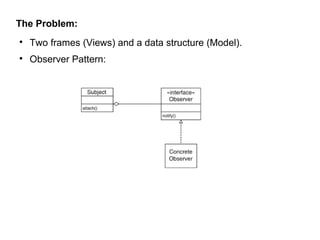
The Problem:


Two frames (Views) and a data structure (Model).



Observer Pattern:
Observer Pattern Times Four:


JTextField: ActionListener receives event after you hit <return>.



The ActionListener updates the Data (Model) object.

JTextField
ActionListener
addActionListener
actionPerformed

anonymous
object
Observer Pattern Times Four:


Data: Is observed by the BarGraph (ChangeListener) for any
changes to the model.

Data
ChangeListener

attach
stateChanged

BarGraph
Observer Pattern Times Four:




BarGraph: MouseListener receives event when you click on the
bar graph.
mousePressed() moves the bar and updates Data object.
BarGraph
MouseListener
addMouseListener

mousePressed

Mouse
Adapter
Observer Pattern Times Four:


Data: Is observed by TextFrame (ChangeListener) for any
changes to data.

Data
ChangeListener

attach
stateChanged

TextFrame
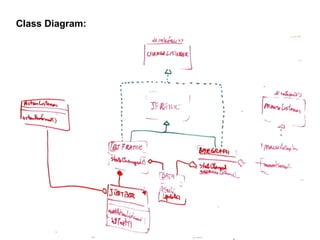
Class Diagram:
Sequence Diagram


Enter new number
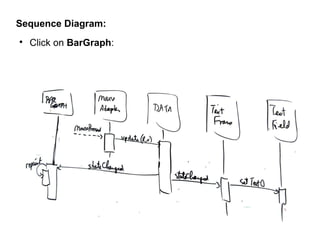
Sequence Diagram:


Click on BarGraph:
Data.java

public class Data {
public Data(ArrayList<Double> d)
{
data = d;
listeners = new ArrayList<ChangeListener>();
}
public ArrayList<Double> getData()
{
return (ArrayList<Double>) (data.clone());
}
public void attach(ChangeListener c)
{
listeners.add(c);
}
}
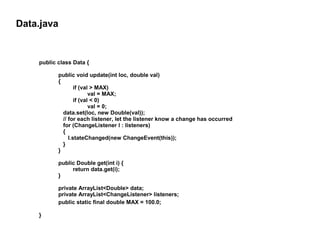
Data.java

public class Data {
public void update(int loc, double val)
{
if (val > MAX)
val = MAX;
if (val < 0)
val = 0;
data.set(loc, new Double(val));
// for each listener, let the listener know a change has occurred
for (ChangeListener l : listeners)
{
l.stateChanged(new ChangeEvent(this));
}
}
public Double get(int i) {
return data.get(i);
}
private ArrayList<Double> data;
private ArrayList<ChangeListener> listeners;
public static final double MAX = 100.0;
}
TextFrame:
public class TextFrame extends JFrame implements ChangeListener {
public TextFrame (Data md) {
d = md;
ActionListener l = new ActionListener()
{
public void actionPerformed(ActionEvent e)
{
JTextField c = (JTextField) e.getSource();
int ndx = findBox(c);
if (ndx >= 0)
d.update(ndx,Double.parseDouble(c.getText().trim()));
}
};
JPanel tPanel = new JPanel();
tPanel.setLayout(new BoxLayout(tPanel,BoxLayout.PAGE_AXIS));

...
}

}

tf = new JTextField[5];
for (int i = 0; i < 5; i++) {
tf[i] = new JTextField(10);
tf[i].addActionListener(l);
tPanel.add(tf[i]);
}
add(tPanel, BorderLayout.CENTER);
setDefaultCloseOperation(JFrame.EXIT_ON_CLOSE);
pack();
setVisible(true);
TextFrame:
@Override
public void stateChanged(ChangeEvent e) {
// how I notify the text frame if the bar graph changes
for (int i = 0; i < 5; i++){
double d1 = d.get(i).doubleValue();
String s = tf[i].getText().trim();
double d2;
try {
d2 = Double.parseDouble(s);
} catch(NumberFormatException nfe ) {
d2 = 0.0;
}
if (Math.abs(d1 - d2) > 0.01)
tf[i].setText(new Double(d1).toString());
}
}
public int findBox(JTextField t) {
int i = 0;
while (i < 5) {
if (t == tf[i])
return i;
i++;
}
return -1;
}

}

private Data d;
private JtextField[ ] tf;
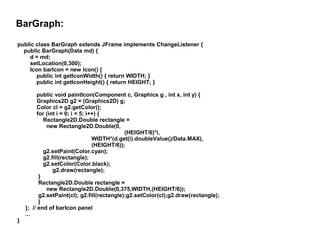
BarGraph:
public class BarGraph extends JFrame implements ChangeListener {
public BarGraph(Data md) {
d = md;
setLocation(0,300);
Icon barIcon = new Icon() {
public int getIconWidth() { return WIDTH; }
public int getIconHeight() { return HEIGHT; }

}

public void paintIcon(Component c, Graphics g , int x, int y) {
Graphics2D g2 = (Graphics2D) g;
Color cl = g2.getColor();
for (int i = 0; i < 5; i++) {
Rectangle2D.Double rectangle =
new Rectangle2D.Double(0,
(HEIGHT/6)*i,
WIDTH*(d.get(i).doubleValue()/Data.MAX),
(HEIGHT/6));
g2.setPaint(Color.cyan);
g2.fill(rectangle);
g2.setColor(Color.black);
g2.draw(rectangle);
}
Rectangle2D.Double rectangle =
new Rectangle2D.Double(0,375,WIDTH,(HEIGHT/6));
g2.setPaint(cl); g2.fill(rectangle);g2.setColor(cl);g2.draw(rectangle);
}
}; // end of barIcon panel
...
BarGraph:
public class BarGraph extends JFrame implements ChangeListener {
public BarGraph(Data md) {
...
add(new JLabel(barIcon));
setDefaultCloseOperation(JFrame.EXIT_ON_CLOSE);
MouseListener m = new MouseAdapter() {
public void mousePressed(MouseEvent e){
Point2D p = e.getPoint();
double dy = p.getY();
int barToMove = (int)(dy / BARHEIGHT);
if (barToMove < 0 || barToMove > 4)
return;
double dx = p.getX();
double newV = (dx/WIDTH)* Data.MAX;
d.update(barToMove, newV);

}
};
addMouseListener(m);
pack();
setVisible(true);
} // end constructor
} // end class

Bar graph

  • 1.
  • 2.
  • 3.
    Why Is HeDoing This?
  • 4.
    The Problem:  Two frames(Views) and a data structure (Model).  Observer Pattern:
  • 5.
    Observer Pattern TimesFour:  JTextField: ActionListener receives event after you hit <return>.  The ActionListener updates the Data (Model) object. JTextField ActionListener addActionListener actionPerformed anonymous object
  • 6.
    Observer Pattern TimesFour:  Data: Is observed by the BarGraph (ChangeListener) for any changes to the model. Data ChangeListener attach stateChanged BarGraph
  • 7.
    Observer Pattern TimesFour:   BarGraph: MouseListener receives event when you click on the bar graph. mousePressed() moves the bar and updates Data object. BarGraph MouseListener addMouseListener mousePressed Mouse Adapter
  • 8.
    Observer Pattern TimesFour:  Data: Is observed by TextFrame (ChangeListener) for any changes to data. Data ChangeListener attach stateChanged TextFrame
  • 9.
  • 10.
  • 11.
  • 12.
    Data.java public class Data{ public Data(ArrayList<Double> d) { data = d; listeners = new ArrayList<ChangeListener>(); } public ArrayList<Double> getData() { return (ArrayList<Double>) (data.clone()); } public void attach(ChangeListener c) { listeners.add(c); } }
  • 13.
    Data.java public class Data{ public void update(int loc, double val) { if (val > MAX) val = MAX; if (val < 0) val = 0; data.set(loc, new Double(val)); // for each listener, let the listener know a change has occurred for (ChangeListener l : listeners) { l.stateChanged(new ChangeEvent(this)); } } public Double get(int i) { return data.get(i); } private ArrayList<Double> data; private ArrayList<ChangeListener> listeners; public static final double MAX = 100.0; }
  • 14.
    TextFrame: public class TextFrameextends JFrame implements ChangeListener { public TextFrame (Data md) { d = md; ActionListener l = new ActionListener() { public void actionPerformed(ActionEvent e) { JTextField c = (JTextField) e.getSource(); int ndx = findBox(c); if (ndx >= 0) d.update(ndx,Double.parseDouble(c.getText().trim())); } }; JPanel tPanel = new JPanel(); tPanel.setLayout(new BoxLayout(tPanel,BoxLayout.PAGE_AXIS)); ... } } tf = new JTextField[5]; for (int i = 0; i < 5; i++) { tf[i] = new JTextField(10); tf[i].addActionListener(l); tPanel.add(tf[i]); } add(tPanel, BorderLayout.CENTER); setDefaultCloseOperation(JFrame.EXIT_ON_CLOSE); pack(); setVisible(true);
  • 15.
    TextFrame: @Override public void stateChanged(ChangeEvente) { // how I notify the text frame if the bar graph changes for (int i = 0; i < 5; i++){ double d1 = d.get(i).doubleValue(); String s = tf[i].getText().trim(); double d2; try { d2 = Double.parseDouble(s); } catch(NumberFormatException nfe ) { d2 = 0.0; } if (Math.abs(d1 - d2) > 0.01) tf[i].setText(new Double(d1).toString()); } } public int findBox(JTextField t) { int i = 0; while (i < 5) { if (t == tf[i]) return i; i++; } return -1; } } private Data d; private JtextField[ ] tf;
  • 16.
    BarGraph: public class BarGraphextends JFrame implements ChangeListener { public BarGraph(Data md) { d = md; setLocation(0,300); Icon barIcon = new Icon() { public int getIconWidth() { return WIDTH; } public int getIconHeight() { return HEIGHT; } } public void paintIcon(Component c, Graphics g , int x, int y) { Graphics2D g2 = (Graphics2D) g; Color cl = g2.getColor(); for (int i = 0; i < 5; i++) { Rectangle2D.Double rectangle = new Rectangle2D.Double(0, (HEIGHT/6)*i, WIDTH*(d.get(i).doubleValue()/Data.MAX), (HEIGHT/6)); g2.setPaint(Color.cyan); g2.fill(rectangle); g2.setColor(Color.black); g2.draw(rectangle); } Rectangle2D.Double rectangle = new Rectangle2D.Double(0,375,WIDTH,(HEIGHT/6)); g2.setPaint(cl); g2.fill(rectangle);g2.setColor(cl);g2.draw(rectangle); } }; // end of barIcon panel ...
  • 17.
    BarGraph: public class BarGraphextends JFrame implements ChangeListener { public BarGraph(Data md) { ... add(new JLabel(barIcon)); setDefaultCloseOperation(JFrame.EXIT_ON_CLOSE); MouseListener m = new MouseAdapter() { public void mousePressed(MouseEvent e){ Point2D p = e.getPoint(); double dy = p.getY(); int barToMove = (int)(dy / BARHEIGHT); if (barToMove < 0 || barToMove > 4) return; double dx = p.getX(); double newV = (dx/WIDTH)* Data.MAX; d.update(barToMove, newV); } }; addMouseListener(m); pack(); setVisible(true); } // end constructor } // end class