Backbone And Marionette
Take Over The World
How we at Adobe put our application on steroids…
About Me
• Harshit Jain
– Developer at Adobe.
– Web developer for 2 years with a passion for good UI/UX.
– Likes solving usability and performance issues with his team.
– Enjoys music and playing his guitar in his free time.
– Loves hacking away on new libraries and frameworks, trying to figure out
if he can use it for his next project.
2
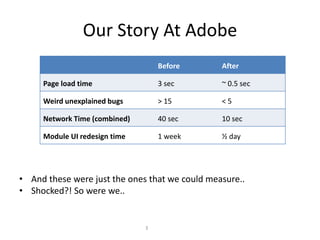
Our Story At Adobe
• And these were just the ones that we could measure..
• Shocked?! So were we..
3
Before After
Page load time 3 sec ~ 0.5 sec
Weird unexplained bugs > 15 < 5
Network Time (combined) 40 sec 10 sec
Module UI redesign time 1 week ½ day
Let’s see how we did it…
4
5
Why Backbone?
• Un-opinionated
• Separates data from
your view
• Models
• Collections
• Modular
6
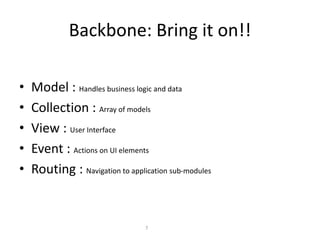
Backbone: Bring it on!!
• Model : Handles business logic and data
• Collection : Array of models
• View : User Interface
• Event : Actions on UI elements
• Routing : Navigation to application sub-modules
7
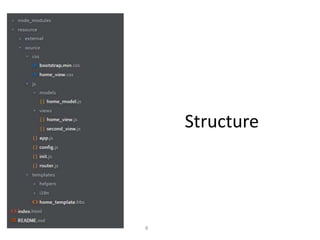
Structure
8
But we felt something
was missing…
9
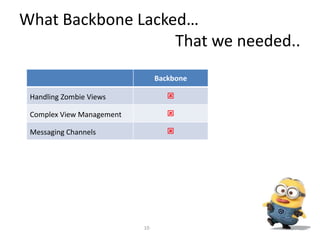
What Backbone Lacked…
That we needed..
10
Backbone
Handling Zombie Views 
Complex View Management 
Messaging Channels 
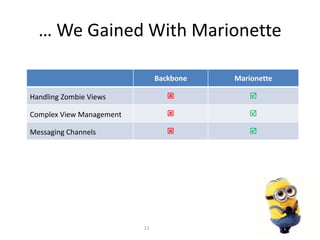
… We Gained With Marionette
Backbone Marionette
Handling Zombie Views  
Complex View Management  
Messaging Channels  
11
And thus began our love
affair with Marionette…
12
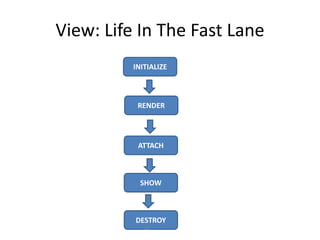
View: Life In The Fast Lane
INITIALIZE
RENDER
DESTROY
ATTACH
SHOW
13
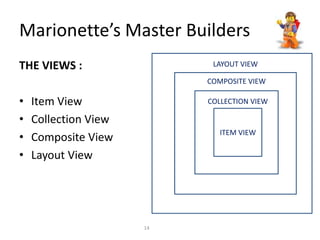
Marionette’s Master Builders
THE VIEWS :
• Item View
• Collection View
• Composite View
• Layout View
ITEM VIEW
COLLECTION VIEW
LAYOUT VIEW
COMPOSITE VIEW
14
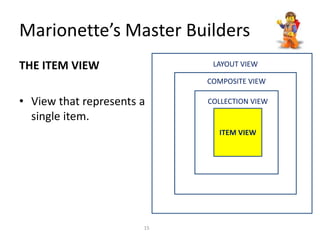
THE ITEM VIEW
• View that represents a
single item.
ITEM VIEW
COLLECTION VIEW
LAYOUT VIEW
COMPOSITE VIEW
Marionette’s Master Builders
15
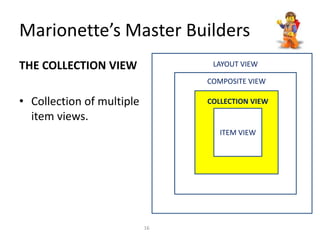
THE COLLECTION VIEW
• Collection of multiple
item views.
ITEM VIEW
COLLECTION VIEW
LAYOUT VIEW
COMPOSITE VIEW
Marionette’s Master Builders
16
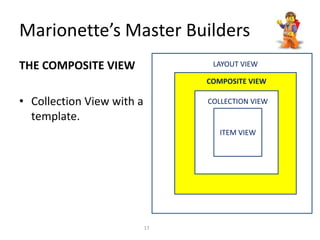
THE COMPOSITE VIEW
• Collection View with a
template.
ITEM VIEW
COLLECTION VIEW
LAYOUT VIEW
COMPOSITE VIEW
Marionette’s Master Builders
17
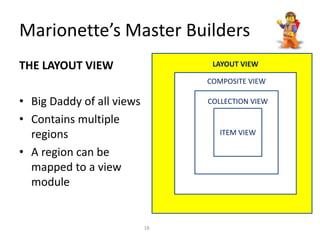
THE LAYOUT VIEW
• Big Daddy of all views
• Contains multiple
regions
• A region can be
mapped to a view
module
ITEM VIEW
COLLECTION VIEW
LAYOUT VIEW
COMPOSITE VIEW
Marionette’s Master Builders
18
And we thought.. Why not..
Reduce…
Reuse…
Recycle…
19
Reusable Components
• Marionette by design treats all views as small, reusable
entities.
• Views consist of
– A Model/A Collection
– A Template
– Accompanying styling
– Events
• Marionette conveniently bundles all these together so that
they can be reused as many times as a developer wants
20
Reusable Components
• Method and procedure to achieve reusability
in Marionette:
– Attach view to a region
That’s it…
Seriously!!
21
Taking it to the next
level…
22
Taking it to the next level…
• Marionette detaches the code for the View
from the business logic
• Painful UI modifications will now be a thing of
the past
• Just switch the UI template and all the
underlying logic works as before
23
So… What’s Next??
24
Central Messaging Channel
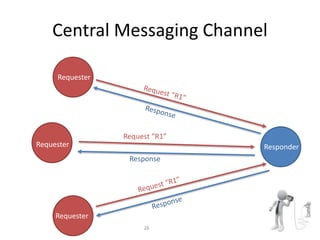
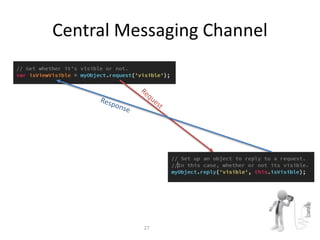
• The next Marionette version will come along with a messaging
library: Backbone.Radio
• But the library is available to use with the current version also
• Requests unlike events generally want something (data or
action to be performed)
25
Central Messaging Channel
Requester
Responder
Requester
Requester
Request “R1”
Response
26
Central Messaging Channel
27
It was fast..
But not fast enough!!
28
The Cacheable Radio
(An Original Project)
• It’s an internal add-on we are creating for
Backbone.Radio
• Why???
– Radio request-reply loops usually take some time
– It can be either processing time or network time
– And guess who solves this problem!! The mighty
Cacheable Radio!!
29
The Cacheable Radio
• It acts as a wrapper over the regular
Backbone.Radio library
• Saves time by browser-caching radio requests
(avoiding unnecessary server calls)
• It also has an in-built function to invalidate
stored data if a fresh API call is required
30
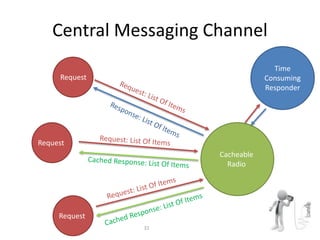
Central Messaging Channel
Request
Request
Request
Time
Consuming
Responder
Cacheable
Radio
31
Q/A
@harshit040591
33

Backbone demo final

  • 1.
    Backbone And Marionette TakeOver The World How we at Adobe put our application on steroids…
  • 2.
    About Me • HarshitJain – Developer at Adobe. – Web developer for 2 years with a passion for good UI/UX. – Likes solving usability and performance issues with his team. – Enjoys music and playing his guitar in his free time. – Loves hacking away on new libraries and frameworks, trying to figure out if he can use it for his next project. 2
  • 3.
    Our Story AtAdobe • And these were just the ones that we could measure.. • Shocked?! So were we.. 3 Before After Page load time 3 sec ~ 0.5 sec Weird unexplained bugs > 15 < 5 Network Time (combined) 40 sec 10 sec Module UI redesign time 1 week ½ day
  • 4.
    Let’s see howwe did it… 4
  • 5.
  • 6.
    Why Backbone? • Un-opinionated •Separates data from your view • Models • Collections • Modular 6
  • 7.
    Backbone: Bring iton!! • Model : Handles business logic and data • Collection : Array of models • View : User Interface • Event : Actions on UI elements • Routing : Navigation to application sub-modules 7
  • 8.
  • 9.
    But we feltsomething was missing… 9
  • 10.
    What Backbone Lacked… Thatwe needed.. 10 Backbone Handling Zombie Views  Complex View Management  Messaging Channels 
  • 11.
    … We GainedWith Marionette Backbone Marionette Handling Zombie Views   Complex View Management   Messaging Channels   11
  • 12.
    And thus beganour love affair with Marionette… 12
  • 13.
    View: Life InThe Fast Lane INITIALIZE RENDER DESTROY ATTACH SHOW 13
  • 14.
    Marionette’s Master Builders THEVIEWS : • Item View • Collection View • Composite View • Layout View ITEM VIEW COLLECTION VIEW LAYOUT VIEW COMPOSITE VIEW 14
  • 15.
    THE ITEM VIEW •View that represents a single item. ITEM VIEW COLLECTION VIEW LAYOUT VIEW COMPOSITE VIEW Marionette’s Master Builders 15
  • 16.
    THE COLLECTION VIEW •Collection of multiple item views. ITEM VIEW COLLECTION VIEW LAYOUT VIEW COMPOSITE VIEW Marionette’s Master Builders 16
  • 17.
    THE COMPOSITE VIEW •Collection View with a template. ITEM VIEW COLLECTION VIEW LAYOUT VIEW COMPOSITE VIEW Marionette’s Master Builders 17
  • 18.
    THE LAYOUT VIEW •Big Daddy of all views • Contains multiple regions • A region can be mapped to a view module ITEM VIEW COLLECTION VIEW LAYOUT VIEW COMPOSITE VIEW Marionette’s Master Builders 18
  • 19.
    And we thought..Why not.. Reduce… Reuse… Recycle… 19
  • 20.
    Reusable Components • Marionetteby design treats all views as small, reusable entities. • Views consist of – A Model/A Collection – A Template – Accompanying styling – Events • Marionette conveniently bundles all these together so that they can be reused as many times as a developer wants 20
  • 21.
    Reusable Components • Methodand procedure to achieve reusability in Marionette: – Attach view to a region That’s it… Seriously!! 21
  • 22.
    Taking it tothe next level… 22
  • 23.
    Taking it tothe next level… • Marionette detaches the code for the View from the business logic • Painful UI modifications will now be a thing of the past • Just switch the UI template and all the underlying logic works as before 23
  • 24.
  • 25.
    Central Messaging Channel •The next Marionette version will come along with a messaging library: Backbone.Radio • But the library is available to use with the current version also • Requests unlike events generally want something (data or action to be performed) 25
  • 26.
  • 27.
  • 28.
    It was fast.. Butnot fast enough!! 28
  • 29.
    The Cacheable Radio (AnOriginal Project) • It’s an internal add-on we are creating for Backbone.Radio • Why??? – Radio request-reply loops usually take some time – It can be either processing time or network time – And guess who solves this problem!! The mighty Cacheable Radio!! 29
  • 30.
    The Cacheable Radio •It acts as a wrapper over the regular Backbone.Radio library • Saves time by browser-caching radio requests (avoiding unnecessary server calls) • It also has an in-built function to invalidate stored data if a fresh API call is required 30
  • 31.
  • 32.
  • 33.