Azure Synapse Analytics
Azure Synapse Analytics is a limitless analytics service, that brings together
enterprise data warehousing and Big Data analytics. It gives you the freedom
to query data on your terms, using either serverless on-demand or provisioned
resources, at scale. Azure Synapse brings these two worlds together with a
unified experience to ingest, prepare, manage, and serve data for immediate
business intelligence and machine learning needs.
What Workloads are Suitable?
Store large volumes of data.
Consolidate disparate data into a single location.
Shape, model, transform and aggregate data.
Batch/Micro-batch loads.
Perform query analysis across large datasets.
Ad-hoc reporting across large data volumes.
All using simple SQL constructs.
Analytics
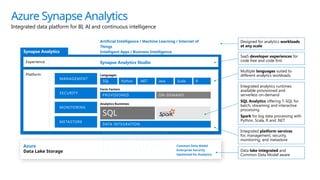
Azure Synapse Analytics
Integrated data platform for BI, AI and continuous intelligence
Synapse Analytics
Platform
Azure
Data Lake Storage
Common Data Model
Enterprise Security
Optimized for Analytics
Data lake integrated and
Common Data Model aware
METASTORE
SECURITY
MANAGEMENT
MONITORING
Integrated platform services
for, management, security,
monitoring, and metastore
DATA INTEGRATION
SQL
Analytics Runtimes
Integrated analytics runtimes
available provisioned and
serverless on-demand
SQL Analytics offering T-SQL for
batch, streaming and interactive
processing
Spark for big data processing with
Python, Scala, R and .NET
PROVISIONED ON-DEMAND
Form Factors
SQL
Languages
Python .NET Java Scala R
Multiple languages suited to
different analytics workloads
Experience Synapse Analytics Studio
SaaS developer experiences for
code free and code first
Artificial Intelligence / Machine Learning / Internet of
Things
Intelligent Apps / Business Intelligence
Designed for analytics workloads
at any scale
METASTORE
SECURITY
MANAGEMENT
MONITORING
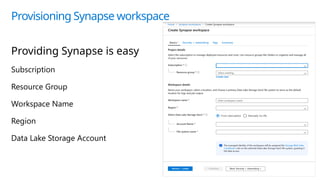
Provisioning Synapse workspace
Providing Synapse is easy
Subscription
Resource Group
Workspace Name
Region
Data Lake Storage Account
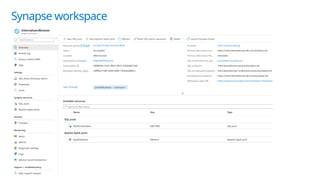
Synapse workspace
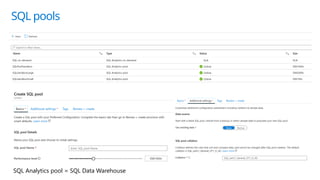
SQL pools
SQL Analytics pool = SQL Data Warehouse
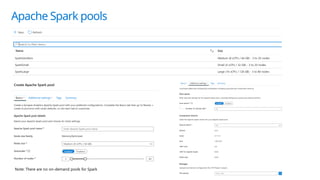
Apache Spark pools
Note: There are no on-demand pools for Spark
Azure Synapse Analytics
Studio
Synapse Studio
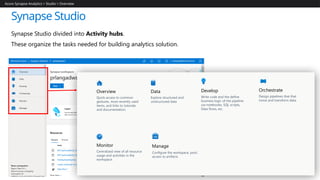
Synapse Studio divided into Activity hubs.
These organize the tasks needed for building analytics solution.
Azure Synapse Analytics > Studio > Overview
Overview Data
Monitor Manage
Quick-access to common
gestures, most-recently used
items, and links to tutorials
and documentation.
Explore structured and
unstructured data
Centralized view of all resource
usage and activities in the
workspace.
Configure the workspace, pool,
access to artifacts
Develop
Write code and the define
business logic of the pipeline
via notebooks, SQL scripts,
Data flows, etc.
Orchestrate
Design pipelines that that
move and transform data.
Synapse Studio
Overview hub
Overview Hub
Azure Synapse Analytics > Studio > Develop
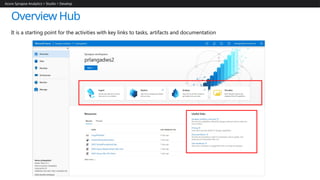
It is a starting point for the activities with key links to tasks, artifacts and documentation
Synapse Studio
Data hub
Data Hub
Azure Synapse Analytics > Studio > Data
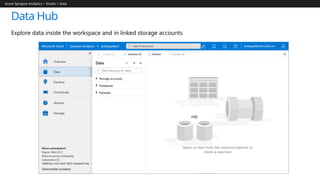
Explore data inside the workspace and in linked storage accounts
Synapse Studio
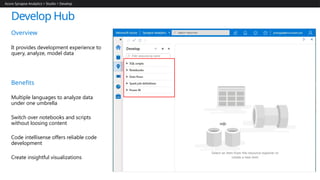
Develop hub
Develop Hub
Azure Synapse Analytics > Studio > Develop
Overview
It provides development experience to
query, analyze, model data
Benefits
Multiple languages to analyze data
under one umbrella
Switch over notebooks and scripts
without loosing content
Code intellisense offers reliable code
development
Create insightful visualizations
Synapse Studio
Orchestrate hub
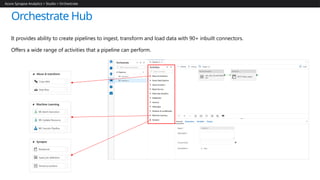
Orchestrate Hub
It provides ability to create pipelines to ingest, transform and load data with 90+ inbuilt connectors.
Offers a wide range of activities that a pipeline can perform.
Azure Synapse Analytics > Studio > Orchestrate
Synapse Studio
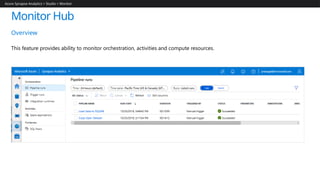
Monitor hub
Monitor Hub
Overview
This feature provides ability to monitor orchestration, activities and compute resources.
Azure Synapse Analytics > Studio > Monitor
Synapse Studio
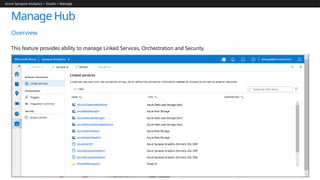
Manage hub
Manage Hub
Overview
This feature provides ability to manage Linked Services, Orchestration and Security.
Azure Synapse Analytics > Studio > Manage
Thank You

Azure synapse analytics 124737537377 .pptx

  • 1.
  • 2.
    Azure Synapse Analyticsis a limitless analytics service, that brings together enterprise data warehousing and Big Data analytics. It gives you the freedom to query data on your terms, using either serverless on-demand or provisioned resources, at scale. Azure Synapse brings these two worlds together with a unified experience to ingest, prepare, manage, and serve data for immediate business intelligence and machine learning needs.
  • 3.
    What Workloads areSuitable? Store large volumes of data. Consolidate disparate data into a single location. Shape, model, transform and aggregate data. Batch/Micro-batch loads. Perform query analysis across large datasets. Ad-hoc reporting across large data volumes. All using simple SQL constructs. Analytics
  • 5.
    Azure Synapse Analytics Integrateddata platform for BI, AI and continuous intelligence Synapse Analytics Platform Azure Data Lake Storage Common Data Model Enterprise Security Optimized for Analytics Data lake integrated and Common Data Model aware METASTORE SECURITY MANAGEMENT MONITORING Integrated platform services for, management, security, monitoring, and metastore DATA INTEGRATION SQL Analytics Runtimes Integrated analytics runtimes available provisioned and serverless on-demand SQL Analytics offering T-SQL for batch, streaming and interactive processing Spark for big data processing with Python, Scala, R and .NET PROVISIONED ON-DEMAND Form Factors SQL Languages Python .NET Java Scala R Multiple languages suited to different analytics workloads Experience Synapse Analytics Studio SaaS developer experiences for code free and code first Artificial Intelligence / Machine Learning / Internet of Things Intelligent Apps / Business Intelligence Designed for analytics workloads at any scale METASTORE SECURITY MANAGEMENT MONITORING
  • 6.
    Provisioning Synapse workspace ProvidingSynapse is easy Subscription Resource Group Workspace Name Region Data Lake Storage Account
  • 7.
  • 8.
    SQL pools SQL Analyticspool = SQL Data Warehouse
  • 9.
    Apache Spark pools Note:There are no on-demand pools for Spark
  • 10.
  • 11.
    Synapse Studio Synapse Studiodivided into Activity hubs. These organize the tasks needed for building analytics solution. Azure Synapse Analytics > Studio > Overview Overview Data Monitor Manage Quick-access to common gestures, most-recently used items, and links to tutorials and documentation. Explore structured and unstructured data Centralized view of all resource usage and activities in the workspace. Configure the workspace, pool, access to artifacts Develop Write code and the define business logic of the pipeline via notebooks, SQL scripts, Data flows, etc. Orchestrate Design pipelines that that move and transform data.
  • 12.
  • 13.
    Overview Hub Azure SynapseAnalytics > Studio > Develop It is a starting point for the activities with key links to tasks, artifacts and documentation
  • 14.
  • 15.
    Data Hub Azure SynapseAnalytics > Studio > Data Explore data inside the workspace and in linked storage accounts
  • 16.
  • 17.
    Develop Hub Azure SynapseAnalytics > Studio > Develop Overview It provides development experience to query, analyze, model data Benefits Multiple languages to analyze data under one umbrella Switch over notebooks and scripts without loosing content Code intellisense offers reliable code development Create insightful visualizations
  • 18.
  • 19.
    Orchestrate Hub It providesability to create pipelines to ingest, transform and load data with 90+ inbuilt connectors. Offers a wide range of activities that a pipeline can perform. Azure Synapse Analytics > Studio > Orchestrate
  • 20.
  • 21.
    Monitor Hub Overview This featureprovides ability to monitor orchestration, activities and compute resources. Azure Synapse Analytics > Studio > Monitor
  • 22.
  • 23.
    Manage Hub Overview This featureprovides ability to manage Linked Services, Orchestration and Security. Azure Synapse Analytics > Studio > Manage
  • 24.

Editor's Notes

  • #6 You don't provision a ADLS. A data lake storage is a required subscription before a workspace can be created. The core data warehouse engine now supports not only explicitly provisioned workloads (pay per DWU provisioned) but serverless on-demand workloads (pay per TB processed) using T-SQL A Synapse workspace that allows you to provision resources including SQL pools (SQL DW) and Apache Spark pools Integration of Apache Spark, ADLS Gen2, Power BI, and Azure Data Factory (all are provisioned or linked within the Synapse workspace). Files in ADLS are query-able using a SQL Analytics runtime (T-SQL that does not require an EXTERNAL TABLE command) or a Spark runtime (Spark SQL, Python, Scala, R, .NET) A unified web user interface called Azure Synapse Studio which controls all your resources. It integrates a notebook experience that can use Python, Scala, .NET, and Spark SQL. It is here you can ingest (Azure Data Factory), explore (T-SQL script or Spark SQL in a notebook), analyze (Machine Learning Services in a notebook), and visualize data (Power BI), bringing everything together in a single pane of glass
  • #9 It usually takes less than 30 seconds to create a Spark pool. The reason for it is that we will turn on the pool once an activity towards the pool is happening. Billing only happens when a Spark pool is active. It should take less than 3 minutes to spin-up a Spark pool from a cold-stage. Creating a new session into an active Spark pool should take 30 seconds or less.
  • #11 Alignment of activities