









Xamarin & Azure Mobile Apps
Alessandro Pozone
@TPOZ1
Xamarin	Student	Partner
MOBILE APPS
ARCHITECTURES
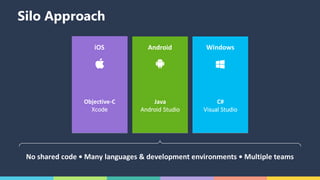
Silo Approach
No	shared	code	•	Many	languages	&	development	environments	•	Multiple	teams
iOS
Objective-C
Xcode
Android
Java
Android	Studio
Windows
C#
Visual	Studio
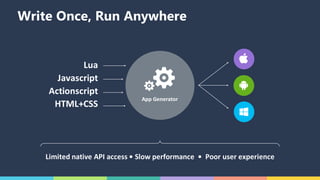
Write Once, Run Anywhere
App	Generator
Lua
Javascript
Actionscript
HTML+CSS
Limited	native	API	access	•	Slow	performance		•		Poor	user	experience
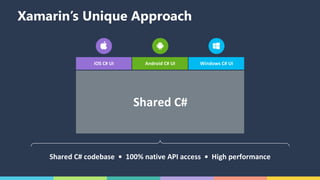
Xamarin’s Unique Approach
Shared	C#	codebase		•		100%	native	API	access		•		High	performance
iOS	C#	UI Windows	C#	UIAndroid	C#	UI
Shared	C#
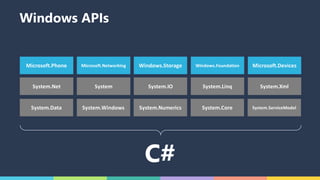
C#
Microsoft.Phone Microsoft.Networking Windows.Storage Windows.Foundation Microsoft.Devices
System.Data System.Windows System.Numerics System.Core System.ServiceModel
System.Net System System.IO System.Linq System.Xml
Windows APIs
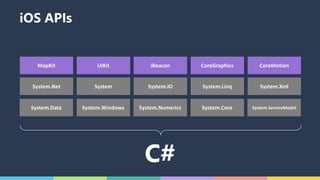
MapKit UIKit iBeacon CoreGraphics CoreMotion
System.Data System.Windows System.Numerics System.Core System.ServiceModel
System.Net System System.IO System.Linq System.Xml
C#
iOS APIs
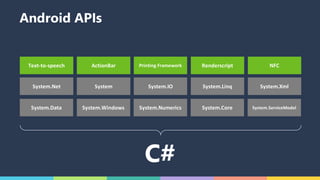
Text-to-speech ActionBar Printing	Framework Renderscript NFC
System.Data System.Windows System.Numerics System.Core System.ServiceModel
System.Net System System.IO System.Linq System.Xml
C#
Android APIs
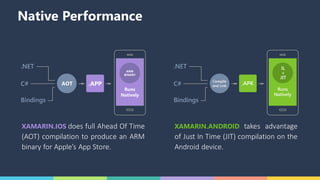
XAMARIN.IOS does full Ahead Of Time
(AOT) compilation to produce an ARM
binary for Apple’s App Store.
XAMARIN.ANDROID takes advantage
of Just In Time (JIT) compilation on the
Android device.
.NET
C#
Compile
and Link
.APK
Bindings
Runs
Natively
IL
+
JIT
Native Performance
.NET
C#
Compile
and Link
.APK
Bindings
Runs
Natively
IL
+
JIT
AOT .APP
ARM
BINARY
Runs
Natively
ANYTHING YOU CAN DO IN OBJECTIVE-C, SWIFT, OR
JAVA CAN BE DONE IN C# WITH XAMARIN
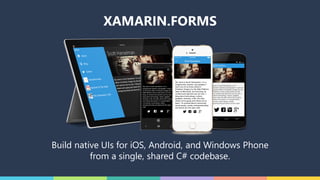
XAMARIN
FORMS
Build native UIs for iOS, Android, and Windows Phone
from a single, shared C# codebase.
XAMARIN.FORMS
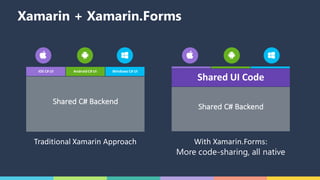
Xamarin + Xamarin.Forms
Traditional	Xamarin	Approach With	Xamarin.Forms:
More code-sharing, all native
iOS	C#	UI Windows	C#	UIAndroid	C#	UI
Shared	C#	Backend
Shared	UI	Code
Shared	C#	Backend
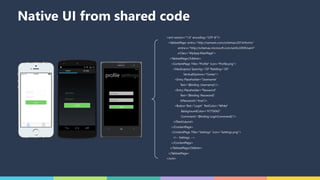
Native UI from shared code
<xml version="1.0" encoding="UTF-8"?>
<TabbedPage xmlns="http://xamarin.com/schemas/2014/forms"
xmlns:x="http://schemas.microsoft.com/winfx/2009/xaml"
x:Class="MyApp.MainPage">
<TabbedPage.Children>
<ContentPage Title="Profile" Icon="Profile.png">
<StackLayout Spacing="20" Padding="20"
VerticalOptions="Center">
<Entry Placeholder="Username"
Text="{Binding Username}"/>
<Entry Placeholder="Password"
Text="{Binding Password}"
IsPassword="true"/>
<Button Text="Login" TextColor="White"
BackgroundColor="#77D065"
Command="{Binding LoginCommand}"/>
</StackLayout>
</ContentPage>
<ContentPage Title="Settings" Icon="Settings.png">
<!-- Settings -->
</ContentPage>
</TabbedPage.Children>
</TabbedPage>
</xml>
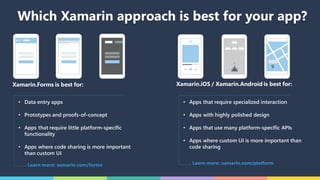
Xamarin.Forms is best for: Xamarin.iOS / Xamarin.Android is best for:
• Data entry apps
• Prototypes and proofs-of-concept
• Apps that require little platform-specific
functionality
• Apps where code sharing is more important
than custom UI
Learn more: xamarin.com/forms Learn more: xamarin.com/platform
• Apps that require specialized interaction
• Apps with highly polished design
• Apps that use many platform-specific APIs
• Apps where custom UI is more important than
code sharing
Which Xamarin approach is best for your app?
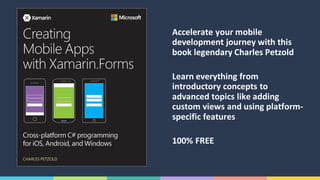
Accelerate	your	mobile	
development	journey	with	this	
book	legendary	Charles	Petzold
Learn	everything	from	
introductory	concepts	to	
advanced	topics	like	adding	
custom	views	and	using	platform-
specific	features
100%	FREE
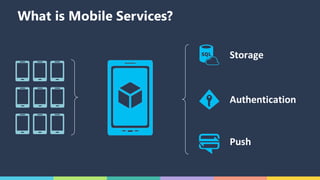
AZURE
MOBILE APPS
Storage
Authentication
Push
What is Mobile Services?
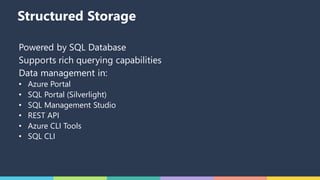
STORAGE
Structured Storage
Powered by SQL Database
Supports rich querying capabilities
Data management in:
• Azure Portal
• SQL Portal (Silverlight)
• SQL Management Studio
• REST API
• Azure CLI Tools
• SQL CLI
PUSH
NOTIFICATIONS
Push Notification Flow
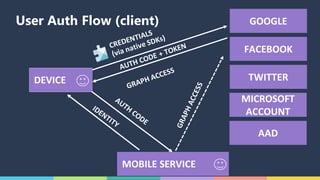
AUTHENTICATION
User Auth Flow (client) GOOGLE
FACEBOOK
TWITTER
MOBILE	SERVICE
DEVICE
MICROSOFT	
ACCOUNT	
AAD
DEMO

Azure MobileApp & Xamarin.Forms