
Amazon SWF
(Simple Work Flow)
By: Deepak Verma
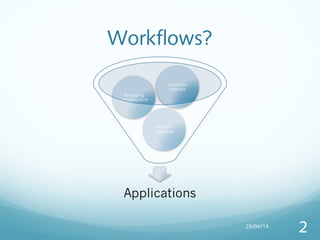
Workflows?
23/04/14
2
What is Workflow
Automation?
Automating follow up behind manual tasks
Makes manual tasks easier and less intensive to do
Can do anything an Action and Follow Up can do
Isolate task that can run independently reducing the risk
of failure
23/04/14
3
It’s like having an army of Minions
23/04/14
4
What is SWF?
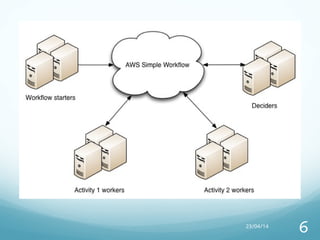
Task coordination
Distributed state management
Define business logic
Break down complex task into independent steps that are
resilient to failures
Run multiple process in parallel
Build, process and manage workflows
23/04/14
5
23/04/14
6
When to use SWF?
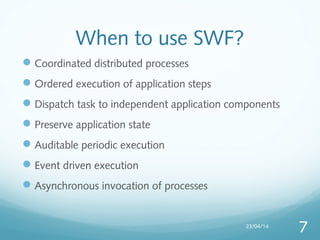
Coordinated distributed processes
Ordered execution of application steps
Dispatch task to independent application components
Preserve application state
Auditable periodic execution
Event driven execution
Asynchronous invocation of processes
23/04/14
7
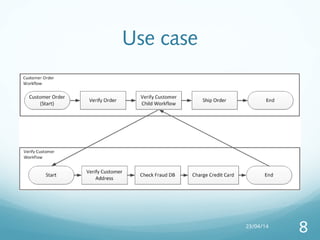
Use case
23/04/14
8
Why we need SWF?
Loosely coupled application design
Application that runs across multiple clouds
Effective resource usage
Scalability
Resilience
23/04/14
9
Benefits of SWF
Simple: Remove complex code with fully managed web service.
Task which can run independently can be converted into a service
resulting in your code to be simple.
Scalable: As tasks are independent of each other so no need of
manual administration. You can add more workflow to your
application as per your need
Flexible: You can write you workflow and coordination logic in any
programming language you want and can run them either in cloud
or on-premises
23/04/14
10
23/04/14
11
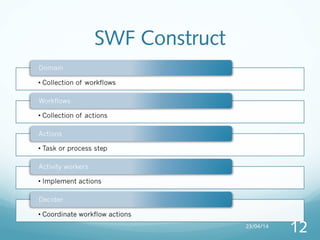
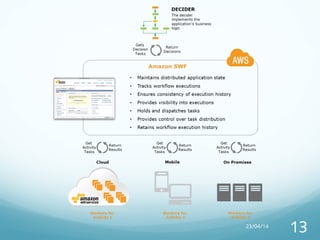
SWF Construct
23/04/14
12
23/04/14
13
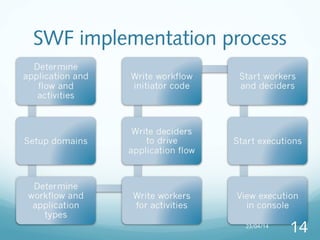
SWF implementation process
23/04/14
14
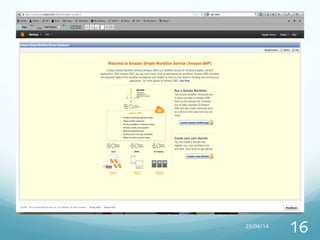
Practical example
23/04/14
15
23/04/14
16
23/04/14
17
23/04/14
18
23/04/14
19
23/04/14
20
Features
Timers
Signals
Tags
Markers
23/04/14
21
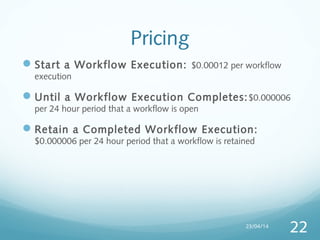
Pricing
Start a Workflow Execution: $0.00012 per workflow
execution
Until a Workflow Execution Completes:$0.000006
per 24 hour period that a workflow is open
Retain a Completed Workflow Execution:
$0.000006 per 24 hour period that a workflow is retained
23/04/14
22
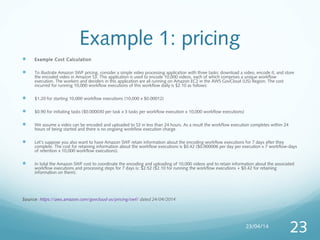
Example 1: pricing
 Example Cost Calculation
 To illustrate Amazon SWF pricing, consider a simple video processing application with three tasks: download a video, encode it, and store
the encoded video in Amazon S3. This application is used to encode 10,000 videos, each of which comprises a unique workflow
execution. The workers and deciders in this application are all running on Amazon EC2 in the AWS GovCloud (US) Region. The cost
incurred for running 10,000 workflow executions of this workflow daily is $2.10 as follows:
 $1.20 for starting 10,000 workflow executions (10,000 x $0.00012)
 $0.90 for initiating tasks ($0.000030 per task x 3 tasks per workflow execution x 10,000 workflow executions)
 We assume a video can be encoded and uploaded to S3 in less than 24 hours. As a result the workflow execution completes within 24
hours of being started and there is no ongoing workflow execution charge.
 Let’s suppose you also want to have Amazon SWF retain information about the encoding workflow executions for 7 days after they
complete. The cost for retaining information about the workflow executions is $0.42 ($0.000006 per day per execution x 7 workflow-days
of retention x 10,000 workflow executions).
 In total the Amazon SWF cost to coordinate the encoding and uploading of 10,000 videos and to retain information about the associated
workflow executions and processing steps for 7 days is: $2.52 ($2.10 for running the workflow executions + $0.42 for retaining
information on them).
Source: https://aws.amazon.com/govcloud-us/pricing/swf/ dated 24/04/2014
23/04/14
23
Example 2: pricing
23/04/14
24
Thank you
23/04/14
25

AWS Simple Work Flow

  • 1.
    Amazon SWF (Simple WorkFlow) By: Deepak Verma
  • 2.
  • 3.
    What is Workflow Automation? Automatingfollow up behind manual tasks Makes manual tasks easier and less intensive to do Can do anything an Action and Follow Up can do Isolate task that can run independently reducing the risk of failure 23/04/14 3
  • 4.
    It’s like havingan army of Minions 23/04/14 4
  • 5.
    What is SWF? Taskcoordination Distributed state management Define business logic Break down complex task into independent steps that are resilient to failures Run multiple process in parallel Build, process and manage workflows 23/04/14 5
  • 6.
  • 7.
    When to useSWF? Coordinated distributed processes Ordered execution of application steps Dispatch task to independent application components Preserve application state Auditable periodic execution Event driven execution Asynchronous invocation of processes 23/04/14 7
  • 8.
  • 9.
    Why we needSWF? Loosely coupled application design Application that runs across multiple clouds Effective resource usage Scalability Resilience 23/04/14 9
  • 10.
    Benefits of SWF Simple:Remove complex code with fully managed web service. Task which can run independently can be converted into a service resulting in your code to be simple. Scalable: As tasks are independent of each other so no need of manual administration. You can add more workflow to your application as per your need Flexible: You can write you workflow and coordination logic in any programming language you want and can run them either in cloud or on-premises 23/04/14 10
  • 11.
  • 12.
  • 13.
  • 14.
  • 15.
  • 16.
  • 17.
  • 18.
  • 19.
  • 20.
  • 21.
  • 22.
    Pricing Start a WorkflowExecution: $0.00012 per workflow execution Until a Workflow Execution Completes:$0.000006 per 24 hour period that a workflow is open Retain a Completed Workflow Execution: $0.000006 per 24 hour period that a workflow is retained 23/04/14 22
  • 23.
    Example 1: pricing Example Cost Calculation  To illustrate Amazon SWF pricing, consider a simple video processing application with three tasks: download a video, encode it, and store the encoded video in Amazon S3. This application is used to encode 10,000 videos, each of which comprises a unique workflow execution. The workers and deciders in this application are all running on Amazon EC2 in the AWS GovCloud (US) Region. The cost incurred for running 10,000 workflow executions of this workflow daily is $2.10 as follows:  $1.20 for starting 10,000 workflow executions (10,000 x $0.00012)  $0.90 for initiating tasks ($0.000030 per task x 3 tasks per workflow execution x 10,000 workflow executions)  We assume a video can be encoded and uploaded to S3 in less than 24 hours. As a result the workflow execution completes within 24 hours of being started and there is no ongoing workflow execution charge.  Let’s suppose you also want to have Amazon SWF retain information about the encoding workflow executions for 7 days after they complete. The cost for retaining information about the workflow executions is $0.42 ($0.000006 per day per execution x 7 workflow-days of retention x 10,000 workflow executions).  In total the Amazon SWF cost to coordinate the encoding and uploading of 10,000 videos and to retain information about the associated workflow executions and processing steps for 7 days is: $2.52 ($2.10 for running the workflow executions + $0.42 for retaining information on them). Source: https://aws.amazon.com/govcloud-us/pricing/swf/ dated 24/04/2014 23/04/14 23
  • 24.
  • 25.