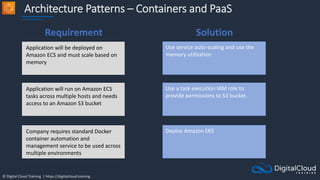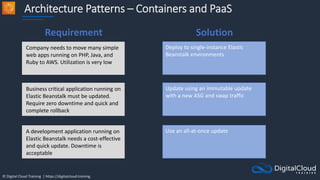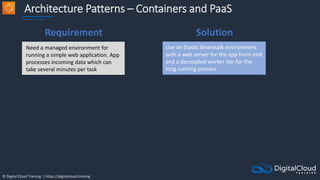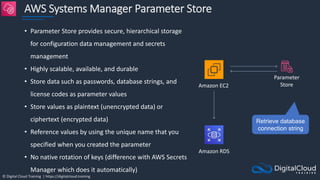
© Digital Cloud Training | https://digitalcloud.training
SECTION 10
AWS Database Services
© Digital Cloud Training | https://digitalcloud.training
Amazon RDS Scaling and
Deployment
© Digital Cloud Training | https://digitalcloud.training
Amazon RDS Overview
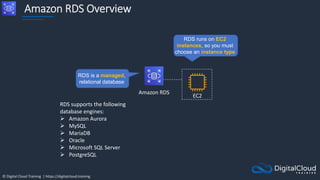
Amazon RDS
RDS is a managed,
relational database
EC2
RDS runs on EC2
instances, so you must
choose an instance type
RDS supports the following
database engines:
 Amazon Aurora
 MySQL
 MariaDB
 Oracle
 Microsoft SQL Server
 PostgreSQL
© Digital Cloud Training | https://digitalcloud.training
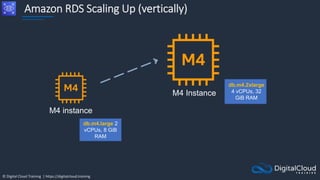
Amazon RDS Scaling Up (vertically)
M4 instance
M4 Instance
db.m4.2xlarge
4 vCPUs, 32
GiB RAM
db.m4.large 2
vCPUs, 8 GiB
RAM
© Digital Cloud Training | https://digitalcloud.training
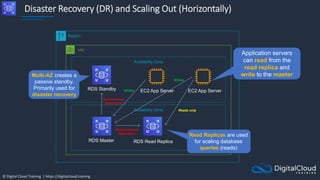
Disaster Recovery (DR) and Scaling Out (Horizontally)
Region
VPC
Availability Zone
Availability Zone
EC2 App Server
RDS Standby
Reads only
RDS Master RDS Read Replica
EC2 App Server
Synchronous
replication
Writes
Asynchronous
replication
Multi-AZ creates a
passive standby.
Primarily used for
disaster recovery
Read Replicas are used
for scaling database
queries (reads)
Application servers
can read from the
read replica and
write to the master
Writes
© Digital Cloud Training | https://digitalcloud.training
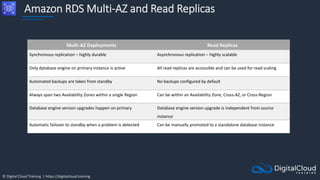
Amazon RDS Multi-AZ and Read Replicas
Multi-AZ Deployments Read Replicas
Synchronous replication – highly durable Asynchronous replication – highly scalable
Only database engine on primary instance is active All read replicas are accessible and can be used for read scaling
Automated backups are taken from standby No backups configured by default
Always span two Availability Zones within a single Region Can be within an Availability Zone, Cross-AZ, or Cross-Region
Database engine version upgrades happen on primary Database engine version upgrade is independent from source
instance
Automatic failover to standby when a problem is detected Can be manually promoted to a standalone database instance
© Digital Cloud Training | https://digitalcloud.training
Amazon RDS Backup and
Recovery
© Digital Cloud Training | https://digitalcloud.training
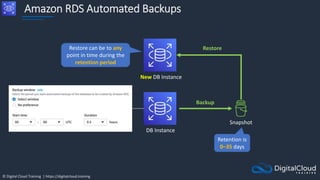
Amazon RDS Automated Backups
Snapshot
Retention is
0–35 days
New DB Instance
Restore
Backup
Restore can be to any
point in time during the
retention period
DB Instance
© Digital Cloud Training | https://digitalcloud.training
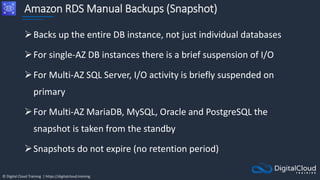
Amazon RDS Manual Backups (Snapshot)
Backs up the entire DB instance, not just individual databases
For single-AZ DB instances there is a brief suspension of I/O
For Multi-AZ SQL Server, I/O activity is briefly suspended on
primary
For Multi-AZ MariaDB, MySQL, Oracle and PostgreSQL the
snapshot is taken from the standby
Snapshots do not expire (no retention period)
© Digital Cloud Training | https://digitalcloud.training
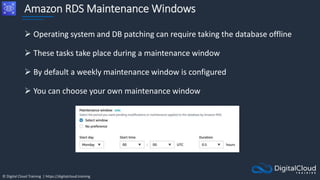
Amazon RDS Maintenance Windows
 Operating system and DB patching can require taking the database offline
 These tasks take place during a maintenance window
 By default a weekly maintenance window is configured
 You can choose your own maintenance window
© Digital Cloud Training | https://digitalcloud.training
Amazon RDS Security
© Digital Cloud Training | https://digitalcloud.training
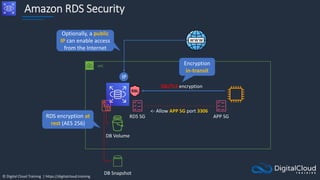
Amazon RDS Security
VPC
RDS SG
SSL/TLS encryption
APP SG
<- Allow APP SG port 3306
Encryption
in-transit
RDS encryption at
rest (AES 256)
IP
DB Volume
DB Snapshot
Optionally, a public
IP can enable access
from the Internet
© Digital Cloud Training | https://digitalcloud.training
Amazon RDS Security
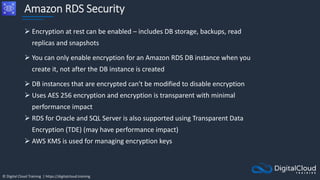
 Encryption at rest can be enabled – includes DB storage, backups, read
replicas and snapshots
 You can only enable encryption for an Amazon RDS DB instance when you
create it, not after the DB instance is created
 DB instances that are encrypted can't be modified to disable encryption
 Uses AES 256 encryption and encryption is transparent with minimal
performance impact
 RDS for Oracle and SQL Server is also supported using Transparent Data
Encryption (TDE) (may have performance impact)
 AWS KMS is used for managing encryption keys
© Digital Cloud Training | https://digitalcloud.training
Amazon RDS Security
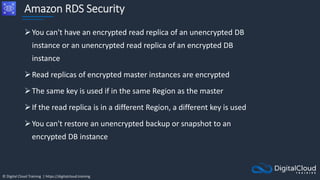
You can't have an encrypted read replica of an unencrypted DB
instance or an unencrypted read replica of an encrypted DB
instance
Read replicas of encrypted master instances are encrypted
The same key is used if in the same Region as the master
If the read replica is in a different Region, a different key is used
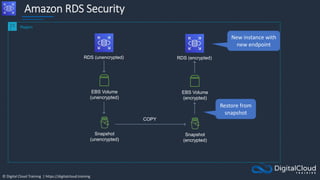
You can't restore an unencrypted backup or snapshot to an
encrypted DB instance
© Digital Cloud Training | https://digitalcloud.training
Amazon RDS Security
Snapshot
(unencrypted)
Region
EBS Volume
(unencrypted)
RDS (unencrypted)
Snapshot
(encrypted)
COPY
EBS Volume
(encrypted)
RDS (encrypted)
New instance with
new endpoint
Restore from
snapshot
© Digital Cloud Training | https://digitalcloud.training
Amazon Aurora Core
Knowledge
© Digital Cloud Training | https://digitalcloud.training
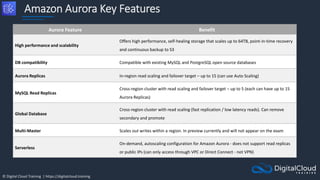
Amazon Aurora Key Features
Aurora Feature Benefit
High performance and scalability
Offers high performance, self-healing storage that scales up to 64TB, point-in-time recovery
and continuous backup to S3
DB compatibility Compatible with existing MySQL and PostgreSQL open source databases
Aurora Replicas In-region read scaling and failover target – up to 15 (can use Auto Scaling)
MySQL Read Replicas
Cross-region cluster with read scaling and failover target – up to 5 (each can have up to 15
Aurora Replicas)
Global Database
Cross-region cluster with read scaling (fast replication / low latency reads). Can remove
secondary and promote
Multi-Master Scales out writes within a region. In preview currently and will not appear on the exam
Serverless
On-demand, autoscaling configuration for Amazon Aurora - does not support read replicas
or public IPs (can only access through VPC or Direct Connect - not VPN)
© Digital Cloud Training | https://digitalcloud.training
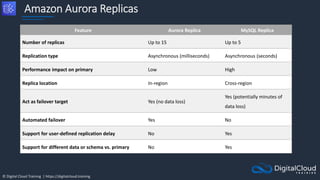
Amazon Aurora Replicas
Feature Aurora Replica MySQL Replica
Number of replicas Up to 15 Up to 5
Replication type Asynchronous (milliseconds) Asynchronous (seconds)
Performance impact on primary Low High
Replica location In-region Cross-region
Act as failover target Yes (no data loss)
Yes (potentially minutes of
data loss)
Automated failover Yes No
Support for user-defined replication delay No Yes
Support for different data or schema vs. primary No Yes
© Digital Cloud Training | https://digitalcloud.training
Amazon Aurora Deployment
Options
© Digital Cloud Training | https://digitalcloud.training
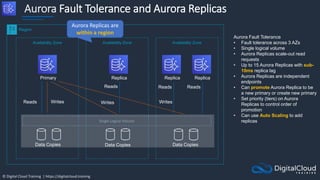
Aurora Fault Tolerance and Aurora Replicas
Availability Zone Availability Zone Availability Zone
Primary
Data Copies
Data Copies Data Copies
Replica Replica Replica
Writes
Writes
Writes
Reads
Reads Reads Reads
Region
Single Logical Volume
Aurora Fault Tolerance
• Fault tolerance across 3 AZs
• Single logical volume
• Aurora Replicas scale-out read
requests
• Up to 15 Aurora Replicas with sub-
10ms replica lag
• Aurora Replicas are independent
endpoints
• Can promote Aurora Replica to be
a new primary or create new primary
• Set priority (tiers) on Aurora
Replicas to control order of
promotion
• Can use Auto Scaling to add
replicas
Aurora Replicas are
within a region
© Digital Cloud Training | https://digitalcloud.training
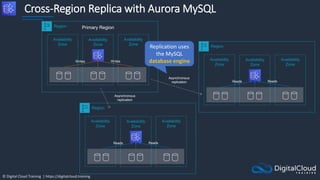
Cross-Region Replica with Aurora MySQL
Region
Availability
Zone
Availability
Zone
Availability
Zone
Writes Writes
Region
Availability
Zone
Availability
Zone
Availability
Zone
Reads Reads
Asynchronous
replication
Region
Availability
Zone
Availability
Zone
Availability
Zone
Reads Reads
Asynchronous
replication
Primary Region
Replication uses
the MySQL
database engine
© Digital Cloud Training | https://digitalcloud.training
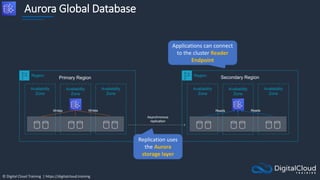
Aurora Global Database
Region
Availability
Zone
Availability
Zone
Availability
Zone
Writes Writes
Region
Availability
Zone
Availability
Zone
Availability
Zone
Reads Reads
Asynchronous
replication
Primary Region Secondary Region
Replication uses
the Aurora
storage layer
Applications can connect
to the cluster Reader
Endpoint
© Digital Cloud Training | https://digitalcloud.training
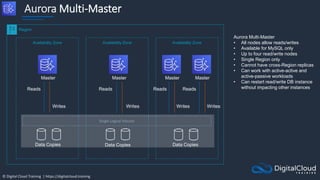
Aurora Multi-Master
Availability Zone Availability Zone Availability Zone
Master
Data Copies
Data Copies Data Copies
Master Master Master
Writes
Writes
Writes
Reads Reads Reads Reads
Region
Single Logical Volume
Aurora Multi-Master
• All nodes allow reads/writes
• Available for MySQL only
• Up to four read/write nodes
• Single Region only
• Cannot have cross-Region replicas
• Can work with active-active and
active-passive workloads
• Can restart read/write DB instance
without impacting other instances
Writes
© Digital Cloud Training | https://digitalcloud.training
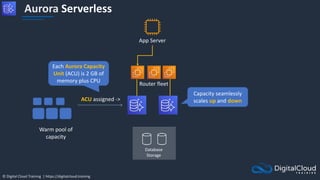
Aurora Serverless
ACU assigned ->
App Server
Database
Storage
Warm pool of
capacity
Router fleet
Each Aurora Capacity
Unit (ACU) is 2 GB of
memory plus CPU
Capacity seamlessly
scales up and down
© Digital Cloud Training | https://digitalcloud.training
Aurora Serverless Use Cases
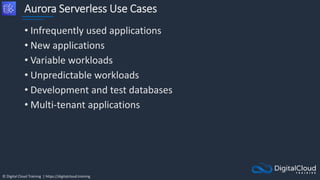
• Infrequently used applications
• New applications
• Variable workloads
• Unpredictable workloads
• Development and test databases
• Multi-tenant applications
© Digital Cloud Training | https://digitalcloud.training
Amazon RDS Anti-Patterns
and Alternatives
© Digital Cloud Training | https://digitalcloud.training
When NOT to use Amazon RDS (anti-patterns)
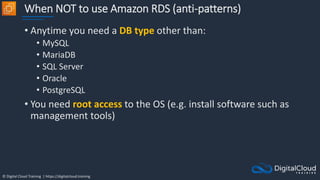
• Anytime you need a DB type other than:
• MySQL
• MariaDB
• SQL Server
• Oracle
• PostgreSQL
• You need root access to the OS (e.g. install software such as
management tools)
© Digital Cloud Training | https://digitalcloud.training
When NOT to use Amazon RDS (anti-patterns)
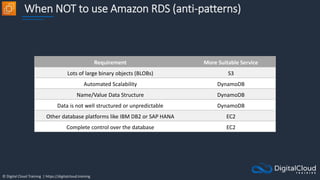
Requirement More Suitable Service
Lots of large binary objects (BLOBs) S3
Automated Scalability DynamoDB
Name/Value Data Structure DynamoDB
Data is not well structured or unpredictable DynamoDB
Other database platforms like IBM DB2 or SAP HANA EC2
Complete control over the database EC2
© Digital Cloud Training | https://digitalcloud.training
Database on Amazon EC2
• You can run any database you like with full control and
ultimate flexibility
• You must manage everything like backups, redundancy,
patching and scaling
© Digital Cloud Training | https://digitalcloud.training
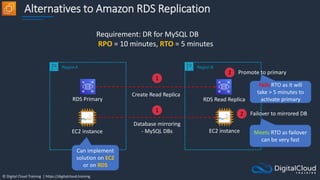
Alternatives to Amazon RDS Replication
Region A Region B
RDS Primary RDS Read Replica
Create Read Replica
Requirement: DR for MySQL DB
RPO = 10 minutes, RTO = 5 minutes
1
2 Promote to primary
Fails RTO as it will
take > 5 minutes to
activate primary
EC2 instance EC2 instance
1
Database mirroring
- MySQL DBs
2 Failover to mirrored DB
Meets RTO as failover
can be very fast
Can implement
solution on EC2
or on RDS
© Digital Cloud Training | https://digitalcloud.training
Amazon ElastiCache Core
Knowledge
© Digital Cloud Training | https://digitalcloud.training
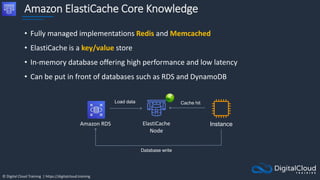
Amazon ElastiCache Core Knowledge
• Fully managed implementations Redis and Memcached
• ElastiCache is a key/value store
• In-memory database offering high performance and low latency
• Can be put in front of databases such as RDS and DynamoDB
Instance
ElastiCache
Node
Amazon RDS
Load data Cache hit
Database write
© Digital Cloud Training | https://digitalcloud.training
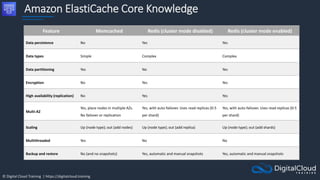
Amazon ElastiCache Core Knowledge
Feature Memcached Redis (cluster mode disabled) Redis (cluster mode enabled)
Data persistence No Yes Yes
Data types Simple Complex Complex
Data partitioning Yes No Yes
Encryption No Yes Yes
High availability (replication) No Yes Yes
Multi-AZ
Yes, place nodes in multiple AZs.
No failover or replication
Yes, with auto-failover. Uses read replicas (0-5
per shard)
Yes, with auto-failover. Uses read replicas (0-5
per shard)
Scaling Up (node type); out (add nodes) Up (node type); out (add replica) Up (node type); out (add shards)
Multithreaded Yes No No
Backup and restore No (and no snapshots) Yes, automatic and manual snapshots Yes, automatic and manual snapshots
© Digital Cloud Training | https://digitalcloud.training
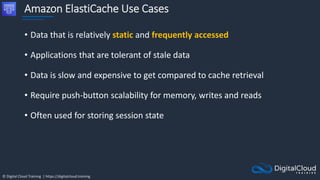
Amazon ElastiCache Use Cases
• Data that is relatively static and frequently accessed
• Applications that are tolerant of stale data
• Data is slow and expensive to get compared to cache retrieval
• Require push-button scalability for memory, writes and reads
• Often used for storing session state
© Digital Cloud Training | https://digitalcloud.training
Scaling ElastiCache
© Digital Cloud Training | https://digitalcloud.training
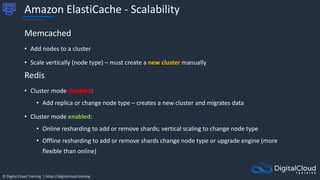
Amazon ElastiCache - Scalability
Memcached
• Add nodes to a cluster
• Scale vertically (node type) – must create a new cluster manually
Redis
• Cluster mode disabled:
• Add replica or change node type – creates a new cluster and migrates data
• Cluster mode enabled:
• Online resharding to add or remove shards; vertical scaling to change node type
• Offline resharding to add or remove shards change node type or upgrade engine (more
flexible than online)
© Digital Cloud Training | https://digitalcloud.training
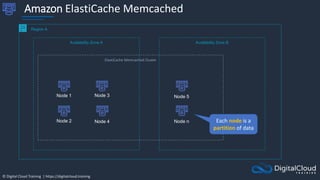
Amazon ElastiCache Memcached
Region A
Availability Zone A
Node 2
Availability Zone B
Node 4
Node 1 Node 5
ElastiCache Memcached Cluster
Node 3
Node n Each node is a
partition of data
© Digital Cloud Training | https://digitalcloud.training
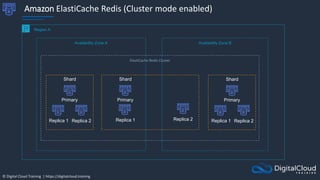
Amazon ElastiCache Redis (Cluster mode enabled)
Region A
Availability Zone A
Shard
Replica 1
Availability Zone B
Replica 2
Primary
ElastiCache Redis Cluster
Shard
Replica 1 Replica 2
Primary
Shard
Replica 1 Replica 2
Primary
© Digital Cloud Training | https://digitalcloud.training
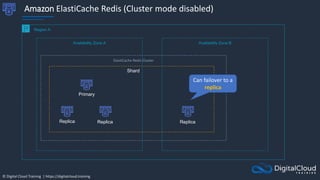
Amazon ElastiCache Redis (Cluster mode disabled)
Region A
Availability Zone A
Shard
Replica
Availability Zone B
Replica
Primary
Replica
ElastiCache Redis Cluster
Can failover to a
replica
© Digital Cloud Training | https://digitalcloud.training
Amazon DynamoDB Core
Knowledge
© Digital Cloud Training | https://digitalcloud.training
Amazon DynamoDB Core Knowledge
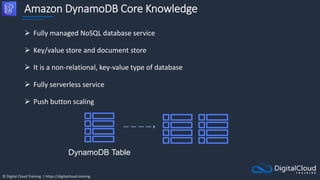
 Fully managed NoSQL database service
 Key/value store and document store
 It is a non-relational, key-value type of database
 Fully serverless service
 Push button scaling
DynamoDB Table
© Digital Cloud Training | https://digitalcloud.training
Amazon DynamoDB Core Knowledge
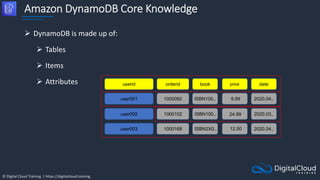
 DynamoDB is made up of:
 Tables
 Items
 Attributes userid orderid book
user001 1000092
price
ISBN100..
1000102
1000168
date
user002
user003
ISBN100..
ISBN2X0..
9.99 2020.04..
2020.03..
2020.04..
24.99
12.50
© Digital Cloud Training | https://digitalcloud.training
DynamoDB Time to Live (TTL)
• TTL lets you define when items in a table expire so
that they can be automatically deleted from the
database
• With TTL enabled on a table, you can set a
timestamp for deletion on a per-item basis
• No extra cost and does not use WCU / RCU
• Helps reduce storage and manage the table size
over time
© Digital Cloud Training | https://digitalcloud.training
Amazon DynamoDB Core Knowledge
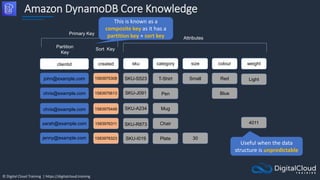
clientid created sku category size
john@example.com 1583975308 SKU-S523
SKU-J091
SKU-R873
SKU-I019
T-Shirt
Chair
colour
SKU-A234
Small
Pen
Red
Blue
Mug
30
Attributes
Sort Key
Partition
Key
Primary Key
4011
weight
Light
1583975613
1583975449
1583976311
1583976323
chris@example.com
chris@example.com
sarah@example.com
jenny@example.com Plate
This is known as a
composite key as it has a
partition key + sort key
Useful when the data
structure is unpredictable
© Digital Cloud Training | https://digitalcloud.training
Amazon DynamoDB Core Knowledge
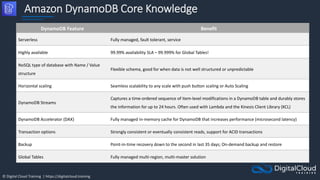
DynamoDB Feature Benefit
Serverless Fully managed, fault tolerant, service
Highly available 99.99% availability SLA – 99.999% for Global Tables!
NoSQL type of database with Name / Value
structure
Flexible schema, good for when data is not well structured or unpredictable
Horizontal scaling Seamless scalability to any scale with push button scaling or Auto Scaling
DynamoDB Streams
Captures a time-ordered sequence of item-level modifications in a DynamoDB table and durably stores
the information for up to 24 hours. Often used with Lambda and the Kinesis Client Library (KCL)
DynamoDB Accelerator (DAX) Fully managed in-memory cache for DynamoDB that increases performance (microsecond latency)
Transaction options Strongly consistent or eventually consistent reads, support for ACID transactions
Backup Point-in-time recovery down to the second in last 35 days; On-demand backup and restore
Global Tables Fully managed multi-region, multi-master solution
© Digital Cloud Training | https://digitalcloud.training
DynamoDB Capacity Modes
and RCUs/WCUs
© Digital Cloud Training | https://digitalcloud.training
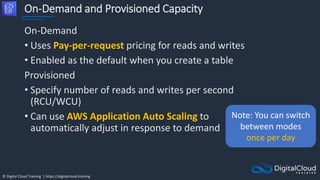
On-Demand and Provisioned Capacity
On-Demand
• Uses Pay-per-request pricing for reads and writes
• Enabled as the default when you create a table
Provisioned
• Specify number of reads and writes per second
(RCU/WCU)
• Can use AWS Application Auto Scaling to
automatically adjust in response to demand
Note: You can switch
between modes
once per day
© Digital Cloud Training | https://digitalcloud.training
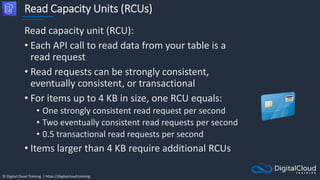
Read Capacity Units (RCUs)
Read capacity unit (RCU):
• Each API call to read data from your table is a
read request
• Read requests can be strongly consistent,
eventually consistent, or transactional
• For items up to 4 KB in size, one RCU equals:
• One strongly consistent read request per second
• Two eventually consistent read requests per second
• 0.5 transactional read requests per second
• Items larger than 4 KB require additional RCUs
© Digital Cloud Training | https://digitalcloud.training
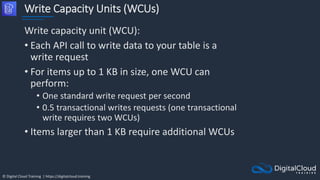
Write Capacity Units (WCUs)
Write capacity unit (WCU):
• Each API call to write data to your table is a
write request
• For items up to 1 KB in size, one WCU can
perform:
• One standard write request per second
• 0.5 transactional writes requests (one transactional
write requires two WCUs)
• Items larger than 1 KB require additional WCUs
© Digital Cloud Training | https://digitalcloud.training
Create DynamoDB Table
© Digital Cloud Training | https://digitalcloud.training
DynamoDB Streams
© Digital Cloud Training | https://digitalcloud.training
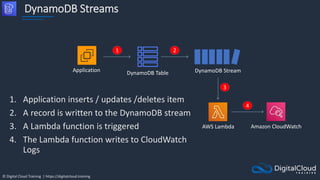
DynamoDB Streams
1. Application inserts / updates /deletes item
2. A record is written to the DynamoDB stream
3. A Lambda function is triggered
4. The Lambda function writes to CloudWatch
Logs
DynamoDB Stream
DynamoDB Table
Application
1 2
AWS Lambda Amazon CloudWatch
3
4
© Digital Cloud Training | https://digitalcloud.training
DynamoDB Streams
• Captures a time-ordered sequence of item-level
modifications in any DynamoDB table and stores this
information in a log for up to 24 hours
• Can configure the information that is written to the
stream:
• KEYS_ONLY — Only the key attributes of the modified
item
• NEW_IMAGE — The entire item, as it appears after it was
modified
• OLD_IMAGE — The entire item, as it appeared before it
was modified
• NEW_AND_OLD_IMAGES — Both the new and the old
images of the item
© Digital Cloud Training | https://digitalcloud.training
DynamoDB Accelerator (DAX)
© Digital Cloud Training | https://digitalcloud.training
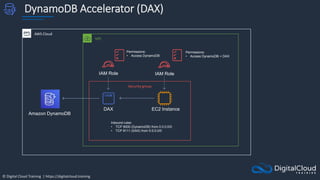
DynamoDB Accelerator (DAX)
AWS Cloud
Amazon DynamoDB
DAX EC2 Instance
IAM Role
VPC
IAM Role
Permissions:
• Access DynamoDB + DAX
Permissions:
• Access DynamoDB
Security group
Inbound rules:
• TCP 8000 (DynamoDB) from 0.0.0.0/0
• TCP 8111 (DAX) from 0.0.0.0/0
© Digital Cloud Training | https://digitalcloud.training
DynamoDB Accelerator (DAX)
• DAX is a fully managed, highly available, in-memory
cache for DynamoDB
• Improves performance from milliseconds to
microseconds
• DAX is used to improve READ performance (not
writes)
• You do not need to modify application logic, since
DAX is compatible with existing DynamoDB API calls
© Digital Cloud Training | https://digitalcloud.training
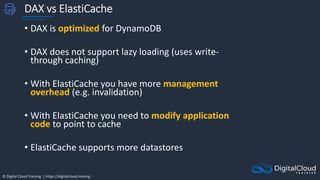
DAX vs ElastiCache
• DAX is optimized for DynamoDB
• DAX does not support lazy loading (uses write-
through caching)
• With ElastiCache you have more management
overhead (e.g. invalidation)
• With ElastiCache you need to modify application
code to point to cache
• ElastiCache supports more datastores
© Digital Cloud Training | https://digitalcloud.training
DynamoDB Global Tables
© Digital Cloud Training | https://digitalcloud.training
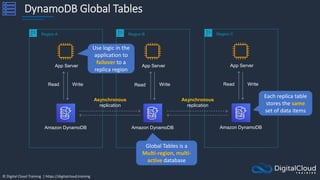
DynamoDB Global Tables
Region A
Amazon DynamoDB
App Server
Read Write
Region B
Amazon DynamoDB
App Server
Asynchronous
replication
Write
Region C
Amazon DynamoDB
App Server
Read Write
Read
Asynchronous
replication
Global Tables is a
Multi-region, multi-
active database
Each replica table
stores the same
set of data items
Use logic in the
application to
failover to a
replica region
© Digital Cloud Training | https://digitalcloud.training
DynamoDB Global Tables
© Digital Cloud Training | https://digitalcloud.training
Architecture Patterns - AWS
Databases
© Digital Cloud Training | https://digitalcloud.training
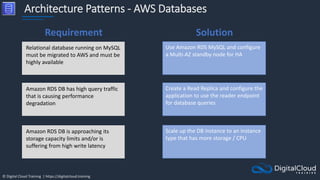
Architecture Patterns - AWS Databases
Relational database running on MySQL
must be migrated to AWS and must be
highly available
Use Amazon RDS MySQL and configure
a Multi-AZ standby node for HA
Amazon RDS DB has high query traffic
that is causing performance
degradation
Create a Read Replica and configure the
application to use the reader endpoint
for database queries
Amazon RDS DB is approaching its
storage capacity limits and/or is
suffering from high write latency
Scale up the DB instance to an instance
type that has more storage / CPU
Requirement Solution
© Digital Cloud Training | https://digitalcloud.training
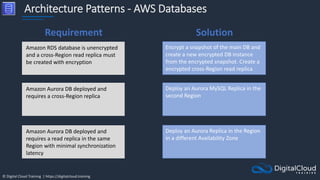
Architecture Patterns - AWS Databases
Amazon RDS database is unencrypted
and a cross-Region read replica must
be created with encryption
Encrypt a snapshot of the main DB and
create a new encrypted DB instance
from the encrypted snapshot. Create a
encrypted cross-Region read replica
Amazon Aurora DB deployed and
requires a cross-Region replica
Deploy an Aurora MySQL Replica in the
second Region
Amazon Aurora DB deployed and
requires a read replica in the same
Region with minimal synchronization
latency
Deploy an Aurora Replica in the Region
in a different Availability Zone
Requirement Solution
© Digital Cloud Training | https://digitalcloud.training
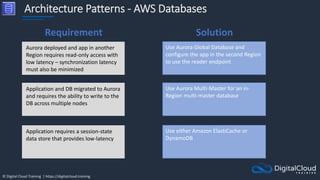
Architecture Patterns - AWS Databases
Aurora deployed and app in another
Region requires read-only access with
low latency – synchronization latency
must also be minimized
Use Aurora Global Database and
configure the app in the second Region
to use the reader endpoint
Application and DB migrated to Aurora
and requires the ability to write to the
DB across multiple nodes
Use Aurora Multi-Master for an in-
Region multi-master database
Application requires a session-state
data store that provides low-latency
Use either Amazon ElastiCache or
DynamoDB
Requirement Solution
© Digital Cloud Training | https://digitalcloud.training
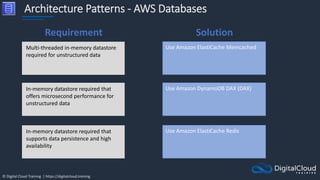
Architecture Patterns - AWS Databases
Multi-threaded in-memory datastore
required for unstructured data
Use Amazon ElastiCache Memcached
In-memory datastore required that
offers microsecond performance for
unstructured data
Use Amazon DynamoDB DAX (DAX)
In-memory datastore required that
supports data persistence and high
availability
Use Amazon ElastiCache Redis
Requirement Solution
© Digital Cloud Training | https://digitalcloud.training
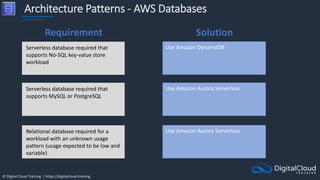
Architecture Patterns - AWS Databases
Serverless database required that
supports No-SQL key-value store
workload
Use Amazon DynamoDB
Serverless database required that
supports MySQL or PostgreSQL
Use Amazon Aurora Serverless
Relational database required for a
workload with an unknown usage
pattern (usage expected to be low and
variable)
Use Amazon Aurora Serverless
Requirement Solution
© Digital Cloud Training | https://digitalcloud.training
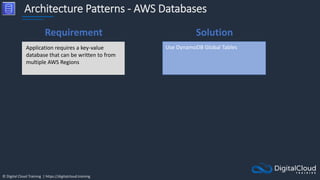
Architecture Patterns - AWS Databases
Application requires a key-value
database that can be written to from
multiple AWS Regions
Use DynamoDB Global Tables
Requirement Solution
© Digital Cloud Training | https://digitalcloud.training
SECTION 11
Serverless Applications
© Digital Cloud Training | https://digitalcloud.training
Event-Driven Architectures
© Digital Cloud Training | https://digitalcloud.training
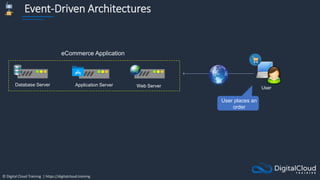
Event-Driven Architectures
Application Server Web Server
Database Server
User
eCommerce Application
User places an
order
© Digital Cloud Training | https://digitalcloud.training
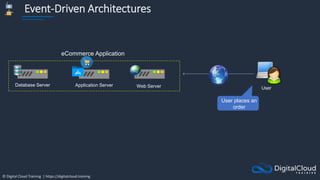
Event-Driven Architectures
Application Server Web Server
Database Server
User
eCommerce Application
User places an
order
© Digital Cloud Training | https://digitalcloud.training
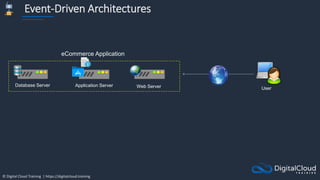
Event-Driven Architectures
Application Server Web Server
Database Server
User
eCommerce Application
© Digital Cloud Training | https://digitalcloud.training
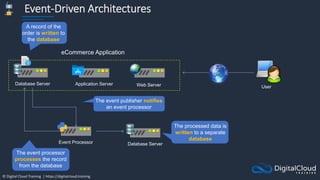
Event-Driven Architectures
Application Server Web Server
Database Server
User
eCommerce Application
A record of the
order is written to
the database
Event Processor
The event publisher notifies
an event processor
The event processor
processes the record
from the database
Database Server
The processed data is
written to a separate
database
© Digital Cloud Training | https://digitalcloud.training
AWS Lambda Invocations and
Concurrency
© Digital Cloud Training | https://digitalcloud.training
AWS Lambda Invocations
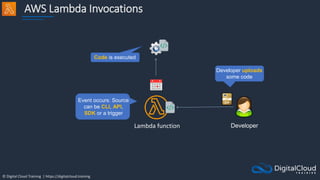
Lambda function Developer
Event occurs: Source
can be CLI, API,
SDK or a trigger
Developer uploads
some code
Code is executed
© Digital Cloud Training | https://digitalcloud.training
Lambda Function Invocations
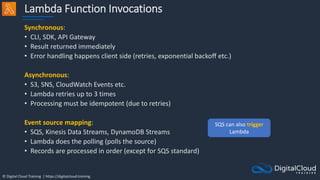
Synchronous:
• CLI, SDK, API Gateway
• Result returned immediately
• Error handling happens client side (retries, exponential backoff etc.)
Asynchronous:
• S3, SNS, CloudWatch Events etc.
• Lambda retries up to 3 times
• Processing must be idempotent (due to retries)
Event source mapping:
• SQS, Kinesis Data Streams, DynamoDB Streams
• Lambda does the polling (polls the source)
• Records are processed in order (except for SQS standard)
SQS can also trigger
Lambda
© Digital Cloud Training | https://digitalcloud.training
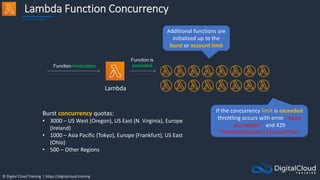
Lambda Function Concurrency
Lambda
Function invocation
Function is
executed
Additional functions are
initialized up to the
burst or account limit
Burst concurrency quotas:
• 3000 – US West (Oregon), US East (N. Virginia), Europe
(Ireland)
• 1000 – Asia Pacific (Tokyo), Europe (Frankfurt), US East
(Ohio)
• 500 – Other Regions
If the concurrency limit is exceeded
throttling occurs with error “Rate
exceeded” and 429
“TooManyRequestsException”
© Digital Cloud Training | https://digitalcloud.training
Lambda Function Concurrency
• Throttling can result in the error: “Rate exceeded”
and 429 “TooManyRequestsException”
• If the above error occurs, verify if you see throttling
messages in Amazon CloudWatch Logs but no
corresponding data points in the Lambda Throttles
metrics
• If there are no Lambda Throttles metrics, the throttling
is happening on API calls in your Lambda function code
• For asynchronous invocations Lambda retries up to 3
times then goes to a Dead Letter Queue
• DLQ can be SNS topic or SQS queue
© Digital Cloud Training | https://digitalcloud.training
Lambda Function Concurrency
Methods to resolve throttling include:
• Configure reserved concurrency
• Use exponential backoff in your application code
Concurrency metrics:
• ConcurrentExecutions
• UnreservedConcurrentExecutions
• ProvisionedConcurrentExecutions
• ProvisionedConcurrencyInvocations
• ProvisionedConcurrencySpilloverInvocations
• ProvisionedConcurrencyUtilization
© Digital Cloud Training | https://digitalcloud.training
Lambda Versions and Aliases
© Digital Cloud Training | https://digitalcloud.training
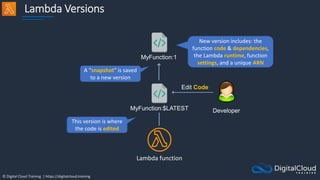
Lambda Versions
Lambda function
MyFunction:$LATEST
Edit Code
Developer
MyFunction:1
New version includes: the
function code & dependencies,
the Lambda runtime, function
settings, and a unique ARN
A ”snapshot” is saved
to a new version
This version is where
the code is edited
© Digital Cloud Training | https://digitalcloud.training
Lambda Versions
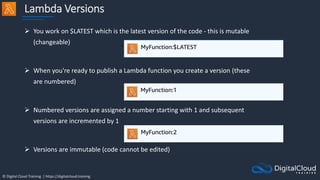
 You work on $LATEST which is the latest version of the code - this is mutable
(changeable)
 When you're ready to publish a Lambda function you create a version (these
are numbered)
 Numbered versions are assigned a number starting with 1 and subsequent
versions are incremented by 1
 Versions are immutable (code cannot be edited)
© Digital Cloud Training | https://digitalcloud.training
Lambda Versions
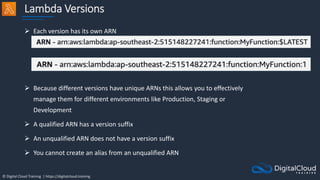
 Each version has its own ARN
 Because different versions have unique ARNs this allows you to effectively
manage them for different environments like Production, Staging or
Development
 A qualified ARN has a version suffix
 An unqualified ARN does not have a version suffix
 You cannot create an alias from an unqualified ARN
© Digital Cloud Training | https://digitalcloud.training
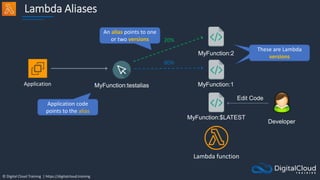
Lambda Aliases
Lambda function
MyFunction:$LATEST
Edit Code
Developer
MyFunction:1
MyFunction:2
Application MyFunction:testalias
80%
20%
Application code
points to the alias
These are Lambda
versions
These are Lambda
versions
An alias points to one
or two versions
© Digital Cloud Training | https://digitalcloud.training
Advanced Amazon SQS
© Digital Cloud Training | https://digitalcloud.training
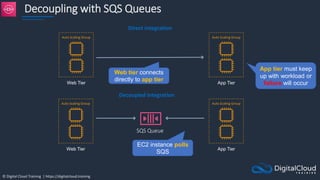
Decoupling with SQS Queues
SQS Queue
Web Tier
Direct integration
Auto Scaling Group
App Tier
Auto Scaling Group
Web Tier
Auto Scaling Group
App Tier
Auto Scaling Group
Decoupled integration
EC2 instance polls
SQS
Web tier connects
directly to app tier
App tier must keep
up with workload or
failure will occur
© Digital Cloud Training | https://digitalcloud.training
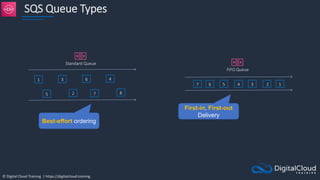
SQS Queue Types
Standard Queue
1
5
3
2
6
7
4
8
7 6 5 4 3 2 1
FIFO Queue
First-in, First-out
Delivery
Best-effort ordering
© Digital Cloud Training | https://digitalcloud.training
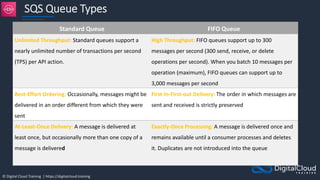
SQS Queue Types
Standard Queue FIFO Queue
Unlimited Throughput: Standard queues support a
nearly unlimited number of transactions per second
(TPS) per API action.
High Throughput: FIFO queues support up to 300
messages per second (300 send, receive, or delete
operations per second). When you batch 10 messages per
operation (maximum), FIFO queues can support up to
3,000 messages per second
Best-Effort Ordering: Occasionally, messages might be
delivered in an order different from which they were
sent
First-ln-First-out Delivery: The order in which messages are
sent and received is strictly preserved
At-Least-Once Delivery: A message is delivered at
least once, but occasionally more than one copy of a
message is delivered
Exactly-Once Processing: A message is delivered once and
remains available until a consumer processes and deletes
it. Duplicates are not introduced into the queue
© Digital Cloud Training | https://digitalcloud.training
SQS Queue Types
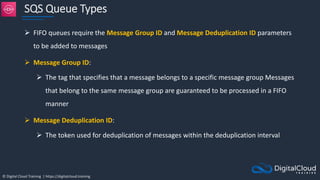
 FIFO queues require the Message Group ID and Message Deduplication ID parameters
to be added to messages
 Message Group ID:
 The tag that specifies that a message belongs to a specific message group Messages
that belong to the same message group are guaranteed to be processed in a FIFO
manner
 Message Deduplication ID:
 The token used for deduplication of messages within the deduplication interval
© Digital Cloud Training | https://digitalcloud.training
SQS – Dead Letter Queue
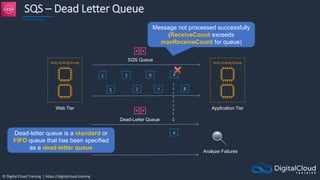
SQS Queue
1
5
3
2
6
7
4
8
Web Tier
Auto Scaling Group
Application Tier
Auto Scaling Group
Dead-Letter Queue
Analyze Failures
4
Message not processed successfully
(ReceiveCount exceeds
maxReceiveCount for queue)
Dead-letter queue is a standard or
FIFO queue that has been specified
as a dead-letter queue
© Digital Cloud Training | https://digitalcloud.training
SQS – Dead Letter Queue
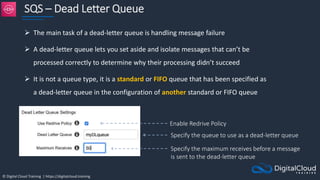
 The main task of a dead-letter queue is handling message failure
 A dead-letter queue lets you set aside and isolate messages that can’t be
processed correctly to determine why their processing didn’t succeed
 It is not a queue type, it is a standard or FIFO queue that has been specified as
a dead-letter queue in the configuration of another standard or FIFO queue
Enable Redrive Policy
Specify the queue to use as a dead-letter queue
Specify the maximum receives before a message
is sent to the dead-letter queue
© Digital Cloud Training | https://digitalcloud.training
SQS – Delay Queue
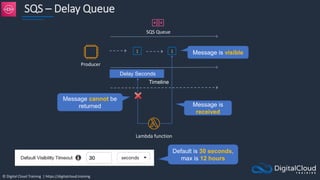
SQS Queue
1
Timeline
Delay Seconds
1
Lambda function
Producer
Message cannot be
returned
Message is visible
Message is
received
Default is 30 seconds,
max is 12 hours
© Digital Cloud Training | https://digitalcloud.training
SQS Long Polling vs Short Polling
SQS Queue
Consumer
Producer
1
5
3
2
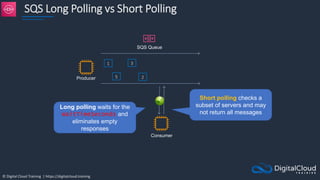
Long polling waits for the
WaitTimeSeconds and
eliminates empty
responses
Short polling checks a
subset of servers and may
not return all messages
© Digital Cloud Training | https://digitalcloud.training
SQS Long Polling vs Short Polling
 SQS Long polling is a way to retrieve messages from SQS queues – waits for messages to arrive
 SQS Short polling returns immediately (even if the message queue is empty)
 SQS Long polling can lower costs
 SQS Long polling can be enabled at the queue level or at the API level using
WaitTimeSeconds
 SQS Long polling is in effect when the Receive Message Wait Time is a value greater than 0
seconds and up to 20 seconds
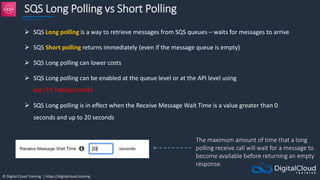
The maximum amount of time that a long
polling receive call will wait for a message to
become available before returning an empty
response.
© Digital Cloud Training | https://digitalcloud.training
Serverless App Architecture
for HOL
© Digital Cloud Training | https://digitalcloud.training
Serverless App Architecture
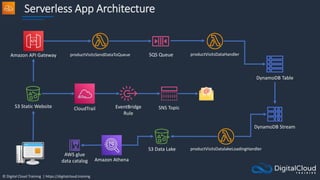
productVisitsDataHandler
S3 Static Website
SQS Queue
DynamoDB Table
Amazon Athena
EventBridge
Rule
DynamoDB Stream
Amazon API Gateway productVisitsSendDataToQueue
productVisitsDatalakeLoadingHandler
S3 Data Lake
SNS Topic
AWS glue
data catalog
CloudTrail
© Digital Cloud Training | https://digitalcloud.training
Build a Serverless App –
Part 1
© Digital Cloud Training | https://digitalcloud.training
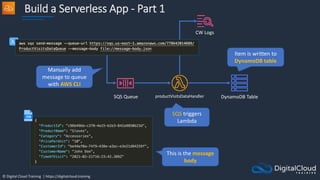
Build a Serverless App - Part 1
productVisitsDataHandler
SQS Queue DynamoDB Table
Manually add
message to queue
with AWS CLI
SQS triggers
Lambda
Item is written to
DynamoDB table
This is the message
body
CW Logs
© Digital Cloud Training | https://digitalcloud.training
Build a Serverless App –
Part 2
© Digital Cloud Training | https://digitalcloud.training
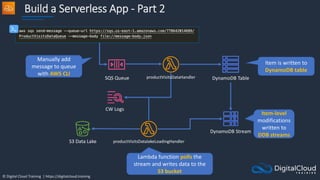
Build a Serverless App - Part 2
SQS Queue DynamoDB Table
Item is written to
DynamoDB table
DynamoDB Stream
productVisitsDatalakeLoadingHandler
S3 Data Lake
Manually add
message to queue
with AWS CLI
Item-level
modifications
written to
DDB streams
Lambda function polls the
stream and writes data to the
S3 bucket
CW Logs
productVisitsDataHandler
© Digital Cloud Training | https://digitalcloud.training
Application Integration
Services Comparison
© Digital Cloud Training | https://digitalcloud.training
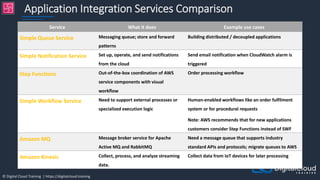
Application Integration Services Comparison
Service What it does Example use cases
Simple Queue Service Messaging queue; store and forward
patterns
Building distributed / decoupled applications
Simple Notification Service Set up, operate, and send notifications
from the cloud
Send email notification when CloudWatch alarm is
triggered
Step Functions Out-of-the-box coordination of AWS
service components with visual
workflow
Order processing workflow
Simple Workflow Service Need to support external processes or
specialized execution logic
Human-enabled workflows like an order fulfilment
system or for procedural requests
Note: AWS recommends that for new applications
customers consider Step Functions instead of SWF
Amazon MQ Message broker service for Apache
Active MQ and RabbitMQ
Need a message queue that supports industry
standard APIs and protocols; migrate queues to AWS
Amazon Kinesis Collect, process, and analyze streaming
data.
Collect data from IoT devices for later processing
© Digital Cloud Training | https://digitalcloud.training
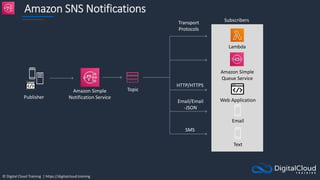
Amazon SNS Notifications
Publisher
Amazon Simple
Notification Service
Topic
Subscribers
Lambda
Amazon Simple
Queue Service
Web Application
Email
Text
SMS
Email/Email
-JSON
HTTP/HTTPS
Transport
Protocols
© Digital Cloud Training | https://digitalcloud.training
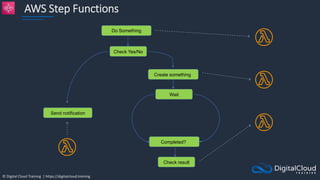
AWS Step Functions
Do Something
Check Yes/No
Create something
Wait
Completed?
Send notification
Check result
© Digital Cloud Training | https://digitalcloud.training
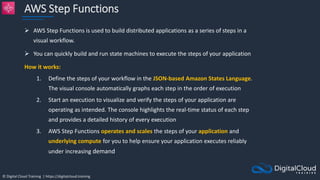
AWS Step Functions
 AWS Step Functions is used to build distributed applications as a series of steps in a
visual workflow.
 You can quickly build and run state machines to execute the steps of your application
How it works:
1. Define the steps of your workflow in the JSON-based Amazon States Language.
The visual console automatically graphs each step in the order of execution
2. Start an execution to visualize and verify the steps of your application are
operating as intended. The console highlights the real-time status of each step
and provides a detailed history of every execution
3. AWS Step Functions operates and scales the steps of your application and
underlying compute for you to help ensure your application executes reliably
under increasing demand
© Digital Cloud Training | https://digitalcloud.training
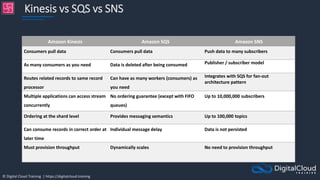
Kinesis vs SQS vs SNS
Amazon Kinesis Amazon SQS Amazon SNS
Consumers pull data Consumers pull data Push data to many subscribers
As many consumers as you need Data is deleted after being consumed Publisher / subscriber model
Routes related records to same record
processor
Can have as many workers (consumers) as
you need
Integrates with SQS for fan-out
architecture pattern
Multiple applications can access stream
concurrently
No ordering guarantee (except with FIFO
queues)
Up to 10,000,000 subscribers
Ordering at the shard level Provides messaging semantics Up to 100,000 topics
Can consume records in correct order at
later time
Individual message delay Data is not persisted
Must provision throughput Dynamically scales No need to provision throughput
© Digital Cloud Training | https://digitalcloud.training
Amazon EventBridge
© Digital Cloud Training | https://digitalcloud.training
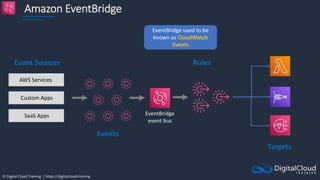
Amazon EventBridge
EventBridge used to be
known as CloudWatch
Events
AWS Services
Custom Apps
SaaS Apps
Event Sources
Events
EventBridge
event bus
Rules
Targets
© Digital Cloud Training | https://digitalcloud.training
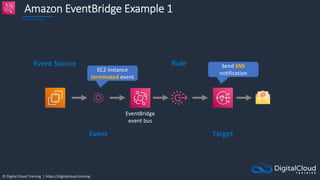
Amazon EventBridge Example 1
EC2 instance
terminated event
Event Source
Event
EventBridge
event bus
Rule
Target
Send SNS
notification
© Digital Cloud Training | https://digitalcloud.training
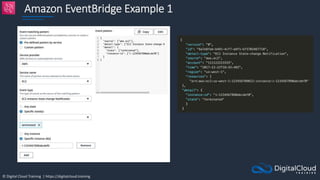
Amazon EventBridge Example 1
© Digital Cloud Training | https://digitalcloud.training
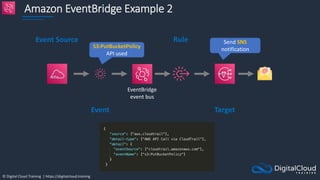
Amazon EventBridge Example 2
S3:PutBucketPolicy
API used
Event Source
Event
EventBridge
event bus
Rule
Target
Send SNS
notification
© Digital Cloud Training | https://digitalcloud.training
Amazon API Gateway Core
Knowledge
© Digital Cloud Training | https://digitalcloud.training
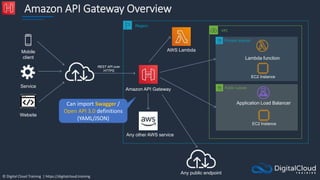
Amazon API Gateway Overview
AWS Lambda
Region
Amazon API Gateway
Mobile
client
Service
Website
VPC
Any other AWS service
REST API over
HTTPS
Public subnet
Private subnet
Lambda function
EC2 Instance
Application Load Balancer
EC2 Instance
Any public endpoint
Can import Swagger /
Open API 3.0 definitions
(YAML/JSON)
© Digital Cloud Training | https://digitalcloud.training
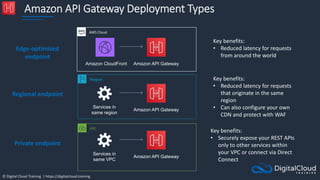
Amazon API Gateway Deployment Types
Amazon API Gateway
Amazon CloudFront
Services in
same region
Amazon API Gateway
Edge-optimized
endpoint
Regional endpoint
Private endpoint
Services in
same VPC
Amazon API Gateway
VPC
Region
AWS Cloud
Key benefits:
• Reduced latency for requests
from around the world
Key benefits:
• Reduced latency for requests
that originate in the same
region
• Can also configure your own
CDN and protect with WAF
Key benefits:
• Securely expose your REST APIs
only to other services within
your VPC or connect via Direct
Connect
© Digital Cloud Training | https://digitalcloud.training
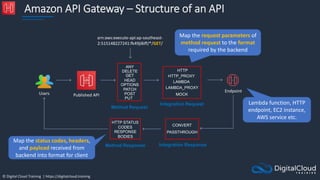
Amazon API Gateway – Structure of an API
Method Request
Endpoint
Published API
Users
Integration Request
ANY
HTTP_PROXY
LAMBDA_PROXY
LAMBDA
MOCK
Integration Response
CONVERT
PASSTHROUGH
Method Response
arn:aws:execute-api:ap-southeast-
2:515148227241:fk49ji8iff/*/GET/
DELETE
GET
HEAD
OPTIONS
PATCH
POST
PUT
HTTP
HTTP STATUS
CODES
RESPONSE
BODIES
Map the request parameters of
method request to the format
required by the backend
Lambda function, HTTP
endpoint, EC2 instance,
AWS service etc.
Map the status codes, headers,
and payload received from
backend into format for client
© Digital Cloud Training | https://digitalcloud.training
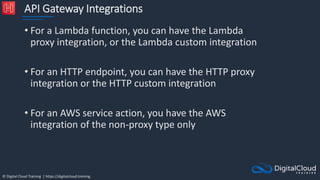
API Gateway Integrations
• For a Lambda function, you can have the Lambda
proxy integration, or the Lambda custom integration
• For an HTTP endpoint, you can have the HTTP proxy
integration or the HTTP custom integration
• For an AWS service action, you have the AWS
integration of the non-proxy type only
© Digital Cloud Training | https://digitalcloud.training
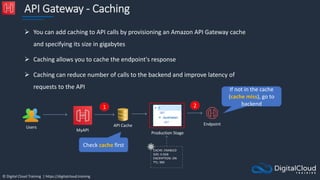
API Gateway - Caching
 You can add caching to API calls by provisioning an Amazon API Gateway cache
and specifying its size in gigabytes
 Caching allows you to cache the endpoint's response
 Caching can reduce number of calls to the backend and improve latency of
requests to the API
Production Stage
CACHE: ENABLED
SIZE: 0.5GB
ENCRYPTION: ON
TTL: 900
MyAPI
API Cache
Users
Endpoint
1 2
Check cache first
If not in the cache
(cache miss), go to
backend
© Digital Cloud Training | https://digitalcloud.training
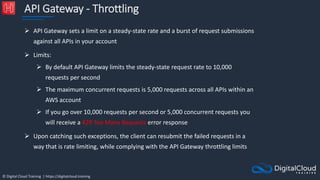
API Gateway - Throttling
 API Gateway sets a limit on a steady-state rate and a burst of request submissions
against all APIs in your account
 Limits:
 By default API Gateway limits the steady-state request rate to 10,000
requests per second
 The maximum concurrent requests is 5,000 requests across all APIs within an
AWS account
 If you go over 10,000 requests per second or 5,000 concurrent requests you
will receive a 429 Too Many Requests error response
 Upon catching such exceptions, the client can resubmit the failed requests in a
way that is rate limiting, while complying with the API Gateway throttling limits
© Digital Cloud Training | https://digitalcloud.training
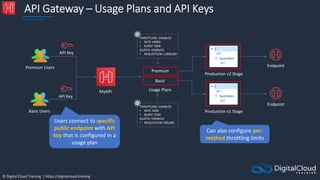
API Gateway – Usage Plans and API Keys
THROTTLING: ENABLED
• RATE 10000
• BURST 5000
QUOTA: ENABLED
• REQUESTS/M 1,000,000
MyAPI
Premium Users Endpoint
Usage Plans
Basic
Premium
THROTTLING: ENABLED
• RATE 5000
• BURST 2500
QUOTA: ENABLED
• REQUESTS/M 500,000
API Key
Production v2 Stage
Production v1 Stage
Endpoint
Basic Users
API Key
Users connect to specific
public endpoint with API
key that is configured in a
usage plan
Can also configure per-
method throttling limits
© Digital Cloud Training | https://digitalcloud.training
Build a Serverless App –
Part 3
© Digital Cloud Training | https://digitalcloud.training
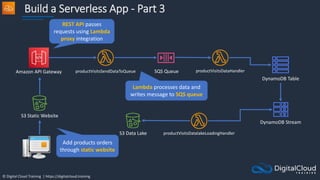
Build a Serverless App - Part 3
productVisitsDataHandler
S3 Static Website
SQS Queue
DynamoDB Table
DynamoDB Stream
Amazon API Gateway productVisitsSendDataToQueue
productVisitsDatalakeLoadingHandler
S3 Data Lake
Add products orders
through static website
REST API passes
requests using Lambda
proxy integration
Lambda processes data and
writes message to SQS queue
© Digital Cloud Training | https://digitalcloud.training
Build a Serverless App –
Part 4
© Digital Cloud Training | https://digitalcloud.training
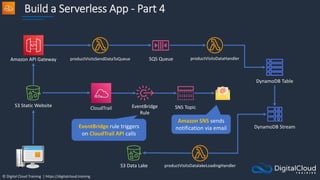
Build a Serverless App - Part 4
productVisitsDataHandler
S3 Static Website
SQS Queue
DynamoDB Table
DynamoDB Stream
Amazon API Gateway productVisitsSendDataToQueue
productVisitsDatalakeLoadingHandler
S3 Data Lake
EventBridge rule triggers
on CloudTrail API calls
Amazon SNS sends
notification via email
EventBridge
Rule
SNS Topic
CloudTrail
© Digital Cloud Training | https://digitalcloud.training
Architecture Patterns -
Serverless
© Digital Cloud Training | https://digitalcloud.training
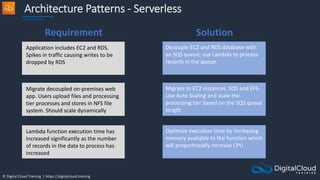
Architecture Patterns - Serverless
Application includes EC2 and RDS.
Spikes in traffic causing writes to be
dropped by RDS
Decouple EC2 and RDS database with
an SQS queue; use Lambda to process
records in the queue
Migrate decoupled on-premises web
app. Users upload files and processing
tier processes and stores in NFS file
system. Should scale dynamically
Migrate to EC2 instances, SQS and EFS.
Use Auto Scaling and scale the
processing tier based on the SQS queue
length
Lambda function execution time has
increased significantly as the number
of records in the data to process has
increased
Optimize execution time by increasing
memory available to the function which
will proportionally increase CPU
Requirement Solution
© Digital Cloud Training | https://digitalcloud.training
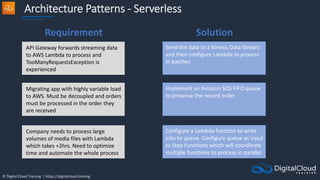
Architecture Patterns - Serverless
API Gateway forwards streaming data
to AWS Lambda to process and
TooManyRequestsException is
experienced
Send the data to a Kinesis Data Stream
and then configure Lambda to process
in batches
Migrating app with highly variable load
to AWS. Must be decoupled and orders
must be processed in the order they
are received
Implement an Amazon SQS FIFO queue
to preserve the record order
Company needs to process large
volumes of media files with Lambda
which takes +2hrs. Need to optimize
time and automate the whole process
Configure a Lambda function to write
jobs to queue. Configure queue as input
to Step Functions which will coordinate
multiple functions to process in parallel
Requirement Solution
© Digital Cloud Training | https://digitalcloud.training
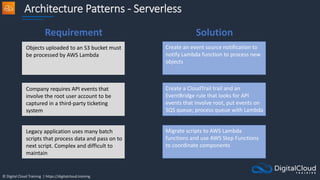
Architecture Patterns - Serverless
Objects uploaded to an S3 bucket must
be processed by AWS Lambda
Create an event source notification to
notify Lambda function to process new
objects
Company requires API events that
involve the root user account to be
captured in a third-party ticketing
system
Create a CloudTrail trail and an
EventBridge rule that looks for API
events that involve root, put events on
SQS queue; process queue with Lambda
Legacy application uses many batch
scripts that process data and pass on to
next script. Complex and difficult to
maintain
Migrate scripts to AWS Lambda
functions and use AWS Step Functions
to coordinate components
Requirement Solution
© Digital Cloud Training | https://digitalcloud.training
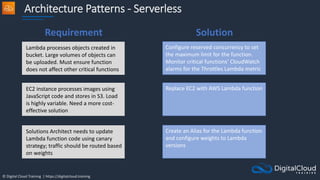
Architecture Patterns - Serverless
Lambda processes objects created in
bucket. Large volumes of objects can
be uploaded. Must ensure function
does not affect other critical functions
Configure reserved concurrency to set
the maximum limit for the function.
Monitor critical functions’ CloudWatch
alarms for the Throttles Lambda metric
EC2 instance processes images using
JavaScript code and stores in S3. Load
is highly variable. Need a more cost-
effective solution
Replace EC2 with AWS Lambda function
Solutions Architect needs to update
Lambda function code using canary
strategy; traffic should be routed based
on weights
Create an Alias for the Lambda function
and configure weights to Lambda
versions
Requirement Solution
© Digital Cloud Training | https://digitalcloud.training
Architecture Patterns - Serverless
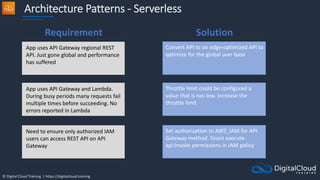
App uses API Gateway regional REST
API. Just gone global and performance
has suffered
Convert API to an edge-optimized API to
optimize for the global user base
App uses API Gateway and Lambda.
During busy periods many requests fail
multiple times before succeeding. No
errors reported in Lambda
Throttle limit could be configured a
value that is too low. Increase the
throttle limit
Need to ensure only authorized IAM
users can access REST API on API
Gateway
Set authorization to AWS_IAM for API
Gateway method. Grant execute-
api:Invoke permissions in IAM policy
Requirement Solution
© Digital Cloud Training | https://digitalcloud.training
SECTION 12
Docker Containers and PaaS
© Digital Cloud Training | https://digitalcloud.training
Docker and Microservices
Architectures
© Digital Cloud Training | https://digitalcloud.training
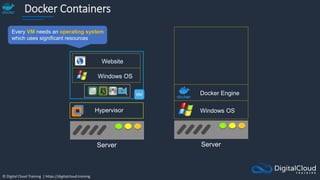
Docker Containers
Windows OS
Website
Server
Hypervisor
Server
Docker Engine
Windows OS
Every VM needs an operating system
which uses significant resources
© Digital Cloud Training | https://digitalcloud.training
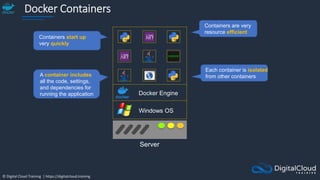
Docker Containers
Server
Docker Engine
Windows OS
A container includes
all the code, settings,
and dependencies for
running the application
Each container is isolated
from other containers
Containers are very
resource efficient
Containers start up
very quickly
© Digital Cloud Training | https://digitalcloud.training
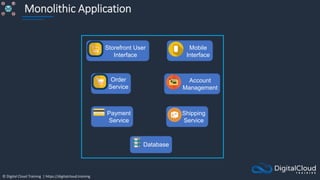
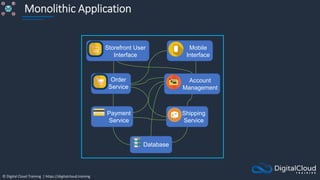
Monolithic Application
Order
Service
Payment
Service
Account
Management
Shipping
Service
Database
Storefront User
Interface
Mobile
Interface
© Digital Cloud Training | https://digitalcloud.training
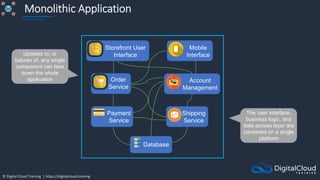
Monolithic Application
Order
Service
Payment
Service
Account
Management
Shipping
Service
Database
Storefront User
Interface
Mobile
Interface
The user interface,
business logic, and
data access layer are
combined on a single
platform
Updates to, or
failures of, any single
component can take
down the whole
application
© Digital Cloud Training | https://digitalcloud.training
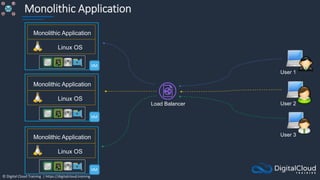
Monolithic Application
Linux OS
Monolithic Application
Linux OS
Monolithic Application
Linux OS
Monolithic Application
Load Balancer
User 3
User 2
User 1
© Digital Cloud Training | https://digitalcloud.training
Monolithic Application
Order
Service
Payment
Service
Account
Management
Shipping
Service
Database
Storefront User
Interface
Mobile
Interface
© Digital Cloud Training | https://digitalcloud.training
Microservices Architecture
Order
Microservice
Payment
Microservice
Account
Microservice
Shipping
Microservice
Billing
Database
Storefront User
Interface
Microservice
Mobile
Interface
Microservice
Order
Database
Customer
Database
Shipping
Database
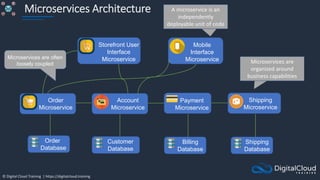
A microservice is an
independently
deployable unit of code
Microservices are often
loosely coupled Microservices are
organized around
business capabilities
© Digital Cloud Training | https://digitalcloud.training
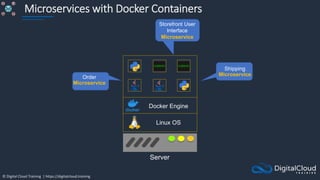
Microservices with Docker Containers
Server
Docker Engine
Linux OS
Storefront User
Interface
Microservice
Order
Microservice
Shipping
Microservice
© Digital Cloud Training | https://digitalcloud.training
Microservices with Docker Containers
Server
Docker Engine
Linux OS
Server
Docker Engine
Linux OS
Server
Docker Engine
Linux OS
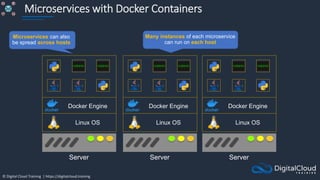
Many instances of each microservice
can run on each host
Microservices can also
be spread across hosts
© Digital Cloud Training | https://digitalcloud.training
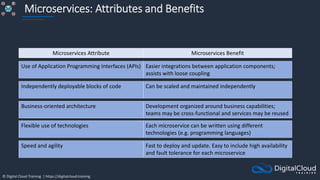
Microservices: Attributes and Benefits
Microservices Attribute Microservices Benefit
Business-oriented architecture Development organized around business capabilities;
teams may be cross-functional and services may be reused
Independently deployable blocks of code Can be scaled and maintained independently
Flexible use of technologies Each microservice can be written using different
technologies (e.g. programming languages)
Speed and agility Fast to deploy and update. Easy to include high availability
and fault tolerance for each microservice
Use of Application Programming Interfaces (APIs) Easier integrations between application components;
assists with loose coupling
© Digital Cloud Training | https://digitalcloud.training
Amazon ECS Core Knowledge
© Digital Cloud Training | https://digitalcloud.training
Amazon ECS
An Amazon ECS
Cluster is a logical
grouping of tasks or
services
An ECS Task is
created from a
Task Definition
Availability Zone Availability Zone
Auto Scaling group
ECS Service
ECS Container
instance
ECS Container
instance
Task
Task Task Task
Image Image
{
"containerDefinitions": [
{
"name": "wordpress",
"links": [
"mysql"
],
"image": "wordpress",
"essential": true,
"portMappings": [
{
"containerPort": 80,
"hostPort": 80
}
],
"memory": 500,
"cpu": 10
}
Task Definition
Amazon Elastic Container Service
Amazon Elastic Container
Registry
Registry
ECS Cluster
An ECS Task is a
running Docker
container
ECS Services are
used to maintain
a desired count
of tasks
Docker images can be
stored in Amazon ECR
© Digital Cloud Training | https://digitalcloud.training
Amazon ECS
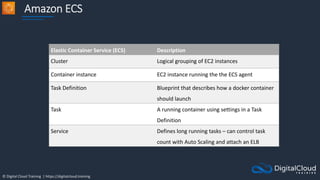
Elastic Container Service (ECS) Description
Cluster Logical grouping of EC2 instances
Container instance EC2 instance running the the ECS agent
Task Definition Blueprint that describes how a docker container
should launch
Task A running container using settings in a Task
Definition
Service Defines long running tasks – can control task
count with Auto Scaling and attach an ELB
© Digital Cloud Training | https://digitalcloud.training
Launch Types – EC2 and Fargate
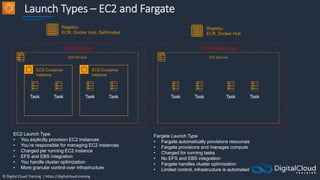
ECS Service
ECS Container
instance
ECS Container
instance
Task
Task Task Task
ECS EC2 Cluster
ECS Service
Task
Task Task Task
ECS Fargate Cluster
Registry:
ECR, Docker Hub, Self-hosted
Registry:
ECR, Docker Hub
EC2 Launch Type
• You explicitly provision EC2 instances
• You’re responsible for managing EC2 instances
• Charged per running EC2 instance
• EFS and EBS integration
• You handle cluster optimization
• More granular control over infrastructure
Fargate Launch Type
• Fargate automatically provisions resources
• Fargate provisions and manages compute
• Charged for running tasks
• No EFS and EBS integration
• Fargate handles cluster optimization
• Limited control, infrastructure is automated
© Digital Cloud Training | https://digitalcloud.training
ECS and IAM Roles
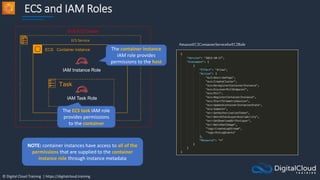
ECS Service
ECS Container instance
ECS EC2 Cluster
IAM Task Role
Task
IAM Instance Role
The container instance
IAM role provides
permissions to the host
AmazonEC2ContainerServiceforEC2Role
The ECS task IAM role
provides permissions
to the container
NOTE: container instances have access to all of the
permissions that are supplied to the container
instance role through instance metadata
© Digital Cloud Training | https://digitalcloud.training
ECS and IAM Roles
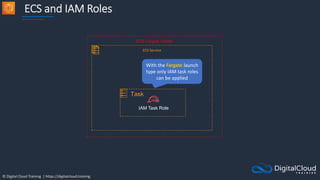
ECS Service
ECS Fargate Cluster
IAM Task Role
Task
With the Fargate launch
type only IAM task roles
can be applied
© Digital Cloud Training | https://digitalcloud.training
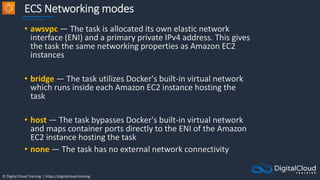
ECS Networking modes
• awsvpc — The task is allocated its own elastic network
interface (ENI) and a primary private IPv4 address. This gives
the task the same networking properties as Amazon EC2
instances
• bridge — The task utilizes Docker's built-in virtual network
which runs inside each Amazon EC2 instance hosting the
task
• host — The task bypasses Docker's built-in virtual network
and maps container ports directly to the ENI of the Amazon
EC2 instance hosting the task
• none — The task has no external network connectivity
© Digital Cloud Training | https://digitalcloud.training
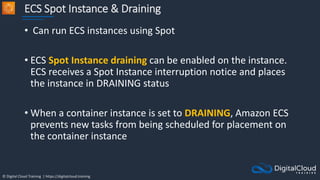
ECS Spot Instance & Draining
• Can run ECS instances using Spot
• ECS Spot Instance draining can be enabled on the instance.
ECS receives a Spot Instance interruption notice and places
the instance in DRAINING status
• When a container instance is set to DRAINING, Amazon ECS
prevents new tasks from being scheduled for placement on
the container instance
© Digital Cloud Training | https://digitalcloud.training
Scaling Amazon ECS
© Digital Cloud Training | https://digitalcloud.training
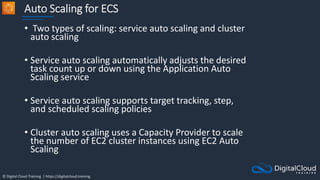
Auto Scaling for ECS
• Two types of scaling: service auto scaling and cluster
auto scaling
• Service auto scaling automatically adjusts the desired
task count up or down using the Application Auto
Scaling service
• Service auto scaling supports target tracking, step,
and scheduled scaling policies
• Cluster auto scaling uses a Capacity Provider to scale
the number of EC2 cluster instances using EC2 Auto
Scaling
© Digital Cloud Training | https://digitalcloud.training
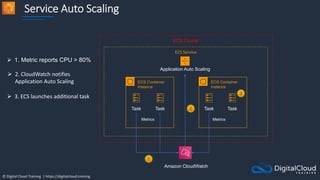
Service Auto Scaling
ECS Service
ECS Container
instance
ECS Container
instance
Task
Task Task
ECS Cluster
Metrics Metrics
Amazon CloudWatch
Task
 1. Metric reports CPU > 80%
 2. CloudWatch notifies
Application Auto Scaling
 3. ECS launches additional task
Application Auto Scaling
© Digital Cloud Training | https://digitalcloud.training
Service Auto Scaling
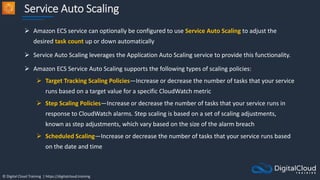
 Amazon ECS service can optionally be configured to use Service Auto Scaling to adjust the
desired task count up or down automatically
 Service Auto Scaling leverages the Application Auto Scaling service to provide this functionality.
 Amazon ECS Service Auto Scaling supports the following types of scaling policies:
 Target Tracking Scaling Policies—Increase or decrease the number of tasks that your service
runs based on a target value for a specific CloudWatch metric
 Step Scaling Policies—Increase or decrease the number of tasks that your service runs in
response to CloudWatch alarms. Step scaling is based on a set of scaling adjustments,
known as step adjustments, which vary based on the size of the alarm breach
 Scheduled Scaling—Increase or decrease the number of tasks that your service runs based
on the date and time
© Digital Cloud Training | https://digitalcloud.training
Cluster Auto Scaling
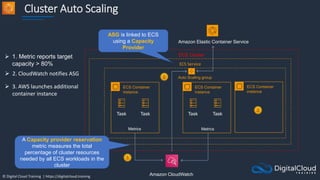
Auto Scaling group
ECS Service
ECS Container
instance
ECS Container
instance
Task
Task Task
ECS Cluster
Metrics Metrics
Amazon CloudWatch
Task
 1. Metric reports target
capacity > 80%
 2. CloudWatch notifies ASG
 3. AWS launches additional
container instance
ECS Container
instance
Amazon Elastic Container Service
A Capacity provider reservation
metric measures the total
percentage of cluster resources
needed by all ECS workloads in the
cluster
ASG is linked to ECS
using a Capacity
Provider
© Digital Cloud Training | https://digitalcloud.training
Cluster Auto Scaling
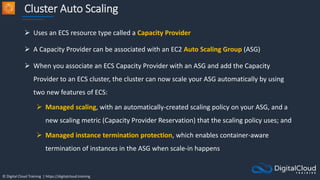
 Uses an ECS resource type called a Capacity Provider
 A Capacity Provider can be associated with an EC2 Auto Scaling Group (ASG)
 When you associate an ECS Capacity Provider with an ASG and add the Capacity
Provider to an ECS cluster, the cluster can now scale your ASG automatically by using
two new features of ECS:
 Managed scaling, with an automatically-created scaling policy on your ASG, and a
new scaling metric (Capacity Provider Reservation) that the scaling policy uses; and
 Managed instance termination protection, which enables container-aware
termination of instances in the ASG when scale-in happens
© Digital Cloud Training | https://digitalcloud.training
Amazon ECS with ALB
© Digital Cloud Training | https://digitalcloud.training
Private subnet
Private subnet
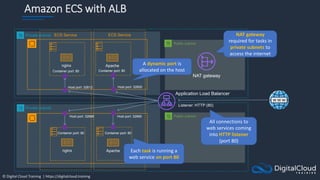
Amazon ECS with ALB
ECS Service
Application Load Balancer
Host port: 32600
Listener: HTTP (80)
Container port: 80
Apache
Public subnet
NAT gateway
Public subnet
nginx
Container port: 80
Host port: 32612
Container port: 80
Apache
nginx
Host port: 32668
Container port: 80
Host port: 32669
ECS Service NAT gateway
required for tasks in
private subnets to
access the internet
All connections to
web services coming
into HTTP listener
(port 80)
Each task is running a
web service on port 80
A dynamic port is
allocated on the host
© Digital Cloud Training | https://digitalcloud.training
[HOL] Create and Scale ECS
Tasks
© Digital Cloud Training | https://digitalcloud.training
Amazon Elastic Kubernetes
Service (EKS)
© Digital Cloud Training | https://digitalcloud.training
Amazon Elastic Kubernetes Service (EKS)
Region
VPC
Availability Zone
Public subnet Private subnet
Availability Zone
Public subnet
Availability Zone
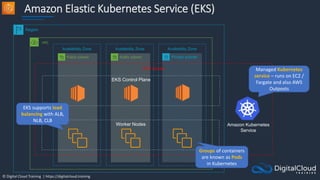
EKS Cluster
Amazon Kubernetes
Service
Worker Nodes
EKS Control Plane
Managed Kubernetes
service – runs on EC2 /
Fargate and also AWS
Outposts
EKS supports load
balancing with ALB,
NLB, CLB
Groups of containers
are known as Pods
in Kubernetes
© Digital Cloud Training | https://digitalcloud.training
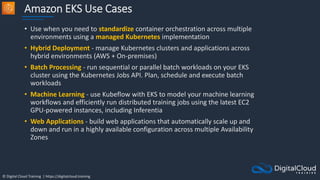
Amazon EKS Use Cases
• Use when you need to standardize container orchestration across multiple
environments using a managed Kubernetes implementation
• Hybrid Deployment - manage Kubernetes clusters and applications across
hybrid environments (AWS + On-premises)
• Batch Processing - run sequential or parallel batch workloads on your EKS
cluster using the Kubernetes Jobs API. Plan, schedule and execute batch
workloads
• Machine Learning - use Kubeflow with EKS to model your machine learning
workflows and efficiently run distributed training jobs using the latest EC2
GPU-powered instances, including Inferentia
• Web Applications - build web applications that automatically scale up and
down and run in a highly available configuration across multiple Availability
Zones
© Digital Cloud Training | https://digitalcloud.training
AWS Elastic Beanstalk Core
Knowledge
© Digital Cloud Training | https://digitalcloud.training
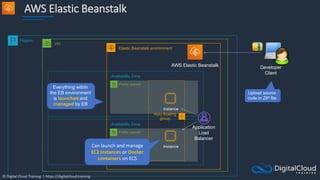
AWS Elastic Beanstalk
Region
VPC
Availability Zone
Public subnet
Availability Zone
Public subnet
Application
Load
Balancer
Instance
Auto Scaling
group
Elastic Beanstalk environment
AWS Elastic Beanstalk Developer
Client
Instance
Everything within
the EB environment
is launched and
managed by EB
Upload source
code in ZIP file
Can launch and manage
EC2 instances or Docker
containers on ECS
© Digital Cloud Training | https://digitalcloud.training
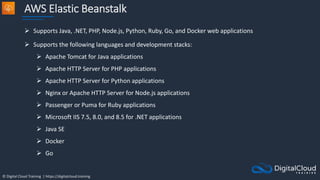
AWS Elastic Beanstalk
 Supports Java, .NET, PHP, Node.js, Python, Ruby, Go, and Docker web applications
 Supports the following languages and development stacks:
 Apache Tomcat for Java applications
 Apache HTTP Server for PHP applications
 Apache HTTP Server for Python applications
 Nginx or Apache HTTP Server for Node.js applications
 Passenger or Puma for Ruby applications
 Microsoft IIS 7.5, 8.0, and 8.5 for .NET applications
 Java SE
 Docker
 Go
© Digital Cloud Training | https://digitalcloud.training
AWS Elastic Beanstalk
There are several layers
Applications:
 Contain environments, environment
configurations, and application
versions
 You can have multiple application
versions held within an application
© Digital Cloud Training | https://digitalcloud.training
AWS Elastic Beanstalk
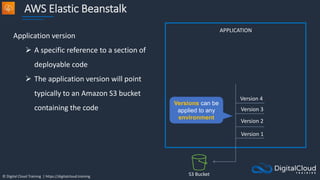
Application version
 A specific reference to a section of
deployable code
 The application version will point
typically to an Amazon S3 bucket
containing the code
APPLICATION
Version 1
Version 2
Version 3
Version 4
S3 Bucket
Versions can be
applied to any
environment
© Digital Cloud Training | https://digitalcloud.training
AWS Elastic Beanstalk
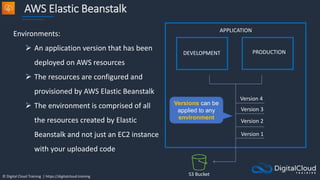
Environments:
 An application version that has been
deployed on AWS resources
 The resources are configured and
provisioned by AWS Elastic Beanstalk
 The environment is comprised of all
the resources created by Elastic
Beanstalk and not just an EC2 instance
with your uploaded code
DEVELOPMENT PRODUCTION
APPLICATION
Version 1
Version 2
Version 3
Version 4
S3 Bucket
Versions can be
applied to any
environment
© Digital Cloud Training | https://digitalcloud.training
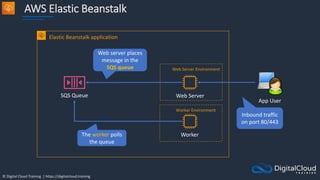
Web Servers and Workers
 Web servers are standard applications that listen for and then
process HTTP requests, typically over port 80
 Workers are specialized applications that have a background
processing task that listens for messages on an Amazon SQS queue
 Workers should be used for long-running tasks
© Digital Cloud Training | https://digitalcloud.training
AWS Elastic Beanstalk
Web Server
Elastic Beanstalk application
App User
Worker
SQS Queue
Web Server Environment
Worker Environment
Inbound traffic
on port 80/443
Web server places
message in the
SQS queue
The worker polls
the queue
© Digital Cloud Training | https://digitalcloud.training
Updating Elastic Beanstalk
Applications
© Digital Cloud Training | https://digitalcloud.training
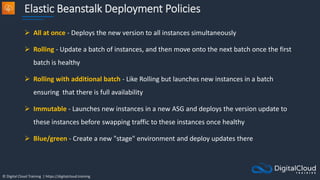
Elastic Beanstalk Deployment Policies
 All at once - Deploys the new version to all instances simultaneously
 Rolling - Update a batch of instances, and then move onto the next batch once the first
batch is healthy
 Rolling with additional batch - Like Rolling but launches new instances in a batch
ensuring that there is full availability
 Immutable - Launches new instances in a new ASG and deploys the version update to
these instances before swapping traffic to these instances once healthy
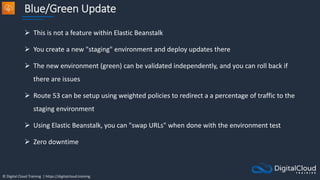
 Blue/green - Create a new "stage" environment and deploy updates there
© Digital Cloud Training | https://digitalcloud.training
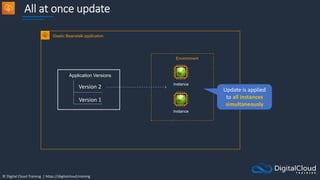
All at once update
Instance
Elastic Beanstalk application
Instance
Application Versions
Version 1
Version 2
Environment
Update is applied
to all instances
simultaneously
© Digital Cloud Training | https://digitalcloud.training
All at once update
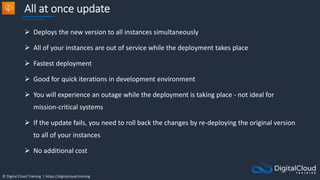
 Deploys the new version to all instances simultaneously
 All of your instances are out of service while the deployment takes place
 Fastest deployment
 Good for quick iterations in development environment
 You will experience an outage while the deployment is taking place - not ideal for
mission-critical systems
 If the update fails, you need to roll back the changes by re-deploying the original version
to all of your instances
 No additional cost
© Digital Cloud Training | https://digitalcloud.training
Rolling Update
Instance
Elastic Beanstalk application
Instance
Application Versions
Version 1
Version 2
Environment
Instance
Instance
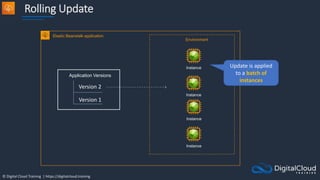
Update is applied
to a batch of
instances
© Digital Cloud Training | https://digitalcloud.training
Rolling Update
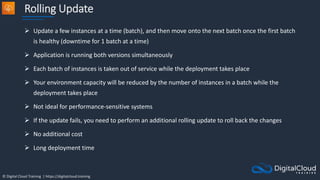
 Update a few instances at a time (batch), and then move onto the next batch once the first batch
is healthy (downtime for 1 batch at a time)
 Application is running both versions simultaneously
 Each batch of instances is taken out of service while the deployment takes place
 Your environment capacity will be reduced by the number of instances in a batch while the
deployment takes place
 Not ideal for performance-sensitive systems
 If the update fails, you need to perform an additional rolling update to roll back the changes
 No additional cost
 Long deployment time
© Digital Cloud Training | https://digitalcloud.training
Rolling with Additional Batch Update
Instance
Elastic Beanstalk application
Instance
Application Versions
Version 1
Version 2
Environment
Instance
Instance
Instance
Instance
© Digital Cloud Training | https://digitalcloud.training
Rolling with Additional Batch Update
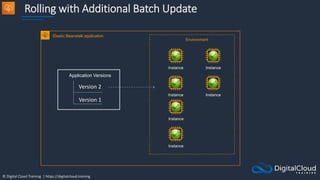
 Like Rolling but launches new instances in a batch ensuring that there is full availability
 Application is running at capacity
 Can set the batch size
 Application is running both versions simultaneously
 Small additional cost
 Additional batch is removed at the end of the deployment
 Longer deployment
 Good for production environments
© Digital Cloud Training | https://digitalcloud.training
Immutable Update
Instance
Elastic Beanstalk application
Instance
Application Versions
Version 1
Version 2
Environment
Instance
Instance
Auto Scaling group
Instance
Instance
Instance
Instance
Auto Scaling group
© Digital Cloud Training | https://digitalcloud.training
Immutable Update
 Launches new instances in a new ASG and deploys the version update to these
instances before swapping traffic to these instances once healthy
 Zero downtime
 New code is deployed to new instances using an ASG
 High cost as double the number of instances running during updates
 Longest deployment
 Quick rollback in case of failures
 Great for production environments
© Digital Cloud Training | https://digitalcloud.training
Blue/Green Update
Instance
Elastic Beanstalk application
Instance
Environment
Instance Instance
Environment
Amazon Route 53
V1 V1
V2 V2
80%
20%
© Digital Cloud Training | https://digitalcloud.training
Blue/Green Update
 This is not a feature within Elastic Beanstalk
 You create a new "staging" environment and deploy updates there
 The new environment (green) can be validated independently, and you can roll back if
there are issues
 Route 53 can be setup using weighted policies to redirect a a percentage of traffic to the
staging environment
 Using Elastic Beanstalk, you can "swap URLs" when done with the environment test
 Zero downtime
© Digital Cloud Training | https://digitalcloud.training
Deploy Elastic Beanstalk Apps
© Digital Cloud Training | https://digitalcloud.training
Architecture Patterns –
Containers and PaaS
© Digital Cloud Training | https://digitalcloud.training
Architecture Patterns – Containers and PaaS
Company plans to deploy Docker
containers on AWS at the lowest cost
Use Amazon ECS with a cluster of Spot
instances and enable Spot instance
draining
Company plans to migrate Docker
containers to AWS and does not want
to manage operating systems
Migrate to Amazon ECS using the
Fargate launch type
Fargate task is launched in a private
subnet and fails with error
“CannotPullContainer”
Disable auto-assignment of public IP
addresses and configure a NAT gateway
Requirement Solution
© Digital Cloud Training | https://digitalcloud.training
Architecture Patterns – Containers and PaaS
Application will be deployed on
Amazon ECS and must scale based on
memory
Use service auto-scaling and use the
memory utilization
Application will run on Amazon ECS
tasks across multiple hosts and needs
access to an Amazon S3 bucket
Use a task execution IAM role to
provide permissions to S3 bucket.
Company requires standard Docker
container automation and
management service to be used across
multiple environments
Deploy Amazon EKS
Requirement Solution
© Digital Cloud Training | https://digitalcloud.training
Architecture Patterns – Containers and PaaS
Company needs to move many simple
web apps running on PHP, Java, and
Ruby to AWS. Utilization is very low
Deploy to single-instance Elastic
Beanstalk environments
Business critical application running on
Elastic Beanstalk must be updated.
Require zero downtime and quick and
complete rollback
Update using an immutable update
with a new ASG and swap traffic
A development application running on
Elastic Beanstalk needs a cost-effective
and quick update. Downtime is
acceptable
Use an all-at-once update
Requirement Solution
© Digital Cloud Training | https://digitalcloud.training
Architecture Patterns – Containers and PaaS
Need a managed environment for
running a simple web application. App
processes incoming data which can
take several minutes per task
Use an Elastic Beanstalk environment
with a web server for the app front-end
and a decoupled worker tier for the
long running process
Requirement Solution
© Digital Cloud Training | https://digitalcloud.training
SECTION 13
Deployment and Management
© Digital Cloud Training | https://digitalcloud.training
CI/CD Overview
© Digital Cloud Training | https://digitalcloud.training
Continuous Integration
AWS CodeBuild
AWS CodeCommit
Developer
commits code
Build servers build
and test code
Results returned to
Developer
Code repository
could be GitHub,
CodeCommit etc.
© Digital Cloud Training | https://digitalcloud.training
Continuous Integration and Continuous Delivery
AWS CodeBuild
AWS CodeCommit
Developer
commits code
Build servers build
and test code
Results returned to
Developer
AWS CodeDeploy
Code released for
deployment
Code deployed
to application
Application Application
© Digital Cloud Training | https://digitalcloud.training
Continuous Integration and Continuous Delivery
AWS CodeBuild
AWS CodeCommit AWS CodeDeploy
AWS CodePipeline
CODE BUILD & TEST DEPLOY
© Digital Cloud Training | https://digitalcloud.training
AWS CodeCommit and
CodePipeline
© Digital Cloud Training | https://digitalcloud.training
AWS CodeCommit
 AWS CodeCommit is a fully-managed source control service that
hosts secure Git-based repositories
 Git is an Open-Source distributed source control system:
 Centralized repository for all of your code, binaries, images,
and libraries
 Tracks and manages code changes
 Maintains version history
 Manages updates from multiple sources
 Enables collaboration
AWS CodeCommit
© Digital Cloud Training | https://digitalcloud.training
AWS CodeCommit
 CodeCommit repositories are private
 CodeCommit scales seamlessly
 CodeCommit is integrated with Jenkins, CodeBuild and other CI
tools
 You can transfer your files to and from AWS CodeCommit using
HTTPS or SSH
 Repositories are automatically encrypted at rest through AWS
Key Management Service (AWS KMS) using customer-specific
keys
AWS CodeCommit
© Digital Cloud Training | https://digitalcloud.training
AWS CodeCommit
 You need to configure your Git client to communicate with CodeCommit
repositories
 IAM supports CodeCommit with three types of credentials:
 Git credentials - an IAM-generated user name and password pair you can use to
communicate with CodeCommit repositories over HTTPS
 SSH keys - a locally generated public-private key pair that you can associate with your
IAM user to communicate with CodeCommit repositories over SSH
 AWS access keys - which you can use with the credential helper included with the
AWS CLI to communicate with CodeCommit repositories over HTTPS
© Digital Cloud Training | https://digitalcloud.training
AWS CodePipeline
 Fully managed continuous delivery service that helps you automate your release
pipelines for fast and reliable application and infrastructure updates
 Automates the build, test, and deploy phases of your release process every time
there is a code change, based on the release model you define
 CodePipeline provides tooling integrations for many AWS and third-party software
at each stage of the pipeline including:
 Source stage – S3, CodeCommit, Github, ECR, Bitbucket Cloud (beta).
 Build – CodeBuild, Jenkins.
 Deploy stage – CloudFormation, CodeDeploy, ECS, Elastic Beanstalk, AWS
Service Catalog, S3.
© Digital Cloud Training | https://digitalcloud.training
AWS CodePipeline
Pipelines
 A workflow that describes how software changes go through the release process
Artifacts
 Files or changes that will be worked on by the actions and stages in the pipeline
 Each pipeline stage can create "artifacts"
 Artifacts are passed, stored in Amazon S3 and then passed on to the next stage
Stages
 Pipelines are broken up into stages
 Each stage can have sequential actions and or parallel actions
 Stage examples would be build, test, deploy, load test etc.
 Manual approval can be defined at any stage
© Digital Cloud Training | https://digitalcloud.training
AWS CodePipeline
Actions
 Stages contain at least one action
 Actions affect artifacts and will have artifacts as either an input, and
output, or both
Transitions
 The progressing from one stage to another inside of a pipeline
© Digital Cloud Training | https://digitalcloud.training
CodePipeline with Elastic Beanstalk
AWS CodeCommit
Node.js App
AWS Elastic Beanstalk
Elastic Beanstalk environment
AWS CodePipeline
Developer
© Digital Cloud Training | https://digitalcloud.training
Deploy App using
CodePipeline
© Digital Cloud Training | https://digitalcloud.training
CodePipeline with Elastic Beanstalk
AWS CodeCommit
Node.js App
AWS Elastic Beanstalk
Elastic Beanstalk environment
AWS CodePipeline
Developer
© Digital Cloud Training | https://digitalcloud.training
AWS CloudFormation Core
Knowledge
© Digital Cloud Training | https://digitalcloud.training
AWS CloudFormation
Infrastructure patterns are
defined in a template file
using code
VPC
Public subnet
Public subnet
AWS CloudFormation
Auto Scaling
group
CloudFormation builds
your infrastructure
according to the template
© Digital Cloud Training | https://digitalcloud.training
AWS CloudFormation - Benefits
 Infrastructure is provisioned consistently, with fewer mistakes
(human error)
 Less time and effort than configuring resources manually
 You can use version control and peer review for your
CloudFormation templates
 Free to use (you're only charged for the resources provisioned)
 Can be used to manage updates and dependencies
 Can be used to rollback and delete the entire stack as well
© Digital Cloud Training | https://digitalcloud.training
AWS CloudFormation
Component Description
Templates The JSON or YAML text file that contains the instructions for building out
the AWS environment
Stacks The entire environment described by the template and created, updated,
and deleted as a single unit
StackSets AWS CloudFormation StackSets extends the functionality of stacks by
enabling you to create, update, or delete stacks across multiple accounts
and regions with a single operation
Change Sets A summary of proposed changes to your stack that will allow you to see
how those changes might impact your existing resources before
implementing them
© Digital Cloud Training | https://digitalcloud.training
AWS CloudFormation - Templates
 A template is a YAML or JSON template used to describe the end-state
of the infrastructure you are either provisioning or changing
 After creating the template, you upload it to CloudFormation directly or
using Amazon S3
 CloudFormation reads the template and makes the API calls on your
behalf.
 The resulting resources are called a "Stack"
 Logical IDs are used to reference resources within the template
 Physical IDs identify resources outside of AWS CloudFormation
templates, but only after the resources have been created
© Digital Cloud Training | https://digitalcloud.training
AWS CloudFormation - Stacks
 Deployed resources based on templates
 Create, update and delete stacks using templates
 Deployed through the Management Console, CLI or APIs
 Stack creation errors:
 Automatic rollback on error is enabled by default
 You will be charged for resources provisioned even if there is an error
© Digital Cloud Training | https://digitalcloud.training
AWS CloudFormation - Stacks
 AWS CloudFormation StackSets extends the functionality of stacks by enabling you
to create, update, or delete stacks across multiple accounts and regions with a
single operation
 Using an administrator account, you define and manage an AWS CloudFormation
template, and use the template as the basis for provisioning stacks into selected
target accounts across specified regions
 An administrator account is the AWS account in which you create stack sets
 A stack set is managed by signing in to the AWS administrator account in which it
was created
 A target account is the account into which you create, update, or delete one or
more stacks in your stack set
© Digital Cloud Training | https://digitalcloud.training
AWS CloudFormation - NestedStacks
 Nested stacks allow re-use of CloudFormation code for
common use cases
 For example standard configuration for a load
balancer, web server, application server etc.
 Instead of copying out the code each time, create a
standard template for each common use case and
reference from within your CloudFormation template
© Digital Cloud Training | https://digitalcloud.training
AWS CloudFormation - Change Sets
 AWS CloudFormation provides two methods for updating stacks:
direct update or creating and executing change sets
 When you directly update a stack, you submit changes and AWS
CloudFormation immediately deploys them
 Use direct updates when you want to quickly deploy your updates
 With change sets, you can preview the changes AWS
CloudFormation will make to your stack, and then decide whether to
apply those changes
© Digital Cloud Training | https://digitalcloud.training
Deploy Stack and Change Set
© Digital Cloud Training | https://digitalcloud.training
AWS Service Catalog
© Digital Cloud Training | https://digitalcloud.training
AWS Service Catalog
• AWS Service Catalog allows organizations to create and manage
catalogs of IT services that are approved for use on AWS
• IT services can include everything from virtual machine images,
servers, software, and databases to complete multi-tier
application architectures
• AWS Service Catalog allows you to centrally manage commonly
deployed IT services
• Enables users to quickly deploy only the approved IT services
they need
© Digital Cloud Training | https://digitalcloud.training
AWS Service Catalog
Service Catalog
Administrator
Product X
Version 1.0 Version 1.1
Portfolio A
Product is added to
portfolio
AWS Service Catalog
Catalog Admin
authors template and
creates product
Users / Groups are
assigned permissions
to portfolio
Constraints added to
portfolio / product
© Digital Cloud Training | https://digitalcloud.training
AWS Service Catalog – Users
Catalog administrators
• Manage a catalog of products, organizing them into
portfolios and granting access to end users
End users
• Receive AWS credentials use the AWS Management
Console to launch products to which they have been
granted access
© Digital Cloud Training | https://digitalcloud.training
AWS Service Catalog – Constraints
 Constraints control the ways that specific AWS resources can be deployed for a
product.
 You can use them to apply limits to products for governance or cost control.
 Launch constraints - specify a role for a product in a portfolio. The role is used
to provision the resources at launch, so you can restrict user permissions
without impacting users’ ability to provision products from the catalog
 Notification constraints - enable you to get notifications about stack events
using an Amazon SNS topic
 Template constraints - restrict the configuration parameters that are available
for the user when launching the product
© Digital Cloud Training | https://digitalcloud.training
AWS Service Catalog – Sharing
• You can share portfolios across accounts in AWS
Organizations
• Either share a reference to the catalog or deploy a copy of
the catalog
• With copies you must redeploy any updates
• CloudFormation StackSets can be used to deploy a catalog
to multiple accounts at the same time
• Check reference link for more information on the behavior
© Digital Cloud Training | https://digitalcloud.training
Deploy Product using Service
Catalog
© Digital Cloud Training | https://digitalcloud.training
AWS Cloud Development Kit
© Digital Cloud Training | https://digitalcloud.training
AWS Cloud Development Kit
• Open source software development framework to
define your cloud application resources using familiar
programming languages
• Preconfigures cloud resources with proven defaults
using constructs
• Provisions your resources using AWS CloudFormation
• Enables you to model application infrastructure using
TypeScript, Python, Java, and .NET
• Use existing IDE, testing tools, and workflow patterns
Download pre-
configured
application
components
Model infrastructure
using a programming
language
Deploy with
CloudFormation
© Digital Cloud Training | https://digitalcloud.training
AWS Serverless Application
Model (SAM)
© Digital Cloud Training | https://digitalcloud.training
AWS SAM
• Provides a shorthand syntax to express functions, APIs, databases, and event
source mappings
• Can be used to create Lambda functions, API endpoints, DynamoDB tables, and
other resources
SAM Template (YAML)
Application Code
S3 Bucket AWS CloudFormation
Stack
SAM uploads source files to bucket
and initiates CloudFormation
1
2
sam package
sam deploy
Commands:
Change set
© Digital Cloud Training | https://digitalcloud.training
AWS SAM
• A SAM template file is a YAML configuration that represents the
architecture of a serverless application
• You use the template to declare all of the AWS resources that
comprise your serverless application in one place
• AWS SAM templates are an extension of AWS CloudFormation
templates, so any resource that you can declare in an AWS
CloudFormation template can also be declared in an AWS SAM
template
© Digital Cloud Training | https://digitalcloud.training
AWS SAM
• The “Transform” header indicates it’s a SAM template:
• Transform: 'AWS::Serverless-2016-10-31'
• There are several resources types:
• AWS::Serverless::Function (AWS Lambda)
• AWS::Serverless::Api (API Gateway)
• AWS::Serverless::SimpleTable (DynamoDB)
• AWS::Serverless::Application (AWS Serverless Application Repository)
• AWS::Serverless::HttpApi (API Gateway HTTP API)
• AWS::Serverless::LayerVersion (Lambda layers)
© Digital Cloud Training | https://digitalcloud.training
AWS SAM
S3 Bucket AWS CloudFormation
Stack
SAM downloads and runs a container locally
for locally testing API / Lambda / DynamoDB
sam build
Change set
Development Terminal
sam local invoke “function”
sam local start-api
sam deploy
sam init
© Digital Cloud Training | https://digitalcloud.training
AWS Systems Manager
© Digital Cloud Training | https://digitalcloud.training
AWS Systems Manager
• Manages many AWS resources including Amazon EC2, Amazon S3,
Amazon RDS etc.
• Systems Manager Components:
• Automation
• Run Command
• Inventory
• Patch Manager
• Session Manager
• Parameter Store
© Digital Cloud Training | https://digitalcloud.training
AWS Systems Manager Automation
Automation
Documents Amazon RDS
Documents define
the actions to perform
(YAML or JSON)
Automates IT operations
and management tasks
across AWS resources
This automation, takes a
snapshot of an RDS DB
instance
© Digital Cloud Training | https://digitalcloud.training
AWS Systems Manager Run Command
Documents Run Command Amazon EC2
Document types include
command, automation,
package etc.
Runs commands on
managed EC2 instances
This command checks
for missing updates
© Digital Cloud Training | https://digitalcloud.training
AWS Systems Manager Inventory
Inventory
© Digital Cloud Training | https://digitalcloud.training
AWS Systems Manager Patch Manager
• Helps you select and deploy operating system and software patches
automatically across large groups of Amazon EC2 or on-premises instances
• Patch baselines:
• Set rules to auto-approve select categories of patches to be installed
• Specify a list of patches that override these rules and are automatically
approved or rejected
• You can also schedule maintenance windows for your patches so that they are
only applied during predefined times
• Systems Manager helps ensure that your software is up-to-date and meets your
compliance policies
Patch Manager
© Digital Cloud Training | https://digitalcloud.training
AWS Systems Manager Compliance
 AWS Systems Manager lets you scan your managed instances for patch
compliance and configuration inconsistencies
 You can collect and aggregate data from multiple AWS accounts and
Regions, and then drill down into specific resources that aren’t compliant
 By default, AWS Systems Manager displays data about patching and
associations
 You can also customize the service and create your own compliance types
based on your requirements (must use the AWS CLI, AWS Tools for
Windows PowerShell, or the SDKs)
© Digital Cloud Training | https://digitalcloud.training
AWS Systems Manager Session Manager
• Secure remote management of your instances at scale
without logging into your servers
• Replaces the need for bastion hosts, SSH, or remote
PowerShell
• Integrates with IAM for granular permissions
• All actions taken with Systems Manager are recorded
by AWS CloudTrail
• Can store session logs in an S3 and output to CloudWatch
Logs
• Requires IAM permissions for EC2 instance to access SSM,
S3, and CloudWatch Logs
Amazon EC2
(Windows)
Amazon EC2
(Linux)
Doesn’t
require port
22,5985/5986
No need for
bastion hosts
© Digital Cloud Training | https://digitalcloud.training
AWS Systems Manager Parameter Store
• Parameter Store provides secure, hierarchical storage
for configuration data management and secrets
management
• Highly scalable, available, and durable
• Store data such as passwords, database strings, and
license codes as parameter values
• Store values as plaintext (unencrypted data) or
ciphertext (encrypted data)
• Reference values by using the unique name that you
specified when you created the parameter
• No native rotation of keys (difference with AWS Secrets
Manager which does it automatically)
Amazon EC2
Amazon RDS
Parameter
Store
Retrieve database
connection string
© Digital Cloud Training | https://digitalcloud.training
Launch EC2 Managed
Instances
© Digital Cloud Training | https://digitalcloud.training
Systems Manager
Automation
© Digital Cloud Training | https://digitalcloud.training
AWS Systems Manager Automation
Automation
Documents Amazon RDS
Documents define
the actions to perform
(YAML or JSON)
Automates IT operations
and management tasks
across AWS resources
This automation, takes a
snapshot of an RDS DB
instance
© Digital Cloud Training | https://digitalcloud.training
Systems Manager Run
Command and Patch Manager
© Digital Cloud Training | https://digitalcloud.training
AWS Systems Manager Run Command
Documents Run Command Amazon EC2
Document types include
command, automation,
package etc.
Runs commands on
managed EC2 instances
This command checks
for missing updates
© Digital Cloud Training | https://digitalcloud.training
Systems Manager Configuration
Compliance
© Digital Cloud Training | https://digitalcloud.training
AWS OpsWorks
© Digital Cloud Training | https://digitalcloud.training
AWS OpsWorks
• AWS OpsWorks is a configuration management service that provides
managed instances of Chef and Puppet
• Updates include patching, updating, backup, configuration and
compliance management
AWS OpsWorks
Instance
Instance
Instance
Instance
SysOps Admin
Instances are
configured by
OpsWorks using
Chef/Puppet
Configuration changes
are submitted to
OpsWorks
© Digital Cloud Training | https://digitalcloud.training
AWS Resource Access
Manager (RAM)
© Digital Cloud Training | https://digitalcloud.training
AWS RAM
• Shares resources with accounts or organizations
• RAM can be used to share:
• AWS Transit Gateways
• Subnets
• AWS License Manager configurations
• Amazon Route 53 Resolver rules
© Digital Cloud Training | https://digitalcloud.training
AWS RAM
Management Account Production Account
Public subnet
EC2 Instance EC2 Instance
Subnet is shared
into production
account
Participants can
create, modify, and
delete their own
resources
Participants cannot view or
modify resources of other
participants or the VPC
owner
© Digital Cloud Training | https://digitalcloud.training
Share a Subnet Across Accounts
© Digital Cloud Training | https://digitalcloud.training
Architecture Patterns –
Deployment and Management
© Digital Cloud Training | https://digitalcloud.training
Architecture Patterns – Deployment and Management
Global company needs to centrally
manage creation of infrastructure
services to accounts in AWS
Organizations
Define infrastructure in CloudFormation
templates, create Service Catalog
products and portfolios in central
account and share using Organizations
Company is concerned about malicious
attacks on RDP and SSH ports for
remote access to EC2
Deploy Systems Manager agent and use
Session Manager
Development team require method of
deploying applications using
CloudFormation. Developers typically
use JavaScript and TypeScript
Define resources in JavaScript and
TypeScript and use the AWS Cloud
Development Kit (CDK) to create
CloudFormation templates
Requirement Solution
© Digital Cloud Training | https://digitalcloud.training
Architecture Patterns – Deployment and Management
Need to automate the process of
updating an application when code is
updated
Create a CodePipeline that sources
code from CodeCommit and use
CodeBuild and CodeDeploy
Need to safely deploy updates to EC2
through a CodePipeline. Resources
defined in CF templates and app code
stored in S3
Use CodeBuild to automate testing, use
CF changes sets to evaluate changes
and CodeDeploy to deploy using a
blue/green deployment pattern
Company currently uses Chef
cookbooks to manage infrastructure
and is moving to the cloud. Need to
minimize migration complexity
Use AWS OpsWorks for Chef Automate
Requirement Solution

AWS Certified Solutions Architect Professional Course S10-S14

  • 1.
    © Digital CloudTraining | https://digitalcloud.training SECTION 10 AWS Database Services
  • 2.
    © Digital CloudTraining | https://digitalcloud.training Amazon RDS Scaling and Deployment
  • 3.
    © Digital CloudTraining | https://digitalcloud.training Amazon RDS Overview Amazon RDS RDS is a managed, relational database EC2 RDS runs on EC2 instances, so you must choose an instance type RDS supports the following database engines:  Amazon Aurora  MySQL  MariaDB  Oracle  Microsoft SQL Server  PostgreSQL
  • 4.
    © Digital CloudTraining | https://digitalcloud.training Amazon RDS Scaling Up (vertically) M4 instance M4 Instance db.m4.2xlarge 4 vCPUs, 32 GiB RAM db.m4.large 2 vCPUs, 8 GiB RAM
  • 5.
    © Digital CloudTraining | https://digitalcloud.training Disaster Recovery (DR) and Scaling Out (Horizontally) Region VPC Availability Zone Availability Zone EC2 App Server RDS Standby Reads only RDS Master RDS Read Replica EC2 App Server Synchronous replication Writes Asynchronous replication Multi-AZ creates a passive standby. Primarily used for disaster recovery Read Replicas are used for scaling database queries (reads) Application servers can read from the read replica and write to the master Writes
  • 6.
    © Digital CloudTraining | https://digitalcloud.training Amazon RDS Multi-AZ and Read Replicas Multi-AZ Deployments Read Replicas Synchronous replication – highly durable Asynchronous replication – highly scalable Only database engine on primary instance is active All read replicas are accessible and can be used for read scaling Automated backups are taken from standby No backups configured by default Always span two Availability Zones within a single Region Can be within an Availability Zone, Cross-AZ, or Cross-Region Database engine version upgrades happen on primary Database engine version upgrade is independent from source instance Automatic failover to standby when a problem is detected Can be manually promoted to a standalone database instance
  • 7.
    © Digital CloudTraining | https://digitalcloud.training Amazon RDS Backup and Recovery
  • 8.
    © Digital CloudTraining | https://digitalcloud.training Amazon RDS Automated Backups Snapshot Retention is 0–35 days New DB Instance Restore Backup Restore can be to any point in time during the retention period DB Instance
  • 9.
    © Digital CloudTraining | https://digitalcloud.training Amazon RDS Manual Backups (Snapshot) Backs up the entire DB instance, not just individual databases For single-AZ DB instances there is a brief suspension of I/O For Multi-AZ SQL Server, I/O activity is briefly suspended on primary For Multi-AZ MariaDB, MySQL, Oracle and PostgreSQL the snapshot is taken from the standby Snapshots do not expire (no retention period)
  • 10.
    © Digital CloudTraining | https://digitalcloud.training Amazon RDS Maintenance Windows  Operating system and DB patching can require taking the database offline  These tasks take place during a maintenance window  By default a weekly maintenance window is configured  You can choose your own maintenance window
  • 11.
    © Digital CloudTraining | https://digitalcloud.training Amazon RDS Security
  • 12.
    © Digital CloudTraining | https://digitalcloud.training Amazon RDS Security VPC RDS SG SSL/TLS encryption APP SG <- Allow APP SG port 3306 Encryption in-transit RDS encryption at rest (AES 256) IP DB Volume DB Snapshot Optionally, a public IP can enable access from the Internet
  • 13.
    © Digital CloudTraining | https://digitalcloud.training Amazon RDS Security  Encryption at rest can be enabled – includes DB storage, backups, read replicas and snapshots  You can only enable encryption for an Amazon RDS DB instance when you create it, not after the DB instance is created  DB instances that are encrypted can't be modified to disable encryption  Uses AES 256 encryption and encryption is transparent with minimal performance impact  RDS for Oracle and SQL Server is also supported using Transparent Data Encryption (TDE) (may have performance impact)  AWS KMS is used for managing encryption keys
  • 14.
    © Digital CloudTraining | https://digitalcloud.training Amazon RDS Security You can't have an encrypted read replica of an unencrypted DB instance or an unencrypted read replica of an encrypted DB instance Read replicas of encrypted master instances are encrypted The same key is used if in the same Region as the master If the read replica is in a different Region, a different key is used You can't restore an unencrypted backup or snapshot to an encrypted DB instance
  • 15.
    © Digital CloudTraining | https://digitalcloud.training Amazon RDS Security Snapshot (unencrypted) Region EBS Volume (unencrypted) RDS (unencrypted) Snapshot (encrypted) COPY EBS Volume (encrypted) RDS (encrypted) New instance with new endpoint Restore from snapshot
  • 16.
    © Digital CloudTraining | https://digitalcloud.training Amazon Aurora Core Knowledge
  • 17.
    © Digital CloudTraining | https://digitalcloud.training Amazon Aurora Key Features Aurora Feature Benefit High performance and scalability Offers high performance, self-healing storage that scales up to 64TB, point-in-time recovery and continuous backup to S3 DB compatibility Compatible with existing MySQL and PostgreSQL open source databases Aurora Replicas In-region read scaling and failover target – up to 15 (can use Auto Scaling) MySQL Read Replicas Cross-region cluster with read scaling and failover target – up to 5 (each can have up to 15 Aurora Replicas) Global Database Cross-region cluster with read scaling (fast replication / low latency reads). Can remove secondary and promote Multi-Master Scales out writes within a region. In preview currently and will not appear on the exam Serverless On-demand, autoscaling configuration for Amazon Aurora - does not support read replicas or public IPs (can only access through VPC or Direct Connect - not VPN)
  • 18.
    © Digital CloudTraining | https://digitalcloud.training Amazon Aurora Replicas Feature Aurora Replica MySQL Replica Number of replicas Up to 15 Up to 5 Replication type Asynchronous (milliseconds) Asynchronous (seconds) Performance impact on primary Low High Replica location In-region Cross-region Act as failover target Yes (no data loss) Yes (potentially minutes of data loss) Automated failover Yes No Support for user-defined replication delay No Yes Support for different data or schema vs. primary No Yes
  • 19.
    © Digital CloudTraining | https://digitalcloud.training Amazon Aurora Deployment Options
  • 20.
    © Digital CloudTraining | https://digitalcloud.training Aurora Fault Tolerance and Aurora Replicas Availability Zone Availability Zone Availability Zone Primary Data Copies Data Copies Data Copies Replica Replica Replica Writes Writes Writes Reads Reads Reads Reads Region Single Logical Volume Aurora Fault Tolerance • Fault tolerance across 3 AZs • Single logical volume • Aurora Replicas scale-out read requests • Up to 15 Aurora Replicas with sub- 10ms replica lag • Aurora Replicas are independent endpoints • Can promote Aurora Replica to be a new primary or create new primary • Set priority (tiers) on Aurora Replicas to control order of promotion • Can use Auto Scaling to add replicas Aurora Replicas are within a region
  • 21.
    © Digital CloudTraining | https://digitalcloud.training Cross-Region Replica with Aurora MySQL Region Availability Zone Availability Zone Availability Zone Writes Writes Region Availability Zone Availability Zone Availability Zone Reads Reads Asynchronous replication Region Availability Zone Availability Zone Availability Zone Reads Reads Asynchronous replication Primary Region Replication uses the MySQL database engine
  • 22.
    © Digital CloudTraining | https://digitalcloud.training Aurora Global Database Region Availability Zone Availability Zone Availability Zone Writes Writes Region Availability Zone Availability Zone Availability Zone Reads Reads Asynchronous replication Primary Region Secondary Region Replication uses the Aurora storage layer Applications can connect to the cluster Reader Endpoint
  • 23.
    © Digital CloudTraining | https://digitalcloud.training Aurora Multi-Master Availability Zone Availability Zone Availability Zone Master Data Copies Data Copies Data Copies Master Master Master Writes Writes Writes Reads Reads Reads Reads Region Single Logical Volume Aurora Multi-Master • All nodes allow reads/writes • Available for MySQL only • Up to four read/write nodes • Single Region only • Cannot have cross-Region replicas • Can work with active-active and active-passive workloads • Can restart read/write DB instance without impacting other instances Writes
  • 24.
    © Digital CloudTraining | https://digitalcloud.training Aurora Serverless ACU assigned -> App Server Database Storage Warm pool of capacity Router fleet Each Aurora Capacity Unit (ACU) is 2 GB of memory plus CPU Capacity seamlessly scales up and down
  • 25.
    © Digital CloudTraining | https://digitalcloud.training Aurora Serverless Use Cases • Infrequently used applications • New applications • Variable workloads • Unpredictable workloads • Development and test databases • Multi-tenant applications
  • 26.
    © Digital CloudTraining | https://digitalcloud.training Amazon RDS Anti-Patterns and Alternatives
  • 27.
    © Digital CloudTraining | https://digitalcloud.training When NOT to use Amazon RDS (anti-patterns) • Anytime you need a DB type other than: • MySQL • MariaDB • SQL Server • Oracle • PostgreSQL • You need root access to the OS (e.g. install software such as management tools)
  • 28.
    © Digital CloudTraining | https://digitalcloud.training When NOT to use Amazon RDS (anti-patterns) Requirement More Suitable Service Lots of large binary objects (BLOBs) S3 Automated Scalability DynamoDB Name/Value Data Structure DynamoDB Data is not well structured or unpredictable DynamoDB Other database platforms like IBM DB2 or SAP HANA EC2 Complete control over the database EC2
  • 29.
    © Digital CloudTraining | https://digitalcloud.training Database on Amazon EC2 • You can run any database you like with full control and ultimate flexibility • You must manage everything like backups, redundancy, patching and scaling
  • 30.
    © Digital CloudTraining | https://digitalcloud.training Alternatives to Amazon RDS Replication Region A Region B RDS Primary RDS Read Replica Create Read Replica Requirement: DR for MySQL DB RPO = 10 minutes, RTO = 5 minutes 1 2 Promote to primary Fails RTO as it will take > 5 minutes to activate primary EC2 instance EC2 instance 1 Database mirroring - MySQL DBs 2 Failover to mirrored DB Meets RTO as failover can be very fast Can implement solution on EC2 or on RDS
  • 31.
    © Digital CloudTraining | https://digitalcloud.training Amazon ElastiCache Core Knowledge
  • 32.
    © Digital CloudTraining | https://digitalcloud.training Amazon ElastiCache Core Knowledge • Fully managed implementations Redis and Memcached • ElastiCache is a key/value store • In-memory database offering high performance and low latency • Can be put in front of databases such as RDS and DynamoDB Instance ElastiCache Node Amazon RDS Load data Cache hit Database write
  • 33.
    © Digital CloudTraining | https://digitalcloud.training Amazon ElastiCache Core Knowledge Feature Memcached Redis (cluster mode disabled) Redis (cluster mode enabled) Data persistence No Yes Yes Data types Simple Complex Complex Data partitioning Yes No Yes Encryption No Yes Yes High availability (replication) No Yes Yes Multi-AZ Yes, place nodes in multiple AZs. No failover or replication Yes, with auto-failover. Uses read replicas (0-5 per shard) Yes, with auto-failover. Uses read replicas (0-5 per shard) Scaling Up (node type); out (add nodes) Up (node type); out (add replica) Up (node type); out (add shards) Multithreaded Yes No No Backup and restore No (and no snapshots) Yes, automatic and manual snapshots Yes, automatic and manual snapshots
  • 34.
    © Digital CloudTraining | https://digitalcloud.training Amazon ElastiCache Use Cases • Data that is relatively static and frequently accessed • Applications that are tolerant of stale data • Data is slow and expensive to get compared to cache retrieval • Require push-button scalability for memory, writes and reads • Often used for storing session state
  • 35.
    © Digital CloudTraining | https://digitalcloud.training Scaling ElastiCache
  • 36.
    © Digital CloudTraining | https://digitalcloud.training Amazon ElastiCache - Scalability Memcached • Add nodes to a cluster • Scale vertically (node type) – must create a new cluster manually Redis • Cluster mode disabled: • Add replica or change node type – creates a new cluster and migrates data • Cluster mode enabled: • Online resharding to add or remove shards; vertical scaling to change node type • Offline resharding to add or remove shards change node type or upgrade engine (more flexible than online)
  • 37.
    © Digital CloudTraining | https://digitalcloud.training Amazon ElastiCache Memcached Region A Availability Zone A Node 2 Availability Zone B Node 4 Node 1 Node 5 ElastiCache Memcached Cluster Node 3 Node n Each node is a partition of data
  • 38.
    © Digital CloudTraining | https://digitalcloud.training Amazon ElastiCache Redis (Cluster mode enabled) Region A Availability Zone A Shard Replica 1 Availability Zone B Replica 2 Primary ElastiCache Redis Cluster Shard Replica 1 Replica 2 Primary Shard Replica 1 Replica 2 Primary
  • 39.
    © Digital CloudTraining | https://digitalcloud.training Amazon ElastiCache Redis (Cluster mode disabled) Region A Availability Zone A Shard Replica Availability Zone B Replica Primary Replica ElastiCache Redis Cluster Can failover to a replica
  • 40.
    © Digital CloudTraining | https://digitalcloud.training Amazon DynamoDB Core Knowledge
  • 41.
    © Digital CloudTraining | https://digitalcloud.training Amazon DynamoDB Core Knowledge  Fully managed NoSQL database service  Key/value store and document store  It is a non-relational, key-value type of database  Fully serverless service  Push button scaling DynamoDB Table
  • 42.
    © Digital CloudTraining | https://digitalcloud.training Amazon DynamoDB Core Knowledge  DynamoDB is made up of:  Tables  Items  Attributes userid orderid book user001 1000092 price ISBN100.. 1000102 1000168 date user002 user003 ISBN100.. ISBN2X0.. 9.99 2020.04.. 2020.03.. 2020.04.. 24.99 12.50
  • 43.
    © Digital CloudTraining | https://digitalcloud.training DynamoDB Time to Live (TTL) • TTL lets you define when items in a table expire so that they can be automatically deleted from the database • With TTL enabled on a table, you can set a timestamp for deletion on a per-item basis • No extra cost and does not use WCU / RCU • Helps reduce storage and manage the table size over time
  • 44.
    © Digital CloudTraining | https://digitalcloud.training Amazon DynamoDB Core Knowledge clientid created sku category size john@example.com 1583975308 SKU-S523 SKU-J091 SKU-R873 SKU-I019 T-Shirt Chair colour SKU-A234 Small Pen Red Blue Mug 30 Attributes Sort Key Partition Key Primary Key 4011 weight Light 1583975613 1583975449 1583976311 1583976323 chris@example.com chris@example.com sarah@example.com jenny@example.com Plate This is known as a composite key as it has a partition key + sort key Useful when the data structure is unpredictable
  • 45.
    © Digital CloudTraining | https://digitalcloud.training Amazon DynamoDB Core Knowledge DynamoDB Feature Benefit Serverless Fully managed, fault tolerant, service Highly available 99.99% availability SLA – 99.999% for Global Tables! NoSQL type of database with Name / Value structure Flexible schema, good for when data is not well structured or unpredictable Horizontal scaling Seamless scalability to any scale with push button scaling or Auto Scaling DynamoDB Streams Captures a time-ordered sequence of item-level modifications in a DynamoDB table and durably stores the information for up to 24 hours. Often used with Lambda and the Kinesis Client Library (KCL) DynamoDB Accelerator (DAX) Fully managed in-memory cache for DynamoDB that increases performance (microsecond latency) Transaction options Strongly consistent or eventually consistent reads, support for ACID transactions Backup Point-in-time recovery down to the second in last 35 days; On-demand backup and restore Global Tables Fully managed multi-region, multi-master solution
  • 46.
    © Digital CloudTraining | https://digitalcloud.training DynamoDB Capacity Modes and RCUs/WCUs
  • 47.
    © Digital CloudTraining | https://digitalcloud.training On-Demand and Provisioned Capacity On-Demand • Uses Pay-per-request pricing for reads and writes • Enabled as the default when you create a table Provisioned • Specify number of reads and writes per second (RCU/WCU) • Can use AWS Application Auto Scaling to automatically adjust in response to demand Note: You can switch between modes once per day
  • 48.
    © Digital CloudTraining | https://digitalcloud.training Read Capacity Units (RCUs) Read capacity unit (RCU): • Each API call to read data from your table is a read request • Read requests can be strongly consistent, eventually consistent, or transactional • For items up to 4 KB in size, one RCU equals: • One strongly consistent read request per second • Two eventually consistent read requests per second • 0.5 transactional read requests per second • Items larger than 4 KB require additional RCUs
  • 49.
    © Digital CloudTraining | https://digitalcloud.training Write Capacity Units (WCUs) Write capacity unit (WCU): • Each API call to write data to your table is a write request • For items up to 1 KB in size, one WCU can perform: • One standard write request per second • 0.5 transactional writes requests (one transactional write requires two WCUs) • Items larger than 1 KB require additional WCUs
  • 50.
    © Digital CloudTraining | https://digitalcloud.training Create DynamoDB Table
  • 51.
    © Digital CloudTraining | https://digitalcloud.training DynamoDB Streams
  • 52.
    © Digital CloudTraining | https://digitalcloud.training DynamoDB Streams 1. Application inserts / updates /deletes item 2. A record is written to the DynamoDB stream 3. A Lambda function is triggered 4. The Lambda function writes to CloudWatch Logs DynamoDB Stream DynamoDB Table Application 1 2 AWS Lambda Amazon CloudWatch 3 4
  • 53.
    © Digital CloudTraining | https://digitalcloud.training DynamoDB Streams • Captures a time-ordered sequence of item-level modifications in any DynamoDB table and stores this information in a log for up to 24 hours • Can configure the information that is written to the stream: • KEYS_ONLY — Only the key attributes of the modified item • NEW_IMAGE — The entire item, as it appears after it was modified • OLD_IMAGE — The entire item, as it appeared before it was modified • NEW_AND_OLD_IMAGES — Both the new and the old images of the item
  • 54.
    © Digital CloudTraining | https://digitalcloud.training DynamoDB Accelerator (DAX)
  • 55.
    © Digital CloudTraining | https://digitalcloud.training DynamoDB Accelerator (DAX) AWS Cloud Amazon DynamoDB DAX EC2 Instance IAM Role VPC IAM Role Permissions: • Access DynamoDB + DAX Permissions: • Access DynamoDB Security group Inbound rules: • TCP 8000 (DynamoDB) from 0.0.0.0/0 • TCP 8111 (DAX) from 0.0.0.0/0
  • 56.
    © Digital CloudTraining | https://digitalcloud.training DynamoDB Accelerator (DAX) • DAX is a fully managed, highly available, in-memory cache for DynamoDB • Improves performance from milliseconds to microseconds • DAX is used to improve READ performance (not writes) • You do not need to modify application logic, since DAX is compatible with existing DynamoDB API calls
  • 57.
    © Digital CloudTraining | https://digitalcloud.training DAX vs ElastiCache • DAX is optimized for DynamoDB • DAX does not support lazy loading (uses write- through caching) • With ElastiCache you have more management overhead (e.g. invalidation) • With ElastiCache you need to modify application code to point to cache • ElastiCache supports more datastores
  • 58.
    © Digital CloudTraining | https://digitalcloud.training DynamoDB Global Tables
  • 59.
    © Digital CloudTraining | https://digitalcloud.training DynamoDB Global Tables Region A Amazon DynamoDB App Server Read Write Region B Amazon DynamoDB App Server Asynchronous replication Write Region C Amazon DynamoDB App Server Read Write Read Asynchronous replication Global Tables is a Multi-region, multi- active database Each replica table stores the same set of data items Use logic in the application to failover to a replica region
  • 60.
    © Digital CloudTraining | https://digitalcloud.training DynamoDB Global Tables
  • 61.
    © Digital CloudTraining | https://digitalcloud.training Architecture Patterns - AWS Databases
  • 62.
    © Digital CloudTraining | https://digitalcloud.training Architecture Patterns - AWS Databases Relational database running on MySQL must be migrated to AWS and must be highly available Use Amazon RDS MySQL and configure a Multi-AZ standby node for HA Amazon RDS DB has high query traffic that is causing performance degradation Create a Read Replica and configure the application to use the reader endpoint for database queries Amazon RDS DB is approaching its storage capacity limits and/or is suffering from high write latency Scale up the DB instance to an instance type that has more storage / CPU Requirement Solution
  • 63.
    © Digital CloudTraining | https://digitalcloud.training Architecture Patterns - AWS Databases Amazon RDS database is unencrypted and a cross-Region read replica must be created with encryption Encrypt a snapshot of the main DB and create a new encrypted DB instance from the encrypted snapshot. Create a encrypted cross-Region read replica Amazon Aurora DB deployed and requires a cross-Region replica Deploy an Aurora MySQL Replica in the second Region Amazon Aurora DB deployed and requires a read replica in the same Region with minimal synchronization latency Deploy an Aurora Replica in the Region in a different Availability Zone Requirement Solution
  • 64.
    © Digital CloudTraining | https://digitalcloud.training Architecture Patterns - AWS Databases Aurora deployed and app in another Region requires read-only access with low latency – synchronization latency must also be minimized Use Aurora Global Database and configure the app in the second Region to use the reader endpoint Application and DB migrated to Aurora and requires the ability to write to the DB across multiple nodes Use Aurora Multi-Master for an in- Region multi-master database Application requires a session-state data store that provides low-latency Use either Amazon ElastiCache or DynamoDB Requirement Solution
  • 65.
    © Digital CloudTraining | https://digitalcloud.training Architecture Patterns - AWS Databases Multi-threaded in-memory datastore required for unstructured data Use Amazon ElastiCache Memcached In-memory datastore required that offers microsecond performance for unstructured data Use Amazon DynamoDB DAX (DAX) In-memory datastore required that supports data persistence and high availability Use Amazon ElastiCache Redis Requirement Solution
  • 66.
    © Digital CloudTraining | https://digitalcloud.training Architecture Patterns - AWS Databases Serverless database required that supports No-SQL key-value store workload Use Amazon DynamoDB Serverless database required that supports MySQL or PostgreSQL Use Amazon Aurora Serverless Relational database required for a workload with an unknown usage pattern (usage expected to be low and variable) Use Amazon Aurora Serverless Requirement Solution
  • 67.
    © Digital CloudTraining | https://digitalcloud.training Architecture Patterns - AWS Databases Application requires a key-value database that can be written to from multiple AWS Regions Use DynamoDB Global Tables Requirement Solution
  • 68.
    © Digital CloudTraining | https://digitalcloud.training SECTION 11 Serverless Applications
  • 69.
    © Digital CloudTraining | https://digitalcloud.training Event-Driven Architectures
  • 70.
    © Digital CloudTraining | https://digitalcloud.training Event-Driven Architectures Application Server Web Server Database Server User eCommerce Application User places an order
  • 71.
    © Digital CloudTraining | https://digitalcloud.training Event-Driven Architectures Application Server Web Server Database Server User eCommerce Application User places an order
  • 72.
    © Digital CloudTraining | https://digitalcloud.training Event-Driven Architectures Application Server Web Server Database Server User eCommerce Application
  • 73.
    © Digital CloudTraining | https://digitalcloud.training Event-Driven Architectures Application Server Web Server Database Server User eCommerce Application A record of the order is written to the database Event Processor The event publisher notifies an event processor The event processor processes the record from the database Database Server The processed data is written to a separate database
  • 74.
    © Digital CloudTraining | https://digitalcloud.training AWS Lambda Invocations and Concurrency
  • 75.
    © Digital CloudTraining | https://digitalcloud.training AWS Lambda Invocations Lambda function Developer Event occurs: Source can be CLI, API, SDK or a trigger Developer uploads some code Code is executed
  • 76.
    © Digital CloudTraining | https://digitalcloud.training Lambda Function Invocations Synchronous: • CLI, SDK, API Gateway • Result returned immediately • Error handling happens client side (retries, exponential backoff etc.) Asynchronous: • S3, SNS, CloudWatch Events etc. • Lambda retries up to 3 times • Processing must be idempotent (due to retries) Event source mapping: • SQS, Kinesis Data Streams, DynamoDB Streams • Lambda does the polling (polls the source) • Records are processed in order (except for SQS standard) SQS can also trigger Lambda
  • 77.
    © Digital CloudTraining | https://digitalcloud.training Lambda Function Concurrency Lambda Function invocation Function is executed Additional functions are initialized up to the burst or account limit Burst concurrency quotas: • 3000 – US West (Oregon), US East (N. Virginia), Europe (Ireland) • 1000 – Asia Pacific (Tokyo), Europe (Frankfurt), US East (Ohio) • 500 – Other Regions If the concurrency limit is exceeded throttling occurs with error “Rate exceeded” and 429 “TooManyRequestsException”
  • 78.
    © Digital CloudTraining | https://digitalcloud.training Lambda Function Concurrency • Throttling can result in the error: “Rate exceeded” and 429 “TooManyRequestsException” • If the above error occurs, verify if you see throttling messages in Amazon CloudWatch Logs but no corresponding data points in the Lambda Throttles metrics • If there are no Lambda Throttles metrics, the throttling is happening on API calls in your Lambda function code • For asynchronous invocations Lambda retries up to 3 times then goes to a Dead Letter Queue • DLQ can be SNS topic or SQS queue
  • 79.
    © Digital CloudTraining | https://digitalcloud.training Lambda Function Concurrency Methods to resolve throttling include: • Configure reserved concurrency • Use exponential backoff in your application code Concurrency metrics: • ConcurrentExecutions • UnreservedConcurrentExecutions • ProvisionedConcurrentExecutions • ProvisionedConcurrencyInvocations • ProvisionedConcurrencySpilloverInvocations • ProvisionedConcurrencyUtilization
  • 80.
    © Digital CloudTraining | https://digitalcloud.training Lambda Versions and Aliases
  • 81.
    © Digital CloudTraining | https://digitalcloud.training Lambda Versions Lambda function MyFunction:$LATEST Edit Code Developer MyFunction:1 New version includes: the function code & dependencies, the Lambda runtime, function settings, and a unique ARN A ”snapshot” is saved to a new version This version is where the code is edited
  • 82.
    © Digital CloudTraining | https://digitalcloud.training Lambda Versions  You work on $LATEST which is the latest version of the code - this is mutable (changeable)  When you're ready to publish a Lambda function you create a version (these are numbered)  Numbered versions are assigned a number starting with 1 and subsequent versions are incremented by 1  Versions are immutable (code cannot be edited)
  • 83.
    © Digital CloudTraining | https://digitalcloud.training Lambda Versions  Each version has its own ARN  Because different versions have unique ARNs this allows you to effectively manage them for different environments like Production, Staging or Development  A qualified ARN has a version suffix  An unqualified ARN does not have a version suffix  You cannot create an alias from an unqualified ARN
  • 84.
    © Digital CloudTraining | https://digitalcloud.training Lambda Aliases Lambda function MyFunction:$LATEST Edit Code Developer MyFunction:1 MyFunction:2 Application MyFunction:testalias 80% 20% Application code points to the alias These are Lambda versions These are Lambda versions An alias points to one or two versions
  • 85.
    © Digital CloudTraining | https://digitalcloud.training Advanced Amazon SQS
  • 86.
    © Digital CloudTraining | https://digitalcloud.training Decoupling with SQS Queues SQS Queue Web Tier Direct integration Auto Scaling Group App Tier Auto Scaling Group Web Tier Auto Scaling Group App Tier Auto Scaling Group Decoupled integration EC2 instance polls SQS Web tier connects directly to app tier App tier must keep up with workload or failure will occur
  • 87.
    © Digital CloudTraining | https://digitalcloud.training SQS Queue Types Standard Queue 1 5 3 2 6 7 4 8 7 6 5 4 3 2 1 FIFO Queue First-in, First-out Delivery Best-effort ordering
  • 88.
    © Digital CloudTraining | https://digitalcloud.training SQS Queue Types Standard Queue FIFO Queue Unlimited Throughput: Standard queues support a nearly unlimited number of transactions per second (TPS) per API action. High Throughput: FIFO queues support up to 300 messages per second (300 send, receive, or delete operations per second). When you batch 10 messages per operation (maximum), FIFO queues can support up to 3,000 messages per second Best-Effort Ordering: Occasionally, messages might be delivered in an order different from which they were sent First-ln-First-out Delivery: The order in which messages are sent and received is strictly preserved At-Least-Once Delivery: A message is delivered at least once, but occasionally more than one copy of a message is delivered Exactly-Once Processing: A message is delivered once and remains available until a consumer processes and deletes it. Duplicates are not introduced into the queue
  • 89.
    © Digital CloudTraining | https://digitalcloud.training SQS Queue Types  FIFO queues require the Message Group ID and Message Deduplication ID parameters to be added to messages  Message Group ID:  The tag that specifies that a message belongs to a specific message group Messages that belong to the same message group are guaranteed to be processed in a FIFO manner  Message Deduplication ID:  The token used for deduplication of messages within the deduplication interval
  • 90.
    © Digital CloudTraining | https://digitalcloud.training SQS – Dead Letter Queue SQS Queue 1 5 3 2 6 7 4 8 Web Tier Auto Scaling Group Application Tier Auto Scaling Group Dead-Letter Queue Analyze Failures 4 Message not processed successfully (ReceiveCount exceeds maxReceiveCount for queue) Dead-letter queue is a standard or FIFO queue that has been specified as a dead-letter queue
  • 91.
    © Digital CloudTraining | https://digitalcloud.training SQS – Dead Letter Queue  The main task of a dead-letter queue is handling message failure  A dead-letter queue lets you set aside and isolate messages that can’t be processed correctly to determine why their processing didn’t succeed  It is not a queue type, it is a standard or FIFO queue that has been specified as a dead-letter queue in the configuration of another standard or FIFO queue Enable Redrive Policy Specify the queue to use as a dead-letter queue Specify the maximum receives before a message is sent to the dead-letter queue
  • 92.
    © Digital CloudTraining | https://digitalcloud.training SQS – Delay Queue SQS Queue 1 Timeline Delay Seconds 1 Lambda function Producer Message cannot be returned Message is visible Message is received Default is 30 seconds, max is 12 hours
  • 93.
    © Digital CloudTraining | https://digitalcloud.training SQS Long Polling vs Short Polling SQS Queue Consumer Producer 1 5 3 2 Long polling waits for the WaitTimeSeconds and eliminates empty responses Short polling checks a subset of servers and may not return all messages
  • 94.
    © Digital CloudTraining | https://digitalcloud.training SQS Long Polling vs Short Polling  SQS Long polling is a way to retrieve messages from SQS queues – waits for messages to arrive  SQS Short polling returns immediately (even if the message queue is empty)  SQS Long polling can lower costs  SQS Long polling can be enabled at the queue level or at the API level using WaitTimeSeconds  SQS Long polling is in effect when the Receive Message Wait Time is a value greater than 0 seconds and up to 20 seconds The maximum amount of time that a long polling receive call will wait for a message to become available before returning an empty response.
  • 95.
    © Digital CloudTraining | https://digitalcloud.training Serverless App Architecture for HOL
  • 96.
    © Digital CloudTraining | https://digitalcloud.training Serverless App Architecture productVisitsDataHandler S3 Static Website SQS Queue DynamoDB Table Amazon Athena EventBridge Rule DynamoDB Stream Amazon API Gateway productVisitsSendDataToQueue productVisitsDatalakeLoadingHandler S3 Data Lake SNS Topic AWS glue data catalog CloudTrail
  • 97.
    © Digital CloudTraining | https://digitalcloud.training Build a Serverless App – Part 1
  • 98.
    © Digital CloudTraining | https://digitalcloud.training Build a Serverless App - Part 1 productVisitsDataHandler SQS Queue DynamoDB Table Manually add message to queue with AWS CLI SQS triggers Lambda Item is written to DynamoDB table This is the message body CW Logs
  • 99.
    © Digital CloudTraining | https://digitalcloud.training Build a Serverless App – Part 2
  • 100.
    © Digital CloudTraining | https://digitalcloud.training Build a Serverless App - Part 2 SQS Queue DynamoDB Table Item is written to DynamoDB table DynamoDB Stream productVisitsDatalakeLoadingHandler S3 Data Lake Manually add message to queue with AWS CLI Item-level modifications written to DDB streams Lambda function polls the stream and writes data to the S3 bucket CW Logs productVisitsDataHandler
  • 101.
    © Digital CloudTraining | https://digitalcloud.training Application Integration Services Comparison
  • 102.
    © Digital CloudTraining | https://digitalcloud.training Application Integration Services Comparison Service What it does Example use cases Simple Queue Service Messaging queue; store and forward patterns Building distributed / decoupled applications Simple Notification Service Set up, operate, and send notifications from the cloud Send email notification when CloudWatch alarm is triggered Step Functions Out-of-the-box coordination of AWS service components with visual workflow Order processing workflow Simple Workflow Service Need to support external processes or specialized execution logic Human-enabled workflows like an order fulfilment system or for procedural requests Note: AWS recommends that for new applications customers consider Step Functions instead of SWF Amazon MQ Message broker service for Apache Active MQ and RabbitMQ Need a message queue that supports industry standard APIs and protocols; migrate queues to AWS Amazon Kinesis Collect, process, and analyze streaming data. Collect data from IoT devices for later processing
  • 103.
    © Digital CloudTraining | https://digitalcloud.training Amazon SNS Notifications Publisher Amazon Simple Notification Service Topic Subscribers Lambda Amazon Simple Queue Service Web Application Email Text SMS Email/Email -JSON HTTP/HTTPS Transport Protocols
  • 104.
    © Digital CloudTraining | https://digitalcloud.training AWS Step Functions Do Something Check Yes/No Create something Wait Completed? Send notification Check result
  • 105.
    © Digital CloudTraining | https://digitalcloud.training AWS Step Functions  AWS Step Functions is used to build distributed applications as a series of steps in a visual workflow.  You can quickly build and run state machines to execute the steps of your application How it works: 1. Define the steps of your workflow in the JSON-based Amazon States Language. The visual console automatically graphs each step in the order of execution 2. Start an execution to visualize and verify the steps of your application are operating as intended. The console highlights the real-time status of each step and provides a detailed history of every execution 3. AWS Step Functions operates and scales the steps of your application and underlying compute for you to help ensure your application executes reliably under increasing demand
  • 106.
    © Digital CloudTraining | https://digitalcloud.training Kinesis vs SQS vs SNS Amazon Kinesis Amazon SQS Amazon SNS Consumers pull data Consumers pull data Push data to many subscribers As many consumers as you need Data is deleted after being consumed Publisher / subscriber model Routes related records to same record processor Can have as many workers (consumers) as you need Integrates with SQS for fan-out architecture pattern Multiple applications can access stream concurrently No ordering guarantee (except with FIFO queues) Up to 10,000,000 subscribers Ordering at the shard level Provides messaging semantics Up to 100,000 topics Can consume records in correct order at later time Individual message delay Data is not persisted Must provision throughput Dynamically scales No need to provision throughput
  • 107.
    © Digital CloudTraining | https://digitalcloud.training Amazon EventBridge
  • 108.
    © Digital CloudTraining | https://digitalcloud.training Amazon EventBridge EventBridge used to be known as CloudWatch Events AWS Services Custom Apps SaaS Apps Event Sources Events EventBridge event bus Rules Targets
  • 109.
    © Digital CloudTraining | https://digitalcloud.training Amazon EventBridge Example 1 EC2 instance terminated event Event Source Event EventBridge event bus Rule Target Send SNS notification
  • 110.
    © Digital CloudTraining | https://digitalcloud.training Amazon EventBridge Example 1
  • 111.
    © Digital CloudTraining | https://digitalcloud.training Amazon EventBridge Example 2 S3:PutBucketPolicy API used Event Source Event EventBridge event bus Rule Target Send SNS notification
  • 112.
    © Digital CloudTraining | https://digitalcloud.training Amazon API Gateway Core Knowledge
  • 113.
    © Digital CloudTraining | https://digitalcloud.training Amazon API Gateway Overview AWS Lambda Region Amazon API Gateway Mobile client Service Website VPC Any other AWS service REST API over HTTPS Public subnet Private subnet Lambda function EC2 Instance Application Load Balancer EC2 Instance Any public endpoint Can import Swagger / Open API 3.0 definitions (YAML/JSON)
  • 114.
    © Digital CloudTraining | https://digitalcloud.training Amazon API Gateway Deployment Types Amazon API Gateway Amazon CloudFront Services in same region Amazon API Gateway Edge-optimized endpoint Regional endpoint Private endpoint Services in same VPC Amazon API Gateway VPC Region AWS Cloud Key benefits: • Reduced latency for requests from around the world Key benefits: • Reduced latency for requests that originate in the same region • Can also configure your own CDN and protect with WAF Key benefits: • Securely expose your REST APIs only to other services within your VPC or connect via Direct Connect
  • 115.
    © Digital CloudTraining | https://digitalcloud.training Amazon API Gateway – Structure of an API Method Request Endpoint Published API Users Integration Request ANY HTTP_PROXY LAMBDA_PROXY LAMBDA MOCK Integration Response CONVERT PASSTHROUGH Method Response arn:aws:execute-api:ap-southeast- 2:515148227241:fk49ji8iff/*/GET/ DELETE GET HEAD OPTIONS PATCH POST PUT HTTP HTTP STATUS CODES RESPONSE BODIES Map the request parameters of method request to the format required by the backend Lambda function, HTTP endpoint, EC2 instance, AWS service etc. Map the status codes, headers, and payload received from backend into format for client
  • 116.
    © Digital CloudTraining | https://digitalcloud.training API Gateway Integrations • For a Lambda function, you can have the Lambda proxy integration, or the Lambda custom integration • For an HTTP endpoint, you can have the HTTP proxy integration or the HTTP custom integration • For an AWS service action, you have the AWS integration of the non-proxy type only
  • 117.
    © Digital CloudTraining | https://digitalcloud.training API Gateway - Caching  You can add caching to API calls by provisioning an Amazon API Gateway cache and specifying its size in gigabytes  Caching allows you to cache the endpoint's response  Caching can reduce number of calls to the backend and improve latency of requests to the API Production Stage CACHE: ENABLED SIZE: 0.5GB ENCRYPTION: ON TTL: 900 MyAPI API Cache Users Endpoint 1 2 Check cache first If not in the cache (cache miss), go to backend
  • 118.
    © Digital CloudTraining | https://digitalcloud.training API Gateway - Throttling  API Gateway sets a limit on a steady-state rate and a burst of request submissions against all APIs in your account  Limits:  By default API Gateway limits the steady-state request rate to 10,000 requests per second  The maximum concurrent requests is 5,000 requests across all APIs within an AWS account  If you go over 10,000 requests per second or 5,000 concurrent requests you will receive a 429 Too Many Requests error response  Upon catching such exceptions, the client can resubmit the failed requests in a way that is rate limiting, while complying with the API Gateway throttling limits
  • 119.
    © Digital CloudTraining | https://digitalcloud.training API Gateway – Usage Plans and API Keys THROTTLING: ENABLED • RATE 10000 • BURST 5000 QUOTA: ENABLED • REQUESTS/M 1,000,000 MyAPI Premium Users Endpoint Usage Plans Basic Premium THROTTLING: ENABLED • RATE 5000 • BURST 2500 QUOTA: ENABLED • REQUESTS/M 500,000 API Key Production v2 Stage Production v1 Stage Endpoint Basic Users API Key Users connect to specific public endpoint with API key that is configured in a usage plan Can also configure per- method throttling limits
  • 120.
    © Digital CloudTraining | https://digitalcloud.training Build a Serverless App – Part 3
  • 121.
    © Digital CloudTraining | https://digitalcloud.training Build a Serverless App - Part 3 productVisitsDataHandler S3 Static Website SQS Queue DynamoDB Table DynamoDB Stream Amazon API Gateway productVisitsSendDataToQueue productVisitsDatalakeLoadingHandler S3 Data Lake Add products orders through static website REST API passes requests using Lambda proxy integration Lambda processes data and writes message to SQS queue
  • 122.
    © Digital CloudTraining | https://digitalcloud.training Build a Serverless App – Part 4
  • 123.
    © Digital CloudTraining | https://digitalcloud.training Build a Serverless App - Part 4 productVisitsDataHandler S3 Static Website SQS Queue DynamoDB Table DynamoDB Stream Amazon API Gateway productVisitsSendDataToQueue productVisitsDatalakeLoadingHandler S3 Data Lake EventBridge rule triggers on CloudTrail API calls Amazon SNS sends notification via email EventBridge Rule SNS Topic CloudTrail
  • 124.
    © Digital CloudTraining | https://digitalcloud.training Architecture Patterns - Serverless
  • 125.
    © Digital CloudTraining | https://digitalcloud.training Architecture Patterns - Serverless Application includes EC2 and RDS. Spikes in traffic causing writes to be dropped by RDS Decouple EC2 and RDS database with an SQS queue; use Lambda to process records in the queue Migrate decoupled on-premises web app. Users upload files and processing tier processes and stores in NFS file system. Should scale dynamically Migrate to EC2 instances, SQS and EFS. Use Auto Scaling and scale the processing tier based on the SQS queue length Lambda function execution time has increased significantly as the number of records in the data to process has increased Optimize execution time by increasing memory available to the function which will proportionally increase CPU Requirement Solution
  • 126.
    © Digital CloudTraining | https://digitalcloud.training Architecture Patterns - Serverless API Gateway forwards streaming data to AWS Lambda to process and TooManyRequestsException is experienced Send the data to a Kinesis Data Stream and then configure Lambda to process in batches Migrating app with highly variable load to AWS. Must be decoupled and orders must be processed in the order they are received Implement an Amazon SQS FIFO queue to preserve the record order Company needs to process large volumes of media files with Lambda which takes +2hrs. Need to optimize time and automate the whole process Configure a Lambda function to write jobs to queue. Configure queue as input to Step Functions which will coordinate multiple functions to process in parallel Requirement Solution
  • 127.
    © Digital CloudTraining | https://digitalcloud.training Architecture Patterns - Serverless Objects uploaded to an S3 bucket must be processed by AWS Lambda Create an event source notification to notify Lambda function to process new objects Company requires API events that involve the root user account to be captured in a third-party ticketing system Create a CloudTrail trail and an EventBridge rule that looks for API events that involve root, put events on SQS queue; process queue with Lambda Legacy application uses many batch scripts that process data and pass on to next script. Complex and difficult to maintain Migrate scripts to AWS Lambda functions and use AWS Step Functions to coordinate components Requirement Solution
  • 128.
    © Digital CloudTraining | https://digitalcloud.training Architecture Patterns - Serverless Lambda processes objects created in bucket. Large volumes of objects can be uploaded. Must ensure function does not affect other critical functions Configure reserved concurrency to set the maximum limit for the function. Monitor critical functions’ CloudWatch alarms for the Throttles Lambda metric EC2 instance processes images using JavaScript code and stores in S3. Load is highly variable. Need a more cost- effective solution Replace EC2 with AWS Lambda function Solutions Architect needs to update Lambda function code using canary strategy; traffic should be routed based on weights Create an Alias for the Lambda function and configure weights to Lambda versions Requirement Solution
  • 129.
    © Digital CloudTraining | https://digitalcloud.training Architecture Patterns - Serverless App uses API Gateway regional REST API. Just gone global and performance has suffered Convert API to an edge-optimized API to optimize for the global user base App uses API Gateway and Lambda. During busy periods many requests fail multiple times before succeeding. No errors reported in Lambda Throttle limit could be configured a value that is too low. Increase the throttle limit Need to ensure only authorized IAM users can access REST API on API Gateway Set authorization to AWS_IAM for API Gateway method. Grant execute- api:Invoke permissions in IAM policy Requirement Solution
  • 130.
    © Digital CloudTraining | https://digitalcloud.training SECTION 12 Docker Containers and PaaS
  • 131.
    © Digital CloudTraining | https://digitalcloud.training Docker and Microservices Architectures
  • 132.
    © Digital CloudTraining | https://digitalcloud.training Docker Containers Windows OS Website Server Hypervisor Server Docker Engine Windows OS Every VM needs an operating system which uses significant resources
  • 133.
    © Digital CloudTraining | https://digitalcloud.training Docker Containers Server Docker Engine Windows OS A container includes all the code, settings, and dependencies for running the application Each container is isolated from other containers Containers are very resource efficient Containers start up very quickly
  • 134.
    © Digital CloudTraining | https://digitalcloud.training Monolithic Application Order Service Payment Service Account Management Shipping Service Database Storefront User Interface Mobile Interface
  • 135.
    © Digital CloudTraining | https://digitalcloud.training Monolithic Application Order Service Payment Service Account Management Shipping Service Database Storefront User Interface Mobile Interface The user interface, business logic, and data access layer are combined on a single platform Updates to, or failures of, any single component can take down the whole application
  • 136.
    © Digital CloudTraining | https://digitalcloud.training Monolithic Application Linux OS Monolithic Application Linux OS Monolithic Application Linux OS Monolithic Application Load Balancer User 3 User 2 User 1
  • 137.
    © Digital CloudTraining | https://digitalcloud.training Monolithic Application Order Service Payment Service Account Management Shipping Service Database Storefront User Interface Mobile Interface
  • 138.
    © Digital CloudTraining | https://digitalcloud.training Microservices Architecture Order Microservice Payment Microservice Account Microservice Shipping Microservice Billing Database Storefront User Interface Microservice Mobile Interface Microservice Order Database Customer Database Shipping Database A microservice is an independently deployable unit of code Microservices are often loosely coupled Microservices are organized around business capabilities
  • 139.
    © Digital CloudTraining | https://digitalcloud.training Microservices with Docker Containers Server Docker Engine Linux OS Storefront User Interface Microservice Order Microservice Shipping Microservice
  • 140.
    © Digital CloudTraining | https://digitalcloud.training Microservices with Docker Containers Server Docker Engine Linux OS Server Docker Engine Linux OS Server Docker Engine Linux OS Many instances of each microservice can run on each host Microservices can also be spread across hosts
  • 141.
    © Digital CloudTraining | https://digitalcloud.training Microservices: Attributes and Benefits Microservices Attribute Microservices Benefit Business-oriented architecture Development organized around business capabilities; teams may be cross-functional and services may be reused Independently deployable blocks of code Can be scaled and maintained independently Flexible use of technologies Each microservice can be written using different technologies (e.g. programming languages) Speed and agility Fast to deploy and update. Easy to include high availability and fault tolerance for each microservice Use of Application Programming Interfaces (APIs) Easier integrations between application components; assists with loose coupling
  • 142.
    © Digital CloudTraining | https://digitalcloud.training Amazon ECS Core Knowledge
  • 143.
    © Digital CloudTraining | https://digitalcloud.training Amazon ECS An Amazon ECS Cluster is a logical grouping of tasks or services An ECS Task is created from a Task Definition Availability Zone Availability Zone Auto Scaling group ECS Service ECS Container instance ECS Container instance Task Task Task Task Image Image { "containerDefinitions": [ { "name": "wordpress", "links": [ "mysql" ], "image": "wordpress", "essential": true, "portMappings": [ { "containerPort": 80, "hostPort": 80 } ], "memory": 500, "cpu": 10 } Task Definition Amazon Elastic Container Service Amazon Elastic Container Registry Registry ECS Cluster An ECS Task is a running Docker container ECS Services are used to maintain a desired count of tasks Docker images can be stored in Amazon ECR
  • 144.
    © Digital CloudTraining | https://digitalcloud.training Amazon ECS Elastic Container Service (ECS) Description Cluster Logical grouping of EC2 instances Container instance EC2 instance running the the ECS agent Task Definition Blueprint that describes how a docker container should launch Task A running container using settings in a Task Definition Service Defines long running tasks – can control task count with Auto Scaling and attach an ELB
  • 145.
    © Digital CloudTraining | https://digitalcloud.training Launch Types – EC2 and Fargate ECS Service ECS Container instance ECS Container instance Task Task Task Task ECS EC2 Cluster ECS Service Task Task Task Task ECS Fargate Cluster Registry: ECR, Docker Hub, Self-hosted Registry: ECR, Docker Hub EC2 Launch Type • You explicitly provision EC2 instances • You’re responsible for managing EC2 instances • Charged per running EC2 instance • EFS and EBS integration • You handle cluster optimization • More granular control over infrastructure Fargate Launch Type • Fargate automatically provisions resources • Fargate provisions and manages compute • Charged for running tasks • No EFS and EBS integration • Fargate handles cluster optimization • Limited control, infrastructure is automated
  • 146.
    © Digital CloudTraining | https://digitalcloud.training ECS and IAM Roles ECS Service ECS Container instance ECS EC2 Cluster IAM Task Role Task IAM Instance Role The container instance IAM role provides permissions to the host AmazonEC2ContainerServiceforEC2Role The ECS task IAM role provides permissions to the container NOTE: container instances have access to all of the permissions that are supplied to the container instance role through instance metadata
  • 147.
    © Digital CloudTraining | https://digitalcloud.training ECS and IAM Roles ECS Service ECS Fargate Cluster IAM Task Role Task With the Fargate launch type only IAM task roles can be applied
  • 148.
    © Digital CloudTraining | https://digitalcloud.training ECS Networking modes • awsvpc — The task is allocated its own elastic network interface (ENI) and a primary private IPv4 address. This gives the task the same networking properties as Amazon EC2 instances • bridge — The task utilizes Docker's built-in virtual network which runs inside each Amazon EC2 instance hosting the task • host — The task bypasses Docker's built-in virtual network and maps container ports directly to the ENI of the Amazon EC2 instance hosting the task • none — The task has no external network connectivity
  • 149.
    © Digital CloudTraining | https://digitalcloud.training ECS Spot Instance & Draining • Can run ECS instances using Spot • ECS Spot Instance draining can be enabled on the instance. ECS receives a Spot Instance interruption notice and places the instance in DRAINING status • When a container instance is set to DRAINING, Amazon ECS prevents new tasks from being scheduled for placement on the container instance
  • 150.
    © Digital CloudTraining | https://digitalcloud.training Scaling Amazon ECS
  • 151.
    © Digital CloudTraining | https://digitalcloud.training Auto Scaling for ECS • Two types of scaling: service auto scaling and cluster auto scaling • Service auto scaling automatically adjusts the desired task count up or down using the Application Auto Scaling service • Service auto scaling supports target tracking, step, and scheduled scaling policies • Cluster auto scaling uses a Capacity Provider to scale the number of EC2 cluster instances using EC2 Auto Scaling
  • 152.
    © Digital CloudTraining | https://digitalcloud.training Service Auto Scaling ECS Service ECS Container instance ECS Container instance Task Task Task ECS Cluster Metrics Metrics Amazon CloudWatch Task  1. Metric reports CPU > 80%  2. CloudWatch notifies Application Auto Scaling  3. ECS launches additional task Application Auto Scaling
  • 153.
    © Digital CloudTraining | https://digitalcloud.training Service Auto Scaling  Amazon ECS service can optionally be configured to use Service Auto Scaling to adjust the desired task count up or down automatically  Service Auto Scaling leverages the Application Auto Scaling service to provide this functionality.  Amazon ECS Service Auto Scaling supports the following types of scaling policies:  Target Tracking Scaling Policies—Increase or decrease the number of tasks that your service runs based on a target value for a specific CloudWatch metric  Step Scaling Policies—Increase or decrease the number of tasks that your service runs in response to CloudWatch alarms. Step scaling is based on a set of scaling adjustments, known as step adjustments, which vary based on the size of the alarm breach  Scheduled Scaling—Increase or decrease the number of tasks that your service runs based on the date and time
  • 154.
    © Digital CloudTraining | https://digitalcloud.training Cluster Auto Scaling Auto Scaling group ECS Service ECS Container instance ECS Container instance Task Task Task ECS Cluster Metrics Metrics Amazon CloudWatch Task  1. Metric reports target capacity > 80%  2. CloudWatch notifies ASG  3. AWS launches additional container instance ECS Container instance Amazon Elastic Container Service A Capacity provider reservation metric measures the total percentage of cluster resources needed by all ECS workloads in the cluster ASG is linked to ECS using a Capacity Provider
  • 155.
    © Digital CloudTraining | https://digitalcloud.training Cluster Auto Scaling  Uses an ECS resource type called a Capacity Provider  A Capacity Provider can be associated with an EC2 Auto Scaling Group (ASG)  When you associate an ECS Capacity Provider with an ASG and add the Capacity Provider to an ECS cluster, the cluster can now scale your ASG automatically by using two new features of ECS:  Managed scaling, with an automatically-created scaling policy on your ASG, and a new scaling metric (Capacity Provider Reservation) that the scaling policy uses; and  Managed instance termination protection, which enables container-aware termination of instances in the ASG when scale-in happens
  • 156.
    © Digital CloudTraining | https://digitalcloud.training Amazon ECS with ALB
  • 157.
    © Digital CloudTraining | https://digitalcloud.training Private subnet Private subnet Amazon ECS with ALB ECS Service Application Load Balancer Host port: 32600 Listener: HTTP (80) Container port: 80 Apache Public subnet NAT gateway Public subnet nginx Container port: 80 Host port: 32612 Container port: 80 Apache nginx Host port: 32668 Container port: 80 Host port: 32669 ECS Service NAT gateway required for tasks in private subnets to access the internet All connections to web services coming into HTTP listener (port 80) Each task is running a web service on port 80 A dynamic port is allocated on the host
  • 158.
    © Digital CloudTraining | https://digitalcloud.training [HOL] Create and Scale ECS Tasks
  • 159.
    © Digital CloudTraining | https://digitalcloud.training Amazon Elastic Kubernetes Service (EKS)
  • 160.
    © Digital CloudTraining | https://digitalcloud.training Amazon Elastic Kubernetes Service (EKS) Region VPC Availability Zone Public subnet Private subnet Availability Zone Public subnet Availability Zone EKS Cluster Amazon Kubernetes Service Worker Nodes EKS Control Plane Managed Kubernetes service – runs on EC2 / Fargate and also AWS Outposts EKS supports load balancing with ALB, NLB, CLB Groups of containers are known as Pods in Kubernetes
  • 161.
    © Digital CloudTraining | https://digitalcloud.training Amazon EKS Use Cases • Use when you need to standardize container orchestration across multiple environments using a managed Kubernetes implementation • Hybrid Deployment - manage Kubernetes clusters and applications across hybrid environments (AWS + On-premises) • Batch Processing - run sequential or parallel batch workloads on your EKS cluster using the Kubernetes Jobs API. Plan, schedule and execute batch workloads • Machine Learning - use Kubeflow with EKS to model your machine learning workflows and efficiently run distributed training jobs using the latest EC2 GPU-powered instances, including Inferentia • Web Applications - build web applications that automatically scale up and down and run in a highly available configuration across multiple Availability Zones
  • 162.
    © Digital CloudTraining | https://digitalcloud.training AWS Elastic Beanstalk Core Knowledge
  • 163.
    © Digital CloudTraining | https://digitalcloud.training AWS Elastic Beanstalk Region VPC Availability Zone Public subnet Availability Zone Public subnet Application Load Balancer Instance Auto Scaling group Elastic Beanstalk environment AWS Elastic Beanstalk Developer Client Instance Everything within the EB environment is launched and managed by EB Upload source code in ZIP file Can launch and manage EC2 instances or Docker containers on ECS
  • 164.
    © Digital CloudTraining | https://digitalcloud.training AWS Elastic Beanstalk  Supports Java, .NET, PHP, Node.js, Python, Ruby, Go, and Docker web applications  Supports the following languages and development stacks:  Apache Tomcat for Java applications  Apache HTTP Server for PHP applications  Apache HTTP Server for Python applications  Nginx or Apache HTTP Server for Node.js applications  Passenger or Puma for Ruby applications  Microsoft IIS 7.5, 8.0, and 8.5 for .NET applications  Java SE  Docker  Go
  • 165.
    © Digital CloudTraining | https://digitalcloud.training AWS Elastic Beanstalk There are several layers Applications:  Contain environments, environment configurations, and application versions  You can have multiple application versions held within an application
  • 166.
    © Digital CloudTraining | https://digitalcloud.training AWS Elastic Beanstalk Application version  A specific reference to a section of deployable code  The application version will point typically to an Amazon S3 bucket containing the code APPLICATION Version 1 Version 2 Version 3 Version 4 S3 Bucket Versions can be applied to any environment
  • 167.
    © Digital CloudTraining | https://digitalcloud.training AWS Elastic Beanstalk Environments:  An application version that has been deployed on AWS resources  The resources are configured and provisioned by AWS Elastic Beanstalk  The environment is comprised of all the resources created by Elastic Beanstalk and not just an EC2 instance with your uploaded code DEVELOPMENT PRODUCTION APPLICATION Version 1 Version 2 Version 3 Version 4 S3 Bucket Versions can be applied to any environment
  • 168.
    © Digital CloudTraining | https://digitalcloud.training Web Servers and Workers  Web servers are standard applications that listen for and then process HTTP requests, typically over port 80  Workers are specialized applications that have a background processing task that listens for messages on an Amazon SQS queue  Workers should be used for long-running tasks
  • 169.
    © Digital CloudTraining | https://digitalcloud.training AWS Elastic Beanstalk Web Server Elastic Beanstalk application App User Worker SQS Queue Web Server Environment Worker Environment Inbound traffic on port 80/443 Web server places message in the SQS queue The worker polls the queue
  • 170.
    © Digital CloudTraining | https://digitalcloud.training Updating Elastic Beanstalk Applications
  • 171.
    © Digital CloudTraining | https://digitalcloud.training Elastic Beanstalk Deployment Policies  All at once - Deploys the new version to all instances simultaneously  Rolling - Update a batch of instances, and then move onto the next batch once the first batch is healthy  Rolling with additional batch - Like Rolling but launches new instances in a batch ensuring that there is full availability  Immutable - Launches new instances in a new ASG and deploys the version update to these instances before swapping traffic to these instances once healthy  Blue/green - Create a new "stage" environment and deploy updates there
  • 172.
    © Digital CloudTraining | https://digitalcloud.training All at once update Instance Elastic Beanstalk application Instance Application Versions Version 1 Version 2 Environment Update is applied to all instances simultaneously
  • 173.
    © Digital CloudTraining | https://digitalcloud.training All at once update  Deploys the new version to all instances simultaneously  All of your instances are out of service while the deployment takes place  Fastest deployment  Good for quick iterations in development environment  You will experience an outage while the deployment is taking place - not ideal for mission-critical systems  If the update fails, you need to roll back the changes by re-deploying the original version to all of your instances  No additional cost
  • 174.
    © Digital CloudTraining | https://digitalcloud.training Rolling Update Instance Elastic Beanstalk application Instance Application Versions Version 1 Version 2 Environment Instance Instance Update is applied to a batch of instances
  • 175.
    © Digital CloudTraining | https://digitalcloud.training Rolling Update  Update a few instances at a time (batch), and then move onto the next batch once the first batch is healthy (downtime for 1 batch at a time)  Application is running both versions simultaneously  Each batch of instances is taken out of service while the deployment takes place  Your environment capacity will be reduced by the number of instances in a batch while the deployment takes place  Not ideal for performance-sensitive systems  If the update fails, you need to perform an additional rolling update to roll back the changes  No additional cost  Long deployment time
  • 176.
    © Digital CloudTraining | https://digitalcloud.training Rolling with Additional Batch Update Instance Elastic Beanstalk application Instance Application Versions Version 1 Version 2 Environment Instance Instance Instance Instance
  • 177.
    © Digital CloudTraining | https://digitalcloud.training Rolling with Additional Batch Update  Like Rolling but launches new instances in a batch ensuring that there is full availability  Application is running at capacity  Can set the batch size  Application is running both versions simultaneously  Small additional cost  Additional batch is removed at the end of the deployment  Longer deployment  Good for production environments
  • 178.
    © Digital CloudTraining | https://digitalcloud.training Immutable Update Instance Elastic Beanstalk application Instance Application Versions Version 1 Version 2 Environment Instance Instance Auto Scaling group Instance Instance Instance Instance Auto Scaling group
  • 179.
    © Digital CloudTraining | https://digitalcloud.training Immutable Update  Launches new instances in a new ASG and deploys the version update to these instances before swapping traffic to these instances once healthy  Zero downtime  New code is deployed to new instances using an ASG  High cost as double the number of instances running during updates  Longest deployment  Quick rollback in case of failures  Great for production environments
  • 180.
    © Digital CloudTraining | https://digitalcloud.training Blue/Green Update Instance Elastic Beanstalk application Instance Environment Instance Instance Environment Amazon Route 53 V1 V1 V2 V2 80% 20%
  • 181.
    © Digital CloudTraining | https://digitalcloud.training Blue/Green Update  This is not a feature within Elastic Beanstalk  You create a new "staging" environment and deploy updates there  The new environment (green) can be validated independently, and you can roll back if there are issues  Route 53 can be setup using weighted policies to redirect a a percentage of traffic to the staging environment  Using Elastic Beanstalk, you can "swap URLs" when done with the environment test  Zero downtime
  • 182.
    © Digital CloudTraining | https://digitalcloud.training Deploy Elastic Beanstalk Apps
  • 183.
    © Digital CloudTraining | https://digitalcloud.training Architecture Patterns – Containers and PaaS
  • 184.
    © Digital CloudTraining | https://digitalcloud.training Architecture Patterns – Containers and PaaS Company plans to deploy Docker containers on AWS at the lowest cost Use Amazon ECS with a cluster of Spot instances and enable Spot instance draining Company plans to migrate Docker containers to AWS and does not want to manage operating systems Migrate to Amazon ECS using the Fargate launch type Fargate task is launched in a private subnet and fails with error “CannotPullContainer” Disable auto-assignment of public IP addresses and configure a NAT gateway Requirement Solution
  • 185.
    © Digital CloudTraining | https://digitalcloud.training Architecture Patterns – Containers and PaaS Application will be deployed on Amazon ECS and must scale based on memory Use service auto-scaling and use the memory utilization Application will run on Amazon ECS tasks across multiple hosts and needs access to an Amazon S3 bucket Use a task execution IAM role to provide permissions to S3 bucket. Company requires standard Docker container automation and management service to be used across multiple environments Deploy Amazon EKS Requirement Solution
  • 186.
    © Digital CloudTraining | https://digitalcloud.training Architecture Patterns – Containers and PaaS Company needs to move many simple web apps running on PHP, Java, and Ruby to AWS. Utilization is very low Deploy to single-instance Elastic Beanstalk environments Business critical application running on Elastic Beanstalk must be updated. Require zero downtime and quick and complete rollback Update using an immutable update with a new ASG and swap traffic A development application running on Elastic Beanstalk needs a cost-effective and quick update. Downtime is acceptable Use an all-at-once update Requirement Solution
  • 187.
    © Digital CloudTraining | https://digitalcloud.training Architecture Patterns – Containers and PaaS Need a managed environment for running a simple web application. App processes incoming data which can take several minutes per task Use an Elastic Beanstalk environment with a web server for the app front-end and a decoupled worker tier for the long running process Requirement Solution
  • 188.
    © Digital CloudTraining | https://digitalcloud.training SECTION 13 Deployment and Management
  • 189.
    © Digital CloudTraining | https://digitalcloud.training CI/CD Overview
  • 190.
    © Digital CloudTraining | https://digitalcloud.training Continuous Integration AWS CodeBuild AWS CodeCommit Developer commits code Build servers build and test code Results returned to Developer Code repository could be GitHub, CodeCommit etc.
  • 191.
    © Digital CloudTraining | https://digitalcloud.training Continuous Integration and Continuous Delivery AWS CodeBuild AWS CodeCommit Developer commits code Build servers build and test code Results returned to Developer AWS CodeDeploy Code released for deployment Code deployed to application Application Application
  • 192.
    © Digital CloudTraining | https://digitalcloud.training Continuous Integration and Continuous Delivery AWS CodeBuild AWS CodeCommit AWS CodeDeploy AWS CodePipeline CODE BUILD & TEST DEPLOY
  • 193.
    © Digital CloudTraining | https://digitalcloud.training AWS CodeCommit and CodePipeline
  • 194.
    © Digital CloudTraining | https://digitalcloud.training AWS CodeCommit  AWS CodeCommit is a fully-managed source control service that hosts secure Git-based repositories  Git is an Open-Source distributed source control system:  Centralized repository for all of your code, binaries, images, and libraries  Tracks and manages code changes  Maintains version history  Manages updates from multiple sources  Enables collaboration AWS CodeCommit
  • 195.
    © Digital CloudTraining | https://digitalcloud.training AWS CodeCommit  CodeCommit repositories are private  CodeCommit scales seamlessly  CodeCommit is integrated with Jenkins, CodeBuild and other CI tools  You can transfer your files to and from AWS CodeCommit using HTTPS or SSH  Repositories are automatically encrypted at rest through AWS Key Management Service (AWS KMS) using customer-specific keys AWS CodeCommit
  • 196.
    © Digital CloudTraining | https://digitalcloud.training AWS CodeCommit  You need to configure your Git client to communicate with CodeCommit repositories  IAM supports CodeCommit with three types of credentials:  Git credentials - an IAM-generated user name and password pair you can use to communicate with CodeCommit repositories over HTTPS  SSH keys - a locally generated public-private key pair that you can associate with your IAM user to communicate with CodeCommit repositories over SSH  AWS access keys - which you can use with the credential helper included with the AWS CLI to communicate with CodeCommit repositories over HTTPS
  • 197.
    © Digital CloudTraining | https://digitalcloud.training AWS CodePipeline  Fully managed continuous delivery service that helps you automate your release pipelines for fast and reliable application and infrastructure updates  Automates the build, test, and deploy phases of your release process every time there is a code change, based on the release model you define  CodePipeline provides tooling integrations for many AWS and third-party software at each stage of the pipeline including:  Source stage – S3, CodeCommit, Github, ECR, Bitbucket Cloud (beta).  Build – CodeBuild, Jenkins.  Deploy stage – CloudFormation, CodeDeploy, ECS, Elastic Beanstalk, AWS Service Catalog, S3.
  • 198.
    © Digital CloudTraining | https://digitalcloud.training AWS CodePipeline Pipelines  A workflow that describes how software changes go through the release process Artifacts  Files or changes that will be worked on by the actions and stages in the pipeline  Each pipeline stage can create "artifacts"  Artifacts are passed, stored in Amazon S3 and then passed on to the next stage Stages  Pipelines are broken up into stages  Each stage can have sequential actions and or parallel actions  Stage examples would be build, test, deploy, load test etc.  Manual approval can be defined at any stage
  • 199.
    © Digital CloudTraining | https://digitalcloud.training AWS CodePipeline Actions  Stages contain at least one action  Actions affect artifacts and will have artifacts as either an input, and output, or both Transitions  The progressing from one stage to another inside of a pipeline
  • 200.
    © Digital CloudTraining | https://digitalcloud.training CodePipeline with Elastic Beanstalk AWS CodeCommit Node.js App AWS Elastic Beanstalk Elastic Beanstalk environment AWS CodePipeline Developer
  • 201.
    © Digital CloudTraining | https://digitalcloud.training Deploy App using CodePipeline
  • 202.
    © Digital CloudTraining | https://digitalcloud.training CodePipeline with Elastic Beanstalk AWS CodeCommit Node.js App AWS Elastic Beanstalk Elastic Beanstalk environment AWS CodePipeline Developer
  • 203.
    © Digital CloudTraining | https://digitalcloud.training AWS CloudFormation Core Knowledge
  • 204.
    © Digital CloudTraining | https://digitalcloud.training AWS CloudFormation Infrastructure patterns are defined in a template file using code VPC Public subnet Public subnet AWS CloudFormation Auto Scaling group CloudFormation builds your infrastructure according to the template
  • 205.
    © Digital CloudTraining | https://digitalcloud.training AWS CloudFormation - Benefits  Infrastructure is provisioned consistently, with fewer mistakes (human error)  Less time and effort than configuring resources manually  You can use version control and peer review for your CloudFormation templates  Free to use (you're only charged for the resources provisioned)  Can be used to manage updates and dependencies  Can be used to rollback and delete the entire stack as well
  • 206.
    © Digital CloudTraining | https://digitalcloud.training AWS CloudFormation Component Description Templates The JSON or YAML text file that contains the instructions for building out the AWS environment Stacks The entire environment described by the template and created, updated, and deleted as a single unit StackSets AWS CloudFormation StackSets extends the functionality of stacks by enabling you to create, update, or delete stacks across multiple accounts and regions with a single operation Change Sets A summary of proposed changes to your stack that will allow you to see how those changes might impact your existing resources before implementing them
  • 207.
    © Digital CloudTraining | https://digitalcloud.training AWS CloudFormation - Templates  A template is a YAML or JSON template used to describe the end-state of the infrastructure you are either provisioning or changing  After creating the template, you upload it to CloudFormation directly or using Amazon S3  CloudFormation reads the template and makes the API calls on your behalf.  The resulting resources are called a "Stack"  Logical IDs are used to reference resources within the template  Physical IDs identify resources outside of AWS CloudFormation templates, but only after the resources have been created
  • 208.
    © Digital CloudTraining | https://digitalcloud.training AWS CloudFormation - Stacks  Deployed resources based on templates  Create, update and delete stacks using templates  Deployed through the Management Console, CLI or APIs  Stack creation errors:  Automatic rollback on error is enabled by default  You will be charged for resources provisioned even if there is an error
  • 209.
    © Digital CloudTraining | https://digitalcloud.training AWS CloudFormation - Stacks  AWS CloudFormation StackSets extends the functionality of stacks by enabling you to create, update, or delete stacks across multiple accounts and regions with a single operation  Using an administrator account, you define and manage an AWS CloudFormation template, and use the template as the basis for provisioning stacks into selected target accounts across specified regions  An administrator account is the AWS account in which you create stack sets  A stack set is managed by signing in to the AWS administrator account in which it was created  A target account is the account into which you create, update, or delete one or more stacks in your stack set
  • 210.
    © Digital CloudTraining | https://digitalcloud.training AWS CloudFormation - NestedStacks  Nested stacks allow re-use of CloudFormation code for common use cases  For example standard configuration for a load balancer, web server, application server etc.  Instead of copying out the code each time, create a standard template for each common use case and reference from within your CloudFormation template
  • 211.
    © Digital CloudTraining | https://digitalcloud.training AWS CloudFormation - Change Sets  AWS CloudFormation provides two methods for updating stacks: direct update or creating and executing change sets  When you directly update a stack, you submit changes and AWS CloudFormation immediately deploys them  Use direct updates when you want to quickly deploy your updates  With change sets, you can preview the changes AWS CloudFormation will make to your stack, and then decide whether to apply those changes
  • 212.
    © Digital CloudTraining | https://digitalcloud.training Deploy Stack and Change Set
  • 213.
    © Digital CloudTraining | https://digitalcloud.training AWS Service Catalog
  • 214.
    © Digital CloudTraining | https://digitalcloud.training AWS Service Catalog • AWS Service Catalog allows organizations to create and manage catalogs of IT services that are approved for use on AWS • IT services can include everything from virtual machine images, servers, software, and databases to complete multi-tier application architectures • AWS Service Catalog allows you to centrally manage commonly deployed IT services • Enables users to quickly deploy only the approved IT services they need
  • 215.
    © Digital CloudTraining | https://digitalcloud.training AWS Service Catalog Service Catalog Administrator Product X Version 1.0 Version 1.1 Portfolio A Product is added to portfolio AWS Service Catalog Catalog Admin authors template and creates product Users / Groups are assigned permissions to portfolio Constraints added to portfolio / product
  • 216.
    © Digital CloudTraining | https://digitalcloud.training AWS Service Catalog – Users Catalog administrators • Manage a catalog of products, organizing them into portfolios and granting access to end users End users • Receive AWS credentials use the AWS Management Console to launch products to which they have been granted access
  • 217.
    © Digital CloudTraining | https://digitalcloud.training AWS Service Catalog – Constraints  Constraints control the ways that specific AWS resources can be deployed for a product.  You can use them to apply limits to products for governance or cost control.  Launch constraints - specify a role for a product in a portfolio. The role is used to provision the resources at launch, so you can restrict user permissions without impacting users’ ability to provision products from the catalog  Notification constraints - enable you to get notifications about stack events using an Amazon SNS topic  Template constraints - restrict the configuration parameters that are available for the user when launching the product
  • 218.
    © Digital CloudTraining | https://digitalcloud.training AWS Service Catalog – Sharing • You can share portfolios across accounts in AWS Organizations • Either share a reference to the catalog or deploy a copy of the catalog • With copies you must redeploy any updates • CloudFormation StackSets can be used to deploy a catalog to multiple accounts at the same time • Check reference link for more information on the behavior
  • 219.
    © Digital CloudTraining | https://digitalcloud.training Deploy Product using Service Catalog
  • 220.
    © Digital CloudTraining | https://digitalcloud.training AWS Cloud Development Kit
  • 221.
    © Digital CloudTraining | https://digitalcloud.training AWS Cloud Development Kit • Open source software development framework to define your cloud application resources using familiar programming languages • Preconfigures cloud resources with proven defaults using constructs • Provisions your resources using AWS CloudFormation • Enables you to model application infrastructure using TypeScript, Python, Java, and .NET • Use existing IDE, testing tools, and workflow patterns Download pre- configured application components Model infrastructure using a programming language Deploy with CloudFormation
  • 222.
    © Digital CloudTraining | https://digitalcloud.training AWS Serverless Application Model (SAM)
  • 223.
    © Digital CloudTraining | https://digitalcloud.training AWS SAM • Provides a shorthand syntax to express functions, APIs, databases, and event source mappings • Can be used to create Lambda functions, API endpoints, DynamoDB tables, and other resources SAM Template (YAML) Application Code S3 Bucket AWS CloudFormation Stack SAM uploads source files to bucket and initiates CloudFormation 1 2 sam package sam deploy Commands: Change set
  • 224.
    © Digital CloudTraining | https://digitalcloud.training AWS SAM • A SAM template file is a YAML configuration that represents the architecture of a serverless application • You use the template to declare all of the AWS resources that comprise your serverless application in one place • AWS SAM templates are an extension of AWS CloudFormation templates, so any resource that you can declare in an AWS CloudFormation template can also be declared in an AWS SAM template
  • 225.
    © Digital CloudTraining | https://digitalcloud.training AWS SAM • The “Transform” header indicates it’s a SAM template: • Transform: 'AWS::Serverless-2016-10-31' • There are several resources types: • AWS::Serverless::Function (AWS Lambda) • AWS::Serverless::Api (API Gateway) • AWS::Serverless::SimpleTable (DynamoDB) • AWS::Serverless::Application (AWS Serverless Application Repository) • AWS::Serverless::HttpApi (API Gateway HTTP API) • AWS::Serverless::LayerVersion (Lambda layers)
  • 226.
    © Digital CloudTraining | https://digitalcloud.training AWS SAM S3 Bucket AWS CloudFormation Stack SAM downloads and runs a container locally for locally testing API / Lambda / DynamoDB sam build Change set Development Terminal sam local invoke “function” sam local start-api sam deploy sam init
  • 227.
    © Digital CloudTraining | https://digitalcloud.training AWS Systems Manager
  • 228.
    © Digital CloudTraining | https://digitalcloud.training AWS Systems Manager • Manages many AWS resources including Amazon EC2, Amazon S3, Amazon RDS etc. • Systems Manager Components: • Automation • Run Command • Inventory • Patch Manager • Session Manager • Parameter Store
  • 229.
    © Digital CloudTraining | https://digitalcloud.training AWS Systems Manager Automation Automation Documents Amazon RDS Documents define the actions to perform (YAML or JSON) Automates IT operations and management tasks across AWS resources This automation, takes a snapshot of an RDS DB instance
  • 230.
    © Digital CloudTraining | https://digitalcloud.training AWS Systems Manager Run Command Documents Run Command Amazon EC2 Document types include command, automation, package etc. Runs commands on managed EC2 instances This command checks for missing updates
  • 231.
    © Digital CloudTraining | https://digitalcloud.training AWS Systems Manager Inventory Inventory
  • 232.
    © Digital CloudTraining | https://digitalcloud.training AWS Systems Manager Patch Manager • Helps you select and deploy operating system and software patches automatically across large groups of Amazon EC2 or on-premises instances • Patch baselines: • Set rules to auto-approve select categories of patches to be installed • Specify a list of patches that override these rules and are automatically approved or rejected • You can also schedule maintenance windows for your patches so that they are only applied during predefined times • Systems Manager helps ensure that your software is up-to-date and meets your compliance policies Patch Manager
  • 233.
    © Digital CloudTraining | https://digitalcloud.training AWS Systems Manager Compliance  AWS Systems Manager lets you scan your managed instances for patch compliance and configuration inconsistencies  You can collect and aggregate data from multiple AWS accounts and Regions, and then drill down into specific resources that aren’t compliant  By default, AWS Systems Manager displays data about patching and associations  You can also customize the service and create your own compliance types based on your requirements (must use the AWS CLI, AWS Tools for Windows PowerShell, or the SDKs)
  • 234.
    © Digital CloudTraining | https://digitalcloud.training AWS Systems Manager Session Manager • Secure remote management of your instances at scale without logging into your servers • Replaces the need for bastion hosts, SSH, or remote PowerShell • Integrates with IAM for granular permissions • All actions taken with Systems Manager are recorded by AWS CloudTrail • Can store session logs in an S3 and output to CloudWatch Logs • Requires IAM permissions for EC2 instance to access SSM, S3, and CloudWatch Logs Amazon EC2 (Windows) Amazon EC2 (Linux) Doesn’t require port 22,5985/5986 No need for bastion hosts
  • 235.
    © Digital CloudTraining | https://digitalcloud.training AWS Systems Manager Parameter Store • Parameter Store provides secure, hierarchical storage for configuration data management and secrets management • Highly scalable, available, and durable • Store data such as passwords, database strings, and license codes as parameter values • Store values as plaintext (unencrypted data) or ciphertext (encrypted data) • Reference values by using the unique name that you specified when you created the parameter • No native rotation of keys (difference with AWS Secrets Manager which does it automatically) Amazon EC2 Amazon RDS Parameter Store Retrieve database connection string
  • 236.
    © Digital CloudTraining | https://digitalcloud.training Launch EC2 Managed Instances
  • 237.
    © Digital CloudTraining | https://digitalcloud.training Systems Manager Automation
  • 238.
    © Digital CloudTraining | https://digitalcloud.training AWS Systems Manager Automation Automation Documents Amazon RDS Documents define the actions to perform (YAML or JSON) Automates IT operations and management tasks across AWS resources This automation, takes a snapshot of an RDS DB instance
  • 239.
    © Digital CloudTraining | https://digitalcloud.training Systems Manager Run Command and Patch Manager
  • 240.
    © Digital CloudTraining | https://digitalcloud.training AWS Systems Manager Run Command Documents Run Command Amazon EC2 Document types include command, automation, package etc. Runs commands on managed EC2 instances This command checks for missing updates
  • 241.
    © Digital CloudTraining | https://digitalcloud.training Systems Manager Configuration Compliance
  • 242.
    © Digital CloudTraining | https://digitalcloud.training AWS OpsWorks
  • 243.
    © Digital CloudTraining | https://digitalcloud.training AWS OpsWorks • AWS OpsWorks is a configuration management service that provides managed instances of Chef and Puppet • Updates include patching, updating, backup, configuration and compliance management AWS OpsWorks Instance Instance Instance Instance SysOps Admin Instances are configured by OpsWorks using Chef/Puppet Configuration changes are submitted to OpsWorks
  • 244.
    © Digital CloudTraining | https://digitalcloud.training AWS Resource Access Manager (RAM)
  • 245.
    © Digital CloudTraining | https://digitalcloud.training AWS RAM • Shares resources with accounts or organizations • RAM can be used to share: • AWS Transit Gateways • Subnets • AWS License Manager configurations • Amazon Route 53 Resolver rules
  • 246.
    © Digital CloudTraining | https://digitalcloud.training AWS RAM Management Account Production Account Public subnet EC2 Instance EC2 Instance Subnet is shared into production account Participants can create, modify, and delete their own resources Participants cannot view or modify resources of other participants or the VPC owner
  • 247.
    © Digital CloudTraining | https://digitalcloud.training Share a Subnet Across Accounts
  • 248.
    © Digital CloudTraining | https://digitalcloud.training Architecture Patterns – Deployment and Management
  • 249.
    © Digital CloudTraining | https://digitalcloud.training Architecture Patterns – Deployment and Management Global company needs to centrally manage creation of infrastructure services to accounts in AWS Organizations Define infrastructure in CloudFormation templates, create Service Catalog products and portfolios in central account and share using Organizations Company is concerned about malicious attacks on RDP and SSH ports for remote access to EC2 Deploy Systems Manager agent and use Session Manager Development team require method of deploying applications using CloudFormation. Developers typically use JavaScript and TypeScript Define resources in JavaScript and TypeScript and use the AWS Cloud Development Kit (CDK) to create CloudFormation templates Requirement Solution
  • 250.
    © Digital CloudTraining | https://digitalcloud.training Architecture Patterns – Deployment and Management Need to automate the process of updating an application when code is updated Create a CodePipeline that sources code from CodeCommit and use CodeBuild and CodeDeploy Need to safely deploy updates to EC2 through a CodePipeline. Resources defined in CF templates and app code stored in S3 Use CodeBuild to automate testing, use CF changes sets to evaluate changes and CodeDeploy to deploy using a blue/green deployment pattern Company currently uses Chef cookbooks to manage infrastructure and is moving to the cloud. Need to minimize migration complexity Use AWS OpsWorks for Chef Automate Requirement Solution