ENTER
AVC-LAN and AVC-LAN Plus
Quick Training Guide – QT611G
Click the ENTER button to view the Quick Training Guide.
©Toyota Motor Sales, U.S.A., Inc., September 12, 2012
Accessing and Interpreting AVC-LAN DTCs, Page 1
For All Models Up to and Including Gen Five
To place the Multidisplay in diagnostic mode, press the
“DISP” button.
Then at ½ second intervals, alternately press the upper
left and lower left corner of the Multidisplay screen 3 times.
(Alternate procedure: Hold down the “Info” button
and turn the lights on and off 3 times.)
The “System Check Mode” screen will then be displayed.
This screen displays
Health Check information
by component. (It will take
a few seconds to display
the diagnostic data).
Toyota AVC-LAN and AVC-LAN Plus
Quick Training Guide QT611G
Page
1
Page
2
Page
3
Page
4
Accessing and Interpreting
AVC-LAN DTCs
AVC-LAN & AVC-LAN Plus
Device Codes
Descriptions for AVC-LAN
and AVC-LAN Plus DTCs
Accessing and Interpreting
AVC-LAN Plus DTCs
Click the tabs at the top and side to view each section
2 of 15
Accessing and Interpreting AVC-LAN DTCs, Page 2
For All Models Up to and Including Gen Five
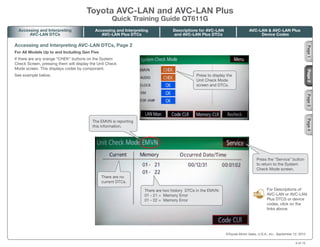
If there are any orange “CHEK“ buttons on the System
Check Screen, pressing them will display the Unit Check
Mode screen. This displays codes by component.
See example below. Press to display the
Unit Check Mode
screen and DTCs.
Press the “Service” button
to return to the System
Check Mode screen.
The EMVN is reporting
this information.
There are no
current DTCs.
There are two history DTCs in the EMVN:
01 - 21 = Memory Error
01 - 22 = Memory Error
©Toyota Motor Sales, U.S.A., Inc., September 12, 2012
For Descriptions of
AVC-LAN or AVC-LAN
Plus DTCS or device
codes, click on the
links above.
Hint
Hint
Toyota AVC-LAN and AVC-LAN Plus
Quick Training Guide QT611G
Page
1
Page
2
Page
3
Page
4
Accessing and Interpreting
AVC-LAN DTCs
AVC-LAN & AVC-LAN Plus
Device Codes
Descriptions for AVC-LAN
and AVC-LAN Plus DTCs
Accessing and Interpreting
AVC-LAN Plus DTCs
3 of 15
Accessing and Interpreting AVC-LAN DTCs, Page 3
For All Models Up to and Including Gen Five
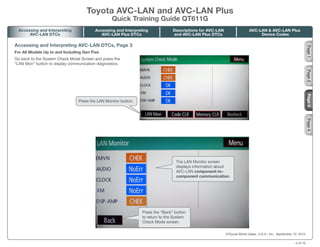
Go back to the System Check Mode Screen and press the
“LAN Mon” button to display communication diagnostics.
The LAN Monitor screen
displays information about
AVC-LAN component-to-
component communication.
Press the “Back” button
to return to the System
Check Mode screen.
Press the LAN Monitor button.
©Toyota Motor Sales, U.S.A., Inc., September 12, 2012
Toyota AVC-LAN and AVC-LAN Plus
Quick Training Guide QT611G
Page
2
Page
3
Page
4
Accessing and Interpreting
AVC-LAN DTCs
AVC-LAN & AVC-LAN Plus
Device Codes
Descriptions for AVC-LAN
and AVC-LAN Plus DTCs
Accessing and Interpreting
AVC-LAN Plus DTCs
Page
1
4 of 15
To exit the AVC-LAN diagnostic
mode, hold down the “DISP”
button on the left side of the
Multidisplay until the Navigation
System reboots.
Accessing and Interpreting AVC-LAN DTCs, Page 4
For All Models Up to and Including Gen Five
On the LAN Monitor screen, press the orange “CHEK”
buttons to display that component’s LAN DTCs.
See the example below.
Press to display
communication codes.
These are the AVC-LAN DTCs:
01 - D5 = ‘Absence of Registration’
(No response at power up)
01 - DA = ‘No response to On/Off command’
The EMVN is reporting
this information.
These are the components
referenced by the EMVN:
1F1 = XM Tuner
118 = EMVN
2B = The number of re-checks
3 = The number of times
the DTC was recorded.
©Toyota Motor Sales, U.S.A., Inc., September 12, 2012
For Descriptions of
AVC-LAN or AVC-LAN
Plus DTCS or device
codes, click on the
links above.
Hint
Hint
Toyota AVC-LAN and AVC-LAN Plus
Quick Training Guide QT611G
Page
2
Page
3
Page
4
Accessing and Interpreting
AVC-LAN DTCs
AVC-LAN & AVC-LAN Plus
Device Codes
Descriptions for AVC-LAN
and AVC-LAN Plus DTCs
Accessing and Interpreting
AVC-LAN Plus DTCs
Page
1
5 of 15
Accessing and Interpreting AVC-LAN Plus DTCs, Page 1
For All Models Up to and Including Gen Five
To place the Multidisplay in diagnostic mode, press the
“DISP” button.
Then at ½ second intervals, alternately press the upper left
and lower left corner of the Multidisplay screen 3 times.
(Alternate procedure: Hold down the “Info” button and
turn the lights on and off 3 times.)
At the System Check Mode screen,
press the “Menu” button.
At the Diagnosis Menu screen, press
the “Navigation Check” button.
Press the “Menu” button.
Press the “Navigation
Check” button.
©Toyota Motor Sales, U.S.A., Inc., September 12, 2012
Page
1
Page
2
Page
3
Toyota AVC-LAN and AVC-LAN Plus
Quick Training Guide QT611G
Accessing and Interpreting
AVC-LAN DTCs
AVC-LAN & AVC-LAN Plus
Device Codes
Descriptions for AVC-LAN
and AVC-LAN Plus DTCs
Accessing and Interpreting
AVC-LAN Plus DTCs
6 of 15
Accessing and Interpreting AVC-LAN Plus DTCs, Page 2
For All Models Up to and Including Gen Five
At the Navigation Check screen, press the “AVC-LAN plus
Check” button.
This screen displays
Health Check information
by component. (It will take
a few seconds to display
the diagnostic data).
Press the “AVC-LAN plus
Check” button.
©Toyota Motor Sales, U.S.A., Inc., September 12, 2012
The AVC-LAN Plus Check screen will be displayed.
Page
1
Page
2
Page
3
Toyota AVC-LAN and AVC-LAN Plus
Quick Training Guide QT611G
Accessing and Interpreting
AVC-LAN DTCs
AVC-LAN & AVC-LAN Plus
Device Codes
Descriptions for AVC-LAN
and AVC-LAN Plus DTCs
Accessing and Interpreting
AVC-LAN Plus DTCs
7 of 15
To exit the AVC-LAN diagnostic
mode, hold down the “DISP”
button on the left side of the
Multidisplay until the Navigation
System reboots.
Accessing and Interpreting AVC-LAN Plus DTCs, Page 3
For All Models Up to and Including Gen Five
Pressing an orange “Check” button on the AVC-LAN Plus
Check screen displays the AVC-LAN Plus Diagnostic screen
for that component.
See the example below.
Press to display the
AVC-LAN Plus Diagnosis
screen and DTCs.
01 - D0 = Master Reset.
The EMVN is reporting it sent a
reset command on the AVC-LAN
Plus network 3 times.
The EMVN is reporting
this information.
©Toyota Motor Sales, U.S.A., Inc., September 12, 2012
Page
2
Page
3
Toyota AVC-LAN and AVC-LAN Plus
Quick Training Guide QT611G
Accessing and Interpreting
AVC-LAN DTCs
AVC-LAN & AVC-LAN Plus
Device Codes
Descriptions for AVC-LAN
and AVC-LAN Plus DTCs
Accessing and Interpreting
AVC-LAN Plus DTCs
Page
1
For information on
DTCs and Device
Codes, click on the
corresponding links
at the top right of
the page.
Hint
Hint
8 of 15
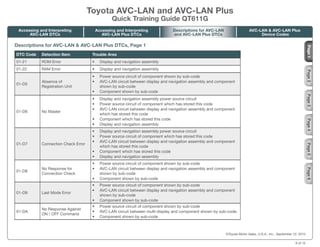
DTC Code Detection Item Trouble Area
01-21 ROM Error •	 Display and navigation assembly
01-22 RAM Error •	 Display and navigation assembly
01-D5
Absence of
Registration Unit
•	 Power source circuit of component shown by sub-code
•	 AVC-LAN circuit between display and navigation assembly and component
shown by sub-code
•	 Component shown by sub-code
01-D6 No Master
•	 Display and navigation assembly power source circuit
•	 Power source circuit of component which has stored this code
•	 AVC-LAN circuit between display and navigation assembly and component
which has stored this code
•	 Component which has stored this code
•	 Display and navigation assembly
01-D7 Connection Check Error
•	 Display and navigation assembly power source circuit
•	 Power source circuit of component which has stored this code
•	 AVC-LAN circuit between display and navigation assembly and component
which has stored this code
•	 Component which has stored this code
•	 Display and navigation assembly
01-D8
No Response for
Connection Check
•	 Power source circuit of component shown by sub-code
•	 AVC-LAN circuit between display and navigation assembly and component
shown by sub-code
•	 Component shown by sub-code
01-D9 Last Mode Error
•	 Power source circuit of component shown by sub-code
•	 AVC-LAN circuit between display and navigation assembly and component
shown by sub-code
•	 Component shown by sub-code
01-DA
No Response Against
ON / OFF Command
•	 Power source circuit of component shown by sub-code
•	 AVC-LAN circuit between multi-display and component shown by sub-code.
•	 Component shown by sub-code
©Toyota Motor Sales, U.S.A., Inc., September 12, 2012
Descriptions for AVC-LAN & AVC-LAN Plus DTCs, Page 1
Page
1
Page
2
Page
3
Page
5
Page
4
Page
6
Toyota AVC-LAN and AVC-LAN Plus
Quick Training Guide QT611G
Accessing and Interpreting
AVC-LAN DTCs
AVC-LAN & AVC-LAN Plus
Device Codes
Descriptions for AVC-LAN
and AVC-LAN Plus DTCs
Accessing and Interpreting
AVC-LAN Plus DTCs
9 of 15
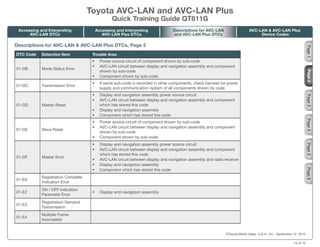
DTC Code Detection Item Trouble Area
01-DB Mode Status Error
•	 Power source circuit of component shown by sub-code
•	 AVC-LAN circuit between display and navigation assembly and component
shown by sub-code
•	 Component shown by sub-code
01-DC Transmission Error
•	 If same sub-code is recorded in other components, check harness for power
supply and communication system of all components shown by code
01-DD Master Reset
•	 Display and navigation assembly power source circuit
•	 AVC-LAN circuit between display and navigation assembly and component
which has stored this code
•	 Display and navigation assembly
•	 Component which has stored this code
01-DE Slave Reset
•	 Power source circuit of component shown by sub-code
•	 AVC-LAN circuit between display and navigation assembly and component
shown by sub-code
•	 Component shown by sub-code
01-DF Master Error
•	 Display and navigation assembly power source circuit
•	 AVC-LAN circuit between display and navigation assembly and component
which has stored this code
•	 AVC-LAN circuit between display and navigation assembly and radio receiver
•	 Display and navigation assembly
•	 Component which has stored this code
01-E0
Registration Complete
Indication Error
01-E2
ON / OFF Indication
Parameter Error
•	 Display and navigation assembly
01-E3
Registration Demand
Transmission
01-E4
Multiple Frame
Incomplete
©Toyota Motor Sales, U.S.A., Inc., September 12, 2012
Descriptions for AVC-LAN & AVC-LAN Plus DTCs, Page 2
Page
2
Page
3
Page
5
Page
4
Page
6
Toyota AVC-LAN and AVC-LAN Plus
Quick Training Guide QT611G
Accessing and Interpreting
AVC-LAN DTCs
AVC-LAN & AVC-LAN Plus
Device Codes
Descriptions for AVC-LAN
and AVC-LAN Plus DTCs
Accessing and Interpreting
AVC-LAN Plus DTCs
Page
1
10 of 15
DTC Code Detection Item Trouble Area
21-10 Panel Switch Error •	 Display and navigation assembly
21-11 Touch Switch Error •	 Display and navigation assembly
23-10 Panel Switch Error •	 Display and navigation assembly
23-11 Touch Switch Error •	 Display and navigation assembly
24-10 Panel Switch Error •	 Display and navigation assembly
24-11 Touch Switch Error •	 Display and navigation assembly
25-10 Panel Switch Error •	 Display and navigation assembly
25-11 Touch Switch Error •	 Display and navigation assembly
34-10 Error in Picture Circuit •	 Display and navigation assembly
34-11 No Current in Back-light •	 Display and navigation assembly
45-10
DVD Changer
Mechanical Error
•	 Radio receiver
45-11
DVD Insertion and
Ejection Error
•	 Radio receiver
45-42 Disc cannot be Read
•	 Disc
•	 Radio receiver
45-43 DVD-ROM Abnormal
•	 Disc
•	 Radio receiver
45-44 DVD Malfunction •	 Radio receiver
45-45 Eject Error •	 Radio receiver
45-46 Scratched/Reversed Disc
•	 Disc
•	 Radio receiver
45-47 High Temperature •	 Radio receiver
45-48 Excess Current •	 Radio receiver
©Toyota Motor Sales, U.S.A., Inc., September 12, 2012
Descriptions for AVC-LAN & AVC-LAN Plus DTCs, Page 3
Page
2
Page
3
Page
5
Page
4
Page
6
Toyota AVC-LAN and AVC-LAN Plus
Quick Training Guide QT611G
Accessing and Interpreting
AVC-LAN DTCs
AVC-LAN & AVC-LAN Plus
Device Codes
Descriptions for AVC-LAN
and AVC-LAN Plus DTCs
Accessing and Interpreting
AVC-LAN Plus DTCs
Page
1
11 of 15
DTC Code Detection Item Trouble Area
45-50
Tray Insertion / Ejection
Error
•	 Radio receiver
45-51 Elevator Error •	 Radio receiver
45-52 Clamp Error •	 Radio receiver
45-78 DSP Error •	 Radio receiver
45-7E No Playable Files
•	 Disc
•	 Radio receiver
45-7F Copyright Protection Error
•	 Disc
•	 Radio receiver
57-47
Bluetooth Module
Initialization Failed
•	 Display and navigation assembly
58-10 Gyro Error •	 Display and navigation assembly
58-11 GPS Receiver Error •	 Display and navigation assembly
58-17 HDD Error •	 Disc player disc
58-41
GPS Antenna Power
Source Error
•	 Harness or connector
•	 Navigation antenna assembly
•	 Display and navigation assembly
58-42 Map Disc Read Error •	 Disc player disc
58-43 SPD Signal Error
•	 Speed signal circuit
•	 Display and navigation assembly
58-44 Player Error •	 Display and navigation assembly
58-45 High Temperature •	 Display and navigation assembly
5C-40 Camera Picture Error
•	 Harness or connector
•	 Television camera
•	 Display and navigation assembly
©Toyota Motor Sales, U.S.A., Inc., September 12, 2012
Descriptions for AVC-LAN & AVC-LAN Plus DTCs, Page 4
Page
2
Page
3
Page
5
Page
4
Page
6
Toyota AVC-LAN and AVC-LAN Plus
Quick Training Guide QT611G
Accessing and Interpreting
AVC-LAN DTCs
AVC-LAN & AVC-LAN Plus
Device Codes
Descriptions for AVC-LAN
and AVC-LAN Plus DTCs
Accessing and Interpreting
AVC-LAN Plus DTCs
Page
1
12 of 15
DTC Code Detection Item Trouble Area
60-11
FM Tuner PLL does
not Lock
•	 Radio receiver
60-42 Tuner Power Source Error •	 Radio receiver
60-43 AM Tuner Error •	 Radio receiver
60-44 FM Tuner Error •	 Radio receiver
60-50 Malfunction in Internal IC •	 Radio receiver
69-42
File on HDD cannot
be Played
•	 Display and navigation assembly
80-10 Gyro Error •	 Display and navigation assembly
80-11 GPS Receiver Error •	 Display and navigation assembly
80-17 HDD Error •	 Disc player disc
80-41
GPS Antenna Power
Source Error
•	 Harness or connector
•	 Navigation antenna assembly
•	 Display and navigation assembly
80-42 Map Disc Read Error •	 Disc player disc
80-43 SPD Signal Error
•	 Speed signal circuit
•	 Display and navigation assembly
80-44 Player Error •	 Display and navigation assembly
9E-40 Device Error •	 Display and navigation assembly
9E-41
Sound Recording Data
Overflow
•	 Disc
•	 Radio receiver
•	 Display and navigation assembly
C0-11
Satellite Radio Tuner
Internal Circuit Error 1
•	 Satellite radio tuner
					
©Toyota Motor Sales, U.S.A., Inc., September 12, 2012
Descriptions for AVC-LAN & AVC-LAN Plus DTCs, Page 5
Page
2
Page
3
Page
5
Page
4
Page
6
Toyota AVC-LAN and AVC-LAN Plus
Quick Training Guide QT611G
Accessing and Interpreting
AVC-LAN DTCs
AVC-LAN & AVC-LAN Plus
Device Codes
Descriptions for AVC-LAN
and AVC-LAN Plus DTCs
Accessing and Interpreting
AVC-LAN Plus DTCs
Page
1
13 of 15
DTC Code Detection Item Trouble Area
C0-12
Satellite Radio Tuner
Internal Circuit Error 2
•	 Satellite radio tuner
C0-13
Satellite Radio Tuner
Internal Circuit Error 3
•	 Satellite radio tuner
C0-14
Satellite Radio Tuner
Internal Circuit Error 4
•	 Satellite radio tuner
C0-15
Satellite Radio Tuner
Internal Circuit Error 5
•	 Satellite radio tuner
C0-16
Satellite Radio Tuner
Internal Circuit Error 6
•	 Satellite radio tuner
					
©Toyota Motor Sales, U.S.A., Inc., September 12, 2012
Descriptions for AVC-LAN & AVC-LAN Plus DTCs, Page 6
Page
1
Page
2
Page
3
Page
5
Page
4
Page
6
Toyota AVC-LAN and AVC-LAN Plus
Quick Training Guide QT611G
Accessing and Interpreting
AVC-LAN DTCs
AVC-LAN & AVC-LAN Plus
Device Codes
Descriptions for AVC-LAN
and AVC-LAN Plus DTCs
Accessing and Interpreting
AVC-LAN Plus DTCs
14 of 15
Address No. Name Address No. Name
110 EMV 120 AVX
128 1DIN TV 140 AVN
144 G-BOOK 178 NAVI
17C MONET 190 AUDIO
1AC CAMERA-C 1B0 Rr-TV
1C0 Rr-CONT 19D BT-HF
1C4 PANEL 1C6 G/W
1C8 FM-M-LCD 1D8 CONT-SW
1EC Body 118 EMVN
1F1 XM 1F2 SIRIUS
230 TV 240 CD-CH2
250 DVD-CH 280 CAMERA
360 CD-CH1 3A0 MD-CH
17D TEL 440 DSP-AMP
530 ETC 1F6 RSE
1A0 DVD-P 1D6 CLOCK
238 DTV 480 AMP
©Toyota Motor Sales, U.S.A., Inc., September 12, 2012
AVC-LAN & AVC-LAN Plus Device Codes
Toyota AVC-LAN and AVC-LAN Plus
Quick Training Guide QT611G
Accessing and Interpreting
AVC-LAN DTCs
AVC-LAN & AVC-LAN Plus
Device Codes
Descriptions for AVC-LAN
and AVC-LAN Plus DTCs
Accessing and Interpreting
AVC-LAN Plus DTCs
15 of 15

Avc lan-and-avc-lan-plus

  • 1.
    ENTER AVC-LAN and AVC-LANPlus Quick Training Guide – QT611G Click the ENTER button to view the Quick Training Guide. ©Toyota Motor Sales, U.S.A., Inc., September 12, 2012
  • 2.
    ©Toyota Motor Sales,U.S.A., Inc., September 12, 2012 Accessing and Interpreting AVC-LAN DTCs, Page 1 For All Models Up to and Including Gen Five To place the Multidisplay in diagnostic mode, press the “DISP” button. Then at ½ second intervals, alternately press the upper left and lower left corner of the Multidisplay screen 3 times. (Alternate procedure: Hold down the “Info” button and turn the lights on and off 3 times.) The “System Check Mode” screen will then be displayed. This screen displays Health Check information by component. (It will take a few seconds to display the diagnostic data). Toyota AVC-LAN and AVC-LAN Plus Quick Training Guide QT611G Page 1 Page 2 Page 3 Page 4 Accessing and Interpreting AVC-LAN DTCs AVC-LAN & AVC-LAN Plus Device Codes Descriptions for AVC-LAN and AVC-LAN Plus DTCs Accessing and Interpreting AVC-LAN Plus DTCs Click the tabs at the top and side to view each section 2 of 15
  • 3.
    Accessing and InterpretingAVC-LAN DTCs, Page 2 For All Models Up to and Including Gen Five If there are any orange “CHEK“ buttons on the System Check Screen, pressing them will display the Unit Check Mode screen. This displays codes by component. See example below. Press to display the Unit Check Mode screen and DTCs. Press the “Service” button to return to the System Check Mode screen. The EMVN is reporting this information. There are no current DTCs. There are two history DTCs in the EMVN: 01 - 21 = Memory Error 01 - 22 = Memory Error ©Toyota Motor Sales, U.S.A., Inc., September 12, 2012 For Descriptions of AVC-LAN or AVC-LAN Plus DTCS or device codes, click on the links above. Hint Hint Toyota AVC-LAN and AVC-LAN Plus Quick Training Guide QT611G Page 1 Page 2 Page 3 Page 4 Accessing and Interpreting AVC-LAN DTCs AVC-LAN & AVC-LAN Plus Device Codes Descriptions for AVC-LAN and AVC-LAN Plus DTCs Accessing and Interpreting AVC-LAN Plus DTCs 3 of 15
  • 4.
    Accessing and InterpretingAVC-LAN DTCs, Page 3 For All Models Up to and Including Gen Five Go back to the System Check Mode Screen and press the “LAN Mon” button to display communication diagnostics. The LAN Monitor screen displays information about AVC-LAN component-to- component communication. Press the “Back” button to return to the System Check Mode screen. Press the LAN Monitor button. ©Toyota Motor Sales, U.S.A., Inc., September 12, 2012 Toyota AVC-LAN and AVC-LAN Plus Quick Training Guide QT611G Page 2 Page 3 Page 4 Accessing and Interpreting AVC-LAN DTCs AVC-LAN & AVC-LAN Plus Device Codes Descriptions for AVC-LAN and AVC-LAN Plus DTCs Accessing and Interpreting AVC-LAN Plus DTCs Page 1 4 of 15
  • 5.
    To exit theAVC-LAN diagnostic mode, hold down the “DISP” button on the left side of the Multidisplay until the Navigation System reboots. Accessing and Interpreting AVC-LAN DTCs, Page 4 For All Models Up to and Including Gen Five On the LAN Monitor screen, press the orange “CHEK” buttons to display that component’s LAN DTCs. See the example below. Press to display communication codes. These are the AVC-LAN DTCs: 01 - D5 = ‘Absence of Registration’ (No response at power up) 01 - DA = ‘No response to On/Off command’ The EMVN is reporting this information. These are the components referenced by the EMVN: 1F1 = XM Tuner 118 = EMVN 2B = The number of re-checks 3 = The number of times the DTC was recorded. ©Toyota Motor Sales, U.S.A., Inc., September 12, 2012 For Descriptions of AVC-LAN or AVC-LAN Plus DTCS or device codes, click on the links above. Hint Hint Toyota AVC-LAN and AVC-LAN Plus Quick Training Guide QT611G Page 2 Page 3 Page 4 Accessing and Interpreting AVC-LAN DTCs AVC-LAN & AVC-LAN Plus Device Codes Descriptions for AVC-LAN and AVC-LAN Plus DTCs Accessing and Interpreting AVC-LAN Plus DTCs Page 1 5 of 15
  • 6.
    Accessing and InterpretingAVC-LAN Plus DTCs, Page 1 For All Models Up to and Including Gen Five To place the Multidisplay in diagnostic mode, press the “DISP” button. Then at ½ second intervals, alternately press the upper left and lower left corner of the Multidisplay screen 3 times. (Alternate procedure: Hold down the “Info” button and turn the lights on and off 3 times.) At the System Check Mode screen, press the “Menu” button. At the Diagnosis Menu screen, press the “Navigation Check” button. Press the “Menu” button. Press the “Navigation Check” button. ©Toyota Motor Sales, U.S.A., Inc., September 12, 2012 Page 1 Page 2 Page 3 Toyota AVC-LAN and AVC-LAN Plus Quick Training Guide QT611G Accessing and Interpreting AVC-LAN DTCs AVC-LAN & AVC-LAN Plus Device Codes Descriptions for AVC-LAN and AVC-LAN Plus DTCs Accessing and Interpreting AVC-LAN Plus DTCs 6 of 15
  • 7.
    Accessing and InterpretingAVC-LAN Plus DTCs, Page 2 For All Models Up to and Including Gen Five At the Navigation Check screen, press the “AVC-LAN plus Check” button. This screen displays Health Check information by component. (It will take a few seconds to display the diagnostic data). Press the “AVC-LAN plus Check” button. ©Toyota Motor Sales, U.S.A., Inc., September 12, 2012 The AVC-LAN Plus Check screen will be displayed. Page 1 Page 2 Page 3 Toyota AVC-LAN and AVC-LAN Plus Quick Training Guide QT611G Accessing and Interpreting AVC-LAN DTCs AVC-LAN & AVC-LAN Plus Device Codes Descriptions for AVC-LAN and AVC-LAN Plus DTCs Accessing and Interpreting AVC-LAN Plus DTCs 7 of 15
  • 8.
    To exit theAVC-LAN diagnostic mode, hold down the “DISP” button on the left side of the Multidisplay until the Navigation System reboots. Accessing and Interpreting AVC-LAN Plus DTCs, Page 3 For All Models Up to and Including Gen Five Pressing an orange “Check” button on the AVC-LAN Plus Check screen displays the AVC-LAN Plus Diagnostic screen for that component. See the example below. Press to display the AVC-LAN Plus Diagnosis screen and DTCs. 01 - D0 = Master Reset. The EMVN is reporting it sent a reset command on the AVC-LAN Plus network 3 times. The EMVN is reporting this information. ©Toyota Motor Sales, U.S.A., Inc., September 12, 2012 Page 2 Page 3 Toyota AVC-LAN and AVC-LAN Plus Quick Training Guide QT611G Accessing and Interpreting AVC-LAN DTCs AVC-LAN & AVC-LAN Plus Device Codes Descriptions for AVC-LAN and AVC-LAN Plus DTCs Accessing and Interpreting AVC-LAN Plus DTCs Page 1 For information on DTCs and Device Codes, click on the corresponding links at the top right of the page. Hint Hint 8 of 15
  • 9.
    DTC Code DetectionItem Trouble Area 01-21 ROM Error • Display and navigation assembly 01-22 RAM Error • Display and navigation assembly 01-D5 Absence of Registration Unit • Power source circuit of component shown by sub-code • AVC-LAN circuit between display and navigation assembly and component shown by sub-code • Component shown by sub-code 01-D6 No Master • Display and navigation assembly power source circuit • Power source circuit of component which has stored this code • AVC-LAN circuit between display and navigation assembly and component which has stored this code • Component which has stored this code • Display and navigation assembly 01-D7 Connection Check Error • Display and navigation assembly power source circuit • Power source circuit of component which has stored this code • AVC-LAN circuit between display and navigation assembly and component which has stored this code • Component which has stored this code • Display and navigation assembly 01-D8 No Response for Connection Check • Power source circuit of component shown by sub-code • AVC-LAN circuit between display and navigation assembly and component shown by sub-code • Component shown by sub-code 01-D9 Last Mode Error • Power source circuit of component shown by sub-code • AVC-LAN circuit between display and navigation assembly and component shown by sub-code • Component shown by sub-code 01-DA No Response Against ON / OFF Command • Power source circuit of component shown by sub-code • AVC-LAN circuit between multi-display and component shown by sub-code. • Component shown by sub-code ©Toyota Motor Sales, U.S.A., Inc., September 12, 2012 Descriptions for AVC-LAN & AVC-LAN Plus DTCs, Page 1 Page 1 Page 2 Page 3 Page 5 Page 4 Page 6 Toyota AVC-LAN and AVC-LAN Plus Quick Training Guide QT611G Accessing and Interpreting AVC-LAN DTCs AVC-LAN & AVC-LAN Plus Device Codes Descriptions for AVC-LAN and AVC-LAN Plus DTCs Accessing and Interpreting AVC-LAN Plus DTCs 9 of 15
  • 10.
    DTC Code DetectionItem Trouble Area 01-DB Mode Status Error • Power source circuit of component shown by sub-code • AVC-LAN circuit between display and navigation assembly and component shown by sub-code • Component shown by sub-code 01-DC Transmission Error • If same sub-code is recorded in other components, check harness for power supply and communication system of all components shown by code 01-DD Master Reset • Display and navigation assembly power source circuit • AVC-LAN circuit between display and navigation assembly and component which has stored this code • Display and navigation assembly • Component which has stored this code 01-DE Slave Reset • Power source circuit of component shown by sub-code • AVC-LAN circuit between display and navigation assembly and component shown by sub-code • Component shown by sub-code 01-DF Master Error • Display and navigation assembly power source circuit • AVC-LAN circuit between display and navigation assembly and component which has stored this code • AVC-LAN circuit between display and navigation assembly and radio receiver • Display and navigation assembly • Component which has stored this code 01-E0 Registration Complete Indication Error 01-E2 ON / OFF Indication Parameter Error • Display and navigation assembly 01-E3 Registration Demand Transmission 01-E4 Multiple Frame Incomplete ©Toyota Motor Sales, U.S.A., Inc., September 12, 2012 Descriptions for AVC-LAN & AVC-LAN Plus DTCs, Page 2 Page 2 Page 3 Page 5 Page 4 Page 6 Toyota AVC-LAN and AVC-LAN Plus Quick Training Guide QT611G Accessing and Interpreting AVC-LAN DTCs AVC-LAN & AVC-LAN Plus Device Codes Descriptions for AVC-LAN and AVC-LAN Plus DTCs Accessing and Interpreting AVC-LAN Plus DTCs Page 1 10 of 15
  • 11.
    DTC Code DetectionItem Trouble Area 21-10 Panel Switch Error • Display and navigation assembly 21-11 Touch Switch Error • Display and navigation assembly 23-10 Panel Switch Error • Display and navigation assembly 23-11 Touch Switch Error • Display and navigation assembly 24-10 Panel Switch Error • Display and navigation assembly 24-11 Touch Switch Error • Display and navigation assembly 25-10 Panel Switch Error • Display and navigation assembly 25-11 Touch Switch Error • Display and navigation assembly 34-10 Error in Picture Circuit • Display and navigation assembly 34-11 No Current in Back-light • Display and navigation assembly 45-10 DVD Changer Mechanical Error • Radio receiver 45-11 DVD Insertion and Ejection Error • Radio receiver 45-42 Disc cannot be Read • Disc • Radio receiver 45-43 DVD-ROM Abnormal • Disc • Radio receiver 45-44 DVD Malfunction • Radio receiver 45-45 Eject Error • Radio receiver 45-46 Scratched/Reversed Disc • Disc • Radio receiver 45-47 High Temperature • Radio receiver 45-48 Excess Current • Radio receiver ©Toyota Motor Sales, U.S.A., Inc., September 12, 2012 Descriptions for AVC-LAN & AVC-LAN Plus DTCs, Page 3 Page 2 Page 3 Page 5 Page 4 Page 6 Toyota AVC-LAN and AVC-LAN Plus Quick Training Guide QT611G Accessing and Interpreting AVC-LAN DTCs AVC-LAN & AVC-LAN Plus Device Codes Descriptions for AVC-LAN and AVC-LAN Plus DTCs Accessing and Interpreting AVC-LAN Plus DTCs Page 1 11 of 15
  • 12.
    DTC Code DetectionItem Trouble Area 45-50 Tray Insertion / Ejection Error • Radio receiver 45-51 Elevator Error • Radio receiver 45-52 Clamp Error • Radio receiver 45-78 DSP Error • Radio receiver 45-7E No Playable Files • Disc • Radio receiver 45-7F Copyright Protection Error • Disc • Radio receiver 57-47 Bluetooth Module Initialization Failed • Display and navigation assembly 58-10 Gyro Error • Display and navigation assembly 58-11 GPS Receiver Error • Display and navigation assembly 58-17 HDD Error • Disc player disc 58-41 GPS Antenna Power Source Error • Harness or connector • Navigation antenna assembly • Display and navigation assembly 58-42 Map Disc Read Error • Disc player disc 58-43 SPD Signal Error • Speed signal circuit • Display and navigation assembly 58-44 Player Error • Display and navigation assembly 58-45 High Temperature • Display and navigation assembly 5C-40 Camera Picture Error • Harness or connector • Television camera • Display and navigation assembly ©Toyota Motor Sales, U.S.A., Inc., September 12, 2012 Descriptions for AVC-LAN & AVC-LAN Plus DTCs, Page 4 Page 2 Page 3 Page 5 Page 4 Page 6 Toyota AVC-LAN and AVC-LAN Plus Quick Training Guide QT611G Accessing and Interpreting AVC-LAN DTCs AVC-LAN & AVC-LAN Plus Device Codes Descriptions for AVC-LAN and AVC-LAN Plus DTCs Accessing and Interpreting AVC-LAN Plus DTCs Page 1 12 of 15
  • 13.
    DTC Code DetectionItem Trouble Area 60-11 FM Tuner PLL does not Lock • Radio receiver 60-42 Tuner Power Source Error • Radio receiver 60-43 AM Tuner Error • Radio receiver 60-44 FM Tuner Error • Radio receiver 60-50 Malfunction in Internal IC • Radio receiver 69-42 File on HDD cannot be Played • Display and navigation assembly 80-10 Gyro Error • Display and navigation assembly 80-11 GPS Receiver Error • Display and navigation assembly 80-17 HDD Error • Disc player disc 80-41 GPS Antenna Power Source Error • Harness or connector • Navigation antenna assembly • Display and navigation assembly 80-42 Map Disc Read Error • Disc player disc 80-43 SPD Signal Error • Speed signal circuit • Display and navigation assembly 80-44 Player Error • Display and navigation assembly 9E-40 Device Error • Display and navigation assembly 9E-41 Sound Recording Data Overflow • Disc • Radio receiver • Display and navigation assembly C0-11 Satellite Radio Tuner Internal Circuit Error 1 • Satellite radio tuner ©Toyota Motor Sales, U.S.A., Inc., September 12, 2012 Descriptions for AVC-LAN & AVC-LAN Plus DTCs, Page 5 Page 2 Page 3 Page 5 Page 4 Page 6 Toyota AVC-LAN and AVC-LAN Plus Quick Training Guide QT611G Accessing and Interpreting AVC-LAN DTCs AVC-LAN & AVC-LAN Plus Device Codes Descriptions for AVC-LAN and AVC-LAN Plus DTCs Accessing and Interpreting AVC-LAN Plus DTCs Page 1 13 of 15
  • 14.
    DTC Code DetectionItem Trouble Area C0-12 Satellite Radio Tuner Internal Circuit Error 2 • Satellite radio tuner C0-13 Satellite Radio Tuner Internal Circuit Error 3 • Satellite radio tuner C0-14 Satellite Radio Tuner Internal Circuit Error 4 • Satellite radio tuner C0-15 Satellite Radio Tuner Internal Circuit Error 5 • Satellite radio tuner C0-16 Satellite Radio Tuner Internal Circuit Error 6 • Satellite radio tuner ©Toyota Motor Sales, U.S.A., Inc., September 12, 2012 Descriptions for AVC-LAN & AVC-LAN Plus DTCs, Page 6 Page 1 Page 2 Page 3 Page 5 Page 4 Page 6 Toyota AVC-LAN and AVC-LAN Plus Quick Training Guide QT611G Accessing and Interpreting AVC-LAN DTCs AVC-LAN & AVC-LAN Plus Device Codes Descriptions for AVC-LAN and AVC-LAN Plus DTCs Accessing and Interpreting AVC-LAN Plus DTCs 14 of 15
  • 15.
    Address No. NameAddress No. Name 110 EMV 120 AVX 128 1DIN TV 140 AVN 144 G-BOOK 178 NAVI 17C MONET 190 AUDIO 1AC CAMERA-C 1B0 Rr-TV 1C0 Rr-CONT 19D BT-HF 1C4 PANEL 1C6 G/W 1C8 FM-M-LCD 1D8 CONT-SW 1EC Body 118 EMVN 1F1 XM 1F2 SIRIUS 230 TV 240 CD-CH2 250 DVD-CH 280 CAMERA 360 CD-CH1 3A0 MD-CH 17D TEL 440 DSP-AMP 530 ETC 1F6 RSE 1A0 DVD-P 1D6 CLOCK 238 DTV 480 AMP ©Toyota Motor Sales, U.S.A., Inc., September 12, 2012 AVC-LAN & AVC-LAN Plus Device Codes Toyota AVC-LAN and AVC-LAN Plus Quick Training Guide QT611G Accessing and Interpreting AVC-LAN DTCs AVC-LAN & AVC-LAN Plus Device Codes Descriptions for AVC-LAN and AVC-LAN Plus DTCs Accessing and Interpreting AVC-LAN Plus DTCs 15 of 15