1
Automating Elastic Stack
Aravind Putrevu, Developer Advocate
Omer Kushmaro, Product Manager
2
This presentation and the accompanying oral presentation contain forward-looking statements, including statements
concerning plans for future offerings; the expected strength, performance or benefits of our offerings; and our future
operations and expected performance. These forward-looking statements are subject to the safe harbor provisions
under the Private Securities Litigation Reform Act of 1995. Our expectations and beliefs in light of currently
available information regarding these matters may not materialize. Actual outcomes and results may differ materially
from those contemplated by these forward-looking statements due to uncertainties, risks, and changes in
circumstances, including, but not limited to those related to: the impact of the COVID-19 pandemic on our business
and our customers and partners; our ability to continue to deliver and improve our offerings and successfully
develop new offerings, including security-related product offerings and SaaS offerings; customer acceptance and
purchase of our existing offerings and new offerings, including the expansion and adoption of our SaaS offerings;
our ability to realize value from investments in the business, including R&D investments; our ability to maintain and
expand our user and customer base; our international expansion strategy; our ability to successfully execute our
go-to-market strategy and expand in our existing markets and into new markets, and our ability to forecast customer
retention and expansion; and general market, political, economic and business conditions.
Additional risks and uncertainties that could cause actual outcomes and results to differ materially are included in
our filings with the Securities and Exchange Commission (the “SEC”), including our Annual Report on Form 10-K for
the most recent fiscal year, our quarterly report on Form 10-Q for the most recent fiscal quarter, and any
subsequent reports filed with the SEC. SEC filings are available on the Investor Relations section of Elastic’s
website at ir.elastic.co and the SEC’s website at www.sec.gov.
Any features or functions of services or products referenced in this presentation, or in any presentations, press
releases or public statements, which are not currently available or not currently available as a general availability
release, may not be delivered on time or at all. The development, release, and timing of any features or functionality
described for our products remains at our sole discretion. Customers who purchase our products and services
should make the purchase decisions based upon services and product features and functions that are currently
available.
All statements are made only as of the date of the presentation, and Elastic assumes no obligation to, and does not
currently intend to, update any forward-looking statements or statements relating to features or functions of services
or products, except as required by law.
Forward-Looking Statements
What’s in the API toolbox?
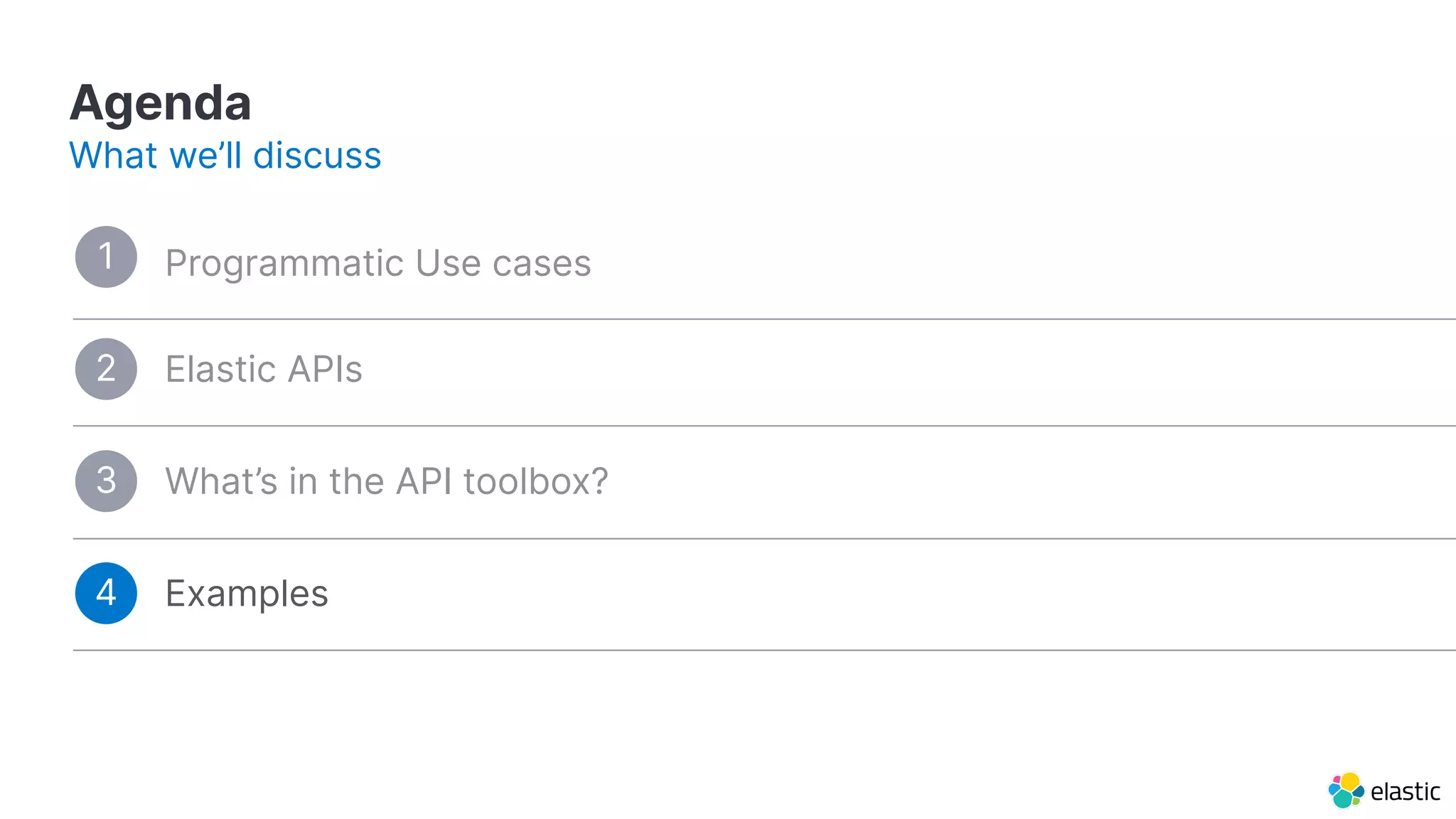
Agenda
What we’ll discuss
Programmatic Use cases
3
Examples4
Elastic APIs2
1
Agenda
What we’ll discuss
Programmatic Use cases1
What’s in the API toolbox?3
Examples4
Elastic APIs2
What’s in the API toolbox?
Agenda
What we’ll discuss
Programmatic Use cases1
3
Examples4
Elastic APIs2
Examples
Elastic APIs
Agenda
What we’ll discuss
Programmatic Use cases1
What’s in the API toolbox?3
4
2
7
Programmatic
Use cases
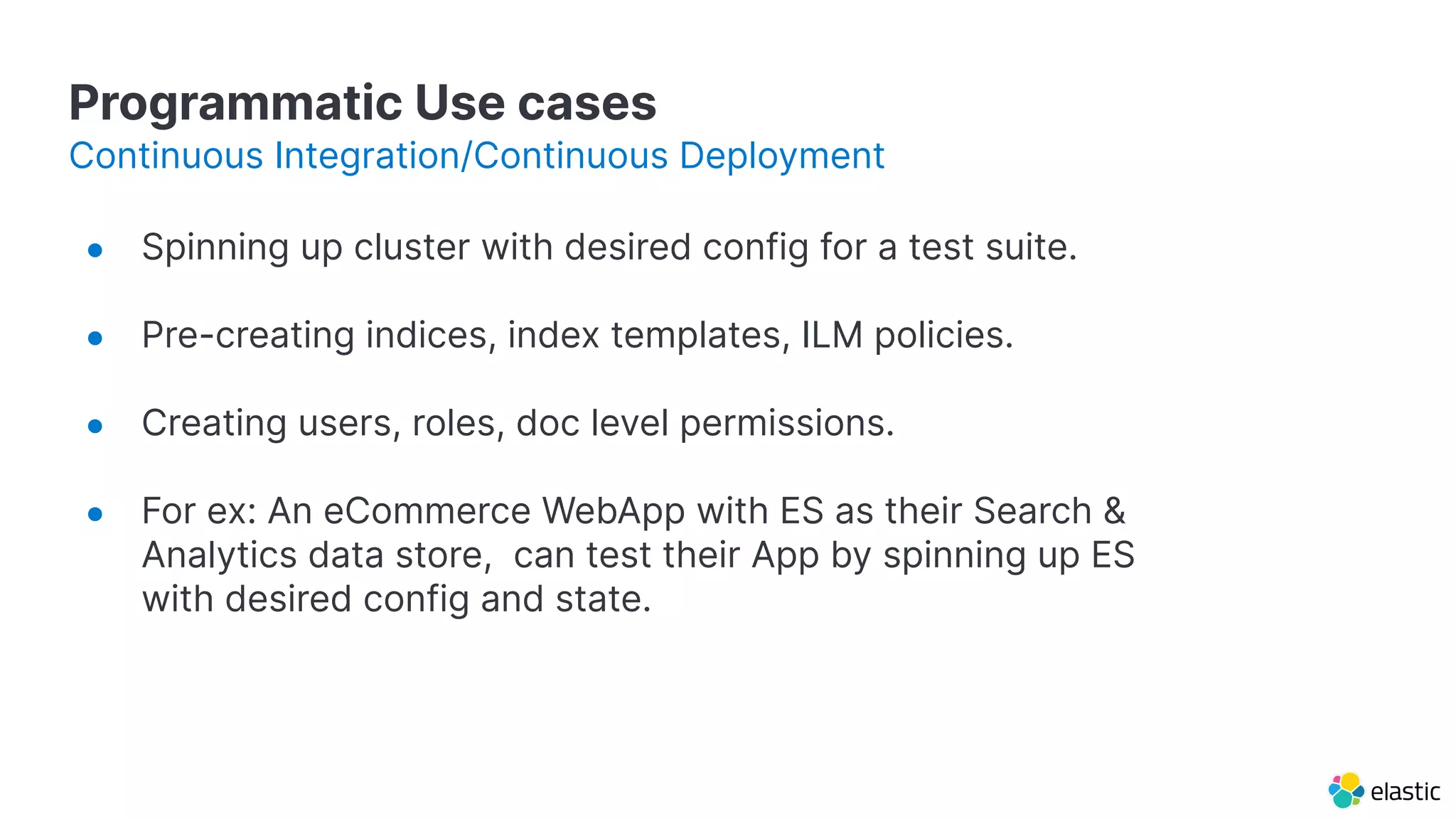
Programmatic Use cases
● Spinning up cluster with desired config for a test suite.
● Pre-creating indices, index templates, ILM policies.
● Creating users, roles, doc level permissions.
● For ex: An eCommerce WebApp with ES as their Search &
Analytics data store, can test their App by spinning up ES
with desired config and state.
Continuous Integration/Continuous Deployment
9
Elastic APIs
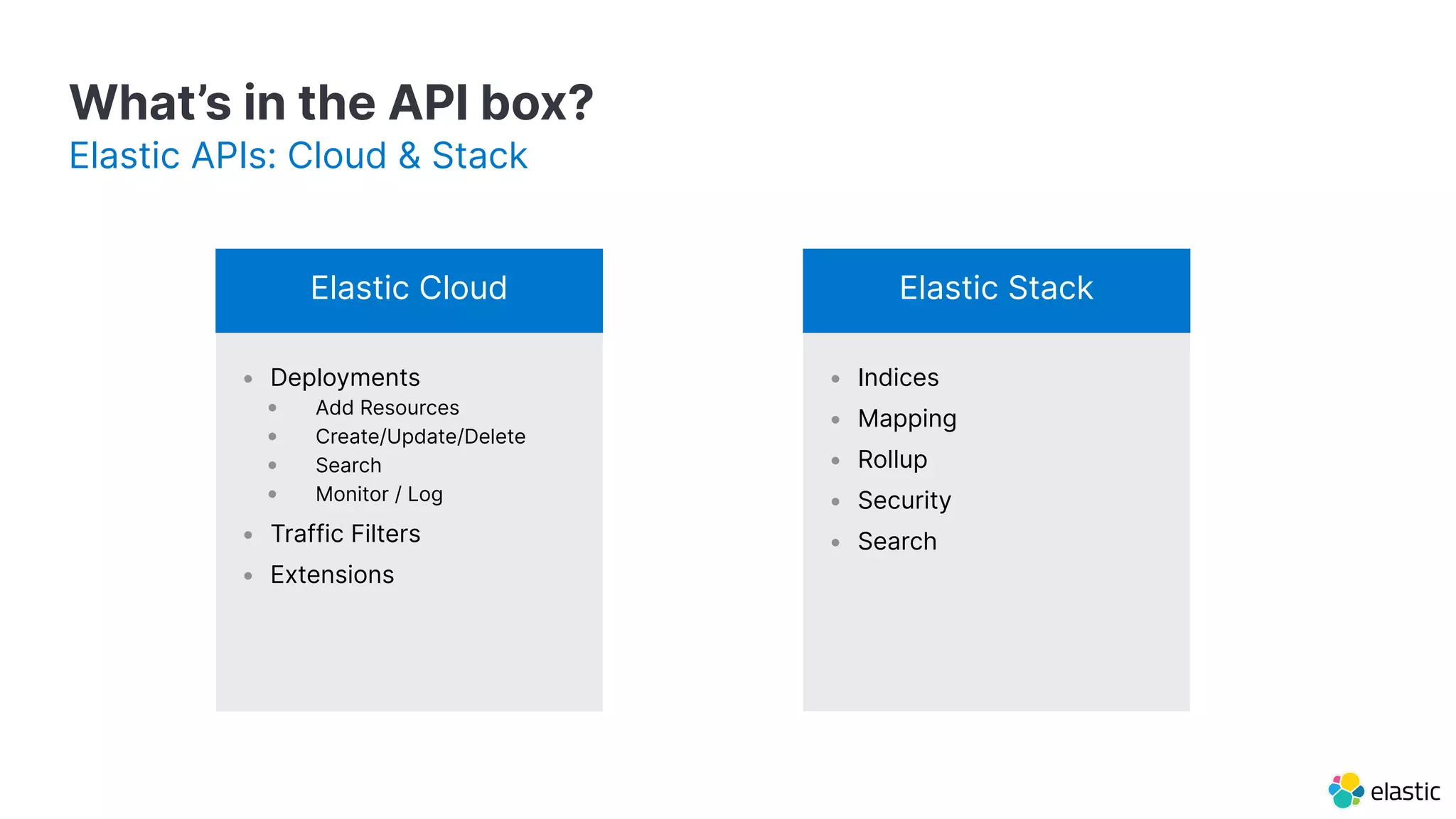
What’s in the API box?
Elastic APIs: Cloud & Stack
• Deployments
• Add Resources
• Create/Update/Delete
• Search
• Monitor / Log
• Traffic Filters
• Extensions
Elastic Cloud
• Indices
• Mapping
• Rollup
• Security
• Search
Elastic Stack
11
What’s in the API
toolbox?
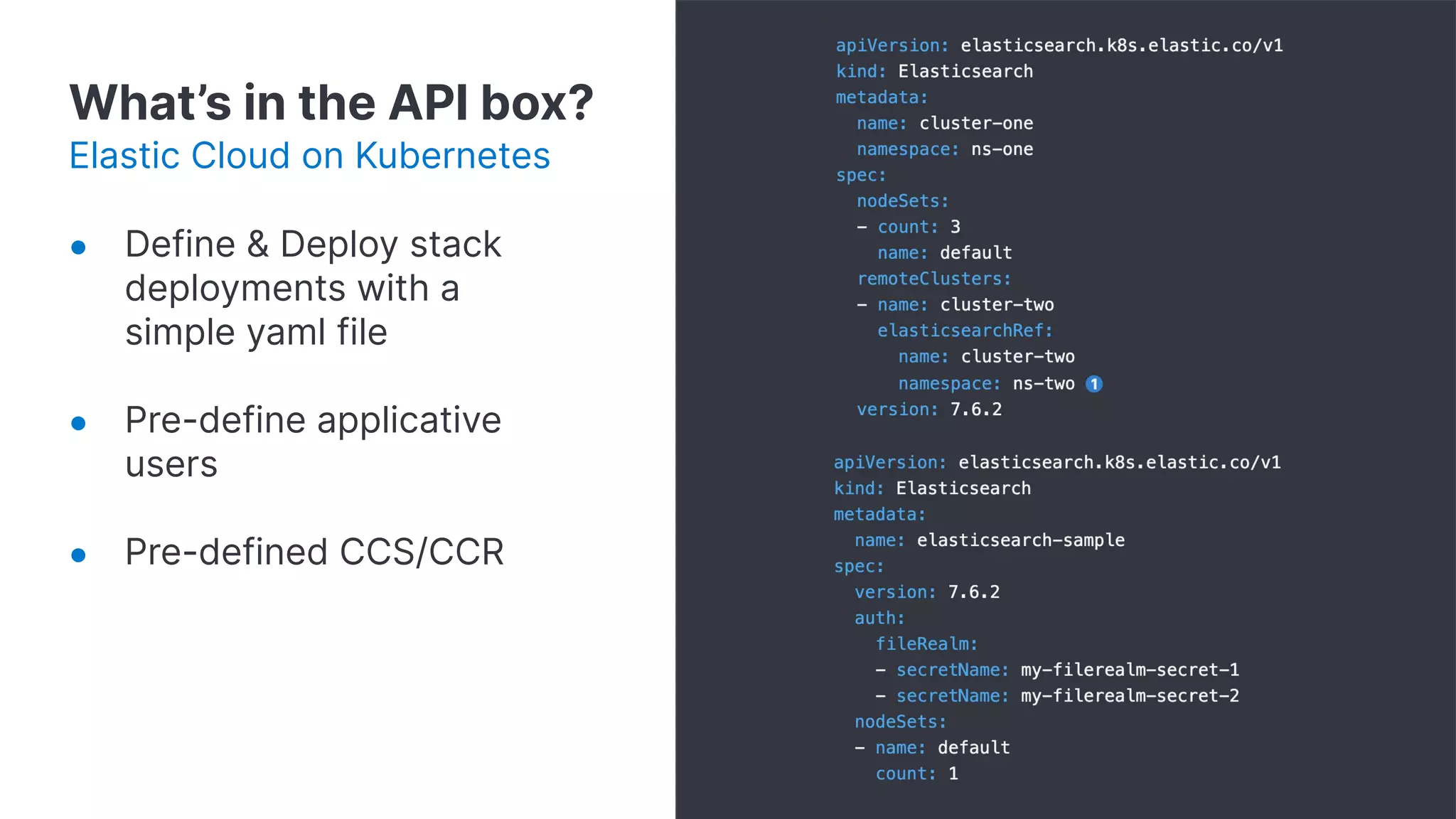
What’s in the API box?
Elastic Cloud on Kubernetes
● Define & Deploy stack
deployments with a
simple yaml file
● Pre-define applicative
users
● Pre-defined CCS/CCR
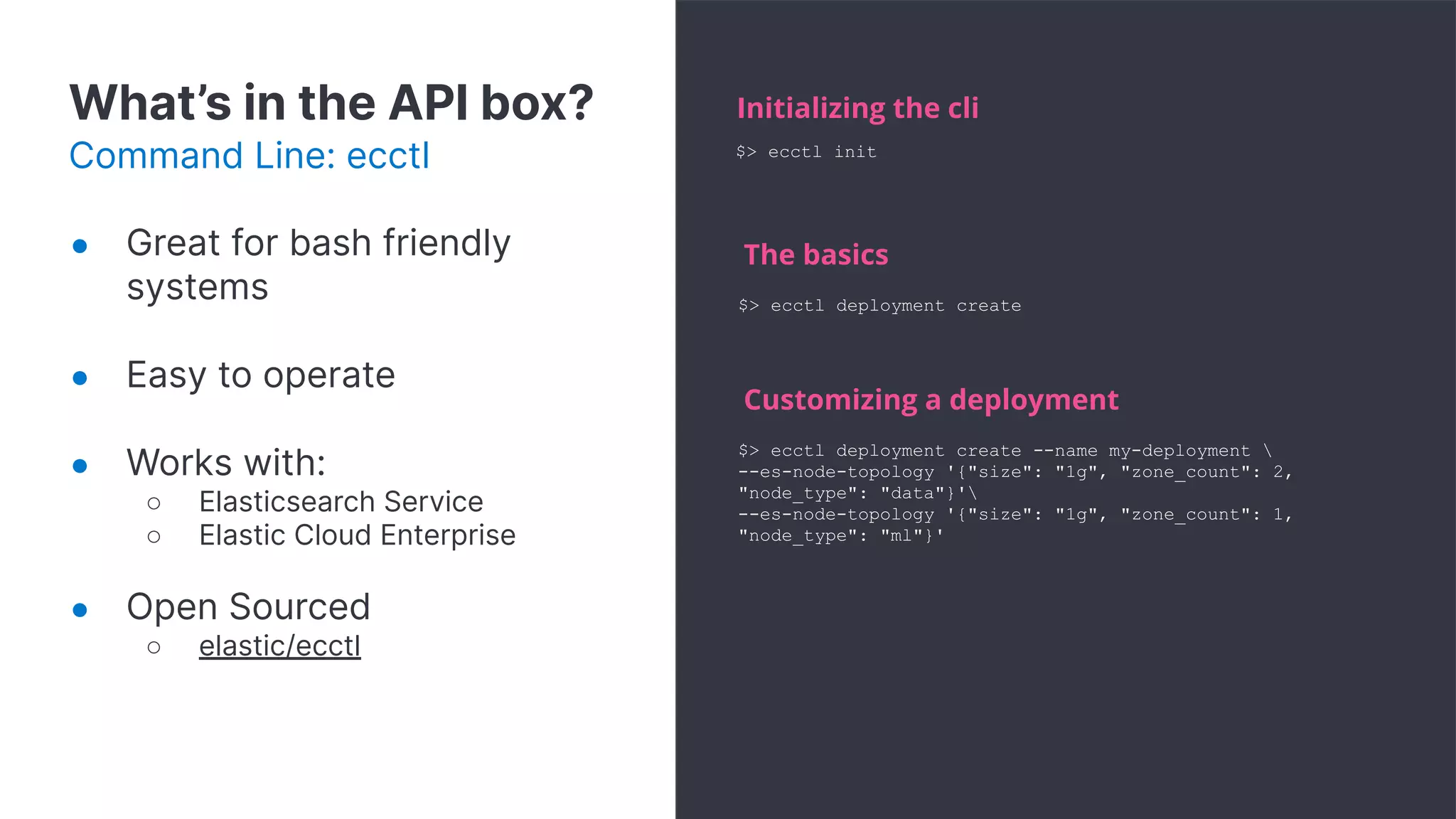
What’s in the API box?
Command Line: ecctl
Initializing the cli
$> ecctl deployment create
The basics
$> ecctl deployment create --name my-deployment 
--es-node-topology '{"size": "1g", "zone_count": 2,
"node_type": "data"}'
--es-node-topology '{"size": "1g", "zone_count": 1,
"node_type": "ml"}'
Customizing a deployment
$> ecctl init
● Great for bash friendly
systems
● Easy to operate
● Works with:
○ Elasticsearch Service
○ Elastic Cloud Enterprise
● Open Sourced
○ elastic/ecctl
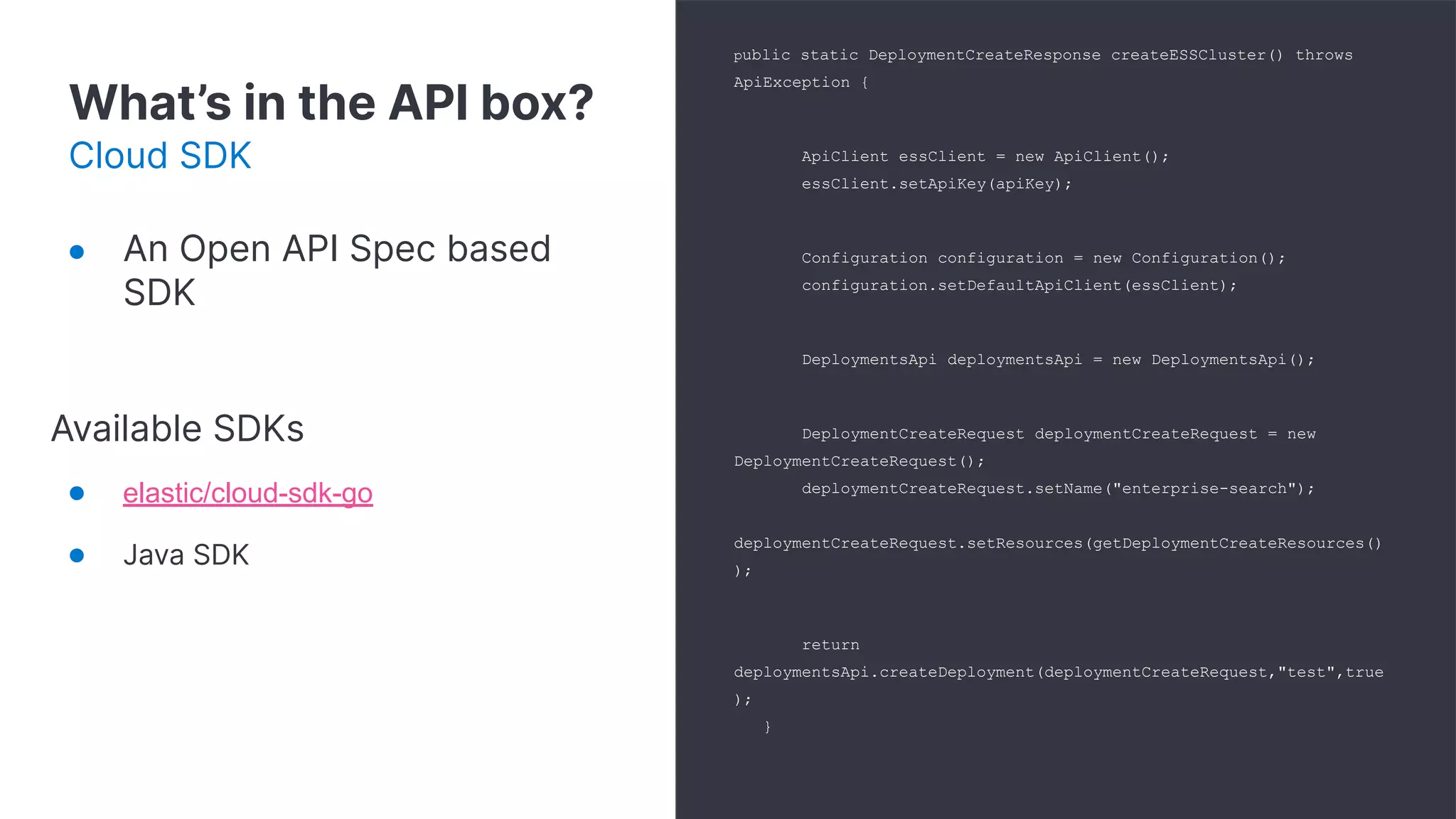
What’s in the API box?
Cloud SDK
public static DeploymentCreateResponse createESSCluster() throws
ApiException {
ApiClient essClient = new ApiClient();
essClient.setApiKey(apiKey);
Configuration configuration = new Configuration();
configuration.setDefaultApiClient(essClient);
DeploymentsApi deploymentsApi = new DeploymentsApi();
DeploymentCreateRequest deploymentCreateRequest = new
DeploymentCreateRequest();
deploymentCreateRequest.setName("enterprise-search");
deploymentCreateRequest.setResources(getDeploymentCreateResources()
);
return
deploymentsApi.createDeployment(deploymentCreateRequest,"test",true
);
}
● An Open API Spec based
SDK
Available SDKs
● elastic/cloud-sdk-go
● Java SDK
What’s in the API box?
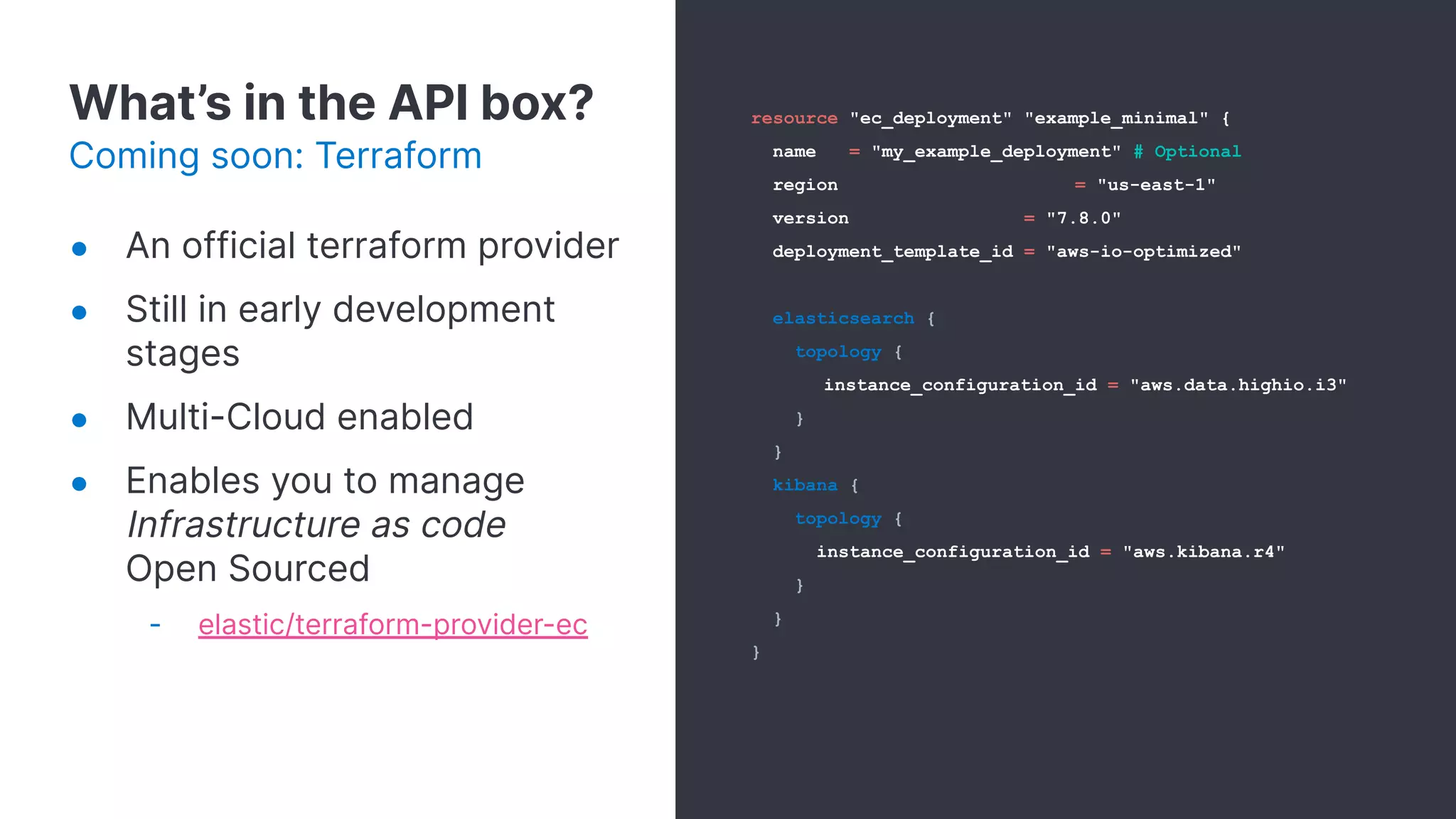
Coming soon: Terraform
resource "ec_deployment" "example_minimal" {
name = "my_example_deployment" # Optional
region = "us-east-1"
version = "7.8.0"
deployment_template_id = "aws-io-optimized"
elasticsearch {
topology {
instance_configuration_id = "aws.data.highio.i3"
}
}
kibana {
topology {
instance_configuration_id = "aws.kibana.r4"
}
}
}
● An official terraform provider
● Still in early development
stages
● Multi-Cloud enabled
● Enables you to manage
Infrastructure as code
Open Sourced
- elastic/terraform-provider-ec
16
Examples
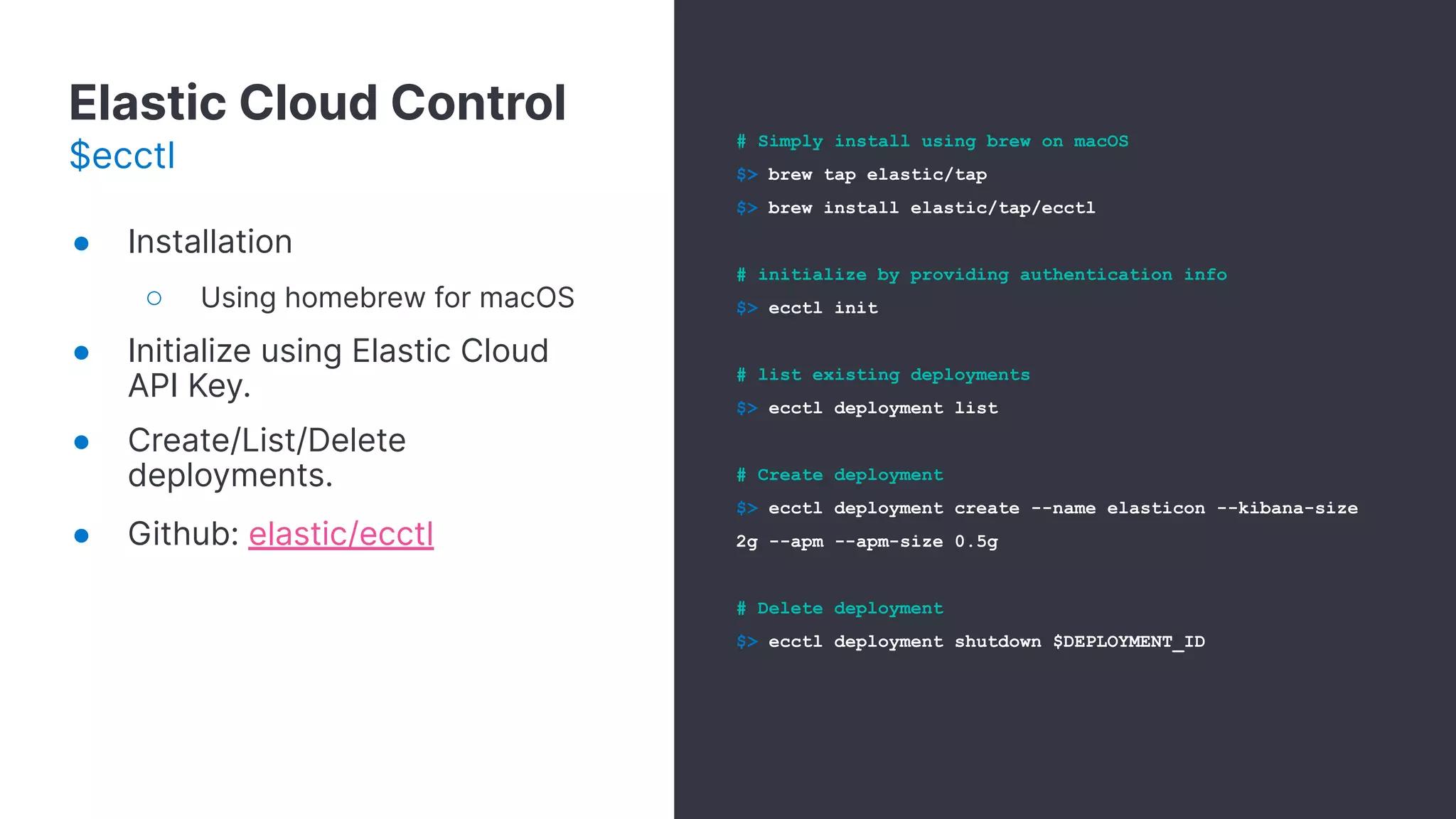
Elastic Cloud Control
$ecctl
# Simply install using brew on macOS
$> brew tap elastic/tap
$> brew install elastic/tap/ecctl
# initialize by providing authentication info
$> ecctl init
# list existing deployments
$> ecctl deployment list
# Create deployment
$> ecctl deployment create --name elasticon --kibana-size
2g --apm --apm-size 0.5g
# Delete deployment
$> ecctl deployment shutdown $DEPLOYMENT_ID
● Installation
○ Using homebrew for macOS
● Initialize using Elastic Cloud
API Key.
● Create/List/Delete
deployments.
● Github: elastic/ecctl
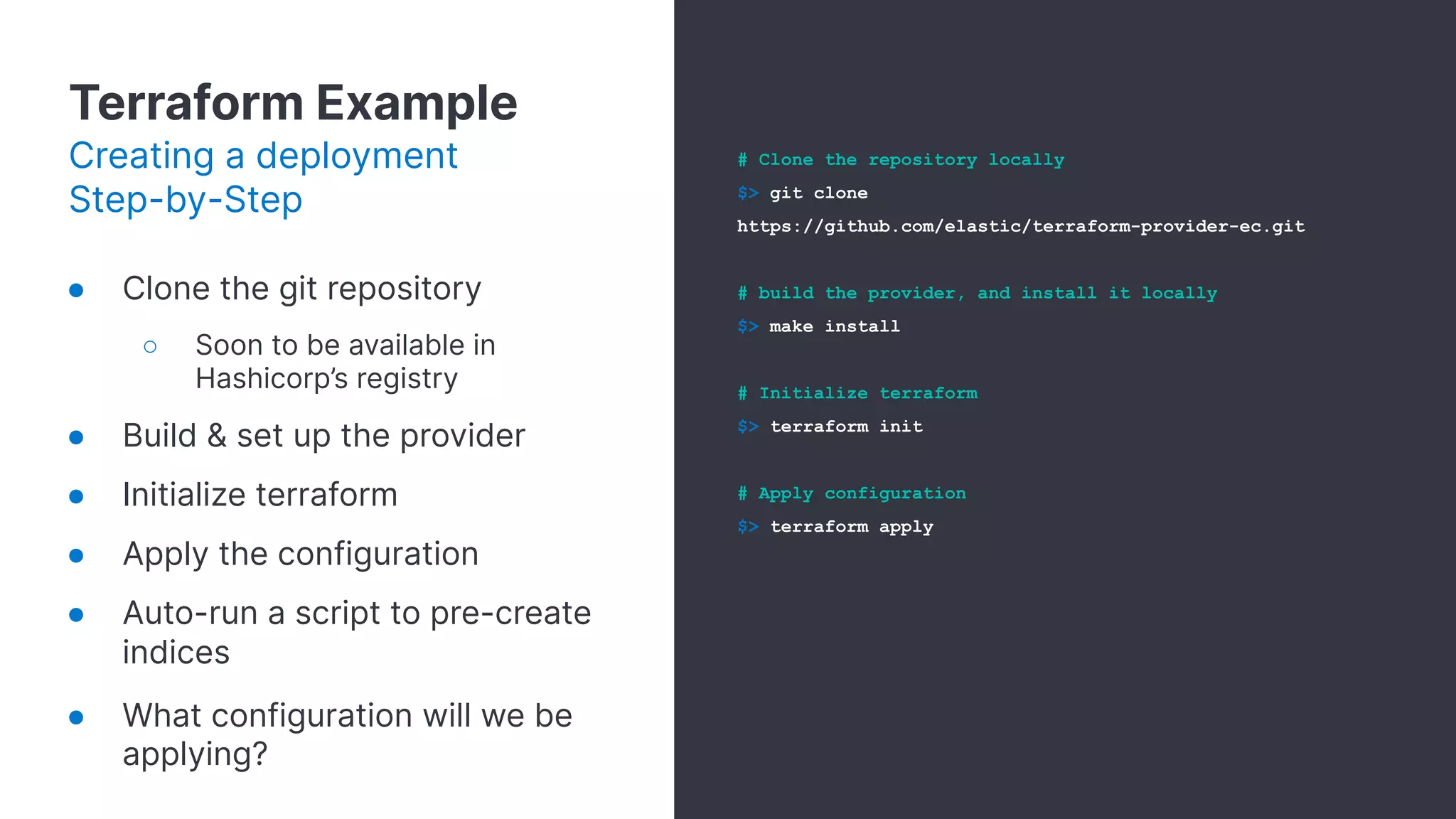
Terraform Example
Creating a deployment
Step-by-Step
● Clone the git repository
○ Soon to be available in
Hashicorp’s registry
● Build & set up the provider
● Initialize terraform
● Apply the configuration
● Auto-run a script to pre-create
indices
● What configuration will we be
applying?
# Clone the repository locally
$> git clone
https://github.com/elastic/terraform-provider-ec.git
# build the provider, and install it locally
$> make install
# Initialize terraform
$> terraform init
# Apply configuration
$> terraform apply
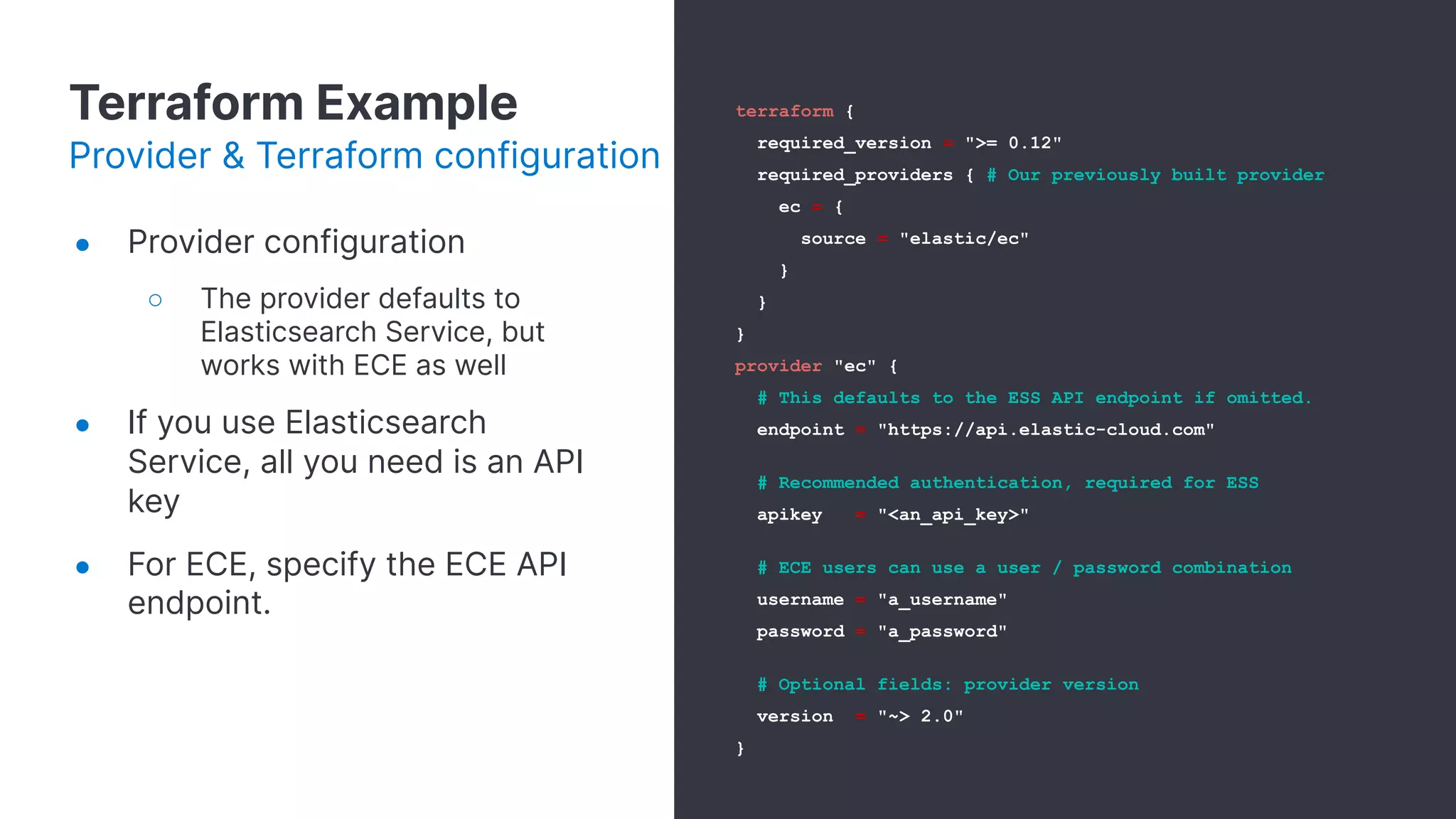
Terraform Example
Provider & Terraform configuration
● Provider configuration
○ The provider defaults to
Elasticsearch Service, but
works with ECE as well
● If you use Elasticsearch
Service, all you need is an API
key
● For ECE, specify the ECE API
endpoint.
terraform {
required_version = ">= 0.12"
required_providers { # Our previously built provider
ec = {
source = "elastic/ec"
}
}
}
provider "ec" {
# This defaults to the ESS API endpoint if omitted.
endpoint = "https://api.elastic-cloud.com"
# Recommended authentication, required for ESS
apikey = "<an_api_key>"
# ECE users can use a user / password combination
username = "a_username"
password = "a_password"
# Optional fields: provider version
version = "~> 2.0"
}
Terraform Example
Deployment definition
resource "ec_deployment" "example_minimal" {
name = "my_example_deployment"
region = "us-east-1"
version = "7.9.1"
deployment_template_id = "aws-io-optimized-v2"
traffic_filter = [ec_traffic_filter.allow_all.id]
elasticsearch {
topology {
instance_configuration_id = "aws.data.highio.i3"
memory_per_node = "8g"
}
config {
user_settings_yaml = file("./es_settings.yml")
}
}
kibana {
topology {
instance_configuration_id = "aws.kibana.r5d"
memory_per_node = "1g"
}
}
}
● Elasticsearch topology section
determines nodes topology:
○ Node types
■ Data
■ Master
■ Ingest
■ ML
○ Memory per node
○ Instance Configuration
● Kibana, Enterprise Search,
APM supported
● Traffic filters
Terraform Example
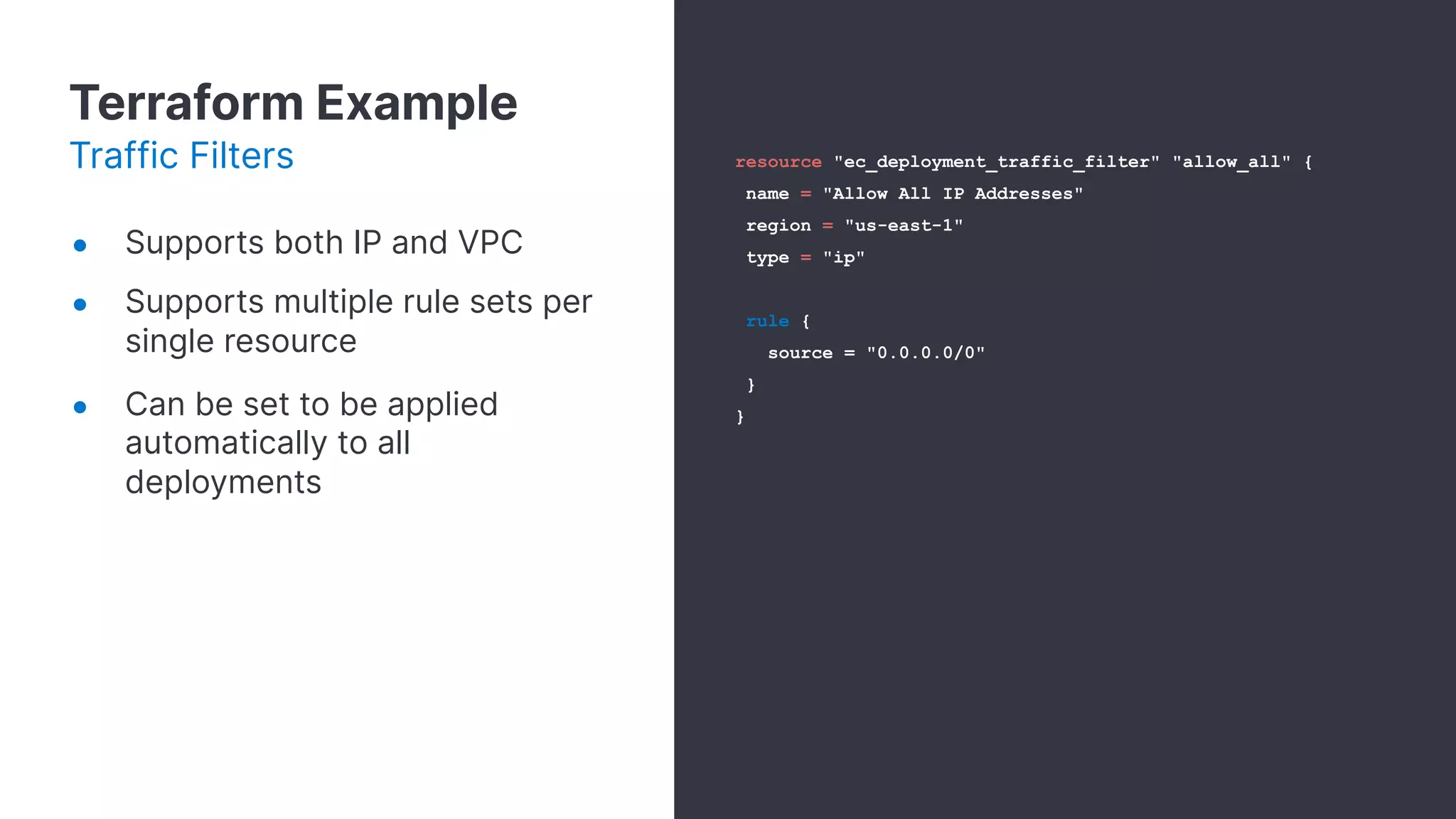
Traffic Filters
● Supports both IP and VPC
● Supports multiple rule sets per
single resource
● Can be set to be applied
automatically to all
deployments
resource "ec_deployment_traffic_filter" "allow_all" {
name = "Allow All IP Addresses"
region = "us-east-1"
type = "ip"
rule {
source = "0.0.0.0/0"
}
}
Terraform Example
Init script
● “Null resource” executes a
local script (not related to the
ec provider)
● Template_file uses the values
generated by our created
ec_deployment resource, and
injects them into a simple bash
script
○ elastic-user
○ elastic-password
○ es-url
resource "null_resource" "bootstrap-elasticsearch" {
provisioner "local-exec" {
command =
data.template_file.elasticsearch-configuration.rendered
}
}
data template_file elasticsearch-configuration {
template = file(es_config.sh)
depends_on = [ec_deployment.example_minimal]
vars = {
elastic-user =
ec_deployment.example_minimal.elasticsearch_username
elastic-password =
ec_deployment.example_minimal.elasticsearch_password
es-url =
ec_deployment.example_minimal.elasticsearch[0].https_endpoint
}
}
Terraform Example
Demo Time!
Let’s run our example
terraform code!
24
Thank You!

Automating the Elastic Stack

  • 1.
    1 Automating Elastic Stack AravindPutrevu, Developer Advocate Omer Kushmaro, Product Manager
  • 2.
    2 This presentation andthe accompanying oral presentation contain forward-looking statements, including statements concerning plans for future offerings; the expected strength, performance or benefits of our offerings; and our future operations and expected performance. These forward-looking statements are subject to the safe harbor provisions under the Private Securities Litigation Reform Act of 1995. Our expectations and beliefs in light of currently available information regarding these matters may not materialize. Actual outcomes and results may differ materially from those contemplated by these forward-looking statements due to uncertainties, risks, and changes in circumstances, including, but not limited to those related to: the impact of the COVID-19 pandemic on our business and our customers and partners; our ability to continue to deliver and improve our offerings and successfully develop new offerings, including security-related product offerings and SaaS offerings; customer acceptance and purchase of our existing offerings and new offerings, including the expansion and adoption of our SaaS offerings; our ability to realize value from investments in the business, including R&D investments; our ability to maintain and expand our user and customer base; our international expansion strategy; our ability to successfully execute our go-to-market strategy and expand in our existing markets and into new markets, and our ability to forecast customer retention and expansion; and general market, political, economic and business conditions. Additional risks and uncertainties that could cause actual outcomes and results to differ materially are included in our filings with the Securities and Exchange Commission (the “SEC”), including our Annual Report on Form 10-K for the most recent fiscal year, our quarterly report on Form 10-Q for the most recent fiscal quarter, and any subsequent reports filed with the SEC. SEC filings are available on the Investor Relations section of Elastic’s website at ir.elastic.co and the SEC’s website at www.sec.gov. Any features or functions of services or products referenced in this presentation, or in any presentations, press releases or public statements, which are not currently available or not currently available as a general availability release, may not be delivered on time or at all. The development, release, and timing of any features or functionality described for our products remains at our sole discretion. Customers who purchase our products and services should make the purchase decisions based upon services and product features and functions that are currently available. All statements are made only as of the date of the presentation, and Elastic assumes no obligation to, and does not currently intend to, update any forward-looking statements or statements relating to features or functions of services or products, except as required by law. Forward-Looking Statements
  • 3.
    What’s in theAPI toolbox? Agenda What we’ll discuss Programmatic Use cases 3 Examples4 Elastic APIs2 1
  • 4.
    Agenda What we’ll discuss ProgrammaticUse cases1 What’s in the API toolbox?3 Examples4 Elastic APIs2
  • 5.
    What’s in theAPI toolbox? Agenda What we’ll discuss Programmatic Use cases1 3 Examples4 Elastic APIs2
  • 6.
    Examples Elastic APIs Agenda What we’lldiscuss Programmatic Use cases1 What’s in the API toolbox?3 4 2
  • 7.
  • 8.
    Programmatic Use cases ●Spinning up cluster with desired config for a test suite. ● Pre-creating indices, index templates, ILM policies. ● Creating users, roles, doc level permissions. ● For ex: An eCommerce WebApp with ES as their Search & Analytics data store, can test their App by spinning up ES with desired config and state. Continuous Integration/Continuous Deployment
  • 9.
  • 10.
    What’s in theAPI box? Elastic APIs: Cloud & Stack • Deployments • Add Resources • Create/Update/Delete • Search • Monitor / Log • Traffic Filters • Extensions Elastic Cloud • Indices • Mapping • Rollup • Security • Search Elastic Stack
  • 11.
    11 What’s in theAPI toolbox?
  • 12.
    What’s in theAPI box? Elastic Cloud on Kubernetes ● Define & Deploy stack deployments with a simple yaml file ● Pre-define applicative users ● Pre-defined CCS/CCR
  • 13.
    What’s in theAPI box? Command Line: ecctl Initializing the cli $> ecctl deployment create The basics $> ecctl deployment create --name my-deployment --es-node-topology '{"size": "1g", "zone_count": 2, "node_type": "data"}' --es-node-topology '{"size": "1g", "zone_count": 1, "node_type": "ml"}' Customizing a deployment $> ecctl init ● Great for bash friendly systems ● Easy to operate ● Works with: ○ Elasticsearch Service ○ Elastic Cloud Enterprise ● Open Sourced ○ elastic/ecctl
  • 14.
    What’s in theAPI box? Cloud SDK public static DeploymentCreateResponse createESSCluster() throws ApiException { ApiClient essClient = new ApiClient(); essClient.setApiKey(apiKey); Configuration configuration = new Configuration(); configuration.setDefaultApiClient(essClient); DeploymentsApi deploymentsApi = new DeploymentsApi(); DeploymentCreateRequest deploymentCreateRequest = new DeploymentCreateRequest(); deploymentCreateRequest.setName("enterprise-search"); deploymentCreateRequest.setResources(getDeploymentCreateResources() ); return deploymentsApi.createDeployment(deploymentCreateRequest,"test",true ); } ● An Open API Spec based SDK Available SDKs ● elastic/cloud-sdk-go ● Java SDK
  • 15.
    What’s in theAPI box? Coming soon: Terraform resource "ec_deployment" "example_minimal" { name = "my_example_deployment" # Optional region = "us-east-1" version = "7.8.0" deployment_template_id = "aws-io-optimized" elasticsearch { topology { instance_configuration_id = "aws.data.highio.i3" } } kibana { topology { instance_configuration_id = "aws.kibana.r4" } } } ● An official terraform provider ● Still in early development stages ● Multi-Cloud enabled ● Enables you to manage Infrastructure as code Open Sourced - elastic/terraform-provider-ec
  • 16.
  • 17.
    Elastic Cloud Control $ecctl #Simply install using brew on macOS $> brew tap elastic/tap $> brew install elastic/tap/ecctl # initialize by providing authentication info $> ecctl init # list existing deployments $> ecctl deployment list # Create deployment $> ecctl deployment create --name elasticon --kibana-size 2g --apm --apm-size 0.5g # Delete deployment $> ecctl deployment shutdown $DEPLOYMENT_ID ● Installation ○ Using homebrew for macOS ● Initialize using Elastic Cloud API Key. ● Create/List/Delete deployments. ● Github: elastic/ecctl
  • 18.
    Terraform Example Creating adeployment Step-by-Step ● Clone the git repository ○ Soon to be available in Hashicorp’s registry ● Build & set up the provider ● Initialize terraform ● Apply the configuration ● Auto-run a script to pre-create indices ● What configuration will we be applying? # Clone the repository locally $> git clone https://github.com/elastic/terraform-provider-ec.git # build the provider, and install it locally $> make install # Initialize terraform $> terraform init # Apply configuration $> terraform apply
  • 19.
    Terraform Example Provider &Terraform configuration ● Provider configuration ○ The provider defaults to Elasticsearch Service, but works with ECE as well ● If you use Elasticsearch Service, all you need is an API key ● For ECE, specify the ECE API endpoint. terraform { required_version = ">= 0.12" required_providers { # Our previously built provider ec = { source = "elastic/ec" } } } provider "ec" { # This defaults to the ESS API endpoint if omitted. endpoint = "https://api.elastic-cloud.com" # Recommended authentication, required for ESS apikey = "<an_api_key>" # ECE users can use a user / password combination username = "a_username" password = "a_password" # Optional fields: provider version version = "~> 2.0" }
  • 20.
    Terraform Example Deployment definition resource"ec_deployment" "example_minimal" { name = "my_example_deployment" region = "us-east-1" version = "7.9.1" deployment_template_id = "aws-io-optimized-v2" traffic_filter = [ec_traffic_filter.allow_all.id] elasticsearch { topology { instance_configuration_id = "aws.data.highio.i3" memory_per_node = "8g" } config { user_settings_yaml = file("./es_settings.yml") } } kibana { topology { instance_configuration_id = "aws.kibana.r5d" memory_per_node = "1g" } } } ● Elasticsearch topology section determines nodes topology: ○ Node types ■ Data ■ Master ■ Ingest ■ ML ○ Memory per node ○ Instance Configuration ● Kibana, Enterprise Search, APM supported ● Traffic filters
  • 21.
    Terraform Example Traffic Filters ●Supports both IP and VPC ● Supports multiple rule sets per single resource ● Can be set to be applied automatically to all deployments resource "ec_deployment_traffic_filter" "allow_all" { name = "Allow All IP Addresses" region = "us-east-1" type = "ip" rule { source = "0.0.0.0/0" } }
  • 22.
    Terraform Example Init script ●“Null resource” executes a local script (not related to the ec provider) ● Template_file uses the values generated by our created ec_deployment resource, and injects them into a simple bash script ○ elastic-user ○ elastic-password ○ es-url resource "null_resource" "bootstrap-elasticsearch" { provisioner "local-exec" { command = data.template_file.elasticsearch-configuration.rendered } } data template_file elasticsearch-configuration { template = file(es_config.sh) depends_on = [ec_deployment.example_minimal] vars = { elastic-user = ec_deployment.example_minimal.elasticsearch_username elastic-password = ec_deployment.example_minimal.elasticsearch_password es-url = ec_deployment.example_minimal.elasticsearch[0].https_endpoint } }
  • 23.
    Terraform Example Demo Time! Let’srun our example terraform code!
  • 24.