Introduction to
AutoCAD EEE
AutoCAD EEE is a powerful computer-aided design (CAD) software tailored
for electrical and electronics engineering. It provides a comprehensive suite
of tools to streamline the design process, from conceptualization to
production.
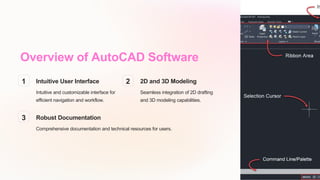
Overview of AutoCAD Software
1 Intuitive User Interface
Intuitive and customizable interface for
efficient navigation and workflow.
2 2D and 3D Modeling
Seamless integration of 2D drafting
and 3D modeling capabilities.
3 Robust Documentation
Comprehensive documentation and technical resources for users.
Key Features of AutoCAD EEE
Schematic Design
Powerful tools for creating
and editing electrical
schematics, including symbol
libraries and automated
wiring.
PCB Layout
Integrated PCB layout and
routing functionality for
seamless transition from
schematics to physical
design.
Analysis and Simulation
Advanced simulation and
analysis tools to validate
designs and ensure
compliance with industry
standards.
Electrical Design Workflow in AutoCAD
1 Concept Development
Visualize and refine your electrical system design ideas using AutoCAD's robust
sketching and modeling tools.
2 Documentation and Drafting
Generate detailed technical drawings, schematics, and wiring diagrams to
communicate your design effectively.
3 Validation and Optimization
Analyze and simulate your design to identify and resolve issues, ensuring optimal
performance and compliance.
Schematic Design and Symbol Libraries
Intelligent Symbols
Access a comprehensive library of electrical
symbols and components to build accurate
and professional-looking schematics.
Automated Wiring
Streamline the wiring process with
AutoCAD's intelligent wire routing and
connection tools.
Real-Time Validation
Detect and resolve design errors and
inconsistencies as you work, ensuring the
integrity of your schematics.
Customization
Easily create and modify custom symbols
and libraries to suit your specific design
requirements.
PCB Layout and Routing in AutoCAD
Multi-Layer
Design
Efficiently manage
complex multi-layer
PCB designs with
advanced layer
management tools.
Intelligent Routing
Streamline the PCB
routing process with
automated trace
placement and
optimization tools.
Design Rule
Checks
Ensure compliance
with industry
standards and design
guidelines through
comprehensive
design rule checks.
Component
Placement
Efficiently arrange
and position
components on the
PCB layout for
optimal performance
and
manufacturability.
Simulation and Analysis Tools
Electrical Simulation
Validate circuit behavior and performance through advanced simulation tools,
including SPICE-based analysis.
Thermal Analysis
Identify and address potential thermal issues in your design using comprehensive
thermal analysis capabilities.
Signal Integrity
Ensure signal integrity and minimize electromagnetic interference through signal
integrity analysis and optimization.
Conclusion and Resources
1 Comprehensive
Support
Access a wealth of
training materials,
tutorials, and technical
support to maximize
your productivity with
AutoCAD EEE.
2 Community and
Updates
Stay connected with
the AutoCAD
community and receive
regular software
updates to keep your
design process current.
3 Seamless
Integration
Leverage AutoCAD
EEE's integration with
other Autodesk
products for a truly
comprehensive design
workflow.

AutoCAD introduction for electrical.pptx

  • 1.
    Introduction to AutoCAD EEE AutoCADEEE is a powerful computer-aided design (CAD) software tailored for electrical and electronics engineering. It provides a comprehensive suite of tools to streamline the design process, from conceptualization to production.
  • 2.
    Overview of AutoCADSoftware 1 Intuitive User Interface Intuitive and customizable interface for efficient navigation and workflow. 2 2D and 3D Modeling Seamless integration of 2D drafting and 3D modeling capabilities. 3 Robust Documentation Comprehensive documentation and technical resources for users.
  • 3.
    Key Features ofAutoCAD EEE Schematic Design Powerful tools for creating and editing electrical schematics, including symbol libraries and automated wiring. PCB Layout Integrated PCB layout and routing functionality for seamless transition from schematics to physical design. Analysis and Simulation Advanced simulation and analysis tools to validate designs and ensure compliance with industry standards.
  • 4.
    Electrical Design Workflowin AutoCAD 1 Concept Development Visualize and refine your electrical system design ideas using AutoCAD's robust sketching and modeling tools. 2 Documentation and Drafting Generate detailed technical drawings, schematics, and wiring diagrams to communicate your design effectively. 3 Validation and Optimization Analyze and simulate your design to identify and resolve issues, ensuring optimal performance and compliance.
  • 5.
    Schematic Design andSymbol Libraries Intelligent Symbols Access a comprehensive library of electrical symbols and components to build accurate and professional-looking schematics. Automated Wiring Streamline the wiring process with AutoCAD's intelligent wire routing and connection tools. Real-Time Validation Detect and resolve design errors and inconsistencies as you work, ensuring the integrity of your schematics. Customization Easily create and modify custom symbols and libraries to suit your specific design requirements.
  • 6.
    PCB Layout andRouting in AutoCAD Multi-Layer Design Efficiently manage complex multi-layer PCB designs with advanced layer management tools. Intelligent Routing Streamline the PCB routing process with automated trace placement and optimization tools. Design Rule Checks Ensure compliance with industry standards and design guidelines through comprehensive design rule checks. Component Placement Efficiently arrange and position components on the PCB layout for optimal performance and manufacturability.
  • 7.
    Simulation and AnalysisTools Electrical Simulation Validate circuit behavior and performance through advanced simulation tools, including SPICE-based analysis. Thermal Analysis Identify and address potential thermal issues in your design using comprehensive thermal analysis capabilities. Signal Integrity Ensure signal integrity and minimize electromagnetic interference through signal integrity analysis and optimization.
  • 8.
    Conclusion and Resources 1Comprehensive Support Access a wealth of training materials, tutorials, and technical support to maximize your productivity with AutoCAD EEE. 2 Community and Updates Stay connected with the AutoCAD community and receive regular software updates to keep your design process current. 3 Seamless Integration Leverage AutoCAD EEE's integration with other Autodesk products for a truly comprehensive design workflow.