Attachment Upload Progress bar
●
Geminate comes with a feature to display a
progress bar while uploading an attachments in
discuss menu, formview mail chatter, and mail
compose wizard. It also provides you an option to
cancel any in-progress upload of attachment
which helps you to remove the attachment(s) that
you don't want to continue uploading or it was
selected for upload by mistake.
Editions Supported
●
1. Community Version
●
2. Enterprise Version
Available Key Features
●
Easy to cancel any on-going upload of attachment which
has been selected by mistake.
●
Easy to use and more user friendly.
●
Features progress bar in discuss menu and chat window.
●
Features progress bar in formview mail chatter.
●
Features progress bar in mail compose wizard.
●
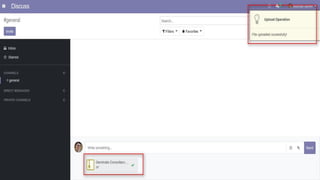
Features notification message after file has been
successfully uploaded or cancelled.
Screenshots
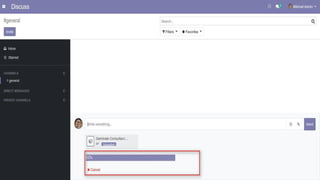
1) Progress bar in discuss menu :
2) Progress bar in chat window :
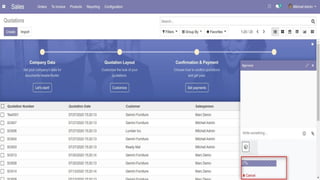
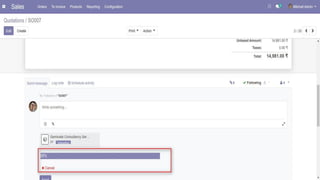
3) Progress bar in form view chatter :
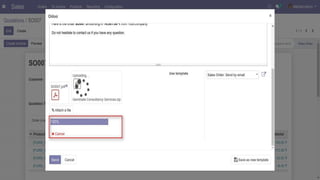
4) Progress bar in mail compose wizard :
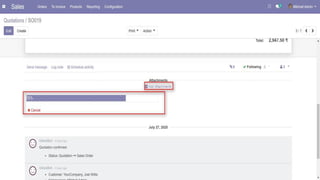
5) Progress bar in form view "Add Attachments":
6) File uploaded successfully notification:
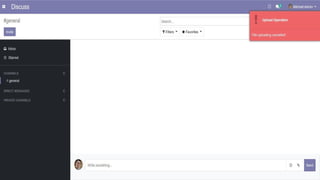
7) File uploading cancelled notification:
Find more Apps from Geminate
Our Services
Odoo Customization Odoo Implementation Odoo Integration Odoo Support
Complimentary Support
You will get 90 days free support for any doubt,
queries, and bug fixing (excluding data recovery)
or any type of issue related to this module.
Contact / Support
Need assistance?
Website Send Email Services
Attachment Upload Progress bar

Attachment Upload Progress bar

  • 2.
    Attachment Upload Progressbar ● Geminate comes with a feature to display a progress bar while uploading an attachments in discuss menu, formview mail chatter, and mail compose wizard. It also provides you an option to cancel any in-progress upload of attachment which helps you to remove the attachment(s) that you don't want to continue uploading or it was selected for upload by mistake.
  • 3.
    Editions Supported ● 1. CommunityVersion ● 2. Enterprise Version
  • 4.
    Available Key Features ● Easyto cancel any on-going upload of attachment which has been selected by mistake. ● Easy to use and more user friendly. ● Features progress bar in discuss menu and chat window. ● Features progress bar in formview mail chatter. ● Features progress bar in mail compose wizard. ● Features notification message after file has been successfully uploaded or cancelled.
  • 5.
    Screenshots 1) Progress barin discuss menu :
  • 7.
    2) Progress barin chat window :
  • 9.
    3) Progress barin form view chatter :
  • 11.
    4) Progress barin mail compose wizard :
  • 13.
    5) Progress barin form view "Add Attachments":
  • 15.
    6) File uploadedsuccessfully notification:
  • 17.
    7) File uploadingcancelled notification:
  • 19.
    Find more Appsfrom Geminate Our Services Odoo Customization Odoo Implementation Odoo Integration Odoo Support
  • 20.
    Complimentary Support You willget 90 days free support for any doubt, queries, and bug fixing (excluding data recovery) or any type of issue related to this module.
  • 21.
    Contact / Support Needassistance? Website Send Email Services