ATOM
A Hackable Text Editor
Presented by : Prakash Rajesh
Zodge
Guided by : Prof. S. M. Salve
Roll no. : B-41
What is ATOM?
❖ Customizable text-editor
❖ Free and open-source
❖ Cross-platform
❖ Build-in package manager
Literature survey
❖ K Sumangali, Lokesh Borra and Amol Suraj Mishra
-given comprehensive review on the open source text-editor ATOM in 2017
➢ Many added features like Developers tool, Integrated packages, etc.
➢ Easy to customize the UI
➢ It cannot handle bigger files than MB’s
Detailed
❖ How to install
➢ Go to https://atom.io
➢ Click the Download & Install it
❖ Cross platform editing, smart autocompletion, multiple panels, file browse
system, find and replace, etc
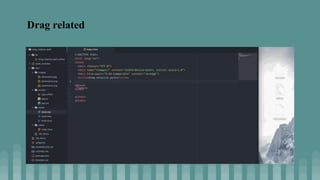
Drag related
Overview
Advantages
❖ Free & Open source
❖ Good looking interface
❖ Color coded syntax
Disadvantages
❖ High start-up time
❖ Sometimes ATOM closed suddenly and do not open again
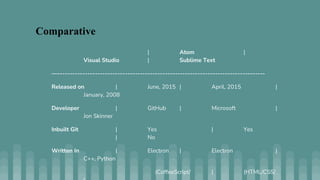
| Atom |
Visual Studio | Sublime Text
—-----------------------------------------------------------------------------------
Released on | June, 2015 | April, 2015 |
January, 2008
Developer | GitHub | Microsoft |
Jon Skinner
Inbuilt Git | Yes | Yes
| No
Written In | Electron | Electron |
C++, Python
(CoffeeScript/ | (HTML/CSS/
Comparative
Conclusion
❖ Atom has got many added features which are not available in other text editors
like Atom has the Developer Tools and Integrated Package Manager. I conclude
that atom has the potential to become the best editor of this world if it manages
to overcome it shortcomings.
References
❖ Atom (text editor) 2017 — https://en.wikipedia.org/wiki/Atom_(text_editor).
❖ Michael C J 2016 Best of Atom: Features, Plugins, Acting Like Sublime Text —
https://scotch.io/bar-talk/best-of-atom-features-plugins-acting-like-sublime-text
❖ Bottos B A and Kintala C M R 2016 Generation of syntax-directed editors with atom-
text editor- https://discuss.atom.io/t/syntax-highlighting-punctuation/16254
❖ Srivastava A and Thiagarajan J 2002 Effectively prioritizing tests in development
environment. In ACM SIGSOFT Software Engineering Notes 27 97-106 ACM

Atom IDE.pptx

  • 1.
    ATOM A Hackable TextEditor Presented by : Prakash Rajesh Zodge Guided by : Prof. S. M. Salve Roll no. : B-41
  • 2.
    What is ATOM? ❖Customizable text-editor ❖ Free and open-source ❖ Cross-platform ❖ Build-in package manager
  • 3.
    Literature survey ❖ KSumangali, Lokesh Borra and Amol Suraj Mishra -given comprehensive review on the open source text-editor ATOM in 2017 ➢ Many added features like Developers tool, Integrated packages, etc. ➢ Easy to customize the UI ➢ It cannot handle bigger files than MB’s
  • 4.
    Detailed ❖ How toinstall ➢ Go to https://atom.io ➢ Click the Download & Install it ❖ Cross platform editing, smart autocompletion, multiple panels, file browse system, find and replace, etc
  • 5.
  • 6.
  • 7.
    Advantages ❖ Free &Open source ❖ Good looking interface ❖ Color coded syntax Disadvantages ❖ High start-up time ❖ Sometimes ATOM closed suddenly and do not open again
  • 8.
    | Atom | VisualStudio | Sublime Text —----------------------------------------------------------------------------------- Released on | June, 2015 | April, 2015 | January, 2008 Developer | GitHub | Microsoft | Jon Skinner Inbuilt Git | Yes | Yes | No Written In | Electron | Electron | C++, Python (CoffeeScript/ | (HTML/CSS/ Comparative
  • 9.
    Conclusion ❖ Atom hasgot many added features which are not available in other text editors like Atom has the Developer Tools and Integrated Package Manager. I conclude that atom has the potential to become the best editor of this world if it manages to overcome it shortcomings.
  • 10.
    References ❖ Atom (texteditor) 2017 — https://en.wikipedia.org/wiki/Atom_(text_editor). ❖ Michael C J 2016 Best of Atom: Features, Plugins, Acting Like Sublime Text — https://scotch.io/bar-talk/best-of-atom-features-plugins-acting-like-sublime-text ❖ Bottos B A and Kintala C M R 2016 Generation of syntax-directed editors with atom- text editor- https://discuss.atom.io/t/syntax-highlighting-punctuation/16254 ❖ Srivastava A and Thiagarajan J 2002 Effectively prioritizing tests in development environment. In ACM SIGSOFT Software Engineering Notes 27 97-106 ACM