The document provides an overview of arrays as a fundamental data structure, detailing their characteristics, memory storage, and various operations such as creation, filling, traversing, searching, inserting, deleting, sorting, and merging. It explains both static and dynamic memory allocation, while emphasizing the fixed size nature of arrays and the inefficiencies involved in modifying elements. Additionally, example Java code snippets illustrate how to implement array operations, along with a discussion on the limitations of arrays leading to the consideration of linked lists.
![ It is one of the most important and well-known data
structures, and it is built and available in all programming
languages.
It has Sequential collection of elements of the same type.
It has Fixed size.
Array data structure simply means that it is a storage format
of the data in the memory in which the data are arranged in
contiguous blocks of memory.
Ex: Array A with 4
elements:
A[4]
A=[ 2, 3 ,4 ,5 ]
A[0]=2 , A[1]=3 , A[3]=4 , A[4]=5
2 3 4 5
0 3
1 2
Not Real
Address](https://image.slidesharecdn.com/arrary-241105030724-a6a63251/85/array-lecture-engineeringinformatin_technology-pptx-2-320.jpg)
![ Ex: Array A with 4
elements:
A[4]
A=[ 2, 3 ,4 ,5 ]
A[0]=2 , A[1]=3 , A[3]=4 ,
A[4]=5
2 3 4 5
0 3
1 2
Not Real
Address
Memor
y
103
102
101
100
Real
Address
5
4
3
2](https://image.slidesharecdn.com/arrary-241105030724-a6a63251/85/array-lecture-engineeringinformatin_technology-pptx-3-320.jpg)
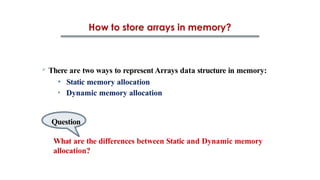
![ How to store array in memory:
1. You need to store an entire block the size of the array.
2. Sequential storage method.
3. The access method is random, depending on the access
equation.
Access equation for each element:
Loc ( A [ i ] ) = Real Address + (i *size) where: Real Address
is starting
address and size is element size.
Ex: Loc ( A [ 3 ] ) = 100 + (3 *1) = 103 = 5](https://image.slidesharecdn.com/arrary-241105030724-a6a63251/85/array-lecture-engineeringinformatin_technology-pptx-4-320.jpg)
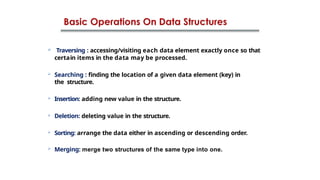

![ Creation of Array:
public class MyClass {
private static int SIZE;
private static int length = 0;
private static int[] items = new int[SIZE];
}
public class Array {
private int SIZE;
public Array(int arrsize)
{ this.SIZE = arrsize; } }
Item
s](https://image.slidesharecdn.com/arrary-241105030724-a6a63251/85/array-lecture-engineeringinformatin_technology-pptx-8-320.jpg)
![ Filling of Array:
public void Fill() {
System.out.println("how many items want to fill?");
int no_of_items = scanner.nextInt();
if (no_of_items > SIZE)
{
System.out.println("you cannot exceed the array size");
return;
}
else { for (int i = 0; i < no_of_items; i++)
{
System.out.println("Enter item no" + i);
items[i] = scanner.nextInt();
length++;
} } }](https://image.slidesharecdn.com/arrary-241105030724-a6a63251/85/array-lecture-engineeringinformatin_technology-pptx-9-320.jpg)
![ Display of Array:
public void Display()
{
System.out.println(" Display array content");
for (int i = 0; i < length; i++)
{
System.out.print(items[i] + "t");
}
}](https://image.slidesharecdn.com/arrary-241105030724-a6a63251/85/array-lecture-engineeringinformatin_technology-pptx-10-320.jpg)
![Search in Array:
public int Search(int key)
{
int index = -1;
for (int i = 0; i < length; i++)
{
if (items[i] == key)
{
index = i;
break;
}
}
return index;
}](https://image.slidesharecdn.com/arrary-241105030724-a6a63251/85/array-lecture-engineeringinformatin_technology-pptx-11-320.jpg)
![ Appending to Array:
public void append(int newItem) {
if (length < SIZE) {
items[length] = newItem;
length++;
System.out.println("Item " + newItem + " appended to the
array.");
} else {
System.out.println("Array is full");
}
}](https://image.slidesharecdn.com/arrary-241105030724-a6a63251/85/array-lecture-engineeringinformatin_technology-pptx-12-320.jpg)
![ Inserting to the
Array:
Array size = 7
Length = 5
Insert (3,90)
Items[3] = 90
0 1 2 3 4 5 6
20 30 40 50 60
0 1 2 3 4 5 6
20 30 40 50 60
Insert (3,90)
Shift
right
for (int i = length; i > index; i--)
{
items[i] = items[i - 1];
}
items[index] = newitem;
length++;
Insert
(3,90)](https://image.slidesharecdn.com/arrary-241105030724-a6a63251/85/array-lecture-engineeringinformatin_technology-pptx-13-320.jpg)
![ Inserting to Array:
public void insert(int index, int newItem) {
if (index >= 0 && index < size) {
for (int i = length; i > index; i--) {
items[i] = items[i - 1];
}
items[index] = newItem;
length++;
}
else
{
System.out.println("error index out of range");
}
}](https://image.slidesharecdn.com/arrary-241105030724-a6a63251/85/array-lecture-engineeringinformatin_technology-pptx-14-320.jpg)
![ Deleting from
Array:
Array size = 7
Length = 5
Delete (3)
Item[3] =
null
0 1 2 3 4 5 6
20 30 40 50 60 70
0 1 2 3 4 5 6
20 30 40 60 70
Delete (3)=50
Shift
left
for(inti=index;i<length-1;i++)
{
items[i]=items[i+1];
}
length--;
Delete (3)](https://image.slidesharecdn.com/arrary-241105030724-a6a63251/85/array-lecture-engineeringinformatin_technology-pptx-15-320.jpg)
![
Deleting from Array:
public void delete(int index) {
if (index >= 0 && index < SIZE)
{
for (int i = index; i < length - 1; i++)
{
items[i] = items[i + 1];
}
length--;
}
else
{
System.out.println("Index out of Array Range");
}
}](https://image.slidesharecdn.com/arrary-241105030724-a6a63251/85/array-lecture-engineeringinformatin_technology-pptx-16-320.jpg)

![import java.util.Scanner;
public class ArrayADT {
static int SIZE; // The size of the array
static int length = 0; // The current number of elements in the array
static int[] items; // Array declaration
/*--------Create dynamic array-------------------*/
public static void createArray(int arrsize) {
SIZE = arrsize;
items = new int[SIZE]; // Allocate memory for the array
}](https://image.slidesharecdn.com/arrary-241105030724-a6a63251/85/array-lecture-engineeringinformatin_technology-pptx-18-320.jpg)
![/* ----------------Fill Operation---------------- */
public static void fill() {
Scanner scanner = new Scanner(System.in);
System.out.println("How many items do you want to fill?");
int no_of_items = scanner.nextInt();
if (no_of_items > SIZE) {
System.out.println("You cannot exceed the array size.");
return;
}
for (int i = 0; i < no_of_items; i++) {
System.out.println("Enter item no " + i + ":");
items[i] = scanner.nextInt();
length++;
}
}](https://image.slidesharecdn.com/arrary-241105030724-a6a63251/85/array-lecture-engineeringinformatin_technology-pptx-19-320.jpg)
![/* ----------------Display Operation---------------- */
public static void display() {
System.out.println("Displaying array content:");
for (int i = 0; i < length; i++) {
System.out.print(items[i] + "t");
}
System.out.println();
}
/* ----------------Get size Operation---------------- */
public static int getSize() {
return SIZE;
}
/* ----------------Get length Operation---------------- */
public static int getLength() {
return length;
}](https://image.slidesharecdn.com/arrary-241105030724-a6a63251/85/array-lecture-engineeringinformatin_technology-pptx-20-320.jpg)
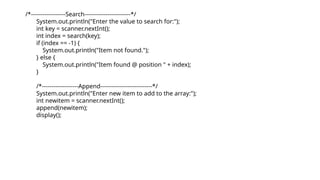
![/* ----------------Search Operation---------------- */
public static int search(int key) {
for (int i = 0; i < length; i++) {
if (items[i] == key) {
return i;
}
}
return -1;
}
/*-------------------Append Operation---------------------*/
public static void append(int newitem) {
if (length < SIZE) {
items[length] = newitem;
length++;
} else {
System.out.println("Array is full.");
}
}](https://image.slidesharecdn.com/arrary-241105030724-a6a63251/85/array-lecture-engineeringinformatin_technology-pptx-21-320.jpg)
![/*-------Insert operation into specific index----------*/
public static void insert(int index, int newitem) {
if (index >= 0 && index < SIZE) {
for (int i = length; i > index; i--) {
items[i] = items[i - 1];
}
items[index] = newitem;
length++;
} else {
System.out.println("Error - Index out of
Range.");
}
}](https://image.slidesharecdn.com/arrary-241105030724-a6a63251/85/array-lecture-engineeringinformatin_technology-pptx-22-320.jpg)
![/*-------Delete operation from specific index----------*/
public static void delete(int index) {
if (index >= 0 && index < length) {
for (int i = index; i < length - 1; i++) {
items[i] = items[i + 1];
}
length--;
} else {
System.out.println("Index out of Array Range.");
}
}](https://image.slidesharecdn.com/arrary-241105030724-a6a63251/85/array-lecture-engineeringinformatin_technology-pptx-23-320.jpg)
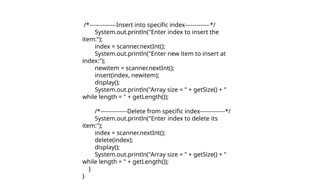
![public static void main(String[] args) {
Scanner scanner = new Scanner(System.in);
System.out.println("Hello, this is Array ADT.");
System.out.println("Enter the Array Size:");
int arraysize = scanner.nextInt();
createArray(arraysize);
fill();
System.out.println("Array size = " + getSize() + " while length = " + getLength());
display();](https://image.slidesharecdn.com/arrary-241105030724-a6a63251/85/array-lecture-engineeringinformatin_technology-pptx-24-320.jpg)


![Lect 1 Number systems and base conversions. [Autosaved].pptx](https://cdn.slidesharecdn.com/ss_thumbnails/lect1numbersystemsandbaseconversions-260111134109-67c2d865-thumbnail.jpg?width=640&height=640&fit=bounds)


