서울시 앱 공모전 AR tool 분석
(Vuforia)
최성식, 김구현, 오지은
Contents
1. AR?
2. AR tools
3. Vuforia?
4. Vuforia 5.5 SDK(android sample)
① Image targets
② User defined targets
③ Cloud recognition
5. Vuforia license & target manager
① cloud
② device
6. 분석결과
7. Reference
AR
• Augmented Reality (증강 현실)
• (위치정보 + 나침반 + 기울기) + 영상처리
위치정보 – GPS
나침반 – 지자기 센서
기울기 – 자이로(각속도) & 중력(가속도)센서
영상처리 – AR tool
AR tools
AR tool - Vuforia
Vuforia?
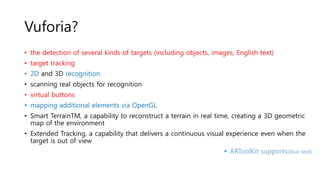
• the detection of several kinds of targets (including objects, images, English text)
• target tracking
• 2D and 3D recognition
• scanning real objects for recognition
• virtual buttons
• mapping additional elements via OpenGL
• Smart TerrainTM, a capability to reconstruct a terrain in real time, creating a 3D geometric
map of the environment
• Extended Tracking, a capability that delivers a continuous visual experience even when the
target is out of view
 ARToolKit supports(blue text)
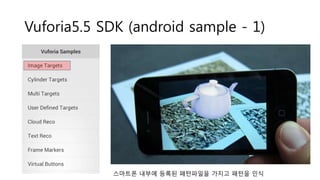
Vuforia5.5 SDK (android sample - 1)
스마트폰 내부에 등록된 패턴파일을 가지고 패턴을 인식
Vuforia5.5 SDK (android sample - 2)
① 카메라 뷰가 나온다.
② 카메라버튼(사진찍기)버튼을 누른다.
③ 촬영된 이미지를 디바이스 내에서
augmentable 평가 후 target image화 하여 임
시로 저장한다.(최대 5개)
④ 카메라 뷰 상태에서 저장된 target image가 보
이면 해당 뷰에 주전자 texture를 띄운다.
 원하시면 직접 시연..
Vuforia5.5 SDK (android sample - 3)
뷰포리아 클라우드에 접근하여 등록된 패턴을 인식
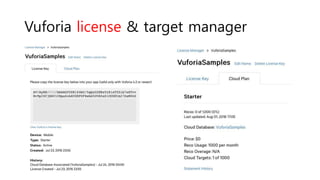
Vuforia license & target manager
Vuforia license & target manager(cloud)
Rating : augmentable
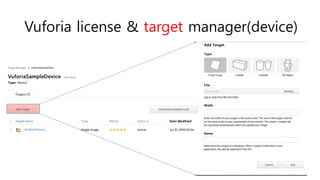
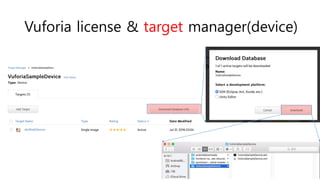
Vuforia license & target manager(device)
분석결과
• 촬영한 이미지를 타겟이미지로 만드는 과정을 vuforia cloud를 이용하는
것과, 디바이스 내에서 타겟이미지를 만든 후 임의의 서버에 저장하는 것
에 대한 효율성 비교가 필요.
Vuforia Web Service API분석 필요
Vuforia cloud사용 시 이미지 분석시간이 생각보다 오래걸림.
1000 recognition/month 에 대한 압박(?)
결론적으로 임의의 서버구성이 필요할 듯..
Reference
• Vuforia Developer
https://developer.vuforia.com
• Top 5 AR tools
http://cases.azoft.com/top-5-tools-creating-augmented-
reality-apps/
AR tool - Vuforia

AR tool - Vuforia

  • 1.
    서울시 앱 공모전AR tool 분석 (Vuforia) 최성식, 김구현, 오지은
  • 2.
    Contents 1. AR? 2. ARtools 3. Vuforia? 4. Vuforia 5.5 SDK(android sample) ① Image targets ② User defined targets ③ Cloud recognition 5. Vuforia license & target manager ① cloud ② device 6. 분석결과 7. Reference
  • 3.
    AR • Augmented Reality(증강 현실) • (위치정보 + 나침반 + 기울기) + 영상처리 위치정보 – GPS 나침반 – 지자기 센서 기울기 – 자이로(각속도) & 중력(가속도)센서 영상처리 – AR tool
  • 4.
  • 5.
    Vuforia? • the detectionof several kinds of targets (including objects, images, English text) • target tracking • 2D and 3D recognition • scanning real objects for recognition • virtual buttons • mapping additional elements via OpenGL • Smart TerrainTM, a capability to reconstruct a terrain in real time, creating a 3D geometric map of the environment • Extended Tracking, a capability that delivers a continuous visual experience even when the target is out of view  ARToolKit supports(blue text)
  • 6.
    Vuforia5.5 SDK (androidsample - 1) 스마트폰 내부에 등록된 패턴파일을 가지고 패턴을 인식
  • 7.
    Vuforia5.5 SDK (androidsample - 2) ① 카메라 뷰가 나온다. ② 카메라버튼(사진찍기)버튼을 누른다. ③ 촬영된 이미지를 디바이스 내에서 augmentable 평가 후 target image화 하여 임 시로 저장한다.(최대 5개) ④ 카메라 뷰 상태에서 저장된 target image가 보 이면 해당 뷰에 주전자 texture를 띄운다.  원하시면 직접 시연..
  • 8.
    Vuforia5.5 SDK (androidsample - 3) 뷰포리아 클라우드에 접근하여 등록된 패턴을 인식
  • 9.
    Vuforia license &target manager
  • 10.
    Vuforia license &target manager
  • 11.
    Vuforia license &target manager(cloud)
  • 12.
    Vuforia license &target manager(cloud) Rating : augmentable
  • 13.
    Vuforia license &target manager(device)
  • 14.
    Vuforia license &target manager(device)
  • 15.
    Vuforia license &target manager(device)
  • 16.
    분석결과 • 촬영한 이미지를타겟이미지로 만드는 과정을 vuforia cloud를 이용하는 것과, 디바이스 내에서 타겟이미지를 만든 후 임의의 서버에 저장하는 것 에 대한 효율성 비교가 필요. Vuforia Web Service API분석 필요 Vuforia cloud사용 시 이미지 분석시간이 생각보다 오래걸림. 1000 recognition/month 에 대한 압박(?) 결론적으로 임의의 서버구성이 필요할 듯..
  • 17.
    Reference • Vuforia Developer https://developer.vuforia.com •Top 5 AR tools http://cases.azoft.com/top-5-tools-creating-augmented- reality-apps/

Editor's Notes

  • #4 각속도 – 시간당 회전하는 각도
  • #8 최대 5개는 앱내에서 5개로 제한을 걸어두었고, 5개가 넘어가면 가장 오래된 타겟이미지 삭제
  • #9 최대 5개는 앱내에서 5개로 제한을 걸어두었고, 5개가 넘어가면 가장 오래된 타겟이미지 삭제