Client/Server Technology
client/server architecture
 A network architecture in which each computer
or process on the network is either a client or a
server.
 Servers are powerful computers or processes
dedicated to managing disk drives (file servers),
printers (print servers), or network traffic
(network servers ).
 Clients are PCs or workstations on which users
run applications. Clients rely on servers for
resources, such as files, devices, and even
processing power.
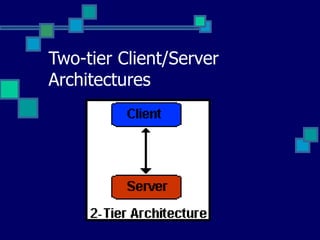
Two-tier Client/Server
Architectures
Two-tier Client/Server
Architectures
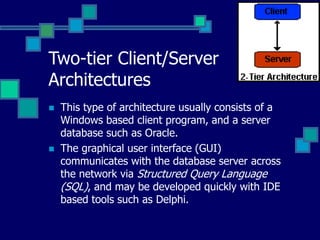
 This type of architecture usually consists of a
Windows based client program, and a server
database such as Oracle.
 The graphical user interface (GUI)
communicates with the database server across
the network via Structured Query Language
(SQL), and may be developed quickly with IDE
based tools such as Delphi.
Limitations of a two-tier
application
 The limitations of a two-tier application become
evident after 100 to 150 users log in. Because
business logic is processed on the client machine,
large data sets are downloaded across the network
and calculated or summarized by the client
application.
 This type of architecture is very taxing on network
infrastructure, and to some degree on the database
server. Still, two-tier applications are well suited for
small to midsize user groups, and are still
developed widely today.
Advantages of client/server
computing
 Client/server computing facilitates the use of GUI
that is available on workstations.
 The visual presentation in turn increases the
productivity of the end user as it is very easy to
use.
 Investment in training and education can be
leveraged better and application development will
be faster.
 Client/server environment exploits the power of the
workstations and due to the fact that client and
servers might run on different software and
hardware platforms it encourages the acceptance of
open systems.
1-tier architecture
 A 1-tier architecture is the most basic
setup because it involves a single tier on
a single machine.
 Think of an application that runs on your
PC: Everything you need to run the
application (data storage, business logic,
user interface, and so forth) is wrapped
up together.
An example of a 1-tiered
application
 An example of a 1-tiered application is a basic
word processor or a desktop file utility program.
Although the 1-tier approach is a simple design
that's easy to distribute, it does not scale well.
 In addition, because you are limited to running
the entire application (including the user
interface) on single machine, a 1-tier
architecture does not adequately address the
needs of a web-based application.
2-tier architecture
 A 2-tier architecture is the basic terminal-to-
server or browser-to-server relationship. You
could have a "smart" client that performs most of
the work talking to a "dumb" server; or, more
commonly, a "dumb" client talking to a "smart"
server. Sometimes you have both. In essence,
the client handles the display, the server
handles the database, and the business logic is
contained on one or both of the two tiers.
An example of a 2-tier
approach
 An example of a 2-tier approach is the basic
web model where a web server serves pages to
a web browser. Another example of a 2-tier
approach is a specialized terminal-to-server
application.
 Although the 2-tier approach increases
scalability and separates the display and
database layers, it does not truly separate the
application into highly specialized, functional
layers. Because of this lack of specialization,
most applications quickly outgrow this model.
3-Tier Architecture
A 3-tier architecture
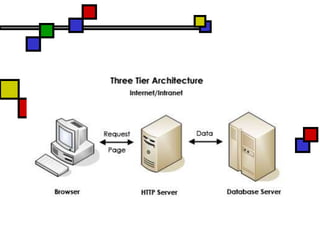
 A 3-tier architecture is the most common
approach used for web applications today. In the
typical example of this model, the web browser
acts as the client, an application server (such as
Macromedia ColdFusion) handles the business
logic, and a separate tier (such as Oracle or
MySQL database servers) handles database
functions.
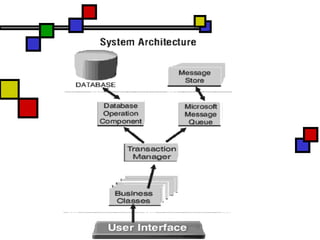
3-tier client/server
environment.
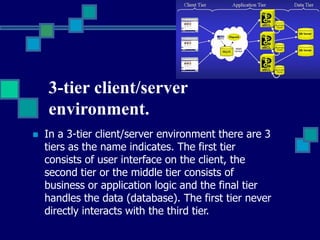
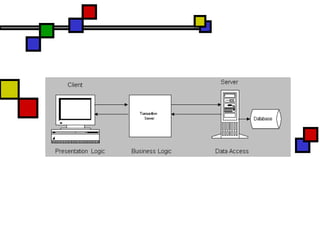
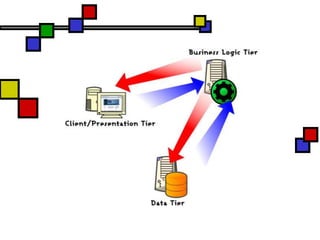
 In a 3-tier client/server environment there are 3
tiers as the name indicates. The first tier
consists of user interface on the client, the
second tier or the middle tier consists of
business or application logic and the final tier
handles the data (database). The first tier never
directly interacts with the third tier.
3-tier architecture has several
advantages:
 Clear separation of user interface control and
data presentation from application logic
 Centralized data storage, easy to manage
 Scalable, load balancing
 Change management: simpler and faster to
exchange a component on the server side
Appathika.ppt

Appathika.ppt

  • 1.
  • 2.
    client/server architecture  Anetwork architecture in which each computer or process on the network is either a client or a server.  Servers are powerful computers or processes dedicated to managing disk drives (file servers), printers (print servers), or network traffic (network servers ).  Clients are PCs or workstations on which users run applications. Clients rely on servers for resources, such as files, devices, and even processing power.
  • 3.
  • 4.
    Two-tier Client/Server Architectures  Thistype of architecture usually consists of a Windows based client program, and a server database such as Oracle.  The graphical user interface (GUI) communicates with the database server across the network via Structured Query Language (SQL), and may be developed quickly with IDE based tools such as Delphi.
  • 5.
    Limitations of atwo-tier application  The limitations of a two-tier application become evident after 100 to 150 users log in. Because business logic is processed on the client machine, large data sets are downloaded across the network and calculated or summarized by the client application.  This type of architecture is very taxing on network infrastructure, and to some degree on the database server. Still, two-tier applications are well suited for small to midsize user groups, and are still developed widely today.
  • 6.
    Advantages of client/server computing Client/server computing facilitates the use of GUI that is available on workstations.  The visual presentation in turn increases the productivity of the end user as it is very easy to use.  Investment in training and education can be leveraged better and application development will be faster.  Client/server environment exploits the power of the workstations and due to the fact that client and servers might run on different software and hardware platforms it encourages the acceptance of open systems.
  • 7.
    1-tier architecture  A1-tier architecture is the most basic setup because it involves a single tier on a single machine.  Think of an application that runs on your PC: Everything you need to run the application (data storage, business logic, user interface, and so forth) is wrapped up together.
  • 8.
    An example ofa 1-tiered application  An example of a 1-tiered application is a basic word processor or a desktop file utility program. Although the 1-tier approach is a simple design that's easy to distribute, it does not scale well.  In addition, because you are limited to running the entire application (including the user interface) on single machine, a 1-tier architecture does not adequately address the needs of a web-based application.
  • 9.
    2-tier architecture  A2-tier architecture is the basic terminal-to- server or browser-to-server relationship. You could have a "smart" client that performs most of the work talking to a "dumb" server; or, more commonly, a "dumb" client talking to a "smart" server. Sometimes you have both. In essence, the client handles the display, the server handles the database, and the business logic is contained on one or both of the two tiers.
  • 10.
    An example ofa 2-tier approach  An example of a 2-tier approach is the basic web model where a web server serves pages to a web browser. Another example of a 2-tier approach is a specialized terminal-to-server application.  Although the 2-tier approach increases scalability and separates the display and database layers, it does not truly separate the application into highly specialized, functional layers. Because of this lack of specialization, most applications quickly outgrow this model.
  • 11.
  • 13.
    A 3-tier architecture A 3-tier architecture is the most common approach used for web applications today. In the typical example of this model, the web browser acts as the client, an application server (such as Macromedia ColdFusion) handles the business logic, and a separate tier (such as Oracle or MySQL database servers) handles database functions.
  • 15.
    3-tier client/server environment.  Ina 3-tier client/server environment there are 3 tiers as the name indicates. The first tier consists of user interface on the client, the second tier or the middle tier consists of business or application logic and the final tier handles the data (database). The first tier never directly interacts with the third tier.
  • 17.
    3-tier architecture hasseveral advantages:  Clear separation of user interface control and data presentation from application logic  Centralized data storage, easy to manage  Scalable, load balancing  Change management: simpler and faster to exchange a component on the server side