/etc/apache/httpd.conf :

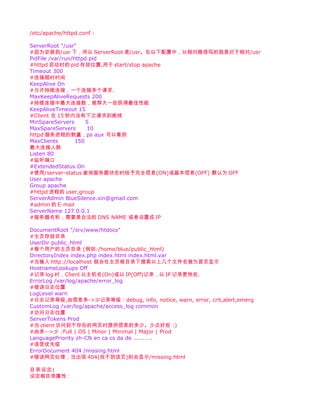
ServerRoot "/usr"
#因为安装到/usr 下,所以 ServerRoot 是/usr。在以下配置中,以相对路径写的就是对于相对/usr
PidFile /var/run/httpd.pid
#httpd 启动时的 pid 存放位置,用于 start/stop apache
Timeout 300
#连接超时时间
KeepAlive On
#允许持续连接,一个连接多个请求.
MaxKeepAliveRequests 200
#持续连接中最大连接数,推荐大一些获得最佳性能
KeepAliveTimeout 15
#Client 在 15 秒内没有下次请求则断线
MinSpareServers       5
MaxSpareServers       10
httpd 服务进程的数量,ps aux 可以看到
MaxClients        150
最大连接人数
Listen 80
#监听端口
#ExtendedStatus On
#使用/server-status 查询服务器状态时给予完全信息(ON)或基本信息(OFF) 默认为 OFF
User apache
Group apache
#httpd 进程的 user,group
ServerAdmin BlueSilence.xin@gmail.com
#admin 的 E-mail
ServerName 127.0.0.1
#服务器名称,需要是合法的 DNS NAME 或者设置成 IP

DocumentRoot "/srv/www/htdocs"
#主页存放目录
UserDir public_html
#每个用户的主页目录 (例如:/home/blue/public_html)
DirectoryIndex index.php index.html index.html.var
#当输入 http://localhost 就会在主页根目录下搜索以上几个文件名做为首页显示
HostnameLookups Off
#记录 log 时,Client 以主机名(On)或以 IP(Off)记录,以 IP 记录更快些.
ErrorLog /var/log/apache/error_log
#错误日志位置
LogLevel warn
#日志记录等级,由信息多->少记录等级:debug, info, notice, warn, error, crit,alert,emerg
CustomLog /var/log/apache/access_log common
#访问日志位置
ServerTokens Prod
#当 client 访问到不存在的网页时提供信息的多少。少点好些 :)
#由多-->少 :Full | OS | Minor | Minimal | Major | Prod
LanguagePriority zh-CN en ca cs da de ..........
#语言优先级
ErrorDocument 404 /missing.html
#错误网页处理,当出现 404(找不到该页)则会显示/missing.html

目录设定 :
设定根目录属性:
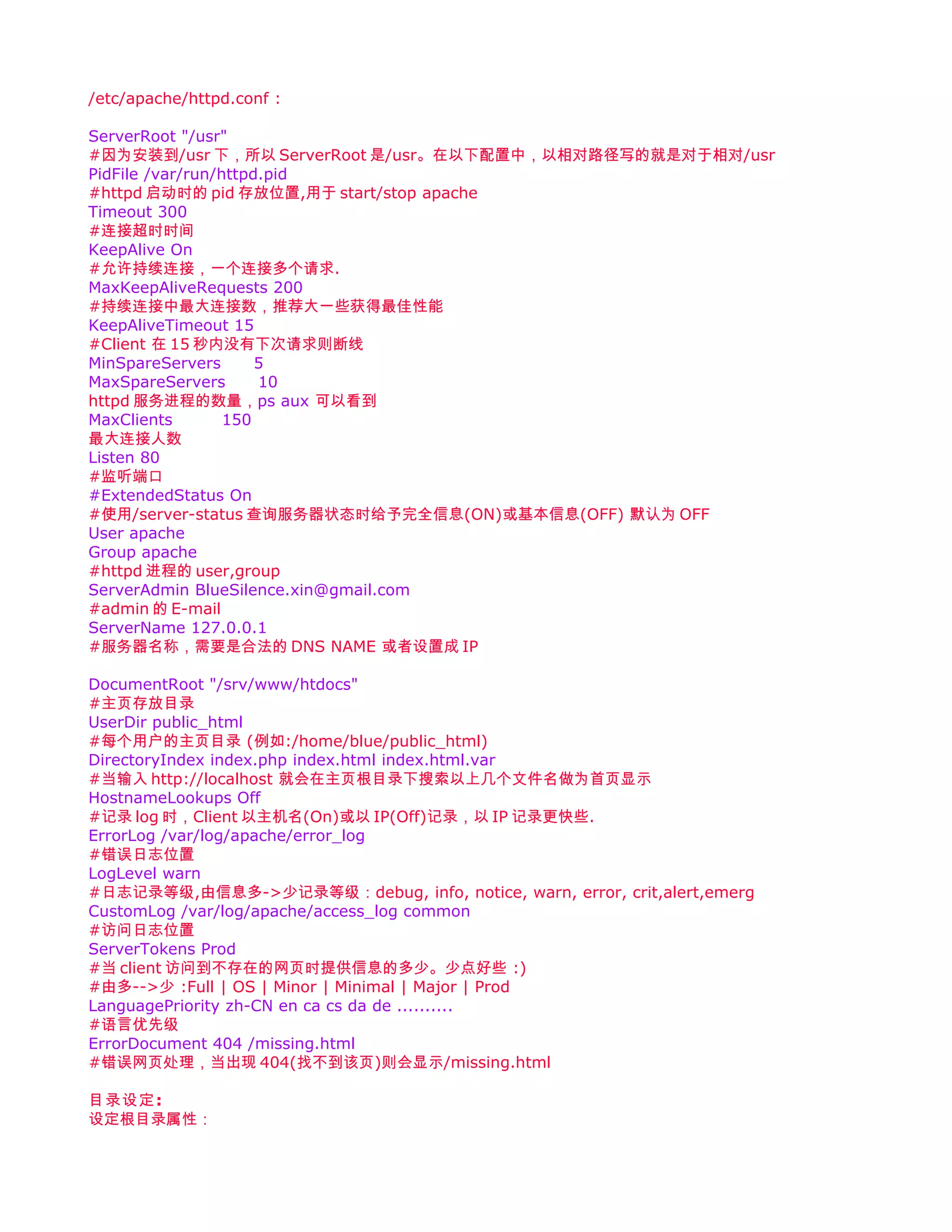
Options FollowSymLinks
  AllowOverride None

Options 属性:
Indexes     当该目录下没有 index.*时则以 ftp-style 列出该目录下所有文件
Includes    Allow server-wide includes
FollowSymLinks 当该目录下软连接的文件/目录链接到外部目录时,仍然可以正常显示。
MultiViews  由一个*.var 管理同一网页的多种语言版本,如 apache 默认主页多种语言的 index.html
ExecCGI      允许执行 CGI 程序
ALL        开启除 MultiViews 之外的属性
None        禁止所有属性

AllowOverride 是否允许使用.htaccess 覆盖某些设定(All None FileInfo AuthConfig Limit)

设定/srv/www/htdocs/ 目录(根目录)属性:


Options Indexes FollowSymLinks
AllowOverride None
Order allow,deny
   Allow from all


Order allow,deny : 控制访问权限
Order deny,allow
deny from test.org 拒绝 test.org 访问
deny from 192.168.0.100 拒绝 192.168.0.100 访问
allow from 192.168.0.1 允许 192.168.0.1 访问

Alias /icons/ "/srv/www/icons/"
语法: Alias fakename realname
设置目录的别名,这样当输入 http://localhost/icons/ 就可以访问到/srv/www/icons/
注意 icons 结尾的"/" 应在 fakename realname 成对出现,要么全有,要么全没有.
有"/"时需要输入 http://localhost/icons/ 才可以正常访问

ScriptAlias /cgi-bin/ "/srv/www/cgi-bin/"
设置可执行程序别名,与 Alias 类似。
当 Client 请求 Alias realname 时,server 直接以 document 形式传送 Client
而 ScroptAlias 则是 server 执行 realname 的 script 程序后将结果传送给 Client

服务器的状态,信息:
通过 http://localhost/server-status 访问

  SetHandler server-status
  Order deny,allow
  Deny from all
  Allow from 127.0.0.1

通过 http://localhost/server-info 访问

  SetHandler server-info
  Order deny,allow
  Deny from all
  Allow from 127.0.0.1
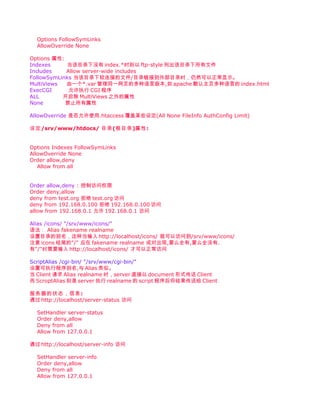
.cgi .pl 程序可执行的三种方法:
1:使用 ScriptAlias,httpd.conf 中加入:
ScriptAlias /my-cgi/ "/srv/www/cgi"
这样就可以以 http://localhost/my-cgi/xxx.cgi xxx.pl 执行/srv/www/cgi/下的.cgi,.pl 程序了。

2: 使用 sethandler cgi-scripts,httpd.conf 中加入:
Alias /my-cgi/ "/srv/www/cgi"

 Options ExecCGI
 Sethandler cgi-script


3:使用 Options 的 ExecCGI 属性 :
将 httpd.conf 中的 AddHandler cgi-script .cgi .pl 注释拿掉,加上.pl
给予/srv/www/cgi/ 执行 CGI 权限:
Alias /my-cgi/ "/srv/www/cgi"

 Options ExecCGI
 Allowoverride none
 Order allow,deny
 allow from all


认证网页:


 Options FollowSymlinks Indexes ExecCGI
 AllowOverride None
 Order Allow,Deny
 Allow From all
 AuthName "private directory "
 AuthType Basic
 AuthUserFile /etc/apace/apache.passwd
 Require valid-user


AuthNmae :      认证窗口上的标题
AuthType :     认证类型,apache 有几种认证方式,Basic 为最基本的。
AuthUserFIle : 认证密码存放位置
Require : 认证档案中允许使用的用户
valid-user : 认证档案中所有的用户都可以使用通过认证进入该目录
如只想允许某个用户则使用 Require user username1 username2

建立认证密码文件:
#cd /etc/apache/
#htpasswd -c apache.passwd blue
New password:
Re-type new password:
Adding password for user blue
#
-c : 如果没有 apache.passwd 则创建它
增加认证用户:
#htpasswd apache.passwd silence
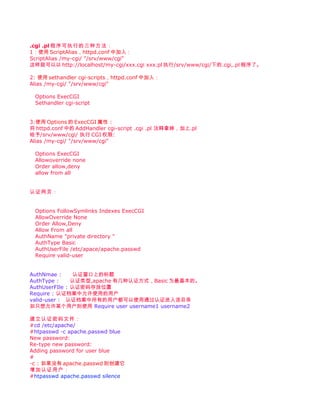
....
#apachectl restart
#firefox http://localhost/my-cgi/
要求密码才可以进入喽 :)

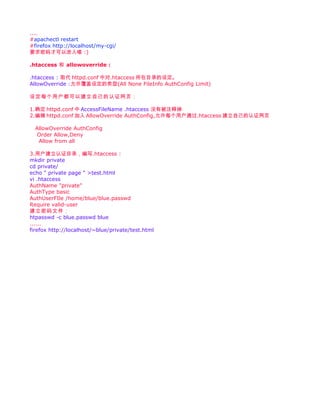
.htaccess 和 allowoverride :

.htaccess : 取代 httpd.conf 中对.htaccess 所在目录的设定。
AllowOverride :允许覆盖设定的类型(All None FileInfo AuthConfig Limit)

设定每个用户都可以建立自己的认证网页:

1.确定 httpd.conf 中 AccessFileName .htaccess 没有被注释掉
2.编辑 httpd.conf 加入 AllowOverride AuthConfig,允许每个用户通过.htaccess 建立自己的认证网页

  AllowOverride AuthConfig
   Order Allow,Deny
   Allow from all

3.用户建立认证目录,编写.htaccess :
mkdir private
cd private/
echo " private page " >test.html
vi .htaccess
AuthName "private"
AuthType basic
AuthUserFIle /home/blue/blue.passwd
Require valid-user
建立密码文件:
htpasswd -c blue.passwd blue
......
firefox http://localhost/~blue/private/test.html

Apache配置文件说明

  • 1.
    /etc/apache/httpd.conf : ServerRoot "/usr" #因为安装到/usr下,所以 ServerRoot 是/usr。在以下配置中,以相对路径写的就是对于相对/usr PidFile /var/run/httpd.pid #httpd 启动时的 pid 存放位置,用于 start/stop apache Timeout 300 #连接超时时间 KeepAlive On #允许持续连接,一个连接多个请求. MaxKeepAliveRequests 200 #持续连接中最大连接数,推荐大一些获得最佳性能 KeepAliveTimeout 15 #Client 在 15 秒内没有下次请求则断线 MinSpareServers 5 MaxSpareServers 10 httpd 服务进程的数量,ps aux 可以看到 MaxClients 150 最大连接人数 Listen 80 #监听端口 #ExtendedStatus On #使用/server-status 查询服务器状态时给予完全信息(ON)或基本信息(OFF) 默认为 OFF User apache Group apache #httpd 进程的 user,group ServerAdmin BlueSilence.xin@gmail.com #admin 的 E-mail ServerName 127.0.0.1 #服务器名称,需要是合法的 DNS NAME 或者设置成 IP DocumentRoot "/srv/www/htdocs" #主页存放目录 UserDir public_html #每个用户的主页目录 (例如:/home/blue/public_html) DirectoryIndex index.php index.html index.html.var #当输入 http://localhost 就会在主页根目录下搜索以上几个文件名做为首页显示 HostnameLookups Off #记录 log 时,Client 以主机名(On)或以 IP(Off)记录,以 IP 记录更快些. ErrorLog /var/log/apache/error_log #错误日志位置 LogLevel warn #日志记录等级,由信息多->少记录等级:debug, info, notice, warn, error, crit,alert,emerg CustomLog /var/log/apache/access_log common #访问日志位置 ServerTokens Prod #当 client 访问到不存在的网页时提供信息的多少。少点好些 :) #由多-->少 :Full | OS | Minor | Minimal | Major | Prod LanguagePriority zh-CN en ca cs da de .......... #语言优先级 ErrorDocument 404 /missing.html #错误网页处理,当出现 404(找不到该页)则会显示/missing.html 目录设定 : 设定根目录属性:
  • 2.
    Options FollowSymLinks AllowOverride None Options 属性: Indexes 当该目录下没有 index.*时则以 ftp-style 列出该目录下所有文件 Includes Allow server-wide includes FollowSymLinks 当该目录下软连接的文件/目录链接到外部目录时,仍然可以正常显示。 MultiViews 由一个*.var 管理同一网页的多种语言版本,如 apache 默认主页多种语言的 index.html ExecCGI 允许执行 CGI 程序 ALL 开启除 MultiViews 之外的属性 None 禁止所有属性 AllowOverride 是否允许使用.htaccess 覆盖某些设定(All None FileInfo AuthConfig Limit) 设定/srv/www/htdocs/ 目录(根目录)属性: Options Indexes FollowSymLinks AllowOverride None Order allow,deny Allow from all Order allow,deny : 控制访问权限 Order deny,allow deny from test.org 拒绝 test.org 访问 deny from 192.168.0.100 拒绝 192.168.0.100 访问 allow from 192.168.0.1 允许 192.168.0.1 访问 Alias /icons/ "/srv/www/icons/" 语法: Alias fakename realname 设置目录的别名,这样当输入 http://localhost/icons/ 就可以访问到/srv/www/icons/ 注意 icons 结尾的"/" 应在 fakename realname 成对出现,要么全有,要么全没有. 有"/"时需要输入 http://localhost/icons/ 才可以正常访问 ScriptAlias /cgi-bin/ "/srv/www/cgi-bin/" 设置可执行程序别名,与 Alias 类似。 当 Client 请求 Alias realname 时,server 直接以 document 形式传送 Client 而 ScroptAlias 则是 server 执行 realname 的 script 程序后将结果传送给 Client 服务器的状态,信息: 通过 http://localhost/server-status 访问 SetHandler server-status Order deny,allow Deny from all Allow from 127.0.0.1 通过 http://localhost/server-info 访问 SetHandler server-info Order deny,allow Deny from all Allow from 127.0.0.1
  • 3.
    .cgi .pl 程序可执行的三种方法: 1:使用ScriptAlias,httpd.conf 中加入: ScriptAlias /my-cgi/ "/srv/www/cgi" 这样就可以以 http://localhost/my-cgi/xxx.cgi xxx.pl 执行/srv/www/cgi/下的.cgi,.pl 程序了。 2: 使用 sethandler cgi-scripts,httpd.conf 中加入: Alias /my-cgi/ "/srv/www/cgi" Options ExecCGI Sethandler cgi-script 3:使用 Options 的 ExecCGI 属性 : 将 httpd.conf 中的 AddHandler cgi-script .cgi .pl 注释拿掉,加上.pl 给予/srv/www/cgi/ 执行 CGI 权限: Alias /my-cgi/ "/srv/www/cgi" Options ExecCGI Allowoverride none Order allow,deny allow from all 认证网页: Options FollowSymlinks Indexes ExecCGI AllowOverride None Order Allow,Deny Allow From all AuthName "private directory " AuthType Basic AuthUserFile /etc/apace/apache.passwd Require valid-user AuthNmae : 认证窗口上的标题 AuthType : 认证类型,apache 有几种认证方式,Basic 为最基本的。 AuthUserFIle : 认证密码存放位置 Require : 认证档案中允许使用的用户 valid-user : 认证档案中所有的用户都可以使用通过认证进入该目录 如只想允许某个用户则使用 Require user username1 username2 建立认证密码文件: #cd /etc/apache/ #htpasswd -c apache.passwd blue New password: Re-type new password: Adding password for user blue # -c : 如果没有 apache.passwd 则创建它 增加认证用户: #htpasswd apache.passwd silence
  • 4.
    .... #apachectl restart #firefox http://localhost/my-cgi/ 要求密码才可以进入喽:) .htaccess 和 allowoverride : .htaccess : 取代 httpd.conf 中对.htaccess 所在目录的设定。 AllowOverride :允许覆盖设定的类型(All None FileInfo AuthConfig Limit) 设定每个用户都可以建立自己的认证网页: 1.确定 httpd.conf 中 AccessFileName .htaccess 没有被注释掉 2.编辑 httpd.conf 加入 AllowOverride AuthConfig,允许每个用户通过.htaccess 建立自己的认证网页 AllowOverride AuthConfig Order Allow,Deny Allow from all 3.用户建立认证目录,编写.htaccess : mkdir private cd private/ echo " private page " >test.html vi .htaccess AuthName "private" AuthType basic AuthUserFIle /home/blue/blue.passwd Require valid-user 建立密码文件: htpasswd -c blue.passwd blue ...... firefox http://localhost/~blue/private/test.html