


INTENT
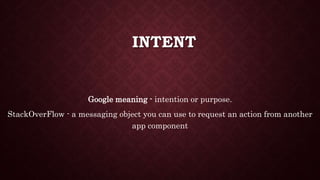
Google meaning - intention or purpose.
StackOverFlow - a messaging object you can use to request an action from another
app component
TYPES
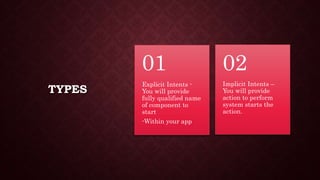
Explicit Intents -
You will provide
fully qualified name
of component to
start
-Within your app
01
Implicit Intents –
You will provide
action to perform
system starts the
action.
02
INTENT USAGES
• To start components.
• To share data.
EXAMPLES
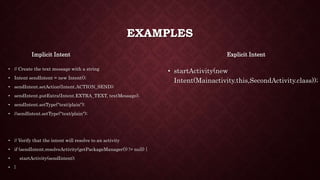
Implicit Intent
• // Create the text message with a string
• Intent sendIntent = new Intent();
• sendIntent.setAction(Intent.ACTION_SEND);
• sendIntent.putExtra(Intent.EXTRA_TEXT, textMessage);
• sendIntent.setType("text/plain");
• //sendIntent.setType("text/plain");
• // Verify that the intent will resolve to an activity
• if (sendIntent.resolveActivity(getPackageManager()) != null) {
• startActivity(sendIntent);
• }
Explicit Intent
• startActivity(new
Intent(Mainactivity.this,SecondActivity.class));
HOW TO RECEIVE INTENTS
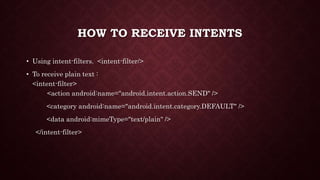
• Using intent-filters. <intent-filter/>
• To receive plain text :
<intent-filter>
<action android:name="android.intent.action.SEND" />
<category android:name="android.intent.category.DEFAULT" />
<data android:mimeType="text/plain" />
</intent-filter>
HANDLING INCOMING INTENTS
onCreate (Bundle savedInstanceState) {
...
// Get intent, action and MIME type
Intent intent = getIntent();
String action = intent.getAction();
String type = intent.getType();
if (Intent.ACTION_SEND.equals(action) && type != null) {
if ("text/plain".equals(type)) {
handleSendText(intent); // Handle text being sent
} else if (type.startsWith("image/")) {
handleSendImage(intent); // Handle single image being sent
}
}
}
INTENT RESOLUTION
• Action.
• Data (both URI and data type).
• Category.

Android Intent and intent filters

  • 1.
    INTENT Google meaning -intention or purpose. StackOverFlow - a messaging object you can use to request an action from another app component
  • 2.
    TYPES Explicit Intents - Youwill provide fully qualified name of component to start -Within your app 01 Implicit Intents – You will provide action to perform system starts the action. 02
  • 3.
    INTENT USAGES • Tostart components. • To share data.
  • 4.
    EXAMPLES Implicit Intent • //Create the text message with a string • Intent sendIntent = new Intent(); • sendIntent.setAction(Intent.ACTION_SEND); • sendIntent.putExtra(Intent.EXTRA_TEXT, textMessage); • sendIntent.setType("text/plain"); • //sendIntent.setType("text/plain"); • // Verify that the intent will resolve to an activity • if (sendIntent.resolveActivity(getPackageManager()) != null) { • startActivity(sendIntent); • } Explicit Intent • startActivity(new Intent(Mainactivity.this,SecondActivity.class));
  • 5.
    HOW TO RECEIVEINTENTS • Using intent-filters. <intent-filter/> • To receive plain text : <intent-filter> <action android:name="android.intent.action.SEND" /> <category android:name="android.intent.category.DEFAULT" /> <data android:mimeType="text/plain" /> </intent-filter>
  • 6.
    HANDLING INCOMING INTENTS onCreate(Bundle savedInstanceState) { ... // Get intent, action and MIME type Intent intent = getIntent(); String action = intent.getAction(); String type = intent.getType(); if (Intent.ACTION_SEND.equals(action) && type != null) { if ("text/plain".equals(type)) { handleSendText(intent); // Handle text being sent } else if (type.startsWith("image/")) { handleSendImage(intent); // Handle single image being sent } } }
  • 7.
    INTENT RESOLUTION • Action. •Data (both URI and data type). • Category.