@hpique
Android In-app Billing
        Demystified


       Hermés Piqué
         @hpique
Agenda

• In-app Billing Overview
• Google Play Billing Service
• Android Billing Library
• Security Best Practices
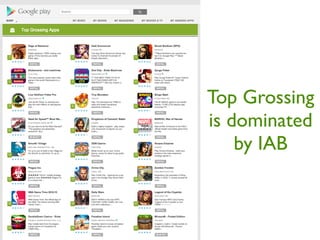
Top Grossing
is dominated
    by IAB
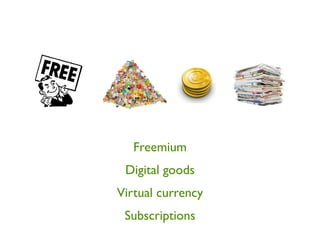
Freemium
 Digital goods
Virtual currency
 Subscriptions
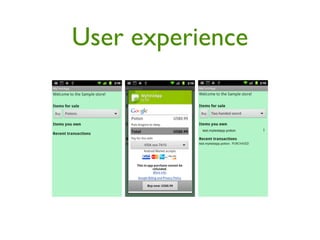
User experience
In-app billing terms

• Powered by Google Wallet
• 30% of the sale price
• No refunds (kinda)
• Only for digital goods
• Flexible pricing (unlike iOS)
Agenda

• In-app Billing Overview
• Google Play Billing Service
• Android Billing Library
• Security Best Practices
Google Play Billing
       Service

• Google Play only
• Android 1.6 upwards (API level 4)
• Now at version 2 with subscription
  support
Product types
• In-app products
 •   Managed (per user account): premium, digital
     content

 •   Unmanaged: virtual currency, consumable virtual
     goods

• Subscriptions
 •   Monthly & yearly with free trials support
Pre-requisites

• Services
• AIDL
• BroadcastReceiver
• PendingIntent
Wait, there’s more

• SQLite
• Obfuscation
• Signature validation
• 57 pages of doc!
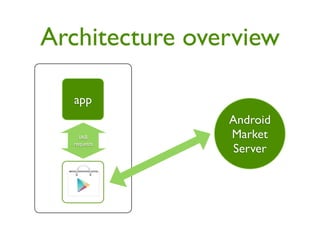
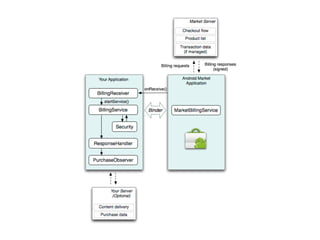
Architecture overview

  app
                Android
    IAB         Market
  requests
                 Server
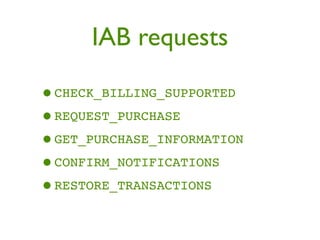
IAB requests

•CHECK_BILLING_SUPPORTED
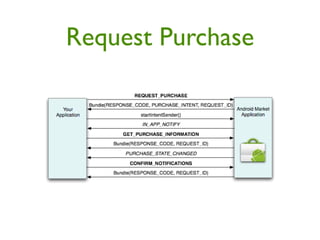
•REQUEST_PURCHASE
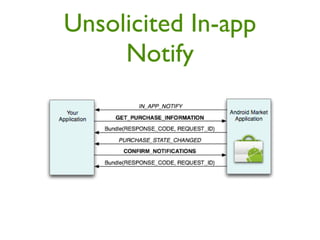
•GET_PURCHASE_INFORMATION
•CONFIRM_NOTIFICATIONS
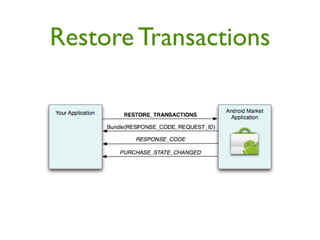
•RESTORE_TRANSACTIONS
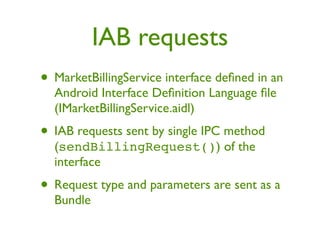
IAB requests
• MarketBillingService interface defined in an
  Android Interface Definition Language file
  (IMarketBillingService.aidl)
• IAB requests sent by single IPC method
  (sendBillingRequest()) of the
  interface
• Request type and parameters are sent as a
  Bundle
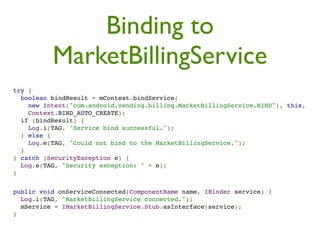
Binding to
          MarketBillingService
try {
  boolean bindResult = mContext.bindService(
    new Intent("com.android.vending.billing.MarketBillingService.BIND"), this,
    Context.BIND_AUTO_CREATE);
  if (bindResult) {
    Log.i(TAG, "Service bind successful.");
  } else {
    Log.e(TAG, "Could not bind to the MarketBillingService.");
  }
} catch (SecurityException e) {
  Log.e(TAG, "Security exception: " + e);
}


public void onServiceConnected(ComponentName name, IBinder service) {
  Log.i(TAG, "MarketBillingService connected.");
  mService = IMarketBillingService.Stub.asInterface(service);
}
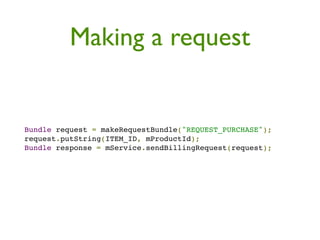
Making a request


Bundle request = makeRequestBundle("REQUEST_PURCHASE");
request.putString(ITEM_ID, mProductId);
Bundle response = mService.sendBillingRequest(request);
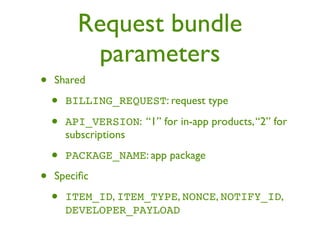
Request bundle
           parameters
•   Shared

    •   BILLING_REQUEST: request type

    •   API_VERSION: “1” for in-app products, “2” for
        subscriptions

    •   PACKAGE_NAME: app package

•   Specific

    •   ITEM_ID, ITEM_TYPE, NONCE, NOTIFY_ID,
        DEVELOPER_PAYLOAD
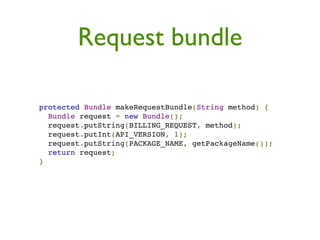
Request bundle

protected Bundle makeRequestBundle(String method) {
  Bundle request = new Bundle();
  request.putString(BILLING_REQUEST, method);
  request.putInt(API_VERSION, 1);
  request.putString(PACKAGE_NAME, getPackageName());
  return request;
}
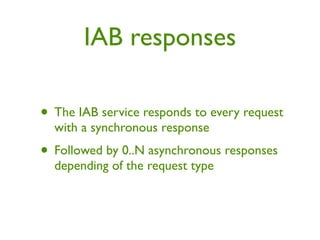
IAB responses

• The IAB service responds to every request
  with a synchronous response
• Followed by 0..N asynchronous responses
  depending of the request type
Synchronous responses
• RESPONSE_CODE: status information and
  error information about a request

• REQUEST_ID: used to match
  asynchronous responses with requests

• PURCHASE_INTENT: PendingIntent, which
  you use to launch the checkout activity
 •   REQUEST_PURCHASE only
Asynchronous
      responses
• Broadcast intents:
 • RESPONSE_CODE
 • IN_APP_NOTIFY
 • PURCHASE_STATE_CHANGED
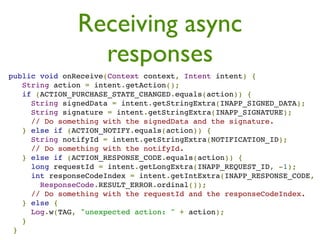
Receiving async
                  responses
 public void onReceive(Context context, Intent intent) {
    String action = intent.getAction();
    if (ACTION_PURCHASE_STATE_CHANGED.equals(action)) {
      String signedData = intent.getStringExtra(INAPP_SIGNED_DATA);
      String signature = intent.getStringExtra(INAPP_SIGNATURE);
      // Do something with the signedData and the signature.
    } else if (ACTION_NOTIFY.equals(action)) {
      String notifyId = intent.getStringExtra(NOTIFICATION_ID);
      // Do something with the notifyId.
    } else if (ACTION_RESPONSE_CODE.equals(action)) {
      long requestId = intent.getLongExtra(INAPP_REQUEST_ID, -1);
      int responseCodeIndex = intent.getIntExtra(INAPP_RESPONSE_CODE,
        ResponseCode.RESULT_ERROR.ordinal());
      // Do something with the requestId and the responseCodeIndex.
    } else {
      Log.w(TAG, "unexpected action: " + action);
    }
  }
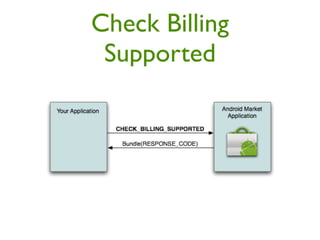
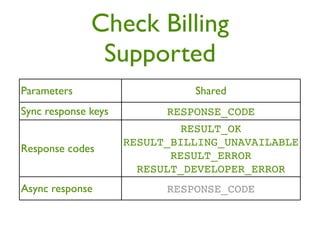
Check Billing
 Supported
Check Billing
               Supported
Parameters                     Shared
Sync response keys         RESPONSE_CODE
                             RESULT_OK
                     RESULT_BILLING_UNAVAILABLE
Response codes
                            RESULT_ERROR
                       RESULT_DEVELOPER_ERROR
Async response             RESPONSE_CODE
Request Purchase
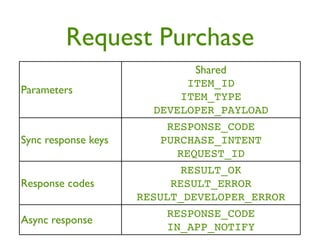
Request Purchase
                              Shared
                            ITEM_ID
Parameters
                           ITEM_TYPE
                       DEVELOPER_PAYLOAD
                         RESPONSE_CODE
Sync response keys      PURCHASE_INTENT
                           REQUEST_ID
                           RESULT_OK
Response codes            RESULT_ERROR
                     RESULT_DEVELOPER_ERROR
                         RESPONSE_CODE
Async response
                         IN_APP_NOTIFY
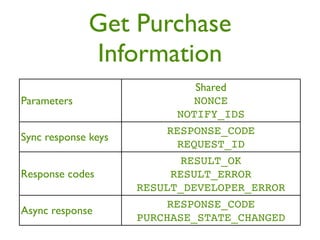
Get Purchase
             Information
                              Shared
Parameters                   NONCE
                           NOTIFY_IDS
                         RESPONSE_CODE
Sync response keys
                           REQUEST_ID
                           RESULT_OK
Response codes            RESULT_ERROR
                     RESULT_DEVELOPER_ERROR
                         RESPONSE_CODE
Async response
                     PURCHASE_STATE_CHANGED
Purchase State Changed
          JSON
{ "nonce" : 1836535032137741465,
  "orders" :
    [{ "notificationId" : "android.test.purchased",
       "orderId" : "transactionId.android.test.purchased",
       "packageName" : "com.example.dungeons",
       "productId" : "android.test.purchased",
       "developerPayload" : "bGoa+V7g/yqDXvKRq",
       "purchaseTime" : 1290114783411,
       "purchaseState" : 0,
       "purchaseToken" : "rojeslcdyyiapnqcynkjyyjh" }]
}
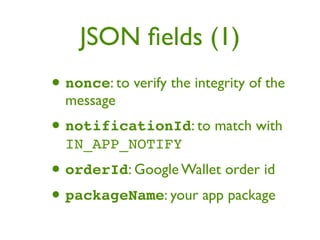
JSON fields (1)
• nonce: to verify the integrity of the
  message
• notificationId: to match with
  IN_APP_NOTIFY
• orderId: Google Wallet order id
• packageName: your app package
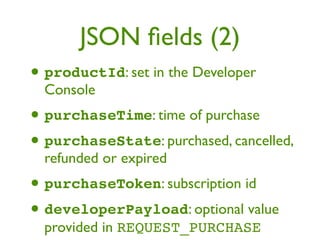
JSON fields (2)
• productId: set in the Developer
  Console
• purchaseTime: time of purchase
• purchaseState: purchased, cancelled,
  refunded or expired
• purchaseToken: subscription id
• developerPayload: optional value
  provided in REQUEST_PURCHASE
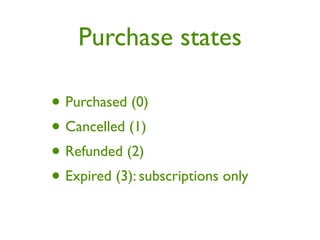
Purchase states

• Purchased (0)
• Cancelled (1)
• Refunded (2)
• Expired (3): subscriptions only
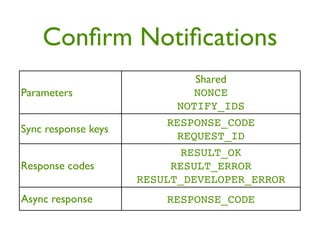
Confirm Notifications
                              Shared
Parameters                   NONCE
                           NOTIFY_IDS
                         RESPONSE_CODE
Sync response keys
                           REQUEST_ID
                           RESULT_OK
Response codes            RESULT_ERROR
                     RESULT_DEVELOPER_ERROR
Async response           RESPONSE_CODE
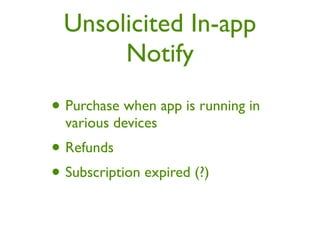
Unsolicited In-app
       Notify
• Purchase when app is running in
  various devices
• Refunds
• Subscription expired (?)
Unsolicited In-app
     Notify
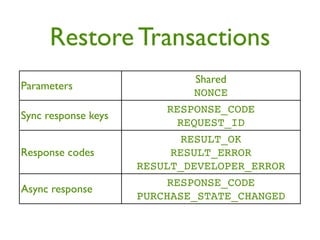
Restore Transactions
                              Shared
Parameters
                             NONCE
                         RESPONSE_CODE
Sync response keys
                           REQUEST_ID
                           RESULT_OK
Response codes            RESULT_ERROR
                     RESULT_DEVELOPER_ERROR
                         RESPONSE_CODE
Async response
                     PURCHASE_STATE_CHANGED
Security Controls


• Signed purchase data
• In-app notify nonces
Purchase State
   Changed extras
• inapp_signed_data: Signed
 JSON string (unencrypted)
• inapp_signature: Use the
 Google Play public key to validate
IAB limitations

• No API for product details & price
• To fully test you need to pay for real
• Sometimes async messages are really async
Obligatory image of Justin Bieber to wake you up
Agenda

• In-app Billing Overview
• Google Play Billing Service
• Android Billing Library
• Security Best Practices
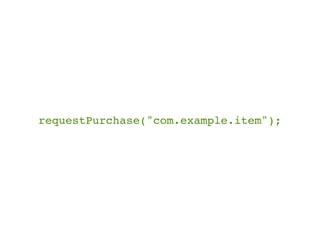
requestPurchase("com.example.item");
Android Billing Library!

     tiny.cc/android-billing


• Open-source on github
• Better than starting from scratch
Features

• Full Android IAB Service implementation
• Auto-confirmations
• Obfuscated purchase database
• Implements security best practices
• Half-decent unit testing coverage
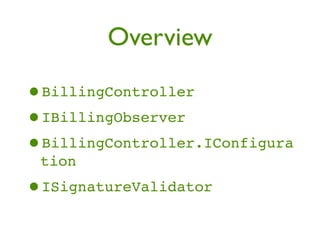
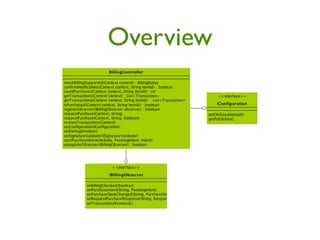
Overview

•BillingController
•IBillingObserver
•BillingController.IConfigura
 tion
•ISignatureValidator
Overview
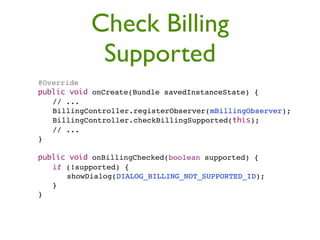
Check Billing
                Supported
"   @Override
"   public void onCreate(Bundle savedInstanceState) {
"   " // ...
"   " BillingController.registerObserver(mBillingObserver);
"   " BillingController.checkBillingSupported(this);
"   " // ...
"   }

"   public void onBillingChecked(boolean supported) {
"   " if (!supported) {
"   " " showDialog(DIALOG_BILLING_NOT_SUPPORTED_ID);
"   " }
"   }
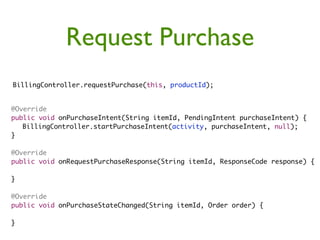
Request Purchase
BillingController.requestPurchase(this, productId);


@Override
public void onPurchaseIntent(String itemId, PendingIntent purchaseIntent) {
	 BillingController.startPurchaseIntent(activity, purchaseIntent, null);
}

@Override
public void onRequestPurchaseResponse(String itemId, ResponseCode response) {

}

@Override
public void onPurchaseStateChanged(String itemId, Order order) {

}
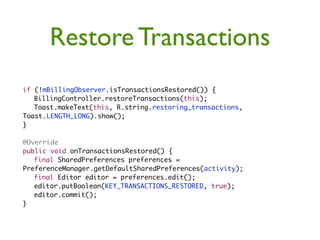
Restore Transactions
if (!mBillingObserver.isTransactionsRestored()) {
	 BillingController.restoreTransactions(this);
	 Toast.makeText(this, R.string.restoring_transactions,
Toast.LENGTH_LONG).show();
}

@Override
public void onTransactionsRestored() {
	 final SharedPreferences preferences =
PreferenceManager.getDefaultSharedPreferences(activity);
	 final Editor editor = preferences.edit();
	 editor.putBoolean(KEY_TRANSACTIONS_RESTORED, true);
	 editor.commit();
}
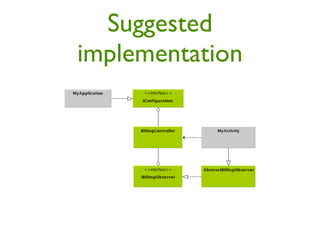
Suggested
implementation
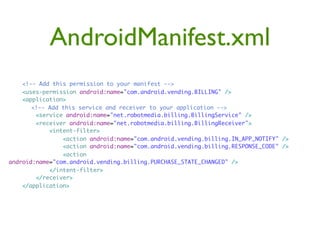
AndroidManifest.xml
    <!-- Add this permission to your manifest -->
    <uses-permission android:name="com.android.vending.BILLING" />
    <application>
    	 <!-- Add this service and receiver to your application -->
        <service android:name="net.robotmedia.billing.BillingService" />
        <receiver android:name="net.robotmedia.billing.BillingReceiver">
            <intent-filter>
                <action android:name="com.android.vending.billing.IN_APP_NOTIFY" />
                <action android:name="com.android.vending.billing.RESPONSE_CODE" />
                <action
android:name="com.android.vending.billing.PURCHASE_STATE_CHANGED" />
            </intent-filter>
        </receiver>
    </application>
Set configuration
	   public void onCreate() {
	   	 super.onCreate();
	   	 BillingController.setDebug(true);
	   	 BillingController.setConfiguration(new BillingController.IConfiguration() {
	   	 	
	   	 	 @Override
	   	 	 public byte[] getObfuscationSalt() {
	   	 	 	 return new byte[] {41, -90, -116, -41, 66, -53, 122, -110, -127, -96, -88, 77, 127
	   	 	 }

	   	   	 @Override
	   	   	 public String getPublicKey() {
	   	   	 	 return "your public key here";
	   	   	 }
	   	   });
	   }
Agenda

• In-app Billing Overview
• Google Play Billing Service
• Android Billing Library
• Security Best Practices
Best Practices

• Random nonces
• Obfuscate purchase data
• Embedding public key
• Code obfuscation
• Server-side signature validation
Random nonces

• Sent with
  GET_PURCHASE_INFORMATION and
  RESTORE_TRANSACTION requests
• Handled by ABL
• Server-side nonce generation & verification
  not supported by ABL (but really?)
Obfuscate purchase data

 • Do not store purchase data plainly
 • Handled by ABL
 • Uses salt, installation id, device id and app id
   to perform obfuscation
Embedding public key


• Do not embed the public key plainly
• Only embed the public key if you can’t
  perform server-side signature validation
Code obfuscation

• Obfuscate your app code to make it harder
  to hack
• Problem: ABL is open-source!
• Use ProGuard and consider making
  changes to the ABL code
Server-side validation
• Perform the signature validation on a server
• Supported by ABL
• Provide your own
  ISignatureValidator; validation is
  performed with AsyncTask

• Return null on
  IConfiguration.getKey
Thanks!

Android In-app Billing @ Droidcon Murcia

  • 1.
  • 2.
    Android In-app Billing Demystified Hermés Piqué @hpique
  • 3.
    Agenda • In-app BillingOverview • Google Play Billing Service • Android Billing Library • Security Best Practices
  • 4.
  • 5.
    Freemium Digital goods Virtualcurrency Subscriptions
  • 6.
  • 7.
    In-app billing terms •Powered by Google Wallet • 30% of the sale price • No refunds (kinda) • Only for digital goods • Flexible pricing (unlike iOS)
  • 8.
    Agenda • In-app BillingOverview • Google Play Billing Service • Android Billing Library • Security Best Practices
  • 9.
    Google Play Billing Service • Google Play only • Android 1.6 upwards (API level 4) • Now at version 2 with subscription support
  • 10.
    Product types • In-appproducts • Managed (per user account): premium, digital content • Unmanaged: virtual currency, consumable virtual goods • Subscriptions • Monthly & yearly with free trials support
  • 11.
    Pre-requisites • Services • AIDL •BroadcastReceiver • PendingIntent
  • 12.
    Wait, there’s more •SQLite • Obfuscation • Signature validation • 57 pages of doc!
  • 13.
    Architecture overview app Android IAB Market requests Server
  • 14.
  • 15.
    IAB requests • MarketBillingServiceinterface defined in an Android Interface Definition Language file (IMarketBillingService.aidl) • IAB requests sent by single IPC method (sendBillingRequest()) of the interface • Request type and parameters are sent as a Bundle
  • 16.
    Binding to MarketBillingService try {   boolean bindResult = mContext.bindService(     new Intent("com.android.vending.billing.MarketBillingService.BIND"), this,     Context.BIND_AUTO_CREATE);   if (bindResult) {     Log.i(TAG, "Service bind successful.");   } else {     Log.e(TAG, "Could not bind to the MarketBillingService.");   } } catch (SecurityException e) {   Log.e(TAG, "Security exception: " + e); } public void onServiceConnected(ComponentName name, IBinder service) {   Log.i(TAG, "MarketBillingService connected.");   mService = IMarketBillingService.Stub.asInterface(service); }
  • 17.
    Making a request Bundlerequest = makeRequestBundle("REQUEST_PURCHASE"); request.putString(ITEM_ID, mProductId); Bundle response = mService.sendBillingRequest(request);
  • 18.
    Request bundle parameters • Shared • BILLING_REQUEST: request type • API_VERSION: “1” for in-app products, “2” for subscriptions • PACKAGE_NAME: app package • Specific • ITEM_ID, ITEM_TYPE, NONCE, NOTIFY_ID, DEVELOPER_PAYLOAD
  • 19.
    Request bundle protected BundlemakeRequestBundle(String method) {   Bundle request = new Bundle();   request.putString(BILLING_REQUEST, method);   request.putInt(API_VERSION, 1);   request.putString(PACKAGE_NAME, getPackageName());   return request; }
  • 20.
    IAB responses • TheIAB service responds to every request with a synchronous response • Followed by 0..N asynchronous responses depending of the request type
  • 21.
    Synchronous responses • RESPONSE_CODE:status information and error information about a request • REQUEST_ID: used to match asynchronous responses with requests • PURCHASE_INTENT: PendingIntent, which you use to launch the checkout activity • REQUEST_PURCHASE only
  • 22.
    Asynchronous responses • Broadcast intents: • RESPONSE_CODE • IN_APP_NOTIFY • PURCHASE_STATE_CHANGED
  • 23.
    Receiving async responses public void onReceive(Context context, Intent intent) {     String action = intent.getAction();     if (ACTION_PURCHASE_STATE_CHANGED.equals(action)) {       String signedData = intent.getStringExtra(INAPP_SIGNED_DATA);       String signature = intent.getStringExtra(INAPP_SIGNATURE);       // Do something with the signedData and the signature.     } else if (ACTION_NOTIFY.equals(action)) {       String notifyId = intent.getStringExtra(NOTIFICATION_ID);       // Do something with the notifyId.     } else if (ACTION_RESPONSE_CODE.equals(action)) {       long requestId = intent.getLongExtra(INAPP_REQUEST_ID, -1);       int responseCodeIndex = intent.getIntExtra(INAPP_RESPONSE_CODE,         ResponseCode.RESULT_ERROR.ordinal());       // Do something with the requestId and the responseCodeIndex.     } else {       Log.w(TAG, "unexpected action: " + action);     }   }
  • 24.
  • 25.
    Check Billing Supported Parameters Shared Sync response keys RESPONSE_CODE RESULT_OK RESULT_BILLING_UNAVAILABLE Response codes RESULT_ERROR RESULT_DEVELOPER_ERROR Async response RESPONSE_CODE
  • 26.
  • 27.
    Request Purchase Shared ITEM_ID Parameters ITEM_TYPE DEVELOPER_PAYLOAD RESPONSE_CODE Sync response keys PURCHASE_INTENT REQUEST_ID RESULT_OK Response codes RESULT_ERROR RESULT_DEVELOPER_ERROR RESPONSE_CODE Async response IN_APP_NOTIFY
  • 28.
    Get Purchase Information Shared Parameters NONCE NOTIFY_IDS RESPONSE_CODE Sync response keys REQUEST_ID RESULT_OK Response codes RESULT_ERROR RESULT_DEVELOPER_ERROR RESPONSE_CODE Async response PURCHASE_STATE_CHANGED
  • 29.
    Purchase State Changed JSON { "nonce" : 1836535032137741465, "orders" : [{ "notificationId" : "android.test.purchased", "orderId" : "transactionId.android.test.purchased", "packageName" : "com.example.dungeons", "productId" : "android.test.purchased", "developerPayload" : "bGoa+V7g/yqDXvKRq", "purchaseTime" : 1290114783411, "purchaseState" : 0, "purchaseToken" : "rojeslcdyyiapnqcynkjyyjh" }] }
  • 30.
    JSON fields (1) •nonce: to verify the integrity of the message • notificationId: to match with IN_APP_NOTIFY • orderId: Google Wallet order id • packageName: your app package
  • 31.
    JSON fields (2) •productId: set in the Developer Console • purchaseTime: time of purchase • purchaseState: purchased, cancelled, refunded or expired • purchaseToken: subscription id • developerPayload: optional value provided in REQUEST_PURCHASE
  • 32.
    Purchase states • Purchased(0) • Cancelled (1) • Refunded (2) • Expired (3): subscriptions only
  • 33.
    Confirm Notifications Shared Parameters NONCE NOTIFY_IDS RESPONSE_CODE Sync response keys REQUEST_ID RESULT_OK Response codes RESULT_ERROR RESULT_DEVELOPER_ERROR Async response RESPONSE_CODE
  • 34.
    Unsolicited In-app Notify • Purchase when app is running in various devices • Refunds • Subscription expired (?)
  • 35.
  • 36.
  • 37.
    Restore Transactions Shared Parameters NONCE RESPONSE_CODE Sync response keys REQUEST_ID RESULT_OK Response codes RESULT_ERROR RESULT_DEVELOPER_ERROR RESPONSE_CODE Async response PURCHASE_STATE_CHANGED
  • 38.
    Security Controls • Signedpurchase data • In-app notify nonces
  • 39.
    Purchase State Changed extras • inapp_signed_data: Signed JSON string (unencrypted) • inapp_signature: Use the Google Play public key to validate
  • 41.
    IAB limitations • NoAPI for product details & price • To fully test you need to pay for real • Sometimes async messages are really async
  • 42.
    Obligatory image ofJustin Bieber to wake you up
  • 43.
    Agenda • In-app BillingOverview • Google Play Billing Service • Android Billing Library • Security Best Practices
  • 44.
  • 45.
    Android Billing Library! tiny.cc/android-billing • Open-source on github • Better than starting from scratch
  • 46.
    Features • Full AndroidIAB Service implementation • Auto-confirmations • Obfuscated purchase database • Implements security best practices • Half-decent unit testing coverage
  • 47.
  • 48.
  • 49.
    Check Billing Supported " @Override " public void onCreate(Bundle savedInstanceState) { " " // ... " " BillingController.registerObserver(mBillingObserver); " " BillingController.checkBillingSupported(this); " " // ... " } " public void onBillingChecked(boolean supported) { " " if (!supported) { " " " showDialog(DIALOG_BILLING_NOT_SUPPORTED_ID); " " } " }
  • 50.
    Request Purchase BillingController.requestPurchase(this, productId); @Override publicvoid onPurchaseIntent(String itemId, PendingIntent purchaseIntent) { BillingController.startPurchaseIntent(activity, purchaseIntent, null); } @Override public void onRequestPurchaseResponse(String itemId, ResponseCode response) { } @Override public void onPurchaseStateChanged(String itemId, Order order) { }
  • 51.
    Restore Transactions if (!mBillingObserver.isTransactionsRestored()){ BillingController.restoreTransactions(this); Toast.makeText(this, R.string.restoring_transactions, Toast.LENGTH_LONG).show(); } @Override public void onTransactionsRestored() { final SharedPreferences preferences = PreferenceManager.getDefaultSharedPreferences(activity); final Editor editor = preferences.edit(); editor.putBoolean(KEY_TRANSACTIONS_RESTORED, true); editor.commit(); }
  • 52.
  • 53.
    AndroidManifest.xml <!-- Add this permission to your manifest --> <uses-permission android:name="com.android.vending.BILLING" /> <application> <!-- Add this service and receiver to your application --> <service android:name="net.robotmedia.billing.BillingService" /> <receiver android:name="net.robotmedia.billing.BillingReceiver"> <intent-filter> <action android:name="com.android.vending.billing.IN_APP_NOTIFY" /> <action android:name="com.android.vending.billing.RESPONSE_CODE" /> <action android:name="com.android.vending.billing.PURCHASE_STATE_CHANGED" /> </intent-filter> </receiver> </application>
  • 54.
    Set configuration public void onCreate() { super.onCreate(); BillingController.setDebug(true); BillingController.setConfiguration(new BillingController.IConfiguration() { @Override public byte[] getObfuscationSalt() { return new byte[] {41, -90, -116, -41, 66, -53, 122, -110, -127, -96, -88, 77, 127 } @Override public String getPublicKey() { return "your public key here"; } }); }
  • 55.
    Agenda • In-app BillingOverview • Google Play Billing Service • Android Billing Library • Security Best Practices
  • 56.
    Best Practices • Randomnonces • Obfuscate purchase data • Embedding public key • Code obfuscation • Server-side signature validation
  • 57.
    Random nonces • Sentwith GET_PURCHASE_INFORMATION and RESTORE_TRANSACTION requests • Handled by ABL • Server-side nonce generation & verification not supported by ABL (but really?)
  • 58.
    Obfuscate purchase data • Do not store purchase data plainly • Handled by ABL • Uses salt, installation id, device id and app id to perform obfuscation
  • 59.
    Embedding public key •Do not embed the public key plainly • Only embed the public key if you can’t perform server-side signature validation
  • 60.
    Code obfuscation • Obfuscateyour app code to make it harder to hack • Problem: ABL is open-source! • Use ProGuard and consider making changes to the ABL code
  • 61.
    Server-side validation • Performthe signature validation on a server • Supported by ABL • Provide your own ISignatureValidator; validation is performed with AsyncTask • Return null on IConfiguration.getKey
  • 62.